ExifTool is a widely adopted utility for reading and writing metadata in image, PDF, audio, and video files. It is available both as a standalone command-line application and as a library that can be embedded in other software. In this article, we break down CVE-2026-3102, an ExifTool vulnerability discovered by Kaspersky’s Global Research and Analysis Team (GReAT) in February 2026 and patched by the developers within the same month. Affecting macOS systems with ExifTool version 13.49 and earlier, this flaw could let an attacker run arbitrary commands by hiding instructions inside an image file’s metadata.
This investigation originated from revisiting an n-day vulnerability I first examined years ago: CVE-2021-22204. That flaw exploited weak regex-based sanitization before feeding user input into an eval sink. By auditing adjacent input validation routines across ExifTool codebase for similar oversights, I discovered CVE-2026-3102. Successful exploitation of CVE-2026-3102 enables an attacker to execute arbitrary shell commands with the privileges of the user invoking ExifTool, potentially leading to full system compromise.
Technical details
Disclaimer
Exploiting CVE-2026-3102 requires the -n (also known as -printConv) flag and outputs machine-readable data without additional processing.
Tracing the vulnerable sink
Taint analysis (aka tainted data analysis) allows for the detection of “dirty” data that reaches dangerous locations without validation. In this context, a “sink” is a point or function in a program where data or a parameter marked as “tainted” or originating from an untrusted source (e.g., user input) can affect the program’s behavior. In ExifTool, these functions are eval and system, both of which are capable of executing system commands. While CVE-2021-22204 exploited an eval function as a sink, this vulnerability (CVE-2026-3102) targets the system function. Knowing the vulnerable sink, we needed to trace how user-controlled data reaches it. Below, we break down the details.
Finding an unsanitized date value
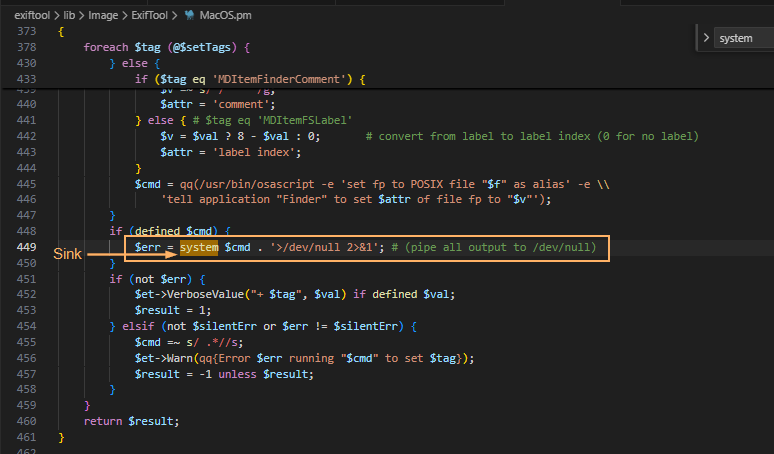
The screenshot above shows where the system() sink resides within the SetMacOSTags function. Tracing backward from system(), we identified the $cmd variable as the source of the executed command. This variable is assembled from three inputs: $file (properly sanitized), $setTags (processed iteratively), and $val (user-controlled and, crucially, left unsanitized in the vulnerable branch).
In ExifTool, a tag is a named metadata field. When parsing an image, the utility extracts date and time values from standard EXIF records or macOS filesystem attributes. To handle file creation dates on macOS, ExifTool relies on the Spotlight system attribute MDItemFSCreationDate. Within the program code, this attribute maps to the internal alias $FileCreateDate. These two identifiers govern how the file creation date is stored and applied.
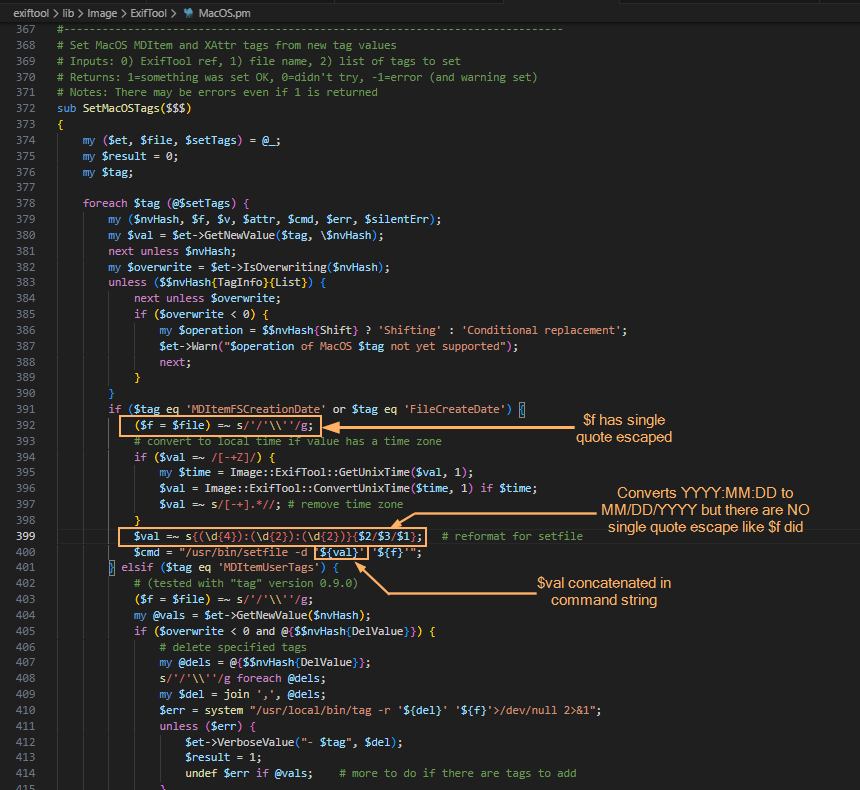
This creates a critical link to the vulnerability: when parsing an image, ExifTool iterates through the discovered tags. The current tag’s name is assigned to the $tag variable, while its text content (e.g., a date string) is assigned to $val. The vulnerable code path is triggered only when $tag matches MDItemFSCreationDate or $FileCreateDate. At this point, the tag’s content flows into $val and is passed to the SetMacOSTags function. As shown in the screenshot below, the filename parameter is properly escaped, but the date value ($val) is not. Because the date is extracted directly from file metadata, an attacker can inject quotes into this field. This breaks the command structure and allows the payload to execute via the system() sink.
The following screenshots show some of the tags that can be modified. With the vulnerable parameter identified, the next challenge was delivery: how to place our payload into FileCreateDate without triggering early validation? We found the answer in the official documentation.
Planning the payload delivery
Let’s refer to the documentation to understand how ExifTool handles tag operations and identify a legitimate feature that can be repurposed for exploitation. Specifically, we need to find a way to deliver our payload into the vulnerable FileCreateDate parameter. When looking for macOS-related tags as well as FileCreateDate, we can find the following information:
To write or delete metadata, tag values are assigned using –TAG=[VALUE], and/or the -geotag, -csv= or -json=
To copy or move metadata, the -tagsFromFile feature is used.
To trigger the vulnerability, we need to copy a string (date format: MM/DD/YYYY) using the -tagsFromFile feature, as this operation invokes the SetMacOSTags function where the unsanitized $val parameter reaches the system() sink.
Why copy instead of writing directly? Because the vulnerable code path (SetMacOSTags) is only triggered when metadata is copied into FileCreateDate — not when it is written directly. By using -tagsFromFile, we can prepare a “source” tag (e.g., DateTimeOriginal) that accepts arbitrary values and copy that value into FileCreateDate, thereby invoking the vulnerable function with our controlled input.
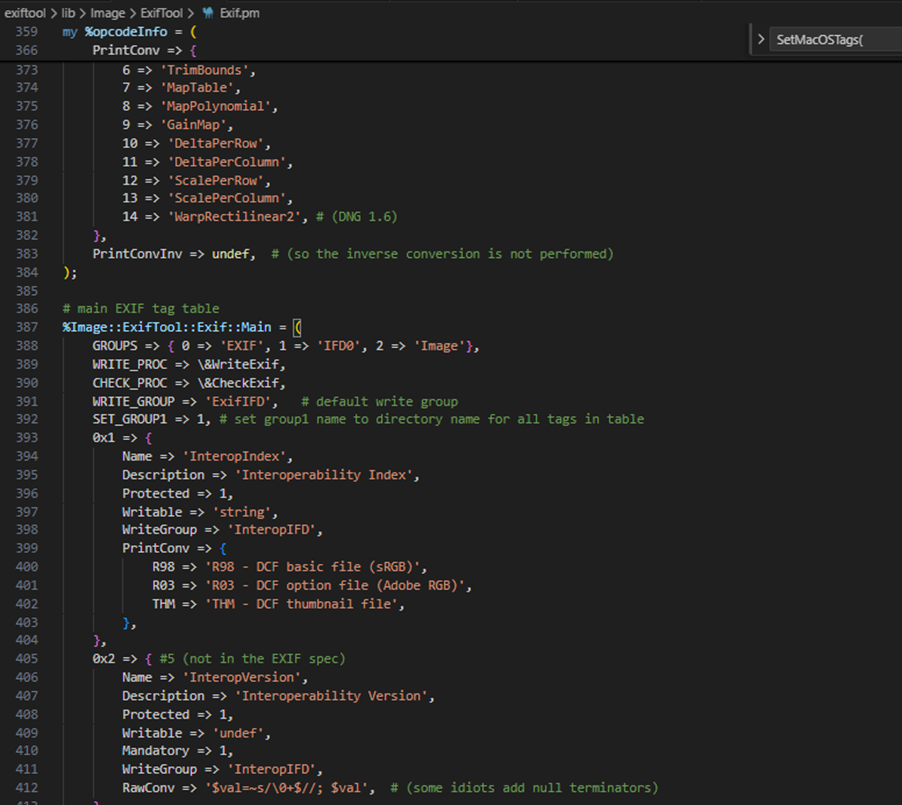
Furthermore, we want to introduce single quotes (since they are not being escaped in $val). For starters, we can look for date-time tag and copy via -tagsFromFile by searching the EXIF tag table. Direct assignment to FileCreateDate is heavily validated, so we looked for a source tag that accepts raw values and can be copied into the target field. The following snippet shows the beginning of said table.
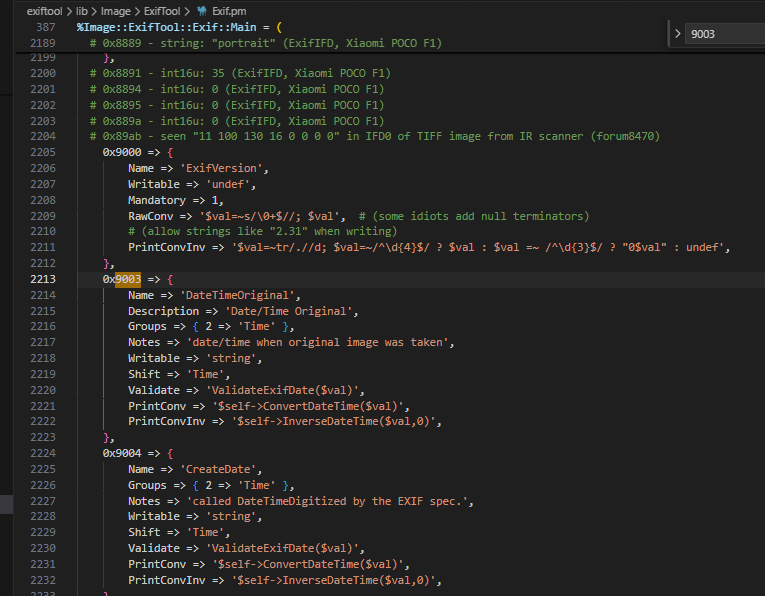
When doing the analysis, I made use of DateTimeOriginal though I believe you can also use CreateDate which is 0x9004 (see the following screenshot). Initial attempts to inject malformed dates failed: ExifTool’s built-in filter rejected the input. To bypass this, we examined how the tool handles raw metadata.
Bypassing the filter
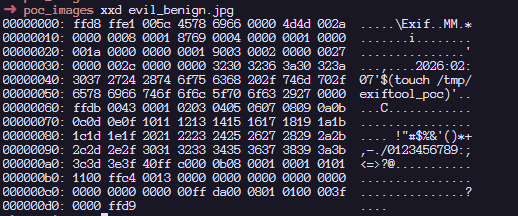
To confirm that the PrintConvInv filter rejects invalid dates when written directly, I ran the following command, where evil_benign.jpg is a normal JPG with an invalid date time format. We are greeted with the error message: Invalid date/time. This requires the time as well. The next screenshot confirms that direct exploitation fails: ExifTool’s date validation detects the malformed input and rejects the change, activating the internal PrintConvInv filter.
That said, it is possible to ignore the formatting and use the -n flag which accepts raw values instead of human-readable value. The -n flag skips the PrintConvInv conversion step, which is exactly where input sanitization occurs. This confirmed we could park unsanitized data in a source tag. The final step was to trigger the vulnerable code path by copying that data into FileCreateDate. This means we should now be able to modify the DateTimeOriginal tag with the invalid date time format with an -n flag. Examining the EXIF metadata tag, we can confirm that we can store a raw value without a proper human readable format that ExifTool accepts:
Triggering the exploit
To inject commands, we have to revisit the single quote injection into this datetime related tag.
The following screenshot shows that we have successfully set the datetime metadata with the single quote. With the payload safely stored in a source tag, the next step was to copy it into FileCreateDate, triggering the vulnerable system() call.
The next step now is to copy the datetime tag to a file which invokes SetMacOSTags. According to the documentation, this is how we can copy the data from the SRC tag to the FileCreateDate tag as seen in the SetMacOSTags with the -tagsFromFile feature.
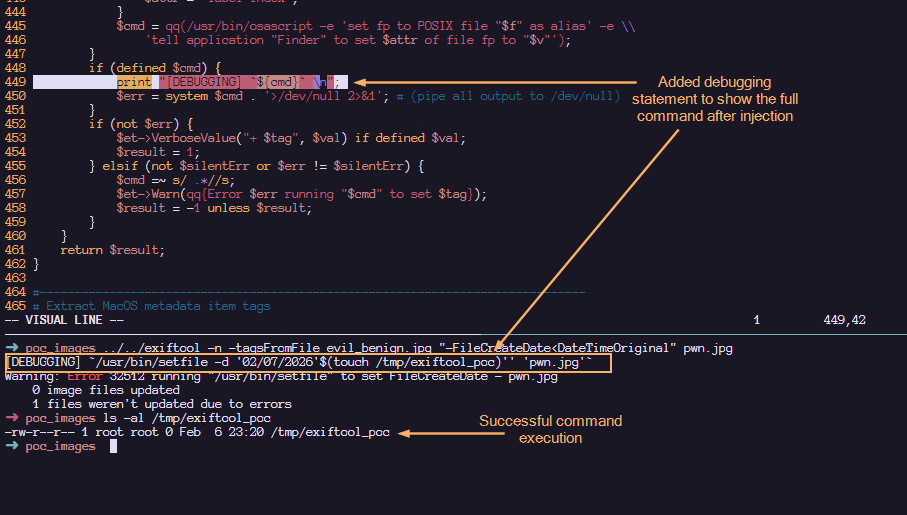
Here, we confirm that the payload has been executed! Note that when copying tags in MacOS (Darwin), the /usr/bin/setfile command is used. To view the full $cmd value before the injection, I have added the debugging statement to displaying the actual command that is executed within the system function.
Upon injection, we can see that our command gets executed via command substitution. The single quotes that we added helped to make the entire command syntactically valid. The following shows a more detailed labelling and their roles in making this command line injection successful:
Such an image can appear completely benign and easily find its way into a newsroom or any organization that processes photos on macOS using ExifTool. Once processed, an attacker could silently deploy a Trojan for covert data exfiltration, drop additional malware, or use the compromised machine as a foothold to expand the attack within the victim’s network.
Patch analysis
After verifying successful exploitation, we examined how the maintainer addressed the flaw in version 13.50. In the vulnerable version of ExifTool, commands were sanitized before being concatenated together. This means that it is possible to concatenate single quotes which led to the exploitation. However, by abstracting the system call into a dedicated wrapper and requiring a list of arguments instead of concatenated string, the fix removes the need for any manual escaping altogether.
1. Replacing string form to argument list form:
#### BEFORE
$cmd = "/usr/bin/setfile -d '${val}' '${f}'";
system $cmd;

#### AFTER
system('/usr/bin/setfile', '-d', $val, $file);
2. Create new System() wrapper. In version 13.49, the output is piped to /dev/null . To maintain that logic, the wrapper would temporarily redirect STDOUT/STDERR to /dev/null and restore them after the call.
# Call system command, redirecting all I/O to /dev/null
# Inputs: system arguments
# Returns: system return code
sub System
{
    open(my $oldout, ">&STDOUT");
    open(my $olderr, ">&STDERR");
    open(STDOUT, '>', '/dev/null');
    open(STDERR, '>', '/dev/null');
    my $result = system(@_);
    open(STDOUT, ">&", $oldout);
    open(STDERR, ">&", $olderr);
    return $result;
}
How to protect against ExifTool vulnerability
It’s critical to ensure that all photo processing workflows are using the updated version. You should verify that all asset management platforms, photo organization apps, and any bulk image processing scripts running on Macs are calling ExifTool version 13.50 or later, and don’t contain an embedded older copy of the ExifTool library.
ExifTool, like any software, may contain additional vulnerabilities of this class. To harden defenses, I recommend using Kaspersky Open Source Software Threats Data Feed for continuous monitoring of open-source components in your software supply chain, and Kaspersky for macOS as comprehensive endpoint protection. Additionally, isolate processing of untrusted files on dedicated machines or virtual environments with strictly limited network and storage access. If you work with freelancers, contractors, or allow BYOD, enforce a policy that only devices with an active macOS security solution can access your corporate network.
Conclusions
CVE-2026-3102 highlights the risks of inconsistent input sanitization in tools that bridge high-level metadata parsing with platform-specific utilities. While exploitation requires explicit flag usage (-n) and is restricted to macOS, the vulnerability underscores the danger of manual escaping routines in evolving codebases. The transition to list-form system execution provides a robust, architecture-level fix that eliminates shell interpretation risks entirely. This case reinforces a core security principle: replacing fragile string concatenation with secure, list-based API calls remains the most reliable mitigation against command injection.
ExifTool is a widely adopted utility for reading and writing metadata in image, PDF, audio, and video files. It is available both as a standalone command-line application and as a library that can be embedded in other software. In this article, we break down CVE-2026-3102, an ExifTool vulnerability discovered by Kaspersky’s Global Research and Analysis Team (GReAT) in February 2026 and patched by the developers within the same month. Affecting macOS systems with ExifTool version 13.49 and earlier, this flaw could let an attacker run arbitrary commands by hiding instructions inside an image file’s metadata.
This investigation originated from revisiting an n-day vulnerability I first examined years ago: CVE-2021-22204. That flaw exploited weak regex-based sanitization before feeding user input into an eval sink. By auditing adjacent input validation routines across ExifTool codebase for similar oversights, I discovered CVE-2026-3102. Successful exploitation of CVE-2026-3102 enables an attacker to execute arbitrary shell commands with the privileges of the user invoking ExifTool, potentially leading to full system compromise.
Technical details
Disclaimer
Exploiting CVE-2026-3102 requires the -n (also known as -printConv) flag and outputs machine-readable data without additional processing.
Tracing the vulnerable sink
Taint analysis (aka tainted data analysis) allows for the detection of “dirty” data that reaches dangerous locations without validation. In this context, a “sink” is a point or function in a program where data or a parameter marked as “tainted” or originating from an untrusted source (e.g., user input) can affect the program’s behavior. In ExifTool, these functions are eval and system, both of which are capable of executing system commands. While CVE-2021-22204 exploited an eval function as a sink, this vulnerability (CVE-2026-3102) targets the system function. Knowing the vulnerable sink, we needed to trace how user-controlled data reaches it. Below, we break down the details.
Finding an unsanitized date value
The screenshot above shows where the system() sink resides within the SetMacOSTags function. Tracing backward from system(), we identified the $cmd variable as the source of the executed command. This variable is assembled from three inputs: $file (properly sanitized), $setTags (processed iteratively), and $val (user-controlled and, crucially, left unsanitized in the vulnerable branch).
In ExifTool, a tag is a named metadata field. When parsing an image, the utility extracts date and time values from standard EXIF records or macOS filesystem attributes. To handle file creation dates on macOS, ExifTool relies on the Spotlight system attribute MDItemFSCreationDate. Within the program code, this attribute maps to the internal alias $FileCreateDate. These two identifiers govern how the file creation date is stored and applied.
This creates a critical link to the vulnerability: when parsing an image, ExifTool iterates through the discovered tags. The current tag’s name is assigned to the $tag variable, while its text content (e.g., a date string) is assigned to $val. The vulnerable code path is triggered only when $tag matches MDItemFSCreationDate or $FileCreateDate. At this point, the tag’s content flows into $val and is passed to the SetMacOSTags function. As shown in the screenshot below, the filename parameter is properly escaped, but the date value ($val) is not. Because the date is extracted directly from file metadata, an attacker can inject quotes into this field. This breaks the command structure and allows the payload to execute via the system() sink.
The following screenshots show some of the tags that can be modified. With the vulnerable parameter identified, the next challenge was delivery: how to place our payload into FileCreateDate without triggering early validation? We found the answer in the official documentation.
Planning the payload delivery
Let’s refer to the documentation to understand how ExifTool handles tag operations and identify a legitimate feature that can be repurposed for exploitation. Specifically, we need to find a way to deliver our payload into the vulnerable FileCreateDate parameter. When looking for macOS-related tags as well as FileCreateDate, we can find the following information:
To write or delete metadata, tag values are assigned using –TAG=[VALUE], and/or the -geotag, -csv= or -json=
To copy or move metadata, the -tagsFromFile feature is used.
To trigger the vulnerability, we need to copy a string (date format: MM/DD/YYYY) using the -tagsFromFile feature, as this operation invokes the SetMacOSTags function where the unsanitized $val parameter reaches the system() sink.
Why copy instead of writing directly? Because the vulnerable code path (SetMacOSTags) is only triggered when metadata is copied into FileCreateDate — not when it is written directly. By using -tagsFromFile, we can prepare a “source” tag (e.g., DateTimeOriginal) that accepts arbitrary values and copy that value into FileCreateDate, thereby invoking the vulnerable function with our controlled input.
Furthermore, we want to introduce single quotes (since they are not being escaped in $val). For starters, we can look for date-time tag and copy via -tagsFromFile by searching the EXIF tag table. Direct assignment to FileCreateDate is heavily validated, so we looked for a source tag that accepts raw values and can be copied into the target field. The following snippet shows the beginning of said table.
When doing the analysis, I made use of DateTimeOriginal though I believe you can also use CreateDate which is 0x9004 (see the following screenshot). Initial attempts to inject malformed dates failed: ExifTool’s built-in filter rejected the input. To bypass this, we examined how the tool handles raw metadata.
Bypassing the filter
To confirm that the PrintConvInv filter rejects invalid dates when written directly, I ran the following command, where evil_benign.jpg is a normal JPG with an invalid date time format. We are greeted with the error message: Invalid date/time. This requires the time as well. The next screenshot confirms that direct exploitation fails: ExifTool’s date validation detects the malformed input and rejects the change, activating the internal PrintConvInv filter.
That said, it is possible to ignore the formatting and use the -n flag which accepts raw values instead of human-readable value. The -n flag skips the PrintConvInv conversion step, which is exactly where input sanitization occurs. This confirmed we could park unsanitized data in a source tag. The final step was to trigger the vulnerable code path by copying that data into FileCreateDate. This means we should now be able to modify the DateTimeOriginal tag with the invalid date time format with an -n flag. Examining the EXIF metadata tag, we can confirm that we can store a raw value without a proper human readable format that ExifTool accepts:
Triggering the exploit
To inject commands, we have to revisit the single quote injection into this datetime related tag.
The following screenshot shows that we have successfully set the datetime metadata with the single quote. With the payload safely stored in a source tag, the next step was to copy it into FileCreateDate, triggering the vulnerable system() call.
The next step now is to copy the datetime tag to a file which invokes SetMacOSTags. According to the documentation, this is how we can copy the data from the SRC tag to the FileCreateDate tag as seen in the SetMacOSTags with the -tagsFromFile feature.
Here, we confirm that the payload has been executed! Note that when copying tags in MacOS (Darwin), the /usr/bin/setfile command is used. To view the full $cmd value before the injection, I have added the debugging statement to displaying the actual command that is executed within the system function.
Upon injection, we can see that our command gets executed via command substitution. The single quotes that we added helped to make the entire command syntactically valid. The following shows a more detailed labelling and their roles in making this command line injection successful:
Such an image can appear completely benign and easily find its way into a newsroom or any organization that processes photos on macOS using ExifTool. Once processed, an attacker could silently deploy a Trojan for covert data exfiltration, drop additional malware, or use the compromised machine as a foothold to expand the attack within the victim’s network.
Patch analysis
After verifying successful exploitation, we examined how the maintainer addressed the flaw in version 13.50. In the vulnerable version of ExifTool, commands were sanitized before being concatenated together. This means that it is possible to concatenate single quotes which led to the exploitation. However, by abstracting the system call into a dedicated wrapper and requiring a list of arguments instead of concatenated string, the fix removes the need for any manual escaping altogether.
1. Replacing string form to argument list form:
#### BEFORE
$cmd = "/usr/bin/setfile -d '${val}' '${f}'";
system $cmd;

#### AFTER
system('/usr/bin/setfile', '-d', $val, $file);
2. Create new System() wrapper. In version 13.49, the output is piped to /dev/null . To maintain that logic, the wrapper would temporarily redirect STDOUT/STDERR to /dev/null and restore them after the call.
# Call system command, redirecting all I/O to /dev/null
# Inputs: system arguments
# Returns: system return code
sub System
{
    open(my $oldout, ">&STDOUT");
    open(my $olderr, ">&STDERR");
    open(STDOUT, '>', '/dev/null');
    open(STDERR, '>', '/dev/null');
    my $result = system(@_);
    open(STDOUT, ">&", $oldout);
    open(STDERR, ">&", $olderr);
    return $result;
}
How to protect against ExifTool vulnerability
It’s critical to ensure that all photo processing workflows are using the updated version. You should verify that all asset management platforms, photo organization apps, and any bulk image processing scripts running on Macs are calling ExifTool version 13.50 or later, and don’t contain an embedded older copy of the ExifTool library.
ExifTool, like any software, may contain additional vulnerabilities of this class. To harden defenses, I recommend using Kaspersky Open Source Software Threats Data Feed for continuous monitoring of open-source components in your software supply chain, and Kaspersky for macOS as comprehensive endpoint protection. Additionally, isolate processing of untrusted files on dedicated machines or virtual environments with strictly limited network and storage access. If you work with freelancers, contractors, or allow BYOD, enforce a policy that only devices with an active macOS security solution can access your corporate network.
Conclusions
CVE-2026-3102 highlights the risks of inconsistent input sanitization in tools that bridge high-level metadata parsing with platform-specific utilities. While exploitation requires explicit flag usage (-n) and is restricted to macOS, the vulnerability underscores the danger of manual escaping routines in evolving codebases. The transition to list-form system execution provides a robust, architecture-level fix that eliminates shell interpretation risks entirely. This case reinforces a core security principle: replacing fragile string concatenation with secure, list-based API calls remains the most reliable mitigation against command injection.
Last month, Anthropic made a remarkable announcement about its new model, Claude Mythos Preview: it was so good at finding security vulnerabilities in software that the company would not release it to the general public. Instead, it would only be available to a select group of companies to scan and fix their own software.
The announcement requires context—but it contained an essential truth.
While Anthropic’s model is really good at finding software vulnerabilities, so are other models. The UK’s AI Security Institute found that OpenAI’s GPT-5.5, already generally available, is comparable in capability. The company Aisle reproduced Anthropic’s published results with smaller, cheaper models.
At the same time, Anthropic’s refusal to publicly release its new model makes a virtue out of necessity. Mythos is very expensive to run, and the company doesn’t appear to have the resources for a general release. What better way to juice the company’s valuation than to hint at capabilities but not prove them, and then have othersparrot their claims?
Nonetheless, the truth is scary. Modern generative AI systems—not just Anthropic’s, but OpenAI’s and other, open-source models—are getting really good at finding and exploiting vulnerabilities in software. And that has important ramifications for cybersecurity: on both the offense and the defense.
Attackers will use these capabilities to find, and automatically hack, vulnerabilities in systems of all kinds. They will be able to break into critical systems around the world, sometimes to plant ransomware and make money, sometimes to steal data for espionage purposes, and sometimes to control systems in times of hostility. This will make the world a much more dangerous, and more volatile, place.
But at the same time, defenders will use these same capabilities to find, and then patch, many of those same systems. For example, Mozilla used Mythos to find 271 vulnerabilities in Firefox. Those vulnerabilities have been fixed, and will never again be available to attackers. In the future, AIs automatically finding and fixing vulnerabilities in all software will be a normal part of the development process, which will result in much more secure software.
Of course, it’s not that simple. We should expect a deluge of both attackers using newly found vulnerabilities to break into systems, and at the same time much more frequent software updates for every app and device we use. But lots of systems aren’t patchable, and many systems that are don’t get patched, meaning that many vulnerabilities will stick around. And it does seem that finding and exploiting is easier than finding and fixing. All of this points to a more dangerous short-term future. Organizations will need to adapt their security to this new reality.
But it’s the long term that we need to focus on. Mythos isn’t unique, but it’s more capable than many models that have come before. And it’s less capable than models that will come after. AIs are much better at writing software than they were just six months ago. There’s every reason to believe that they will continue to get better, which means that they will get better at writing more secure software. The endgame gives AI-enhanced defenders advantages over AI-enhanced attackers.
Even more interesting are the broader implications. The same searching, pattern-matching and reasoning capabilities that make these models so good at analyzing software almost certainly apply to similar systems. The tax code isn’t computer code, but it’s a series of algorithms with inputs and outputs. It has vulnerabilities; we call them tax loopholes. It has exploits; we call them tax avoidance strategies. And it has black hat hackers: attorneys and accountants.
Just as these models are finding hundreds of vulnerabilities in complex software systems, we should expect them to be equally effective at finding many new and undiscovered tax loopholes. I am confident that the major investment banks are working on this right now, in secret. They’ve fed AI the tax code of the US, or the UK, or maybe every industrialized country, and tasked the system with looking for money-saving strategies. How many tax loopholes will those AIs find? Ten? One hundred? One thousand? The Double Dutch Irish Sandwich is a tax loophole that involves multiple different tax jurisdictions. Can AIs find loopholes even more complex? We have no idea.
Sure, the AIs will come up with a bunch of tricks that won’t work, but that’s where those attorneys and accountants come in—to verify, and then justify, the loopholes. And then to market them to their wealthy clients.
As goes the tax code, so goes any other complex system of rules and strategies. These models could be tasked with finding loopholes in environmental rules, or food and safety rules—anywhere there are complex regulatory systems and powerful people who want to evade those rules.
The results will be much worse than insecure computers. Tax loopholes result in less revenue collected by governments, and regulatory loopholes allow the powerful to skirt the rules, both of which have all sorts of social ramifications. And while software vendors can patch their systems in days, it generally takes years for a country to amend its tax code. And that process is political, with lobbyists pressuring legislators not to patch. Just look at the carried interest loophole, a US tax dodge that has been exploited for decades. Various administrations have tried to close the vulnerability, but legislators just can’t seem to resist lobbyists long enough to patch it.
AI technologies are poised to remake much of society. Just as the industrial revolution gave humans the ability to consume calories outside of their bodies at scale, the AI revolution will give humans the ability to perform cognitive tasks outside of their bodies at scale. Our systems aren’t designed for that; they’re designed for more human paces of cognition. We’re seeing it right now in the deluge of software vulnerabilities that these models are finding and exploiting. And we will soon see it in a deluge of vulnerabilities in all sorts of other systems of rules. Adapting to this new reality will be hard, but we don’t have any choice.
The UK’s AI Security Institute evaluated GPT-5.5’s ability to find security vulnerabilities, and found that it is comparable to Claude Mythos. Note that the OpenAI model is generally available.
copy.fail is a Linux kernel local privilege escalation, not a browser or clipboard attack. Disclosed by Theori on 29 April 2026 with a working PoC.
It abuses the kernel crypto API (AF_ALG sockets) plus splice() to write four bytes at a time straight into the page cache of a file the attacker does not own.
The exploit works unmodified across Ubuntu, RHEL, Debian, SUSE, Amazon Linux, Fedora and most others. No race condition, no per-distro offsets.
The file on disk is never modified. AIDE, Tripwire and checksum-based monitoring see nothing.
Kubernetes Pod Security Standards (Restricted) and the default RuntimeDefault seccomp profile do not block the syscall used. A custom seccomp profile is needed.
The mainline fix landed on 1 April. Distros are rolling kernels out now. Patch.
“Local privilege escalation” sounds dry, so let me unpack it. It means: an attacker who already has some way to run code on the machine, even as the most boring unprivileged user, can promote themselves to root. From there they can read every file, install backdoors, watch every process, and pivot to other systems.
Why does that matter on shared infrastructure? Because “local” covers a lot of ground in 2026: every container on a shared Kubernetes node, every tenant on a shared hosting box, every CI/CD job that runs untrusted pull-request code, every WSL2 instance on a Windows laptop, every containerised AI agent given shell access. They all share one Linux kernel with their neighbours. A kernel LPE collapses that boundary.

 Login
Login