 Login
Login
Microsoft: Exchange Online flags legitimate emails as phishing
Microsoft is investigating an ongoing Exchange Online issue that mistakenly flags legitimate emails as phishing and quarantines them. [...]

Microsoft gives the FBI the ability to decrypt BitLocker in response to court orders: about twenty times per year.
It’s possible for users to store those keys on a device they own, but Microsoft also recommends BitLocker users store their keys on its servers for convenience. While that means someone can access their data if they forget their password, or if repeated failed attempts to login lock the device, it also makes them vulnerable to law enforcement subpoenas and warrants.
Microsoft issued an emergency patch for a high-severity zero-day vulnerability in Office that allows attackers to bypass document security checks and is being exploited in the wild via malicious files.
Microsoft pushed the emergency patch for the zero‑day, tracked as CVE-2026-21509, and classified it as a “Microsoft Office Security Feature Bypass Vulnerability” with a CVSS score of 7.8 out of 10.
The flaw allows attackers to bypass Object Linking and Embedding (OLE) mitigations that are designed to block unsafe COM/OLE controls inside Office documents. This means a malicious attachment could infect a PC despite built-in protections.
In a real-life scenario, an attacker creates a fake Word, Excel, or PowerPoint file containing hidden “mini‑programs” or special objects. They can run code and do other things on the affected computer. Normally, Office has safety checks that would block those mini-programs because they’re risky.
However, the vulnerability allows the attacker to tweak the file’s structure and hidden information in a way that tricks Office into thinking the dangerous mini‑program inside the document is harmless. As a result, Office skips the usual security checks and allows the hidden code to run.
As code to test the bypass is publicly available, increasing the risk of exploitation, users are under urgent advice to apply the patch.
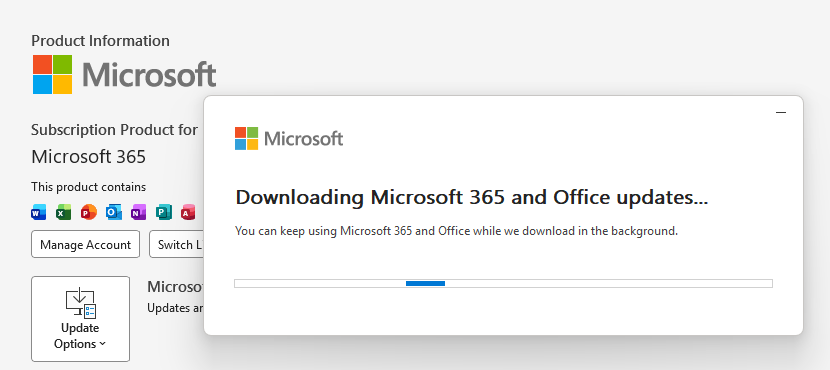
What you need to do depends on which version of Office you’re using.
The affected products include Microsoft Office 2016, 2019, LTSC 2021, LTSC 2024, and Microsoft 365 Apps (both 32‑bit and 64‑bit).
Office 2021 and later are protected via a server‑side change once Office is restarted. To apply it, close all Office apps and restart them.
Office 2016 and 2019 require a manual update. Run Windows Update with the option to update other Microsoft products turned on.
If you’re running build 16.0.10417.20095 or higher, no action is required. You can check your build number by opening any Office app, going to your account page, and selecting About for whichever application you have open. Make sure the build number at the top reads 16.0.10417.20095 or higher.
What always helps:
We don’t just report on threats—we remove them
Cybersecurity risks should never spread beyond a headline. Keep threats off your devices by downloading Malwarebytes today.
Microsoft issued an emergency patch for a high-severity zero-day vulnerability in Office that allows attackers to bypass document security checks and is being exploited in the wild via malicious files.
Microsoft pushed the emergency patch for the zero‑day, tracked as CVE-2026-21509, and classified it as a “Microsoft Office Security Feature Bypass Vulnerability” with a CVSS score of 7.8 out of 10.
The flaw allows attackers to bypass Object Linking and Embedding (OLE) mitigations that are designed to block unsafe COM/OLE controls inside Office documents. This means a malicious attachment could infect a PC despite built-in protections.
In a real-life scenario, an attacker creates a fake Word, Excel, or PowerPoint file containing hidden “mini‑programs” or special objects. They can run code and do other things on the affected computer. Normally, Office has safety checks that would block those mini-programs because they’re risky.
However, the vulnerability allows the attacker to tweak the file’s structure and hidden information in a way that tricks Office into thinking the dangerous mini‑program inside the document is harmless. As a result, Office skips the usual security checks and allows the hidden code to run.
As code to test the bypass is publicly available, increasing the risk of exploitation, users are under urgent advice to apply the patch.
What you need to do depends on which version of Office you’re using.
The affected products include Microsoft Office 2016, 2019, LTSC 2021, LTSC 2024, and Microsoft 365 Apps (both 32‑bit and 64‑bit).
Office 2021 and later are protected via a server‑side change once Office is restarted. To apply it, close all Office apps and restart them.
Office 2016 and 2019 require a manual update. Run Windows Update with the option to update other Microsoft products turned on.
If you’re running build 16.0.10417.20095 or higher, no action is required. You can check your build number by opening any Office app, going to your account page, and selecting About for whichever application you have open. Make sure the build number at the top reads 16.0.10417.20095 or higher.
What always helps:
We don’t just report on threats—we remove them
Cybersecurity risks should never spread beyond a headline. Keep threats off your devices by downloading Malwarebytes today.
The vulnerability is tracked as CVE-2026-21509 and it can be exploited to bypass security features.
The post Microsoft Patches Office Zero-Day Likely Exploited in Targeted Attacks appeared first on SecurityWeek.
Threat actors are leveraging the file-sharing service for payload delivery in AitM phishing and BEC attacks.
The post Phishers Abuse SharePoint in New Campaign Targeting Energy Sector appeared first on SecurityWeek.
RedVDS enables threat actors to set up servers that can be used for phishing, BEC attacks, account takeover, and fraud.
The post RedVDS Cybercrime Service Disrupted by Microsoft and Law Enforcement appeared first on SecurityWeek.


rvrsh3ll // Introduction This blog post is intended to give a light overview of device codes, access tokens, and refresh tokens. Here, I focus on the technical how-to for standing […]
The post Dynamic Device Code Phishing appeared first on Black Hills Information Security, Inc..

Sally Vandeven // We have all heard people talk about how much cooler Linux is than Windows, so much easier to use, etc. Well, they are not necessarily wrong… but we […]
The post Rainy Day Windows Command Research Results appeared first on Black Hills Information Security, Inc..
