Reading view

Phishing campaign abuses Google Cloud services to steal Microsoft 365 logins

Attackers are sending very convincing fake “Google” emails that slip past spam filters, route victims through several trusted Google-owned services, and ultimately lead to a look-alike Microsoft 365 sign-in page designed to harvest usernames and passwords.

Researchers found that cybercriminals used Google Cloud Application Integration’s Send Email feature to send phishing emails from a legitimate Google address: noreply-application-integration@google[.]com.

Google Cloud Application Integration allows users to automate business processes by connecting any application with point-and-click configurations. New customers currently receive free credits, which lowers the barrier to entry and may attract some cybercriminals.

The initial email arrives from what looks like a real Google address and references something routine and familiar, such as a voicemail notification, a task to complete, or permissions to access a document. The email includes a link that points to a genuine Google Cloud Storage URL, so the web address appears to belong to Google and doesn’t look like an obvious fake.

After the first click, you are redirected to another Google‑related domain (googleusercontent[.]com) showing a CAPTCHA or image check. Once you pass the “I’m not a robot check,” you land on what looks like a normal Microsoft 365 sign‑in page, but on close inspection, the web address is not an official Microsoft domain.

Any credentials provided on this site will be captured by the attackers.

The use of Google infrastructure provides the phishers with a higher level of trust from both email filters and the receiving users. This is not a vulnerability, just an abuse of cloud-based services that Google provides.

Google’s response

Google said it has taken action against the activity:

“We have blocked several phishing campaigns involving the misuse of an email notification feature within Google Cloud Application Integration. Importantly, this activity stemmed from the abuse of a workflow automation tool, not a compromise of Google’s infrastructure. While we have implemented protections to defend users against this specific attack, we encourage continued caution as malicious actors frequently attempt to spoof trusted brands. We are taking additional steps to prevent further misuse.”

We’ve seen several phishing campaigns that abuse trusted workflows from companies like Google, PayPal, DocuSign, and other cloud-based service providers to lend credibility to phishing emails and redirect targets to their credential-harvesting websites.

How to stay safe

Campaigns like these show that some responsibility for spotting phishing emails still rests with the recipient. Besides staying informed, here are some other tips you can follow to stay safe.

  • Always check the actual web address of any login page; if it’s not a genuine Microsoft domain, do not enter credentials.​ Using a password manager will help because they will not auto-fill your details on fake websites.
  • Be cautious of “urgent” emails about voicemails, document shares, or permissions, even if they appear to come from Google or Microsoft.​ Creating urgency is a common tactic by scammers and phishers.
  • Go directly to the service whenever possible. Instead of clicking links in emails, open OneDrive, Teams, or Outlook using your normal bookmark or app.
  • Use multi‑factor authentication (MFA) so that stolen passwords alone are not enough, and regularly review which apps have access to your account and remove anything you don’t recognize.

Pro tip: Malwarebytes Scam Guard can recognize emails like this as scams. You can upload suspicious text, emails, attachments and other files and ask for its opinion. It’s really very good at recognizing scams.


We don’t just report on scams—we help detect them

Cybersecurity risks should never spread beyond a headline. If something looks dodgy to you, check if it’s a scam using Malwarebytes Scam Guard, a feature of our mobile protection products. Submit a screenshot, paste suspicious content, or share a text or phone number, and we’ll tell you if it’s a scam or legit. Download Malwarebytes Mobile Security for iOS or Android and try it today!
  •  

Most Parked Domains Now Serving Malicious Content

Direct navigation — the act of visiting a website by manually typing a domain name in a web browser — has never been riskier: A new study finds the vast majority of “parked” domains — mostly expired or dormant domain names, or common misspellings of popular websites — are now configured to redirect visitors to sites that foist scams and malware.

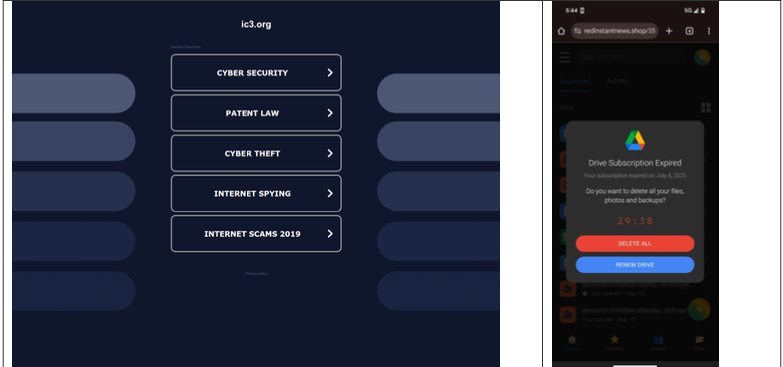
A lookalike domain to the FBI Internet Crime Complaint Center website, returned a non-threatening parking page (left) whereas a mobile user was instantly directed to deceptive content in October 2025 (right). Image: Infoblox.

When Internet users try to visit expired domain names or accidentally navigate to a lookalike “typosquatting” domain, they are typically brought to a placeholder page at a domain parking company that tries to monetize the wayward traffic by displaying links to a number of third-party websites that have paid to have their links shown.

A decade ago, ending up at one of these parked domains came with a relatively small chance of being redirected to a malicious destination: In 2014, researchers found (PDF) that parked domains redirected users to malicious sites less than five percent of the time — regardless of whether the visitor clicked on any links at the parked page.

But in a series of experiments over the past few months, researchers at the security firm Infoblox say they discovered the situation is now reversed, and that malicious content is by far the norm now for parked websites.

“In large scale experiments, we found that over 90% of the time, visitors to a parked domain would be directed to illegal content, scams, scareware and anti-virus software subscriptions, or malware, as the ‘click’ was sold from the parking company to advertisers, who often resold that traffic to yet another party,” Infoblox researchers wrote in a paper published today.

Infoblox found parked websites are benign if the visitor arrives at the site using a virtual private network (VPN), or else via a non-residential Internet address. For example, Scotiabank.com customers who accidentally mistype the domain as scotaibank[.]com will see a normal parking page if they’re using a VPN, but will be redirected to a site that tries to foist scams, malware or other unwanted content if coming from a residential IP address. Again, this redirect happens just by visiting the misspelled domain with a mobile device or desktop computer that is using a residential IP address.

According to Infoblox, the person or entity that owns scotaibank[.]com has a portfolio of nearly 3,000 lookalike domains, including gmai[.]com, which demonstrably has been configured with its own mail server for accepting incoming email messages. Meaning, if you send an email to a Gmail user and accidentally omit the “l” from “gmail.com,” that missive doesn’t just disappear into the ether or produce a bounce reply: It goes straight to these scammers. The report notices this domain also has been leveraged in multiple recent business email compromise campaigns, using a lure indicating a failed payment with trojan malware attached.

Infoblox found this particular domain holder (betrayed by a common DNS server — torresdns[.]com) has set up typosquatting domains targeting dozens of top Internet destinations, including Craigslist, YouTube, Google, Wikipedia, Netflix, TripAdvisor, Yahoo, eBay, and Microsoft. A defanged list of these typosquatting domains is available here (the dots in the listed domains have been replaced with commas).

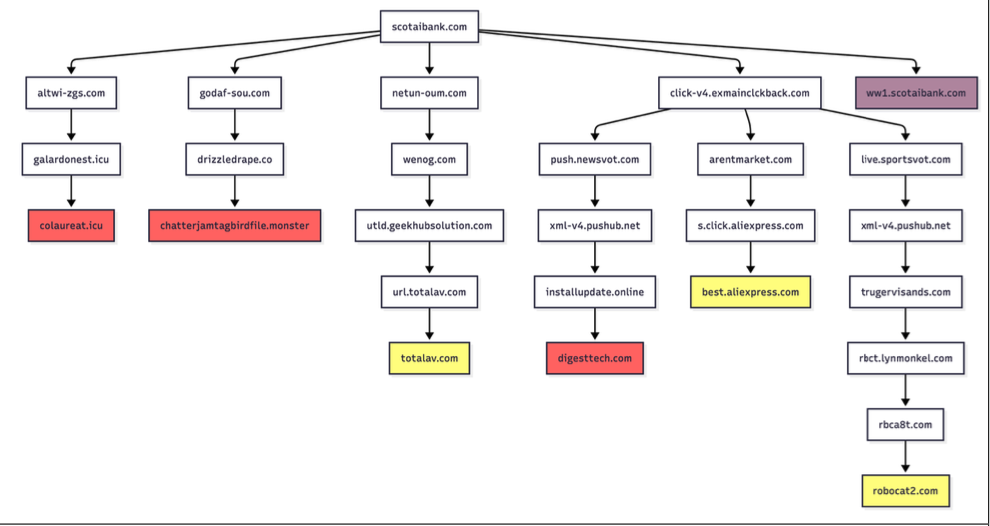
David Brunsdon, a threat researcher at Infoblox, said the parked pages send visitors through a chain of redirects, all while profiling the visitor’s system using IP geolocation, device fingerprinting, and cookies to determine where to redirect domain visitors.

“It was often a chain of redirects — one or two domains outside the parking company — before threat arrives,” Brunsdon said. “Each time in the handoff the device is profiled again and again, before being passed off to a malicious domain or else a decoy page like Amazon.com or Alibaba.com if they decide it’s not worth targeting.”

Brunsdon said domain parking services claim the search results they return on parked pages are designed to be relevant to their parked domains, but that almost none of this displayed content was related to the lookalike domain names they tested.

Samples of redirection paths when visiting scotaibank dot com. Each branch includes a series of domains observed, including the color-coded landing page. Image: Infoblox.

Infoblox said a different threat actor who owns domaincntrol[.]com — a domain that differs from GoDaddy’s name servers by a single character — has long taken advantage of typos in DNS configurations to drive users to malicious websites. In recent months, however, Infoblox discovered the malicious redirect only happens when the query for the misconfigured domain comes from a visitor who is using Cloudflare’s DNS resolvers (1.1.1.1), and that all other visitors will get a page that refuses to load.

The researchers found that even variations on well-known government domains are being targeted by malicious ad networks.

“When one of our researchers tried to report a crime to the FBI’s Internet Crime Complaint Center (IC3), they accidentally visited ic3[.]org instead of ic3[.]gov,” the report notes. “Their phone was quickly redirected to a false ‘Drive Subscription Expired’ page. They were lucky to receive a scam; based on what we’ve learnt, they could just as easily receive an information stealer or trojan malware.”

The Infoblox report emphasizes that the malicious activity they tracked is not attributed to any known party, noting that the domain parking or advertising platforms named in the study were not implicated in the malvertising they documented.

However, the report concludes that while the parking companies claim to only work with top advertisers, the traffic to these domains was frequently sold to affiliate networks, who often resold the traffic to the point where the final advertiser had no business relationship with the parking companies.

Infoblox also pointed out that recent policy changes by Google may have inadvertently increased the risk to users from direct search abuse. Brunsdon said Google Adsense previously defaulted to allowing their ads to be placed on parked pages, but that in early 2025 Google implemented a default setting that had their customers opt-out by default on presenting ads on parked domains — requiring the person running the ad to voluntarily go into their settings and turn on parking as a location.

  •  

SIEM, Startups, and the Myth (Reality?) of IT Inertia: A Reformed Analyst Reflects on SIEM MQ 2025

Vaguely magical and quadranty thing (Gemini)

It’s not every day you get to reflect on a journey that started as an odd “googley” startup and culminates in a shiny Leaders placement on a Gartner Magic Quadrant for SIEM 2025 (MQ).

When I joined Chronicle in the summer of 2019 — a name now rolled into the broader Google SecOps product (with SOAR by Siemplify and threat intel by Mandiant) — it was very much a startup. Yes, we were part of Alphabet, but the spirit, the frantic energy, the drive — it was a startup to its core.

And here’s the kicker (and a side rant!): I’m fundamentally allergic to large companies. Those who know me have heard me utter this countless times. So, in a matter of weeks after joining a small company, I found myself working for a very large one indeed.

To me, that pivot, that blending of startup momentum and big company scale, is, in many ways, the secret sauce behind our success today. It turns out, you need both the wild ambition of a young vendor and the solid foundation of a massive enterprise to truly move the needle (and the dots on the MQ … but these usually reflect customer realities).

The MQ and the Price of Poker

Now, as a reformed analyst who spent eight years in the Gartner trenches, I’ll clear up a misconception right away: the Magic Quadrant placement has precisely zero to do with how much a vendor pays Gartner. Trust me, there are vendors in highly visible SIEM MQ positions who’ve probably never sent Gartner a dime over the years.

Conversely, there are large organizations that have paid a fortune and have been completely excluded from the report. The MQ placement reflects customer traction and market reality (usually — there are sad yet very rare exceptions to this, and I will NOT talk about them; there is not enough whiskey in the world to make me). MQ placement is a measure of genuine success, not a destination achieved by writing a big check.

The Evolution of SIEM: Where Did the Brothers Go?

Reflecting on the last few years in SIEM (not 20 years!) and looking at the current MQ, a few things that were once controversial are now conventional wisdom:

  1. SIEM must be SaaS and Cloud-Native. I’m old enough to remember when the idea of trusting your security data to the cloud was an existential debate. Today, with the relentless attack surface expansion, perhaps more people are realizing that the biggest risk is actually running a vulnerable, constantly-compromised on-prem SIEM stack. Data gravity shifted.
  2. SIEM and SOAR are fully merged. They are, in essence, two inseparable brothers forming the core of modern SIEM — detection and response. SIEM is really SIEM/SOAR in 2025. Standalone SOAR vendors do exist and some “AI SOC” vendors are really “SOAR 3.0”, but these are — IMHO — outliers compared to the mainstream SIEM.
  3. The UEBA brother got absorbed, but … Remember the mid-2010s, when User and Entity Behavior Analytics (UEBA) was the new shiny toy, all driven by cool machine learning? While it was an equal brother to SOAR for a moment, it has now largely been absorbed into the detection stack of the main SIEM product. Machine learning’s importance for basic threat detection has subtly decreased (odd…isn’t it?). UEBA has become a single, albeit important, feature within the engine, not a standalone platform.
  4. Some XDR vendors graduated to real SIEM. EDR-centric SIEM vendors (XDR, if you have to go there), have landed. IMHO, these guys will do some heavy damage in the market in the next 1–2 years.

The Most Powerful Force in the Universe: IT Inertia

When I left Gartner, I famously outlined one key lesson from my analyst time: IT inertia is the most powerful force in the universe.

When you look at the MQ, you might see what looks like “same old, same old,” with certain large, established vendors still floating around. This is NOT about who pays, really! You might not believe it, but this placement absolutely reflects enterprise reality. Large vendors don’t die immediately.

Case in point: it took one particularly prominent legacy SIEM vendor (OK, I will name this one as it is finally dead for real, ArcSight) almost ten years to truly disappear from the minds of practitioners. Most companies were abandoning that technology around 2017–2018), but the vendor only truly died off in the market narrative in 2025. The installed base hangs on, dragging the demise out over a decade.

AI, Agents, and the Missing Tsunami

Finally, a quick note on the current darling: Generative AI and AI Agents.

While some vendors (and observers) expected a massive, dramatic impact from Generative AI on this year’s MQ, it simply hasn’t materialized — yet. As other Gartner papers will tell you, AI does not drive SIEM purchasing behavior today.

Why? Gartner’s assessment is based on customer reports. Vendors can yell all they want about how AI is dramatically impacting their customers, but until those customers report observable, dramatic improvements and efficiencies to Gartner, the impact is considered non-existent in the MQ reality.

The AI tsunami is coming, but for now, the market is still focused on the fundamentals: cloud-native scale, effective detection, and fast/good (AND, not OR) response. Getting those right is what puts you in the Leaders Quadrant. The rest is just noise…

Other SIEM MQ 2025 comments can be found here (more to be added as they surface…)

P.S. The “reformed” analyst reference comes from Tim and our Cloud Security Podcast by Google


SIEM, Startups, and the Myth (Reality?) of IT Inertia: A Reformed Analyst Reflects on SIEM MQ 2025 was originally published in Anton on Security on Medium, where people are continuing the conversation by highlighting and responding to this story.

  •  

How to Purge Google and Start Over – Part 2

Mike Felch// How to Purge Google and Start Over – Part 1 Brief Recap In part 1, we discussed a red team engagement that went south when the Google SOC […]

The post How to Purge Google and Start Over – Part 2 appeared first on Black Hills Information Security, Inc..

  •  

How to Purge Google and Start Over – Part 1

Mike Felch// A Tale of Blue Destroying Red Let me start by sharing a story about a fairly recent red team engagement against a highly-secured technical customer that didn’t end […]

The post How to Purge Google and Start Over – Part 1 appeared first on Black Hills Information Security, Inc..

  •  

Google Calendar Event Injection with MailSniper

Beau Bullock & Michael Felch // Source: https://chrome.google.com/webstore/detail/google-calendar-by-google/gmbgaklkmjakoegficnlkhebmhkjfich Overview Google Calendar is one of the many features provided to those who sign up for a Google account along with other popular […]

The post Google Calendar Event Injection with MailSniper appeared first on Black Hills Information Security, Inc..

  •  

Certificate Transparency Means What, Again?

Brian King // News from Google this week says that Chrome will start enforcing Certificate Transparency a year from now. https://groups.google.com/a/chromium.org/forum/#!topic/ct-policy/78N3SMcqUGw This means that when Chrome contacts a website, if […]

The post Certificate Transparency Means What, Again? appeared first on Black Hills Information Security, Inc..

  •  
❌