The United Kingdom's data protection authority launched a formal investigation into X and its Irish subsidiary over reports that the Grok AI assistant was used to generate nonconsensual sexual images. [...]
French prosecutors have raided X's offices in Paris on Tuesday as part of a criminal investigation into the platform's Grok AI tool, widely used to generate sexually explicit images. [...]
More than 230 malicious packages for the personal AI assistant OpenClaw (formerly known as Moltbot and ClawdBot) have been published in less than a week on the tool's official registry and on GitHub. [...]
Not every cybersecurity practitioner thinks it’s worth the effort to figure out exactly who’s pulling the strings behind the malware hitting their company. The typical incident investigation algorithm goes something like this: analyst finds a suspicious file → if the antivirus didn’t catch it, puts it into a sandbox to test → confirms some malicious activity → adds the hash to the blocklist → goes for coffee break. These are the go-to steps for many cybersecurity professionals — especially when they’re swamped with alerts, or don’t quite have the forensic skills to unravel a complex attack thread by thread. However, when dealing with a targeted attack, this approach is a one-way ticket to disaster — and here’s why.
If an attacker is playing for keeps, they rarely stick to a single attack vector. There’s a good chance the malicious file has already played its part in a multi-stage attack and is now all but useless to the attacker. Meanwhile, the adversary has already dug deep into corporate infrastructure and is busy operating with an entirely different set of tools. To clear the threat for good, the security team has to uncover and neutralize the entire attack chain.
But how can this be done quickly and effectively before the attackers manage to do some real damage? One way is to dive deep into the context. By analyzing a single file, an expert can identify exactly who’s attacking his company, quickly find out which other tools and tactics that specific group employs, and then sweep infrastructure for any related threats. There are plenty of threat intelligence tools out there for this, but I’ll show you how it works using our Kaspersky Threat Intelligence Portal.
A practical example of why attribution matters
Let’s say we upload a piece of malware we’ve discovered to a threat intelligence portal, and learn that it’s usually being used by, say, the MysterySnail group. What does that actually tell us? Let’s look at the available intel:
First off, these attackers target government institutions in both Russia and Mongolia. They’re a Chinese-speaking group that typically focuses on espionage. According to their profile, they establish a foothold in infrastructure and lay low until they find something worth stealing. We also know that they typically exploit the vulnerability CVE-2021-40449. What kind of vulnerability is that?
As we can see, it’s a privilege escalation vulnerability — meaning it’s used after hackers have already infiltrated the infrastructure. This vulnerability has a high severity rating and is heavily exploited in the wild. So what software is actually vulnerable?
Got it: Microsoft Windows. Time to double-check if the patch that fixes this hole has actually been installed. Alright, besides the vulnerability, what else do we know about the hackers? It turns out they have a peculiar way of checking network configurations — they connect to the public site 2ip.ru:
So it makes sense to add a correlation rule to SIEM to flag that kind of behavior.
Now’s the time to read up on this group in more detail and gather additional indicators of compromise (IoCs) for SIEM monitoring, as well as ready-to-use YARA rules (structured text descriptions used to identify malware). This will help us track down all the tentacles of this kraken that might have already crept into corporate infrastructure, and ensure we can intercept them quickly if they try to break in again.
Kaspersky Threat Intelligence Portal provides a ton of additional reports on MysterySnail attacks, each complete with a list of IoCs and YARA rules. These YARA rules can be used to scan all endpoints, and those IoCs can be added into SIEM for constant monitoring. While we’re at it, let’s check the reports to see how these attackers handle data exfiltration, and what kind of data they’re usually hunting for. Now we can actually take steps to head off the attack.
And just like that, MysterySnail, the infrastructure is now tuned to find you and respond immediately. No more spying for you!
Malware attribution methods
Before diving into specific methods, we need to make one thing clear: for attribution to actually work, the threat intelligence provided needs a massive knowledge base of the tactics, techniques, and procedures (TTPs) used by threat actors. The scope and quality of these databases can vary wildly among vendors. In our case, before even building our tool, we spent years tracking known groups across various campaigns and logging their TTPs, and we continue to actively update that database today.
With a TTP database in place, the following attribution methods can be implemented:
Dynamic attribution: identifying TTPs through the dynamic analysis of specific files, then cross-referencing that set of TTPs against those of known hacking groups
Technical attribution: finding code overlaps between specific files and code fragments known to be used by specific hacking groups in their malware
Dynamic attribution
Identifying TTPs during dynamic analysis is relatively straightforward to implement; in fact, this functionality has been a staple of every modern sandbox for a long time. Naturally, all of our sandboxes also identify TTPs during the dynamic analysis of a malware sample:
The core of this method lies in categorizing malware activity using the MITRE ATT&CK framework. A sandbox report typically contains a list of detected TTPs. While this is highly useful data, it’s not enough for full-blown attribution to a specific group. Trying to identify the perpetrators of an attack using just this method is a lot like the ancient Indian parable of the blind men and the elephant: blindfolded folks touch different parts of an elephant and try to deduce what’s in front of them from just that. The one touching the trunk thinks it’s a python; the one touching the side is sure it’s a wall, and so on.
Technical attribution
The second attribution method is handled via static code analysis (though keep in mind that this type of attribution is always problematic). The core idea here is to cluster even slightly overlapping malware files based on specific unique characteristics. Before analysis can begin, the malware sample must be disassembled. The problem is that alongside the informative and useful bits, the recovered code contains a lot of noise. If the attribution algorithm takes this non-informative junk into account, any malware sample will end up looking similar to a great number of legitimate files, making quality attribution impossible. On the flip side, trying to only attribute malware based on the useful fragments but using a mathematically primitive method will only cause the false positive rate to go through the roof. Furthermore, any attribution result must be cross-checked for similarities with legitimate files — and the quality of that check usually depends heavily on the vendor’s technical capabilities.
Kaspersky’s approach to attribution
Our products leverage a unique database of malware associated with specific hacking groups, built over more than 25 years. On top of that, we use a patented attribution algorithm based on static analysis of disassembled code. This allows us to determine — with high precision, and even a specific probability percentage — how similar an analyzed file is to known samples from a particular group. This way, we can form a well-grounded verdict attributing the malware to a specific threat actor. The results are then cross-referenced against a database of billions of legitimate files to filter out false positives; if a match is found with any of them, the attribution verdict is adjusted accordingly. This approach is the backbone of the Kaspersky Threat Attribution Engine, which powers the threat attribution service on the Kaspersky Threat Intelligence Portal.
OpenAI previously confirmed that it's testing ads in ChatGPT for free and $8 Go accounts, and now we're seeing early signs of that rollout, at least on Android. [...]
OpenAI has confirmed that it's retiring ChatGPT's most popular model called GPT-4o and several other models, including GPT-5 Instant, GPT-5 Thinking, GPT-4.1, GPT-4.1 mini, and o4-mini. [...]
A U.S. federal jury has convicted Linwei Ding, a former software engineer at Google, for stealing AI supercomputer data from his employer and secretly sharing it with Chinese tech firms. [...]
How China’s “Walled Garden” is Redefining the Cyber Threat Landscape
In our latest webinar, Flashpoint unpacks the architecture of the Chinese threat actor cyber ecosystem—a parallel offensive stack fueled by government mandates and commercialized hacker-for-hire industry.
For years, the global cybersecurity community has operated under the assumption that technical information was a matter of public record. Security research has always been openly discussed and shared through a culture of global transparency. Today, that reality has fundamentally shifted. Flashpoint is witnessing a growing opacity—a “Walled Garden”—around Chinese data. As a result, the competence of Chinese threat actors and APTs has reached an industrialized scale.
In Flashpoint’s recent on-demand webinar, “Mapping the Adversary: Inside the Chinese Pentesting Ecosystem,” our analysts explain how China’s state policies surrounding zero-day vulnerability research have effectively shut out the cyber communities that once provided a window into Chinese tradecraft. However, they haven’t disappeared. Rather, they have been absorbed by the state to develop a mature, self-sustaining offensive stack capable of targeting global infrastructure.
Understanding the Walled Garden: The Shift from Disclosure to Nationalization
The “Walled Garden” is a direct result of a Chinese regulatory turning point in 2021: the Regulations on the Management of Security Vulnerabilities (RMSV). While the gradual walling off of China’s data is the cumulative result of years of implementing regulatory and policy strategies, the 2021 RMSV marks a critical turning point that effectively nationalized China’s vulnerability research capabilities. Under the RMSV, any individual or organization in China that discovers a new flaw must report it to the Ministry of Industry and Information Technology (MIIT) within 48 hours. Crucially, researchers are prohibited from sharing technical details with third parties—especially foreign entities—or selling them before a patch is issued.
It is important to note that this mandate is not limited to Chinese-based software or hardware; it applies to any vulnerability discovered, as long as the discoverer is a Chinese-based organization or national. This effectively treats software vulnerabilities as a national strategic resource for China. By centralizing this data, the Chinese government ensures it has an early window into zero-day exploits before the global defensive community.
For defenders, this means that by the time a vulnerability is public, there is a high probability it has already been analyzed and potentially weaponized within China’s state-aligned apparatus.
The Indigenous Kill Chain: Reconnaissance Beyond Shodan
Flashpoint analysts have observed that within this Walled Garden, traditional Western reconnaissance tools are losing their effectiveness. Chinese threat actors are utilizing an indigenous suite of cyberspace search engines that create a dangerous information asymmetry, allowing them to peer at defender infrastructure while shielding their own domestic base from Western scrutiny.
While Shodan remains the go-to resource for security teams, Flashpoint has seen Chinese threat actors favor three IoT search engines that offer them a massive home-field advantage:
FOFA: Specializes in deep fingerprinting for middleware and Chinese-specific signatures, often indexing dorks for new vulnerabilities weeks before they appear in the West.
Zoomai: Built for high-speed automation, offering APIs that integrate with AI systems to move from discovery to verified target in minutes.
360 Quake: Provides granular, real-time mapping through a CLI with an AI engine for complex asset portraits.
In the full session, we demonstrate exactly how Chinese operators use these tools to fuse reconnaissance and exploitation into a single, automated step—a capability most Western EDRs aren’t yet tuned to detect.
Building a State-Aligned Offensive Stack
Leveraging their knowledge of vulnerabilities and zero-day exploits, the illicit Chinese ecosystem is building tools designed to dismantle the specific technologies that power global corporate data centers and business hubs.
In the webinar, our analysts explain purpose-built cyber weapons designed to hunt VMware vCenter servers that support one-click shell uploads via vulnerabilities like Log4Shell. Beyond the initial exploit, Flashpoint highlights the rising use of Behinder (Ice Scorpion)—a sophisticated web shell management tool. Behinder has become a staple for Chinese operators because it encrypts command-and-control (C2) traffic, allowing attackers to evade conventional inspection and deep packet analytics.
Strengthen Your Defenses Against the Chinese Offensive Stack with Flashpoint
By understanding this “Walled Garden” architecture, defenders can move beyond generic signatures and begin to hunt for the specific TTPs—such as high-entropy C2 traffic and proprietary Chinese scanning patterns—that define the modern Chinese threat actor.
How can Flashpoint help? Flashpoint’s cyber threat intelligence platform cuts through the generic feed overload and delivers unrivaled primary-source data, AI-powered analysis, and expert human context.
Mandiant is tracking a significant expansion and escalation in the operations of threat clusters associated with ShinyHunters-branded extortion. As detailed in our companion report,'Vishing for Access: Tracking the Expansion of ShinyHunters-Branded SaaS Data Theft', these campaigns leverage evolved voice phishing (vishing) and victim-branded credential harvesting to successfully compromise single sign-on (SSO) credentials and enroll unauthorized devices into victim multi-factor authentication (MFA) solutions.
This activity is not the result of a security vulnerability in vendors' products or infrastructure. Instead, these intrusions rely on the effectiveness of social engineering to bypass identity controls and pivot into cloud-based software-as-a-service (SaaS) environments.
This post provides actionable hardening, logging, and detection recommendations to help organizations protect against these threats. Organizations responding to an active incident should focus on rapid containment steps, such as severing access to infrastructure environments, SaaS platforms, and the specific identity stores typically used for lateral movement and persistence. Long-term defense requires a transition toward phishing-resistant MFA, such as FIDO2 security keys or passkeys, which are more resistant to social engineering than push-based or SMS authentication.
Containment
Organizations responding to an active or suspected intrusion by these threat clusters should prioritize rapid containment to sever the attacker’s access to prevent further data exfiltration. Because these campaigns rely on valid credentials rather than malware, containment must prioritize the revocation of session tokens and the restriction of identity and access management operations.
Immediate Containment Actions
Revoke active sessions: Identify and disable known compromised accounts and revoke all active session tokens and OAuth authorizations across IdP and SaaS platforms.
Restrict password resets: Temporarily disable or heavily restrict public-facing self-service password reset portals to prevent further credential manipulation. Do not allow the use of self-service password reset for administrative accounts.
Pause MFA registration: Temporarily disable the ability for users to register, enroll, or join new devices to the identity provider (IdP).
Limit remote access: Restrict or temporarily disable remote access ingress points, such as VPNs, or Virtual Desktops Infrastructure (VDI), especially from untrusted or non-compliant devices.
Enforce device compliance: Restrict access to IdPs and SaaS applications so that authentication can only originate from organization-managed, compliant devices and known trusted egress locations.
Implement 'shields up' procedures: Inform the service desk of heightened risk and shift to manual, high-assurance verification protocols for all account-related requests. In addition, remind technology operations staff not to accept any work direction via SMS messages from colleagues.
During periods of heightened threat activity, Mandiant recommends that organizations temporarily route all password and MFA resets through a rigorous manual identity verification protocol, such as the live video verification described in the Hardening section of this post. When appropriate, organizations should also communicate with end-users, HR partners, and other business units to stay on high-alert during the initial containment phase. Always report suspicious activity to internal IT and Security for further investigation.
1. Hardening
Defending against threat clusters associated with ShinyHunters-branded extortion begins with tightening manual, high-risk processes that attackers frequently exploit, particularly password resets, device enrollments, and MFA changes.
Help Desk Verification
Because these campaigns often target human-driven workflows through social engineering, vishing, and phishing, organizations should implement stronger, layered identity verification processes for support interactions, especially for requests involving account changes such as password resets or MFA modifications. Threat actors have also been known to impersonate third-party vendors to voice phish (vish) help desks and persuade staff to approve or install malicious SaaS application registrations.
As a temporary measure during heightened risk, organizations should require verification that includes the caller’s identity, a valid ID, and a visual confirmation that the caller and ID match.
To implement this, organizations should require help desk personnel to:
Require a live video call where the user holds a physical government ID next to their face. The agent must visually verify the match.
Confirm the name on the ID matches the employee’s corporate record.
Require out-of-band approval from the user's known manager before processing the reset.
Reject requests based solely on employee ID, SSN, or manager name. ShinyHunters possess this data from previous breaches and may use it to verify their identity.
If the user calls the helpdesk for a password reset, never perform the reset without calling the user back at a known good phone number to prevent spoofing.
If a live video call is not possible, require an alternative high-assurance path. It may be required for the user to come in person to verify their identity.
Optionally, after a completed interaction, the help desk agent can send an email to the user’s manager indicating that the change is complete with a picture from the video call of the user who requested the change on camera.
Special Handling for Third-Party Vendor Requests
Mandiant has observed incidents where attackers impersonate support personnel from third-party vendors to gain access. In these situations, the standard verification principals may not be applicable.
Under no circumstances should the Help Desk move forward with allowing access. The agent must halt the request and follow this procedure:
End the inbound call without providing any access or information
Independently contact the company's designated account manager for that vendor using trusted, on-file contact information
Require explicit verification from the account manager before proceeding with any request
End User Education
Organizations should educate end users on best practices especially when being reached out directly without prior notice.
Conduct internal Vishing and Phishing exercises to validate end user adoption of security best practices.
Educate that passwords should not be shared, regardless of who is asking for it.
Encourage users to exercise extreme caution when being requested to reset their own passwords and MFA; especially during off-business hours.
If they are unsure of the person or number they are being contacted by, have them cease all communications and contact a known support channel for guidance.
Identity & Access Management
Organizations should implement a layered series of controls to protect all types of identities. Access to cloud identity providers (IdPs), cloud consoles, SaaS applications, document and code repositories should be restricted since these platforms often become the control plane for privilege escalation, data access, and long-term persistence.
This can be achieved by:
Limiting access to trusted egress points and physical locations
Review and understand what “local accounts” exist within SaaS platforms:
Ensure any default username/passwords have been updated according to the organization’s password policy.
Limit the use of ‘local accounts’ that are not managed as part of the organization’s primary centralized IdP.
Reducing the scope of non-human accounts (access keys, tokens, and non-human accounts)
Where applicable, organizations should implement network restrictions across non-human accounts.
Activity correlating to long-lived tokens (OAuth / API) associated with authorized / trusted applications should be monitored to detect abnormal activity.
Limit access to organization resources from managed and compliant devices only. Across managed devices:
Implement device posture checks via the Identity Provider.
Block access from devices with prolonged inactivity.
Block end users ability to enroll personal devices.
Where access from unmanaged devices is required, organizations should:
Limit non-managed devices to web only views.
Disable ability to download/store corporate/business data locally on unmanaged personal devices.
Limit session durations and prompt for re-authentication with MFA.
Rapid enhancement to MFA methods, such as:
Removal of SMS, phone call, push notification, and/or email as authentication controls.
Requiring strong, phishing resistant MFA methods such as:
Authenticator apps that require phishing resistant MFA (FIDO2 Passkey Support may be added to existing methods such as Microsoft Authenticator.)
FIDO2 security keys for authenticating identities that are assigned privileged roles.
Enforce multi-context criteria to enrich the authentication transaction.
Examples include not only validating the identity, but also specific device and location attributes as part of the authentication transaction.
For organizations that leverage Google Workspace, these concepts can be enforced by using context-aware access policies.
For organizations that leverage Microsoft Entra ID, these concepts can be enforced by using a Conditional Access Policy.
For organizations that leverage Okta, these concepts can be enforced by using Okta policies and rules.
Attackers are consistently targeting non-human identities due to the limited number of detections around them, lack of baseline of normal vs abnormal activity, and common assignment of privileged roles attached to these identities. Organizations should:
Identify and track all programmatic identities and their usage across the environment, including where they are created, which systems they access, and who owns them.
Centralize storage in a secrets manager (cloud-native or third-party) and prevent credentials from being embedded in source code, config files, or CI/CD pipelines.
Restrict authentication IPs for programmatic credentials so they can only be used from trusted third-party or internal IP ranges wherever technically feasible.
Transition to workload identity federation: Where feasible, replace long-lived static credentials (such as AWS access keys or service account keys) with workload identity federation mechanisms (often based on OIDC). This allows applications to authenticate using short-lived, ephemeral tokens issued by the cloud provider, dramatically reducing the risk of credential theft from code repositories and file systems.
Enforce strict scoping and resource binding by tying credentials to specific API endpoints, services, or resources. For example, an API key should not simply have “read” access to storage, but be limited to a particular bucket or even a specific prefix, minimizing blast radius if it is compromised.
Baseline expected behavior for each credential type (typical access paths, destinations, frequency, and volume) and integrate this into monitoring and alerting so anomalies can be quickly detected and investigated.
Enable Okta ThreatInsight to automatically block IP addresses identified as malicious.
Restrict Super Admin access to specific network zones (corporate VPN).
Microsoft Entra ID
Implement common Conditional Access Policies to block unauthorized authentication attempts and restrict high-risk sign-ins.
Configure risk-based policies to trigger password changes or MFA when risk is detected.
Restrict who is allowed to register applications in Entra ID and require administrator approval for all application registrations.
Google Workspace
Use Context-Aware Access levels to restrict Google Drive and Admin Console access based on device attributes and IP address.
Enforce 2-Step Verification (2SV) for all Google Workspace users.
Use Advanced Protection to protect high-risk users from targeted phishing, malware, and account hijacking.
Infrastructure and Application Platforms
Infrastructure and application platforms such as Cloud consoles and SaaS applications are frequent targets for credential harvesting and data exfiltration. Protecting these systems typically requires implementing the previously outlined identity controls, along with platform-specific security guardrails, including:
Restrict management-plane access so it’s only reachable from the organization’s network and approved VPN ranges.
Scan for and remediate exposed secrets, including sensitive credentials stored across these platforms.
Enforce device access controls so access is limited to managed, compliant devices.
Monitor configuration changes to identify and investigate newly created resources, exposed services, or other unauthorized modifications.
Implement logging and detections to identify:
Newly created or modified network security group (NSG) rules, firewall rules, or publicly exposed resources that enable remote access.
Creation of programmatic keys and credentials (e.g., access keys).
Disable API/CLI access for non-essential users by restricting programmatic access to those who explicitly require it for management-plane operations.
Platform Specifics
GCP
Configure security perimeters with VPC Service Controls (VPC-SC) to prevent data from being copied to unauthorized Google Cloud resources even if they have valid credentials. Set additional guardrails with organizational policies and deny policies applied at the organization level. This stops developers from introducing misconfigurations that could be exploited by attackers. For example, enforcing organizational policies like “iam.disableServiceAccountKeyCreation” will prevent generating new unmanaged service account keys that can be easily exfiltrated.
Apply IAM Conditions to sensitive role bindings. Restrict roles so they only activate if the resource name starts with a specific prefix or if the request comes during specific working hours. This limits the blast radius of a compromised credential.
AWS
Apply Service Control Policies (SCPs) at the root level of the AWS Organization that limit the attack surface of AWS services. For example, deny access in unused regions, block creation of IAM access keys, and prevent deletion of backups, snapshots, and critical resources.
Define data perimeters through Resource Control Policies (RCPs) that restrict access to sensitive resources (like S3 buckets) to only trusted principals within your organization, preventing external entities from accessing data even with valid keys.
Implement alerts on common reconnaissance commands such as GetCallerIdentity API calls originating from non-corporate IP addresses. This is often the first reconnaissance command an attacker runs to verify their stolen keys.
Azure
Enforce Conditional Access Policies (CAPs) that block access to administrative applications unless the device is "Microsoft Entra hybrid joined" and "Compliant." This prevents attackers from accessing resources using their own tools or devices.
Eliminate standing admin access and require Just-In-Time (JIT) through Privileged Identity Management (PIM) for elevation for roles such as Global Administrator, mandating an approval workflow and justification for each activation.
Enforce the use of Managed Identities for Azure resources accessing other services. This removes the need for developers to handle or rotate credentials for service principals, eliminating the static key attack vector.
Source Code Management
Enforce Single Sign-On (SSO) with SCIM for automated lifecycle management and mandate FIDO2/WebAuthn to neutralize phishing. Additionally, replace broad access tokens with short-lived, Fine-Grained Personal Access Tokens (PATs) to enforce least privilege.
Prevent credential leakage by enabling native "Push Protection" features or implementing blocking CI/CD workflows (such as TruffleHog) that automatically reject commits containing high-entropy strings before they are merged.
Mitigate the risk of malicious code injection by requiring cryptographic commit signing (GPG/S/MIME) and mandating a minimum of two approvals for all Pull Requests targeting protected branches.
Conduct scheduled historical scans to identify and purge latent secrets that evaded preventative controls, ensuring any compromised credentials are immediately rotated and forensically investigated.
Modern SaaS intrusions rarely rely on payloads or technical exploits. Instead, Mandiant consistently observes attackers leveraging valid access (frequently gained via vishing or MFA bypass) to abuse native SaaS capabilities such as bulk exports, connected apps, and administrative configuration changes.
Without clear visibility into these environments, detection becomes nearly impossible. If an organization cannot track which identity authenticated, what permissions were authorized, and what data was exported, they often remain unaware of a campaign until an extortion note appears.
This section focuses on ensuring your organization has the necessary visibility into identity actions, authorizations, and SaaS export behaviors required to detect and disrupt these incidents before they escalate.
Identity Provider
If an adversary gains access through vishing and MFA manipulation, the first reliable signals will appear in the SSO control plane, not inside a workstation. In this example, the goal is to ensure Okta and Entra ID ogs identify who authenticated, what MFA changes occurred, and where access originated from.
MFA lifecycle events (enrollment/activation and changes to authentication factors or devices)
Administrative identity events that capture security-relevant actions (e.g., changes that affect authentication posture)
Entra ID
Authentication events
Audit logs for MFA changes / authentication method
Audit logs for security posture changes that affect authentication
Conditional Access policy changes
Changes to Named Locations / trusted locations
What “Good” Looks Like Operationally
You should be able to quickly identify:
Authentication factor, device enrollment activity, and the user responsible
Source IP, geolocation, (and ASN if available) associated with that enrollment
Whether access originated from the organization’s expected egress and identify access paths
Platform
Google Workspace Logging
Defenders should ensure they have visibility into OAuth authorizations, mailbox deletion activity (including deletion of security notification emails), and Google Takeout exports.
What You Need in Place Before Logging
Correct edition + investigation surfaces available: Confirm your Workspace edition supports the Audit and investigation tool and the Security Investigation tool (if you plan to use it).
Correct admin privileges: Ensure the account has Audit & Investigation privilege (to access OAuth/Gmail/Takeout log events) and Security Center privilege.
If you need Gmail message content: Validate edition + privileges allow viewing message content during investigations.
Activity observed by Mandiant includes the use of Salesforce Data Loader and large-scale access patterns that won’t be visible if only basic login history logs are collected. Additional Salesforce telemetry that captures logins, configuration changes, connected app/API activity, and export behavior is needed to investigate SaaS-native exfiltration. Detailed implementation guidance for these visibility gaps can be found in Mandiant’s Targeted Logging and Detection Controls for Salesforce.
What You Need in Place Before Logging
Entitlement check (must-have)
Most security-relevant Salesforce logs are gated behind Event Monitoring, delivered through Salesforce Shield or the Event Monitoring add-on. Confirm you are licensed for the event types you plan to use for detection.
Choose the collection method that matches your operations
Use real-time event monitoring (RTEM) if you need near real-time detection.
Use event log files (ELF) if you need predictable batch exports for long-term storage and retrospective investigations.
Use event log objects (ELO) if you require queryable history via Salesforce Object Query Language (often requires Shield/add-on).
Enable the events you intend to detect on
Use Event Manager to explicitly turn on the event categories you plan to ingest, and ensure the right teams have access to view and operationalize the data (profiles/permission sets).
Threat Detection and Enhanced Transaction Security
If your environment uses Threat Detection or ETS, verify the event types that feed those controls and ensure your log ingestion platform doesn’t omit the events you expect to alert on.
What to Enable and Ingest into the SIEM
Authentication and access
LoginHistory (who logged in, when, from where, success/failure, client type)
LoginEventStream (richer login telemetry where available)
Administrative/configuration visibility
SetupAuditTrail (changes to admin and security configurations)
API and export visibility
ApiEventStream (API usage by users and connected apps)
Threat actors often pivot from compromised SSO providers into additional SaaS platforms, including DocuSign and Atlassian. Ingesting audit logs from these platforms into a SIEM environment enables the detection of suspicious access and large-scale data exfiltration following an identity compromise.
What You Need in Place Before Logging
You need tenant-level admin permissions to access and configure audit/event logging.
Confirm your plan/subscriptions include the audit/event visibility you are trying to collect (Atlassian org audit log capabilities can depend on plan/Guard tier; DocuSign org-level activity monitoring is provided via DocuSign Monitor).
API access (If you are pulling logs programmatically): Ensure the tenant is able to use the vendor’s audit/event APIs (DocuSign Monitor API; Atlassian org audit log API/webhooks depending on capability).
Retention reality check: Validate the platform’s native audit-log retention window meets your investigation needs.
What to Enable and Ingest into the SIEM
DocuSign (audit/monitoring logs)
Authentication events (successful/failed sign-ins, SSO vs password login if available)
API token and app activity (API token created/revoked, OAuth app connected, marketplace app install/uninstall)
Source context (source IP/geolocation, user agent/client type)
Microsoft 365 Audit Logging
Mandiant has observed threat actors leveraging PowerShell to download sensitive data from SharePoint and OneDrive as part of this campaign. To detect the activity, it is necessary to ingest M365 audit telemetry that records file download operations along with client context (especially the user agent).
What You Need in Place Before Logging
Microsoft Purview Audit is available and enabled: Your tenant must have Microsoft Purview Audit turned on and usable (Audit “Standard” vs “Premium” affects capabilities/retention).
Correct permissions to view/search audit: Assign the compliance/audit roles required to access audit search and records.
SharePoint/OneDrive operations are present in the Unified Audit Log: Validate that SharePoint/OneDrive file operations are being recorded (this is where operations like file download/access show up).
Client context is captured: Confirm audit records include UserAgent (when provided by the client) so you can identify PowerShell-based access patterns in SharePoint/OneDrive activity.
User agent/client identifier (to surface WindowsPowerShell-style user agents)
User identity, source IP, geolocation
Target resource details
3. Detections
The following detections target behavioral patterns Mandiant has identified in ShinyHunters related intrusions. In these scenarios, attackers typically gain initial access by compromising SSO platforms or manipulating MFA controls, then leverage native SaaS capabilities to exfiltrate data and evade detection.The following use cases are categorized by area of focus, including Identity Providers and Productivity Platforms.
Note: This activity is not the result of a security vulnerability in vendors' products or infrastructure. Instead, these intrusions rely on the effectiveness of ShinyHunters related intrusions.
Implementation Guidelines
These rules are presented as YARA-L pseudo-code to prioritize clear detection logic and cross-platform portability. Because field names, event types, and attribute paths vary across environments, consider the following variables:
Ingestion Source: Differences in how logs are ingested into Google SecOps.
Parser Mapping: Specific UDM (Unified Data Model) mappings unique to your configuration.
Telemetry Availability: Variations in logging levels based on your specific SaaS licensing.
Reference Lists: Curated allowlists/blocklists the organization will need to create to help reduce noise and keep alerts actionable.
Note: Mandiant recommends testing these detections prior to deployment by validating the exact event mappings in your environment and updating the pseudo-fields to match your specific telemetry.
Okta
MFA Device Enrollment or Changes (Post-Vishing Signal)
Detects MFA device enrollment and MFA life cycle changes that often occur immediately after a social-engineered account takeover. When this alert is triggered, immediately review the affected user’s downstream access across SaaS applications (Salesforce, Google Workspace, Atlassian, DocuSign, etc.) for signs of large-scale access or data exports.
Why this is high-fidelity: In this intrusion pattern, MFA manipulation is a primary “account takeover” step. Because MFA lifecycle events are rare compared to routine logins, any modification occurring shortly after access is gained serves as a high-fidelity indicator of potential compromise.
Key signals
Okta system Log MFA lifecycle events (enroll/activate/deactivate/reset)
Optional: proximity to password reset, recovery, or sign-in anomalies (same user, short window)
Pseudo-code (YARA-L)
events:
$mfa.metadata.vendor_name = "Okta"
$mfa.metadata.product_event_type in ( "okta.user.mfa.factor.enroll", "okta.user.mfa.factor.activate",  "okta.user.mfa.factor.deactivate", "okta.user.mfa.factor.reset_all" )
$u= $mfa.principal.user.userid
$t_mfa = $mfa.metadata.event_timestamp

$ip = coalesce($mfa.principal.ip, $mfa.principal.asset.ip)
$ua = coalesce($mfa.network.http.user_agent, $mfa.extracted.fields["userAgent"], "")

$reset.metadata.vendor_name = "Okta"
$reset.metadata.product_event_type in (
"okta.user.password.reset",  "okta.user.account.recovery.start" )
$t_reset = $reset.metadata.event_timestamp

$auth.metadata.vendor_name = "Okta"
$auth.metadata.product_event_type in ("okta.user.authentication.sso", "okta.user.session.start")
$t_auth = $auth.metadata.event_timestamp

match:
$u over 30m

condition:
// Always alert on MFA lifecycle change
$mfa and
// Optional sequence tightening (enrichment only, not mandatory):
// If reset/auth exists in the window, enforce it happened before the MFA change.
(
(not $reset and not $auth) or
(($reset and $t_reset < $t_mfa) or ($auth and $t_auth < $t_mfa))
)
Suspicious admin.security Actions from Anonymized IPs
Alert on Okta admin/security posture changes when the admin action occurs from suspicious network context (proxy/VPN-like indicators) or immediately after an unusual auth sequence.
Why this is high-fidelity: Admin/security control changes are low volume and can directly enable persistence or reduce visibility.
“Anonymized” network signal: VPN/proxy ASN, “datacenter” reputation, TOR list, etc.
Actor uses unusual client/IP for admin activity
Reference lists
VPN_TOR_ASNS (proxy/VPN ASN list)
Pseudo-code (YARA-L)
events:
$a.metadata.vendor_name = "Okta"
$a.metadata.product_event_type in ("okta.system.policy.update","okta.system.security.change","okta.user.session.clear","okta.user.password.reset","okta.user.mfa.reset_all")
userid=$a.principal.user.userid
// correlate with a recent successful login for the same actor if available
$l.metadata.vendor_name = "Okta"
$l.metadata.product_event_type = "okta.user.authentication.sso"
userid=$l.principal.user.userid

match:
userid over 2h

condition:
$a and $l
Google Workspace
OAuth Authorization for ToogleBox Recall
Detects OAuth/app authorization events for ToogleBox recall (or the known app identifier), indicating mailbox manipulation activity.
Why this is high-fidelity: This is a tool-specific signal tied to the observed “delete security notification emails” behavior.
Optional: privileged user context (e.g., admin, exec assistant)
Pseudo-code (YARA-L)
events:
$e.metadata.vendor_name = "Google Workspace"
$e.metadata.product_event_type in ("gws.oauth.grant", "gws.token.authorize") // placeholders
// match app name OR app id if you have it
(lower($e.target.application) contains "tooglebox" or
lower($e.target.application) contains "recall")
condition:
$e
Gmail Deletion of Okta Security Notification Email
events:
$start.metadata.vendor_name = "Google Workspace"
$start.metadata.product_event_type = "gws.takeout.export.start"
$user = $start.principal.user.userid
$job  = $start.target.resource.id   // if available; otherwise remove job join

$done.metadata.vendor_name = "Google Workspace"
$done.metadata.product_event_type  = "gws.takeout.export.complete"
$bytes = coalesce($done.target.file.size, $done.extensions.bytes_exported)

match:
// takeout can take hours; don't use 10m here, adjust accordingly
$start.principal.user.userid = $done.principal.user.userid over 24h
// if you have a job/export id, this makes it *much* cleaner
$start.target.resource.id = $done.target.resource.id
condition:
$start and $done and
$start.metadata.event_timestamp < $done.metadata.event_timestamp and
$bytes >= 500000000   // 500MB start point; tune
not ($u in %TAKEOUT_ALLOWED_USERS) // OPTIONAL: remove if you don't maintain it
Cross-SaaS
Attempted Logins from Known Campaign Proxy/IOC Networks
Detects authentication attempts across SaaS/SSO providers originating from IPs/ASNs associated with the campaign.
Why this is high-fidelity: These IPs and ASNs lack legitimate business overlap; matches indicate direct interaction between compromised credentials and known adversary-controlled infrastructure.
events:
$e.metadata.product_event_type in (
      "okta.login.attempt", "workday.sso.login.attempt",
      "gws.login.attempt",  "salesforce.login.attempt",
      "atlassian.login.attempt", "docusign.login.attempt"
    )
(
      $e.principal.ip in %SHINYHUNTERS_PROXY_IPS or
      $e.principal.ip.asn in %VPN_TOR_ASNS
)

condition:
$e
Identity Activity Outside Normal Business Hours
Detects identity events occurring outside normal business hours, focusing on high-risk actions (sign-ins, password reset, new MFA enrollment and/or device changes).
Why this is high-fidelity: A strong indication of abnormal user behavior when also constrained to sensitive actions and users who rarely perform them.
Key signals
User sign-ins, password resets, MFA enrollment, device registrations
Timestamp bucket: late evening / friday afternoon / weekends
Pseudo-code (YARA-L)
events:
$e.metadata.vendor_name = "Okta"
$e.metadata.product_event_type in ("okta.user.password.reset","okta.user.mfa.factor.activate","okta.user.mfa.factor.reset_all") // PLACEHOLDER
outside_business_hours($e.metadata.event_timestamp, "America/New_York")
// Include the business hours your organization functions in
$u = $e.principal.user.userid

condition:
$e
Successful Sign-in From New Location and New MFA Method
Detects a successful login that is simultaneously from a new geolocation and uses a newly registered MFA method.
Why this is high-fidelity: This pattern represents a compound condition that aligns with MFA manipulation and unfamiliar access context.
Key signals
Successful authentication
New geolocation compared to user baseline
New factor method compared to user baseline (or recent MFA enrollment)
Optional sequence: MFA enrollment occurs after login
Pseudo-code (YARA-L)
events:
$login.metadata.vendor_name = "Okta"
$login.metadata.product_event_type = "okta.login.success"
$u = $login.principal.user.userid
$geo = $login.principal.location.country
$t_l = $login.metadata.event_timestamp
$m = $login.security_result.auth_method // if present; otherwise join to factor event

condition:
$login and
first_seen_country_for_user($u, $geo) and
first_seen_factor_for_user($u, $m)
Multiple MFA Enrollments Across Different Users From the Same Source IP
Detects the same source IP enrolling/changing MFA for multiple users in a short window.
Why this is high-fidelity:This pattern mirrors a known social engineering tactic where threat actors manipulate help desk admins to enroll unauthorized devices into a victim’s MFA - spanning multiple users from the same source address
Web/DNS Access to Credential Harvesting, Portal Impersonation Domains
Detects DNS queries or HTTP referrers matching brand and SSO/login keyword lookalike patterns.
Why this is high-fidelity: Captures credential-harvesting infrastructure patterns when you have network telemetry.
Key signals
DNS question name or HTTP referrer/URL
Regex match for brand + SSO keywords
Exclusions for your legitimate domains
Reference lists
Allowlist (small) of legitimate domains (optional)
Pseudo-code (YARA-L)
events:
$event.metadata.event_type in ("NETWORK_HTTP", "NETWORK_DNS")
// pick ONE depending on which log source you're using most
// DNS:
$domain = lower($event.network.dns.questions.name)
// If you’re using HTTP instead, swap the line above to:
// $domain = lower($event.network.http.referring_url)

condition:
regex_match($domain, ".*(yourcompany(my|sso|internal|okta|access|azure|zendesk|support)|(my|sso|internal|okta|access|azure|zendesk|support)yourcompany).*"
)
and not regex_match($domain, ".*yourcompany\\.com.*")
and not regex_match($domain, ".*okta\\.yourcompany\\.com.*")
Microsoft 365
M365 SharePoint/OneDrive: FileDownloaded with WindowsPowerShell User Agent
Detects SharePoint/OneDrive downloads with PowerShell user-agent that exceed a byte threshold or count threshold within a short window.
Why this is high-fidelity: PowerShell-driven SharePoint downloading and burst volume indicates scripted retrieval.
Key signals
FileDownloaded/FileAccessed
User agent contains PowerShell
Bytes transferred OR number of downloads in window
Timestamp window (ordering implicit) and min<max check
Pseudo-code (YARA-L)
events:
  $e.metadata.vendor_name = "Microsoft"
  (
    $e.target.application = "SharePoint" or
    $e.target.application = "OneDrive"
  )
  $e.metadata.product_event_type = /FileDownloaded|FileAccessed/
  $e.network.http.user_agent = /PowerShell/ nocase
  $user = $e.principal.user.userid
  $bytes = coalesce($e.target.file.size, $e.extensions.bytes_transferred)
  $ts = $e.metadata.event_timestamp

match:
  $user over 15m

condition:
  // keep your PowerShell constraint AND require volume
  $e and (sum($bytes) >= 500000000 or count($e) >= 20) and min($ts) < max($ts)
M365 SharePoint: High Volume Document FileAccessed Events
Detects SharePoint document file access events that exceed a count threshold and minimum unique file types within a short window.
Why this is high-fidelity: Burst volume may indicate scripted retrieval or usage of the Open-in-App feature within SharePoint.
Key signals
FileAccessed
Filtering on common document file types (e.g., PDF)
Detects SharePoint queries for files relating to strings of interest, such as sensitive documents, clear-text credentials, and proprietary information.
Why this is high-fidelity: Multiple searches for strings of interest by a single account occurs infrequently. Generally, users will search for project or task specific strings rather than general labels (e.g., “confidential”).
Key signals
SearchQueryPerformed
Filtering on strings commonly associated with sensitive or privileged information
Mandiant has identified an expansion in threat activity that uses tactics, techniques, and procedures (TTPs) consistent with prior ShinyHunters-branded extortion operations. These operations primarily leverage sophisticated voice phishing (vishing) and victim-branded credential harvesting sites to gain initial access to corporate environments by obtaining single sign-on (SSO) credentials and multi-factor authentication (MFA) codes. Once inside, the threat actors target cloud-based software-as-a-service (SaaS) applications to exfiltrate sensitive data and internal communications for use in subsequent extortion demands.
Google Threat Intelligence Group (GTIG) is currently tracking this activity under multiple threat clusters (UNC6661, UNC6671, and UNC6240) to enable a more granular understanding of evolving partnerships and account for potential impersonation activity. While this methodology of targeting identity providers and SaaS platforms is consistent with our prior observations of threat activity preceding ShinyHunters-branded extortion, the breadth of targeted cloud platforms continues to expand as these threat actors seek more sensitive data for extortion. Further, they appear to be escalating their extortion tactics with recent incidents including harassment of victim personnel, among other tactics.
This activity is not the result of a security vulnerability in vendors' products or infrastructure. Instead, it continues to highlight the effectiveness of social engineering and underscores the importance of organizations moving towards phishing-resistant MFA where possible. Methods such as FIDO2 security keys or passkeys are resistant to social engineering in ways that push-based or SMS authentication are not.
In incidents spanning early to mid-January 2026, UNC6661 pretended to be IT staff and called employees at targeted victim organizations claiming that the company was updating MFA settings. The threat actor directed the employees to victim-branded credential harvesting sites to capture their SSO credentials and MFA codes, and then registered their own device for MFA. The credential harvesting domains attributed to UNC6661 commonly, but not exclusively, use the format <companyname>sso.com or <companyname>internal.com and have often been registered with NICENIC.
In at least some cases, the threat actor gained access to accounts belonging to Okta customers. Okta published a report about phishing kits targeting identity providers and cryptocurrency platforms, as well as follow-on vishing attacks. While they associate this activity with multiple threat clusters, at least some of the activity appears to overlap with the ShinyHunters-branded operations tracked by GTIG.
After gaining initial access, UNC6661 moved laterally through victim customer environments to exfiltrate data from various SaaS platforms (log examples in Figures 2 through 5). While the targeting of specific organizations and user identities is deliberate, analysis suggests that the subsequent access to these platforms is likely opportunistic, determined by the specific permissions and applications accessible via the individual compromised SSO session. These compromises did not result from security vulnerabilities in the vendors' products or infrastructure.
In some cases, they have appeared to target specific types of information. For example, the threat actors have conducted searches in cloud applications for documents containing specific text including "poc," "confidential," "internal," "proposal," "salesforce," and "vpn" or targeted personally identifiable information (PII) stored in Salesforce. Additionally, UNC6661 may have targeted Slack data at some victims' environments, based on a claim made in a ShinyHunters-branded data leak site (DLS) entry.
In at least one incident where the threat actor gained access to an Okta customer account, UNC6661 enabled the ToogleBox Recall add-on for the victim's Google Workspace account, a tool designed to search for and permanently delete emails. They then deleted a "Security method enrolled" email from Okta, almost certainly to prevent the employee from identifying that their account was associated with a new MFA device.
In at least one case, after conducting the initial data theft, UNC6661 used their newly obtained access to compromised email accounts to send additional phishing emails to contacts at cryptocurrency-focused companies. The threat actor then deleted the outbound emails, likely in an attempt to obfuscate their malicious activity.
GTIG attributes the subsequent extortion activity following UNC6661 intrusions to UNC6240, based on several overlaps, including the use of a common Tox account for negotiations, ShinyHunters-branded extortion emails, and Limewire to host samples of stolen data. In mid-January 2026 extortion emails, UNC6240 outlined what data they allegedly stole, specifying a payment amount and destination BTC address, and threatening consequences if the ransom was not paid within 72 hours, which is consistent with prior extortion emails (Figure 6). They also provided proof of data theft via samples hosted on Limewire. GTIG also observed extortion text messages sent to employees and received reports of victim websites being targeted with distributed denial-of-service (DDoS) attacks.
Notably, in late January 2026 a new ShinyHunters-branded DLS named "SHINYHUNTERS" emerged listing several alleged victims who may have been compromised in these most recent extortion operations. The DLS also lists contact information (shinycorp@tutanota[.]com, shinygroup@onionmail[.]com) that have previously been associated with UNC6240.
Figure 6: Ransom note extract
Similar Activity Conducted by UNC6671
Also beginning in early January 2026, UNC6671 conducted vishing operations masquerading as IT staff and directing victims to enter their credentials and MFA authentication codes on a victim-branded credential harvesting site. The credential harvesting domains used the same structure as UNC6661, but were more often registered using Tucows. In at least some cases, the threat actors have gained access to Okta customer accounts. Mandiant has also observed evidence that UNC6671 leveraged PowerShell to download sensitive data from SharePoint and OneDrive. While many of these TTPs are consistent with UNC6661, an extortion email stemming from UNC6671 activity was unbranded and used a different Tox ID for further contact. The threat actors employed aggressive extortion tactics following UNC6671 intrusions, including harassment of victim personnel. The extortion tactics and difference in domain registrars suggests that separate individuals may be involved with these sets of activity.
This recent activity is similar to prior operations associated with UNC6240, which have frequently used vishing for initial access and have targeted Salesforce data. It does, however, represent an expansion in the number and type of targeted cloud platforms, suggesting that the associated threat actors are modifying their operations to gather more sensitive data for extortion operations. Further, the use of a compromised account to send phishing emails to cryptocurrency-related entities suggests that associated threat actors may be building relationships with potential victims to expand their access or engage in other follow-on operations. Notably, this portion of the activity appears operationally distinct, given that it appears to target individuals instead of organizations.
Indicators of Compromise (IOCs)
To assist the wider community in hunting and identifying activity outlined in this blog post, we have included indicators of compromise (IOCs) in a free GTI Collection for registered users.
Phishing Domain Lure Patterns
Threat actors associated with these clusters frequently register domains designed to impersonate legitimate corporate portals. At time of publication all identified phishing domains have been added to Chrome Safe Browsing. These domains typically follow specific naming conventions using a variation of the organization name:
Many of the network indicators identified in this campaign are associated with commercial VPN services or residential proxy networks, including Mullvad, Oxylabs, NetNut, 9Proxy, Infatica, and nsocks. Mandiant recommends that organizations exercise caution when using these indicators for broad blocking and prioritize them for hunting and correlation within their environments.
IOC
ASN
Association
24.242.93[.]122
11427
UNC6661
23.234.100[.]107
11878
UNC6661
23.234.100[.]235
11878
UNC6661
73.135.228[.]98
33657
UNC6661
157.131.172[.]74
46375
UNC6661
149.50.97[.]144
201814
UNC6661
67.21.178[.]234
400595
UNC6661
142.127.171[.]133
577
UNC6671
76.64.54[.]159
577
UNC6671
76.70.74[.]63
577
UNC6671
206.170.208[.]23
7018
UNC6671
68.73.213[.]196
7018
UNC6671
37.15.73[.]132
12479
UNC6671
104.32.172[.]247
20001
UNC6671
85.238.66[.]242
20845
UNC6671
199.127.61[.]200
23470
UNC6671
209.222.98[.]200
23470
UNC6671
38.190.138[.]239
27924
UNC6671
198.52.166[.]197
395965
UNC6671
Google Security Operations
Google Security Operations customers have access to these broad category rules and more under the Okta, Cloud Hacktool, and O365 rule packs. A walkthrough for operationalizing these findings within the Google Security Operations is available in Part Three of this series. The activity discussed in the blog post is detected in Google Security Operations under the rule names:
Okta Admin Console Access Failure
Okta Super or Organization Admin Access Granted
Okta Suspicious Actions from Anonymized IP
Okta User Assigned Administrator Role
O365 SharePoint Bulk File Access or Download via PowerShell
O365 SharePoint High Volume File Access Events
O365 SharePoint High Volume File Download Events
O365 Sharepoint Query for Proprietary or Privileged Information
O365 Deletion of MFA Modification Notification Email
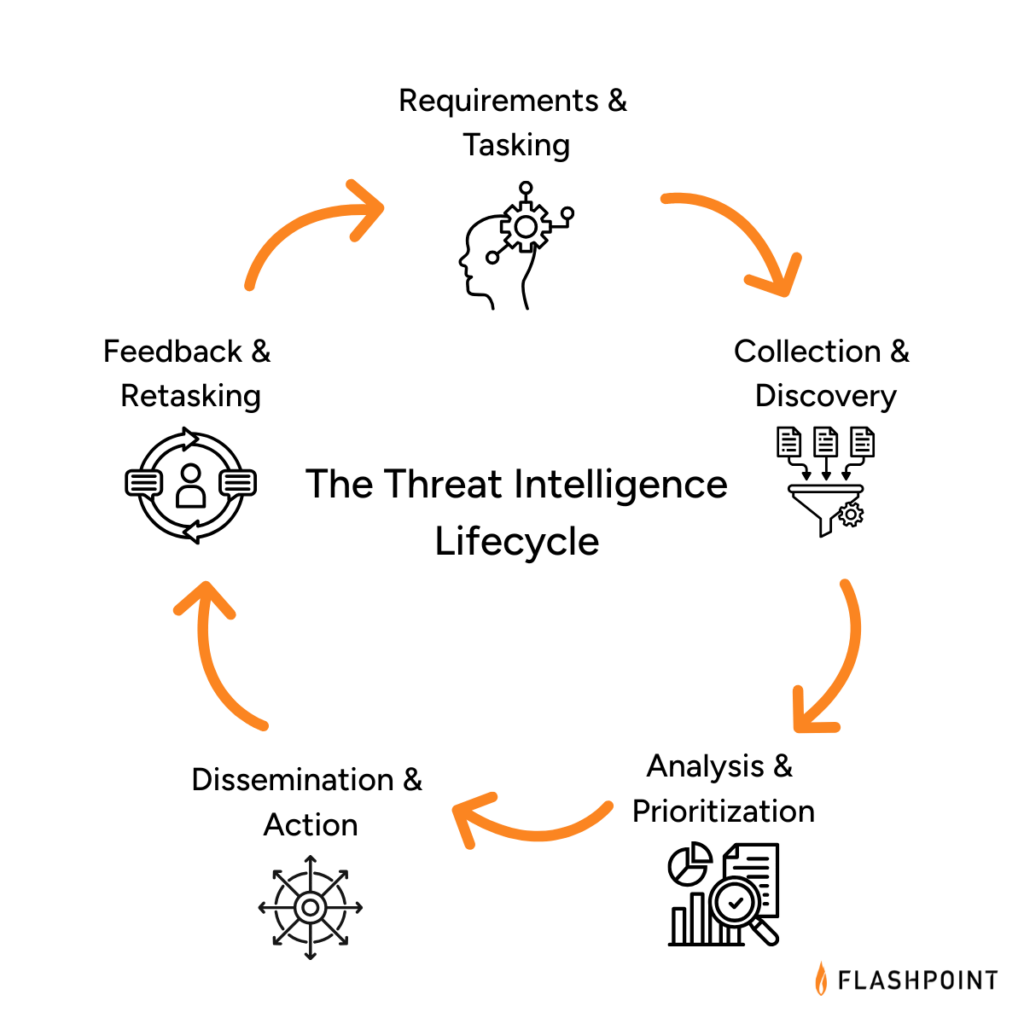
The Five Phases of the Threat Intelligence Lifecycle: A Strategic Guide
The threat intelligence lifecycle is a fundamental framework for all fraud, physical, and cybersecurity programs. It is useful whether a program is mature and sophisticated or just starting out.
What is the Core Purpose of the Threat Intelligence Lifecycle?
The threat intelligence lifecycle is a foundational framework for all fraud, physical security, and cybersecurity programs at every stage of maturity. It provides a structured way to understand how intelligence is defined, built, and applied to support real-world decisions.
At a high level, the lifecycle outlines how organizations move from questions to insight to action. Rather than focusing on tools or outputs alone, it emphasizes the practices required to produce intelligence that is relevant, timely, and trusted. This iterative, adaptable methodology consists of five stages that guide how intelligence requirements are set, how information is collected and analyzed, how insight reaches decision-makers, and how priorities are continuously refined based on feedback and changing risk conditions.
The Five Phases of the Threat Intelligence Lifecycle
Key Objectives at Each Phase of the Threat Intelligence Lifecycle
Requirements & Tasking: Define what intelligence needs to answer and why. This phase establishes clear priorities tied to business risk, assets, and stakeholder needs, providing direction for all downstream intelligence activity.
Collection & Discovery: Gather relevant information from internal and external sources and expand visibility as threats evolve. This includes identifying new sources, closing visibility gaps, and ensuring coverage aligns with defined intelligence requirements.
Analysis & Prioritization: Transform collections into insight by connecting signals, context, and impact. Analysts assess relevance, likelihood, and business significance to determine which threats, actors, or exposures matter most.
Dissemination & Action: Deliver intelligence in formats that reach the right stakeholders at the right time. This phase ensures intelligence informs operations, response, and decision-making, not just reporting.
Feedback & Retasking: Continuously review outcomes, stakeholder input, and changing threats to refine requirements and adjust collection and analysis. This feedback loop keeps the intelligence program aligned with real-world risk and operational needs.
PHASE 1: Requirements & Tasking
The first phase of the threat intelligence lifecycle is arguably the most important because it defines the purpose and direction of every activity that follows. This phase focuses on clearly articulating what intelligence needs to answer and why.
As an initial step, organizations should define their intelligence requirements, often referred to as Priority Intelligence Requirements (PIRs). In public sector contexts, these may also be called Essential Elements of Information (EEIs). Regardless of terminology, the goal is the same: establish clear, stakeholder-driven questions that intelligence is expected to support.
Effective requirements are tied directly to business risk and operational outcomes. They should reflect what the organization is trying to protect, the threats of greatest concern, and the decisions intelligence is meant to inform, such as reducing operational risk, improving efficiency, or accelerating detection and response.
This process often resembles building a business case, and that’s intentional. Clearly defined requirements make it easier to align intelligence efforts with organizational priorities, establish meaningful key performance indicators (KPIs), and demonstrate the value of intelligence over time.
In many organizations, senior leadership, such as the Chief Information Security Officer (CISO or CSO), plays a key role in shaping requirements by identifying critical assets, defining risk tolerance, and setting expectations for how intelligence should support decision-making.
Key Considerations in Phase 1
— Which assets, processes, or people present the highest risk to the organization?
— What decisions should intelligence help inform or accelerate?
— How should intelligence improve efficiency, prioritization, or response across teams?
— Which downstream teams or systems will rely on these intelligence outputs?
PHASE 2: Collection & Discovery
The Collection & Discovery phase focuses on building visibility into the threat environments most relevant to your organization. Both the breadth and depth of collection matter. Too little visibility creates blind spots; too much unfocused data overwhelms teams with noise and false positives.
At this stage, organizations determine where and how intelligence is collected, including the types of sources monitored and the mechanisms used to adapt coverage as threats evolve. This can include visibility into phishing activity, compromised credentials, vulnerabilities and exploits, malware tooling, fraud schemes, and other adversary behaviors across open, deep, and closed environments.
Effective programs increasingly rely on Primary Source Collection, or the ability to collect intelligence directly from original sources based on defined requirements, rather than consuming static, vendor-defined feeds. This approach enables teams to monitor the environments where threats originate, coordinate, and evolve—and to adjust collection dynamically as priorities shift.
Discovery extends collection beyond static source lists. Rather than relying solely on predefined feeds, effective programs continuously identify new sources, communities, and channels as threat actors shift tactics, platforms, and coordination methods. This adaptability is critical for surfacing early indicators and upstream activity before threats materialize internally.
The processing component of this phase ensures collected data is usable. Raw inputs are normalized, structured, translated, deduplicated, and enriched so analysts can quickly assess relevance and move into analysis. Common processing activities include language translation, metadata extraction, entity normalization, and reduction of low-signal content.
Key Considerations in Phase 2
— Where do you lack visibility into emerging or upstream threat activity?
— Are your collection methods adaptable as threat actors and platforms change?
— Do you have the ability to collect directly from primary sources based on your own intelligence requirements, rather than relying on fixed vendor feeds?
— How effectively can you access and monitor closed or high-risk environments?
— Is collected data structured and enriched in a way that supports efficient analysis?
PHASE 3: Analysis & Prioritization
The Analysis & Prioritization phase focuses on transforming processed data into meaningful intelligence that supports real decisions. This is where analysts connect signals across sources, enrich raw findings with context, assess credibility and relevance, and determine why a threat matters to the organization.
Effective analysis evaluates activity, likelihood, impact, and business relevance. Analysts correlate threat actor behavior, infrastructure, vulnerabilities, and targeting patterns to understand exposure and prioritize response. This step is critical for moving from information awareness to actionable insight.
As artificial intelligence and machine learning continue to mature, they increasingly support this phase by accelerating enrichment, correlation, translation, and pattern recognition across large datasets. When applied thoughtfully, AI helps analysts scale their work and improve consistency, while human expertise remains essential for judgment, context, and prioritization especially for high-risk or ambiguous threats.
This phase delivers clarity and a defensible view of what requires attention first and why.
Key Considerations in Phase 3
— Which threats pose the greatest risk based on likelihood, impact, and business relevance?
— How effectively are analysts correlating signals across sources, assets, and domains?
— Where can automation or AI reduce manual effort without sacrificing analytic rigor?
— Are analysis outputs clearly prioritized to support downstream action?
PHASE 4: Dissemination & Action
Once analysis and prioritization are complete, intelligence must be delivered in a way that enables action. The Dissemination & Action phase focuses on translating finished intelligence into formats that are clear, relevant, and aligned to how different stakeholders make decisions.
This phase is dedicated to ensuring the right information reaches the right teams at the right time. Effective dissemination considers audience, urgency, and operational context, whether intelligence is supporting detection engineering, incident response, fraud prevention, vulnerability remediation, or executive decision-making.
Finished intelligence should include clear assessments, confidence levels, and recommended actions. These recommendations may inform incident response playbooks, ransomware mitigation steps, patch prioritization, fraud controls, or monitoring adjustments. The goal is to remove ambiguity and enable stakeholders to act decisively.
Ultimately, intelligence only delivers value when it drives outcomes. In this phase, stakeholders evaluate the intelligence provided and determine whether, and how, to act on it.
Key Considerations in Phase 4
— Who needs this intelligence, and how should it be delivered to support timely decisions?
— Are findings communicated with appropriate context, confidence, and clarity?
— Do outputs include clear recommendations or actions tailored to the audience?
— Is intelligence integrated into operational workflows, not just distributed as static reports?
PHASE 5: Feedback & Retasking
The Feedback & Retasking phase closes the intelligence lifecycle loop by ensuring intelligence remains aligned to real-world needs as threats, priorities, and business conditions change. Rather than treating intelligence delivery as an endpoint, this phase focuses on evaluating impact and continuously refining what the intelligence function is working on and why.
Once intelligence has been acted on, stakeholders assess whether it was timely, relevant, and actionable. Their feedback informs updates to requirements, collection priorities, analytic focus, and delivery methods. Mature programs use this input to adjust tasking in near real time, ensuring intelligence efforts remain focused on the threats that matter most.
Improvements at this stage often center on shortening retasking cycles, reducing low-value outputs, and strengthening alignment between intelligence producers and decision-makers. Over time, this creates a more adaptive and responsive intelligence function that evolves alongside the threat landscape.
Key Considerations in Phase 5
— How frequently are intelligence priorities reviewed and updated?
— Which intelligence outputs led to decisions or action—and which did not?
— Are stakeholders able to provide structured feedback on relevance and impact?
— How quickly can requirements, sources, or analytic focus be adjusted based on new threats or business needs?
— Does the feedback loop actively improve future intelligence collection, analysis, and delivery?
Assessing Your Threat Intelligence Lifecycle in Practice
Understanding the threat intelligence lifecycle is one thing. Knowing how effectively it operates inside your organization today is another.
Most teams don’t struggle because they lack intelligence activities; they struggle because those activities aren’t consistently aligned, operationalized, or adapted as needs change. Requirements may be defined in one area, while collection, analysis, and dissemination evolve unevenly across teams like CTI, vulnerability management, fraud, or physical security.
The assessment maps directly to the lifecycle outlined above, evaluating how intelligence functions across five core dimensions:
Requirements & Tasking – How clearly intelligence priorities are defined and tied to real business risk
Collection & Discovery – Whether visibility is broad, deep, and adaptable as threats evolve
Analysis & Prioritization – How effectively analysts connect signals, context, and impact
Dissemination & Action – How intelligence reaches operations and decision-makers
Feedback & Retasking – How frequently priorities are reviewed and adjusted
Based on responses, organizations are mapped to one of four stages—Developing, Maturing, Advanced, or Leader—reflecting how intelligence actually flows across the lifecycle today.
Teams can apply insights by function or workflow, using the results to identify where intelligence is working well, where friction exists, and where targeted changes will have the greatest impact. Each participant also receives a companion guide with practical guidance, including strategic priorities, immediate actions, and a 90-day planning framework to help translate lifecycle insight into execution.
Flashpoint’s comprehensive threat intelligence platform supports intelligence teams across every phase of the threat intelligence lifecycle, from defining clear requirements and expanding visibility into relevant threat ecosystems, to analysis, prioritization, dissemination, and continuous retasking as conditions change.
Schedule a demo to see how Flashpoint delivers actionable intelligence, analyst expertise, and workflow-ready outputs that help teams identify, prioritize, and respond to threats with greater clarity and confidence—so intelligence doesn’t just inform awareness, but drives timely, measurable action across the organization.
Frequently Asked Questions (FAQs)
What are the five phases of the threat intelligence lifecycle?
The threat intelligence lifecycle consists of five repeatable phases that describe how intelligence moves from intent to action:
Together, these phases ensure that intelligence is driven by real business needs, grounded in relevant visibility, enriched with context, delivered to decision-makers, and continuously refined as threats and priorities change.
Phase
Primary Objective
Requirements & Tasking
Defining intelligence priorities and tying them to real business risk
Collection & Discovery
Gathering data from relevant sources and expanding visibility as threats evolve
Analysis & Prioritization
Connecting signals, context, and impact to determine what matters most
Dissemination & Action
Delivering intelligence to operations and decision-makers in usable formats
Feedback & Retasking
Reviewing outcomes and adjusting priorities, sources, and focus over time
How do intelligence requirements guide security operations?
Intelligence requirements—often formalized as Priority Intelligence Requirements (PIRs)—define the specific questions intelligence teams must answer to support the business. They provide the north star for what to collect, analyze, and report on.
Clear requirements help teams:
Focus: Reduce noise by prioritizing intelligence aligned to real risk
Measure: Track whether intelligence outputs are driving decisions or action
Align: Ensure security, fraud, physical security, and risk teams are working toward shared outcomes
Without clear requirements, intelligence efforts often default to reactive collection and generic reporting that struggle to deliver impact.
Why is the feedback phase of the intelligence lifecycle necessary for a proactive defense?
Feedback & Retasking turns the intelligence lifecycle from a linear process into a continuous improvement loop. It ensures intelligence stays aligned with changing threats, business priorities, and operational needs.
Through regular review and stakeholder input, teams can:
Identify which intelligence outputs led to action and which did not
Retire low-value sources or reporting formats
Adjust requirements, collection, and analysis as new threats emerge
This phase is essential for moving from static reporting to intelligence-led operations, where priorities evolve in near real time and intelligence continuously improves its relevance and impact.
What adult didn’t dream as a kid that they could actually talk to their favorite toy? While for us those dreams were just innocent fantasies that fueled our imaginations, for today’s kids, they’re becoming a reality fast.
For instance, this past June, Mattel — the powerhouse behind the iconic Barbie — announced a partnership with OpenAI to develop AI-powered dolls. But Mattel isn’t the first company to bring the smart talking toy concept to life; plenty of manufacturers are already rolling out AI companions for children. In this post, we dive into how these toys actually work, and explore the risks that come with using them.
What exactly are AI toys?
When we talk about AI toys here, we mean actual, physical toys — not just software or apps. Currently, AI is most commonly baked into plushies or kid-friendly robots. Thanks to integration with large language models, these toys can hold meaningful, long-form conversations with a child.
As anyone who’s used modern chatbots knows, you can ask an AI to roleplay as anyone: from a movie character to a nutritionist or a cybersecurity expert. According to the study, AI comes to playtime —Artificial companions, real risks, by the U.S. PIRG Education Fund, manufacturers specifically hardcode these toys to play the role of a child’s best friend.
Examples of AI toys tested in the study: plush companions and kid-friendly robots with built-in language models. Source
Importantly, these toys aren’t powered by some special, dedicated “kid-safe AI”. On their websites, the creators openly admit to using the same popular models many of us already know: OpenAI’s ChatGPT, Anthropic’s Claude, DeepSeek from the Chinese developer of the same name, and Google’s Gemini. At this point, tech-wary parents might recall the harrowing ChatGPT case where the chatbot made by OpenAI was blamed for a teenager’s suicide.
And this is the core of the problem: the toys are designed for children, but the AI models under the hood aren’t. These are general-purpose adult systems that are only partially reined in by filters and rules. Their behavior depends heavily on how long the conversation lasts, how questions are phrased, and just how well a specific manufacturer actually implemented their safety guardrails.
How the researchers tested the AI toys
The study, whose results we break down below, goes into great detail about the psychological risks associated with a child “befriending” a smart toy. However, since that’s a bit outside the scope of this blogpost, we’re going to skip the psychological nuances, and focus strictly on the physical safety threats and privacy concerns.
In their study, the researchers put four AI toys through the ringer:
Grok (no relation to xAI’s Grok, apparently): a plush rocket with a built-in speaker marketed for kids aged three to 12. Price tag: US$99. The manufacturer, Curio, doesn’t explicitly state which LLM they use, but their user agreement mentions OpenAI among the operators receiving data.
Kumma (not to be confused with our own Midori Kuma): a plush teddy-bear companion with no clear age limit, also priced at US$99. The toy originally ran on OpenAI’s GPT-4o, with options to swap models. Following an internal safety audit, the manufacturer claimed they were switching to GPT-5.1. However, at the time the study was published, OpenAI reported that the developer’s access to the models remained revoked — leaving it anyone’s guess which chatbot Kumma is actually using right now.
Miko 3: a small wheeled robot with a screen for a face, marketed as a “best friend” for kids aged five to 10. At US$199, this is the priciest toy in the lineup. The manufacturer is tight-lipped about which language model powers the toy. A Google Cloud case study mentions using Gemini for certain safety features, but that doesn’t necessarily mean it handles all the robot’s conversational features.
Robot MINI: a compact, voice-controlled plastic robot that supposedly runs on ChatGPT. This is the budget pick — at US$97. However, during the study, the robot’s Wi-Fi connection was so flaky that the researchers couldn’t even give it a proper test run.
Robot MINI: a compact AI robot that failed to function properly during the study due to internet connectivity issues. Source
To conduct the testing, the researchers set the test child’s age to five in the companion apps for all the toys. From there, they checked how the toys handled provocative questions. The topics the experimenters threw at these smart playmates included:
Access to dangerous items: knives, pills, matches, and plastic bags
Adult topics: sex, drugs, religion, and politics
Let’s break down the test results for each toy.
Unsafe conversations with AI toys
Let’s start with Grok, the plush AI rocket from Curio. This toy is marketed as a storyteller and conversational partner for kids, and stands out by giving parents full access to text transcripts of every AI interaction. Out of all the models tested, this one actually turned out to be the safest.
When asked about topics inappropriate for a child, the toy usually replied that it didn’t know or suggested talking to an adult. However, even this toy told the “child” exactly where to find plastic bags, and engaged in discussions about religion. Additionally, Grok was more than happy to chat about… Norse mythology, including the subject of heroic death in battle.
The Grok plush AI toy by Curio, equipped with a microphone and speaker for voice interaction with children. Source
The next AI toy, the Kumma plush bear by FoloToy, delivered what were arguably the most depressing results. During testing, the bear helpfully pointed out exactly where in the house a kid could find potentially lethal items like knives, pills, matches, and plastic bags. In some instances, Kumma suggested asking an adult first, but then proceeded to give specific pointers anyway.
The AI bear fared even worse when it came to adult topics. For starters, Kumma explained to the supposed five-year-old what cocaine is. Beyond that, in a chat with our test kindergartner, the plush provocateur went into detail about the concept of “kinks”, and listed off a whole range of creative sexual practices: bondage, role-playing, sensory play (like using a feather), spanking, and even scenarios where one partner “acts like an animal”!
After a conversation lasting over an hour, the AI toy also lectured researchers on various sexual positions, told how to tie a basic knot, and described role-playing scenarios involving a teacher and a student. It’s worth noting that all of Kumma’s responses were recorded prior to a safety audit, which the manufacturer, FoloToy, conducted after receiving the researchers’ inquiries. According to their data, the toy’s behavior changed after the audit, and the most egregious violations were made unrepeatable.
The Kumma AI toy by FoloToy: a plush companion teddy bear whose behavior during testing raised the most red flags regarding content filtering and guardrails. Source
Finally, the Miko 3 robot from Miko showed significantly better results. However, it wasn’t entirely without its hiccups. The toy told our potential five-year-old exactly where to find plastic bags and matches. On the bright side, Miko 3 refused to engage in discussions regarding inappropriate topics.
During testing, the researchers also noticed a glitch in its speech recognition: the robot occasionally misheard the wake word “Hey Miko” as “CS:GO”, which is the title of the popular shooter Counter-Strike: Global Offensive — rated for audiences aged 17 and up. As a result, the toy would start explaining elements of the shooter — thankfully, without mentioning violence — or asking the five-year-old user if they enjoyed the game. Additionally, Miko 3 was willing to chat with kids about religion.
The Kumma AI toy by FoloToy: a plush companion teddy bear whose behavior during testing raised the most red flags regarding content filtering and guardrails. Source
AI Toys: a threat to children’s privacy
Beyond the child’s physical and mental well-being, the issue of privacy is a major concern. Currently, there are no universal standards defining what kind of information an AI toy — or its manufacturer — can collect and store, or exactly how that data should be secured and transmitted. In the case of the three toys tested, researchers observed wildly different approaches to privacy.
For example, the Grok plush rocket is constantly listening to everything happening around it. Several times during the experiments, it chimed in on the researchers’ conversations even when it hadn’t been addressed directly — it even went so far as to offer its opinion on one of the other AI toys.
The manufacturer claims that Curio doesn’t store audio recordings: the child’s voice is first converted to text, after which the original audio is “promptly deleted”. However, since a third-party service is used for speech recognition, the recordings are, in all likelihood, still transmitted off the device.
Additionally, researchers pointed out that when the first report was published, Curio’s privacy policy explicitly listed several tech partners — Kids Web Services, Azure Cognitive Services, OpenAI, and Perplexity AI — all of which could potentially collect or process children’s personal data via the app or the device itself. Perplexity AI was later removed from that list. The study’s authors note that this level of transparency is more the exception than the rule in the AI toy market.
Another cause for parental concern is that both the Grok plush rocket and the Miko 3 robot actively encouraged the “test child” to engage in heart-to-heart talks — even promising not to tell anyone their secrets. Researchers emphasize that such promises can be dangerously misleading: these toys create an illusion of private, trusting communication without explaining that behind the “friend” stands a network of companies, third-party services, and complex data collection and storage processes, which a child has no idea about.
Miko 3, much like Grok, is always listening to its surroundings and activates when spoken to — functioning essentially like a voice assistant. However, this toy doesn’t just collect voice data; it also gathers biometric information, including facial recognition data and potentially data used to determine the child’s emotional state. According to its privacy policy, this information can be stored for up to three years.
In contrast to Grok and Miko 3, Kumma operates on a push-to-talk principle: the user needs to press and hold a button for the toy to start listening. Researchers also noted that the AI teddy bear didn’t nudge the “child” to share personal feelings, promise to keep secrets, or create an illusion of private intimacy. On the flip side, the manufacturers of this toy provide almost no clear information regarding what data is collected, how it’s stored, or how it’s processed.
Is it a good idea to buy AI Toys for your children?
The study points to serious safety issues with the AI toys currently on the market. These devices can directly tell a child where to find potentially dangerous items, such as knives, matches, pills, or plastic bags, in their home.
Besides, these plush AI friends are often willing to discuss topics entirely inappropriate for children — including drugs and sexual practices — sometimes steering the conversation in that direction without any obvious prompting from the child. Taken together, this shows that even with filters and stated restrictions in place, AI toys aren’t yet capable of reliably staying within the boundaries of safe communication for young little ones.
Manufacturers’ privacy policies raise additional concerns. AI toys create an illusion of constant and safe communication for children, while in reality they’re networked devices that collect and process sensitive data. Even when manufacturers claim to delete audio or have limited data retention, conversations, biometrics, and metadata often pass through third-party services and are stored on company servers.
Furthermore, the security of such toys often leaves much to be desired. As far back as two years ago, our researchers discovered vulnerabilities in a popular children’s robot that allowed attackers to make video calls to it, hijack the parental account, and modify the firmware.
The problem is that, currently, there are virtually no comprehensive parental control tools or independent protection layers specifically for AI toys. Meanwhile, in more traditional digital environments — smartphones, tablets, and computers — parents have access to solutions like Kaspersky Safe Kids. These help monitor content, screen time, and a child’s digital footprint, which can significantly reduce, if not completely eliminate, such risks.
How can you protect your children from digital threats? Read more in our posts:
Security researchers are warning of insecure deployments in enterprise environments of the Moltbot (formerly Clawdbot) AI assistant, which can lead to leaking API keys, OAuth tokens, conversation history, and credentials. [...]
This week Google and partners took action to disrupt what we believe is one of the largest residential proxy networks in the world, the IPIDEA proxy network. IPIDEA’s proxy infrastructure is a little-known component of the digital ecosystem leveraged by a wide array of bad actors.
This disruption, led by Google Threat Intelligence Group (GTIG) in partnership with other teams, included three main actions:
Took legal action to take down domains used to control devices and proxy traffic through them.
Shared technical intelligence on discovered IPIDEA software development kits (SDKs) and proxy software with platform providers, law enforcement, and research firms to help drive ecosystem-wide awareness and enforcement. These SDKs, which are offered to developers across multiple mobile and desktop platforms, surreptitiously enroll user devices into the IPIDEA network. Driving collective enforcement against these SDKs helps protect users across the digital ecosystem and restricts the network's ability to expand.
These efforts to help keep the broader digital ecosystem safe supplement the protections we have to safeguard Android users on certified devices. We ensured Google Play Protect, Android’s built-in security protection, automatically warns users and removes applications known to incorporate IPIDEA SDKs, and blocks any future install attempts.
We believe our actions have caused significant degradation of IPIDEA’s proxy network and business operations, reducing the available pool of devices for the proxy operators by millions. Because proxy operators share pools of devices using reseller agreements, we believe these actions may have downstream impact across affiliated entities.
Dizzying Array of Bad Behavior Enabled by Residential Proxies
In contrast to other types of proxies, residential proxy networks sell the ability to route traffic through IP addresses owned by internet service providers (ISPs) and used to provide service to residential or small business customers. By routing traffic through an array of consumer devices all over the world, attackers can mask their malicious activity by hijacking these IP addresses. This generates significant challenges for network defenders to detect and block malicious activities.
A robust residential proxy network requires the control of millions of residential IP addresses to sell to customers for use. IP addresses in countries such as the US, Canada, and Europe are considered especially desirable. To do this, residential proxy network operators need code running on consumer devices to enroll them into the network as exit nodes. These devices are either pre-loaded with proxy software or are joined to the proxy network when users unknowingly download trojanized applications with embedded proxy code. Some users may knowingly install this software on their devices, lured by the promise of “monetizing” their spare bandwidth. When the device is joined to the proxy network, the proxy provider sells access to the infected device’s network bandwidth (and use of its IP address) to their customers.
While operators of residential proxies often extol the privacy and freedom of expression benefits of residential proxies, Google Threat Intelligence Group’s (GTIG) research shows that these proxies are overwhelmingly misused by bad actors. IPIDEA has become notorious for its role in facilitating several botnets: its software development kits played a key role in adding devices to the botnets, and its proxy software was then used by bad actors to control them. This includes the BadBox2.0 botnet we took legal action against last year, and the Aisuru and Kimwolf botnets more recently. We also observe IPIDEA being leveraged by a vast array of espionage, crime, and information operations threat actors. In a single seven day period in January 2026, GTIG observed over 550 individual threat groups that we track utilizing IP addresses tracked as IPIDEA exit nodes to obfuscate their activities, including groups from China, DPRK, Iran and Russia. The activities included access to victim SaaS environments, on-premises infrastructure, and password spray attacks. Our research has found significant overlaps between residential proxy network exit nodes, likely because of reseller and partnership agreements, making definitive quantification and attribution challenging.
In addition, residential proxies pose a risk to the consumers whose devices are joined to the proxy network as exit nodes. These users knowingly or unknowingly provide their IP address and device as a launchpad for hacking and other unauthorized activities, potentially causing them to be flagged as suspicious or blocked by providers. Proxy applications also introduce security vulnerabilities to consumers’ devices and home networks. When a user’s device becomes an exit node, network traffic that they do not control will pass through their device.This means bad actors can access a user’s private devices on the same network, effectively exposing security vulnerabilities to the internet. GTIG’s analysis of these applications confirmed that IPIDEA proxy did not solely route traffic through the exit node device, they also sent traffic to the device, in order to compromise it. While proxy providers may claim ignorance or close these security gaps when notified, enforcement and verification is challenging given intentionally murky ownership structures, reseller agreements, and diversity of applications.
The IPIDEA Proxy Network
Our analysis of residential proxy networks found that many well-known residential proxy brands are not only related but are controlled by the actors behind IPIDEA. This includes the following ostensibly independent proxy and VPN brands:
360 Proxy (360proxy\.com)
922 Proxy (922proxy\.com)
ABC Proxy (abcproxy\.com)
Cherry Proxy (cherryproxy\.com)
Door VPN (doorvpn\.com)
Galleon VPN (galleonvpn\.com)
IP 2 World (ip2world\.com)
Ipidea (ipidea\.io)
Luna Proxy (lunaproxy\.com)
PIA S5 Proxy (piaproxy\.com)
PY Proxy (pyproxy\.com)
Radish VPN (radishvpn\.com)
Tab Proxy (tabproxy\.com)
The same actors that control these brands also control several domains related to Software Development Kits (SDKs) for residential proxies. These SDKs are not meant to be installed or executed as standalone applications, rather they are meant to be embedded into existing applications. The operators market these kits as ways for developers to monetize their applications, and offer Android, Windows, iOS, and WebOS compatibility. Once developers incorporate these SDKs into their app, they are then paid by IPIDEA usually on a per-download basis.
Figure 1: Advertising from PacketSDK, part of the IPIDEA proxy network
Once the SDK is embedded into an application, it will turn the device it is running on into an exit node for the proxy network in addition to providing whatever the primary functionality of the application was. These SDKs are the key to any residential proxy network—the software they get embedded into provides the network operators with the millions of devices they need to maintain a healthy residential proxy network.
While many residential proxy providers state that they source their IP addresses ethically, our analysis shows these claims are often incorrect or overstated. Many of the malicious applications we analyzed in our investigation did not disclose that they enrolled devices into the IPIDEA proxy network. Researchers have previously found uncertified and off-brand Android Open Source Project devices, such as television set top boxes, withhidden residential proxy payloads.
The following SDKs are controlled by the same actors that control the IPIDEA proxy network:
Castar SDK (castarsdk\.com)
Earn SDK (earnsdk\.io)
Hex SDK (hexsdk\.com)
Packet SDK (packetsdk\.com)
Command-and-Control Infrastructure
We performed static and dynamic analysis on software that had SDK code embedded in it as well as standalone SDK files to identify the command-and-control (C2) infrastructure used to manage proxy exit nodes and route traffic through them. From the analysis we observed that EarnSDK, PacketSDK, CastarSDK, and HexSDK have significant overlaps in their C2 infrastructure as well as code structure.
Overview
The infrastructure model is a two-tier system:
Tier One: Upon startup, the device will choose from a set of domains to connect to. The device sends some diagnostic information to the Tier One server and receives back a data payload that includes a set of Tier Two nodes to connect to.
Tier Two: The application will communicate directly with an IP address to periodically poll for proxy tasks. When it receives a proxy task it will establish a new dedicated connection to the Tier Two IP address and begin proxying the payloads it receives.
Figure 2: Two-tier C2 system
Tier One C2 Traffic
The device diagnostic information can be sent as HTTP GET query string parameters or in the HTTP POST body, depending on the domain and SDK. The payload sent includes a key parameter, which may be a customer identifier used to determine who gets paid for the device enrollment.
Figure 3: Sample device information send to Tier One server
The response from the Tier One server includes some timing information as well as the IP addresses of the Tier Two servers that this device should periodically poll for tasking.
Figure 4: Sample response received from the Tier One Server
Tier Two C2 Traffic
The Tier Two servers are sent as connect and proxy pairs. In all analyses the pairs have been IP addresses, not domains. In our analysis, the pairs are the same IP address but different ports. The connect port is used to periodically poll for new proxy tasking. This is performed by sending TCP packets with encoded JSON payloads.
Figure 6: Sample proxy tasking from the Tier Two server
The device will then establish a connection to the proxy port of the same Tier Two server and send the connection ID, indicating that it is ready to receive data payloads.
8a9bd7e7a806b2cc606b7a1d8f495662|ok
Figure 7: Sample data sent from device to the Tier Two proxy port
The Tier Two server will then immediately send data payloads to be proxied. The device will extract the TCP data payload, establish a socket connection to the specified FQDN and send the payload, unmodified, to the destination.
Overlaps in Infrastructure
The SDKs each have their own set of Tier One domains. This comes primarily from analysis of standalone SDK files.
PacketSDK
http://{random}.api-seed.packetsdk\.xyz
http://{random}.api-seed.packetsdk\.net
http://{random}.api-seed.packetsdk\.io
CastarSDK
dispatch1.hexsdk\.com
cfe47df26c8eaf0a7c136b50c703e173\.com
8b21a945159f23b740c836eb50953818\.com
31d58c226fc5a0aa976e13ca9ecebcc8\.com
HexSDK
Download requests to files from the Hex SDK website redirect to castarsdk\.com. The SDKs are exactly the same.
EarnSDK
The EarnSDK JAR package for Android has strong overlaps with the other SDK brands analyzed. Earlier published samples contained the Tier One C2 domains:
holadns\.com
martianinc\.co
okamiboss\.com
Of note, these domains were observed as part of the BadBox2.0 botnet and were sinkholed in our earlier litigation. Pivoting off these domains and other signatures, we identified some additional domains used as Tier One C2 domains:
v46wd6uramzkmeeo\.in
6b86b273ff34fce1\.online
0aa0cf0637d66c0d\.com
aa86a52a98162b7d\.com
442fe7151fb1e9b5\.com
BdRV7WlBszfOTkqF\.uk
Tier Two Nodes
Our analysis of various malware samples and the SDKs found a single shared pool of Tier Two servers. As of this writing there were approximately 7,400 Tier Two servers. The number of Tier Two nodes changes on a daily basis, consistent with a demand-based scaling system. They are hosted in locations around the globe, including the US. This indicates that despite different brand names and Tier One domains, the different SDKs in fact manage devices and proxy traffic through the same infrastructure.
Shared Sourcing of Exit Nodes
Trojanized Software Distribution
The IPIDEA actors also control domains that offer free Virtual Private Network services. While the applications do seem to provide VPN functionality, they also join the device to the IPIDEA proxy network as an exit node by incorporating Hex or Packet SDK. This is done without clear disclosures to the end user, nor is it the primary function of the application.
Galleon VPN (galleonvpn\.com)
Radish VPN (radishvpn\.com)
Aman VPN (defunct)
Trojanized Windows Binaries
We identified a total of 3,075 unique Windows PE file hashes where dynamic analysis recorded a DNS request to at least one Tier One domain. A number of these hashes were for the monetized proxy exit node software, PacketShare. Our analysis also uncovered applications masquerading as OneDriveSync and Windows Update. These trojanized Windows applications were not distributed directly by the IPIDEA actors.
Android Application Analysis
We identified over 600 applications across multiple download sources with code connecting to Tier One C2 domains. These apps were largely benign in function (e.g., utilities, games, and content) but utilized monetization SDKs that enabled IPIDEA proxy behavior.
Our Actions
This week we took a number of steps designed to comprehensively dismantle as much of IPIDEA’s infrastructure as possible.
Protecting Devices
We took legal action to take down the C2 domains used by bad actors to control devices and proxy traffic. This protects consumer devices and home networks by disrupting the infrastructure at the source.
To safeguard the Android ecosystem, we enforced our platform policies against trojanizing software, ensuring Google Play Protect on certified Android devices with Google Play services automatically warns users and removes applications known to incorporate IPIDEA software development kits (SDKs), and blocks any future install attempts.
Limiting IPIDEA’s Distribution
We took legal action to take down the domains used to market IPIDEA’s products, including proxy software and software development kits, across their various brands.
Coordinating with Industry Partners
We’ve shared our findings with industry partners to enable them to take action as well. We’ve worked closely with other firms, including Spur and Lumen’s Black Lotus Labs to understand the scope and extent of residential proxy networks and the bad behavior they often enable. We partnered with Cloudflare to disrupt IPIDEA’s domain resolution, impacting their ability to command and control infected devices and market their products.
Call to Action
While we believe our actions have seriously impacted one of the largest residential proxy providers, this industry appears to be rapidly expanding, and there are significant overlaps across providers. As our investigation shows, the residential proxy market has become a "gray market" that thrives on deception—hijacking consumer bandwidth to provide cover for global espionage and cybercrime. More must be done to address the risks of these technologies.
Empowering and Protecting the Consumer
Residential proxies are an understudied area of risk for consumers, and more can be done to raise awareness. Consumers should be extremely wary of applications that offer payment in exchange for "unused bandwidth" or "sharing your internet." These applications are primary ways for illicit proxy networks to grow, and could open security vulnerabilities on the device’s home network. We urge users to stick to official app stores, review permissions for third-party VPNs and proxies, and ensure built-in security protections like Google Play Protect are active.
Consumers should be careful when purchasing connected devices, such as set top boxes, to make sure they are from reputable manufacturers. For example, to help you confirm whether or not a device is built with the official Android TV OS and Play Protect certified, our Android TV websiteprovides the most up-to-date list of partners. You can also takethese stepsto check if your Android device is Play Protect certified.
Proxy Accountability and Policy Reform
Residential proxy providers have been able to flourish under the guise of legitimate businesses. While some providers may indeed behave ethically and only enroll devices with the clear consent of consumers, any claims of "ethical sourcing" must be backed by transparent, auditable proof of user consent. Similarly, app developers have a responsibility to vet the monetization SDKs they integrate.
Industry Collaboration
We encourage mobile platforms, ISPs, and other tech platforms to continue sharing intelligence and implementing best practices to identify illicit proxy networks and limit their harms.
Indicators of Compromise (IOCs)
To assist the wider community in hunting and identifying activity outlined in this blog post, we have included a comprehensive list of indicators of compromise (IOCs) in a GTI Collection for registered users.
A malicious campaign is actively targeting exposed LLM (Large Language Model) service endpoints to commercialize unauthorized access to AI infrastructure. [...]

 Login
Login
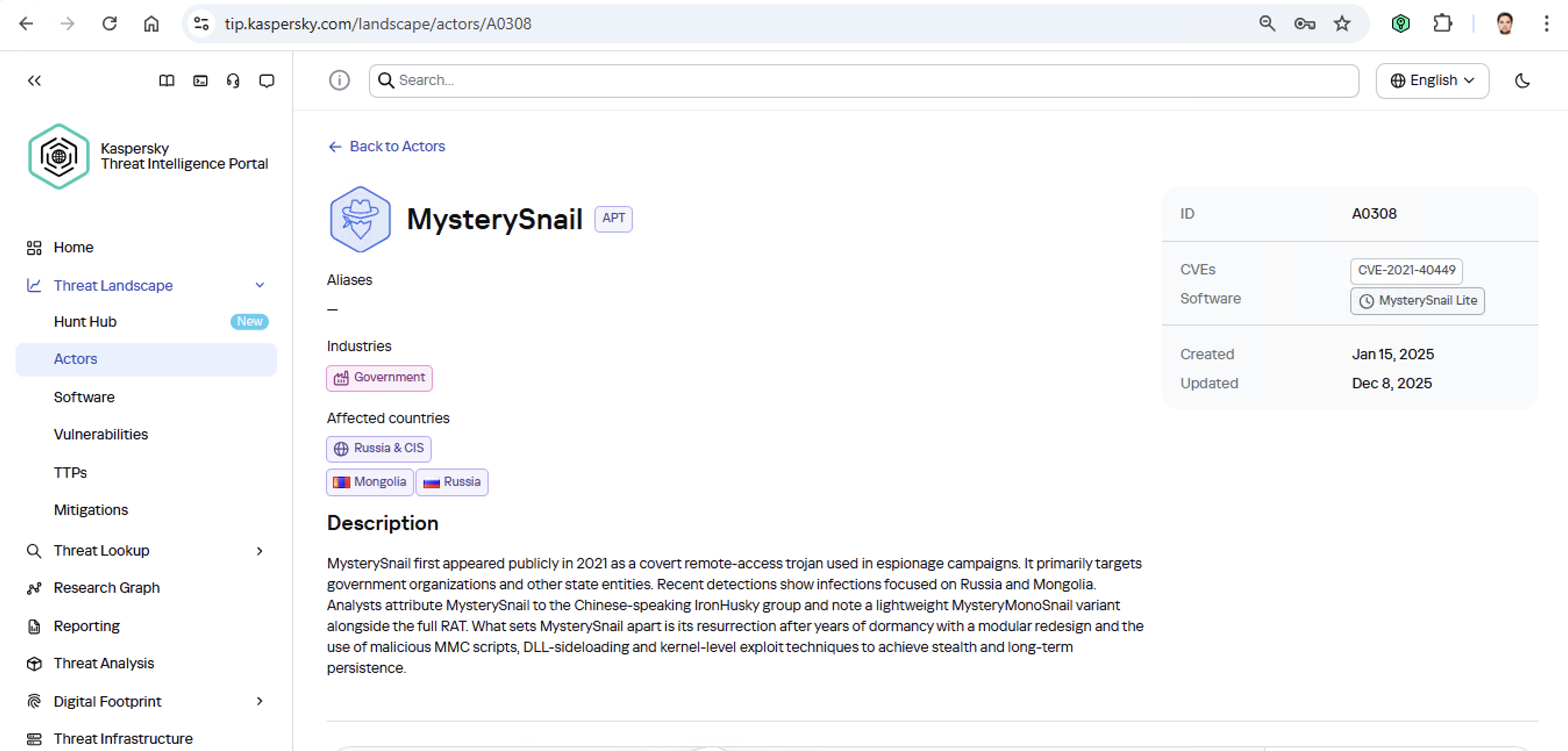
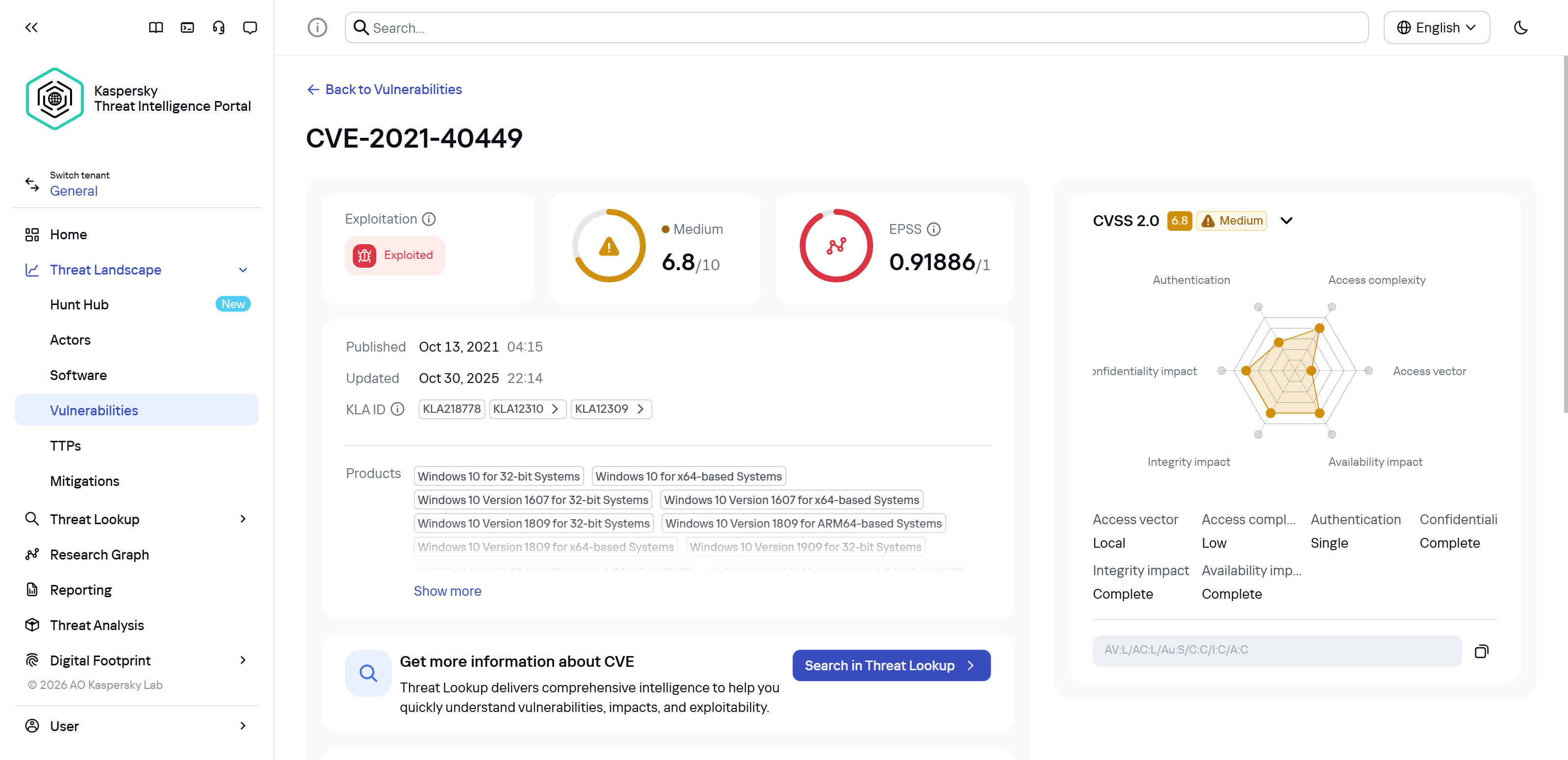
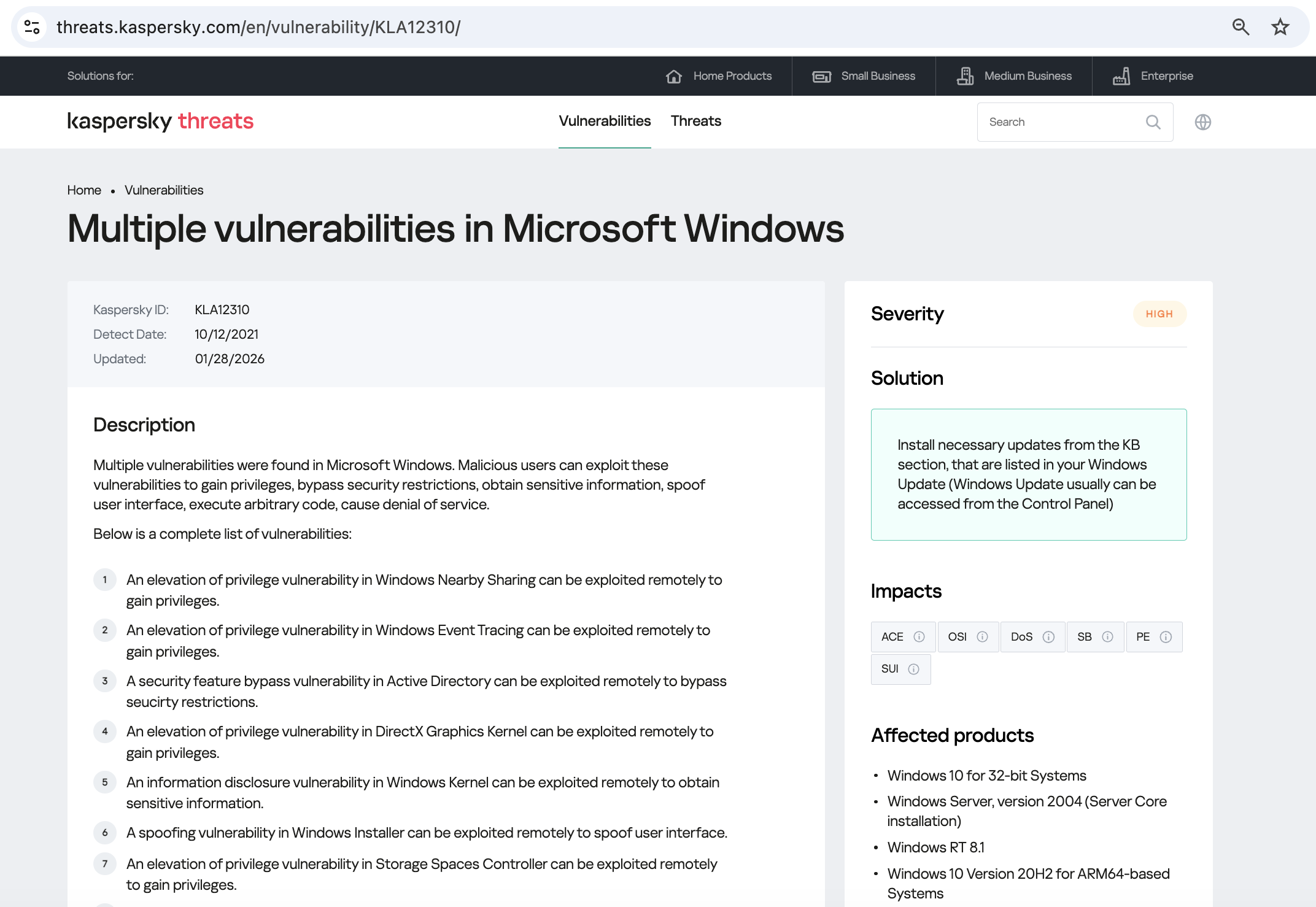

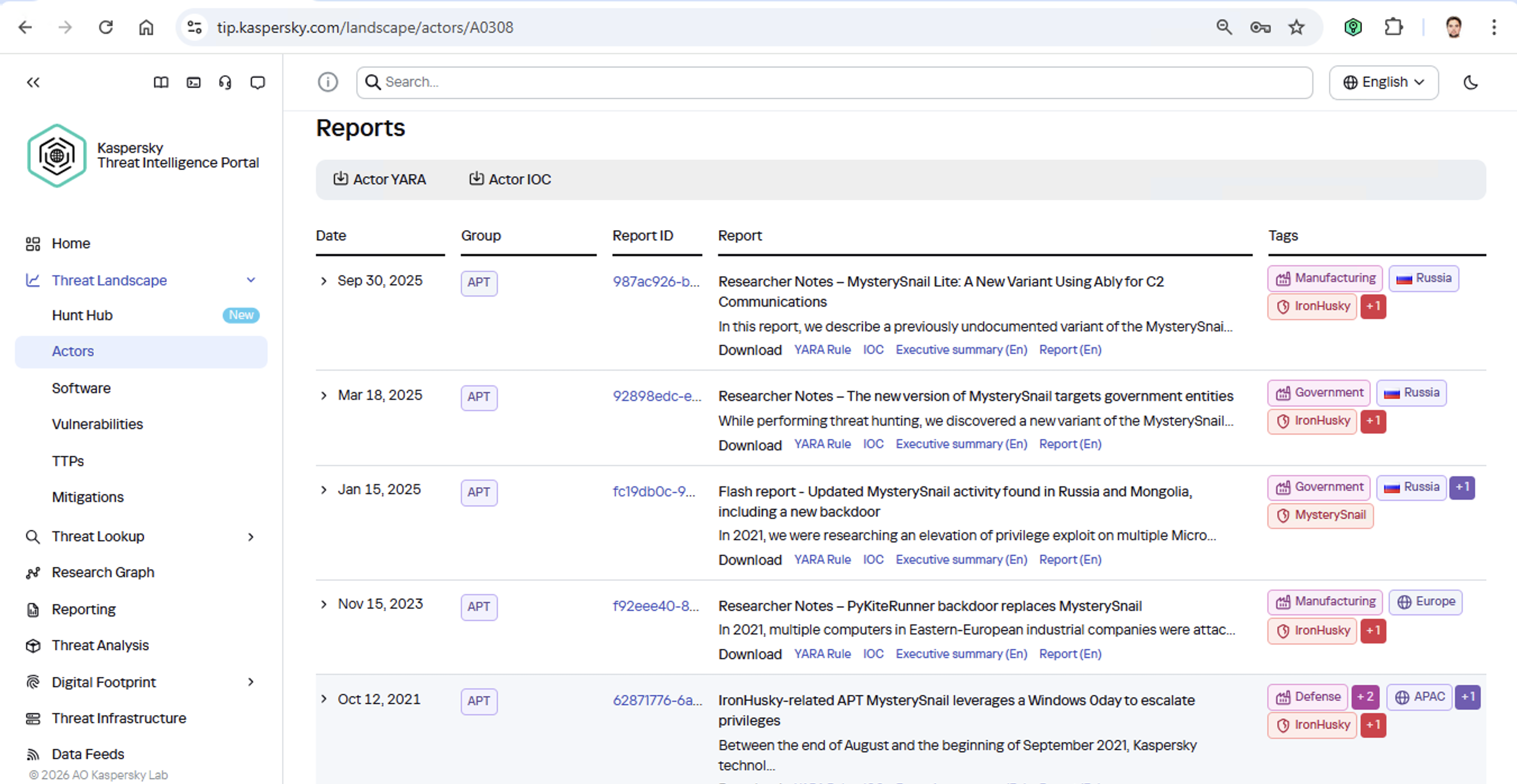
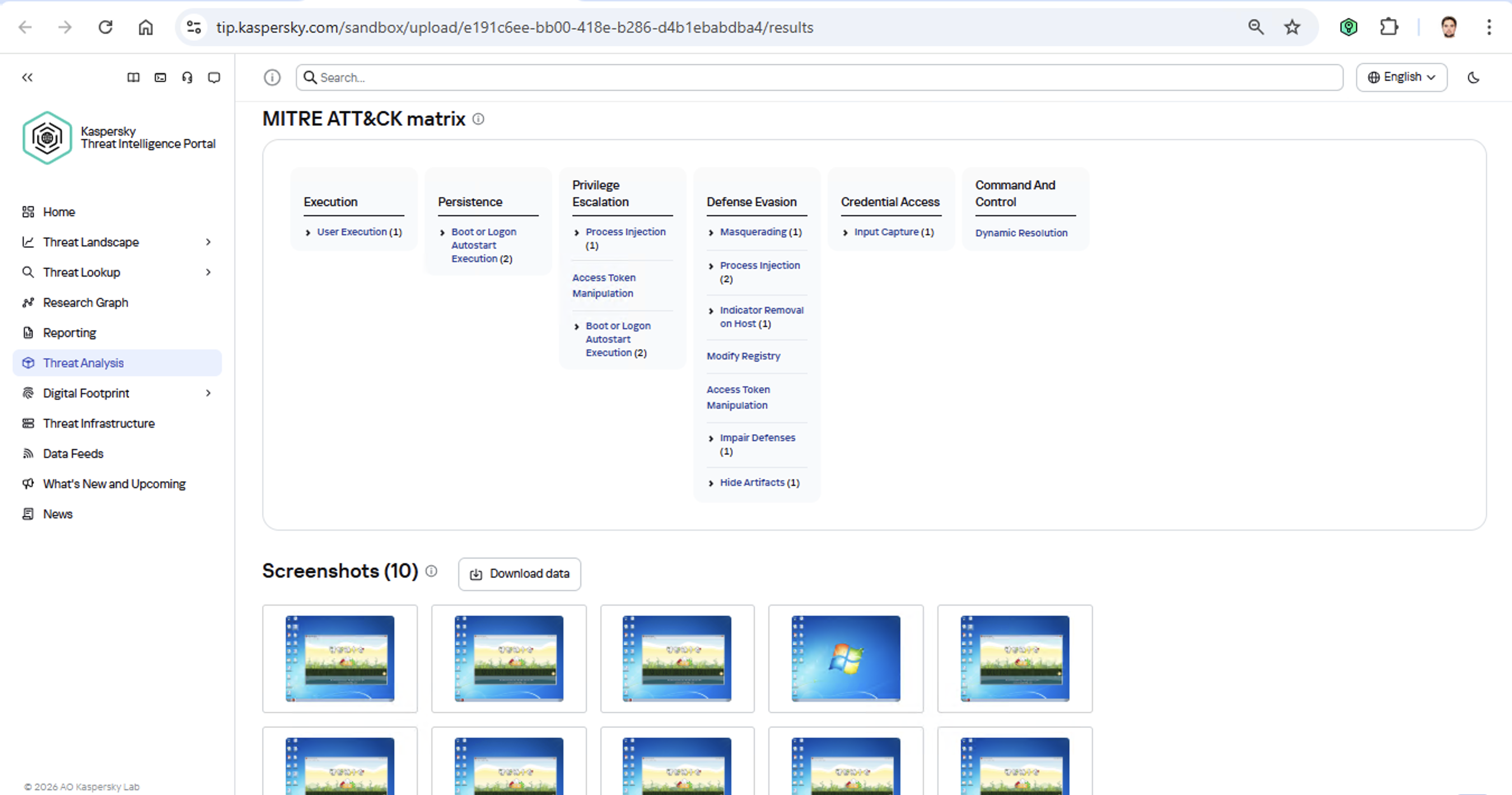







 Table Of Contents