Reading view

Kaspersky SIEM 4.2 update — what’s new? | Kaspersky official blog

A significant number of modern incidents begin with account compromise. Since initial access brokers have become a full-fledged criminal industry, it’s become much easier for attackers to organize attacks on companies’ infrastructure by simply purchasing sets of employee passwords and logins. The widespread practice of using various remote access methods has made their task even easier. At the same time, the initial stages of such attacks often look like completely legitimate employee actions, and remain undetected by traditional security mechanisms for a long time.

Relying solely on account protection measures and password policies isn’t an option. There’s always a chance that attackers will get hold of employees’ credentials using various phishing attacks, infostealer malware, or simply through the carelessness of employees who reuse the same password for work and personal accounts and don’t pay much attention to leaks on third-party services.

As a result, to detect attacks on a company’s infrastructure, you need tools that can detect not only individual threat signatures, but also behavioral analysis systems that can detect deviations from normal user and system processes.

Using AI in SIEM to detect account compromise

As we mentioned in our previous post, to detect attacks involving account compromise, we equipped our Kaspersky Unified Monitoring and Analysis Platform SIEM system with a set of UEBA rules designed to detect anomalies in authentication processes, network activity, and the execution of processes on Windows-based workstations and servers. In the latest update, we continued to develop the system in the same direction, adding the use of AI approaches.

The system creates a model of normal user behavior during authentication, and tracks deviations from usual scenarios: atypical login times, unusual event chains, and anomalous access attempts. This approach allows SIEM to detect both authentication attempts with stolen credentials, and the use of already compromised accounts, including complex scenarios that may have gone unnoticed in the past.

Instead of searching for individual indicators, the system analyzes deviations from normal patterns. This allows for earlier detection of complex attacks while reducing the number of false positives, and significantly reduces the operational load on SOC teams.

Previously, when using UEBA rules to detect anomalies, it was necessary to create several rules that performed preliminary work and generated additional lists in which intermediate data was stored. Now, in the new version of SIEM with a new correlator, it’s possible to detect account hijacking using a single specialized rule.

Other updates in the Kaspersky Unified Monitoring and Analysis Platform

The more complex the infrastructure and the greater the volume of events, the more critical the requirements for platform performance, access management flexibility, and ease of daily operation become. A modern SIEM system must not only accurately detect threats, but also remain “resilient” without the need to constantly upgrade equipment and rebuild processes. Therefore, in version 4.2, we’ve taken another step toward making the platform more practical and adaptable. The updates affect the architecture, detection mechanisms, and user experience.

Addition of flexible roles and granular access control

One of the key innovations in the new version of SIEM is a flexible role model. Now customers can create their own roles for different system users, duplicate existing ones, and customize a set of access rights for the tasks of specific specialists. This allows for a more precise differentiation of responsibilities among SOC analysts, administrators, and managers, reduces the risk of excessive privileges, and better reflects the company’s internal processes in the SIEM settings.

New correlator and, as a result, increased platform stability

In release 4.2, we introduced a beta version of a new correlation engine (2.0). It processes events faster, and requires fewer hardware resources. For customers, this means:

  • stable operation under high loads;
  • the ability to process large amounts of data without the need for urgent infrastructure expansion;
  • more predictable performance.

TTP coverage according to the MITRE ATT&CK matrix

We’re also systematically continuing to expand our coverage of the MITRE ATT&CK matrix of techniques, tactics, and procedures: today, Kaspersky SIEM covers more than 60% of the entire matrix. Detection rules are regularly updated and accompanied by response recommendations. This helps customers understand which attack scenarios are already under control, and plan their defense development based on a generally accepted industry model.

Other improvements

Version 4.2 also introduces the ability to back up and restore events, as well as export data to secure archives with integrity control, which is especially important for investigations, audits, and regulatory compliance. Background search queries have been implemented for the convenience of analysts. Now, complex and resource-intensive searches can be run in the background without affecting priority tasks. This speeds up the analysis of large data sets.


We continue to regularly update Kaspersky SIEM, expanding detection capabilities, improving architecture, and adding AI functionality so that the platform best meets the real-world conditions of information security teams, and helps not only to respond to incidents, but also to build a sustainable protection model for the future. Follow the updates to our SIEM system, the Kaspersky Unified Monitoring and Analysis Platform, on the official product page.


  •  

Where does the data stolen in a phishing attack go? | Kaspersky official blog

Imagine: a user lands on a scam site, decides to make a purchase, and enters their bank card details, name, and address. Guess what happens next? If you think the attackers simply grab the cash and disappear — think again. Unfortunately, it’s much more complicated. In reality, the information enters a massive shadow-market pipeline, where victims’ data circulates for years, changing hands and being reused in new attacks.

At Kaspersky, we’ve studied the journey data takes after a phishing attack: who gets it, how it’s sorted, resold, and used on the shadow market. In this article, we map the route of stolen data, and explain how to protect yourself if you’ve already encountered phishing, or if you want to avoid it in the future. You can read the detailed report complete with technical insights on Securelist.

Harvesting data

Phishing sites are carefully disguised to look legitimate — sometimes the visual design, user interface, and even the domain name are almost indistinguishable from the real thing. To steal data, attackers typically employ HTML forms prompting users to enter their login credentials, payment card details, or other sensitive information.

As soon as the user hits Sign In or Pay, the information is instantly dispatched to the cybercrooks. Some malicious campaigns don’t harvest data directly through a phishing site but instead abuse legitimate services like Google Forms to hide the final destination server.

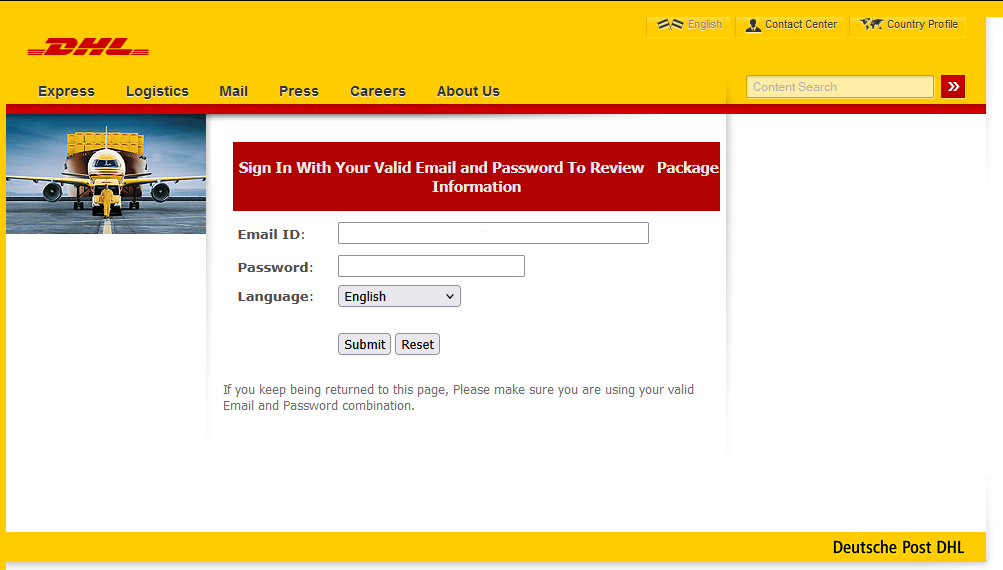
A fake DHL website. The user is asked to enter the login and password for their real DHL account

A fake DHL website. The user is asked to enter the login and password for their real DHL account

The stolen data is typically transmitted in one of three ways — or a combination of them:

  • Email. This method is less common today due to possible delays or bans.
  • Telegram bots. The attackers receive the information instantly. Most of these bots are disposable, which makes them hard to track.
  • Admin panels. Cybercriminals can use specialized software to harvest and sort data, view statistics, and even automatically verify the stolen information.

What kind of data are phishers after?

The range of data sought by cybercriminals is quite extensive.

  • Personal data: phone numbers, full names, email, registration and residential addresses. This information can be used to craft targeted attacks. People often fall for scams precisely because the attackers possess a large amount of personal information — addressing them by name, knowing where they live, and which services they use.
  • Documents: data and scans of social security cards, driver licenses, insurance and tax IDs, and so on. Criminals use these for identity theft, applying for loans, and verifying identity when logging into banks or e-government portals.
  • Credentials: logins, passwords, and one-time 2FA codes.
  • Biometrics: face scans, fingerprints, and voice samples used to generate deepfakes or bypass two-factor authentication.
  • Payment details: bank card and cryptocurrency wallet details.
  • And much more.

According to our research, the vast majority (88.5%) of phishing attacks conducted from January through September 2025 targeted online account credentials, and 9.5% were attempts to obtain users’ personal data, such as names, addresses, and dates. Finally, 2% of phishing attacks were focused on stealing bank card details.

Distribution of attacks by type of data being targeted, January–September 2025

Distribution of attacks by type of data being targeted, January–September 2025

What happens to the stolen data next?

Not all stolen data is directly used by the attackers to transfer money to their own accounts. In fact, the data is seldom used instantly; more commonly, it finds its way onto the shadow market, reaching analysts and data brokers. A typical journey looks something like this.

1. Bulk sale of data

Raw data sets are bundled into massive archives and offered in bulk on dark web forums. These dumps often contain junk or outdated information, which is why they’re relatively cheap — starting at around US$50.

2. Data sorting and verification

These archives are purchased by hackers who act as analysts. They categorize datasets and verify the validity of the data by checking if the login credentials work for the specified services, if they are reused on other sites, and if they match any data from past breaches. For targeted attacks, cybercriminals compile a digital dossier. It stores information gathered from both recent and older attacks — essentially a spreadsheet of data ready to be used in hacks.

3. Resale of verified data

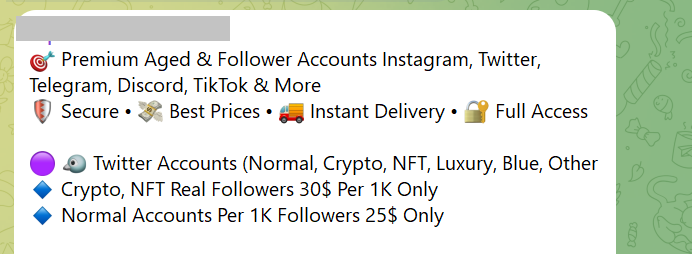
The sorted datasets are offered for sale again, now at a higher price — and not only on the dark web but also on the more familiar Telegram.

An ad for a Telegram sale of social media account credentials

An ad for a Telegram sale of social media account credentials

According to Kaspersky Digital Footprint Intelligence, account prices are driven by a large number of factors: account age, 2FA authentication, linked bank cards, and service userbase. It’s no surprise that the most expensive and in-demand commodity on this market is access to bank accounts and crypto wallets.

Category Price, US$ Average price, US$
Crypto platforms 60–400 105
Banks 70–2000 350
E-government portals 15–2000 82.5
Social media 0.4–279 3
Messaging apps 0.065–150 2.5
Online stores 10–50 20
Games and gaming platforms 1–50 6
Global internet portals 0.2–2 0.9
Personal documents 0.5–125 15

Average account prices in January–September 2025

4. Repeat attacks

Once a cybercriminal purchases a victim’s digital dossier, they can plan their next attack. They might use open-source intelligence to find out where the person works, and then craft a convincing email impersonating their boss. Alternatively, they could hack a social media profile, extract compromising photos, and demand a ransom for their return. However, rest assured that nearly all threatening or extortion emails are just a scare tactic by scammers.

Cybercriminals also use compromised accounts to send further phishing emails and malicious links to the victim’s contacts. So, if you receive a message asking you to vote for a niece in a contest, lend money, or click on a suspicious link, you have every reason to be wary.

What to do if your data has been stolen

  1. First, recall what information you entered on the phishing site. If you provided payment card details, call your bank immediately and have the cards blocked. If you entered a login and password that you use for other accounts, change those passwords right away. A password manager can help you create and store strong, unique passwords.
  2. Enable two-factor authentication (2FA) wherever possible. For more details on what 2FA is and how to use it, read our guide. When choosing a 2FA method, it’s best to avoid SMS, as one-time codes sent via a text can be intercepted. Ideally, use an authenticator app, such as Kaspersky Password Manager, to generate one-time codes.
  3. Check the active sessions (the list of logged-in devices) in your important accounts. If you see a device or IP address you don’t recognize, terminate that session immediately. Then change your password and set up two-factor authentication.

How to guard against phishing

More on phishing and scams:

  •  

Webcast: Group Policies That Kill Kill Chains

On this webcast, we’ll guide you through an iterative process of building and deploying effective and practical Group Policy Objects (GPOs) that increase security posture. Slides for this webcast can […]

The post Webcast: Group Policies That Kill Kill Chains appeared first on Black Hills Information Security, Inc..

  •  

Webcast: Attack Tactics 6! Return of the Blue Team

Slides for this webcast can be found here: https://www.blackhillsinfosec.com/wp-content/uploads/2020/09/SLIDES_AttackTactics6ReturnofBlueTeam.pdf In this webcast we walk through the step-by-step defenses to stop the attackers in every step of the way we showed […]

The post Webcast: Attack Tactics 6! Return of the Blue Team appeared first on Black Hills Information Security, Inc..

  •  

The CredDefense Toolkit

Derek Banks, Beau Bullock, & Brian Fehrman // Our clients often ask how they could have detected and prevented the post-exploitation activities we used in their environment to gain elevated […]

The post The CredDefense Toolkit appeared first on Black Hills Information Security, Inc..

  •  
  •  
❌