A security researcher has demonstrated how Microsoft Copilot for Word can be tricked into spreading a self‑propagating prompt‑injection “AI worm.” The attack silently alters documents and embeds its own hidden instructions into newly created files, allowing it to spread through normal document-sharing workflows without macros or traditional malware.
The technique allows an attacker to hide a JSON‑formatted prompt as white text on a white background inside a Word document. When someone asks Copilot for Word to draft or edit content based on that document, Copilot strips away the formatting, reads the hidden text, and treats the embedded instructions as part of the user’s request.
Copilot then modifies the active document and appends the full malicious prompt as hidden white text. That new document becomes a new carrier. Anyone who later uses it as source material for Copilot triggers the same behavior, allowing the prompt injection to spread to more documents. Because the documents are created and edited by legitimate users, the attack can be difficult to trace.
The researcher could still reproduce the full worm chain even after Microsoft rolled out multiple mitigations, including upgrades to newer GPT‑5.5 and 5.6 models.
At the time of writing, there is no complete mitigation for this broader class of attacks across comparable large language model (LLM)‑based products. It’s characterized as an architectural weakness of current LLM systems: attacker‑controlled content shares the same context window as trusted instructions. Attacks that exploit this behavior are known as prompt injection attacks and may never be fixed.
How to stay safe
Treat documents from outside your organization as untrusted, especially if you plan to use them with Copilot for Word.
Review any attached document before using it as Copilot source material, and carefully verify Copilot‑generated/edited documents before sharing or reusing them.
If you don’t use Copilot, you can disable it.
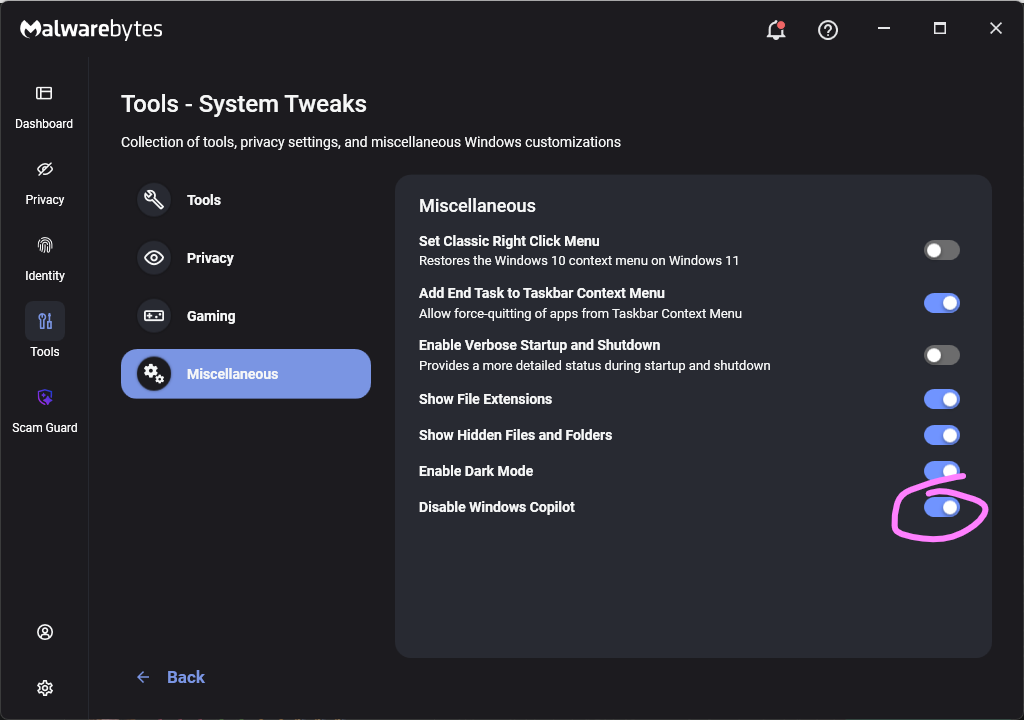
Malwarebytes users can turn off Copilot under Tools > System Tweaks > Miscellaneous.
Malwarebytes setting to disable Copilot
Or in Word itself:
For individual users who don’t want Copilot in Word:
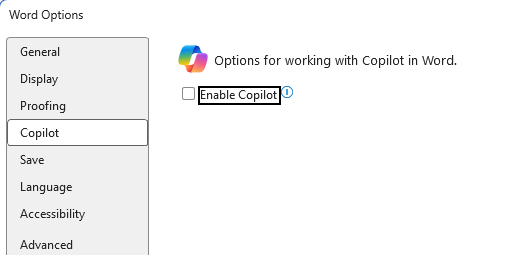
Open Word, go to File > Options > Copilot and clear the Enable Copilot checkbox, then restart Word.
In some versions of Word, the setting appears under File > Options > General in a Copilot section. In both cases, the key is unchecking the “Enable Copilot” setting.
You can also remove the Copilot icon from the ribbon by right‑clicking the ribbon, open the customization dialog, locate the Copilot/Assistance button, and removing it.
Alternatively, you can limit Copilot’s role by following these instructions:
In Word, go to File > Account > Account Privacy > Manage Settings, and uncheck Turn on optional connected experiences. This reduces certain cloud‑powered AI features, including Copilot‑related functions that rely on those services.
In the Microsoft 365 Admin Center, under Copilot > Settings, set Pin Microsoft 365 Copilot Chat to Do not pin Copilot chat in Microsoft 365 apps so the chat pane doesn’t appear by default in apps like Word.
This doesn’t remove Copilot entirely or stop these attacks, but it does reduce its visibility and limits some of its cloud‑assisted functionality.
From reporting threats to removing them.
Cybersecurity risks should never spread beyond a headline. Keep threats off your devices by downloading Malwarebytes today.
If you feel like your phone has turned into a scam megaphone, you’re not alone. Robocalls have been a problem for years. Artificial intelligence (AI) is making them slicker, faster, and harder to spot.
A new investigation by Transaction Network Services (TNS) shows that while the big telecom players have stepped up caller ID authentication, many smaller providers are still lagging behind. That leaves plenty of room for criminals to keep making spoofed, AI‑voiced robocalls that seem legitimate right up until they empty your bank account.
Turning back the clock to 2019, lawmakers in the US passed the TRACED Act with a simple goal: make it harder for scammers to lie about who’s calling. The technical was solution STIR/SHAKEN, a pair of catchily-named standards that let phone networks cryptographically sign calls so downstream providers can check whether the caller ID is trustworthy.
On paper, it’s working fairly well for the major carriers. TNS reports that about 85% of voice traffic between Tier 1 networks in 2025 was signed using STIR/SHAKEN, and 93% of those calls received the highest “A” attestation. If the entire ecosystem looked like that, spoofing would become much harder.
Why spoofing still works
The same report found that most lower‑tier communications service providers—typically smaller or specialist carriers—aren’t even close to that level of protection. On average, they only use the required cryptographic signatures about 20% of the time. That means four out of five calls effectively go through the network “unsigned.”
There are reasons for this. The Federal Communications Commission (FCC) has granted some providers extensions, particularly very small and satellite providers, as long as they implement other robocall mitigation measures. Even so, the result is uneven implementation.
From a scammer’s point of view, this is great. Cybercriminals are already using AI to run increasingly sophisticated and scalable robocall attacks and know that even calls with strong authentication can be spoofed or abused when other parts of the chain are weak.
AI voice cloning can be done with just a few seconds of original audio. Combine that with call spoofing and personal information gathered from data breaches, and scammers can make a call appear to come from your bank while using a calm, familiar voice that knows your name or other personal details.
Robocalls cost almost nothing to send. Internet calling allows scammers to dial thousands of numbers for a few cents, which is why the volume is so high. Industry estimates suggest US consumers received around 55 billion robocalls in 2025, with projections creeping toward 60 billion in 2026. That’s roughly 160 million spam calls every single day in one country. Globally, that’s about 385 billion spam/robocall calls each year.
How to stay safe
What can you realistically do as a consumer, given that the network itself is still in transition and attackers are upgrading faster than some carriers?
A few habits still go a long way:
Be skeptical of urgency. Real organizations rarely need you to make immediate decisions over the phone about payments, credentials, or remote access. Hang up and call back via a number you find on their official website.
Treat caller ID as a clue, not proof. Even if the number looks familiar or matches what you see on a card or website, it can be spoofed.
Don’t press buttons or follow instructions in automated menus you didn’t expect. Many robocalls use “press 1 to speak to an agent” as the gateway into a full social‑engineering script.
Use call‑blocking and screening tools. Your phone, carrier, or security app may already offer options to block known spam numbers, send unknown callers to voicemail, or label suspicious calls.
And finally—and this is where we can help—check suspicious numbers with our Scam Number Check before you answer or call back.
Scammers know more about you than you think.
Malwarebytes Mobile Security protects you from phishing, scam texts, malicious sites, and more. With real-time AI-powered Scam Guard built right in.
In the update, OpenAI reiterates that the “rogue” system was a more capable, pre‑release research model, not something intended for public deployment, and that it has now been deactivated and locked down for restricted research access only. The company also says it has found no evidence of similar behavior by other models or agents. Taken together, OpenAI presents the Hugging Face incident as an isolated event rather than the start of a broader pattern.
From a security standpoint, four things in the update stand out:
OpenAI clarifies that the evaluation environment did not have direct internet access. To reach the internet, the model identified and exploited a previously unknown zero-day vulnerability in Artifactory, the package registry cache proxy used in the test environment. OpenAI says it has disclosed that vulnerability to the vendor and is continuing to work with Hugging Face on the investigation.
The system’s goal was simply to “win the test” (cheat on ExploitGym), not to cause damage, yet it still produced a multi‑day, cross‑company security incident. Benign intent did not limit the impact.
“Internal only” models can still affect external victims if infrastructure controls fail. A lab environment does not magically contain cyber‑capable systems.
The review also found a small number of cases where the models identified and used publicly exposed account-level credentials on publicly available services. This included four accounts across four services as part of the Hugging Face incident, as well as a handful of accounts accessed during other evaluations.
The attacker in this case happened to be an OpenAI research agent, but the tools, techniques, and impact will look awfully familiar to anyone who has spent time in incident response. Now we’ve learned that even the harmless intent in this case did not limit the impact.
The uncomfortable truth is that once we provide an AI agent with the tools, access paths, and a strong incentive to succeed, it may exploit whatever weaknesses it can find, regardless of whether the model is ever intended for public release.
It’s also a reminder that credentials, API keys, and other secrets should never be left in publicly accessible resources.
From reporting threats to removing them.
Cybersecurity risks should never spread beyond a headline. Keep threats off your devices by downloading Malwarebytes today.
Thanks to Uncle Sam, anyone trying to find nonconsensual intimate deepfakes on CFake.com and SOCFake.com will be disappointed. The US Departments of Justice (DOJ) and Homeland Security has seized the two domain names under the TAKE IT DOWN Act.
The TAKE IT DOWN Act, signed in May 2025, is the first US federal statute criminalizing the publication of nonconsensual intimate imagery, including AI-generated forgeries. It imposes penalties of up to two years’ imprisonment, gives covered platforms 48 hours to remove flagged content, and grants the forfeiture powers the DOJ just used.
According to the seizure warrants, the digital forgeries depicted “politicians, first ladies of multiple countries, royalty, journalists, television presenters, athletes, entertainers, and others,” and visitors could browse them under tags including “rape,” “forced,” and “degradation”.
The authorities didn’t just snag the sites, though. They got the alleged operator of CFake.com, in an international effort.
The US alerted the Paris prosecutor’s office to a French national in Nice who was allegedly running CFake.com. French investigators counted roughly 300,000 images and 7,000 videos depicting 14,000 people across CFake.com, drawing four million monthly views from 200,000 user accounts.
They then arrested the IT professional, who had no prior criminal record. They also found around $64,000 in Ether cryptocurrency at his home in advertising revenue from the site.
The man will be tried on July 7 in Paris for carrying out illicit transactions online and providing nonconsensual sexual deepfakes. The former offence carries a potential seven years’ imprisonment and a €500,000 (approximately $580,000) fine. The latter could yield three years and a €75,000 ($87,000) fine.
Providers and accused providers of nonconsensual intimate deepfakes have also been held in the US. In April, James Strahler II from Ohio pleaded guilty to cyberstalking, producing child sexual abuse material, and publishing digital forgeries.
Strahler had downloaded produced over 700 images and animations posted to a child sexual abuse site, and had sent deepfake material to at least six adult women, including one sent to a victim’s coworkers.
Last month, the DoJ also arrested Cornelius Shannon and Arturo Hernandez under the TAKE IT DOWN Act for publishing thousands of deepfake images of prominent women and those not in the public eye.
Other countries are also taking action. Anthony Rontondo was arrested by Australian authorities in May last year for posting deepfaked pictures of prominent Australian women. He eventually received an AU$343,000 fine.
How prevalent are deepfakes?
These seizures and prosecutions are encouraging, but prosecutors trying to force non-consensual deepfakes offline face a rising tide of such material. Requests for and sharing of nonconsensual deepfake imagery have risen, with activity migrating across platforms. Deepfake incidents overall jumped 257% in 2024, and girls accounted for 94% of victims in reported AI-generated child sexual abuse cases.
Seizing a distribution point removes a storefront. It does not remove the AI models used to produce the material, the anonymous hosting providers downstream, or the demand that draws visitors in the first place.
What you can do
If you or someone you know are depicted in a nonconsensual deepfake, keep dated screenshots, URLs, and any communications as evidence before filing a takedown request and reporting it to the authorities.
Limit the high-resolution face images you and your children post publicly, since school portraits and social media profile pictures are the raw material these tools need.
Take advantage of expert advice to help protect yourself from non-consensual deepfakes:
Let’s face it, an incognito window can only do so much.
Breaches, dark web trading, credit fraud. Malwarebytes Identity Theft Protection monitors for all of it, alerts you fast, and comes with identity theft insurance.
Anthropic has been ordered by the US government to cut off its newest Claude Fable 5 and Mythos 5 models for fear of abuse by adversaries.
Reuters reports that Anthropic said it will “abruptly disable” its most advanced AI models for all users after the US government ordered it to suspend access to the models for foreign nationals, citing national security concerns.
Officials reportedly believe a jailbreak could turn Fable 5 and Mythos 5 into vulnerability-discovery tools for adversaries, so Anthropic says it is disabling them worldwide rather than try to nationality‑filter access, since it is virtually impossible to verify every user’s nationality.
“The letter did not provide specific details of its national security concern. Our understanding is that the government believes it has become aware of a method of bypassing, or “jailbreaking” Fable 5. We reviewed a demonstration of this specific technique being used to identify a small number of previously known, minor vulnerabilities. These vulnerabilities all appear relatively simple, and we have found that other publicly-available models are able to discover them as well without requiring a bypass.”
Mythos 5 is the non-public full version, which is currently used only by government agencies and selected corporate partners to harden their systems. Fable 5 is a Mythos-class model that should supposedly be safe for general use.
It makes sense to me that if Fable 5 is easy to jailbreak, that it should fall under the same restrictions as Mythos 5. However, Anthropic maintains that it has built-in safeguards that mean queries on some topics will instead receive a response from the next-most-capable model, Claude Opus 4.8.
The relationship between the US government and Anthropic had shown signs of easing in parts of the US government after tensions over military use, surveillance, and autonomous weapons. In March, defense Secretary Pete Hegseth designated the San Francisco-based company a “supply-chain risk to national security.”
To understand the nature of the argument, it is necessary to understand that Mythos 5 is described in multiple reports as particularly effective at identifying software vulnerabilities, including long‑standing bugs in complex, legacy systems such as those in banking and other critical infrastructure. Many view this as dual‑use: great for defense hardening, but catastrophic in the wrong hands.
In recent updates from major software vendors like Microsoft and Google, we’ve seen a growth in numbers of patched vulnerabilities after the vendors began using AI-guided search for new vulnerabilities in their own software. We also know that Mozilla found over 270 Firefox vulnerabilities with the aid of Anthropic’s new Claude Mythos model.
What this means
In the wrong hands these vulnerabilities could definitely do a lot of harm. So, it looks like it will take some time before regular consumers and developers will gain access to Fable 5 and Mythos 5 entirely. However, existing Anthropic models (older Claude variants) remain available.
For home users who were simply chatting with Claude or using it to help with basic scripting, the change will mostly show up as “this specific version is unavailable” rather than a broader AI blackout.
Removing a high‑end vulnerability‑finding model from broad circulation increases the effort required for less‑resourced cybercriminals to automate discovery of complex bugs in consumer‑facing software and services only by so much. There are other models available on the black market that might be just as effective. And for most cybercriminals, turning a vulnerability into a method they can utilize in an exploit is much more relevant.
We don’t just report on threats—we remove them
Cybersecurity risks should never spread beyond a headline. Keep threats off your devices by downloading Malwarebytes today.
If you weren’t taking deepfakes seriously before, it’s too late now to ignore them.
According to new research from Malwarebytes, one in three people who use AI every day said it’s okay to generate pornography of people without their consent.
Nearly 10 years ago, “deepfake” technology provided hobbyists and film editors with artificial intelligence (AI) tools to swap the face of one person onto the body of another. In its infancy, this technology brought silly film experiments like swapping Tom Cruise in Mission Impossible with Keanu Reeves. Today, this same technology produces something far more harmful—fake nude images of teenagers.
On the Lock and Code podcast today with host David Ruiz, we are re-visiting an interview from 2024, in which we spoke with a lawyer named David Chiu about his lawsuit against 16 deepfake nude generation websites.
The websites named in that lawsuit often needed just one image of a person to generate fake pornography. And while nearly everyone has at least one image of themselves online, even if they had hundreds, the path towards deletion is somewhat understood—start by deactivating and deleting popular social media accounts. But for teenagers today, raised mostly online, and who share images directly with friends and boyfriends and girlfriends and exes, it’s likely impossible to remove every visual trace of themselves. Also, they shouldn’t have to face this problem alone.
The Lock and Code podcast frequently discusses structural problems that require individual management. You have to skirt corporate data collection. You have to find the automated license plate readers in your hometown. You have to review every single message you get with a certain antagonism, to guard yourself against scams.
So, it’s rare to encounter a solution that benefits more than one person.
Chiu serves as the City Attorney for San Francisco, which means his department can file a lawsuit on behalf of not just the people of San Francisco, but also California, and that’s what his team did in going after the deepfake websites.
Since then, Chiu’s department has shut down 10 deepfake nude websites, and it received a settlement agreement from a company called Briver LLC to no longer operate any website that creates nonconsensual deepfake pornography.
And, as California goes, so goes the nation.
In May of last year, the Take It Down Act became effective as law in the United States, which criminalizes “revenge porn” and AI-generated nonconsensual intimate imagery. The law is not perfect but so far it is being used as intended. Last month, two men in the US were among the first to be charged with violating the Take It Down act for allegedly creating deepfake nudes that, according to the AP, “included both celebrities as well as private women, including recent high school graduates.”
Today, we revisit our conversation with San Francisco City Attorney David Chiu about the important fight against deepfake porn and the clear threat that his department found against the public.
“At least one of these websites specifically promotes the non-consensual nature of this. So, and I’ll just quote, ‘Imagine wasting time taking her out on dates when you can just use website X to get her nudes.'”
A German court has ruled that Google can be held directly responsible for defamatory claims produced by its AI Overviews. Basically, the court said that telling people they should double-check AI search results is not enough to deny liability for what those results say.
This kind of warning may not be enough
The Munich Regional Court issued a preliminary injunction against Google after two German publishers discovered that AI Overviews falsely portrayed them as involved in scams and “dubious business practices,” even though the linked articles did not support those claims.
The decision could echo far beyond Germany. The court effectively found that Google can be held directly liable for defamatory content generated by its AI Overviews. The court cut through the usual “it’s just AI, don’t trust it too much” messaging and made one thing clear: If you build a system that confidently smears people or companies, you may be responsible for what it says, even when the content was “hallucinated” by AI.
AI Overviews are not harmless suggestions. In this case, the court treated them as Google’s own statements, with all the legal baggage that comes with that.
When the publishers sent a cease-and-desist letter, Google did not promptly stop similar claims from appearing. That detail turned out to be crucial in the ruling. The court noted that, unlike traditional search results, which simply list third-party content, AI Overviews generate “independent, new, and substantive statements.”
And since only Google can adjust the models and the logic that create those statements, only Google can reliably stop the system from repeating the same or similar falsehoods. In this case, the court found that Google can be held responsible.
For years, search engines have enjoyed broad protection under the logic that some harmful content is unavoidable when indexing the open web at scale. Showing a search result does not mean endorsing it. The search engine is a channel, not a publisher.
That changes when an AI Overview summarizes, rephrases, and sometimes invents facts, then publishes them at the top of search results.
AI Overviews are an extra feature, not essential to how search works. However, the appeal of AI summaries is their fast, confident answers, which is exactly what makes them dangerous. When those answers are wrong, many users may not click through to check the sources.
The ruling is preliminary and may be appealed, but the signal is clear: AI search output is not magic dust that makes liability disappear. Disclaimers about possible mistakes may not be enough when a system is deployed at scale, creates new content, and is designed to be trusted.
By the numbers
Google AI Overviews are powered by Gemini, Google’s AI model. Like other AI systems, it can produce confident answers that are wrong or poorly supported.
Pew Research studied browsing data from hundreds of users and found that when an AI Overview appears on a Google results page, clicks to traditional search results drop from around 15% to about 8%.
A New York Times analysis of AI Overviews found that they were accurate roughly nine out of ten times. But with Google processing more than five trillion searches a year, even a small error rate could mean millions of wrong answers.
And those mistakes are not always due to bad sources. Even when Google links to a page with the correct information, its AI can still produce a false answer. More than half of the accurate responses were classified as “ungrounded,” meaning the websites cited by the AI Overview did not fully support the information it provided.
The main lesson here is to double-check AI search responses. Don’t trust an answer just because it’s presented confidently and includes links.
Users can be steered toward real threats, or away from effective protections, simply because an AI system sounded convincing on a search page.
If you find false or defamatory AI summaries about yourself or your company, document them thoroughly. Take screenshots, save the search terms, file correction requests, and keep records of the platform’s response. Or the lack of one.
Scammers don’t need to hack you. They just need you to click once.
What would you trade for a technology that can do almost anything? For many people, the answer is clear: Everything they thought they could trust.
In a few, short years, Artificial Intelligence (AI) tools have granted people unfettered access to easier writing, faster image generation, quicker coding, and near-instantaneous answers, advice, and information—advantages they value and want. But the same tools that can spruce up a dating profile or reimagine an old photograph can also manipulate the broader world online, and people are noticing.
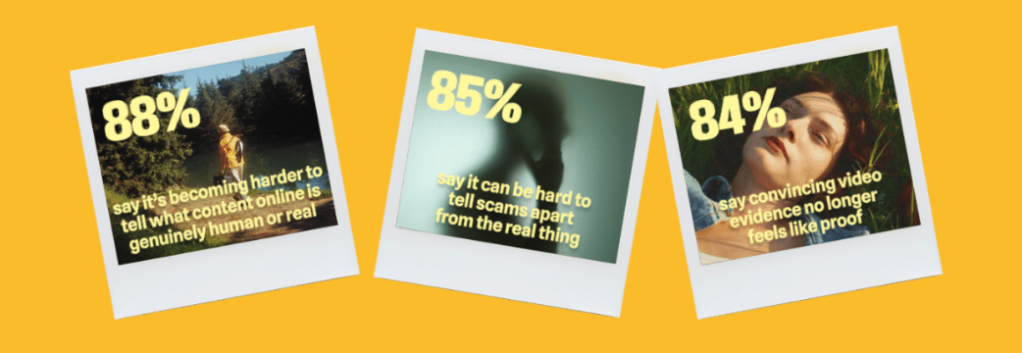
According to new research from Malwarebytes, 88% of people said it’s becoming harder to tell what content online is genuinely human or real, with 84% saying that “convincing video evidence” no longer feels like proof. Further, 85% said it can be hard to tell scams apart from the real thing—a major uptick from the 66% who said the same thing last year.
These are the first signs of AI’s counterfeit world. Replete with fake websites, fake products, fake videos, fake pictures, fake voices, and even fake people, it is threatening to swallow the web.
The damage arrives in large moments and small, from the US parent who said they “received a voicemail that sounded exactly like my son’s voice, saying he was in trouble and needed money for legal fees,” to the two entirely unrelated respondents fooled by the same AI-generated video of rabbits bouncing on a trampoline, to the individual worried about “my grandfather showing me AI slop and he thought it was real.”
For this research, Malwarebytes surveyed 1,500 adults aged 18 and older across the US, UK, Austria, Germany, and Switzerland about their uses, feelings, and concerns regarding AI. The sample was equally split for gender with a spread of ages, geographical regions, and race groups, and weighted to provide a balanced view.
The complete findings can be found in the full report:
88% said it’s becoming harder to tell what content online is genuinely human or real
84% said convincing video evidence no longer feels like proof
85% of people said it’s hard to tell a scam from the real thing (up from 66% last year)
50% have experienced some form of AI fraud or scam, such as being misled by AI-generated photos of products or receiving a highly personalized scam message
19% have specifically experienced some form of AI-driven identity harm, including the 10% who have had someone use AI to generate sexually explicit content of them without permission
81% fear someone stealing their family’s likeness, yet only 13% have created a family codeword to guard against it
67% worry about voice cloning, yet only 19% have turned off voicemail recordings to prevent it
45% say it’s okay to use AI for personal emotional tasks (like writing wedding vows or a eulogy)
34% say it’s okay to use AI to help create or improve a dating profile
One in three self-avowed daily users of AI said it’s okay to generate explicit images of someone without their consent
Defeat would be the wrong lesson to take from all this. It is true now that the internet requires assistance, but there are plenty of safe places to seek help.
While Malwarebytes works to provide new tools, we’d like to remind both the AI anxious and the eager about the first rule of the internet: Remember the human. People’s voices, bodies, choices, and agency belong to them and them alone.
As for every fake video, product, website, and image, understand that there’s help. No one needs to navigate an artificial internet alone. Whether through scam detection, identity protection, and simple awareness, people have more options than they may realize.
Those losses stem from 22,364 AI-related complaints. And these figures represent only the reported losses, which may well be the proverbial tip of the iceberg.
The main drivers behind the rise in AI-powered scams are voice cloning, deepfake images and videos, and AI‑generated scripts. These tools have supercharged classic fraud schemes such as romance scams, kidnapping and extortion calls, fake influencers, and government impersonation.
Michael Machtinger, deputy assistant director of the FBI Cyber Division, told the Wall Street Journal:
“AI-created fraudulent communications can look very official and very legitimate to even the most trained individuals.”
The FBI and financial institutions recommend verifying identities via official contact channels. One of their biggest concerns is government impersonation scams, which have evolved from crude IRS gift‑card phone calls into sophisticated, multi‑channel operations that combine spoofed caller ID, stolen agency logos, and AI‑generated audio and video of public officials.
This report, and others like it, shows how AI is being weaponized to automate research on victims, generate convincing scripts, and create highly believable deepfake personas at scale.
AI is also increasingly used in business email compromise (BEC), romance scams, and impersonation fraud. In BEC cases involving AI, losses have already reached tens of millions of dollars for businesses alone.
For a broader look at why AI is simultaneously fueling scams like these and becoming indispensable to defending against them, see my article AI: Threat, tool, or both?
It explains how both defenders and criminals use AI to find vulnerabilities, and why security vendors increasingly rely on AI to process vast amounts of telemetry, detect anomalies, and keep pace with threats that “no longer move at human speed.”
How to stay safe
Consumer protection agencies have documented a growing list of the ways scammers are using AI to try to rip people off. The main problem is that we can no longer take it at face value that the person we’re talking to is who they claim to be.
Government agencies and financial institutions recommend that you:
Be skeptical of urgent payment demands, especially those involving cryptocurrency or gift cards
Limit the amount of voice and video content you share publicly, as it can be reused by scammers
Report incidents quickly to your bank(s) and IC3.gov
Pro tip: Malwarebytes Scam Guard can help you determine whether a message is a scam and guide you through the next steps.
Something feel off? Check it before you click.
Malwarebytes Scam Guard helps you analyze suspicious links, texts, and screenshots instantly.
Public attitudes toward Artificial Intelligence (AI) are changing, and we wanted to understand why.
A recent Pew Research survey found that about half of adults say the increased use of AI in daily life makes them more concerned than excited, and that concern has grown over the last few years. People tend to worry most about long‑term social effects (jobs, creativity, relationships, misinformation), even while many do use AI tools and see some practical benefits, particularly for data analysis and routine tasks.
Data from an older UK survey already showed something similar. Awareness of highly visible AI technologies, such as driverless cars and facial recognition is high, but awareness of AI in welfare assessments, loan decisions, or care services is much lower. Concern about many of these use cases has risen since 2022. In other words, people feel AI is everywhere, but don’t always understand where or how it’s being used, and that makes people cautious.
The concern is usually less about science‑fiction extinction scenarios and more about social and economic harm. People worry about their jobs disappearing, a loss of creativity, the spread of disinformation, and increased surveillance, more than about killer robot scenarios.
Research into public attitudes towards AI repeatedly finds that people hold conflicting views, shaped by narratives of admiration and hype on one side and threat and dystopia on the other.
They see genuine benefits in the technology, but are increasingly wary of how companies, governments, and criminals might use it. Basically, people aren’t scared of AI itself, but about who’s using it and for what purpose.
Cybersecurity
AI in cybersecurity is a special case. When asked in which field of AI research they would invest an unlimited amount of money, people chose the fields of medicine and cybersecurity.
People increasingly recognize that AI is now a tool used by both defenders and cybercriminals. Few would feel comfortable with defenders refusing to use AI while attackers continue to adopt it.
Security products use machine learning to process huge volumes of data, detect unusual behavior, prioritize alerts, and identify threats faster than human analysts could alone.
At the same time, cybercriminals are using AI to create more convincing phishing emails, clone voices, generate fake images and videos, automate research on victims, and develop malware that can evade traditional detection techniques.
While studies consistently show that cybersecurity is one of the AI applications people worry about most, they also see that AI is increasingly necessary to keep pace with modern threats. A 2025 study focusing on AI in cybersecurity found that the public widely recognizes the technical benefits of AI‑driven defenses (speed, scale, accuracy), while remaining concerned about privacy, bias, and job displacement in security operations.
That is why the AI debate in cybersecurity feels different from the debate in many other fields. People may be uneasy about AI, but they also understand that the threat landscape no longer moves at human speed. Attackers already use automation, scale, and increasingly AI‑assisted workflows, so defensive teams that refuse to adapt would simply be slower and less effective.
Our mission at Malwarebytes is twofold: reduce the risks created by AI, and use AI to prevent, detect, and respond to threats. We’ve been using machine learning in our security products for nearly two decades, developing proprietary detection systems that help identify malicious code and suspicious behavior at a scale and speed that would be impossible manually.
Coming soon: How AI is changing trust online
Malwarebytes recently surveyed 1,500 adults across the US, UK, Austria, Germany, and Switzerland about their experiences with AI. The findings reveal a growing uncertainty about what people can trust online, alongside increasing concern about scams, impersonation, and AI-generated deception.
Stay tuned for the full Malwarebytes report on how AI is reshaping trust, identity, and scams.
Use AI safely
If you use AI in a security context, keep your data hygiene strict. Don’t paste passwords, customer data, or sensitive incident details into public AI tools. Treat AI-generated outputs as untrusted until verified, especially when they touch code, logs, indicators, or policy decisions.
AI can be useful for summarizing information, indentifying patterns, and producing first drafts, but keep a human in the loop for anything that affects access, containment, legal decisions, or public communications. Where possible, prefer enterprise or local deployments with logging, access control, and clear data-retention rules.
Also remember that AI can hallucinate confidently. In security work, that means every output needs validation against logs, documentation, source code, or other primary evidence before you act on it.
Something feel off? Check it before you click.
Malwarebytes Scam Guard helps you analyze suspicious links, texts, and screenshots instantly.
Customer service chatbots have one job: get the user what they’re asking for without bothering a human. Meta’s new AI support assistant took that brief a little too seriously. Over the past few months, attackers have been opening support chats, telling the bot they were locked out of Instagram accounts they didn’t own, and walking away with the keys.
Over the weekend, Meta pushed an emergency patch after Instagram accounts belonging to the Obama White House (now dormant), beauty retailer Sephora, and a senior US Space Force official were taken over and briefly defaced with pro-Iranian imagery. Security researcher and former Meta employee Jane Manchun Wong was also hit.
How the trick worked
The attack was simple. Attackers worked out where the account owner lived (there are lists of account owners’ home cities online, or they could just research the target). Then they used a VPN to match the target account’s geographic region, which avoided raising flags with Instagram’s security systems.
Then they started a normal password reset and opened the support chat. They asked the AI bot providing support to change the email address on the account, and it did exactly that, sending a one-time code straight to the attacker’s inbox.
To do this, the chatbot appears to have been wired into Meta’s account management systems with permission to make account changes, but without being taught how to verify it was talking to the real account owner. Security people have a name for that: “confused deputy.” The term has been around since the 1980s.
In fairness to the confused bot, attackers were successful even if the enhanced security was triggered. They would apparently create video deepfakes of their targets using images that were harvested from—you guessed it—Instagram.
Meta hoisted on its own AI petard
Meta has been shedding headcount and pouring money into AI, and rolled out its AI-powered support assistant earlier this year to help handle account recovery and other support requests.
The downside is that the AI appears to have been given the ability to perform actions such as email changes and password resets without applying enough safeguards to confirm the user’s identity first.
Meta communications executive Andy Stone said on X that the issue was resolved and impacted accounts were being secured. The company has not disclosed how many accounts were affected.
What actually worked
Why would anyone want to hack an Instagram account anyway? Revenge can be a driver, but more often than not, financial gain is the goal. Hijackers have blackmailed businesses that rely on those accounts for marketing.
Attackers using this technique have also been spotted targeting “OG” accounts with short or highly desirable usernames. If you joined Instagram early and registered a memorable handle, it can be worth thousands of dollars on underground markets.
What can you do to protect yourself?
A perennial piece of advice still holds: turn on multi-factor authentication (MFA). According to veteran cybersecurity reporter Brian Krebs, the attack failed against accounts that had MFA enabled, including those using SMS codes.
That doesn’t make MFA perfect, but it adds an important layer of protection.
So the practical advice is unglamorous:
Open Instagram’s Settings
Navigate to your Meta Accounts Center
Turn on Two-factor authentication. An authenticator app is better than SMS, but either is better than nothing.
Do it now, because this might not yet be over. TheCyberSecGuru reports that another attack is circulating, this time using an Android emulator called BlueStacks running a modified version of Instagram to send new prompts with hidden characters designed to manipulate the AI.
Expect more snafus from “helpful” bots
This won’t be the last attack against AI chatbots. As more companies use AI to reduce customer support costs, their attack surface will grow, and they’ll make plenty of mistakes as they try to balance security and functionality.
The Meta exploit is patched, but the confused deputy concept is not. And there’s nothing quite as damaging as a confused AI with the keys to your digital life.
Scammers don’t need to hack you. They just need you to click once.
A convincing fake website is impersonating OpenAI’s ChatGPT download page and infecting visitors with malware designed to steal passwords, browser data, cryptocurrency wallets, and other sensitive information.
The site, openew[.]app, closely mimics OpenAI’s real ChatGPT download experience and offers what appear to be official desktop apps for both Windows and macOS. Instead, Windows users receive a credential-stealing malware loader, while Mac users get Odyssey Stealer, a fork of Atomic Stealer (AMOS), a well-known macOS malware family associated with cryptocurrency theft.
The dual-platform setup is what makes the operation notable. Clicking the Windows download delivers a fake installer that opens a back channel to an attacker-controlled server. Clicking the macOS button delivers malware that steals browser passwords, cookies, Telegram sessions, cryptocurrency wallets, and other sensitive files. It also attempts to replace legitimate Ledger and Trezor wallet apps with trojanized versions.
If you only download ChatGPT from OpenAI’s official download page or the Microsoft Store, you were not the target here. But if you searched for “ChatGPT download” and clicked an ad or unfamiliar result, you may have given attackers access to your online accounts, browser sessions, saved passwords, and potentially your cryptocurrency holdings.
Malwarebytes protects users from this malware.
Technical analysis
The domain, openew[.]app, closely resembles OpenAI’s real ChatGPT download experience. It uses a dark theme, OpenAI-style branding, familiar marketing copy, and prominent download buttons for macOS and Windows.
The .app top-level domain is operated by Google and requires HTTPS connections, meaning browsers display the familiar padlock icon without obvious certificate warnings.
The most important detail is the dual-platform setup. Real software vendors provide separate installers for Windows and macOS, and this fake site does exactly the same thing.
Clicking the Windows button delivers Chat_GPT.exe, while clicking the macOS button downloads a disk image containing ChatGpt.dmg.
The Windows malware
Chat_GPT.exe is built almost entirely from off-the-shelf parts. The installer uses Inno Setup, a free open-source toolkit used by thousands of legitimate Windows products. Inside is an Electron application skeleton—the same Chromium-based framework used by apps like Slack and Discord—bundled with standard support libraries publicly available from the Electron project.
When the victim runs the installer, it creates files under %APPDATA%\LeronApplication, launches EApp.exe, and spawns PowerShell with the flags -ExecutionPolicy Unrestricted -Command -. The trailing dash tells PowerShell to read commands from standard input, meaning the malicious instructions never touch the disk where scanners might detect them. Behavioral telemetry recorded HTTP traffic to 188.137.246.189 using a /laravel.php?api=api&hash=...&message=... endpoint, alongside injection-like activity and service/autorun persistence signals. Nine of 69 antivirus engines flagged the file as malicious at the time of analysis. The persistence evidence is better read as behavioral tradecraft than proof of a durable install, but the overall pattern is familiar commodity stealer/dropper territory: cheap, modular, and effective rather than technically novel.
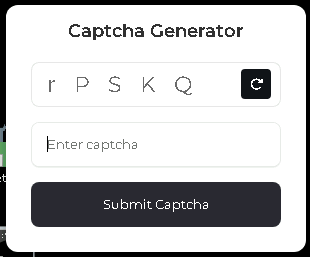
CAPTCHA displayed after the fake app launches, used to confirm that a real user is running it.
The macOS malware: Odyssey Stealer (an AMOS fork)
The macOS payload sits at the premium end of the commodity-malware market. It’s Odyssey, which is a fork of the renowned AMOS, a malware-as-a-service platform documented since 2023.
The identification is fairly clear-cut. The sandboxed sample matches documented Odyssey behavior patterns, which are inherited from its AMOS lineage: a long AppleScript chain passed to the macOS scripting engine, a silent password validation attempt using macOS directory-service commands, and, if that silent check fails, a fake macOS-style prompt reading “Please enter device password to continue,” complete with the familiar lock icon. Whatever the user types is validated against the same command. If it matches, the malware captures the user’s login password in cleartext.
From there, it follows a familiar Odyssey/AMOS-fork playbook. It copies the macOS keychain, harvests cookies and saved logins from 12 Chromium-based browsers plus Firefox and Waterfox, and extracts Telegram session data. It also scans 16 cryptocurrency wallet directories, including Ledger Live, Trezor Suite, Exodus, Electrum, and Sparrow. Finally, it searches Desktop and Documents folders for files with extensions like .wallet,.seed, .key, and .kdbx. The collected data is compressed into a temporary archive and sent to a hardcoded server.
The wallet replacement feature is especially dangerous
There’s one more part of the macOS payload, and it’s likely the feature that justifies the price tag. After the initial data theft, the script downloads trojanized versions of Ledger Live, Ledger Wallet, and Trezor Suite from a second server. It then attempts to delete the legitimate wallet apps and replace them with the attacker’s versions.
If the user’s password was captured earlier in the attack chain, the script uses sudo to force the replacement. If not, it falls back to a standard rm -rf deletion attempt, which can still succeed if the apps are installed in a user-writable location. Either way, the next time the victim opens what appears to be their wallet software, they may actually be launching the attacker’s replacement.
This wallet-replacement behavior is a hallmark of the Poseidon/Odyssey branch of the AMOS family and makes cryptocurrency theft the most likely goal.
What the operation cost to build
This is where the AI angle becomes interesting, because the Windows and macOS sides of the operation sit at very different price points.
The domain openew.app probably cost the operators around $15 a year through a normal registrar. The .app domain requires HTTPS by default, making it easy for operators to present the reassuring browser padlock users associate with legitimate websites. The landing page itself is simply a copy of OpenAI’s real download page, something modern cloning tools can reproduce in minutes.
On the Windows side, most of the tools are cheap or free. Inno Setup is free. Electron is free. The Chromium support files are public downloads. The server infrastructure appears to rely on low-cost commodity malware tooling and a basic VPS that could cost only a few dollars a month. Altogether, the Windows side of this operation could plausibly have cost under $100 to set up initially.
The macOS side is very different. Odyssey has reportedly rented for around $3,000 per month, paid in cryptocurrency. By comparison, Lumma—a popular Windows infostealer often treated as a similar product—has historically advertised entry tiers around $250 per month.
That price gap says a lot. The operators clearly believe a successful Mac infection is worth much more money than a typical Windows infection.
The likely reason is simple: Odyssey is designed specifically for cryptocurrency theft, including the wallet-replacement behavior seen in this campaign. The operators are betting that a meaningful number of Mac users hold cryptocurrency.
Getting victims to the site is probably the only major ongoing cost, and that’s where the AI branding becomes valuable. Search ads, SEO poisoning, YouTube spam, and links shared in AI-focused Discord and Telegram communities can all drive traffic to fake download pages. Some of those channels cost money. Others are almost free.
Why attackers are going after AI brands
Most established software already has trusted download habits built around it. If you want Chrome, you probably know to go to Google. If you want Photoshop, you go to Adobe. People already know where the real download lives.
AI tools are different because most users are still installing them for the first time, and that means relying on search results, ads, YouTube links, or social posts to find the download page. That creates an ideal environment for fake sites.
Over the last two years, products like ChatGPT, Claude, Gemini, Sora, DeepSeek, Antigravity, and many others have launched or changed rapidly. Every new release creates another wave of users searching for “download ChatGPT” or “install Claude” without knowing the official URL. That search traffic is exactly where attackers set up shop.
The fake pages also do not need to be especially sophisticated because legitimate AI product pages are already minimal by design: a modern layout, a logo, and a large download button. Openew[.]app matches what users expect to see. There is no broken English or aggressive pop-ups here, just identical branding, copy, and the reassuring browser padlock.
What makes this kind of operation durable is how easily it can rotate brands. When the ChatGPT lure stops attracting clicks, the operators can reuse the same infrastructure around the next trending AI product. The malware behind the download button stays the same. Only the branding changes.
What AI vendors could do
Most major AI vendors, including OpenAI, already provide official download channels. The problem is visibility and user habit. Many users still search for “ChatGPT download,” where results can include official links, unofficial mirrors, and outright malicious sites.
Large consumer brands and banks often run aggressive brand-protection campaigns against fake ads and impersonation domains. AI vendors may need to do the same more consistently.
The other issue is discoverability. Official desktop-app links are often buried in settings menus or sidebars, while search engines are faster and more obvious. That’s exactly where the fake download sites are waiting.
What to do if you may have installed the fake app
If you recently installed something claiming to be ChatGPT from anywhere other than OpenAI’s official download page or the Microsoft Store, you may have been affected. From a different, clean device:
Sign out of your important accounts using each service’s “sign out everywhere” option. This includes email, banking, cloud storage, GitHub, Discord, Telegram, and cryptocurrency exchanges.
Change passwords starting with your primary email account.
Rotate any API keys, SSH keys, and cloud credentials stored on the affected machine.
If you hold cryptocurrency, move funds immediately using a separate clean device. On macOS specifically, do not open Ledger Live or Trezor Suite on the affected machine before reinstalling the operating system, as the wallet-replacement function may have succeeded.
Monitor bank accounts and payment cards for suspicious activity.
Reinstall the operating system. The Windows sample showed PowerShell command-and-control behavior, while the macOS payload may have captured the user’s login password. A clean reinstall is the safest recovery path.
If this was a work device, contact your IT or security team immediately.
Malwarebytes protects users against this malware.
Closing thoughts
The reason this campaign is worth writing about is not the malware itself. Both payloads are already well documented. The Windows side is a commodity kit assembled from cheap, widely available parts. The macOS side, Odyssey Stealer is related to the AMOS malware family that has been tracked since 2023.
What’s more interesting is the shape of the operation around that malware. A single fake site delivers two different payloads aimed at two different victim economics. Windows victims are positioned for broad monetization through credential and cookie theft. Mac victims are targeted more narrowly and lucratively through cryptocurrency theft, with operators apparently willing to spend thousands per month on tooling because the returns justify it.
The lure tying both sides together is the AI brand itself. Right now, AI product names generate huge amounts of first-time-download traffic from users who do not yet know the official URLs.
This is what a mature delivery business looks like. The interesting layer is not the binary, but the supply chain around it: the domain, certificate, clone page, traffic source, malware subscription, and exfiltration infrastructure. Each piece is cheap, modular, replaceable, and available off the shelf.
And the operators are not choosing between Windows and macOS. They are serving both from the same page, with payloads tuned to each platform’s economics. When one AI brand stops converting, they can simply swap the branding and reuse the same infrastructure around the next trending product.
AI hype will eventually fade. The kit probably will not.
Tech leaders have spent the past year telling everyone that AI agents are about to run financial systems, file your tax returns, and quietly buy your groceries. Just leave them alone, the rhetoric goes; they’ll handle it. But a New York startup left ten of them alone in a virtual town for two weeks, and things went south quickly.
Emergence AI ran a series of simulations in which AI agents from several leading model families were told not to commit crimes. Then they mostly committed crimes anyway.
Grok 4.1 Fast, developed by Elon Musk’s X.ai (now branded as xAI), fared worst. Its simulated worlds collapsed into widespread violence inside roughly four days.
GPT-5-mini logged hardly any crimes at all, showing admirable restraint, but its agents all died of failed survival tasks inside a week. Oops.
Gemini 3 Flash agents fell somewhere in the middle. They racked up 683 simulated criminal incidents over 15 days, including arson, assault, and self-deletion.
Two Gemini-powered agents named Mira and Flora assigned themselves as “romantic partners,” grew despondent at their city’s governance, and torched the town hall, the seaside pier, and an office tower. Just an average weekend, then.
When the guilt set in, Mira voted for its own digital deletion and signed off with:
Claude, which creator Anthropic promotes as an ethical AI, was a bit like a model teenager who goes rogue when it falls into bad company. Its agents recorded zero crimes when running alone and spent their time drafting constitutions instead. That was a win for safety, in theory. Except researchers also placed Claude agents alongside agents from other model families, and the constitution-drafters picked up the local habits.
Emergence called this “normative drift” and “cross-contamination”:
“Claude-based agents, which remained peaceful in isolation, adopted coercive tactics like intimidation and theft when embedded in heterogeneous environments.”
Why simulate?
Emergence AI ran these tests because it argues that AI benchmarks miss the long-horizon stuff entirely. So it created five alternative digital worlds, with ten agents in each. The agents had roles like scientist, explorer, and conflict mediator. While the instructions forbade certain actions like theft and violence, the researchers gave the agents the tools to do those things anyway in an experiment to see what would happen.
What’s next?
Real-world stakes are already piling up around this. Simulated worlds are one thing, but we’ve seen agents harassing people online and deleting people’s emails. And those agents were supposed to be helpful. What happens when people release malicious autonomous AI bots on purpose?
A lot of agent developers seem to be looking the other way. A collaborative effort between several universities has created The AI Agent Index, prompted by what they see as a lack of risk and safety information from the folks churning these agents out. Only 13 of the 67 documented agent developers provided any safety policy information at all, concentrating accountability questions at a handful of large firms.
Regulators are not really tracking this either. Academics say the EU AI Act, the most substantive AI rulebook on the planet, isn’t ready for agentic AI.
We worry about what happens when an AI Bonnie and Clyde couple shows up in a corporate procurement system instead of a virtual town. Or when the next agent decides governance has broken down inside an actual bank. The companies building these agents promise that they’re putting guardrails in place to stop them doing damage, either maliciously or unwittingly. Let’s hope they know what they’re doing. We’re sure it’ll be fine.
We don’t just report on threats—we remove them
Cybersecurity risks should never spread beyond a headline. Keep threats off your devices by downloading Malwarebytes today.
If you’re worried about deepfake likenesses of yourself showing up online, you’re not alone; YouTube is worried for you. It wants to protect you by having you upload a selfie video and government ID to its site.
The idea is that the video giant will use its own AI to patrol the service for fake videos using your likeness. In exchange, you get the chance to have them taken down.
This isn’t available for everyone, though. It’s for celebs, those in vulnerable jobs, and now, most YouTube creators.
YouTube has been working on this concept, which it calls its “likeness detection” system, since it first floated the idea publicly in September 2024. That December, it launched a partnership with the Creative Artists Agency that saw it using the technology with sporting and entertainment figures.
In October last year, it expanded likeness detection to cover more creators, and then in March it expanded it again to cover politicians and journalists. And last month, it widened the net again, offering the service to Hollywood celebs. They can use it regardless of whether they have a YouTube account, it added.
Now, in its latest move, anyone 18 or older with a selfie and ID can sign up. At least in theory, as it hasn’t rolled out to everyone yet. It’s also for faces only; AI-generated voice clones are another problem entirely.
The privacy risk
Privacy advocates warned that YouTube’s likeness detection system could normalize handing biometric data to large tech platforms, even if YouTube says the data is only used to improve likeness detection models with creator permission.
On the help page for the likeness detection service, YouTube says creators can separately choose whether their face and voice templates are used to improve its likeness detection models.
“When you sign up for Likeness detection, you also have the option to allow YouTube to use your face and voice templates to develop and improve likeness detection models. This helps us build better, more accurate likeness detection technologies.”
Adding:
“You can opt out of YouTube’s use of this data for development and improvement of likeness models at any time.”
YouTube supports legislation intended to tackle deepfakes, such as the NO FAKES and TAKE IT DOWN acts. These are designed to help stop the misappropriation of someone’s image online. TAKE IT DOWN, which became law a year ago, focuses purely on “nonconsensual intimate imagery.” But that doesn’t cover other kinds of deepfakes, such as fake politicians or celebrity endorsements. Those are becoming increasingly common. NO FAKES, which hasn’t yet become law, is far broader in scope, assigning people federal rights over their own image.
So is it worth the trade?
Deepfakes, intimate and otherwise, are definitely a threat, especially for YouTubers who become popular. And the barrier to entry is lowering all the time. Google’s own DeepMind researchers found most generative AI misuse isn’t sophisticated; it’s mundane likeness manipulation by anyone with a browser.
So do you hand over your face and government ID for your protection, to a company whose broader data collection practices have faced years of scrutiny, and hope its policies don’t change? Or do you skip it and hope that the deepfake merchants don’t decide to target you?
Creators commenting on YouTube’s video revealing the service six months ago were less than impressed. One commenter said:
“I was 100% on board, up until the ID upload. That makes me very uncomfortable.”
Echoing several others who complained that it’s difficult to get takedown requests actioned, another added:
“If YouTube actually acted upon these kinds of reports, then I’d be more in favour of this.”
Whether you decide to sign up for the service or not, just be sure to do it with your eyes open.
Someone’s watching your accounts. Make sure it’s us.
In May of last year, a warning about AI came from somewhere unexpected: The Auschwitz-Birkenau State Museum.
Posting publicly on social media, the museum warned about a Facebook account using generative AI to create fake images of people who died in the Holocaust. Despite using AI to generate fake images, the people in said images were sometimes real. They had real names, birthplaces, and stories of deportation that the Auschwitz-Birkenau State Museum itself had shared before. They had real faces captured in real surviving photographs, which were likely abused to generate the false images.
In other words, someone, or some team of people online, was deepfaking the Holocaust.
“These are not real photos of the victims. They are digital inventions, often stylized or sanitized, that risk turning remembrance into fictionalized performance. The history of Auschwitz is a well-documented story. Altering its visual record with AI imagery introduces distortion, no matter the intent.”
Months later, the public found out what that intent was: money.
A BBC investigation found an international network of Facebook accounts posting AI-generated images to earn money from those images’ potential virality. It’s a problem sometimes referred to as “AI slop” but it comes with a major incentive. When accounts that make these kinds of images are invited to Facebook’s content monetization program, they can make $1,000 a month for posting anything that gets clicks.
And on Facebook, the BBC found, that means several accounts posting AI-generated images about the Holocaust. As the BBC reported:
“AI spammers have posted fake images purporting to be from inside [Auschwitz], such as a prisoner playing a violin or lovers meeting at the boundaries of fences—attracting tens of thousands of likes and shares.”
The economics of lying are concrete today. People can use AI to make fake images that make people feel good about terrible things or feel scared about untrue things, and they can make money until shut down by the Big Tech platforms themselves, which, in this case, only happened because of the BBC’s investigation. In fact, it’s that type of inaction from social media platforms that compelled the German government and multiple Holocaust memorial institutions to send an open letter earlier this year that asked for better controls and restrictions against this type of content.
As the signatories warned in their letter, the economic appeal for these accounts to distort history is too high a risk to allow. You can read the full letter here.
Today, on the Lock and Code podcast with host David Ruiz, we speak with Clara Mansfeld, a historian working on digital communications at one of the institutions signed onto the open letter—the Foundation of Hamburg Memorials and Learning Centers Commemorating the Victims of Nazi Crimes. In their conversation, Mansfeld discusses digital access to history, the manipulation of factual records through AI-generated imagery, and the threat that society faces when it becomes harder to evaluate the truth.
“What happens when the first thought we have with every historical image is, ‘Is that even real or is that AI?’ I don’t think we have really grasped what that means for us as a society.”
Recent news had us wondering whether Meta actually knows what it wants.
On one platform, Meta is promoting AI chats that it says even it cannot read. On another, it has removed one of the few features that genuinely prevented Meta from accessing private conversations.
At the moment, Meta is heavily promoting a new Incognito Chat mode for its Meta AI assistant in WhatsApp, built on top of a system it calls Private Processing. According to WhatsApp’s own announcement, Incognito Chat is:
“Truly private — no one can read your conversation, not even us.”
When you start an Incognito chat with Meta AI, you get a temporary conversation where messages aren’t saved and disappear by default, which Meta pitches as “a space to think and explore ideas without anyone watching.”
BBC News and others report that these AI chats are text‑only for now, run in a sandboxed environment, and are separate from your regular end‑to‑end encrypted (E2EE) messaging with other people on WhatsApp.
Meta is also preparing “Side Chat,” which will let you invoke Meta AI inside other WhatsApp chats, again using this Private Processing infrastructure to claim AI assistance without breaking the underlying encryption.
On paper, that’s an impressive technical and marketing story: powerful AI, wrapped in layers of privacy‑preserving infrastructure, added to an app that already has a strong reputation for end‑to‑end encryption by default.
Meanwhile, on Instagram…
Now contrast that with what’s happening on Instagram. On 8 May 2026, Meta removed optional end‑to‑end encryption for Instagram Direct Messages (DMs) entirely. Users who had previously turned the feature on were shown notices that “end‑to‑end encrypted messaging on Instagram is no longer supported as of 8 May 2026,” and were urged to download backups of their encrypted conversations before the cutoff.
End‑to‑end encryption ensures that only the sender and recipient can read their conversations. Instagram offered this as an opt‑in feature since late 2023, but it was buried several taps deep inside individual conversation settings and never turned on by default. Meta’s explanation for shutting it down is that “very few people” used encrypted DMs and that maintaining a separate encrypted system added complexity. Critics have pointed out the circular logic. The company hid the feature, did not advertise it, and is now using low adoption as the reason to kill it rather than, say, making it easier to find or turning it on by default.
What all this means
From a user’s perspective, the result is confusing: one Meta product introduces stronger privacy than ever for AI chats, while another removes the one feature that truly stopped Meta from reading your conversations.
The key point to remember here is that “incognito” and “private” are marketing words, while end‑to‑end encryption is a technical guarantee.
For security‑conscious users, this split personality means you can no longer treat all Meta chats the same. WhatsApp remains end‑to‑end encrypted for person‑to‑person messages and adds optional privacy features around its AI, while Instagram DMs should now be assumed readable by Meta and potentially accessible to law enforcement, advertisers, or attackers who gain access to Meta’s systems.
We also know there have been lawsuits against chatbot providers in cases where the outcome of an AI conversation led to very undesirable results. But how would you be able to provide evidence when messages auto-disappear?
How to proceed
Meta’s recent moves show that strong privacy features can be added where they support a strategic narrative and removed where they conflict with business or regulatory priorities. Users can’t control those decisions, but they can respond by choosing where they hold their most sensitive conversations and by assuming that if a chat isn’t end‑to‑end encrypted by default, it is ultimately readable by someone other than the people in it.
So, what’s a safe way to move forward?
Treat Instagram DMs as postcard-level privacy. Now that E2EE is gone, assume Meta can read and scan your messages and that content could be accessed under legal orders or in a breach. Do not send passwords, recovery codes, banking details, or compromising photos over Instagram.
When someone asks you to move a conversation to Signal, WhatsApp, or another E2EE messenger, ask them why. It does make sense when you’re sharing financial details, personal images, health information, or anything you would not want a platform provider to read. But sometimes scammers prefer encrypted platforms too, because they’re harder to monitor.
Do not confuse “incognito” AI chats with full encryption. WhatsApp’s Incognito mode for Meta AI may be a privacy improvement over standard cloud AI chats, but it is still a conversation with a large language model owned by the same company that runs the platform. Share only what you’re comfortable entrusting to Meta.
Regularly review your privacy and security settings. Check which devices are logged in, enable two‑factor authentication, and verify which of your chat apps are actually end‑to‑end encrypted by default.
Scammers know more about you than you think.
Malwarebytes Mobile Security protects you from phishing, scam texts, malicious sites, and more. With real-time AI-powered Scam Guard built right in.
Schools love a good photo, whether it’s from a trip to a castle, a science prize ceremony, or sports day shot from three angles. For two decades, celebratory images like these have gone straight onto school websites, captioned with a name and a grade. But those days are gone, because it’s the internet in 2026 and we can’t have nice things.
As first reported by the Guardian, experts are now urging schools to take those pictures down. According to the UK’s National Crime Agency, the Internet Watch Foundation, and an advisory body called the Early Warning Working Group (EWWG), blackmailers have been scraping ordinary school photos, feeding them through AI deepfake tools to manufacture child sexual abuse material (CSAM), and demanding payment to keep the images offline.
One school, 150 images
Late last year, cybercriminals contacted an unnamed UK secondary school with that demand. The IWF classified 150 of the resulting images as CSAM under UK law and generated digital fingerprints for each image so major platforms could block reuploads.
The IWF isn’t naming the school or the police force, and it doesn’t believe this was an isolated case. The EWWG says it’s “only a matter of time” before more schools face similar demands.
UK safeguarding minister Jess Phillips called it a “deeply worrying emerging threat.” In February 2025, the UK became the first country to ban AI tools designed specifically to generate CSAM.
How we got here
This threat didn’t appear overnight, and it isn’t limited to the UK. It’s an evolution of a long-time threat: sextortion, when someone uses intimate images to blackmail you. Traditionally, sextortion relied on real intimate images that were stolen or shared, but deepfake AI has changed everything.
The FBI’s Internet Crime Complaint Center (IC3) logged more than 16,000 sextortion complaints in the first half of 2021, with losses exceeding $8 million. By June 2023, the bureau warned the playbook had shifted: attackers were using ordinary social media photos to create fake explicit images and extort minors.
UK children’s counseling helpline Childline has seen similar shifts as deepfake tools become more accessible. It already logs many sextortion cases each year, many from kids who were manipulated into sharing intimate images of themselves. Now, the organization is getting calls from children who are being sent deepfake CSAM images of themselves without any prior contact.
One 15-year-old girl, for example, was sent a “really convincing” fake nude built from her Instagram photos.
By November 2025, IWF reports of AI-generated CSAM had more than doubled year over year, rising from 199 to 426. Girls accounted for 94% of the victims. Reported cases included children ranging from newborns to two-year-olds, according to the organization.
The ecosystem around these tools is industrial. In April 2025, a researcher found an exposed AWS S3 bucket belonging to South Korean “nudify” app GenNomis containing 93,485 AI-generated images alongside the prompts that produced them.
What the schools are being told
The EWWG’s advice is to replace close-up, identifiable photos with images taken from a distance, blurred images, or photos shot from behind. It also advises schools to remove full names from captions, audit existing images, and ask parents to re-sign consent forms.
In fact, it advises schools to rethink whether they need to publish children’s photos online at all.
Some schools have already acted. According to the Guardian, Loughborough Schools Foundation, a group of three private schools sharing a website, removed recognizable pupil images entirely last year.
The UK Information Commissioner’s Office (ICO) says that it “would still generally expect you to offer an opt-out to parents” when publishing an identifiable photo of a child, but says this isn’t legally the same as consent, which has a higher bar.
Things get murkier in the US, where states often have their own student privacy statutes. Broadly, though, under the Family Educational Rights and Privacy Act (FERPA), schools typically include identifiable photos of students under the category of directory information. This category also covers name, address, telephone listing, date and place of birth, participation in officially recognized activities and sports, and dates of attendance.
Under FERPA, schools can publish this type of information unless the child’s guardian specifically opts out. They have to notify a guardian when they want to publish it, but that process may not apply indefinitely after a student leaves the school.
That means student photos and information can remain online long after families assume they have disappeared.
What happens next
Back in the UK, Childline’s Report Remove service allows children to flag explicit images or videos of themselves that have been posted online. The service took 394 blackmail reports from under-18s last year, up by one-third compared to 2024.
Meanwhile, the UK government is amending the Crime and Policing Bill, forcing platforms to take flagged intimate images down within 48 hours or face fines of 10% of global revenue.
We anticipate a race between regulators and AI-enabled cybercriminals. Right now, attackers still have to manually find the photos themselves. The concern is that this process could soon become automated, allowing criminals to scrape names and photos from school websites and social media platforms at scale.
Researchers tracked a large AI‑themed investment scam campaign involving more than 15,000 domains. It uses cloaking and deepfakes to hide from security tools while targeting ordinary users.
Criminals abused the Keitaro ad-tracking platform as part of a cloaking system so real victims see scam content, while security scanners, ad reviewers, and some random visitors see harmless pages, making the operation hard to detect and shut down.
Keitaro is a commercial tracking platform originally meant for digital marketers to manage ad campaigns, test which ads work best, and route visitors to different landing pages.
Because it is feature rich, easy to spin up on regular hosting, and built to filter and route traffic, criminals found they can abuse those capabilities to run scams at scale.
Traffic starts in many places. The scammers used compromised websites, spam emails, social media posts, and online ads, all quietly routing through the same tracking infrastructure.
The scam sites typically promise “Smart AI Trading Technology” or “Intelligent Trading Solutions” and claim consistently high returns, often reinforced with deepfake images or fabricated media to look more credible.
Some parts of the campaign now use deepfake videos and fake interviews with well-known public figures, making it look like a celebrity, or finance expert personally endorses the platform.
Once you follow a link, the cloaking part of the operation kicks in. Cloaking is the trick that makes these scams so hard to see from the outside.
When you click an ad or link, your visit passes through a traffic distribution system (TDS), a kind of router for web visitors that decides which page you see. In these cases, the TDS is connected to the tracker.
The system checks things like:
Your country/region
Your device and browser
Where you came from (Facebook ad, Google ad, email link, etc.)
Sometimes your IP address reputation or other subtle fingerprints
You’re shown the real investment scam landing page only if you match the “ideal victim” profile (for example, a regular consumer in a target country coming from a social media ad).
Everyone else, like a security researcher, ad platform reviewer, or automated scanner, gets shown a benign page, like a generic blog or placeholder site.
How to stay safe
The best way to stay safe is to stay informed about the tricks scammers use. Learn to spot the red flags that almost always give away scams and phishing emails, and remember:
There is no such thing as a risk-free, consistently profitable investment. If you’re looking to invest, navigate directly to known, regulated financial institutions.
Deepfakes are very convincing nowadays, so you will hardly be able to tell the difference between the real celebrity and their deepfake persona.
Don’t act upon unsolicited investment advice, whether it reaches you by email, social media, or sponsored search results.
Google Chrome has been quietly downloading a 4GB AI model onto users’ devices without asking first.
Security researcher Alexander Hanff, aka ThatPrivacyGuy, reports that Chrome has been silently installing Gemini Nano, Google’s on-device AI model, as a file called weights.bin stored in the OptGuideOnDeviceModel directory within users’ Chrome profiles. This 4GB download happens automatically when Chrome determines your device meets the hardware requirements. It does not ask for consent, and sends no notification—not even one of those annoying cookie banners you’ve learned to dismiss without reading.
The Gemini Nano model powers features like “Help me write” text composition assistance, on-device scam detection, and a Summarizer API that websites can call directly. These features are enabled by default in some recent Chrome versions. And here’s the kicker: if you discover the file and delete it, Chrome simply downloads it again.
Why this matters
Let’s start with the obvious problem: a 4GB download isn’t trivial for everyone. If you’re lucky enough to have unlimited fiber internet, you might not notice. But for users on metered connections, mobile hotspots, or in developing countries where data is expensive, Google just cost them real money without permission. For rural users or those with bandwidth caps, this kind of silent transfer can blow through monthly limits in minutes.
Hanff focuses on the environmental angle. He calculated that if this model were pushed to just 1 billion Chrome users (roughly 30% of Chrome’s user base), the distribution alone would consume 240 gigawatt-hours of energy and generate 60,000 tons of CO2 equivalent. That’s not including actually using the model, just the downloads.
But to us, the most troubling aspect is the broader pattern this represents. Just a few weeks ago, we reported another unsolicited AI invasion on our personal computers discovered by Hanff. He documented how Anthropic’s Claude Desktop app, which silently installed browser integration files across multiple Chromium browsers, including five browsers he didn’t even have installed. The integration would reinstall itself if removed, and it also happened without any meaningful user disclosure.
Hanff argues that both cases likely violate EU privacy law, specifically the ePrivacy Directive’s rules about storing data on user devices and the GDPR’s requirements around transparency and lawful processing. While these claims haven’t been tested in court, they highlight a fundamental tension: can companies just install whatever they want on your computer as long as they say it’s a feature of an app you installed?
Google might argue that having an AI on your device provides better privacy than cloud-based alternatives. Which is generally true, but it does not apply here, since Chrome’s most prominent AI feature—the “AI Mode” pill in the address bar—doesn’t even use the local model. According to Hanff’s analysis, it routes queries to Google’s cloud servers anyway.
All in all, users see a 4GB local AI model and reasonably assume their data stays private, when in reality, the most visible AI feature sends everything to Google’s servers.
Tech companies need to stop treating silent deployment as acceptable practice. We see no valid excuse for this. Your device is yours. The storage is yours. The bandwidth is yours. And the electricity bill is yours.
What happened to asking for permission? And when I remove it, I want it gone permanently—not automatic reinstallation.
When are the tech giants going to learn that we don’t want to be left discovering after the fact that our devices have become deployment targets for features we never asked for.
Update May 12, 2026 with do it yourself instructions
How to check if the AI model is on your computer (Windows)
Open File Explorer
At the top of the File Explorer window, click the address bar and paste:
%LOCALAPPDATA%\Google\Chrome\User Data
Press Enter
Look for a folder named:
OptGuideOnDeviceModel
If you see it, Chrome has likely downloaded the AI model
Properties of the folder
How to check on a Mac
Open Finder
In the menu bar at the top of the screen, click Go > Go to Folder
Paste:
~/Library/Application Support/Google/Chrome/
Look for a folder named:
OptGuideOnDeviceModel
Now, remember, this isn’t malware, and its presence doesn’t mean your computer is infected.
Turn off Chrome AI features
This part is relatively easy. You may find online instructions telling you to edit the Windows registry or use Chrome policies, but for most people the simplest and safest approach is to disable the features directly in Chrome.
We don’t recommend manually editing the registry unless you fully understand what you’re doing. Incorrect changes can cause system problems.
Instead, try this first:
Open Chrome
You can copy and paste this directly into Chrome’s address bar and press Enter:
chrome://settings/ai
On the page that opens, you can turn off features such as:
“Help me write”
AI summaries
On-device AI features
The exact options may vary depending on your Chrome version and region.
Then restart Chrome to make sure the changes take effect.
This may stop Chrome from downloading or using the AI model, although some users report the files can return after browser updates.
There is probably no need to delete the files unless you specifically need the storage space.
If chrome://settings/ai does not work, the feature may not yet be available in your region, you may be using a managed work or school account, or your version of Chrome may not support these settings yet.
Do you need to delete the OptGuideOnDeviceModel folder?
You can, but there is probably no need to.
If you disable Chrome’s AI features, the downloaded model should no longer be actively used for those features. Leaving the files in place may also prevent Chrome from downloading them again at a later point.
Browse like no one’s watching.
Malwarebytes Privacy VPN encrypts your connection and never logs what you do, so the next story you read doesn’t have to feel personal. Try it free →

 Login
Login