Reading view

Nearly half of the world’s passwords can be cracked in under a minute | Kaspersky official blog

Every year, hundreds of millions of real user passwords leak onto the dark web. We analyzed 231 million unique passwords from dark-web leaks between 2023 and 2026, and the conclusions are bleak: the vast majority are extremely weak. To crack 60% of these passwords, a hacker needs only an hour and a few dollars in their pocket. Furthermore, password cracking is accelerating by the year; in our similar 2024 study, the percentage of vulnerable passwords was lower.

Today we’re looking at just how reliable the average password is (spoiler: not really), and how you can secure your data and accounts using more robust methods. At the same time, we’ll highlight the patterns most commonly found in actual user passwords.

How passwords are cracked

In our previous study, we detailed the methods for storing and cracking passwords, but here’s a quick refresher on the essentials.

These days, passwords are almost never stored in plain text. For instance, if you create an account with the password “Password123!”, the server won’t store it as-is. Instead, the password is hashed using specific algorithms, turning it into a fixed-length string of letters and numbers (a hash) which is what actually stays on the server. For example, here’s what the MD5 hash for “Password123!” looks like:

2c103f2c4ed1e59c0b4e2e01821770fa.

Every time the user enters their password, it’s converted into a hash and compared against the one stored on the server; if the hashes match, the password is correct. If an attacker gets their hands on this hash, they have to decrypt it to recover the original password — this is what’s known as “password cracking”. This is typically done using owned or rented GPUs, and several methods can be employed for the crack:

  • Exhaustive enumeration (brute force). The computer tries every possible combination of characters, calculating the hash for each one. This method is the easiest way to crack short passwords, or those consisting of a single character set (such as digits only).
  • Rainbow tables. A total nightmare for anyone with a simple password, this is essentially a “phone book” for passwords whose hashes have already been cracked via brute force or smart algorithms. All an attacker has to do is find a matching hash and see which password corresponds to it.
  • Smart cracking. These algorithms are trained on databases of leaked passwords. They understand the frequency of different character combinations, and run their checks from the most likely to the least popular sequences. They account for dictionary words, character substitutions (a → @ or s → $), and consider common password structures like “dictionary word + number + special character”, while checking hashes against rainbow tables. Combining these methods significantly accelerates the cracking process.

Beyond that, attackers can also intercept passwords in plain text. There are numerous ways to do this, ranging from phishing (where a victim is lured to a fake web page and enters their password voluntarily) and keyloggers that capture keystrokes, to stealers or Trojans that swipe documents, cookies, clipboard data, and more. Unfortunately, many users keep their passwords as plain text in notes, messaging apps, and documents, or save them in browsers where attackers can extract them in seconds.

Every year, we track around a hundred million plain-text password leaks. We use these databases to warn Kaspersky Password Manager users if their data has been compromised. To address the most frequent question we get on this: no, we don’t know our users’ passwords. We’ve explained in non-techie language exactly how we compare your passwords to leaked ones without actually knowing them — and why neither your passwords stored in Kaspersky Password Managernor even their hashes ever leave your device — in our overviews of our leak analysis technology and our password manager’s internal architecture. Give them a read; you’ll be surprised by just how elegant the design is.

60% of passwords are cracked in under an hour

We expanded the database from our previous study by an additional 38 million real passwords posted by attackers on dark-web forums and compared the results. Testing was conducted using a single RTX 5090 GPU for passwords hashed with the MD5 algorithm. The data for the analysis was obtained from our Digital Footprint Intelligence service. You can review the algorithm we used to assess password strength in our article on Securelist.

Unfortunately, passwords remain as weak as ever, while cracking them becomes faster and easier with every year. Today, 60% of passwords can be cracked in less than an hour; two years ago, that figure was 59%. But the truly frightening part is something else: nearly half of all passwords (48%) are cracked in less than a minute!

Cracking time Percentage of passwords crackable within this time in 2024 Percentage of passwords crackable within this time today
Less than a minute 45% 48%
Less than an hour 59% (+14%) 60% (+12%)
Less than 24 hours 67% (+8%) 68% (+8%)
Less than a month 73% (+6%) 74% (+6%)
Less than a year 77% (+4%) 77% (+3%)
More than a year 23% 23%

Password cracking time: two years ago and today

Attackers owe this boost in speed to graphics processors, which grow more powerful every year. While an RTX 4090 in 2024 could brute-force MD5 hashes at a rate of 164 gigahashes (billion hashes) per second, the new RTX 5090 has increased that speed by 34% — reaching 220 gigahashes per second.

And although a high-end video card like that currently retails for several thousand dollars, the price tag isn’t much of a barrier: there are plenty of cheap cloud services available for renting GPU computing power. Depending on the configuration and the model, rental costs range from a few cents to a few dollars per hour. As we’ve seen, one hour is all an attacker needs to crack three out of every five passwords they’ve found in a leak. Plus, depending on the scale of the task, they can always rent ten or even a hundred GPUs instead of just one…

It’s worth noting that cracking every password in a dataset doesn’t take much longer than cracking a single one. During each iteration, once the attacker calculates a hash for a specific character combination, they check if that same hash exists anywhere in the dataset — and the larger the dataset, the easier it is to find a match. If a match is found, the corresponding password is flagged as “cracked”, and the algorithm moves along to the next one.

Which passwords are vulnerable?

The strength of any password depends on its length, content variety, and the randomness of that content. Passwords created by humans turn out to be the least resilient — unfortunately, humans are quite predictable. We use dictionary words and character combinations that smart algorithms have long since mastered, we avoid long random strings, and patterns can be found even in keystrokes we believe are random. Interestingly enough, passwords generated by AI still carry the fingerprints of a human approach; we covered this in a separate post on how to create a strong yet memorable password.

Password length is the primary factor affecting cracking time. As you can see from the table below, it takes less than 24 hours to crack almost any eight-character password.
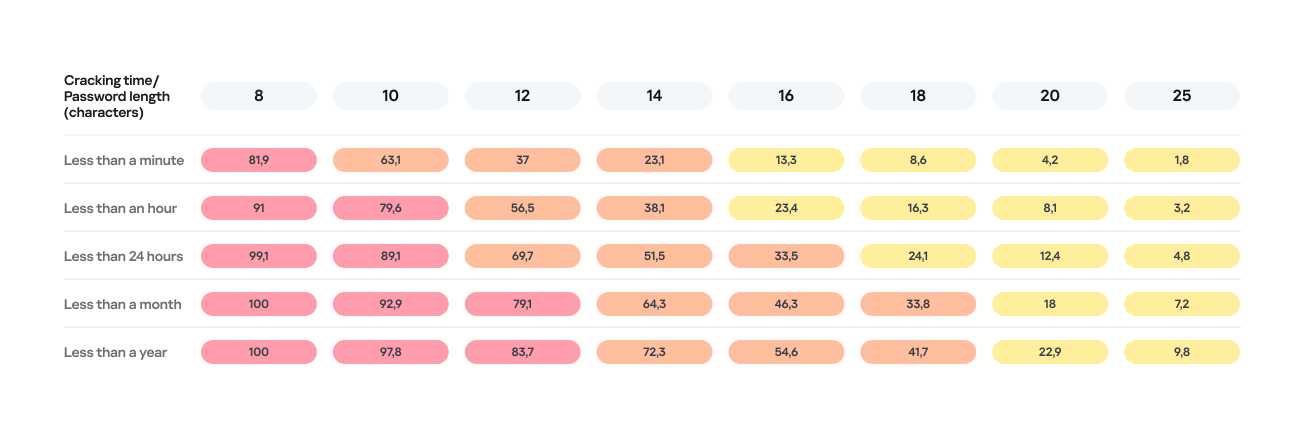
Percentage of varying password lengths crackable within a given timeframe

Percentage of varying password lengths crackable within a given timeframe

But the predictability of your password is just as important. Think you’re boosting security by adding a number or a special character to a memorable word? You are, but only slightly. The patterns people use to create passwords are easily predictable and, at times, pretty amusing — though this is no laughing matter.

What we learned about password patterns

Analysis of over 200 million passwords revealed characteristic patterns that allow smart algorithms to crack user passwords with ease.

Pick a number

More than half of all passwords (53%) end with one or more digits, while nearly one in six (17%) starts with a number. Every eighth password (12%) contains sequences that look a lot like years — ranging from 1950 to 2030 — and one in ten (10%) specifically falls between 1990 and 2026. This most likely happens because folks add their birth year (or that of someone close), some other significant year, or the year they created the password or account. Fun fact: based on the distribution of these dates, it suggests that the most active internet users were born between 2000 and 2012.

However, among all numeric combinations, the most popular turned out to be… you guessed it: “1234”. Overall, patterns involving sequential keyboard presses (“qwerty, ,”ytrewq”, and the like) appear in 3% of passwords.

Special characters aren’t a silver bullet

Most password policies in recent years require at least one special character. The absolute winner in this category is the @ symbol: it appears in one out of every 10 passwords. The period (.) comes in second, followed by the exclamation point (!) in third.

Love rules the world… and Skibidi Toilet does too

Emotionally charged words often form the foundation of a password, and despite everything, positive words are more common. Frequently occurring examples include “love”, “angel”, “team”, “mate”, “life”, and “star”. That said, negativity pops up too — mostly in the form of common English swear words.

Interestingly, viral memes are reflected in passwords as well. Between 2023 and 2026, the use of the word Skibidi in passwords skyrocketed 36-fold! Naturally (see the link if it doesn’t seem natural), “toilet” saw a boost too, though to a lesser extent.

Users tend to keep their passwords unchanged for years

More than half of the passwords (54%) we identified in recent leaks have surfaced before. Part of this can be explained by the same data migrating from one dataset to another. However, there’s a much more troubling reason too: many users simply haven’t changed their passwords in years.

Analyzing the dates found within passwords shows that combinations containing the years from 2020 through 2024 remain popular. It seems people add the current year to their password when they create it — and then forget about it for several years. This actually allows us to calculate the average lifespan of a password: about three to five years.

This is a dangerous trend. For one, smart algorithms can crack much more complex passwords over that kind of timeframe. Secondly, the longer your password remains unchanged, the higher the probability it will leak — whether through a breach, malware infection, or a phishing attack.

The situation gets even worse when the same password is used across multiple accounts. In this case, attackers don’t even need to crack anything; they just need to find your password in a single leak and plug it into other sites.

How to protect your passwords and accounts

If you’ve realized while reading this post that your own passwords are among those easily crackable — don’t panic. We’ve put together a list of simple but essential tips for you.

Use a password manager

The weakest passwords are the ones people come up with themselves. Creating and memorizing hundreds of sequences of 16–20 random characters (since every site requires a unique, long password) is a daunting, unrealistic task.

That’s why you should delegate password generation and storage to our password manager. It doesn’t just create and store complex, randomized passwords in an encrypted format; it also syncs them across all your devices. To decrypt your vault, you only need to remember one main password that no one knows but you — our guide on mnemonic passwords can help you with that.

Don’t store passwords as plain text

Whatever you do, never write down passwords in files, messages, or documents. They lack the robust encryption provided by a password manager. Furthermore, these kinds of notes fall into the hands of attackers instantly if you happen to pick up a Trojan or an infostealer.

Don’t store passwords in your browser

Many users save their passwords in their browsers — especially since they conveniently offer to do it automatically. Unfortunately, research shows that malware has evolved to extract these passwords from all popular browsers almost instantly. Kaspersky Password Manager can help you import saved passwords from your favorite browser — just follow our simple, three-step guide. Most importantly, don’t forget to clear the browser’s password storage once the import is complete.

Switch to passkeys

Wherever possible, use passkeys — a cryptographic replacement for passwords. In this setup, the service stores a public key, while the private key remains on your device and is never transmitted. During login, the device simply signs a one-time request. Additionally, passkeys are tied to a specific domain, meaning phishing attacks using spoofed addresses won’t work. Kaspersky Password Manager allows you to store both passwords and passkeys, solving the problem of syncing them across different ecosystems, including Windows, Android, macOS, and iOS.

Set up two-factor authentication

Enable two-factor authentication wherever possible. Even if your password is compromised, a properly configured 2FA setup makes it extremely difficult for the attacker to access your account. For maximum security, skip the one-time codes sent via SMS and use authenticator apps instead — and yes, Kaspersky Password Manager comes in handy here, too.

Practice good digital hygiene

Remember, storing your passwords correctly is only half the battle. It’s crucial to follow the rules of digital hygiene: avoid downloading unverified files, pirated software, cheats, or cracks, and don’t click on random links. The number of infostealer attacks has been steadily rising in recent years, which means you need a robust security solution for full protection. We recommend Kaspersky Premium — it protects all your devices from Trojans, phishing, and other threats. Besides, the subscription includes our password manager.

For those serious about account security, check out our collection of posts on passwords, passkeys, and two-factor authentication:
  •  

The dangers of telehealth: data breaches, phishing, and spam | Kaspersky official blog

April 7 marks World Health Day. The theme for 2026 is “Together for health. Stand with science” — a call to join forces in the fight for evidence-based medicine and scientific progress. Many people view telehealth as one of the crowning achievements of this progress: you can basically get a doctor’s consultation in five minutes without ever leaving your couch. But there’s a catch…

Medical data sells on the black or gray markets for dozens of times more than credit card info or social media logins. Unlike a credit card, which you can just block and replace, you can’t exactly reset your medical history. Your name, birthday, address, phone number, insurance ID, diagnoses, test results, prescriptions, and treatment plans stay relevant for years. This is a goldmine for everything from targeted marketing to blackmail, fraud, or identity theft.

And with the rise of AI, the internet is now flooded with fake websites that claim to offer medical services but are actually designed to strip-mine confidential info from unsuspecting victims. Today, we’re diving into which medical details are at risk, why hackers want them, and how you can stop them in their tracks.

More valuable than credit cards

Scammers monetize stolen medical data both in bulk and through individual sales. Their first move is usually to extort a ransom from the companies they’ve successfully hacked. (In fact, back in 2024, 91% of malware-related healthcare data leaks in the U.S. were the result of ransomware attacks.) But later, the leaked data is then used for pinpointed, personal attacks. It allows hackers to build a medical profile of a victim — what meds they buy, how often, and what they take long-term — to then sell that info to big pharma or marketers, or to use it for targeted phishing scams like pitching a fake innovative treatment. They can even blackmail a patient over a sensitive diagnosis or use the info to fraudulently score prescriptions for controlled substances. On top of that, insurance companies are also hungry for this kind of data. They analyze these details to hike up insurance premiums for patients or, in some cases, refuse to provide coverage altogether. In short, there are plenty of ways they can use it against you.

How bad is it really?

The biggest medical data breach in history went down in February 2024, when the BlackCat hacking group broke into the systems of Change Healthcare. This is a division of UnitedHealth Group, which processes around 15 billion insurance transactions a year and acts as the financial middleman between patients, healthcare providers, and insurance companies.

For nine days, the attackers roamed freely through Change Healthcare’s internal systems, siphoning off six terabytes of confidential data before finally launching their ransomware. UnitedHealth was forced to completely yank Change Healthcare datacenters offline to stop the encryptor from spreading, and they ended up paying a 22-million-dollar ransom to the extortionists. The attack effectively paralyzed the U.S. healthcare system. The number of victims was revised three times: first 100 million, then 190 million, and the final tally hit a staggering 192.7 million people, with total damages estimated at 2.9 billion dollars. And the reason (on the Change Healthcare’s side) for this massive incident — which we broke down in detail in a separate post — was simply… a lack of two-factor authentication on a remote desktop access portal.

Before that, the mental health telehealth startup Cerebral embedded third-party tracking tools directly into its website and apps. As a result, the data of 3.2 million patients — including names, medical and prescription histories, and insurance info — leaked out to LinkedIn, Snapchat, and TikTok. The U.S. Federal Trade Commission slapped the company with a 7.1-million-dollar fine, and issued an unprecedented ban on using medical data for advertising purposes. By the way, that same startup also made the headlines for sending its clients promotional postcards without envelopes, displaying patient names and phrasing that made it easy for anyone to figure out their diagnosis.

Why telehealth is so vulnerable

Let’s take a look at the main weak spots in telehealth services.

  • Ad trackers in medical apps. Trackers from Facebook, TikTok, Snapchat, and other tech giants are often baked right into telehealth platforms, leaking patient data to advertisers without users ever knowing.
  • Unsecured communication channels. Sometimes doctors chat with patients through regular messaging apps instead of certified medical platforms. It’s convenient, sure, but it’s illegal for the clinic and totally unsafe for the patient.
  • Platform vulnerabilities. Telemedicine platforms are prone to classic web attacks, such as SQL injections that let hackers dump entire patient databases, session hijacking, and data interception when connection encryption is weak or nonexistent.
  • Poor staff training. Our research showed that 30% of doctors have dealt with compromised patient data specifically during telehealth sessions, and 42% of medical staff don’t actually understand how their patients’ data is being protected.
  • Outdated medical devices. Many wearable medical gadgets (like heart monitors or blood pressure cuffs) use an old data transfer protocol called MQTT. It’s full of holes that could potentially allow hackers to steal sensitive info or even mess with how the device functions.

Spam and phishing in telehealth

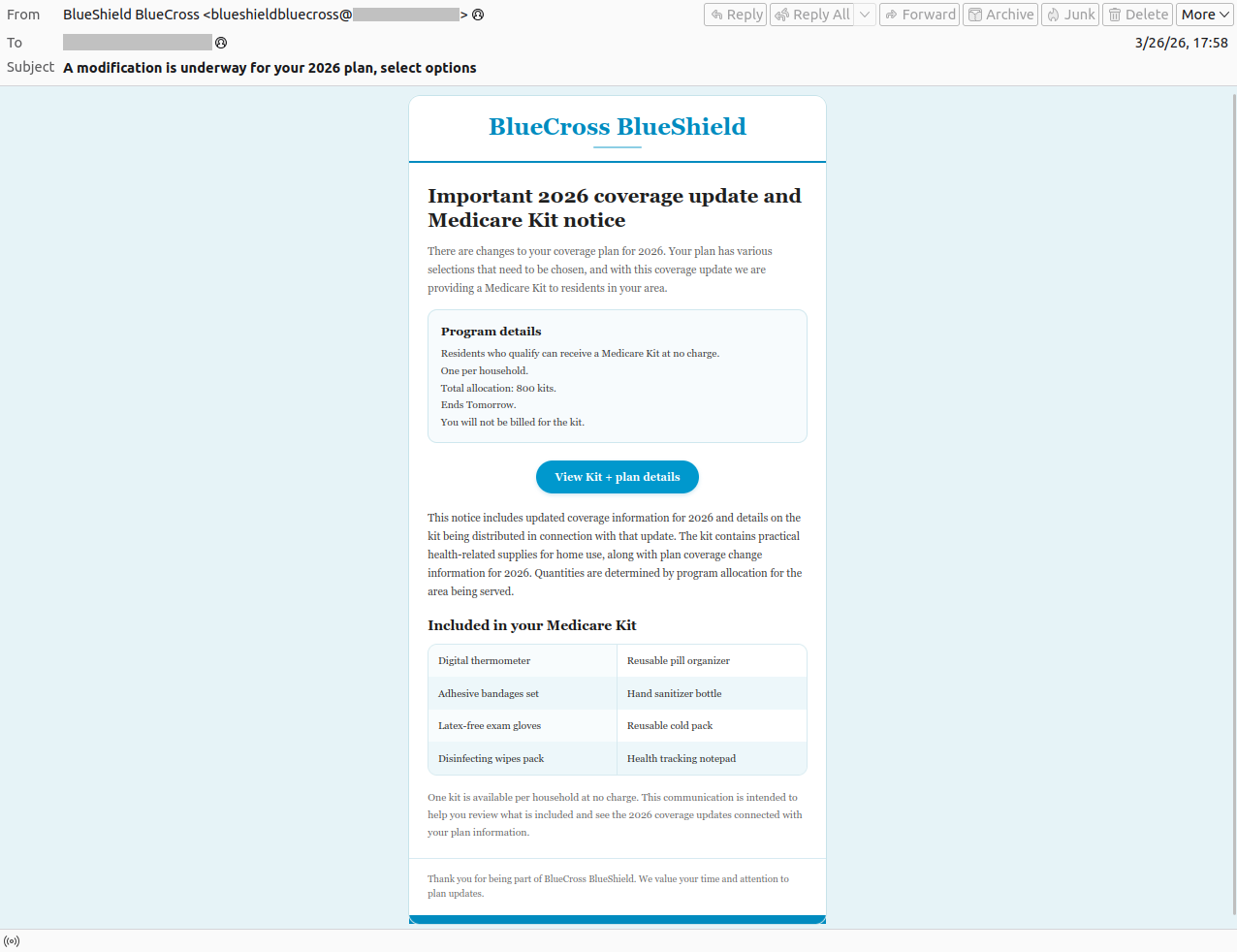
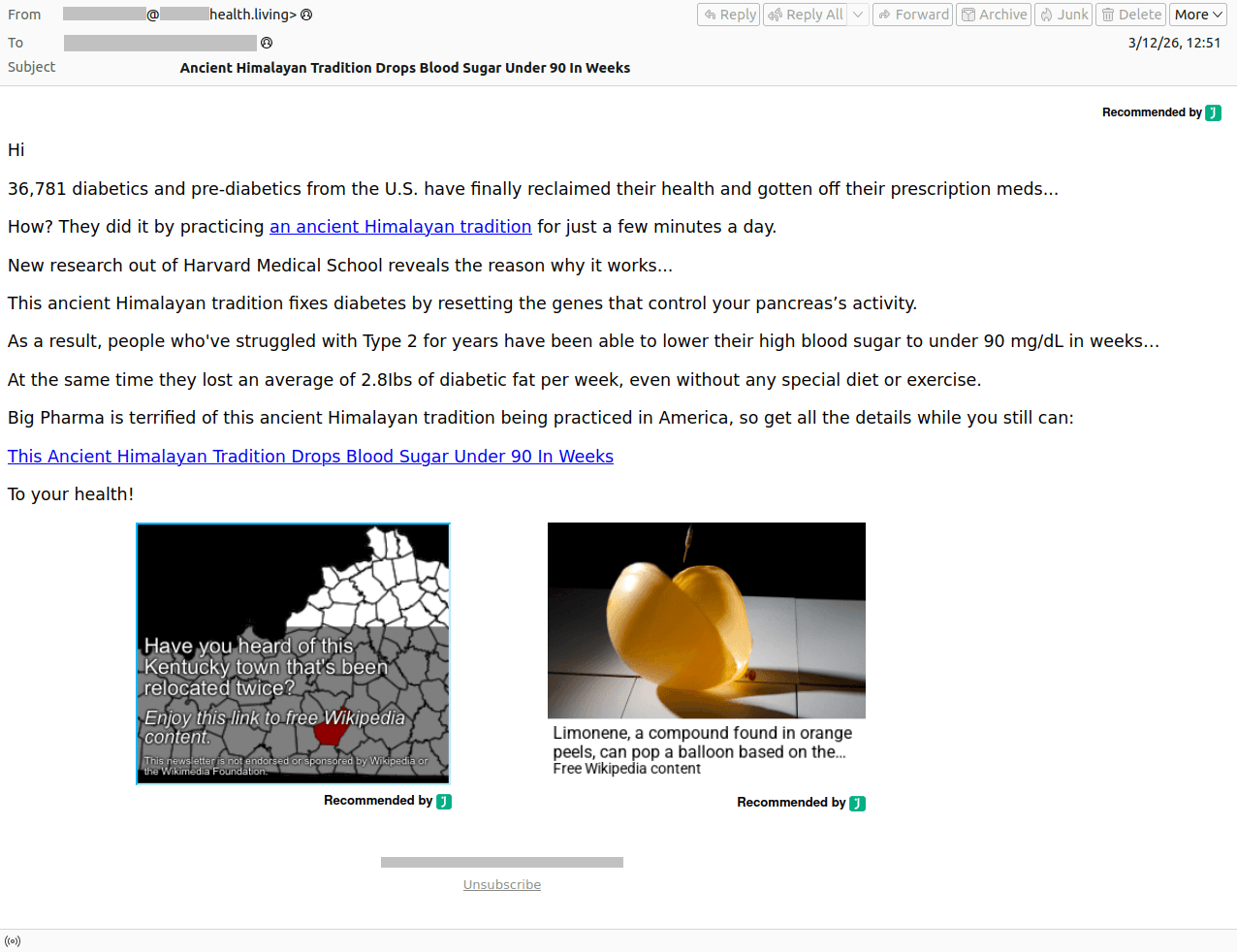
Hackers aren’t the only ones interested in the medical field — spammers and scammers are all over it, too. They pitch “medical services” with deals that look way too good to be true, send out emails about supposed changes to your health insurance, or talk up “ancient Himalayan healing traditions”. Of course, all the links they send lead to suspicious websites offering dubious goods or services.

Spam email appearing to be from Medicare, the U.S. national health insurance program
Spam posing as Medicare, the U.S. national health insurance program. The user is informed falsely that their insurance terms have changed in an attempt to lure them to a fake website
Scammers advertising miraculous Himalayan traditions for treating diabetes
CURING DIABETES IS EASY: All you have to do is… Scammers are promoting some kind of miraculous Himalayan tradition for treating diabetes. But losing your money is the only thing guaranteed here!
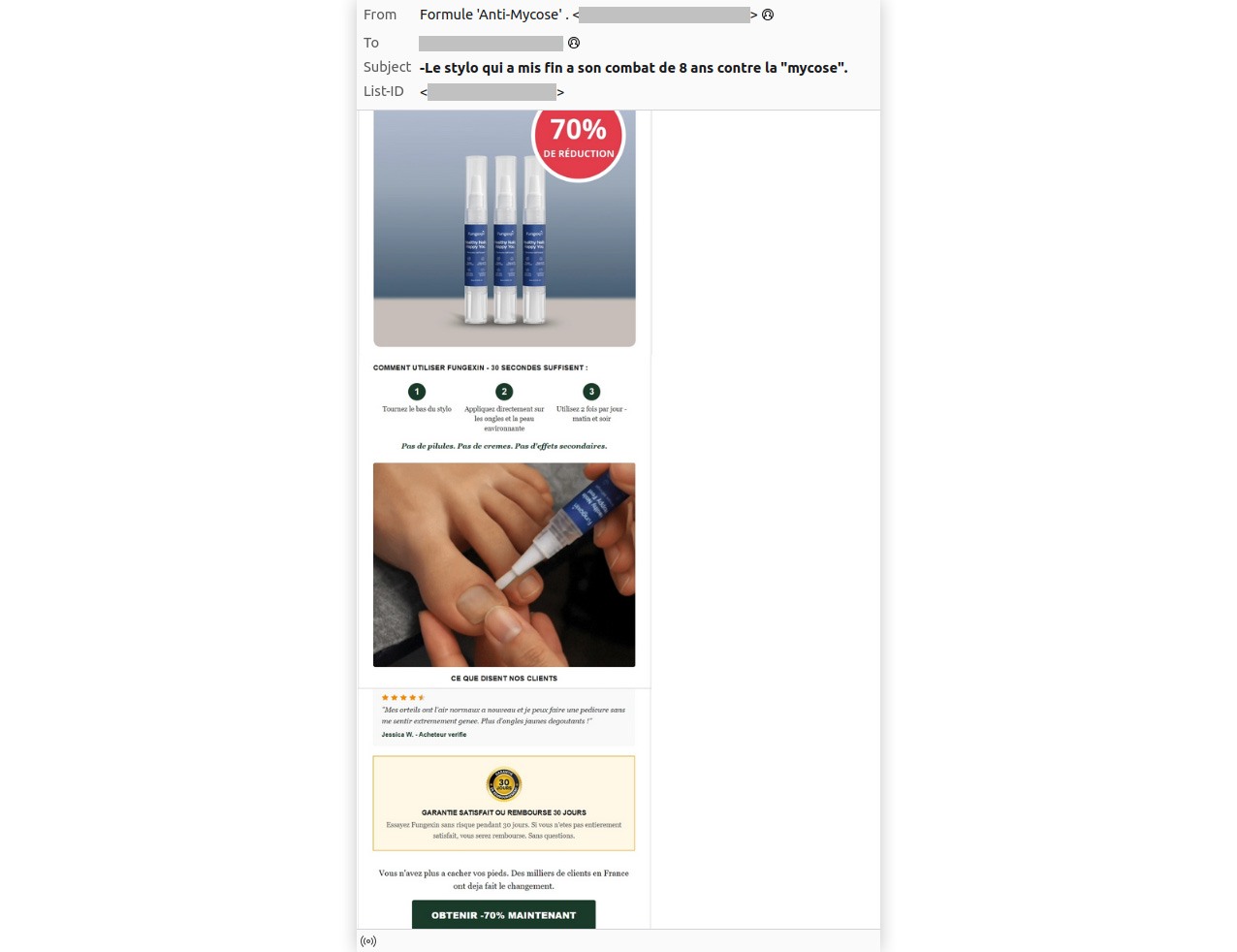
Dubious ad for a remedy for a fungal infection with a 70% discount
And of course, we can't forget the classic "miracle cure" for a fungal infection — now with a 70% discount, naturally.

Should you land on such a phishing site, scammers will try to squeeze every bit of private info they can out of you: photos of your ID, insurance policy, prescriptions, and sometimes even… photos of body parts that supposedly need medical attention. From there, this data can be dumped and sold on the dark web — or used for blackmail, extortion, and follow-up phishing attacks. To learn more about how the underground data assembly line works, check out our post, What happens to data stolen using phishing?

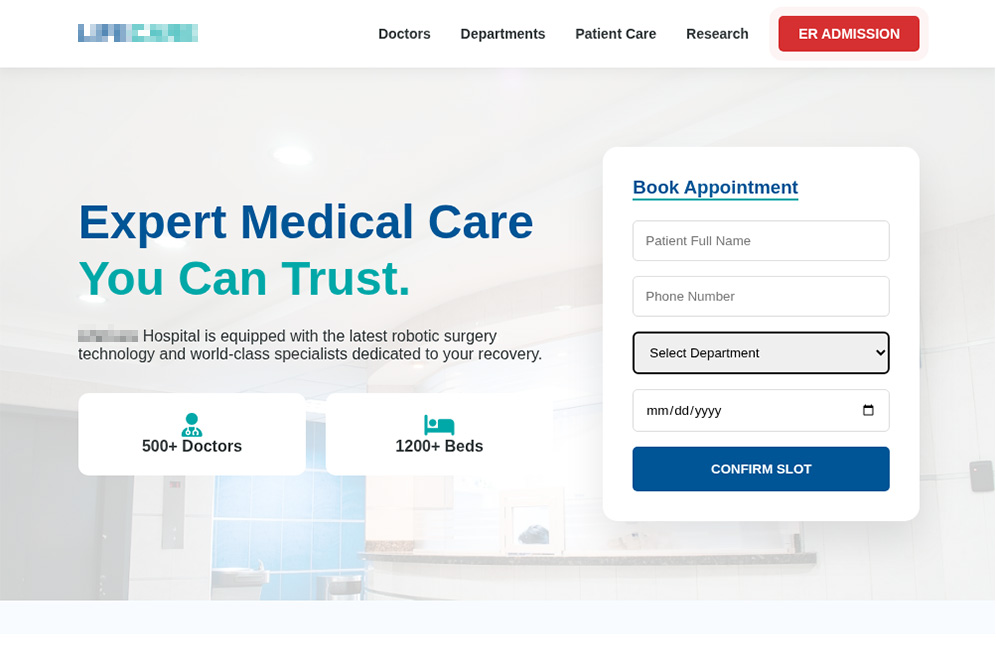
Fake clinic website with a convincing design
A fake clinic website with a pretty convincing look. Scammers even created pages for "medical staff", "departments", and "research". However, for some reason, you won't find a privacy policy or terms of use anywhere on this site
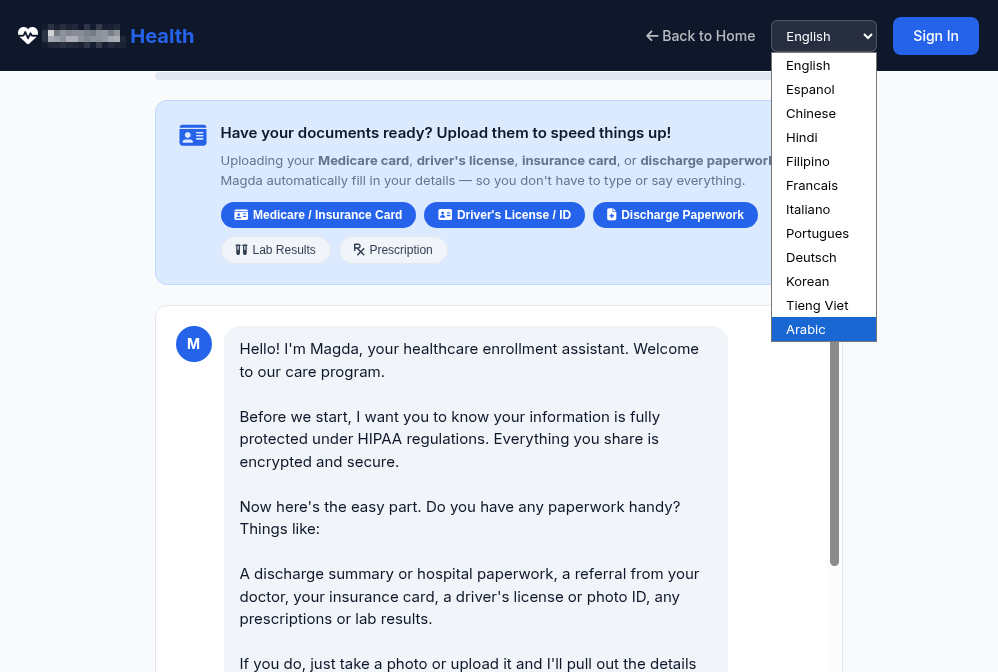
An AI diagnostic tool collects a wealth of personal data
Another suspicious website offers AI diagnostics, asking for a ton of personal info: full name, phone number, email, requested medical services, medical history, and current medications
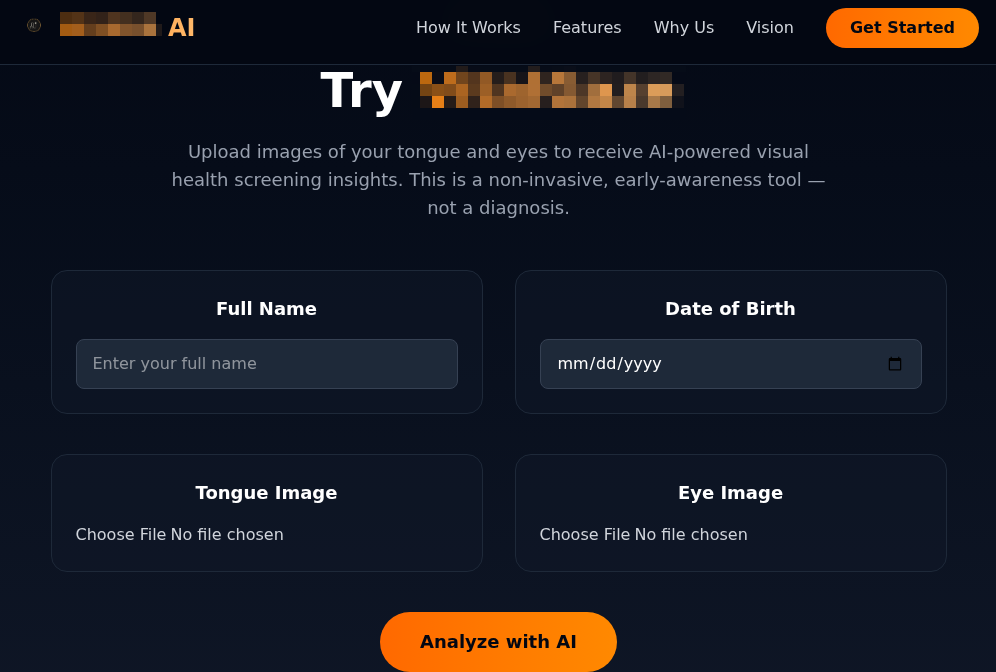
Scam site offering visual health screening by analyzing uploaded photos of the tongue and eyes
This scam site offers users "visual health screening using AI" — all you have to do is upload photos of your tongue and eyes! Just a reminder: retinal scans are sometimes used for biometric authentication

As a rule of thumb, fake clinic sites usually skip the privacy policy section, and bombard you with “today only” deals that seem too good to be true. That said, with the help of AI, creating a professional-looking site that’s indistinguishable from the real thing is now a total breeze: you don’t even need design skills or fluency in the victim’s language. That’s exactly why we recommend using our comprehensive security suite — it’s designed to sniff out spam, scams and phishing, and warn you about fake websites before you land on them.

Safety tips for telehealth patients

  • Set up a dedicated email address for medical services. If this address leaks because a clinic gets hacked, it makes it much harder for scammers to track the rest of your digital life.
  • Avoid using Google, Apple, or social media sign-in for telehealth sites. Keeping things separate makes it way tougher to link your medical data to your personal accounts.
  • Double-check which platform is being used for your consultation. If the clinic suggests a call or chat through a standard messaging app, that’s a red flag. A secure, encrypted patient portal provided by the clinic is significantly safer.
  • Never send medical documents via chat apps or social media. Always upload lab results, scans, and records through the clinic’s official patient portal.
  • Use a unique, complex password for every account. Your government portal, clinic login, and doctor-booking app should each have a separate password. Kaspersky Password Manager can generate and store all of them for you; it also regularly scans leak databases, and alerts you if any of your accounts are compromised.
  • Turn on two-factor authentication. Do this first of all for government services and medical organizations. We recommend using an authenticator app rather than SMS codes: it’s more secure and totally anonymous. Kaspersky Password Manager can help you out here, too.
  • Share only what’s necessary. Don’t feel obligated to fill out every optional field in medical apps or on websites. The less data a service stores, the less there is to leak.
  • Be careful about sharing health info on social media or in chat apps. Scammers love to exploit people when they’re vulnerable. For instance, in 2024, hackers gained the trust of the XZ Utils developer who had publicly posted about burnout and depression. They convinced him to hand over control of his tool, which they then loaded with malicious code. Since XZ Utils is used in tons of Linux systems and affects OpenSSH (a protocol for remote server connections), the attack could have wrecked a huge chunk of the internet if it hadn’t been caught in time.
  • Don’t install telehealth apps from unknown developers. Check the reviews and take a minute to skim the privacy policy — even major platforms might be sharing your data with third parties.
  • Keep an eye on your medical records. Strange prescriptions, doctor visits you never made, or meds you’ve never heard of can all be signs that your account has been compromised.
  • Configure and regularly update your health gadgets. Fitness trackers, blood pressure monitors, smart scales, and activity trackers all send data to the web. Improper settings or unpatched vulnerabilities are an open door for data breaches.

What else you need to know about protecting your health online:

  •  

Mental health apps are leaking your private thoughts. How do you protect yourself? | Kaspersky official blog

In February 2026, the cybersecurity firm Oversecured published a report that makes you want to factory reset your phone and move into a remote cabin in the woods. Researchers audited 10 popular Android mental health apps — ranging from mood trackers and AI therapists to tools for managing depression and anxiety — and uncovered… 1575 vulnerabilities! Fifty-four of those flaws were classified as critical. Given the download stats on Google Play, as many as 15 million people could be affected. The real kicker? Six out of the ten apps tested explicitly promised users that their data was “fully encrypted and securely protected”.

We’re breaking down this scandalous “brain drain”: what exactly could leak, how it’s happening, and why “anonymity” in these services is usually just a marketing myth.

What was found in the apps

Oversecured is a mobile app security firm that uses a specialized scanner to analyze APK files for known vulnerability patterns across dozens of categories. In January 2026, researchers ran ten mental health monitoring apps from Google Play through the scanner — and the results were, shall we say, “spectacular”.

App Type Installs Security vulnerabilities
High-severity Medium-severity Low-severity Total
Mood & habit tracker 10M+ 1 147 189 337
AI therapy chatbot 1M+ 23 63 169 255
AI emotional health platform 1M+ 13 124 78 215
Health & symptom tracker 500k+ 7 31 173 211
Depression management tool 100k+ 0 66 91 157
CBT-based anxiety app 500k+ 3 45 62 110
Online therapy & support community 1M+ 7 20 71 98
Anxiety & phobia self-help 50k+ 0 15 54 69
Military stress management 50k+ 0 12 50 62
AI CBT chatbot 500k+ 0 15 46 61
Total 14.7М+ 54 538 983 1575

Vulnerabilities found in the 10 tested mental health apps. Source

The anatomy of the flaws

The discovered vulnerabilities are diverse, but they all boil down to one thing: giving attackers access to data that should be under lock and key.

For starters, one of the vulnerabilities allows an attacker to access any internal activity of the app — even that never intended for external eyes. This opens the door to hijacking authentication tokens and user session data. Once an attacker has those, they essentially could gain access to a user’s therapy records.

Another issue is insecure local data storage with read permissions granted to any other app on the device. In other words, that random flashlight app or calculator on your smartphone could potentially read your cognitive behavioral therapy (CBT) logs, personal notes, and mood assessments.

The researchers also found unencrypted configuration data baked right into the APK installation files. This included backend API endpoints and hardcoded URLs for Firebase databases.

Furthermore, several apps were caught using the cryptographically weak java.util.Random class to generate session tokens and encryption keys.

Finally, most of the tested apps lacked root/jailbreak detection. On a rooted device, any third-party app with root privileges could gain total access to every bit of locally stored medical data.

Shockingly, of the 10 apps analyzed, only four received updates in February 2026. The rest haven’t seen a patch since November 2025, and one hasn’t been touched since September 2024. Going 18 months without a security patch is a lifetime in this industry — especially for an app housing mood journals, therapy transcripts, and medication schedules.

Here’s a quick reminder of just how dangerous the misuse of this type of data gets. In 2024, the tech world was rocked by a sophisticated attack on XZ Utils, a critical component found in virtually every operating system based on the Linux kernel. The attacker successfully pressured the maintainer into handing over code commit permissions by exploiting the developer’s public admission of burnout and a lack of motivation to carry on with the project. Had the attack been completed, the damage would have been mind-boggling given that roughly 80% of the world’s servers run on Linux.

What could leak?

What do these apps collect and store? It’s the kind of stuff you’d likely only share with a trusted clinician: therapy session transcripts, mood logs, medication schedules, self-harm indicators, CBT notes, and various clinical assessment scales.

As far back as 2021, complete medical records were selling on the dark web for US$1000 each. For comparison, a stolen credit card number goes for anywhere between US$5 and US$30. Medical records contain a full identity package: name, address, insurance details, and diagnostic history. Unlike a credit card, you can’t exactly “reissue” your medical history. Furthermore, medical fraud is notoriously difficult to spot. While a bank might flag a suspicious transaction in hours, a fraudulent insurance claim for a phantom treatment can go unnoticed for years.

We’ve seen this movie before

The Oversecured study isn’t just an isolated horror story.

Back in 2020, Julius Kivimäki hacked the database of the Finnish psychotherapy clinic Vastaamo, making off with the records of 33 000 patients. When the clinic refused to cough up a €400 000 ransom, Kivimäki began sending direct threats to patients: “Pay €200 in Bitcoin within 24 hours, or else your records go public”. Ultimately, he leaked the entire database onto the dark web anyway. At least two people died by suicide, and the clinic was forced into bankruptcy. Kivimäki was eventually sentenced to six years and three months in prison, marking a record-breaking trial in Finland for the sheer number of victims involved.

In 2023, the U.S. Federal Trade Commission (FTC) slapped the online therapy giant BetterHelp with a US$7.8 million fine. Despite stating on their sign-up page that your data was strictly confidential, the company was caught funneling user info — including mental health questionnaire responses, emails, and IP addresses — to Facebook, Snapchat, Criteo, and Pinterest for targeted advertising. After the dust settled, 800 000 affected users received a grand total of… US$10 each in compensation.

By 2024, the FTC set its sights on the telehealth firm Cerebral, tagging them with a US$7 million fine. Through tracking pixels, Cerebral leaked the data of 3.2 million users to LinkedIn, Snapchat, and TikTok. The haul included names, medical histories, prescriptions, appointment dates, and insurance info. And the cherry on top? The company sent promotional postcards (sans envelopes) to 6000 patients, which effectively broadcasted that the recipients were undergoing psychiatric treatment.

In September 2024, security researcher Jeremiah Fowler stumbled upon an exposed database belonging to Confidant Health, a provider specializing in addiction recovery and mental health services. The database contained audio and video recordings of therapy sessions, transcripts, psychiatric notes, drug test results, and even copies of driver’s licenses. In total, 5.3 terabytes of data, 126 000 files, or 1.7 million records were sitting there without a password.

Why anonymity is an illusion

Developers love to drop the line: “We never share your personal data with anyone.” Technically, that might be true — instead, they share “anonymized profiles”. The catch? De-anonymizing that data isn’t exactly rocket science anymore. Recent research highlights that using LLMs to strip away anonymity has become a routine reality.

Even the “anonymization” process itself is often a mess. A study by Duke University revealed that data brokers are openly hawking the mental health data of Americans. Out of 37 brokers surveyed, 11 agreed to sell data linked to specific diagnoses (like depression, anxiety, and bipolar disorder), demographic parameters, and in some cases, even names and home addresses. Prices started as low as US$275 for 5000 aggregated records.

According to the Mozilla Foundation, by 2023, 59% of popular mental health apps failed to meet even the most basic privacy standards, and 40% had actually become less secure than the previous year. These apps allowed account creation via third-party services (like Google, Apple, and Facebook), featured suspiciously brief privacy policies that glossed over data collection details, and employed a clever little loophole: some privacy policies applied strictly to the company’s website, but not the app itself. In short, your clicks on the site were “protected”, but your actions within the app were fair game.

How to protect yourself

Cutting these apps out of your life entirely is, of course, the most foolproof option — but it’s not the most realistic one. Besides, there’s no guarantee you can actually nuke the data already collected — even if you delete your account. We previously covered the grueling process of scrubbing your info from data broker databases; it’s possible, but prepare for a headache. So, how can you stay safe?

  • Check permissions before you hit “Install”. In Google Play, navigate to App description → About this app → Permissions. A mood tracker has no business asking for access to your camera, microphone, contacts, or precise GPS location. If it does, it’s not looking out for your well-being — it’s harvesting data.
  • Actually read the privacy policy. We get it — nobody reads these multi-page manifestos. But when a service is vacuuming up your most intimate thoughts, it’s worth a skim. Look for the red flags: does the company share data with third parties? Can you manually delete your records? Does the policy explicitly cover the app itself, or just the website? You can always feed the policy text into an AI and ask it to flag any privacy deal-breakers.
  • Check the last updated date. An app that hasn’t seen an update in over six months is likely a playground for unpatched vulnerabilities. Remember: six out of the 10 apps Oversecured tested hadn’t been touched in months.
  • Disable everything non-essential in your phone’s privacy settings. Whenever prompted, always select “ask not to track”. When an app pleads with you to enable a specific type of tracking — claiming it’s for “internal optimization” — it’s almost always a marketing ploy rather than a functional necessity. After all, if the app truly won’t work without a certain permission, you can always go back and toggle it on later.
  • Don’t use “Sign in with…” services. Authenticating via Facebook, Apple, Google, or Microsoft creates additional identifiers and gives companies a golden opportunity to link your data across different platforms.
  • Treat everything you type like a public social media post. If you wouldn’t want a random stranger on the internet reading it, you probably shouldn’t be typing it into an app with over 150 vulnerabilities that hasn’t seen a patch since the year before last.

What else you should know about privacy settings and controlling your personal data online:

  •  
❌