Reading view

Meta’s confusing new approach to chat privacy

Recent news had us wondering whether Meta actually knows what it wants.

On one platform, Meta is promoting AI chats that it says even it cannot read. On another, it has removed one of the few features that genuinely prevented Meta from accessing private conversations.

“Meta removed support for end-to-end encrypted chats from Instagram as of May 8, 2026.”

Meta adds fully private AI chats to WhatsApp.”

At the moment, Meta is heavily promoting a new Incognito Chat mode for its Meta AI assistant in WhatsApp, built on top of a system it calls Private Processing. According to WhatsApp’s own announcement, Incognito Chat is:

 “Truly private — no one can read your conversation, not even us.”

When you start an Incognito chat with Meta AI, you get a temporary conversation where messages aren’t saved and disappear by default, which Meta pitches as “a space to think and explore ideas without anyone watching.”

BBC News and others report that these AI chats are text‑only for now, run in a sandboxed environment, and are separate from your regular end‑to‑end encrypted (E2EE) messaging with other people on WhatsApp.

Meta is also preparing “Side Chat,” which will let you invoke Meta AI inside other WhatsApp chats, again using this Private Processing infrastructure to claim AI assistance without breaking the underlying encryption.

On paper, that’s an impressive technical and marketing story: powerful AI, wrapped in layers of privacy‑preserving infrastructure, added to an app that already has a strong reputation for end‑to‑end encryption by default.

Meanwhile, on Instagram…

Now contrast that with what’s happening on Instagram. On 8 May 2026, Meta removed optional end‑to‑end encryption for Instagram Direct Messages (DMs) entirely. Users who had previously turned the feature on were shown notices that “end‑to‑end encrypted messaging on Instagram is no longer supported as of 8 May 2026,” and were urged to download backups of their encrypted conversations before the cutoff.

End‑to‑end encryption ensures that only the sender and recipient can read their conversations. Instagram offered this as an opt‑in feature since late 2023, but it was buried several taps deep inside individual conversation settings and never turned on by default. Meta’s explanation for shutting it down is that “very few people” used encrypted DMs and that maintaining a separate encrypted system added complexity. Critics have pointed out the circular logic. The company hid the feature, did not advertise it, and is now using low adoption as the reason to kill it rather than, say, making it easier to find or turning it on by default.

What all this means

From a user’s perspective, the result is confusing: one Meta product introduces stronger privacy than ever for AI chats, while another removes the one feature that truly stopped Meta from reading your conversations.

The key point to remember here is that “incognito” and “private” are marketing words, while end‑to‑end encryption is a technical guarantee.

For security‑conscious users, this split personality means you can no longer treat all Meta chats the same. WhatsApp remains end‑to‑end encrypted for person‑to‑person messages and adds optional privacy features around its AI, while Instagram DMs should now be assumed readable by Meta and potentially accessible to law enforcement, advertisers, or attackers who gain access to Meta’s systems.


To boldly browse, away from prying eyes. 


Why make AI chats private?

We’ve seen that AI chats have suddenly turned up in search results without users’ knowledge. So there definitely is a positive side to this new feature.

We also know there have been lawsuits against chatbot providers in cases where the outcome of an AI conversation led to very undesirable results. But how would you be able to provide evidence when messages auto-disappear?

How to proceed

Meta’s recent moves show that strong privacy features can be added where they support a strategic narrative and removed where they conflict with business or regulatory priorities. Users can’t control those decisions, but they can respond by choosing where they hold their most sensitive conversations and by assuming that if a chat isn’t end‑to‑end encrypted by default, it is ultimately readable by someone other than the people in it.

So, what’s a safe way to move forward?

  • Treat Instagram DMs as postcard-level privacy. Now that E2EE is gone, assume Meta can read and scan your messages and that content could be accessed under legal orders or in a breach. Do not send passwords, recovery codes, banking details, or compromising photos over Instagram.
  • When someone asks you to move a conversation to Signal, WhatsApp, or another E2EE messenger, ask them why. It does make sense when you’re sharing financial details, personal images, health information, or anything you would not want a platform provider to read. But sometimes scammers prefer encrypted platforms too, because they’re harder to monitor.
  • Do not confuse “incognito” AI chats with full encryption. WhatsApp’s Incognito mode for Meta AI may be a privacy improvement over standard cloud AI chats, but it is still a conversation with a large language model owned by the same company that runs the platform. Share only what you’re comfortable entrusting to Meta.
  • Regularly review your privacy and security settings. Check which devices are logged in, enable two‑factor authentication, and verify which of your chat apps are actually end‑to‑end encrypted by default.

Scammers know more about you than you think. 

Malwarebytes Mobile Security protects you from phishing, scam texts, malicious sites, and more. With real-time AI-powered Scam Guard built right in. 

Download for iOS → Download for Android → 

  •  

Update WhatsApp now: Two new flaws could expose you to malicious files

Meta has published a new security advisory for messaging app WhatsApp, announcing patches for two vulnerabilities.

WhatsApp has fixed two security flaws that could be abused to interfere with how media and attachments are handled on your device. There is no evidence that either bug has been exploited in the wild.

These bugs don’t automatically infect devices, but they lower the barrier for social engineering and could be chained with other vulnerabilities for more serious attacks.

Malicious messages

The first issue, tracked as CVE‑2026‑23866, affects how WhatsApp processes AI‑generated “rich response messages” that embed Instagram Reels. On affected iOS and Android versions, incomplete validation means a specially crafted message could cause the app to load media from an attacker‑controlled URL. In some cases, this could trigger operating system‑level custom URL scheme handlers.

In other words: a booby‑trapped message could prompt your device to open content from an untrusted source.

How to update WhatsApp for Android

You can easily update WhatsApp from the Google Play Store.

  1. Open the Google Play Store
  2. Search for WhatsApp Messenger
  3. Tap Update

Note: Updates may not be available immediately in all regions.

How to update WhatsApp on iOS

To update WhatsApp on iOS:

  • Open the App Store
  • Tap your profile icon
  • Scroll to find WhatsApp and tap Update

If it’s not listed, search for WhatsApp to check if an “Update” button is available.

Misleading filenames

The second bug, CVE‑2026‑23863, affects WhatsApp for Windows before version 2.3000.1032164386.258709.

In this case, WhatsApp did not correctly handle filenames containing embedded NUL bytes. This could allow a file to appear as a harmless type in the interface while actually being treated as an executable when opened. That’s a classic recipe for social engineering: “click the PDF,” but get an .exe file.

How to update WhatsApp for Windows

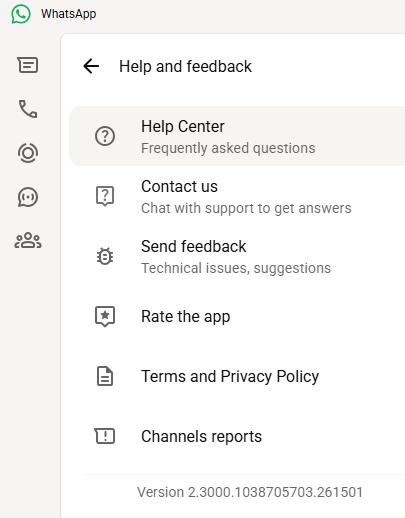
You can find your WhatsApp for Windows version number by clicking on your profile picture and selecting Help and feedback.

Version 2.3000.1038705703.261501

If your version number is earlier than 2.3000.1032164386.258709, update via the Microsoft Store:

  1. Click the Start menu and search for Microsoft Store to open it
  2. Click Library located at the bottom-left corner
  3. Find WhatsApp Desktop
  4. Click Get Updates or Update

Once installed, restart the app to apply the changes.

Automatic updates on Windows

My WhatsApp was already up to date because I have automatic updates turned on. Here’s how to turn it on:

  1. Click the Start menu and search for Microsoft Store to open it
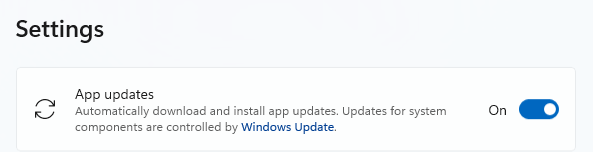
  2. Select Profile (your account picture) > Settings
  3. Make sure App updates is toggled to On
Auto updates on Windows

Scammers don’t need to hack you. They just need you to click once. 

Malwarebytes Identity Theft Protection catches suspicious activity before it becomes a problem.

  •  

FBI, CISA warn of Russian hackers hijacking Signal and WhatsApp accounts

In a Public Service Announcement (PSA) the Federal Bureau of Investigation (FBI) and the Cybersecurity and Infrastructure Security Agency (CISA) warn the public about ongoing Russian-linked phishing campaigns that aim to gain access to messaging accounts.

Earlier this month we wrote about a large‑scale phishing campaign aimed at hijacking Signal and WhatsApp accounts belonging to senior officials, military personnel, civil servants, and journalists.

Now the FBI and CISA have joined European intelligence services in warning that the same tactics are being used in a broader campaign targeting these commercial messaging apps. The goal is not to break end‑to‑end encryption, but to walk straight around it by stealing access to individual accounts.

In our previous article, we focused on warnings from the Dutch intelligence services AIVD and MIVD, which described how Russian state‑backed actors approached high‑value targets via Signal and WhatsApp, posing as “Signal Support”, “Signal Security Bot”, or similar. The PSA demonstrates how the same groups are now running global phishing campaigns against messaging app accounts, with evidence suggesting thousands of compromised accounts worldwide.

It’s important to reiterate that the attackers have not managed to break the apps’ end-to-end encryption. Instead, they are relying on social engineering to get a device added so they can eavesdrop on accounts.

The current targets include current and former US government officials, military staff, political figures, and journalists, but there is nothing to stop the same techniques being reused against businesses and everyday users.

So, while it’s tempting to dismiss this as a problem for diplomats and generals (and the agencies issuing these alerts do mention high‑profile targets first), the techniques scale very easily. Once playbooks like these are public, they tend to be copied by cybercriminals looking for new ways to steal money or accounts.

How to protect your accounts

As the PSA puts it:

“Phishing remains one of the most unsophisticated, yet effective means of cyber compromise, often rendering other protections irrelevant”

This calls asks for basic security measures:

  • Treat unsolicited messages from “Support” inside apps as suspicious by default. Legitimate support for apps like Signal and WhatsApp does not ask you, in a chat message, to send back verification codes, PINs, or passwords.​ If you receive a warning about account problems, do not follow links in the message. Open the app’s settings directly or visit the official website through other means.
  • Never share SMS verification codes or app PINs. SMS codes are there to prove that you control a phone number. Anyone who has the code can pretend to be you. App‑specific PINs or passcodes are there to protect account changes. Giving them away is like handing over the keys to your account. Consider anyone asking for them to be a scammer.
  • Be careful what you discuss and with whom. Both the Dutch and US advisories remind us that even with end‑to‑end encryption, some conversations are too sensitive for commercial chat apps.
  • Use the extra security features these apps offer. Enable options like registration lock, registration PIN and device‑change alerts so that your account cannot be silently re‑registered without an extra secret. Store your PIN in a password manager instead of choosing something easy to guess or reusing a common code, to reduce the chance of social engineering or shoulder‑surfing.
  • Another useful feature is disappearing messages. Short‑timer and disappearing messages reduce how much content is available if an attacker gets into a chat later, or if someone obtains long‑term access to a device or backup. They are not a complete solution, but they can limit the damage.

What to do if you think your account was hijacked

If you suspect an attacker has taken over your messaging account:

  1. Try to re‑register your number in the app immediately to kick out other devices.
  2. Revoke all linked devices and change any app‑specific PINs or lock codes.
  3. Warn your contacts that someone may have impersonated you and ask them to treat recent messages with caution.
  4. Review recent conversations for signs of data theft (for example, shared IDs, documents, or passwords that should now be considered exposed).
  5. Report the incident to the app provider and, where appropriate, to national reporting centers such as the FBI’s Internet Crime Complaint Center (IC3) at ic3.gov or the relevant authority in your country.​

The sooner you act, the smaller the window in which attackers can exploit your account.


We don’t just report on phone security—we provide it

Cybersecurity risks should never spread beyond a headline. Keep threats off your mobile devices by downloading Malwarebytes for iOS, and Malwarebytes for Android today.

  •  

Signal and WhatsApp accounts targeted in phishing campaign

Dutch intelligence services AIVD and MIVD warn that Russian state‑backed hackers are running a large‑scale campaign to break into Signal and WhatsApp accounts of high‑value targets.

The targets are said to be senior officials, military personnel, civil servants, and journalists. The attackers are not breaking end‑to‑end encryption or exploiting a vulnerability in the apps themselves. Instead, they rely on proven phishing and social engineering methods to trick users into handing over verification codes and PINs, or to add a malicious “linked device” to their account.

Last year we reported on GhostPairing, a method that tricks the target into completing WhatsApp’s own device-pairing flow, silently adding the attacker’s browser as an invisible linked device to the account.

In the cases reported by the Dutch intelligence services, the attackers contacted victims on Signal or WhatsApp while posing as “Signal Security Support Chatbot”, “Signal Support” or a similar official‑sounding account.

The message typically warns about suspicious activity or a possible detected data leak and instructs the user to complete a verification step to avoid losing data or having their account blocked.

Victims are then asked to send back the SMS verification code they just received and/or their Signal PIN.

If the victim complies, the attacker can register the account on a device they control and effectively take it over, receiving new messages and sending messages as the victim.

In a second variant, attackers abuse the “linked devices” feature (Signal’s and WhatsApp’s desktop or other secondary device function). Targets are pushed to click a link or scan a QR code that silently links the attacker’s device to the victim’s account. The victim keeps access as normal, but the attacker can now read along in real time without obvious signs of compromise.

These attacks are not new, but deserve a renewed warning because they rely entirely on human behavior, and understanding how they work makes them easier to stop. The methods used are not technically sophisticated and they can easily be copied by non‑state actors or ordinary cybercriminals.

Because of the current Russian campaigns, AIVD and MIVD say that chat apps such as Signal and WhatsApp are unsuitable for sharing classified, confidential, or otherwise sensitive government information, even though they technically support end‑to‑end encryption.

How to keep your conversations confidential

One specific warning for the targeted users is to use designated apps for sensitive information. Despite dedicated secure systems being available to many of them, some resorted to apps they already knew—Signal and WhatsApp. And to be fair, these apps are safe if you follow a few basic rules:

How to prevent and detect compromised accounts

  • Never share verification codes or PIN numbers. Your SMS verification code and PIN are only needed when you install or re‑register the app on a device. They are never legitimately requested in a chat. Any in‑app message, direct message (DM), email, or SMS asking you to send these codes back is a phishing attempt.
  • Do not trust “support” accounts in chat. Signal explicitly states that Support will never contact you via in‑app messages, SMS, or social media to ask for your verification code or PIN. Treat any “Signal Support Bot”, “Security Chatbot” or similar as malicious, block and report it and then delete the conversation.
  • Be cautious with links and QR codes in chat. Only scan QR codes or click device‑linking links when you yourself are in the app’s device‑linking menu and you initiated the process. If a message pushes you to “verify your device” or “secure your data” via a link or QR, assume it is part of this campaign.
  • Regularly review linked devices and group memberships. In Signal and WhatsApp, check the list of linked devices and remove anything you do not recognize. Also keep an eye out for strange group participants or duplicate contacts (for example “deleted account” or a contact that appears twice), which Dutch intelligence services mention as possible signs of account compromise.
  • Use built‑in hardening features. Enable options like registration lock, registration PIN and device‑change alerts so that your account cannot be silently re‑registered without an extra secret. Store your PIN in a password manager instead of choosing something easy to guess or reusing a common code, to reduce the chance of social engineering or shoulder‑surfing.

Use disappearing messages

Both Signal and WhatsApp support disappearing messages, and using them can meaningfully limit the impact of account compromise or device access (though they don’t prevent it completely).

Short‑timer and disappearing messages reduce how much content is available if an attacker gets into a chat later, or if someone obtains long‑term access to a device or backup. They are not a complete solution, but they can limit the damage.

Signal lets you set a per‑chat timer so that all new messages in that conversation auto‑delete from all devices after the chosen period.​ You can enable it for 1:1 or group chats and choose from various durations (seconds to weeks), and either party can see it is enabled and change the timer.​

WhatsApp also supports disappearing messages with timers per chat (and a default option for new chats). Messages can auto-delete after periods such as 24 hours, 7 days, or 90 days, and newer builds include shorter options like 1 or 12 hours.

You turn it on in the chat info under “Disappearing messages,” then pick the desired timer; only messages sent after enabling it are affected.

For particularly sensitive media or voice messages, WhatsApp also offers “view once”  photos, voice messages, and videos that can only be opened a single time before disappearing from the chat.

Enable multi-factor authentication

We’ve written a complete guide on setting up two-step verification on WhatsApp.

To set up two-factor authentication (2FA) on Signal, enable the Registration Lock feature, which requires your set PIN to log in on a new device. Open Signal, go to Settings > Privacy > Registration Lock and turn it on. This ensures that even if someone steals your SIM, they cannot access your account without your personal PIN.


We don’t just report on privacy—we offer you the option to use it.

Privacy risks should never spread beyond a headline. Keep your online privacy yours by using Malwarebytes Privacy VPN.

  •  

Meta confirms it’s working on premium subscription for its apps

Meta plans to test exclusive features that will be incorporated in paid versions of Facebook, Instagram, and WhatsApp. It confirmed these plans to TechCrunch.

But these plans are not to be confused with the ad-free subscription options that Meta introduced for Facebook and Instagram in the EU, the European Economic Area, and Switzerland in late 2023 and framed as a way to comply with General Data Protection Regulation (GDPR) and Digital Markets Act requirements.

From November 2023, users in those regions could either keep using the services for free with personalized ads or pay a monthly fee for an ad‑free experience. European rules require Meta to get users’ consent in order to show them targeted ads, so this was an obvious attempt to recoup advertising revenue when users declined to give that consent.

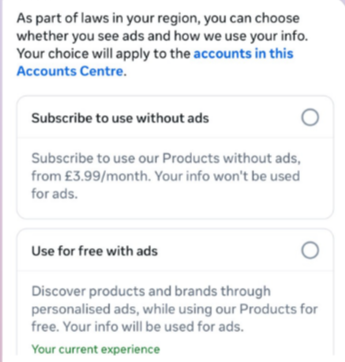
This year, users in the UK were given the same choice: use Meta’s products for free or subscribe to use them without ads. But only grudgingly, judging by the tone in the offer… “As part of laws in your region, you have a choice.”

As part of laws in your region, you have a choice
The ad-free option that has been rolling out coincides with the announcement of Meta’s premium subscriptions.

That ad-free option, however, is not what Meta is talking about now.

The newly announced plans are not about ads, and they are also separate from Meta Verified, which starts at around $15 a month and focuses on creators and businesses, offering a verification badge, better support, and anti‑impersonation protection.

Instead, these new subscriptions are likely to focus on additional features—more control over how users share and connect, and possibly tools such as expanded AI capabilities, unlimited audience lists, seeing who you follow that doesn’t follow you back, or viewing stories without the poster knowing it was you.

These examples are unconfirmed. All we know for sure is that Meta plans to test new paid features to see which ones users are willing to pay for and how much they can charge.

Meta has said these features will focus on productivity, creativity, and expanded AI.

My opinion

Unfortunately, this feels like another refusal to listen.

Most of us aren’t asking for more AI in our feeds. We’re asking for a basic sense of control: control over who sees us, what’s tracked about us, and how our data is used to feed an algorithm designed to keep us scrolling.

Users shouldn’t have to choose between being mined for behavioral data or paying a monthly fee just to be left alone. The message baked into “pay or be profiled” is that privacy is now a luxury good, not a default right. But while regulators keep saying the model is unlawful, the experience on the ground still nudges people toward the path of least resistance: accept the tracking and move on.

Even then, this level of choice is only available to users in Europe.

Why not offer the same option to users in the US? Or will it take stronger US privacy regulation to make that happen?


We don’t just report on threats – we help protect your social media

Cybersecurity risks should never spread beyond a headline. Protect your social media accounts by using Malwarebytes Identity Theft Protection.

  •  

WhatsApp rolls out new protections against advanced exploits and spyware

WhatsApp is quietly rolling out a new safety layer for photos, videos, and documents, and it lives entirely under the hood. It won’t change how you chat, but it will change what happens to the files that move through your chats—especially the kind that can hide malware.

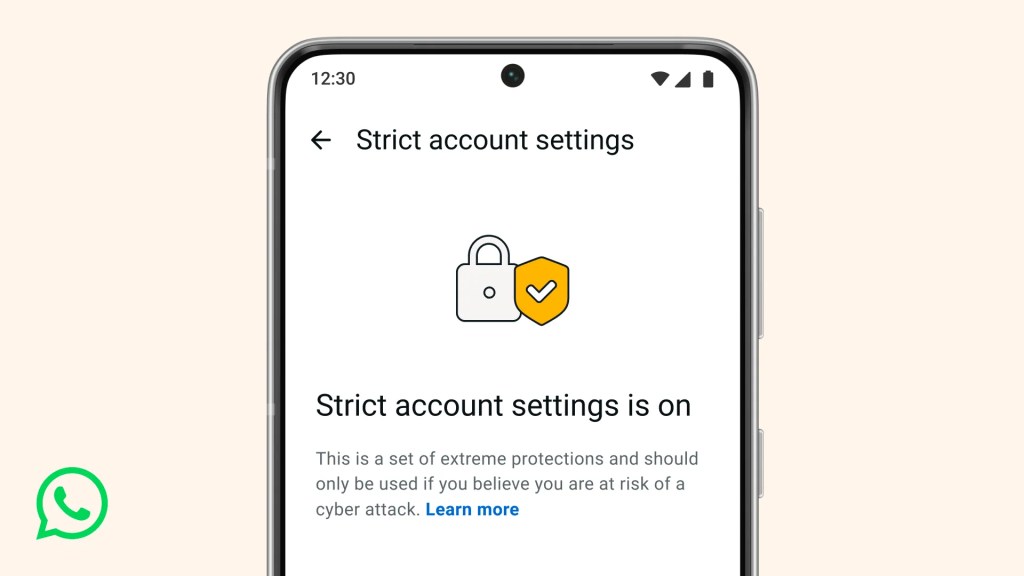
The new feature, called Strict Account Settings, is rolling out gradually over the coming weeks. To see whether you have the option—and to enable it—go to Settings > Privacy > Advanced.

Strict account settings
Image courtesy of WhatsApp

Yesterday, we wrote about a WhatsApp bug on Android that made headlines because a malicious media file in a group chat could be downloaded and used as an attack vector without you tapping anything. You only had to be added to a new group to be exposed to the booby-trapped file. That issue highlighted something security folks have worried about for years: media files are a great vehicle for attacks, and they do not always exploit WhatsApp itself, but bugs in the operating system or its media libraries.

In Meta’s explanation of the new technology, it points back to the 2015 Stagefright Android vulnerability, where simply processing a malicious video could compromise a device. Back then, WhatsApp worked around the issue by teaching its media library to spot broken MP4 files that could trigger those OS bugs, buying users protection even if their phones were not fully patched.

What’s new is that WhatsApp has now rebuilt its core media-handling library in Rust, a memory-safe programming language. This helps eliminate several types of memory bugs that often lead to serious security problems. In the process, it replaced about 160,000 lines of older C++ code with roughly 90,000 lines of Rust, and rolled the new library out to billions of devices across Android, iOS, desktop apps, wearables, and the web.

On top of that, WhatsApp has bundled a series of checks into an internal system it calls “Kaleidoscope.” This system inspects incoming files for structural oddities, flags higher‑risk formats like PDFs with embedded content or scripts, detects when a file pretends to be something it’s not (for example, a renamed executable), and marks known dangerous file types for special handling in the app. It won’t catch every attack, but it should prevent malicious files from poking at more fragile parts of your device.

For everyday users, the Rust rebuilt and Kaleidoscope checks are good news. They add a strong, invisible safety net around photos, videos and other files you receive, including in group chats where the recent bug could be abused. They also line up neatly with our earlier advice to turn off automatic media downloads or use Advanced Privacy Mode, which limits how far a malicious file can travel on your device even if it lands in WhatsApp.

WhatsApp is the latest platform to roll out enhanced protections for users: Apple introduced Lockdown Mode in 2022, and Android followed with Advanced Protection Mode last year. WhatsApp’s new Strict Account Settings takes a similar high-level approach, applying more restrictive defaults within the app, including blocking attachments and media from unknown senders.

However, this is no reason to rush back to WhatsApp, or to treat these changes as a guarantee of safety. At the very least, Meta is showing that it is willing to invest in making WhatsApp more secure.


We don’t just report on phone security—we provide it

Cybersecurity risks should never spread beyond a headline. Keep threats off your mobile devices by downloading Malwarebytes for iOS, and Malwarebytes for Android today.

  •  

A WhatsApp bug lets malicious media files spread through group chats

WhatsApp is going through a rough patch. Some users would argue it has been ever since Meta acquired the once widely trusted messaging platform. User sentiment has shifted from “trusted default messenger” to a grudgingly necessary Meta product.

Privacy-aware users still see WhatsApp as one of the more secure mass-market messaging platforms if you lock down its settings. Even then, many remain uneasy about Meta’s broader ecosystem, and wish all their contacts would switch to a more secure platform.

Back to current affairs, which will only reinforce that sentiment.

Google’s Project Zero has just disclosed a WhatsApp vulnerability where a malicious media file, sent into a newly created group chat, can be automatically downloaded and used as an attack vector.

The bug affects WhatsApp on Android and involves zero‑click media downloads in group chats. You can be attacked simply by being added to a group and having a malicious file sent to you.

According to Project Zero, the attack is most likely to be used in targeted campaigns, since the attacker needs to know or guess at least one contact. While focused, it is relatively easy to repeat once an attacker has a likely target list.

And to put a cherry on top for WhatsApp’s competitors, a potentially even more serious concern for the popular messaging platform, an international group of plaintiffs sued Meta Platforms, alleging the WhatsApp owner can store, analyze, and access virtually all of users’ private communications, despite WhatsApp’s end-to-end encryption claims.

How to secure WhatsApp

Reportedly, Meta pushed a server change on November 11, 2025, but Google says that only partially resolved the issue. So, Meta is working on a comprehensive fix.

Google’s advice is to disable Automatic Download or enable WhatsApp’s Advanced Privacy Mode so that media is not automatically downloaded to your phone.

And you’ll need to keep WhatsApp updated to get the latest patches, which is true for any app and for Android itself.

Turn off auto-download of media

Goal: ensure that no photos, videos, audio, or documents are pulled to the device without an explicit decision.

  • Open WhatsApp on your Android device.
  • Tap the three‑dot menu in the top‑right corner, then tap Settings.
  • Go to Storage and data (sometimes labeled Data and storage usage).
  • Under Media auto-download, you will see When using mobile data, when connected on Wi‑Fi. and when roaming.
  • For each of these three entries, tap it and uncheck all media types: Photos, Audio, Videos, Documents. Then tap OK.
  • Confirm that each category now shows something like “No media” under it.

Doing this directly implements Project Zero’s guidance to “disable Automatic Download” so that malicious media can’t silently land on your storage as soon as you are dropped into a hostile group.

Stop WhatsApp from saving media to your Android gallery

Even if WhatsApp still downloads some content, you can stop it from leaking into shared storage where other apps and system components see it.

  • In Settings, go to Chats.
  • Turn off Media visibility (or similar option such as Show media in gallery). For particularly sensitive chats, open the chat, tap the contact or group name, find Media visibility, and set it to No for that thread.

WhatsApp is a sandbox, and should contain the threat. Which means, keeping media inside WhatsApp makes it harder for a malicious file to be processed by other, possibly more vulnerable components.

Lock down who can add you to groups

The attack chain requires the attacker to add you and one of your contacts to a new group. Reducing who can do that lowers risk.

  • ​In Settings, tap Privacy.
  • Tap Groups.
  • Change from Everyone to My contacts or ideally My contacts except… and exclude any numbers you do not fully trust.
  • If you use WhatsApp for work, consider keeping group membership strictly to known contacts and approved admins.

Set up two-step verification on your WhatsApp account

Read this guide for Android and iOS to learn how to do that.


We don’t just report on phone security—we provide it

Cybersecurity risks should never spread beyond a headline. Keep threats off your mobile devices by downloading Malwarebytes for iOS, and Malwarebytes for Android today.

  •  
❌