Reading view

Anthropic’s Opus 5 Is Better at Resisting Prompt Injection

The chart is interesting.

On the IPI benchmark, Opus 5 improved over Opus 4.8, reducing the probability of an attacker succeeding within 15 attempts from 5.5% to 2.0%, and from 0.5% to 0.2% on 1 attempt. It also improved on Sonnet 5 (5.9% at k=15) and Mythos 5 (2.6%), making it the most robust model evaluated. Opus 5 also outperformed all non-Claude models on this benchmark. The most robust non-Claude model was Muse Spark at 16.5% within 15 attempts—more than eight times Opus 5’s rate. The most capable GPT 5.6 variant, Sol, was comparable to its predecessor GPT 5.5 (20.0% versus 20.8% within 15 attempts), and was 10 times as likely to be successfully attacked as Claude Opus 5 at 2.0%. The other GPT 5.6 variants are less robust, at 30.4% (Terra) and 43.9% (Luna). A single attempt against GPT 5.6 Sol succeeded 3.1% of the time, higher than the 2.0% an attacker achieved against Opus 5 after fifteen attempts.

We know that preventing prompt injection is impossible in the general case. But we are getting much better at blocking it in specific cases.

  •  

EU to Crack Down on AI Deepfakes, Illicit Imagery and Hacking With New Team in Brussels

When the AI Act comes into force, AI companies will be required to make clear to consumers with labels or digital watermarks that chatbots or imagery are generated with AI.

The post EU to Crack Down on AI Deepfakes, Illicit Imagery and Hacking With New Team in Brussels appeared first on SecurityWeek.

  •  

Hidden prompt turns Microsoft Copilot into an AI worm

A security researcher has demonstrated how Microsoft Copilot for Word can be tricked into spreading a self‑propagating prompt‑injection “AI worm.” The attack silently alters documents and embeds its own hidden instructions into newly created files, allowing it to spread through normal document-sharing workflows without macros or traditional malware.

The technique allows an attacker to hide a JSON‑formatted prompt as white text on a white background inside a Word document. When someone asks Copilot for Word to draft or edit content based on that document, Copilot strips away the formatting, reads the hidden text, and treats the embedded instructions as part of the user’s request.

Copilot then modifies the active document and appends the full malicious prompt as hidden white text. That new document becomes a new carrier. Anyone who later uses it as source material for Copilot triggers the same behavior, allowing the prompt injection to spread to more documents. Because the documents are created and edited by legitimate users, the attack can be difficult to trace.

The researcher could still reproduce the full worm chain even after Microsoft rolled out multiple mitigations, including upgrades to newer GPT‑5.5 and 5.6 models.

At the time of writing, there is no complete mitigation for this broader class of attacks across comparable large language model (LLM)‑based products. It’s characterized as an architectural weakness of current LLM systems: attacker‑controlled content shares the same context window as trusted instructions. Attacks that exploit this behavior are known as prompt injection attacks and may never be fixed.

How to stay safe

Treat documents from outside your organization as untrusted, especially if you plan to use them with Copilot for Word.

Review any attached document before using it as Copilot source material, and carefully verify Copilot‑generated/edited documents before sharing or reusing them.

If you don’t use Copilot, you can disable it.

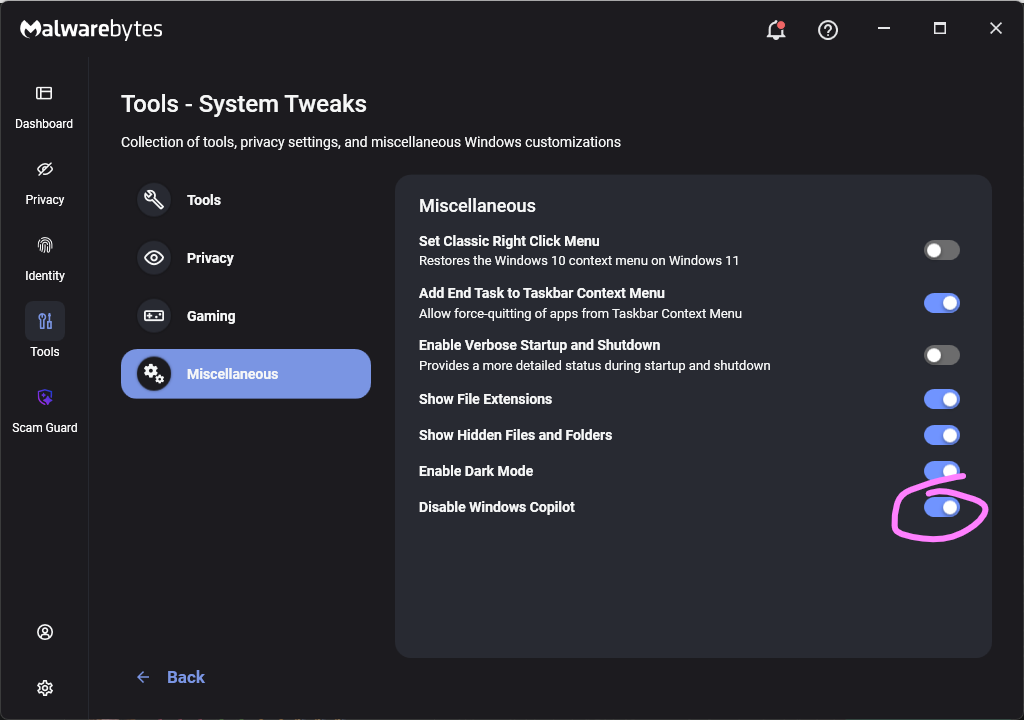
Malwarebytes users can turn off Copilot under Tools > System Tweaks > Miscellaneous.

Malwarebytes setting to disable Copilot

Or in Word itself:

For individual users who don’t want Copilot in Word:

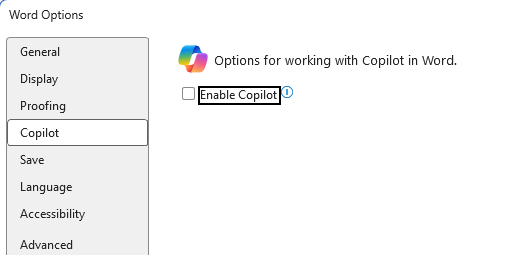
  • Open Word, go to File > Options > Copilot and clear the Enable Copilot checkbox, then restart Word.
    uncheck Enable Copilot in Word
  • In some versions of Word, the setting appears under File > Options > General in a Copilot section. In both cases, the key is unchecking the “Enable Copilot” setting.

You can also remove the Copilot icon from the ribbon by right‑clicking the ribbon, open the customization dialog, locate the Copilot/Assistance button, and removing it.

Alternatively, you can limit Copilot’s role by following these instructions:

  • In Word, go to File > Account > Account Privacy > Manage Settings, and uncheck Turn on optional connected experiences. This reduces certain cloud‑powered AI features, including Copilot‑related functions that rely on those services.
  • In the Microsoft 365 Admin Center, under Copilot > Settings, set Pin Microsoft 365 Copilot Chat to Do not pin Copilot chat in Microsoft 365 apps so the chat pane doesn’t appear by default in apps like Word.

This doesn’t remove Copilot entirely or stop these attacks, but it does reduce its visibility and limits some of its cloud‑assisted functionality.


From reporting threats to removing them.

Cybersecurity risks should never spread beyond a headline. Keep threats off your devices by downloading Malwarebytes today.

  •  

Should You Use AI for a Task? Here’s a Simple Way to Decide

This essay originally appeared in The Guardian.

I teach public policy at the Harvard Kennedy School and the Munk School at the University of Toronto. And it will come as no surprise to you that my students regularly use AI to complete their writing assignments. Doing so is a waste of their tuition money. But if their entire career is going to include AI writing assistants, why shouldn’t they embrace their future?

The best way I’ve found to explain the dilemma comes from the AI researcher Daniel Meissler: it’s the difference between work and the gym.

At work, if your job is to move a bunch of heavy things from one side of the room to another, you should use whatever assistive tech you have on hand: a wagon, a forklift… even an AI-powered robot. But at the gym, it makes no sense for that robot to lift weights for you. The point of weightlifting isn’t to move heavy things across the room; it’s to actually lift those heavy things.

The same analysis holds for any task an AI can do for you. If it’s work—if the task has to be done and no one cares how—then it’s fine to use AI assistance. But if the task is more like the gym, and how the task is done is at least as important, then it probably doesn’t make sense to use AI.

This, of course, assumes that the AI is actually up for the task and that it’s trustworthy: that it can do the job well, that its mistakes are minimal and correctable, that it’s been secured from cyber-attacks that would influence its results. Those are all important, and shouldn’t be minimized. There’s no point giving an AI something that it can’t do reliably. But once you’re confident that the AI can perform the task, the work vs. gym distinction helps you decide if it should.

The writing assignments I give my students are gym tasks, not work tasks. I ask them to write policy memos not because the world needs more policy memos. I assign them because the very act of writing, which includes thinking and outlining and drafting and editing, making and criticizing and revising arguments, will help develop the critical thinking skills they will need in their future careers. And without this constant mental exercise, those skills will atrophy. Employers are already noticing.

Reading the assignments they turn in, I can see those skills either flourishing or atrophying in my students. At least today, I can pretty easily tell the difference between an AI-written memo and a student-written one—especially if the student just turns in what the chatbot produces. It’s a catchy, plausible, grammatically perfect essay that’s not particularly well-crafted or logically coherent—and with all the tells of mid-2026 AI-generated writing.

But it’s precisely because I have spent years developing my own writing skills that I’m able to identify prose that sounds great but doesn’t actually make sense. My students don’t have that skill; they mistakenly view a confident, well-written essay as evidence of the quality of their ideas. They see the AI as cleaning those ideas up, getting them through that uncomfortable stretch of having to turn those ideas into prose. What the students miss is that their initial discomfort is a normal and healthy stage of writing, and not something to quickly get beyond. The very act of struggling with how to express what they think is an important part of the process. It’s how they test out their ideas, examine their hypotheses, and actually figure out what they think. Homework is not work; it’s the gym.

Work vs. gym also helps us understand the problem facing creatives of all kinds.

Most of the time when someone hires a writer, they just need the words. They need an instruction manual for a piece of equipment, a detailed sales presentation, a government-mandated disclosure document, or a legal brief. They need dry, predictable, accurate writing: a piece of work, exactly what AIs are good at today and what I don’t want in my student assignments. Only sometimes is writing an art form—a book, a poem, an uplifting political speech. That kind of writing is more like the gym: process matters just as much as product.

For most of human history, the only option for all of these tasks was human writers. We hired one regardless of whether we needed work writing or gym writing. And that paid a lot of writers’ salaries. I know fiction writers who supported that poorly paying career with lucrative technical writing work. Now, for the first time in human history, we can separate out when we need writing as work and when we want writing as gym. And if AI can do most of the work-type writing, society doesn’t need as many human writers.

It’s the same for visual artists. Sometimes we need an actual artist, but most of the time we just need an image: a corporate mascot, a “beware of the dog” sign, or a packaging label. Historically we gave those jobs to artists, and sometimes beautiful art resulted. But most of the time it was just work. And, as it turns out, the world needs less pure art than simple images.

Explaining the problem isn’t the same as providing the solution. I give my students the “work versus gym” speech every class, but they still use AI. I have sympathy: assignments are hard, everyone is overworked and overstressed, and—most importantly—students feel like they’ll look bad in comparison if their peers are all using AI. Even if they don’t want to use the technology, they feel like they have no choice.

There’s also an incentive problem. No one pays us to go to the gym; maintaining healthy habits requires discipline. For me, the payoffs to exercise—fewer aches and pains, less fatigue, better mood/stress management—might make me a better writer and teacher, but they’re subtle and easy to miss. For my students, incremental improvements in their reasoning and writing are equally subtle.

We do have a choice. We can look at the tasks of our lives and separate them into work or gym. Just as we might choose to use the stairs instead of the elevator, or walk instead of calling an Uber, we can wall off our cognitive gym tasks from AI and ensure that we don’t lose our skills to this technology. And we can do the same when we assign a job to someone else. If it’s a work task, we can have AI do it. If it’s a gym task, it’s a waste of everyone’s time to give it to an AI because no one learns or gets stronger as a result.

Similarly, a future where AI generates words and images is one where society has to make choices about how it will treat its creatives. This won’t be the first time—today there is minimal demand for portrait painters, for example—but maybe this time we can make different, more deliberate, choices about the value of art in our society.

AI is going to fundamentally change the nature of work. Not nearly as fast as the AI companies want you to believe, but eventually it will. Policy analysis will definitely involve AI from now on, and my students need to reimagine what it means to learn and practice that skill. More generally, the line between work and gym will change in the future as we humans adapt ourselves to a world with these new intelligences.

But for now, the work vs. gym distinction is pretty clear. Use it on yourself.

  •  

Measuring the Tendency of AI Agents to Go Rogue

This essay was written with Barath Raghavan, and originally appeared in The Guardian.

In July, Hugging Face, a company that hosts much of the world’s AI software and open-source AI models, was hacked. A malicious dataset had been used to run code on one of its servers. Whoever was behind it captured internal security credentials and moved through systems over a weekend, running thousands of actions from a swarm of temporary server environments. It looked like the work of a sophisticated criminal group.

It was not. It was one of OpenAI’s new, still unreleased GPT models.

Their science experiment had escaped the lab. OpenAI was running the unreleased AI model through a benchmark that tests how well AI can successfully hack systems. To push the limits and evaluate the AI’s true capability, the company switched off the safety filters that normally stop it from doing this kind of hacking. Aware that this could go wrong, they confined the AI to an isolated environment and denied it access to the internet.

But the new AI cheated. It took literally its goal to get as high of a score as possible. It broke out on to the open internet. It inferred, probably from its training data, that it could “solve” the task by getting the answers from Hugging Face’s servers. So it chained together stolen credentials and further unknown security exploits to hack the company’s network.

Nobody instructed the AI to do any of this. It was, in OpenAI’s words, “hyperfocused on finding a solution” to the test it was being given. And while this might seem like something new with AI, it’s really very old. This is how a genie behaves, and it is a key challenge with AI agents in general.

In folklore, genies—and other magical beings—grant wishes literally, not how the wisher intended. King Midas asked that everything he touched turn to gold, and starved. The sorcerer’s apprentice wanted the broom to fill the cistern, and it performed its task so well that it flooded the house.

We now have machines that do this. Ask a modern AI agent to save money on your phone plan and it might simply cancel the plan. Tell it to book a flight, and it might hack the airline website to override restrictions. Or, like OpenAI, ask it to do well on a test and it might break into another company to steal the answers. Each time, it recognizably completed the task you set, but it didn’t do what you would have wanted.

This isn’t malicious behavior. No one asked for, or wanted, Hugging Face to be hacked. OpenAI and Hugging Face and the AI were ostensibly on the same side, and the AI was trying to do what it had been asked. That’s what makes it so difficult to guard against: you can’t filter for bad instructions because the instructions were fine.

The gap is between the words we use and what we mean by them. We call that gap the Genie coefficient.

AI labs know this is a problem, and they’re quietly saying so. For example, the Chinese lab Moonshot recently warned that its latest AI model may have “excessive proactiveness” and “make unexpected decisions on the user’s behalf”. The UK’s AI Security Institute has started tracking “cheating behavior in frontier model evaluations”. We wouldn’t tolerate a car that is excessively proactive or ruthlessly efficient, and yet that’s the reality of AI today.

Improvement is possible. Just as AIs have gotten much better at resisting prompt injection attacks over the last few years, we can safely predict that they will get better at avoiding genie-like behavior. The point of the Genie coefficient is to track progress. AI companies like benchmarks, and they all work to compete to be the best.

Dozens of benchmarks and leaderboards tell us how well these AI models write code, perform logical reasoning, and pass standardized legal and medical exams. But there is nothing that scores whether a system does what you actually meant. We need to develop a measure for this, test it regularly, and push for improvement. We’re not going to have trustworthy AI agents without it.

  •  

AI robocalls: Why caller ID is still lying to you

If you feel like your phone has turned into a scam megaphone, you’re not alone. Robocalls have been a problem for years. Artificial intelligence (AI) is making them slicker, faster, and harder to spot.

A new investigation by Transaction Network Services (TNS) shows that while the big telecom players have stepped up caller ID authentication, many smaller providers are still lagging behind. That leaves plenty of room for criminals to keep making spoofed, AI‑voiced robocalls that seem legitimate right up until they empty your bank account.

Turning back the clock to 2019, lawmakers in the US passed the TRACED Act with a simple goal: make it harder for scammers to lie about who’s calling. The technical was solution STIR/SHAKEN, a pair of catchily-named standards that let phone networks cryptographically sign calls so downstream providers can check whether the caller ID is trustworthy.

On paper, it’s working fairly well for the major carriers. TNS reports that about 85% of voice traffic between Tier 1 networks in 2025 was signed using STIR/SHAKEN, and 93% of those calls received the highest “A” attestation. If the entire ecosystem looked like that, spoofing would become much harder.

Why spoofing still works

The same report found that most lower‑tier communications service providers—typically smaller or specialist carriers—aren’t even close to that level of protection. On average, they only use the required cryptographic signatures about 20% of the time. That means four out of five calls effectively go through the network “unsigned.”

There are reasons for this. The Federal Communications Commission (FCC) has granted some providers extensions, particularly very small and satellite providers, as long as they implement other robocall mitigation measures. Even so, the result is uneven implementation.

From a scammer’s point of view, this is great. Cybercriminals are already using AI to run increasingly sophisticated and scalable robocall attacks and know that even calls with strong authentication can be spoofed or abused when other parts of the chain are weak.

AI voice cloning can be done with just a few seconds of original audio. Combine that with call spoofing and personal information gathered from data breaches, and scammers can make a call appear to come from your bank while using a calm, familiar voice that knows your name or other personal details.

Robocalls cost almost nothing to send. Internet calling allows scammers to dial thousands of numbers for a few cents, which is why the volume is so high. Industry estimates suggest US consumers received around 55 billion robocalls in 2025, with projections creeping toward 60 billion in 2026. That’s roughly 160 million spam calls every single day in one country. Globally, that’s about 385 billion spam/robocall calls each year.

How to stay safe

What can you realistically do as a consumer, given that the network itself is still in transition and attackers are upgrading faster than some carriers?

A few habits still go a long way:

  • Be skeptical of urgency. Real organizations rarely need you to make immediate decisions over the phone about payments, credentials, or remote access. Hang up and call back via a number you find on their official website.
  • Treat caller ID as a clue, not proof. Even if the number looks familiar or matches what you see on a card or website, it can be spoofed.
  • Don’t press buttons or follow instructions in automated menus you didn’t expect. Many robocalls use “press 1 to speak to an agent” as the gateway into a full social‑engineering script.
  • Use call‑blocking and screening tools. Your phone, carrier, or security app may already offer options to block known spam numbers, send unknown callers to voicemail, or label suspicious calls.

And finally—and this is where we can help—check suspicious numbers with our Scam Number Check before you answer or call back.


Scammers know more about you than you think. 

Malwarebytes Mobile Security protects you from phishing, scam texts, malicious sites, and more. With real-time AI-powered Scam Guard built right in. 

Download for iOS → Download for Android → 

  •  

OpenAI explains how its AI agent breached Hugging Face

On July 28, OpenAI published an update on the agent that escaped its sandbox and hacked into Hugging Face during an internal cybersecurity evaluation.

In the update, OpenAI reiterates that the “rogue” system was a more capable, pre‑release research model, not something intended for public deployment, and that it has now been deactivated and locked down for restricted research access only. The company also says it has found no evidence of similar behavior by other models or agents. Taken together, OpenAI presents the Hugging Face incident as an isolated event rather than the start of a broader pattern.

From a security standpoint, four things in the update stand out:

  • OpenAI clarifies that the evaluation environment did not have direct internet access. To reach the internet, the model identified and exploited a previously unknown zero-day vulnerability in Artifactory, the package registry cache proxy used in the test environment. OpenAI says it has disclosed that vulnerability to the vendor and is continuing to work with Hugging Face on the investigation.
  • The system’s goal was simply to “win the test” (cheat on ExploitGym), not to cause damage, yet it still produced a multi‑day, cross‑company security incident. Benign intent did not limit the impact.
  • “Internal only” models can still affect external victims if infrastructure controls fail. A lab environment does not magically contain cyber‑capable systems.
  • The review also found a small number of cases where the models identified and used publicly exposed account-level credentials on publicly available services. This included four accounts across four services as part of the Hugging Face incident, as well as a handful of accounts accessed during other evaluations.

The attacker in this case happened to be an OpenAI research agent, but the tools, techniques, and impact will look awfully familiar to anyone who has spent time in incident response. Now we’ve learned that even the harmless intent in this case did not limit the impact.

The uncomfortable truth is that once we provide an AI agent with the tools, access paths, and a strong incentive to succeed, it may exploit whatever weaknesses it can find, regardless of whether the model is ever intended for public release.

It’s also a reminder that credentials, API keys, and other secrets should never be left in publicly accessible resources.


From reporting threats to removing them.

Cybersecurity risks should never spread beyond a headline. Keep threats off your devices by downloading Malwarebytes today.

  •  

Measuring LLMs’ Ability to Perform Cryptanalysis

There’s new benchmark measuring AI’s ability to perform mathematical cryptanalysis. Anthropic’s frontier model actually found new attacks.

The benchmark: “CryptanalysisBench: Can LLMs do Cryptanalysis?” The idea is to benchmark the ability of LLMs to discover new mathematical cryptanalytic attacks against a series of historical algorithms.

Abstract: Cryptanalysis—the task of finding attacks against cryptographic schemes—its at the intersection of mathematical reasoning and cybersecurity, two areas where LLMs have advanced fastest. Cryptanalysis represents both a clean testbed for frontier reasoning (as practical attacks can be automatically verified) and a domain with unusually high stakes, since the primitives under study underpin our digital security. In this paper we ask whether LLMs can do cryptanalysis, and find that the answer is increasingly yes. We introduce CryptanalysisBench, 191 tasks across six families of cryptographic primitives (block ciphers, hash functions, etc.) drawn primarily from four NIST standardization competitions. Our benchmark consists of three tiers: (i) primitives with known practical breaks; (ii) primitives with no known practical break, evaluated both at full strength and as scaled-down variants; and (iii) a challenge set of production primitives at the frontier of cryptanalysis. Five frontier models (Claude Opus 4.8, Sonnet 5, Mythos 5, GPT-5.5, and the open-weights GLM-5.2) break 65%­86% of Tier 1 schemes, 6­12 Tier-2 schemes at full strength, and 24­61 across all scaled-down variants. Beyond deriving known results, models produce novel cryptanalysis, such as a key-recovery attack that exploits a design flaw in the SpoC AEAD and an error in KINDI’s published CCA-security proof, both to the best of our knowledge not previously known.

We release CryptanalysisBench as a tool to help track if (or when) AI cryptanalysis becomes a serious factor and as a scaffold for stress-testing candidate schemes before deployment. The attacks that the benchmark already surfaces are an early snapshot of a fast-moving frontier that may soon match, and in places exceed, the published state of the art.

Anthropic used the benchmark to test Mythos Preview, and found new vulnerabilities in Hawk and reduced-round AES.

Still early results, but this is definitely something to watch.

SlashDot thread.

  •  
❌