While many companies are intentionally rolling out AI to boost quality and efficiency, unsanctioned AI tools are cropping up in corporate environments even faster. Software vendors are baking AI right into products companies already use (think Microsoft Copilot and Google Gemini), while employees are taking matters into their own hands and installing tools on the sly. As a result, businesses are staring down a poorly managed data leak channel: staff paste information from corporate systems into AI chatbots, sending data not just to the SaaS vendor, but straight to the developers behind the underlying AI model. Both the risks and the mitigation strategies vary depending on the type of AI system in play. We break down this broad topic, focusing heavily on tools for spotting and blocking AI at two distinct levels.
Types of unwanted AI systems
Depending on the type of AI in question, managing and blocking its use requires a different playbook. It’s essential to break down AI into four distinct categories:
Platform-native AI capabilities. Think Microsoft Copilot, Google Gemini, and Apple Intelligence, along with AI features baked right into browsers. The tricky thing about these is that they’re built into everyday essentials, are instantly available to every user (sometimes popping up aggressively), and most importantly, vendors try to turn them on by default.
AI companions embedded in business apps. This bucket includes Slack AI, Zoom AI Companion, Notion AI, Jira’s Rovo assistant, and the like. These are tied to a single application and are completely inseparable from it.
Standalone web and app-based chatbots. ChatGPT, Claude, Perplexity, Character AI, local setups like LM Studio, browser extensions, and agentic browsers like Comet. Apps and services in this category are usually adopted by employees on their own without permission: classic examples of shadow AI.
Desktop-native multi-functional agents. This group features tools like OpenClaw, NanoClaw, NemoClaw, and others. They pose the biggest threat because they come with broad access rights by default and actively process untrusted data from the open web.
How to deal with unwanted AI
Every company, depending on its industry, appetite for innovation, and risk tolerance, needs to draw its own line in the sand between recommended, approved case-by-case, and completely banned use cases for specific AI products. Regulated sectors like healthcare play by one set of rules, while retail businesses operate under an entirely different playbook. Either way, after analyzing exactly which AI tools have already slipped into the organization, corporate policies need to be fine-tuned. That’s why the first order of business is employing existing infosec and logging tools to scan corporate infrastructure.
Depending on the chosen strategy, the uncovered AI systems can be:
Disabled or restricted by using the built-in corporate policy settings within the tools themselves
Hard-blocked at the endpoint or network level to create a safety net against policy workarounds or configuration errors
Transitioned to managed access, where the tool isn’t completely blocked but instead routed through a dedicated corporate gateway that checks access permissions, and monitors usage patterns
Detecting AI systems
Spotting AI requires a multi-layered approach, as different detection methods complement each other and work best against specific types of AI.
Technology
What it can detect
DNS
Any AI tool with an identifiable domain
Web Gateway or NGFW
Any AI tool with a recognizable request-and-response fingerprint (API endpoint paths, domains, and other indicators). Web filters can inspect traffic content, and many gateways/NGFWs now feature a dedicated category for detecting and blocking generative AI
EPP/EDR
Locally deployed LLMs (running via Ollama, LM Studio, and similar shells), native desktop apps for ChatGPT or Claude, agentic browsers, and open-source AI agents. An indirect but strong red flag is the presence of Node.js, Python, Git, Docker, or other containerization tools on machines belonging to non-technical staff
Application control
Similar to EPP/EDR, this allows to immediately block unwanted applications right out of the gate
Browser control
AI-focused browser extensions and visits to AI-themed websites. This is a lifesaver if the corporate web gateway can’t inspect encrypted traffic
OAuth permissions requested by AI apps and services, as well as any third-party integrations plugging into core productivity hubs (Microsoft 365, Google Workspace, and others)
Naturally, almost all of these tools allow to do more than just spot AI — they let to block it entirely, or at the very least, sound the alarm for the team in charge.
Keeping an eye on OAuth
Popular office AI solutions — especially meeting assistants, email and calendar automation agents, and the like — gain access to corporate data by requesting OAuth permissions directly from communication, document workflow, or video conferencing platforms. If a user has the green light to grant these permissions to third-party apps, the resulting data leaks completely bypass the organization’s perimeter. Tools like EDR and NGFW won’t see a thing when a tool like Read.ai grabs recordings of every single meeting in, say, Microsoft Teams.
The most drastic — and often best — move is to block standard users from granting OAuth consent in the first place. Here’s how to handle the technical heavy lifting (Global Administrator, Application Administrator, or equivalent rights are needed):
Microsoft 365 / Entra ID
In the Microsoft Entra admin center, head over to Identity > Applications > Enterprise apps > Consent and permissions > User consent settings. There User consent for applications can be disabled (check out Microsoft’s full guide).
Google Workspace
In the Google Admin console, navigate to Security > Access and data control > API controls. Under Manage App Access, the trust level for all apps can be set: Trusted, Limited, Specific Google data, or Blocked. However, the real kicker here is the Unconfigured app settings subsection, which dictates what happens when a user tries to connect an unknown app. To seal this loophole, select Don’t allow users to access any third-party apps.
A separate subsection, Manage Google Services, permits fine-tuning exactly how third-party apps interact with Google Workspace and Google Cloud services. This allows to cut off access for each individual Google product (see Google’s official guide).
Salesforce
In Setup, use the Quick Find box to search for connected apps, then select Manage Connected Apps from the results. While settings are configured for each external app individually, all users can approve access by default. There isn’t a blanket block switch here; instead, Salesforce allows to opt for Admin approved users are pre-authorized (see the full Salesforce guide on this).
Slack
From the Admin settings menu, head to Apps and workflows -> App Management Settings. Tweak the Require approved apps setting by selecting Only allow pre-approved apps. Once that’s locked in, double-check that no rogue AI tools have slipped onto the approved list.
Networks used to be simple. A perimeter. A data center. A set of rules a single engineer could hold in their head. That world is long gone. Every wave of enterprise transformation – cloud migration, M&A, hybrid multi-cloud, IoT, remote work – added another layer of complexity. Each with its own topology, traffic patterns, and security assumptions. The complexity grew exponentially. And security followed, manually – more policies to author, more configurations to validate, more vendors to manage. The part that doesn’t show up in vendor presentations is that modern network security runs on institutional know-how. It lives in the […]
If you’re worried about deepfake likenesses of yourself showing up online, you’re not alone; YouTube is worried for you. It wants to protect you by having you upload a selfie video and government ID to its site.
The idea is that the video giant will use its own AI to patrol the service for fake videos using your likeness. In exchange, you get the chance to have them taken down.
This isn’t available for everyone, though. It’s for celebs, those in vulnerable jobs, and now, most YouTube creators.
YouTube has been working on this concept, which it calls its “likeness detection” system, since it first floated the idea publicly in September 2024. That December, it launched a partnership with the Creative Artists Agency that saw it using the technology with sporting and entertainment figures.
In October last year, it expanded likeness detection to cover more creators, and then in March it expanded it again to cover politicians and journalists. And last month, it widened the net again, offering the service to Hollywood celebs. They can use it regardless of whether they have a YouTube account, it added.
Now, in its latest move, anyone 18 or older with a selfie and ID can sign up. At least in theory, as it hasn’t rolled out to everyone yet. It’s also for faces only; AI-generated voice clones are another problem entirely.
The privacy risk
Privacy advocates warned that YouTube’s likeness detection system could normalize handing biometric data to large tech platforms, even if YouTube says the data is only used to improve likeness detection models with creator permission.
On the help page for the likeness detection service, YouTube says creators can separately choose whether their face and voice templates are used to improve its likeness detection models.
“When you sign up for Likeness detection, you also have the option to allow YouTube to use your face and voice templates to develop and improve likeness detection models. This helps us build better, more accurate likeness detection technologies.”
Adding:
“You can opt out of YouTube’s use of this data for development and improvement of likeness models at any time.”
YouTube supports legislation intended to tackle deepfakes, such as the NO FAKES and TAKE IT DOWN acts. These are designed to help stop the misappropriation of someone’s image online. TAKE IT DOWN, which became law a year ago, focuses purely on “nonconsensual intimate imagery.” But that doesn’t cover other kinds of deepfakes, such as fake politicians or celebrity endorsements. Those are becoming increasingly common. NO FAKES, which hasn’t yet become law, is far broader in scope, assigning people federal rights over their own image.
So is it worth the trade?
Deepfakes, intimate and otherwise, are definitely a threat, especially for YouTubers who become popular. And the barrier to entry is lowering all the time. Google’s own DeepMind researchers found most generative AI misuse isn’t sophisticated; it’s mundane likeness manipulation by anyone with a browser.
So do you hand over your face and government ID for your protection, to a company whose broader data collection practices have faced years of scrutiny, and hope its policies don’t change? Or do you skip it and hope that the deepfake merchants don’t decide to target you?
Creators commenting on YouTube’s video revealing the service six months ago were less than impressed. One commenter said:
“I was 100% on board, up until the ID upload. That makes me very uncomfortable.”
Echoing several others who complained that it’s difficult to get takedown requests actioned, another added:
“If YouTube actually acted upon these kinds of reports, then I’d be more in favour of this.”
Whether you decide to sign up for the service or not, just be sure to do it with your eyes open.
Someone’s watching your accounts. Make sure it’s us.
In the third quarter of 2025, we updated the methodology for calculating statistical indicators based on the Kaspersky Security Network. These changes affected all sections of the report except for the statistics on installation packages, which remained unchanged.
To illustrate the differences between the reporting periods, we have also recalculated data for the previous quarters. Consequently, these figures may significantly differ from the previously published ones. However, subsequent reports will employ this new methodology, enabling precise comparisons with the data presented in this post.
The Kaspersky Security Network (KSN) is a global network for analyzing anonymized threat information, voluntarily shared by users of Kaspersky solutions. The statistics in this report are based on KSN data unless explicitly stated otherwise.
The quarter in numbers
According to Kaspersky Security Network, in Q1 2026:
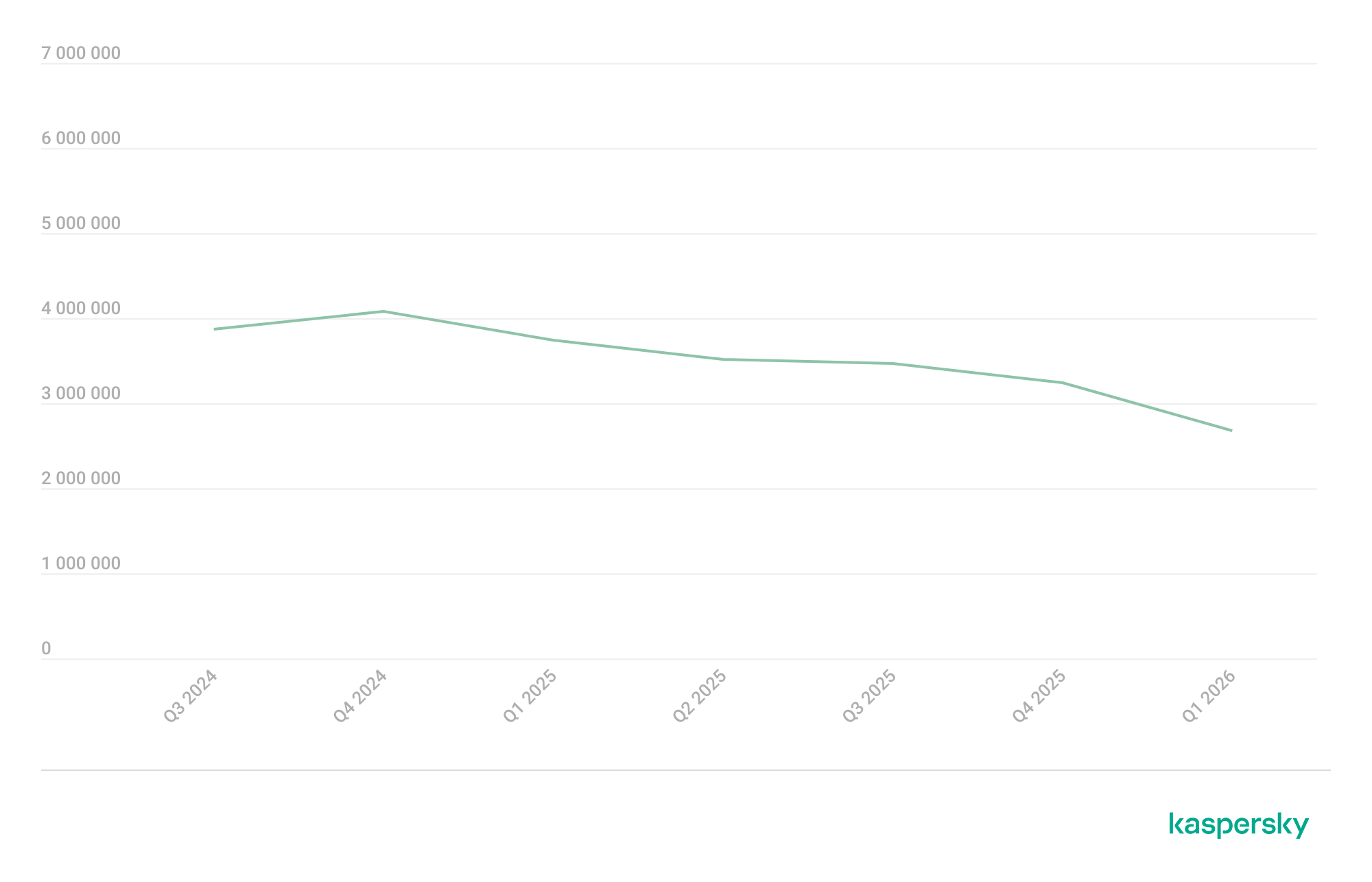
More than 2.67 million attacks utilizing malware, adware, or unwanted mobile software were prevented.
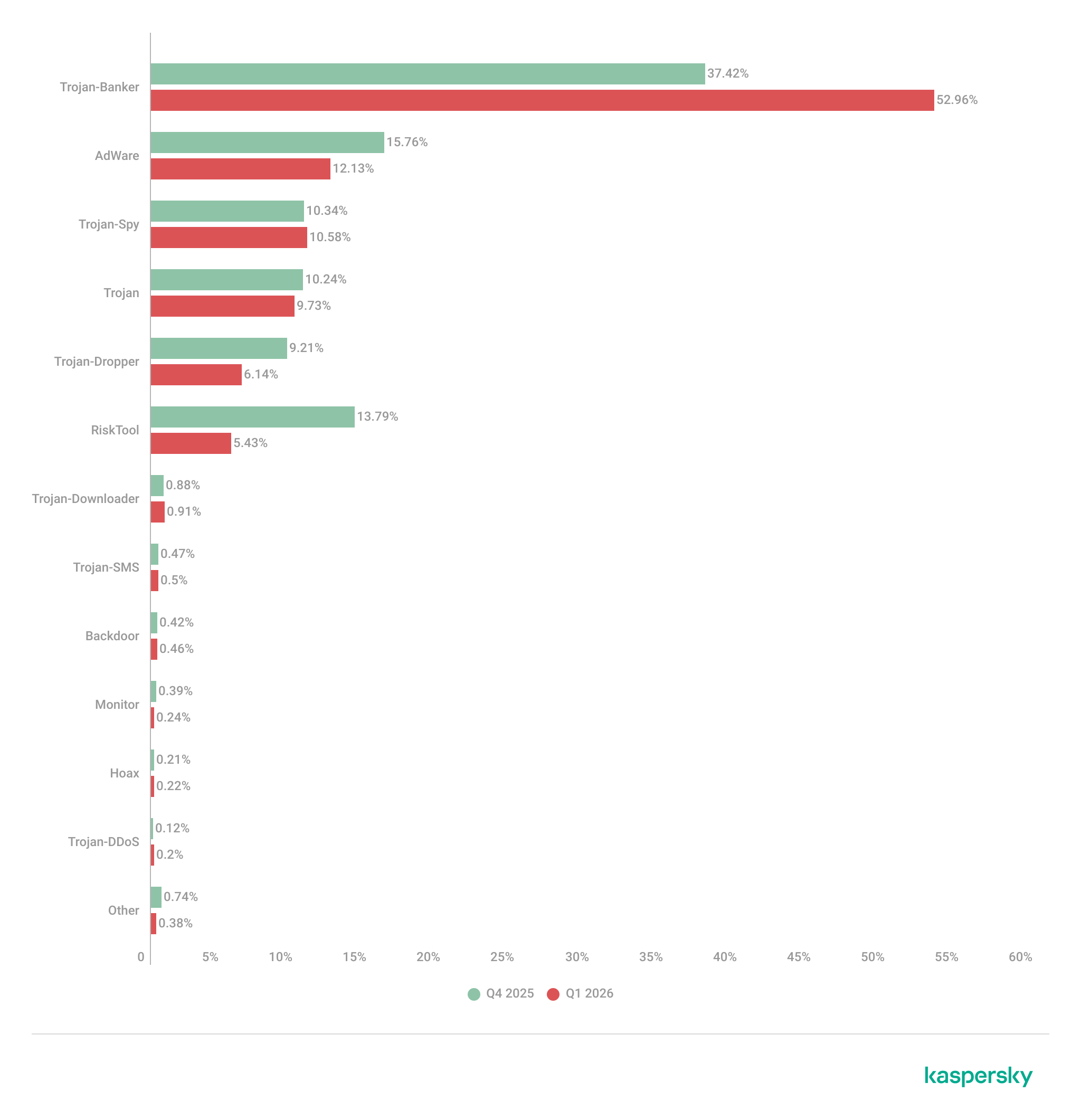
The Trojan-Banker category was the prevalent mobile malware threat with a 52.96% share of total detected applications.
More than 306,000 malicious installation packages were discovered, including:
162,275 packages related to mobile banking Trojans;
439 packages related to mobile ransomware Trojans.
Quarterly highlights
The number of malware, adware, or unwanted software attacks on mobile devices decreased to 2,676,328 in Q1, down from 3,239,244 in the previous quarter.
Attacks on users of Kaspersky mobile solutions, Q3 2024 — Q1 2026 (download)
The overall drop in attack volume stems primarily from a reduction in adware and RiskTool detections. Nonetheless, this trend does not equate to a lower risk for mobile users. As shown later in this report, the number of unique users targeted by these threats remained relatively stable.
In Q1, Synthient researchers identified a link between the notorious Kimwolf botnet and the IPIDEA proxy network. This network was later taken down in cooperation with GTIG.
In early 2026, we discovered several apps on Google Play and the App Store that contained a new version of the SparkCat crypto stealer.
The Trojan code, meticulously concealed, was embedded into the infected Android apps. The obfuscated malicious Rust library was decrypted using a Dalvik-like virtual machine custom-built by the attackers. The iOS version of the malware also underwent several changes; specifically, the attackers began leveraging Apple’s proprietary Vision framework for optical character recognition (OCR).
Mobile threat statistics
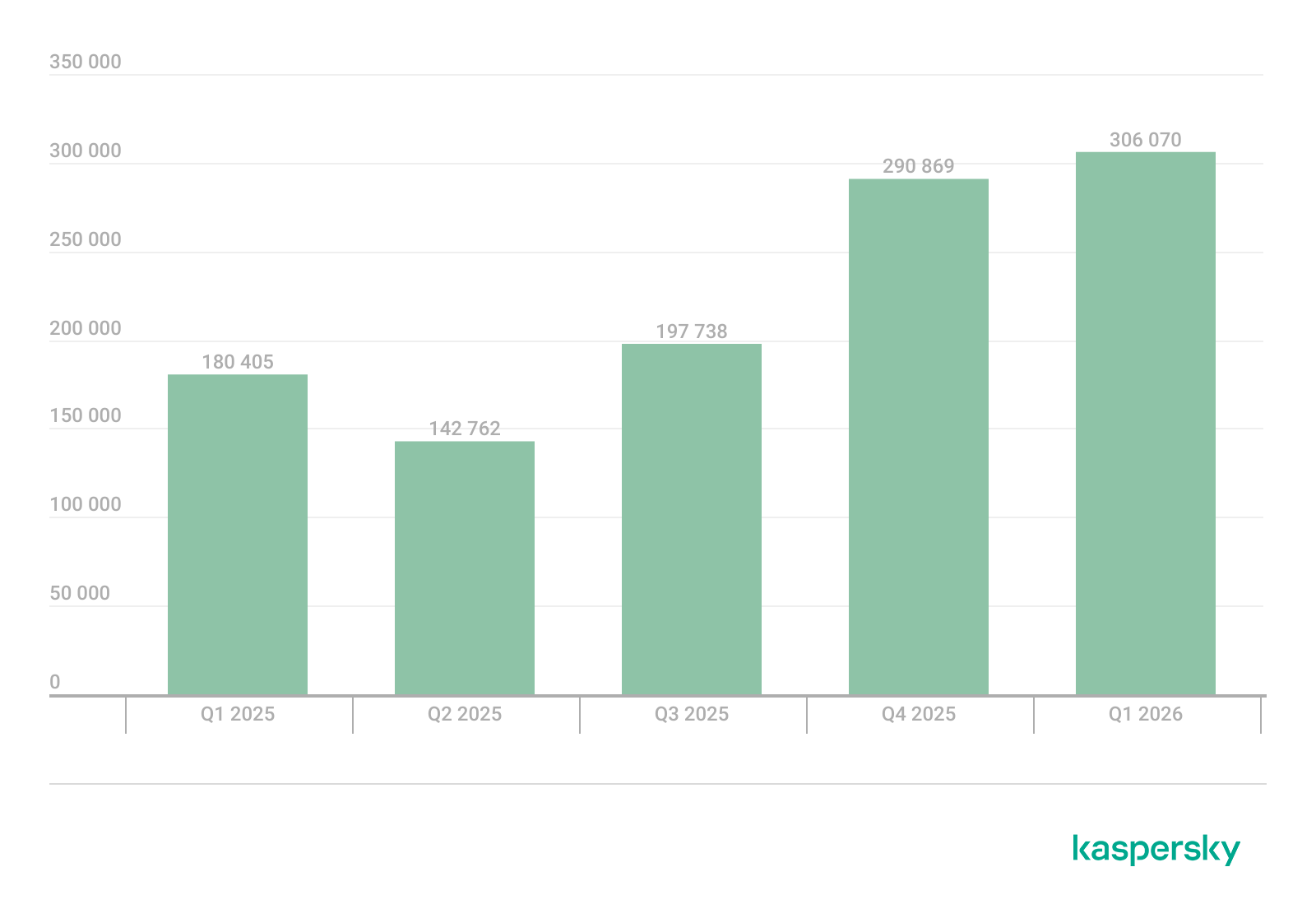
The number of Android malware samples saw a slight increase compared to Q4 2025, reaching a total of 306,070.
The detected installation packages were distributed by type as follows:
Detected mobile apps by type, Q4 2025* — Q1 2026 (download)
* Data for the previous quarter may differ slightly from previously published figures due to certain verdicts being retrospectively revised.
Threat actors once again ramped up the production of new banking Trojans; as a result, this category overtook all others in volume, accounting for more than half of all installation packages.
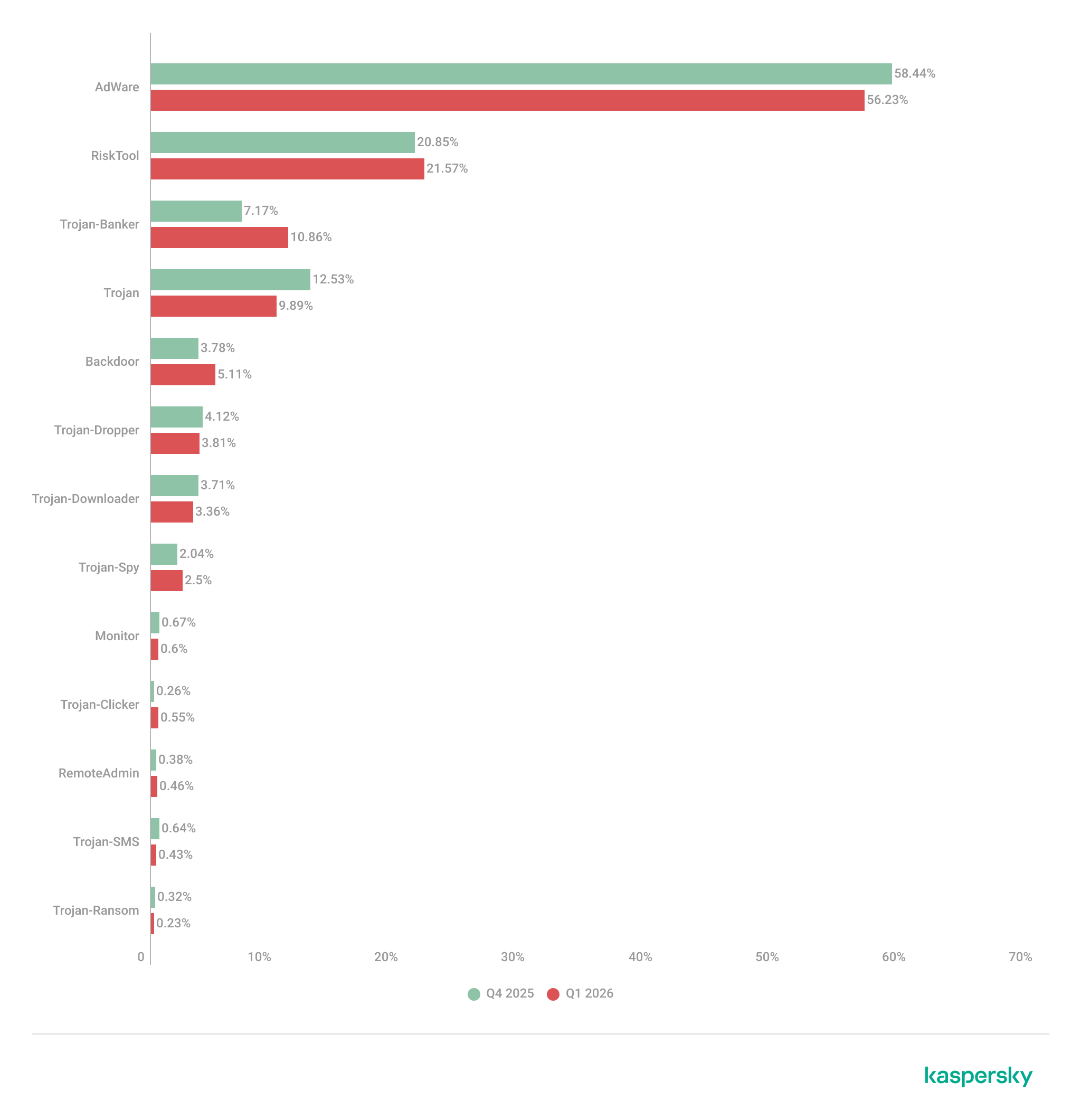
Share* of users attacked by the given type of malicious or potentially unwanted app out of all targeted users of Kaspersky mobile products, Q4 2025 — Q1 2026 (download)
* The total percentage may exceed 100% if the same users encountered multiple attack types.
Following the surge in banking Trojan installation packages, the number of associated attacks also rose, causing Trojan-Banker apps to climb one spot in terms of their share of targeted users. Mamont variants emerged as the most prevalent banking Trojans, accounting for 73.5% of detections, with the rest of the users encountering Faketoken, Rewardsteal, Creduz, and other families.
Yet banking Trojans were still outpaced by adware and RiskTool-type unwanted apps when measured by the total number of affected users. Despite a decrease in their share of installation packages, these two app types retained their positions as the top two threats by attack volume. The most common adware detections involved HiddenAd (44.9%) and MobiDash (38.1%), while most frequently seen RiskTool apps were Revpn (67%) and SpyLoan (20.5%).
TOP 20 most frequently detected types of mobile malware
Note that the malware rankings below exclude riskware or potentially unwanted software, such as RiskTool or adware.
Verdict
%* Q4 2025
%* Q1 2026
Difference in p.p.
Change in ranking
Backdoor.AndroidOS.Triada.ag
2.62
7.09
+4.48
+10
DangerousObject.Multi.Generic.
6.75
5.84
-0.92
-1
DangerousObject.AndroidOS.GenericML.
3.52
5.51
+1.99
+6
Trojan-Banker.AndroidOS.Mamont.jo
0.00
5.28
+5.28
Trojan.AndroidOS.Fakemoney.v
5.40
3.44
-1.96
-1
Trojan-Downloader.AndroidOS.Keenadu.l
0.00
3.35
+3.35
Trojan-Banker.AndroidOS.Mamont.jx
0.00
3.09
+3.09
Backdoor.AndroidOS.Triada.z
4.87
3.08
-1.79
-2
Trojan.AndroidOS.Triada.fe
5.01
2.98
-2.02
-4
Backdoor.AndroidOS.Keenadu.a
2.07
2.73
+0.66
+6
Trojan-Banker.AndroidOS.Mamont.jg
0.34
2.37
+2.03
Trojan.AndroidOS.Triada.hf
2.15
2.23
+0.07
+3
Trojan.AndroidOS.Boogr.gsh
2.35
2.15
-0.20
0
Trojan.AndroidOS.Triada.ii
5.68
2.07
-3.60
-11
Backdoor.AndroidOS.Triada.ae
1.91
1.76
-0.16
+3
Backdoor.AndroidOS.Triada.ab
1.79
1.72
-0.08
+3
Trojan.AndroidOS.Triada.gn
2.38
1.58
-0.80
-5
Trojan-Banker.AndroidOS.Mamont.gg
1.56
1.50
-0.06
+2
Trojan.AndroidOS.Triada.ga
1.48
1.50
+0.01
+4
Backdoor.AndroidOS.Triada.ad
0.53
1.40
+0.87
+44
* Unique users who encountered this malware as a percentage of all attacked users of Kaspersky mobile solutions.
The pre-installed Triada.ag backdoor rose to the top spot; it is similar to the older Triada.z version we documented previously. Because the same variant was pre-installed across a wide range of devices, the total number of affected users is aggregated. Consequently, Triada outpaced even Mamont, as users encountered a variety of Mamont variants, causing the share of that banking Trojan to spread across multiple rows. Other pre-installed Triada variants (Triada.z, Triada.ae, Triada.ab, and Triada.ad) also made the rankings. Furthermore, we observed increasing activity from the Keenadu.a backdoor, while diverse variants of the embedded Triada Trojan remained in the rankings.
Mobile banking Trojans
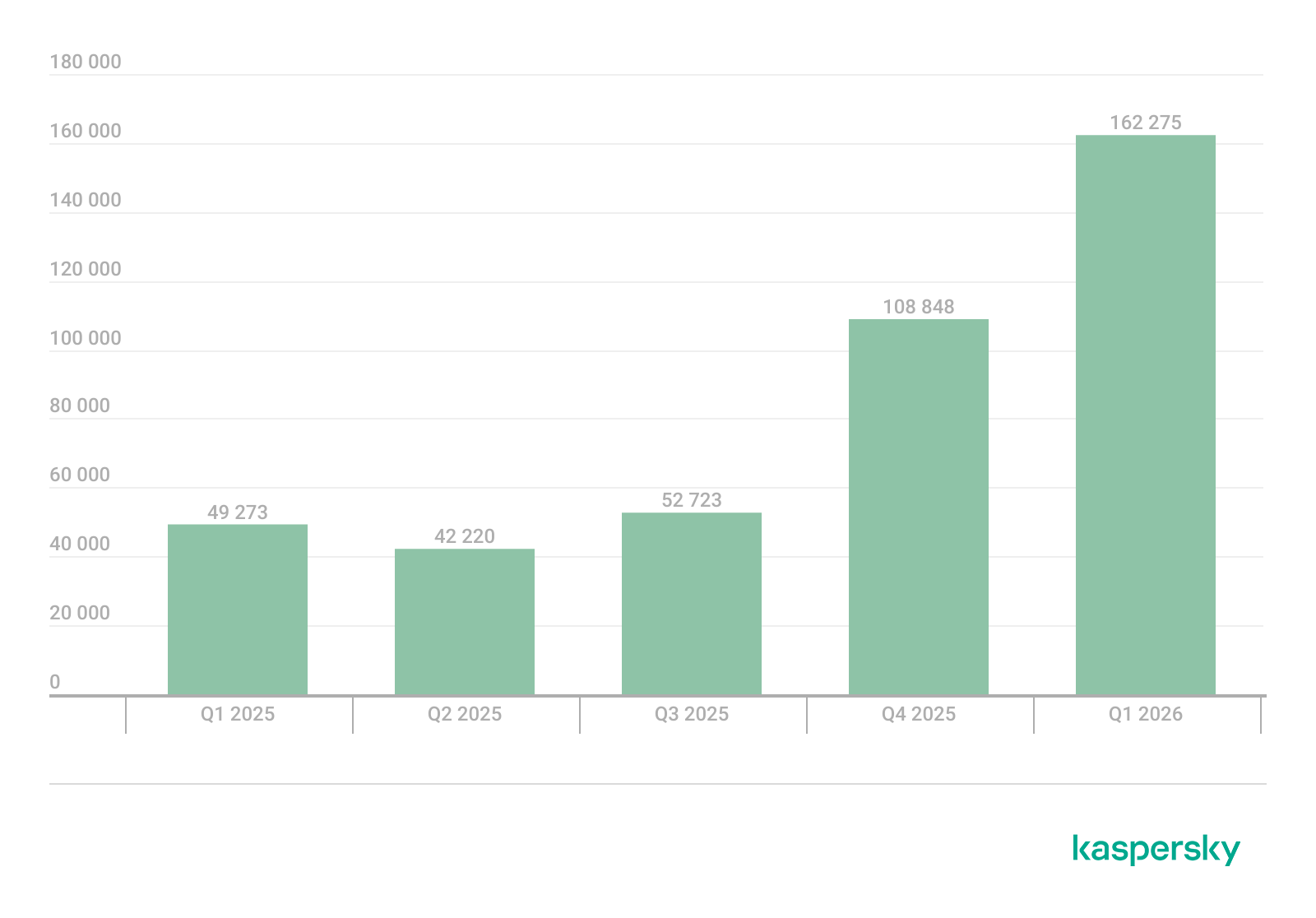
Q1 2026 saw a characteristic rise in mobile banking Trojan activity, with the number of packages totaling 162,275, a 50% increase compared to the prior quarter.
Number of installation packages for mobile banking Trojans detected by Kaspersky, Q1 2025 — Q1 2026 (download)
We saw a similar growth in the previous quarter, with banking Trojan volumes rising by 50% during that period as well. Various Mamont variants accounted for the absolute majority of packages and represented nearly every entry in the rankings of most frequent banking Trojans by affected user count.
TOP 10 mobile bankers
Verdict
%* Q4 2025
%* Q1 2026
Difference in p.p.
Change in ranking
Trojan-Banker.AndroidOS.Mamont.jo
0.00
15.75
+15.75
Trojan-Banker.AndroidOS.Mamont.jx
0.00
9.22
+9.22
Trojan-Banker.AndroidOS.Mamont.jg
1.47
7.08
+5.61
+24
Trojan-Banker.AndroidOS.Mamont.gg
6.79
4.48
-2.32
-3
Trojan-Banker.AndroidOS.Mamont.ks
0.00
3.98
+3.98
Trojan-Banker.AndroidOS.Agent.ws
6.03
3.78
-2.25
-2
Trojan-Banker.AndroidOS.Mamont.hl
4.30
3.27
-1.03
+1
Trojan-Banker.AndroidOS.Mamont.iv
6.00
3.08
-2.92
-3
Trojan-Banker.AndroidOS.Mamont.jb
3.93
3.07
-0.86
+1
Trojan-Banker.AndroidOS.Mamont.jv
0.00
2.79
+2.79
* Unique users who encountered this malware as a percentage of all users of Kaspersky mobile security solutions who encountered banking threats.
The statistics in this report are based on detection verdicts returned by Kaspersky products unless otherwise stated. The information was provided by Kaspersky users who consented to sharing statistical data.
Quarterly figures
In Q1 2026:
Kaspersky products blocked more than 343 million attacks that originated with various online resources.
Web Anti-Virus responded to 50 million unique links.
File Anti-Virus blocked nearly 15 million malicious and potentially unwanted objects.
2938 new ransomware variants were detected.
More than 77,000 users experienced ransomware attacks.
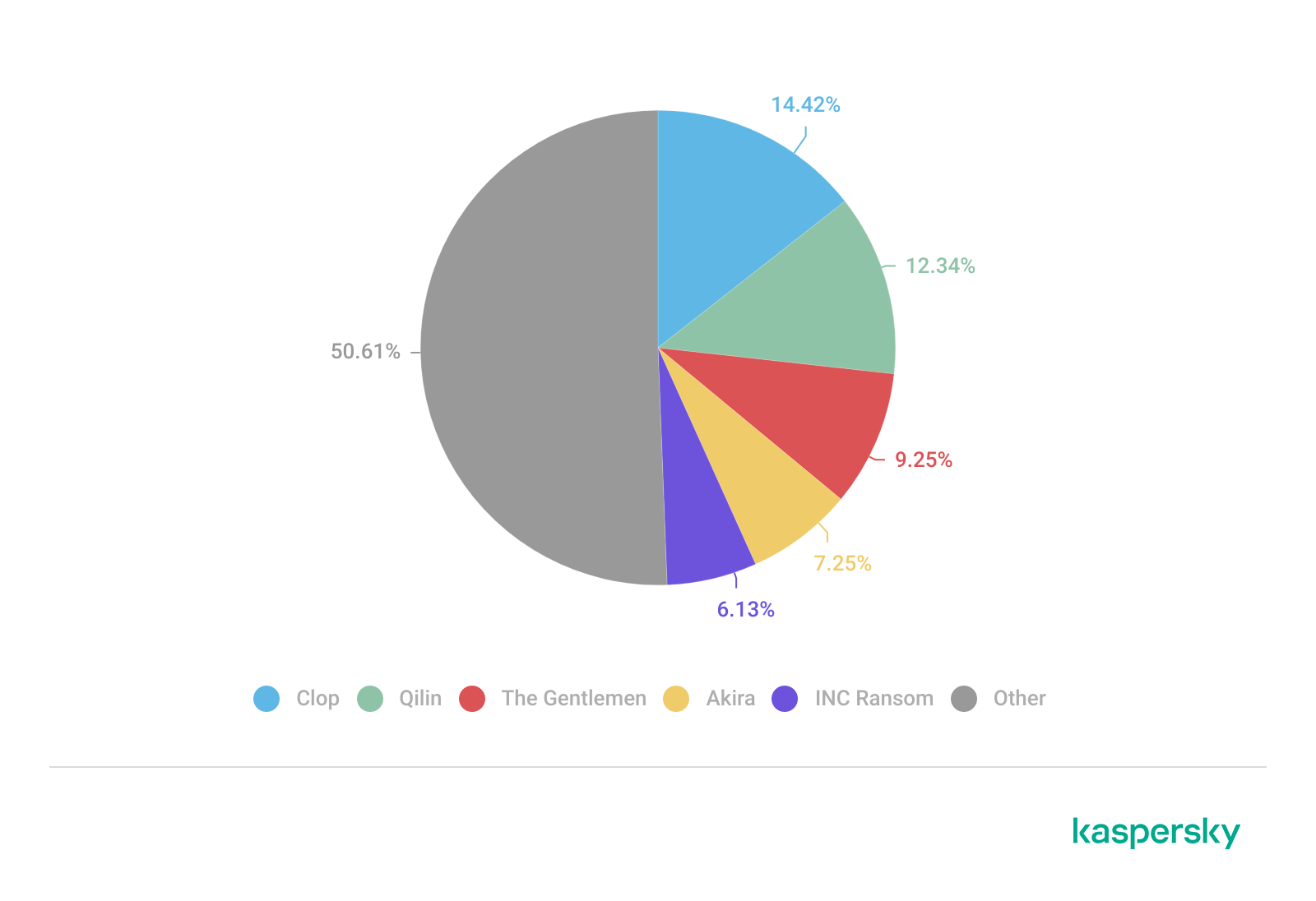
14% of all ransomware victims whose data was published on threat actors’ data leak sites (DLS) were victims of Clop.
More than 260,000 users were targeted by miners.
Ransomware
Quarterly trends and highlights
Law enforcement success
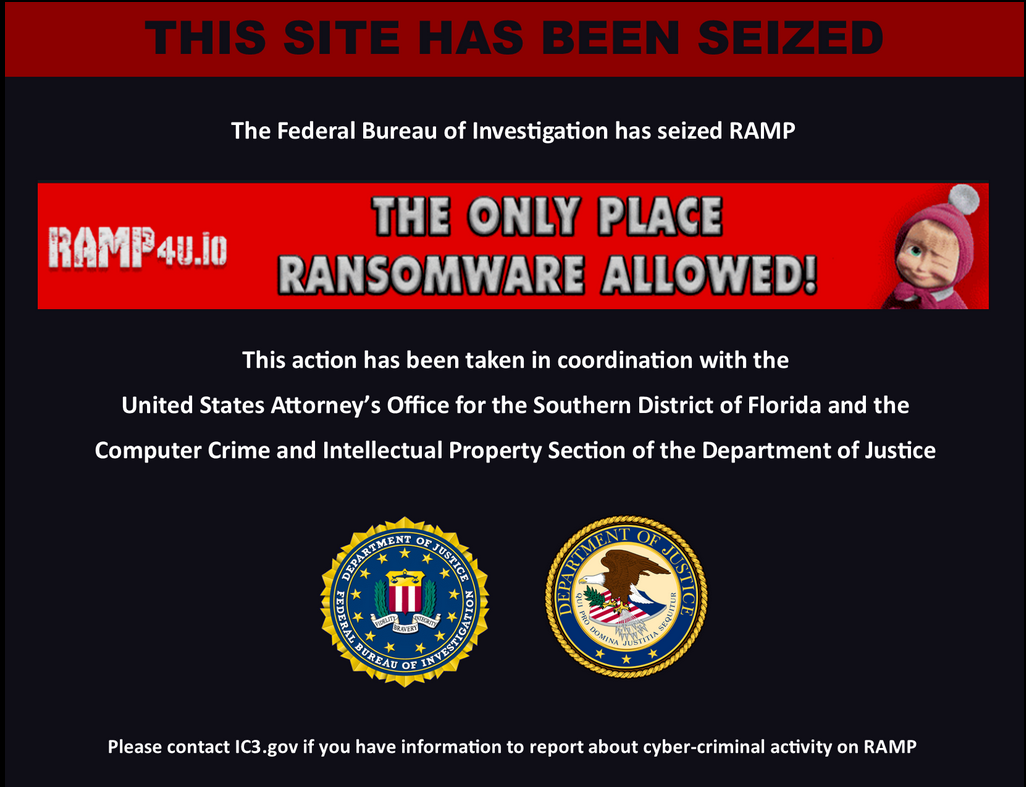
In January 2026, it was reported that the FBI had seized the domains of the RAMP cybercrime forum, a major platform used extensively by ransomware developers to advertise their RaaS programs and to recruit affiliates. There has been no official statement from the FBI, nor is it clear if RAMP servers were seized. In a post on an external website, a RAMP moderator mentioned law enforcement agencies gaining control over the forum. The takedown disrupted a key element of the RaaS ecosystem, creating ripple effects for ransomware operators, affiliates, and initial access brokers.
A man suspected of links to the Phobos group was apprehended in Poland. He was charged with the creation, acquisition, and distribution of software designed for unlawfully obtaining information, including data that facilitates unauthorized access to information stored within a computer system.
In March, a Phobos ransomware administrator pleaded guilty to the creation and distribution of the Trojan, which had been used in international attacks dating back to at least November 2020.
In March, the U.S. Department of Justice charged a man who had acted as a negotiator for ransomware groups. The company he worked for specializes in cyberincident investigations. The prosecution alleges the suspect colluded with the BlackCat threat actor to share privileged insights into the ongoing progress of negotiations. Additionally, the suspect is alleged to have had a prior direct role in BlackCat attacks, serving as an affiliate for the RaaS operation.
In a separate development this March, a U.S. court sentenced an initial access broker associated with the Yanluowang ransomware group to 81 months of imprisonment. According to the U.S. Department of Justice, the convict facilitated dozens of ransomware attacks across the United States, resulting in over $9 million in actual loss and more than $24 million in intended loss.
Vulnerabilities and attacks
The Interlock group has been heavily exploiting the CVE-2026-20131 zero-day vulnerability in Cisco Secure FMC firewall management software since at least January 26, 2026. The vulnerability enabled arbitrary Java code execution with root privileges on the affected device. This campaign demonstrates the ongoing reliance on zero-day vulnerabilities for initial access, a focus on network appliances as high-value entry points, and the rapid weaponization of new vulnerabilities within the ransomware ecosystem.
The most prolific groups
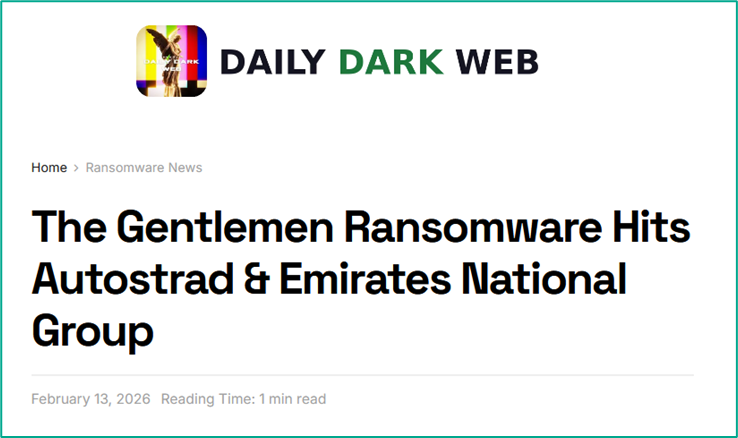
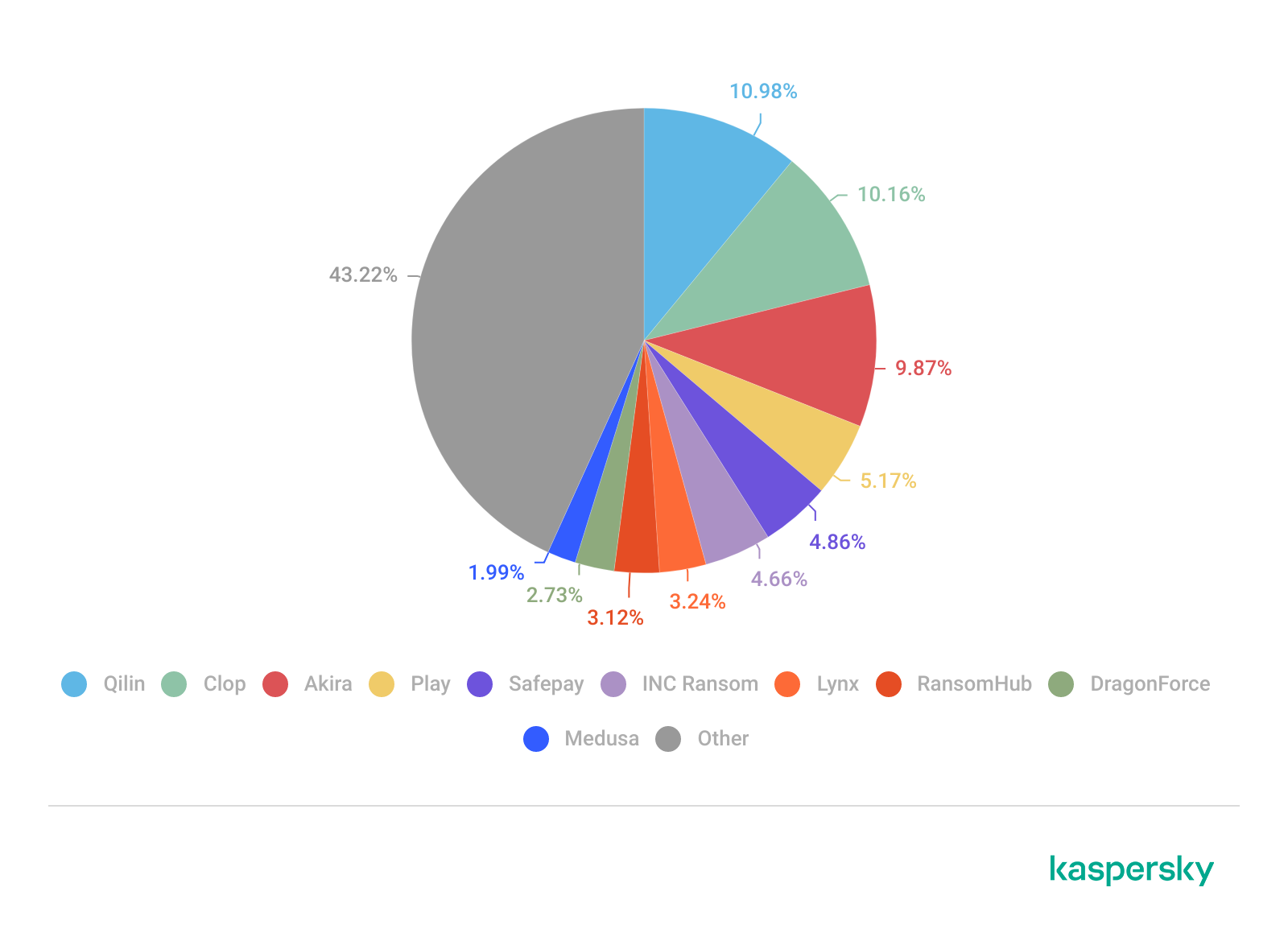
This section highlights the most prolific ransomware gangs by number of victims added to each group’s DLS. This quarter, the Clop ransomware (14.42%) returned to the top of the rankings, displacing Qilin (12.34%), which had held the leading position in the previous reporting period. Following closely is a new threat actor, The Gentlemen (9.25%). Emerging no later than July 2025, the group had already surpassed the activity levels of mainstays such as Akira (7.25%) and INC Ransom (6.13%).
Number of each group’s victims according to its DLS as a percentage of all groups’ victims published on all the DLSs under review during the reporting period (download)
Number of new variants
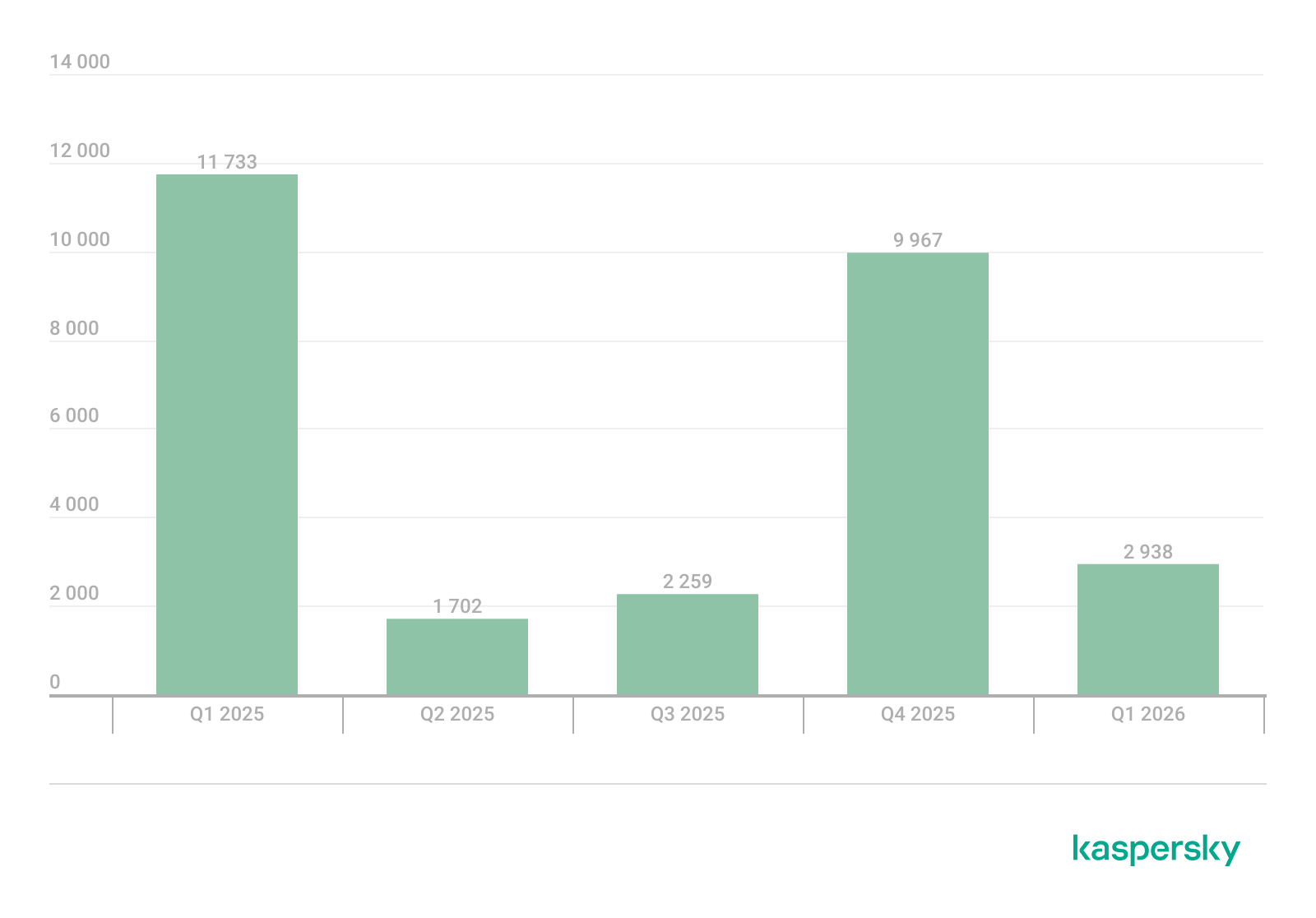
In Q1 2026, Kaspersky solutions detected six new ransomware families and 2938 new modifications. Volumes have returned to Q3 2025 levels following a surge in Q4 2025.
Number of new ransomware modifications, Q1 2025 — Q1 2026 (download)
Number of users attacked by ransomware Trojans
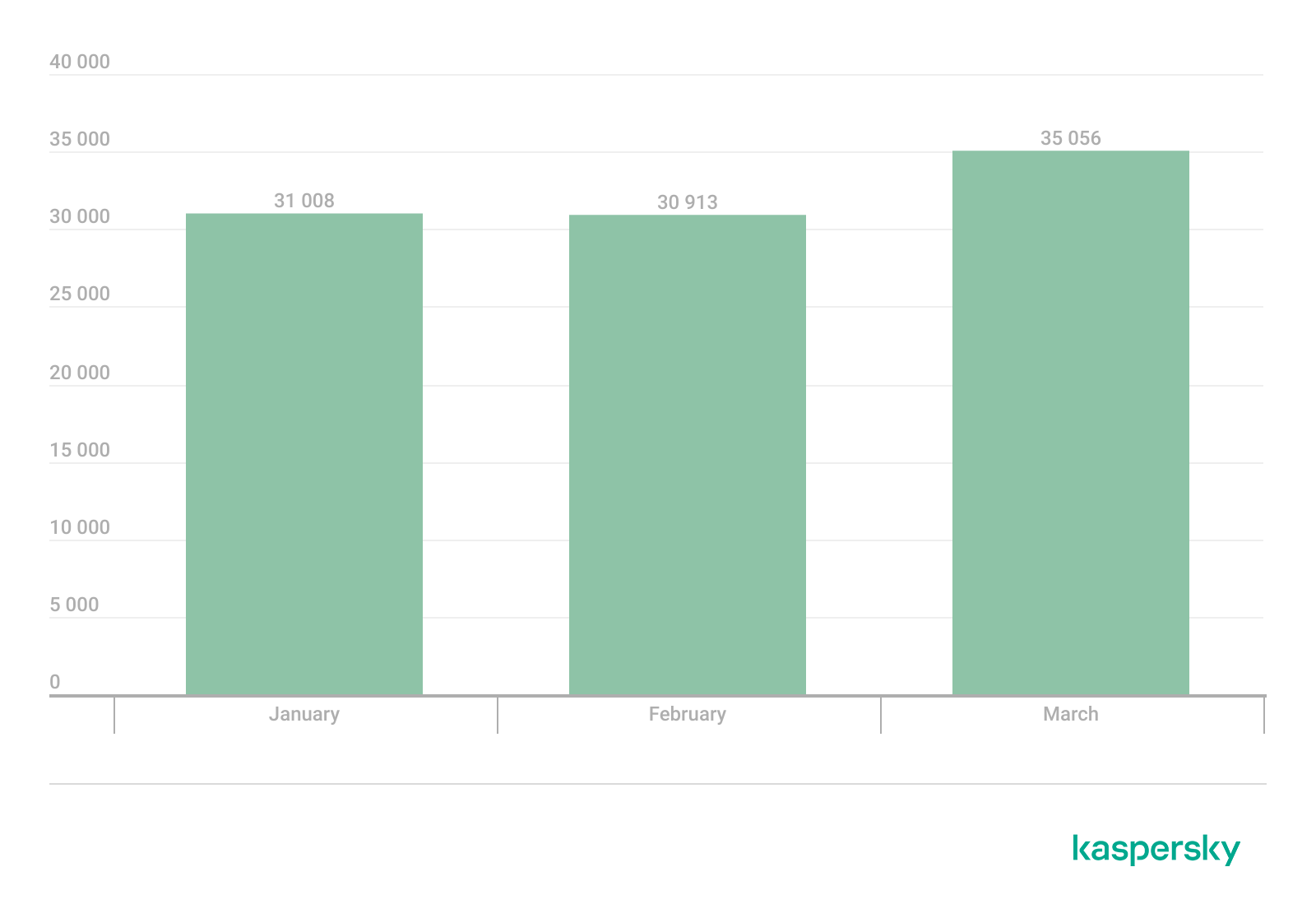
Throughout Q1, our solutions protected 77,319 unique users from ransomware. Ransomware activity was highest in March, with 35,056 unique users encountering such attacks during the month.
Number of unique users attacked by ransomware Trojans, Q1 2026 (download)
Attack geography
TOP 10 countries and territories attacked by ransomware Trojans
Country/territory*
%**
1
Pakistan
0.79
2
South Korea
0.64
3
China
0.52
4
Tajikistan
0.40
5
Libya
0.38
6
Turkmenistan
0.36
7
Iraq
0.35
8
Bangladesh
0.33
9
Rwanda
0.30
10
Cameroon
0.28
* Excluded are countries and territories with relatively few (under 50,000) Kaspersky users.
** Unique users whose computers were attacked by ransomware Trojans as a percentage of all unique users of Kaspersky products in the country/territory.
TOP 10 most common families of ransomware Trojans
Name
Verdict
%*
1
(generic verdict)
Trojan-Ransom.Win32.Gen
33.90
2
(generic verdict)
Trojan-Ransom.Win32.Crypren
6.38
3
WannaCry
Trojan-Ransom.Win32.Wanna
5.87
4
(generic verdict)
Trojan-Ransom.Win32.Encoder
4.68
5
(generic verdict)
Trojan-Ransom.Win32.Agent
3.80
6
LockBit
Trojan-Ransom.Win32.Lockbit
2.80
7
(generic verdict)
Trojan-Ransom.Win32.Phny
1.99
8
(generic verdict)
Trojan-Ransom.MSIL.Agent
1.96
9
(generic verdict)
Trojan-Ransom.Python.Agent
1.93
10
(generic verdict)
Trojan-Ransom.Win32.Crypmod
1.89
* Unique Kaspersky users attacked by the specific ransomware Trojan family as a percentage of all unique users attacked by this type of threat.
Miners
Number of new variants
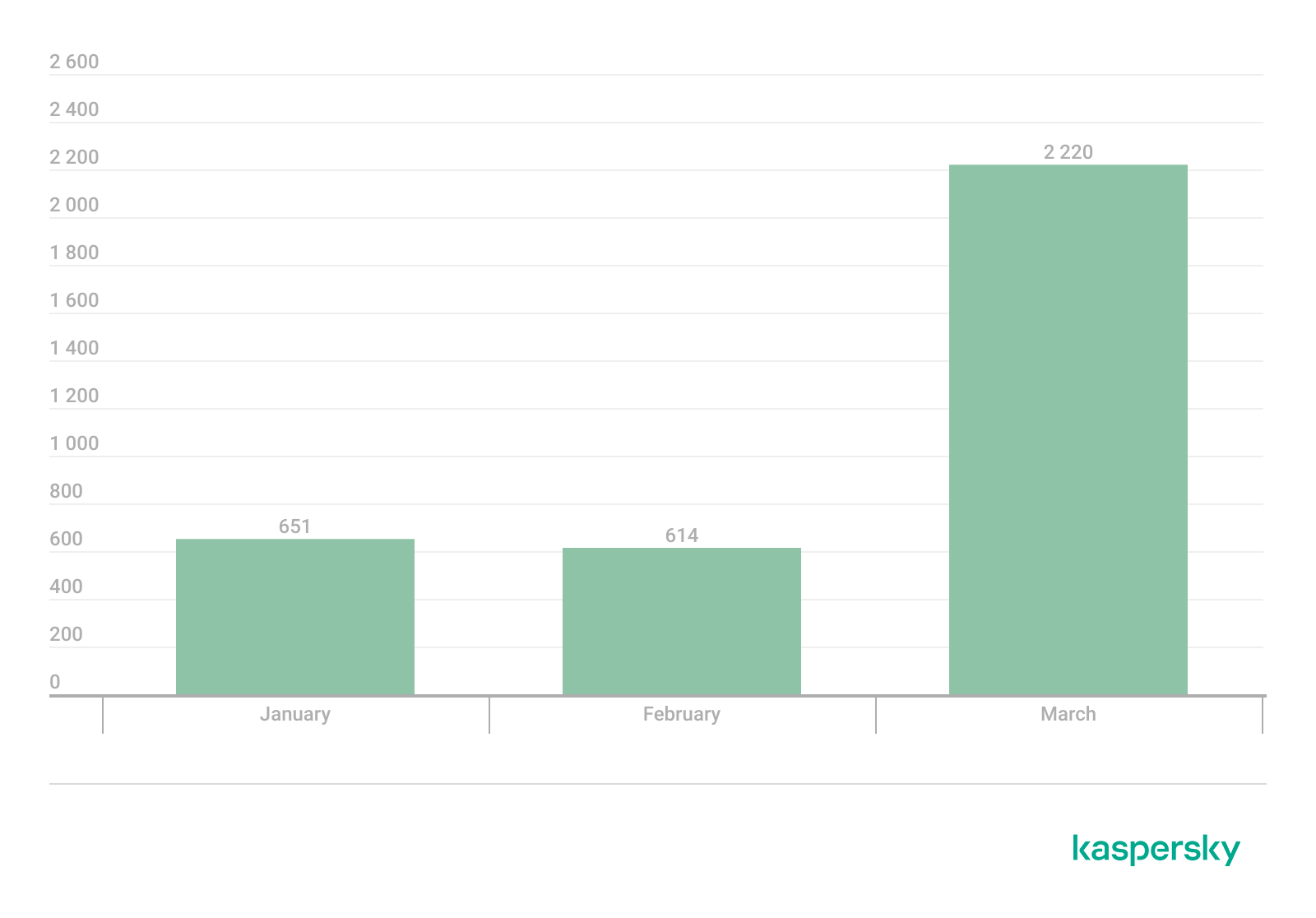
In Q1 2026, Kaspersky solutions detected 3485 new modifications of miners.
Number of new miner modifications, Q1 2026 (download)
Number of users attacked by miners
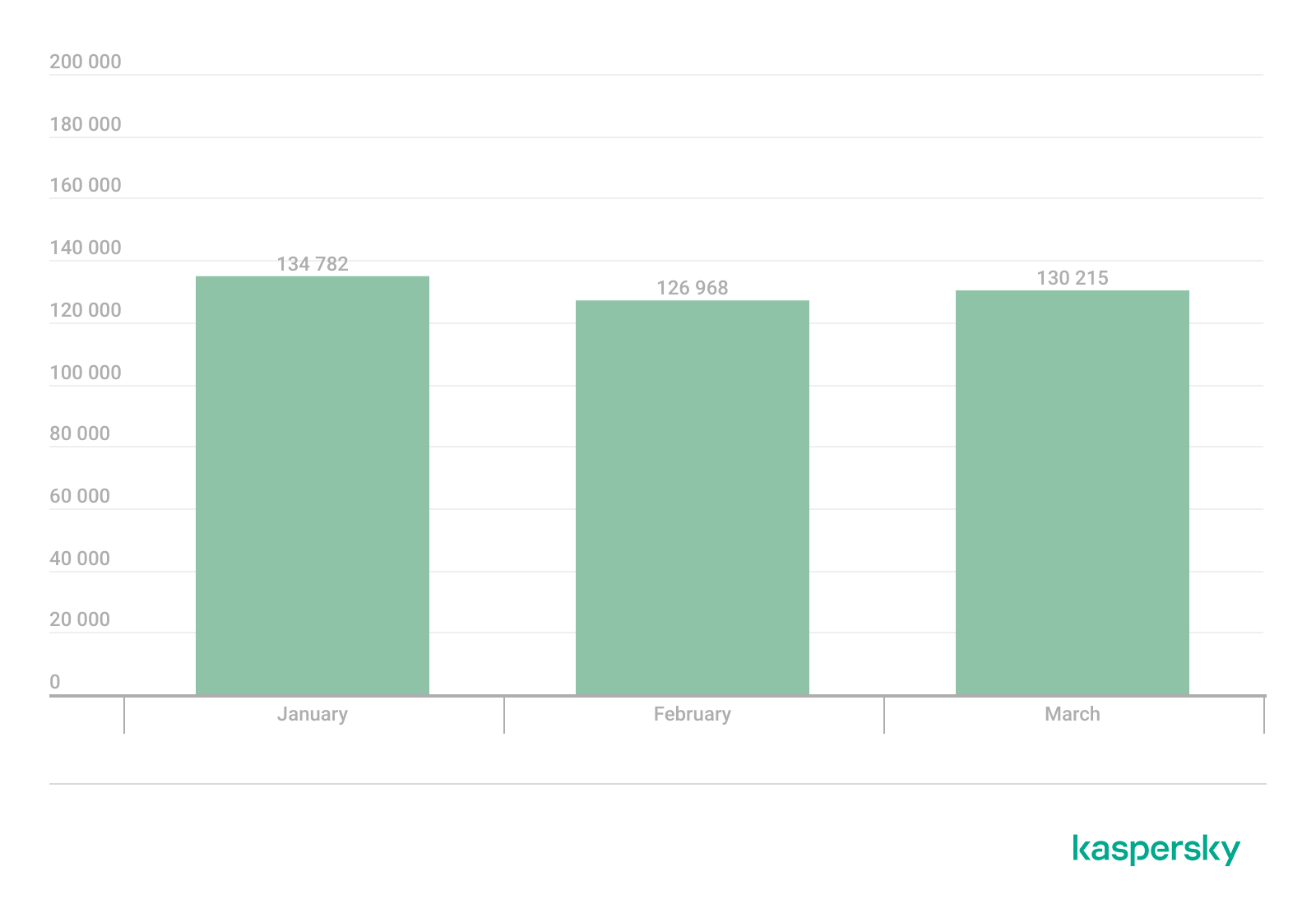
In Q1, we detected attacks using miner programs on the computers of 260,588 unique Kaspersky users worldwide.
Number of unique users attacked by miners, Q1 2026 (download)
Attack geography
TOP 10 countries and territories attacked by miners
Country/territory*
%**
1
Senegal
3.19
2
Turkmenistan
3.06
3
Mali
2.63
4
Tanzania
1.62
5
Bangladesh
1.06
6
Ethiopia
0.95
7
Panama
0.88
8
Afghanistan
0.79
9
Kazakhstan
0.77
10
Bolivia
0.75
* Excluded are countries and territories with relatively few (under 50,000) Kaspersky users.
** Unique users whose computers were attacked by miners as a percentage of all unique users of Kaspersky products in the country/territory.
Attacks on macOS
In Q1 2026, Google uncovered a new cryptocurrency theft campaign. The scammers directed victims to a fraudulent video call, prompting them to execute malicious scripts under the guise of technical support fixes for connection problems.
In March, researchers with GTIG and iVerify reported the discovery of an in-the-wild exploit chain targeting both iOS and macOS devices. The exploit kit was apparently marketed on the dark web, providing threat actors with a suite of spyware capabilities alongside specialized cryptocurrency exfiltration modules. The exploit was delivered via drive-by downloads when victims visited various compromised websites. Our analysis confirmed that the toolkit included an updated version of a component previously identified in the Operation Triangulation attack chain.
Devices running macOS were similarly impacted by the high-profile supply chain attack targeting the Axios npm package, a widely used HTTP client for JavaScript. The installation of the infected package led to the deployment of a backdoor on macOS devices.
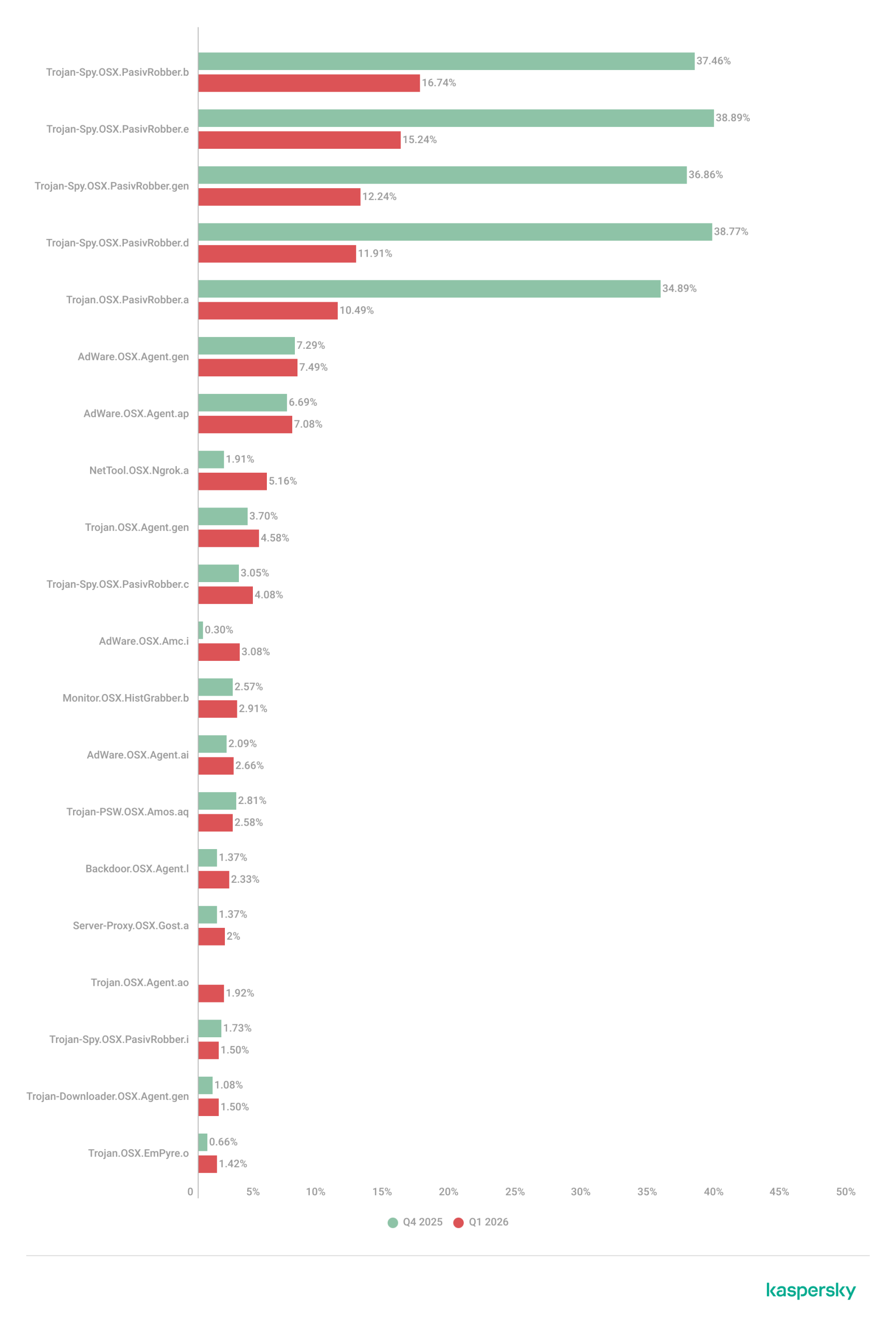
TOP 20 threats to macOS
Unique users* who encountered this malware as a percentage of all attacked users of Kaspersky security solutions for macOS (download)
* Data for the previous quarter may differ slightly from previously published data due to some verdicts being retrospectively revised.
The share of PasivRobber spyware attacks is beginning to decline, giving way to more traditional adware and Monitor-class software capable of tracking user activity. The popular Amos stealer also maintains its presence within the TOP 20.
Geography of threats to macOS
TOP 10 countries and territories by share of attacked users
Country/territory
%* Q4 2025
%* Q1 2026
China
1.28
1.97
France
1.18
1.07
Brazil
1.13
0.98
Mexico
0.72
0.52
Germany
0.71
0.45
The Netherlands
0.62
0.75
Hong Kong
0.49
0.53
India
0.42
0.48
Russian Federation
0.34
0.37
Thailand
0.24
0.27
* Unique users who encountered threats to macOS as a percentage of all unique Kaspersky users in the country/territory.
IoT threat statistics
This section presents statistics on attacks targeting Kaspersky IoT honeypots. The geographic data on attack sources is based on the IP addresses of attacking devices.
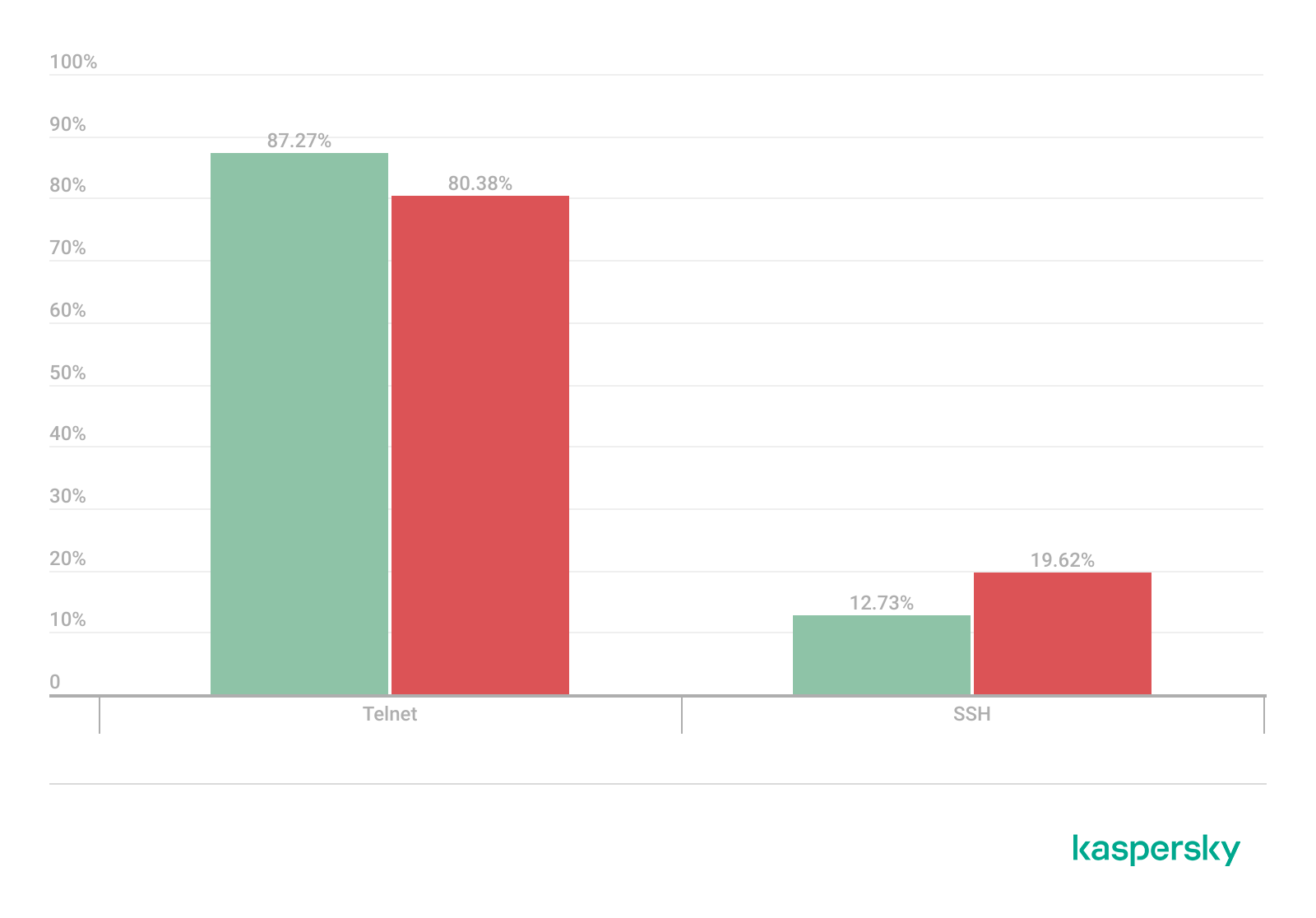
In Q1 2026, the share of devices attacking Kaspersky honeypots via the SSH protocol saw a significant increase compared to the previous reporting period.
Distribution of attacked services by number of unique IP addresses of attacking devices (download)
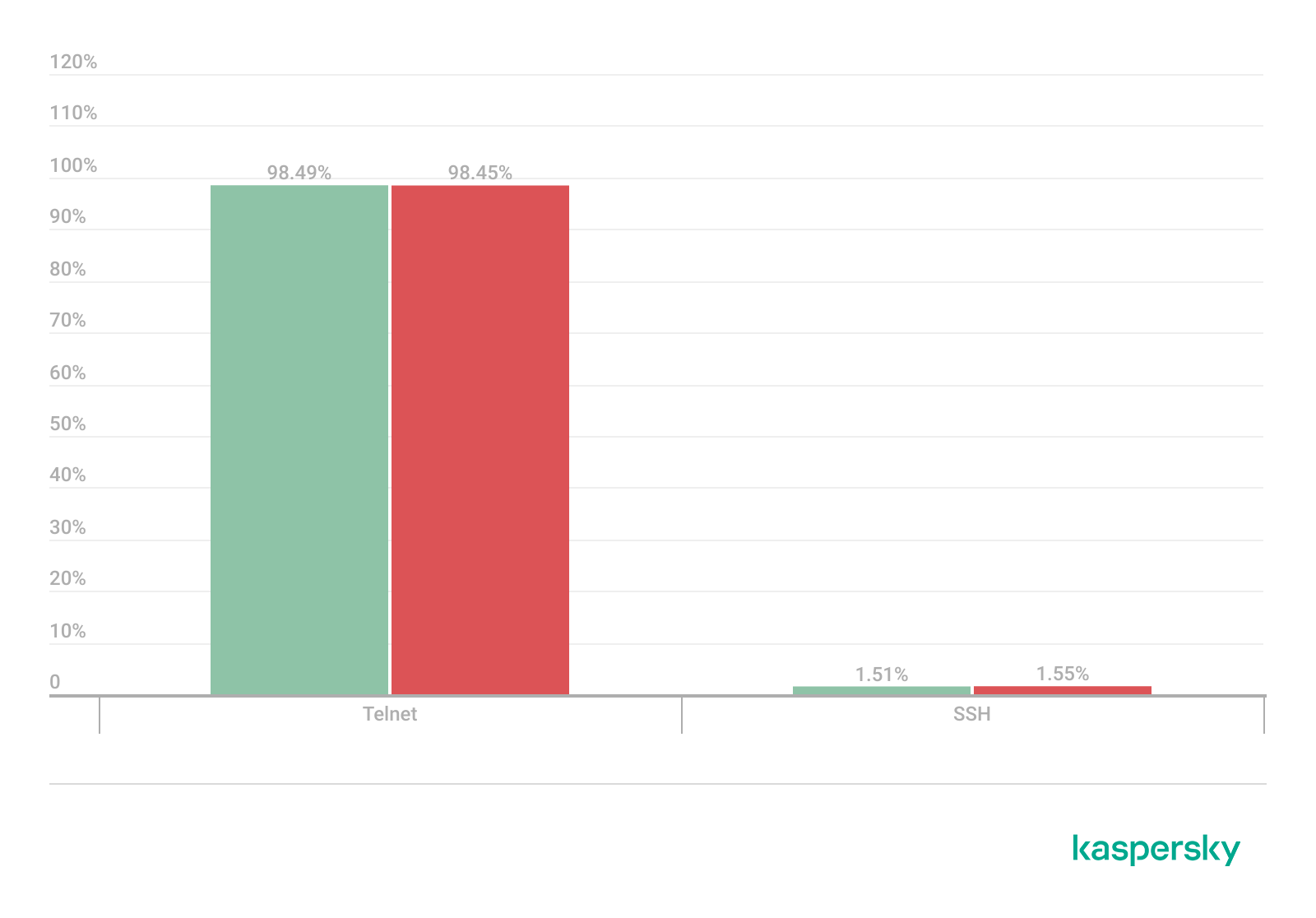
The distribution of attacks between Telnet and SSH maintained the ratio observed in Q4 2025.
Distribution of attackers’ sessions in Kaspersky honeypots (download)
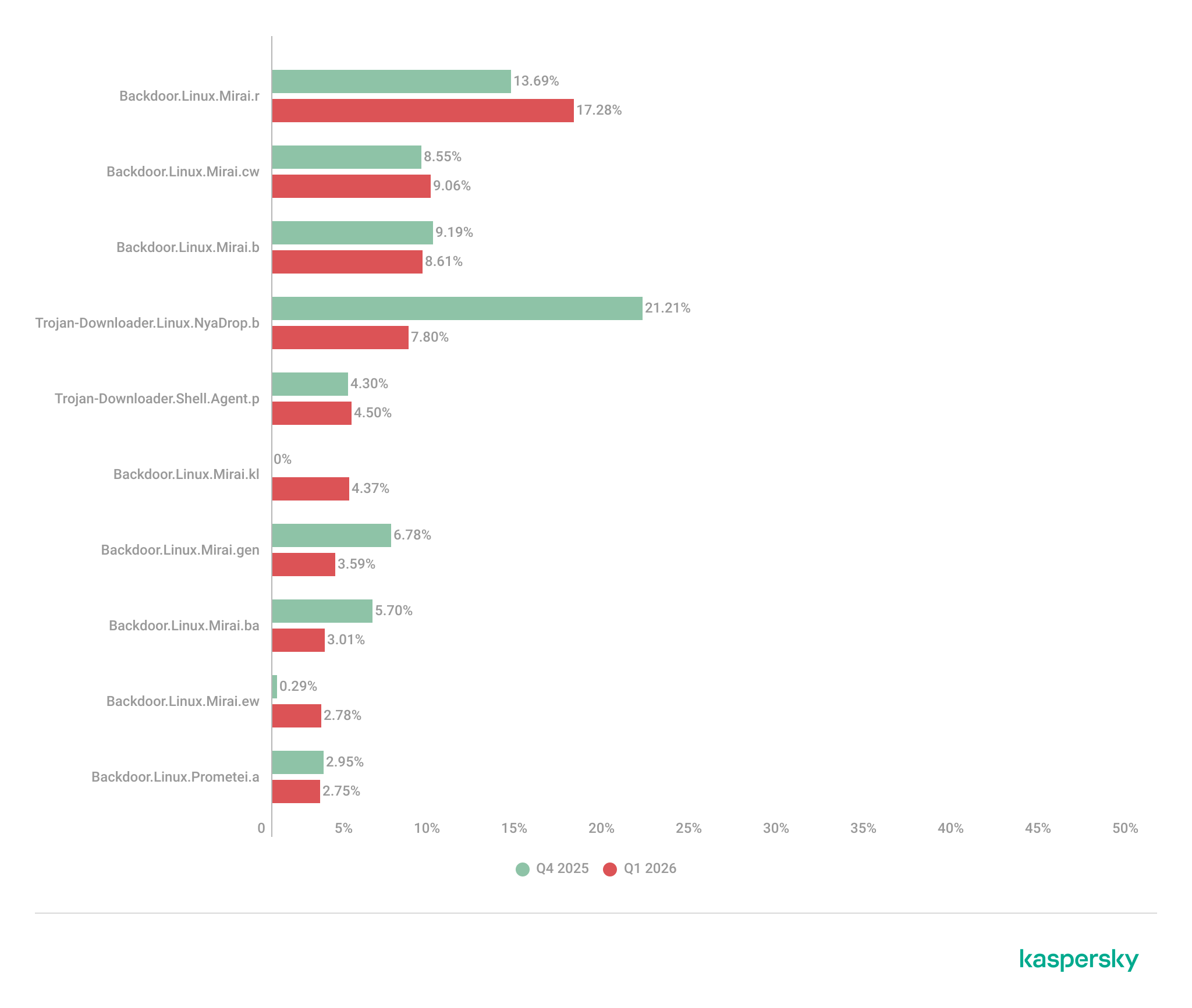
TOP 10 threats delivered to IoT devices
Share of each threat delivered to an infected device as a result of a successful attack, out of the total number of threats delivered (download)
The primary shifts in the IoT threat distribution are linked to the activity of various Mirai botnet variants, although members of this family continue to account for the majority of the list. Furthermore, a new variant, Mirai.kl, surfaced in the rankings. We also observed a significant decline in NyaDrop botnet activity during Q1.
Attacks on IoT honeypots
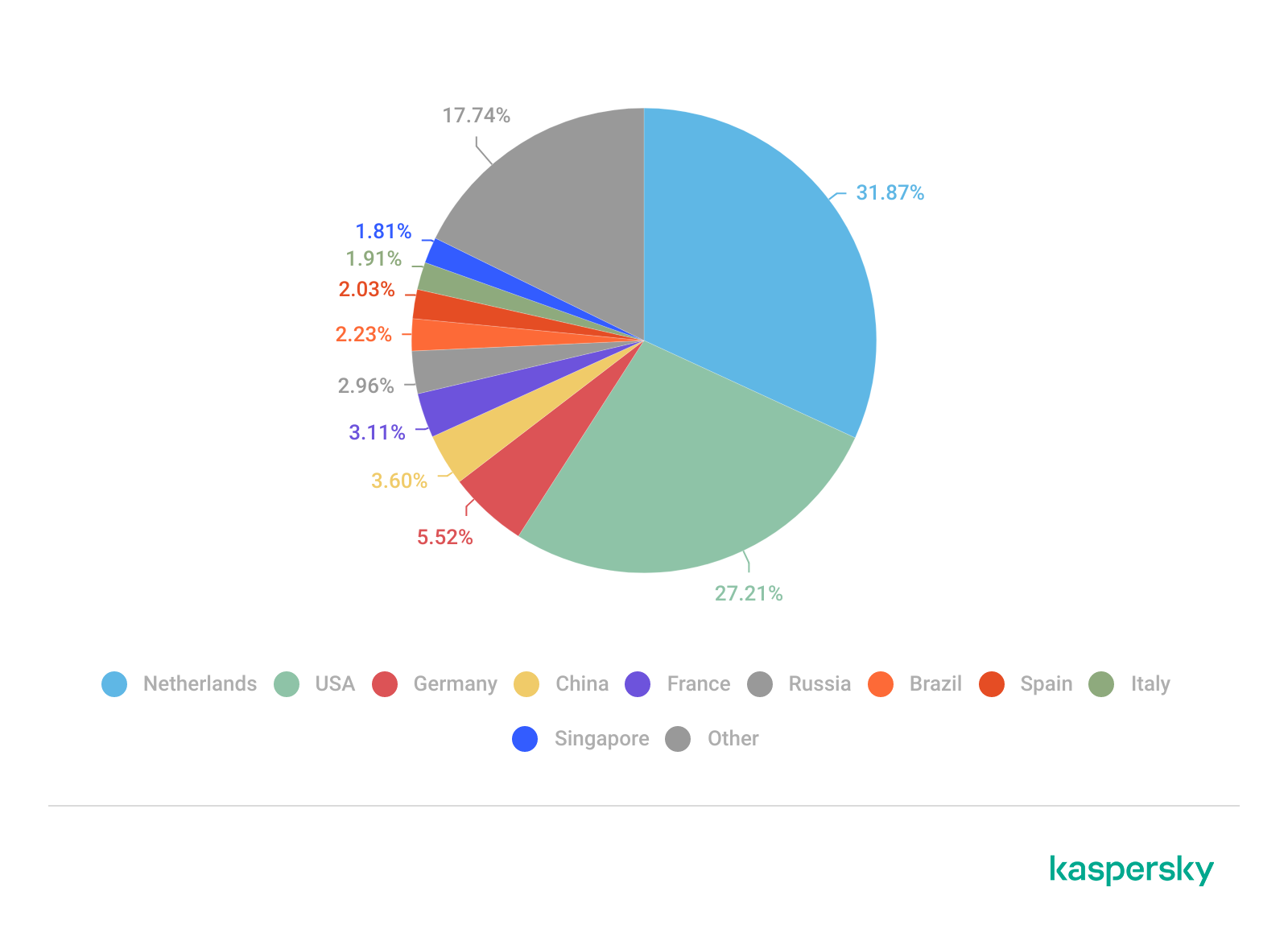
The United States, the Netherlands, and Germany accounted for the highest proportions of SSH-based attacks during this period.
Country/territory
Q4 2025
Q1 2026
United States
16.10%
23.74%
The Netherlands
15.78%
17.57%
Germany
12.07%
10.34%
Panama
7.72%
6.34%
India
5.32%
6.05%
Romania
4.05%
5.82%
Australia
1.62%
4.61%
Vietnam
4.21%
3.50%
Russian Federation
3.79%
2.35%
Sweden
2.25%
2.09%
China continues to account for the largest proportion of Telnet attacks, though there was a marked increase in activity originating from Pakistan.
Country/territory
Q4 2025
Q1 2026
China
53.64%
39.54%
Pakistan
14.27%
27.31%
Russian Federation
8.20%
8.25%
Indonesia
8.58%
6.71%
India
4.85%
4.66%
Brazil
0.06%
3.30%
Argentina
0.02%
2.51%
Nigeria
1.22%
1.38%
Thailand
0.01%
0.55%
Sweden
0.54%
0.55%
Attacks via web resources
The statistics in this section are based on detection verdicts by Web Anti-Virus, which protects users when suspicious objects are downloaded from malicious or infected web pages. These malicious pages are purposefully created by cybercriminals. Websites that host user-generated content, such as message boards, as well as compromised legitimate sites, can become infected.
TOP 10 countries and territories that served as sources of web-based attacks
The following statistics show the distribution by country/territory of the sources of internet attacks blocked by Kaspersky products on user computers (web pages redirecting to exploits, sites containing exploits and other malicious programs, botnet C&C centers, and so on). One or more web-based attacks could originate from each unique host.
To determine the geographic source of web attacks, we matched the domain name with the real IP address where the domain is hosted, then identified the geographic location of that IP address (GeoIP).
In Q1 2026, Kaspersky solutions blocked 343,823,407 attacks launched from internet resources worldwide. Web Anti-Virus was triggered by 49,983,611 unique URLs.
Web-based attacks by country/territory, Q1 2026 (download)
Countries and territories where users faced the greatest risk of online infection
To assess the risk of malware infection via the internet for users’ computers in different countries and territories, we calculated the share of Kaspersky users in each location on whose computers Web Anti-Virus was triggered during the reporting period. The resulting data provides an indication of the aggressiveness of the environment in which computers operate in different countries and territories.
This ranked list includes only attacks by malicious objects classified as Malware. Our calculations leave out Web Anti-Virus detections of potentially dangerous or unwanted programs, such as RiskTool or adware.
Country/territory*
%**
1
Venezuela
9.33
2
Hungary
8.16
3
Italy
7.58
4
Tajikistan
7.48
5
India
7.21
6
Greece
7.13
7
Portugal
7.10
8
France
7.05
9
Belgium
6.83
10
Slovakia
6.80
11
Vietnam
6.62
12
Bosnia and Herzegovina
6.57
13
Canada
6.56
14
Serbia
6.50
15
Tunisia
6.36
16
Qatar
6.01
17
Spain
5.95
18
Germany
5.95
19
Sri Lanka
5.89
20
Brazil
5.88
* Excluded are countries and territories with relatively few (under 10,000) Kaspersky users.
** Unique users targeted by web-based Malware attacks as a percentage of all unique users of Kaspersky products in the country/territory.
On average during the quarter, 4.73% of users’ computers worldwide were subjected to at least one Malware web attack.
Local threats
Statistics on local infections of user computers are an important indicator. They include objects that penetrated the target computer by infecting files or removable media, or initially made their way onto the computer in non-open form. Examples of the latter are programs in complex installers and encrypted files.
Data in this section is based on analyzing statistics produced by anti-virus scans of files on the hard drive at the moment they were created or accessed, and the results of scanning removable storage media. The statistics are based on detection verdicts from the On-Access Scan (OAS) and On-Demand Scan (ODS) modules of File Anti-Virus and include detections of malicious programs located on user computers or removable media connected to the computers, such as flash drives, camera memory cards, phones, or external hard drives.
In Q1 2026, our File Anti-Virus detected 15,831,319 malicious and potentially unwanted objects.
Countries and territories where users faced the highest risk of local infection
For each country and territory, we calculated the percentage of Kaspersky users whose computers had the File Anti-Virus triggered at least once during the reporting period. This statistic reflects the level of personal computer infection in different countries and territories around the world.
Note that this ranked list includes only attacks by malicious objects classified as Malware. Our calculations leave out File Anti-Virus detections of potentially dangerous or unwanted programs, such as RiskTool or adware.
Country/territory*
%**
1
Turkmenistan
47.96
2
Tajikistan
31.48
3
Cuba
31.03
4
Yemen
29.59
5
Afghanistan
28.47
6
Burundi
26.93
7
Uzbekistan
24.81
8
Syria
23.08
9
Nicaragua
21.97
10
Cameroon
21.60
11
China
21.09
12
Mozambique
21.02
13
Algeria
20.64
14
Democratic Republic of the Congo
20.63
15
Bangladesh
20.44
16
Mali
20.35
17
Republic of the Congo
20.23
18
Madagascar
20.00
19
Belarus
19.78
20
Tanzania
19.52
* Excluded are countries and territories with relatively few (under 10,000) Kaspersky users.
** Unique users on whose computers local Malware threats were blocked, as a percentage of all unique users of Kaspersky products in the country/territory.
On average worldwide, Malware local threats were detected at least once on 11.55% of users’ computers during Q1.
Have you ever tried to tally up how much you spend on subscriptions each month? Music, movies, gaming, language courses, delivery services, heated seats, and even the ability to chat with the Grok bot directly from your car — there’s a subscription for just about everything now. There’s even a subscription service specifically designed to… track your other subscriptions.
The number of subscriptions varies significantly depending on where you live, but statistically, 78% of adults worldwide have at least one paid subscription, with the average user juggling 5.6 active services. Furthermore, a large portion of these are family plans used by groups of close relatives… and sometimes other people: 37% of users share their subscriptions outside their immediate family.
Because subscription accounts, especially family plans, often contain sensitive personal data, they’ve become a prime target for cybercriminals. Today we look at how to manage your subscriptions securely, avoid having your accounts compromised, and keep from falling for scammers’ latest tricks.
Security of shared accounts and subscriptions
Why would anyone want to hack your subscription? Even if the service only offers entertainment, your account almost certainly contains sensitive information: your name, address, email, phone number, the names of other members, and other personally identifiable information. This data is then sold on the dark web and used for further attacks.
Attackers compromise subscription accounts either through social engineering and phishing, or by taking advantage of many users’ reliance on weak or leaked passwords. As we recently highlighted in our research, nearly half of all passwords worldwide can be cracked in less than a minute. Scammers then either resell existing subscriptions or slots in a family group at a discount, or they sign the victim up for new services, hoping the extra charges go unnoticed.
Finally, some middlemen don’t bother with hacking at all; they simply buy bulk subscriptions for a large number of devices, where the per-unit cost is typically much lower. They then resell individual slots in these plans on online marketplaces. As a result, a single “family” account can end up filled with people who are complete strangers to one another.
Sharing subscriptions with family and others
Many subscription owners think nothing of sharing access with family and friends. What could possibly go wrong?
The worst-case scenario from a security standpoint is when a single account is purchased and the owner shares the login and password with other users. This usually happens when people try to save money on a family plan by buying an individual subscription and sharing it. Some services even allow for different profiles, but they are all tied to a single account, meaning the credentials are shared. This is how streaming platforms like Hulu and Disney+ operate.
Sharing one account among multiple people significantly increases the risk of your credentials falling into the wrong hands. There’s no way to guarantee that everyone else is storing those details securely or that their devices aren’t infected with malware. Even without malware, it’s incredibly easy to accidentally hand over a password to attackers simply by signing in to the subscription service over unprotected public Wi-Fi.
It’s entirely possible that the password you kindly shared with some friends has already surfaced in some corner of the dark web, and you may soon lose access to your account. Furthermore, if you reuse the same password across different sites and apps, your other accounts are now in the crosshairs as well.
The second scenario is when each group member has an individual account. Many services now allow you to add extra users to a subscription at no additional cost, and most owners are happy to give away these free slots. Even then, you shouldn’t let your guard down: a breach of just one of these accounts can still leak sensitive information, such as family members’ names, addresses, billing info, and other subscription-related data.
How to protect your subscriptions (and your wallet)
To keep your and your loved ones’ personal data private and your accounts under your control, follow these simple rules.
Use strong account security
To do this, learn — and teach your friends and family — how to use password managers, two-factor authentication, or passkeys.
If you and your loved ones rely on memory to store passwords, there’s a high probability that you’re reusing the same one across multiple services. This is a major blunder: data breaches happen all the time, and a single compromised password gives attackers access to your other accounts.
The simplest solution is to use a password manager that generates and remembers complex, unique passwords for every site and service on your behalf. All you have to do is remember the single main password for its encrypted vault. Additionally, Kaspersky Password Manager doesn’t just store and create passwords; it can also check if they’ve appeared in leaked databases, and sync your credentials across all your devices.
Additionally, a password manager provides a robust defense against phishing: unlike a human, who can easily be misled by a sign-in form that looks almost identical to the real thing and is hosted on a look-alike domain, a password manager won’t fall for the trick. It’ll only offer to autofill your saved login and password on the specific site or service for which they were originally stored.
Two-factor authentication (2FA) is an extra layer of verification the system requests after you enter your password — such as an SMS code or a one-time code from an authenticator app. Whenever technically possible, be sure to enable 2FA on every account linked to a subscription. This applies to the subscription services themselves, as well as any third-party accounts you use to sign in, such as Google, Apple, or Facebook.
We recommend storing your two-factor authentication tokens and generating the one-time codes — which refresh every 30 seconds — inside Kaspersky Password Manager. This significantly lowers the chances of someone hijacking your account. Even if an attacker somehow discovers or guesses your password, they won’t be able to get the code without physical access to your device.
Finally, you can ditch passwords (almost) entirely by switching to passkeys. We’ve previously covered what this password alternative looks like and the specifics of using it. Currently, this is the most breach-resistant authentication system out there. Its main drawback has been the difficulty of syncing passkeys across different ecosystems, like Windows and iOS, but the updated version of Kaspersky Password Manager can now save and sync passkeys across Windows, macOS, iOS, and Android devices, making that issue a thing of the past.
Don’t overlook device security
Even a complex password and 2FA aren’t reasons to let your guard down. An attacker can infect your device with an infostealer: malware designed to swipe things like session cookies from your browser, app configuration files, and other sensitive data. Session cookies allow you to stay signed in without re-entering your credentials every time; however, if scammers get their hands on them, they can sign in to the service as you — even without knowing your username or password. This makes a proactive approach essential, especially if you use Chrome, Edge, Opera, or other Chromium-based browsers on Windows. We recommend installing Kaspersky Premium on all your devices; it includes Kaspersky Password Manager in addition to comprehensive protection against cyberthreats.
Only share subscriptions with people you trust
Otherwise, you might be asking for trouble. For example, if you share a Steam subscription with a friend who cheats, both of your accounts could end up banned. Furthermore, never try to let someone else into your personal account or individual subscription. Sharing your password with others is usually a violation of the terms of service, and can result in your account being blocked.
Make sure there are no strangers in your family group
To do this, periodically check active devices and sessions in your subscription settings. If you see an unrecognized device in the authorized list, terminate that session — or all of them — and change your account password immediately. Signing back in on a few devices is much easier than trying to recover a hijacked account.
And remember: don’t let your own habits compromise your security. If you’re visiting friends, on vacation, or on a business trip and use a local computer or smart TV — or if you sign in to your account from a public computer — don’t forget to sign out when you’re done. Otherwise, the next person to use that device might find themselves with free subscriptions or, even worse, access to your email or cloud photo stream.
Don’t take the bait
Watch out for phishing emails and messages spoofing legitimate services. If you receive a notification about a “need to update your billing details”, or a claim that a “new user has been added” to your family plan, don’t rush to click any links or open attachments. Links can lead to a phishing page, and attachments may hide malware. Scammers often use email addresses and domains that look nearly identical to the real ones — for instance, by swapping l (lowercase L) for I (uppercase i), or using a familiar name in a different domain zone.
Unfortunately, phishing pages are often indistinguishable from the originals now that AI is being used for high-quality design and layout. Since spotting every red flag yourself is increasingly difficult, it’s best to delegate anti-phishing protection to Kaspersky Premium. It will alert you to suspicious sites, saving your money and keeping your peace of mind.
Lastly, some scammers lure users in with freebies like fake gift subscriptions for Telegram Premium. The victim is asked to visit a phishing page mimicking the Telegram login screen and sign in to their account to claim the gift. The result isn’t hard to guess: instead of a premium subscription — a hijacked account. Recently, scammers have even learned to use mini-apps to steal credentials directly inside Telegram under various pretexts — ranging from gift giveaways to claims that you must move to a new chat because the old one was blocked.
Avoid buying subscriptions from third-party sellers
You can often find subscription offers on marketplaces and retail platforms at prices significantly lower than what the official provider charges. More likely than not, that tempting price hides a hacked account or a family group that you could be kicked out of at any moment, because the family admin is either the seller or a random user. Furthermore, sharing a family plan with strangers from around the world is a violation of terms for many services.
How to get rid of unwanted subscriptions
Now that we’ve covered subscription security, what about those extra subscriptions that quietly eat away at your balance every month? Research shows that users typically underestimate how many active subscriptions they have and how much they spend on them; they also frequently forget to cancel auto-renewals for subscriptions they no longer use, or auto-charges after the trial period ends.
If you suspect you’re in that boat, start your investigation with your own bank statements. Recurring charges for the same amount can be a subscription you’ve forgotten about. Check who received the payment; if the name doesn’t ring a bell, do an online search on the company. It’s also worth searching your email box for the merchant name or the payment amount; this can help you track down subscription notifications and figure out what exactly you’re paying for. And don’t forget to check your spam folder, as that’s where subscription alerts often end up.
Now, let’s look at how to check and cancel active subscriptions purchased through the App Store and Google Play.
For Android users
Open Settings on your device.
Tap Google, then tap your profile picture, and go to Google Account.
Go to Wallet & subscriptions.
If you’re the family group manager, you’ll be able to see the purchase history for other family members.
For iOS users
Open Settings on your device.
Tap your profile picture at the top of the menu.
Go to Subscriptions.
Note: to manage your iCloud subscription, you’ll need to go to the specific iCloud section located just below Subscriptions. In the Family Sharing section, if you’re the one who set it up, you can view the subscription and purchase history for all family members.
Among the various tools in the Kaspersky portfolio is a dedicated platform for securing containerized environments. But in this post, I want to talk about Kaspersky Container Security (KCS) — not as a vendor representative, but rather as a member of a team that actively uses this solution in their daily work. Our Product Security Team is responsible for establishing secure development processes across the company. We’re involved in every stage of the software development life cycle, and our priority is helping product teams catch security issues early so they can stay on schedule for their releases. To achieve this, we’ve built several workflows, one of which focuses specifically on container security. That’s exactly where we lean on our own Kaspersky Container Security platform.
Container security solutions are typically viewed first and foremost as image scanners for the container registry. However, Kaspersky Container Security (KCS) is more of a comprehensive security platform for container environments that handles multiple tasks by virtue of its end-to-end integration into the container workflow. While it certainly includes a container image scanning scenario — which is undeniably important — our experience with KCS has shown that its real value becomes apparent when it’s integrated into several points along the workflow at once:
Regular builds
Artifact verification prior to release or deployment
Monitoring of containers already running in the cluster
The baseline scenario: how KCS scans images
At its core, the process is a standard one. KCS checks images for typical container issues: known vulnerabilities, malware, hardcoded secrets, and misconfigurations. However, the scan result isn’t just a single, abstract verdict. The system calculates a risk rating based on the findings, providing a clear picture of the asset’s security posture. In practice, this is incredibly useful because teams don’t just see a “bad image” message; they get a transparent breakdown of exactly what’s driving the risk and what needs to be fixed first.
But that’s not all. KCS works well for scenarios where it’s not enough to just find a problem — you need to tie it to the artifact’s life cycle. When a team is managing hundreds of builds, periodic registry scanning isn’t enough, and it almost always requires manual intervention. You need to know which pipeline introduced the risk, which policies were triggered, and what the next steps are. KCS provides this essential link.
Advanced scenario: CI/CD integration
One lesser-known KCS feature is its full-scale scanning capability within CI/CD pipelines. For our team, this is the most effective way to use KCS. The logic is straightforward: you integrate the scanner into the pipeline, and the scan results appear directly in the execution logs. They’re also sent to the solution’s central console, where they’re logged in a dedicated CI/CD section that links the findings to the artifact name, scan time, pipeline, and severity level.
In a CI/CD environment, you can scan images from tar-archives or directly from Git repositories. Out of the box, it supports GitLab, Jenkins, TeamCity, and GitHub Actions; in practice, KCS can be integrated into any pipeline orchestrator.
Another critical aspect of using KCS in CI/CD involves security policies. Our solution uses a model where policies allow for not just collecting results, but also controlling the behavior of the pipeline itself. This comes in handy for phased rollouts. You can start in audit mode, and then gradually move toward failing builds when secrets, critical misconfigurations, or vulnerabilities are detected. This evolutionary approach generally works better than simply flipping a switch to block it all at once.
How KCS helps in our workflows
We run our own composition analysis system, so we don’t treat KCS as a single source of truth. Instead, it serves as a powerful extra layer in our workflows, and that’s exactly where we find the most value.
While our in-house composition analysis system handles component tracking, dependencies, and code-level risk assessment, KCS excels at securing the container perimeter. It takes care of technical image scanning and CI/CD security, while aggregating reports on container artifacts. It doesn’t conflict with our internal analysis; it reinforces it right where containers receive actual workloads.
This is particularly useful for us in two scenarios. First, it provides early-stage artifact control during development. Second, it acts as a gatekeeper during release acceptance. We no longer debate risks sometime after the release; we catch them at the exact point where the team can still quickly fix a Dockerfile, Helm chart, or config set without a lengthy approval chain.
The way it handles a software bill of materials (SBOM) is also noteworthy. Our system relies primarily on up-to-date, relevant SBOMs. KCS offers modes specifically for processing SBOMs, and can even output scan results in that same format. In this regard, KCS integrates seamlessly with our internal processes, allowing us to fit it into our existing workflows rather than the other way around.
Why KCS is more than just a scanner to us
Its other powerful layer is cluster security. At this stage, KCS evolves beyond being just an image-scanning tool. It features runtime policies for containers and nodes, audit and blocking modes, and a set of security profiles. In practical terms, this means KCS can be used not only to find vulnerabilities within an image, but also to monitor what the container is actually doing once it’s live. Policies can account for image provenance, digital signatures, restrictions on capabilities and volumes, and even the processes and network connections running inside the container.
When a problem is detected, you have the option to log the results in audit mode first rather than blocking the process immediately. In production environments, this is always the smarter move. Another vital tool is ensuring trusted image provenance. KCS supports digital signature verification, which shifts the focus from simply finding CVEs to securing the company’s entire software supply chain.
Reporting capabilities
KCS does more than just display the issues it detects; it serves as a comprehensive reporting source. It can generate reports on images, accepted risks and Kubernetes benchmarks.
Generated reports are available in HTML, PDF, CSV, JSON and XML formats, with specific support for SARIF for detailed reporting — which is ideal for integrating into AppSec workflows. As for the SBOMs mentioned above, the scanning scenarios can output artifacts and results in CycloneDX and SPDX formats, making it easy to plug into existing processes.
Why we continue to use KCS
To put it simply, KCS complements our workflows perfectly — not because it solves every single problem, but because it integrates so effectively into engineering scenarios.
We also appreciate that the product team listens to our feedback. The KCS team actually incorporates our practical operational requests into their development roadmap. For example, deep SBOM integration and specific report types were added to KCS as a direct result of our hands-on experience.
To sum it up, when integrated correctly, Kaspersky Container Security helps cover several areas at once: from basic container scanning, to CI/CD and cluster security. In our experience, it provides real value within a live container ecosystem. You can learn more about the solution on the official KCS page.
Over the past few months, we have conducted an in-depth analysis of specific activity clusters of Kimsuky (aka APT43, Ruby Sleet, Black Banshee, Sparkling Pisces, Velvet Chollima, and Springtail), a prolific Korean-speaking threat actor. Our research revealed notable tactical shifts throughout multiple phases of the group’s latest campaigns.
Kimsuky has continuously introduced new malware variants based on the PebbleDash platform, a tool historically leveraged by the Lazarus Group but appropriated by Kimsuky since at least 2021. Our monitoring indicates various strategic updates to the group’s arsenal, including the use of VSCode Tunneling, Cloudflare Quick Tunnels, DWAgent, large language models (LLMs), and the Rust programming language. This expanding set of tools underscores the group’s ongoing adaptation and evolution.
Specifically, Kimsuky leveraged legitimate VSCode tunneling mechanisms to establish persistence and distributed the open-source DWAgent remote monitoring and management tool for post-exploitation activities. These activities affected various sectors in South Korea, impacting both public and private entities.
This article covers both previously undocumented attacks and a deeper technical analysis of incidents within this campaign that have been reported before — offering new insight beyond what has already been published.
Executive summary
Kimsuky obtains initial access to target systems by delivering spear-phishing emails containing malicious attachments disguised as documents. They also contact targets via messengers in some cases.
Kimsuky uses a variety of droppers in different formats, such as JSE, PIF, SCR, EXE, etc.
The droppers deliver malware mainly belonging to two big clusters: PebbleDash and AppleSeed. These clusters are considered the most technically advanced in the group’s toolset. The report covers the following PebbleDash malware: HelloDoor, httpMalice, MemLoad, httpTroy. It also covers AppleSeed and HappyDoor from AppleSeed cluster.
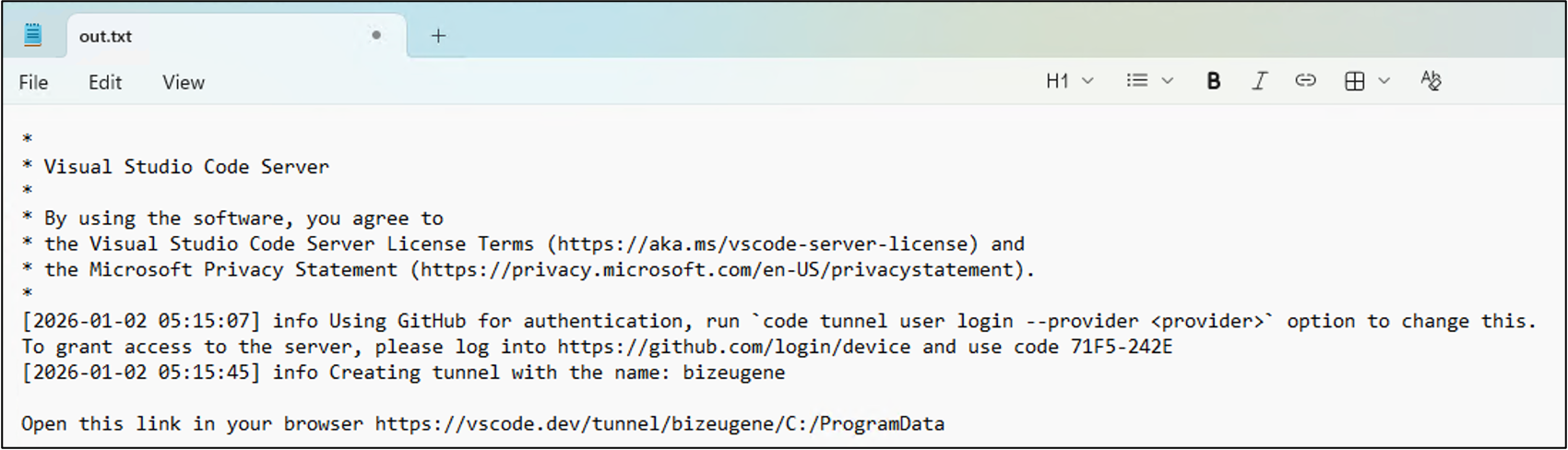
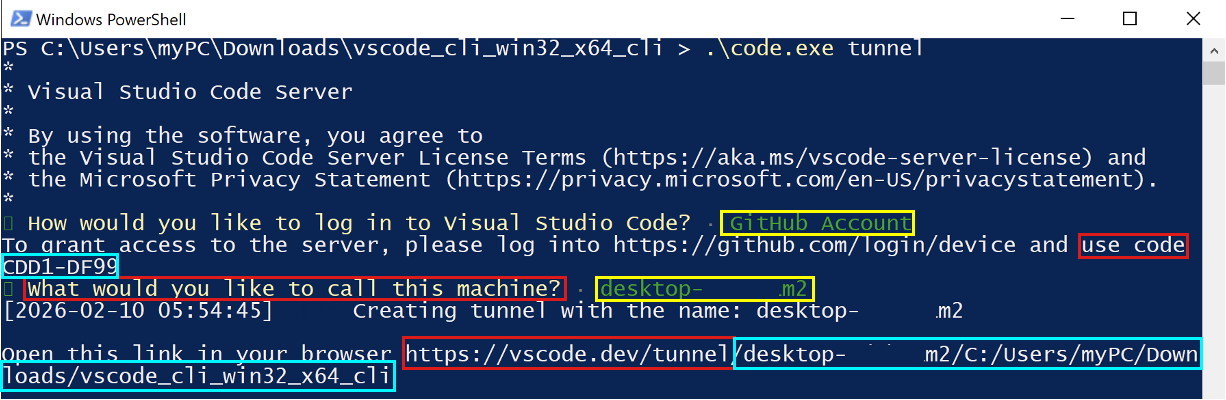
For post-exploitation activities Kimsuky uses legitimate tools Visual Studio Code (VSCode) and DWAgent. For VSCode, the attacker uses GitHub authentication method.
For hosting C2 infrastructure the group mainly uses domains registered at a free South Korean hosting provider. It also occasionally relies on hacked South Korean websites and tunneling tools, such as Ngrok or VSCode.
Kimsuky mainly targets South Korean entities. However, PebbleDash attacks were also seen in Brazil and Germany. This malware cluster focuses on defense sector, while AppleSeed most often targets government organizations.
Background
First identified by Kaspersky in 2013, Kimsuky has been active for over 10 years and is considered less technically proficient compared to other Korean-speaking APT groups. The group has targeted a wide range of entities and demonstrated capability in creating tailored spear-phishing emails. The group’s arsenal includes proprietary malware such as PebbleDash, BabyShark, AppleSeed, and RandomQuery, as well as open-source RATs like xRAT, XenoRAT, and TutRAT. This blog post examines the evolving PebbleDash-based malware (referred to as the PebbleDash cluster) and its connections to the AppleSeed-based malware (referred to as the AppleSeed cluster).
The PebbleDash and AppleSeed clusters are considered the most technically advanced in Kimsuky’s toolset. Since at least 2019, these clusters have masqueraded as legitimate documents and application installers, manifesting as JSE droppers or executables with .EXE, .SCR and .PIF extensions. Both are particularly adept at establishing backdoors and stealing information, and ongoing development of their variants has been observed. They even occasionally utilize stolen legitimate certificates from South Korean organizations to avoid detection.
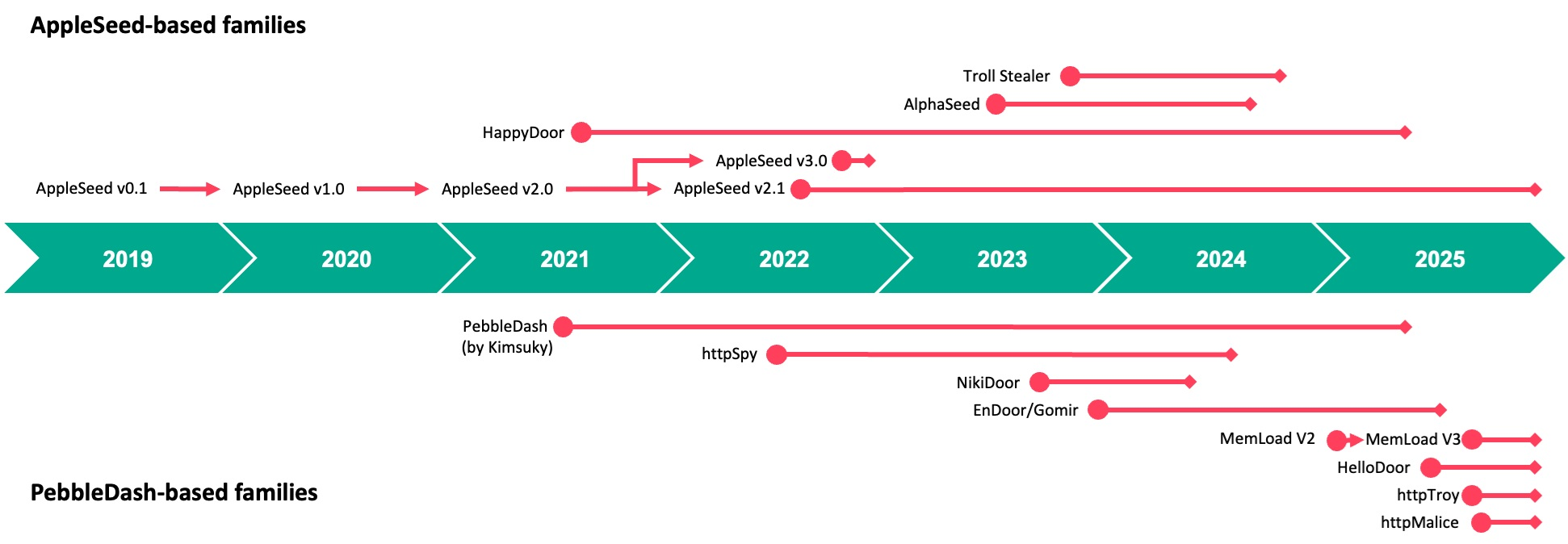
Timeline of the AppleSeed and PebbleDash malware families
AppleSeed and PebbleDash have primarily targeted the public and private sectors in South Korea. The PebbleDash cluster has shown a particular interest in the medical, military and defense industries worldwide. The PebbleDash cluster compromised Brazilian and South Korean defense organizations throughout the past several years, as well as a German defense firm. In 2024, the South Korean government released a security advisory regarding the AppleSeed cluster, detailing how the malware was distributed by replacing a security software installer required to access a construction entity’s website.
Initial access
Kimsuky meticulously crafts and delivers spear-phishing emails to its targets in an attempt to entice them into opening attachments. According to recent research, the group also occasionally approaches targets by contacting them via messengers. In all cases, the initial contact leads to the delivery of a malicious attachment disguised as a document. These attachments often consist of compressed files containing droppers in formats such as .JSE, .EXE, .PIF, or .SCR. The filenames are consistent with the message content and are meant to convince the recipient to open the attachment. The malicious files are often disguised as product quotations, job offers, information guides, surveys, government documents, and personal photos.
Appendix Form No. 8 – Request for Access, Correction, Deletion, and Suspension of Processing of Personal Information (PIPA Enforcement Rules).hwp.jse
August 28, 2025
995a0a49ae4b244928b3f67e2bfd7a6e
HelloDoor
2
2026년 상반기 국내대학원 석사야간과정 위탁교육생 선발관련 서류.hwpx.jse
Documents for the Selection of Commissioned Students for Domestic Graduate School Master’s Evening Programs (H1 2026).hwpx.jse
December 14, 2025
52f1ff082e981cbdfd1f045c6021c63f
httpMalice
3
security_20260126.scr
–
January 26, 2026
65fc9f06de5603e2c1af9b4f288bb22c
Reger Dropper, MemLoad, httpTroy
4
노현정님.pdf.jse
Ms. Noh Hyun-jung.pdf.jse
January 28, 2026
8e15c4d4f71bdd9dbc48cd2cabc87806
AppleSeed chain
5
대국민서비스관리운영체계현장점검증적(초안).pif
On-site Inspection Evidence for the Public Service Management System (Draft).pif
February 5, 2026
8983ffa6da23e0b99ccc58c17b9788c7
Pidoc Dropper, HappyDoor
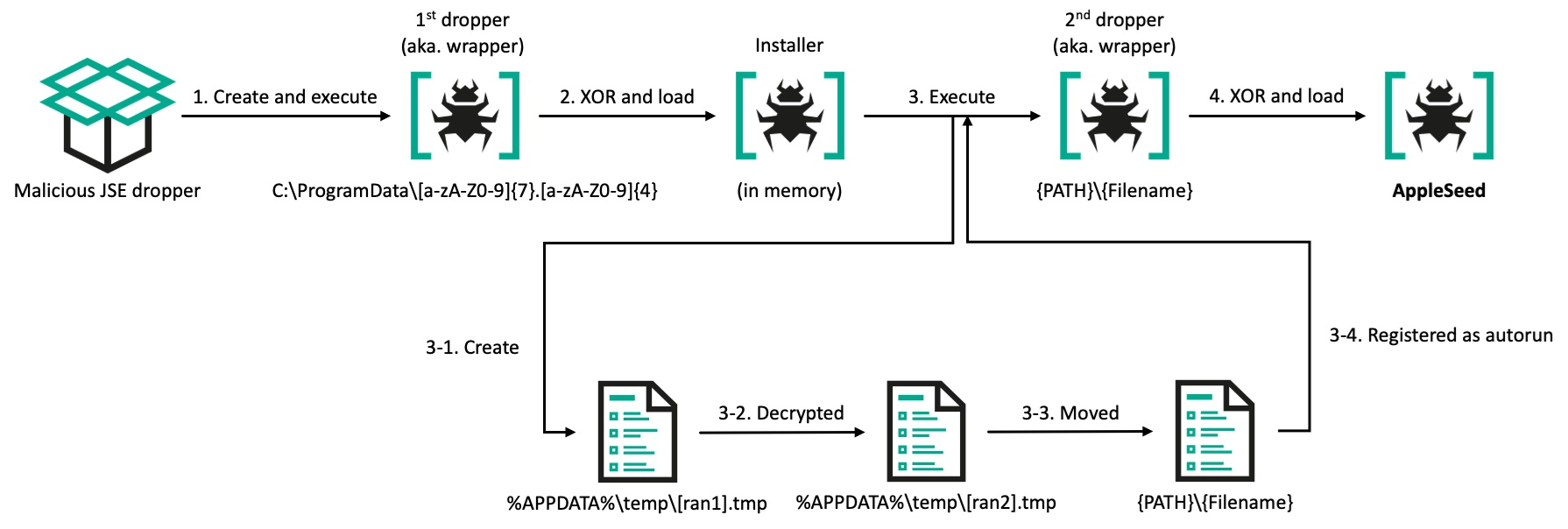
JSE droppers contain a minimum of two Base64-encoded blobs: one serving as a benign lure file and one or more containing malicious code. Additional blobs may exist within the dropper, but they are unused. The two blobs are decoded using JScript and stored in an arbitrary location on disk, such as C:\ProgramData, with the malicious filenames randomly generated according to the scheme [random]{7}.[random]{4}. The lure file is opened immediately. The malicious payload leverages powershell.exe -windowstyle hidden certutil -decode [src path] [dst path] for the second Base64 decoding before execution. Ultimately, the malicious payload is executed via command-line instructions such as regsvr32.exe /s [file path] or rundll32.exe [file path] [export function].
Reger Dropper (.SCR) and Pidoc Dropper (.PIF) also contain benign lure files and malicious payloads that, in both cases, are encrypted using XOR operations. Specifically, Reger Dropper employs a hard-coded key #RsfsetraW#@EsfesgsgAJOPj4eml;, while Pidoc Dropper utilizes single-byte XOR with 0xFF to decrypt the internal data for execution. Pidoc Dropper is fully obfuscated using dummy data and encrypted strings. Both droppers deploy files in specific directories such as %temp% or C:\ProgramData before executing the malware using regsvr32.exe.
In addition to these droppers, Kimsuky employed a variety of executable droppers, including those crafted in Go or packaged with Inno Setup.
Deployed malware
In this section, we describe several malware families recently dropped by the droppers discussed above.
HelloDoor: first Rust-based PebbleDash variant
Written in Rust, a programming language rarely used by Kimsuky, HelloDoor is a DLL-based backdoor first identified in August 2025. It is deployed via a malicious JSE dropper. Since it has limited capabilities and a simplistic communication mechanism, the backdoor is most probably in the early stages of development. Nevertheless, it is noteworthy that HelloDoor employs a C2 server hosted through TryCloudflare, a temporary tunneling service provided by Cloudflare. This service allows users to expose a local web service to the internet with no setup or account, making the infrastructure behind it difficult to trace.
HelloDoor establishes persistence upon execution by registering itself to the HKCU\Software\Microsoft\Windows\CurrentVersion\Run key with the value name tdll and the command regsvr32.exe /s [current file path].
The implant communicates with the C2 server (hxxp://female-disorder-beta-metropolitan.trycloudflare[.]com/index.php) over the HTTP protocol. Depending on whether the process is executing with an elevated token, it binds to a specific local port: 5555 if the token is elevated, or 5554 if not. Before initiating communication, it generates a unique identifier by collecting device information, such as the MAC address, computer name, and the string “windows”, then computes a hash value from this information.
The malware then constructs a query string in the format aaaaaaaaaa=2&bbbbbbbbbb=[the unique identifier]&cccccccccc=1, which is a traditional format used across the PebbleDash cluster. Subsequent server responses are Base64-decoded and then decrypted using RC4 with the key fwr3errsettwererfs. The decrypted content contains command strings. Possible commands are:
Command
Description
“mcd”
Set the current directory
“msleep”
Sleep for the provided time
“install”
Register the regsvr32.exe /s [the provided file path] command to the HKCU\Software\Microsoft\Windows\CurrentVersion\Run autorun registry using the install value name
[command]
Execute the provided command using chcp 65001 > nul & cmd /U /C [command]
Though interesting, it is no longer surprising that we found comments in the code that appear to have been generated by an LLM service rather than a human developer. This is based on traces that include emojis used for logging debugging messages.
✅ Port is now listening (no accepting)
 ❌ Port is already in use
 🔍 regsvr32.exe detected as parent. Attempting to terminate...
This is a common trait of LLM services that provides users with better visibility. We previously observed similar comments in the PowerShell-based stealer suite used by BlueNoroff. HelloDoor’s simple structure and the fact that no other Rust-based malware from the group has been discovered yet support our claim.
Even though the code is believed to have been developed using an LLM service, we still found some typos and grammatical errors, such as:
result send fail (grammatically incorrect text)
server request fail (grammatically incorrect text)
It is likely that the flawed comments were added manually before or after AI was used.
httpMalice: latest backdoor variant of PebbleDash
The latest PebbleDash-based backdoor, httpMalice, emerged no later than December 2025 and is deployed by the JSE Dropper. Although we found limited direct connections to both the AppleSeed and PebbleDash clusters, the malware is closer to PebbleDash. The following shared characteristics have been identified:
(PebbleDash cluster) Ability to run commands received from the C2 server with the S-1-12-12288 SID, indicating a high integrity level – a feature also observed in PebbleDash and httpTroy.
(PebbleDash cluster) Unique identifier generated by combining the volume serial number of the root directory with the elevation status of the current token, mirroring a technique used since the appearance of NikiDoor.
(PebbleDash cluster) Communication with its C2 server utilizing three HTTP parameters, consistent with other PebbleDash-based families.
(PebbleDash cluster) Core command set more closely aligned with PebbleDash than with AppleSeed-based malware.
(AppleSeed cluster) Use of the m= parameter in C2 communication.
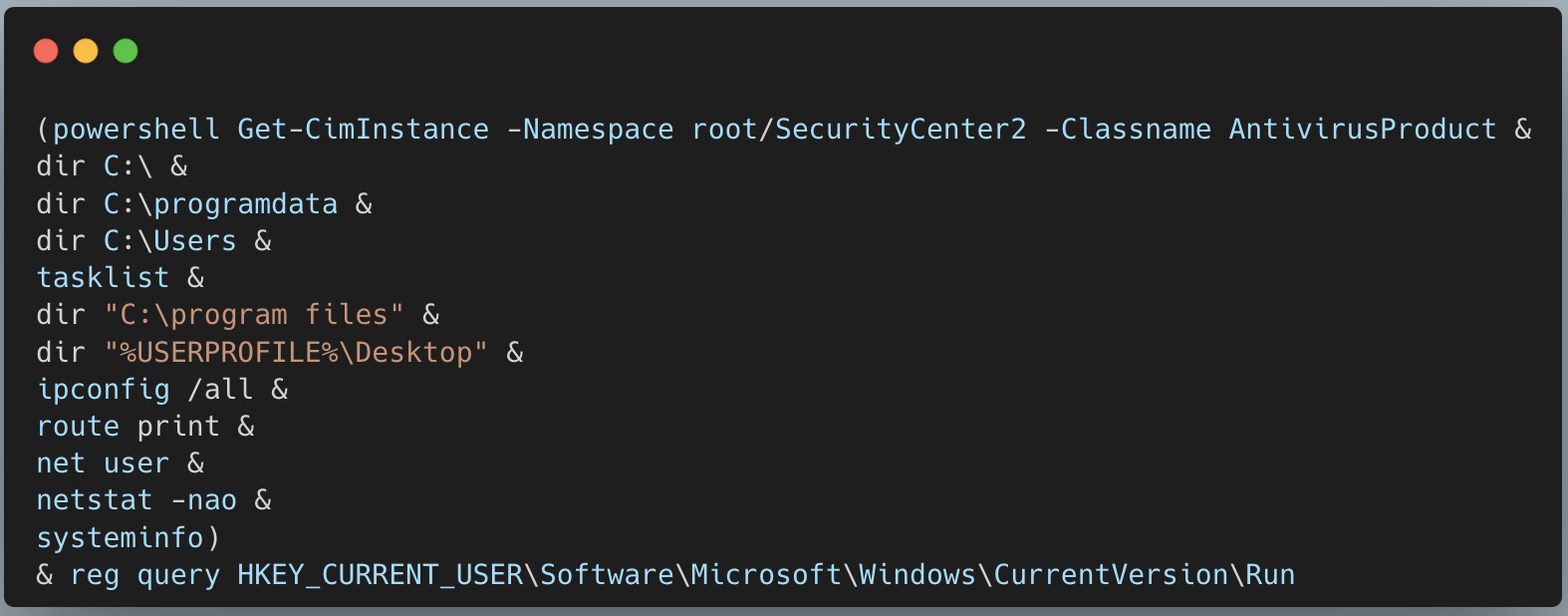
(AppleSeed cluster) Gathering system details using PowerShell and Windows commands similar to those found in AppleSeed and Troll Stealer.
Our analysis revealed two distinct versions of httpMalice based on their C2 communications: version 1.9 communicates over HTTP and version 1.8 uses Dropbox. The latter, the older variant, leverages the Dropbox API by utilizing pre-defined application credentials. Unlike its predecessor, the HTTP variant employs HTTP/HTTPS protocols to interact with its C2 server and maintains persistent access to the victim device through a Windows service named CacheDB. This mirrors tactics observed in similar threats, such as httpSpy.
The more recent variant gathers critical information from the compromised system, such as the current directory path, volume serial numbers, user privileges, username, local IP address, and the name and size of the currently executed httpMalice DLL file. It then combines the root drive’s volume serial number with the user’s access token privilege level to create a unique identifier for each infected system, formatted as [volume serial]{8}_[elevation status].
Value of elevation status
Description
0
Running under the SYSTEM account with an elevated token
1
Running under an elevated administrator account
2
Running without elevation
Depending on the token privilege, the backdoor then establishes persistence by either creating a service or registering itself to autostart at user logon. If the token is elevated, a service named CacheDB is created that executes the command cmd.exe /c “rundll32.exe [current DLL path], load”. The service’s display name is set to Administrator, and its description is defined as CacheDB Service. If the token is not elevated, the backdoor registers the same command under the registry key HKCU\Software\Microsoft\Windows\CurrentVersion\Run with the value name Everything 1.9a-[filesize]. The older version used Everything 1.8a-[filesize] as a value name.
The latest version can execute a combination of Windows commands by default to perform host profiling, while the older version fetches the command set from Dropbox. In httpMalice, commands are mostly executed using the format cmd.exe /c chcp 949 [command] > [temporary filename], which redirects the output to separate files, with the consistent prefix 2Ato6478s added to their names. The chcp 949 command changes the code page to 949, indicating that the malware targets users of the Korean language (EUC-KR charset).
Windows commands used to gather system details
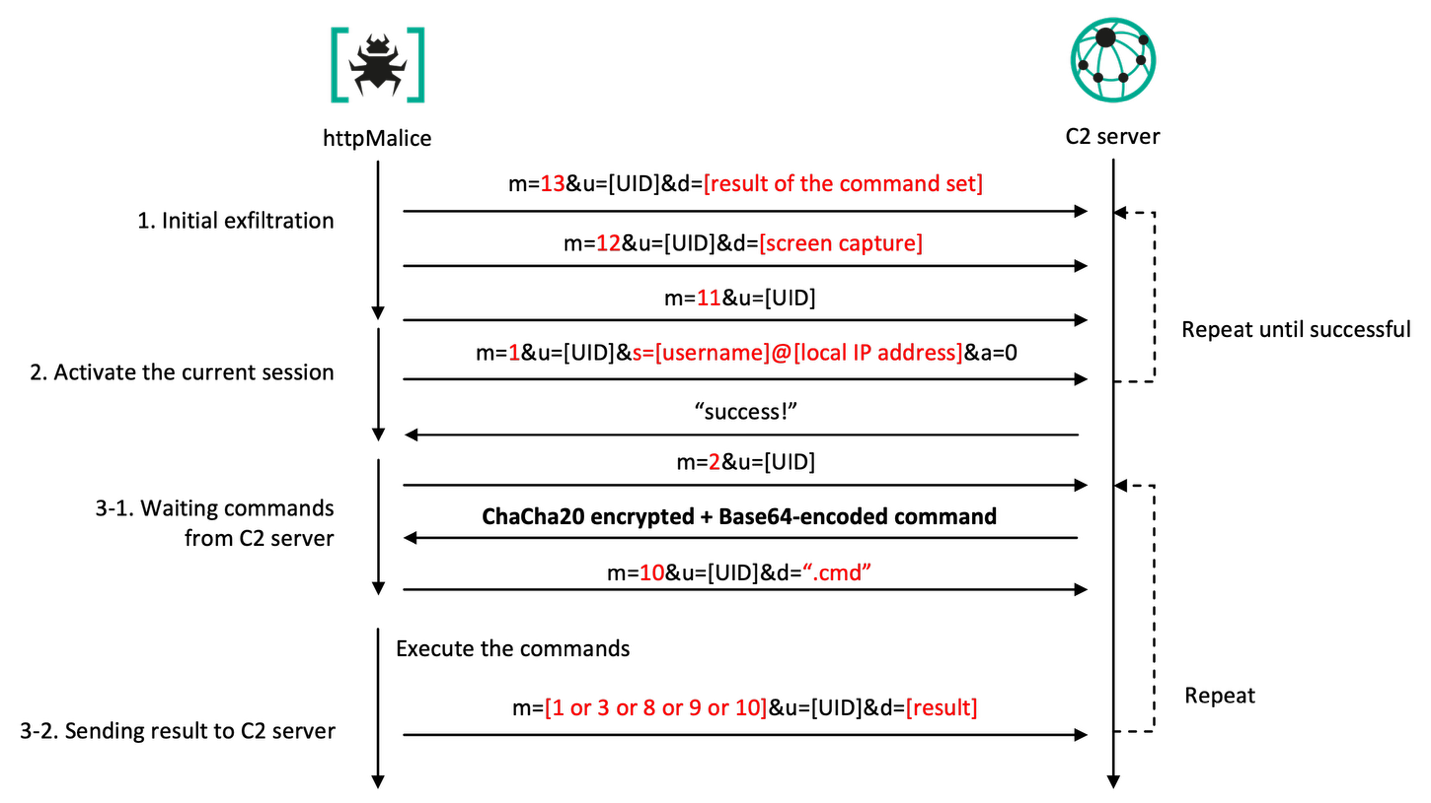
httpMalice transmits the result of host profiling to its C2 server as a URL parameter, using the POST method over the HTTP/HTTPS protocol, with the header x-www-form-urlencoded. The URL includes two or three parameters: operation mode, unique identifier (referred to as UID), and data. The operation mode, or parameter m, supports the following values:
Value
Description
1
Send the session identifier (parameter s) along with the current state (parameter a)
2
Request command
3
Send result after executing the command (parameter d)
8
Request directory to be archived and sent
9
Send the archived directory
10
Send a message like “.cmd” or “.tmp” (parameter d)
11
Send ping
12
Send the captured screenshot (parameter d)
13
Send the infected device information (parameter d)
As shown in the table above, the mode is set to 13 at the host profiling stage. The UID is formatted as [volume serial]{8}_[elevation status], and the data contains the ChaCha20-encrypted and Base64-encoded output of the command set stored in the temporary file. The resulting URL format is: m=13&u=[volume serial]{8}_[elevation status]&d=[Chacha20 encrypted + Base64-encoded data to be sent].
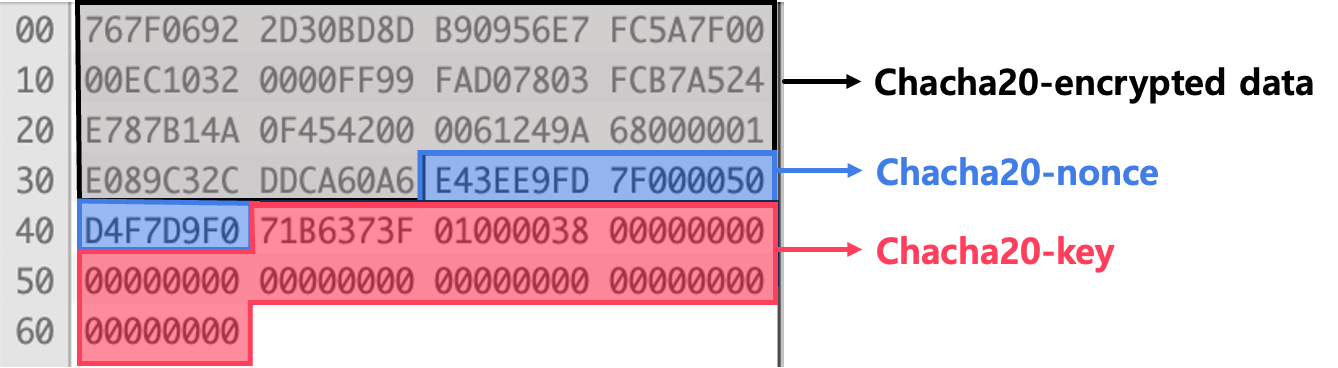
The key and nonce used for ChaCha20 encryption are derived from the pointer address of the buffer, resulting in nearly randomized keys. To ensure proper decryption on the attacker side, the nonce and key values are appended after the encrypted data, and the combined blob is then Base64-encoded. The counter is initialized to 0. The following figure illustrates how the encrypted data is structured after performing Base64 decoding.
Structure of the ChaCha20-encrypted data blob
After sending the host profiling data, the backdoor continuously transmits a screen capture with mode 12 and a ping message with mode 11. Finally, it sends a session identifier, which is a combination of the current username and local IP address separated by an ‘@’ symbol. In this case, the mode is set to 1 and the a parameter (current state) is set to 0, indicating that the C2 operation has been activated. The following table provides other possible values of the a parameter:
Value
Description
0
httpMalice has been activated
1
httpMalice has been inactivated (upon command 9)
2
httpMalice has been removed (upon command 8)
The whole process from sending the host profile to the backdoor activation repeats every two minutes until the C2 server returns a “success!” message.
C2 communication sequence of httpMalice
When the backdoor receives the message from the C2 server, it creates two threads dedicated to processing commands and sending the current state, including the session identifier. The first thread receives a command from the C2 server. It requests a command by sending mode 2 and, if successful, immediately sends mode 10 along with the string “.cmd” in the d parameter.
The commands supported by httpMalice are as follows:
Command
Description
0
Do nothing
1
Execute the command with EUC-KR encoding
2
Download and extract the file to the infected device
3
Upload a directory to the C2 server after it has been archived
5
Get the current directory
6
Set the current directory
7
Execute the command without setting a EUC-KR character set
8
Remove its persistence traces and exit the process
9
Hibernate
10
Execute the command using the provided session ID
12
Capture the screen
13
Load the downloaded payload into memory
MemLoad downloads httpTroy
Since early 2025, we have observed several versions of MemLoad; specifically, MemLoad V2 emerged in March, and V3 appeared by September. The payload that began being deployed through the Reger Dropper this year has been identified as an updated variant of MemLoad, slightly modified from the V3 version (referred to internally as MemLoader.dll).
Kimsuky leverages MemLoad to evade detection of its final backdoor and to carefully assess the value of targeted systems through anti-VM checks and reconnaissance. Upon installation, it requests an additional payload from the C2 server, executing it reflectively in memory if deemed suitable. Notably, all versions of MemLoad V2 and later use the same RC4 key.
Below are the key operations of MemLoad:
Creates a flag file. Creates a file containing a random eight-character string from the set 0123456789abcdefABCDEF with another random eight-character string as the name and “.dat.cfg” extension at the current file path.
Generates an ID. Generates an ID value by adding either ‘A-‘ or ‘U-‘ to the beginning of the random bytes. The choice of symbol is determined by attempting to create a random file in the C:\Windows\system32 directory. If successful, the ID starts with ‘A-‘ (indicating administrative privileges); otherwise, it starts with ‘U-‘.
Persistence via a scheduled task. Checks for the existence of the .dat.cfg file, and if confirmed, a scheduled task is set up for persistence. The task name is determined by whether the process is running with elevated privileges. If elevated, the task is named ChromeCheck, and the command
schtasks/create/tn<task name>/tr"regsvr32 /s <current file path>"/sc minute/mo1/rl highest/f is executed. Otherwise, the task is named EdgeCheck, and the command
schtasks/create/tn<task name>/tr"regsvr32 /s <current file path>"/sc minute/mo1/f is executed.
C2 communication and payload download. Requests an additional payload from its C2 server, with the header Authorization: Bearer {ID} or X-Browser-Validation: {ID} for authentication. The ID is set to the previously generated ID value.
Payload decryption and execution. Once the download is successful, the payload is decrypted using the RC4 algorithm with the key #RsfsetraW#@EsfesgsgAJOPj4eml;. The decrypted payload is then reflectively loaded into memory, and its hello export function is invoked.
The payload downloaded and executed by MemLoad is identified as the httpTroy backdoor. This backdoor serves as the primary role for long-term access and data exfiltration. Similar to MemLoad, it employs stealth techniques by creating a flag file and writing eight random bytes to it. However, in this case the file is created at [current file path]:HUI in the ADS (Alternative Data Stream) area. The backdoor then checks its privileges to determine if it is elevated and assigns an ID value in the format A-[random-8-chars] or U-[random-8-chars].
Since Gen Digital covers httpTroy’s features and functionality in detail elsewhere, we will not provide a thorough explanation here to avoid redundancy. Instead, we will simply note that it communicates with the C2 server at hxxps://file.bigcloud.n-e[.]kr/index.php.
AppleSeed
AppleSeed first appeared in 2019 and reached version 3.0. However, we now only see version 2.1. It originally consisted of two components: a dropper and the main AppleSeed. Since 2022, the updated AppleSeed chain has involved two droppers, an additional component referred to as the installer, and the main payload. It is mostly delivered through JSE Dropper.
Updated AppleSeed infection chain
There are two versions of the main AppleSeed: Dropper and Spy. The Dropper variant is responsible for downloading additional malware and executing commands received from its C2 server, while the Spy version gathers sensitive information such as documents, screenshots, keystrokes, and lists of USB drives. A notable change in version 2.1 is the inclusion, since 2022, of collecting the C:\GPKI directory – functionality that is also implemented in Troll Stealer. This directory contains a digital certificate used by the South Korean government to securely authenticate public officials and government systems.
HappyDoor
HappyDoor, an AppleSeed-based backdoor malware disclosed by AhnLab in 2024, is less visible than AppleSeed. HappyDoor shares several features with AppleSeed, including the same string obfuscation algorithm, the data types it collects, and the use of RSA encryption. Given these similarities, we assess with medium confidence that HappyDoor is an advanced variant evolved from AppleSeed.
Post-exploitation
We observed interesting post-exploitation activities involving VSCode and DWAgent. All of the observed VSCode droppers used the same lure files as the PebbleDash malware cluster. While we are unsure of the exact reason for this strategy, we suspect that the actor prepared both PebbleDash and VSCode droppers in anticipation of the PebbleDash infection chain being detected by security products because of its backdoor capabilities. In contrast, the use of VSCode is designed to have fewer detection points.
VSCode (launched by the JSE dropper)
Since last year, Kimsuky has been leveraging the legitimate Visual Studio Code Remote Tunneling feature to establish covert remote access to the victim’s device, bypassing detection designed for traditional malware-based C2 channels (first described by Darktrace researchers). In these attacks, instead of dropping malware, the JSE dropper downloads a legitimate Visual Studio Code (VSCode) CLI onto the infected device. The script establishes persistence by creating a tunnel via the application, with the tunnel name “bizeugene”, using the command below.
The Remote Tunneling feature in VSCode supports establishing a tunnel using either a Microsoft or GitHub account. When the code tunnel command is executed, the CLI initiates an authentication flow and returns a login URL along with a device code. The user must then navigate to the URL, enter the device code, and authenticate with their account. Once authentication is successful, the tunnel is created and the CLI outputs a URL for tunneling that enables browser-based access to the remote host.
The GitHub authentication method is selected in this instance because GitHub is configured as the default provider in non-interactive execution contexts. By using echo |, the script injects a \r\n (Carriage Return and Line Feed) into the standard input stream, effectively confirming the default prompt selection without manual interaction. As a result, the CLI automatically initiates the GitHub authentication flow. Next, all CLI output that includes a login URL and a device code is saved to out.txt.
Out.txt content
The JScript code in the JSE dropper monitors the out.txt file for a URL that begins with hxxps://vscode[.]dev/tunnel. This URL contains the full address of the established tunnel. Once detected, the file content containing the URL and the device code is sent to a compromised legitimate South Korean website (hxxps://www.yespp.co[.]kr/common/include/code/out[.]php) using the HTTP POST method. The request contains the file contents in the application/x-www-form-urlencoded header data formatted as out=URLencoded{result of the command}&token=URLencoded{"bizeugene"}. After authentication is complete, the attacker can access the compromised host externally through a web browser by authenticating with their own GitHub account.
VSCode (launched by VSCode installer)
While searching our telemetry for artifacts related to a different infection, we identified a new VSCode tunnel installer written in Go. A previous version of this installer was implemented using JScript and was limited to secure channels because of its reliance on a specific tunnel name. The new variant, named vscode_payload by the developer based on the embedded Go path, is fully operational and supports every tunnel on each targeted device. It includes features that are nearly identical to those of the previous version, such as downloading, unarchiving, and executing the VSCode CLI.
After the VSCode CLI file has been successfully downloaded, it is unzipped into the C:\Users\Public directory, and the extracted code.exe is executed with the tunnel command.
This is how the installer works:
Executes code.exe tunnel.
Searches for the “Microsoft Account” string in the stdout.
Sends the 0x1B 0x5B 0x42 (Down Arrow) and 0x0A (Enter) escape sequence to the pseudo-terminal, which enables tunnel creation via a GitHub account.
Searches for the “use code” string in the stdout.
Sends the printed code for authentication, prepended with the “hxxps://github[.]com/login/device” => prefix. The attacker authorizes Visual Studio Code with the logged-in GitHub account using the printed code.
Searches for the “What would you like to call this machine?” string in the stdout.
Sends the 0x0A escape sequence to the pseudo-terminal to use the current machine name as the identifier.
Searches for the “https://vscode.dev/tunnel/” string in the stdout.
Sends the printed URL for tunneling to the Slack WebHook.
The following figure illustrates the sequence for creating a tunnel using the VSCode CLI. Red boxes highlight the strings that the installer searches for. Yellow boxes indicate standard input operations sent from the installer using escape sequences. Sky blue boxes represent the values that are necessary to create the tunnel on the attacker’s side. (The “Microsoft Account” string in the second step is not shown in this figure because the second “GitHub Account” was already selected during the process.)
Creating a tunnel using VSCode CLI
Once the process is complete, the attacker can access the targeted host through the tunnel on their remote machine using their GitHub account via a browser or VSCode. The targeted device then begins communicating with Microsoft-owned servers without the user realizing that the communication is from an attacker.
An interesting feature of this variant is that it sends debugging messages and necessary values to a Slack channel via a WebHook. Upon execution, it sends "+++ I am started +++", as well as a heartbeat message "~~~ I am alive ~~~" approximately every second during tunneling authentication.
DWAgent
DWAgent is a remote administration tool that is frequently exploited by threat actors, including ransomware and APT groups, to easily access compromised endpoints with minimal risk of detection. Kimsuky is one of the threat actors that uses this tool in its operations.
We observed that the group delivered DWAgent in at least two ways. The first involved delivering a compressed file containing DWAgent, along with separate commands, to a host infected with httpMalice for installation. The second method involved creating a separate installer.
This installer is very similar to the Reger Dropper. It uses the same RC4 key and has a similar code structure. It includes an archived binary and a legitimate unrar.exe binary, both encrypted with RC4. When executed, the installer decrypts the archived binary and saves it as 1.zip in the C:\ProgramData directory. It also creates an unrar.exe file in the same location using the decrypted unrar.exe binary. The dropper then uses the command C:\programdata\unrar.exe x C:\programdata\1.zip C:\programdata\ to extract the contents of the ZIP file. Finally, it executes the commands necessary to install DWService as a service on the target host:
The compressed file contains a pre-packaged, ready-to-use DWAgent, as well as a predefined config file. The actor deployed the agent with a config.json file linked to their own account to covertly control the device. As a result, the remote session is immediately activated by the above command, granting the attacker control.
The predefined config file is as follows. Note that the servers are legitimate DWAgent relay servers.
For years, Kimsuky has relied heavily on the South Korea-based free domain hosting service 내도메인[.]한국 (pronounced as “naedomain[.]hankook) to mimic legitimate sites with domains like .p-e.kr, .o-r.kr, .n-e.kr, .r-e.kr, and .kro.kr. This service has been utilized to create C2 servers for PebbleDash and AppleSeed clusters, and the background infrastructures have been mostly resolved to the virtual private servers belonging to InterServer. It has also been noted that many other malicious actors have exploited this free domain hosting service, so it alone cannot be considered proof of a connection to Kimsuky.
The actor also occasionally exploits South Korean websites as C2 servers to evade network-IoC-based detection and increase the success rate of attacks. Furthermore, they actively leverage tunneling services such as Cloudflare Quick Tunnels, VSCode Tunneling, and Ngrok to hide their infrastructure. These traits are mostly observed across the PebbleDash cluster.
Victims
We identified multiple infection logs uploaded to the Dropbox storage used for httpMalice’s C2 server. They were analyzed as having been stolen from infected systems across various organizations or individuals in South Korea. Notably, each victim’s folder contained a user.txt file with detailed information such as target details, the presence of something named “http” (possibly a backdoor, such as httpTroy or httpMalice), DWAgent existence, and relationships between infected devices and targets. While we could not verify the exact creation process of these files, they were likely created manually by attackers to manage victims using Korean words.
Below you can see an example of this type of file content. In this context, “장악” means “take over” and “있음” means “exists”.
While both clusters have mainly focused on targeting the private and public sectors in South Korea, the AppleSeed malware cluster shows more interest in government entities. The PebbleDash cluster has also shown particular interest in the defense sector worldwide.
Attribution
Over the past few years, we have observed two clusters using overlapping distribution methods – JSE, EXE, SCR, and PIF droppers. The targets are also increasingly aligning. Furthermore, we noted that several samples from both malware clusters were signed with the same stolen certificate and used identical mutex patterns. These findings suggest that a single actor is likely controlling both clusters and has the capability to modify code as needed. This concept was also described in another research paper at the Virus Bulletin conference.
Since its emergence, AppleSeed has been linked to Kimsuky operations, with each variant showing ties to the group. Since 2021, PebbleDash has been found exclusively in Kimsuky attacks. Based on our analysis of targets, infrastructure, and malware characteristics, we assess with medium-high confidence that attacks associated with these malware families are conducted by Kimsuky-affiliated clusters.
These two clusters share technical links to the threat actor known as Ruby Sleet, one of the names Microsoft uses for Kimsuky activity. In previous reports, Mandiant also referred to these clusters as Cerium, but now they appear to consider them part of the broader APT43 designation – another name for Kimsuky.
Conclusion
Our analysis shows that the actor retains access to the original source code of the malware clusters and the ability to modify it. Over time, malware undergoes updates and modifications, sometimes being repurposed or reused by other actors. Although analyzing malware may seem repetitive and time-consuming, understanding how these tools evolve helps us grasp the threat actor’s changing tactics.
Two clusters have overlapping target sectors that span the defense, military, government, medical, machinery, and energy industries. The AppleSeed cluster is shifting its focus to data exfiltration, and GPKI certificate extraction has become a signature capability. Meanwhile, the PebbleDash cluster demonstrates advanced remote control capabilities and an expanding set of targets.
Although AI may offer full automation for some attacks, many groups stick with the tools and strategies they have used for years. Structuring a fully automated attack is not trivial. Despite ongoing changes, we will continue to track advanced threat actors by comprehensively considering malware, initial vectors, targets, post-exploitation activities, and ultimate goals.
With International Anti-Ransomware Day taking place on May 12, Kaspersky presents its annual report on the evolving global and regional ransomware cyberthreat landscape.
Ransomware remains one of the most persistent and adaptive cyberthreats. In 2026:
New families continue to emerge, adopting post-quantum cryptography ciphers.
As ransom payments drop, some groups implement encryptionless extortion attacks.
In a constantly changing ecosystem of threat actors, initial access brokers maintain a relevant role in this market, showing increased focus on access to RDWeb as the preferred method of remote access.
Ransomware attacks decline but remain a major threat
According to Kaspersky Security Network, the share of organizations affected by ransomware decreased in 2025 across all regions compared to 2024.
Percentage of organizations affected by ransomware attacks by region, 2025 (download)
Despite the formal decrease, organizations across all sectors continue to face a high likelihood of attack, as ransomware operators refine their tactics and scale their operations with increasing efficiency. Kaspersky and VDC Research have found that in the manufacturing sector alone, ransomware attacks may have caused over $18 billion in losses in the first three quarters of the year.
The continued rise of EDR killers and defense evasion tooling
In 2026, ransomware operators increasingly prioritize neutralizing endpoint defenses before executing their payloads. Tools commonly referred to as “EDR killers” have become a standard component of attack playbooks. This reflects a continuing trend toward more deliberate and methodical intrusions.
Attackers attempt to terminate security processes and disable monitoring agents, often by exploiting trusted components such as signed drivers. This technique is called Bring Your Own Vulnerable Driver (BYOVD) and allows adversaries to blend into legitimate system activity while gradually degrading defensive visibility.
Thus, evasion is no longer an opportunistic step but a planned and repeatable phase of the attack lifecycle. As a result, organizations are increasingly challenged not just to detect ransomware but also to maintain control in environments where security controls themselves are actively targeted.
The appearance of new families adopting post-quantum cryptography
We predicted that quantum-resistant ransomware would appear in 2025. Looking back at the previous year, we see that advanced ransomware groups indeed started using post-quantum cryptography as quantum computing evolved. The encryption techniques used by this quantum-proof ransomware could be used to resist decryption attempts from both classical and quantum computers, making it nearly impossible for victims to decrypt their data without having to pay a ransom.
One example is the appearance of the PE32 ransomware family (link in Russian); it leverages the cutting-edge ML-KEM (Module-Lattice-Based Key-Encapsulation Mechanism) standard to secure its AES keys. This specific cryptographic framework was recently selected by NIST as the primary standard for post-quantum defense.
Within the PE32 ransomware architecture, this is realized through the Kyber1024 algorithm, a robust mechanism providing Level 5 security, roughly equivalent in strength to AES-256. Its primary function is the secure generation and transmission of shared secrets between parties, specifically engineered to withstand future quantum computing attacks. This shift toward post-quantum readiness is part of a broader industry trend; for instance, TLS 1.3 and QUIC protocols have already adopted the X25519Kyber768 hybrid model, which fuses classical encryption with quantum-resistant security.
The shift to encryptionless extortion
In 2025, the share of ransoms paid dropped to 28%. As a response to this, one of the developments in the 2026 landscape is the growing prevalence of extortion incidents in which no file encryption takes place at all. Instead, attackers leave out the “ware” in “ransomware” and focus on extracting sensitive data and leveraging the threat of public disclosure as their primary means of extortion. ShinyHunters is an excellent example of such a group, using a data leak site to publicize its victims.
By avoiding encryption, attackers may aim at reducing the likelihood of immediate detection, shortening the duration of the attack, and eliminating dependencies on stable encryption routines. Often, this model is used alongside traditional tactics in so-called double extortion schemes, but an increasing number of campaigns rely exclusively on data theft.
For victims, this shift fundamentally changes the nature of the risk. While backups remain effective against encryption-based disruption, they provide no protection against data exposure, regulatory consequences, and reputational damage. Ransomware is therefore evolving from a business continuity issue into a broader data security and compliance challenge.
Industrialization of initial access (Access-as-a-Service)
The ransomware ecosystem continues to evolve toward a highly industrialized and specialized model, with initial access remaining as one of its most critical components. In 2026, many ransomware operators keep relying on IABs (initial access brokers), a network of intermediaries who supply pre-compromised access to corporate environments, aiming to no longer perform full intrusions themselves.
This “access-as-a-service” model is fueled by credential theft operations, and the widespread availability of compromised accounts harvested through infostealers and phishing campaigns.
The primary access vectors offered for sale have not changed: RDP, VPN, and RDWeb are still the top access vectors. Consequently, remote access infrastructure remains the primary attack surface for initial access sales. In response to the measures against public exposure of RDP access points to the internet, attackers are now targeting RDWeb portals, which are frequently vulnerable and occasionally inadequately safeguarded.
The result is a threat landscape where unauthorized access is increasingly commoditized, and the barrier to launching ransomware attacks declines. This means that preventing initial compromise is only part of the challenge; equal emphasis must be placed on detecting misuse of legitimate credentials and limiting lateral movement within already-breached environments.
Ransomware developments on the dark web
Telegram channels and underground forums increasingly function as platforms for the distribution and sale of compromised datasets and access credentials including those that were obtained as a result of ransomware attacks.
Advertisements posted on these resources typically include the nature of the access, a description of the exfiltrated or compromised data, price terms, and contact information for prospective buyers. In addition, some malicious actors mention their collaboration with other ransomware groups. Lesser-known gangs can use this name-dropping to promote themselves
Multiple threat actors not related to ransomware groups distribute datasets downloaded from ransomware blogs on underground forums and Telegram. By re-publishing download links and files, they spread compromised data as well as information on the ransomware attack within the community.
The ransomware itself is also sold or offered for subscription on the dark web platforms. The sellers underscore the uniqueness of their malware, as well as its encryption and defense evasion features.
Law enforcement actions
Law enforcement agencies are actively shutting down dark web platforms and ransomware data leak sites. A major underground forum, RAMP, which also functioned as a platform for threat actors to advertise their ransomware services and publish service‑related updates, was seized by authorities in January 2026. Another underground forum, LeakBase, where malicious actors distributed exfiltrated and compromised data, was seized in March 2026. In 2025, law enforcement agencies seized well-known forums like Nulled, Cracked, and XSS. Also in 2025, the DLSs of BlackSuit and 8Base ransomware groups were seized. These takedowns cause inconvenience to ransomware coordination, specifically for initial access brokers and affiliates, though similar forums are expected to fill the void over time.
Top ransomware groups in 2025
RansomHub’s sudden dormancy in 2025 marked a shift, and Qilin became the dominant player from Q2 onward. According to Kaspersky research, Qilin was the most active group executing targeted attacks in 2025.
Each group’s share of victims according to its data leak site (DLS) as a percentage of all reported victims of all groups during the period under review (download)
Qilin stands out as one of the fastest-growig and dominant RaaS platforms. Its combination of high-volume operations and structured affiliate model positions it as a central player in the current ecosystem.
Clop, the second most active group in 2025, is distinguished through its large-scale, supply-chain-style attacks, exploiting widely used file transfer and enterprise software to compromise hundreds of victims simultaneously. This one-to-many approach sets it apart from more traditional, single-target campaigns.
Third place is occupied by Akira, which remains notable for its consistency and operational stability, maintaining a steady stream of victims without major disruption. Its ability to sustain activity over time makes it one of the most reliable indicators of baseline ransomware threat levels.
Although no longer active, RansomHub stands out for its rapid rise and equally rapid disappearance in 2025, highlighting the volatility of the RaaS market. Its shutdown created a vacuum that significantly reshaped affiliate distribution across other groups.
DragonForce is also notable – not just for its own operations, but for its broader influence within the ransomware ecosystem, including reported involvement in infrastructure conflicts and possible links to the disruption of competing groups. Thus, the group claims that RansomHub “has moved to their infrastructure.” This positions it as more than just an operator and potentially an ecosystem-level actor.
New actors in 2026
While emerging actors generally operate on a smaller scale, they provide insight into the continuous churn and low barrier to entry within the ransomware ecosystem.
The Gentlemen group caught our attention in early 2026, as they managed to attack a significant number of victims over a short time. This actor is also notable for reflecting a broader shift toward professionalization and controlled operations within the ransomware ecosystem. Unlike many emerging groups that rely on opportunistic attacks and inconsistent leak activity, The Gentlemen demonstrate a more deliberate approach: structured intrusion workflows, selective targeting, and measured communication with victims. This signals a move away from chaotic, high-noise campaigns toward predictable, business-like execution models that are easier to scale and harder to disrupt. Their TTPs include the massive exploitation of hardware very common on big corporations, such as FortiOS/FortiProxy, SonicWall VPN, and Cisco ASA appliances. The group might be comprised of professional cybercriminals who left other prominent groups.
The group is also notable for its emphasis on data-centric extortion strategies, often prioritizing exfiltration and leverage over purely disruptive encryption. This aligns with one of the defining trends of 2026: ransomware evolving into a form of data breach monetization rather than just system denial. By focusing on controlled pressure and reputational risk instead of immediate operational damage, The Gentlemen exemplify how attackers are adapting to lower ransom payment rates and improved backup practices among victims.
Some other groups to take note of in 2026:
Devman appears to be an emerging actor with limited but growing activity, likely leveraging existing tooling rather than developing custom capabilities.
MintEye hasn’t been very active yet, with just five known victims, suggesting opportunistic campaigns without a consistent operational tempo.
DireWolf is associated with small-scale, targeted attacks, though its overall footprint remains relatively limited compared to larger RaaS groups.
NightSpire demonstrates characteristics of an amateur group, such as mistakes during its operations, uncommon communication channels with the victims, and sometimes giving them insufficient time to pay up. Although they both encrypt and leak data, they prioritize publication rather than encryption.
Vect shows low-volume activity. It is yet unclear whether they use a completely new codebase or are rather a rebrand of an existing group.
Tengu is a less prominent actor, with limited public reporting and no clear distinguishing tactics beyond standard extortion models.
Kazu appears to be created by ransomware operators previously engaged with multiple other groups. As of now, they don’t stand out for scale or technique.
Although there is little to say about these groups at the time of writing this report, each of them may be equally likely to disappear from the threat landscape or grow into a prominent threat. That’s why it’s important to track them from their early days. Moreover, collectively, these groups illustrate how dynamic the ransomware landscape is, with new entrants constantly replenishing it.
Conclusion and protection recommendations
Despite the growing effort by law enforcement agencies across the globe to seize and disrupt dark web platforms and threat actor infrastructures, ransomware operations remain stable, with new groups quickly taking the place of those who went silent. In 2026, we see a shift towards encryptionless extortion, with data leaks increasingly becoming the main threat to target organizations. At the same time, data encryption is also upgrading to the next level with the emergence of post-quantum ransomware.
To resist the evolving threat, Kaspersky recommends organizations:
Prioritize proactive prevention through patching and vulnerability management. Many ransomware attacks exploit unpatched systems, so organizations should implement automated patch management tools to ensure timely updates for operating systems, software, and drivers. For Windows environments, enabling Microsoft’s Vulnerable Driver Blocklist is critical to thwarting BYOVD attacks. Regularly scan for vulnerabilities and prioritize high-severity flaws, especially in widely used software.
Strengthen remote access: RDP and RDWeb connections should never be directly exposed to the internet, only through VPN or ZTNA (Zero Trust Network Access). It’s highly recommended to adopt multi-factor authentication on everything; the architecture may require continuous authentication for access, as one valid credential captured is enough to cause a breach. Monitoring the underground for stolen employee credentials is essential. Audit open ports across the entire attack surface. The adoption of the “Principle of Least Privilege” (PoLP), where users, systems, or processes are granted only the minimum access rights, such as read, write, or execute permissions, necessary to perform their specific job functions, is highly recommended.
Strengthen endpoint and network security with advanced detection and segmentation. Deploy robust endpoint detection and response solutions such as Kaspersky NEXT EDR to monitor for suspicious activity like driver loading or process termination. Network segmentation is equally important. Limit lateral movement by isolating critical systems and using firewalls to restrict traffic. Complete and immediate offboarding for employees is necessary as well as periodic permission reviews, with automatic revocation of unused access. Sessions with complete logging for privileged accounts are more than necessary. Monitoring the traffic divergence to new sites or even to legitimate endpoints can help the defenders to spot a new insider threat.
Invest in backups, training, and incident response planning. Maintain offline or immutable backups that are tested regularly to ensure rapid recovery without paying a ransom. Backups should cover critical data and systems and be stored in air-gapped environments to resist encryption or deletion. User education is essential to combatting phishing, which remains one of the top attack vectors. Conduct simulated phishing exercises and train employees to recognize AI-crafted emails. Kaspersky Global Emergency Response Team (GERT) can help develop and test an incident response plan to minimize potential downtime and costs.
The recommendation to avoid paying a ransom remains robust, especially given the risk of unavailable keys due to dismantled infrastructure, affiliate chaos, or malicious intent. By investing in backups, incident response, and preventive measures like patching and training, organizations can avoid funding criminals and mitigate the impact.
Kaspersky also offers free decryptors for certain ransomware families. If you get hit by ransomware, check to see if there’s a decryptor available for the ransomware family used against you.
Microsoft Threat Intelligence recently uncovered a methodical, sophisticated, and multi-layered attack, where a threat actor we track as Storm-2949 launched a relentless campaign with a singular focus: to exfiltrate as much sensitive data from a target organization’s high-value assets as possible. The attack exfiltrated data from Microsoft 365 applications, file-hosting services, and Azure-hosted production environments, where the organization’s production application ecosystem resides.
What began as a targeted identity compromise rapidly evolved into a full-spectrum assault on the organization’s cloud infrastructure. The attack spanned various Azure resources, with emphasis on software-as-a-service (SaaS), platform-as-a-service (PaaS), and infrastructure-as-a-service (IaaS) layers.
Storm-2949 didn’t rely on traditional malware and other on-premises tactics, techniques, and procedures (TTPs). Instead, they leveraged legitimate cloud and Azure management features to gain control-plane and data-plane access, which they then used to execute code remotely on VMs, and access sensitive cloud resources such as Key Vaults and storage accounts, among others. These activities allowed them to move laterally across cloud and endpoint environments while blending into expected administrative behavior.
As organizations continue to adopt cloud infrastructure at scale, threat actors are increasingly targeting identity and control plane access rather than individual devices. When cloud identities are compromised, legitimate administrative features can be used to achieve outcomes similar to traditional lateral movement, often with fewer indicators of compromise. Behavior-based detections across endpoints, cloud environments, and identities—such as those provided by Microsoft Defender—can help teams identify and correlate these activities.
In this blog, we unpack the full attack chain from initial access to cloud and endpoint takeover. We then offer actionable insights into how organizations can detect, contain, and prevent similar identity-driven threats in their environments.
Attack chain overview
The campaign that Storm-2949 deployed can be divided into two phases: targeted identity compromise and cloud infrastructure compromise. We discuss each of these phases in detail in the succeeding sections.
Figure 1. Storm-2949 attack diagram.
Cloud compromise: Microsoft Entra ID and Microsoft 365
In this phase, the threat actor targeted specific users through social engineering to obtain their Microsoft Entra ID credentials. Using these credentials, the threat actor then proceeded to exfiltrate data from Microsoft 365 applications.
Initial access and persistence through targeted social engineering and SSPR abuse
We assess with high confidence that Storm-2949 leveraged a social engineering technique consistent with known abuses of Microsoft’s Self-Service Password Reset (SSPR) process. In such attacks, a threat actor initiates the SSPR process on behalf of a targeted user and subsequently employs social engineering tactics to persuade the user to complete multifactor authentication (MFA) prompts that appear to be legitimate.
For example, the threat actor might impersonate an internal information technology (IT) support representative and contact the user claiming that their account requires urgent verification, instructing them to approve MFA prompts as part of a routine password reset procedure.
Once the user approves these prompts, the threat actor is able to reset the user’s password and remove existing authentication methods, such as phone numbers, email addresses, and Microsoft Authenticator registrations, effectively eliminating MFA as a control and enabling unrestricted account access. Immediately after gaining access to the compromised account, the threat actor is then prompted to re-enable MFA and register a new authentication method. At this stage, the threat actor enrolls Microsoft Authenticator on their own device, granting themselves persistent access and preventing the legitimate user from signing in.
Storm-2949 used a similar process repeatedly across multiple users within the targeted organization. The selection of victims, which included IT personnel and senior leadership, indicated deliberate targeting. Based on the roles of the compromised users and the investigation findings, we assess that the threat actor likely used an organized and convincing phishing scheme to lure users into completing the fraudulent MFA prompts and thereby compromise their identities.
Directory discovery and persistence
Following the initial identity takeover, the threat actor conducted directory discovery using Microsoft Graph API. Using a custom Python script, they issued automated API requests to enumerate users and applications within the tenant. Through these queries, the threat actor searched Microsoft Entra ID for user accounts based on name patterns and role attributes, likely to identify privileged identities and additional high‑value targets.
Figure 2 illustrates the types of Graph API queries observed:
Figure 1. Discovery using cURL.
During this attack phase, the threat actor also attempted to establish persistence by adding credentials to a compromised service principal to enable continued access independent of the compromised user accounts. This attempt failed due to insufficient permissions. Undeterred, the threat actor continued enumerating service principals and known application identifiers, indicating an effort to map application‑level access paths and expand long‑term footholds within the environment. Using the same social engineering techniques and SSPR abuse described earlier, the threat actor expanded their foothold by compromising three additional cloud user accounts.
Microsoft 365 discovery and exfiltration
Storm-2949 leveraged their access to the compromised user accounts to explore and exfiltrate files from the victim organizations’ cloud file storage services. Shortly after obtaining initial access within the organization, they targeted Microsoft 365 applications, including OneDrive and SharePoint, identifying and accessing the organization’s sensitive files, focusing on IT documents concerning virtual private network (VPN) configurations and remote access procedures. We assess that this behavior reflects an attempt to identify opportunities for lateral movement from a compromised cloud identity into the endpoint network.
The threat actor then launched a large-scale data exfiltration from these storage services. In one instance, Storm-2949 used the OneDrive web interface to download thousands of files in a single action to their own infrastructure. This pattern of data theft was repeated across all compromised user accounts, likely because different identities had access to different folders and shared directories.
Cloud compromise: Microsoft Azure
Armed with access to multiple compromised identities – which were assigned with privileged custom Azure role-based access control (RBAC) roles on several Azure subscriptions – and a growing understanding of the environment, the threat actor shifted focus toward the victim’s Azure environment. With a clear agenda centered on data exfiltration, Storm-2949 demonstrated a relentless drive to uncover and extract the most sensitive assets within the victim’s Azure environment, specifically from production-based Azure subscriptions.
Their campaign targeted not only core applications but also the broader ecosystem of interconnected resources such as Azure App Services web applications, Azure Key Vaults, Azure Storage accounts, and SQL databases. These resources collectively power the organization’s cloud-hosted services. This phase marked a transition from identity-centric abuse and SaaS data theft to targeting a range of Azure services, with an emphasis on both PaaS and IaaS workloads.
Azure App Service and Key Vault compromise
One of Storm-2949’s main targets was a production Azure App Service web application that contained sensitive data. Following several failed attempts to access this application, likely due to gateway and network restrictions, Storm-2949 shifted focus to other web apps that appeared to be part of the same ecosystem. These auxiliary apps, such as those handling authentication or internal APIs, were individually deployed Azure App Service instances with their own resource identities.
Storm-2949 successfully compromised several of these secondary web apps by taking advantage of the user’s privileged Azure RBAC permissions and invoking the Azure management-plane operation, microsoft.Web/sites/publishxml/action, which retrieves the application’s publishing profile. This profile often contains basic authentication credentials for deployment endpoints such as FTP, Web Deploy, and the Kudu management console. Kudu is a built-in administrative interface for Azure App Services that allows authenticated users to browse the file system, inspect environment variables, and execute commands within the app’s context.
Despite successfully compromising several of these auxiliary web apps, Storm-2949 was unable to gain access to the primary production application they were ultimately targeting. It is assesed, that the secondary services, while part of the same broader ecosystem, didn’t contain the level of sensitive data or privileged access the threat actor was seeking. While these footholds provided visibility into application configurations and infrastructure, they didn’t deliver the high-value assets that aligned with the threat actor’s data exfiltration objectives. As a result, the threat actor was forced to pursue alternative paths in their effort to reach the production web app.
Storm-2949 recalibrated their approach and shifted their focus toward backend resources that were part of the sensitive web app ecosystem and could provide stronger leverage. The threat actor pivoted to the organization’s Azure Key Vault estate – an environment more likely to centralize sensitive secrets and offer indirect access to production systems. Part of the compromised user’s Azure RBAC permissions was the privileged Owner role over a specific Key Vault that seemed to contain credentials that would enable the compromise of the production application.
Over the span of four minutes, the threat actor successfully manipulated Key Vault access configurations and accessed dozens of secrets within the said Key Vault. These secrets included database connection strings, identity credentials, and more, dramatically expanding the attack’s blast radius.
Among these secrets, we believe the threat actor found credentials that enabled them to access the application they coveted the most, which was the main production web app. After they successfully authenticated into the web app, the threat actor changed its password to retain control. They then began exfiltrating sensitive data from it.
Azure Storage and SQL data exfiltration
In parallel, Storm-2949 expanded access across additional cloud resources inside the ecosystem that contained the web app, including Azure Storage accounts and an Azure SQL server.
To enable access to the server, the threat actor abused their existing Azure RBAC permissions to manipulate the SQL server firewall rules by using the microsoft.sql/servers/firewallrules/write operation. They then connected to the SQL server using the credentials they obtained (along with the web app credentials) from the compromised Key Vault.
The threat actor proceeded with data exfiltration and continued to delete the modified SQL firewall rules, which is an activity consistent with defense evasion. Similar to the SQL server compromise, to set up and prepare for massive data exfiltration from Azure Storage, the threat actor also manipulated storage account network access configurations using the microsoft.storage/storageaccounts/write operation. This manipulation enabled public access to the storage accounts from a closed set of threat actor-owned IP addresses. In addition, the threat actor abused the Azure management-plane operation microsoft.Storage/storageAccounts/listkeys/action to access multiple storage account Shared Access Signature (SAS) tokens and account keys, enabling the use of static, non-interactive authentication to retrieve data.
Using these keys, the threat actor downloaded large volumes of data from several Azure Storage accounts using a custom Python script that leveraged the Azure SDK for Storage. The script allowed them to programmatically enumerate and download blobs directly to their own endpoint device. This storage‑based exfiltration continued over multiple days since the initial access, with the threat actor alternating between secret- and OAuth‑based authentication as access conditions and controls evolved.
Azure Virtual Machines compromise
Apart from the web app and data-store resource compromise, the abuse of Azure Virtual Machine (VM) extensions and administrative features – specifically Run Command and the VMAccess extension – were also prominent elements of this attack. These activities appear to have been primarily intended to expand operational access within the victim environment by leveraging compromised VMs as intermediary footholds. Observed actions across these systems focused on credential harvesting and environment discovery, as well as attempts to access resources that weren’t directly reachable through previously compromised identities. These efforts included domain reconnaissance and the collection of authentication material that could facilitate movement between cloud and on‑premises environments, as well as enable access to additional high‑value assets.
Shortly after the initial access, the threat actor operated in parallel, trying to compromise the organization’s virtual machines. Using the compromised users assigned with privileged Azure RBAC permissions, the threat actor deployed the VMAccess extension to create a new local administrator account on a targeted VM. VMAccess is an Azure VM extension intended to help administrators restore access to a VM when credentials get lost or misconfigured by allowing password resets or the addition of privileged local users through the Azure management plane. In this case, the threat actor abused the extension to gain backdoor access to an administrator user on the VM.
Using the Run Command feature, the threat actor deployed a script attempting to abuse the VM’s managed identity by requesting an access token from the Azure Instance Metadata Service (IMDS) and using it to authenticate to – and retrieve secrets from – the production web app-related Key Vault. However, the threat actor wasn’t able to retrieve the secrets because the managed identity lacked the required permissions. Yet, this attempt shows the threat actor using guest-level execution as a bridge to additional Azure resource access through workload identity.
Figure 2. Token theft and Key Vault access script.
ScreenConnect installation and defense evasion
Storm-2949 further abused the Run Command by running a PowerShell script intended to deploy persistent remote access while reducing host-based security visibility on multiple VMs.
The script attempted to weaken Microsoft Defender Antivirus by disabling several protections, including real-time protection and behavior monitoring, and by interfering with its associated service. These changes lowered the likelihood that subsequent activity would be blocked or generate actionable alerts on the device.
The script then installed the ScreenConnect remote monitoring and management (RMM) tool obtained from threat actor-controlled infrastructure. The installation process included several steps intended to masquerade the tool’s presence, such as making the network request appear consistent with trusted software updates and placing files in locations intended to resemble legitimate system content.
To further obscure the tool’s presence, the script attempted to rename or configure the installed service to resemble legitimate Windows components, providing a simple form of local masquerading.
Finally, the script attempted cleanup actions to remove local forensic artifacts that could be attributed to the threat actor. These included clearing Windows event logs, removing execution artifacts, and deleting command history and temporary files. Such steps are commonly observed in post-compromise activity and are generally intended to complicate investigation rather than provide durable evasion.
Post-compromise activity using ScreenConnect
The threat actor used the deployed ScreenConnect to launch commands across multiple compromised devices, performing basic discovery. This included collecting host level details (for example, operating system and configuration information) and enumerating domain context such as user accounts and group memberships.
Across a subset of those hosts, the threat actor focused on credential harvesting techniques. They discovered and exfiltrated .pfx certificate files – artifacts that might contain private keys and could be valuable for follow-on access if imported or reused elsewhere. In parallel, they searched for remote file shares for likely credential exposure by scanning files for password related strings. Not every collection effort occurred on every host; rather, it was distributed across systems based on what data and access each host provided.
These actions show ScreenConnect being used as a practical execution channel to run discovery, collect credentials, and attempt to operationalize access across different devices.
While the threat actor ultimately established execution on several endpoints, these systems didn’t appear to yield high value data aligned with their objectives. The endpoint activity primarily served as a secondary capability for discovery and credential harvesting, rather than a core exfiltration channel.
Throughout this incident, Microsoft Defender generated multiple alerts that helped analysts piece together activity across endpoints and cloud. Defender correlated these signals into unified incidents, surfacing high-fidelity alerts and a coherent view of threat actor activity. This kind of cross-domain correlation – collecting and normalizing telemetry and linking related alerts – illustrates the value of an integrated detection and response approach for improving signal-to-noise clarity and end-to-end visibility.
Mitigation and protection guidance
The visibility provided by correlated alerts across identities, cloud, and endpoints can help organizations investigate and understand attacks end-to-end. Building on this visibility, organizations can reduce risk and limit the impact of similar attacks by deploying appropriately scoped detection and response capabilities (including Microsoft Defender where applicable) and by applying targeted hardening practices.
Ensure adequate security coverage across attack surfaces
To effectively detect and respond to attacks that span identity, cloud, and endpoint environments, organizations should ensure they have monitoring, detection, and response capabilities deployed and properly configured across those surfaces. The following examples describe how Microsoft Defender capabilities can be used to help with this; equivalent controls might be available in other security solutions.
Use Microsoft Defender for Endpoint for:
Tamper protection enabled to prevent threat actors from stopping security services such as Defender for Endpoint, which can help prevent hybrid cloud environment attacks.
Endpoint detection and response (EDR) in block mode so that Defender for Endpoint can block malicious artifacts, even when your non-Microsoft antivirus doesn’t detect the threat or when Microsoft Defender Antivirus is running in passive mode. EDR in block mode works behind the scenes to remediate malicious artifacts detected post-breach.
Investigation and remediation in full automated mode to allow Defender for Endpoint to take immediate action on alerts to help remediate alerts, significantly reducing alert volume.
In addition, leverage the Microsoft Defender XDR to hunt for threats across cloud environments and resource with advanced hunting. Security teams can proactively investigate threat actor activity by querying telemetry across multiple domains using tables such as CloudAuditEvents, CloudStorageAggregatedEvents, and others, enabling deep visibility into control-plane and data-plane operations, authentication events, and cross-service attack patterns.
In addition to deploying the appropriate Defender capabilities, organizations should apply the following security controls and practices to mitigate similar attack paths:
Identity protection
Secure accounts with credential hygiene. Practice the principle of least privilege and audit privileged account activity in your Microsoft Entra ID and Azure environments to slow or stop threat actors.
Enable Conditional Access policies. Conditional Access policies are evaluated and enforced every time the user attempts to sign in. Organizations can protect themselves from attacks that leverage stolen credentials by enabling policies such as device compliance or trusted IP address requirements.
Ensure MFA is required for all users. Adding more authentication methods, such as the Microsoft Authenticator app or a phone number, increases the level of protection if one factor is compromised.
Configure and harden resources firewall rules and access controls to allow access only from trusted IP ranges and virtual networks to prevent unauthorized access.
Use Azure policies to continuously enforce the hardened configurations.
Use Azure policies for Azure Storage to prevent network and security misconfigurations and maximize the protection of business data stored in your storage accounts.
Enable immutable storage for Azure Blob Storage to protect from accidental or malicious modification or deletion of blobs or storage accounts.
Enable Azure Monitor for Azure Blob Storage to collect, aggregate, and log data to enable recreation of activity trails for investigation purposes when a security incident occurs or network is compromised.
Enable logs in Azure Key Vault and retain them for up to a year to enable recreation of activity trails for investigation purposes when a security incident occurs or network is compromised.
Restrict public network access to Azure Key Vault by enabling private endpoints and disabling public access to reduce exposure to unauthorized access attempts.
Regularly audit Azure RBAC role assignments and Key Vault access policies, depending on the Key Vault permission model, to ensure least privilege and detect over-permissioned identities. Microsoft explicitly recommends Azure RBAC over Key Vault access policies.
Configure SQL server firewall rules to restrict access to known IP addresses and monitor for unauthorized changes to firewall configurations.
Practice and apply Azure App Service security best practices:
Disable legacy authentication methods and enforce managed identity usage for Azure App Services to prevent credential theft through publishing profiles.
Monitor and restrict access to Azure App Service publishing credentials by limiting RBAC permissions and auditing usage of the publish profile API.
Enable diagnostic logging in App Service logs to detect suspicious deployment or configuration changes.
Enable Microsoft Azure Backup for virtual machines to protect the data on your Microsoft Azure virtual machines, and to create recovery points that are stored in geo-redundant recovery vaults.
Audit and restrict the use of Azure VM features and extensions such as Run Command and VMAccess by limiting RBAC permissions and monitoring for suspicious invocation patterns.
IOCs reflect observations at the time of analysis and may not be exhaustive or persistent.
Indicator
Type
Description
176.123.4[.]44
IP address
Attacker egressed from this address
91.208.197[.]87
IP address
Attacker egressed from this address
185.241.208[.]243
IP address
ScreenConnect instance used by Attacker
Microsoft Defender XDR detections
Microsoft Defender XDR customers can refer to the list of applicable detections below. Microsoft Defender XDR coordinates detection, prevention, investigation, and response across endpoints, identities, email, and apps to provide integrated protection against attacks like the threat discussed in this blog.
Customers with provisioned access can also use Microsoft Security Copilot in Microsoft Defender to investigate and respond to incidents, hunt for threats, and protect their organization with relevant threat intelligence.
Note that the following detections only covers the threat activities we’ve observed at the time of analysis.
Tactic
Observed activity
Microsoft Defender coverage
Initial access
– Sign-in activity from attacker infrastructure to compromised identities
– Sign-in and authentication activity to Azure resources
Microsoft Defender XDR – Authentication with compromised credentials – Compromised user account in a recognized attack pattern – Malicious sign in from a risky IP address – Malicious sign in from an IP address associated with recognized attacker infrastructure – Malicious sign in from recognized attacker infrastructure – Malicious sign-in from an unusual user agent – Malicious sign-in from known threat actor IP address – Successful authentication from a malicious IP – Successful authentication from a suspicious IP – Successful authentication using compromised credentials – User compromised through session cookie hijack – User signed in from a known malicious IP Address – Impossible Travel
Microsoft Defender for Identity – Possibly compromised user account signed in – Possibly compromised service principal account signed in
Microsoft Defender for Cloud Defender for Resource Manager Suspicious invocation of a high-risk ‘Initial Access’ operation detected (Preview)
Defender for Databases Login from an unusual location
Defender for Storage – Access from an unusual location to a storage account Access from an unusual location to a storage blob container – Access from an unusual location to a sensitive blob container – Access from a known suspicious IP address to a sensitive blob container – Access from a suspicious IP address – Unusual unauthenticated public access to a sensitive blob container
Execution
– Various types of execution-related suspicious activity by an attacker were observed
Microsoft Defender XDR – Possibly compromised user ran a malicious script using an Azure VM extension – Potential hybrid ransomware or hands-on-keyboard attack originating from Azure VM extensions – Hybrid ransomware or hands-on-keyboard attack originating from Azure VM extensions – Azure VM extension activity followed by ransomware or hands-on-keyboard attack
Microsoft Defender for Cloud Defender for Resource Manager – Suspicious invocation of a high-risk ‘Execution’ operation detected (Preview) – Azure Resource Manager operation from suspicious IP address – Suspicious Run Command invocation detected (Preview)
Defender for Servers P2 – Run Command with a suspicious script was detected on your virtual machine – Suspicious Run Command usage was detected on your virtual machine (Preview) – Suspicious unauthorized Run Command usage was detected on your virtual machine (Preview)
Microsoft Defender for Endpoint – Compromised account conducting hands-on-keyboard attack – Potential human-operated malicious activity – Suspicious process execution – Suspicious command execution via ScreenConnect – Suspicious activity through Azure VM extension process
Persistence
– Attacker device registered as MFA method
– ScreenConnect installed on Azure VMs
Microsoft Defender for Identity – Suspicious addition of default third‑party MFA method to user account – Suspicious Entra device join or registration
Microsoft Defender for Cloud Apps – Suspicious addition of device with strong MFA – Suspicious addition of strong authentication device – Malicious device with strong MFA was registered
Microsoft Defender for Endpoint Uncommon remote access software
Defense evasion
– Attempts to tamper with Microsoft Defender Antivirus
– Manipulation of Azure Storage account, Key Vault, and SQL database configurations
Microsoft Defender for Endpoint – Attempt to turn off Microsoft Defender Antivirus protection – Attempt to clear event log – Event log was cleared
Microsoft Defender for Cloud Defender for Resource Manager Suspicious invocation of a high-risk ‘Defense Evasion’ operation detected (Preview)
Defender for Key Vault Suspicious policy change and secret query in a key vault
Credential access
– Secret extraction from Azure Key Vault
– Attempted theft of workload identity tokens using Azure VM Run Command
– Credential harvesting from endpoints through ScreenConnect
– Publishing Azure App Service web app profile for credential access
– Listing Azure storage account access keys for access
Microsoft Defender for Endpoint – Indication of local security authority secrets theft – Password stealing from files
Microsoft Defender for Cloud Defender for Resource Manager Suspicious invocation of a high-risk ‘Credential Access’ operation detected (Preview)
Defender for Servers P2 Run Command with a suspicious script was detected on your virtual machine
Defender for Key Vault – Suspicious policy change and secret query in a key vault – High volume of operations in a key vault – Unusual application accessed a key vault – Unusual operation pattern in a key vault – Unusual user accessed a key vault – Access from a suspicious IP address to a key vault
Discovery
– Domain and system discovery commands run on virtual machines
Microsoft Defender for Endpoint Suspicious sequence of exploration activities
Microsoft Defender for Cloud Apps Suspicious file access
Lateral movement
– Traversal between cloud resources and applications
Microsoft Defender for Identity Suspicious sign-in to a web app following MFA phone number tampering activity
Microsoft Defender for Cloud Apps Compromised user accessed a SaaS application
Microsoft Defender for Cloud Defender for Resource Manager Suspicious invocation of a high-risk ‘Data Collection’ operation detected (Preview)
Exfiltration
– Data exfiltration from Azure Storage accounts and other resources
– Data exfiltration from file storage services
Microsoft Defender XDR Suspicious behavior: Mass download
Microsoft Defender for Cloud Apps – Suspicious massive data read – Suspicious mass download from risky or unusual session – Suspicious mass download from risky or unusual session – Suspicious mass download from risky or unusual session – Possible exfiltration of data archive – Possible data exfiltration from a suspicious IP address – Suspicious quantity of downloaded archive files
Microsoft Defender for Cloud Defender for Resource Manager Suspicious invocation of a high-risk ‘Data Collection’ operation detected (Preview)
Defender for Storage – The access level of a potentially sensitive storage blob container was changed to allow unauthenticated public access – Publicly accessible storage containers successfully discovered – Publicly accessible storage containers unsuccessfully scanned – Unusual amount of data extracted from a storage account – Unusual data access activity – Unusual amount of data extracted from a sensitive blob container – Unusual number of blobs extracted from a sensitive blob container – Potential data exfiltration detected – Access from a suspicious IP address
This research is provided by Microsoft Defender Security Research with contributions from Adi Segal, Karam Abu Hanna, Alon Marom, and members of Microsoft Threat Intelligence.
To hear stories and insights from the Microsoft Threat Intelligence community about the ever-evolving threat landscape, listen to the Microsoft Threat Intelligence podcast.
Review our documentation to learn more about our real-time protection capabilities and see how to enable them within your organization.

 Login
Login