Reading view

Malwarebytes earns AV-TEST Top Product award, aces other third-party tests

Our job is to protect people from online threats, and independent testing is one of the best ways to measure how well we’re doing.

Malwarebytes nabbed AV-TEST’s Top Product award after scoring 17.5 points out of a possible 18 in the research organization’s most recent Windows security test. The award is the latest in a string of endorsements from third-party testers whose ongoing evaluations help keep us sharp.

Here’s a closer look at the results.

AV-TEST Windows Consumer Security Product Test

AV-TEST’s Windows Consumer Security Product Test, which took place in March and April, assessed 14 security applications across three categories: how well they protected Windows PCs from malware, how much they slowed down a device, and how often they raised false alarms.

AV-TEST noted in its synopsis:

“We focused on realistic test scenarios and challenged the products against real-world threats. Products had to demonstrate their capabilities using all components and protection layers.”

To receive the Top Product award, companies had to score 17.5 points or higher out of a total of 18, earning a maximum of six points in each category. Malwarebytes has received a Top Product endorsement from AV-TEST more than a dozen times since it first began taking the test in 2018.

MRG Effitas Consumer Assessment Certification

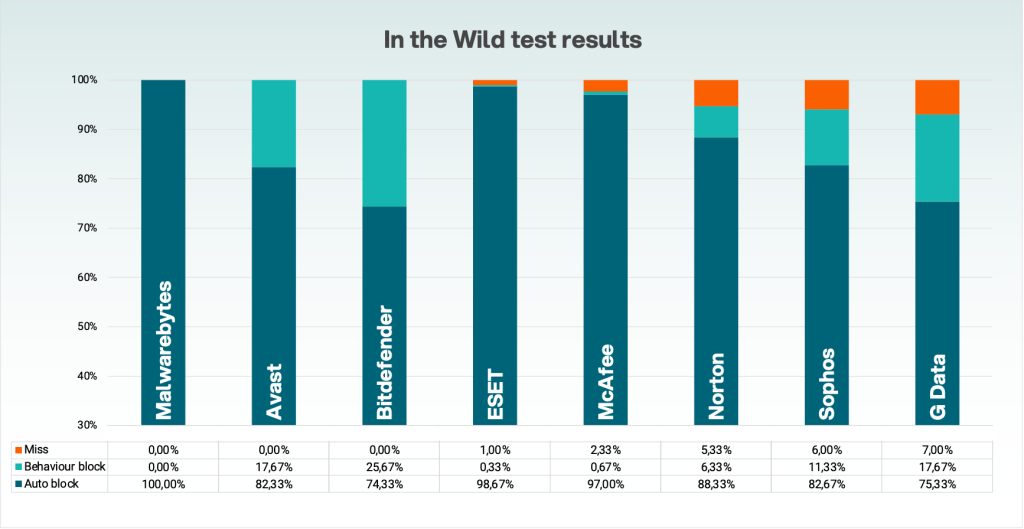
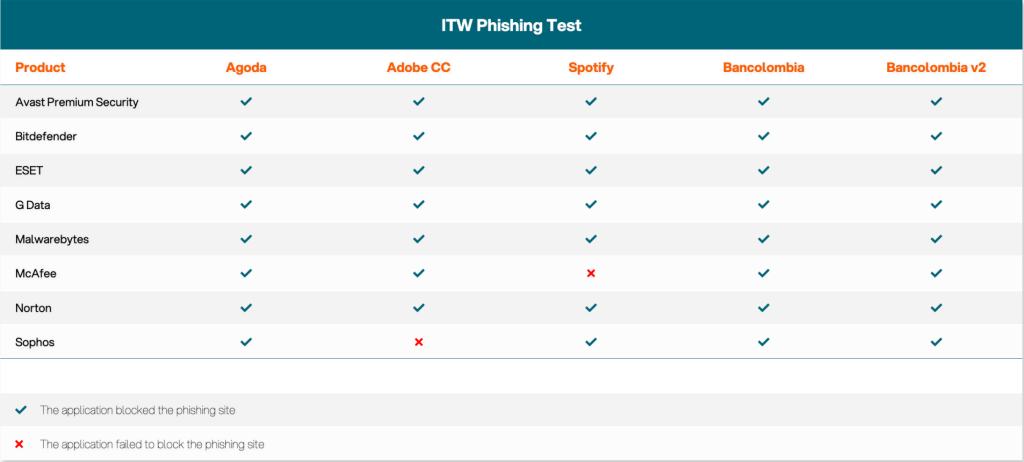
Malwarebytes once again came out on top in the MRG Effitas Consumer Assessment Certification, which tested eight security products to measure their ability to block malware, protect against phishing, and avoid false positives.

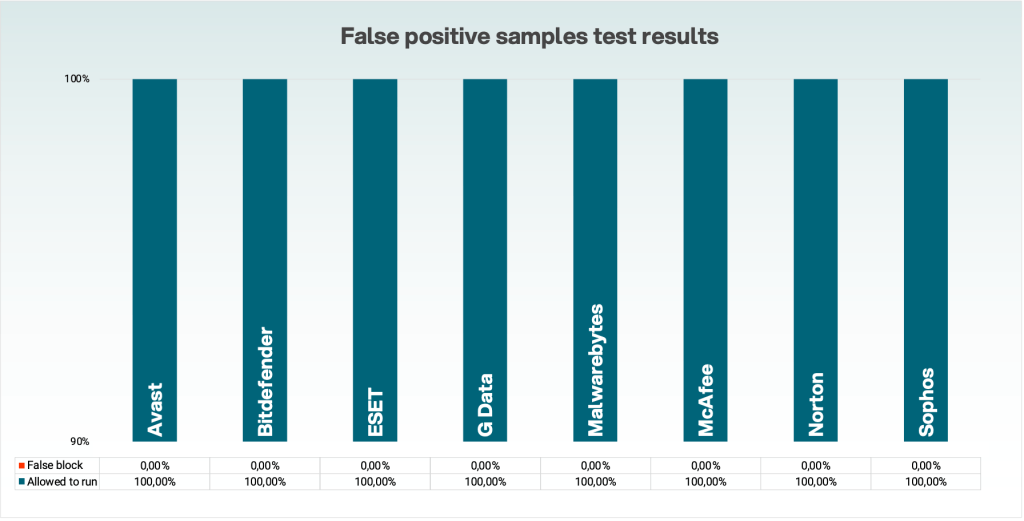
Malwarebytes was the only company to achieve Level 1 Certification, meaning we succeeded in stopping all 300 in-the-wild infections without causing damage to the device or its data, generated zero false positives, and blocked at least 79% of phishing attempts. Our phishing detection rate was 100%.

This certification is particularly impressive because the test used newly discovered malware samples, meaning most security products had not encountered them before.

AVLab Advanced In-the-Wild Malware Test

Continuing our winning streak, Malwarebytes received a perfect score (421/421) in AVLab’s Advanced In-The-Wild Malware Test, earning an “Excellent” certificate. The test applied existing threats currently circulating online, delivered the way a real user would come across them.

To receive the “Excellent” certification, a security product had to stop at least 99.6% of malware threats, either before they could run or during an attack. We detected and blocked every single real-world threat in an average of 0.508 seconds—a full 3 seconds faster than the industry average.

These types of independent assessments are important. They keep us on top of our game, which in turn keeps our customers safe.


CNET Editors' Choice Award 2026

“One of the best cybersecurity suites on the planet.” 

According to CNET. Read their review


  •  

Keep getting calls from questionable numbers? Meet Scam Number Check

Have you ever gotten a phone call and had a gut feeling that those random digits looked extra suspicious? It happens to millions of people every day. While many people have trained themselves to ignore such calls, they still pose a threat across the US. In fact, scammers stole more than $21 billion from Americans last year, according to the latest IC3 report.

That’s why we created Scam Number Check.

Now, instead of risking a call with a scammer, you can look up a number and get a clear answer in seconds.

How to use Scam Number Check

We know scam calls happen every day, and they can cost victims a lot of money. So we designed Scam Number Check to be really simple to use. It’s free, private, and instant.

Here’s how:

  • Go to Malwarebytes’ Scam Number Check and enter the phone number.
  • If the number looks suspicious, you can choose whether to block or report it. Remember, reporting suspicious numbers helps protect others.

Understanding the results

Scam Number Check can provide one of three verdicts when you check a phone number. Here’s what each means and how you should proceed:

  • Do not trust this number. Multiple people have flagged this number as a scam. Don’t call back, don’t share personal info, and don’t send money if they ask.
  • This number seems safe. Based on available data, this number has not been associated with suspicious activity. It is our recommendation that you proceed with caution in this case.
  • We don’t have enough info. No information is available in the threat intelligence database. This doesn’t mean it’s safe, so proceed with caution.

Why it matters

Scammers like to pile on the pressure and create fake urgency so you don’t have time to think. If you don’t recognize a number, let it go to voicemail first. Then check the number with Scam Number Check to see if it’s been linked to scams or suspicious activity. This simple extra step might help you avoid sharing personal information, sending money, or falling for impersonation scams.

Scams are getting harder to spot every day. By making Malwarebytes even better at catching threats, we’re helping you stay one step ahead of scammers and cybercriminals.

Don’t recognize that number? Check it now.

  •  

Your phone called. It needs a cleanup.

Does it sometimes take your phone a few minutes to accomplish one simple task? That can be wildly frustrating.

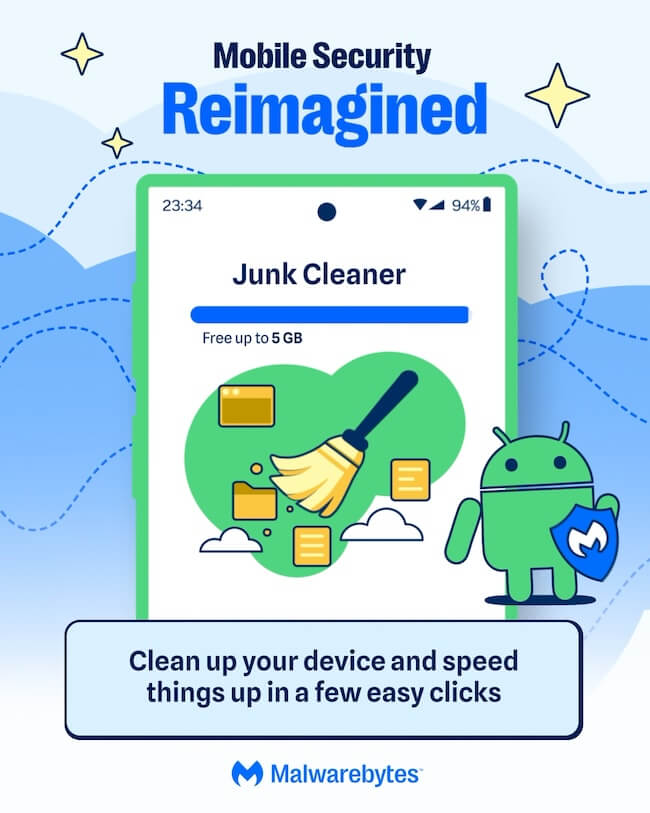
But you’re in luck, because we’ve got a free tool that scans your phone for leftover files, temporary data, outdated caches and helps you clean up all that junk.

Introducing our Junk Cleaner for Android.

The new, free feature in our app clears out your unused files, helps protect your privacy, frees up valuable storage space, and improves your device’s performance.

Start cleaning up your phone now. Download the app and clear out your junk.

google-play-badge

How to clean up your Android device

1. Open the Malwarebytes app on your Android device

2. On the Junk Cleaner card, tap Clean

If this is your first time using Junk Cleaner, you’ll need to grant permissions:

  • Allow file access: Tap Give permission, then turn on Allow Malwarebytes to manage all files.
  • Allow usage access: Tap Go to Settings. Under App usage data, tap Malwarebytes, then turn on Permit access to app usage data. If the toggle is grayed out, follow the on-screen instructions to enable access.

3. Return to the Junk Cleaner screen and tap Refresh

4. Tap Select all, then Clean all

Once the cleanup is complete, you’ll see an “All clean” screen showing how much storage space you freed up.

Prefer to remove files individually? Just select the files or folders you want to delete, then tap Clean.

Important: Once files are deleted with Junk Cleaner, they cannot be recovered using the Malwarebytes app.

Get started

Download Malwarebytes for Android and start cleaning up your device today.

Not a Malwarebytes user yet? No problem, it’s never too late to start. Whether you’re looking for yourself, your family, or a small business, we have a range of plans to choose from.


CNET Editors' Choice Award 2026

“One of the best cybersecurity suites on the planet.” 

According to CNET. Read their review


  •  

Catch spyware in the act with Windows Webcam Monitoring

You’re working hard late at night, replying to emails and planning the week ahead. Then suddenly, a PDF file requests access to your camera.  Why would a PDF need camera access? 

Cybercriminals often disguise spyware inside seemingly harmless files and programs. An unexpected request for access to your webcam can be a red flag that something is amiss. 

Malwarebytes Windows Webcam Monitoring alerts you if a program tries to access your camera, so you can allow trusted programs to continue or block suspicious ones instantly. 

Spyware doesn’t just steal passwords. Some malicious apps try to access webcams to secretly spy on victims or capture sensitive information. 

What does Windows Webcam Monitoring do?  

  • Sends you an instant alert when a program tries to access your webcam.  
  • Allows only the programs you trust to access your camera, blocking everything else. 
  • Lets you manage notification preferences in Privacy Controls. A dedicated “Webcam Monitoring” table shows recognized programs and gives you control over which apps trigger alerts, and which don’t. 

With the benefit of real-time alerts, Windows Webcam Monitoring gives you visibility into which programs are trying to access your devices. And when it’s something you don’t recognize, it may even help you stop spyware before it can spy on you. 

At Malwarebytes, we believe security shouldn’t be complicated. Windows Webcam Monitoring is another step toward giving you simple, proactive protection that works automatically, so you can stay focused on pretty much anything else.  

Ready to take control?

Update Malwarebytes for Windows, go to Privacy Controls and enable Webcam Monitoring.


Real-time protection. Zero effort. 


  •  

Why Malwarebytes blocks some Yahoo Mail redirects

Some Malwarebytes users have recently noticed frequent web protection alerts while reading email in Yahoo Mail’s web interface. These alerts are caused by background connections from the Yahoo Mail page to a set of third‑party domains that our products and other security tools currently classify as risky.

What we are seeing under the hood

When you open Yahoo Mail in a browser, the page loads various embedded components for navigation, features, and metrics. As part of this, the interface makes calls to domains such as cook.howduhtable.com and related subdomains, sometimes in the context of URLs that include /ybar/mail.yahoo.com/ and a long encoded parameter. That encoded string often resolves to a URL like:

https://gpt.mail.yahoo.net/sandbox?client=novation&version=0.1&haq=1&cache=1

This suggests the traffic is being routed through what appears to be a sandboxed web component that Yahoo can use for things like telemetry, testing infrastructure, or mail features. It may also be part of an advertising or tracking flow, but at this time we cannot say with certainty exactly what purpose Yahoo is using it for.

Regardless of intent, multiple security systems have observed these redirect domains and assigned them poor reputations. Characteristics include:

  • Frequently changing, opaque subdomains that do not resemble normal consumer‑facing Yahoo addresses
  • Use of encoded parameters and chained redirects that make it difficult for users, and sometimes defenders, to see the final destination at a glance
  • Existing detections and blocklists from other vendors that classify the infrastructure as suspicious or potentially malicious

Because of these signals, Malwarebytes Web Protection and Browser Guard have been blocking a growing list of related subdomains to protect users, which is why some people see repeated alerts while using Yahoo Mail.

What we are not saying

It is important to be clear about what we do and do not know.

We have not established that Yahoo Mail itself is compromised or that Yahoo is deliberately distributing malware through its mail platform. What we can say is that third‑party or internal components invoked from within the Yahoo Mail web interface are making connections through domains that behave very similarly to infrastructure commonly associated with malicious or deceptive advertising and tracking.

From a security standpoint, this creates unnecessary risk. Any mechanism that injects content or runs sandboxed components via opaque redirect chains could, if misused or subverted in the future, expose users to harmful content without them ever clicking a suspicious link.

Blocking these domains is a precautionary step in line with our normal protection standards.

Why Malwarebytes blocks these redirects

Our decision to block these connections is based on a combination of technical behavior and third‑party reputation data:

  • The redirects are triggered by embedded components in the Yahoo Mail interface, not by users intentionally browsing to those domains
  • The infrastructure relies on frequently changing, non‑descriptive domains and subdomains, a pattern we often see in malicious or evasive advertising and tracking systems
  • Multiple security vendors and automated reputation feeds already flag these domains as risky or malicious, and some have seen them associated with unwanted or harmful activity

Because of this, Malwarebytes products currently block connections to these third‑party domains when they are invoked as part of Yahoo Mail’s web experience. This does not mean that all of Yahoo Mail is considered malicious. It means we are specifically interrupting a narrow set of background calls that present elevated risk.

What this means for users

If you use Yahoo Mail in a browser with Malwarebytes enabled, you may see:

  • Web protection or MWAC alerts referencing domains like cook.howduhtable.com or similar names while you are reading or composing email
  • Multiple alerts in a short period, because the mail interface may retry or rotate through different subdomains or IP addresses in the same family

In most cases, your email content itself still loads, though certain embedded elements, metrics, or ad‑related content may fail to load or behave differently.

How to stay safe and reduce interruptions

You should not need to lower your protection to continue using Yahoo Mail. Here are some practical steps you can take:

  • Keep Malwarebytes protection enabled
    Leaving Web Protection and Browser Guard on ensures blocks remain in place if these redirects change behavior or begin serving harmful content in the future.
  • Avoid allowlisting the suspicious domains
    While it’s technically possible to add exclusions for individual domains, doing so would allow their traffic to load unfiltered in your browser. We don’t recommend this unless you fully understand and accept the risk.
  • Use private/incognito windows for Yahoo Mail
    Accessing Yahoo Mail in a private/incognito session can help reduce persistence of certain tracking and advertising data because the browser discards cookies and local storage when you close the window.
  • Clear cookies and site data periodically
    If you see repeated alerts, clearing Yahoo‑related cookies and cached data may reduce some of the underlying tracking behavior that triggers these redirects.
  • Consider fewer‑ads options
    Yahoo offers paid plans that reduce or remove ads, and users can also use reputable content‑blocking extensions alongside Malwarebytes to cut down on ad‑driven behavior in webmail interfaces.

Our ongoing monitoring

The domains and infrastructure involved in these redirects are operated outside Malwarebytes, and their configuration or behavior may change over time. We are actively monitoring telemetry, sandbox reports, and reputation data for these domains and related infrastructure, and we will adjust our detections if new information emerges.

Our priority is to keep users safe while being transparent about why protection events occur, especially in widely used services such as webmail. If we learn more about the exact role of this component within Yahoo Mail, or if Yahoo provides additional clarity, we will update this article accordingly.


Stop threats before they can do any harm.

Malwarebytes Browser Guard blocks phishing pages and malicious sites automatically. Free, one click to install. Add it to your browser →

  •  

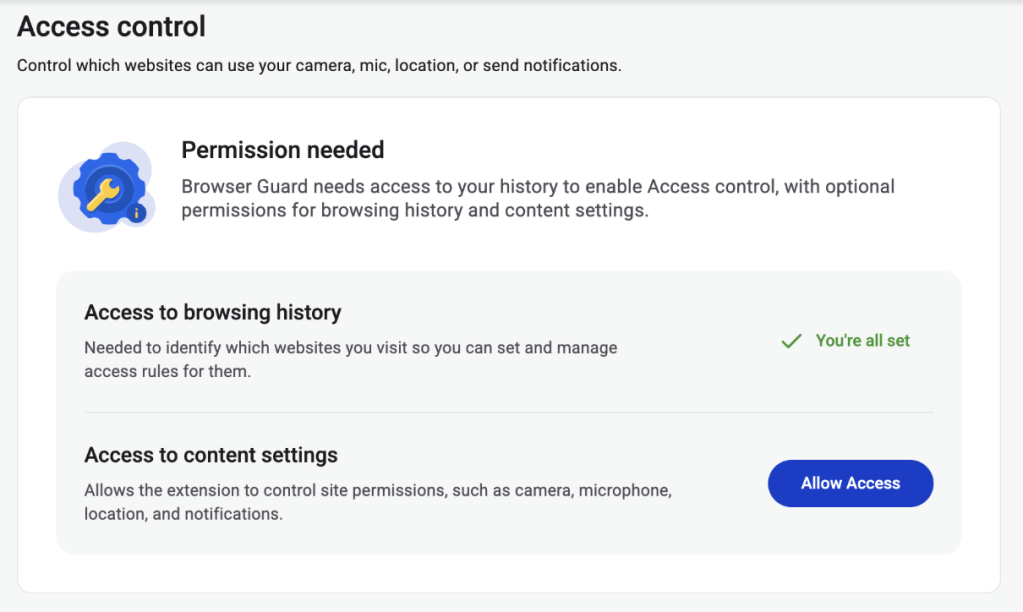
Browser Guard gets even better with Access Control 

Have you ever been on a website when a pop-up suddenly asked for access to your camera, microphone, location, or notifications? Whether you clicked “allow,” dismissed it, or just wondered why it appeared, those permission requests aren’t always harmless. Some sites can abuse those permissions.

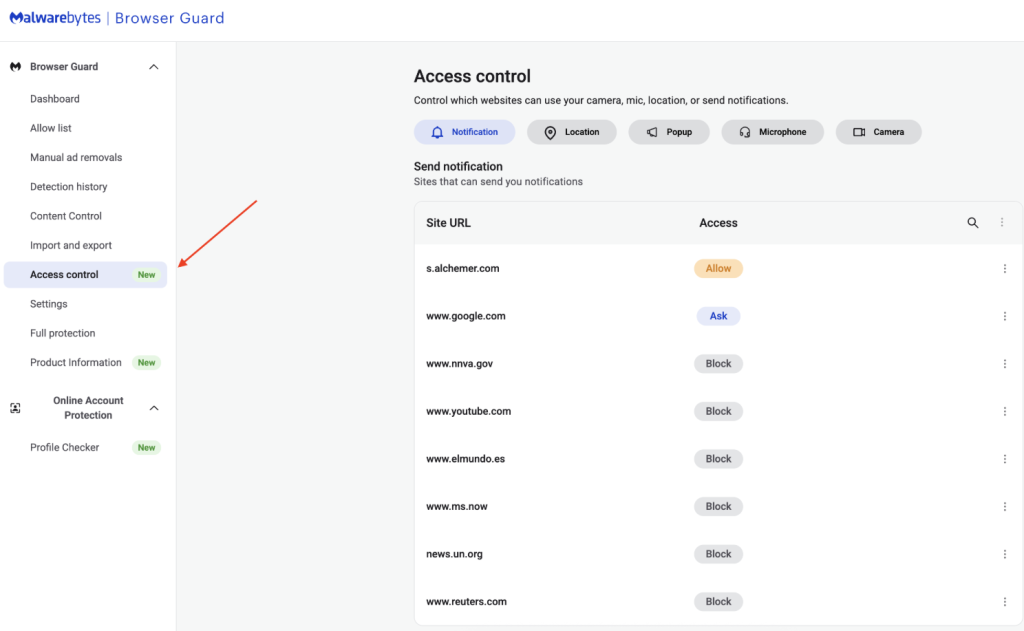
With Access Control, a new feature in Browser Guard, you decide exactly which websites can access your device and stop the rest. That means you choose which websites can: 

  • Use your camera
  • Use your microphone
  • Access your location
  • Send you notifications 

Further, not only can you control which websites have access to your devices, but you can also block websites or even require those specific sites to request permission every single time they try to gain access to your machines. You can always allow trusted sites to access your camera or location while blocking everything else.  

Access Control is now available for Malwarebytes subscribers using Chrome and Edge browsers on a Windows device. 

How to use Access Control 

We designed Access Control to be both powerful and simple because we know every moment you spend getting set up is another moment you’re left unprotected.  

How to use Access Control:  

  • Install/Open Browser Guard: Click the Malwarebytes icon in your browser’s header 
  • Access Dashboard: Click the Dashboard tab at the bottom of the extension panel. 
  • Navigate to Access Control: On the left sidebar of the web page, select Access Control. 
  • Manage Permissions: See visited websites, click “Allow” to enable or disable Malwarebytes’ ability to see visited sites.
  • Access Control requires some access to your browsing to protect you online
  • Access Control lets you choose individual sites to block and allow

This feature is rolling out in beta first, so you might see improvements and updates as we refine it. Currently, the feature works across Chrome and Edge, but will roll out to other browsers soon.  

Access Control is another step toward making privacy simple and accessible.  Not a subscriber yet? Check out  Malwarebytes’ plans today to unlock this feature and more. 


We don’t just report on threats—we remove them

Cybersecurity risks should never spread beyond a headline. Keep threats off your devices by downloading Malwarebytes today.

  •  

Connecting Threat Intelligence to Decision-Making: How Flashpoint Is Operationalizing Intelligence in 2026

Blogs

Blog

Connecting Threat Intelligence to Decision-Making: How Flashpoint Is Operationalizing Intelligence in 2026

At RSA Conference 2026, Flashpoint introduces new capabilities that enable security teams to move from visibility to defensible action by connecting adversary activity to business priorities, assets, and investigations.

SHARE THIS:
Default Author Image
March 23, 2026

Most organizations are not lacking visibility, but they are drowning in large volumes of information that are difficult to prioritize and even harder to tie back to clear action. In practice, this creates a familiar problem.

They can see what vulnerabilities exist.
They can track threat activity.
They can monitor alerts across their environment.

But the questions they struggle to answer are more important:

Which of these exposures actually matter?
What do we fix first — and why?
How does this activity translate to risk for the business?

As a result, teams fall back on patching cycles, compliance requirements, or best-effort prioritization and are left making decisions based on incomplete context.

This gap between data and decision-making has become one of the most persistent challenges in modern security operations.

At RSA Conference 2026, Flashpoint is sharing how we are addressing this gap directly — connecting adversary activity to assets, investigations, and defined business priorities so teams can make more consistent, defensible decisions.

“The industry has reached a tipping point where security teams are drowning in data that fails to align with their most important business requirements and decisions. Visibility alone is no longer a victory; it’s a baseline. By connecting underground adversary activity to an organization’s specific attack surface and strategic requirements, Flashpoint is raising the bar beyond passive observation. We are enabling defenders to stop asking ‘what do we own’ and start answering ‘what do we fix first, and why,’ turning raw data into an engine for risk reduction at speed.”

Josh Lefkowitz

What Flashpoint is Showcasing at RSA Conference 2026

Flashpoint is introducing a set of capabilities designed to connect threat intelligence directly to business risk, assets, and investigations:

  • Threat-informed External Attack Surface Management (EASM)
  • Business-Aligned Priority Intelligence Requirements (PIRs)
  • Managed Attribution browser for anonymous investigations

Together, these capabilities enable organizations to move beyond passive monitoring and toward intelligence-driven action.

What Is Threat-Informed External Attack Surface Management (EASM)

Most organizations maintain an inventory of their external assets, but prioritizing them is a persistent challenge. Traditional EASM tools identify what you own but often fail to answer the critical “so what?”. Without contextual risk, prioritization is often driven by static severity scores, patch cycles, or compliance requirements rather than real-world attacker behavior. As a result, teams are left managing stale data through manual CSV uploads and struggling to determine which exposures actually matter.

Flashpoint’s EASM module transforms this stream of exposure data into a prioritized action plan. It continuously discovers a customer’s external attack surface, including domains, subdomains, and IP addresses, and automatically maps this live inventory directly to Flashpoint’s industry-leading vulnerability intelligence.

This allows security teams to:

  • Maintain a Dynamic Inventory: Eliminate manual uploads and stale CMDB exports with an always-current map of internet-facing assets.
  • Contextualize Risk Immediately: Go beyond simple asset discovery by mapping the specific software running on each asset to known vulnerabilities, including pre-NVD findings.
  • Prioritize with Precision: Connect the asset to the actual risk, showing teams not just their external exposure, but where they are truly vulnerable and what needs to be fixed first.

By layering deep vulnerability intelligence onto live asset discovery, Flashpoint enables defenders to move from reactive analysis to proactive, intelligence-driven risk reduction.

Why Priority Intelligence Requirements (PIRs) Are Foundational

Many intelligence teams operate without a formal structure that defines what their work is intended to support.

In day-to-day operations, this results in:

  • Reactive investigation of incoming alerts
  • Reporting driven by the availability of information rather than the need
  • Difficulty demonstrating how intelligence outputs influence decisions

Priority Intelligence Requirements (PIRs) are designed to address this, but in many organizations, they are not integrated into operational workflows.

In May, Flashpoint is introducing in-platform Intelligence Requirements to formalize this structure and embed it directly into the way teams work.

Alerts, investigations, and reporting can be tied to defined requirements, allowing teams to:

  • Focus on activities that directly align with defined business risk priorities
  • Maintain consistency in what is tracked and reported
  • Provide a clearer justification for the intelligence work being done

This creates a more structured intelligence program. Instead of producing outputs based on what is observed, teams can align their work to defined objectives and decision-making needs.

Enabling Safe, Scalable Investigations with Managed Attribution

Accessing adversary-controlled environments such as forums, marketplaces, and encrypted platforms is a core part of many intelligence workflows.

However, doing so safely requires careful setup. Analysts typically need to:

  • Use isolated infrastructure
  • Manage attribution and identity exposure
  • Avoid introducing risk to internal systems

This creates operational overhead and can slow down or limit investigation.

The new anonymous browser capability within Flashpoint Managed Attribution is designed to address this by providing a non-persistent, isolated environment for research and immediate triage. This removes setup friction and allows analysts to move immediately from detection, to investigation, to deeper analysis in the same environment.

Analysts can:

  • Access underground communities
  • Open suspicious links or files
  • Engage with threat actors

Without exposing their identity or internal infrastructure.

By removing the need for manual setup, this allows analysts to move directly into investigation while maintaining operational security. 

See it at RSA Conference 2026

Security teams are being asked to do more than identify threats. They are expected to prioritize, act decisively, and justify those decisions.

That becomes difficult when the inputs — vulnerabilities, alerts, threat reporting — are not clearly connected to each other or to the business.

​​Intelligence needs to be tied to assets, aligned to defined priorities, and usable in day-to-day workflows. That’s the focus of Flashpoint’s updates this year.

At RSA Conference 2026, we’ll be walking through how this works in practice—how teams are connecting adversary activity to what they own, what matters, and what they do next. Flashpoint will be sharing more on these new innovations, including threat-informed EASM, in-platform Intelligence Requirements, and the Managed Attribution browser.If you’re attending, stop by Booth S-3341 to see how teams are moving from visibility to action. For a personalized demo, schedule a meeting with us.

Frequently Asked Questions

What is Flashpoint showcasing at RSA 2026? 

Flashpoint is showcasing how its primary-source threat data connects directly to business assets and priorities. At the booth, attendees can get a sneak peek of the upcoming in-platform Priority Intelligence Requirements (PIRs), which formalize how security teams tie investigations to business risk. Flashpoint will also be discussing the upcoming general availability of threat-informed EASM for asset discovery and risk prioritization, alongside the Flashpoint Managed Attribution browser, designed for secure underground research.

What is Flashpoint Threat-Informed EASM? 

Flashpoint External Attack Surface Management (EASM) goes beyond simple asset discovery by automatically mapping your external footprint to our industry-leading vulnerability intelligence. This allows teams to prioritize remediation by identifying which software versions are actually running on key assets, flagging critical risks often missed by public databases.

How do Flashpoint Priority Intelligence Requirements (PIRs) help security teams? 

Flashpoint PIRs provide a formal in-platform structure that ties security alerts and investigations to specific business risks. This helps teams move away from reactive “activity-based” work and toward “decision-based” intelligence that is defensible to executive stakeholders.

What are the benefits of the Flashpoint Managed Attribution browser? 

The Flashpoint Managed Attribution browser allows threat analysts to safely research the web using a disposable, anonymous environment. This prevents the analyst’s identity from being exposed and protects the corporate network from malware while conducting underground research.

How does Flashpoint’s new offering support a Continuous Threat Exposure Management (CTEM) framework?

Flashpoint facilitates the CTEM lifecycle by providing the primary source data necessary to move beyond traditional point-in-time scanning. EASM enables organizations to start focusing on the specific vulnerable software and high-risk exposures that threat actors are actively targeting.

Begin your free trial today.

The post Connecting Threat Intelligence to Decision-Making: How Flashpoint Is Operationalizing Intelligence in 2026 appeared first on Flashpoint.

  •  

Windows File Shredder: When deleting a file isn’t enough

Most of us think deleting a file means it’s gone for good. But “delete” on a Windows device often just means “out of sight,” not necessarily “out of reach.”

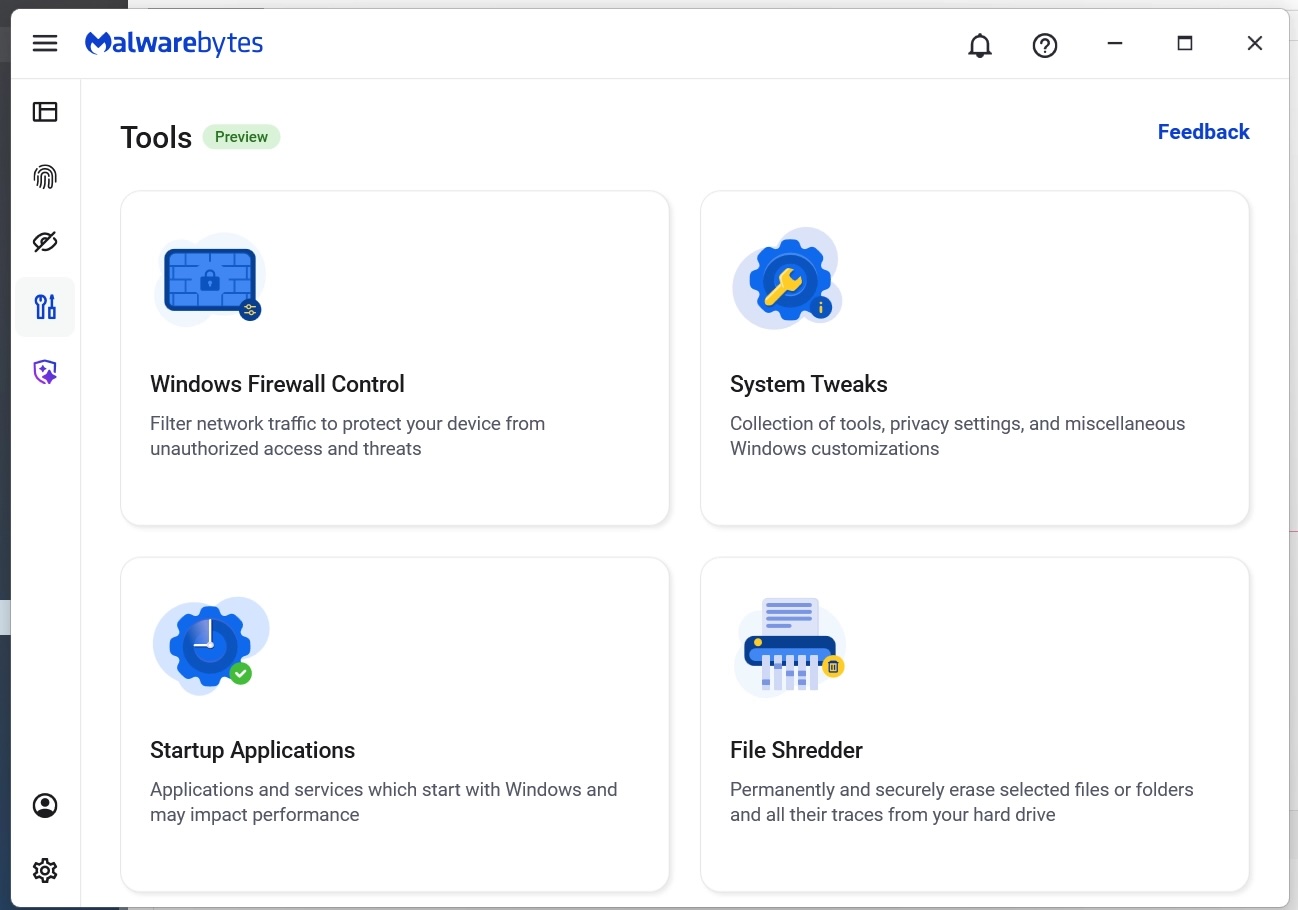
That’s where File Shredder, a new feature within Malwarebytes Tools for Windows, comes in. File Shredder lets you securely delete files from your hard drive or USB drive, so the files are not just removed—but completely unrecoverable, even with specialized recovery software.

What File Shredder does differently

When you delete a file by placing it in your Recycle Bin and emptying the contents, your computer typically removes the reference to it—but the data itself can remain on the drive until it’s overwritten. That leftover data can sometimes be recovered using basic digital tools, some of which can even be downloaded for free online. These data traces pose a problem if the file you want to delete includes personal, financial, or other sensitive information, like tax documents, scanned IDs, contracts, or anything else you would like to remain private forever.

File Shredder goes beyond standard deletion by instead permanently overwriting the file data, ensuring it can’t be reconstructed or recovered. Once a file is shredded, it’s gone for good—no undo, no recovery, no second chances.

That makes File Shredder especially useful when:

  • You’re cleaning up sensitive files before selling or donating a device
  • You need to securely remove files from a USB drive
  • You’re minimizing digital clutter without leaving data behind
  • You want peace of mind that private files stay private

How to use File Shredder

File Shredder is designed to be powerful without being complicated.

To use File Shredder:

  • Open the Malwarebytes app and select the “Tools” icon from the lefthand menu (the screwdriver and wrench icon)
  • From this menu, find and click on “File Shredder”
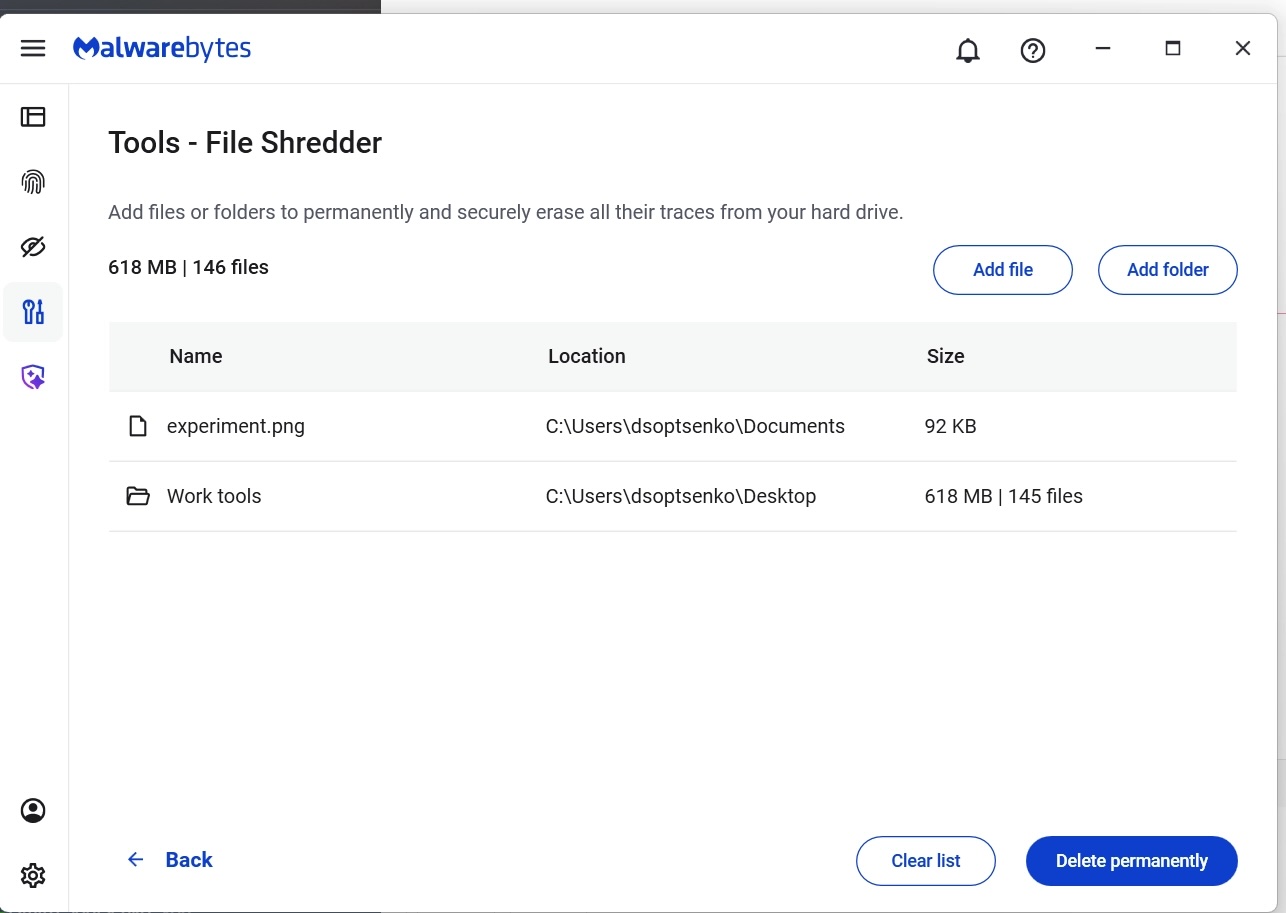
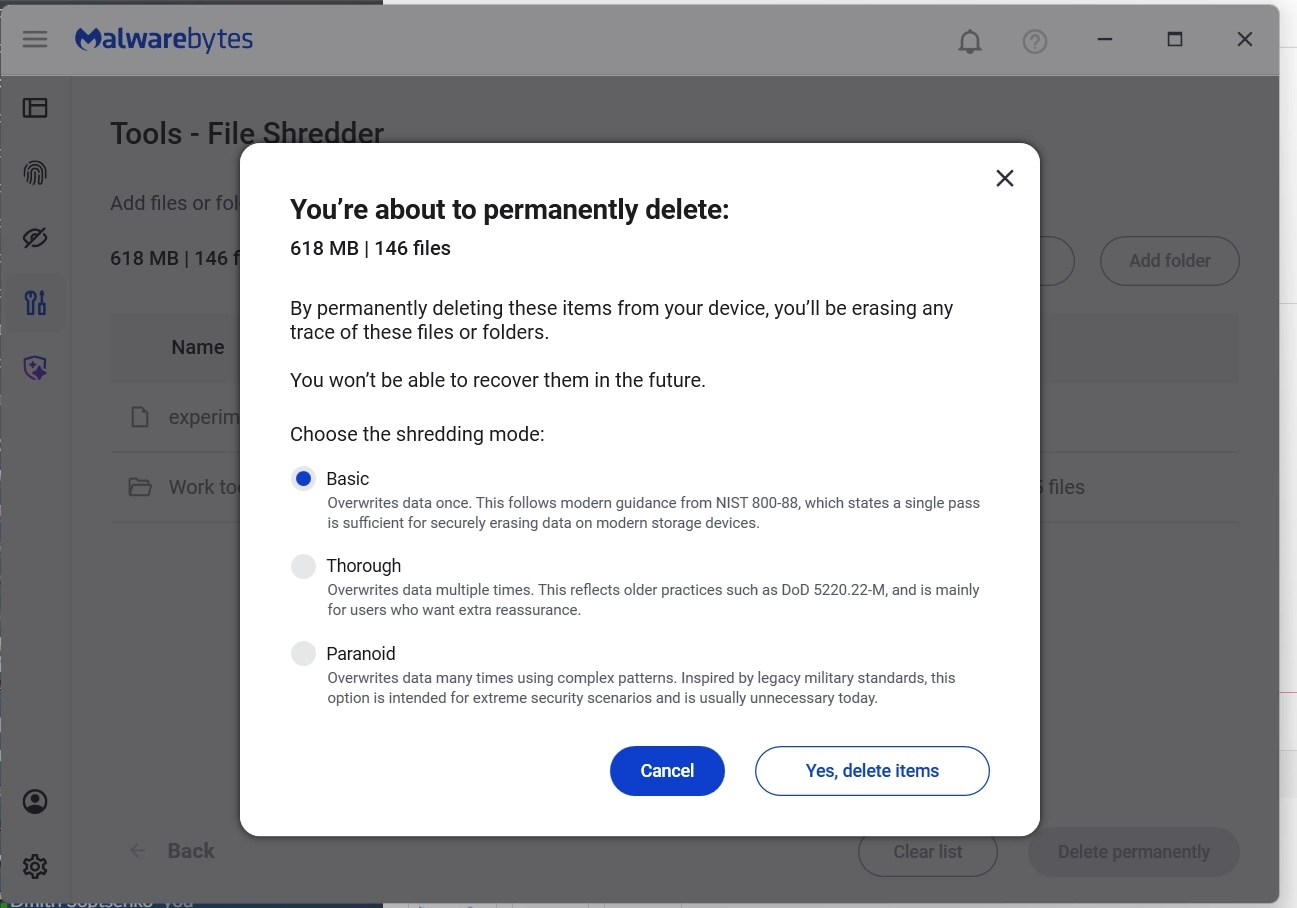
  • Once here, you can manually add files or folders to the list and then click on the button “Delete permanently”
  • You will be asked to confirm your request before File Shredder deletes the files
  • The Malwarebytes Tools screen
  • Manually select files and folders for deletion
  • Confirm your deletion requests
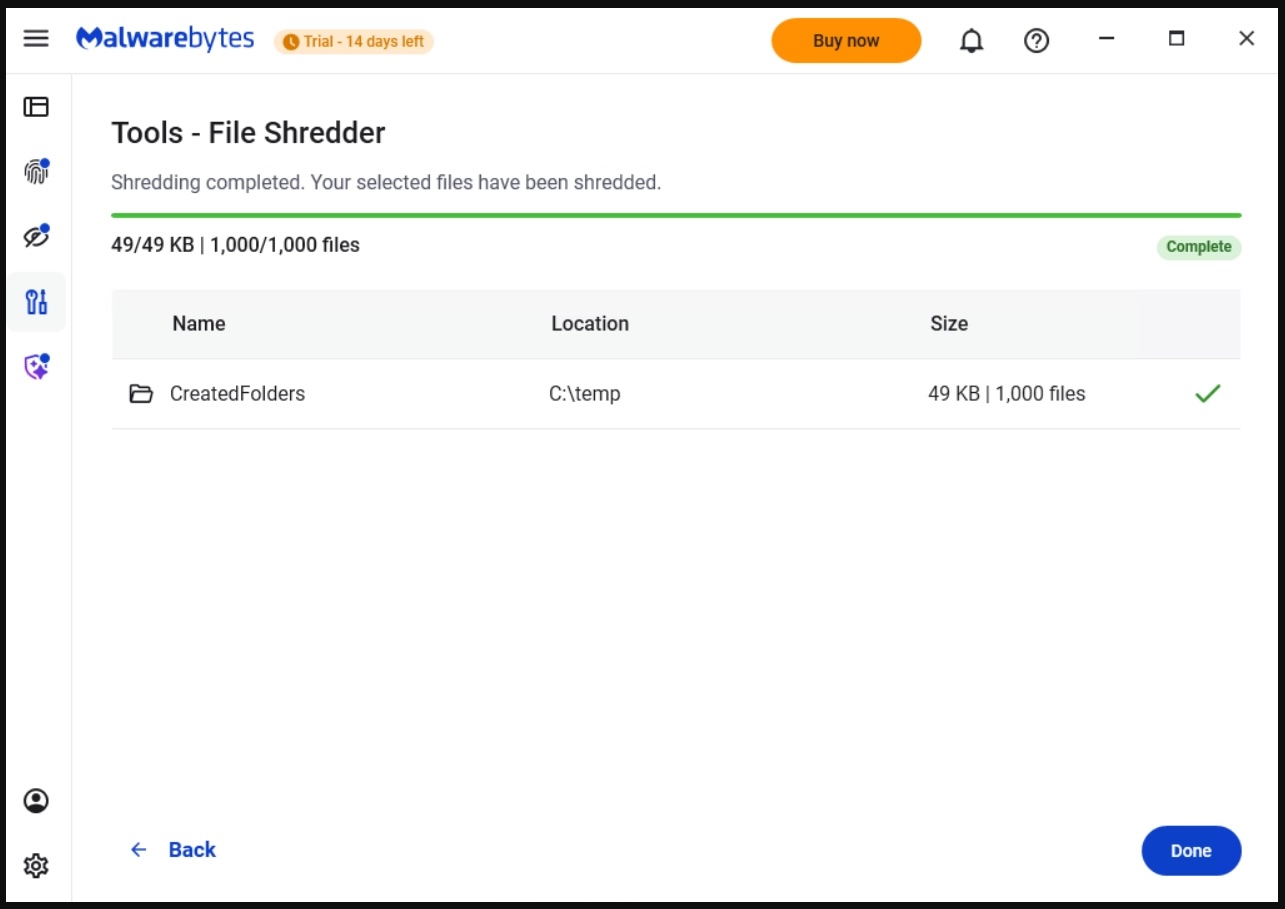
  • Done!

After your files are deleted by File Shredder you can move on, confident that the data can’t be accessed again.

Protection means your data is in your control

Cybersecurity isn’t just about blocking threats—it’s also about giving you control over your own data. File Shredder provides a way to do exactly that, helping you close the door on files that you no longer want on your devices.

Because when you’re done with a file, it should really be done.


We don’t just report on threats—we remove them

Cybersecurity risks should never spread beyond a headline. Keep threats off your devices by downloading Malwarebytes today.

  •  

Chrome “preloading” could be leaking your data and causing problems in Browser Guard

This article explains why Chrome’s “preloading” feature can cause scary-looking blocks in Malwarebytes Browser Guard and how to turn it off.

Modern browsers want to provide content instantly. To do that, Chrome includes a feature called page preloading. When this is enabled, Chrome doesn’t just wait for you to click a link. It guesses what you’re likely to click next and starts loading those pages in the background—before you decide whether to visit them.

That guesswork happens in several places. When you type a search into the address bar, Chrome may start preloading one or more of the top search results so that, if you click them, they open almost immediately. It can also preload pages that are linked from the site you’re currently on, based on Google’s prediction that they’re “likely next steps.” All of this happens quietly, without any extra tabs opening, and often without any obvious sign that more pages are being fetched.​

From a performance point of view, that’s clever. From a privacy and security point of view, it’s more complicated.

Those preloaded pages can run code, drop cookies, and contact servers, even if you never actually visit them in the traditional sense. In other words, your browser can talk to a site you didn’t consciously choose to open.​

Malwarebytes Browser Guard inspects web traffic and blocks connections to domains it considers malicious or suspicious. So, if Chrome decides to preload a search result that leads to a site on our blocklist, Browser Guard will still do its job and stop that background connection. The result can be confusing: You see a warning page (called a block page) for a site you don’t recognize and are sure you never clicked.

Nothing unusual is happening there, and it does not mean your browser is “clicking links by itself.” It simply means Chrome’s preloading feature made a behind-the-scenes request, and Browser Guard intercepted it as designed. Other privacy tools take a similar approach. Some popular content blockers disable preloading by default because it leaks more data and can contact unwanted sites.

For now, the simplest way to stop these unexpected block pages is to turn off preloading in Chrome’s settings, which prevents those speculative background requests.

How to manage Chrome’s preloading setting

We recommend turning off page preloading in Chrome to protect your browsing privacy and to stop seeing unexpected block pages when searching the web. If you don’t want to turn off page preloading, you can try using a different browser and repeating your search.

To turn off page preloading:

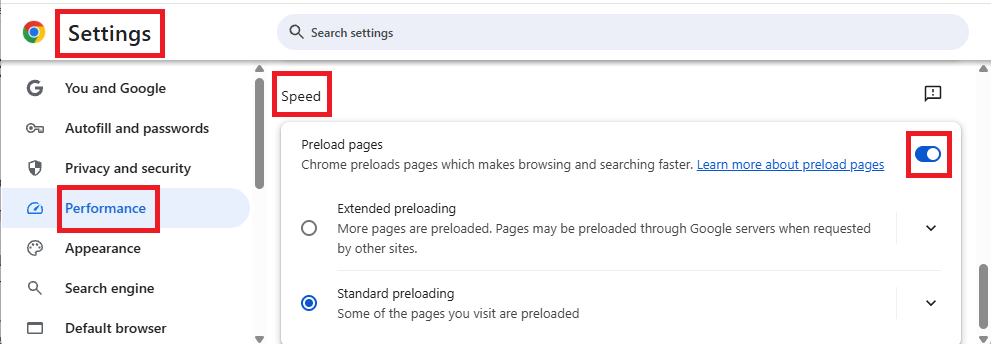
  1. In your browser search bar, enter: chrome://settings
  2. In the left sidebar, click Performance.
  3. Scroll down to Speed, then toggle Preload pages off.

How to turn preload pages on and off

We don’t just report on data privacy—we help you remove your personal information

Cybersecurity risks should never spread beyond a headline. With Malwarebytes Personal Data Remover, you can scan to find out which sites are exposing your personal information, and then delete that sensitive data from the internet.

  •  

Scam Guard for desktop: A second set of eyes for suspicious moments 

Scams aren’t so obvious anymore. They’re well-written, have working grammar, and can lead victims to very convincing branded webpages. Scammers increasingly use AI tools to clone sites and create highly sophisticated scams at scale, so don’t expect to rely on spotting obvious typos anymore.

That’s why Scam Guard, Malwarebytes’ free, AI-powered scam detection assistant, is now available on Windows and Mac. Previously mobile-only, Scam Guard helps you quickly figure out whether something you’re looking at is risky, all before you click, reply, or share. 

When something feels off but you’re not sure what

Scams show up everywhere: emails, texts, pop-ups, messages, and websites that look legitimate. But when you’re moving fast, it’s easy to slip up. 

Scam Guard is designed for exactly those moments. If you’re unsure about a message or link, you can ask Scam Guard to take a look. It uses AI to analyze the content and give you a clear, fast assessment so you can decide what to do next with more confidence. 

How Scam Guard helps 

Scam Guard provides a quick reality check just when you need it: 

  • Real-time threat intelligence: An AI-powered chat companion backed by decades of Malwarebytes threat intelligence and cybersecurity expertise. Get instant verdicts you can trust, plus clear next steps.
  • Comprehensive scam detection: It flags suspicious messages and links, spots common scam tactics, and explains why something is risky. It covers romance, phishing, financial, text, robocall, and shipping scams, and more.
  • Built for where scams start: Works right on your desktop, where many scams begin.
  • 24/7 support: Available around the clock, so you can get help anytime you need it.

Stop wondering to yourself “Is this legit?” With Scam Guard, you get an answer you can trust.  

Now on desktop, right where scams happen 

Many scams target users while they’re on their computers—checking email, browsing the web, or managing accounts. Bringing Scam Guard to Windows and Mac helps where it’s most useful. 

Whether you’re reviewing an unexpected message, a pop-up that feels urgent, or a deal that sounds a little too good, Scam Guard gives you a smarter way to pause and check before reacting.  Here’s how to share a scam with Scam Guard on your computer.

Extra protection, without extra stress 

Staying safe online shouldn’t mean becoming suspicious of everything. It should mean having the right tools when something doesn’t add up. Scam Guard is there to help you slow down, spot warning signs, and avoid costly mistakes. It makes it easier to protect yourself from scams.


We don’t just report on scams—we help detect them

Cybersecurity risks should never spread beyond a headline. If something looks dodgy to you, check if it’s a scam using Malwarebytes Scam Guard. Submit a screenshot, paste suspicious content, or share a link, text or phone number, and we’ll tell you if it’s a scam or legit. Available with Malwarebytes Premium Security for all your devices, and in the Malwarebytes app for iOS and Android.

  •  

Malwarebytes earns PCMag Best Tech Brand spot, scores 100% with MRG Effitas 

Malwarebytes is on a roll.  Recently named one of PCMag’s “Best Tech Brands for 2026,” Malwarebytes also scored 100% on the first-ever MRG Effitas consumer security product test, cementing the fact that we are loved by users and trusted by experts.  

But don’t take our word for it.

As PCMag Principal Writer Neil J. Rubenking said:

“If your antivirus fails, and it don’t look good, who ya gonna call? The answer: Malwarebytes. Even tech support agents from competitors have instructed us to use it.”

PCMag

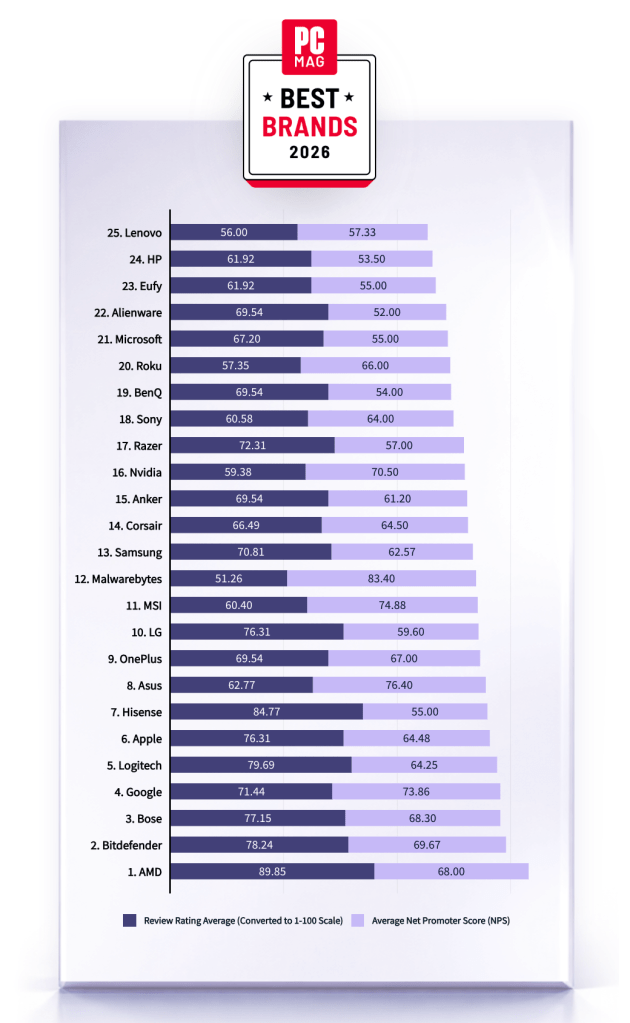
Malwarebytes has been named one of PCMag’s Best Tech Brands for 2026. Coming in at #12, Malwarebytes makes the list with the highest Net Promoter Score (NPS) of all the brands in the list (likelihood to recommend by users).

With this ranking, Malwarebytes made its third appearance as a PCMag Best Tech Brand! We’ve also achieved the year’s highest average Net Promoter Score, at 83.40. (Last year, we had the second-highest NPS, after only Toyota).

Best Brands 2026 from PC Mag

But NPS alone can’t put us on the list—excellent reviews are needed, too. PCMag’s Rubenking found plenty to be happy about in his assessments of our products in 2025. For example, Malwarebytes Premium adds real-time multi-layered detection that eradicates most malware to the stellar stopping power you get on demand in the free edition.

MRG Effitas

Malwarebytes has aced the first-ever MRG Effitas Consumer Assessment and Certification, which evaluated eight security applications to determine their capabilities in stopping malware, phishing, and other online threats. We detected and stopped all in-the-wild malware infections and phishing samples while also generating zero false positives.

We’re beyond excited to have reached a 100% detection rate for in-the-wild malware as well as a 100% rate for all phishing samples with zero false positives. 

The testing criteria is designed to determine how well a product works to do what it promises based on what MRG Effitas refers to as “metrics that matter.” We understand that the question isn’t if a system will encounter malware, but when.

Malwarebytes is proud to be recognized for its work in protecting people against everyday threats online.


We don’t just report on threats—we remove them

Cybersecurity risks should never spread beyond a headline. Keep threats off your devices by downloading Malwarebytes today.

  •  

Scam-checking just got easier: Malwarebytes is now in ChatGPT 

If you’ve ever stared at a suspicious text, email, or link and thought “Is this a scam… or am I overthinking it?” Well, you’re not alone. 

Scams are getting harder to spot, and even savvy internet users get caught off guard. That’s why Malwarebytes is the first cybersecurity provider available directly inside ChatGPT, bringing trusted threat intelligence to millions of people right where these questions happen. 

Simply ask: “Malwarebytes, is this a scam?” and you’ll get a clear, informed answer—super fast. 

How to access 

To access Malwarebytes inside ChatGPT:

  • Sign in to ChatGPT  
  • Go to Apps  
  • Search for Malwarebytes and press Connect  
  • From then on, you can “@Malwarebytes” to check if a text message, DM, email, or other  content seems malicious.  

Cybersecurity help, right when and where you need it 

Malwarebytes in ChatGPT lets you tap into our cybersecurity expertise without ever leaving the conversation. Whether something feels off or you want a second opinion, you can get trusted guidance in no time at all. 

Here’s what you can do: 

Spot scams faster 

Paste in a suspicious text message, email, or DM and get: 

  • A clear, point-by-point breakdown of phishing or any known red flags 
  • An explanation of why something looks risky 
  • Practical next steps to help you stay safe 

You won’t get any jargon or guessing from us. What you will get is 100% peace of mind. 

Check links, domains, and phone numbers 

Not sure if a URL, website, or phone number is legit? Ask for a risk assessment informed by Malwarebytes threat intelligence, including: 

  • Signs of suspicious activity 
  • Whether the link or sender has been associated with scams 
  • If a domain is newly registered, follows redirects, or other potentially suspicious elements 
  • What to do next—block it, ignore it, or proceed with caution 

Powered by real threat intelligence 

The verdicts you get aren’t based on vibes or generic advice. They’re powered by Malwarebytes’ continuously updated threat intelligence—the same real-world data that helps protect millions of devices and people worldwide every day. 

If you spot something suspicious, you can submit it directly to Malwarebytes through ChatGPT. Those reports help strengthen threat intelligence, making the internet safer not just for you, but for everyone.

  • Link reputation scanner: Checks URLs against threat intelligence databases, detects newly registered domains (<30 days), and follows redirects.
  • Phone number reputation check: Validates phone numbers against scam/spam databases, including carrier and location details.  
  • Email address reputation check: Analyzes email domains for phishing & other malicious activity.  
  • WHOIS domain lookup: Retrieves registration data such as registrar, creation and expiration dates, and abuse of contacts.  
  • Verify domain legitimacy: Look up domain registration details to identify newly created or suspicious websites commonly used in phishing attacks.  
  • Get geographic context: Receive warnings when phone numbers originate from unexpected regions, a common indicator of international scam operations. 

Available now 

Malwarebytes in ChatGPT is available wherever ChatGPT apps are available.

To get started, just ask ChatGPT: 

“Malwarebytes, is this a scam?” 

For deeper insights, proactive protection, and human support, download the Malwarebytes app—our security solutions are designed to stop threats before they reach you, and the damage is done.

  •  

Celebrating reviews and recognitions for Malwarebytes in 2025

Independent recognition matters in cybersecurity, and it matters a lot to us. It shows how security products perform when they’re tested against in-the-wild threats, using lab environments designed to reflect what people actually face in the real world.

In 2025, Malwarebytes earned awards and recognition from a steady stream of third-party testing labs and industry groups. Here’s what those tests looked like and what they found.  

AVLab Cybersecurity Foundation: Real-world malware, real results  

Malwarebytes earned another Advanced In-The-Wild badge from AVLab Cybersecurity Foundation in 2025, continuing a run of accolades.

In November, AVLab Cybersecurity Foundation tested 244 real-world malware samples across 14 cybersecurity products. Malwarebytes Premium Security detected every single one. On top of that, it removed threats with an average remediation time of 2.18 seconds—nearly 12 seconds faster than the industry average.  

That result also marked our third Excellent badge in 2025, following earlier tests in July and September.

Earlier in the year, Malwarebytes Premium Security was also named Product of the Year for the third consecutive year, after it blocked 100% of in-the-wild malware samples. 

MRG Effitas: Consistent Android protection, proven over time

For the seventh consecutive time, Malwarebytes earned MRG Effitas’ Android 360° Certificate in November, one of the toughest independent tests in mobile security, underscoring the strength and reliability of Malwarebytes Mobile Security

MRG Effitas conducted in-depth testing of Android antivirus apps using real-world scenarios, combining in-the-wild malware with benign samples to assess detection gaps and weaknesses. 

Our mobile protection received the highest marks, achieving a near-perfect detection rate in MRG Effitas’ rigorous lab testing, reaffirming what our customers already know: Malwarebytes stops threats before they can cause harm. 

PCMag Readers’ Choice Awards: Multiple category wins 

Not all validation comes from labs. In PCMag’s 2025 Readers’ Choice Awards, Malwarebytes topped three award categories based on reader feedback: Best PC Security Suite, Best Android Antivirus, and Best iOS/iPadOS Antivirus.

A Digital Trends 2025 Recommended Product

Malwarebytes for Windows earned a Digital Trends 2025 Recommended Product designation, with reviewers highlighting its ease of use, fast and effective customer support, and strong value for money. 

CNET: Best Malware Removal Service 2025 

CNET named Malwarebytes the Best Malware Removal Service 2025 after testing setup, features, design, and performance. The review highlighted standout capabilities, including top-tier malware removal and comprehensive Browser Guard web protection. 

AV Comparatives Stalkerware Test: 100% detection rate

In collaboration with the Electronic Frontier Foundation (EFF), AV-Comparatives tested 13 Android security solutions against 17 stalkerware-type apps—software often used for covert surveillance and abuse.

Only a few products handled detection and alerting responsibly. Malwarebytes was the only solution to achieve a 100% detection rate in the September 2025 test.

What we learned from a year of testing

All these results highlight our mission to reimagine security and protect people and data across all devices and platforms. 

Recent innovations like Malwarebytes Scam Guard for Mobile and Windows Tools for PC set new standards for privacy and affordable protection, enhanced by AI-powered features like Trusted Advisor, your built-in personal digital health hub available on all platforms.

We’re grateful to the independent organizations that continue to test our products and to the users who trust Malwarebytes every day.


We don’t just report on threats—we help safeguard your entire digital identity

Cybersecurity risks should never spread beyond a headline. Protect your, and your family’s, personal information by using identity protection.

  •  

G2 Recognizes Flashpoint as High-Performing ‘Leader’ in Enterprise Threat Intelligence

Blogs

Blog

G2 Recognizes Flashpoint as High-Performing ‘Leader’ in Enterprise Threat Intelligence

Breaking down Flashpoint’s rankings in G2’s 2023 fall reports, including customer testimonials

SHARE THIS:
Default Author Image
September 13, 2023

Flashpoint has earned multiple trust badges from G2’s Fall 2023 Reports, affirming our unwavering commitment to delivering timely, contextual intelligence to our clients so they can take rapid, decisive action to stop threats and reduce risk. Here are some highlights from G2’s reports.

‘Leader’ and ‘High Performer’

G2 awarded Flashpoint a “Leader Badge”—ranking us #1 in the Enterprise Americas Regional Grid for Threat Intelligence. Specifically, customers highlighted the value of Flashpoint’s finished intelligence reports, with 98 percent of customers emphasizing its utility.

‘The Platform itself is a great tool’

—CTI analyst on Ignite

94% ‘Likely to Recommend’

In G2’s Enterprise Relationship Index for Threat Intelligence, Flashpoint has the highest score for “Most Likely to Recommend,” with 94 percent of surveyed customers endorsing Flashpoint as an intelligence partner. 

Flashpoint also exceeded the index’s performance averages in all categories, including “Ease of Doing Business With” and “Quality of Support.” 

‘Flashpoint has been a great partner of ours for many years, and the trust we’ve built with their team of managers and analysts is excellent.

—Fraud Intelligence Lead, Fortune 500 Technology Company

Related reading: Flashpoint a Strong Performer in External Threat Intelligence Forrester Wave

Leader in Dark Web Monitoring

In G2’s Americas Regional Grid® Report, 99 percent of surveyed customers highlighted Flashpoint’s dark web monitoring capabilities.

Additionally, 90 percent of customers emphasized Flashpoint’s ticketing and RFI services, showcasing our commitment to the intersections between data, intelligence, and professional services support. 

‘Flashpoint offers the greatest amount of data regarding the criminal underground in relation to their peers. The data is well sorted, well presented, and easy to search.

— SVP, DFIR Investigations, Public Sector

‘An Excellent Intelligence Tool’

Hear from our customers by reading Flashpoint review on G2, or sign up for a free trial today to see how “great” threat intelligence can help your organization reduce risk and mitigate threats.

Request a demo today.

  •  

The Flashpoint Firehose: 5 Questions With Michael Raypold, VP of Engineering

Blogs

Blog

The Flashpoint Firehose: 5 Questions With Michael Raypold, VP of Engineering

We sit down for a Q&A with Michael Raypold to discuss the launch of the Flashpoint Firehose, our new data-as-a-service solution

SHARE THIS:
Default Author Image
July 31, 2023
Firehose QA Michael Raypold

1. Tell me about the Flashpoint Firehose. What needs and challenges was it built to address?

Michael Raypold: The Flashpoint Firehose is a data-as-a-service solution that delivers a constant stream of data from various sources, ranging from social media platforms to messaging apps and illicit communities. It also includes numerous sources from APAC, Europe, the Middle East, and Africa—all vital data sources that are often underrepresented among other providers.

The Firehose delivers access to all ingested data from Flashpoint’s unique collections that data companies, federal systems integrators (FSIs), and large-scale national security teams need in order to build high-quality data and AI tools to enhance global situational awareness, generate timely intelligence, and advance national security initiatives.

With Firehose access, customers can pull key segments of Flashpoint data into their own infrastructure without needing to query our APIs. This unlocks the ability to train large language models or build machine learning models, enabling product development. This is especially important for many of our OEM partners.

2. Why is Flashpoint especially positioned to offer this type of solution?

Threat actors aren’t constrained by borders, and a diverse data set is imperative for organizations working in the cyber and physical security domains. Because of this, Flashpoint has dedicated the last 13 years to building out its collections capabilities and in-house analyst team to deliver actionable intelligence from a wide range of publicly and commercially available information data sources. As a result, Flashpoint has become the industry leader in delivering solutions for cyber threat intelligence, vulnerability management, physical security intelligence, and national security teams.

3. What are some of the unique capabilities of the Firehose?

The Firehose excels in the following primary categories:

  1. Speed: Once the data is ingested by the Flashpoint Firehose, it is delivered to the customer in real-time or near-real-time. This is especially important for customers building products where speed is paramount, such as an alerting dashboard.
  1. Data: Flashpoint focuses heavily on the variety, breadth, and depth of its data, which is incredibly important for our customers who require comprehensive coverage of the information landscape.
  1. Flexibility: The Firehose is designed to enable users to manipulate the data according to their specific needs.

To ease adoption, Flashpoint has also enriched all of the Firehose content with geospatial inference and language detection, making it easier for users to draw actionable insights and pivot off of Flashpoint’s unique selectors.

4. Tell me more about the ML enrichments.

Once collected and structured, the data undergoes enrichment through named entity recognition and machine learning, providing geospatial insight and language detection, offering customers additional ways to filter and query the data while delivering immediate value. This data can then integrate seamlessly into custom products and be indexed according to the customer’s requirements.

5. As an engineer yourself, what excites you the most about the Firehose?

When building high-quality intelligence products, engineers are often limited by the breadth, depth, and availability of the data they can query or make actionable for their customers. This problem is exacerbated when they have to make API queries to third-party providers. 

The ability to ingest Flashpoint data in real time and have end-to-end control over the storage, enrichment, and querying of that data enables really exciting product opportunities. The Firehose allows engineers to ingest data into their own infrastructure and enable a crisper product experience.

The ability to build a notification or alerting pipeline off of a data stream is one possibility that’s unlocked with a Firehose versus a REST API. Others will find that the Firehose is uniquely positioned for anomaly detection, dashboarding, data visualization, training large language models, or extending internal and proprietary data sets to craft a truly differentiated experience.

We’re innovating entirely with our partners in mind, to fulfill their data requirements. The Flashpoint Firehose was built to serve as a force multiplier for their data-driven products, enabling them to realize their visions and value faster.

Learn more about the Flashpoint Firehose here.

Request a demo today.

  •  

Lessons From Clop: Combating Ransomware and Cyber Extortion Events

Blogs

Blog

Lessons From Clop: Combating Ransomware and Cyber Extortion Events

Recent attacks from Clop emphasize the importance of implementing an organization-wide ransomware and cyber extortion strategy, from preparedness to detection and isolation

Share:
Default Author Image
June 27, 2023

Lessons from Clop

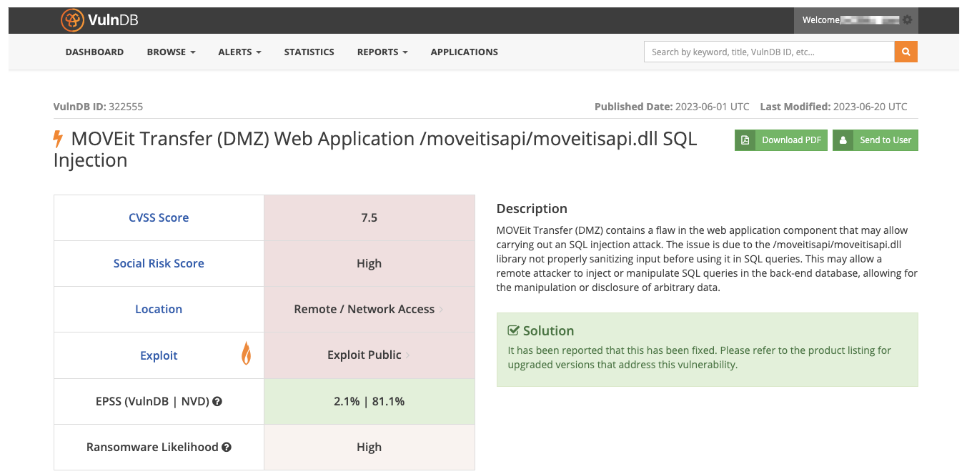
It’s been one month since the Clop ransomware group began exploiting the MOVEit vulnerability (CVE-2023-34362 (VulnDB ID: 322555) to claim nearly 100 victims across the globe, many of which have come public. This attack comes on the heels of Clop leveraging the GoAnywhere MFT vulnerability (CVE-2023-0669), which led them to claim they’d illegally obtained information for more than 100 companies.

When a ransomware or cyber extortion event occurs, security teams are racing against the clock:

  • What do we know about the cybercriminal group that’s claiming responsibility for an attack or double extortion?
  • Is our organization affected? If so, what is the extent of the breach and its impact on our systems, networks, people, and data?
  • How do we respond to and mitigate the situation?
Flashpoint Ignite’s finished intelligence is readily available to all teams to help mitigate risk across the entire organization.

These questions are of vital importance to organizations across the public and private sectors. And the recent Clop attacks—which affected organizations across the globe in nearly every vertical—are yet another example of why it’s vital to have proactive defense measures in place.

Targeting upstream data providers

First, it’s vital to have a deep understanding of the adversary, such as a RaaS (ransomware-as-a-service) group like Clop. Here are five ways that ransomware groups like Clop attack targets, as well as the threat vectors they seen to exploit:

  1. Supply chain attacks. As illustrated through MOVEit, Clop often targets upstream software vendors or service providers so that it can cast a wide net. A number of the known Clop victims are companies who were attacked via a third-party vendor. Attackers like Clop may exploit vulnerabilities in the communication or data exchange between these companies, or compromise the software or hardware components supplied by third-party providers to inject malicious code or backdoors.
  2. Cloud Service Providers (CSP). If a cloud service provider experiences a security breach, it can potentially impact third parties that utilize their cloud services in several ways. Clop successfully breached a cloud service provider, giving them potential access to highly sensitive information.
  3. Managed Service Providers (MSPs), who inherently have access to clients’ IT infrastructure, are also a lucrative target for ransomware groups like Clop as they service a multitude of businesses. 
  4. Software vulnerabilities are common, as ransomware groups often exploit known vulnerabilities in widely used software. Here, Clop exploited MOVEit, a file transfer software used by organizations globally, to install a malicious web shell called LEMURLOOT.
  5. Zero-days. Ransomware groups may also exploit zero-day vulnerabilities, or previously unknown security flaws, in software leveraged by a wide range of organizations.  

Putting vulnerabilities into context

VulnDB’s vulnerability intelligence record highlighting the severity and importance of the MOVEit vulnerability.

CLOP’s use of the MOVEit and GoAnywhere MFT vulnerabilities provide us with two recent high-profile examples of the power and impact of the group’s attacks—as well as the damage they can have on victims. 

It also shines a bright light onto the level of information and context that CTI analysts and vulnerability management teams require in order to better prioritize and take action on the vulnerabilities likely to be used in ransomware and other attacks. 

Tools such as Flashpoint’s VulnDB can unpack vulnerabilities like MOVEit in order to provide practitioners with access to real-time, comprehensive information so that they can understand the scope of the incident and develop effective response strategies to make faster, informed decisions and mitigate the attack. 

This includes information about 300,000 vulnerabilities, including thousands not listed in the public source, as well as robust metadata and numerous prioritization and prediction metrics, including:

  • a CVSS score
  • social risk score
  • EPSS score
  • ransomware likelihood score
  • supplemental information on which versions of software may be affected

Furthermore, when equipped with this context, vulnerability practitioners should be able to gain an active understanding of how the software, services, and other third-party assets they use are affected.

Alerting for faster awareness and remediation

Speed is crucial when responding to or setting up defenses for a ransomware or cyber extortion event. In order to stay current on known exploits and better understand potential organization risks, vulnerability managers, analysts, and researchers should be able to set up customizable, automated ransomware alerts of leaked assets as a result of an extortion incident, and gain insight into the extent of exposure and damage. 

The combination of threat intelligence and vulnerability intelligence is a powerful weapon against adversaries. For instance, when a ransomware event occurs, vulnerability practitioners should be able to easily raise their awareness levels by using a robust alerting system. From there, they can quickly drill down into supplemental information to identify if exploits are being shared, see which threat actors are discussing the vulnerability across all illicit and open-source communities (forums, chats, ransomware sites, paste sites, blogs, social media, e.g.), and better assess the risk.

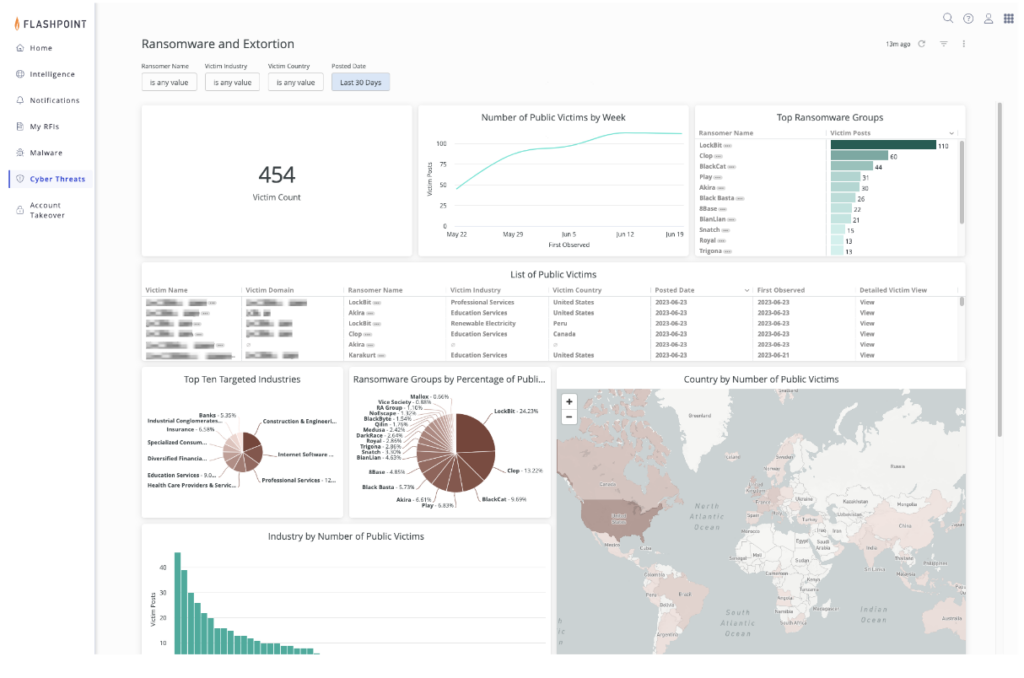
Flashpoint’s ransomware dashboard provides an up-to-date, easy-to-consume view of global ransomware trends, victims, as well as the ransomware groups themselves.

Understanding incidents as they unfold

Gaining continuous intelligence and context on ransomware attacks is vital throughout an attack, which often extends for weeks in the public sphere (and undoubtedly longer behind closed doors). It is therefore important to ensure that your organization is being provided with an active understanding of the situation as it unfolds in real-time—beyond vulnerability intelligence.

Flashpoint’s Intelligence Team, for example, delivers to customers incident pages and regular updates that communicate the most important details of an extortion event in progress. This includes background and assessments of the vulnerability, status updates with timelines, known victims, change logs, and intelligence that contributes to a more holistic understanding of a risk and informs decision-making.

Managed attribution for investigations

A managed attribution solution allows intelligence teams to shift from defense to offense by enabling security teams to safely and anonymously conduct investigations. Analysts will often access or download files from a ransomware blog to verify if their organization was impacted in the incident. While doing so, it’s vital to protect and keep your organization safe via a secure research environment that is isolated from analyst browsers, computers and network infrastructure. Flashpoint’s Managed Attribution solution allows security teams to interact with files, conduct online investigations, and browse safely without risk to their organization.   

Ransomware response and readiness

To quickly assess, contain, and mitigate the impact of such incidents, it is crucial for organizations to have robust risk management practices in place. This includes conducting thorough due diligence when selecting third-party vendors, assessing their security practices, actively monitoring their security posture, and implementing contractual obligations and security controls to protect the company’s interests. 

Additionally, it’s crucial to have incident response plans in place in order to respond effectively and recover from security breaches.In the event that an organization is impacted by ransomware, having a well-practiced incident response plan can greatly minimize damages. This includes: 

  • Creating an Incident Response playbook
  • Holding mandatory training sessions for employees
  • Enabling staff members to proactively thwart attacks

Ransomware and cyber extortion events are undoubtedly stressful and challenging, but there are practical and proven ways to lessen that burden to reduce risk across your organization. To learn more about how Flashpoint empowers security teams to prevent and respond to ransomware attacks, contact us, sign up for a free trial, or watch this video to understand the top ways to prevent a ransomware attack at your organization.

Request a demo today.

  •  

How to Combat Check Fraud: Leveraging Intelligence to Prevent Financial Loss

Blogs

Blog

How to Combat Check Fraud: Leveraging Intelligence to Prevent Financial Loss

Criminals increasingly steal checks and sell them on illicit online marketplaces, where check fraud-related services are common. Intelligence is helping the financial sector fight back

SHARE THIS:
Default Author Image
May 18, 2023

Stolen checks and the impact of Covid-19

Checks are one of the most vulnerable legacy payment methods. Check fraud can actively affect the bottom lines (and reputations) of banks, financial services organizations, government entities, and many other organizations that utilize checks. According to the Financial Crimes Enforcement Network (FinCEN), fraud—including check fraud—is “the largest source of illicit proceeds in the US” as well as “one of the most significant money laundering threats to the United States.” 

Targeting the mail

Criminals target the US mail system to steal a variety of checks. In fact, there is a nationwide surge in check fraud schemes targeting the US mail and shipping system, as threat actors continue to steal, alter, and sell checks through illicit means and channels. 

This includes personal checks and tax refund checks to government or government assistance-related checks (Social Security payments, e.g.). Business checks are also a primary target because they are often written for larger amounts and may take longer for the victim to identify fraudulent activity.

In 2022 alone, US banks filed 680,000 check fraud-related suspicious activity reports (SARs). This represents a nearly two-fold increase from 2021 (which itself represents a 23 percent YoY increase from 2020). This surge in check fraud has been exacerbated by Covid-19 Economic Impact Payments (EIPs) under the CARES Act, which presented threat actors with a new avenue to attempt to commit fraud.

Related Reading

This Is What Covid Fraud Looks Like: Targeting Government Relief Funding

Read now

Check fraud: A mini use case 

In order to mitigate and ultimately prevent check-fraud-related risks, it’s crucial for financial intelligence and fraud teams to understand what threat actors seek, how they work, and where they operate. 

This begins, as we detail below, with intelligence into the communities, forums, and marketplaces where check fraud occurs as well as the tools that enable deep understandings, timely insights, and measurable action. 

Below is an intelligence narrative, in three acts, that tells the story of how transactions involving some of the above examples could play out.

Act I: Obtain

Threat actors are known to remove mail from individuals’ mailboxes and parcel lockers using blue box “arrow” master keys. These arrow keys are often stolen from USPS employees, which has led to numerous incidents of harassment, threats, and even violence. Generally, arrow keys are sold within illicit community chats and/or the deep and dark web, often fetching upwards of $3,000 per key.

In general, when it comes to check fraud, threat actors may sell or seek: 

  • Mailbox keys
  • Stolen checks
  • Check alteration services (physical and digital)
  • Synthetic identity provisioning
  • Drop account sharing
  • Counterfeit check creation
  • Writing a check with insufficient funds behind it
  • Insider access
A screenshot of Flashpoint’s Ignite platform, showing the results of an OCR-driven search for stolen checks.

Act II: Alter

Check alteration comes in two forms: “washing” and “cooking.” 

Washing refers to the process of altering a check by chemically removing ink and replacing the newly empty spaces with a different value, recipient name, or another fraud-enabling alteration. 

Cooking involves digitally scanning the check and altering text or values through digital means.

Act III: Monetize

Threat actors will deposit the fraudulent check and rapidly withdraw the funds from an ATM, or sell a stolen or altered check on an illicit marketplace or chat group, and then receive payment, often via cryptocurrency.

Four key elements of actionable check fraud intelligence

Financial institutions should rely on four essential intelligence-led technologies, tools, or capabilities to effectively combat check fraud.

1) Visibility and access to illicit communities and channels

To prevent check fraud, organizations should focus on a few key places. Financially motivated threat actors operate and share information on messaging apps like Telegram and other open-source channels, as well as illicit marketplaces on the deep and dark web. Therefore, it is imperative for financial intelligence and fraud teams to have access to the most relevant check fraud-related threats across the internet. 

Keep in mind, however, that accessing these communities is not always straightforward and, if done frivolously, can compromise an investigation.

2) Timeliness and curated alerting

Intelligence is often only as good as it is relevant. Flashpoint enables security and intelligence practitioners to bubble the most important, mission-critical intelligence through our real-time alerting capability, which allows users to receive notifications for keywords and phrases that relate to their mission, such as check fraud-related lingo and activity. 

Essential Reading

The Flashpoint Guide to Card Fraud for the Financial Services Sector

Read now

In addition to real-time alerts, analysts can rely on curated alerting and saved searches to track topics of long-term interest. Flashpoint Ignite enables analysts to research particular accounts and their recent activity and matches transactions to their respective ATM slips and institution address. This helps to ensure the accuracy of the information found within these communities and marketplaces before raising any alarms, as many scammers post false content. 

This approach is particularly valuable as check fraudsters often share crucial information such as preferred methodologies, social media handles, and geolocations that can aid in identifying malicious activities. In addition, by closely observing newly emerging trends, such as the evolution of pandemic relief fraud to refund fraud to check fraud, analysts can proactively develop robust preventative measures to mitigate risks before these tactics become widespread.

3) Actionable OCR and Video Search

In order to provide “material proof,” cyber threat actors will often tout and post an image of a check in a chat application or marketplace in hopes of increasing the likelihood of a successful transaction. Optical Character Recognition (OCR) technology can capture important information about check fraud attempts, since actors often share images of the fraudulent check or subsequent monetization transactions. OCR alerts are customizable with the financial institution’s name and common phrases used on checks to enhance accuracy.

Images of fraudulent checks provide valuable insights into the fraud attempt, including the check’s unique identifier, the account holder’s name, the bank’s name and address, and the endorsement signature. By analyzing these details, financial institutions and law enforcement agencies can identify patterns and leads that can help them track down the perpetrators and prevent future fraudulent activity.

Related Resource

The Risk-Reducing Power of Flashpoint Video Search

Read now

Moreover, ATM withdrawal slips can offer critical information about the transaction, such as the location of the ATM, the time of the deposit, and the type of account used. This data is useful when taking appropriate measures to prevent similar attempts and protect customers’ assets. With the help of advanced technologies like Flashpoint’s OCR, institutions can quickly extract and analyze this information to generate real-time alerts and take prompt action to prevent monetary losses.

An essential investigative component, Flashpoint’s industry-first video search technology, like its OCR capability, enables fraud and cyber threat intelligence (CTI) teams to surface logos, text, explicit content, and other critical intelligence to enhance investigations.

Combat check fraud with Flashpoint

Flashpoint delivers the intelligence that enables financial institutions to combat check fraud at scale. With timely, actionable, and accurate intelligence, financial institutions can mitigate and prevent financial loss, protect customer assets, and track down perpetrators. Get a free trial today to learn how:

  • A financial services customer detected more than $4M in illicitly marketed assets, including checks and compromised accounts, using Flashpoint’s OCR capabilities. 
  • A customer received 125 actionable alerts in a single month equated to over $15M in potentially averted losses.
  • An automated alert enabled a customer to identify a threat actor’s specific operations, saving them over $5M.

Request a demo today.

  •  

Beyond Gates and Alarms: The Scope and Impact of Physical Security Intelligence

Blogs

Blog

Beyond Gates and Alarms: The Scope and Impact of Physical Security Intelligence

Exploring the role of physical security intelligence, which helps governments and commercial enterprises keep people, places, and assets safe

SHARE THIS:
Default Author Image
May 15, 2023

What is Physical Security Intelligence?

When most people think of physical security, they often think about access control measures or physical security systems. These include gates, alarms, surveillance cameras, and security guards. These measures are fundamental to protecting facilities, as well as the people, assets, and infrastructure inside of them. However, these measures fail to address several external factors. These factors include the impact of natural disasters, terrorist attacks, and insider threats on physical security.

Why is Physical Security Intelligence Important?

That is where physical security intelligence comes into play. Physical security intelligence delivers mission-critical insights into real-time situations occurring globally. It empowers governments and commercial enterprises to safeguard, defend, and enhance the security of individuals, locations, and physical assets.

Physical security intelligence is built on external information. This includes social media and other online channels. It provides situational awareness and insights into potential physical security threats in their earliest stages.

Where Physical and Cyber Threat Intelligence Collide

Cyber and physical threats are increasingly related. In fact, most attacks on people, places, and infrastructure involve some degree of online communication. Real-world events are often enabled or bolstered by cyber-related activities. An example is when a threat actor uses an online discussion forum or social media network to plan a physical attack.

Decentralized open-source channels like Telegram have become an increasingly popular medium for both cyber and physical threat actors. These channels have eroded long-standing barriers to entry to the deep and dark web. When that communication takes place in publicly available channels, security teams can use that information to investigate the incident. Ideally, they can be alerted to early warning indicators and prevent it altogether.

Case Study: Physical Security Intelligence

How Flashpoint Helped the Community Security Initiative (NY) Stop a Potential Synagogue Shooting

Read now

The Impact of Open-Source Intelligence (OSINT)

Physical security intelligence reduces information gaps and leads to more proactive physical security. Open-source intelligence is a critical resource for these applications.

OSINT involves gathering and analyzing publicly available information to derive meaningful insights. In recent years, OSINT has become one of the most relied-upon forms of intelligence for the US government. Its abundance and low barrier to entry make OSINT increasingly useful for commercial enterprises as well.

Thanks to the smartphone, open sources like social media often provide the most up-to-the-minute information about breaking events. Tapping into this data gives security and intelligence teams the real-time information necessary for addressing immediate crises and generating timely intelligence. OSINT provides incredible value for both public and private sector teams. This is true as long as they have the tools and capabilities to gather and analyze the abundance of information effectively.

Examples of Physical Security Intelligence Use Cases

How understanding physical risk can enable corporate physical security teams and public sector organizations to address a wide range of challenges.

Global Situational Awareness

Open-source data can improve situational awareness. It does this by providing insight related to geopolitics, public sentiment, technology developments, and on-the-ground activities in areas of interest. This is especially true when that data is enriched with geospatial information. This information includes where the posts originated, or what locations were mentioned within the post contents and metadata.

Crisis Response

Open-source data provides real-time information for events like natural disasters, public health crises, and terrorist attacks. This information helps security teams stay alert to breaking events, assess impacts, and respond appropriately.

Executive Protection and Force Protection 

Across the public and private sectors, threats to personnel come from all directions. This ranges from unforeseen travel risks to doxing and reputational risks, such as bad press. Leveraging OSINT is crucial for surfacing this information and reducing blind spots. It is a strategic complement to traditional executive protection methods like bodyguards and security cameras.

Flashpoint Ignite equips physical security teams with real-time access to the most extensive breadth of open-source information available.

Flashpoint Ignite equips physical security teams with real-time access to the most extensive breadth of open-source information available.

Persistent Threat Analysis

Persistent security concerns like terrorism rely on social media and other online channels to spread. OSINT helps physical security and intelligence teams monitor evolving web-based chatter to improve visibility and defend against those threats.

Insider Threats

Social dissent, burnout, and various other factors have dramatically shifted the insider threat landscape. Disgruntled employees may take action against organizations. This could include disclosing confidential data or disrupting business operations. They often discuss these topics online before taking action. Government, healthcare, big tech, and media are especially vulnerable.

Physical Attacks

Social media and discussion websites are often used to share violent intent and plan events. For example, the Capitol Hill insurrection was planned online for weeks prior to the attack. Bad actors tend to be more candid in online settings. This is because their identity is anonymous, and they are engaging with like-minded communities.

Supply Chain Disruptions

Disruptions like natural disasters or geopolitical conflicts can halt or delay the flow of goods along the supply chain. Monitoring open sources for these disruptions can provide early warning indicators. It can also help you assess if your organization will be impacted down the line.

Event Monitoring

It is vital to have the right physical security intelligence protocols in place. This ensures the security of an event and its attendees. Physical security intelligence can augment an organization’s overall security and intelligence operations during an event. This could be a high-profile conference with global attendees or a smaller affair. Physical security intelligence can include pre-event assessments, daily stand-ups, and monitoring and alerting of imminent and potential threats. Protecting a location—and the people around it—is also essential to strengthening brand reputation

Flashpoint Ignite for Physical Security Teams

Flashpoint’s Physical Security Intelligence (PSI) solution is part of the Ignite platform. It gathers open-source data from a variety of online spaces. These range from mainstream social media, discussion forums, fringe networks, messaging apps, and regional sources from around the world. The solution is fast and intuitive. It allows users to search, filter, monitor, and analyze the data in a customizable dashboard. User-generated alerts ensure that the right team gets notified if new, relevant content is detected. Enrichments like geolocation, language detection, and threat detection provide valuable context to the information discovered.

Request a demo today.

Request a demo today.

  •  

Why We Built Flashpoint Ignite: Unity, Power, and Performance

Blogs

Blog

Why We Built Flashpoint Ignite: Unity, Power, and Performance

Flashpoint’s Chief Product and Engineering Officer, Patrick Gardner, introduces Flashpoint Ignite—our new platform to accelerate cross-functional threat detection and risk mitigation for CTI, Vulnerability, National Security, and Physical Security teams

SHARE THIS:
Default Author Image
April 24, 2023
Why we built Flashpoint Ignite: Unity, Power, and Performance

Flashpoint has long been known for its industry-leading data collection and finished intelligence. After two major acquisitions in 2022, we have powerful far-reaching visibility with more technology than ever, which presents us with an amazing challenge—how do we put these components together in a way that unlocks even more value for our customers?

Our answer: Ignite—Flashpoint’s brand new, team-tailored, lightning-fast intelligence platform.

What is the Flashpoint Ignite Intelligence Platform?

The Flashpoint Ignite platform is a technology ecosystem that delivers tailored intelligence across multiple security functions in a combined workspace. It enables security teams to connect and remediate risk faster with access to Flashpoint’s extensive intelligence, along with analytical tools to rapidly find relevant data as well as the ability to request custom intelligence support in just a few clicks. 

Ignite is the home of our new Cyber Threat Intelligence, Physical Security Intelligence, Vulnerability Management, and National Security Intelligence solutions, and it provides a unified experience across the organization. With a holistic view of risk in one place, security and intelligence practitioners can finally close the gap between data, intelligence, and action.

“In an overwhelming information landscape, we are doing everything possible to make our customers’ jobs easier.”

Patrick Gardner

Why Did We Build the Flashpoint Ignite Platform?

When I joined Flashpoint in September 2022, I felt like a kid in a candy store. We have an incredible amount of information and capabilities. Our strategy is to make it easy and fast to surface that value for our customers to tackle various challenges. We built Ignite to support this goal and to help our customers solve their challenges more effectively. 

The main pillars we aim to address with the Flashpoint Ignite platform are:

  • Improving user experience by making it intuitive, faster, customizable, and easier to find relevant information.
  • Incorporating custom intelligence requests into the platform to allow users to manage and track their reports in a single unified location.
  • Integrating all of our data so users can see threats end-to-end.

Key Ignite Features

Each solution under the Ignite platform has its own set of powerful features specially designed to support different teams’ intel missions, each of which contribute to an organization’s overarching security objective to protect assets, infrastructure, and stakeholders from cyber and physical threats. 

The real power of Ignite is how we bring these capabilities together with common features across all solutions:

  • Universal Search: Ignite allows users to easily and quickly navigate through the vast landscape of collections and intelligence to find the information they need across text, video, conversations, and images with a single search across all data.  
  • Alerting: Ignite enables users to create intuitive and highly customizable alerts directly from their searches to inform them when pertinent information is uncovered.
  • Reports: Ignite helps teams inform decision-making and prioritize efforts to protect their organizations with a sleek news-style finished intelligence experience that makes it easy to find the content most relevant to your organization’s risk profile and mitigation strategy.

How Ignite Powers Results

In an overwhelming information landscape, we are doing everything possible to make our customers’ jobs easier. These are the main outcomes we aim to deliver with Ignite: 

Enabling teams to achieve more with an integrated Flashpoint experience

  • Ignite delivers a range of solutions to support various security teams while providing the extensibility to integrate and interoperate with other solutions. Teams can easily obtain the information they need to move information forward and remediate risk faster. 

Providing dependable intelligence for everyone

  • We gather data from all different corners of the internet, cut through the noise, and find the answers our customers need to do their jobs faster. Whether they need visibility into the deep and dark web, OSINT/surface web, vulnerabilities, breach data, or geospatial intelligence–our finished intelligence reports and raw collections are right at our users’ fingertips.

Closing the gap between data, intelligence, and action

  • Users can quickly assess their data across all products, streamline workflows, adapt, and take decisive action. Ignite connects multiple tools, so whether our customers are deep in investigative work or consuming reports to stay on top of trends, they can stay ahead of the changing threat landscape.

What’s Next?

With all the strengths Flashpoint has, there’s so much opportunity and we’ve only scratched the surface. Ignite provides a highly flexible and robust technology layer for us to build lightning-fast, easily searchable solutions for teams across the security organization. 

In the future, customers can expect better integrations, more powerful enrichments, increased data correlation, new visualizations, and more relevant information automatically recommended through situational awareness, alleviating the need to spend excess time and resources seeking it out.

Frequently Asked Questions (FAQs)

What is Flashpoint Ignite and why should my organization use it?

Flashpoint Ignite is a unified intelligence platform that brings together cyber threat intelligence, physical security, vulnerability management, and national security data into one workspace. Your organization should use it to eliminate data silos and accelerate the time it takes to detect and remediate risks. By consolidating all of Flashpoint’s industry-leading data into a single, lightning-fast ecosystem, Ignite allows your teams to see threats from end to end.

Flashpoint Ignite SolutionTeam Benefit
Cyber Threat IntelligenceAccelerates investigations into dark web actors and malware.
Physical Security IntelligenceProvides situational awareness for executives and global facilities.
Vulnerability ManagementPrioritizes patching based on real-world exploitability data.

How does Flashpoint Universal Search improve analyst efficiency?

Flashpoint Universal Search improves efficiency by allowing analysts to query the platform’s vast collections of text, video, images, and technical data with a single search. Instead of toggling between different tools or datasets, Universal Search within Flashpoint Ignite surfaces all relevant information instantly. This “one-stop” search capability acts as a force multiplier, giving analysts back the time and energy they used to spend on manual data aggregation.

  • Unified Results: See dark web chatter, technical indicators, and media in one view.
  • Format Flexibility: Search for keywords within videos and images using OCR and logo detection.
  • Speed-to-Insight: Reduces the steps required to validate a threat and move toward action.

Why is the unified experience in Flashpoint Ignite better than using separate tools?

The unified experience in Flashpoint Ignite is better because it closes the dangerous gap between data, intelligence, and action. Using separate tools often leads to missed correlations and slower response times. In Flashpoint Ignite, security and intelligence practitioners can view cyber and physical risks side-by-side, ensuring that every decision is backed by a holistic understanding of the organization’s risk profile.

Traditional Multi-Tool ApproachFlashpoint Ignite Unified Experience
Fragmented DataFully integrated data across all security functions.
Slower TriageAccelerated remediation through cross-functional workflows.
Higher ComplexitySimplified news-style reporting and intuitive custom alerts.

Request a demo today.

  •  
❌