Normal view

Laurie Anderson Is Quoting Me

19 May 2026 at 13:00

Not by name, but Laurie Anderson quotes me in one of the tracks of her new album:

My favorite quote is from a cryptologist who said “If you think technology will solve your problems, you don’t understand technology and you don’t understand your problems.”

Also in interviews:

“Of course, it’s ridiculous, outrageous, blah, blah, blah,” Anderson says about the ad. ‘But, I mean, my favorite quote on this is from a cryptologist who said, ‘If you think technology will solve your problems, you don’t understand technology ­ and you don’t understand your problems.’ And I think I’m completely on board with that.”

People are telling me that she has been reciting this quote in performances for years. (I lost track of her since college and her 1981 hit “O Superman.”)

The origins of the quote is from Roger Needham:

If you think cryptography can solve your problem, you don’t understand your problem and you don’t understand cryptography.

I modified the quote in the preface to my 2000 book Secrets and Lies:

A few years ago I heard a quotation, and I am going to modify it here: If you think technology can solve your security problems, then you don’t understand the problems and you don’t understand the technology.

I can’t tell you why me in 2000 didn’t credit Needham by name. I should have.

I have used the quote pretty consistently since then. Somewhere along the line I dropped “security” from the phrase, and now say it more like Anderson quotes me:

If you think technology will solve your problem, you don’t understand your problem and you don’t understand technology.

I sometimes use singular and sometimes use plural. Sometimes I say “the problem” and “the technology.” But I think the quote flows better ending with just the word “technology.”

Microsoft is changing Edge’s plaintext password behavior

18 May 2026 at 12:42

Microsoft said it will change Edge’s password handling as a “defense‑in‑depth” measure.

Originally, Edge decrypted the entire saved‑password store on startup and kept all credentials resident in process memory in clear text for the whole browser session, regardless of whether a given credential was ever used or not.

A short while ago, Microsoft said this plaintext password behavior was by design. Now, Microsoft has changed course, and the new password-handling behavior is already present in Canary (the experimental preview version of Microsoft Edge), with rollout prioritized across all channels.

The researcher who originally flagged the issue said:

“Edge is the only Chromium‑based browser I’ve tested that behaves this way. By contrast, Chrome uses a design that makes it far harder for attackers to extract saved passwords by simply reading process memory.”

Microsoft Edge Security Lead Gareth Evans said Microsoft is now taking a broader view and has committed to changing Edge so that saved passwords are no longer loaded into memory on startup as clear text. As a result, exposure will be reduced as a defense‑in‑depth improvement. That means even if an attacker has administrative control of a device, it becomes harder to harvest all the passwords.

According to Microsoft:

“Going forward, Microsoft Edge will no longer load all saved passwords into memory at browser startup. Instead, passwords will be decrypted only when needed for autofill or password management operations.”

The change is already live in the Edge Canary channel and will be included in the next update for all supported Edge releases (build 148 and newer across Stable, Beta, Dev, Canary, and Extended Stable).

The reason for this change is probably more reputational and strategic rather than an acknowledgment of an exploitable vulnerability. Microsoft seems to want to align reality with its “secure by design” messaging and reduce a very visible, easy‑to‑demo weakness, even if it still doesn’t treat it as a classic memory‑disclosure bug.

Passwords in your browser

Please note that this change just means Edge will become roughly as secure an option to store passwords as every other Chromium-based browser.

Your browser password manager gives you ease of use, but that comes with some security tradeoffs. Of course, password managers aren’t foolproof either, so it’s important to decide for yourself where you store your passwords.

If you’re confident a website is safe, and anyone who can access it under your account wouldn’t learn anything sensitive, feel free to store the password in your browser, but disable autofill so you stay in control.

Use MFA where possible. It enormously reduces the risk if someone gets hold of your password. And avoid using the browser password manager to store your credit card details or other sensitive personally identifiable information, such as medical information.


Let’s face it, an incognito window can only do so much. 
 
Breaches, dark web trading, credit fraud. Malwarebytes Identity Theft Protection monitors for all of it, alerts you fast, and comes with identity theft insurance. 

Microsoft is changing Edge’s plaintext password behavior

18 May 2026 at 12:42

Microsoft said it will change Edge’s password handling as a “defense‑in‑depth” measure.

Originally, Edge decrypted the entire saved‑password store on startup and kept all credentials resident in process memory in clear text for the whole browser session, regardless of whether a given credential was ever used or not.

A short while ago, Microsoft said this plaintext password behavior was by design. Now, Microsoft has changed course, and the new password-handling behavior is already present in Canary (the experimental preview version of Microsoft Edge), with rollout prioritized across all channels.

The researcher who originally flagged the issue said:

“Edge is the only Chromium‑based browser I’ve tested that behaves this way. By contrast, Chrome uses a design that makes it far harder for attackers to extract saved passwords by simply reading process memory.”

Microsoft Edge Security Lead Gareth Evans said Microsoft is now taking a broader view and has committed to changing Edge so that saved passwords are no longer loaded into memory on startup as clear text. As a result, exposure will be reduced as a defense‑in‑depth improvement. That means even if an attacker has administrative control of a device, it becomes harder to harvest all the passwords.

According to Microsoft:

“Going forward, Microsoft Edge will no longer load all saved passwords into memory at browser startup. Instead, passwords will be decrypted only when needed for autofill or password management operations.”

The change is already live in the Edge Canary channel and will be included in the next update for all supported Edge releases (build 148 and newer across Stable, Beta, Dev, Canary, and Extended Stable).

The reason for this change is probably more reputational and strategic rather than an acknowledgment of an exploitable vulnerability. Microsoft seems to want to align reality with its “secure by design” messaging and reduce a very visible, easy‑to‑demo weakness, even if it still doesn’t treat it as a classic memory‑disclosure bug.

Passwords in your browser

Please note that this change just means Edge will become roughly as secure an option to store passwords as every other Chromium-based browser.

Your browser password manager gives you ease of use, but that comes with some security tradeoffs. Of course, password managers aren’t foolproof either, so it’s important to decide for yourself where you store your passwords.

If you’re confident a website is safe, and anyone who can access it under your account wouldn’t learn anything sensitive, feel free to store the password in your browser, but disable autofill so you stay in control.

Use MFA where possible. It enormously reduces the risk if someone gets hold of your password. And avoid using the browser password manager to store your credit card details or other sensitive personally identifiable information, such as medical information.


Let’s face it, an incognito window can only do so much. 
 
Breaches, dark web trading, credit fraud. Malwarebytes Identity Theft Protection monitors for all of it, alerts you fast, and comes with identity theft insurance. 

Canvas hack: is it ever a good idea to pay a ransom, and what happens to the data?

Businesses are advised against paying – but many are prepared to deal to protect users’ privacy

After a week of outages, hundreds of millions of students’ data stolen, delayed assignment due dates and school login pages being defaced by hackers, the US tech firm Instructure – which operates the education platform Canvas, used by education providers worldwide – announced it had “reached an agreement with the unauthorised actor” behind the ransomware attack.

Experts read the careful language as a sign that a ransom has been paid. The company has not confirmed this.

Continue reading...

© Photograph: Boonchai Wedmakawand/Getty Images

© Photograph: Boonchai Wedmakawand/Getty Images

© Photograph: Boonchai Wedmakawand/Getty Images

Attackers replaced JDownloader installer downloads with malware

15 May 2026 at 14:45

If you downloaded the JDownloader installer during the compromise window (May 6-7), you are advised to verify the file.

 JDownloader is a popular download management application, particularly favored for automated downloads from file-hosting services, video sites, and premium link generators.

The JDownloader website was confirmed to have been compromised on May 6-7, 2026. During that window, the Windows “Download Alternative Installer” links and the Linux shell installer were compromised. Other download options, including macOS, JAR files, Flatpak, Winget, and Snap packages remained safe.

Users that applied updates during that period were not affected. The malicious Windows installers deployed a Python-based remote access Trojan (RAT).

The developers confirmed the breach on May 7, immediately taking the website offline for investigation. After security patches were applied and server configurations hardened, the website was restored on May 8-9 with verified clean installer links. The attack vector was identified as an unpatched CMS security bug that allowed attackers to modify access control lists without authentication.

How to stay safe

The developers advised users to verify that their installers have the proper digital signatures from “AppWork GmbH,” which compromised versions lacked.

A full system scan with a trusted anti-malware solution never hurts either.

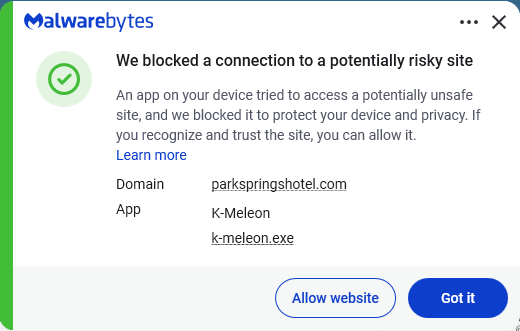
Malwarebytes blocks the domains contacted by the RAT.

Malwarebytes blocks parkspringhotel[.]com

We don’t just report on threats—we remove them

Cybersecurity risks should never spread beyond a headline. Keep threats off your devices by downloading Malwarebytes today.

Attackers replaced JDownloader installer downloads with malware

15 May 2026 at 14:45

If you downloaded the JDownloader installer during the compromise window (May 6-7), you are advised to verify the file.

 JDownloader is a popular download management application, particularly favored for automated downloads from file-hosting services, video sites, and premium link generators.

The JDownloader website was confirmed to have been compromised on May 6-7, 2026. During that window, the Windows “Download Alternative Installer” links and the Linux shell installer were compromised. Other download options, including macOS, JAR files, Flatpak, Winget, and Snap packages remained safe.

Users that applied updates during that period were not affected. The malicious Windows installers deployed a Python-based remote access Trojan (RAT).

The developers confirmed the breach on May 7, immediately taking the website offline for investigation. After security patches were applied and server configurations hardened, the website was restored on May 8-9 with verified clean installer links. The attack vector was identified as an unpatched CMS security bug that allowed attackers to modify access control lists without authentication.

How to stay safe

The developers advised users to verify that their installers have the proper digital signatures from “AppWork GmbH,” which compromised versions lacked.

A full system scan with a trusted anti-malware solution never hurts either.

Malwarebytes blocks the domains contacted by the RAT.

Malwarebytes blocks parkspringhotel[.]com

We don’t just report on threats—we remove them

Cybersecurity risks should never spread beyond a headline. Keep threats off your devices by downloading Malwarebytes today.

Meta’s confusing new approach to chat privacy

15 May 2026 at 14:34

Recent news had us wondering whether Meta actually knows what it wants.

On one platform, Meta is promoting AI chats that it says even it cannot read. On another, it has removed one of the few features that genuinely prevented Meta from accessing private conversations.

“Meta removed support for end-to-end encrypted chats from Instagram as of May 8, 2026.”

Meta adds fully private AI chats to WhatsApp.”

At the moment, Meta is heavily promoting a new Incognito Chat mode for its Meta AI assistant in WhatsApp, built on top of a system it calls Private Processing. According to WhatsApp’s own announcement, Incognito Chat is:

 “Truly private — no one can read your conversation, not even us.”

When you start an Incognito chat with Meta AI, you get a temporary conversation where messages aren’t saved and disappear by default, which Meta pitches as “a space to think and explore ideas without anyone watching.”

BBC News and others report that these AI chats are text‑only for now, run in a sandboxed environment, and are separate from your regular end‑to‑end encrypted (E2EE) messaging with other people on WhatsApp.

Meta is also preparing “Side Chat,” which will let you invoke Meta AI inside other WhatsApp chats, again using this Private Processing infrastructure to claim AI assistance without breaking the underlying encryption.

On paper, that’s an impressive technical and marketing story: powerful AI, wrapped in layers of privacy‑preserving infrastructure, added to an app that already has a strong reputation for end‑to‑end encryption by default.

Meanwhile, on Instagram…

Now contrast that with what’s happening on Instagram. On 8 May 2026, Meta removed optional end‑to‑end encryption for Instagram Direct Messages (DMs) entirely. Users who had previously turned the feature on were shown notices that “end‑to‑end encrypted messaging on Instagram is no longer supported as of 8 May 2026,” and were urged to download backups of their encrypted conversations before the cutoff.

End‑to‑end encryption ensures that only the sender and recipient can read their conversations. Instagram offered this as an opt‑in feature since late 2023, but it was buried several taps deep inside individual conversation settings and never turned on by default. Meta’s explanation for shutting it down is that “very few people” used encrypted DMs and that maintaining a separate encrypted system added complexity. Critics have pointed out the circular logic. The company hid the feature, did not advertise it, and is now using low adoption as the reason to kill it rather than, say, making it easier to find or turning it on by default.

What all this means

From a user’s perspective, the result is confusing: one Meta product introduces stronger privacy than ever for AI chats, while another removes the one feature that truly stopped Meta from reading your conversations.

The key point to remember here is that “incognito” and “private” are marketing words, while end‑to‑end encryption is a technical guarantee.

For security‑conscious users, this split personality means you can no longer treat all Meta chats the same. WhatsApp remains end‑to‑end encrypted for person‑to‑person messages and adds optional privacy features around its AI, while Instagram DMs should now be assumed readable by Meta and potentially accessible to law enforcement, advertisers, or attackers who gain access to Meta’s systems.


To boldly browse, away from prying eyes. 


Why make AI chats private?

We’ve seen that AI chats have suddenly turned up in search results without users’ knowledge. So there definitely is a positive side to this new feature.

We also know there have been lawsuits against chatbot providers in cases where the outcome of an AI conversation led to very undesirable results. But how would you be able to provide evidence when messages auto-disappear?

How to proceed

Meta’s recent moves show that strong privacy features can be added where they support a strategic narrative and removed where they conflict with business or regulatory priorities. Users can’t control those decisions, but they can respond by choosing where they hold their most sensitive conversations and by assuming that if a chat isn’t end‑to‑end encrypted by default, it is ultimately readable by someone other than the people in it.

So, what’s a safe way to move forward?

  • Treat Instagram DMs as postcard-level privacy. Now that E2EE is gone, assume Meta can read and scan your messages and that content could be accessed under legal orders or in a breach. Do not send passwords, recovery codes, banking details, or compromising photos over Instagram.
  • When someone asks you to move a conversation to Signal, WhatsApp, or another E2EE messenger, ask them why. It does make sense when you’re sharing financial details, personal images, health information, or anything you would not want a platform provider to read. But sometimes scammers prefer encrypted platforms too, because they’re harder to monitor.
  • Do not confuse “incognito” AI chats with full encryption. WhatsApp’s Incognito mode for Meta AI may be a privacy improvement over standard cloud AI chats, but it is still a conversation with a large language model owned by the same company that runs the platform. Share only what you’re comfortable entrusting to Meta.
  • Regularly review your privacy and security settings. Check which devices are logged in, enable two‑factor authentication, and verify which of your chat apps are actually end‑to‑end encrypted by default.

Scammers know more about you than you think. 

Malwarebytes Mobile Security protects you from phishing, scam texts, malicious sites, and more. With real-time AI-powered Scam Guard built right in. 

Download for iOS → Download for Android → 

Meta’s confusing new approach to chat privacy

15 May 2026 at 14:34

Recent news had us wondering whether Meta actually knows what it wants.

On one platform, Meta is promoting AI chats that it says even it cannot read. On another, it has removed one of the few features that genuinely prevented Meta from accessing private conversations.

“Meta removed support for end-to-end encrypted chats from Instagram as of May 8, 2026.”

Meta adds fully private AI chats to WhatsApp.”

At the moment, Meta is heavily promoting a new Incognito Chat mode for its Meta AI assistant in WhatsApp, built on top of a system it calls Private Processing. According to WhatsApp’s own announcement, Incognito Chat is:

 “Truly private — no one can read your conversation, not even us.”

When you start an Incognito chat with Meta AI, you get a temporary conversation where messages aren’t saved and disappear by default, which Meta pitches as “a space to think and explore ideas without anyone watching.”

BBC News and others report that these AI chats are text‑only for now, run in a sandboxed environment, and are separate from your regular end‑to‑end encrypted (E2EE) messaging with other people on WhatsApp.

Meta is also preparing “Side Chat,” which will let you invoke Meta AI inside other WhatsApp chats, again using this Private Processing infrastructure to claim AI assistance without breaking the underlying encryption.

On paper, that’s an impressive technical and marketing story: powerful AI, wrapped in layers of privacy‑preserving infrastructure, added to an app that already has a strong reputation for end‑to‑end encryption by default.

Meanwhile, on Instagram…

Now contrast that with what’s happening on Instagram. On 8 May 2026, Meta removed optional end‑to‑end encryption for Instagram Direct Messages (DMs) entirely. Users who had previously turned the feature on were shown notices that “end‑to‑end encrypted messaging on Instagram is no longer supported as of 8 May 2026,” and were urged to download backups of their encrypted conversations before the cutoff.

End‑to‑end encryption ensures that only the sender and recipient can read their conversations. Instagram offered this as an opt‑in feature since late 2023, but it was buried several taps deep inside individual conversation settings and never turned on by default. Meta’s explanation for shutting it down is that “very few people” used encrypted DMs and that maintaining a separate encrypted system added complexity. Critics have pointed out the circular logic. The company hid the feature, did not advertise it, and is now using low adoption as the reason to kill it rather than, say, making it easier to find or turning it on by default.

What all this means

From a user’s perspective, the result is confusing: one Meta product introduces stronger privacy than ever for AI chats, while another removes the one feature that truly stopped Meta from reading your conversations.

The key point to remember here is that “incognito” and “private” are marketing words, while end‑to‑end encryption is a technical guarantee.

For security‑conscious users, this split personality means you can no longer treat all Meta chats the same. WhatsApp remains end‑to‑end encrypted for person‑to‑person messages and adds optional privacy features around its AI, while Instagram DMs should now be assumed readable by Meta and potentially accessible to law enforcement, advertisers, or attackers who gain access to Meta’s systems.


To boldly browse, away from prying eyes. 


Why make AI chats private?

We’ve seen that AI chats have suddenly turned up in search results without users’ knowledge. So there definitely is a positive side to this new feature.

We also know there have been lawsuits against chatbot providers in cases where the outcome of an AI conversation led to very undesirable results. But how would you be able to provide evidence when messages auto-disappear?

How to proceed

Meta’s recent moves show that strong privacy features can be added where they support a strategic narrative and removed where they conflict with business or regulatory priorities. Users can’t control those decisions, but they can respond by choosing where they hold their most sensitive conversations and by assuming that if a chat isn’t end‑to‑end encrypted by default, it is ultimately readable by someone other than the people in it.

So, what’s a safe way to move forward?

  • Treat Instagram DMs as postcard-level privacy. Now that E2EE is gone, assume Meta can read and scan your messages and that content could be accessed under legal orders or in a breach. Do not send passwords, recovery codes, banking details, or compromising photos over Instagram.
  • When someone asks you to move a conversation to Signal, WhatsApp, or another E2EE messenger, ask them why. It does make sense when you’re sharing financial details, personal images, health information, or anything you would not want a platform provider to read. But sometimes scammers prefer encrypted platforms too, because they’re harder to monitor.
  • Do not confuse “incognito” AI chats with full encryption. WhatsApp’s Incognito mode for Meta AI may be a privacy improvement over standard cloud AI chats, but it is still a conversation with a large language model owned by the same company that runs the platform. Share only what you’re comfortable entrusting to Meta.
  • Regularly review your privacy and security settings. Check which devices are logged in, enable two‑factor authentication, and verify which of your chat apps are actually end‑to‑end encrypted by default.

Scammers know more about you than you think. 

Malwarebytes Mobile Security protects you from phishing, scam texts, malicious sites, and more. With real-time AI-powered Scam Guard built right in. 

Download for iOS → Download for Android → 

Developer withdraws plans for Perth datacentre after fierce community opposition

Three-storey GreenSquare datacentre in Hazelmere was to power cloud computing and the acceleration of AI

A 15,000 sq metre datacentre near Perth will no longer go ahead after the developer withdrew plans amid community opposition over its impact on culturally significant sites.

The three-storey, 120-megawatt GreenSquare datacentre in the town of Hazelmere had been intended to power cloud computing and the acceleration of artificial intelligence, but faced fierce community backlash – as is increasingly common with such developments.

Continue reading...

© Photograph: Trillion Trees

© Photograph: Trillion Trees

© Photograph: Trillion Trees

Upcoming Speaking Engagements

14 May 2026 at 18:01

This is a current list of where and when I am scheduled to speak:

The list is maintained on this page.

Texas sued Netflix over claims it secretly collected and sold users’ data

13 May 2026 at 15:34

Attorney General (AG) of Texas Ken Paxton announced that he sued Netflix for spying on Texans, including children, and collecting users’ data without their knowledge or consent.  

The suit alleges Netflix secretly tracks and monetizes detailed viewing behavior of users, including children, while misleading users about its data practices. The case could reshape how Netflix collects data, targets ads, and designs “addictive” features, especially for minors. 

According to the complaint, Netflix allegedly ran what the AG’s office calls a “surveillance program,” turning every click, pause, and binge session into data that could be sold to advertisers and data brokers.

Netflix firmly denies the accusations, calling the lawsuit “inaccurate” and claiming it complies with privacy laws wherever it operates. Spokesperson Jamil Walker said:

“The suit lacks merit and is based on inaccurate and distorted information.”

But regardless of how this specific case plays out, the lawsuit raises a bigger question for all subscribers: Just how much does your streaming service really know about you, and what does it do with that information?

The Texas complaint paints a picture of Netflix as a data company first and a streaming service second. Paxton’s office even describes Netflix as:

“A logging company that records and monetizes billions of behavioral events—and occasionally streams movies.”

The complaint also references a 2024 ruling by the Dutch Data Protection Authority, which said Netflix does not disclose the true scale or granularity of this data collection. The lawsuit claims Netflix did not just use this data internally for recommendations but also sold it to commercial data brokers and ad tech companies, generating “billions of dollars” annually. 

The AG wants to stop the unlawful collection and disclosure of user data, require Netflix to disable autoplay by default on kid’s profiles, and impose other injunctive relief and civil penalties.

For customers, the main consequences could include potential changes to data collection, targeted advertising, autoplay defaults, and clearer consent and privacy controls. For subscribers on Netflix’s ad‑supported plans, this could slightly change how “personal” ads feel, at least in jurisdictions where regulators clamp down.

Plus, the lawsuit serves as a reminder that streaming habits may be far more trackable than users assumed. Even if Netflix ultimately wins or settles without admitting wrongdoing, the lawsuit puts a spotlight on what the company collects and why.

Netflix privacy and account settings

It will probably take a while before this lawsuit leads to any changes. But there are a few things you can do to protect your privacy:

  • Netflix lets users view and remove entries from their watch history per profile, which can reduce how much historical behavior feeds into recommendations.
  • Where available, turn off non‑essential marketing emails or in‑app promotions that rely on behavioral profiling.
  • Use the parental controls Netflix offers you and turn off autoplay previews.

Basically, treat your Netflix account like any other online account: Review every profile, remove old ones, and take five minutes to walk through the privacy- and playback‑related options.


Scammers don’t need to hack you. They just need you to click once. 

Malwarebytes Identity Theft Protection catches suspicious activity before it becomes a problem.

Texas sued Netflix over claims it secretly collected and sold users’ data

13 May 2026 at 15:34

Attorney General (AG) of Texas Ken Paxton announced that he sued Netflix for spying on Texans, including children, and collecting users’ data without their knowledge or consent.  

The suit alleges Netflix secretly tracks and monetizes detailed viewing behavior of users, including children, while misleading users about its data practices. The case could reshape how Netflix collects data, targets ads, and designs “addictive” features, especially for minors. 

According to the complaint, Netflix allegedly ran what the AG’s office calls a “surveillance program,” turning every click, pause, and binge session into data that could be sold to advertisers and data brokers.

Netflix firmly denies the accusations, calling the lawsuit “inaccurate” and claiming it complies with privacy laws wherever it operates. Spokesperson Jamil Walker said:

“The suit lacks merit and is based on inaccurate and distorted information.”

But regardless of how this specific case plays out, the lawsuit raises a bigger question for all subscribers: Just how much does your streaming service really know about you, and what does it do with that information?

The Texas complaint paints a picture of Netflix as a data company first and a streaming service second. Paxton’s office even describes Netflix as:

“A logging company that records and monetizes billions of behavioral events—and occasionally streams movies.”

The complaint also references a 2024 ruling by the Dutch Data Protection Authority, which said Netflix does not disclose the true scale or granularity of this data collection. The lawsuit claims Netflix did not just use this data internally for recommendations but also sold it to commercial data brokers and ad tech companies, generating “billions of dollars” annually. 

The AG wants to stop the unlawful collection and disclosure of user data, require Netflix to disable autoplay by default on kid’s profiles, and impose other injunctive relief and civil penalties.

For customers, the main consequences could include potential changes to data collection, targeted advertising, autoplay defaults, and clearer consent and privacy controls. For subscribers on Netflix’s ad‑supported plans, this could slightly change how “personal” ads feel, at least in jurisdictions where regulators clamp down.

Plus, the lawsuit serves as a reminder that streaming habits may be far more trackable than users assumed. Even if Netflix ultimately wins or settles without admitting wrongdoing, the lawsuit puts a spotlight on what the company collects and why.

Netflix privacy and account settings

It will probably take a while before this lawsuit leads to any changes. But there are a few things you can do to protect your privacy:

  • Netflix lets users view and remove entries from their watch history per profile, which can reduce how much historical behavior feeds into recommendations.
  • Where available, turn off non‑essential marketing emails or in‑app promotions that rely on behavioral profiling.
  • Use the parental controls Netflix offers you and turn off autoplay previews.

Basically, treat your Netflix account like any other online account: Review every profile, remove old ones, and take five minutes to walk through the privacy- and playback‑related options.


Scammers don’t need to hack you. They just need you to click once. 

Malwarebytes Identity Theft Protection catches suspicious activity before it becomes a problem.

May 2026 Patch Tuesday: no zero-days but plenty to fix

13 May 2026 at 13:00

This month’s Patch Tuesday remedies 137 security vulnerabilities, including 31 marked critical by Microsoft, with no zero-days actively exploited in the wild.

Microsoft defines a zero-day as “a flaw in software for which no official patch or security update is available yet.” This month, Microsoft has not observed any included vulnerability being exploited in production environments.

Still, this release is far from low-risk. A large chunk of the critical bugs allow remote code execution (RCE) across Windows services, Office, Azure, SharePoint, and graphics components. That means attackers who trick a user into opening a malicious document or lure them into connecting to a malicious service could gain full control of a system.

Two vulnerabilities to prioritize

From that list, we selected two that look like they could cause some trouble.

First is CVE-2026-40361, which has a CVSS score of 8.4 out of 10. It’s described as a critical use-after-free vulnerability in Microsoft Word that could allow an attacker to execute code locally on the affected system.

Use-after-free is a class of vulnerability caused by incorrect use of dynamic memory during a program’s operation. If, after freeing a memory location, a program does not clear the pointer to that memory, an attacker may be able to use the error to manipulate the program.

So, if an attacker convinces a user to open a malicious Word document, or even previews the file, they could execute arbitrary code with the privileges of the current user. That’s often enough to install malware, steal credentials, or move laterally through a network.

Second is CVE-2026-35421 (CVSS score 7.8 out of 10). This is a critical heap-based buffer overflow in Windows Graphics Device Interface (GDI). A buffer overflow occurs when an area of memory within a software application reaches its address boundary and writes into an adjacent memory region. Microsoft notes:

“For this vulnerability to be exploited, a user would need to open or otherwise process a specially crafted Enhanced Metafile (EMF) file using Microsoft Paint. This action is necessary to trigger the affected graphics functionality in the Windows component.”


Real-time protection. Zero effort. 


How to apply fixes and check if you’re protected

These updates fix security problems and keep your Windows PC protected. Here’s how to make sure you’re up to date:

1. Open Settings

  • Click the Start button (the Windows logo at the bottom left of your screen).
  • Click on Settings (it looks like a little gear).

2. Go to Windows Update

  • In the Settings window, select Windows Update (usually at the bottom of the menu on the left).

3. Check for updates

  • Click the button that says Check for updates.
  • Windows will search for the latest Patch Tuesday updates.
  • If you have selected to get the latest updates as soon as they’re available, you may see this under More options.
  • In which case you may see a Restart required message. Restart your system and the update will complete.
    May restart required
  • If not, continue with the steps below.

4. Download and Install If updates are found, they’ll start downloading automatically. Once complete, you’ll see a button that says Install or Restart now.

  • Click Install if needed and follow any prompts. Your computer will usually need a restart to finish the update. If it does, click Restart now.

5. Double-check you’re up to date

  • After restarting, go back to Windows Update and check again. If it says You’re up to date, you’re all set!
Windows is up to date

We don’t just report on threats—we remove them

Cybersecurity risks should never spread beyond a headline. Keep threats off your devices by downloading Malwarebytes today.

May 2026 Patch Tuesday: no zero-days but plenty to fix

13 May 2026 at 13:00

This month’s Patch Tuesday remedies 137 security vulnerabilities, including 31 marked critical by Microsoft, with no zero-days actively exploited in the wild.

Microsoft defines a zero-day as “a flaw in software for which no official patch or security update is available yet.” This month, Microsoft has not observed any included vulnerability being exploited in production environments.

Still, this release is far from low-risk. A large chunk of the critical bugs allow remote code execution (RCE) across Windows services, Office, Azure, SharePoint, and graphics components. That means attackers who trick a user into opening a malicious document or lure them into connecting to a malicious service could gain full control of a system.

Two vulnerabilities to prioritize

From that list, we selected two that look like they could cause some trouble.

First is CVE-2026-40361, which has a CVSS score of 8.4 out of 10. It’s described as a critical use-after-free vulnerability in Microsoft Word that could allow an attacker to execute code locally on the affected system.

Use-after-free is a class of vulnerability caused by incorrect use of dynamic memory during a program’s operation. If, after freeing a memory location, a program does not clear the pointer to that memory, an attacker may be able to use the error to manipulate the program.

So, if an attacker convinces a user to open a malicious Word document, or even previews the file, they could execute arbitrary code with the privileges of the current user. That’s often enough to install malware, steal credentials, or move laterally through a network.

Second is CVE-2026-35421 (CVSS score 7.8 out of 10). This is a critical heap-based buffer overflow in Windows Graphics Device Interface (GDI). A buffer overflow occurs when an area of memory within a software application reaches its address boundary and writes into an adjacent memory region. Microsoft notes:

“For this vulnerability to be exploited, a user would need to open or otherwise process a specially crafted Enhanced Metafile (EMF) file using Microsoft Paint. This action is necessary to trigger the affected graphics functionality in the Windows component.”


Real-time protection. Zero effort. 


How to apply fixes and check if you’re protected

These updates fix security problems and keep your Windows PC protected. Here’s how to make sure you’re up to date:

1. Open Settings

  • Click the Start button (the Windows logo at the bottom left of your screen).
  • Click on Settings (it looks like a little gear).

2. Go to Windows Update

  • In the Settings window, select Windows Update (usually at the bottom of the menu on the left).

3. Check for updates

  • Click the button that says Check for updates.
  • Windows will search for the latest Patch Tuesday updates.
  • If you have selected to get the latest updates as soon as they’re available, you may see this under More options.
  • In which case you may see a Restart required message. Restart your system and the update will complete.
    May restart required
  • If not, continue with the steps below.

4. Download and Install If updates are found, they’ll start downloading automatically. Once complete, you’ll see a button that says Install or Restart now.

  • Click Install if needed and follow any prompts. Your computer will usually need a restart to finish the update. If it does, click Restart now.

5. Double-check you’re up to date

  • After restarting, go back to Windows Update and check again. If it says You’re up to date, you’re all set!
Windows is up to date

We don’t just report on threats—we remove them

Cybersecurity risks should never spread beyond a headline. Keep threats off your devices by downloading Malwarebytes today.

Fake Claude search results lure Mac users into ClickFix attack

12 May 2026 at 17:46

Researchers found that cybercriminals are using sponsored search results and shared Claude chats to lure victims into a typical ClickFix attack to install malware on macOS devices.

ClickFix is a social engineering method that tricks users into infecting their own device with malware. Users are instructed to run specific commands that will download malware, usually an infostealer.

The researchers found that when users search for terms like “Claude Mac download,” they may see sponsored Google results that appear to go to the legitimate claude.ai domain.

In reality, the ads resolve to real Claude shared chats, set up to look like official “Claude Code on Mac” or Apple Support guides. Independent research by BleepingComputer found another chat serving the same purpose. The chat instructs victims to open Terminal and paste a base64‑encoded command, which pulls a loader shell script from attacker‑controlled infrastructure and runs it in memory.

The script then profiles the system, pulls down a second-stage payload and runs it through osascript, macOS’s built-in scripting engine. This gives the attacker remote code execution (RCE) without ever dropping a traditional application or binary.

This results in a MacSync‑style payload that harvests browser credentials, cookies, Keychain contents, and crypto wallet data, bundles it, and sends all that information over HTTP to attacker servers.

How to stay safe

Users running macOS Tahoe 26.4 and later will see warnings about possible ClickFix attacks, but other users still have to rely on common sense.

With ClickFix running rampant and inventing new methods all the time, it’s important to stay aware, cautious, and protected.

  • Slow down. Don’t rush to follow instructions on a webpage or prompt, especially if it asks you to run commands on your device or copy and paste code. Attackers rely on urgency to bypass your critical thinking, so be cautious of pages urging immediate action. Sophisticated ClickFix pages add countdowns, user counters, or other pressure tactics to make you act quickly.
  • Avoid running commands or scripts from untrusted sources. Never run code or commands copied from websites, emails, or messages unless you trust the source and understand what the action does.
  • Verify instructions independently. If a website tells you to execute a command or perform a technical action, check through official documentation or contact support before proceeding.
  • Limit copy and paste for commands. Manually typing commands instead of copy and paste can reduce the risk of unknowingly running malicious payloads hidden in copied text.
  • Secure your devices. Use an up-to-date, real-time anti-malware solution with web protection. Malwarebytes blocks connections to unsafe sites like these.
    Malwarebytes blocks one of the domains still active
  • Educate yourself on evolving attack techniques. Understanding that attacks may come from unexpected places helps maintain vigilance. Keep reading our blog!
  • Stay away from sponsored ads in search results. Anyone can buy them and make them look legitimate.

Pro tip: The free Malwarebytes Browser Guard extension warns you when a website tries to copy something to your clipboard.


Stop threats before they can do any harm.

Malwarebytes Browser Guard blocks phishing pages and malicious sites automatically. Free, one click to install. Add it to your browser →

Fake Claude search results lure Mac users into ClickFix attack

12 May 2026 at 17:46

Researchers found that cybercriminals are using sponsored search results and shared Claude chats to lure victims into a typical ClickFix attack to install malware on macOS devices.

ClickFix is a social engineering method that tricks users into infecting their own device with malware. Users are instructed to run specific commands that will download malware, usually an infostealer.

The researchers found that when users search for terms like “Claude Mac download,” they may see sponsored Google results that appear to go to the legitimate claude.ai domain.

In reality, the ads resolve to real Claude shared chats, set up to look like official “Claude Code on Mac” or Apple Support guides. Independent research by BleepingComputer found another chat serving the same purpose. The chat instructs victims to open Terminal and paste a base64‑encoded command, which pulls a loader shell script from attacker‑controlled infrastructure and runs it in memory.

The script then profiles the system, pulls down a second-stage payload and runs it through osascript, macOS’s built-in scripting engine. This gives the attacker remote code execution (RCE) without ever dropping a traditional application or binary.

This results in a MacSync‑style payload that harvests browser credentials, cookies, Keychain contents, and crypto wallet data, bundles it, and sends all that information over HTTP to attacker servers.

How to stay safe

Users running macOS Tahoe 26.4 and later will see warnings about possible ClickFix attacks, but other users still have to rely on common sense.

With ClickFix running rampant and inventing new methods all the time, it’s important to stay aware, cautious, and protected.

  • Slow down. Don’t rush to follow instructions on a webpage or prompt, especially if it asks you to run commands on your device or copy and paste code. Attackers rely on urgency to bypass your critical thinking, so be cautious of pages urging immediate action. Sophisticated ClickFix pages add countdowns, user counters, or other pressure tactics to make you act quickly.
  • Avoid running commands or scripts from untrusted sources. Never run code or commands copied from websites, emails, or messages unless you trust the source and understand what the action does.
  • Verify instructions independently. If a website tells you to execute a command or perform a technical action, check through official documentation or contact support before proceeding.
  • Limit copy and paste for commands. Manually typing commands instead of copy and paste can reduce the risk of unknowingly running malicious payloads hidden in copied text.
  • Secure your devices. Use an up-to-date, real-time anti-malware solution with web protection. Malwarebytes blocks connections to unsafe sites like these.
    Malwarebytes blocks one of the domains still active
  • Educate yourself on evolving attack techniques. Understanding that attacks may come from unexpected places helps maintain vigilance. Keep reading our blog!
  • Stay away from sponsored ads in search results. Anyone can buy them and make them look legitimate.

Pro tip: The free Malwarebytes Browser Guard extension warns you when a website tries to copy something to your clipboard.


Stop threats before they can do any harm.

Malwarebytes Browser Guard blocks phishing pages and malicious sites automatically. Free, one click to install. Add it to your browser →

AI Will Absorb 99.98% of SOC Triage Within a Year, as 79% of IT teams brace for AI-driven workload shift

12 May 2026 at 11:41

COPENHAGEN, DENMARK, 12 May 2026 — Heimdal’s managed SOC processes three million alerts a month. In the year ahead, fewer than 500 of those, less than 0.02%, are expected to need a human analyst. That’s the forecast from Heimdal founder Morten Kjaersgaard, based on the trajectory of AI Wingman SOC as it absorbs the bulk […]

The post AI Will Absorb 99.98% of SOC Triage Within a Year, as 79% of IT teams brace for AI-driven workload shift appeared first on Heimdal Security Blog.

1 in 8 employees have sold company logins or know someone who has

12 May 2026 at 11:21

UK anti-fraud non-profit Cifas just published research that should bother anyone who runs a business, or buys from one: One in eight workers at large enterprises have either sold their company login credentials or know someone who did.

The internet is awash with compromised credentials that employees use to access company systems. Threat intelligence company KELA tracked nearly 2.9 billion compromised credentials globally in 2025. Most of these come from phishing attacks and infostealers. But thanks to employees wanting to make a quick buck, cyber criminals can just make people an offer.

The insiders nobody’s watching

Cifas interviewed 2,000 employees of companies with at least 1,000 staff. Of these, 13% admitted to selling their corporate access credentials in the last 12 months, or knowing someone who did. Amazingly, as the report says, the sellers did so “often under the belief it’s harmless.”

Newsflash: Selling your account credentials isn’t harmless. Criminals want them so they can take over the account and do nefarious things with it. Account takeovers in the US surged 6% to over 78,000 last year, according to Verizon.

Many hijacked accounts are personal ones for services ranging from social media to online streaming sites, and of course bank accounts. But many others are accounts for business systems like Microsoft 365, Salesforce, and other platforms that hold sensitive company data. Those secrets are valuable commodities for criminals who can then trade them on the open market.

Your boss is more likely to sell than you

Ideally, this is where a common technique called “least-privilege access” should come in.

The idea is that a corporate online account should only have access to what it needs. So Jim in the canteen should have access to the food ordering system, but not to the entire customer database. That way, even if Jim’s account gets compromised, the worst the attackers could do is deprive you of sausages tomorrow.

The problem is that, according to the report, higher-ups are even more comfortable selling their account credentials than low-level employees. Thirty-two percent of senior managers find it justifiable, along with 36% of directors, 43% of C-suite executives, and, stunningly, four in five business owners. Their roles mean that even with least-privilege access, their accounts can still open routes to sensitive system functions and data.

This isn’t just a UK problem

The Cifas research is UK-specific, but that’s likely not where it ends. We’ve seen employees at several companies selling access to either company accounts or records. For example, cryptocurrency company Coinbase revealed last year that employees at a Bangladesh-based outsourcing company sold customer records to hackers.

Compromised credentials are widespread. Our own research found that in a single 30-day window, 111 Fortune 500 companies had employee credentials leaked. Long-term, 363 of those firms (that’s 73%) have lost control of at least one employee credential.

Employees selling their access credentials isn’t just bad for the companies that employ them. It’s also bad for customers.

When a director’s password goes up for sale, a customer file might not be far behind, although it likely won’t be the director selling it. Malwarebytes found that 91% of Fortune 500 companies have had their customers’ credentials leaked, and hijacked accounts are a great way to get at them.

So insider risk isn’t just a corporate issue. It’s also a consumer one. That makes us less likely to hand over our personal information to large enterprises without questioning why they need it.


Your name, address, and phone number are probably already for sale.  

Data brokers collect and sell your personal details to anyone willing to pay. Malwarebytes Personal Data Remover finds them and gets your information removed, then keeps watch so it stays that way. 

❌