A researcher found that Yarbo yard robots came with a host of vulnerabilities which, among others, allowed an attacker to harvest WiFi passwords.
Security researcher Andreas Makris found he could remotely hijack thousands of Yarbo yard robots worldwide, and proved it by having his mower run him over. The root cause was a cluster of “legacy” design choices: every robot shared the same hardcoded root password, remote tunnels were left open, and Message Queuing Telemetry Transport (MQTT) messaging was so weakly protected that once you had one device, you effectively had the worldwide fleet.
An attacker could pull GPS coordinates, email addresses, and Wi‑Fi passwords, turn cameras into remote spying tools, and even re‑arm the mower after someone hit the emergency stop.
All of this was enabled by a persistent backdoor tunnel that users could neither see nor meaningfully control. The risks fell into three very different buckets:
A heavy mower with remotely controllable blades and an emergency stop that can be bypassed is a real-world safety hazard.
Exposed telemetry meant attackers could map where devices were, see who owned them, and in some reports even view camera feeds.
Network abuse through shared root credentials meant compromised robots could scan local networks, steal more data, or be folded into a botnet.
Yarbo’s public response is unusually detailed for a consumer Internet of Things (IoT) vendor. It’s also refreshingly blunt in admitting that the researcher’s core findings were accurate. The company temporarily disabled the remote diagnostic tunnels, reset root passwords, locked down unauthenticated endpoints, and began ripping out unnecessary legacy access paths.
More importantly, Yarbo promises structural changes:
Unique per‑device credentials.
Over-the-Air (OTA) credential rotation.
Audited, allowlist‑based remote diagnostics.
Dedicated security contact, with a possible bug bounty to follow.
That is the sort of long‑term security hygiene we rarely see spelled out this clearly after an IoT fiasco.
From a disclosure and remediation standpoint, Yarbo is doing many things right: crediting the researcher, apologizing, prioritizing fixes, and explaining both short‑term patches and long‑term architectural changes in human language. For buyers of connected devices with blades, that level of transparency is a positive precedent.
But Yarbo has explicitly chosen to keep a remote access tunnel, although wrapped in better controls and logs, instead of offering users the option to remove or fully opt out of it.
How to secure IoT devices
The vulnerabilities uncovered in the Yarbo case present an almost a live-action demo of what the IoT CybersecurityImprovement Act is trying to prevent in US government deployments. While the Act doesn’t apply to Yarbo directly, its National Institute of Standards and Technology (NIST)-driven requirements map neatly onto what went wrong here.
So, it’s still up to users to make sure you:
Change the default credentials.
Check if the vendor will make updates available and how easy it is to install them before buying an IoT product. And then install the updates when available.
If you can, put your IoT devices on a separate network. Use a guest Wi‑Fi or separate VLAN when available.
Disable what you don’t need. Turn off UPnP, remote access, cloud control, and unnecessary services if you’re not actively using them.
If your router or security suite logs connections from IoT devices, skim those logs for odd spikes or unknown destinations.
Let’s face it, an incognito window can only do so much.
Breaches, dark web trading, credit fraud. Malwarebytes Identity Theft Protection monitors for all of it, alerts you fast, and comes with identity theft insurance.
A researcher found that Yarbo yard robots came with a host of vulnerabilities which, among others, allowed an attacker to harvest WiFi passwords.
Security researcher Andreas Makris found he could remotely hijack thousands of Yarbo yard robots worldwide, and proved it by having his mower run him over. The root cause was a cluster of “legacy” design choices: every robot shared the same hardcoded root password, remote tunnels were left open, and Message Queuing Telemetry Transport (MQTT) messaging was so weakly protected that once you had one device, you effectively had the worldwide fleet.
An attacker could pull GPS coordinates, email addresses, and Wi‑Fi passwords, turn cameras into remote spying tools, and even re‑arm the mower after someone hit the emergency stop.
All of this was enabled by a persistent backdoor tunnel that users could neither see nor meaningfully control. The risks fell into three very different buckets:
A heavy mower with remotely controllable blades and an emergency stop that can be bypassed is a real-world safety hazard.
Exposed telemetry meant attackers could map where devices were, see who owned them, and in some reports even view camera feeds.
Network abuse through shared root credentials meant compromised robots could scan local networks, steal more data, or be folded into a botnet.
Yarbo’s public response is unusually detailed for a consumer Internet of Things (IoT) vendor. It’s also refreshingly blunt in admitting that the researcher’s core findings were accurate. The company temporarily disabled the remote diagnostic tunnels, reset root passwords, locked down unauthenticated endpoints, and began ripping out unnecessary legacy access paths.
More importantly, Yarbo promises structural changes:
Unique per‑device credentials.
Over-the-Air (OTA) credential rotation.
Audited, allowlist‑based remote diagnostics.
Dedicated security contact, with a possible bug bounty to follow.
That is the sort of long‑term security hygiene we rarely see spelled out this clearly after an IoT fiasco.
From a disclosure and remediation standpoint, Yarbo is doing many things right: crediting the researcher, apologizing, prioritizing fixes, and explaining both short‑term patches and long‑term architectural changes in human language. For buyers of connected devices with blades, that level of transparency is a positive precedent.
But Yarbo has explicitly chosen to keep a remote access tunnel, although wrapped in better controls and logs, instead of offering users the option to remove or fully opt out of it.
How to secure IoT devices
The vulnerabilities uncovered in the Yarbo case present an almost a live-action demo of what the IoT CybersecurityImprovement Act is trying to prevent in US government deployments. While the Act doesn’t apply to Yarbo directly, its National Institute of Standards and Technology (NIST)-driven requirements map neatly onto what went wrong here.
So, it’s still up to users to make sure you:
Change the default credentials.
Check if the vendor will make updates available and how easy it is to install them before buying an IoT product. And then install the updates when available.
If you can, put your IoT devices on a separate network. Use a guest Wi‑Fi or separate VLAN when available.
Disable what you don’t need. Turn off UPnP, remote access, cloud control, and unnecessary services if you’re not actively using them.
If your router or security suite logs connections from IoT devices, skim those logs for odd spikes or unknown destinations.
Let’s face it, an incognito window can only do so much.
Breaches, dark web trading, credit fraud. Malwarebytes Identity Theft Protection monitors for all of it, alerts you fast, and comes with identity theft insurance.
Following criticism, lawmakers have narrowed the GUARD Act, a bill aimed at restricting minors’ access to certain AI systems. The earlier version could have applied broadly to nearly every AI-powered chatbot or search tool. The amended bill focuses more narrowly on so-called “AI companions”—conversational systems designed to simulate emotional or interpersonal interactions with users.
That change does address some of the broadest concerns raised about the original proposal, though some questions about the bill’s reach remain. Bottom line: the revised bill still creates serious problems for privacy, online speech, and parental choice.
The new GUARD Act still requires companies offering AI companions to implement burdensome age-verification systems tied to users’ real-world identities. Even parents who specifically want their teenagers to use these systems would still face significant hurdles. A family might decide that a conversational AI tool helps an isolated teenager practice social interaction, or engage in harmless creative roleplay. A parent deployed in the military might set up a persistent AI storyteller for a younger child. Under the revised bill, those users could still face mandatory age checks tied to sensitive personal or financial information before they or their children can use these services.
The revised bill also leaves important definitions unclear while sharply increasing penalties for developers and companies that get those judgments wrong. Congress narrowed the GUARD Act. But it is still trying to solve a complicated social problem with vague legal standards, heavy liability, and privacy-invasive verification systems.
Intrusive Age-Verification Remains In The Bill
The revised GUARD Act still requires companies offering AI companions to verify that users are adults through a “reasonable age verification” system. The bill allows a broader set of verification methods than the earlier version, but they are still tied to a user’s real-world identity—such as financial records, or age-verified accounts for a mobile operating system or app store.
That approach still raises serious privacy and access concerns. Millions of Americans do not have current government ID, accounts at major banks, or stable access to the kinds of digital identity systems the bill contemplates. Even for those who do, requiring identity-linked verification to access online speech tools creates real risks for privacy, anonymity, and data security. Many people are rightly creeped out by age-verification systems, and may simply forgo using these services rather than compromise their privacy and security.
The revised definition of “AI companion” is also narrower than before, but it’s unclear at the margins. The bill now focuses on systems that “engage in interactions involving emotional disclosures” from the user, or present a “persistent identity, persona or character.”
EFF appreciates that the authors recognized that the prior definition could reach a variety of AI systems that are not chatbots, including internet search engines. But the narrowed definition could be read to also apply to a variety of chat tools that are not AI companions. For example, many modern online conversational systems increasingly recognize and respond to users’ emotions. Customer service systems, including completely human-powered ones that existed long before AI chatbots, have long been designed to recognize frustration and respond empathetically. As conversational AI becomes more emotionally responsive, a customer service chatbot’s efforts to empathize may sweep it within the bill’s definition.
Bigger Penalties, Bigger Incentives To Restrict Access
The revised bill also sharply increases penalties. Instead of $100,000 per violation, companies—including small developers—can face fines of up to $250,000 per violation, enforced by both federal and state officials.
That kind of liability creates incentives to over-restrict access, especially for minors. Smaller developers, in particular, may decide it is safer to block younger users entirely, disable conversational features, or avoid developing certain tools at all, rather than risk severe penalties under vague standards.
The concerns driving this bill are real. Some AI systems have engaged in troubling interactions with vulnerable users, including minors. But the right answer to that is targeted enforcement against bad actors, and privacy laws that protect us all. The revised GUARD Act instead responds with a privacy-invasive system that burdens the right to speak, read, and interact online.
Congress did improve this bill, but EFF’s core speech, privacy, and security issues remain.
EFF friend Guy Kawasaki* has written a book: Everybody Has Something to Hide: Why and How to Use Signal to Preserve Your Privacy, Security, and Well-Being. This guide is now available in Spanish and English as an ebook in the EPUB format that you can download here. Take a look and consider sharing it with anyone who you know who uses (or should use) Signal.
And don't forget: EFF has two short guides on using Signal on our Surveillance Self-Defense site. An introHow to Use Signalguide, and a guide onManaging Signal Groups.
Everybody Has Something to Hide: Why and How to Use Signal to Preserve Your Privacy, Security, and Well-Being courtesy of Guy Kawasaki.
De boete van 10 miljoen euro die Uber in 2024 kreeg, blijft staan. Althans, als het aan de Autoriteit Persoonsgegevens ligt. De Nederlandse privacytoezichthouder heeft het bezwaar dat de taxidienst aantekende tegen de boete ongegrond verklaard. Uber stapt nu naar de rechter.
In that article we mentioned the importance of encryption.
“With a browser password manager, someone with access to your browser could see your passwords in clear text, although Windows can be set to ask for authentication (the same you use at startup of your device).”
The typical behavior of browser password managers is to store passwords encrypted on disk, tied to your user account, and protected by the operating system.
But recently, a security researcher systematically tested every major Chromium-based browser for how they handle credentials in memory. The researcher found that Edge was the only one loading the entire password vault into plaintext process memory at startup, where it remains for the duration of the session.
Chrome and other Chromium browsers were observed to only decrypt a password when needed (autofill or “show password”), not the whole vault, and to use mechanisms like app‑bound encryption for keys. Edge does not use those protections in this context.
So, the researcher decided to write a proof-of-concept (PoC) demonstrating that accessing that vault doesn’t rely on zero-days or complex exploitation. It relies on the relatively simple ability to read process memory, which does require elevated privileges.
But when the researcher reported the issue to Microsoft, the response was underwhelming. The company’s official response was that the behavior is “by design.” The reasoning most likely is that this behavior speeds up sign‑in and autofill, and attackers would already need a compromised machine or elevated access to read RAM, which Microsoft treats as out of scope for this design decision.
Which is basically true. An attacker already needs significant foothold: for example, code execution on the box and the ability to read Edge’s process memory, often requiring elevated privileges. This is not a remote, unauthenticated bug in the browser, but the design makes post‑compromise credential harvesting easier. And it’s a capability many infostealers already have.
It’s just another thing an attacker can do once they’ve compromised your machine. Combined with this academic study from 2024, which found many password managers leak plaintext passwords into memory under some conditions, it leads us to repeat our advice.
Should you allow your browser to remember your passwords?
Your browser password manager gives you ease of use, but that costs you some security. Of course, password managers aren’t foolproof either, so it’s important to decide for yourself where you store your passwords.
If you’re confident the website is safe, and anyone that can access it under your account won’t learn anything new, feel free to store the password in your browser, but disable autofill so you stay in control.
Use MFA where possible. It enormously reduces the risk should someone get hold of your password. And refrain from using the browser password manager to store your credit card details or other sensitive personally identifiable information, such as medical information.
But we’d add that, among the major browsers, Edge appears to be the weakest option if you still choose to use a built‑in password manager.
Stop threats before they can do any harm.
Malwarebytes Browser Guard blocks phishing pages and malicious sites automatically. Free, one click to install. Add it to your browser →
In that article we mentioned the importance of encryption.
“With a browser password manager, someone with access to your browser could see your passwords in clear text, although Windows can be set to ask for authentication (the same you use at startup of your device).”
The typical behavior of browser password managers is to store passwords encrypted on disk, tied to your user account, and protected by the operating system.
But recently, a security researcher systematically tested every major Chromium-based browser for how they handle credentials in memory. The researcher found that Edge was the only one loading the entire password vault into plaintext process memory at startup, where it remains for the duration of the session.
Chrome and other Chromium browsers were observed to only decrypt a password when needed (autofill or “show password”), not the whole vault, and to use mechanisms like app‑bound encryption for keys. Edge does not use those protections in this context.
So, the researcher decided to write a proof-of-concept (PoC) demonstrating that accessing that vault doesn’t rely on zero-days or complex exploitation. It relies on the relatively simple ability to read process memory, which does require elevated privileges.
But when the researcher reported the issue to Microsoft, the response was underwhelming. The company’s official response was that the behavior is “by design.” The reasoning most likely is that this behavior speeds up sign‑in and autofill, and attackers would already need a compromised machine or elevated access to read RAM, which Microsoft treats as out of scope for this design decision.
Which is basically true. An attacker already needs significant foothold: for example, code execution on the box and the ability to read Edge’s process memory, often requiring elevated privileges. This is not a remote, unauthenticated bug in the browser, but the design makes post‑compromise credential harvesting easier. And it’s a capability many infostealers already have.
It’s just another thing an attacker can do once they’ve compromised your machine. Combined with this academic study from 2024, which found many password managers leak plaintext passwords into memory under some conditions, it leads us to repeat our advice.
Should you allow your browser to remember your passwords?
Your browser password manager gives you ease of use, but that costs you some security. Of course, password managers aren’t foolproof either, so it’s important to decide for yourself where you store your passwords.
If you’re confident the website is safe, and anyone that can access it under your account won’t learn anything new, feel free to store the password in your browser, but disable autofill so you stay in control.
Use MFA where possible. It enormously reduces the risk should someone get hold of your password. And refrain from using the browser password manager to store your credit card details or other sensitive personally identifiable information, such as medical information.
But we’d add that, among the major browsers, Edge appears to be the weakest option if you still choose to use a built‑in password manager.
Stop threats before they can do any harm.
Malwarebytes Browser Guard blocks phishing pages and malicious sites automatically. Free, one click to install. Add it to your browser →
The Online Safety Act came into effect in July, 2025, and the report explores what has changed in the online lives of UK families since then.
We discussed in December 2025 whether the privacy risks of age verification outweighed the enhanced child protection. While the report shows some progress, it mostly provides “an early view of how the online landscape is changing, and crucially, where it is not.”
Around half of children say they now see more age-appropriate content, and roughly four in ten parents and children feel the online world has become somewhat safer.
The online world is as much a part of a child’s environment as the physical world is. And blocking the view to parts of that world is not taken lightly. Almost half of children think age checks are easy to bypass. About a third admit to doing so recently, using tactics from fake birthdates and borrowed logins to spoofed faces and, less commonly, VPNs.
“I did catch my son [12] using an eyebrow pencil to draw a moustache on his face, and it verified him as 15 years old.”
Yet 90% of children who noticed improved blocking and reporting saw this as a good thing. Their support for these safety features is pragmatic. They point to:
clearer rules
restricted contact with strangers
limits on high-risk functions
They also rate these features as helpful in reducing exposure to harmful content and interactions.
But the system is not perfect. In the month after the child protection codes came into force, almost half of children reported some online harm, including violent, hateful, and body image-related content that should be covered by the Act’s protections.
The survey also revealed that age checks are now commonplace. Over half of children said they were asked to verify their age within a recent two-month window, often on major platforms like TikTok, YouTube/Google, and Roblox, on both new and existing accounts.
The technology is improving. Platforms use facial age estimation, government ID, and third-party age assurance apps, and these are usually easy for children to complete.
However, gains in protection come with unresolved and, in some cases, growing concerns around privacy and data use, especially around age verification and AI.
Parents are worried not just about what data is collected for age checks, but whether it will be stored or reused by government or industry. This has fueled calls for central, privacy-protective solutions rather than fragmented data collection across platforms.
Because age assurance systems are both intrusive (in terms of data) and often ineffective (easy workarounds, weak enforcement), the report suggests they may not yet provide a good safety-to-privacy trade-off from a family perspective.
Obviously, the survey also didn’t capture input from adults pretending to be children to gain access to child-only spaces, a risk that parents link directly to predatory behavior.
The authors conclude that the Online Safety Act has started to reshape children’s online environments, making safety features more visible and enabling more age‑appropriate experiences in some areas.
However, the Act has not yet produced a “step change.” Harmful content remains widespread, age‑assurance is patchy and easy to circumvent, and key concerns such as time spent online, AI risks, and persuasive design remain under‑regulated.
Browse like no one’s watching.
Malwarebytes Privacy VPN encrypts your connection and never logs what you do, so the next story you read doesn’t have to feel personal. Try it free →
The Online Safety Act came into effect in July, 2025, and the report explores what has changed in the online lives of UK families since then.
We discussed in December 2025 whether the privacy risks of age verification outweighed the enhanced child protection. While the report shows some progress, it mostly provides “an early view of how the online landscape is changing, and crucially, where it is not.”
Around half of children say they now see more age-appropriate content, and roughly four in ten parents and children feel the online world has become somewhat safer.
The online world is as much a part of a child’s environment as the physical world is. And blocking the view to parts of that world is not taken lightly. Almost half of children think age checks are easy to bypass. About a third admit to doing so recently, using tactics from fake birthdates and borrowed logins to spoofed faces and, less commonly, VPNs.
“I did catch my son [12] using an eyebrow pencil to draw a moustache on his face, and it verified him as 15 years old.”
Yet 90% of children who noticed improved blocking and reporting saw this as a good thing. Their support for these safety features is pragmatic. They point to:
clearer rules
restricted contact with strangers
limits on high-risk functions
They also rate these features as helpful in reducing exposure to harmful content and interactions.
But the system is not perfect. In the month after the child protection codes came into force, almost half of children reported some online harm, including violent, hateful, and body image-related content that should be covered by the Act’s protections.
The survey also revealed that age checks are now commonplace. Over half of children said they were asked to verify their age within a recent two-month window, often on major platforms like TikTok, YouTube/Google, and Roblox, on both new and existing accounts.
The technology is improving. Platforms use facial age estimation, government ID, and third-party age assurance apps, and these are usually easy for children to complete.
However, gains in protection come with unresolved and, in some cases, growing concerns around privacy and data use, especially around age verification and AI.
Parents are worried not just about what data is collected for age checks, but whether it will be stored or reused by government or industry. This has fueled calls for central, privacy-protective solutions rather than fragmented data collection across platforms.
Because age assurance systems are both intrusive (in terms of data) and often ineffective (easy workarounds, weak enforcement), the report suggests they may not yet provide a good safety-to-privacy trade-off from a family perspective.
Obviously, the survey also didn’t capture input from adults pretending to be children to gain access to child-only spaces, a risk that parents link directly to predatory behavior.
The authors conclude that the Online Safety Act has started to reshape children’s online environments, making safety features more visible and enabling more age‑appropriate experiences in some areas.
However, the Act has not yet produced a “step change.” Harmful content remains widespread, age‑assurance is patchy and easy to circumvent, and key concerns such as time spent online, AI risks, and persuasive design remain under‑regulated.
Browse like no one’s watching.
Malwarebytes Privacy VPN encrypts your connection and never logs what you do, so the next story you read doesn’t have to feel personal. Try it free →
Every year, hundreds of millions of real user passwords leak onto the dark web. We analyzed 231 million unique passwords from dark-web leaks between 2023 and 2026, and the conclusions are bleak: the vast majority are extremely weak. To crack 60% of these passwords, a hacker needs only an hour and a few dollars in their pocket. Furthermore, password cracking is accelerating by the year; in our similar 2024 study, the percentage of vulnerable passwords was lower.
Today we’re looking at just how reliable the average password is (spoiler: not really), and how you can secure your data and accounts using more robust methods. At the same time, we’ll highlight the patterns most commonly found in actual user passwords.
These days, passwords are almost never stored in plain text. For instance, if you create an account with the password “Password123!”, the server won’t store it as-is. Instead, the password is hashed using specific algorithms, turning it into a fixed-length string of letters and numbers (a hash) which is what actually stays on the server. For example, here’s what the MD5 hash for “Password123!” looks like:
2c103f2c4ed1e59c0b4e2e01821770fa.
Every time the user enters their password, it’s converted into a hash and compared against the one stored on the server; if the hashes match, the password is correct. If an attacker gets their hands on this hash, they have to decrypt it to recover the original password — this is what’s known as “password cracking”. This is typically done using owned or rented GPUs, and several methods can be employed for the crack:
Exhaustive enumeration (brute force). The computer tries every possible combination of characters, calculating the hash for each one. This method is the easiest way to crack short passwords, or those consisting of a single character set (such as digits only).
Rainbow tables. A total nightmare for anyone with a simple password, this is essentially a “phone book” for passwords whose hashes have already been cracked via brute force or smart algorithms. All an attacker has to do is find a matching hash and see which password corresponds to it.
Smart cracking. These algorithms are trained on databases of leaked passwords. They understand the frequency of different character combinations, and run their checks from the most likely to the least popular sequences. They account for dictionary words, character substitutions (a → @ or s → $), and consider common password structures like “dictionary word + number + special character”, while checking hashes against rainbow tables. Combining these methods significantly accelerates the cracking process.
Beyond that, attackers can also intercept passwords in plain text. There are numerous ways to do this, ranging from phishing (where a victim is lured to a fake web page and enters their password voluntarily) and keyloggers that capture keystrokes, to stealers or Trojans that swipe documents, cookies, clipboard data, and more. Unfortunately, many users keep their passwords as plain text in notes, messaging apps, and documents, or save them in browsers where attackers can extract them in seconds.
Every year, we track around a hundred million plain-text password leaks. We use these databases to warn Kaspersky Password Manager users if their data has been compromised. To address the most frequent question we get on this: no, we don’t know our users’ passwords. We’ve explained in non-techie language exactly how we compare your passwords to leaked ones without actually knowing them — and why neither your passwords stored in Kaspersky Password Managernor even their hashes ever leave your device — in our overviews of our leak analysis technology and our password manager’s internal architecture. Give them a read; you’ll be surprised by just how elegant the design is.
60% of passwords are cracked in under an hour
We expanded the database from our previous study by an additional 38 million real passwords posted by attackers on dark-web forums and compared the results. Testing was conducted using a single RTX 5090 GPU for passwords hashed with the MD5 algorithm. The data for the analysis was obtained from our Digital Footprint Intelligence service. You can review the algorithm we used to assess password strength in our article on Securelist.
Unfortunately, passwords remain as weak as ever, while cracking them becomes faster and easier with every year. Today, 60% of passwords can be cracked in less than an hour; two years ago, that figure was 59%. But the truly frightening part is something else: nearly half of all passwords (48%) are cracked in less than a minute!
Cracking time
Percentage of passwords crackable within this time in 2024
Percentage of passwords crackable within this time today
Less than a minute
45%
48%
Less than an hour
59% (+14%)
60% (+12%)
Less than 24 hours
67% (+8%)
68% (+8%)
Less than a month
73% (+6%)
74% (+6%)
Less than a year
77% (+4%)
77% (+3%)
More than a year
23%
23%
Password cracking time: two years ago and today
Attackers owe this boost in speed to graphics processors, which grow more powerful every year. While an RTX 4090 in 2024 could brute-force MD5 hashes at a rate of 164 gigahashes (billion hashes) per second, the new RTX 5090 has increased that speed by 34% — reaching 220 gigahashes per second.
And although a high-end video card like that currently retails for several thousand dollars, the price tag isn’t much of a barrier: there are plenty of cheap cloud services available for renting GPU computing power. Depending on the configuration and the model, rental costs range from a few cents to a few dollars per hour. As we’ve seen, one hour is all an attacker needs to crack three out of every five passwords they’ve found in a leak. Plus, depending on the scale of the task, they can always rent ten or even a hundred GPUs instead of just one…
It’s worth noting that cracking every password in a dataset doesn’t take much longer than cracking a single one. During each iteration, once the attacker calculates a hash for a specific character combination, they check if that same hash exists anywhere in the dataset — and the larger the dataset, the easier it is to find a match. If a match is found, the corresponding password is flagged as “cracked”, and the algorithm moves along to the next one.
Which passwords are vulnerable?
The strength of any password depends on its length, content variety, and the randomness of that content. Passwords created by humans turn out to be the least resilient — unfortunately, humans are quite predictable. We use dictionary words and character combinations that smart algorithms have long since mastered, we avoid long random strings, and patterns can be found even in keystrokes we believe are random. Interestingly enough, passwords generated by AI still carry the fingerprints of a human approach; we covered this in a separate post on how to create a strong yet memorable password.
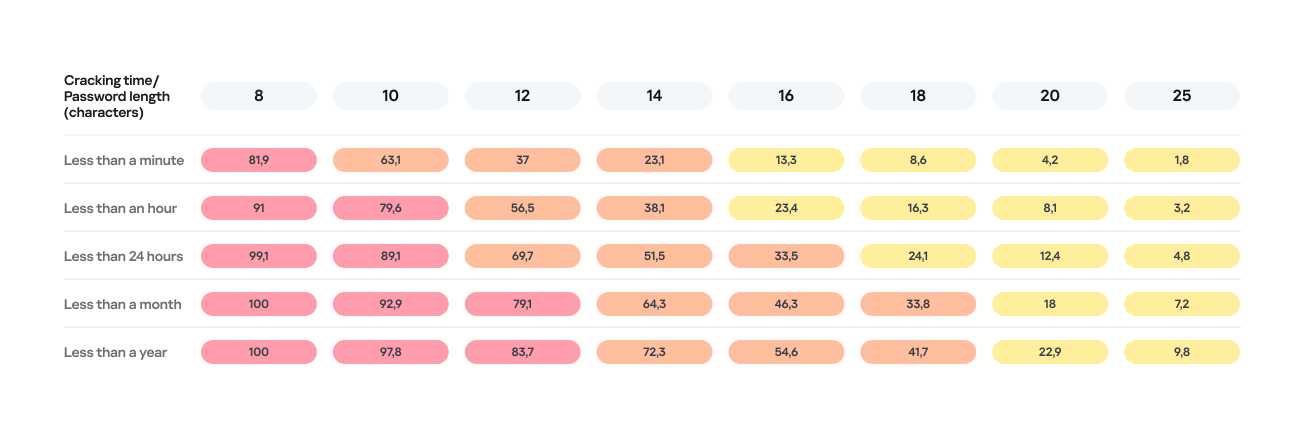
Password length is the primary factor affecting cracking time. As you can see from the table below, it takes less than 24 hours to crack almost any eight-character password.
Percentage of varying password lengths crackable within a given timeframe
But the predictability of your password is just as important. Think you’re boosting security by adding a number or a special character to a memorable word? You are, but only slightly. The patterns people use to create passwords are easily predictable and, at times, pretty amusing — though this is no laughing matter.
What we learned about password patterns
Analysis of over 200 million passwords revealed characteristic patterns that allow smart algorithms to crack user passwords with ease.
Pick a number
More than half of all passwords (53%) end with one or more digits, while nearly one in six (17%) starts with a number. Every eighth password (12%) contains sequences that look a lot like years — ranging from 1950 to 2030 — and one in ten (10%) specifically falls between 1990 and 2026. This most likely happens because folks add their birth year (or that of someone close), some other significant year, or the year they created the password or account. Fun fact: based on the distribution of these dates, it suggests that the most active internet users were born between 2000 and 2012.
However, among all numeric combinations, the most popular turned out to be… you guessed it: “1234”. Overall, patterns involving sequential keyboard presses (“qwerty, ,”ytrewq”, and the like) appear in 3% of passwords.
Special characters aren’t a silver bullet
Most password policies in recent years require at least one special character. The absolute winner in this category is the @ symbol: it appears in one out of every 10 passwords. The period (.) comes in second, followed by the exclamation point (!) in third.
Love rules the world… and Skibidi Toilet does too
Emotionally charged words often form the foundation of a password, and despite everything, positive words are more common. Frequently occurring examples include “love”, “angel”, “team”, “mate”, “life”, and “star”. That said, negativity pops up too — mostly in the form of common English swear words.
Interestingly, viral memes are reflected in passwords as well. Between 2023 and 2026, the use of the word Skibidi in passwords skyrocketed 36-fold! Naturally (see the link if it doesn’t seem natural), “toilet” saw a boost too, though to a lesser extent.
Users tend to keep their passwords unchanged for years
More than half of the passwords (54%) we identified in recent leaks have surfaced before. Part of this can be explained by the same data migrating from one dataset to another. However, there’s a much more troubling reason too: many users simply haven’t changed their passwords in years.
Analyzing the dates found within passwords shows that combinations containing the years from 2020 through 2024 remain popular. It seems people add the current year to their password when they create it — and then forget about it for several years. This actually allows us to calculate the average lifespan of a password: about three to five years.
This is a dangerous trend. For one, smart algorithms can crack much more complex passwords over that kind of timeframe. Secondly, the longer your password remains unchanged, the higher the probability it will leak — whether through a breach, malware infection, or a phishing attack.
The situation gets even worse when the same password is used across multiple accounts. In this case, attackers don’t even need to crack anything; they just need to find your password in a single leak and plug it into other sites.
How to protect your passwords and accounts
If you’ve realized while reading this post that your own passwords are among those easily crackable — don’t panic. We’ve put together a list of simple but essential tips for you.
Use a password manager
The weakest passwords are the ones people come up with themselves. Creating and memorizing hundreds of sequences of 16–20 random characters (since every site requires a unique, long password) is a daunting, unrealistic task.
That’s why you should delegate password generation and storage to our password manager. It doesn’t just create and store complex, randomized passwords in an encrypted format; it also syncs them across all your devices. To decrypt your vault, you only need to remember one main password that no one knows but you — our guide on mnemonic passwords can help you with that.
Don’t store passwords as plain text
Whatever you do, never write down passwords in files, messages, or documents. They lack the robust encryption provided by a password manager. Furthermore, these kinds of notes fall into the hands of attackers instantly if you happen to pick up a Trojan or an infostealer.
Don’t store passwords in your browser
Many users save their passwords in their browsers — especially since they conveniently offer to do it automatically. Unfortunately, research shows that malware has evolved to extract these passwords from all popular browsers almost instantly. Kaspersky Password Manager can help you import saved passwords from your favorite browser — just follow our simple, three-step guide. Most importantly, don’t forget to clear the browser’s password storage once the import is complete.
Switch to passkeys
Wherever possible, use passkeys — a cryptographic replacement for passwords. In this setup, the service stores a public key, while the private key remains on your device and is never transmitted. During login, the device simply signs a one-time request. Additionally, passkeys are tied to a specific domain, meaning phishing attacks using spoofed addresses won’t work. Kaspersky Password Manager allows you to store both passwords and passkeys, solving the problem of syncing them across different ecosystems, including Windows, Android, macOS, and iOS.
Set up two-factor authentication
Enable two-factor authentication wherever possible. Even if your password is compromised, a properly configured 2FA setup makes it extremely difficult for the attacker to access your account. For maximum security, skip the one-time codes sent via SMS and use authenticator apps instead — and yes, Kaspersky Password Manager comes in handy here, too.
Practice good digital hygiene
Remember, storing your passwords correctly is only half the battle. It’s crucial to follow the rules of digital hygiene: avoid downloading unverified files, pirated software, cheats, or cracks, and don’t click on random links. The number of infostealer attacks has been steadily rising in recent years, which means you need a robust security solution for full protection. We recommend Kaspersky Premium — it protects all your devices from Trojans, phishing, and other threats. Besides, the subscription includes our password manager.
For those serious about account security, check out our collection of posts on passwords, passkeys, and two-factor authentication:
The federal SECURE Data Act is not a serious consumer privacy bill, and its provisions—if enacted—would be a retreat from already insufficient state protections.
The bill could wipe out hundreds of state privacy protections.
Most troubling for EFF: the bill would preempt dozens, if not hundreds, of state laws that regulate related topics, and it would not allow consumers to sue to protect their own rights (commonly called a private right of action). And it comes nowhere close to banning online behavioral advertising—a practice that fuels technology companies’ always increasing hunt for personal data.
The bill also suffers from many other flaws including weak opt-out defaults, inadequate data minimization requirements, and large definitional loopholes for companies.
Key Provisions
The bill would give consumers some rights to take action to control their personal data— like access, correction, deletion, and limited portability. These rights have become standard in all data privacy proposals in recent years.
The bill would also require companies to obtain your consent before processing your sensitive data, or using any of your personal data for a previously undisclosed purpose. Absent your consent, a company couldn’t do these things.
Further, the bill would allow you to opt out of (1) targeted third-party advertising, (2) the sale of your personal data, and (3) profiling of you that has a legal, healthcare, housing, or employment effect. Unfortunately, a company could keep doing these invasive things to you, unless you opted out.
The bill would also require data brokers that make at least 50 percent of their profits from the sale of personal data to register in a public database maintained by the Federal Trade Commission (FTC).
Preemption of Too Many State Laws
Federal privacy laws should allow states to build ever stronger rights on top of the federal floor. Many federal privacy laws allow this, including the Health Insurance Portability and Accountability Act, the Video Privacy Protection Act, and the Electronic Communications Privacy Act.
The SECURE Data Act would not do that. Instead, it would wipe out dozens, if not hundreds, of existing state privacy protections. Section 15 of the bill would preempt any “law, rule, regulation, requirement, standard, or other provision [that] relates to the provisions of this Act.” This would kill the 21 state consumer privacy laws passed in the past few years. These state bills aren’t strong enough, but they are still better than this federal proposal. For example, California maintains a data broker deletion tool and requires companies to comply with automatic opt-out signals—including one that is built into EFF’s Privacy Badger.
Because the SECURE Data Act has provisions that relate to data privacy and security, it could preempt all 50 state data breach laws and many others. It could also preempt state laws related to specific pieces of sensitive data, like bans on the sale of biometric or location information. Some states like California have constitutional provisions that protect an individual’s right to privacy, which can be enforced against companies. That constitutional provision, as well as state privacy torts, could also be in danger if this bill passed.
No Private Enforcement, A New Cure Period, and Vague Security Powers
Strong consumer privacy laws should allow consumers to take companies to court to defend their own rights. This is essential because regulators do not have the resources to catch every violation, and federal consumer enforcement agencies have been gutted during the current administration.
The SECURE Data Act does not have a private right of action. The FTC, along with state attorneys general, have primary enforcement authority. The law also gives companies 45 days to “cure” any violation with no penalty after they are caught.
Moreover, Section 8 of the bill creates a vaguely defined self-regulatory scheme in which companies can apply to be audited by an “independent organization” that will apply a “code of conduct.” Following this code of conduct would give companies a presumption that they are complying with the law. This provision is an implicit acknowledgement that the bill does not provide regulators with any new resources to enforce new protections.
Section 9 of the bill would give the Secretary of Commerce broad power to “take any action necessary and appropriate to support the international flow of personal data,” including assessing “security interests of the United States.” The scope of this amorphous provision is unclear, but it likely does not belong in a consumer protection bill.
Weak Privacy Defaults
Your online privacy should not depend on whether you have the time, patience, and knowledge to navigate a website and turn off invasive tracking. Good privacy laws build in data minimization requirements—meaning there should be a default standard that prevents companies from processing your data for purposes that are not needed to provide you with the service you asked for.
The SECURE Data Act puts the burden on you to opt out of invasive company practices, like targeted third-party advertising, the sale of your personal data, and profiling. The bill at least requires companies to obtain your consent before processing your sensitive data (like selling your precise location). These consent requirements, however, are often an invitation for companies to trick you into clicking a button to give away your rights in hard-to-read policies. Indeed, few people would knowingly agree to let a company sell their personal data to a broker who turns around and sells it to the government.
Section 3 of the bill uses the term “data minimization,” but it is done in name only. The provision does not limit a company’s processing of data to only what is necessary to provide the customer with the good or service they asked for. Instead, the provision limits processing of data to only what a company “disclosed to the customer”—meaning if it is in the confusing privacy policy that nobody reads, it is okay.
And the bill would not even allow you to restrict certain uses of your data. As companies seek more data for AI systems, many internet users do not want their private personal data to be used to train those models. However, the bill makes clear that “nothing in this Act may be construed to restrict” a company from collecting, using, or retaining your data to “develop” or “improve” a new technology.
Other Flawed Definitions and Loopholes
The bill has numerous loopholes that technology companies would exploit if the bill were to become law. Below is just a sampling:
Government contractors: Under Section 13(b)(2), government contractors are exempt from the bill, which could be wrongly interpreted to exempt certain data brokers from sale restrictions when those sales are made to the government. This type of exemption could benefit surveillance companies like Clearview AI, which previously argued it was exempt from Illinois’ strict biometric law using a similar contractor exception. This is likely not the authors’ intention, since the definition of sale includes those made “to a government entity.” Sale definition: The definition in Section 16(28) is defined too narrowly. A sale should mean any exchange for monetary “or other valuable” consideration, as in some other privacy laws.
Biometric information definition: The definition in Section 16(4) excludes data generated from a photo or video, and the definition excludes face scans not meant to “identify a specific individual.” This could be wrongly interpreted to allow biometric identification from security camera footage, or biometric use for sentiment or demographic analysis.
Personal data definition: The definition in Section 16(21) exempts “de-identified data” from the definition of personal data, which could allow companies to do anything with de-identified data because that data is not protected by the law. The problem with de-identified data is that many times it is not.
Deletion requests: With regard to data that a company obtained from a third-party, Section 2(d)(5) would treat a consumer’s deletion request merely as an opt-out request. And even if a customer requested deletion, a company might be able to retain the data for research purposes under section 11(a)(9)(A).
Profiling definition: Under the definition in Section 16(25), companies could profile so long as the profiling is not “solely automated.” The flimsiest human review would exempt highly automated profiling.
Congress is long overdue to enact a strong comprehensive consumer data privacy law, and we have sketched what it should look like. But the SECURE Data Act is woefully inadequate. In fact, it would cause even more corporate surveillance of our personal information, by wiping out state laws that are more protective than this federal bill. Even worse, this bill would block state legislatures from protecting their residents from the privacy threats of tomorrow that are unforeseeable today.
EFF joins 18 organizations in writing a letter to UK policymakers urging them to address the root causes of online harm—rather than undermining the open web through blunt restrictions.
The coalition, which includes Mozilla, Tor Project, and Open Rights Group, warns that proposed measures following the passage of the Children’s Wellbeing and Schools Bill risk fundamentally reshaping the internet in harmful ways. Chief among these proposals are sweeping age-gating requirements and access restrictions that would apply not only to young people, but effectively to all users.
While framed as efforts to protect children online, these policies rely heavily on age assurance technologies that are either inaccurate, privacy-invasive, or both. As the letter notes, mandating such systems across a wide range of services—from social media and video games to VPNs and even basic websites—would force users to verify their identity simply to access the web. This creates serious risks, including expanded surveillance, data breaches, and the erosion of anonymity.
Beyond privacy concerns, the signatories argue that these measures threaten the core architecture of the open internet. Age-gating at scale could fragment the web into a patchwork of restricted jurisdictions, limit access to information, and entrench the dominance of powerful gatekeepers like app stores and platform ecosystems. In doing so, policymakers risk weakening the very qualities—interoperability, accessibility, and openness—that have made the internet a global public resource.
The letter also emphasizes what’s missing from the current policy approach: meaningful efforts to address the underlying drivers of online harm. Many digital platforms are designed to maximize engagement and profit through pervasive data collection and targeted advertising, often at the expense of user safety and autonomy. Rather than imposing access bans, the coalition calls on UK policymakers to hold companies accountable for these systemic practices and to prioritize user rights by design.
Importantly, the signatories highlight that the internet remains a vital space for young people: offering access to information, support networks, and opportunities for expression that may not exist offline. Policies that restrict access risk cutting off these lifelines without meaningfully reducing harm.
The message is clear: protecting users online requires more than heavy-handed restrictions. It demands thoughtful, rights-respecting policies that tackle the business models and design choices driving harm, while preserving the open, global nature of the web.
Last September, the United Kingdom’s Prime Minister Keir Starmer announced plans to introduce a new digital ID scheme in the country. The scheme aims to make it easier for people to prove their identities by creating a virtual ID on personal devices with information like names, date of birth, nationality or residency status, and a photo to verify their right to live and work in the country.
Since then, EFF has joined UK-based civil society organizations in urging the government to reconsider this proposal. In one joint letter from December, ahead of Parliament’s debate around a petition signed by 2.9 million people calling for an end to the government’s plans to roll out a national digital ID, EFF and 12 other civil society organizations wrote to politicians in the country urging MPs to reject the Labour government’s proposal.
Nevertheless, politicians have continued to explore ways to build out a digital ID system in the country, often fluctuating between different ideas and conceptualisations for such a scheme. In their search for clarity, the government launched a consultation, ‘Making public services work for you with your digital identity,’ seeking views on a proposed national digital ID system in the UK.
EFF submitted comments to this consultation, focusing on six interconnected issues:
Mission creep
Infringements on privacy rights
Serious security risks
Reliance on inaccurate and unproven technologies
Discrimination and exclusion
The deepening of entrenched power imbalances between the state and the public.
Even the strongest recommended safeguards cannot resolve these issues, and the fundamental core problem that a mandatory digital ID scheme that shifts power dramatically away from individuals and toward the state. They are pursued as a technological solution to offline problems but instead allow the state to determine what you can access, not just verify who you are, by functioning as a key to opening—or closing—doors to essential services and experiences.
No one should be coerced—technically or socially—into a digital system in order to participate fully in public life. It is essential that the UK government listen to people in the country and say no to digital ID.
The next few years will be decisive for EU digital policymaking. With major laws like the Digital Services Act, the Digital Markets Act, and the AI Act now in place, the EU is entering an enforcement era that will show whether these rules are rights-respecting or drift toward overreach and corporate control. With the proposed EU’s Digital Fairness Act (DFA), the Commission is now turning to increasingly visible risks for users, such as dark patterns and exploitative personalization. Its “Digital Fairness Fitness Check” makes clear that existing consumer rules need updating to reflect how digital markets operate today.
But not all proposed solutions point in the right direction. Regulators are already flirting with measures that rely on expanded surveillance, such as age verification mandates—surface-level fixes that risk undermining fundamental rights while offering little more than a false sense of protection.
For EFF, digital fairness means addressing the root causes of harm, not requiring platforms to exert more control over their users. It means safeguarding privacy, freedom of expression, and the rights of users and developers.
If the DFA is to make a real difference, it must tackle structural imbalances. Lawmakers should focus on two interlocking principles. First, prioritize privacy. Reforms should address harms driven by surveillance-based business models, alongside deceptive design practices that impair informed choices. Second, strengthen user sovereignty, which is also a necessary precondition for European digital sovereignty more broadly. Strengthening user sovereignty means taking measures that address user lock-in, coercive contract terms, and manipulative defaults that limit users’ ability to freely choose how they use digital products and services.
Together, these principles would support the EU’s objectives of consistent consumer protection, fair markets, and a more coherent legal framework. If implemented properly, the EU could address power imbalances and build trust in Europe’s digital economy.
Ban Dark Patterns
Dark patterns are practices that impair users’ ability to make informed and autonomous decisions. Many companies deploy these tactics through interface design to steer choices and influence behavior. Their impact goes beyond poor consumer decisions. Dark patterns push users to share personal data they would not otherwise disclose and undermine autonomy by making alternatives harder to access.
The DFA should address this by clearly prohibiting misleading interfaces that distort user choice in commercial contexts. While the Digital Services Act introduced a definition, it only partially bans such practices and leaves gaps across existing consumer law rules. The DFA should close these gaps by, at the very least, introducing explicit prohibitions and clearer enforcement rules, without resorting to design mandates.
Tackle Commercial Surveillance
At the core of digital unfairness lies the pervasive collection and use of personal data. Surveillance and profiling drive many of the harms regulators are trying to address, from dark patterns to exploitative personalization. The DFA should tackle these incentives directly by reducing reliance on surveillance-based business models. These practices are fundamentally incompatible with privacy and fairness, and they distort digital markets by rewarding data exploitation rather than quality of service. At a minimum, the DFA should address unfair profiling and surveillance advertising by strengthening privacy rights and banning pay-for-privacy schemes. Users should not have to trade their data or pay extra to avoid being tracked.Accordingly, the DFA should support the recognition of automated privacy signals by web browsers and mobile operating systems, which give users a better way to reject tracking and exercise their rights. Practices that override such signals through banners or interface design should be considered unfair.
Addressing surveillance and profiling also protects children, since many online harms are tied to the collection and exploitation of their data. Systems that serve ads or curate content often rely on intrusive profiling practices, raising concerns about privacy and fairness, particularly when applied to minors. Rather than turning to invasive age verification, the focus should be on limiting data use by default.
Strengthen User Sovereignty
There is a major gap in how EU law addresses user autonomy in digital markets: many digital products and services still restrict what people can do with what they pay for through opaque or one-sided licensing terms, technical protection measures, and remote controls. These mechanisms increasingly limit lawful use, modification, or access after purchase, allowing providers to revoke access, disable functionalities, or degrade performance over time. In practice, this turns ownership into a conditional rental.
Consumers must be able to use and resell digital goods without hidden limitations and with clear licensing terms.Too often, technical and contractual lock-ins, including remote lockouts and unilateral restrictions on functionality, erode that control.Recent legal reforms show that progress is possible. Rules such as those under the Digital Markets Act have begun to curb technical and contractual barriers and promote user choice. However, many restrictions persist.
The DFA must address these practices by targeting unfair post-sale restrictions and strengthening users’ ability to control and switch services. This means setting clear limits on unfair terms and misleading practices, alongside robust transparency on how digital services function over time. It should also strengthen interoperability and support user control, allowing people to access third-party applications and to let trusted applications act on their behalf, reducing lock-in and expanding meaningful choice in how users interact with digital services.
Ukrainian police arrested three individuals in Lviv who allegedly orchestrated one of the largest Roblox account theft operations to date. Between October 2025 and January 2026, the hacking group is said to have compromised over 610,000 Roblox accounts, including at least 357 high-value “elite” accounts, making around $225,000 from selling access to them.
The hackers distributed infostealing malware disguised as game-enhancement tools, harvested login credentials from infected devices, and sold accounts through a Russian website and closed online communities based on their value.
This operation targeted Roblox accounts because they hold significant monetary value for many users. Accounts can contain high Robux balances, limited-edition items that can no longer be obtained, years of gaming progress with achievements and unlocks, and paid access to premium content.
Roblox account recovery
If you recently downloaded any suspicious game enhancements or other Roblox-related software, your first priority is to run a full system anti-malware scan.
If the hackers changed your password and you’re unable to log in, use the password recovery option on the Roblox login page by clicking “Forgot Password or Username?”. Enter the email address associated with your account and check your inbox (including spam folders) for the reset link.
After recovering access, immediately terminate all active sessions to prevent hackers from maintaining access through stolen cookies. Go to Settings > Security and click Log out of all other sessions at the bottom of the page. This ensures that anyone who had unauthorized access can no longer use your account.
If you’ve been completely locked out—because hackers have changed both your password and recovery details—contact Roblox Support immediately. Visit the Roblox support page and provide as much detail as possible. They may ask for:
Your account username (this is crucial for identification).
The original email address used to create the account.
Payment information or purchase receipts showing Robux transactions.
The approximate date and time of the compromise.
Screenshots showing account details before the compromise, including creation date.
Your previous account settings or any other details that prove ownership.
Roblox explicitly states that, unless required by law, it is under no obligation to restore compromised accounts. It does not guarantee that accounts will be returned to their previous state or that lost virtual items and currency can be recovered. Only in very limited circumstances may Roblox offer the ability to recover lost inventory or its approximate value. It’s important to note that you must contact Roblox within 30 days of the compromise if you want assistance recovering lost items or currency. The support process typically takes 2–5 days.
There are a few steps that make it harder for someone to steal your Roblox account:
Verified email address. Ensure your account has a verified email address that you actively monitor. This helps you spot unauthorized password or email changes quickly.
Use unique passwords. Never reuse passwords across different accounts. If one is exposed elsewhere, attackers will try it on other platforms, including Roblox. Your Roblox password should be completely unique and stored securely. A password manager can help you with both.
Don’t share access. Never share your password with anyone, even with people claiming to be friends. Your account credentials should belong only to you (and your parents if you’re a minor). Roblox staff will never ask for your password.
Be wary of game enhancements, hacks, cracks and keys. The hackers in this case specifically distributed malware disguised as game-enhancement tools. Be extremely cautious about downloading any third-party programs, cheats, exploits, or tools that claim to improve your Roblox experience. These are often vehicles for credential theft and account compromise.
Keep software updated. Keep all the software on your device up-to-date, so you’re protected against the latest known exploits.
Use anti-malware. Run up-to-date, real-time anti-malware software to protect your device against information stealers and other malware.
Let’s face it, an incognito window can only do so much.
Breaches, dark web trading, credit fraud. Malwarebytes Identity Theft Protection monitors for all of it, alerts you fast, and comes with identity theft insurance.
Ukrainian police arrested three individuals in Lviv who allegedly orchestrated one of the largest Roblox account theft operations to date. Between October 2025 and January 2026, the hacking group is said to have compromised over 610,000 Roblox accounts, including at least 357 high-value “elite” accounts, making around $225,000 from selling access to them.
The hackers distributed infostealing malware disguised as game-enhancement tools, harvested login credentials from infected devices, and sold accounts through a Russian website and closed online communities based on their value.
This operation targeted Roblox accounts because they hold significant monetary value for many users. Accounts can contain high Robux balances, limited-edition items that can no longer be obtained, years of gaming progress with achievements and unlocks, and paid access to premium content.
Roblox account recovery
If you recently downloaded any suspicious game enhancements or other Roblox-related software, your first priority is to run a full system anti-malware scan.
If the hackers changed your password and you’re unable to log in, use the password recovery option on the Roblox login page by clicking “Forgot Password or Username?”. Enter the email address associated with your account and check your inbox (including spam folders) for the reset link.
After recovering access, immediately terminate all active sessions to prevent hackers from maintaining access through stolen cookies. Go to Settings > Security and click Log out of all other sessions at the bottom of the page. This ensures that anyone who had unauthorized access can no longer use your account.
If you’ve been completely locked out—because hackers have changed both your password and recovery details—contact Roblox Support immediately. Visit the Roblox support page and provide as much detail as possible. They may ask for:
Your account username (this is crucial for identification).
The original email address used to create the account.
Payment information or purchase receipts showing Robux transactions.
The approximate date and time of the compromise.
Screenshots showing account details before the compromise, including creation date.
Your previous account settings or any other details that prove ownership.
Roblox explicitly states that, unless required by law, it is under no obligation to restore compromised accounts. It does not guarantee that accounts will be returned to their previous state or that lost virtual items and currency can be recovered. Only in very limited circumstances may Roblox offer the ability to recover lost inventory or its approximate value. It’s important to note that you must contact Roblox within 30 days of the compromise if you want assistance recovering lost items or currency. The support process typically takes 2–5 days.
There are a few steps that make it harder for someone to steal your Roblox account:
Verified email address. Ensure your account has a verified email address that you actively monitor. This helps you spot unauthorized password or email changes quickly.
Use unique passwords. Never reuse passwords across different accounts. If one is exposed elsewhere, attackers will try it on other platforms, including Roblox. Your Roblox password should be completely unique and stored securely. A password manager can help you with both.
Don’t share access. Never share your password with anyone, even with people claiming to be friends. Your account credentials should belong only to you (and your parents if you’re a minor). Roblox staff will never ask for your password.
Be wary of game enhancements, hacks, cracks and keys. The hackers in this case specifically distributed malware disguised as game-enhancement tools. Be extremely cautious about downloading any third-party programs, cheats, exploits, or tools that claim to improve your Roblox experience. These are often vehicles for credential theft and account compromise.
Keep software updated. Keep all the software on your device up-to-date, so you’re protected against the latest known exploits.
Use anti-malware. Run up-to-date, real-time anti-malware software to protect your device against information stealers and other malware.
Let’s face it, an incognito window can only do so much.
Breaches, dark web trading, credit fraud. Malwarebytes Identity Theft Protection monitors for all of it, alerts you fast, and comes with identity theft insurance.
It’s best to think of the modern car as a computer on wheels — one that constantly offloads diagnostic data to the manufacturer or dealer’s servers. On board, you’ll find dozens of sensors: everything from GPS, speedometers, and hands-free microphones, to external cameras and the less obvious (but highly active) sensors for pedal pressure, tire pressure, engine temperature, and more. Even if this data isn’t beamed to the manufacturer in real-time, it’s logged in the car’s internal memory, and can reveal a wealth of information about a driver’s trips, habits, and surroundings. We’ve already taken a deep dive into how automakers collect data for commercial use, and who they sell it to (spoiler alert: insurance companies are the biggest buyers of telemetry), but today we’re looking at how law enforcement and intelligence agencies tap into this goldmine.
Digital evidence
Police departments across the globe have recognized the immense value of data stored within vehicles. If a car or its owner is potentially linked to a crime, investigators do more than just check for prints or DNA. Car Intelligence (CARINT) technology allows them to essentially scour all onboard computers, extracting data such as:
GPS-based trip history
Call logs, media player activity, and voice commands
Lists of paired devices and synced contact lists
Driving statistics: mileage, engine performance modes, and other technical parameters
There are numerous precedents where this data has served as evidence and dismantled alibis. In one U.S. criminal case, a recorded voice command became a smoking gun, proving the suspect was behind the wheel of a stolen vehicle.
With the rise of connected cars equipped with their own SIM cards and direct links to the manufacturer, law enforcement no longer needs physical access to the vehicle. Key data, such as GPS location history, can be pulled directly from the manufacturer’s servers. Furthermore, a U.S. Senate investigation revealed that nine out of 14 surveyed automakers were providing this data without a warrant.
Major suppliers of car intelligence software, such as Ateros, Berla, TA9/Rayzone, and Toka, sell their solutions exclusively to government and law enforcement agencies, which is why they’ve remained largely out of the public eye.
Comprehensive surveillance
To track persons of interest, data pulled from the vehicle itself is cross-referenced with information from other sources. According to media leaks, flagship products in this category aggregate data from the car’s SIM card, Bluetooth communication trails, street-level CCTV footage, and commercially available information from data brokers. This hybrid dataset simplifies the comprehensive mapping of a target’s movements and contacts. Journalists have discovered that some companies even market the ability to activate a vehicle’s microphones and cameras remotely and covertly, enabling real-time eavesdropping on conversations. However, experts note that due to the diversity of technical implementations across different systems, hacking the car itself remains a difficult task with no sure way of succeeding. Often, it’s simpler to correlate other, more accessible datasets to achieve the same result.
Factory-installed spy tools
Features like covert activation of cameras, microphones, and other sensors may theoretically be part of a vehicle’s stock functionality rather than the result of a hack. While we haven’t found any public evidence of such cases, it’s well known that Chinese-made vehicles are coming under increased scrutiny in several countries. For instance, they’ve been banned from Israeli military sites — with the exception of a single Chery model, provided its multimedia system is removed. Similar bans exist in the UK and Poland; furthermore, UK Ministry of Defense employees are instructed not to connect their work phones to Chinese-made cars. In Germany, security analyses of Chinese vehicles were conducted by the specialized agencies BfV and ZITiS, but the findings remain classified.
Low-cost surveillance
Tracking a vehicle — or even thousands of them — doesn’t necessarily require hacking onboard systems or tapping into vast networks of license plate readers. A recent scientific study demonstrated that innocent tire pressure monitoring systems (TPMS) provide enough data for effective tracking. Data from these sensors is transmitted via radio without any encryption and includes a unique ID that makes identifying a specific car easy. This allows for more than just confirming the vehicle’s movement; it can even be used to estimate the driver’s weight or determine if they are traveling alone. While this might not sound as impressive as remotely accessing a car’s cameras, it requires very little financial investment and works even on relatively old vehicles without an internet connection.
What you can do about vehicle tracking
While tracking a person through their car is undoubtedly a privacy risk, striking a balance in mitigating this threat is difficult: many measures are complex, largely ineffective, and simultaneously reduce the utility, safety, and convenience of a modern vehicle. Consequently, any steps taken should be weighed against your personal risk profile.
To reduce the risk of data leaks, check the privacy settings in the manufacturer’s app, the car’s infotainment system, and your connected smartphone. A connected car can transmit data about its operation to the cloud: information about trips, location, driving style, vehicle condition, and the operation of its components. Some of this data is necessary for navigation, diagnostics, and service, but not all permissions are required — check your settings and disable the transmission of data not related to the functions you need.
Be careful with permissions for access to the microphone, camera, contacts, messages, and geolocation. Only connect your own devices to the car and don’t save other people’s phones or unfamiliar Bluetooth devices in the system. When syncing your smartphone, select only the features you need — such as calls, music, and navigation — rather than granting full access to all your phone’s data.
Do not use the services of technicians who offer to “unlock” your car, reflash electronic control units, or install unofficial software to expand features, increase power, or otherwise interfere with the car’s operation. Such software has not been tested by the manufacturer: it may behave unpredictably, collect and transmit your data to malicious actors, disable security features, or affect critical vehicle systems — including steering, braking, or engine operation.
And when choosing a new car, ask the dealer not only about the number of stars in NCAP safety tests, engine power, or fuel economy, but also about the cybersecurity technologies used in the vehicle. Solutions such as the Kaspersky Automotive Secure Gateway, based on KasperskyOS, will provide the necessary protection for new cars against cyberthreats.
What other threats do connected cars hide? Read more in our posts:

 Login
Login