Normal view

New compliance guide available: ISO/IEC 42001:2023 on AWS

6 May 2026 at 21:39

We have released our latest compliance guide, ISO/IEC 42001:2023 on AWS, which provides practical guidance for organizations designing and operating an Artificial Intelligence Management System (AIMS) using AWS services.

As organizations deploy AI and generative AI workloads in the cloud, aligning with globally recognized standards such as ISO/IEC 42001:2023 becomes an important step toward strengthening AI governance, risk management, and responsible AI practices. This guide helps cloud architects, AI/ML engineers, security teams, compliance leaders, and DevOps practitioners understand how to implement and operate ISO 42001-aligned controls using AWS services while applying the AWS Shared Responsibility Model for AI.

The guide explains how organizations can integrate AWS services into their AIMS to support the requirements defined in ISO 42001:2023 clauses 4–10 and the Annex A control specific to AI systems. It also highlights how AWS AI services, security capabilities, monitoring, and automation can help customers maintain visibility over AI systems, improve operational consistency, and prepare audit-ready evidence.

While AWS provides a secure and compliant cloud infrastructure with built-in responsible AI capabilities, customers remain responsible for defining their AIMS scope, implementing controls, and demonstrating conformity during certification audits.

Inside the guide:

  • Overview of the ISO/IEC 42001:2023 framework, including understanding ISO 42001 and its Annexes, and how it relates to the broader ISO AI standards family
  • Guidance for integrating with AWS security architecture and applying the AWS Shared Responsibility Model for AI workloads
  • Context and scoping considerations for establishing an AIMS on AWS, including defining AI system boundaries within your environment
  • Mapping of ISO 42001:2023 clauses 4–10 to AWS services and architectural capabilities, covering organizational context, leadership, planning, support, operation, performance evaluation, and improvement
  • Implementation guidance for specific Annex A controls (A.2–A.10), including AI policies, internal organization, resources for AI systems, impact assessments, AI system life cycle management, data governance, transparency for interested parties, use of AI systems, and third-party and customer relationships
  • Recommendations for evidence collection, documentation, and audit readiness using AWS native tooling
  • Best practices for operationalizing AI compliance activities through automation and infrastructure-as-code

Use this guide to map ISO 42001 clauses and Annex A controls to your AWS environment, automate evidence collection, and reduce the effort involved in preparing for a certification audit.

Download: ISO/IEC 42001:2023 on AWS Compliance Guide

For further assistance, contact AWS Security Assurance Services

If you have feedback about this post, please submit comments in the Comments section below.

Abdul Javid

Abdul Javid

Abdul is a Senior Security Assurance Consultant and a PECB ISO 42001 Lead Auditor, IAPP Certified AI Governance Professional and ISACA Advanced in AI Security Management. He draws on his extensive experience of over 25 years to guide AWS customers on compliance matters. He holds an M.S. in Computer Science from IIT Chicago and numerous certifications from IAPP, AWS, ISO, HITRUST, ISACA, CMMC, PMI, PCI DSS, and ISC2.

Satish Uppalapati

Satish is an Associate Assurance Consultant with AWS Security Assurance Services and has more than 8 years of experience in IT risk, governance, and regulatory assurance. He works with AWS customers to help align cloud environments with frameworks such as ISO 27001, SOC 2, and FFIEC. Satish also focuses on advancing governance for AI systems, including emerging standards such as ISO/IEC 42001.

Amber Welch

Amber Welch

Amber is an AWS Security Assurance Services Senior Privacy Consultant, advising AWS customers on their AI and privacy risk management and compliance. She has an M.A. in English and ISO 42001 Lead Auditor, IAPP CIPM, and IAPP CIPP/E certifications. Amber has spoken and written extensively on AI and privacy topics, and is an AWS Privacy Reference Architecture primary author.

Jonathan-Jenkyn

Jonathan Jenkyn

Jonathan (“JJ”) is a Sr Security Assurance Solution Architect with AWS Security Assurance Services. With over 30 years of experience, he is a proven security leader who delivers robust cloud security outcomes. JJ is also an active member of the AWS People with Disabilities affinity group and enjoys running, cycling, and spending time with his family.

Muhammad Sharief

Muhammad Sharief

Muhammad is a Security Assurance Consultant with AWS Security Assurance Services (SAS) and a PECB-certified ISO/IEC 42001 Lead Auditor. He helps enterprise customers across AWS GovCloud (US) and commercial environments achieve and maintain compliance with FedRAMP, CMMC, ISO 27001, ISO 42001, and NIST 800-53. Muhammad works closely with customers, partners, and AWS service teams to design automated evidence collection architectures, advance AI governance, and align cloud security and compliance requirements with business objectives.

Securing open proxies in your AWS environment

4 May 2026 at 20:16

This article shows you how to identify and secure open proxies in your AWS environment to prevent abuse, protect your IP address reputation, and control costs.

An open proxy is a server that forwards traffic on behalf of internet users without requiring authentication. While proxies can support legitimate use cases such as load balancing or caching, open proxies allow unrestricted access that threat actors can use to hide harmful activity. In Amazon Web Services (AWS) environments, open proxies often result from misconfigured Amazon Elastic Compute Cloud (Amazon EC2) instances, containers, or compute resources such as AWS Lambda functions. These resources expose proxy functionality without access controls.

Open proxies come in several forms. Common open proxies can include:

  • HTTP proxies: HTTP proxies forward HTTP requests to web servers, making them useful for web traffic management. These proxies can create potential issues when they’re unsecured.
  • SOCKS proxies: SOCKS proxies support a wider range of traffic types and provide more flexibility. These proxies create a broader potential for misuse.
  • Transparent proxies: Transparent proxies intercept traffic without the client’s knowledge and are often used to filter content. These proxies can become security liabilities when misconfigured.
  • Reverse proxies: Reverse proxies help with internal routing. Unauthorized users can misuse these proxies if they’re exposed.

Knowing these risks can help you better protect your AWS environment.

Security risks

Because of the unrestricted configuration of open proxy servers, threat actors target them to conduct denial of service (DoS) events, intrusion attempts, distribute spam, and other forms of unauthorized activity. These open proxy servers allow threat actors to hide their actual IP address and other forms of identification from the intended targets.

When your AWS infrastructure hosts an open proxy, several risks emerge that can affect both your operations and customers:

  • Threat actors can misuse your resources, which can result in your IP address being added to security service and reputation system block lists. This can affect your legitimate business operations and customer access. When external parties use your infrastructure for harmful activities, the reputation damage extends beyond immediate technical concerns to affect your ability to reach customers and partners.
  • Unexpected costs from resource consumption occur when threat actors use your bandwidth and compute capacity. The traffic patterns that proxy abuse generate can also alert AWS security monitoring systems and create additional operational overhead as you investigate and respond to these alerts.
  • Service disruptions might affect your legitimate workloads because unauthorized traffic competes for resources with your business-critical applications. This competition for resources can potentially degrade performance or cause availability issues for your customers.

Implementing security measures

To prevent the risks associated with open proxies, it’s essential to implement proper security controls for proxy services in AWS environments. The following guidance is a comprehensive approach that you can follow to secure your proxy infrastructure.

Access control implementation

An important security step is to use passwords and authentication mechanisms to restrict access to proxy services. Configure your proxies to accept connections only from known, trusted IP address ranges. For Elastic Load Balancing (ELB), limit access based on source IP addresses and add authentication to proxies behind the load balancers. When you create new instances in Amazon Elastic Kubernetes Service (Amazon EKS), limit access to your balancer in each instance. If instances don’t have public IP addresses, then you can limit access to the balancer instead. If instances have public IP addresses, then you must limit access to those IP addresses.

When possible, use AWS PrivateLink virtual private cloud (VPC) endpoints to provide private connectivity to AWS services without exposing them to the internet. Deploy proxy services in private subnets with controlled outbound access through NAT gateways or other controlled channels. For Amazon EC2 and Amazon Lightsail resources, update the attached security group to prevent public internet access. To secure the proxy, you must either limit access to specific IP addresses or implement authentication on the endpoint.

Authentication and authorization

Turn on authentication for the proxy software and use strong credentials, certificates, or integration with AWS Identity and Access Management (IAM) and AWS Directory Service. Apply IAM policies with the principle of least privilege to limit access to only what users need to perform their tasks. This approach reduces the potential effects of credential compromise and helps maintain clear accountability for resource access.

Monitoring and detection

To detect unusual proxy activity, configure Amazon Virtual Private Cloud (Amazon VPC) Flow Logs, AWS CloudTrail, and Amazon GuardDuty. Use Amazon CloudWatch alarms to notify you of abnormal traffic patterns that might indicate unauthorized use of your proxy services. These monitoring capabilities provide visibility into your network traffic patterns and help you identify both legitimate usage and potential security concerns.

Deployment best practices

Use HTTPS for ELB traffic to protect data in transit, and restrict security groups to necessary ports to minimize the surface area for potential misuse. Integrate AWS WAF with balancers to filter web traffic based on rules that you define. You can also use AWS Network Firewall for advanced traffic filtering capabilities. For APIs, deploy Amazon API Gateway with authentication and authorization controls to manage access to your backend services. This layered approach to security helps protect your infrastructure at multiple points in the traffic flow.

Regular security assessments

Run Amazon Inspector to scan for misconfigurations in your infrastructure, and use AWS Security Hub to centralize security findings across your AWS environment. Conduct penetration tests in accordance with AWS policy to identify potential security issues before they can result in unintended access.

Incident response planning

Automate remediation with AWS Config rules and Automation, a capability of AWS Systems Manager, to respond rapidly to security events. Maintain incident response runbooks that outline clear steps for addressing proxy-related security incidents, and decommission unused resources that could become security liabilities.

Documented procedures and automated responses reduce the time between detection and remediation and minimizes the potential effects of security incidents on your operations.

Benefits of proper proxy security

When you implement these security measures, you gain the following advantages for your AWS environment:

  • Protection of your IP address reputation helps maintain customer trust and prevents security services from blocking your legitimate traffic. When your infrastructure maintains a positive reputation, your business communications reach their intended recipients without interference.
  • Cost control prevents unauthorized users from consuming your AWS resources and generating unexpected charges on your account. When you restrict access to legitimate users and use cases, you maintain predictable costs that align with your business needs.
  • Operational stability reduces the risk of service disruptions that abuse of your proxy infrastructure can cause. When you dedicate your resources to serving your customers rather than supporting unauthorized activity, you can deliver consistent performance and availability.
  • Enhanced visibility into your network traffic patterns helps you identify both legitimate usage and potential security concerns. This awareness allows you to make informed decisions about capacity planning, security improvements, and operational optimizations.

Conclusion

Open proxies present a serious risk in AWS environments, but you can effectively secure proxies with the right measures. By implementing strict access controls and additional security practices such as authentication, monitoring, and regular assessments, you can prevent misuse, protect your infrastructure, and maintain your IP address reputation.

Taking proactive steps strengthens your own environment and supports the broader security of the internet ecosystem. Under the AWS shared responsibility model, you’re responsible for the configuration and maintenance of these security controls, while AWS provides the underlying secure infrastructure. By following the guidance in this article, you can build a robust security posture that protects your proxy infrastructure while supporting your legitimate business needs.

If you have feedback about this post, submit comments in the Comments section below.

Dodd Mitchell

Dodd Mitchell

Dodd is a member of the AWS Trust and Safety team in Virginia, supporting customers in navigating abuse, phishing, and content-related risks. He works closely with partners to strengthen response processes and build more resilient, trustworthy platforms.

Security posture improvement in the AI era

1 May 2026 at 22:58

It’s only been a few weeks since Anthropic announced the Claude Mythos Preview model and launched Project Glasswing with AWS and other leading organizations. This has generated a lot of discussion about the future of cybersecurity and what the ever-increasing capabilities of foundation models mean to organizations.

As AWS CISO Amy Herzog pointed out in the Project Glasswing announcement, “At AWS, we build defenses before threats emerge, from our custom silicon up through the technology stack. Security isn’t a phase for us; it’s continuous and embedded in everything we do.”

Read more from Amy about this in Building AI defenses at scale: Before the threats emerge.

While the discussion around the future of cybersecurity is important, the only thing we know for certain is that organizations need to be able to react quickly to the rapid changes AI is bringing to technology and business in general. And you can’t react quickly if your security fundamentals aren’t dialed in.

The security hygiene gap

It’s easy to assume you have the foundational security elements covered, or to overlook some completely. Basic security use cases like identity management, threat detection, vulnerability management, data protection, and network security can be inconsistently implemented across cloud environments. While AI is reshaping the security landscape, strong security fundamentals continue to be essential for every organization, regardless of size or industry.

These are the security basics that matter whether or not you’re adopting AI: patching consistently, enforcing least-privilege access, enabling logging and monitoring, encrypting data at rest and in transit, and reviewing security configurations regularly. When these fundamentals are in place, you’re better positioned to take advantage of AI-driven tools and respond to newly discovered vulnerabilities, wherever they come from.

While the concepts that drive security fundamentals are universal, implementing them in your environment is best done with an understanding of the context unique to your organization. That’s why we have a multitude of freely available materials—like the AWS Well-Architected Framework—that you can use to help ask the right questions and implement changes in your environment. We also offer programs like the Security Health Improvement Program (SHIP) to help you improve your security posture through prescriptive guidance and continuous improvement.

What is the Security Health Improvement Program (SHIP)?

SHIP is a no-cost program available to every AWS customer, regardless of support tier. SHIP provides a proven, data-driven methodology to:

  • Assess your current security posture using data from your AWS environment
  • Identify specific opportunities to improve across 10 core security use cases
  • Build a prioritized action plan tailored to your environment
  • Establish a mechanism for continuous security improvement

The program is led by AWS Solutions Architects and Technical Account Managers who take you through a personalized report, contextualize findings for your environment, and help you build a prioritized action plan.

Why SHIP matters in the AI era

Project Glasswing highlights an important shift: AI-powered tools are accelerating the pace of vulnerability discovery, which means organizations need to be prepared to assess and respond to findings and changing situations faster than before. In addition to external factors, as organizations adopt AI—whether deploying foundation models, building agentic workflows, or using AI-powered services—how they implement their security controls must change as well. A strong security foundation is what makes confident AI adoption possible.

Here’s how SHIP helps:

Address foundational security gaps proactively

SHIP uses a data-driven methodology to identify opportunities to improve and optimize across 10 core security use cases: threat detection, cloud security posture management, application security testing, configuration management, access governance, vulnerability management, application protection, network security, encryption, and secrets management. The program includes a SHIP assessment to identify critical security findings related to your current security posture, so your team can build a prioritized roadmap for improvement tailored to your environment.

Establish the security baseline AI workloads require

Before you deploy your first model on Amazon Bedrock or build agentic workflows with Amazon Bedrock AgentCore, you need confidence that your underlying infrastructure follows security best practices. SHIP uses actual data from your environment to provide prescriptive, specific guidance rather than generic security recommendations. This is especially relevant as AI-driven vulnerability discovery tools become more widely available: organizations with strong baselines will be able to act on new findings quickly and effectively.

Build a mechanism for continuous security improvement

As AI capabilities evolve, organizations benefit from having a repeatable process to assess and strengthen their security posture over time. SHIP establishes the methodology and mechanisms for your team to continuously assess, prioritize, and improve. By building this operational capability, you’re strengthening your organization’s ability to adapt and contributing to broader industry resilience. As the cybersecurity community integrates AI into defense strategies, SHIP helps you maintain foundational best practices so you can adopt these innovations effectively and with confidence.

Getting started is straightforward

SHIP is available today, at no cost, to every AWS customer. Here’s how to get started:

  1. Talk to your AWS account team. Ask about scheduling a SHIP engagement, or request one directly on the SHIP page.
  2. Attend a SHIP Activation Day. AWS regularly hosts hands-on workshops where you can run the SHIP assessment with AWS Solutions Architects and start building your improvement plan.
  3. Explore the prescriptive guidance. Consult the AWS Well-Architected Framework – Security Lens for documentation, reference architectures, and implementation guides you can start using today.

Take the next step together

AWS is committed to being the most secure cloud, from our participation in Project Glasswing to the security embedded in every layer of our infrastructure. Security is a shared responsibility, and programs like SHIP give customers the tools, guidance, and support to strengthen their security foundations so they can build confidently, no matter what comes next.

Ready to improve your security posture? Contact your AWS account team to schedule a SHIP engagement, or visit the SHIP resources page to learn more.

Celeste Bishop

Celeste Bishop

Celeste is a Senior Security Specialist at AWS, based in Austin, Texas. Over the past five years, she has held a range of security-focused roles spanning field and product marketing, developer relations, and executive engagement. She partners closely with customers, security leaders, and field teams to help organizations operate securely in the cloud. Celeste holds a Bachelor’s in Economics from the University of Texas at Austin.

What the March 2026 Threat Technique Catalog update means for your AWS environment

28 April 2026 at 21:01

The AWS Customer Incident Response Team (AWS CIRT) regularly encounters patterns that repeat across their engagements when helping customers respond to security incidents. We’re passionate about making sure that information is widely accessible so that everyone can improve their security posture and their organization’s resilience to disruption. The primary method we use to share this information is the Threat Technique Catalog for AWS (TTC). The latest update to the catalog for March 2026 addresses identity, persistence, infrastructure destruction, and privilege escalation. Each new entry reflects something we’ve encountered in practice, and each provides straightforward mitigations. This post breaks down what changed, why it matters, and what you can do about it today.

What we’re seeing

Based on recent observations, we’ve added three new entries to the TTC.

Cognito refresh token abuse: The quiet persistence mechanism

Amazon Cognito refresh tokens are designed for convenience. They let applications obtain new access and ID tokens without requiring users to re-authenticate. The default lifetime is 30 days and is configurable up to 10 years. Cognito provides the flexibility to address a wide range of use cases, however the AWS CIRT has seen this lifetime window used by threat actors in an unauthorized way to maintain persistence by refreshing credentials.

When a threat actor obtains a valid refresh token—through credential theft, compromised client-side storage, or elevated permissions—they can call cognito-idp:GetTokensFromRefreshToken to silently generate fresh tokens. The legitimate user’s session continues normally because their application independently refreshes tokens as needed—the threat actor’s refresh calls don’t invalidate the user’s token. This creates a parallel, persistent foothold that’s invisible to the user. In environments where refresh token rotation isn’t enabled, the same token can be reused indefinitely within its validity window.

This method of gaining persistent access is often overlooked by response teams who were confident that the initial compromise was contained, only to discover ongoing unauthorized access weeks later through a refresh token they didn’t know existed.

Enabling refresh token rotation and reducing the lifetime of tokens can help mitigate this risk. Dive deeper in the TTC (T1098.A006).

AMI image deletion: Targeting recovery capabilities

Amazon Machine Images (AMI) are a core part of many solutions and foundational to disaster recovery. They often contain the operating system, application configurations, and everything needed to rebuild your infrastructure. Threat actors know this, and we’re seeing ec2:DeregisterImage used to make it more difficult to recover from an incident.

By default, when an AMI is deregistered, it’s gone. Recycle Bin retention rules can allow the recovery of the AMI, but if you haven’t explicitly enabled that functionality, there’s no way to undo the deregister action. Working with customers, we’ve seen cases where the impact of this action goes beyond the immediate loss because the threat actors have also removed the golden images the teams planned to restore from.

The TTC has more information about how to detect and mitigate this technique, including how to enable Recycle Bin retention rules for key AMIs (T1485.A002).

Additional cloud roles: The trust policy blind spot

We’ve updated T1098.003: Additional Cloud Roles to now include UpdateAssumeRolePolicy as a tracked API call. We’ve seen an increase in the use of this call to avoid detections set to flag new role creation (iam:CreateRole). By modifying the trust policy of an existing role, a threat actor with sufficient permissions can use UpdateAssumeRolePolicy to subtly add an external account or an identity they control. No new roles appear. No new policies are created. The existing role simply trusts a new principal which the threat actor can assume.

This persistence and privilege escalation technique blends into the volume of normal AWS Identity and Access Management (IAM) operations. It’s especially effective in environments with a large number of roles where trust policy changes aren’t actively monitored.

The current trend

A common thread runs through all three of these updates: threat actors are using subtle, default, or unexpected behaviors to sidestep detection. Refresh tokens working as designed. AMI deregistration completing without guardrails. Trust policies being modified through legitimate API calls. These actions might not trigger alarms in most environments because they look like normal operations.

This is a shift worth paying attention to. Rather than relying on novel exploits or zero-days, the techniques we’re cataloging reflect threat actors who understand how cloud services work and use that knowledge to hide in plain sight. The implication for security teams is clear: prevention and detection strategies need to mature beyond monitoring for obviously malicious actions. Customers need to be watching for legitimate actions happening in illegitimate context—such as the right API call, made by the wrong principal, at the wrong time.

The Threat Technique Catalogue for AWS is designed to help with exactly this. Each technique entry includes detection guidance and mitigations specific to AWS environments. We encourage teams to review the relevant entries and assess whether their current monitoring would catch these patterns:

  • T1098.A006: Cognito Refresh Token Abuse: Are you monitoring for cognito-idp:GetTokensFromRefreshToken from unexpected sources? Is refresh token rotation enabled?
  • T1485.A002: AMI Image Deletion: Do you have Recycle Bin retention rules protecting your critical AMIs? Would you know if a production AMI was deregistered outside a maintenance window?
  • T1098.003: Additional Cloud Roles: Are trust policy modifications tracked and alerted on? Could an external account be added to an existing role without anyone noticing?

Each of these techniques leaves traces in AWS CloudTrail, and the TTC provides specific guidance on what to watch for and how to respond.

Looking ahead

The Threat Technique Catalog for AWS exists because we believe the patterns we observe during security engagements shouldn’t stay behind closed doors. When we see techniques repeating across customers, the most effective thing we can do is document them and make that knowledge available so you can act on it before you’re in the middle of an incident.

This March update adds three new entries, and the catalog will continue to evolve. Our team regularly updates it based on what we’re seeing in the real world when helping customers respond to security events. We encourage security teams to review the catalog regularly, incorporate its techniques into threat modeling exercises, and use it as a shared vocabulary for discussing cloud-specific threats.

Explore the full catalog: Threat Technique Catalog for AWS

Additional resources

If you have feedback about this post, submit comments in the Comments section below.


Shannon Brazil

Shannon Brazil

Shannon is a security engineer on the AWS Customer Incident Response Team (CIRT), specializing in digital forensics and cloud security investigations. Known in the community as 4n6lady, she is passionate about security education and mentoring the next generation of defenders.

Cydney Stude

Cydney Stude

Cydney is a security engineer specializing in threat intelligence and incident response at AWS. Cydney works on the ground in incident response and is passionate about turning observables into security outcomes. Cydney is an author and maintainer of the Threat Technique Catalog for AWS.

Optimize security operations through an AWS Security Hub POC

27 April 2026 at 20:55

April 27, 2026: This post was first published in September 2025 when the enhanced AWS Security Hub was in public preview. It has since been updated to reflect the general availability of Security Hub. This revision also provides a more detailed, step-by-step framework for planning your POC.


AWS Security Hub prioritizes your critical security issues and helps you respond at scale to protect your environment. The service sharpens findings through aggregation, correlation, and enrichment of AWS native security signals into actionable insights, enabling faster and more efficient response times. You can use these capabilities to gain visibility across your cloud environment through centralized management in a unified cloud security solution. Security Hub creates a cloud-native application protection platform (CNAPP) and through the AWS free trial, you can create a comprehensive proof of concept (POC) evaluation without significant upfront investment in time or resources.

In this blog post, we guide you through planning and implementation POC for Security Hub to assess the implementation, functionality, cost estimate, and value of Security Hub in your environment. We walk you through the following steps:

  1. Understand the value of Security Hub
  2. Determine success criteria for the POC
  3. Define Security Hub configuration
  4. Prepare for deployment
  5. Enable Security Hub
  6. Validate deployment

Understand the value of Security Hub

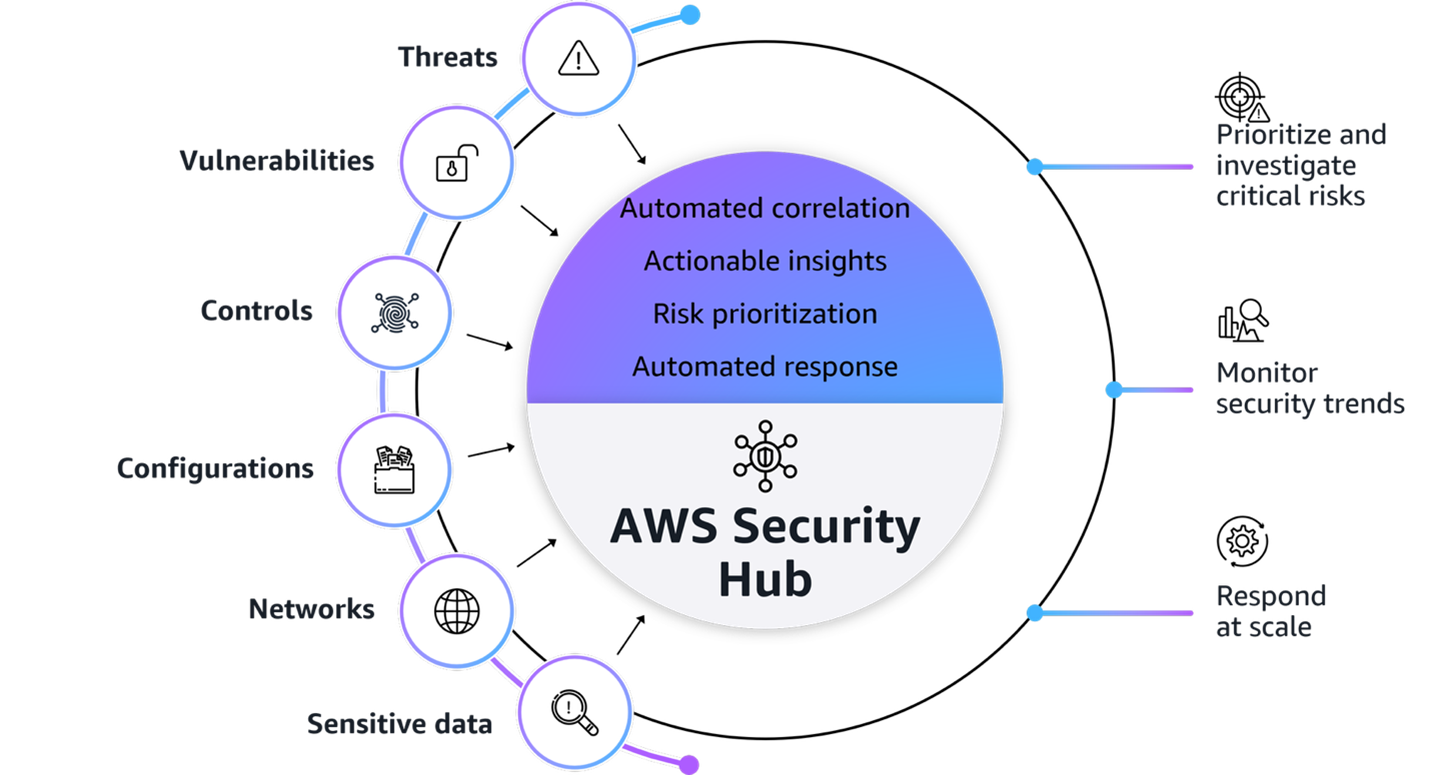
Figure1: AWS Security Hub overview

Figure 1: AWS Security Hub overview

Figure 1 provides a visualization of how Security Hub unifies signals from multiple AWS security services, partner solutions capabilities. The signals, which are ingested by Security Hub from multiple AWS security services and curated partner solutions include:

At its core, Security Hub provides four key capabilities in one unified solution:

  1. Unified security operations: Security Hub delivers a unified security operations experience, bringing your security signals into a single consolidated view and avoiding the need to switch between multiple security tools. This provides comprehensive visibility across your entire estate, including AWS, multi-cloud, and on-premises, so your security teams can efficiently detect, prioritize, and respond to potential security risks.
  2. Intelligent prioritization helps focus on what matters most: Security Hub helps you identify and prioritize critical security risks that might be missed when viewing findings in isolation. Security findings are correlated by analyzing resource relationships and signals from AWS security services and capabilities.
  3. Actionable insights guide security teams on next steps: Gain actionable insights through advanced analytics to transform correlated findings into clear, prioritized insights that highlight the most critical security risks in your environment. You can quickly understand potential impacts, visualize relationships, and identify which security issues pose the greatest risk to critical resources.
  4. Streamlined security response and automation capabilities: Security Hub enhances your security operations by enabling streamlined response capabilities. It seamlessly integrates with your existing ticketing systems to help facilitate efficient incident management.

With this integrated approach your security team can:

  • Investigate critical risks that need immediate attention from a single pane of glass
  • Monitor security trends and attack surface across your environments
  • Fix what really matters across the entire attack chain and path
  • Automate responses to streamline remediation

Understand the Open Cybersecurity Schema Framework

Security Hub uses the Open Cybersecurity Schema Framework (OCSF) to help standardize security data and analysis and enable better integration between security tools. This standardization helps simplify how security findings are structured and analyzed across your environment. This standardized data model enables seamless integration and data exchange across your security tooling, providing normalized and consistent data formats. When implementing your Security Hub POC, make sure that you’re familiar with the OCSF specifications Security Hub uses.

Additionally, confirm that any analytics or security information and event management (SIEM) tools you plan to integrate with support the OCSF data format to maximize the value of the consolidated security insights provided by Security Hub.

Determine success criteria

Establishing success criteria helps benchmark the outcomes of the POC with the goals of the business. Some example criteria and key performance indicators (KPI) include:

  • Alert consolidation metrics: Determine what resources you’re currently using to correlate security events and signals to understand their relationship. Review the process and note if it’s completed outside of AWS or through a SIEM. By setting a benchmark to reduce correlation overhead you can significantly improve efficiency and accelerate security investigations and posture improvement.
  • Response time improvements: Reducing your time to detect, investigate, and resolve security events and improve security posture is essential to streamlined security operations. Security Hub provides visualizations for potential attack paths that adversaries could use to exploit resources and helps assess the potential blast radius.
    • Reduced mean time to detect (MTTD) security incidents.
    • Reduced mean time to response (MTTR) for critical findings.
    • Reduced time to identify potentially affected resources in blast radius.
    • Increased accuracy of attack path analysis.
    • Number of controls implemented based on attack path insights (post investigation).
  • Automation capabilities: Having response playbooks as part of your incident management and response plan helps ensure comprehensive investigations lead to improved security posture. Review your automation capabilities to see if portions of or entire playbooks can be automated.
    • Potentially increased percentage of security findings automatically routed to the correct teams by using Jira Cloud, ServiceNow, or a third-party tool.
    • Reduced average time from detection to ticket creation.
  • Severity and risk classification: Review your organization’s inventory of assets to determine if it’s complete and if you can use telemetry to determine the severity level and associated risks.
    • Reduced time to identify critical resources and service coverage gaps affected by new vulnerabilities, threats, and misconfigurations.
    • Faster and more accurate severity label and risk calculation of findings.
    • Reduced time to identify service gap coverage.

After establishing your success criteria, it’s essential to evaluate organizational readiness and potential constraints that might impact your POC implementation. Begin by conducting a comprehensive assessment of your current environment: Determine if the foundational security services (GuardDuty, Amazon Inspector, Security Hub CSPM, and Macie) are enabled across your accounts, and identify your critical workloads and if there are any excessive attack surfaces.

Review your success criteria to make sure that your goals are realistic given your timeframe and potential constraints that are specific to your organization. For example:

  • Do you have full control over the configuration of AWS services that are deployed in an organization?
  • Do you have resources that can dedicate time to implement and test?
  • Is this time convenient for relevant stakeholders to evaluate the service?

Maximize your POC value through service activation

To get the most comprehensive evaluation of the capabilities of Security Hub, coordinate the activation of underlying security services to optimize the overlapping trial periods available at no additional cost. The following is a list of the underlying security services, and their free trial length:

  • Security Hub: 30-day trial (essential plan capabilities)
  • GuardDuty: 30-day trial (covers most protection plans except GuardDuty Malware Protection)
  • Security Hub CSPM: 30-day trial
  • Macie: 30-day trial
  • Amazon Inspector: 15-day trial

Consider enabling these services simultaneously so that you have at least two weeks of overlapping coverage to evaluate the full correlation and risk prioritization capabilities of Security Hub across each service. Optionally, if you want to conduct a POC with minimal configuration because of limitations, you can enable only Security Hub CSPM and Amazon Inspector during the initial POC phase to properly assess the results and data.

Note: Document your activation dates and trial expiration dates carefully. Create calendar reminders for trial end dates and schedule your key POC evaluation milestones to occur while services are active. This will help make sure that you can thoroughly assess the unified security operations capabilities of Security Hub when services are running at full capacity.

If you already have one or more of these underlying services enabled, you can proceed to enable the new Security Hub. To fully use the new Security Hub capabilities, particularly the exposure findings feature, specific service dependencies must be met, both Security Hub CSPM and Amazon Inspector are essential because they provide the telemetry needed for the Security Hub correlation engine and exposure findings. The combination enables Security Hub to deliver comprehensive risk analysis and prioritization by correlating configuration risks with runtime vulnerabilities. If you have other security services already enabled (such as GuardDuty or Macie), you can maintain these existing services while enabling Security Hub, and it will automatically begin incorporating their findings into its consolidated view, enhancing your overall security posture visualization.

Define your Security Hub configuration

After your success criteria have been established, you’re ready to plan your configuration. Some important decisions include:

  • Select a delegated administrator: From the AWS Organizations management account, you can set a delegated administrator for your organization. As a best practice, we recommend using the same delegated administrator across security services for consistent governance and according to our AWS Security Reference Architecture (AWS SRA).
  • Select accounts in scope: Define accounts you want to have Security Hub enabled for.
  • Define AWS Regions: Determine Regional restrictions or considerations.
  • Determine AWS service integrations: In addition to the core security capabilities of posture management and vulnerability management, Security Hub integrates signals from other AWS security services such as GuardDuty and Macie.
  • Define third-party integrations:
    • For ticketing, Security Hub integrates with popular service management systems such as Atlassian’s Jira Service Management Cloud and ServiceNow.
    • Partners who already support or intend to support the OCSF schema to receive findings from Security Hub include companies such as Arctic Wolf, CrowdStrike, DataBee, Datadog, DTEX Systems, Dynatrace, Fortinet, IBM, Netskope, Orca Security, Palo Alto Neworks, Rapid7, Securonix, SentinelOne, Sophos, Splunk, Sumo Logic, Tines, Trellix, Wiz, and Zscaler.
    • Service partners such as Accenture, Caylent, Deloitte, IBM, and Optiv can help you adopt Security Hub and the OCSF schema.
  • Use the Security Hub cost estimator: Use the Security Hub Cost Estimation Tool for a pre-enablement cost estimate based on your current spend on Amazon Inspector, Security Hub CSPM, and GuardDuty.

Prepare for deployment

After determining your success criteria and Security Hub configuration, identify stakeholders, desired state, and timeframe. Prepare for deployment by completing:

  • Project plan and timeline: Develop a project plan with defined success criteria, scope boundaries, key milestones, and realistic implementation timelines. Suggested timeline of events:
    • Before enablement:
      • Validate core security service configuration for GuardDuty, Amazon Inspector, Security Hub CSPM, and Macie
      • Request approvals for free trial from appropriate stakeholders
    • Day 0 – Enable the service, become comfortable with the Security Hub layout and begin training security personnel
    • Week 1 – Validate desired coverage of threat detection, vulnerability management, and posture management across accounts and Regions
    • Week 2 – Connect to IT service management (ITSM) tools and begin creating automations for critical workloads and resources
    • Week 3 – Execute a tabletop exercise in response to a selected exposure finding
    • Week 4 – Analyze trends of threats and exposures from day 1 through week 4
  • Identify stakeholders: Identify CISO, information security teams, SOC personnel, incident response teams, security engineers, finance, legal, compliance, external MSSPs, and business unit representatives.
  • Develop a RACI matric: Create a detailed RACI chart defining roles and responsibilities across the incident response lifecycle, facilitating accountability and proper communication channels.
  • Configure management account access: Secure authorization to delegate administrative access. For more information, see Permissions required to designate a delegated Security Hub administrator account.
  • Set up IAM roles and permissions: Use AWS Identity and Access Management (IAM) roles to implement role-based access controls aligned with the RACI chart, including case management, escalation, and read-only roles using AWS managed policies. For more information, see AWS Managed Policies

Enable Security Hub

AWS security services integrate with AWS Organizations to help you centrally manage Security Hub.

  1. If you haven’t already done so, enable Security Hub CSPM and Amazon Inspector at a minimum. Also enable any other AWS security services that you want to integrate with Security Hub.
  2. Enable Security Hub for your organization from the organization management account.
  3. If setting a delegated administrator for Security Hub, see Setting a delegated administrator account in Security Hub from the management account.

    Note: As a best practice, we recommend using the same delegated administrator across security services for consistent governance.

  4. Sign in to the delegated administrator with an IAM policy that gives you permission to enable and disable member accounts. With this policy, you will have granular control to decide what Regions you want enabled.
  5. Configure Security Hub plans for deployment. Security Hub comes with the Essentials, Threat Analytics, and Extended plans.
  6. Configure third-party integrations to create incidents or issues for Security Hub findings.

Note: After you enable Security Hub, exposure findings in your environment are created and analyzed immediately. However, it can take up to 6 hours to receive an exposure finding for a resource.

Validate deployment

The final step is to confirm that Security Hub is configured correctly and to evaluate the solution against your success criteria.

  • Validate policy: Verify that you have the correct permissions to manage member accounts and Regional restrictions are configured correctly.
  • Validate integrations: Verify that tickets with ServiceNow or Jira Cloud are working correctly by signing in to the AWS Management Console for Security hub and choosing Inventory in the navigation pane. Select Findings and verify there is a ticket ID in your finding.
  • Assess success criteria: Determine if you achieved the success criteria that you defined at the beginning of the project.

Conclusion

In this post, we showed you how to plan and implement an effective Security Hub POC. You learned how to do so through phases, including defining success criteria, configuring Security Hub, and validating that Security Hub meets your business needs. Take advantage of the trial periods to maximize your testing window without incurring significant costs. Throughout the POC, maintain focus on your predefined success criteria while remaining open to unexpected benefits or challenges that might arise. Maintain open communication with your AWS account team to address any questions or concerns to help you get the most out of your Security Hub POC experience.

Additional resources

If you have feedback about this post, submit comments in the Comments section below. If you have questions about this post, contact AWS Support.

Kyle Shields

Kyle Shields

Kyle is a Security Specialist Solutions Architect focused on threat detection and incident response at AWS. Today, he’s focused on helping enterprise AWS customers adopt and operationalize AWS Security Incident Response and improve their security posture.

Ahmed Adekunle

Ahmed is a Security Specialist Solutions Architect focused on detection and response services at AWS. Before AWS, his background was in business process management and AWS technology consulting, helping customers use cloud technology to transform their business. Outside of work, Ahmed enjoys playing soccer, supporting less privileged activities, traveling, and eating spicy food, specifically African cuisine.

Author

Marshall Jones

Marshall is a Worldwide Security Specialist Solutions Architect at AWS. His background is in AWS consulting and security architecture and focused on a variety of security domains including edge, threat detection, and compliance. Today, he’s focused on helping enterprise AWS customers adopt and operationalize AWS security services to increase security effectiveness and reduce risk.

Can I do that with policy? Understanding the AWS Service Authorization Reference

27 April 2026 at 18:01

Understanding what AWS Identity and Access Management (IAM) policies can control helps you build better security controls and avoid spending time on approaches that won’t work. You’ve likely encountered questions like:

  • Can I use AWS Organizations service control policies (SCPs) to prevent the creation of security groups that allow traffic from 0.0.0.0/0?
  • Can I block uploads unless objects are encrypted?
  • Can I prevent functions with more than 512 MB of memory allocated?

Some of these are possible with IAM policies. Others are not. The difference is determined by a fundamental principle of AWS authorization: Policies make decisions based on information available in the authorization context at the time of the API call.

In this blog post, you learn how to use the AWS Service Authorization Reference to determine what’s achievable with IAM policies, recognize scenarios that need alternative solutions, and build more effective security controls in your AWS environment.

Understanding AWS authorization context

When you make an AWS API request through the AWS Management Console, AWS Command Line Interface (AWS CLI), or AWS SDK, the specific AWS service (such as Amazon S3 or Amazon EC2) receiving the request assembles a request context containing information about that request. This context is used for policy evaluation decisions. Request context is structured using the Principal, Action, Resource, Condition (PARC) model, which has four key components.

  • Principal: Identifies the requester and their attributes (tags, session context)
  • Action: Specifies the AWS API operation being requested (for example, s3:PutObject, ec2:RunInstances)
  • Resource: Defines the target AWS resource using Amazon Resource Names (ARNs)
  • Condition: Provides additional context available at request time, such as IP address, time, encryption parameters, MFA status, and service-specific attributes

The following example shows the typical request context for an Amazon S3 object upload:

  • Principal: AIDA123456789EXAMPLE
  • Action: s3:PutObject
  • Resource: arn:aws:s3:::my-bucket/documents/samplereport.pdf
  • Condition:
    • aws:PrincipalTag/Department=Finance
    • aws:RequestedRegion=us-east-1
    • aws:SourceIp=x.x.x.x
    • aws:MultiFactorAuthPresent=true
    • s3:x-amz-server-side-encryption=AES256
    • s3:x-amz-storage-class=STANDARD_IA

IAM policies can evaluate request metadata like encryption method and storage class being specified. However, it cannot evaluate the actual file contents, object size, or specific data patterns. Policy evaluation occurs at the time of the request, using the information present in the authorization context.

An essential resource: The Service Authorization Reference

The Service Authorization Reference is the authoritative documentation for understanding what policies can control. For every AWS service, it documents:

  • Actions: Every controllable operation
  • Resources: Resource types that can be targeted
  • Condition keys: The exact context information available for policy decisions

Condition keys are broadly divided into two categories. Global condition keys, which can be used across AWS services, and service-specific condition keys, which are defined for use with an individual AWS service. Use the Service Authorization Reference to find the global-condition keys or service-specific condition keys for each AWS service.

How to use the Service Authorization Reference

Follow these steps to determine if your requirement can be controlled with IAM policies:

  1. Navigate to your service: Go to the page for the specific AWS service you’re working with, such as Actions, resources, and condition keys for Amazon S3.
  2. Find the action you want: Find the API operation you want to control. Be precise, different actions have different available condition keys.
  3. Examine available condition keys: The Condition keys column shows what context information AWS makes available for that action.
  4. Make your feasibility determination: If the information you need isn’t listed as a condition key, you will not be able to control it with IAM policies alone.

Let’s take an example from the Amazon Elastic Compute Cloud (Amazon EC2) ec2:RunInstances action to see what you can and can’t control. In the Service Authorization Reference under the Amazon EC2 section, examine the RunInstances action and check the Resource types column. The RunInstances action affects multiple resource types, each with its own set of condition keys.

For the instance* resource type:

  • ec2:InstanceType: Can restrict instance types
  • ec2:EbsOptimized: Can require EBS optimization
  • aws:RequestTag/: Can enforce tagging requirements

For the network-interface* resource type:

  • ec2:Subnet: Can control subnet placement
  • ec2:Vpc: Can limit to specific virtual private clouds (VPCs)
  • ec2:AssociatePublicIpAddress: Can control public IP assignment

Note: These are a few examples from the many condition keys available for each resource type under the RunInstances action. The Service Authorization Reference lists dozens of condition keys across resource types (instance, network interface, security group, subnet, volume, and so on) that RunInstances affects. Consult the complete reference to see the available options for your specific use case.

Access the Service Authorization Reference programmatically

Beyond the human-readable documentation, AWS provides the Service Authorization Reference in machine-readable JSON format to streamline automation of policy management workflows. Use this programmatic access to incorporate authorization metadata into your development and security workflows.
For detailed information about the JSON structure and field definitions, see the Simplified AWS service information for programmatic access.
Developers can use tools like the IAM MCP Server for AWS IAM operations. This server provides AI assistants with the ability to manage IAM users, roles, policies, and permissions while following security best practices.

Using IAM policies to control specific scenarios

The following examples show how you can use IAM policies to control specific scenarios.

Example 1: Enforce AES256 server-side encryption on S3 objects

In the Amazon S3 Service Authorization Reference, under s3:PutObject action, the s3:x-amz-server-side-encryption condition key is available in the authorization context, which can be used to control the server-side encryption of S3 objects with AES-256. Here is the required policy.

Policy 1: Deny Amazon S3 object upload if the encryption doesn’t use AES-256

{
	"Version": "2012-10-17",
	"Statement": [
		{
			"Sid": "DenyUnencryptedObjectUploads",
			"Effect": "Deny",
			"Action": "s3:PutObject",
			"Resource": "arn:aws:s3:::my-bucket/*",
			"Condition": {
				"StringNotEquals": {
					"s3:x-amz-server-side-encryption": "AES256"
				}
			}
		}
	]
}

Policy 1 is a resource-based policy that can be applied on an S3 bucket to restrict object uploads. It denies a PutObject request when the server-side encryption isn’t using the AES-256 encryption algorithm.

Example 2: Allow different instance types based on the user’s cost center tag.

When checking the Amazon EC2 Service Authorization Reference for ec2:RunInstances, the ec2:InstanceType condition key, which is resource specific, is available. To restrict instance types based on who is launching them (rather than just what is being launched), you can either combine this with a global condition key or attach different policies to different principals. By using aws:PrincipalTag/tag-key alongside ec2:InstanceType, you can identify the user’s cost center from their IAM identity tags and then apply different instance type restrictions accordingly. This allows a single policy to dynamically enforce different permissions based on the requester’s identity.

Policy 2: Restricting EC2 instance types by cost center

{
	"Version": "2012-10-17",
	"Statement": [
		{
			"Sid": "AllowDevInstanceTypes",
			"Effect": "Allow",
			"Action": "ec2:RunInstances",
			"Resource": "arn:aws:ec2:*:*:instance/*",
			"Condition": {
				"StringEquals": {
					"aws:PrincipalTag/CostCenter": "Development"
				},
				"StringLike": {
					"ec2:InstanceType": "t3.*"
				}
			}
		},
		{
			"Sid": "AllowProdInstanceTypes",
			"Effect": "Allow",
			"Action": "ec2:RunInstances",
			"Resource": "arn:aws:ec2:*:*:instance/*",
			"Condition": {
				"StringEquals": {
					"aws:PrincipalTag/CostCenter": "Production"
				},
				"StringLike": {
					"ec2:InstanceType": [
						"m5.*",
						"c5.*",
						"r5.*"
					]
				}
			}
		}
	]
}

This is an identity-based policy that you can attach to IAM users, groups, or roles to control EC2 instance launches based on cost allocation. In the first statement, aws:PrincipalTag, which is a global condition key (tags attached to the IAM user or role), is used to determine which instance types are allowed. Users tagged with CostCenter=Development can only launch cost-effective T3 instance types (t3.micro, t3.small, t3.medium, and so on)with the service specific key ec2:InstanceType.

In the second statement, users tagged with CostCenter=Production can launch more powerful instance types from the M5 (general purpose), C5 (compute optimized), and R5 (memory optimized) families. This approach lets organizations enforce cost controls and allocate resources based on workload requirements. Each cost center maintains flexibility for its specific needs.

Note: Additional resources are required in the IAM policy to successfully launch EC2 instances. For the complete list, see Launch Instances.

Example 3: Users can only access and update DynamoDB items where the partition key matches their username.

You have identified that GetItem, PutItem,and UpdateItem actions are required. Corresponding to these actions, you can use the condition key to expose partition key values in the authorization context as described in the Amazon DynamoDB Service Authorization Reference

Policy 3: DynamoDB fine-grained access control

{
	"Version": "2012-10-17",
	"Statement": [
		{
			"Effect": "Allow",
			"Action": [
				"dynamodb:GetItem",
				"dynamodb:PutItem",
				"dynamodb:UpdateItem"
			],
			"Resource": "arn:aws:dynamodb:us-east-1:111122223333:table/UserProfiles",
			"Condition": {
				"ForAllValues:StringEquals": {
					"dynamodb:LeadingKeys": ["${aws:username}"]
				}
			}
		}
	]
}

The policy allows users to perform read and write actions (GetItem, PutItem, and UpdateItem) on the UserProfiles table, but only for items where the partition key value equals their own username (using the ${aws:username} policy variable). For example, if user alice attempts to access an item with partition key bob, the request will be denied.

Scenarios that need more than policies alone

Some requirements can’t be met using IAM policies. Here are three common scenarios that aren’t achievable with IAM policies alone.

Scenario 1: Block users from creating security group rules that allow traffic from 0.0.0.0/0 on TCP port 22

Upon checking the Amazon EC2 Service Authorization Reference, you will find that the ec2:AuthorizeSecurityGroupIngress action is required in an IAM policy to add an inbound access rules to a security group.

To verify this in the Service Authorization Reference, navigate to the Amazon EC2 Service Authorization Reference and search for the AuthorizeSecurityGroupIngress action, which is the action that creates security group rules. After you locate this action, review the Condition keys column and look for condition keys related to CIDR blocks, IP ranges, ports, or protocols. Available condition keys for ec2:AuthorizeSecurityGroupIngress include:

Notice there are no condition keys for CIDR blocks (such as 0.0.0.0/0), port numbers (such as 22), or protocols (such as TCP). The authorization context doesn’t include information about the specific CIDR blocks, ports, or protocols being added to the security group rule, so IAM policies can’t control these attributes.

Solution
Take a reactive approach using the AWS Config managed rule INCOMING_SSH_DISABLED to detect overly permissive rules. You can also use a combination of Amazon EventBridge and Lambda to either send a notification to your security team for the non-compliant configuration or to restrict the security group through an automation. For more information, see How to Automatically Revert and Receive Notifications About Changes to Your Amazon VPC Security Groups.

Scenario 2: Prevent creation of Lambda functions with more than 512 MB of memory allocated

Following the same verification methodology described in Scenario 1, navigate to the AWS Lambda Service Authorization Reference and examine the CreateFunction action’s condition keys for the function* resource type.

Available condition keys for lambda:CreateFunction with the function* resource type include:

  • lambda:CodeSigningConfigArn: Filters access by the ARN of the code signing
  • configuration-lambda:Layer: Filters access by the ARN of a version of an AWS Lambda layer
  • lambda:VpcIds: Filters access by the ID of the VPC configured for the Lambda function

There is no condition key for memory allocation (MemorySize parameter), timeout settings, storage configuration (EphemeralStorage), or runtime selection. Because memory allocation isn’t exposed in the authorization context, IAM policies can’t restrict this parameter.

Solution

Key takeaways

Keep these principles in mind when working with IAM policies:

  • Policies control what’s in the authorization context, not all elements you see in API documentation
  • The Service Authorization Reference is authoritative; if something isn’t listed as a condition key, you can’t control it with policies
  • Different actions have different available contexts even within the same service
  • Alternative approaches exist. AWS Config, EventBridge, and service-specific controls can be used to achieve your goals when policies alone can’t
  • Layered security is essential; combine preventive, detective, and responsive controls to help ensure that your data is secure

Conclusion

In this post, you learned how to use the AWS Service Authorization Reference to determine what’s achievable with IAM policies and recognize scenarios that require alternative solutions. By understanding that policies can only make decisions based on information available in the authorization context, you can build more effective security controls and avoid spending time on approaches that won’t work.

The Service Authorization Reference is your authoritative source for understanding policy capabilities. When you need to implement a control, start there to see if the required condition keys exist. If they don’t, you will need to layer in detective or responsive controls using services like AWS Config, Amazon EventBridge, or AWS Lambda.

Remember that effective AWS security isn’t about finding one perfect control, it’s about combining preventive, detective, and responsive measures to create defense in depth. IAM policies are powerful tools for prevention and work as part of a comprehensive security strategy.

Next steps:

If you have feedback about this post, submit comments in the Comments section below.


Author

Anshu Bathla

Anshu is a Senior Lead Consultant – SRC at AWS, based in Gurugram, India. He works with customers across diverse verticals to help strengthen their security infrastructure and achieve their security goals. Outside of work, Anshu enjoys reading books and gardening at his home garden.

Author

Prafful Gupta

Prafful is an Associate Delivery Consultant at AWS, based in Gurugram, India. Having started his professional journey with Amazon, he specializes in DevOps and Generative AI solutions, helping customers navigate their cloud transformation journeys. Beyond work, he enjoys networking with fellow professionals and spending quality time with family.

❌