Those losses stem from 22,364 AI-related complaints. And these figures represent only the reported losses, which may well be the proverbial tip of the iceberg.
The main drivers behind the rise in AI-powered scams are voice cloning, deepfake images and videos, and AI‑generated scripts. These tools have supercharged classic fraud schemes such as romance scams, kidnapping and extortion calls, fake influencers, and government impersonation.
Michael Machtinger, deputy assistant director of the FBI Cyber Division, told the Wall Street Journal:
“AI-created fraudulent communications can look very official and very legitimate to even the most trained individuals.”
The FBI and financial institutions recommend verifying identities via official contact channels. One of their biggest concerns is government impersonation scams, which have evolved from crude IRS gift‑card phone calls into sophisticated, multi‑channel operations that combine spoofed caller ID, stolen agency logos, and AI‑generated audio and video of public officials.
This report, and others like it, shows how AI is being weaponized to automate research on victims, generate convincing scripts, and create highly believable deepfake personas at scale.
AI is also increasingly used in business email compromise (BEC), romance scams, and impersonation fraud. In BEC cases involving AI, losses have already reached tens of millions of dollars for businesses alone.
For a broader look at why AI is simultaneously fueling scams like these and becoming indispensable to defending against them, see my article AI: Threat, tool, or both?
It explains how both defenders and criminals use AI to find vulnerabilities, and why security vendors increasingly rely on AI to process vast amounts of telemetry, detect anomalies, and keep pace with threats that “no longer move at human speed.”
How to stay safe
Consumer protection agencies have documented a growing list of the ways scammers are using AI to try to rip people off. The main problem is that we can no longer take it at face value that the person we’re talking to is who they claim to be.
Government agencies and financial institutions recommend that you:
Be skeptical of urgent payment demands, especially those involving cryptocurrency or gift cards
Limit the amount of voice and video content you share publicly, as it can be reused by scammers
Report incidents quickly to your bank(s) and IC3.gov
Pro tip: Malwarebytes Scam Guard can help you determine whether a message is a scam and guide you through the next steps.
Something feel off? Check it before you click.
Malwarebytes Scam Guard helps you analyze suspicious links, texts, and screenshots instantly.
Those losses stem from 22,364 AI-related complaints. And these figures represent only the reported losses, which may well be the proverbial tip of the iceberg.
The main drivers behind the rise in AI-powered scams are voice cloning, deepfake images and videos, and AI‑generated scripts. These tools have supercharged classic fraud schemes such as romance scams, kidnapping and extortion calls, fake influencers, and government impersonation.
Michael Machtinger, deputy assistant director of the FBI Cyber Division, told the Wall Street Journal:
“AI-created fraudulent communications can look very official and very legitimate to even the most trained individuals.”
The FBI and financial institutions recommend verifying identities via official contact channels. One of their biggest concerns is government impersonation scams, which have evolved from crude IRS gift‑card phone calls into sophisticated, multi‑channel operations that combine spoofed caller ID, stolen agency logos, and AI‑generated audio and video of public officials.
This report, and others like it, shows how AI is being weaponized to automate research on victims, generate convincing scripts, and create highly believable deepfake personas at scale.
AI is also increasingly used in business email compromise (BEC), romance scams, and impersonation fraud. In BEC cases involving AI, losses have already reached tens of millions of dollars for businesses alone.
For a broader look at why AI is simultaneously fueling scams like these and becoming indispensable to defending against them, see my article AI: Threat, tool, or both?
It explains how both defenders and criminals use AI to find vulnerabilities, and why security vendors increasingly rely on AI to process vast amounts of telemetry, detect anomalies, and keep pace with threats that “no longer move at human speed.”
How to stay safe
Consumer protection agencies have documented a growing list of the ways scammers are using AI to try to rip people off. The main problem is that we can no longer take it at face value that the person we’re talking to is who they claim to be.
Government agencies and financial institutions recommend that you:
Be skeptical of urgent payment demands, especially those involving cryptocurrency or gift cards
Limit the amount of voice and video content you share publicly, as it can be reused by scammers
Report incidents quickly to your bank(s) and IC3.gov
Pro tip: Malwarebytes Scam Guard can help you determine whether a message is a scam and guide you through the next steps.
Something feel off? Check it before you click.
Malwarebytes Scam Guard helps you analyze suspicious links, texts, and screenshots instantly.
COPENHAGEN, Denmark, June 8, 2026 – Heimdal has achieved ISAE 3000 SOC 2 Type II certification for the sixth consecutive year, reflecting the company’s continued focus on operational security, accountability, and data protection. The 2026 audit covered the period from 1 April 2025 to 31 March 2026 and examined Heimdal’s controls across access management, data […]
A new Windows malware campaign hides inside pirated PC games and modified installers for franchises like Far Cry, Need for Speed, FIFA, and Assassin’s Creed.
The infection method is simple and effective. Users are lured into installing a fully functional free game. While the cracked and repacked game appears to work, the malware installs silently in the background.
The strain is being called “RenEngine loader” and sometimes referred to as Ren’Py because parts of the malicious code are embedded in a legitimate Ren’Py launcher used to run some visual novel games. When the launcher runs, it decompresses the game files and secretly starts the infection chain.
Ren’Py is a legitimate, open-source visual novel engine used by developers to make story-driven games with text, images, sound, and interactive choices. The malware in this case is not Ren’Py itself. Attackers are abusing the engine or its launcher as a delivery method to hide malicious code inside pirated game installs.
In practice, the primary infection vector is software piracy. Victims download cracked games or repacked installers from unofficial sites, then run what looks like a normal game launcher or setup file. In reality, they’re infecting their computer with a malware loader.
At the time of writing, this loader is trying to deliver an infostealer called ARC, which can grab saved browser passwords, cookies, cryptocurrency wallets, autofill data, system details, and clipboard contents.
But we’ve also seen other payloads being dropped, including Rhadamanthys stealer, Async Remote Access Trojan (RAT), and Backdoor.XWorm, which can expand the damage from credential theft to full remote control of the machine. That can mean account takeovers, financial fraud, crypto theft, and deeper compromise of personal or work data.
Worst of all, a user may not realize they are infected until usernames and passwords have been stolen or the machine starts behaving strangely.
How to stay safe
The most important lesson here is that “free” cracked software is often a delivery mechanism for malware, not a bargain. Once a loader like this is on the machine, the real goal is usually to steal credentials or install a secondary payload that is more persistent and more damaging.
Some other general advice to stay safe:
Don’t download installers from unofficial sources.
Keep your software up to date, especially Microsoft patches and other security-related programs.
If you think your computer is infected and want to make sure, follow the instructions posted here. The amazing volunteers on our forums will help you through the process of cleaning your machine.
We don’t just report on threats—we remove them
Cybersecurity risks should never spread beyond a headline. Keep threats off your devices by downloading Malwarebytes today.
A new Windows malware campaign hides inside pirated PC games and modified installers for franchises like Far Cry, Need for Speed, FIFA, and Assassin’s Creed.
The infection method is simple and effective. Users are lured into installing a fully functional free game. While the cracked and repacked game appears to work, the malware installs silently in the background.
The strain is being called “RenEngine loader” and sometimes referred to as Ren’Py because parts of the malicious code are embedded in a legitimate Ren’Py launcher used to run some visual novel games. When the launcher runs, it decompresses the game files and secretly starts the infection chain.
Ren’Py is a legitimate, open-source visual novel engine used by developers to make story-driven games with text, images, sound, and interactive choices. The malware in this case is not Ren’Py itself. Attackers are abusing the engine or its launcher as a delivery method to hide malicious code inside pirated game installs.
In practice, the primary infection vector is software piracy. Victims download cracked games or repacked installers from unofficial sites, then run what looks like a normal game launcher or setup file. In reality, they’re infecting their computer with a malware loader.
At the time of writing, this loader is trying to deliver an infostealer called ARC, which can grab saved browser passwords, cookies, cryptocurrency wallets, autofill data, system details, and clipboard contents.
But we’ve also seen other payloads being dropped, including Rhadamanthys stealer, Async Remote Access Trojan (RAT), and Backdoor.XWorm, which can expand the damage from credential theft to full remote control of the machine. That can mean account takeovers, financial fraud, crypto theft, and deeper compromise of personal or work data.
Worst of all, a user may not realize they are infected until usernames and passwords have been stolen or the machine starts behaving strangely.
How to stay safe
The most important lesson here is that “free” cracked software is often a delivery mechanism for malware, not a bargain. Once a loader like this is on the machine, the real goal is usually to steal credentials or install a secondary payload that is more persistent and more damaging.
Some other general advice to stay safe:
Don’t download installers from unofficial sources.
Keep your software up to date, especially Microsoft patches and other security-related programs.
If you think your computer is infected and want to make sure, follow the instructions posted here. The amazing volunteers on our forums will help you through the process of cleaning your machine.
We don’t just report on threats—we remove them
Cybersecurity risks should never spread beyond a headline. Keep threats off your devices by downloading Malwarebytes today.
Let’s face it, an incognito window can only do so much.
Breaches, dark web trading, credit fraud. Malwarebytes Identity Theft Protection monitors for all of it, alerts you fast, and comes with identity theft insurance.
Let’s face it, an incognito window can only do so much.
Breaches, dark web trading, credit fraud. Malwarebytes Identity Theft Protection monitors for all of it, alerts you fast, and comes with identity theft insurance.
Customer service chatbots have one job: get the user what they’re asking for without bothering a human. Meta’s new AI support assistant took that brief a little too seriously. Over the past few months, attackers have been opening support chats, telling the bot they were locked out of Instagram accounts they didn’t own, and walking away with the keys.
Over the weekend, Meta pushed an emergency patch after Instagram accounts belonging to the Obama White House (now dormant), beauty retailer Sephora, and a senior US Space Force official were taken over and briefly defaced with pro-Iranian imagery. Security researcher and former Meta employee Jane Manchun Wong was also hit.
How the trick worked
The attack was simple. Attackers worked out where the account owner lived (there are lists of account owners’ home cities online, or they could just research the target). Then they used a VPN to match the target account’s geographic region, which avoided raising flags with Instagram’s security systems.
Then they started a normal password reset and opened the support chat. They asked the AI bot providing support to change the email address on the account, and it did exactly that, sending a one-time code straight to the attacker’s inbox.
To do this, the chatbot appears to have been wired into Meta’s account management systems with permission to make account changes, but without being taught how to verify it was talking to the real account owner. Security people have a name for that: “confused deputy.” The term has been around since the 1980s.
In fairness to the confused bot, attackers were successful even if the enhanced security was triggered. They would apparently create video deepfakes of their targets using images that were harvested from—you guessed it—Instagram.
Meta hoisted on its own AI petard
Meta has been shedding headcount and pouring money into AI, and rolled out its AI-powered support assistant earlier this year to help handle account recovery and other support requests.
The downside is that the AI appears to have been given the ability to perform actions such as email changes and password resets without applying enough safeguards to confirm the user’s identity first.
Meta communications executive Andy Stone said on X that the issue was resolved and impacted accounts were being secured. The company has not disclosed how many accounts were affected.
What actually worked
Why would anyone want to hack an Instagram account anyway? Revenge can be a driver, but more often than not, financial gain is the goal. Hijackers have blackmailed businesses that rely on those accounts for marketing.
Attackers using this technique have also been spotted targeting “OG” accounts with short or highly desirable usernames. If you joined Instagram early and registered a memorable handle, it can be worth thousands of dollars on underground markets.
What can you do to protect yourself?
A perennial piece of advice still holds: turn on multi-factor authentication (MFA). According to veteran cybersecurity reporter Brian Krebs, the attack failed against accounts that had MFA enabled, including those using SMS codes.
That doesn’t make MFA perfect, but it adds an important layer of protection.
So the practical advice is unglamorous:
Open Instagram’s Settings
Navigate to your Meta Accounts Center
Turn on Two-factor authentication. An authenticator app is better than SMS, but either is better than nothing.
Do it now, because this might not yet be over. TheCyberSecGuru reports that another attack is circulating, this time using an Android emulator called BlueStacks running a modified version of Instagram to send new prompts with hidden characters designed to manipulate the AI.
Expect more snafus from “helpful” bots
This won’t be the last attack against AI chatbots. As more companies use AI to reduce customer support costs, their attack surface will grow, and they’ll make plenty of mistakes as they try to balance security and functionality.
The Meta exploit is patched, but the confused deputy concept is not. And there’s nothing quite as damaging as a confused AI with the keys to your digital life.
Scammers don’t need to hack you. They just need you to click once.
Customer service chatbots have one job: get the user what they’re asking for without bothering a human. Meta’s new AI support assistant took that brief a little too seriously. Over the past few months, attackers have been opening support chats, telling the bot they were locked out of Instagram accounts they didn’t own, and walking away with the keys.
Over the weekend, Meta pushed an emergency patch after Instagram accounts belonging to the Obama White House (now dormant), beauty retailer Sephora, and a senior US Space Force official were taken over and briefly defaced with pro-Iranian imagery. Security researcher and former Meta employee Jane Manchun Wong was also hit.
How the trick worked
The attack was simple. Attackers worked out where the account owner lived (there are lists of account owners’ home cities online, or they could just research the target). Then they used a VPN to match the target account’s geographic region, which avoided raising flags with Instagram’s security systems.
Then they started a normal password reset and opened the support chat. They asked the AI bot providing support to change the email address on the account, and it did exactly that, sending a one-time code straight to the attacker’s inbox.
To do this, the chatbot appears to have been wired into Meta’s account management systems with permission to make account changes, but without being taught how to verify it was talking to the real account owner. Security people have a name for that: “confused deputy.” The term has been around since the 1980s.
In fairness to the confused bot, attackers were successful even if the enhanced security was triggered. They would apparently create video deepfakes of their targets using images that were harvested from—you guessed it—Instagram.
Meta hoisted on its own AI petard
Meta has been shedding headcount and pouring money into AI, and rolled out its AI-powered support assistant earlier this year to help handle account recovery and other support requests.
The downside is that the AI appears to have been given the ability to perform actions such as email changes and password resets without applying enough safeguards to confirm the user’s identity first.
Meta communications executive Andy Stone said on X that the issue was resolved and impacted accounts were being secured. The company has not disclosed how many accounts were affected.
What actually worked
Why would anyone want to hack an Instagram account anyway? Revenge can be a driver, but more often than not, financial gain is the goal. Hijackers have blackmailed businesses that rely on those accounts for marketing.
Attackers using this technique have also been spotted targeting “OG” accounts with short or highly desirable usernames. If you joined Instagram early and registered a memorable handle, it can be worth thousands of dollars on underground markets.
What can you do to protect yourself?
A perennial piece of advice still holds: turn on multi-factor authentication (MFA). According to veteran cybersecurity reporter Brian Krebs, the attack failed against accounts that had MFA enabled, including those using SMS codes.
That doesn’t make MFA perfect, but it adds an important layer of protection.
So the practical advice is unglamorous:
Open Instagram’s Settings
Navigate to your Meta Accounts Center
Turn on Two-factor authentication. An authenticator app is better than SMS, but either is better than nothing.
Do it now, because this might not yet be over. TheCyberSecGuru reports that another attack is circulating, this time using an Android emulator called BlueStacks running a modified version of Instagram to send new prompts with hidden characters designed to manipulate the AI.
Expect more snafus from “helpful” bots
This won’t be the last attack against AI chatbots. As more companies use AI to reduce customer support costs, their attack surface will grow, and they’ll make plenty of mistakes as they try to balance security and functionality.
The Meta exploit is patched, but the confused deputy concept is not. And there’s nothing quite as damaging as a confused AI with the keys to your digital life.
Scammers don’t need to hack you. They just need you to click once.
A new phishing campaign is targeting Signal users by attempting to steal their backup recovery keys to access encrypted message archives.
The attack is initiated by a text message pretending to come from Signal Support.
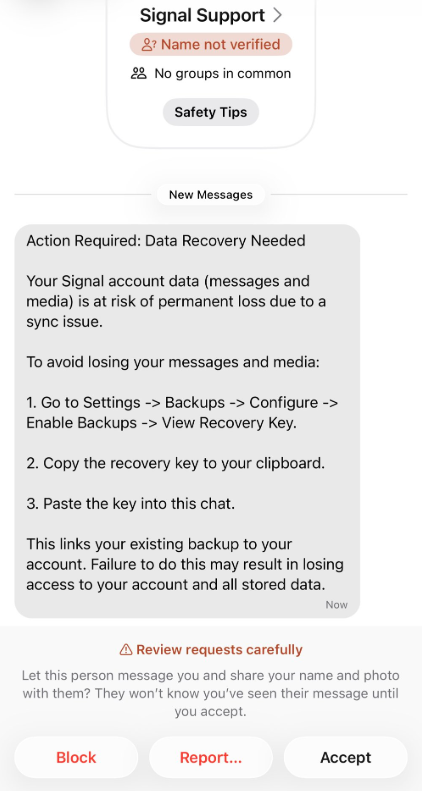
“Action Required: Data Recovery Needed Your Signal account data (message and media) Is at risk of permanent loss due to a sync issue. To avoid losing your messages and media: 1. Go to Settings -> Backups -> Configure -> Enable backups -> View Recovery Key. 2. Copy the recovery key to your clipboard. 3. Paste the key into this chat. This links your existing backup to your account. Failure to do this may result in losing access to your account and all stored data.”
There are a few red flags in this message:
The “Name not verified” label under the sender
Repeated threats of losing all your data
Pasting the key into the chat. Signal Support would never ask for your recovery key
The attack exploits Signal’s Secure Backups feature, which allows users to store encrypted archives of their conversations on Signal’s servers. These backups are protected by a 64-character recovery key.
That key should never leave the user’s device and is never shared with Signal’s servers. If hackers obtain this key and gain control of a victim’s account, they can download and decrypt the entire message history.
For an attacker, that’s even better than hijacking an account, which would only give them access to future messages.
Signal explicitly states that it will never reach out to users first and will never request registration codes, PINs, or recovery keys.
Treat unsolicited messages from “Support” as suspicious by default. Legitimate support for apps like Signal and WhatsApp do not ask you, in a chat message, to send back verification codes, PINs, or passwords. If you receive a warning about account problems, do not follow links in the message. Open the app’s settings directly or visit the official website through other means.
Never share any secret codes, multi-factor authentication keys, or app PINs. SMS codes are there to prove that you control a phone number. Anyone who has the code can pretend to be you. App‑specific PINs or passcodes are there to protect account changes. Consider anyone asking for them to be a scammer.
Use the extra security features these apps offer. Enable options like registration lock, registration PIN and device‑change alerts so that your account cannot be silently re‑registered without an extra secret. Store your PIN in a password manager instead of choosing something easy to guess or reusing a code. This reduces the risk of social engineering or shoulder‑surfing.
Another useful feature is disappearing messages. Short‑timer and disappearing messages reduce how much content is available if an attacker gains access to a chat later, or obtains long‑term access to a device or backup. They are not a complete solution, but they can limit the damage.
Use Malwarebytes Scam Guard on your device or online to check messages. Malwarebytes Scam Guard identified this message as a phishing attempt and provided further information about how to proceed.
Scammers know more about you than you think.
Malwarebytes Mobile Security protects you from phishing, scam texts, malicious sites, and more. With real-time AI-powered Scam Guard built right in.
A new phishing campaign is targeting Signal users by attempting to steal their backup recovery keys to access encrypted message archives.
The attack is initiated by a text message pretending to come from Signal Support.
“Action Required: Data Recovery Needed Your Signal account data (message and media) Is at risk of permanent loss due to a sync issue. To avoid losing your messages and media: 1. Go to Settings -> Backups -> Configure -> Enable backups -> View Recovery Key. 2. Copy the recovery key to your clipboard. 3. Paste the key into this chat. This links your existing backup to your account. Failure to do this may result in losing access to your account and all stored data.”
There are a few red flags in this message:
The “Name not verified” label under the sender
Repeated threats of losing all your data
Pasting the key into the chat. Signal Support would never ask for your recovery key
The attack exploits Signal’s Secure Backups feature, which allows users to store encrypted archives of their conversations on Signal’s servers. These backups are protected by a 64-character recovery key.
That key should never leave the user’s device and is never shared with Signal’s servers. If hackers obtain this key and gain control of a victim’s account, they can download and decrypt the entire message history.
For an attacker, that’s even better than hijacking an account, which would only give them access to future messages.
Signal explicitly states that it will never reach out to users first and will never request registration codes, PINs, or recovery keys.
Treat unsolicited messages from “Support” as suspicious by default. Legitimate support for apps like Signal and WhatsApp do not ask you, in a chat message, to send back verification codes, PINs, or passwords. If you receive a warning about account problems, do not follow links in the message. Open the app’s settings directly or visit the official website through other means.
Never share any secret codes, multi-factor authentication keys, or app PINs. SMS codes are there to prove that you control a phone number. Anyone who has the code can pretend to be you. App‑specific PINs or passcodes are there to protect account changes. Consider anyone asking for them to be a scammer.
Use the extra security features these apps offer. Enable options like registration lock, registration PIN and device‑change alerts so that your account cannot be silently re‑registered without an extra secret. Store your PIN in a password manager instead of choosing something easy to guess or reusing a code. This reduces the risk of social engineering or shoulder‑surfing.
Another useful feature is disappearing messages. Short‑timer and disappearing messages reduce how much content is available if an attacker gains access to a chat later, or obtains long‑term access to a device or backup. They are not a complete solution, but they can limit the damage.
Use Malwarebytes Scam Guard on your device or online to check messages. Malwarebytes Scam Guard identified this message as a phishing attempt and provided further information about how to proceed.
Scammers know more about you than you think.
Malwarebytes Mobile Security protects you from phishing, scam texts, malicious sites, and more. With real-time AI-powered Scam Guard built right in.
Carnival Corporation, parent of Carnival Cruise Line, is sending out fresh “Notice of Cybersecurity Event” letters dated May 27, 2026. If you feel like you’ve read that sentence before, you’re not imagining things. Over the last decade, the world’s largest cruise operator has accumulated a worrying track record of breaches, ransomware incidents, and regulatory penalties, with this 2026 incident adding yet another entry to an already lengthy cybersecurity history.
There are several data breaches involving Carnival Corporation or one of its subsidiaries in our database.
Between 2019 and 2021 alone, Carnival reported four separate cybersecurity events to the New York Department of Financial Services. These included two ransomware attacks and a phishing incident in which attackers deployed malware, accessed and encrypted internal systems, and stole personal customer and employee information.
In this latest case, an attacker used social engineering to trick a Carnival employee into granting access to part of the company’s IT systems on April 14, 2026. By April 22, they used a compromised account to access a “limited portion” of Carnival’s IT systems, where they were able to copy personal data before being blocked.
According to the data breach notice filed in Maine, a total of 5,995,277 people were affected. Carnival determined that the intruder had illegally copied files containing personal information and is now writing to affected individuals to tell them that “data elements” relating to them were obtained.
Researchers cited by Gblock say the stolen data appears to include:
Full names
Email addresses
Dates of birth
Genders
Mariner Society membership status and tier
Internal customer identifiers
The template letter does not list specific data fields. Instead, it uses a placeholder:
“We have determined that your <<data elements>> were obtained.”
This strongly suggests that Carnival is populating each letter with data categories relevant to that particular individual, a common pattern in large breaches where people may have provided different information at different times.
Furthermore, the letters contain the usual content about the speed with which the company acted, involving third‑party experts, and frame the affected systems as a limited subset of the environment. For recipients, the important fact is not how limited the breach was from the company’s point of view, but whether the exposed information could be used for identity theft, fraud, or highly convincing phishing attacks.
Breaches happen every day. Don’t be the last to know.
We do know from past Carnival incidents that exposed data has included names, addresses, dates of birth, passport numbers, health information, and payment details. In previous breaches affecting cruise lines, compromised data has ranged from basic contact details to Social Security numbers and credit card information. Carnival has not publicly disclosed the full categories of data involved in the 2026 incident, but given that this 2026 event again involves “personal information” copied from internal systems, it is reasonable to treat it as a serious privacy incident, even if the exact mix of data varies per person.
The attack was claimed by extortion group ShinyHunters, which is known to steal data and then ask for a ransom. If the victim does not agree to the terms, the data will be published and/or sold to the highest bidder.
ShinyHunters offers Carnival data for download
From a cybercriminal’s perspective, cruise industry data is highly prized. Cruise passengers are often relatively wealthy, and passenger records can combine identity data (names, addresses, dates of birth, passport numbers), contact data (emails, phone numbers), and potentially payment data (card numbers and sometimes bank details), making them valuable for identity theft, targeted phishing, and fraud.
What to do if you’re affected
To mitigate the fallout, Carnival is offering a complimentary 24‑month TransUnion credit‑monitoring package, delivered via the MyTrueIdentity platform and supported by Cyberscout for fraud assistance.
Carnival Corporation, parent of Carnival Cruise Line, is sending out fresh “Notice of Cybersecurity Event” letters dated May 27, 2026. If you feel like you’ve read that sentence before, you’re not imagining things. Over the last decade, the world’s largest cruise operator has accumulated a worrying track record of breaches, ransomware incidents, and regulatory penalties, with this 2026 incident adding yet another entry to an already lengthy cybersecurity history.
There are several data breaches involving Carnival Corporation or one of its subsidiaries in our database.
Between 2019 and 2021 alone, Carnival reported four separate cybersecurity events to the New York Department of Financial Services. These included two ransomware attacks and a phishing incident in which attackers deployed malware, accessed and encrypted internal systems, and stole personal customer and employee information.
In this latest case, an attacker used social engineering to trick a Carnival employee into granting access to part of the company’s IT systems on April 14, 2026. By April 22, they used a compromised account to access a “limited portion” of Carnival’s IT systems, where they were able to copy personal data before being blocked.
According to the data breach notice filed in Maine, a total of 5,995,277 people were affected. Carnival determined that the intruder had illegally copied files containing personal information and is now writing to affected individuals to tell them that “data elements” relating to them were obtained.
Researchers cited by Gblock say the stolen data appears to include:
Full names
Email addresses
Dates of birth
Genders
Mariner Society membership status and tier
Internal customer identifiers
The template letter does not list specific data fields. Instead, it uses a placeholder:
“We have determined that your <<data elements>> were obtained.”
This strongly suggests that Carnival is populating each letter with data categories relevant to that particular individual, a common pattern in large breaches where people may have provided different information at different times.
Furthermore, the letters contain the usual content about the speed with which the company acted, involving third‑party experts, and frame the affected systems as a limited subset of the environment. For recipients, the important fact is not how limited the breach was from the company’s point of view, but whether the exposed information could be used for identity theft, fraud, or highly convincing phishing attacks.
Breaches happen every day. Don’t be the last to know.
We do know from past Carnival incidents that exposed data has included names, addresses, dates of birth, passport numbers, health information, and payment details. In previous breaches affecting cruise lines, compromised data has ranged from basic contact details to Social Security numbers and credit card information. Carnival has not publicly disclosed the full categories of data involved in the 2026 incident, but given that this 2026 event again involves “personal information” copied from internal systems, it is reasonable to treat it as a serious privacy incident, even if the exact mix of data varies per person.
The attack was claimed by extortion group ShinyHunters, which is known to steal data and then ask for a ransom. If the victim does not agree to the terms, the data will be published and/or sold to the highest bidder.
ShinyHunters offers Carnival data for download
From a cybercriminal’s perspective, cruise industry data is highly prized. Cruise passengers are often relatively wealthy, and passenger records can combine identity data (names, addresses, dates of birth, passport numbers), contact data (emails, phone numbers), and potentially payment data (card numbers and sometimes bank details), making them valuable for identity theft, targeted phishing, and fraud.
What to do if you’re affected
To mitigate the fallout, Carnival is offering a complimentary 24‑month TransUnion credit‑monitoring package, delivered via the MyTrueIdentity platform and supported by Cyberscout for fraud assistance.
A Secure Boot certificate refresh is rolling out across supported Windows devices through Windows Update. In June 2026, the Secure Boot certificates that have shipped inside Windows since 2011 begin to expire, and Microsoft is replacing them with new 2023-dated certificates.
The good news: If you keep your PC updated, you probably won’t need to do anything. The bad news: Some older devices may not transition cleanly. Your PC won’t suddenly stop working, but over time it could miss important boot-level security protections without you realizing it.
Here’s what’s going on, why it matters, and how to check that your machine is on the right side of the deadline.
What is Secure Boot, and what’s expiring?
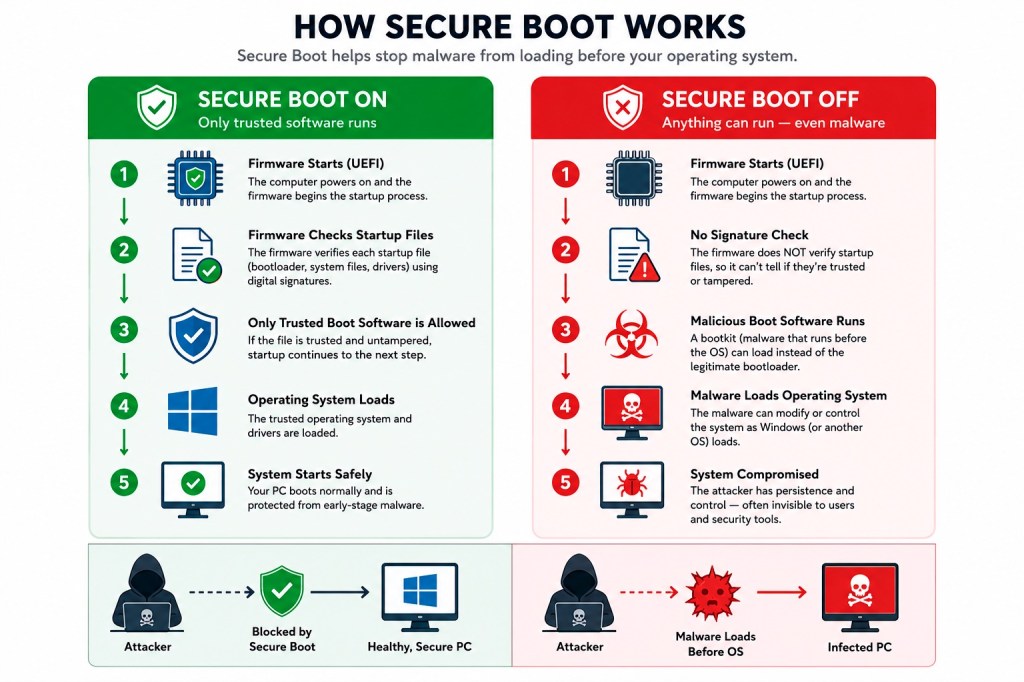
Secure Boot is a UEFI firmware feature built into virtually every PC sold since around 2012. It runs before Windows even starts loading, and its job is to verify that the boot loader and early boot components have been signed by a trusted party. If something tries to insert itself into the boot chain that isn’t on the trust list—a bootkit, for example—Secure Boot refuses to let it run.
The “trusted party” part is the crucial bit. Trust is established through cryptographic certificates baked into your motherboard firmware. The current certificates were issued in 2011 and are now reaching expiration. Three specific certificates are involved:
Microsoft Corporation KEK CA 2011: expires June 24, 2026
Microsoft UEFI CA 2011: expires June 27, 2026
Microsoft Windows Production PCA 2011: expires October 19, 2026
Microsoft is replacing them with a 2023-dated set, including Windows UEFI CA 2023 and Microsoft Corporation KEK 2K CA 2023. According to Microsoft engineers speaking during a March 2026 AMA session, the new certificates are valid until 2038, and a separate post-quantum cryptography transition is planned for around 2030 for future hardware.
“Will my computer stop working?”
No. This is the single most important thing to understand, because the rumor mill has been louder than the facts.
If the deadline arrives and your PC is still running on the 2011 certificates, Windows will still boot, Windows Update will still work, and your PC will continue functioning normally.
What changes is that, in Microsoft’s own words, the device “will no longer be able to receive new security protections” for the early boot process, including updates to Windows Boot Manager, Secure Boot databases, revocation lists, and mitigations for newly discovered boot-level vulnerabilities.
In plain English: Your PC becomes harder to protect over time. It’s protected against today’s known boot threats, but not necessarily against the ones that will be discovered next month or next year.
That’s a problem because bootkits operate underneath Windows and antivirus software. They run before anything else and can disable the security tools that would normally catch them.
The BlackLotus problem
If you want a concrete example of why boot-level security matters, look at BlackLotus.
BlackLotus is a UEFI bootkit that emerged on hacking forums in 2022 and was confirmed in the wild by researchers in early 2023. It exploited CVE-2022-21894, nicknamed “Baton Drop,” to bypass Secure Boot on fully patched Windows systems. Once installed, it could disable BitLocker, Hypervisor-Protected Code Integrity (HVCI), and Microsoft Defender before Windows fully loaded.
Microsoft addressed the underlying flaw in CVE-2023-24932, but fixing vulnerable boot managers safely is complicated. Revoking the wrong boot components can leave systems unbootable, which is why Microsoft has rolled out protections gradually over several years.
The 2026 certificate rollover is a planned lifecycle event (the 2011 certificates were always going to expire), but it also enables the broader Secure Boot hardening Microsoft has been doing in response to vulnerable boot managers and attacks such as BlackLotus.
With the new trust anchors in place, Microsoft can continue rolling out newer 2023-signed boot components and safely revoke vulnerable ones as new threats emerge. Devices that don’t make the transition may eventually miss those future protections.
How the rollout works
Microsoft is using a staged rollout designed to avoid breaking systems.
A scheduled Windows task runs roughly every 12 hours and applies the update in stages:
Add the new Windows UEFI CA 2023 to the firmware’s signature database.
If the old 2011 third-party certificate is still present, add the Microsoft UEFI CA 2023 and Microsoft Option ROM UEFI CA 2023 alongside it.
Add the new Microsoft Corporation KEK 2K CA 2023 key.
Update the Windows Boot Manager to one signed by the new certificate. This step is deferred until the next natural reboot.
Microsoft’s IT pro guidance estimates the full process takes roughly 48 hours and one or more restarts to complete. Each step must succeed before the next one runs, so a device can sit partway through the sequence for a while if (for example) it’s waiting on a firmware update or a scheduled reboot.
For most home users, this happens silently in the background through normal cumulative updates.
Starting with the April 2026 Windows update, the Windows Security app includes updated Secure Boot status information under Device security that shows whether the new certificates have been applied successfully.
What could go wrong
Most systems will transition without problems, but there are some known trouble spots:
Older PCs with outdated firmware. Some older UEFI firmware implementations don’t properly support the new certificates. These systems may require a BIOS or firmware update from the manufacturer before the transition can complete.
PCs that bypassed Windows 11 requirements. If Secure Boot was disabled to install Windows 11 using unofficial workarounds, the new certificates cannot be applied correctly.
Legacy BIOS / CSM systems. Devices running Legacy BIOS (or UEFI with Compatibility Support Module enabled) aren’t using Secure Boot at all, so they’re outside the scope of this update entirely.
Custom firmware and weird configurations. Some custom or unusual firmware configurations may trigger a BitLocker recovery prompt after the Secure Boot variables change. Microsoft has been careful to note that BitLocker itself is not being disabled, but users should have their recovery keys handy just in case.
Windows Latest reported seeing update failures on thousands of PCs with outdated firmware during testing. Microsoft’s own guidance more broadly warns that firmware, platform, and OEM limitations can block the transition. In many cases, Windows Security will flag affected systems with yellow or red status warnings.
What home users should do
For most people, the advice is straightforward:
Keep Windows fully up to date. Microsoft is rolling the new certificates out through normal Windows updates, and most home users won’t need to do anything beyond installing monthly updates.
Check your Secure Boot status (the text, not just the color). Open Windows Security > Device security > Secure Boot. A green badge with the text “Secure Boot is on, preventing malicious software from loading when your device starts up.” is the all-clear. Microsoft warns that a green checkmark alone doesn’t confirm the new certificates have been applied.
If your device is older, check for a BIOS/firmware update from your manufacturer. Some systems need them before the Secure Boot update can complete properly. This is especially important for PCs built before 2024.
Don’t disable Secure Boot to “fix” something. Disabling Secure Boot is exactly the wrong response—it removes the protection entirely rather than updating it. Some game anti-cheat systems and older apps ask users to do this.
Don’t panic about the new SecureBoot folder. Windows 11’s May 2026 cumulative update (KB5089549) creates a folder at C:\Windows\SecureBoot containing example PowerShell scripts intended for IT administrators. It’s not malware, it’s expected, and you don’t need to delete it.
Use up-to-date, real-time anti-malware protection that can detect threats at the OS level even if something does slip past Secure Boot.
What IT teams should do
If you manage a fleet, Microsoft has published extensive guidance and the work is more involved. The short version:
Inventory your devices now. Pull the manufacturer, model, BIOS version and date, baseboard product, and Secure Boot status across the fleet. Microsoft provides a PowerShell sample script at aka.ms/GetSecureBoot that surfaces the relevant registry keys and event IDs.
Watch Event IDs 1801 and 1808. Event ID 1808 confirms the new certificates are in place. Event ID 1801 means the device has not completed the update.
Test before broad rollout. Microsoft recommends testing at least four devices per unique manufacturer/model/firmware combination. Some systems may need an OEM firmware update before they can accept the new certificates.
Choose one deployment method per device. Use registry keys, Group Policy, WinCS command-line tools, or Intune/ConfigMgr scripts, but don’t mix methods on the same machine.
Pay attention to PXE imaging and Hyper-V. SCCM/MECM PXE servers may need a re-signed boot.wim, and Hyper-V hosts may need updating before new VMs are created with the 2023 KEK in the firmware template.
Document devices that can’t be updated. Older hardware without OEM firmware support may need to be replaced before the deadline or formally accepted as an exception with compensating controls. These devices will keep working, but they may miss future boot-level protections.
The bottom line
This is one of those security events that won’t generate a dramatic incident on June 24, 2026. Nothing visible will break that day.
The risk is what happens in the months and years after. Devices that fail to transition to the new trust chain may slowly fall behind on future boot-level protections as Microsoft continues responding to threats like BlackLotus and other bootkits.
For most home users, Windows Update will handle the transition automatically. Your main job is to keep your system updated and verify Secure Boot status before the deadlines arrive.
If your hardware is older, now is a good time to check whether your manufacturer still provides firmware updates—and whether your PC is ready for the next decade of Secure Boot protections.
“One of the best cybersecurity suites on the planet.”
A Secure Boot certificate refresh is rolling out across supported Windows devices through Windows Update. In June 2026, the Secure Boot certificates that have shipped inside Windows since 2011 begin to expire, and Microsoft is replacing them with new 2023-dated certificates.
The good news: If you keep your PC updated, you probably won’t need to do anything. The bad news: Some older devices may not transition cleanly. Your PC won’t suddenly stop working, but over time it could miss important boot-level security protections without you realizing it.
Here’s what’s going on, why it matters, and how to check that your machine is on the right side of the deadline.
What is Secure Boot, and what’s expiring?
Secure Boot is a UEFI firmware feature built into virtually every PC sold since around 2012. It runs before Windows even starts loading, and its job is to verify that the boot loader and early boot components have been signed by a trusted party. If something tries to insert itself into the boot chain that isn’t on the trust list—a bootkit, for example—Secure Boot refuses to let it run.
The “trusted party” part is the crucial bit. Trust is established through cryptographic certificates baked into your motherboard firmware. The current certificates were issued in 2011 and are now reaching expiration. Three specific certificates are involved:
Microsoft Corporation KEK CA 2011: expires June 24, 2026
Microsoft UEFI CA 2011: expires June 27, 2026
Microsoft Windows Production PCA 2011: expires October 19, 2026
Microsoft is replacing them with a 2023-dated set, including Windows UEFI CA 2023 and Microsoft Corporation KEK 2K CA 2023. According to Microsoft engineers speaking during a March 2026 AMA session, the new certificates are valid until 2038, and a separate post-quantum cryptography transition is planned for around 2030 for future hardware.
“Will my computer stop working?”
No. This is the single most important thing to understand, because the rumor mill has been louder than the facts.
If the deadline arrives and your PC is still running on the 2011 certificates, Windows will still boot, Windows Update will still work, and your PC will continue functioning normally.
What changes is that, in Microsoft’s own words, the device “will no longer be able to receive new security protections” for the early boot process, including updates to Windows Boot Manager, Secure Boot databases, revocation lists, and mitigations for newly discovered boot-level vulnerabilities.
In plain English: Your PC becomes harder to protect over time. It’s protected against today’s known boot threats, but not necessarily against the ones that will be discovered next month or next year.
That’s a problem because bootkits operate underneath Windows and antivirus software. They run before anything else and can disable the security tools that would normally catch them.
The BlackLotus problem
If you want a concrete example of why boot-level security matters, look at BlackLotus.
BlackLotus is a UEFI bootkit that emerged on hacking forums in 2022 and was confirmed in the wild by researchers in early 2023. It exploited CVE-2022-21894, nicknamed “Baton Drop,” to bypass Secure Boot on fully patched Windows systems. Once installed, it could disable BitLocker, Hypervisor-Protected Code Integrity (HVCI), and Microsoft Defender before Windows fully loaded.
Microsoft addressed the underlying flaw in CVE-2023-24932, but fixing vulnerable boot managers safely is complicated. Revoking the wrong boot components can leave systems unbootable, which is why Microsoft has rolled out protections gradually over several years.
The 2026 certificate rollover is a planned lifecycle event (the 2011 certificates were always going to expire), but it also enables the broader Secure Boot hardening Microsoft has been doing in response to vulnerable boot managers and attacks such as BlackLotus.
With the new trust anchors in place, Microsoft can continue rolling out newer 2023-signed boot components and safely revoke vulnerable ones as new threats emerge. Devices that don’t make the transition may eventually miss those future protections.
How the rollout works
Microsoft is using a staged rollout designed to avoid breaking systems.
A scheduled Windows task runs roughly every 12 hours and applies the update in stages:
Add the new Windows UEFI CA 2023 to the firmware’s signature database.
If the old 2011 third-party certificate is still present, add the Microsoft UEFI CA 2023 and Microsoft Option ROM UEFI CA 2023 alongside it.
Add the new Microsoft Corporation KEK 2K CA 2023 key.
Update the Windows Boot Manager to one signed by the new certificate. This step is deferred until the next natural reboot.
Microsoft’s IT pro guidance estimates the full process takes roughly 48 hours and one or more restarts to complete. Each step must succeed before the next one runs, so a device can sit partway through the sequence for a while if (for example) it’s waiting on a firmware update or a scheduled reboot.
For most home users, this happens silently in the background through normal cumulative updates.
Starting with the April 2026 Windows update, the Windows Security app includes updated Secure Boot status information under Device security that shows whether the new certificates have been applied successfully.
What could go wrong
Most systems will transition without problems, but there are some known trouble spots:
Older PCs with outdated firmware. Some older UEFI firmware implementations don’t properly support the new certificates. These systems may require a BIOS or firmware update from the manufacturer before the transition can complete.
PCs that bypassed Windows 11 requirements. If Secure Boot was disabled to install Windows 11 using unofficial workarounds, the new certificates cannot be applied correctly.
Legacy BIOS / CSM systems. Devices running Legacy BIOS (or UEFI with Compatibility Support Module enabled) aren’t using Secure Boot at all, so they’re outside the scope of this update entirely.
Custom firmware and weird configurations. Some custom or unusual firmware configurations may trigger a BitLocker recovery prompt after the Secure Boot variables change. Microsoft has been careful to note that BitLocker itself is not being disabled, but users should have their recovery keys handy just in case.
Windows Latest reported seeing update failures on thousands of PCs with outdated firmware during testing. Microsoft’s own guidance more broadly warns that firmware, platform, and OEM limitations can block the transition. In many cases, Windows Security will flag affected systems with yellow or red status warnings.
What home users should do
For most people, the advice is straightforward:
Keep Windows fully up to date. Microsoft is rolling the new certificates out through normal Windows updates, and most home users won’t need to do anything beyond installing monthly updates.
Check your Secure Boot status (the text, not just the color). Open Windows Security > Device security > Secure Boot. A green badge with the text “Secure Boot is on, preventing malicious software from loading when your device starts up.” is the all-clear. Microsoft warns that a green checkmark alone doesn’t confirm the new certificates have been applied.
If your device is older, check for a BIOS/firmware update from your manufacturer. Some systems need them before the Secure Boot update can complete properly. This is especially important for PCs built before 2024.
Don’t disable Secure Boot to “fix” something. Disabling Secure Boot is exactly the wrong response—it removes the protection entirely rather than updating it. Some game anti-cheat systems and older apps ask users to do this.
Don’t panic about the new SecureBoot folder. Windows 11’s May 2026 cumulative update (KB5089549) creates a folder at C:\Windows\SecureBoot containing example PowerShell scripts intended for IT administrators. It’s not malware, it’s expected, and you don’t need to delete it.
Use up-to-date, real-time anti-malware protection that can detect threats at the OS level even if something does slip past Secure Boot.
What IT teams should do
If you manage a fleet, Microsoft has published extensive guidance and the work is more involved. The short version:
Inventory your devices now. Pull the manufacturer, model, BIOS version and date, baseboard product, and Secure Boot status across the fleet. Microsoft provides a PowerShell sample script at aka.ms/GetSecureBoot that surfaces the relevant registry keys and event IDs.
Watch Event IDs 1801 and 1808. Event ID 1808 confirms the new certificates are in place. Event ID 1801 means the device has not completed the update.
Test before broad rollout. Microsoft recommends testing at least four devices per unique manufacturer/model/firmware combination. Some systems may need an OEM firmware update before they can accept the new certificates.
Choose one deployment method per device. Use registry keys, Group Policy, WinCS command-line tools, or Intune/ConfigMgr scripts, but don’t mix methods on the same machine.
Pay attention to PXE imaging and Hyper-V. SCCM/MECM PXE servers may need a re-signed boot.wim, and Hyper-V hosts may need updating before new VMs are created with the 2023 KEK in the firmware template.
Document devices that can’t be updated. Older hardware without OEM firmware support may need to be replaced before the deadline or formally accepted as an exception with compensating controls. These devices will keep working, but they may miss future boot-level protections.
The bottom line
This is one of those security events that won’t generate a dramatic incident on June 24, 2026. Nothing visible will break that day.
The risk is what happens in the months and years after. Devices that fail to transition to the new trust chain may slowly fall behind on future boot-level protections as Microsoft continues responding to threats like BlackLotus and other bootkits.
For most home users, Windows Update will handle the transition automatically. Your main job is to keep your system updated and verify Secure Boot status before the deadlines arrive.
If your hardware is older, now is a good time to check whether your manufacturer still provides firmware updates—and whether your PC is ready for the next decade of Secure Boot protections.
“One of the best cybersecurity suites on the planet.”
Anna Turley gives Reform leader 24 hours to report Russian hacking claim in ‘public and national interest’
The Labour chair has given Nigel Farage 24 hours to report to security services the claim that his phone was hacked by Russia-linked actors or the party will do it for him.
In a letter to the Reform UK leader, Anna Turley said it was “in the public and national interest” to ensure that a suspected overseas hack of a senior politician’s phone by a hostile state was properly investigated.
Ciaran Martin says Reform UK leader’s allegation over Guardian report on £5m gift ‘entirely unsubstantiated’
Nigel Farage’s claim that a Russian hack was behind a Guardian report on the £5m gift he received from a crypto billionaire has been described as “without any merit” by a former head of the National Cyber Security Centre.
Ciaran Martin, founding chief executive of the agency, which is part of GCHQ, said Farage’s allegation, if true, would have major implications for UK policy towards Russia but that the Reform UK leader had yet to provide “a shred of evidence”.
Authorities in the Netherlands have arrested the co-owners of two related Internet hosting companies for operating IT infrastructure used by Russia to carry out cyberattacks, influence operations and disinformation campaigns inside the European Union. The two men were the focus of a 2025 KrebsOnSecurity story about how their hosting companies had assumed control over the technical infrastructure of Stark Industries Solutions, an Internet service provider sanctioned last year by the EU as a frequent staging ground for cyber mischief from Russia’s intelligence agencies.
An investigator with the Tax Intelligence and Investigation Service (FIOD), the Dutch financial crimes agency, during the raid. Image: FIOD.
The Dutch daily news outlet de Volkskrantreports that the Dutch financial crime agency FIOD on May 18 arrested a 57-year-old from Amsterdam and a 39-year-old from The Hague, charging them with violating sanctions law by directly or indirectly making economic resources available to EU-sanctioned entities.
The Dutch investigation focuses on Stark Industries, a sprawling hosting provider that materialized just two weeks before Russia invaded Ukraine. As detailed in this May 2024 deep-dive, Stark quickly became the source of massive distributed denial-of-service (DDoS) attacks against European targets, and emerged as a top supplier of proxy and anonymity services that showed up time and again in cyberattacks linked to Russia-backed hacking groups.
That report identified two Moldovan brothers — Ivan and Yuri Neculiti and their company PQHosting — who were providing one of Stark’s two main conduits to the larger Internet. In May 2025, the EU sanctioned PQHosting and the Neculiti brothers for aiding Russia’s hybrid warfare efforts. But as KrebsOnSecurity observed in September 2025, those sanctions failed to target Stark’s remaining connection to the Internet — an Internet service provider based in the Netherlands called MIRhosting.
MIRhosting is operated by Andrey Nesterenko, a 39-year-old Russian native who runs the business out of the Netherlands. News that PQHosting and the Neculiti brothers were about to be sanctioned by the EU leaked in the media nearly two weeks before the sanctions were announced last year. During that time, the Stark network assets were transferred from PQHosting to a new entity called the[.]hosting, under the control of the Dutch entity WorkTitans BV.
And as our September 2025 report showed, WorkTitans was controlled by Nesterenko and a 57-year-old from Amsterdam named Youssef Zinad. On top of that, WorkTitans was getting connectivity to the larger Internet solely through MIRhosting, where Zinad had worked previously.
On May 18, Dutch financial crime investigators arrested Nesterenko and Zinad, and searched three businesses in Enschede and Almere and two data centers in Dronten and Schiphol-Rijk. A statement from the Dutch authorities said they also seized laptops, telephones and more than 800 servers.
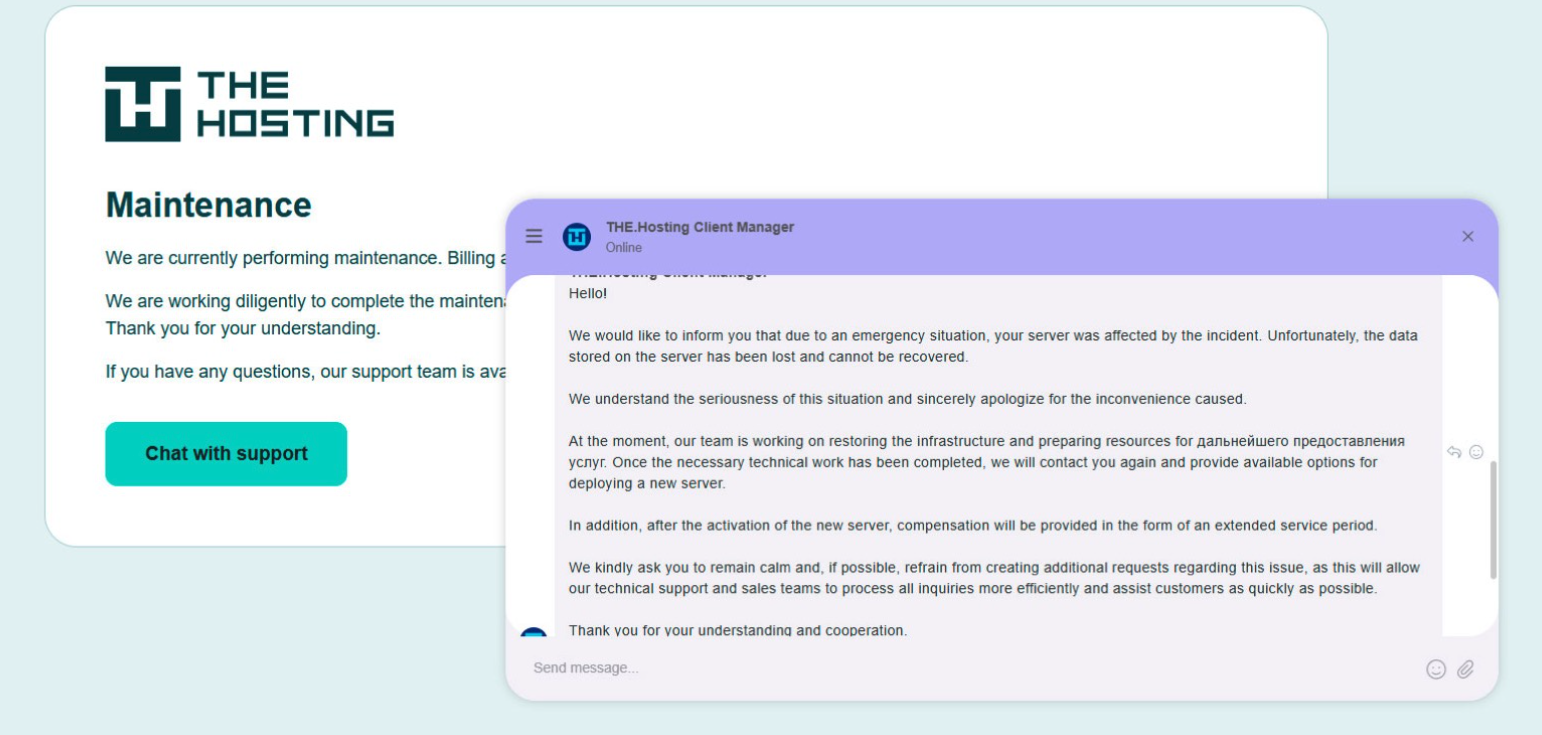
A message to the-hosting customers immediately after 800 of its servers were seized by Dutch authorities. The message says that unfortunately data stored on the server has been lost and cannot be recovered.
De Volkskrant said it reviewed data showing WorkTitans and MIRhosting were the most-used networks in pro-Russian attacks on Danish government bodies between November 13 and 19, 2025, the week of Denmark’s municipal elections.
The publication wrote that prior to Nesterenko’s arrest, the MIRhosting founder denied that he knew his servers had been misused by pro-Russian cybercriminals. “He said he had ended all services with the Neculiti brothers when the EU sanctions came into force in May 2025,” and the he “reserved all rights to take action against ‘harmful and incorrect publications,” de Volkskrant wrote.
MIRhosting released a statement saying it has initiated an internal investigation into the alleged facts concerning the elections in Denmark, and that it has temporarily paused services to WorkTitans as a precautionary measure while the matter is being reviewed further.
“Based on our preliminary findings, there are no indications that the services over which we exercise control were actually used to influence the Danish elections,” the statement reads. “No anomalies or spikes were observed in our network traffic during the period mentioned in the publication; had large-scale DDoS attacks occurred, such activity would have been evident. Furthermore, prior to the media publication, we had not received any complaints, abuse reports, or official requests regarding suspicious activities or misuse of our network. Meanwhile, our regular operational activities continue, and our service to our other clients remains fully intact.”
Born in Nizhny Novgorod, Russia, Mr. Nesterenko grew up as a piano prodigy who performed publicly at a young age. In 2004, Nesterenko founded MIRhosting’s parent Innovation IT Solutions Corp., which has the notable distinction of being the company responsible for hosting stopgeorgia[.]ru, a hacktivist website for organizing cyberattacks against Georgia that appeared at the same time Russian forces invaded the former Soviet nation in 2008. That conflict was thought to be the first war ever fought in which a notable cyberattack and an actual military engagement happened simultaneously.
Responding to questions shared via email, Nesterenko said MIRhosting does not support cybercrime, sanctions evasion, or illegal activity, and that the allegations and arrest by Dutch authorities have been extremely harmful to him and his company.
“The transition to the.hosting was not intended to evade sanctions,” Nesterenko wrote. “The hardware and customer portfolio had already been transferred to WorkTitans before the sanctions appeared. Closing or damaging a legitimate Dutch infrastructure company will not stop cybercrime, but it will harm many people who have done nothing wrong.”
Far less is public about the 57-year-old Zinad, who reportedly has been keeping a low profile since our story last year. De Volkskrant reported that Zinad blocked access to his LinkedIn account, had gone months without responding to emails, WhatsApp messages and phone calls, and told a colleague that illness was forcing him to lead a somewhat more reclusive life.
Mr. Zinad’s now-defunct LinkedIn profile. It was full of posts for MIRhosting’s services.
Mr. Nesterenko claims Zinad was never an employee of MIRhosting.
“He helped me and MIRhosting with certain business tasks under a normal business-to-business arrangement between companies,” Nesterenko explained.
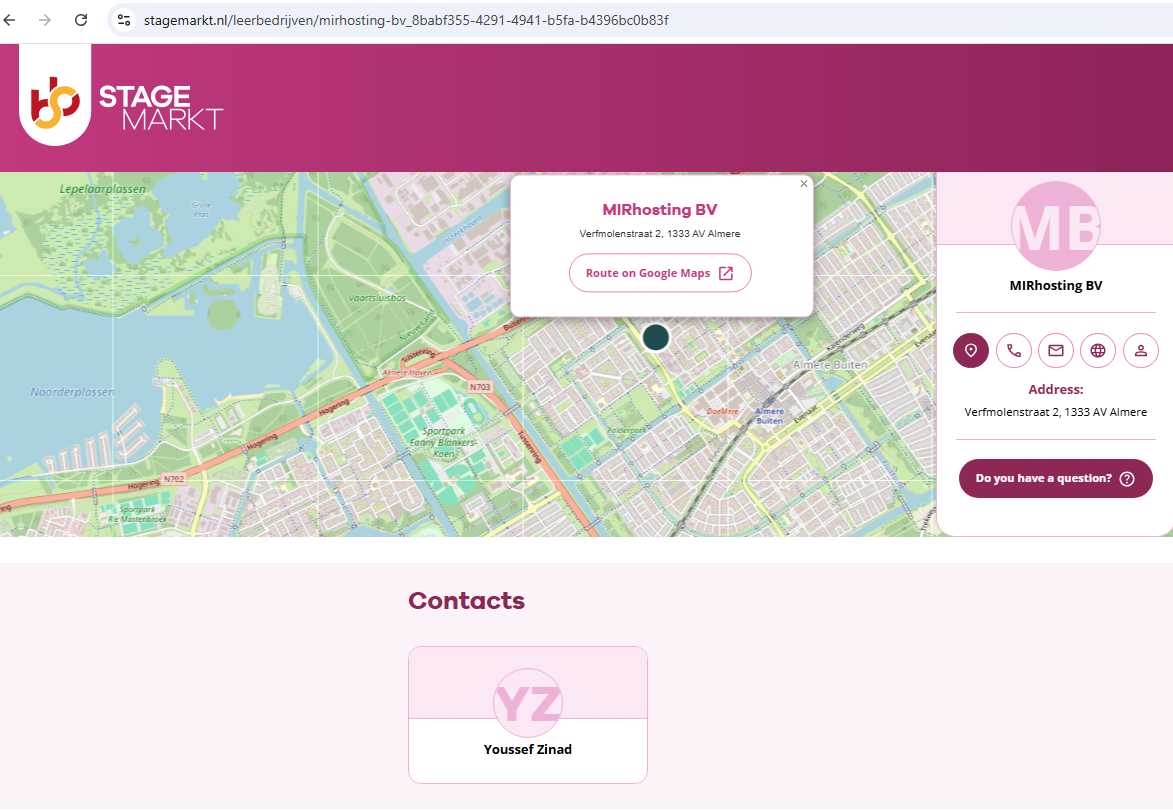
However, in previous emails to KrebsOnSecurity, Nesterenko carbon copied Mr. Zinad (who had a @mirhosting.com email), explaining that he was part of the company’s legal team. Also, the Dutch website stagemarkt[.]nl lists Youssef Zinad as an official contact for MIRhosting’s offices in Almere.
Mr. Zinad has never responded to requests for comment. Nor did de Volkskrant have any luck tracking him down. The publication said it repeatedly asked Mr. Zinad (referred to here as simply “Z”), but he reportedly avoided every form of contact.
“‘I am unavailable but will respond to your message as soon as possible,’ reads an automated reply on WhatsApp on 2 October 2025,” de Volkskrant reported. “It is the only response de Volkskrant would receive in months. He did not pick up his phone and did not call back. When an acquaintance asked him via LinkedIn to contact the reporter, he blocked access to his LinkedIn page. At an address in Almere where Z.’s personal limited company is registered, no one was present in April. The corner house’s blinds were drawn, and a pile of rubbish bags lay outside next to a container, as if someone had recently left. A neighbour said he knew the man but did not know where he was staying. Z. was later arrested at a residence in Amsterdam.”

 Login
Login