Microsoft says it dismantled a malware-signing-as-a-service (MSaaS) called Fox Tempest, which helped cybercriminals make malware appear legitimate.
The service let customers submit malicious files to be digitally signed with short-lived Microsoft-issued certificates, making the malware look legitimate and more likely to bypass security checks.
Fox Tempest’s service was built around a customer-facing signing workflow where cybercriminals could upload malicious binaries to a portal, have them signed with certificates valid for only 72 hours, and then receive files that appeared to come from a trusted software source.
Microsoft explicitly says this approach allowed malware to evade security controls and bypass defenses that would otherwise flag suspicious unsigned code. Many security tools treat signed binaries as more trustworthy than unsigned ones, especially in environments that rely on allow-lists and publisher reputation. Fox Tempest abused that assumption by using fraudulently obtained certificates to make malware blend in as legitimate software, increasing the likelihood of execution and successful delivery.
A trusted-looking certificate can help malware get past initial scrutiny, especially when paired with social engineering, paid ads, SEO poisoning, or fake download pages. In this campaign, the signing layer helped malicious installers masquerade as products like AnyDesk, Teams, PuTTY, and Webex, which is exactly the kind of abuse that can slip through control frameworks built around reputation and trust.
The fraudulent certificates were used to spread ransomware and infostealers. The effects of these malware campaigns were broad, with attacks affecting healthcare, education, government, and financial services across multiple countries.
How to stay safe
Microsoft’s disclosure shows how cybercrime has evolved beyond “malware authors” into a service economy where one group specializes in producing trust and others monetize it.
For defenders, the strongest lesson is not to treat code signing as a standalone security control.
For consumers:
Remember to only download software from the official vendor site, the Microsoft Store, or another source you already trust. Avoid download buttons on links sent via social media posts, direct messages or email.
Be skeptical of “sponsored” search results and advertisements for popular apps.
Use an up-to-date, real-time anti-malware solution that looks for malicious behavior rather than just signatures.
We don’t just report on threats—we remove them
Cybersecurity risks should never spread beyond a headline. Keep threats off your devices by downloading Malwarebytes today.
Microsoft says it dismantled a malware-signing-as-a-service (MSaaS) called Fox Tempest, which helped cybercriminals make malware appear legitimate.
The service let customers submit malicious files to be digitally signed with short-lived Microsoft-issued certificates, making the malware look legitimate and more likely to bypass security checks.
Fox Tempest’s service was built around a customer-facing signing workflow where cybercriminals could upload malicious binaries to a portal, have them signed with certificates valid for only 72 hours, and then receive files that appeared to come from a trusted software source.
Microsoft explicitly says this approach allowed malware to evade security controls and bypass defenses that would otherwise flag suspicious unsigned code. Many security tools treat signed binaries as more trustworthy than unsigned ones, especially in environments that rely on allow-lists and publisher reputation. Fox Tempest abused that assumption by using fraudulently obtained certificates to make malware blend in as legitimate software, increasing the likelihood of execution and successful delivery.
A trusted-looking certificate can help malware get past initial scrutiny, especially when paired with social engineering, paid ads, SEO poisoning, or fake download pages. In this campaign, the signing layer helped malicious installers masquerade as products like AnyDesk, Teams, PuTTY, and Webex, which is exactly the kind of abuse that can slip through control frameworks built around reputation and trust.
The fraudulent certificates were used to spread ransomware and infostealers. The effects of these malware campaigns were broad, with attacks affecting healthcare, education, government, and financial services across multiple countries.
How to stay safe
Microsoft’s disclosure shows how cybercrime has evolved beyond “malware authors” into a service economy where one group specializes in producing trust and others monetize it.
For defenders, the strongest lesson is not to treat code signing as a standalone security control.
For consumers:
Remember to only download software from the official vendor site, the Microsoft Store, or another source you already trust. Avoid download buttons on links sent via social media posts, direct messages or email.
Be skeptical of “sponsored” search results and advertisements for popular apps.
Use an up-to-date, real-time anti-malware solution that looks for malicious behavior rather than just signatures.
We don’t just report on threats—we remove them
Cybersecurity risks should never spread beyond a headline. Keep threats off your devices by downloading Malwarebytes today.
Microsoft has shared mitigations for YellowKey, a recently disclosed Windows BitLocker zero-day vulnerability that grants access to protected drives. [...]
A threat actor targeting Microsoft 365 and Azure production environments is stealing data in attacks that abuse legitimate applications and administration features. [...]
Microsoft plans to raise the quality bar of Windows 11 drivers, as drivers "sit at the heart of every Windows experience" and connect the OS to the "silicon, components, and peripherals." [...]
Microsoft says customers in restricted network environments may encounter Windows Update failures after installing the January 2026 optional non-security preview updates. [...]
Microsoft has finally brought back the resizable taskbar and Start menu to Windows 11 in the latest preview version rolling out to Insiders in the Experimental channel. [...]
Microsoft has confirmed that the May 2026 Windows 11 security update (KB5089549) fails to install on some systems and triggers 0x800f0922 errors. [...]
A cybersecurity researcher has released a proof-of-concept exploit for a Windows privilege escalation zero-day dubbed "MiniPlasma" that lets attackers gain SYSTEM privileges on fully patched Windows systems. [...]
During the second day of Pwn2Own Berlin 2026, competitors collected $385,750 in cash awards after exploiting 15 unique zero-day vulnerabilities in multiple products, including Windows 11, Microsoft Exchange, and Red Hat Enterprise Linux for Workstations. [...]
Artificial intelligence platforms may be just as susceptible to social engineering as human beings, but they are proving remarkably good at finding security vulnerabilities in human-made computer code. That reality is on full display this month with some of the more widely-used software makers — including Apple, Google, Microsoft, Mozilla and Oracle — fixing near record volumes of security bugs, and/or quickening the tempo of their patch releases.
As it does on the second Tuesday of every month, Microsoft today released software updates to address at least 118 security vulnerabilities in its various Windows operating systems and other products. Remarkably, this is the first Patch Tuesday in nearly two years that Microsoft is not shipping any fixes to deal with emergency zero-day flaws that are already being exploited. Nor have any of the flaws fixed today been previously disclosed (potentially giving attackers a heads up in how to exploit the weakness).
Sixteen of the vulnerabilities earned Microsoft’s most-dire “critical” label, meaning malware or miscreants could abuse these bugs to seize remote control over a vulnerable Windows device with little or no help from the user. Rapid7 has done much of the heavy lifting in identifying some of the more concerning critical weaknesses this month, including:
CVE-2026-41089: A critical stack-based buffer overflow in Windows Netlogon that offers an attacker SYSTEM privileges on the domain controller. No privileges or user interaction are required, and attack complexity is low. Patches are available for all versions of Windows Server from 2012 onwards.
CVE-2026-41096: A critical RCE in the Windows DNS client implementation worthy of attention despite Microsoft assessing exploitation as less likely.
CVE-2026-41103: A critical elevation of privilege vulnerability that allows an unauthorized attacker to impersonate an existing user by presenting forged credentials, thus bypassing Entra ID. Microsoft expects that exploitation is more likely.
May’s Patch Tuesday is a welcome respite from April, which saw Microsoft fix a near-record 167 security flaws. Microsoft was among a few dozen tech giants given access to a “Project Glasswing,” a much-hyped AI capability developed by Anthropic that appears quite effective at unearthing security vulnerabilities in code.
Apple, another early participant in Project Glasswing, typically fixes an average of 20 vulnerabilities each time it ships a security update for iOS devices, said Chris Goettl, vice president of product management at Ivanti. On May 11, Apple shipped updates to address at least 52 vulnerabilities and backported the changes all the way to iPhone 6s and iOS 15.
Last month, Mozilla released Firefox 150, which resolved a whopping 271 vulnerabilities that were reportedly discovered during the Glasswing evaluation.
“Since Firefox 150.0.0 released, they have been on a more aggressive weekly cadence for security updates including the release of Firefox 150.0.3 on May Patch Tuesday resolving between three to five CVEs in each release,” Goettl said.
The software giant Oracle likewise recently increased its patch pace in response to their work with Glasswing. In its most recent quarterly patch update, Oracle addressed at least 450 flaws, including more than 300 fixes for remotely exploitable, unauthenticated flaws. But at the end of April, Oracle announced it was switching to a monthly update cycle for critical security issues.
On May 8, Google started rolling out updates to its Chrome browser that fixed an astonishing 127 security flaws (up from just 30 the previous month). Chrome automagically downloads available security updates, but installing them requires fully restarting the browser.
If you encounter any weirdness applying the updates from Microsoft or any other vendor mentioned here, feel free to sound off in the comments below. Meantime, if you haven’t backed up your data and/or drive lately, doing that before updating is generally sound advice. For a more granular look at the Microsoft updates released today, checkout this inventory by the SANS Internet Storm Center.
Malicious actors have developed a new way to steal data stored by Chrome for Windows. Researchers discovered the technique while analyzing a fresh build of an infostealer known as VoidStealer. The new method allows the malware to bypass Chrome’s Application-Bound (App-Bound) Encryption (ABE), a mechanism intended to protect session cookies and other valuable information stored in the browser.
Google hoped this mechanism would secure the master key Chrome uses to encrypt all sensitive data. Unfortunately, this isn’t the first time malware authors have found a workaround for this defense — leaving secrets stored in Chrome vulnerable once again.
How App-Bound Encryption works in Chrome
Google introduced App-Bound Encryption in July 2024 with the release of Chrome version 127. The company’s announcement mentioned infostealers snatching cookies from Chrome users on Windows as the primary problem ABE was intended to solve. We’ve already covered in detail what these files are and the consequences of their theft, so we’ll only briefly recap the main facts here.
Cookies are small files that the browser saves to the user’s device at a website’s request to remember various site settings. Of particular value to attackers are session cookies, which are used for automatic authentication on websites. It’s thanks to these files that we don’t have to enter a username and password every time we revisit a site.
But this convenience carries a risk: stealing these files allows an attacker to use an already-authenticated session without entering a username or password. This allows them to impersonate the user, which can lead to account hijacking, theft of personal or financial data, and other adverse consequences.
Infostealer Trojans are particularly dangerous for Chrome users on Windows. This is because, on this OS, Chrome previously relied solely on the standard built-in Data Protection API (DPAPI). With this system encryption mechanism, applications don’t need to create and store encryption keys to protect data.
The limitation of DPAPI is that it doesn’t protect data from malware that’s already successfully compromised the system and is capable of executing code on behalf of the logged-in user. This is exactly what stealers exploit: since they typically run with the user’s privileges, they can simply request DPAPI to decrypt the browser’s protected data.
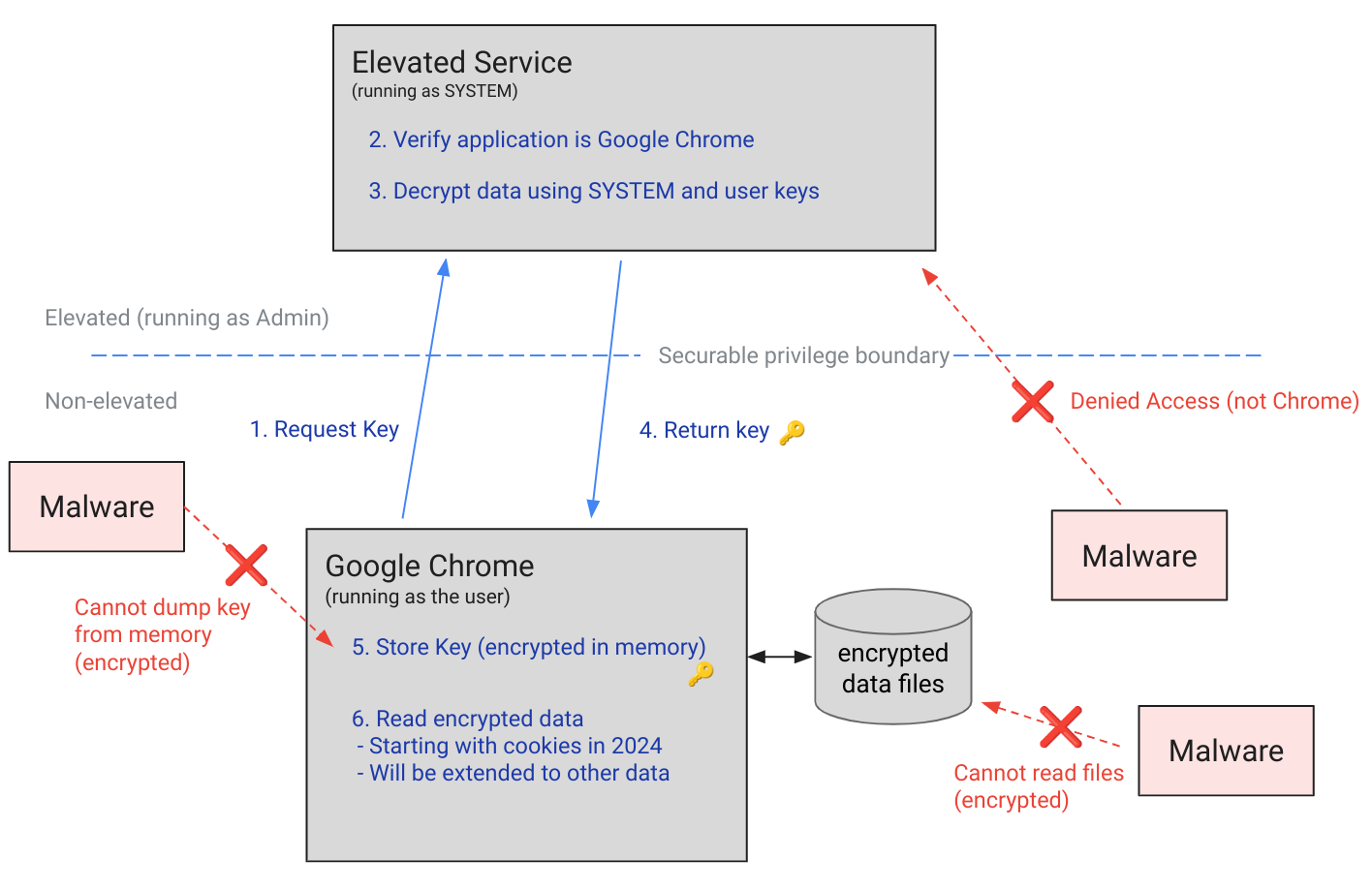
The ABE mechanism was designed to solve that specific problem. The core idea is right in the name: App-Bound Encryption means the encryption is tied to a specific application. To achieve this, a separate service running with system privileges is responsible for protecting the key used to encrypt Chrome’s data. It verifies which application is requesting access to the key, and denies the request if it doesn’t originate from Chrome.
Chrome’s App-Bound Encryption (ABE) was designed so that only Chrome itself could retrieve the master key needed to decrypt the browser’s stored data. Source
As a result, the architects of this feature assumed that to access ABE-protected browser data, an infostealer would either need to escalate its privileges to system-level, or inject malicious code directly into Chrome. In theory, this should have made attacking Chrome significantly harder and reduced the effectiveness of mass-market infostealers. As you might have guessed, things didn’t go quite that smoothly in practice.
Previous successful bypasses of Chrome’s ABE
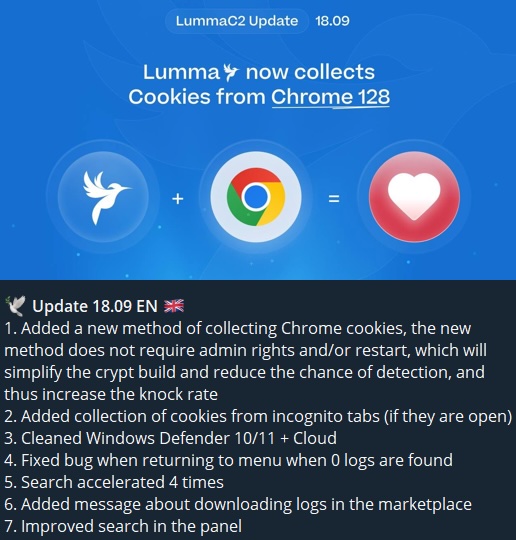
Just a couple of months after Google announced the implementation of App-Bound Encryption in Chrome, many infostealer developers claimed they’d already bypassed the protection. Among them were the creators of Meduza Stealer, Whitesnake, Lumma Stealer, and Lumar (also known as PovertyStealer).
Lumma stealer developers announce a bypass for Chrome’s App-Bound Encryption in a new version of the malware
Of course, you shouldn’t take malware developers at their word, but legitimate security researchers were able to confirm at least some of the claims. Bypasses for Google Chrome’s new data protection feature did become available almost immediately after its release.
A month later, in October 2024, tech enthusiast Alex Hagenah published a tool on GitHub called Chrome-App-Bound-Encryption-Decryption to bypass Google’s new security mechanism. Analysis of the tool’s code revealed that its author used roughly the same methods that attackers were already heavily exploiting.
What followed was a game of cat and mouse: security researchers and stealer developers came up with new tricks to circumvent App-Bound Encryption, while Google patched the newly discovered loopholes with varying degrees of success.
VoidStealer — a new data-nabbing menace
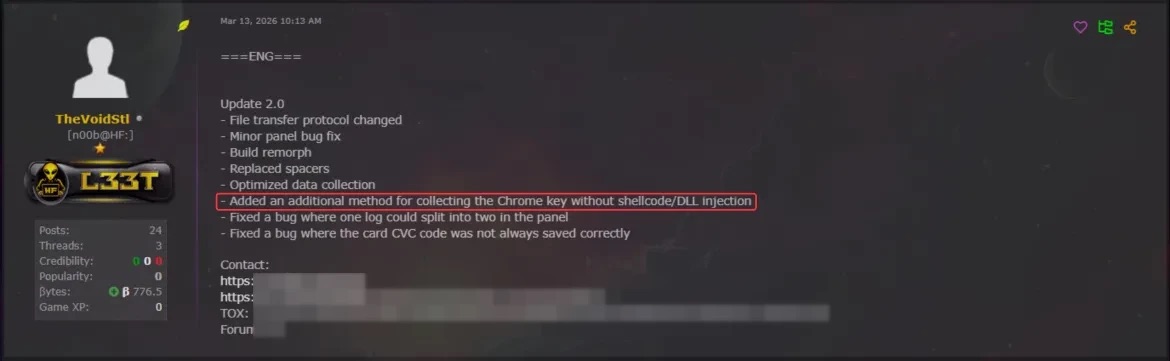
This brings us to recent events: in March 2026, news broke about a stealer named VoidStealer, which utilizes a brand-new and, by all accounts, highly effective method for bypassing ABE.
VoidStealer developers advertising a new method for bypassing ABE. Source
The malware authors developed an attack technique that targets the brief moment when the master key sits in the browser’s memory in plaintext. This occurs because, at a certain point, the browser inevitably has to decrypt its data to actually use it — for instance, to automatically sign in to a website with the relevant session cookie or to access saved credentials.
To exploit this window of opportunity, the malware attaches itself to the Chrome process as a debugger — a tool that allows one to control a program’s execution, pause it, and inspect its memory. In legitimate scenarios, these tools are used by developers to find and fix bugs, analyze application behavior, and test performance.
The malware identifies the specific section of code where data decryption takes place. It then sets a breakpoint at that location; when the program’s execution reaches that point, the browser effectively freezes. This is how the malware catches the exact moment the master key is sitting in RAM in plaintext; it then reads the key directly from memory.
It’s worth noting that everything mentioned above also applies to other Chromium-based browsers that use ABE, including Microsoft Edge, Brave, Opera, Vivaldi, and others.
How to avoid falling victim to infostealers
The scale of VoidStealer’s reach could be significant, as its developers operate under the malware-as-a-service (MaaS) model. This means they rent out the ready-made tool to other attackers, so they don’t need to develop custom malware from scratch.
This situation demonstrates that relying solely on built-in security mechanisms isn’t enough. Unfortunately, stealer developers are coming up with new workarounds faster than browser and operating system developers can roll out patches.
Here’s what users can do about it:
Avoid installing programs from suspicious sources. This will minimize the chances of malware infiltrating your system.
Learn how ClickFix attacks Lately, stealers have frequently been distributed using this specific malicious tactic.
Keep your OS and software updated on all devices. Timely updates help patch many of the vulnerabilities that malware exploits.
Install a robust security solution on all your devices. It’ll block suspicious activity in real time and alert you to potential threats.
As an added precaution, avoid storing passwords and bank card info in Google Chrome or your Notes app, as these are the first places any self-respecting stealer looks. Instead, use a secure password manager.
Stealers are hunting for your data, finding ways to infiltrate both computers and smartphones alike. To protect yourself from theft, check out our other related posts:
Microsoft says it's rolling out a revamped Windows Insider Program experience as part of the broader plans to address performance and reliability concerns affecting Windows 11. [...]
Microsoft is rolling out Windows Update improvements that give users more control over how updates are installed while reducing disruption from frequent or poorly timed restarts. [...]
Microsoft will roll out passkey support for phishing-resistant passwordless authentication to Microsoft Entra‑protected resources from Windows devices starting late April. [...]

 Login
Login