Many modern attacks happen entirely inside the browser, leaving little evidence for traditional security tools. Keep Aware shows why EDR, email, and SASE miss browser-only attacks and how visibility changes prevention. [...]
Michael suspects personal information he submitted to rent application platforms was leaked online. And analysis shows millions of documents may also be at risk
Michael* has spent the past two months trying to get his digital identity back.
The 47-year-old Victorian schoolteacher was in the process of moving to a new town and applying for rental properties online. Around this time – and unbeknown to him – his mobile phone number was transferred to someone else.
The European Commission said today that TikTok is facing a fine because its addictive features, including infinite scroll, autoplay, push notifications, and personalized recommendation systems, are breaching the EU's Digital Services Act (DSA). [...]
An Illinois man pleaded guilty to hacking nearly 600 women's Snapchat accounts to steal nude photos that he kept, sold, or traded online, including accounts he compromised at the request of a former university track coach who was later convicted of sextortion. [...]
Photo-sharing platform Flickr is notifying users of a potential data breach after a vulnerability at a third-party email service provider exposed their real names, email addresses, IP addresses, and account activity. [...]
The U.S. Cybersecurity and Infrastructure Security Agency (CISA) has issued a new binding operational directive requiring federal agencies to identify and remove network edge devices that no longer receive security updates from manufacturers. [...]
Spain's Ministry of Science (Ministerio de Ciencia) announced a partial shutdown of its IT systems, affecting several citizen- and company-facing services. [...]
Ransomware operators are hosting and delivering malicious payloads at scale by abusing virtual machines (VMs) provisioned by ISPsystem, a legitimate virtual infrastructure management provider. [...]
Technologies for creating fake video and voice messages are accessible to anyone these days, and scammers are busy mastering the art of deepfakes. No one is immune to the threat — modern neural networks can clone a person’s voice from just three to five seconds of audio, and create highly convincing videos from a couple of photos. We’ve previously discussed how to distinguish a real photo or video from a fake and trace its origin to when it was taken or generated. Now let’s take a look at how attackers create and use deepfakes in real time, how to spot a fake without forensic tools, and how to protect yourself and loved ones from “clone attacks”.
How deepfakes are made
Scammers gather source material for deepfakes from open sources: webinars, public videos on social networks and channels, and online speeches. Sometimes they simply call identity theft targets and keep them on the line for as long as possible to collect data for maximum-quality voice cloning. And hacking the messaging account of someone who loves voice and video messages is the ultimate jackpot for scammers. With access to video recordings and voice messages, they can generate realistic fakes that 95% of folks are unable to tell apart from real messages from friends or colleagues.
The tools for creating deepfakes vary widely, from simple Telegram bots to professional generators like HeyGen and ElevenLabs. Scammers use deepfakes together with social engineering: for example, they might first simulate a messenger app call that appears to drop out constantly, then send a pre-generated video message of fairly low quality, blaming it on the supposedly poor connection.
In most cases, the message is about some kind of emergency in which the deepfake victim requires immediate help. Naturally the “friend in need” is desperate for money, but, as luck would have it, they’ve no access to an ATM, or have lost their wallet, and the bad connection rules out an online transfer. The solution is, of course, to send the money not directly to the “friend”, but to a fake account, phone number, or cryptowallet.
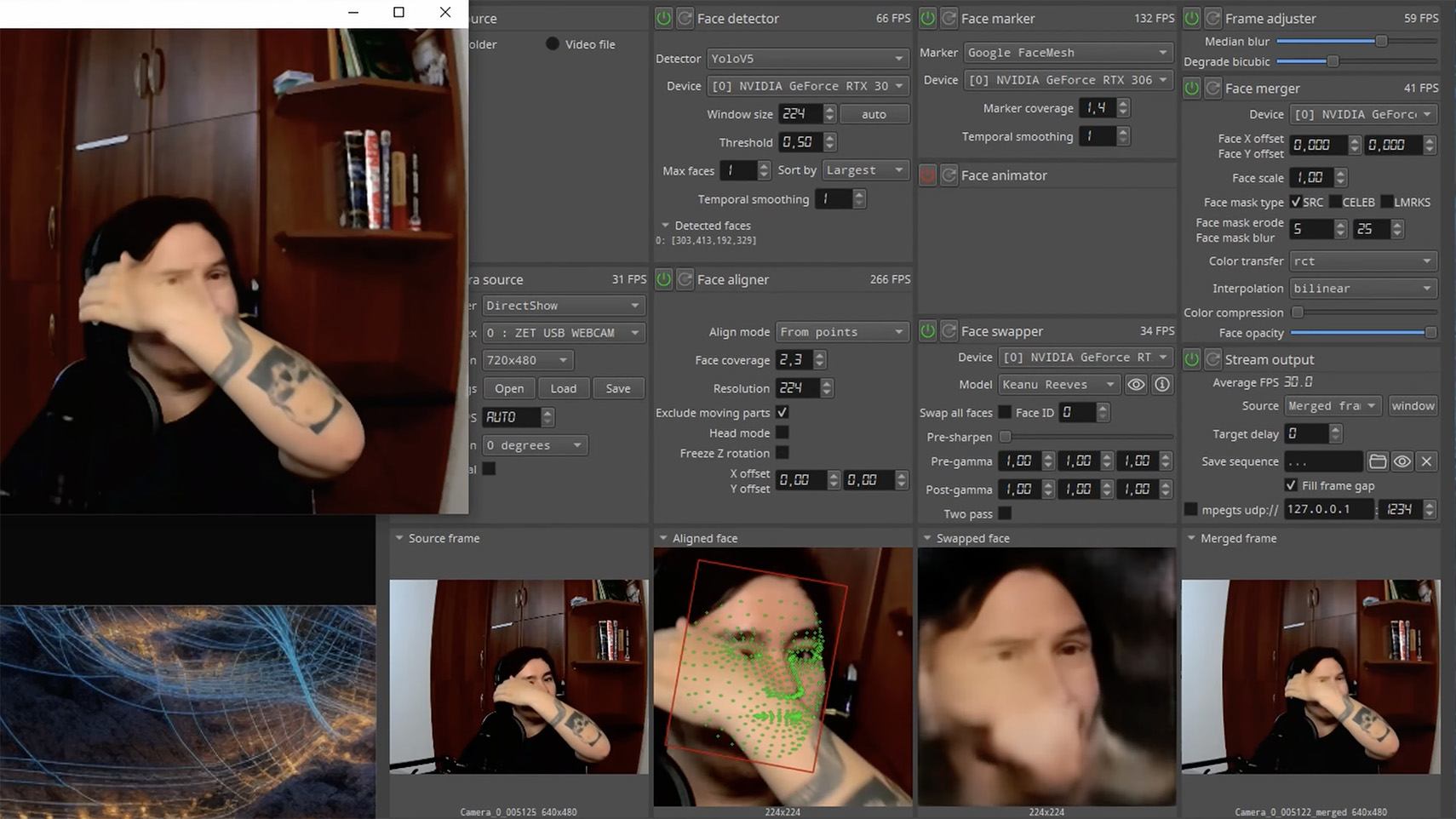
Such scams often involve pre-generated videos, but of late real-time deepfake streaming services have come into play. Among other things, these allow users to substitute their own face in a chat-roulette or video call.
How to recognize a deepfake
If you see a familiar face on the screen together with a recognizable voice but are asked unusual questions, chances are it’s a deepfake scam. Fortunately, there are certain visual, auditory, and behavioral signs that can help even non-techies to spot a fake.
Visual signs of a deepfake
Lighting and shadow issues. Deepfakes often ignore the physics of light: the direction of shadows on the face and in the background may not match, and glares on the skin may look unnatural or not be there at all. Or the person in the video may be half-turned toward the window, but their face is lit by studio lighting. This example will be familiar to participants in video conferences, where substituted background images can appear extremely unnatural.
Blurred or floating facial features. Pay attention to the hairline: deepfakes often show blurring, flickering, or unnatural color transitions along this area. These artifacts are caused by flaws in the algorithm for superimposing the cloned face onto the original.
Unnaturally blinking or “dead” eyes. A person blinks on average 10 to 20 times per minute. Some deepfakes blink too rarely, others too often. Eyelid movements can be too abrupt, and sometimes blinking is out of sync, with one eye not matching the other. “Glassy” or “dead-eye” stares are also characteristic of deepfakes. And sometimes a pupil (usually just the one) may twitch randomly due to a neural network hallucination.
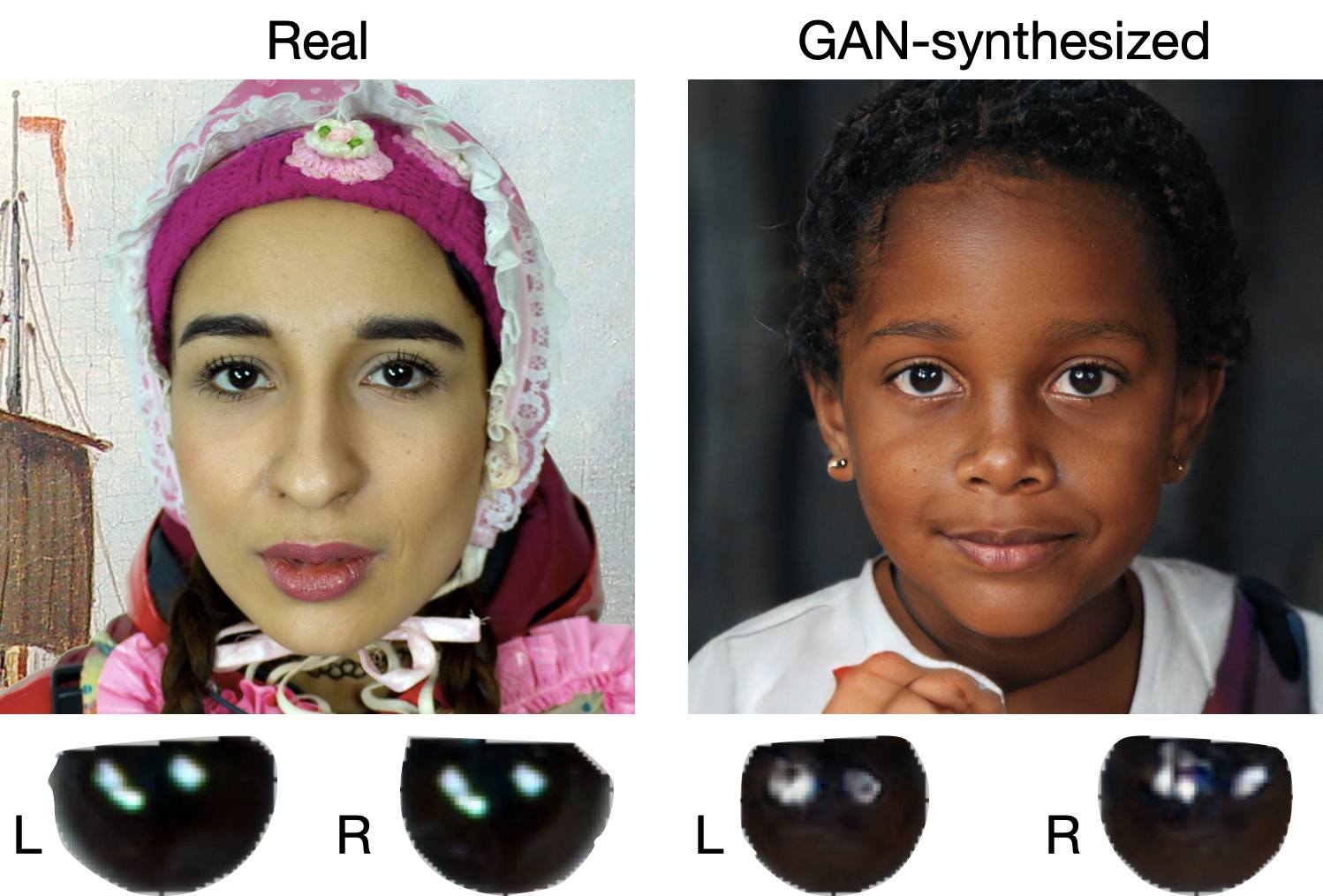
When analyzing a static image such as a photograph, it’s also a good idea to zoom in on the eyes and compare the reflections on the irises — in real photos they’ll be identical; in deepfakes — often not.
Look at the reflections and glares in the eyes in the real photo (left) and the generated image (right) — although similar, specular highlights in the eyes in the deepfake are different. Source
Lip-syncing issues. Even top-quality deepfakes trip up when it comes to synchronizing speech with lip movements. A delay of just a hundred milliseconds is noticeable to the naked eye. It’s often possible to observe an irregular lip shape when pronouncing the sounds m, f, or t. All of these are telltale signs of an AI-modeled face.
Static or blurred background. In generated videos, the background often looks unrealistic: it might be too blurry; its elements may not interact with the on-screen face; or sometimes the image behind the person remains motionless even when the camera moves.
Odd facial expressions. Deepfakes do a poor job of imitating emotion: facial expressions may not change in line with the conversation; smiles look frozen, and the fine wrinkles and folds that appear in real faces when expressing emotion are absent — the fake looks botoxed.
Auditory signs of a deepfake
Early AI generators modeled speech from small, monotonous phonemes, and when the intonation changed, there was an audible shift in pitch, making it easy to recognize a synthesized voice. Although today’s technology has advanced far beyond this, there are other signs that still give away generated voices.
Wooden or electronic tone. If the voice sounds unusually flat, without natural intonation variations, or there’s a vaguely electronic quality to it, there’s a high probability you’re talking to a deepfake. Real speech contains many variations in tone and natural imperfections.
No breathing sounds. Humans take micropauses and breathe in between phrases — especially in long sentences, not to mention small coughs and sniffs. Synthetic voices often lack these nuances, or place them unnaturally.
Robotic speech or sudden breaks. The voice may abruptly cut off, words may sound “glued” together, and the stress and intonation may not be what you’re used to hearing from your friend or colleague.
Lack of…shibboleths in speech. Pay attention to speech patterns (such as accent or phrases) that are typical of the person in real life but are poorly imitated (if at all) by the deepfake.
To mask visual and auditory artifacts, scammers often simulate poor connectivity by sending a noisy video or audio message. A low-quality video stream or media file is the first red flag indicating that checks are needed of the person at the other end.
Behavioral signs of a deepfake
Analyzing the movements and behavioral nuances of the caller is perhaps still the most reliable way to spot a deepfake in real time.
Can’t turn their head. During the video call, ask the person to turn their head so they’re looking completely to the side. Most deepfakes are created using portrait photos and videos, so a sideways turn will cause the image to float, distort, or even break up. AI startup Metaphysic.ai — creators of viral Tom Cruise deepfakes — confirm that head rotation is the most reliable deepfake test at present.
Unnatural gestures. Ask the on-screen person to perform a spontaneous action: wave their hand in front of their face; scratch their nose; take a sip from a cup; cover their eyes with their hands; or point to something in the room. Deepfakes have trouble handling impromptu gestures — hands may pass ghostlike through objects or the face, or fingers may appear distorted, or move unnaturally.
Ask a deepfake to wave a hand in front of its face, and the hand may appear to dissolve. Source
Screen sharing. If the conversation is work-related, ask your chat partner to share their screen and show an on-topic file or document. Without access to your real-life colleague’s device, this will be virtually impossible to fake.
Can’t answer tricky questions. Ask something that only the genuine article could know, for example: “What meeting do we have at work tomorrow?”, “Where did I get this scar?”, “Where did we go on vacation two years ago?” A scammer won’t be able to answer questions if the answers aren’t present in the hacked chats or publicly available sources.
Don’t know the codeword. Agree with friends and family on a secret word or phrase for emergency use to confirm identity. If a panicked relative asks you to urgently transfer money, ask them for the family codeword. A flesh-and-blood relation will reel it off; a deepfake-armed fraudster won’t.
What to do if you encounter a deepfake
If you’ve even the slightest suspicion that what you’re talking to isn’t a real human but a deepfake, follow our tips below.
End the chat and call back. The surest check is to end the video call and connect with the person through another channel: call or text their regular phone, or message them in another app. If your opposite number is unhappy about this, pretend the connection dropped out.
Don’t be pressured into sending money. A favorite trick is to create a false sense of urgency. “Mom, I need money right now, I’ve had an accident”; “I don’t have time to explain”; “If you don’t send it in ten minutes, I’m done for!” A real person usually won’t mind waiting a few extra minutes while you double-check the information.
Tell your friend or colleague they’ve been hacked. If a call or message from someone in your contacts comes from a new number or an unfamiliar account, it’s not unusual — attackers often create fake profiles or use temporary numbers, and this is yet another red flag. But if you get a deepfake call from a contact in a messenger app or your address book, inform them immediately that their account has been hacked — and do it via another communication channel. This will help them take steps to regain access to their account (see our detailed instructions for Telegram and WhatsApp), and to minimize potential damage to other contacts, for example, by posting about the hack.
How to stop your own face getting deepfaked
Restrict public access to your photos and videos. Hide your social media profiles from strangers, limit your friends list to real people, and delete videos with your voice and face from public access.
Don’t give suspicious apps access to your smartphone camera or microphone. Scammers can collect biometric data through fake apps disguised as games or utilities. To stop such programs from getting on your devices, use a proven all-in-one security solution.
Use passkeys, unique passwords, and two-factor authentication (2FA) where possible. Even if scammers do create a deepfake with your face, 2FA will make it much harder to access your accounts and use them to send deepfakes. A cross-platform password manager with support for passkeys and 2FA codes can help out here.
Teach friends and family how to spot deepfakes. Elderly relatives, young children, and anyone new to technology are the most vulnerable targets. Educate them about scams, show them examples of deepfakes, and practice using a family codeword.
Use content analyzers. While there’s no silver bullet against deepfakes, there are services that can identify AI-generated content with high accuracy. For graphics, these include Undetectable AI and Illuminarty; for video — Deepware; and for all types of deepfakes — Sensity AI and Hive Moderation.
Keep a cool head. Scammers apply psychological pressure to hurry victims into acting rashly. Remember the golden rule: if a call, video, or voice message from anyone you know rouses even the slightest suspicion, end the conversation and make contact through another channel.
To protect yourself and loved ones from being scammed, learn more about how scammers deploy deepfakes:
Cyber and Physical Risks Targeting the 2026 Winter Olympics
In this post we analyze the multi-vector threat landscape of the 2026 Winter Olympics, examining how the Games’ dispersed geographic footprint and high digital complexity create unique potential for cyber sabotage and physical disruptions.
The Milano-Cortina 2026 Winter Olympics represent a historic milestone as the first Games co-hosted by two major cities. However, the event’s expansive geographic footprint—covering 22,000 square kilometers across northern Italy—presents a complex security environment. From the metropolitan centers of Milan to the alpine peaks of Cortina d’Ampezzo, security forces are contending with a multi-vector threat landscape.
Kinetic and Physical Security Challenges
The geographically dispersed nature of the Milano-Cortina 2026 Winter Games also creates unique physical security challenges. Because venues are spread across thousands of square kilometers of the Alps, securing transit corridors and ensuring rapid emergency response across different Italian regions—including Lombardy, Veneto, and Trentino—is an incredible logistical hurdle. New tunnels, increased train services, and extended bus routes have been welcomed but create new potential targets for physical disruption by threat actors or protestors.
Terrorist and Extremist Threats
Flashpoint has not identified any terrorist or extremist threats to the Winter Olympic Games. However, lone threat actors in support of international terrorist organizations or domestic violence extremists remain a persistent threat due to the large number of attendees expected and the media attention that this event will attract.
Authorities in northern Italy are investigating a series of sabotage attacks on the national railway network that coincided with the opening of the 2026 Winter Olympic Games. The coordinated incidents—which included arson at a track switch, severed electrical cables, and the discovery of a rudimentary explosive device—caused delays of over two hours and temporarily disabled the vital transport hub of Bologna.
Protests
Flashpoint analysts identified several protests targeting the 2026 Winter Olympics:
US Presence and ICE Backlash: Hundreds of demonstrators have participated in protests in central Milan to demand that US ICE agents withdraw from security roles at the upcoming Winter Olympics.
Anti-Olympic and Environmental Activism: The most organized opposition comes from the Unsustainable Olympics Committee. They have already staged marches in Milan and Cortina, with more planned for February.
Pro-Palestinian Groups: Organizations such as BDS Italia are actively campaigning to boycott the games, demanding that Israel not be permitted to participate. Other pro-Palestinian groups have attempted to disrupt the Torch Relay in several cities and are expected to hold flash mob-style demonstrations in Milan’s Piazza del Duomo during the Opening Ceremony.
Labor Strikes: Italy frequently experiences transport strikes, which often fall on Fridays. Because the Opening Ceremony is on Friday, February 6, unions are leveraging this for maximum impact. An International Day of Protest has been coordinated by port and dock workers across the Mediterranean for February 6.
On February 7, a massive protest of approximately 10,000 people near the Olympic Village in Milan descended into violence as a peaceful march against the Winter Games ended in clashes with Italian police. While the majority of demonstrators initially focused on the environmental destruction caused by Olympic infrastructure, a smaller group of masked protestors engaged security forces with flares, stones, and firecrackers.
Cyber Threats Facing the 2026 Winter Olympics
The Milano-Cortina 2026 Winter Olympics will be among the most digitally complex global events, making it a prime target for cyberattacks. The greatest risks stem from familiar tactics such as phishing, spoofed websites, and business email compromise, which exploit human trust rather than technical flaws. With billions of viewers and a vast network of cloud services, vendors, and connected systems, the games create an expansive attack surface under intense operational pressure.
Italy blocked a series of cyberattacks targeting its foreign ministry offices, including one in Washington, as well as Winter Olympics websites and hotels in Cortina d’Ampezzo, with officials attributing the attempts to Russian sources. Foreign Minister Antonio Tajani confirmed the attacks were prevented just days before the Games’ official opening, which began with curling matches on February 4.
Past Olympic Games show a clear pattern of heightened cyber activity, including phishing campaigns, distributed denial-of-service (DDoS) attacks, ransomware, and online scams targeting both organizers and the public. A mix of cybercriminals, advanced persistent threats, and hacktivists is expected to exploit the event for financial gain, espionage, or publicity. Experts emphasize that improving security awareness, verifying digital interactions, and strengthening supply chain defenses are critical, as the most damaging incidents often arise from ordinary threats amplified by scale and urgency.
Staying Safe at the 2026 Winter Games
The security success of Milano-Cortina 2026 relies on the integration of real-time intelligence, advanced technological safeguards, and public vigilance. As the Games proceed, the intersection of cyber-sabotage and physical protest remains the most likely source of operational disruption.
To stay safe at this year’s Games, participants should:
Download Official Apps: Install the Milano Cortina 2026 Ground Transportation App and the Atm Milano app for real-time updates on transit, road closures, and “guaranteed” travel windows during strikes.
Plan Around Friday Strikes: Be aware that transport strikes (Feb 6, 13, and 20) typically guarantee services only between 6:00 AM – 9:00 AM and 6:00 PM – 9:00 PM. Plan your venue transfers accordingly.
Secure Your Digital Footprint: Avoid public Wi-Fi at major venues. Use a VPN and ensure Multi-Factor Authentication (MFA) is active on all your ticketing and banking accounts.
Stay Clear of Protests: While most demonstrations are expected to be peaceful, they can cause sudden police cordons and transit delays.
Respect the Drone Ban: Unauthorized drones are strictly prohibited over Milan and venue clusters. Leave yours at home to avoid heavy fines or interception by security units.
Stay Safe Using Flashpoint
While there are no current indications of imminent threats of extreme violence targeting the Milano-Cortina 2026 Winter Olympics, the event’s vast geographic footprint and digital complexity demand constant vigilance. Securing an event that spans 22,000 square kilometers requires more than just a physical presence; it necessitates a multi-faceted approach that bridges the gap between digital and kinetic risks.
To effectively navigate the intersection of cyber-sabotage, civil unrest, and logistical challenges, organizations and attendees must adopt a comprehensive strategy that integrates real-time intelligence with proactive security measures. Download Flashpoint’s Physical Safety Event Checklist to learn more.
Rome's "La Sapienza" university has been targeted by a cyberattack that impacted its IT systems and caused widespread operational disruptions at the educational institute. [...]
Conpet, Romania's national oil pipeline operator, has disclosed that a cyberattack disrupted its business systems and took down the company's website on Tuesday. [...]
Cloud logs can be inconsistent or incomplete, creating blind spots as environments scale and change. Corelight shows how network-level telemetry provides reliable visibility when cloud logs fall short. [...]
Overview This report documents a large-scale phishing campaign in which attackers abused legitimate software-as-a-service (SaaS) platforms to deliver phone-based scam lures that appeared authentic and trustworthy. Rather than spoofing domains or compromising services, the attackers deliberately misused native platform functionality to generate and distribute emails that closely resembled routine service notifications, inheriting the trust, reputation, and authentication posture of well-known SaaS providers. The campaign generated approximately 133,260 phishing emails, impacting 20,049 organizations. It is part of a broader and rapidly escalating trend in which attackers weaponize trusted brands and native cloud workflows to maximize delivery, credibility, and reach. Observed brands […]
Hackers stole email addresses and other personal information from 1.4 million accounts after breaching the systems of automated investment platform Betterment in January. [...]
A fresh wave of spam is hitting inboxes worldwide, with users reporting that they are once again being bombarded by automated emails generated through companies' unsecured Zendesk support systems. Some recipients say they are receiving hundreds of messages with strange or alarming subject lines. such as 'Activate account...' [...]
A threat actor is compromising NGINX servers in a campaign that hijacks user traffic and reroutes it through the attacker's backend infrastructure. [...]

 Login
Login