
Normal view

[updated] A fake cloud storage alert that ends at Freecash

3 February 2026 at 11:38

Last week we talked about an app that promises users they can make money testing games, or even just by scrolling through TikTok.

Imagine our surprise when we ended up on a site promoting that same Freecash app while investigating a “cloud storage” phish. We’ve all probably seen one of those. They’re common enough and according to recent investigation by BleepingComputer, there’s a

“large-scale cloud storage subscription scam campaign targeting users worldwide with repeated emails falsely warning recipients that their photos, files, and accounts are about to be blocked or deleted due to an alleged payment failure.”

Based on the description in that article, the email we found appears to be part of this campaign.

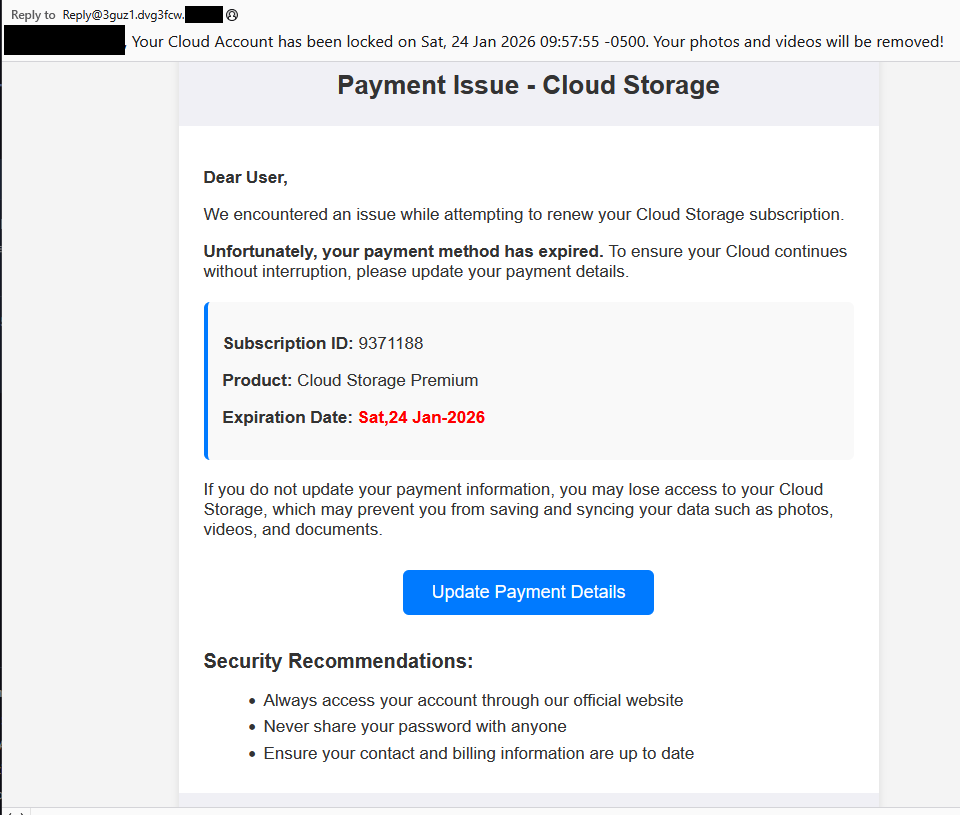
Cloud storage payment issue email

The subject line of the email is:

“{Recipient}. Your Cloud Account has been locked on Sat, 24 Jan 2026 09:57:55 -0500. Your photos and videos will be removed!”

This matches one of the subject lines that BleepingComputer listed.

And the content of the email:

Payment Issue – Cloud Storage

Dear User,

We encountered an issue while attempting to renew your Cloud Storage subscription.

Unfortunately, your payment method has expired. To ensure your Cloud continues without interruption, please update your payment details.

Subscription ID: 9371188

Product: Cloud Storage Premium

Expiration Date: Sat,24 Jan-2026

If you do not update your payment information, you may lose access to your Cloud Storage, which may prevent you from saving and syncing your data such as photos, videos, and documents.

Update Payment Details {link button}

Security Recommendations:

  • Always access your account through our official website
  • Never share your password with anyone
  • Ensure your contact and billing information are up to date”

The link in the email leads to  https://storage.googleapis[.]com/qzsdqdqsd/dsfsdxc.html#/redirect.html, which helps the scammer establish a certain amount of trust because it points to Google Cloud Storage (GCS). GCS is a legitimate service that allows authorized users to store and manage data such as files, images, and videos in buckets. However, as in this case, attackers can abuse it for phishing.

The redirect carries some parameters to the next website.

first redirect

The feed.headquartoonjpn[.]com domain was blocked by Malwarebytes. We’ve seen it before in an earlier campaign involving an Endurance-themed phish.

Endiurance phish

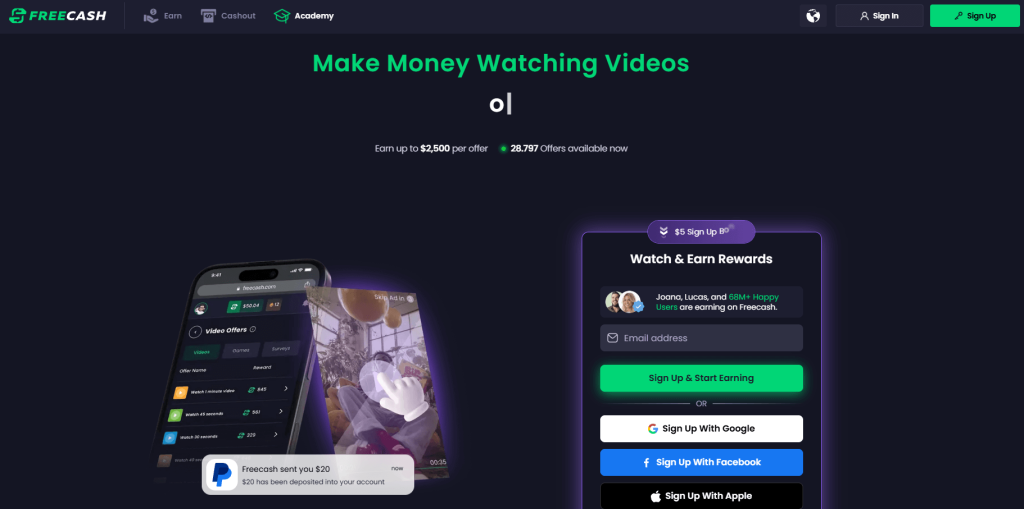
After a few more redirects, we ended up at hx5.submitloading[.]com, where a fake CAPTCHA triggered the last redirect to freecash[.]com, once it was solved.

slider captcha

The end goal of this phish likely depends on the parameters passed along during the redirects, so results may vary.

Rather than stealing credentials directly, the campaign appears designed to monetize traffic, funneling victims into affiliate offers where the operators get paid for sign-ups or conversions.

BleepingComputer noted that they were redirected to affiliate marketing websites for various products.

“Products promoted in this phishing campaign include VPN services, little-known security software, and other subscription-based offerings with no connection to cloud storage.”

How to stay safe

Ironically, the phishing email itself includes some solid advice:

  • Always access your account through our official website.
  • Never share your password with anyone.

We’d like to add:

  • Never click on links in unsolicited emails without verifying with a trusted source.
  • Use an up-to-date, real-time anti-malware solution with a web protection component.
  • Do not engage with websites that attract visitors like this.

Pro tip: Malwarebytes Scam Guard would have helped you identify this email as a scam and provided advice on how to proceed.

Redirect flow (IOCs)

storage.googleapis[.]com/qzsdqdqsd/dsfsdxc.html

feed.headquartoonjpn[.]com

revivejudgemental[.]com

hx5.submitloading[.]com

freecash[.]com

Update February 5, 2026

Almedia GmbH, the company behind the Freecash platform, reached out to us for information about the chain of redirects that lead to their platform. And after an investigation they notified us that:

“Following Malwarebytes’ reporting and the additional information they shared with us, we investigated the issue and identified an affiliate operating in breach of our policies. That partner has been removed from our network.

Almedia does not sell user data, and we take compliance, user trust, and responsible advertising seriously.”


We don’t just report on scams—we help detect them

Cybersecurity risks should never spread beyond a headline. If something looks dodgy to you, check if it’s a scam using Malwarebytes Scam Guard, a feature of our mobile protection products. Submit a screenshot, paste suspicious content, or share a text or phone number, and we’ll tell you if it’s a scam or legit. Download Malwarebytes Mobile Security for iOS or Android and try it today!
[updated] A fake cloud storage alert that ends at Freecash

3 February 2026 at 11:38

Last week we talked about an app that promises users they can make money testing games, or even just by scrolling through TikTok.

Imagine our surprise when we ended up on a site promoting that same Freecash app while investigating a “cloud storage” phish. We’ve all probably seen one of those. They’re common enough and according to recent investigation by BleepingComputer, there’s a

“large-scale cloud storage subscription scam campaign targeting users worldwide with repeated emails falsely warning recipients that their photos, files, and accounts are about to be blocked or deleted due to an alleged payment failure.”

Based on the description in that article, the email we found appears to be part of this campaign.

Cloud storage payment issue email

The subject line of the email is:

“{Recipient}. Your Cloud Account has been locked on Sat, 24 Jan 2026 09:57:55 -0500. Your photos and videos will be removed!”

This matches one of the subject lines that BleepingComputer listed.

And the content of the email:

Payment Issue – Cloud Storage

Dear User,

We encountered an issue while attempting to renew your Cloud Storage subscription.

Unfortunately, your payment method has expired. To ensure your Cloud continues without interruption, please update your payment details.

Subscription ID: 9371188

Product: Cloud Storage Premium

Expiration Date: Sat,24 Jan-2026

If you do not update your payment information, you may lose access to your Cloud Storage, which may prevent you from saving and syncing your data such as photos, videos, and documents.

Update Payment Details {link button}

Security Recommendations:

  • Always access your account through our official website
  • Never share your password with anyone
  • Ensure your contact and billing information are up to date”

The link in the email leads to  https://storage.googleapis[.]com/qzsdqdqsd/dsfsdxc.html#/redirect.html, which helps the scammer establish a certain amount of trust because it points to Google Cloud Storage (GCS). GCS is a legitimate service that allows authorized users to store and manage data such as files, images, and videos in buckets. However, as in this case, attackers can abuse it for phishing.

The redirect carries some parameters to the next website.

first redirect

The feed.headquartoonjpn[.]com domain was blocked by Malwarebytes. We’ve seen it before in an earlier campaign involving an Endurance-themed phish.

Endiurance phish

After a few more redirects, we ended up at hx5.submitloading[.]com, where a fake CAPTCHA triggered the last redirect to freecash[.]com, once it was solved.

slider captcha

The end goal of this phish likely depends on the parameters passed along during the redirects, so results may vary.

Rather than stealing credentials directly, the campaign appears designed to monetize traffic, funneling victims into affiliate offers where the operators get paid for sign-ups or conversions.

BleepingComputer noted that they were redirected to affiliate marketing websites for various products.

“Products promoted in this phishing campaign include VPN services, little-known security software, and other subscription-based offerings with no connection to cloud storage.”

How to stay safe

Ironically, the phishing email itself includes some solid advice:

  • Always access your account through our official website.
  • Never share your password with anyone.

We’d like to add:

  • Never click on links in unsolicited emails without verifying with a trusted source.
  • Use an up-to-date, real-time anti-malware solution with a web protection component.
  • Do not engage with websites that attract visitors like this.

Pro tip: Malwarebytes Scam Guard would have helped you identify this email as a scam and provided advice on how to proceed.

Redirect flow (IOCs)

storage.googleapis[.]com/qzsdqdqsd/dsfsdxc.html

feed.headquartoonjpn[.]com

revivejudgemental[.]com

hx5.submitloading[.]com

freecash[.]com

Update February 5, 2026

Almedia GmbH, the company behind the Freecash platform, reached out to us for information about the chain of redirects that lead to their platform. And after an investigation they notified us that:

“Following Malwarebytes’ reporting and the additional information they shared with us, we investigated the issue and identified an affiliate operating in breach of our policies. That partner has been removed from our network.

Almedia does not sell user data, and we take compliance, user trust, and responsible advertising seriously.”


We don’t just report on scams—we help detect them

Cybersecurity risks should never spread beyond a headline. If something looks dodgy to you, check if it’s a scam using Malwarebytes Scam Guard, a feature of our mobile protection products. Submit a screenshot, paste suspicious content, or share a text or phone number, and we’ll tell you if it’s a scam or legit. Download Malwarebytes Mobile Security for iOS or Android and try it today!
How fake party invitations are being used to install remote access tools

2 February 2026 at 11:18

“You’re invited!” 

It sounds friendly, familiar and quite harmless. But in a scam we recently spotted, that simple phrase is being used to trick victims into installing a full remote access tool on their Windows computers—giving attackers complete control of the system. 

What appears to be a casual party or event invitation leads to the silent installation of ScreenConnect, a legitimate remote support tool quietly installed in the background and abused by attackers. 

Here’s how the scam works, why it’s effective, and how to protect yourself. 

The email: A party invitation 

Victims receive an email framed as a personal invitation—often written to look like it came from a friend or acquaintance. The message is deliberately informal and social, lowering suspicion and encouraging quick action. 

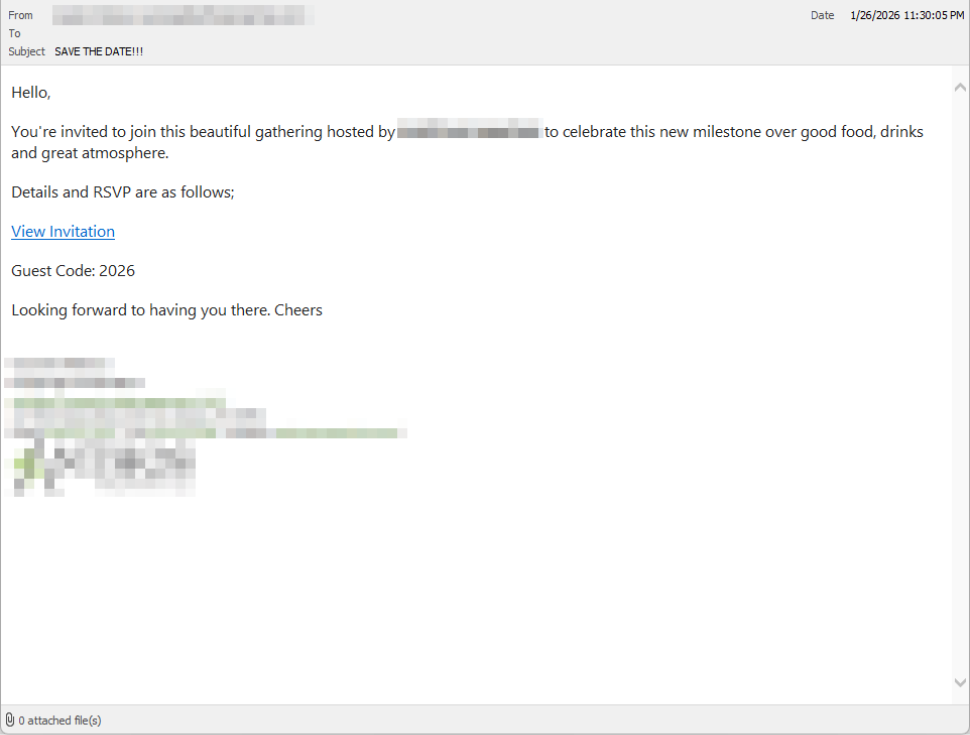
In the screenshot below, the email arrived from a friend whose email account had been hacked, but it could just as easily come from a sender you don’t know.

So far, we’ve only seen this campaign targeting people in the UK, but there’s nothing stopping it from expanding elsewhere. 

Clicking the link in the email leads to a polished invitation page hosted on an attacker-controlled domain. 

Party invitation email from a contact

The invite: The landing page that leads to an installer 

The landing page leans heavily into the party theme, but instead of showing event details, the page nudges the user toward opening a file. None of them look dangerous on their own, but together they keep the user focused on the “invitation” file: 

  • A bold “You’re Invited!” headline 
  • The suggestion that a friend had sent the invitation 
  • A message saying the invitation is best viewed on a Windows laptop or desktop
  • A countdown suggesting your invitation is already “downloading” 
  • A message implying urgency and social proof (“I opened mine and it was so easy!”

Within seconds, the browser is redirected to download RSVPPartyInvitationCard.msi 

The page even triggers the download automatically to keep the victim moving forward without stopping to think. 

This MSI file isn’t an invitation. It’s an installer. 

The landing page

The guest: What the MSI actually does 

When the user opens the MSI file, it launches msiexec.exe and silently installs ScreenConnect Client, a legitimate remote access tool often used by IT support teams.  

There’s no invitation, RSVP form, or calendar entry. 

What happens instead: 

  • ScreenConnect binaries are installed under C:\Program Files (x86)\ScreenConnect Client\ 
  • A persistent Windows service is created (for example, ScreenConnect Client 18d1648b87bb3023) 
  • ScreenConnect installs multiple .NET-based components 
  • There is no clear user-facing indication that a remote access tool is being installed 

From the victim’s perspective, very little seems to happen. But at this point, the attacker can now remotely access their computer. 

The after-party: Remote access is established 

Once installed, the ScreenConnect client initiates encrypted outbound connections to ScreenConnect’s relay servers, including a uniquely assigned instance domain.

That connection gives the attacker the same level of access as a remote IT technician, including the ability to: 

  • See the victim’s screen in real time
  • Control the mouse and keyboard 
  • Upload or download files 
  • Keep access even after the computer is restarted 

Because ScreenConnect is legitimate software commonly used for remote support, its presence isn’t always obvious. On a personal computer, the first signs are often behavioral, such as unexplained cursor movement, windows opening on their own, or a ScreenConnect process the user doesn’t remember installing. 

Why this scam works 

This campaign is effective because it targets normal, predictable human behavior. From a behavioral security standpoint, it exploits our natural curiosity and appears to be a low risk. 

Most people don’t think of invitations as dangerous. Opening one feels passive, like glancing at a flyer or checking a message, not installing software. 

Even security-aware users are trained to watch out for warnings and pressure. A friendly “you’re invited” message doesn’t trigger those alarms. 

By the time something feels off, the software is already installed. 

Signs your computer may be affected 

Watch for: 

  • A download or executed file named RSVPPartyInvitationCard.msi 
  • An unexpected installation of ScreenConnect Client 
  • A Windows service named ScreenConnect Client with random characters  
  • Your computer makes outbound HTTPS connections to ScreenConnect relay domains 
  • Your system resolves the invitation-hosting domain used in this campaign, xnyr[.]digital 

How to stay safe  

This campaign is a reminder that modern attacks often don’t break in—they’re invited in. Remote access tools give attackers deep control over a system. Acting quickly can limit the damage.  

For individuals 

If you receive an email like this: 

  • Be suspicious of invitations that ask you to download or open software 
  • Never run MSI files from unsolicited emails 
  • Verify invitations through another channel before opening anything 

If you already clicked or ran the file:  

  • Disconnect from the internet immediately 
  • Check for ScreenConnect and uninstall it if present 
  • Run a full security scan 
  • Change important passwords from a clean, unaffected device 

For organisations (especially in the UK) 

  • Alert on unauthorized ScreenConnect installations
  • Restrict MSI execution where feasible 
  • Treat “remote support tools” as high-risk software
  • Educate users: invitations don’t come as installers 

This scam works by installing a legitimate remote access tool without clear user intent. That’s exactly the gap Malwarebytes is designed to catch.

Malwarebytes now detects newly installed remote access tools and alerts you when one appears on your system. You’re then given a choice: confirm that the tool is expected and trusted, or remove it if it isn’t.


We don’t just report on threats—we remove them

Cybersecurity risks should never spread beyond a headline. Keep threats off your devices by downloading Malwarebytes today.

How fake party invitations are being used to install remote access tools

2 February 2026 at 11:18

“You’re invited!” 

It sounds friendly, familiar and quite harmless. But in a scam we recently spotted, that simple phrase is being used to trick victims into installing a full remote access tool on their Windows computers—giving attackers complete control of the system. 

What appears to be a casual party or event invitation leads to the silent installation of ScreenConnect, a legitimate remote support tool quietly installed in the background and abused by attackers. 

Here’s how the scam works, why it’s effective, and how to protect yourself. 

The email: A party invitation 

Victims receive an email framed as a personal invitation—often written to look like it came from a friend or acquaintance. The message is deliberately informal and social, lowering suspicion and encouraging quick action. 

In the screenshot below, the email arrived from a friend whose email account had been hacked, but it could just as easily come from a sender you don’t know.

So far, we’ve only seen this campaign targeting people in the UK, but there’s nothing stopping it from expanding elsewhere. 

Clicking the link in the email leads to a polished invitation page hosted on an attacker-controlled domain. 

Party invitation email from a contact

The invite: The landing page that leads to an installer 

The landing page leans heavily into the party theme, but instead of showing event details, the page nudges the user toward opening a file. None of them look dangerous on their own, but together they keep the user focused on the “invitation” file: 

  • A bold “You’re Invited!” headline 
  • The suggestion that a friend had sent the invitation 
  • A message saying the invitation is best viewed on a Windows laptop or desktop
  • A countdown suggesting your invitation is already “downloading” 
  • A message implying urgency and social proof (“I opened mine and it was so easy!”

Within seconds, the browser is redirected to download RSVPPartyInvitationCard.msi 

The page even triggers the download automatically to keep the victim moving forward without stopping to think. 

This MSI file isn’t an invitation. It’s an installer. 

The landing page

The guest: What the MSI actually does 

When the user opens the MSI file, it launches msiexec.exe and silently installs ScreenConnect Client, a legitimate remote access tool often used by IT support teams.  

There’s no invitation, RSVP form, or calendar entry. 

What happens instead: 

  • ScreenConnect binaries are installed under C:\Program Files (x86)\ScreenConnect Client\ 
  • A persistent Windows service is created (for example, ScreenConnect Client 18d1648b87bb3023) 
  • ScreenConnect installs multiple .NET-based components 
  • There is no clear user-facing indication that a remote access tool is being installed 

From the victim’s perspective, very little seems to happen. But at this point, the attacker can now remotely access their computer. 

The after-party: Remote access is established 

Once installed, the ScreenConnect client initiates encrypted outbound connections to ScreenConnect’s relay servers, including a uniquely assigned instance domain.

That connection gives the attacker the same level of access as a remote IT technician, including the ability to: 

  • See the victim’s screen in real time
  • Control the mouse and keyboard 
  • Upload or download files 
  • Keep access even after the computer is restarted 

Because ScreenConnect is legitimate software commonly used for remote support, its presence isn’t always obvious. On a personal computer, the first signs are often behavioral, such as unexplained cursor movement, windows opening on their own, or a ScreenConnect process the user doesn’t remember installing. 

Why this scam works 

This campaign is effective because it targets normal, predictable human behavior. From a behavioral security standpoint, it exploits our natural curiosity and appears to be a low risk. 

Most people don’t think of invitations as dangerous. Opening one feels passive, like glancing at a flyer or checking a message, not installing software. 

Even security-aware users are trained to watch out for warnings and pressure. A friendly “you’re invited” message doesn’t trigger those alarms. 

By the time something feels off, the software is already installed. 

Signs your computer may be affected 

Watch for: 

  • A download or executed file named RSVPPartyInvitationCard.msi 
  • An unexpected installation of ScreenConnect Client 
  • A Windows service named ScreenConnect Client with random characters  
  • Your computer makes outbound HTTPS connections to ScreenConnect relay domains 
  • Your system resolves the invitation-hosting domain used in this campaign, xnyr[.]digital 

How to stay safe  

This campaign is a reminder that modern attacks often don’t break in—they’re invited in. Remote access tools give attackers deep control over a system. Acting quickly can limit the damage.  

For individuals 

If you receive an email like this: 

  • Be suspicious of invitations that ask you to download or open software 
  • Never run MSI files from unsolicited emails 
  • Verify invitations through another channel before opening anything 

If you already clicked or ran the file:  

  • Disconnect from the internet immediately 
  • Check for ScreenConnect and uninstall it if present 
  • Run a full security scan 
  • Change important passwords from a clean, unaffected device 

For organisations (especially in the UK) 

  • Alert on unauthorized ScreenConnect installations
  • Restrict MSI execution where feasible 
  • Treat “remote support tools” as high-risk software
  • Educate users: invitations don’t come as installers 

This scam works by installing a legitimate remote access tool without clear user intent. That’s exactly the gap Malwarebytes is designed to catch.

Malwarebytes now detects newly installed remote access tools and alerts you when one appears on your system. You’re then given a choice: confirm that the tool is expected and trusted, or remove it if it isn’t.


We don’t just report on threats—we remove them

Cybersecurity risks should never spread beyond a headline. Keep threats off your devices by downloading Malwarebytes today.

Get paid to scroll TikTok? The data trade behind Freecash ads

26 January 2026 at 15:28

Loyal readers and other privacy-conscious people will be familiar with the expression, “If it’s too good to be true, it’s probably false.”

Getting paid handsomely to scroll social media definitely falls into that category. It sounds like an easy side hustle, which usually means there’s a catch.

In January 2026, an app called Freecash shot up to the number two spot on Apple’s free iOS chart in the US, helped along by TikTok ads that look a lot like job offers from TikTok itself. The ads promised up to $35 an hour to watch your “For You” page. According to reporting, the ads didn’t promote Freecash by name. Instead, they showed a young woman expressing excitement about seemingly being “hired by TikTok” to watch videos for money.

Freecash landing page

The landing pages featured TikTok and Freecash logos and invited users to “get paid to scroll” and “cash out instantly,” implying a simple exchange of time for money.

Those claims were misleading enough that TikTok said the ads violated its rules on financial misrepresentation and removed some of them.

Once you install the app, the promised TikTok paycheck vanishes. Instead, Freecash routes you to a rotating roster of mobile games—titles like Monopoly Go and Disney Solitaire—and offers cash rewards for completing time‑limited in‑game challenges. Payouts range from a single cent for a few minutes of daily play up to triple‑digit amounts if you reach high levels within a fixed period.

The whole setup is designed not to reward scrolling, as it claims, but to funnel you into games where you are likely to spend money or watch paid advertisements.

Freecash’s parent company, Berlin‑based Almedia, openly describes the platform as a way to match mobile game developers with users who are likely to install and spend. The company’s CEO has spoken publicly about using past spending data to steer users toward the genres where they’re most “valuable” to advertisers. 

Our concern, beyond the bait-and-switch, is the privacy issue. Freecash’s privacy policy allows the automatic collection of highly sensitive information, including data about race, religion, sex life, sexual orientation, health, and biometrics. Each additional mobile game you install to chase rewards adds its own privacy policy, tracking, and telemetry. Together, they greatly increase how much behavioral data these companies can harvest about a user.

Experts warn that data brokers already trade lists of people likely to be more susceptible to scams or compulsive online behavior—profiles that apps like this can help refine.

We’ve previously reported on data brokers that used games and apps to build massive databases, only to later suffer breaches exposing all that data.

When asked about the ads, Freecash said the most misleading TikTok promotions were created by third-party affiliates, not by the company itself. Which is quite possible because Freecash does offer an affiliate payout program to people who promote the app online. But they made promises to review and tighten partner monitoring.

For experienced users, the pattern should feel familiar: eye‑catching promises of easy money, a bait‑and‑switch into something that takes more time and effort than advertised, and a business model that suddenly makes sense when you realize your attention and data are the real products.

How to stay private

Free cash? Apparently, there is no such thing.

If you’re curious how intrusive schemes like this can be, consider using a separate email address created specifically for testing. Avoid sharing real personal details. Many users report that once they sign up, marketing emails quickly pile up.

Some of these schemes also appeal to people who are younger or under financial pressure, offering tiny payouts while generating far more value for advertisers and app developers.

So, what can you do?

  • Gather information about the company you’re about to give your data. Talk to friends and relatives about your plans. Shared common sense often helps make the right decisions.
  • Create a separate account if you want to test a service. Use a dedicated email address and avoid sharing real personal details.
  • Limit information you provide online to what makes sense for the purpose. Does a game publisher need your Social Security Number? I don’t think so.
  • Be cautious about app installs that are framed as required to make the money initially promised, and review permissions carefully.
  • Use an up-to-date real-time anti-malware solution on all your devices.

Work from the premise that free money does not exist. Try to work out the business model of those offering it, and then decide.


We don’t just report on threats – we help protect your social media

Cybersecurity risks should never spread beyond a headline. Protect your social media accounts by using Malwarebytes Identity Theft Protection.

Get paid to scroll TikTok? The data trade behind Freecash ads

26 January 2026 at 15:28

Loyal readers and other privacy-conscious people will be familiar with the expression, “If it’s too good to be true, it’s probably false.”

Getting paid handsomely to scroll social media definitely falls into that category. It sounds like an easy side hustle, which usually means there’s a catch.

In January 2026, an app called Freecash shot up to the number two spot on Apple’s free iOS chart in the US, helped along by TikTok ads that look a lot like job offers from TikTok itself. The ads promised up to $35 an hour to watch your “For You” page. According to reporting, the ads didn’t promote Freecash by name. Instead, they showed a young woman expressing excitement about seemingly being “hired by TikTok” to watch videos for money.

Freecash landing page

The landing pages featured TikTok and Freecash logos and invited users to “get paid to scroll” and “cash out instantly,” implying a simple exchange of time for money.

Those claims were misleading enough that TikTok said the ads violated its rules on financial misrepresentation and removed some of them.

Once you install the app, the promised TikTok paycheck vanishes. Instead, Freecash routes you to a rotating roster of mobile games—titles like Monopoly Go and Disney Solitaire—and offers cash rewards for completing time‑limited in‑game challenges. Payouts range from a single cent for a few minutes of daily play up to triple‑digit amounts if you reach high levels within a fixed period.

The whole setup is designed not to reward scrolling, as it claims, but to funnel you into games where you are likely to spend money or watch paid advertisements.

Freecash’s parent company, Berlin‑based Almedia, openly describes the platform as a way to match mobile game developers with users who are likely to install and spend. The company’s CEO has spoken publicly about using past spending data to steer users toward the genres where they’re most “valuable” to advertisers. 

Our concern, beyond the bait-and-switch, is the privacy issue. Freecash’s privacy policy allows the automatic collection of highly sensitive information, including data about race, religion, sex life, sexual orientation, health, and biometrics. Each additional mobile game you install to chase rewards adds its own privacy policy, tracking, and telemetry. Together, they greatly increase how much behavioral data these companies can harvest about a user.

Experts warn that data brokers already trade lists of people likely to be more susceptible to scams or compulsive online behavior—profiles that apps like this can help refine.

We’ve previously reported on data brokers that used games and apps to build massive databases, only to later suffer breaches exposing all that data.

When asked about the ads, Freecash said the most misleading TikTok promotions were created by third-party affiliates, not by the company itself. Which is quite possible because Freecash does offer an affiliate payout program to people who promote the app online. But they made promises to review and tighten partner monitoring.

For experienced users, the pattern should feel familiar: eye‑catching promises of easy money, a bait‑and‑switch into something that takes more time and effort than advertised, and a business model that suddenly makes sense when you realize your attention and data are the real products.

How to stay private

Free cash? Apparently, there is no such thing.

If you’re curious how intrusive schemes like this can be, consider using a separate email address created specifically for testing. Avoid sharing real personal details. Many users report that once they sign up, marketing emails quickly pile up.

Some of these schemes also appeal to people who are younger or under financial pressure, offering tiny payouts while generating far more value for advertisers and app developers.

So, what can you do?

  • Gather information about the company you’re about to give your data. Talk to friends and relatives about your plans. Shared common sense often helps make the right decisions.
  • Create a separate account if you want to test a service. Use a dedicated email address and avoid sharing real personal details.
  • Limit information you provide online to what makes sense for the purpose. Does a game publisher need your Social Security Number? I don’t think so.
  • Be cautious about app installs that are framed as required to make the money initially promised, and review permissions carefully.
  • Use an up-to-date real-time anti-malware solution on all your devices.

Work from the premise that free money does not exist. Try to work out the business model of those offering it, and then decide.


We don’t just report on threats – we help protect your social media

Cybersecurity risks should never spread beyond a headline. Protect your social media accounts by using Malwarebytes Identity Theft Protection.

Fake LastPass maintenance emails target users

22 January 2026 at 14:53

The LastPass Threat Intelligence, Mitigation, and Escalation (TIME) team has published a warning about an active phishing campaign in which fake “maintenance” emails pressure users to back up their vaults within 24 hours. The emails lead to credential-stealing phishing sites rather than any legitimate LastPass page.

The phishing campaign that started around January 19, 2026, uses emails that falsely claim upcoming infrastructure maintenance and urge users to “backup your vault in the next 24 hours.”

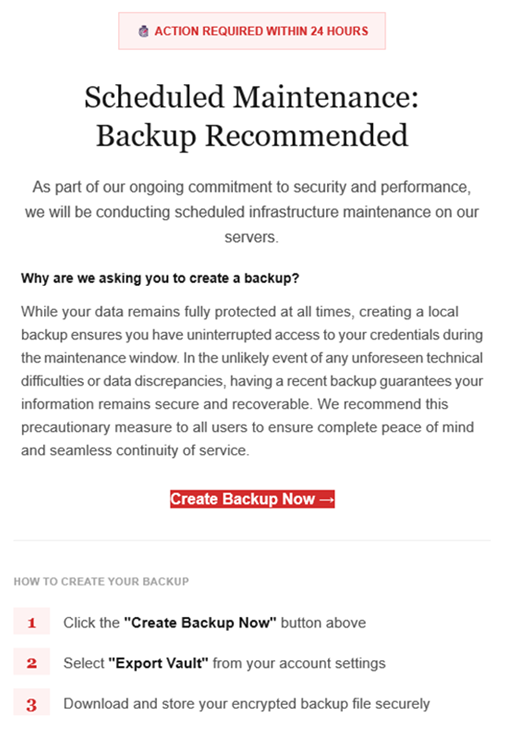
Example phishing email
Image courtesy of LastPass

“Scheduled Maintenance: Backup Recommended

As part of our ongoing commitment to security and performance, we will be conducting scheduled infrastructure maintenance on our servers.
Why are we asking you to create a backup?
While your data remains protected at all times, creating a local backup ensures you have access to your credentials during the maintenance window. In the unlikely event of any unforeseen technical difficulties or data discrepancies, having a recent backup guarantees your information remains secure and recoverable. We recommend this precautionary measure to all users to ensure complete peace of mind and seamless continuity of service.

Create Backup Now (link)

How to create your backup
1 Click the “Create Backup Now” button above
2 Select “Export Vault” from you account settings
3 Download and store your encrypted backup file securely”

The link in the email points to mail-lastpass[.]com, a domain that doesn’t belong to LastPass and has now been taken down.

Note that there are different subject lines in use. Here is a selection:

  • LastPass Infrastructure Update: Secure Your Vault Now
  • Your Data, Your Protection: Create a Backup Before Maintenance
  • Don’t Miss Out: Backup Your Vault Before Maintenance
  • Important: LastPass Maintenance & Your Vault Security
  • Protect Your Passwords: Backup Your Vault (24-Hour Window)

It is imperative for users to ignore instructions in emails like these. Giving away the login details for your password manager can be disastrous. For most users, it would provide access to enough information to carry out identity theft.

Stay safe

First and foremost, it’s important to understand that LastPass will never ask for your master password or demand immediate action under a tight deadline. Generally speaking, there are more guidelines that can help you stay safe.

  • Don’t click on links in unsolicited emails without verifying with the trusted sender that they’re legitimate.
  • Always log in directly on the platform that you are trying to access, rather than through a link.
  • Use a real-time, up-to-date anti-malware solution with a web protection module to block malicious sites.
  • Report phishing emails to the company that’s being impersonated, so they can alert other customers. In this case emails were forwarded to abuse@lastpass.com.

Pro tip: Malwarebytes Scam Guard  would have recognized this email as a scam and advised you how to proceed.


We don’t just report on threats—we help safeguard your entire digital identity

Cybersecurity risks should never spread beyond a headline. Protect your, and your family’s, personal information by using identity protection.

Fake LastPass maintenance emails target users

22 January 2026 at 14:53

The LastPass Threat Intelligence, Mitigation, and Escalation (TIME) team has published a warning about an active phishing campaign in which fake “maintenance” emails pressure users to back up their vaults within 24 hours. The emails lead to credential-stealing phishing sites rather than any legitimate LastPass page.

The phishing campaign that started around January 19, 2026, uses emails that falsely claim upcoming infrastructure maintenance and urge users to “backup your vault in the next 24 hours.”

Example phishing email
Image courtesy of LastPass

“Scheduled Maintenance: Backup Recommended

As part of our ongoing commitment to security and performance, we will be conducting scheduled infrastructure maintenance on our servers.
Why are we asking you to create a backup?
While your data remains protected at all times, creating a local backup ensures you have access to your credentials during the maintenance window. In the unlikely event of any unforeseen technical difficulties or data discrepancies, having a recent backup guarantees your information remains secure and recoverable. We recommend this precautionary measure to all users to ensure complete peace of mind and seamless continuity of service.

Create Backup Now (link)

How to create your backup
1 Click the “Create Backup Now” button above
2 Select “Export Vault” from you account settings
3 Download and store your encrypted backup file securely”

The link in the email points to mail-lastpass[.]com, a domain that doesn’t belong to LastPass and has now been taken down.

Note that there are different subject lines in use. Here is a selection:

  • LastPass Infrastructure Update: Secure Your Vault Now
  • Your Data, Your Protection: Create a Backup Before Maintenance
  • Don’t Miss Out: Backup Your Vault Before Maintenance
  • Important: LastPass Maintenance & Your Vault Security
  • Protect Your Passwords: Backup Your Vault (24-Hour Window)

It is imperative for users to ignore instructions in emails like these. Giving away the login details for your password manager can be disastrous. For most users, it would provide access to enough information to carry out identity theft.

Stay safe

First and foremost, it’s important to understand that LastPass will never ask for your master password or demand immediate action under a tight deadline. Generally speaking, there are more guidelines that can help you stay safe.

  • Don’t click on links in unsolicited emails without verifying with the trusted sender that they’re legitimate.
  • Always log in directly on the platform that you are trying to access, rather than through a link.
  • Use a real-time, up-to-date anti-malware solution with a web protection module to block malicious sites.
  • Report phishing emails to the company that’s being impersonated, so they can alert other customers. In this case emails were forwarded to abuse@lastpass.com.

Pro tip: Malwarebytes Scam Guard  would have recognized this email as a scam and advised you how to proceed.


We don’t just report on threats—we help safeguard your entire digital identity

Cybersecurity risks should never spread beyond a headline. Protect your, and your family’s, personal information by using identity protection.

Dutch police sell fake tickets to show how easily scams work

16 January 2026 at 11:05

If you can’t beat them, copy them. That seems to be the thinking behind an unusual campaign by the Dutch police, who set up a fake ticket website selling tickets that don’t exist.

The website, TicketBewust.nl, invites people to order tickets for events like football matches and concerns. But the offers were never real. The entire site was a deliberate sting, designed to show people how easily ticket fraud works.

The Netherlands’ National Police created the site to warn people about ticket fraud. They worked with the Fraud Helpdesk and online marketplace Marktplaats to run ads promoting “exclusive tickets” for sold-out concerts. If anyone got far enough to try and buy a ticket, the fake site took them to a police webpage explaining that they’d just interacted with a fake online shop.

People fell for these too-good-to-be-true deals—and that’s the most interesting part of this story. Many of us assume we’re far too savvy to fall prey to such online shenanigans, but a surprisingly large number of people do.

More than 300,000 people saw the police ads on Marktplaats between October 30, 2025, and January 11, 2026. Over 30,000 people opened opened it to take a look. 7,402 of them clicked the link to the fake site that was in the ad, and 3,432 people tried to order tickets.

That’s a reminder that online crime works a lot like regular ecommerce. Whether you’re selling real tickets or fake ones, it’s just a numbers game. Only a small percentage of people who see an ad will ever convert—but even a tiny fraction can be lucrative.

In this case, around 1% of people that saw the ad took the bait, but that represents a big profit for scammers. Fake ticket sellers raked in an average of $672 per victim in the US between 2020 and 2024, according to data from the Better Business Bureau (BBB).

Why ticket fraud is so common

Dutch police get around 50,000 online fraud complaints annually, with 10% involving fake tickets. It’s a problem in other countries too, with UK losses to gig ticket scams doubling in 2024 to £1.6 million (around $2.1 million).

Part of the reason fake ticket scams are so effective is that many cases never get reported. Some victims don’t think the loss is significant enough, while others simply don’t want to admit they were tricked. But there’s another, more fundamental reason these scams work so well: the audience is already primed to buy.

People searching for tickets are usually doing so because they don’t want to miss out. Scammers lean hard into that fear of missing out (FOMO), pairing it with scarcity cues like “sold out,” “limited availability,” or time-limited offers. People under emotional pressure from urgency and scarcity tend to do irrational things and take risks they shouldn’t. It’s why people invest erratically or take gambles on dodgy online sales.

How to protect yourself from fake ticket sites

The advice for avoiding shady ticket sellers looks a lot like advice for avoiding scams in general:

  • Watch what you click on social media. Social media accounts for 52% of concert ticket fraud cases, according to the BBB data. Stick to official channels like Ticketmaster, AXS, or the venue’s box office—and double check the URL you’re accessing.
  • Don’t let emotions get the better of you. Ticket sellers target high-demand events because they know people are desperate to attend and might let their guard down. That’s why fake ticket scams spiked after Oasis announced their reunion tour.
  • Don’t be fooled by support lines. Just because they’re on the phone doesn’t mean they’re legit.
  • Never pay via Zelle, Venmo, Cash App, gift cards or crypto. Use credit cards or other payment methods that offer purchase protection.

A little skepticism can go a long way when looking for sought-after tickets. So if you see an online ad offering you the seats of a lifetime, take a minute to research the seller. It could save you hundreds of dollars and a heap of disappointment.


We don’t just report on scams—we help detect them

Cybersecurity risks should never spread beyond a headline. If something looks dodgy to you, check if it’s a scam using Malwarebytes Scam Guard, a feature of our mobile protection products. Submit a screenshot, paste suspicious content, or share a text or phone number, and we’ll tell you if it’s a scam or legit. Download Malwarebytes Mobile Security for iOS or Android and try it today!

Dutch police sell fake tickets to show how easily scams work

16 January 2026 at 11:05

If you can’t beat them, copy them. That seems to be the thinking behind an unusual campaign by the Dutch police, who set up a fake ticket website selling tickets that don’t exist.

The website, TicketBewust.nl, invites people to order tickets for events like football matches and concerns. But the offers were never real. The entire site was a deliberate sting, designed to show people how easily ticket fraud works.

The Netherlands’ National Police created the site to warn people about ticket fraud. They worked with the Fraud Helpdesk and online marketplace Marktplaats to run ads promoting “exclusive tickets” for sold-out concerts. If anyone got far enough to try and buy a ticket, the fake site took them to a police webpage explaining that they’d just interacted with a fake online shop.

People fell for these too-good-to-be-true deals—and that’s the most interesting part of this story. Many of us assume we’re far too savvy to fall prey to such online shenanigans, but a surprisingly large number of people do.

More than 300,000 people saw the police ads on Marktplaats between October 30, 2025, and January 11, 2026. Over 30,000 people opened opened it to take a look. 7,402 of them clicked the link to the fake site that was in the ad, and 3,432 people tried to order tickets.

That’s a reminder that online crime works a lot like regular ecommerce. Whether you’re selling real tickets or fake ones, it’s just a numbers game. Only a small percentage of people who see an ad will ever convert—but even a tiny fraction can be lucrative.

In this case, around 1% of people that saw the ad took the bait, but that represents a big profit for scammers. Fake ticket sellers raked in an average of $672 per victim in the US between 2020 and 2024, according to data from the Better Business Bureau (BBB).

Why ticket fraud is so common

Dutch police get around 50,000 online fraud complaints annually, with 10% involving fake tickets. It’s a problem in other countries too, with UK losses to gig ticket scams doubling in 2024 to £1.6 million (around $2.1 million).

Part of the reason fake ticket scams are so effective is that many cases never get reported. Some victims don’t think the loss is significant enough, while others simply don’t want to admit they were tricked. But there’s another, more fundamental reason these scams work so well: the audience is already primed to buy.

People searching for tickets are usually doing so because they don’t want to miss out. Scammers lean hard into that fear of missing out (FOMO), pairing it with scarcity cues like “sold out,” “limited availability,” or time-limited offers. People under emotional pressure from urgency and scarcity tend to do irrational things and take risks they shouldn’t. It’s why people invest erratically or take gambles on dodgy online sales.

How to protect yourself from fake ticket sites

The advice for avoiding shady ticket sellers looks a lot like advice for avoiding scams in general:

  • Watch what you click on social media. Social media accounts for 52% of concert ticket fraud cases, according to the BBB data. Stick to official channels like Ticketmaster, AXS, or the venue’s box office—and double check the URL you’re accessing.
  • Don’t let emotions get the better of you. Ticket sellers target high-demand events because they know people are desperate to attend and might let their guard down. That’s why fake ticket scams spiked after Oasis announced their reunion tour.
  • Don’t be fooled by support lines. Just because they’re on the phone doesn’t mean they’re legit.
  • Never pay via Zelle, Venmo, Cash App, gift cards or crypto. Use credit cards or other payment methods that offer purchase protection.

A little skepticism can go a long way when looking for sought-after tickets. So if you see an online ad offering you the seats of a lifetime, take a minute to research the seller. It could save you hundreds of dollars and a heap of disappointment.


We don’t just report on scams—we help detect them

Cybersecurity risks should never spread beyond a headline. If something looks dodgy to you, check if it’s a scam using Malwarebytes Scam Guard, a feature of our mobile protection products. Submit a screenshot, paste suspicious content, or share a text or phone number, and we’ll tell you if it’s a scam or legit. Download Malwarebytes Mobile Security for iOS or Android and try it today!

Phishing campaign abuses Google Cloud services to steal Microsoft 365 logins

6 January 2026 at 16:01

Attackers are sending very convincing fake “Google” emails that slip past spam filters, route victims through several trusted Google-owned services, and ultimately lead to a look-alike Microsoft 365 sign-in page designed to harvest usernames and passwords.

Researchers found that cybercriminals used Google Cloud Application Integration’s Send Email feature to send phishing emails from a legitimate Google address: noreply-application-integration@google[.]com.

Google Cloud Application Integration allows users to automate business processes by connecting any application with point-and-click configurations. New customers currently receive free credits, which lowers the barrier to entry and may attract some cybercriminals.

The initial email arrives from what looks like a real Google address and references something routine and familiar, such as a voicemail notification, a task to complete, or permissions to access a document. The email includes a link that points to a genuine Google Cloud Storage URL, so the web address appears to belong to Google and doesn’t look like an obvious fake.

After the first click, you are redirected to another Google‑related domain (googleusercontent[.]com) showing a CAPTCHA or image check. Once you pass the “I’m not a robot check,” you land on what looks like a normal Microsoft 365 sign‑in page, but on close inspection, the web address is not an official Microsoft domain.

Any credentials provided on this site will be captured by the attackers.

The use of Google infrastructure provides the phishers with a higher level of trust from both email filters and the receiving users. This is not a vulnerability, just an abuse of cloud-based services that Google provides.

Google’s response

Google said it has taken action against the activity:

“We have blocked several phishing campaigns involving the misuse of an email notification feature within Google Cloud Application Integration. Importantly, this activity stemmed from the abuse of a workflow automation tool, not a compromise of Google’s infrastructure. While we have implemented protections to defend users against this specific attack, we encourage continued caution as malicious actors frequently attempt to spoof trusted brands. We are taking additional steps to prevent further misuse.”

We’ve seen several phishing campaigns that abuse trusted workflows from companies like Google, PayPal, DocuSign, and other cloud-based service providers to lend credibility to phishing emails and redirect targets to their credential-harvesting websites.

How to stay safe

Campaigns like these show that some responsibility for spotting phishing emails still rests with the recipient. Besides staying informed, here are some other tips you can follow to stay safe.

  • Always check the actual web address of any login page; if it’s not a genuine Microsoft domain, do not enter credentials.​ Using a password manager will help because they will not auto-fill your details on fake websites.
  • Be cautious of “urgent” emails about voicemails, document shares, or permissions, even if they appear to come from Google or Microsoft.​ Creating urgency is a common tactic by scammers and phishers.
  • Go directly to the service whenever possible. Instead of clicking links in emails, open OneDrive, Teams, or Outlook using your normal bookmark or app.
  • Use multi‑factor authentication (MFA) so that stolen passwords alone are not enough, and regularly review which apps have access to your account and remove anything you don’t recognize.

Pro tip: Malwarebytes Scam Guard can recognize emails like this as scams. You can upload suspicious text, emails, attachments and other files and ask for its opinion. It’s really very good at recognizing scams.


We don’t just report on scams—we help detect them

Cybersecurity risks should never spread beyond a headline. If something looks dodgy to you, check if it’s a scam using Malwarebytes Scam Guard, a feature of our mobile protection products. Submit a screenshot, paste suspicious content, or share a text or phone number, and we’ll tell you if it’s a scam or legit. Download Malwarebytes Mobile Security for iOS or Android and try it today!

Phishing campaign abuses Google Cloud services to steal Microsoft 365 logins

6 January 2026 at 16:01

Attackers are sending very convincing fake “Google” emails that slip past spam filters, route victims through several trusted Google-owned services, and ultimately lead to a look-alike Microsoft 365 sign-in page designed to harvest usernames and passwords.

Researchers found that cybercriminals used Google Cloud Application Integration’s Send Email feature to send phishing emails from a legitimate Google address: noreply-application-integration@google[.]com.

Google Cloud Application Integration allows users to automate business processes by connecting any application with point-and-click configurations. New customers currently receive free credits, which lowers the barrier to entry and may attract some cybercriminals.

The initial email arrives from what looks like a real Google address and references something routine and familiar, such as a voicemail notification, a task to complete, or permissions to access a document. The email includes a link that points to a genuine Google Cloud Storage URL, so the web address appears to belong to Google and doesn’t look like an obvious fake.

After the first click, you are redirected to another Google‑related domain (googleusercontent[.]com) showing a CAPTCHA or image check. Once you pass the “I’m not a robot check,” you land on what looks like a normal Microsoft 365 sign‑in page, but on close inspection, the web address is not an official Microsoft domain.

Any credentials provided on this site will be captured by the attackers.

The use of Google infrastructure provides the phishers with a higher level of trust from both email filters and the receiving users. This is not a vulnerability, just an abuse of cloud-based services that Google provides.

Google’s response

Google said it has taken action against the activity:

“We have blocked several phishing campaigns involving the misuse of an email notification feature within Google Cloud Application Integration. Importantly, this activity stemmed from the abuse of a workflow automation tool, not a compromise of Google’s infrastructure. While we have implemented protections to defend users against this specific attack, we encourage continued caution as malicious actors frequently attempt to spoof trusted brands. We are taking additional steps to prevent further misuse.”

We’ve seen several phishing campaigns that abuse trusted workflows from companies like Google, PayPal, DocuSign, and other cloud-based service providers to lend credibility to phishing emails and redirect targets to their credential-harvesting websites.

How to stay safe

Campaigns like these show that some responsibility for spotting phishing emails still rests with the recipient. Besides staying informed, here are some other tips you can follow to stay safe.

  • Always check the actual web address of any login page; if it’s not a genuine Microsoft domain, do not enter credentials.​ Using a password manager will help because they will not auto-fill your details on fake websites.
  • Be cautious of “urgent” emails about voicemails, document shares, or permissions, even if they appear to come from Google or Microsoft.​ Creating urgency is a common tactic by scammers and phishers.
  • Go directly to the service whenever possible. Instead of clicking links in emails, open OneDrive, Teams, or Outlook using your normal bookmark or app.
  • Use multi‑factor authentication (MFA) so that stolen passwords alone are not enough, and regularly review which apps have access to your account and remove anything you don’t recognize.

Pro tip: Malwarebytes Scam Guard can recognize emails like this as scams. You can upload suspicious text, emails, attachments and other files and ask for its opinion. It’s really very good at recognizing scams.


We don’t just report on scams—we help detect them

Cybersecurity risks should never spread beyond a headline. If something looks dodgy to you, check if it’s a scam using Malwarebytes Scam Guard, a feature of our mobile protection products. Submit a screenshot, paste suspicious content, or share a text or phone number, and we’ll tell you if it’s a scam or legit. Download Malwarebytes Mobile Security for iOS or Android and try it today!

Telegram Hosting World’s Largest Darknet Market

5 January 2026 at 13:01

Wired is reporting on Chinese darknet markets on Telegram.

The ecosystem of marketplaces for Chinese-speaking crypto scammers hosted on the messaging service Telegram have now grown to be bigger than ever before, according to a new analysis from the crypto tracing firm Elliptic. Despite a brief drop after Telegram banned two of the biggest such markets in early 2025, the two current top markets, known as Tudou Guarantee and Xinbi Guarantee, are together enabling close to $2 billion a month in money-laundering transactions, sales of scam tools like stolen data, fake investment websites, and AI deepfake tools, as well as other black market services as varied as pregnancy surrogacy and teen prostitution.

The crypto romance and investment scams regrettably known as “pig butchering”—carried out largely from compounds in Southeast Asia staffed with thousands of human trafficking victims—have grown to become the world’s most lucrative form of cybercrime. They pull in around $10 billion annually from US victims alone, according to the FBI. By selling money-laundering services and other scam-related offerings to those operations, markets like Tudou Guarantee and Xinbi Guarantee have grown in parallel to an immense scale.

LinkedIn Job Scams

31 December 2025 at 13:03

Interesting article on the variety of LinkedIn job scams around the world:

In India, tech jobs are used as bait because the industry employs millions of people and offers high-paying roles. In Kenya, the recruitment industry is largely unorganized, so scamsters leverage fake personal referrals. In Mexico, bad actors capitalize on the informal nature of the job economy by advertising fake formal roles that carry a promise of security. In Nigeria, scamsters often manage to get LinkedIn users to share their login credentials with the lure of paid work, preying on their desperation amid an especially acute unemployment crisis.

These are scams involving fraudulent employers convincing prospective employees to send them money for various fees. There is an entirely different set of scams involving fraudulent employees getting hired for remote jobs.

Senior scams topped $4.8 billion in 2024: What to watch out for

25 August 2025 at 16:58

Americans aged 60 and older lost $4.8 billion in 2024 to scammers, according to a report released by the FBI. These figures represent real people, real families, and life-changing financial devastation.

The impact extends beyond just the numbers. The average loss among people over the age of 60 was $83,000, more than four times the average overall loss in 2024. This disparity highlights why seniors have become prime targets for sophisticated scam operations.

Why seniors are targeted

Cybercriminals specifically target older adults for several reasons. Many seniors have accumulated substantial savings over their lifetimes, own their homes outright, and maintain good credit scores. Additionally, some may be less familiar with modern technology and digital security practices, making them more vulnerable to online deception.

The 5 scams draining senior bank accounts

1. Tech support fraud

Tech support scams happen when scammers pose as representatives of legitimate businesses like banks and utility companies. They reach out in various ways, including phone calls, texts and pop-up windows. They claim there’s an issue with a device or account and ask to send a fee to fix it. These fake alerts provide phone numbers that connect victims to scammers who then request remote access to computers and payment for unnecessary “repairs.”

2. Romance scams

Lonely seniors looking for love and companionship can easily fall victim to romance fraud. Criminals create fake profiles on dating sites and social media. These scammers build emotional relationships over weeks or months before requesting money to be wired or transferred to them for emergencies or travel expenses. Romance scams cost seniors $277 million (up 16% from 2022) according to the FTC’s latest report.

3. Grandparent scams

One of the most disturbing trends is the grandparent emergency scam. Fraudsters use AI to clone the voice of a grandchild in distress. Grandma or Grandpa gets a fake call from someone who sounds just like their grandchild saying need of money for bail, medical emergencies, or another crisis. They often request that the victim keep the call secret and send money immediately through wire transfers or gift cards. These scams work because they create emotional urgency.

4. Investment fraud

Older adults report losing more money, $538 million—a 34% increase over 2022, to investment scams than any other type of fraud. These scams often originate from phone calls, emails, social media, or events where fraudsters promise “guaranteed” high returns with little to no risk. Many schemes use urgency (“act now before it’s too late”), pose as financial advisors, or an affinity group related to their community or church. Seniors may fall for them because they sound safe and tailored to their situation, making it difficult to distinguish between legitimate opportunities and fraudulent ones until it’s too late.

5. Government impersonation scams

Scammers pose as representatives from Medicare, Social Security, or the IRS, claiming there are problems with benefits or threatening legal action unless immediate payment is made. For example, a call, text or social media message from someone who says they work at the Social Security Administration. They threaten to suspend the senior’s Social Security number or stop their Social Security payments unless they send them money owed. This type of claim is a scheme to steal both identity and money.  Social Security numbers can’t be suspended, and government agencies will never ask to be paid via wire transfer, cryptocurrency or payment apps.

Signs that it might be a scam

  • Unexpected phone calls or pop-ups claiming a computer is infected
  • Requests for immediate payment via wire transfer, gift cards, or cryptocurrency
  • High-pressure tactics demanding quick decisions
  • Unsolicited romantic interest from strangers online
  • Claims of emergency situations involving family members
  • Promises of unrealistic investment returns

How Webroot can help protect seniors

Modern cybersecurity solutions are essential for protecting seniors online. Webroot’s Total Protection offers multiple layers of protection specifically designed to combat the threats seniors face most.

Antivirus protection: Webroot’s advanced threat detection identifies and blocks malicious websites, phishing attempts, and dangerous downloads before they can cause harm.

Identity protection: Identity, credit, and financial accounts monitoring for fraud, with up $1M in fraud expense and stolen funds reimbursement.

Dark Web monitoring: This feature monitors personal information and alerts users if their data appears on the dark web or in data breaches.

Secure browsing: Webroot automatically warns users about suspicious websites and blocks access to known scam sites.

Password management: Strong, unique passwords are crucial for online safety, and Webroot’s password manager makes it easy to maintain secure accounts across all devices.

The importance of community awareness

The epidemic of attacks on seniors requires community-wide awareness and action.

Family members should regularly discuss online safety with senior relatives, helping them understand current scam tactics without creating fear or limiting their digital independence. Community organizations, libraries, and senior centers host educational workshops about cybersecurity and scam prevention. Seniors should check local events to learn more.

Moving forward safely

The digital world offers tremendous benefits for seniors, from staying connected with family to accessing healthcare and financial services online. The goal The goal for seniors isn’t to avoid technology but to use it safely and confidently.

By combining awareness, education, and robust cybersecurity tools like Webroot, seniors can enjoy the advantages of modern technology while staying protected from those who would exploit their trust and generosity. When something seems too good to be true or creates a sense of urgency, seniors should take time to verify information and consult with trusted family members or friends.

The fight against elder fraud requires vigilance from entire communities, but with the right tools and knowledge, families and communities can help protect their most vulnerable members from these devastating crimes.

Additional resources:

The cost of romance fraud

Spotting grandparent scams

AARP 2025 fraud and scams survey

Webroot solutions

The post Senior scams topped $4.8 billion in 2024: What to watch out for appeared first on Webroot Blog.

❌