Normal view

Why Malwarebytes blocks some Yahoo Mail redirects

14 May 2026 at 12:47

Some Malwarebytes users have recently noticed frequent web protection alerts while reading email in Yahoo Mail’s web interface. These alerts are caused by background connections from the Yahoo Mail page to a set of third‑party domains that our products and other security tools currently classify as risky.

What we are seeing under the hood

When you open Yahoo Mail in a browser, the page loads various embedded components for navigation, features, and metrics. As part of this, the interface makes calls to domains such as cook.howduhtable.com and related subdomains, sometimes in the context of URLs that include /ybar/mail.yahoo.com/ and a long encoded parameter. That encoded string often resolves to a URL like:

https://gpt.mail.yahoo.net/sandbox?client=novation&version=0.1&haq=1&cache=1

This suggests the traffic is being routed through what appears to be a sandboxed web component that Yahoo can use for things like telemetry, testing infrastructure, or mail features. It may also be part of an advertising or tracking flow, but at this time we cannot say with certainty exactly what purpose Yahoo is using it for.

Regardless of intent, multiple security systems have observed these redirect domains and assigned them poor reputations. Characteristics include:

  • Frequently changing, opaque subdomains that do not resemble normal consumer‑facing Yahoo addresses
  • Use of encoded parameters and chained redirects that make it difficult for users, and sometimes defenders, to see the final destination at a glance
  • Existing detections and blocklists from other vendors that classify the infrastructure as suspicious or potentially malicious

Because of these signals, Malwarebytes Web Protection and Browser Guard have been blocking a growing list of related subdomains to protect users, which is why some people see repeated alerts while using Yahoo Mail.

What we are not saying

It is important to be clear about what we do and do not know.

We have not established that Yahoo Mail itself is compromised or that Yahoo is deliberately distributing malware through its mail platform. What we can say is that third‑party or internal components invoked from within the Yahoo Mail web interface are making connections through domains that behave very similarly to infrastructure commonly associated with malicious or deceptive advertising and tracking.

From a security standpoint, this creates unnecessary risk. Any mechanism that injects content or runs sandboxed components via opaque redirect chains could, if misused or subverted in the future, expose users to harmful content without them ever clicking a suspicious link.

Blocking these domains is a precautionary step in line with our normal protection standards.

Why Malwarebytes blocks these redirects

Our decision to block these connections is based on a combination of technical behavior and third‑party reputation data:

  • The redirects are triggered by embedded components in the Yahoo Mail interface, not by users intentionally browsing to those domains
  • The infrastructure relies on frequently changing, non‑descriptive domains and subdomains, a pattern we often see in malicious or evasive advertising and tracking systems
  • Multiple security vendors and automated reputation feeds already flag these domains as risky or malicious, and some have seen them associated with unwanted or harmful activity

Because of this, Malwarebytes products currently block connections to these third‑party domains when they are invoked as part of Yahoo Mail’s web experience. This does not mean that all of Yahoo Mail is considered malicious. It means we are specifically interrupting a narrow set of background calls that present elevated risk.

What this means for users

If you use Yahoo Mail in a browser with Malwarebytes enabled, you may see:

  • Web protection or MWAC alerts referencing domains like cook.howduhtable.com or similar names while you are reading or composing email
  • Multiple alerts in a short period, because the mail interface may retry or rotate through different subdomains or IP addresses in the same family

In most cases, your email content itself still loads, though certain embedded elements, metrics, or ad‑related content may fail to load or behave differently.

How to stay safe and reduce interruptions

You should not need to lower your protection to continue using Yahoo Mail. Here are some practical steps you can take:

  • Keep Malwarebytes protection enabled
    Leaving Web Protection and Browser Guard on ensures blocks remain in place if these redirects change behavior or begin serving harmful content in the future.
  • Avoid allowlisting the suspicious domains
    While it’s technically possible to add exclusions for individual domains, doing so would allow their traffic to load unfiltered in your browser. We don’t recommend this unless you fully understand and accept the risk.
  • Use private/incognito windows for Yahoo Mail
    Accessing Yahoo Mail in a private/incognito session can help reduce persistence of certain tracking and advertising data because the browser discards cookies and local storage when you close the window.
  • Clear cookies and site data periodically
    If you see repeated alerts, clearing Yahoo‑related cookies and cached data may reduce some of the underlying tracking behavior that triggers these redirects.
  • Consider fewer‑ads options
    Yahoo offers paid plans that reduce or remove ads, and users can also use reputable content‑blocking extensions alongside Malwarebytes to cut down on ad‑driven behavior in webmail interfaces.

Our ongoing monitoring

The domains and infrastructure involved in these redirects are operated outside Malwarebytes, and their configuration or behavior may change over time. We are actively monitoring telemetry, sandbox reports, and reputation data for these domains and related infrastructure, and we will adjust our detections if new information emerges.

Our priority is to keep users safe while being transparent about why protection events occur, especially in widely used services such as webmail. If we learn more about the exact role of this component within Yahoo Mail, or if Yahoo provides additional clarity, we will update this article accordingly.


Stop threats before they can do any harm.

Malwarebytes Browser Guard blocks phishing pages and malicious sites automatically. Free, one click to install. Add it to your browser →

Why Malwarebytes blocks some Yahoo Mail redirects

14 May 2026 at 12:47

Some Malwarebytes users have recently noticed frequent web protection alerts while reading email in Yahoo Mail’s web interface. These alerts are caused by background connections from the Yahoo Mail page to a set of third‑party domains that our products and other security tools currently classify as risky.

What we are seeing under the hood

When you open Yahoo Mail in a browser, the page loads various embedded components for navigation, features, and metrics. As part of this, the interface makes calls to domains such as cook.howduhtable.com and related subdomains, sometimes in the context of URLs that include /ybar/mail.yahoo.com/ and a long encoded parameter. That encoded string often resolves to a URL like:

https://gpt.mail.yahoo.net/sandbox?client=novation&version=0.1&haq=1&cache=1

This suggests the traffic is being routed through what appears to be a sandboxed web component that Yahoo can use for things like telemetry, testing infrastructure, or mail features. It may also be part of an advertising or tracking flow, but at this time we cannot say with certainty exactly what purpose Yahoo is using it for.

Regardless of intent, multiple security systems have observed these redirect domains and assigned them poor reputations. Characteristics include:

  • Frequently changing, opaque subdomains that do not resemble normal consumer‑facing Yahoo addresses
  • Use of encoded parameters and chained redirects that make it difficult for users, and sometimes defenders, to see the final destination at a glance
  • Existing detections and blocklists from other vendors that classify the infrastructure as suspicious or potentially malicious

Because of these signals, Malwarebytes Web Protection and Browser Guard have been blocking a growing list of related subdomains to protect users, which is why some people see repeated alerts while using Yahoo Mail.

What we are not saying

It is important to be clear about what we do and do not know.

We have not established that Yahoo Mail itself is compromised or that Yahoo is deliberately distributing malware through its mail platform. What we can say is that third‑party or internal components invoked from within the Yahoo Mail web interface are making connections through domains that behave very similarly to infrastructure commonly associated with malicious or deceptive advertising and tracking.

From a security standpoint, this creates unnecessary risk. Any mechanism that injects content or runs sandboxed components via opaque redirect chains could, if misused or subverted in the future, expose users to harmful content without them ever clicking a suspicious link.

Blocking these domains is a precautionary step in line with our normal protection standards.

Why Malwarebytes blocks these redirects

Our decision to block these connections is based on a combination of technical behavior and third‑party reputation data:

  • The redirects are triggered by embedded components in the Yahoo Mail interface, not by users intentionally browsing to those domains
  • The infrastructure relies on frequently changing, non‑descriptive domains and subdomains, a pattern we often see in malicious or evasive advertising and tracking systems
  • Multiple security vendors and automated reputation feeds already flag these domains as risky or malicious, and some have seen them associated with unwanted or harmful activity

Because of this, Malwarebytes products currently block connections to these third‑party domains when they are invoked as part of Yahoo Mail’s web experience. This does not mean that all of Yahoo Mail is considered malicious. It means we are specifically interrupting a narrow set of background calls that present elevated risk.

What this means for users

If you use Yahoo Mail in a browser with Malwarebytes enabled, you may see:

  • Web protection or MWAC alerts referencing domains like cook.howduhtable.com or similar names while you are reading or composing email
  • Multiple alerts in a short period, because the mail interface may retry or rotate through different subdomains or IP addresses in the same family

In most cases, your email content itself still loads, though certain embedded elements, metrics, or ad‑related content may fail to load or behave differently.

How to stay safe and reduce interruptions

You should not need to lower your protection to continue using Yahoo Mail. Here are some practical steps you can take:

  • Keep Malwarebytes protection enabled
    Leaving Web Protection and Browser Guard on ensures blocks remain in place if these redirects change behavior or begin serving harmful content in the future.
  • Avoid allowlisting the suspicious domains
    While it’s technically possible to add exclusions for individual domains, doing so would allow their traffic to load unfiltered in your browser. We don’t recommend this unless you fully understand and accept the risk.
  • Use private/incognito windows for Yahoo Mail
    Accessing Yahoo Mail in a private/incognito session can help reduce persistence of certain tracking and advertising data because the browser discards cookies and local storage when you close the window.
  • Clear cookies and site data periodically
    If you see repeated alerts, clearing Yahoo‑related cookies and cached data may reduce some of the underlying tracking behavior that triggers these redirects.
  • Consider fewer‑ads options
    Yahoo offers paid plans that reduce or remove ads, and users can also use reputable content‑blocking extensions alongside Malwarebytes to cut down on ad‑driven behavior in webmail interfaces.

Our ongoing monitoring

The domains and infrastructure involved in these redirects are operated outside Malwarebytes, and their configuration or behavior may change over time. We are actively monitoring telemetry, sandbox reports, and reputation data for these domains and related infrastructure, and we will adjust our detections if new information emerges.

Our priority is to keep users safe while being transparent about why protection events occur, especially in widely used services such as webmail. If we learn more about the exact role of this component within Yahoo Mail, or if Yahoo provides additional clarity, we will update this article accordingly.


Stop threats before they can do any harm.

Malwarebytes Browser Guard blocks phishing pages and malicious sites automatically. Free, one click to install. Add it to your browser →
How to Fix “Not Secure” Warnings and SSL Issues in WordPress (8 Steps)

31 March 2026 at 18:13
How to Fix “Not Secure” Warnings and SSL Issues in WordPress (8 Steps)

If you own a WordPress website and ever encountered the “Not Secure” warning, you might have worried that visitors would perceive your site as spam or fraudulent. Not only does this warning impact user trust, but it can also create technical search issues when both HTTP and HTTPS versions of your pages remain accessible or when redirects, canonicals, and sitemaps point to different URL versions. Browsers show the visible security warning, while search engines rely on permanent redirects, canonical URLs, and updated sitemaps to understand your preferred HTTPS pages.

Continue reading How to Fix “Not Secure” Warnings and SSL Issues in WordPress (8 Steps) at Sucuri Blog.

Attackers abuse OAuth’s built-in redirects to launch phishing and malware attacks

4 March 2026 at 13:53

Attackers are abusing normal OAuth error redirects to send users from a legitimate Microsoft or Google login URL to phishing or malware pages, without ever completing a successful sign‑in or stealing tokens from the OAuth flow itself.

That calls for a bit more explanation.

OAuth (Open Authorization) is an open-standard protocol for delegated authorization. It allows users to grant websites or applications access to their data on another service (for example, Google or Facebook) without sharing their password. 

OAuth redirection is the process where an authorization server sends a user’s browser back to an application (client) with an authorization code or token after user authentication.

Researchers found that phishers use silent OAuth authentication flows and intentionally invalid scopes to redirect victims to attacker-controlled infrastructure without stealing tokens.

So, what does this attack look like from a target’s perspective?

From the user’s perspective, the attack chain looks roughly like this:

The email

An email arrives with a plausible business lure. For example, you receive an email about something routine but urgent: document sharing or review, a Social Security or financial notice, an HR or employee report, a Teams meeting invite, or a password reset.​

The email body contains a link such as “View document” or “Review report,” or a PDF attachment that includes a link instead.​

The link

You click the link after seeing that it appears to be a normal Microsoft or Google login. The visible URL (what you see when you hover over it) looks convincing, starting with a trusted domain like https://login.microsoftonline.com/  or https://accounts.google.com/.

There is no obvious sign that the parameters (prompt=none, odd or empty scope, encoded state) are abnormal.​

Silent OAuth

The crafted URL attempts a silent OAuth authorization (prompt=none) and uses parameters that are guaranteed to fail (for example, an invalid or missing scope).​

The identity provider evaluates your session and conditional access, determines the request cannot succeed silently, and returns an OAuth error, such as interaction_required, access_denied, or consent_required.​

The redirect

By design, the OAuth server then redirects your browser, including the error parameters and state, to the app’s registered redirect URI, which in these cases is the attacker’s domain.​

To the user, this is just a quick flash of a Microsoft or Google URL followed by another page. It’s unlikely anyone would notice the errors in the query string.

Landing page

The target gets redirected to a page that looks like a legitimate login or business site. This could very well be a clone of a trusted brand’s site.

From here, there are two possible malicious scenarios:

Phishing / Attacker in the Middle (AitM) variant

A normal login page or a verification prompt, sometimes with CAPTCHAs or interstitials to look more trustworthy and bypass some controls.​

The email address may already be filled in because the attackers passed it through the state parameter.

When the user enters credentials and multi-factor authentication (MFA), the attacker‑in‑the‑middle toolkit intercepts them, including session cookies, while passing them along so the experience feels legitimate.​

Malware delivery variant

Immediately (or after a brief intermediate page), the browser hits a download path and automatically downloads a file.​

The context of the page matches the lure (“Download the secure document,” “Meeting resources,” and so on), making it seem reasonable to open the file.​

The target might notice the initial file open or some system slowdown, but otherwise the compromise is practically invisible.​

Potential impact

By harvesting credentials or planting a backdoor, the attacker now has a foothold on the system. From there, they may carry out hands-on-keyboard activity, move laterally, steal data, or stage ransomware, depending on their goals.

The harvested credentials and tokens can be used to access email, cloud apps, or other resources without the need to keep malware on the device.​

How to stay safe

Since the attacker does not need your token from this flow (only the redirect into their own infrastructure), the OAuth request itself may look less suspicious. Be vigilant and follow our advice:

  • If you rely on hovering over links, be extra cautious when you see very long URLs with oauth2, authorize, and lots of encoded text, especially if they come from outside your organization.
  • Even if the start of the URL looks legitimate, verify with a trusted sender before clicking the link.
  • If something urgent arrives by email and immediately forces you through a strange login or starts a download you did not expect, assume it is malicious until proven otherwise.
  • If you are redirected somewhere unfamiliar, stop and close the tab.
  • Be very wary of files that download immediately after clicking a link in an email, especially from /download/ paths.
  • If a site says you must “run” or “enable” something to view a secure document, close it and double-check which site you’re currently on. It might be up to something.
  • Keep your OS, browser, and your favorite security tools up to date. They can block many known phishing kits and malware downloads automatically.

Pro tip: use Malwarebytes Scam Guard to help you determine whether the email you received is a scam or not.


We don’t just report on scams—we help detect them

Cybersecurity risks should never spread beyond a headline. If something looks dodgy to you, check if it’s a scam using Malwarebytes Scam Guard. Submit a screenshot, paste suspicious content, or share a link, text or phone number, and we’ll tell you if it’s a scam or legit. Available with Malwarebytes Premium Security for all your devices, and in the Malwarebytes app for iOS and Android.

Attackers abuse OAuth’s built-in redirects to launch phishing and malware attacks

4 March 2026 at 13:53

Attackers are abusing normal OAuth error redirects to send users from a legitimate Microsoft or Google login URL to phishing or malware pages, without ever completing a successful sign‑in or stealing tokens from the OAuth flow itself.

That calls for a bit more explanation.

OAuth (Open Authorization) is an open-standard protocol for delegated authorization. It allows users to grant websites or applications access to their data on another service (for example, Google or Facebook) without sharing their password. 

OAuth redirection is the process where an authorization server sends a user’s browser back to an application (client) with an authorization code or token after user authentication.

Researchers found that phishers use silent OAuth authentication flows and intentionally invalid scopes to redirect victims to attacker-controlled infrastructure without stealing tokens.

So, what does this attack look like from a target’s perspective?

From the user’s perspective, the attack chain looks roughly like this:

The email

An email arrives with a plausible business lure. For example, you receive an email about something routine but urgent: document sharing or review, a Social Security or financial notice, an HR or employee report, a Teams meeting invite, or a password reset.​

The email body contains a link such as “View document” or “Review report,” or a PDF attachment that includes a link instead.​

The link

You click the link after seeing that it appears to be a normal Microsoft or Google login. The visible URL (what you see when you hover over it) looks convincing, starting with a trusted domain like https://login.microsoftonline.com/  or https://accounts.google.com/.

There is no obvious sign that the parameters (prompt=none, odd or empty scope, encoded state) are abnormal.​

Silent OAuth

The crafted URL attempts a silent OAuth authorization (prompt=none) and uses parameters that are guaranteed to fail (for example, an invalid or missing scope).​

The identity provider evaluates your session and conditional access, determines the request cannot succeed silently, and returns an OAuth error, such as interaction_required, access_denied, or consent_required.​

The redirect

By design, the OAuth server then redirects your browser, including the error parameters and state, to the app’s registered redirect URI, which in these cases is the attacker’s domain.​

To the user, this is just a quick flash of a Microsoft or Google URL followed by another page. It’s unlikely anyone would notice the errors in the query string.

Landing page

The target gets redirected to a page that looks like a legitimate login or business site. This could very well be a clone of a trusted brand’s site.

From here, there are two possible malicious scenarios:

Phishing / Attacker in the Middle (AitM) variant

A normal login page or a verification prompt, sometimes with CAPTCHAs or interstitials to look more trustworthy and bypass some controls.​

The email address may already be filled in because the attackers passed it through the state parameter.

When the user enters credentials and multi-factor authentication (MFA), the attacker‑in‑the‑middle toolkit intercepts them, including session cookies, while passing them along so the experience feels legitimate.​

Malware delivery variant

Immediately (or after a brief intermediate page), the browser hits a download path and automatically downloads a file.​

The context of the page matches the lure (“Download the secure document,” “Meeting resources,” and so on), making it seem reasonable to open the file.​

The target might notice the initial file open or some system slowdown, but otherwise the compromise is practically invisible.​

Potential impact

By harvesting credentials or planting a backdoor, the attacker now has a foothold on the system. From there, they may carry out hands-on-keyboard activity, move laterally, steal data, or stage ransomware, depending on their goals.

The harvested credentials and tokens can be used to access email, cloud apps, or other resources without the need to keep malware on the device.​

How to stay safe

Since the attacker does not need your token from this flow (only the redirect into their own infrastructure), the OAuth request itself may look less suspicious. Be vigilant and follow our advice:

  • If you rely on hovering over links, be extra cautious when you see very long URLs with oauth2, authorize, and lots of encoded text, especially if they come from outside your organization.
  • Even if the start of the URL looks legitimate, verify with a trusted sender before clicking the link.
  • If something urgent arrives by email and immediately forces you through a strange login or starts a download you did not expect, assume it is malicious until proven otherwise.
  • If you are redirected somewhere unfamiliar, stop and close the tab.
  • Be very wary of files that download immediately after clicking a link in an email, especially from /download/ paths.
  • If a site says you must “run” or “enable” something to view a secure document, close it and double-check which site you’re currently on. It might be up to something.
  • Keep your OS, browser, and your favorite security tools up to date. They can block many known phishing kits and malware downloads automatically.

Pro tip: use Malwarebytes Scam Guard to help you determine whether the email you received is a scam or not.


We don’t just report on scams—we help detect them

Cybersecurity risks should never spread beyond a headline. If something looks dodgy to you, check if it’s a scam using Malwarebytes Scam Guard. Submit a screenshot, paste suspicious content, or share a link, text or phone number, and we’ll tell you if it’s a scam or legit. Available with Malwarebytes Premium Security for all your devices, and in the Malwarebytes app for iOS and Android.

[updated] A fake cloud storage alert that ends at Freecash

3 February 2026 at 11:38

Last week we talked about an app that promises users they can make money testing games, or even just by scrolling through TikTok.

Imagine our surprise when we ended up on a site promoting that same Freecash app while investigating a “cloud storage” phish. We’ve all probably seen one of those. They’re common enough and according to recent investigation by BleepingComputer, there’s a

“large-scale cloud storage subscription scam campaign targeting users worldwide with repeated emails falsely warning recipients that their photos, files, and accounts are about to be blocked or deleted due to an alleged payment failure.”

Based on the description in that article, the email we found appears to be part of this campaign.

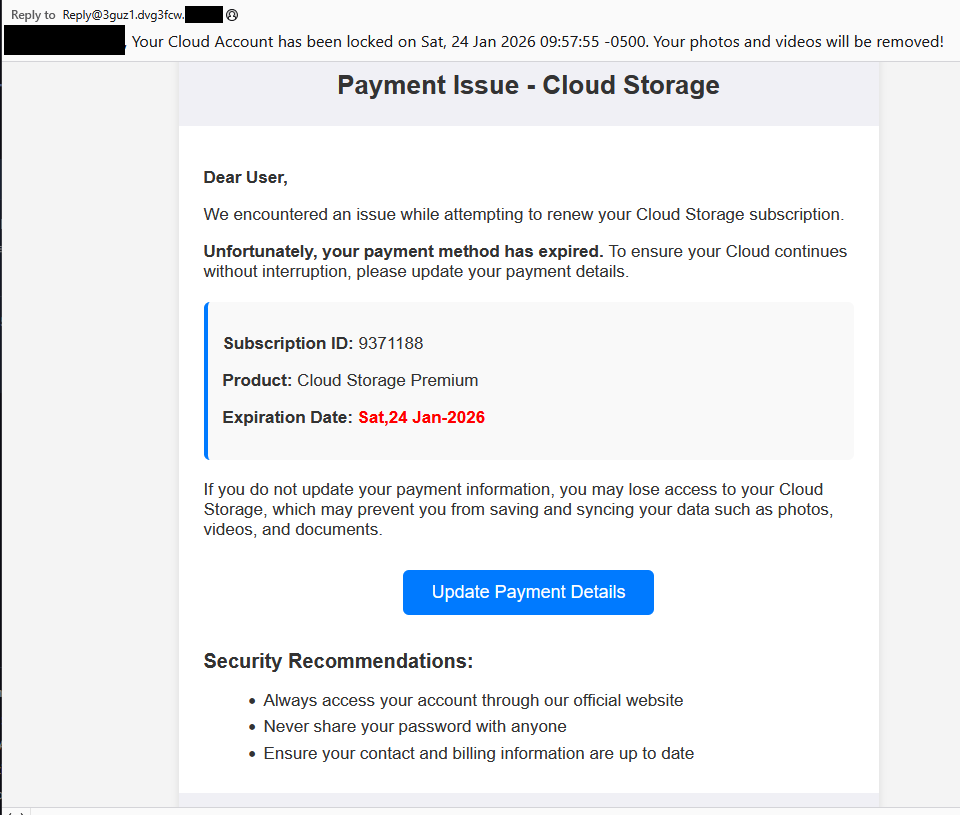
Cloud storage payment issue email

The subject line of the email is:

“{Recipient}. Your Cloud Account has been locked on Sat, 24 Jan 2026 09:57:55 -0500. Your photos and videos will be removed!”

This matches one of the subject lines that BleepingComputer listed.

And the content of the email:

Payment Issue – Cloud Storage

Dear User,

We encountered an issue while attempting to renew your Cloud Storage subscription.

Unfortunately, your payment method has expired. To ensure your Cloud continues without interruption, please update your payment details.

Subscription ID: 9371188

Product: Cloud Storage Premium

Expiration Date: Sat,24 Jan-2026

If you do not update your payment information, you may lose access to your Cloud Storage, which may prevent you from saving and syncing your data such as photos, videos, and documents.

Update Payment Details {link button}

Security Recommendations:

  • Always access your account through our official website
  • Never share your password with anyone
  • Ensure your contact and billing information are up to date”

The link in the email leads to  https://storage.googleapis[.]com/qzsdqdqsd/dsfsdxc.html#/redirect.html, which helps the scammer establish a certain amount of trust because it points to Google Cloud Storage (GCS). GCS is a legitimate service that allows authorized users to store and manage data such as files, images, and videos in buckets. However, as in this case, attackers can abuse it for phishing.

The redirect carries some parameters to the next website.

first redirect

The feed.headquartoonjpn[.]com domain was blocked by Malwarebytes. We’ve seen it before in an earlier campaign involving an Endurance-themed phish.

Endiurance phish

After a few more redirects, we ended up at hx5.submitloading[.]com, where a fake CAPTCHA triggered the last redirect to freecash[.]com, once it was solved.

slider captcha

The end goal of this phish likely depends on the parameters passed along during the redirects, so results may vary.

Rather than stealing credentials directly, the campaign appears designed to monetize traffic, funneling victims into affiliate offers where the operators get paid for sign-ups or conversions.

BleepingComputer noted that they were redirected to affiliate marketing websites for various products.

“Products promoted in this phishing campaign include VPN services, little-known security software, and other subscription-based offerings with no connection to cloud storage.”

How to stay safe

Ironically, the phishing email itself includes some solid advice:

  • Always access your account through our official website.
  • Never share your password with anyone.

We’d like to add:

  • Never click on links in unsolicited emails without verifying with a trusted source.
  • Use an up-to-date, real-time anti-malware solution with a web protection component.
  • Do not engage with websites that attract visitors like this.

Pro tip: Malwarebytes Scam Guard would have helped you identify this email as a scam and provided advice on how to proceed.

Redirect flow (IOCs)

storage.googleapis[.]com/qzsdqdqsd/dsfsdxc.html

feed.headquartoonjpn[.]com

revivejudgemental[.]com

hx5.submitloading[.]com

freecash[.]com

Update February 5, 2026

Almedia GmbH, the company behind the Freecash platform, reached out to us for information about the chain of redirects that lead to their platform. And after an investigation they notified us that:

“Following Malwarebytes’ reporting and the additional information they shared with us, we investigated the issue and identified an affiliate operating in breach of our policies. That partner has been removed from our network.

Almedia does not sell user data, and we take compliance, user trust, and responsible advertising seriously.”


We don’t just report on scams—we help detect them

Cybersecurity risks should never spread beyond a headline. If something looks dodgy to you, check if it’s a scam using Malwarebytes Scam Guard, a feature of our mobile protection products. Submit a screenshot, paste suspicious content, or share a text or phone number, and we’ll tell you if it’s a scam or legit. Download Malwarebytes Mobile Security for iOS or Android and try it today!

[updated] A fake cloud storage alert that ends at Freecash

3 February 2026 at 11:38

Last week we talked about an app that promises users they can make money testing games, or even just by scrolling through TikTok.

Imagine our surprise when we ended up on a site promoting that same Freecash app while investigating a “cloud storage” phish. We’ve all probably seen one of those. They’re common enough and according to recent investigation by BleepingComputer, there’s a

“large-scale cloud storage subscription scam campaign targeting users worldwide with repeated emails falsely warning recipients that their photos, files, and accounts are about to be blocked or deleted due to an alleged payment failure.”

Based on the description in that article, the email we found appears to be part of this campaign.

Cloud storage payment issue email

The subject line of the email is:

“{Recipient}. Your Cloud Account has been locked on Sat, 24 Jan 2026 09:57:55 -0500. Your photos and videos will be removed!”

This matches one of the subject lines that BleepingComputer listed.

And the content of the email:

Payment Issue – Cloud Storage

Dear User,

We encountered an issue while attempting to renew your Cloud Storage subscription.

Unfortunately, your payment method has expired. To ensure your Cloud continues without interruption, please update your payment details.

Subscription ID: 9371188

Product: Cloud Storage Premium

Expiration Date: Sat,24 Jan-2026

If you do not update your payment information, you may lose access to your Cloud Storage, which may prevent you from saving and syncing your data such as photos, videos, and documents.

Update Payment Details {link button}

Security Recommendations:

  • Always access your account through our official website
  • Never share your password with anyone
  • Ensure your contact and billing information are up to date”

The link in the email leads to  https://storage.googleapis[.]com/qzsdqdqsd/dsfsdxc.html#/redirect.html, which helps the scammer establish a certain amount of trust because it points to Google Cloud Storage (GCS). GCS is a legitimate service that allows authorized users to store and manage data such as files, images, and videos in buckets. However, as in this case, attackers can abuse it for phishing.

The redirect carries some parameters to the next website.

first redirect

The feed.headquartoonjpn[.]com domain was blocked by Malwarebytes. We’ve seen it before in an earlier campaign involving an Endurance-themed phish.

Endiurance phish

After a few more redirects, we ended up at hx5.submitloading[.]com, where a fake CAPTCHA triggered the last redirect to freecash[.]com, once it was solved.

slider captcha

The end goal of this phish likely depends on the parameters passed along during the redirects, so results may vary.

Rather than stealing credentials directly, the campaign appears designed to monetize traffic, funneling victims into affiliate offers where the operators get paid for sign-ups or conversions.

BleepingComputer noted that they were redirected to affiliate marketing websites for various products.

“Products promoted in this phishing campaign include VPN services, little-known security software, and other subscription-based offerings with no connection to cloud storage.”

How to stay safe

Ironically, the phishing email itself includes some solid advice:

  • Always access your account through our official website.
  • Never share your password with anyone.

We’d like to add:

  • Never click on links in unsolicited emails without verifying with a trusted source.
  • Use an up-to-date, real-time anti-malware solution with a web protection component.
  • Do not engage with websites that attract visitors like this.

Pro tip: Malwarebytes Scam Guard would have helped you identify this email as a scam and provided advice on how to proceed.

Redirect flow (IOCs)

storage.googleapis[.]com/qzsdqdqsd/dsfsdxc.html

feed.headquartoonjpn[.]com

revivejudgemental[.]com

hx5.submitloading[.]com

freecash[.]com

Update February 5, 2026

Almedia GmbH, the company behind the Freecash platform, reached out to us for information about the chain of redirects that lead to their platform. And after an investigation they notified us that:

“Following Malwarebytes’ reporting and the additional information they shared with us, we investigated the issue and identified an affiliate operating in breach of our policies. That partner has been removed from our network.

Almedia does not sell user data, and we take compliance, user trust, and responsible advertising seriously.”


We don’t just report on scams—we help detect them

Cybersecurity risks should never spread beyond a headline. If something looks dodgy to you, check if it’s a scam using Malwarebytes Scam Guard, a feature of our mobile protection products. Submit a screenshot, paste suspicious content, or share a text or phone number, and we’ll tell you if it’s a scam or legit. Download Malwarebytes Mobile Security for iOS or Android and try it today!

How to Fix the ERR_TOO_MANY_REDIRECTS Error

13 November 2025 at 22:10
How to Fix the ERR_TOO_MANY_REDIRECTS Error

Encountering the ERR_TOO_MANY_REDIRECTS error (also called a redirect loop error) can be frustrating, especially when your website was working fine just moments ago. This issue is common across browsers such as Chrome, Firefox, and Edge and it typically means your site has entered a redirection loop.

In this post, you’ll learn what the error means, why it occurs, ways to identify where the redirect is coming from, and how to fix it effectively – including an important section on redirect types, which often play a direct role in causing this issue.

Continue reading How to Fix the ERR_TOO_MANY_REDIRECTS Error at Sucuri Blog.

❌