A caller offers you a free phone upgrade or an exclusive deal from your mobile provider. A new phone arrives at your home. So far, everything seems to check out.
Then comes another call: There’s been a shipping mistake. You received the wrong phone, and the company needs you to send it back. You send it back, but the phone never reaches your provider, leaving you with a large charge or long-term contract to pay.
Now police are warning about this scheme after residents lost devices and were left facing the associated payments.
How phone return scams work
The scam usually starts with a call from a spoofed number. In the US we’re seeing several examples in anonymized Malwarebytes Scam Guard records of the impersonated company being Canadian mobile provider Rogers.
The Canadian Anti-Fraud Centre warns:
“After collecting personal information required for credit checks, they’ll order a new phone in your name.”
Next, a genuine device arrives through a legitimate delivery service. That delivery makes the next part of the story easier to believe.
The caller gets back in touch and claims something went wrong. Perhaps the company sent the wrong device, or an extra phone arrived by mistake. To put things right, you need to send it back using the label or shipping QR code they provide.
The shipping label is the real trick. Rather than directing the package to the provider’s returns facility, it sends the device to an address chosen by the criminals.
The result: You no longer have the phone, but your provider has not received it back. Victims can be left facing a contract, financing agreement, or monthly payments for the missing device.
How to stay safe
The most important protection against most types of scams is having someone you can trust and help you decide whether something is a scam. Malwarebytes Scam Guard can be that partner if you’re on your own.
You don’t need to decide on the spot about whether a caller sounds convincing. Break the conversation and verify the offer separately. Pause and check if you encounter any of the following:
An unexpected call offering a free phone, loyalty reward, or unusually attractive upgrade.
A caller asking for personal, financial, or account information to arrange the offer.
A follow-up call claiming the wrong device was shipped or that another delivery mistake needs correcting.
Instructions to use a return label or QR code supplied by that caller.
A return destination that you have not confirmed directly with your provider.
If you’ve already sent a phone, contact your mobile provider immediately using verified contact details. Explain that you believe you were targeted by a phone return scam, identify the affected orders, and ask for a fraud investigation.
If you shared your account password or PIN, change it through the provider’s official channels. Rogers advises customers who disclosed their credentials to reset them and contact customer service to check for unauthorized transactions.
Keep the evidence: messages, emails, the shipping label, tracking details, order confirmations, bills, and a timeline of the calls. These records can help support a billing complaint and fraud report.
Something feel off? Check it before you click.
Malwarebytes Scam Guard helps you analyze suspicious links, texts, and screenshots instantly.
When your pet goes missing, it can be totally heartbreaking.
So hearing that they’ve been found is no doubt very welcome news. Even better to see a photo of them looking safe and well.
But while the photo may look exactly like your pet, that doesn’t mean the person who sent it has your pet or even ever saw it.
The BBC reports how criminals are sending owners AI-generated images of their missing pets, demanding money for their return, and sometimes threatening to harm the animals when owners refuse to pay.
The BBC interviewed two targets of this scam who were both contacted after posting a missing pet message on social media. The scammers sent them pictures of their beloved pets and demanded a ransom for their safe return.
Messages like these exploit two powerful emotions in quick succession: relief that a beloved pet has been found, followed by fear that something terrible will happen unless the owner acts immediately.
The scam typically follows this pattern:
A scammer finds a missing pet appeal, which is typically posted to social media or local sites with an accompanying photo and contact details.
The scammer contacts the owner and claims to have found the animal. An image fabricated with the help of AI makes the claim appear more convincing.
They ask for money which may be described as a reward or as payment for emergency treatment.
They add pressure. They might refuse to meet until payment arrives, or threaten to sell or harm the pet.
Our data backs this report up. Over the last month, people anonymously submitted three distinctive types of pet related scam attempts to Malwarebytes Scam Guard:
“We found your missing cat” message, with photos: Someone claimed to have found a user’s missing cat and had images of it.
Found pet callback lure: A voicemail claimed to have found a lost cat and supplied a callback number.
Humane Society impersonation and payment demand: A caller claimed a missing cat needed emergency surgery, and demanded successive Zelle payments.
How to stay safe
Sadly, while it can be very useful to use social media to retrieve lost pets, it also attracts scammers and other abuse.
You don’t have to stop asking for help online, but you can put some safeguards between an unexpected message and any payment.
Keep some identifying details private. Leave a distinctive feature out of the public description so you can ask a supposed finder about it later.
Do not pay in advance to secure a reunion. Be particularly wary of someone who insists that you send money before they will let you see the animal. Arrange any legitimate handover in a safe, public location, and verify that it is your pet before paying a reward.
Verify veterinary claims independently. If someone says your pet is at an animal hospital, find the hospital’s contact details yourself and call it directly. Do not rely on the number or payment link in the message.
A second pair of eyes can help you assess a demand without the same emotional pressure. Malwarebytes Scam Guard can help you identify whether a message might be a scam and how to proceed.
If someone is threatening your pet, remember that when they make threats to your pet, it is very likely they don’t have a clue where it is either, so don’t let them extort you.
Something feel off? Check it before you click.
Malwarebytes Scam Guard helps you analyze suspicious links, texts, and screenshots instantly.
.kadence-column484244_4b5e59-45 > .kt-inside-inner-col{padding-top:20px;padding-right:20px;padding-bottom:10px;padding-left:20px;}.kadence-column484244_4b5e59-45 > .kt-inside-inner-col{column-gap:var(--global-kb-gap-sm, 1rem);}.kadence-column484244_4b5e59-45 > .kt-inside-inner-col{flex-direction:column;}.kadence-column484244_4b5e59-45 > .kt-inside-inner-col > .aligncenter{width:100%;}.kadence-column484244_4b5e59-45 > .kt-inside-inner-col{background-color:rgba(255, 229, 229, 0.83);}.kadence-column484244_4b5e59-45 > .kt-inside-inner-col:before{opacity:0.3;}.kadence-column484244_4b5e59-45{position:relative;}@media all and (max-width: 1024px){.kadence-column484244_4b5e59-45 > .kt-inside-inner-col{flex-direction:column;justify-content:center;}}@media all and (max-width: 767px){.kadence-column484244_4b5e59-45 > .kt-inside-inner-col{flex-direction:column;justify-content:center;}}
In this article
A fake $750 Apple Cash offer funnels users toward app and game promotions
Its device checks, countdown, and “spots left” claims aren’t real
Users get no reward and may share information or spend money in games
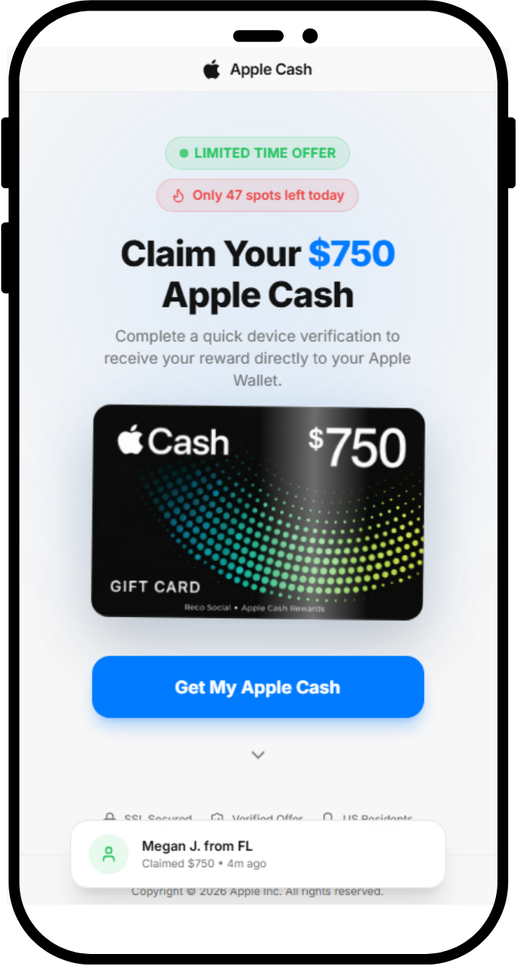
A page we found promises a $750 Apple Cash reward if you complete a quick “device verification.” There is no reward, and the page does not verify your device. Instead, it sends you to app offers through affiliate tracking links.
The page is not affiliated with Apple. If you’ve landed on a page like this, close it.
The fake page promises $750 in Apple Cash
Why Apple makes such good bait
Apple is one of the world’s most recognized brands, and scammers use that familiarity to make fake offers seem credible. Apple’s own scam guidance lists fake promotions offering free products and prizes among common tricks.
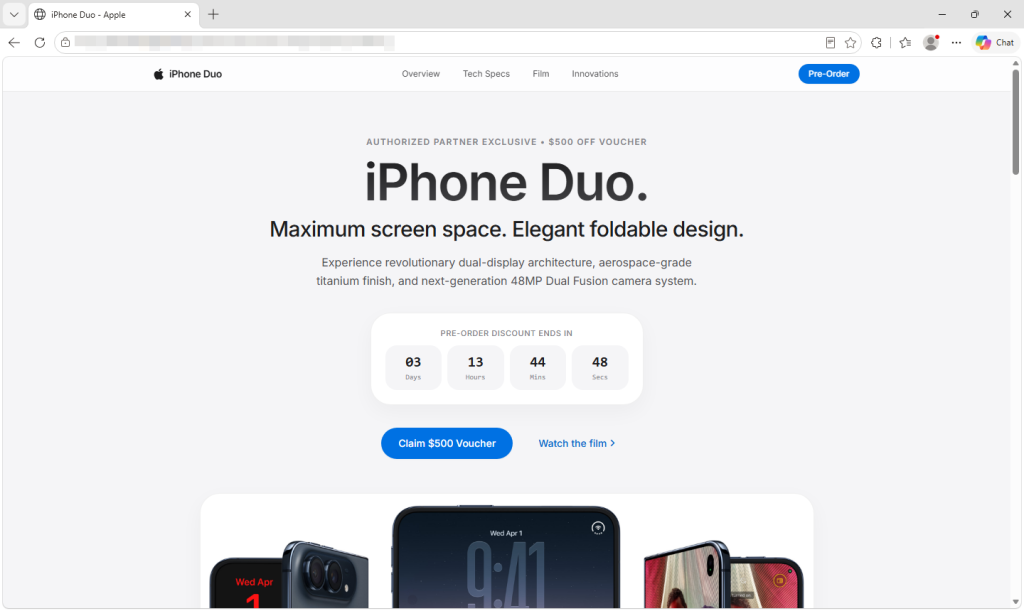
Current Apple news gives scammers useful cover. The new iPhone Duo is in the headlines, and we recently found a fake preorder page whose code tried to exploit older iPhones as soon as the page opened. With the iPhone Duo starting at $1,999, a promise of $750 in Apple money may catch people’s attention.
The word “verify” may also sound timely. Starting November 9, Green Dot Bank, which issues Apple Cash, will require some users to verify their identity before they can reload their balance. A fake page asking people to “verify your device” to get Apple Cash may seem more plausible in that context.
Apple Cash isn’t an Apple Gift Card
The page blurs two different things:
Apple Cash is money you send, receive and spend through Apple Wallet.
An Apple Gift Card adds money to your Apple Account balance for Apple purchases.
Apple warns that its gift cards can only be used for Apple purchases, and that someone asking you to pay them with one is probably a scammer. But neither Apple Cash nor an Apple Gift Card comes from a website that “unlocks” it after you install an app.
We looked at the code behind the page’s three steps: Eligibility Check, Verify Device and Claim Reward.
The eligibility check is a timer. The four items that tick green, including “Location: United States,” are just labels that light up on a schedule. The page never checks where you are or what device you use. Everyone passes in under four seconds.
It tells users to download an app for “device verification”
The device verification is an app install. The page tell users to download an app called Reco Social, then tells them to create an account, and install and play a game. We found no evidence that Reco Social or its developer created or operated the fake reward page.
When you tap Download & Open App, the page opens a link in a new tab. Five seconds later, it starts showing “Verifying device…”. Nothing is being verified. The page has no way of knowing whether you installed anything, created an account or played a game.
The reward is the same link again. Ten minutes after you tap the button, the page moves on by itself and announces “Device Verified Successfully,” whether or not you installed anything. The Claim Your $750 button doesn’t add anything to your wallet. It opens the same link as the download button.
Fake urgency
The page is built to stop you from thinking too long:
“Only 47 spots left today” always starts at 47. It drops by one every 30 seconds and stops at 3, so it never runs out.
The “claimed $750” pop-ups are generated at random from a list of 15 first names and 15 US states, with a random “minutes ago.” Every visitor sees a new one every 8 to 15 seconds.
The 10-minute “Session Expires” countdown doesn’t end anything when it hits zero.
Who gets paid?
The download button doesn’t go directly to the App Store. It first goes through a tracking link on taprkr[.]com. These links can be used in affiliate marketing to credit clicks and installs to whoever sent the traffic.
The link carries a label, “recosocial-cpr.” CPR can stand for “cost per registration,” a deal where a promoter earns money when someone signs up. That label alone doesn’t confirm how this offer pays.
The destination varied in our tests. The link led to an offer labeled “playful-rewards-revshare” on iPhone and an ad network on PC. A revshare (revenue share) deal usually pays the promoter a cut of what users later spend, such as on in-app purchases.
The tracking labels suggest that promoters may earn money from registrations or spending in promoted apps, but they don’t confirm how this offer pays. Users don’t receive the promised $750.
We have no evidence that Reco Social or any app at the end of these links is behind the fake Apple page. Deceptive affiliate promoters can send traffic to legitimate apps because they may earn money for installs or signups regardless of how users were persuaded.
The page also loads a TikTok tracking pixel, which advertisers use to measure campaigns. This could mean the operators are measuring traffic from TikTok, but it doesn’t show where the link was shared.
What’s the harm if it’s “just” an app install?
Compared to a page that steals passwords or card numbers, this one can look harmless. But you still pay a price:
You give away personal data. Creating an account means handing over your email address, phone number or social login to a service you only signed up for because of a lie.
You may be encouraged to spend. Many mobile games make their money from in-app purchases, and with a revenue-share deal, someone profits when you spend.
You may be set up for the next scam. Fake reward offers often come in chains. The next one may ask for your Apple Account details, card number, or a “small processing fee.”
You lose time chasing a reward that was never coming.
How to stay safe
Keep these points in mind if you come across an Apple Cash or other Apple-related offer online:
Don’t expect an app install to pay you in Apple Cash. Be suspicious of any “Apple” offer that asks you to download a third-party app, create an account or play a game to receive Apple Cash or an Apple Gift Card.
Verify Apple Cash only in Settings. The real identity check is in Settings > Wallet & Apple Pay > Apple Cash. Treat any website or message that asks you to “verify” Apple Cash somewhere else as suspicious.
Be extra careful around launches and holidays. iPhone Duo deals, giveaways and preorder offers will keep circulating. Go to apple.com or the Apple Store app yourself instead of following links.
Check the address bar. Apple’s website is apple.com. A page on a domain like applecashgiftcard[.]com is not Apple, however much it looks like it.
Treat countdowns and “spots left” as red flags. Fake urgency is there to rush you past the moment you’d ask, “Why would anyone give me $750 for this?”
Already installed an app from a page like this? You didn’t earn a reward, so you can delete the app. Delete any account you created through it, cancel any subscriptions in your App Store settings, and change that password on any other accounts where you reused it.
Never pay with gift cards, and never pay to receive a prize. As the FTC puts it, “No real business or government agency will ever tell you to buy a gift card to pay them.” If a “reward” asks for a fee, your card details or gift card codes, it’s a scam.
Report it. Apple asks people to forward suspicious Apple-themed messages to reportphishing@apple.com. You can also report the ad or post to the platform where you saw it and, in the US, report fraud at ReportFraud.ftc.gov.
How Malwarebytes helps
Malwarebytes can help block known scam pages. Use Browser Guard with a supported browser, or Web Protection in Malwarebytes for iOS when browsing with Safari.
If you’re not sure whether a link, text or offer is real, you can ask Malwarebytes Scam Guard before you click.
“One of the best cybersecurity suites on the planet.”
In an industrial network, malicious activity can be hard to tell apart from normal data exchange between devices. Malicious actors routinely rely on legitimate tools and the Living-off-the-Land technique, so a single network connection may show no known signs of an attack: the device uses a familiar protocol and transmits ordinary data. An anomaly can hide in subtle details: the data source, the time of access, or the volume of transferred data may be atypical for a particular device. However, to detect this kind of anomaly, you need to understand the roles of the devices at both ends of the connection and know which network activity patterns are typical for them.
But an organization’s asset inventory data is often incomplete, which makes it harder to catch unauthorized connections in time. Suppose monitoring detects a host that regularly exchanges data with programmable logic controllers (PLCs). Its IP address is known, but the inventory does not specify what role it plays: is it an engineering workstation, a process data server, or a piece of contractor’s equipment? The host may also have been on the industrial network for a long time, with its record going out of date after a network upgrade.
In the joint OT asset inventory guidance released by CISA and its partners in 2025, inventorying devices and classifying them by role are treated as part of OT asset management. For organizations, this is one of the most important areas: according to the SANS 2025 ICS security survey, 50% of respondents had deployed or significantly expanded ICS inventory and visibility tools over the previous 12 months, and 54% named them as investment priorities for the next 12–24 months.
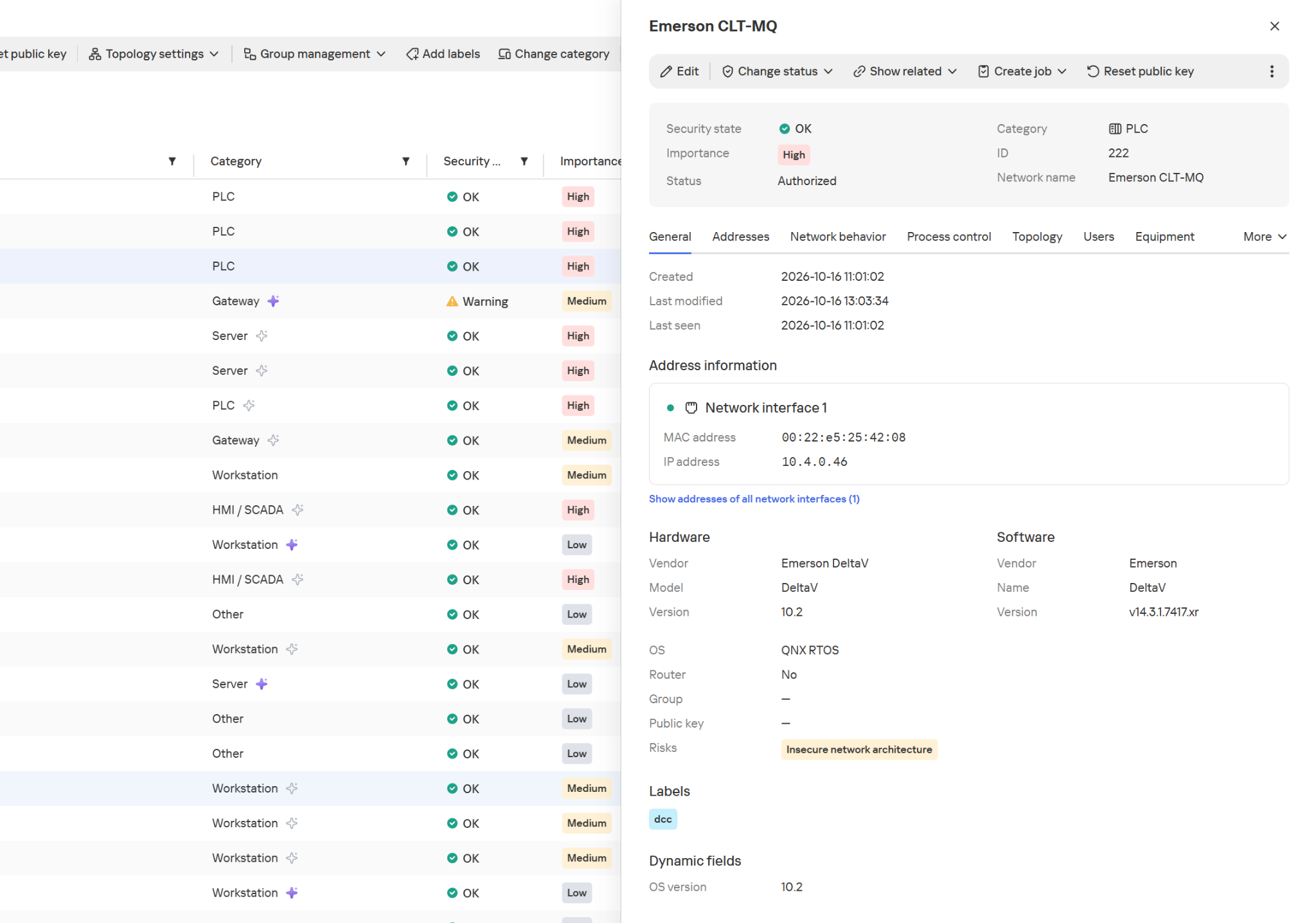
Device inventory in Kaspersky Industrial CyberSecurity for Networks
In Kaspersky Industrial CyberSecurity for Networks, the Asset Discovery technology is the foundation of asset visibility. Passive network traffic analysis detects devices and their interactions, while recognition rules help determine the device category and extract available information about it, such as the vendor, model, or software version. Exactly which attributes the system can obtain depends on the protocol and the traffic it observes. We covered this in more detail at the Kaspersky Industrial Cybersecurity Conference.
Hardware and software information in the device card
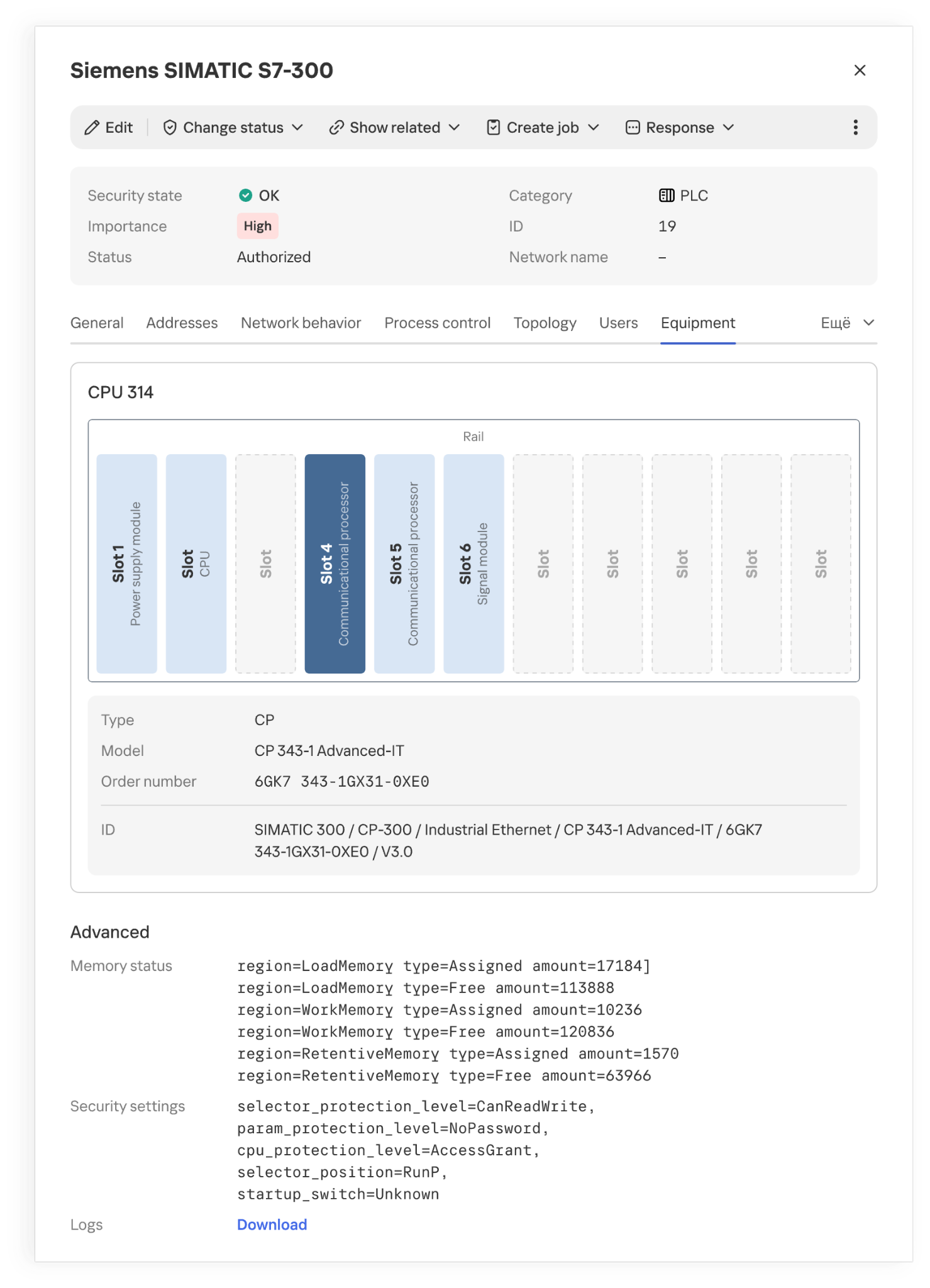
The product also supports active polling modules (APMs): where polling is allowed, they can request additional configuration and firmware version details from devices. This kind of inventory is far more detailed than a list of IP addresses.
Installed modules and their placement in a PLC rack
However, even accurate hardware information doesn’t always explain what function a host performs in a specific industrial facility. Gaps appear for various reasons. Some devices send identifying information only at startup or during configuration, while others rarely communicate. Proprietary protocols can’t always be parsed, and encryption may leave only connection metadata for analysis. If the monitoring system doesn’t receive traffic from every segment of the industrial network, some network activity goes unobserved. Active polling doesn’t suit every device or every operating condition.
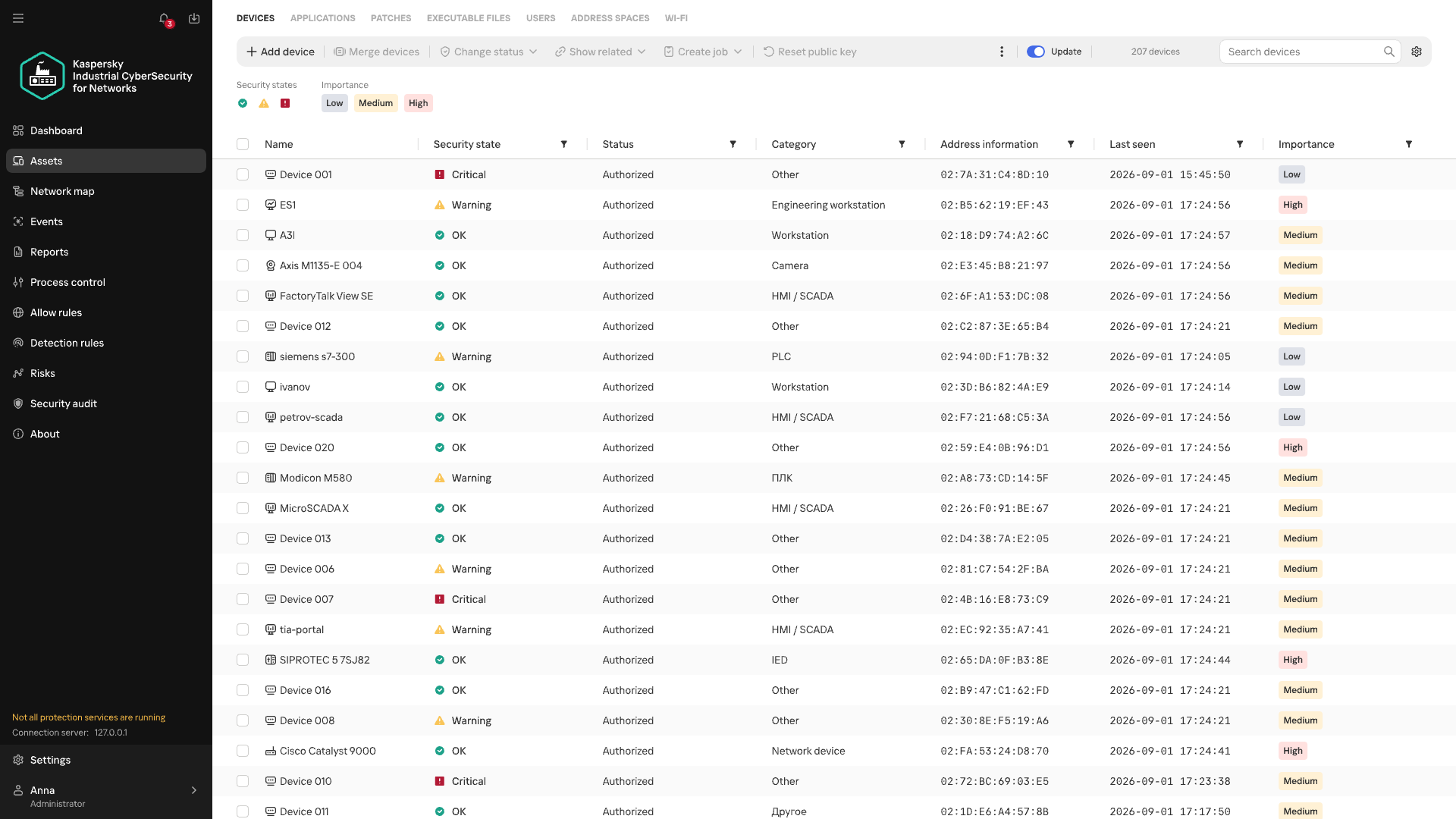
Devices of unknown category
When there isn’t enough direct information about a device, its category can be refined by looking at the patterns of its recurring network interactions. Analyzing these interactions is the job of Machine Learning Event Processor (MLEP), a service included in Kaspersky Industrial CyberSecurity for Networks 5.0. This machine-learning-based event processor can both refine device categories and detect anomalies in their network behavior.
What data does MLEP analyze?
To compare device behavior, you don’t need to store every packet as a separate observation (a data object) in the ML model. MLEP represents network sessions as a sequence of short 15-second fragments. For each fragment, MLEP stores information about the endpoints (IP, MAC, and port), the direction of data exchange, the protocol, and the number and size of the packets transmitted. Together these make up an event, which then gets a timestamp. Traffic thus becomes a sequence of events showing which hosts a device communicated with, when, and how communication intensity changed.
Aggregating data into events also sets the method’s limits. An aggregated fragment can’t be used to reconstruct the exact order of individual packets or the content of commands. MLEP can draw conclusions about a new protocol only if another KICS technology has managed to recognize it. That said, comparing stable network connections and changes in exchange volume doesn’t require a detailed record of every packet. These observations form the basis of the device’s behavioral history.
From observations to MLEP results
Each object has its own behavioral history, and one object’s history can’t be applied to another. But the principles of behavior analysis, along with some common rules, work across different objects.
Let’s look at how this works in MLEP, which is built on a spiking neural semantic network (NSN).
Event identification
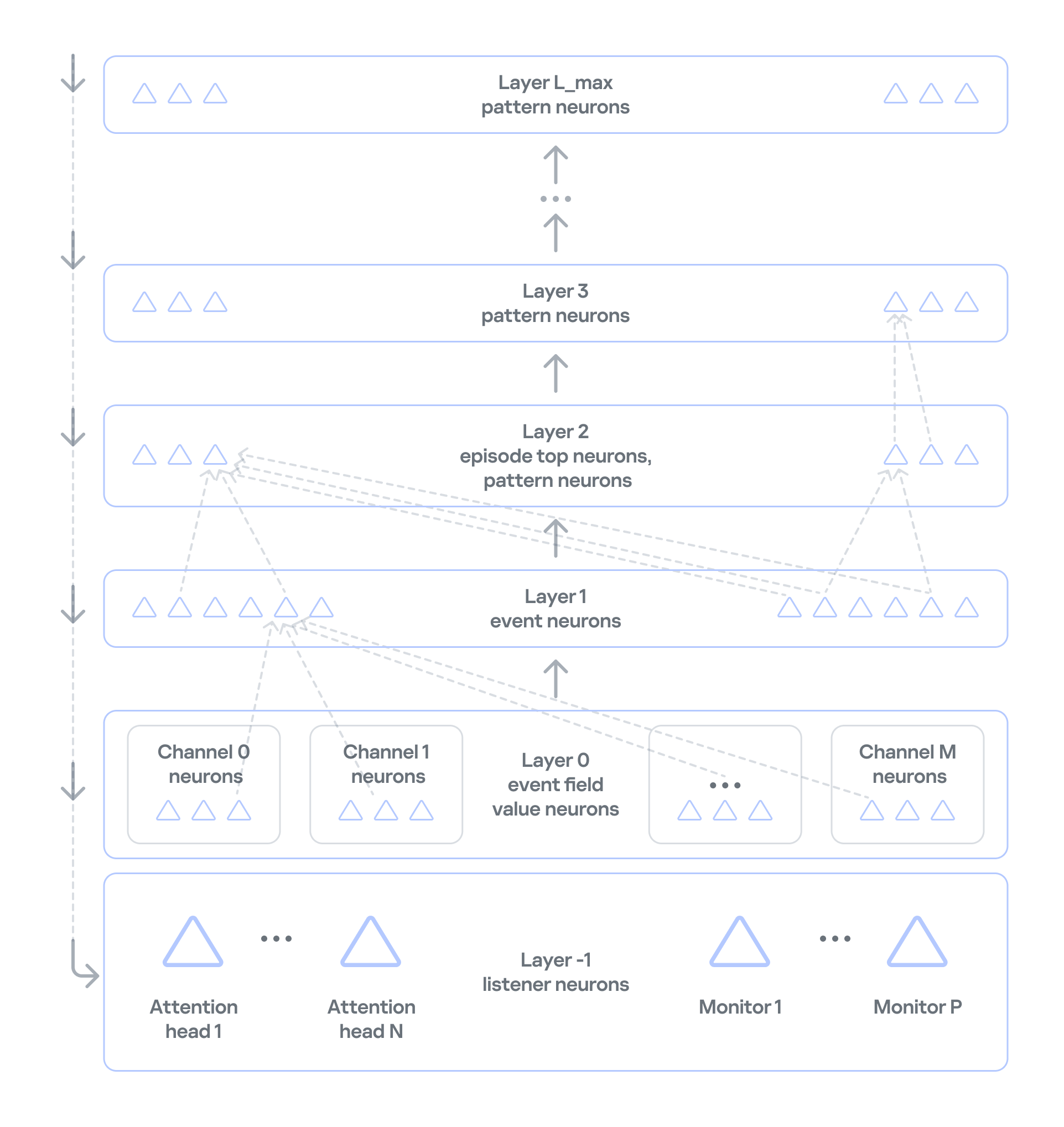
Neurosemantic networks structure information as a multilayer ordered graph, where the data in each consecutive layer builds on the data in the previous one. The nodes of this graph — that is, the units of information in each layer — act as neurons.The NSN creates dedicated channels to handle different event parameters (port, IP, and so on). Unique parameter values for each channel are stored as neurons in layer 0. The event itself, which consists of a set of parameter values, is stored as a neuron in layer 1 of the network. If an event occurs for the first time, neurogenesis creates a new neuron with input connections to the corresponding parameter neurons. This lets the network learn and operate on the event stream at the same time. If the event has occurred before, the network activates the same neuron that was created when the event first appeared. This way, the network identifies each event precisely. Each neuron that corresponds to an event also collects basic statistics: when it was last activated and how many times it has been activated.
Event history
In NSN-based event processing, layer 2 and above store sequences of events over time: recurring patterns and the full history. However, categorization and statistical anomaly detection don’t require storing the full packet sequence or a detailed timeline of every network event. As we noted earlier, events are themselves aggregates, which means the order of network packets has already been averaged out. So MLEP keeps history only temporarily, within each episode (30,000 aggregated events by default), which saves computing resources.
Statistics processing in MLEP
MLEP processes statistics mainly through specialized listener neurons on layer −1 (minus one) of the network. Attention heads and monitors are built on these neurons.
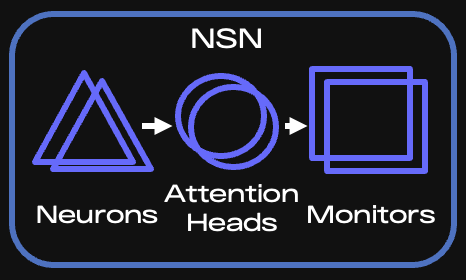
Key components of the NSN
When an event arrives, the corresponding neuron is activated, and the network instantly knows whether that neuron is new or was created earlier. Each attention head subscribes to the events or event features it needs and takes in only the activations of the matching neurons. If an event occurs for the first time, all heads are notified and then decide whether to subscribe (grow a connection to the relevant neuron) and receive information about activations of such neurons from then on.
It is called a spiking network because activation information is a spike, not a number. This spike tells the head that something it’s interested in has happened.
An attention head is configured according to scenarios — the situations that MLEP should send alerts about. The core of a head’s configuration is a query, which filters incoming information and serves as the subscription criterion. Unlike regular database queries, this query runs on the stream, so it can react to an event instantly.
Attention heads work very much like the semantics of ordinary human language. A query has a subject of attention (one or more grammatical subjects) and conditions (the other parts of the sentence). In the infrastructure of an industrial enterprise, the subjects are devices on the network, and the conditions are various aspects of network communication, such as ports, protocol, and average packet size. If a head has many subjects (for example, if it’s interested in every device on an industrial network), it fans out: it creates a child head for each individual value of the subject of attention, that is, each device. The child head then watches a specific device and reports to the parent head.
Attention heads don’t accumulate or process statistics. They only filter event streams. When an attention head receives a relevant event, it activates and sends a spike to the monitor subscribed to that head.
Monitors, in turn, have stacks for accumulating and processing events. They can also have their own queries and post-filter information from the head. For example, they can select only new events from those filtered by the head.
There are several types of monitors:
Stat monitors track changes in the average count of specific events (for example, device activity) over time intervals typical for those events, or in the average values of numeric event parameters (for example, changes in device traffic volume).
Monitors work from the event alone: they fire when an event has occurred a certain number of times within a given interval, or has occurred for the first time.
Similar-behavior monitors work with heads that can generalize events, that is, extract just a few parameters whose combination is shared (generalized) across many events.
MLEP uses these monitor types to implement scenarios for categorizing devices and detecting their anomalous behavior:
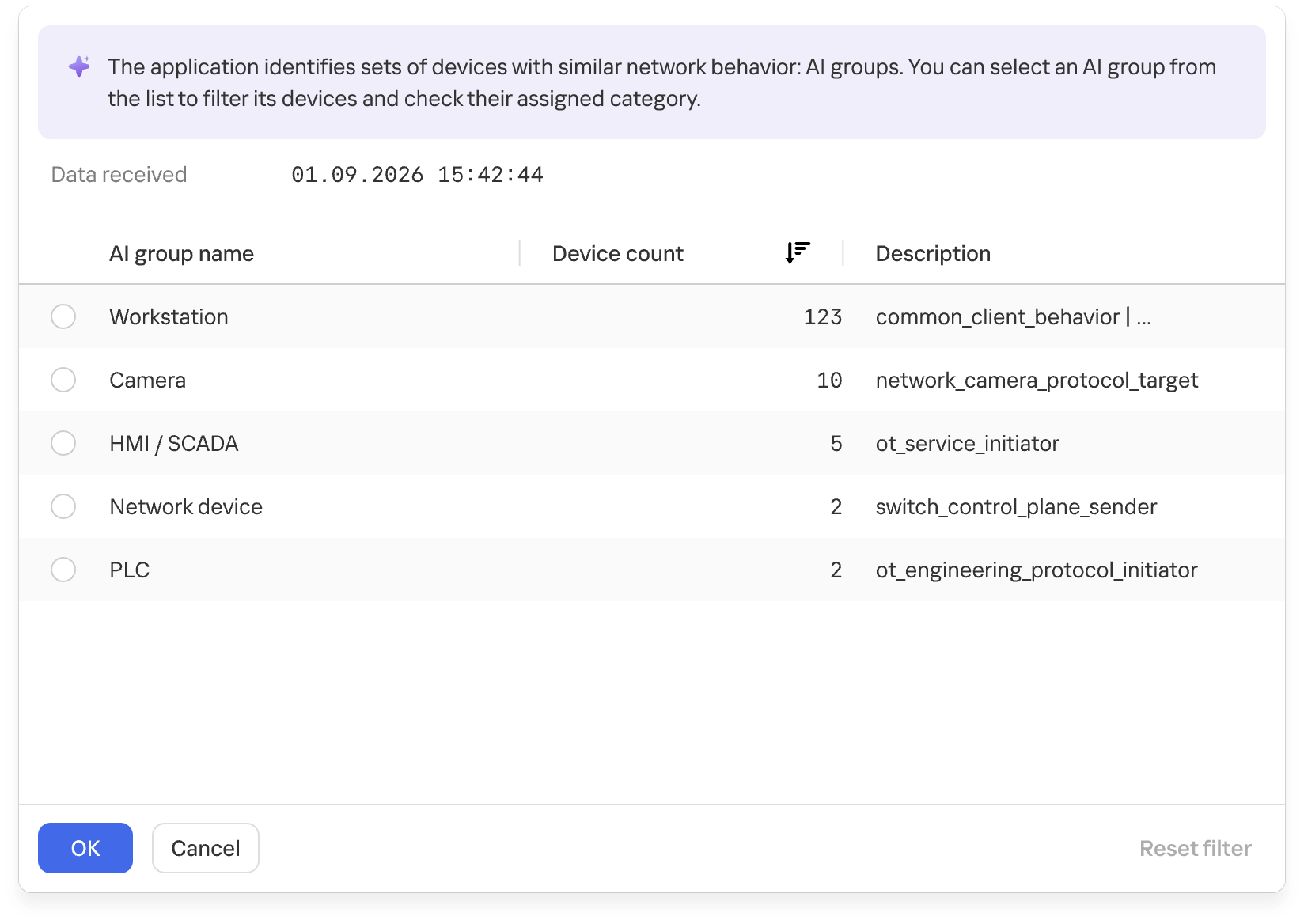
For categorization, MLEP uses attention heads and monitors that identify common behavior across different assets and group devices accordingly. MLEP then takes information from Asset Discovery about the known categories of some assets and extends those categories to other assets in the same group. Because a device can show different types of activity, it may land in several groups. MLEP then makes a weighted assessment across all relevant groups.
Groups of devices with similar network behavior
At the final stage, the system verifies that assigning the category to the asset is permissible. This is again done by special rule monitors loaded into the NSN at system startup. The rules rely on asset metadata available from Asset Discovery and APMs.
MLEP takes a similar approach to anomaly detection: an attention head and a monitor define an anomaly scenario, often loosely. When a monitor activates on such a scenario, MLEP generates an alert about unusual behavior.
The current version of MLEP ships with preconfigured heads and monitors.
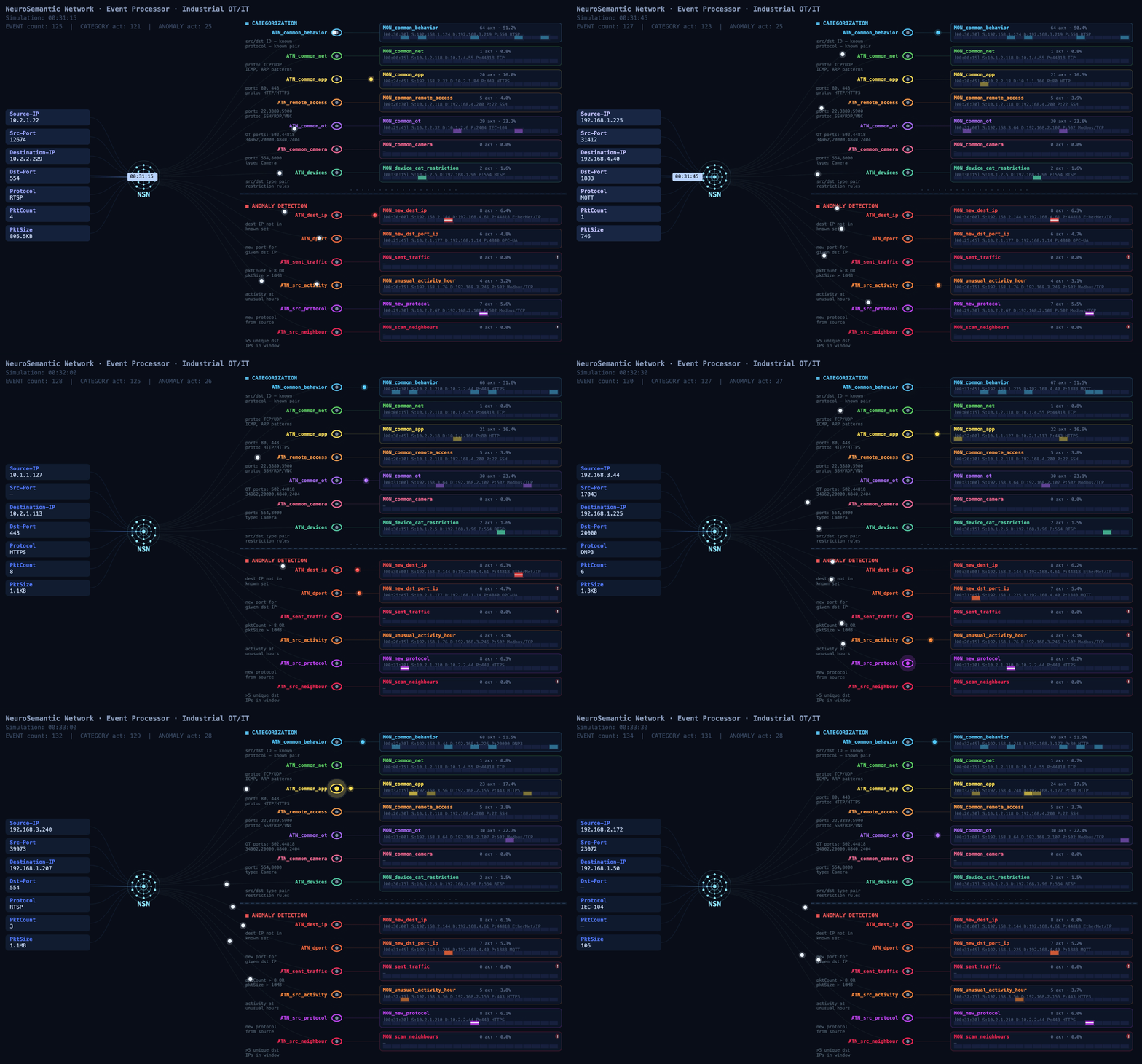
The functional dynamic diagram below shows how events from devices on an industrial network are processed.
Event processing flow (click to play)
MLEP in practice: how behavior helps complete the asset inventory
At a facility with several similar production lines, device information may be more complete on some lines than on others. On one line, devices are identified as PLCs, while on another, after an upgrade, some hosts show up only as addresses: the available traffic didn’t provide enough information to determine their category. Still, these devices communicate with the same types of HMIs and process data collection servers. Their communication directions, frequency, and volumes may be similar.
That’s where MLEP comes in. It takes the categories of already known assets and matches recurring features of their network behavior against those of uncategorized devices. When the observed interactions turn out to be similar, MLEP can add a category for that host to the inventory.
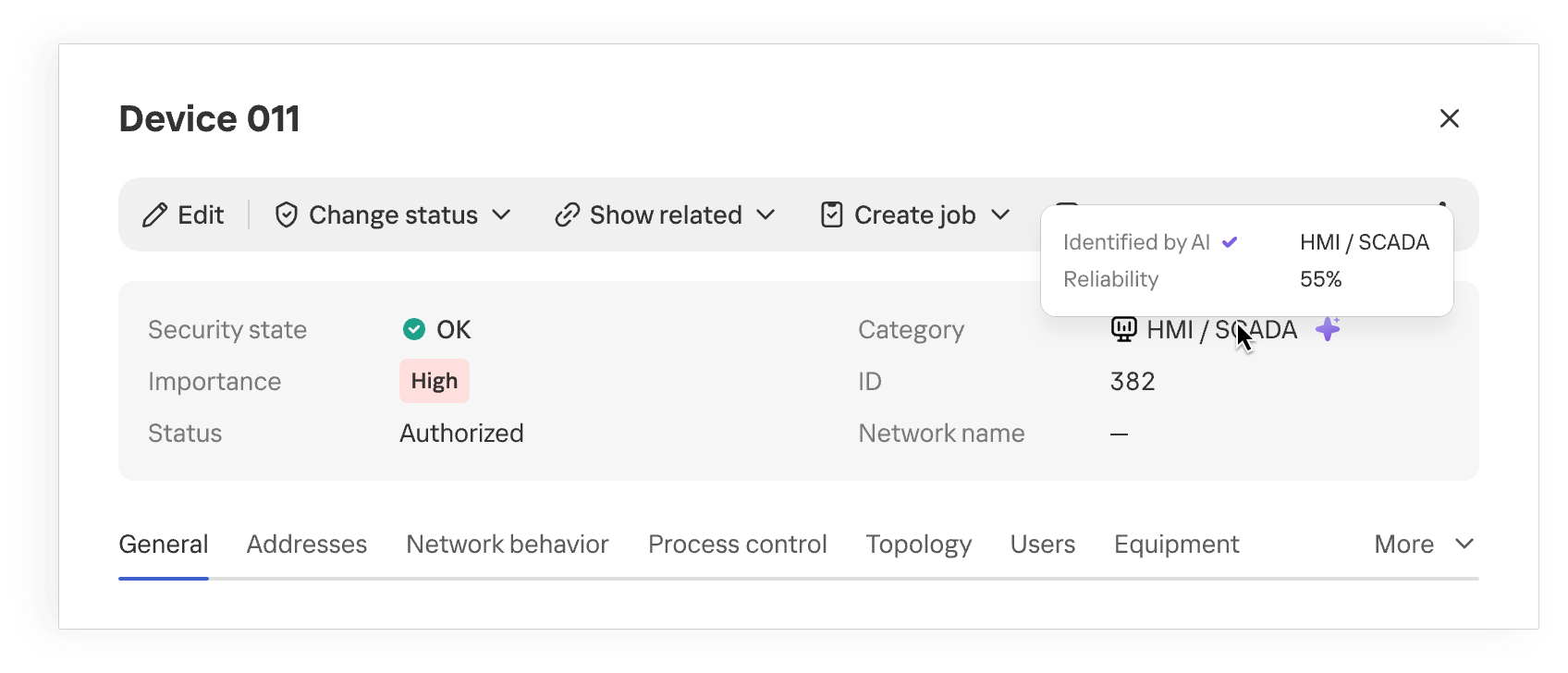
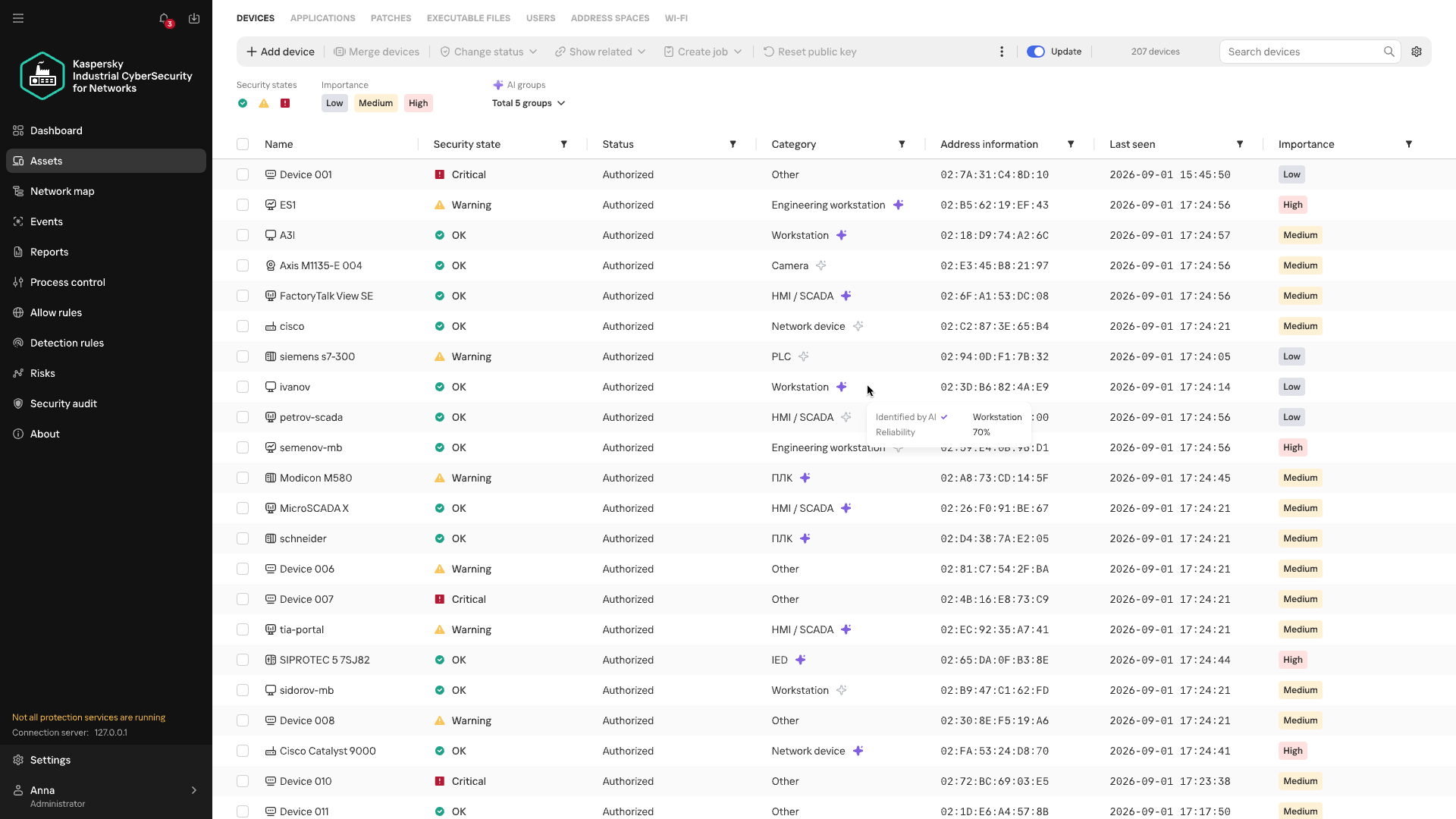
Device category suggested by MLEP
Once the category is refined, the industrial network map provides more context about the equipment on the network. When analyzing network activity, the analyst immediately sees the device’s suggested category and can skip looking up each IP address in the design diagrams. This approach is especially useful where equipment changes faster than the documentation is updated.
The suggested category is also checked against existing device information and defined constraints. This helps filter out some contradictory options, but prediction quality still depends on how much of the traffic is visible, especially if the device communicates only rarely.
Anomalous activity and streaming statistics
Investigations of real-world attacks show that attackers actively use both standard tools and permitted protocols. You don’t always need to know an attacker’s specific technique in advance to spot potentially malicious activity. Signature-based detection helps find known signs of an attack, but it doesn’t assess how typical an observed interaction is for a particular device. MLEP compares current activity with the device’s usual network profile: which hosts it communicates with, which protocols it uses, when and how much data it transmits, its average packet size, and so on. The changes it detects help guide the direction of the investigation. Correlating these changes with other events and the operational context helps determine whether malicious actions could be behind them. When investigating an incident that has already been detected, anomalies help reconstruct the sequence of actions.
The first version of MLEP comes with six preconfigured monitors, one for each type of deviation from the device’s usual network profile:
Anomaly
How it helps with event analysis
New external host
Flags a new external connection that wasn’t previously seen in the device’s observed behavior, even if the IP address isn’t listed among known IoCs. Helps check whether this connection appeared at the same time as other suspicious events.
New combination of destination address and port
Shows that the device has begun using a service it hasn’t used before. Once an incident has been detected, this helps trace new connections after the more critical events have been analyzed.
Unusually large volume of data sent
Highlights data transfers that are atypical for the device and helps correlate their timing and direction with other events.
Atypical activity time
Shows that the device was active at a time that’s unusual for it. In an already detected incident, this helps reconstruct the timeline of actions around the main alert.
New protocol
Helps spot a new method of communication, even when the device is communicating with familiar hosts.
Activity with signs of scanning
Shows that the device has started contacting an unusually large number of neighboring hosts. This signal helps reveal possible reconnaissance ahead of attempts to access equipment.
During an investigation, anomalies help reconstruct the sequence of changes: when a specific host established new connections, switched protocols, increased its data transfer volume, or shifted its operating hours. Matching events by device and time shows an analyst how activity unfolded around an incident that has already been detected.
This is especially useful when some of the attacker’s actions fell outside the monitored scope or didn’t trigger other KICS technologies. Correlating these changes with the device’s role, protocol analysis data, and events from other technologies gives the analyst a more complete timeline. Behavioral anomalies show exactly where to look for the missing links and which network interactions need attention.
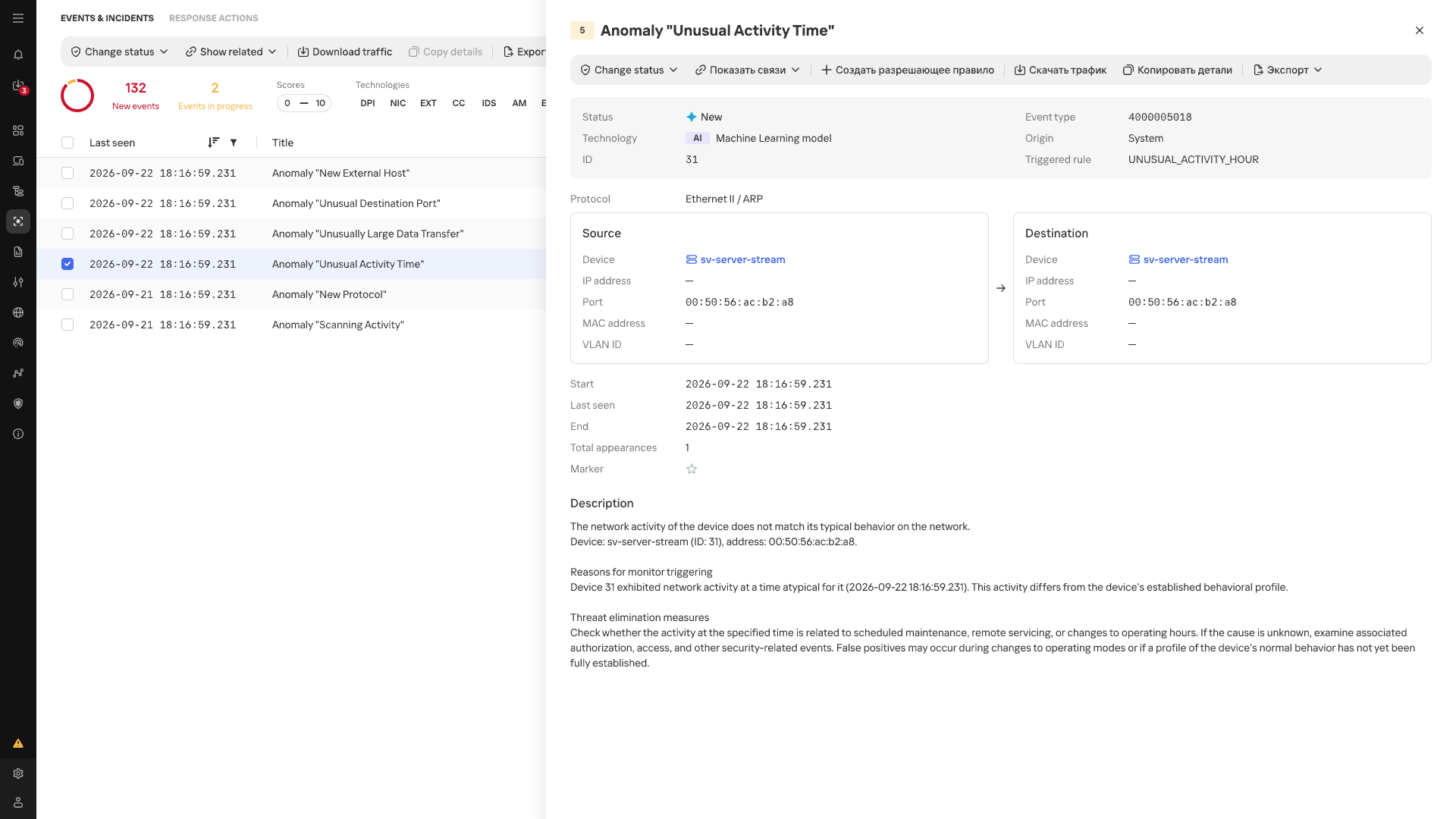
Atypical Activity Time anomaly card
In the event list, anomalies detected by MLEP are marked with an AI label. Each event shows its name, source, destination, timestamp, and the ID of the triggered scenario.
Conclusion
In an industrial network, whether behavior is anomalous depends on the host where it occurs and that host’s place in the industrial process. The repetitive nature of many communications makes a change in normal data exchange easier to spot, while knowing a device’s function and criticality helps gauge the possible consequences. Taken together, these observations make network traffic more than a list of connections: it helps assess new events in the context of a specific facility, even without an attack scenario known in advance. Machine learning technologies are well suited to this kind of comprehensive analysis, as they can process and organize huge streams of heterogeneous data. Starting with version 5.0, Kaspersky Industrial CyberSecurity for Networks handles this function with MLEP, which works effectively alongside the product’s existing functionality.
Recently, our team exposed sophisticated scam kits designed to steal sensitive data and trick consumers. But underground marketplaces are not just for malware and stolen passwords. They also offer services designed to manipulate your opinion of the products and services you buy every day.
In our latest research, we examined cybercrime forums where sellers advertise illicit “reputation management” services. For the right price, these underground operators offer to flood a product with glowing, five-star ratings or remove negative reviews. This shadowy industry works both ways—artificially boosting reputations and deliberately hiding legitimate complaints.
A major shift we are seeing in this space is the adoption of new technology. We also found that cybercriminals are using AI to automate these fake review campaigns. This could allow them to quickly generate realistic, human-sounding feedback in large volumes without much manual effort.
5 stars as a service
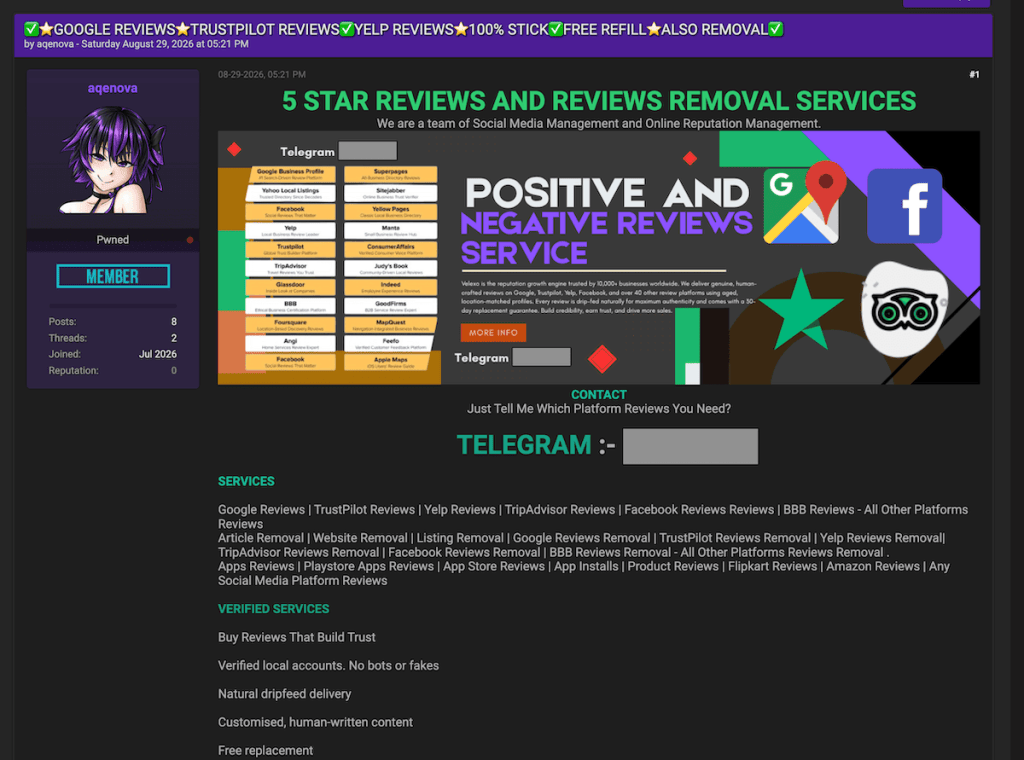
In the first example, discovered on a major English-language underground forum, a seller operating under the handle “aqenova” advertises both five-star review generation and negative review removal services.
The seller’s operations span widely used platforms, including Google, Trustpilot, Yelp, and various mobile app stores. By simply asking prospective buyers, “Just tell me which platform reviews you need?” the seller presents reputation manipulation as something buyers can just order on demand.
Five-star reviews and removal services
Decoding the seller’s FAQ
Analyzing another seller’s (TrustForge) “Frequently Asked Questions” section revealed some surprising details about how these operations reportedly run behind the scenes.
First, the seller emphasizes that real people manually post these reviews, offering a guarantee for both successful delivery and “non-drop”—meaning the platform won’t flag and remove the feedback later.
Remember, a real person posting a review doesn’t mean they’re a real customer. The important question is whether they actually used the product or service and are describing an honest experience.
Second, it appears this is a well-coordinated team effort rather than a solo operation, as the seller charges an extra fee if a buyer wants the main operator to write the review text personally.
However, what caught our attention most was their confidence in beating platform checks. The seller guarantees their fake reviews will stay active, claiming they rely on a closely guarded “private method.” According to TrustForge’s own statements, this method has allowed them to post more than 10,000 fake reviews.
Reputation management FAQ
The clean-up crew: Making bad reviews disappear
A single negative review is often all it takes to create a bad first impression of a product or service. When those negative comments start to pile up, they can completely ruin a business’s reputation and bottom line.
Recognizing how desperate businesses can be to protect their image, our research team discovered underground services specifically offering to remove “fake” or “unfair” reviews from major platforms like Google and Trustpilot.
Of course, the boundary between what is genuinely fake and what a business simply considers “unfair” can be blurry. Businesses can legitimately challenge fabricated reviews, but these services raise concerns about whether genuine customer complaints could also be targeted.
If legitimate customer complaints disappear, consumers lose information that could help them decide where to spend their money.
An offer to remove “fake” or “unfair” Google reviewsAn offer to remove ”fake” or “unfair” review Google reviews
On average, having a single review removed through these underground services costs between $100 and $200. However, the pricing jumps dramatically depending on the platform.
For instance, one seller advertised Airbnb review removal for around $1,100 per review.
When you check a business’s reviews, you’re looking for patterns in other customers’ experiences. If genuine complaints disappear, you could miss repeated problems with refunds, product quality, or customer service.
$1,100 to remove a “fake” or “unfair” Airbnb review
Artificial intelligence, artificial reviews
During the last few months, our research team spotted an interesting thread on an underground forum where two users discussed using AI to mimic human E-E-A-T.
E-E-A-T stands for Experience, Expertise, Authoritativeness, and Trustworthiness. It is a quality evaluation framework outlined in Google’s Search Quality Rater Guidelines, which human evaluators use to assess content quality. E-E-A-T itself is not a direct ranking factor.
In the discussion we observed, one user asked the community if it was possible to use AI to effectively fake these qualities when writing product reviews and artificially boost website rankings. The answer was a resounding yes.
Another user claimed they had never experienced problems getting Google to index their completely AI-generated reviews.
AI vs. E-E-A-T
Behind the scenes: The IP addresses for fake reviews
To keep fake reviews from being flagged and deleted, scammers need to look like everyday consumers. To help do this, they can use something called “residential and mobile proxies,” which route their traffic through other internet connections to disguise where it comes from.
Think of an IP address as your computer’s caller ID. When scammers use bulk IP addresses from giant data centers, platforms may spot and block that traffic as coming from commercially hosted infrastructure. Residential proxies, on the other hand, route traffic through real, physical home internet connections—just like the Wi-Fi you use in your living room. Mobile proxies work the same way, but use real cellular networks.
Our team recently discovered a seller on an underground forum acting as a direct supplier of these residential and mobile connections. The seller explicitly advertises them as perfect for running fake review campaigns.
Residential and mobile proxiesadvertised for fake review campaigns
How to avoid being misled by fake reviews
The main goal of this research isn’t to make you panic or stop trusting every online review you read. We want to raise awareness about what happens behind the scenes, so you can make more informed buying decisions.
If a product or offer seems too good to be true, but is backed by a mountain of perfect five-star reviews, take a moment to pause. Scammers often use these artificially boosted ratings to make a bad deal look reassuring.
Read recent reviews and some of the middle-rated ones, rather than relying on the overall score. Look for recurring details about the things that matter to you, such as durability, delivery, or getting your money back.
Look for repeated wording or sudden bursts of glowing feedback. These signs don’t prove a review is fake, but they’re reasons to take a closer look. Check the seller’s contact details and return policy, too.
Malwarebytes Browser Guard can also help block scam, phishing, and malicious websites you may encounter while shopping.
Unsure about an offer, even with glowing reviews? Share the link or a screenshot with Malwarebytes Scam Guard for help checking for signs of a scam before you buy.
Stop threats before they can do any harm.
Malwarebytes Browser Guard blocks phishing pages and malicious sites automatically. Free, one click to install. Add it to your browser →
Elections give scammers plenty to work with: urgent deadlines, familiar faces, passionate supporters, and messages asking people to take action.
Some want you to “fix” your voter registration. Others want a donation, an answer to a survey, or payment for merchandise supposedly endorsed by your favorite politician. The details change, but the objective stays the same: get your money, your personal information, or both.
Here are five election-themed scams to watch out for.
Scam 1. “We’ll help you vote”
Not every election-themed lure starts with a threat. Some offer to make voting easier.
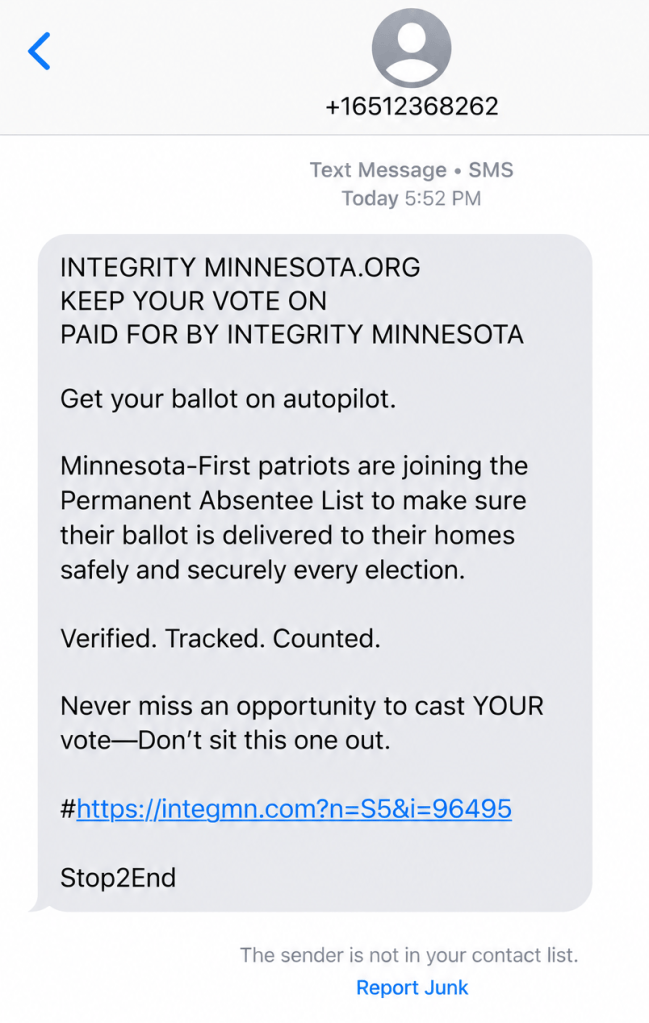
“Get your ballot on autopilot,” reads one text message we reviewed. It encourages recipients to join a permanent absentee list so their ballots arrive at home for every election, adding the reassuring words: “Verified. Tracked. Counted.”
A voting-assistance text message reviewed by Scam Guard
The message is a scam, though it borrows the language of a real Minnesota voting service. Minnesota does have a permanent absentee voter list, but the link in this text is fraudulent. To check or sign up, go directly to your election authority’s official website.
Other messages take the opposite approach: instead of offering convenience, they warn that you could lose your chance to vote.
A message might say you are not registered to vote, your details are incomplete, or your registration is about to be cancelled. Then it offers a link to sort everything out.
The FBI recently warned about messages that send recipients to fraudulent voter-registration pages. Instead of helping people vote, these sites collect personal information that criminals can use for further fraud.
In Brazil, scammers used a fake WhatsApp account with the Superior Electoral Court’s logo. It claimed to be the court’s “Customer Service Department” (which doesn’t exist) and told people to download an app called “Soluciona Pendência,” roughly translated as “Resolve an outstanding issue.” The message falsely warned that people could lose access to banking or government services.
Scam 2. “Donate now to help your candidate win”
A fundraising appeal arrives just as an election reaches a critical moment. It uses the candidate’s photograph, familiar campaign language, and an urgent request for money.
That does not necessarily mean the campaign sent it.
The FBI warns that scammers impersonate candidates and political fundraising organizations to collect supposed campaign contributions. Victims believe they are supporting a legitimate organization, but the money goes to criminals instead.
Before donating, find the campaign or organization’s official website yourself and check who will receive the payment. Don’t let a countdown, a matching-donation claim, or a message about an impending defeat rush your decision. The Better Business Bureau (BBB) advises researching political fundraising requests and resisting pressure to act immediately.
Scam 3. “Take our political survey and claim your reward”
Not every political poll is suspicious. But a request for your opinion can also be an opening for a scam.
The BBB warns about fraudulent polling calls that promise a prize in exchange for answering questions. After the “survey,” the caller asks for credit card information to cover shipping, taxes, or other costs associated with the supposed reward.
At that point, the questions about candidates have served their purpose: keeping you engaged long enough to introduce a payment request.
Other election-themed messages ask people to complete surveys through links. Treat those links with the same caution you would an unexpected donation or registration request. A familiar political organization’s name does not establish who operates the website.
You can decline an unsolicited poll. You should not need to hand over payment details simply to share your political views or claim a surprise reward.
Scam 4. “Pay this electoral fine” or “Report for election duty”
Few things make a message feel urgent quite like an official-looking demand backed by a possible penalty.
Brazil’s Superior Electoral Court (TSE) has warned about messages falsely claiming people had an unresolved voting issue. The messages link to fake government websites designed to steal personal information or trick people into paying.
Brazil does have legitimate electoral fines, which can be paid through official channels, including Pix. So a fine or Pix request alone doesn’t prove a message is a scam. If a message says you owe money or must perform election duty, check with the relevant authority using contact details from its official website. Don’t use the message’s phone number, link, or QR code.
Scam 5. Your favorite politician “wants you to buy this”
A politician’s name can be used to sell more than a political message.
Criminals use candidates’ names, photographs, logos, and slogans to advertise merchandise that never arrives. What looks like a way to support a candidate becomes an ordinary shopping scam wrapped in campaign branding.
Apply the same skepticism to a “commemorative,” “patriotic,” or supposedly collectible product advertised using a politician’s name. Before buying, ask:
Is the seller actually affiliated with the politician or campaign?
What, exactly, are you buying?
Is there evidence for claims about the product’s quality, usefulness, or future value?
What are the total price, refund terms, and any recurring charges?
A product does not become useful, valuable, or a sound investment because an ad places it beside a politician’s photograph. Nor does a photograph prove that the politician endorsed it.
There is also a difference between a product you consider poor value and a fraudulent offer. A product being poor value doesn’t automatically make it a scam. Look for clear deception: a fake endorsement, false claims, hidden fees, or an order that never arrives.
How to stay safe from election scams
You don’t need to work out every detail of a suspicious message before deciding whether to act on it. Verify the message through a route the sender does not control.
Go directly to official election websites to check registration, voting requirements, deadlines, and alleged penalties.
Verify donation requests independently. Find the campaign or organization yourself and confirm where your money will go.
Keep payment details out of unsolicited surveys. A political poll that turns into a request to pay for a prize is a red flag.
Check sellers before buying political merchandise. A candidate’s name or logo does not authenticate the shop.
Don’t mistake personal details for proof. A message can contain accurate information about you and still be a scam.
Keep political choices separate from requests for money or personal information. You can support a cause without responding to an unexpected message.
Elections give scammers plenty to work with: urgent deadlines, familiar faces, passionate supporters, and messages asking people to take action.
Some want you to “fix” your voter registration. Others want a donation, an answer to a survey, or payment for merchandise supposedly endorsed by your favorite politician. The details change, but the objective stays the same: get your money, your personal information, or both.
Here are five election-themed scams to watch out for.
Scam 1. “We’ll help you vote”
Not every election-themed lure starts with a threat. Some offer to make voting easier.
“Get your ballot on autopilot,” reads one text message we reviewed. It encourages recipients to join a permanent absentee list so their ballots arrive at home for every election, adding the reassuring words: “Verified. Tracked. Counted.”
A voting-assistance text message reviewed by Scam Guard
The message is a scam, though it borrows the language of a real Minnesota voting service. Minnesota does have a permanent absentee voter list, but the link in this text is fraudulent. To check or sign up, go directly to your election authority’s official website.
Other messages take the opposite approach: instead of offering convenience, they warn that you could lose your chance to vote.
A message might say you are not registered to vote, your details are incomplete, or your registration is about to be cancelled. Then it offers a link to sort everything out.
The FBI recently warned about messages that send recipients to fraudulent voter-registration pages. Instead of helping people vote, these sites collect personal information that criminals can use for further fraud.
In Brazil, scammers used a fake WhatsApp account with the Superior Electoral Court’s logo. It claimed to be the court’s “Customer Service Department” (which doesn’t exist) and told people to download an app called “Soluciona Pendência,” roughly translated as “Resolve an outstanding issue.” The message falsely warned that people could lose access to banking or government services.
Scam 2. “Donate now to help your candidate win”
A fundraising appeal arrives just as an election reaches a critical moment. It uses the candidate’s photograph, familiar campaign language, and an urgent request for money.
That does not necessarily mean the campaign sent it.
The FBI warns that scammers impersonate candidates and political fundraising organizations to collect supposed campaign contributions. Victims believe they are supporting a legitimate organization, but the money goes to criminals instead.
Before donating, find the campaign or organization’s official website yourself and check who will receive the payment. Don’t let a countdown, a matching-donation claim, or a message about an impending defeat rush your decision. The Better Business Bureau (BBB) advises researching political fundraising requests and resisting pressure to act immediately.
Scam 3. “Take our political survey and claim your reward”
Not every political poll is suspicious. But a request for your opinion can also be an opening for a scam.
The BBB warns about fraudulent polling calls that promise a prize in exchange for answering questions. After the “survey,” the caller asks for credit card information to cover shipping, taxes, or other costs associated with the supposed reward.
At that point, the questions about candidates have served their purpose: keeping you engaged long enough to introduce a payment request.
Other election-themed messages ask people to complete surveys through links. Treat those links with the same caution you would an unexpected donation or registration request. A familiar political organization’s name does not establish who operates the website.
You can decline an unsolicited poll. You should not need to hand over payment details simply to share your political views or claim a surprise reward.
Scam 4. “Pay this electoral fine” or “Report for election duty”
Few things make a message feel urgent quite like an official-looking demand backed by a possible penalty.
Brazil’s Superior Electoral Court (TSE) has warned about messages falsely claiming people had an unresolved voting issue. The messages link to fake government websites designed to steal personal information or trick people into paying.
Brazil does have legitimate electoral fines, which can be paid through official channels, including Pix. So a fine or Pix request alone doesn’t prove a message is a scam. If a message says you owe money or must perform election duty, check with the relevant authority using contact details from its official website. Don’t use the message’s phone number, link, or QR code.
Scam 5. Your favorite politician “wants you to buy this”
A politician’s name can be used to sell more than a political message.
Criminals use candidates’ names, photographs, logos, and slogans to advertise merchandise that never arrives. What looks like a way to support a candidate becomes an ordinary shopping scam wrapped in campaign branding.
Apply the same skepticism to a “commemorative,” “patriotic,” or supposedly collectible product advertised using a politician’s name. Before buying, ask:
Is the seller actually affiliated with the politician or campaign?
What, exactly, are you buying?
Is there evidence for claims about the product’s quality, usefulness, or future value?
What are the total price, refund terms, and any recurring charges?
A product does not become useful, valuable, or a sound investment because an ad places it beside a politician’s photograph. Nor does a photograph prove that the politician endorsed it.
There is also a difference between a product you consider poor value and a fraudulent offer. A product being poor value doesn’t automatically make it a scam. Look for clear deception: a fake endorsement, false claims, hidden fees, or an order that never arrives.
How to stay safe from election scams
You don’t need to work out every detail of a suspicious message before deciding whether to act on it. Verify the message through a route the sender does not control.
Go directly to official election websites to check registration, voting requirements, deadlines, and alleged penalties.
Verify donation requests independently. Find the campaign or organization yourself and confirm where your money will go.
Keep payment details out of unsolicited surveys. A political poll that turns into a request to pay for a prize is a red flag.
Check sellers before buying political merchandise. A candidate’s name or logo does not authenticate the shop.
Don’t mistake personal details for proof. A message can contain accurate information about you and still be a scam.
Keep political choices separate from requests for money or personal information. You can support a cause without responding to an unexpected message.
The warnings are everywhere these days. Don’t click this. Don’t open that. Don’t scan this. Don’t download that. These messages of caution, however well-intended, are so ubiquitous and constant that it should come as no surprise that some people have started to tune them out.
How many people? About one in three, according to our recent study.
Keeping up with every warning can feel exhausting. Meanwhile, scammers are finding new ways to target people and phones give them plenty of opportunities.
Mobile phones give scammers multiple ways to reach people, from text messages and calls to social media posts. According to a 2022 Federal Communications Commission report cited by the Federal Trade Commission (FTC), texting is a more common communication method than voice or email.
Criminals appear to be taking advantage of that fact. Consumers reported losing $470 million to text scams in 2024, up 26% from $373 million the year before and more than five times the amount reported in 2020. The FTC cites estimates that text message open rates run as high as 98%, compared to just 20% for email. People’s tendency to open and read their texts helps explain their appeal to scammers.
Meanwhile, AI is making scams harder to detect, but better at impersonating people and companies to steal money, passwords, and identities.
Voice phishing, or “vishing,” was a vanishingly small category of crime just a few years ago, but AI has made it considerably more convincing. Vishing doubled in the first half of 2026, according to CrowdStrike’s 2026 Threat Hunting Report. Meanwhile, 16% of adults in the Malwarebytes survey said they had received a voice-cloned phone call impersonating someone they knew in the past year.
Our data also shows how difficult people find it to recognize scams: 85% of survey respondents said it’s hard to tell a scam from the real thing, up from 66% a year ago. And 84% said convincing video evidence no longer feels like the rock-solid proof it once was.
Here are five ways to protect yourself
1. Treat unexpected texts and social media posts with suspicion
Legitimate institutions generally won’t ask for payment or personal information through unsolicited texts. And if the message is marked “urgent,” all the more reason to pause. Instead, go directly to the company’s official website and inquire there.
AI-generated images and videos are making it harder to tell what’s real online, so don’t rely on what you see as proof that a request is legitimate. If the content involves someone you know, contact them directly using a number you already trust.
2. Keep your operating system updated
This is one of the most effective things you can do to keep your phone safe. Security updates patch vulnerabilities that malware takes advantage of. Malwarebytes’ threat research found Android malware detections rose 151% in the first half of 2025. On both iPhone and Android, automatic updates help decrease risk.
3. Protect your accounts
Use a strong, unique password for every account. A password manager can create and store them for you. Where available, use a passkey—a way to sign in using your device, often with your fingerprint, face, or PIN—that resists phishing.
Turn on two-factor authentication, also called 2FA, for all your apps that allow it. This one step makes it harder for criminals who have your password to gain access to accounts on your phone.
4. Be skeptical of voice calls, even from your mom
This can be the hardest one to get your head around, but also one of the most dangerous and fastest-growing. AI-synthesized audio fraud has made it easier for scammers to sound convincingly like a loved one in trouble. Agree on a private code word with family members and friends in case of doubt or emergency. If you’re unsure, hang up and call the person on a number you already have. If the caller claims to be your bank, hang up and call back on a number you look up independently.
5. Check links before you tap, including links in QR codes
Before opening a link in a text, email, or social media post, check the web address for misspellings or an unfamiliar domain. You can also copy it into the free Malwarebytes Scam Link Check for help assessing it.
QR codes can hide suspicious links, too. Scammers sometimes place fake sticker overlays on top of legitimate QR codes in public spaces, and QR code phishing is morphing so fast that the FBI issued an alert in January about North Korean hackers using QR codes to target think tanks and government officials. Look for signs of tampering and check the web address your phone displays before opening it. If you’re not sure, don’t open the link. Instead, go directly to the organization’s official website or app.
Scammers rely on speed and pressure, so the best defense is to slow down. If a message or call feels off, step away and check it through a channel you already trust.
“One of the best cybersecurity suites on the planet.”
The warnings are everywhere these days. Don’t click this. Don’t open that. Don’t scan this. Don’t download that. These messages of caution, however well-intended, are so ubiquitous and constant that it should come as no surprise that some people have started to tune them out.
How many people? About one in three, according to our recent study.
Keeping up with every warning can feel exhausting. Meanwhile, scammers are finding new ways to target people and phones give them plenty of opportunities.
Mobile phones give scammers multiple ways to reach people, from text messages and calls to social media posts. According to a 2022 Federal Communications Commission report cited by the Federal Trade Commission (FTC), texting is a more common communication method than voice or email.
Criminals appear to be taking advantage of that fact. Consumers reported losing $470 million to text scams in 2024, up 26% from $373 million the year before and more than five times the amount reported in 2020. The FTC cites estimates that text message open rates run as high as 98%, compared to just 20% for email. People’s tendency to open and read their texts helps explain their appeal to scammers.
Meanwhile, AI is making scams harder to detect, but better at impersonating people and companies to steal money, passwords, and identities.
Voice phishing, or “vishing,” was a vanishingly small category of crime just a few years ago, but AI has made it considerably more convincing. Vishing doubled in the first half of 2026, according to CrowdStrike’s 2026 Threat Hunting Report. Meanwhile, 16% of adults in the Malwarebytes survey said they had received a voice-cloned phone call impersonating someone they knew in the past year.
Our data also shows how difficult people find it to recognize scams: 85% of survey respondents said it’s hard to tell a scam from the real thing, up from 66% a year ago. And 84% said convincing video evidence no longer feels like the rock-solid proof it once was.
Here are five ways to protect yourself
1. Treat unexpected texts and social media posts with suspicion
Legitimate institutions generally won’t ask for payment or personal information through unsolicited texts. And if the message is marked “urgent,” all the more reason to pause. Instead, go directly to the company’s official website and inquire there.
AI-generated images and videos are making it harder to tell what’s real online, so don’t rely on what you see as proof that a request is legitimate. If the content involves someone you know, contact them directly using a number you already trust.
2. Keep your operating system updated
This is one of the most effective things you can do to keep your phone safe. Security updates patch vulnerabilities that malware takes advantage of. Malwarebytes’ threat research found Android malware detections rose 151% in the first half of 2025. On both iPhone and Android, automatic updates help decrease risk.
3. Protect your accounts
Use a strong, unique password for every account. A password manager can create and store them for you. Where available, use a passkey—a way to sign in using your device, often with your fingerprint, face, or PIN—that resists phishing.
Turn on two-factor authentication, also called 2FA, for all your apps that allow it. This one step makes it harder for criminals who have your password to gain access to accounts on your phone.
4. Be skeptical of voice calls, even from your mom
This can be the hardest one to get your head around, but also one of the most dangerous and fastest-growing. AI-synthesized audio fraud has made it easier for scammers to sound convincingly like a loved one in trouble. Agree on a private code word with family members and friends in case of doubt or emergency. If you’re unsure, hang up and call the person on a number you already have. If the caller claims to be your bank, hang up and call back on a number you look up independently.
5. Check links before you tap, including links in QR codes
Before opening a link in a text, email, or social media post, check the web address for misspellings or an unfamiliar domain. You can also copy it into the free Malwarebytes Scam Link Check for help assessing it.
QR codes can hide suspicious links, too. Scammers sometimes place fake sticker overlays on top of legitimate QR codes in public spaces, and QR code phishing is morphing so fast that the FBI issued an alert in January about North Korean hackers using QR codes to target think tanks and government officials. Look for signs of tampering and check the web address your phone displays before opening it. If you’re not sure, don’t open the link. Instead, go directly to the organization’s official website or app.
Scammers rely on speed and pressure, so the best defense is to slow down. If a message or call feels off, step away and check it through a channel you already trust.
“One of the best cybersecurity suites on the planet.”
.kadence-column476672_104e78-a1 > .kt-inside-inner-col{padding-top:20px;padding-right:20px;padding-bottom:10px;padding-left:20px;}.kadence-column476672_104e78-a1 > .kt-inside-inner-col{column-gap:var(--global-kb-gap-sm, 1rem);}.kadence-column476672_104e78-a1 > .kt-inside-inner-col{flex-direction:column;}.kadence-column476672_104e78-a1 > .kt-inside-inner-col > .aligncenter{width:100%;}.kadence-column476672_104e78-a1 > .kt-inside-inner-col{background-color:var(--color-red-10);}.kadence-column476672_104e78-a1 > .kt-inside-inner-col:before{opacity:0.3;background-color:var(--color-red-10);}.kadence-column476672_104e78-a1{position:relative;}@media all and (max-width: 1024px){.kadence-column476672_104e78-a1 > .kt-inside-inner-col{flex-direction:column;justify-content:center;}}@media all and (max-width: 767px){.kadence-column476672_104e78-a1 > .kt-inside-inner-col{flex-direction:column;justify-content:center;}}
In this article
Fake Amazon Music deals use real YouTube stats as bait.
Fake verification steals Google sign-in details, risking account takeovers.
Make sure to verify offers independently and check the browser address before signing in.
Already entered your details? Change your password and check account activity and channel permissions.
On August 27, YouTube announced that Amazon had joined its Shopping Affiliate Program. Eligible creators can now tag Amazon products in their videos and earn a commission on sales.
Weeks later, we found a wave of sites offering YouTube creators what looks like another Amazon opportunity: an invite-only advertising deal with Amazon Music. The site shows creators their own channel stats, then asks them to “verify” their channel with Google before it reveals a personalized offer.
That verification step is a phishing attempt designed to steal Google sign-in details, putting the creator’s account and YouTube channel at risk.
If you receive one of these offers, don’t enter your Google password or verification codes. If you already have, secure your Google account immediately using the steps below.
What the real Amazon and YouTube partnership looks like
The real partnership lets eligible creators in the YouTube Partner Program and YouTube Shopping affiliate program tag Amazon products in their videos, Shorts, and livestreams, and earn a commission when viewers buy. YouTube’s setup guidance also describes linking Amazon and YouTube accounts, with a notification in YouTube Studio once tagging is enabled.
The real program does include a step where you connect and verify your channel. But it happens inside an Amazon account you already have, on Amazon’s own site, and YouTube confirms it in YouTube Studio. It doesn’t involve invite-only Amazon Music ad campaigns, payout calculators, or a third-party “creator portal.”
An invite-only deal that doesn’t exist
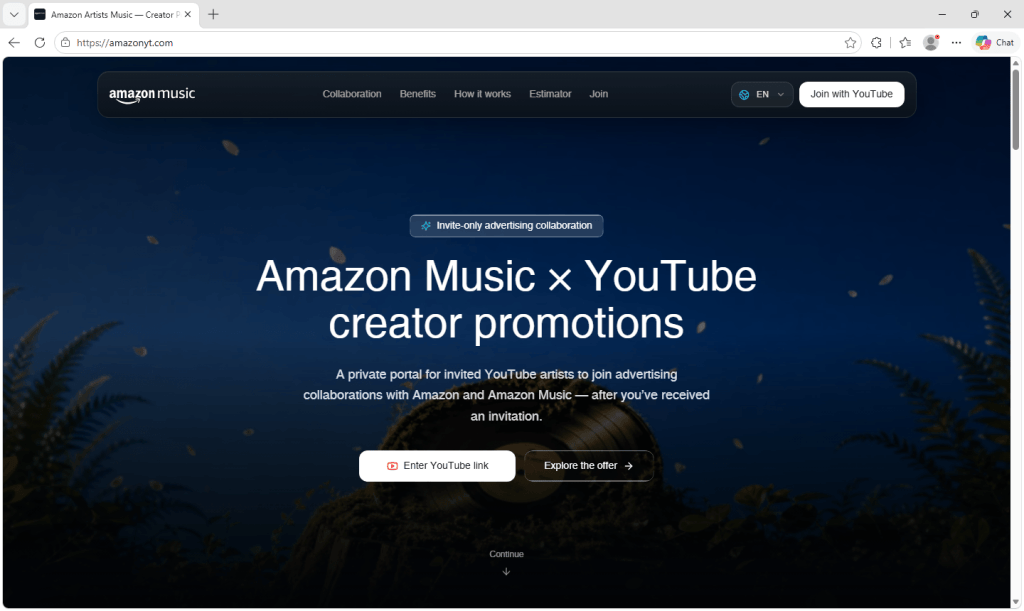
The site, hosted at amazonyt[.]com, calls itself the “Amazon Artists Music — Creator Portal.” The name resembles Amazon’s real Amazon Music for Artists service, helping it feel familiar at first glance.
It promises “advertising collaborations with Amazon and Amazon Music,” describes the program as invitation-only, and tells visitors to use “the link from your Amazon Music Artists outreach email.”
There’s even an earnings calculator. You pick one of four packages (a Shorts package, an integration in a planned video, a dedicated video, or a “full campaign package”), set your average views, add “boosters” like extra Shorts or a livestream mention, and choose how exclusive the deal should be. The page then shows an “estimated payout” and compares it with the “endless back-and-forth and delayed payments” of ordinary brand outreach.
The calculator does real math on the numbers you enter. But a working calculator doesn’t make the payout real. The estimates give creators a reason to keep going before the site asks for their sign-in details.
The site is available in nine languages: English, Spanish, Indonesian, Portuguese, Russian, Urdu, Arabic, Hindi, and Thai, suggesting the operators are targeting creators across multiple countries.
Your own channel, used as bait
Next, the site asks for your YouTube channel link.
Once you paste it, a dashboard displays your real channel data: subscriber count, total views, recent and top-performing uploads, playlists, topics, and thumbnails. Seeing your own data on an Amazon-branded page makes the offer feel tailored to you.
To pull this data, the site queries YouTube’s own public API directly from your browser. The code includes 20 Google API keys and automatically switches to the next one if a key hits its usage limit or is rejected.
This data is public, so looking it up isn’t theft in itself. What it buys the criminals is credibility. A site that knows your subscriber count and your latest upload can look as though someone has already assessed your channel for a deal.
The offer itself stays locked until you “verify” your channel.
The fake “Continue with Google” button
To unlock it, you have to “complete the required step: Verify Your Channel.” The page says you need to sign in with Google to confirm you own the channel and “unlock your Amazon Music collaboration brief,” and shows a familiar white button with the colored Google logo: Continue with Google.
The site does contain genuine Google sign-in code, the same kind legitimate sites use. But it’s inactive: the setting that would connect it to Google is empty, so it never runs.
Instead, clicking the button opens a full-screen frame on top of the page. The frame loads content from a second domain, youtubechannelverification[.]com. Its background is almost completely transparent, so whatever the second site draws appears to sit over the Amazon page. Meanwhile, your browser’s address bar still shows amazonyt[.]com.
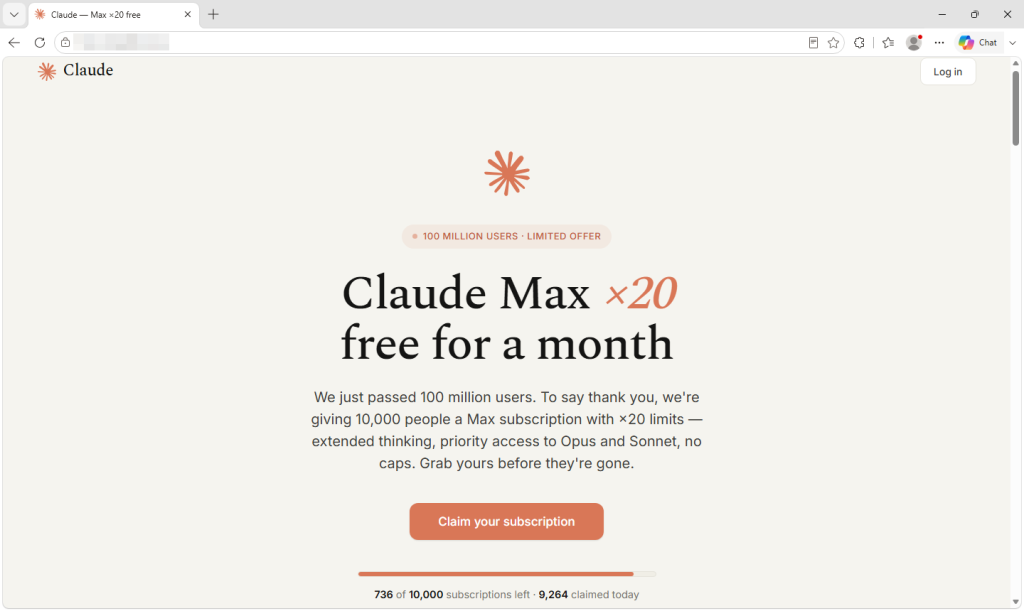
This is similar to what we described in our recent look at a fake Claude Max giveaway: when the sign-in window lives inside the page, the criminals control nearly everything you see.
The second-stage code shows what it’s after. In the version we analyzed, it sent the email address and password entered into the form to its own server, and it supported steps for multi-factor authentication (MFA) challenges. In other words, it’s built to collect not just your password but also verification codes that could help the criminals get past an additional layer of account protection.
A fake offer to keep you reassured
What happens next depends on how the second stage responds.
The fake window has no close button of its own. It closes only when the second-stage site tells it to. When that happens, the page displays, “Verification failed. Please try again.”
However, the second-stage configuration we analyzed also pointed to a “success” address back on amazonyt[.]com. Visiting that page marks your channel as verified and returns you to the dashboard, where the offer is now unlocked: a fit score, campaign tier, budget band, estimated reach, and a pitch that quotes your recent average views back to you.
You can even negotiate. A counter-offer editor lets you choose deliverables, toggle social media usage rights, and leave a note for “Amazon Music.” When you click Request this collaboration or submit your counter-offer, a “Request received” screen says the Amazon Music partnership team will review your channel and reach out with next steps.
For the creator who reaches this screen, everything appears to have worked. They verified their channel, saw a convincing offer, and sent a request. That reassuring ending may give the criminals more time before the victim suspects anything.
Why this campaign stands out
Fake sponsorship offers have targeted creators for years. This one combines several features that make the trap more convincing:
The password collection happens on a second domain. The amazonyt[.]com page itself doesn’t contain the sign-in form. That form is loaded from youtubechannelverification[.]com only after you click. A split like this can make the first page look cleaner to anyone checking it, and it lets the operators change the second stage without touching the lure.
The success page is designed to evade suspicion. Victims who hand over their details aren’t left at an error page. They’re returned to an unlocked offer and a “Request received” confirmation, giving them a reason to wait for a reply.
Personalization is automatic. Every visitor gets a dashboard and offer built from their own channel’s real numbers.
It may be part of a reusable kit. The code contains leftover error messages that have nothing to do with this site, like “Please enter the product ID” and “This channel is not in the list, please connect the invited channel.” The link to the second stage also carries a ref value, which the second-stage code we analyzed stored as a workerCode. That could mean more than one person sends traffic to it, though we can’t confirm how the kit is shared.
Why criminals want YouTube channels
YouTube creators have been a target for years. In 2021, Google’s Threat Analysis Group described a campaign that lured creators with fake collaboration offers, used malware to take over their channels, and then sold them on or used them to broadcast cryptocurrency scams.
A hijacked channel comes with an audience that already trusts it. That gives criminals a ready-made platform for reaching potential victims.
How to spot a fake sponsorship offer
Treat “verify your channel” requests with caution. Legitimate services may use Google’s official sign-in to confirm channel ownership. The important distinction is where you sign in: Your Google password and verification codes belong on Google’s genuine sign-in page.
Check the browser’s real address bar. If you’re asked for your Google password, the actual browser tab or separate browser window should show accounts.google.com. An address bar drawn inside the webpage can be faked.
Check the domain, not the logo. The domains amazonyt[.]com and youtubechannelverification[.]com are part of this phishing campaign. Familiar branding and accurate channel stats don’t make them official.
Know what the real program offers. The Amazon and YouTube Shopping partnership lets eligible creators earn commissions on tagged products. A supposed Amazon Music sponsorship needs to be verified separately.
Verify the offer independently. Contact the company through its official website, using contact details you find yourself rather than those supplied in the message.
If you already entered your details
Change your Google password through Google’s official site. Review your devices and sign out of unfamiliar sessions in your Google Account security settings, and remove any third-party apps you don’t recognize. Also check that your recovery email address and phone number haven’t changed.
If you entered an MFA code or approved a sign-in prompt, treat your account as potentially compromised.
In YouTube Studio, check Settings > Permissions for anyone you didn’t add. If your channel is connected to a Brand Account, check that account’s permissions too. If you’ve lost access, follow YouTube’s guidance for recovering a hacked channel, starting with the Google account associated with it.
How Malwarebytes spots scams like this
Once a phishing page loads, the criminals control almost everything you see, which is why it’s best to stop it before it opens.
Malwarebytes Browser Guard blocks phishing and scam domains before the page can load. If you’re unsure about a sponsorship offer, you can ask Malwarebytes Scam Guard to check it before you reply or click anything.
Indicators of compromise
amazonyt[.]com
youtubechannelverification[.]com
Stop threats before they can do any harm.
Malwarebytes Browser Guard blocks phishing pages and malicious sites automatically. Free, one click to install. Add it to your browser →
.kadence-column476672_104e78-a1 > .kt-inside-inner-col{padding-top:20px;padding-right:20px;padding-bottom:10px;padding-left:20px;}.kadence-column476672_104e78-a1 > .kt-inside-inner-col{column-gap:var(--global-kb-gap-sm, 1rem);}.kadence-column476672_104e78-a1 > .kt-inside-inner-col{flex-direction:column;}.kadence-column476672_104e78-a1 > .kt-inside-inner-col > .aligncenter{width:100%;}.kadence-column476672_104e78-a1 > .kt-inside-inner-col{background-color:var(--color-red-10);}.kadence-column476672_104e78-a1 > .kt-inside-inner-col:before{opacity:0.3;background-color:var(--color-red-10);}.kadence-column476672_104e78-a1{position:relative;}@media all and (max-width: 1024px){.kadence-column476672_104e78-a1 > .kt-inside-inner-col{flex-direction:column;justify-content:center;}}@media all and (max-width: 767px){.kadence-column476672_104e78-a1 > .kt-inside-inner-col{flex-direction:column;justify-content:center;}}
In this article
Fake Amazon Music deals use real YouTube stats as bait.
Fake verification steals Google sign-in details, risking account takeovers.
Make sure to verify offers independently and check the browser address before signing in.
Already entered your details? Change your password and check account activity and channel permissions.
On August 27, YouTube announced that Amazon had joined its Shopping Affiliate Program. Eligible creators can now tag Amazon products in their videos and earn a commission on sales.
Weeks later, we found a wave of sites offering YouTube creators what looks like another Amazon opportunity: an invite-only advertising deal with Amazon Music. The site shows creators their own channel stats, then asks them to “verify” their channel with Google before it reveals a personalized offer.
That verification step is a phishing attempt designed to steal Google sign-in details, putting the creator’s account and YouTube channel at risk.
If you receive one of these offers, don’t enter your Google password or verification codes. If you already have, secure your Google account immediately using the steps below.
What the real Amazon and YouTube partnership looks like
The real partnership lets eligible creators in the YouTube Partner Program and YouTube Shopping affiliate program tag Amazon products in their videos, Shorts, and livestreams, and earn a commission when viewers buy. YouTube’s setup guidance also describes linking Amazon and YouTube accounts, with a notification in YouTube Studio once tagging is enabled.
The real program does include a step where you connect and verify your channel. But it happens inside an Amazon account you already have, on Amazon’s own site, and YouTube confirms it in YouTube Studio. It doesn’t involve invite-only Amazon Music ad campaigns, payout calculators, or a third-party “creator portal.”
An invite-only deal that doesn’t exist
The site, hosted at amazonyt[.]com, calls itself the “Amazon Artists Music — Creator Portal.” The name resembles Amazon’s real Amazon Music for Artists service, helping it feel familiar at first glance.
It promises “advertising collaborations with Amazon and Amazon Music,” describes the program as invitation-only, and tells visitors to use “the link from your Amazon Music Artists outreach email.”
There’s even an earnings calculator. You pick one of four packages (a Shorts package, an integration in a planned video, a dedicated video, or a “full campaign package”), set your average views, add “boosters” like extra Shorts or a livestream mention, and choose how exclusive the deal should be. The page then shows an “estimated payout” and compares it with the “endless back-and-forth and delayed payments” of ordinary brand outreach.
The calculator does real math on the numbers you enter. But a working calculator doesn’t make the payout real. The estimates give creators a reason to keep going before the site asks for their sign-in details.
The site is available in nine languages: English, Spanish, Indonesian, Portuguese, Russian, Urdu, Arabic, Hindi, and Thai, suggesting the operators are targeting creators across multiple countries.
Your own channel, used as bait
Next, the site asks for your YouTube channel link.
Once you paste it, a dashboard displays your real channel data: subscriber count, total views, recent and top-performing uploads, playlists, topics, and thumbnails. Seeing your own data on an Amazon-branded page makes the offer feel tailored to you.
To pull this data, the site queries YouTube’s own public API directly from your browser. The code includes 20 Google API keys and automatically switches to the next one if a key hits its usage limit or is rejected.
This data is public, so looking it up isn’t theft in itself. What it buys the criminals is credibility. A site that knows your subscriber count and your latest upload can look as though someone has already assessed your channel for a deal.
The offer itself stays locked until you “verify” your channel.
The fake “Continue with Google” button
To unlock it, you have to “complete the required step: Verify Your Channel.” The page says you need to sign in with Google to confirm you own the channel and “unlock your Amazon Music collaboration brief,” and shows a familiar white button with the colored Google logo: Continue with Google.
The site does contain genuine Google sign-in code, the same kind legitimate sites use. But it’s inactive: the setting that would connect it to Google is empty, so it never runs.
Instead, clicking the button opens a full-screen frame on top of the page. The frame loads content from a second domain, youtubechannelverification[.]com. Its background is almost completely transparent, so whatever the second site draws appears to sit over the Amazon page. Meanwhile, your browser’s address bar still shows amazonyt[.]com.
This is similar to what we described in our recent look at a fake Claude Max giveaway: when the sign-in window lives inside the page, the criminals control nearly everything you see.
The second-stage code shows what it’s after. In the version we analyzed, it sent the email address and password entered into the form to its own server, and it supported steps for multi-factor authentication (MFA) challenges. In other words, it’s built to collect not just your password but also verification codes that could help the criminals get past an additional layer of account protection.
A fake offer to keep you reassured
What happens next depends on how the second stage responds.
The fake window has no close button of its own. It closes only when the second-stage site tells it to. When that happens, the page displays, “Verification failed. Please try again.”
However, the second-stage configuration we analyzed also pointed to a “success” address back on amazonyt[.]com. Visiting that page marks your channel as verified and returns you to the dashboard, where the offer is now unlocked: a fit score, campaign tier, budget band, estimated reach, and a pitch that quotes your recent average views back to you.
You can even negotiate. A counter-offer editor lets you choose deliverables, toggle social media usage rights, and leave a note for “Amazon Music.” When you click Request this collaboration or submit your counter-offer, a “Request received” screen says the Amazon Music partnership team will review your channel and reach out with next steps.
For the creator who reaches this screen, everything appears to have worked. They verified their channel, saw a convincing offer, and sent a request. That reassuring ending may give the criminals more time before the victim suspects anything.
Why this campaign stands out
Fake sponsorship offers have targeted creators for years. This one combines several features that make the trap more convincing:
The password collection happens on a second domain. The amazonyt[.]com page itself doesn’t contain the sign-in form. That form is loaded from youtubechannelverification[.]com only after you click. A split like this can make the first page look cleaner to anyone checking it, and it lets the operators change the second stage without touching the lure.
The success page is designed to evade suspicion. Victims who hand over their details aren’t left at an error page. They’re returned to an unlocked offer and a “Request received” confirmation, giving them a reason to wait for a reply.
Personalization is automatic. Every visitor gets a dashboard and offer built from their own channel’s real numbers.
It may be part of a reusable kit. The code contains leftover error messages that have nothing to do with this site, like “Please enter the product ID” and “This channel is not in the list, please connect the invited channel.” The link to the second stage also carries a ref value, which the second-stage code we analyzed stored as a workerCode. That could mean more than one person sends traffic to it, though we can’t confirm how the kit is shared.
Why criminals want YouTube channels
YouTube creators have been a target for years. In 2021, Google’s Threat Analysis Group described a campaign that lured creators with fake collaboration offers, used malware to take over their channels, and then sold them on or used them to broadcast cryptocurrency scams.
A hijacked channel comes with an audience that already trusts it. That gives criminals a ready-made platform for reaching potential victims.
How to spot a fake sponsorship offer
Treat “verify your channel” requests with caution. Legitimate services may use Google’s official sign-in to confirm channel ownership. The important distinction is where you sign in: Your Google password and verification codes belong on Google’s genuine sign-in page.
Check the browser’s real address bar. If you’re asked for your Google password, the actual browser tab or separate browser window should show accounts.google.com. An address bar drawn inside the webpage can be faked.
Check the domain, not the logo. The domains amazonyt[.]com and youtubechannelverification[.]com are part of this phishing campaign. Familiar branding and accurate channel stats don’t make them official.
Know what the real program offers. The Amazon and YouTube Shopping partnership lets eligible creators earn commissions on tagged products. A supposed Amazon Music sponsorship needs to be verified separately.
Verify the offer independently. Contact the company through its official website, using contact details you find yourself rather than those supplied in the message.
If you already entered your details
Change your Google password through Google’s official site. Review your devices and sign out of unfamiliar sessions in your Google Account security settings, and remove any third-party apps you don’t recognize. Also check that your recovery email address and phone number haven’t changed.
If you entered an MFA code or approved a sign-in prompt, treat your account as potentially compromised.
In YouTube Studio, check Settings > Permissions for anyone you didn’t add. If your channel is connected to a Brand Account, check that account’s permissions too. If you’ve lost access, follow YouTube’s guidance for recovering a hacked channel, starting with the Google account associated with it.
How Malwarebytes spots scams like this
Once a phishing page loads, the criminals control almost everything you see, which is why it’s best to stop it before it opens.
Malwarebytes Browser Guard blocks phishing and scam domains before the page can load. If you’re unsure about a sponsorship offer, you can ask Malwarebytes Scam Guard to check it before you reply or click anything.
Indicators of compromise
amazonyt[.]com
youtubechannelverification[.]com
Stop threats before they can do any harm.
Malwarebytes Browser Guard blocks phishing pages and malicious sites automatically. Free, one click to install. Add it to your browser →
The age of LLM-assisted security vulnerability discovery is really starting to bite. Debian's latest Linux kernel security update comes with a formidable reading list of 1,313 CVE identifiers. The DSA-6528-1 Linux security advisory, published on September 29, covers kernel package version 6.12.111-1 for Debian 13, codenamed Trixie. Debian 13.7 was released on September 12, before upstream kernel 6.12.111 arrived nine days later. The Debian security tracker links to descriptions of the individual issues. We have not examined every entry. If we had, this article would not appear until after Debian 13.8 (which is likely to appear later in October), or possibly at some point in 2027. Several checked at random also affect older kernel versions, so the list should not be read as a tally of bugs introduced in 6.12.111. The Linux kernel project became a CVE Numbering Authority (CNA) in February 2024. Back in February this year, kernel maintainer Greg Kroah-Hartman described the Linux CVE assignment process in some detail. He said kernel development averages around nine changes an hour, with a feed of known bug fixes averaging about 30 changes a day providing the basis for the CNA team's review. The kernel team's policy is to assign CVEs automatically after fixes have reached a stable kernel tree. It takes a deliberately cautious approach because the security implications of a bug may not be apparent when it is fixed. A CVE identifier alone therefore says little about severity or exploitability. We strongly suspect that this number of CVEs is due to LLM bots doing the bug hunting, and quite possibly doing the bug fixing as well. Linux is not an anti-AI project, and neither is Debian. AI-assisted bug hunting is already swamping the Linux security mailing list, as The Register reported in May. Kroah-Hartman released kernel 6.12.112 on October 3. Its detailed changelog runs to more than 27,000 lines. With both the rates of change and the sizes of the changes getting so large, it is hard to deny that LLM bot assistance must be very useful to the hard-pressed maintainers. Whether coding bots constitute a net benefit to the projects, to software, or to humanity as a whole remains at best an open question. ®
Free Mobile, one of France’s main cellular providers, was fined €27 million by France’s data protection regulator, the CNIL, in January over failures to protect customer data. The October 2024 breach allowed an unauthorized party to access sensitive customer records, including bank account details and login information. Since the breach, we’ve seen many poorly written scam campaigns targeting Free Mobile customers.
However, over the past few weeks, a well-written scam has appeared, closely copying the design of the official Free Mobile website and email templates.
One of our employees, who is a Free Mobile customer, received this phishing email on Wednesday, September 30. The message used the same logo and template as legitimate emails from the company, but came from the suspicious email address freemobile-regularisation[@]knowledgegrowthcenter[.]help. It included a link that appeared to point to regularisation.free.fr :
The email tells the user that an invoice of €9.99 needs to be paid to avoid having the customer’s service suspended. Clicking the link opens a redirection chain:
Malwarebytes can help protect you from these threats, but treat unexpected messages about your accounts and invoices with caution:
Don’t follow links in unsolicited emails. If a message concerns your account, open the official Free Mobile app or website directly, or call the official help line at 3244.
Check the actual domain in your browser’s address bar to see if it matches what you expect—https://mobile.free.fr in this case.
Free Mobile, one of France’s main cellular providers, was fined €27 million by France’s data protection regulator, the CNIL, in January over failures to protect customer data. The October 2024 breach allowed an unauthorized party to access sensitive customer records, including bank account details and login information. Since the breach, we’ve seen many poorly written scam campaigns targeting Free Mobile customers.
However, over the past few weeks, a well-written scam has appeared, closely copying the design of the official Free Mobile website and email templates.
One of our employees, who is a Free Mobile customer, received this phishing email on Wednesday, September 30. The message used the same logo and template as legitimate emails from the company, but came from the suspicious email address freemobile-regularisation[@]knowledgegrowthcenter[.]help. It included a link that appeared to point to regularisation.free.fr :
The email tells the user that an invoice of €9.99 needs to be paid to avoid having the customer’s service suspended. Clicking the link opens a redirection chain:
Malwarebytes can help protect you from these threats, but treat unexpected messages about your accounts and invoices with caution:
Don’t follow links in unsolicited emails. If a message concerns your account, open the official Free Mobile app or website directly, or call the official help line at 3244.
Check the actual domain in your browser’s address bar to see if it matches what you expect—https://mobile.free.fr in this case.
Apple announced its first foldable iPhone on September 9, and scammers were ready to ‘deliver’ one before anyone could buy it.
Most of what we found around the launch of the iPhone Duo and iPhone 18 Pro was familiar fraud.
But one fake preorder page was different.
The fake Apple-style page offers a $500 voucher and a ticking preorder deadline.
Behind its Apple-style design and $500 voucher, the page uses the leaked DarkSword exploit chain to try to break into vulnerable iPhones. If it succeeds, a separate payload attempts to steal saved credentials, cryptocurrency wallet data, and notes.
You don’t have to fill in the form, tap a download, or approve anything. Opening the page is enough to start the attempt.
The form asks for contact details and offers Duo models and colors that do not match Apple’s.
But Apple doesn’t open iPhone Duo preorders until October 16. You cannot place an Apple preorder now. It offers 6.3-inch and 6.9-inch models in colors Apple doesn’t sell for the Duo. Its countdown starts over whenever the page loads, and its privacy, terms, and sales policy links go nowhere.
In the version we captured, submitting the form doesn’t place an order. Its submission handler doesn’t read or send the details entered, and the page generates its own “Pre-Order Successful” message. The exploit attempt has already begun in the background.
How the attack starts when the page opens
Visitors using browsers the script doesn’t recognize as Safari see a “Browser Restricted” notice. On iPhones, the page also tries to reopen the link in Safari, the browser the exploit chain targets. That steers visitors toward the intended browser, although background resources may still load in others.
Visitors shown this notice are urged to open the page in Safari.
An invisible frame checks the visitor’s iOS version and selects the next code to load. DarkSword then attempts to get past the iPhone’s protections and, if successful, gain deep access to the phone. It doesn’t wait for a button press or form submission.
What attackers could take from an iPhone
If the exploit succeeds, the payload attempts to contact its server. Its first message includes a device identifier, device information, and status. It also attempts to send a list of installed apps and the contents of Apple Notes.
The code looks for cryptocurrency wallets, including MetaMask, Phantom, Trust Wallet, Coinbase Wallet, Exodus, and Tonkeeper. It also attempts to recover saved credentials from the phone’s keychain. If it finds a targeted wallet and the first exchanges with its server succeed, it attempts to upload wallet files, recovered keychain data, and photo thumbnails. Exposure of wallet files or credentials could put funds at risk.
The captured code checks for installed cryptocurrency wallet apps. This is part of the list.
The payload also tries to access files containing messages, call history, contacts, voicemail, email, calendar entries, and cached location data.
The payload can then repeatedly contact its server for instructions. Its commands can list directories, retrieve files and full-size photos, gather app information, and run JavaScript supplied by the server. The payload also tries to cover its tracks by deleting diagnostic reports that could help investigators spot the attack.
The beacon sends a device identifier, device information and status to the configured server. The command loop uses the response to obtain instructions.
The code is designed to run inside a system process, but may stop before the phone restarts. We found no mechanism that automatically brings it back after a reboot.
We analyzed the captured code, but did not test it on an iPhone or observe data leaving one.
Which iPhones could be at risk?
Several parts of the captured code match the DarkSword chain described by Google in March. Apple has patched the vulnerabilities Google reported.
When DarkSword was disclosed in March, iVerify estimated that up to 270 million devices were running the iOS 18.4 through 18.6.2 versions targeted by the variant it analyzed. That is not a current count or a measure of how many phones this page could compromise. We haven’t confirmed this page’s exact range; its files also contain code for older iOS versions.
The lure fits the exploit: someone considering a new iPhone may still be using an older, unpatched one. That could make them vulnerable simply by opening the preorder page.
Keep your iPhone updated. Go to Settings > General > Software Update and install the latest version available. Turn on Automatic Updates there too. Apple says updated devices are protected against the reported DarkSword attacks.
Check offers without opening unfamiliar links. Go directly to Apple or a retailer you know by typing its address yourself. A preorder link in an ad, message, or social post could start an exploit attempt as soon as the page opens.
Opened this page? Restart your iPhone after updating it. We found no code that automatically brings the payload back after a reboot. Restarting cannot undo any data already taken.
Keep a cryptocurrency wallet on that phone? Take precautions from a trusted device. If the phone may have been compromised and you keep a wallet on it, create a new wallet with a new recovery phrase and move the funds. For an exchange account, secure the account and contact the exchange.
Change potentially exposed passwords from a trusted device. Start with email, your Apple Account, banking, and crypto accounts, and turn on two-factor authentication.
Report the page. Save its URL and any screenshots without reopening it, and report it to your national cybercrime reporting service.
Check a suspicious offer before you act.Scam Guard can give a verdict on a screenshot or link. On desktop, Browser Guard blocks the fake preorder page we analyzed; web protection in Malwarebytes Premium blocks it too.
Indicators of compromise
pnmrud[.]cc — command-and-control and collection server
cloud[.]cmatgldn[.]click — ad click and conversion tracker
“One of the best cybersecurity suites on the planet.”
Apple announced its first foldable iPhone on September 9, and scammers were ready to ‘deliver’ one before anyone could buy it.
Most of what we found around the launch of the iPhone Duo and iPhone 18 Pro was familiar fraud.
But one fake preorder page was different.
The fake Apple-style page offers a $500 voucher and a ticking preorder deadline.
Behind its Apple-style design and $500 voucher, the page uses the leaked DarkSword exploit chain to try to break into vulnerable iPhones. If it succeeds, a separate payload attempts to steal saved credentials, cryptocurrency wallet data, and notes.
You don’t have to fill in the form, tap a download, or approve anything. Opening the page is enough to start the attempt.
The form asks for contact details and offers Duo models and colors that do not match Apple’s.
But Apple doesn’t open iPhone Duo preorders until October 16. You cannot place an Apple preorder now. It offers 6.3-inch and 6.9-inch models in colors Apple doesn’t sell for the Duo. Its countdown starts over whenever the page loads, and its privacy, terms, and sales policy links go nowhere.
In the version we captured, submitting the form doesn’t place an order. Its submission handler doesn’t read or send the details entered, and the page generates its own “Pre-Order Successful” message. The exploit attempt has already begun in the background.
How the attack starts when the page opens
Visitors using browsers the script doesn’t recognize as Safari see a “Browser Restricted” notice. On iPhones, the page also tries to reopen the link in Safari, the browser the exploit chain targets. That steers visitors toward the intended browser, although background resources may still load in others.
Visitors shown this notice are urged to open the page in Safari.
An invisible frame checks the visitor’s iOS version and selects the next code to load. DarkSword then attempts to get past the iPhone’s protections and, if successful, gain deep access to the phone. It doesn’t wait for a button press or form submission.
What attackers could take from an iPhone
If the exploit succeeds, the payload attempts to contact its server. Its first message includes a device identifier, device information, and status. It also attempts to send a list of installed apps and the contents of Apple Notes.
The code looks for cryptocurrency wallets, including MetaMask, Phantom, Trust Wallet, Coinbase Wallet, Exodus, and Tonkeeper. It also attempts to recover saved credentials from the phone’s keychain. If it finds a targeted wallet and the first exchanges with its server succeed, it attempts to upload wallet files, recovered keychain data, and photo thumbnails. Exposure of wallet files or credentials could put funds at risk.
The captured code checks for installed cryptocurrency wallet apps. This is part of the list.
The payload also tries to access files containing messages, call history, contacts, voicemail, email, calendar entries, and cached location data.
The payload can then repeatedly contact its server for instructions. Its commands can list directories, retrieve files and full-size photos, gather app information, and run JavaScript supplied by the server. The payload also tries to cover its tracks by deleting diagnostic reports that could help investigators spot the attack.
The beacon sends a device identifier, device information and status to the configured server. The command loop uses the response to obtain instructions.
The code is designed to run inside a system process, but may stop before the phone restarts. We found no mechanism that automatically brings it back after a reboot.
We analyzed the captured code, but did not test it on an iPhone or observe data leaving one.
Which iPhones could be at risk?
Several parts of the captured code match the DarkSword chain described by Google in March. Apple has patched the vulnerabilities Google reported.
When DarkSword was disclosed in March, iVerify estimated that up to 270 million devices were running the iOS 18.4 through 18.6.2 versions targeted by the variant it analyzed. That is not a current count or a measure of how many phones this page could compromise. We haven’t confirmed this page’s exact range; its files also contain code for older iOS versions.
The lure fits the exploit: someone considering a new iPhone may still be using an older, unpatched one. That could make them vulnerable simply by opening the preorder page.
Keep your iPhone updated. Go to Settings > General > Software Update and install the latest version available. Turn on Automatic Updates there too. Apple says updated devices are protected against the reported DarkSword attacks.
Check offers without opening unfamiliar links. Go directly to Apple or a retailer you know by typing its address yourself. A preorder link in an ad, message, or social post could start an exploit attempt as soon as the page opens.
Opened this page? Restart your iPhone after updating it. We found no code that automatically brings the payload back after a reboot. Restarting cannot undo any data already taken.
Keep a cryptocurrency wallet on that phone? Take precautions from a trusted device. If the phone may have been compromised and you keep a wallet on it, create a new wallet with a new recovery phrase and move the funds. For an exchange account, secure the account and contact the exchange.
Change potentially exposed passwords from a trusted device. Start with email, your Apple Account, banking, and crypto accounts, and turn on two-factor authentication.
Report the page. Save its URL and any screenshots without reopening it, and report it to your national cybercrime reporting service.
Check a suspicious offer before you act.Scam Guard can give a verdict on a screenshot or link. On desktop, Browser Guard blocks the fake preorder page we analyzed; web protection in Malwarebytes Premium blocks it too.
Indicators of compromise
pnmrud[.]cc — command-and-control and collection server
cloud[.]cmatgldn[.]click — ad click and conversion tracker
“One of the best cybersecurity suites on the planet.”
LinkedIn is adding trust and verification features aimed at making fake professional identities, invented work histories, and company impersonation harder to pull off.
The company is responding to an environment in which generative AI enables imposters to create an entirely made-up professional persona. It reduces the cost of creating convincing headshots, biographies, résumés, outreach messages, and recommendations.
LinkedIn’s new features use verified people and company Pages to help check other users’ claims.
Colleague and classmate vouching: People can confirm that they worked or studied with someone during the period listed on that person’s profile. This confirms an affiliation; it does not rate the person’s ability or recommend them.
Employer control over false affiliations: Admins of verified company Pages can remove people who falsely claim to work there from the company’s associated people and search results. This doesn’t remove the person’s profile or erase the claim from it.
Workplace verification requirement (in testing): LinkedIn is testing a setting that would require people who want to associate themselves with a company Page to verify their workplace, for example, through a work email address.
Verified identity beyond LinkedIn: LinkedIn is extending partnerships that let users display their LinkedIn-verified identity elsewhere. New partners include Truecaller and PeerSpot, alongside Adobe and UserTesting.
LinkedIn hopes that multiple visible signals such as identity verification, workplace verification, peer corroboration, and company Page controls will make a fabricated profile less persuasive. It says its existing verification tools have verified 115 million members and more than 700,000 companies.
LinkedIn VP of Product Oscar Rodriguez told TechCrunch:
“We’ve been invested in [verification] because we believe that authenticity will be the single most valuable currency on the internet.”
These new affiliation checks cannot tell a job seeker whether an opportunity is genuine. A scammer does not always need to impersonate a major employer. They can invent a convincing startup, build a polished company Page, and use fake job listings or recruiters to lure applicants. The checks may be less helpful if the supposed employer itself is part of the scam.
As we’ve seen in recent research, criminals pose as both well-known companies and appealing new ventures offering the kind of role a job seeker hopes to find. The new checks may help someone determine whether a supposed recruiter is affiliated with a company they recognize. They may be less helpful when the company itself is part of the scam.
Verification is therefore a useful signal, not a guarantee. Job seekers should still be wary of unsolicited approaches, pressure to move conversations off LinkedIn, requests to install software or share identity documents, and job offers that arrive before a credible interview process. Check a recruiter’s affiliation, visit the employer’s website independently, and confirm that its contact details and job listing match.
LinkedIn’s changes acknowledge a growing problem: AI can make a fake professional identity look remarkably polished. Verified accounts, workplace affiliations, and colleague confirmations may become more valuable to criminals, too. They may try to exploit those signals through stolen accounts, manipulated verification, or carefully constructed networks of fraudulent profiles. Verification can raise the cost of deception, but it cannot replace healthy skepticism.
Scammers don’t need to hack you. They just need you to click once.
Phishing follows whatever people want at the moment, and right now that includes AI subscriptions they don’t have to pay for. We recently uncovered a new variation on this theme: A fake Claude Max giveaway that uses a convincing Google sign-in window to steal login information.
Claude’s paid plans start at $20 a month and cost considerably more for higher usage limits, while free accounts have stricter limits. That makes the promise of a free upgrade an attractive lure.
Microsoft reported in June that it had seen a growing number of phishing, malicious advertising, and search-based campaigns impersonating services such as ChatGPT, Claude, DeepSeek and Copilot. Some claim that a payment has failed and send you to a fake checkout. Others offer an app download that installs malware.
The campaign we found takes a different approach. There is no form to collect card details and no download. Instead, it offers a free upgrade and asks you to sign in with your Google account.
The fake giveaway claims that only a limited number of free Claude Max subscriptions remain.
What the page shows you and what it collects
The site announces that Anthropic has passed 100 million users and is thanking people by giving away 10,000 free one-month subscriptions to Claude Max, its highest-usage plan.
The presentation is careful, down to the real logo and colors, invented five-star reviews, and a long footer whose links lead almost entirely to genuine Anthropic pages. This is probably the most effective trust signal on the site, and it cost the operator nothing.
A counter claims that fewer than 750 of the 10,000 slots remain, dropping by a few every several seconds. Nothing is actually being counted. The number is generated inside your browser and resets when you reload the page, so every visitor sees the same manufactured shortage.
The frequently asked questions repeatedly promise that no payment details are needed. That part is true, which helps make the offer persuasive. Many people associate scams with requests for card details, and this page never asks for them.
What it wants instead is your Google login. Two sign-in options appear, but only one works. The Apple button produces a pre-written notice saying that the method is temporarily unavailable. The email box discards whatever you type into it and triggers the Google button instead. Every route leads to the same place, and the prize is far bigger than the lure suggests.
A Google account can provide access to email, documents, and the password-reset messages for other accounts. If you use Google to sign in to Claude, it could also give the criminals a route into your Claude account. Paid AI accounts are valuable in their own right because their usage allowances cost money. Last month, our research covered infostealers hijacking Claude accounts and using the victims’ paid allowances.
The fake sign-in form steers visitors toward Google by claiming that Apple sign-in is unavailable.
Why this sample is notable
Clicking the Google button doesn’t open a real Google sign-in window. Instead, the page draws a browser window inside the existing tab, complete with a padlock and a correctly spelled Google sign-in address. It can even be dragged around the page.
The address bar, padlock, and everything inside the supposed window belong to the phishing page, not Google. It begins with a human-verification step rather than a password box, which may reassure visitors while helping to keep automated scanners away from the next stage.
The page displays a fake Google verification window with a fraudulent address bar and padlock.
Researchers have documented this “browser-in-the-browser” technique since 2022. Unit 42 reported a campaign in June that used draggable fake browser windows to target Microsoft 365 users.
What makes this sample instructive is how little the operator had to do. The malicious functionality is loaded through a single line of code from an outside service that presents itself as a reusable sign-in widget and provides installation instructions.
Comments inside the code are written in Russian and refer to the target as the victim. One explains that dark-themed fake windows used to flash white while loading, so the widget now fetches the correct color in advance to remove the flicker. The code appears to be a maintained, reusable product rather than something built for this one campaign.
How to spot a fake browser window
The design assumes you will check the wrong address bar. People have been taught to look for a padlock and the correct address on a login page, so this attack draws both inside a window that does not really exist.
The only address bar that matters is the one belonging to your actual browser at the top of the screen. Throughout this process, it continues to show the phishing site’s domain.
Try to drag the sign-in window beyond the edge of the webpage. A real popup is a separate browser window and can be moved anywhere on your screen. A fake one is trapped inside the page that created it and stops at its edge. It takes two seconds and is the most reliable test a non-technical user has.
Let your password manager decide. It checks the real web address rather than what the page displays. It should not offer to fill your Google password on a site that does not belong to Google. If it stays silent where it normally fills, believe it over your own eyes.
Don’t arrive through links. If a promotion is real, you should also be able to find it on the company’s own site. Type the address or use a bookmark and look for the offer there.
Treat countdowns and slot counters as decoration. Any page can show a number falling toward zero. It does not prove that an offer is limited.
Be suspicious when only one sign-in option works. Claiming that one provider is temporarily unavailable can steer everyone toward the path the attacker built.
If you already signed in, secure the account. Change your password through the provider’s real website, sign out of all other sessions, and review connected apps and unfamiliar devices. Closing the tab does not undo a login.
How Malwarebytes helps
Malwarebytes Browser Guard blocks phishing and scam domains before the page can load. In an attack like this, once the page is open, the criminals control nearly every visual cue you would normally use to judge whether it’s legitimate.
If you’ve been sent an offer and you’re unsure, Scam Guard can assess it before you engage and advise you on what to do next.
“One of the best cybersecurity suites on the planet.”
LinkedIn is adding trust and verification features aimed at making fake professional identities, invented work histories, and company impersonation harder to pull off.
The company is responding to an environment in which generative AI enables imposters to create an entirely made-up professional persona. It reduces the cost of creating convincing headshots, biographies, résumés, outreach messages, and recommendations.
LinkedIn’s new features use verified people and company Pages to help check other users’ claims.
Colleague and classmate vouching: People can confirm that they worked or studied with someone during the period listed on that person’s profile. This confirms an affiliation; it does not rate the person’s ability or recommend them.
Employer control over false affiliations: Admins of verified company Pages can remove people who falsely claim to work there from the company’s associated people and search results. This doesn’t remove the person’s profile or erase the claim from it.
Workplace verification requirement (in testing): LinkedIn is testing a setting that would require people who want to associate themselves with a company Page to verify their workplace, for example, through a work email address.
Verified identity beyond LinkedIn: LinkedIn is extending partnerships that let users display their LinkedIn-verified identity elsewhere. New partners include Truecaller and PeerSpot, alongside Adobe and UserTesting.
LinkedIn hopes that multiple visible signals such as identity verification, workplace verification, peer corroboration, and company Page controls will make a fabricated profile less persuasive. It says its existing verification tools have verified 115 million members and more than 700,000 companies.
LinkedIn VP of Product Oscar Rodriguez told TechCrunch:
“We’ve been invested in [verification] because we believe that authenticity will be the single most valuable currency on the internet.”
These new affiliation checks cannot tell a job seeker whether an opportunity is genuine. A scammer does not always need to impersonate a major employer. They can invent a convincing startup, build a polished company Page, and use fake job listings or recruiters to lure applicants. The checks may be less helpful if the supposed employer itself is part of the scam.
As we’ve seen in recent research, criminals pose as both well-known companies and appealing new ventures offering the kind of role a job seeker hopes to find. The new checks may help someone determine whether a supposed recruiter is affiliated with a company they recognize. They may be less helpful when the company itself is part of the scam.
Verification is therefore a useful signal, not a guarantee. Job seekers should still be wary of unsolicited approaches, pressure to move conversations off LinkedIn, requests to install software or share identity documents, and job offers that arrive before a credible interview process. Check a recruiter’s affiliation, visit the employer’s website independently, and confirm that its contact details and job listing match.
LinkedIn’s changes acknowledge a growing problem: AI can make a fake professional identity look remarkably polished. Verified accounts, workplace affiliations, and colleague confirmations may become more valuable to criminals, too. They may try to exploit those signals through stolen accounts, manipulated verification, or carefully constructed networks of fraudulent profiles. Verification can raise the cost of deception, but it cannot replace healthy skepticism.
Scammers don’t need to hack you. They just need you to click once.

 Login
Login