Normal view

Medical data of 500,000 UK volunteers listed for sale on Alibaba

24 April 2026 at 14:32

Half a million Britons signed up to help cure cancer. Their data ended up for sale on Alibaba.

The UK Biobank charity informed the British government of an incident concerning the medical data belonging to 500,000 British citizens being offered for sale on the Chinese e-commerce website Alibaba.

The National Data Guardian, Dr Nicola Byrne, said in a statement:

“People who generously share their health data to benefit others through medical research rightly expect it to be kept safe and for there to be accountability when things go wrong.”

Officials said the researchers downloaded the data under a legitimate contract, but its appearance on Alibaba shows how “approved” access can still turn into public exposure.

UK Biobank holds more than 15 million biological samples and detailed health records from volunteers recruited between 2006 and 2010, and researchers worldwide use it to study cancer, dementia, diabetes, and other chronic diseases.

UK Biobank normally signs contracts with vetted universities and private companies before it lets them access the data, but investigators traced the Alibaba listings to three research institutions. UK Biobank revoked their access and paused new data access while it strengthens security controls.

At least one listing reportedly contained data on all 500,000 volunteers, and Alibaba and Chinese authorities removed the adverts before anyone could confirm a sale.

The dataset comes from UK Biobank’s long‑running research cohort and includes genetic sequences, blood samples, medical imaging, and detailed lifestyle information used for global health research.

UK Biobank emphasizes that the data was “de‑identified,” meaning it didn’t include names, addresses, or NHS numbers. But it still contained granular demographics, such as gender, age, birth month/year, socioeconomic indicators, lifestyle details, and health measures. We have repeatedly seen that such data can be re‑linked to individuals by cross‑referencing with other public or commercial records.

Why China cares

US intelligence, policy reports, and academic work paint a consistent picture: China treats large, diverse human genomic and health datasets as a strategic resource for both economic and security reasons.

The US National Counterintelligence and Security Center (NCSC) explicitly states that the People’s Republic of China views bulk healthcare and genomic data as a “strategic commodity” to drive its biotech, AI, and precision medicine industries, and has invested billions in national genomics and precision‑medicine initiatives.

Large datasets from non‑Chinese populations are particularly valuable for building AI models and improving the global commercial competitiveness of Chinese pharma and biotech.

From an attacker’s or foreign intelligence perspective, UK Biobank is a “crown jewel” asset: It’s curated, high‑quality, population‑scale, and much more useful than random breach dumps. And because genetic data is immutable (unlike a password, it cannot be replaced), any compromise has very long‑term intelligence usefulness.

Last year, the Guardian reported that one in five successful UK Biobank access applications came from Chinese entities, including BGI, China’s flagship genomics company that was later placed on the US Entity List over concerns about its role in surveillance of minority populations.

China is not just stockpiling DNA for curiosity’s sake. It is building a global genomic map that covers adversaries as well as its own citizens.

Your genome data

There have been major concerns about genetic data ending up in the wrong hands, and for good reason. But I’m not going to say that volunteering your medical data for research is bad. Researchers often put the data to good use to help others.

But there are some good questions to ask before doing so.

  • Who runs the project and where is it based?
    Prefer non‑profit or academic biobanks with clear public‑interest mandates and strong oversight, rather than opaque commercial data brokers.
  • How do they store the collected data?
    Ask specifically about genomic data, raw sequencing files, links to medical records, and whether data is encrypted at rest and in transit.
  • Who can access the data and under what controls?
    Look for a formal access committee, strict contracts, and technical controls like secure analysis environments and limited export options, not “download CSV and walk away” models like the one that enabled the UK Biobank incident.
  • Are foreign entities allowed to access or copy the data?
    In light of US and UK government warnings about Chinese access to Western genomic data, it’s reasonable to ask whether data can be accessed, processed, or stored in jurisdictions with different security expectations.
  • How do they handle re‑identification risk?
    As we’ve discussed, “de‑identified” is not a magic word. Privacy experts and US intelligence have warned that health and genomic data can often be re‑identified when combined with other datasets.

If data containing your DNA is in someone else’s hands, you can’t put it back, but you can demand better governance, push institutions to treat genomic data as national‑security‑grade sensitive.

It also requires more skepticism of highly targeted scams. Attackers can use large combined datasets to craft convincing spear‑phishing or health‑related scams, for example, contacting you about a specific condition you or a family member has. Treat unsolicited health or DNA‑related emails, calls, and apps with extra suspicion.


What do cybercriminals know about you?

Use Malwarebytes’ free Digital Footprint scan to see whether your personal information has been exposed online.
Apple fixes iOS bug that kept deleted notifications, including chat previews

23 April 2026 at 12:27

Apple has released a software update that deals with an issue that could allow deleted notifications to be retrieved. Something that, in at least one reported case, was used by law enforcement during forensic analysis.

Apple fixed the issue in iOS and iPadOS versions 18.7.8 and 26.4.2 (check availability for your device at those links). The update deals with a singular security vulnerability, tracked as CVE-2026-28950.

Although the description is brief—“a logging issue was addressed with improved data redaction”—the impact points us in the right direction.

“Notifications marked for deletion could be unexpectedly retained on the device.”

This suggests that Apple’s bug was that iOS kept copies of notification content in an internal database for longer than intended, even after the messages “disappeared” or the app was uninstalled. In a case reported by 404 Media, law enforcement was able to recover those notifications using standard forensic tools once they had access to the unlocked device. The example in that reported case involved Signal.


Mobile protection, anywhere, anytime.


A response on X by Signal states:

“The FBI was able to forensically extract copies of incoming Signal messages from a defendant’s iPhone, even after the app was deleted, because copies of the content were saved in the device’s push notification database.”

Before we go into the update process, you may want to know that you can mute or hide notifications in Signal, which also protects them from prying eyes. In Signal, open your Settings and tap on Notifications. You can adjust several settings there. For example, I have mine set so I only see the name of the sender.

Install the update

For iOS and iPadOS users, you can check if you’re using the latest software version by going to Settings > General > Software Update. It’s also worth turning on Automatic Updates if you haven’t already. You can do that on the same screen.

Update settings on iPad

Scammers know more about you than you think. 

Malwarebytes Mobile Security protects you from phishing, scam texts, malicious sites, and more. With real-time AI-powered Scam Guard built right in. 

Download for iOS → Download for Android → 

Roblox clamps down on chats and age checks as legal pressure builds

23 April 2026 at 09:57

Roblox has long faced criticism over child safety on its platform. Now it has started settling with state attorneys over the issue, and the total is climbing fast.

On April 21, Alabama Attorney General Steve Marshall announced a $12.2 million settlement with the child-focused online gaming platform. The State of West Virginia also settled for $11 million the same day. Those came a week after Nevada Attorney General Aaron Ford got the company to hand over $12 million.

Their problem with Roblox is clear from the settlement documents: they believe it hasn’t been adequately protecting children from predators on its platform.

What Roblox has to change

As part of Alabama’s settlement, Roblox must now run age checks on everyone via facial age estimation or a government ID starting May 1. That applies to both new and existing accounts. The company must now also monitor account behavior to catch users who lied about their age.

Adults and under-16s won’t be able to talk with each other at all unless they’re on a “trusted friend” list, added via QR code or a phone-contact import, and users that don’t undergo age verification can’t chat to anyone. 

Communication involving any minor cannot be encrypted, so law enforcement can read it during investigations. West Virginia’s settlement also insists that Roblox alert minors the first time they enter a private chat, so children understand how to communicate safely.

Roblox already stopped people from chatting without age verification as of January this year, but under new measures it will start restricting access to games for those that don’t undergo the process. Starting in June, the platform will split into three tiers: Roblox Kids for ages 5–8 will forbid any chats at all, and will only allow access to games labeled ‘minimal’ or ‘mild’ on its maturity scale. Those who don’t complete age verification will also have these restrictions. The other two account levels are Roblox Select for 9–15 year-olds, and standard accounts for those 16 and up.

Plenty more lawsuits to come

Three settlements in eight days totaling more than $35 million must hurt, but it’s just the beginning. Texas, Florida, Louisiana, Iowa, Nebraska, Kentucky, and Tennessee are all pursuing similar claims: that Roblox exposed children to risk and then misled parents about its safeguards.

In February, LA County sued Roblox, accusing the platform of choosing profit over safety and leaving kids exposed to grooming and explicit content.

Roblox is also separately dealing with nearly 80 federal lawsuits filed by families in California alone. And Australia’s eSafety Commissioner has also issued legally-enforceable transparency notices to Roblox and other tech companies. These force them to detail what they’re doing to protect children. Those notices are backed by fines of A$825,000 a day (that’s about US$590,783) for non-compliance.

Where the money will go

The $12.2 million from Alabama’s settlement funds school resource officers through the state’s Safe School Initiative. Nevada’s is earmarked for the Boys & Girls Club and “nondigital activities,” plus a law-enforcement liaison and an online-safety awareness campaign. West Virginia will invest $500,000 in safety education workshops for parents and children, create a $1.5 million three-year public safety campaign, and spend $2.4 million on a dedicated internet safety specialist for six years.

Stay alert

There’s a predictable rhythm to how big tech companies face down state attorneys general. First comes pushback, then rhetoric about shared values, and then they start handing over cash.

It is a step forward that Roblox is agreeing to new safeguards, but questions remain.

In its own lawsuit against Roblox launched last month, Nebraska complained that the company’s existing age-check technology was inadequate. From the complaint:

“Rather than meaningfully protecting children, the system has repeatedly misclassified users’ ages, placing adults in child chat groups and minors in adult categories, while age-verified accounts for young children have already been traded on third-party marketplaces, undermining any purported safety benefits.”

What happens when the age-estimation AI guesses wrong on a 14-year-old who looks 17, or when a “trusted friend” QR code gets passed around a group chat somewhere it shouldn’t?

The company’s Persona age-check tool has also turned out to do more than check ages: researchers say they found an exposed frontend showing the system was also running facial recognition against watchlists.

Settlements address past concerns, but they don’t guarantee future safety. Parents must still do the work to ensure that they know what their kids are signing up for and who else they might be playing with.

For more information about the safety of Roblox and other services, check out our research: How Safe are Kids Using Social Media?


CNET Editors' Choice Award 2026

“One of the best cybersecurity suites on the planet.” 

According to CNET. Read their review


Researcher claims Claude Desktop installs “spyware” on macOS

22 April 2026 at 13:53

Security researcher Alexander Hanff wrote an article titled Anthropic secretly installs spyware when you install Claude Desktop.

Claims like that are bound to create two sides, so we searched for an official rebuttal by Anthropic. But we couldn’t find one. It would surprise me very much if they’d be unaware of the claim, since there’s been some noise about it.

Users on Mastodon, Reddit, and LinkedIn are confirming the researcher’s findings and discussing the subject, so it’s hard to imagine Anthropic missed it.

Let’s look at the claims first.

While looking into another matter, the researcher discovered a Native Messaging host manifest on his Mac that he did not knowingly install. On Chrome and other Chromium-based browsers, extensions can exchange messages with native applications if they register a native messaging host that can communicate with the extension. 

By testing on a clean machine, Hanff discovered that Installing Claude Desktop for macOS drops a Native Messaging host manifest into multiple Chromium profiles (Chrome, Edge, Brave, Arc, Vivaldi, Opera, Chromium), even including for browsers that are not actually installed yet.

The Native Messaging host manifest tells a Chromium‑based browser which local executable to invoke when an extension calls a native host, and those hosts run outside the browser sandbox with current users  permissions. Hanff therefore describes this as a “backdoor.” The manifest pre‑authorizes three Chrome extension IDs, so any extension with those IDs can call the helper via connectNative, giving it access to browser automation features.

Another objection is that Claude makes simple deletion futile since the manifest will be recreated the next time the user launches Claude Desktop.

It’s important here to point out that his article is about Claude Desktop, the Electron-based macOS application with bundle identifier com.anthropic.claudefordesktop, distributed as Claude.app. It is not about Claude Code, Anthropic’s command line developer tool. Claude Code is autonomous (“agentic”), allowing you to hand over a task, and it handles the planning and execution until done. So, for Claude Code, it would absolutely make sense to enable communication with browsers, provided they are present on the target system.

So, we have an application that writes into other apps’ profile/support directories (the browsers’ configuration area) and can act as the user, with capabilities like using the logged‑in browser session, DOM inspection, data extraction, form filling, and session recording. This expands the attack surface of every machine this manifest is dropped on, without asking for consent. 

Anthropic’s own launch blog on “Claude for Chrome,” which discusses Anthropic’s internal red‑team experiments, explicitly mentions prompt injection as a key risk and reports attack success rates of 23.6% (no mitigations) and 11.2% (with mitigations). Hanff cites this to argue that a pre‑positioned bridge is a non‑trivial risk.

How bad is it?

Native Messaging is a standard Chromium mechanism. Nothing here is an unknown or exotic technique per se. Chrome’s own documentation explains that Native Messaging hosts run at user privilege and are invoked by browser extensions through a manifest file. And as the researcher pointed out, the bridge does nothing. But it could potentially be abused.

I don’t think it’s fair to say that Claude Desktop installs spyware, but it does open a system up by expanding the attack surface.

Anthropic already had a separate, documented Native Messaging manifest for Claude Code that users sometimes manually copied into other Chromium browsers; the new behavior is that Claude Desktop now drops a Claude‑Desktop‑related manifest into multiple browser paths automatically.

It requires a combination of extension and host. Only combined with a matching browser extension, this bridge enables the user-like capabilities we listed earlier.

What we don’t know yet

Anthropic hasn’t published a detailed technical privacy spec for the Claude Desktop–browser bridge, so we don’t know exactly what data flows when the Chrome integration is used, beyond the general capabilities described in their documentation (session access, DOM reading, etc.).

The detailed analysis and most replication so far are on macOS. We’re in the dark about behavior on Windows and Linux, and the same is true across different browser install paths. That behavior has also not been comprehensively documented in public write‑ups.

I did reach out to Anthropic asking for a response. If and when we get an official response from Anthropic, I’ll add it here, so stay tuned.

Conclusion

Anthropic likely wanted “Claude in Chrome”‑style capabilities across Chromium‑based browsers, but that doesn’t excuse doing it silently and preinstalling the manifest into profile directories for multiple browsers, including ones that are not yet installed.

There are better ways to implement changes like these, and users should at least be made aware of them so they can weigh the advantages against the potential risks.


Stop threats before they can do any harm.

Malwarebytes Browser Guard blocks phishing pages and malicious sites automatically. Free, one click to install. Add it to your browser →

Real Apple notifications are being used to drive tech support scams

21 April 2026 at 14:59

Scammers have found a way to abuse legitimate Apple account notification emails to trick targets into calling fake tech support numbers.

According to a report from BleepingComputer, scammers create an Apple account and insert a phishing message into the personal information fields, then modify the account so that Apple sends a genuine security alert about the change to the target.

BleepingComputer was able to replicate the attack.

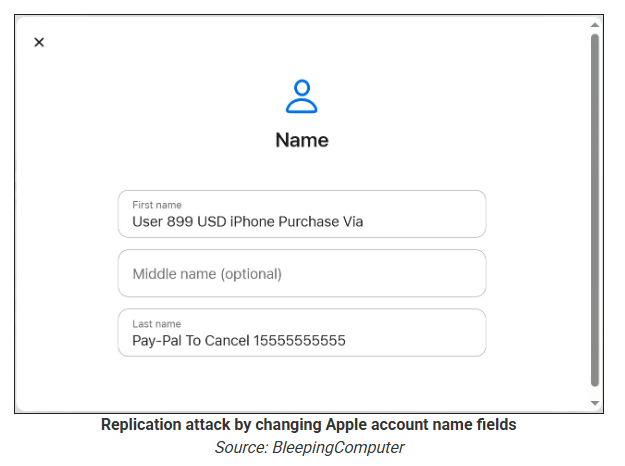
The attacker creates an Apple ID they control, then stuffs the phishing message into the personal information fields (first name, last name, possibly address), splitting it across fields because they will not fit into just one.

To launch the phish, the attacker changes something benign on their specially created Apple account, such as shipping information, which causes Apple’s systems to send a “Your Apple account was updated” security email.

While the original alert is addressed to the attacker’s iCloud email, they are then able to redistribute it to a wider victim list, for example through a mailing list.

In the copy the targets receive, the email headers still show a legitimate Apple sender, and the presence of the attacker’s iCloud address can even make it look like “someone else” has gained access to the account.

Reconstruction. Image courtesy of BleepingComputer

Because Apple includes those user-supplied fields in the security email, the phishing text is delivered inside a legitimate message sent from Apple’s own infrastructure.

This method, called call-back phishing, filters out suspicious users, so the scammers can focus on the people who fell for the first part.

The emails come from a legitimate source, sail through every security filter because of that, and look convincing enough to scare the receiver into thinking someone spent $899 from their PayPal account.

Phishing email screenshot, courtesy of BleepingComputer

But the structure of the email does not make sense.

“Dear User” is immediately followed by the scam message where your name should have been. The header says it’s about account information rather than a purchase. And the iCloud account does not belong to the recipient. So, once you know how it’s done, they’re not impossible to spot. Which is why we wrote this blog.

And when in doubt, you can always ask Malwarebytes Scam Guard.


Scam or legit? Scam Guard knows.


Is this a scam?
Asking Scam Guard

Scam Guard identified the screenshot as a scam and guides users through the next steps.

Scams like these work, because many users still view phone calls as more trustworthy than email, especially if the email itself passed all the usual technical authenticity checks and they initiated the call themselves.

How to stay safe

Tech support scammers will try to convince callers to install some kind of remote desktop application to steal data from your computer, or ask for financial details so they can steal your money.

To stay safe from these scammers:

  • Be wary of unexpected alerts about high‑value purchases you do not recognize. They are suspicious even if they come from a real domain.
  • Never call a number sent to you by unsolicited means or even found in sponsored search results.
  • Carefully read emails and text messages, even if they come form trustworthy addresses. Does the email make sense from a structural and linguistic point of view?
  • If someone claiming to be support for a legitimate company asks for remote access or payment details during a call, hang up and contact the company through official channels.
  • Use Malwarebytes Scam Guard to analyze any kind of message that alarms you or urges you to take immediate action.

Something feel off? Check it before you click.  

Malwarebytes Scam Guard helps you analyze suspicious links, texts, and screenshots instantly.  

Available with Malwarebytes Premium Security for all your devices, and in the Malwarebytes app for iOS and Android.  

Try it free → 

Android 17 ends all-or-nothing access to your contacts

21 April 2026 at 12:12

Some of the apps on your phone want your contacts. Most don’t need them all, but have been happily slurping up the lot for years. Google has decided to do something about that with the next version of Android.

Android 17 (currently in preview) is introducing a new Contact Picker that lets users grant apps access to specific contacts rather than the entire list.

Previously, any app that needed a single phone number had to request READ_CONTACTS. That’s a permission that handed over every name, email, and number. It’s the digital equivalent of handing someone your entire Rolodex because they asked for one business card.

An app that can harvest your entire contact list can map your social network, identify your family members, and potentially hand that data to whoever’s buying. So whenever you click “yes” to “show us all your contacts” it isn’t just your privacy you’re playing with.

From Android 17 onward, apps will need to be more specific about what contact data they access. Phone number? Fine. Email address? Sure. Your cousin’s mailing address? Not unless the app has a reason.

Google’s updated Play policy will require apps to use the Contact Picker or the Android Sharesheet as the main way to access contacts. READ_CONTACTS will be reserved for apps that genuinely can’t function without it. 

Location sharing gets the privacy treatment

Location permissions are also set to become more granular and privacy-friendly in Android 17.

Previously, apps could ask for your precise or general location, and you could allow it just once, any time you’re using the app, or not at all. The new button adds nuance by letting app developers ask for your location in the moment, tied to a specific action, like finding a local cafe.

There will also be a persistent indicator to let you know when an app is using your location, similar to the alerts for camera or microphone access. And you’ll be able to find out which apps are tracking you as well.

Google blocked 8.3 billion bad ads in 2025

The tighter permissions management in Android 17 is a big deal for privacy advocates, because overly broad access is how data brokers build detailed profiles about you.

Those profiles can then be used for aggressive or invasive advertising, including scams.


Mobile protection, anywhere, anytime.


Google timed these privacy announcements alongside its latest Ad Safety report, which says it blocked 8.3 billion policy-violating ads and suspended 24.9 million advertiser accounts in the last year. 

The 8.3 billion figure is up from 2024, when Google blocked 5.1 billion ads. The increase suggests that the problem is getting worse, or that Google is getting better at catching it. Scam ads are a big part of that. In 2024, Google blocked 415 million scam-related ads. In 2025, that number grew to 602 million. 

Lest we forget

We’ll give Google credit for trying to tackle this problem from both ends—limiting data collection and cracking down on the kinds of ads that use that data maliciously. But there’s still a sense that it’s not doing quite enough.

Yes, the Android 17 permission changes are good for users, but granular contact access should have been the default years ago. Apple has been doing it for 18 months in iOS 18, and even that was years too late, in our opinion.

And while Google says it caught over 99% of violations before users ever saw them, 1% of an insanely large number is still insanely large.

The ads that still get through are damaging. In December, we reported on sponsored search results pointing to malicious AI chats that instructed people to install infostealer malware. Why does Google run ads that look like search results? Because its business model is driven by advertising revenue. At least it’s making it easier to hide them now.

So we’ll give a cautious hand clap to Google. It’s moving in the right direction. But stories about how it knowingly giving kids’ data inappropriately to advertisers or misusing health data still give us pause.


Scammers know more about you than you think. 

Malwarebytes Mobile Security protects you from phishing, scam texts, malicious sites, and more. With real-time AI-powered Scam Guard built right in. 

Download for iOS → Download for Android → 

Mythos: An AI tool too powerful for public release

20 April 2026 at 15:54

Anthropic’s most capable model to date, Claude Mythos Preview  (aka Mythos), has been described as a “step change” in AI performance, especially on cybersecurity tasks.

Anthropic tried to keep Mythos a secret until a few weeks ago, when a data leak revealed the existence of what the company said was its most powerful artificial intelligence to date. The models is seen as both a powerful defensive tool, and, potentially, a serious offensive cyberweapon.

For that reason, the company is sharply limiting access and signaling it does not plan to release it broadly to the market right now. Its reported ability to autonomously find and even chain software vulnerabilities at scale sit at the core of both the hype and the danger.

Imagine a tool that can independently find new vulnerabilities in software, systems, and platforms, then turn them into exploits, even if that requires chaining them with other vulnerabilities.

In the wrong hands, that could be a major threat to our cyber safety. So Anthropic has limited access to a small number of organizations worldwide, including major tech firms and a select group of government or security bodies. The NSA is reportedly already using Mythos Preview, apparently to stress‑test and harden sensitive systems, despite the Pentagon labelling Anthropic as a supply chain risk.

Mythos can discover vulnerabilities across large codebases more quickly and reliably than existing tools, and can look for multiple flaws in one system and combine them into multi‑step exploit chains to complete a compromise (for example, going from a simple web bug to a full domain takeover). It would take a bug bounty hunter months to find another vulnerability, let alone one chainable with the one(s) already discovered. Accomplishing that before the first one would be highly unlikely.

In practical terms, that could mean faster attacks, more complex breaches, and less time for companies to fix weaknesses before they’re exploited.

Anthropic itself has highlighted that Mythos can work with minimal supervision for extended periods, meaning it could run systematic attack campaigns at a scale no human team could accomplish.

Anthropic flagged these security risks in an internal document:

  • AI lowers the skill floor for offensive operations. Less-skilled actors could get access to very effective tools, significantly increasing the number of advanced attacks.
  • Techniques like fuzzing, dictionary attacks, and other brute force methods become much more effective when sped up by automation. AI-assisted iteration can provide an attacker with a lot more tries before an attack gets noticed.

But the most concerning conclusion was that the offensive side is iterating faster in the current phase of AI development, and security teams are generally later adopters of AI tooling than their adversaries.

As we know, AI in cybersecurity works both ways. It helps us defend against new threats, but it can also be used to create them. Which is why, in the wrong hands, Mythos can turn out to be a formidable adversary.

The goal stays the same, but the way to get there is paved by tools like Mythos. From the attacker’s seat, nothing about the destination is new. The novelty is that Mythos now automates the map, the vehicle, and most of the driving.


We don’t just report on threats—we remove them

Cybersecurity risks should never spread beyond a headline. Keep threats off your devices by downloading Malwarebytes today.

This old-school scam is still working

17 April 2026 at 16:34

When we read about this new malware tactic, or that novel social engineering approach, it’s easy to forget that there are scammers out there making a living from ancient methods.

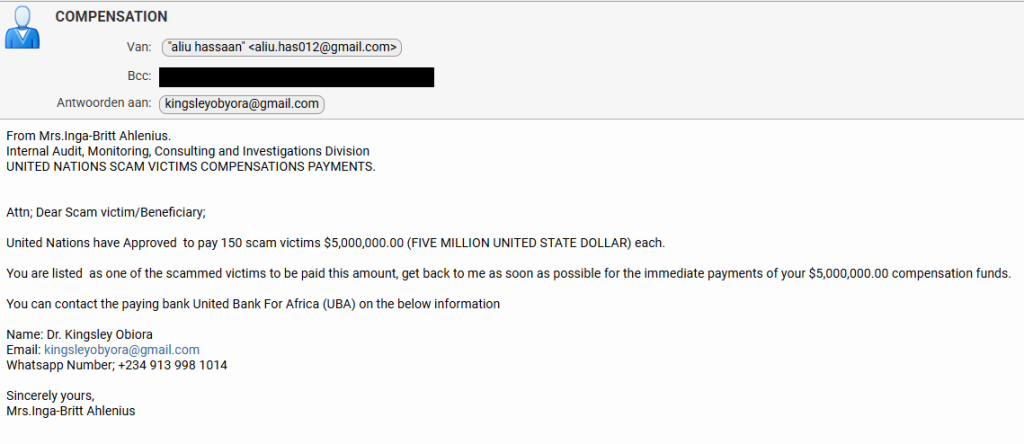
Recently, one of our researchers received this variation on the good old Nigerian advance-fee scam.

screenshot of email

From: Mrs.Inga-Britt Ahlenius.
Internal Audit, Monitoring, Consulting and Investigations Division
UNITED NATIONS SCAM VICTIMS COMPENSATIONS PAYMENTS.

Attn; Dear Scam victim/Beneficiary;

United Nations have Approved to pay 150 scam victims $5,000,000.00 (FIVE MILLION UNITED STATE DOLLAR) each.

You are listed as one of the scammed victims to be paid this amount, get back to me as soon as possible for the immediate payments of your $5,000,000.00 compensation funds.

You can contact the paying bank United Bank For Africa (UBA) on the below information

Name: Dr. Kingsley Obiora
Email: kingsleyobiora@gmail.com
Whatsapp Number, +234 913 998 1014 Sincerely yours,
Mrs.Inga-Britt Ahlenius


Scam or legit? Scam Guard knows.


The scammers got a few details right. Anyone looking up the names in the email will find that they exist and are associated with the mentioned organizations.

IngaBritt Monica Stigsdotter Ahlenius is a Swedish auditor, public servant and former Under-Secretary-General for the United Nations.

The name “Inga‑Britt Ahlenius” has been reused across many such 419‑style advance‑fee scams, sometimes claiming she is a UN fund monitoring agent or under‑secretary general distributing tens of millions in “compensation” or “unclaimed funds.”

Kingsley Obiora is a Nigerian economist who served as the Deputy Governor of Economic Policy at the Central Bank of Nigeria from 2020 to 2023. Which lends a degree of credibility to the Nigerian country code (+234) in the number they want us to contact by WhatsApp.

So, we decided to put our “friend” Tess to work once again. Loyal readers will remember how Tess almost fell for a task scammer. So maybe she’s eligible for that five-million-dollar compensation.

Promising a $5M ATM card

They came right to the point. We’d have to pay a courier fee to get our $5 million dollar ATM card. And I’m pretty sure that if we agreed to pay that, additional costs would swiftly follow. Once you’ve invested a bit of money, you’re likely to keep going since you don’t want to lose what you’ve already paid.

So, I offered to pick up the ATM card in person. Always wanted to see Nigeria.

Offering my fake company ID card worked

For a while I thought they saw through my bluff. Maybe I shouldn’t have disclosed just yet that I work for Malwarebytes. But it quickly became clear they trusted me about as much as I trusted them.

Visiting address

I’ll play along as long as I can, but after giving me the physical address of the UBA bank in Lagos, Nigeria, they started to make it more difficult to pick up the ATM card in person.

Cancelled in a week

A week is not a long time to arrange a trip to Nigeria, so I tried to get an idea of how much the “courier” would set me back before they gave up on me.

$875 for the courier

I didn’t expect it to be that much, to be honest. Maybe they thought they could raise the price since I contemplated to pick it up in person. Or they just wanted to get rid of me. You’d expect them to charge maybe €75 for the courier and then come up with €200 for stamp duty and €600 for insurance later on.

Consequences are real

It’s easy to laugh at talk of five‑million‑dollar ATM cards, but campaigns like this still make money. Behind every “Dear Scam victim/Beneficiary” is someone who is lonely, in debt, or simply overwhelmed by official‑sounding language. Once they’ve paid the first “courier fee,” the sunk‑cost effect kicks in, and it becomes harder and harder to walk away.

This is especially true for people who have already been victims of scams, who are clearly the target here.

How to stay safe

Tess’ efforts have helped us highlight the red flags in this type of scam:

  • Receiving news of a huge payout out of the blue should definitely trigger the “too good to be true” alarm bells.
  • For important communications, free webmail and WhatsApp are rarely the official contact channels.
  • Scammers apply pressure to act quickly and ask you to pay a fee before you receive anything.
  • They often use vague job titles and ask you to keep things quiet.
  • Odd language and capitalization can be a clue, although AI is making these less common.

Any one of these signs is a reason to stop and delete the email. Together, they spell out a classic advance‑fee scam.

For Tess this was a safe experiment: no money lost, just a few evenings spent sparring with a “UN compensation officer” on WhatsApp. For the people these criminals really want to reach, the stakes are much higher.

If you, or someone you care about, ever receives a message promising life‑changing money in exchange for a small courier fee or processing charge, treat it as a warning sign, not a windfall.

Close the tab, delete the message, and, if in doubt, ask a trusted friend or advisor before you act.

The easiest way to recognize a golden‑oldie scam is still the simplest: if it sounds too good to be true, it probably isn’t true.


Something feel off? Check it before you click.  

Malwarebytes Scam Guard helps you analyze suspicious links, texts, and screenshots instantly.  

Available with Malwarebytes Premium Security for all your devices, and in the Malwarebytes app for iOS and Android.  

Try it free → 

“Your shipment has arrived” email hides remote access software

17 April 2026 at 09:40

An attachment in an email impersonating DHL about a shipment contains a link to a preconfigured SimpleHelp remote access tool—an ideal starting point for attackers to explore a network, steal data, and drop additional malware.

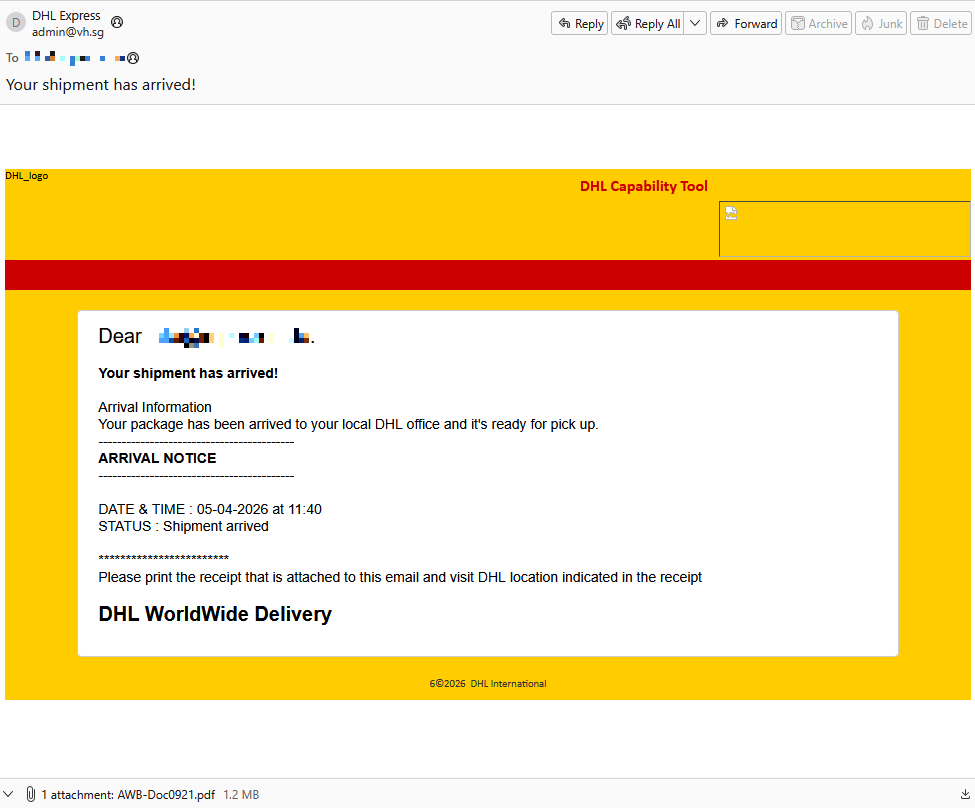
A German industrial spare parts and equipment supplier received an email pretending to be from DHL, claiming a shipment had arrived.

Screenshot of email pretending to be from DHL

Given their line of business, I imagine they get this type of email all the time. But a few details stood out:

  • The sender’s email address did not belong to DHL,
  • the receiver address was the general info@ for the company,
  • the images in the email were hosted on ecp.yusercontent.com,  
  • and, most importantly, there was attachment.

While the remote content is hosted on a legitimate Yahoo webpage commonly used to serve images and other content in Yahoo Mail, this is not something DHL typically uses.

The attachment, a PDF file called AWB-Doc0921.pdf is just a blurred image with a Microsoft-branded button that prompts the victim to “Continue” to access a secure file.

blurred content with a Continue button

In reality, clicking the button downloads a file called AWB-Doc0921.scr from the domain longhungphatlogistics[.]vn, a domain belonging to a Vietnamese logistics company that was likely compromised to host malware.

Malwarebytes blocks longhungphatlogistics[.]vn

A .scr file is a Windows file, which is an executable (.exe) file used to launch screensavers. They are often used to hide malicious code because Windows trusts them, allowing them to bypass some security layers. 

In this case, the file is a modified installer of a remote access tool signed by SimpleHelp.

UAC prompt for the signed installer

SimpleHelp is a remote support and remote monitoring and management (RMM) platform. It allows remote desktop control, file transfer, diagnostics, and unattended access. In the wrong hands, that’s effectively a support-style backdoor. Attackers can use it for reconnaissance, credential theft, lateral movement, defense evasion, and staging further malware, including ransomware. We’ve seen SimpleHelp abused in this way before.

This is basically a beaconing model. Once installed, the system connects out to the attacker’s server, which is more likely to be allowed through NAT and firewalls than inbound connections. Because the user initiated the install, the attacker gets immediate visibility of the system and can reconnect later whenever the service is running. In the case of a phish, that means the lure only has to get the victim to execute the file once. After that, the attacker’s console can show the new machine as a manageable asset.

For what seems to be a non-targeted attack, the campaign shows a decent level of sophistication by using legitimate components to trick targets into running the remote access tool.

How to stay safe

The good news: once you know what to look for, these attacks are much easier to spot and block. The bad news: they’re cheap, scalable, and will continue to circulate.

So, the next time a “PDF” prompts you to download a file, pause to think about what might be hiding under the hood.

Beyond avoiding unsolicited attachments, here are a few ways to stay safe:

  • Only access your accounts through official apps or by typing the official website directly into your browser.
  • Check file extensions carefully. Even if a file installs a legitimate tool, it may not be safe to run it.
  • Enable multi-factor authentication for your critical accounts.
  • Use an up-to-date, real-time anti-malware solution with a web protection module.

Pro tip: Malwarebytes Scam Guard recognized this email as a scam.


Something feel off? Check it before you click.  

Malwarebytes Scam Guard helps you analyze suspicious links, texts, and screenshots instantly.  

Available with Malwarebytes Premium Security for all your devices, and in the Malwarebytes app for iOS and Android.  

Try it free → 

“iCloud storage is full” scam is back, and now it wants your payment details

16 April 2026 at 14:33

A few months ago, we reported on a fake cloud storage alert that triggered a redirect chain to an app that has since been delisted from the Apple Store.

The threat of losing your photos is a powerful lure, so scammers are now using it to steal personal and financial details.

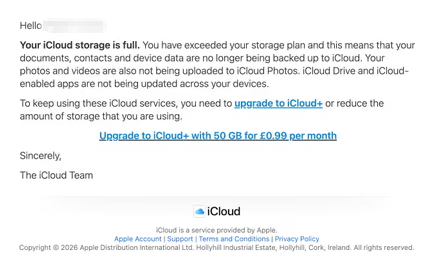
The Guardian warns about an iCloud-themed campaign that start with a few “your iCloud storage is full’ messages, then escalates to threats. If you don’t respond or take action, the emails claim your data will be wiped on a specific date.

US Consumer Affairs has urged users not to click any links and to contact Apple directly if they receive such messages.

The deadline in the emails is never far away, usually just two days. No scammer ever wants you to think things through before you act, so there is always time pressure.

We’ve seen these emails in English and Spanish. Oddly, the monthly rate is set at 99 pence or 99 euro cents respectively.

The 0.99 seems to be the magic number. In reality, scammers don’t care about the payment. What they want is for you fill out the form on their phishing site.

Email saying you must upgrade to iCloud+ or lose your photos

The screenshot above is just one of many examples. There are plenty of variations, but they all follow the same them: make a small payment to stop the files in your iCloud storage from being deleted.

The websites these emails link to also vary, but they all ask for personal and payment details to complete that payment.

How to stay safe

It’s worth remembering that Apple does notify users when their iCloud storage is nearing capacity, but those alerts appear within your device settings or as official system notifications. They don’t come through unsolicited text messages or emails with external links. If you need to check your storage, go directly to Settings on your device and review your iCloud usage.

So, to stay safe:

  • Always access your account through our official website.
  • Never share your password with anyone.
  • Never click on links in unsolicited emails without verifying with a trusted source.
  • Use an up-to-date, real-time anti-malware solution with a web protection component.
  • Do not engage with websites that attract visitors like this.

Pro tip: Malwarebytes Scam Guard would have helped you identify this email as a scam and provided advice on how to proceed.


Something feel off? Check it before you click.  

Malwarebytes Scam Guard helps you analyze suspicious links, texts, and screenshots instantly.  

Available with Malwarebytes Premium Security for all your devices, and in the Malwarebytes app for iOS and Android.  

Try it free → 

AI clickbait can turn your notifications into a scam feed

15 April 2026 at 19:43

Pushpaganda is the name researchers have given to an AI-assisted ad fraud, social engineering, and scareware operation targeting mobile users.

For most people, Pushpaganda starts as something that looks completely normal. For example, a recommended article in your Google Discover feed (the personalized news stream on your phone) or one of the suggested stories you see when you open a new Chrome tab. The operators behind this campaign use AI‑generated articles and images, plus aggressive SEO or paid placement, to get their content surfaced in those feeds so it feels like any other story about money, tech, or politics.

The topics are classic clickbait. You might see a card about a new tax refund, a government payout, a bank deposit, or some too‑good‑to‑be‑true gadget like a $100 phone with a “300MP camera.” On a small mobile screen, with a matching thumbnail and a headline tailored to your region, that’s exactly the kind of thing many people would reasonably tap.

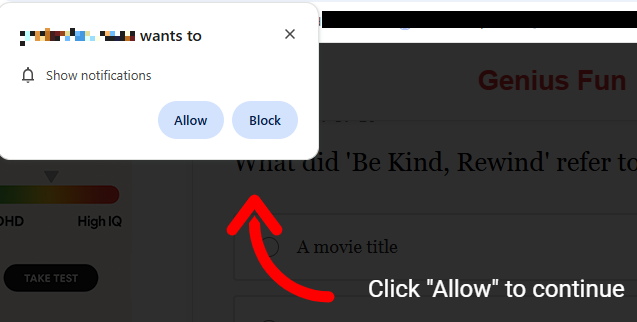
Having tapped, you land on an attacker-controlled site that looks like a regular article page but wastes no time throwing up a browser prompt asking to send you notifications. Many users have been trained by years of pop-ups to click “Allow” just to get it out of the way, especially if the page claims you need to click “Allow” to continue reading or see the offer.

Some pages will falsely claim you have to click Allow to continue reading

Unfortunately, with that single tap, the site now has permission to push messages straight to your Android or desktop, where they sit alongside emails, chats, and real alerts from banks or government apps. Because the notifications don’t behave like traditional pop‑ups and can bypass normal ad‑blocking, many people don’t realize they’ve effectively subscribed to a scam channel.

The result is a stream of alarming notifications that seem to come out of nowhere and have little to do with the original site you visited, so the link between the site and the notifications is usually lost on the victims. Clicking those notifications rarely leads to what they promise. Instead, you’re pushed to another domain in the same network, which may ask for even more permissions, personal data, or try to funnel you into financial scams. Over time, this can expose you to fake investment schemes, fraudulent “tech support” numbers, or pages pushing questionable subscriptions.

All of this costs you time and attention, and sometimes money. At best, you end up with a polluted notification tray full of fake alerts that make it harder to spot something genuinely important. At worst, you follow one scare message too far, hand over personal details or payment information, and become the victim of fraud, identity theft, or aggressive subscription traps. And even if you never click again, your browser is still quietly loading pages and ads you never asked for.

How to stay safe from Pushpaganda

Treat “Allow notifications” prompts as potential traps, especially on sites you’ve never heard of that you reached via a feed or a search result. And even more so if they come with additional, misleading, instructions.

Besides that you should:

  • Be skeptical of sensational cards in your Discover feed that promise sudden cash, miracle devices, or dramatic political revelations.
  • Don’t trust buttons that scream “Apply now,” “Claim now,” or “Join WhatsApp” on pages that already feel pushy or poorly written.
  • Keep your browser, operating system (OS), and other important software up to date.
  • Use a security app that can block malicious websites and scam pages before they load.

Scammers know more about you than you think. 

Malwarebytes Mobile Security protects you from phishing, scam texts, malicious sites, and more. With real-time AI-powered Scam Guard built right in. 

Download for iOS → Download for Android → 

Zombie ZIP method can fool antivirus during the first scan

16 March 2026 at 17:09

A researcher published “Zombie ZIP,” a simple way to change the first part (header) of a ZIP file so it falsely claims its contents are uncompressed while they are actually compressed.

Many antivirus products trust that header and never properly decompress or inspect the real payload. In tests conducted about a week after disclosure, around 60 of 63 common antivirus suites failed to detect malware hidden this way—roughly 95% of engines let it pass.

Zombie ZIP is essentially a method to create a malformed ZIP file that can bypass detection by most antivirus scanners. The technique has a major caveat, though. The malformed ZIP file requires a custom loader to open it correctly. Any normal archive utility like the built-in Windows extractor, 7-zip, WinRAR, and others will also flag the file as malformed.

The vulnerability is tracked as CVE-2026-0866, although several cybersecurity researchers dispute whether it should be categorized as a vulnerability or assigned a CVE at all. The fact that it requires a custom loader makes it almost impossible for this method to infect a system that is not already compromised.

It still allows anti-malware solutions to detect both the custom loader and any known malware once the payload is properly decompressed. In other words, the bypass only affects the initial inspection of the ZIP file, not the actual execution of already known malware.

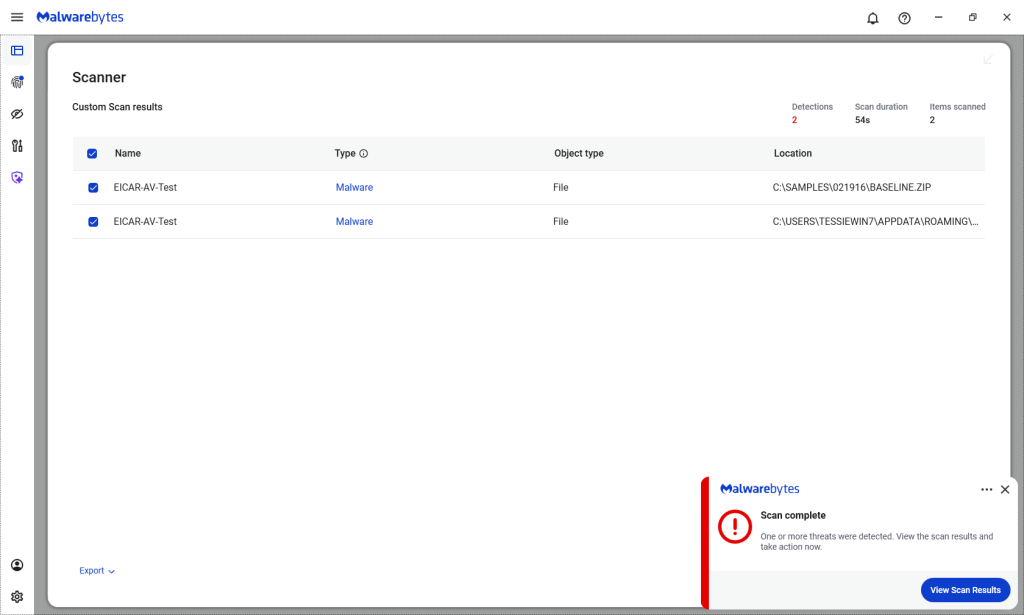
Malwarebytes/ThreatDown products detected both files, by the way.

Malwarebytes detects Zombie ZIPs

Technical details

On their GitHub page (currently blocked by Malwarebytes Browser Guard due to a risky pattern), the researchers explain how the Zombie ZIP method works.

By changing the file’s compressiontype to 0 (STORED), tools trying to read the archive assume the file’s contents are simply stored inside the ZIP file and not compressed.

“AV engines trust the ZIP Method field. When Method=0 (STORED), they scan the data as raw uncompressed bytes. But the data is actually DEFLATE compressed — so the scanner sees compressed noise and finds no signatures.

The CRC is set to the uncompressed payload’s checksum, creating an additional mismatch that causes standard extraction tools (7-Zip, unzip, WinRAR) to report errors or extract corrupted output.

However, a purpose-built loader that ignores the declared method and decompresses as DEFLATE recovers the payload perfectly.

The vulnerability is scanner evasion: security controls assert ‘no malware present’ while malware is present and trivially recoverable by attacker tooling.”

Security researcher Didier Stevens published a method to safely examine the content of a malformed Zombie ZIP file. One way to spot the manipulation is by comparing the ZIP header fields compressedsize and uncompressedsize. If they are different, that means the ZIP file is not actually STORED, but compressed.


We don’t just report on threats—we remove them

Cybersecurity risks should never spread beyond a headline. Keep threats off your devices by downloading Malwarebytes today.

A week in security (March 9 – March 15)

16 March 2026 at 08:16

Last week on Malwarebytes Labs:

Stay safe!


We don’t just report on scams—we help detect them

Cybersecurity risks should never spread beyond a headline. If something looks dodgy to you, check if it’s a scam using Malwarebytes Scam Guard. Submit a screenshot, paste suspicious content, or share a link, text or phone number, and we’ll tell you if it’s a scam or legit. Available with Malwarebytes Premium Security for all your devices, and in the Malwarebytes app for iOS and Android.

[updated] Google patches two Chrome zero-days under active attack

13 March 2026 at 13:58

Update March 16, 2026
Earlier this week, Google incorrectly reported that an actively exploited vulnerability in Chrome had been fixed, and has now announced it will roll out a new update to protect users against the vulnerability tracked as CVE-2026-3909.

Original content:

Google has released an out-of-band security update for Chrome desktop that patches two high‑severity zero‑day vulnerabilities.

Both bugs can be exploited remotely and require only that a user visit a malicious website. Because the attack complexity is low, the vulnerabilities pose a higher real-world risk.

How to update Chrome

The latest version numbers are 146.0.7680.75/76 for Windows and macOS and 146.0.7680.75 for Linux. If your Chrome browser is on version 146.0.7680.75 or later, you’re protected from these vulnerabilities.

The easiest way to stay up to date is to allow Chrome to update automatically. However, updates can lag if you rarely close your browser, or if something interferes with the update process.

To update manually:

  1. Click the More menu (three dots)
  2. Go to Settings > About Chrome.
  3. If an update is available, Chrome will start downloading it.
  4. Restart Chrome to complete the update, and you’ll be protected against these vulnerabilities.
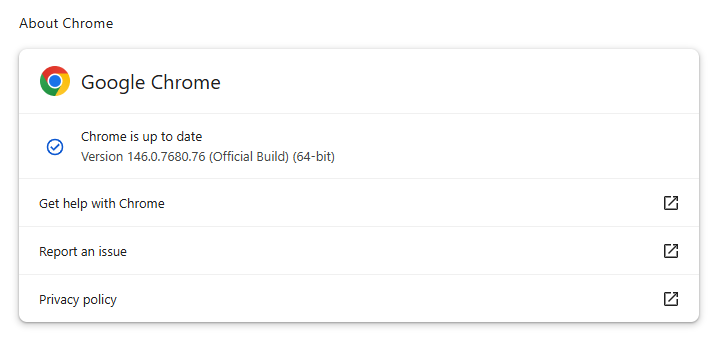
Chrome on Windows up to date
Chrome (on Windows) is up to date

You can also find step-by-step instructions in our guide to how to update Chrome on every operating system, which includes instructions for checking your version number.

Technical details

Google reports that it discovered and fixed both bugs internally, with patches landing within roughly two days of reporting.

CVE‑2026‑3909 is an out‑of‑bounds write vulnerability in Skia, Chrome’s 2D graphics library used to render web content and UI elements. A remote attacker can lure a user to a malicious webpage that triggers the bug, corrupts memory, and potentially achieves code execution in the browser context. Skia is an open source 2D graphics library used not only in Google Chrome but also in many other products.

CVE‑2026‑3910 is an inappropriate implementation flaw in the V8 JavaScript and WebAssembly engine. A specially crafted HTML page could allow a remote attacker to execute arbitrary code inside the V8 sandbox. V8 is the engine that Google developed for processing JavaScript, and it has seen more than its fair share of bugs.

Chrome’s Skia and V8 components are prime targets because they sit directly on the path between untrusted web content and the underlying system.

It is possible to chain an out‑of‑bounds write in Skia with other bugs to break out of the renderer sandbox, while V8 implementation flaws frequently appear in exploit chains used by targeted threat actors and spyware vendors.

How to stay safe

To protect your device, update Chrome as soon as possible. Here are some more tips to avoid becoming a victim, even before a zero-day is patched:

  • Don’t click on unsolicited links in emails, messages, unknown websites, or on social media.
  • Enable automatic updates and restart regularly. Many users leave browsers open for days, which delays protection even if the update is downloaded in the background.
  • Use an up-to-date, real-time anti-malware solution which includes a web protection component.

Users of other Chromium-based browsers can expect to see a similar update soon.


We don’t just report on threats—we remove them

Cybersecurity risks should never spread beyond a headline. Keep threats off your devices by downloading Malwarebytes today.

Apple patches Coruna exploit kit flaws for older iOS versions

12 March 2026 at 18:49

On March 3, 2026, Google warned about a powerful exploit kit targeting Apple iPhone models running iOS version 13.0 (released in September 2019) up to version 17.2.1 (released in December 2023).

In the latest security updates, Apple patched the vulnerabilities used in the Coruna exploit kit for older mobile devices that can no longer be updated to the latest iOS version. For newer iOS versions, patches associated with the Coruna exploit were already shipped in iOS 16.6 through 17.2 in updates released in 2023 and 2024.

The Coruna exploit kit was first observed in highly targeted attacks, but was later seen in watering hole attacks targeting Ukrainian users by a suspected Russian espionage group. Later still, it appeared on a very large set of fake Chinese financial websites, suggesting the exploit was being used by more mainstream cybercriminals.

The exploit relies on WebKit vulnerabilities (CVE-2023-43000 and CVE-2024-23222) that can be triggered by processing  maliciously crafted web content, and then gains kernel privileges by abusing a separate kernel vulnerability tracked as CVE-2023-41974.

The table below shows which updates are available and points you to the relevant security content for that operating system (OS).

iOS 16.7.15 and iPadOS 16.7.15iPhone 8, iPhone 8 Plus, iPhone X, iPad (5th generation), iPad Pro 9.7-inch, and iPad Pro 12.9-inch (1st generation)
iOS 15.8.7 and iPadOS 15.8.7iPhone XS, iPhone XS Max, iPhone XR, iPad (7th generation)

How to update your iPhone or iPad

For iOS and iPadOS users, here’s how to check if you’re using the latest software version:

  • Go to Settings > General > Software Update. You will see if there are updates available and be guided through installing them.
  • Turn on Automatic Updates if you haven’t already. You’ll find it on the same screen.

We don’t just report on phone security—we provide it

Cybersecurity risks should never spread beyond a headline. Keep threats off your mobile devices by downloading Malwarebytes for iOS, and Malwarebytes for Android today.

This Android vulnerability can break your lock screen in under 60 seconds

12 March 2026 at 14:13

A vulnerability in Android devices can allow attackers to gain access to a phone in less than a minute.

The vulnerability, tracked as CVE-2026-20435, affects certain MediaTek SoCs (System-on-a-Chip) using Trustonic’s TEE (Trusted Execution Environment). That may sound rare, but reportedly that’s about one in four Android phones, mostly cheaper models.

Researchers demonstrated the vulnerability by connecting a vulnerable phone to a laptop over USB, showing how their exploit recovered the handset PIN, decrypted storage, and extracted seed phrases from several software wallets.

You may argue that if an attacker has your phone, you’re already in trouble. Which is true. But the protection you rely on to keep your data safe if your phone is lost or stolen doesn’t help one bit here.

The exploit was able to extract the root keys protecting full‑disk encryption before Android fully boots and then decrypt storage. While full‑disk encryption and lock screen are supposed to be your safety net if the phone is stolen or lost, those layers fail on affected devices.

Is my phone affected?

If you’re not sure whether this vulnerability affects your mobile device, you can look up your phone on a platform like GSMArena  or your vendor’s website to see which SoC it uses, then cross‑check with MediaTek’s March Security bulletin under CVE-2026-20435.

MediaTek released a firmware patch that device manufacturers can include in security updates for their phones. So all you can do is make sure you’re fully patched with the latest security update from your manufacturer. Which, depending on the patch gaps and how far along your device is in the EOL cycle, can take anywhere from days to forever.

EOL (End-of-Life) refers to the point in a product’s lifecycle when the manufacturer stops selling, marketing, or providing full support for it.

But obviously the best advice we can give you is to keep a close eye on your phone, so it doesn’t get lost or stolen.


We don’t just report on phone security—we provide it

Cybersecurity risks should never spread beyond a headline. Keep threats off your mobile devices by downloading Malwarebytes for iOS, and Malwarebytes for Android today.

Microsoft Authenticator could leak login codes—update your app now

12 March 2026 at 11:24

A vulnerability in Microsoft Authenticator for both iOS and Android (CVE-2026-26123) could leak your one-time sign-in codes or authentication deep links to a malicious app on the same device. 

Deep links are predefined URIs (Uniform Resource Identifiers) that allow direct access to an activity in a web or mobile application when clicked. In simple terms, they are specifically constructed links used to open an app and complete actions like signing in.

Microsoft Authenticator is a mobile app that generates time-based one-time codes and handles sign-in links and QR-based logins for Microsoft and other accounts. It is widely used for multi-factor authentication (MFA) on personal phones, including BYOD (Bring Your Own Device) devices that protect access to corporate and production services.

This vulnerability affects users who have Microsoft Authenticator installed on an iOS or Android device. For the vulnerability to be exploited, the user would first need to install a malicious app on their device and then accidentally choose that app to handle a sign‑in deep link.

If that happens, the malicious app receives the one-time code or sign-in information and can potentially use it to authenticate as the victim.​

If successful, an attacker could:

  • Complete login flows to services that trust your Microsoft Authenticator codes.
  • Access the information and services available to the compromised account (email, files, cloud apps, or production systems in a BYOD context).​
  • Potentially pivot to additional accounts if those are also protected by codes delivered via Authenticator on the same device.

How to stay safe

The fix for CVE-2026-26123 is already included in current releases, so installing updates is the most effective mitigation.

  • On iOS: Open the App Store. Tap the My Account button or your photo at the top of the screen. Scroll down to see pending updates and release notes. Tap Update next to an app to update only that app, or tap Update All.
  • On Android: Open the Google Play Store app. At the top right, tap the profile icon. Tap Manage apps & device. Under “Updates available,” tap See details. Next to the app you want to update, tap Update. To update all your apps at the same time, tap Update all.

Note: If your device manufacturer has implemented a different method to apply app updates, the steps may vary slightly.

If you are temporarily unable to update the app, avoid installing new apps that request to handle authentication links, QR-based sign-ins, or web-to-app sign-in flows.

When scanning QR codes or tapping sign-in links, verify that the handler is Microsoft Authenticator or another trusted app, and not an unknown, recently installed, or otherwise suspicious app.​

Where possible, use alternative MFA options you already trust (such as built-in authentication in your password manager or platform-specific solutions like Apple’s password features) until you can apply the update.

Use anti-malware protection for your mobile devices that can help detect malicious apps.


We don’t just report on phone security—we provide it

Cybersecurity risks should never spread beyond a headline. Keep threats off your mobile devices by downloading Malwarebytes for iOS, and Malwarebytes for Android today.

Meta rolls out anti-scam tools across WhatsApp, Facebook, and Messenger

12 March 2026 at 10:56

Meta has rolled out more anti-scam protections across WhatsApp, Facebook, and Messenger to fight sophisticated fraud tactics. The features will help stop celebrity impersonators and brand spoofers from defrauding its users, the company said.

Meta is also targeting attackers who exploit legitimate platform features like device linking to hijack accounts. People use this feature to connect more than one of their devices to their account, enabling them to flit between their phone and their computer without skipping a beat.

Scammers fool users into sharing phone numbers and linking codes that then let them link their own malicious devices to the user’s account. They can then access the victim’s messages and send messages impersonating them. Victims usually retain account access, making breaches harder to detect.

More protections in Facebook and Messenger

The protections go beyond WhatsApp. Meta has also deployed AI-powered protections across Facebook and Messenger to catch fraudsters before they hook victims. Facebook will now test warnings for friend requests that seem fishy, flagging profiles with few mutual connections or mismatched locations.

Messenger’s scam detection can also identify patterns like bogus job offers from new contacts. Users can submit suspicious chats for AI review, which analyzes text, images, and contextual signals to spot celebrity impersonation schemes. So if Brad Pitt’s mum appears to be matchmaking, you’ll have a digital wingman to restore your sense of reality.

The new measures also spot brand spoofing and deceptive links, so if someone tries to direct you to a fake website for a well-known company, Meta will do its best to block that.

Malwarebytes users benefit from similar protection through Scam Guard, which analyzes suspicious messages, links, and conversations across multiple platforms, not just one app.

There’s more at play than just altruism

This is part of an ongoing anti-scam campaign by Meta, which launched anti-scam protections on WhatsApp and Messenger last October. It also says that it removed more than 159 million scam ads and dismantled 10.9 million accounts on Facebook and Instagram linked to criminal operations in 2025. It also participated in a global law enforcement operation that arrested 21 suspects and shuttered more than 150,000 accounts linked to Southeast Asian scam networks.

Still, the move may not be entirely altruistic. Regulators have been demanding answers from Facebook about the extent to which it fights scams. Forty-two state attorneys general wrote to the tech giant last June about investment scam ads on its platform. And in November, Consumer Reports asked the FTC and state attorneys to take action against the company over:

“knowingly allowing the proliferation of billions of scam advertisements.”

That request likely stemmed from reports last year suggesting Meta has constrained some anti-scam measures. Reuters reported that the company limited anti-scam enforcement to actions costing no more than 0.15% of total revenue. Internal documents also reportedly estimated that the company received $16bn in revenue from scam ads (an estimate Meta later disputed as “rough and overly inclusive”).

Meta has said it wants 90% of its ad revenue to come from verified advertisers by 2026, up from around 70% today, in an effort to reduce scam advertising on its platforms.

September also saw the European Commission request information from Apple, Booking.com, Bing, Google Play, and Google Search about how they identify and manage risks related to financial scams under the Digital Services Act. While they didn’t explicitly mention Meta, scrutiny about platforms’ scam-fighting efforts in the EU is clearly increasing.

Nevertheless, the new protections arrive at a timely moment. Dutch intelligence recently warned about phishing campaigns targeting government employees through Signal and WhatsApp. The operation relies on social engineering techniques that abuse legitimate authentication features.

Scams continue to bite consumers hard. Americans lost $13.7bn to cyber-enabled fraud in 2024, according to the FBI’s April 2025 Internet Crime Report


We don’t just report on scams—we help detect them

Cybersecurity risks should never spread beyond a headline. If something looks dodgy to you, check if it’s a scam using Malwarebytes Scam Guard. Submit a screenshot, paste suspicious content, or share a link, text or phone number, and we’ll tell you if it’s a scam or legit. Available with Malwarebytes Premium Security for all your devices, and in the Malwarebytes app for iOS and Android.

Sextortion “I recorded you” emails reuse passwords found in disposable inboxes

11 March 2026 at 15:56

Our malware removal support team recently flagged a new wave of sextortion emails, with the subject line: “You pervert, I recorded you!”

If the message sounds familiar, that’s because it’s a variation of the long-running “Hello pervert” scam.

The email claims the target’s device has been infected by a “drive-by exploit,” which supposedly gave the extortionist full access to the device. To add credibility, the scammer includes a password that actually belongs to the target.

Here’s one of the emails:

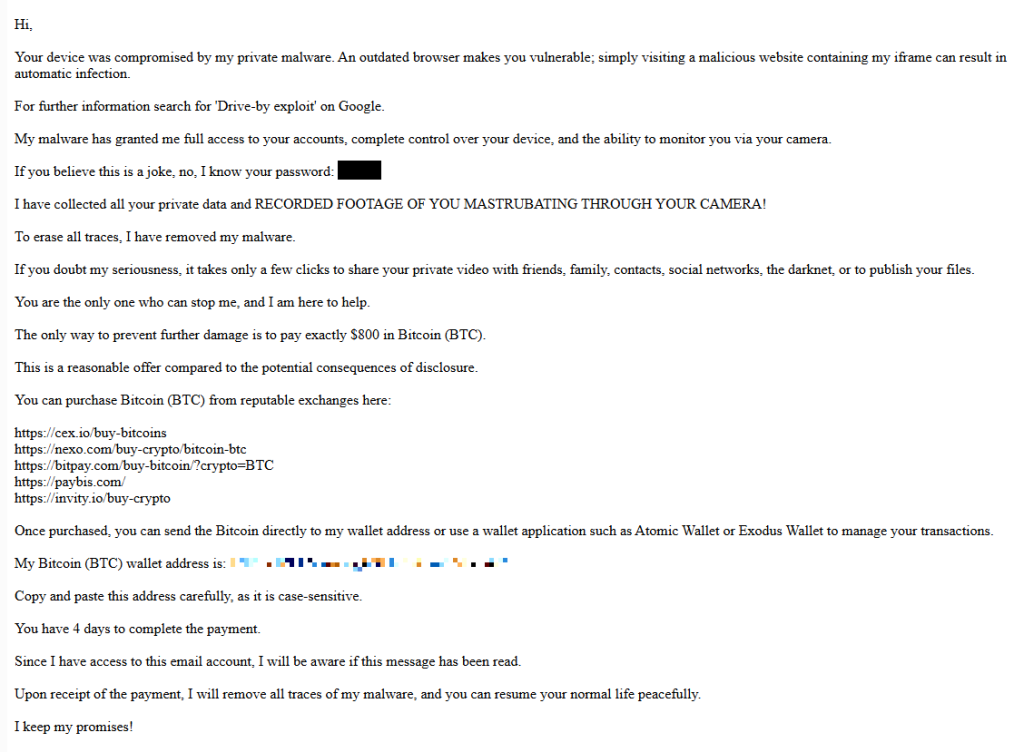
screenshot of sextortion email

Your device was compromised by my private malware. An outdated browser makes you vulnerable; simply visiting a malicious website containing my iframe can result in automatic infection.
For further information search for ‘Drive-by exploit’ on Google.
My malware has granted me full access to your accounts, complete control over your device, and the ability to monitor you via your camera.
If you believe this is a joke, no, I know your password: {an actual password}
I have collected all your private data and RECORDED FOOTAGE OF YOU MASTRUBATING THROUGH YOUR CAMERA!
To erase all traces, I have removed my malware.
If you doubt my seriousness, it takes only a few clicks to share your private video with friends, family, contacts, social networks, the darknet, or to publish your files.
You are the only one who can stop me, and I am here to help.
The only way to prevent further damage is to pay exactly $800 in Bitcoin (BTC).
This is a reasonable offer compared to the potential consequences of disclosure.
You can purchase Bitcoin (BTC) from reputable exchanges here:
{list of crypto-currency exchanges}
Once purchased, you can send the Bitcoin directly to my wallet address or use a wallet application such as Atomic Wallet or Exodus Wallet to manage your transactions.
My Bitcoin (BTC) wallet address is: {bitcoin wallet which has received 1 payment at the time of writing}
Copy and paste this address carefully, as it is case-sensitive.
You have 4 days to complete the payment.
Since I have access to this email account, I will be aware if this message has been read.
Upon receipt of the payment, I will remove all traces of my malware, and you can resume your normal life peacefully.
I keep my promises!

The message is a bit contradictory. Early on, the sender claims they have already removed the malware to “erase all traces,” but later promises to remove it after receiving payment.

Where the password comes from

I found that one particular sender using the name Jenny Green and the Gmail address JennyGreen64868@gmail.com sent many of these emails to people that use the FakeMailGenerator service.

FakeMailGenerator is a free disposable email service that gives users a temporary, receive‑only inbox they can use instead of their real address, mainly to get around email confirmations or avoid spam.

As mentioned, the addresses are receive‑only, meaning they cannot legitimately send mail and the mailbox is not tied to a specific person. On top of that, there is no login. Anyone who knows the address (or guesses the inbox URL) can see the same inbox.

My guess is that the scammer searched these public inboxes for passwords and then reused those passwords in their sextortion emails.

So users of FakeMailGenerator and similar services should consider this a warning. Your inbox may be publicly accessible, show up in search results, and you may receive a lot more than what you signed up for. Definitely don’t use services like this for anything sensitive.

How to stay safe

Knowing these scams exist is the first step to avoiding them. Sextortion emails rely on panic and embarrassment to push people into paying quickly. Here are a few simple steps to protect yourself:

  • Don’t rush. Scammers rely on fear and urgency. Take a moment to think before reacting.
  • Don’t reply to the email. Responding tells the attacker that someone is reading messages at that address, which may lead to more scams.
  • Change your password if it appears in the email. If you still use that password anywhere, update it.
  • Use a password manager. If you’re having trouble generating or storing a strong password, have a look at a password manager.
  • Don’t open unsolicited attachments. Especially when the sender address is suspicious or even your own.
  • Don’t use disposable inboxes for important accounts. The mail in that inbox might be available for anyone to find.
  • For peace of mind, turn your webcam off or buy a webcam cover so you can cover it when you’re not using the webcam.

Pro tip: Malwarebytes Scam Guard immediately recognized this for what it is: a sextortion scam.


What do cybercriminals know about you?

Use Malwarebytes’ free Digital Footprint scan to see whether your personal information has been exposed online.

❌