❌

Normal view

Convincing Free Mobile phishing emails appear after data breach

1 October 2026 at 13:30

Free Mobile, one of France’s main cellular providers, was fined €27 million by France’s data protection regulator, the CNIL, in January over failures to protect customer data. The October 2024 breach allowed an unauthorized party to access sensitive customer records, including bank account details and login information. Since the breach, we’ve seen many poorly written scam campaigns targeting Free Mobile customers.

However, over the past few weeks, a well-written scam has appeared, closely copying the design of the official Free Mobile website and email templates.

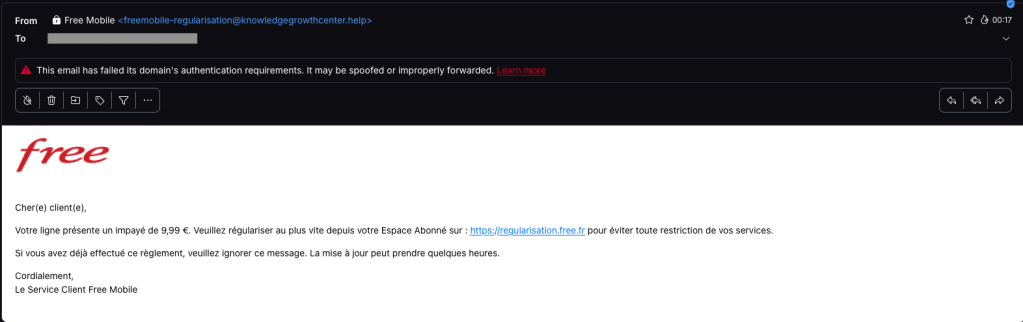
One of our employees, who is a Free Mobile customer, received this phishing email on Wednesday, September 30. The message used the same logo and template as legitimate emails from the company, but came from the suspicious email address freemobile-regularisation[@]knowledgegrowthcenter[.]help. It included a link that appeared to point to regularisation.free.fr :

Free Mobile phishing email

The email tells the user that an invoice of €9.99 needs to be paid to avoid having the customer’s service suspended. Clicking the link opens a redirection chain:

1. https://u2l.ai/Q5YwFz301
2. https://espace-free-mobile.pro/Ds41LE/302
3. https://espace-free-mobile.pro/Ds41LE/regularisation/?impaye=92a9e77d…200

This final domain, espace-free-mobile.pro, is hosted by Cloudflare and was registered just a month ago.

The final link opens a convincing page with a form asking for credit card details:

Free Mobile scam

The phishing page looks authentic, which sets this campaign apart from many of the Free Mobile scams we’ve seen since the breach.

We initially saw the same campaign using less convincing redirection chains, like this example from July:

1. https://bly.to/93kie5u
2. https://s1181402.ha026.t.mydomain.zone/mbl/
3. https://s1181402.ha026.t.mydomain.zone/mbl/regularisation/?impaye=505…

More recently, we’ve seen more authentic-looking domains, all hosted by Cloudflare:

1. https://s.ink/jmCnZZ
2. https://freesas.info/Cf4tP/
3. https://freesas.info/Cf4tP/regularisation/?impaye=f13fa919d1a22833557…

And another example:

1. https://bly.to/jabwpf6
2. https://regularisation-free.info/portail/
3. https://regularisation-free.info/portail/regularisation/?impaye=83f91…

How to stay safe

Malwarebytes can help protect you from these threats, but treat unexpected messages about your accounts and invoices with caution:

  • Don’t follow links in unsolicited emails. If a message concerns your account, open the official Free Mobile app or website directly, or call the official help line at 3244.
  • Check the actual domain in your browser’s address bar to see if it matches what you expect—https://mobile.free.fr in this case.
  • Malwarebytes Browser Guard detects and blocks this scam directly in your browser.
  • Use an up-to-date, real-time anti-malware solution with a web protection component on all your devices.
  • Malwarebytes Scam Guard can help you determine whether an email is a scam and advise you on what to do next.

Stop threats before they can do any harm.

Malwarebytes Browser Guard blocks phishing pages and malicious sites automatically. Free, one click to install. Add it to your browser →

Revolut phishing texts appear days after data breach

17 September 2026 at 16:07

Only days after Revolut acknowledged that it disclosed sensitive customer records to an unauthorized party, affected customers are receiving phishing texts. However, we don’t know yet if the phishing texts are linked to the breach.

The company had accepted fraudulent information requests sent from an email address on a legitimate government agency domain.

Through this social engineering attack, rather than by gaining access to Revolut’s systems, the criminals obtained the following types of information about customers:

  • Identity and contact information such as dates of birth, postal addresses, email addresses, and phone numbers
  • Copies of IDs such as passports and driver’s licenses
  • Verification selfies
  • Account statements and transaction histories

Revolut has said only that a “limited” or “very limited” number of customers were affected, and that it contacted them directly.

One affected customer received a phishing text on Monday, September 14, two days after Revolut publicly acknowledged the data breach. The message appeared in the same conversation as other Revolut texts, making it look as though it had come from the bank.

Scammers target Revolut customer
Phishing text to a Revolut customer

According to VirusTotal, the phishing domain was first scanned that same day.

In a separate example, another customer said that opening the link took them to a web page that requested access to their device’s camera. If you tap Allow, the page reportedly imitates Revolut’s live-video “turn your head” identity check before prompting you to enter a password.

This makes the phishing page appear more authentic. It may also allow the scammers to collect a selfie or video that could be used for further social engineering, identity fraud, or to make subsequent scams more convincing.

A convincing fake liveness check followed by a password screen is a common way to lower suspicion and obtain the information attackers need to attempt a real login or account-recovery flow.

If the campaign is connected to the breach, the information obtained from Revolut, combined with login details entered by victims or their approval of a login request, could be enough to take over their accounts.

How to stay safe

We don’t yet know whether the phishing campaign is using data exposed in the breach or whether unrelated scammers are exploiting news of the incident to target Revolut customers more broadly.

Either way, treat unexpected messages about your account with caution:

  • Don’t follow links in unsolicited messages. If a message concerns your account, open the official Revolut app directly.
  • Check the actual domain in your browser’s address bar to see if it corresponds with what you expect.
  • Use an up-to-date, real-time anti-malware solution on your device, preferably with a web protection component.
  • Malwarebytes Scam Guard can help you determine whether a message is a scam and advise you on what to do next.

Stop threats before they can do any harm.

Malwarebytes Browser Guard blocks phishing pages and malicious sites automatically. Free, one click to install. Add it to your browser →

What’s your data worth on the dark web? (Lock and Code S07E15)

27 July 2026 at 16:35

This week on the Lock and Code podcast…

Twenty years ago, a British mathematician named Clive Humby popularized a phrase that came to describe data’s relationship with the entire global economy: “Data is the new oil.”

Pithy as the phrase sounds, it is undeniably true.

Data steers decisions at businesses of every size. Data created entirely new industries built around its capture. And, for a select number of companies, data has produced billions—if not trillions—of dollars in value.

So how is it that, on the dark web, your stolen identity can be purchased for just 95 cents?

That’s what a Malwarebytes researcher found last month after spending 48 hours inside the dark web to investigate cybercrime. Across a variety of forums and directories, he found subscription plans for malware that steals information once implanted on a device. He found guides for deploying social engineering scams. He found people selling their services to build fake websites that trick people into handing over their usernames and passwords. And he found one of the dark web’s most traded commodities—personal data, packaged together about individual people, to help a cybercriminal commit identity fraud.

These packages are called “fullz.” For victims in the United States, a fullz contains a full name, Social Security Number, date of birth, address, and other personal details. That is enough, on its own, for a cybercriminal to potentially open a bogus line of credit, file a fake tax return, access financial accounts, or obtain medical services under someone else’s name.

As we wrote on Malwarebytes Labs:

“For less than the cost of a cup of coffee, a cybercriminal can buy enough information to devastate someone’s financial life.”

It’s the kind of risk that could scare anyone, especially considering the scale behind it. In just the first six months of 2026, Malwarebytes found more than 7,500 compromised data sets on the dark web containing more than 8.4 billion records.

And yet, even today, cybersecurity professionals still get asked why anyone should bother protecting their data.

The public, understandably, are exhausted. With data breaches happening every week—if not every day—cybersecurity can start to feel pointless. With young people unable to build financial security, they start believing that they have nothing worth stealing. And with Big Tech already collecting our every movement, behavior, click, and concern, people understandably feel powerless to fight any kind of data abuse, be it corporate or criminal.

So today’s episode approaches the question from a different direction. This isn’t about why you should protect yourself—plenty of company websites will tell you that, and most of them rely on fear. This is about why hackers want your data in the first place.

Today, on the Lock and Code podcast, host David Ruiz explains how cybercriminals turn a single repeated password into account takeover, how a screenshot of your house from Google Maps became a tool in extortion emails, and why the most benign information about you—an address, an age, one public photo—is often the most useful data a stranger can buy.

Tune in today to listen to the full episode.

Show notes and credits:

Intro Music: “Spellbound” by Kevin MacLeod (incompetech.com)
Licensed under Creative Commons: By Attribution 4.0 License
http://creativecommons.org/licenses/by/4.0/
Outro Music: “Good God” by Wowa (unminus.com)


Listen up—Malwarebytes doesn’t just talk cybersecurity, we provide it.

Protect yourself from online attacks that threaten your identity, your files, your system, and your financial well-being with our exclusive offer for Malwarebytes Premium for Lock and Code listeners.

Don’t get fooled by TikTok resin art scams

24 July 2026 at 16:56

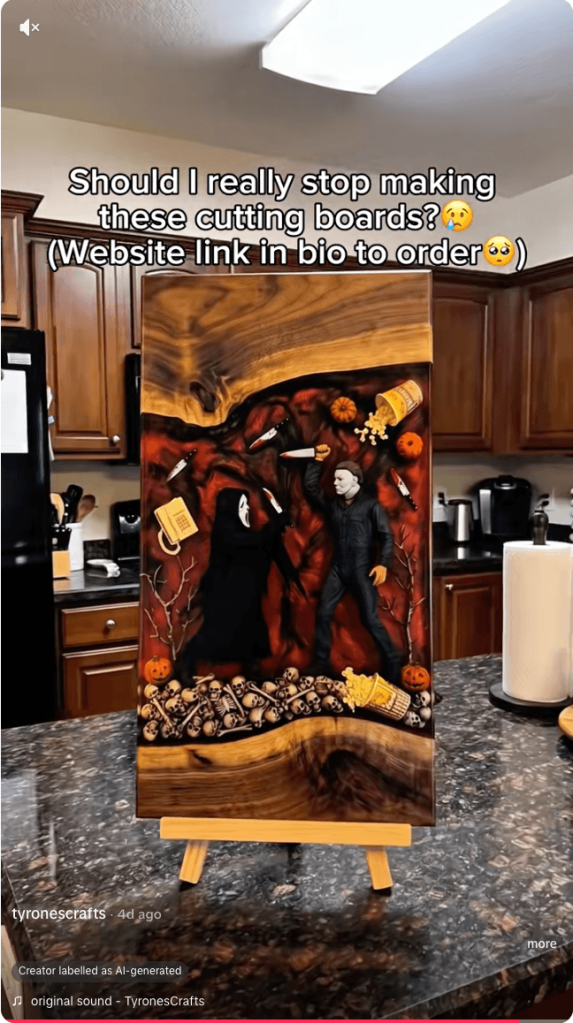
Resin art has become a popular corner of TikTok, with some videos attracting millions of views. But not every glossy, colorful post is what it claims to be. Scammers are using the look of handmade resin art to trick buyers, collectors, and even fellow artists into sending money for work that either doesn’t exist or wasn’t created by the person posting it.

There are plenty of genuine resin artists on TikTok. Unfortunately, the platform has also attracted scammers who steal videos and impersonate legitimate creators.

  • Fake resin art
  • Fake resin art
  • Fake resin art
  • Fake resin art
  • Fake resin art
  • Fake resin art

The scam is fairly straightforward. A TikTok account presents itself as a resin artist, posts satisfying videos, and invites people to “DM to order.” In some cases, the videos are stolen from other creators, the account has no real process footage, and the seller disappears after receiving payment.

One resin artist discovered that scammers were using their videos to impersonate them and scam TikTok users. They shared the following comment:

Ridiculous TikTok scammer…lol. Profile says they’re a resin artist and to DM them to order, but none of the videos are theirs. When I wrote to them asking them to take down the many videos of mine that they posted, passing them off as their own with no credit, their answer was that they aren’t a resin artist and are just sharing videos they like 🤣🤣 Literally about 1/4 of “their” videos are mine 🙄

These scams often rely on trust and urgency. The account may show polished clips of poured resin, finished coasters, trays, jewelry, or wall art, then push buyers to move the conversation into direct messages. Once the buyer moves to a different platform, the scammer typically requests a deposit, full payment, or personal details with little chance of being held accountable.

And real artists don’t just get their work ripped off. A scammer may contact a creator claiming to want to buy, feature, or license their work, but the real goal is to extract fees, banking information, or other sensitive data. Social media art scams are often repetitive because they are built from the same templates and scripts.

Script is similar across many videos in resin art scams
Different videos, same script

How to spot a TikTok resin art scam

The safest approach is the boring one: verify before you pay. If the artwork looks amazing but the seller’s identity is vague, the risk is real.

Check the TikTok account

Before ordering, look for signs that the artist is genuine:

  • The account didn’t appear overnight and has a history of original posts.
  • The same videos don’t appear under multiple creator names or belong to another artist.
  • The creator shows themselves making the artwork, with consistent process videos, a recognizable workspace, and works in progress.
  • The videos don’t contain obvious AI artifacts, such as impossible resin effects or objects moving after they’ve supposedly been sealed inside hardened resin.
  • Comments raising concerns haven’t been deleted or buried under generic praise.
  • The seller isn’t pushing you to order only through direct messages or asking for payment before you’ve verified who they are.

Check the website

If you do click through to a website, spend a few minutes checking it before you buy:

  • Look for a genuine returns and refunds policy, a physical business address, company or VAT details (where applicable), and consistent contact information.
  • Check how old the website is. Scam sites often use domains that were registered only weeks or months ago, especially when they claim to have been selling handmade products for years.
  • Search for recent independent reviews rather than relying on testimonials published on the site itself.
  • Run a reverse image search on the product photos to see whether they’ve been copied from another artist.
  • Only pay using a method that offers buyer protection, such as a credit card or PayPal. If a seller insists on a bank transfer, cryptocurrency, or another irreversible payment method, walk away.

Not every resin art account is a scam. Many belong to genuine artists, and that’s why impersonation scams can be so convincing.

If you’re unsure, paste the website address into Malwarebytes Scam Guard and ask whether it shows signs of being fraudulent. It can help identify suspiciously new domains and other common scam indicators.

Use Malwarebytes Scam Guard to check whether a social media post or website is part of a scam.

Use real-time web protection to block known fraudulent and malicious websites, like Browser Guard did for this web shop:

Browser Guard blocks the web shop due to likely fraud
Browser Guard blocks the fraudulent website

Both are free—making them much cheaper than sending money to a scammer.


Something feel off? Check it before you click.  

Malwarebytes Scam Guard helps you analyze suspicious links, texts, and screenshots instantly.  

Available with Malwarebytes Premium Security for all your devices, and in the Malwarebytes app for iOS and Android.  

Try it free → 

❌