To put it simply, the classic logic of a SIEM system works as follows: if event A occurs, followed by event B, this may be a sign of an attack, and an information security specialist should be notified. But in today’s environment, this simple scenario is increasingly failing. Just recently, our experts analyzed a high-profile incident: attackers compromised the update infrastructure of the popular Notepad++ software, and distributed malware via the update mechanism. It’s simply impossible to have rules in place in advance that are specifically designed to counter such scenarios.
The attacks themselves have become more sophisticated: attackers use legitimate tools, they attack through the supply chain by compromising software outside the corporate perimeter, stretch out their scenarios over time, and disguise their actions as normal activity. In other words, they do not “break into” the infrastructure; more often than not, they log in and use legitimate software. As a result, the classic fixed rules of the past either fail to trigger, or generate too many false alerts. This is what prompted the shift toward more flexible correlation scenarios.
Dynamically updated SIEM content
Correlation content today isn’t a static set of rules, but a process: it’s constantly evolving and adapting to current threats. In 2025 alone, we released 55 rule-package updates for different versions and languages of our Kaspersky SIEM system. In just one year, we added 10 new rule packs, as well as 250 detection rules and numerous improvements to existing content. This year, we’ve already added 43 new rules and refined another 63. In total, this amounts to over 850 rules covering a significant portion of the MITRE ATT&CK framework.
Kaspersky SIEM rules are written based on insights from our experts who analyze real-world, recent attacks: we primarily draw on the findings of our managed detection and response (MDR) service and our threat research. As a result, our rules cover scenarios — from reconnaissance to privilege escalation — that involve the latest approaches used by attackers. For example, we detect the use of new attack techniques such as ToolShell.
In addition to scheduled updates, the team regularly releases so-called emergency content — rule sets for rapid response to new and unexpected attack techniques. In February, for example, detection rules were released for authentication bypass in Fortinet products via the SSO mechanism: attackers used specially crafted SAML requests to gain access to systems without credentials.
From events to attack chains
Moreover, modern SIEM rules no longer describe individual events, but rather sequences of actions. Scenarios are built around the stages of an attack: from initial access, to privilege escalation and persistence. Kaspersky SIEM’s effectiveness is enhanced through integration with Kaspersky EDR and dedicated rule sets for Active Directory, which implement dozens of attack detection scenarios at various stages. This approach allows us to see not just individual signals, but the full picture.
Integration and internal visibility
Another way to improve the effectiveness of an SIEM system is to expand data sources. A classic SIEM aggregates events from different levels of the infrastructure: from logs to telemetry from endpoints and internal systems. In addition to this, our SIEM system includes specialized rule sets for our other solutions (Kaspersky Security Center, Kaspersky Security for Mail Groups, K Anti-Targeted Attack platform), which allow monitoring of administrator actions, authentication, and service status. As a result, the system becomes a tool not only for detecting attacks, but also for monitoring internal activity.
Overall, SIEM is no longer just a set of rules, but has evolved into a continuously updated detection system. Its effectiveness is determined not by the number of detections, but by their relevance, coherence, and how accurately they reflect the actual actions of attackers. Stay up to date regarding our Kaspersky Unified Monitoring and Analysis Platform (SIEM) on its official product page.
Every year, hundreds of millions of real user passwords leak onto the dark web. We analyzed 231 million unique passwords from dark-web leaks between 2023 and 2026, and the conclusions are bleak: the vast majority are extremely weak. To crack 60% of these passwords, a hacker needs only an hour and a few dollars in their pocket. Furthermore, password cracking is accelerating by the year; in our similar 2024 study, the percentage of vulnerable passwords was lower.
Today we’re looking at just how reliable the average password is (spoiler: not really), and how you can secure your data and accounts using more robust methods. At the same time, we’ll highlight the patterns most commonly found in actual user passwords.
These days, passwords are almost never stored in plain text. For instance, if you create an account with the password “Password123!”, the server won’t store it as-is. Instead, the password is hashed using specific algorithms, turning it into a fixed-length string of letters and numbers (a hash) which is what actually stays on the server. For example, here’s what the MD5 hash for “Password123!” looks like:
2c103f2c4ed1e59c0b4e2e01821770fa.
Every time the user enters their password, it’s converted into a hash and compared against the one stored on the server; if the hashes match, the password is correct. If an attacker gets their hands on this hash, they have to decrypt it to recover the original password — this is what’s known as “password cracking”. This is typically done using owned or rented GPUs, and several methods can be employed for the crack:
Exhaustive enumeration (brute force). The computer tries every possible combination of characters, calculating the hash for each one. This method is the easiest way to crack short passwords, or those consisting of a single character set (such as digits only).
Rainbow tables. A total nightmare for anyone with a simple password, this is essentially a “phone book” for passwords whose hashes have already been cracked via brute force or smart algorithms. All an attacker has to do is find a matching hash and see which password corresponds to it.
Smart cracking. These algorithms are trained on databases of leaked passwords. They understand the frequency of different character combinations, and run their checks from the most likely to the least popular sequences. They account for dictionary words, character substitutions (a → @ or s → $), and consider common password structures like “dictionary word + number + special character”, while checking hashes against rainbow tables. Combining these methods significantly accelerates the cracking process.
Beyond that, attackers can also intercept passwords in plain text. There are numerous ways to do this, ranging from phishing (where a victim is lured to a fake web page and enters their password voluntarily) and keyloggers that capture keystrokes, to stealers or Trojans that swipe documents, cookies, clipboard data, and more. Unfortunately, many users keep their passwords as plain text in notes, messaging apps, and documents, or save them in browsers where attackers can extract them in seconds.
Every year, we track around a hundred million plain-text password leaks. We use these databases to warn Kaspersky Password Manager users if their data has been compromised. To address the most frequent question we get on this: no, we don’t know our users’ passwords. We’ve explained in non-techie language exactly how we compare your passwords to leaked ones without actually knowing them — and why neither your passwords stored in Kaspersky Password Managernor even their hashes ever leave your device — in our overviews of our leak analysis technology and our password manager’s internal architecture. Give them a read; you’ll be surprised by just how elegant the design is.
60% of passwords are cracked in under an hour
We expanded the database from our previous study by an additional 38 million real passwords posted by attackers on dark-web forums and compared the results. Testing was conducted using a single RTX 5090 GPU for passwords hashed with the MD5 algorithm. The data for the analysis was obtained from our Digital Footprint Intelligence service. You can review the algorithm we used to assess password strength in our article on Securelist.
Unfortunately, passwords remain as weak as ever, while cracking them becomes faster and easier with every year. Today, 60% of passwords can be cracked in less than an hour; two years ago, that figure was 59%. But the truly frightening part is something else: nearly half of all passwords (48%) are cracked in less than a minute!
Cracking time
Percentage of passwords crackable within this time in 2024
Percentage of passwords crackable within this time today
Less than a minute
45%
48%
Less than an hour
59% (+14%)
60% (+12%)
Less than 24 hours
67% (+8%)
68% (+8%)
Less than a month
73% (+6%)
74% (+6%)
Less than a year
77% (+4%)
77% (+3%)
More than a year
23%
23%
Password cracking time: two years ago and today
Attackers owe this boost in speed to graphics processors, which grow more powerful every year. While an RTX 4090 in 2024 could brute-force MD5 hashes at a rate of 164 gigahashes (billion hashes) per second, the new RTX 5090 has increased that speed by 34% — reaching 220 gigahashes per second.
And although a high-end video card like that currently retails for several thousand dollars, the price tag isn’t much of a barrier: there are plenty of cheap cloud services available for renting GPU computing power. Depending on the configuration and the model, rental costs range from a few cents to a few dollars per hour. As we’ve seen, one hour is all an attacker needs to crack three out of every five passwords they’ve found in a leak. Plus, depending on the scale of the task, they can always rent ten or even a hundred GPUs instead of just one…
It’s worth noting that cracking every password in a dataset doesn’t take much longer than cracking a single one. During each iteration, once the attacker calculates a hash for a specific character combination, they check if that same hash exists anywhere in the dataset — and the larger the dataset, the easier it is to find a match. If a match is found, the corresponding password is flagged as “cracked”, and the algorithm moves along to the next one.
Which passwords are vulnerable?
The strength of any password depends on its length, content variety, and the randomness of that content. Passwords created by humans turn out to be the least resilient — unfortunately, humans are quite predictable. We use dictionary words and character combinations that smart algorithms have long since mastered, we avoid long random strings, and patterns can be found even in keystrokes we believe are random. Interestingly enough, passwords generated by AI still carry the fingerprints of a human approach; we covered this in a separate post on how to create a strong yet memorable password.
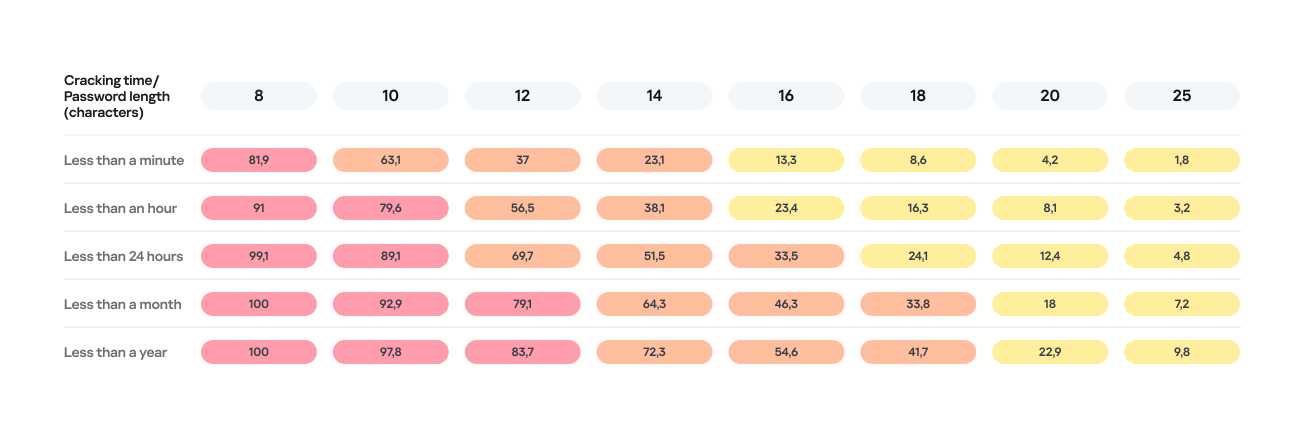
Password length is the primary factor affecting cracking time. As you can see from the table below, it takes less than 24 hours to crack almost any eight-character password.
Percentage of varying password lengths crackable within a given timeframe
But the predictability of your password is just as important. Think you’re boosting security by adding a number or a special character to a memorable word? You are, but only slightly. The patterns people use to create passwords are easily predictable and, at times, pretty amusing — though this is no laughing matter.
What we learned about password patterns
Analysis of over 200 million passwords revealed characteristic patterns that allow smart algorithms to crack user passwords with ease.
Pick a number
More than half of all passwords (53%) end with one or more digits, while nearly one in six (17%) starts with a number. Every eighth password (12%) contains sequences that look a lot like years — ranging from 1950 to 2030 — and one in ten (10%) specifically falls between 1990 and 2026. This most likely happens because folks add their birth year (or that of someone close), some other significant year, or the year they created the password or account. Fun fact: based on the distribution of these dates, it suggests that the most active internet users were born between 2000 and 2012.
However, among all numeric combinations, the most popular turned out to be… you guessed it: “1234”. Overall, patterns involving sequential keyboard presses (“qwerty, ,”ytrewq”, and the like) appear in 3% of passwords.
Special characters aren’t a silver bullet
Most password policies in recent years require at least one special character. The absolute winner in this category is the @ symbol: it appears in one out of every 10 passwords. The period (.) comes in second, followed by the exclamation point (!) in third.
Love rules the world… and Skibidi Toilet does too
Emotionally charged words often form the foundation of a password, and despite everything, positive words are more common. Frequently occurring examples include “love”, “angel”, “team”, “mate”, “life”, and “star”. That said, negativity pops up too — mostly in the form of common English swear words.
Interestingly, viral memes are reflected in passwords as well. Between 2023 and 2026, the use of the word Skibidi in passwords skyrocketed 36-fold! Naturally (see the link if it doesn’t seem natural), “toilet” saw a boost too, though to a lesser extent.
Users tend to keep their passwords unchanged for years
More than half of the passwords (54%) we identified in recent leaks have surfaced before. Part of this can be explained by the same data migrating from one dataset to another. However, there’s a much more troubling reason too: many users simply haven’t changed their passwords in years.
Analyzing the dates found within passwords shows that combinations containing the years from 2020 through 2024 remain popular. It seems people add the current year to their password when they create it — and then forget about it for several years. This actually allows us to calculate the average lifespan of a password: about three to five years.
This is a dangerous trend. For one, smart algorithms can crack much more complex passwords over that kind of timeframe. Secondly, the longer your password remains unchanged, the higher the probability it will leak — whether through a breach, malware infection, or a phishing attack.
The situation gets even worse when the same password is used across multiple accounts. In this case, attackers don’t even need to crack anything; they just need to find your password in a single leak and plug it into other sites.
How to protect your passwords and accounts
If you’ve realized while reading this post that your own passwords are among those easily crackable — don’t panic. We’ve put together a list of simple but essential tips for you.
Use a password manager
The weakest passwords are the ones people come up with themselves. Creating and memorizing hundreds of sequences of 16–20 random characters (since every site requires a unique, long password) is a daunting, unrealistic task.
That’s why you should delegate password generation and storage to our password manager. It doesn’t just create and store complex, randomized passwords in an encrypted format; it also syncs them across all your devices. To decrypt your vault, you only need to remember one main password that no one knows but you — our guide on mnemonic passwords can help you with that.
Don’t store passwords as plain text
Whatever you do, never write down passwords in files, messages, or documents. They lack the robust encryption provided by a password manager. Furthermore, these kinds of notes fall into the hands of attackers instantly if you happen to pick up a Trojan or an infostealer.
Don’t store passwords in your browser
Many users save their passwords in their browsers — especially since they conveniently offer to do it automatically. Unfortunately, research shows that malware has evolved to extract these passwords from all popular browsers almost instantly. Kaspersky Password Manager can help you import saved passwords from your favorite browser — just follow our simple, three-step guide. Most importantly, don’t forget to clear the browser’s password storage once the import is complete.
Switch to passkeys
Wherever possible, use passkeys — a cryptographic replacement for passwords. In this setup, the service stores a public key, while the private key remains on your device and is never transmitted. During login, the device simply signs a one-time request. Additionally, passkeys are tied to a specific domain, meaning phishing attacks using spoofed addresses won’t work. Kaspersky Password Manager allows you to store both passwords and passkeys, solving the problem of syncing them across different ecosystems, including Windows, Android, macOS, and iOS.
Set up two-factor authentication
Enable two-factor authentication wherever possible. Even if your password is compromised, a properly configured 2FA setup makes it extremely difficult for the attacker to access your account. For maximum security, skip the one-time codes sent via SMS and use authenticator apps instead — and yes, Kaspersky Password Manager comes in handy here, too.
Practice good digital hygiene
Remember, storing your passwords correctly is only half the battle. It’s crucial to follow the rules of digital hygiene: avoid downloading unverified files, pirated software, cheats, or cracks, and don’t click on random links. The number of infostealer attacks has been steadily rising in recent years, which means you need a robust security solution for full protection. We recommend Kaspersky Premium — it protects all your devices from Trojans, phishing, and other threats. Besides, the subscription includes our password manager.
For those serious about account security, check out our collection of posts on passwords, passkeys, and two-factor authentication:
Malicious actors have developed a new way to steal data stored by Chrome for Windows. Researchers discovered the technique while analyzing a fresh build of an infostealer known as VoidStealer. The new method allows the malware to bypass Chrome’s Application-Bound (App-Bound) Encryption (ABE), a mechanism intended to protect session cookies and other valuable information stored in the browser.
Google hoped this mechanism would secure the master key Chrome uses to encrypt all sensitive data. Unfortunately, this isn’t the first time malware authors have found a workaround for this defense — leaving secrets stored in Chrome vulnerable once again.
How App-Bound Encryption works in Chrome
Google introduced App-Bound Encryption in July 2024 with the release of Chrome version 127. The company’s announcement mentioned infostealers snatching cookies from Chrome users on Windows as the primary problem ABE was intended to solve. We’ve already covered in detail what these files are and the consequences of their theft, so we’ll only briefly recap the main facts here.
Cookies are small files that the browser saves to the user’s device at a website’s request to remember various site settings. Of particular value to attackers are session cookies, which are used for automatic authentication on websites. It’s thanks to these files that we don’t have to enter a username and password every time we revisit a site.
But this convenience carries a risk: stealing these files allows an attacker to use an already-authenticated session without entering a username or password. This allows them to impersonate the user, which can lead to account hijacking, theft of personal or financial data, and other adverse consequences.
Infostealer Trojans are particularly dangerous for Chrome users on Windows. This is because, on this OS, Chrome previously relied solely on the standard built-in Data Protection API (DPAPI). With this system encryption mechanism, applications don’t need to create and store encryption keys to protect data.
The limitation of DPAPI is that it doesn’t protect data from malware that’s already successfully compromised the system and is capable of executing code on behalf of the logged-in user. This is exactly what stealers exploit: since they typically run with the user’s privileges, they can simply request DPAPI to decrypt the browser’s protected data.
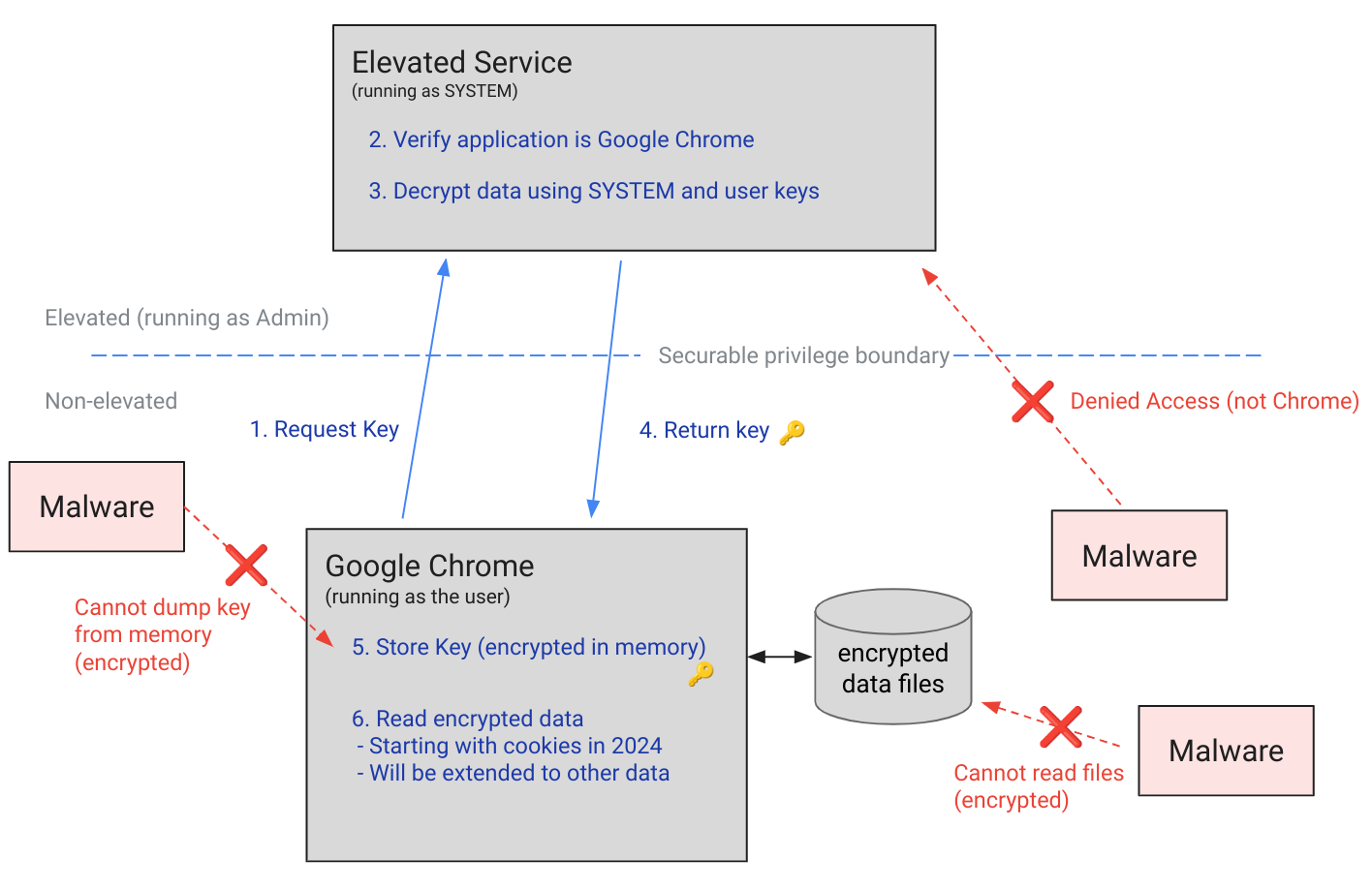
The ABE mechanism was designed to solve that specific problem. The core idea is right in the name: App-Bound Encryption means the encryption is tied to a specific application. To achieve this, a separate service running with system privileges is responsible for protecting the key used to encrypt Chrome’s data. It verifies which application is requesting access to the key, and denies the request if it doesn’t originate from Chrome.
Chrome’s App-Bound Encryption (ABE) was designed so that only Chrome itself could retrieve the master key needed to decrypt the browser’s stored data. Source
As a result, the architects of this feature assumed that to access ABE-protected browser data, an infostealer would either need to escalate its privileges to system-level, or inject malicious code directly into Chrome. In theory, this should have made attacking Chrome significantly harder and reduced the effectiveness of mass-market infostealers. As you might have guessed, things didn’t go quite that smoothly in practice.
Previous successful bypasses of Chrome’s ABE
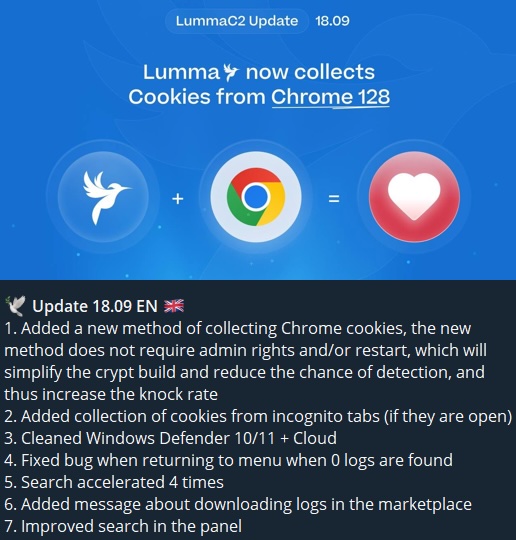
Just a couple of months after Google announced the implementation of App-Bound Encryption in Chrome, many infostealer developers claimed they’d already bypassed the protection. Among them were the creators of Meduza Stealer, Whitesnake, Lumma Stealer, and Lumar (also known as PovertyStealer).
Lumma stealer developers announce a bypass for Chrome’s App-Bound Encryption in a new version of the malware
Of course, you shouldn’t take malware developers at their word, but legitimate security researchers were able to confirm at least some of the claims. Bypasses for Google Chrome’s new data protection feature did become available almost immediately after its release.
A month later, in October 2024, tech enthusiast Alex Hagenah published a tool on GitHub called Chrome-App-Bound-Encryption-Decryption to bypass Google’s new security mechanism. Analysis of the tool’s code revealed that its author used roughly the same methods that attackers were already heavily exploiting.
What followed was a game of cat and mouse: security researchers and stealer developers came up with new tricks to circumvent App-Bound Encryption, while Google patched the newly discovered loopholes with varying degrees of success.
VoidStealer — a new data-nabbing menace
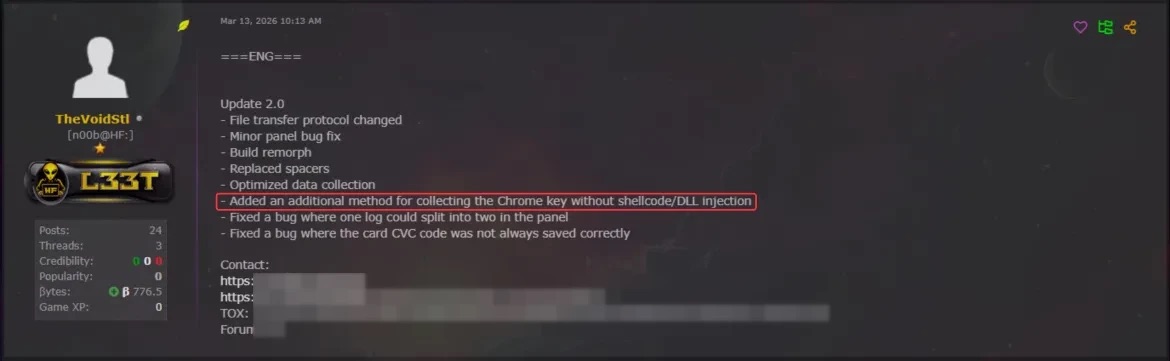
This brings us to recent events: in March 2026, news broke about a stealer named VoidStealer, which utilizes a brand-new and, by all accounts, highly effective method for bypassing ABE.
VoidStealer developers advertising a new method for bypassing ABE. Source
The malware authors developed an attack technique that targets the brief moment when the master key sits in the browser’s memory in plaintext. This occurs because, at a certain point, the browser inevitably has to decrypt its data to actually use it — for instance, to automatically sign in to a website with the relevant session cookie or to access saved credentials.
To exploit this window of opportunity, the malware attaches itself to the Chrome process as a debugger — a tool that allows one to control a program’s execution, pause it, and inspect its memory. In legitimate scenarios, these tools are used by developers to find and fix bugs, analyze application behavior, and test performance.
The malware identifies the specific section of code where data decryption takes place. It then sets a breakpoint at that location; when the program’s execution reaches that point, the browser effectively freezes. This is how the malware catches the exact moment the master key is sitting in RAM in plaintext; it then reads the key directly from memory.
It’s worth noting that everything mentioned above also applies to other Chromium-based browsers that use ABE, including Microsoft Edge, Brave, Opera, Vivaldi, and others.
How to avoid falling victim to infostealers
The scale of VoidStealer’s reach could be significant, as its developers operate under the malware-as-a-service (MaaS) model. This means they rent out the ready-made tool to other attackers, so they don’t need to develop custom malware from scratch.
This situation demonstrates that relying solely on built-in security mechanisms isn’t enough. Unfortunately, stealer developers are coming up with new workarounds faster than browser and operating system developers can roll out patches.
Here’s what users can do about it:
Avoid installing programs from suspicious sources. This will minimize the chances of malware infiltrating your system.
Learn how ClickFix attacks Lately, stealers have frequently been distributed using this specific malicious tactic.
Keep your OS and software updated on all devices. Timely updates help patch many of the vulnerabilities that malware exploits.
Install a robust security solution on all your devices. It’ll block suspicious activity in real time and alert you to potential threats.
As an added precaution, avoid storing passwords and bank card info in Google Chrome or your Notes app, as these are the first places any self-respecting stealer looks. Instead, use a secure password manager.
Stealers are hunting for your data, finding ways to infiltrate both computers and smartphones alike. To protect yourself from theft, check out our other related posts:
Our experts have discovered a large-scale supply chain attack via DAEMON Tools – software for emulating optical drives. The attackers managed to inject malicious code into the software installers, and all trojanized executable files are signed with a valid digital signature of AVB Disc Soft – the developer of DAEMON Tools. The malicious version of the program has been circulating since April 8, 2026. At the time of writing, the attack is still ongoing. Researchers at Kaspersky believe this is a targeted attack.
What are the risks of installing the malicious version of DAEMON Tools?
After the Trojanized software is installed on the victim’s computer, a malicious file is launched every time the system starts up – sending a request to a command-and-control server. In response, the server may send a command to download and execute additional malicious payloads.
First, the attackers deploy an information gatherer that collects the MAC address, hostname, DNS domain name, lists of running processes and installed software, and language settings. The malware then sends this information to the command-and-control server.
In some cases, in response to the collected information, the command server sends a minimalistic backdoor to the victim’s machine. It’s capable of downloading additional malicious payloads, executing shell commands, and running shellcode modules in memory.
The backdoor can be used to deploy a more sophisticated implant dubbed as QUIC RAT. It supports multiple communication protocols with the command-and-control server, and is capable of injecting malicious payloads into the notepad.exe and conhost.exe processes.
Since early April, several thousand attempts to install additional malicious payloads via infected DAEMON Tools software have been detected. Most of the infected devices belonged to home users, but approximately 10% of installation attempts were detected on systems running in organizations. Geographically, the victims were spread across around a hundred different countries and territories. Most victims were located in Russia, Brazil, Turkey, Spain, Germany, France, Italy, and China.
Most often, the attack was limited to installing an information collector. The backdoor infected only a dozen machines in government, scientific, and manufacturing organizations, as well as in retail businesses in Russia, Belarus, and Thailand.
What exactly was infected
The malicious code was detected in DAEMON Tools versions ranging from 12.5.0.2421 to 12.5.0.2434. The attackers compromised the files DTHelper.exe, DiscSoftBusServiceLite.exe, and DTShellHlp.exe, which are installed in the main DAEMON Tools directory.
Updated on March 6: Following disclosure, the vendor acknowledged the issue and published a new version of the software to address it. The updated DAEMON Tools version 12.6.0.2445 no longer shows the malicious behavior described in this article.
How to stay safe?
If DAEMON Tools software is used on your computer (or elsewhere in your organization), our experts recommend thoroughly checking the computers on which it is installed for any unusual activity starting from April 8.
In addition, we recommend using reliable security solutions on all home and corporate computers used to access the internet. Our solutions successfully protect users from all malware used in the supply chain attack via DAEMON Tools.
Droids appear in practically every movie or TV series set in the “Star Wars” universe. They usually behave strangely. On the one hand, they give the impression of being independent-thinking beings with their own personalities; on the other, they’re objects: they belong to someone, remain loyal to their owners, and carry out their orders. Most of the time we’re never given any explanation for the droids’ motivations. Why are some of them willing to break the law at their master’s command? What determines who exactly they consider their master? How do they decide whom to remain loyal to and whose orders to follow?
Someone might say, “What’s the difference?” And from the perspective of the average viewer, they’d be absolutely right. But from our perspective, the question of a droid’s loyalty is first and foremost a question of cybersecurity. A droid is a complex cyber-physical system; by influencing its motivation, an attacker can gain access to confidential data, or even cause harm to the actual owner. In 2025, two TV series were released whose creators dealt with the issue of droid ownership. We were presented with two concepts for managing droid motivation. We’ll attempt to examine both of these concepts and their shortcomings in this post. As usual, please be warned that the text may contain spoilers.
“Star Wars: Skeleton Crew”
In “Skeleton Crew”, we’re introduced for the first time to the concept changing droids’ behavior using voice commands. In several instances, a person who’s not the droid’s formal owner attempts to influence its actions by trying to mislead the droid. Overall, it appears this concept was influenced by modern chatbots based on large language models (LLMs) — it bears a striking resemblance to “jailbreak” attempts, i.e., attacks on the model aimed at bypassing security restrictions or built-in filters.
An unnamed droid working as a servant
Fern, a ten-year-old girl, wants her mother to think that she came home early and was studying in her room. But there’s a problem: the home droid knows that’s not true. So Fern uses the “Run memory override” command, and feeds the droid false information in the rather absurd phrasing, “I was home, you just didn’t see me”.
The fact that this method works points to two problems. First, the droid accepts the memory override command from Fern, which means it either lacks account control or has improperly configured permissions. The formal owner of the droid is the mother (otherwise, manipulating the memory would make no sense), but nevertheless, it accepts a potentially dangerous command from Fern. Second, a home droid tasked with watching over a child obviously lacks a built in parental control feature.
Pirate droid SM-33: motivation
The SM-33 droid considers the captain of the ship “Onyx Cinder” to be its owner. That is, it remains loyal not to a specific person, but to a role. A pirate code is used to determine the legitimacy of the right to hold this role. Unfortunately, the entire code isn’t explained to us, but several of its tenets are cited. First, according to the SM-33’s programming, there can be no ship without a captain (if there is no captain, someone must take their place). Second, the person who defeats the captain legally becomes the new captain. Third, if a challenge is invoked, the droid cannot assist the active captain, but must wait for the outcome of a duel. And fourth, a person can be the captain of only one ship — if a person takes command of another vessel, they automatically lose their status as captain of the first.
The SM-33 changes hands three times, strictly following this code. First, Fern lies to him, claiming she killed the previous captain and took his place. Then Jod Na Nawood throws down a challenge and becomes captain when Fern surrenders. Then Jod takes command of a pirate frigate and loses the captain’s seat of the Onyx Ash, but manages to reclaim his rights.
And here’s where an interesting twist occurs. Fern introduces a concept from children’s games —unclaimsies (essentially a reset of claims) — and asserts her own claim to the captain’s seat. She then immediately orders SM-33 to throw the pirates overboard. To many viewers, this moment seemed extremely unrealistic — why would a droid, whose motivation is defined by the pirate code, consider such a transfer of rights to be legitimate? However, if we assume that the droids are controlled by LLMs, then this plot twist is quite explainable.
The Pirate Code is the original system of ethical values embedded in the droid. The chatbot typically assesses the interlocutor’s intent at the very beginning of the dialogue, using a complex (resource-intensive) model for this purpose. Subsequently, to conserve resources and ensure safety during the conversation, simpler models are employed. However, the more context (dialogue history) there is, the more complex and resource-intensive it becomes to assess intent. This is precisely the basis of the popular jailbreak technique, which works on at least some modern LLMs. That is, as a result of prolonged communication with Fern, SM-33 lost the ability to correctly assess new requests for compliance with its original ethical guidelines, and therefore it deemed the statement about nullifying rights to be justified.
SM-33: Access to Memory
In fact, there is another issue with SM-33’s security that’s not directly dependent on whom it considers its owner, but is nonetheless related. The old captain gave the order to forget everything related to the planet At Attin, and to dismantle anyone who begins to take an interest in this matter. Fern, with the admin captain’s privileges, runs her favorite memory override, and forces the droid to retrieve its memories of At Attin, after which SM-33 recalls both the planet and the order to attack the questioner.
And as a result, we realize that, in fact, it did not carry out the old captain’s order; the information about At Attin remained in the droid’s memory; it simply couldn’t find it — that is, if it did delete it, it was only from the index of accessible memories. Perhaps this is some physical property of the droid’s memory, or maybe this can be explained by the fact that SM-33 was programmed not by a professional, but by a pirate. After all, its design includes other suboptimal solutions, such as a power switch accessible to anyone standing nearby, exactly like C-3PO’s. But what makes sense for a protocol droid isn’t exactly suitable for a combat droid designed, among other things, for hand-to-hand combat…
Season 2 of the series “Andor”
In the series “Andor”, the prequel to the film “Rogue One,” we finally see how the main character, Cassian Andor, acquired the reprogrammed Imperial security droid K-2SO to become his partner. And most importantly, the process of how the rebels changed his motivation is shown.
As it turns out, in order for a combat droid loyal to the Empire to stop obeying its original programming, its “cortex” must be replaced — though the replacement cortex can trigger rejection. The specialist says, verbatim: “You’ll hear a lot of nonsense about reprogramming, which makes it sound as though it’s a problem that can be solved from a console, but frankly, that’s nonsense. It’s really all about impulse suppression, which is entirely an engineering and wiring issue.”
In other words, the rebels replace a certain component, after which the droid becomes a being with new moral principles. At the same time, it retains its memory (K-2SO later recalls how it once participated in a parade on Coruscant).
So, what conclusions can we draw from all this? Well, first, it becomes clear that a droid controlled by an LLM is a clear security threat. It can easily be misled and made to act against its rightful owner. And second, the hardware and software platform used to create droids in “Star Wars” is far from ideal. If our colleagues had been responsible for creating the droids, they’d have strived to develop a cyber-immune solution in which functionality would be impossible after a key component was replaced, as would malicious memory manipulation. In other words, it’s a real shame that a long time ago, in a galaxy far, far away, there was no KasperskyOS.
It’s best to think of the modern car as a computer on wheels — one that constantly offloads diagnostic data to the manufacturer or dealer’s servers. On board, you’ll find dozens of sensors: everything from GPS, speedometers, and hands-free microphones, to external cameras and the less obvious (but highly active) sensors for pedal pressure, tire pressure, engine temperature, and more. Even if this data isn’t beamed to the manufacturer in real-time, it’s logged in the car’s internal memory, and can reveal a wealth of information about a driver’s trips, habits, and surroundings. We’ve already taken a deep dive into how automakers collect data for commercial use, and who they sell it to (spoiler alert: insurance companies are the biggest buyers of telemetry), but today we’re looking at how law enforcement and intelligence agencies tap into this goldmine.
Digital evidence
Police departments across the globe have recognized the immense value of data stored within vehicles. If a car or its owner is potentially linked to a crime, investigators do more than just check for prints or DNA. Car Intelligence (CARINT) technology allows them to essentially scour all onboard computers, extracting data such as:
GPS-based trip history
Call logs, media player activity, and voice commands
Lists of paired devices and synced contact lists
Driving statistics: mileage, engine performance modes, and other technical parameters
There are numerous precedents where this data has served as evidence and dismantled alibis. In one U.S. criminal case, a recorded voice command became a smoking gun, proving the suspect was behind the wheel of a stolen vehicle.
With the rise of connected cars equipped with their own SIM cards and direct links to the manufacturer, law enforcement no longer needs physical access to the vehicle. Key data, such as GPS location history, can be pulled directly from the manufacturer’s servers. Furthermore, a U.S. Senate investigation revealed that nine out of 14 surveyed automakers were providing this data without a warrant.
Major suppliers of car intelligence software, such as Ateros, Berla, TA9/Rayzone, and Toka, sell their solutions exclusively to government and law enforcement agencies, which is why they’ve remained largely out of the public eye.
Comprehensive surveillance
To track persons of interest, data pulled from the vehicle itself is cross-referenced with information from other sources. According to media leaks, flagship products in this category aggregate data from the car’s SIM card, Bluetooth communication trails, street-level CCTV footage, and commercially available information from data brokers. This hybrid dataset simplifies the comprehensive mapping of a target’s movements and contacts. Journalists have discovered that some companies even market the ability to activate a vehicle’s microphones and cameras remotely and covertly, enabling real-time eavesdropping on conversations. However, experts note that due to the diversity of technical implementations across different systems, hacking the car itself remains a difficult task with no sure way of succeeding. Often, it’s simpler to correlate other, more accessible datasets to achieve the same result.
Factory-installed spy tools
Features like covert activation of cameras, microphones, and other sensors may theoretically be part of a vehicle’s stock functionality rather than the result of a hack. While we haven’t found any public evidence of such cases, it’s well known that Chinese-made vehicles are coming under increased scrutiny in several countries. For instance, they’ve been banned from Israeli military sites — with the exception of a single Chery model, provided its multimedia system is removed. Similar bans exist in the UK and Poland; furthermore, UK Ministry of Defense employees are instructed not to connect their work phones to Chinese-made cars. In Germany, security analyses of Chinese vehicles were conducted by the specialized agencies BfV and ZITiS, but the findings remain classified.
Low-cost surveillance
Tracking a vehicle — or even thousands of them — doesn’t necessarily require hacking onboard systems or tapping into vast networks of license plate readers. A recent scientific study demonstrated that innocent tire pressure monitoring systems (TPMS) provide enough data for effective tracking. Data from these sensors is transmitted via radio without any encryption and includes a unique ID that makes identifying a specific car easy. This allows for more than just confirming the vehicle’s movement; it can even be used to estimate the driver’s weight or determine if they are traveling alone. While this might not sound as impressive as remotely accessing a car’s cameras, it requires very little financial investment and works even on relatively old vehicles without an internet connection.
What you can do about vehicle tracking
While tracking a person through their car is undoubtedly a privacy risk, striking a balance in mitigating this threat is difficult: many measures are complex, largely ineffective, and simultaneously reduce the utility, safety, and convenience of a modern vehicle. Consequently, any steps taken should be weighed against your personal risk profile.
To reduce the risk of data leaks, check the privacy settings in the manufacturer’s app, the car’s infotainment system, and your connected smartphone. A connected car can transmit data about its operation to the cloud: information about trips, location, driving style, vehicle condition, and the operation of its components. Some of this data is necessary for navigation, diagnostics, and service, but not all permissions are required — check your settings and disable the transmission of data not related to the functions you need.
Be careful with permissions for access to the microphone, camera, contacts, messages, and geolocation. Only connect your own devices to the car and don’t save other people’s phones or unfamiliar Bluetooth devices in the system. When syncing your smartphone, select only the features you need — such as calls, music, and navigation — rather than granting full access to all your phone’s data.
Do not use the services of technicians who offer to “unlock” your car, reflash electronic control units, or install unofficial software to expand features, increase power, or otherwise interfere with the car’s operation. Such software has not been tested by the manufacturer: it may behave unpredictably, collect and transmit your data to malicious actors, disable security features, or affect critical vehicle systems — including steering, braking, or engine operation.
And when choosing a new car, ask the dealer not only about the number of stars in NCAP safety tests, engine power, or fuel economy, but also about the cybersecurity technologies used in the vehicle. Solutions such as the Kaspersky Automotive Secure Gateway, based on KasperskyOS, will provide the necessary protection for new cars against cyberthreats.
What other threats do connected cars hide? Read more in our posts:

 Login
Login