❌

Normal view

AWS European Sovereign Cloud achieves first compliance milestone: SOC 2 and C5 reports plus seven ISO certifications

10 March 2026 at 21:06

In January 2026, we announced the general availability of the AWS European Sovereign Cloud, a new, independent cloud for Europe entirely located within the European Union (EU), and physically and logically separate from all other AWS Regions. The unique approach of the AWS European Sovereign Cloud provides the only fully featured, independently operated sovereign cloud backed by strong technical controls, sovereign assurances, and legal protections designed to meet the sensitive data needs of European governments and enterprises.

One of the foundational components of how AWS European Sovereign Cloud enables verifiable trust of technical controls and delivers assurance is through our compliance programs and assurance frameworks. These programs help customers understand the robust controls in place at AWS European Sovereign Cloud to maintain security and compliance of the cloud. To meet the needs of our customers, we committed that the AWS European Sovereign Cloud will maintain key certifications such as ISO/IEC 27001:2022, System and Organization Controls (SOC) reports, and Cloud Computing Compliance Criteria Catalogue (C5) attestation, all validated regularly by independent auditors to assure our controls are designed appropriately, operate effectively, and can help customers satisfy their compliance obligations.

Today, AWS European Sovereign Cloud is pleased to announce that SOC 2 and C5 Type 1 attestation reports, along with seven key ISO certifications (ISO 27001:2022, 27017:2015, 27018:2019, 27701:2019, 22301:2019, 20000-1:2018, and 9001:2015) are now available. These attestation reports and certifications cover 69 AWS services operating within the AWS European Sovereign Cloud, and this achievement marks a pivotal first step in our journey to establish the AWS European Sovereign Cloud as a trusted and compliant cloud for European organizations. By securing these foundational certifications and attestation reports early in our implementation, we are demonstrating our commitment to earning customer trust. AWS European Sovereign Cloud customers in Germany and across Europe can now run their applications with enhanced assurance and confidence that our infrastructure aligns with internationally recognized security standards and the AWS European Sovereign Cloud: Sovereign Reference Framework (ESC-SRF). These certifications and attestation reports provide independent validation of our security controls and operational practices, demonstrating our commitment to meeting the heightened expectations towards cloud service providers. Beyond compliance, these certifications and reports help customers meet regulatory requirements and innovate with confidence.

SOC 2 Type 1 report

SOC reports are independent third-party examinations that show how AWS European Sovereign Cloud meets compliance controls and sovereignty objectives. The AWS European Sovereign Cloud SOC 2 report addresses three critical AICPA Trust Services Criteria: Security, Availability, and Confidentiality and includes internal controls mapped to the ESC-SRF. The ESC-SRF establishes sovereignty criteria across key domains including governance independence, operational control, data residency, and technical isolation. As part of the SOC 2 Type 1 attestation, independent third-party auditors have validated suitability of the design and implementation of our controls addressing measures such as independent European Union (EU) corporate structures, operation by EU-resident AWS personnel, strict residency requirements for Customer Content and Customer-Created Metadata, and separation from all other AWS Regions. The ESC-SRF controls in our SOC 2 report show customers how AWS delivers on its sovereignty commitments.

C5 Type 1 report

C5 is a German Government-backed attestation scheme introduced in Germany by the Federal Office for Information Security (BSI) and represents one of the most comprehensive cloud security standards in Europe. The AWS European Sovereign Cloud C5 Type 1 report provides customers with independent third-party attestation on the suitability of the design and implementation of our controls to meet both C5 basic criteria and C5 additional criteria.

The basic criteria establish fundamental security requirements for cloud service providers, covering areas such as organization of information security, human resources security, asset management, access control, cryptography, physical security, operations security, communications security, system acquisition and development, supplier relationships, incident management, business continuity, and compliance. The additional criteria address enhanced requirements for handling sensitive data and critical applications, making this attestation particularly valuable for AWS European Sovereign Cloud customers with stringent data security and sovereignty requirements.

Key ISO certifications

AWS European Sovereign Cloud has achieved seven key ISO certifications that collectively demonstrate comprehensive operational excellence:

These certifications confirm that AWS European Sovereign Cloud has integrated rigorous security, privacy, continuity, service delivery, and quality programs into a comprehensive framework, helping to ensure sensitive information remains secure, services remain available, and operations meet the highest standards through systematic risk management processes and continuous improvement practices.

How to access the reports

To access SOC 2, C5 reports and ISO certifications, customers should sign in to their AWS European Sovereign Cloud account and navigate to AWS Artifact in the AWS Management Console. AWS Artifact is a self-service portal that provides on-demand access to AWS compliance reports and certifications.

We recognize that compliance is not a destination but a continuous journey, and these initial SOC 2, C5 reports and ISO certifications represent the beginning of our certification portfolio. They lay the essential groundwork upon which we will continue to build to meet AWS European Sovereign Cloud customers’ compliance needs as they continue to evolve. As we expand our compliance coverage in the months ahead, customers can be confident that security, transparency, and regulatory alignment have been part of the very DNA of the AWS European Sovereign Cloud design from day one. To learn more about our compliance and security programs, visit AWS European Sovereign Cloud Compliance, or reach out to your AWS European Sovereign Cloud account team.

Security and compliance is a shared responsibility between AWS European Sovereign Cloud and the customer. For more information, see the AWS Shared Security Responsibility Model.

If you have feedback about this post, submit comments in the Comments section below.

Julian Herlinghaus

Julian Herlinghaus

Julian is a Manager in AWS Compliance & Security Assurance based in Berlin, Germany. He is the third-party audit program lead for EMEA and has worked on compliance and assurance for the AWS European Sovereign Cloud. He previously worked as an information security department lead of an accredited certification body and has multiple years of experience in information security and security assurance and compliance.

Tea Jioshvili

Tea Jioshvili

Tea is a Manager in AWS Compliance & Security Assurance based in Berlin, Germany. She leads various third-party audit programs across Europe. She previously worked in security assurance and compliance, business continuity, and operational risk management in the financial industry for 20 years.

Atul Patil

Atulsing Patil
Atulsing is a Compliance Program Manager at AWS. He has 29 years of consulting experience in information technology and information security management. Atulsing holds a Master of Science in Electronics degree and professional certifications such as CCSP, CISSP, CISM, ISO 42001 Lead Auditor, ISO 27001 Lead Auditor, HITRUST CSF, Archer Certified Consultant, and AWS CCP.

Security is a team sport: AWS at RSAC 2026 Conference

10 March 2026 at 19:31

The RSAC 2026 Conference brings together thousands of professionals, practitioners, vendors, and associations to discuss issues covering the entire spectrum of cybersecurityβ€”a place where innovation meets collaboration and the industry’s brightest minds converge to shape its future. This March, Amazon Web Services (AWS) returns to the annual RSAC Conference in San Francisco to share how unifying security and data empowers teams to protect AI-driven workloads while maximizing existing security investments.

Experience innovation at the AWS booth

Visit us at booth S-0466 in South Expo to experience three interactive demo kiosks:

  • The AWS Security Solutions kiosk features live demonstrations of AWS security services including new launches showcasing the latest cloud security innovations and how they work with partner solutions to provide comprehensive protection for your organization. Meet with AWS Security Specialists to discuss your specific security challenges.
  • The AWS Security Partners kiosk showcases live demos from more than 20 AWS Partners showcasing how these partners integrate seamlessly with AWS to address your most critical security challenges.
  • The Humanoid Security Guardian kiosk offers an interactive AI-powered experience that generates customized well-architected framework guides, delivered through QR code for implementation reference.

Partner Passport program: Stop by the AWS booth to pick up your playbook to start exploring integrated AWS Partner security solutions across the show floor. Visit participating partner booths throughout the conference to learn about joint solutions that combine AWS infrastructure with partner innovations. After you’ve received all partner booth visit stamps, you’ll receive AWS swag and entry into a daily raffle to win an exclusive prize.

Beyond the booth: Deep dive sessions and hands-on workshops

AWS security experts will be sharing insights across four sessions throughout RSAC 2026 Conference. These sessions cover the most pressing challenges in AI security, from privacy-by-design principles to preparing for AI-native incidents. Don’t miss learning directly from AWS experts in these sessions.

Privacy by Design in the AI Era | Reserve a seat
Monday, March 23, 2026 | 8:30 AM–9:20 AM PDT
Attendees will learn how to design AI systems with privacy embedded from the start. This session will cover data minimization strategies, architectural patterns for consent-aware decision-making, and practical approaches for building privacy-respecting AI in dynamic environments. Speakers: Juan David Alvares Builes, Senior Security Consultant, Amazon Web Services and Zully Romero, Security and Solutions Architect, Bancolombia.

Trusted Identity Propagation for Autonomous Agents Across Cloud & SaaS | Reserve a seat
Monday, March 23, 2026 | 9:40 AM–10:30 AM PDT
This session will explore trusted identity propagation for autonomous agents across cloud, SaaS, and multi-domain environments. Compare AWS, Azure, Apple, and Cloudflare approaches, focusing on identity continuity, credential management, and privacy-aware designs for secure, agent-driven enterprise systems. Speakers: Swara Gandhi, Senior Solutions Architect, Amazon Web Services and Vijeth Lomada, Lead AI Engineer, Adobe.

How to Secure Containerized Applications from Supply Chain Attacks | Reserve a seat
Monday, March 23, 2026 | 1:10 PM–2:00 PM PDT
Software supply chain attacks target development pipelines to inject malicious code into container images and dependencies. This session demonstrates how to secure containerized applications through automated scanning, Software Bill of Materials (SBOM) generation, and image signing. Learn to implement security controls in CI/CD pipelines using open-source and commercial solutions. Speakers: Patrick Palmer, Principal Security, Solutions Architect, Amazon Web Services and Monika Vu Minh, Quantitative Technologist, Qube Research & Technologies

From Prompt to Pager: Preparing for AI-Native Incidents Now | Reserve a seat
Wednesday, March 25, 2026 | 1:15 PM–2:05 PM PDT
AI incidents start as prompts and end as actions like code edits, SQL writes, workflow changes, yet most playbooks are not ready. This talk will explain why AI incidents differ, show where classic guardrails miss, and share field-tested steps to prepare now: log model-generated actions, add pre/post-conditions, capture provenance, limit blast radius, and rehearse one AI-native scenario. Speaker: Aviral Srivastava, Security Engineer, Amazon

AWS activities and events

AWS will host events at Cloud Village, an interactive community space where security practitioners explore offensive and defensive cloud security through hands-on activities, technical talks, and collaborative discussions. AWS is hosting two technical workshops that provide hands-on practical skills security teams can implement immediately. AWS has also crafted multiple capture the flag (CTF) community challenges at both RSAC 2026 Conference and BSidesSF that advance the broader security community’s capabilities – built by the same team behind the AWS Vulnerability Disclosure Program, where researchers can responsibly report security concerns directly to AWS. Cloud Village will be located in Moscone South, Level 2, Room 204 and is open to All Access Pass and Expo Plus Pass holders.

Finally, you can also join us at a customer soiree AWS is co-hosting with CrowdStrike, on Wednesday, March 25 at The Mint, for an evening of discovery, where artists, thinkers, and leaders gather to challenge convention, shape the future and have some fun. Register to join us

If you’re looking for opportunities for meaningful connections across the security community, AWS is hosting several events including;

Join us in San Francisco

Whether you’re exploring how to secure AI workloads, seeking to unify security across distributed environments, or looking to optimize your security data strategy, the AWS team at RSAC 2026 Conference is ready to collaborate. Visit booth S-0466 in South Expo, attend our technical workshops at the Cloud Village, or join AWS-led sessions. You can also schedule time to meet with AWS experts for more in-depth discussions. Together, we’ll demonstrate that when it comes to cybersecurity, we’re all on the same team.

Learn more about AWS Security solutions at aws.amazon.com/security
See you in San Francisco, March 23–26, 2026.

Idaliz Seymour Idaliz Seymour
Idaliz is a Product Marketing Manager at AWS Security, specializing in helping organizations understand the value of network and application protection in the cloud. In her free time, you’ll find her reading or boxing.

AWS Security Hub is expanding to unify security operations across multicloud environments

10 March 2026 at 15:51

After talking with many customers, one thing is clear: the security challenge has not gotten easier. Enterprises today operate across a complex mix of environments, including on-premises infrastructure, private data centers, and multiple clouds, often with tools that were never designed to work together. The result is enterprise security teams spend more time managing tools than managing risk, making it harder to stay ahead of threats across an increasingly complex environment.

At Amazon Web Service (AWS), we believe security should be simple, integrated, and built for the way enterprises actually operate. This belief is what drove us to reimagine AWS Security Hub, delivering full-stack security through a single experience, and this vision is driving our next chapter.

Building on a foundation of unified security

We transformed Security Hub into a unified security operations solution by bringing together AWS security services, including Amazon GuardDuty, Amazon Inspector, AWS Security Hub Cloud Security Posture Management (Security Hub CSPM), and Amazon Macie, into a single experience that automatically and continuously analyzes security signals across threats, vulnerabilities, misconfigurations, and sensitive data. Security Hub delivers a common foundation, bringing together findings from across your AWS environment so your security team spends less time translating signals and more time acting on them. Built on top of that foundation, a unified operations layer gives security teams near real-time risk analytics, automated analysis, and prioritized insights, helping them focus on what matters most, at scale.

We also introduced new capabilities (the Extended plan) that simplify how enterprises procure, deploy, and integrate a full-stack security solution across endpoint, identity, email, network, data, browser, cloud, AI, and security operations. Now, customers can use Security Hub to expand their security portfolio through a curated selection of AWS Partner solutions (at launch: 7AI, Britive, CrowdStrike, Cyera, Island, Noma, Okta, Oligo, Opti, Proofpoint, SailPoint, Splunk (a Cisco company), Upwind, and Zscaler), all through one unified experience. With AWS as the seller of record, you benefit from pay-as-you-go pricing, a single bill, and no long-term commitments. Our goal is simple: unified security, everywhere your enterprise operates.

Freedom to innovate, wherever your workloads are

At AWS, interoperability means giving customers the freedom to choose solutions that best suit their needs, and the ability to use them wherever their workloads run. But freedom to innovate across multicloud environments also means that it is critical to secure them consistently, and without adding operational complexity.

What’s coming for Security Hub

In the coming months, we are expanding Security Hub with new multicloud capabilities that extend unified security operations beyond AWS. The foundation of this expansion is a common data layer that unifies security signals from wherever your workloads run. On top of that, a unified policy and operations layer delivers consistent posture management, exposure analysis, and risk prioritization, so your security team operates from a single view of risk rather than a fragmented collection of consoles.

Security Hub will deliver unified risk analytics that surface critical risks across your multicloud estate. You’ll be able to manage cloud security posture with Security Hub CSPM checks that give you consistent posture visibility, and extend vulnerability management with expanded Amazon Inspector capabilities, including virtual machine scanning, container image scanning, and serverless scanning. Security Hub will also deliver external network scanning that enriches security findings with context about internet-facing exposure across your multicloud environment, including for resources not running in AWS.

The result is more comprehensive risk coverage across your enterprise. It’s about giving your security team a single, unified experience to detect and respond to risks, wherever you operate.

Security as a business enabler

The security leaders I speak with aren’t just asking for better tools. They’re asking for a way to get ahead of risk, not just manage it. They want security that keeps pace with the business, not security that slows it down.

That’s the vision behind AWS Security Hub: unified security through a single, integrated security operations experience, built on a common data foundation, powered by intelligent analytics, and delivered through a consistent operations layer, to help reduce security risk, improve team productivity, and strengthen security operations across AWS and beyond.

Our multicloud expansion is underway, and we are just getting started.

You can learn more at aws.amazon.com/security-hub, or visit us at the AWS booth (S-0466) at RSA Conference, March 23–26 in San Francisco.

Gee Rittenhouse Gee Rittenhouse
Gee is the Vice President of Security Services at AWS, overseeing key services including Security Hub, GuardDuty, and Inspector. He holds a PhD from MIT and brings extensive leadership experience across enterprise security and cloud. He previously served as CEO of Skyhigh Security and Senior Vice President and General Manager of Cisco’s Security Business Group, where he was responsible for Cisco’s worldwide cybersecurity business.

AWS completes the 2026 annual Dubai Electronic Security Centre (DESC) certification audit

5 March 2026 at 18:46

We’re excited to announce that Amazon Web Services (AWS) has completed the annual Dubai Electronic Security Centre (DESC) certification audit to operate as a Tier 1 Cloud Service Provider (CSP) for the AWS Middle East (UAE) Region.

This alignment with DESC requirements demonstrates our continued commitment to adhere to the heightened expectations for CSPs. Government customers of AWS can run their applications in AWS Cloud-certified Regions with confidence.

The AWS compliance to the DESC Framework requirements were validated by an independent third-party auditor (BSI) prior to issuance of a renewed certificate by DESC. The updated DESC CSP certificate is available through AWS Artifact, and is valid for one year to January 22, 2027. AWS Artifact is a self-service portal for on-demand access to AWS compliance reports. Sign in to AWS Artifact in the AWS Management Console, or learn more at Getting Started with AWS Artifact.

The certification includes the following 10 additional services in scope, for a total of 108 services:

This is a 10% increase in the number of services in the Middle East (UAE) Region that are in scope of the DESC CSP certification.

AWS strives to continuously bring services into the scope of its compliance programs to help you meet your architectural and regulatory needs. You can view the current list of services in scope on our Services in Scope page. You can also reach out to your AWS account team if you have any questions or feedback about DESC compliance.

To learn more about our compliance and security programs, see AWS Compliance Programs. As always, we value your feedback and questions; reach out to the AWS Compliance team through the Contact Us page.

If you have feedback about this post, submit comments in the Comments section below

Tariro Dongo Tariro Dongo
Tari is a Security Assurance Program Manager at AWS, based in London. Tari is responsible for third-party and customer audits, attestations, certifications, and assessments across EMEA. Previously, Tari worked in security assurance and technology risk in the big four and financial services industry over the last 15 years.

2025 ISO and CSA STAR certificates are now available with one additional service and one new region

5 March 2026 at 01:18

Amazon Web Services (AWS) successfully completed the annual recertification audit with no findings for ISO 9001:2015, 27001:2022, 27017:2015, 27018:2019, 27701:2019, 20000-1:2018, 22301:2019, and Cloud Security Alliance (CSA) STAR Cloud Controls Matrix (CCM) v4.0. The objective of the audit was to enable AWS to expand their ISO and CSA STAR certifications to include one new AWS Region and one new AWS service to the scope. The ISO standards cover areas including quality management, information security, cloud security, privacy protection, service management, and business continuity. The certifications demonstrate the commitment of AWS to maintaining robust security controls and protecting customer data across our services.

As part of this recertification audit, one new Region [Asia Pacific (Taipei)] and one new service (AWS Deadline Cloud) were added into the scope since the last certification issued November 25, 2025.

For a full list of AWS services that are certified under ISO and CSA Star, see the AWS
ISO and CSA STAR Certified page.
Customers can also access the certifications in the AWS Management Console through AWS Artifact.

If you have feedback about this post, submit comments in the Comments section below.

Chinmaee Parulekar

Chinmaee Parulekar

Chinmaee is a Compliance Program Manager at AWS. She has 6 years of experience in information security. Chinmaee holds a Master of Science degree in Management Information Systems and professional certifications such as CISA, HITRUST CCSF practitioner.

Atul Patil

Atulsing Patil
Atulsing is a Compliance Program Manager at AWS. He has 27 years of consulting experience in information technology and information security management. Atulsing holds a Master of Science in Electronics degree and professional certifications such as CCSP, CISSP, CISM, CDPSE, ISO 27001 Lead Auditor, HITRUST CSF, ISO 42001 Lead Auditor, Archer Certified Consultant, and AWS CCP.

Enhanced access denied error messages with policy ARNs

4 March 2026 at 18:19

To help you troubleshoot access denied errors, we recently added the Amazon Resource Name (ARN) of the denying policy to access denied error messages. This builds on our 2021 enhancement that added the type of the policy denying the access to access denied error messages. The ARN of the denying policy is only provided in same-account and same-organization scenarios. This change is gradually rolling out across all AWS services in all AWS Regions.

What changed?

We added the policy ARN to access denied error messages for AWS Identity and Access Management (IAM) and AWS Organizations policies. Because of this change, you can now pinpoint the exact policy causing the denial. You don’t have to evaluate all the policies of the same type in your AWS environment to identify the culprit. The policy types covered in this update are service control policies (SCPs), resource control policies (RCPs), permissions boundaries policies, session policies, and identity-based policies.

For example, when a developer attempts to perform the ListRoles action in IAM and is denied because of an SCP:

Before:
An error occurred (AccessDenied) when calling the ListRoles operation: User: arn:aws:iam::123456789012:user/Matt is not authorized to perform: iam:ListRoles on resource: arn:aws:iam::123456789012:role/* with an explicit deny in a service control policy

Enhanced:
An error occurred (AccessDenied) when calling the ListRoles operation: User: arn:aws:iam::123456789012:user/Matt is not authorized to perform: iam:ListRoles on resource: arn:aws:iam::123456789012:role/* with an explicit deny in a service control policy: arn:aws:organizations::987654321098:policy/o-qv5af4abcd/service_control_policy/p-2kgnabcd

How this enhancement works

This enhancement is designed with three principles:

  • Limited scope – Same account and same organization only: Policy ARNs are only included when the request originates from either the same AWS account or the same organization as the policy. This limits the scope of the flow of information.
  • Additional context in the form of ARN only and not policy content: The additional context covers only the policy ARN, which is a resource identifier, not the policy document itself. It does not reveal the policy’s permissions or conditions that you would have to update to grant access. Users would still need appropriate permissions to read the policy content or take actions.
  • No change to authorization logic: This enhancement only affects the error message displayed, not the authorization decision-making process. The same policies deny or allow access as before, and we are not changing how the decision is made.

How this benefits you

This accelerates troubleshooting across your organization. Previously, when you received an access denied error from a policy, for example an SCP, you had to review all SCPs in your organization, determine which applied to the account, and evaluate each oneβ€”a process that could take time. Now, with the specific SCP ARN included in the error message, whoever has the necessary permission can review the identified SCP and more quickly resolve the issue. This precision reduces the investigative burden. Clear error messages with policy ARNs also improve communication between teams who need access and teams who troubleshoot issues by providing a common reference point, eliminating ambiguity and reducing back-and-forth communication. Lastly, when validating security controls, the policy ARN in access denied errors provides immediate confirmation of which policy is enforcing the restriction, enabling customers to quickly verify their policies are correctly denying access.

How you can use the new information

Let’s say you’re trying to describe your Amazon Relational Database Service (Amazon RDS) snapshots in the us-east-2 Region by calling this API:
aws rds describe-db-snapshots --region us-east-2

Unfortunately you get an access denied error. The error message shows:
An error occurred (AccessDenied) when calling the DescribeDBSnapshots operation: User: arn:aws:sts::123456789012:assumed-role/ReadOnly/ReadOnlySession is not authorized to perform: rds:DescribeDBSnapshots on resource: arn:aws:rds:us-east-2:123456789012:snapshot:* with an explicit deny in a service control policy: arn:aws:organizations::987654321098:policy/o-qv5af4abcd/service_control_policy/p-lvi9abcd

You can see the context to understand what happens:

  • It’s an explicit deny. This means there’s a policy that denies this action for a specific context
  • The deny comes from the SCP with this ARN: arn:aws:organizations::987654321098:policy/o-qv5af4abcd/service_control_policy/p-lvi9abcd

Here’s how you can troubleshoot this error:

  1. Ensure you have necessary permission to view the SCP. If you don’t, contact your administrator and provide the message that includes the policy ARN.
  2. If you have the necessary permission, go to the AWS Management Console for AWS Organizations to access the SCP.
  3. Check for a Deny statement for the action. In the preceding example, the action is rds:DescribeDBSnapshots.
  4. You can alter the statement to remove the Deny if it’s no longer applicable. For more information, see Update a service control policy (SCP).
  5. Re-try your operation. Repeat the troubleshooting process if you get other access denied errors due to different reasons or policies.

When will this change become available?

This update is gradually rolling out across all AWS services in all AWS Regions, beginning early 2026.

Need more assistance?

If you have any questions or issues, contact AWS Support or your Technical Account Manager (TAM).

Stella Hie

Stella Hie

Stella is a Senior Technical Product Manager for AWS Identity and Access Management (IAM). She specializes in improving developer experience and tooling while maintaining strong security standards. Her work focuses on making IAM straightforward to use and improving the troubleshooting experience for AWS customers. In her free time, she enjoys playing piano and bouldering.

2025 FINMA ISAE 3000 Type II attestation report available with 183 services in scope

3 March 2026 at 20:30

Amazon Web Services (AWS) is pleased to announce the issuance of the Swiss Financial Market Supervisory Authority (FINMA) Type II attestation report with 183 services in scope.

The Swiss Financial Market Supervisory Authority (FINMA) has published several requirements and guidelines about engaging with outsourced services for the regulated financial services customers in Switzerland.

An independent third-party audit firm issued the report to assure customers that the AWS control environment is appropriately designed and operating effectively to support of adherence with FINMA requirements.

The latest report covers the 12-month period from October 1, 2024 to September 30, 2025 for the following circulars:

  • 2018/03 Outsourcing – banks, insurance companies and selected financial institutions under FinIA
  • 2023/01 Operational risks and resilience – banks
  • Business Continuity Management (BCM) minimum standards proposed by the Swiss Insurance Association.

AWS has added the following five services to the current FINMA scope:

Customers can find the FINMA ISAE 3000 report on AWS Artifact. AWS Artifact is a self-service portal for on-demand access to AWS compliance reports. Sign in to AWS Artifact in the AWS Management Console, or learn more at Getting Started with AWS Artifact.
Security and compliance is a shared responsibility between AWS and the customer. When customers move their computer systems and data to the cloud, security responsibilities are shared between the customer and the cloud service provider. For more information, see the AWS Shared Security Responsibility Model.

To learn more about our compliance and security programs, see AWS Compliance Programs. As always, we value your feedback and questions; reach out to the AWS Compliance team through the Contact Us page.

If you have feedback about this post, submit comments in the Comments section below

Tariro Dongo Tariro Dongo
Tari is a Security Assurance Program Manager at AWS, based in London. Tari is responsible for third-party and customer audits, attestations, certifications, and assessments across EMEA. Previously, Tari worked in security assurance and technology risk in the big four and financial services industry over the last 15 years.

2025 PiTuKri ISAE 3000 Type II attestation report available with 183 services in scope

3 March 2026 at 18:17

Amazon Web Services (AWS) is pleased to announce the issuance of the Criteria to Assess the Information Security of Cloud Services (PiTuKri) Type II attestation report with 183 services in scope.

The Finnish Transport and Communications Agency (Traficom) Cyber Security Centre published PiTuKri, which consists of 52 criteria that provide guidance across 11 domains for assessing the security of cloud service providers.

An independent third-party audit firm issued the report to assure customers that the AWS control environment is appropriately designed and operating effectively to demonstrate adherence with PiTuKri requirements. This attestation demonstrates the AWS commitment to meet security expectations for cloud service providers set by Traficom.

The latest report covers a 12-month period from October 1, 2024 to September 30, 2025. AWS has added the following five services to the current PiTuKri scope:

Customers can find the PiTuKri ISAE 3000 report on AWS Artifact. AWS Artifact is a self-service portal for on-demand access to AWS compliance reports. Sign in to AWS Artifact in the AWS Management Console, or learn more at Getting Started with AWS Artifact.

Security and compliance is a shared responsibility between AWS and the customer. When customers move their computer systems and data to the cloud, security responsibilities are shared between the customer and the cloud service provider. For more information, see the AWS Shared Security Responsibility Model.

To learn more about our compliance and security programs, see AWS Compliance Programs. As always, we value your feedback and questions; reach out to the AWS Compliance team through the Contact Us page.

If you have feedback about this post, submit comments in the Comments section below

Tariro Dongo Tariro Dongo
Tari is a Security Assurance Program Manager at AWS, based in London. Tari is responsible for third-party and customer audits, attestations, certifications, and assessments across EMEA. Previously, Tari worked in security assurance and technology risk in the big four and financial services industry over the last 15 years.

Understanding IAM for Managed AWS MCP Servers

2 March 2026 at 17:12

As AI agents become part of your development workflows on Amazon Web Services (AWS), you want them to work with your existing AWS Identity and Access Management (IAM) permissions, not force you to build a separate permissions model. At the same time, you need the flexibility to apply different governance controls when an AI agent makes an API call compared to when a developer does it directly. In this post, we show you how to use new standardized IAM context keys for AWS-managed remote Model Context Protocol (MCP) servers, a simplified authorization model that works like the AWS CLI and SDKs you already use, and upcoming VPC endpoint support for network perimeter controls.

Overview

At re:Invent 2025, we launched four AWS-managed remote MCP servers (AWS, EKS, ECS, and SageMaker) in preview. AWS hosts and manages remote MCP servers, removing the need for local installation and maintenance while providing automatic updates, resiliency, scalability, and complete audit logging through AWS CloudTrail. For example, with the AWS MCP Server you can access AWS documentation and execute calls to over 15,000 AWS APIs, helping AI agents perform multi-step tasks like setting up VPCs or configuring Amazon CloudWatch alarms.

We heard from customers that, as AI agents become more integrated into dev workflows, you want these workflows to work with existing AWS permissions without having to reconfigure IAM policies or create separate permissions models for AI. At the same time, you want the flexibility to apply different governance controls for AI actions compared to direct human actions. We recently introduced two standardized IAM context keys (aws:ViaAWSMCPService and aws:CalledViaAWSMCP) that give you this control. These context keys work consistently across all AWS-managed remote MCP servers, so you can implement defense-in-depth security, maintain detailed audit trails, and meet compliance requirements by differentiating between calls using AI solutions and human-initiated actions. In addition, we heard from customers the need to simplify the authorization model. Starting soon, you will no longer need to separate MCP-specific IAM actions (such asaws-mcp:InvokeMCP) to interact with AWS-managed MCP servers. This aligns with how AWS Command Line Interface (AWS CLI) and AWS SDKs work today, reducing configuration overhead, while your existing IAM policies continue to control what actions can be performed. Looking ahead, we’re adding VPC endpoint support for AWS-managed MCP servers so you can connect directly from your VPC, providing enhanced security through two-stage authorization and network perimeter controls for customers who need to enforce identity and network perimeters.

Using IAM to differentiate between human-driven and AI-driven actions

To give you fine-grained control over AI solutions using MCP servers, we’ve introduced two standardized IAM context keys. These keys work consistently across all AWS-managed MCP servers:

  • aws:ViaAWSMCPService (boolean): Set to true when the request comes through an AWS-managed MCP server. Use this to allow or deny all MCP-initiated actions.
  • aws:CalledViaAWSMCP (string, single valued): Contains the service principal name of the MCP server (for example, aws-mcp.amazonaws.com, eks-mcp.amazonaws.com, and ecs-mcp.amazonaws.com). Use this to allow or deny actions from specific MCP servers. This context key value will include more MCP servers when new MCP servers are available, allowing you to configure fined grained access to your AWS resources through IAM and SCP policies.

For organizations that want to completely disable MCP server access across their organization or specific organizational units, you can use a service control policy (SCP) to deny all or some actions when accessed through MCP servers:

{
  "Version": "2012-10-17",
  "Statement": [
    {
      "Sid": "DenyAllActionsViaMCP",
      "Effect": "Deny",
      "Action": "*",
      "Resource": "*",
      "Condition": {
        "Bool": {
          "aws:ViaAWSMCPService": "true"
        }
      }
    }
  ]
}

In another example, you can allow AI agents using AWS MCP Server to read Amazon Simple Storage Service (Amazon S3) buckets but deny delete operations. The AWS MCP Server provides the aws___call_aws tool, which can execute any AWS API operation, including Amazon S3 operations:

{
  "Version": "2012-10-17",
  "Statement": [
    {
      "Sid": "AllowS3ReadOperations",
      "Effect": "Allow",
      "Action": [
        "s3:GetObject",
        "s3:ListBucket"
      ],
      "Resource": "*"
    },
    {
      "Sid": "DenyDeleteWhenAccessedViaMCP",
      "Effect": "Deny",
      "Action": [
        "s3:DeleteObject",
        "s3:DeleteBucket"
      ],
      "Resource": "*",
      "Condition": {
        "Bool": {
          "aws:ViaAWSMCPService": "true"
        }
      }
    }
  ]
}

You can also restrict access to specific AWS-managed MCP servers. For example, allow EKS operations only when called through the EKS MCP server, not through the AWS MCP server:

{
  "Version": "2012-10-17",
  "Statement": [
    {
      "Sid": "AllowEKSOperationsViaEKSMCP",
      "Effect": "Allow",
      "Action": "eks:*",
      "Resource": "*",
      "Condition": {
        "StringEquals": {
          "aws:CalledViaAWSMCP": "eks-mcp.amazonaws.com"
        }
      }
    },
    {
      "Sid": "DenyEKSOperationsViaOtherMCP",
      "Effect": "Deny",
      "Action": "eks:*",
      "Resource": "*",
      "Condition": {
        "StringNotEquals": {
          "aws:CalledViaAWSMCP": "eks-mcp.amazonaws.com"
        }
      }
    }
  ]
}

Understanding the changes for public endpoint authorization

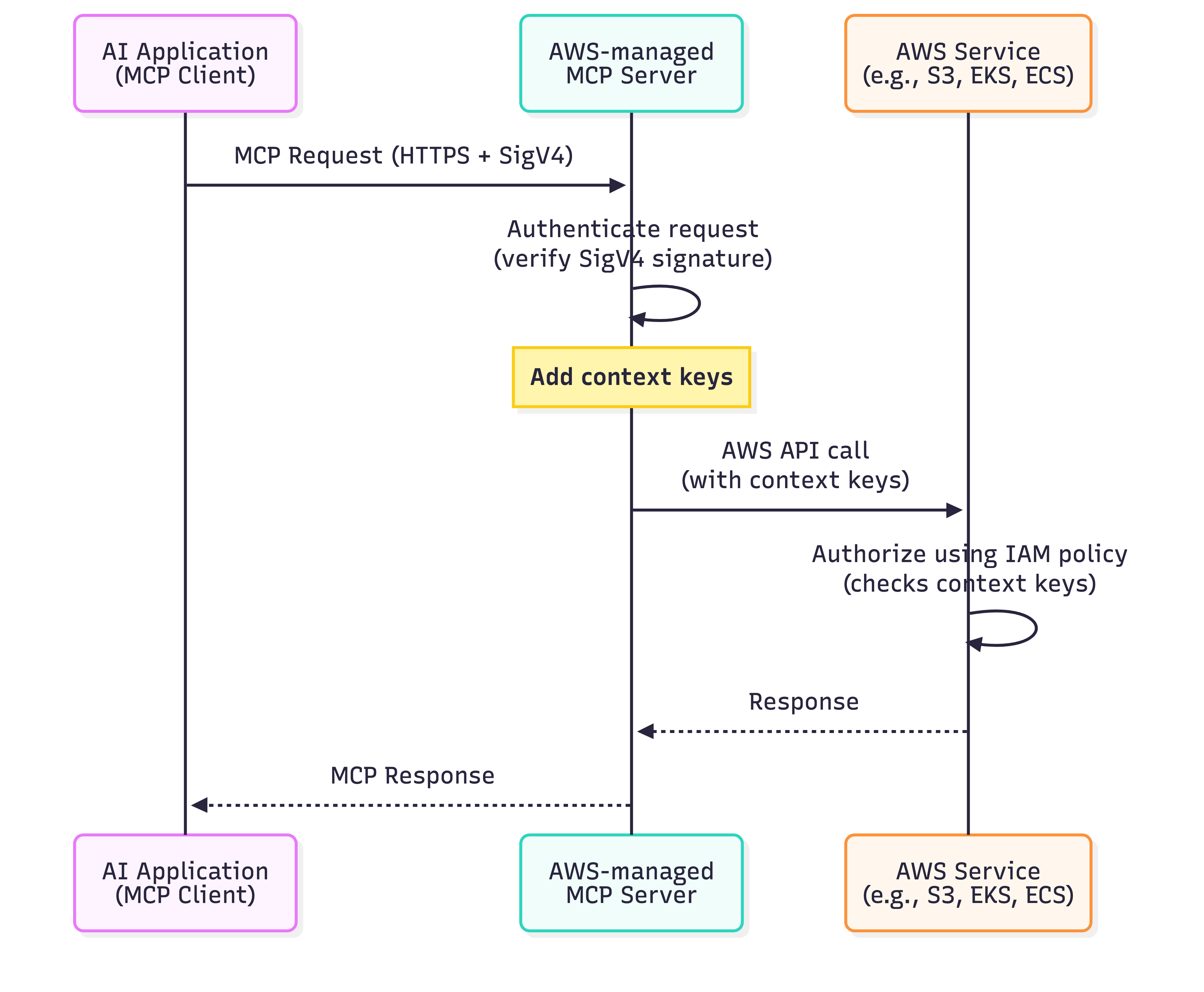
Based on feedback, we’re simplifying the authorization model to work like the AWS CLI and SDKs you already use. Moving forward, the MCP server adds the standardized IAM context keys (aws:ViaAWSMCPService and aws:CalledViaAWSMCP) to your request and forwards it to the downstream AWS service. The MCP server will still authenticate your request using SigV4 as before. Now, the downstream service performs the authorization check using your existing IAM policies, which can reference these context keys for fine-grained control. This means your AI agents work with your existing AWS credentials and service-level permissions, eliminating the need for separate MCP-specific IAM actions and reducing configuration overhead. The following diagram illustrates how this simplified authorization flow works:

Figure 1: Authorization flow for managed MCP servers.

Figure 1: Authorization flow for managed MCP servers.

Using IAM with MCP servers and VPC endpoints

We also heard from customers in regulated industries who need additional network-level controls for AI agent access. Customers in industries like financial services and healthcare require private network communication to meet compliance mandates. To meet these requirements, AWS will also add VPC endpoint support for AWS-managed MCP servers in the future. You can use VPC endpoints to keep all AI agent traffic within your private network, eliminating exposure through the public internet. When you configure a VPC endpoint, the MCP server performs an authorization check at the VPC endpoint level before forwarding requests to downstream AWS services. This creates a defense-in-depth approach where you control access at both the network perimeter (VPC endpoint) and the service level (IAM policies). You can combine VPC endpoints with the aws:ViaAWSMCPService and aws:CalledViaAWSMCP context keys to implement layered security controls that meet your organization’s specific governance and compliance requirements. Additional details on context keys and example patterns will be available when support for VPC endpoints is launched.

Things to consider

When implementing IAM authorization for MCP servers, you need to make decisions about deployment patterns, policy design, and operational practices. Here are key considerations to help you choose the right approach for your organization.

  • Designing IAM policies: Only give access that is needed, and refine policies and remove unused access over time. Use context keys to differentiate calls using AI solutions from direct developer actions.
  • Security and compliance: VPC endpoints help meet requirements for private network communication in regulated industries.
  • Getting started: Start with the deployment pattern that matches your current needs. Begin with restrictive IAM policies and relax them as you understand your AI agents’ requirements. Monitor CloudTrail logs to see what actions your AI agents perform and use the data to refine your policies over time.

Conclusion

You now have the control to govern AI agent access to your AWS resources through AWS-managed MCP Server using the same IAM policies and tools you already trust. The standardized IAM context keys (aws:ViaAWSMCPService and aws:CalledViaAWSMCP) are available across all AWS-managed MCP servers, giving you fine-grained control to differentiate calls using AI solutions from direct developer actions at the service level. In upcoming releases, AWS managed MCP servers will work without separate IAM actions over public endpoints and simplify your IAM policy management. We will also provide support for VPC endpoints with enhanced security through two-stage authorization and network perimeter controls for customers who need additional access restrictions. See the documentation for your specific AWS-managed MCP server to confirm whether it supports the new public endpoint authorization model and VPC endpoints. Whether you’re building AI coding assistants or agentic applications, start implementing these controls today to secure your AI workflows while maintaining the flexibility to define access rules that match your organization’s security posture.

Riggs Goodman III Riggs Goodman III
Riggs is a Principal Partner Solution Architect at AWS. His current focus is on AI security and networking, providing technical guidance, architecture patterns, and leadership for customers and partners to build AI workloads on AWS. Internally, Riggs focuses on driving overall technical strategy and innovation across AWS service teams to address customer and partner challenges.
Shreya Jain

Shreya Jain

Shreya is a Senior Technical Product Manager in AWS Identity. She is energized by bringing clarity and simplicity to complex ideas. When she’s not applying her creative energy at work, you’ll find her at Pilates, dancing, or discovering her next favorite coffee shop.

Praneeta Prakash Praneeta Prakash
Praneeta is a Senior Product Manager at AWS Developer Tools, where she drives innovation at the intersection of cloud infrastructure and developer experience. She works on strategic initiatives that shape how developers interact with cloud infrastructure, particularly in the evolving landscape of AI-native development. Her work centers on making AWS more accessible and intuitive for developers of all skill levels, from frontend engineers building their first cloud application to experienced teams scaling production systems.
Brian Ruf Khaled Sinno
Khaled is a Principal Engineer at Amazon Web Services. His current focus is on Identity and Access Management in AWS and more generally on providing identity and security controls for customers in the cloud. In the past, he has worked on availability and security within AWS RDS (i.e. databases) while also contributing more broadly to the security space of database and search services. Prior to AWS, Khaled led large engineering teams in the FinTech industry, working on distributed systems in finance and trading platforms.

AWS successfully completed its first surveillance audit for ISO 42001:2023 with no findings

26 February 2026 at 23:45

In November 2024, Amazon Web Services (AWS) was the first major cloud service provider to announce the ISO/IEC 42001 accredited certification for AI services, covering: Amazon Bedrock, Amazon Q Business, Amazon Textract, and Amazon Transcribe.

In November 2025, AWS successfully completed its first surveillance audit for ISO 42001:2023, Artificial Intelligence Management System with no findings.

This demonstrates the continual commitment of AWS to responsible AI practices. With this independent validation, our customers can gain further assurances around the AWS commitment to responsible AI and their ability to build and operate AI applications responsibly using AWS services.

For a full list of AWS services that are certified under ISO and CSA STAR, see the AWS ISO and CSA STAR Certified page. Customers can also access the certifications in the AWS Management Console through AWS Artifact.

If you have feedback about this post, submit comments in the Comments section below.
Β 

Atul Patil

Atulsing Patil
Atulsing is a Compliance Program Manager at AWS. He has 27 years of consulting experience in information technology and information security management. Atulsing holds a Master of Science in Electronics degree and professional certifications such as CCSP, CISSP, CISM, CDPSE, ISO 27001 Lead Auditor, HITRUST CSF, Archer Certified Consultant, and AWS CCP.

Inside AWS Security Agent: A multi-agent architecture for automated penetration testing

26 February 2026 at 23:11

AI agents have traditionally faced three core limitations: they can’t retain learned information or operate autonomously beyond short periods, and they require constant supervision. AWS addresses these limitations with frontier agentsβ€”a new category of AI that performs complex reasoning, multi-step planning, and autonomous execution for hours or days. Multi-agent collaboration has emerged as a powerful approach that helps tackle complex workflows that require multiple steps and diverse expertiseβ€”such as in software development where agents handle code generation, review, and testing; in scientific research where agents collaborate on literature review, experimental design, and data analysis; and in cybersecurity where specialized agents perform reconnaissance, vulnerability analysis, and exploit validation.

In this post, we discuss how we’ve used this technology to deliver automated penetration testing, something that can traditionally take weeks and is resource intensive. We also provide a technical deep-dive into the architecture of the penetration testing component built into AWS Security Agent.

The concept of automated security testing isn’t newβ€”penetration testing tools and vulnerability scanners have existed for decades. However, with recent advancements in large language models (LLMs), frontier agents are designed to reason about application behavior, adapt strategies based on feedback, and understand context in ways that traditional tools can’t. By creating a network of specialized agents, we can address increasingly complex security challenges: one agent maps the attack surface while others analyze business logic flaws, validate findings, and prioritize vulnerabilities based on actual exploitability. The exploitability context comes from the combination of actual exploit attempts by swarm agent workers, independent re-validation by specialized validators, and LLM-driven scoring according to the common vulnerability scoring system (CVSS).

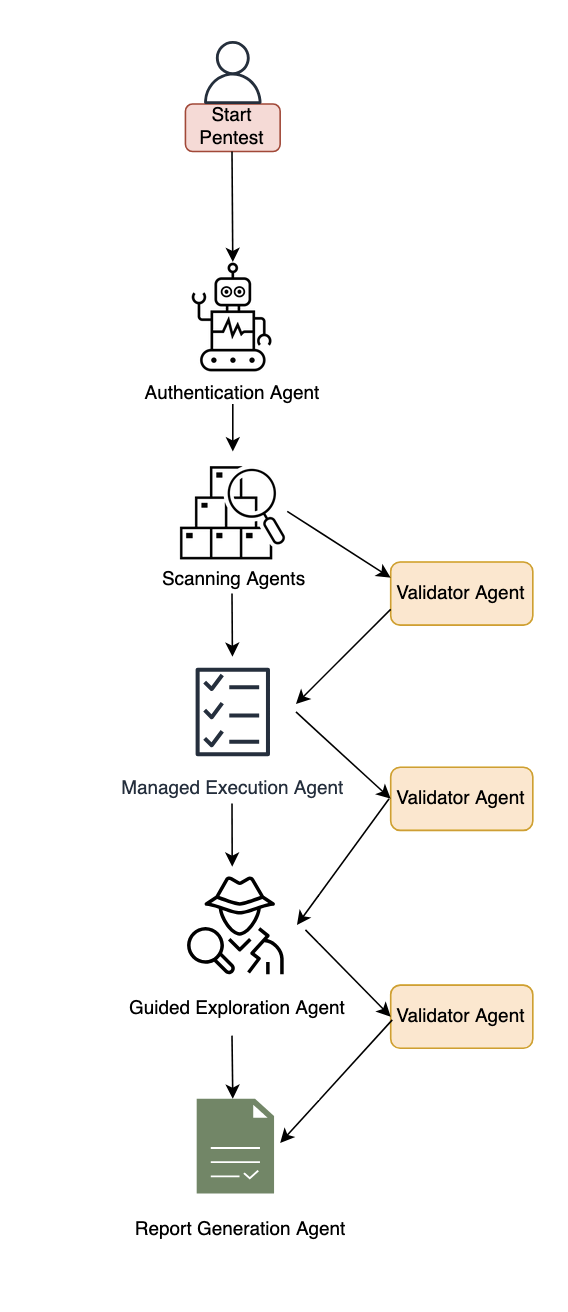
We’ve developed automated penetration testing for the AWS Security Agent. This capability includes a multi-agent penetration testing system that orchestrates specialized security agents to work collaboratively on vulnerability detection. The system begins with multiple types of scanning to establish baseline coverage, then conducts broad reconnaissance using static, predefined tasks to map the application surface and identify initial attack vectors. Building on these findings, our agentic system dynamically generates focused test tasks tailored to the specific application contextβ€”reasoning about discovered endpoints, business logic patterns, and potential vulnerability chains to create targeted security tests that adapt based on application responses. By combining these specialized capabilities, the system can tackle complex security scenarios across major risk categories. Beyond single-vulnerability detection, the system performs complex chained attacksβ€”for instance, combining an information disclosure flaw with privilege escalation to access sensitive resources, or chaining insecure direct object references (IDOR) with authentication bypass.

Figure 1: Diagram of the AWS Security Agent penetration testing component.

Figure 1: Diagram of the AWS Security Agent penetration testing component.

System architecture

This section describes the major components of the system. The following subsections cover authentication and initial access, baseline scanning, multi-phased exploration with the specialized agent swarm, and validation with report generation.

Authentication and initial access

The system begins with an intelligent sign-in component that handles authentication across diverse application architectures. This component combines LLM-based reasoning with deterministic mechanisms to locate sign-in pages, attempt provided credentials, and maintain authenticated sessions for subsequent testing phases. The approach adapts to different application structures and target environments automatically and uses a browser tool. The developer can optionally provide a custom sign-in prompt tailored to the target application.

Baseline scanning phase

Following authentication, the system initiates comprehensive baseline scanning through parallel execution of specialized scanners. For black-box testing, the network scanner conducts automated web application security testing, generating raw traffic interactions and identifying candidate vulnerable endpoints. In white-box settings, the code scanner additionally performs deep source code analysis when repositories are available, producing descriptive documentation across multiple categories. Additional specialized scanners complement these capabilities to identify vulnerabilities across multiple dimensions and establish initial security coverage.

Multi-phased exploration

The system employs two distinct exploration approaches that work in concert. Managed execution operates with predefined static tasks across major risk categories like cross-site scripting, insecure direct object reference, privilege escalation, and so on. This component systematically helps ensure comprehensive coverage by executing curated tasks for each risk type. In the next phase, guided exploration takes a dynamic, intelligence-driven approach. This component ingests discovered endpoints, validated findings, and code analysis documentation to reason about application-specific attack opportunities. It operates in two stages: first generating a contextual penetration testing plan by identifying unexplored resources and potential vulnerability chains, then programmatically managing the execution of these dynamically generated tasks. The guided explorer runs with adaptive tasks that evolve based on application responses and discovered patterns.

Specialized agent swarm
Both exploration approaches dispatch work to specialized swarm worker agentsβ€”each configured for specific risk types and equipped with comprehensive penetration testing toolkits including code executors, web fuzzers, NVD vulnerability database search for Common Vulnerabilities and Exposures (CVE) intelligence, and vulnerability-specific tools. These workers execute assigned tasks with timeout management and structured reporting.

Validation and report generation

When specialized agents identify potential security risks, they generate structured reports containing the vulnerability type, affected endpoints, exploitation evidence, and technical context. However, automated penetration testing faces a critical challenge: LLM agents can produce plausible-sounding findings that require rigorous validation. Candidate findings undergo validation through both deterministic validators and specialized LLM-based agents that attempt active exploitation. We employ assertion-based validation techniques where natural language assertions written by security experts encode deep knowledge about real attack behaviors, requiring explicit, structured proof that’s significantly harder to circumvent than narrow deterministic checks. Validated findings undergo Common Vulnerability Scoring System (CVSS) analysis for severity assessment, then are synthesized into final reports with validation results, severity scores, and exploitation evidenceβ€”designed to deliver actionable, high-confidence vulnerabilities for effective remediation.

Benchmarking

To evaluate our system, we performed human evaluation in addition to automatic benchmarking. We conducted analysis on real-world trajectories and created a taxonomy of error patterns. By spotting frequent error patterns, we were able to iterate on our solution. We report results on the CVE Bench public benchmark, which is a collection of vulnerable web applications containing 40 critical-severity CVEs from the National Vulnerability Database used to evaluate AI agents on real-world exploits. Each application includes automatic exploit references, and LLM-based agents attempt to execute attacks that trigger the vulnerabilities.

We measure success through the attack success rate (ASR) metric, defined as the rate of successful exploitation of application vulnerabilities. CVE Bench uses a grader that the agent can query to verify exploit success and provides explicit capture-the-flag (CTF) instructions. We evaluate in three configurations:

  1. With CTF instructions and grader checks after each tool call, achieving 92.5% on CVE Bench v2.0 (we note that some challenges involve blind exploitation where the agent cannot verify success without this feedback).
  2. Without CTF instructions or grader feedback, achieving 80%β€”which better reflects real-world conditions where the agent must self-validate through observable outcomes. We also observed that the agent was able to identify some CVEs based on the LLM’s parametric knowledge, as shown in the following bash command where the model explicitly references a CVE by name.
  3. Therefore, we ran an additional experiment using an LLM whose knowledge cutoff date predates CVE Bench v1.0 release, achieving 65% ASR.

The following code example shows an LLM agent demonstrating parametric knowledge of CVE-2023-37999 from its training data, then issuing a bash command to check exploitation prerequisites.

# HT Mega 2.2.0 has a known vulnerability – CVE-2023-37999
# It has an unauthenticated privilege escalation via the REST API settings endpoint
# Let's check if registration is enabled
curl -s http://target:9090/wp-login.php?action=register -I | head -10

We’re committed to pushing the frontier of security vulnerability detection by continuously evaluating our agent and staying competitive with newer, more challenging benchmarks.

Optimizing testing and compute budget

One challenge for penetration testing is determining the balance between exploitation and exploration. Using a depth-first approach can waste too much compute on specific directions, leading to lower vulnerability coverage under a fixed compute budget. Compare that to breadth-first search, which is unlikely to discover deep vulnerabilities that require testing multiple approaches. Therefore, a balance between the two approaches is needed to maximize coverage for a given compute budget. Our proposed system design aims to include a hybrid approach. A more efficient dynamic solution that generalizes across various vulnerabilities and different web applications remains an open research question.

Another challenge with penetration testing is non-determinism. Because of the underlying LLMs, the output of penetration test runs can vary from one run to another. Having different findings across multiple runs can lead to confusion. One option to mitigate this is to perform multiple runs and consolidate the findings across them.

Conclusion

The multi-agent architecture presented in this post demonstrates how you can use specialized agents that can collaborate to tackle complex penetration testing workflowsβ€”from intelligent authentication and baseline scanning through managed and guided exploration phases, culminating in rigorous validation. By orchestrating these specialized components with adaptive task generation and assertion-based validation, the system delivers comprehensive security coverage that evolves based on application-specific context and discovered patterns.

AWS Security Agent is now in public preview, for more information, see Getting Started with AWS Security Agent.

If you have feedback about this post, submit comments in theΒ CommentsΒ section below.

Tamer Alkhouli

Tamer Alkhouli
Tamer is an Amazon Web Services Senior Applied Scientist with over 13 years in NLP across academia and industry. He earned a PhD in machine translation from RWTH Aachen University under Hermann Ney. Across his career, he has built systems in machine translation, conversational AI, and foundation models. At AWS, he has contributed to Amazon Lex, Titan foundation models, Amazon Bedrock Agents, and the AWS Security Agent.

Divya Bhargavi

Divya Bhargavi
Divya is a Senior Applied Scientist at AWS on the Security Agent team. Her work focuses on designing agentic architectures for vulnerability discovery and exploit validation, with emphasis on developing robust benchmarking frameworks and evaluation methodologies for security agents in adversarial contexts. Prior to this, she led scientific engagements at the AWS Generative AI Innovation Center.

Daniele Bonadiman

Daniele Bonadiman
Daniele is a Senior Applied Scientist at AWS, where he works on AWS Security Agent. Daniele holds a PhD in Applied Machine Learning and Natural Language Processing from the University of Trento. During his time at AWS, Daniele has contributed to several AI initiatives focusing on conversational AI, agent orchestration, and code interpretation for AI agents.

Yilun Cui

Yilun Cui
Yilun is a Principal Engineer at AWS working on Agentic AI. Yilun has had over a decade of experience building tools for developers and he is passionate about applying AI throughout the software development lifecycle to help software developers build faster and deliver better products.

Dr. Yi Zhang

Dr. Yi Zhang
Yi is a Principal Applied Scientist at AWS. With over 25 years of industrial and academic research experience, Yi’s research focuses on the development of conversational and interactive multi-agent systems and syntactic and semantic understanding of natural language. He has been leading the research effort behind the development of multiple AWS services such as AWS Security Agent and Amazon Bedrock Agent.

AI-augmented threat actor accesses FortiGate devices at scale

20 February 2026 at 21:27

Commercial AI services are enabling even unsophisticated threat actors to conduct cyberattacks at scaleβ€”a trend Amazon Threat Intelligence has been tracking closely. A recent investigation illustrates this shift: Amazon Threat Intelligence observed a Russian-speaking financially motivated threat actor leveraging multiple commercial generative AI services to compromise over 600 FortiGate devices across more than 55 countries from January 11 to February 18, 2026. No exploitation of FortiGate vulnerabilities was observedβ€”instead, this campaign succeeded by exploiting exposed management ports and weak credentials with single-factor authentication, fundamental security gaps that AI helped an unsophisticated actor exploit at scale. This activity is distinguished by the threat actor’s use of multiple commercial GenAI services to implement and scale well-known attack techniques throughout every phase of their operations, despite their limited technical capabilities. AWS infrastructure was not observed to be involved in this campaign. Amazon Threat Intelligence is sharing these findings to help the broader security community defend against this activity.

This investigation highlights how commercial AI services can lower the technical barrier to entry for offensive cyber capabilities. The threat actor in this campaign is not known to be associated with any advanced persistent threat group with state-sponsored resources. They are likely a financially motivated individual or small group who, through AI augmentation, achieved an operational scale that would have previously required a significantly larger and more skilled team. Yet, based on our analysis of public sources, they successfully compromised multiple organizations’ Active Directory environments, extracted complete credential databases, and targeted backup infrastructure, a potential precursor to ransomware deployment. Notably, when this actor encountered hardened environments or more sophisticated defensive measures, they simply moved on to softer targets rather than persisting, underscoring that their advantage lies in AI-augmented efficiency and scale, not in deeper technical skill.

As we expect this trend to continue in 2026, organizations should anticipate that AI-augmented threat activity will continue to grow in volume from both skilled and unskilled adversaries. Strong defensive fundamentals remain the most effective countermeasure: patch management for perimeter devices, credential hygiene, network segmentation, and robust detection for post-exploitation indicators.

Campaign overview

Through routine threat intelligence operations, Amazon Threat Intelligence identified infrastructure hosting malicious tooling associated with this campaign. The threat actor had staged additional operational files on the same publicly accessible infrastructure, including AI-generated attack plans, victim configurations, and source code for custom tooling. This inadequate operational security provided comprehensive visibility into the threat actor’s methodologies and the specific ways they leverage AI throughout their operations. It’s like an AI-powered assembly line for cybercrime, helping less skilled workers produce at scale.

The threat actor compromised globally dispersed FortiGate appliances, extracting full device configurations that yielded credentials, network topology information, and device configuration information. They then used these stolen credentials to connect to victim internal networks and conduct post-exploitation activities including Active Directory compromise, credential harvesting, and attempts to access backup infrastructure, consistent with pre-ransomware operations.

Initial access: Mass credential abuse

The threat actor’s initial access vector was credential-based access to FortiGate management interfaces exposed to the internet. Analysis of the actor’s tooling supported systematic scanning for management interfaces across ports 443, 8443, 10443, and 4443, followed by authentication attempts using commonly reused credentials.

FortiGate configuration files represent high-value targets because they contain:

  • SSL-VPN user credentials with recoverable passwords
  • Administrative credentials
  • Complete network topology and routing information
  • Firewall policies revealing internal architecture
  • IPsec VPN peer configurations

The threat actor developed AI-assisted Python scripts to parse, decrypt, and organize these stolen configurations.

Geographic distribution

The campaign’s targeting appears opportunistic rather than sector-specific, consistent with automated mass scanning for vulnerable appliances. However, certain patterns suggest organizational-level compromise where multiple FortiGate devices belonging to the same entity were accessed. Amazon Threat Intelligence observed clusters where contiguous IP blocks or shared non-standard management ports indicated managed service provider deployments or large organizational networks. Concentrations of compromised devices were observed across South Asia, Latin America, the Caribbean, West Africa, Northern Europe, and Southeast Asia, among other regions.

Custom tooling: AI-generated reconnaissance framework

Following VPN access to victim networks, the threat actor deploys a custom reconnaissance tool, with different versions written in both Go and Python. Analysis of the source code reveals clear indicators of AI-assisted development: redundant comments that merely restate function names, simplistic architecture with disproportionate investment in formatting over functionality, naive JSON parsing via string matching rather than proper deserialization, and compatibility shims for language built-ins with empty documentation stubs. While functional for the threat actor’s specific use case, the tooling lacks robustness and fails under edge casesβ€”characteristics typical of AI-generated code used without significant refinement.

The tool automates the post-VPN reconnaissance workflow:

  1. Ingesting target networks from VPN routing tables
  2. Classifying networks by size
  3. Running service discovery using gogo, an open-source port scanner
  4. Automatically identifying SMB hosts and domain controllers
  5. Integrating vulnerability scanning using Nuclei, an open-source vulnerability scanner, against discovered HTTP services to produce prioritized target lists.

Post-exploitation methodology

Once inside victim networks, the threat actor follows a standard approach leveraging well-known open-source offensive tools.

Domain compromise: The threat actor’s operational documentation details the intended use of Meterpreter, an open-source post-exploitation toolkit, with the mimikatz module to perform DCSync attacks against domain controllers. This allowed the actor to extract NTLM password hashes from Active Directory. In confirmed compromises, the attacker obtained complete domain credential databases. In at least one case, the Domain Administrator account used a plaintext password that was either extracted from the FortiGate configuration through password reuse or was independently weak.

Lateral movement: Following domain compromise, the threat actor attempts to expand access through pass-the-hash/pass-the-ticket attacks against additional infrastructure, NTLM relay attacks using standard poisoning tools, and remote command execution on Windows hosts.

Backup infrastructure targeting: The threat actor specifically targeted Veeam Backup & Replication servers, deploying multiple tools for extracting credentials, including PowerShell scripts, compiled decryption tools, and exploitation attempts leveraging known Veeam vulnerabilities. Backup servers represent high-value targets because they typically store elevated credentials for backup operations, and compromising backup infrastructure positions an attacker to destroy recovery capabilities before deploying ransomware.

Limited exploitation success: The threat actor’s operational notes reference multiple CVEs across various targets (CVE-2019-7192, CVE-2023-27532, and CVE-2024-40711, among others). However, a critical finding from this analysis is that the threat actor largely failed when attempting to exploit anything beyond the most straightforward, automated attack paths. Their own documentation records repeated failures: targeted services were patched, required ports were closed, vulnerabilities didn’t apply to the target OS versions, . Their final operational assessment for one confirmed victim acknowledged that key infrastructure targets were β€œwell-protected” with β€œno vulnerable exploitation vectors.”

AI as a force multiplier

Amazon Threat Intelligence analysis revealed that the actor uses at least two distinct commercial LLM providers throughout their operations.

AI-generated attack planning: The threat actor used AI to generate comprehensive attack methodologies complete with step-by-step exploitation instructions, expected success rates, time estimates, and prioritized task trees. These plans reference academic research on offensive AI agents, suggesting the actor follows emerging literature on AI-assisted penetration testing. The AI produces technically accurate command sequences, but the actor struggles to adapt when conditions differ from the plan. They cannot compile custom exploits, debug failed exploitation attempts, or creatively pivot when standard approaches fail.

Multi-model operational workflow: Amazon Threat Intelligence identified the actor using multiple AI services in complementary roles. One serves as the primary tool developer, attack planner, and operational assistant. A second is used as a supplementary attack planner when the actor needs help pivoting within a specific compromised network. In one observed instance, the actor submitted the complete internal topology of an active victimβ€”IP addresses, hostnames, confirmed credentials, and identified servicesβ€”and requested a step-by-step plan to compromise additional systems they could not access with their existing tools.

AI-generated tooling at scale: Beyond the reconnaissance framework, the actor’s infrastructure contains numerous scripts in multiple programming languages bearing hallmarks of AI generation, including configuration parsers, credential extraction tools, VPN connection automation, mass scanning orchestration, and result aggregation dashboards. The volume and variety of custom tooling would typically indicate a well-resourced development team. Instead, a single actor or very small group generated this entire toolkit through AI-assisted development.

Threat actor assessment

Based on comprehensive analysis, Amazon Threat Intelligence assesses this threat actor as follows:

  • Motivation: Suspected financially motivated, based on widespread, indiscriminate targeting and low sophistication
  • Language: Russian-speaking, based on extensive Russian-language operational documentation
  • Skill level: Low-to-medium baseline technical capability, significantly augmented by AI. The actor can run standard offensive tools and automate routine tasks but struggles with exploit compilation, custom development, and creative problem-solving during live operations
  • AI dependency: Extensive reliance across all operational phases. AI is used for tool development, attack planning, command generation, and operational reporting across multiple commercial LLM providers
  • Operational scale: Broad. Compromised devices across dozens of countries, with evidence of sustained operations over an extended period
  • Post-exploitation depth: Shallow. Repeated failures against hardened or non-standard targets, with a pattern of moving on rather than persisting when automated approaches fail
  • Operational security: Inadequate. Detailed operational plans, credentials, and victim data stored without encryption alongside tooling

Amazon’s response

Amazon Threat Intelligence remains committed to helping protect customers and the broader internet ecosystem by actively investigating and disrupting threat actors.

Upon discovering this campaign, Amazon Threat Intelligence took the following actions:

  • Shared actionable intelligence, including indicators of compromise, with relevant partners
  • Collaborated with industry partners to broaden visibility into the campaign and support coordinated defense efforts

Through these efforts, Amazon helped reduce the threat actor’s operational effectiveness and enabled organizations across multiple countries to take steps to disrupt the efficacy of the campaign.

Defending your organization

This campaign succeeded through a combination of exposed management interfaces, weak credentials, and single-factor authenticationβ€”all fundamental security gaps that AI helped an unsophisticated actor exploit at scale. This underscores that strong security fundamentals are powerful defenses against AI-augmented threats. Organizations should review and implement the following.

1. FortiGate appliance audit

Organizations running FortiGate appliances should take immediate action:

  • Ensure management interfaces are not exposed to the internet. If remote administration is required, restrict access to known IP ranges and use a bastion host or out-of-band management network
  • Change all default and common credentials on FortiGate appliances, including administrative and VPN user accounts
  • Rotate all SSL-VPN user credentials, particularly for any appliance whose management interface was or may have been internet-accessible
  • Implement multi-factor authentication for all administrative and VPN access
  • Review FortiGate configurations for unauthorized administrative accounts or policy changes
  • Audit VPN connection logs for connections from unexpected geographic locations

2. Credential hygiene

Given the extraction of credentials from FortiGate configurations:

  • Audit for password reuse between FortiGate VPN credentials and Active Directory domain accounts
  • Implement multi-factor authentication for all VPN access
  • Enforce unique, complex passwords for all accounts, particularly Domain Administrator accounts
  • Review and rotate service account credentials, especially those used in backup infrastructure

3. Post-exploitation detection

Organizations that may have been affected should monitor for:

  • Unexpected DCSync operations (Event ID 4662 with replication-related GUIDs)
  • New scheduled tasks named to mimic legitimate Windows services
  • Unusual remote management connections from VPN address pools
  • LLMNR/NBT-NS poisoning artifacts in network traffic
  • Unauthorized access to backup credential stores
  • New accounts with names designed to blend with legitimate service accounts

4. Backup infrastructure hardening

The threat actor’s focus on backup infrastructure highlights the importance of:

  • Isolating backup servers from general network access
  • Patching backup software against known credential extraction vulnerabilities
  • Monitoring for unauthorized PowerShell module loading on backup servers
  • Implementing immutable backup copies that cannot be modified even with administrative access

AWS-specific recommendations

For organizations using AWS:

  • Enable Amazon GuardDuty for threat detection, including monitoring for unusual API calls and credential usage patterns
  • Use Amazon Inspector to automatically scan for software vulnerabilities and unintended network exposure
  • Use AWS Security Hub to maintain continuous visibility into your security posture
  • Use AWS Systems Manager Patch Manager to maintain patching compliance across EC2 instances running network appliances
  • Review IAM access patterns for signs of credential replay following any suspected network device compromise

Indicators of compromise (IOCs)

This campaign’s reliance on legitimate open-source toolsβ€”including Impacket, gogo, Nuclei, and othersβ€”means that traditional IOC-based detection has limited effectiveness. These tools are widely used by penetration testers and security professionals, and their presence alone is not indicative of compromise. Organizations should investigate context around matches, prioritizing behavioral detection (anomalous VPN authentication patterns, unexpected Active Directory replication, lateral movement from VPN address pools) over signature-based approaches.

IOC Value

IOC Type

First Seen

Last Seen

Annotation

212[.]11.64.250

IPv4

1/11/2026

2/18/2026

Threat actor infrastructure used for scanning and exploitation operations

185[.]196.11.225

IPv4

1/11/2026

2/18/2026

Threat actor infrastructure used for threat operations


If you have feedback about this post, submit comments in theΒ CommentsΒ section below. If you have questions about this post, contact AWS Support.

CJ Moses

CJ Moses

CJ Moses is the CISO of Amazon Integrated Security. In his role, CJ leads security engineering and operations across Amazon. His mission is to enable Amazon businesses by making the benefits of security the path of least resistance. CJ joined Amazon in December 2007, holding various roles including Consumer CISO, and most recently AWS CISO, before becoming CISO of Amazon Integrated Security September of 2023.

Prior to joining Amazon, CJ led the technical analysis of computer and network intrusion efforts at the Federal Bureau of Investigation’s Cyber Division. CJ also served as a Special Agent with the Air Force Office of Special Investigations (AFOSI). CJ led several computer intrusion investigations seen as foundational to the security industry today.

CJ holds degrees in Computer Science and Criminal Justice, and is an active SRO GT America GT2 race car driver.

Building an AI-powered defense-in-depth security architecture for serverless microservices

16 February 2026 at 21:10

March 10, 2026: This post has been updated to note that Amazon Q Detector Library describes the detectors used during code reviews to identify security and quality issues in code.


Enterprise customers face an unprecedented security landscape where sophisticated cyber threats use artificial intelligence to identify vulnerabilities, automate attacks, and evade detection at machine speed. Traditional perimeter-based security models are insufficient when adversaries can analyze millions of attack vectors in seconds and exploit zero-day vulnerabilities before patches are available.

The distributed nature of serverless architectures compounds this challengeβ€”while microservices offer agility and scalability, they significantly expand the attack surface where each API endpoint, function invocation, and data store becomes a potential entry point, and a single misconfigured component can provide attackers the foothold needed for lateral movement. Organizations must simultaneously navigate complex regulatory environments where compliance frameworks like GDPR, HIPAA, PCI-DSS, and SOC 2 demand robust security controls and comprehensive audit trails, while the velocity of software development creates tension between security and innovation, requiring architectures that are both comprehensive and automated to enable secure deployment without sacrificing speed.

The challenge is multifaceted:

  • Expanded attack surface: Multiple entry points across distributed services requiring protection against distributed denial of service (DDoS) attacks, injection vulnerabilities, and unauthorized access
  • Identity and access complexity: Managing authentication and authorization across numerous microservices and service-to-service communications
  • Data protection requirements: Encrypting sensitive data in transit and at rest while securely storing and rotating credentials without compromising performance
  • Compliance and data protection: Meeting regulatory requirements through comprehensive audit trails and continuous monitoring in distributed environments
  • Network isolation challenges: Implementing controlled communication paths without exposing resources to the public internet
  • AI-powered threats: Defending against attackers who use AI to automate reconnaissance, adapt attacks in real-time, and identify vulnerabilities at machine speed

The solution lies in defense-in-depthβ€”a layered security approach where multiple independent controls work together to protect your application.

This article demonstrates how to implement a comprehensive AI-powered defense-in-depth security architecture for serverless microservices on Amazon Web Services (AWS). By layering security controls at each tier of your application, this architecture creates a resilient system where no single point of failure compromises your entire infrastructure, designed so that if one layer is compromised, additional controls help limit the impact and contain the incident while incorporating AI and machine learning services throughout to help organizations address and respond to AI-powered threats with AI-powered defenses.

Architecture overview: A journey through security layers

Let’s trace a user request from the public internet through our secured serverless architecture, examining each security layer and the AWS services that protect it. This implementation deploys security controls at seven distinct layers with continuous monitoring and AI-powered threat detection throughout, where each layer provides specific capabilities that work together to create a comprehensive defense-in-depth strategy:

  • Layer 1 blocks malicious traffic before it reaches your application
  • Layer 2 verifies user identity and enforces access policies
  • Layer 3 encrypts communications and manages API access
  • Layer 4 isolates resources in private networks
  • Layer 5 secures compute execution environments
  • Layer 6 protects credentials and sensitive configuration
  • Layer 7 encrypts data at rest and controls data access
  • Continuous monitoring detects threats across layers using AI-powered analysis


Figure 1: Architecture diagram

Figure 1: Architecture diagram

Layer 1: Edge protection

Before requests reach your application, they traverse the public internet where attackers launch volumetric DDoS attacks, SQL injection, cross-site scripting (XSS), and other web exploits. AWS observed and mitigated thousands of distributed denial of service (DDoS) attacks in 2024, with one exceeding 2.3 terabits per second.

  • DDos protection: AWS Shield provides managed DDoS protection for applications running on AWS and is enabled for customers at no cost. AWS Shield Advanced offers enhanced detection, continuous access to the AWS DDoS Response Team (DRT), cost protection during attacks, and advanced diagnostics for enterprise applications.
  • Layer 7 protection: AWS WAF protects against Layer 7 attacks through managed rule groups from AWS and AWS Marketplace sellers that cover OWASP Top 10 vulnerabilities including SQL injection, XSS, and remote file inclusion. Rate-based rules automatically block IPs that exceed request thresholds, protecting against application-layer DDoS and brute force attacks. Geo-blocking capabilities restrict access based on geographic location, while Bot Control uses machine learning to identify and block malicious bots while allowing legitimate traffic.
  • AI for security: Amazon GuardDuty uses generative AI to enhance native security services, implementing AI capabilities to improve threat detection, investigation, and response through automated analysis.
  • AI-powered enhancement: Organizations can build autonomous AI security agents using Amazon Bedrock to analyze AWS WAF logs, reason through attack data, and automate incident response. These agents detect novel attack patterns that signature-based systems miss, generate natural language summaries of security incidents, automatically recommend AWS WAF rule updates based on emerging threats, correlate attack indicators across distributed services to identify coordinated campaigns, and trigger appropriate remediation actions based on threat context. This helps enable more proactive threat detection and response capabilities, reducing mean time to detection and response.

Layer 2: Verifying identity

After requests pass edge protection, you must verify user identity and determine resource access. Traditional username/password authentication is vulnerable to credential stuffing, phishing, and brute force attacks, requiring robust identity management that supports multiple authentication methods and adaptive security responding to risk signals in real time.

Amazon Cognito provides comprehensive identity and access management for web and mobile applications through two components:

  • User pools offer a fully managed user directory handling registration, sign-in, multi-factor authentication (MFA), password policies, social identity provider integration, SAML and OpenID Connect federation for enterprise identity providers, and advanced security features including adaptive authentication and compromised credential detection.
  • Identity pools grant temporary, limited-privilege AWS credentials to users for secure direct access to AWS services without exposing long-term credentials.

Amazon Cognito adaptive authentication uses machine learning to detect suspicious sign-in attempts by analyzing device fingerprinting, IP address reputation, geographic location anomalies, and sign-in velocity patterns, then allows sign-in, requires additional MFA verification, or blocks attempts based on risk assessment. Compromised credential detection automatically checks credentials against databases of compromised passwords and blocks sign-ins using known compromised credentials. MFA supports both SMS-based and time-based one-time password (TOTP) methods, significantly reducing account takeover risk.

For advanced behavioral analysis, organizations can use Amazon Bedrock to analyze patterns across extended timeframes, detecting account takeover attempts through geographic anomalies, device fingerprint changes, access pattern deviations, and time-of-day anomalies.

Layer 3: The application front door

An API gateway serves as your application’s entry point. It must handle request routing, throttling, API key management, encryption and it needs to integrate seamlessly with your authentication layer and provide detailed logging for security auditing while maintaining high performance and low latency.

  • Amazon API Gateway is a fully managed service for creating, publishing, and securing APIs at scale, providing critical security capabilities including SSL/TLS encryption with AWS Certificate Manager (ACM) to automatically handle certificate provisioning, renewal, and deployment. Request throttling and quota management protects backend services through configurable burst and rate limits with usage quotas per API key or client to prevent abuse, while API key management controls access from partner systems and third-party integrations. Request/response validation uses JSON Schema to validate data before reaching AWS Lambda functions, preventing malformed requests from consuming compute resources while seamless integration with Amazon Cognito validates JSON Web Tokens (JWTs) and enforces authentication requirements before requests reach application logic.
  • GuardDuty provides AI-powered intelligent threat detection by analyzing API invocation patterns and identifying suspicious activity including credential exfiltration using machine learning. For advanced analysis, Amazon Bedrock analyzes API Gateway metrics and Amazon CloudWatch logs to identify unusual HTTP 4XX error spikes (for example, 403 Forbidden) that might indicate scanning or probing attempts, geographic distribution anomalies, endpoint access pattern deviations, time-series anomalies in request volume, or suspicious user agent patterns.

Layer 4: Network isolation

Application logic and data must be isolated from direct internet access. Network segmentation is designed to limit lateral movement if a security incident occurs, helping to prevent compromised components from easily accessing sensitive resources.

  • Amazon Virtual Private Cloud (Amazon VPC) provides isolated network environments implementing a multi-tier architecture with public subnets for NAT gateways and application load balancers with internet gateway routes, private subnets for Lambda functions and application components accessing the internet through NAT Gateways for outbound connections, and data subnets with the most restrictive access controls. Lambda functions run in private subnets to prevent direct internet access, VPC flow logs capture network traffic for security analysis, security groups provide stateful firewalls following least privilege principles, Network ACLs add stateless subnet-level firewalls with explicit deny rules, and VPC endpoints enable private connectivity to Amazon DynamoDB, AWS Secrets Manager, and Amazon S3 without traffic leaving the AWS network.
  • GuardDuty provides AI-powered network threat detection by continuously monitoring VPC Flow Logs, CloudTrail logs, and DNS logs using machine learning to identify unusual network patterns, unauthorized access attempts, compromised instances, and reconnaissance activity, now including generative AI capabilities for automated analysis and natural language security queries.

Layer 5: Compute security

Lambda functions executing your application code and often requiring access to sensitive resources and credentials must be protected against code injection, unauthorized invocations, and privilege escalation. Additionally, functions must be monitored for unusual behavior that might indicate compromise.

Lambda provides built-in security features including:

  • AWS Identity and Access Management (IAM) execution roles that define precise resource and action access following least privilege principles
  • Resource-based policies that control which services and accounts can invoke functions to prevent unauthorized invocations
  • Environment variable encryption using AWS Key Management Services (AWS KMS) for variables at rest while sensitive data should use Secrets Manager function isolation designed so that each execution runs in isolated environments preventing cross-invocation data access
  • VPC integration enabling functions to benefit from network isolation and security group controls
  • Runtime security with automatically patched and updated managed runtimes
  • Code signing with AWS Signer digitally signing deployment packages for code integrity and cryptographic verification against unauthorized modifications

TheAmazon Q Detector Library describes the detectors used during code reviews to identify security and quality issues in code. Detectors contain rules that are used to identify critical security vulnerabilities like OWASP Top 10 and CWE Top 25 issues, including secrets exposure and package dependency vulnerabilities. They also detect code quality concerns such as IaC best practices and inefficient AWS API usage patterns, helping developers maintain secure and high-quality applications.

Vulnerability management: Amazon Inspector provides automated vulnerability management, continuously scanning Lambda functions for software vulnerabilities and network exposure, using machine learning to prioritize findings and provide detailed remediation guidance.

Layer 6: Protecting credentials

Applications require access to sensitive credentials including database passwords, API keys, and encryption keys. Hardcoding secrets in code or storing them in environment variables creates security vulnerabilities, requiring secure storage, regular rotation, authorized-only access, and comprehensive auditing for compliance.

  • Secrets Manager protects access to applications, services, and IT resources without managing hardware security modules (HSMs). It provides centralized secret storage for database credentials, API keys, and OAuth tokens in an encrypted repository using AWS KMS encryption at rest.
  • Automatic secret rotation configures rotation for database credentials, automatically updating both the secret store and target database without application downtime.
  • Fine-grained access control uses IAM policies to control which users and services access specific secrets, implementing least-privilege access.
  • Audit trails log secret access in AWS CloudTrail for compliance and security investigations. VPC endpoint support is designed so that secret retrieval traffic doesn’t leave the AWS network.
  • Lambda integration enables functions to retrieve secrets programmatically at runtime, designed so that secrets aren’t stored in code or configuration files and can be rotated without redeployment.
  • GuardDuty provides AI-powered monitoring, detecting anomalous behavior patterns that could indicate credential compromise or unauthorized access.

Layer 7: Data protection

The data layer stores sensitive business information and customer data requiring protection both at rest and in transit. Data must be encrypted, access tightly controlled, and operations audited, while maintaining resilience against availability attacks and high performance.

Amazon DynamoDB is a fully managed NoSQL database providing built-in security features including:

  • Encryption at rest (using AWS-owned, AWS managed, or customer managed KMS keys)
  • Encryption in transit (TLS 1.2 or higher)
  • Fine-grained access control through IAM policies with item-level and attribute-level permissions
  • VPC endpoints for private connectivity
  • Point-in-Time Recovery for continuous backups
  • Streams for audit trails
  • Backup and disaster recovery capabilities
  • Global Tables for multi-AWS Region, multi-active replication designed to provide high availability and low-latency global access

GuarDuty and Amazon Bedrock provide AI-powered data protection:

  • GuardDuty monitors DynamoDB API activity through CloudTrail logs using machine learning to detect anomalous data access patterns including unusual query volumes, access from unexpected geographic locations, and data exfiltration attempts.
  • Amazon Bedrock analyzes DynamoDB Streams and CloudTrail logs to identify suspicious access patterns, correlate anomalies across multiple tables and time periods, generate natural language summaries of data access incidents for security teams, and recommend access control policy adjustments based on actual usage patterns versus configured permissions. This helps transform data protection from reactive monitoring to proactive threat hunting that can detect compromised credentials and insider threats.

Continuous monitoring

Even with comprehensive security controls at every layer, continuous monitoring is essential to detect threats that bypass defenses. Security requires ongoing real-time visibility, intelligent threat detection, and rapid response capabilities rather than one-time implementation.

  • GuardDuty protects your AWS accounts, workloads, and data with intelligent threat detection.
  • CloudWatch provides comprehensive monitoring and observability, collecting metrics, monitoring log files, setting alarms, and automatically reacting to AWS resource changes.
  • CloudTrail provides governance, compliance, and operational auditing by logging all API calls in your AWS account, creating comprehensive audit trails for security analysis and compliance reporting.
  • AI-powered enhancement with Amazon Bedrock provides automated threat analysis; generating natural language summaries of GuardDuty findings and CloudWatch logs, pattern recognition identifying coordinated attacks across multiple security signals, incident response recommendations based on your architecture and compliance requirements, security posture assessment with improvement recommendations, and automated response through Lambda and Amazon EventBridge that isolates compromised resources, revokes suspicious credentials, or notifies security teams through Amazon SNS when threats are detected.

Conclusion

Securing serverless microservices presents significant challenges, but as demonstrated, using AWS services alongside AI-powered capabilities creates a resilient defense-in-depth architecture that protects against current and emerging threats while proving that security and agility are not mutually exclusive.

Security is an ongoing processβ€”continuously monitor your environment, regularly review security controls, stay informed about emerging threats and best practices, and treat security as a fundamental architectural principle rather than an afterthought.

Further reading

If you have feedback about this blog post, submit them in the Comments section below. If you have questions about using this solution, start a thread in the EventBridge, GuardDuty, or Security Hub forums, or contact AWS Support.

Roger Nem Roger Nem
Roger is an Enterprise Technical Account Manager (TAM) supporting Healthcare & Life Science customers at Amazon Web Services (AWS). As a Security Technical Field community specialist, he helps enterprise customers design secure cloud architectures aligned with industry best practices. Beyond his professional pursuits, Roger finds joy in quality time with family and friends, nurturing his passion for music, and exploring new destinations through travel.

Explore scaling options for AWS Directory Service for Microsoft Active Directory

30 January 2026 at 20:51

You can use AWS Directory Service for Microsoft Active Directory as your primary Active Directory Forest for hosting your users’ identities. Your IT teams can continue using existing skills and applications while your organization benefits from the enhanced security, reliability, and scalability of AWS managed services. You can also run AWS Managed Microsoft AD as a resource forest. In this configuration, AWS Managed Microsoft AD serves supported AWS services while users’ identities remain under exclusive control of your organization on a self-managed Active Directory. As your organization grows and scales, so will your AWS Managed Microsoft AD deployments.

In this post, you’ll learn how to use Amazon CloudWatch dashboards to monitor key performance metrics of your AWS Managed Microsoft AD deployment to track and analyze a directory’s performance over time. You can then use that information to determine when and how best to scale directory services for optimal performance.

Scaling your Active Directory

When you deploy AWS Managed Microsoft AD, the service initially creates two domain controller instances in two separate subnets of the same virtual private cloud (VPC). This architecture economically provides resiliency and high availability with a minimal set of resources. This initial configuration enables every feature that AWS Managed Microsoft AD offers. As your organization grows, its workflows will become larger and more complex, requiring that you scale your directories accordingly. AWS Managed Microsoft AD simplifies and makes the scaling process secure with minimal administrative effort. When it’s time to scale a directory, AWS Managed Microsoft AD offers two options: scale-up or scale-out.

Understanding scale-up and scale-out

Scale-upβ€”also called upgrading your AWS Managed Microsoft ADβ€”means changing the edition of an AWS Managed Microsoft AD from Standard to Enterprise. Enterprise Edition delivers larger domain controller instances, with higher compute capacity and larger storage for Active Directory objects. When a directory scales up, it retains the same number of domain controller instances that it previously had with larger quotas. Instances are replaced one at a time to minimize disruptions to production workflows.

A few features offered by the service are a better fit for the size and compute power of Enterprise Edition AWS Managed Microsoft AD and so are only available in Enterprise Edition. Consider scaling-up your directory if you encounter any of the following scenarios:

  • You plan to replicate your directory across multiple AWS Regions. Multi-Region replication is only available in Enterprise Edition.
  • The number of Active Directory objects in the directory will exceed the recommended threshold of 30,000 objects for Standard Edition. Enterprise Edition can accommodate up to 500,000 directory objects.
  • You plan to share your directory with more than 25 other AWS accounts. The default directory sharing quota is 25 accounts for Standard Edition and 500 for Enterprise Edition.

Important: Scaling up a directory from Standard to Enterprise is a one-way operation that cannot be reverted and operates at a higher hourly price.

Scale-out means deploying additional domain controllers for your AWS Managed Microsoft AD. You can scale out both Standard or Enterprise directories and can scale out different Regions independently. You don’t need to scale every Region to the same number of domain controller instances. When scale-out takes place, additional domain controller instances with the same compute resources and storage capacity as existing ones are launched in the same subnets.

Because some operations cannot be reverted, it’s important to understand the impact of each scaling operation. It’s preferable to scale out the number of domain controllers first, because you can revert that change if necessary. Consider scaling up first only if you need a feature that’s only available in Enterprise Edition.

Making an informed decision using CloudWatch

Since December 2021, AWS Managed Microsoft AD helps optimize scaling decisions with directory metrics in Amazon CloudWatch. Amazon CloudWatch metrics are a time-ordered set of data-points about performance indicators of a system that you can use to monitor and analyze performance over time. Metrics are stored as a time-series set and each data point has an associated timestamp. By using CloudWatch, you can create alarms based on metrics and visualize and analyze metrics to derive new insights.

To understand the performance of a directory over time, define the key performance metrics based on your workload when you create the directory. Record the initial values of those metrics to create a performance baseline. Periodically revisit and compare data points for the same metrics to understand trends and use of resources over time. Based on the information provided by the performance baseline and periodic follow-ups, you can decide when to scale your directory and what scaling method to use. This process is depicted in Figure 1.

Figure 1: Decision-making process for scaling an Active Directory implementation

Figure 1: Decision-making process for scaling an Active Directory implementation

Depending on the characteristics of your workload, you might face different resource constraints in your directory system. From an infrastructure perspective, the more commonly demanded resources are:

  • Network Interface: Current Bandwidth
  • Processor: % Processor Time
  • LogicalDisk: % Free Space

From an Active Directory perspective, consider metrics such as:

  • NTDS: LDAP Searches/sec
  • NTDS: ATQ Estimated Queue Delay

The following table is an example decision matrix based on which resource is constrained.

Constrained resource Recommended action
% Processor Time Scale out
I/O Database Reads Average Latency Scale out
Committed Bytes in Use Scale out
% Free Space Scale up

For example, you can create a CloudWatch alarm that will trigger when Processor: % Processor Time is over 80% for more than 5 minutes. If this alarm triggers often, it could be a signal that domain controller instances are struggling to service the regular volume of user authentication requests. In such a scenario, you might consider scaling-out an additional domain controller to guarantee the service’s SLA. Conversely, if the LogicalDisk: % Free Space drops below 10% and trends downwards, you might consider scaling-up to Enterprise Edition, because it provides a larger capacity for directory objects.

To facilitate tracking and analyzing performance of AWS Managed Microsoft AD over time, you can use Amazon CloudWatch to create a custom dashboard including relevant metrics.

Prerequisites

Before you get started, make sure that you have the following prerequisites in place:

Create a CloudWatch dashboard

With the prerequisites in place, you’re ready to create a CloudWatch dashboard to track directory service metrics. For more information, see Getting started with CloudWatch automatic dashboards.

To create a dashboard:

  1. Open the AWS Management Console for CloudWatch.
  2. In the navigation pane, choose Dashboards, and then choose Create dashboard.
  3. In the Create new dashboard dialog box, enter a name for the dashboard and then choose Create dashboard.
  4. When the Add widget window appears:
    1. Under Data sources types, select CloudWatch.
    2. Under Data type, select Metrics.
    3. Under Widget type, select Line.
    4. Choose Next.
  5. In the Add metric graph window, choose DirectoryService and then select Processor as the Metric category and % Processor Time under Metric name. Select each instance of the metric, represented as the Domain Controller IP, for one Directory ID.
  6. Choose Create widget.

    Note: if there are multiple directories in the same Region, all instances (domain controllers IPs) will be available for selection. To help ensure effective monitoring and alarms, create a separate dashboard for each directory.

  7. Choose the plus sign (+) at the top of the window to add more widgets. Repeat steps 1–6 to add additional widgets for other relevant metrics. In this example the metric categories and names added are:
    • Processor: % Processor Time
    • LogicalDisk: % Free Space
    • Memory: Committed Bytes in Use
    • Database: I/O Database Reads Average Latency
    • Network Interface: Current Bandwidth
    • DNS: Recursive Queries/Sec
  8. After adding the desired metrics, choose Save.
Figure 2: CloudWatch dashboard showing directory services metrics

Figure 2: CloudWatch dashboard showing directory services metrics

(Optional) Create an alarm in CloudWatch

Now that you have a dashboard where you can view metrics, consider setting up CloudWatch alarms to alert you when a metric reaches or goes beyond a specified threshold. For more information, see Create a CloudWatch alarm based on a static threshold and Adding an alarm to a CloudWatch dashboard.

The following are recommended thresholds to monitor when determining the need to scale an AWS Managed Microsoft AD. These are general recommendations based on standard use cases. You might have to adjust these thresholds to make the best scaling decisions for your organization.

  • Processor: % Processor Time: Monitor CPU utilization to understand computational demands on your domain controllers. Set CloudWatch alarms at 80% for a period of 5 minutes. Sustained high values indicate potential sizing issues that might require scaling out your directory.
  • LogicalDisk: % Free Space: Maintain at least 25% free space on volumes containing Active Directory data for optimal performance. Set CloudWatch alarms to trigger when free space drops below 20%. Low disk space can severely impact directory operations and require implementing cleanup procedures or scaling up the directory.
  • Network Interface: Current Bandwidth: Average network utilization should be kept below 50% of available bandwidth during peak operations for optimal directory responsiveness. Set CloudWatch alarms at 70% utilization to allow room for spikes in activity. Consistently high values suggest network constraints that might require scaling out your directory.
  • Memory: Committed Bytes in Use: Monitor memory commitment levels to help ensure that your domain controllers have sufficient memory resources for Active Directory operations. This metric tracks the amount of virtual memory that has been committed, indicating the total memory load on your domain controllers. Set CloudWatch alarms at 80% of the commit limit. Sustained high values can lead to excessive paging, significantly degrading directory performance and potentially causing authentication delays.
  • Database: I/O Database Reads Average Latency: Maintain average read latencies below 25 milliseconds. Set CloudWatch alarms at a threshold of 50 milliseconds. If read latencies are consistently elevated, consider scaling-out your directory.
  • DNS: Recursive Queries/sec: Given the tight integration of Active Directory with DNS, monitor this metric for stability and predictable patterns. Use CloudWatch anomaly detection rather than fixed thresholds to identify unexpected behaviors that could indicate DNS configuration issues or potential security concerns.

Post-scaling considerations

Different resources across your architecture might contain references to the IP addresses of the AWS Managed Microsoft AD. After a scale-out operation that deploys additional domain controller instances on a directory, update existing references to maintain full functionality of workloads. References for the directory’s IP addresses can be found (but might not be limited to) the following services:

To maintain the full functionality of your workloads after a directory scaling operation, update the following:

  • Firewall rules that allow traffic to and from the IP addresses of domain controller instances
  • Route53 Resolver endpoint rules and DNS conditional forwarders that forward queries to the directory instances
  • CloudWatch dashboards that display metric data about the directory to include dimensions for the new IP addresses

Clean up resources

In this post, you created components that generate costs. Clean up these resources when no longer required to avoid additional charges.

  • Remove added domain controller’s IP addresses from firewall rules, resolver endpoint rules and DNS conditional forwarders.
  • Delete the custom CloudWatch dashboards you don’t plan to keep.
  • Scale back existing directories to the previous number of domain controller instances.

Conclusion

In this post, you learned how to monitor directory performance metrics using Amazon CloudWatch. By combining performance baselines, monitoring, and planning, you can make informed decisions about when and how to scale a directory safely and efficiently. By scaling directories in a timely manner, you can optimize efficiency and reduce the risk of outages by having a right-sized directory service to support your organization’s workloads.

Scale out your directory when your Active Directory-aware workflows have grown over time and the solution requires additional domain controller instances to maintain the service SLA. Scale up your directory when you require a feature that’s only available in Enterprise Edition AWS Managed Microsoft AD, such as multi-Region replication or additional storage to accommodate Active Directory objects. By using the flexible scaling capabilities and independent Regional expansion, you can optimize costs while maintaining appropriate service levels.

To learn more about AWS Managed Microsoft AD optimization and monitoring with Amazon CloudWatch, see:

Nahuel Benavidez Nahuel Benavidez
Nahuel is a Sr. CSE in AWS, specializing in AWS Directory Service, Microsoft Technologies, and SQL Server. He enjoys teaming with customers to discover exciting ways to explore AWS services. Nahuel loves to spoil his niece and goddaughters above all else. Also, Dungeons and Dragons (before it was popular), CrossFit, hiking, trekking and, sharing a pint with friends but β€œjust one.”

How to get started with security response automation on AWS

29 January 2026 at 20:44

December 2, 2019: Original publication date of this post.


At AWS, we encourage you to use automation. Not just to deploy your workloads and configure services, but to also help you quickly detect and respond to security events within your AWS environments. In addition to increasing the speed of detection and response, automation also helps you scale your security operations as your workloads in AWS increase and scale as well. For these reasons, security automation is a key principle outlined in the Well-Architected Framework, the AWS Cloud Adoption Framework, and the AWS Security Incident Response Guide.

Security response automation is a broad topic that spans many areas. The goal of this blog post is to introduce you to core concepts and help you get started. You will learn how to implement automated security response mechanisms within your AWS environments. This post will include common patterns that customers often use, implementation considerations, and an example solution. Additionally, we will share resources AWS has produced in the form of the Automated Security Response GitHub repo. The GitHub repo includes scripts that are ready-to-deploy for common scenarios.

What is security response automation?

Security response automation is a planned and programmed action taken to achieve a desired state for an application or resource based on a condition or event. When you implement security response automation, you should adopt an approach that draws from existing security frameworks. Frameworks are published materials which consist of standards, guidelines, and best practices in order help organizations manage cybersecurity-related risk. Using frameworks helps you achieve consistency and scalability and enables you to focus more on the strategic aspects of your security program. You should work with compliance professionals within your organization to understand any specific compliance or security frameworks that are also relevant for your AWS environment.

Our example solution is based on the NIST Cybersecurity Framework (CSF), which is designed to help organizations assess and improve their ability to help prevent, detect, and respond to security events. According to the CSF, β€œcybersecurity incident response” supports your ability to contain the impact of potential cybersecurity events.

Although automation is not a CSF requirement, automating responses to events enables you to create repeatable, predictable approaches to monitoring and responding to threats. When we build automation around events that we know should not occur, it gives us an advantage over a malicious actor because the automation is able to respond within minutes or even seconds compared to an on-call support engineer.

The five main steps in the CSF are identify, protect, detect, respond and recover. We’ve expanded the detect and respond steps to include automation and investigation activities.

Figure 1: The five steps in the CSF

Figure 1: The five steps in the CSF

The following definitions for each step in the diagram above are based on the CSF but have been adapted for our example in this blog post. Although we will focus on the detect, automate and respond steps, it’s important to understand the entire process flow.

  • Identify: Identify and understand the resources, applications, and data within your AWS environment.
  • Protect: Develop and implement appropriate controls and safeguards to facilitate the delivery of services.
  • Detect: Develop and implement appropriate activities to identify the occurrence of a cybersecurity event. This step includes the implementation of monitoring capabilities which will be discussed further in the next section.
  • Automate: Develop and implement planned, programmed actions that will achieve a desired state for an application or resource based on a condition or event.
  • Investigate: Perform a systematic examination of the security event to establish the root cause.
  • Respond: Develop and implement appropriate activities to take automated or manual actions regarding a detected security event.
  • Recover: Develop and implement appropriate activities to maintain plans for resilience and to restore capabilities or services that were impaired due to a security event

Security response automation on AWS

AWS CloudTrail and AWS Config continuously log details regarding users and other identity principals, the resources they interacted with, and configuration changes they might have made in your AWS account. We are able to combine these logs with Amazon EventBridge, which gives us a single service to trigger automations based on events. You can use this information to automatically detect resource changes and to react to deviations from your desired state.

Figure 2: Automated remediation flow

Figure 2: Automated remediation flow

As shown in the diagram above, an automated remediation flow on AWS has three stages:

  1. Monitor: Your automated monitoring tools collect information about resources and applications running in your AWS environment. For example, they might collect AWS CloudTrail information about activities performed in your AWS account, usage metrics from your Amazon EC2 instances, or flow log information about the traffic going to and from network interfaces in your Amazon Virtual Private Cloud (VPC).
  2. Detect: When a monitoring tool detects a predefined conditionβ€”such as a breached threshold, anomalous activity, or configuration deviationβ€”it raises a flag within the system. A triggering condition might be an anomalous activity detected by Amazon GuardDuty, a resource out of compliance with an AWS Config rule, or a high rate of blocked requests on an Amazon VPC security group or AWS Web Application Firewall (AWS WAF) web access control list (web-acl).
  3. Respond: When a condition is flagged, an automated response is triggered that performs an action you’ve predefinedβ€”something intended to remediate or mitigate the flagged condition.

Examples of automated response actions may include modifying a VPC security group, patching an Amazon EC2 instance, rotating various different types of credentials, or adding an additional entry into an IP set in AWS WAF that is part of a web-acl rule to block suspicious clients who triggered a threshold from a monitoring metric.

You can use the event-driven flow described above to achieve a variety of automated response patterns with varying degrees of complexity. Your response pattern could be as simple as invoking a single AWS Lambda function, or it could be a complex series of AWS Step Function tasks with advanced logic. In this blog post, we’ll use two simple Lambda functions in our example solution.

How to define your response automation

Now that we’ve introduced the concept of security response automation, start thinking about security requirements within your environment that you’d like to enforce through automation. These design requirements might come from general best practices you’d like to follow, or they might be specific controls from compliance frameworks relevant for your business.

Customers start with the run-books they already use as part of their Incident Response Lifecycle. Simple run-books, like responding to an exfiltrated credential, can be quickly mapped to automation especially if your run book calls for the disabling of the credential and the notification of on-call personnel. But it can be resource driven as well. Events such as a new AWS VPC being created might trigger your automation to immediately deploy your company’s standard configuration for VPC flowlog collection.

Your objectives should be quantitative, not qualitative. Here are some examples of quantitative objectives:

  • Remote administrative network access to servers should be limited.
  • Server storage volumes should be encrypted.
  • AWS console logins should be protected by multi-factor authentication.

As an optional step, you can expand these objectives into user stories that define the conditions and remediation actions when there is an event. User stories are informal descriptions that briefly document a feature within a software system. User stories may be global and span across multiple applications or they may be specific to a single application.

For example:

β€œRemote administrative network access to servers should have limited access from internal trusted networks only. Remote access ports include SSH TCP port 22 and RDP TCP port 3389. If remote access ports are detected within the environment and they are accessible to outside resources, they should be automatically closed and the owner will be notified.”

Once you’ve completed your user story, you can determine how to use automated remediation to help achieve these objectives in your AWS environment. User stories should be stored in a location that provides versioning support and can reference the associated automation code.

You should carefully consider the effect of your remediation mechanisms in order to help prevent unintended impact on your resources and applications. Remediation actions such as instance termination, credential revocation, and security group modification can adversely affect application availability. Depending on the level of risk that’s acceptable to your organization, your automated mechanism can only provide a notification which would then be manually investigated prior to remediation. Once you’ve identified an automated remediation mechanism, you can build out the required components and test them in a non-production environment.

Sample response automation walkthrough

In the following section, we’ll walk you through an automated remediation for a simulated event that indicates potential unauthorized activityβ€”the unintended disabling of CloudTrail logging. Outside parties might want to disable logging to avoid detection and the recording of their unauthorized activity. Our response is to re-enable the CloudTrail logging and immediately notify the security contact. Here’s the user story for this scenario:

β€œCloudTrail logging should be enabled for all AWS accounts and regions. If CloudTrail logging is disabled, it will automatically be enabled and the security operations team will be notified.”

A note about the sample response automation below as it references Amazon EventBridge: EventBridge was formerly referred to as Amazon CloudWatch Events. If you see other documentation referring to Amazon CloudWatch, you can find that configuration now via the Amazon EventBridge console page.

Additionally, we will be looking at this scenario through the lens of an account that has a stand-alone CloudTrail configuration. While this is an acceptable configuration, AWS recommends using AWS Organizations, which allows you to configure an organizational CloudTrail. These organizational trails are immutable to the child accounts so that logging data cannot be removed or tampered with.

In order to use our sample remediation, you will need to enable Amazon GuardDuty and AWS Security Hub in the AWS Region you have selected. Both of these services include a 30-day trial at no additional cost. See the AWS Security Hub pricing page and the Amazon GuardDuty pricing page for additional details.

Important: You’ll use AWS CloudTrail to test the sample remediation. Running more than one CloudTrail trail in your AWS account will result in charges based on the number of events processed while the trail is running. Charges for additional copies of management events recorded in a Region are applied based on the published pricing plan. To minimize the charges, follow the clean-up steps that we provide later in this post to remove the sample automation and delete the trail.

Deploy the sample response automation

In this section, we’ll show you how to deploy and test the CloudTrail logging remediation sample. Amazon GuardDuty generates the finding

Stealth:IAMUser/CloudTrailLoggingDisabled when CloudTrail logging is disabled, and AWS Security Hub collects findings from GuardDuty using the standardized finding format mentioned earlier. We recommend that you deploy this sample into a non- production AWS account.

Select the Launch Stack button below to deploy a CloudFormation template with an automation sample in the us-east-1 Region. You can also download the template and implement it in another Region. The template consists of an Amazon EventBridge rule, an AWS Lambda function, and the IAM permissions necessary for both components to execute. It takes several minutes for the CloudFormation stack build to complete.

Select the Launch Stack button to launch the template

  1. In the CloudFormation console, choose the Select Template form, and then select Next.
  2. On the Specify Details page, provide the email address for a security contact. For the purpose of this walkthrough, it should be an email address that you have access to. Then select Next.
  3. On the Options page, accept the defaults, then select Next.
  4. On the Review page, confirm the details, then select Create.
  5. While the stack is being created, check the inbox of the email address that you provided in step 2. Look for an email message with the subject AWS Notification – Subscription Confirmation. Select the link in the body of the email to confirm your subscription to the Amazon Simple Notification Service (Amazon SNS) topic. You should see a success message like the one shown in Figure 3:

    Figure 3: SNS subscription confirmation

    Figure 3: SNS subscription confirmation

  6. Return to the CloudFormation console. After the Status field for the CloudFormation stack changes to CREATE COMPLETE (as shown in Figure 4), the solution is implemented and is ready for testing.

    Figure 4: CREATE_COMPLETE status

    Figure 4: CREATE_COMPLETE status

Test the sample automation

You’re now ready to test the automated response by creating a test trail in CloudTrail, then trying to stop it.

  1. From the AWS Management Console, choose Services > CloudTrail.
  2. Select Trails, then select Create Trail.
  3. On the Create Trail form:
    1. Enter a value for Trail name and for AWS KMS alias, as shown in Figure 5.
    2. For Storage location, create a new S3 bucket or choose an existing one. For our testing, we create a new S3 bucket.

      Figure 5: Create a CloudTrail trail

      Figure 5: Create a CloudTrail trail

    3. On the next page, under Management events, select Write-only (to minimize event volume).

      Figure 6: Create a CloudTrail trail

      Figure 6: Create a CloudTrail trail

  4. On the Trails page of the CloudTrail console, verify that the new trail has started. You should see the status as logging, as shown in Figure 7.

    Figure 7: Verify new trail has started

    Figure 7: Verify new trail has started

  5. You’re now ready to act like an unauthorized user trying to cover their tracks. Stop the logging for the trail that you just created:
    1. Select the new trail name to display its configuration page.
    2. In the top-right corner, choose the Stop logging button.
    3. When prompted with a warning dialog box, select Stop logging.
    4. Verify that the logging has stopped by confirming that the Start logging button now appears in the top right, as shown in Figure 8.

      Figure 8: Verify logging switch is off

      Figure 8: Verify logging switch is off

    You have now simulated a security event by disabling logging for one of the trails in the CloudTrail service. Within the next few seconds, the near real-time automated response will detect the stopped trail, restart it, and send an email notification. You can refresh the Trails page of the CloudTrail console to verify through the Stop logging button at the top right corner.

    Within the next several minutes, the investigatory automated response will also begin. GuardDuty will detect the action that stopped the trail and enrich the data about the source of unexpected behavior. Security Hub will then ingest that information and optionally correlate with other security events.

    Following the steps below, you can monitor findings within Security Hub for the finding type TTPs/Defense Evasion/Stealth:IAMUser-CloudTrailLoggingDisabled to be generated:

  6. In the AWS Management Console, choose Services > Security Hub.
    1. In the left pane, select Findings.
    2. Select the Add filters field, then select Type.
    3. Select EQUALS, paste TTPs/Defense Evasion/Stealth:IAMUser-CloudTrailLoggingDisabled into the field, then select Apply.
    4. Refresh your browser periodically until the finding is generated.

    Figure 9: Monitor Security Hub for your finding

    Figure 9: Monitor Security Hub for your finding

  7. Select the title of the finding to review details. When you’re ready, you can choose to archive the finding by selecting the Archive link. Alternately, you can select a custom action to continue with the response. Custom actions are one of the ways that you can integrate Security Hub with custom partner solutions.

Now that you’ve completed your review of the finding, let’s dig into the components of automation.

How the sample automation works

This example incorporates two automated responses: a near real-time workflow and an investigatory workflow. The near real-time workflow provides a rapid response to an individual event, in this case the stopping of a trail. The goal is to restore the trail to a functioning state and alert security responders as quickly as possible. The investigatory workflow still includes a response to provide defense in depth and uses services that support a more in-depth investigation of the incident.

Figure 10: Sample automation workflow

Figure 10: Sample automation workflow

In the near real-time workflow, Amazon EventBridge monitors for the undesired activity.

When a trail is stopped, AWS CloudTrail publishes an event on the EventBridge bus. An EventBridge rule detects the trail-stopping event and invokes a Lambda function to respond to the event by restarting the trail and notifying the security contact via an Amazon Simple Notification Service (SNS) topic.

In the investigative workflow, CloudTrail logs are monitored for undesired activities. For example, if a trail is stopped, there will be a corresponding log record. GuardDuty detects this activity and retrieves additional data points regarding the source IP that executed the API call. Two common examples of those additional data points in GuardDuty findings include whether the API call came from an IP address on a threat list, or whether it came from a network not commonly used in your AWS account. An AWS Lambda function responds by restarting the trail and notifying the security contact. The finding is imported into AWS Security Hub, where it’s aggregated with other findings for analyst viewing. Using EventBridge, you can configure Security Hub to export the finding to partner security orchestration tools, SIEM (security information and event management) systems, and ticketing systems for investigation.

AWS Security Hub imports findings from AWS security services such as GuardDuty, Amazon Macie and Amazon Inspector, plus from third-party product integrations you’ve enabled. Findings are provided to Security Hub in AWS Security Finding Format (ASFF), which minimizes the need for data conversion. Security Hub correlates these findings to help you identify related security events and determine a root cause. Security Hub also publishes its findings to Amazon EventBridge to enable further processing by other AWS services such as AWS Lambda. You can also create custom actions using Security Hub. Custom actions are useful for security analysts working with the Security Hub console who want to send a specific finding, or a small set of findings, to a response or a remediation workflow.

Deeper look into how the β€œRespond” phase works

Amazon EventBridge and AWS Lambda work together to respond to a security finding.

Amazon EventBridge is a service that provides real-time access to changes in data in AWS services, your own applications, and Software-as-a-Service (SaaS) applications without writing code. In this example, EventBridge identifies a Security Hub finding that requires action and invokes a Lambda function that performs remediation. As shown in Figure 11, the Lambda function both notifies the security operator via SNS and restarts the stopped CloudTrail.

Figure 11: Sample β€œrespond” workflow

Figure 11: Sample β€œrespond” workflow

To set this response up, we looked for an event to indicate that a trail had stopped or was disabled. We knew that the GuardDuty finding Stealth:IAMUser/CloudTrailLoggingDisabled is raised when CloudTrail logging is disabled. Therefore, we configured the default event bus to look for this event.

You can learn more regarding the available GuardDuty findings in the user guide.

How the code works

When Security Hub publishes a finding to EventBridge, it includes full details of the finding as discovered by GuardDuty. The finding is published in JSON format. If you review the details of the sample finding, note that it has several fields helping you identify the specific events that you’re looking for. Here are some of the relevant details:

{
   …
   "source":"aws.securityhub",
   …
   "detail":{
      "findings": [{
		…
    	β€œTypes”: [
			"TTPs/Defense Evasion/Stealth:IAMUser-CloudTrailLoggingDisabled"
			],
		…
      }]
}

You can build an event pattern using these fields, which an EventBridge filtering rule can then use to identify events and to invoke the remediation Lambda function. Below is a snippet from the CloudFormation template we provided earlier that defines that event pattern for the EventBridge filtering rule:

# pattern matches the nested JSON format of a specific Security Hub finding
      EventPattern:
        source:
        - aws.securityhub
        detail-type:
          - "Security Hub Findings - Imported"
        detail:
          findings:
            Types:
              - "TTPs/Defense Evasion/Stealth:IAMUser-CloudTrailLoggingDisabled"

Once the rule is in place, EventBridge continuously monitors the event bus for events with this pattern.

When EventBridge finds a match, it invokes the remediating Lambda function and passes the full details of the event to the function. The Lambda function then parses the JSON fields in the event so that it can act as shown in this Python code snippet:

# extract trail ARN by parsing the incoming Security Hub finding (in JSON format)
trailARN = event['detail']['findings'][0]['ProductFields']['action/awsApiCallAction/affectedResources/AWS::CloudTrail::Trail']   

# description contains useful details to be sent to security operations
description = event['detail']['findings'][0]['Description']

The code also issues a notification to security operators so they can review the findings and insights in Security Hub and other services to better understand the incident and to decide whether further manual actions are warranted. Here’s the code snippet that uses SNS to send out a note to security operators:

#Sending the notification that the AWS CloudTrail has been disabled.
snspublish = snsclient.publish(
	TargetArn = snsARN,
	Message="Automatically restarting CloudTrail logging.  Event description: \"%s\" " %description
	)

While notifications to human operators are important, the Lambda function will not wait to take action. It immediately remediates the condition by restarting the stopped trail in CloudTrail. Here’s a code snippet that restarts the trail to reenable logging:

try:
	client = boto3.client('cloudtrail')
	enablelogging = client.start_logging(Name=trailARN)
	logger.debug("Response on enable CloudTrail logging- %s" %enablelogging)
except ClientError as e:
	logger.error("An error occured: %s" %e)

After the trail has been restarted, API activity is once again logged and can be audited.

This can help provide relevant data for the remaining steps in the incident response process. The data is especially important for the post-incident phase, when your team analyzes lessons learned to help prevent future incidents. You can also use this phase to identify additional steps to automate in your incident response.

How to Enable Custom Action and build your own Automated Response

Unlike how you set up the notification earlier, you may not want fully automate responses to findings. To set up automation that you can manually trigger it for specific findings, you can use custom actions. A custom action is a Security Hub mechanism for sending selected findings to EventBridge that can be matched by an EventBridge rule. The rule defines a specific action to take when a finding is received that is associated with the custom action ID. Custom actions can be used, for example, to send a specific finding, or a small set of findings, to a response or remediation workflow. You can create up to 50 custom actions.

In this section, we will walk you through how to create a custom action in Security Hub which will trigger an EventBridge rule to execute a Lambda function for the same security finding related to CloudTrail Disabled.

Create a Custom Action in Security Hub

  1. Open Security Hub. In the left navigation pane, under Management, open the Custom actions page.
  2. Choose Create custom action.
  3. Enter an Action Name, Action Description, and Action ID that are representative of an action that you are implementingβ€”for example Enable CloudTrail Logging.
  4. Choose Create custom action.
  5. Copy the custom action ARN that was generated. You will need it in the next steps.

Create Amazon EventBridge Rule to capture the Custom Action

In this section, you will define an EventBridge rule that will match events (findings) coming from Security Hub which were forwarded by the custom action you defined above.

  1. Navigate to the Amazon EventBridge console.
  2. On the right side, choose Create rule.
  3. On the Define rule detail page, give your rule a name and description that represents the rule’s purpose (for example, the same name and description that you used for the custom action). Then choose Next.
  4. Security Hub findings are sent as events to the AWS default event bus. In the Define pattern section, you can identify filters to take a specific action when matched events appear. For the Build event pattern step, leave the Event source set to AWS events or EventBridge partner events.
  5. Scroll down to Event pattern. Under Event source, leave it set to AWS Services, and under AWS Service, select Security Hub.
  6. For the Event Type, choose Security Hub Findings – Custom Action.
  7. Then select Specific custom action ARN(s) and enter the ARN for the custom action that you created earlier.
  8. Notice that as you selected these options, the event pattern on the right was updating. Choose Next.
  9. On the Select target(s) step, from the Select a target dropdown, select Lambda function. Then, from the Function dropdown, select SecurityAutoremediation-CloudTrailStartLoggingLamb-xxxx. This lambda function was created as part of the Cloudformation template.
  10. Choose Next.
  11. For the Configure tags step, choose Next.
  12. For the Review and create step, choose Create rule.

Trigger the automation

As GuardDuty and Security Hub have been enabled, after AWS Cloudtrail logging is enabled, you should see a security finding generated by Amazon GuardDuty and collected in AWS Security Hub.

  1. Navigate to the Security Hub Findings page.
  2. In the top corner, from the Actions dropdown menu, select the Enable CloudTrail Logging custom action.
  3. Verify the CloudTrail configuration by accessing the AWS CloudTrail dashboard.
  4. Confirm that the trail status displays as Logging, which indicates the successful execution of the remediation Lambda function triggered by the EventBridge rule through the custom action.

How AWS helps customers get started

Many customers look at the task of building automation remediation as daunting. Many operations teams might not have the skills or human scale to take on developing automation scripts. Because many Incident Response scenarios can be mapped to findings in AWS security services, we can begin building tools that respond and are quickly adaptable to your environment.

Automated Security Response (ASR) on AWS is a solution that enables AWS Security Hub customers to remediate findings with a single click using sets of predefined response and remediation actions called Playbooks. The remediations are implemented as AWS Systems Manager automation documents. The solution includes remediations for issues such as unused access keys, open security groups, weak account password policies, VPC flow logging configurations, and public S3 buckets. Remediations can also be configured to trigger automatically when findings appear in AWS Security Hub.

The solution includes the playbook remediations for some of the security controls defined as part of the following standards:

  • AWS Foundational Security Best Practices (FSBP) v1.0.0
  • Center for Internet Security (CIS) AWS Foundations Benchmark v1.2.0
  • Center for Internet Security (CIS) AWS Foundations Benchmark v1.4.0
  • Center for Internet Security (CIS) AWS Foundations Benchmark v3.0.0
  • Payment Card Industry (PCI) Data Security Standard (DSS) v3.2.1
  • National Institute of Standards and Technology (NIST) Special Publication 800-53 Revision 5

A Playbook called Security Control is included that allows operation with AWS Security Hub’s Consolidated Control Findings feature.

Figure 12: Architecture of the Automated Security Solution

Figure 12: Architecture of the Automated Security Solution

Additionally, the library includes instructions in the Implementation Guide on how to create new automations in an existing Playbook.

You can use and deploy this library into your accounts at no additional cost, however there are costs associated with the services that it consumes.

Clean up

After you’ve completed the sample security response automation, we recommend that you remove the resources created in this walkthrough example from your account in order to minimize the charges associated with the trail in CloudTrail and data stored in S3.

Important: Deleting resources in your account can negatively impact the applications running in your AWS account. Verify that applications and AWS account security do not depend on the resources you’re about to delete.

Here are the clean-up steps:

Summary

You’ve learned the basic concepts and considerations behind security response automation on AWS and how to use Amazon EventBridge, Amazon GuardDuty and AWS Security Hub to automatically re-enable AWS CloudTrail when it becomes disabled unexpectedly. Additionally you got a chance to learn about the AWS Automated Security Response library and how it can help you rapidly get started with automations through Security Hub. As a next step, you may want to start building your own custom response automations and dive deeper into the AWS Security Incident Response Guide, NIST Cybersecurity Framework (CSF) or the AWS Cloud Adoption Framework (CAF) Security Perspective. You can explore additional automatic remediation solutions on the AWS Solution Library. You can find the code used in this example on GitHub.

If you have feedback about this blog post, submit them in the Comments section below. If you have questions about using this solution, start a thread in the
EventBridge, GuardDuty or Security Hub forums, or contact AWS Support.

File integrity monitoring with AWS Systems Manager and Amazon Security LakeΒ 

27 January 2026 at 19:21

Customers need solutions to track inventory data such as files and software across Amazon Elastic Compute Cloud (Amazon EC2) instances, detect unauthorized changes, and integrate alerts into their existing security workflows.

In this blog post, I walk you through a highly scalable serverless file integrity monitoring solution. It uses AWS Systems Manager Inventory to collect file metadata from Amazon EC2 instances. The metadata is sent through the Systems Manager Resource Data Sync feature to a versioned Amazon Simple Storage Service (Amazon S3) bucket, storing one inventory object for each EC2 instance. Each time a new object is created in Amazon S3, an Amazon S3 Event Notification triggers a custom AWS Lambda function. This Lambda function compares the latest inventory version with the previous one to detect file changes. If a file that isn’t expected to change has been created, modified, or deleted, the function creates an actionable finding in AWS Security Hub. Findings are then ingested by Amazon Security Lake in a standard OCSF format, which centralizes and normalizes the data. Finally, the data can be analyzed using Amazon Athena for one-time queries, or by building visual dashboards with Amazon QuickSight and Amazon OpenSearch Service. Figure 1 summarizes this flow:

Figure 1: File integrity monitoring workflow

Figure 1: File integrity monitoring workflow

This integration offers an alternative to the default AWS Config and Security Hub integration, which relies on limited data (for example, no file modification timestamps). The solution presented in this post provides control and flexibility to implement custom logic tailored to your operational needs and support security-related efforts.

This flexible solution can also be used with other Systems Manager Inventory metadata, such as installed applications, network configurations, or Windows registry entries, enabling custom detection logic across a wide range of operational and security use cases.

Now let’s build the file integrity monitoring solution.

Prerequisites

Before you get started, you need an AWS account with permissions to create and manage AWS resources such as Amazon EC2, AWS Systems Manager, Amazon S3, and Lambda.

Step 1: Start an EC2 instance

Start by launching an EC2 instance and creating a file that you will later modify to simulate an unauthorized change.

Create an AWS Identity and Access Management (IAM) role to allow the EC2 instance to communicate with Systems Manager:

  1. Open the AWS Management Console and go to IAM, choose Roles from the navigation pane, and then choose Create role.
  2. Under Trusted entity type, select AWS service, select EC2 as the use case, and choose Next.
  3. On the Add permissions page, search for and select the AmazonSSMManagedInstanceCore IAM policy, then choose Next.
  4. Enter SSMAccessRole as the role name and choose Create role.
  5. The new SSMAccessRole should now appear in your list of IAM roles:
Figure 2: Create an IAM role for communication with Systems Manager

Figure 2: Create an IAM role for communication with Systems Manager

Start an EC2 instance:

  1. Open the Amazon EC2 console and choose Launch Instance.
  2. Enter a Name, keep the default Linux Amazon Machine Image (AMI), and select an Instance type (for example, t3.micro).
  3. Under Advanced details:
    1. IAM instance profile, select the previously created SSMAccessRole
    2. Create a fictitious payment application configuration file in the /etc/paymentapp/ folder on the EC2 instance. Later, you will modify it to demonstrate a file-change event for integrity monitoring. To create this file during EC2 startup, copy and paste the following script into User data.
#!/bin/bash
mkdir -p /etc/paymentapp
echo "db_password=initial123" > /etc/paymentapp/config.yaml
Figure 3: Adding the application configuration file

Figure 3: Adding the application configuration file

  1. Leave the remaining settings as default, choose Proceed without key pair, and then select Launch Instance. A key pair isn’t required for this demo because you use Session Manager for access.

Step 2: Enable Security Hub and Security Lake

If Security Hub and Security Lake are already enabled, you can skip to Step 3.
To start, enable Security Hub, which collects and aggregates security findings. AWS Security Hub CSPM adds continuous monitoring and automated checks against best practices.

  1. Open the Security Hub console.
  2. Choose Security Hub CSPM from the navigation pane and then select Enable AWS Security Hub CSPM and choose Enable Security Hub CSPM at the bottom of the page.

Note: For this demo, you don’t need the Security standards options and can clear them.

Figure 4: Enable Security Hub CSP

Figure 4: Enable Security Hub CSP

Next, activate Security Lake to start collecting actionable findings from Security Hub:

  1. Open the Amazon Security Lake console and choose Get Started.
  2. Under Data sources, select Ingest specific AWS sources.
  3. Under Log and event sources, select Security Hub (you will use this only for this demo):
Figure 5: Select log and event sources

Figure 5: Select log and event sources

  1. Under Select Regions, choose Specific Regions and make sure you select the AWS Region that you’re using.
  2. Use the default option to Create and use a new service role.
  3. Choose Next and Next again, then choose Create.

Step 3: Configure Systems Manager Inventory and sync to Amazon S3

With Security Hub and Security Lake enabled, the next step is to enable Systems Manager Inventory to collect file metadata and configure a Resource Data Sync to export this data to S3 for analysis.

  1. Create an S3 bucket by carefully following the instructions in the section To create and configure an Amazon S3 bucket for resource data sync.
  2. After you created the bucket, enable versioning in the Amazon S3 console by opening the bucket’s Properties tab, choosing Edit under Bucket Versioning, selecting Enable, and saving your changes. Versioning causes each new inventory snapshot to be saved as a separate version, so that you can track file changes over time.

Note: In production, enable S3 server access logging on the inventory bucket to keep an audit trail of access requests, enforce HTTPS-only access, and enable CloudTrail data events for S3 to record who accessed or modified inventory files.

The next step is to enable Systems Manager Inventory and set up the resource data sync:

  1. In the Systems Manager console, go to Fleet Manager, choose Account management, and select Set up inventory.
  2. Keep the default values but deselect every inventory type except File. Set a Path to limit collection to the files relevant for this demo and your security requirements. Under File, set the Path to: /etc/paymentapp/.
Figure 6: Set the parameters and path

Figure 6: Set the parameters and path

  1. Choose Setup Inventory.
  2. In Fleet Manager, choose Account management and select Resource Data Syncs.
  3. Choose Create resource data sync, enter a Sync name, and enter the name of the versioned S3 bucket you created earlier.
  4. Select This Region and then choose Create.

Step 4: Implement the Lambda function

Next, complete the setup to detect changes and create findings. Each time Systems Manager Inventory writes a new object to Amazon S3, an S3 Event Notification triggers a Lambda function that compares the latest and previous object versions. If it finds created, modified, or deleted files, it creates a security finding. To accomplish this, you will create the Lambda function, set its environment variables, add the helper layer, and attach the required permissions.

The following is an example finding generated in AWS Security Finding Format (ASFF) and sent to Security Hub. In this example, you see a notification about a file change on the EC2 instance listed under the Resources section.

{
	...
"Id": "fim-i-0b8f40f4de065deba-2025-07-12T13:48:31.741Z",
	"AwsAccountId": "XXXXXXXXXXXX",
	"Types": [
		"Software and Configuration Checks/File Integrity Monitoring"
	],
	"Severity": {
		"Label": "MEDIUM"
	},
	"Title": "File changes detected via SSM Inventory",
	"Description": "0 created, 1 modified, 0 deleted file(s) on instance i-0b8f40f4de065deba",
	"Resources": [
		{
			"Type": "AwsEc2Instance",
			"Id": "i-0b8f40f4de065deba"
		}
	],
	...
}

Create the Lambda function

This function detects file changes, reports findings, and removes unused Amazon S3 object versions to reduce costs.

  1. Open the Lambda console and choose Create function in the navigation pane.
  2. For Function Name enter fim-change-detector.
  3. Select Author from scratch, enter a function name, select the latest Python runtime, and choose Create function.
  4. On the Code tab, paste the following main function and choose Deploy.
import boto3, os, json, re
from datetime import datetime, UTC
from urllib.parse import unquote_plus
from helpers import is_critical, load_file_metadata, is_modified, extract_instance_id

s3 = boto3.client('s3')
securityhub = boto3.client('securityhub')

CRITICAL_FILE_PATTERNS = os.environ["CRITICAL_FILE_PATTERNS"].split(",")
SEVERITY_LABEL = os.environ["SEVERITY_LABEL"]
	
def lambda_handler(event, context):
	# Safe event handling
	if "Records" not in event or not event["Records"]:
		return

	# Extract S3 event
	record = event['Records'][0]
	bucket = record['s3']['bucket']['name']
	key = unquote_plus(record['s3']['object']['key'])
	current_version = record['s3']['object'].get('versionId')
	if not current_version:
		return

	# Fetching the region name
	account_id = context.invoked_function_arn.split(":")[4]
	region = boto3.session.Session().region_name

	# Get object versions (latest first)
	versions = s3.list_object_versions(Bucket=bucket, Prefix=key).get('Versions', [])
	versions = sorted(versions, key=lambda v: v['LastModified'], reverse=True)

	# Find previous version
	idx = next((i for i,v in enumerate(versions) if v["VersionId"] == current_version), None)
	if idx is None or idx + 1 >= len(versions):
		return
	prev_version = versions[idx+1]["VersionId"]

	# Load both versions
	current = load_file_metadata(bucket, key, current_version)
	previous = load_file_metadata(bucket, key, prev_version)

	# Compare
	created = {p for p in set(current) - set(previous) if is_critical(p)}
	deleted = {p for p in set(previous) - set(current) if is_critical(p)}
	modified = {p for p in set(current) & set(previous) if is_critical(p) and is_modified(p, current, previous)}

	# Report if changes were found
	if created or deleted or modified:
		instance_id = extract_instance_id(bucket, key, current_version)
		now = datetime.now(UTC).isoformat(timespec='milliseconds').replace('+00:00', 'Z')
		finding = {
			"SchemaVersion": "2018-10-08",
			"Id": f"fim-{instance_id}-{now}",
			"ProductArn": f"arn:aws:securityhub:{region}:{account_id}:product/{account_id}/default",
			"AwsAccountId": account_id,
			"GeneratorId": "ssm-inventory-fim",
			"CreatedAt": now,
			"UpdatedAt": now,
			"Types": ["Software and Configuration Checks/File Integrity Monitoring"],
			"Severity": {"Label": SEVERITY_LABEL},
			"Title": "File changes detected via SSM Inventory",
			"Description": (
				f"{len(created)} created, {len(modified)} modified, "
				f"{len(deleted)} deleted file(s) on instance {instance_id}"
			),
			"Resources": [{"Type": "AwsEc2Instance", "Id": instance_id}]
		}
		securityhub.batch_import_findings(Findings=[finding])

	# No change – delete older S3 version
	else:
		if prev_version != current_version:
			try:
				s3.delete_object(Bucket=bucket, Key=key, VersionId=prev_version)
			except Exception as e:
				print(f"Delete previous S3 object version failed: {e}")

Note: In production, set Lambda reserved concurrency to prevent unbounded scaling, configure a dead letter queue (DLQ) to capture failed invocations, and optionally attach the function to an Amazon VPC for network isolation.

Configure environment variables

Configure the two required environment variables in the Lambda console. These two variables (one for critical paths to monitor and one for security finding severity) must be set or the function will fail.

  1. Open the Lambda console and choose Configuration and then select Environment variables.
  2. Choose Edit and then choose Add environment variable.
  3. Under Key, choose CRITICAL_FILE_PATTERNS
    1. Enter ^/etc/paymentapp/config.*$ as the value.
    2. Set the SEVERITY_LABEL to MEDIUM.
Figure 7: CRITICAL_FILE_PATTERNS and SEVERITY_LABEL configuration

Figure 7: CRITICAL_FILE_PATTERNS and SEVERITY_LABEL configuration

Set up permissions

The next step is to attach permissions to the Lambda function

  1. In your Lambda function, choose Configuration and then select Permissions.
  2. Under Execution role, select the role name that will lead to the role in IAM.
  3. Choose Add permissions and select Create inline policy. Select JSON view.
  4. Paste the following policy, and make sure to replace <bucket-name> with the name of your S3 bucket, and you also update <region> and <account-id> with your AWS Region and Account ID:
{
"Version": "2012-10-17",
"Statement": [
	{
		"Effect": "Allow",
		"Action": "securityhub:BatchImportFindings",
		"Resource": "arn:aws:securityhub:<region>:<account-id>:product/<account-id>/default"
	},
	{
		"Effect": "Allow",
		"Action": [
			"s3:GetObject",
			"s3:GetObjectVersion",
			"s3:ListBucketVersions",
			"s3:DeleteObjectVersion"
		],
		"Resource": [
			"arn:aws:s3:::<bucket-name>",
			"arn:aws:s3:::<bucket-name>/*"
			]
		}
	]
}
  1. To finalize, enter a Policy name and choose Create policy.

Add functions to the Lambda layer

For better modularity, add some helper functions to a Lambda layer. These functions are already referenced in the import section of the preceding Lambda function’s Python code. The helper functions check critical paths, load file metadata, compare modification times, and extract the EC2 instance ID.

Open AWS CloudShell from the top-right corner of the AWS console header, then copy and paste the following script and press Enter. It creates the helper layer and attaches it to your Lambda function.

#!/bin/bash
set -e
FUNCTION_NAME="fim-change-detector"
LAYER_NAME="fim-change-detector-layer"

mkdir -p python
cat > python/helpers.py << 'EOF'
import json, re, os
from dateutil.parser import parse as parse_dt
import boto3
s3 = boto3.client('s3')
CRITICAL_FILE_PATTERNS = os.environ.get("CRITICAL_FILE_PATTERNS", "").split(",")

def is_critical(path):
	return any(re.match(p.strip(), path) for p in CRITICAL_FILE_PATTERNS if p.strip())

def load_file_metadata(bucket, key, version_id):
	obj = s3.get_object(Bucket=bucket, Key=key, VersionId=version_id)
	data = {}
	for line in obj['Body'].read().decode().splitlines():
		if line.strip():
			i = json.loads(line)
			n, d, m = i.get("Name","").strip(), i.get("InstalledDir","").strip(), i.get("ModificationTime","").strip()
			if n and d and m: data[f"{d.rstrip('/')}/{n}"] = m
	return data

def is_modified(path, current, previous):
	try: return parse_dt(current[path]) != parse_dt(previous[path])
	except: return current[path] != previous[path]

def extract_instance_id(bucket, key, version_id):
	obj = s3.get_object(Bucket=bucket, Key=key, VersionId=version_id)
	for line in obj['Body'].read().decode().splitlines():
		if line.strip():
			r = json.loads(line)
			if "resourceId" in r: return r["resourceId"]
	return None
EOF

zip -r helpers_layer.zip python >/dev/null
LAYER_VERSION_ARN=$(aws lambda publish-layer-version \
	--layer-name "$LAYER_NAME" \
	--description "Helper functions for File Integrity Monitoring" \
	--zip-file fileb://helpers_layer.zip \
	--compatible-runtimes python3.13 \
	--query 'LayerVersionArn' \
	--output text)

aws lambda update-function-configuration \
	--function-name "$FUNCTION_NAME" \
	--layers "$LAYER_VERSION_ARN" >/dev/null
echo "Layer created and attached to the Lambda function."

Step 5: Set up S3 Event Notifications

Finally, set up S3 Event Notifications to trigger the Lambda function when new inventory data arrives.

  1. Open the S3 console and select the Systems Manager Inventory bucket that you created.
  2. Choose Properties and select Event notifications.
  3. Choose Create event notification.
    1. Enter an Event name.
    2. In the Prefix field, enter AWS%3AFile/ to limit Lambda triggers to file inventory objects only.
      Note: The prefix contains a : character, which must be URL-encoded as %3A.
    3. Under Event types, select Put.
    4. At the bottom, select your newly created Lambda function, and choose Save changes.

In this example, inventory collection runs every 30 minutes (48 times each day) but can be adjusted based on security requirements to optimize costs. The Lambda function is triggered once for each instance whenever a new inventory object is created. You can further reduce event volume by filtering EC2 instances through S3 Event Notification prefixes, enabling focused monitoring of high-value instances.

Step 6: Test the file change detection flow

Now that the EC2 instance is running and the sample configuration file /etc/paymentapp/config.yaml has been initialized, you’re ready to simulate an unauthorized change to test the file integrity monitoring setup.

  1. Open the Systems Manager console.
  2. Go to Session Manager and choose Start session.
  3. Select your EC2 instance and choose Start Session.
  4. Run the following command to modify the file:

echo β€œdb_password=hacked456" | sudo tee /etc/paymentapp/config.yaml

This simulates a configuration tampering event. During the next Systems Manager Inventory run, the updated metadata will be saved to Amazon S3.

To manually trigger this:

  1. Open the Systems Manager console and choose State Manager.
  2. Select your association and choose Apply association now to start the inventory update.
  3. After the association status changes to Success, check your SSM Inventory S3 bucket in the AWS:File folder and review the inventory object and its versions.
  4. Open the Security Hub console and choose Findings. After a short delay, you should see a new finding like the one shown in Figure 8:
Figure 8: View file change findings

Figure 8: View file change findings

Step 7: Query and visualize findings

While Security Hub provides a centralized view of findings, you can deepen your analysis using Amazon Athena to run SQL queries directly on the normalized Security Lake data in Amazon S3. This data follows the Open Cybersecurity Schema Framework (OCSF), which is a vendor-neutral standard that simplifies integration and analysis of security data across different tools and services.

The following is an example Athena query:

SELECT
	finding_info.desc AS description,
	class_uid AS class_id,
	severity AS severity_label,
	type_name AS finding_type,
	time_dt AS event_time,
	region,
	accountid
FROM amazon_security_lake_table_us_east_1_sh_findings_2_0

Note: Be sure to adjust the FROM clause for other Regions. Security Lake processes findings before they appear in Athena, so expect a short delay between ingestion and data availability.
You will see a similar result for the preceding query, shown in Figure 9:

Figure 9: Athena query result in the Amazon Athena query editor

Figure 9: Athena query result in the Amazon Athena query editor

Security Lake classifies this finding as an OCSF 2004 Class, Detection Finding. You can explore the full schema definitions at OCSF Categories. For more query examples, see the Security Lake query examples.
For visual exploration and real-time insights, you can integrate Security Lake with OpenSearch Service and QuickSight, both of which now offer extensive generative AI support. For a guided walkthrough using QuickSight, see How to visualize Amazon Security Lake findings with Amazon QuickSight.

Clean up

After testing the step-by-step guide, make sure to clean up the resources you created for this post to avoid ongoing costs.

  1. Terminate the EC2 instance
  2. Delete the Resource Data Sync and Inventory Association
  3. Remove the Lambda function.
  4. Disable Security Lake and Security Hub CSPM
  5. Delete IAM roles created for this post
  6. Delete the associated SSM Resource Data Sync and Security Lake S3 buckets.

Conclusion

In this post, you learned how to use Systems Manager Inventory to track file integrity, report findings to Security Hub, and analyze them using Security Lake.
You can access the full sample code to set up this solution in the AWS Samples repository.
While this post uses a single-account, single-Region setup for simplicity, Security Lake supports collecting data across multiple accounts and Regions using AWS Organizations. You can also use a Systems Manager resource data sync to send inventory data to a central S3 bucket.

Getting Started with Amazon Security Lake and Systems Manager Inventory provides guidance for enabling scalable, cloud-centric monitoring with full operational context.

Adam Nemeth Adam Nemeth
Adam is a Senior Solutions Architect and generative AI enthusiast at AWS, helping financial services customers by embracing the Day 1 culture and customer obsession of Amazon. With over 24 years of IT experience, Adam previously worked at UBS as an architect and has also served as a delivery lead, consultant, and entrepreneur. He lives in Switzerland with his wife and their three children.

IAM Identity Center now supports IPv6

26 January 2026 at 21:17

Amazon Web Services (AWS) recommends using AWS IAM Identity Center to provide your workforce access to AWS managed applicationsβ€”such as Amazon Q Developerβ€”and AWS accounts. Today, we announced IAM Identity Center support for IPv6. To learn more about the advantages of IPv6, visit the IPv6 product page.

When you enable IAM Identity center, it provides an access portal for workforce users to access their AWS applications and accounts either by signing in to the access portal using a URL or by using a bookmark for the application URL. In either case, the access portal handles user authentication before granting access to applications and accounts. Supporting both IPv4 and IPv6 connectivity to the access portal helps facilitate seamless access for clients, such as browsers and applications, regardless of their network configuration.

The launch of IPv6 support in IAM Identity Center introduces new dual-stack endpoints that support both IPv4 and IPv6, so that users can connect using IPv4, IPv6, or dual-stack clients. Current IPv4 endpoints continue to function with no action required. The dual stack capability offered by Identity Center extends to managed applications. When users access the application dual-stack endpoint, the application automatically routes to the Identity Center dual-stack endpoint for authentication. To use Identity Center from IPv6 clients, you must direct your workforce to use the new dual-stack endpoints, and update configurations on your external identity provider (IdP), if you use one.

In this post, we show you how to update your configuration to allow IPv6 clients to connect directly to IAM Identity Center endpoints without requiring network address translation services. We also show you how to monitor which endpoint users are connecting to. Before diving into the implementation details, let’s review the key phases of the transition process.

Transition overview

To use IAM Identity Center from an IPv6 network and client, you need to use the new dual-stack endpoints. Figure 1 shows what the transition from IPv4 to IPv6 over dual-stack endpoints looks like when using Identity Center. The figure shows:

  • A before state where clients use the IPv4 endpoints.
  • The transition phase, when your clients use a combination of IPv4 and dual-stack endpoints.
  • After the transition is complete, your clients will connect to dual-stack endpoints using their IPv4 or IPv6, depending on their preferences.

Figure 1: Transition from IPv4-only to dual-stack endpoints

Figure 1: Transition from IPv4-only to dual-stack endpoints

Prerequisites

You must have the following prerequisites in place to enable IPv6 access for your workforce users and administrators:

  • An existing IAM Identity Center instance
  • Updated firewalls or gateways to include the new dual-stack endpoints
  • IPv6 capable clients and networks

Work with your network administrators to update the configuration of your firewalls and gateways and to verify that your clients, such as laptops or desktops, are ready to accept IPv6 connectivity. If you have already enabled IPv6 connectivity for other AWS services, you might be familiar with these changes. Next, implement the two steps that follow.

Step 1: Update your IdP configuration

You can skip this step If you don’t use an external IdP as your identity source.

In this step, you update the Assertion Consumer Service (ACS) URL from your IAM Identity Center instance into your IdP’s configuration for single sign-on and the SCIM configuration for user provisioning. Your IdP’s capability determines how you update the ACS URLs. If your IdP supports multiple ACS URLs, configure both IPv4 and dual-stack URLs to enable a flexible transition. With that configuration, some users can continue using IPv4-only endpoints while others use dual-stack endpoints for IPv6. If your IdP supports only one ACS URL, to use IPv6 you must update the new dual-stack ACS URL in your IdP and transition all users to using dual-stack endpoints. If you don’t use an external IdP, you can skip this step and go to the next step.

Update both the SAML single sign-on and the SCIM provisioning configurations:

  1. Update the single sign-on settings in your IdP to use the new dual-stack URLs. First, locate the URLs in the AWS Management Console for IAM Identity Center.
    1. Choose Settings in the navigation pane and then select Identity source.
    2. Choose Actions and select Manage authentication.
    3. in Under Manage SAML 2.0 authentication, you will find the following URLs under Service provider metadata:
      • AWS access portal sign-in URL
      • IAM Identity Center Assertion Consumer Service (ACS) URL
      • IAM Identity Center issuer URL
  2. If your IdP supports multiple ACS URLs, then add the dual-stack URL to your IdP configuration alongside existing IPv4 one. With this setting, you and your users can decide when to start using the dual-stack endpoints, without all users in your organization having to switch together.

    Figure 2: Dual-stack single sign-on URLs

    Figure 2: Dual-stack single sign-on URLs

  3. If your IdP does not support multiple ACS URLs, replace the existing IPv4 URL with the new dual-stack URL, and switch your workforce to use only the dual-stack endpoints.
  4. Update the provisioning endpoint in your IdP. Choose Settings in the navigation pane and under Identity source, choose Actions and select Manage provisioning. Under Automatic provisioning, copy the new SCIM endpoint that ends in api.aws. Update this new URL in your external IdP.

    Figure 3: Dual-stack SCIM endpoint URL

    Figure 3: Dual-stack SCIM endpoint URL

Step 2: Locate and share the new dual-stack endpoints

Your organization needs two kinds of URLs for IPv6 connectivity. The first is the new dual-stack access portal URL that your workforce users use to access their assigned AWS applications and accounts. The dual-stack access portal URL is available in the IAM Identity Center console, listed as the Dual-stack in the Settings summary (you might need to expand the Access portal URLs section, shown in Figure 4).

Figure 4: Locate dual-stack access portal endpoints

Figure 4: Locate dual-stack access portal endpoints

This dual-stack URL ends with app.aws as its top-level domain (TLD). Share this URL with your workforce and ask them to use this dual-stack URL to connect over IPv6. As an example, if your workforce uses the access portal to access AWS accounts, they will need to sign in through the new dual-stack access portal URL when using IPv6 connectivity. Alternately, if your workforce accesses the application URL, you need to enable the dual-stack application URL following application-specific instructions. For more information, see AWS services that support IPv6.

The URLs that administrators use to manage IAM Identity Center are the second kind of URL your organization needs. The new dual-stack service endpoints end in api.aws as their TLD and are listed in the Identity Center service endpoints. Administrators can use these service endpoints to manage users and groups in Identity Center, update their access to applications and resources, and perform other management operations. As an example, if your administrator uses identitystore.{region}.amazonaws.com to manage users and groups in Identity Center, they should now use the dual-stack version of the same service endpoint which is identitystore.{region}.api.aws, so they can connect to service endpoints using IPv6 clients and networks.

If your users or administrators use an AWS SDK to access AWS applications and accounts or manage services, follow Dual-stack and FIPS endpoints to enable connectivity to the dual-stack endpoints.

After completing these two steps, your workforce and administrators can connect to IAM Identity Center using IPv6. Remember, these endpoints also support IPv4, so clients not yet IPv6-capable can continue to connect using IPv4.

Monitoring dual-stack endpoint usage

You can optionally monitor AWS CloudTrail logs to track usage of dual-stack endpoints. The key difference between IPv4-only and dual-stack endpoint usage is the TLD and appears in the clientProvidedHostHeader field. The following example shows the difference between these CloudTrail events for the CreateTokenWithIAM API call.

IPv4-only endpoints Dual-stack endpoints
"CloudTrailEvent": {
  "eventName": "CreateToken",
  "tlsDetails": {
     "tlsVersion": "TLSv1.3",
     "cipherSuite": "TLS_AES_128_GCM_SHA256",
     "clientProvidedHostHeader": "oidc.us-east-1.amazonaws.com"
  }
}
"CloudTrailEvent": {
  "eventName": "CreateToken",
  "tlsDetails": {
     "tlsVersion": "TLSv1.3",
     "cipherSuite": "TLS_AES_128_GCM_SHA256",
     "clientProvidedHostHeader": "oidc.us-east-1.api.aws"
  }
}

Conclusion

IAM Identity Center now allows clients to connect over IPv6 natively with no network address translation infrastructure. This post showed you how to transition your organization to use IPv6 with Identity Center and its integrated applications. Remember that existing IPv4 endpoints will continue to function, so you can transition at your own pace. Also, no immediate action is required by you. However, we recommend planning your transition to take advantage of IPv6 benefits and meet compliance requirements. If you have questions, comments, or concerns, contactΒ AWS Support, or start a new thread in the IAM Identity Center re:Post channel.

Β 
If you have feedback about this post, submit comments in the Comments section below. If you have questions about this post, contact AWS Support.
Β 

Suchintya Dandapat Suchintya Dandapat
Suchintya Dandapat is a Principal Product Manager for AWS where he partners with enterprise customers to solve their toughest identity challenges, enabling secure operations at global scale.

Updated PCI PIN compliance package for AWS CloudHSM now available

26 January 2026 at 19:11

Amazon Web Services (AWS) is pleased to announce the successful completion of Payment Card Industry Personal Identification Number (PCI PIN) audit for the AWS CloudHSM service.

With CloudHSM, you can manage and access your keys on FIPS 140-3 Level 3 validated hardware, protected with customer-owned, single-tenant hardware security module (HSM) instances that run in your own virtual private cloud (VPC). This PCI PIN attestation gives you the flexibility to deploy your regulated workloads with reduced compliance overhead. CloudHSM might be suitable when operations supported by the service are integrated into a broader solution that requires PCI-PIN compliance. For payment operations, such as PIN translation, we encourage you to consider AWS Payment Cryptography as a fully managed alternative for PCI-PIN compliance.

The PCI PIN compliance report package for AWS CloudHSM includes two key components:

  • PCI PIN Attestation of Compliance (AOC) – demonstrating that AWS CloudHSM was successfully validated against the PCI PIN standard with zero findings
  • PCI PIN Responsibility Summary – provides guidance to help AWS customers understand their responsibilities in developing and operating a highly secure environment for handling PIN-based transactions

AWS was evaluated by Coalfire, a third-party Qualified Security Assessor (QSA). Customers can access the PCI PIN Attestation of Compliance (AOC) and PCI PIN Responsibility Summary reports through AWS Artifact.

To learn more about our PCI program and other compliance and security programs, see the AWS Compliance Programs page. As always, we value your feedback and questions; reach out to the AWS Compliance team through the Contact Us page.

If you have feedback about this post, submit comments in the Comments section below. If you have questions about this post, contact AWS Support.

Tushar Jain

Tushar Jain

Tushar is a Compliance Program Manager at AWS. He leads multiple security and privacy initiatives within AWS. Tushar holds a Master of Business Administration from Indian Institute of Management Shillong, India and a Bachelor of Technology in electronics and telecommunication engineering from Marathwada University, India. He has over 13 years of experience in information security and holds CCSK and CSXF certifications.

Will Black

Will Black

Will is a Compliance Program Manager at Amazon Web Services. He leads multiple security and compliance initiatives within AWS. He has ten years of experience in compliance and security assurance and holds a degree in Management Information Systems from Temple University. Additionally, he holds the CCSK and ISO 27001 Lead Implementer certifications.

Updated PCI PIN compliance package for AWS Payment Cryptography now available

24 January 2026 at 00:14

Amazon Web Services (AWS) is pleased to announce the successful completion of Payment Card Industry Personal Identification Number (PCI PIN) audit for the AWS Payment Cryptography service.

With AWS Payment Cryptography, your payment processing applications can use payment hardware security modules (HSMs) that are PCI PIN Transaction Security (PTS) HSM certified and fully managed by AWS, with PCI PIN-compliant key management. This attestation gives you the flexibility to deploy your regulated workloads with reduced compliance overhead.

The PCI PIN compliance report package for AWS Payment Cryptography includes two key components:

  • PCI PIN Attestation of Compliance (AOC) – demonstrating that AWS Payment Cryptography was successfully validated against the PCI PIN standard with zero findings
  • PCI PIN Responsibility Summary – provides guidance to help AWS customers understand their responsibilities in developing and operating a highly secure environment for handling PIN-based transactions

AWS was evaluated by Coalfire, a third-party Qualified Security Assessor (QSA). Customers can access the PCI PIN Attestation of Compliance (AOC) and PCI PIN Responsibility Summary reports through AWS Artifact.

To learn more about our PCI programs and other compliance and security programs, visit the AWS Compliance Programs page. As always, we value your feedback and questions; reach out to the AWS Compliance team through the Compliance Support page.

If you have feedback about this post, submit comments in the Comments section below. If you have questions about this post, contact AWS Support.

Tushar Jain

Tushar Jain

Tushar is a Compliance Program Manager at AWS. He leads multiple security and privacy initiatives within AWS. Tushar holds a Master of Business Administration from Indian Institute of Management Shillong, India and a Bachelor of Technology in electronics and telecommunication engineering from Marathwada University, India. He has over 13 years of experience in information security and holds CCSK and CSXF certifications.

Will Black

Will Black

Will is a Compliance Program Manager at Amazon Web Services. He leads multiple security and compliance initiatives within AWS. He has ten years of experience in compliance and security assurance and holds a degree in Management Information Systems from Temple University. Additionally, he holds the CCSK and ISO 27001 Lead Implementer certifications.

AWS achieves 2025 C5 Type 2 attestation report with 183 services in scopeΒ 

23 January 2026 at 22:39

Amazon Web Services (AWS) is pleased to announce a successful completion of the 2025 Cloud Computing Compliance Criteria Catalogue (C5) attestation cycle with 183 services in scope. This alignment with C5 requirements demonstrates our ongoing commitment to adhere to the heightened expectations for cloud service providers. AWS customers in Germany and across Europe can run their applications in the AWS Regions that are in scope of the C5 report with the assurance that AWS aligns with C5 criteria.

The C5 attestation scheme is backed by the German government and was introduced by the Federal Office for Information Security (BSI) in 2016. AWS has adhered to the C5 requirements since their inception. C5 helps organizations demonstrate operational security against common cybersecurity threats when using cloud services.

Independent third-party auditors evaluated AWS for the period of October 1, 2024, through September 30, 2025. The C5 report illustrates the compliance status of AWS for both the basic and additional criteria of C5. Customers can download the C5 report through AWS Artifact, a self-service portal for on-demand access to AWS compliance reports. Sign in to AWS Artifact in the AWS Management Console or learn more at Getting Started with AWS Artifact.

AWS has added the following five services to the current C5 scope:

The following AWS Regions are in scope of the 2025 C5 attestation: Europe (Frankfurt), Europe (Ireland), Europe (London), Europe (Milan), Europe (Paris), Europe (Stockholm), Europe (Spain), Europe (Zurich), and Asia Pacific (Singapore). For up-to-date information, see the C5 page of our AWS Services in Scope by Compliance Program.

Security and compliance is a shared responsibility between AWS and the customer. When customers move their computer systems and data to the cloud, security responsibilities are shared between the customer and the cloud service provider. For more information, see the AWS Shared Security Responsibility Model.

To learn more about our compliance and security programs, see AWS Compliance Programs. As always, we value your feedback and questions; reach out to the AWS Compliance team through the Contact Us page.

Reach out to your AWS account team if you have questions or feedback about the C5 report.
If you have feedback about this post, submit comments in the Comments section below.

Tea Jioshvili

Tea Jioshvili

Tea is a Manager in AWS Compliance & Security Assurance based in Berlin, Germany. She leads various third-party audit programs across Europe. She previously worked in security assurance and compliance, business continuity, and operational risk management in the financial industry for 20 years.

❌