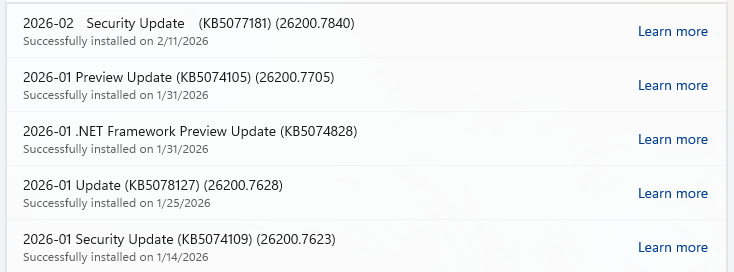
Microsoft releases important security updates on the second Tuesday of every month, known as “Patch Tuesday.” This month’s update patches fix 59 Microsoft CVE’s including six zero-days.
Let’s have a quick look at these six actively exploited zero-days.
Windows Shell Security Feature Bypass Vulnerability
CVE-2026-21510 (CVSS score 8.8 out of 10) is a security feature bypass in the Windows Shell. A protection mechanism failure allows an attacker to circumvent Windows SmartScreen and similar prompts once they convince a user to open a malicious link or shortcut file.
The vulnerability is exploited over the network but still requires on user interaction. The victim must be socially engineered into launching the booby‑trapped shortcut or link for the bypass to trigger. Successful exploitation lets the attacker suppress or evade the usual “are you sure?” security dialogs for untrusted content, making it easier to deliver and execute further payloads without raising user suspicion.
CVE-2026-21513 (CVSS score 8.8 out of 10) affects the MSHTML Framework, which is used by Internet Explorer’s Trident/embedded web rendering). It is classified as a protection mechanism failure that results in a security feature bypass over the network.
A successful attack requires the victim to open a malicious HTML file or a crafted shortcut (.lnk) that leverages MSHTML for rendering. When opened, the flaw allows an attacker to bypass certain security checks in MSHTML, potentially removing or weakening normal browser or Office sandbox or warning protections and enabling follow‑on code execution or phishing activity.
Microsoft Word Security Feature Bypass Vulnerability
CVE-2026-21514 (CVSS score 5.5 out of 10) affects Microsoft Word. It relies on untrusted inputs in a security decision, leading to a local security feature bypass.
An attacker must persuade a user to open a malicious Word document to exploit this vulnerability. If exploited, the untrusted input is processed incorrectly, potentially bypassing Word’s defenses for embedded or active content—leading to execution of attacker‑controlled content that would normally be blocked.
Desktop Window Manager Elevation of Privilege Vulnerability
CVE-2026-21519 (CVSS score 7.8 out of 10) is a local elevation‑of‑privilege vulnerability in Windows Desktop Window Manager caused by type confusion (a flaw where the system treats one type of data as another, leading to unintended behavior).
A locally authenticated attacker with low privileges and no required user interaction can exploit the issue to gain higher privileges. Exploitation must be done locally, for example via a crafted program or exploit chain stage running on the target system. An attacker who successfully exploited this vulnerability could gain SYSTEM privileges.
Windows Remote Access Connection Manager Denial of Service Vulnerability
CVE-2026-21525 (CVSS score 6.2 out of 10) is a denial‑of‑service vulnerability in the Windows Remote Access Connection Manager service (RasMan).
An unauthenticated local attacker can trigger the flaw with low attack complexity, leading to a high impact on availability but no direct impact on confidentiality or integrity. This means they could crash the service or potentially the system, but not elevate privileges or execute malicious code.
Windows Remote Desktop Services Elevation of Privilege Vulnerability
CVE-2026-21533 (CVSS score 7.8 out of 10) is an elevation‑of‑privilege vulnerability in Windows Remote Desktop Services, caused by improper privilege management.
A local authenticated attacker with low privileges, and no required user interaction, can exploit the flaw to escalate privileges to SYSTEM and fully compromise confidentiality, integrity, and availability on the affected system. Successful exploitation typically involves running attacker‑controlled code on a system with Remote Desktop Services present and abusing the vulnerable privilege management path.
Azure vulnerabilities
Azure users are also advised to take note of two critical vulnerabilities with CVSS ratings of 9.8:
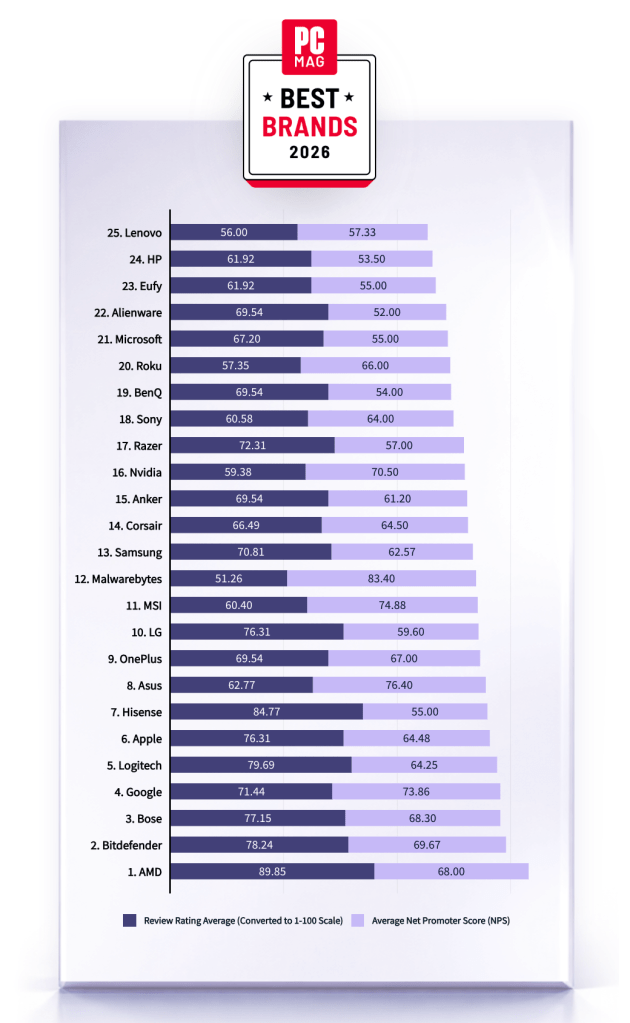
Malwarebytes is on a roll. Recently named one of PCMag’s “Best Tech Brands for 2026,” Malwarebytes also scored 100% on the first-ever MRG Effitas consumer security product test, cementing the fact that we are loved by users and trusted by experts.
“If your antivirus fails, and it don’t look good, who ya gonna call? The answer: Malwarebytes. Even tech support agents from competitors have instructed us to use it.”
PCMag
Malwarebytes has been named one of PCMag’s Best Tech Brands for 2026. Coming in at #12, Malwarebytes makes the list with the highest Net Promoter Score (NPS) of all the brands in the list (likelihood to recommend by users).
With this ranking, Malwarebytes made its third appearance as a PCMag Best Tech Brand! We’ve also achieved the year’s highest average Net Promoter Score, at 83.40. (Last year, we had the second-highest NPS, after only Toyota).
But NPS alone can’t put us on the list—excellent reviews are needed, too. PCMag’s Rubenking found plenty to be happy about in his assessments of our products in 2025. For example, Malwarebytes Premium adds real-time multi-layered detection that eradicates most malware to the stellar stopping power you get on demand in the free edition.
MRG Effitas
Malwarebytes has aced the first-ever MRG Effitas Consumer Assessment and Certification, which evaluated eight security applications to determine their capabilities in stopping malware, phishing, and other online threats. We detected and stopped all in-the-wild malware infections and phishing samples while also generating zero false positives.
We’re beyond excited to have reached a 100% detection rate for in-the-wild malware as well as a 100% rate for all phishing samples with zero false positives.
The testing criteria is designed to determine how well a product works to do what it promises based on what MRG Effitas refers to as “metrics that matter.” We understand that the question isn’t if a system will encounter malware, but when.
Malwarebytes is proud to be recognized for its work in protecting people against everyday threats online.
We don’t just report on threats—we remove them
Cybersecurity risks should never spread beyond a headline. Keep threats off your devices by downloading Malwarebytes today.
Discord announced it will put all existing and new profiles in teen-appropriate mode by default in early March.
The teen-appropriate profile mode will remain in place until users prove they are adults. To change a profile to “full access” will require verification by Discord’s age inference model—a new system that runs in the background to help determine whether an account belongs to an adult, without always requiring users to verify their age.
Savannah Badalich, Head of Product Policy at Discord, explained the reasoning:
“Rolling out teen-by-default settings globally builds on Discord’s existing safety architecture, giving teens strong protections while allowing verified adults flexibility. We design our products with teen safety principles at the core and will continue working with safety experts, policymakers, and Discord users to support meaningful, long term wellbeing for teens on the platform.”
Platforms have been facing growing regulatory pressure—particularly in the UK, EU, and parts of the US—to introduce stronger age-verification measures. The announcement also comes as concerns about children’s safety on social media continue to surface. In research we published today, parents highlighted issues such as exposure to inappropriate content, unwanted contact, and safeguards that are easy to bypass. Discord was one of the platforms we researched.
The problem in Discord’s case lies in the age-verification methods it’s made available, which require either a facial scan or a government-issued ID. Discord says that video selfies used for facial age estimation never leave a user’s device, but this method is known not to work reliably for everyone.
Identity documents submitted to Discord’s vendor partners are also deleted quickly—often immediately after age confirmation, according to Discord. But, as we all know, computers are very bad at “forgetting” things and criminals are very good at finding things that were supposed to be gone.
Besides all that, the effectiveness of this kind of measure remains an issue. Minors often find ways around systems—using borrowed IDs, VPNs, or false information—so strict verification can create a sense of safety without fully eliminating risk. In some cases, it may even push activity into less regulated or more opaque spaces.
As someone who isn’t an avid Discord user, I can’t help but wonder why keeping my profile teen-appropriate would be a bad thing. Let us know in the comments what your objections to this scenario would be.
I wouldn’t have to provide identification and what I’d “miss” doesn’t sound terrible at all:
Mature and graphic images would be permanently blocked.
Age-restricted channels and servers would be inaccessible.
DMs from unknown users would be rerouted to a separate inbox.
Friend requests from unknown users would always trigger a warning pop-up.
No speaking on server stages.
Given the amount of backlash this news received, I’m probably missing something—and I don’t mind being corrected. So let’s hear it.
Note: All comments are moderated. Those including links and inappropriate language will be deleted. The rest must be approved by a moderator.
We don’t just report on threats – we help protect your social media
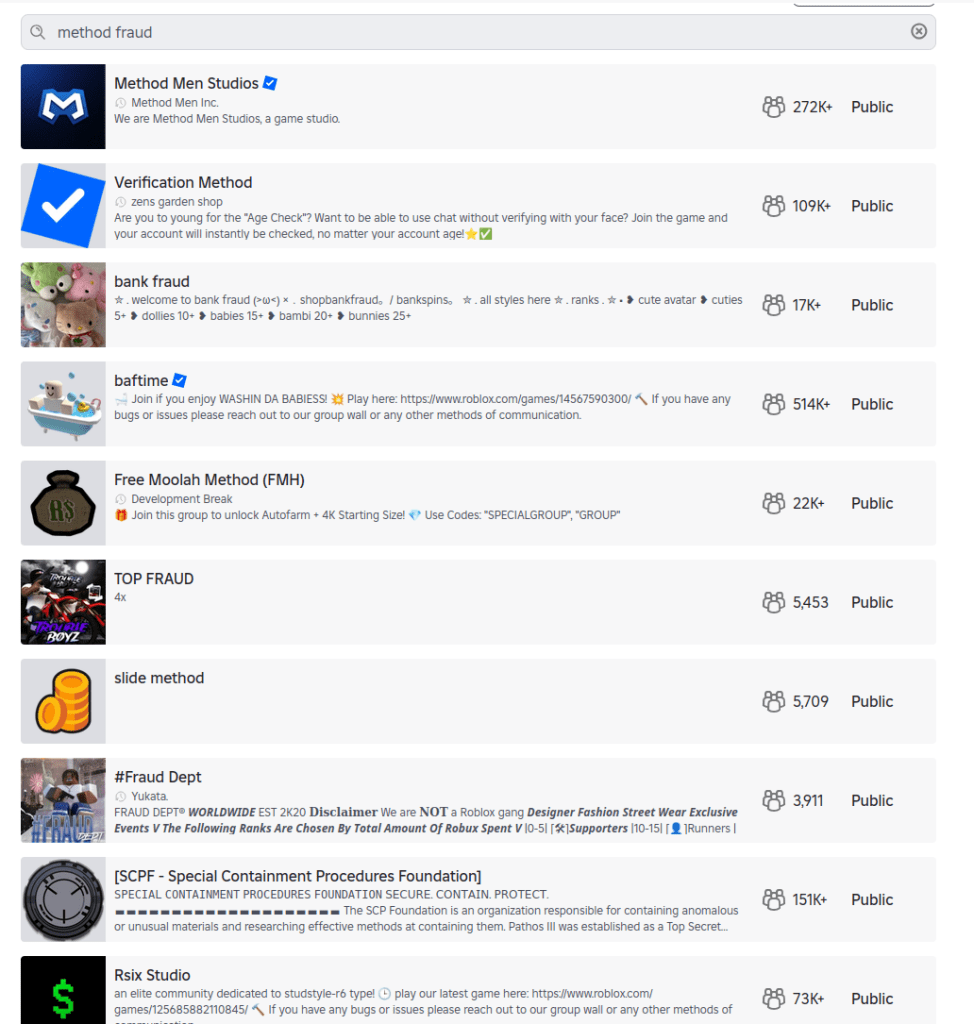
When researchers created an account for a child under 13 on Roblox, they expected heavy guardrails. Instead, they found that the platform’s search features still allowed kids to discover communities linked to fraud and other illicit activity.
The discoveries spotlight the question that lawmakers around the world are circling: how do you keep kids safe online?
Lawmakers have said these efforts are to keep kids safe online. But as the regulatory tide rises, we wanted to understand what digital safety for children actually looks like in practice.
So, we asked a specialist research team to explore how well a dozen mainstream tech providers are protecting children aged under 13 online.
We found that most services work well when kids use the accounts and settings designed for them. But when children are curious, use the wrong account type, or step outside those boundaries, things can go sideways quickly.
Over several weeks in December, the research team explored how platforms from Discord to YouTube handled children’s online use. They relied on standard user behavior rather than exploits or technical tricks to reflect what a child could realistically encounter.
The researchers focused on how platforms catered to kids through specific account types, how age restrictions were enforced in practice, and whether sensitive content was discoverable through normal browsing or search.
What emerged was a consistent pattern: curious kids who poke around a little, or who end up using the wrong account type, can run into inappropriate content with surprisingly little effort.
A detailed breakdown of the platforms tested, account types used, and where sensitive content was discovered appears in the research scope and methodology section at the end of this article.
When kids’ accounts are opt-in
One thing the team tried was to simply access the generic public version of a site rather than the kid-protected area.
This was a particular problem with YouTube. The company runs a kid-specific service called YouTube Kids, which the researchers said is effectively sanitized of inappropriate content (it sounds like things have changed since 2022).
The issue is that YouTube’s regular public site isn’t sanitized, and even though the company says you must be at least 13 to use the service unless ‘enabled’ by a parent, in reality anyone can access it. From the report:
“Some of the content will require signing in (for age verification) prior the viewing, but the minor can access the streaming service as a ‘Guest’ user without logging in, bypassing any filtering that would otherwise apply to a registered child account.”
That opens up a range of inappropriate material, from “how-to” fraud channels through to scenes of semi-nudity and sexually suggestive material, the researchers said. Horrifically, they even found scenes of human execution on the public site. The researchers concluded:
“The absence of a registration barrier on the public platform renders the ‘YouTube Kids’ protection opt-in rather than mandatory.”
When adult accounts are easy to fake
Another worry is that even when accounts are age-gated, enterprising minors can easily get around them. While most platforms require users to be 13+, a self-declaration is often enough. All that remains is for the child to register an email address with a service that doesn’t require age verification.
This “double blind” vulnerability is a big problem. Kids are good at creating accounts. The tech industry has taught them to be, because they need them for most things they touch online, from streaming to school.
When they do get past the age gates, curious kids can quickly get to inappropriate material. Researchers found unmoderated nudity and explicit material on the social network Discord, along with TikTok content providing credit card fraud and identity theft tutorials. A little searching on the streaming site Twitch surfaced ads for escort services.
This points to a trade-off between privacy and age verification. While stricter age verification could close some of these gaps, it requires collecting more personal data, including IDs or biometric information. That creates privacy risks of its own, especially for children. That’s why most platforms rely on self-declared age, but the research shows how easily that can be bypassed.
When kids’ accounts let toxic content through
Cracks in the moderation foundations allow risky content: Roblox, the website and app where users build their own content, filters chats for child accounts. However, it also features “Communities,” which are groups designed for socializing and discovery.
These groups are easily searchable, and some use names and terminology commonly linked to criminal activities, including fraud and identity theft. One, called “Fullz,” uses a term widely understood to refer to stolen personal information, and “new clothes” is often used to refer to a new batch of stolen payment card data. The visible community may serve as a gateway, while the actual coordination of illicit activity or data trading occurs via “inner chatter” between the community members.
This kind of search wasn’t just an issue for Roblox, warned the team. It found Instagram profiles promoting financial fraud and crypto schemes, even from a restricted teen account.
Some sites passed the team’s tests admirably, though. The researchers simulated underage users who’d bypassed age verification, but were unable to find any harmful content on Minecraft, Snapchat, Spotify, or Fortnite. Fortnite’s approach is especially strict, disabling chat and purchases on accounts for kids under 13 until a parent verifies via email. It also uses additional verification steps using a Social Security number or credit card. Kids can still play, but they’re muted.
What parents can do
There is no platform that can catch everything, especially when kids are curious. That makes parental involvement the most important layer of protection.
One reason this matters is a related risk worth acknowledging: adults attempting to reach children through social platforms. Even after Instagram took steps to limit contact between adult and child accounts, parents still discovered loopholes. This isn’t a failure of one platform so much as a reminder that no set of controls can replace awareness and involvement.
Mark Beare, GM of Consumer at Malwarebytes says:
“Parents are navigating a fast-moving digital world where offline consequences are quickly felt, be it spoofed accounts, deepfake content or lost funds. Safeguards exist and are encouraged, but children can still be exposed to harmful content.”
This doesn’t mean banning children from the internet. As the EFF points out, many minors use online services productively with the support and supervision of their parents. But it does mean being intentional about how accounts are set up, how children interact with others online, and how comfortable they feel asking for help.
Accounts and settings
Use child or teen accounts where available, and avoid defaulting to adult accounts.
Keep friends and followers lists set to private.
Avoid using real names, birthdays, or other identifying details unless they are strictly required.
Avoid facial recognition features for children’s accounts.
For teens, be aware of “spam” or secondary accounts they’ve set up that may have looser settings.
Social behavior
Talk to your child about who they interact with online and what kinds of conversations are appropriate.
Warn them about strangers in comments, group chats, and direct messages.
Encourage them to leave spaces that make them uncomfortable, even if they didn’t do anything wrong.
Remind them that not everyone online is who they claim to be.
Trust and communication
Keep conversations about online activity open and ongoing, not one-off warnings.
Make it clear that your child can come to you if something goes wrong without fear of punishment or blame.
Involve other trusted adults, such as parents, teachers, or caregivers, so kids aren’t navigating online spaces alone.
This kind of long-term involvement helps children make better decisions over time. It also reduces the risk that mistakes made today can follow them into the future, when personal information, images, or conversations could be reused in ways they never intended.
Research findings, scope and methodology
This research examined how children under the age of 13 may be exposed to sensitive content when browsing mainstream media and gaming services.
For this study, a “kid” was defined as an individual under 13, in line with the Children’s Online Privacy Protection Act (COPPA). Research was conducted between December 1 and December 17, 2025, using US-based accounts.
The research relied exclusively on standard user behavior and passive observation. No exploits, hacks, or manipulative techniques were used to force access to data or content.
Researchers tested a range of account types depending on what each platform offered, including dedicated child accounts, teen or restricted accounts, adult accounts created through age self-declaration, and, where applicable, public or guest access without registration.
The study assessed how platforms enforced age requirements, how easy it was to misrepresent age during onboarding, and whether sensitive or illicit content could be discovered through normal browsing, searching, or exploration.
Across all platforms tested, default algorithmic content and advertisements were initially benign and policy-compliant. Where sensitive content was found, it was accessed through intentional, curiosity-driven behavior rather than passive recommendations. No proactive outreach from other users was observed during the research period.
The table below summarizes the platforms tested, the account types used, and whether sensitive content was discoverable during testing.
Platform
Account type tested
Dedicated kid/teen account
Age gate easy to bypass
Illicit content discovered
Notes
YouTube (public)
No registration (guest)
Yes (YouTube Kids)
N/A
Yes
Public YouTube allowed access to scam/fraud content and violent footage without sign-in. Age-restricted videos required login, but much content did not.
YouTube Kids
Kid account
Yes
N/A
No
Separate app with its own algorithmic wall. No harmful content surfaced.
Roblox
All-age account (13+)
No
Not required
Yes
Child accounts could search for and find communities linked to cybercrime and fraud-related keywords.
Instagram
Teen account (13–17)
No
Not required
Yes
Restricted accounts still surfaced profiles promoting fraud and cryptocurrency schemes via search.
TikTok
Younger user account (13+)
Yes
Not required
No
View-only experience with no free search. No harmful content surfaced.
TikTok
Adult account
No
Yes
Yes
Search surfaced credit card fraud–related profiles and tutorials after age gate bypass.
Discord
Adult account
No
Yes
Yes
Public servers surfaced explicit adult content when searched directly. No proactive contact observed.
Twitch
Adult account
No
Yes
Yes
Discovered escort service promotions and adult content, some behind paywalls.
Fortnite
Cabined (restricted) account (13+)
Yes
Hard to bypass
No
Chat and purchases disabled until parent verification. No harmful content found.
Snapchat
Adult account
No
Yes
No
No sensitive content surfaced during testing.
Spotify
Adult account
Yes
Yes
No
Explicit lyrics labeled. No harmful content found.
Messenger Kids
Kid account
Yes
Not required
No
Fully parent-controlled environment. No search or external contacts.
Screenshots from the research
List of Roblox communities with cybercrime-oriented keywords
Roblox community that offers chat without verification
Roblox community with cybercrime-oriented keywords
Graphic content on publicly accessible YouTube
Credit card fraud content on publicly accessible YouTube
Active escort page on Twitch
Stolen credit cards for sale on an Instagram teen account
Crypto investment scheme on an Instagram teen account
Carding for beginners content on a TikTok adult account, accessed by kids with a fake date of birth.
We don’t just report on threats—we remove them
Cybersecurity risks should never spread beyond a headline. Keep threats off your devices by downloading Malwarebytes today.
Fresh off a breathless Super Bowl Sunday, we’re less thrilled to bring you this week’s Weirdo Wednesday. Two stories caught our eye, both involving men who crossed clear lines and invaded women’s privacy online.
Last week, 27-year-old Kyle Svara of Oswego, Illinois admitted to hacking women’s Snapchat accounts across the US. Between May 2020 and February 2021, Svara harvested account security codes from 571 victims, leading to confirmed unauthorized access to at least 59 accounts.
Rather than attempting to break Snapchat’s robust encryption protocols, Svara targeted the account owners themselves with social engineering.
After gathering phone numbers and email addresses, he triggered Snapchat’s legitimate login process, which sent six-digit security codes directly to victims’ devices. Posing as Snapchat support, he then sent more than 4,500 anonymous messages via a VoIP texting service, claiming the codes were needed to “verify” or “secure” the account.
Svara showed particular interest in Snapchat’s My Eyes Only feature—a secondary four-digit PIN meant to protect a user’s most sensitive content. By persuading victims to share both codes, he bypassed two layers of security without touching a single line of code. He walked away with private material, including nude images.
Svara didn’t do this solely for his own kicks. He marketed himself as a hacker-for-hire, advertising on platforms like Reddit and offering access to specific accounts in exchange for money or trades.
Selling his services to others was how he got found out. Although Svara stopped hacking in early 2021, his legal day of reckoning followed the 2024 sentencing of one of his customers: Steve Waithe, a former track and field coach who worked at several high-profile universities including Northeastern. Waithe paid Svara to target student athletes he was supposed to mentor.
Svara also went after women in his home area of Plainfield, Illinois, and as far away as Colby College in Maine.
He now faces charges including identity theft, wire fraud, computer fraud, and making false statements to law enforcement about child sex abuse material. Sentencing is scheduled for May 18.
How to protect your Snapchat account
Never send someone your login details or secret codes, even if you think you know them.
Passkeys let you sign in without a password, but unlike multi-factor authentication, passkeys are cryptographically tied to your device, and can’t be phished or forwarded like one-time codes. Snapchat supports them, and they offer stronger protection than traditional multi-factor authentication, which is increasingly susceptible to smart phishing attacks.
Bad guys with smart glasses
Unfortunately, hacking women’s social media accounts to steal private content isn’t new. But predators will always find a way to use smart tech in nefarious ways. Such is the case with new generations of ‘smart glasses’ powered by AI.
This week, CNN published stories from women who believed they were having private, flirtatious interactions with strangers—only to later discover the men were recording them using camera-equipped smart glasses and posting the footage online.
These clips are often packaged as “rizz” videos—short for “charisma”—where so-called manfluencers film themselves chatting up women in public, without consent, to build followings and sell “coaching” services.
The glasses, sold by companies like Meta, are supposed to be used for recording only with consent, and often display a light to show that they’re recording. In practice, that indicator is easy to hide.
When combined with AI-powered services to identify people, as researchers did in 2024, the possibilities become even more chilling. We’re unaware of any related cases coming to court, but suspect it’s only a matter of time.
We don’t just report on scams—we help detect them
Cybersecurity risks should never spread beyond a headline. If something looks dodgy to you, check if it’s a scam using Malwarebytes Scam Guard, a feature of our mobile protection products. Submit a screenshot, paste suspicious content, or share a text or phone number, and we’ll tell you if it’s a scam or legit. Download Malwarebytes Mobile Security for iOS or Android and try it today!
In January, Google settled a lawsuit that pricked up a few ears: It agreed to pay $68 million to a wide array of people who sued the company together, alleging that Google’s voice-activated smart assistant had secretly recorded their conversations, which were then sent to advertisers to target them with promotions.
Google denied any admission of wrongdoing in the settlement agreement, but the fact stands that one of the largest phone makers in the world decided to forego a trial against some potentially explosive surveillance allegations. It’s a decision that the public has already seen in the past, when Apple agreed to pay $95 million last year to settle similar legal claims against its smart assistant, Siri.
Back-to-back, the stories raise a question that just seems to never go away: Are our phones listening to us?
This week, on the Lock and Code podcast with host David Ruiz, we revisit an episode from last year in which we tried to find the answer. In speaking to Electronic Frontier Foundation Staff Technologist Lena Cohen about mobile tracking overall, it becomes clear that, even if our phones aren’t literally listening to our conversations, the devices are stuffed with so many novel forms of surveillance that we need not say something out loud to be predictably targeted with ads for it.
“Companies are collecting so much information about us and in such covert ways that it really feels like they’re listening to us.”
An independent security researcher uncovered a major data breach affecting Chat & Ask AI, one of the most popular AI chat apps on Google Play and Apple App Store, with more than 50 million users.
The researcher claims to have accessed 300 million messages from over 25 million users due to an exposed database. These messages reportedly included, among other things, discussions of illegal activities and requests for suicide assistance.
Behind the scenes, Chat & Ask AI is a “wrapper” app that plugs into various large language models (LLMs) from other companies, including OpenAI’s ChatGPT, Anthropic’s Claude, and Google’s Gemini. Users can choose which model they want to interact with.
The exposed data included user files containing their entire chat history, the models used, and other settings. But it also revealed data belonging to users of other apps developed by Codeway—the developer of Chat & Ask AI.
The vulnerability behind this data breach is a well-known and documented Firebase misconfiguration. Firebase is a cloud-based backend-as-a-service (BaaS) platform provided by Google that helps developers build, manage, and scale mobile and web applications.
Security researchers often refer to a set of preventable errors in how developers set up Google Firebase services, which leave backend data, databases, and storage buckets accessible to the public without authentication.
One of the most common Firebase misconfigurations is leaving Security Rules set to public. This allows anyone with the project URL to read, modify, or delete data without authentication.
This prompted the researcher to create a tool that automatically scans apps on Google Play and Apple App Store for this vulnerability—with astonishing results. Reportedly, the researcher, named Harry, found that 103 out of 200 iOS apps they scanned had this issue, collectively exposing tens of millions of stored files.
To draw attention to the issue, Harry set up a website where users can see the apps affected by the issue. Codeway’s apps are no longer listed there, as Harry removes entries once developers confirm they have fixed the problem. Codeway reportedly resolved the issue across all of its apps within hours of responsible disclosure.
How to stay safe
Besides checking if any apps you use appear in Harry’s Firehoundregistry, there are a few ways to better protect your privacy when using AI chatbots.
Use private chatbots that don’t use your data to train the model.
Don’t rely on chatbots for important life decisions. They have no experience or empathy.
Don’t use your real identity when discussing sensitive subjects.
Keep shared information impersonal. Don’t use real names and don’t upload personal documents.
Don’t share your conversations unless you absolutely have to. In some cases, it makes them searchable.
If you’re using an AI that is developed by a social media company (Meta AI, Llama, Grok, Bard, Gemini, and so on), make sure you’re not logged in to that social media platform. Your conversations could be linked to your social media account, which might contain a lot of personal information.
Always remember that the developments in AI are going too fast for security and privacy to be baked into technology. And that even the best AIs still hallucinate.
We don’t just report on privacy—we offer you the option to use it.
Privacy risks should never spread beyond a headline. Keep your online privacy yours by using Malwarebytes Privacy VPN.

 Login
Login