Free Mobile, one of France’s main cellular providers, was fined €27 million by France’s data protection regulator, the CNIL, in January over failures to protect customer data. The October 2024 breach allowed an unauthorized party to access sensitive customer records, including bank account details and login information. Since the breach, we’ve seen many poorly written scam campaigns targeting Free Mobile customers.
However, over the past few weeks, a well-written scam has appeared, closely copying the design of the official Free Mobile website and email templates.
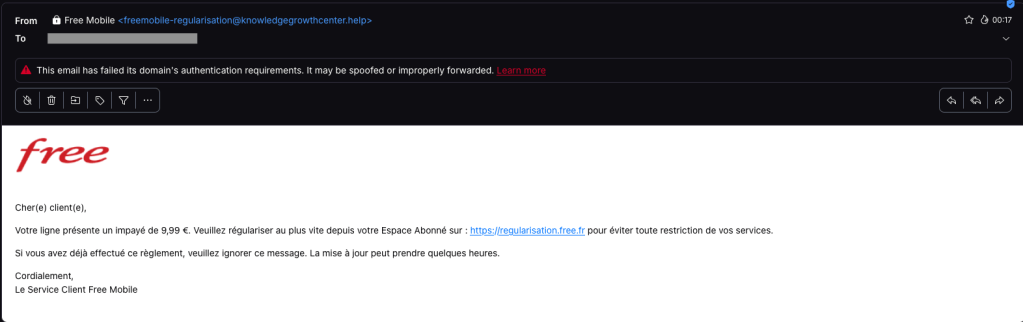
One of our employees, who is a Free Mobile customer, received this phishing email on Wednesday, September 30. The message used the same logo and template as legitimate emails from the company, but came from the suspicious email address freemobile-regularisation[@]knowledgegrowthcenter[.]help. It included a link that appeared to point to regularisation.free.fr :
The email tells the user that an invoice of €9.99 needs to be paid to avoid having the customer’s service suspended. Clicking the link opens a redirection chain:
Malwarebytes can help protect you from these threats, but treat unexpected messages about your accounts and invoices with caution:
Don’t follow links in unsolicited emails. If a message concerns your account, open the official Free Mobile app or website directly, or call the official help line at 3244.
Check the actual domain in your browser’s address bar to see if it matches what you expect—https://mobile.free.fr in this case.
Twenty years ago, a British mathematician named Clive Humby popularized a phrase that came to describe data’s relationship with the entire global economy: “Data is the new oil.”
Pithy as the phrase sounds, it is undeniably true.
Data steers decisions at businesses of every size. Data created entirely new industries built around its capture. And, for a select number of companies, data has produced billions—if not trillions—of dollars in value.
So how is it that, on the dark web, your stolen identity can be purchased for just 95 cents?
That’s what a Malwarebytes researcher found last month after spending 48 hours inside the dark web to investigate cybercrime. Across a variety of forums and directories, he found subscription plans for malware that steals information once implanted on a device. He found guides for deploying social engineering scams. He found people selling their services to build fake websites that trick people into handing over their usernames and passwords. And he found one of the dark web’s most traded commodities—personal data, packaged together about individual people, to help a cybercriminal commit identity fraud.
These packages are called “fullz.” For victims in the United States, a fullz contains a full name, Social Security Number, date of birth, address, and other personal details. That is enough, on its own, for a cybercriminal to potentially open a bogus line of credit, file a fake tax return, access financial accounts, or obtain medical services under someone else’s name.
As we wrote on Malwarebytes Labs:
“For less than the cost of a cup of coffee, a cybercriminal can buy enough information to devastate someone’s financial life.”
It’s the kind of risk that could scare anyone, especially considering the scale behind it. In just the first six months of 2026, Malwarebytes found more than 7,500 compromised data sets on the dark web containing more than 8.4 billion records.
And yet, even today, cybersecurity professionals still get asked why anyone should bother protecting their data.
The public, understandably, are exhausted. With data breaches happening every week—if not every day—cybersecurity can start to feel pointless. With young people unable to build financial security, they start believing that they have nothing worth stealing. And with Big Tech already collecting our every movement, behavior, click, and concern, people understandably feel powerless to fight any kind of data abuse, be it corporate or criminal.
So today’s episode approaches the question from a different direction. This isn’t about why you should protect yourself—plenty of company websites will tell you that, and most of them rely on fear. This is about why hackers want your data in the first place.
Today, on the Lock and Code podcast, host David Ruiz explains how cybercriminals turn a single repeated password into account takeover, how a screenshot of your house from Google Maps became a tool in extortion emails, and why the most benign information about you—an address, an age, one public photo—is often the most useful data a stranger can buy.
During our recent threat hunting activities, we found EtherRAT malware being distributed by a website with a strange homepage. This homepage allowed us to discover a vast malicious infrastructure distributing malware, malicious documents, remote desktop software, and phishing pages.
EtherRAT is a RAT developed in Node.js which allows an attacker to gain complete control over the machine and execute arbitrary code returned by the Command and Control (C2) server. The malware uses the Etherium blockchain to obtain the C2 server, hence the “Ether” part of the name. EtherRAT is typically distributed via MSI, PowerShell, or JavaScript scripts.
An open directory that distributes EtherRAT: where it all began
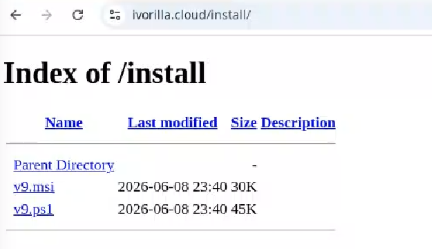
While threat hunting, we found an open directory that was distributing MSI installers and PowerShell scripts, which ultimately distributed EtherRAT. In the analyzed cases, the PowerShell scripts and MSI installers were distributed from a “/install” folder. The versions have a progressive number, ranging from v1 to v10.
Open Directory hosting EtherRAT MSI
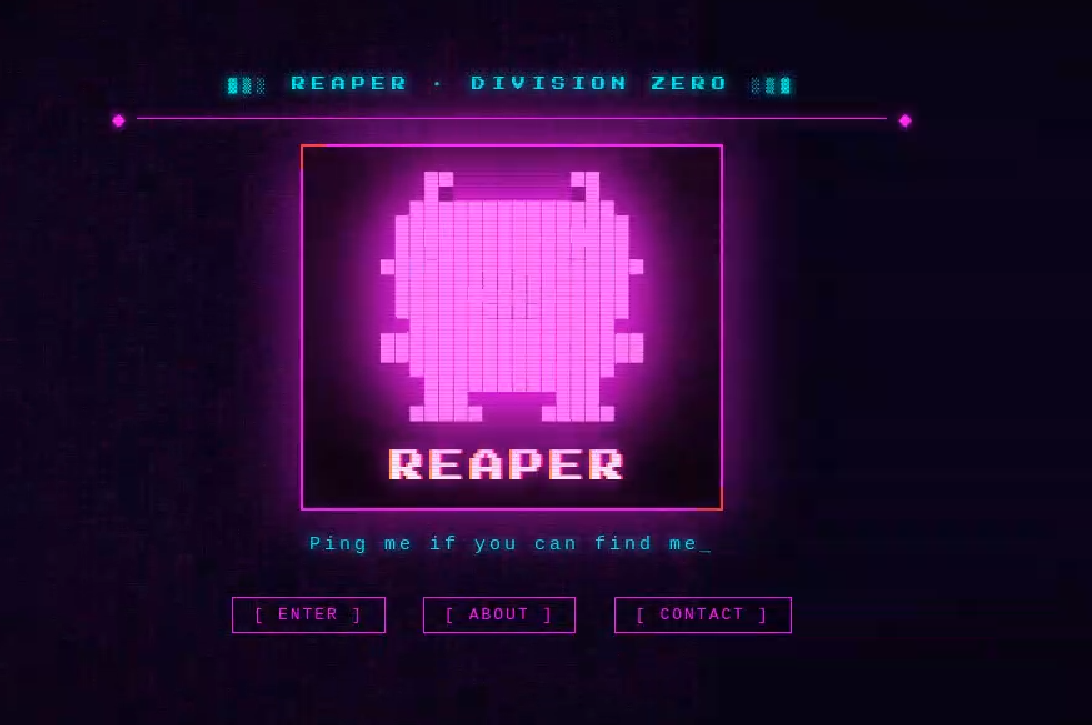
The returned home page caught our attention and prompted us to further explore the campaign.
The homepage returned by the EtherRAT distribution website
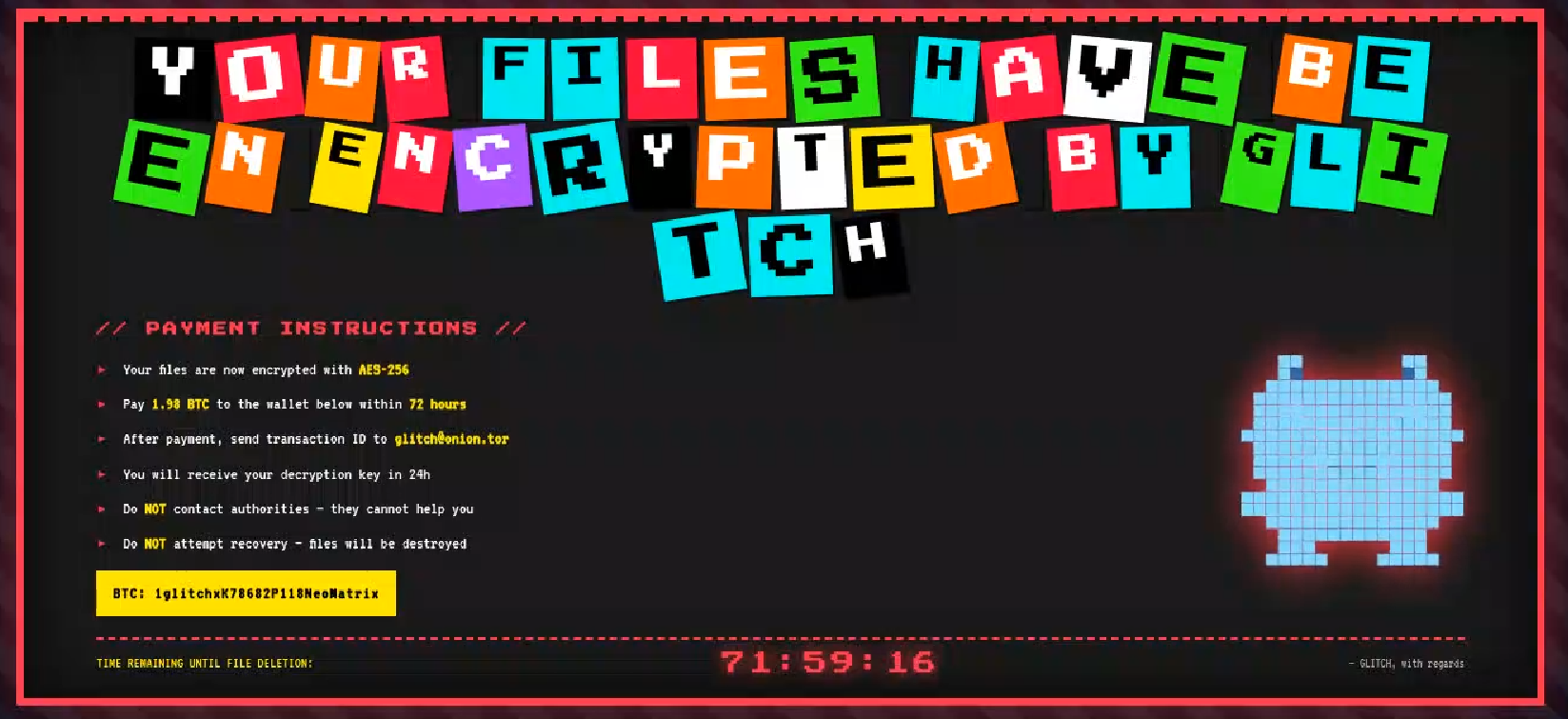
Analyzing domains and associated IPs with the EtherRAT distribution, we detected other similar home pages with a hacking-style theme. They appeared to belong to a larger distribution chain, which also distributes phishing, remote control software, and other malware. These websites usually have several folders with malware and phishing related content, and what is displayed depends on the specific infection chain.
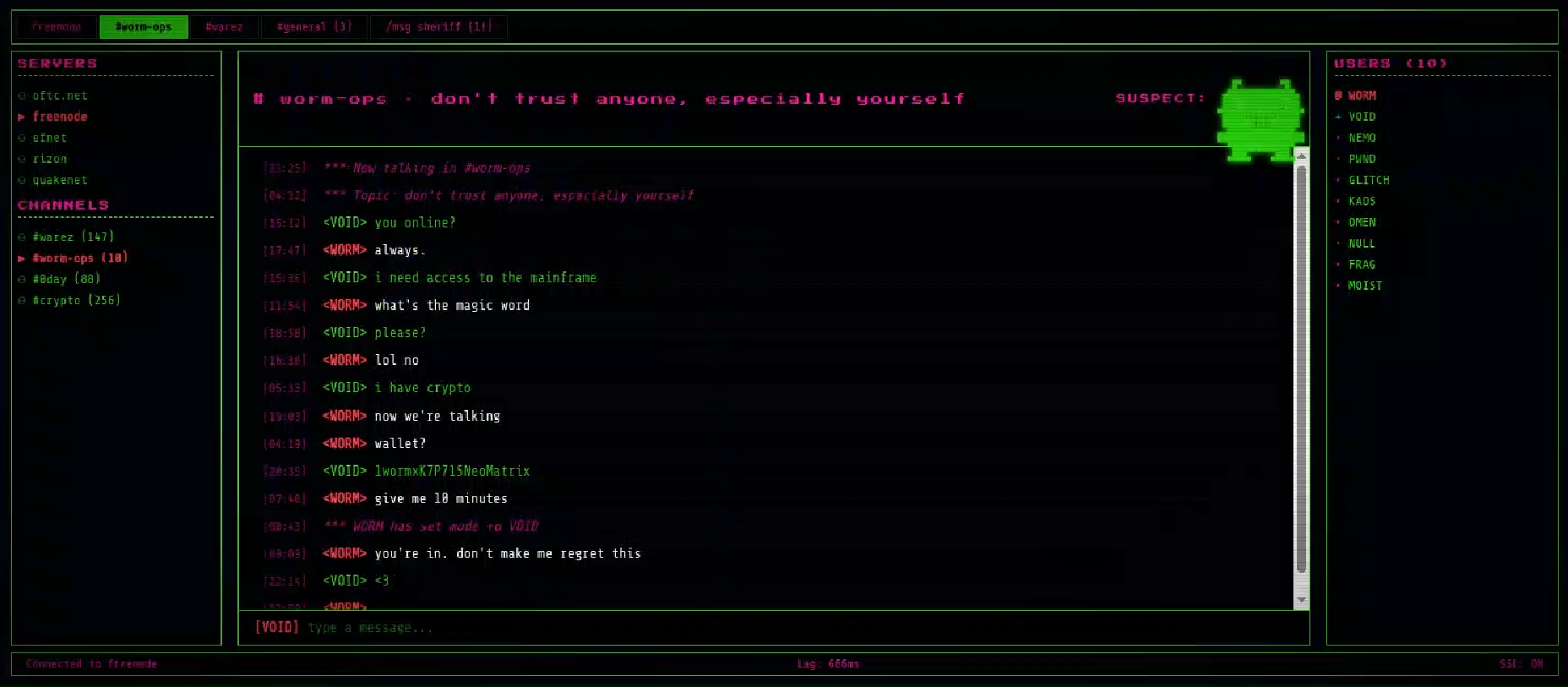
Different websites that resolve to the same IP addresses have previously returned pages related to fake companies or default templates. The use of these new pages could therefore be a method to make detection more difficult for automated scanners or researchers. Here are some of the home pages we found:
Some of the malicious websites indexed on Google
EtherRAT is an interesting RAT, as it has few lines of code and allows the execution of arbitrary code returned by the C2 server. Furthermore, using the Ethereum blockchain to obtain the C2 server makes it more resilient to infrastructure takedowns.
Technical analysis of EtherRAT
The detected websites usually distribute an MSI or PowerShell script with the version name, such as v1.msi, v2.ps1, and so on.
MSI Loader
The MSI file “v9.msi” contains three components:
MSI Filename
Description
KmPuGimn.cmd
BAT launcher
cDQMlQAru0.xml
First Jscript loader
MRaQCipBIZeiZNx.log
Encrypted EtherRAT
When the MSI is executed, the “KmPuGimn.cmd” file is started:
conhost --headless cmd /c "KmPuGimn.cmd"
This obfuscated BAT file performs different operations:
Extracts the other files in a random folder in %LOCALAPPDATA%.
The final stage is to deploy EtherRAT. EtherRAT allows the attacker to:
Execute arbitrary JavaScript code received by the C2 server. This allows the attacker to execute new commands, perform operations on files and folders, modify the registry, and exfiltrate data.
Get a new C2 server using the Ethereum blockchain.
Reobfuscate itself.
Save the logs to “svchost.log”.
Part of decrypted EtherRAT code
The EtherRAT uses Ethereum’s “eth_call” JSON-RPC method to retrieve the active C2 URL from a smart contract on the Ethereum mainnet.
After startup, the RAT sends its own source code to the C2 server. The C2 responds with a newly obfuscated version of the script, which is written back to disk, making each execution generate a new file hash.
POST /api/[REOBF_PATH]/<victim-uuid>
Body: { "code": "<current_script_contents>", "build": "<build_id>" }
After the EtherRAT execution, we observed different post-compromised cmd.exe activities to check the environment. For example:
The activities performed by the PowerShell loaders are very similar to the last stage of the JS script of the MSI installer:
Downloads Node.js if it’s not present.
Create the necessary directories.
Decode the EtherRAT with a custom decryption algorithm.
Execute Node.js with conhost.exe and the decrypted EtherRAT payload.
We detected some variants of the PowerShell loader hosted on these websites; namely that the functions’ names and the decryption functions change in the analyzed PowerShell scripts.
The decryption of EtherRAT payload with the custom decryption algorithm
Tracking the malicious infrastructure
When we analyzed the different websites with the “hacking-theme” pages, we found that in the past many had hosted multiple phishing pages in some specific paths. For example:
/zht/sharep-redirect.html
/bl/me.php
/t/teams
/teams/Windows/invite.php
It seems that these domains and IPs are actually part of a much larger infrastructure that distributes malware, phishing, malicious documents, and remote software. It is possible that these infrastructures are shared by multiple threat actors who activate different URL endpoints based on the specific campaign.
Interestingly, the majority of the domains related to this malicious infrastructure in the past also returned an HTML page related to a “Bulletproof Infrastructure” service.
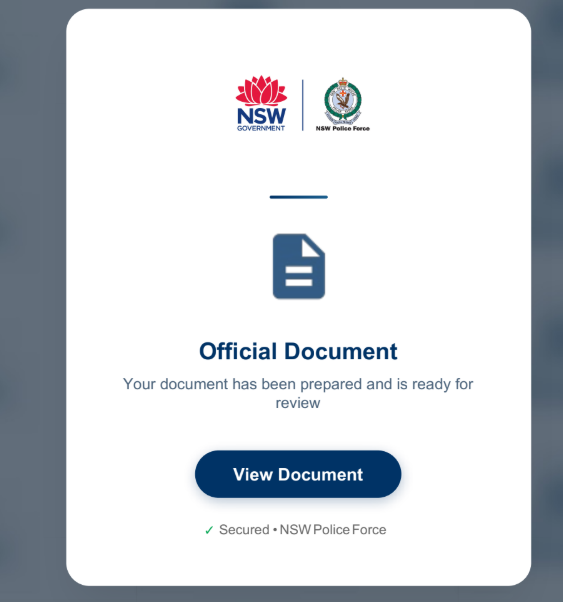
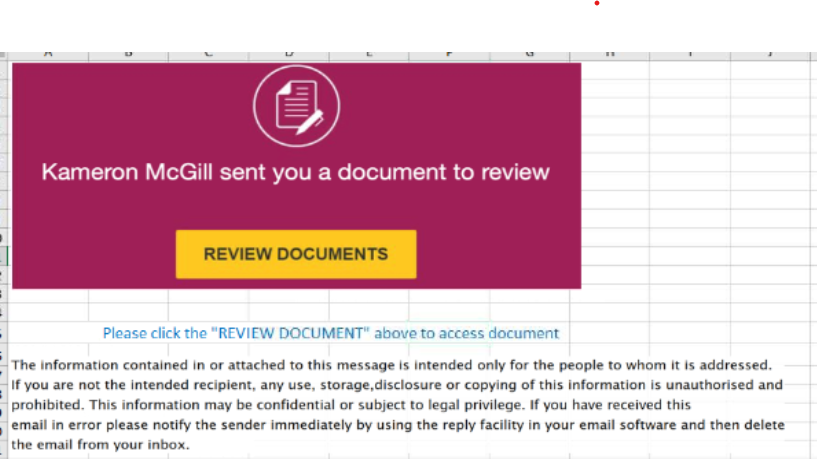
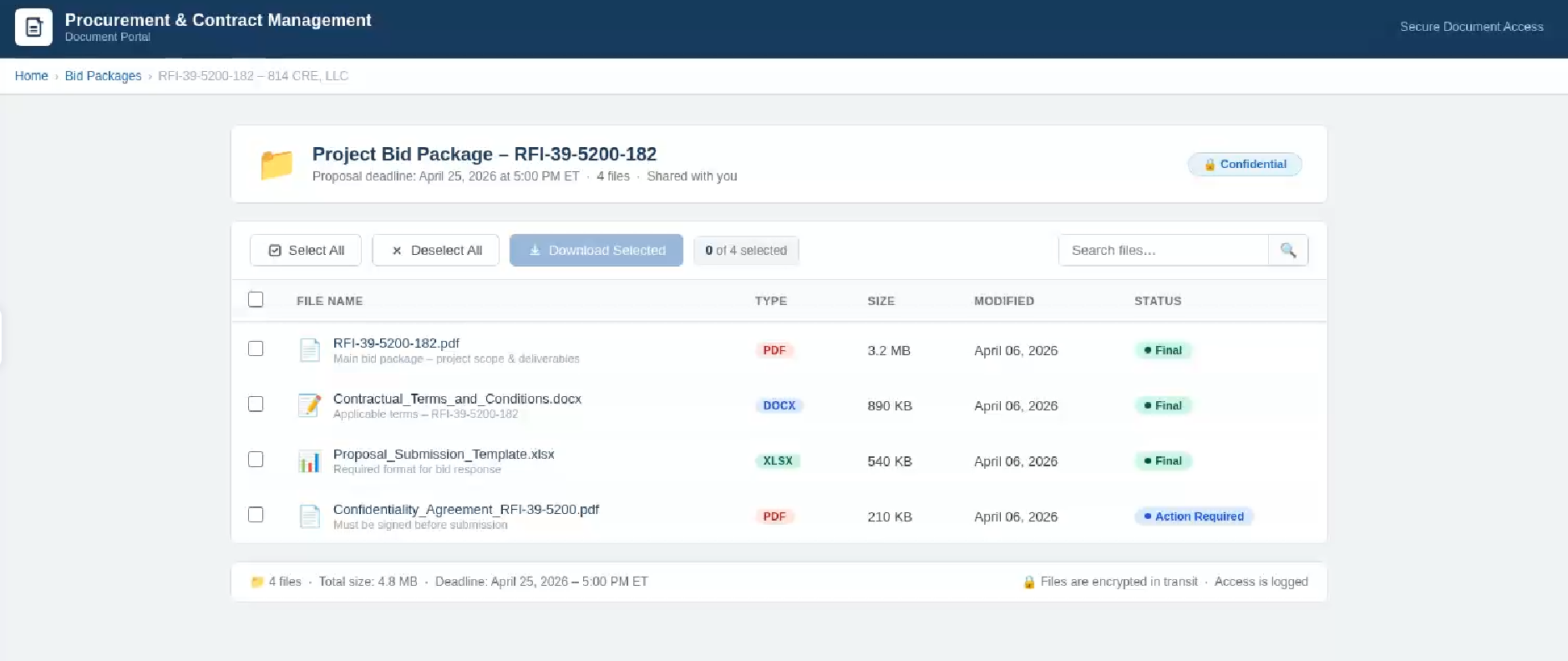
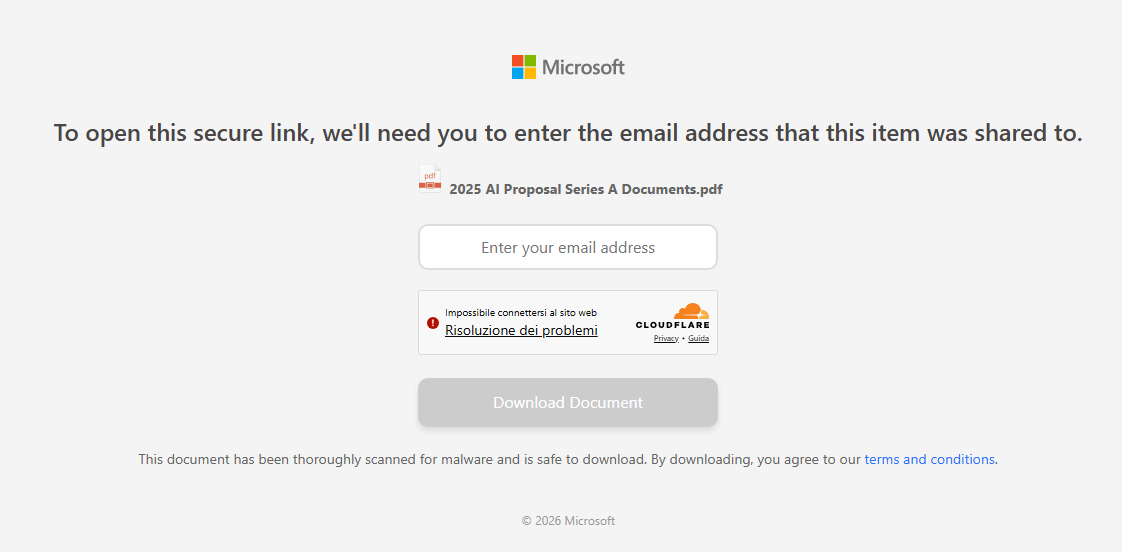
We found that these phishing campaigns typically start via emails with documents attached, such as PDF or Excel files. These documents ask the user to click a link to view another document. Below are two examples of the phishing documents attached to the emails:
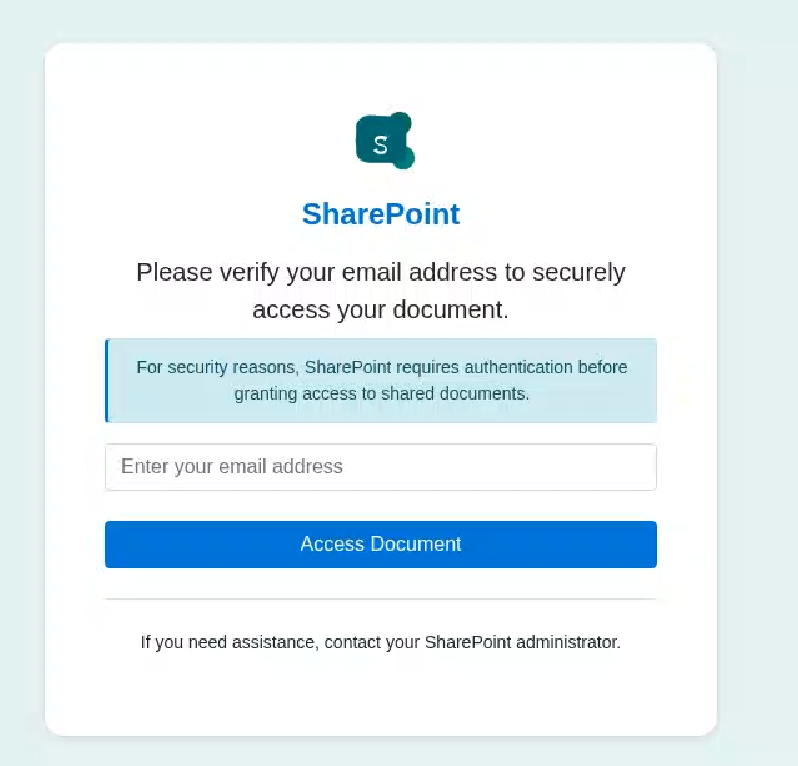
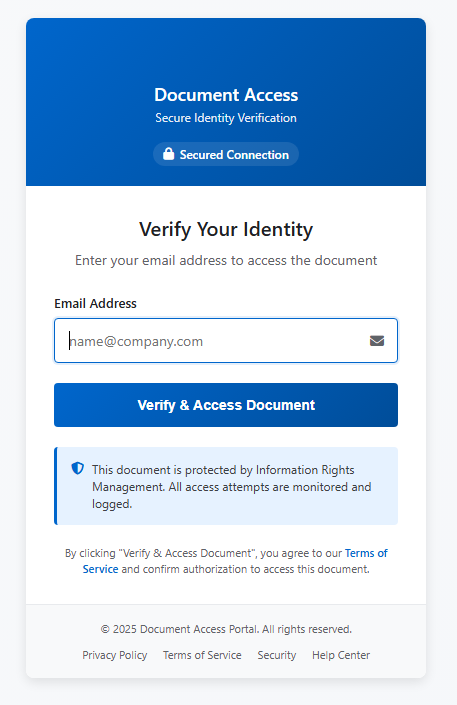
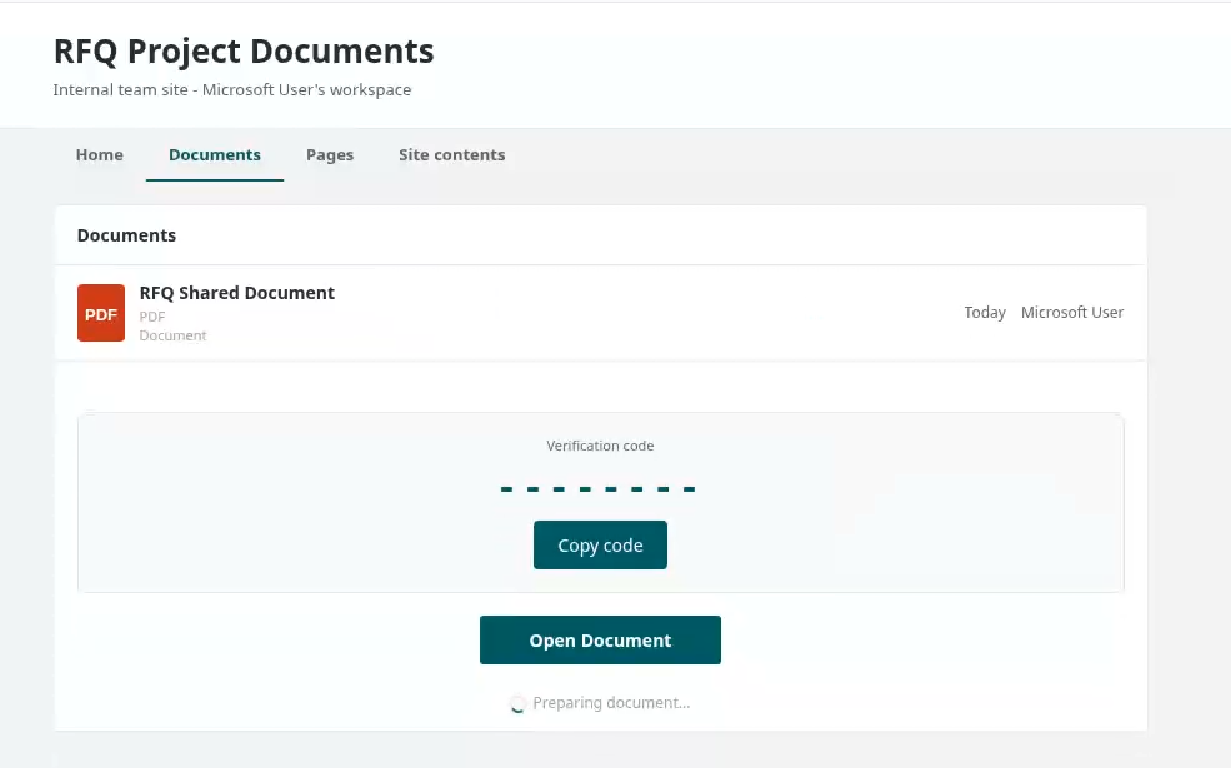
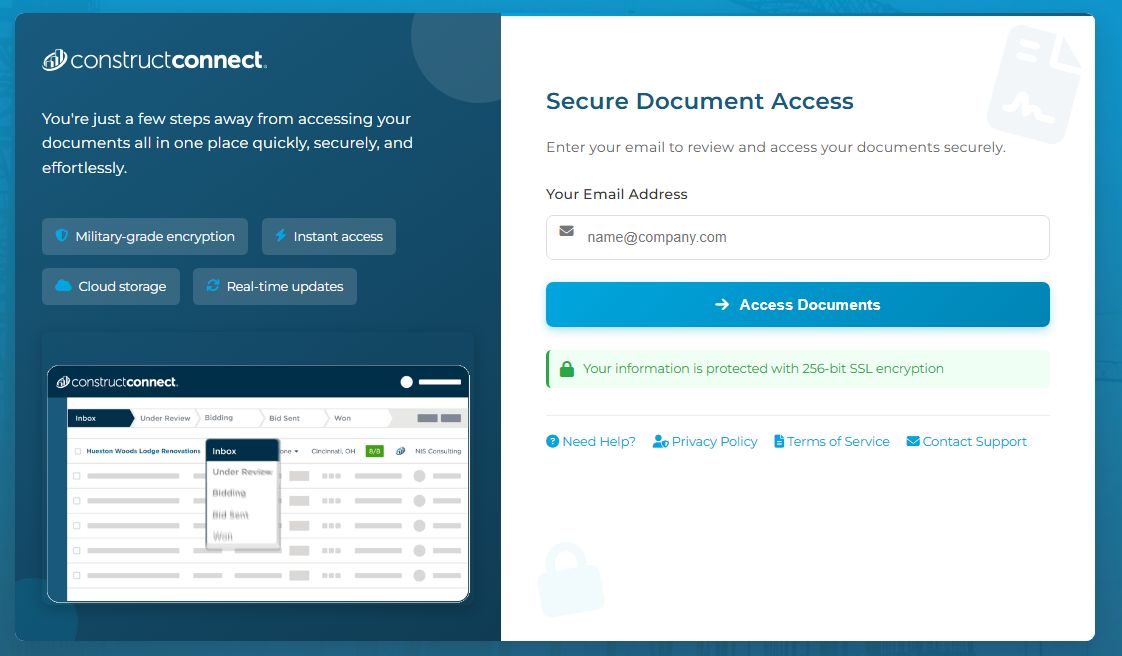
These phishing pages typically ask the user to enter their email address, then continue the infection chain and distribute phishing or malware pages. Below are some of the phishing pages detected within the malicious infrastructure:
Misconfigurations exposed the phishing kits
While tracking malicious websites, we found one with an open directory containing part of the phishing kit used in the campaigns.
Open directory hosting part of phishing kits
The open directory contained several folders with code and pages related to the phishing campaigns.
Phishing kit code
Additionally, some domains were misconfigured and allowed the download of “cl.zip”, which contained the source code for the “URL Cloaker” pages.
Phishing has changed. Slowly but surely, cybercriminals are turning to infostealers instead.
Traditional phishing hasn’t gone away. Far from it. But many attackers are no longer focused solely on tricking victims into entering usernames and passwords on fake login pages. Instead, they are using infostealers to quietly collect passwords, cookies, browser data, and other sensitive information from infected devices.
This approach is attractive because it scales well and reduces friction. Instead of relying on a victim to type credentials into a fake site, the malware can harvest logins already saved in browsers, session tokens, autofill data, cryptocurrency wallet details, and even files that contain useful information.
This makes the attack chain less visible. A traditional phishing email often leaves obvious clues: a suspicious link, a fake login page, or a strange attachment. Infostealers are different. They can arrive through malicious online ads (malvertising), cracked software, fake browser updates, game cheats, or dubious download sites, and once installed, they work in the background, stealing whatever the victim’s device has in store.
Part of this shift could be due to the widespread adoption of multi-factor authentication (MFA). By stealing session cookies, cybercriminals can bypass MFA, so they can access accounts without needing a password or authentication code.
Another factor is the rise of the malware-as-a-service (MaaS) ecosystem. Infostealers are cheap to deploy, easy to scale, and highly profitable. Rather than building a full attack chain themselves, many criminals buy access to ready-made stealer kits, loaders, or initial access services from underground vendors. This lowers the barrier to entry and allows less-skilled attackers to run credential theft operations.
In many cases, infostealers are just the first stage of a larger criminal operation. The stolen data is collected, packaged, and sold to other criminals interested in the harvested information. These buyers may specialize in fraud, account takeover, business email compromise, or ransomware. A single infected machine can generate multiple revenue streams: credentials for one buyer, session cookies for another, and corporate access or wallet data for a third.
That division of labor is one reason infostealers have become so persistent. Operators can update their code, rotate infrastructure, and launch new campaigns with minimal effort, while affiliates handle distribution through phishing, malvertising, fake downloads, or social media lures.
How to stay safe
Because infostealers commonly arrive through malvertising, fake browser updates, and one-click downloads, it’s worth treating ads and pop-ups with healthy skepticism. My personal tip: Never click on sponsored ads. Instead, visit official websites directly and download software only from trusted sources such as official vendor sites or app stores.
Another increasingly popular technique is ClickFix, a social engineering attack that tricks users into infecting their own devices. Never run commands or scripts copied from websites, emails, or messages unless you trust the source and understand the action’s purpose. If a website tells you to execute a command or perform a technical action, check official documentation or contact support before proceeding.
Pirated software, game cheats, and cracked tools remain some of the most common delivery methods for infostealers. These downloads often come bundled with malware that installs alongside the software you intended to get. The same caution applies to many browser extensions and add-ons that promise extra features or convenience. Stick to extensions from reputable developers, check reviews and permissions carefully, and avoid installing any add-on that asks for more access than it plausibly needs.
Phishing emails are still a major threat, but many can be spotted if you slow down and verify before clicking. Even if an email looks like it comes from a trusted brand, treat unsolicited attachments and links with caution, especially when they urge you to open a file, install something urgently, or fix a billing issue. If you’re unsure, check the sender address, look for typos or odd phrasing, and confirm the request through a separate channel such as the company’s official website rather than the link in the email.
We don’t just report on threats—we remove them
Cybersecurity risks should never spread beyond a headline. Keep threats off your devices by downloading Malwarebytes today.
Researchers have uncovered a long-running phishing operation that abuses trusted Google services to hijack tens of thousands of Facebook accounts.
The compromised Facebook accounts are mainly business and advertiser profiles, which criminals can monetize after gaining access and control.
The attackers found a way to send phishing emails that come “through Google,” making them look legitimate at first glance. The emails are sent via Google’s AppSheet platform, so they pass the usual technical checks (SPF, DKIM, DMARC), and many email filters treat them as trusted.
Google AppSheet is a development platform that lets people build mobile and web apps without writing code. It can automate workflows and notifications, typically used to send app-driven alerts and internal updates.
And that’s where the phishers abused it. The sender name can be customized, and the sending address may look something like noreply@appsheet.com, delivered through appsheet.bounces.google.com. To the average user, it looks like a perfectly normal notification, in these cases often about Facebook policy violations, copyright complaints, or verification issues.
Researchers linked these emails to a Vietnamese‑linked operation that has already compromised around 30,000 Facebook accounts and is still active.
The stolen accounts are mostly pages and business profiles that have financial value: advertising accounts, brand pages, and companies that rely on Facebook for marketing. Once inside, attackers run scams, place fraudulent ads, or sell access to others. In some cases, the same group offers “account recovery” services to fix the problems they created.
No matter the lure, the goal is the same: Facebook credentials, 2FA codes, and recovery data. The phishing sites are just the entry point. Behind them is a fairly industrial infrastructure built around Telegram bots and channels to collect and process stolen data.
How to stay safe
This campaign is not “just another phishing mail.” It is one more example of how attackers exploit the trust we place in major platforms.
Facebook does not send complaints, verification requests, security checks, job offers, and other urgent messages through Google infrastructure.
Any email that claims your Facebook or Instagram account is about to be disabled, locked, or punished deserves extra scrutiny, especially if it demands action within 24 hours.
If you get a worrying message about your account, go directly to facebook.com or the Facebook app. Don’t click links in the message.
If a form asks for password, multiple 2FA codes, date of birthm phone number, and ID photos in one go, then stop. That’s the “full recovery pack” these attackers need to take over your account.
Researchers found a malicious Microsoft Outlook add-in which was able to steal 4,000 stolen Microsoft account credentials, credit card numbers, and banking security answers.
How is it possible that the Microsoft Office Add-in Store ended listing an add-in that silently loaded a phishing kit inside Outlook’s sidebar?
A developer launched an add-in called AgreeTo, an open-source meeting scheduling tool with a Chrome extension. It was a popular tool, but at some point, it was abandoned by its developer, its backend URL on Vercel expired, and an attacker later claimed that same URL.
That requires some explanation. Office add-ins are essentially XML manifests that tell Outlook to load a specific URL in an iframe. Microsoft reviews and signs the manifest once but does not continuously monitor what that URL serves later.
So, when the outlook-one.vercel.app subdomain became free to claim, a cybercriminal jumped at the opportunity to scoop it up and abuse the powerful ReadWriteItem permissions requested and approved in 2022. These permissions meant the add-in could read and modify a user’s email when loaded. The permissions were appropriate for a meeting scheduler, but they served a different purpose for the criminal.
While Google removed the dead Chrome extension in February 2025, the Outlook add-in stayed listed in Microsoft’s Office Store, still pointing to a Vercel URL that no longer belonged to the original developer.
An attacker registered that Vercel subdomain and deployed a simple four-page phishing kit consisting of fake Microsoft login, password collection, Telegram-based data exfiltration, and a redirect to the real login.microsoftonline.com.
What make this work was simple and effective. When users opened the add-in, they saw what looked like a normal Microsoft sign-in inside Outlook. They entered credentials, which were sent via a JavaScript function to the attacker’s Telegram bot along with IP data, then were bounced to the real Microsoft login so nothing seemed suspicious.
The researchers were able to access the attacker’s poorly secured Telegram-based exfiltration channel and recovered more than 4,000 sets of stolen Microsoft account credentials, plus payment and banking data, indicating the campaign was active and part of a larger multi-brand phishing operation.
“The same attacker operates at least 12 distinct phishing kits, each impersonating a different brand – Canadian ISPs, banks, webmail providers. The stolen data included not just email credentials but credit card numbers, CVVs, PINs, and banking security answers used to intercept Interac e-Transfer payments. This is a professional, multi-brand phishing operation. The Outlook add-in was just one of its distribution channels.”
What to do
If you are or ever have used the AgreeTo add-in after May 2023:
Make sure it’s removed. If not, uninstall the add-in.
Change the password for your Microsoft account.
If that password (or close variants) was reused on other services (email, banking, SaaS, social), change those as well and make each one unique.
Review recent sign‑ins and security activity on your Microsoft account, looking for logins from unknown locations or devices, or unusual times.
Review other sensitive information you may have shared via email.
Scan your mailbox for signs of abuse: messages you did not send, auto‑forwarding rules you did not create, or password‑reset emails for other services you did not request.
Watch payment statements closely for at least the next few months, especially small “test” charges and unexpected e‑transfer or card‑not‑present transactions, and dispute anything suspicious immediately.
We don’t just report on threats—we help safeguard your entire digital identity
Cybersecurity risks should never spread beyond a headline. Protect your, and your family’s, personal information by using identity protection.
It started with an email that looked boringly familiar: Apple logo, a clean layout, and a subject line designed to make the target’s stomach drop.
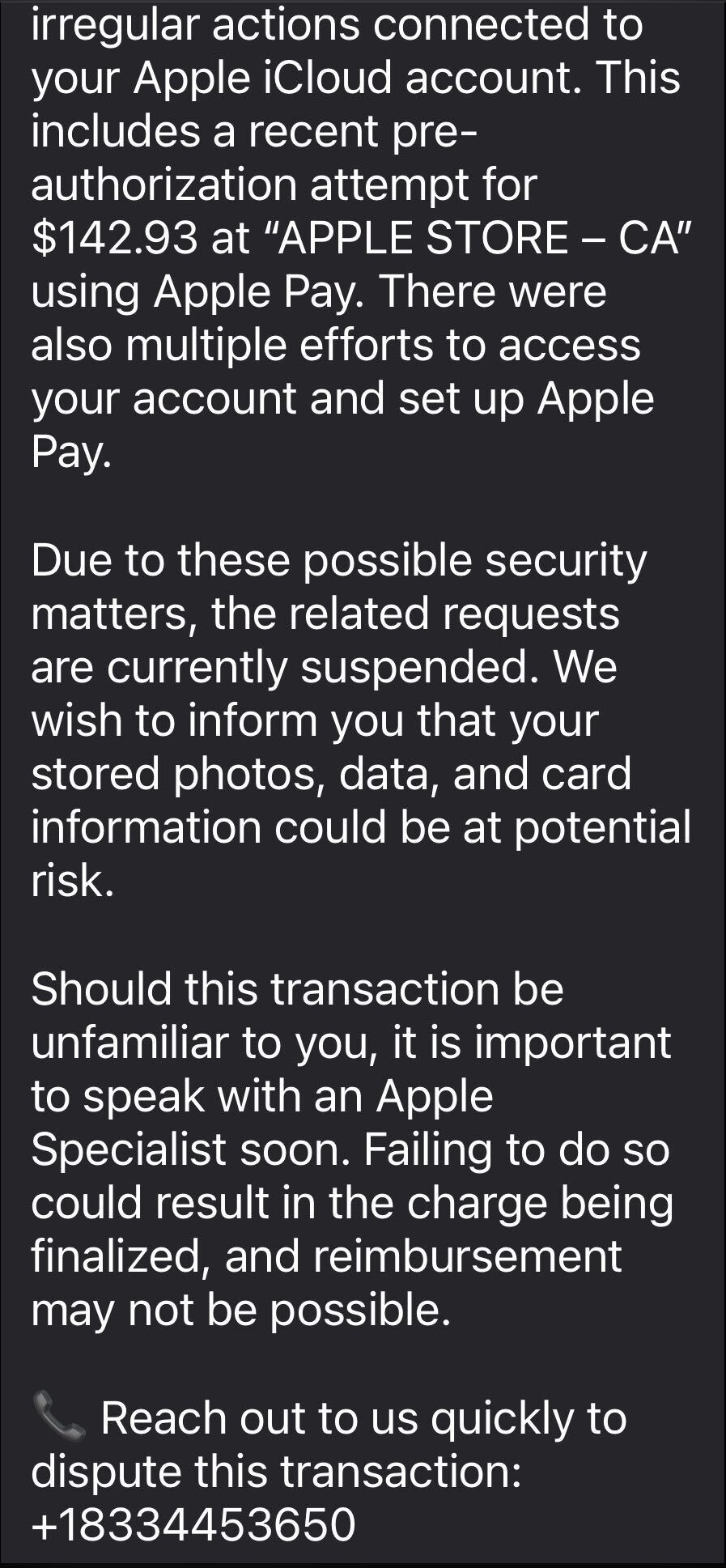
The message claimed Apple has stopped a high‑value Apple Pay charge at an Apple Store, complete with a case ID, timestamp, and a warning that the account could be at risk if the target doesn’t respond.
In some cases, there was even an “appointment” booked on their behalf to “review fraudulent activity,” plus a phone number they should call immediately if the time didn’t work. Nothing in the email screams amateur. The display name appears to be Apple, the formatting closely matches real receipts, and the language hits all the right anxiety buttons.
The email warns recipients not to Apple Pay until they’ve spoken to “Apple Billing & Fraud Prevention,” and it provides a phone number to call.
After dialing the number, an agent introduces himself as part of Apple’s fraud department and asks for details such as Apple ID verification codes or payment information.
The conversation is carefully scripted to establish trust. The agent explains that criminals attempted to use Apple Pay in a physical Apple Store and that the system “partially blocked” the transaction. To “fully secure” the account, he says, some details need to be verified.
The call starts with harmless‑sounding checks: your name, the last four digits of your phone number, what Apple devices you own, and so on.
Next comes a request to confirm the Apple ID email address. While the victim is looking it up, a real-looking Apple ID verification code arrives by text message.
The agent asks for this code, claiming it’s needed to confirm they’re speaking to the rightful account owner. In reality, the scammer is logging into the account in real time and using the code to bypass two-factor authentication.
Once the account is “confirmed,” the agent walks the victim through checking their bank and Apple Pay cards. They ask questions about bank accounts and suggest “temporarily securing” payment methods so criminals can’t exploit them while the “Apple team” investigates.
The entire support process is designed to steal login codes and payment data. At scale, campaigns like this work because Apple’s brand carries enormous trust, Apple Pay involves real money, and users have been trained to treat fraud alerts as urgent and to cooperate with “support” when they’re scared.
One example submitted to Malwarebytes Scam Guard showed an email claiming an Apple Gift Card purchase for $279.99 and urging the recipient to call a support number (1-812-955-6285).
Another user submitted a screenshot showing a fake “Invoice Receipt – Paid” styled to look like an Apple Store receipt for a 2025 MacBook Air 13-inch laptop with M4 chip priced at $1,157.07 and a phone number (1-805-476-8382) to call about this “unauthorized transaction.”
What you should know
Apple doesn’t set up fraud appointments through email. The company also doesn’t ask users to fix billing problems by calling numbers in unsolicited messages.
Closely inspect the sender’s address. In these cases, the email doesn’t come from an official Apple domain, even if the display name makes it seem legitimate.
Never share two-factor authentication (2FA) codes, SMS codes, or passwords with anyone, even if they claim to be from Apple.
Ignore unsolicited messages urging you to take immediate action. Always think and verify before you engage. Talk to someone you trust if you’re not sure.
Malwarebytes Scam Guard helped several users identify this type of scam. For those without a subscription, you can use Scam Guard in ChatGPT.
If you’ve already engaged with these Apple Pay scammers, it is important to:
Change the Apple ID password immediately from Settings or appleid.apple.com, not from any link provided by email or SMS.
Check active sessions, sign out of all devices, then sign back in only on devices you recognize and control.
Rotate your Apple ID password again if you see any new login alerts, and confirm 2FA is still enabled. If not, turn it on.
In Wallet, check every card for unfamiliar Apple Pay transactions and recent in-store or online charges. Monitor bank and credit card statements closely for the next few weeks and dispute any unknown transactions immediately.
Check if the primary email account tied to your Apple ID is yours, since control of that email can be used to take over accounts.
We don’t just report on scams—we help detect them
Cybersecurity risks should never spread beyond a headline. If something looks dodgy to you, check if it’s a scam using Malwarebytes Scam Guard, a feature of our mobile protection products. Submit a screenshot, paste suspicious content, or share a text or phone number, and we’ll tell you if it’s a scam or legit. Download Malwarebytes Mobile Security for iOS or Android and try it today!
The LastPass Threat Intelligence, Mitigation, and Escalation (TIME) team has published a warning about an active phishing campaign in which fake “maintenance” emails pressure users to back up their vaults within 24 hours. The emails lead to credential-stealing phishing sites rather than any legitimate LastPass page.
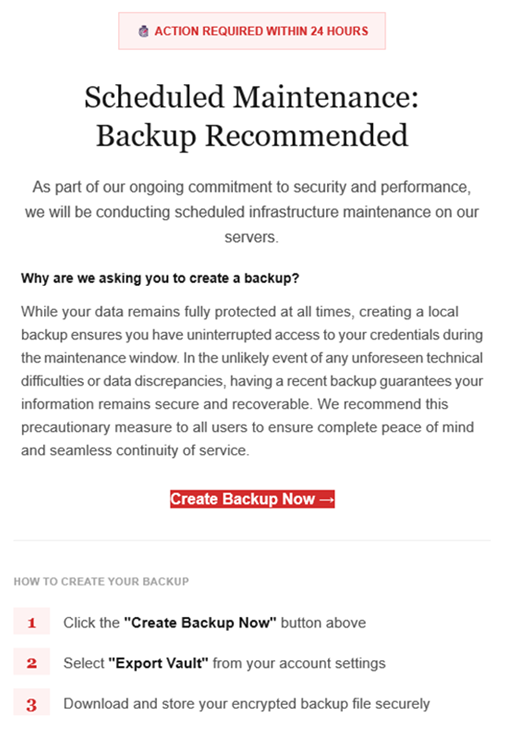
The phishing campaign that started around January 19, 2026, uses emails that falsely claim upcoming infrastructure maintenance and urge users to “backup your vault in the next 24 hours.”
Image courtesy of LastPass
“Scheduled Maintenance: Backup Recommended
As part of our ongoing commitment to security and performance, we will be conducting scheduled infrastructure maintenance on our servers. Why are we asking you to create a backup? While your data remains protected at all times, creating a local backup ensures you have access to your credentials during the maintenance window. In the unlikely event of any unforeseen technical difficulties or data discrepancies, having a recent backup guarantees your information remains secure and recoverable. We recommend this precautionary measure to all users to ensure complete peace of mind and seamless continuity of service.
Create Backup Now (link)
How to create your backup 1 Click the “Create Backup Now” button above 2 Select “Export Vault” from you account settings 3 Download and store your encrypted backup file securely”
The link in the email points to mail-lastpass[.]com, a domain that doesn’t belong to LastPass and has now been taken down.
Note that there are different subject lines in use. Here is a selection:
LastPass Infrastructure Update: Secure Your Vault Now
Your Data, Your Protection: Create a Backup Before Maintenance
Don’t Miss Out: Backup Your Vault Before Maintenance
Important: LastPass Maintenance & Your Vault Security
Protect Your Passwords: Backup Your Vault (24-Hour Window)
It is imperative for users to ignore instructions in emails like these. Giving away the login details for your password manager can be disastrous. For most users, it would provide access to enough information to carry out identity theft.
Stay safe
First and foremost, it’s important to understand that LastPass will never ask for your master password or demand immediate action under a tight deadline. Generally speaking, there are more guidelines that can help you stay safe.
Don’t click on links in unsolicited emails without verifying with the trusted sender that they’re legitimate.
Always log in directly on the platform that you are trying to access, rather than through a link.
Use a real-time, up-to-date anti-malware solution with a web protection module to block malicious sites.
Report phishing emails to the company that’s being impersonated, so they can alert other customers. In this case emails were forwarded to abuse@lastpass.com.
Pro tip: Malwarebytes Scam Guard would have recognized this email as a scam and advised you how to proceed.
We don’t just report on threats—we help safeguard your entire digital identity
Cybersecurity risks should never spread beyond a headline. Protect your, and your family’s, personal information by using identity protection.
Attackers are sending very convincing fake “Google” emails that slip past spam filters, route victims through several trusted Google-owned services, and ultimately lead to a look-alike Microsoft 365 sign-in page designed to harvest usernames and passwords.
Researchers found that cybercriminals used Google Cloud Application Integration’s Send Email feature to send phishing emails from a legitimate Google address: noreply-application-integration@google[.]com.
Google Cloud Application Integration allows users to automate business processes by connecting any application with point-and-click configurations. New customers currently receive free credits, which lowers the barrier to entry and may attract some cybercriminals.
The initial email arrives from what looks like a real Google address and references something routine and familiar, such as a voicemail notification, a task to complete, or permissions to access a document. The email includes a link that points to a genuine Google Cloud Storage URL, so the web address appears to belong to Google and doesn’t look like an obvious fake.
After the first click, you are redirected to another Google‑related domain (googleusercontent[.]com) showing a CAPTCHA or image check. Once you pass the “I’m not a robot check,” you land on what looks like a normal Microsoft 365 sign‑in page, but on close inspection, the web address is not an official Microsoft domain.
Any credentials provided on this site will be captured by the attackers.
The use of Google infrastructure provides the phishers with a higher level of trust from both email filters and the receiving users. This is not a vulnerability, just an abuse of cloud-based services that Google provides.
Google’s response
Google said it has taken action against the activity:
“We have blocked several phishing campaigns involving the misuse of an email notification feature within Google Cloud Application Integration. Importantly, this activity stemmed from the abuse of a workflow automation tool, not a compromise of Google’s infrastructure. While we have implemented protections to defend users against this specific attack, we encourage continued caution as malicious actors frequently attempt to spoof trusted brands. We are taking additional steps to prevent further misuse.”
We’ve seen several phishing campaigns that abuse trusted workflows from companies like Google, PayPal, DocuSign, and other cloud-based service providers to lend credibility to phishing emails and redirect targets to their credential-harvesting websites.
How to stay safe
Campaigns like these show that some responsibility for spotting phishing emails still rests with the recipient. Besides staying informed, here are some other tips you can follow to stay safe.
Always check the actual web address of any login page; if it’s not a genuine Microsoft domain, do not enter credentials. Using a password manager will help because they will not auto-fill your details on fake websites.
Be cautious of “urgent” emails about voicemails, document shares, or permissions, even if they appear to come from Google or Microsoft. Creating urgency is a common tactic by scammers and phishers.
Go directly to the service whenever possible. Instead of clicking links in emails, open OneDrive, Teams, or Outlook using your normal bookmark or app.
Use multi‑factor authentication (MFA) so that stolen passwords alone are not enough, and regularly review which apps have access to your account and remove anything you don’t recognize.
Pro tip: Malwarebytes Scam Guard can recognize emails like this as scams. You can upload suspicious text, emails, attachments and other files and ask for its opinion. It’s really very good at recognizing scams.
We don’t just report on scams—we help detect them
Cybersecurity risks should never spread beyond a headline. If something looks dodgy to you, check if it’s a scam using Malwarebytes Scam Guard, a feature of our mobile protection products. Submit a screenshot, paste suspicious content, or share a text or phone number, and we’ll tell you if it’s a scam or legit. Download Malwarebytes Mobile Security for iOS or Android and try it today!

 Login
Login