Normal view

Fake malware-signing service Fox Tempest dismantled by Microsoft

20 May 2026 at 17:33

Microsoft says it dismantled a malware-signing-as-a-service (MSaaS) called Fox Tempest, which helped cybercriminals make malware appear legitimate.

The service let customers submit malicious files to be digitally signed with short-lived Microsoft-issued certificates, making the malware look legitimate and more likely to bypass security checks.

Fox Tempest’s service was built around a customer-facing signing workflow where cybercriminals could upload malicious binaries to a portal, have them signed with certificates valid for only 72 hours, and then receive files that appeared to come from a trusted software source.

Microsoft explicitly says this approach allowed malware to evade security controls and bypass defenses that would otherwise flag suspicious unsigned code. Many security tools treat signed binaries as more trustworthy than unsigned ones, especially in environments that rely on allow-lists and publisher reputation. Fox Tempest abused that assumption by using fraudulently obtained certificates to make malware blend in as legitimate software, increasing the likelihood of execution and successful delivery.

A trusted-looking certificate can help malware get past initial scrutiny, especially when paired with social engineering, paid ads, SEO poisoning, or fake download pages. In this campaign, the signing layer helped malicious installers masquerade as products like AnyDesk, Teams, PuTTY, and Webex, which is exactly the kind of abuse that can slip through control frameworks built around reputation and trust.

The fraudulent certificates were used to spread ransomware and infostealers. The effects of these malware campaigns were broad, with attacks affecting healthcare, education, government, and financial services across multiple countries.

How to stay safe

Microsoft’s disclosure shows how cybercrime has evolved beyond “malware authors” into a service economy where one group specializes in producing trust and others monetize it.

For defenders, the strongest lesson is not to treat code signing as a standalone security control. 

For consumers:

  • Remember to only download software from the official vendor site, the Microsoft Store, or another source you already trust. Avoid download buttons on links sent via social media posts, direct messages or email.
  • Be skeptical of “sponsored” search results and advertisements for popular apps.
  • Use an up-to-date, real-time anti-malware solution that looks for malicious behavior rather than just signatures.
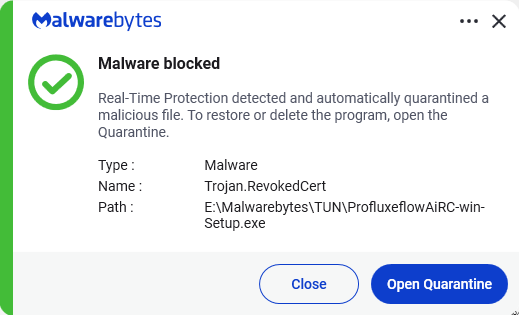
Malwarebytes detects Trojan.RevokedCert


We don’t just report on threats—we remove them

Cybersecurity risks should never spread beyond a headline. Keep threats off your devices by downloading Malwarebytes today.

Attackers abuse OAuth’s built-in redirects to launch phishing and malware attacks

4 March 2026 at 13:53

Attackers are abusing normal OAuth error redirects to send users from a legitimate Microsoft or Google login URL to phishing or malware pages, without ever completing a successful sign‑in or stealing tokens from the OAuth flow itself.

That calls for a bit more explanation.

OAuth (Open Authorization) is an open-standard protocol for delegated authorization. It allows users to grant websites or applications access to their data on another service (for example, Google or Facebook) without sharing their password. 

OAuth redirection is the process where an authorization server sends a user’s browser back to an application (client) with an authorization code or token after user authentication.

Researchers found that phishers use silent OAuth authentication flows and intentionally invalid scopes to redirect victims to attacker-controlled infrastructure without stealing tokens.

So, what does this attack look like from a target’s perspective?

From the user’s perspective, the attack chain looks roughly like this:

The email

An email arrives with a plausible business lure. For example, you receive an email about something routine but urgent: document sharing or review, a Social Security or financial notice, an HR or employee report, a Teams meeting invite, or a password reset.​

The email body contains a link such as “View document” or “Review report,” or a PDF attachment that includes a link instead.​

The link

You click the link after seeing that it appears to be a normal Microsoft or Google login. The visible URL (what you see when you hover over it) looks convincing, starting with a trusted domain like https://login.microsoftonline.com/  or https://accounts.google.com/.

There is no obvious sign that the parameters (prompt=none, odd or empty scope, encoded state) are abnormal.​

Silent OAuth

The crafted URL attempts a silent OAuth authorization (prompt=none) and uses parameters that are guaranteed to fail (for example, an invalid or missing scope).​

The identity provider evaluates your session and conditional access, determines the request cannot succeed silently, and returns an OAuth error, such as interaction_required, access_denied, or consent_required.​

The redirect

By design, the OAuth server then redirects your browser, including the error parameters and state, to the app’s registered redirect URI, which in these cases is the attacker’s domain.​

To the user, this is just a quick flash of a Microsoft or Google URL followed by another page. It’s unlikely anyone would notice the errors in the query string.

Landing page

The target gets redirected to a page that looks like a legitimate login or business site. This could very well be a clone of a trusted brand’s site.

From here, there are two possible malicious scenarios:

Phishing / Attacker in the Middle (AitM) variant

A normal login page or a verification prompt, sometimes with CAPTCHAs or interstitials to look more trustworthy and bypass some controls.​

The email address may already be filled in because the attackers passed it through the state parameter.

When the user enters credentials and multi-factor authentication (MFA), the attacker‑in‑the‑middle toolkit intercepts them, including session cookies, while passing them along so the experience feels legitimate.​

Malware delivery variant

Immediately (or after a brief intermediate page), the browser hits a download path and automatically downloads a file.​

The context of the page matches the lure (“Download the secure document,” “Meeting resources,” and so on), making it seem reasonable to open the file.​

The target might notice the initial file open or some system slowdown, but otherwise the compromise is practically invisible.​

Potential impact

By harvesting credentials or planting a backdoor, the attacker now has a foothold on the system. From there, they may carry out hands-on-keyboard activity, move laterally, steal data, or stage ransomware, depending on their goals.

The harvested credentials and tokens can be used to access email, cloud apps, or other resources without the need to keep malware on the device.​

How to stay safe

Since the attacker does not need your token from this flow (only the redirect into their own infrastructure), the OAuth request itself may look less suspicious. Be vigilant and follow our advice:

  • If you rely on hovering over links, be extra cautious when you see very long URLs with oauth2, authorize, and lots of encoded text, especially if they come from outside your organization.
  • Even if the start of the URL looks legitimate, verify with a trusted sender before clicking the link.
  • If something urgent arrives by email and immediately forces you through a strange login or starts a download you did not expect, assume it is malicious until proven otherwise.
  • If you are redirected somewhere unfamiliar, stop and close the tab.
  • Be very wary of files that download immediately after clicking a link in an email, especially from /download/ paths.
  • If a site says you must “run” or “enable” something to view a secure document, close it and double-check which site you’re currently on. It might be up to something.
  • Keep your OS, browser, and your favorite security tools up to date. They can block many known phishing kits and malware downloads automatically.

Pro tip: use Malwarebytes Scam Guard to help you determine whether the email you received is a scam or not.


We don’t just report on scams—we help detect them

Cybersecurity risks should never spread beyond a headline. If something looks dodgy to you, check if it’s a scam using Malwarebytes Scam Guard. Submit a screenshot, paste suspicious content, or share a link, text or phone number, and we’ll tell you if it’s a scam or legit. Available with Malwarebytes Premium Security for all your devices, and in the Malwarebytes app for iOS and Android.

Microsoft Office zero-day lets malicious documents slip past security checks

29 January 2026 at 15:53

Microsoft issued an emergency patch for a high-severity zero-day vulnerability in Office that allows attackers to bypass document security checks and is being exploited in the wild via malicious files.

Microsoft pushed the emergency patch for the zero‑day, tracked as CVE-2026-21509, and classified it as a “Microsoft Office Security Feature Bypass Vulnerability” with a CVSS score of 7.8 out of 10.

The flaw allows attackers to bypass Object Linking and Embedding (OLE) mitigations that are designed to block unsafe COM/OLE controls inside Office documents. This means a malicious attachment could infect a PC despite built-in protections.

In a real-life scenario, an attacker creates a fake Word, Excel, or PowerPoint file containing hidden “mini‑programs” or special objects. They can run code and do other things on the affected computer. Normally, Office has safety checks that would block those mini-programs because they’re risky.

However, the vulnerability allows the attacker to tweak the file’s structure and hidden information in a way that tricks Office into thinking the dangerous mini‑program inside the document is harmless. As a result, Office skips the usual security checks and allows the hidden code to run.

As code to test the bypass is publicly available, increasing the risk of exploitation, users are under urgent advice to apply the patch.

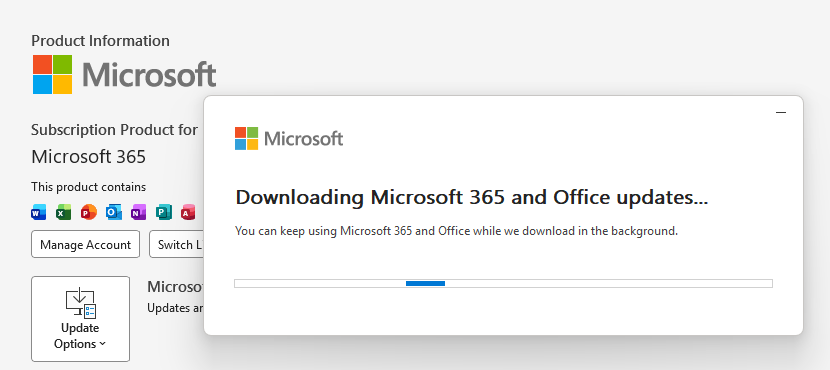
Updating Microsoft 365 and Office

How to protect your system

What you need to do depends on which version of Office you’re using.

The affected products include Microsoft Office 2016, 2019, LTSC 2021, LTSC 2024, and Microsoft 365 Apps (both 32‑bit and 64‑bit).

Office 2021 and later are protected via a server‑side change once Office is restarted. To apply it, close all Office apps and restart them.

Office 2016 and 2019 require a manual update. Run Windows Update with the option to update other Microsoft products turned on.

If you’re running build 16.0.10417.20095 or higher, no action is required. You can check your build number by opening any Office app, going to your account page, and selecting About for whichever application you have open. Make sure the build number at the top reads 16.0.10417.20095 or higher.

What always helps:

  • Don’t open unsolicited attachments without verifying them with a trusted sender.
  • Treat all unexpected documents, especially those asking to “enable content” or “enable editing,” as suspicious.
  • Keep macros disabled by default and only allow signed macros from trusted publishers.
  • Use an up-to-date real-time anti-malware solution.
  • Keep your operating system and software fully up to date.

We don’t just report on threats—we remove them

Cybersecurity risks should never spread beyond a headline. Keep threats off your devices by downloading Malwarebytes today.

❌