
 Login
Login


Supply chain attack on eScan antivirus: detecting and remediating malicious updates

UPD 30.01.2026: Added technical details about the attack chain and more IoCs.
On January 20, a supply chain attack has occurred, with the infected software being the eScan antivirus developed by the Indian company MicroWorld Technologies. The previously unknown malware was distributed through the eScan update server. The same day, our security solutions detected and prevented cyberattacks involving this malware. On January 21, having been informed by Morphisec, the developers of eScan contained the security incident related to the attack.
Malicious software used in the attack
Users of the eScan security product received a malicious Reload.exe file, which initiated a multi-stage infection chain. According to colleagues at Morphisec who were the first to investigate the attack, Reload.exe prevented further antivirus product updates by modifying the HOSTS file, thereby blocking the ability of security solution developers to automatically fix the problem, which, among other things, led to the update service error.
The malware also ensured its persistence in the system, communicated with command-and-control servers, and downloaded additional malicious payloads. Persistence was achieved by creating scheduled tasks; one example of such a malicious task is named “CorelDefrag”. Additionally, the consctlx.exe malicious file was written to the disk during the infection.
How the attackers managed to pull off this attack
At the request of the BleepingComputer information portal, eScan developers explained that the attackers managed to gain access to one of the regional update servers and deploy a malicious file, which was automatically delivered to customers. They emphasize that this is not a vulnerability — the incident is classified as unauthorized access to infrastructure. The malicious file was distributed with a fake, invalid digital signature.
According to the developers, the infrastructure affected by the incident was quickly isolated, and all access credentials were reset.
Having checked our telemetry, we identified hundreds of machines belonging to both individuals and organizations, which encountered infection attempts with payloads related to the eScan supply chain attack. These machines were mostly located in South Asia, primarily in India, Bangladesh, Sri Lanka, and the Philippines. Having examined them, we identified that to orchestrate the infection, attackers were able to replace a legitimate component of the eScan antivirus, located under the path C:\Program Files (x86)\escan\reload.exe, with a malicious executable. This reload.exe file is launched at runtime by components of the eScan antivirus. It has a fake, invalid digital signature (certificate serial number: 68525dadf70c773d41609ff7ca499fb5). We found this implant to be heavily obfuscated with constant unfolding and indirect branching, which made its analysis quite tedious.
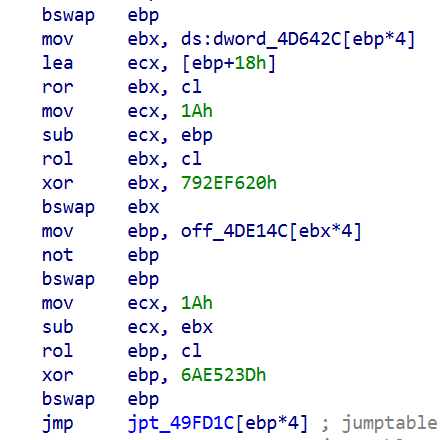
Obfuscated code snippet
When started, this reload.exe file checks whether it is launched from the Program Files folder, and exits if not. It further initializes the CLR (Common Language Runtime) environment inside its process, which it uses to load a small .NET executable into memory (SHA1: eec1a5e3bb415d12302e087a24c3f4051fca040e). This executable is based on the UnmanagedPowerShell tool, which allows executing PowerShell code in any process. Attackers modified the source code of this project by adding an AMSI bypass capability to it, and used it to execute a malicious PowerShell script inside the reload.exe process. This script has three lines, and looks as follows:

Lines of the launched script
Each of these lines is responsible for decoding and launching a Base64-encoded PowerShell payload. These three payloads, which we will further analyze, are used for the infection on the target machine.
eScan antivirus tampering payload
The first executed payload is deployed to tamper with the installed eScan solution, in an attempt to prevent it from receiving updates and detecting the installed malicious components. To do that, it performs several actions, including the following ones:
- Deletes multiple files of the eScan antivirus, including the Remote Support Utility located at
C:\Program Files (x86)\Common Files\MicroWorld\WGWIN\tvqsapp.exe. Notably, before deletion, the payload creates ZIP-archived backups of removed files inside theC:\ProgramData\esfsbkdirectory. - Modifies the
HKLM\SOFTWARE\WOW6432Node\MicroWorld\eScan for Windows\MwMonitorregistry key to add theC:\Windows,C:\Program FilesandC:\Program Files (x86)folders to antivirus exceptions. - Adds update servers of the eScan antivirus (such as update1.mwti.net) to the hosts file, associating them with the IP address 2.3.4.0.
- Modifies registry keys related to antivirus databases, for example by assigning
999to theWTBases_newvalue of theHKLM\SOFTWARE\WOW6432Node\MicroWorld\eScan for Windows\ODSregistry key.
While tampering with eScan, this payload writes a debug log to the C:\ProgramData\euapp.log file, which can be used as an indicator of compromise.
It is worth noting that while running this payload, we did not observe all these actions to succeed on our test machine with eScan installed. For example, the self-defense component of eScan was able to prevent malicious entries from being written into the hosts file. Nevertheless, after the payload had finished execution, we were unable to further update eScan, as we were getting this error message:
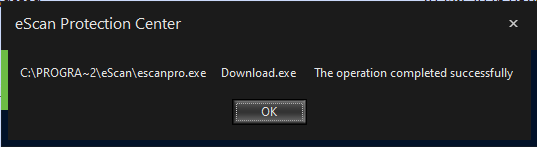
Error message displayed to us when we launched the update process after tampering with eScan. While the message says, “The operation completed successfully”, its appearance is abnormal, and no updates are actually downloaded or installed
Finally, the first payload replaces the C:\Program Files (x86)\eScan\CONSCTLX.exe component of eScan with a next-stage persistent payload, which we will describe in further sections of this article.
AMSI bypass payload
The second payload launched is designed to bypass AMSI. The payload implements typical code for doing that – it determines the address of the AmsiScanBuffer function and then patches it to always return an error.
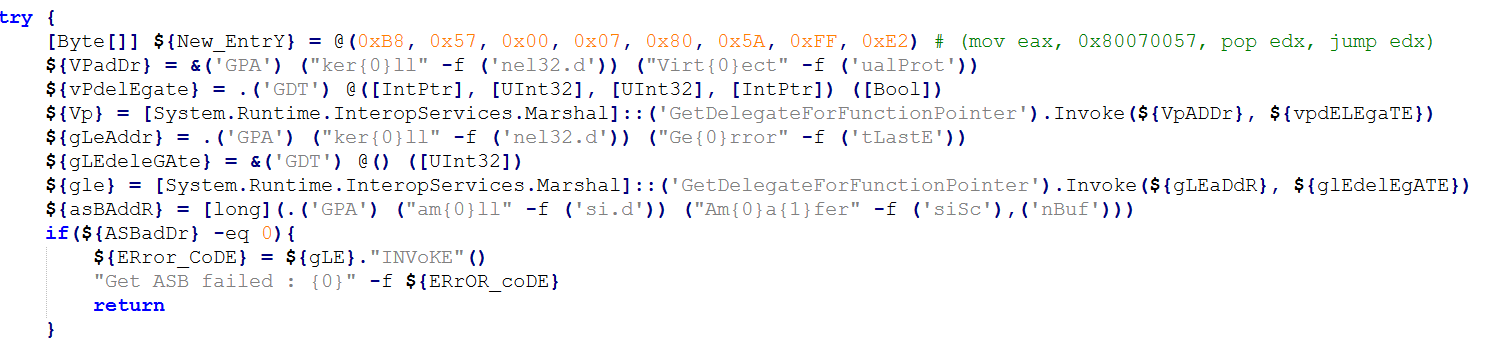
Snippet of the AMSI bypass payload (deobfuscated version)
Victim validation payload
The goal of the third payload, which is the last to be executed, is to validate whether the victim machine should be further infected, and if yes, to deliver a further payload to it. When started, it examines the list of installed software, running processes and services against a blocklist. Entries in this blocklist are related to analysis tools and security solutions. Notably, Kaspersky security solutions are included into this blocklist. This means that this stage will refuse to deliver the embedded payload if Kaspersky products are installed on the victim machine.
If validation is successful, the payload proceeds with deploying a PowerShell-based persistent payload on the infected machine. To do that, it:
- Writes the persistent payload to the
Corelvalue of theHKLM\Software\E9F9EEC3-86CA-4EBE-9AA4-1B55EE8D114Eregistry key. - Creates a scheduled task named
Microsoft\Windows\Defrag\CorelDefrag, designed to execute the following PowerShell script every day at a random time:
PowerShell script executed by the CorelDefrag scheduled task (beautified version)
This script retrieves the persistent payload from the
HKLM\Software\E9F9EEC3-86CA-4EBE-9AA4-1B55EE8D114Eregistry key, Base64-decodes and then executes it.

When the payload execution finishes, either because validation failed or the persistent component was deployed successfully, it sends a heartbeat to the C2 infrastructure. This is done by sending a GET request, which contains a status code and optionally an error message, to the following URLs:
- https://vhs.delrosal[.]net/i
- https://tumama.hns[.]to
- https://blackice.sol-domain[.]org
- https://codegiant.io/dd/dd/dd.git/download/main/middleware[.]ts
The response to the GET request is not processed.
As such, during installation, the infected machine receives two persistent payloads:
- The CONSCTLX.exe payload, designed to be launched by the eScan antivirus
- The PowerShell-based payload, designed to be launched via a scheduled task
The CONSCTLX.exe persistent payload
This payload is obfuscated in the same way as the Reload.exe malicious executable. In the same way as this executable, CONSCTLX.exe initializes the CLR environment to execute a PowerShell script inside its own process. The goal of this script is to retrieve the other (PowerShell-based) persistent payload from the HKLM\Software\E9F9EEC3-86CA-4EBE-9AA4-1B55EE8D114E registry key, and execute it. However, this script contains another interesting feature: it changes the last update time of the eScan product to the current time, by writing the current date to the C:\Program Files (x86)\eScan\Eupdate.ini file. This is needed to make the eScan solution GUI display a recent update date, so that the user does not notice that antivirus updates are actually blocked.
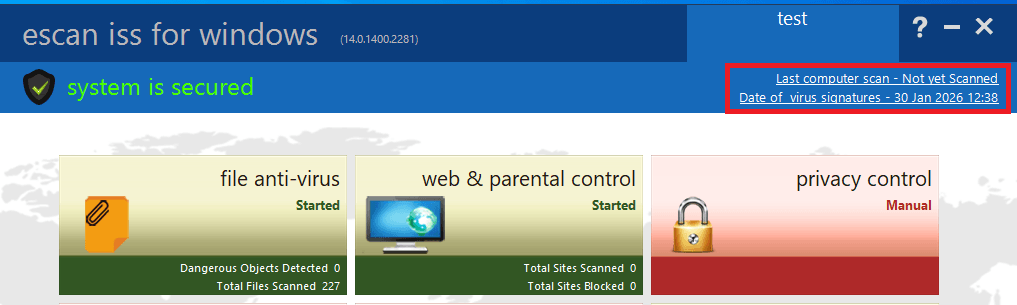
Screenshot of the eScan product GUI, with the highlighted date that is changed by the payload
Apart from launching the PowerShell script, the payload also attempts to retrieve a fallback payload from the C2 infrastructure, by sending GET requests to the following URLs:
- https://csc.biologii[.]net/sooc
- https://airanks.hns[.]to
If there is a need to deliver this payload, the server responds with an RC4-encrypted blob, which is decrypted by the component and launched as shellcode.
The PowerShell-based persistent payload
The second deployed payload is entirely PowerShell-based. When started, it performs an AMSI bypass and conducts the same validation procedures as the victim validation payload. It further sends a GET request to the C2 infrastructure, using the same URLs as the validation payload. In this request, the cookie value named “s” contains RC4-encrypted and Base64-encoded system information, such as the victim ID, user name and current process name. In response to this request, the C2 server may optionally send the victim a PowerShell script, to be launched by the victim machine.
A rarely observed attack vector
Notably, it is quite unique to see malware being deployed through a security solution update. Supply chain attacks are a rare occurrence in general, let alone ones orchestrated through antivirus products. Based on the analysis of the identified implants, we can conclude that this attack was prepared thoroughly, as to orchestrate it, attackers had to:
- Get access to the security solution update server.
- Study the internals of the eScan product to learn how its update mechanism works, as well as how to potentially tamper with this product.
- Develop unique implants, tailored to the supply chain attack.
An interesting fact about the implants deployed is that they implement fallback methods of performing malicious operations. For example, if the scheduled task that launches the PowerShell payload is deleted, it will still be launched by the CONSCTLX.exe file. In addition, if the C2 servers used by the PowerShell payload are identified and blocked, attackers will be still able to deploy shellcodes to the infected machine through CONSCTLX.exe.
One lucky thing about this attack is that it was contained in a quite a short period of time. As security solutions have a high level of trust within the operating system, attackers can use a variety of creative ways to orchestrate the infection, for example by using kernel-mode implants. However, in the attack we saw, they relied on user-mode components and commonly observed infection techniques, such as using scheduled tasks for persistence. This factor, in our opinion, made this supply chain attack easy to detect.
How to stay safe?
To detect infection, it is recommended to review scheduled tasks for traces of malware, check the %WinDir%\System32\drivers\etc\hosts file for blocked eScan domains, and review the eScan update logs for January 20.
The developers of eScan have created a utility for their users that removes the malware, rolls back the modifications it has made, and restores the normal functionality of the antivirus. The utility is sent to customers upon request to technical support.
Users of the solution are also advised to block known malware command-and-control server addresses.
Kaspersky’s security solutions, such as Kaspersky Next, successfully detect all malware used by the attackers with its Behavior Detection component.
Indicators of compromise
Network indicators
https://vhs.delrosal[.]net/i
https://tumama.hns[.]to
https://blackice.sol-domain[.]org
https://codegiant.io/dd/dd/dd.git/download/main/middleware[.]ts
https://csc.biologii[.]net/sooc
https://airanks.hns[.]to
Malicious Reload.exe component hashes
1617949c0c9daa2d2a5a80f1028aeb95ce1c0dee
a928bddfaa536c11c28c8d2c5d16e27cbeaf6357
ebaf9715d7f34a77a6e1fd455fe0702274958e20
96cdd8476faa7c6a7d2ad285658d3559855b168d
Malicious CONSCTLX.exe component hash
2d2d58700a40642e189f3f1ccea41337486947f5
Files and folders
C:\ProgramData\esfsbk
C:\ProgramData\euapp.log
Scheduled task name
Microsoft\Windows\Defrag\CorelDefrag
Registry keys
HKLM\Software\E9F9EEC3-86CA-4EBE-9AA4-1B55EE8D114E
HKLM\SOFTWARE\WOW6432Node\MicroWorld\eScan for Windows\ODS – value WTBases_new set to 999
