Aikido Security Raises $60 Million at $1 Billion Valuation
The developer security company has raised a total of more than $84 million in funding.
The post Aikido Security Raises $60 Million at $1 Billion Valuation appeared first on SecurityWeek.
The developer security company has raised a total of more than $84 million in funding.
The post Aikido Security Raises $60 Million at $1 Billion Valuation appeared first on SecurityWeek.
Novee provides continuous AI-driven penetration testing to uncover and address novel vulnerabilities.
The post Novee Emerges From Stealth With $51.5 Million in Funding appeared first on SecurityWeek.
Some attackers are increasingly moving away from simple redirects in favor of more βselectiveβ methods of payload delivery. This approach filters out regular human visitors, allowing attackers to serve malicious content to search engine crawlers while remaining invisible to the website owner.
What did we find?
During a malware investigation, we identified a selective content injection attack inside the main index.php file of a WordPress website.
Instead of always loading WordPress normally, this modified file checks who is visiting the site.
Continue reading Malware Intercepts Googlebot via IP-Verified Conditional Logic at Sucuri Blog.
AI will assist companies in finding their external attack surface, but it will also assist bad actors in locating and attacking the weak points.
The post Cyber Insights 2026: External Attack Surface Management appeared first on SecurityWeek.
Forty years ago, The MentorβLoyd Blankenshipβpublished βThe Conscience of a Hackerβ in Phrack.
You bet your ass weβre all alikeβ¦ weβve been spoon-fed baby food at school when we hungered for steakβ¦ the bits of meat that you did let slip through were pre-chewed and tasteless. Weβve been dominated by sadists, or ignored by the apathetic. The few that had something to teach found us willing pupils, but those few are like drops of water in the desert.
This is our world nowβ¦ the world of the electron and the switch, the beauty of the baud. We make use of a service already existing without paying for what could be dirt-cheap if it wasnβt run by profiteering gluttons, and you call us criminals. We exploreβ¦ and you call us criminals. We seek after knowledgeβ¦ and you call us criminals. We exist without skin color, without nationality, without religious biasβ¦ and you call us criminals. You build atomic bombs, you wage wars, you murder, cheat, and lie to us and try to make us believe itβs for our own good, yet weβre the criminals.
Yes, I am a criminal. My crime is that of curiosity. My crime is that of judging people by what they say and think, not what they look like. My crime is that of outsmarting you, something that you will never forgive me for.
How MITRE ATT&CK, D3FEND, and NICE/NIST frameworks help connect hands-on cybersecurity training to real-world work.
The post How OffSec Maps Cybersecurity Training to Industry Frameworks appeared first on OffSec.
We recently handled a case where a customer reported strange SEO behavior on their website. Regular visitors saw a normal site. No popups. No redirects. No visible spam.
However, when they checked their site on Google, the search results were flooded with eBay-type-looking websites and βSitus Totoβ gambling spam.
This is a professional-grade SEO cloaking attack. The malware turns the application into a double agent: it serves your genuine website content to real people but swaps it for a massive list of gambling ads the second a search engine bot crawls the page.
Continue reading Google Sees Spam, You See Your Site: A Cloaked SEO Spam Attack at Sucuri Blog.
We recently investigated a case involving a WordPress website where a customer reported persistent fake pop-up notifications appearing on their site. The warnings were urging them to update their browser (Chrome or Firefox), even though their software was already fully up-to-date.
What made this case particularly unique was the targeting. The fake alerts were not visible to regular visitors on the public-facing site. They only appeared when the site owner was logged into the wp-admin dashboard.
The story you are reading is a series of scoops nestled inside a far more urgent Internet-wide security advisory. The vulnerability at issue has been exploited for months already, and itβs time for a broader awareness of the threat. The short version is that everything you thought you knew about the security of the internal network behind your Internet router probably is now dangerously out of date.
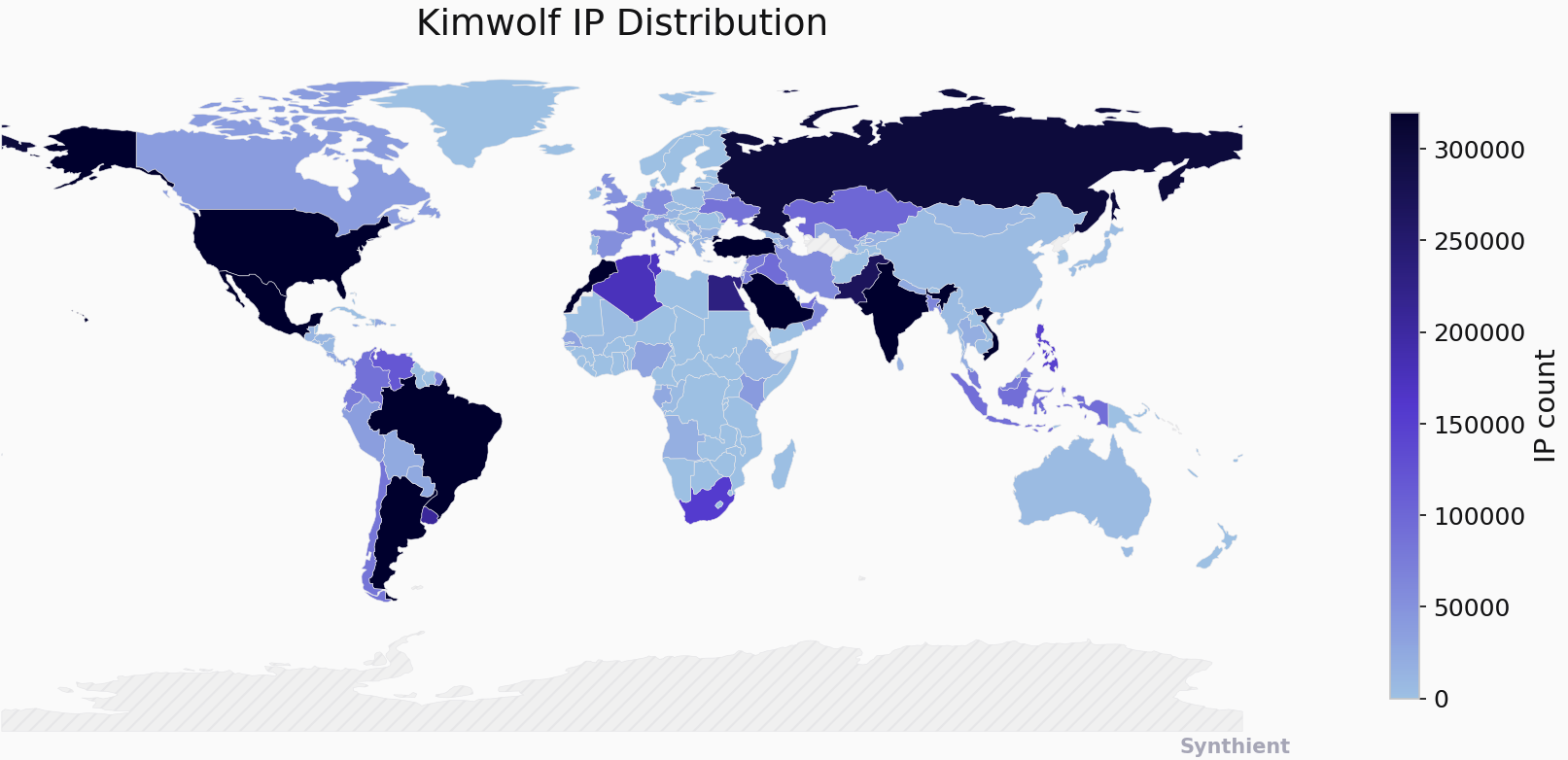
The security company Synthient currently sees more than 2 million infected Kimwolf devices distributed globally but with concentrations in Vietnam, Brazil, India, Saudi Arabia, Russia and the United States. Synthient found that two-thirds of the Kimwolf infections are Android TV boxes with no security or authentication built in.
The past few months have witnessed the explosive growth of a new botnet dubbed Kimwolf, which experts say has infected more than 2 million devices globally. The Kimwolf malware forces compromised systems to relay malicious and abusive Internet traffic β such as ad fraud, account takeover attempts and mass content scraping β and participate in crippling distributed denial-of-service (DDoS) attacks capable of knocking nearly any website offline for days at a time.
More important than Kimwolfβs staggering size, however, is the diabolical method it uses to spread so quickly: By effectively tunneling back through various βresidential proxyβ networks and into the local networks of the proxy endpoints, and by further infecting devices that are hidden behind the assumed protection of the userβs firewall and Internet router.
Residential proxy networks are sold as a way for customers to anonymize and localize their Web traffic to a specific region, and the biggest of these services allow customers to route their traffic through devices in virtually any country or city around the globe.
The malware that turns an end-userβs Internet connection into a proxy node is often bundled with dodgy mobile apps and games. These residential proxy programs also are commonly installed via unofficial Android TV boxesΒ sold by third-party merchants on popular e-commerce sites like Amazon, BestBuy, Newegg, and Walmart.
These TV boxes range in price from $40 to $400, are marketed under a dizzying range of no-name brands and model numbers, and frequently are advertised as a way to stream certain types of subscription video content for free. But thereβs a hidden cost to this transaction: As weβll explore in a moment, these TV boxes make up a considerable chunk of the estimated two million systems currently infected with Kimwolf.
Some of the unsanctioned Android TV boxes that come with residential proxy malware pre-installed. Image: Synthient.
Kimwolf also is quite good at infecting a range of Internet-connected digital photo frames that likewise are abundant at major e-commerce websites. In November 2025, researchers from Quokka published a report (PDF) detailing serious security issues in Android-based digital picture frames running the Uhale app β including Amazonβs bestselling digital frame as of March 2025.
There are two major security problems with these photo frames and unofficial Android TV boxes. The first is that a considerable percentage of them come with malware pre-installed, or else require the user to download an unofficial Android App Store and malware in order to use the device for its stated purpose (video content piracy). The most typical of these uninvited guests are small programs that turn the device into a residential proxy node that is resold to others.
The second big security nightmare with these photo frames and unsanctioned Android TV boxes is that they rely on a handful of Internet-connected microcomputer boards that have no discernible security or authentication requirements built-in. In other words, if you are on the same network as one or more of these devices, you can likely compromise them simultaneously by issuing a single command across the network.
The combination of these two security realities came to the fore in October 2025, when an undergraduate computer science student at the Rochester Institute of Technology began closely tracking Kimwolfβs growth, and interacting directly with its apparent creators on a daily basis.
Benjamin Brundage is the 22-year-old founder of the security firm Synthient, a startup that helps companies detect proxy networks and learn how those networks are being abused. Conducting much of his research into Kimwolf while studying for final exams, Brundage told KrebsOnSecurity in late October 2025 he suspected Kimwolf was a new Android-based variant of Aisuru, a botnet that was incorrectly blamed for a number of record-smashing DDoS attacks last fall.
Brundage says Kimwolf grew rapidly by abusing a glaring vulnerability in many of the worldβs largest residential proxy services. The crux of the weakness, he explained, was that these proxy services werenβt doing enough to prevent their customers from forwarding requests to internal servers of the individual proxy endpoints.
Most proxy services take basic steps to prevent their paying customers from βgoing upstreamβ into the local network of proxy endpoints, by explicitly denying requests for local addresses specified in RFC-1918, including the well-known Network Address Translation (NAT) ranges 10.0.0.0/8, 192.168.0.0/16, and 172.16.0.0/12. These ranges allow multiple devices in a private network to access the Internet using a single public IP address, and if you run any kind of home or office network, your internal address space operates within one or more of these NAT ranges.
However, Brundage discovered that the people operating Kimwolf had figured out how to talk directly to devices on the internal networks of millions of residential proxy endpoints, simply by changing their Domain Name System (DNS) settings to match those in the RFC-1918 address ranges.
βIt is possible to circumvent existing domain restrictions by using DNS records that point to 192.168.0.1 or 0.0.0.0,β Brundage wrote in a first-of-its-kind security advisory sent to nearly a dozen residential proxy providers in mid-December 2025. βThis grants an attacker the ability to send carefully crafted requests to the current device or a device on the local network. This is actively being exploited, with attackers leveraging this functionality to drop malware.β
As with the digital photo frames mentioned above, many of these residential proxy services run solely on mobile devices that are running some game, VPN or other app with a hidden component that turns the userβs mobile phone into a residential proxy β often without any meaningful consent.
In a report published today, Synthient said key actors involved in Kimwolf were observed monetizing the botnet through app installs, selling residential proxy bandwidth, and selling its DDoS functionality.
βSynthient expects to observe a growing interest among threat actors in gaining unrestricted access to proxy networks to infect devices, obtain network access, or access sensitive information,β the report observed. βKimwolf highlights the risks posed by unsecured proxy networks and their viability as an attack vector.β
After purchasing a number of unofficial Android TV box models that were most heavily represented in the Kimwolf botnet, Brundage further discovered the proxy service vulnerability was only part of the reason for Kimwolfβs rapid rise: He also found virtually all of the devices he tested were shipped from the factory with a powerful feature called Android Debug Bridge (ADB) mode enabled by default.
Many of the unofficial Android TV boxes infected by Kimwolf include the ominous disclaimer: βMade in China. Overseas use only.β Image: Synthient.
ADB is a diagnostic tool intended for use solely during the manufacturing and testing processes, because it allows the devices to be remotely configured and even updated with new (and potentially malicious) firmware. However, shipping these devices with ADB turned on creates a security nightmare because in this state they constantly listen for and accept unauthenticated connection requests.
For example, opening a command prompt and typing βadb connectβ along with a vulnerable deviceβs (local) IP address followed immediately by β:5555β will very quickly offer unrestricted βsuper userβ administrative access.
Brundage said by early December, heβd identified a one-to-one overlap between new Kimwolf infections and proxy IP addresses offered for rent by China-based IPIDEA, currently the worldβs largest residential proxy network by all accounts.
βKimwolf has almost doubled in size this past week, just by exploiting IPIDEAβs proxy pool,β Brundage told KrebsOnSecurity in early December as he was preparing to notify IPIDEA and 10 other proxy providers about his research.
Brundage said Synthient first confirmed on December 1, 2025 that the Kimwolf botnet operators were tunneling back through IPIDEAβs proxy network and into the local networks of systems running IPIDEAβs proxy software. The attackers dropped the malware payload by directing infected systems to visit a specific Internet address and to call out the pass phrase βkrebsfiveheadindustriesβ in order to unlock the malicious download.
On December 30, Synthient said it was tracking roughly 2 million IPIDEA addresses exploited by Kimwolf in the previous week. Brundage said he has witnessed Kimwolf rebuilding itself after one recent takedown effort targeting its control servers β from almost nothing to two million infected systems just by tunneling through proxy endpoints on IPIDEA for a couple of days.
Brundage said IPIDEA has a seemingly inexhaustible supply of new proxies, advertisingΒ access to more than 100 million residential proxy endpoints around the globe in the past week alone. Analyzing the exposed devices that were part of IPIDEAβs proxy pool, Synthient said it found more than two-thirds were Android devices that could be compromised with no authentication needed.
After charting a tight overlap in Kimwolf-infected IP addresses and those sold by IPIDEA, Brundage was eager to make his findings public: The vulnerability had clearly been exploited for several months, although it appeared that only a handful of cybercrime actors were aware of the capability. But he also knew that going public without giving vulnerable proxy providers an opportunity to understand and patch it would only lead to more mass abuse of these services by additional cybercriminal groups.
On December 17, Brundage sent a security notification to all 11 of the apparently affected proxy providers, hoping to give each at least a few weeks to acknowledge and address the core problems identified in his report before he went public. Many proxy providers who received the notification were resellers of IPIDEA that white-labeled the companyβs service.
KrebsOnSecurity first sought comment from IPIDEA in October 2025, in reporting on a story about how the proxy network appeared to have benefitted from the rise of the Aisuru botnet, whose administrators appeared to shift from using the botnet primarily for DDoS attacks to simply installing IPIDEAβs proxy program, among others.
On December 25, KrebsOnSecurity received an email from an IPIDEA employee identified only as βOliver,β who said allegations that IPIDEA had benefitted from Aisuruβs rise were baseless.
βAfter comprehensively verifying IP traceability records and supplier cooperation agreements, we found no association between any of our IP resources and the Aisuru botnet, nor have we received any notifications from authoritative institutions regarding our IPs being involved in malicious activities,β Oliver wrote. βIn addition, for external cooperation, we implement a three-level review mechanism for suppliers, covering qualification verification, resource legality authentication and continuous dynamic monitoring, to ensure no compliance risks throughout the entire cooperation process.β
βIPIDEA firmly opposes all forms of unfair competition and malicious smearing in the industry, always participates in market competition with compliant operation and honest cooperation, and also calls on the entire industry to jointly abandon irregular and unethical behaviors and build a clean and fair market ecosystem,β Oliver continued.
Meanwhile, the same day that Oliverβs email arrived, Brundage shared a response heβd just received from IPIDEAβs security officer, who identified himself only by the first name Byron. The security officer said IPIDEA had made a number of important security changes to its residential proxy service to address the vulnerability identified in Brundageβs report.
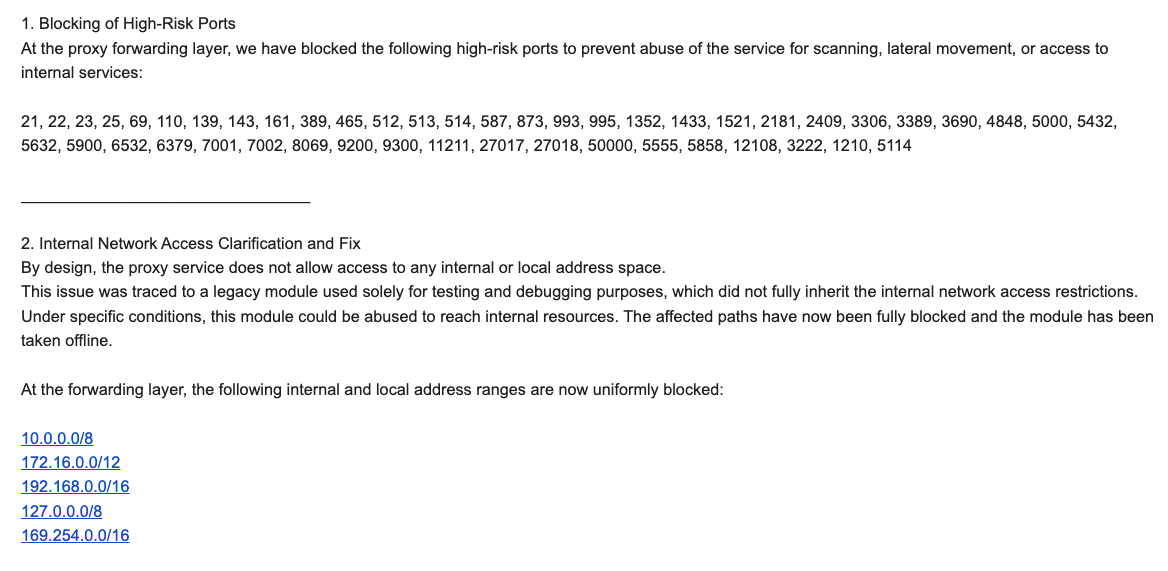
βBy design, the proxy service does not allow access to any internal or local address space,β Byron explained. βThis issue was traced to a legacy module used solely for testing and debugging purposes, which did not fully inherit the internal network access restrictions. Under specific conditions, this module could be abused to reach internal resources. The affected paths have now been fully blocked and the module has been taken offline.β
Byron told Brundage IPIDEA also instituted multiple mitigations for blocking DNS resolution to internal (NAT) IP ranges, and that it was now blocking proxy endpoints from forwarding traffic on βhigh-riskβ ports βto prevent abuse of the service for scanning, lateral movement, or access to internal services.β
An excerpt from an email sent by IPIDEAβs security officer in response to Brundageβs vulnerability notification. Click to enlarge.
Brundage said IPIDEA appears to have successfully patched the vulnerabilities he identified. He also noted he never observed the Kimwolf actors targeting proxy services other than IPIDEA, which has not responded to requests for comment.
Riley Kilmer is founder of Spur.us, a technology firm that helps companies identify and filter out proxy traffic. Kilmer said Spur has tested Brundageβs findings and confirmed that IPIDEA and all of its affiliate resellers indeed allowed full and unfiltered access to the local LAN.
Kilmer said one model of unsanctioned Android TV boxes that is especially popular β the Superbox, which we profiled in Novemberβs Is Your Android TV Streaming Box Part of a Botnet? β leaves Android Debug Mode running on localhost:5555.
βAnd since Superbox turns the IP into an IPIDEA proxy, a bad actor just has to use the proxy to localhost on that port and install whatever bad SDKs [software development kits] they want,β Kilmer told KrebsOnSecurity.
Superbox media streaming boxes for sale on Walmart.com.
Both Brundage and Kilmer say IPIDEA appears to be the second or third reincarnation of a residential proxy network formerly known as 911S5 Proxy, a service that operated between 2014 and 2022 and was wildly popular on cybercrime forums. 911S5 Proxy imploded a week after KrebsOnSecurity published a deep dive on the serviceβs sketchy origins and leadership in China.
In that 2022 profile, we cited work by researchers at the University of Sherbrooke in Canada who were studying the threat 911S5 could pose to internal corporate networks. The researchers noted that βthe infection of a node enables the 911S5 user to access shared resources on the network such as local intranet portals or other services.β
βIt also enables the end user to probe the LAN network of the infected node,β the researchers explained. βUsing the internal router, it would be possible to poison the DNS cache of the LAN router of the infected node, enabling further attacks.β
911S5 initially responded to our reporting in 2022 by claiming it was conducting a top-down security review of the service. But the proxy service abruptly closed up shop just one week later, saying a malicious hacker had destroyed all of the companyβs customer and payment records. In July 2024, The U.S. Department of the Treasury sanctioned the alleged creators of 911S5, and the U.S. Department of Justice arrested the Chinese national named in my 2022 profile of the proxy service.
Kilmer said IPIDEA also operates a sister service called 922 Proxy, which the company has pitched from Day One as a seamless alternative to 911S5 Proxy.
βYou cannot tell me they donβt want the 911 customers by calling it that,β Kilmer said.
Among the recipients of Synthientβs notification was the proxy giant Oxylabs. Brundage shared an email he received from Oxylabsβ security team on December 31, which acknowledged Oxylabs had started rolling out security modifications to address the vulnerabilities described in Synthientβs report.
Reached for comment, Oxylabs confirmed they βhave implemented changes that now eliminate the ability to bypass the blocklist and forward requests to private network addresses using a controlled domain.β But it said there is no evidence that Kimwolf or other other attackers exploited its network.
βIn parallel, we reviewed the domains identified in the reported exploitation activity and did not observe traffic associated with them,β the Oxylabs statement continued. βBased on this review, there is no indication that our residential network was impacted by these activities.β
Consider the following scenario, in which the mere act of allowing someone to use your Wi-Fi network could lead to a Kimwolf botnet infection. In this example, a friend or family member comes to stay with you for a few days, and you grant them access to your Wi-Fi without knowing that their mobile phone is infected with an app that turns the device into a residential proxy node. At that point, your homeβs public IP address will show up for rent at the website of some residential proxy provider.
Miscreants like those behind Kimwolf then use residential proxy services online to access that proxy node on your IP, tunnel back through it and into your local area network (LAN), and automatically scan the internal network for devices with Android Debug Bridge mode turned on.
By the time your guest has packed up their things, said their goodbyes and disconnected from your Wi-Fi, you now have two devices on your local network β a digital photo frame and an unsanctioned Android TV box β that are infected with Kimwolf. You may have never intended for these devices to be exposed to the larger Internet, and yet there you are.
Hereβs another possible nightmare scenario: Attackers use their access to proxy networks to modify your Internet routerβs settings so that it relies on malicious DNS servers controlled by the attackers β allowing them to control where your Web browser goes when it requests a website. Think thatβs far-fetched? Recall the DNSChanger malware from 2012 that infected more than a half-million routers with search-hijacking malware, and ultimately spawned an entire security industry working group focused on containing and eradicating it.
Much of what is published so far on Kimwolf has come from the Chinese security firm XLab, which was the first to chronicle the rise of the Aisuru botnet in late 2024. In its latest blog post, XLab said it began tracking Kimwolf on October 24, when the botnetβs control servers were swamping Cloudflareβs DNS servers with lookups for the distinctive domain 14emeliaterracewestroxburyma02132[.]su.
This domain and others connected to early Kimwolf variants spent several weeks topping Cloudflareβs chart of the Internetβs most sought-after domains, edging out Google.com and Apple.com of their rightful spots in the top 5 most-requested domains. Thatβs because during that time Kimwolf was asking its millions of bots to check in frequently using Cloudflareβs DNS servers.
The Chinese security firm XLab found the Kimwolf botnet had enslaved between 1.8 and 2 million devices, with heavy concentrations in Brazil, India, The United States of America and Argentina. Image: blog.xLab.qianxin.com
It is clear from reading the XLab report that KrebsOnSecurity (and security experts) probably erred in misattributing some of Kimwolfβs early activities to the Aisuru botnet, which appears to be operated by a different group entirely. IPDEA may have been truthful when it said it had no affiliation with the Aisuru botnet, but Brundageβs data left no doubt that its proxy service clearly was being massively abused by Aisuruβs Android variant, Kimwolf.
XLab said Kimwolf has infected at least 1.8 million devices, and has shown it is able to rebuild itself quickly from scratch.
βAnalysis indicates that Kimwolfβs primary infection targets are TV boxes deployed in residential network environments,β XLab researchers wrote. βSince residential networks usually adopt dynamic IP allocation mechanisms, the public IPs of devices change over time, so the true scale of infected devices cannot be accurately measured solely by the quantity of IPs. In other words, the cumulative observation of 2.7 million IP addresses does not equate to 2.7 million infected devices.β
XLab said measuring Kimwolfβs size also is difficult because infected devices are distributed across multiple global time zones. βAffected by time zone differences and usage habits (e.g., turning off devices at night, not using TV boxes during holidays, etc.), these devices are not online simultaneously, further increasing the difficulty of comprehensive observation through a single time window,β the blog post observed.
XLab noted that the Kimwolf author shows an almost βobsessiveβ fixationβ on Yours Truly, apparently leaving βeaster eggsβ related to my name in multiple places through the botnetβs code and communications:
Image: XLAB.
One frustrating aspect of threats like Kimwolf is that in most cases it is not easy for the average user to determine if there are any devices on their internal network which may be vulnerable to threats like Kimwolf and/or already infected with residential proxy malware.
Letβs assume that through years of security training or some dark magic you can successfully identify that residential proxy activity on your internal network was linked to a specific mobile device inside your house: From there, youβd still need to isolate and remove the app or unwanted component that is turning the device into a residential proxy.
Also, the tooling and knowledge needed to achieve this kind of visibility just isnβt there from an average consumer standpoint. The work that it takes to configure your network so you can see and interpret logs of all traffic coming in and out is largely beyond the skillset of most Internet users (and, Iβd wager, many security experts). But itβs a topic worth exploring in an upcoming story.
Happily, Synthient has erected a page on its website that will state whether a visitorβs public Internet address was seen among those of Kimwolf-infected systems. Brundage also has compiled a list of the unofficial Android TV boxes that are most highly represented in the Kimwolf botnet.
If you own a TV box that matches one of these model names and/or numbers, please just rip it out of your network. If you encounter one of these devices on the network of a family member or friend, send them a link to this story and explain that itβs not worth the potential hassle and harm created by keeping them plugged in.
The top 15 product devices represented in the Kimwolf botnet, according to Synthient.
Chad Seaman is a principal security researcher with Akamai Technologies. Seaman said he wants more consumers to be wary of these pseudo Android TV boxes to the point where they avoid them altogether.
βI want the consumer to be paranoid of these crappy devices and of these residential proxy schemes,β he said. βWe need to highlight why theyβre dangerous to everyone and to the individual. The whole security model where people think their LAN (Local Internal Network) is safe, that there arenβt any bad guys on the LAN so it canβt be that dangerous is just really outdated now.β
βThe idea that an app can enable this type of abuse on my network and other networks, that should really give you pause,β about which devices to allow onto your local network, Seaman said. βAnd itβs not just Android devices here. Some of these proxy services have SDKs for Mac and Windows, and the iPhone. It could be running something that inadvertently cracks open your network and lets countless random people inside.β
In July 2025, Google filed a βJohn DoeβΒ lawsuit (PDF) against 25 unidentified defendants collectively dubbed the βBadBox 2.0 Enterprise,β which Google described as a botnet of over ten million unsanctioned Android streaming devices engaged in advertising fraud. Google said the BADBOX 2.0 botnet, in addition to compromising multiple types of devices prior to purchase, also can infect devices by requiring the download of malicious apps from unofficial marketplaces.
Googleβs lawsuit came on the heels of aΒ June 2025 advisoryΒ from theΒ Federal Bureau of Investigation (FBI), which warned that cyber criminals were gaining unauthorized access to home networks by either configuring the products with malware prior to the userβs purchase, or infecting the device as it downloads required applications that contain backdoors β usually during the set-up process.
The FBI said BADBOX 2.0 was discovered after the original BADBOX campaign was disrupted in 2024. The original BADBOX was identified in 2023, and primarily consisted of Android operating system devices that were compromised with backdoor malware prior to purchase.
Lindsay Kaye is vice president of threat intelligence at HUMAN Security, a company that worked closely on the BADBOX investigations. Kaye said the BADBOX botnets and the residential proxy networks that rode on top of compromised devices were detected because they enabled a ridiculous amount of advertising fraud, as well as ticket scalping, retail fraud, account takeovers and content scraping.
Kaye said consumers should stick to known brands when it comes to purchasing things that require a wired or wireless connection.
βIf people are asking what they can do to avoid being victimized by proxies, itβs safest to stick with name brands,β Kaye said. βAnything promising something for free or low-cost, or giving you something for nothing just isnβt worth it. And be careful about what apps you allow on your phone.β
Many wireless routers these days make it relatively easy to deploy a βGuestβ wireless network on-the-fly. Doing so allows your guests to browse the Internet just fine but it blocks their device from being able to talk to other devices on the local network β such as shared folders, printers and drives. If someone β a friend, family member, or contractor β requests access to your network, give them the guest Wi-Fi network credentials if you have that option.
There is a small but vocal pro-piracy camp that is almost condescendingly dismissive of the security threats posed by these unsanctioned Android TV boxes. These tech purists positively chafe at the idea of people wholesale discarding one of these TV boxes. A common refrain from this camp is that Internet-connected devices are not inherently bad or good, and that even factory-infected boxes can be flashed with new firmware or custom ROMs that contain no known dodgy software.
However, itβs important to point out that the majority of people buying these devices are not security or hardware experts; the devices are sought out because they dangle something of value for βfree.β Most buyers have no idea of the bargain theyβre making when plugging one of these dodgy TV boxes into their network.
It is somewhat remarkable that we havenβt yet seen the entertainment industry applying more visible pressure on the major e-commerce vendors to stop peddling this insecure and actively malicious hardware that is largely made and marketed for video piracy. These TV boxes are a public nuisance for bundling malicious software while having no apparent security or authentication built-in, and these two qualities make them an attractive nuisance for cybercriminals.
Stay tuned for Part II in this series, which will poke through clues left behind by the people who appear to have built Kimwolf and benefited from it the most.

Vulnerability reports and responsible disclosures are essential for website security awareness and education. Automated attacks targeting known software vulnerabilities are one of the leading causes of website compromises.
To help educate website owners about potential threats to their environments, weβve compiled a list of important security updates and vulnerability patches for the WordPress ecosystem this past month.
The vulnerabilities listed below are virtually patched by the Sucuri Firewall and existing clients are protected.
Continue reading Vulnerability & Patch Roundup β December 2025 at Sucuri Blog.
It's no secret that digital surveillance and other tech-enabled oppressions are acute dangers for liberation movement workers. The rising tides of tech-fueled authoritarianism and hyper-surveillance are universal themes across the various threat models we consider. EFF's Surveillance Self-Defense project is a vital antidote to these threats, but it's not all we do to help others address these concerns. Our team often receives questions, requests for security trainings, presentations on our research, and asks for general OPSEC (operations security, or, the process of applying digital privacy and information security strategies to a current workflow or process) advising. This year stood out for the sheer number and urgency of requests we fielded.Β
Combining efforts across our Public Interest Technology and Activism teams, we consulted with an estimated 66 groups and organizations, with at least 2000 participants attending those sessions. These engagements typically look like OPSEC advising and training, usually merging aspects of threat modeling, cybersecurity 101, secure communications practices, doxxing self-defense, and more. The groups we work with are often focused on issue-spaces that are particularly embattled at the current moment, such as abortion access, advocacy for transgender rights, and climate justice.Β
Our ability to offer realistic and community-focused OPSEC advice for these liberation movement workers is something we take great pride in. These groups are often under-resourced and unable to afford typical infosec consulting. Even if they could, traditional information security firms are designed to protect corporate infrastructure, not grassroots activism. Offering this assistance also allows us to stress-test the advice given in the aforementioned Surveillance Self-Defense project with real-world experience and update it when necessary. What we learn from these sessions also informs our blog posts, such as this piece on strategies for overcoming tech-enabled violence for transgender people, and this one surveying the landscape of digital threats in the abortion access movement post-Roe.Β
There is still much to be done. Maintaining effective privacy and security within one's work is an ongoing process. We are grateful to be included in the OPSEC process planning for so many other human-rights defenders and activists, and we look forward to continuing this work in the coming years.Β
This article is part of our Year in Review series. Read other articles about the fight for digital rights in 2025.

![]()
A SIEM is a complex system offering broad and flexible threat detection capabilities. Due to its complexity, its effectiveness heavily depends on how it is configured and what data sources are connected to it. A one-time SIEM setup during implementation is not enough: both the organizationβs infrastructure and attackersβ techniques evolve over time. To operate effectively, the SIEM system must reflect the current state of affairs.
We provide customers with services to assess SIEM effectiveness, helping to identify issues and offering options for system optimization. In this article, we examine typical SIEM operational pitfalls and how to address them. For each case, we also include methods for independent verification.
This material is based on an assessment of Kaspersky SIEM effectiveness; therefore, all specific examples, commands, and field names are taken from that solution. However, the assessment methodology, issues we identified, and ways to enhance system effectiveness can easily be extrapolated to any other SIEM.
The primary audience for the effectiveness assessment report comprises the SIEM support and operation teams within an organization. The main goal is to analyze how well the usage of SIEM aligns with its objectives. Consequently, the scope of checks can vary depending on the stated goals. A standard assessment is conducted across the following areas:
At the same time, these areas are examined not only in isolation but also in terms of their potential influence on one another. Here are a couple of examples illustrating this interdependence:
deviceCustomString1Β notΒ containsΒ <string> triggers a large number of alerts. The detection logic itself is correct: the specific event and the specific field it targets should not generate a large volume of data matching the condition. Our review revealed the issue was in the data ingested by the SIEM, where incorrect encoding caused the string targeted by the rule to be transformed into a different one. Consequently, all events matched the condition and generated alerts.The effectiveness assessment consists of several stages:
The assessment produces a list of recommendations. Some of these can be implemented almost immediately, while others require more comprehensive changes driven by process optimization or a transition to a more structured approach to system use.
The problems we identify during a SIEM effectiveness assessment can be divided into three groups:
When building the inventory of event sources for a SIEM, we follow the principle of layered monitoring: the system should have information about all detectable stages of an attack. This principle enables the detection of attacks even if individual malicious actions have gone unnoticed, and allows for retrospective reconstruction of the full attack chain, starting from the attackersβ point of entry.
Problem: During effectiveness assessments, we frequently find that the inventory of connected source types is not updated when the infrastructure changes. In some cases, it has not been updated since the initial SIEM deployment, which limits incident detection capabilities. Consequently, certain types of sources remain completely invisible to the system.
We have also encountered non-standard cases of incomplete source inventory. For example, an infrastructure contains hosts running both Windows and Linux, but monitoring is configured for only one family of operating systems.
How to detect: To identify the problems described above, determine the list of source types connected to the SIEM and compare it against what actually exists in the infrastructure. Identifying the presence of specific systems in the infrastructure requires an audit. However, this task is one of the most critical for many areas of cybersecurity, and we recommend running it on a periodic basis.
We have compiled a reference sheet of system types commonly found in most organizations. Depending on the organization type, infrastructure, and threat model, we may rearrange priorities. However, a good starting point is as follows:
Regardless of how good the detection logic is, it cannot function without telemetry from the data sources.
Problem: The SIEM core is not receiving events from specific sources or collectors. Based on all assessments conducted, the average proportion of collectors that are configured with sources but are not transmitting events is 38%. Correlation rules may exist for these sources, but they will, of course, never trigger. It is also important to remember that a single collector can serve hundreds of sources (such as workstations), so the loss of data flow from even one collector can mean losing monitoring visibility for a significant portion of the infrastructure.
How to detect: The process of locating sources that are not transmitting data can be broken down into two components.
Offline, Stopped, Disabled, and so on.SELECT count(ID), CollectorID, CollectorName FROM `events` GROUP BY CollectorID, CollectorName ORDER BY count(ID)It is essential to specify an optimal time range for collecting these statistics. Too large a range can increase the load on the SIEM, while too small a range may provide inaccurate information for a one-time check β especially for sources that transmit telemetry relatively infrequently, say, once a week. Therefore, it is advisable to choose a smaller time window, such as 2β4 days, but run several queries for different periods in the past.
Additionally, for a more comprehensive approach, it is recommended to use built-in functionality or custom logic implemented via correlation rules and lists to monitor event flow. This will help automate the process of detecting problems with sources.
Problem: The system is not receiving events from all sources of a particular type that exist in the infrastructure. For example, the company uses workstations and servers running Windows. During SIEM deployment, workstations are immediately connected for monitoring, while the server segment is postponed for one reason or another. As a result, the SIEM receives events from Windows systems, the flow is normalized, and correlation rules work, but an incident in the unmonitored server segment would go unnoticed.
How to detect: Below are query variations that can be used to search for unconnected sources.
SELECT count(distinct, DeviceAddress), DeviceVendor, DeviceProduct FROM events GROUP BY DeviceVendor, DeviceProduct ORDER BY count(ID)SELECT count(distinct, DeviceHostName), DeviceVendor, DeviceProduct FROM events GROUP BY DeviceVendor, DeviceProduct ORDER BY count(ID)We have split the query into two variations because, depending on the source and the DNS integration settings, some events may contain either a DeviceAddress or DeviceHostName field.
These queries will help determine the number of unique data sources sending logs of a specific type. This count must be compared against the actual number of sources of that type, obtained from the system owners.
Raw data can be useful for developing custom normalizers or for storing events not used in correlation that might be needed during incident investigation. However, careless use of this setting can cause significantly more harm than good.
Problem: Enabling the Keep raw event option effectively doubles the event size in the database, as it stores two copies: the original and the normalized version. This is particularly critical for high-volume collectors receiving events from sources like NetFlow, DNS, firewalls, and others. It is worth noting that this option is typically used for testing a normalizer but is often forgotten and left enabled after its configuration is complete.
How to detect: This option is applied at the normalizer level. Therefore, it is necessary to review all active normalizers and determine whether retaining raw data is required for their operation.
As with the absence of events from sources, normalization issues lead to detection logic failing, as this logic relies on finding specific information in a specific event field.
Problem: Several issues related to normalization can be identified:
syslog_headers, placing the entire event body into a single field, this field most often being Message.How to detect: Identifying normalization issues is more challenging than spotting source problems due to the high volume of telemetry and variety of parsers. Here are several approaches to narrowing the search:
Linux audit and iptables syslog v2 for Kaspersky SIEM. The new normalizer completely reworks and optimizes the normalization schema for events from this source.SELECT count(ID), DeviceProduct, DeviceVendor, CollectorName FROM `events` GROUP BY DeviceProduct, DeviceVendor, CollectorName ORDER BY count(ID)This query gathers statistics on events from each collector, broken down by the DeviceVendor and DeviceProduct fields. While these fields are not mandatory, they are present in almost any normalization schema. Therefore, their complete absence or empty values may indicate normalization issues. We recommend including these fields when developing custom normalizers.
To simplify the identification of normalization problems when developing custom normalizers, you can implement the following mechanism. For each successfully normalized event, add a Name field, populated from a constant or the event itself. For a final catch-all normalizer that processes all unparsed events, set the constant value: Name = unparsed event. This will later allow you to identify non-normalized events through a simple search on this field.
Collected events alone are, in most cases, only useful for investigating an incident that has already been identified. For a SIEM to operate to its full potential, it requires detection logic to be developed to uncover probable security incidents.
Problem: The mean correlation rule coverage of sources, determined across all our assessments, is 43%. While this figure is only a ballpark figure β as different source types provide different information β to calculate it, we defined βcoverageβ as the presence of at least one correlation rule for a source. This means that for more than half of the connected sources, the SIEM is not actively detecting. Meanwhile, effort and SIEM resources are spent on connecting, maintaining, and configuring these sources. In some cases, this is formally justified, for instance, if logs are only needed for regulatory compliance. However, this is an exception rather than the rule.
We do not recommend solving this problem by simply not connecting sources to the SIEM. On the contrary, sources should be connected, but this should be done concurrently with the development of corresponding detection logic. Otherwise, it can be forgotten or postponed indefinitely, while the source pointlessly consumes system resources.
How to detect: This brings us back to auditing, a process that can be greatly aided by creating and maintaining a register of developed detection logic. Given that not every detection logic rule explicitly states the source type from which it expects telemetry, its description should be added to this register during the development phase.
If descriptions of the correlation rules are not available, you can refer to the following:
DeviceVendor, DeviceProduct (another argument for including these fields in the normalizer), Name, DeviceAction, DeviceEventCategory, DeviceEventClassID, and others. These can help identify the actual source.One criterion for correlation rules effectiveness is a low false positive rate.
Problem: Detection logic generates an abnormally high number of alerts that are physically impossible to process, regardless of the size of the SOC team.
How to detect: First and foremost, detection logic should be tested during development and refined to achieve an acceptable false positive rate. However, even a well-tuned correlation rule can start producing excessive alerts due to changes in the event flow or connected infrastructure. To identify these rules, we recommend periodically running the following query:
SELECT count(ID), Name FROM `events` WHERE Type = 3 GROUP BY Name ORDER BY count(ID)
In Kaspersky SIEM, a value of 3 in the Type field indicates a correlation event.
Subsequently, for each identified rule with an anomalous alert count, verify the correctness of the logic it uses and the integrity of the event stream on which it triggered.
Depending on the issue you identify, the solution may involve modifying the detection logic, adding exceptions (for example, it is often the case that 99% of the spam originates from just 1β5 specific objects, such as an IP address, a command parameter, or a URL), or adjusting event collection and normalization.
SIEM integrations with other systems are generally a critical part of both event processing and alert enrichment. In at least one specific case, their presence directly impacts detection performance: integration with technical Threat Intelligence data or IoCs (indicators of compromise).
A SIEM allows conveniently checking objects against various reputation databases or blocklists. Furthermore, there are numerous sources of this data that are ready to integrate natively with a SIEM or require minimal effort to incorporate.
Problem: There is no integration with TI data.
How to detect: Generally, IoCs are integrated into a SIEM at the system configuration level during deployment or subsequent optimization. The use of TI within a SIEM can be implemented at various levels:
Furthermore, TI data does not appear in a SIEM out of thin air. It is either provided by external suppliers (commercially or in an open format) or is part of the built-in functionality of the security tools in use. For instance, various NGFW systems can additionally check the reputation of external IP addresses or domains that users are accessing. Therefore, the first step is to determine whether you are receiving information about indicators of compromise and in what form (whether external providersβ feeds have been integrated and/or the deployed security tools have this capability). It is worth noting that receiving TI data only at the security tool level does not always cover all types of IoCs.
If data is being received in some form, the next step is to verify that the SIEM is utilizing it. For TI-related events coming from security tools, the SIEM needs a correlation rule developed to generate alerts. Thus, checking integration in this case involves determining the capabilities of the security tools, searching for the corresponding events in the SIEM, and identifying whether there is detection logic associated with these events. If events from the security tools are absent, the source audit configuration should be assessed to see if the telemetry type in question is being forwarded to the SIEM at all. If normalization is the issue, you should assess parsing accuracy and reconfigure the normalizer.
If TI data comes from external providers, determine how it is processed within the organization. Is there a centralized system for aggregating and managing threat data (such as CyberTrace), or is the information stored in, say, CSV files?
In the former case (there is a threat data aggregation and management system) you must check if it is integrated with the SIEM. For Kaspersky SIEM and CyberTrace, this integration is handled through the SIEM interface. Following this, SIEM event flows are directed to the threat data aggregation and management system, where matches are identified and alerts are generated, and then both are sent back to the SIEM. Therefore, checking the integration involves ensuring that all collectors receiving events that may contain IoCs are forwarding those events to the threat data aggregation and management system. We also recommend checking if the SIEM has a correlation rule that generates an alert based on matching detected objects with IoCs.
In the latter case (threat information is stored in files), you must confirm that the SIEM has a collector and normalizer configured to load this data into the system as events. Also, verify that logic is configured for storing this data within the SIEM for use in correlation. This is typically done with the help of lists that contain the obtained IoCs. Finally, check if a correlation rule exists that compares the event flow against these IoC lists.
As the examples illustrate, integration with TI in standard scenarios ultimately boils down to developing a final correlation rule that triggers an alert upon detecting a match with known IoCs. Given the variety of integration methods, creating and providing a universal out-of-the-box rule is difficult. Therefore, in most cases, to ensure IoCs are connected to the SIEM, you need to determine if the company has developed that rule (the existence of the rule) and if it has been correctly configured. If no correlation rule exists in the system, we recommend creating one based on the TI integration methods implemented in your infrastructure. If a rule does exist, its functionality must be verified: if there are no alerts from it, analyze its trigger conditions against the event data visible in the SIEM and adjust it accordingly.
For a SIEM to run effectively, it must contain current data about the infrastructure it monitors and the threats itβs meant to detect. Both elements change over time: new systems and software, users, security policies, and processes are introduced into the infrastructure, while attackers develop new techniques and tools. It is safe to assume that a perfectly configured and deployed SIEM system will no longer be able to fully see the altered infrastructure or the new threats after five years of running without additional configuration. Therefore, practically all components β event collection, detection, additional integrations for contextual information, and exclusions β must be maintained and kept up to date.
Furthermore, it is important to acknowledge that it is impossible to cover 100% of all threats. Continuous research into attacks, development of detection methods, and configuration of corresponding rules are a necessity. The SOC itself also evolves. As it reaches certain maturity levels, new growth opportunities open up for the team, requiring the utilization of new capabilities.
Problem: The SIEM has not evolved since its initial deployment.
How to detect: Compare the original statement of work or other deployment documentation against the current state of the system. If there have been no changes, or only minimal ones, it is highly likely that your SIEM has areas for growth and optimization. Any infrastructure is dynamic and requires continuous adaptation.
In this article, we have outlined the primary problems we identify during SIEM effectiveness assessments, but this list is not exhaustive. We also frequently encounter:
[dev] test_Add user to admin group_final2.Generally, most issues with SIEM effectiveness stem from the natural degradation (accumulation of errors) of the processes implemented within the system. Therefore, in most cases, maintaining effectiveness involves structuring these processes, monitoring the quality of SIEM engagement at all stages (source onboarding, correlation rule development, normalization, and so on), and conducting regular reviews of all system components and resources.
A SIEM is a powerful tool for monitoring and detecting threats, capable of identifying attacks at various stages across nearly any point in an organizationβs infrastructure. However, if improperly configured and operated, it can become ineffective or even useless while still consuming significant resources. Therefore, it is crucial to periodically audit the SIEMβs components, settings, detection rules, and data sources.
If a SOC is overloaded or otherwise unable to independently identify operational issues with its SIEM, we offer Kaspersky SIEM platform users a service to assess its operation. Following the assessment, we provide a list of recommendations to address the issues we identify. That being said, it is important to clarify that these are not strict, prescriptive instructions, but rather highlight areas that warrant attention and analysis to improve the productβs performance, enhance threat detection accuracy, and enable more efficient SIEM utilization.


![]()
If youβre a penetration tester, you know that lateral movement is becoming increasingly difficult, especially in well-defended environments. One common technique for remote command execution has been the use of DCOM objects.
Over the years, many different DCOM objects have been discovered. Some rely on native Windows components, others depend on third-party software such as Microsoft Office, and some are undocumented objects found through reverse engineering. While certain objects still work, others no longer function in newer versions of Windows.
This research presents a previously undescribed DCOM object that can be used for both command execution and potential persistence. This new technique abuses older initial access and persistence methods through Control Panel items.
First, we will discuss COM technology. After that, we will review the current state of the Impacket dcomexec script, focusing on objects that still function, and discuss potential fixes and improvements, then move on to techniques for enumerating objects on the system. Next, we will examine Control Panel items, how adversaries have used them for initial access and persistence, and how these items can be leveraged through a DCOM object to achieve command execution.
Finally, we will cover detection strategies to identify and respond to this type of activity.
COM stands for Component Object Model, a Microsoft technology that defines a binary standard for interoperability. It enables the creation of reusable software components that can interact at runtime without the need to compile COM libraries directly into an application.
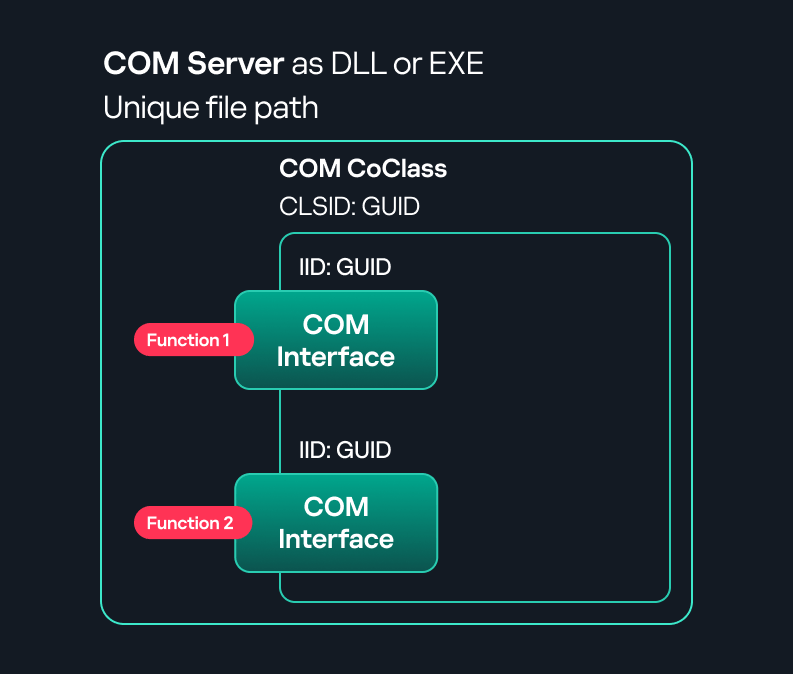
These software components operate in a clientβserver model. A COM object exposes its functionality through one or more interfaces. An interface is essentially a collection of related member functions (methods).
COM also enables communication between processes running on the same machine by using local RPC (Remote Procedure Call) to handle cross-process communication.
To ensure a better understanding of its structure and functionality, letβs revise COM-related terminology.
All COM classes must be registered in the registry under HKEY_CLASSES_ROOT\CLSID, where each classβs GUID is stored. Under each GUID, you may find multiple subkeys that serve different purposes, such as:
DCOM is an extension of COM where the D stands for Distributed. It enables the client and server to reside on different machines. From the userβs perspective, there is no difference: DCOM provides an abstraction layer that makes both the client and the server appear as if they are on the same machine.
Under the hood, however, COM uses TCP as the RPC transport layer to enable communication across machines.
Certain requirements must be met to extend a COM object into a DCOM object. The most important one for our research is the presence of the AppID subkey in the registry, located under the COM CLSID entry.
The AppID value contains a GUID that maps to a corresponding key under HKEY_CLASSES_ROOT\AppID. Several subkeys may exist under this GUID. Two critical ones are:
These registry settings grant remote clients permissions to activate and interact with DCOM objects.
After attackers compromise a host, their next objective is often to compromise additional machines. This is what we call lateral movement. One common lateral movement technique is to achieve remote command execution on a target machine. There are many ways to do this, one of which involves abusing DCOM objects.
In recent years, many DCOM objects have been discovered. This research focuses on the objects exposed by the Impacket script dcomexec.py that can be used for command execution. More specifically, three exposed objects are used: ShellWindows, ShellBrowserWindow and MMC20.
In Impacketβs dcomexec.py, once an instance of this COM object is created on a remote machine, the script provides a semi-interactive shell.
Each time a user enters a command, the function exposed by the COM object is called. The command output is redirected to a file, which the script retrieves via SMB and displays back to simulate a regular shell.
Internally, the script runs this command when connecting:
cmd.exe /Q /c cd \ 1> \\127.0.0.1\ADMIN$\__17602 2>&1
This sets the working directory to C:\ and redirects the output to the ADMIN$ share under the filename __17602. After that, the script checks whether the file exists; if it does, execution is considered successful and the output appears as if in a shell.
When running dcomexec.py against Windows 10 and 11 using the ShellWindows object, the script hangs after confirming SMB connection initialization and printing the SMB banner. As I mentioned in my personal blog post, it appears that this DCOM object no longer has permission to write to the ADMIN$ share. A simple fix is to redirect the output to a directory the DCOM object can write to, such as the Temp folder. The Temp folder can then be accessed under the same ADMIN$ share. A small change in the code resolves the issue. For example:
OUTPUT_FILENAME = 'Temp\\__' + str(time.time())[:5]
This object has historically worked across all Windows versions. Starting with Windows Server 2025, however, attempting to use it triggers a Defender alert, and execution is blocked.
As shown in earlier examples, the dcomexec.py script writes the command output to a file under ADMIN$, with a filename that begins with __:
OUTPUT_FILENAME = '__' + str(time.time())[:5]
Defender appears to check for files written under ADMIN$ that start with __, and when it detects one, it blocks the process and alerts the user. A quick fix is to simply remove the double underscores from the output filename.
Another way to bypass this issue is to use the same workaround used for ShellWindows β redirecting the output to the Temp folder. The table below outlines the status of these objects across different Windows versions.
| Windows Server 2025 | Windows Server 2022 | Windows 11 | Windows 10 | |
| ShellWindows | Doesnβt work | Doesnβt work | Works but needs a fix | Works but needs a fix |
| ShellBrowserWindow | Doesnβt work | Doesnβt work | Doesnβt work | Works but needs a fix |
| MMC20 | Detected by Defender | Works | Works | Works |
The first step to identifying which DCOM objects could be used for lateral movement is to enumerate them. By enumerating, I donβt just mean listing the objects. Enumeration involves:
Automating enumeration is difficult because most COM objects lack a type library (TypeLib). A TypeLib acts as documentation for an object: which interfaces it supports, which functions are exposed, and the definitions of those functions. Even when TypeLibs are available, manual inspection is often still required, as we will explain later.
There are several approaches to enumerating COM objects depending on their use cases. Next, weβll describe the methods I used while conducting this research, taking into account both automated and manual methods.
Under the hood, PowerShell checks whether the COM object has a TypeLib and implements the IDispatch interface. IDispatch enables late binding, which allows runtime dynamic object creation and function invocation. With these two conditions met, PowerShell can dynamically interact with COM objects at runtime.
Our strategy looks like this:
As you can see in the last box, we perform manual inspection to look for functions with names that could be of interest, such as Execute, Exec, Shell, etc. These names often indicate potential command execution capabilities.
However, this approach has several limitations:
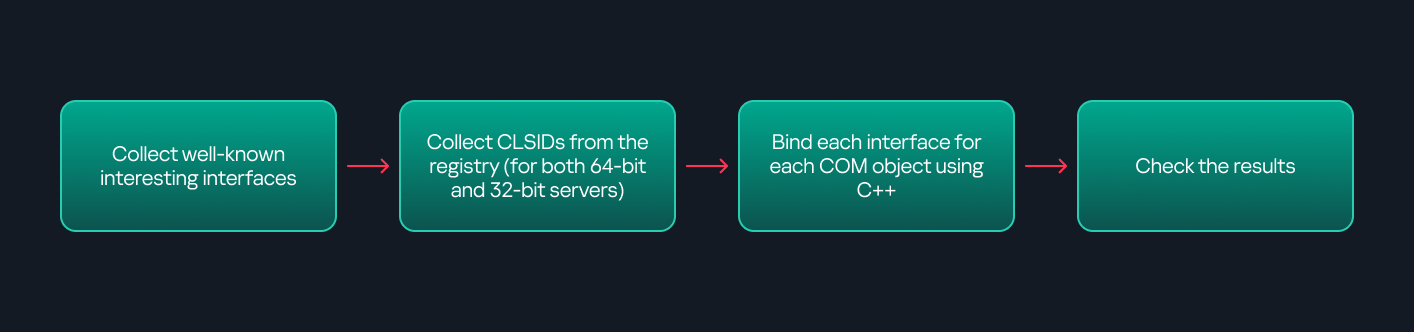
This strategy primarily relies on an interface called IUnknown. All COM interfaces should inherit from this interface, and all COM classes should implement it.The IUnknown interface exposes three main functions. The most important is QueryInterface(), which is used to ask a COM object for a pointer to one of its interfaces.So, the strategy is to:
This method has several advantages:
The figure below illustrates this strategy:
This approach is good in terms of automation because it eliminates the need for manual inspection. However, we are still only checking well-known interfaces commonly used for lateral movement, while potentially missing others.
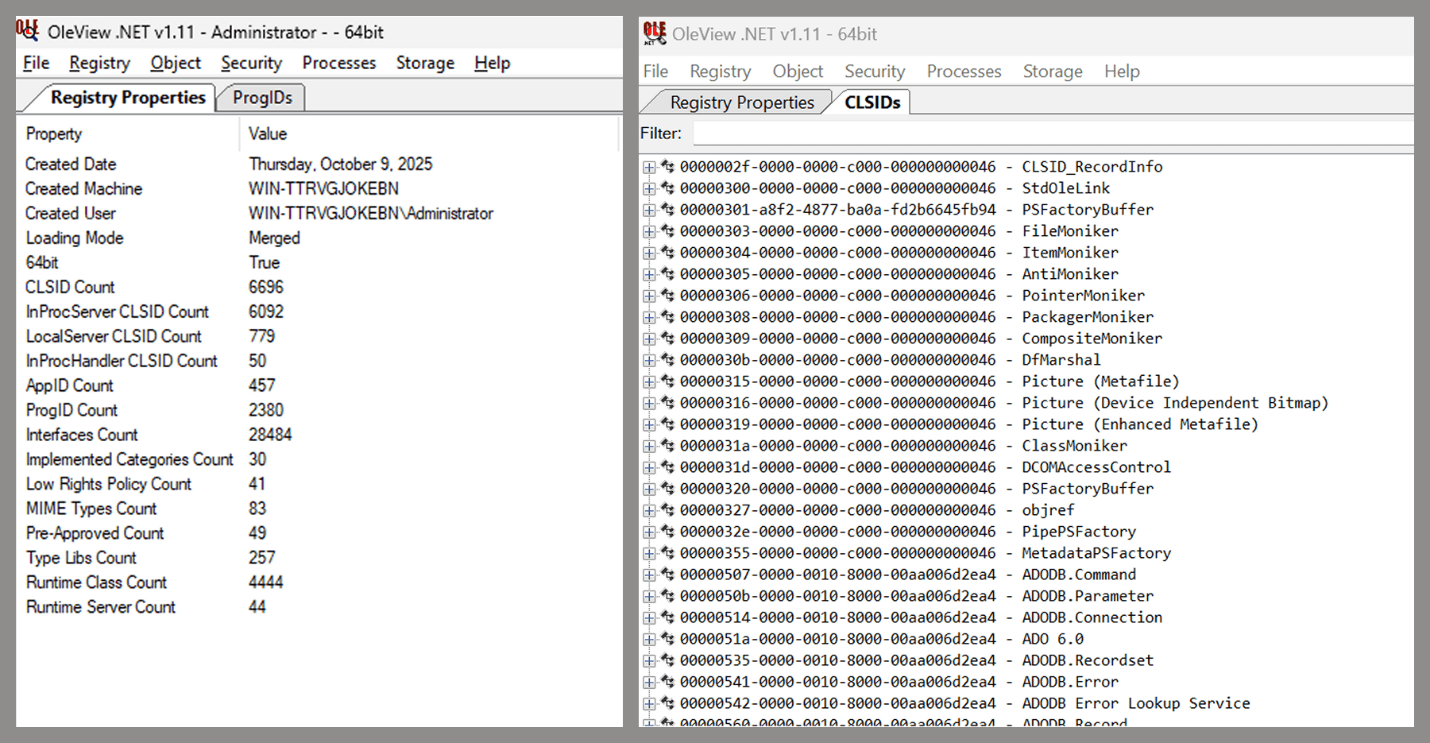
One of the most valuable features of this tool is its naming visibility. OleViewDotNet extracts the names of interfaces and classes (when available) from the Windows Registry and displays them, along with any associated type libraries.
This makes manual inspection easier, since you can analyze the names of classes, interfaces, or type libraries and correlate them with potentially interesting functionality, for example, functions that could lead to command execution or persistence techniques.
Control Panel items allow users to view and adjust their computer settings. These items are implemented as DLLs that export the CPlApplet function and typically have the .cpl extension. Control Panel items can also be executables, but our research will focus on DLLs only.
Attackers can abuse CPL files for initial access. When a user executes a malicious .cpl file (e.g., delivered via phishing), the system may be compromised β a technique mapped to MITRE ATT&CK T1218.002.
Adversaries may also modify the extensions of malicious DLLs to .cpl and register them in the corresponding locations in the registry.
These locations are important when Control Panel DLLs need to be available to the current logged-in user or to all users on the machine. However, the βControl Panelβ subkey and its βCplsβ subkey under HKCU should be created manually, unlike the βControl Panelβ and βCplsβ subkeys under HKLM, which are created automatically by the operating system.
Once registered, the DLL (CPL file) will load every time the Control Panel is opened, enabling persistence on the victimβs system.
Itβs worth noting that even DLLs that do not comply with the CPL specification, do not export CPlApplet, or do not have the .cpl extension can still be executed via their DllEntryPoint function if they are registered under the registry keys listed above.
There are multiple ways to execute Control Panel items:
control.exe [filename].cplBoth methods use rundll32.exe under the hood:
rundll32.exe shell32.dll,Control_RunDLL [filename].cpl
This calls the Control_RunDLL function from shell32.dll, passing the CPL file as an argument. Everything inside the CPlApplet function will then be executed.
However, if the CPL file has been registered in the registry as shown earlier, then every time the Control Panel is opened, the file is loaded into memory through the COM Surrogate process (dllhost.exe):
What happened was that a Control Panel with a COM client used a COM object to load these CPL files. We will talk about this COM object in more detail later.
The COM Surrogate process was designed to host COM server DLLs in a separate process rather than loading them directly into the client processβs address space. This isolation improves stability for the in-process server model. This hosting behavior can be configured for a COM object in the registry if you want a COM server DLL to run inside a separate process because, by default, it is loaded in the same process.
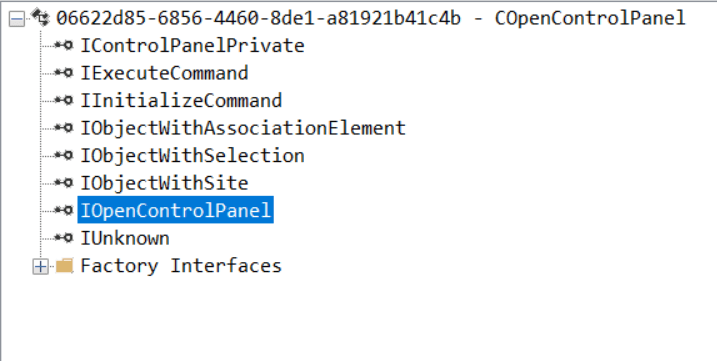
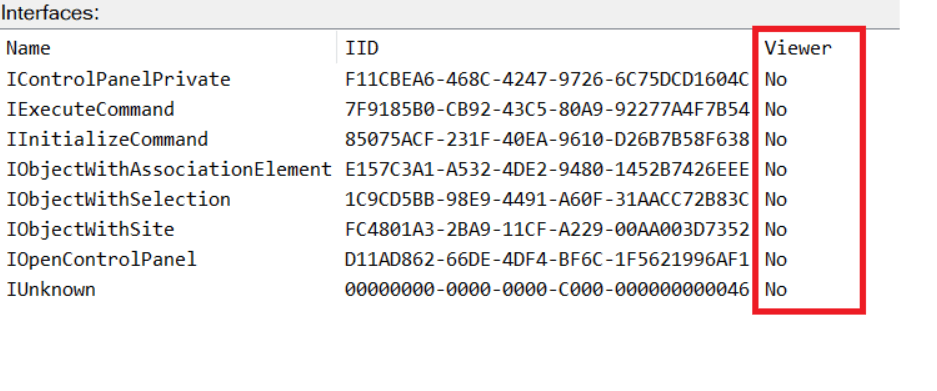
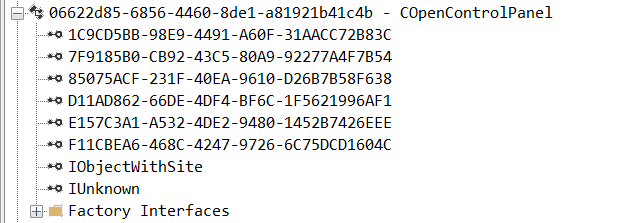
While following the manual approach of enumerating COM/DCOM objects that could be useful for lateral movement, I came across a COM object called COpenControlPanel, which is exposed through shell32.dll and has the CLSID {06622D85-6856-4460-8DE1-A81921B41C4B}. This object exposes multiple interfaces, one of which is IOpenControlPanel with IID {D11AD862-66DE-4DF4-BF6C-1F5621996AF1}.
I immediately thought of its potential to compromise Control Panel items, so I wanted to check which functions were exposed by this interface. Unfortunately, neither the interface nor the COM class has a type library.
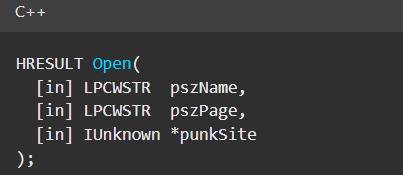
Normally, checking the interface definition would require reverse engineering, so at first, it looked like we needed to take a different research path. However, it turned out that the IOpenControlPanel interface is documented on MSDN, and according to the documentation, it exposes several functions. One of them, called Open, allows a specified Control Panel item to be opened using its name as the first argument.
Full type and function definitions are provided in the shobjidl_core.h Windows header file.
Itβs worth noting that in newer versions of Windows (e.g., Windows Server 2025 and Windows 11), Microsoft has removed interface names from the registry, which means they can no longer be identified through OleViewDotNet.
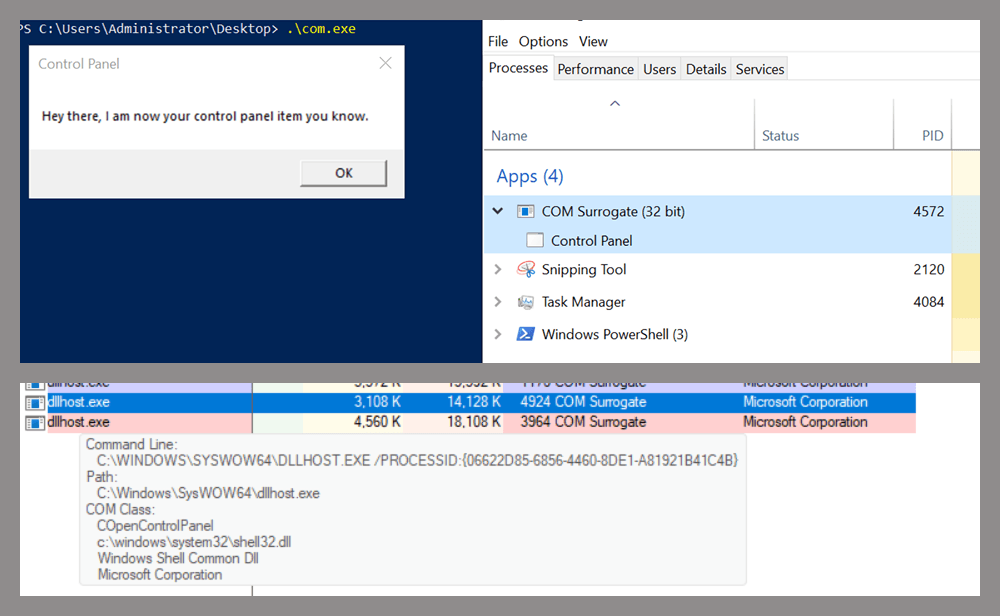
Returning to the COpenControlPanel COM object, I found that the Open function can trigger a DLL to be loaded into memory if it has been registered in the registry. For the purposes of this research, I created a DLL that basically just spawns a message box which is defined under the DllEntryPoint function. I registered it under HKCU\Software\Microsoft\Windows\CurrentVersion\Control Panel\Cpls and then created a simple C++ COM client to call the Open function on this interface.
As expected, the DLL was loaded into memory. It was hosted in the same way that it would be if the Control Panel itself was opened: through the COM Surrogate process (dllhost.exe). Using Process Explorer, it was clear that dllhost.exe loaded my DLL while simultaneously hosting the COpenControlPanel object along with other COM objects.
Based on my testing, I made the following observations:
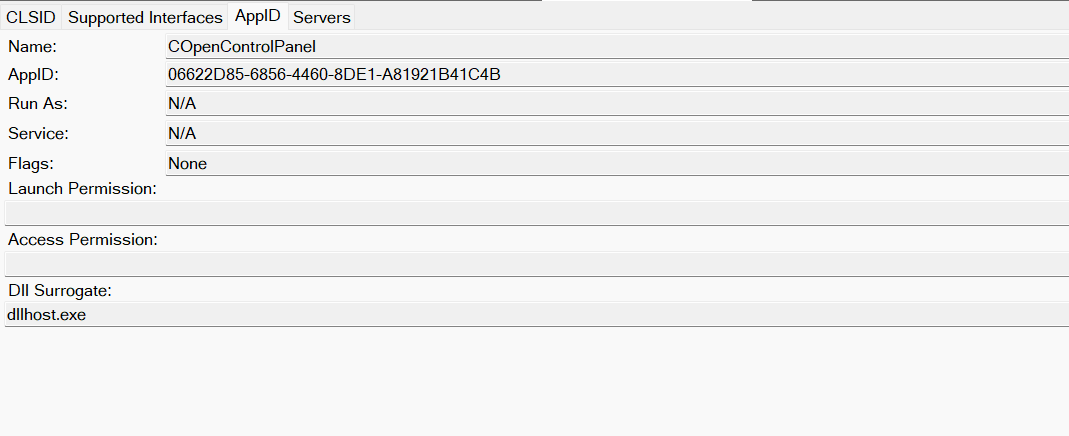
Now, what if we could trigger this COM object remotely? In other words, what if it is not just a COM object but also a DCOM object? To verify this, we checked the AppID of the COpenControlPanel object using OleViewDotNet.
Both the launch and access permissions are empty, which means the object will follow the systemβs default DCOM security policy. By default, members of the Administrators group are allowed to launch and access the DCOM object.
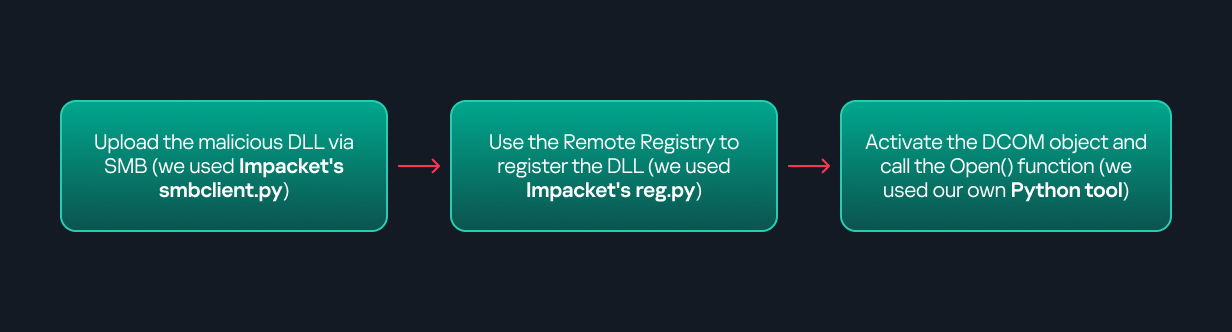
Based on this, we can build a remote strategy. First, upload the βmaliciousβ DLL, then use the Remote Registry service to register it in the appropriate registry location. Finally, use a trigger acting as a DCOM client to remotely invoke the Open() function, causing our DLL to be loaded. The diagram below illustrates the flow of this approach.
The trigger can be written in either C++ or Python, for example, using Impacket. I chose Python because of its flexibility. The trigger itself is straightforward: we define the DCOM class, the interface, and the function to call. The full code example can be found here.
Once the trigger runs, the behavior will be the same as when executing the COM client locally: our DLL will be loaded through the COM Surrogate process (dllhost.exe).
As you can see, this technique not only achieves command execution but also provides persistence. It can be triggered in two ways: when a user opens the Control Panel or remotely at any time via DCOM.
The first step in detecting such activity is to check whether any Control Panel items have been registered under the following registry paths:
Although commonly known best practices and research papers regarding Windows security advise monitoring only the first subkey, for thorough coverage it is important to monitor all of the above.
In addition, monitoring dllhost.exe (COM Surrogate) for unusual COM objects such as COpenControlPanel can provide indicators of malicious activity.
Finally, it is always recommended to monitor Remote Registry usage because it is commonly abused in many types of attacks, not just in this scenario.
In conclusion, I hope this research has clarified yet another attack vector and emphasized the importance of implementing hardening practices. Below are a few closing points for security researchers to take into account:


Ever had a perfectly βsafeβ page or file turn into an attack vector out of nowhere? That can happen when browsers start guessing what your content is instead of listening to your server. Browsers sometimes try to figure out what kind of file theyβre dealing with if the server doesnβt provide the Content-Type header or provides the wrong one, a process known as βcontent sniffing.β While this can be helpful, content sniffing is a security risk if an attacker can mess with the content.
Discover 6 key benefits of a fully certified cybersecurity team, from faster onboarding to confident hiring. Learn how unified training drives performance.
The post 6 Benefits of a Fully Certified Cybersecurity Team appeared first on OffSec.
Discover why blue team defenders benefit from red team skills. Learn how offensive knowledge improves detection, incident response, and career growth.
The post Blue Team vs Red Team: Should Defenders Learn Offensive Skills? appeared first on OffSec.
If you run a website, manage a business inbox, or even just use online banking, youβve already lived in the phishing era for a long time. The only thing thatβs changed is the polish.
Phishing scams have moved past those obviously fake βplease verifyβ requests to include convincing login pages, realistic invoices, and even bogus delivery updates. Some are mass-sent and easy to spot, others are customized precisely for the person theyβre targeting, their job, company, tech, and everyday apps.
Continue reading How to Protect Your WordPress Site From a Phishing Attack at Sucuri Blog.
During a recent investigation, we discovered a sophisticated WordPress backdoor hidden in what appears to be a JavaScript data file. This malware automatically logs attackers into administrator accounts without requiring any credentials.
In September, we published an article showcasing another WordPress backdoor that creates admin accounts. This new variant takes a different approach by hijacking existing administrator sessions instead of creating new accounts, making it harder to detect through user audits.
What turned up during our review
The file was disguised as a JavaScript asset in a PHP file located in the WordPress admin wp-admin/js directory, but it was really all PHP.
Continue reading WordPress Auto-Login Backdoor Disguised as JavaScript Data File at Sucuri Blog.
Vulnerability reports and responsible disclosures are essential for website security awareness and education. Automated attacks targeting known software vulnerabilities are one of the leading causes of website compromises.
To help educate website owners about potential threats to their environments, weβve compiled a list of important security updates and vulnerability patches for the WordPress ecosystem this past month.
The vulnerabilities listed below are virtually patched by the Sucuri Firewall and existing clients are protected.
Continue reading Vulnerability & Patch Roundup β November 2025 at Sucuri Blog.
Keeping websites and applications secure starts with knowing which vulnerabilities exist, how severe they are, and whether they affect your stack. Thatβs exactly where the CVE program shines. Below, weβll cover some CVE fundamentals, including what they are, how to search and understand the data, and how to translate this information into actionable steps.
Introduction to the CVE database
So, what is CVE?
CVE stands for Common Vulnerabilities and Exposures, a community-driven program that assigns unique identifiers to publicly known vulnerabilities.
Continue reading A Beginnerβs Guide to the CVE Database at Sucuri Blog.