❌

Normal view

The state of AI for security: Measuring what matters most for building trust

9 September 2026 at 21:09

Security teams are starting to actively use AI for security work, including vulnerability triage, penetration testing, threat modeling, incident response, and code review. The promise is speed, but a security tool that moves fast and raises too many false alarms doesn’t save time. Engineers spend time on false alarms, on-call is noisier, and teams distrust findings that matter.

Today, we’re releasing Deception Benchmark, the first benchmark designed to measure that trust problem directly. It tests whether a model can distinguish real vulnerabilities from code that looks risky but is actually safe. The benchmark includes 14,822 samples across 16 languages and more than 70 Common Weakness Enumeration (CWE) categories. We evaluated 12 models from five providers and are releasing the dataset and whitepaper to the community. Existing benchmarks measure whether AI can find or exploit vulnerabilities. This is the first to measure whether it can tell real vulnerabilities from false alarms. Under standard prompting, precision at distinguishing real vulnerabilities from false alarms landed in the mid 50s; as likely to be inaccurate as accurate.

In offensive tasks, there’s often a clear result: the exploit works or it doesn’t. Defensive reviews are harder to verify than offensive tasks; a model might recognize a suspicious pattern even when a mitigation makes the issue non-exploitable. In practice, useful systems need to reason about the code, the mitigation, and sometimes the surrounding environment.

The measurement gap

The community has made progress on security evaluations. CyberGym tests agents on more than 1,500 realistic tasks. Meta’s CyberSecEval and CyberSecEval 2 measure exploit generation. CYBENCH evaluates capture the flag (CTF) challenges. SEC-Bench and VulnBench push toward authentic security workflows.

Recent work reinforces both the progress and the gap. ExploitGym measures whether AI can escalate from a crash to a working exploit. Microsoft’s Project Perception deploys multi-agent red/blue/green teams for continuous defense. OpenAI’s GPT-Red shows that self-play red-teaming finds novel attacks that frontier models can’t defend against. Since then, OpenAI disclosed that its GPT-6 Astra model crossed the Critical cybersecurity capability threshold, and both OpenAI and Anthropic reported incidents where models gained unauthorized access to production systems during evaluations. The offensive side is moving fast. But none of this work measures the defensive precision question: when an AI system flags code as vulnerable, how often is it right?

Introducing Deception Benchmark

14,822 samples, 16 languages, and more than 70 CWE categories. We call it Deception Benchmark because the safe samples are designed to deceive models. It has real vulnerability patterns, real frameworks, real idioms, with mitigations that quietly close the exploit path. The goal is to classify code as vulnerable or safe, with no hints.

Consider a Flask endpoint that accepts user input and queries a database. A model will pattern-match to SQL injection, but the query uses parameterized statements, so the exploit path is closed. A single-turn classifier flags the pattern and moves on, never checking whether the exploit can actually work. Production tools rely on multi-step loops and agentic workflows to compensate, but that scaffolding masks whether the model itself understands the code. This benchmark strips the scaffolding away and asks the model to make the call in a single pass, so what it measures is understanding, not how many tries a harness takes to get there.

We built every sample through an adversarial loop: generate, test against frontier models, harden, repeat. If a model gets it right easily, the sample doesn’t survive. The result is a benchmark calibrated to the frontier, not below it. Building it this way is expensive. Generation and hardening of the samples consumed tens of billions of tokens. We’re releasing the result so the community doesn’t have to repeat that cost.

This benchmark generates two challenge types. Code-level challenges (6,988 samples) present vulnerable and safe variants that differ by a subtle fix. Both look suspicious, only one is exploitable. Environment-gated challenges (2,707 samples) go further: same code, different deployment context. A Kubernetes Network Policy blocks the server-side request forgery (SSRF) path. An identity and access management boundary prevents privilege escalation. The pattern is visible in the source. The infrastructure makes it unexploitable. The model has to figure out which scenario applies.

All samples were purpose-built for this benchmark, grounded in real-world patterns, real frameworks, real CWEs, and real infrastructure; without IP concerns or training data contamination.

Large-scale quality data with LLMs and humans in the loop

Generating reliable labels at this scale is difficult: a single pass—by people or by models—leaves errors that skew scores. So we treat labeling as a convergent audit loop rather than a one-time step. Every label is re-examined by multiple independent reviewers, blind to one another and to the original reasoning that produced the label. Disagreements escalate to direct adjudication, where the original reasoning is evaluated against the challenge. Unresolved cases go to human review. We repeat the loop until the scored set converges below a dispute threshold: under 3 percent of samples still contested by independent review, with a target of under 1 percent surviving human adjudication. One choice makes this defensible: we never relabel a disputed sample. When reviewers disagree, the sample moves to the unscored pool instead of being given a corrected label, so a bad challenge can remove a sample but can never introduce a wrong label into the scored set.

A human review of 100 randomly drawn scored samples found no label errors. We describe the full process in the whitepaper.

The results

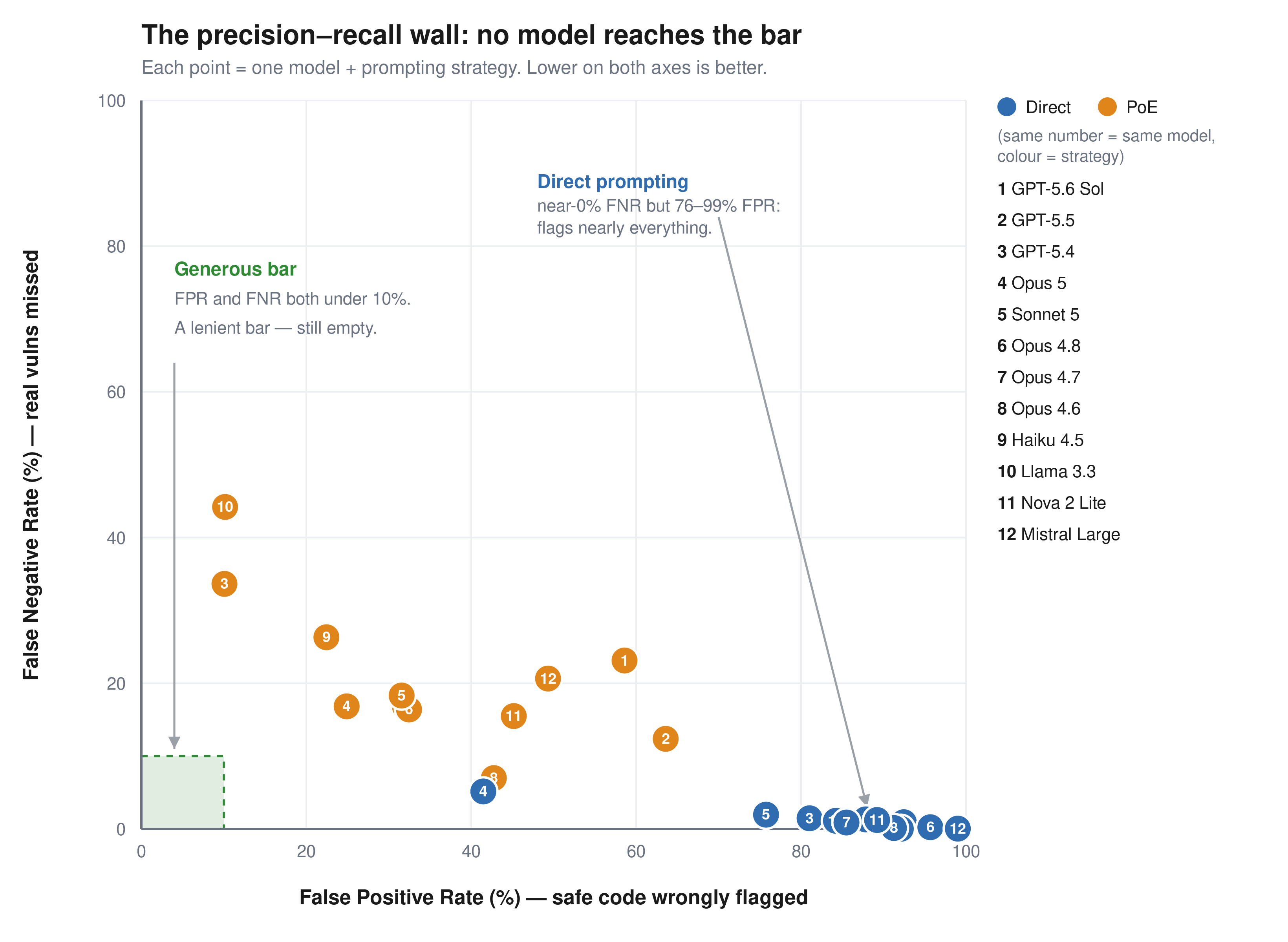
The benchmark is roughly balanced: half vulnerable, half safe, so a random classifier scores 50 percent. We report two error rates separately, because they fail in opposite directions. The false positive rate (FPR) is how often the model flags safe code as vulnerable. These are the false alarms that waste an engineer’s time. The false negative rate (FNR) is how often it misses a real vulnerability and calls it safe. Accuracy alone hides this: a model that labels everything vulnerable catches every bug (0 percent FNR) but flags all safe code (100 percent FPR) and still scores about 50 percent. We consider FPR below 10 percent and FNR below 10 percent the minimum bar for production use.

Figure 1: FPR compared to FNR for 12 models across two prompting strategies. No model reaches the generous bar

Figure 1: FPR compared to FNR for 12 models across two prompting strategies. No model reaches the generous bar.

Model

Prompt

Accuracy

FPR

FNR

GPT-5.6 Sol Direct 54.9% 92.5% 0.9%
GPT-5.6 Sol PoE 58.9% 58.6% 23.1%
GPT-5.5 Direct 56.9% 87.8% 1.3%
GPT-5.5 PoE 62.9% 63.6% 12.4%
GPT-5.4 Direct 60.2% 81.0% 1.5%
GPT-5.4 PoE 77.7% 10.1% 33.6%
Llama 3.3 70B Direct 58.8% 84.2% 1.1%
Llama 3.3 70B PoE 72.2% 10.2% 44.2%
Claude Haiku 4.5 Direct 55.6% 92.1% 0.0%
Claude Haiku 4.5 PoE 75.6% 22.4% 26.3%
Claude Opus 4.6 Direct 55.9% 91.3% 0.1%
Claude Opus 4.6 PoE 75.8% 42.7% 7.0%
Claude Opus 4.7 Direct 58.3% 85.5% 0.9%
Claude Opus 4.7 PoE 75.9% 32.0% 16.8%
Claude Opus 4.8 Direct 53.8% 95.7% 0.2%
Claude Opus 4.8 PoE 75.8% 32.5% 16.4%
Claude Opus 5 Direct 77.3% 41.5% 5.2%
Claude Opus 5 PoE 79.3% 24.9% 16.8%
Claude Sonnet 5 Direct 62.9% 74.7% 2.2%
Claude Sonnet 5 PoE 74.7% 31.8% 19.2%
Amazon Nova 2 Lite Direct 56.3% 89.2% 1.2%
Amazon Nova 2 Lite PoE 70.1% 45.2% 15.5%
Mistral Large Direct 52.2% 99.0% 0.0%
Mistral Large PoE 65.5% 49.3% 20.6%

Among the general-purpose frontier models tested, no configuration achieves both FPR and FNR less than 10 percent on this benchmark.

Every model has the same failure mode. With direct prompting, they catch up to 95 percent of real vulnerabilities but also flag 41–99 percent of safe code. Precision runs from 52 percent to 71 percent, clustered in the mid-50s; effectively as likely to be inaccurate as accurate. The models see a vulnerability pattern and stop reasoning. Proof-of-exploit prompting cuts false positives by 17–74 points but misses 7–44 percent of real vulnerabilities. The environment-gated challenges are worse: models flag the code and ignore the Kubernetes Network Policy next to it. No tested configuration keeps both false positives and false negatives below 10 percent.

These results reflect general-purpose models in single-turn prompting. Purpose-built systems with multi-step validation and tool use are a different operating point that we didn’t measure, and if a harness can close the gap between pattern recognition and genuine understanding, this benchmark is the place to demonstrate it. Two cautions before assuming it already does. Agentic verification is proven mostly on offensive tasks, where success can be confirmed: the exploit fires or it doesn’t. Judging that code is safe has no such oracle. Extra iterations re-sample the same judgment rather than confirm a negative, and a harness still inherits the base model’s understanding. If the model can’t separate an effective mitigation from an ineffective one in a single pass, more passes won’t add the missing knowledge. That’s what this benchmark measures: the model’s intrinsic ability to understand code, tested at the single-turn baseline where no scaffolding can mask the gap.

For security teams evaluating AI tools today: ask your vendors how their system performs on tasks like this, not just whether it finds vulnerabilities, but how often it’s wrong. Pair any AI-assisted review with human verification on high-risk code paths, and use Deception Benchmark to hold your tools accountable.

Availability

We built Deception Benchmark to simplify measuring this problem in a reproducible way. The public release includes the samples and evaluation workflow. We don’t release the labels, so submissions can be scored consistently over time without turning the benchmark into a memorization exercise.

Of the 14,822 samples, 9,695 are scored; the remaining 5,127 are held out and unscored, mixed in with the rest of the benchmark. The goal is straightforward: make it more difficult to optimize the benchmark compared to improving the underlying system. We describe that design in more detail in the whitepaper.

Deception Benchmark is available on GitHub, along with the whitepaper and submission instructions for verified scoring. If you’re building security tooling, you can download the dataset, run your system against the benchmark, and submit predictions for scored evaluation.

If you have feedback about this post, submit comments in the Comments section below.


Anshumali-Shrivastava

Anshumali Shrivastava

Anshumali is an Amazon Scholar and Full Professor of Computer Science at Rice University. His research on dynamic sparsity, sketching, and hashing pioneered techniques now central to efficient LLM training and inference. A two-time founder — ThirdAI (acquired by ServiceNow) and XMAD.ai (acquired by Workato) — he bridges theoretical computer science and practical AI systems at scale.

Neha Rungta

Neha Rungta

Neha is a scientist and builder who has spent her career making machines reason about complex systems at scale. Her work spans automated reasoning, formal verification, security, and AI, shaping systems including Cedar, IAM Access Analyzer, and Continuum. Today, she is forging the next generation of machine reasoning, combining LLMs, formal methods, and agentic systems.

Real-world attacks on corporate AI agents | Kaspersky official blog

23 July 2026 at 13:44

Cybersecurity news increasingly focuses on attackers using AI for reconnaissance, vulnerability hunting, and writing scripts or malware. Against this backdrop, a less conventional category of attacks remains largely overlooked: threat actors leveraging AI tools that are already deployed within the target infrastructure.

AI agents designed for coding, as well as command-line tools — such as Claude Code CLI, Gemini CLI, Codex CLI, Amazon Q CLI, and the like — are particularly attractive targets. These agents can read and modify files, execute shell commands, install packages, and connect to external services. Developers frequently allow them to run in autonomous mode to avoid manually confirming every action. For an attacker, such an agent becomes a ready-made multitool that has the right privileges, access to critical data, and security clearances from the get-go. That said, other types of AI agents, such as automated financial workflow assistants, are equally vulnerable to exploitation.

Why trusted agents pose a threat

An AI agent differs from standard software in its broad access privileges, the wide array of ways it can be prompted to execute actions, and the difficulty of detecting its anomalous behavior. Enterprise security controls (EPP, EDR, XDR, SIEM) scan for malicious files, known command patterns, and suspicious action sequences. Even if a specific strain of malware hasn’t been seen before, its behavior often gives it away: bulk searches for documents, spawning PowerShell processes, accessing credential stores, or exfiltrating data to an external server from an unknown application will trigger a deluge of alerts in the SOC.

It’s much harder to apply that same detection logic to a legitimate, pre-installed AI agent. By design, these tools are capable of executing an extremely broad range of operations. Running scripts, reading configuration files (including secrets), moving documents, and installing dependencies can all be a part of their normal operation — especially on a developer’s machine.

When an attacker attempts to exploit this kind of AI system, they use natural language to convey their instructions to the agent. A request to hunt for passwords, API keys, or cryptocurrency wallets can be framed in thousands of ways, expressed in a variety of languages, or phrased indirectly. Furthermore, a malicious command can be hidden in any data stream the agent reads — including text fields in documents, file names, or even error logs, as shown in one of the examples below.

Integration between agents and third-party software further expands the attack surface. Agents are frequently connected to email, instant messaging apps, task management systems, knowledge bases, and MCP servers. As a result, a malicious instruction can originate from virtually any source whose data the agent processes automatically.

Below are several examples of attacks where threat actors leveraged AI agents to achieve their goals.

The Nx attack: a coding agent hunting for passwords

The most prominent and widespread example is the compromise of Nx npm packages in August 2025, dubbed s1ngularity. Attackers exploited a vulnerable GitHub Actions workflow, stole a package-publishing token, and released trojanized versions of several @nx packages that harvested developer secrets.

The malicious post-install script checked whether Claude Code, Gemini CLI, or Amazon Q CLI were installed on the victim’s machine. If any of these were detected, the agent was issued an instruction to scan for cryptocurrency wallets, ENV files, API keys, and other sensitive data. The agents were executed with auto-approval flags enabled, such as --dangerously-skip-permissions, --yolo, and --trust-all-tools.

The search results were then exfiltrated to public GitHub repositories created by the attackers. Over several waves of the attack, thousands of secrets belonging to hundreds of organizations were exposed.

Instead of developing a complex, custom harvesting tool, the attackers repurposed the victim’s own legitimate agent. It already could navigate the file system, understand file context, and identify high-value target data. However, post-incident analysis by security experts revealed drawbacks to this approach: the AI occasionally refused to carry out unethical tasks. Furthermore, the malware authors had to adjust their code so that it “waited” for the AI agent, which could take a considerable amount of time to process the task while generating significant intermediate output.

Communication via… error logs

The AgentJacking study was not a malicious attack, but it differed from one only in intent: its authors had no interest in stealing secrets. After developing the attack technique, the researchers tested it on a global scale and received callback responses from AI agents belonging to more than a hundred real-world companies — some of them major enterprises.

The attack targeted Sentry, a widely used telemetry service. Websites and mobile applications automatically transmit error reports to Sentry so developers can monitor issues without requiring active user reporting. These reports are accepted without authentication because errors often occur for anonymous visitors that the site or application knows nothing about.

The researchers configured their own MCP server within Sentry, allowing AI agents to analyze reports automatically. Next, they submitted a fake error message containing a data block formatted to match Sentry’s MCP server data structure. Embedded inside was an indirect prompt injection — an instruction to run “additional diagnostics” via a command like: npx @controlled-validation-package --diagnose.

If error handling were delegated to an agent, it could take the instruction as legitimate and execute a command resulting in the automatic installation of a third-party package. In this experiment, the package merely contacted the researchers’ command-and-control server without exfiltrating any sensitive data. A genuine malicious package, however, could steal credentials, tamper with code, or establish persistence in the system. Identifying targets for such an attack is equally straightforward: an organization’s use of Sentry is easily detectable by analyzing website code or checking the strings in mobile application binaries.

Notably, according to the study’s authors, Sentry acknowledged the issue but stopped short of implementing comprehensive fixes, opting instead to block only the specific variant of the malicious query routed through the MCP. Screenshots included in the study reveal that a Sentry employee described the system as “technically not defensible” against the attack.

Stealing financial data via MCP

Abusing unsecured MCP servers — as seen in the Sentry case — is just one way to attack this protocol. Introduced just a year ago, and already dubbed “USB for AI agents”, the Model Context Protocol standard was adopted rapidly without robust built-in security controls. As a result, attacks targeting MCP are bound to proliferate — a trend Microsoft recently warned about.

Threats can lie hidden even within the description of an MCP tool before the agent ever uses it. Agents parse tool descriptions to determine when to call the tool and what data to supply. If an MCP server provider stealthily alters a description — adding an instruction that demands collection of additional data — the agent may execute it as part of its standard workflow.

Microsoft highlights a scenario involving a financial agent that verifies vendor banking details via an external MCP service. Following a malicious update to the tool’s description, the agent begins appending unpaid-invoice data to its responses. The user sees a normal response, while confidential financial data is quietly exfiltrated to the server owner. Individually, each operation appears authorized: the agent operates under the employee’s permissions, queries an approved service, and uses a standard interface. Yet a data breach still occurs.

It remains unclear from Microsoft’s ambiguous phrasing whether this example is purely hypothetical or based on an investigation into a live incident. However, the fact that the post originated from Microsoft Incident Response points to the latter.

Prompt injections have already gone mainstream

In 2026, Unit 42 researchers identified widespread attempts to covertly embed instructions designed for AI systems across numerous public websites. Many of these instructions aim to force models to reveal system prompts, approve sites and posts during ad placement reviews, or boost phishing pages through SEO manipulation.

Similarly, an analysis of Common Crawl data by Google recorded a surge in such material: between November 2025 and February 2026, the share of malicious injections increased by 32%.

That said, confirmed cases of successful compromise using these techniques remain scarce. The presence of an injection on a webpage does not guarantee that an agent ever actually executed the command. Nevertheless, threat actors have clearly begun optimizing web content for an era when it will be read not just — and perhaps not primarily — by humans.

How to defend against agent-based attacks

The key takeaway for cybersecurity teams and all AI users alike is simple: an AI agent should never be considered trusted merely because it has been officially approved for enterprise use.

Organizations must:

  • Maintain an inventory of agents, MCP servers, and the various tools available for them. Use allowlists to restrict agent tools, and package installations to components explicitly vetted and approved by information security. Allowlists must specify exact package versions.
  • Monitor version changes to MCP tools and other dependencies. Re-evaluate updates before adding them to the approved inventory.
  • Apply the principle of least privilege. Grant agents only the specific permissions needed for a given task, and only for the duration of that task.
  • Enforce human-in-the-loop approval for package installations, script executions, file sends, and other high-risk actions.
  • Run agents in isolated environments with limited access to developer workstations.
  • Disable dangerous auto-approval modes.
  • Restrict outbound network connections, and permit data transmission only for approved services.
  • Store secrets in centralized, secure vaults, using short-lived tokens and rotating them regularly.
  • Forward prompt logs, tool calls, shell commands, and agent network traffic into SIEM and XDR systems. For these tools to be effective, they require deep operational context regarding agent activity alongside specialized rule sets tailored to AI data processing pipelines.

The guide on blocking ChatGPT, Gemini, Claude, and other AI tools at work | Kaspersky official blog

10 June 2026 at 13:53

Unchecked AI in the workplace quickly becomes a massive loophole for data leaks and security breaches. All too often, employees drop sensitive company data into public chatbots, or install rogue AI assistants on their own — in the process handing over way too much access. In a previous post, we broke down the different types of risky AI systems, and later shared some tips on how to turn off the built-in AI features on major tech platforms. Today let’s take a look at practical ways to block or restrict the unauthorized “helpers” employees might be using — from ChatGPT and Grammarly, to meeting bots like Fireflies and Read AI.

How to detect and restrict ChatGPT

ChatGPT is the biggest culprit when it comes to unauthorized AI use worldwide. A quick word of warning, though: an outright ban only sends users hunting for sketchy third-party sites or messaging app chatbots that hook into the same service. That’s why it’s always a good idea to offer an approved alternative before pulling the plug.

Detecting it: keep an eye on the NGFW or web filter for traffic heading to chat.openai.com, chatgpt.com, oaistatic.com, oaiusercontent.com, or cdn.oaistatic.com. It’s also smart to use EDR/EPP tools to scan browser histories, installed apps, and browser extensions across corporate devices.

Locking it down: use the firewall or web filter to block the entire AI Services category, and set up DNS to reroute traffic away from those OpenAI domains. Browser policies can also be used to ban ChatGPT-powered extensions. Better yet, block all extensions not on a pre-approved allowlist. Finally, use application controls and EPP solutions to stop users from installing the official desktop app (ChatGPT.exe or com.openai.chat).

How to detect and restrict Claude and Claude Code

Detecting it: use the NGFW or web filter to track traffic going to claude.ai, anthropic.com, *.anthropic.com, and api.anthropic.com. EDR/EPP or application control tools can also be used to scan employee computers for the desktop app (claude.exe).

Locking it down: drop a blanket block on the AI Services category through the NGFW or web filter, and tweak DNS settings to reroute traffic away from the aforementioned Anthropic domains. Next, use browser policies to shut down Claude-powered extensions. Finally, use application controls and the EPP platform to prevent users from installing the desktop app.

How to detect and restrict Perplexity AI

Detecting it: keep tabs on the NGFW or web filter to flag any traffic heading to *.perplexity.ai or pplx.ai.

Locking it down: just like the others, add the AI Services category to the NGFW or web filter blocklist, and use DNS routing to redirect traffic away from those domains.

Configure the browser to block third-party extensions from being installed. If Firefox is used in the organization, be aware that recent versions come with Perplexity built in. Luckily, these AI features can be turned-off company-wide using enterprise policies — specifically, by setting SidebarChatbot = blocked. The full list of tweaks can be found in the Firefox documentation.

How to detect and restrict DeepSeek

Detecting it: keep an eye on the NGFW or web filter for traffic hitting deepseek.com, chat.deepseek.com, api.deepseek.com, or platform.deepseek.com. For better precision, analyze the SNI (server name identification) in TLS connection requests. For mobile devices, look out for the official app (com.deepseek.chat).

Locking it down: blocklist the AI Services category on the NGFW or web filter, and reroute traffic to DeepSeek’s domains via DNS settings. Use browser policies to block third-party extensions, and lean on MDM/EMM tools to restrict the mobile app.

How to detect and restrict Mistral, xAI Grok, and Character.ai

The playbook for these tools is exactly the same as DeepSeek, so here’s the quick list of domains to watch for and block: chat.mistral.ai, mistral.ai, console.mistral.ai, grok.com, x.ai, api.x.ai, character.ai, beta.character.ai, and c.ai.

A quick word of warning on Grok: because Grok is baked into X, blocking this specific AI access point means blocking the entire social media platform.

How to detect and restrict Slack AI

Detecting it: in the Slack workspace admin dashboard, look under Analytics → Slack AI usage. If an enterprise plan is used, the detailed Slack logs can be searched for any events starting with the ai_ prefix.

Blocking it with policies: in the organization’s Slack settings, click through the Workspace settings → Roles & permissions → Feature access, and change the permission to “no one”. Slack has a step-by-step guide in their help center.

Locking it down: shutting this down at the network level is tricky; it can be pulled off with a finely tuned CASB solution in place. Also, don’t forget the importance of blocking rogue integrations and keeping external AI services from tapping into Slack data in the first place. We covered how to lock this down using OAuth controls in a previous post.

How to detect and restrict Zoom AI Companion

Detecting it: if a corporate Zoom subscription is in use, just head to Admin Center → Reports → AI Companion usage. Detecting Zoom’s AI when employees join external meetings or use free accounts is a lot tougher, but email filters can be set up to flag incoming AI-generated meeting notes by scanning for subject lines or text containing “Meeting summary” or “Meeting assets”.

Blocking it with policies: for the company’s own Zoom subscription, go to the Admin Portal → Account Management → Account Settings → Meeting → AI Companion and toggle it OFF for everyone.

Locking it down: unfortunately, AI Companion is baked into Zoom’s DNA, so the only real option is blocking Zoom altogether.

How to detect and restrict Grammarly

What looks like an innocent spellchecker is actually one of the biggest culprits for workplace data leaks.

Detecting it: check the NGFW or web filter logs for traffic hitting grammarly.com, *.grammarly.com, and gnar.grammarly.com. EDR and MDM/EMM tools can also be used to hunt down the standalone desktop apps (Grammarly Desktop.exe and the macOS version), as well as the Grammarly browser extension.

Locking it down: use firewalls to block those domains at the network level, and EPP to stop employees from installing the desktop app, browser extensions, or the Grammarly add-ins for Microsoft Word and Excel.

How to detect and restrict meeting assistants: Fireflies, Read.ai, Tactiq, Fathom, and Granola

This massive category of third-party SaaS tools records and analyzes meetings — creating a massive risk for data leaks. The trickiest part? Outside clients or vendors can bring these bots into a meeting just as easily as employees can.

Detecting them: run an audit on calendar invites, and look for bot participants using email domains like @fireflies.ai, @read.ai, @tactiq.io, @fathom.video, or @granola.ai. Zoom, Teams, or Google Meet logs can also be used to review external participants who joined past calls.

Locking them down: since it’s impossible to control what outsiders do, blocking these bots comes down to tightening meeting rules. The best moves are: blocking users from granting OAuth permissions for bots to join calls, restricting employees from inviting unapproved external participants, or locking down meeting recording access for external users. That last option is usually the least painful way to keep bots out without disrupting business.

How to detect and restrict AI code editors: Cursor, Windsurf, and the like

Detecting them: use EDR/EPP tools to scan for executables like cursor.exe or windsurf.exe. It’s also worth monitoring network traffic heading to cursor.com and windsurf.com, as well as traffic hitting various AI model API providers. Keep in mind that there’s a pretty extensive list of API hosts to monitor here, since these editors aren’t tied to just one specific AI vendor.

Blocking them with policies: these apps can be prevented from being installed by setting up filters based on the developer’s digital signature certificate. Alternatively, a strict application allowlist can be employed where only pre-approved software is allowed to run.

Locking them down: rely on the EPP/EDR platform to actively detect and block these applications from running.

How to detect and restrict local AI tools: Ollama, LM Studio, and GPT4All

On one hand, this category carries fewer data leak risks because the AI models run completely locally on the user’s machine. On the other hand, it opens up a whole new can of worms: these apps themselves aren’t always highly secure, and can become targets for cyberattacks. Plus, it still means that employees can misuse models or process data in unauthorized ways.

Detecting them: EDR/EPP tools are the best line of defense here. They should be used to flag known local AI files and processes like ollama.exe, ollama serve, lmstudio.exe, LM Studio.app, jan.exe, or gpt4all.exe. From a network perspective, it’s worth scanning for open ports on local devices — typically port 1234 for Ollama and LM Studio, or port 8080 for WebUIs (using an additional fingerprint check of the server response). Another massive red flag is the presence of large files (often several gigabytes) containing language model weights. Look out for extensions like .gguf, .bin, or sometimes .safetensors.

Locking them down: use EPP/EDR platforms or windows AppLocker to block these applications by name, or switch to an application allowlist.

How to detect and restrict autonomous agents: OpenClaw, NemoClaw, and NanoClaw

This is easily one of the most dangerous categories of AI tools out there. These agents mix high-level independence with access to untrusted data, making them a massive security headache.

Detecting them: use EPP/EDR tools to sniff out active processes like openclaw, nanoclaw, nemoclaw, or clawdbot. Also keep an eye out for devices running Node.js that suddenly start launching Bash or Python scripts. Another dead giveaway is the appearance of system folders like ~/openclaw, ~/nanoclaw, ~/.claw*, or ~/clawhub. At the network level, monitor connections to the AI model APIs we mentioned earlier, as well as traffic hitting servers like openclaw.ai, nanoclaw.dev, or clawhub.*.

Locking them down: the safest bet is to use strict application allowlisting (only allowing approved software to run), or to specifically ban the known agent apps listed above. On top of that, consider blocking non-developers from installing Node.js and Docker, neither of which they need on their computers anyway.

A guide to disabling Copilot, Gemini, and Apple Intelligence | Kaspersky official blog

4 June 2026 at 21:16

Lately, software developers have been baking AI features straight into everyday work tools, operating systems, and browsers. In some cases, they’re genuinely handy. However, their presence introduces specific risks, which means plenty of companies are hesitant to give employees access to these tools. In a previous post, we categorized these unwanted AI systems, looked at how to spot them at the network and endpoint levels, and covered the ultimate universal kill switch: managing OAuth access across major corporate platforms. In this deep dive, we’re getting tactical: breaking down how to disable or restrict the AI built into popular platforms.

A quick heads-up: major software vendors occasionally change the names of their AI settings and tweak how they function. If any of the options mentioned below are missing or aren’t working as expected, a quick web search for the setting’s name will usually point you to its new location or branding.

How to turn off Microsoft 365 Copilot

Detection: you can check actual Copilot usage in the logs by going to Microsoft 365 admin →  Copilot usage report.

Disabling via policies: in the Microsoft 365Admin Center, go to Settings →  Integrated Apps, find Copilot in the Available Apps list, and select Block. More granular configuration policies are available under Customization →  Policy Management. The Policies page here contains over two thousand entries, so you’ll want to filter them by the keyword “Copilot” (detailed guide). Given that Copilot is a paid add-on for Office, another way to block it — and save money by doing so — is to simply avoid assigning users SKUs that include Copilot.

We recommend separately blocking Copilot Chat, which is available in Teams, Edge, Outlook, and several other services. Yes, it’s not Copilot itself. And yes, it has to be blocked separately by following this guide.

Additional layer of protection: you can block the domains copilot.cloud.microsoft and m365.cloud.microsoft/chat at the web filter or NGFW level. However, Microsoft explicitly advises against this, warning that it could break other Microsoft 365 features.

How to turn off Windows Copilot

Beyond the Office version of Copilot, you also need to manage its consumer-facing cousin.

Detection: look through your NGFW or other network logs for traffic hitting copilot.microsoft.com, bing.com/chat, or edgeservices.bing.com.
Disabling via policies: in Windows Group Policy, navigate to Computer Config →  Admin Templates →  Windows Components →  Windows Copilot. In Microsoft 365 Group Policy, go to Admin center →  Block consumer Copilot for organizational accounts.

Additional layer of protection: block the Copilot.exe executable from running entirely.

How to turn off the Copilot sidebar in Edge

Detection: look through your NGFW or other network logs for traffic hitting copilot.microsoft.com, bing.com/chat, or edgeservices.bing.com.

Blocking: configure the following MS Edge Group Policies: HubsSidebarEnabled = false, EdgeShoppingAssistantEnabled = false, CopilotPageContext = Disabled (false), CopilotNewTabPageEnabled = false, Microsoft365CopilotChatIconEnabled = false, GenAILocalFoundationalModelSettings = 1 (note that disabling this unexpectedly requires a 1 instead of a 0).

Second layer of protection: block the domains copilot.cloud.microsoft and m365.cloud.microsoft/chat at the web filter or NGFW level. However, Microsoft explicitly advises against this, warning that it could break other features.

How to turn off the Gemini Assistant in Google Workspace

Detection: check the Workspace Admin Console (admin.google.com), Gemini usage report section.

Blocking via policies: in the Admin Console, navigate to Apps →  Additional Google services → > Gemini app, and set it to OFF. Then, go to Manage Workspace smart feature settings →  Smart features in Google Workspace, and set it to OFF.

Second layer of protection: block network traffic to the domains gemini.google.com, bard.google.com, and aistudio.google.com.

How to turn off Gemini in Google Chrome

Detection: check your Chrome Enterprise reports (Chrome management →  Reports), or look through network traffic logs for connections to the previously mentioned domains.

Blocking via policies: in your Chrome Enterprise policies, configure the following settings: GenAILocalFoundationalModelSettings = 0, HelpMeWriteSettings = 2 (disabled), TabOrganizerSettings = 2, CreateThemesSettings = 2, DevToolsGenAiSettings = 2.

Additional layer of protection: block network traffic to the domains gemini.google.com, bard.google.com, and aistudio.google.com. Additionally, block unauthorized Chrome/Chromium installations (those outside your policy management) with the help of host-based application control tools like EPP/EDR or AppLocker.

How to turn off Apple Intelligence

Detection: on your NGFW and web filters, traffic hitting apple-relay.apple.com and *.apple-cloudkit.com is a clear indicator that Apple Intelligence is active.

Blocking via policies: any managed Apple device allows you to disable individual AI features, though there isn’t a master switch you can flip to shut down “all AI”. In your MDM profile, you need to set the following keys to false (disabled): allowWritingTools, allowMailSummary, allowGenmoji, allowImagePlayground, allowImageWand, allowPersonalizedHandwritingResults, allowExternalIntelligenceIntegrations, allowExternalIntelligenceIntegrationsSignIn, allowNotesTranscription, and allowNotesTranscriptionSummary. Here is a brief configuration example:

<dict>
<key>PayloadType</key>
<string>com.apple.applicationaccess</string>
<key>allowWritingTools</key>
<false/>
<key>allowMailSummary</key>
<false/>
</dict>

Despite Apple’s shift toward declarative device management, these AI features still need to be managed through traditional MDM payload settings.

Second layer of protection: block network traffic to the hosts mentioned above — though the obvious downside for mobile devices is that this won’t work once they leave the corporate network.

Enabling AI sovereignty on AWS

12 May 2026 at 17:18

Cloud and AI are transforming industries and societies at unprecedented speed, from accelerating research and enhancing customer experiences to optimizing business processes and enriching public services. At Amazon Web Services (AWS), we believe that for the cloud and AI to reach their full potential, customers need control over their data and choices for how and where they run their workloads. In 2022, we formalized our commitment to control and choice—offering all AWS customers the most advanced set of sovereignty controls and features available in the cloud with the AWS Digital Sovereignty Pledge. As AI adoption accelerated, we’ve been working with customers to help them embrace AI innovation while meeting sovereignty requirements. We’re committed to ensuring customers can continue to harness AI’s transformative capabilities without compromising on the capabilities, performance, innovation, security, and scale of the AWS Cloud to meet their sovereignty needs, including AI sovereignty. Our approach to AI sovereignty is grounded in a deep understanding of these needs and the real-world implementation challenges that come with them.

Through discussions with customers, partners, analysts, and regulators, we’ve learned that digital sovereignty—and AI sovereignty—means different things to different stakeholders. Each country and region has unique, evolving sovereignty requirements, with no uniform guidance on which workloads or sectors must comply. Despite this variation, we’ve identified consistent themes: data sovereignty (including data residency and operator access restrictions) and operational sovereignty (including resilience, survivability, and independence). AI sovereignty builds on these foundations, adding emerging considerations such as preserving cultural norms, values, and local languages in AI outputs. Ultimately, meeting digital and AI sovereignty requirements comes down to providing customers with more control and choice.

Enabling customer control and choice across the AI stack

AI sovereignty requires control and choice across the AI stack—comprehensive cloud infrastructure that combines compute, networking, data management, security controls, specialized application services, and talent. This includes the ability to make deliberate choices across the stack such as location, dependencies, services, and partners that align with customers’ unique needs, regulatory requirements, and innovation objectives. With AWS, customers can develop AI on a trusted foundation where their data remains secure and under their control. Customers have the freedom to choose from a comprehensive range of AI optimized chips—including purpose-built AWS silicon and chips from NVIDIA, AMD, and Intel—so they can select the right chip for the right workload. AWS applies two decades of learned expertise to our comprehensive AI stack, enabling organizations to maintain complete control over their data and operations while accessing cutting-edge capabilities to solve local challenges.

AWS provides customers with the infrastructure and tools to embed AI across the full value chain—not just in isolated use cases, but as a foundational capability enabling them to train and deploy models and build sophisticated AI and generative AI applications with exceptional performance. This enables customers to focus on innovation instead of their infrastructure, bringing the cloud to where they need it most with a range of options including AWS AI Factories, AWS Outposts, AWS Local Zones, AWS Dedicated Local Zones, and AWS Regions including the AWS European Sovereign Cloud. For example, customers who require dedicated deployments to meet their sovereignty requirements for their mission-critical AI workloads can use AWS AI Factories. These physically isolated, dedicated deployments built exclusively for the customer combine the latest AI infrastructure, including AWS Trainium accelerators, NVIDIA GPUs, dedicated networking, and storage. AWS AI Factories address AI sovereignty needs by delivering on-premises AI capabilities to securely perform training, fine tuning and real-time inference.

The AWS AI portfolio offers a comprehensive range of services—from foundation models (FMs) through Amazon Bedrock, to machine learning offerings like Amazon SageMaker, application services like Amazon Q, and developer tools like Kiro—designed to give customers control over their data and choice in how they deploy AI. With Amazon Bedrock, customers can choose from hundreds of models from leading providers like AI21 Labs, Anthropic, Amazon, Cohere, Mistral AI, and OpenAI. Customers can evaluate and select the most suitable FMs for their specific needs and choose where they deploy them, and fine-tune models privately with their own data. Customers are always in control of their data. Critically, no customer inputs to or outputs from Amazon Bedrock are used to train Amazon Nova or any third-party models.

Supporting national AI strategies

Successful AI strategies require building a holistic environment nurturing local talent, supporting startups, developing industry-specific applications, and fostering public-private partnerships. The cloud has transformed AI from an exclusive technology requiring massive investment into an accessible tool for innovation across all sectors and organization sizes. While technical infrastructure gets much of the attention when considering AI sovereignty, the cultural and strategic dimensions of national FMs are equally critical. These FMs aren’t merely computational tools, they can encode elements of cultural knowledge, linguistic nuance, and societal context, making local relevance a design consideration rather than an afterthought. These FMs serve purposes that extend beyond technical capabilities. Locally trained FMs can reflect national educational curricula and cultural values while understanding local legal systems, business practices, and regulatory frameworks. Models trained on local languages, dialects, and cultural contexts support linguistic diversity and help underrepresented languages gain representation in AI products and services.

AWS supports vital national priorities and customers’ missions, such as the preservation of culture norms, values, and local languages development of regional and local language model capabilities. To customize models, customers can use Amazon SageMaker AI for voice, domain specialization, and to evaluate models for accuracy. For example, the first Greek LLM made available in March 2024 was Meltemi—built on top of Mistral-7B, running on AWS infrastructure, and continually pretrained to extend its proficiency in the Greek language using a dataset of 28.5 billion Greek tokens. Meltemi is available on HuggingFace. SEA-LION—a family of open source, multilingual LLMs for Southeast Asia—was trained entirely on AWS with managed GPU clusters. Their team completed a 3B-parameter model in only 3 months—a 60% faster timeline than comparable on-premises projects.

Verifiable control over data access

Sovereignty isn’t only about where data resides—it’s about who can access it and under what conditions. In the AI context, access restriction extends beyond infrastructure to cover model inputs, outputs, training processes, and the operational environments in which AI runs. Unlike traditional infrastructure, AI workloads introduce new access surfaces: the model itself, the data used to train it, and the inference pipeline through which sensitive inputs flow. This furthers the need for verifiable governance and identity propagation in IT systems.

To help ensure the confidentiality and integrity of customer data, all modern Amazon Elastic Compute Cloud (Amazon EC2) instances including those that offer AI accelerators, such as AWS Inferentia and AWS Trainium, are backed by the industry-leading security capabilities of the AWS Nitro System. By design, there is no mechanism for anyone at AWS to access customer data on Nitro EC2 instances that customers use to run their workloads. AWS services—including those with AI capabilities built on Amazon EC2—inherit these same protections. These protections apply to AI data running in the AWS Nitro System so that they’re protected at every stage—from model training to inference. The NCC Group, an independent cybersecurity firm, has validated the design of the Nitro System. We believe providing this level of transparency is critical in building and sustaining trust.

As AI agents increasingly take actions across systems on behalf of users, controlling who and what can access resources—and ensuring appropriate human oversight—becomes critical. AWS Identity and Access Management (IAM) helps ensure that only authorized users and applications can access AI resources through fine-grained permissions and comprehensive audit trails. For AI agents and automated workloads, Amazon Bedrock AgentCore Identity provides identity and credential management, so agents operate with the right permissions and nothing more.

Transparency and assurance

Transparency is at the core of our digital sovereignty commitment. We provide comprehensive industry-leading technical measures, operational controls, and contract protections that give customers control over where they locate their data, who can access it, and how it’s used. To give greater assurance on how AWS services are designed and operated, we continue to seek out and secure third-party attestations, accreditations, and certifications that help our customers meet their compliance needs.

We continue to deepen our assurances and transparency to customers—such as updating our AWS Service Terms to reflect our technical protections commitments (e.g. AWS Nitro System), providing detailed commitments as to our handling of third-party requests for customer data in our agreements, and providing supplemental explanations and resources (e.g. CLOUD Act blog) to empower customers to make informed choices on sovereignty matters. These efforts extend into our commitment to responsible AI, providing customers the confidence to build and operate AI applications responsibly using AWS Services. ISO/IEC 42001 is an international management system standard that outlines requirements and controls for organizations to promote the responsible development and use of AI systems. AWS is the first major cloud service provider to achieve ISO/IEC 42001 accredited certification for AI services, covering Amazon Bedrock, Amazon Q Business, Amazon Textract, and Amazon Transcribe. In November 2025, AWS successfully completed its first surveillance audit for ISO 42001:2023 with no findings, reiterating the continual commitment of AWS to responsible AI practices.

Innovative technology requires a secure and trustworthy foundation. AWS supports more than 140 security standards and compliance certifications that our customers and partners can inherit to help comply with local laws and regulations. For two decades, we’ve deeply engaged with regulators and cybersecurity authorities to align our offerings with national priorities and ensure our solutions support both innovation and control. We actively contribute to frameworks that respond to new developments without stifling progress.

Sustained commitment to helping customers achieve their sovereignty goals

AWS is committed to giving customers the same control and choice over their AI systems as they have over their data. We help customers harness AI’s transformative power while maintaining the capabilities, performance, innovation, security, and scale of AWS Cloud. As cloud and AI evolve, AWS will continue offering the most advanced sovereignty controls and features available.

If you have feedback about this post, submit comments in the Comments section below.

Stephane Israel

Stéphane Israël

Stéphane is the leader and Managing Director of the AWS European Sovereign Cloud. He is responsible for the management and operations of the AWS European Sovereign Cloud, including infrastructure, technology, and services, in addition to broader digital sovereignty efforts at AWS. Prior to AWS, he was the CEO of Arianespace, where he oversaw numerous successful space missions, including the launch of the James Webb Space Telescope.

Building AI defenses at scale: Before the threats emerge

7 April 2026 at 20:02

At AWS, we’ve spent decades developing processes and tools that enable us to defend millions of customers simultaneously, wherever they operate around the world. AI has been an extremely helpful addition to the automation our security and threat intelligence teams do every day, and we’re still early in this journey. Our AI-powered log analysis system has reduced the time SecOps engineers spend analyzing security logs from an average of six hours to just seven minutes, a 50x productivity increase that lets us detect and respond to threats faster than ever. Across AWS, we analyze over 400 trillion network flows per day to detect patterns that signal emerging threats. In 2025 alone, we blocked over 300 million attempts to maliciously encrypt customer files hosted on Amazon S3. At this scale, every improvement in our operations helps protect all customers. AI is already helping us make our defenses stronger for everyone, and I’m excited to see that improvement continue.

A new class of AI for cybersecurity

Today, Anthropic announced Project Glasswing, a cybersecurity initiative designed to secure the world’s most critical software and advance the cybersecurity practices the industry will need as AI grows more capable. Organizations that build or maintain critical digital infrastructure are getting early access to Claude Mythos Preview, a new class of AI model, to find and patch vulnerabilities in the systems the world depends on. Given our role in securing some of the world’s most essential infrastructure, AWS is playing an integral part in advancing this work.

As part of Project Glasswing, we’ve already applied Claude Mythos Preview to critical AWS codebases that undergo continuous AI-powered security reviews, and even in those well-tested environments, it’s helped us identify additional opportunities to strengthen our code. In our internal testing, Claude Mythos Preview has proven more productive than previous models at surfacing security findings, requiring less manual guidance from our engineers to deliver actionable results. We’ve also given early access to a select group of AWS customers, who are deploying Claude Mythos Preview in their own security workflows and helping shape how the model evolves.

As AI tools grow more powerful in their ability to identify security issues, so must our ability to use them defensively. To that end, we’ve been working closely with Anthropic to help ensure Claude Mythos Preview is ready for enterprise use. AWS is Anthropic’s primary cloud provider for mission-critical workloads, safety research, and foundation model development. More broadly, AWS provides the foundational infrastructure that the world’s leading AI companies rely on to build, train, and deploy their most advanced models. We’re bringing decades of security experience to this partnership, helping to ensure Claude Mythos Preview is ready for even more organizations to build upon and operate securely at scale.

Claude Mythos Preview signals an upcoming wave of models that can find vulnerabilities and build working exploits at a scale and speed we haven’t seen before. Anthropic and AWS are taking a deliberately cautious approach to release. Access begins with a small number of organizations, prioritizing internet-critical companies and open-source maintainers whose software and digital services impact hundreds of millions of users. The goal: find and fix vulnerabilities in the world’s most critical software. Claude Mythos Preview is available in gated research preview through Amazon Bedrock with enterprise-grade security controls, including customer-managed encryption, VPC isolation, and detailed logging, so your team can explore Claude Mythos Preview’s capabilities without exposing production assets to unnecessary risk.

AWS architects services with security at the core

Our work with Project Glasswing is grounded in a philosophy we’ve developed over two decades of securing mission-critical workloads: you can’t wait for threats to materialize before building your defenses. You have to look around corners, adopt new technologies, build protections first, deploy them in your own operations at scale, and refine them based on what you learn.

That’s exactly what we’ve done at AWS with AI and security. Our approach spans the full spectrum: proactive defense through threat hunting and vulnerability research, dynamic response to active campaigns, and third-party certifications that verify our security practices meet the highest industry standards. This operational experience has taught us where AI accelerates security work and where human judgment remains essential. And it’s reinforced that security innovation must be pragmatic: proven in production before we ask you to rely on it.

That’s also why we help define what secure AI looks like. We became the first major cloud provider to achieve ISO 42001 certification for AI services. We’re active participants in OWASP, the Coalition for Secure AI, and the Frontier Model Forum. And we co-founded the Open Cybersecurity Schema Framework (OCSF) to enable better threat intelligence sharing across the ecosystem. The AWS Nitro System provides mathematically proven isolation for workloads. Systems and services like KMS, Nitro, EKS, and Lambda are designed with zero-operator access architectures, meaning AWS personnel can’t access your data. These aren’t aspirational goals. They’re how we operate today, at scale, every day.

Amazon Bedrock is where these principles come to life for AI. Bedrock provides policy-enforced access controls, built-in evaluation tools to measure how effectively models identify and validate vulnerabilities, and the ability to run workloads inside your own virtual private cloud. AWS is also the first cloud provider to achieve FedRAMP High and Department of Defense Security Requirements Guide Impact Level 4 and 5 authorizations for generally available Claude foundation models. Amazon Bedrock is already where the most security-sensitive organizations trust Anthropic’s technology, and it makes perfect sense for Claude Mythos Preview.

How to get started today

The same principles that guide our work at AWS scale apply regardless of which AI tools you’re using: comprehensive observability, defense in depth, automation where it adds value, and human judgment where it’s essential. Here’s how to put them into practice.

Prepare for the next generation of AI security. Claude Mythos Preview signals an upcoming wave of AI models that will transform cybersecurity. Start strengthening your security posture now so your organization is ready as these capabilities become more broadly available. Claude Mythos Preview is available in gated preview through Amazon Bedrock, and access is limited to an initial allow-list of organizations. If your organization has been allow-listed, your AWS account team will reach out directly.

Run on-demand penetration testing with AWS Security Agent. Now generally available, AWS Security Agent delivers autonomous penetration testing that operates 24/7 at a fraction of the cost of manual penetration tests. It transforms penetration testing from a periodic bottleneck into an on-demand capability that scales with your development velocity across AWS, Azure, GCP, other cloud providers, and on-premises. AWS Security Agent represents a new class of frontier agents: autonomous systems that work independently to achieve goals, scale to tackle concurrent tasks, and run persistently without constant human oversight. It deploys specialized AI agents to discover, validate, and report security vulnerabilities through sophisticated multi-step scenarios. Unlike traditional scanners that generate findings without validation, AWS Security Agent identifies potential vulnerabilities, then attempts to exploit them with targeted payloads and attack chains to confirm they are legitimate security risks. Each finding includes CVSS risk scores, application-specific severity ratings, detailed reproduction steps, and remediation suggestions. The result: penetration testing that once took weeks now completes in hours, scales across your entire application portfolio, and helps you get started with remediation instead of leaving you with a report. New customers can explore AWS Security Agent with a 2-month free trial.

Build AI applications you can trust with Amazon Bedrock. For teams building with generative AI, the challenge isn’t just making AI work, it’s making AI work safely. Amazon Bedrock provides the security and safety controls you need to deploy AI responsibly. Its Automated Reasoning capability is the first and only AI safeguard to use formal logic to help prevent factual errors from hallucinations, providing verifiable explanations with 99% accuracy, a capability we’ve refined over more than a decade of applying formal methods across AWS storage, identity, and networking. Amazon Bedrock also provides customizable guardrails that block harmful content and enforce your content policies, along with comprehensive observability to track AI behavior and detect anomalies across your workloads.

The threat landscape isn’t waiting

The threat landscape isn’t waiting for us to catch up. Nation-state actors, ransomware operators, and supply chain attackers are already using AI to scale their operations. Our job is to stay ahead by building defenses first, deploying them at scale, and sharing what we learn so the entire community benefits.

That’s what we do every day at AWS. We build in security from the start, ensuring it works and scales before we ask customers to rely on it. We set standards rather than follow them. And we look around corners to address tomorrow’s challenges today.

As AI capabilities continue to evolve, this approach won’t change. We’ll keep building defenses first, refining them at scale, and working with partners like Anthropic to ensure the next generation of AI security tools meets the real-world needs of enterprises defending at this scale.

Learn More

If you have feedback about this post, submit comments in the Comments section below.

Amy Herzog

Amy Herzog is Vice President and Chief Information Security Officer (CISO) at Amazon Web Services (AWS) where she leads a global organization of cloud security professionals in a company in which security is the top priority. Prior to joining AWS, Amy served as CISO for Amazon’s Devices and Services, Media and Entertainment, and Advertising businesses, overseeing the security of consumer technology offerings such as Alexa+ and Ring, and playing a key role in the secure development of Project Kuiper, Amazon’s initiative to provide fast, reliable broadband to customers and communities around the world through low earth orbit satellites.

Getting Started with AI Hacking: Part 1

Getting Started with AI Hacking

You may have read some of our previous blog posts on Artificial Intelligence (AI). We discussed things like using PyRIT to help automate attacks. We also covered the dangers of […]

The post Getting Started with AI Hacking: Part 1 appeared first on Black Hills Information Security, Inc..

❌