Login
LoginHow Agentic Tool Chain Attacks Threaten AI Agent Security
30 January 2026 at 09:00



We detail our discovery of CVE-2025-0921. This privileged file system flaw in SCADA system Iconics Suite could lead to a denial-of-service (DoS) attack.
The post Privileged File System Vulnerability Present in a SCADA System appeared first on Unit 42.


In our latest webinar, Flashpoint unpacks the architecture of the Chinese threat actor cyber ecosystem—a parallel offensive stack fueled by government mandates and commercialized hacker-for-hire industry.
Table Of ContentsFor years, the global cybersecurity community has operated under the assumption that technical information was a matter of public record. Security research has always been openly discussed and shared through a culture of global transparency. Today, that reality has fundamentally shifted. Flashpoint is witnessing a growing opacity—a “Walled Garden”—around Chinese data. As a result, the competence of Chinese threat actors and APTs has reached an industrialized scale.
In Flashpoint’s recent on-demand webinar, “Mapping the Adversary: Inside the Chinese Pentesting Ecosystem,” our analysts explain how China’s state policies surrounding zero-day vulnerability research have effectively shut out the cyber communities that once provided a window into Chinese tradecraft. However, they haven’t disappeared. Rather, they have been absorbed by the state to develop a mature, self-sustaining offensive stack capable of targeting global infrastructure.
The “Walled Garden” is a direct result of a Chinese regulatory turning point in 2021: the Regulations on the Management of Security Vulnerabilities (RMSV). While the gradual walling off of China’s data is the cumulative result of years of implementing regulatory and policy strategies, the 2021 RMSV marks a critical turning point that effectively nationalized China’s vulnerability research capabilities. Under the RMSV, any individual or organization in China that discovers a new flaw must report it to the Ministry of Industry and Information Technology (MIIT) within 48 hours. Crucially, researchers are prohibited from sharing technical details with third parties—especially foreign entities—or selling them before a patch is issued.
It is important to note that this mandate is not limited to Chinese-based software or hardware; it applies to any vulnerability discovered, as long as the discoverer is a Chinese-based organization or national. This effectively treats software vulnerabilities as a national strategic resource for China. By centralizing this data, the Chinese government ensures it has an early window into zero-day exploits before the global defensive community.
For defenders, this means that by the time a vulnerability is public, there is a high probability it has already been analyzed and potentially weaponized within China’s state-aligned apparatus.
Flashpoint analysts have observed that within this Walled Garden, traditional Western reconnaissance tools are losing their effectiveness. Chinese threat actors are utilizing an indigenous suite of cyberspace search engines that create a dangerous information asymmetry, allowing them to peer at defender infrastructure while shielding their own domestic base from Western scrutiny.
While Shodan remains the go-to resource for security teams, Flashpoint has seen Chinese threat actors favor three IoT search engines that offer them a massive home-field advantage:
In the full session, we demonstrate exactly how Chinese operators use these tools to fuse reconnaissance and exploitation into a single, automated step—a capability most Western EDRs aren’t yet tuned to detect.
Leveraging their knowledge of vulnerabilities and zero-day exploits, the illicit Chinese ecosystem is building tools designed to dismantle the specific technologies that power global corporate data centers and business hubs.
In the webinar, our analysts explain purpose-built cyber weapons designed to hunt VMware vCenter servers that support one-click shell uploads via vulnerabilities like Log4Shell. Beyond the initial exploit, Flashpoint highlights the rising use of Behinder (Ice Scorpion)—a sophisticated web shell management tool. Behinder has become a staple for Chinese operators because it encrypts command-and-control (C2) traffic, allowing attackers to evade conventional inspection and deep packet analytics.
By understanding this “Walled Garden” architecture, defenders can move beyond generic signatures and begin to hunt for the specific TTPs—such as high-entropy C2 traffic and proprietary Chinese scanning patterns—that define the modern Chinese threat actor.
How can Flashpoint help? Flashpoint’s cyber threat intelligence platform cuts through the generic feed overload and delivers unrivaled primary-source data, AI-powered analysis, and expert human context.
Watch the on-demand webinar to learn more, or request a demo today.
The post How China’s “Walled Garden” is Redefining the Cyber Threat Landscape appeared first on Flashpoint.
You can use AWS Directory Service for Microsoft Active Directory as your primary Active Directory Forest for hosting your users’ identities. Your IT teams can continue using existing skills and applications while your organization benefits from the enhanced security, reliability, and scalability of AWS managed services. You can also run AWS Managed Microsoft AD as a resource forest. In this configuration, AWS Managed Microsoft AD serves supported AWS services while users’ identities remain under exclusive control of your organization on a self-managed Active Directory. As your organization grows and scales, so will your AWS Managed Microsoft AD deployments.
In this post, you’ll learn how to use Amazon CloudWatch dashboards to monitor key performance metrics of your AWS Managed Microsoft AD deployment to track and analyze a directory’s performance over time. You can then use that information to determine when and how best to scale directory services for optimal performance.
When you deploy AWS Managed Microsoft AD, the service initially creates two domain controller instances in two separate subnets of the same virtual private cloud (VPC). This architecture economically provides resiliency and high availability with a minimal set of resources. This initial configuration enables every feature that AWS Managed Microsoft AD offers. As your organization grows, its workflows will become larger and more complex, requiring that you scale your directories accordingly. AWS Managed Microsoft AD simplifies and makes the scaling process secure with minimal administrative effort. When it’s time to scale a directory, AWS Managed Microsoft AD offers two options: scale-up or scale-out.
Scale-up—also called upgrading your AWS Managed Microsoft AD—means changing the edition of an AWS Managed Microsoft AD from Standard to Enterprise. Enterprise Edition delivers larger domain controller instances, with higher compute capacity and larger storage for Active Directory objects. When a directory scales up, it retains the same number of domain controller instances that it previously had with larger quotas. Instances are replaced one at a time to minimize disruptions to production workflows.
A few features offered by the service are a better fit for the size and compute power of Enterprise Edition AWS Managed Microsoft AD and so are only available in Enterprise Edition. Consider scaling-up your directory if you encounter any of the following scenarios:
Important: Scaling up a directory from Standard to Enterprise is a one-way operation that cannot be reverted and operates at a higher hourly price.
Scale-out means deploying additional domain controllers for your AWS Managed Microsoft AD. You can scale out both Standard or Enterprise directories and can scale out different Regions independently. You don’t need to scale every Region to the same number of domain controller instances. When scale-out takes place, additional domain controller instances with the same compute resources and storage capacity as existing ones are launched in the same subnets.
Because some operations cannot be reverted, it’s important to understand the impact of each scaling operation. It’s preferable to scale out the number of domain controllers first, because you can revert that change if necessary. Consider scaling up first only if you need a feature that’s only available in Enterprise Edition.
Since December 2021, AWS Managed Microsoft AD helps optimize scaling decisions with directory metrics in Amazon CloudWatch. Amazon CloudWatch metrics are a time-ordered set of data-points about performance indicators of a system that you can use to monitor and analyze performance over time. Metrics are stored as a time-series set and each data point has an associated timestamp. By using CloudWatch, you can create alarms based on metrics and visualize and analyze metrics to derive new insights.
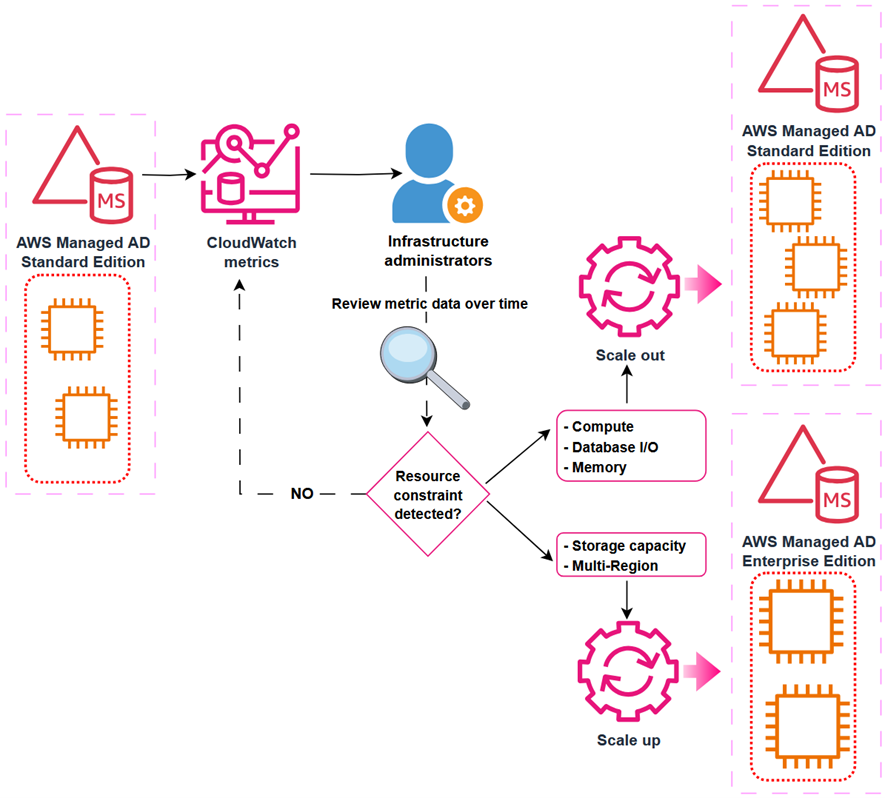
To understand the performance of a directory over time, define the key performance metrics based on your workload when you create the directory. Record the initial values of those metrics to create a performance baseline. Periodically revisit and compare data points for the same metrics to understand trends and use of resources over time. Based on the information provided by the performance baseline and periodic follow-ups, you can decide when to scale your directory and what scaling method to use. This process is depicted in Figure 1.
Figure 1: Decision-making process for scaling an Active Directory implementation
Depending on the characteristics of your workload, you might face different resource constraints in your directory system. From an infrastructure perspective, the more commonly demanded resources are:
From an Active Directory perspective, consider metrics such as:
The following table is an example decision matrix based on which resource is constrained.
| Constrained resource | Recommended action |
| % Processor Time | Scale out |
| I/O Database Reads Average Latency | Scale out |
| Committed Bytes in Use | Scale out |
| % Free Space | Scale up |
For example, you can create a CloudWatch alarm that will trigger when Processor: % Processor Time is over 80% for more than 5 minutes. If this alarm triggers often, it could be a signal that domain controller instances are struggling to service the regular volume of user authentication requests. In such a scenario, you might consider scaling-out an additional domain controller to guarantee the service’s SLA. Conversely, if the LogicalDisk: % Free Space drops below 10% and trends downwards, you might consider scaling-up to Enterprise Edition, because it provides a larger capacity for directory objects.
To facilitate tracking and analyzing performance of AWS Managed Microsoft AD over time, you can use Amazon CloudWatch to create a custom dashboard including relevant metrics.
Before you get started, make sure that you have the following prerequisites in place:
With the prerequisites in place, you’re ready to create a CloudWatch dashboard to track directory service metrics. For more information, see Getting started with CloudWatch automatic dashboards.
To create a dashboard:
Note: if there are multiple directories in the same Region, all instances (domain controllers IPs) will be available for selection. To help ensure effective monitoring and alarms, create a separate dashboard for each directory.
Figure 2: CloudWatch dashboard showing directory services metrics
Now that you have a dashboard where you can view metrics, consider setting up CloudWatch alarms to alert you when a metric reaches or goes beyond a specified threshold. For more information, see Create a CloudWatch alarm based on a static threshold and Adding an alarm to a CloudWatch dashboard.
The following are recommended thresholds to monitor when determining the need to scale an AWS Managed Microsoft AD. These are general recommendations based on standard use cases. You might have to adjust these thresholds to make the best scaling decisions for your organization.
Different resources across your architecture might contain references to the IP addresses of the AWS Managed Microsoft AD. After a scale-out operation that deploys additional domain controller instances on a directory, update existing references to maintain full functionality of workloads. References for the directory’s IP addresses can be found (but might not be limited to) the following services:
To maintain the full functionality of your workloads after a directory scaling operation, update the following:
In this post, you created components that generate costs. Clean up these resources when no longer required to avoid additional charges.
In this post, you learned how to monitor directory performance metrics using Amazon CloudWatch. By combining performance baselines, monitoring, and planning, you can make informed decisions about when and how to scale a directory safely and efficiently. By scaling directories in a timely manner, you can optimize efficiency and reduce the risk of outages by having a right-sized directory service to support your organization’s workloads.
Scale out your directory when your Active Directory-aware workflows have grown over time and the solution requires additional domain controller instances to maintain the service SLA. Scale up your directory when you require a feature that’s only available in Enterprise Edition AWS Managed Microsoft AD, such as multi-Region replication or additional storage to accommodate Active Directory objects. By using the flexible scaling capabilities and independent Regional expansion, you can optimize costs while maintaining appropriate service levels.
To learn more about AWS Managed Microsoft AD optimization and monitoring with Amazon CloudWatch, see:
The rapid adoption of AI applications, including agents, orchestrators, and autonomous workflows, represents a significant shift in how software systems are built and operated. Unlike traditional applications, these systems are active participants in execution. They make decisions, invoke tools, and interact with other systems on behalf of users. While this evolution enables new capabilities, it also introduces an expanded and less familiar attack surface.
Security discussions often focus on prompt-level protections, and that focus is justified. However, prompt security addresses only one layer of risk. Equally important is securing the AI application supply chain, including the frameworks, SDKs, and orchestration layers used to build and operate these systems. Vulnerabilities in these components can allow attackers to influence AI behavior, access sensitive resources, or compromise the broader application environment.
The recent disclosure of CVE-2025-68664, known as LangGrinch, in LangChain Core highlights the importance of securing the AI supply chain. This blog uses that real-world vulnerability to illustrate how Microsoft Defender posture management capabilities can help organizations identify and mitigate AI supply chain risks.
A recently disclosed vulnerability in LangChain Core highlights how AI frameworks can become conduits for exploitation when workloads are not properly secured. Tracked as CVE-2025-68664 and commonly referred to as LangGrinch, this flaw exposes risks associated with insecure deserialization in agentic ecosystems that rely heavily on structured metadata exchange.
CVE-2025-68664 is a serialization injection vulnerability affecting the langchain-core Python package. The issue stems from improper handling of internal metadata fields during the serialization and deserialization process. If exploited, an attacker could:
The vulnerability carries a CVSS score of 9.3, highlighting the risks that arise when AI orchestration systems do not adequately separate control signals from user-supplied data.
Understanding the root cause: The lc marker
LangChain utilizes a custom serialization format to maintain state across different components of an AI chain. To distinguish between standard data and serialized LangChain objects, the framework uses a reserved key called lc. During deserialization, when the framework encounters a dictionary containing this key, it interprets the content as a trusted object rather than plain user data.
The vulnerability originates in the dumps() and dumpd() functions in affected versions of the langchain-core package. These functions did not properly escape or neutralize the lc key when processing user-controlled dictionaries. As a result, if an attacker is able to inject a dictionary containing the lc key into a data stream that is later serialized and deserialized, the framework may reconstruct a malicious object.
This is a classic example of an injection flaw where data and control signals are not properly separated, allowing untrusted input to influence the execution flow.
Mitigation and protection guidance
Microsoft recommends that all organizations using LangChain review their deployments and apply the following mitigations immediately.
1. Update LangChain Core
The most effective defense is to upgrade to a patched version of the langchain-core package.
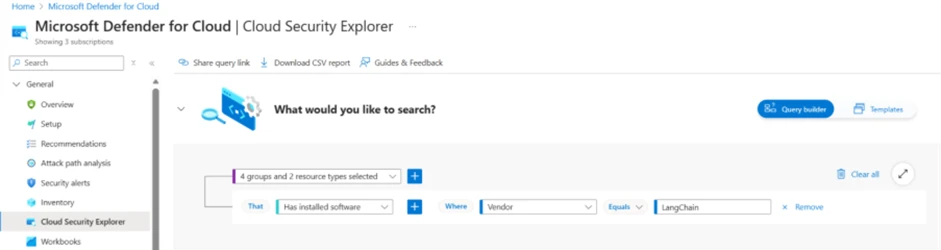
2. Query the security explorer to identify any instances of LangChain in your environment
To identify instances of LangChain package in the assets protected by Defender for Cloud, customers can use the Cloud Security Explorer:
*Identification in cloud compute resources requires Defender CSPM / Defender for Containers / Defender for Servers plan.
*Identification in code environment requires connecting your code environment to Defender for Cloud Learn how to set up connectors
3. Remediate based on Defender for Cloud recommendations across the software development cycle: Code, Ship, Runtime
*Identification in cloud compute resources requires Defender CSPM / Defender for Containers / Defender for Servers plan.
*Identification in code environment requires connecting your code environment to Defender for Cloud Learn how to set up connectors
4. Create GitHub issues with runtime context directly from Defender for Cloud, track progress, and use Copilot coding agent for AI-powered automated fix
Learn more about Defender for Cloud seamless workflows with GitHub to shorten remediation times for security issues.
Microsoft Defender XDR detections
Microsoft security products provide several layers of defense to help organizations identify and block exploitation attempts related to AI vulnerable software.
Microsoft Defender provides visibility into vulnerable AI workloads through its Cloud Security Posture Management (Defender CSPM).
Vulnerability Assessment: Defender for Cloud scanners have been updated to identify containers and virtual machines running vulnerable versions of langchain-core. Microsoft Defender is actively working to expand coverage to additional platforms and this blog will be updated when more information is available.
Hunting queries
Microsoft Defender XDR
Security teams can use the advanced hunting capabilities in Microsoft Defender XDR to proactively look for indicators of exploitation. A common sign of exploitation is a Python process associated with LangChain attempting to access sensitive environment variables or making unexpected network connections immediately following an LLM interaction.
The following Kusto Query Language (KQL) query can be used to identify devices that are using the vulnerable software:
DeviceTvmSoftwareInventory
| where SoftwareName has "langchain"
    and (
        // Lower version ranges
        SoftwareVersion startswith "0."
        and toint(split(SoftwareVersion, ".")[1])
References
This research is provided by Microsoft Defender Security Research with contributions from Tamer Salman, Astar Lev, Yossi Weizman, Hagai Ran Kestenberg, and Shai Yannai.
Learn more
Review our documentation to learn more about our real-time protection capabilities and see how to enable them within your organization.
Learn more about securing Copilot Studio agents with Microsoft Defender
Learn more about Protect your agents in real-time during runtime (Preview) – Microsoft Defender for Cloud Apps | Microsoft Learn
Explore how to build and customize agents with Copilot Studio Agent Builder
The post Case study: Securing AI application supply chains appeared first on Microsoft Security Blog.
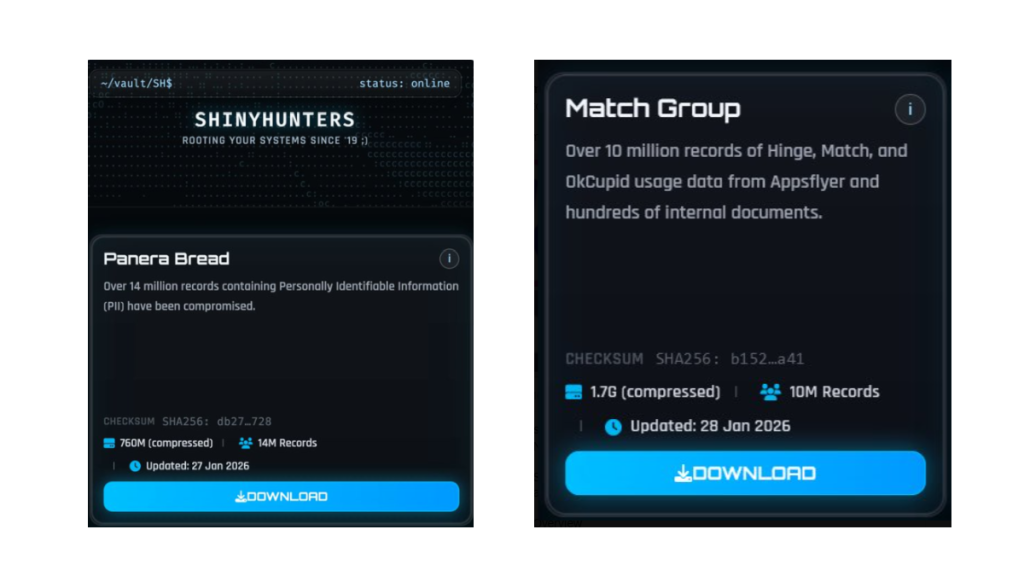
The ShinyHunters ransomware group has claimed the theft of data containing 10 million records belonging to the Match Group and 14 million records from bakery-café chain Panera Bread.
The Match Group, that runs multiple popular online dating services like Tinder, Match.com, Meetic, OkCupid, and Hinge has confirmed a cyber incident and is investigating the data breach.
Panera Bread also confirmed that an incident occurred and has alerted authorities. “The data involved is contact information,” it said in an emailed statement to Reuters.
ShinyHunters seems to be gaining access through Single-Sign-On (SSO) platforms and using voice-cloning techniques, which has resulted in a growing number of breaches across different companies. However, not all of these breaches have the same impact.
For the Match Group, ShinyHunters claims:
“Over 10 million records of Hinge, Match, and OkCupid usage data from Appsflyer and hundreds of internal documents.”
Match says there is no evidence that logins, financial data, or private chats were stolen, but Personally Identifiable Information (PII) and tracking data for some users are in scope. A notification process has been set in motion.
For Panera Bread, ShinyHunters claims to have compromised 14 million records containing PII.
Panera Bread reassures users that there is no indication that the hackers accessed user login credentials, financial information, or private communications.
ShinyHunters also breached Bumblr, Carmax, and Edmunds among others, but I wanted to use Panera Bread and the Match Group as two examples that have very different consequences for users.
When your activity on a dating app is compromised, the impact can be deeply personal. Concerns can range from partners, family members, or employers discovering dating profiles to the risk of doxxing. For many people, stigma around certain apps can lead to fears of being outed, accused of infidelity, or even extorted.
The impact of the Panera Bread breach will be very different. “I just ordered a sandwich and now some criminals have my home address?” Data like this is useful to enrich existing data sets. And the more they know, the easier and better they can target you in phishing attempts.
If you think you have been affected by a data breach, here are steps you can take to protect yourself:
You can use Malwarebytes’ free Digital Footprint scan to find out if your private information is exposed online.
We don’t just report on threats—we help safeguard your entire digital identity
Cybersecurity risks should never spread beyond a headline. Protect your, and your family’s, personal information by using identity protection.
Last year, our engineers submitted over 375 pull requests that were merged into non–Trail of Bits repositories, touching more than 90 projects from cryptography libraries to the Rust compiler.
This work reflects one of our driving values: “share what others can use.” The measure isn’t whether you share something, but whether it’s actually useful to someone else. This principle is why we publish handbooks, write blog posts, and release tools like Claude skills, Slither, Buttercup, and Anamorpher.
But this value isn’t limited to our own projects; we also share our efforts with the wider open-source community. When we hit limitations in tools we depend on, we fix them upstream. When we find ways to make the software ecosystem more secure, we contribute those improvements.
Most of these contributions came out of client work—we hit a bug we were able to fix or wanted a feature that didn’t exist. The lazy option would have been forking these projects for our needs or patching them locally. Contributing upstream instead takes longer, but it means the next person doesn’t have to solve the same problem. Some of our work is also funded directly by organizations like the OpenSSF and Alpha-Omega, who we collaborate with to make things better for everyone.
implicit_clone lint to handle to_string() calls, which let us deprecate the redundant string_to_string lint. We added replacement suggestions to disallowed_methods so that teams can suggest alternatives when flagging forbidden API usage, and we added path validation for disallowed_* configurations so that typos don’t silently disable lint rules. We also extended the QueryStability lint to handle IntoIterator implementations in rustc, which catches nondeterminism bugs in the compiler. The motivation came from a real issue we spotted: iteration order over hash maps was leaking into rustdoc’s JSON output.toString to improve hevm’s compatibility with Foundry.A merged pull request is the easy part. The hard part is everything maintainers do before and after: writing extensive documentation, keeping CI green, fielding bug reports, explaining the same thing to the fifth person who asks. We get to submit a fix and move on. They’re still there a year later, making sure it all holds together.
Thanks to everyone who shaped these contributions with us, from first draft to merge. See you next year.
pyproject.toml according to PEP 639PrintableStringUtcTime and GeneralizedTimeOPTIONALtype_to_tagDEFAULTIMPLICIT and EXPLICITSEQUENCE OFSIZE to SEQUENCE OFBIT STRINGIA5StringPyStringMethods::to_cowSIZE support to BIT STRINGSIZE support to OCTET STRINGSIZE support to UTF8StringSIZE support to PrintableStringSIZE support to IA5Stringelided_named_lifetimes warningsExpression::GetRefbinary to binabi.encode() with empty argsNamespace reference in Binarymismatched_lifetime_syntaxes lint__builtin_ia32_pshufd__builtin_ia32_pslldqi_byteshiftpslldqi construct__builtin_ia32_psrldqi_byteshiftformat_push_string and format_collect to pedanticdisallowed_*unnecessary_debug_formatting lintignore_without_reason lintinconsistent_struct_constructor configuration; don’t suggest deprecated configurationsvisit_map happy path more evidentdisallowed_* configurationsderive_deserialize_allowing_unknownimplicit_clone to handle to_string callsneedless_borrow_for_generic_args doc commentexplicit_write in testsmap-unwrap-orevm on its own directorymaybeLit{Byte,Word,Addr}Simp and maybeConcStoreSimpStorable vectors for memoryword256Bytes, word160BytestoString cheatcodepypi-attestations verify pypi CLI subcommand*.slsa.attestation attestation filesverify pypi commandverify pypi subcommandmake reformatpypi-attestations repositorypypi-attestations to v0.0.28int64 for index typesIn 2026, could any five words be more chilling than “We’re changing our privacy terms?”
The timing could not have been worse for TikTok US when it sent millions of US users a mandatory privacy pop-up on January 22. The message forced users to accept updated terms if they wanted to keep using the app. Buried in that update was language about collecting “citizenship or immigration status.”
Specifically, TikTok said:
“Information You Provide may include sensitive personal information, as defined under applicable state privacy laws, such as information from users under the relevant age threshold, information you disclose in survey responses or in your user content about your racial or ethnic origin, national origin, religious beliefs, mental or physical health diagnosis, sexual life or sexual orientation, status as transgender or nonbinary, citizenship or immigration status, or financial information.”
The internet reacted badly. TikTok users took to social media, with some suggesting that TikTok was building a database of immigration status, and others pledging to delete their accounts. It didn’t help that TikTok’s US operation became a US-owned company on the same day, with Senator Ed Markey (D-Mass.) criticizing what he sees as a lack of transparency around the deal.
In this case, things are may be less sinister than you’d think. The language is not new—it first appeared around August 2024. And TikTok is not asking users to provide their immigration status directly.
Instead, the disclosure covers sensitive information that users might voluntarily share in videos, surveys, or interactions with AI features.
The change appears to be driven largely by California’s AB-947, signed in October 2023. The law added immigration status to the state’s definition of sensitive personal information, placing it under stricter protections. Companies are required to disclose how they process sensitive personal information, even if they do not actively seek it out.
Other social media companies, including Meta, do not explicitly mention immigration status in their privacy policies. According to TechCrunch, that difference likely reflects how specific their disclosure language is—not a meaningful difference in what data is actually collected.
One meaningful change in TikTok’s updated policy does concern location tracking. Previous versions stated that TikTok did not collect GPS data from US users. The new policy says it may collect precise location data, depending on user settings. Users can reportedly opt out of this tracking.
So, does this mean TikTok—or any social media company—deserves our trust? That’s a harder question.
There are still red flags. In April, TikTok quietly removed a commitment to notify users before sharing data with law enforcement. According to Forbes, the company has also declined to say whether it shares, or would share, user data with agencies such as the Department of Homeland Security (DHS) or Immigration and Customs Enforcement (ICE).
That uncertainty is the real issue. Social media companies are notorious for collecting vast amounts of user data, and for being vague about how it may be used later. Outrage over a particularly explicit disclosure is understandable, but the privacy problem runs much deeper than a single policy update from one company.
People have reason to worry unless platforms explicitly commit to not collecting or inferring sensitive data—and explicitly commit to not sharing it with government agencies. And even then, skepticism is healthy. These companies have a long history of changing policies quietly when it suits them.
We don’t just report on data privacy—we help you remove your personal information
Cybersecurity risks should never spread beyond a headline. With Malwarebytes Personal Data Remover, you can scan to find out which sites are exposing your personal information, and then delete that sensitive data from the internet.
Russia's current isolation from the Olympics may lead to increased cyberthreats targeting the 2026 Winter Games. We discuss the potential threat picture.
The post Understanding the Russian Cyberthreat to the 2026 Winter Olympics appeared first on Unit 42.