โŒ

Normal view

Introducing Palo Alto Networks Quantum-Safe Security

Accelerating the Migration to the Post-Quantum Era

The promise of quantum computing brings an unprecedented paradox. While it will unlock revolutionary breakthroughs in science, materials discovery and medicine, it simultaneously poses an existential threat to the mathematical foundations of modern cybersecurity.

For decades, the global economy has relied on public key cryptography to safeguard everything from personal privacy to national security. This cryptography is built on mathematical problems that are computationally infeasible for classical computers to solve but that quantum computers can solve efficiently, rendering todayโ€™s cryptographic protocols obsolete.

Using Shorโ€™s algorithm, a sufficiently powerful quantum computer could factor the large prime numbers that underpin public key cryptography, in minutes. These are tasks that would take todayโ€™s most advanced supercomputers a millennium to crack. This capability would effectively turn our strongest digital defenses into open doors, creating a period of vulnerability leading up to Q-Day โ€“ the day todayโ€™s encryption is broken.

The Migration Crisis: Why Traditional Strategies Fail

For CISOs and technical leaders, the transition to post-quantum cryptography (PQC) is not a simple patch-and-deploy exercise. It is a multiyear transformation that requires updating cryptography across every device, application, certificate and infrastructure component in the enterprise.

Most enterprises today are constrained by cryptographic debt โ€“ years of accumulated, undocumented and deprecated encryption protocols buried deep within legacy applications, third-party software libraries and unmanaged IoT devices. This creates a vast and largely invisible attack surface that traditional vulnerability scanners were never designed to detect.

The challenge is compounded by the absence of a unified source of truth. Existing tools offer a fragmented "outside-in" view of the environment. They may identify devices on the network, but they lack visibility into cryptographic libraries embedded within live traffic. Without a real-time Cryptographic Bill of Materials (CBOM), security teams are forced to rely on manual, point-in-time audits that become outdated almost immediately. Spreadsheets cannot scale to this problem.

This visibility gap makes it impossible to prioritize remediation, leaving sensitive data exposed to harvest now, decrypt later (HNDL) attacks. In these attacks, adversaries intercept and store encrypted data today with the intent of unlocking it once quantum computing capabilities mature.

Operationally, traditional migration approaches are equally unworthy. Manually updating cryptography across thousands of global endpoints and branch offices often requires disruptive rip and replace strategies that threaten uptime and demand specialized expertise that is in extremely short supply. Organizations need a way to bridge todayโ€™s classical infrastructure with a quantum-resilient future without disrupting business operations or exhausting IT resources.

At Palo Alto Networks, we believe global enterprises cannot afford to wait. Our new Quantum-Safe Security solution is designed to remove these operational roadblocks by making cryptographic discovery, risk assessment and transition both continuous and actionable. We empower enterprises to gain real-time visibility into cryptographic risk and begin building agentic resilience at enterprise scale by integrating with existing security and infrastructure systems, including security information and event management (SIEM), load balancers, endpoint detection and response (EDR), as well as Application Vulnerability Management (AVM) tools.

The Four Stages of Cryptographic Inventory & Remediation

Palo Alto Networks Quantum-Safe Security is built around four foundational stages.

1. Continuous Discovery through Ecosystem Ingestion

Visibility is the first line of defense, but in a complex enterprise, true visibility requires more than a periodic scan. It requires continuous, high-fidelity ingestion of cryptographic intelligence across the environment.

Our solution acts as a central nervous system for your cryptographic posture, ingesting telemetry and logs directly from PAN-OS NGFW and Prismaยฎ Access, enriched with data from a broad ecosystem of third-party security solutions, simplifying Day 0 onboarding. By leveraging your existing network infrastructure as sensors, we provide a comprehensive view of the cryptographic behavior of all assets without the operational friction of deploying new software.

To eliminate blind spots, we go beyond our own telemetry to ingest critical information from your existing systems you rely on. This includes syncing with configuration management database (CMDB) and asset management platforms to align cryptographic data with business inventories, integrating with EDR and access control solutions to monitor endpoint behavior, and aggregating data from network clouds and log platforms. The result is a unified intelligence layer that reflects how cryptography is actually used across the enterprise.

By synthesizing these data streams, we deliver a multidimensional view of cryptographic exposure:

  • Discovery โ€“ Identification of every application, user device, infrastructure component and IoT device.
  • Behavior โ€“ Analysis of traffic metadata, including protocols, key exchange mechanisms, encryption algorithms, hashes, certificates and tunnels.
  • Context โ€“ Precise attribution of hardware models, cryptographic libraries (such as deprecated OpenSSL versions), and browser versions in use.

Quantum-safe Security dashboard screenshot.

2. Risk Assessment & Prioritization

Not all data is created equal, and a successful migration requires a surgical focus on where the exposure is most acute. Our Quantum Safe Security solution quantifies risk by correlating cryptographic strength with business criticality, providing a clear, prioritized view of current risk and where remediation matters most.

Assets are categorized into strategic zones, starting with immediate exposure risks caused by deprecated protocols that are vulnerable to classical exploitation today. From there, the solution addresses long-term harvest now, decrypt later threats. As threat models evolve, the risk engine is designed to expand to emerging vectors like identity and authentication integrity, anticipating risks such as โ€œTrust Now, Forge Later" attacks that could undermine digital trust at scale.

At the same time, the solution validates and tracks quantum-secure assets that have successfully transitioned to post-quantum or hybrid-PQC algorithms. By correlating this intelligence with business criticality and data shelf-life, security leaders can make informed decisions. For example, a crown jewel asset containing data that must remain confidential for a decade or more, is flagged as a high HNDL risk today and elevated to the top of the migration queue.

Quantum-safe security dashboard overview.

3. Comprehensive Remediation

Moving from a vulnerable state to quantum resilience is a structured journey. Our comprehensive remediation framework guides organizations through three critical stages, supported by automated workflows and prioritized recommendations at every step.

  • Current State to Quantum Ready: The first stage focuses on infrastructure modernization. Using continuous discovery insights, the solution provides hardware and software recommendations required to support next-generation cryptographic protocols. An asset reaches a Quantum Ready state once it has the underlying hardware and OS capabilities to support post-quantum algorithms, even if those protocols are not yet activated.
  • Quantum Ready to Quantum-Safe: Transitioning to a Quantum-safe state requires activation and configuration of post-quantum defenses. Our solution provides data configuration and certificate compliance guidance to enable PQC/Hybrid-PQC algorithms to be correctly implemented across the estate.
  • Virtual Patching via Cipher Translation: For all current and especially legacy systems or IoT devices that cannot be upgraded, we provide an accelerated path to quantum-safety. Through Cipher Translation, the infrastructure acts as a proxy, providing agentic remediation that reencrypts vulnerable traffic into quantum-safe standards (such as ML-KEM) in real-time at the network edge. This approach instantly moves legacy assets from a high-risk current state to a Quantum-safe posture without a single line of code change. Chain of hardware recommendations, software recommendations, data configuration, certificate compliance, cipher translation.

4. Governance: Continuous Crypto-Hygiene & Global Compliance

Quantum readiness is not a one-time event; it is a strategic enterprise transformation that requires continuous oversight to prevent the re-emergence of vulnerabilities. Our governance framework provides the guardrails for your migration through two critical layers of management:

Continuous Crypto-Hygiene & Ongoing Management: Maintaining high-fidelity visibility is essential to preventing the accumulation of "crypto-debt." Our solution automates real-time mapping of all cryptographic dependencies, ensuring your CBOM remains dynamic and accurate as your environment evolves. Furthermore, we introduce Active Drift Detection, which automatically detects and can even block the use of weak or noncompliant ciphers in real-time, preventing developers or third-party services from accidentally introducing insecure protocols.

Global Crypto-Compliance Enforcement & Reporting: As regulatory pressure from governments (like the US Commercial National Security Algorithm Suite 2.0) mounts, organizations must demonstrate measurable progress. Our solution will provide Automated Framework Auditing, offering continuous, native mapping of your environment against global standards, including NIST, FIPS 140-3, and DORA.

Architecting a Quantum-Resilient Enterprise

The transition to quantum-safe security is far more than a technical upgrade. It represents a fundamental shift in how organizations protect the longevity and integrity of their digital assets. Achieving quantum resilience is a multiyear effort that requires both advanced technology and strategic partnership.

That's why Palo Alto Networks has established Integrated Quantum Practices, bringing together technology, partners and professional services to help organizations navigate the complexity of this transition with confidence. By combining deep cryptographic visibility with intelligent, agentic remediation, organizations can systematically retire their cryptographic debt and build resilience into their security architecture over time.

This proactive approach does more than mitigate emerging risk. It establishes a foundation of digital trust that is resilient against the threats of tomorrow, enabling your most sensitive intellectual property to remain secure for its entire shelf life, even as cryptographic standards evolve.

Secure Your First-Mover Advantage: The Quantum Readiness Assessment

Donโ€™t let the complexity of the quantum transition stall your organizationโ€™s progress. Begin your path to resilience with a Quantum Readiness Assessment, a focused engagement to clarify current exposure and identify the most critical areas for action. To go deeper, watch the Quantum-Safe Summit on demand for expert perspectives on cryptographic risk and quantum readiness.

The Palo Alto Networks Quantum-Safe Security solution is expected to be generally available to customers on January 30, 2026, with additional integration enhancements planned for April 2026.

Forward-Looking Statements

This blog contains forward-looking statements that involve risks, uncertainties and assumptions, including, without limitation, statements regarding the benefits, impact or performance or potential benefits, impact or performance of our products and technologies or future products and technologies. These forward-looking statements are not guarantees of future performance, and there are a significant number of factors that could cause actual results to differ materially from statements made in this [blog. We identify certain important risks and uncertainties that could affect our results and performance in our most recent Annual Report on Form 10-K, our most recent Quarterly Report on Form 10-Q, and our other filings with the U.S. Securities and Exchange Commission from time-to-time, each of which are available on our website at investors.paloaltonetworks.com and on the SEC's website at www.sec.gov. All forward-looking statements in this blog are based on information available to us as of the date hereof, and we do not assume any obligation to update the forward-looking statements provided to reflect events that occur or circumstances that exist after the date on which they were made.

The post Introducing Palo Alto Networks Quantum-Safe Security appeared first on Palo Alto Networks Blog.
File integrity monitoring with AWS Systems Manager and Amazon Security Lakeย 

27 January 2026 at 19:21

Customers need solutions to track inventory data such as files and software across Amazon Elastic Compute Cloud (Amazon EC2) instances, detect unauthorized changes, and integrate alerts into their existing security workflows.

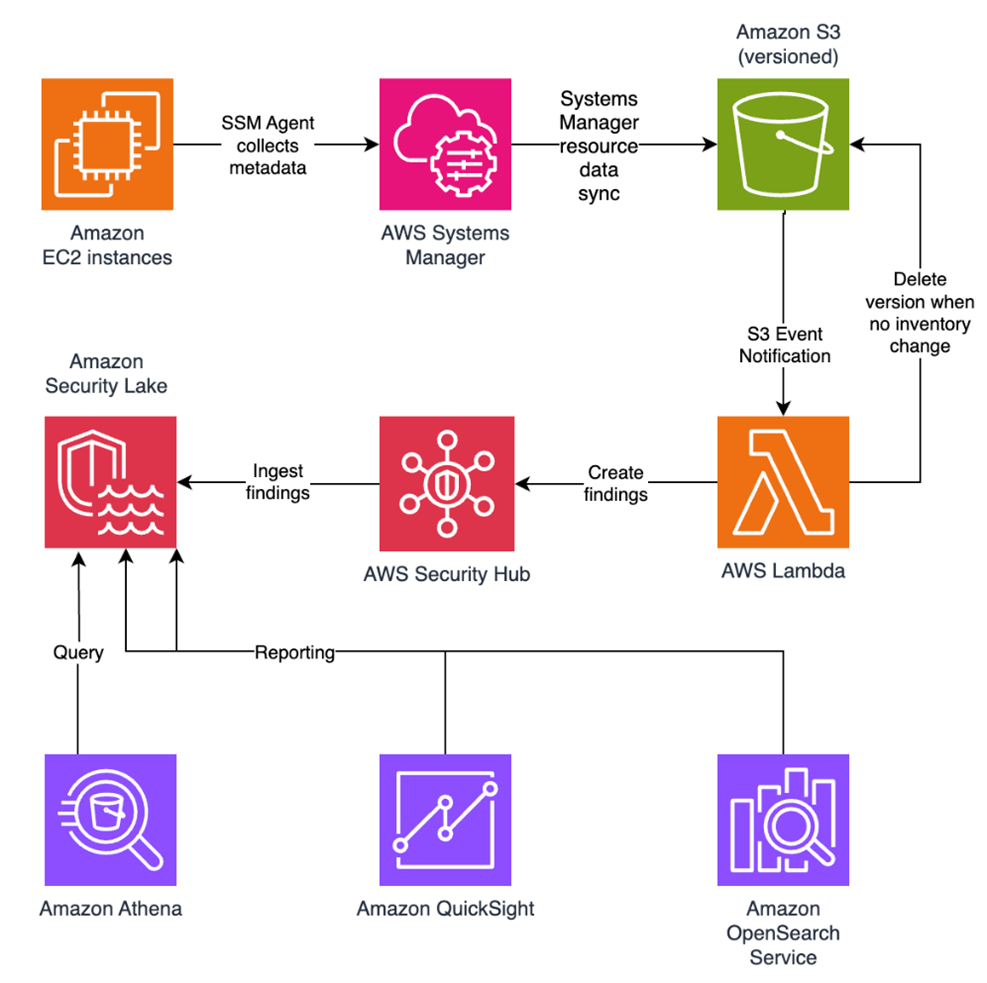
In this blog post, I walk you through a highly scalable serverless file integrity monitoring solution. It uses AWS Systems Manager Inventory to collect file metadata from Amazon EC2 instances. The metadata is sent through the Systems Manager Resource Data Sync feature to a versioned Amazon Simple Storage Service (Amazon S3) bucket, storing one inventory object for each EC2 instance. Each time a new object is created in Amazon S3, an Amazon S3 Event Notification triggers a custom AWS Lambda function. This Lambda function compares the latest inventory version with the previous one to detect file changes. If a file that isnโ€™t expected to change has been created, modified, or deleted, the function creates an actionable finding in AWS Security Hub. Findings are then ingested by Amazon Security Lake in a standard OCSF format, which centralizes and normalizes the data. Finally, the data can be analyzed using Amazon Athena for one-time queries, or by building visual dashboards with Amazon QuickSight and Amazon OpenSearch Service. Figure 1 summarizes this flow:

Figure 1: File integrity monitoring workflow

Figure 1: File integrity monitoring workflow

This integration offers an alternative to the default AWS Config and Security Hub integration, which relies on limited data (for example, no file modification timestamps). The solution presented in this post provides control and flexibility to implement custom logic tailored to your operational needs and support security-related efforts.

This flexible solution can also be used with other Systems Manager Inventory metadata, such as installed applications, network configurations, or Windows registry entries, enabling custom detection logic across a wide range of operational and security use cases.

Now letโ€™s build the file integrity monitoring solution.

Prerequisites

Before you get started, you need an AWS account with permissions to create and manage AWS resources such as Amazon EC2, AWS Systems Manager, Amazon S3, and Lambda.

Step 1: Start an EC2 instance

Start by launching an EC2 instance and creating a file that you will later modify to simulate an unauthorized change.

Create an AWS Identity and Access Management (IAM) role to allow the EC2 instance to communicate with Systems Manager:

  1. Open the AWS Management Console and go to IAM, choose Roles from the navigation pane, and then choose Create role.
  2. Under Trusted entity type, select AWS service, select EC2 as the use case, and choose Next.
  3. On the Add permissions page, search for and select the AmazonSSMManagedInstanceCore IAM policy, then choose Next.
  4. Enter SSMAccessRole as the role name and choose Create role.
  5. The new SSMAccessRole should now appear in your list of IAM roles:
Figure 2: Create an IAM role for communication with Systems Manager

Figure 2: Create an IAM role for communication with Systems Manager

Start an EC2 instance:

  1. Open the Amazon EC2 console and choose Launch Instance.
  2. Enter a Name, keep the default Linux Amazon Machine Image (AMI), and select an Instance type (for example, t3.micro).
  3. Under Advanced details:
    1. IAM instance profile, select the previously created SSMAccessRole
    2. Create a fictitious payment application configuration file in the /etc/paymentapp/ folder on the EC2 instance. Later, you will modify it to demonstrate a file-change event for integrity monitoring. To create this file during EC2 startup, copy and paste the following script into User data.
#!/bin/bash
mkdir -p /etc/paymentapp
echo "db_password=initial123" > /etc/paymentapp/config.yaml
Figure 3: Adding the application configuration file

Figure 3: Adding the application configuration file

  1. Leave the remaining settings as default, choose Proceed without key pair, and then select Launch Instance. A key pair isnโ€™t required for this demo because you use Session Manager for access.

Step 2: Enable Security Hub and Security Lake

If Security Hub and Security Lake are already enabled, you can skip to Step 3.
To start, enable Security Hub, which collects and aggregates security findings. AWS Security Hub CSPM adds continuous monitoring and automated checks against best practices.

  1. Open the Security Hub console.
  2. Choose Security Hub CSPM from the navigation pane and then select Enable AWS Security Hub CSPM and choose Enable Security Hub CSPM at the bottom of the page.

Note: For this demo, you donโ€™t need the Security standards options and can clear them.

Figure 4: Enable Security Hub CSP

Figure 4: Enable Security Hub CSP

Next, activate Security Lake to start collecting actionable findings from Security Hub:

  1. Open the Amazon Security Lake console and choose Get Started.
  2. Under Data sources, select Ingest specific AWS sources.
  3. Under Log and event sources, select Security Hub (you will use this only for this demo):
Figure 5: Select log and event sources

Figure 5: Select log and event sources

  1. Under Select Regions, choose Specific Regions and make sure you select the AWS Region that youโ€™re using.
  2. Use the default option to Create and use a new service role.
  3. Choose Next and Next again, then choose Create.

Step 3: Configure Systems Manager Inventory and sync to Amazon S3

With Security Hub and Security Lake enabled, the next step is to enable Systems Manager Inventory to collect file metadata and configure a Resource Data Sync to export this data to S3 for analysis.

  1. Create an S3 bucket by carefully following the instructions in the section To create and configure an Amazon S3 bucket for resource data sync.
  2. After you created the bucket, enable versioning in the Amazon S3 console by opening the bucketโ€™s Properties tab, choosing Edit under Bucket Versioning, selecting Enable, and saving your changes. Versioning causes each new inventory snapshot to be saved as a separate version, so that you can track file changes over time.

Note: In production, enable S3 server access logging on the inventory bucket to keep an audit trail of access requests, enforce HTTPS-only access, and enable CloudTrail data events for S3 to record who accessed or modified inventory files.

The next step is to enable Systems Manager Inventory and set up the resource data sync:

  1. In the Systems Manager console, go to Fleet Manager, choose Account management, and select Set up inventory.
  2. Keep the default values but deselect every inventory type except File. Set a Path to limit collection to the files relevant for this demo and your security requirements. Under File, set the Path to: /etc/paymentapp/.
Figure 6: Set the parameters and path

Figure 6: Set the parameters and path

  1. Choose Setup Inventory.
  2. In Fleet Manager, choose Account management and select Resource Data Syncs.
  3. Choose Create resource data sync, enter a Sync name, and enter the name of the versioned S3 bucket you created earlier.
  4. Select This Region and then choose Create.

Step 4: Implement the Lambda function

Next, complete the setup to detect changes and create findings. Each time Systems Manager Inventory writes a new object to Amazon S3, an S3 Event Notification triggers a Lambda function that compares the latest and previous object versions. If it finds created, modified, or deleted files, it creates a security finding. To accomplish this, you will create the Lambda function, set its environment variables, add the helper layer, and attach the required permissions.

The following is an example finding generated in AWS Security Finding Format (ASFF) and sent to Security Hub. In this example, you see a notification about a file change on the EC2 instance listed under the Resources section.

{
	...
"Id": "fim-i-0b8f40f4de065deba-2025-07-12T13:48:31.741Z",
	"AwsAccountId": "XXXXXXXXXXXX",
	"Types": [
		"Software and Configuration Checks/File Integrity Monitoring"
	],
	"Severity": {
		"Label": "MEDIUM"
	},
	"Title": "File changes detected via SSM Inventory",
	"Description": "0 created, 1 modified, 0 deleted file(s) on instance i-0b8f40f4de065deba",
	"Resources": [
		{
			"Type": "AwsEc2Instance",
			"Id": "i-0b8f40f4de065deba"
		}
	],
	...
}

Create the Lambda function

This function detects file changes, reports findings, and removes unused Amazon S3 object versions to reduce costs.

  1. Open the Lambda console and choose Create function in the navigation pane.
  2. For Function Name enter fim-change-detector.
  3. Select Author from scratch, enter a function name, select the latest Python runtime, and choose Create function.
  4. On the Code tab, paste the following main function and choose Deploy.
import boto3, os, json, re
from datetime import datetime, UTC
from urllib.parse import unquote_plus
from helpers import is_critical, load_file_metadata, is_modified, extract_instance_id

s3 = boto3.client('s3')
securityhub = boto3.client('securityhub')

CRITICAL_FILE_PATTERNS = os.environ["CRITICAL_FILE_PATTERNS"].split(",")
SEVERITY_LABEL = os.environ["SEVERITY_LABEL"]
	
def lambda_handler(event, context):
	# Safe event handling
	if "Records" not in event or not event["Records"]:
		return

	# Extract S3 event
	record = event['Records'][0]
	bucket = record['s3']['bucket']['name']
	key = unquote_plus(record['s3']['object']['key'])
	current_version = record['s3']['object'].get('versionId')
	if not current_version:
		return

	# Fetching the region name
	account_id = context.invoked_function_arn.split(":")[4]
	region = boto3.session.Session().region_name

	# Get object versions (latest first)
	versions = s3.list_object_versions(Bucket=bucket, Prefix=key).get('Versions', [])
	versions = sorted(versions, key=lambda v: v['LastModified'], reverse=True)

	# Find previous version
	idx = next((i for i,v in enumerate(versions) if v["VersionId"] == current_version), None)
	if idx is None or idx + 1 >= len(versions):
		return
	prev_version = versions[idx+1]["VersionId"]

	# Load both versions
	current = load_file_metadata(bucket, key, current_version)
	previous = load_file_metadata(bucket, key, prev_version)

	# Compare
	created = {p for p in set(current) - set(previous) if is_critical(p)}
	deleted = {p for p in set(previous) - set(current) if is_critical(p)}
	modified = {p for p in set(current) & set(previous) if is_critical(p) and is_modified(p, current, previous)}

	# Report if changes were found
	if created or deleted or modified:
		instance_id = extract_instance_id(bucket, key, current_version)
		now = datetime.now(UTC).isoformat(timespec='milliseconds').replace('+00:00', 'Z')
		finding = {
			"SchemaVersion": "2018-10-08",
			"Id": f"fim-{instance_id}-{now}",
			"ProductArn": f"arn:aws:securityhub:{region}:{account_id}:product/{account_id}/default",
			"AwsAccountId": account_id,
			"GeneratorId": "ssm-inventory-fim",
			"CreatedAt": now,
			"UpdatedAt": now,
			"Types": ["Software and Configuration Checks/File Integrity Monitoring"],
			"Severity": {"Label": SEVERITY_LABEL},
			"Title": "File changes detected via SSM Inventory",
			"Description": (
				f"{len(created)} created, {len(modified)} modified, "
				f"{len(deleted)} deleted file(s) on instance {instance_id}"
			),
			"Resources": [{"Type": "AwsEc2Instance", "Id": instance_id}]
		}
		securityhub.batch_import_findings(Findings=[finding])

	# No change โ€“ delete older S3 version
	else:
		if prev_version != current_version:
			try:
				s3.delete_object(Bucket=bucket, Key=key, VersionId=prev_version)
			except Exception as e:
				print(f"Delete previous S3 object version failed: {e}")

Note: In production, set Lambda reserved concurrency to prevent unbounded scaling, configure a dead letter queue (DLQ) to capture failed invocations, and optionally attach the function to an Amazon VPC for network isolation.

Configure environment variables

Configure the two required environment variables in the Lambda console. These two variables (one for critical paths to monitor and one for security finding severity) must be set or the function will fail.

  1. Open the Lambda console and choose Configuration and then select Environment variables.
  2. Choose Edit and then choose Add environment variable.
  3. Under Key, choose CRITICAL_FILE_PATTERNS
    1. Enter ^/etc/paymentapp/config.*$ as the value.
    2. Set the SEVERITY_LABEL to MEDIUM.
Figure 7: CRITICAL_FILE_PATTERNS and SEVERITY_LABEL configuration

Figure 7: CRITICAL_FILE_PATTERNS and SEVERITY_LABEL configuration

Set up permissions

The next step is to attach permissions to the Lambda function

  1. In your Lambda function, choose Configuration and then select Permissions.
  2. Under Execution role, select the role name that will lead to the role in IAM.
  3. Choose Add permissions and select Create inline policy. Select JSON view.
  4. Paste the following policy, and make sure to replace <bucket-name> with the name of your S3 bucket, and you also update <region> and <account-id> with your AWS Region and Account ID:
{
"Version": "2012-10-17",
"Statement": [
	{
		"Effect": "Allow",
		"Action": "securityhub:BatchImportFindings",
		"Resource": "arn:aws:securityhub:<region>:<account-id>:product/<account-id>/default"
	},
	{
		"Effect": "Allow",
		"Action": [
			"s3:GetObject",
			"s3:GetObjectVersion",
			"s3:ListBucketVersions",
			"s3:DeleteObjectVersion"
		],
		"Resource": [
			"arn:aws:s3:::<bucket-name>",
			"arn:aws:s3:::<bucket-name>/*"
			]
		}
	]
}
  1. To finalize, enter a Policy name and choose Create policy.

Add functions to the Lambda layer

For better modularity, add some helper functions to a Lambda layer. These functions are already referenced in the import section of the preceding Lambda functionโ€™s Python code. The helper functions check critical paths, load file metadata, compare modification times, and extract the EC2 instance ID.

Open AWS CloudShell from the top-right corner of the AWS console header, then copy and paste the following script and press Enter. It creates the helper layer and attaches it to your Lambda function.

#!/bin/bash
set -e
FUNCTION_NAME="fim-change-detector"
LAYER_NAME="fim-change-detector-layer"

mkdir -p python
cat > python/helpers.py << 'EOF'
import json, re, os
from dateutil.parser import parse as parse_dt
import boto3
s3 = boto3.client('s3')
CRITICAL_FILE_PATTERNS = os.environ.get("CRITICAL_FILE_PATTERNS", "").split(",")

def is_critical(path):
	return any(re.match(p.strip(), path) for p in CRITICAL_FILE_PATTERNS if p.strip())

def load_file_metadata(bucket, key, version_id):
	obj = s3.get_object(Bucket=bucket, Key=key, VersionId=version_id)
	data = {}
	for line in obj['Body'].read().decode().splitlines():
		if line.strip():
			i = json.loads(line)
			n, d, m = i.get("Name","").strip(), i.get("InstalledDir","").strip(), i.get("ModificationTime","").strip()
			if n and d and m: data[f"{d.rstrip('/')}/{n}"] = m
	return data

def is_modified(path, current, previous):
	try: return parse_dt(current[path]) != parse_dt(previous[path])
	except: return current[path] != previous[path]

def extract_instance_id(bucket, key, version_id):
	obj = s3.get_object(Bucket=bucket, Key=key, VersionId=version_id)
	for line in obj['Body'].read().decode().splitlines():
		if line.strip():
			r = json.loads(line)
			if "resourceId" in r: return r["resourceId"]
	return None
EOF

zip -r helpers_layer.zip python >/dev/null
LAYER_VERSION_ARN=$(aws lambda publish-layer-version \
	--layer-name "$LAYER_NAME" \
	--description "Helper functions for File Integrity Monitoring" \
	--zip-file fileb://helpers_layer.zip \
	--compatible-runtimes python3.13 \
	--query 'LayerVersionArn' \
	--output text)

aws lambda update-function-configuration \
	--function-name "$FUNCTION_NAME" \
	--layers "$LAYER_VERSION_ARN" >/dev/null
echo "Layer created and attached to the Lambda function."

Step 5: Set up S3 Event Notifications

Finally, set up S3 Event Notifications to trigger the Lambda function when new inventory data arrives.

  1. Open the S3 console and select the Systems Manager Inventory bucket that you created.
  2. Choose Properties and select Event notifications.
  3. Choose Create event notification.
    1. Enter an Event name.
    2. In the Prefix field, enter AWS%3AFile/ to limit Lambda triggers to file inventory objects only.
      Note: The prefix contains a : character, which must be URL-encoded as %3A.
    3. Under Event types, select Put.
    4. At the bottom, select your newly created Lambda function, and choose Save changes.

In this example, inventory collection runs every 30 minutes (48 times each day) but can be adjusted based on security requirements to optimize costs. The Lambda function is triggered once for each instance whenever a new inventory object is created. You can further reduce event volume by filtering EC2 instances through S3 Event Notification prefixes, enabling focused monitoring of high-value instances.

Step 6: Test the file change detection flow

Now that the EC2 instance is running and the sample configuration file /etc/paymentapp/config.yaml has been initialized, youโ€™re ready to simulate an unauthorized change to test the file integrity monitoring setup.

  1. Open the Systems Manager console.
  2. Go to Session Manager and choose Start session.
  3. Select your EC2 instance and choose Start Session.
  4. Run the following command to modify the file:

echo โ€œdb_password=hacked456" | sudo tee /etc/paymentapp/config.yaml

This simulates a configuration tampering event. During the next Systems Manager Inventory run, the updated metadata will be saved to Amazon S3.

To manually trigger this:

  1. Open the Systems Manager console and choose State Manager.
  2. Select your association and choose Apply association now to start the inventory update.
  3. After the association status changes to Success, check your SSM Inventory S3 bucket in the AWS:File folder and review the inventory object and its versions.
  4. Open the Security Hub console and choose Findings. After a short delay, you should see a new finding like the one shown in Figure 8:
Figure 8: View file change findings

Figure 8: View file change findings

Step 7: Query and visualize findings

While Security Hub provides a centralized view of findings, you can deepen your analysis using Amazon Athena to run SQL queries directly on the normalized Security Lake data in Amazon S3. This data follows the Open Cybersecurity Schema Framework (OCSF), which is a vendor-neutral standard that simplifies integration and analysis of security data across different tools and services.

The following is an example Athena query:

SELECT
	finding_info.desc AS description,
	class_uid AS class_id,
	severity AS severity_label,
	type_name AS finding_type,
	time_dt AS event_time,
	region,
	accountid
FROM amazon_security_lake_table_us_east_1_sh_findings_2_0

Note: Be sure to adjust the FROM clause for other Regions. Security Lake processes findings before they appear in Athena, so expect a short delay between ingestion and data availability.
You will see a similar result for the preceding query, shown in Figure 9:

Figure 9: Athena query result in the Amazon Athena query editor

Figure 9: Athena query result in the Amazon Athena query editor

Security Lake classifies this finding as an OCSF 2004 Class, Detection Finding. You can explore the full schema definitions at OCSF Categories. For more query examples, see the Security Lake query examples.
For visual exploration and real-time insights, you can integrate Security Lake with OpenSearch Service and QuickSight, both of which now offer extensive generative AI support. For a guided walkthrough using QuickSight, see How to visualize Amazon Security Lake findings with Amazon QuickSight.

Clean up

After testing the step-by-step guide, make sure to clean up the resources you created for this post to avoid ongoing costs.

  1. Terminate the EC2 instance
  2. Delete the Resource Data Sync and Inventory Association
  3. Remove the Lambda function.
  4. Disable Security Lake and Security Hub CSPM
  5. Delete IAM roles created for this post
  6. Delete the associated SSM Resource Data Sync and Security Lake S3 buckets.

Conclusion

In this post, you learned how to use Systems Manager Inventory to track file integrity, report findings to Security Hub, and analyze them using Security Lake.
You can access the full sample code to set up this solution in the AWS Samples repository.
While this post uses a single-account, single-Region setup for simplicity, Security Lake supports collecting data across multiple accounts and Regions using AWS Organizations. You can also use a Systems Manager resource data sync to send inventory data to a central S3 bucket.

Getting Started with Amazon Security Lake and Systems Manager Inventory provides guidance for enabling scalable, cloud-centric monitoring with full operational context.

Adam Nemeth Adam Nemeth
Adam is a Senior Solutions Architect and generative AI enthusiast at AWS, helping financial services customers by embracing the Day 1 culture and customer obsession of Amazon. With over 24 years of IT experience, Adam previously worked at UBS as an architect and has also served as a delivery lead, consultant, and entrepreneur. He lives in Switzerland with his wife and their three children.

New Android Theft Protection Feature Updates: Smarter, Stronger

27 January 2026 at 17:59
Posted by Nataliya Stanetsky, Fabricio Ferracioli, Elliot Sisteron, Irene Ang of the Android Security Team

Phone theft is more than just losing a device; it's a form of financial fraud that can leave you suddenly vulnerable to personal data and financial theft. Thatโ€™s why we're committed to providing multi-layered defenses that help protect you before, during, and after a theft attempt.

Today, we're announcing a powerful set of theft protection feature updates that build on our existing protections, designed to give you greater peace of mind by making your device a much harder target for criminals.

Stronger Authentication Safeguards

We've expanded our security to protect you against an even wider range of threats. These updates are now available for Android devices running Android 16+.

More User Control for Failed Authentications: In Android 15, we launched Failed Authentication Lock, a feature that automatically locks the device's screen after excessive failed authentication attempts. This feature is now getting a new dedicated enable/disable toggle in settings, giving you more granular control over your device's security.

Expanding Identity Check to cover more: Early in 2025, we enabled Identity Check for Android 15+, which requires the user to utilize biometrics when performing certain actions outside of trusted places. Later in the year, we extended this safeguard to cover all features and apps that use the Android Biometric Prompt. This means that critical tools that utilize Biometric Prompt, like third-party banking apps and Google Password Manager, now automatically benefit from the additional security of Identity Check.

Stronger Protection Against Screen Lock Guessing: Weโ€™re making it much harder for a thief to guess your PIN, pattern, or password by increasing the lockout time after failed attempts. To ensure you arenโ€™t locked out by mistake (by a curious child, for instance), identical incorrect guesses no longer count toward your retry limit.

Fake apps, NFC skimming attacks, and other Android issues in 2026 | Kaspersky official blog

27 January 2026 at 17:36

The year 2025 saw a record-breaking number of attacks on Android devices. Scammers are currently riding a few major waves: the hype surrounding AI apps, the urge to bypass site blocks or age checks, the hunt for a bargain on a new smartphone, the ubiquity of mobile banking, and, of course, the popularity of NFC. Letโ€™s break down the primary threats of 2025โ€“2026, and figure out how to keep your Android device safe in this new landscape.

Sideloading

Malicious installation packages (APK files) have always been the Final Boss among Android threats, despite Googleโ€™s multi-year efforts to fortify the OS. By using sideloading โ€” installing an app via an APK file instead of grabbing it from the official store โ€” users can install pretty much anything, including straight-up malware. And neither the rollout of Google Play Protect, nor the various permission restrictions for shady apps have managed to put a dent in the scale of the problem.

According to preliminary data from Kaspersky for 2025, the number of detected Android threats grew almost by half. In the third quarter alone, detections jumped by 38% compared to the second. In certain niches, like Trojan bankers, the growth was even more aggressive. In Russia alone, the notorious Mamont banker attacked 36 times more users than it did the previous year, while globally this entire category saw a nearly fourfold increase.

Today, bad actors primarily distribute malware via messaging apps by sliding malicious files into DMs and group chats. The installation file usually sports an enticing name (think โ€œparty_pics.jpg.apkโ€ or โ€œclearance_sale_catalog.apkโ€), accompanied by a message โ€œhelpfullyโ€ explaining how to install the package while bypassing the OS restrictions and security warnings.

Once a new device is infected, the malware often spams itself to everyone in the victimโ€™s contact list.

Search engine spam and email campaigns are also trending, luring users to sites that look exactly like an official app store. There, theyโ€™re prompted to download the โ€œlatest helpful appโ€, such as an AI assistant. In reality, instead of an installation from an official app store, the user ends up downloading an APK package. A prime example of these tactics is the ClayRat Android Trojan, which uses a mix of all these techniques to target Russian users. It spreads through groups and fake websites, blasts itself to the victimโ€™s contacts via SMS, and then proceeds to steal the victimโ€™s chat logs and call history; it even goes as far as snapping photos of the owner using the front-facing camera. In just three months, over 600 distinct ClayRat builds have surfaced.

The scale of the disaster is so massive that Google even announced an upcoming ban on distributing apps from unknown developers starting in 2026. However, after a couple of months of pushback from the dev community, the company pivoted to a softer approach: unsigned apps will likely only be installable via some kind of superuser mode. As a result, we can expect scammers to simply update their how-to guides with instructions on how to toggle that mode on.

Kaspersky for Android will help you protect yourself from counterfeit and trojanized APK files. Unfortunately, due to Googleโ€™s decision, our Android security apps are currently unavailable on Google Play. Weโ€™ve previously provided detailed information on how to install our Android apps with a 100% guarantee of authenticity.

NFC relay attacks

Once an Android device is compromised, hackers can skip the middleman to steal the victimโ€™s money directly thanks to the massive popularity of mobile payments. In the third quarter of 2025 alone, over 44ย 000 of these attacks were detected in Russia alone โ€” a 50% jump from the previous quarter.

There are two main scams currently in play: direct and reverse NFC exploits.

Direct NFC relay is when a scammer contacts the victim via a messaging app and convinces them to download an app โ€” supposedly to โ€œverify their identityโ€ with their bank. If the victim bites and installs it, theyโ€™re asked to tap their physical bank card against the back of their phone and enter their PIN. And just like that the card data is handed over to the criminals, who can then drain the account or go on a shopping spree.

Reverse NFC relay is a more elaborate scheme. The scammer sends a malicious APK and convinces the victim to set this new app as their primary contactless payment method. The app generates an NFC signal that ATMs recognize as the scammerโ€™s card. The victim is then talked into going to an ATM with their infected phone to deposit cash into a โ€œsecure accountโ€. In reality, those funds go straight into the scammerโ€™s pocket.

We break both of these methods down in detail in our post, NFC skimming attacks.

NFC is also being leveraged to cash out cards after their details have been siphoned off through phishing websites. In this scenario, attackers attempt to link the stolen card to a mobile wallet on their own smartphone โ€” a scheme we covered extensively in NFC carders hide behind Apple Pay and Google Wallet.

The stir over VPNs

In many parts of the world, getting onto certain websites isnโ€™t as simple as it used to be. Some sites are blocked by local internet regulators or ISPs via court orders; others require users to pass an age verification check by showing ID and personal info. In some cases, sites block users from specific countries entirely just to avoid the headache of complying with local laws. Users are constantly trying to bypass these restrictions โ€”and they often end up paying for it with their data or cash.

Many popular tools for bypassing blocks โ€” especially free ones โ€” effectively spy on their users. A recent audit revealed that over 20 popular services with a combined total of more than 700 million downloads actively track user location. They also tend to use sketchy encryption at best, which essentially leaves all user data out in the open for third parties to intercept.

Moreover, according to Google data from November 2025, there was a sharp spike in cases where malicious apps are being disguised as legitimate VPN services to trick unsuspecting users.

The permissions that this category of apps actually requires are a perfect match for intercepting data and manipulating website traffic. Itโ€™s also much easier for scammers to convince a victim to grant administrative privileges to an app responsible for internet access than it is for, say, a game or a music player. We should expect this scheme to only grow in popularity.

Trojan in a box

Even cautious users can fall victim to an infection if they succumb to the urge to save some cash. Throughout 2025, cases were reported worldwide where devices were already carrying a Trojan the moment they were unboxed. Typically, these were either smartphones from obscure manufacturers or knock-offs of famous brands purchased on online marketplaces. But the threat wasnโ€™t limited to just phones; TV boxes, tablets, smart TVs, and even digital photo frames were all found to be at risk.

Itโ€™s still not entirely clear whether the infection happens right on the factory floor or somewhere along the supply chain between the factory and the buyerโ€™s doorstep, but the device is already infected before the first time itโ€™s turned on. Usually, itโ€™s a sophisticated piece of malware called Triada, first identified by Kaspersky analysts back in 2016. Itโ€™s capable of injecting itself into every running app to intercept information: stealing access tokens and passwords for popular messaging apps and social media, hijacking SMS messages (confirmation codes: ouch!), redirecting users to ad-heavy sites, and even running a proxy directly on the phone so attackers can browse the web using the victimโ€™s identity.

Technically, the Trojan is embedded right into the smartphoneโ€™s firmware, and the only way to kill it is to reflash the device with a clean OS. Usually, once you dig into the system, youโ€™ll find that the device has far less RAM or storage than advertised โ€” meaning the firmware is literally lying to the owner to sell a cheap hardware config as something more premium.

Another common pre-installed menace is the BADBOX 2.0 botnet, which also pulls double duty as a proxy and an ad-fraud engine. This one specializes in TV boxes and similar hardware.

How to go on using Android without losing your mind

Despite the growing list of threats, you can still use your Android smartphone safely! You just have to stick to some strict mobile hygiene rules.

  • Install a comprehensive security solution on all your smartphones. We recommend Kaspersky for Androidย to protect against malware and phishing.
  • Avoid sideloading apps via APKs whenever you can use an app store instead. A known app store โ€” even a smaller one โ€” is always a better bet than a random APK from some random website. If you have no other choice, download APK files only from official company websites, and double-check the URL of the page youโ€™re on. If you arenโ€™t 100% sure what the official site is, donโ€™t just rely on a search engine; check official business directories or at least Wikipedia to verify the correct address.
  • Read OS warnings carefully during installation. Donโ€™t grant permissions if the requested rights or actions seem illogical or excessive for the app youโ€™re installing.
  • Under no circumstances should you install apps from links or attachments in chats, emails, or similar communication channels.
  • Never tap your physical bank card against your phone. There is absolutely no legitimate scenario where doing this would be for your own benefit.
  • Do not enter your cardโ€™s PIN into any app on your phone. A PIN should only ever be requested by an ATM or a physical payment terminal.
  • When choosing a VPN, stick to paid ones from reputable companies.
  • Buy smartphones and other electronics from official retailers, and steer clear of brands youโ€™ve never heard of. Remember: if a deal seems too good to be true, it almost certainly is.

Other major Android threats from 2025:

IAM Identity Center now supports IPv6

26 January 2026 at 21:17

Amazon Web Services (AWS) recommends using AWS IAM Identity Center to provide your workforce access to AWS managed applicationsโ€”such as Amazon Q Developerโ€”and AWS accounts. Today, we announced IAM Identity Center support for IPv6. To learn more about the advantages of IPv6, visit the IPv6 product page.

When you enable IAM Identity center, it provides an access portal for workforce users to access their AWS applications and accounts either by signing in to the access portal using a URL or by using a bookmark for the application URL. In either case, the access portal handles user authentication before granting access to applications and accounts. Supporting both IPv4 and IPv6 connectivity to the access portal helps facilitate seamless access for clients, such as browsers and applications, regardless of their network configuration.

The launch of IPv6 support in IAM Identity Center introduces new dual-stack endpoints that support both IPv4 and IPv6, so that users can connect using IPv4, IPv6, or dual-stack clients. Current IPv4 endpoints continue to function with no action required. The dual stack capability offered by Identity Center extends to managed applications. When users access the application dual-stack endpoint, the application automatically routes to the Identity Center dual-stack endpoint for authentication. To use Identity Center from IPv6 clients, you must direct your workforce to use the new dual-stack endpoints, and update configurations on your external identity provider (IdP), if you use one.

In this post, we show you how to update your configuration to allow IPv6 clients to connect directly to IAM Identity Center endpoints without requiring network address translation services. We also show you how to monitor which endpoint users are connecting to. Before diving into the implementation details, letโ€™s review the key phases of the transition process.

Transition overview

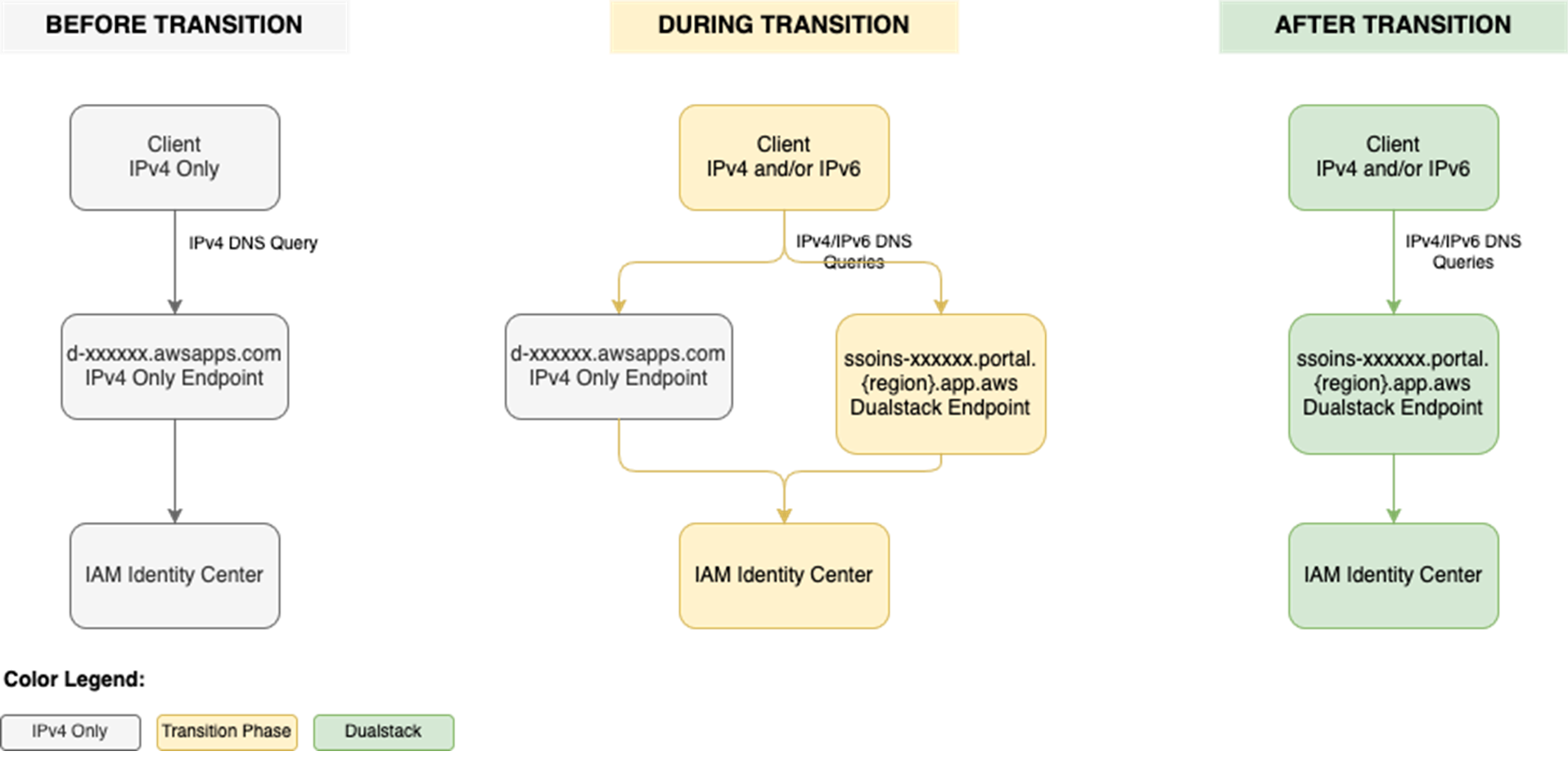
To use IAM Identity Center from an IPv6 network and client, you need to use the new dual-stack endpoints. Figure 1 shows what the transition from IPv4 to IPv6 over dual-stack endpoints looks like when using Identity Center. The figure shows:

  • A before state where clients use the IPv4 endpoints.
  • The transition phase, when your clients use a combination of IPv4 and dual-stack endpoints.
  • After the transition is complete, your clients will connect to dual-stack endpoints using their IPv4 or IPv6, depending on their preferences.

Figure 1: Transition from IPv4-only to dual-stack endpoints

Figure 1: Transition from IPv4-only to dual-stack endpoints

Prerequisites

You must have the following prerequisites in place to enable IPv6 access for your workforce users and administrators:

  • An existing IAM Identity Center instance
  • Updated firewalls or gateways to include the new dual-stack endpoints
  • IPv6 capable clients and networks

Work with your network administrators to update the configuration of your firewalls and gateways and to verify that your clients, such as laptops or desktops, are ready to accept IPv6 connectivity. If you have already enabled IPv6 connectivity for other AWS services, you might be familiar with these changes. Next, implement the two steps that follow.

Step 1: Update your IdP configuration

You can skip this step If you donโ€™t use an external IdP as your identity source.

In this step, you update the Assertion Consumer Service (ACS) URL from your IAM Identity Center instance into your IdPโ€™s configuration for single sign-on and the SCIM configuration for user provisioning. Your IdPโ€™s capability determines how you update the ACS URLs. If your IdP supports multiple ACS URLs, configure both IPv4 and dual-stack URLs to enable a flexible transition. With that configuration, some users can continue using IPv4-only endpoints while others use dual-stack endpoints for IPv6. If your IdP supports only one ACS URL, to use IPv6 you must update the new dual-stack ACS URL in your IdP and transition all users to using dual-stack endpoints. If you donโ€™t use an external IdP, you can skip this step and go to the next step.

Update both the SAML single sign-on and the SCIM provisioning configurations:

  1. Update the single sign-on settings in your IdP to use the new dual-stack URLs. First, locate the URLs in the AWS Management Console for IAM Identity Center.
    1. Choose Settings in the navigation pane and then select Identity source.
    2. Choose Actions and select Manage authentication.
    3. in Under Manage SAML 2.0 authentication, you will find the following URLs under Service provider metadata:
      • AWS access portal sign-in URL
      • IAM Identity Center Assertion Consumer Service (ACS) URL
      • IAM Identity Center issuer URL
  2. If your IdP supports multiple ACS URLs, then add the dual-stack URL to your IdP configuration alongside existing IPv4 one. With this setting, you and your users can decide when to start using the dual-stack endpoints, without all users in your organization having to switch together.

    Figure 2: Dual-stack single sign-on URLs

    Figure 2: Dual-stack single sign-on URLs

  3. If your IdP does not support multiple ACS URLs, replace the existing IPv4 URL with the new dual-stack URL, and switch your workforce to use only the dual-stack endpoints.
  4. Update the provisioning endpoint in your IdP. Choose Settings in the navigation pane and under Identity source, choose Actions and select Manage provisioning. Under Automatic provisioning, copy the new SCIM endpoint that ends in api.aws. Update this new URL in your external IdP.

    Figure 3: Dual-stack SCIM endpoint URL

    Figure 3: Dual-stack SCIM endpoint URL

Step 2: Locate and share the new dual-stack endpoints

Your organization needs two kinds of URLs for IPv6 connectivity. The first is the new dual-stack access portal URL that your workforce users use to access their assigned AWS applications and accounts. The dual-stack access portal URL is available in the IAM Identity Center console, listed as the Dual-stack in the Settings summary (you might need to expand the Access portal URLs section, shown in Figure 4).

Figure 4: Locate dual-stack access portal endpoints

Figure 4: Locate dual-stack access portal endpoints

This dual-stack URL ends with app.aws as its top-level domain (TLD). Share this URL with your workforce and ask them to use this dual-stack URL to connect over IPv6. As an example, if your workforce uses the access portal to access AWS accounts, they will need to sign in through the new dual-stack access portal URL when using IPv6 connectivity. Alternately, if your workforce accesses the application URL, you need to enable the dual-stack application URL following application-specific instructions. For more information, see AWS services that support IPv6.

The URLs that administrators use to manage IAM Identity Center are the second kind of URL your organization needs. The new dual-stack service endpoints end in api.aws as their TLD and are listed in the Identity Center service endpoints. Administrators can use these service endpoints to manage users and groups in Identity Center, update their access to applications and resources, and perform other management operations. As an example, if your administrator uses identitystore.{region}.amazonaws.com to manage users and groups in Identity Center, they should now use the dual-stack version of the same service endpoint which is identitystore.{region}.api.aws, so they can connect to service endpoints using IPv6 clients and networks.

If your users or administrators use an AWS SDK to access AWS applications and accounts or manage services, follow Dual-stack and FIPS endpoints to enable connectivity to the dual-stack endpoints.

After completing these two steps, your workforce and administrators can connect to IAM Identity Center using IPv6. Remember, these endpoints also support IPv4, so clients not yet IPv6-capable can continue to connect using IPv4.

Monitoring dual-stack endpoint usage

You can optionally monitor AWS CloudTrail logs to track usage of dual-stack endpoints. The key difference between IPv4-only and dual-stack endpoint usage is the TLD and appears in the clientProvidedHostHeader field. The following example shows the difference between these CloudTrail events for the CreateTokenWithIAM API call.

IPv4-only endpoints Dual-stack endpoints
"CloudTrailEvent": {
  "eventName": "CreateToken",
  "tlsDetails": {
     "tlsVersion": "TLSv1.3",
     "cipherSuite": "TLS_AES_128_GCM_SHA256",
     "clientProvidedHostHeader": "oidc.us-east-1.amazonaws.com"
  }
}
"CloudTrailEvent": {
  "eventName": "CreateToken",
  "tlsDetails": {
     "tlsVersion": "TLSv1.3",
     "cipherSuite": "TLS_AES_128_GCM_SHA256",
     "clientProvidedHostHeader": "oidc.us-east-1.api.aws"
  }
}

Conclusion

IAM Identity Center now allows clients to connect over IPv6 natively with no network address translation infrastructure. This post showed you how to transition your organization to use IPv6 with Identity Center and its integrated applications. Remember that existing IPv4 endpoints will continue to function, so you can transition at your own pace. Also, no immediate action is required by you. However, we recommend planning your transition to take advantage of IPv6 benefits and meet compliance requirements. If you have questions, comments, or concerns, contactย AWS Support, or start a new thread in the IAM Identity Center re:Post channel.

ย 
If you have feedback about this post, submit comments in the Comments section below. If you have questions about this post, contact AWS Support.
ย 

Suchintya Dandapat Suchintya Dandapat
Suchintya Dandapat is a Principal Product Manager for AWS where he partners with enterprise customers to solve their toughest identity challenges, enabling secure operations at global scale.

Updated PCI PIN compliance package for AWS CloudHSM now available

26 January 2026 at 19:11

Amazon Web Services (AWS) is pleased to announce the successful completion of Payment Card Industry Personal Identification Number (PCI PIN) audit for the AWS CloudHSM service.

With CloudHSM, you can manage and access your keys on FIPS 140-3 Level 3 validated hardware, protected with customer-owned, single-tenant hardware security module (HSM) instances that run in your own virtual private cloud (VPC). This PCI PIN attestation gives you the flexibility to deploy your regulated workloads with reduced compliance overhead. CloudHSM might be suitable when operations supported by the service are integrated into a broader solution that requires PCI-PIN compliance. For payment operations, such as PIN translation, we encourage you to consider AWS Payment Cryptography as a fully managed alternative for PCI-PIN compliance.

The PCI PIN compliance report package for AWS CloudHSM includes two key components:

  • PCI PIN Attestation of Compliance (AOC) โ€“ demonstrating that AWS CloudHSM was successfully validated against the PCI PIN standard with zero findings
  • PCI PIN Responsibility Summary โ€“ provides guidance to help AWS customers understand their responsibilities in developing and operating a highly secure environment for handling PIN-based transactions

AWS was evaluated by Coalfire, a third-party Qualified Security Assessor (QSA). Customers can access the PCI PIN Attestation of Compliance (AOC) and PCI PIN Responsibility Summary reports through AWS Artifact.

To learn more about our PCI program and other compliance and security programs, see the AWS Compliance Programs page. As always, we value your feedback and questions; reach out to the AWS Compliance team through the Contact Us page.

If you have feedback about this post, submit comments in the Comments section below. If you have questions about this post, contact AWS Support.

Tushar Jain

Tushar Jain

Tushar is a Compliance Program Manager at AWS. He leads multiple security and privacy initiatives within AWS. Tushar holds a Master of Business Administration from Indian Institute of Management Shillong, India and a Bachelor of Technology in electronics and telecommunication engineering from Marathwada University, India. He has over 13 years of experience in information security and holds CCSK and CSXF certifications.

Will Black

Will Black

Will is a Compliance Program Manager at Amazon Web Services. He leads multiple security and compliance initiatives within AWS. He has ten years of experience in compliance and security assurance and holds a degree in Management Information Systems from Temple University. Additionally, he holds the CCSK and ISO 27001 Lead Implementer certifications.

Updated PCI PIN compliance package for AWS Payment Cryptography now available

24 January 2026 at 00:14

Amazon Web Services (AWS) is pleased to announce the successful completion of Payment Card Industry Personal Identification Number (PCI PIN) audit for the AWS Payment Cryptography service.

With AWS Payment Cryptography, your payment processing applications can use payment hardware security modules (HSMs) that are PCI PIN Transaction Security (PTS) HSM certified and fully managed by AWS, with PCI PIN-compliant key management. This attestation gives you the flexibility to deploy your regulated workloads with reduced compliance overhead.

The PCI PIN compliance report package for AWS Payment Cryptography includes two key components:

  • PCI PIN Attestation of Compliance (AOC) โ€“ demonstrating that AWS Payment Cryptography was successfully validated against the PCI PIN standard with zero findings
  • PCI PIN Responsibility Summary โ€“ provides guidance to help AWS customers understand their responsibilities in developing and operating a highly secure environment for handling PIN-based transactions

AWS was evaluated by Coalfire, a third-party Qualified Security Assessor (QSA). Customers can access the PCI PIN Attestation of Compliance (AOC) and PCI PIN Responsibility Summary reports through AWS Artifact.

To learn more about our PCI programs and other compliance and security programs, visit the AWS Compliance Programs page. As always, we value your feedback and questions; reach out to the AWS Compliance team through the Compliance Support page.

If you have feedback about this post, submit comments in the Comments section below. If you have questions about this post, contact AWS Support.

Tushar Jain

Tushar Jain

Tushar is a Compliance Program Manager at AWS. He leads multiple security and privacy initiatives within AWS. Tushar holds a Master of Business Administration from Indian Institute of Management Shillong, India and a Bachelor of Technology in electronics and telecommunication engineering from Marathwada University, India. He has over 13 years of experience in information security and holds CCSK and CSXF certifications.

Will Black

Will Black

Will is a Compliance Program Manager at Amazon Web Services. He leads multiple security and compliance initiatives within AWS. He has ten years of experience in compliance and security assurance and holds a degree in Management Information Systems from Temple University. Additionally, he holds the CCSK and ISO 27001 Lead Implementer certifications.

AWS achieves 2025 C5 Type 2 attestation report with 183 services in scopeย 

23 January 2026 at 22:39

Amazon Web Services (AWS) is pleased to announce a successful completion of the 2025 Cloud Computing Compliance Criteria Catalogue (C5) attestation cycle with 183 services in scope. This alignment with C5 requirements demonstrates our ongoing commitment to adhere to the heightened expectations for cloud service providers. AWS customers in Germany and across Europe can run their applications in the AWS Regions that are in scope of the C5 report with the assurance that AWS aligns with C5 criteria.

The C5 attestation scheme is backed by the German government and was introduced by the Federal Office for Information Security (BSI) in 2016. AWS has adhered to the C5 requirements since their inception. C5 helps organizations demonstrate operational security against common cybersecurity threats when using cloud services.

Independent third-party auditors evaluated AWS for the period of October 1, 2024, through September 30, 2025. The C5 report illustrates the compliance status of AWS for both the basic and additional criteria of C5. Customers can download the C5 report through AWS Artifact, a self-service portal for on-demand access to AWS compliance reports. Sign in to AWS Artifact in the AWS Management Console or learn more at Getting Started with AWS Artifact.

AWS has added the following five services to the current C5 scope:

The following AWS Regions are in scope of the 2025 C5 attestation: Europe (Frankfurt), Europe (Ireland), Europe (London), Europe (Milan), Europe (Paris), Europe (Stockholm), Europe (Spain), Europe (Zurich), and Asia Pacific (Singapore). For up-to-date information, see the C5 page of our AWS Services in Scope by Compliance Program.

Security and compliance is a shared responsibility between AWS and the customer. When customers move their computer systems and data to the cloud, security responsibilities are shared between the customer and the cloud service provider. For more information, see the AWS Shared Security Responsibility Model.

To learn more about our compliance and security programs, see AWS Compliance Programs. As always, we value your feedback and questions; reach out to the AWS Compliance team through the Contact Us page.

Reach out to your AWS account team if you have questions or feedback about the C5 report.
If you have feedback about this post, submit comments in the Comments section below.

Tea Jioshvili

Tea Jioshvili

Tea is a Manager in AWS Compliance & Security Assurance based in Berlin, Germany. She leads various third-party audit programs across Europe. She previously worked in security assurance and compliance, business continuity, and operational risk management in the financial industry for 20 years.

Building Cyber Readiness Early: Why Youth Education Is a Security Necessity

23 January 2026 at 13:00

Cyber security is often framed as a problem for enterprises, governments, and seasoned professionals. But by the time organizations begin searching for talent, the damage has often already been done. Threat actors donโ€™t wait for workforce pipelines to catch up and our approach to cyber security education shouldnโ€™t either. Todayโ€™s digital threats target schools, hospitals, municipalities, and small businesses just as aggressively as large enterprises. Ransomware attacks shut down classrooms. Phishing campaigns exploit young users as easily as experienced employees. Yet cyber security education is still treated as a late-stage specialization, introduced only when individuals enter the workforce or pursue [โ€ฆ]

The post Building Cyber Readiness Early: Why Youth Education Is a Security Necessity appeared first on Check Point Blog.

What the Alien Franchise Taught Me About Cybersecurity

22 January 2026 at 19:10

How Ripley's Fight for Survival Became My Blueprint for SOC Transformation

I'll admit it. I wasn't planning to rewatch science fiction horror films when I sat down to write about modern cybersecurity challenges. But there I was, staring at yet another draft about SOC modernization when our content team threw out a wild idea: What if we explained threat actors through the lens of a Science Fiction movie like Alien?

Yo, Hicks. I think we got something here!

Against my better judgment, I queued up the original 1979 film. Somewhere between the chest-burster scene and Ripley's desperate attempt to purge the Nostromo's systems, it hit me: This crew had every problem a modern security operations center faces daily.

Stay with me here.

The Unknown Threat Aboard Your Ship

In the original Alien, the crew of the Nostromo responds to what they think is a distress signal. Spoiler alert: It's not. By the time they realize they've brought something deadly aboard, it's already loose in the ship's ventilation system, moving freely through areas they can't monitor.

Sound familiar? That's exactly how modern breaches unfold. Threat actors don't announce themselves with flashing lights and alarm bells. They exploit a vulnerability, establish a foothold, and move laterally through your environment while remaining undetected. According toย recent Unit 42ยฎ research, the mean time to exfiltrate has dropped from nine days in 2021 to just two days in 2023. Some incidents now occur in under 30 minutes. The xenomorph's (the alienโ€™s) rapid lifecycle has nothing on modern ransomware operators.

The Nostromo crew's problem wasn't just the alien. It was that their ship's systems couldn't tell them where the threat actually was. Their motion trackers picked up movement, but couldn't distinguish between crew members, the cat or the xenomorph. Legacy SIEM systems have the same problem, generating thousands of alerts without the context to determine which ones represent actual threats.

"I Can't Lie About Your Chances, But You Have My Sympathies"

One of the most chilling moments in Alien comes when Ash, the science officer, reveals he's actually a synthetic programmed by the company to prioritize retrieving the alien specimen over crew survival. "I can't lie to you about your chances, but... you have my sympathies."

This is what alert fatigue feels like in a modern SOC.

Security teams face an overwhelming reality:

Like the Nostromo crew discovering their systems were working against them, security analysts often find their tools generate more noise than signal. Traditional SIEMs bombard teams with redundant alerts while real threats slip through undetected. Analysts spend their days triaging false positives instead of hunting actual threats. Basically, theyโ€™re sorting through motion tracker pings while the xenomorph stalks the corridors.

The Company Knew (And Your Attack Surface Knows Too)

From Aliens (the 1986 sequel), we learn that the Weyland-Yutani Corporation knew about the xenomorph threat all along. They had information about LV-426, but that intelligence never reached the colonists who needed it. The result? An entire colony was lost because critical threat intelligence wasn't properly shared and acted upon.

This is the attack surface management problem in a nutshell.

You can't protect what you can't see. Like the colonial marines arriving at LV-426 with incomplete intelligence, security teams often lack comprehensive visibility across their cloud environments, hybrid infrastructures and sprawling IoT deployments.

Modern attack surface management addresses this:

  • Providing continuous assessment of your external attack surface.
  • Identifying abandoned, rogue or misconfigured assets before attackers find them.
  • Monitoring for vulnerable systems proactively.
  • Unifying visibility across network, endpoint, cloud and identity.

Think of it as having the schematics and sensor data Ripley desperately needed โ€“ a complete picture of where threats could hide and how they might move through your environment.

The Power Loader Moment: Amplifying Human Response with Automation

In the climactic scene of Aliens, Ripley straps into a power loader exosuit to fight the alien queen. She's still human, still making the decisions, but now she's augmented with technology that amplifies her capabilities and response speed.

This is exactly what AI-driven security operations should do.

Legacy SIEM is like facing the xenomorph queen with your bare hands. Modern AI-driven platforms are the power loader, they don't replace the human operator, but they dramatically amplify what that human can accomplish.

Platforms like Cortex XSIAMยฎ can process over 1 million events per second while reducing the number of incidents requiring human investigation to single digits per day. The technology handles the heavy lifting:

  • Automated data integration and normalization across all security tools
  • Machine learning models that detect anomalies in user behavior
  • Intelligent alert correlation that groups related events into single incidents
  • Automated response workflows that contain threats in minutes, not hours

Organizations using AI-driven SOC platforms report automating up to 98% of Tier 1 operations. Your analysts still make the critical decisions, they're just equipped with vastly better tools to execute those decisions at machine speed.

The Danger of Fragmented Systems

Throughout the Alien franchise, crew members are constantly struggling with fragmented information. The motion tracker shows movement, but not identity. The door controls are on a different system than life support. Communications are spotty. When seconds count, they're wasting precious time switching between systems and trying to piece together incomplete information.

This is the daily reality in most security operations centers.

The same attack generates alerts in multiple interfaces: your SIEM, EDR console, cloud security platform, identity provider. Itโ€™s like seeing the xenomorph's tail in one system, hearing its hiss in another, and detecting acid blood in a third, but never getting the full picture until it's too late.

The engineering challenge isn't just buying better sensors. It's creating a unified data foundation where security-relevant information is collected, stored and normalized together. When all your security data lives in a single data lake, AI models can recognize patterns that would never surface in siloed systems. Itโ€™s like understanding that the motion tracker ping, the door malfunctioning and the broken steam pipe are all connected to the same threat.

What this unified approach enables:

  • Cross-data analytics that correlate threats across different data sources.
  • Complete context of an attack from initial entry to lateral movement.
  • Automated response that addresses root causes, not just symptoms.
  • Seamless collaboration between SOC analysts, threat hunters and incident responders.

"Nuke It From Orbit! It's the Only Way to Be Sure"

In Aliens, the solution to an overwhelming infestation is drastic: orbital bombardment. While we don't recommend that approach for cybersecurity (your compliance team will object), there's a lesson here about the importance of decisive, automated response.

When the colonial marines discover the scope of the xenomorph infestation, their problem isn't just detection, it's that their response capabilities can't match the threat's speed and scale. By the time they've cleared one corridor, the aliens have flanked them through the ceiling.

Modern threats move at similar speeds. Attackers can pivot from initial compromise to data exfiltration faster than human analysts can investigate and coordinate responses across multiple tools. This is where automation becomes essential, not as a replacement for human judgment, but as the mechanism that executes decisions at the speed threats actually move.

The key is having the right response capabilities:

  • Fast enough to outpace attacker movement.
  • Comprehensive enough to address root causes.
  • Automated enough to execute without human bottlenecks.
  • Intelligent enough to avoid collateral damage.

You don't need to nuke your network from orbit. You need response automation that contains threats before they spread.

The Survivor (And Why Human Expertise Still Matters)

Ellen Ripley survives the Alien franchise through a combination of factors: technical competence, situational awareness, decisive action and refusal to give up. But here's what's critical. She's effective not because she's superhuman, but because she's highly trained, learns from experience, and adapts her approach as threats evolve.

The same principles apply to security operations.

AI and automation dramatically improve efficiency and response times, but skilled security professionals remain essential. The goal isn't to replace analysts. It's to free them from repetitive tasks so they can focus on what humans do best: creative problem-solving, threat hunting, strategic thinking.

The cybersecurity labor shortage continues to grow, and analysts experience burnout from manual processes that consume time better spent on high-value activities. Modern platforms address this by automating routine work while augmenting human decision-making. Instead of spending hours manually correlating events and switching between consoles, analysts receive high-fidelity incidents with complete context.

Ripley didn't survive because she had the best equipment (though the power loader helped). She survived because she understood the threat, adapted her tactics, and made smart decisions under pressure. Your security team needs the same combination: World-class tools that amplify their capabilities and free them to do the strategic thinking that actually stops sophisticated threats.

What Ripley Would Do With Modern SecOps

Imagine what the Nostromo crew could have done if they had access to modern security operations technology:

  • Detected the alien's presence immediately through behavioral analytics instead of relying on motion trackers.
  • Tracked its movement through integrated sensor data across the entire ship.
  • Automatically sealed compartments and adjusted life support to contain the threat.
  • Had complete visibility into every system, eliminating hiding spots and blind spots.

Your organization shouldn't face threats with 1970s technology while attackers use 2025 capabilities. The evolution from traditional log management to AI-driven security operations isn't just about buying new tools. It's about fundamentally transforming how your security team operates, moving from reactive alert management to proactive threat hunting, from fragmented tools to unified platforms, from manual response to intelligent automation.

The xenomorph was a perfect organism: efficient, deadly, focused solely on survival and reproduction. Modern threat actors are similarly evolved, using AI and automation to attack at machine speed. Your defenses need to match that evolution.

In Space, No One Can Hear You Scream, But Your SOC Platform Can

Modern security operations require more than collecting logs and hoping someone notices the anomalies. You need unified visibility, AI-driven analytics and automated response capabilities that can keep pace with threats that move at the speed of code.

Whether you're drowning in alerts, struggling with tool sprawl, or trying to defend against attackers moving faster than human reaction times, there's a better way forward. And unlike the Nostromo crew, you don't have to face it alone with outdated equipment and fragmented systems.

Just comprehensive security, delivered at the speed of AI.

Because in cybersecurity, everyone can hear you scream when your SIEM fails. The question is whether your security operations platform can stop the threat before it gets that far.

Take the Next Step

If you're ready to move from fragmented tools to unified security operations, download our whitepaper, Endpoint First: Charting the Course to AI-Driven Security Operations to break down the practical steps to get there.


Key Takeaways

  1. Stop Drowning in Alerts (AKA: Your SIEM Shouldn't Feel Like a Motion Tracker): Legacy Security Information and Event Management (SIEM) systems generate thousands of alerts without the necessary context. The modern approach requires moving past redundant alerts to a system that can accurately distinguish between noise and actual threats, a necessity driven by the rapidly decreasing time attackers take to exfiltrate data.
  2. Get the Full Ship Schematics (Because You Can't Fight What You Can't See): Many organizations lack comprehensive visibility across their environments (cloud, hybrid, IoT). A unified approach, which includes continuous attack surface management and a single data foundation, is essential to connect disparate alerts and gain a complete picture of an attack across all security tools.
  3. Give Your Analysts a Power Loader (Not a Pink Slip): AI-driven security operations (SecOps) platforms do not replace human analysts but dramatically amplify their capabilities and response speed, enabling automated data integration, intelligent alert correlation and rapid response workflows to contain threats at "machine speed" before human bottlenecks are reached.

The post What the Alien Franchise Taught Me About Cybersecurity appeared first on Palo Alto Networks Blog.

Attackers Continue to Target Trusted Collaboration Platforms: 12,000+ Emails Target Teams Users

22 January 2026 at 13:00

Overview This report describes a phishing campaign in which attackers abuse Microsoft Teams functionality to distribute phishing content that appears to originate from legitimate Microsoft services. The attack leverages guest invitations and phishing-themed team names to impersonate billing and subscription notifications, encouraging victims to contact a fraudulent support phone number. Campaign scale Total phishing messages: 12,866 Daily average: 990 Affected customers: 6,135 Method of attack The attacker begins by creating a new team in Microsoft Teams and assigning it a malicious, finance-themed name designed to resemble an urgent billing or subscription notice. An example of the naming pattern observed includes [โ€ฆ]

The post Attackers Continue to Target Trusted Collaboration Platforms: 12,000+ Emails Target Teams Users appeared first on Check Point Blog.

โŒ