Login
LoginCrowdStrike to Acquire Seraphic to Secure Work in Any Browser
13 January 2026 at 07:00




Thanks to the convenience of NFC and smartphone payments, many people no longer carry wallets or remember their bank card PINs. All their cards reside in a payment app, and using that is quicker than fumbling for a physical card. Mobile payments are also secure — the technology was developed relatively recently and includes numerous anti-fraud protections. Still, criminals have invented several ways to abuse NFC and steal your money. Fortunately, protecting your funds is straightforward: just know about these tricks and avoid risky NFC usage scenarios.
NFC relay is a technique where data wirelessly transmitted between a source (like a bank card) and a receiver (like a payment terminal) is intercepted by one intermediate device, and relayed in real time to another. Imagine you have two smartphones connected via the internet, each with a relay app installed. If you tap a physical bank card against the first smartphone and hold the second smartphone near a terminal or ATM, the relay app on the first smartphone will read the card’s signal using NFC, and relay it in real time to the second smartphone, which will then transmit this signal to the terminal. From the terminal’s perspective, it all looks like a real card is tapped on it — even though the card itself might physically be in another city or country.
This technology wasn’t originally created for crime. The NFCGate app appeared in 2015 as a research tool after it was developed by students at the Technical University of Darmstadt in Germany. It was intended for analyzing and debugging NFC traffic, as well as for education purposes and experiments with contactless technology. NFCGate was distributed as an open-source solution and used in academic and enthusiast circles.
Five years later, cybercriminals caught on to the potential of NFC relay and began modifying NFCGate by adding mods that allowed it to run through a malicious server, disguise itself as legitimate software, and perform social engineering scenarios.
What began as a research project morphed into the foundation for an entire class of attacks aimed at draining bank accounts without physical access to bank cards.
The first documented attacks using a modified NFCGate occurred in late 2023 in the Czech Republic. By early 2025, the problem had become large scale and noticeable: cybersecurity analysts uncovered more than 80 unique malware samples built on the NFCGate framework. The attacks evolved rapidly, with NFC relay capabilities being integrated into other malware components.
By February 2025, malware bundles combining CraxsRAT and NFCGate emerged, allowing attackers to install and configure the relay with minimal victim interaction. A new scheme, a so-called “reverse” version of NFCGate, appeared in spring 2025, fundamentally changing the attack’s execution.
Particularly noteworthy is the RatOn Trojan, first detected in the Czech Republic. It combines remote smartphone control with NFC relay capabilities, letting attackers target victims’ banking apps and cards through various technique combinations. Features like screen capture, clipboard data manipulation, SMS sending, and stealing info from crypto wallets and banking apps give criminals an extensive arsenal.
Cybercriminals have also packaged NFC relay technology into malware-as-a-service (MaaS) offerings, and reselling them to other threat actors through subscription. In early 2025, analysts uncovered a new and sophisticated Android malware campaign in Italy, dubbed SuperCard X. Attempts to deploy SuperCard X were recorded in Russia in May 2025, and in Brazil in August of the same year.
The direct attack is the original criminal scheme exploiting NFCGate. In this scenario, the victim’s smartphone plays the role of the reader, while the attacker’s phone acts as the card emulator.
First, the fraudsters trick the user into installing a malicious app disguised as a banking service, a system update, an “account security” app, or even a popular app like TikTok. Once installed, the app gains access to both NFC and the internet — often without requesting dangerous permissions or root access. Some versions also ask for access to Android accessibility features.
Then, under the guise of identity verification, the victim is prompted to tap their bank card to their phone. When they do, the malware reads the card data via NFC and immediately sends it to the criminals’ server. From there, the information is relayed to a second smartphone held by a money mule, who helps extract the money. This phone then emulates the victim’s card to make payments at a terminal or withdraw cash from an ATM.
The fake app on the victim’s smartphone also asks for the card PIN — just like at a payment terminal or ATM — and sends it to the attackers.
In early versions of the attack, criminals would simply stand ready at an ATM with a phone to use the duped user’s card in real time. Later, the malware was refined so the stolen data could be used for in-store purchases in a delayed, offline mode, rather than in a live relay.
For the victim, the theft is hard to notice: the card never left their possession, they didn’t have to manually enter or recite its details, and the bank alerts about the withdrawals can be delayed or even intercepted by the malicious app itself.
Among the red flags that should make you suspect a direct NFC attack are:
The reverse attack is a newer, more sophisticated scheme. The victim’s smartphone no longer reads their card — it emulates the attacker’s card. To the victim, everything appears completely safe: there’s no need to recite card details, share codes, or tap a card to the phone.
Just like with the direct scheme, it all starts with social engineering. The user gets a call or message convincing them to install an app for “contactless payments”, “card security”, or even “using central bank digital currency”. Once installed, the new app asks to be set as the default contactless payment method — and this step is critically important. Thanks to this, the malware requires no root access — just user consent.
The malicious app then silently connects to the attackers’ server in the background, and the NFC data from a card belonging to one of the criminals is transmitted to the victim’s device. This step is completely invisible to the victim.
Next, the victim is directed to an ATM. Under the pretext of “transferring money to a secure account” or “sending money to themselves”, they are instructed to tap their phone on the ATM’s NFC reader. At this moment, the ATM is actually interacting with the attacker’s card. The PIN is dictated to the victim beforehand — presented as “new” or “temporary”.
The result is that all the money deposited or transferred by the victim ends up in the criminals’ account.
The hallmarks of this attack are:
NFC relay attacks rely not so much on technical vulnerabilities as on user trust. Defending against them comes down to some simple precautions.


In an era marked by escalating cyber threats and evolving risk landscapes, organisations face mounting pressure to strengthen their security posture whilst maintaining seamless user experiences. At Thales, we recognise that robust security must be foundational – embedded into products and services by design, not bolted on as an afterthought. This principle underpins our commitment to the U.S. Cybersecurity and Infrastructure Security Agency (CISA)’s Secure-by-Design pledge, which calls on software manufacturers to establish security features like multi-factor authentication (MFA) as standard across their product portfolios.
As digital transformation accelerates and attack surfaces expand, the gap between security capabilities and emerging threats continues to widen. According to the 2025 Thales Data Threat Report, organisations are grappling with unprecedented challenges: 69% regard the fast-moving ecosystem as the most concerning GenAI security risk, whilst 83% report that strong MFA is used more than 40% of the time. This indicates both progress and significant opportunity for improvement. These findings underscore a critical reality: whilst security tools and technologies have advanced, comprehensive deployment and consistent enforcement remain essential challenges that demand immediate attention.
This blog examines the pivotal role of multi-factor authentication in modern cybersecurity strategies. We explore the fundamentals of MFA, analyse the evolving threat landscape that necessitates its adoption, and provide practical guidance on implementation. Whether you are a security professional seeking to strengthen your organisation’s defences or an individual user looking to protect personal accounts, this resource offers the insights and actionable steps needed to embrace MFA with confidence and rigour.
Multi-factor authentication verifies your identity using two different forms of identification. Typically this involves something you know (like a password) and something you have (like a code on your phone). Think of it like using an ATM: you need both your bank card and your PIN to withdraw cash.
This dual-layer approach creates a significant barrier for attackers. Even if someone steals your password, they still can’t log in without that second factor. It’s elegantly simple, yet remarkably powerful – your password alone is no longer enough to unlock the door.
Cyberattacks have grown increasingly sophisticated, with stolen passwords at the heart of many breaches. According to the 2023 Verizon Data Breach Investigations Report, nearly 49% of data breaches involved the use of stolen credentials.
MFA directly addresses this vulnerability. Our own research at Thales demonstrates the critical importance of strong authentication measures. According to the 2025 Thales Data Threat Report, 83% of organisations report that strong MFA is used more than 40% of the time, yet significant challenges remain in achieving comprehensive deployment. This data underscores both the growing recognition of MFA’s importance and the continued need for organisations to strengthen their authentication posture.
Furthermore, our 2025 Digital Trust Index – Third-Party Edition reveals a concerning reality: 40% of users reset passwords once or twice a month, highlighting the inherent weakness of password-only authentication systems. These frequent password resets not only frustrate users but also create security vulnerabilities that MFA effectively mitigates.
MFA thwarts the most prevalent attack techniques:
Brute-force and credential stuffing attacks: These automated attacks become practically futile with MFA enabled because guessing the password isn’t enough to break in.
Phishing attacks: Even if you unwittingly hand over your password to a phisher, they still can’t access your account without the one-time code or second factor that MFA requires.
It’s no surprise that CISA’s Secure-by-Design guidelines explicitly call for making MFA a built-in, default security feature. In today’s threat landscape, MFA has evolved from a nice-to-have extra to an essential safeguard.
At Thales, we build security into our products by design, baked into our products and services. Our commitment to CISA’s Secure-by-Design pledge is reflected in how we develop features like MFA.
We already implement robust MFA across our cloud services to help safeguard your accounts and data. By requiring two forms of identification to access the Thales Cloud Security Console, we add an extra layer of protection that makes it “much harder for unauthorised users to access sensitive information”. This significantly reduces the risk of breaches and builds trust.
Thales’ approach recognises shared responsibility. “Security by default” means we provide secure settings and features right out of the box. However, security is also a partnership – we provide the tools, whilst you play a crucial role by using them.
We’ve made MFA available and straightforward to configure, and we actively encourage customers to use advanced authentication methods. Whilst MFA might not be mandated on all accounts by default today, we strongly recommend that you activate it. By choosing to enable MFA now, you’re not only protecting yourself immediately but also aligning with best practices that Thales and the cybersecurity community advocate globally.
Enabling multi-factor authentication on your Thales account is quick and straightforward. Here’s how:
That’s it! You’ve added a powerful extra layer of security in just a few minutes.
For organisations seeking a comprehensive overview of authentication options, Thales offers an extensive portfolio of MFA tokens and authenticators. Our OneWelcome Authenticators Portfolio includes FIDO2 passkeys, hardware tokens, smart cards, and software authenticators, ensuring secure access across different environments and devices . This breadth of choice allows organisations to select the authentication method best suited to their security requirements and user needs
When setting up MFA, you have several authentication options:
Authenticator App (recommended): Generates a new 6-digit code every 30 seconds. This method is very secure, works offline, and is significantly more phishing-resistant. Pros: High security, no network dependency. Cons: Requires your phone.
Text Message (SMS): Sends a one-time code to your mobile phone. Pros: Easy to use, no app required. Cons: Slightly less secure than authenticator apps due to potential SIM-swapping attacks, but still greatly improves security over no MFA. CISA recommends SMS-based authentication only as a “last resort” when more secure options aren’t available
Email Codes: Sends verification codes to your registered email. Pros: No extra device needed. Cons: Least secure option if your email is compromised. Use only if other methods aren’t feasible, and ensure your email itself has MFA.
Hardware Security Keys: Physical devices, such as Thales FIDO Security Keys that you plug in or tap to verify login. Pros: Highest level of security, phishing-resistant. Cons: Requires purchasing a device.
Which should you choose? If possible, use an authenticator app or hardware key, as these are most secure. For most users, an authenticator app strikes an excellent balance. SMS is a solid fallback, and email can work if necessary – just be aware of the security trade-offs.
Moving Beyond Passwords: Passwordless Authentication
Whilst MFA significantly strengthens security, the most forward-thinking organisations are taking the next step: eliminating passwords altogether. Passwordless authentication removes the vulnerabilities inherent in password-based systems – no passwords to steal, phish, or reuse.
Thales’ SafeNet Trusted Access empowers organisations to build comprehensive passwordless policies using FIDO2 passkeys, biometrics, and hardware authenticators. Our Passwordless 360 approach provides a detailed framework for implementing passwordless authentication across your organisation, combining security, user experience, and regulatory compliance.
Q: Do I have to enter an MFA code every single time I log in?
A: Often not every time. Many systems offer the option to “remember” a device for a certain period (e.g., 14 days). This means you won’t need to enter a code each time on that trusted device. However, use this feature only on personal devices you control, not shared or public computers.
Q: I’m not receiving the MFA code, or it says the code is wrong. What should I do?
A: Common solutions include: For SMS, check your signal and that your phone number is correct in account settings. Wait a moment and click “Resend code” if available. For authenticator apps, ensure your phone’s clock is accurate, as codes are time-based. For email, check your spam folder.
Q: What if I lose access to my phone or MFA device?
A: Use your saved backup codes to log in. If you’ve lost those as well, contact Thales support for account recovery assistance.
Q: Can we use our own IdP?
A: Yes, you can leverage external IdPs like SafeNet Trusted Access by Thales, which allows you to build adaptive authentication policies and leverage a broad range of MFA options.
Q: Can I switch MFA methods?
A: Yes. You can disable MFA and re-enable it with a new method anytime through your account settings.
Q: Is MFA required?
A: Whilst not mandatory on all accounts today, we strongly recommend enabling it. It’s one of the most effective ways to protect your account.
Thales’ research demonstrates the critical importance of strong identity and access management. Our 2025 Digital Trust Index – Third-Party Edition reveals that 96% of third-party users face issues logging into partner systems, wasting 48 minutes a month on average. Additionally, 40% reset passwords once or twice a month – highlighting the need for more secure, passwordless methods like MFA.
The 2025 Data Threat Report further emphasises this urgency. According to our research, 83% of organisations report that strong MFA is used more than 40% of the time, yet challenges remain. As organisations adopt AI and face evolving quantum threats, robust authentication becomes even more critical.
Thales’ comprehensive Identity and Access Management solutions provide organisations with the capabilities needed to improve user experiences whilst strengthening security. From Multi-Factor Authentication and Single Sign-On to passwordless authentication and passkeys, Thales delivers the tools to make IAM processes straightforward and dependable.
Cybersecurity is a shared responsibility. We design secure systems, and you make them stronger by turning on protections like MFA. Enable MFA today in your Thales account settings. It takes just a few minutes and makes a significant difference.
Secure by design starts with secure choices.
The post Security by Design: Why Multi-Factor Authentication Matters More Than Ever appeared first on Blog.

The surge in AI-driven traffic is transforming how websites manage their content. With AI bots and agents visiting sites at unprecedented rates (often scraping without permission, payment, or attribution) content owners face a critical challenge: how to protect their intellectual property while capitalizing on legitimate AI use cases.
Today, we’re excited to announce Imperva’s integration with TollBit, a groundbreaking solution that enables our Cloud Web Application Firewall (CWAF) customers to monetize traffic from AI bots and crawlers that would otherwise scrape their content without permission or compensation.
The traditional ad-supported and subscription-based content models are being disrupted by AI. This integration provides a new economic model where value flows fairly between content creators and AI developers, transforming unauthorized scraping into a sustainable revenue stream.
The integration leverages Imperva’s industry-leading Web Application Firewall capabilities alongside TollBit’s analytics and monetization platform to create a comprehensive solution:
The integration requires a straightforward setup process:
To ensure compatibility with TollBit’s requirements, an AWS Lambda function prefixes dates to Imperva log file names, enabling seamless ingestion into TollBit’s analytics platform.
This partnership represents a fundamental shift in how content owners approach AI traffic. Rather than simply blocking all bots or allowing unrestricted scraping, sites now have granular control to enforce access rules and pricing on their own terms.
Content owners deserve fair compensation for how their content powers the AI ecosystem. By combining Imperva’s security capabilities with TollBit’s monetization tools, we’re enabling the transition from unauthorized scraping to sustainable, licensed transactions.
With this integration, Imperva CWAF customers gain:
The agent economy is here, and autonomous AI visitors are becoming a permanent fixture of web traffic. With Imperva and TollBit, you can ensure these interactions happen on your terms—fairly, transparently, and profitably.
If you’re an Imperva Cloud WAF customer and want to activate the integration:
TollBit is free for publishers and websites so you can be up and running in no time.
The post Imperva Partners with TollBit to Power AI Traffic Monetization for Content Owners appeared first on Blog.

The more critical APIs become, the more sensitive data they carry identities, payment details, health records, customer preferences, tokens, keys, and more.
And this is where organizations face a painful, often invisible problem:
Most API security tools still rely on raw-payload logging, traffic replay, or shipping full request bodies into external analytics systems. That means sensitive customer data:
This creates a direct conflict between security, privacy, and compliance, and businesses are caught in the middle.
Across industries – financial services, retail, healthcare, travel, public sector, the story repeats:
1. Breach blast radius expands
The more systems that hold raw API payloads, the bigger the impact when any one of them is compromised.
2. Compliance becomes harder, not easier
GDPR, CCPA, HIPAA, PCI, and emerging data-sovereignty regulations penalize:
Most API security tools inadvertently violate all four.
3. Data residency rules block API security deployments
Organizations operating in multiple regions can’t centralize raw API data in a single cloud service, but many tools require doing exactly that.
4. Dev and QA environments become privacy risks
When security tests are based on production payload replays, sensitive data leaks into non-production systems.
5. Security teams lose visibility if they avoid raw logging
Many leaders try to “lock down” data flows, but that often leaves API blind spots, making it harder to detect business logic abuse, scraping, or session-based attacks.
This is the API privacy paradox:
You either weaken privacy to strengthen security or weaken security to preserve privacy.
The traditional API security model makes three flawed assumptions:
These assumptions create privacy exposure, compliance failure, and operational friction.
Imperva Solves This by Rethinking the Architecture
Imperva’s privacy-first, local-first platform was built around a core belief:
API security should not require exposing sensitive data, ever.
The architecture flips the traditional model:
1. Inspect at the PoP (where traffic lives)
Traffic is parsed in-memory at the Point-of-Presence closest to the application, SaaS PoP or on-prem.
Raw values never leave the PoP.
2. Convert sensitive values into privacy-safe artifacts
Classification + hashing replaces raw payloads with:
3. Detect and respond using metadata only
Anomaly detection uses metadata such as:
No raw content is needed or exposed.
4. Enforce using hashes, not identities
Hash-based enforcement enables:
5. Same privacy guarantees across all deployments
Cloud, on-prem, hybrid – the mechanics never change.
This is where Imperva’s architecture translates directly into measurable, enterprise-wide value:
Smaller blast radius = lower breach liability
Fewer systems hold PII, drastically reducing what attackers can steal and what you must disclose.
Faster compliance alignment
Local data processing and zero raw persistence align with GDPR, HIPAA minimum-necessary, and sovereignty rules.
Real-time protection with zero added exposure
Inline, in-PoP inspection gives detection teams full visibility without raw payload retention.
Safer automation in Dev/QA
Privacy-aware test artifacts eliminate the risk of production PII leaking into pipelines.
Reduced third-party risk
Vendors never receive raw payloads, only metadata and hashes.
A future-proof privacy posture
As regulatory pressure increases, architectures like this become mandatory, not optional.
This whitepaper breaks down exactly how Imperva delivers production-grade API protection while preserving privacy, with clear explanations and practical examples.
You’ll learn:
In other words:
If you need to secure APIs and meet privacy, residency, or compliance requirements – this is essential reading.
Download the whitepaper and learn how Imperva protects APIs without exposing sensitive data.
The post The Privacy Gap in API Security: Why Protecting APIs Shouldn’t Put Your Data at Risk appeared first on Blog.

The holiday shopping season is the busiest time of year for online retailers, and increasingly the most dangerous. As traffic surges and customers rush to place orders, cybercriminals use the distraction and volume to blend in. Account Takeover (ATO) attacks spike sharply in November and December, targeting shoppers’ saved payment details, loyalty points, wish-lists, and personal data.
Most retailers focus on keeping sites fast and campaigns running smoothly, but this seasonal pressure creates blind spots in authentication, login flows, and Application Programming Interface API endpoints. Attackers know this and use automated tools and AI-driven bots to slip into accounts with little resistance.
During peak season, it doesn’t take long for an unnoticed credential-stuffing surge, or a burst of suspicious login attempts to translate into real financial loss and customer frustration. For many retailers, the challenge isn’t a dramatic breach, it’s the quiet, persistent account abuse that goes undetected until the damage is already done.
According to the 2025 Imperva Bad Bot Report, Account Takeover attacks increased by 40 percent in 2024 and by more than 50 percent since 2022. The rise reflects the expanding attack surface of modern digital businesses and the increasing availability of stolen credentials.
ATO attacks are rarely brute force assaults in the traditional sense. Most rely on automation and intelligence. Attackers use:
Each of these techniques is enhanced by bot networks capable of emulating legitimate traffic and distributing attacks across thousands of IP addresses to avoid detection.
Once an account is compromised, attackers can alter stored payment details, redeem loyalty points, exfiltrate personal data, or pivot into connected systems through single sign on integrations. The damage can be widespread and difficult to undo, making remediation costly, complex, and often too late to fully protect the victim.
A successful Account Takeover is not just a security failure; it is a business crisis. The consequences cascade across financial, regulatory, and reputational dimensions.
Regulators increasingly view inadequate protection of user credentials as a preventable failure. In industries such as financial services, retail, and telecom, where digital identity underpins customer engagement, the stakes are exceptionally high.
Artificial intelligence is amplifying both the scale and sophistication of ATO campaigns. Where brute force once relied purely on volume, AI brings adaptive learning and behavioural mimicry.
Modern credential stuffing bots now simulate human navigation, introduce artificial pauses, and mirror typing patterns to bypass rate limits and behavioural detection systems. Machine learning
models trained on breached data can predict likely password sequences based on language, demographics, and prior password resets.
This capability turns traditional defences into speed bumps rather than barriers. The result is faster, more evasive attacks that require intelligent, context aware countermeasures.
As organizations modernize applications, APIs have become both essential and exposed. They connect services, mobile clients, and third-party integrations, and they now represent a primary conduit for identity and data access.
According to Imperva telemetry, around 12 percent of all API attacks in 2024 were Account Takeovers. Many of these attacks are low volume and high value, designed to evade detection. Attackers harvest sensitive information in small increments such as user identifiers, loyalty balances, and payment tokens, and use that data later for large scale fraud or identity theft.
During the holiday shopping season, attackers take advantage of the fact that retail systems are under more pressure and handling far more automated traffic than usual. Bots are designed to blend seamlessly into this activity. They mimic real customers using legitimate browsers, realistic headers, and correctly formatted API calls, which makes them difficult to distinguish from genuine shoppers.
Instead of triggering obvious high-volume spikes, attackers quietly test stolen credentials across login APIs, probe authentication flows, and map out which accounts are valid. They reuse tokens, exploit weak session handling, and launch credential stuffing campaigns at a pace that fits naturally within peak season traffic. Because the requests look structurally correct, they often bypass volumetric detection and slip past basic rate limits.
Once inside an account, automated scripts extract loyalty balances, change delivery addresses, modify stored payment methods, or pivot through single sign on to gain access to additional services. For many retailers, these subtle API driven attacks are now the fastest growing source of credential-based compromise, and they reach their highest risk in November and December.
1. Improve visibility across login traffic this holiday season
During peak shopping periods, login volumes surge and attackers use the noise to hide. Monitor login attempts, unusual session behaviour, device changes, and repeated failures so you can spot suspicious activity early.
2. Strengthen authentication without slowing real customers
Shoppers expect fast checkout experiences, especially during sales events. Use smarter authentication controls that react to risk signals such as new devices or sudden spikes in login attempts, while keeping the journey seamless for genuine users.
3. Protect high value pages such as login and checkout
These are the most heavily targeted points during the holiday rush. Account Takeover attacks often begin on the login page and escalate at checkout. Ensure these flows have the strongest monitoring and protection in place to detect unusual behaviour before accounts are compromised.
4. Secure all APIs involved in customer accounts and orders
Retailers rely on APIs for login, checkout, loyalty, order history, and account management. These endpoints see huge traffic increases in November and December, making them prime targets for automated abuse. Apply full visibility and security controls across them.
5. Deploy Advanced Bot Protection to stop automated ATO attempts
Bots spike dramatically during holiday promotions. Advanced bot protection identifies and blocks automated credential testing, scripted login attempts, and account probing in real time without adding friction for real shoppers. This is critical for preventing ATO during your busiest weeks.
Visit Imperva.com Account Takeover Protection.
The post ’Tis the Season to Be Cyber-Wary: How Thales Protects Against Account Takeover During Peak Shopping Season appeared first on Blog.

Every November and December, online retailers gear up for their biggest revenue surge of the year. But while the traffic and transactions climb, so does the threat level. Cybercriminals know exactly when customer activity (and the pressure on retail systems) is at its highest and they’re automating their attacks to exploit it.
Large-scale bot attacks thrive in seasonal retail: high traffic, elevated checkout volume, heavy promotional activity, and a short window for disruptions. It’s precisely when your monitoring may be stretched. According to the 2025 Thales Bad Bot Report, Retail was the second most attacked industry in 2024 (15% of all bot attacks). 33% of web traffic to retail sites was driven by bad bots. But the most recent data shows that now an astounding 53% of web traffic to retail sites is bots!
Chart based on data from November 2024 to November 2025
Retailers going into peak retail season without strong bot- and account-abuse defences are exposing a key part of their business to automated fraud and exploitation.
Retailers often focus on obvious fraud vectors (payment fraud, card testing), but bots bring subtler, higher-volume risks that can erode margins, trust, and availability:
These are not threats to be taken lightly. Modern bots imitate human behaviour (headless browsers, residential proxies, AI/cloud-driven automation) and can bypass many legacy defences.
There are a few compounding factors that intensify the risk for retailers during peak season, making it easier for attackers to exploit traffic spikes and harder for security teams to keep up:
You cannot protect what you cannot see. Modern bot behaviour includes leveraging headless browsers, residential proxy networks to mimic normal web traffic behaviors and AI has only served to increase the effectiveness of automated abuse making it easier for cyber criminals to repeat their abuse until they infiltrate their target. Ensure you have full visibility of your entire application and API infrastructure.
Ensure your bot protection covers more than just the homepage. High-value targets such as Login pages and account flows, checkout APIs, and loyalty endpoints are prime targets for attack.
Credential-stuffing and Account Takeover attacks will increase during peak shopping season. Traditional security measures such as good password hygiene and MFA are effective, but they are not enough for today’s AI-empowered attackers. True Account Takeover protection will immediately and accurately detect and block attacks at the edge. Always-on Account Takeover Protection will deter attackers by lowering their return on investment.
Retail platforms increasingly rely on APIs which is why an Advanced Bot Protection and Advanced API Security solution is recommended to offer full visibility of all your APIs and to ensure your most risky APIs are protected.
Peak-season eCommerce is a double-edged sword: while it presents huge revenue upside, the risk of bot-driven fraud, ATO and automation abuse is also at its highest. If you treat bot threats as an afterthought, you’re leaving the door wide open for attackers who already know your calendar, traffic patterns and the weakest links in your stack.
By integrating our full application security stack from Advanced Bot Protection and API security to Client-Side Protection and WAAP visibility, retailers shift from reactive detection to proactive prevention, turning the holiday surge into a secure growth opportunity instead of a season of risk.
Our application security suite delivers best-of-breed protection in a single platform, offering superior performance with lower latency, unified visibility through Attack Analytics to uncover coordinated campaigns, and with the backing of our world-class Threat Research team.
Learn more about our Application Security products today.
The post How Thales Protects Online Retail Sites from AI-Driven Bots during Holiday Shopping Season appeared first on Blog.
Simplifying Cloud Network Security When securing cloud landscapes, it’s critically important to eliminate any downtime or performance degradation that firewall or gateway implementation may cause. To address these challenges, Check Point is proud to announce our support for Google Cloud Network Security Integration. This innovation creates a nondisruptive approach to cloud firewall deployment, increasing network security without negatively impacting performance. Scaling Hybrid Cloud Network Security Network security and performance are critical to any organization, but this is especially true for industries under heavy regulations like financial services, healthcare, and government. So over time these organizations gain comfort, expertise, and confidence […]
The post Check Point Supports Google Cloud Network Security Integration appeared first on Check Point Blog.
Cybersecurity thrives on diverse skills, not just coding and engineering. From writers to designers, there’s a place for you in this field.
The post Who Does Cybersecurity Need? You! appeared first on Unit 42.
A SIEM is a complex system offering broad and flexible threat detection capabilities. Due to its complexity, its effectiveness heavily depends on how it is configured and what data sources are connected to it. A one-time SIEM setup during implementation is not enough: both the organization’s infrastructure and attackers’ techniques evolve over time. To operate effectively, the SIEM system must reflect the current state of affairs.
We provide customers with services to assess SIEM effectiveness, helping to identify issues and offering options for system optimization. In this article, we examine typical SIEM operational pitfalls and how to address them. For each case, we also include methods for independent verification.
This material is based on an assessment of Kaspersky SIEM effectiveness; therefore, all specific examples, commands, and field names are taken from that solution. However, the assessment methodology, issues we identified, and ways to enhance system effectiveness can easily be extrapolated to any other SIEM.
The primary audience for the effectiveness assessment report comprises the SIEM support and operation teams within an organization. The main goal is to analyze how well the usage of SIEM aligns with its objectives. Consequently, the scope of checks can vary depending on the stated goals. A standard assessment is conducted across the following areas:
At the same time, these areas are examined not only in isolation but also in terms of their potential influence on one another. Here are a couple of examples illustrating this interdependence:
deviceCustomString1 not contains <string> triggers a large number of alerts. The detection logic itself is correct: the specific event and the specific field it targets should not generate a large volume of data matching the condition. Our review revealed the issue was in the data ingested by the SIEM, where incorrect encoding caused the string targeted by the rule to be transformed into a different one. Consequently, all events matched the condition and generated alerts.The effectiveness assessment consists of several stages:
The assessment produces a list of recommendations. Some of these can be implemented almost immediately, while others require more comprehensive changes driven by process optimization or a transition to a more structured approach to system use.
The problems we identify during a SIEM effectiveness assessment can be divided into three groups:
When building the inventory of event sources for a SIEM, we follow the principle of layered monitoring: the system should have information about all detectable stages of an attack. This principle enables the detection of attacks even if individual malicious actions have gone unnoticed, and allows for retrospective reconstruction of the full attack chain, starting from the attackers’ point of entry.
Problem: During effectiveness assessments, we frequently find that the inventory of connected source types is not updated when the infrastructure changes. In some cases, it has not been updated since the initial SIEM deployment, which limits incident detection capabilities. Consequently, certain types of sources remain completely invisible to the system.
We have also encountered non-standard cases of incomplete source inventory. For example, an infrastructure contains hosts running both Windows and Linux, but monitoring is configured for only one family of operating systems.
How to detect: To identify the problems described above, determine the list of source types connected to the SIEM and compare it against what actually exists in the infrastructure. Identifying the presence of specific systems in the infrastructure requires an audit. However, this task is one of the most critical for many areas of cybersecurity, and we recommend running it on a periodic basis.
We have compiled a reference sheet of system types commonly found in most organizations. Depending on the organization type, infrastructure, and threat model, we may rearrange priorities. However, a good starting point is as follows:
Regardless of how good the detection logic is, it cannot function without telemetry from the data sources.
Problem: The SIEM core is not receiving events from specific sources or collectors. Based on all assessments conducted, the average proportion of collectors that are configured with sources but are not transmitting events is 38%. Correlation rules may exist for these sources, but they will, of course, never trigger. It is also important to remember that a single collector can serve hundreds of sources (such as workstations), so the loss of data flow from even one collector can mean losing monitoring visibility for a significant portion of the infrastructure.
How to detect: The process of locating sources that are not transmitting data can be broken down into two components.
Offline, Stopped, Disabled, and so on.SELECT count(ID), CollectorID, CollectorName FROM `events` GROUP BY CollectorID, CollectorName ORDER BY count(ID)It is essential to specify an optimal time range for collecting these statistics. Too large a range can increase the load on the SIEM, while too small a range may provide inaccurate information for a one-time check – especially for sources that transmit telemetry relatively infrequently, say, once a week. Therefore, it is advisable to choose a smaller time window, such as 2–4 days, but run several queries for different periods in the past.
Additionally, for a more comprehensive approach, it is recommended to use built-in functionality or custom logic implemented via correlation rules and lists to monitor event flow. This will help automate the process of detecting problems with sources.
Problem: The system is not receiving events from all sources of a particular type that exist in the infrastructure. For example, the company uses workstations and servers running Windows. During SIEM deployment, workstations are immediately connected for monitoring, while the server segment is postponed for one reason or another. As a result, the SIEM receives events from Windows systems, the flow is normalized, and correlation rules work, but an incident in the unmonitored server segment would go unnoticed.
How to detect: Below are query variations that can be used to search for unconnected sources.
SELECT count(distinct, DeviceAddress), DeviceVendor, DeviceProduct FROM events GROUP BY DeviceVendor, DeviceProduct ORDER BY count(ID)SELECT count(distinct, DeviceHostName), DeviceVendor, DeviceProduct FROM events GROUP BY DeviceVendor, DeviceProduct ORDER BY count(ID)We have split the query into two variations because, depending on the source and the DNS integration settings, some events may contain either a DeviceAddress or DeviceHostName field.
These queries will help determine the number of unique data sources sending logs of a specific type. This count must be compared against the actual number of sources of that type, obtained from the system owners.
Raw data can be useful for developing custom normalizers or for storing events not used in correlation that might be needed during incident investigation. However, careless use of this setting can cause significantly more harm than good.
Problem: Enabling the Keep raw event option effectively doubles the event size in the database, as it stores two copies: the original and the normalized version. This is particularly critical for high-volume collectors receiving events from sources like NetFlow, DNS, firewalls, and others. It is worth noting that this option is typically used for testing a normalizer but is often forgotten and left enabled after its configuration is complete.
How to detect: This option is applied at the normalizer level. Therefore, it is necessary to review all active normalizers and determine whether retaining raw data is required for their operation.
As with the absence of events from sources, normalization issues lead to detection logic failing, as this logic relies on finding specific information in a specific event field.
Problem: Several issues related to normalization can be identified:
syslog_headers, placing the entire event body into a single field, this field most often being Message.How to detect: Identifying normalization issues is more challenging than spotting source problems due to the high volume of telemetry and variety of parsers. Here are several approaches to narrowing the search:
Linux audit and iptables syslog v2 for Kaspersky SIEM. The new normalizer completely reworks and optimizes the normalization schema for events from this source.SELECT count(ID), DeviceProduct, DeviceVendor, CollectorName FROM `events` GROUP BY DeviceProduct, DeviceVendor, CollectorName ORDER BY count(ID)This query gathers statistics on events from each collector, broken down by the DeviceVendor and DeviceProduct fields. While these fields are not mandatory, they are present in almost any normalization schema. Therefore, their complete absence or empty values may indicate normalization issues. We recommend including these fields when developing custom normalizers.
To simplify the identification of normalization problems when developing custom normalizers, you can implement the following mechanism. For each successfully normalized event, add a Name field, populated from a constant or the event itself. For a final catch-all normalizer that processes all unparsed events, set the constant value: Name = unparsed event. This will later allow you to identify non-normalized events through a simple search on this field.
Collected events alone are, in most cases, only useful for investigating an incident that has already been identified. For a SIEM to operate to its full potential, it requires detection logic to be developed to uncover probable security incidents.
Problem: The mean correlation rule coverage of sources, determined across all our assessments, is 43%. While this figure is only a ballpark figure – as different source types provide different information – to calculate it, we defined “coverage” as the presence of at least one correlation rule for a source. This means that for more than half of the connected sources, the SIEM is not actively detecting. Meanwhile, effort and SIEM resources are spent on connecting, maintaining, and configuring these sources. In some cases, this is formally justified, for instance, if logs are only needed for regulatory compliance. However, this is an exception rather than the rule.
We do not recommend solving this problem by simply not connecting sources to the SIEM. On the contrary, sources should be connected, but this should be done concurrently with the development of corresponding detection logic. Otherwise, it can be forgotten or postponed indefinitely, while the source pointlessly consumes system resources.
How to detect: This brings us back to auditing, a process that can be greatly aided by creating and maintaining a register of developed detection logic. Given that not every detection logic rule explicitly states the source type from which it expects telemetry, its description should be added to this register during the development phase.
If descriptions of the correlation rules are not available, you can refer to the following:
DeviceVendor, DeviceProduct (another argument for including these fields in the normalizer), Name, DeviceAction, DeviceEventCategory, DeviceEventClassID, and others. These can help identify the actual source.One criterion for correlation rules effectiveness is a low false positive rate.
Problem: Detection logic generates an abnormally high number of alerts that are physically impossible to process, regardless of the size of the SOC team.
How to detect: First and foremost, detection logic should be tested during development and refined to achieve an acceptable false positive rate. However, even a well-tuned correlation rule can start producing excessive alerts due to changes in the event flow or connected infrastructure. To identify these rules, we recommend periodically running the following query:
SELECT count(ID), Name FROM `events` WHERE Type = 3 GROUP BY Name ORDER BY count(ID)
In Kaspersky SIEM, a value of 3 in the Type field indicates a correlation event.
Subsequently, for each identified rule with an anomalous alert count, verify the correctness of the logic it uses and the integrity of the event stream on which it triggered.
Depending on the issue you identify, the solution may involve modifying the detection logic, adding exceptions (for example, it is often the case that 99% of the spam originates from just 1–5 specific objects, such as an IP address, a command parameter, or a URL), or adjusting event collection and normalization.
SIEM integrations with other systems are generally a critical part of both event processing and alert enrichment. In at least one specific case, their presence directly impacts detection performance: integration with technical Threat Intelligence data or IoCs (indicators of compromise).
A SIEM allows conveniently checking objects against various reputation databases or blocklists. Furthermore, there are numerous sources of this data that are ready to integrate natively with a SIEM or require minimal effort to incorporate.
Problem: There is no integration with TI data.
How to detect: Generally, IoCs are integrated into a SIEM at the system configuration level during deployment or subsequent optimization. The use of TI within a SIEM can be implemented at various levels:
Furthermore, TI data does not appear in a SIEM out of thin air. It is either provided by external suppliers (commercially or in an open format) or is part of the built-in functionality of the security tools in use. For instance, various NGFW systems can additionally check the reputation of external IP addresses or domains that users are accessing. Therefore, the first step is to determine whether you are receiving information about indicators of compromise and in what form (whether external providers’ feeds have been integrated and/or the deployed security tools have this capability). It is worth noting that receiving TI data only at the security tool level does not always cover all types of IoCs.
If data is being received in some form, the next step is to verify that the SIEM is utilizing it. For TI-related events coming from security tools, the SIEM needs a correlation rule developed to generate alerts. Thus, checking integration in this case involves determining the capabilities of the security tools, searching for the corresponding events in the SIEM, and identifying whether there is detection logic associated with these events. If events from the security tools are absent, the source audit configuration should be assessed to see if the telemetry type in question is being forwarded to the SIEM at all. If normalization is the issue, you should assess parsing accuracy and reconfigure the normalizer.
If TI data comes from external providers, determine how it is processed within the organization. Is there a centralized system for aggregating and managing threat data (such as CyberTrace), or is the information stored in, say, CSV files?
In the former case (there is a threat data aggregation and management system) you must check if it is integrated with the SIEM. For Kaspersky SIEM and CyberTrace, this integration is handled through the SIEM interface. Following this, SIEM event flows are directed to the threat data aggregation and management system, where matches are identified and alerts are generated, and then both are sent back to the SIEM. Therefore, checking the integration involves ensuring that all collectors receiving events that may contain IoCs are forwarding those events to the threat data aggregation and management system. We also recommend checking if the SIEM has a correlation rule that generates an alert based on matching detected objects with IoCs.
In the latter case (threat information is stored in files), you must confirm that the SIEM has a collector and normalizer configured to load this data into the system as events. Also, verify that logic is configured for storing this data within the SIEM for use in correlation. This is typically done with the help of lists that contain the obtained IoCs. Finally, check if a correlation rule exists that compares the event flow against these IoC lists.
As the examples illustrate, integration with TI in standard scenarios ultimately boils down to developing a final correlation rule that triggers an alert upon detecting a match with known IoCs. Given the variety of integration methods, creating and providing a universal out-of-the-box rule is difficult. Therefore, in most cases, to ensure IoCs are connected to the SIEM, you need to determine if the company has developed that rule (the existence of the rule) and if it has been correctly configured. If no correlation rule exists in the system, we recommend creating one based on the TI integration methods implemented in your infrastructure. If a rule does exist, its functionality must be verified: if there are no alerts from it, analyze its trigger conditions against the event data visible in the SIEM and adjust it accordingly.
For a SIEM to run effectively, it must contain current data about the infrastructure it monitors and the threats it’s meant to detect. Both elements change over time: new systems and software, users, security policies, and processes are introduced into the infrastructure, while attackers develop new techniques and tools. It is safe to assume that a perfectly configured and deployed SIEM system will no longer be able to fully see the altered infrastructure or the new threats after five years of running without additional configuration. Therefore, practically all components – event collection, detection, additional integrations for contextual information, and exclusions – must be maintained and kept up to date.
Furthermore, it is important to acknowledge that it is impossible to cover 100% of all threats. Continuous research into attacks, development of detection methods, and configuration of corresponding rules are a necessity. The SOC itself also evolves. As it reaches certain maturity levels, new growth opportunities open up for the team, requiring the utilization of new capabilities.
Problem: The SIEM has not evolved since its initial deployment.
How to detect: Compare the original statement of work or other deployment documentation against the current state of the system. If there have been no changes, or only minimal ones, it is highly likely that your SIEM has areas for growth and optimization. Any infrastructure is dynamic and requires continuous adaptation.
In this article, we have outlined the primary problems we identify during SIEM effectiveness assessments, but this list is not exhaustive. We also frequently encounter:
[dev] test_Add user to admin group_final2.Generally, most issues with SIEM effectiveness stem from the natural degradation (accumulation of errors) of the processes implemented within the system. Therefore, in most cases, maintaining effectiveness involves structuring these processes, monitoring the quality of SIEM engagement at all stages (source onboarding, correlation rule development, normalization, and so on), and conducting regular reviews of all system components and resources.
A SIEM is a powerful tool for monitoring and detecting threats, capable of identifying attacks at various stages across nearly any point in an organization’s infrastructure. However, if improperly configured and operated, it can become ineffective or even useless while still consuming significant resources. Therefore, it is crucial to periodically audit the SIEM’s components, settings, detection rules, and data sources.
If a SOC is overloaded or otherwise unable to independently identify operational issues with its SIEM, we offer Kaspersky SIEM platform users a service to assess its operation. Following the assessment, we provide a list of recommendations to address the issues we identify. That being said, it is important to clarify that these are not strict, prescriptive instructions, but rather highlight areas that warrant attention and analysis to improve the product’s performance, enhance threat detection accuracy, and enable more efficient SIEM utilization.

This report describes a phishing campaign in which attackers impersonate legitimate Google generated messages by abusing Google Cloud Application Integration to distribute malicious emails that appear to originate from trusted Google infrastructure. The emails mimic routine enterprise notifications such as voicemail alerts and file access or permission requests, making them appear normal and trustworthy to recipients. In this incident, attackers sent 9,394 phishing emails targeting approximately 3,200 customers over the past 14 days. All messages were sent from the legitimate Google address noreply-application-integration@google.com, which significantly increased their credibility and likelihood of reaching end users’ inboxes. Method of attack Based on […]
The post Phishing Campaign Leverages Trusted Google Cloud Automation Capabilities to Evade Detection appeared first on Check Point Blog.
If you’re a penetration tester, you know that lateral movement is becoming increasingly difficult, especially in well-defended environments. One common technique for remote command execution has been the use of DCOM objects.
Over the years, many different DCOM objects have been discovered. Some rely on native Windows components, others depend on third-party software such as Microsoft Office, and some are undocumented objects found through reverse engineering. While certain objects still work, others no longer function in newer versions of Windows.
This research presents a previously undescribed DCOM object that can be used for both command execution and potential persistence. This new technique abuses older initial access and persistence methods through Control Panel items.
First, we will discuss COM technology. After that, we will review the current state of the Impacket dcomexec script, focusing on objects that still function, and discuss potential fixes and improvements, then move on to techniques for enumerating objects on the system. Next, we will examine Control Panel items, how adversaries have used them for initial access and persistence, and how these items can be leveraged through a DCOM object to achieve command execution.
Finally, we will cover detection strategies to identify and respond to this type of activity.
COM stands for Component Object Model, a Microsoft technology that defines a binary standard for interoperability. It enables the creation of reusable software components that can interact at runtime without the need to compile COM libraries directly into an application.
These software components operate in a client–server model. A COM object exposes its functionality through one or more interfaces. An interface is essentially a collection of related member functions (methods).
COM also enables communication between processes running on the same machine by using local RPC (Remote Procedure Call) to handle cross-process communication.
To ensure a better understanding of its structure and functionality, let’s revise COM-related terminology.
All COM classes must be registered in the registry under HKEY_CLASSES_ROOT\CLSID, where each class’s GUID is stored. Under each GUID, you may find multiple subkeys that serve different purposes, such as:
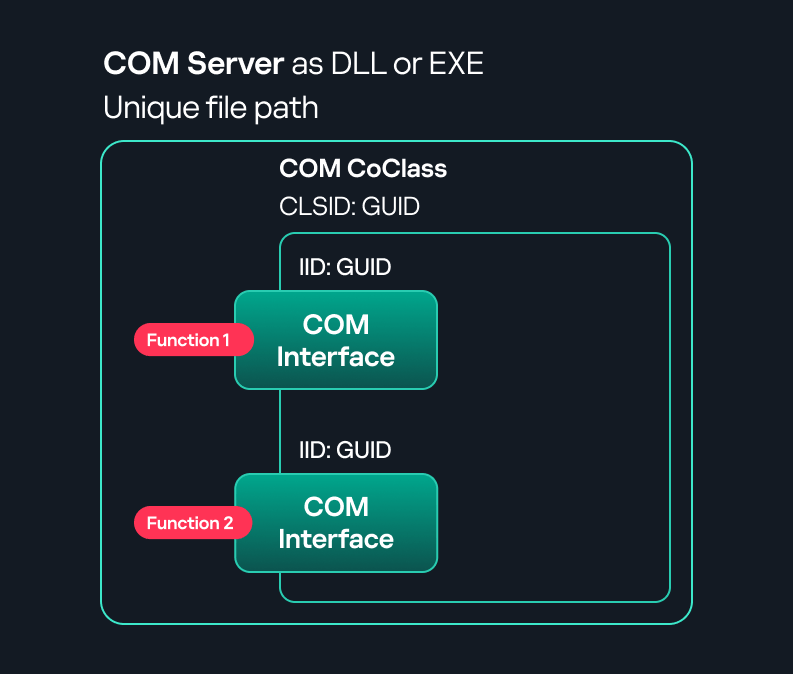
Component Object Model implementation

In-process COM server

Out-of-process COM server
DCOM is an extension of COM where the D stands for Distributed. It enables the client and server to reside on different machines. From the user’s perspective, there is no difference: DCOM provides an abstraction layer that makes both the client and the server appear as if they are on the same machine.
Under the hood, however, COM uses TCP as the RPC transport layer to enable communication across machines.

Distributed COM implementation
Certain requirements must be met to extend a COM object into a DCOM object. The most important one for our research is the presence of the AppID subkey in the registry, located under the COM CLSID entry.
The AppID value contains a GUID that maps to a corresponding key under HKEY_CLASSES_ROOT\AppID. Several subkeys may exist under this GUID. Two critical ones are:
These registry settings grant remote clients permissions to activate and interact with DCOM objects.
After attackers compromise a host, their next objective is often to compromise additional machines. This is what we call lateral movement. One common lateral movement technique is to achieve remote command execution on a target machine. There are many ways to do this, one of which involves abusing DCOM objects.
In recent years, many DCOM objects have been discovered. This research focuses on the objects exposed by the Impacket script dcomexec.py that can be used for command execution. More specifically, three exposed objects are used: ShellWindows, ShellBrowserWindow and MMC20.
In Impacket’s dcomexec.py, once an instance of this COM object is created on a remote machine, the script provides a semi-interactive shell.
Each time a user enters a command, the function exposed by the COM object is called. The command output is redirected to a file, which the script retrieves via SMB and displays back to simulate a regular shell.
Internally, the script runs this command when connecting:
cmd.exe /Q /c cd \ 1> \\127.0.0.1\ADMIN$\__17602 2>&1
This sets the working directory to C:\ and redirects the output to the ADMIN$ share under the filename __17602. After that, the script checks whether the file exists; if it does, execution is considered successful and the output appears as if in a shell.
When running dcomexec.py against Windows 10 and 11 using the ShellWindows object, the script hangs after confirming SMB connection initialization and printing the SMB banner. As I mentioned in my personal blog post, it appears that this DCOM object no longer has permission to write to the ADMIN$ share. A simple fix is to redirect the output to a directory the DCOM object can write to, such as the Temp folder. The Temp folder can then be accessed under the same ADMIN$ share. A small change in the code resolves the issue. For example:
OUTPUT_FILENAME = 'Temp\\__' + str(time.time())[:5]
This object has historically worked across all Windows versions. Starting with Windows Server 2025, however, attempting to use it triggers a Defender alert, and execution is blocked.
As shown in earlier examples, the dcomexec.py script writes the command output to a file under ADMIN$, with a filename that begins with __:
OUTPUT_FILENAME = '__' + str(time.time())[:5]
Defender appears to check for files written under ADMIN$ that start with __, and when it detects one, it blocks the process and alerts the user. A quick fix is to simply remove the double underscores from the output filename.
Another way to bypass this issue is to use the same workaround used for ShellWindows – redirecting the output to the Temp folder. The table below outlines the status of these objects across different Windows versions.
| Windows Server 2025 | Windows Server 2022 | Windows 11 | Windows 10 | |
| ShellWindows | Doesn’t work | Doesn’t work | Works but needs a fix | Works but needs a fix |
| ShellBrowserWindow | Doesn’t work | Doesn’t work | Doesn’t work | Works but needs a fix |
| MMC20 | Detected by Defender | Works | Works | Works |
The first step to identifying which DCOM objects could be used for lateral movement is to enumerate them. By enumerating, I don’t just mean listing the objects. Enumeration involves:
Automating enumeration is difficult because most COM objects lack a type library (TypeLib). A TypeLib acts as documentation for an object: which interfaces it supports, which functions are exposed, and the definitions of those functions. Even when TypeLibs are available, manual inspection is often still required, as we will explain later.
There are several approaches to enumerating COM objects depending on their use cases. Next, we’ll describe the methods I used while conducting this research, taking into account both automated and manual methods.

Shell.Application COM object function list in PowerShell
Under the hood, PowerShell checks whether the COM object has a TypeLib and implements the IDispatch interface. IDispatch enables late binding, which allows runtime dynamic object creation and function invocation. With these two conditions met, PowerShell can dynamically interact with COM objects at runtime.
Our strategy looks like this:

As you can see in the last box, we perform manual inspection to look for functions with names that could be of interest, such as Execute, Exec, Shell, etc. These names often indicate potential command execution capabilities.
However, this approach has several limitations:
This strategy primarily relies on an interface called IUnknown. All COM interfaces should inherit from this interface, and all COM classes should implement it.The IUnknown interface exposes three main functions. The most important is QueryInterface(), which is used to ask a COM object for a pointer to one of its interfaces.So, the strategy is to:
This method has several advantages:
The figure below illustrates this strategy:

This approach is good in terms of automation because it eliminates the need for manual inspection. However, we are still only checking well-known interfaces commonly used for lateral movement, while potentially missing others.
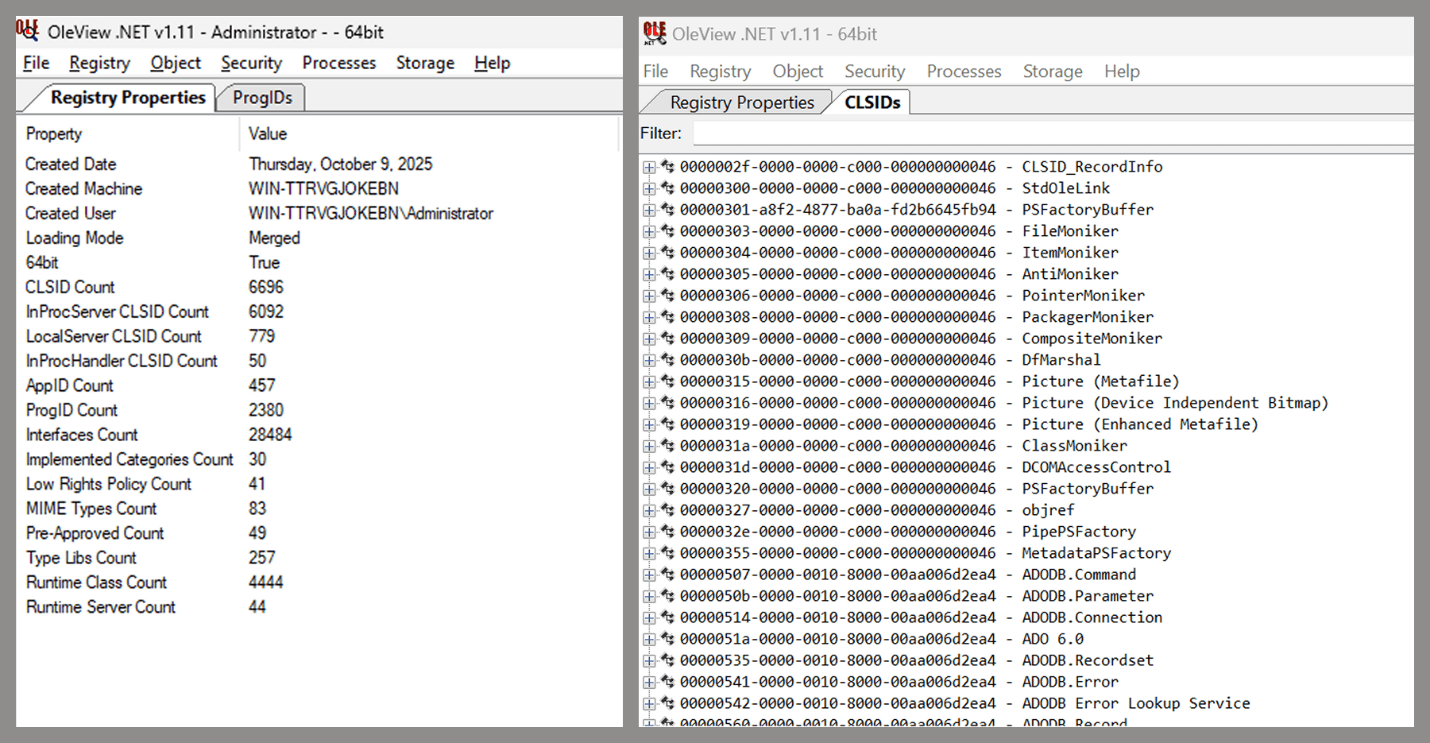
Open-source tool for inspecting COM interfaces
One of the most valuable features of this tool is its naming visibility. OleViewDotNet extracts the names of interfaces and classes (when available) from the Windows Registry and displays them, along with any associated type libraries.
This makes manual inspection easier, since you can analyze the names of classes, interfaces, or type libraries and correlate them with potentially interesting functionality, for example, functions that could lead to command execution or persistence techniques.
Control Panel items allow users to view and adjust their computer settings. These items are implemented as DLLs that export the CPlApplet function and typically have the .cpl extension. Control Panel items can also be executables, but our research will focus on DLLs only.

Control Panel items
Attackers can abuse CPL files for initial access. When a user executes a malicious .cpl file (e.g., delivered via phishing), the system may be compromised – a technique mapped to MITRE ATT&CK T1218.002.
Adversaries may also modify the extensions of malicious DLLs to .cpl and register them in the corresponding locations in the registry.
These locations are important when Control Panel DLLs need to be available to the current logged-in user or to all users on the machine. However, the “Control Panel” subkey and its “Cpls” subkey under HKCU should be created manually, unlike the “Control Panel” and “Cpls” subkeys under HKLM, which are created automatically by the operating system.
Once registered, the DLL (CPL file) will load every time the Control Panel is opened, enabling persistence on the victim’s system.
It’s worth noting that even DLLs that do not comply with the CPL specification, do not export CPlApplet, or do not have the .cpl extension can still be executed via their DllEntryPoint function if they are registered under the registry keys listed above.
There are multiple ways to execute Control Panel items:
control.exe [filename].cplBoth methods use rundll32.exe under the hood:
rundll32.exe shell32.dll,Control_RunDLL [filename].cpl
This calls the Control_RunDLL function from shell32.dll, passing the CPL file as an argument. Everything inside the CPlApplet function will then be executed.
However, if the CPL file has been registered in the registry as shown earlier, then every time the Control Panel is opened, the file is loaded into memory through the COM Surrogate process (dllhost.exe):

COM Surrogate process loading the CPL file
What happened was that a Control Panel with a COM client used a COM object to load these CPL files. We will talk about this COM object in more detail later.
The COM Surrogate process was designed to host COM server DLLs in a separate process rather than loading them directly into the client process’s address space. This isolation improves stability for the in-process server model. This hosting behavior can be configured for a COM object in the registry if you want a COM server DLL to run inside a separate process because, by default, it is loaded in the same process.
While following the manual approach of enumerating COM/DCOM objects that could be useful for lateral movement, I came across a COM object called COpenControlPanel, which is exposed through shell32.dll and has the CLSID {06622D85-6856-4460-8DE1-A81921B41C4B}. This object exposes multiple interfaces, one of which is IOpenControlPanel with IID {D11AD862-66DE-4DF4-BF6C-1F5621996AF1}.
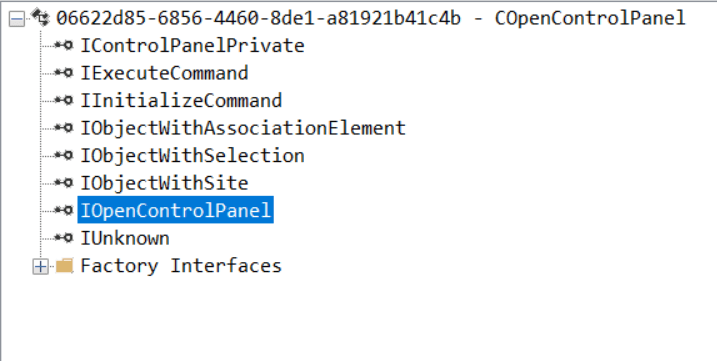
IOpenControlPanel interface in the OleViewDotNet output
I immediately thought of its potential to compromise Control Panel items, so I wanted to check which functions were exposed by this interface. Unfortunately, neither the interface nor the COM class has a type library.
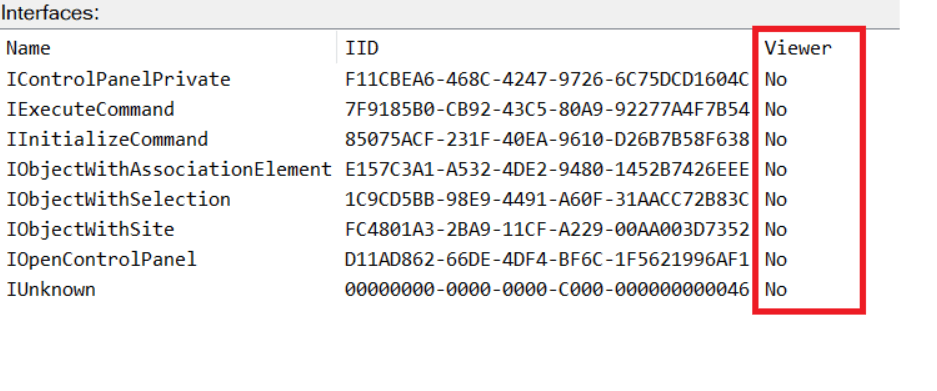
COpenControlPanel interfaces without TypeLib
Normally, checking the interface definition would require reverse engineering, so at first, it looked like we needed to take a different research path. However, it turned out that the IOpenControlPanel interface is documented on MSDN, and according to the documentation, it exposes several functions. One of them, called Open, allows a specified Control Panel item to be opened using its name as the first argument.
Full type and function definitions are provided in the shobjidl_core.h Windows header file.
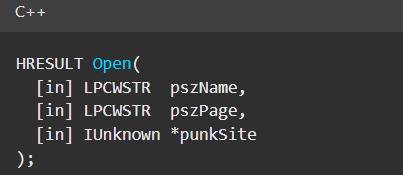
Open function exposed by IOpenControlPanel interface
It’s worth noting that in newer versions of Windows (e.g., Windows Server 2025 and Windows 11), Microsoft has removed interface names from the registry, which means they can no longer be identified through OleViewDotNet.
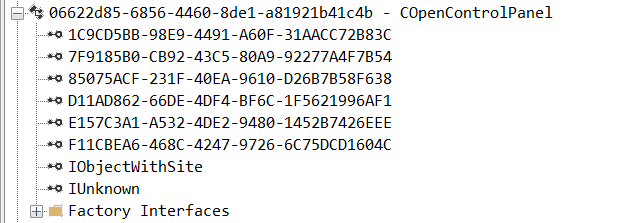
COpenControlPanel interfaces without names
Returning to the COpenControlPanel COM object, I found that the Open function can trigger a DLL to be loaded into memory if it has been registered in the registry. For the purposes of this research, I created a DLL that basically just spawns a message box which is defined under the DllEntryPoint function. I registered it under HKCU\Software\Microsoft\Windows\CurrentVersion\Control Panel\Cpls and then created a simple C++ COM client to call the Open function on this interface.
As expected, the DLL was loaded into memory. It was hosted in the same way that it would be if the Control Panel itself was opened: through the COM Surrogate process (dllhost.exe). Using Process Explorer, it was clear that dllhost.exe loaded my DLL while simultaneously hosting the COpenControlPanel object along with other COM objects.
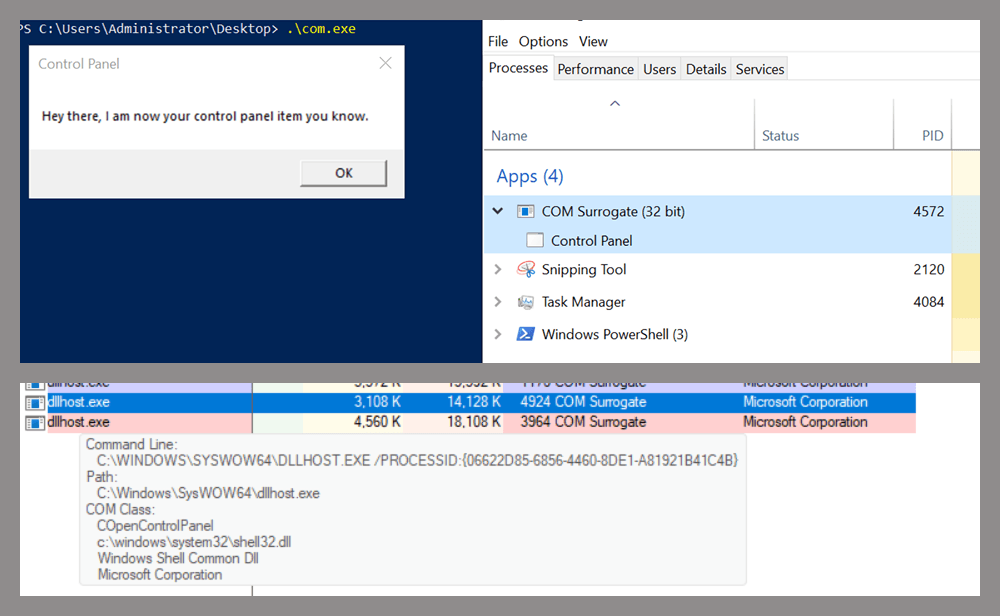
COM Surrogate loading a custom DLL and hosting the COpenControlPanel object
Based on my testing, I made the following observations:
Now, what if we could trigger this COM object remotely? In other words, what if it is not just a COM object but also a DCOM object? To verify this, we checked the AppID of the COpenControlPanel object using OleViewDotNet.
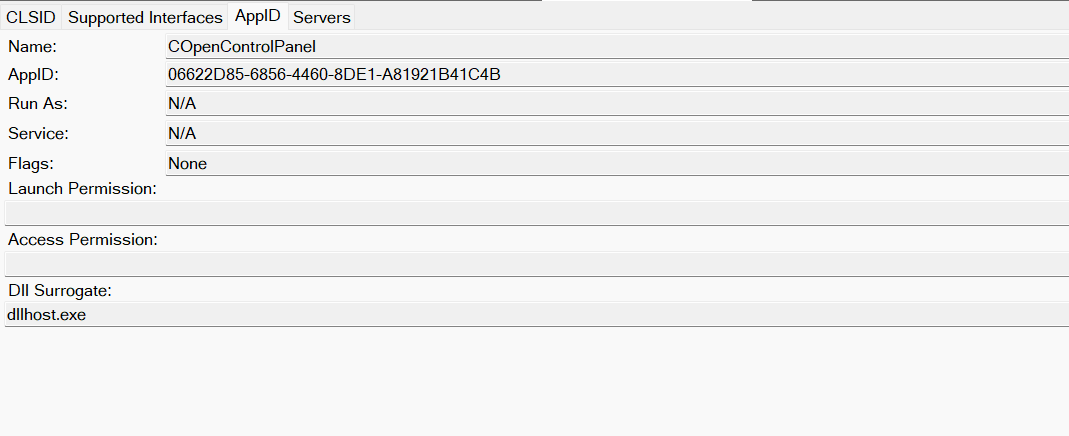
COpenControlPanel object in OleViewDotNet
Both the launch and access permissions are empty, which means the object will follow the system’s default DCOM security policy. By default, members of the Administrators group are allowed to launch and access the DCOM object.
Based on this, we can build a remote strategy. First, upload the “malicious” DLL, then use the Remote Registry service to register it in the appropriate registry location. Finally, use a trigger acting as a DCOM client to remotely invoke the Open() function, causing our DLL to be loaded. The diagram below illustrates the flow of this approach.
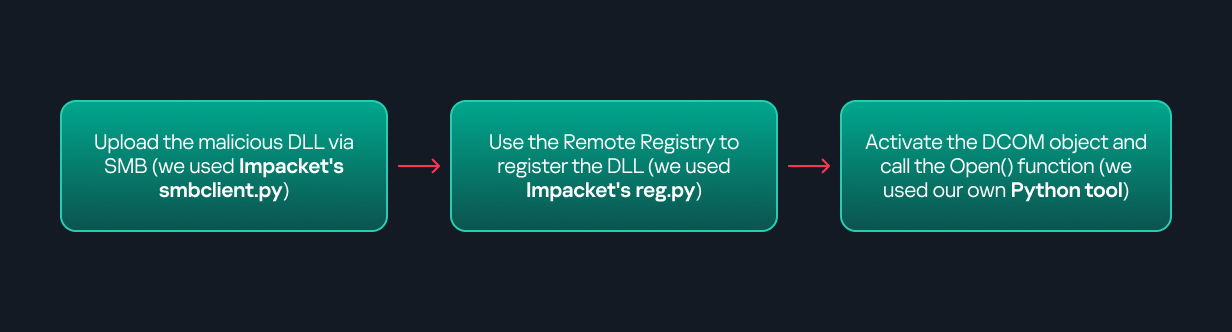
Malicious DLL loading using DCOM
The trigger can be written in either C++ or Python, for example, using Impacket. I chose Python because of its flexibility. The trigger itself is straightforward: we define the DCOM class, the interface, and the function to call. The full code example can be found here.
Once the trigger runs, the behavior will be the same as when executing the COM client locally: our DLL will be loaded through the COM Surrogate process (dllhost.exe).
As you can see, this technique not only achieves command execution but also provides persistence. It can be triggered in two ways: when a user opens the Control Panel or remotely at any time via DCOM.
The first step in detecting such activity is to check whether any Control Panel items have been registered under the following registry paths:
Although commonly known best practices and research papers regarding Windows security advise monitoring only the first subkey, for thorough coverage it is important to monitor all of the above.
In addition, monitoring dllhost.exe (COM Surrogate) for unusual COM objects such as COpenControlPanel can provide indicators of malicious activity.
Finally, it is always recommended to monitor Remote Registry usage because it is commonly abused in many types of attacks, not just in this scenario.
In conclusion, I hope this research has clarified yet another attack vector and emphasized the importance of implementing hardening practices. Below are a few closing points for security researchers to take into account:
If 2025 proved anything, it’s that no one wins alone in cybersecurity. AI-driven threats accelerated, and environments grew more complex while enterprises pushed hard for simplicity, integrated protection and security outcomes that deliver measurable results and meaningful value.
In response, we saw our partners around the globe lean into integration, treat AI as a built-in advantage and use the strength of our ecosystem as a force multiplier. The result: What could have been a disruptive year instead became one defined by growth and learning across our partner community.
Now, those lessons are guiding how Palo Alto Networks plans to partner with even greater precision in 2026. We remain a channel-first company that’s all-in on our ecosystem and united with our partners in a shared purpose to protect our customers’ digital future. But we also intend to double down in several areas in the year ahead, and we’re asking our partners to join us in doing the same.
One message from customers that came through loud and clear in 2025 is that complexity is the enemy of resilience. Many enterprises are grappling with tool sprawl – multiple consoles, disconnected policies and overlapping investments that slow down their teams when speed and agility matter most.
The partners who delivered some of the most transformative results for organizations this year were those who chose integration over complexity and collaboration over siloed tools. With a laser focus on simplifying security, they were able to help customers:
We saw this simplifying-security trend through integration across our ecosystem. Partners unified cloud security and detection workflows through Cortex® Cloud™ and Cortex. Teams modernized network architectures with tighter integration across our platform. We expect this activity to only accelerate in the coming year as our cloud security offerings continue to evolve.
When we innovate together, customers gain stronger defenses and a faster time-to-value. That’s why Palo Alto Networks has invested so heavily in platformization. When you connect our capabilities across network security, cloud security and security operations (wrapping them with your consulting, delivery and managed services) customers can experience something fundamentally better. With fewer gaps and clearer signals, they can build a security posture that’s built for the speed of modern threats.
In 2026, deep integration will remain a cornerstone of how we partner with precision. We’ll continue aligning our portfolio, programs and joint engagement model, so you can build offerings that reduce complexity for customers and create stronger differentiation for your business.
At Palo Alto Networks, our approach to AI in cybersecurity is straightforward. We believe AI must be embedded, not bolted on. It has to live in the data, analytics and workflows your teams rely on every day. That’s the thinking behind Precision AI®, and it’s why we built AI capabilities into our platform’s core.
Partners who treated AI as a platform capability rather than a standalone tool delivered some of the strongest outcomes for customers in 2025. They were able to meet customers’ needs and deliver business outcomes in a single, unified approach. They helped organizations:
In 2026, we’ll double down on AI across the platform and invest in the tools, content and enablement you need to bring those capabilities to life. Our focus is on making it easier for you to build AI-powered services that are repeatable and aligned to the outcomes customers expect.
Upcoming program changes reflect that intent. We’ll promote next-generation security as a growth engine and invest in ways that strengthen partner profitability across consulting services, resale, quality delivery, technical support and managed security services.
As AI raised the bar for both attackers and defenders in 2025, the partners who leaned into platformization and outcome-driven services were the ones who helped customers stay ahead of the curve. Those successes are now shaping how we strengthen and scale the partner ecosystem in 2026.
Our ecosystem isn’t just a route to market; it’s intended to be an economic engine for everyone involved. This year, many partners grew their business by building practices around our platform and aligning their services with where customers needed the most support: strategy, implementation, optimization, ongoing operations. We saw especially strong momentum from partners’ expansions:
These achievements reflect the value exchange at the heart of our ecosystem. Palo Alto Networks invests in platformization, AI and enablement, while our partners bring delivery expertise, regional insight and service innovation. Together, we create outcomes neither of us could deliver alone.
In 2026, we plan to build on that momentum and drive even greater partner profitability. Program evolutions will focus on growth across the full lifecycle, from initial design and implementation to long-term operation and optimization. We’re also expanding collaboration with our technology alliances to build new joint offerings and solution plays that the ecosystem can take to market together.
When we combine our platform, your expertise and the capabilities of our Alliance partners, then customers gain more paths to adopt next-generation security with confidence, and you gain more opportunities to develop differentiated, high-value practices.
At the heart of every partner collaboration is the customer, of course. Everything we build, integrate and advance together starts and ends with protecting them. This year, ecosystem alignment delivered measurable impact for our customers across industries. When partners lead with integrated solutions anchored in our platform, organizations saw visible improvements:
We saw this firsthand in joint wins across cloud security transformations, zero trust modernization and AI-assisted threat detection. When our ecosystem moves together, customers can move faster, operate more securely and achieve meaningful outcomes. Customer success is the foundation of everything we do as a partner-led organization, and it will remain our North Star in 2026.
What we learned and achieved together in 2025 points us toward a clear focus for 2026 to advance ecosystem-led innovation, so we can deliver outcomes that matter most to our customers.
With that mission in mind, we will focus on the following four priorities:
These priorities highlight the real strength of our ecosystem: How platformization, AI and partner expertise come together to enable what we could not build alone.
Finally, to our partners and customers, thank you. Your trust, collaboration and commitment push us to innovate boldly and continuously. As we enter the new year, I’m excited about what we’ll build together. When we align our AI-powered platform, our partner programs and your expertise in delivery, services and managed security, we can deliver something far greater than a set of solutions.
We’re a powerful team that’s not just defending against what’s next; we’re defining the future of cybersecurity. And together, we’re unstoppable.
Partners, join us in shaping the next chapter of secure, AI-powered innovations. Connect with your Channel Business Manager to align on 2026 opportunities, upcoming program updates and ways we can elevate customer outcomes together. Visit the partner portal to learn more.
The post Partnering with Precision in 2026 appeared first on Palo Alto Networks Blog.
Cyber hygiene is just as vital as personal hygiene. Unit 42 shares tips for people of all experience levels to keep their digital lives secure.
The post Stay Secure: Why Cyber Hygiene Should Be Part of Your Personal Hygiene appeared first on Unit 42.

Admit it: you’ve been meaning to jump on the latest NFT reincarnation — Telegram Gifts — but just haven’t gotten around to it. It’s the hottest trend right now. Developers are churning out collectible images in partnership with celebs like Snoop Dogg. All your friends’ profiles are already decked out with these modish pictures, and you’re dying to hop on this hype train — but pay as little as possible for it.
And then it happens — a stranger messages you privately with a generous offer: a chance to snag a couple of these digital gifts — with no investment required. A bot that looks completely legit is running an airdrop. In the world of NFTs, an airdrop is a promotional stunt where a small number of new crypto assets are given away for free. The buzzword has been adopted on Telegram, thanks to the crypto nature of these gifts and the NFT mechanics running under the hood.

Limited time offer: a marketer’s favorite trick… and a scammer’s tool
They’re offering you these gift images for free — or so they say. You could later attach them to your profile or sell them for Telegram’s native currency, Toncoin. You don’t even have to tap an external link. Just hit a button in the message, launch a Mini App right inside Telegram itself, and enter your login credentials. And then… your account immediately gets hijacked. You won’t get any gifts, and overall, you’ll be left with anything but a celebratory feeling.

This is the first of the screens where, by filling in the fields, you receive a gift lose access to your Telegram account
Today, we break down a phishing scheme that exploits Telegram’s built-in Mini Apps, and share tips to help you avoid falling for these attacks.
The principle of classic phishing is straightforward: the user gets a link to a fake website that mimics a legitimate sign-in form. When the victim enters their credentials, this data goes straight to the scammer. However, phishing tactics are constantly evolving, and this new attack method is far more insidious.
The bad actors create phishing Mini Apps directly inside Telegram. These appear as standard web pages but are embedded within the messaging app’s interface instead of opening in an external browser. To the user, these apps look completely legitimate. After all, they run within the official Telegram app itself.

To make it even more convincing, scammers often add a plausible-sounding limit on gifts per user
This leads the victim to think, “If this app runs inside Telegram, there must be some kind of vetting process for these apps. Surely they wouldn’t let an obvious scam through?” In practice, it turns out that’s not the case at all.
A core security issue with Telegram Mini Apps is that the platform does almost no vetting before an app goes live. This is a world apart from the strict review processes used by Google Play and the App Store — although even there, obvious malware occasionally slips through.
On Telegram, it’s far easier for bad actors. Essentially, anyone who wishes to create and launch a Mini App can do so. Telegram does not review the code, functionality, or the developer’s intent. This turns a security flaw within a messaging service boasting nearly a billion global users into a global-scale problem. To make matters worse, moderation of these Mini Apps within Telegram is entirely reactive — meaning action is only taken after users start complaining or law enforcement gets involved.

This is a global operation, with phishing lures being distributed simultaneously in both Russian and English. However, the Russian version gives away a tell-tale sign of the scammers’ haste and lack of polish. They forgot to remove a clarification question from the AI that generated the text: “Do you need bolder, more official, or humorous options?”
In this case, the bait was “gifts” from UFC fighters: a giveaway of “papakhas” — digital gift images of the traditional Dagestani hat released by Telegram in partnership with Khabib Nurmagomedov. An auction for these items did take place, with Pavel Durov even posting about it on his X and Telegram (Khabib reposted these announcements but later deleted them after the auction ended). However, there were only 29 000 of these “papakhas” released, which wasn’t enough to satisfy all the eager fans. Scammers seized on the opportunity, assuring fans they could get the exclusive items for free. The phishing campaign was a targeted one — focusing on users who’d been active on the athlete’s channel.
The criminals leveraged the name of the popular Portals platform — a legitimate service for games, apps, and entertainment within Telegram. They created a series of Mini Apps that were visually almost indistinguishable from the real ones, and promoted them as free giveaways — airdrops.

To add a veneer of authenticity, the scammers even listed the official Telegram channel for Portals in the phishing Mini App’s profile. However, the legitimate Portals Market bot has a different username: @portals
That said, the scam campaigns themselves show signs of being rushed and cutting design and copywriting costs — with obvious signs of AI involvement. Some of the messages contain leftover text fragments clearly generated by a neural network, which the scammers either forgot or couldn’t be bothered to edit.
The golden security rules are simple: stay vigilant, and learn the key hallmarks of these attacks:
The key is keeping calm and acting swiftly. You have just 24 hours to reclaim your account, or you risk losing it permanently. Follow the step-by-step guide to restoring access in our post What to do if your Telegram account is hacked.
Finally, a reminder that has become our classic mantra: if an offer looks too good to be true, it almost certainly is. Always verify information through official channels, and never enter your passwords or passkeys into unofficial apps or forms — even if they look legit. Stay vigilant and stay safe.
Want more tips on securing your messenger accounts and chats? Check out our related posts:
The attack surface for today’s enterprises is incredibly heterogeneous and dynamic. Applications and data are in constant motion, spanning public clouds, private data centers and edge locations. Users connect from anywhere.
For security leaders, this environment has led to an explosion in not only operational complexity, but in many cases, uncertainty. Together, Nutanix and Palo Alto Networks enable security to finally match the speed and scale of these dynamic hybrid cloud environments.
The security ecosystem has become vast and complex. Point solutions accumulate to address specific gaps, yet each adds another interface, another policy language and another integration to manage. However well intentioned, this sprawl can lead directly to fractured visibility, overlapping tools and operational fatigue.
Enterprises today face unprecedented security complexity as hybrid and multicloud environments become the new normal. Currently, 94% of enterprises use some form of cloud service, while 89% report having a multicloud strategy in place. This distributed reality means security is paramount: while managing cloud spending is the number one operational challenge (82% overall), security remains a major concern, affecting 79% of all organizations.
Hybrid cloud adoption offers agility, but it also introduces distinct security challenges that strain traditional approaches. Adversaries have taken notice. Hybrid and multicloud environments are prime targets because they connect sensitive data, privileged accounts and critical systems across public, and on-premises infrastructure. Perimeter-based security models, built for static networks and centralized data centers, cannot keep pace in a world where apps and data continuously move between platforms.
Defense-in-depth has become essential for addressing the inherent dynamism of today’s environments. Network visibility is required to monitor and contain east-west traffic and lateral movement of threats inside cloud environments. Identity controls must verify every user, device and interaction across a distributed workforce. Data protection must follow sensitive information as it traverses multiple clouds, data centers and edge locations.
Yet managing these protections as distinct layers is no longer viable. Each cloud provider introduces its own native security controls. Each additional tool adds another interface and another policy set to maintain. Defense-in-depth only achieves its purpose when its layers are fully unified, providing consistent control enforcement from the edge to the core, comprehensive visibility across traffic, and essential data protections for all workloads, wherever they reside.
Hybrid environments span public clouds, private infrastructure, SaaS ecosystems and legacy on-premises systems. No single vendor can realistically cover that entire landscape, and forcing security into a single closed ecosystem risks creating gaps where those environments meet.
The answer lies in an open ecosystem approach that allows organizations to assemble best-of-breed capabilities rather than being locked into a single provider’s stack.
This flexibility empowers security teams to adapt to the unique requirements of each environment while still operating through a unified security model. Policies can be applied consistently, intelligence can be shared across layers, and protections can move in step with workloads, regardless of platform. In short, this model can effectively support freedom of choice while relieving the operational burden of managing hybrid and multicloud security.
Open ecosystems solve the problem of choice. What remains is the challenge of bringing those best-of-breed capabilities together into a solution that is coherent and scalable.
To transform defense-in-depth from a conceptual framework into a practical system aligned to the realities of hybrid and multicloud deployments, this unified layer should be built on core capabilities:
With these core capabilities, security can finally catch up to the fluidity promised by hybrid cloud operating models.
Explore how Palo Alto Networks and Nutanix, work together to make this unified vision a reality, including joint offerings, like Palo Alto Networks secured Nutanix clusters with VM-Series Firewalls for AWS® and Microsoft® Azure.
The post Untangling Hybrid Cloud Security appeared first on Palo Alto Networks Blog.