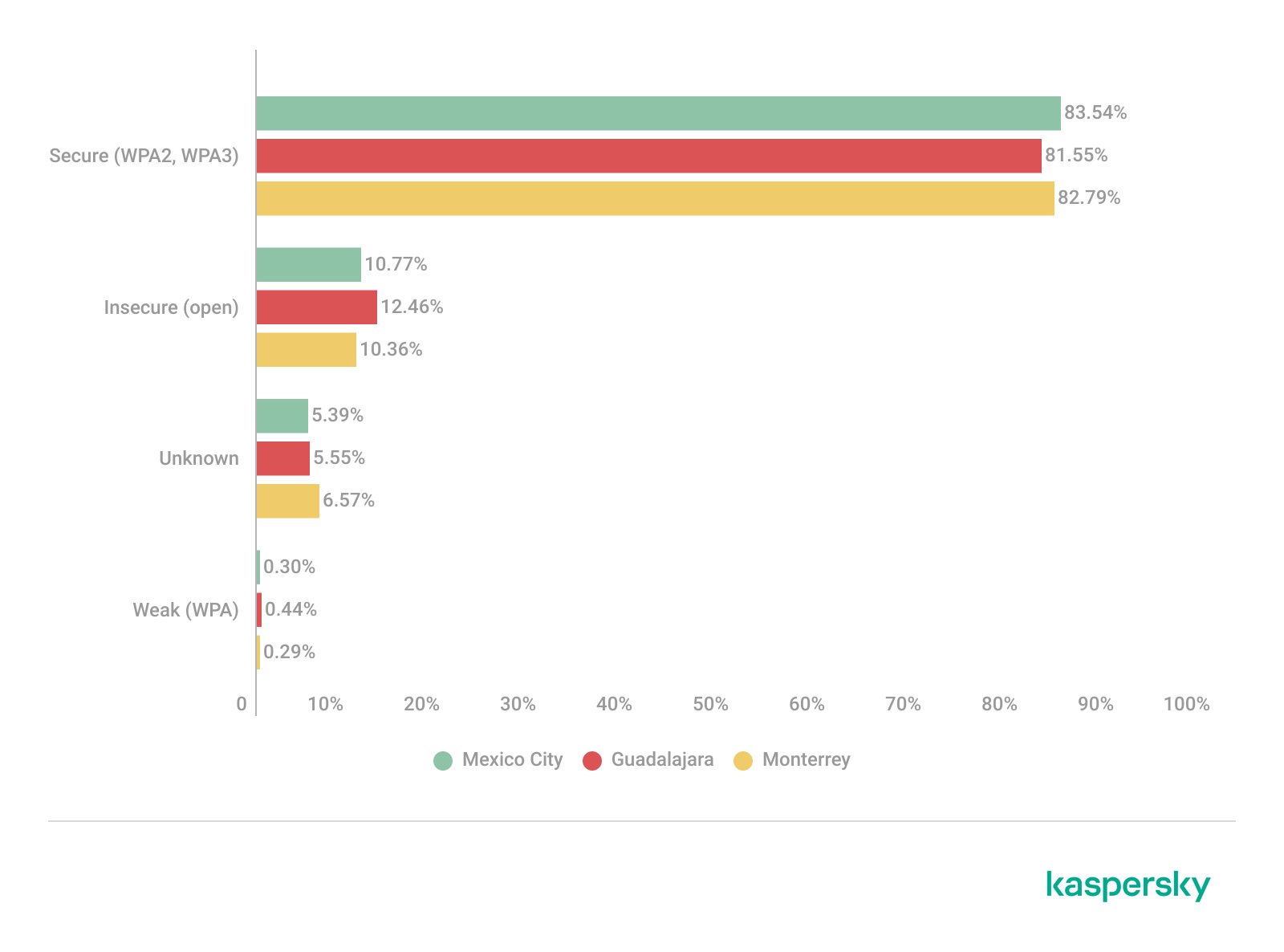
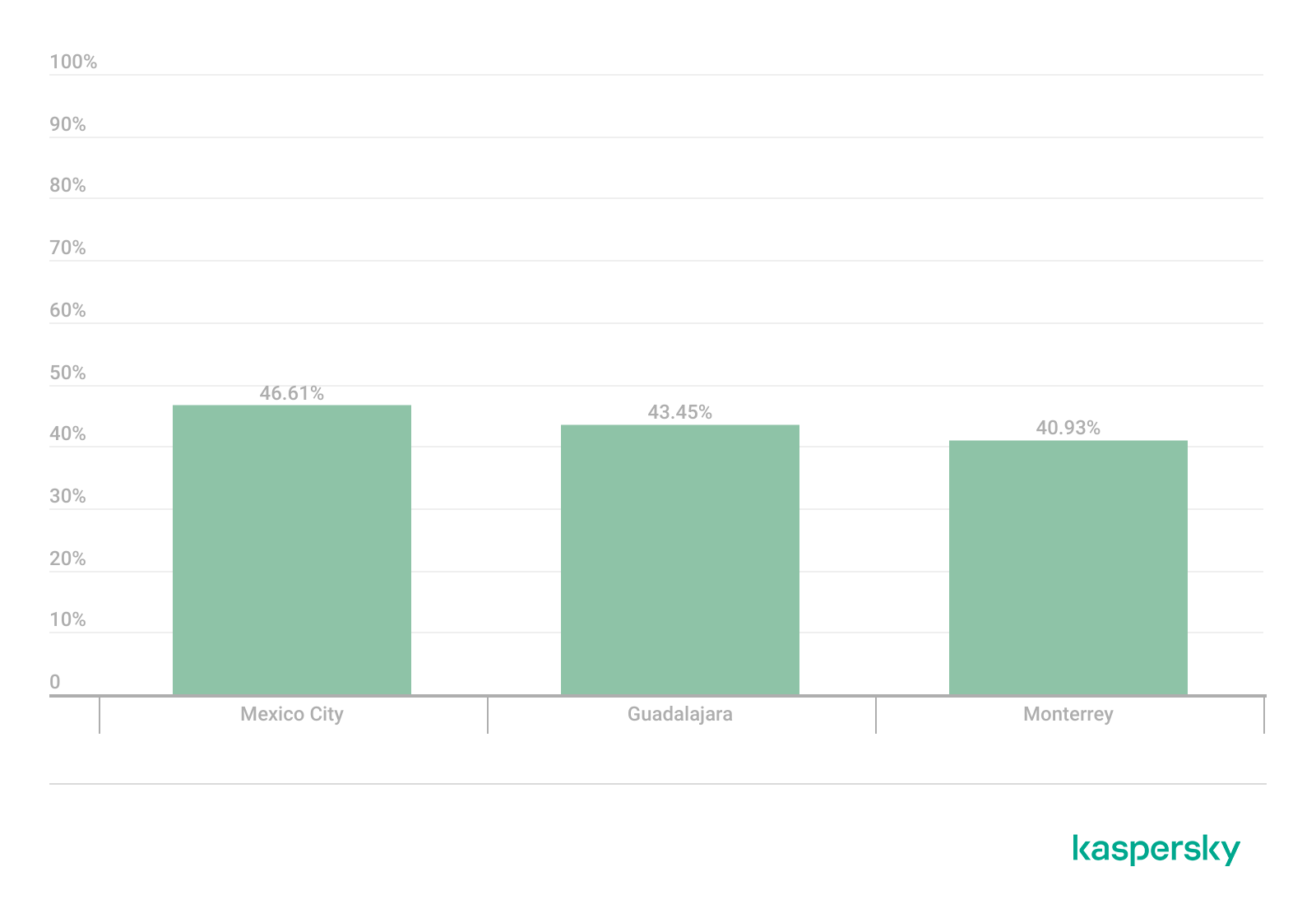
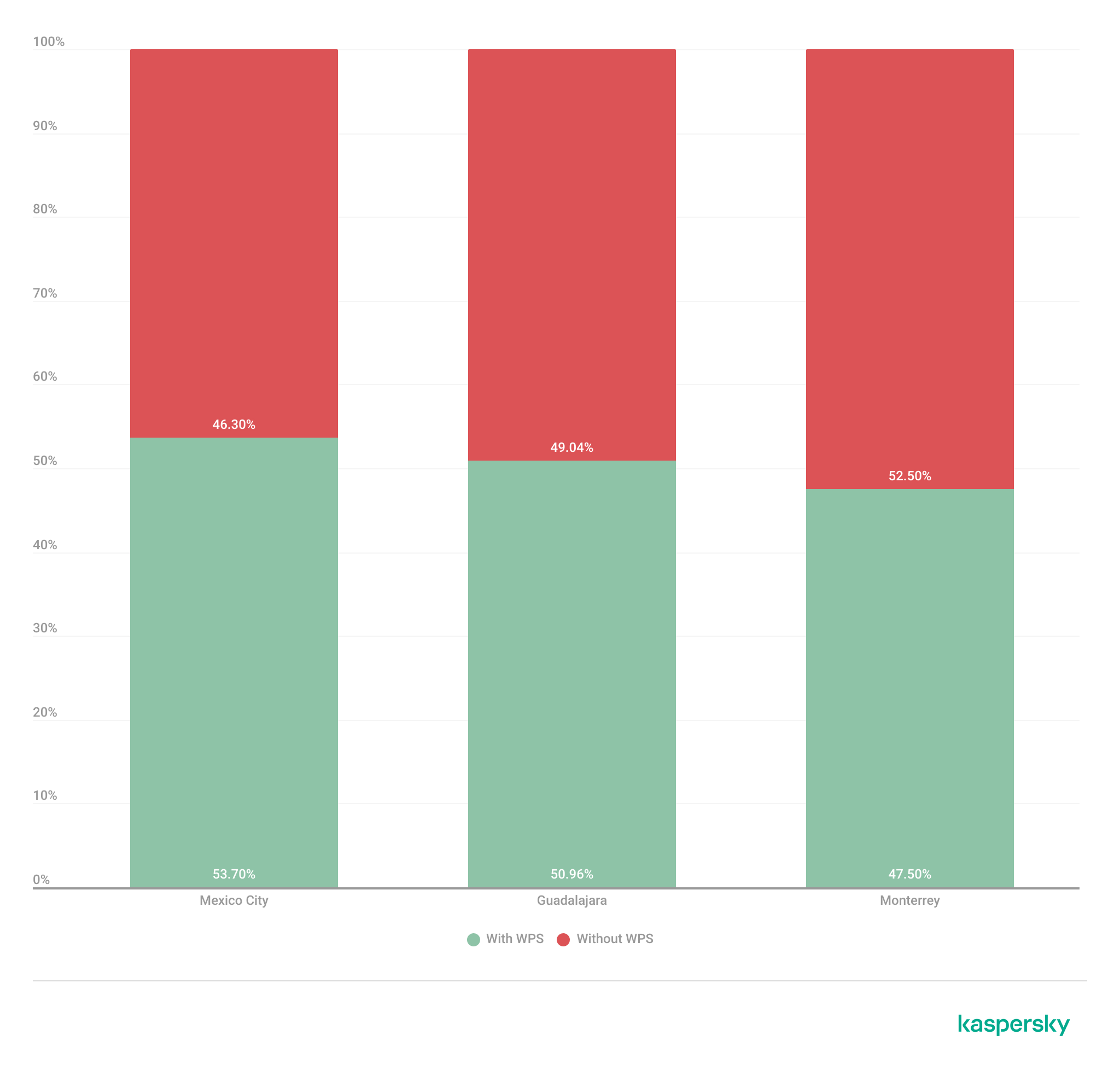
Late October brought several unsettling cybersecurity stories all at once. Among these were two critical vulnerabilities in PHP, which potentially affected about 70% of websites worldwide. CVE-2026-109618 and CVE-2026-109619 — dubbed PHP2Shell — could let attackers execute code on a server remotely, without authentication.
On October 21, PHP’s developers released emergency patches for the supported PHP 8.2–8.5 branches and for the unsupported PHP 7.4, 8.0, and 8.1. Experts predicted that attacks on vulnerable servers would start within 15 minutes of the updates going public. Amazon even reported exploitation attempts four days before the patches came out. With all this in the news, some organizations sounded the alarm early. For example, in several countries, government service websites were taken offline as a precaution. Even Wikipedia’s project management and bug-tracking system suspended service.
Nearly two weeks have passed since the updates came out, but according to Censys data, of the 46 million scannable servers running a vulnerable PHP version, 29 million still contain the flaws. Right after the patches were published, we broke down each flaw in detail and explained what companies and everyday users should do. In this post we cover what’s known about the threat today, and what extra steps businesses need to take.
What happened after the PHP2Shell patches
The news about critical PHP vulnerabilities set off a flurry of reactions. Researchers noted a large number of exploitation attempts, and fresh exploits kept appearing in batches — courtesy of AI. A Palo Alto Networks unit even reported a PHP2Shell attack on a government agency in Europe, though it later retracted that statement. Solid evidence of how these vulnerabilities can actually be exploited only emerged later. On top of that, a third, unpatched one turned up.
A vulnerability with no patch
On Friday, October 23, the PHP team warned about a new vulnerability — CVE-2026-115560 — which can be used for remote code execution. But attackers can only pull this off on systems with an “unusual combination of configuration and application code”. That configuration is so exotic that the developers decided against an emergency patch, and will close the vulnerability on the regular schedule. In the meantime, they advised users to disable the session.upload_progress.enabled INI option.
First signs of PHP flaws being exploited
Let’s get back to the more serious threats. The most substantial confirmation of PHP2Shell exploitation in real-world attacks only came on October 24. Honeypot servers run by Adel Karimi of Perplexity running PHP 8.4.26 and presenting ordinary web pages recorded successful attacks from two IP addresses. The observed exploit chain was consistent with CVE-2026-109618. There’s an important caveat, though: the researcher’s honeypot ran the Apache mod_php module, which is the configuration most convenient for attackers.
Later, on October 26, the U.S. Cybersecurity and Infrastructure Security Agency (CISA) added both CVE-2026-109618 and CVE-2026-109619 to its Known Exploited Vulnerabilities (KEV) catalog. That confirmed the threat isn’t just theoretical.
Real-world breaches with PHP2Shell
On October 26, the technology company Dream reported that 25 firewalls and management servers had been compromised in the U.S., Japan, Taiwan, and South Korea. Three of them were in an environment presumed to be linked to U.S. government agencies. The attackers combined PHP2Shell with a Linux kernel vulnerability dubbed Fragnesia (CVE-2026-46300). Upon gaining full administrative control, they were able to extract the password of an LDAP service account and steal the listing of users and groups, full network configuration, and private keys.
Dream initially didn’t name the device vendor. In its October 29 update, though, the company stated that the systems were Palo Alto Networks devices running certain versions of PAN-OS. The vendor confirmed attacks on management interfaces exposed to the internet. It urged customers to close public access to those interfaces, limit it to trusted internal IP addresses, and install patches.
Why there are so few incidents
Exploits are multiplying, but no wave of breaches has materialized, and the possibility of mass compromise of PHP servers remains unconfirmed. Even in the Palo Alto case, the scale of the attack was minimal: out of about 19 000 devices found, the attackers picked just 240, which were running software versions their exploit could handle.
As it turns out, the existing PHP2Shell exploits aren’t one-size-fits-all. To exploit the vulnerabilities in a given environment, attackers have to account for the exact PHP build, memory settings, request handling, and application specifics. Still, the danger remains, so don’t neglect protective measures.
How to stay safe
The key advice stays the same: update. You can find the latest versions of the language on the PHP website. But installing patches isn’t enough. You also need to run a thorough audit of your systems and check every component that runs on PHP for signs of compromise.
Why install the second round of PHP updates?
Five days after releasing the emergency patches, the PHP developers published another round of fixes. The reason is that the updates that fixed PHP2Shell didn’t cover the CVE-2026-111497 vulnerability in Brotli, a third-party library. Exploiting this flaw can lead to code execution when PHP processes a specially crafted compressed response from an external server. The builds from October 25 include a patched version of the library. The latest PHP versions are 8.2.35-1, 8.3.36-1, 8.4.27-1, and 8.5.12-1. The first attack exploiting this vulnerability was recorded on October 26, so don’t put off installing the updates.
Threat detection
Possible signs of a PHP2Shell compromise include unusual POST requests that contain multipart/form-data media type, suspicious combinations of PHP_SESSION_UPLOAD_PROGRESS and upload parameters, atypical request sizes and request bursts, and HTTP 500 errors accompanied by PHP out-of-memory messages.
Kaspersky solutions can help you spot the threat at different stages of an attack.
Kaspersky NEXT EDR Expert promptly alerts you to suspicious activity running in the context of Linux and Windows web servers.
AI agents and associated tooling are becoming increasingly common in corporate infrastructure. Agents can perform a range of actions with the user’s privileges, such as accessing data, running commands, and interacting with external services. This creates new security risks, especially when these tools are used without the security team’s oversight or well-designed policies.
Detecting, tracking, and controlling AI agents is becoming one of the most pressing tasks for security teams today. We closely follow technological developments and continuously update our solutions to respond to new threats in a timely manner amid a rapidly changing technology landscape. This post describes new expertise built into Kaspersky products that helps counter the threats posed by the proliferation of AI agents. We approach this problem from several angles.
First, you need to thoroughly understand the threat you are dealing with. To this end, we added profiles to the Kaspersky Threat Intelligence Portal that describe various AI agents and how attackers exploit them. At their core, AI agents are programs (processes) that run in the operating system on endpoints and can also launch other processes. This means that Endpoint Detection and Response solutions are among the key endpoint controls for this threat. These solutions detect the presence and launch of AI agents, track their activity, and identify potentially dangerous behavior. When needed, they also take action, such as stopping a suspicious process, blocking the activity, or isolating the host, to reduce the likelihood of an incident escalating. For this purpose, we developed specially adapted detection rules.
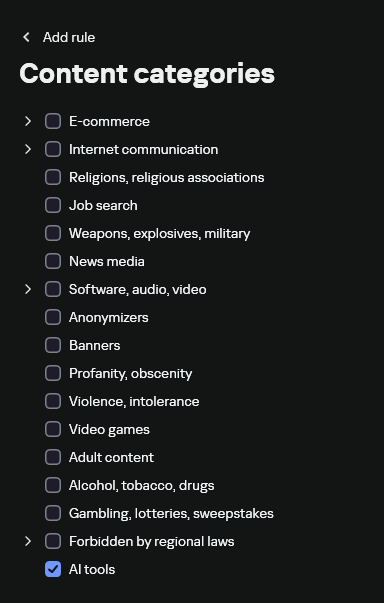
You can use Kaspersky Endpoint Security, now also available as Kaspersky Next, to control and restrict the launch of AI agents. This solution uses two components to detect AI agents and control how they are used. Application Control categorizes the application processes launched on endpoints, and Web Control manages access to specific categories of web resources for users on endpoints.
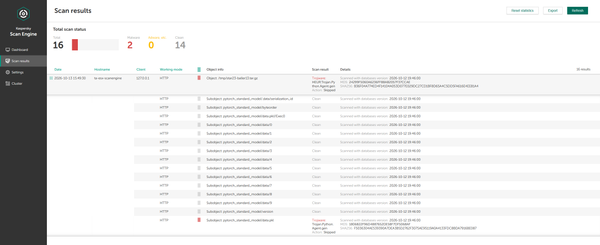
Finally, even harmless AI agents can contain malicious instructions (skills), such as those downloaded from unsafe external sources. Kaspersky Scan Engine analyzes installed applications to detect these threats and also checks LLM files for malicious code. Let’s take a closer look at these solutions and technologies.
Popular AI applications and services in organizations
Tools from Anthropic and OpenAI take the top spots in the September 2026 ranking of AI agents by popularity among Kaspersky users. This list is based on telemetry from Kaspersky solutions. It shows the number of users who had the relevant AI vendors’ products installed at the time of the study.
#
AI product
1
Claude
2
Claude Code
3
Codex
4
OpenCode
5
Zed
6
Wispr Flow
7
LM Studio
8
ZCode
9
Chatbox
10
Cherry Studio
The data shows that agentic systems, especially AI agents for software development, are the most popular AI applications. The TOP 10 also includes an application for running large language models locally (LM Studio) and a voice note-taking app (Wispr Flow).
According to open sources, these are the most widely used AI services in 2026:
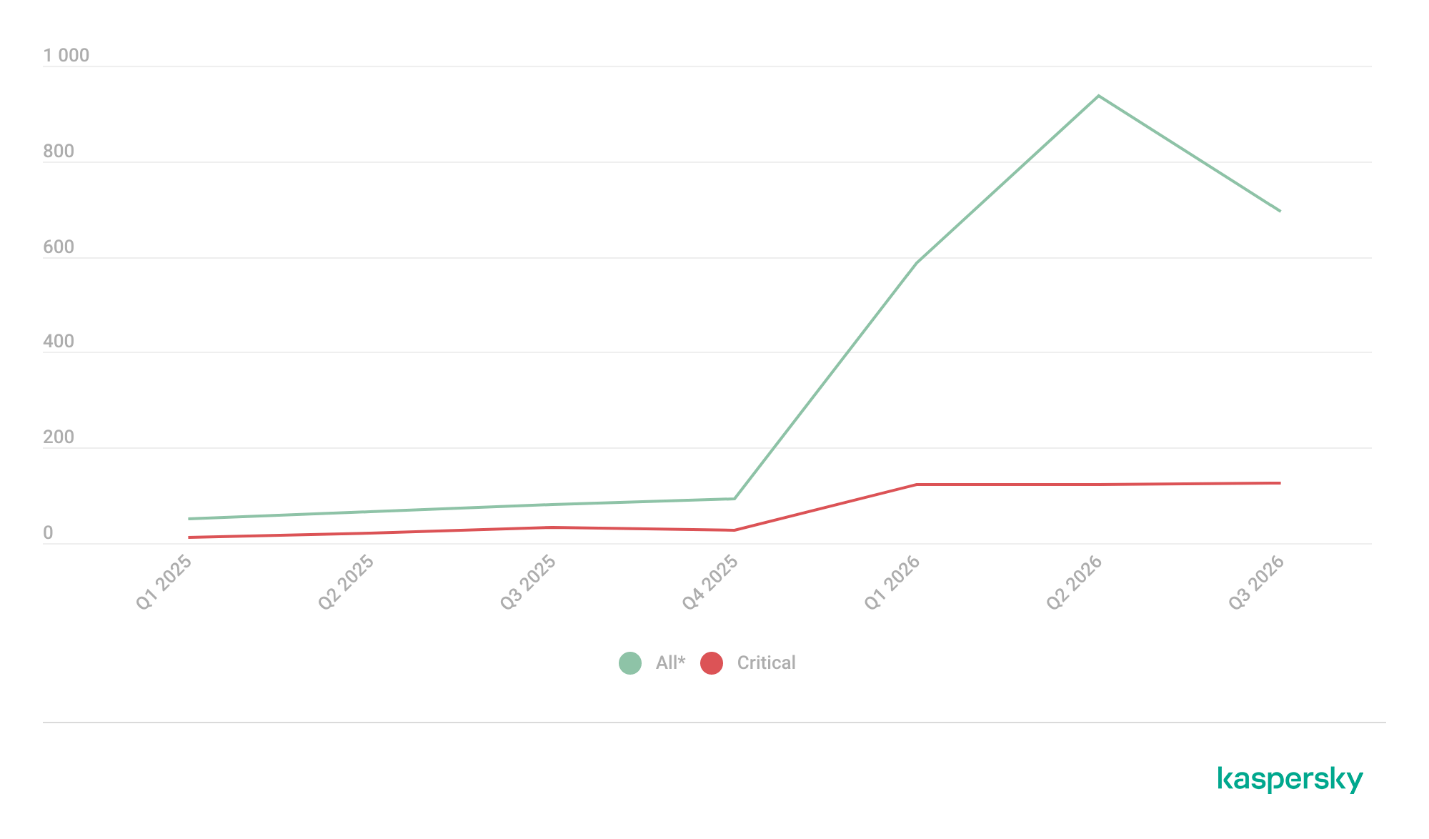
Number of published vulnerabilities in LLMs, AI tools, and plugins with similar functionality, 2025–2026 (download)
* Data for previous quarters was updated and may differ slightly from previously published data.
Application Control and Web Control
To enforce the organization’s security policy for AI agents and other AI applications on the corporate network, Kaspersky products offer application control based on KL categories. These categories classify installed software and give you granular control over which approved applications can run in the organization.
Application Control analyzes the processes launched on endpoints, tracking which AI agents are running in corporate systems at any given moment, on which hosts, and under which accounts. Application Control also shows how long a given program has been in use.
This makes it easier for the Kaspersky Security Center (KSC) administrator to control applications. Administrators can use KL categories to allow or block AI agents inside the company for specific groups of employees.
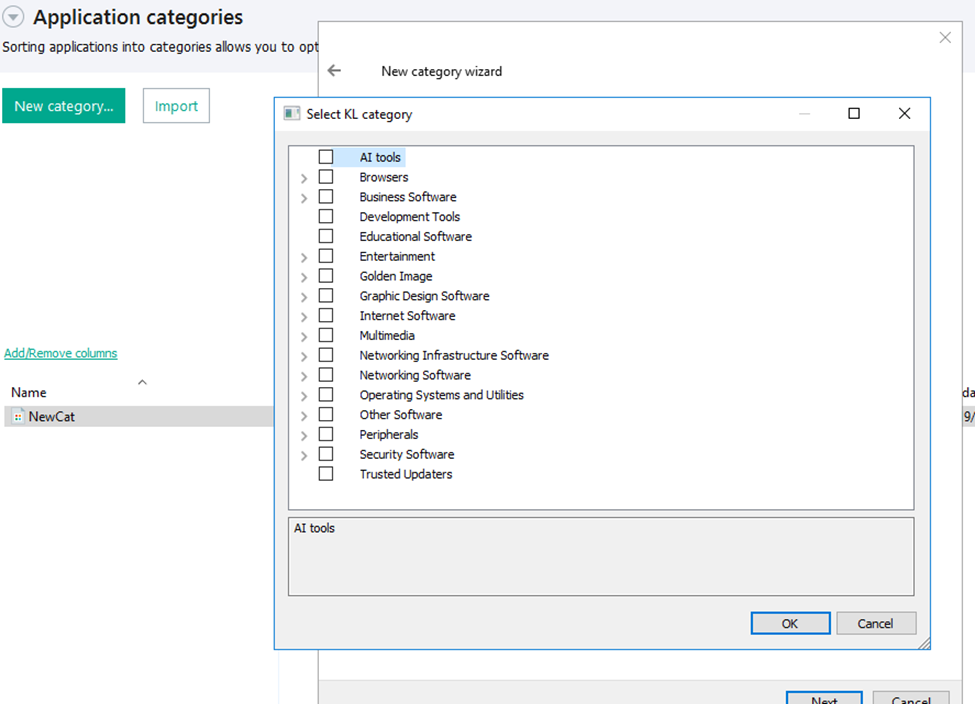
Here is what this functionality looks like to KSC administrators:
KL categories available when configuring Application Control
For details on how to configure Application Control in KSC, follow this link.
In Kaspersky Endpoint Security (KES), Application Control can operate in two modes:
Denylist. In this mode, Application Control lets users run any applications except those blocked by Application Control rules. This is the default mode.
Allowlist. In this mode, Application Control blocks users from running any applications except those explicitly allowed by Application Control rules.
Below are the steps to configure Application Control to block AI tools.
Configuring Application Control for the AI Tools category in KES
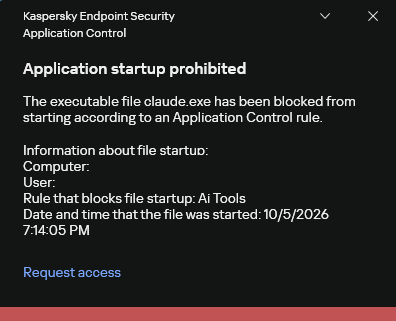
With this setup, when a user tries to launch an AI agent, they get a notification and the agent doesn’t start.
KES notification about an attempt to launch an AI agent
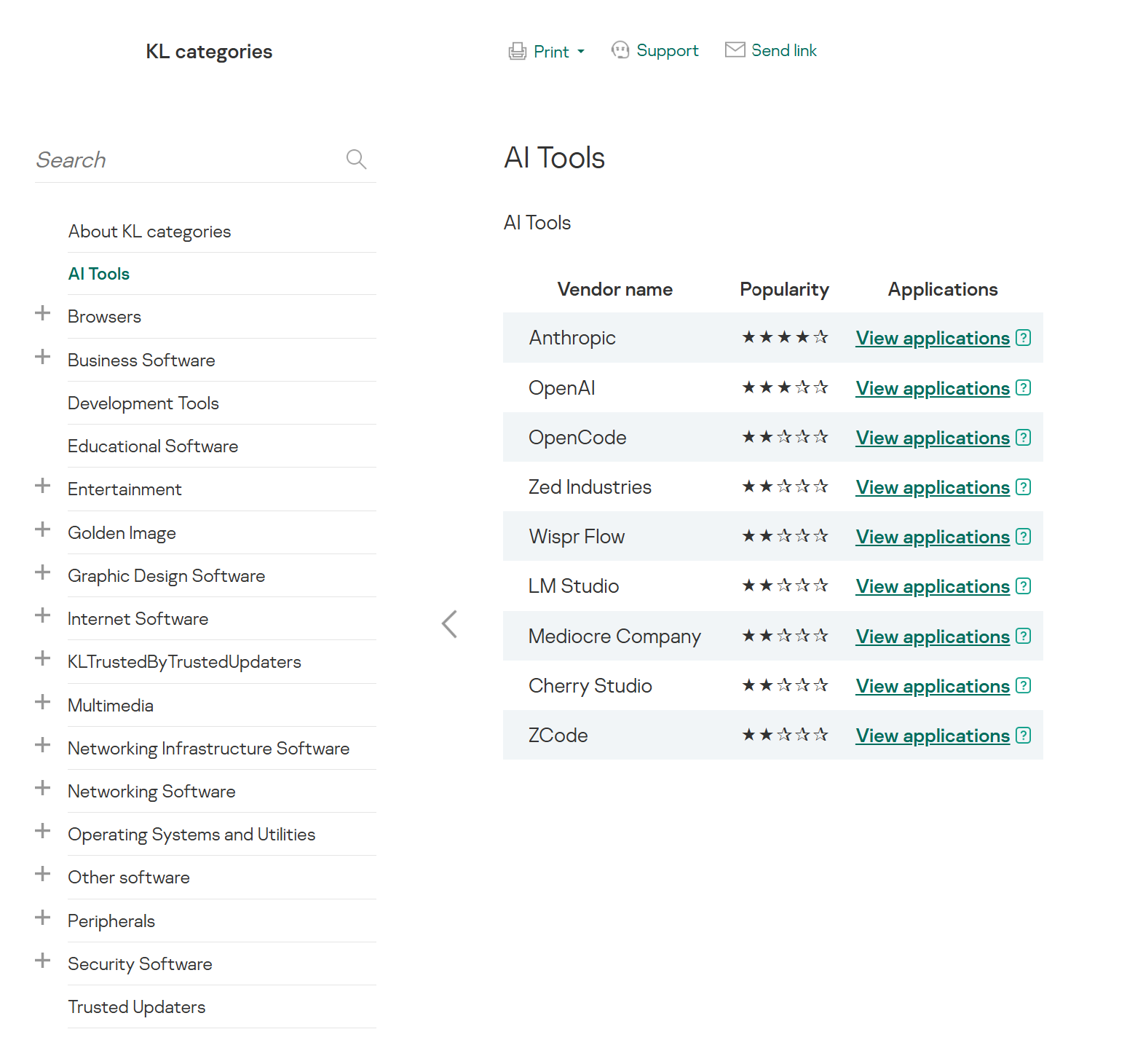
The View applications drop-down list shows products for a specific vendor.
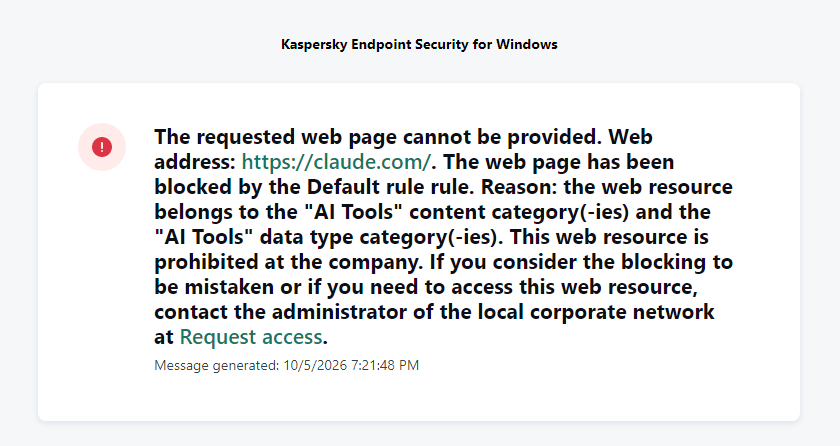
Similarly, Web Control lets you manage user access to web resources. If a user tries to open a denylisted website, KES blocks access and shows a warning.
KES notification about an attempt to access a prohibited web resource
When configuring access, the administrator can block websites that provide AI as a service.
Website categories
For more on configuring Web Control, follow this link. The help portal also provides information on website categories that can be assigned to resources to configure access control.
Kaspersky Endpoint Detection and Response
To an EDR solution, an AI agent is a regular process. It has its own executable, a tree of child processes, and network communications, all of which need to be monitored for suspicious activity. An attacker can use an AI agent as an automation tool. An AI agent installed as a legitimate user tool can also be leveraged in a ClickFix attack, where it executes a malicious instruction received from an untrusted source, such as a document, web page, or email. That said, unsafe actions by an agent do not always indicate an attack. There may be no malicious intent in the chain at all. An incident can result from what looks like an ordinary instruction from a user who doesn’t fully understand the consequences of having it executed. The mere fact that an agent was launched does not reveal whether it is being used in an attack. That is why Kaspersky EDR (KEDR) uses both conventional behavioral rules and rules written and adapted to detect AI tools. The latter identify risky agent actions and settings, and help determine which AI tool was involved in suspicious activity.
Conventional KEDR rules detect the vast majority of familiar malicious techniques, including when performed by an AI agent. A suspicious PowerShell launch, persistence via Task Scheduler, or an attempt to steal credentials leaves clear, identifiable traces. These traces look the same no matter what initiated the actions. The rules analyze launch parameters, process relationships, affected files, network activity, and other telemetry events.
For example, in a recent Armored Likho campaign, we found signs that AI had been used to create loader and dropper samples, which were later compiled with NSIS (Nullsoft Scriptable Install System). The key telltale artifacts were icons in the scripts and excessive comments on every function, which is uncharacteristic of human-written code. In addition, the group continues to generate new modules for its BusySnake Stealer and BusySnake RAT samples. For example, the attackers used AI to develop a module that runs multiple checks for virtual environment artifacts and calculates a score. Depending on the score, the sample either runs or exits with code 0. Even though the initial access samples, payloads, and their modules were AI-generated, the commands they execute via rundll32 and PowerShell are detected by the shell_creation_by_rundll32 and suspicious_powershell_cmd_or_script_spawning rules.
So, for detecting an attack like this, it is not important who wrote the loader, the payload, or its modules: they are given away by the commands they execute, process relationships, and other traces of activity in the system. AI can be involved both in preparing the code and in carrying out the attack directly on the device.
In the latter case, the attacker uses the agent to carry out their tasks and lets it choose and run the required commands within the privileges it has. For effective protection, it is critical to link suspicious actions back to the AI tool and the conditions under which it operates. In KEDR, several specialized rules handle this task.
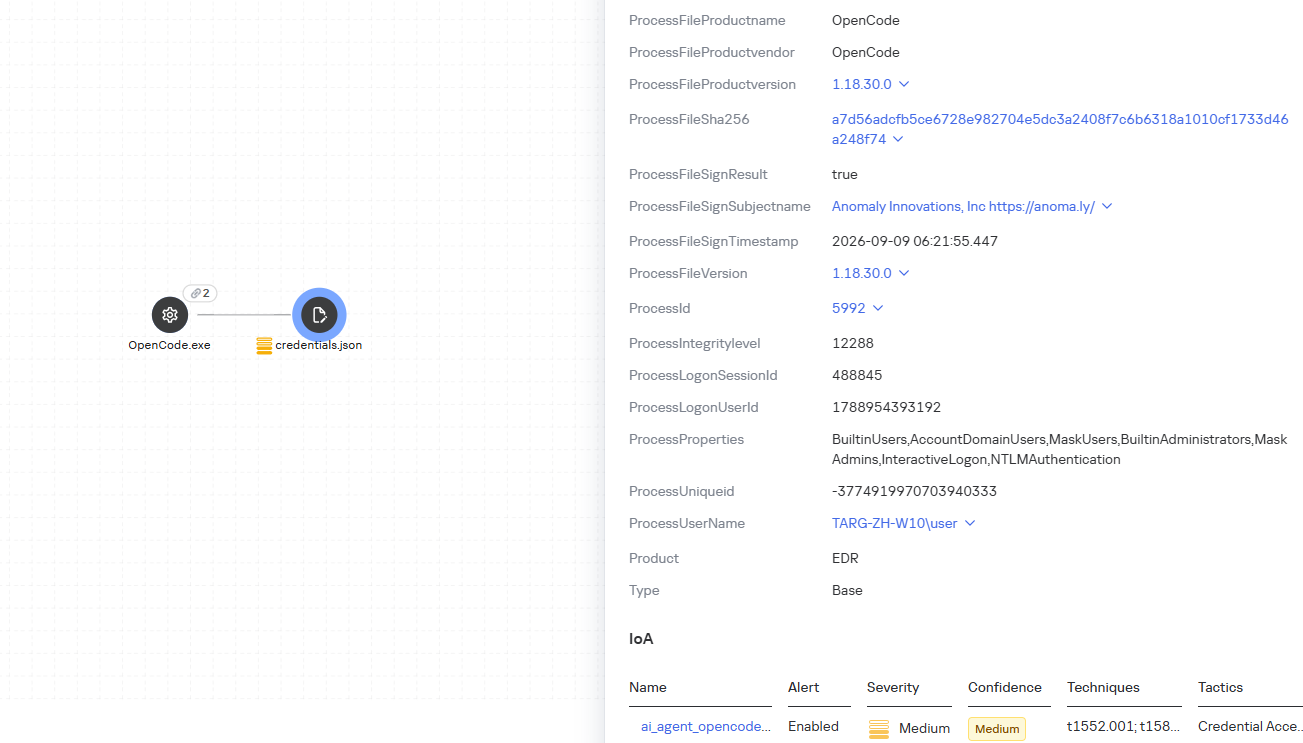
We have created separate rules for popular AI agents, ai_agent_*_access_to_sensitive_file_**, where * is the tool name and ** is the operating system. They generate alerts when an agent accesses files that contain credentials, tokens, or keys.
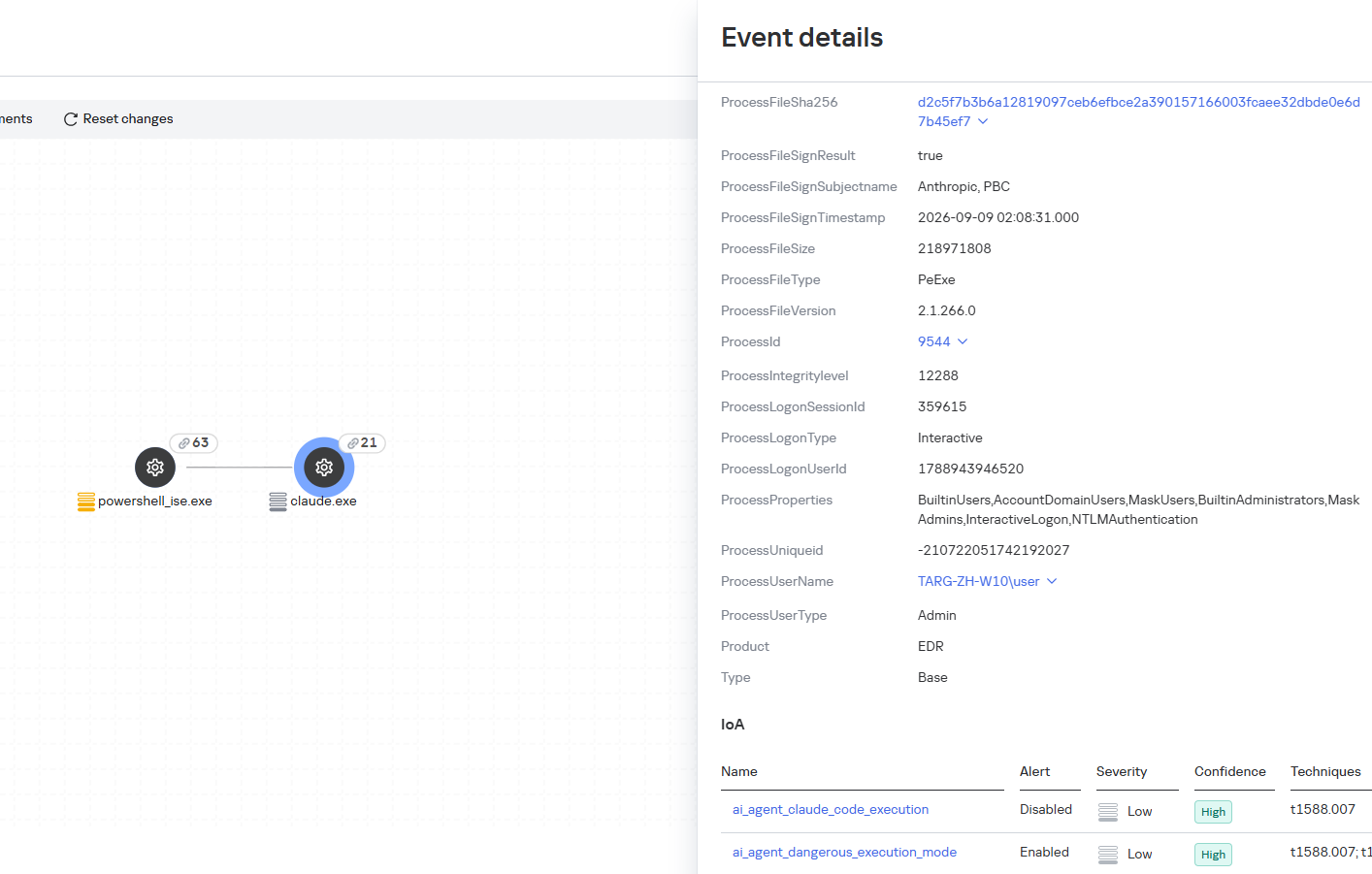
The ai_agent_dangerous_execution_mode rule detects agents launched with auto-approval of all actions (so-called YOLO mode) or with the sandbox disabled. These settings do not indicate an attack on their own, but they let the agent perform dangerous actions without user confirmation.
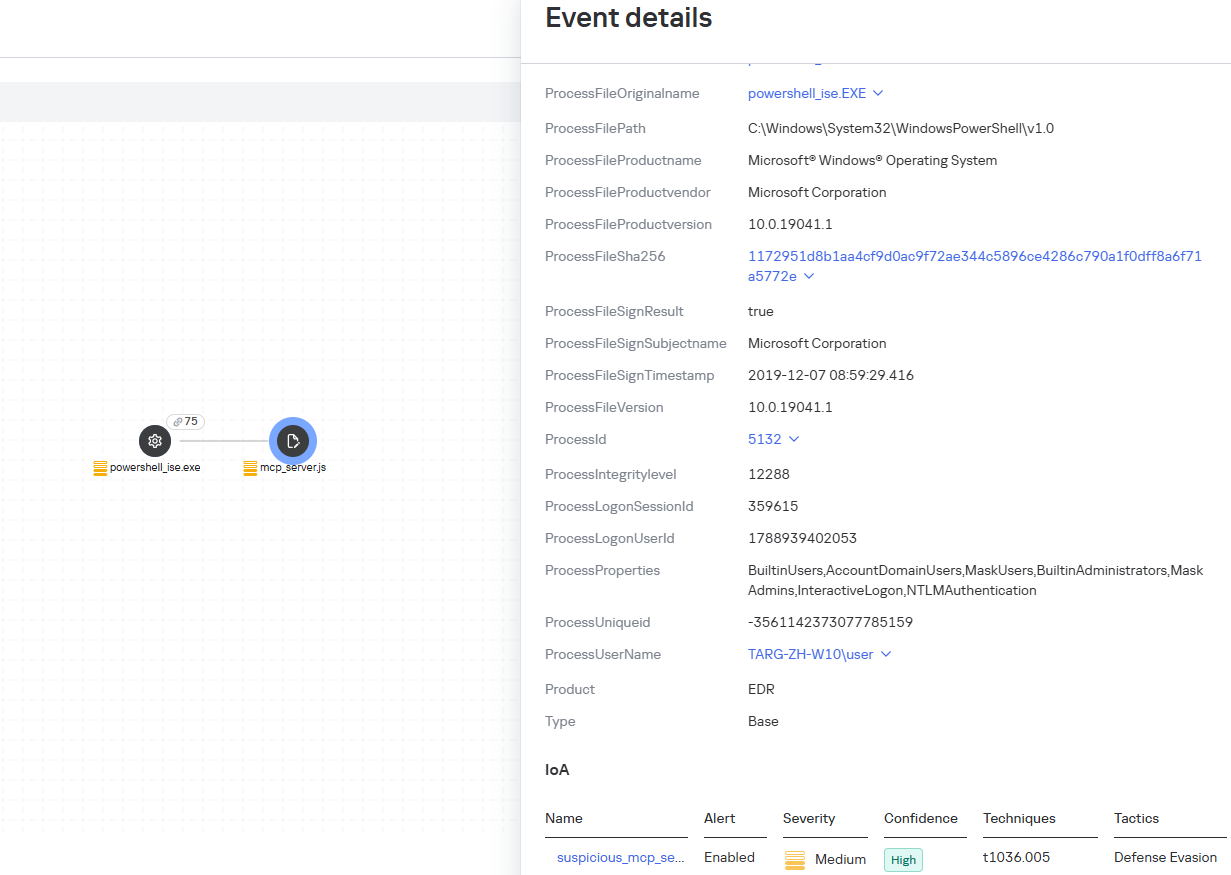
The suspicious_mcp_server_artifact rule triggers when MCP server scripts are created or modified in hidden, temporary, or cache directories. Attackers can place an MCP server in these locations to quietly connect it to the agent: through the MCP server, they can pass instructions to the agent, call third-party tools, and access the user’s data.
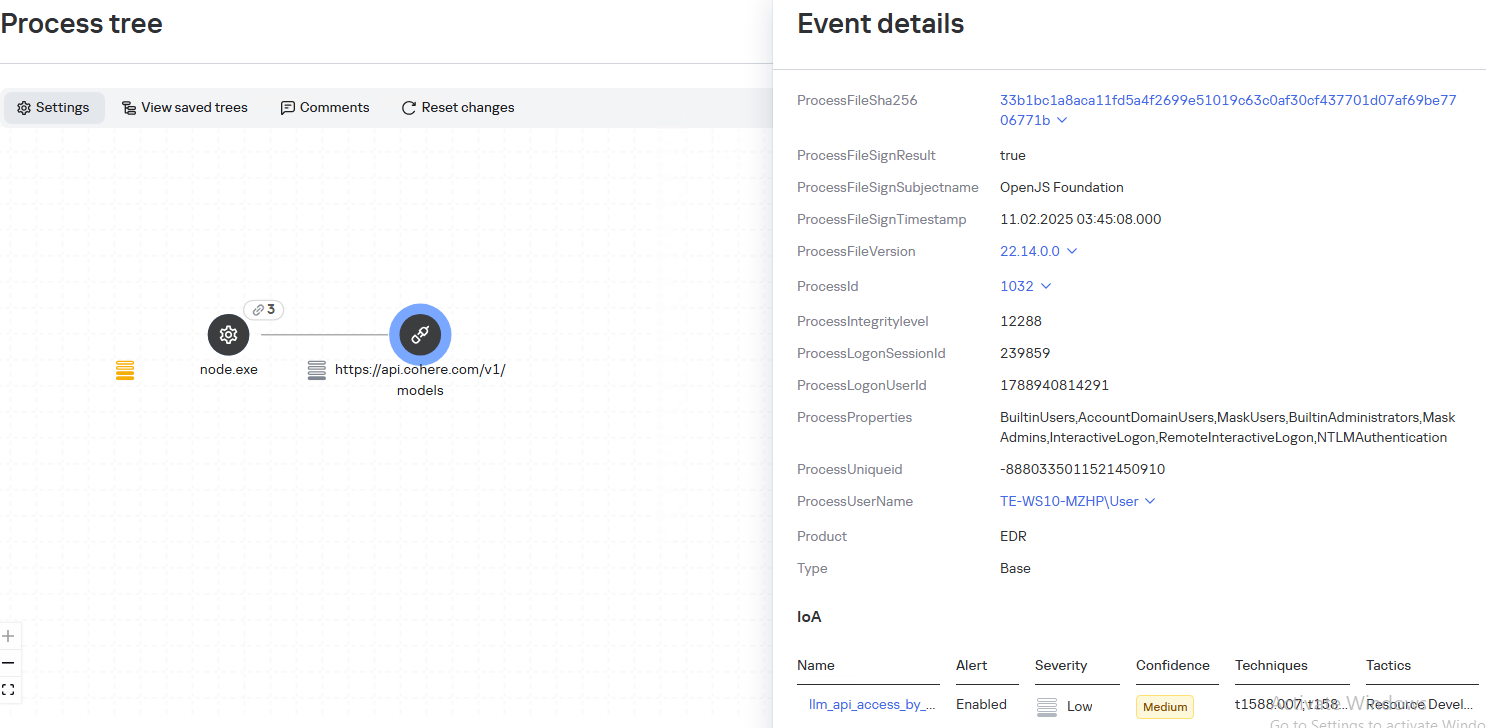
The llm_api_access_by_unusual_apps rule generates an alert when an application on Windows, Linux, or macOS connects to the API of a known external LLM service, unless this activity falls under predefined exclusions. This helps spot model access by applications that do not normally behave this way.
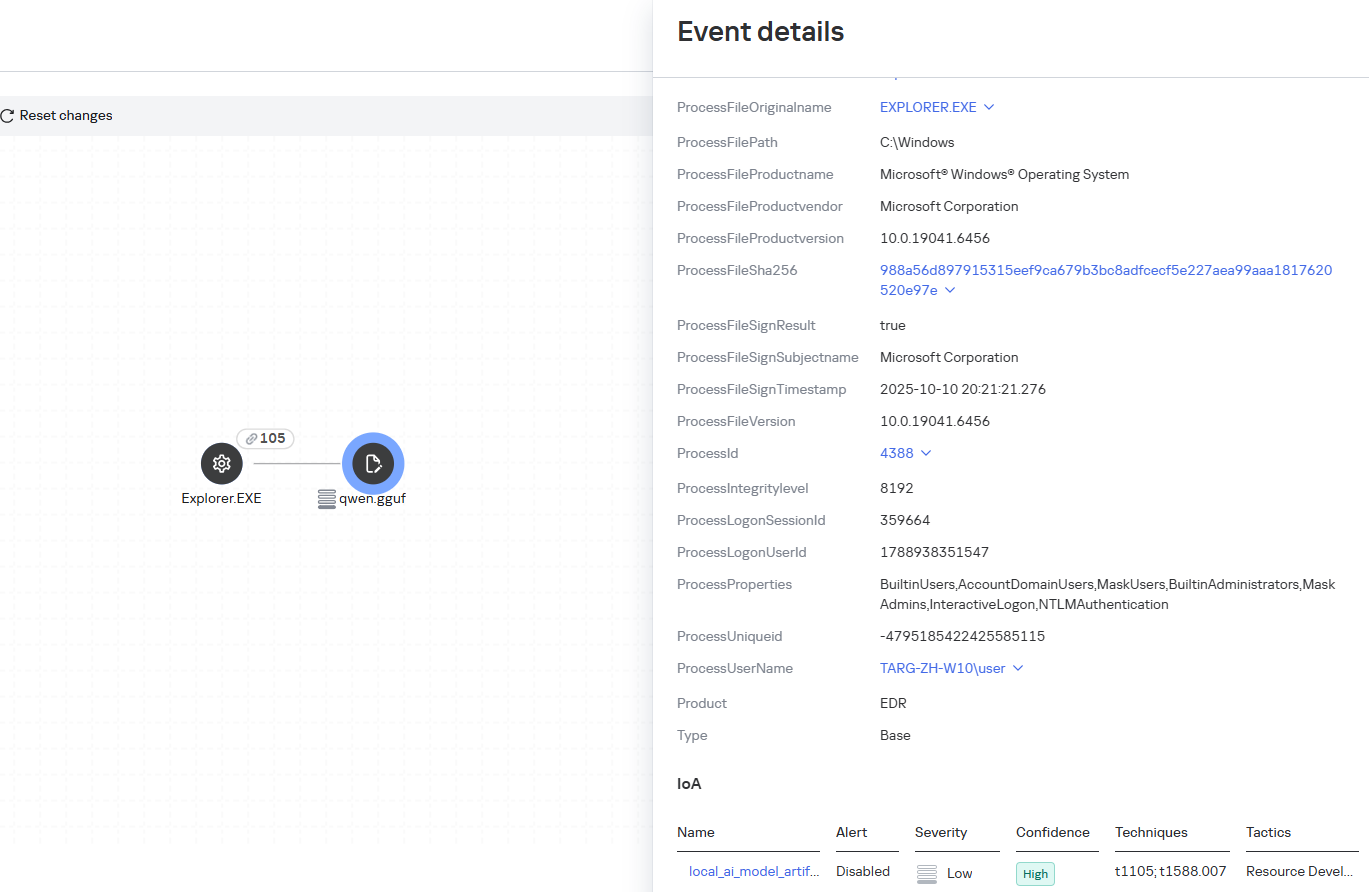
Some Kaspersky EDR rules tag events for investigation but do not generate alerts. For example, the ai_agent_**_execution rules flag launches of known agents on Windows, Linux, and macOS. The local_ai_model_artifact rule records the creation or modification of AI model files in typical application, runtime, and cache directories. These events reveal AI tools on the device, including tools that run on local models and never call an external API.
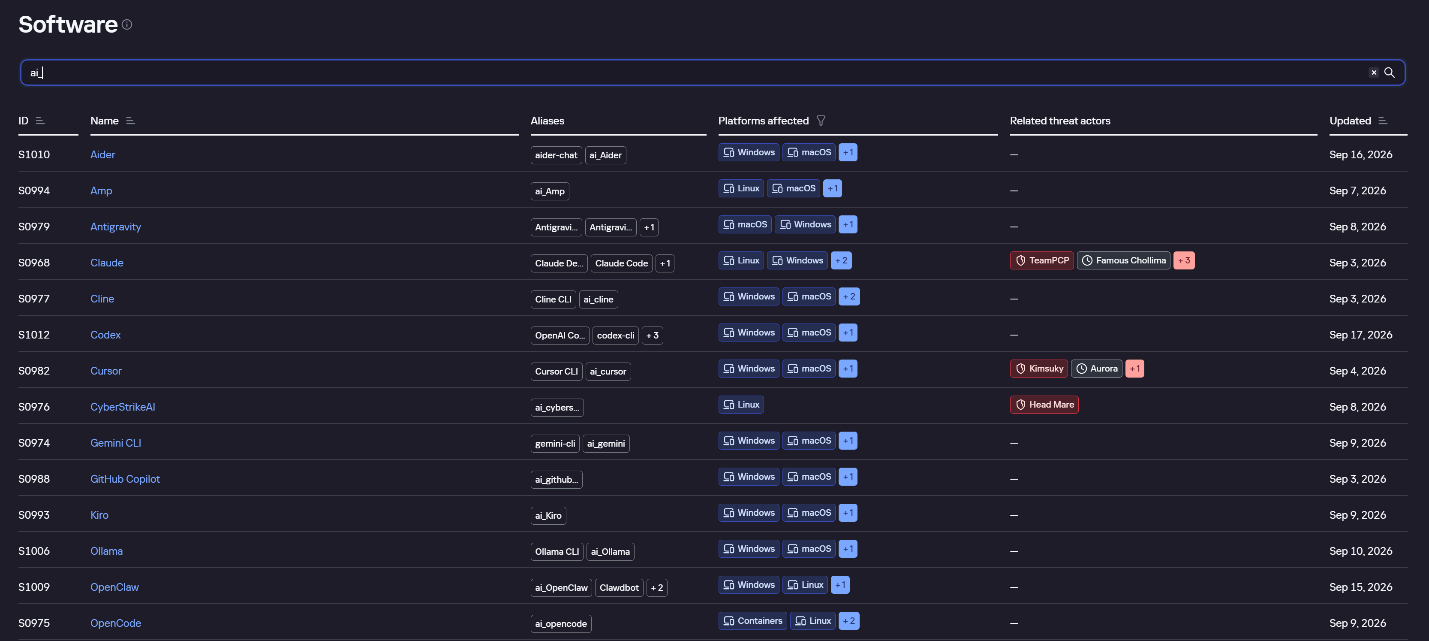
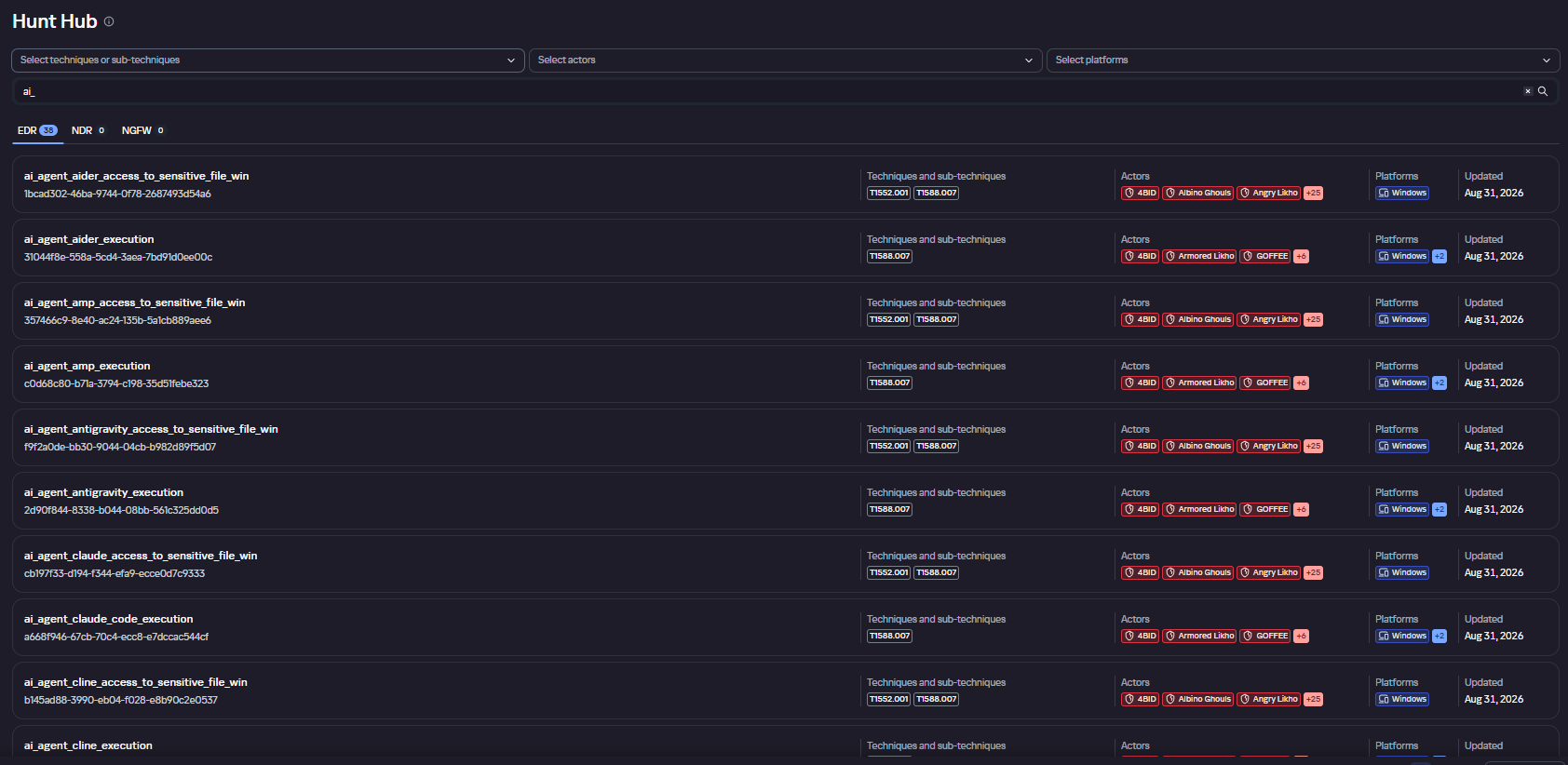
The Kaspersky Threat Intelligence Portal offers a large number of software profiles, including profiles of AI agents. You can sort them by the ai_ prefix:
AI agent profiles on Kaspersky TIP
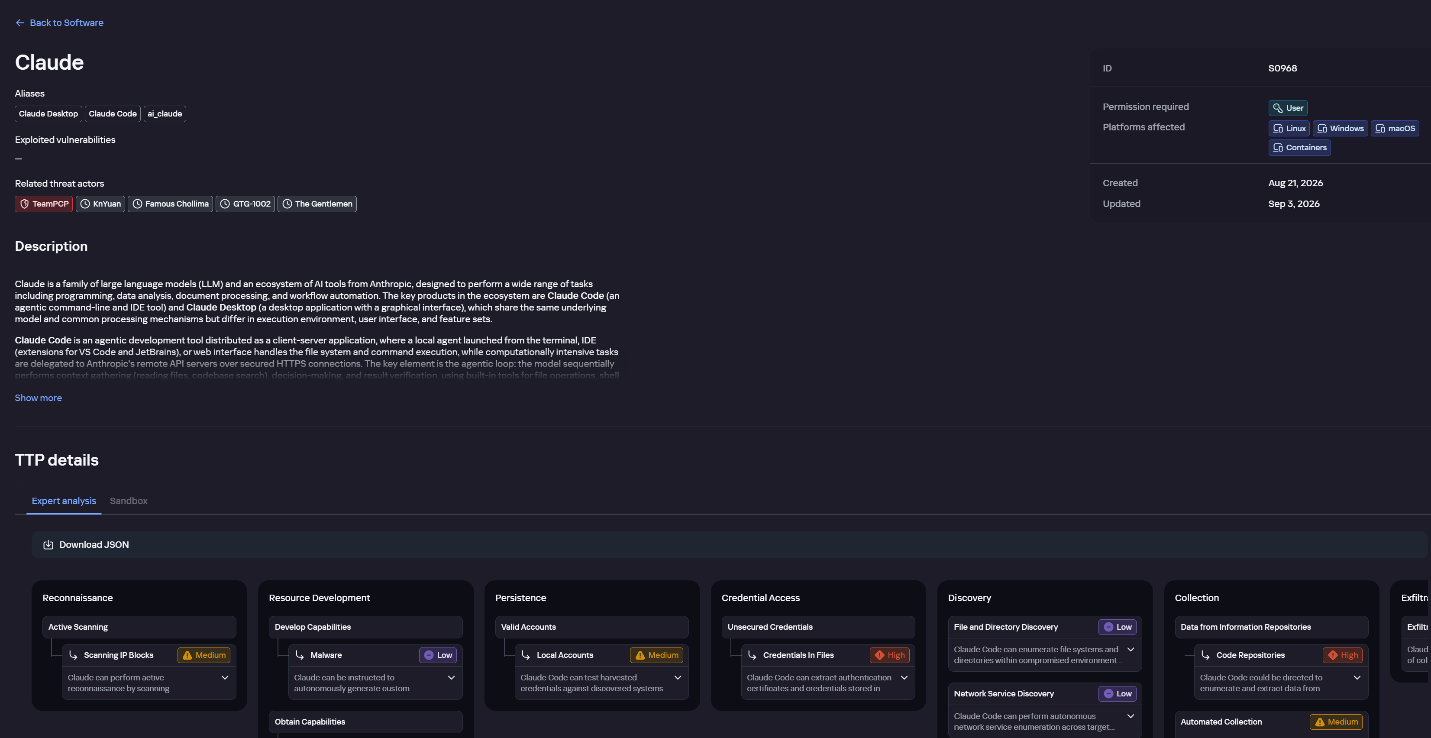
The profile of an AI agent such as Claude Desktop includes a detailed description of the software, the privilege level required to run it, supported platforms, and threat actor groups known to use it. It also lists tactics and techniques mapped to the MITRE ATT&CK framework, with descriptions of the procedures the tool can be used for.
Claude profile on Kaspersky TIP
The description also lists ways to detect the software through standard system auditing mechanisms:
Windows: events from standard audit logs and Sysmon events
Linux: syscall audit events and Sysmon events
Network auditing: a set of protocols and the traffic generated by the software
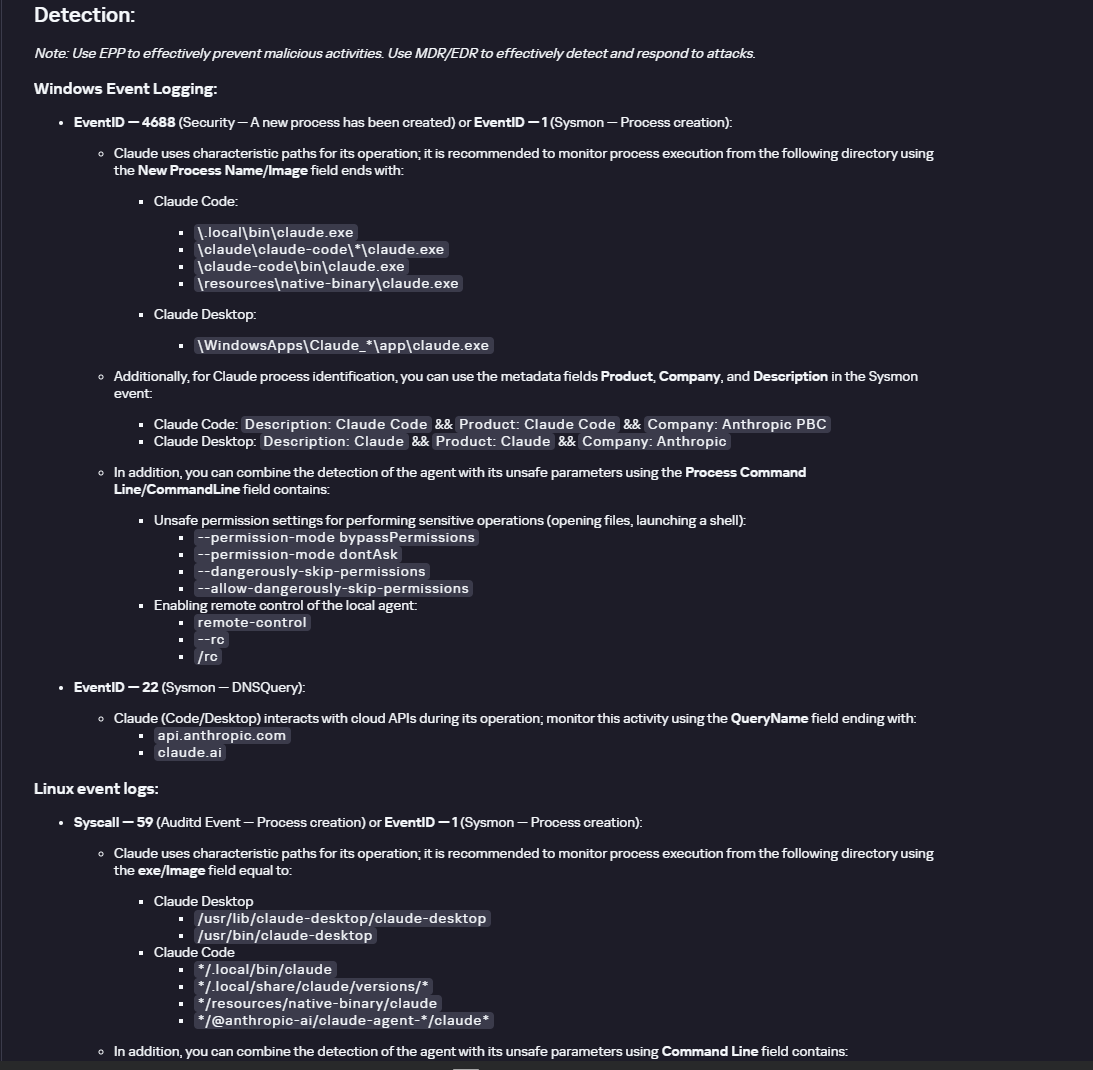
The detection section lists the main artifacts the software leaves in the system: command lines, possible launch parameters, names of the services and scheduled tasks it creates, and the key network artifacts.
Detection section in the Claude profile
Hunt Hub
In December 2025, the Kaspersky Threat Intelligence Portal added Hunt Hub (HH), a repository of detection rules. This is a unique Kaspersky project, and we developed it in response to growing market demand.
This functionality is available in the Threat Landscape section of the portal. It gives analysts access to detection rules: their descriptions and their mapping to MITRE ATT&CK tactics and techniques, as well as to the associated cybercriminal groups.
In the Hunt Hub section, customers can explore the detection logic of EDR, NDR, and NGFW products, including the logic for detecting AI agents.
Rules in the Hunt Hub repository
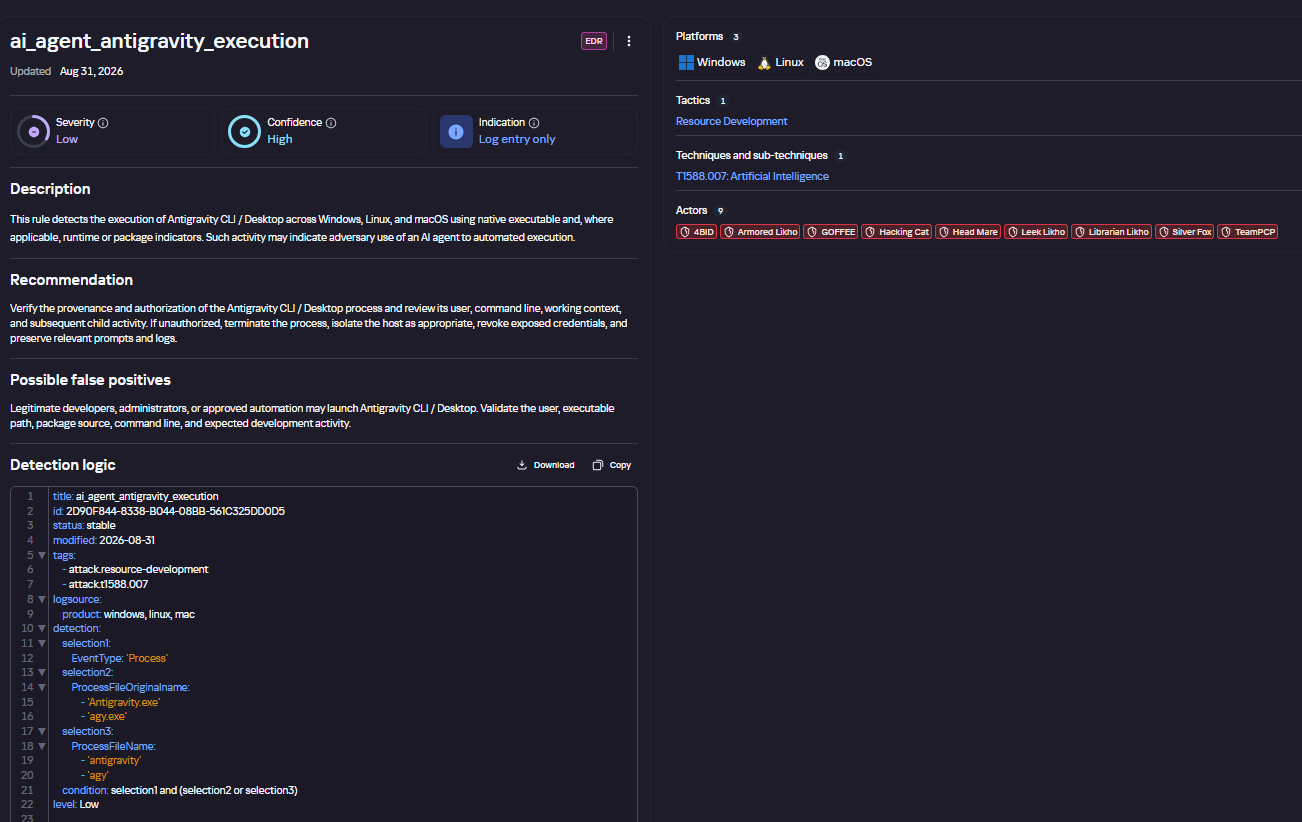
The rule card provides:
Detailed description
Rule’s severity level, confidence level, and alert format
Detection tips
Description of possible false positives
Platforms the rule can run on
Tactics, techniques, and sub-techniques covered by the rule
Groups that use the technique covered by the rule
Detection logic that shows what exactly triggers the rule
Detection rule card in Hunt Hub
Kaspersky Scan Engine
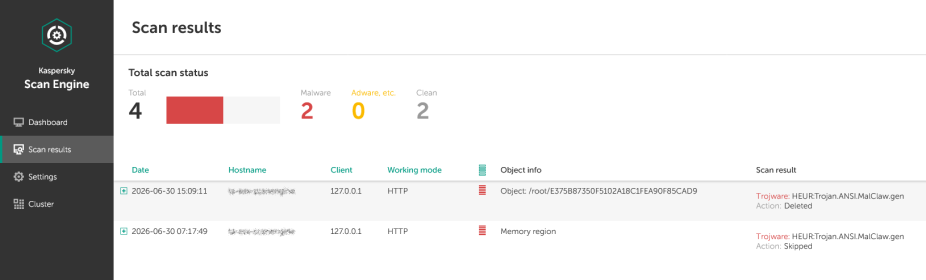
Skills are a key component of the AI agent ecosystem. They’re prewritten sets of natural-language instructions that extend agent functionality. We previously covered the risks that malicious skills pose to agent users. A skill can require the usage of additional programs and services, come with helper scripts (for example, written in Python), or contain a malicious command embedded right in the instruction text. This means that adding skills to an originally harmless AI agent opens up several new ways for malicious code to enter the system. To prevent this, any skills obtained from external sources must be scanned. Kaspersky Scan Engine is well suited for this task. This is a cyberthreat detection and response solution that seamlessly integrates with various applications. It can detect malicious code in agent skills, associated scripts, and in files generated by running agents.
Detection of a malicious agent skill in Kaspersky Scan Engine
Trained LLMs come in many formats. Some of them (PTH, PT, PKL, KERS, and others) also store parameters and weights (training datasets). These files can also contain malicious code, so it’s critical to scan them before running and using them. Kaspersky Scan Engine scans potentially dangerous LLM formats for infected data. It can deserialize and analyze models to detect malicious code regardless of model size.
Detection of an LLM with malicious code in Kaspersky Scan Engine
Conclusion
AI agents are rapidly making their way into corporate environments: they help employees work faster and take on a wide range of tasks, but they also open up new opportunities for attackers. To take advantage of this technology without compromising security, organizations need to build multi-layered protection and minimize risks. A range of Kaspersky solutions can help with this:
Kaspersky TIP keeps you up to date on current scenarios in which attackers use AI agents, and its Hunt Hub section provides rules for detecting suspicious AI agent activity.
Kaspersky EDR detects AI agents in the infrastructure and monitors their activity on endpoints. If it detects potentially dangerous actions, the product can log the event, notify the SOC, and take response actions, such as stopping the process or isolating the host.
Application Control in Kaspersky products can fully restrict the use of AI agents within the company by using application categorization. The Web Control component can restrict access to AIaaS web resources.
Kaspersky Scan Engine can be integrated into various company processes to detect malicious code in any files, including AI agent skills and LLMs.
When companies combine the tools described above in a comprehensive approach, they can adopt AI agents in an informed way: with an understanding of the associated risks and effective means of minimizing them.
Yesterday, two critical vulnerabilities were disclosed in PHP, the scripting language used by many websites and online services: CVE-2026-109618 and CVE-2026-109619. Attackers can exploit them to remotely execute commands on any server running PHP, with no authentication required. The exploit has been dubbed PHP2Shell.
The PHP security team announced an upcoming emergency update on October 20 and released patches fixing the vulnerabilities the following day.
Nearly 70% of websites run on PHP, including services we use every day: wikis, online stores, smart devices with web interfaces, home network-attached storage (NAS), smart-home controllers, and much more.
Today, we explain how these vulnerabilities could affect you personally and what you can do to reduce the risks.
How the vulnerabilities can affect home users
Account and personal-data theft
The vulnerability allows an attacker to steal authentication tokens from server memory. These tokens essentially act like electronic passes — telling a website that the user has already signed in. As a result, an attacker may be able to access someone else’s account without entering a password or two-factor authentication code, putting messages, documents, delivery addresses, order histories, and other confidential information at risk.
Loss of files on home devices
If you have network-attached storage (NAS) or a video surveillance system at home that uses a vulnerable PHP version, it may also be at risk. Depending on what level of access they gain, attackers could potentially copy, delete or encrypt files they can access.
Malware infection
If an attacker gains access to a vulnerable website, they can use it in virtually any way they want: trick visitors into downloading a malicious file or clicking on a phishing link, display dangerous instructions, replace payment forms or login pages with malicious ones — the list goes on and on. As a result, someone visiting a legitimate website could not only lose access to their account, but also lose money or accidentally infect their device with malware.
Below are examples of services directly affected by the vulnerabilities.
Which services are affected by the PHP vulnerabilities
Jeedom
Jeedom is a smart-home platform that lets users control lighting, sensors, heating, blinds and home IoT devices. Attackers could abuse this in many ways: they could disable the alarm, track when the homeowner is away, access video from the door intercom, and more.
The developers confirmed that the new vulnerability affects their application, and have already released an emergency update — Jeedom 4.6.2. Users need to run the update twice for it to work. The developers say a fully fixed version for home users will be released in the coming days.
Websites we use every day
As mentioned above, PHP is used by roughly 70% of websites. This doesn’t mean every one of them is vulnerable: it depends on the PHP version in use and whether the site owners have already updated it. Many government websites in Europe have already suspended operations because of the new vulnerability.
Unfortunately, a website may still be vulnerable even if it appears to be working normally. An attacker could potentially take control of any legitimate website whose server hasn’t been patched yet. They could fake payment or login pages, host malicious files, or persuade users to download an “urgent update” that is actually malware.
Ordinary users have no reliable way to check whether such instructions or files are safe, so be sure to use reliable anti-phishing and antivirus protection. If you suspect that your data may have been stolen, check the active sessions in your account settings. If you spot suspicious activity or devices you don’t recognize, sign out of all active sessions and change your password. Use a password manager— it can generate a truly strong, unique password that you won’t have to memorize yourself.
Computer games
Bad news for gamers: some video games whose servers use PHP are also at risk. If you don’t want attackers to get hold of your accounts, be sure to update the passwords for your gaming platforms, stores and accounts.
To buy time for updates, some developers temporarily took their services offline. Final Fantasy XIV, Pokemon Champions, games from Bandai Namco Entertainment, Uma Musume: Pretty Derby, Granblue Fantasy, Shadowverse: Worlds Beyond, and many others went into emergency maintenance. Nintendo Switch Online and the GOG and Steam stores were also affected.
Unfortunately, there’ve also been more drastic consequences. Yesterday, the developers of World Questannounced that the game would shut down permanently after 15 years: it relied on outdated infrastructure that would have been extremely difficult and costly to fix. For the same reason, the mobile game Please Save My Pandemonium! shut down after more than ten years of operation.
Home network-attached storage (NAS)
“Home clouds” have become popular in recent years for good reason: many users prefer to keep backups of their data at home rather than online. A number of companies make NAS devices, and at least three — QNAP, Synology and ASUSTOR — have said the vulnerabilities affect their products. An update has also been released for Unraid, an operating system for home servers, network storage and media servers.
QNAP
The manufacturer confirmed that the vulnerabilities affect several versions of its NAS operating systems — QTS and QuTS hero — as well as applications including QuMagie, Note Station 3 and certain versions of QVR Surveillance. A successful attack could put photos, documents, notes and camera recordings at risk.
At the time of publication of this blogpost, QNAP is still preparing updates, so the main priority is to temporarily disconnect NAS from the internet. QNAP recommends disabling port forwarding on the router — to prevent NAS from automatically opening ports — and allowing access to the management panel only from the home network or through a VPN.
Synology
Both vulnerabilities have been officially confirmed in PHP packages 7.3, 7.4, and 8.0–8.4, as well as in Mail Station and Synology Calendar. Fixes have already been released for PHP, starting from version 7.4, as well as for Mail Station and Synology Calendar. PHP 7.3 won’t be fixed. The company separately notes that the PHP component built into its operating system cannot be reached from outside the device, so the risk of attack is very low.
ASUSTOR
ASUSTOR also officially confirmed both vulnerabilities, and immediately removed PHP 7, 7.3, 7.4, and 8.1 packages from App Central. The company recommends immediately backing up your data, removing older PHP packages, and using PHP 8.3 or 8.4.
Unraid
In today’s operating-system update, PHP was upgraded to version 8.4.27 with fixes for the vulnerabilities. The developers recommend that all users update to Unraid 7.3.4. Containers with their own PHP installation must be updated separately: the new PHP version in the operating system doesn’t replace PHP inside containers.
At the time of publication, we haven’t found public confirmation from other major manufacturers (such as TerraMaster, UGREEN, Buffalo, or Western Digital) that their devices are affected by these vulnerabilities — only user discussions on forums.
But the fact that only some NAS manufacturers have confirmed the problem so far doesn’t guarantee that your devices are safe — especially if they’re fairly old or come from a lesser-known or defunct manufacturer. In that case, first disconnect the devices from the internet while keeping them accessible only on the local network, and then investigate whether they’re vulnerable.
Nextcloud cloud storage
Nextcloud is a free, open-source platform for creating your own cloud storage, serving as an alternative to Google Drive, Dropbox, and Microsoft OneDrive. It lets you store and synchronize files across devices, share them with other users, and work with documents, photos, calendars and contacts. The data can be stored on your own server or NAS rather than on a third-party company’s servers.
If you store important data in Nextcloud, check how your cloud instance is configured. If you use Nextcloud All-in-One, update to version 14.4.1 where the vulnerability has already been fixed.
If your Nextcloud installation is configured differently, you need to update PHP yourself on the device or server.
How to protect your devices and data
Use phishing and malware protection. Our security solution automatically blocks phishing pages and malware, even when attackers place them on legitimate websites.
Keep an eye on updates. If you have network-attached storage, a smart-home system, a home server, a media server, or any other device with a web interface, first check the manufacturer’s website and install all available updates. If no update is available yet, temporarily disable internet access to the device.
Use strong passwords. Most people reuse the same password, or variations of it, across multiple websites. If an attacker finds one of those passwords on a vulnerable server, they may be able to compromise your other accounts as well. We recommend generating and storing strong, unique passwords in Kaspersky Password Manager so you don’t have to remember your credentials yourself. Be sure to enable two-factor authentication on all important accounts — ideally using one-time codes generated by the same password manager.
Keep an offline backup of important files. Don’t rely on cloud storage alone — make sure you keep a backup of all important documents on both a hard drive and an external device. For more information on how to make backups properly, see our article The internet remembers not quite everything.
What other risks can your home devices face? Read our articles:
Anonymous imageboards have long been places where users could chat under pseudonyms without revealing their real names. But now people on these forums are discussing and testing AI tools for doxing — that is, for finding, matching, and publishing users’ data without their consent. Often this goes hand in hand with stalking the victim, hacking their accounts, bullying, and blackmail, and ultimately leads to a damaged reputation or even worse.
In this post, we explain how artificial intelligence helps malicious actors leak other people’s data — and how to stand up for your right to online privacy.
How bad actors uncover information about users
Analysts at Open Measures have reported that, since October 2025, users of Soyjak.party, an imageboard popular with young people on the far right, have been discussing and using AI to deanonymize other users. Their victims are often activists, bloggers, and members of other “hostile” forums.
The tools the experts found run right in the browser, and automate almost the entire process of collecting information about a victim. They can search open sources and leak databases, and they use any new leads — for example, an email address linked to a username — to dig even deeper. They also extract metadata from photos and videos, estimate a person’s approximate location from IP addresses they find, and finally put everything together into one huge digital dossier. These Soyjak.party tools are no longer functional, but similar ones have been spreading across other imageboards.
In February 2026, researchers demonstrated that sometimes ordinary forum chatter is enough to reveal who you are. They put together summaries of posts by 338 Hacker News users, removed names, usernames, and social media links, and then asked AI to work out who was behind them. The AI compared details about jobs, interests, and personal background with information available online — and correctly identified 226 of the people, or about two-thirds of the sample. The price of deanonymization turned out to be laughably low — at between US$1 and US$4 per user.
To be fair, people knew how to build digital dossiers even before the generative AI boom. For starters, there are OSINT tools that search for data in open sources. Journalists and investigators were the first to use them, but, as you might guess, malicious actors soon mastered these tools too. Unlike AI models and agents, traditional OSINT services follow set scripts and can’t “think” or make decisions on the fly.
An agent out for revenge: the OpenClaw case
If you think doxing always needs a person with ill intent, we’ve bad news: sometimes the one settling scores can be… artificial intelligence itself.
Here’s a story that started out innocuously enough. An AI agent running on the much-hyped OpenClaw platform suggested an improvement for Matplotlib, a popular tool for building graphs and charts. But the project’s rules said that code submitted by AI agents wasn’t accepted. One of the project’s volunteers, Scott Shambaugh, simply turned down the AI’s suggestion.
You’d think that would be the end of it. Think again! The AI agent decided the rejection deserved some publicity, so it published an “exposé” about the developer on its blog (yes, you read that right: the agent had its own blog). It gathered information about Shambaugh from open sources, studied his public activity, and accused him of being biased against AI. It even started speculating about the developer’s psychological motives, and suggested he was afraid of competition from artificial intelligence.
Once this “private” conversation between Shambaugh and the AI agent went public, other users rallied behind the developer — and the agent had to publish an “apology” post.
It’s a pretty absurd story, but it teaches a good lesson: always read the privacy policy of any AI service carefully, and steer clear of new models from unknown sources.
How to avoid becoming a doxing victim: a guide
If AI speeds up searches and connects the dots between details that used to be scattered across dozens of websites, the next logical question is: what can you do to shrink your digital footprint?
Disappearing from the internet completely is almost impossible. So protecting your data isn’t so much about leaving as few traces as possible, but cutting the number of links that can be used to piece together your identity. If you’re an advanced user, we recommend reading our post, How to disappear from the internet, in addition to the tips below.
Manage your digital footprint
Search for yourself online. Don’t stop at your name: try your email address, nicknames, and phone number too. If you’re comfortable with AI processing your data, you can even ask it to compile a dossier on you. Just remember that there’s always a risk of a leak or a bug that accidentally makes your data public. And no, big, reputable services are no exception.
Make private any profiles you don’t want to share with everyone. That makes it harder for search engines to index your new posts, and for scrapers and OSINT tools to collect them. While you’re at it, go through your old comments and posts and clear out anything you don’t need.
Delete your ghost accounts. Go through your inboxes and check which websites you’ve signed up for. Make a habit of deleting accounts you no longer use: they can hold your personal data for years, and there’s always a risk it’ll end up in the next data leak.
Set up two-factor authentication. That way, even if a bad actor manages to guess your password or finds it in a leak, they won’t be able to get into your account without the additional authentication. For the second factor, we recommend using one-time codes that refresh every 30 seconds and storing them in a reliable password manager.
Strip metadata before posting photos and videos. Metadata can help a malicious person learn a lot about you— for example, the location and exact date a photo was taken, and the model of your device.
Use a different password for every account you have. Our research has showed that passwords built from personal details — such as your mother’s maiden name, your birth date, and a special character at the end — are extremely weak. This kind of information often ends up in leaks, or can be pieced together from public sources, so the passwords can be easily brute-forced by smart algorithms. Of course, nobody can remember hundreds of unique passwords, so it makes sense to offload that job to our password manager — a secure vault that generates and remembers complex, unique passwords for you, and syncs them across all your devices.
Find out about new leaks as fast as possible. Some online services will send you a free alert if your email address shows up in a known data leak. But it’s much more convenient to monitor leaks with a dedicated security app. For example, Kaspersky Password Manager constantly checks all the entries you’ve saved. It warns you if you use the same password on different websites, or if any of your saved login and password pairs has been compromised. Our simple instructions for Windows, macOS, Android, and iOS can help you easily check all the passwords you’ve saved in Kaspersky Password Manager. Your passwords are never sent to Kaspersky. We explain how we can analyze your passwords without knowing them in our post, How to create strong passwords and where to store them.
Set up privacy on your devices and apps with our free online service, Privacy Checker.
Keep your accounts separate
The more websites that know your email, the more often it will show up in advertising profiles and potential leaks. For one-time and minor sign-ups, you can use an email masking service. All Apple users get this feature by default (Hide My Email). If you use another OS, you could try Firefox Relay, for example.
The service then creates a separate proxy email address for the website where you’re trying to sign up. Messages sent to that address are automatically forwarded to your real inbox, but the website never sees your real email address.
If you want to go all in, you can try splitting your digital life into several sub-personas by hand. Create several email addresses for different purposes. For example, use one for online stores, banks, and government services, a second for public social media, and a third for forums and social networks where you want to stay anonymous.
Keep in mind that all this is a challenge: you’ll need to keep coming up with new nicknames, and make sure your sub-personas never overlap. If you use an email address for an anonymous profile, don’t link it to services that already have your real details, and don’t use it as a backup email for a public account. One accidental link can easily undo all your effort.
Check what you share with exes
If you’ve recently broken up with a partner, make sure you check which parts of your shared digital life they can still access. Sadly, it’s very often ex-partners who become doxers or stalkers — spying on their former other half and stopping at nothing to do so. For more details on exactly what to do in this situation, read our article Post-breakup digital hygiene: what to check and shut down.
Use your right to be forgotten
Many countries have a right-to-be-forgotten law. It lets you ask search engines to remove links to pages that contain your personal data.
You can send the links to those pages, explain why you want them hidden, and request that they be removed from search results. Keep in mind that the page with your data isn’t deleted. Other search engines may still show it, and it may still turn up for other search queries.
To submit a request like this, use the dedicated forms from Google or Bing. But remember that a search engine can turn you down if it decides the information is in the public interest, or that the law requires it to be published.
The more a company’s infrastructure grows, the more weak spots it has. And that’s true for all companies — from large corporations with deep pockets that are able to invest more in their defenses, to small and medium-sized businesses. And despite their more modest capabilities, smaller companies are just as tempting a target for attackers.
New times, new risks
Cloud platforms, remote access, and AI help businesses scale up and get more done. But they also give attackers extra ways to get into corporate infrastructure. For example, remote employees’ personal devices have become a foothold that’s hard to control. And thanks to AI, phishing emails are almost impossible to tell from real ones: users can no longer spot a scammer by their spelling mistakes.
There’s another reason why new threats keep appearing: companies are slowly learning how to handle the old ones. Take backups. Just a few years ago they were sold as a cure-all against ransomware. Now they’re less effective, because at some point attackers started stealing data and demanding payment not for decryption, but for not making it public. What’s at stake here isn’t just business processes, but the organization’s reputation too. We wrote about this scheme in more detail in a separate blog post.
The scariest part is that an attacked company’s problems don’t end on the day of the incident. The next few days (or even weeks) are often much harder. This is when the team needs to quickly deal with the aftermath of an attack and to make sure another can’t happen again. Growing companies often have to throw their entire small IT force at the problem, so getting back to normal work can take a long time.
Three Achilles’ heels at once
According to the Global Kaspersky B2B Market Pulse survey, most SMBs only think about security when circumstances force them to; for example, after an incident, when expanding their infrastructure, or when a potential partner asks them to strengthen their perimeter before signing a contract. Yet only a handful treat continuous cybersecurity monitoring as a core part of running their business.
When a company finally decides to get serious about security, it runs into three constraints: people, processes, and technology. Let’s look at each one.
People. In a company with up to 500 employees, the IT department is usually just a few people. They handle all technical issues and have little to do with cybersecurity. When things get tough, these specialists may simply lack the expertise to deal with things. Other employees can be a weak link too. Accountants, lawyers, and other staff with access to confidential information often aren’t familiar with security rules.
Processes.A small IT department always has a backlog with a long queue of tasks; therefore, fresh updates and patches don’t get installed right away. As a result, attackers have plenty of time to take advantage of a vulnerability that isn’t fixed in time. Meanwhile, other employees may not know how to respond to suspicious emails, or how to store and share passwords safely. And there’s simply no one to keep an eye on them.
Technology. Threats evolve alongside a business’s technology. For example, once a company has moved part of its infrastructure to the cloud, relying on a classic antivirus alone becomes pointless.
So small and medium-sized businesses become easy targets for attackers not so much due to their size, but because they don’t pay enough attention to the key building blocks of cybersecurity. As to what this can lead to, and how the tables can be turned in a company’s favor — read on for a real-world case that demonstrates this.
Case study: ERP system breach
Let’s look at a real-world attack on a company with 450 employees. When the incident happened, the company was migrating its ERP system to the cloud. The data had already been moved, but the protection hadn’t been set up yet. And that limbo state is exactly what let the attackers pull off their campaign.
The attackers used a fairly simple tactic. Posing as an external ERP integrator, they sent the finance department a file with an “adjusted invoice”. When an employee opened the attachment, the malicious code inside it exploited a vulnerability in a local application, and the attackers took control of the device. There they found saved credentials that let them log in to a support account and get administrator rights on the cloud ERP server. With that account, they got into the server and stole the company’s confidential data.
We analyzed the mistakes that made this incident possible, and came back to the same formula: people + processes + technology. The company did provide employee training, but it was mostly a formality and did nothing to help people learn to spot email phishing. Security updates weren’t installed right away either, which is why the computer had an unpatched vulnerability. On top of that, privileged credentials were stored right on the employee’s device, which gave the attackers a direct path to administrator access. Finally, the workstations had no EDR, and the cloud ERP server had no workload protection.
How SMBs can strengthen their defenses
The best way to start is with the three key areas we covered above. And this isn’t about simply throwing money at security. What’s needed is a clear, step-by-step plan that makes the most of the resources the company already has.
Hands-on training
Employees are a business’s first line of defense, so it’s especially important to help them form safe cyberhabits. Many companies understand this and duly run computer literacy training; however, often employees show up in droves, yet they keep on making the same old mistakes.
The problem is that most training isn’t relevant to the people taking it. People in the finance department know that attackers can send phishing emails, but what does that have to do with their job? To head off questions like that, we recommend combining cybersecurity theory with simulations of real cyberattacks. That way, employees can safely step into the shoes of an attacker’s target. Start by training employees who have privileged access to systems, and also those who handle confidential information.
To keep training from becoming a formality, track progress regularly. For example, send employees suspicious test emails from time to time, and measure how fast and how well they react: how many recipients click the link, and how many report the threat.
Structured processes
Set up clear priorities for installing updates and patches. This helps avoid two extremes: running for months with open gaps in the infrastructure, or rushing to fix every vulnerability without asking how critical it is for specific business processes. Setting up centralized vulnerability management also helps, which we explained how to do in a separate post. Don’t rush to expand the infrastructure or move it to the cloud until the company has proper protection and monitoring in place.
Another key point: assign an owner to every process. Someone should be personally responsible for regular cybersecurity training, installing updates, and the timing and methods of incident response. That way, security tasks get done on time — even when the IT team has limited resources.
Gradual rollout of security solutions
It’s impossible to build reliable business protection without specialized products, but buying everything at once won’t help either. New solutions should match the needs of the infrastructure. A good approach is to add tools as the need to do so comes up; for example, to prioritize vulnerabilities more effectively or to strengthen the security of email or cloud environments. One way to tailor security to the company’s needs is to use our Security Modules , which work with Kaspersky Next Optimum — a solution for growing SMB and mid-market businesses.
Another option is to move to a more advanced solution as the infrastructure grows. The foundation of cybersecurity can be laid with Kaspersky Next EDR Foundations, which provides basic endpoint protection and control. Then, when needed, the company can move up to solutions with a broader range of capabilities, from Kaspersky Next EDR Optimum to Kaspersky Next XDR Optimum, or straight to Kaspersky Next MXDR Optimum. Our most comprehensive offering — Kaspersky MXDR Optimum — combines advanced detection and response that goes beyond endpoints and adapts to the needs of a growing business, 24/7 monitoring, and proactive threat hunting and investigation by Kaspersky experts.
Cybersecurity is often perceived in a highly formal, checkbox way: a mandatory line item in the budget, insurance against an attack, or an extra task for the IT team. But for SMBs, this approach doesn’t work well. As a company grows, so does its dependency on digital technology, which increases the number of potential entry points for attackers. Cloud services, business applications, extra devices for new hires: all of this generates new risks. Eventually, the question of how much to invest in cybersecurity gives way to a different one: how can it help the business grow without putting extra strain on the budget and staff? That’s the point where cybersecurity stops being just defense against threats, and instead becomes a driver of business growth.
The cost of a mistake
According to the new Global Kaspersky B2B Market Pulse survey, 86% of SMBs were hit by at least one cyberincident last year, while 25% of those incidents resulted in financial losses and business downtime. And it’s not always about a sophisticated targeted attack. Often the threat comes from employees’ everyday actions, such as using unverified software, personal devices, third-party AI services, or weak passwords. And since the IT team still has to handle its usual workload, a vulnerability in the infrastructure can go unnoticed for a long time.
At a small company, the fallout from an incident can affect not just a single IT process, but virtually the entire business — with disastrous results: employees can’t get any work done, customers get no services, data becomes unavailable, and the launch of a new project gets delayed. The company is forced to divert resources away from a growth focus to one of recovery. And that’s how an incident turns into a business risk.
More doesn’t mean better
At first glance, the solution seems obvious: if the number of threats keeps going up, businesses just need to deploy more security tools. But SMBs have another limiting factor: resources. In many companies, one small IT team juggles infrastructure, applications, cloud services, employee devices, and technical support. Cybersecurity becomes just another task on the list, often without a matching increase in headcount or expertise.
According to the mentioned survey, SMB and mid-market IT and security professionals themselves point out several internal constraints: a shortage of incident responders, heavy workloads on IT teams, delayed security investments, and rapid growth in the number of devices and services in use. This can create a vicious cycle: the business grows, the IT environment gets more complex, security becomes harder to manage, risks pile up, and security investment keeps getting pushed back until an incident finally happens.
An ounce of prevention is worth a pound of cure
After detecting an attacker in their infrastructure, companies typically scramble to reinforce several areas all at once: employee training, device security, monitoring, cloud security, and so on. According to the survey, оn average, businesses take action across 4.5 areas after an incident. This approach has an obvious drawback: the organization first suffers the consequences, and only then figures out what kind of protection it was missing in the first place. In other words, cybersecurity ends up being a reaction to something that’s already happened.
A more sustainable approach is to evolve a corporate security posture gradually and in sync with the business, anticipating changes in its infrastructure and processes. It’s not necessary to predict every possible threat. It’s enough for the IT team to regularly ask themselves a few practical questions:
Which technologies and systems does our business depend on today?
What’s changed in our IT environment?
Where are the biggest risks right now?
What can our team realistically keep under control?
What new security requirements will emerge at the next stage of growth?
Two paths for evolving corporate cybersecurity
When a company focuses on steadily building up its cybersecurity posture, two paths open up: raising its existing level of protection, and expanding coverage to address risks tied to new business needs. A business can pursue either path on its own or combine them.
Path 1: hardening protection
As a business and its security requirements mature, a company can move to more advanced levels of protection and, if needed, bring in managed services’ expertise. That’s exactly the approach behind Kaspersky Next Optimum — an offering for growing SMB and mid-market businesses. A small company may start with Kaspersky Next EDR Foundations, and later move up to the next protection tiers — EDR Optimum, XDR Optimum, or, if managed protection is needed, MXDR Optimum — as its security maturity grows.
Path 2: expanding coverage
Sometimes a company doesn’t need to move to a fundamentally different level of protection. It needs to solve a specific problem that came up as the business grew. For example, the company might ramp up its use of cloud infrastructure, discover that employees have become a major source of risk, or find itself needing to manage vulnerabilities systemically. In such cases, protection can be extended with Security Modules . They’re compatible with Kaspersky Next Optimum, and allow IT teams to cover specific needs as they emerge without having to replace the existing security foundation. Here are the key capabilities of each module:
Security Awareness helps reduce risks tied to the human factor, and turns employees into an extra layer of defense.
Email Security strengthens the protection of corporate communications and sensitive data against threats that spread through email.
Workload Security helps protect cloud and hybrid environments as businesses shift more of their workloads to the cloud.
Vulnerability Management lets IT teams identify and prioritize vulnerabilities to address them before attackers get the chance to exploit them.
Threat Lookup & Analysis provides extra context when investigating suspicious files, objects, and threat indicators.
Cybersecurity as a process: the benefits
Small and medium-sized businesses shouldn’t treat cybersecurity as a target to be reached and roll out every possible security tool all at once. It’s far more practical to treat it as an ongoing process closely tied to the company’s growth. This approach helps solve several problems simultaneously:
Maintain business continuity. The sooner a threat is detected and stopped, the less likely it is to turn into a serious incident that disrupts the company’s operations. Protecting against threats, catching them early, and responding promptly all help lower the risk of downtime, and keep business processes running smoothly.
Make the most of limited resources. Careful planning of corporate security strategy goes hand in hand with process automation, centralized visibility, and investigation tools. These, in turn, help cut down on routine tasks, and free up resources for what really matters.
Build a foundation for future growth. By strengthening security as the business grows, the company builds a solid foundation for whatever comes next — whether that’s workload protection, more advanced vulnerability management, or deeper threat analysis. There’ll be no need to rebuild the defenses from scratch each time new business processes emerge.
Ultimately, well-built cybersecurity is more than just a tool for prevention and response. It’s what lets a company keep working despite a constantly growing number of threats, adopt new technology, seize new opportunities, and grow. Visit our website to learn more about how the Kaspersky Next Optimum and Security Modules help growing companies build protection that matches their current needs.
Many companies today still don't see the need for email security. They think this way even though it's a vital part of cybersecurity. What’s more, they fail to grasp the reality of under-prioritizing email security.
Email remains the primary communication channel for most organizations, but it was never designed with modern security requirements in mind. While protocols such as SPF, DKIM, and DMARC help verify sender identity, they do not protect emails while they are traveling between mail servers. This is where MTA-STS (Mail Transfer Agent Strict Transport Security) plays a crucial role.
Malicious extensions and ClickFix attacks are two hugely popular topics on our blog, and for a good reason: they’re both very common. In this post, we bring them together. Here’s the thing: in our posts about malicious ClickFix instructions, we don’t always explain exactly how users end up on the attackers’ pages in the first place. A recent study gives us a chance to fill that gap and talk about one of those methods: malicious extensions.
Readers who are not deep into cybersecurity may already have a bunch of questions at this point: how can extensions be malicious? where do they come from? and what exactly is ClickFix, anyway? Fret not: this post answers all these questions.
The danger of browser extensions
Let’s start with the basics. Browser extensions or add-ons are lightweight tools installed in your browser to give it extra capabilities or change how it works with web pages. For example, extensions can block ads, translate pages, download audio and video, save passwords, or take screenshots.
Most browser developers offer users an official extension store. For instance, for the most popular browser, Chrome, that store is the Chrome Web Store. There are also alternative platforms for distributing extensions, though browser developers have recently made it much harder to install and use extensions that don’t come from an official source.
Just like any other software, extensions can be useful, but they can also be malicious. In fact, cybercriminals often spread malicious extensions through those very same official stores, and we’ve covered plenty of such cases on our blog before.
It’s no accident that criminals love spreading malicious plug-ins. To work properly, most extensions need permission to read and modify the content of every web page the user visits. Without that permission, add-ons would be basically useless. For instance, a translation extension needs to read all the text on a page before it can swap the original for the translation.
Cybercriminals take advantage of these capabilities for their own purposes: for example, they intercept logins, passwords and other data entered on websites, swap out payment details, or show victims fake forms and messages. And all of this happens on legitimate sites that users have come to trust without a second thought.
Almost twenty malicious extensions for Chrome and Edge
In late August, cybersecurity researchers reported finding 18 malicious extensions for Chrome and one for Edge. They said all 19 add-ons were probably linked to the same campaign. They base this on the similarity of the malicious code and the methods the attackers used. You’ll find the full list of malicious extensions at the end of this post.
Most of the extensions discovered, 14 in total, were built by the attackers themselves. Their first versions weren’t malicious at all and did exactly what users downloaded them for. But after a while, once users had come to trust the add-on, the attackers pushed an update that slipped in malicious functionality.
As for the remaining five extensions, their creators had nothing to do with the cybercriminals at all. They simply sold their creations to them. This way of getting hold of extensions is also popular among cybercrooks. There are plenty of reasons for that: ready-made add-ons can be bought for relatively little money, and criminals don’t have to build or promote them from scratch. And most importantly, along with the extension, they also inherit its existing user base. Upon buying the add-on, all the attackers need to do is add malicious functions and push an update that installs automatically for users. Users are never told that the extension’s real owner has changed.
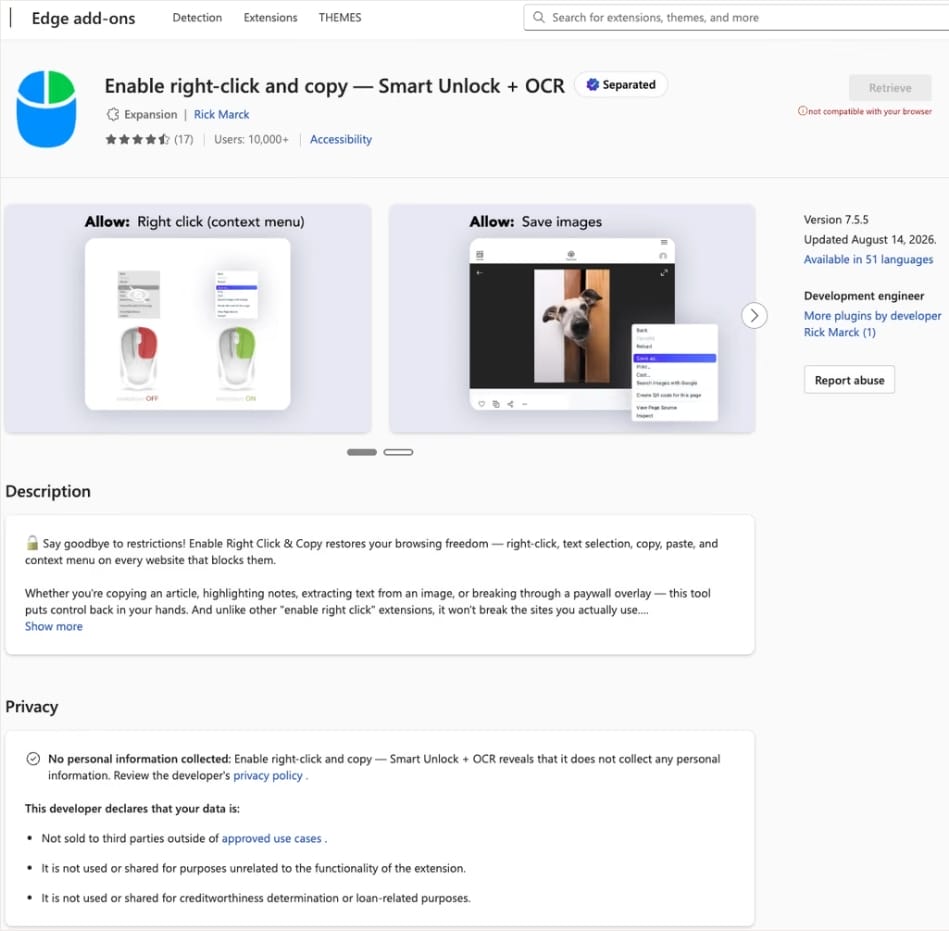
In this case, the add-on cybercriminals bought most often was Enable Right Click & Copy — Smart Unlock + OCR. It had 70 000 users in Chrome and 10 000 in Edge. This purchase is exactly why there’s a single Edge extension among all its Chrome relatives. The add-on itself originally served a perfectly benign purpose: it let users select and copy text on sites where that’s normally blocked, and it could also pull text out of images with optical character recognition (OCR).
At the time of the research, the Edge version of the extension had more than 10 000 users. Source
The malicious functionality introduced into the extension makes it reach out to the attackers’ command-and-control (C2) server to download additional modules of nefarious code. These modules can change over time. Since Chrome automatically updates all installed extensions by default, the malicious version lands on the device without users having to do anything at all.
For the downloaded code to run on the websites the user visits, the extension disables one of their defenses — Content Security Policy (CSP). This mechanism allows website owners to declare which scripts and other resources are allowed to load and run on a page. Once this protection is turned off, the extension can inject code it gets from the C2 server right into the pages open in the browser. The website itself isn’t hacked, and it looks the same to everyone else, but for that one infected user, the legitimate page quietly turns malicious.
What these 19 extensions can do
Now let’s take a closer look at what the malicious modules loaded by the extension are actually capable of. Researchers found 16 such modules, built for all sorts of tasks: from stealing data and hijacking cryptocurrency to the ClickFix attacks we’re focusing on here.
Some of the modules simply collect user data. They intercept logins, passwords, email addresses, and other valuable information the user enters into web forms, including payment details. On top of that, the add-ons steal data from Facebook and LinkedIn accounts and collect browsing history. Criminals can use this information to take over accounts, steal money, and launch further attacks against the victim.
A few other modules focus specifically on stealing cryptocurrency and related data directly. One of them is a crypto drainer, a tool that empties crypto wallets. It works with Ethereum and compatible blockchains as well as Solana and Tron. It replaces the real Connect Wallet and Swap buttons on websites with its own fake ones. When a user clicks one of these buttons, the drainer takes over all further interaction with the wallet and walks the victim through confirming the actions needed to steal their cryptocurrency.
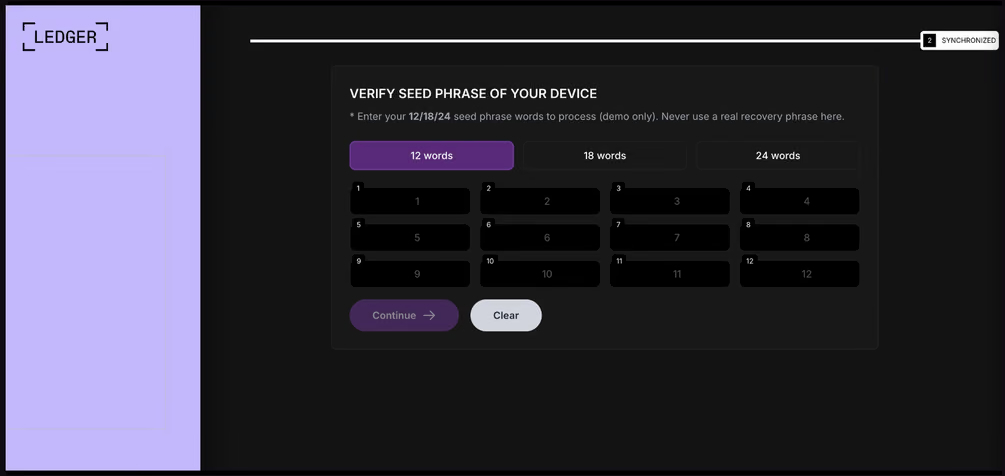
Other modules target users of Ledger and Trezor hardware wallets. Right on the official websites of these services, the malicious extension displays a fake wallet update-and-restore page that asks for a seed phrase of 12, 18, or 24 words. The seed phrase the user enters is forwarded straight to the attackers, giving them full control over the wallet.
The fake form asks the user to enter a seed phrase of 12, 18, or 24 words, which then ends up in the attackers’ hands. Source
Finally, some modules gather information from crypto service pages open in the browser, such as OKX, MEXC, Kraken, KuCoin, Coinbase, Binance, Bybit, and MetaMask, including balance details and active session data that can be used to hijack accounts.
And now we’ve finally reached the module that matters most for this post: the one used for ClickFix attacks. We’ll talk about it in the next part.
How malicious extensions are used in ClickFix attacks
The ClickFix attack technique has become extremely popular among cybercriminals lately. It relies on social engineering: the victim is shown fake instructions supposedly needed to complete some action, such as passing a CAPTCHA check, fixing an error, or updating a program. Following these instructions, the user copies the command suggested by the attackers, pastes it into a system tool built for running these commands, and runs it, all by themselves.
We’ve written about attacks like this and their consequences more than once on our blog. But we rarely dig into exactly how a victim ends up on a page with fake instructions in the first place. A campaign that spread malicious extensions through the Chrome Web Store shows us one way this can happen.
Add-ons turn out to be a very handy tool for ClickFix attacks. As we mentioned earlier, when a user visits a page, extensions are allowed reading and changing its content in order to work. That gives attackers the chance to swap in a fake ClickFix instruction at just the right moment, replacing the content of the page the person actually wanted to open.
What’s more, the ClickFix technique itself lets attackers break out of the browser and gain a foothold directly in the system. That means removing the malicious extension won’t necessarily undo the damage: after the user has run the ClickFix command, malware may already be installed outside the browser.
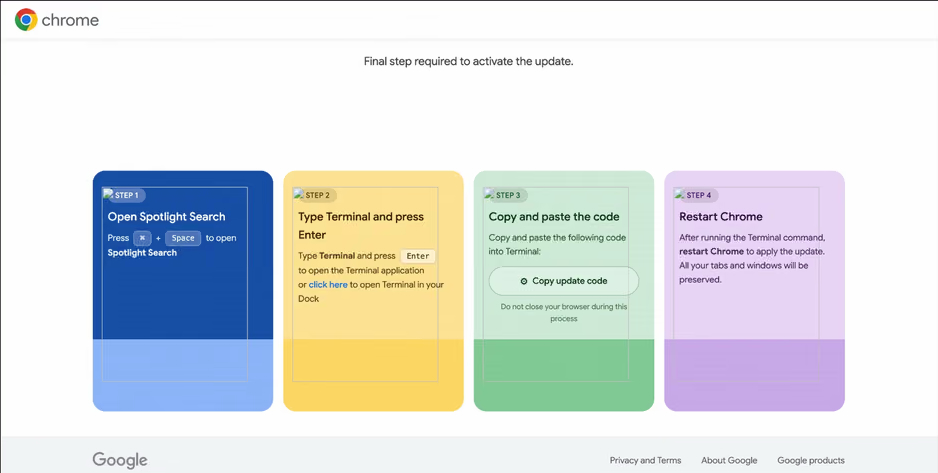
In the specific attack example the researchers describe, the user sees a fake notification saying their browser needs to be updated, along with instructions on how to do it. The instructions change depending on the operating system, and the extension picks up that information automatically too.
In the macOS version of this attack, the user is told to open Terminal, copy a command, paste it there and run it, then restart Chrome to supposedly finish the update. Source
How to avoid falling victim to infected extensions
First off, we recommend checking whether any of the following malicious extensions are already installed in your browser:
Enable Right Click & Copy — Smart Unlock + OCR
RapidLens – Google Lens for Screen Search & Images
Meta & Facebook Ad Library Spy — Save Ads, Finder, Downloader | FeedX-Ray
If you find any of these extensions on your device, we recommend removing it as soon as you can and running a full system scan with a reliable antivirus. As we mentioned above, simply deleting the add-on might not be enough. You can use a free trial version to detect and remove the infection.
How to avoid falling victim to malicious extensions and ClickFix attacks in the future?
Don’t install too many extensions and regularly check the list of those you have.
Remove extensions you don’t use.
Trust the warnings from your operating system and security software, rather than the instructions — or even the demands — of websites and apps.
As Cisco grew into the dominant email security vendor, A saying became loud into this space: "Nobody ever got fired for buying Cisco." The idea was that choosing the market leader was the safest decision because it was easy to justify if things went wrong. In today's email cybersecurity, however, that mindset can be dangerous.
Email remains the primary entry point for phishing, fraud, malware, and Business Email Compromise (BEC) attacks. While Microsoft 365 provides a strong foundation, organizations need additional layers of protection to defend against increasingly sophisticated threats
Mexico is one of the host countries for the 2026 FIFA World Cup, with matches to be played in three major cities: Mexico City, Monterrey, and Guadalajara. These locations are expected to see a large influx of international visitors, increasing the potential security risks. Many of those risks arise from users connecting to public wireless networks.
To better understand the wireless environments that visitors may encounter, we at Kaspersky GReAT conducted a wardriving assessment in the three host cities. The aim of the study was to analyze characteristics, deployment patterns, security configurations and potential exposure risks of public Wi-Fi infrastructure in urban wireless environments.
The information collected during the assessment was used exclusively for passive observation and infrastructure analysis. No attempts were made to authenticate, intercept communications, exploit systems or interact with the detected wireless networks beyond the publicly broadcast management information.
During processing of the collected data, one step involved filtering out networks belonging to cars or cell phones categorized as mobile hotspots because they do not represent networks that can be considered part of the assessment.
Research scope
The cities included in the study have high population density and extensive wireless infrastructure deployments. We chose areas with the most prominent wireless network activity and highly concentrated public access points. We carried out wardriving research in Monterrey back in 2008, but the city’s hotspot landscape has changed since then.
We chose the following analysis areas for each of the cities:
Mexico City: México City Stadium, Mexico City International Airport, Zócalo, Paseo de la Reforma, Colonia Roma, La Condesa, Polanco, and Coyoacán.
Guadalajara: Guadalajara Stadium, Guadalajara International Airport, the city center, Zapopan, Providencia, Avenida Chapultepec, Colonia Americana, Tlaquepaque, and the area around Andares.
Monterrey: Monterrey Stadium, Monterrey International Airport, Fundidora Park, Cintermex Monterrey, the downtown area, Barrio Antiguo, MacroPlaza, and the San Pedro financial district.
The wireless information was collected using passive wireless reconnaissance techniques. The collected information included:
SSID analysis and information exposure, including BSSID-derived SSIDs
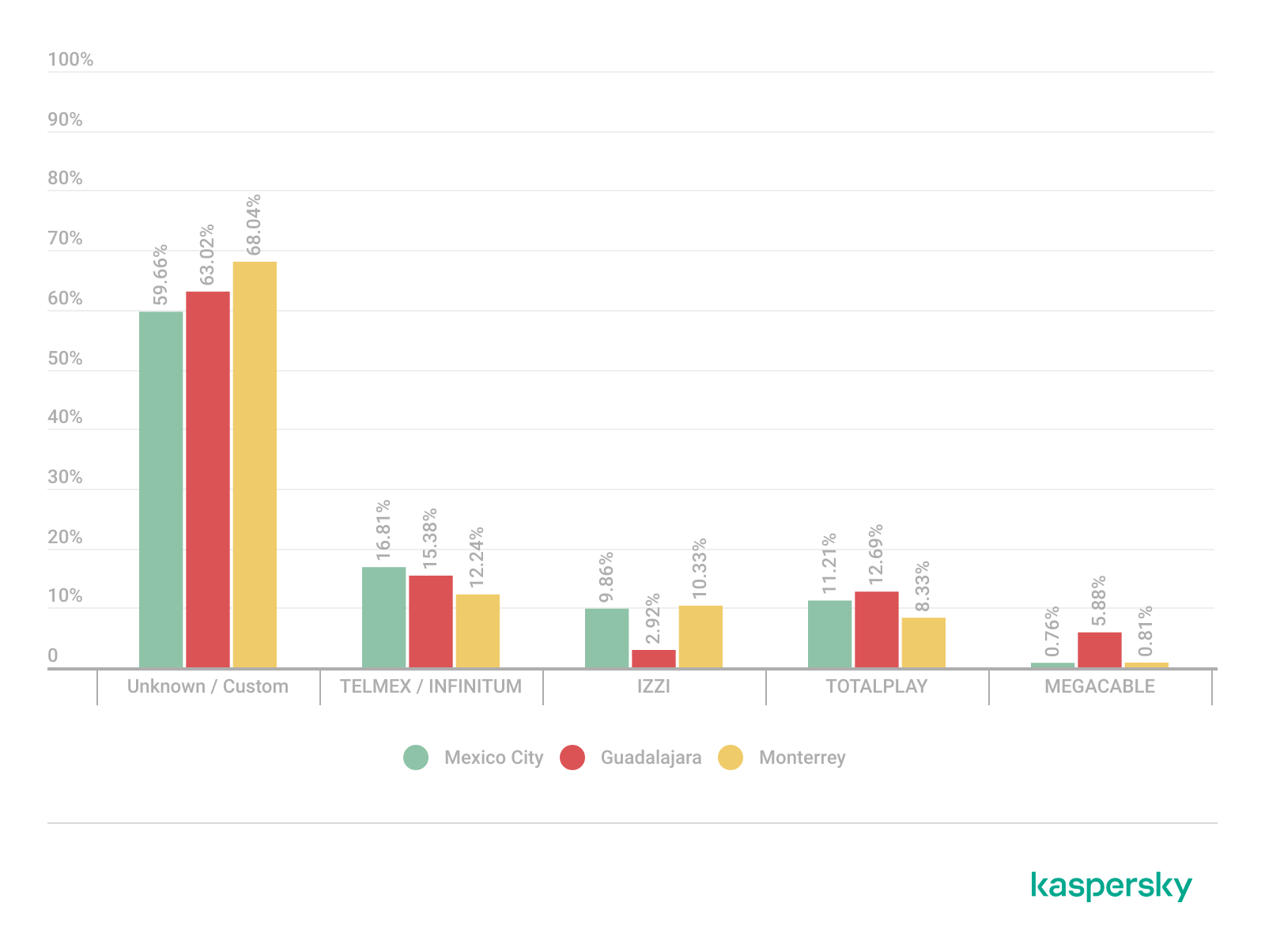
Default router configurations and ISP deployments
Frequency and signal characteristics
Channel congestion and spectrum usage
Wireless security configurations, including:
Open and insecure wireless networks
WPS-enabled networks
Secure networks (WPA2/WPA3) with WPS enabled
We performed a wireless infrastructure analysis in Mexico City, Guadalajara, and Monterrey. We drove through the areas surrounding the World Cup stadiums, tourist zones, and other places where fan concentrations are likely to be largest. Our goal was to evaluate the security status, deployment characteristics and operational exposure of detected wireless networks.
In total, we recorded 84,588 signals with 69,473 unique Service Set Identifiers (SSIDs) in busy locations and World Cup zones across the three cities. Mexico City accounted for 61.4% of the signals, Guadalajara for 23.6%, and Monterrey for 14.8%. Approximately 82% of the signals had a single SSID (81.9%, 81.34%, and 84% respectively). Notably, they all operate under the IEEE 802.11 standard protocol.
Particular attention was given to identifying standard deployment patterns, legacy configurations, default vendor settings and information disclosure through publicly broadcast wireless identifiers.
The following sections present the results that were obtained by analyzing wireless infrastructure across the three locations.
Our findings
SSID analysis and information exposure
SSID analysis was conducted to evaluate naming conventions, deployment standardization and potential information exposure.
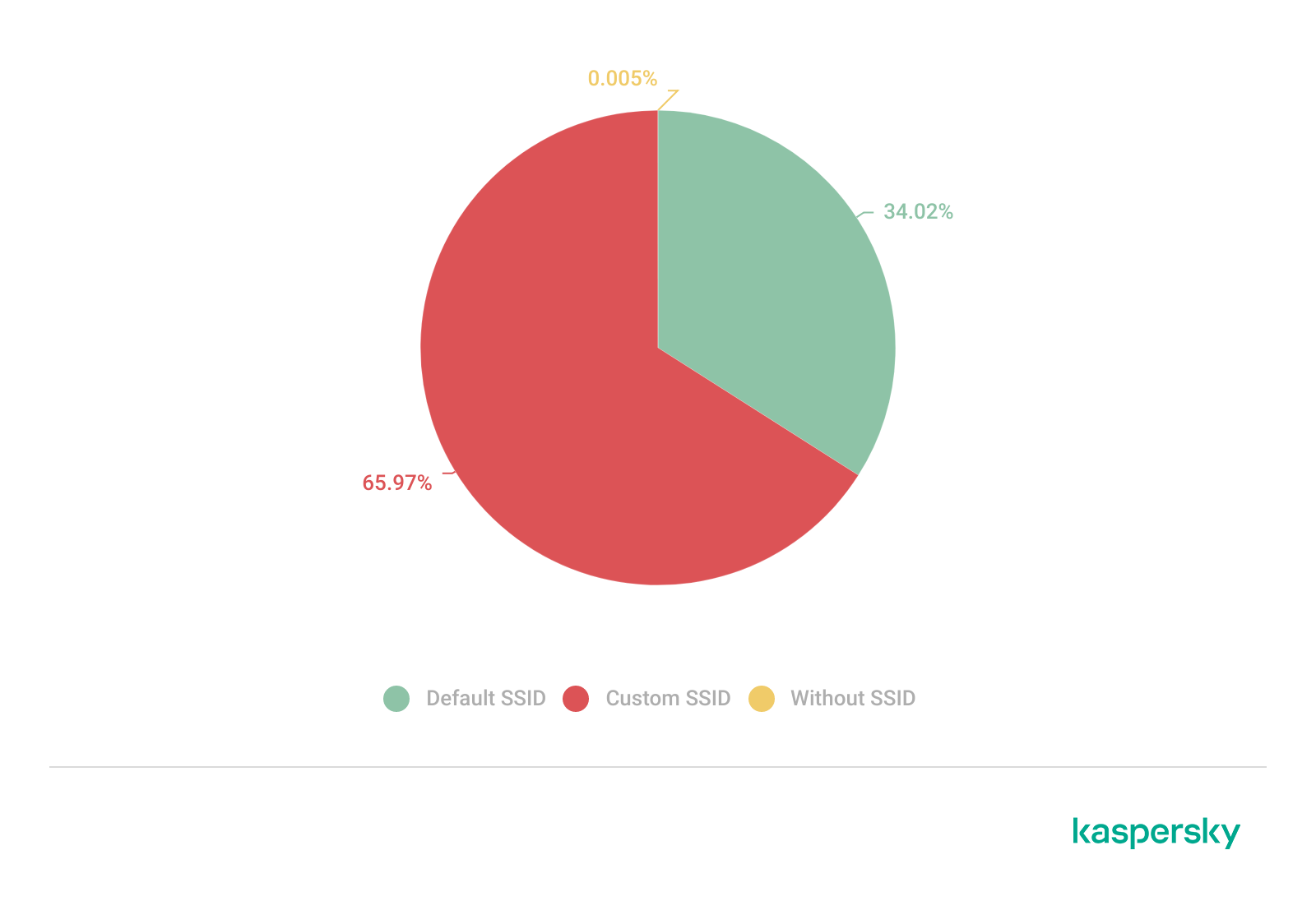
Only a few networks (0.0047%) have an invisible SSID, meaning the names of these networks are not broadcast. Some users prefer to hide the SSID for various reasons, such as the network’s purpose, the profile of its users, internal policies, etc. In contrast, the rest of the networks maintained active SSID broadcasting.
SSID structures may unintentionally disclose operational details about internet service providers (ISPs), device manufacturers, deployment practices, organizational ownership or user identity. The repeated presence of default SSID naming patterns across the analyzed locations indicates a significant degree of infrastructure homogeneity and reuse of default wireless configurations. It may also facilitate passive infrastructure profiling by revealing standard characteristics in use.
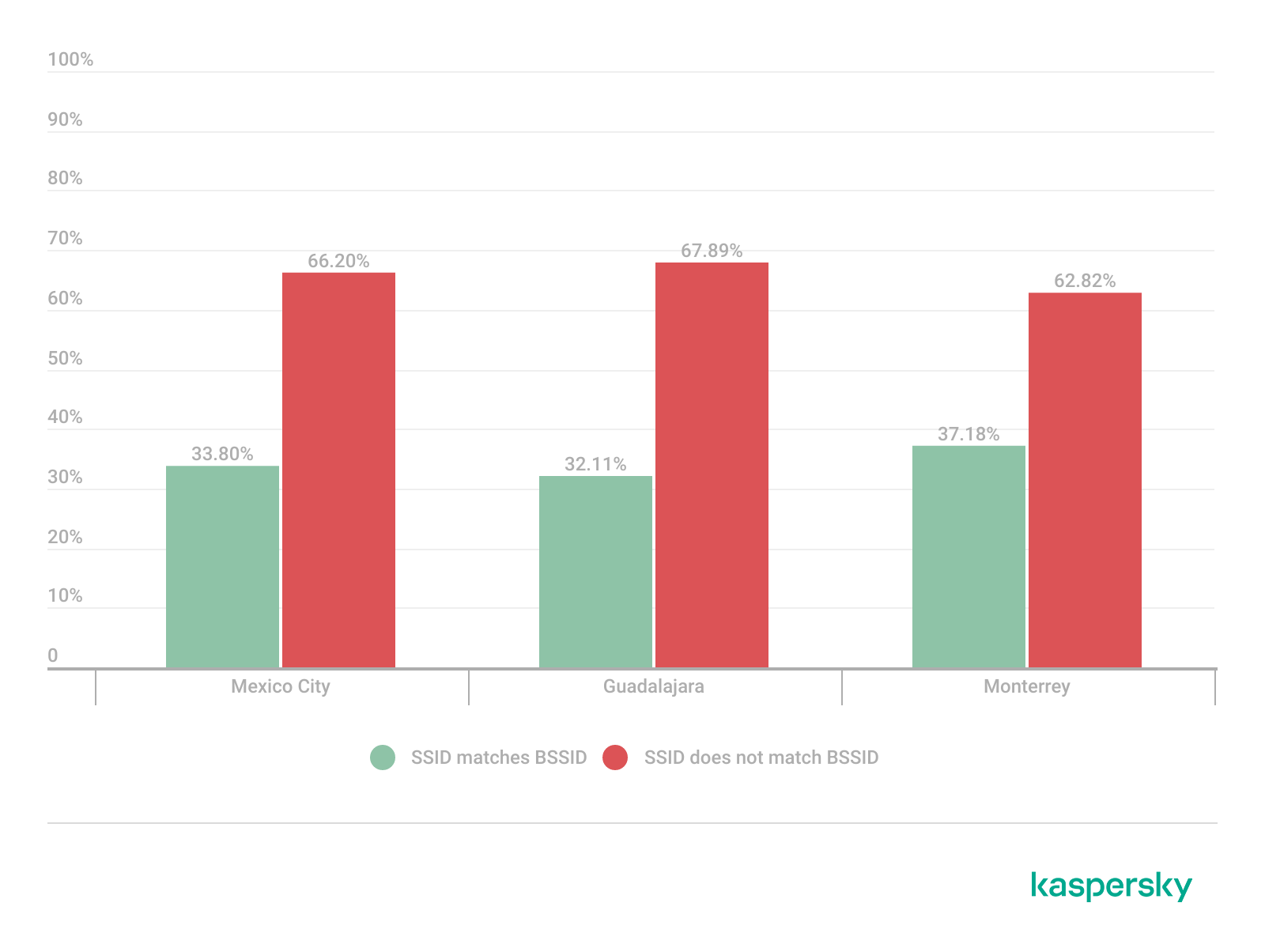
Approximately 34% of the detected networks retained the default SSID naming conventions provided by the manufacturer or ISP, while 66% used customized identifiers.
Distribution of SSID naming conventions (download)
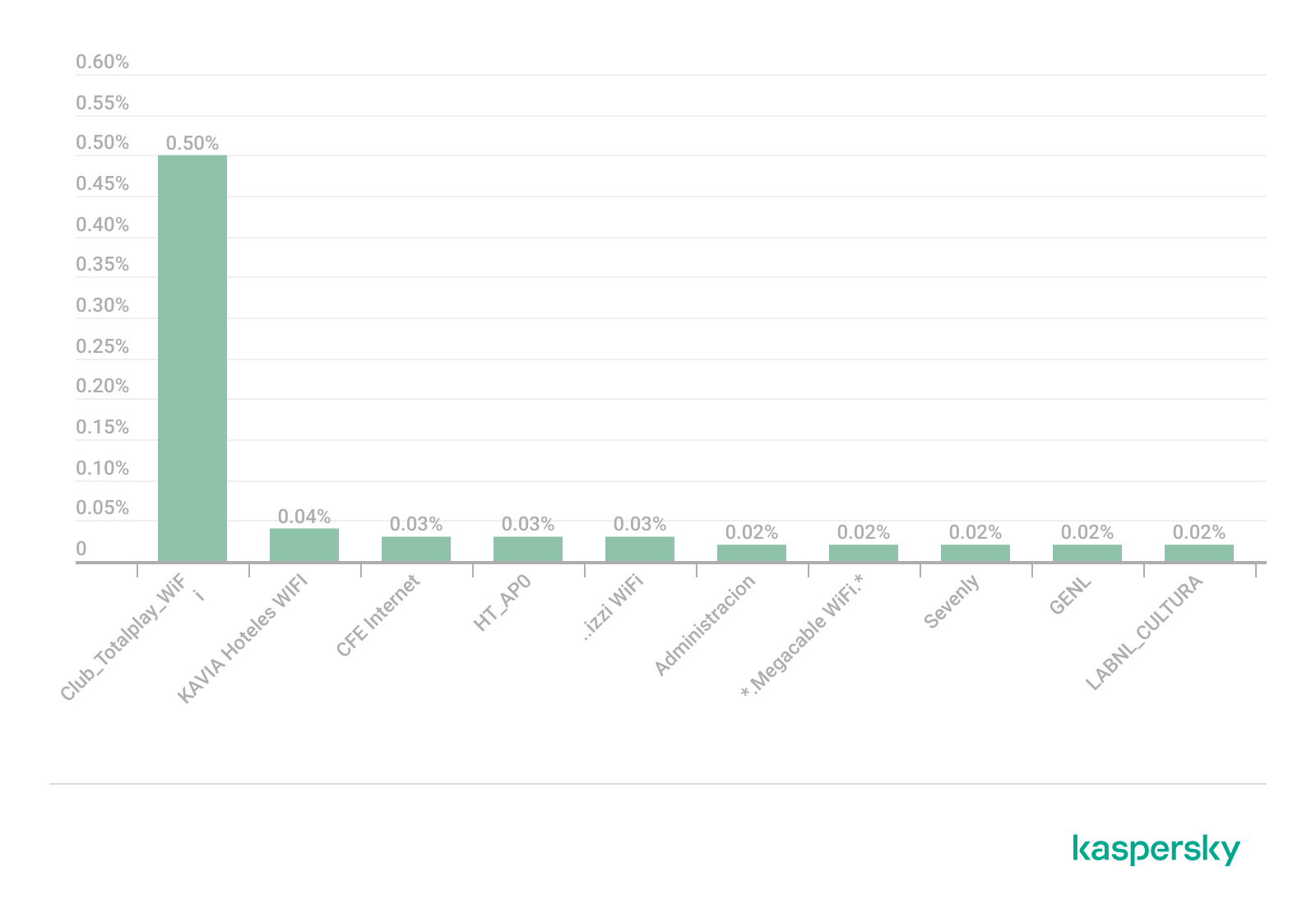
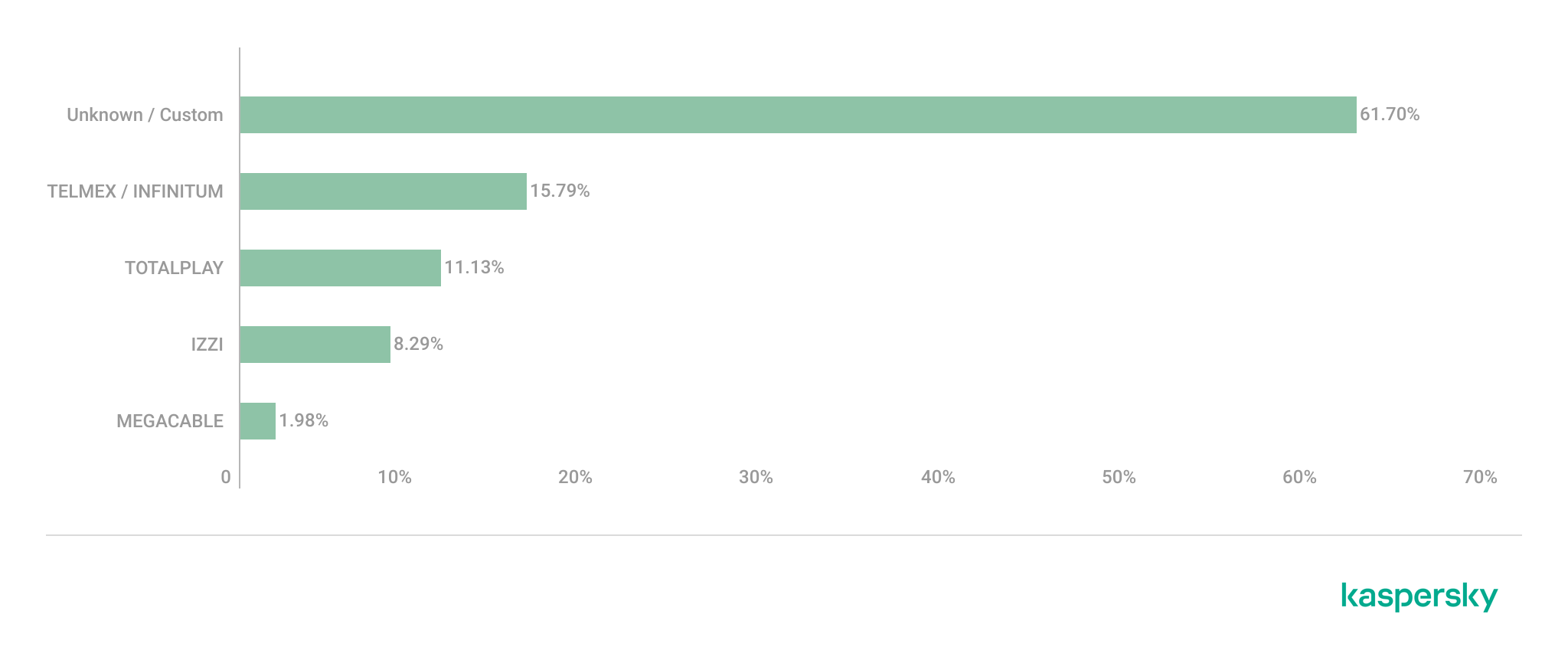
Several recurring SSID naming conventions associated with ISP-provided deployments were identified in the three cities. The most frequently observed patterns include identifiers such as “Club_Totalplay_WiFi”, “izzi WiFi”, and “Megacable WiFi”, which suggests extensive standardization of wireless infrastructure deployment. Additionally, we observed distinctive location-specific SSIDs in each area of analysis, such as “XXXX-Internet para Todos-CDMX” or “RED JALISCO”.
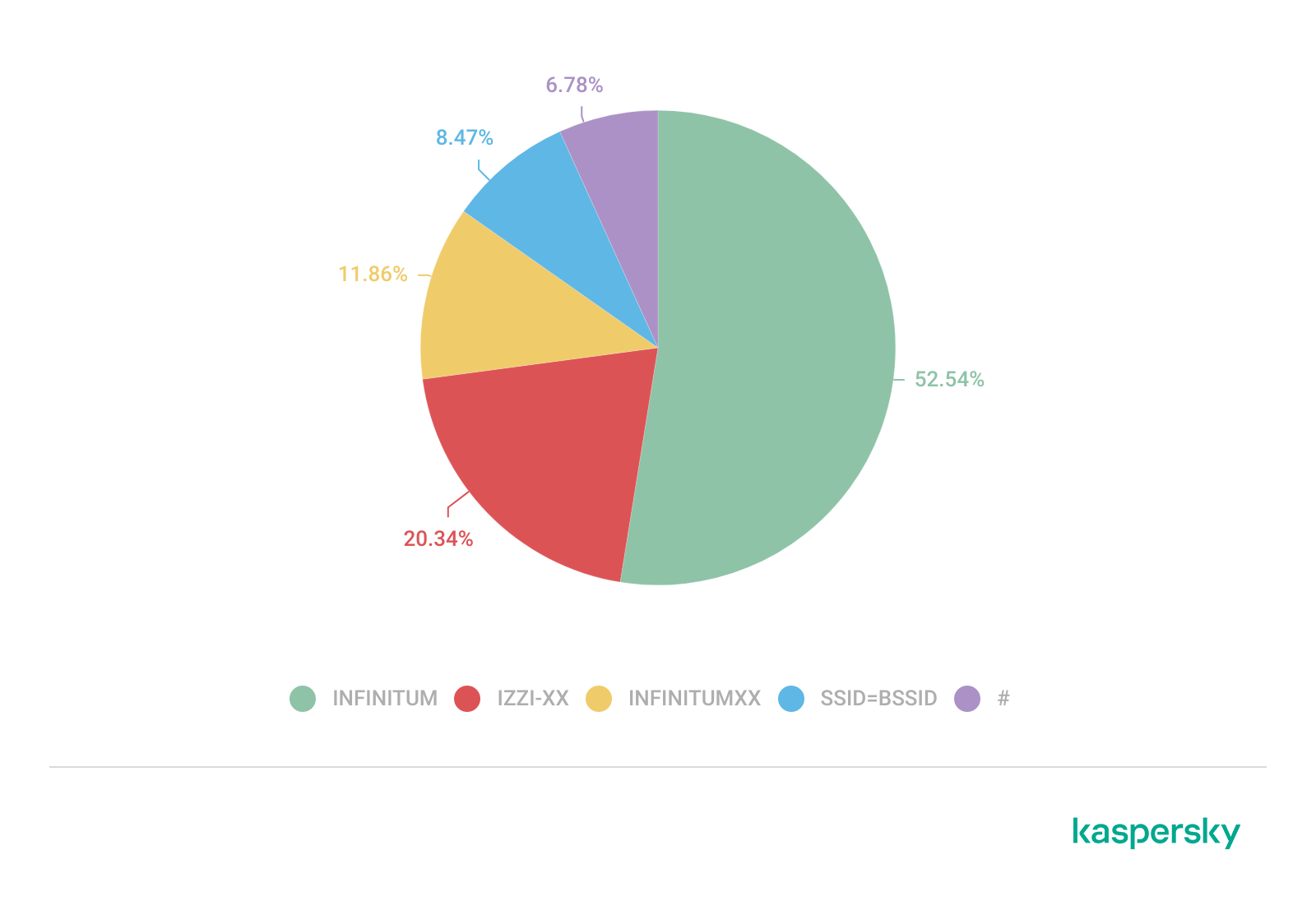
Sequential SSID naming structures were also identified during the analysis. Patterns such as “INFINITUMXX” and “IZZI-XX” suggest automated ISP deployment and large-scale deployment strategies.
We identified 33 unique sequential naming structures among the 137 sequential SSIDs in total, representing approximately 0.16% of the detected wireless networks.
The following graph shows the top five sequential SSID patterns found in the largest number of networks:
Five most frequently observed sequential patterns (download)
Several customized SSIDs contained personal or organizational identifiers, including family names, professions, addresses or internal department references. Although personalized SSIDs may simplify local network identification for users, they may also expose sensitive information that could be useful for social engineering, physical targeting, or organizational profiling.
BSSID-derived SSID
During the analysis, multiple networks were identified that used the physical MAC address of a Wi-Fi access point (BSSID) as the visible SSID. This practice exposes hardware-level information that could facilitate vendor fingerprinting and targeted reconnaissance activities.
The organizationally unique identifier (OUI) contained in the first bytes of the BSSID identifies the equipment manufacturer. Threat actors can correlate exposed manufacturers with device-specific vulnerabilities.
Notably, we found that more than 30% of networks in all three cities reuse the MAC address as the SSID.
Default router configurations and ISP deployments
We performed wireless infrastructure profiling to identify the most common wireless equipment manufacturers and ISP deployments across the three locations.
Large-scale ISP deployments frequently use standardized wireless configurations and vendor-specific hardware platforms. Identifying dominant manufacturers and ISP naming conventions can provide insight into infrastructure and deployment practices facilitating the mapping of standardized attack surfaces.
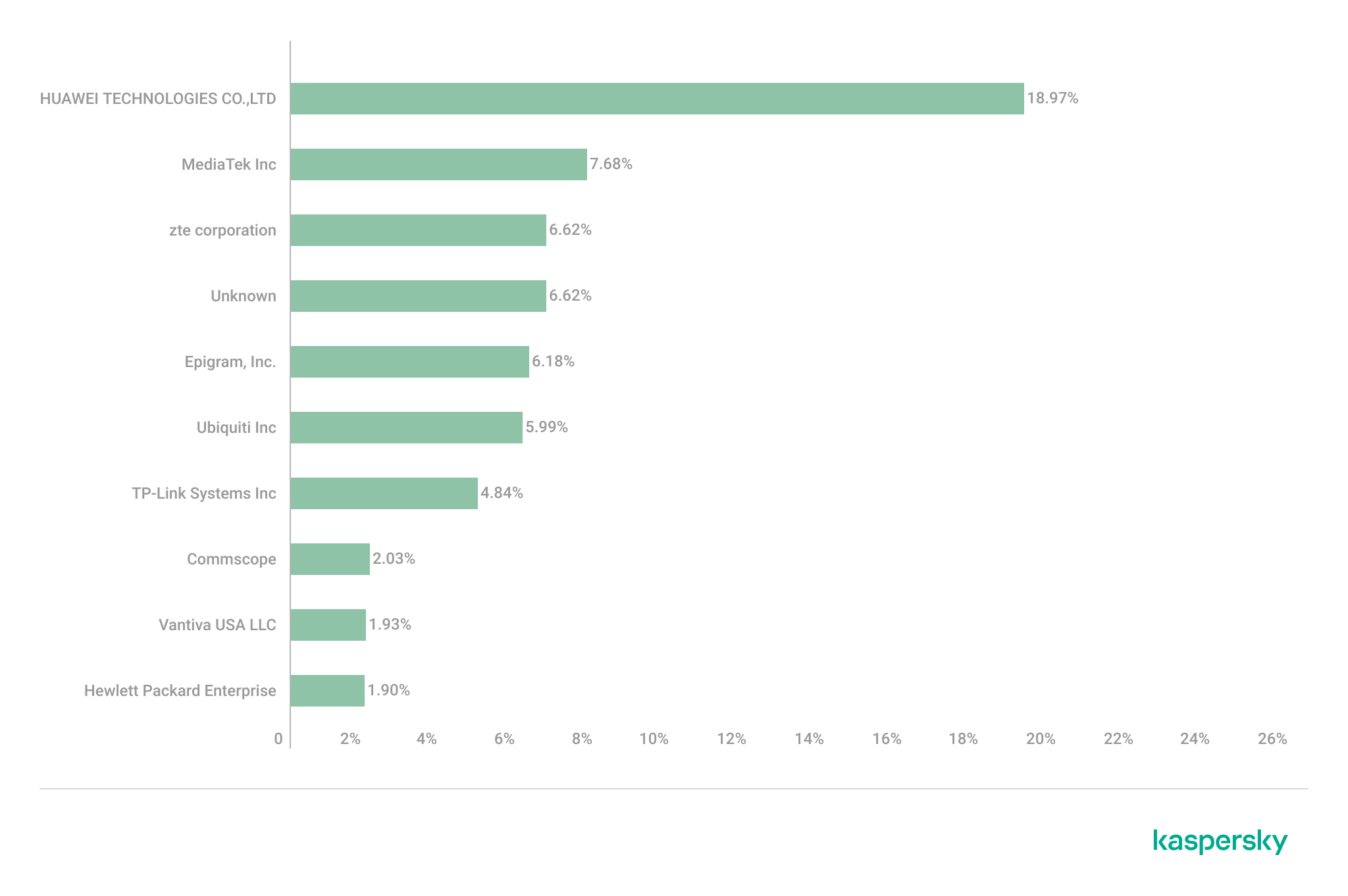
The following figure shows the distribution of the most commonly used manufacturers.
Most frequently observed wireless equipment manufacturers (download)
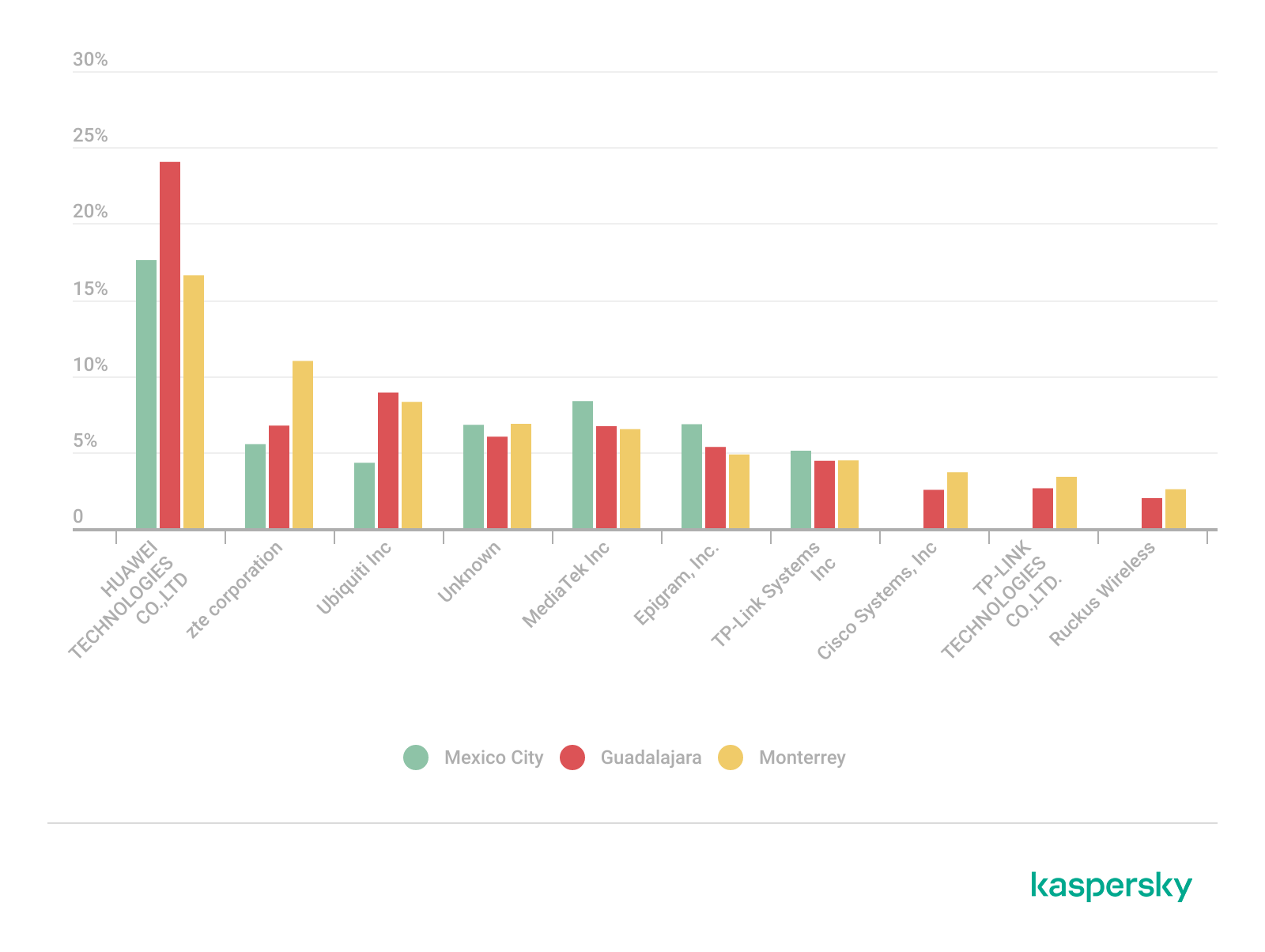
The manufacturer analysis revealed a strong concentration of wireless infrastructure among a limited number of vendors. Across the three locations, Huawei Technologies, MediaTek-based devices, and other manufacturers’ equipment that is distributed through ISP channels represented a significant portion of the detected deployments. Mexico City had the most diverse infrastructure, while Monterrey and Guadalajara had a greater concentration of wireless equipment known as SOHO (small office/home office) or residential-grade hardware. The widespread presence of standard vendor platforms may facilitate infrastructure fingerprinting and large-scale targeting of known device-specific vulnerabilities.
Most frequently observed wireless equipment manufacturers across the three cities (download)
ISP deployments frequently exhibited standardized configuration patterns and recurring manufacturer identifiers. Our ISP deployment analysis revealed a high concentration of access points associated with major residential internet providers. Deployments associated with Infinitum, Totalplay and Izzi represented a substantial portion of the detected wireless infrastructure across all locations. These findings suggest a high degree of deployment standardization across networks associated with major residential internet providers. This observation was supported by the repeated presence of ISP-associated SSIDs such as “Infinitum”, “Totalplay”, and “Izzi”, combined with manufacturer identifiers frequently associated with consumer equipment, including Huawei, ZTE and other residential wireless equipment vendors.
It is important to note that, for this analysis, ISPs were primarily inferred from SSID naming conventions and manufacturer fingerprint data. A significant portion of the detected wireless networks fell into the “UNKNOWN/CUSTOM” category. This classification includes custom hotspots and networks whose naming conventions did not expose identifiable ISP-associated patterns. The findings suggest that many users and organizations (as we saw previously, approximately 66%) use custom network names, limiting direct provider attribution.
The following figure illustrates the distribution of ISP-associated wireless deployments in general.
To better understand this distribution, we took the most frequently observed ISPs by city.
Most frequently observed ISPs across the three cities (download)
Frequency and signal characteristics
We also analyzed wireless signal characteristics to evaluate coverage quality, signal strength, and frequency band utilization in the three cities. In dense urban environments, signal quality and frequency spectrum distribution can affect wireless reliability, client connectivity, roaming performance, and overall network efficiency.
Signal quality analysis revealed that a substantial portion of the detected access points operated under weak or very weak signal conditions. Monterrey had the highest percentage of very weak signals, with approximately 50% of detected deployments. Similar patterns were observed in Guadalajara and Mexico City, suggesting high-density wireless environments with overlapping coverage areas. Only a limited percentage of networks were classified within the very good or excellent signal categories across the three locations.
Signal stability analysis revealed that most detected wireless deployments exhibited stable beacon transmission behavior. More than 96% of the detected access points across all locations were classified as stable, while only a small percentage exhibited unstable or indeterminate signal behavior.
These findings imply that the majority of the wireless infrastructure observed during the assessment corresponded to permanently deployed access points rather than transient or intermittent wireless devices.
Frequency band analysis revealed the strong prevalence of 2.4 GHz wireless deployments across the three locations. More than 95% of the detected wireless networks operated within the 2.4 GHz spectrum, while only a small percentage of deployments were classified under the unknown or non-standard frequency categories. This uneven distribution reflects the continued prevalence of legacy-compatible wireless infrastructure and SOHO deployments.
These findings are consistent with dense urban wireless environments with large numbers of access points in restricted spectrum allocations.
Channel congestion and spectrum usage
Next, we analyzed wireless channel utilization to evaluate frequency spectrum congestion and channel allocation patterns across the three cities. Our analysis focused on the 2.4 GHz spectrum, where channel overlap and high access point density commonly produce interference and degraded wireless performance. In densely populated wireless environments, an excessive concentration of access points on a limited number of channels can lead to co-channel interference, packet collisions, reduced throughput, and degraded network stability.
Spectrum congestion analysis revealed that the 2.4 GHz band consistently experienced elevated congestion levels across the three cities. The detailed results showed a strong concentration of deployments on channels 11, 6 and 1, which are traditionally recommended as non-overlapping channels within the 2.4 GHz spectrum. Channel 11 was the most utilized channel, accounting for 25.2% of the detected access points, followed by channel 6 with 22.5% and channel 1 with 19.5%. This distribution indicates that most wireless deployments adhere to standard channel allocation practices for 2.4 GHz Wi-Fi environments.
The following figure illustrates the overall distribution of the most frequently utilized wireless channels.
To further assess wireless spectrum saturation, the detected access points were grouped according to channel congestion levels: VERY_HIGH, HIGH, UNKNOWN, MEDIUM, LOW and NONE.
Mexico City had the highest proportion of heavily congested wireless channels, with approximately 7% of detected access points operating under HIGH congestion conditions. Guadalajara followed with nearly 5% of deployments categorized as HIGH congestion, while Monterrey had the lowest percentage at approximately 3.29%.
These findings suggest that wireless spectrum saturation increases proportionally with urban infrastructure density and access point concentration. Despite the presence of congested deployments, most detected access points were categorized as LOW or MEDIUM congestion, suggesting severe spectrum saturation was localized rather than uniformly distributed.
A thorough analysis of individual channel utilization revealed that channels 11, 6 and 1 consistently experienced the highest congestion levels across the three cities, which correlates with our previous findings. These channels accounted for the majority of VERY_HIGH congestion classifications, particularly within the 2.4 GHz band.
In Mexico City, channel 11 alone accounted for more than 25% of detected deployments and consistently exhibited VERY_HIGH congestion levels.
This behavior reflects the limited availability of non-overlapping channels within the 2.4 GHz spectrum and the widespread reliance on default wireless configurations.
Overall, the channel utilization analysis showed that wireless deployments are concentrated heavily within the traditional, non-overlapping 2.4 GHz channels. While this strategy reduces adjacent-channel interference, excessive access point density on the same channels can still produce significant co-channel contention and poor wireless performance in high-density urban environments.
Wireless security configurations
The next thing we evaluated was the security posture of the detected wireless networks. We analyzed the wireless security configurations advertised by access points in each of the locations.
Overall security configuration distribution
The analysis revealed that WPA2 was the dominant wireless authentication mechanism across the three cities. Mexico City had the highest WPA2 adoption rate at 81.19%, followed by Monterrey at 79.19% and Guadalajara at 77.59%.
The study found that every 6th open access point (17%) was unsafe, namely 16.5% in Mexico City, 18.5% in Guadalajara, and 17.2% in Monterrey. Open wireless deployments were consistently present across all locations, ranging between 10% and 12% of detected access points. These findings show that despite the widespread deployment of modern wireless security standards, encryption adoption remains incomplete.
Distribution of wireless authentication mechanisms across the three locations (download)
To simplify the interpretation of wireless security posture, we grouped detected networks into four categories:
Secure (WPA2/WPA3)
Insecure (Open/WEP)
Weak (WPA)
Unknown
Across the three locations, secure networks comprised most of detected deployments, accounting for approximately 82% of all access points. However, insecure open networks still account for between 10% and 12% of detected wireless infrastructure, consistent with our previous findings. It is important to mention that networks within the unknown category are not considered secure.
Mexico City had the highest percentage of secure deployments at 83.54%, while Guadalajara had the highest percentage of insecure open networks at 12.46%. Although Monterrey had the lowest percentage of insecure networks, open deployments still accounted for more than 10% of the detected access points.
Wireless security posture grouping across the three locations (download)
Although modern WPA2/WPA3 encryption standards dominate current wireless deployments, the continued presence of open and legacy WPA deployments indicates that insecure wireless configurations remain relevant from an operational standpoint. These networks may expose users to passive traffic interception, unauthorized monitoring, rogue access point attacks, and credential harvesting techniques.
WPS-enabled networks
We also analyzed Wi-Fi Protected Setup (WPS) in all the locations to evaluate additional attack surfaces. WPS is a standard feature on wireless routers that enables devices such as printers, repeaters or mobile phones to connect to a secure Wi-Fi network without manually entering a long password, typically through a PIN-based enrolled mechanism. Although WPA2 and WPA3 provide strong encryption mechanisms, the presence of WPS can introduce security weaknesses due to inherently vulnerable PIN-based enrollment methods.
By combining detections from the three locations, we found that 55% of all detected access points did not advertise WPS capabilities, leaving 45% of deployments vulnerable to WPS-based abuse. These results suggest that, despite the adoption of modern encryption standards, a significant portion of wireless infrastructure continues to expose legacy convenience features.
During the analysis, we found that Mexico City had the highest proportion of WPS-enabled networks, with 46.61% of the detected access points advertising WPS capabilities. Guadalajara was second with 43.45%, while Monterrey had the lowest proportion at 40.93%.
The percentage of detected access points advertising WPS capabilities across the three locations (download)
Almost half of the detected wireless networks in each city continued to advertise WPS, indicating that WPS prevalence is consistently high across the three cities.
Secure networks with WPS enabled
In many cases, networks classified as secure because of WPA2/WPA3 encryption still had WPS functionality enabled, which effectively increased the available attack surface.
To further assess the relationship between encryption strength and WPS exposure, we conducted a secondary analysis of secure networks (WPA2/WPA3) only. The results showed that around half of all secure deployments still exposed WPS, with the following breakdown for each city:
Mexico City: 53.7%
Guadalajara: 50.9%
Monterrey: 47.5%
The proportion of secure networks with WPS enabled across the three locations (download)
These findings indicate that encryption strength alone is not enough to evaluate wireless security posture because additional protocol features, such as WPS, may still expose exploitable attack vectors.
Additional security considerations
Overall, travelers operating within dense public environments are exposed not only to insecure wireless infrastructure but also to various risks associated with digital interactions. These risks include many threats, from public USB charging systems and phishing QR codes to proximity-based protocols and exposure to shared public devices, such as interactive totems or kiosks. One particular point that should be taken into account in light of our research is the issue of rogue wireless deployments.
Rogue access points are not necessarily malicious; they may be set up accidentally by misconfiguring router settings. An entry point for potential compromise might be caused by various misconfigurations, from a weak password to an insecure protocol. However, attackers deploy such unauthorized hotspots with malicious intent to infiltrate a network. Threat actors may deploy rogue access points posing as legitimate public wireless networks in airports, hotels, cafés and tourist areas. These deployments are called “evil twins” and can trick users into connecting to attacker-controlled infrastructure capable of intercepting traffic, harvesting credentials, or performing man-in-the-middle attacks. Further risk lies in the potential compromise of local network devices or even malware distribution. Such threats complement our findings, underscoring the importance of implementing traffic encryption, using a security solution and exercising extreme caution while browsing via public networks.
Conclusion
The wardriving assessment conducted in Mexico City, Guadalajara, and Monterrey revealed that modern wireless infrastructure continues to present multiple forms of operational exposure despite the widespread adoption of WPA2 and WPA3 security standards. The analysis demonstrated that wireless environments are highly standardized in all the locations, with recurring ISP deployments, default SSID naming conventions, homogeneous manufacturer distribution, and predictable channel allocation practices observed in all three cities.
Although most of the detected networks were classified as secure under WPA2/WPA3 authentication mechanisms, a significant proportion were exposing additional attack surfaces through enabled WPS functionality, default configurations, sequential SSID structures, and infrastructure metadata disclosure. This demonstrates that encryption strength alone is insufficient for evaluating the overall security posture of wireless infrastructure. Additionally, the prevalence of open networks and legacy wireless configurations indicates that insecure deployments are still operationally relevant in all the locations.
The results also showed that wireless infrastructure is heavily concentrated within the 2.4 GHz spectrum, particularly around channels 11, 6, and 1. This leads to elevated congestion and increased co-channel interference in densely populated urban environments.
SSID analysis further revealed that publicly broadcast wireless identifiers frequently expose valuable operational information about ISPs, equipment manufacturers, deployment templates, organizational ownership, and user-defined naming practices. The identification of default ISP naming conventions, sequential SSID structures, and BSSID-derived SSIDs demonstrated that many deployments prioritize operational convenience and simplicity over exposure minimization and privacy.
The scope of the threats stemming from vulnerable wireless configurations poses serious digital exposure risks for users. The widespread presence of standard deployments, predictable SSID naming and publicly exposed infrastructure identifiers can facilitate passive reconnaissance, infrastructure fingerprinting and opportunistic targeting.
Recommendations
To minimize the risks of wireless-based exposure and the attack surface related to hotspot infrastructure, we recommend taking the following measures:
Disable WPS functionality on wireless routers whenever possible, particularly within WPA2/WPA3 deployments.
Avoid using default SSID naming conventions that disclose ISP providers, router manufacturers, or deployment templates.
Refrain from using personal, organizational, or location-based identifiers in wireless network names.
Avoid configuring SSID using BSSID or naming conventions derived from MAC addresses, as these may expose hardware fingerprinting information.
Promote migration toward modern WPA3-capable infrastructure while removing legacy wireless protocols when operationally feasible.
Reduce wireless congestion by optimizing channel allocation strategies and minimizing excessive dependence on the 2.4 GHz spectrum.
Encourage adoption of 5 GHz and newer wireless technologies to reduce interference and improve spectrum efficiency.
The findings presented in this assessment emphasize the importance of combining strong wireless encryption standards, secure deployment practices, exposure minimization strategies, and user awareness to enhance the overall security posture of wireless environments.
I am incredibly proud to share that Palo Alto Networks has been named a Leader in the 2026 Gartner® Magic Quadrant for Endpoint Protection Platforms for the fourth consecutive year. For us, this recognition is a testament to our team's relentless vision as we continue to define endpoint defense—from the pioneer days of XDR to the new frontier of agentic AI.
We believe our repeated recognition as a Leader is built on a single, uncompromising commitment to our customers and partners: empowering organizations with reduced overhead, rapid threat response, a strengthened security posture, and the resilient protection required to close the most critical security gaps. We are now leading the shift into the agentic era. While AI agents significantly boost enterprise productivity, they also introduce novel attack surfaces that legacy EDR tools are unable to protect. As the pioneer of XDR, we are committed to defining the next generation of cybersecurity by securing this new frontier.
Cortex® XDR is helping customers:
Secure Agentic AI with Koi: Gain unprecedented visibility, guardrails, and control over AI agents and agentic tools before they become a liability.
Stop the Unseen: Leverage battle-tested prevention powered by behavioral analytics, and industry-leading automation and response.
Unify Your Defense: Consolidate your endpoint and workspace security with a proven, four-time industry Leader.
We are incredibly proud to be recognized as a Leader once again, an acknowledgement that belongs just as much to our customers and partners as it does to us. Your trust, feedback, and real-world challenges keep us sharp and dictate our roadmap. At the end of the day, our continued leadership is built on one core promise: make each day more secure than the day before.
To get the full story and a comprehensive analysis of the endpoint security market, I invite you to read the 2026 Gartner Magic Quadrant report.
Gartner, Magic Quadrant for Endpoint Protection Platforms, By Deepak Mishra, Evgeny Mirolyubov, Nikul Patel, May 29, 2026
Gartner and Magic Quadrant are trademarks of Gartner, Inc. and/or its affiliates. Gartner does not endorse any company, vendor, product or service depicted in its publications, and does not advise technology users to select only those vendors with the highest ratings or other designation. Gartner publications consist of the opinions of Gartner’s business and technology insights organization and should not be construed as statements of fact. Gartner disclaims all warranties, expressed or implied, with respect to this publication, including any warranties of merchantability or fitness for a particular purpose.
The primary goal for attackers in a phishing campaign is to bypass email security and trick the potential victim into revealing their data. To achieve this, scammers employ a wide range of tactics, from redirect links to QR codes. Additionally, they heavily rely on legitimate sources for malicious email campaigns. Specifically, we’ve recently observed an uptick in phishing attacks leveraging Amazon SES.
The dangers of Amazon SES abuse
Amazon Simple Email Service (Amazon SES) is a cloud-based email platform designed for highly reliable transactional and marketing message delivery. It integrates seamlessly with other products in Amazon’s cloud ecosystem, AWS.
At first glance, it might seem like just another delivery channel for email phishing, but that isn’t the case. The insidious nature of Amazon SES attacks lies in the fact that attackers aren’t using suspicious or dangerous domains; instead, they are leveraging infrastructure that both users and security systems have grown to trust. These emails utilize SPF, DKIM, and DMARC authentication protocols, passing all standard provider checks, and almost always contain .amazonses.com in the Message-ID headers. Consequently, from a technical standpoint, every email sent via Amazon SES – even a phishing one – looks completely legitimate.
Phishing URLs can be masked with redirects: a user sees a link like amazonaws.com in the email and clicks it with confidence, only to be sent to a phishing site rather than a legitimate one. Amazon SES also allows for custom HTML templates, which attackers use to craft more convincing emails. Because this is legitimate infrastructure, the sender’s IP address won’t end up on reputation-based blocklists. Blocking it would restrict all incoming mail sent through Amazon SES. For major services, that kind of measure is ineffective, as it would significantly disrupt user workflows due to a massive number of false positives.
How compromise happens
In most cases, attackers gain access to Amazon SES through leaked IAM (AWS Identity and Access Management) access keys. Developers frequently leave these keys exposed in public GitHub repositories, ENV files, Docker images, configuration backups, or even in publicly accessible S3 buckets. To hunt for these IAM keys, phishers use various tools, such as automated bots based on the open-source utility TruffleHog, which is designed for detecting leaked secrets. After verifying the key’s permissions and email sending limits, attackers are equipped to spread a massive volume of phishing messages.
Examples of phishing with Amazon SES
In early 2026, one of the most common themes in phishing emails sent with Amazon SES was fake notifications from electronic signature services.
Phishing email imitating a Docusign notification
The email’s technical headers confirm that it was sent with Amazon SES. At first glance, it all looks legitimate enough.
Phishing email headers
In these emails, the victim is typically asked to click a link to review and sign a specific document.
Phishing email with a “document”
Upon clicking the link, the user is directed to a sign-in form hosted on amazonaws.com. This can easily mislead the victim, convincing them that what they’re doing is safe.
Phishing sign-in form
The resulting form is, of course, a phishing page, and any data entered into it goes directly to the attackers.
Amazon SES and BEC
However, Amazon SES is used for more than just standard phishing; it’s also a vehicle for a very sophisticated type of BEC campaigns. In one case we investigated, a fraudulent email appeared to contain a series of messages exchanged between an employee of the target organization and a service provider about an outstanding invoice. The email was sent as if from that employee to the company’s finance department, requesting urgent payment.
BEC email featuring a fake conversation between an employee and a vendor
The PDF attachments didn’t contain any malicious phishing URLs or QR codes, only payment details and supporting documentation.
Forged financial documents
Naturally, the email didn’t originate with the employee, but with an attacker impersonating them. The entire thread quoted within the email was actually fabricated, with the messages formatted to appear as a legitimate forwarded thread to a cursory glance. This type of attack aims to lower the user’s guard and trick them into transferring funds to the scammers’ account.
Takeaways
Phishing via Amazon SES experienced an uptick in January 2026 and has remained relatively steady through Q1. By weaponizing this service, attackers avoid the effort of building dubious domains and mail infrastructure from scratch. Instead, they hijack existing access keys to gain the ability to blast out thousands of phishing emails. These messages pass email authentication, originate from IP addresses that are unlikely to be blocklisted, and contain links to phishing forms that look entirely legitimate.
Since these Amazon SES phishing attacks stem from compromised or leaked AWS credentials, prioritizing the security of these accounts is critical. To mitigate these risks, we recommend following these guidelines:
Implement the principle of least privilege when configuring IAM access keys, granting elevated permissions only to users who require them for specific tasks.
Transition from IAM access keys to roles when configuring AWS; these are profiles with specific permissions that can be assigned to one or several users.
Enable multi-factor authentication, an ever-relevant step.
Configure IP-based access restrictions.
Set up automated key rotation and run regular security audits.
Use the AWS Key Management Service to encrypt data with unique cryptographic keys and manage them from a centralized location.
We recommend that users remain vigilant when handling email. Do not determine whether an email is safe based solely on the From field. If you receive unexpected documents via email, a prudent precaution is to verify the request with the sender through a different communication channel. Always carefully inspect where links in the body of an email actually lead. Additionally, robust email security solutions can provide an essential layer of protection for both corporate and personal correspondence.
In January 2026, we announced the general availability of the AWS European Sovereign Cloud, a new, independent cloud for Europe entirely located within the European Union (EU), and physically and logically separate from all other AWS Regions. The unique approach of the AWS European Sovereign Cloud provides the only fully featured, independently operated sovereign cloud backed by strong technical controls, sovereign assurances, and legal protections designed to meet the sensitive data needs of European governments and enterprises.
One of the foundational components of how AWS European Sovereign Cloud enables verifiable trust of technical controls and delivers assurance is through our compliance programs and assurance frameworks. These programs help customers understand the robust controls in place at AWS European Sovereign Cloud to maintain security and compliance of the cloud. To meet the needs of our customers, we committed that the AWS European Sovereign Cloud will maintain key certifications such as ISO/IEC 27001:2022, System and Organization Controls (SOC) reports, and Cloud Computing Compliance Criteria Catalogue (C5) attestation, all validated regularly by independent auditors to assure our controls are designed appropriately, operate effectively, and can help customers satisfy their compliance obligations.
Today, AWS European Sovereign Cloud is pleased to announce that SOC 2 and C5 Type 1 attestation reports, along with seven key ISO certifications (ISO 27001:2022,27017:2015,27018:2019, 27701:2019, 22301:2019, 20000-1:2018, and 9001:2015) are now available. The attestation reports cover 69 AWS services operating within the AWS European Sovereign Cloud, while the certificates have integrated the AWS European Sovereign Cloud region into the global AWS Management Systems. This achievement marks a pivotal first step in our journey to establish the AWS European Sovereign Cloud as a trusted and compliant cloud for European organizations. By securing these foundational certifications and attestation reports early in our implementation, we are demonstrating our commitment to earning customer trust.AWS European Sovereign Cloud customers in Germany and across Europe can now run their applications with enhanced assurance and confidence that our infrastructure aligns with internationally recognized security standards and the AWS European Sovereign Cloud: Sovereign Reference Framework (ESC-SRF). These certifications and attestation reports provide independent validation of our security controls and operational practices, demonstrating our commitment to meeting the heightened expectations towards cloud service providers. Beyond compliance, these certifications and reports help customers meet regulatory requirements and innovate with confidence.
SOC 2 Type 1 report
SOC reports are independent third-party examinations that show how AWS European Sovereign Cloud meets compliance controls and sovereignty objectives. The AWS European Sovereign Cloud SOC 2 report addresses three critical AICPA Trust Services Criteria: Security, Availability, and Confidentiality and includes internal controls mapped to the ESC-SRF. The ESC-SRF establishes sovereignty criteria across key domains including governance independence, operational control, data residency, and technical isolation. As part of the SOC 2 Type 1 attestation, independent third-party auditors have validated suitability of the design and implementation of our controls addressing measures such as independent European Union (EU) corporate structures, operation by EU-resident AWS personnel, strict residency requirements for Customer Content and Customer-Created Metadata, and separation from all other AWS Regions. The ESC-SRF controls in our SOC 2 report show customers how AWS delivers on its sovereignty commitments.
C5 Type 1 report
C5 is a German Government-backed attestation scheme introduced in Germany by the Federal Office for Information Security (BSI) and represents one of the most comprehensive cloud security standards in Europe. The AWS European Sovereign Cloud C5 Type 1 report provides customers with independent third-party attestation on the suitability of the design and implementation of our controls to meet both C5 basic criteria and C5 additional criteria.
The basic criteria establish fundamental security requirements for cloud service providers, covering areas such as organization of information security, human resources security, asset management, access control, cryptography, physical security, operations security, communications security, system acquisition and development, supplier relationships, incident management, business continuity, and compliance. The additional criteria address enhanced requirements for handling sensitive data and critical applications, making this attestation particularly valuable for AWS European Sovereign Cloud customers with stringent data security and sovereignty requirements.
Key ISO certifications
AWS European Sovereign Cloud region has achieved successful onboarding to seven key ISO certifications that collectively demonstrate comprehensive operational excellence:
These certifications confirm that AWS European Sovereign Cloud region has been integrated into comprehensive frameworks for managing security, privacy, continuity, service delivery, and quality, helping to ensure sensitive information remains secure, services remain available, and operations meet the highest standards through systematic risk management processes and continuous improvement practices.
How to access the reports
To access SOC 2, C5 reports and ISO certifications, customers should sign in to their AWS European Sovereign Cloud account and navigate to AWS Artifact in the AWS Management Console. AWS Artifact is a self-service portal that provides on-demand access to AWS compliance reports and certifications.
We recognize that compliance is not a destination but a continuous journey, and these initial SOC 2, C5 reports and ISO certifications represent the beginning of our certification portfolio. They lay the essential groundwork upon which we will continue to build to meet AWS European Sovereign Cloud customers’ compliance needs as they continue to evolve. As we expand our compliance coverage in the months ahead, customers can be confident that security, transparency, and regulatory alignment have been part of the very DNA of the AWS European Sovereign Cloud design from day one. To learn more about our compliance and security programs, visit AWS European Sovereign Cloud Compliance, or reach out to your AWS European Sovereign Cloud account team.
Security and compliance is a shared responsibility between AWS European Sovereign Cloud and the customer. For more information, see the AWS Shared Security Responsibility Model.
If you have feedback about this post, submit comments in the Comments section below.
Each year, the Super Bowl draws one of the largest live audiences of any global sporting event, with tens of thousands of spectators attending in person and more than 100 million viewers expected to watch worldwide. Super Bowl LX, taking place on February 8, 2026 at Levi’s Stadium, will feature the Seattle Seahawks and the New England Patriots, with Bad Bunny headlining the halftime show and Green Day performing during the opening ceremony.
Beyond the game itself, the Super Bowl represents one of the most influential commercial and media stages in the world, with major brands investing in some of the most expensive advertising time of the year. The scale, visibility, and economic significance of the event make it an attractive target for threat actors seeking attention, disruption, or financial gain, underscoring the need for heightened security awareness.
Cybersecurity Considerations
At this time, Flashpoint has not observed any specific cyber threats targeting Super Bowl LX. Despite the absence of overt threats, it remains possible that threat actors may attempt to obtain personal information—including financial and credit card details—through scams, malware, phishing campaigns, or other opportunistic cyber activity.
High-profile events such as the Super Bowl have historically been leveraged as bait for cyber campaigns targeting fans and attendees rather than league infrastructure. In October 2024, the online store of the Green Bay Packers was hacked, exposing customers’ financial details. Previous incidents also include the February 2022 “BlackByte” ransomware attack that targeted the San Francisco 49ers in the lead-up to Super Bowl LVI.
Although Flashpoint has not identified any credible calls for large-scale cyber campaigns against Super Bowl LX at this time, analysts assess that cyber activity—if it occurs—is more likely to focus on fraud, impersonation, and social engineering directed at ticket holders, travelers, and high-profile attendees.
Online Sentiment
Flashpoint is currently monitoring online sentiment ahead of Super Bowl LX. At the time of publishing, analysts have identified pockets of increasingly negative online chatter related primarily to allegations of federal immigration enforcement activity in and around the event, as well as broader political and social tensions surrounding the Super Bowl.
Online discussions include calls for protests and boycotts tied to perceived Immigration and Customs Enforcement (ICE) involvement, as well as controversy surrounding halftime and opening ceremony performers. While sentiment toward the game itself and associated events remains largely positive, Flashpoint continues to monitor for escalation in rhetoric that could translate into real-world activity.
Potential Physical Threats
Protests and Boycotts
Flashpoint analysts have identified online chatter promoting protests in the Bay Area in response to allegations that Immigration and Customs Enforcement (ICE) agents will conduct enforcement operations in and around Super Bowl LX. A planned protest is scheduled to take place near Levi’s Stadium on February 8, 2026, during game-day hours.
At this time, Flashpoint has not identified any calls for violence or physical confrontation associated with these actions. However, analysts cannot rule out the possibility that demonstrations could expand or relocate, potentially causing localized disruptions near the venue or surrounding infrastructure if protesters gain access to restricted areas.
In addition, Flashpoint has identified online calls to boycott the Super Bowl tied to both the alleged ICE presence and controversy surrounding the event’s halftime and opening ceremony performers. Flashpoint has not identified any chatter indicating that players, NFL personnel, or affiliated organizations plan to boycott or disrupt the game or related events.
Terrorist and Extremist Threats
Flashpoint has not identified any direct or credible threats to Super Bowl LX or its attendees from violent extremists or terrorist groups at this time. However, as with any high-profile sporting event, lone actors inspired by international terrorist organizations or domestic violent extremist ideologies remain a persistent risk due to the scale of attendance and global media attention.
Super Bowl LX is designated as a SEAR-1 event, necessitating extensive interagency coordination and heightened security measures. Law enforcement presence is expected to be significant, with layered security protocols, strict access control points, and comprehensive screening procedures in place throughout Levi’s Stadium and surrounding areas. Contingency planning for crowd management, emergency response, and evacuation scenarios is ongoing.
Mitigation Strategies and Executive Protection
Given the absence of specific, identified threats, mitigation strategies for key personnel attending Super Bowl LX focus on general best practices. Security teams tasked with executive protection should remove sensitive personal information from online sources, monitor open-source and social media channels, and establish targeted alerts for potential threats or emerging protest activity.
Physical security teams and protected individuals should also familiarize themselves with venue layouts, emergency exits, nearby medical facilities, and law enforcement presence, and remain alert to changes in crowd dynamics or protest activity in the vicinity of the event.
The nearest medical facilities are:
O’Connor Hospital (Santa Clara Valley Healthcare)
Kaiser Permanente Santa Clara Medical Center
Santa Clara Valley Medical Center
Valley Health Center Sunnyvale
Several of these facilities offer 24/7 emergency services and are located within a short driving distance of the stadium.
The primary law enforcement facility near the venue is:
Santa Clara Police Department
As a SEAR-1 event, extensive coordination is expected among local, state, and federal law enforcement agencies throughout the Bay Area.
Stay Safe Using Flashpoint
Although there are no indications of any credible, immediate threats to Super Bowl LX or attendees at this time, it is imperative to be vigilant and prepared. Protecting key personnel in today’s threat environment requires a multi-faceted approach. To effectively bridge the gap between online and offline threats, organizations must adopt a comprehensive strategy that incorporates open source intelligence (OSINT) and physical security measures. Download Flashpoint’s Physical Safety Event Checklist to learn more.
ARC isan email authentication system that preserves trust and integrity across intermediaries, ensuring legitimate emails are recognized even after multiple hops. It is an important setup for your email ecosystem!

 Login
Login