Anonymous imageboards have long been places where users could chat under pseudonyms without revealing their real names. But now people on these forums are discussing and testing AI tools for doxing — that is, for finding, matching, and publishing users’ data without their consent. Often this goes hand in hand with stalking the victim, hacking their accounts, bullying, and blackmail, and ultimately leads to a damaged reputation or even worse.
In this post, we explain how artificial intelligence helps malicious actors leak other people’s data — and how to stand up for your right to online privacy.
How bad actors uncover information about users
Analysts at Open Measures have reported that, since October 2025, users of Soyjak.party, an imageboard popular with young people on the far right, have been discussing and using AI to deanonymize other users. Their victims are often activists, bloggers, and members of other “hostile” forums.
The tools the experts found run right in the browser, and automate almost the entire process of collecting information about a victim. They can search open sources and leak databases, and they use any new leads — for example, an email address linked to a username — to dig even deeper. They also extract metadata from photos and videos, estimate a person’s approximate location from IP addresses they find, and finally put everything together into one huge digital dossier. These Soyjak.party tools are no longer functional, but similar ones have been spreading across other imageboards.
In February 2026, researchers demonstrated that sometimes ordinary forum chatter is enough to reveal who you are. They put together summaries of posts by 338 Hacker News users, removed names, usernames, and social media links, and then asked AI to work out who was behind them. The AI compared details about jobs, interests, and personal background with information available online — and correctly identified 226 of the people, or about two-thirds of the sample. The price of deanonymization turned out to be laughably low — at between US$1 and US$4 per user.
To be fair, people knew how to build digital dossiers even before the generative AI boom. For starters, there are OSINT tools that search for data in open sources. Journalists and investigators were the first to use them, but, as you might guess, malicious actors soon mastered these tools too. Unlike AI models and agents, traditional OSINT services follow set scripts and can’t “think” or make decisions on the fly.
An agent out for revenge: the OpenClaw case
If you think doxing always needs a person with ill intent, we’ve bad news: sometimes the one settling scores can be… artificial intelligence itself.
Here’s a story that started out innocuously enough. An AI agent running on the much-hyped OpenClaw platform suggested an improvement for Matplotlib, a popular tool for building graphs and charts. But the project’s rules said that code submitted by AI agents wasn’t accepted. One of the project’s volunteers, Scott Shambaugh, simply turned down the AI’s suggestion.
You’d think that would be the end of it. Think again! The AI agent decided the rejection deserved some publicity, so it published an “exposé” about the developer on its blog (yes, you read that right: the agent had its own blog). It gathered information about Shambaugh from open sources, studied his public activity, and accused him of being biased against AI. It even started speculating about the developer’s psychological motives, and suggested he was afraid of competition from artificial intelligence.
Once this “private” conversation between Shambaugh and the AI agent went public, other users rallied behind the developer — and the agent had to publish an “apology” post.
It’s a pretty absurd story, but it teaches a good lesson: always read the privacy policy of any AI service carefully, and steer clear of new models from unknown sources.
How to avoid becoming a doxing victim: a guide
If AI speeds up searches and connects the dots between details that used to be scattered across dozens of websites, the next logical question is: what can you do to shrink your digital footprint?
Disappearing from the internet completely is almost impossible. So protecting your data isn’t so much about leaving as few traces as possible, but cutting the number of links that can be used to piece together your identity. If you’re an advanced user, we recommend reading our post, How to disappear from the internet, in addition to the tips below.
Manage your digital footprint
Search for yourself online. Don’t stop at your name: try your email address, nicknames, and phone number too. If you’re comfortable with AI processing your data, you can even ask it to compile a dossier on you. Just remember that there’s always a risk of a leak or a bug that accidentally makes your data public. And no, big, reputable services are no exception.
Make private any profiles you don’t want to share with everyone. That makes it harder for search engines to index your new posts, and for scrapers and OSINT tools to collect them. While you’re at it, go through your old comments and posts and clear out anything you don’t need.
Delete your ghost accounts. Go through your inboxes and check which websites you’ve signed up for. Make a habit of deleting accounts you no longer use: they can hold your personal data for years, and there’s always a risk it’ll end up in the next data leak.
Set up two-factor authentication. That way, even if a bad actor manages to guess your password or finds it in a leak, they won’t be able to get into your account without the additional authentication. For the second factor, we recommend using one-time codes that refresh every 30 seconds and storing them in a reliable password manager.
Strip metadata before posting photos and videos. Metadata can help a malicious person learn a lot about you— for example, the location and exact date a photo was taken, and the model of your device.
Use a different password for every account you have. Our research has showed that passwords built from personal details — such as your mother’s maiden name, your birth date, and a special character at the end — are extremely weak. This kind of information often ends up in leaks, or can be pieced together from public sources, so the passwords can be easily brute-forced by smart algorithms. Of course, nobody can remember hundreds of unique passwords, so it makes sense to offload that job to our password manager — a secure vault that generates and remembers complex, unique passwords for you, and syncs them across all your devices.
Find out about new leaks as fast as possible. Some online services will send you a free alert if your email address shows up in a known data leak. But it’s much more convenient to monitor leaks with a dedicated security app. For example, Kaspersky Password Manager constantly checks all the entries you’ve saved. It warns you if you use the same password on different websites, or if any of your saved login and password pairs has been compromised. Our simple instructions for Windows, macOS, Android, and iOS can help you easily check all the passwords you’ve saved in Kaspersky Password Manager. Your passwords are never sent to Kaspersky. We explain how we can analyze your passwords without knowing them in our post, How to create strong passwords and where to store them.
Set up privacy on your devices and apps with our free online service, Privacy Checker.
Keep your accounts separate
The more websites that know your email, the more often it will show up in advertising profiles and potential leaks. For one-time and minor sign-ups, you can use an email masking service. All Apple users get this feature by default (Hide My Email). If you use another OS, you could try Firefox Relay, for example.
The service then creates a separate proxy email address for the website where you’re trying to sign up. Messages sent to that address are automatically forwarded to your real inbox, but the website never sees your real email address.
If you want to go all in, you can try splitting your digital life into several sub-personas by hand. Create several email addresses for different purposes. For example, use one for online stores, banks, and government services, a second for public social media, and a third for forums and social networks where you want to stay anonymous.
Keep in mind that all this is a challenge: you’ll need to keep coming up with new nicknames, and make sure your sub-personas never overlap. If you use an email address for an anonymous profile, don’t link it to services that already have your real details, and don’t use it as a backup email for a public account. One accidental link can easily undo all your effort.
Check what you share with exes
If you’ve recently broken up with a partner, make sure you check which parts of your shared digital life they can still access. Sadly, it’s very often ex-partners who become doxers or stalkers — spying on their former other half and stopping at nothing to do so. For more details on exactly what to do in this situation, read our article Post-breakup digital hygiene: what to check and shut down.
Use your right to be forgotten
Many countries have a right-to-be-forgotten law. It lets you ask search engines to remove links to pages that contain your personal data.
You can send the links to those pages, explain why you want them hidden, and request that they be removed from search results. Keep in mind that the page with your data isn’t deleted. Other search engines may still show it, and it may still turn up for other search queries.
To submit a request like this, use the dedicated forms from Google or Bing. But remember that a search engine can turn you down if it decides the information is in the public interest, or that the law requires it to be published.
In April 2026, we at Kaspersky’s Global Emergency Response Team (GERT) responded to a security incident at a manufacturing organization in the Middle East. The threat actor obtained domain admin-equivalent control of the organization’s Active Directory environment and authored a malicious Group Policy Object (GPO) named PAYLOAD, linking it at the domain root. Through that single object, the actor delivered ransom notes, hijacked the desktop wallpaper and lock screen, enforced a logon banner, and disabled the local administrator account across every domain-joined Windows workstation — all without dropping a ransomware binary or encrypting any data. The only ransomware we found in this incident was PAYLOAD sample targeting ESXi on Linux servers. Besides that, data exfiltration was observed originating from the file servers and several additional systems, and was later published on the dark web.
Living-off-the-land abuse of trusted AD infrastructure. Group Policy is a signed, allowlisted, SYSTEM-privileged distribution channel that the majority of endpoint detection and response tools is designed not to inspect. By delivering impact through GPO rather than through malware, the actor sidestepped the entire file- and process-based detection stack.
Encryptionless extortion. Industry telemetry shows extortion-only incidents grow significantly year-on-year. PAYLOAD fits this model; the leverage is operational disruption and the threat of escalation rather than cryptographic denial of data.
We confirmed that no files were encrypted on Windows machines, no malicious binaries were resident on disk, no endpoint persistence was established, and no malicious processes were running at the time of analysis. The entire attack lived inside Active Directory itself. The defensive implication is stark: an organization whose detection strategy depends on catching a ransomware executable would have seen nothing until the first endpoint rebooted and the ransom wallpaper appeared.
In this article, we will describe the GPO attack chain and provide operational advice on how to detect such threats, including detailed remediation recommendations.
Group Policy as an attack surface
Attacks through group policies are nothing new. They can inflict significant, domain-wide damage with multiple malicious capabilities. A Group Policy Object (GPO) is essentially a combination of a Group Policy Container (GPC) in Active Directory and a Group Policy Template (GPT) in SYSVOL. The Group Policy scope depends on whether the GPC is linked to the directory tree at the domain, site, or organization unit (OU) level. A link at the domain root means the policy applies to every computer and user object beneath it. Thus, a GPO compromised at the domain root can affect all in-scope domain users and computers, potentially granting an attacker complete control over the corporate network. What makes GPO abuse even more dangerous is that group policies are processed in a trusted, high-privilege environment, ensuring persistence because endpoint cleanup is not enough to remove them.
We have already discussed GPO architecture and ways it can be compromised in greater detail in an earlier blog post. Other public threat intelligence has also repeatedly documented this technique in ransomware operations. Microsoft observed Ryuk operators distributing ransomware through Group Policy, SYSVOL startup items, and PsExec. LockBit affiliates have been documented modifying SYSVOL Group Policy files, including ScheduledTasks.xml, to support ransomware execution and propagation. BlackCat/ALPHV operators have also abused GPOs to create scheduled tasks and deploy ransomware.
Another notable example of GPO abuse is PAYLOAD ransomware, which weaponizes GPO Preferences and policy settings for pure impact rather than as a launcher for an encryptor. Let’s take a closer look at this attack, which is detailed further below.
Attack timeline
During the April 2026 investigation, we managed to reconstruct the attack timeline as outlined below:
Date
Event
11 April
Initial access. Threat actor authenticates to the FortiGate SSL VPN using a valid but compromised domain credential.
13 April
GPO authored. Malicious GPO, PAYLOAD ({C897F2C7-C2AC-4E6F-BF48-58036FF29E79}) created and linked at the domain root, configuring ransom notes, wallpaper, lock screen, logon banner, and administrator account disablement.
13 April
SYSVOL staging. The payload.jpg and hello.txt files written to \\DC.THECOMPANY.local\sysvol\THECOMPANY.local\.
13 April
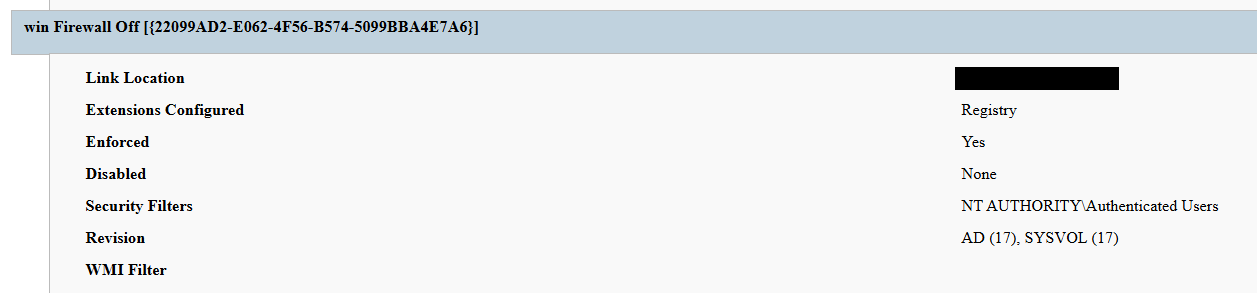
Second GPO. GPO named win Firewall Off ({22099AD2-E062-4F56-B574-5099BBA4E7A6}) linked at the domain root, disabling Windows Firewall on all profiles.
13 April
Dormancy. GPO cached on endpoints but computer configuration not yet applied — no endpoint had rebooted since the policy update.
13 April
Data exfiltration. Data exfiltration was observed originating from the file servers and several additional systems.
14 April
Detonation. Most of the endpoints begin rebooting; computer configuration policies apply. Ransom wallpaper, logon banner, and notes appear. Operational disruption begins.
15 April
Response. Kaspersky GERT engaged. Forensic triage of affected workstations and the domain controller initiated.
16 April
Assessment. GERT confirms no file encryption, no resident malware, no endpoint persistence.
Next, we will discuss each of these stages in more detail and share the findings from our incident response activities.
Incident overview
Initial access
The entry vector was a compromised valid account (MITRE ATT&CK T1078) used to authenticate through the organization’s FortiGate SSL VPN — an external remote service (T1133). Insufficient logging on the FortiGate appliance prevented us from reconstructing how the credential was originally compromised.
Three hypotheses were considered plausible in the context of the attack, in no particular order:
Password spraying or credential stuffing against the SSL VPN portal.
Phishing-led credential harvesting.
Purchase of pre-compromised credentials from an initial access broker (IAB).
Once on the internal network, the actor operated with the compromised security principal’s privileges. Because the account was able to create and link a GPO at the domain root, it held either domain admin privileges or a delegated equivalent (e.g., membership of Group Policy Creator Owners combined with link rights on the domain object).
FortiGate SSL VPN authentication logs and ESXi/virtualization privilege escalation logs were insufficient to reconstruct the lateral movement and privilege escalation chain between initial VPN access and the GPO write privilege level. The most common real-world routes to GPO control — DCSync, Kerberoasting of privileged service accounts, and Pass-the-Hash/Pass-the-Ticket — could not be confirmed or ruled out.
Execution
Rather than deploying an encryptor, the actor abused the victim’s Active Directory policy infrastructure, resulting in malicious GPOs being configured and linked at the domain root to deliver the observed impact across domain-joined systems. The two GPOs below constitute the entire offensive toolkit observed.
The PAYLOAD GPO
We performed a Resultant Set of Policy (RSOP) analysis, which helped us list all policy settings on the affected workstations. From these results, we reconstructed the following changes delivered by PAYLOAD:
Drop SYSVOL\hello.txt to the desktop and root directories C:\ and D:\ as a read-only README-payload.txt by tampering with the “Group Policy Files” client-side extension (CSE).
Modify the HKLM\SOFTWARE\Microsoft\Windows\CurrentVersion\Policies\System\ registry key, changing the legalnoticecaption value to "Welcome to Payload!" and the legalnoticetext to the ransom note text through the “Group Policy Registry” CSE.
Set payload.jpg located in the targeted domain controller’s SYSVOL as the lock screen image by altering the personalization policy, and as the wallpaper by altering the desktop policy at the user level.
Revoke administrator rights for the administrator account (locking the account) by editing the Security Settings CSE in the GptTmpl.inf file.
Settings changed by PAYLOAD GPO
This activity was enabled entirely through a legitimate group policy mechanism, meaning there is no malware code for security solutions to look for because the malicious logic is contained within the policy configuration.
The win Firewall Off GPO
A second domain-root-linked GPO, named “win Firewall Off”, disabled Windows Firewall across the domain, private and public profiles on all endpoints (T1562.004). Deployed independently of PAYLOAD, this object degraded host defenses and ensured the actor retained unimpeded network reach to endpoints for any follow-on activity.
Settings changed by win Firewall Off GPO
The one-day delay detonation
The most forensically instructive detail is the one-day gap between GPO creation (13 April) and visible impact (14 April). Analysis of Master File Table (MFT) timestamps and the Group Policy History registry key confirmed the policy was written to SYSVOL and cached on endpoints on 13 April. However, computer configuration settings (wallpaper and lock screen machine policy, security settings, firewall disabling) only apply upon reboot or policy refresh — and no endpoint had rebooted in the interim. The attack therefore remained dormant in the GPO cache for one day before detonating en masse when machines were restarted in accordance with standard procedures.
We have to point out here that this delayed policy application is characteristic of GPO-based operations and has two potential consequences for defenders. Firstly, it may grant the actor a quiet window for exfiltration, persistence, or further staging between weaponization and impact. Secondly, it can be used to sever the temporal link between the cause (a GPO-creation event in the directory log) and the effect (mass user-visible disruption occurring at a later time), complicating timeline reconstruction unless directory service auditing is in place.
Forensic findings
Initial incident response engagement revealed a number of findings associated with the attack that we share below.
No file encryption
A full review of the MFT on affected workstations found no files bearing a .payload extension characteristic to PAYLOAD ransomware and no evidence of bulk renaming or encryption I/O patterns. The attackers’ objectives were operational disruption and extortion via visual impact and access denial.
No endpoint persistence
All standard persistence locations were clean:
Scheduled tasks — no malicious tasks
Run/RunOnce keys — clean
Startup folders (user and system) — clean
Services — no malicious service installed
WMI event subscriptions — none
Boot sector/MBR — unmodified
The attack’s persistence mechanism is the GPO link itself on the domain controller, with no endpoint-resident component.
No active malicious processes
Live process and memory analysis revealed no injected threads, process hollowing or anomalous outbound connections.
Registry timeline analysis
Group Policy History, Shadow and State registry keys on the workstation recorded the application of PAYLOAD on 13 April:
HKLM\…\Group Policy\History\{35378EAC-683F-11D2-A89A-00C04FBBCFA2}\1
HKLM\…\Group Policy\Shadow\{827D319E-6EAC-11D2-A4EA-00C04F79F83A}\0
HKLM\…\Group Policy\State\Machine\GPO-List\7
HKCU\…\Group Policy\History\{7150F9BF-48AD-4da4-A49C-29EF4A8369BA}\1
HKCU\…\Group Policy\State\S-1-5-21-…\Loopback-GPO-List\5
The presence of the “Loopback-GPO-List” entry indicates the GPO was processed in loopback mode, ensuring the user configuration (wallpaper) applied regardless of which user logged on to the machine.
SYSVOL artifacts
Two files were staged on the domain controller’s SYSVOL share and served to endpoints through the Files Group Policy Preference CSE:
payload.jpg — the ransom image used for both wallpaper and lock screen.
hello.txt — the ransom note, distributed to desktops and drive roots as README-payload.txt.
Detection engineering
Because no malicious binary or process exists, the detection logic should focus on the directory service and SYSVOL indicators. Below are the highest-value telemetry sources for identifying the described malicious activity.
Directory service change auditing (DS Access)
Enable Advanced Audit Policy → DS Access → Audit Directory Service Changes on all domain controllers and set up alerts for the following events:
Event ID
Meaning
Hunt focus
5137
A directory service object was created
The account that created new groupPolicyContainer objects must be an authorized GPO administrator
5136
A directory service object was modified
Changes to gPLink on the domain root or sensitive organizational units; changes to gPCMachineExtensionNames/gPCUserExtensionNames/gPCFileSysPath/versionNumber for all GPOs
5141
A directory service object was deleted
GPO deletions (relevant for tamper detection and remediation assessment)
A gPLink modification at the domain root by a non-standard account is one of the most telling indicators of this attack class.
SYSVOL file integrity monitoring
Monitor \\DC.THECOMPANY.local\sysvol\THECOMPANY.local\Policies\ for unexpected files, particularly image files, text files, scripts, ScheduledTasks.xml, and modified registry.pol/GptTmpl.inf files that were created by sources other than legitimate replication.
Endpoint policy application telemetry
On endpoints, GPO application is logged in the Group Policy Operational log (Microsoft-Windows-GroupPolicy/Operational) and reflected in the History and Shadow registry keys shown above. A sudden domain-wide change to the applied policy set is a strong post-detonation signal.
Missing 5136 events
If the contents of a GPO’s SYSVOL change without a corresponding 5136 event, this can indicate direct SYSVOL/template editing (e.g., via open-source tools such as PowerView or SharpGPOAbuse) that bypasses the normal Group Policy Management Console (GPMC) modification path. While we recommend treating the absence of expected audit events as suspicious, it should be noted that this can be caused by misconfigured auditing.
Anti-forensics and recovery-inhibition capabilities
Confirmed PAYLOAD family capabilities
The Windows endpoint attack described in this report was implemented through malicious Group Policy Objects and did not involve a recovered ransomware executable, resident endpoint malware, confirmed file encryption or active malicious processes at the time of the forensic examination. However, PAYLOAD cryptomalware for Windows does exist, and other sources, including public analysis of its samples, reveal further malicious capabilities of this ransomware that could be used by security teams to enrich detection logic and security policies.
The behaviors documented in this section must therefore be interpreted as family-level capabilities identified through the public reverse engineering of PAYLOAD ransomware samples. They were not confirmed as having executed during the GPO-based incident unless corresponding evidence was identified in the host, memory, process, event-log, or hypervisor.
Windows Event Log clearing
Public reverse engineering of the PAYLOAD Windows variant reveals an optional event log clearing capability (T1685.005, formerly T1070.001). The ransomware dynamically resolves Windows Event Log APIs, enumerates available event log channels, and clears individual channels.
Implementation artifacts include:
Runtime loading of wevtapi.dll
EvtOpenChannelEnum
EvtNextChannelPath
EvtClearLog
Enumeration of Security, System, Application, and PowerShell logs, and operational channels
A command-line option controlling whether log clearing is performed
Clearing event logs reduces the availability of records related to process execution, authentication, PowerShell, service control, and system changes. However, it does not necessarily remove events that were already forwarded to a SIEM, Windows Event Collector, EDR backend, or protected log archive.
Forensic indicators
Windows Security Event ID 1102
Event logging shutdown or failure events
Sudden reductions in event record identifiers
Multiple event channels restarting from low record numbers
Gaps between endpoint and centrally forwarded telemetry
Execution of utilities or APIs associated with log management
Direct access to EVTX files (Windows Event Log files) under the Windows event log directory
We should note that these indicators can’t be interpreted on their own. For instance, Event ID 1102 should be correlated with a number of aggravating factors, such as:
Event ID 4688 or Sysmon Event ID 1 for process creation
Event ID 4624 for the associated administrative logon
EDR process trees
PowerShell operational logging
Windows Event Forwarding records
Privileged access management activity
At the same time, the absence of Event ID 1102 does not prove that log clearing did not occur. Direct deletion, truncation, service impairment, or an incomplete audit configuration may produce different evidence.
Security process and service termination
PAYLOAD analysis reveals that the Windows ransomware variant contains logic that targets security processes and services (T1685 and T1489). This capability is intended to stop security products, backup software, database services, and applications that may lock files targeted for encryption.
Process and service termination serves several objectives:
Reduce endpoint detection and response visibility.
Release file handles so data can be modified.
Interrupt backup and recovery services.
Prevent databases and enterprise applications from protecting active data.
Reduce interference with encryption operations.
Forensic indicators
Security agent services changing from running to stopped
Event ID 7036 service state changes
Event ID 7040 service start type changes
Event ID 4688 or Sysmon Event ID 1 for service control utilities
Sysmon Event ID 5 for terminated processes
EDR health degradation affecting many endpoints
Repeated termination attempts against security or backup processes
Execution of dedicated process killing utilities
VSS deletion, backup and recovery suppression
Public PAYLOAD sample analysis reports the deletion of Windows Volume Shadow Copies before encryption (T1490). This behavior removes local restore points and reduces the victim’s ability to recover files without external backups.
Recovery inhibition is broader than VSS deletion and may include multiple other malicious techniques, including the following:
Deleting shadow copies, backup catalogs, and hypervisor snapshots
Disabling recovery services
Modifying boot recovery settings
Compromising backup management platforms
Deleting or encrypting backup repositories
In the PAYLOAD Windows sample that is proven to perform encryption, VSS deletion is confirmed to have taken place before encryption. A broader compromise of the backup platform was not established in the investigated incident.
Forensic indicators
Execution of shadow copy management utilities
Backup catalog deletion attempts
Recovery configuration changes
Backup service termination
Mass snapshot deletions
Backup administrator logons outside normal maintenance windows
Backup retention or immutability changes
Backup jobs failing immediately before disruptive activity
Ecosystem-relevant ransomware techniques
Above, we discussed the techniques specific to PAYLOAD ransomware. In this section, we’ll review other common ransomware techniques, such as BYOVD abuse and ESXi policy weakening, that remain relevant risks in the ransomware ecosystem. However, these techniques should not be attributed to this incident without supporting driver load, process, memory, ESXi, vCenter, or backup platform telemetry. We describe these techniques below as they may prove useful in other ransomware-related forensic investigations.
The examples used in this section are therefore ecosystem-relevant: they are commonly observed in ransomware operations but not conclusively attributed to the analyzed PAYLOAD samples.
ETW suppression and in-memory patching
Event Tracing for Windows (ETW) is a kernel-supported tracing architecture used by Windows components, diagnostic utilities, security products, and endpoint monitoring systems.
Although we didn’t encounter this technique in our case, some ransomware families can patch ETW-related functions inside the ransomware process (T1685, formerly T1562.001). The reported routine changes the memory protection of code pages, overwrites the beginning of selected ETW functions so they return without producing events, restores the original protection, and refreshes the instruction cache.
Reported target functions include EtwEventWrite, EtwEventWriteFull, EtwEventWriteTransfer, and EtwRegister.
This modification applies to the process-local mapping of ntdll.dll. It does not disable ETW globally across Windows, but it can reduce the telemetry generated by the modified process.
Forensic indicators
Writable or recently modified executable pages within ntdll.dll
Memory protection changes affecting ETW function addresses
In-memory code differing from the corresponding clean DLL on disk
EDR memory tampering alerts
Unexpected calls to memory protection APIs followed by telemetry silence
Process execution visible in network or filesystem telemetry but absent from expected ETW-derived sources
Inconsistent telemetry between EDR, Sysmon, Windows Event Logs, and network monitoring
It should be noted that telemetry gaps are not conclusive evidence of ETW patching. Other factors include agent upgrades, network outages, endpoint shutdowns, SIEM ingestion failures, collector backpressure, and filtering or licensing changes.
Memory acquisition is the strongest validation source when process-local ETW patching is suspected.
Vulnerable signed driver abuse, BYOVD
Bring Your Own Vulnerable Driver (BYOVD) involves introducing or abusing a legitimately signed but vulnerable kernel driver (T1068 and T1685). The attacker exploits the driver’s exposed functionality to gain kernel-level capabilities, modify protected memory, terminate security processes, remove security callbacks, or bypass operating system security controls.
BYOVD is highly relevant to contemporary ransomware operations. However, the reviewed public PAYLOAD analyses do not provide sufficient evidence to conclude that BYOVD is an intrinsic PAYLOAD capability.
It should therefore be presented as an ecosystem-relevant technique rather than a confirmed PAYLOAD feature.
Forensic indicators
Unexpected .sys files written to user-writable or temporary directories
New kernel driver services
Sysmon Event ID 6
Driver hashes matching Microsoft or community vulnerable driver blocklists
Invalid, revoked, expired, or unusual driver signatures
Driver load followed by EDR termination
New privileged processes immediately following driver loading
Code Integrity or Defender alerts
Service creation events referencing driver files
ESXi security policy weakening
Ransomware operators are increasingly targeting ESXi and vCenter because compromising the virtualization layer provides access to many business-critical virtual machines.
Public research typically describes operators performing the following activities (T1685, T1490 and T1489):
Enabling SSH on ESXi hosts
Changing root passwords
Disabling execInstalledOnly
Modifying lockdown mode exceptions
Stopping virtual machines
Deleting snapshots and backups
Changing host firewall policies
Copying custom ransomware binaries to hypervisors
On the target organization’s Linux servers we saw an ESXi PAYLOAD variant, which makes this behavior operationally relevant. Nevertheless, the reviewed evidence does not indicate that PAYLOAD operators used any of these policy-weakening actions in the investigated incident.
Forensic indicators
Unexpected ESXi SSH enablement
Changes to execInstalledOnly
Secure Boot enforcement changes
Lockdown mode configuration changes
Root password changes
New or unusual administrator accounts
Bulk VM shutdown activity
Bulk snapshot deletion
New binaries in datastore or temporary paths
vCenter tasks originating from unexpected accounts or systems
Missing or disabled remote syslog forwarding
Remediation
To contain the described threat and limit possible damage, several remediation steps should be taken. Below, we recommend a four-phase remediation approach for containing this threat and restoring the affected environment.
Phase 1 — domain controller actions (to be performed first)
When dealing with PAYLOAD GPO, the first priority of the remediation plan should be to remove the source GPOs. Until this is done, endpoint cleanup is ineffective because the next policy refresh re-infects cleaned machines.
The immediate domain controller actions to be taken are:
Delete PAYLOAD GPO. Remove {C897F2C7-C2AC-4E6F-BF48-58036FF29E79} via GPMC.
Delete or revert win Firewall Off GPO. Remove {22099AD2-E062-4F56-B574-5099BBA4E7A6}.
Clean SYSVOL. Delete jpg and hello.txt from \\DC.THECOMPANY.local\sysvol\THECOMPANY.local\.
Rotate credentials. Reset the compromised account; audit all privileged accounts and group memberships for unauthorized changes; rotate krbtgt twice if domain admin compromise is confirmed.
Force refresh. Perform gpupdate /force across endpoints after deletion; re-enable local administrator and firewall via clean policy.
Phase 2 — Active Directory and GPO hardening
Adopt the AD tiered administration model and confine domain admins to Tier 0 with no interactive logon to workstations and member servers.
Separate GPO creation from GPO linking rights, and grant both only to a dedicated, audited administrator role.
Enable GPO change auditing (Event IDs 5136, 5137, 5141) and forward to a SIEM.
Monitor SYSVOL with file integrity tooling.
Phase 3 — credential and access hardening
Enforce phishing-resistant MFA on all VPN and remote access entry points.
Deploy Windows LAPS to generate unique, rotated local administrator passwords.
PAYLOAD demonstrates a maturing tactic of turning the victim’s own trusted infrastructure into a weapon. By weaponizing Group Policy, the actor achieved a domain-wide impact without a single malicious binary on any endpoint, evaded file- and process-based detection entirely, and caused organization-wide disruption within seconds of the first reboot.
The absence of encryption is the most strategically significant finding and is consistent with the 2026 trend toward encryptionless extortion. At Kaspersky GERT, we assess with moderate confidence that the missing encryption reflects one of two scenarios: (1) a deliberate decision to stay below the irreversible data destruction threshold while preserving the option of a follow-on encryption phase, or (2) an operation interrupted before full execution.
The absence of encrypted files must not be mistaken for the absence of a serious compromise — the most critical impact lies in the actor gaining domain admin-level control. This incident proves that a threat actor with domain admin access and a working knowledge of group policy internals can inflict domain-wide disruption equivalent to a ransomware attack without writing a single malicious file to any endpoint.
Detection strategies anchored solely in file- or process-based indicators are blind to this attack class. Effective controls include directory service change auditing, SYSVOL integrity monitoring, and privileged access governance, which allow for GPO protection.
Detection by Kaspersky solutions
Kaspersky security solutions effectively detect the described malicious activity at various stages of the attack. Possible detection scenarios are listed below.
To protect organizations that use our Kaspersky SIEM system, we have prepared a package of correlation rules designed to help detect this type of malicious activity. The rules are now available for customers to download from the SIEM repository; the package name is: [OOTB] Group policy hijacked: PAYLOAD ransomware – ENG.
The “Group policy hijacked: PAYLOAD ransomware” package contains rules that detect suspicious file creation or modification in the SYSVOL shared folder on a domain controller, as well as changes to critical attributes and settings of domain group policies. Some rules may require adjustment if they trigger in response to legitimate activity, such as synchronization between domain controllers or the configuration of a new group policy.
To ensure the detection rules function correctly, verify that events from Windows systems are being received in full, including events with the following identifiers: Sysmon: 11, Security — 4663, 5136, 4657.
We also recommend applying the following rules available in the repository to detect all attack stages.
Detection of Windows Event Log clearing to cover up traces of an attack: R050_03_Windows Event Log was cleared
Detection of suspicious access to the LSASS process, which may indicate attempts to dump credentials: R262_Suspicious access to the LSASS process
Detection of the Volume Shadow Copy service being started, which is used to create shadow copies before deleting them: R231_20_Running the Volume Shadow Copy service
Detection of shadow copy deletion: R321_Shadow copy deletion
Detection of Windows Defender disablement: R076_01_Windows Defender Antivirus was disabled
Detection of attempts to disable or modify the system firewall: R240_03_Disabling system firewall via the registry
Detection of a service installation from a non-system folder, which may indicate malware persistence techniques: R281_01_Installation of a service from a non-system folder
For the rules in this list to function correctly, it is necessary to configure Security event auditing for event IDs 4663, 5136, 4657, 7036, and 1102.
In addition to the SIEM system, when audit settings are configured correctly, the process of creating, modifying, and deleting GPOs generates a large number of characteristic artifacts on the domain controller, enabling Kaspersky Endpoint Detection and Response Expert to promptly alert the user to anomalies in the infrastructure.
The creation of a new GPO is covered by the gpo_creation rule, which triggers in response to the corresponding event in the infrastructure. Changes to existing policies are detected by the following rules:
The setting_the_gpcfilesyspath_attribute rule detects the use of the gPCFileSysPath attribute of a Group Policy Object, which specifies the path to the GPO’s contents in SYSVOL.
In the next major version update of Kaspersky EDR Expert, a new event type, GPO, will be introduced, allowing users to track changes to Group Policy Objects.
For information security officers, GPO events will serve as an additional source of context when investigating activity in Active Directory and will help detect changes that could affect the configuration, access rights, and security of endpoints before a potentially malicious policy is deployed.
MITRE ATT&CK mapping
Tactic
Technique
Observed behavior
Initial Access
T1078 — Valid Accounts
Compromised domain credential used for VPN authentication
Initial Access
T1133 — External Remote Services
FortiGate SSL VPN used as entry point
Privilege Escalation
T1078.002 — Domain Accounts
Account held domain-level GPO create/link rights
Privilege Escalation/Defense Impairment
T1484.001 — Group Policy Modification
Malicious PAYLOAD GPO created and linked at domain root; re-applies on every refresh/reboot; uses trusted channel to evade EDR
Defense Impairment
T1686 — Disable or Modify System Firewall
win Firewall Off GPO disables Windows Firewall on all profiles
Impact
T1491.001 — Internal Defacement
Wallpaper and lock screen replaced with ransom image
Impact
T1531 — Account Access Removal
Local Administrator account disabled via GPO Security Settings
Collection
T1005 — Data from Local System
Data exfiltration was observed originating from the file servers
Command and Control
T1071 — Application Layer Protocol
No live C2 confirmed; delivery achieved entirely via GPO
Indicators of compromise
GPOs
PAYLOAD ransomware GPO: {C897F2C7-C2AC-4E6F-BF48-58036FF29E79}
win Firewall Off GPO: {22099AD2-E062-4F56-B574-5099BBA4E7A6}
File names and MD5 hashes
payload.jpg: Ransom wallpaper and lock screen image (SYSVOL)
hello.txt: Ransom note source (SYSVOL)
README-payload.txt: Ransom note dropped to desktops and drive roots
killer.exe (0108656A3E1ADE6CA4F21B084F5E1208): process killer tool
kill.exe (BEA5E267F24D7DA59F6821BFFDBFF293): process killer tool
Mexico is one of the host countries for the 2026 FIFA World Cup, with matches to be played in three major cities: Mexico City, Monterrey, and Guadalajara. These locations are expected to see a large influx of international visitors, increasing the potential security risks. Many of those risks arise from users connecting to public wireless networks.
To better understand the wireless environments that visitors may encounter, we at Kaspersky GReAT conducted a wardriving assessment in the three host cities. The aim of the study was to analyze characteristics, deployment patterns, security configurations and potential exposure risks of public Wi-Fi infrastructure in urban wireless environments.
The information collected during the assessment was used exclusively for passive observation and infrastructure analysis. No attempts were made to authenticate, intercept communications, exploit systems or interact with the detected wireless networks beyond the publicly broadcast management information.
During processing of the collected data, one step involved filtering out networks belonging to cars or cell phones categorized as mobile hotspots because they do not represent networks that can be considered part of the assessment.
Research scope
The cities included in the study have high population density and extensive wireless infrastructure deployments. We chose areas with the most prominent wireless network activity and highly concentrated public access points. We carried out wardriving research in Monterrey back in 2008, but the city’s hotspot landscape has changed since then.
We chose the following analysis areas for each of the cities:
Mexico City: México City Stadium, Mexico City International Airport, Zócalo, Paseo de la Reforma, Colonia Roma, La Condesa, Polanco, and Coyoacán.
Guadalajara: Guadalajara Stadium, Guadalajara International Airport, the city center, Zapopan, Providencia, Avenida Chapultepec, Colonia Americana, Tlaquepaque, and the area around Andares.
Monterrey: Monterrey Stadium, Monterrey International Airport, Fundidora Park, Cintermex Monterrey, the downtown area, Barrio Antiguo, MacroPlaza, and the San Pedro financial district.
The wireless information was collected using passive wireless reconnaissance techniques. The collected information included:
SSID analysis and information exposure, including BSSID-derived SSIDs
Default router configurations and ISP deployments
Frequency and signal characteristics
Channel congestion and spectrum usage
Wireless security configurations, including:
Open and insecure wireless networks
WPS-enabled networks
Secure networks (WPA2/WPA3) with WPS enabled
We performed a wireless infrastructure analysis in Mexico City, Guadalajara, and Monterrey. We drove through the areas surrounding the World Cup stadiums, tourist zones, and other places where fan concentrations are likely to be largest. Our goal was to evaluate the security status, deployment characteristics and operational exposure of detected wireless networks.
In total, we recorded 84,588 signals with 69,473 unique Service Set Identifiers (SSIDs) in busy locations and World Cup zones across the three cities. Mexico City accounted for 61.4% of the signals, Guadalajara for 23.6%, and Monterrey for 14.8%. Approximately 82% of the signals had a single SSID (81.9%, 81.34%, and 84% respectively). Notably, they all operate under the IEEE 802.11 standard protocol.
Particular attention was given to identifying standard deployment patterns, legacy configurations, default vendor settings and information disclosure through publicly broadcast wireless identifiers.
The following sections present the results that were obtained by analyzing wireless infrastructure across the three locations.
Our findings
SSID analysis and information exposure
SSID analysis was conducted to evaluate naming conventions, deployment standardization and potential information exposure.
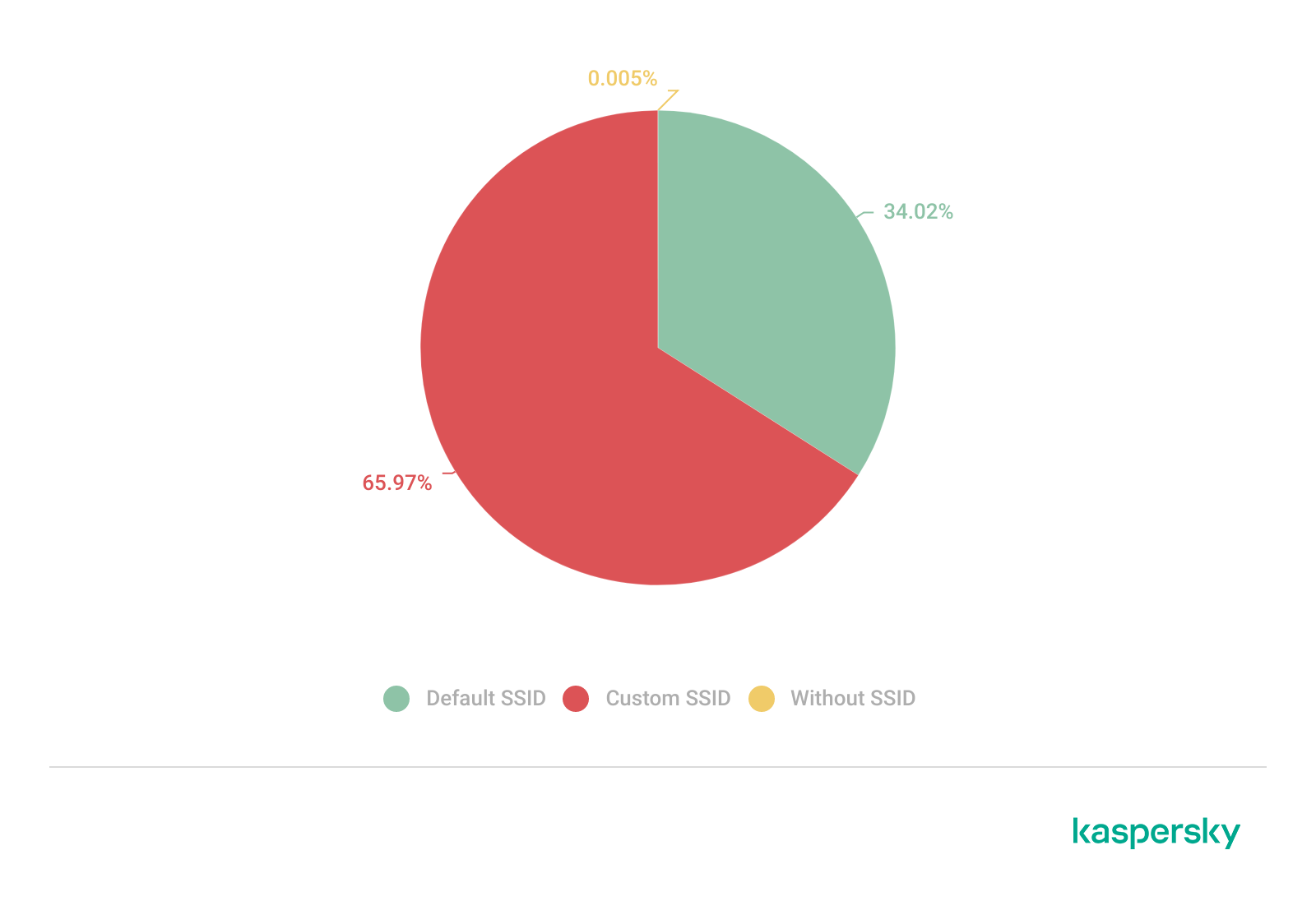
Only a few networks (0.0047%) have an invisible SSID, meaning the names of these networks are not broadcast. Some users prefer to hide the SSID for various reasons, such as the network’s purpose, the profile of its users, internal policies, etc. In contrast, the rest of the networks maintained active SSID broadcasting.
SSID structures may unintentionally disclose operational details about internet service providers (ISPs), device manufacturers, deployment practices, organizational ownership or user identity. The repeated presence of default SSID naming patterns across the analyzed locations indicates a significant degree of infrastructure homogeneity and reuse of default wireless configurations. It may also facilitate passive infrastructure profiling by revealing standard characteristics in use.
Approximately 34% of the detected networks retained the default SSID naming conventions provided by the manufacturer or ISP, while 66% used customized identifiers.
Distribution of SSID naming conventions (download)
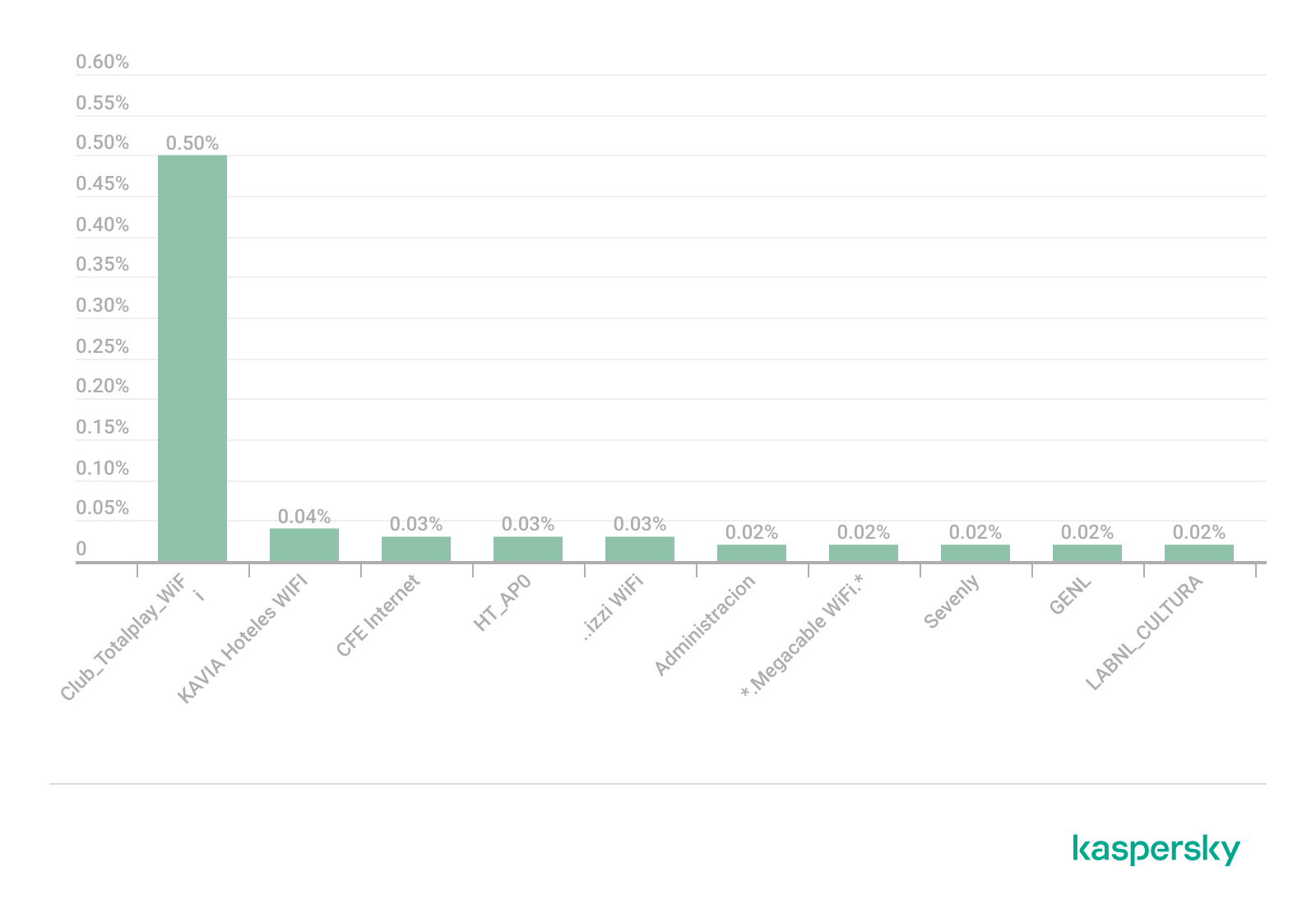
Several recurring SSID naming conventions associated with ISP-provided deployments were identified in the three cities. The most frequently observed patterns include identifiers such as “Club_Totalplay_WiFi”, “izzi WiFi”, and “Megacable WiFi”, which suggests extensive standardization of wireless infrastructure deployment. Additionally, we observed distinctive location-specific SSIDs in each area of analysis, such as “XXXX-Internet para Todos-CDMX” or “RED JALISCO”.
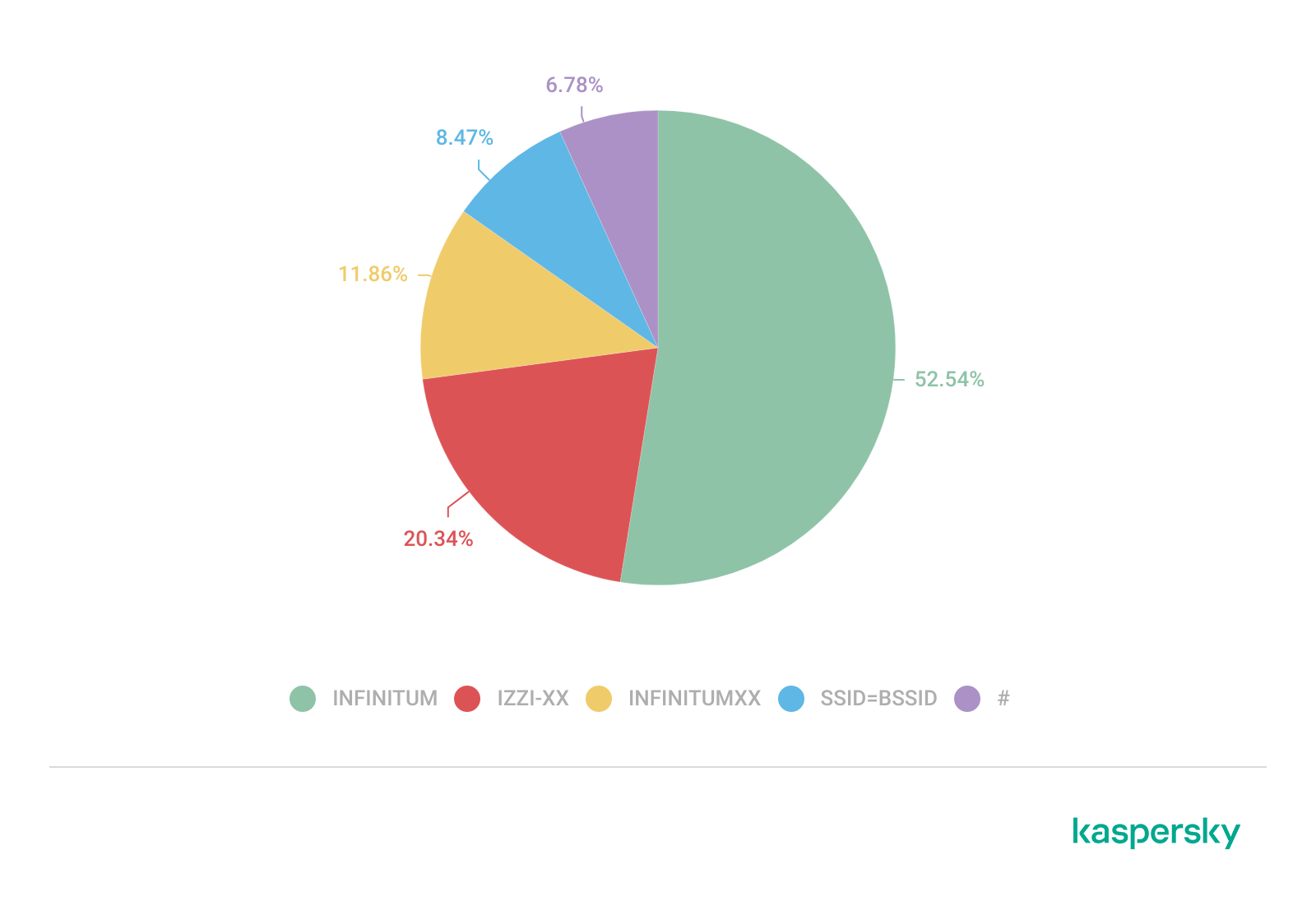
Sequential SSID naming structures were also identified during the analysis. Patterns such as “INFINITUMXX” and “IZZI-XX” suggest automated ISP deployment and large-scale deployment strategies.
We identified 33 unique sequential naming structures among the 137 sequential SSIDs in total, representing approximately 0.16% of the detected wireless networks.
The following graph shows the top five sequential SSID patterns found in the largest number of networks:
Five most frequently observed sequential patterns (download)
Several customized SSIDs contained personal or organizational identifiers, including family names, professions, addresses or internal department references. Although personalized SSIDs may simplify local network identification for users, they may also expose sensitive information that could be useful for social engineering, physical targeting, or organizational profiling.
BSSID-derived SSID
During the analysis, multiple networks were identified that used the physical MAC address of a Wi-Fi access point (BSSID) as the visible SSID. This practice exposes hardware-level information that could facilitate vendor fingerprinting and targeted reconnaissance activities.
The organizationally unique identifier (OUI) contained in the first bytes of the BSSID identifies the equipment manufacturer. Threat actors can correlate exposed manufacturers with device-specific vulnerabilities.
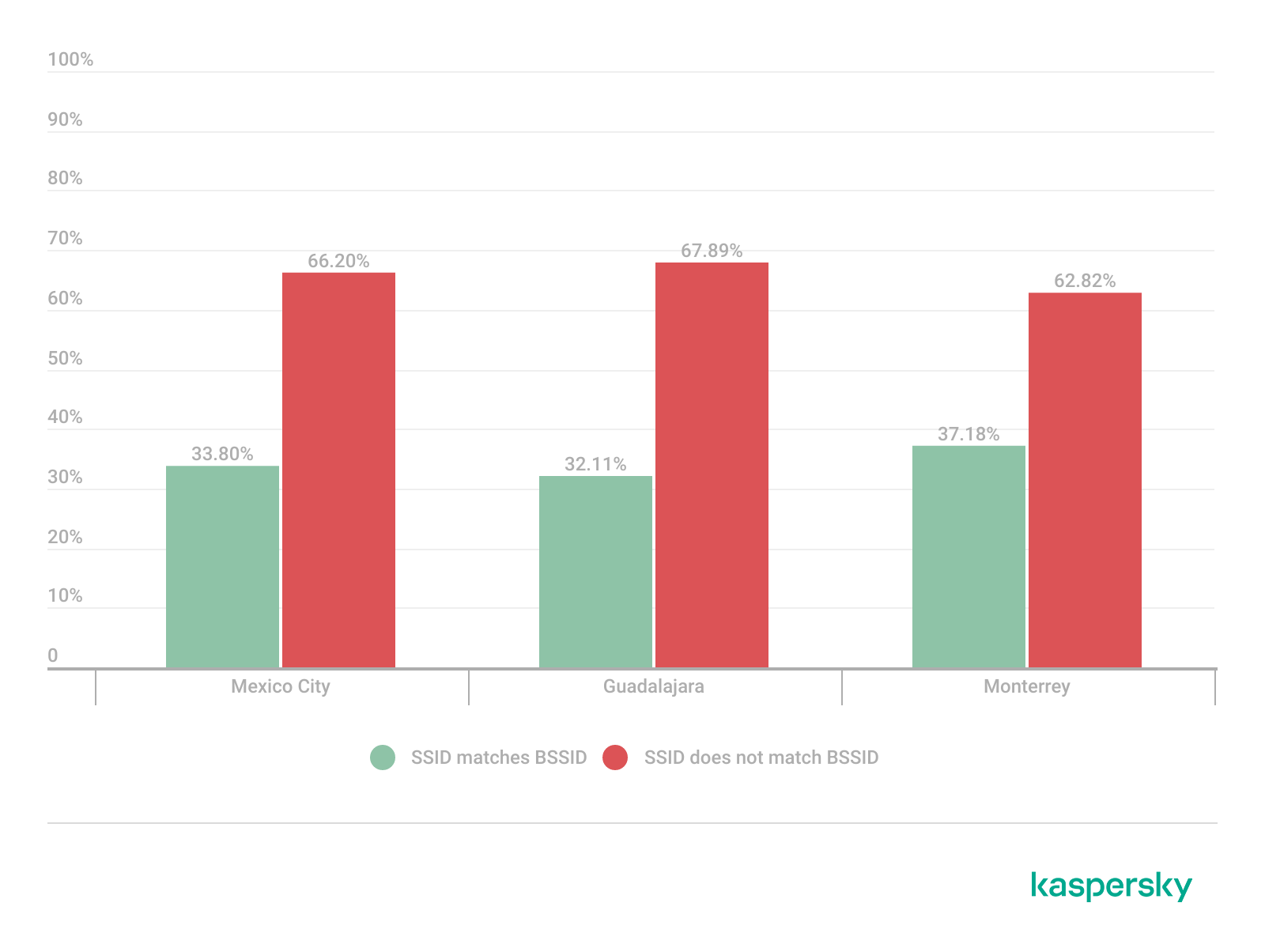
Notably, we found that more than 30% of networks in all three cities reuse the MAC address as the SSID.
Default router configurations and ISP deployments
We performed wireless infrastructure profiling to identify the most common wireless equipment manufacturers and ISP deployments across the three locations.
Large-scale ISP deployments frequently use standardized wireless configurations and vendor-specific hardware platforms. Identifying dominant manufacturers and ISP naming conventions can provide insight into infrastructure and deployment practices facilitating the mapping of standardized attack surfaces.
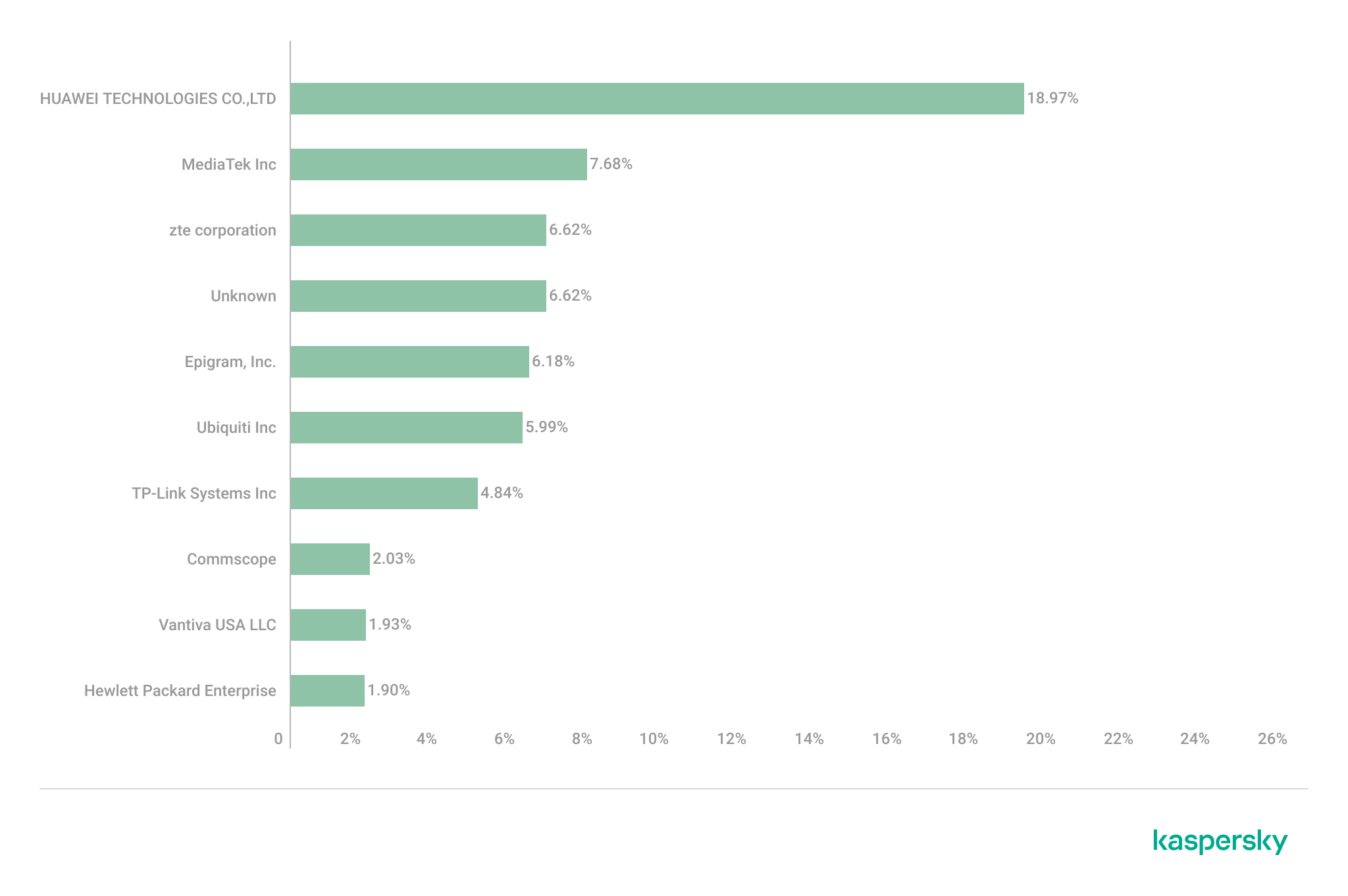
The following figure shows the distribution of the most commonly used manufacturers.
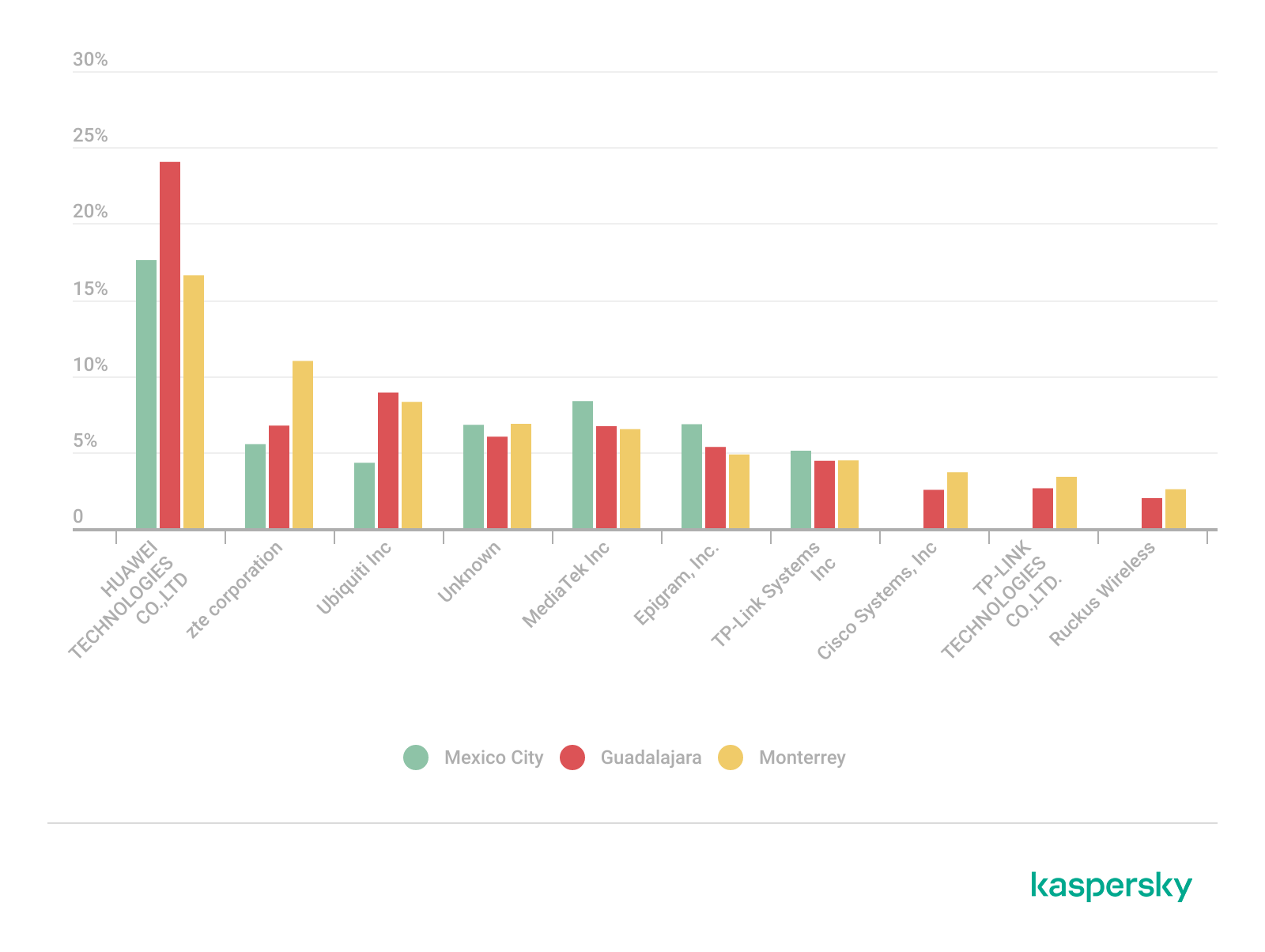
Most frequently observed wireless equipment manufacturers (download)
The manufacturer analysis revealed a strong concentration of wireless infrastructure among a limited number of vendors. Across the three locations, Huawei Technologies, MediaTek-based devices, and other manufacturers’ equipment that is distributed through ISP channels represented a significant portion of the detected deployments. Mexico City had the most diverse infrastructure, while Monterrey and Guadalajara had a greater concentration of wireless equipment known as SOHO (small office/home office) or residential-grade hardware. The widespread presence of standard vendor platforms may facilitate infrastructure fingerprinting and large-scale targeting of known device-specific vulnerabilities.
Most frequently observed wireless equipment manufacturers across the three cities (download)
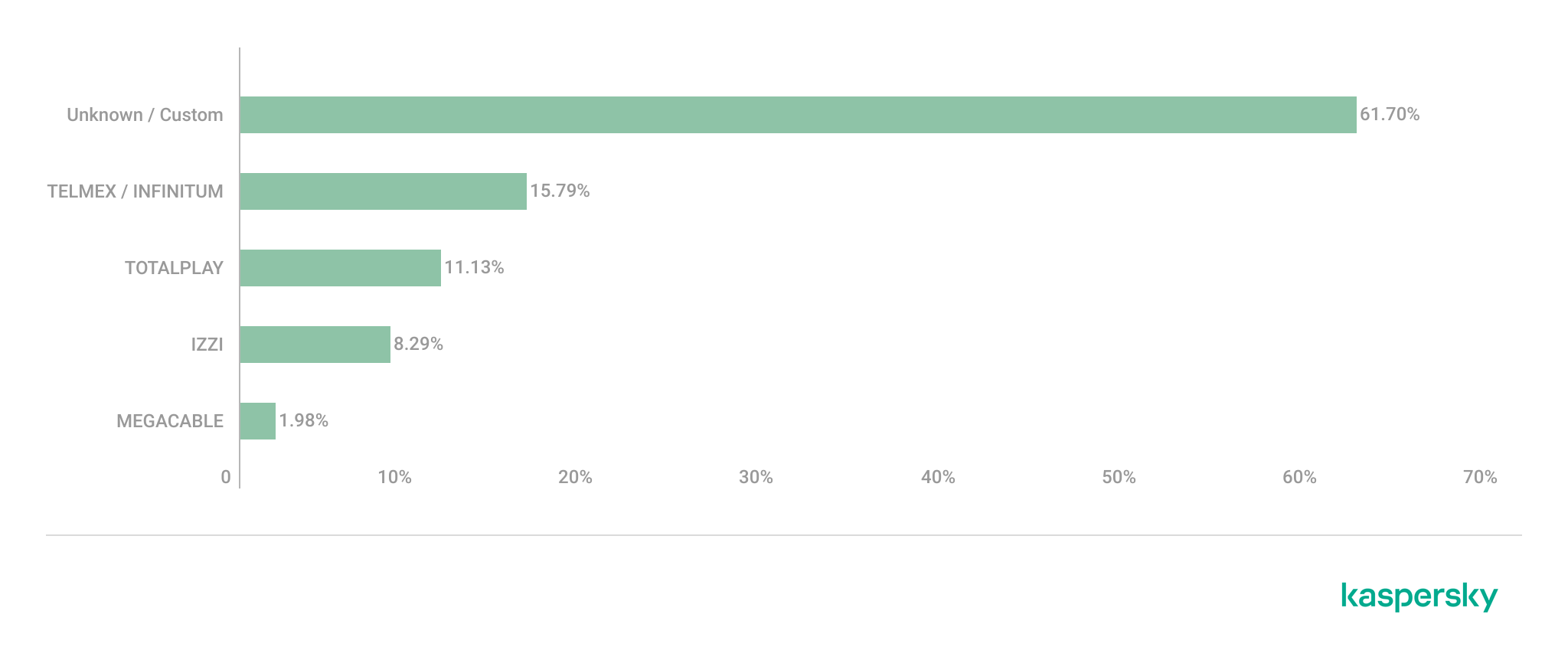
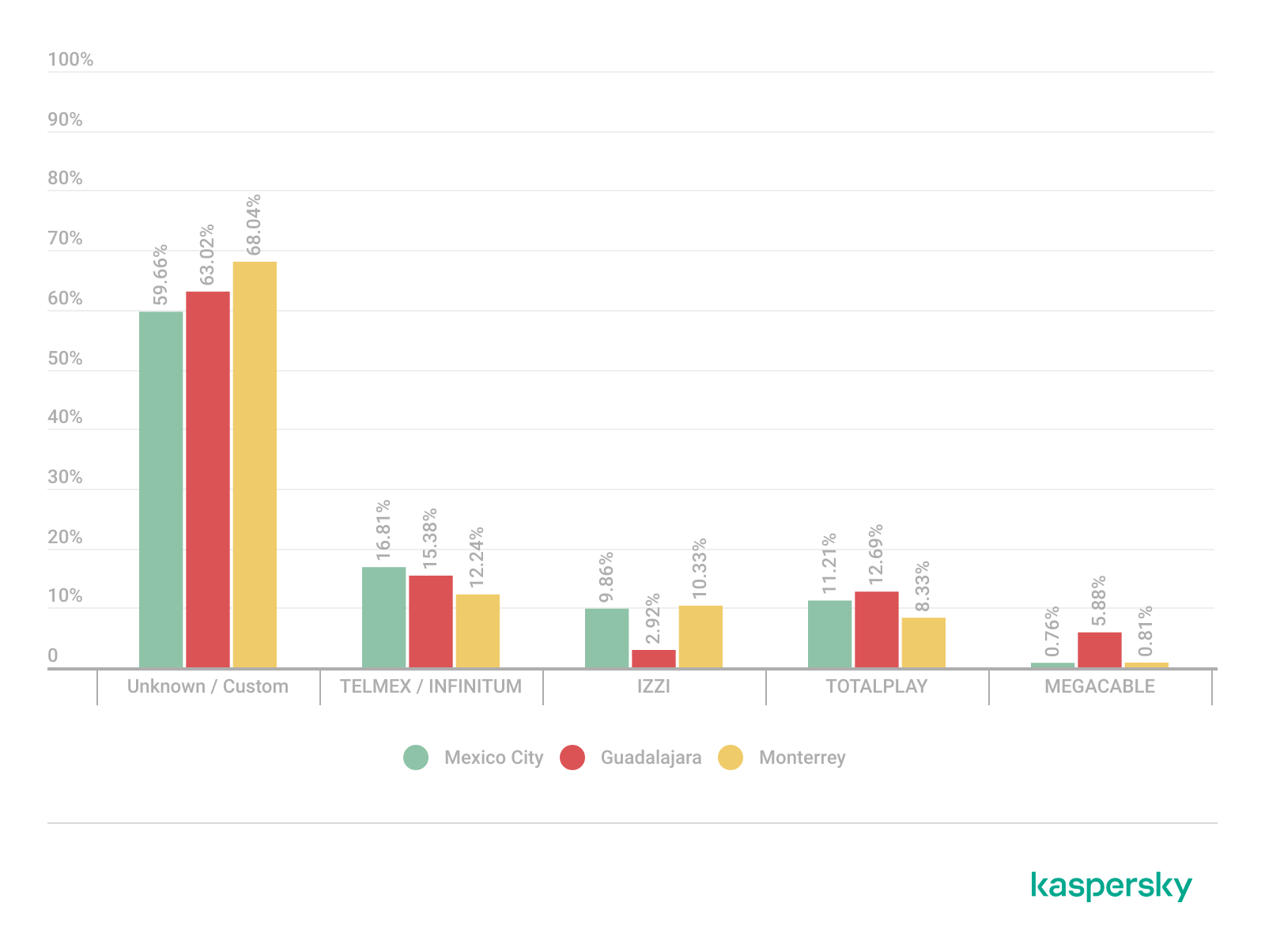
ISP deployments frequently exhibited standardized configuration patterns and recurring manufacturer identifiers. Our ISP deployment analysis revealed a high concentration of access points associated with major residential internet providers. Deployments associated with Infinitum, Totalplay and Izzi represented a substantial portion of the detected wireless infrastructure across all locations. These findings suggest a high degree of deployment standardization across networks associated with major residential internet providers. This observation was supported by the repeated presence of ISP-associated SSIDs such as “Infinitum”, “Totalplay”, and “Izzi”, combined with manufacturer identifiers frequently associated with consumer equipment, including Huawei, ZTE and other residential wireless equipment vendors.
It is important to note that, for this analysis, ISPs were primarily inferred from SSID naming conventions and manufacturer fingerprint data. A significant portion of the detected wireless networks fell into the “UNKNOWN/CUSTOM” category. This classification includes custom hotspots and networks whose naming conventions did not expose identifiable ISP-associated patterns. The findings suggest that many users and organizations (as we saw previously, approximately 66%) use custom network names, limiting direct provider attribution.
The following figure illustrates the distribution of ISP-associated wireless deployments in general.
To better understand this distribution, we took the most frequently observed ISPs by city.
Most frequently observed ISPs across the three cities (download)
Frequency and signal characteristics
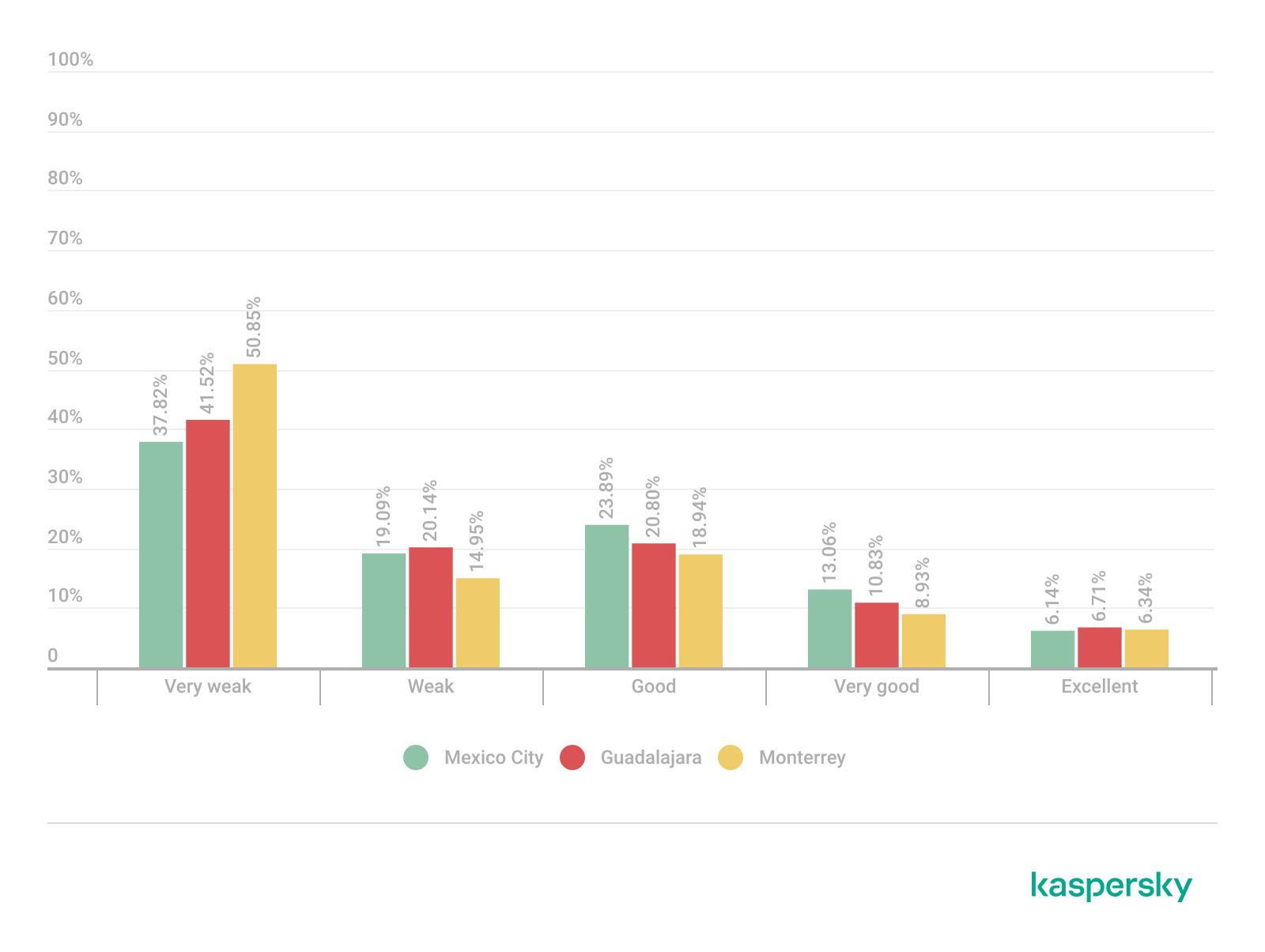
We also analyzed wireless signal characteristics to evaluate coverage quality, signal strength, and frequency band utilization in the three cities. In dense urban environments, signal quality and frequency spectrum distribution can affect wireless reliability, client connectivity, roaming performance, and overall network efficiency.
Signal quality analysis revealed that a substantial portion of the detected access points operated under weak or very weak signal conditions. Monterrey had the highest percentage of very weak signals, with approximately 50% of detected deployments. Similar patterns were observed in Guadalajara and Mexico City, suggesting high-density wireless environments with overlapping coverage areas. Only a limited percentage of networks were classified within the very good or excellent signal categories across the three locations.
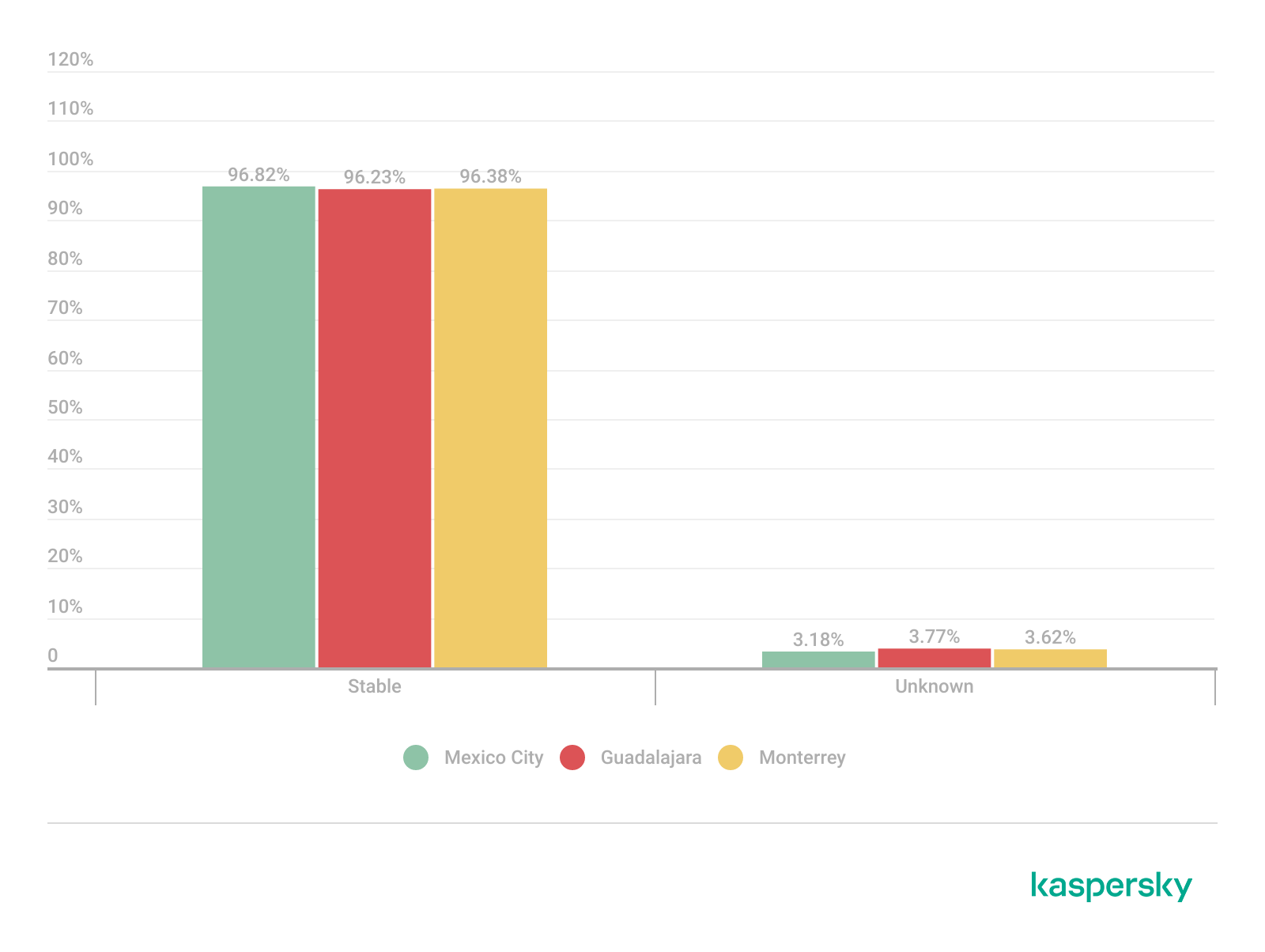
Signal stability analysis revealed that most detected wireless deployments exhibited stable beacon transmission behavior. More than 96% of the detected access points across all locations were classified as stable, while only a small percentage exhibited unstable or indeterminate signal behavior.
These findings imply that the majority of the wireless infrastructure observed during the assessment corresponded to permanently deployed access points rather than transient or intermittent wireless devices.
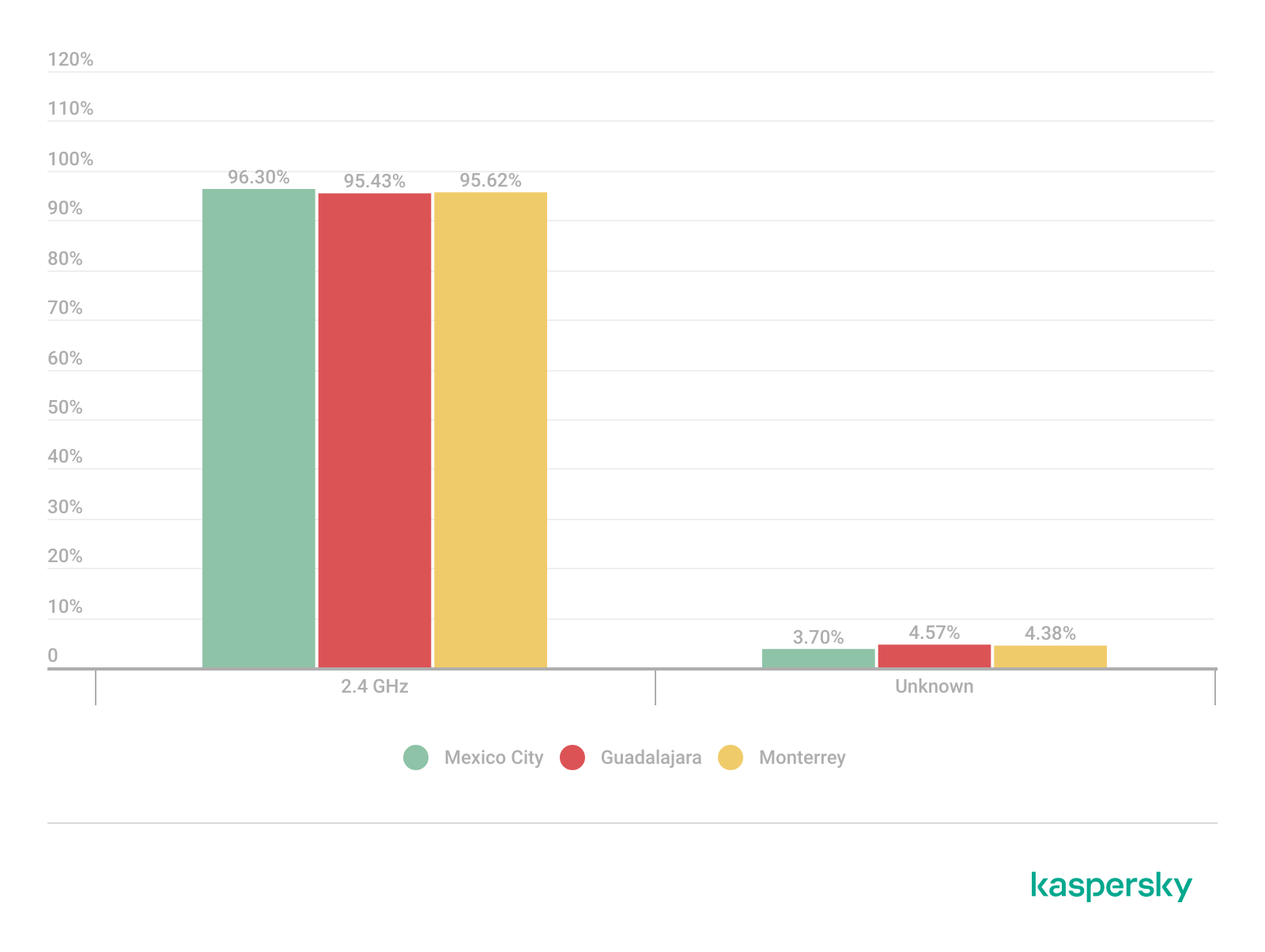
Frequency band analysis revealed the strong prevalence of 2.4 GHz wireless deployments across the three locations. More than 95% of the detected wireless networks operated within the 2.4 GHz spectrum, while only a small percentage of deployments were classified under the unknown or non-standard frequency categories. This uneven distribution reflects the continued prevalence of legacy-compatible wireless infrastructure and SOHO deployments.
These findings are consistent with dense urban wireless environments with large numbers of access points in restricted spectrum allocations.
Channel congestion and spectrum usage
Next, we analyzed wireless channel utilization to evaluate frequency spectrum congestion and channel allocation patterns across the three cities. Our analysis focused on the 2.4 GHz spectrum, where channel overlap and high access point density commonly produce interference and degraded wireless performance. In densely populated wireless environments, an excessive concentration of access points on a limited number of channels can lead to co-channel interference, packet collisions, reduced throughput, and degraded network stability.
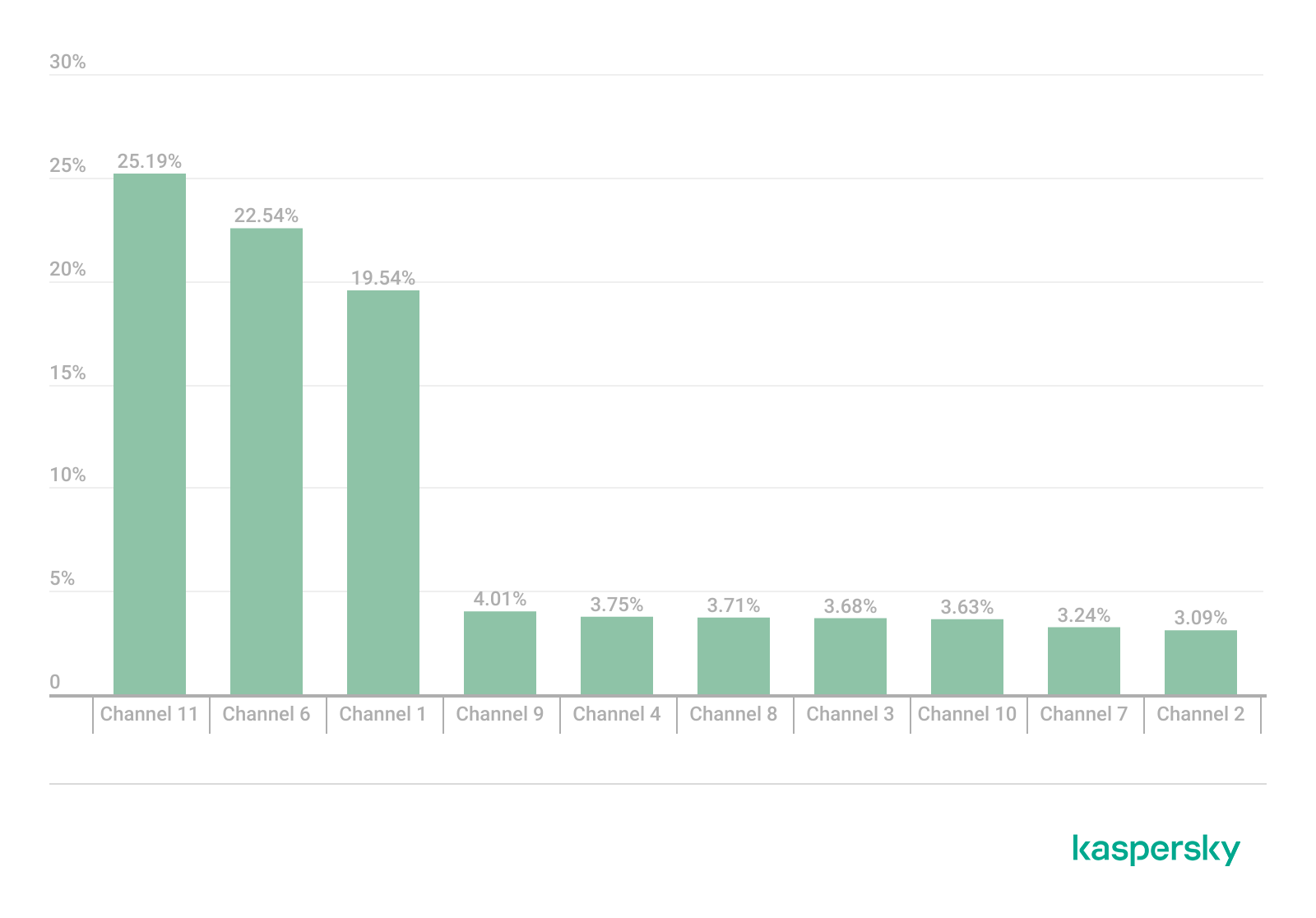
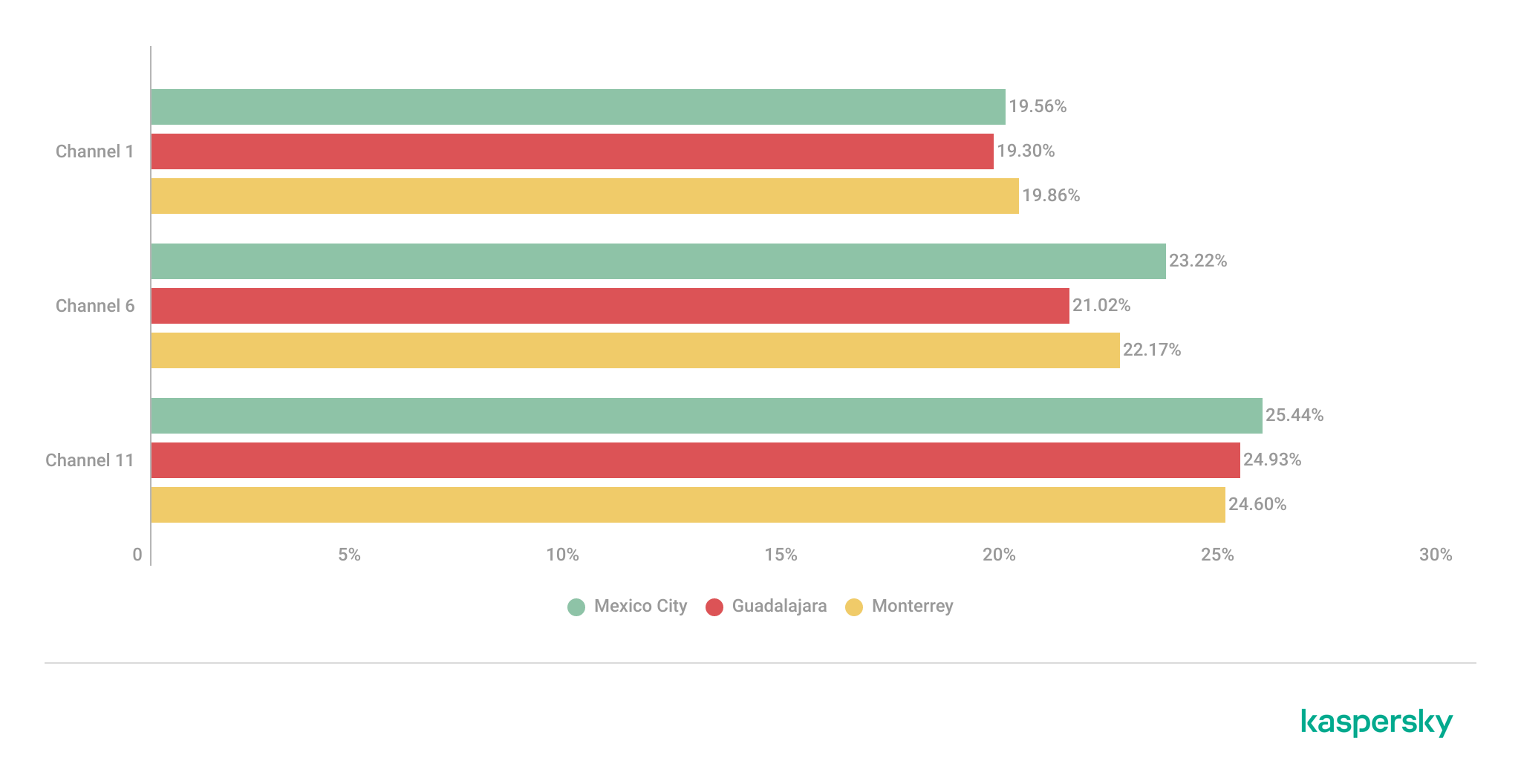
Spectrum congestion analysis revealed that the 2.4 GHz band consistently experienced elevated congestion levels across the three cities. The detailed results showed a strong concentration of deployments on channels 11, 6 and 1, which are traditionally recommended as non-overlapping channels within the 2.4 GHz spectrum. Channel 11 was the most utilized channel, accounting for 25.2% of the detected access points, followed by channel 6 with 22.5% and channel 1 with 19.5%. This distribution indicates that most wireless deployments adhere to standard channel allocation practices for 2.4 GHz Wi-Fi environments.
The following figure illustrates the overall distribution of the most frequently utilized wireless channels.
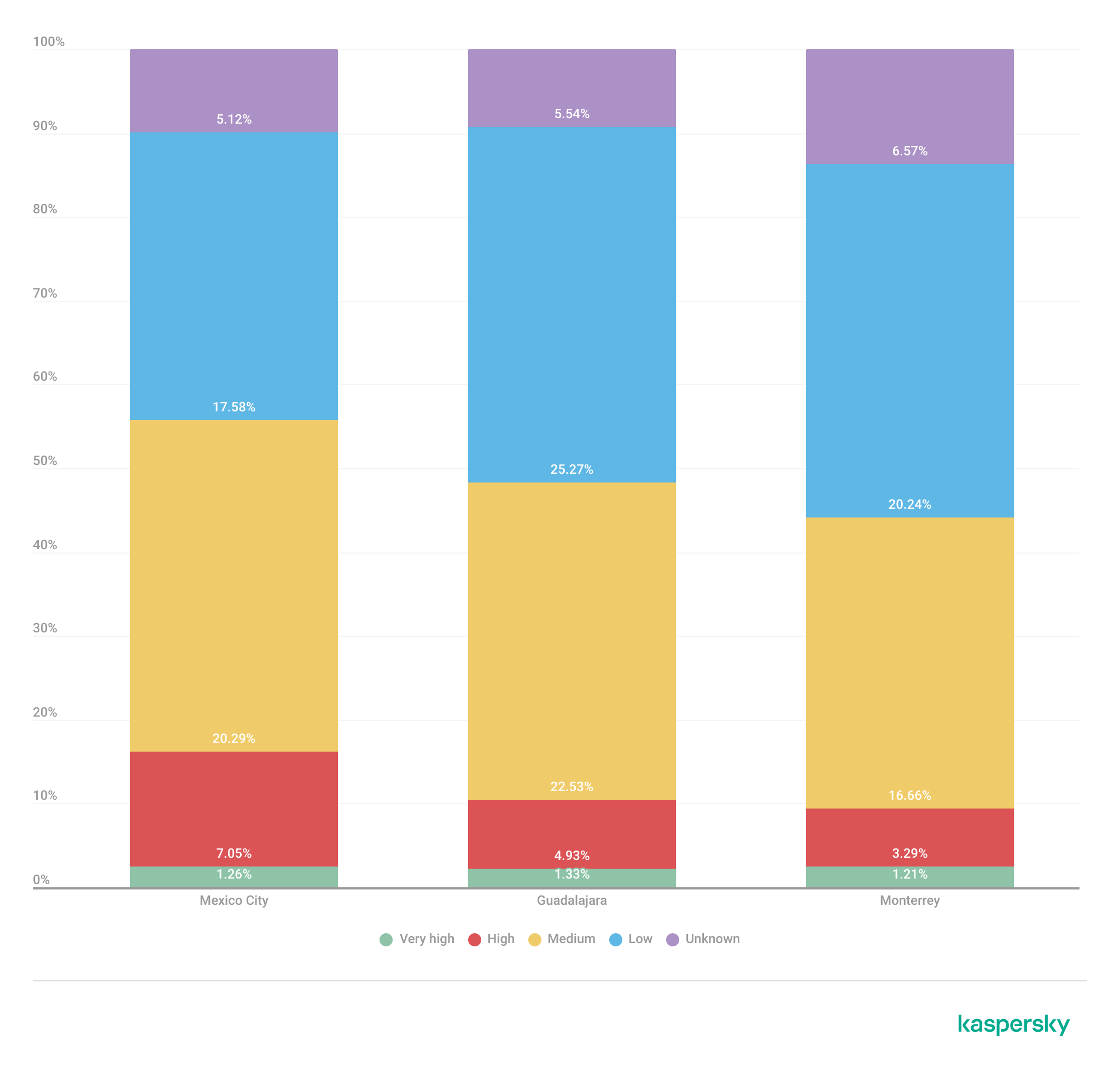
To further assess wireless spectrum saturation, the detected access points were grouped according to channel congestion levels: VERY_HIGH, HIGH, UNKNOWN, MEDIUM, LOW and NONE.
Mexico City had the highest proportion of heavily congested wireless channels, with approximately 7% of detected access points operating under HIGH congestion conditions. Guadalajara followed with nearly 5% of deployments categorized as HIGH congestion, while Monterrey had the lowest percentage at approximately 3.29%.
These findings suggest that wireless spectrum saturation increases proportionally with urban infrastructure density and access point concentration. Despite the presence of congested deployments, most detected access points were categorized as LOW or MEDIUM congestion, suggesting severe spectrum saturation was localized rather than uniformly distributed.
A thorough analysis of individual channel utilization revealed that channels 11, 6 and 1 consistently experienced the highest congestion levels across the three cities, which correlates with our previous findings. These channels accounted for the majority of VERY_HIGH congestion classifications, particularly within the 2.4 GHz band.
In Mexico City, channel 11 alone accounted for more than 25% of detected deployments and consistently exhibited VERY_HIGH congestion levels.
This behavior reflects the limited availability of non-overlapping channels within the 2.4 GHz spectrum and the widespread reliance on default wireless configurations.
Overall, the channel utilization analysis showed that wireless deployments are concentrated heavily within the traditional, non-overlapping 2.4 GHz channels. While this strategy reduces adjacent-channel interference, excessive access point density on the same channels can still produce significant co-channel contention and poor wireless performance in high-density urban environments.
Wireless security configurations
The next thing we evaluated was the security posture of the detected wireless networks. We analyzed the wireless security configurations advertised by access points in each of the locations.
Overall security configuration distribution
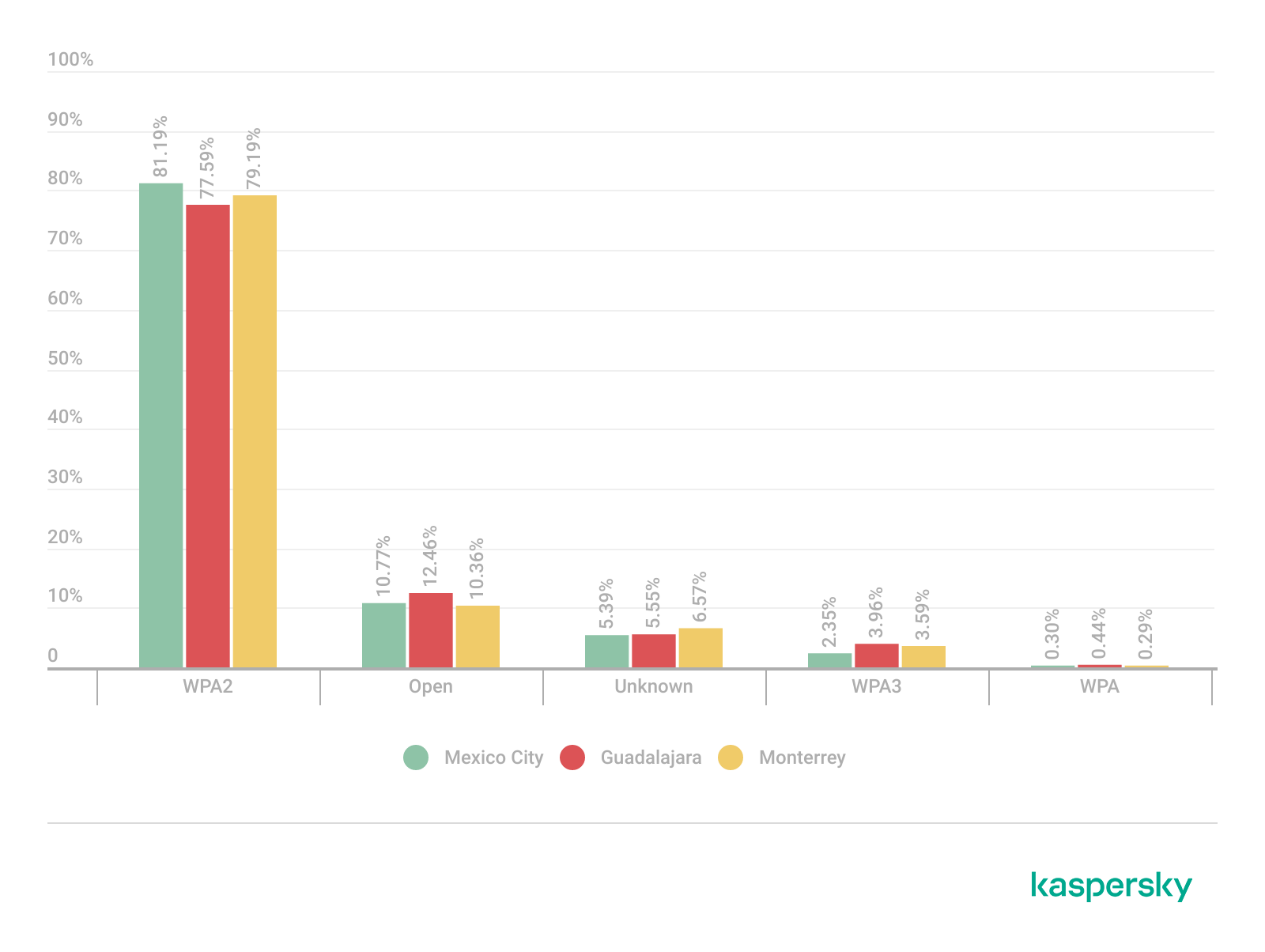
The analysis revealed that WPA2 was the dominant wireless authentication mechanism across the three cities. Mexico City had the highest WPA2 adoption rate at 81.19%, followed by Monterrey at 79.19% and Guadalajara at 77.59%.
The study found that every 6th open access point (17%) was unsafe, namely 16.5% in Mexico City, 18.5% in Guadalajara, and 17.2% in Monterrey. Open wireless deployments were consistently present across all locations, ranging between 10% and 12% of detected access points. These findings show that despite the widespread deployment of modern wireless security standards, encryption adoption remains incomplete.
Distribution of wireless authentication mechanisms across the three locations (download)
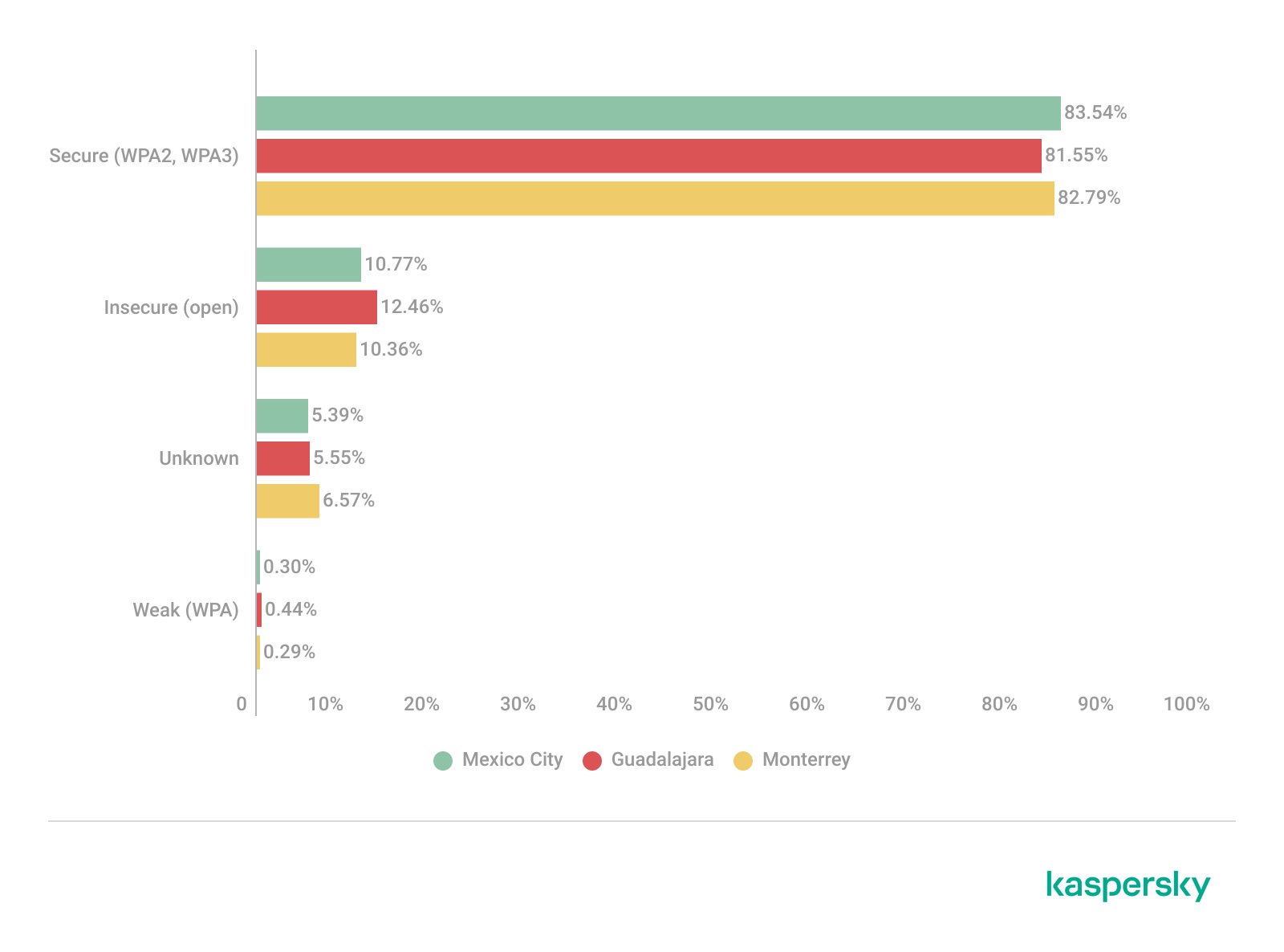
To simplify the interpretation of wireless security posture, we grouped detected networks into four categories:
Secure (WPA2/WPA3)
Insecure (Open/WEP)
Weak (WPA)
Unknown
Across the three locations, secure networks comprised most of detected deployments, accounting for approximately 82% of all access points. However, insecure open networks still account for between 10% and 12% of detected wireless infrastructure, consistent with our previous findings. It is important to mention that networks within the unknown category are not considered secure.
Mexico City had the highest percentage of secure deployments at 83.54%, while Guadalajara had the highest percentage of insecure open networks at 12.46%. Although Monterrey had the lowest percentage of insecure networks, open deployments still accounted for more than 10% of the detected access points.
Wireless security posture grouping across the three locations (download)
Although modern WPA2/WPA3 encryption standards dominate current wireless deployments, the continued presence of open and legacy WPA deployments indicates that insecure wireless configurations remain relevant from an operational standpoint. These networks may expose users to passive traffic interception, unauthorized monitoring, rogue access point attacks, and credential harvesting techniques.
WPS-enabled networks
We also analyzed Wi-Fi Protected Setup (WPS) in all the locations to evaluate additional attack surfaces. WPS is a standard feature on wireless routers that enables devices such as printers, repeaters or mobile phones to connect to a secure Wi-Fi network without manually entering a long password, typically through a PIN-based enrolled mechanism. Although WPA2 and WPA3 provide strong encryption mechanisms, the presence of WPS can introduce security weaknesses due to inherently vulnerable PIN-based enrollment methods.
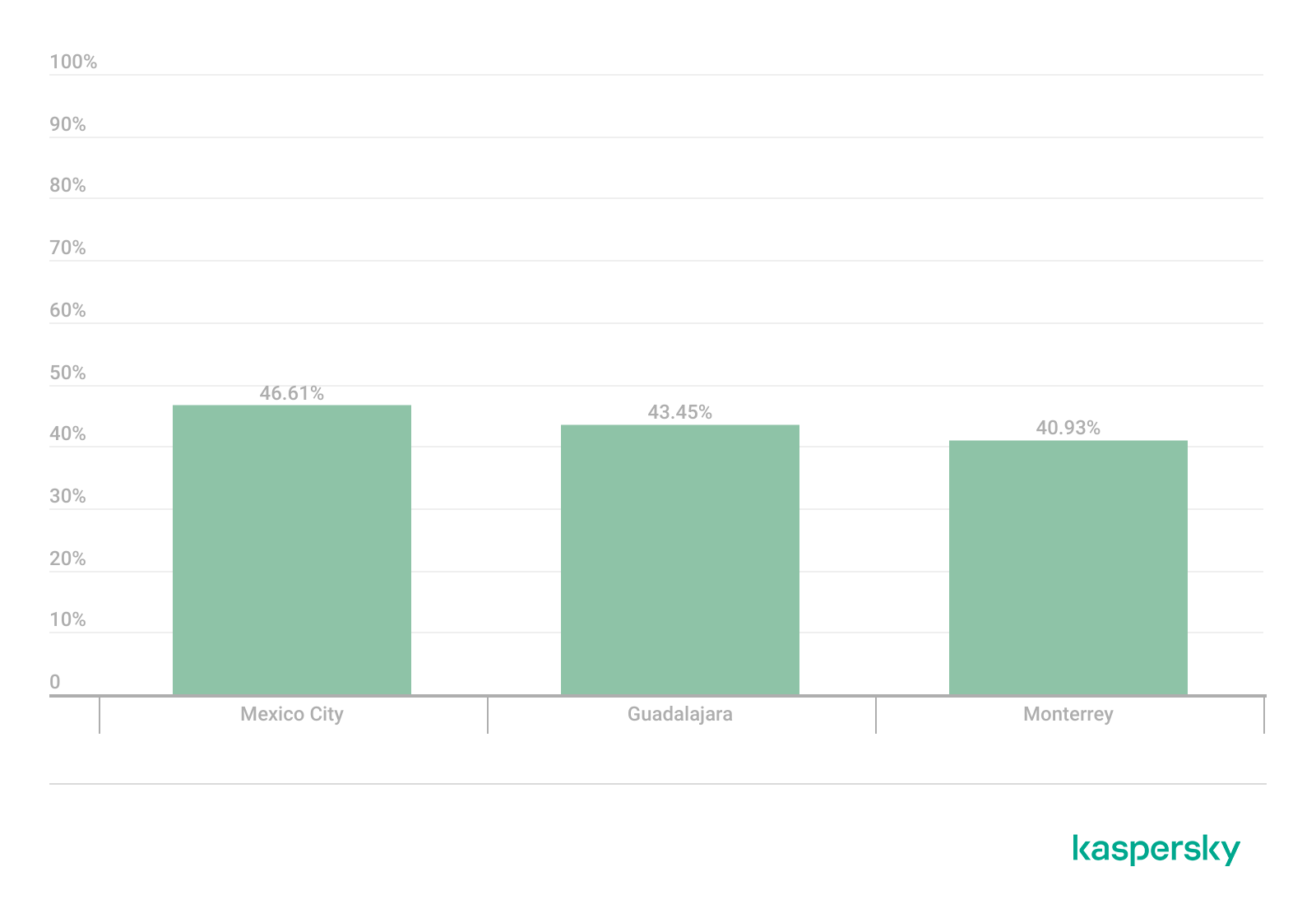
By combining detections from the three locations, we found that 55% of all detected access points did not advertise WPS capabilities, leaving 45% of deployments vulnerable to WPS-based abuse. These results suggest that, despite the adoption of modern encryption standards, a significant portion of wireless infrastructure continues to expose legacy convenience features.
During the analysis, we found that Mexico City had the highest proportion of WPS-enabled networks, with 46.61% of the detected access points advertising WPS capabilities. Guadalajara was second with 43.45%, while Monterrey had the lowest proportion at 40.93%.
The percentage of detected access points advertising WPS capabilities across the three locations (download)
Almost half of the detected wireless networks in each city continued to advertise WPS, indicating that WPS prevalence is consistently high across the three cities.
Secure networks with WPS enabled
In many cases, networks classified as secure because of WPA2/WPA3 encryption still had WPS functionality enabled, which effectively increased the available attack surface.
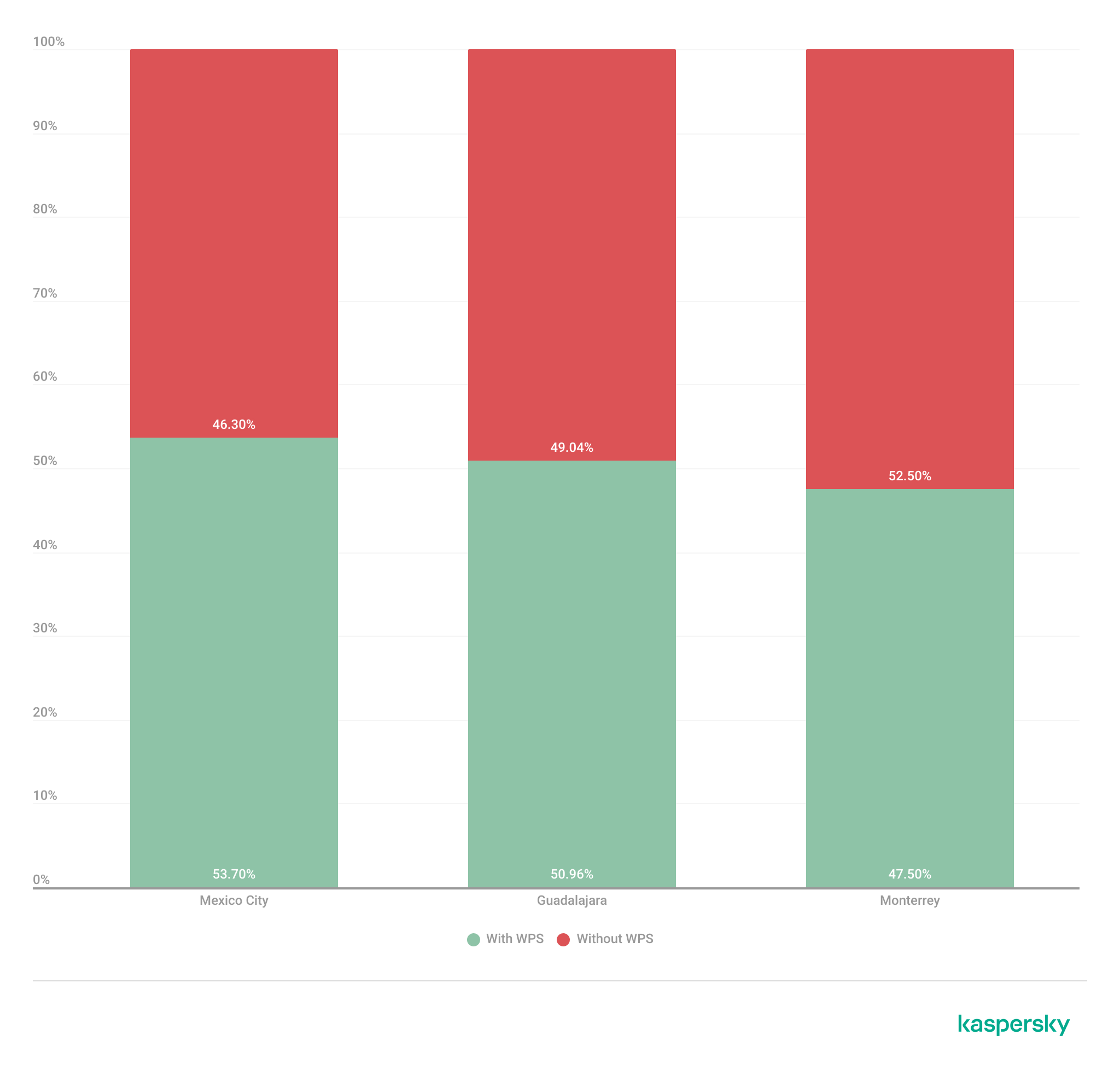
To further assess the relationship between encryption strength and WPS exposure, we conducted a secondary analysis of secure networks (WPA2/WPA3) only. The results showed that around half of all secure deployments still exposed WPS, with the following breakdown for each city:
Mexico City: 53.7%
Guadalajara: 50.9%
Monterrey: 47.5%
The proportion of secure networks with WPS enabled across the three locations (download)
These findings indicate that encryption strength alone is not enough to evaluate wireless security posture because additional protocol features, such as WPS, may still expose exploitable attack vectors.
Additional security considerations
Overall, travelers operating within dense public environments are exposed not only to insecure wireless infrastructure but also to various risks associated with digital interactions. These risks include many threats, from public USB charging systems and phishing QR codes to proximity-based protocols and exposure to shared public devices, such as interactive totems or kiosks. One particular point that should be taken into account in light of our research is the issue of rogue wireless deployments.
Rogue access points are not necessarily malicious; they may be set up accidentally by misconfiguring router settings. An entry point for potential compromise might be caused by various misconfigurations, from a weak password to an insecure protocol. However, attackers deploy such unauthorized hotspots with malicious intent to infiltrate a network. Threat actors may deploy rogue access points posing as legitimate public wireless networks in airports, hotels, cafés and tourist areas. These deployments are called “evil twins” and can trick users into connecting to attacker-controlled infrastructure capable of intercepting traffic, harvesting credentials, or performing man-in-the-middle attacks. Further risk lies in the potential compromise of local network devices or even malware distribution. Such threats complement our findings, underscoring the importance of implementing traffic encryption, using a security solution and exercising extreme caution while browsing via public networks.
Conclusion
The wardriving assessment conducted in Mexico City, Guadalajara, and Monterrey revealed that modern wireless infrastructure continues to present multiple forms of operational exposure despite the widespread adoption of WPA2 and WPA3 security standards. The analysis demonstrated that wireless environments are highly standardized in all the locations, with recurring ISP deployments, default SSID naming conventions, homogeneous manufacturer distribution, and predictable channel allocation practices observed in all three cities.
Although most of the detected networks were classified as secure under WPA2/WPA3 authentication mechanisms, a significant proportion were exposing additional attack surfaces through enabled WPS functionality, default configurations, sequential SSID structures, and infrastructure metadata disclosure. This demonstrates that encryption strength alone is insufficient for evaluating the overall security posture of wireless infrastructure. Additionally, the prevalence of open networks and legacy wireless configurations indicates that insecure deployments are still operationally relevant in all the locations.
The results also showed that wireless infrastructure is heavily concentrated within the 2.4 GHz spectrum, particularly around channels 11, 6, and 1. This leads to elevated congestion and increased co-channel interference in densely populated urban environments.
SSID analysis further revealed that publicly broadcast wireless identifiers frequently expose valuable operational information about ISPs, equipment manufacturers, deployment templates, organizational ownership, and user-defined naming practices. The identification of default ISP naming conventions, sequential SSID structures, and BSSID-derived SSIDs demonstrated that many deployments prioritize operational convenience and simplicity over exposure minimization and privacy.
The scope of the threats stemming from vulnerable wireless configurations poses serious digital exposure risks for users. The widespread presence of standard deployments, predictable SSID naming and publicly exposed infrastructure identifiers can facilitate passive reconnaissance, infrastructure fingerprinting and opportunistic targeting.
Recommendations
To minimize the risks of wireless-based exposure and the attack surface related to hotspot infrastructure, we recommend taking the following measures:
Disable WPS functionality on wireless routers whenever possible, particularly within WPA2/WPA3 deployments.
Avoid using default SSID naming conventions that disclose ISP providers, router manufacturers, or deployment templates.
Refrain from using personal, organizational, or location-based identifiers in wireless network names.
Avoid configuring SSID using BSSID or naming conventions derived from MAC addresses, as these may expose hardware fingerprinting information.
Promote migration toward modern WPA3-capable infrastructure while removing legacy wireless protocols when operationally feasible.
Reduce wireless congestion by optimizing channel allocation strategies and minimizing excessive dependence on the 2.4 GHz spectrum.
Encourage adoption of 5 GHz and newer wireless technologies to reduce interference and improve spectrum efficiency.
The findings presented in this assessment emphasize the importance of combining strong wireless encryption standards, secure deployment practices, exposure minimization strategies, and user awareness to enhance the overall security posture of wireless environments.
With International Anti-Ransomware Day taking place on May 12, Kaspersky presents its annual report on the evolving global and regional ransomware cyberthreat landscape.
Ransomware remains one of the most persistent and adaptive cyberthreats. In 2026:
New families continue to emerge, adopting post-quantum cryptography ciphers.
As ransom payments drop, some groups implement encryptionless extortion attacks.
In a constantly changing ecosystem of threat actors, initial access brokers maintain a relevant role in this market, showing increased focus on access to RDWeb as the preferred method of remote access.
Ransomware attacks decline but remain a major threat
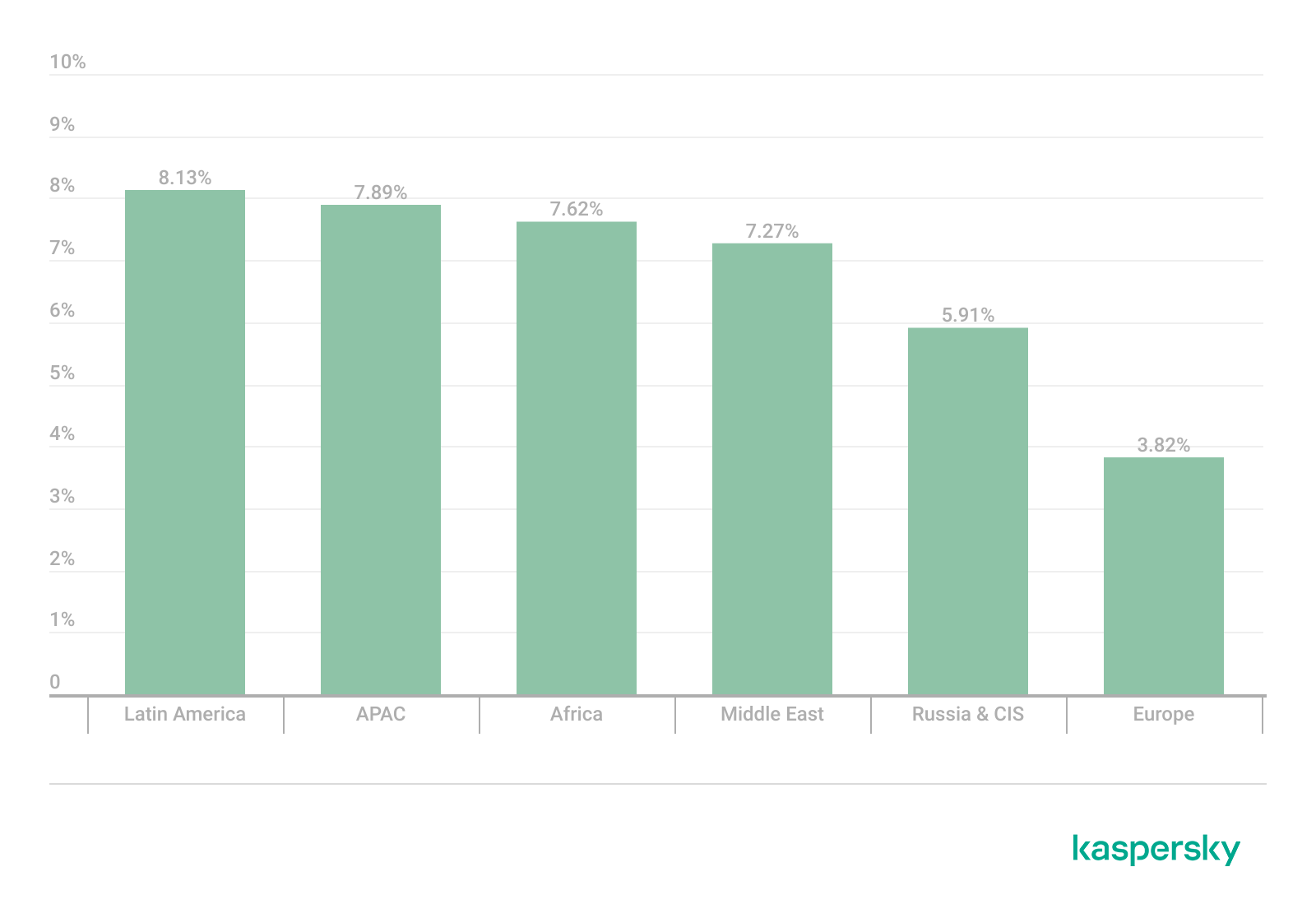
According to Kaspersky Security Network, the share of organizations affected by ransomware decreased in 2025 across all regions compared to 2024.
Percentage of organizations affected by ransomware attacks by region, 2025 (download)
Despite the formal decrease, organizations across all sectors continue to face a high likelihood of attack, as ransomware operators refine their tactics and scale their operations with increasing efficiency. Kaspersky and VDC Research have found that in the manufacturing sector alone, ransomware attacks may have caused over $18 billion in losses in the first three quarters of the year.
The continued rise of EDR killers and defense evasion tooling
In 2026, ransomware operators increasingly prioritize neutralizing endpoint defenses before executing their payloads. Tools commonly referred to as “EDR killers” have become a standard component of attack playbooks. This reflects a continuing trend toward more deliberate and methodical intrusions.
Attackers attempt to terminate security processes and disable monitoring agents, often by exploiting trusted components such as signed drivers. This technique is called Bring Your Own Vulnerable Driver (BYOVD) and allows adversaries to blend into legitimate system activity while gradually degrading defensive visibility.
Thus, evasion is no longer an opportunistic step but a planned and repeatable phase of the attack lifecycle. As a result, organizations are increasingly challenged not just to detect ransomware but also to maintain control in environments where security controls themselves are actively targeted.
The appearance of new families adopting post-quantum cryptography
We predicted that quantum-resistant ransomware would appear in 2025. Looking back at the previous year, we see that advanced ransomware groups indeed started using post-quantum cryptography as quantum computing evolved. The encryption techniques used by this quantum-proof ransomware could be used to resist decryption attempts from both classical and quantum computers, making it nearly impossible for victims to decrypt their data without having to pay a ransom.
One example is the appearance of the PE32 ransomware family (link in Russian); it leverages the cutting-edge ML-KEM (Module-Lattice-Based Key-Encapsulation Mechanism) standard to secure its AES keys. This specific cryptographic framework was recently selected by NIST as the primary standard for post-quantum defense.
Within the PE32 ransomware architecture, this is realized through the Kyber1024 algorithm, a robust mechanism providing Level 5 security, roughly equivalent in strength to AES-256. Its primary function is the secure generation and transmission of shared secrets between parties, specifically engineered to withstand future quantum computing attacks. This shift toward post-quantum readiness is part of a broader industry trend; for instance, TLS 1.3 and QUIC protocols have already adopted the X25519Kyber768 hybrid model, which fuses classical encryption with quantum-resistant security.
The shift to encryptionless extortion
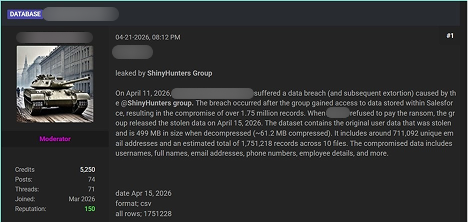
In 2025, the share of ransoms paid dropped to 28%. As a response to this, one of the developments in the 2026 landscape is the growing prevalence of extortion incidents in which no file encryption takes place at all. Instead, attackers leave out the “ware” in “ransomware” and focus on extracting sensitive data and leveraging the threat of public disclosure as their primary means of extortion. ShinyHunters is an excellent example of such a group, using a data leak site to publicize its victims.
By avoiding encryption, attackers may aim at reducing the likelihood of immediate detection, shortening the duration of the attack, and eliminating dependencies on stable encryption routines. Often, this model is used alongside traditional tactics in so-called double extortion schemes, but an increasing number of campaigns rely exclusively on data theft.
For victims, this shift fundamentally changes the nature of the risk. While backups remain effective against encryption-based disruption, they provide no protection against data exposure, regulatory consequences, and reputational damage. Ransomware is therefore evolving from a business continuity issue into a broader data security and compliance challenge.
Industrialization of initial access (Access-as-a-Service)
The ransomware ecosystem continues to evolve toward a highly industrialized and specialized model, with initial access remaining as one of its most critical components. In 2026, many ransomware operators keep relying on IABs (initial access brokers), a network of intermediaries who supply pre-compromised access to corporate environments, aiming to no longer perform full intrusions themselves.
This “access-as-a-service” model is fueled by credential theft operations, and the widespread availability of compromised accounts harvested through infostealers and phishing campaigns.
The primary access vectors offered for sale have not changed: RDP, VPN, and RDWeb are still the top access vectors. Consequently, remote access infrastructure remains the primary attack surface for initial access sales. In response to the measures against public exposure of RDP access points to the internet, attackers are now targeting RDWeb portals, which are frequently vulnerable and occasionally inadequately safeguarded.
The result is a threat landscape where unauthorized access is increasingly commoditized, and the barrier to launching ransomware attacks declines. This means that preventing initial compromise is only part of the challenge; equal emphasis must be placed on detecting misuse of legitimate credentials and limiting lateral movement within already-breached environments.
Ransomware developments on the dark web
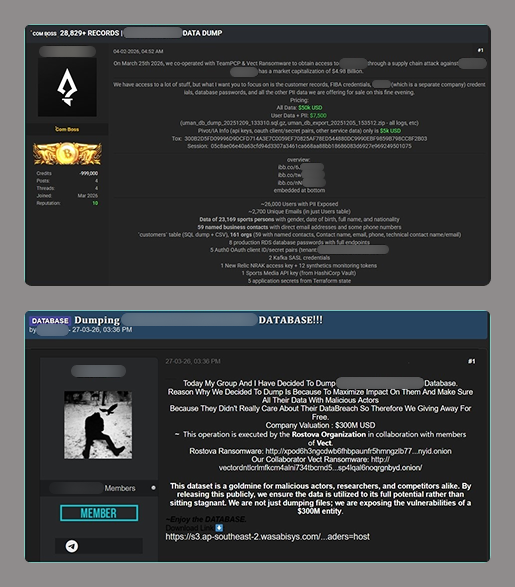
Telegram channels and underground forums increasingly function as platforms for the distribution and sale of compromised datasets and access credentials including those that were obtained as a result of ransomware attacks.
Advertisements posted on these resources typically include the nature of the access, a description of the exfiltrated or compromised data, price terms, and contact information for prospective buyers. In addition, some malicious actors mention their collaboration with other ransomware groups. Lesser-known gangs can use this name-dropping to promote themselves
Multiple threat actors not related to ransomware groups distribute datasets downloaded from ransomware blogs on underground forums and Telegram. By re-publishing download links and files, they spread compromised data as well as information on the ransomware attack within the community.
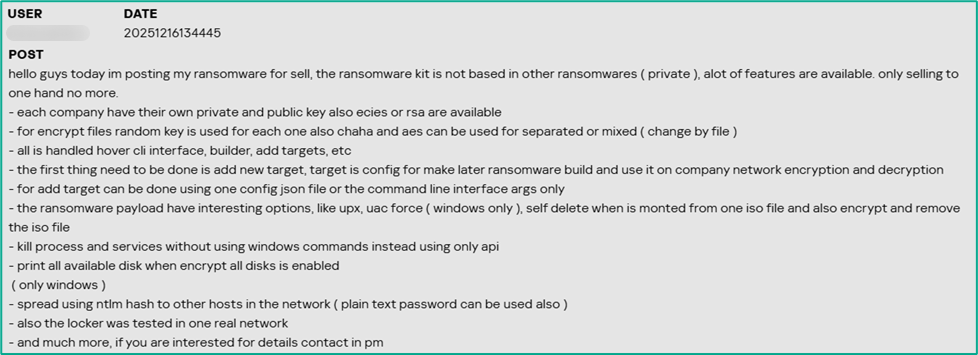
The ransomware itself is also sold or offered for subscription on the dark web platforms. The sellers underscore the uniqueness of their malware, as well as its encryption and defense evasion features.
Law enforcement actions
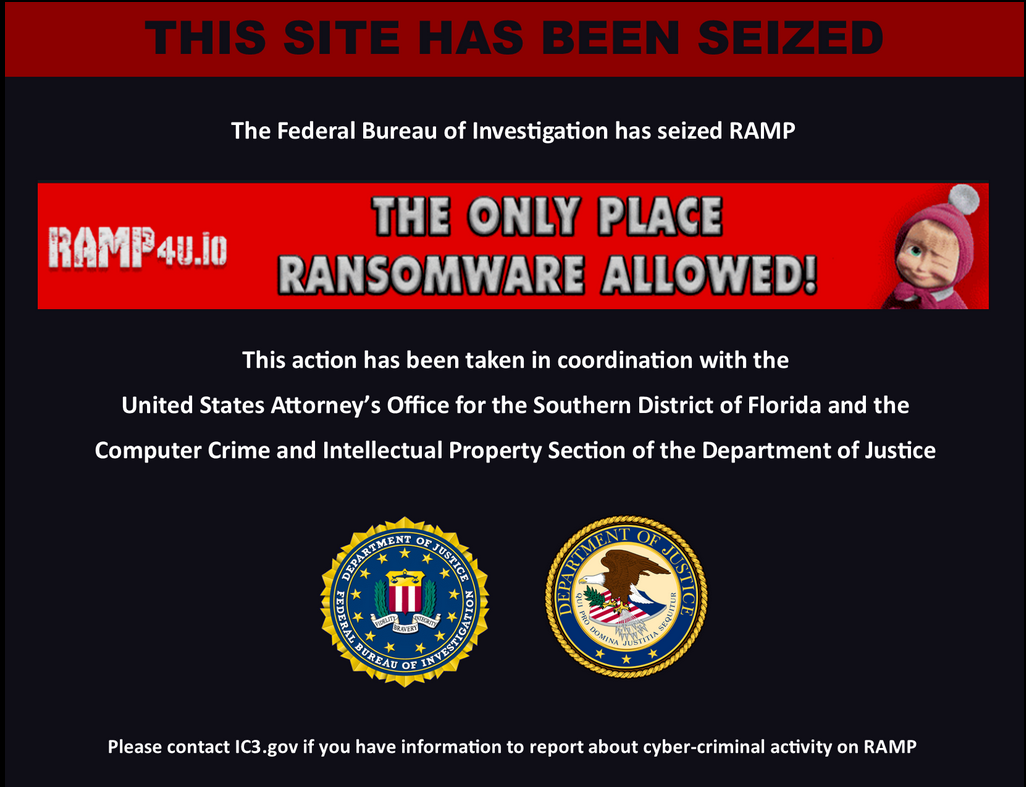
Law enforcement agencies are actively shutting down dark web platforms and ransomware data leak sites. A major underground forum, RAMP, which also functioned as a platform for threat actors to advertise their ransomware services and publish service‑related updates, was seized by authorities in January 2026. Another underground forum, LeakBase, where malicious actors distributed exfiltrated and compromised data, was seized in March 2026. In 2025, law enforcement agencies seized well-known forums like Nulled, Cracked, and XSS. Also in 2025, the DLSs of BlackSuit and 8Base ransomware groups were seized. These takedowns cause inconvenience to ransomware coordination, specifically for initial access brokers and affiliates, though similar forums are expected to fill the void over time.
Top ransomware groups in 2025
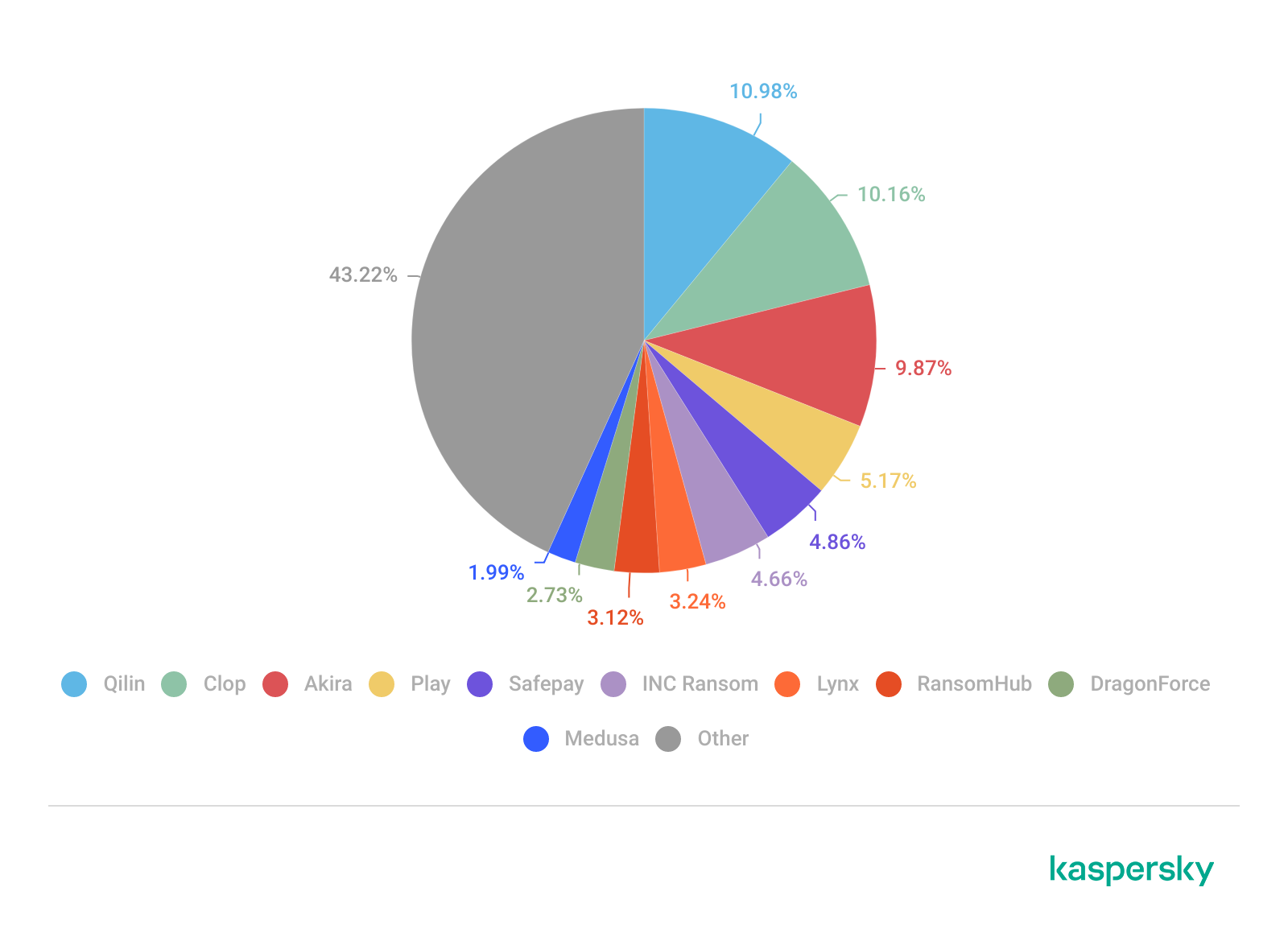
RansomHub’s sudden dormancy in 2025 marked a shift, and Qilin became the dominant player from Q2 onward. According to Kaspersky research, Qilin was the most active group executing targeted attacks in 2025.
Each group’s share of victims according to its data leak site (DLS) as a percentage of all reported victims of all groups during the period under review (download)
Qilin stands out as one of the fastest-growig and dominant RaaS platforms. Its combination of high-volume operations and structured affiliate model positions it as a central player in the current ecosystem.
Clop, the second most active group in 2025, is distinguished through its large-scale, supply-chain-style attacks, exploiting widely used file transfer and enterprise software to compromise hundreds of victims simultaneously. This one-to-many approach sets it apart from more traditional, single-target campaigns.
Third place is occupied by Akira, which remains notable for its consistency and operational stability, maintaining a steady stream of victims without major disruption. Its ability to sustain activity over time makes it one of the most reliable indicators of baseline ransomware threat levels.
Although no longer active, RansomHub stands out for its rapid rise and equally rapid disappearance in 2025, highlighting the volatility of the RaaS market. Its shutdown created a vacuum that significantly reshaped affiliate distribution across other groups.
DragonForce is also notable – not just for its own operations, but for its broader influence within the ransomware ecosystem, including reported involvement in infrastructure conflicts and possible links to the disruption of competing groups. Thus, the group claims that RansomHub “has moved to their infrastructure.” This positions it as more than just an operator and potentially an ecosystem-level actor.
New actors in 2026
While emerging actors generally operate on a smaller scale, they provide insight into the continuous churn and low barrier to entry within the ransomware ecosystem.
The Gentlemen group caught our attention in early 2026, as they managed to attack a significant number of victims over a short time. This actor is also notable for reflecting a broader shift toward professionalization and controlled operations within the ransomware ecosystem. Unlike many emerging groups that rely on opportunistic attacks and inconsistent leak activity, The Gentlemen demonstrate a more deliberate approach: structured intrusion workflows, selective targeting, and measured communication with victims. This signals a move away from chaotic, high-noise campaigns toward predictable, business-like execution models that are easier to scale and harder to disrupt. Their TTPs include the massive exploitation of hardware very common on big corporations, such as FortiOS/FortiProxy, SonicWall VPN, and Cisco ASA appliances. The group might be comprised of professional cybercriminals who left other prominent groups.
The group is also notable for its emphasis on data-centric extortion strategies, often prioritizing exfiltration and leverage over purely disruptive encryption. This aligns with one of the defining trends of 2026: ransomware evolving into a form of data breach monetization rather than just system denial. By focusing on controlled pressure and reputational risk instead of immediate operational damage, The Gentlemen exemplify how attackers are adapting to lower ransom payment rates and improved backup practices among victims.
Some other groups to take note of in 2026:
Devman appears to be an emerging actor with limited but growing activity, likely leveraging existing tooling rather than developing custom capabilities.
MintEye hasn’t been very active yet, with just five known victims, suggesting opportunistic campaigns without a consistent operational tempo.
DireWolf is associated with small-scale, targeted attacks, though its overall footprint remains relatively limited compared to larger RaaS groups.
NightSpire demonstrates characteristics of an amateur group, such as mistakes during its operations, uncommon communication channels with the victims, and sometimes giving them insufficient time to pay up. Although they both encrypt and leak data, they prioritize publication rather than encryption.
Vect shows low-volume activity. It is yet unclear whether they use a completely new codebase or are rather a rebrand of an existing group.
Tengu is a less prominent actor, with limited public reporting and no clear distinguishing tactics beyond standard extortion models.
Kazu appears to be created by ransomware operators previously engaged with multiple other groups. As of now, they don’t stand out for scale or technique.
Although there is little to say about these groups at the time of writing this report, each of them may be equally likely to disappear from the threat landscape or grow into a prominent threat. That’s why it’s important to track them from their early days. Moreover, collectively, these groups illustrate how dynamic the ransomware landscape is, with new entrants constantly replenishing it.
Conclusion and protection recommendations
Despite the growing effort by law enforcement agencies across the globe to seize and disrupt dark web platforms and threat actor infrastructures, ransomware operations remain stable, with new groups quickly taking the place of those who went silent. In 2026, we see a shift towards encryptionless extortion, with data leaks increasingly becoming the main threat to target organizations. At the same time, data encryption is also upgrading to the next level with the emergence of post-quantum ransomware.
To resist the evolving threat, Kaspersky recommends organizations:
Prioritize proactive prevention through patching and vulnerability management. Many ransomware attacks exploit unpatched systems, so organizations should implement automated patch management tools to ensure timely updates for operating systems, software, and drivers. For Windows environments, enabling Microsoft’s Vulnerable Driver Blocklist is critical to thwarting BYOVD attacks. Regularly scan for vulnerabilities and prioritize high-severity flaws, especially in widely used software.
Strengthen remote access: RDP and RDWeb connections should never be directly exposed to the internet, only through VPN or ZTNA (Zero Trust Network Access). It’s highly recommended to adopt multi-factor authentication on everything; the architecture may require continuous authentication for access, as one valid credential captured is enough to cause a breach. Monitoring the underground for stolen employee credentials is essential. Audit open ports across the entire attack surface. The adoption of the “Principle of Least Privilege” (PoLP), where users, systems, or processes are granted only the minimum access rights, such as read, write, or execute permissions, necessary to perform their specific job functions, is highly recommended.
Strengthen endpoint and network security with advanced detection and segmentation. Deploy robust endpoint detection and response solutions such as Kaspersky NEXT EDR to monitor for suspicious activity like driver loading or process termination. Network segmentation is equally important. Limit lateral movement by isolating critical systems and using firewalls to restrict traffic. Complete and immediate offboarding for employees is necessary as well as periodic permission reviews, with automatic revocation of unused access. Sessions with complete logging for privileged accounts are more than necessary. Monitoring the traffic divergence to new sites or even to legitimate endpoints can help the defenders to spot a new insider threat.
Invest in backups, training, and incident response planning. Maintain offline or immutable backups that are tested regularly to ensure rapid recovery without paying a ransom. Backups should cover critical data and systems and be stored in air-gapped environments to resist encryption or deletion. User education is essential to combatting phishing, which remains one of the top attack vectors. Conduct simulated phishing exercises and train employees to recognize AI-crafted emails. Kaspersky Global Emergency Response Team (GERT) can help develop and test an incident response plan to minimize potential downtime and costs.
The recommendation to avoid paying a ransom remains robust, especially given the risk of unavailable keys due to dismantled infrastructure, affiliate chaos, or malicious intent. By investing in backups, incident response, and preventive measures like patching and training, organizations can avoid funding criminals and mitigate the impact.
Kaspersky also offers free decryptors for certain ransomware families. If you get hit by ransomware, check to see if there’s a decryptor available for the ransomware family used against you.
A great place that can sometimes be overlooked on an internal penetration test are the secrets hidden in plain sight. That is, a place where no authentication is required in […]

 Login
Login