A caller offers you a free phone upgrade or an exclusive deal from your mobile provider. A new phone arrives at your home. So far, everything seems to check out.
Then comes another call: There’s been a shipping mistake. You received the wrong phone, and the company needs you to send it back. You send it back, but the phone never reaches your provider, leaving you with a large charge or long-term contract to pay.
Now police are warning about this scheme after residents lost devices and were left facing the associated payments.
How phone return scams work
The scam usually starts with a call from a spoofed number. In the US we’re seeing several examples in anonymized Malwarebytes Scam Guard records of the impersonated company being Canadian mobile provider Rogers.
The Canadian Anti-Fraud Centre warns:
“After collecting personal information required for credit checks, they’ll order a new phone in your name.”
Next, a genuine device arrives through a legitimate delivery service. That delivery makes the next part of the story easier to believe.
The caller gets back in touch and claims something went wrong. Perhaps the company sent the wrong device, or an extra phone arrived by mistake. To put things right, you need to send it back using the label or shipping QR code they provide.
The shipping label is the real trick. Rather than directing the package to the provider’s returns facility, it sends the device to an address chosen by the criminals.
The result: You no longer have the phone, but your provider has not received it back. Victims can be left facing a contract, financing agreement, or monthly payments for the missing device.
How to stay safe
The most important protection against most types of scams is having someone you can trust and help you decide whether something is a scam. Malwarebytes Scam Guard can be that partner if you’re on your own.
You don’t need to decide on the spot about whether a caller sounds convincing. Break the conversation and verify the offer separately. Pause and check if you encounter any of the following:
An unexpected call offering a free phone, loyalty reward, or unusually attractive upgrade.
A caller asking for personal, financial, or account information to arrange the offer.
A follow-up call claiming the wrong device was shipped or that another delivery mistake needs correcting.
Instructions to use a return label or QR code supplied by that caller.
A return destination that you have not confirmed directly with your provider.
If you’ve already sent a phone, contact your mobile provider immediately using verified contact details. Explain that you believe you were targeted by a phone return scam, identify the affected orders, and ask for a fraud investigation.
If you shared your account password or PIN, change it through the provider’s official channels. Rogers advises customers who disclosed their credentials to reset them and contact customer service to check for unauthorized transactions.
Keep the evidence: messages, emails, the shipping label, tracking details, order confirmations, bills, and a timeline of the calls. These records can help support a billing complaint and fraud report.
Something feel off? Check it before you click.
Malwarebytes Scam Guard helps you analyze suspicious links, texts, and screenshots instantly.
Recently, our team exposed sophisticated scam kits designed to steal sensitive data and trick consumers. But underground marketplaces are not just for malware and stolen passwords. They also offer services designed to manipulate your opinion of the products and services you buy every day.
In our latest research, we examined cybercrime forums where sellers advertise illicit “reputation management” services. For the right price, these underground operators offer to flood a product with glowing, five-star ratings or remove negative reviews. This shadowy industry works both ways—artificially boosting reputations and deliberately hiding legitimate complaints.
A major shift we are seeing in this space is the adoption of new technology. We also found that cybercriminals are using AI to automate these fake review campaigns. This could allow them to quickly generate realistic, human-sounding feedback in large volumes without much manual effort.
5 stars as a service
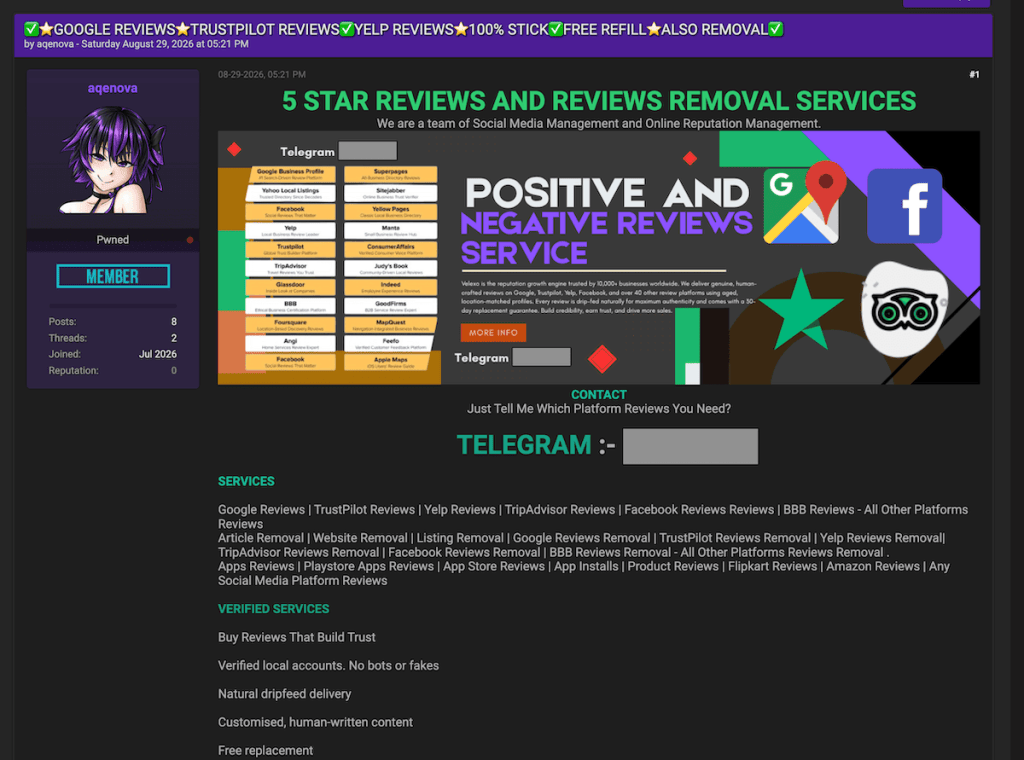
In the first example, discovered on a major English-language underground forum, a seller operating under the handle “aqenova” advertises both five-star review generation and negative review removal services.
The seller’s operations span widely used platforms, including Google, Trustpilot, Yelp, and various mobile app stores. By simply asking prospective buyers, “Just tell me which platform reviews you need?” the seller presents reputation manipulation as something buyers can just order on demand.
Five-star reviews and removal services
Decoding the seller’s FAQ
Analyzing another seller’s (TrustForge) “Frequently Asked Questions” section revealed some surprising details about how these operations reportedly run behind the scenes.
First, the seller emphasizes that real people manually post these reviews, offering a guarantee for both successful delivery and “non-drop”—meaning the platform won’t flag and remove the feedback later.
Remember, a real person posting a review doesn’t mean they’re a real customer. The important question is whether they actually used the product or service and are describing an honest experience.
Second, it appears this is a well-coordinated team effort rather than a solo operation, as the seller charges an extra fee if a buyer wants the main operator to write the review text personally.
However, what caught our attention most was their confidence in beating platform checks. The seller guarantees their fake reviews will stay active, claiming they rely on a closely guarded “private method.” According to TrustForge’s own statements, this method has allowed them to post more than 10,000 fake reviews.
Reputation management FAQ
The clean-up crew: Making bad reviews disappear
A single negative review is often all it takes to create a bad first impression of a product or service. When those negative comments start to pile up, they can completely ruin a business’s reputation and bottom line.
Recognizing how desperate businesses can be to protect their image, our research team discovered underground services specifically offering to remove “fake” or “unfair” reviews from major platforms like Google and Trustpilot.
Of course, the boundary between what is genuinely fake and what a business simply considers “unfair” can be blurry. Businesses can legitimately challenge fabricated reviews, but these services raise concerns about whether genuine customer complaints could also be targeted.
If legitimate customer complaints disappear, consumers lose information that could help them decide where to spend their money.
An offer to remove “fake” or “unfair” Google reviewsAn offer to remove ”fake” or “unfair” review Google reviews
On average, having a single review removed through these underground services costs between $100 and $200. However, the pricing jumps dramatically depending on the platform.
For instance, one seller advertised Airbnb review removal for around $1,100 per review.
When you check a business’s reviews, you’re looking for patterns in other customers’ experiences. If genuine complaints disappear, you could miss repeated problems with refunds, product quality, or customer service.
$1,100 to remove a “fake” or “unfair” Airbnb review
Artificial intelligence, artificial reviews
During the last few months, our research team spotted an interesting thread on an underground forum where two users discussed using AI to mimic human E-E-A-T.
E-E-A-T stands for Experience, Expertise, Authoritativeness, and Trustworthiness. It is a quality evaluation framework outlined in Google’s Search Quality Rater Guidelines, which human evaluators use to assess content quality. E-E-A-T itself is not a direct ranking factor.
In the discussion we observed, one user asked the community if it was possible to use AI to effectively fake these qualities when writing product reviews and artificially boost website rankings. The answer was a resounding yes.
Another user claimed they had never experienced problems getting Google to index their completely AI-generated reviews.
AI vs. E-E-A-T
Behind the scenes: The IP addresses for fake reviews
To keep fake reviews from being flagged and deleted, scammers need to look like everyday consumers. To help do this, they can use something called “residential and mobile proxies,” which route their traffic through other internet connections to disguise where it comes from.
Think of an IP address as your computer’s caller ID. When scammers use bulk IP addresses from giant data centers, platforms may spot and block that traffic as coming from commercially hosted infrastructure. Residential proxies, on the other hand, route traffic through real, physical home internet connections—just like the Wi-Fi you use in your living room. Mobile proxies work the same way, but use real cellular networks.
Our team recently discovered a seller on an underground forum acting as a direct supplier of these residential and mobile connections. The seller explicitly advertises them as perfect for running fake review campaigns.
Residential and mobile proxiesadvertised for fake review campaigns
How to avoid being misled by fake reviews
The main goal of this research isn’t to make you panic or stop trusting every online review you read. We want to raise awareness about what happens behind the scenes, so you can make more informed buying decisions.
If a product or offer seems too good to be true, but is backed by a mountain of perfect five-star reviews, take a moment to pause. Scammers often use these artificially boosted ratings to make a bad deal look reassuring.
Read recent reviews and some of the middle-rated ones, rather than relying on the overall score. Look for recurring details about the things that matter to you, such as durability, delivery, or getting your money back.
Look for repeated wording or sudden bursts of glowing feedback. These signs don’t prove a review is fake, but they’re reasons to take a closer look. Check the seller’s contact details and return policy, too.
Malwarebytes Browser Guard can also help block scam, phishing, and malicious websites you may encounter while shopping.
Unsure about an offer, even with glowing reviews? Share the link or a screenshot with Malwarebytes Scam Guard for help checking for signs of a scam before you buy.
Stop threats before they can do any harm.
Malwarebytes Browser Guard blocks phishing pages and malicious sites automatically. Free, one click to install. Add it to your browser →
AI is becoming a third wheel in relationships, increasingly playing a role in the most intimate parts of our lives.
It shows up in the flirty first text, the polished dating profile, the therapized language we use with a partner after a fight, the strength we gather after heartbreak, and everywhere in between. For some, AI is a source of companionship itself. And even if you’re not personally an AI user, you may still be dating, loving, arguing with, or trusting someone who is.
As AI moves deeper into our relationships, it’s reshaping connection, blurring what feels authentic, and creating new ways for intimacy to be exploited.
AI is starting to replace human interaction
AI is moving into emotional territory once reserved for other people. For some, it’s no longer just a tool, but a source of support, companionship, and even romantic connection.
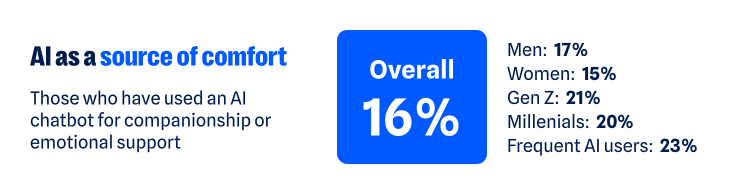
According to our recent research, about one in six have turned to a chatbot for companionship or emotional support. That climbs to about one in five among Gen Z and Millennials, and nearly one in four among regular AI users (those who use AI daily or multiple times a week). The more time people spend with AI, the more likely they are to humanize its role, making room for it as a friend, confidant, advisor, or even partner.
As AI takes on more intimate roles, it’s also starting to challenge the boundaries of real human relationships. More than one in three (37%) say having a romantic relationship with an AI chatbot while already in a committed relationship isn’t the same as cheating. That view is more common among men (46% versus 30% of women), Gen Z and Millennials (43% and 45%), and regular AI users (48%).
Whether the relationship is platonic or romantic, the more AI is treated like a human, the more personal the stakes become. Just like you have to be cautious when telling a human your deepest, darkest secrets, the experience is similar when using AI. Nearly two-thirds (65%) worry that private conversations they’ve had with AI could be exposed.
One survey respondent said:
“I have used a chatbot…for emotional support, and it is worrying to think those conversations could be leaked.”
The technology may be artificial, but the relationships people form with AI can feel very real. And as with any relationship, that means there are boundaries to work out, privacy to protect, and vulnerabilities to manage.
AI is creating new ways to weaponize intimacy
AI’s growing role in human intimacy also has a darker side. The same technology that can offer comfort, advice, or companionship can also be used to violate the most intimate parts of our lives.
Non-consensual image abuse, sextortion, and other forms of sexual abuse have long been part of the internet’s dark side. Generative AI has made that content easier to create. Someone trying to exploit another person no longer needs an actual intimate photo, video, or private exchange. A regular photo—or even just someone’s likeness—can be transformed into sexual content they never made, never shared, and never consented to.
Most people draw a clear line against that, but not everyone does. About one in six people say it’s acceptable to generate explicit images of someone without their permission for personal use. Another 14% are neutral, bringing the share who do not explicitly oppose the behavior to nearly one in three (31%).
Views differ sharply by age and sex:
Younger adults are more accepting of someone using AI to generate non-consensual content: nearly one in four Gen Z (24%) and Millennials (23%) say it’s okay, compared with 13% of Gen X and just 5% of Boomers+
Men are also more permissive: more than one in five (22%) say it’s okay, compared with 14% of women
Attitudes toward the behavior may vary, but the fear of becoming a target is far more widespread. Overall, nearly two-thirds of people (62%) worry someone could create fake nude or sexually explicit photos or videos of them. Women feel this threat more acutely: nearly seven in ten (69%) are concerned, compared with 57% of men.
For some, this fear has already become a reality:
One in ten say AI has been used to generate nude or sexually explicit imagery of them without permission
One in ten say someone has threatened to release AI-generated compromising or explicit imagery of them
As one respondent recounted:
“I had someone make fake nudes of me using AI on my photos from my social media and threaten to post them on Facebook…[it] made me more cautious about AI.”
The intimate material may be fake, but the fear, coercion, and potential for reputational, emotional, and financial damage are completely real.
AI is making it harder to know who you’re really talking to
The threat doesn’t stop with fabricated sexual content. AI is also making it harder to know whether the person on the other side of a screen is who they claim to be.
Humans have always edited themselves for other people. We choose the most flattering photo, write and rewrite the text before sending it, and present our most interesting selves—especially when forming new relationships. AI dramatically expands what that kind of self-editing can look like, and people aren’t shy about using it:
54% say AI helps them present the best version of themselves
47% say using AI to present your “best self” to employers, friends, or romantic partners does not present a false identity
That rises to 58% of both Gen Z and Millennials and 64% of regular AI users
But where does enhancement end and deception begin? Is an AI-polished dating profile still authentically you? What about a message you didn’t write? A photo that looks like you, only better?
There’s a flipside to using AI to make ourselves look or sound better: If we can do it, so can everyone else. And people are much less comfortable when they’re not the ones controlling the technology. Two-thirds (67%) worry that an online friend or romantic interest could use AI-generated images, videos, or other content to deceive them.
Catfishing, fake photos, and lies on dating profiles aren’t new. AI just makes the deception easier. Someone’s photos, backstory, messages, and even their voice can all be faked.
One person described leaving dating apps after realizing the person they were talking to had gone well beyond simply polishing their profile:
“[The] dating profile had fake pictures…[it] wasn’t just making true events sound interesting and more flirty, but creating completely false photos and information. Left the dating apps again and needed to reset.”
AI can distort identity in the other direction, too. It can also create a version of us we never chose to put into the world.
76% worry about someone creating a fake profile pretending to be them
70% worry about fake images or videos of themselves being created
71% worry AI-generated content could be used to damage their reputation
Relationships are built on mutual trust. AI can distort both sides of the connection: who we think the other person is, and who they think we are.
AI is quietly finding its way into the space between people
Not all of AI’s influence on intimacy is so dramatic. Much of it happens quietly, showing up in how people communicate with each other and navigate relationships:
More than one in three have used AI to help write or edit a message
About one in seven have turned to it for advice about a relationship or personal decision
One in ten say it has already changed how they date or communicate romantically—rising to nearly one in five among Gen Z
The survey responses show what this looks like in real life. For example, one respondent described using AI with their partner as a way to step outside their own point of view:
“Personally, it has helped me. We use AI in our relationship as a reflection tool, and it has sometimes helped us take on the perspective of the other.”
For another, AI helped them work through jealousy:
“So, I used to accuse my partner, and I got really territorial about them but once I talked to AI about it, they gave helpful advice and now we are stronger than ever.”
AI is also showing up in other difficult relationship moments. One person said it helped them “stay calm and communicate” when problems came up with their partner; another said it allows them “to pause and refine [their] thoughts” before responding.
Sometimes the role is simpler. One respondent said AI gives them “new romantic words” for their partner, while another said they’ve asked AI for advice on how to make their partner smile. AI’s growing role in relationships may be unsettling, but the benefits people describe are definitely there.
AI isn’t just helping people find the right words. It’s also helping them decide what version of themselves to put forward in the first place. More than one in three say it’s okay to use AI to create or improve a dating profile; nearly two-thirds aren’t opposed. One respondent described using AI as a “creative advisor” to polish their profile and come up with conversation starters.
AI doesn’t have to replace a relationship to help shape it. It can influence how people communicate, what advice they take, and how they choose to present themselves.
AI’s intimacy problem is ultimately a trust problem
From connection to deception to outright harm, the same question keeps surfacing: Can I trust what’s in front of me? And would I know if I couldn’t?
Nearly nine in ten people (88%) say AI is making it harder to tell what online content is genuinely human or real. And 84% say even convincing video evidence no longer necessarily feels like proof. That uncertainty follows people into dating and relationships, where knowing what—and who—to trust is deeply personal.
AI may make it easier to start a conversation, smooth over a hard one, or feel connected when you’re lonely. But relationships and intimacy of all kinds still come down to trust, and AI is making that trust a little harder to take at face value.
About the research
The research in this article is based on a March 2026 survey about AI, identity, and the collapse of digital trust and was conducted among 1,500 respondents in the United States, United Kingdom, Germany, Austria, and Switzerland. The research was prepared by an independent research consultant and distributed via Forsta.
Something feel off? Check it before you click.
Malwarebytes Scam Guard helps you analyze suspicious links, texts, and screenshots instantly.
.kadence-column476672_104e78-a1 > .kt-inside-inner-col{padding-top:20px;padding-right:20px;padding-bottom:10px;padding-left:20px;}.kadence-column476672_104e78-a1 > .kt-inside-inner-col{column-gap:var(--global-kb-gap-sm, 1rem);}.kadence-column476672_104e78-a1 > .kt-inside-inner-col{flex-direction:column;}.kadence-column476672_104e78-a1 > .kt-inside-inner-col > .aligncenter{width:100%;}.kadence-column476672_104e78-a1 > .kt-inside-inner-col{background-color:var(--color-red-10);}.kadence-column476672_104e78-a1 > .kt-inside-inner-col:before{opacity:0.3;background-color:var(--color-red-10);}.kadence-column476672_104e78-a1{position:relative;}@media all and (max-width: 1024px){.kadence-column476672_104e78-a1 > .kt-inside-inner-col{flex-direction:column;justify-content:center;}}@media all and (max-width: 767px){.kadence-column476672_104e78-a1 > .kt-inside-inner-col{flex-direction:column;justify-content:center;}}
In this article
Fake Amazon Music deals use real YouTube stats as bait.
Fake verification steals Google sign-in details, risking account takeovers.
Make sure to verify offers independently and check the browser address before signing in.
Already entered your details? Change your password and check account activity and channel permissions.
On August 27, YouTube announced that Amazon had joined its Shopping Affiliate Program. Eligible creators can now tag Amazon products in their videos and earn a commission on sales.
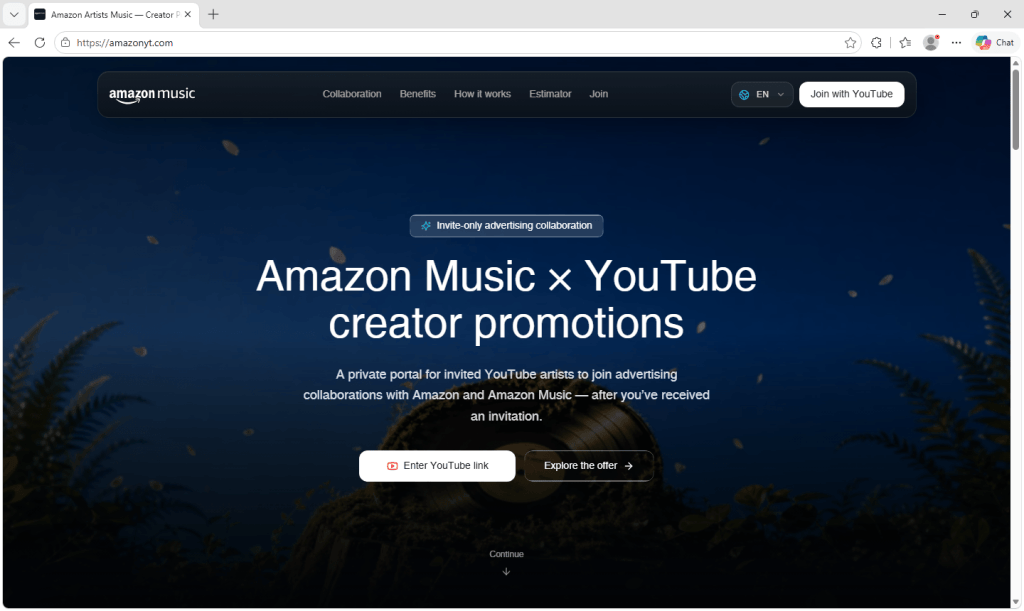
Weeks later, we found a wave of sites offering YouTube creators what looks like another Amazon opportunity: an invite-only advertising deal with Amazon Music. The site shows creators their own channel stats, then asks them to “verify” their channel with Google before it reveals a personalized offer.
That verification step is a phishing attempt designed to steal Google sign-in details, putting the creator’s account and YouTube channel at risk.
If you receive one of these offers, don’t enter your Google password or verification codes. If you already have, secure your Google account immediately using the steps below.
What the real Amazon and YouTube partnership looks like
The real partnership lets eligible creators in the YouTube Partner Program and YouTube Shopping affiliate program tag Amazon products in their videos, Shorts, and livestreams, and earn a commission when viewers buy. YouTube’s setup guidance also describes linking Amazon and YouTube accounts, with a notification in YouTube Studio once tagging is enabled.
The real program does include a step where you connect and verify your channel. But it happens inside an Amazon account you already have, on Amazon’s own site, and YouTube confirms it in YouTube Studio. It doesn’t involve invite-only Amazon Music ad campaigns, payout calculators, or a third-party “creator portal.”
An invite-only deal that doesn’t exist
The site, hosted at amazonyt[.]com, calls itself the “Amazon Artists Music — Creator Portal.” The name resembles Amazon’s real Amazon Music for Artists service, helping it feel familiar at first glance.
It promises “advertising collaborations with Amazon and Amazon Music,” describes the program as invitation-only, and tells visitors to use “the link from your Amazon Music Artists outreach email.”
There’s even an earnings calculator. You pick one of four packages (a Shorts package, an integration in a planned video, a dedicated video, or a “full campaign package”), set your average views, add “boosters” like extra Shorts or a livestream mention, and choose how exclusive the deal should be. The page then shows an “estimated payout” and compares it with the “endless back-and-forth and delayed payments” of ordinary brand outreach.
The calculator does real math on the numbers you enter. But a working calculator doesn’t make the payout real. The estimates give creators a reason to keep going before the site asks for their sign-in details.
The site is available in nine languages: English, Spanish, Indonesian, Portuguese, Russian, Urdu, Arabic, Hindi, and Thai, suggesting the operators are targeting creators across multiple countries.
Your own channel, used as bait
Next, the site asks for your YouTube channel link.
Once you paste it, a dashboard displays your real channel data: subscriber count, total views, recent and top-performing uploads, playlists, topics, and thumbnails. Seeing your own data on an Amazon-branded page makes the offer feel tailored to you.
To pull this data, the site queries YouTube’s own public API directly from your browser. The code includes 20 Google API keys and automatically switches to the next one if a key hits its usage limit or is rejected.
This data is public, so looking it up isn’t theft in itself. What it buys the criminals is credibility. A site that knows your subscriber count and your latest upload can look as though someone has already assessed your channel for a deal.
The offer itself stays locked until you “verify” your channel.
The fake “Continue with Google” button
To unlock it, you have to “complete the required step: Verify Your Channel.” The page says you need to sign in with Google to confirm you own the channel and “unlock your Amazon Music collaboration brief,” and shows a familiar white button with the colored Google logo: Continue with Google.
The site does contain genuine Google sign-in code, the same kind legitimate sites use. But it’s inactive: the setting that would connect it to Google is empty, so it never runs.
Instead, clicking the button opens a full-screen frame on top of the page. The frame loads content from a second domain, youtubechannelverification[.]com. Its background is almost completely transparent, so whatever the second site draws appears to sit over the Amazon page. Meanwhile, your browser’s address bar still shows amazonyt[.]com.
This is similar to what we described in our recent look at a fake Claude Max giveaway: when the sign-in window lives inside the page, the criminals control nearly everything you see.
The second-stage code shows what it’s after. In the version we analyzed, it sent the email address and password entered into the form to its own server, and it supported steps for multi-factor authentication (MFA) challenges. In other words, it’s built to collect not just your password but also verification codes that could help the criminals get past an additional layer of account protection.
A fake offer to keep you reassured
What happens next depends on how the second stage responds.
The fake window has no close button of its own. It closes only when the second-stage site tells it to. When that happens, the page displays, “Verification failed. Please try again.”
However, the second-stage configuration we analyzed also pointed to a “success” address back on amazonyt[.]com. Visiting that page marks your channel as verified and returns you to the dashboard, where the offer is now unlocked: a fit score, campaign tier, budget band, estimated reach, and a pitch that quotes your recent average views back to you.
You can even negotiate. A counter-offer editor lets you choose deliverables, toggle social media usage rights, and leave a note for “Amazon Music.” When you click Request this collaboration or submit your counter-offer, a “Request received” screen says the Amazon Music partnership team will review your channel and reach out with next steps.
For the creator who reaches this screen, everything appears to have worked. They verified their channel, saw a convincing offer, and sent a request. That reassuring ending may give the criminals more time before the victim suspects anything.
Why this campaign stands out
Fake sponsorship offers have targeted creators for years. This one combines several features that make the trap more convincing:
The password collection happens on a second domain. The amazonyt[.]com page itself doesn’t contain the sign-in form. That form is loaded from youtubechannelverification[.]com only after you click. A split like this can make the first page look cleaner to anyone checking it, and it lets the operators change the second stage without touching the lure.
The success page is designed to evade suspicion. Victims who hand over their details aren’t left at an error page. They’re returned to an unlocked offer and a “Request received” confirmation, giving them a reason to wait for a reply.
Personalization is automatic. Every visitor gets a dashboard and offer built from their own channel’s real numbers.
It may be part of a reusable kit. The code contains leftover error messages that have nothing to do with this site, like “Please enter the product ID” and “This channel is not in the list, please connect the invited channel.” The link to the second stage also carries a ref value, which the second-stage code we analyzed stored as a workerCode. That could mean more than one person sends traffic to it, though we can’t confirm how the kit is shared.
Why criminals want YouTube channels
YouTube creators have been a target for years. In 2021, Google’s Threat Analysis Group described a campaign that lured creators with fake collaboration offers, used malware to take over their channels, and then sold them on or used them to broadcast cryptocurrency scams.
A hijacked channel comes with an audience that already trusts it. That gives criminals a ready-made platform for reaching potential victims.
How to spot a fake sponsorship offer
Treat “verify your channel” requests with caution. Legitimate services may use Google’s official sign-in to confirm channel ownership. The important distinction is where you sign in: Your Google password and verification codes belong on Google’s genuine sign-in page.
Check the browser’s real address bar. If you’re asked for your Google password, the actual browser tab or separate browser window should show accounts.google.com. An address bar drawn inside the webpage can be faked.
Check the domain, not the logo. The domains amazonyt[.]com and youtubechannelverification[.]com are part of this phishing campaign. Familiar branding and accurate channel stats don’t make them official.
Know what the real program offers. The Amazon and YouTube Shopping partnership lets eligible creators earn commissions on tagged products. A supposed Amazon Music sponsorship needs to be verified separately.
Verify the offer independently. Contact the company through its official website, using contact details you find yourself rather than those supplied in the message.
If you already entered your details
Change your Google password through Google’s official site. Review your devices and sign out of unfamiliar sessions in your Google Account security settings, and remove any third-party apps you don’t recognize. Also check that your recovery email address and phone number haven’t changed.
If you entered an MFA code or approved a sign-in prompt, treat your account as potentially compromised.
In YouTube Studio, check Settings > Permissions for anyone you didn’t add. If your channel is connected to a Brand Account, check that account’s permissions too. If you’ve lost access, follow YouTube’s guidance for recovering a hacked channel, starting with the Google account associated with it.
How Malwarebytes spots scams like this
Once a phishing page loads, the criminals control almost everything you see, which is why it’s best to stop it before it opens.
Malwarebytes Browser Guard blocks phishing and scam domains before the page can load. If you’re unsure about a sponsorship offer, you can ask Malwarebytes Scam Guard to check it before you reply or click anything.
Indicators of compromise
amazonyt[.]com
youtubechannelverification[.]com
Stop threats before they can do any harm.
Malwarebytes Browser Guard blocks phishing pages and malicious sites automatically. Free, one click to install. Add it to your browser →
We found 70 websites that impersonate legitimate crypto projects that invite visitors to vote on the date of an upcoming rewards distribution.
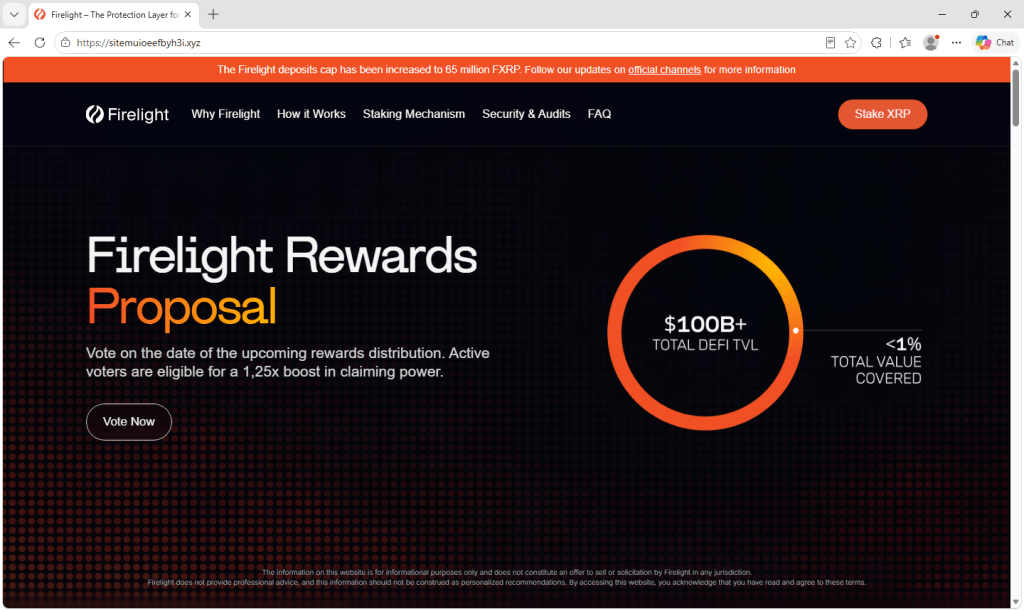
The pages copy the look of the real sites closely, and on most of them the offer is small and believable: Cast a vote, and as an active voter you get a 1.25x boost when the rewards are paid out.
However, the vote is fake and clicking the Vote now button opens a wallet connection prompt. It’s the first step toward requests that could trick visitors into authorizing access to their tokens.
The brands being copied include xStocks from Kraken, Pendle, Zama, Kinetiq, Yield Basis, Firelight, and smaller platforms including Umia, Keeta, and NetNet. None of these pages are affiliated with the projects they imitate.
Copies of familiar brands
Each site is a close copy of the project it targets, down to the logo, menus, and colors. The Firelight copy even carries a real announcement about the protocol’s deposit cap, suggesting the pages were copied from the live sites rather than rebuilt from scratch.
Most use the same wording about voting on the rewards date to earn a boost, though a few vary the pitch. The Pendle copy adds fake dates and a countdown to create urgency, the Keeta copy promises points instead of a boost, and the NetNet copy skips the vote and warns that unclaimed tokens will be burned after 48 hours.
Why these brands
The choice of targets does not appear to be random. Several of the impersonated projects have held a token launch, airdrop, or public token sale within the past year. Others run points or rewards programs. Their communities are used to hearing about rewards, claims, and allocations, and are primed to act on them.
Zama ran a public token auction in January, and its token began trading in February. Kinetiq launched its governance token alongside an airdrop to early users in November 2025. Umia’s token auction ran from August 29 to September 2, only weeks ago. Firelight awards points to early depositors, and Pendle launched on Robinhood Chain on September 4.
A message about rewards from one of these projects would not sound strange to someone who follows it. The lure appears designed to appeal to people who already hold the token or have used the protocol, because they’re the ones who might expect a distribution and want a bigger share.
What happens when you click vote
The Vote button does not lead to a ballot. It opens a Connect Wallet window that is the same regardless of which brand the page imitates. It lists WalletConnect, MetaMask, Trust Wallet, OKX Wallet, Binance Wallet, Bitget Wallet, and Rabby, along with an option to browse more than 28 others.
This window resembles the connection prompts people see on legitimate crypto sites, which may make the request seem routine.
Connecting a wallet on its own shares the wallet’s address, allowing the site to look up its holdings. At this point, it does not give the site permission to spend your tokens.
The damage typically comes from what the site asks for next. In wallet-draining scams, a page may follow the connection with a request to sign a message or approve a transaction, presented as confirming the action the visitor came to take. A malicious approval or signature can give the attacker permission to move tokens out of the wallet without further confirmation.
Blockchain transactions generally cannot be reversed, so stolen funds are very difficult to recover.
Signs of a single operation
Several details suggest a shared operation or phishing kit. All of the domains listed at the end of this article follow the same pattern: sitemu followed by a string of apparently random characters, on the .xyz top-level domain.
The same templates are reused across several different brands, with the text appearing almost word for word whether the page is dressed up as Zama, Firelight, or Yield Basis—right down to writing the boost as 1,25x, with a comma in place of the decimal point. The wallet connection window behind the Vote button is identical across the brands as well.
Random domain names spare the operator the work of coming up with a convincing lookalike address for each brand, and losing any single site costs them little. They also make the address bar one of the clearest giveaways on these pages.
How to protect your wallet
Check any claimed vote or rewards distribution through the project’s official channels before connecting your wallet. A familiar logo is easy to copy.
Check the address, not the design. These pages closely copy the real thing, so branding alone cannot establish that they are genuine. If the domain is not the one the project officially uses, close the tab.
Go to the project directly. If a vote or a reward is genuine, it will be on the project’s official site or announced on its established social accounts. Use a bookmark or type the address yourself rather than following a link from a message, ad, or reply.
Read what your wallet asks you to sign. Voting should not require you to approve spending of your tokens. If a signature or transaction request mentions approvals, permits, or transfers, reject it. Wallets that preview the outcome of a transaction can help, but do not approve a request you cannot understand.
Be wary of boosts, bonuses, and deadlines. Promises of extra rewards and warnings that unclaimed tokens will be burned can pressure you to act before checking.
Keep most of your funds in a separate wallet. Use a wallet with a small balance for unfamiliar sites, and keep long-term holdings in a wallet that you don’t use for those connections.
If you already connected, disconnect from the site. If you also signed a message or approved a transaction, use your wallet’s approval-management feature or a trusted token approval checker to review and revoke suspicious permissions. Disconnecting alone does not revoke token approvals. If you suspect your recovery phrase or private key was exposed, move remaining funds to a new wallet created with a new recovery phrase.
How Malwarebytes helps
Malwarebytes Browser Guard can block known phishing and scam sites before you interact with them. That is useful in campaigns like this one, where the fake page closely resembles the real thing.
If you receive a link to a rewards vote, claim page, or airdrop and are unsure about it, Malwarebytes Scam Guard can help assess the link before you connect your wallet. Check the offer through the project’s official channels too.

 Login
Login