 Login

New RatHat Android malware uses AI to automate device control
A new Android malware called RatHat has been discovered, targeting users with an AI-powered subsystem that helps operators remotely navigate compromised devices. [...]

Researchers at Zimperium’s zLabs have analyzed an Android Trojan that uses an automated, multi-stage infection process.
What’s new is that RatHat gives a live AI assistant the keys to the accessibility tree of the infected device and uses it to determine where to tap or scroll, rather than following a hardcoded script.
The variable attack path makes it harder for signature- and rule-based mobile security tools to detect this Trojan.
It also abuses Android Debug Bridge (ADB), a legitimate tool that lets a computer communicate with an Android device. By turning on Wireless Debugging, RatHat can escape the normal app sandbox.
The infection chain is unusually elaborate for a mobile threat, combining social engineering, accessibility abuse, and remote AI decision-making into a single pipeline.
Other capabilities include intercepting SMS messages, a form of semi-autonomous device control provided by the AI service, and the ability to restore the malicious app after it has been uninstalled using a hidden background program.
Most of RatHat’s tricks depend on convincing someone to sideload an app and grant it accessibility permissions, which means the usual mobile security advice remains the strongest defense.
If your device is infected with RatHat, you will need to perform a factory reset because its persistence mechanism can survive normal app removal.
Scammers know more about you than you think.
Malwarebytes Mobile Security protects you from phishing, scam texts, malicious sites, and more. With real-time AI-powered Scam Guard built right in.
Researchers at Zimperium’s zLabs have analyzed an Android Trojan that uses an automated, multi-stage infection process.
What’s new is that RatHat gives a live AI assistant the keys to the accessibility tree of the infected device and uses it to determine where to tap or scroll, rather than following a hardcoded script.
The variable attack path makes it harder for signature- and rule-based mobile security tools to detect this Trojan.
It also abuses Android Debug Bridge (ADB), a legitimate tool that lets a computer communicate with an Android device. By turning on Wireless Debugging, RatHat can escape the normal app sandbox.
The infection chain is unusually elaborate for a mobile threat, combining social engineering, accessibility abuse, and remote AI decision-making into a single pipeline.
Other capabilities include intercepting SMS messages, a form of semi-autonomous device control provided by the AI service, and the ability to restore the malicious app after it has been uninstalled using a hidden background program.
Most of RatHat’s tricks depend on convincing someone to sideload an app and grant it accessibility permissions, which means the usual mobile security advice remains the strongest defense.
If your device is infected with RatHat, you will need to perform a factory reset because its persistence mechanism can survive normal app removal.
Scammers know more about you than you think.
Malwarebytes Mobile Security protects you from phishing, scam texts, malicious sites, and more. With real-time AI-powered Scam Guard built right in.
Since early May 2026, we’ve been monitoring a large phishing campaign based on T-Mobile rewards points.
The messages falsely warn that a customer’s rewards points are about to expire. They aren’t legitimate account notices: They use urgency, invented point balances, and phishing links to push recipients into acting before they can verify the claim.
A typical message says that a T-Mobile Rewards account holds 18,400 points, gives an imminent expiry date, and states that unused points will be removed under the program’s terms. These details make the message look as though it was written specifically for the recipient, even though it was sent to many people.
“T-Mobile Rewards Points Reminder: Your Points Are About to Expire
Dear Customer,
We are hereby reminding you that your T-Mobile Rewards account points are about to expire. You currently have 18,400 points, which will expire on June 4, 2026, if unused.
Your Points Overview:
Current Balance: 18,400 Points
Expiry Date: {today or tomorrow}
Points will not be recovered after this date.
Redeem Points:
Visit:
https://t-mobile.{rotating domains}.top/pay
Use the T-Mobile App: Account > Rewards & Benefits
Our points expiry policy aims to ensure the fairness of the program and encourage active participation. Please don’t let these valuable points go to waste.
Thank you for choosing T-Mobile.
Customer Service Team”
This phishing operation does not rely on a single, identical SMS. We found more than 1,000 closely related campaign templates with a semantic similarity score of at least 0.60. The 199 closest matches all scored at least 0.95.
This means the variations only change superficial elements, such as the salutation, headline, expiry date, point balance, and whether the message is called a “reminder,” “alert,” or “important update.” The central story remains the same: T-Mobile rewards points are supposedly expiring, and the recipient must follow a link to redeem them as soon as possible.
The messages use formal but generic language, such as “Dear T-Mobile Customer,” “Dear Valued Customer,” or “T-Mobile User,” rather than naming the recipient or providing verifiable account information.
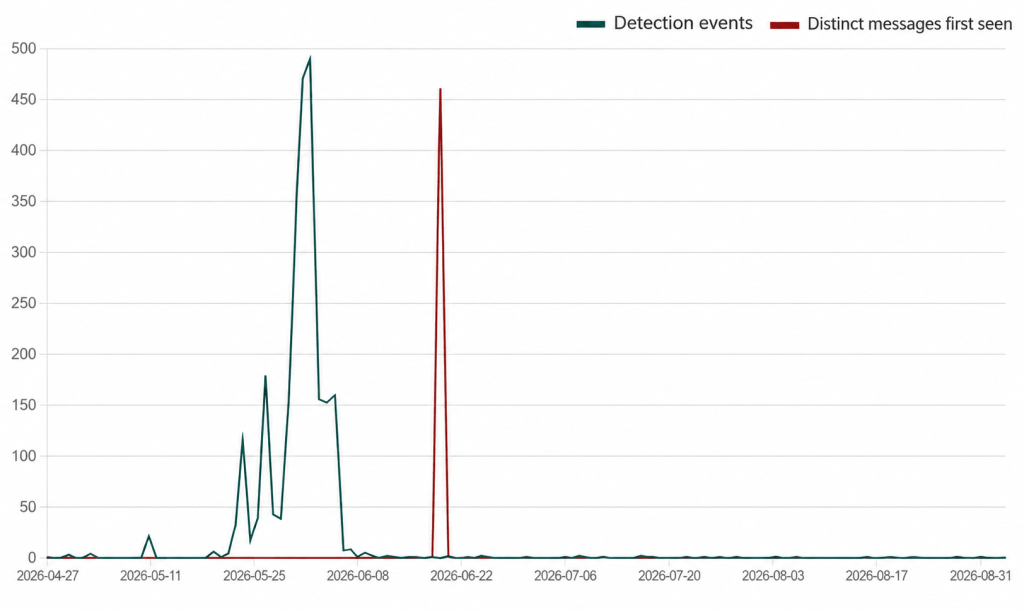
The campaign began slowly before producing two huge spikes in activity. The green line shows detections of message variants seen previously, while the red line shows messages detected on the first day that particular variant appeared. We’re still seeing messages from the campaign, although activity has fallen considerably since those spikes.
The scam relies on a familiar social engineering formula: a valuable-looking reward, a deadline, and a simple action that supposedly protects the customer from losing out. A recipient who has a T-Mobile account may click first and question the message later.
The links use rotating domains designed to look as though they belong to T-Mobile. Their purpose is to persuade recipients to follow the link to supposedly redeem their points. Do not enter login credentials, personal information, payment details, or verification codes after following a link in an unsolicited message.
The anonymized data used in this analysis was gathered through Text Protection in Malwarebytes Mobile Security, which alerts users to potentially malicious or scam text messages.
You can also reduce your risk by following these tips:
The URLs in this campaign are very short-lived. The criminals used at least 81 domains over four months, but the domains follow a recognizable pattern that is blocked in Malwarebytes Browser Guard.
Example domains showing the pattern used by the campaign:
t-mobile.biktpw[.]top
t-mobile.cugbjl[.]top
t-mobile.cymfjd[.]top
t-mobile.gdikxv[.]top
t-mobile.hdzcnb[.]top
t-mobile.koxetp[.]top
t-mobile.nxdcfp[.]top
t-mobile.pkrbai[.]top
t-mobile.qfrhkt[.]top
t-mobile.qscizj[.]top
t-mobile.tmfncb[.]top
t-mobile.vmnqsu[.]top
Stop threats before they can do any harm.
Malwarebytes Browser Guard blocks phishing pages and malicious sites automatically. Free, one click to install. Add it to your browser →
Since early May 2026, we’ve been monitoring a large phishing campaign based on T-Mobile rewards points.
The messages falsely warn that a customer’s rewards points are about to expire. They aren’t legitimate account notices: They use urgency, invented point balances, and phishing links to push recipients into acting before they can verify the claim.
A typical message says that a T-Mobile Rewards account holds 18,400 points, gives an imminent expiry date, and states that unused points will be removed under the program’s terms. These details make the message look as though it was written specifically for the recipient, even though it was sent to many people.
“T-Mobile Rewards Points Reminder: Your Points Are About to Expire
Dear Customer,
We are hereby reminding you that your T-Mobile Rewards account points are about to expire. You currently have 18,400 points, which will expire on June 4, 2026, if unused.
Your Points Overview:
Current Balance: 18,400 Points
Expiry Date: {today or tomorrow}
Points will not be recovered after this date.
Redeem Points:
Visit:
https://t-mobile.{rotating domains}.top/pay
Use the T-Mobile App: Account > Rewards & Benefits
Our points expiry policy aims to ensure the fairness of the program and encourage active participation. Please don’t let these valuable points go to waste.
Thank you for choosing T-Mobile.
Customer Service Team”
This phishing operation does not rely on a single, identical SMS. We found more than 1,000 closely related campaign templates with a semantic similarity score of at least 0.60. The 199 closest matches all scored at least 0.95.
This means the variations only change superficial elements, such as the salutation, headline, expiry date, point balance, and whether the message is called a “reminder,” “alert,” or “important update.” The central story remains the same: T-Mobile rewards points are supposedly expiring, and the recipient must follow a link to redeem them as soon as possible.
The messages use formal but generic language, such as “Dear T-Mobile Customer,” “Dear Valued Customer,” or “T-Mobile User,” rather than naming the recipient or providing verifiable account information.
The campaign began slowly before producing two huge spikes in activity. The green line shows detections of message variants seen previously, while the red line shows messages detected on the first day that particular variant appeared. We’re still seeing messages from the campaign, although activity has fallen considerably since those spikes.
The scam relies on a familiar social engineering formula: a valuable-looking reward, a deadline, and a simple action that supposedly protects the customer from losing out. A recipient who has a T-Mobile account may click first and question the message later.
The links use rotating domains designed to look as though they belong to T-Mobile. Their purpose is to persuade recipients to follow the link to supposedly redeem their points. Do not enter login credentials, personal information, payment details, or verification codes after following a link in an unsolicited message.
The anonymized data used in this analysis was gathered through Text Protection in Malwarebytes Mobile Security, which alerts users to potentially malicious or scam text messages.
You can also reduce your risk by following these tips:
The URLs in this campaign are very short-lived. The criminals used at least 81 domains over four months, but the domains follow a recognizable pattern that is blocked in Malwarebytes Browser Guard.
Example domains showing the pattern used by the campaign:
t-mobile.biktpw[.]top
t-mobile.cugbjl[.]top
t-mobile.cymfjd[.]top
t-mobile.gdikxv[.]top
t-mobile.hdzcnb[.]top
t-mobile.koxetp[.]top
t-mobile.nxdcfp[.]top
t-mobile.pkrbai[.]top
t-mobile.qfrhkt[.]top
t-mobile.qscizj[.]top
t-mobile.tmfncb[.]top
t-mobile.vmnqsu[.]top
Stop threats before they can do any harm.
Malwarebytes Browser Guard blocks phishing pages and malicious sites automatically. Free, one click to install. Add it to your browser →
Google has released its September 2026 Pixel Update Bulletin, fixing 110 vulnerabilities, including one that it says “may be under limited, targeted exploitation.”
The bug is not described as a simple remote takeover, but as a vulnerability that could give an attacker who already has a foothold on a phone more power than they should have.
Although Pixel devices also run Android, they receive separate security updates and bug fixes from the standard monthly patches distributed to Android manufacturers because of the unique hardware platform Google controls directly and its exclusive features and capabilities.
To apply this month’s security updates, Pixel users should go to Settings > Security & privacy > System & updates > Security update, tap Install, and restart their device to complete the update process.
A supported device with the 2026-09-05 patch level is up to date. After updating, check that the Android security update level shows September 5, 2026, or later.
Google says it there are indications that the vulnerability, tracked as CVE-2026-58704, may be under limited, targeted exploitation. Found in the cellular modem, it is a possible permission bypass caused by a logic error in the code. This could lead to remote escalation of privilege (EoP) with no additional execution privileges or user interaction needed.
The vulnerability affects the modem component of Pixel devices and is rated high severity. The modem is the part of a smartphone that handles communication with mobile networks. It allows a phone to connect for calls, texts, and mobile data. Because it is such an important component, a flaw affecting it deserves attention, even if the conditions needed to exploit it limit the number of potential victims.
The vulnerability does not mean every unpatched Pixel can be hacked from anywhere on the internet, nor has Google said that simply being within wireless range of a phone is enough. The available information indicates that an attacker needs access to an adjacent network and basic privileges on the targeted device, but it does not explain how those privileges are obtained.
Attackers commonly need more than one step to compromise a well-protected device. One weakness may give them a limited foothold, while another lets them escape restrictions and gain access to more sensitive functions or data.
This is why bugs like this can be especially useful in targeted operations. An attacker may combine the modem vulnerability with another exploit, a malicious app, stolen credentials, or physical access to the device. Each part of the chain brings the attacker one step closer to compromising the device: getting in, gaining more privileges, and accessing the information or functions they’re after.
While Android users should always install the latest update offered by their device manufacturer, this particular zero-day appears in the Pixel-specific bulletin. Google’s Pixel phones use hardware and software components that other Android manufacturers do not necessarily share, including the affected modem component. If you have another Android brand, you won’t receive this specific Pixel fix, but you should still check for your manufacturer’s latest monthly security update.
Scammers know more about you than you think.
Malwarebytes Mobile Security protects you from phishing, scam texts, malicious sites, and more. With real-time AI-powered Scam Guard built right in.
Google has released its September 2026 Pixel Update Bulletin, fixing 110 vulnerabilities, including one that it says “may be under limited, targeted exploitation.”
The bug is not described as a simple remote takeover, but as a vulnerability that could give an attacker who already has a foothold on a phone more power than they should have.
Although Pixel devices also run Android, they receive separate security updates and bug fixes from the standard monthly patches distributed to Android manufacturers because of the unique hardware platform Google controls directly and its exclusive features and capabilities.
To apply this month’s security updates, Pixel users should go to Settings > Security & privacy > System & updates > Security update, tap Install, and restart their device to complete the update process.
A supported device with the 2026-09-05 patch level is up to date. After updating, check that the Android security update level shows September 5, 2026, or later.
Google says it there are indications that the vulnerability, tracked as CVE-2026-58704, may be under limited, targeted exploitation. Found in the cellular modem, it is a possible permission bypass caused by a logic error in the code. This could lead to remote escalation of privilege (EoP) with no additional execution privileges or user interaction needed.
The vulnerability affects the modem component of Pixel devices and is rated high severity. The modem is the part of a smartphone that handles communication with mobile networks. It allows a phone to connect for calls, texts, and mobile data. Because it is such an important component, a flaw affecting it deserves attention, even if the conditions needed to exploit it limit the number of potential victims.
The vulnerability does not mean every unpatched Pixel can be hacked from anywhere on the internet, nor has Google said that simply being within wireless range of a phone is enough. The available information indicates that an attacker needs access to an adjacent network and basic privileges on the targeted device, but it does not explain how those privileges are obtained.
Attackers commonly need more than one step to compromise a well-protected device. One weakness may give them a limited foothold, while another lets them escape restrictions and gain access to more sensitive functions or data.
This is why bugs like this can be especially useful in targeted operations. An attacker may combine the modem vulnerability with another exploit, a malicious app, stolen credentials, or physical access to the device. Each part of the chain brings the attacker one step closer to compromising the device: getting in, gaining more privileges, and accessing the information or functions they’re after.
While Android users should always install the latest update offered by their device manufacturer, this particular zero-day appears in the Pixel-specific bulletin. Google’s Pixel phones use hardware and software components that other Android manufacturers do not necessarily share, including the affected modem component. If you have another Android brand, you won’t receive this specific Pixel fix, but you should still check for your manufacturer’s latest monthly security update.
Scammers know more about you than you think.
Malwarebytes Mobile Security protects you from phishing, scam texts, malicious sites, and more. With real-time AI-powered Scam Guard built right in.
Researchers at Group-IB found that the Android banking Trojan Gigabud can create a separate work profile on an infected phone and run a cloned banking app inside it. The attacker can then carry out fraudulent transactions in the new profile, potentially separating them from signs of malware detected elsewhere on the device.
To do this, Gigabud installs Vwork, a malicious version of the legitimate open-source tool Shelter. Shelter normally lets Android users isolate apps or run second copies of them in a work profile. Vwork modifies those functions so that Gigabud can control them remotely.
The aim is to clone a target banking app into the new work profile, then let the operator commit fraud there. Group-IB says this can break the connection between malware detected in the personal profile and a risky transaction originating from the work profile, potentially weakening bank-side anti-fraud or in-app malware-detection systems that do not correlate activity across Android profiles.
Android work profiles are normally used to keep work apps and data separate from personal ones. Because apps in different profiles are isolated from each other, a banking app or security tool may not connect malware detected in the personal profile with something taking place in a cloned app in the work profile.
Victims are lured into sideloading a fake airline, tax, or government app through phishing sites, messages, or social media.
To take over the device, Gigabud asks for Accessibility access, overlay permission to display over other apps, and an exemption from battery-optimization. These permissions enable remote interaction and credential-theft techniques such as overlays.
The sideloaded app checks which other apps are installed and tells the operator which relevant banking targets are present.
Fake banking-login overlays steal both banking credentials and the device’s PIN.
The operator installs Vwork, which creates a new work profile on the device and clones the selected banking app. Vwork differs from Shelter in ways that make it useful to malware. It removes protections on cross-profile interaction, exposes components that can be used to set up a profile, clone and list apps, and open apps, and hides its launcher icon.
The operator can then remotely carry out transactions from the newly created profile, with the option to hide activity behind a black screen.
This is how Gigabud turns Android’s profile separation into a fraud tool: after compromising a phone, it creates a second profile, places a cloned banking app inside it, and performs the transaction from there. The result can be a dangerous gap between a malware alert in one profile and a fraudulent banking session in another.
The immediate protection advice is familiar but important:
Sideloading. Install banking and other apps only from the official store or a direct link to the publisher’s website.
Install requests. Treat unsolicited requests to install an APK as a likely scam. If you’re unsure whether something’s a scam, run it through Malwarebytes Scam Guard.
Permissions. Do not enable Accessibility or “display over other apps” for a supposed airline, tax, delivery, or government app. Overlays require explicit user approval on modern Android, so a request like this is a red flag.
Protection. Use an up-to-date real-time anti-malware solution for your Android devices. Malwarebytes detects components of Gigabud as Android/Trojan.Banker.ACR577B2BA2H61, Android/Trojan.Banker.ACRF6CE8D30H46, Android/Trojan.Banker.ACR6C67829FH20, Android/Trojan.Banker.SIB02FFFFFF1112H106, Android/Trojan.Banker.SIB0181193e44H71, Android/Trojan.Banker.AUR2f2f4fb5C95, and Android/Trojan.Spy.Gigabud.xc.
Anyone who has installed a suspicious APK and granted it Accessibility access should contact their bank through a trusted channel, revoke the app’s special permissions, uninstall it, and consider a factory reset after preserving only known-good data.
A second instance of a banking app merits particular scrutiny. A separate work profile by itself is not proof of compromise because work profiles also have legitimate uses. But the presence of a cloned banking app definitely is suspicious.
Scammers know more about you than you think.
Malwarebytes Mobile Security protects you from phishing, scam texts, malicious sites, and more. With real-time AI-powered Scam Guard built right in.
Researchers at Group-IB found that the Android banking Trojan Gigabud can create a separate work profile on an infected phone and run a cloned banking app inside it. The attacker can then carry out fraudulent transactions in the new profile, potentially separating them from signs of malware detected elsewhere on the device.
To do this, Gigabud installs Vwork, a malicious version of the legitimate open-source tool Shelter. Shelter normally lets Android users isolate apps or run second copies of them in a work profile. Vwork modifies those functions so that Gigabud can control them remotely.
The aim is to clone a target banking app into the new work profile, then let the operator commit fraud there. Group-IB says this can break the connection between malware detected in the personal profile and a risky transaction originating from the work profile, potentially weakening bank-side anti-fraud or in-app malware-detection systems that do not correlate activity across Android profiles.
Android work profiles are normally used to keep work apps and data separate from personal ones. Because apps in different profiles are isolated from each other, a banking app or security tool may not connect malware detected in the personal profile with something taking place in a cloned app in the work profile.
Victims are lured into sideloading a fake airline, tax, or government app through phishing sites, messages, or social media.
To take over the device, Gigabud asks for Accessibility access, overlay permission to display over other apps, and an exemption from battery-optimization. These permissions enable remote interaction and credential-theft techniques such as overlays.
The sideloaded app checks which other apps are installed and tells the operator which relevant banking targets are present.
Fake banking-login overlays steal both banking credentials and the device’s PIN.
The operator installs Vwork, which creates a new work profile on the device and clones the selected banking app. Vwork differs from Shelter in ways that make it useful to malware. It removes protections on cross-profile interaction, exposes components that can be used to set up a profile, clone and list apps, and open apps, and hides its launcher icon.
The operator can then remotely carry out transactions from the newly created profile, with the option to hide activity behind a black screen.
This is how Gigabud turns Android’s profile separation into a fraud tool: after compromising a phone, it creates a second profile, places a cloned banking app inside it, and performs the transaction from there. The result can be a dangerous gap between a malware alert in one profile and a fraudulent banking session in another.
The immediate protection advice is familiar but important:
Sideloading. Install banking and other apps only from the official store or a direct link to the publisher’s website.
Install requests. Treat unsolicited requests to install an APK as a likely scam. If you’re unsure whether something’s a scam, run it through Malwarebytes Scam Guard.
Permissions. Do not enable Accessibility or “display over other apps” for a supposed airline, tax, delivery, or government app. Overlays require explicit user approval on modern Android, so a request like this is a red flag.
Protection. Use an up-to-date real-time anti-malware solution for your Android devices. Malwarebytes detects components of Gigabud as Android/Trojan.Banker.ACR577B2BA2H61, Android/Trojan.Banker.ACRF6CE8D30H46, Android/Trojan.Banker.ACR6C67829FH20, Android/Trojan.Banker.SIB02FFFFFF1112H106, Android/Trojan.Banker.SIB0181193e44H71, Android/Trojan.Banker.AUR2f2f4fb5C95, and Android/Trojan.Spy.Gigabud.xc.
Anyone who has installed a suspicious APK and granted it Accessibility access should contact their bank through a trusted channel, revoke the app’s special permissions, uninstall it, and consider a factory reset after preserving only known-good data.
A second instance of a banking app merits particular scrutiny. A separate work profile by itself is not proof of compromise because work profiles also have legitimate uses. But the presence of a cloned banking app definitely is suspicious.
Scammers know more about you than you think.
Malwarebytes Mobile Security protects you from phishing, scam texts, malicious sites, and more. With real-time AI-powered Scam Guard built right in.
