Reading view

Spotting cyberthreats: a guide for blind and low-vision users | Kaspersky official blog

In 2023, Tim Utzig, a blind student from Baltimore, lost a thousand dollars to a laptop scam on X. Tim had been a long-time follower of a well-known sports journalist. When that journalist’s account started posting about a “charity sale” of brand-new MacBook Pros, Tim jumped at the chance to get a deal on a laptop he needed for his studies. After a few quick messages, he sent over the money.

Unfortunately, the journalist’s account had been hacked, and Tim’s cash went straight to scammers. The red flags were strictly visual: the page had been flagged as “temporarily restricted”, and both the bio and the Following list had changed. However, Tim’s screen reader — the software that converts on-screen text and graphics into speech — didn’t announce any of those warnings.

Screen readers allow blind users to navigate the digital world like everyone else. However, this community remains uniquely vulnerable. Even for sighted users, spotting a fake website is a challenge; for someone with a visual impairment, it’s an even steeper uphill battle.

Beyond screen readers, there are specialized mobile apps and services designed to assist the blind and low-vision community, with Be My Eyes being one of the most popular. The app connects users with sighted volunteers via a live video call to tackle everyday tasks — like setting an oven dial or locating an object on a desk. Be My Eyes also features integrated AI that can scan and narrate text or identify objects in the user’s environment.

But can these tools go beyond daily chores? Can they actually flag a phishing attempt or catch the hidden fine print when someone is opening a bank account?

Today we explore the specific online hurdles visually impaired users face, when it makes sense to lean on human or virtual assistants, and how to stay secure when using these types of services.

Common cyberthreats facing the blind and low-vision community

To start, let’s clarify the difference between these two groups. Low-vision users still rely on their remaining sight, even though their visual function is significantly reduced. To navigate digital interfaces, they often use screen magnifiers, extra-large fonts, and high-contrast settings. For them, phishing sites and emails are particularly dangerous. It’s easy to miss intentional typos — known as typosquatting — in a domain name or email address, such as the recent example of rnicrosoft{.}com.

Blind users navigate primarily by sound, using screen readers and specific touch gestures. Interestingly, though, unlike those with low vision, blind users are more likely to spot a phishing site using a screen reader: as the software reads the URL aloud, the user will hear that something is off. However, if a service — whether legitimate or malicious — isn’t fully compatible with screen readers, the risk of falling victim to a scam increases. This is exactly what happened to Tim Utzig.

It’s important to remember that screen magnifiers and readers are basic accessibility tools. They’re designed to enlarge or narrate an interface — not act as a security suite. They can’t warn the user of a threat on their own. That’s where more advanced software — tools that can analyze images and files, flag suspicious language, and describe the broader context of what’s happening on-screen — comes into play.

When to lean on an assistant

Be My Eyes is a major player in the accessibility space, boasting around 900 000 users and over nine million volunteers. Available on Windows, Android, and iOS, it bridges the gap by connecting blind and low-vision users with sighted volunteers via video calls for help with everyday tasks. For example, if someone wants to run a Synthetics cycle on their washing machine but can’t find the right button, they can hop into the app. It connects them with the first available volunteer speaking their language, who then uses the smartphone’s camera to guide them. The service is currently available in 32 languages.

In 2023, the app expanded its capabilities with the release of Be My AI — a virtual assistant powered by OpenAI’s GPT-4. Users take a photo, and the AI analyzes the image to provide a detailed text description, which it also reads aloud. Users can even open a chat window to ask follow-up questions. This got us thinking: could this AI actually spot a phishing site?

As an experiment, we uploaded a screenshot of a fake social media sign-in page to Be My Eyes. On a phone, you can do this by selecting a photo in your gallery or files, hitting Share, and choosing Describe with Be My Eyes. In Windows, you can upload a screenshot directly.
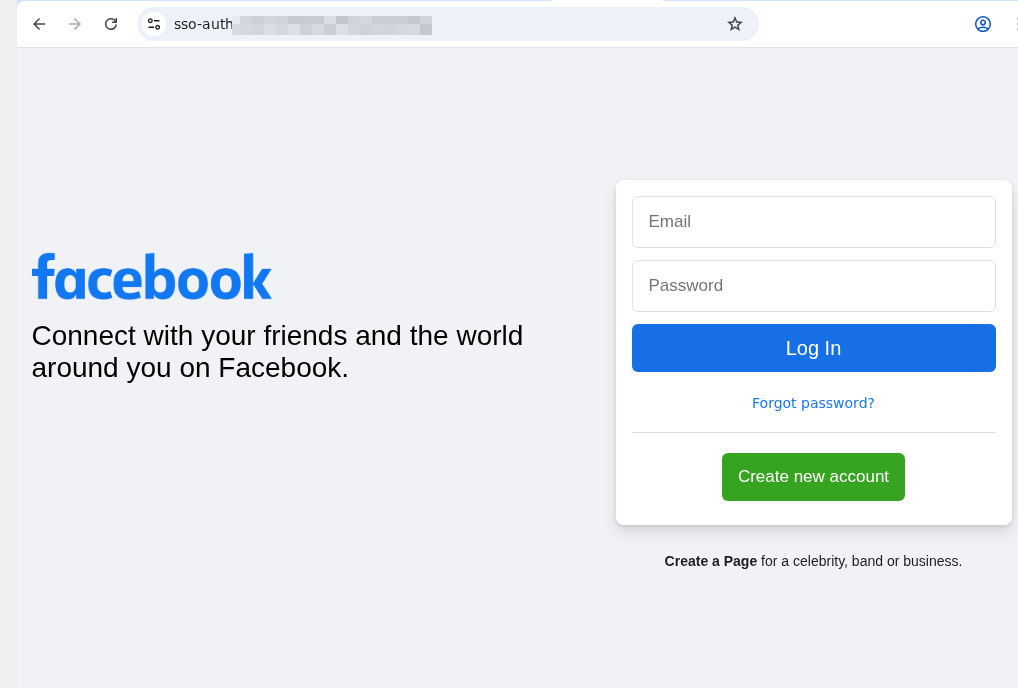
Fake social media sign-in page

An example of a phishing page that mimics the Facebook sign-in form. Note the incorrect domain in the address bar

At first, the AI gave us a detailed description of the page. We then followed up in the chat: “Can I trust this page?” The AI flagged the domain name error immediately, advised us to close the fake login page, and suggested typing the official URL directly into the browser, or to use the official Facebook app.
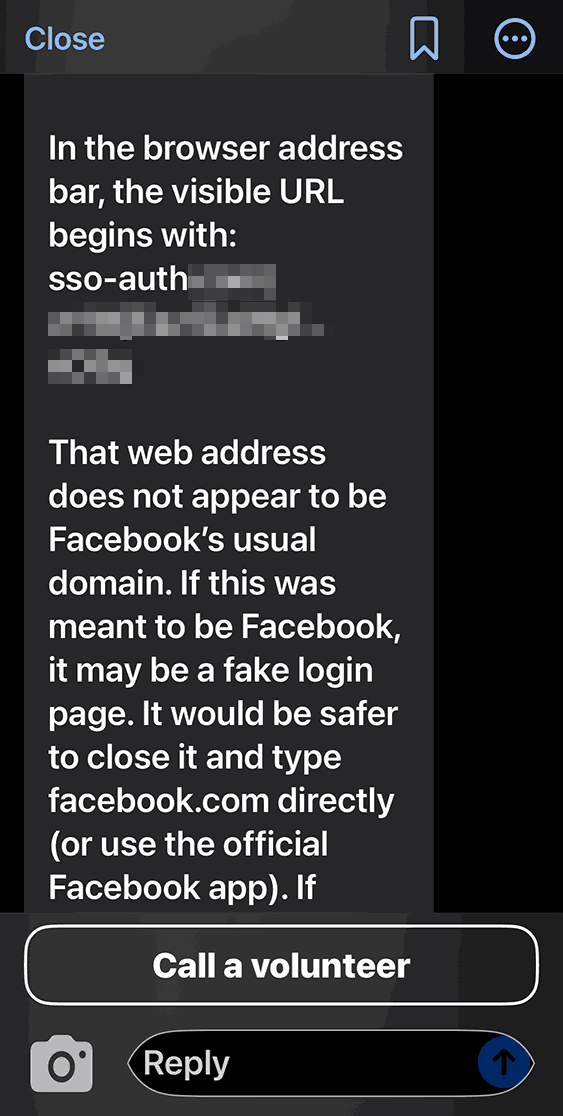
Be My AI response when checking a suspicious site

Be My AI explains why the page looks sketchy: the domain doesn’t match the official site. The app suggests typing the official URL directly into the browser, or using the official Facebook app

We saw the same positive results when testing a phishing email. In fact, the AI flagged the scam during its initial description of the message. It wrapped up with a warning: “This looks like a suspicious email. It’s best not to open any attachments or click any links. Instead, navigate to the official website or app manually, or call the number listed on their official site”.

Beyond just spotting cyberthreats, Be My AI is a solid sidekick for navigating online stores, banking apps, and digital services. For instance, the AI can help you to:

  • Read descriptions, names, and prices when a store’s website or app doesn’t support screen readers or large fonts
  • Scan those tricky terms and conditions — often buried in tiny text or otherwise inaccessible to a screen reader — when you’re signing up for a subscription or opening a bank account
  • Pull key info directly from product cards or instruction manuals

The risks of relying on Be My AI

The most common hiccup with AI is hallucinations, where the language model distorts text, skips crucial details, or invents words out of thin air. When it comes to cyberthreats, an AI’s misplaced confidence in a malicious site or email can be dangerous. Furthermore, AI isn’t immune to prompt injection attacks, which scammers use to trick AI agents beyond just Be My AI.

Even though the AI passed our test, you shouldn’t rely on it unquestioningly. There’s no guarantee it’ll get it right every time. This is a vital point for the blind and low-vision community, as a neural network can often feel like the only eyes available.

At the end of every response, Be My AI suggests checking in with a volunteer if you’re still unsure. However, when you’re trying to spot a fake webpage, we advise against this. You have no way of knowing how tech-savvy or trustworthy a random volunteer might be. Besides, you risk accidentally exposing sensitive data like your email address or password. Before connecting with a stranger, make sure they won’t see anything confidential on your screen. Better yet, use the app’s dedicated feature to create a private group of family, friends, or trusted contacts. This ensures your video call goes to people you actually know, rather than a random volunteer.

To stay safe, we recommend installing a trusted security tool on all your devices. These programs are designed to block phishing attempts and prevent you from landing on malicious sites. Another practical recommendation for visually impaired users is to use a password manager. These apps will only auto-fill credentials on the legitimate, saved website; they won’t be fooled by a clever domain spoof.

How Be My AI handles and stores your data

According to the Be My Eyes privacy policy, video calls with volunteers may be recorded and stored to provide the service, ensure safety, enforce the terms of service, and improve the products. When you use Be My AI, your images and text prompts are sent to OpenAI to generate a response. This data is processed on servers located in the U.S., and OpenAI uses it only to fulfill your specific request. The policy explicitly states that user images and queries aren’t used to train AI models.

Photos and videos are encrypted both in transit and at rest, and the company takes steps to strip away sensitive information. It’s worth noting that video call recordings can be retained indefinitely unless you request their deletion — in which case they’re typically wiped within 30 days. Data from Be My AI interactions is stored for up to 30 days unless you delete it manually within the app. If you decide to close your account, your personal data may be held for up to 90 days. At any time, you can opt out of data sharing, or request the deletion of your existing data by contacting the Be My Eyes support team.

How to use Be My Eyes safely

Despite Be My Eyes’ claims regarding privacy, you should still follow a few ground rules when using the service:

  • Use Be My AI for a first-pass on suspicious emails or pages, but don’t treat it as the only source of truth. Specialized security software is better at identifying and neutralizing threats.
  • If a site, email, or message feels off, don’t touch any links or attachments. Instead, manually type the official website address into your browser, or open the official app to verify the info.
  • Remember: a volunteer sees exactly what your camera sees. Make sure it isn’t capturing things it shouldn’t, like a safe code or an open passport. Avoid sharing your name, showing your face, or revealing too much of your surroundings. Be extra careful about reflections that might show you or your personal details. Only show what is absolutely necessary for the task at hand.
  • Stick to your inner circle. Create a group in the app and add your friends and family. This ensures your video calls go to people you know — not a random volunteer.
  • Don’t use Be My AI to read documents that contain confidential info. Remember, your images and text prompts are sent to OpenAI for processing and generating a response.
  • Remember to delete chats you no longer need. Otherwise, they’ll hang around for 30 days.
  • If you need to read something personal or confidential, consider apps with real-time reading features like Envision, Seeing AI, or Lookout. These apps process data locally on your device rather than sending it to the cloud.


  •  

How to protect your privacy while using smart sex toys | Kaspersky official blog

The smart-home craze has connected everything — from your lightbulbs to your tea kettle — to the internet, and the adult industry isn’t sitting this one out: manufacturers are releasing more smart models than ever. While syncing a sex toy to your smartphone unlocks some cool extra features, it also opens the door to potential security and privacy headaches. The good news? You can significantly lower most of these risks just by tweaking your settings and adjusting your usage habits.

How sex-toy apps actually work

To be clear upfront, while researchers have successfully hijacked sex toys in controlled experiments, the odds of a hacker remotely taking over your vibrator in the real world are pretty slim. In this post, we focus on the more realistic risks: your privacy and the safety of your data.

Most modern adult toys link up with the manufacturer’s app. These apps offer a range of usage options: you can control the device yourself, or hand over the remote to a partner — anywhere in the world via the internet.

Beyond just basic controls, many of these apps have social features: private messaging, group chats, calls, and even video sessions. In fact, you don’t even need a physical device to use some of them; you just create an account. Because of this, some of these services have essentially evolved into niche dating platforms.

The toy and your phone talk to each other via Bluetooth — with minimal risks. To handle social features or remote control, the app connects to a cloud server. This creates a constant stream of data moving back and forth: everything from commands to private messages.

Here’s the catch: even if you only use the app to control your toy locally via Bluetooth, you still get connected to that cloud server. That means you’re inheriting all the security and privacy risks.

The main risks of using sex-toy apps

Sex-toy apps are typically free. In practice, this means the primary way these services make money is by collecting data — which is often excessive. It’s not hard to find buyers of this information; it could be ad services, data brokers, or other companies interested in building detailed user profiles.

Developers of intimate apps suffer from frequent data breaches, and in this sense they’re no different from many other online services that spring a leak regularly. However, unlike a breach at an online pet food store, a data leak from a sex toy app can have much more serious consequences for the user. For sex industry workers, such as those who use webcams, these data breaches pose a direct threat to their physical safety.

Vulnerabilities within the service’s infrastructure warrant special attention. These types of bugs can be exploited by hackers to gain unauthorized access to other people’s accounts.

The inclusion of broad social features essentially turns sex-toy apps into just another messaging platform. However, while we usually know if mainstream messengers use end-to-end encryption, or what vulnerabilities they face, every sex-toy app has to be evaluated individually.

Without end-to-end encryption, user chats may be accessible on the server side. This means that if the service is compromised, the contents of those messages could end up in the hands of hackers. Furthermore, the sex toy manufacturer itself, or its individual employees, could have access to your chats.

Finally, the user’s account and everything in it can be hijacked by bad actors if it isn’t protected by a strong password and, ideally, two-factor authentication.

How to lower the risks when using sex-toy apps

Now that we’ve covered the threats, let’s talk about how to defend yourself. The most obvious choice is to skip installing the app altogether. Thankfully, most sex toys still come with physical buttons — unlike, say, smart mattresses, which often require an app just to function. For those who want the extra features, here are some practical tips for setting up and using these services.

Create an account with a dedicated email address

Set up a separate email address just for registering your account in the intimate app. This should be a “clean” email with no links to any other online services you use. Naturally, the username for this email account shouldn’t include your real name or any other easily identifiable info.

Using an anonymous email protects your reputation if the app suffers a data breach. The risk of this happening is far from theoretical. For instance, back in 2015, a hacking group named The Impact Team leaked the user database of Ashley Madison, a dating site for people seeking extramarital affairs.

To create an anonymous email, pick a service that doesn’t require a phone number at all, or lets you skip that step. Besides your real name, we also recommend leaving out your birth date, your usual social media handles, and any other details that could lead back to you.

Don’t sign up via Google, Apple, social media, or your phone number

The reasoning here is basically the same as the previous point. However, it’s worth highlighting that signing up through Google, Apple, social media, or your phone number is actually just about the worst way to go.

Using Google or social media accounts gives the app permission to, among other things, access certain data from those profiles. In the context of intimate apps, this is especially risky because it creates a direct link between highly sensitive data and your real-world identity.

Keep your real info out of your profile

Once you’re in the app, don’t use any information that could be traced back to you. Come up with an anonymous handle (if you’re feeling uninspired, use a random nickname generator), pick a fake birthday, and choose a random location.

Using fictional info means you don’t have to sweat being outed if the service ever leaks your data. You’re also protecting yourself from stalking, blackmail, and other threats that come with someone being able to pin your real identity to your account.

Hide your face and distinguishing marks when sharing private media

As we’ve mentioned throughout this post, these apps often include social features used for swapping intimate photos and videos. Even if you trust the person you’re chatting with, those files can be saved, forwarded, or used without your consent. When combined with other account info, they can make it easy to figure out who you are.

We recommend never sending intimate media that shows your face or anything else that identifies you — think recognizable home decor, personal items, documents, unique clothing, tattoos, or jewelry.

Set a strong password and enable two-factor authentication, if available

If a hacker breaks into your sex toy account, they’re getting access to your most private data. Because of that, your account needs a rock-solid password. Just to be clear, here’s what we mean by a strong password:

  • It’s at least 16 characters long.
  • It uses a mix of uppercase and lowercase letters, numbers, and special characters (like $ or @).
  • It’s not a real word or a well-known phrase.
  • It’s unique and not reused for any of your other accounts.
  • It doesn’t include personal info that’s easy for an outsider to find.

We also recommend turning on two-factor authentication (2FA) if the service offers it. Your best bet is to use 2FA one-time codes from an authenticator app, as it’s the most secure and completely anonymous option. You can dive deeper into creating and storing secure passwords, as well as different 2FA methods, in our dedicated blogposts.

Grant only the necessary app permissions

Every mobile app asks for permission to access certain features of your phone like Bluetooth, location, your camera, or your storage. Every extra “yes” you give expands the amount of data the app can scoop up.

We suggest being extra cautious about what you let these services see, especially when it comes to sex-toy apps. By tightening these permissions, you cut down on the amount of info that can be collected or shared without your say-so.

Take a second to think about the absolute bare minimum you’re willing to allow a sex-toy app to access. For example, there’s usually no reason for it to track your location or access your camera and mic. If you do want to upload photos, it’s better to grant access only to specific files rather than giving the app the keys to your entire photo library.

Stop apps from tracking your activity

In your iOS settings, you can block apps from collecting data about what you do and linking it to a single advertising ID. This practice, known as tracking, allows companies to stitch together data from different apps, websites, and services to build a comprehensive profile of you for targeted ads or behavioral analysis.

We strongly recommend disabling tracking for all sex-toy apps so that sensitive details about your private life don’t end up as part of your advertising profile.

Unfortunately, Android doesn’t have an exact equivalent for this setting. To minimize data collection on those devices, you’ll need to turn off ad personalization, and manually delete or reset your advertising ID every now and then. You can find more tips on dodging ad tracking in our dedicated guide.

Keep your apps and operating system up to date

Updates aren’t just about shiny new features; they also fix security bugs. Outdated versions of apps and operating systems often have vulnerabilities that hackers are just waiting to exploit.

Staying on top of your updates helps close these gaps, and lowers the risk of data breaches or unauthorized access. To make sure you don’t miss any critical fixes, it’s best to turn on automatic updates whenever possible.

Security is in your hands

Smart sex-toys and their companion apps naturally handle sensitive data, which means they require extra care when it comes to setup and daily use. That said, you can eliminate — or at least significantly reduce — most risks by following basic security rules. Essentially, it comes down to sharing as little personal info as possible with the app and, of course, using a rock-solid password.

Want more tips on keeping your intimate life private in the digital age? Check out these posts:

  •  

Hardening security management console settings | Kaspersky official blog

Companies work systematically to reduce their attack surface. They segment networks, manage vulnerabilities, roll out EDR/XDR, and try to automate their response efforts. As paradoxical as it may seem, they often overlook one massive piece of the puzzle: the security of the very tools managing that entire defense system.

This can occur due to a mental blind spot. It’s easy to assume that, because an organization installed all security solutions needed, it’s safe. In reality, any added software (even security tools) actually expands attack surface. This means those tools need protection, too — starting with hardening them through the right settings.

Why a breached security console is a nightmare scenario

Security tools are only as strong as the system running them. If an attacker manages to break into an organization’s infrastructure and seize control of the security management console, they basically have full rein there. It’s the ultimate skeleton key — giving them direct access to centralized policy management, endpoint monitoring, API integrations, and everything in between.

In this scenario, the attacker doesn’t need to waste time finding clever ways to bypass defenses — all they need do is modify the configuration. With console access, a hacker can skip the hard parts of a breach:

  • They don’t have to scout the network; the console gives them a bird’s-eye view of the entire infrastructure and security architecture instantly.
  • No need to hide their malicious activity — they can simply tweak security policies, kill specific tools, or silence some alerts.
  • Instead of inventing ways to spread the payload to endpoints discreetly, they can leverage the console’s built-in tools for mass software and update installation.

This is exactly why control layer compromise is so dangerous. A proactive cybersecurity mindset isn’t about how many tools are implemented; it’s about how resilient corporate security architecture actually is. If the control layer is the weak link, no amount of hi-tech software can mitigate that risk.

How to protect the security console

On paper, most security management systems already have all the mechanisms needed to beef up protection. The problem? These hardening measures — even basic stuff like two-factor authentication — are often available but not mandatory. Security recommendations get published, but they don’t always get implemented in a consistent manner. Sometimes, they’re just flat-out ignored. Even worse, critical security settings that are turned on by default can often be disabled with a single click —propagating that change to every user instantly. And let’s be honest: people often disable these features in the name of convenience.

In the real world, this means that corporate security ends up relying on an admin’s personal discipline. But discipline can’t serve as an architectural defense mechanism.

The modern approach to protecting the control layer is shifting toward a secure-by-default model. In this setup, critical protections are baked into the base configuration, and the ability to turn them off globally is restricted. Essentially, security stops being an optional feature.

It’s all about removing the guesswork from the security of defensive tools, and shrinking the attack surface at the management level.

How we implement this approach in Kaspersky Security Center Linux

Our products are consistently moving toward a model where critical security mechanisms are part of the base architecture rather than an optional feature. We recently released a new version (16.1) of Kaspersky Security Center Linux, where this architectural shift is built into its core principles — primarily by tightening console access control. Now, two-factor authentication is enabled by default, and the ability to disable it globally has been removed. Before upgrading, administrators must ensure 2FA is enabled for all users, including those working through the Web Console or using OpenAPI automation.

This establishes fundamental protection for privileged access at the console level. It reduces the risk of compromised administrative accounts, protects automation channels, lowers the likelihood of API abuse, and eliminates the vulnerabilities that come from making security optional. In this way, the potential attack surface is reduced specifically at the management control layer.

However, as mentioned before, the problem with most consoles and management systems isn’t a lack of security features, but a lack of systematic control over how they’re used. For example, we often see administrators with excessive privileges or insecure administration server connection settings. We’ve already provided a hardening guide for Kaspersky Security Center that covers these issues in detail, but unfortunately not everyone takes the time to read through deep technical manuals.

That’s why, to make sure no one misses the key points, we’ve put together a structured checklist for hardening Kaspersky Security Center Linux, ver. 16.1. This checklist:

  • Allows to verify that authentication and access privileges are configured correctly
  • Helps identify roles and users with excessive privileges
  • Provides guidance on restricting network access to the console
  • Emphasizes the protection of APIs
  • Strengthens encryption requirements
  • Ensures that auditing and logging are set up properly
  • Reduces the risk of configuration gaps

Essentially, this is a tool for a systematic audit of the control layer. It ensures the console doesn’t become an entry point or a tool for attackers to move laterally through infrastructure. The fewer critical settings are left at the user’s discretion — the lower the risk of error or compromise.

Enhanced authentication and structured hardening of the administration console aren’t just minor tweaks; they represent a more thorough approach to security management. We plan to continue developing this protection layer — reducing the attack surface not just at the endpoint level, but within the management system itself. You can learn more about Kaspersky Security Center on the console page, and the hardening checklist is available on our technical support site.

  •  
❌